Blog

How Computed Columns Can Cause Blocking

The short story: when you add a computed column that references another table, like with a scalar user-defined function, you can end up causing concurrency problems even when people didn’t really want to go see that other table, and that table is locked by someone else.

Here’s my query:

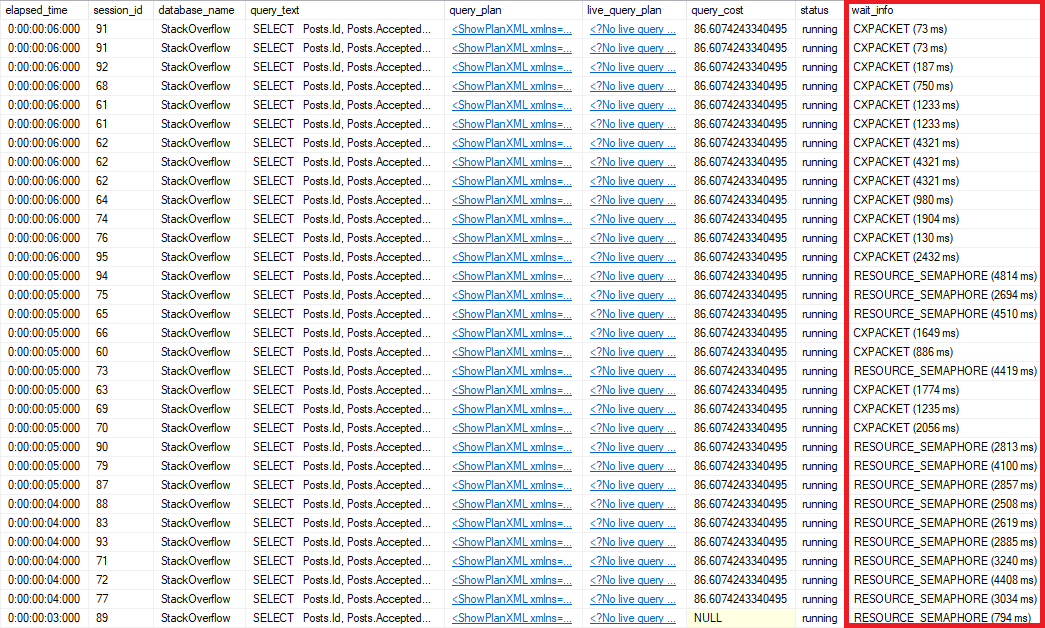
Here’s what I occasionally see when the query runs, using sp_BlitzWho:

Block Party

I’m selecting data from users.

It’s being blocked by an insert into Badges.

There’s weird code running preventing my query from finishing.

What’s The Problem?

Someone had tried to be clever. Looking at the code running, if you’ve been practicing SQL Server for a while, usually means one thing.

A Scalar Valued Function was running!

In this case, here’s what it looked like:

Someone had added that function as a computed column to the Users table:

Abhorrent

I know, I know. Bad, right? Who would ever do this, right?

We get some funny emails.

Now, in the past, I’ve written about Scalar Functions from a performance and parallelism angle here, here, and here.

I can feel the question coming: Can’t I just persist that computed column?

Nope.

Msg 4934, Level 16, State 3, Line 19
Computed column ‘BadgeCount’ in table ‘Users’ cannot be persisted because the column does user or system data access.

Or surely we can index it.

Nope.

Msg 2709, Level 16, State 1, Line 21
Column ‘BadgeCount’ in table ‘dbo.Users’ cannot be used in an index or statistics or as a partition key because it does user or system data access.

Without being able to do either of those things, our function does a couple nasty things to our query

  1. Executes for each row returned to grab the count of badges
  2. Forces it to run serial

Unfortunately, workarounds for the parallelism issue aren’t applicable here, since we can’t persist it.

You Can Guess…

This made all sorts of things like concurrency, locking, and blocking very tricky to figure out.

There’s an expectation that when someone writes a single-table query, their only concern should be that table. If we were to add additional joins, or additional aggregating functions as computed columns to other tables, we’d be making things even worse.

Hiding code like that in a function, and then hiding the function in a computed column may seem like a nice trick, but it doesn’t help performance, and it doesn’t make issues any more clear when you take all these new found SQL skills and run off to your Brand! New! Job! Leaving them as an exercise to the [next person].

And the workarounds weren’t any more pleasant.

  • We could have added a trigger on the Badges table to update the Users table whenever someone got a Badge added.
  • We could have had a process run every so often to recalculate Badge counts
  • We could have made an indexed view to pre-aggregate the data

There’s nothing wrong with any of those in theory, but they’d require a lot of extra development and testing.

Something that hadn’t been done with the computed column.

Thanks for reading!


Concurrency Week: How Entity Framework and NHibernate Can Cause Poison RESOURCE_SEMAPHORE Waits

Development, Memory Grants
6 Comments

I’ve already blogged about my dislike for ORMs from a production DBA performance tuning standpoint only. I get that they’re useful to developers. I get it. But I’m focused on performance.

A quick recap of what I don’t like about ORMs from that other blog post:

  • Implicit conversions due to nvarchar variables vs varchar columns
  • Queries grab every single column, regardless if they are needed or not
    • Expensive key lookups
    • Very wide missing index recommendations
  • The resulting query is hard to read

Though I did mention that they grab every single column, I didn’t mention that this can cause large memory grants which can lead to RESOURCE_SEMAPHORE waits.

RESOURCE_SEMAPHORE waits occur when SQL Server runs out of available memory to run queries.

ORM-style query: Selecting all the columns

Let’s look at an example.

This query grabs all columns from Posts, PostLinks, Users and Comments. In the normal Stack Overflow database without any nonclustered indexes, this query wants an almost 10GB memory grant just to run.

That’s not fair, though – your database indexes are surely very finely tuned – so we’ll give SQL Server a fighting chance with a few helpful indexes to reduce its workload.

However, even with supporting indexes, the query still gets a 325MB memory grant on my server. I’ve certainly seen worse, but it’s enough to simulate the issue. (Brent says: note that the query doesn’t even have an ORDER BY in it, which is my favorite way to get giant memory grants – it would be even worse!)

Nobody notices a 325MB memory grant when it runs by itself – so to show concurrency, I ran the query through SQLQueryStress using 10 iterations and 50 threads.

After it had been running for a few seconds, I checked sp_BlitzFirst.

Look at all those RESOURCE_SEMAPHORE waits.

Some queries are able to run, but many are waiting on memory to become available so that they can START.

This was a 30-second sample, but it too was struggling to run so we got a smaller sample in the Wait Stats section of the sp_BlitzFirst output.

Notice that the average waiting time on RESOURCE_SEMAPHORE is 8784.2 milliseconds. That’s 8.7 seconds. That’s a long time to wait to even start running the query.

Minus the Posts.Body column

Let’s look at the same query but without the Posts.Body column, which is nvarchar(max).

This one gets a 234MB memory grant. That’s 91MB less than the query that includes Posts.Body.

Repeat the test minus the Posts.Body column.

Still seeing RESOURCE_SEMAPHORE waits, but the average waiting time has dropped to 4.5 seconds. Queries don’t have to wait as long in order to get the memory they need to run.

Minus all big columns

Now let’s take a look at the query without the big columns: Posts.Body, Users.AboutMe and Comments.Text columns. Posts.Body and Users.AboutMe are nvarchar(max); Comments.Text is nvarchar(700).

This one gets just a 36MB memory grant.

Repeat the test minus the Posts.Body, Users.AboutMe and Comments.Text columns.

No more RESOURCE_SEMAPHORE waits! Queries no longer have to wait to get the memory they need to run – which also means more memory available for caching data pages and execution plans.

It’s not all good news though. Notice that it says 88 for “Seconds Sample”. I specified 30 seconds for sp_BlitzFirst. I now had a CPU bottleneck. Even sp_BlitzFirst was suffering.

Sometimes when we resolve a bottleneck, it moves the bottleneck to another area. If this were a real-world scenario, I would figure out if there were any other columns that weren’t needed to be returned and then add covering indexes as there are expensive key lookups in the execution plan.

What if I need to return big columns?

Sometimes you need to return really big columns. That’s okay. Return those columns ONLY when you need to. Don’t let your ORM return every single column in each of the tables in the query. Spend the time to return only the columns that are needed for the specific query. Richie shows how to do this in Entity Framework.

Recap

Let’s add RESOURCE_SEMAPHORE waits to the list of why I don’t like ORMs from a production DBA performance tuning standpoint:

  • Implicit conversions due to nvarchar variables vs varchar columns
  • Queries grab every single column, regardless if they are needed or not
    • Expensive key lookups
    • Very wide missing index recommendations
    • Leads to RESOURCE_SEMAPHORE waits
  • The resulting query is hard to read

In the wild

Have you seen RESOURCE_SEMAPHORE waits in the wild? Were they due to big columns or something else? How did you resolve it?


Concurrency Week: Can SELECTs Win Deadlocks?

Deadlocks
0

Yes, especially when they’re part of a larger transaction.

In this example, I’m going to use a database in Read Committed Snapshot Isolation (RCSI), my favorite isolation level for building new applications from the ground up. Optimistic concurrency (aka MVCC) helps avoid a lot of blocking issues – but not all of them.

In a database with RCSI enabled, start by creating two tables:

Then start a transaction that does a lot of work, but don’t commit:

Now start a new tab or window in SSMS – we’re going to start a separate transaction in the same database, but working on Table #2 instead. We’ll call this Window #2 (because it’s 5AM when I’m writing this, and the caffeine hasn’t kicked in yet.)

That query finishes instantly because it’s a metadata-only change in modern versions (even if you set a default, as Remus explains.) Both transactions are getting along just fine right now, not blocking each other, because they’re working on different tables.

Now, let’s cause a deadlock.

In Window #2, where you did just a little bit of work, try to do much more work – but monkey with the table that’s already locked by Window #1:

Aaaaaand nothing happens – he’s blocked because Window #1 already has a lock on those rows. He won’t make progress, and he doesn’t time out. He just sits there waiting patiently.

Now switch over to Window #1 and run a select:

At first, nothing happens – because he’s blocked by Window #2. When Window #2 added a column to Table2, that schema change is a big deal, and it even blocks SELECTs. After all, the SELECT can’t have some of his rows come back without the new column, and some of them with it.

Within 5 seconds, the SELECT wins.

SQL Server’s deadlock monitor wakes up, sees that we have a Mexican standoff. Neither window can make progress until the other window gives up. SQL Server looks at which session would be the easiest to roll back, and kills that session’s work.

Window #2’s UPDATE sees:

Window #1’s SELECT won because in his transaction, he’d already done a lot of work. Window #2 hadn’t done that much – the alter table was a tiny metadata-only change. Sure, he was trying to run an update that would do a lot of work, but he hadn’t done it yet, so he was trivially easy to roll back.

In the past, I’ve often said, “In RCSI, readers don’t block writers, and writers don’t block readers” – but that’s not exactly true, as this demo indicates. However, I’m…still gonna say that, because it’s mostly true. The problem is that the OTHER writing we’d done previously in the transaction is what killed us here.


Building SQL ConstantCare®: Why We Avoided Graphs

When we started building SQL ConstantCare®, one of my early decisions was to focus on a text-based interface. I wanted to just simply tell you what I’d do in your shoes. If users wanted to see more evidence behind the recommendations, I’d show it – but otherwise, I’d hold off and let them ask.

The experience has been really cool – for the most part, folks have just said, “This is really useful, actionable stuff!” It’s also been really neat to watch the number of alerts go down on peoples’ servers over time as they work through the most important easy-to-fix issues, then move on to tougher tasks.

Customers mention graphs –
but only because they’ve been misled.

But from time to time, the subject of graphs comes up – but not in the way you’d expect. It comes in the form of customers saying, “Whoa, I didn’t know that – nothing shows as abnormal or high in my monitoring tool.” Last week, when I was explaining to a customer what their server’s real problem was, they had an ah-ha moment. They forwarded over a screenshot from their monitoring tool to help explain why they hadn’t been able to get to root cause analysis:

Monitoring tool’s wait stats graph

Ouch. The poor user – there was absolutely no way they were going to get anything actionable out of a graph like that. Here’s why:

The units of measure don’t match. One axis is in seconds, the other axis is in hours (or days, depending on how you look at it.) At the very least, they should be in the same time scale – so the reader can say things like, “In 4 hours, SQL Server spent 2.5 hours waiting on stuff.”

Auto-scaling makes interpretation much harder. The graphs automatically re-adjust their axis to make sure that you always have peaks and valleys. If you look at 5 different servers, they all have 5 different sizes for their peak. The only way you can understand if a server is working hard is to jump back and forth between different servers, saying to yourself, “Alright, this one’s peak is at 80,000, but this other one’s peak is at 800,000, so I guess this other one is worse off.”

Poison wait types aren’t called out. Some wait types like THREADPOOL, RESOURCE_SEMAPHORE, and PREEMPTIVE_DEBUG are truly catastrophic even when they’re in small numbers, and they indicate issues you need to work on first. In the case of the bar graph above, the customer was facing THREADPOOL poison waits – the SQL Server service seemed locked up and unresponsive – but they looked in their monitoring tool and nothing showed up as problematic. (And no, those times when you see the huge spikes? That’s not when their performance emergency was happening.)

When wait types are called out, they mislead the reader. Classic example from the above product – when the user breaks out the list of wait types, they see which queries are having the wait, not the ones causing the wait. When a query is waiting on THREADPOOL, it’s not because there’s something bad about that query. The problem is the other queries that are consuming so many other worker threads – often unnecessarily. The poor end user is led down the exact wrong path.

Finding the real root cause with that kind of tool is like trying to find a needle in a haystack – except the needle is yellow, and all the hay has been cut down to needle sizes. You’re gonna get pricked.

All of the above is fixable – sure, you could design a monitoring system with graphs that led you to the right solution instead of actively obfuscating it away from you. Heck, even just the act of me posting this blog post is probably going to influence a developer somewhere to say, “Whoa, we need to make that graph more understandable” – and hopefully they’ll get that fixed.

Instead, we focused on simple task-based emails: we analyze the metrics, and we tell you in plain English what you should do. You can see a couple examples of ’em over at the product page.

I do watch one chart with extreme happiness, though: last week, we blew past 600 servers. That’s one chart where I look forward to automatic scale adjustments.

SQL ConstantCare population as of 2018-04-19

Want us to help you decipher all your database’s confusing metrics and mentor you into faster, more reliable SQL Servers? Join the 300+ folks who’ve signed up already.


[Video] Office Hours 2018/4/18 (With Transcriptions) with Special Guest Drew Furgiuele

Videos
0

This week Drew Furgiuele joins Brent and Richie to discuss patching, job interview suggestions, using PowerShell to solve various SQL Server issues, roles and responsibilities of a SQL or a database architect, enabling query store on production servers, SARGability, moving SSRS from the main production server, tempdb issues, Availability Groups troubleshooting, Drew’s upcoming Powershell class, and more.

Here’s the video on YouTube:

You can register to attend next week’s Office Hours, or subscribe to our podcast to listen on the go.

Enjoy the Podcast?

Don’t miss an episode, subscribe via iTunes, Stitcher or RSS.
Leave us a review in iTunes

Office Hours – 4-18-18


Should I apply patches to all the nodes at the same time?

Brent Ozar: Richard says, “When I’m doing monthly Windows updates on a failover cluster, should I update each node and then wait for a few days, then update the next one, or should I just update everything all at exactly the same time?” Drew, how do you guys deal with patching over there?

Drew Furgiuele: You know, we’ve gone through all kinds of different ways of administering patches, like, at least where I work. I mean, we used to do WSUS and we tried System Center. Now we use a third-party solution. But if I can stomach the downtime, I like to do it all when I can, just because if, god forbid, I do have to failover – because we had an instance one time where some patches got applied to a SQL Server, system level patches and SQL level patches, which we like to do separate. But for whatever reason, they all went at the same time and we were noticing that the failover wasn’t behaving very well because it was taking a long time for it to start up, or it wouldn’t start up because the system databases got patched to a higher version, even though it was all SQL Server 2008R2.

So we got into this weird situation where, like, we were running on two different CU levels and it got really dicey. So if we patch in a window where I know I can take the extra little bit of downtime with the failover, that’s what I like to do.

Brent Ozar: I’m one of those where I’ve been burned enough by updates. I’ll usually try and do like half of them on one weekend and then wait and see if they bake out and shake out and then do the half the next weekend. But it makes your workload higher not lower. It depends on how much downtime you’re allowed to take too.

Drew Furgiuele: Right, it’s like you’ve got to have two windows to do it at that point, unless you do the failover ahead of time and depending on how tolerant your apps or your business processes are to that – I mean, I think it really depends on the person.


I have an interview tomorrow. Any suggestions?

Brent Ozar: Niraj has an interesting question and it’s awfully open-ended.  Niraj says, “I have an in-person interview tomorrow morning; any suggestions?”

Richie Rump: Show up.

Drew Furgiuele: Yeah, if you’re not early, you’re late is what I would say.

Brent Ozar: Brush your teeth. Don’t wear a suit unless you’re interviewing at a financial company. That advice is dead and gone. I think that’s…

Richie Rump: Good call. I mean, talk to the HR person and say, well what should I wear? What’s the proper attire for your environment?

Brent Ozar: It was good that Richie asked us on ours because I said a leather clown suit and he said formal or informal.

Richie Rump: I’m like, what color…

Drew Furgiuele: I think it also really helps to know, like where you’re applying, what’s the business do, what market are they in, just so you have some base understanding about what you’re getting into.

Brent Ozar: And you can Google for – usually, if you Google for their HR department, they’ll have pictures – for larger companies, they have pictures of the office and you can see what people wear. You can see what kind of environment it is.


How should I keep users synced between AG replicas?

Brent Ozar: Next up, Augusto asks, “I would like to know the best practice…” You came to the wrong room, “In order to keep users in an Always On environment synced between the principal and any replicas.”

Drew Furgiuele: Well, I mean there’s lots of different ways to do that, right. I mean, you can use good old-fashioned T-SQL scripting. You can set up automation through, of course, PowerShell, but look at user principals that exist on both servers, do a compare, find out what’s missing. I don’t really have a lot of AGs that I administer. In all that I’ve done with it, that’s how I’ve approached it is I just have a basic compare of what’s there. And with PowerShell, if you’re able to create custom objects and read in those permissions, you can do things like compare object and see where the differences lie.

Brent Ozar: Instead of dumping them all and redoing them every time.


I’m getting 15-second I/O warning errors…

Brent Ozar: Oh, Pablo says, “I’m getting I/O requests that take longer than 15 seconds.” Notorious – I keep saying I’m going to write a blog post about that. His principal wait in SQL Server is write log waiting to write to the transaction log and his applications are getting timeouts expired. “Can PowerShell help me look for disk issues?”

Drew Furgiuele: You know, it’s funny…

Brent Ozar: Not really…

Drew Furgiuele: Not really, like, there’s some code out there that can help you look at different wait statistics, but it’s not going to be able to give you a smoking gun, just like any other kind of wait statistics query might do. You can use that to aggregate this stuff over time so you can see if it’s time-based or if you want to collect it and look at it over historical periods of time if you don’t have access to a fancy expensive monitoring tool.

But as far as helping alleviate that stuff, I’m going to leave it to the real experts on this webcam.

Brent Ozar: Unfortunately they didn’t show up today… I think you nailed it with you know that your top wait is write log and you’re getting 15-second I/O warning waits. I don’t know how much more conclusive you can be from the SQL Server side. Now is when I would turn around and play with – CrystalDiskMark is a utility that will help you just quickly run a speed test. And you run CrystalDiskMark against your laptop, you run it against the SQL Server C drive, you run it against where the data and log files live and it will get you just a quick sanity check on does my storage suck completely or is it vaguely in line with a consumer grade laptop.

Most of the time, when I see 15-second I/O warning errors, if I even plug a USB into my laptop I can get faster throughput on a USB thumb drive than I can get from the storage. It really happens a lot under virtualization.


How does Drew use PowerShell to manage storage?

Brent Ozar: I’m going to ask a related question though because when we talk about PowerShell and storage – Drew, I’ve heard you talk about what you do with your snapshots in Pure Storage. So talk a little bit about how you use PowerShell with that.

Drew Furgiuele: Yeah, so where I work, we have a ton of different non-production environments and one thing we got in the habit of doing was we have a set schedule where we refresh our non-production environments and before we had access to fancy Pure Storage – free plug for them because they’re great – we were doing traditional restores and it was like, alright, it’s Friday afternoon, we’re going to shut down int and dev and con or whatever. We’re going to do the refreshes, they’re going to run for however many hours to restore those databases and then hopefully when we come in Monday morning, everything worked and we’ll reapply permissions.

So when we switch to the Pure Storage array, they have the concept of volume based snapshots. So you can set up automation around that because it has a complete PowerShell API tied to it where you can connect to it, set up scripting, to say take a new snap, you know, present it to this host, mount it on this disk and then attach these databases, apply permissions, any other kind of post scripts you need to run to prep your databases for non-production.

And that’s what we do now. And our restores went from taking an entire weekend, kind of worst case, obviously, now I can do basic on-demand refreshes that take less than a minute and for multi-terabyte databases in multiple servers. It’s fantastic. And I know that other storage providers also have that, but I’ve seen Pure do it and they just do it right, like, big fan.

Brent Ozar: And I think – you kind of have to be a new vendor. You have to come up with all new stuff and go, alright I’m going to have new approaches as to how I’m going to do this and embrace things like PowerShell.


What does a database architect do?

Brent Ozar: Sree asks – and this is a good one for Richie – Sree asks, “What are the roles and responsibilities of a SQL architect and or a database architect?”

Richie Rump: Ooh, well we really make a lot of coffee, we, I don’t know, have a meeting or two and we go home. I mean, what else do we do?

Brent Ozar: I wouldn’t say anything about documentation.

Richie Rump: What the hell is that? Mainly, database architects will get around – talk to the business a lot. So they know a lot about the business and how the business works because they need to understand, really, the intricacies of how everything works so they can properly model it in the database. So that is, in essence, what a data architect does; understands the business enough to know how to properly model into a database where it’s fast, it’s efficient and it does what the business needs it to do. So in the days of NoSQL now, that’s kind of changed a little bit because a lot of these NoSQL databases, you don’t need models anymore, they’re all just kind of thrown in there.

So you can kind of move very willy-nilly. That has its own set of challenges as is, but mostly that’s kind of what we do. We understand how the, kind of, gotchas of a database engine and what kind of modeling we need to do. I remember, there was one project that I was doing that I had one of my guys help with a lot of the architecture and he did a fantastic job. I mean, he really knew his stuff and we pulled out database patterns and we did some other stuff and [thaw fluid] in there and the database was pristine. It was great except when we threw the ORM on top of it. It crapped out a log and it just made everything super slow, of which we had to change the architecture of the database so that the ORM would be faster and just work right.

So a lot of times, we do our job as database architects really super well. Sometimes too well, where the application itself doesn’t keep up with what we’re trying to do. So there’s a balance there and there’s a give and trade to kind of everything we do as database architects. And what if we do this? Well, there’s something over here – and there’s always that. we’re trying to find that middle ground when we’re doing that. I mean, I guess I could go for another hour; are you okay with that? Start pulling books out and…

Brent Ozar: Well I was going to say – like for example, I know we’ve had customers come to us and say, “You have a data architect in the form of Richie; can you just come in and architect a database for us, like tell us what we need?” I’m like, well there’s so much back and forth conversation with the business and understanding what the application is. You want that guy on your team for good, you know. If you bring in a consultant for it, you’re basically writing them checks for the rest of your life because they’re going to build up all this knowledge about your business and you’re going to wish you had that in-house instead of being held hostage by an outsider.

Richie Rump: You mentioned documentation too and that’s a big part of it as well. A lot of – from what I understand, a lot of database architects, all they do is come out with the ERD and that’s it. So you have a data model and that’s all you get. But I’ve always found that the best data modelers also do a lot of business documentation, whether that’s business process flows or whatever that is. So all that is down, so then you could actually say, hey here’s my business flow and here’s how it maps into my data flows, and it all kind of goes that way.

Drew Furgiuele: Database architect doesn’t really get thrown around a lot where I work, but we have a lot of people who refer to themselves as data modelers. I guess it kind of works in the same vain. And ironically, the same person that helped model a lot of the stuff that we do is also the person who helped me embraced ORMs. So John Kruger, if you’re listening, you take credit for that.

Brent Ozar: And that always comes up on the blog. I’ve been talking about writing a blog post for a while too. There’s people who bash ORMs all the time. There was a blog post on Hacker News recently that Richie and I were looking at and people come out in droves, like ORMs suck. Everyone should know exactly how to write T-SQL. I’m like, we don’t have time, you know, you’ve got to ship products, you’ve got to ship features.

Richie Rump: And the other thing is that who’s writing the SQL? When I was a manager, that was my big question, who’s writing the SQL and do the people that will be writing the SQL, do they know SQL? Whether that’s the DBA, maybe it comes from the administration and doesn’t have a strong SQL language background, or if it’s developers who don’t have a strong database background. So who does that leave, really? Who’s writing the SQL that’s tight and does get to what it needs.

How many times, Brent, have we gone to clients and they’re missing where clauses? I mean, just the base level simple things and they’re missing all this stuff. So ORMs kind of prevents a lot of that. Now, as opposed to me understanding SQL, I just have to understand my language and I can focus more on business stuff. Now we’re talking about benefits and tradeoffs there. ORMs inherently, they’re not bad; it’s how they’re used that’s bad.

Drew Furgiuele: I mean, it’s like nuclear power; it can be used for good and evil and you don’t want to get any on you.

Brent Ozar: I thought for sure where Richie was going to go was it depends on the quality of the person writing the SQL because I’ve had several check-ins into our own products where I’ve written queries for the wrong language. I’m like, oh this is perfect T-SQL – it doesn’t even work in Postgres.

Drew Furgiuele: I have a whiteboard that I keep track of how many times you break the build and announce it via Twitter.

Richie Rump: Well we have the opposite; how many times Brent didn’t break the build and that’s when it’s announced.

Brent Ozar: I think one. I think I’ve had one build or two builds go through.

Richie Rump: Full disclosure, it really is not Brent’s fault. It’s not…


What’s the impact of Query Store on performance?

Brent Ozar: Turge asks, “Do y’all have any experience with the performance impact of enabling Query Store on production servers?” Drew, have y’all turned on Query Store on yours?

Drew Furgiuele: You know, we haven’t – it’s not something we’ve fully embraced yet because we have such a mish-mash of SQL versions. We have a couple of 2016 instances. We’re in the process of thinking about upgrading some to 2017, but we don’t have any kind of plan to do that right now. I’d like to, but it’s not something we’ve turned on. I mean, I know there’s a lot of people that have done a lot of good case studies about what you should or shouldn’t do. I’m not one of them, but I’d love to turn it on and watch plans evolve over time because we do have some pretty in-depth stored procedures for stuff that run and I would love to be able to track that stuff.

Brent Ozar: I’ve seen – what Microsoft initially touted was something like a 1% to 3% overhead. And the way I always feel about it is it’s a lot like a car’s dashboard. If you want to know how fast you’re going, you need a speedometer. And the weight of a dashboard and a speedometer and all that slows your car down a little. But if you don’t have a dashboard, you don’t really know how fast you’re going. So people are just like, it feels fast or it feels slow. So if you need to know which queries are performing better or worse, then you want to turn this on. I would just say, make sure that you’re on a recent cumulative update of either 2016 or 2017 because they fixed a lot of bugs in Query Store over the last three, four, five months.

Drew Furgiuele: And part of that too is with the monitoring tools we have, we can actually see degradation in similar statements over time. So it seemed to me like it’d be kind of redundant, but at the same time, I know what it has and what it offers.

Brent Ozar: Y’all use SQL Sentry or what do you use?

Drew Furgiuele: Yeah, we’re Sentry One customers and they have the ability to kind of see different statements. And they put on a nice little chart about how they’re performing over time.

Brent Ozar: And it works with any supported SQL Server version. It’s not like it’s just 2016 or newer.

Drew Furgiuele: Right.

Brent Ozar: That was my feeling with Query Store is it’s wonderful for people who don’t have a monitoring tool already and that also are on 2016. So if you fall into those two categories, 2016 or 2017. It’s a smaller audience. Most of the people who needed that kind of monitoring already got it with third-party tools.


How should I set a variable to the beginning of a day?

Brent Ozar: Let’s see – the last one in the queue – if anybody has other questions, otherwise we’ll close the webcast over this one, so feel free to get your questions in, otherwise we’ll bid you adieu. Colin says, “There are 100 ways to set a date time variable to the beginning of the day…” Oh, I love that. He has a method in there using convert date time, flipping it over into a date field. “This way seems super simple and straightforward to me. What are the downsides?” The big one on that one is SARGability.

SQL Server may look at that function and go, “I have no idea what the hell is going to come out of this.” So it also depends on whether or not you’re seeking for it, whether you’re just rendering it as report output; all kinds of things. If I’m going to set it as part of a search, like in a where clause, I’m usually going to set a variable either outside in my app somewhere and then set it that way, so that when SQL Server builds the execution plan, it sees a parameter with the exact date that you’re looking for. Otherwise, if you set an internal variable into your code, you can end up using the density vector, which will get you wacko statistics for how many rows SQL Server is going to come back with.


How hard is it to move SSRS?

Brent Ozar: Let’s see – anon says, “How difficult is it to move SSRS off your main production server? Assume I have no help, no third-party tools and can have little or no downtime.” Damn, wow.

Drew Furgiuele: All I know about SSRS is you want to backup your keys. That’s all I know. Like, that’s the only way you can move stuff is to backup your keys from SSRS. I think as long as you do that, you can pretty much do whatever you want.

Brent Ozar: I would say, if anything, you put it behind a load balancer too, so you put – if you have any kind of F5 or any kind of load balancing type tool, that you first start by pointing everyone at the load balancer and then put your existing 2008 behind the load balancer, just so that that way, whenever it comes time for the cutover, you can do that with little to no work. Plus later, you can add in multiple reporting server VMs if you want to for high availability too.

Drew Furgiuele: Yeah, and the bigger question is – I don’t think you lose anything going from 2008 R2 to 2014, but I have no idea. That would be the other thing; what’s going to break?

Brent Ozar: And I’d also ask what you’re going to gain too. SSRS isn’t terribly resource intensive. It doesn’t use that much memory. It uses some but it’s not as bad as, like, integration services or analysis services, which are total pigs. Not that they’re bad; they’re great applications. I’m just saying they use a lot of resources. But make sure that there’s a bang for the buck on the other side too, just that you’re going to get something out of it.

Richie Rump: Yeah, I mean, if you’re going to use new hardware on it, you might as well move the main production server over there rather than SSRS. But if you’re moving to like a small VM or something like that, no, don’t do that; that’s no good.

Drew Furgiuele: And ultimately, it’s where the queries run, right. So like, you know, it doesn’t matter where SSRS runs; it’s going to connect to an instance and run a big SELECT*. It doesn’t matter where that happens.

Brent Ozar: Anon adds on, “Our team’s split and the reporting team is now in a different organization.” Ah politics. In that case, it’s their problem. You go, you stand up the server whenever you want and I’ll give you the data.

Brent Ozar: Marci says, “We have always run reporting services analysis services on their own servers and over the years we’ve gone from 2008 to 2014 without anything breaking and the report builder version is always improved with the latest, so just stand it up and see.”

Brent Ozar: Brian also adds, “I just restored my supporting services databases to the new instance and then fixed the data course pointers prior to going live.” They keys is the other one to keep in mind there; any kind of encryption keys on SSRS.


How many TempDB files should we use on a VM?

Brent Ozar: Adrian says, “We use VMware and we’re trying to figure out whether or not we should use one data file per socket for tempdb or one data file per core – like how many tempdb files do I have?” And he says at the end, “I have super high latency.” So I think he’s thinking that more files are going to help him in terms of latency. Drew, when y’all set up new tempdb data files, how many users per server?

Drew Furgiuele: Well we’re a VMware shop and I typically go, if my server has eight CPUs or eight VCPUs or less, I tend to go eight files. If it goes any bigger than that, I kind of see diminishing returns, but that’s just my experience. I haven’t really seen any tempdb contention over that. Now granted, like, we don’t have any super powerful VM SQL Servers, although we did just get some new hardware. I think our biggest virtualized CPU in a cluster is probably eight VCPUs per. But even then, if it was bigger, and maybe it is a little bit bigger than that, I still think I only went eight. And I think I saw that advice somewhere.

Brent Ozar: Yeah, that’s in our setup checklist too. I’m fine with – some people will tell you four, some people will tell you eight, either of those numbers is fine. And in terms of more files helping you with file latency, that’s probably not going to happen. I would go check CrystalDiskMark. Just got run CrystalDiskMark for a quick rule of them test against your I/O and run it against your desktop and compare to see the two differences. Then prepare to open sadtrombone.com.


Where are Drew’s scripts for his GroupBy presentation?

Brent Ozar: Teschal says, “Drew, do you have the scripts that you presented on GroupBy? I watched but I couldn’t find the scripts.”

Drew Furgiuele: Yeah, so man, it’s been a while since I presented on GroupBy, but my GitHub – it’s a ridiculous last name, so the easiest way to get there – it has my last name in the URL. If you head over to my website, which is port1433.com – over on the right-hand side there’s a little Git Hub icon, on the right, a little octocat. If you click on that guy, that will take you to my repositories and any publically available code that I’ve shared has been there. So you click that little guy – those icons could admittedly be a little bit bigger, but I’m not the designer. So if you click there, that will take you over to my repositories. And like I said, any publically available code that I’ve ever done is on there. Richie, you should really upgrade IE…

Rocky, Drew’s partner in crime

Brent Ozar: And who is this adorable little creature here with the bowtie on?

Drew Furgiuele: That’s Rocky, who is actually behaving himself right now. Usually, he’s down here all up in my business, but that’s Rocky. He’s my little monster.

Richie Rump: Are you using DotNetNuke for your website?

Drew Furgiuele: Nah, WordPress.

Richie Rump: I’m trying to find that guy who’s always using DotNetNuke. I’ll still look.


SadTrombone.com actually exists

Brent Ozar: And then Michael Tilley says, “Holy crap, there actually is a sadtrombone.com.” Of course, there is.

Drew Furgiuele: There’s also the auto-play version, which is the one you need to send people.

Brent Ozar: Yes, why does that not work? Google Chrome, it’s trying to plug – I hate Internet Explorer so badly. So anyway, any-who, back over to the PowerPoint, put that backup and go back to the questions list. That teaches me for trying to surf the web on a crappy version of internet explorer.


Why isn’t my AG working correctly?

Brent Ozar: Mark asks, “I’m adding a database to an existing Availability Group. For some reason, the secondary files are not going to the same drive and location as the primary – they’re going to a default folder. Do you have any idea why this is happening?” Drew, do y’all use Availability Groups?

Drew Furgiuele: We don’t because we don’t use Enterprise Edition. Although I know we can use basic AGs now, but we don’t use them. We’re a traditional Failover Cluster group right now, although we are getting to that point where we’re exploring a lot of new DR stuff for this coming year and we’re going to start moving to that stuff with some remotely available stuff. But that’s a weird question. And forgive me, but is that, I think you said the default directory when you install SQL, right?

Brent Ozar: Yeah, I bet money that when you’re restoring the databases without using the with move commands to move those databases somewhere else. If you’re restoring the databases manually as opposed to going through the GUI or using direct seeding, which will just automatically do it for you. If you do manual restores, you have to specify where you want the data and log files to go. And the folder structure needs to be identical across all of your replicas, otherwise, whenever you add a data file or log file on the primary, it will break if that folder doesn’t exist, drive letter or folder doesn’t exist over on the secondaries; your replication will stop working.

Mark follows up with, “We’re using the GUI to do it automatically and the folder structure is identical.” In that case, I would actually post it, but I would post with screenshots. Do as many screenshots as you can on dba.stackexchange.com because you might have found a bug. I don’t think you did, because I’ve done this a bunch of times myself, but it’s possible that you found a bug and other people will see it when you go over to dba.stackexchange.com.

Update: in this week’s 2017 Cumulative Update 6, Microsoft released a patch that might solve this problem, too.


Drew – what’s your PowerShell class about?

Well, thanks, everybody for hanging out with us this week. Drew, before we go, we should say your upcoming training class – tell us a little bit about what you’re teaching and who’s the target audience for it.

Drew Furgiuele: Yeah, so this will be kind of the third go-round of this class. It’s PowerShell for DBAs, hosted by the fine folks at Brent Ozar Unlimited, and it’s targeted at people who have a desire to learn PowerShell and how it can be used to administer things like SQL Server. So it’s a two-day class. For signing up and joining it, you get access to a VM for both days and we start out at the base level. We talk about how to do simple things like declaring variables in PowerShell and doing basic scripting actions and then day two, we move into how you connect to SQL Server, how you can script things out, how you can automate things. Really a lot of fun to present. It’s been really good. People seem to like it to hopefully you guys, if you have desire to learn that stuff, you can now learn with me.

Brent Ozar: Absolutely. Marci says, “Do you have a link for the class?” Yes, if you go to brentozar.com and right on the homepage there’s a list of classes. You can see Drew’s shiny happy face smiling. When’s the next one, like June I think?

Drew Furgiuele: It’s like the last week of June, I think.

Brent Ozar: Sounds right. Alright, well thanks everybody for hanging out with us this week and we will see y’all next week on Office Hours. Adios, everybody.


Does an Index on Just The Clustering Key Ever Make Sense?

Indexing
10 Comments

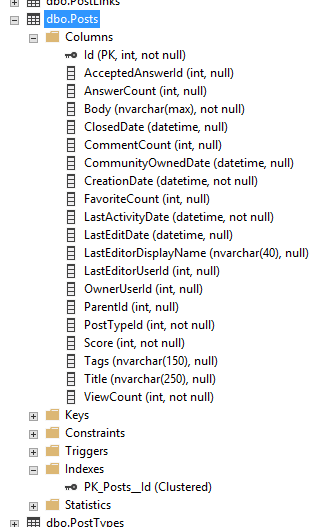
Say you’ve got a table – in this case, I’m using the Stack Overflow Posts table, which holds all of the questions and answers:

StackOverflow.dbo.Posts

See the clustered index at the bottom? It’s on the Id field, which is an identity – starts at one and goes up to a bajillion.

So it would be really stupid to do this, right?

Why would someone ever create yet another index on Id when you already have the clustered index? I’ll show you why:

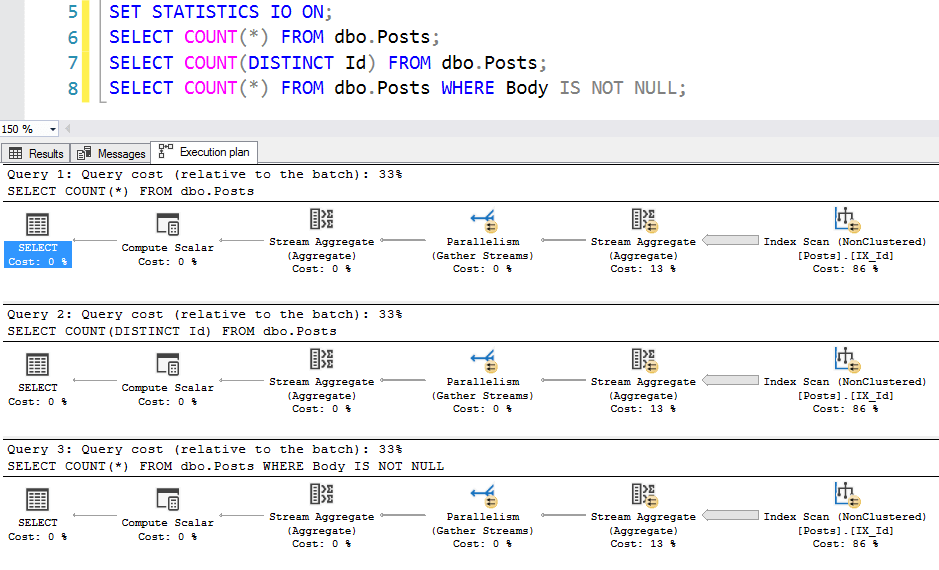
Here are the execution plans – all 3 of which use our Id index:

Scantastic

The performance differences are pretty eye-opening:

  • Clustered index scan: 50 seconds, 7,736,170 logical reads
  • Nonclustered index scan: 0.5 seconds, 36,767 logical reads

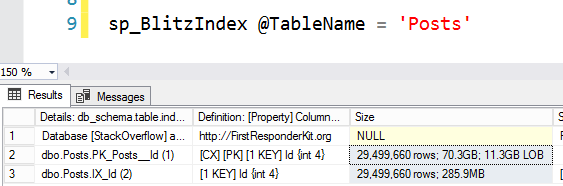
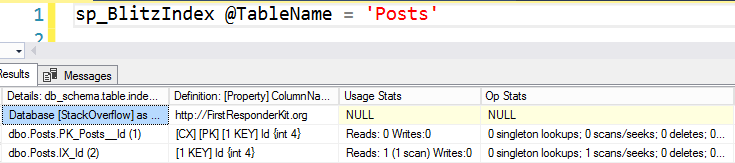
When SQL Server has to scan the table, it says, “Is there a faster object that I could scan instead? Is there another copy of the table I could use that has less data in it?” Indeed, our nonclustered index just on Id is way smaller, as sp_BlitzIndex shows:

sp_BlitzIndex analyzing index sizes

The clustered index (row 2) is 70GB because it has all the fields, whereas the nonclustered index on Id is a tiny 285MB in comparison. Turns out all those big string fields take up a lot of space on the clustered index. Who knew?

My favorite query plan of the 3, though, is the count WHERE Body IS NOT NULL. You’d think SQL Server would have to go check the Body field, right? But no – the Body field was specified as non-nullable (scroll back up to check the table definition) so SQL Server can simply ignore it. Ahh, the sweet benefits of the right null-vs-not-null table definitions.

The index on dbo.Posts.Id can even be used to speed up foreign key creation on other tables. Illustrating this is just a little trickier since foreign key creations don’t show execution plans (nor do they show up in the plan cache.) To show it, I restarted my instance, created a foreign key between Comments.PostId and Posts.Id, and then ran sp_BlitzCache. (You could also probably show this with Extended Events, but I’m doing this fast, dear reader.)

Score another one for our nonclustered index

I’m not saying that those queries are a good idea – I’m just explaining why someone might have created that index, and what might backfire when you drop it. I’m also not saying you can never drop it, either – I’m just warning you to keep an eye out for what might slow down.

And by the way, if this comes as a surprise, I bet you haven’t seen my free course, How to Think Like the SQL Server Engine. It teaches you the differences between clustered & nonclustered indexes – something everybody thinks they know until I start asking them questions.


So You Wanna Debug SQL Server Part 2

SQL Server
2 Comments

Birth Control

Debugging, and, heck, even learning about debugging, is a time-consuming and often unhelpful process when it comes to tracking down issues in SQL Server. It is arduous and tedious, and yields little chance of making you any friends. So why write about it?

Mostly because no one else is willing to — at least not in the context of SQL Server. And, let’s face it, “vibrant social life” has been used to describe me exactly zero times Kelvin.

In Part One, I talked about the basics of getting WinDbg set up, and attaching it to your local (please for the love of all that’s from Islay don’t attach it to a production server) instance. The next logical thing to do is get interacting with SQL Server.

Point Break

It’s customary to yell I AM AN FBI AGENT whenever you set a break point in WinDbg. This guarantees you success, long life, and ten cent wings wherever you dine. The break point commands we care about right now are:

  • bp: set a break point
  • bu: set a break point on a pattern
  • bl: list break points
  • bc: clear break points

After you follow instructions below to set a break point, you should use these to examine and undo it. Heck, even set your own.

But where do you set a break point, and what happens when you hit one?

To answer those questions, we need to go back to the x command — x means we want to examine available symbols.

I say it really doesn’t matter where I put my finger

When I first open up WinDbg, I like to get symbols for a few different code paths

  • sqlmin
  • sqllang
  • sqldk
  • sqlos
  • sqlservr

Under sqlmin is where most of the query related stuff lives. To make your life a little easier, you can output window contents to a text file!

Someone will come along and move it anyway

That lets you come back to the output and search through it a little easier. So if you choose a log file, and then run x /n sqlmin!, you should end up with a text file of all the public break points sorted by name. Fair warning: this can be slow. There are a lot of them.

I’m gonna save you a little bit of time, though. A lot of the interesting stuff that happens when a query runs is under sqlmin!CQScan, so if you run x /n sqlmin!CQScan*, you’ll get just that subset of break points.

Why do we care about this? Because when setting your first breakpoints, it helps to set one that you can trigger early on in a query to get used to what it looks like.

Almost nothing occurs sooner in the break point path than a TOP expression. Knowing that, we can narrow things down even further, to x sqlmin!CQScanTop*, or even x sqlmin!CQScanTopNew*.

Setting an early break point based on TOP would look something like this: bp sqlmin!CQScanTopNew::Open, and we can trigger that with an easy query.

Which, if you’ve done most things right, will get you some output that looks something like this!

Computers are hard.

Here’s where you’re gonna start to hate the debugger.

Tedium ad nausea

Once you hit that break point, your query is just gonna sit there. You now have the ability to step through every public instruction that the query calls while it runs. This is, not surprisingly, a lot of instructions.

You can hit F5 to end debugging and pass control back to the program, or hit F10 to start stepping through instructions.

This should give you enough to play with until next time, when I’ll talk about tracing calls, and how to find SQL Server exposing dirty little secrets.

Thanks for reading!

Index Key Column Order And Supporting Sorts

Whatever Man

When tuning queries that need to sort large amounts of data, sometimes it makes sense to stick the ordering elements as the leading key column(s) in your index. This allows SQL Server to easily sort your data by that column, and then access other key and included columns to satisfy other parts of the query, whether they’re joins, predicates, or selected columns.

That doesn’t mean that indexes with the sorting element first is always the best idea. Depending on how your query looks, you can sometimes put sorting elements at the end of an index definition and still have your sort be supported.

Pick It Up

Let’s start with this index:

If we run queries like this, the ORDER BY is unsupported by the index because it’s not the leading key column.

Slap happy

But if my query looks like this, it is supported.

Limited Yay

With direct equalities on each of the columns in the key of the index, we can sort by the last column in the index.

Unfortunately, this doesn’t work if we…

  • Have an incomplete WHERE clause
  • Our WHERE clause has inequalities (ranges) in it

By incomplete WHERE clause, I mean one that doesn’t utilize all of our index key columns, and by inequalities I mean >, >=, <, <=, and <>.

That means that both of these will result in a Sort operator:

Along with all of these:

It would be nice if the only requirement were that the key column prior to the sorting element use an equality predicate, but that’s not so either.

For instance, this will still result in a Sort.

Crud

But you do have some flexibility with other queries and other sort orders. For example, these will both result in the simple TOP plan that we saw earlier in the post. Again, the predicates need to be equalities to work.

Stone Cold Wrappin’

I think this is an interesting example of how much index definitions can matter, and how a good index for one variation of a query may not be so great for another variation. There’s probably some allegory about knowing your data or something in here, too.

Thanks for reading!

Parking Garages And Predicates

Hotels on Wheels

Parking garages and predicates have a “lot” in common.

GET IT?

No no but seriously. They do.

If you’ve ever lost your ticket, forgotten where you’ve parked, or just driven around hopelessly waiting to see an empty spot, you probably wish there were a better way to do things.

Maybe even a data-driven way of doing things.

Informal poll: Is anyone reading this blog data-driven?

If You Had To Index That…

Say you wanted to quickly find your car. An index on CarId would be awesome, if you know what it is.

If you got a parking slip with your Space Number on it, that’s sort of helpful. But then you need to figure out which floor and lane you’re in.

On the other end, if you need an empty space, an index on IsEmpty sounds pretty optimal.

Let’s say you’re Seinfelding

I don’t mean that, I mean this.

If Jerry, et al. knew where their car was, they’d have been able to walk directly to it. That’s like a Seek predicate.

Molon Labe

If they knew which floor and lane they were on, they’d have been able to start Seeking in the right place, and then double check each car. That’s like a Seek predicate with a Residual predicate.

ULLO JOHN GOT A NEW MOTOR

Likewise, if they know the lane and spot number, they could have done this:

This is where you start pressing the door unlock button and waiting to hear a chirp

Of course, they didn’t know anything, so they had to scan the entire joint. It looked something like this:

That’s a lot of walking

I don’t have the patience to paste that many thinking faces in.

There’s much to consider here. But I don’t even have a license, so let’s look at things in a Real Table®

Seek and Not Seek Walk Into A Bar

Using the miniaturized version of the StackOverflow database, I’m gonna focus in on the Users table.

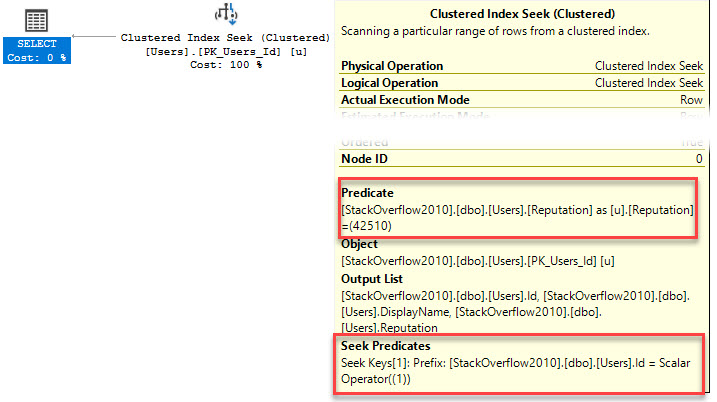
The only thing on it is a Primary Key/Clustered index on the Id column. A query like this can use that quite easily.

Seeky Kid

This query only requires three reads to locate the page it needs and return a single row.

If we’re talking parking lots, a seek would look something like this.

The PK/CX is considerably less efficient for this query, taking nearly 7400 logical reads to return the same single row.

Hit Scan

It’s Not Seek vs Scan Though

What I’m interested in is the Seek Predicate vs Predicate. For instance, this query returns the same results, with the same 3 logical reads as the first query.

Double up
  • A predicate by itself is like having to walk through the entire parking garage trying to find your car.
  • A seek predicate by itself is like being able to start your search where your car is.
  • A seek predicate with a residual predicate is like walking along along the right lane and having to check parking space numbers.

What Makes For A Seek Predicate vs a Residual Predicate?

Mostly placement in the index, but SARGability plays an important role as well.

Let’s create an index and look at a couple slightly different queries.

This index leads with reputation, and also has Id as a key column. DisplayName is an included column, which puts it in just about the same place as Reputation was when we were only working with the clustered index.

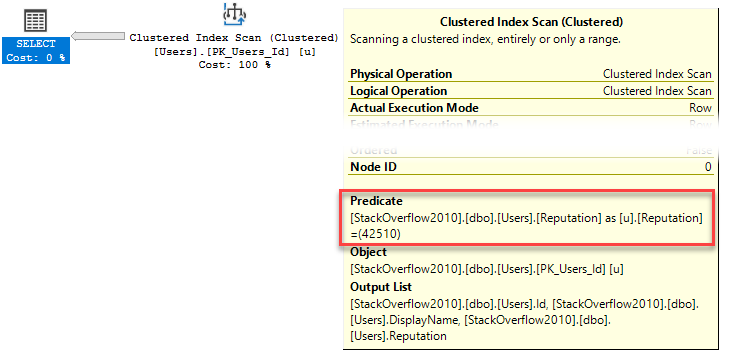
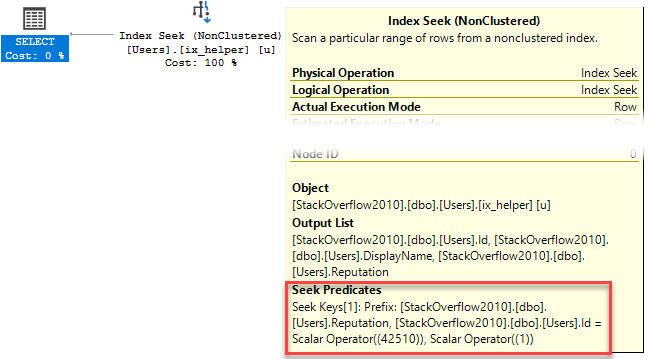
The first query plan looks like this, seeking to the right key, and then evaluating the predicate on Reputation. This one is using the clustered index.

Party!

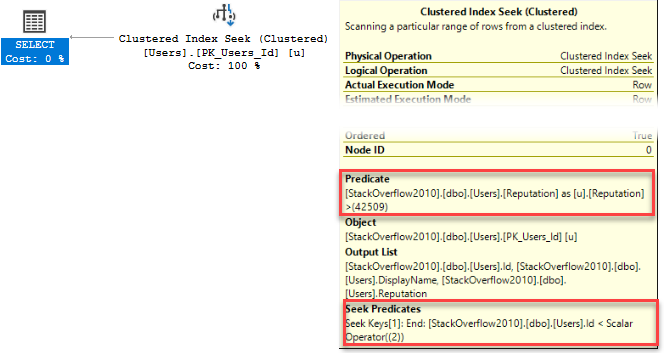
The second query uses the nonclustered index, but supports multiple seek keys.

Seeky Monkey

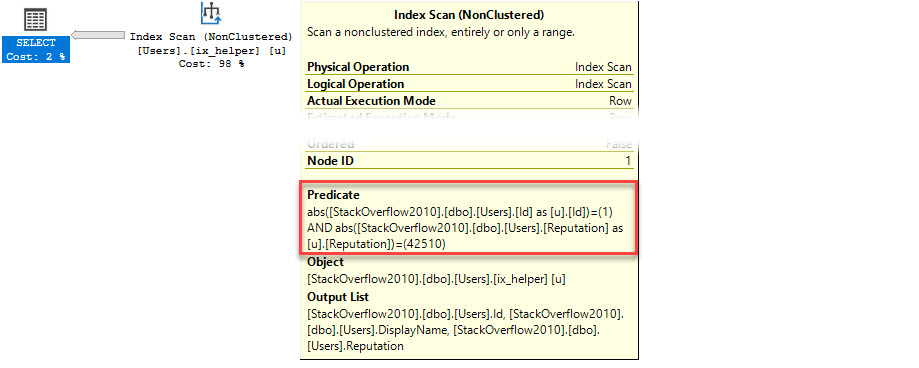
When I mentioned that SARGability plays a part, that’s because if you do something this stupid, neither predicate will be seekable.

Just don’t

Bumming Around

While I have your attention, and before I run DropIndexes, let’s look at how included columns work a little bit.

Right now, DisplayName is included in our nonclustered index. All three of these queries can use our index.

All of them will do the same number of logical reads (1279).

All three of them will have our LIKE condition as a predicate — we can’t seek here because it’s not in the key of the nonclustered index.

But only the first query, where the string search doesn’t lead with a wildcard will register a missing index.

In other words, a lack of SARGability with leading wild card searches shut down missing index requests.

Chimney Sweep

If we add the missing index request, the reason becomes pretty apparent.

I did not seek that coming

The index really does only help the first query. The other two queries do the same number of logical reads as before. Adding this index doesn’t change much for them.

Beat It

This is a small step towards understanding seek and residual predicates, and how indexes support searches.

The thing to keep in mind is that you can really only seek into an index when a SARGable predicate hits the leading key column. Multi-key indexes can support multiple seek keys.

If you’re only searching secondary (or beyond) columns, you’re only able to scan with a regular predicate. The same goes for included columns.

Thanks for reading!

Building SQL ConstantCare®: The Database

SQL ConstantCare
10 Comments

I bet, dear reader, that this is the post you’ve been really curious about in my behind-the-scenes posts.

Back in the post about the data we collect, you may remember that our initial goal was to analyze high-priority issues like missing backups or corruption check, priority boost on, offline NUMA nodes, etc. To do that, we take data straight out of SQL Server’s DMVs, and you can see those DMV queries in %localappdata%\ConstantCare\Current\Resources\Queries. ConstantCare.exe runs those queries, exports the data to one JSON file per query, zips them, encrypts the zip file, and uploads it to us.

The armchair architect league might wanna query those files directly, or load them into an on-demand database like Redshift, or put them in a document database. Thing is, we wanted to leverage spare consultant time from me, Erik, and Tara in order to build diagnostic queries across your DMV data, and…writing queries for those platforms is, uh, challenging at best (NSFW.) If you imagine a Venn diagram of people who know SQL Server troubleshooting, and people who can write SQL query, it’s a pretty good overlap. Now imagine that same diagram, but for people who know SQL Server troubleshooting, and people who can query a NoSQL data store. Yeah. Good luck with that.

So call us old-fashioned, but we wanted to put the data into a relational database.

We ruled out Microsoft SQL Server and Azure SQL DB.

I know, I know. The Microsoft geek in you – and me – wants us to use SQL Server on the back end, but here’s the deal: SQL Server is not self-managing or cheap. (After all, you and I make very good livings keeping SQL Server up and running, right?) Whenever possible in this product, I wanted to use something inexpensive that somebody else managed for us.

Azure SQL DB might seem like a valid contender, but like I wrote in an earlier post, Microsoft didn’t have a function-as-a-service platform available a couple years ago when we started building SQL ConstantCare. That would mean running our app code in AWS, and the database in Microsoft Azure. As Jeremiah once said, “Heeeeellloooo, laaaateeeennncccyyyy.” Even worse, until this year, Azure SQL DB didn’t even support VNETs, which made security management much, much harder for code that runs in AWS Lambda functions.

Today, if we were going to start building it all over again, Azure SQL DB would be a valid contender. It still has one big gotcha: cost. It’s twice as expensive as the leading brand:

 What you get for… Azure SQL DB Brand A
Around $200/mo 1 core, 7GB RAM 2 cores, 15GB RAM
Around $1,700/mo 8 cores, 56GB RAM 16 cores, 112GB RAM

So, uh, what is this Brand A, you ask?

Meet AWS RDS Aurora.

Aurora is Amazon’s custom version of MySQL and PostgreSQL. Here’s a 2-minute marketing video targeted at managers, but it paints a pretty good picture as to why the small business guy in me was sold:

And this one-hour technical video explains why the DBA in me was sold. (Don’t bother going past 40 minutes – it switches to Q&A.) In this video, when he says “PostgreSQL,” he’s talking about the conventional boxed product (like SQL Server) that you manage yourself. When he says “Aurora,” he’s referring to this new cool implementation of PostgreSQL (kinda like how Azure SQL DB is for Microsoft.)

You don’t need to know anything about PostgreSQL for that video – your SQL Server knowledge will let you keep up. It moves fast: within the first 5 minutes, he explains some of the automatic failover magic baked in with the Amazon S3 storage integration. In the next 5, he digs into why they don’t have to screw around with checkpoints. In 10-15 minutes, he covers how it even affects inserts into a B-Tree.

My favorite part about Aurora is that from the front end, it’s just plain old Postgres. That means we’re not locked in – if AWS discontinues Aurora or starts charging too much for it, we can move to self-hosted MySQL or Postgres (or RDS PostgreSQL, too.)

Aurora offers fancy stuff like readable replicas (up to 15, across up to 3 Availability Zones), automatic continuous point-in-time recovery going back up to 35 days, encryption, auditing, and easy scalability. We’ve already used the quick scalability, too: we started with an r4.large with 2 cores, 15GB RAM, $0.29/hour (roughly $200/mo) and upsized it to handle the growing user loads last week:

SQL ConstantCare user base, servers and TB of data they host

(Note: that terabyte number isn’t how much data WE have, hahaha. We’re only using about 35GB at the moment. And we’re up over 500 servers, it’s just that not every server sends in data every day. More on that in another post.)

Depending on which flavor you pick, you either get MySQL compatibility or Postgres compatibility, but not both simultaneously, so you have to make an architecture decision early on. We probably could have been fine with either, but we went with Postgres. We liked its maturity and feature set more at the time.

Designing a Database for DMV Data

In your database at work, you focus on the user tables, and the system tables are kind of an afterthought. They’re just something that you use in order to get your job done better/faster/cheaper. Most of us probably don’t put much thought into how the DMVs/DMFs are designed, whether or not they’re normalized, and how they’re joined together.

In this project, it’s the opposite: the DMVs are all we care about! But rather than redesigning them to be stored more efficiently or more normalized, Richie just took ’em exactly as-is. Each table has a few columns that aren’t in your SQL Server:

  • ID – identity, primary key, clustered. Different names per table, so in sys_configurations, the ID is sys_configurations_id.
  • connection_id – corresponds to one point in time for one SQL Server instance. Each time you upload data for a server, a connection is made. You’re welcome.
  • user_id – matches up to a customer. Yeah, technically, a connection_id can only belong to one customer, but Richie went a little paranoid so we could double join for security purposes.
  • creation_date – when the row was added. (Yeah, that’s not really normalized either, because you’d think that we could store that at a higher level, but I’m not gonna tell you all our magic secrets in this blog post, alright? Also, this was probably a mistake.)

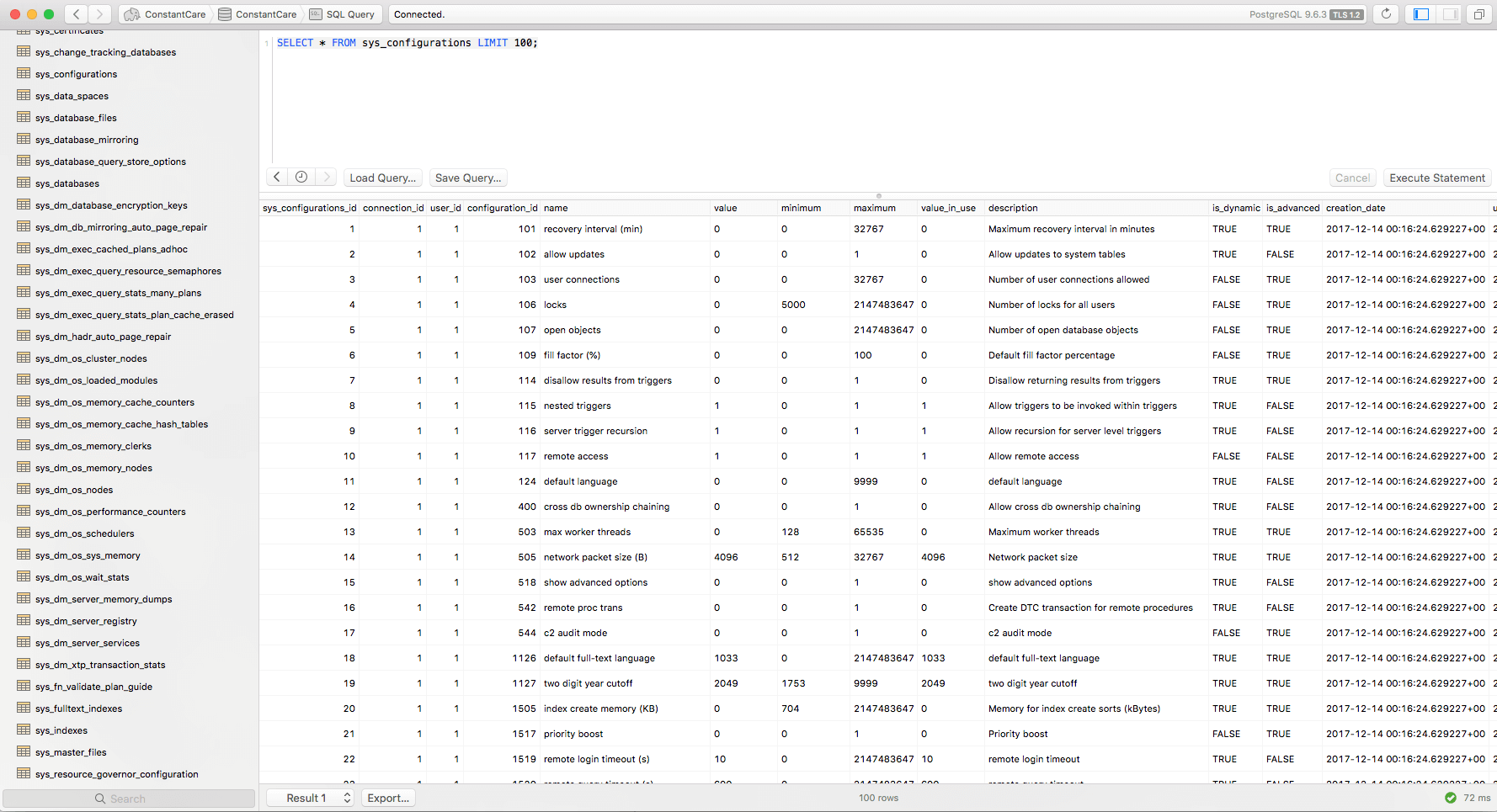
Here’s how it looks:

sys.configurations, cloud style

Obviously, that’s not SQL Server Management Studio or SQL Operations Studio – those are SQL Server tools only. For Postgres, the most commonly used tool is pgAdmin, and it’s alright, but just alright. After trying a few different tools, I fell in love with Postico, shown above. I’m a Mac user, and Postico feels like a database tool that was designed for Mac database developers, by Mac database developers. It’s not pretty, by any means, just very minimalist. It gets out of the way.

The first cool part about having DMV data in a database like this is that I could take a lot of my existing diagnostic query knowledge and port it straight over to this new database. When I’m doing research for a customer to figure out why they’re having an issue, I don’t have to stop and think about how to query the data – it’s just like querying their SQL Server’s DMVs.

The second part – and this, dear reader, still just blows my mind – is that if I wanna see what changed compared to yesterday, I can simply join to yesterday’s connection_id for this server and find out. Wanna see if someone changed a config setting? Wanna see if this is a new problem, or it’s been persisting through time? Wanna see if a metric has been getting worse or better? It’s all right there in the database. Long term, I can even imagine us giving you an export of this data so you can query it yourself too.

Wanna learn more? Read my other posts about building SQL ConstantCare®, or check out the product.


[Video] Office Hours 2018/4/11 (With Transcriptions) with Special Guest Edwin M Sarmiento

This week @EdwinMSarmiento joins Brent, Tara, Erik, and Richie to discuss high availability disaster recovery, migrating from on-premises server to Amazon’s RDS, AlwaysON Availability Groups, auto-growth issues, rebuilding vs dropping/re-creating indexes, log shipping, using Service Broker with Always On Availability Groups, updating stats issues, VLF counts, measuring transaction log usage, upgrading versions, and much more.

Here’s the video on YouTube:

You can register to attend next week’s Office Hours, or subscribe to our podcast to listen on the go.

Enjoy the Podcast?

Don’t miss an episode, subscribe via iTunes, Stitcher or RSS.
Leave us a review in iTunes

Office Hours – 4-11-18


What’s the easiest way to migrate to RDS?

Brent Ozar: Let’s see – we might as well go ahead and get into the technical questions. We’ll start with – Richard has an interesting one. He says, “What’s the easiest and fastest way to migrate from on-premises SQL Server up to Amazon’s RDS with as small cutover window as possible?” He says, “Availability Groups isn’t supported. Log backups aren’t available to us, being deduped and volted by third-party software. Is there anything that I can do other than transactional replication?” Wow, I don’t think he has any options.

Edwin Sarmiento: And somebody said transactional replication. Like, eurgh.

Brent Ozar: I don’t think you have an option there. That is pretty rough because RDS is like a sealed box. You get database mirroring, but that’s only inside of RDS; you don’t get to mirror into it so that’s tough.

Edwin Sarmiento: And there are capabilities that only exist in RDS, like for instance, somebody was asking about doing backups, like Native SQL Server backups within RDS. There are stored procedures that only exist in RDS, but they’re not in the Native SQL Server on-premises version.


What are all the ways Always On can fail?

Brent Ozar: Let’s see – next up, Brian says, “Edwin, do you have a punch-list to speak of all the failure scenarios that you test with Always On?” he doesn’t say Failover Clusters or Availability Groups, but he says, “If you could tell me what will break, it will make it easier to deal with when it does.”

The Senior DBA’s Guide to Always On Availability Groups

Edwin Sarmiento: What’s really interesting is someone on a Microsoft forum asked the same question, like what would cause an automatic failover? Which is kind of interesting because there are so many things – which was also followed up by, I’m not really concerned about what would make Failover Clustering cause an automatic failover. And the gist of it is Availability Groups and Failover Cluster instances, I mean, if you’re looking at high availability, they still run on top of Windows Server Failover Cluster. So whatever applies to Failover Clustering applies to Always On Availability Groups and Failover Clustered instances. There’s just so many of them.

Brent Ozar: There’s not three…

Tara Kizer: When I attended – we all attended the PASS conference in 2016. One of the sessions I went to was Availability Group Monitoring. I’d been supporting Availability Groups for three years by the time I went there, but it was interesting. It was by Microsoft and they had condensed it down to an hour, but I think they said it was more like a four-hour topic; that’s just how much monitoring is really needed. What are the failures that can happen and, you know – I don’t remember what I learned, honestly, but it was a good session.

Erik Darling: Not much in an hour…

Richie Rump: Great session…

Brent Ozar: Sometimes it’s good just to be scared.


How should I configure quorum for a 6-node cluster?

Brent Ozar: Another Brian, a different Brian follows up with, “How would you configure quorum settings when I have six nodes and I’ve got three nodes in one region and three nodes in another region? The three in the primary, I guess, are sync and the three in the other region are async replicas.”

Edwin Sarmiento: It’s interesting when somebody says, how do you, because I don’t know because I don’t know what your business requirements are. And it’s interesting, whenever I tell customers that, they’re kind of like, I only want an answer. But the reality is, what is your ultimate objective? What’s your recovery objective? What’s your service level agreement? Because telling me that you’ve got three nodes in one data center and another three nodes in another data center, does not tell me anything about what your recovery objectives are and what your service level agreements are.

Now, let’s assume that you don’t want automatic failover between data centers. If you don’t want automatic failover within data centers, you’ve got an even number of nodes; three in one data center and three on another data center. You want a tie-breaker. So you’ve got node majority, you’ve got file share, you’ve got disk witness, you’ve got cloud witness in Windows Server 2016; what would you want to use? I’m a pragmatic person. I’m very practical. I’ll just use File Share Witness and host it in the data center that I’m trying to protect, mainly because you don’t want to be spending so much on an extra vote within the cluster. So there’s – again, you always need to go back to, why would you want to do that?


We have an app that shrinks the database every hour…

Brent Ozar: So let’s see. Next up we have – Tammy asks, “We have a third-party app that’s shrinking a database every hour…” Off to a good start. “Then our monitoring application alerts about log space problems for that database. I grow the files but they were promptly shrunk again in the next hour. How would you handle this situation?”

Tara Kizer: I mean, if you’re stuck with this application and you can’t make them change it, I wouldn’t be doing the manual growth. Let it auto-grow and shrink back down, I guess. Also, maybe modify your monitoring application so it doesn’t alert to this guy. I mean, most monitoring applications allow you to do custom alerts or to change the rule.

Erik Darling: That’s rough.

Tara Kizer: I would be hating life though, having to support that third-party application. I bet you he uses the SA account and does all sorts of bad stuff.

Erik Darling: Is there any justification from the app provider about why they do that or is there any talking to them? Or is it just completely gone and you’re just stuck supporting it?

Tara Kizer: I would bet that this is a legacy application, you know, that’s been around for a long time, doing things back – it wasn’t ever recommended to do this in SQL Server 2000. It was probably more common to do this type of thing in older versions.

Erik Darling: Depending on the command that it runs, what I might do is add a second log file, cap the size of the first log file really small so it never tries to shrink it and just let the other file grow and do whatever it needs to do. Because then, if it’s just trying to shrink this one thing, if it does anything, there’s nothing in there to shrink. Make it like 1MB; what’s it going to do? Have a second log file – because I’m willing to bet, the way it’s calling is not, like shrink database. I willing to bet it’s doing shrink file and it’s targeting whatever the…

Brent Ozar: The default log number…

Erik Darling: Yeah. I bet, if you added a second log file and just let that thing do whatever it wanted to do, you’d be fine. That’s what I’d do. Screw those guys.

Brent Ozar: That’s so much better than my bad answer. My bad answer was going to be, if you know what time it happens, you could set up a logon trigger, so whenever they go to log on, the app goes to log out and [crosstalk]…

Richie Rump: That was my idea, yeah.

Brent Ozar: Chase says, “I want to know what Edwin and Brent are chatting about.” No, we just both have the same bad ideas about exactly what we were going to do.


Should I rebuild indexes, or drop/recreate them?

Brent Ozar: Let’s see, next up, Pablo asks, “What would the advice be between either rebuilding indexes or dropping them and recreating them? Which one should I do?”

Erik Darling: Neither.

Brent Ozar: And why?

Erik Darling: Leave it alone. Well, look, dropping and recreating indexes is a hell of a gig, right because you have all the pain of the rebuild. Because you have to drop the index, so it means you have to take out the locks to drop it. And then after it’s dropped, people can get in there and do crap and they can just do things without an index, which is awful for them. It’s awful for end users. At least if you just rebuild the index, if it’s online, users can get in and do stuff during that time anyway. It doesn’t really buy you anything to drop and recreate or rebuild. It’s actually kind of worse because then you’re dealing with the, you know, the drop, which is offline and taking the locks and then the create, which you know, if that’s not online then you’re doing that and they’re doing things without a supporting index.

But Brent has a great session at GroupBy – Great Session Brent – Is it why defragmenting indexes isn’t helping or why rebuilding indexes isn’t helping?

Brent Ozar: Yeah…

Erik Darling: So I would go watch that and make sure that you’re rebuilding indexes for the right reasons, like, you’re not just doing it at like 5%, 30% because someone told you to do that 15 years ago. Make sure that, you know, you’re targeting indexes that it’s sensible to do that for. When people tell DBAs to just rebuild or reorg at certain levels, no one ever tells them, hey, you know, if it takes you two hours, three hours, four hours, eight hours to do index maintenance, are you actually saving that much time when your queries run?

Are you saving two, four, six, eight hours of query runtime by doing this? Are you saving all the resources that you expend CPU, I/O memory-wise when your queries run that you’re expending when you do these rebuilds and reorgs and stuff. Make sure that you’re actually getting something out of them aside from pointing saying, “No look, they’re not fragmented.” It’s not really going to help you.

Edwin Sarmiento: And you’ve also got to look at what else is in that database. I had a customer as a question about – hey, we’re thinking about defragmenting or rebuilding indexes but it’s on an Availability Group. I mean, that impacted the performance instead of doing their index rebuild and defrag. Look, I can’t really help you that much unless you provide me – I know I’m trying to segue into providing additional information, but how many indexes are there, how long does it take you to defrag versus rebuild and what’s the overall impact on a performance when client applications are connecting to the primary?

So you have to think about the other things that come into the picture when you’re trying to do a simple – well, you might be thinking it’s just a simple rebuild or drop and rebuild or defrag, but there are other implications on the database.

Tara Kizer: I’ve had to completely disable index maintenance on an Availability Group, even switching – so it was two or three asynchronous replicas, one synchronous replica, and even switching that sync replica to async, I still was having issues. Besides the latency, lots of blocking. It was a very high-performance environment and a lot of batch requests per second. You have 5000 to 10,000 at normal times, higher at peak times. And a lot of people have had to completely disable index maintenance. And is it really needed, as Erik was saying? Still kept my update stats job once or twice a day – that’s where the performance benefits of the index maintenance is, typically because you update statistics with an index rebuild.


How many instances can I enroll in SQL ConstantCare®?

Brent Ozar: Daryl asks, “How many of my instances my I enroll in ConstantCare?” right now it’s unlimited. I could see, in the future, doing something like a 100 instance cap, but throw all you want in there.


Can you pause log shipping?

Brent Ozar: Anon asks, “Can you pause log shipping? My company does a weird thing where they take a new server back for a day or two before they do a final turnover so any databases would be out of date. We’re using simple recovery.”

Tara Kizer: You can’t use simple recovery model with log shipping. Log shipping to shipping transaction logs, so you’d have to switch over to bulk log or full recovery model in the first place. You can pause it, you just have the log backups running and not deleting them and one or two days later, the copies will just proceed in the restores. It might take a while to get up to date, depending upon how much work it has to do and do you have to start over with a restore, you know, restore database and then apply the log chain?

It also depends on how much disk space you’re able to keep online. I’ve got some clients who only keep 24 hours of backups on disk and then maybe some other longer term storage. Make sure you have the disk space to be able to have all the transaction log backups that you need to get it back up to date.

Edwin Sarmiento: That’s probably why he said the company’s doing weird things.


Is Microsoft about to charge for SSMS?

Brent Ozar: Phil asks an odd one. He says, “Microsoft moved SSMS into a separate standalone product. Rumors are afoot that it’s about to be licensed separately. Has anybody heard anything?” Dude, where do you hear those rumors from?

Erik Darling: SQL Operation Studio is licensed differently than SQL Server Management Studio…

Brent Ozar: In that it’s a different license but they’re both free. Yeah, it’s tough.


Do you recommend using Service Broker with Always On?

Brent Ozar: Anna asks, “Edwin, do you recommend using Service Broker with Always On?

Edwin Sarmiento: It’s an interesting question because, you know when people ask you, do you recommend, the first question to ask is, is it supported? If it is supported, then I would recommend it based on, of course, your workload. A common question, aside from service brokers, DTC. Would you recommend DTC with Availability Groups. And of course, unless it is fully supported, it’s not something that I would recommend. Quote en quote working does not mean supported. So I can’t remember exactly what the support matrix is for service broker for 2016 – by the way, what version are you using? So I know it does work but there’s some limitations on what is supported and what isn’t supported.


How high can VLFs go?

Brent Ozar: Next up, Turge, I believe it is, says, “How high can VLF counts go before it starts causing problems and what kind of problems will you experience when it starts getting high?”

Tara Kizer: Here’s what I know; 75,000 VLFs is not a good thing. In SQL Server 2005 days, back in 2007, 2008, the company I worked for did Microsoft security patching every single month, did reboots, we had high-performance systems, Failover Cluster instances and I had lots of servers to patch. SQL Servers – patch the other guys, you know, so I would restart the box after the patches were applied and I would verify in management studio that the instance would come online after it finished the reboot, but I wouldn’t expand the database history in object explorer.

So I moved onto the next server and a few minutes later, the admin team said, hey we can’t connect to the database; I don’t think it’s online. So I expanded the database history in object explorer and boom, it said in recovery for this database that had five lines of availability requirements. We were in a maintenance window, but it was bad. It had been probably 15, 20 minutes since I did the reboot when I started looking into this, you know. This is not normal, so I opened up the SQL Server error log and it’s phase one of three and – I don’t remember what the percentage was but I was like, oh my goodness, what is going on here?

I didn’t know about the VLFs at the time and luckily this database came online, you know, completed crash recovery after 45 minutes, and this was on a Saturday I believe. And so my plan was to contact Microsoft. I was going to contact Microsoft that night, but it came online before I could make that call. Because it could take like an hour even for a … to get someone on the call.

So, Monday morning, I contacted Microsoft and they said, run DBCC LOG_INFO info on it, and it returned 75,000 rows. He said this is a virtual log file issue; you have too many log files. And so that’s when I learned about VLFs and 75,000 of them is not a good thing. So it impacts fast recovery time of the database, it impacts your restores too and in some cases it can impact performance. So I can’t tell you what number to target. So if you have, say, a 300GB log file, you could have less than 1000 VLFs. I know that just because I fix log files to reduce the number of VLFs. You just need to make sure they’re not too big and not too small and your auto-growth setting is correct. Don’t use a percentage or a very small number.

Erik Darling: The flipside of that coin from Tara – I had, I forget how big the log file was, but there were very few VLFs but they were all gigantic. And so that took me 24 hours to recover from because it’s reading to, like, hundreds of gigs for each one. I was like, come on…


How do Availability Groups work internally?

Brent Ozar: Brian asks, “I would like to know the nuts and bolts of how this works. So what’s the best document or video that would give me the best deep dive into how Always On actually works internally?”

Edwin Sarmiento: That is a very interesting question. No documentation from Microsoft would actually explain the nuts and bolts. So here’s the thing, and I’m pretty sure you would agree with me in this; they’re all over. Like, read one documentation, it explains one thing. Read another documentation, it explains one thing; it’s just all over. And I know it sounds like a bit of a plug, I simplify that in the Always On Availability Groups training class that I’m doing. It’s all visual. You would see how everything works under the covers. How the transaction log records or log blocks are getting replicated from the primary to the secondary, what the wait stats are, what the wait types are; everything simplified.

Now, I know that’s kind of a rounded up version of it, but here’s the deal. It’s really complicated if you just simply look at the documentation. I’m trying to simplify it as much as I can from some of the articles and the blog posts that I write.

Brent Ozar: And also, there’ no money in Microsoft building that documentation for the public. Like they just don’t have an incentive to dedicate human beings to do that for – because it would take months for them to do it across all kinds of languages. Anything Microsoft does, they want it to be perfect across all these different standards and all this. And why, when half the time, it changes every version. They’re like, sorry we need those documentations for developers.

Tara Kizer: And just attend Edwin’s training class on Availability Groups. That gives you a really deep dive into the product.

Edwin Sarmiento: What’s really interesting is I see this across all software vendors. I was just looking at some of the documentation for Microsoft PowerShell for AWS. Same thing. They’re all over – I think it’s just a thing with software companies. They just are not really good at writing documentation.


Richie’s bored.

Brent Ozar: Richie is so bored. He’s like, I’m done with this.

Richie Rump: [crosstalk] I’m looking at ConstantCare files coming in. Y’all keep going because some people enjoy this stuff…

Tara Kizer: He’s waiting for one of his cats to arrive so he can play with it.

Erik Darling: It’s hit or miss. The other week when it was just me and Richie, there we like 70 questions about Git and I was like, sweet; I’m going to take a nap over here. I’m just going to sit.


How can I measure transaction log usage over time?

Brent Ozar: Gordon asks, “What’s a good way to measure how much transaction log usage we’re doing over time? Like how much of our transaction log we’re generating or backing up.”

Edwin Sarmiento: I do have a blog post on that, but I don’t recommend that you do it in production. So basically… Yes.

Brent Ozar: That’s my favorite kind of answer.

Edwin Sarmiento: So the blog that I wrote about – I can’t remember exactly what the blog post was all about, but basically the gist of it, with sample scripts, is you take your log backups and read your log backups using DBCC FN_DBLOG. And part of that – what I did was I came up with an Excel spreadsheet that would tally your transaction log generation throughout, you know, a month, a week. But again, don’t do in on production. Read your log backups. And again, dump those results into a table and come up with an analytical graph on the amount of transactional log records generated over time. But this is not just your inserts, updates and deletes. That also includes your index maintenance. It generates a lot of transaction log records that that would factor into that graph. So you might want to pick and choose, like, your inserts, updates and delete statements as part of the analysis.


How do you reduce VLFs and prevent problems?

Brent Ozar: Next up, Michael says, “Tara, if you do have a database with a high number of VLFs, how do you eliminate them and how do you prevent them from returning?”

Tara Kizer: It’s easy – once fixed, it should never come back for that specific database. So you shrink it as far down as you can, say 1MB or 5MB; a really small number. You may need to do some transaction log backups as you’re doing those shrinks. Do this in the maintenance window, but I’ve certainly done this during the day on very high critical databases, just because I don’t want to take a maintenance window for this task. So shrink it all the way down and then you’re going to grow it back out to that original size.

Don’t just grow it back out part of the way or let it auto-grow from there. Grow it back out to the space that it needed before you started doing this task. Don’t grow it out all in one, otherwise you’ll end up with the issue Erik had. And don’t grow out in small chunks because you’ll end up with too many VLFs. So if I had, say, my original file as 100GB, I might just grow it out in, say, 4000GB chunks and I don’t ever do the 4GB chunks because I ran into a bug back on SQL Server 2005 and it was horrific. It’s been fixed, so on newer versions, you wouldn’t run into it. But to this day, I will not do increments of 4GB, so 4GB, 8GB. I’ll do 4000MB or 8000MB. I will not do the 4GB increment.

And then just keep growing it out until you reach the original file size. And don’t forget to change your auto-growth setting. So on a 100GB log file, I’ll probably do a 1Gb auto-growth; maybe 512MB. You don’t want too small, you don’t want it too big, but fixing the auto-growth is how you prevent this issue from coming back.

Edwin Sarmiento: I can’t remember what version of SQL Server has that alert for if you reach 10,000 VLFs, I think, or 1000 VLFs, it will write an error in the SQL Server error log.

Tara Kizer: [crosstalk] I was going to say, it definitely wasn’t there in SQL Server 2005; I would have noticed it. I was a good DBA.

Erik Darling: [crosstalk] Then you got another job here and everything went down.

Brent Ozar: Now she spends all her time painting mountains on the background. [crosstalk] Marci says, “One other thing to add, when you do Tara’s fix, to also do a checkpoint before you go and do this stuff too.”

Tara Kizer: Yes.


How should I migrate 2012 AGs to 2017?

Brent Ozar: Pablo says he’s on 2012 Always On Availability Groups and he says, “What are the general steps to migrate toward  2017?”

Edwin Sarmiento: So, general steps will depend on the maintenance window. You could do a kind of rolling upgrade scenario where you’re adding another replica in your Availability Group that is running a higher version. Say you’re on 2012, maybe 2017, and then do a failover. But that’s a one-way street, which is why you really need to do a lot of testing prior to doing that because once you’ve failed-over to 2017, you can’t go back to any of the lower versions.

That being said, that’s the fastest way to do it. You can do a lot of different things because, number one, if you’re on 2012, I’m guessing you’re still on Windows Server 2008R2 or Windows Server 2012 R2, at most. I’m guessing you also want to upgrade your operating system. So you really have to plan well because you don’t want to be upgrading to SQL Server 2017 and then a couple of months later you’re upgrading your operating system to the higher version. So if I were you, wait until the whole process of upgrading your hardware and OS is part of the plan, so that way, you don’t have to repeat everything. Of course, as a consultant, I would rather have everything done again because I get paid twice, but I’m not like that. I’d rather do it once; I’m lazy. I’d rather do it once. Plan accordingly. You’re saving your company a lot of resources, a lot of time and a lot of money.


Are SSPI handshake alerts a problem?

Brent Ozar: Next up is Chase, who asks, “I’m getting a lot of alerts regarding SSPI handshake failed. I could just tweak my monitoring system to ignore it, but should I worry about this?”

Tara Kizer: That is an error message I automatically dismiss. It can be fixed with SPNs. I think this is an SPN issue, right…

Erik Darling: SPN or whatever delegation in the directory account.

Edwin Sarmiento: But you also have to think about why is something causing that and, when I was doing operational DB, I usually ignore that. But then at one point, I came to realize, if it’s throwing something like that, most of the time, we just think it’s active directory or it could be an SPN thing, but it could be worse. And I was in a troubleshooting call with Microsoft a couple of years ago where I’m seeing a lot of these incidents. It turns out that the reason why it’s getting a lot of that events was the fact that SQL Server could not contact active directory. And of course, I kind of passed the ball to the active directory guys without realizing that the main controller was actually sitting on a VM with a single virtual … I know you kind of know where I’m going with this. And every single machine on the network is hitting that thing. So it’s not just SQL Server that’s getting affected, it’s everything on the network. So I told them, look, maybe it’s about time that you moved this VM to a physical machine because everything’s hitting the same VM.


How does SQL ConstantCare® upload to AWS?

Brent Ozar: Landon asks a question for Richie. He says, “Is ConstantCare using a secure file transfer method to upload the data to AWS?”

Erik Darling: Carrier pigeons.

Richie Rump: Bit by bit.

Brent Ozar: One bit at a time.

Richie Rump: Yes we are and it’s because Brent made me. I think in initial testing, we were just going to use HTTPS and be done with it, and then Brent made me throw some encryption on it. Everything up to the cloud, once it gets up to the cloud, we decrypt and reprocess the files.


How can I automate AG patching when I have SSIS?

Brent Ozar: There we go. So let’s see, the last one we’ll take is [Saket]. [Saket] asks, “How can we automate SQL patching in an Availability Group when SSIS DB is in there as well?”

Tara Kizer: It’s not supposed to be in there, right? That guy is not supported on an Availability Group, I don’t think.

Edwin Sarmiento: So when this thing first came out – because SSIS DB was introduced in SQL Server 2012, there were a lot of challenges because for one, you wouldn’t want SSIS DB to be in there unless you know, for a fact, that you’re going to put all your SSIS packages in there instead of MSDB or maybe file share for SSIS. It became a bit more challenging because every single database has to be in the Availability Group [reporting] – SSIS in the Availability Group. Come patching time, it just screws thing up. You would have to remove the SSIS DB from the Availability Group, patch the nodes and then add it all back, which was why he asked that question.

You can automate that process, either through a combination of PowerShell and T-SQL. It all depends on what your patch management processes are. Are you using System Center for your patch management process, are you using Group Policies for it? It becomes a bit more challenging, but you can, again, use a combination of PowerShell plus T-SQL to remove the database, patch the node and add a database back into the Availability Group.

Tara Kizer: It sounds like a lot of work. I mean, it’s not supported, right. I mean, why put it in an Availability Group if it’s not supported?

Edwin Sarmiento: That I would have to ask the product team for clarification.

Tara Kizer: At my last job, we had Availability Groups and we had SSIS packages and were very excited about SSIS DB and all of its features. And so we had our Availability Groups for the user databases, non-Microsoft stuff, and then we had a separate virtual machine that had SSIS DB that was not in an Availability Group. We did snapshots on that guy like every five minutes. So it still had some HA features in place, it just wasn’t in an Availability Group.

Brent Ozar: Alright, well that’s everything we’ve got time for this week. Thanks, Edwin for coming out…

Edwin Sarmiento: Thanks for having me.


Who’s the right person to attend Edwin’s upcoming courses?

The Senior DBA’s Field Guide to Failover Clustered Instances

Brent Ozar: Answering questions – absolutely awesome. Do you want to say a few words about who the right person is to come to your course coming up on Failover Clusters and Availability Groups?

Edwin Sarmiento: Well it’s interesting because I’m also looking at the trends. First one we did last September, there were more senior DBAs who attended. The one we did last December were IT managers, which is very interesting; IT managers and sysadmins who are getting started with SQL Server. And so if you’re a senior DBA, or even if you’re a sysadmin or systems engineer who are now responsible for managing SQL Server, particularly Availability Groups, or if you’re an IT manager who just needs to understand this. Or maybe you’re an IT manager who needs to fill in because you’re still waiting for a new senior DBA to be hired. This is the right course for you because I try to simplify, like I said, I try to simplify everything that involves Always On Availability Groups and the new one we came up with is the Failover Clustered instances because they’re not dead. They’re still out there in the field and I’m pretty sure that you still need to manage them until you decide to move to Availability Groups or even to the cloud.

Brent Ozar: Perfect. Thank you, sir. I look forward to the class and see everybody next week at Office Hours. Adios, everybody.

Edwin Sarmiento: Thanks for having me.


Training Week: Data Science Fundamentals with a Real Project

Company News
0

When Steph Locke first ran her Data Science Fundamentals with R class, I was amazed at the work she put into the hands-on labs for the students. They had real challenges to help them learn how to model different kinds of data and learn answers from it.

I immediately said to her, “Hey, I wanna give you money. You clearly know what you’re doing. I want to learn more about my own customers. I’ve got a few different piles of data, and I want to figure out who buys training from me. If I can target the right customers, then I can send less emails to people who WON’T buy training, and keep their inboxes clean. Can you help?”

Holy smokes, did she help – she gave me insights about my customers that seem obvious in hindsight, but I wouldn’t have figured out otherwise. It was just awesome.

Now, you can use our data to help you learn. Part of our agreement was that she could use my anonymized data in her own workshops. You get the same source data, and alongside Steph, you will:

  • Consolidate multiple data sources into single dataset ideal for trying to predict who will buy training.
  • Decide the right sampling strategies, so we can build predictions and test them.
  • Build different types of models to see which things influence whether someone will buy training.
  • With multiple models on our hands, which one is the best fit with reality? Use evaluation techniques to identify the model that best identifies Brent’s future customers.
  • Use the model to make some predictions to improve Brent Ozar Unlimited’s marketing strategies.

This isn’t some abstract, meaningless data set – it’s real data, solving real business problems. I know you’re gonna love this – go check it out.


Training Week: Announcing Ben Miller’s PowerShell for DBAs: Level 2

Company News
0

PowerShell for DBAs

Drew Furgiuele‘s PowerShell for DBAs class has been getting rave reviews, including:

“Fantastic class! This is the best online training I’ve ever taken. Very slick setup using the webinar for learning, an AWS VM for labs, and slack for interacting with the class. This course teaches more than just PowerShell for SQL Server – the general training on day 1 will leave you ready to tackle anything with PowerShell. Drew is a great instructor” – Grant Schulte

“I’ve been wanting to add PowerShell to my DBA toolbelt. This class was exactly what I needed. The instructor, Drew, knows his stuff and is well-known in the SQL Server community. If you want to learn PowerShell for SQL Server, start here.” – Kevin Kelso

“I really enjoyed this class! I knew very little PowerShell and was intimidated when looking at scripts I found online. I feel much more comfortable trying my hand at PowerShell after taking this class. Drew was a great instructor, and I thought the material, demos, and labs were all very good. I also appreciate that the class recordings are available – I had to miss part of the class due to some work issues.” – Lois Scarane

I could go on and on – the reviews certainly do, and if you’re interested, you should check ’em out. Drew’s next class starts July 26th, and registration is open now.

So when Ben Miller came to us and suggested doing a Level 2 course, I was hooked. Here’s what he came up with:

PowerShell for DBAs: Level 2

Do you know some PowerShell and want to take your knowledge to the next level? Do you want a consistent way to manage your servers, databases and services without clicking?

PowerShell for DBAs: Level 2In this 2-day class you will learn to:

  • Run commands on remote servers using PowerShell Remoting
  • Set trace flags and protocols on remote servers, then restart them to take effect
  • Use WMI to get information about disk space
  • Use the SQL Server provider to navigate SQL Server within a path-like structure
  • Use PowerShell to determine the existence of objects in SQL Server
  • Learn SMO and use it to manage a SQL Server and Databases. You will learn how to change configuration properties of a server, change Database Options, add space to a database file or log and many other database management tasks.

Prerequisites: attendees should have either taken the PowerShell for DBAs course, or have 6-12 months of hands-on production PowerShell experience.

About the instructor: Ben Miller is a Microsoft SQL Server MVP and Microsoft Certified Master (MCM). He’s been working with SQL Server in the field since 1997, including 7 years at Microsoft. He is passionate about SQL Server automation and integration, and uses PowerShell and SMO regularly.

Like all our classes, it includes Instant Replay so you can stream a recorded version of the class for a year after it finishes. Students have been raving about how helpful that is when they get pulled away from work for an emergency.

Head on over and check it out! Registration is open now for the June 11-12 class.


Training Week: Announcing Edwin’s New Class on Failover Clustered Instances

Clustering, Company News
2 Comments

This week, we’ve got a bunch of announcements about new training classes. Next up, Edwin Sarmiento: his 3-day Always On Availability Group class has been getting great reviews:

“This class is fantastic. There is no filler, and no needless repetition, so be prepared to pay attention the entire duration. Edwin clearly is very passionate about his craft and does an incredible job of sharing his knowledge. Great balance of theory and application. I went through 4 glitter pens taking notes. A+” – Jordan

“Enjoyed the class. It was a different approach that I found very useful. I was looking for information about how and when you would use AG. The troubleshooting aspect was very good and as someone has already said, it helped me to understand the dynamics between all the working parts.” – Paula Luther

“This session was amazing. I had previously had some experience with availability groups, but Edwin’s knowledge really helped me understand the dynamics between all the working parts. I am more confident to work with availability groups, and I fully understand many situations that I did not before.” – Michael

“The detail and pace were fantastic! Edwin’s energy and knowledge ensured a captive audience as evidenced by the level of engagement in the channel – which I also found extremely useful for asking questions or just looking for clarification. Overall, an A+ training session – I’m ready to build my first multi-site AG solution!” – Chris

Now he’s bringing out another class.

Failover Clustered Instances

Always On Failover Clustered Instances:
The Senior DBA’s Field Guide

You need to build or manage a SQL Server failover clustered instance (FCI) but you’re not sure where to start. And with Always On Availability Groups as a high availability solution, it becomes even more confusing. Properly sizing the hardware? Who is responsible for what? How does the Windows Server Failover Cluster work with SQL Server?

The SQL Server FCI is not dead. Even though Always On Availability Groups were introduced in SQL Server 2012, customers are still deploying SQL Server FCIs to protect mission-critical databases. This instructor-led training class is specifically designed for senior database administrators responsible for designing, implementing and managing a SQL Server FCI.

In this live 3-day class, attendees will learn:

  • Fundamentals of Windows Server Failover Clustering (WSFC) – the underlying platform that makes SQL Server FCI possible – from the external dependencies like Active Directory and DNS to quorum, shared storage and cluster configuration
  • Designing and implementing a Windows Server Failover Cluster to meet both high availability and disaster recovery requirements
  • Designing and implementing common topologies for SQL Server FCI solutions for a single- or multi-data center deployments
  • Managing and monitoring SQL Server FCI implementations
  • Effective troubleshooting of availability issues for both the Windows Server Failover Cluster and the SQL Server FCI

About the instructor: Edwin Sarmiento is a Microsoft Data Platform MVP and Microsoft Certified Master from Ottawa, Canada specializing in high availability, disaster recovery and system infrastructures running on the Microsoft server technology stack. He is very passionate about technology but has interests in music, professional and organizational development, leadership and management matters when not working with databases.

Online class times:

Head on over and check it out. See you in class!


Performance Tuning in 21 Demos at the PASS Summit 2018

#SQLPass, Company News
0
Performance Tuning in 21 Demos

You’re a developer or DBA who wants to tune indexes and queries to make your application go faster. You don’t like learning by watching slides or reading white papers – you want to jump right into the code and see what happens. You’re the kind of person who loves watching YouTube videos that start with, “Hold my beer and watch this.”

In one demo-filled day with Brent Ozar and Erik Darling, you’ll see SQL Server, Azure SQL DB, and Azure Managed Instances make questionable lifestyle choices. The engine will wildly underestimate the work required with a query, pick the wrong indexes, and jump off the roof into the pool while holding the TV – all in an effort to deliver the right query results. We’ll show you how to coach the database engine into better performance and less problems.

Everybody will get their own USB flash drive to take home with the StackOverflow2013 database (just 50GB, so it’s easier to do the demos on smaller laptops), the demo scripts, and PDFs of the slides.

Attendees will also get 1 year of access to:

Our pre-con sold out with 360 attendees last year, and I heard from a lot of frustrated folks that couldn’t get in because they didn’t move fast enough. Don’t make that mistake again this year – go claim your spot now.

Check out the list of pre-cons, and then register quick.


[Video] Office Hours 2018/4/4 with Special Guest Pinal Dave

Videos
0

This week, Pinal Dave joins Brent, Tara, and Richie to discuss replication latency, partitioning tables, transactional replication, troubleshooting 3-rd party application performance, SQL ConstantCare® update, SQL Server errors, copying data over from a database with read-only access, reducing blocking timeouts, backups to the cloud, and more replication questions!

Here’s the video on YouTube:

You can register to attend next week’s Office Hours, or subscribe to our podcast to listen on the go.

Enjoy the Podcast?

Don’t miss an episode, subscribe via iTunes, Stitcher or RSS.
Leave us a review in iTunes

Office Hours – 4-4-18


How do you monitor replication latency?

Brent Ozar: Our first question comes in from [Tishal], [Tishal] says, “I was preparing a report using data collected from management data warehouse. I was using one of its tables, snapshots, performance counter values, and it has some columns in it formatted as floats.” He says, “How do you interpret the results of these columns for replication latency?” Tara, you’ve done a lot of replication work. When you want to find out how latent replication is, what do you use in order to do it?

Tara Kizer: I usually just open up replication monitor and then I insert a tracer token. Replication monitor will tell you what the replication is. It’s an estimation, but if you insert a tracer token, it will watch it flow from the publisher to the distributor. It will tell you what that latency is and the distributer and subscriber and what that latency is. So tracer token is a really good way. Some people, via code, they insert tracer tokens and then log that to a table and send out emails, but I figure what the script is to run to query it, but you could run an extended events session to see what replication monitor is doing to grab that latency number anyway and then monitor that via scripts instead of using the GUI.

Brent Ozar: Yeah, use your own scripts to inject a token whenever you want.


I run out of disk space when I create a clustered index.

Brent Ozar: Pablo says, “With a million row BI table, I’m trying to create a clustered index and I’m constantly running out of disk space. Will partitioning help?” Pinal, what do you think?

Pinal Dave: That’s a very interesting question. Actually, this reminds me of the time, years ago, when the disks were very, very expensive. I remember, I had experienced this one and I, even though there was no real reason, I had to partition my table. But the partitioning was actually just done just because of disk error. So yes, partitioning would help, but it makes sense that you create the second partition on a different drive. Same drive, you’re going to be walking into the same problem. Different drives – now you need to do a partitioning, partitioning functions as well as you need to go through the center and logic about which is the key and then you create this horizontal partitioning.

So yes, partitioning would help, but if this is not something you’re looking for, you may want to look at how you can get more space on a disk by changing the disk. Maybe a [longer run tact] would be easier, or any other thing like delete some stuff or move some of the database out of that partition. Or do something like that, that would be more meaningful instead of just doing partitioning for the sake of partitioning. And when you are creating the clustered index, the heart of your table – so that’s my opinion. So create partitioning if there is no option, otherwise, just do what works, actually. At the end of the day, your boss should say, you are able to manage your database.

Brent Ozar: That’s what I say to Richie all the time. Richie, you are able to manage your database. I was just, not even an hour ago, I was telling Richie, “Richie, I want to buy a bigger database server.” And he was like, nope.

Richie Rump: It’s not our problem, Brent. “But I want to. I want to try it.”

Brent Ozar: I want to throw money at it.


Is replication a good fit to copy data between servers?

Brent Ozar: J.D. asks, he wants to do – he says, “Is transactional replication the best way to copy data from a vendor app on server one to a different database on server two? It needs to be as close to real-time as possible. How should I move data between those?”

Tara Kizer: What is with all the replication questions?

Brent Ozar: It’s because you’re here, Tara.

Tara Kizer: I mean, best – I don’t know. Are you using Standard Edition, Enterprise Edition – because if I’m using Enterprise Edition, I’m not using transactional replication. I’m going to be using availability groups and, you know – it just depends what you’re trying to do here. All of the technologies have some latency, unless you’re doing synchronous through mirroring in availability groups.

Brent Ozar: He follows up with, he’s, “On Enterprise but it’s 2008R2.” It does say that they might upgrade to 2017 soon.

Tara Kizer: Yeah, so transactional replication is a good tool to copy your data to another server, but you have to be aware that there is going to be latency at times when big transactions run. Make sure your replication carpology is best practices. You’ve got a publisher on one server, a distributor on another server and your subscribers on another server. Don’t put the distributor on the publisher or subscriber.

I mean, you could, if you’ve got the hardware for it, but best practice is to separate these guys. And just know that it’s replicating inert, update and delete commands and updates get converted into a delete and an insert. So it’s at a very high level and so there can be some latency flowing through the pipeline, whereas mirroring and availability groups occur at a much lower level. But yeah, 2008 Enterprise Edition transactional replication is a good feature, it’s just I’ve spent so many hours troubleshooting it and, you know, waiting for a snapshot to run and waiting for initialization to happen. I mean, wow, a lot of hours.

Brent Ozar: If somebody offered you a new production DBA job and they said you can be a DBA but you have to work with replication fulltime, what would you say?

Tara Kizer: I don’t know – for me, taking another job, it depends upon benefits. I start there and a lot of times I don’t care how bad the job is if the benefits are good. But for me, am I going to be on call and have to work at three in the morning all the time – I don’t mind replication so much, you know. It was stable in my last environment and we didn’t have to do too much with it.

Pinal Dave: When it works, yes.

Tara Kizer: When it works, exactly, that’s the key…

Pinal Dave: So one thing I would just make a comment here is that you will find a lot of experts who can configure the replication, but the people who can just really troubleshoot the replication are, I think, there are only 1%. It’s not an easy task and, yes, configuring, click, click, click, go, done, fine, but how do you fix it?

Tara Kizer: And I’ve even opened up a case with Microsoft, many years ago, to – I was getting a weird replication error and I knew that the snapshot and that whole process was going to take several hours and so I was hoping to fix replication rather than go through that process. And the things that they had me do to replication is not something that you find blogs about. So, I had to open this case with them – and I don’t remember what the outcome was, if they fixed it or not because it was just way too many years ago. But it was just crazy, the queries I was running. And they’re like, grab this, grab that, look at this – it’s just like, how are you supposed to know how to do this stuff?

Brent Ozar: Richie, you look like there’s something you want to say in there too.

Richie Rump: I hate the Cubs.

Brent Ozar: Did they lose?

Richie Rump: They, like, haven’t scored a run in like two games, so. But that’s what I wanted to say, so…

Brent Ozar: You can always tell when baseball season starts with Richie. He’s very preoccupied – this is his one. Justin Setliff says, “Richie, don’t worry. It’s early.” It looked like a blue screen of death flag for a second there.

Richie Rump: And that’s what it feels like.


How do you prove other services are causing performance problems?

Brent Ozar: Nicholas asks, “Hi gang, how can you prove that other processes and services like Apache or internet information services on the same box are causing the SQL Server performance problems?”

Tara Kizer: I would never be able to prove it because I wouldn’t allow those on my SQL Server. So I mean, I need a production DBA here and I just – no, you’re not putting that stuff on my box.

Brent Ozar: And why not?

Tara Kizer: Because SQL Server is a memory hog, IS is a memory hog, I mean, they could be on the same box if you’re talking about a very, very small system, I guess. I mean, maybe in a test environment, but in production, I want to go by best practices and try to avoid having issues at three in the morning.

Pinal Dave: Right, and one of the things – yesterday, I was traveling through India and I was in Pune and my customer had an interesting scenario. They thought the reporting service is just fine and they have absolutely no issue and they put it on the same box as SQL Server. And I was like, okay, we just try to debug why they have a lot of I/O and we tried to start debugging with the various T-SQL scripts. And suddenly, the accidentally opened a task manager and we can see from the task manager’s view that reporting service is taking the maximum amount of the memory.

They were like, “I don’t know why, what was going on.” And we can see that it was taking 30% of their box’s memory and we were like, whoa. I mean, we didn’t even have to run any diagnostic script, the task manager was saying it. And as soon as we had just decided to turn it off and kill it and they had a little minor performance improvement; minor. And we believe, after they might have restarted, it would have worked. So once in a while, the layman’s, or not so smart, solution, like task manager, also tells a story. So we should definitely run all the fancier script, but do not ignore the task manager. That’s what I just told my customer yesterday and they thought, “Oh do you tell this to everybody?” I said, “All the time,” though even I said first time yesterday, yes.

Tara Kizer: I too use task manager. Sure, I know how to use other things also, but it’s so easy – right click, task manager, and there it is.

Brent Ozar: And everybody gets it, like, they understand, we’re not hiding something from you, it’s built into the system. Nicholas says about why he put things on multiple servers, he says, “Sometimes you inherit things.” Man, you’ve got to get better relatives so you don’t have such crappy inheritance.


Why are vendors telling me to replicate to the cloud?

Brent Ozar: Daryl says, “I got an email from a vendor yesterday telling me that I should replicate to the cloud. I thought last week that we were saying we should not do replication. I thought that Brent Ozar Unlimited was saying not do replication.” Well generally, if a vendor is telling you to do something, they’re usually also selling you a tool to do it at exactly the same time. So just think about that one.

Tara Kizer: What problem are they trying to solve here? Why are they saying to replicate to the cloud? What is the issue here? Is it disaster recovery? What is it?

Pinal Dave: I’ll just add a point there because I think I know a little bit of context of this because I have seen a similar email and I little bit read through it. I don’t know exactly situation of the Daryl, but I will just say it this way, I think Quest has a product, I think, and that product is trying to talk about hybrid replication, which is not native to the SQL Server and they say you can go to hybrid as well as heterogeneous environment. And at that time, Always On is not a solution, might be you may want to consider replication. So yes, replication is still true, but in replication not in terms of the SQL Server replication, replication in terms of taking your data and creating a replica of it at a different location. So maybe that’s what they are meaning. And the product might be able to solve the problem, as Brent clearly said.

Brent Ozar: And I’m a fan of putting data in the cloud, too. Like, if you want t reporting copy up there – because classically, a lot of our users are out in the cloud or they’re out somewhere else. And if your building’s internet connection goes down and they still want to be able to run their reports, replicating up to the cloud can make sense. You just want to make sure that you’re solving a problem that the business has.

Richie Rump: I just want to point out that Tara’s wearing a Quest sweatshirt.

Tara Kizer: Usually, my old camera would have been up to here. It’s just cold in my house and this is my favorite thing around the house.

Brent Ozar: I’m not going to lie, Quest has – the Quest velour kind of, whatever that thing is, that’s one of my favorite things that I keep over in the office as well. It’s so soft. If you ever get the chance to get, not a vendor t-shirt, because vendor t-shirts aren’t that good, but if a vendor gives you something nice like a hoodie, a sweatshirt, it’s going to be really nice. Same thing with the jackets – they give good stuff out.

Richie Rump: Yeah, I have an Azure hoodie that I got from the PDC where they announced Azure, when nobody could say Azure… I still have that and I wear it all the time.

Brent Ozar: Nicholas points out that when we were at Quest, we did shirts, Kevin Kline is Devine was one of the t-shirts and that was really good.


How can I fix performance in a third party app?

Brent Ozar: Pablo says, “I have this third-party application and it keeps creating lots of tables. And then, when we run reports, it does a bunch of union alls that take forever. What should I do to help this application’s performance?” Everybody has the same look…

Pinal Dave: Yeah, exactly. I just thought – I think they got us at one word, which is called third-party app. As soon as you say it, we just know what it is about. There are thousands of things we can talk about, union all is just the one thing which you can see probably. And there are so many things like indexes, statistics and hints they’re using inside the core. I’m sure there are so many views to support, so you can’t see what is written in the view, which you can just have to open it, encrypted stored procedure comes handy when you don’t want it – so many things, third-party app could have it, but I mean, this is the right place. I can tell you, there are three resources you can watch, I/O, memory and CPU. Those are the three going to be heavily consumed by this third-party app, no matter what you do. So whatever you can do at a database level, application level, without even touching the code, should be your priority when dealing with a third-party app because most of the third-party apps, as soon as you try to cut something, they somehow make sure they, for any other things that are not even related, they blame you for that.

Brent Ozar: True…

Pinal Dave: I mean, like, dropping an index and – yes, okay, can I tell a quick story before I let Brent and the team answer? Yesterday, I advised one organization who are using a product and I said why don’t you drop some of the indexes and just for trying, I said, let’s check all entire your code base and see if anywhere you are using that index hint, otherwise that would break. So they said sure. They went through the code base search. They couldn’t find that index and they decided to drop that index immediately. Then one of the major screen broke. They figured it out – they’re using now not even the index hint that way with the name of the index. They are using index hint with, like, the inter-parenthesis one, two, three, four, five. They are addressing the index not with the hint name, not index name. they are addressing them with the ID of the index, like four. So [crosstalk] you recreate that index, the fourth index would be something else. Think about what would be your performance. Third-party app can do anything.

Brent Ozar: That’s the worst hint I think I could imagine is specifying index hints by number because – say that somebody accidentally drops it, you don’t even know what it was. That’s terrible.

Tara Kizer: I’ve never even seen people do that. I didn’t even know that that was an option.

Pinal Dave: It’s an option and people practice it. And when I ask them and said why they do that, and their answer was beautiful, “Oh we come from a different RDBMS experience.”  I was like, well, saying you are from that Oracle or MySQL or Postgres does not make you any smarter.

Brent Ozar: And they were probably bad in that database platform too. It’s not an excuse. It’s like being caught with a pile of drugs and saying, “Oh I’m from France. It’s legal in France too.” It doesn’t make a difference.


How has the reception been for SQL ConstantCare?

Brent Ozar: Let’s see, Greg asks, “How’s the reception been for ConstantCare? I’m on day one and I love what I see so far.” Greg, it was funny to see you sign up too. I think we broke past 300 servers. I know we’re up past 100 users and I think we’re past 300 servers.

Richie Rump: Yep, something like that.

Brent Ozar: Yes, we’re up over 150TB of databases monitored. So it’s been a lot of fun. It’s been keeping me busier than a one-armed paper hanger trying to give advice to these people for servers, so it’s been pretty funny.

Pinal Dave: I have one question for you because it’s a V1. I have been reading myself – and this question is from me actually and I’m just inserting because I get the opportunity. Who writes all these things? I mean, it doesn’t look automated.

Tara Kizer: It was me.

Brent Ozar: We started with sp_Blitz. So sp_Blitz gives you all these warnings about your stuff. So I told Richie, here’s what we want to build and we’re going to take the rules from sp_Blitz, and that’s like all the input he had form me and he, like, boom, took off.

Pinal Dave: the VMware suggestion, it blew my mind. I didn’t know that. just reading that email about VMware, I learned something. I was like, oh, I think a couple of my customers in the past, I never talk about this. They might be facing this. They put complete trust in my and I didn’t know that part even. I just learned a second ago.

Brent Ozar: To me, I think that’s one of the markets too that we’re aiming for is consultants and independent freelancers because it’s so nice to have a second opinion. Just tell me what’s going on else that I might have missed. And so it’s really good to get this list of, you forgot about this one rare issue, you know, this one rare poison wait or whatever. So it’s been a lot of fun with that.

Richie Rump: [crosstalk] a blast doing all this stuff and I know he is because he gets quiet and I’m like, oh he’s just having too much fun over there.

Brent Ozar: And Richie can spell the customer emails that I send out too, like seeing out what the recommendations are. So he sees where I’m tweaking things from the system and how I go into details and it’s fun.

Pinal Dave: This is amazing because one other thing I’ll tell you – because one place you have mentioned about CUs, it was so nice to talk about CUs because I knew that one and I was so happy; a lot of people do not know. So if you install SQL Server 2016 SP1 right away, suddenly you will see your locks going crazy. Your locks are so many that you would be like, what happened? I didn’t change my code. Everything was fine in 2014. And as soon as you start updating the latest CU, suddenly all the locks will disappear and there was resource semaphore. And then, we just had to create one index and resource semaphore one, but if somebody would have not updated the CU, which the suggestion was, they don’t have ConstantCare. And I was like, I can clearly see if this guy has not done CU and four of the servers were on a default, he would be facing the locking scenario, crazy, thinking they have a bad code and that’s not the case. It’s just CU update you just have to do and your life is all good after that.

Brent Ozar: Yeah, and if you apply a bad CU, if you apply a CU that breaks things, I want to be able to tell people very quickly.

Pinal Dave: For sure, yes.


I’ve been getting database mail errors about spawning processes…

Brent Ozar: Let’s see, Mike asks, “I’ve been getting errors…” Oh my goodness, Mike says, “I’ve been seeing SQL Server fail to spawn a thread to process a new login in the middle of the night. Should I add logging schedulers?” he wants to start logging different DMVs, schedulers, workers, tasks, every five minutes. “What should I do? It’s a brand new server with only one database. It’s got two cores, 8GBs of RAM and SQL Server Enterprise Edition.”

Tara Kizer: Why is this server so small when you’re spending so much money on Enterprise Edition? That’s what I want to know right off the bat. 8GB of RAM? My new desktop has a lot more.

Brent Ozar: And the two cores thing is tricky too because the minimum core licensing for a VM is four cores. Now, if you’re licensing by the host, you can license the whole host and then start small, but two cores of Enterprise Edition is $14,000. I mean, it’s a big deal.

Tara Kizer: I’m not even familiar with that message. Is that a specific SQL Server message? Because that doesn’t – I’ve looked at a lot of error messages in the past 20 years or so; that’s not one of them I’m familiar with. I’m wondering if this is something, an application error, instead.

Brent Ozar: Ooh, Mike says, “It came from DBMail.” Wait, so now this really makes me suspicious of the number of messages you’re processing in terms of DBMail. That seems sketchy. We should probably ask around the question too. So my personal thought on DBMAIL is I don’t want it to email customers directly. It’s one of those things that I would use for administration type stuff, but I wouldn’t want to try to make an app server out of it. It’s okay, it just doesn’t scale that well. Mike says, “It sends to DBAs.” Yeah, that’s not so bad. So I could see that. I don’t know that I would start by logging DMVs though. I would start by looking at wait stats – look at wait stats overall and see what you’re looking at then.

Pinal Dave: Because there are only two CPUs, so when he says CPUs, I assume there are two processors, right, then he might be running out of the threads during the night due to maybe some other operations. It might be conflicting with your other maintenance jobs. Just possible, thinking, because you said midnight.

Brent Ozar: Yeah, so it was probably got 50 jobs all starting off at exactly midnight. I used to do that as a DBA. It’s the middle of the night – just set everything to midnight. Then you could see all the lights in the data center get dim right at exactly midnight…

Richie Rump: It’s like four o’clock for ConstantCare.

Pinal Dave: right, when somebody said midnight, that’s the only thing that comes to my mind because I don’t know why, when I was a beginner, 12PM was like the most holiest time to do pretty much everything; fire off the backup, fire up the index maintenance and let them run in a catch-22 situation.

Brent Ozar: the server is totally idle from like 10 PM to midnight. There’s nothing happening, and then it’s like [crosstalk] of football players go running into the thing at the same time.

Pinal Dave: Right exactly at midnight, and yes, and [they never finish]…

Tara Kizer: And just to give an extra hint, look for thread pool waits. And so what I would do, for cheap monitoring, just log WhoIsActive to a table every 30 seconds, every minute. You could do it all day long, like I’ve done in the past, but if you just want to monitor for this specific issue, log that and then look for thread pool waits. You should see, in the info column, I believe it is. Look for blocking, but it might not be blocking. It might just be running out of worker threads because you only have two CPUs.

Brent Ozar: I should also point out that if you search on Bing for sp_WhoIsActive log to table, you get some really pretty adds on the side there about side tables made of logs. Tara has a blog post on logging activity with sp_WhoIsActive there that’s really good.


I need to sync data from a read-only database…

Brent Ozar: Oh, let’s see. Next up, Steven says, “I only have read access to a database and I need to take the data out of that and sync it to another database that I have full control over. What way would you use to get that done?”

Tara Kizer: You’re very limited. SSIS probably – I mean, you only have read access, you can’t add triggers, you can’t do anything. So you’re going to need some kind of crosses.

Pinal Dave: Right, or just backup and restore and remove the read restriction. Just thinking loudly, even if that is possible.

Brent Ozar: And Richie used to do a lot of this kind of thing…

Richie Rump: Yeah, when he said sync, that’s the key word for me. It’s like, what does that mean? Does that mean you need to have – hey, I’ve got one source of truth here and I’ve got the other in the other database and I’ve got to merge them together. That is a lot more difficult than just saying, I have an ID here and I just need to see if it exists or not in the other one. So SSIS, I guess, if it’s the easy one. If you need to merge them together, you’re looking at a lot of work there. That’s not simple.

Brent Ozar: At least he said he only has read access to one of them, so it’s probably not that, thank goodness because that is terrible.

Richie Rump: Yeah, I mean, it said sync, you know. When I see sync, I don’t think – I’ve spoken to too many executives, so that’s my problem.

Brent Ozar: Well, and they always end up saying the same thing, “We just need to get this one row back to the other side. It’s just one row. How hard can it be?”


How can I reduce blocking between an insert and an update?

Brent Ozar: Naveen asks, “We have two processors running on SQL Server. One’s doing an update, one’s doing an insert. They both kick off at the same time and they’re getting blocked by each other. What should I do to reduce blocking timeouts?”

Tara Kizer: Who is the asker on this one? Read it again.

Brent Ozar: Naveen. And so for behind the scenes stuff for you all, we can all see the same panel of questions but so many of you pick out the questions, the reason why I read your name out, it’s not because I care about you, I don’t care about you at all, but I want the rest of my co-presenters to see which question we’re dealing with.

Richie Rump: But we’d love to mentor you…

Pinal Dave: The update statement is timing out. That means it’s not definite. I mean, it’s just locked on that select or when both of them started a process. One thing, if they’re deadlocking or just locking, and it says after 30 seconds of blocking. So is it an application thing? Maybe there is a timeout. If he just waits a little bit longer, it might be finished. I’m just thinking loudly. Like sometimes, you know, we give very short timeouts and things have to – and I tell everybody that locking is alright, it’s just all about waiting game. Once somebody finishes, the second person is going to get a turn, but deadlocking is bad, so that’s the reason that timing out it immediately. So when I see this one, I might just think that maybe you could change the timing, if possible, if you can do it. If that is not possible, see if one of the processes finishes first so you don’t have to wait for a 30-second timeout to kick in. and if, no matter what you do, if 30-second timeout is still kicking in, well, one of the processes is going to have to be finished one time or another time, then I think another one has to wait. So increase the timeout, and if all of them is not an option, then you just have to look at your company and see your database and see what blockers are there and take from WhoIsActive you can take it, or you can take it sp_Blitz – start seeing all the blockers and start removing one at a time.

Tara Kizer: I would just wonder, because the update statement is the one that’s timing out, so the insert one is the one that’s causing the blocking. Is this a single row insert? Investigate that process. Is it a very large query that’s getting inserted into a table? Investigate the insert and see if that can happen any faster or any indexes that can be added. If it’s just a singleton insert, you know, I doubt that that’s the culprit here.

Brent Ozar: Oh my god, he follows up with, “The insert’s doing 20,000 rows.”

Tara Kizer: Okay, well, I mean, you know, break that up if it can’t complete in 30 seconds. So look at your processes and do things differently. Is it a bulk insert? A bulk insert can be pretty fast. 20,000 rows isn’t any big deal for a bulk insert.

Pinal Dave: What Tara said is very, very true. One of the demonstrations is my favorite demonstrations, for pretty much all my presentations I open with it, where I just show them that how a lot of indexes can slow down your inserts and a lot of people even think it’s linear. So if you have one index, your system is taking three seconds to update. If you create two indexes, a lot of people say it will take six indexes to update. That’s not the case.

When you create one additional index, amount of the administrative tasks SQL Server has to do around that index update is way more than just doubling the time than your original update. So it’s quite possible, a lot of people say this is very generic advice, they say just remove all your indexes and recreate back. That is something your ETL process has to do, but again, that’s just a tradeoff. So you save time now, and when you rebuild all the indexes, you are going to lose the same time. So end result, it’s going to be the same thing, it’s just what makes you happy.


How can I capture who does what?

Brent Ozar: Let’s see, Emily says she’s been using a trigger to find out which login is logging in, like what users are logging in, and what database they access. But when they log in, people usually seem to log into master. “Is there a way that I can capture what queries people do in which databases?”

Tara Kizer: What are you trying to solve here? Because you’re going to be adding some performance overhead if you want to figure out what people are doing. I mean, you could possibly set the default database to whatever database they should be in. That way, they don’t go to master first because they’re going to end up in the right database with their queries, since the applications are working. But if you switch the default database to whatever database they should be in, you might be able to have easier success with this. I just wonder what you’re trying to solve here. I mean, you’re obviously auditing and this is going to eventually cause performance issues.

Brent Ozar: It’s hard when people do cross-database queries too, you know. They’ll join across five different databases.

Richie Rump: Because they can.

Brent Ozar: And union all, because they’re third-party vendors.


How can I get my data offsite fast?

Brent Ozar: Daryl says, “I want to get my data offsite. Y’all have mentioned backups to the cloud. What options do I have to get my data off to the cloud that would get me protected quickly?” And Tara wrote a white paper about this.

Tara Kizer: I like referring to that whitepaper with clients that don’t have any disaster recovery in place and they’re not willing or not able to currently spend any kind of money on a disaster recover solution. So I’m just like, well, how about just this cheap solution where you just send your backups to a storage bucket somewhere in the cloud, and then you at least have that. I mean, obviously, you’re going to need to send your source code. You can’t just have a database without an application, you know. So at least get that stuff out there. That way, if the primary site ever goes down, you could spin up servers in the cloud and then restore everything after that. It’s not going to be easy. It’s certainly not going to be easy.

From the database perspective, it’s fairly easy. The whitepaper covers all the stuff that needs to happen, but getting your whole environment up and running up there is going to be very, very painful, but at least you’re not toast completely.

Brent Ozar: It’s practically free too. It’s really cheap to get the log shipping going up there.


Should I drop my indexed views when changing replication?

Brent Ozar: And then the last one we’ll do, J.D. says, “I’m sorry for another replication question. We have indexed views on our replicated database, but because they require schema binding, we’re using pre and post replication scripts to drop and create the views and indexes. Is this a bad idea?

Tara Kizer: I don’t necessarily know if it’s a bad idea or not. It sounds like it’s working for you, so how can it really be a good idea if it’s working for you? I have not used indexed views in conjunction with replication, but I have had to use post scripts for replication where our source schema and the publisher was going to be different than the subscriber. So in the replication stored procedures, we changed those inserts and updates – it was just the insert and update stored procedures to modify the schema, and that worked fine for us. So if it’s working for you, is it a bad idea? I’ve never heard that it’s a bad idea, but I don’t know how many people are using replication in conjunction with indexed views.

Brent Ozar: Well thanks a lot everybody for hanging out with us this week. Thanks, Pinal for joining us and look forward to seeing people in your training class coming up in June as well.

Pinal Dave: Oh yes, I’m pretty excited. So yes, as we start to discuss, there are a few signups and I’m looking for a few more people to join in with us because I can promise it’s going to be fun and a lot of interesting demonstrations. And most important thing, what I’m looking at is the module three where cheating is allowed. I want to see how people cheat with each other and come up with the wrong answer.

So that’s going to be fun. If you come up with the right answer, bravo, but most probably, I’m going to be in there, so the person who gets the most number of the wrong answer, you are going to be the winner that day.

Brent Ozar: Nice. We’ll see everybody next week at Office Hours. Adios, everybody.


How To Break SQL Server’s XML Data Collection

Humor
0

Oh, XML

When we first met, it was about 2011. I had to load files full of you into a table. It wasn’t so bad.

Seriously.

You were well-formed, and didn’t change from file to file. Even using SQL Server 2005, I could take you.

Later on, we got really close when I awkwardly started working on sp_BlitzCache, like a divorce-dad trying to figure out what you like so our weekend visits wouldn’t be so painful.

We learned to get along. Heck, we had some good times.

But the plan cache isn’t the only place that you get used. No, Microsoft uses you in all sorts of crazy, mixed-up places.

  1. Extended Events
  2. Deadlocks
  3. Service Broker (I know, I know…)
  4. SSIS… things. Probably.

There’s likely a bunch more, but hey. There’s only so much sunshine.

It’s Time We Talk

No, I’m not leaving you for JSON — JSON isn’t looking for anything serious. Heck, we’re not even sure if JSON will get deprecated for whatever is popular on Hacker News in a couple weeks.

It’s just that, when it comes to storing information about deadlocks, you haven’t been handling yourself so well.

I think you’re on Predefined Entities. I think you have a problem.

You see, if someone creates a table that has a funny character in it — “, &, >, or < — you don’t sanitize all your inputs. Then you throw an error when we try to parse you.

The worst part is that you get it right sometimes.

Call me Sometimes.

But other times… Other times!

Lordy Lordy, Lordy

Even execution plan XML gets this right.

smh

We Got Some Breaking Up to Do

If you don’t change your ways, (hint — that’s a Feedback Item, you should go vote for it if you want me to like you), you’re just going to be another known limitation in a long line of scripts.

Thanks for reading!
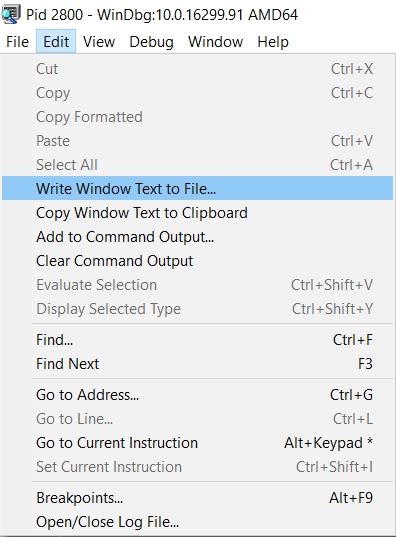

Why sp_BlitzLock Can’t Show Complete Columnstore Deadlock Information

Deadlocks
6 Comments

People seem to care about deadlocks

That’s why I wrote sp_BlitzLock. Why not sp_BlitzDeadlock?

Well, I had this song stuck in my head. But enough about that.

While poking around with things recently, I created a pretty typical deadlock on a table, but this one had a clustered column store index on it.

Of course, that makes things different.

objectivity

So we go digging

The deadlocks I generated were on a single object. Just a couple inserts and deletes in two separate transactions. Nothing special.

This is the information that I pull out with sp_BlitzLock

Hey Mister DJ

But what’s missing from the column store deadlock information is really weird. Namely, everything.

Oooookay

One may be tempted to try to use the associated object id to get the object name, and one would be left wanting.

I wish you would.

It’s a bug in Microsoft SQL Server.

I am currently unable to give you as much information about column store deadlocks as I’d like to.

Unless Microsoft responds to my Connect Feedback Item.

Brent says: this is such a great example of why niche features run into interoperability issues. They work just fine by themselves, but they’re not tested in combination with other things – even when those things might be mainstream, like deadlock graphs. I bet this bug gets fixed quickly though – with columnstore indexes gaining popularity, more folks will be running into this issue fast.

Update June 2021: Microsoft still hasn’t responded to the bug report.


Building SQL ConstantCare®: 10% of you have Priority Boost on.

SQL ConstantCare
2 Comments

One of my favorite things about my job is being able to take the pulse of how real companies are managing their databases. I don’t wanna be locked in an ivory tower, preaching down to you, dear reader, about how you should be doing five million things a day – when in reality, you’re struggling to get an hour of real work done because you’ve got so many meetings.

But sometimes I wonder – am I out of touch? When I was a DBA, I remember struggling with backups and corruption checking – has that gotten easier? Have today’s DBAs started using more automation and tools to protect their estate? Is Transparent Data Encryption catching on? Did DBAs start using Extended Events for monitoring when I wasn’t looking?

And it’s important because I wanna build the right training material and scripts for our customers. I see a problem trending, I want to be able to give people the right information to fix the problem, fast.

When we launched SQL ConstantCare®, I was excited to see what the data would reveal. 86 users have opted into public data sharing for 285 servers hosting 11,521 databases.

Here’s some of the interesting things we’ve learned so far.

SQL Server adoption is still slow.

It’s spring 2018, but SQL Server 2017 still has less adoption than SQL Server 2008, let alone 2008R2. I’m really curious to see how this progresses as we move towards the end of support for 2008 and 2008R2 next year.

SQL Servers by version

In terms of edition, I went in with no expectations – I really have no idea what our readership looks like, and it’s interesting to see numbers:

SQL Servers by edition

Over 50% of us had basic backup issues.

58% of all us had at least one database (37% of databases overall) that hadn’t had a full backup in the last week. Now this is a little tricky: in the initial round of collection, I noticed a trend that a lot of people would add a development server first, then look at the email advice to decide whether they wanted to add more servers.

However, I also noticed a trend amongst the replies – paraphrasing:

“You know, I’d forgotten about those databases. We restored that a while ago to get some data out of it, and then I guess I forgot to delete it. I’ll go delete those now.”

Similarly, 38% of all servers had databases in full recovery model, but weren’t doing transaction log backups on them.

Between dropping databases that shouldn’t be around (shout out to the multiple folks that had AdventureWorks in production), plus suddenly clearing away unnecessarily giant log files, I can see how the database size tends to drop quickly on servers within the first few days of setting up SQL ConstantCare. (We’ll do an ROI study on that over time.)

We have a mixed record on corruption checking.

93% of all databases had a CHECKDB in the last 2 weeks! That’s awesome!

However, things were a lot worse when it came to enabling checksums for page verification. 5% of databases didn’t have checksums turned on, which sounds small, but it was spread across 54% of the users. Look at the person sitting next to you: either this issue affects you, or it affects them. One of you needs to buckle up.

We’re still not patching.

  • 16% of customers are running a completely unsupported build of 2008 or newer (meaning they haven’t applied a service pack in a few years)
  • 10% of customers are running builds with known corruption or security escalation bugs
  • Hardly anyone is patched for Meltdown/Spectre

As a teacher and consultant, I gotta think hard about that. I don’t have easy answers. It’s not like I can just build a presentation and magically get the business to agree to outage windows.

Long term, I’m thinking of it as a data problem: can I tie peoples’ server problems to a specific CU that has a fix for their issues? That won’t be on the horizon for the product in 2018, but it’s an interesting long term challenge.

37% of us are experiencing poison waits.

When RESOURCE_SEMAPHORE, RESOURCE_SEMAPHORE_QUERY_COMPILE, and THREADPOOL strike, it can feel like your SQL Server service is completely locked up – even though you can remote desktop into the base OS and it responds just fine.

When I talk to training classes about that, I’ve been saying that most of you will be able to go your entire career without having to troubleshoot those issues. Turns out I’m completely wrong, and I need to start talking about these more often, like blogging about how to recognize the symptoms even if you’re not monitoring wait stats.

On a related note, 16% of us have had memory dumps recently. My old advice was to install the SSMS memory dump upload utility, but Microsoft shut that down – likely due to security issues around GDPR, since memory dumps can include PII. Before I write new advice there, I’m going to dig deeper into the data – like if the dumps are correlated to specific builds/versions – to improve my advice.

We still have priority boost turned on.

Thanks, SSMS

It’s hard for me to believe that Microsoft still exposes this as an option in SSMS 17.6. Users should be protected from themselves and from really bad Internet advice – this should be deprecated, burned, and pushed to the bottom of the ocean.

Here’s the real kicker, though: ten percent of us have a server with Priority Boost on.

Another way to think of it: when you’re in a user group session with 40 other people, 4 of them have Priority Boost on. Or maybe you, and 3 other people.

The exciting thing is that we can track what happens to wait stats as people turn that feature off, and then prove if it made things better or worse. (Over 20% of us have either auto-close or auto-shrink enabled on databases, too, but thankfully it’s confined to about 11% of our servers.)

I’m barely scratching the surface here of what we’re learning. As the data grows, I’m really looking forward to showing users comparison data of how they rank related to other shops, how their database health stacks up, and the easy stuff they can do to get better.

Read more of my SQL ConstantCare posts, or sign up now.


The Many Mysteries of Merge Joins

Not A Single Picture Of A Zipper

Image humbly borrowed from https://70srichard.wordpress.com/2014/12/17/beverly-hills-cop/

There are some interesting things about Merge Joins, and Merge Join plans that I figured I’d blog about.

Merge joins have at least one interesting attribute, and may add some weird stuff to your query plans.

It’s not that I think they’re bad, but they can be tricky.

Lots of people see a Merge Join and are somewhere between grateful (that it’s not a Hash Join) and curious (as to why it’s not Nested Loops).

Oh, you exotic Merge Join.

E pluribus unum

In a “good” Merge Join, the join operator in the query plan will have the Many to Many: False attribute.

The optimizer knows this because the Primary Key on Id (though a unique index or constraint offers similar assurances) is distinct for each value in the Users table.

Having one unique input give you a one to many Merge Join.

Simple as a pimple

The statistics TIME and IO profile for this query is about like so:

Not too shabby for one meeeeeeeeeeeeeeeeeeeellion rows.

E pluribus pluribus

In a “bad” Merge Join, that attribute will be True.

Hamburger Lady

Why does this happen, and why is it bad?

It happens most commonly when there are, or may be duplicates on both sides of the results. They can also happen when the outer input has duplicates, but quite often the optimizer will rewrite the JOIN order to put it on the inside to avoid having to use a worktable, etc. Thanks to Adam and Kalen for nudging me in the comments to clarify this part.

Internally, the Merge Join will spin up a work table (similar to how a Hash Join operates), and work out the duplicate situation.

The stats TIME and IO profile of this plan looks like so:

If we were to, say, choose that serial Merge Join plan in the compilation of a stored procedure that became the victim of parameter sniffing, we could run into trouble.

Yes, that is seven minutes and forty seconds. A little over half of one metric cigarette break.

Head to head, the large merge (many to many) is costed higher than the smaller merge (one to many). But you won’t see that in a parameter sniffing situation.

You’ll only see the lower costed Merge Join version of the plan.

TELL’EM LARGE MERGE SENT YA

The optimizer will sometimes to try protect itself from such hi jinks.

Aggregation Ruling The Nation

In some cases, the optimizer may inject an aggregation into one side of the join ahead of time to distinctify the data. It doesn’t need to do both — we only need one distinct input for the many to many attribute to be false.

I haven’t seen a situation where both inputs get aggregated merely to support the Merge Join, but it might happen if you ask for other aggregations on the join column.

It can use a Stream Aggregate, which would generally make more sense, since both the Stream Aggregate and the Merge join require sorted data.

Sense and Sensibility

Under less reasonable circumstances, you may get a Hash Match Aggregate. This plan has the additional misfortune of needing to re-order the data for the Merge Join. Teehee.

Hash Gang

If you see this, something has truly gone wrong in your life. This query was heavily under the hint-fluence.

A Sort Is A Sort

Much more common is seeing a Sort injected into a plan to support one or more downstream operators that require sorted input (Merge Joins, Stream Aggregates, Windowing Functions).

For instance, a query like this:

May give you a plan like this:

Sort early, Sort often

In this case, the Sort happens early on to support the Window Function. It also aids the Stream Aggregate, but whatever. Once data is sorted, the optimizer tends to not un-sort it.

The Sort in the next example will be needed with no index on, or where the join column is not the leading column in the index (there’s an If here, which we’ll get to).

If this is my index on the Votes table, data is sorted by PostId, and then UserId

When my query is just a simple join, like this:

My query plan will look like this, with a big honkin’ Sort in it:

Is kill

On the other hand, if my query looks like this:

My WHERE clause filters the leading column to a single PostId (one Post can be voted on by many Users), the UserId column will already be sorted for that single PostId value.

We won’t need to physically sort data coming out of that.

Like mustard

Out In The Street, They Call It Merge Join

I hope you learned some stuff that you can use when troubleshooting, or trying to understand a Merge Join plan.

This is one of many places that the optimizer may inject a Sort into a plan that you didn’t ask for.

Thanks for reading!

ZIPPER FREE!