Blog

Why Multiple Plans for One Query Are Bad

I’m going to demo this using the Stack Overflow public database. We’ll use the Users table – which has exactly what you think it has, everyone who’s asked/answered/commented at StackOverflow.com.

I need to search for people by their DisplayName, so I’ve created an index on that:

And now I’m going to search for a couple of different people – me, and the lady in the meat dress – and then examine what’s in my plan cache:

Here’s the results:

The only place where my reputation is higher than hers

Hey, whaddya know, Lady Gaga uses Stack Overflow too! We’re practically meant for each other.

But let’s zoom in a little on that last result set, the output of sp_BlitzCache:

Two queries, two plans

SQL Server built and cached two query plans.

This has a few interesting problems:

  • It built an execution plan for each one of them – which meant the query took a little longer to finish
  • It cached each execution plan separately – meaning it takes up more memory
  • Each plan could be different – in cases where the different name has a different number of estimated rows, SQL Server might choose to use (or avoid) an index

With just 2 queries, who cares? But if your app is sending in the same query thousands of times, each with different parameters, this can add up to more CPU time, more memory used for caching plans, and less memory used for caching data.

Our tools warn you about this in a few different ways:

  • sp_Blitz warns you that you have a large number of plans for a single query, and that it’s time to dig deeper by looking at the plan cache
  • sp_BlitzCache shows a warning for queries that have multiple plans (indicating that the query you’re looking at might just be a bad one out of several). You can do EXEC sp_BlitzCache @SortOrder = ‘query hash’ to find the queries to focus on, too.
  • SQL ConstantCare® suggests forced parameterization when we see that you have a ton of these over time, and can’t keep plans in the cache as a result

You could fix this by changing the application so that it uses parameterized SQL instead of strings. Run this query to tell your developers which queries are involved:

That gives you the top 10 most duplicated queries in cache, plus for each one, 10 sample texts, plans, and a more-info query for sp_BlitzCache to let you slice & dice them by reads, CPU, etc. Note that the “Total” numbers like Total_Reads and Total_CPU_ms are for ALL of the different executions of the query text, not just the one line you’re looking at.

I’m filtering for only queries that have at least 100 duplicate entries in the plan cache.

Click to zoom

And then when they say, “Sorry, we can’t fix those,” keep reading.

Optimize for Ad Hoc does not fix this.

When turned on, this server-level setting tells SQL Server to expect a lot of different queries that will never be seen again. That means:

  • SQL Server still compiles every string, every time it sees it
  • Just now it doesn’t cache that query’s plan until it sees the query a second time (which it almost never will, because you’re sending in a different string every time)

So your CPU is still high – you’ve just saved some memory, but not a lot. This isn’t a full fix.

Forced Parameterization fixes this.

If you right-click on a database, click Properties, Options, and scroll to the Miscellaneous section, you’ll see Parameterization. The default is Simple, but you can also choose Forced.
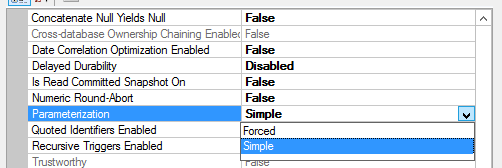
Chuck Norris has the option of Brute Force

Setting it to Forced takes effect instantly, doesn’t require a restart, and then has a different behavior.

If I run the same queries again, here’s the new output:

sp_BlitzCache showing forced parameterization

SQL Server takes a little more time with each incoming query, turns the literals into variables, and then checks to see if there’s an execution plan already compiled for it. That means:

  • Faster query runtime because we can skip compiling a full plan for it
  • Less memory wasted on duplicate plans being cached in memory
  • Easier to spot performance issues because now the same query is grouped together easier in tools like sp_BlitzCache

Things to know about Forced Parameterization:

  • It’s set at the database level, and needs to be set in the database where users are running queries.
  • It could theoretically be a performance drag – if all of your queries had literals, but they really were totally different queries, this could slow things down. I only recommend using this tool to fix a problem, not to proactively prevent a problem.
  • When enabled, plans do get reused – which means you may suddenly have parameter sniffing issues that you didn’t have before (because before, every query got its own hand-crafted plan.)

So when should you use Forced Parameterization?

  • When our tools are alerting you about a high number of plans for a single query (like, say, 10,000 or more)
  • You can’t fix that query to be parameterized
  • You want to reduce CPU usage and increase memory available to cache data
  • You’re comfortable troubleshooting parameter sniffing issues that may arise with that query

For more on the topic, check out Eitan Blumin’s post Too Many Plans for the Same Query Hash.


If You Can’t Index It, It’s Probably Not SARGable

Thumbs Rule OK?

When writing queries, it’s really common to want to take shortcuts to express some logic.

I know, it “works fine”, and the results are “right”, and you have “more important” things to do.

But take a minute here for future you.

Just think of reading this post as a continuation of the infinite thumb-scroll that your life has become.

And Examples!

For instance, it’s a lot faster for you to write ISNULL(somecol, 0) = 0 or YEAR(somedate) = 2018.

In some ways it may even seem intuitive to write queries that express simple equalities like this rather than somecol = 0 OR somecol IS NULL.

The problem is that this isn’t how indexes store, or have their data retrieved, and you can’t create indexes like this:

CREATE INDEX ix_nope ON dbo.zilch (ISNULL(nada, 0))

Hence the title: If you can’t index it, it’s probably not SARGable.

Practically?

I’ve tried to point this out with functions like ISNULL and DATEDIFF.

Using the DATEDIFF example, if you write a query that does this: WHERE DATEDIFF(DAY, day1, day2) = 90

And you’ve got an index like this: CREATE INDEX ix_dates ON dbo.orders (day1, day2)

Nothing about the index is tracking how many days apart day1 and day2 are. Nor minutes, nor hours, nor milliseconds.

It’s just data ordered first by day1, then by day2. Multi-column statistics also don’t track this. It’s up to you to define the data points you need to retrieve for your data.

The same goes for many other built in system functions, but there’s no warning sign on the doc pages that says stuff like:

  • “Hey, this is only here to make presenting data easier.”
  • “The optimizer can’t do that, Dave.”
  • “Only do this if you want to keep champagne flowing for consultants.”

It’s fairly well-documented what happens when you use these on-the-fly calculations as predicates: Nothing good.

For all the hand-wringing there is about index scans, there’s equal amounts of poorly written queries that have no hope of every doing a seek.

Mass Appeal!

As development teams mature and start writing queries beyond simple selects, they may add non-SARGable constructs in other places.

CTEs, Derived Tables, and non-indexed Views are easy examples. The backing query results aren’t materialized anywhere, so they’re not good candidates for predicates.

For example, this query:

Putting the COALESCE inside the CTE doesn’t magically make a new set of physical data — it’s just another expression. It’s really no different than if you did it directly in the WHERE clause without the CTE.

Going back to the title, you can’t index a CTE or a derived table. Abstracting expressions in there doesn’t persist them.

They won’t be SARGable here, either.

Unawares?

If you think they’re bad there, wait until you start trying to order data by expressions.

Even with a perfectly fine index thrown into the mix…

We’re forced to sort everything by hand.

Or whatever your computer uses.

Mine uses hands.

Tiny hands.

This isn’t your friend

This is the kind of query that really makes your CPU fans kick in.

The kicker is that the optimizer may decide to inject a sort into your plan that you didn’t ask for.

Is There An Exit?

When you’re writing queries to be reliably fast, take a close look at what you’re expecting the optimizer to do.

Indexes can go a long way, but they’re not cure-alls. They still have to contain data the way you’re trying to use the data.

If they don’t, you might need to look at temp tables, computed columns, denormalizing, or lookup/junction tables to set data up the way your queries use it.

Thanks for reading!


Azure SQL Managed Instances and Database Corruption

Disclaimer: I love Azure SQL Managed Instances (MIs) so far. They’re really cool, and I’m having a fun time playing with them. I’m about to describe a bug, and I’m sure this bug will be fixed soon, so it shouldn’t stop you from previewing Managed Instances. This post is not “MIs are t3h suxxors” – it’s just making sure you understand that this is new technology, and if you’re going to bet your business on new technology, you need to test it by pushing the limits. That’s what we do here. This isn’t the kind of blog that mindlessly parrots press releases: we’re real world users, so we beat the hell out of technology before we recommend it to customers. I’m sharing this to explain the kind of work we do, and why we put so much effort into getting tools like sp_Blitz so you can get the right alerts at the right time. Now, on with the show.

Corruption has always been kind of a gray area in Azure’s Platform-as-a-Service offerings. Yes, Microsoft manages your backups, and they can recover the entire database to a point in time for you, but it’s not clear what happens if you want to attempt corruption repair for specific objects. It’s not like you get access to the log backups and can do a page level restore.

(I can hear the cloud zealots screaming already, “There’s no corruption in the cloud!” Buckle up, watch, and learn.)

So while working on getting sp_Blitz fully compatible with MIs, I found it pretty interesting that Microsoft isn’t running CHECKDB for you. When sp_Blitz returned an alert about CHECKDB not being run, I thought it was a bug in sp_Blitz until I dug deeper:

Lazy robots are slacking already

When they say the robots are taking your job, I guess they’re doing exactly the same kind of job you would do. Don’t lie: I’ve seen a lot of your servers, and you suck at corruption detection and recovery too. The robot is taking your exact job. Probably going to take smoke breaks even though he doesn’t smoke, just like you.

Note that neither maintenance plans nor Ola Hallengren’s maintenance scripts will work in MIs yet either: MI’s SQL Agent doesn’t support those kinds of scheduled tasks yet. (Props to Erik for catching that one.)

MIs might have a first line of defense in Automatic Page Repair. With mirroring and AGs, when the primary detects corruption, it’ll ask the secondary replicas for a clean copy of the page, repair it on the fly, and log it in sys.dm_hadr_auto_page_repair or sys.dm_db_mirroring_auto_page_repair. So I wondered, if the new HA/DR fabric solution isn’t showing replicas in the usual AG replica DMVs, do we get automatic page repair? I bet we do, because the startup error log shows this:

Databases in an Availability Group

Note that even model and msdb are in that list, and in other parts of the log, master is shown as replicatedmaster. That’s kinda awesome – it’d be amazing if we get automatic page repair for system databases, too.

Side note – even with automatic page repair, if SQL Server writes trash data into the database, you end up with corrupt copies of the data everywhere. Classic examples include the 2012/2014 online index rebuild bug, the 2008-2014 UPDATE/NOLOCK bug, the 2008 compressed partitioned table bug, the 2008-2012 table variable bug, etc. These aren’t common issues by any means, and they’re all fixed today. However, for every bug, there was a range of time where it was active in the field and wasn’t fixed, and that’s what I’m worried about. No software is bug-free – so what happens when we hit a bug?

Let’s find out.

Testing Corruption of the Master Database

Corruption happens. It’s just a fact of life – storage is gonna fail. Microsoft’s SLAs for storage only give you 3-4 9’s, and there’s nothing in there about never losing your data. Nothing against Azure, either – I’ve lost entire VMs in AWS due to storage corruption.

So let’s demo it. Normally, this kind of thing might be hard to do, but at the moment, DBCC WRITEPAGE is enabled (although I expect that to change before MIs hit General Availability.) I used Erik’s notorious sp_GoAheadAndFireMe to purposely corrupt the master database (not TempDB. I modified it to work with a user database instead, ran it, and in less than ten seconds, the entire instance went unresponsive.

For the first 3-4 minutes, login attempts would fail:

No soup for you

From 5-20 minutes, the connection started, but:

“Yes, support? Here’s my tracing ID. Eff…six…three…”

After half an hour, Object Explorer still couldn’t connect, but at least I could connect a query window to run connections, so I checked msdb.dbo.suspect_pages, and it was empty. However, CHECKDB() in master caused my connection to eject:

I sent the MI details off to Microsoft for analysis, and they’re working on a fix.

So what did we learn?

In traditional DR technologies like log shipping, database mirroring, and Always On Availability Groups, the fact that the master database isn’t replicated can actually be a good thing. When you fail over your user databases and only your user databases, you’re able to escape from system-database-level problems (or in the case of mirroring and log shipping, escape cluster-level problems.)

When you go with MIs, you’re gambling that Microsoft’s administration-as-a-service is going to be more reliable than your own administrators (with some tradeoffs around expense as well.) I think in the vast majority of cases, that’s a really, really, really safe bet. It’s not a guaranteed bet, though, as we see here.

Everybody has work to do. You need to run CHECKDB on your MIs, and Microsoft needs to improve compatibility to let you do it more easily, and corruption occurs, MS needs to do a better job of recovering – or give you some kind of plan B.

Because think for a second: what’s your disaster recovery plan for a Managed Instance failure?


Building SQL ConstantCare®: The Serverless Architecture

Our new SQL Constant Care® is an online service that analyzes your SQL Server’s diagnostic data, then gives you personalized advice on what you should do to make your database app faster and more reliable. I blogged about the vision last week, and today let’s talk about the things that drove our architecture decisions way back in 2015.

I’ve worked for software vendors who had to deploy and support applications running on customer desktops. It’s an absolute nightmare – you would not believe the crazy things people try to do with your app.

So when I started thinking about how to deliver server recommendations, and how I’d deliver the application as a software vendor, I wanted as little code on the client’s machines as possible. Ideally, none, but querying SQL Server directly from a web browser doesn’t seem doable yet. Sooner or later, Atwood’s Law will kick in and it’ll be written in JavaScript, but not today, Satan, not today.

In the really big picture of the full version:

  1. You’d collect data from SQL Server. (This was gonna require a local app.)
  2. We’d analyze the data and build a list of tasks for you to do.
  3. We’d tell you what those tasks were.
  4. We’d monitor your progress on accomplishing those tasks, and the difference it made.

Steps 2-4 weren’t synchronous – they were going to take time. Some problems would be completely obvious (“hey, you have slow file growths due to repeated file shrinks, turn off this specific maintenance job step”) but others might get flagged for human intervention. As we improved the code for steps 2-4, more and more scenarios would be handled automatically – and this is the part of the software that we expected to rapidly iterate over. We didn’t wanna deploy this kind of logic on-premises every time we got smarter. Steps 2-4 were gonna be in the cloud.

The cloud also made sense for performance and scale requirements. I didn’t expect a large number of people to enroll right away, but I wanted to plan for the future – especially a future where I could drive the per-user and per-server costs lower. I wanted the processing cost to basically drop to free, thereby enabling me to do fun stuff like a “Free Server Friday” where anyone could send in data.

In a future like that, what kind of loads might I have to deal with? Think users times the number of servers:

  • Our mailing list has ~100K people, but let’s say just 1% of them enrolled.
  • For server count, in our annual salary survey, the median number of servers managed is 20, but let’s say they send in data about 5 of those servers.
  • That means we’d be processing tons of diagnostic data for 5,000 servers at a time (and if we did freemium or free days, possibly much more)

Scale-out, queue-based processing was a requirement. The scale-out portion might be able to wait until v2, but queue-based was an absolute must.

This seemed like the perfect app for serverless architecture design.

Wait, what’s serverless architecture?

Serverless doesn’t mean there are no servers.
Serverless just means the servers aren’t your problem.

Serverless, also known as function-as-a-service, means that you write small units of code (functions) that get triggered whenever events happen (like when a file lands in a folder.) Mike Roberts’ Serverless Architectures article is a good place to start learning more.

We wouldn’t have to build, troubleshoot, and patch our own servers, nor would we have to worry about performance capacity. As we got more incoming data, AWS would just run our functions on more servers. You pay by the millisecond that your code runs. Even if that cost was relatively expensive, it still called to me as a tiny business owner because I flat out couldn’t afford to replicate the support and sysadmin infrastructure that would be required for a conventional software-as-a-service. If I took a risk on serverless, and spent more up front on development, I might be able to build something that scaled easier later.

And serverless isn’t expensive, by the way – your first million AWS Lambda requests per month are free, and $0.20 per million requests thereafter. Pricing gets a little tricky as you configure the memory your function needs, but even still, at the kinds of scale we’re talking about, it’s way, way cheaper than buying a single server, let alone hiring a sysadmin.

Richie’s early process sketch

When designing a serverless app, you think about tiny services and queues. In SQL ConstantCare®, that means:

  • The client runs the collector app, which pushes data into a cloud file service (Amazon S3). At this point, the synchronous client-facing work is done, and the rest happens asynchronously via functions and queues.
  • As files arrive, S3 would automatically add related records to a queue for processing.
  • Functions would launch for each file, importing them into a database.
  • As each function performed operations on the incoming files, like adding them to a database or checking data for business logic rules, they’d add records to the next queues.
  • Eventually a queue entry would trigger a function to send an email with the list of tasks for the client.

If we got overwhelmed with files, fine – they’d chug along asynchronously. If a function broke, fine – we’d troubleshoot it asynchronously without clients seeing errors. Granted, their emails might sometimes take longer than others to process – but who cares? This is mentoring, not real time monitoring.

The combination of what I wanted to build, plus the brand-new serverless thing, just seemed like the absolute perfect match.

Even Richie’s documentation looks awesome

But serverless was one hell of a risk.

The process and architecture diagrams were chock full of icons for brand new AWS products. To give you some perspective on when the decision was made, and how risky it was:

  • 2014-Nov – AWS Lambda announced
  • 2015-Nov – I swill the serverless Kool-Aid
  • 2016-Feb – Google Cloud Functions goes into private early release
  • 2016-March – Richie starts working on PasteThePlan, our first serverless project – using AWS because it was the only game in town that we could access
  • 2016-March – Microsoft Azure Functions goes into private early release
  • 2016-Aug – Mike Robert’s fantastic introduction to serverless appears
  • 2016-Sept – PasteThePlan goes live, Richie starts working on SQL ConstantCare – at the time, we just called it “the service” because we didn’t have a brand yet. Based on the AWS Lambda experience with PasteThePlan, we were hooked, and continued moving forward with that. We did switch to the Serverless framework, though.
  • 2016-Nov – Microsoft Azure Functions goes into general availability
  • 2017-March – Google Cloud Functions goes into general availability

To put it another way, I decided to go serverless before there was any competition in the market. If AWS Lambda had died, or if Google or Microsoft unveiled something dramatically better, or even if AWS themselves offered something way better, I ran the risk of flushing a lot of money down the toilet.

To reduce risk, hire brilliant people and trust them.

When we hired notorious dataveloper Richie Rump (@Jorriss), I said something to the effect of, “Here’s what I want to build, I want us to use serverless to build it, and here’s a list of reasons why. However, you’re going to be in a wild West of uncertainty because the tools are so new – so if at any point you think we need to switch back to conventional architectures, I’m fine with that. It’s your call.” I knew development would take longer – much, much longer – but because there wasn’t really anything like this in the market, and I didn’t think there would be soon, I could afford to take some time.

PasteThePlan.com

Richie built PasteThePlan with serverless architecture first as a learning experience, and wrote about that here. It worked out extremely well – the hosting costs were dirt cheap, and support was even cheaper. For example, when the Meltdown/Spectre attacks hit, the AWS update was straightforward: they fixed everything automatically without customers lifting a finger.

The platform wasn’t the only risk, either: because I could only afford to hire one developer, I had all my eggs in Richie’s basket. If he got hit by the lotto, got a better job, or just got tired of working for me, the project would be set way the hell back. All I could do is keep giving Richie whatever he needed to make the project successful. That, and take him aside from time to time and tell him how good his basket looked.

In 2018, looking back, using serverless for SQL ConstantCare® feels like it was a smart decision. We got lucky – Lambda caught on, AWS kept investing in it, the tooling got better, and no new competitors emerged in our market. Sure, there’s some survivor bias here: we might have been able to go live earlier, cheaper, by building it in a more conventional web app. However, I think as our marketing ramps up over the summer, we’ll be glad we built it to handle bursty demands. (We’re only diagnosing 76 servers a day right now, for perspective – I’m not marketing it hard yet, just letting people find their way in and we’re learning as adoption grows.)

In upcoming posts, I’ll talk about what data we chose to collect, where we store it, what we’re learning from it, how we bundled and priced the services, and more. If you’ve got questions, feel free to ask away – in these behind-the-scenes posts, I try to share the kinds of business decisions I’d find interesting as a reader. Next up: the product, packaging, and pricing.


[Video] Office Hours 2018/3/17 (With Transcriptions)

Videos
0

This week, Brent, Tara, and Richie discuss VLF issues, SSAS tabular performance support, certification tests, query documentation tools, what to do when the executive team doesn’t value your contribution as a DBA, and more.

Here’s the video on YouTube:

Office Hours Webcast - 2018/3/14

You can register to attend next week’s Office Hours, or subscribe to our podcast to listen on the go.

Enjoy the Podcast?

Don’t miss an episode, subscribe via iTunes, Stitcher or RSS.
Leave us a review in iTunes

Office Hours Webcast – 3/14/18


How do I keep VLFs under 300 for a VLDB?

Brent Ozar: [Tishal] says, “Hi guys, I have a 2TB database and I have auto-growth set to 4GB. The number of VLFs is always about 1000 VLFs. I think I’m supposed to keep it under 300. Is there some way – should I keep it under 300 and how do I keep it under 300 VLFs?”

Tara Kizer: I mean, where did that 300 number come from because – so 2TB data – what’s the size of the log file and what size is it growing to? So I’ve had some log files that were, say, 300GB or higher and I can get the VLFs down to, say, 200 to 300, but that’s just, you know, picking the number. I mean, so shrinking it down all the way and growing it back out in like 4GB or even 10,000MB chunks. But it’s obviously auto-growing, since you’re going from 300, fixing it and then going back to 1000. So why are you – what is going on there? So someone must be shrinking it for it to be [crosstalk] this battle.

Brent Ozar: Yes, it says, it always grows back to 1TB after shrinking – oh, it always goes back to 1000 VLFs, I guess is what he’s saying.

Tara Kizer: After you fix the VLF issue, you’re supposed to auto-grow it back out to the original size. I think maybe that step is being missed. So shrink it all the way down to 5MB or 1MB. Do this in a maintenance window because if you have a 2TB database, you’re probably going to need some transaction log space. So make sure you get all the way down, as far as you can; literally like 5MB. Then you grow it back out to the original size. Don’t just let it auto-grow from there. You have to auto-grow it back out and pick some number, such as 5000MB, to do the manual – you’re going to be doing manual growth back out and keep going until you reach your original file size. So I think that you’re missing a step here. I don’t think you’re manually growing it back out.

Brent Ozar: And you could grow in giant increments if you want…

Tara Kizer: Aren’t there performance issues with that? Because you then have some large VLFs and in order to clear those out – it takes longer to clear those out. You have to clear out a VLF at a time when the truncation process happens – it’s a VLF at a time…

Brent Ozar: And the growing’s going to take a hell of a long time too at 20GB a pop. I’m like Tara too, like where did the 300 number come from? Our general number is – I think we alert you at 1000 VLFs in sp_Blitz and that’s only just to warn you that before you get to 5000 or 10,000 that you change tacks. But I’m kind of okay with 1000 VLFs; I don’t have a problem with that.

Tara Kizer: Did you see the Stack Exchange question from last week? They were on their third restart. The crash recover was taking over 36 hours. So the first two times it happened, it took over 36 hours. They must not have investigated it because here they are on their third time. I assume Microsoft patching or something has caused them to do a restart of the box. Why, after the first time, didn’t they start troubleshooting this? Because they weren’t even sure what the VLFs were on this third time while they’re waiting 36 hours for this database to come online. And they follow up to say even copying files, they were getting 1MB per second or something crazy like that. They were like, something’s going on with this box. I checked on it like a couple of days later and I didn’t see an update. I was hoping to see what happened with it.

Brent Ozar: Yeah, like how many hours had passed before they finally got the thing up to speed. Brutal – I remember there was one data warehouse when I was in Miami – a data warehouse in Miami that after 72 hours they came to me. I wasn’t the employee, I was just there as a consultant at the time. After 72 hours they came to me and they’re like, “Do you know a way to see how far along the restart is?” And I’m like, “No, why?” 72 hours.

Tara Kizer: Oh man, I mean you can kind of gage it in the error log because it goes through three phases and it does give you percentages in those phases. But yeah, at least you know what phase you’re in, unless you’re still in phase one after 72 hours.

Brent Ozar: I’m like, what are you doing? Well it’s just a QA box. We’re not really – just delete it. Just delete the databases and start over.


Where can I learn to tune DAX and VertiPaq?

Brent Ozar: Francisco asks, “Where do you recommend for a support community like you guys for an SSAS tabular performance support? I want to learn how to decipher query plans related to DAX and the VertiPaq engine.”

Tara Kizer: Lots of words; I don’t even know what they mean.

Richie Rump: Compaq makes VertiPaq? I don’t know…

Brent Ozar: Yeah, it had that HP sounding name when they came out. Anything ending with a Q. Our poor transcriptionist. VertiPaq is V-e-r-t-i-P-a-q. So the problem is, like, if you take a percentage base, how many percentage of people are using the SQL Server engine and then what percentage of those are using analysis services and then what percentage of those are using, say tabular or DAX or whatever? It’s such a small percentage. It’s not that it’s a bad product. It’s totally fine. There’s nothing wrong with it. It’s just that not only are there so few people using it, there’s like three guys tuning it and then they don’t end up doing any community work because they’re just overwhelmed with tuning it.

So your choices are either go to work for Microsoft, talk to Chris Webb – and I say talk to, but he does training classes over in Europe. I don’t think he does online ones yet, but he does that kind of performance tuning work. The other one is Bob Duffy out of Ireland. It’s prodata.ie. But all of these are just – they blog once or twice a year, but the rest of the time, they’re doing their private training classes. You’d have to go to a class.

Tara Kizer: Just like Richie and Me… Once a year.

Brent Ozar: Got better things to do – come on now.

Richie Rump: Do you know how much bugs Brent puts into my product? Really, that’s a fulltime job.

Brent Ozar: It’s embarrassing how bad my code – like I feel bad – I was talking to Erik about this yesterday. So I check in fixes to our internal stuff in the Constant Care, now that you all can see Constant Care. And I give Richie code and I’m like, yeah this is ready to go. I’m pointing to fields that don’t exist. Fields that don’t even exist… I’m like, yeah, no ship it, Richie, it’s cool. It’s embarrassing. And then at least Richie has the incredible foresight and sense to build automated builds; so as my code gets checked in, you can smell the smoke and how bad everything is broken.

Richie Rump: See, I break stuff way more than Brent does, but nobody’s looking. So it’s a little different when Brent checks stuff in and I’m looking at it like, dude, come on, that field doesn’t exist, man.

Brent Ozar: It’s like, yeah, are you looking for IsDisabled? I’m like, yeah, that’s exactly what I… Oh…


Is it time for me to leave my job?

Brent Ozar: Daryl says – oh, Daryl asks a good question. He says, “I’ve continuously improved the shop I entered four years ago. I’m the only DBA supporting 44 servers and 185 databases. I’m heads-down all day supporting my developers, projects, day-to-day database support. I’ve been in IT for about three decades; two decades Oracle, four years SQL Server. No one knows what I do but the C-level is still convinced that I don’t know what I’m doing. Is it time for me to leave? Should I do in-house presentations on what I’ve done and how it’s impacted the environment?” What would you guys do in that – Tara’s expression…

Tara Kizer: I just don’t know. I mean, if the C-level people don’t know what you’re doing or that you’re doing a good job, I couldn’t stay there. That means I’m being passed up for raises and bonuses and I’m just suck. I’m basically stuck in my career there and it just – unless there’s something else keeping you there like benefits or maybe your starting salary was fine and you’re okay with that, but I could not work in that environment.

Richie Rump: Yeah, it would be extremely hard to communicate to the executive team about what you do and why you’re important. I mean, because they already think you’re not doing a good enough job at the moment for whatever you do. And then explaining it to them something that’s pretty technical and they don’t sound like technical people, that’s an uphill battle as it is. It’s a lot easier to just, hey, what else is out there? And I could probably get paid more while I’m doing it. It sounds like something that you need to look into.

Tara Kizer: And one way to know if you really are doing a good job is looking for another job and seeing what kind of jobs you can get, because maybe you aren’t as good as you think. It’s possible, you know, when you’ve been in a job for a long time, you’re not exposed to newer stuff and it’s hard to keep up when you’re stuck in a certain job for a lot of years.

Brent Ozar: A great example of that – a friend of mine went through the MCM program and they’d been working at the same shop for ten years but just with the same server; just the same server continuously and over and over again for the same ten years. Had built that server themselves, knew exactly how it was configured, never got into really strange scenarios and was totally blown over by the MCM exam and how hard it was. There are all these different features – I’m like, yeah, you know, that’s what we work with. That’s how this thing goes. People use crazy stuff.

I would say too, if I’m in your shoes, you ask, “Am I happy here enough to the point where I can keep cashing this check and I’m ready to retire in so many years?” I don’t know what your retirement situation looks like, if you’ve been doing, you said, IT for 30 years. And who knows, maybe you found what you love and this is the exact perfect niche and you’re like, okay people never know what I do – you just want to make sure you don’t get laid off.

Tara Kizer: That would be my concern.

Brent Ozar: Sell them a little better so that they don’t replace you with someone with two years of experience who wants $50,000 per year. But always – Richie gets heartburn – I would totally put your resume together, have it out on LinkedIn and send it to a couple of recruiters in town – assuming in town if you didn’t want to move – because remote work is almost impossible, despite how easy we make it look. Just so that that way, you’ll be entertained. The time to look is when you have a job. The time to look is when you’re already comfortable and you do, well, you know, I have a parachute here and you can pick and choose and be comfortable and flexible.

Richie Rump: What was that site again?

Brent Ozar: SQLSkills.com…

Tara Kizer: I just got a job posting from a recruiter yesterday for a local healthcare system. Somehow the bullet points in there is like must know Linux… Maybe you sent this to the wrong person.

Brent Ozar: I liked how somebody was Tweeting yesterday, they said, “Java is to JavaScript as ham is to hamster because they’re not related.”


How should I approach getting a Microsoft certification?

Brent Ozar: Kyle asks, “Any suggestions for sites which provide practice exams for certified 2016 database administration tests?” Boy, are we the wrong guys. So it’s been a while since we talked about certification, so we’ll go across the screen. Tara, if I say, you know, should you get a certification test or not, what’s your answer?

Tara Kizer: I have exactly zero certifications and this is because I’ve taken practice tests many years ago, many, many years ago, and I did so poorly on them, I was like why bother with these? I’m already doing a good job. At that job, I was considered a rock star, you know, doing really well. I was like, I just don’t need to be certified. Why spend – that company would have paid for – I figured how many failures, so if I had failed the test, they would have paid for some of them. And I could have taken time off to go prepare for them and they would have paid for that. I had no interest in it, really. That one practice exam I was like, I remember, I’m not a good test-taker. And the questions are so dumb anyway – the test answer might be different than what we do in the real world. So I’m answering real-world answers and that’s not what the test is looking for.

Brent Ozar: Richie, how about you?

Richie Rump: Yeah, for some reason, when I took the SQL development exam – I think it was 2008 – like, the answer was always XML data type. And in reality, the answer is never the XML data type. It’s never it. Way back in the day, because I think I took my first exam way back in 97 and I’d just graduated college and I just jumped right into one of the exams and passed it. I was using the Transcender practice tests. But I haven’t seen them in a billion years, so I don’t even know if they’re still around yet or whatnot. But what I would do is I would – they would come with three practice tests, I would take one, study the stuff I missed, take another one, study the stuff I missed and I’d take the last one and then take the exam – I never passed a Transcender exam, but I never failed a Microsoft exam.

So they were good tests. They were good, but I haven’t felt the need or desire to take a certification test in about a decade. It’s just one of those things where it doesn’t matter as much as it did back 20 years ago. 20 years ago, it would get you in the door. Nowadays it’s just a blurb that people kind of skim over. It doesn’t really buy you too much.


What tool will document my queries?

Brent Ozar: Ronnie asked a question. I’m going to have you flesh out your question more while I talk about Kyle’s follow up. Ronnie said, “Can you recommend a free tool for query documentation, or do you just create your own templates?” Talk more about the kind of output that you’re looking for. Are you talking about comments or are you talking about visual diagrams? Or what do you mean by query documentation? Sounds like a classic DBA answer – what do you mean, documentation?

Tara Kizer: Documentation and Tableau, I’m like, I’m out.


Our vendors are requiring certification.

Brent Ozar: Kyle asked a follow-up. He said, “It’s now a requirement for us to get the certifications in order to stay in good maintenance with one of our vendors.”

Tara Kizer: Yikes…

Brent Ozar: I’m going to give the most politically incorrect answer that will surely get me in trouble when this transcript goes live, but here we go. If you don’t care about the certification and if it’s just to make someone else happy and you already have a job and you’re not worried about whether or not you prove you know something, Google for the test number and Brain Dumps and hit torrent. You can go get torrents of the exact questions and answers that are used on exams. Because what happens is, in less scrupulous areas, people will go take the exam and immediately go out and write down or type out everything that was on the exam. So there are lots of countries where it’s an accepted practice to exchange that stuff for free. Now, that’s dirty in the sense that Microsoft’s going to get angry at me for saying that.

Tara Kizer: It’s so anti-community…

Brent Ozar: Bad man… But I have so little faith in the Microsoft exams, they’re not worth the paper that they’re printed on to begin with. They don’t show what people actually do for a living. That’s the same reason we don’t ask for certs when we go and hire people. They’re totally irrelevant. So if you just have to check an irrelevant box then cheat – which is a horrible thing to say – and there it is.

Tara Kizer: And I’m so passive aggressive that even if it’s a requirement of a company, I would still not do it until they forced my hand, you know, you either leave or you get certified. And I may choose to leave because it’s not something I’m interested in.

Brent Ozar: It’s horrible. We had – at one point, we were a Microsoft Gold Certified Partner because we wanted to go down the road and see what it was like. And they had requirements for you had to have a certain number of certified staff. So a bunch of us went and took the test and we were all pissed because they were BS, and I want to say both Doug and Jess were struggling with the BI tests – and they know more about BI than most people I know. And so, we were like, alright. And when it came time to renew, we just canceled the Gold Partner thing because we were like, it’s just meaningless. Now, I’m not saying the Gold Partner thing is meaningless. It’s not if you’re into that kind of thing, but it just didn’t make any difference for us.

Tara Kizer: It’s pretty weird that our clients ask if we’re Gold Partners or not. I think I’ve seen one email the two years that I’ve been here.

Brent Ozar: No, and I think some of it is probably word of mouth. Like some Gold Partners only want to work with other Gold Partners. So it can help you get a consulting job at certain kinds of consulting companies, if you want it, but I’m so biased against doing that just to get to a specific company. I’d rather you go to someone in your network that you actually want to work with. And then usually, when there’s someone who knows you, knows the work that you do and wants to hire you, they’ll bend the rules to get you in. they’ll make that happen. Richie looks like he wants to say something there.

Richie Rump: No, no I’m fine. Cheat away…

Tara Kizer: Having said all that, I mean, the MCM program was a great certification, you know that really did prove who were experts, for the most part. I’m sure some of them slipped through.

Brent Ozar: It was weird how it worked – and I’ll talk about this now too because it’s been so long. But the first test was – the final test – there were three written tests that were all hard as hell. The three written tests – you got one a week for the three, then the final lab exam was six hours in a lab and you didn’t get a list of questions, you got a couple of sheets of paper, like double-spaced, with big long brain-dumps from the client. Like, here’s everything that’s been going on with the client. And you had to figure out what you were supposed to do. There was no question three-mark C or something like that. It was pretty bizarre.

Tara Kizer: I don’t think I could have done that. So you weren’t on a computer to test things out, you were just on paper with the scenario?

Brent Ozar: No, you had the real – you had like three VMs, but you only had those three. There was no dev environment; it was just go. And there were maybe 20 things that you had to accomplish once you wrote down, here’s everything I think they’re asking, and they would all break each other. So it was a very do it live fun scenario. You’d have done fine. I really think that it was the best experience I’ve ever seen for judging someone who’s worked around databases for ten years. If you’ve worked around databases for ten years, you can smell what’s kind of broken and click around. I’d never really worked with replication before, but there was a replication problem and I solved it because I was like, “Alright, well let me figure this out. How hard can it be?”

Tara Kizer: When I first looked into it, when it was still $10,000 to get through the whole thing. I know that the price dropped at one point…

Brent Ozar: $20,000…

Tara Kizer: $20,000? Okay. So that just wasn’t happening.

Richie Rump: Yeah, I was following Brent’s blog posts on that like crazy because I couldn’t figure out why somebody would spend 20 grand and three weeks of their time – what is going on here, Brent?

Brent Ozar: Yes, I did that back when I worked for Quest. And I had that same reaction when they came to me. They were like, “We have this MCM program. Do you want to be in it?” Like, “I don’t know, what’s involved?” “It costs about $20,000 and three weeks.” No, no, no.

Tara Kizer: Did they cover it?

Brent Ozar: Yeah, they picked up the whole thing. But if I left within – I can’t remember – a year or two years, I had to pay the whole thing back. And I did, so that was a check where I was like, “God I really liked this MCM…” Daryl said, “Was Googling disallowed during the exam?” No, it was open internet. You had whole open internet. You could bring your scripts in and still it had like a 70%-80% fail rate; so it tells you.


Followup on query documentation tools

Brent Ozar: Ronnie follows up with, “For the query documentation, I’m at least just looking to create notes within the query; at best, something that can output database information into some kind of document.”

Tara Kizer: I still don’t understand the question really.

Brent Ozar: There is no self-documenting code. There is no self-documenting app. Richie, what app are you using to generate the 400-500 pages of documentation that you cranked out here?

Richie Rump: These right here; these tools.

Brent Ozar: On the audio podcast, you can’t see Richie’s fingers. They’re all painted in different colors. He does this on company time too.

Richie Rump: You can’t tell but I’ve broken every one of my fingers at least once.

Brent Ozar: How have you broken every one of your fingers?

Richie Rump: I used to play basketball, man. Either sprained or broken, and what you used to have is you get a finger that’s popped, you just take some tape and you run back out there. You tape two fingers together, you know, whatever that is, but you just don’t stop playing. That’s not an option. You keep going.

Brent Ozar: You like basketball way more than Tara and I like basketball.

Richie Rump: Yeah.


I need certification so the men in my office will take me seriously.

Brent Ozar: Katie says, “We’re trying for certificates so that the guys we work with will have faith in our answers.”

Tara Kizer: Eurgh, no.

Brent Ozar: Katie, I apologize. I am sorry that you have to go through that. whoever you’re working with is a pig. That’s ridiculous. It should be the other way around, that nobody should respect anybody – I’m going to get myself in so much trouble. The people who have to get certificates to be treated fairly, it’s just not fair. That’s just not right. It’s bogus. She has a smiley face in her answer, but that’s just crappy.

Richie Rump: I mean, is this one of those things where maybe integration testing would help out? So you actually create tests that will load a certain amount of data to a database and then you run the query up against it and then it comes back with the answer, which you verify it’s the same. And you run all these different tests up against your queries and, hey, look it works because we have tests and every time we do a deployment once a day we run all these tests and they all worked exactly the same way, and then it’s repeatable.

Brent Ozar: What you started that, I thought you were referring to Katie’s question, and I was like, how does that have anything to do with gender and believing…

Richie Rump: Oh yeah, no.


Does Agent pause processing during a failover?

Brent Ozar: Sree asks, “Does SQL Server agent pause processing when it’s failing back or failing over?”

Tara Kizer: Nope. It’s just like all your connections, everything gets severed.

Brent Ozar: Bombed. It pauses in the sense that it stops working, and then it starts working again when it starts over on the other node.

Tara Kizer: Everything gets killed, rolled back, rolled forward, whatever.

Brent Ozar: Daryl says, “Thank you, you guys rock.” Well, you are welcome. And with that, we are at the end of this Office Hours. Thanks everybody for the questions and we will see y’all next week; adios.


Azure SQL DB Managed Instances: Transactional Replication

I knew Brent and Erik wouldn’t touch replication, so I figured I’d give it a whirl.

My good, old friend replication

I have a love-hate relationship with replication. Mostly hate due to latency and errors, but it does serve its purpose. Before Availability Groups came out, I used Transactional Replication to copy data from the production OLTP database to another server so that we could offload reports.

Will it work with a Managed Instance?

I immediately crashed and burned as I didn’t read the limitations of Managed Instances. My bad.

A Managed Instance can be a subscriber but not a distributor or a publisher. FINE.

I setup the distributor and a publisher on an Azure VM and then added the Managed Instance as the subscriber. I initially had some errors in Replication Monitor, but that was because I hadn’t touched replication in over 2 years and had forgotten some things that I once knew, such as replication needs a UNC path for the snapshot. Once the data was flowing between the two servers, I started pumping data into the publisher and watching Replication Monitor for latency and errors.

I inserted a tracer token to verify how fast data was making it to the subscriber: 4 seconds, not bad.

Those who’ve used replication know that rebuilding a large index can cause excessive replication latency. I didn’t have a large index for this test, but I still wanted to see how this setup would do.

Latency was always under 20 seconds, and it recovered back down to 4 seconds fairly quickly.

Test, test, test

If you plan on using a Managed Instance as a subscriber in your replication topology, be sure you test for latency. Excessive latency is typically caused by a large transaction. The largest transaction on a particular database is often rebuilding the largest index. Start there for your latency testing.


Azure SQL Managed Instances Brain Dump on CPU, Memory, HA/DR, and Backups

Managed Instances
3 Comments

Normally when we write blog posts, we try to explain something or tell a story. If you’re looking for a solid educational post, stop here, mark this one as read, and go on about your day.

This post is just a brain dump of unorganized notes from our experimenting with Azure SQL DB Managed Instances Preview. Buckle up.

Update 2018/05/05 – Microsoft’s Dimitri Furman shared how CPU and memory allocation works for Managed Instances.

CPU & memory configs

Let’s start with this: both 8 and 24-core MIs all have ~170GB RAM. (I haven’t deployed a 16-core VM.) When you provision a Managed Instance (MI), you choose between 8, 16, or 24-core VMs. Interestingly, they all appear to have 24 cores. I’m guessing Microsoft is keeping deployment simple for now.

Screenshots for the 8 and 24 core MIs:

8-core MI with ~170GB RAM
24-core MI with ~170GB RAM

For the 8-core MI, here’s what sys.dm_os_schedulers looks like – it really does only have 8 online visible schedulers:

sys.dm_os_schedulers on an 8-core MI

That’s an awful lot of hidden online schedulers – but note that they all still tie to the same parent_node_id and cpu_ids (0-7).

Yes, it still has a Dedicated Admin Connection (DAC), and yes, as of right now you can connect to it – and here’s where things get a little cool. Instead of just 1 query connected to the DAC, you can have at least 2. That’s new.

So how are they restricting us to 8, 16, or 24 cores? The conventional way would be affinity masking, but they did something different: if you go into Processors, only 8 cores show up as options under the 8-core MI. The core restriction is being enforced differently, and I’m guessing it has to do with these startup messages in the error log:

Affinity Agnostic configuration, AffinityAgnosticMaxCoreCount = 0

If you want to spelunk through error logs and see what’s new, here’s one Managed Instance error log, and here’s another.

In the opening server properties screenshots, the eagle-eyed amongst you will notice Win 2012R2 and SQL Server v12.0.2000.8. I wouldn’t put a whole lot of stock in these numbers right now – exact version numbers are starting to matter less here. More on that when I talk about feature switches.

You’ll also notice that Is Clustered = False, Is HADR Enabled = False. So with what kind of black magic are they replicating your data?

Enter the HADR Fabric.

Your Azure SQL Managed Instance consists of 5 servers:

sys.dm_hadr_fabric_nodes

This is why MIs have such tricky network requirements: this ain’t one server or service. Microsoft is creating, fixing, deleting, redeploying VMs to maintain the service. Together they make up a cluster, but this isn’t a Windows cluster. All kinds of new DMVs here:

sys.dm_hadr_fabric_config_parameters

Here’s the applications that show as running on these nodes:

sys.dm_hadr_fabric_applications

You don’t see SQL Server here directly, and you might also remember that in the Managed Instance restore tutorial, you saw RestoreService performing restores for me.

Look a little closer at Worker.CL, and he’s hosting the databases:

sys.dm_hadr_fabric_partitions

In this screenshot, my Managed Instance has 4 user databases, and they’re represented by 4 GUIDs. Erik wrote about how you’ll need these for some of the DMVs.

If I scroll across sys.dm_hadr_fabric_partitions to the right, there are some interesting columns:

Replica counts and quorum

Remember, my user databases are near the bottom of this list. If target_replica_set_size = 1 and min_replica_set_size = 1, you might guess that only one node is hosting my databases. (Especially with partition_kind_desc = singleton.) That would be putting a lot of eggs in one basket, but it doesn’t appear to reflect how many nodes are actually hosting the database. Remember during the restore tutorial, I showed how something akin to Direct Seeding is running in the background.

Based on the MSDB tables, it looks like you’re getting log backups every 5 minutes:

msdb.dbo.backupset

Which takes me back to work. I’m working on getting sp_Blitz to be fully compatible with Managed Instances, and I gotta go fix the backups query. (sigh) The server_name reported in these DMVs doesn’t match things like SERVERPROPERTY(‘ServerName’). No rest for the wicked.


How to Restore a SQL Server Database into Azure SQL DB Managed Instances Redux

Anything Brent Can Do

There’s some things you can do with Managed Instances, and some ways you can look at data that you can’t do elsewhere.

For instance, you have the ability to start an restore ASYNC — that means if your session drops, the restore will continue headlessly in the background.

There’s nothing about this equation that requires you to be connected. You’re restoring to a cloud server from cloud storage. You’re a meaty third wheel.

The command looks something like this:

While it’s running, you can sorta-kinda check the status with this new DMV:

I say sorta-kinda because my restore of the Stack Overflow database hit 50% complete immediately… and then sat there.

Back like that

You can see all sorts of stuff in here:

  • Create database commands
  • Drop database commands
  • Restore database commands
  • Their status, including percent complete, success/failure
  • Any errors
  • Start time and last check-in from the process

What I need to look into more is how the session_activity_id ties into other DMVs.

Thanks for reading!


Azure SQL DB Managed Instances: New Wait Stats

Incidental

This is a long list that I haven’t had a change to dig through yet — all I did was compare them to which waits were occurring on my 2017 CU4 instance.

There are about 174 of them that I found, though some may just be generated by Hekaton that I don’t have set up on my home servers.

Feel free to make notes on that Google Sheet — I’ve opened that up to the public.

Some kind of interesting ones:

  • BOOST_CPU_TASK
  • CLOUD_FABRIC_ENQUEUE
  • CLOUD_FABRIC_PAIRUP
  • CLOUD_FABRIC_RELEASE_ALL
  • CLOUD_FABRIC_WAIT
  • CPU_ALLOCATION_VERIFIER
  • FABRIC_PAIRING
  • SOS_WORK_DISPATCHER
  • TIERED_STORAGE_MIGRATION_TASK
  • TIERED_STORAGE_PERSIST_LRU_INFO_TASK
  • TIERED_STORAGE_REENCRYPTION_TASK
  • TIERED_STORAGE_SCANNER
  • WAIT_VLDB_DUMP_LOG_LOCK

I wonder what Microsoft considers a VLDB to be. Could this be the standard that we all abide by when talking about our VERY LARGE BIG HUGE TABLE problems?

Stay tuned!


Azure SQL DB Managed Instances: We’re All GUIDs

Six is having problems adjusting to his clone status

Some funny things happen when you create databases up in a Managed Instance.

For Instance (HEH!), you may expect this to yield some fruitful results, but it Manages (HAH!) to defy logic.

But we get blank results! Mon Dieu!

But YourMom will faithfully be in sys.databases for you to not call for 3 months.

We have Id’d your mom.

When we look that up in sys.master_files by database_id, we get back a Funky Bunch®

No Master Plan, No Master Files

Your databases automagickally get created with an XTP file. For those of you unfamiliar, that’s Hekaton, AKA In-Memory OLTP, AKA IMOLTP, aka Xtreme Transaction Processing.

You can just smell the Monster Energy drink pee from here.

On the plus side, this prevents you for turning Auto Close on.

On the down side, you uh might accidentally use Hekaton. Be careful out there!

No more problems on the way

People who write scripts to analyze database-level metrics across DMVs (ahem) will have to make big adjustments to tie some of this stuff together. At least database_id seems to be in tact, but this could make some things awkward.

Before you wreck your mom

But then again, maybe the kind of people who write those kind of reports aren’t yearning for Cloud VMs where you drop your database off and feel a slight pang of guilt before going on vacation.

Like a retirement home for databases.

Thanks for reading!

Brent says: I was working on getting sp_Blitz to work with these guids, and squirreled away in the documentation is a note that they expect to change at least some stuff back to the database name before General Availability. I’m not sure if this means all of the DMVs, though (like msdb.dbo.backupset.)

In the “Known Issues” at the bottom of this page

Azure SQL DB Managed Instances: Trace Flags, Ahoy!

When you talk to people from Microsoft

They’re all “aw shucks” about Trace Flags.

  • “Don’t really need’em!”
  • “Eh, haven’t used one in years.”
  • “Sometimes they’re good for troubleshooting, but…”

Then you hop on a managed instance (where you’re not allowed to turn Trace Flags on or off), and you see what they have turned on.

28 trace flags… in a row?

If you head over to Konstantin Taranov’s GitHub repo for Trace Flags, you can decode some of them.

Missing from the list:

  • 2591
  • 3447 (but 3448 is there, which is supposed to help fix an issue with hung Mirrored databases)
  • 3978
  • 4141
  • 5521
  • 7838
  • 8037
  • 8054
  • 8057
  • 8063
  • 8065
  • 9041
  • 9537
  • 9570
  • 9883
  • 9905
  • 9934
  • 9940
  • 9941

See where I’m going with this? Konstantin has a GREAT LIST but there are still 19 unknowns enabled on every Managed Instance.

Kinda makes you wonder what all these Trace Flags are up to behind the Redmond Curtain.

If you know what any of them do, feel free to leave a comment — or better yet, add an Issue for Konstantin so he can keep his list up to date.

Some of them are startup Trace Flags, so if you’re aiming to do some poking around, it may not help you to just flip them on.

-xcopy is the name of my xtc tribute band

Thanks for reading!


How to Restore a SQL Server Database into Azure SQL DB Managed Instances

You’ve built your first Managed Instance, and now you wanna play around with real live data. You’re going to need a backup in the cloud to do it – SSMS doesn’t have a drag-and-drop option.

Big picture, here’s what we’re going to do:

  1. Set up a container in the cloud to hold our backups
  2. In our regular SQL Server, set up security so we can back up to that cloud container, and then back up a database to it
  3. In our Managed Instance (MI), set up security to access the cloud container, and then restore the backup from it

For steps 1 & 2, follow Steve Thompson’s excellent checklist, Backup SQL Server to an Azure Storage Account. I’ve tried several other checklists, but as of 2018, this was the only one that worked for me out of the box. (He’s @Steve_TSQL and a nice guy.)

The restore syntax in Managed Instances is a little different.

To create the security credential, the syntax is a little different:

The portions you have to change in there are:

  • MYSTORAGEACCOUNTNAME
  • MYCONTAINERNAME
  • MYBIGLONGKEYSTRINGFROMTHEAZUREPORTAL

Then, to restore the backup, the syntax is a little different too:

The portions you have to change:

  • MYDATABASENAME – the target, new database you’re creating
  • MYSTORAGEACCOUNTNAME
  • MYBACKUPNAME
  • MYCONTAINERNAME

You can also restore databases asynchronously – meaning, fire off the restore so that it runs even when you’re not connected.

Want to check progress? This is about to get technical.

If you don’t care about checking progress, you can bail here. Happy testing.

You can’t use WITH parameters on the restore, which means you don’t get status messages. To check restore progress, use sp_WhoIsActive, which works beautifully:

Restore in progress, part 1

In that screenshot, session_id 143 is me (Doctor) running the restore command, restoring StackOverflow from backup. If I scroll across to the right of sp_WhoIsActive’s output, I can normally check restore progress, but it’s null:

Restore progress, part 2

But it’s null.

Notice how there’s another restore running from 127 at the same time, restoring a guid-based database? With the wacko service name, and program_name RestoreService? Azure Managed Instances are the ones really doing the restore, and you can see the percent_complete is populated for their session. They’re doing more than just restoring locally, too. In the error log, while a restore runs, you’ll also see interesting messages about how Azure is setting up the replication for me to the other nodes:

Seeding the secondaries

And even system databases get new names – master is replicatedmaster, for example:

Replicatedmaster

And they really do mean replicated – as of this writing, you can create tables in master, load them full of data, and get your instance into trouble on allocated disk space. (You get 32GB by default, and master is included in that number.)

Want to go from cloud to on-premises?

You can go in the other direction, too: since both your on-premises SQL Server and Azure SQL Managed Instances can access the same Azure Blob Storage, you can take a copy-only backup in Azure SQL Managed Instance:

(This syntax requires me to have already created the credential as shown at the start of this post, a SHARED ACCESS SIGNATURE credential pointing to this URL.)

Then back on-premises, just do a restore pointing to that file and…awww….

SadTrombone.com

That’s fair – MIs are a newer version of SQL Server than what we have on-premises. I wouldn’t be surprised if we got access to a FeatureSwitch to enable exporting data easier at some point in the future, though – Lord knows there’s enough backup feature switches in sys.dm_hadr_fabric_config_parameters:

DBCC WITHOUTATRACE

But that’s a story for another post, and GroupBy is about to start.

Speaking of feature switches, what trace flags are in use on Managed Instances?


How to Deploy Your First Azure SQL DB Managed Instance Preview

The Azure SQL DB Managed Instance public preview is open, although it may take a week or two for new applications to get their new VMs. To start your application process now, go into your Azure portal and Create an Azure SQL Managed Instance. There are preview terms at the top – fill out the form to accept that now, because they’re going through a big queue, and you’re not my first reader. (You’re still my favorite, though.)

Do that, then come back here and start reading – because you’ve got some planning and thinking to do. The preview deployment process has gotchas. Read the documentation carefully. It’s not hard by any means, but you have to be really detail-oriented. (The company Slack room was colorful yesterday.)

First, read the documentation tutorial, Create an Azure SQL Database Managed Instance. It looks like an easy pictorial walkthrough, but do not follow it yet. Read the rest of this first because there’s some huge gotchas. You do not wanna screw this up because your first deployment is going to take 24 hours or more:

If your deployment lasts 4 hours or more, call Reddit, because you still have another 20 to go

Mine really did, too:

Kiefer Sutherland is frantically deploying behind the scenes

That pictorial tutorial is great, but keep reading – there’s details that matter.

How to configure a network for Azure SQL Managed Instance – here’s where the hurt is gonna come in: with Azure SQL DB, you have a fancypants portal that just lets you open a firewall to specific IPs and let you connect directly in. That is not the case with MIs – read this post to understand how you’re going to be doing networking.

Even when you read that post, what it doesn’t explain is how to open access to your on-premises SQL Server Management Studio to be able to connect. That’s an even bigger process with more steps.

You might think, “I’ll just deploy a VM to that same subnet that my MI is in,” but as of this posting, that doesn’t work – all VM deployments into that subnet fail with a cryptic error:

No sex in the champagne room, no VMs in the Managed Instance subnet

Instead, here’s what worked for me:

  1. Follow the MI setup instruction carefully – if you’re in a hurry, follow the instructions even though you may end up with too-large of a subnet. If you’re a networking pro with time, use a small subnet mask (like a /32). I’m not going to explain that here given what I wanna cover, but TCP/IP people will understand what I’m getting at. (Welcome to the cloud, here’s your networking manual.)
  2. Create another virtual network and another subnet in the same region (like if your MI is in South Central US, create another virtual network in South Central US, with a subnet in it, with different IPs from your MI subnet.
  3. In the MI subnet, create a peering that points to your VM subnet.
  4. In the VM subnet, create a peering that points to your MI subnet.
  5. Deploy a VM in the VM subnet – this is where you’re going to remote desktop in and run SSMS or SOS. From that VM, you should be able to connect to your MI once it’s available.

You can prepare now for when your preview goes live.

If you’re not savvy with networking, start by playing with the same concept using two Azure VMs. Create two virtual networks, two subnets, and peering routes between them. Put a VM in each subnet, and make sure that they can see each other. Yes, this is going to cost you some money to spin up, but I’d much rather have you learn the hard lesson with a couple of $3/day VMs as opposed to a $30/day MI that takes a day to spin up, and then you borked the setup and you have to start over, spending $30/day and waiting a day each time you goof it up.

If you’re part of a company or you’re networking-savvy, start reading how to configure a VNet for MIs. There are some really big gotchas here: no network security group, no other cloud services in it, and you only have 1 option for a route table. To be clear, I don’t have any problem with these requirements – Microsoft is doing some ambitious stuff in here, spinning up and tearing down VMs in order to handle the service, and they need IP address space to do it:

Nodelayheehoo

But that’s a story for another blog post.

Next, you probably wanna restore a SQL Server database into your Managed Instance.


Why sp_prepare Isn’t as “Good” as sp_executesql for Performance

sp_prepare For Mediocre

You may remember me from movies like Optimize for… Mediocre? and Why You’re Tuning Stored Procedures Wrong (the Problem with Local Variables)!

Great posts, Kendra!

Following the same theme, we found this issue while looking at queries issued from JDBC. Specifically, the prepared statement class seems to cause queries to hit the density vector rather than the histogram for cardinality estimation.

Puddin’

Let’s create an index to make our query’s work easy!

Now, to mimic the behavior of a JDBC query:

The query plans for all of these have something in common. They have the exact same estimate!

Ze Bad Guess

You might be saying to yourself that the first parameter is sniffed, and you’d be wrong.

That estimate exactly matches the density vector estimate that I’d get with a local variable or optimize for unknown: SELECT (7250739 * 5.280389E-05)

Cruddy

You can validate things a bit by adding a recompile hint to the demo code.

The plans for all of the recompiled queries get different estimates, and no estimate matches the 382 estimate we saw from the first round.

BIG MONEY

Am I saying you should recompile all of your queries to get around this?

No, of course not. Query compilation isn’t what you should be spending your SQL Server licensing money on.

You may want to not use JDBC anymore, but…

How Is sp_executesql Different?

Well, sp_executesql “sniffs” parameters.

If I run my demo queries in this order, the plan for Reputation = 1 gets cached and reused by all the other calls.

Sniff sniff pass

If I change the order so Reputation = 2 runs first, the plans change (after clearing the plan out of the cache, of course).

Now they all reuse that plan:

Look at you then

Why Is One better?

I put together this handy chart!

IT’S ONLY A PICTURE

I’m not smart enough to get a formatted table like this into a web page.

I’m a bad DBA.

Thanks for reading!

UPDATE:

The admirable and honorable Joseph Gooch notes in the comments that you can configure this with the jTDS JDBC driver:

prepareSQL (default – 3 for SQL Server, 1 for Sybase)This parameter specifies the mechanism used for Prepared Statements.

Value Description
0 SQL is sent to the server each time without any preparation, literals are inserted in the SQL (slower)
1 Temporary stored procedures are created for each unique SQL statement and parameter combination (faster)
2 sp_executesql is used (fast)
3 sp_prepare and sp_cursorprepare are used in conjunction with sp_execute and sp_cursorexecute (faster, SQL Server only)

Though I’m not too thrilled that sp_prepare is called “faster”.

And! That similar options are available in the 6.1.6 preview of the Microsoft JDBC drivers.


“Full Stack” Means “Part Time” – or Why DBAs Might Wanna Learn DevOps

Long before the “full stack developer” phrase became fashionable, us early developers did exactly that. We didn’t do any of these full time, mind you – full stack doesn’t mean full time.

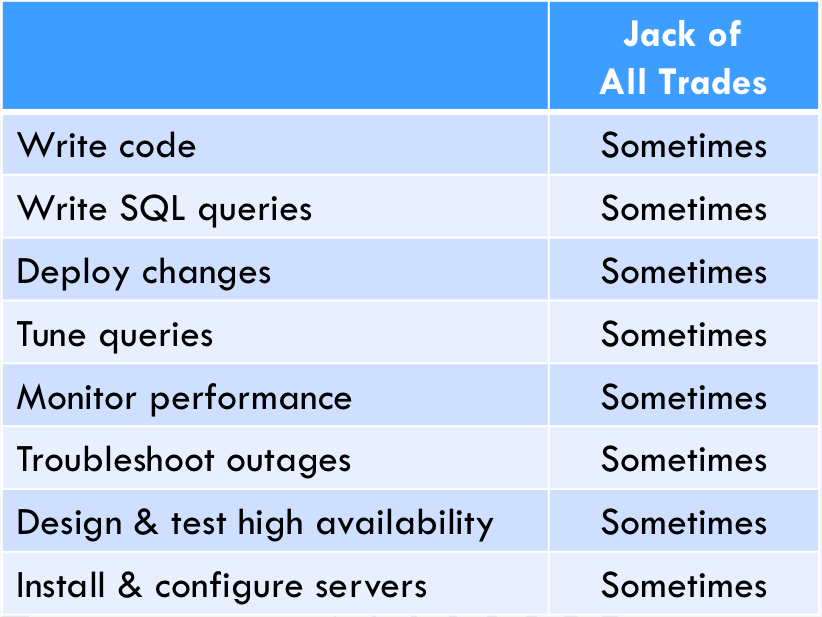
Here’s a grid I use to explain the work involved in building and troubleshooting database apps:

Full Stack, Part Time

Developers start from the top and work down. Systems administrators start from the bottom and work up.

If you’re reading this blog, you’re most likely a database professional – but think back to how you got your start, and it was likely either as a developer, OR as a systems administrator. You loved learning, so you tackled more and more roles until you were kind of a full stack developer. You ended up specializing in databases, though.

As companies grow, they separate roles.

When companies have enough work in a department that they have dozens of developers, some specialized roles emerge. This is especially true when they have dozens of servers, some of which require specialized knowledge to administer, scale, and troubleshoot.

Developers who know a database well end up becoming the Accidental DBA – or eventually, just The DBA – and their role looks more like this:

Gotta keep ’em separated

Full time database administration roles tend to focus on the middle parts of that grid: queries, performance, and database server outages. The more time you spend administering databases, the less time you spend writing code or installing hardware.

But you see some gaps, right? Even with separated roles, the “Deploy changes” and “Tune queries” steps are still only done sometimes in shops like this. Historically, this has meant that we’re just not very good at either of those two tasks.

In our industry, we’ve historically had a lot of training classes and tools targeted at monitoring performance and tuning queries & indexes.

But we haven’t had much around deploying changes.

DevOps is about trying to change that.

I need to step back here for a second and explain something before the Well Actually crew eats me alive. Technically, DevOps isn’t a job role: it’s a set of job duties that many people on the team may be required to perform, just like writing queries. However, it’s a specialized skill, just like databases: lots of people may kinda-sorta know it, but as your team grows, you might need at least one person on the team who knows it really well to help mentor the others and define good practices – just like you need a database administrator.

If you’re a database professional, and you’ve gotten good at your specialized part of the stack, but now your company is trying to deploy database changes faster, you need help. You need to learn what tools to use, how to deploy them, and how to integrate with the pure developers on your team.

That’s why Alex Yates is teaching a 2-day online course, Database DevOps. It focuses just on the parts you’re missing, and helps you get started on a similar – but slightly different career, one that’s hot as all get out right now.


Announcing 2 New Online Classes: Database DevOps and Practical Real-World Performance Tuning

Company News, Development
0

We’re proud to announce that in addition to our existing summer lineup:

We’ve now got two new online training classes coming up in June & July, and these new ones are available in schedules that work well around the world – click on the class to see the dates/times:

Database DevOps: Why, What, and How
Alex Yates, 2 days, $1,995*

Database DevOps Training Class

Managing database changes is hard. Come and learn how to do it properly.

We’ll explain in straightforward terms what DevOps is (and what it isn’t) as well as dissecting the concepts of ‘continuous integration’, ‘continuous delivery’ and ‘continuous deployment’. We’ll also discuss the various ways of applying the ideas in practice.

Over the course of two days you’ll build your own source control, testing and automated deployment solution for SQL Server, equipping you with the knowledge and the skills you need to significantly improve your team’s ability to deliver database updates regularly and reliably.

In the spirit of DevOps, we welcome attendees from both the dev and DBA sides of the fence.

About the instructor: Alex Yates has been helping organisations to apply DevOps principles to relational database development and deployment since 2010. He’s most proud of helping Skyscanner develop the ability to deploy 95 times a day. Originally for Redgate, later for DLM Consultants, Alex has worked with clients on every continent except Antarctica – so he’s keen to meet anyone who researches penguins. A keen community member, he co-organises SQL Relay and is the founder of www.SpeakingMentors.com.

Learn more and register now, and if you want the background on why it’s important, watch Alex talk about DevOps 101 for data professionals:

DevOps 101 for data professionals – how your jobs will change with Alex Yates

Practical Real World Performance Tuning
Pinal Dave, 4 hours, $495*

In the real world when we face any performance problems, we do not have the luxury to open PowerPoint and study theory. What helps us during the time of crisis are handy scripts which help us fix our performance problems.

In this quick paced, demonstration oriented learning workshop, we will see how we can immediately help our application with performance if we just know what exactly to do.

Following the practices in this 4-hour workshop can help mitigate your current performance problems but also helps you to put your preventive action plans.

About the instructor: Pinal Dave is a SQL Server Performance Tuning Expert and an independent consultant at SQL Authority. He has been a part of the industry for more than 16 years. During his career, he has worked both in the USA and in India (Technology Evangelist at Microsoft). He received his Master of Science from the University of Southern California and a Bachelors of Engineering from Gujarat University. He has been a regular speaker at many international events like TechEd, SQLPASS, SQL Saturday, SQL Live, Techorama and countless user groups.

Learn more and register now, and if you wanna get started early, watch Pinal talk about 3 common performance mistakes:

3 Common Mistakes to Kill SQL Server Performance with Pinal Dave

These new classes all include our Instant Replay – the ability to watch a video of your class for a year after it runs. See you in class!

* – What’s with the asterisks? Well, for reading the fine print, try coupon code HalfOffDevOps and HalfOffRealWorld. Move quick – they expire Friday!


Building SQL ConstantCare®: The Vision

SQL ConstantCare
3 Comments

We’re starting to roll out a new product, SQL ConstantCare®, and now that we’ve got over 50 customers, it’s time to start sharing some behind-the-scenes details about what we’ve built. Over the next several Mondays, I’ll be writing about the decisions we made along the way – architecture, packaging, pricing, support, and more.

Lemme start by explaining something that I’ve noticed a lot in the field. A lot of companies buy SQL Server monitoring software, and then…don’t have the time to learn how to use it. They install it, and then promptly set up Outlook rules to filter all of the email alerts into a folder that they never read.

I’ve even point-blank asked clients, “So you’ve got a monitoring tool, right? Open it up and show me what metrics you’ve looked at in order to troubleshoot this problem.” They open up the app, click around hesitantly, and then eventually confess that they have no idea what they’re doing or what numbers they’re supposed to look at. Even when they have a pretty good handle on SQL Server metrics, they get overwhelmed when they see all the dials and charts.

Monitoring tools are fantastic for highly trained people with plenty of time on their hands.

But most people out there don’t have the luxury of in-depth training and decades of experience. They’ve got too many servers and not enough time. They just want to cut to the chase and be told what tasks they need to do, in prioritized order.

You’re safe in my jazz hands

Admins want mentoring,
not monitoring.

So I wanted to build something that simply:

  • Checked in with you once a week
  • Told you what specific tasks to do, how to do them, and why
  • Reviewed the homework you were supposed to do last week, and what kind of difference it made

I didn’t wanna show you dials, charts, or any metrics whatsoever other than supporting evidence for your homework tasks, like proving that your change was effective and noticeable by end users.

In the cloud, admins want context and cost.

One of the most common questions I get from clients – especially when I’m in-person and people feel more comfortable asking it – is, “How are we doing compared to other shops? Are we managing our servers like everybody else does? Are we over-powered or under-powered?”

It’s easy for us to give clients a rough guesstimate and grade because we see a lot of servers. However we wanted to take it to the next level and say things like:

For SharePoint environments with a similar ~1TB data size and query workload to yours, your server is seriously underpowered, and as a result, you’re seeing slower queries and higher wait times. The sweet spot for ~1TB of SharePoint data seems to be around 8 cores and 64GB RAM. If you switch from an m5.xlarge to an m5.2xlarge, we estimate that the average query duration will drop by 40% without any code or index changes. The VM’s costs will go up by about $616/month.

Or…

This data warehouse is doing very well: your nightly loads are finishing in 90 minutes, you’re doing CHECKDB and full backups daily, and during the day, reports are finishing within 10 seconds. It’s a little over-provisioned. If you wanted to cut your monthly bill, it’d actually be fairly easy since it’s in an Availability Group in an Azure VM. Change the secondary to be a L16 instead of a L32, and during your next maintenance window, fail over to the L16. See how the user experience goes, and if it’s awful, you can always fail back to the L32 secondary replica. If it’s good enough, though, then change the remaining L32 replica down to a L16 too. Between the two replicas, you’ll save about $12K per month.

We also wanted to answer management questions at scale, like:

  • When a new CU comes out, does it backfire? For example, when 2014 SP1 CU6 broke NOLOCK, if we had wait stats data across thousands of servers, it’d be much easier for that to pop out right away – like the very next day after people applied the CU. This is becoming so much more important in these days of fast-paced updates.
  • What are adoption rates of features like In-Memory OLTP or Operational Analytics? Are you really safe investing your limited training time in those features?
  • Are other people using a particular trace flag, like 8048 to prevent CMEMTHREAD, and what before/after performance effects did it have?

These are data problems.
We are data professionals.

But at the same time, sound the alarms: the cloud is involved.

When I started designing this in 2015, the term “the cloud” provoked rabid anger from many data professionals, as in, “I ain’t never gonna let none of mah data into the cloud!” On the other extreme, some folks are perfectly willing to paste their execution plans out for the public to see. There’s a wide cloud comfort range out there.

I totally get it, and I knew from the start that this product wouldn’t be for everyone when it was launched. But I wanted to design something for the next 10 years, not the past 10, and over time, the cloud is going to be the new default starting spot for most data. I was totally okay with launching something that only 1-10% of data professionals would use. After all, to use our mailing list as an example, there’s roughly 100K data professionals out there. If only 1% of them bought into it, that’d still be one hell of a helpful tool.

I’ll talk much more about the collection, data, security, storage, and analysis in subsequent posts, and I’m excited to share it because as a data professional, I wanna set a good standard as to how data gets handled. (Now I bet my GDPR post suddenly makes more sense to you, dear reader, but I wasn’t quite ready to announce SQL ConstantCare® yet back then.) I’m aiming for GDPR compliance even though we’re not selling to the EU – but I’m just not ready to deal with the complexities and legal fees of being one of the first defenders if something goes wrong. These aren’t easy problems – but this is what it means to work with data in the year 2018.

So that was the vision. Over the next several Mondays, I’ll blog about the PaaS database back end, development timeline, minimum viable product, packaging, pricing, security, analysis, and more. Up first next week: why we picked serverless architecture running on AWS Lambda. If you’ve got questions, feel free to ask away – in these behind-the-scenes posts, I try to share the kinds of business decisions I’d find interesting as a reader. I’ll try to answer the questions in comments, and it’ll also help me shape the rest of the posts in this series.

Read on about SQL ConstantCare®’s Serverless Architecture, try it out, or check out the rest of the SQL ConstantCare® series.


[Video] Office Hours 2018/03/07 (With Transcriptions)

SQL Server, Videos
0

This week, Brent, Erik, Tara, and Richie discuss database restores, opening a case with Microsoft, buying a pre-built server vs building your own, auto-shrinking all databases with a single command, SQL Server dev environment options, the best way to learn Git, excessive memory grants, and more.

Here’s the video on YouTube:

Office Hours Webcast - 2018/3/7

You can register to attend next week’s Office Hours, or subscribe to our podcast to listen on the go.

Enjoy the Podcast?

Don’t miss an episode, subscribe via iTunes, Stitcher or RSS.
Leave us a review in iTunes

Office Hours – 3-7-18


How did my users get messed up during a restore?

Brent Ozar: Deborah says, “Last week, I restored a database…” Yay, “From a test server to a production server…” What, what?

Erik Darling: That’s more than I did last week.

Brent Ozar: “From a test server over to a production server. At some point in the process, the admin user for that database was changed to one that resides on the production server and then removed the proper database, which caused the apps admin user not to function. I found a couple of articles but no reason about why that happened. I would like to prevent that from happening in the future.”

Erik Darling: An orphaned user?

Brent Ozar: That’s my guess. So explain what orphaned users are.

Erik Darling: Oh, I can’t. I just remember having to do that when I restored databases a long time ago.

Tara Kizer: Every single time you restore, you run the script.

Brent Ozar: So when you create a login in SQL Server, it creates a SID; a security identifier. And you don’t usually get to pick the SID; it just automatically creates a SID. You could create with a specific SID if you wanted to, but it’s unique to that login on that machine. You can create the same login name on a different SQL Server, but when that database comes across, it’s got a different SID. So the username may not be able to log in if it’s the wrong default database or a default database that person can’t access. So there’s a stored procedure you can run, sp_change_users_login. And I never remember where the underscore is…

Tara Kizer: It’s all of them, I think. I think it’s all, yeah…

Brent Ozar: It might be.

Richie Rump: In between each letter there’s an underscore.

Brent Ozar: Worst casing ever. Yeah, so sp_change_users_login or you can just drop that login on both servers and then recreate it with the same SID. Anytime you Google for sp_change_users_logins, you’ll find more information about how to drop and recreate that guy the right way permanently.


How do we open a case with Microsoft?

Brent Ozar: Sree asks, “How do we open up a case with Microsoft? I’m just wondering about the process if I ever have to open up one.”

Tara Kizer: I always save the 1800 number in file so that I have it because it was hard to find the phone number, but I was a Premier Account, and I don’t know if that’s available to everybody.

Erik Darling: yeah, I think how you open a case depends on what level of support you bought into, you know. I get nothing from Developer Edition, honestly. Joe Sack just responds to my emails graciously once in a while. That’s fine, that’s all I get.

Brent Ozar: What do you email him? Do you just say, “Hey honey, how are you doing? Can you help me with this?”

Erik Darling: No, I text him directly…

Richie Rump: “Hey sweetie, it’s me again…”

Erik Darling: I’m going to guess that if you’re asking that question, you don’t have like a dedicated person that you email.


What are work files and work tables?

Brent Ozar: Let’s see, Pablo says, “Ola, amigos. How do I interpret work files’ and work tables’ logical reads? Is it always on tempdb?”

Erik Darling: Yep. So work files and work tables get spun up, usually for hashing operations. Sometimes, as you’ll find out in an upcoming blog post, they happen for merge joins when they are many to many, when there are duplicates in the join columns. But yes, they are all directed to tempdb; that’s where they do their dirty work. It’s the same number of 8K page reads that you would see for a regular table or lob logical reads or any of the other stuff.

Brent Ozar: Kevin has a follow up on the support case and this horrifies me. Kevin says, “Something to know – last time I opened a case with Microsoft, I found out they’re outsourcing it to a company called Convergys, or something like that.” I know it’s been different by product too, and like for out-of-support products they’ve farmed it out too before.

Tara Kizer: Nobody wants to work on it.

Brent Ozar: No – you call in with a merge replication program and… Hold on…

Erik Darling: I’m going to guess that Kevin either has SharePoint or Dynamics if he’s getting sent off to someone else. He’s probably getting sent off to some like, you know, Microsoft partner consultant who does that kind of work.


What kind of camera is everyone using?

Brent Ozar: Brandon asks, “What kind of camera is everyone using to cast themselves?” I think we all do have different webcams. What webcams…

Erik Darling: No, we all have the same… [crosstalk]

Richie Rump: You bought us all the same one.

Brent Ozar: You all bought the BRIO. We all use the Logitech BRIO then. Logitech BRIO – it’s 4K. It has really nice light sensitivity. I like it a lot. The only thing is that it says in there that it’s got a tripod mount on the bottom, so if you’re like me, I tried to unscrew it so I could put it on a tripod mount. It’s not a real tripod mount, so all I’ve done is broken the mount on my webcam, so now it kind of flops around on the top of my screen and I got to go get a new one. I can’t turn it in under warranty either because it’s just clearly that I broke it.


Should I build my own home lab, or buy something off the shelf?

Brent Ozar: Udai asks a question that we will have passionate responses about. He says, “I am trying to build a home lab and I wanted to know if there would be an advantage to buying a pre-built server, like say a Dell PowerEdge, versus building a machine using consumer parts?” Tara, you have one – we’re all at different camps here. Tara, your hardware budget is up. What do you think about doing with your hardware budget this year?

Tara Kizer: I still haven’t submitted it. Dell XPS 8930 – I don’t want to have to mess with it. I want to just get whatever hardware I need and have them test it and have a warranty on it. Whereas Erik bought a piece here, bought a piece there and then dealt with all sorts of incompatibility issues. I just don’t have the patience for that and, frankly, I don’t have the knowledge for that type of stuff. I make Mike do that kind of work and he keep saying, “Let’s build it from scratch.” And I’m like, “No, I really don’t want to.”

Erik Darling: But it’s so gratifying when it gets working. I actually didn’t have too many problems with compatibility. I used a website called PC Part Picker and I was able to get all that stuff weeded out upfront and kind of figure out which CPU…

Tara Kizer: You had issues, though. You had to return some items?

Erik Darling: Yeah, I had to – well my issues weren’t because of, like, technical problems. They were because of dirty customer problems where someone had returned their old motherboard in a box and then whatever – I can’t remember the name of it – had sold me the motherboard open-box…

Brent Ozar: Micro Center…

Erik Darling: Micro Center sold me the open-box motherboard for like 80 bucks less and when I got home and I started looking at pins on the CPU connector I was like, “Wait a minute, I don’t think this is legit.” [crosstalk] I returned it and, of course, I walk into the store and I’m like, “You sold me the wrong motherboard. This one’s broken.” And all the salespeople are like, “Really? Tell me more…” Like no seriously, I just brought this home; it’s broken.

I don’t know, I built mine just because I got all excited about – Nick Craver had published the Stack Overflow Developer Desktop Build on his website and I was looking at that and I was like, “That’s really cool. I want to try my hand at building that.” And then I ended up buying some other stuff. And since – I got a new laptop this year. Next year I’m looking at that pieces of that I might upgrade with next year’s budget.

Richie Rump: [crosstalk] Than buy a laptop. It’s like a technical coaster is kind of what you got.

Brent Ozar: You got a hand-me-down.

Erik Darling: Yeah, well I got Jeremiah’s old laptop when I came on here, so…

Richie Rump: Oh snap.

Brent Ozar: Although it is still faster than Andy Leonard’s – and I can say this because Andy’s not here. Andy’s got the generation before and during his class, his power went out. And he and I had been talking in the morning and I’m like, “Well how’s the battery life?” And he’s like, “Oh it doesn’t work a dang. When I unplug it, it immediately goes dark quick.” So all of a sudden, we got to see a live test of how Andy’s battery countdown [crosstalk] outage.

Tara Kizer: I was stuck with an old laptop when I worked at Qualcomm for at least two to three years longer than I should have. And eventually, I just couldn’t do my job anymore. I was like, “Listen, I’m a production DBA; I need to be able to do my job.” And finally, they replaced it.


How much RAM and SSD space do you have?

Brent Ozar: Sree follows up with, “How much RAM and SSD space do we have?” So I follow – I didn’t answer either. I have a home lab of an Apple Mac Pro, which is the trashcan looking thing. I have 64GB of RAM and 4TB of SSD space. Erik, how about you?

Erik Darling: I have – let’s see – 3.6Ghz, 6 core processor, 128GB of RAM and I have my SSDs in a RAID. I bought a dock and I have 6TB SSDs in a RAID that gives me about 2.5ish terabytes. Terabyte PCI NVMe M.2 card and a big 8TB spinning piece of crap that just backs stuff up too.

Brent Ozar: Richie, how about you?

Richie Rump: Okay, so…

Erik Darling: Here we go…

Brent Ozar: Why did I ask?

Richie Rump: Save your money for fixing your plumbing. Go to the cloud. Just do all the cloud stuff. Don’t but hardware. All your databases are going to be in the cloud anyway; just go to the cloud. Use your Cosmos DB, use your Redshift, use RDS Aurora. Get to know all of them, save your dough, go to the cloud.

Erik Darling: And then what happens if you need to go someplace where there’s no wifi and show stuff that you’re doing? You can’t really.

Richie Rump: Don’t go to Doug Lane’s house.

Erik Darling: Okay, good point.

Brent Ozar: Richie goes and opens up his backpack and takes out one of half a dozen laptops which collectively have maybe 1TB of space.

Richie Rump: Actually no, each one has 1TB except for the Surface.

Tara Kizer: Mine is a lot smaller than you guys, which is why I need a new one. So 20GB of RAM. It came with a lot less but we did upgrade that, and just 500GB of disk space. I’m looking at 1TB and 64GB or RAM for my next machine. I’ll still use the laptop but I need something with more power so I can do large memory grant demos because my machine just could not keep up. And there isn’t enough disk space either.


Should developers have SA?

Brent Ozar: Kevin says, “How do you let your dev folks give themselves database owner permissions on a database without giving themselves SA permissions?”

Tara Kizer: If it’s dev – is it a question for dev or prod?

Brent Ozar: Oh god, I hope it’s dev.

Tara Kizer: If it’s dev, I let everybody have DB owner; I don’t care.

Richie Rump: Don’t [crosstalk]

Tara Kizer: Access, maybe…

Richie Rump: Don’t even give them read access in prod, don’t do it.

Tara Kizer: In dev?

Richie Rump: Give them all access, give them SA, who cares?

Tara Kizer: I don’t give them SA because then I have to fix the server, but the database I can at least easily restore the database.

Richie Rump: Let them go off, let them screw with it. Let them play with the new features. Let them do all that stuff. This is how they learn and try to do all the bad ideas that they have like user service broker and all this other crazy stuff. Let them do whatever they want in dev. Now production, don’t even give them read access. Forget it. I mean, it’s the same thing I did to Brent; I didn’t him…

Brent Ozar: I was just going to say, I should point out the irony here that Richie is our developer and Richie has complete access to every environment, development, production, whatever. I own the company and I don’t have write access to our production databases and I don’t want it.

Richie Rump: And there’s a reason for it, Brent. When you stop breaking the builds… SO a few weeks ago, I put in database tests, he goes off and changes a value [one in database creation scripts] and it breaks the build.

Brent Ozar: Yeah, I’ve got a 100% build failure rate.

Richie Rump: But hey, the work, right? The database tests, they work great.

Tara Kizer: Wait, one of my managers, a few jobs ago, he was my mentor 20 years ago, he was the reason I became a SQL Server DBA and got good at things. He later moved away from SQL Server and into management and then other technologies and he then became my manager again, and here I’ve got this extremely mission-critical SQL 2012 Availability Group system; a very complex system. He’s like, “Oh I probably should get access again.” It had been years since he touched it. I was like, no, nope, can’t have it now.

Brent Ozar: Nope, no good is going to come of me touching our production SQL instances.


Can I shrink all of my databases with one command?

Brent Ozar: Andy asks, “Is there a way to auto-shrink all of my databases with a single command?”

Tara Kizer: Oh Andy – I was going to say, this is a troll.

Brent Ozar: And there is, because I had a client doing this. You run sp_MSforeachdb and then DBCC SHRINK-whatever and it’s unbelievable. It actually works.

Richie Rump: I thought that was sp_shrink_Buck_Woody…

Brent Ozar: Ah yes, that’s why you don’t give him access to the database.


How do I log everything anyone does?

Brent Ozar: Let’s see, next one, Anon Ymous says, “An IT group wants us to start logging in individual logins including those with inactive directory groups what changes and what actions they perform. I believe this would be difficult for us and will impact performance on our low-RAM server.”

Erik Darling: How low? Not that I think more Ram is going to help this, but Brent had the best answer to this. I forget if it was in Office Hours or via email or something a while back, where it was just like, imagine if you came into work and instead of just doing things, you had to write down everything you did before you did it, then go do something, then go write down what you did after you did it and what changed, then that was your day. And just imagine how much slower your life would be if you had to take note of everything you did before and after you did it. That’s kind of how SQL Server’s going to treat the whole experience. It’s not good for you.

Brent Ozar: It’s never going to get faster, that’s for sure. Yeah, if you really want to audit who does what, you buy a third party appliance like Guardium or Imperva and they sit in between SQL Server and the network, they log everything. They’re supposed to work at wire speeds, but these are six-figure appliances; they’re not cheap.

Tara Kizer: [crosstalk] you get this with low-RAM server.

Brent Ozar: Low-RAM server.

Erik Darling: You know, that’s a better name for it than, like, SQL01, like, low-RAM.

Brent Ozar: Prod42…


Should I use Docker or Kubernetes for SQL Server development?

Brent Ozar: Joseph says, “What’s a good resource for me…” And I’m going to step back and ask a bigger question, Joseph. Should I use Docker or Kubernetes to use SQL Server development environments?

Tara Kizer: I’ve never heard of Kubernetes. Is that how you pronounce it? I feel like there’s extra…

Brent Ozar: He couldn’t spell – he couldn’t write it…

Erik Darling: Well if you can’t spell it, I can’t answer it.

Brent Ozar: Richie, is there anything that would make you choose Docker or Kubernetes for a SQL Server dev environment?

Richie Rump: I don’t like either for SQL Server. I haven’t jumped onto the Docker bandwagon yet. It’s easy to install and everything, but there’s value in going through the install experience yourself and picking what things you want and whatnot, especially for a developer, you know, just getting into SQL Server. And I’m assuming you’re going to want a developer instance on each developer laptop. I guess I would go Docker, if you put a gun to my head, but I haven’t jumped onto the whole Docker thing. I’m a bare metal type guy. I work for Brent Ozar unlimited. We do database stuff. What makes you think I wouldn’t be a bare metal guy? I mean, I think that was one of the questions, “What do you think about virtual machines?” Bare metal, it runs faster I guess, I don’t know…

Brent Ozar: This is coming from the guy who runs serverless. Not only is the OS abstracted away but the platform is. We could be running on Commodore 64s on Pluto; we wouldn’t know.

Richie Rump: Yeah, but I don’t have to worry about that, right. I mean, I don’t have to worry about spinning them up or anything, it’s just it’s there, and it’s there in less than a second, most of the time. I’ve been keeping track of it.

Brent Ozar: Joseph says he owes his “Six figure salary largely to you guys. Really appreciate what you do.”

Erik Darling: We take cash, checks, booze, steak, however, you want to owe it to us, you can choose and we’ll graciously accept…

Richie Rump: Japanese whiskey.

Brent Ozar: No Docker containers. Don’t pay us in Docker containers.

Erik Darling: None of those fancy PowerShell dollar signs either. I know those tricks.

Brent Ozar: Query bucks, we print those ourselves.


What clients do I use for Git?

Brent Ozar: Anon Ymous follows up with, “Hey Richie, I am a noob researching Git for version control and I don’t understand what we would need. Our company has a Git repository, but what clients do our developers need? What is like Git tortoise? Do they need Visual Studio Team Services too? What should I do to start this from scratch?”

Richie Rump: All you really need is Git for Windows. And I believe Phil Hack and team at GitHub has a nice client for that. There’s also a GitHub, or Git for Windows, for JavaScript that you could download that works pretty well…

Erik Darling: [crosstalk]

Richie Rump: I know, I use Sourcetree occasionally. So if you wanted a client, to use that. But really, the best way to learn Git is through your command line. I kind of recommend that for everyone getting used to it because then you understand the bare metal, how everything kind of works, and then you can graduate to whatever client you want to run. You don’t need Visual Studio, you don’t need anything like that. it’s all kind of right there. A tutorial that may help out, Joel Spolsky, and I believe it was for Mercurial, but Git and Mercurial are so close to one another that you could just walk through the Mercurial tutorial and he has a really great way of explaining the concepts just in that one. I forget what it’s called. Google Joel Spolsky Mercurial tutorial, or whatever, and you’ll get that. Walk through that. It’s only a few pages. And you’ll get a better idea of how Git works and the Git workflow and whatnot; from a Mercurial standpoint.

Brent Ozar: It’s so weird too, like distributed version control is so different from what I used to deal with, with visual source safe and team foundation and all that. It’s very different. And good, I like it.

Richie Rump: Yeah, it’s so much better. I mean, I’ll take this for an example. Yesterday, Brent made a check in and there was a conflict on the merge – no, it was a fine change. There was a conflict because I had also changed the same file. I went to GitHub and said here, let me go ahead and merge it. I did the manual merge; just deleted what was wrong and just kept what was right and hit submit and boom, everything was there. But he ran it on his own machine, I ran it on mine, all the tests passed, everything looked good, just when we kind of merged it together, that’s when kind of this special sauce of the distributed – everything kind of works where you’re at, and when we kind of put it all together, that’s when some of the problems happen. But for us, 90% of the time, 95% of the time, no merge. Everything works great.

Erik Darling: Everything works great because there’s no merge.

Brent Ozar: There’s no conflict, yeah.

Richie Rump: No, it does the merge but there’s no conflicts, right. There’s no conflicts.

Brent Ozar: Well also, 95% of the time you’re the only one doing the development.

Richie Rump: Hey, I’ve messed myself up. Left in multi-branches, you know, because I’m working on different bugs at the same time and, you know, you collide with yourself. It happens.

Erik Darling: I mean, my only experience with it is GitHub desktop and I was surprised at how easy that made it to, like – like it’s really intuitive the interface. Like I had to go into someone else’s pull request and do stuff and I was able to do that really easily, just like a couple of dropdowns and there I was and I could fix things. Because I’m dumb, like, if you want to think about a target audience of the lowest common denominator you need to explain things to with pretty charts and drawings and stuff, I’m it. So if I can figure out a user interface, I’m amazed. I’m like, wow, that’s…

Richie Rump: GitHub for Windows is – GitHub Desktop I guess they call it now – but it’s really improved since it originally came out. It’s a lot, lot, lot better.


Should I shrink the database regularly?

Brent Ozar: Sree asks, “If we have tables where millions of rows are inserted and then deleted, like loading happening, do we need to shrink the database or should we just update stats to bring back and not play around with used space?”

Richie Rump: Shrink everything.

Tara Kizer: I mean, how often are you doing this? Inserting certainly won’t be shrinking it, but deleting – this is a one-time shrink where you’re purposefully deleting a lot of data in one recover space. One-time shrinks I’m okay with, but not regularly. It sounds like this is more of a scheduled process. I would be doing shrinks, for sure. I never, ever schedule shrinks, for sure, ever.

Brent Ozar: Why don’t you? What’s the bad thing of scheduling shrinks? What does it do in terms performance?

Tara Kizer: Well, I mean, the shrink, it can cause blocking, but that’s not really the reason why I wouldn’t do it. It’s just because I’m going to need that space again, you know. It also causes fragmentation and, you know, there’s just no reason for it. When you have to auto-grow back out, that’s an expensive operation, if it’s the log file especially because you don’t get instant file initialization, even if you have that setup, it has to be zero initialized. So if your auto-grow is 1GB, there’s going to be a pause. It’s going to probably do it fast, unless you’re on some kind of slow I/O back in.

Richie Rump: Slow SAN…

Tara Kizer: Slow SAN.

Brent Ozar: We know about this week.


What causes excessive memory grants?

Brent Ozar: Steve says, “Any general comments about what causes excessive memory grants?”

Erik Darling: Excessive memory.

Brent Ozar: Having too much of it lying around, you just end up giving it away.

Tara Kizer: Varchar MAX.

Erik Darling: Yeah, so the two main things in SQL Server that will cause a query to get a memory grant are sorts and hashes. So you need to sort data because you don’t have an index that supports the sort order, you get that. Or if SQL Server chooses a hash join or a hash match, it will request memory to do that. Tara is absolutely spot on; one of the things that impacts the size of the memory grant is the size of the data that needs to be processed via the sort or the hashing operation. So if you’re thinking about logs or string data, that will certainly impact the memory grant. The number of rows that have to be sorted will impact the memory grant and all sorts of other good stuff. Poor cardinality estimates can certainly contribute to that, but most of the time it’s just something that you need to fix or tune with or query your indexes.

Brent Ozar: Alright, and that’s it for this week’s Office Hours. Thanks everybody for hanging out with us. And we will see y’all next week; adios.


How to Back Up SQL Server to Azure Blob Storage

Microsoft Azure
20 Comments

When you’re planning for disaster recovery, offsite backups in the cloud are an attractive option. SQL Server Management Studio makes it easy to back up to the cloud inside the GUI, and you can learn how in just 90 seconds:

Back Up SQL Server to Azure Blob Storage

Update March 12 – if you want a better end result than what I get in the video, check out this T-SQL method from Steve Thompson.


I Most Certainly Do Have A Join Predicate

Execution Plans
15 Comments

FREAK OUT

You wrote a query. You joined tables.

You have the right ON clause.

You have the right WHERE clause.

But the query plan has a problem!

BugBurg

How Could This Happen To Me?

Oh, relax. You’re not crazy. You just assumed the worst.

Like me whenever I feel pain near my liver.

Call the mortician.

For a query like this, the optimizer can play some tricks.

One of our join columns is in the where clause, too.

That means our plan looks like this!

Lemons!

You see, when the optimizer looks at the join and the where, it knows that if it pushes the predicate to the two index seeks, whatever values come out will match.

I don’t think it even needs the join at that point, but hey.

It certainly doesn’t need the warning.

Thanks for reading!

Brent says: Erik’s like that dying replicant at the end of Blade Runner. He’s seen things you people wouldn’t believe. Also, he has superhuman strength.