Blog

How to Back Up SQL Server to Azure Blob Storage

Microsoft Azure
20 Comments

When you’re planning for disaster recovery, offsite backups in the cloud are an attractive option. SQL Server Management Studio makes it easy to back up to the cloud inside the GUI, and you can learn how in just 90 seconds:

Back Up SQL Server to Azure Blob Storage

Update March 12 – if you want a better end result than what I get in the video, check out this T-SQL method from Steve Thompson.


I Most Certainly Do Have A Join Predicate

Execution Plans
15 Comments

FREAK OUT

You wrote a query. You joined tables.

You have the right ON clause.

You have the right WHERE clause.

But the query plan has a problem!

BugBurg

How Could This Happen To Me?

Oh, relax. You’re not crazy. You just assumed the worst.

Like me whenever I feel pain near my liver.

Call the mortician.

For a query like this, the optimizer can play some tricks.

One of our join columns is in the where clause, too.

That means our plan looks like this!

Lemons!

You see, when the optimizer looks at the join and the where, it knows that if it pushes the predicate to the two index seeks, whatever values come out will match.

I don’t think it even needs the join at that point, but hey.

It certainly doesn’t need the warning.

Thanks for reading!

Brent says: Erik’s like that dying replicant at the end of Blade Runner. He’s seen things you people wouldn’t believe. Also, he has superhuman strength.


Troubleshooting Parameter Sniffing Issues the Right Way: Part 3

In part 1 and part 2 of this series, I showed you the various ways to get the application’s SET options so that you can get the same execution plan as the application. If you skip that step and run the query that is timing out in the application, it could be fast in SSMS. Your SET options must match the application’s in order to reproduce the slowness users are seeing.

Once you’ve reproduced the slowness, it’s time to start testing for a workaround or a solution. You need to be aware of the density vector issue when testing.

What is the Density Vector?

When you use a local variable in a query, SQL Server cannot use the statistics histogram. The histogram is where SQL Server has estimates for how many rows are equal to a value, how many rows are between two values, etc.

What does SQL Server use to estimate how many rows there are if it can’t use the histogram? It uses the number of rows in the index multiplied by the distribution of the values, aka the density vector.

Let’s look at an example that uses the histogram.

For UserId=1144035, there are 40,326 estimated rows to be returned from the ix_OwnerUserId index on Posts.

Let’s look at the histogram for the index that was used, ix_OwnerUserId.

RANGE_HI_KEY=1144035 has EQ_ROWS=40326. This user has answered so many questions on Stack that it has its own row (step) in the histogram.

Now let’s look at the estimate when we use a local variable.

We now have an estimate of 10.7218 rows for pretty much the same query. It was 40326 before. That’s quite a discrepancy.

Where did it get 10.7218 from? This used the density vector instead of the histogram!

Calculate “number of rows in the index multiplied by the distribution of the values”.

10.7218!

Why does this matter?

SQL Server chose a different execution plan for the local variable than it did for the stored procedure even though both used @UserId = 1144035.

You aren’t comparing apples to apples when troubleshooting parameter sniffing issues in production if the source query is parameterized, like a stored procedure, and you are testing with a local variable.

For more information on this topic, check out Benjamin Nevarez‘s post about OPTIMIZE FOR UNKNOWN. You might be confused why I’m directing you to a post about OPTIMIZE FOR UNKNOWN. Using a local variable is equivalent to using OPTIMIZE FOR UNKNOWN. Both use the density vector.

Avoiding the Density Vector

How do we avoid the density vector when we are actively troubleshooting a parameter sniffing issue in production?

The easiest way is to use a temporary stored procedure.

Keep in mind that this object only exists in the session/query window you created it in, so you’ll need to execute it there too.

To make your life easier, use WITH RECOMPILE when you execute it to avoid having to remove the plan from cache each time you make a change or want to test which plan you get for various parameter values.

Mission Accomplished

My goal with this three-part series was to educate you on how to troubleshoot parameter sniffing issues the right way. There’s plenty of blog posts on this already. It has become very apparent since becoming a consultant that many, maybe even most, people don’t know that they are doing it wrong. I’m not saying that you are doing it wrong, but many are.


Troubleshooting Parameter Sniffing Issues the Right Way: Part 2

In part 1 of this series, I showed you how to get the compiled parameter values for an execution plan that you are investigating. You’ve identified it as a bad execution plan. You’ve already fixed the production emergency by removing the bad plan from the plan cache. You’re almost ready to start testing for a workaround or a solution to avoid this issue in the future.

Before you start testing, you have to get your SSMS window set to the same options as the application.

Getting the App’s SET Options

Most applications use a database driver that has ARITHABORT set to off. SSMS has ARITHABORT set to on. Because of this difference, you get a different execution plan than what the application is using. This is why you could be troubleshooting a performance issue in production where the query is fast for you in SSMS, yet it is timing out when the application runs the same query. Erland has a really good article on this: Slow in the Application, Fast in SSMS?

It’s easy to fix: just get your SSMS SET options the same as the application. For most applications, all you need to do is set ARITHABORT to off.

But I can never remember which setting is different, so I always check which options are being used by an application session and then do the same in my SSMS query window.

What are the different ways we can check which settings are being used by a session?

There are easy ways to see your own current settings, such as via DBCC USEROPTIONS, but this post is about getting the settings the application is using.

Various DMVs

The SET options can be queried via various DMVs: sys.dm_exec_sessions, sys.dm_exec_requests and sys.dm_exec_plan_attributes.

sys.dm_exec_sessions and sys.dm_exec_requests have the data in bit columns, one column per setting.

SET options in sys.dm_exec_requests and sys.dm_exec_sessions

sys.dm_exec_plan_attributes has the data in a single column called set_options. You have to use bitwise operators to figure out which ones are set.

SET options in sys.dm_exec_plan_attributes

The way it is formatted does not give me a quick copy/paste script. A quick Google search didn’t lead me to an already-built script (drop a comment if you have/find one). Even if I could find a script, I may not always have access to it or be able to find it. I need something quick when I’m working on a production issue.

sp_WhoIsActive

sp_WhoIsActive provides the info too in the additional_info column, but it’s in XML format.

SET options in sp_WhoIsActive

sp_BlitzCache

If you scroll all the way to the right in the sp_BlitzCache output, you’ll see a “SET Options” column.

It’s not clickable like it is in sp_WhoIsActive, but you can copy/paste the output to a new window. There are a few problems with this output:

  1. It’s not clickable like it is in sp_WhoIsActive. You can copy/paste the output, but it’s not in a format that you can just run.
  2. It’ll only show you the options that are on. You’d have to know which ones to turn off.
  3. You’re not sure if this is the plan that the application is using, though the “# Executions” would give you a clue.

It’s in the execution plans too!

If you’ve got the execution plan that the application is using, you can see the SET options in the plan’s properties. Click on the root operator and either hit F4 or go to Properties from the right-click menu. Expand the “Set Options” section.

SET options in an execution plan


Extended Event Session

There are two events in an XE session that contain the data: login and existing_connection. The trick is that you have to enable collect_options_text to see the data, otherwise the options_text column is blank.

SET options in an XE session

SQL Profiler/Trace

In my opinion, using SQL Profiler is the easiest and possibly the fastest way to get the SET options. The data is available in the “Audit Login” and “ExistingConnection” events. I always just use the ExistingConnection event so that I don’t have to wait for a new session to connect. I start the trace and then immediately stop it.

You can also do a server-side trace, SQL Trace, but that just complicates things since I’d need to output to a file and then read it.

SET options in Profiler

Why not just change SSMS?

You could modify your SSMS settings to match the application’s, but I don’t ever do that. An application could be using different options than the default for the database driver it is using. Plus, changing SSMS wouldn’t give me the right options for execution plans from an Agent job, SQLCMD or bcp. Those have QUOTED_IDENTIFIER set to OFF.

So many different ways to check SET options

I’m sure I’m missing some ways to check the SET options of a session. Leave a comment with what I’m missing. Maybe you can even convince me not to use Profiler to get this info but probably not! PROFILER 4 LYFE!

For more information on troubleshooting Parameter Sniffing issues, check out Brent’s post.

What’s Next?

You still aren’t quite ready to start testing yet. Next up:


Troubleshooting Parameter Sniffing Issues the Right Way: Part 1

Many of you are troubleshooting Parameter Sniffing issues the wrong way in production. In this three-part series, I’ll show you how to troubleshoot it the right way:

  1. Getting the Compiled Parameter Values
  2. Getting the App’s SET Options
  3. Avoiding the Density Vector

This is part 1 in the series.

Parameter Sniffing 101

When a query suddenly degrades in performance, my first thought is always a bad execution plan. If it’s a query that gets executed frequently, there’s usually higher CPU utilization when there’s a bad plan in the plan cache.

You’ll know if that’s the case if the production emergency goes away after you’ve removed the bad plan from the plan cache. But wait! Before you take corrective action on the problematic query, save the plan. You are going to need that plan to continue troubleshooting after you have removed it from the plan cache.

There are various ways to get the plan for a query. I’m going to use sp_BlitzCache.

We’ve got two rows here as sp_BlitzCache has info about the stored procedure and the one statement inside it. Click on the “Query Plan” value for either row. Save it as a sqlplan file.

Now that you’ve saved the plan, you can fix the production emergency by removing the plan from the plan cache. If it’s a stored procedure that I’m dealing with, then I’ll use sp_recompile as I’m old school like that. Otherwise, I’ll use DBCC FREEPROCCACHE(<sqlhandle>) or DBCC FREEPROCACHE(<planhandle>).

If the production emergency stops, you know you’ve found a bad execution plan and now need to see what can be done to avoid this in the future.

You can quickly get the stored procedure code by right-clicking on the plan anywhere that’s white (not an operator) and selecting “Edit Query Text…”

You may see that the query text is truncated if your query is obnoxiously long. Mine is short, so we get the whole thing.

Getting the Compiled Parameter Values

The next step is getting the parameter values that were used when the query was compiled.

Right-click in the white area of the plan and select “Show Execution Plan XML…”

Scroll to the bottom and locate the value for ParameterCompiledValue.

When this query was compiled, the stored procedure was executed with @UserId = 26615. The execution plan was optimized for @UserId = 26615.

When the execution plan is optimized for @UserId = 26615, does it perform well for other @UserId values? If the answer is no, then this one is considered a bad execution plan. It was good for @UserId = 26615 though.

You can also use sp_BlitzCache to get the compiled values.

Click on the “Cached Execution Parameters” value for either row.

What’s Next?

You aren’t quite ready to start testing yet. Next up:


How to Get a Random Row from a Large Table

T-SQL
23 Comments

Method 1, Bad: ORDER BY NEWID()

Easy to write, but it performs like hot, hot garbage because it scans the entire clustered index, calculating NEWID() on every row:

The plan with the scan

That took 6 seconds on my machine, going parallel across multiple threads, using tens of seconds of CPU for all that computing and sorting. (And the Users table isn’t even 1GB.)

Method 2, Better but Strange: TABLESAMPLE

This came out in 2005, and has a ton of gotchas. It’s kinda picking a random page, and then returning a bunch of rows from that page. The first row is kinda random, but the rest aren’t.

The plan looks like it’s doing a table scan, but it’s only doing 7 logical reads:

The plan with the fake scan

But here’s the results – you can see that it jumps to a random 8K page and then starts reading out rows in order. They’re not really random rows.

Random like mafia lottery numbers

You can use the ROWS sample size instead, but it has some rather odd results. For example, in the Stack Overflow Users table, when I said TABLESAMPLE (50 ROWS), I actually got 75 rows back. That’s because SQL Server converts your row size over to a percentage instead.

Method 3, Best but Requires Code: Random Primary Key

Get the top ID field in the table, generate a random number, and look for that ID. Here, we’re sorting by the ID because we wanna find the top record that actually exists (whereas a random number might have been deleted.) Pretty fast, but is only good for a single random row. If you wanted 10 rows, you’d have to call code like this 10 times (or generate 10 random numbers and use an IN clause.)

The execution plan shows a clustered index scan, but it’s only grabbing one row – we’re only talking 6 logical reads for everything you see here, and it finishes near instantaneously:

The plan that can

There’s one gotcha: if the Id has negative numbers, it won’t work as expected. (For example, say you start your identity field at -1 and step -1, heading ever downwards, like my morals.)

Method 4, OFFSET-FETCH (2012+)

Daniel Hutmacher added this one in the comments:

And said, “But it only performs properly with a clustered index. I’m guessing that’s because it’ll scan for (@rows) rows in a heap instead of doing an index seek.”

Bonus Track #1: Watch Us Discussing This

Ever wonder what it’s like to be in our company’s chat room? This 10-minute Slack discussion will give you a pretty good idea:

Spoiler alert: there was not. I just took screenshots.

Bonus Track #2: Mitch Wheat Digs Deeper

Want an in-depth analysis of the randomness of several different techniques? Mitch Wheat dives really deep, complete with graphs!


[Video] Office Hours 2018/02/28 (With Transcriptions)

This week, Erik, Tara, and Richie discuss cloning databases without 3rd party software, tips for upgrading from 2005 to 2017, archiving databases, partitioning databases, version control, SQL Server settings, SSRS, moving database from stand-alone server to an AG cluster, limiting memory use at the query level, and mirroring.

Here’s the video on YouTube:

Office Hours Webcast - 2018/2/28

You can register to attend next week’s Office Hours, or subscribe to our podcast to listen on the go.

Enjoy the Podcast?

Don’t miss an episode, subscribe via iTunes, Stitcher or RSS.
Leave us a review in iTunes

Office Hours – 2-28-18


How do I clone production with less data?

Tara Kizer: Alright, we’ll start off with [Narav’s] question. He has a production database that’s 500GB. He wants to create a clone database with limited data size for developer and testers in local environment. He wants to know how he can achieve this. “No third-party software allowed in my company.”

Erik Darling: Oh boy, no third-party software. It’s almost like they want you to recreate the wheel every day; what an awful place to work. You should get a new job. But on your way to get a new job, you should go look at this blog post by Tom LaRock.

He wrote this – it shows you how to go and script out a stats only copy of your database so that you don’t have to use a third-party tool. If you’re on a newer version of SQL Server like 2014 – or I think even 2012 with one of the service packs – you can use DBCC CLONEDATABASE to get a stats only clone of your database for developers to use. But, at least when I checked it. There were still some security issues around that – like if you’re okay with your developers seeing the contents of the histogram, there can still be personally identifiable information in there.

Richie Rump: Alright, so I think the key word there is developer and tester – and as a developer and tester, I’m probably going to be running some stored procedures and looking at data and doing that kind of stuff; so this doesn’t really help you that much. So my big thing here is that one, you should have already had your database scripted out and at least all your prime data scripted out as well. And that should be checked in into some sort of source control. So if you’re not doing that, you’re not even at, kind of, base-level yet.

You’re trying to get way up high on the database pyramid of needs and you need to get to the bottom, so get that first. And then when you get that, then you can start eyeing out the data that you want to move over, and that probably should be scripted out as well because, at some point, you’ll want to refresh all that data. Moving data over from production to development is usually a bad idea because production doesn’t really represent, a lot of times, that testing that you’re going to want to do. Testing, you want to do a lot of oddball things; a lot of strange things. And production data is usually pretty uniform. It’s usually pretty good because everything’s going through the application and everything kind of works the way it should. In test…

Erik Darling: You don’t see a lot of applications, do you?

Richie Rump: Listen, I see a lot of stuff, but you don’t really see a lot of that – you see this stuff in outliers in production, but the great majority of it is pretty good data because it’s gone through the process of cleaning and whatnot. So you’re on a long trek, and if you haven’t started your application doing it this manner, it’s pretty painful. But once you get there, then you can actually do the automated deployments and automated builds and automated database testing and things of that nature, and you’ll start getting really high up on that database pyramid; hierarchy of needs or whatever that you need to do. But it’s hard work, it’s all scripting out stuff. And that’s really the best thing we have right now, especially if you’re not using third-party tools.

Erik Darling: If you just need to, like, move chunks of data over, if you’re too lazy to script it out, you could use SSIS on another server and just move some new stuff over like every night so it was fresh for dev. You’re still going to run into the stuff he talks about, where data might be a little too sanitary and a little too easy, but you can always add stuff on top of that as well if you need to test some edge cases.

Richie Rump: Yeah, and if you need to automate any of those tests, those are going to continue to be changing as well and that’s not going to help at all. So yeah, there’s no easy answer to this. We’ve been trying to do this now for well over 15-20 years, and we still don’t have a good answer for it. There’s some third-party tools that kind of help, but there’s still no panacea and great answer for all this.

I feel your pain. I just went through this whole thing this last month of automating database testing and getting everything into scripts and doing all that stuff. So yeah, it’s just hard.

Erik Darling: Alright, let’s get that next question up.


Why don’t I see SOS_SCHEDULER_YIELD in sp_WhoIsActive?

Tara Kizer: Alright, Pablo asks, “Monitoring tool says that the principal wait on a server is SOS_SCHEDULER_YIELD with greater than 70% waits, but when I run WhoIsActive during the day I see so few activity or none. Does it mean that there’s a problem or just few activity?”

Erik Darling: Right, so just because that makes up 70% of what you’re waiting on, doesn’t mean you’re waiting on it all that much. I don’t know who your monitoring tool is; you didn’t mention the name of the company that does the monitoring in your question. But a lot of monitoring tools are really bad at showing you what your server is actually waiting on and if it’s waiting on it a lot. So really, monitoring tool dependent, try to dig into when the server is busy and see if you are actually spending a significant amount of time waiting on anything. Otherwise, you’re just kind of sitting there staring at a bored server.

SOS_SCHEDULER_YIELD is one of those waits where it’s like, that’s cooperative scheduling. That’s SQL in the OS saying queries are going to run for a little bit, they’re going to step off, they’re going to go back on the scheduler. There’s really not a whole heck of a lot you can do to fix that, aside from faster processors or having queries run less often or other goofy things.

Tara Kizer: Yeah, and also run sp_BlitzFirst during the day when you think that you have the highest load. It might be at night that you have the greater than 70%; it’s hard to say. But run sp_BlitzFirst @ExpertMode equals one, and then @Seconds, say five minutes, so 300. Then you might see the SOS_SCHEDULER_YIELD waits there. Running WhoIsActive might not capture it because that’s just a moment in time, whereas you need to be able to have something run and then run again and then do a diff between the two result sets; like sp_BlitzFirst can do.

Erik Darling: Yeah, it’s just when I see that as being 70% of the waits on the server, I don’t think that server’s doing a whole heck of a lot else.


What should I encrypt, and how?

Tara Kizer: Alright, so Rick – oh, he said he wanted to be anonymous, but just because he’s currently on SQL Server 2005. Alright, I didn’t say the whole name, so that’s alright. They’re finally upgrading to SQL 2017 from 2005. Some people are suggesting applying encryption and compression and who knows what else, “Any advice on what to stay away from and what to slowly apply?” Are you testing this stuff? I mean, why are you implementing – I like compression, but I’m not going to be implementing encryption unless I need it, because that brings up all sorts of problems.

Erik Darling: Yeah, especially around TDE – what kind of encryption? There’s like five different kinds of encryption now. Alright, we’ll come back to that one when Rick gives us some more – I mean not Rick – gives us some more information.


How can I archive data fast?

Tara Kizer: Alright, [Narav] has another question, “What is the best method to archiving databases because archiving database scripts take long time when we remove the data from the database?”

Erik Darling: Are you talking about archiving an entire database or just part of the data? I don’t know…

Tara Kizer: I imagine historical data.

Erik Darling: Okay, I like partitioning for that; anyone else?

Tara Kizer: Yeah, definitely…

Richie Rump: Yep.

Tara Kizer: Table partitioning. It’s been around a long time and you now get it with SQL 2016 Service Pack 1, right, even in Standard Edition. It’s been an Enterprise Edition feature since before that.

Erik Darling: Yeah, so like, definitions of archiving are always funny because I’m never quite sure if it’s like, we’re going to get rid of this whole database, or we’re just going to take this chunk of data and move it to a different database, or if we’re just going to delete this data. S-o partitioning, and even partition views, work out fairly well for a lot of that stuff. But if you’re just wholesale deleting data or putting it into a different database, then obviously some sort of data-moving mechanism is the best way to do it. Richie probably knows a few of those…

Richie Rump: Yeah, man. Partitioning, as much as I love it, you’ve got issues; especially when applying queries or indexes and things like that. It can definitely be an issue when you go ahead – are they coming after you? Is that me or is that you? I don’t know. But it can definitely be an issue when you’re doing some query tuning and what not and you’re trying to apply an index across the entire table, and then you do your partition swap and you can’t do it because the index is going across and they’re not aligned with your partitions. So that’s a problem with the partition swapping.

As far as why your archiving is slow, I would take a look at your indexes and try to work out why those queries are particularly slow. Is there something that you’re missing? Do some perf tuning on your archiving queries and see what’s going on there.


Can you combine a failover clustered instance and an AG?

Tara Kizer: Alright, New York City sounds like London, by the way. There were always sirens. It was never police; it was always ambulances. Alright, Eric asks, “Can you combine a failover cluster instance and an Availability Group so you have a failover instance with an Availability Group for reporting?” That answer is yes, but I’ve never done it so I don’t know how complicated it is. Do you have any info, Erik, on it?

Erik Darling: Yeah, me and all my Availability Group experience…

Tara Kizer: I’m the only one at the company that has done Availability Groups in production, and I’ve never combined the two but I’m fairly confident that this is possible.

Erik Darling: No, you can totally do it. We’ve had clients in the past who have combined them, but as far as, you know, HADR typography goes, it’s pretty complicated; especially if you’re going to stick a reporting layer on top of it.

Tara Kizer: As a matter of fact, Brent has done it on past clients that I know of – are public names. I’m not going to mention them here, just in case there’s any kind of issue. But I know, when we do the HADR stuff with clients and we talk about Availability Groups. In there, it shows some pretty complicated setups that do combine the two technologies.


How can I integrate version control with SSIS?

Tara Kizer: Alright, Anon asks – and I think that’s anonymous – “Have any of you used version control with SQL? If so, how easy do you think it is to integrate when there is no current version control? We have a lot of SSIS packages and changes.

Erik Darling: Richie, take it away…

Richie Rump: What kind of version control are we talking about? Yeah, I’ve used version control with pretty much every version of SQL Server that I’ve dealt with. Even just starting from just scripts, we go and check into VSS – visual source safe for those old guys – and then all the way up through TFS and now pretty much use GitHub.

Tara Kizer: Have you used Subversion though?

Richie Rump: I’ve used Subversion. I didn’t like it at all.

Tara Kizer: Yeah, we’ve used Subversion a few jobs ago and I wasn’t a fan.

Richie Rump: Yeah, there was a really old version when I first joined up; DVCS or something like that. That was a nightmare. But yeah, so I’ve used a lot of different source control kind of stuff. Yes, you can get it into SSIS. I think with SSIS, as I recall with TFS, there was an issue where only one person can work on it, really, at once because of – the merging stuff wasn’t as easy because it’s all one big XML file [crosstalk]. And merging it just wasn’t easy at all. It’s not like working with c# text files and doing all that stuff. And merging is fairly simple. Merging everything together when you’ve got one version here form one person, another version here and you’ve got to bring it together. That was pretty difficult, from what I recall, with SSIS.

So we had a rule that only one person can edit SSIS at one time. I’m not quite sure with the newer Git type stuff because I’ve never used Git with SSIS, if that’s still the case. But I’m assuming so because the file format still hasn’t changed and whatnot. So, I say go ahead and throw it out there. And it’s real easy to get things in, it’s just a matter of getting your team and your workflow optimized as far as getting everybody up to speed and things like that. There’s no downside to version control.

Erik Darling: Hopefully it’s not still a single-threaded process then.

Richie Rump: Oh god, TFS was, when it was first released, was the worst. It was just so bad.


How should I set Max Degree of Parallelism?

Tara Kizer: Alright, Tom asks – he’s currently on SQL 2016 Enterprise; 40 cores with 1TB of memory. Yay…

Erik Darling: jealous, right…

Richie Rump: I mean, who isn’t really, right.

Tara Kizer: Jealous…

Erik Darling: I’ll gladly take that off your hands [crosstalk].

Tara Kizer: “What are the best settings for max degree of parallelism?” He’s currently set to eight. And then cost threshold for parallelism, currently set to [five].

Erik Darling: Please, you spent all that money on a server and no money on training. What happened?

Tara Kizer: I like his settings, personally, but…

Erik Darling: Yeah, I’d stick with those. I wouldn’t change those one bit, unless I observed some sort of issue.

Tara Kizer: Yeah, and if I was going to change anything where I wanted to affect MAXDOP or cost threshold for parallelism, I would do it at the query level. I would keep your server settings as they are. At SQLBits conference last week, and somebody’s session – Erin Stellato’s query store session, the topic of cost threshold for parallelism came up and she asked the audience who sets theirs to 50, or some number around there; not five. You shouldn’t have it set to five. And half the people raised their hand. Then she asked, who sets it to a different number based upon what you see as the workload, you know, examining the plan cache, and half the people raised their hand; the other half.

Which I’m, in my head, I’m calling BS because there’s no way that many people are doing this because I don’t know that you need to do that kind of work. I know that there’s a blog article that was in the Slack, in our company chat room yesterday about setting cost threshold for parallelism to a value based upon what you see is the workload. But I’m a fan of setting it to 50 and then adjusting specific queries with the option query – whatever it is – query hint or query option. Whatever it is, you can change max degree of parallelism at the query level. So I don’t think you should change server settings because there are generally good.

Richie Rump: So you’re okay with MAXDOP at eight?

Tara Kizer: For a 40 core server.

Richie Rump: For a 40 core?

Tara Kizer: Yeah.

Erik Darling: Yeah, I’m fine with that.

Tara Kizer: I haven’t gone higher than that.


How can I make SSRS go faster?

Tara Kizer: Alright, Steve asks – he’s moving a batch of reports from 2014 to 2016. They were originally developed for 2008. He has serious performance problems with one report. What’s the best resource of SSRS performance issues? I wouldn’t even think that the issues in reporting services. I would be suspicious of the cardinality estimator since they were developed in 2008 and you’re going from 2014 to 2016. Oh, but 2014 to 2016 is going to have the same cardinality estimator, if you upgraded your compatibility levels. So I would be looking into compatibility level here if it’s suddenly slow. But from 2014 to 2016 – what is the database engine version? That’s what I need to know. Is it 2014 SSRS, database engines lower? I’d be suspicious of the cardinality estimator.

Richie Rump: Yeah, or possibly you’ve just got a bad plan in there.

Tara Kizer: Yeah. I would not be suspicious of reporting services being the culprit. I would look into performance tuning the actual query.

Erik Darling: SSRS is always a bad plan. [Git tag, low].


What’s the best way to move a 1TB database…

Tara Kizer: Alright, Dorian asks, “What is the best way to move a 1TB database form a standalone server to an Availability Group cluster to minimize downtime?”

Erik Darling: You ‘neek up on it… Oh wait, that’s not it.

Tara Kizer: What?

Richie Rump: Postgres.

Erik Darling: Ooh, SAN snapshots.

Tara Kizer: [crosstalk] restores and then apply transaction logs. So do a full backup and a restore differential as you get closer, and then apply transaction logs. And you can make that switcheroo within seconds if you’re fully scripted. So make sure you’re applying transaction logs. So you can use database mirroring or log shipping to do this. You don’t have to do it manually. But yes, you want to do some kind of method which allows you to do restoring of transaction logs. That way, you’re mostly up-to-date once the maintenance window hits, then you’ve just got to apply your final transaction log.

Erik Darling: Yeah, for stuff like that, I’ve done either log shipping or mirroring. Either one is fine. I liked mirroring, just because it was a little bit easier to manage and I could keep it in asynchronous mode until I needed to switch over, then flip it to sync and boom. I’m done. I moved about, I don’t know, 15 or so terabytes in one night with that once, and that worked out well for me. So I would do that, but what do I know?

Tara Kizer: No, it’s a good solution. It’s really easy to switch another synchronous move, failover, and boom, done; two commands. Getting from async to sync can take a little bit of time, depending on how busy your system is.

Erik Darling: Yeah, but if you wait until you’re in a lull, you’ll generally be okay. Or if you’re on a SAN and you can take SAN snapshots or you can do something else that is, you know, a pretty quick snapshot and remount of the data. That’s sometimes pretty good too, It really depends on how busy your system is and what your maintenance windows look like. I would assume that you’d get some kind of maintenance window to flip over to a brand new set of hardware like that, but again, what do I know?

It’s a crazy world out there. I love it when people ask questions on Stack Exchange and they’re like, “I have this problem with a thing that doesn’t work” And you’re like, “Here’s a pretty easy solution.” And they’re like, “I’m not allowed to use temp tables.” Like, where do you live? What’s going on in your life? Are you on Oracle? I don’t know.


How can I tell what tables someone is accessing?

Tara Kizer: Alright, Ronnie asks, “Is there a way, in SQL 2012 without running profiler in the background, to identify tables that a specific login has accessed?”

Erik Darling: Audit.

Tara Kizer: Tell us more. One word isn’t sufficient.

Erik Darling: I don’t know; that’s it. SQL Server audit, you can set it to, I think, like a single login or a single set of tables or all logins or all tables. You can just figure out who’s run a select or insert or update or delete on them. I’m not promising that it’s pain-free and everything’s going to work quickly and nicely and, you know, you’re going to make a lot of friends by turning that on, but you could do it. I think that would be kind of your best shot.


How are jobs handled in an Availability Group?

Tara Kizer: Alright, Tom asks, “With Always On, do agent jobs exist on all nodes in case the primary fails? Do they all run simultaneously?”

Erik Darling: 40 cores, 1TB, an AG…

Tara Kizer: Alright, so the first part is, Always On – you’re talking about Availability Groups, but that also covered failover cluster instances. So failover cluster instance is part of Always On, and yes, the agent jobs exist in the instance and that fails over. But you’re really asking about availability groups here. Do the agent jobs exist on all nodes? That answer is no, you are required to maintain those other replicas. Now, what we did at my last job was pretty nifty. SO we didn’t have to pay attention to all these other replicas. We had another server, which had to be licensed, of course, that was the job scheduler.

And so we used the Availability Group listener to connect to wherever the primary was. It didn’t matter. It could be in San Diego, it could be on a disaster recover site. We used Availability Group listener and that follows wherever the primary goes. So that was a nifty way of getting away from having to keep all the jobs up-to-date on all the other replicas; so having another server that’s just responsible for running jobs for Availability Group databases.

Erik Darling: I want to say that Brent has a post, that I’ll throw in the chat in a minute, that’s called Using SQL Agent as an App Server. Basically, it talks about a similar concept where you just have that one SQL Server that sits out there. All it does is run SQL agent and you can just point those jobs anywhere you want.

Tara Kizer: And then the thing to note, if you aren’t going to use this other server, like we mentioned, because you don’t have the licenses for this other server and you are going to have other jobs all in sync across all replicas – in order to ensure that they run on failover, each job needs to have an if statement. Am I the primary replica? And if so, then I run the job step. If not, I just bail out. So they all have this exact same job schedule. They’re all enabled. They all have the same job step, but you just need to do a quick check – am I the primary replica? And if not, bailout.

So yes, they all will run simultaneously, but all the other replicas, all the secondaries won’t actually do any work.

Erik Darling: Yeah, and if you want to see a pretty good example of jobs that take those kinds of precautionary steps before they run, go look at the source code on Ola Hallengren’s scripts, because all those will do certain checks to make sure that the databases either primary and not read-only and some other stuff that makes running maintenance tasks difficult.


Can I limit memory use by a query?

Tara Kizer: Alright, Mahesh asks, “Is there a way to limit the memory use by query, other than resource governor? When I do sp_WhoIsActive and I see a couple of queries use a huge chunk of memory, like 23GB, and causes resource semaphore waits for all other queries.”

Erik Darling: Ooh wee, yes. Well, if you’re on SQL Server 2012 or up – well, 2012 SP3 or up – you can use the max_grant_percent hint and you can cap, at the query level, what percentage of memory a query is allowed to use. By default, It can ask for 25% max server memory, so you can use max_grant_percent to bring it down lower. If you are on a version of SQL Server prior to 2012 or you’re uncomfortable with that hint, for some reason, you would just have to get in and do some necessary query index tuning to make that query ask to less of a memory grant.

Tara Kizer: And if you can’t modify the queries, you can add a plan guide on top of it to apply what he just said. That gets a little tricky.

Erik Darling: Or you could just stab him?

Tara Kizer: Or just use resource governor. I know the question says other than resource governor, but that is one of the reasons to use resource governor…

Richie Rump: That’s what it’s for.

Erik Darling: He might not be on enterprise edition.

Tara Kizer: Oh, that’s right; got you.


When I upgrade from a standalone to an AG…

Tara Kizer: Nestor asks, “Do you switch roles for the final move or do you just remove log shipping or mirroring?” So he’s talking about upgrading from a standalone Availability Group. The thing is, once you failover or you restore to the other server, you can’t go back. So yeah, you just drop them. But they are gone, there’s no rethinking in log shipping in place anymore.

Erik Darling: But I’ll usually leave that other server online for a bit, just in case I do need to say, like, abandoning this upgrade, whatever data is there, we’ll try to manage loss on and we’re going to go back to the old one…

Tara Kizer: Yeah, and the upgrades I’ve done, the abandoning our upgraded server occurs only in the maintenance window. So maybe, we’re four hours into our maintenance window. Maybe our maintenance window was supposed to be shorter, but we kept troubleshooting, troubleshooting, troubleshooting, and then we abandoned it and went to the old server. So there’s no data-loss because we kept the system down while we did this. And if we had to abandon it the next day, that just never was part of our plan. We would always just keep troubleshooting and fix the issue; whatever it took.

Erik Darling: Smoke tests are a beautiful thing.


Can I mirror from a cluster to something else?

Tara Kizer: Alright, Thomas asks, “I have some databases in a cluster. I’m moving them to an Availability Group. Can I set up mirroring from the cluster to one of the instances, failover when I’m ready to migrate and then add them to the availability group?” Sure.

Erik Darling: Sounds right to me.

Tara Kizer: Yes, definitely. He wasn’t sure about taking databases in the cluster and then mirroring them. I’ve done tons of mirroring with failover cluster instances and Availability Groups. They’re all separate technologies – just think, if you could do mirroring and Availability Group; probably, but that wasn’t the question anyway.


In my 2-node cluster, how do transactions fail over?

Tara Kizer: Alright, some of these I’m skipping because they’re too long. Alright, so J.H. asks, “In a two node cluster, server one is active, server two is passive. If server one gets rebooted and server two then becomes active, do all connection transactions get persisted via clustered MSDTC or other clustered process. No connections, transactions, get hard dropped…” You get hard dropped because that instance is coming down. It is severed. So you need to have mechanism in your application to retry queries once the instance comes up on the other node.

Erik Darling: Yeah, that will definitely sever whatever connections you have. If the shutdown is kind of graceful then some of them might do okay. But in general, if you have a hard stop on that server, whatever was in-flight is not going to survive.


Why doesn’t Richie like Subversion?

Tara Kizer: Alright, and I did see a question. I don’t remember who asked it. But someone wanted to know from Richie why he didn’t like Subversion.

Richie Rump: Personal preference; just didn’t like it. So I’ve…

Erik Darling: So what do you like?

Richie Rump: I was just about to get there. Thank you very much [crosstalk]. I’m a big Git guy these days; pretty much Git…

Tara Kizer: How can you like Git? Oh my goodness, I can’t stand it. It’s too complicated.

Erik Darling: What do you like, Tara?

Tara Kizer: Well, if I had to pick, I’m going to pick nothing. I’d rather not have source control. I’m kidding. I was okay with TFS at my last job. I thought that that was pretty fancy. Learning curve, I thought, was much lower than GitHub. I cannot – if I have to do anything in the Blitz stuff, it is going to be a very painful day. I’m going to need some Motrin; I may need a cocktail. And I have to go through the article again on the steps I have to do because it is just too many steps.

Richie Rump: I’m in it all day long, so it’s…

Tara Kizer: You guys use it more often, yeah.

Richie Rump: It’s easy for us. The other thing is, if Git is not an option or is something that you guys don’t want to go to, I like Mercurial as well. They’re very close to one another, but definitely, I would go mercurial or Git, I’m fine with these days. TFS, it’s okay. It doesn’t have that Git-iness where you can work everything locally. Everything’s kind of shared up top. And the server – there’s just a lot of power when I can work on something local, pull it down, merge it myself and then push it back up and rebase it; whatever I need to do, and everything just kind of works. The branching is so much easier than TFS. For the branching alone, Git wins for me.

Tara Kizer: Got you. Alright, that’s it. We’re all done for the day. We will see you guys next week. Bye.

Erik Darling: Time to go keep drinking.


Of Windowing Functions And Where Clauses

Seen One, Seen’em All

This isn’t about indexing! I promise. In fact, I’ve dropped all my indexes for this. It’s just that, well, I’ve seen this happen with two clients in a row, so maybe it’s time to blog about it.

If you run this query, you get a fairly obvious plan.

Carpaccio

With no index to help us avoid Sorting, we gotta do some of that, and we need a Filter operator for our WHERE clause.

Since the results of the ROW_NUMBER aren’t persisted anywhere, that’s the only way to narrow the results down to just rn = 1.

But there’s something else being filtered!

WHY clause

This is a perfectly SARGable predicate that we can perfectly push to the Clustered Index.

Why Doesn’t That Happen Here?

Well, in this case, predicate pushdown might give you… incorrect different results.

This query is logically different. I think you can see why. It may not be obvious in the results at first, but just getting a simple count gives us two slightly different results.

Off by one!

I can hear a lot of you running to go fix code. Don’t worry, this will be here when you get back.

When Can It Happen?

If the column that you’re filtering on in the WHERE clause is in the PARTITION BY clause of your Windowing function, the predicate can be safely pushed.

This case, the plan shows us the VoteTypeId predicate being applied to the Clustered Index Scan, and the Filter only being used for the rn = 1 predicate.

LORELEIIIIIIIIIIII

The same doesn’t work if it’s only in the ORDER BY of the Windowing Function.

This query is logically different from the other two, and by even more (this one only brings back 52,294 records).

It’s not a drop-in replacement for one or the other, it’s just an example of when a predicate like this can be pushed.

Does This Happen Anywhere Else?

Yes, it will also happen in derived tables and views.

You can work around this sort of thing with inline table valued functions, as Paul White notes in this answer on Stack Overflow.

Thanks for reading!


Pop Quiz: Can You Use Your Monitoring Tool?

Monitoring
5 Comments

In the free 30-minute intro calls I do about our SQL Critical Care®, one of the questions I ask is, “Do you have a monitoring tool? And if so, what has it told you about the root cause of the problems you’re facing?”

I either hear one of two things:

  • They don’t have a tool, or
  • They have a tool and can’t figure out what the problem is

During the engagement, I’ll sometimes ask the admins to open up the monitoring tool and then answer the following questions – not verbally, but actually do it in front of me:

  1. Find the last time when SQL Server was slow (not from guessing or help desk tickets – use the tool)
  2. Find the most resource-intensive queries that were running at that time, and show me their query plans

It turns out that most people can’t do that.

Monitoring tools aren’t intuitive.

There’s no built-in Clippy that pops up when you open the tool and gives you a guided walk-through of what you’re looking for. It’s up to you to read the manual, figure out how to accomplish those tasks, and then train the rest of your team to make sure they can do it, too.

Your monitoring vendor wants to help. Call their support desk or open a support ticket and ask if they offer a guided tour service. All of the monitoring vendors have support teams who can share your screen, take control, and walk you through the app. Have them answer the same two above questions, and take notes while they do it. Then, repeat the process yourself, and get good at it.

It’s not your fault that most monitoring systems are a little hard to use. However, it IS your fault that you’re not an expert at using your tools. You have to learn your monitoring tool the same way you learn SQL Server. Now get in there and sharpen those skills.


First Responder Kit Release: SQLBits was pretty awesome but now I have to do work again

APRIL FOOLS! IT’S ONLY MARCH FIRST!

Tomorrow.

Butthead.

You can download the updated FirstResponderKit.zip here.

sp_Blitz Improvements

#1407@parlevjo2 gave us a check to make sure databases are owned by an existing user. Existence is everything, so I hear.
#1416: After existence is probably location. After that is collation. @ktaranov let us know that our collation wasn’t all that. Especially if you have Unicode characters in database names. What a drag.
#1424@rainyclouds pointed out that we missed some way out wiggy weird file names when we go looking for dangerous modules.
#1441: We updated our unsupported build list. I wish it were longer. Particularly, I wish it included everything before SQL Server 2012. Speaking of which, did you know both 2008 and 2008R2 will no longer be supported in July 2019? I was thrilled by that too.
#1447: Containers. Yeah. What? That’s so last year. Lemme know when there’s an is_serverless column or something. God.

sp_BlitzCache Improvements

#1386: Did you know that dynamic cursors can be, like, totally bad? Eh, you do now. Maybe someone might oughtta tell the Dynamics team about that.
#1397: Marbles and inquisitions. Or whatever. But look, sometimes Merge Joins do this whole Many to Many thing that makes them do a whole bunch of extra work. Check, checked.
#1402: Fixed a version checking bug for sorting by memory grants. This is why I like when things go out of support. I don’t have to do version checking anymore. Did I mention that both 2008 and 2008R2 will no longer be supported in July 2019?
#1410: We explicitly flag MSTVFs when they have a cardinality of 1 or 100, to avoid flagging the less icky ones that receive interleaved execution in 2017. I mean, sure, they could overlap. But you’ll never upgrade anyway, even though both 2008 and 2008R2 will no longer be supported in July 2019.
#1421: Math isn’t my strong point. But I fix it when I can. For instance, I have no idea how many months it is until both 2008 and 2008R2 will no longer be supported in July 2019.
#1438: Since we’re being futuristic, we’re also aggregating tempdb spills for any statements we find in the plan cache associated with a stored procedure. Like everything else. Heh heh heh.
#1445: Every time Brent is like “there’s this thing we can’t possibly do with BlitzCache, I take it as a personal insult. The latest affront was to say that I couldn’t find non-SARGable queries. A case of Laphroaig Cask Strength, 40 noise complaints, and a dead drifter later, BlitzCache will now tell you if you have a system function in your where clause, an expression in your join clause, or a like with a leading wildcard.

sp_BlitzFirst Improvements

Just like CIV, sometimes BlitzFirst can’t wait one minute more. Especially in a WAITFOR. When it can’t wait another second. Thanks to @Adedba for letting us know! Just like I can’t WAITFOR both 2008 and 2008R2 will no longer be supported in July 2019.

sp_BlitzIndex Improvements

#1449: Someone out there had a computed column definition that was so long, we had to get a bigger column. That someone was @thirster42. Check out the computed columns on that guy!

sp_BlitzWho Improvements

Nothing this time around

sp_DatabaseRestore Improvements

Nothing this time around

sp_BlitzBackups Improvements

#1425: Time and tide wait for no man, or SQL Server release. It doesn’t even matter if you’re in a weird time zone. Or Twilight Zone. It won’t even matter when both 2008 and 2008R2 will no longer be supported in July 2019. Thanks to @jfoudy for the heads up on this one! Now you’ll know which time zone your backups are happening in.

sp_BlitzQueryStore Improvements

Probably like the same stuff as BlitzCache but who can keep track honestly?

sp_AllNightLog and sp_AllNightLog_Setup Improvements

Nothing this time around

sp_foreachdb Improvements

Nothing this time around

PowerBI

Nothing this time around

sp_BlitzLock

Nothing this time around

For Support

When you have questions about how the tools work, talk with the community in the #FirstResponderKit Slack channel. If you need a free invite, hit SQLslack.com. Be patient – it’s staffed with volunteers who have day jobs, heh.
When you find a bug or want something changed, read the contributing.md file.

When you have a question about what the scripts found, first make sure you read the “More Details” URL for any warning you find. We put a lot of work into documentation, and we wouldn’t want someone to yell at you to go read the fine manual. After that, when you’ve still got questions about how something works in SQL Server, post a question at DBA.StackExchange.com and the community (that includes us!) will help. Include exact errors and any applicable screenshots, your SQL Server version number (including the build #), and the version of the tool you’re working with.

You can download the updated FirstResponderKit.zip here.


Adaptive Joins, Memory Grant Feedback, and Stored Procedures

Not Exactly The Catchiest Name

There’s a TL;DR here, in case you don’t feel like reading the whole darn thing.

  • Batch mode memory grant feedback works with stored procedures
  • It takes several runs to adjust upwards to a final number
  • It seems to only adjust downwards once (in this case by about 40%)

This isn’t perfectly scientific. It’s just one example that I came up with, and may behave differently both in the future, on other systems, and for other code.

But you gotta start somewhere, eh?

The Rest Of The Thing

I have a pretty simple stored procedure here, that qualifies both for Batch Mode Memory Grant Feedback and Batch Mode Adaptive Joins.

And I thought I had a hard time naming things.

For different values passed to Last Access Date, the Adaptive join changes.

This returns 622,961 rows:

This returns 24,803 rows:

Clearly processing these different amounts of data requires different amounts of memory.

It’s not clear from the plan which operator consumes the memory (there are no Memory Fraction indicators), but we can assume that it’s the Adaptive Join operator. In Adaptive Join plans, both the join types have a startup memory cost. This is a safety net to support the runtime decision.

Bird Trouble

Little Plan First

When we execute the proc with the small value first, we start off with a small memory grant, that over five iterations adjusts upwards to 14,000KB, and stops there.

I Hate Extended Events

In between each run, it fires off a request for more memory next time. Feedback, and all that.

I cast a pretty wide net with the stuff I was collecting while running this. Some of it caught stuff, some of it didn’t. I’m just showing you the interesting bits.

More naming problems

For instance, there were a bunch of rows for the spill event, but everything was NULL for them, and the spill details aren’t really pertinent here.

Whatever.

Make Profiler Great Again.

Big Plan First

When the large plan fires first, something a bit odd happens.

It asks for a much larger grant up front than it it adjusted to last time — 14MB vs 62MB:

LITTLE PIG, LITTLE PIG

When the smaller plans run, the memory grant cuts down by 23.5MB, and stops adjusting from there.

On each subsequent execution, there’s a plan warning about excessive memory.

You Can’t Put Your Arms Around A Memory Grant

Further executions of the large plan don’t increase the memory grant. Ticking the Last Access Date back to 2010 also doesn’t cause the grant to increase upwards.

Which Is Better?

Well, if the memory needs of the query truly are 14MB of memory overall, it would seem like starting low and ticking up is ideal. I mean, unless something awful happens and your next few runs just spill and take forever and everyone hates you.

If the grant of 38MB isn’t harming concurrency, and sets a safe bound for larger values, it might not be bad if you end up there after just one run.

In either situation, you’re much better off than you are on earlier versions of SQL that can’t swap joins at run time, or adjust memory grants between runs.

Those are two of the many things that make dealing with parameter sniffing difficult.

I really hope that (JOE SACK RULES) the QO team at Microsoft keep at this stuff. Right now, it only helps for queries running in Batch Mode, which requires the Scent Of A Column Store.

Making features like this available in Row Mode, or making aspects of Batch Mode accessible to Row Mode queries…

One can dream.

Thanks for reading!

Brent says: I feel for people out there who don’t have the luxury of spare time to read blogs. You, dear reader, are going to be able to recognize these symptoms when they show up in your server, but other folks are going to be even more mystified about why their query performance is all over the place when they swear haven’t changed the queries. Don’t get me wrong, I love this feature – but in these early iterations of it, it’ll catch people by surprise.


SET IMPLICIT_TRANSACTIONS ON Is One Hell of a Bad Idea

Development
35 Comments

By default, when you run a query in SQL Server, your delete/update/insert (DUI) is finished as soon as your query finishes. That’s because the default behavior of SQL Server is IMPLICIT_TRANSACTIONS OFF – meaning, SQL Server doesn’t hold your queries open waiting for a COMMIT or ROLLBACK.

As an example, I’ll connect to the StackOverflow database and give myself some reputation points:

Take that, Jon Skeet. Now, in another window, I’ll use sp_WhoIsActive to see what locks are being held:

No rows come back – because no sessions are open that are currently holding locks.

Now, let’s try that with IMPLICIT_TRANSACTIONS ON.

Change that horrific setting, and run the update:

It still finishes instantly, and as far as that user is concerned, the behavior was no different. But now check sp_WhoIsActive again in another window:

You sneaky no-good

And whaddya know, now a row shows up. Our UPDATE – even though it finished – is still hanging out. If you scroll across to the right, you’ll see open_tran_count = 1.

SQL Server started a transaction for you without you asking for one.

Click on the locks column in sp_WhoIsActive to see the locks being held by your session:

X marks the spot

You now have an exclusive lock on that row, and the lock isn’t going away until you either roll back or commit your transaction.

How to tell if you’re having this problem

The first symptom is severe blocking issues, but at first glance, it just looks like people are doing their normal query workloads. The blocking eventually clears up on its own when the app randomly issues a COMMIT, typically for unrelated reasons.

But it’s hard to troubleshoot because the IMPLICIT_TRANSACTIONS option doesn’t show up in sys.dm_exec_plan_attributes, sys.query_context_settings, or sp_WhoIsActive’s @get_additional_info = 1. Erik filed a Microsoft request to fix that, and you can upvote it here.

For now, to catch it, your options are:

  • Run sp_BlitzFirst, our free live performance check script. It warns when there’s a long-running query blocking others, plus warns when live queries are using implicit transactions.
  • Run sp_Blitz, our free SQL Server health check script. It also warns when there are live queries using implicit transactions, so you can catch it during a regular health check as well.
  • Run sp_BlitzWho, our live activity checker, and look at the is_implicit_transaction column.

To track the queries over time, you can also run Profiler or use the existing_connection XE session.

Tara Says: It gets worse! If you run a SELECT, you get a transaction. Don’t forget to commit after your SELECTs.

Erik Says: In Brent’s screencap for the uncommitted transaction, it’s been running for nearly a minute. I wonder what he was doing for the minute between running the query and taking the screenshot.


Fifteen Things I Hate About ISNUMERIC

T-SQL
22 Comments

Yello!

Thanks for reading!

Brent says: the funny part to me is that if you just try to union all of them, SQL Server throws its hands up:

Result:

COME ON SQL SERVER YOU JUST TOLD ME THEY WERE ALL NUMERIC, dammit, convert to numeric for me if you’re so smart.


Computed Columns and Cardinality Estimates

:thinking_face:

When most people think about computed columns, they don’t think about cardinality estimates.

Heck, I’m not sure most people think about cardinality estimates. At all. Ever.

One of the few people who has ever responded to my emails does, and I didn’t even have to threaten him.

Do you think about computed columns?

If you’re here, you might just be thinking about lunch, avoiding jail time, or how much you hate Access.

But seriously, they’re great for a lot of things. Just don’t put functions in them.

One thing they can help with, without you needing to persist or index them, is cardinality estimates.

Demo Block

If I run this query:

I get this plan:

Dead wrong

The first thing that jumps out to most people is the warning on the Hash Join — indeed, it’s grail overfloweth.

Choosing poorly

The root cause of this bad guess is from the Users table. Our WHERE clause is just awful. How on earth would SQL Server know how many Upvotes + Downvotes = 0? In fact, it’s guess is just plan goofy.

[Boos Internally]
The guess is off by about 470k rows. If your concern is with cardinality estimates, you may try the Advanced Dead End known as multi-column statistics.
But that doesn’t help!

You might even try Advanced-Advanced Dead End known as filtered multi-column statistics.

And that still won’t help.

Even if you RECOMPILE. Even if you free the proc cache. Even if you rebuild indexes. Even if you restart SQL.

Magically, I can add this computed column:

I’m not persisting it, and I’m not even indexing it. But my plan changes! Kind of.

Have you seen me?

The Hash Join is no longer spilling!

Before you go accusing me of taking advantage of Batch Mode Memory Grant Feedback — I’m not using any cOLU MNstor3 indexes in here. Everything is plain old row mode.

It’s just a result of the cardinality estimate improving.

Crazy Eddie

The much improved cardinality estimate leads the optimizer to ask for a larger memory grant.

Oh, you did that.

Rather than a small, crappy memory grant (for this query).

Don’t like you.

Is this as good as it gets?

Obviously not. We could make some other changes to improve things, but I think this is pretty cool.

We didn’t have to change our query, even, for the optimizer to make this adjustment.

If you’ve got this kind of stuff in your queries, a computed column might be a good way to improve performance.

Thanks for reading!


Using WITH (NOEXPAND) to Get Parallelism with Scalar UDFs in Indexed Views

T-SQL
7 Comments

Scalar functions are the butt of everybody’s jokes: their costs are wrong, their STATS IO results are wrong, they stop parallelism when they’re in check constraints, their stats are wrong in 2017 CU3, they stop parallelism in index rebuilds and CHECKDB, I could go on and on.

Recently, we ran across yet another scenario where scalar UDFs were killing performance.

Someone happened to add a scalar UDF to an indexed view, and any query that touched that view couldn’t go parallel – even if it didn’t need query the function-based field!

Check it out, using my friend the Stack Overflow database.

First, let’s create a function that just returns the number 1. That’s it. No data access, no worries about how much work the function’s doing – it just returns 1, that’s it:

Then let’s create an indexed view that includes that function:

Then run a query on that view:

We scan the index, and the cost is above my Cost Threshold for Parallelism, but it still goes single-threaded:

Single-threaded plan

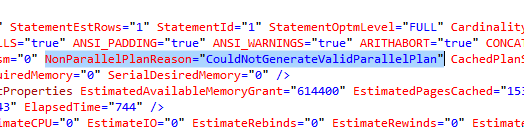
Why? Well, right-click on the plan, click View XML, and check out the highlighted area (emphasis mine):

CouldNotGenerateValidParallelPlan

Doh. Scalar functions strike again.

But check out WITH (NOEXPAND)

Add that query hint, and look what happens: the query goes parallel!

Top query has no hints, bottom query has WITH (NOEXPAND)

Both plans have full optimization. Both hit the same index. I have no idea why you suddenly get parallelism when you use that hint – I just stumbled on it accidentally.

This may be related to a fix Paul White found in SQL Server 2016 last year – look for the “A New Option” section in that post. That one requires a trace flag, but I’m certainly not using that trace flag here. It might be that WITH (NOEXPAND) now triggers the same behavior in computed fields that the trace flag used to.

I have no idea what version/build this was introduced in – my testing was done on 2017 CU3. Feel free to talk amongst yourselves and try other versions/builds if you’re having the scalar-in-indexed-views problem.

Of course, the best answer isn’t to use the WITH (NOEXPAND) hint – as long as you’re in there mucking with the query, if you can, just get rid of the scalar function.


Let’s Give The Optimizer A Name

Humor, SQL Server
69 Comments

Clunky

As my favorite monkey likes to say, the hardest things do with computers are:

1. Naming things

4. Asynchronous processing

2. Cache invalidation

5. Off by one errors

Things are tough for Microsoft, too.

Take “the optimizer” for instance. It’s based on something called the Cascades Framework.

No one wants to say “Cascades Framework”, so they just call it “The Optimizer”.

Not to be confused with “The Storage Engine”, or “The Cardinality Estimator”.

Like I said, clunky.

Friendly Name

I’d like to give The Optimizer a friendly name.

I mean, aside from Paul.

Think you have a good name for it? Leave a comment!

We’ll pick our favorites, and maybe you’ll win something.

Unless you’re in Europe.

Brent says: You’ll definitely win something.


How to Throttle Logins to SQL Server

Bad Idea Jeans
7 Comments

So, uh, you can use WAITFOR in a logon trigger:

You probably don’t want it to be TOO long, lest their app report it as a connection timeout. You want it just slow enough to make them angry.

I mean, theoretically. I would certainly never do anything like this. And I’m certainly not as diabolical as Dave Dustin:

And as long as I’m talking about triggers, Marc Brooks had a request:

Sure! Here you go:

That one’s an especially bad idea because it’ll likely break 3rd party apps and maybe even SQL Server upgrades.

And I know what you’re thinking: does that trick work in TempDB? Kinda – it prevents the creation of “regular” tables, like dbo.Whatever, but it doesn’t prevent the creation of temp tables.


The Many Levels Of Concurrency

“Concurrency is hard”

Construction begins on the Tower of Babel, 610 BCE (colorized)

When designing for high concurrency, most people look to the hardware for answers. And while it’s true that it plays an important role, there’s a heck of a lot more to it.

Start Optimistic

Like, every other major database vendor is optimistic by default. Even the free ones. SQL Server is rather lonesome in that, out of the box, you get the Read Committed isolation level.

Everyone else gives you something close to Read Committed Snapshot Isolation. This is why you don’t see too many Oracle bloggers wasting precious internet on the perils of NOLOCK.

Pros

  • Avoid reader/writer blocking from the start
  • Makes reporting on OLTP data easier
  • Can alleviate some deadlocking scenarios

Cons

  • Can drive tempdb crazy
  • If your transactions depend on short blocks for queuing, you may need to use locking hints
    Coin Currency Is Hard
  • Those orphaned “begin tran” queries have more repurcussions
Start Normal

Perhaps the un-sexiest bit of databases: normalization! This plays a huge part in concurrency, though.

If you choose to store all of your data in overly wide tables, a lot more queries rely on them simultaneously. If you’ve followed my advice on optimistic locking, you’ve bought yourself a little reprieve, but all those modification queries still have to get along.

Wider tables are also a lot more difficult to index. The number and variety of queries that touch wide tables in different ways often lead to many wide nonclustered indexes to compensate.

When you spread data out to well-normalized tables, the easier it becomes to spread out writes, and index for specific query patterns.

I can’t recommend Louis Davidson’s book on database design enough.

Start Setting

I know it’s been said everywhere on the internet, and anyone heavily invested in high-end design and implementation will have a runbook for SQL Server setups.

But still, this stuff matters! Let’s take a look at a couple things Microsoft has made better, and a couple things they haven’t.

Good

Having these two things set up correctly from the get-go can have huge impacts down the line. Especially with trace flags 1117 and 1118 being the default tempdb behavior starting with SQL Server 2016. Back when we talked about optimistic isolation levels, we talked a little about tempdb. All the row versions that allow readers and writers to not get all gummed up go to tempdb. You’re gonna want this going blazing fast.

Having instant file initialization turned on is a no brainer (unless you’re covered in tin foil for non-fetish-related reasons). End users typically don’t like having pauses in query processing while waiting for files to grow. Letting SQL and Windows negotiate this with IOUs behind the scenes makes data file growths a whole heck of a lot less painful — especially if you’re the kind of person who lets their files grow by percentages. You know, 10% of 4 GB is a whole lot less than 10% of 400 GB.

Still bad

  • MAXDOP
  • Cost Threshold for Parallelism

I know these are a bit personal, especially if you’re on SharePoint (forgive me for speaking such words), but here’s why they impact concurrency.

You only get a certain number of threads to work with, and they’re based on your CPU count.

512 + ((logical CPU’s – 4) * 8)

You’ve got to factor a lot into how many threads you need

  • Number of Users
  • Number of parallel queries
  • Number of serial queries
  • Number of databases and data synchronization (think Mirroring, AGs, backups for Log Shipping)

If you leave MAXDOP and CTFP at the defaults, you’re letting just about every query use every core.

You’re looking at running out of threads pretty quickly, if you’ve got any kind of user base. Nothing kicks concurrency to the curb like THREADPOOL waits.

This is SQL Server we’re talking about, and all those cores are doggone expensive. If a query wants to use more than one, it better be worth it.

Those defaults have been around since Justin Timberlake was country the first time.

Start Hard

As we speak, I’m kicking 128 GB of RAM. I don’t even have a real job.

If you’re sizing production servers, or Tituss Burgess forbid, VM hosts, and you think 256 GB of RAM is a good number, you have lost your mind to oblivion.

SQL Server 2016 SP1 Standard Edition can use 128 GB of RAM to cache data alone. If your database isn’t that big today, it will be soon. And you know you’re working on a data warehousing project, too.

On top of that, it can use

  • 32 GB for column store
  • 32 GB for Hekaton

And it can use any memory in your server above the 128 GB mark for query processing, DMV and plan caching, backups, and just about anything else.

Choices, choices..

Thanks to Bob Ward (who through all things are possible, except learning how to use the debugger) for confirming my suspicions about the memory grant part.

Stepping back a bit to design — you better choose those data types carefully if you want to make the most out of your memory.

Running out of memory means waiting on memory. Much like THREADPOOL, this is not what you want your queries waiting on.

Having data cached in memory and having enough memory for queries to run without spilling oodles of noodles to disk is important.

Babel of Bloggers

Concurrency isn’t the domain of any one aspect of the database. You have to put a lot of thought into it at every level of design.

There are other ways to shoot yourself in the foot, whether it’s instance stacking, putting all your clients in one database, or putting hundreds of client databases on one server.

These are the kinds of design decisions people seemed determine to make.

While they’re cheaper and easier in the beginning them, they’re often expensive and difficult to undo later.

Like these butt implants I got.

Thanks for reading!


[Video] Office Hours 2018/2/14 (With Transcriptions)

Videos
1 Comment

This week, Brent, Tara, and Richie discuss the lack of backward compatibility for SQL Server backups, deploying SQL Server on VMs with shared SAN storage, query tuning, replication, full-text indexes, backup and restore, saying “no” to your superiors as a DBA, clearing your transaction log, and much more.

Here’s the video on YouTube:

Office Hours Webcast - 2018/2/14

You can register to attend next week’s Office Hours, or subscribe to our podcast to listen on the go.

Enjoy the Podcast?

Don’t miss an episode, subscribe via iTunes, Stitcher or RSS.
Leave us a review in iTunes

Office Hours – 2-14-18


When the data file fills up, how long does SQL stay up?

Brent Ozar: Let’s see; Ricardo asks, “if the data file has no more space to grow…” This is so good. “How long will SQL Server keep continuing to process transactions as long as the log file has plenty of disk? Will it go down when the log is full, up to the next checkpoint, when exactly will it fail?”

Erik Darling: Is this, like, an exam question? What are those asterisks?

Brent Ozar: That’s so cool. I don’t think any of us would ever test it. My guess is, you would keep running until you needed to add a page in the data file, which you could do inserts, updates and deletes, even. The deletes may be making- enough space on some pages that matter. Maybe inserts don’t require a new page. Updates may not, but if you’re depending on knowing the exact time it’s going to go down, you’re probably screwed to begin with.

Tara Kizer: It’s going to be a short amount of time, I suspect.

Erik Darling: Yeah, I don’t think that’s going to go well.

Brent Ozar: I don’t think it will even be up long enough to get the answer.

Erik Darling: But that would be a fun thing to test, because you could just create a small, like 1MB, data file, cap the size and start banging away on transactions and see how long it takes. Why you got to ask us? I don’t want to go do that demo now.

Brent Ozar: And if you do it, put some time in between the loops. Don’t just go one equals one, because this whole thing’s going to go down like a house of cards. It sounds like the kind of thing we usually do. And you see us do stuff like that during Dell DBA Days, but not always; it’s pretty rare.

Erik Darling: I don’t want to do demos that don’t have a query plan anymore. They’re hard.

Brent Ozar: You’re in love with query plans.

Erik Darling: I just like perf, and I can’t…

Brent Ozar: Amen, that’s me with availability groups. I’m like, oh it’s over there; I know how it works. I’m kind of done with that piece now. Lovely, I like it. Same thing with clustering, like, it’s over there. I’m going to be over here writing query demos.


Why can’t I restore to an older SQL Server version?

Brent Ozar: Michael asks, “Why is there no backwards compatibility for SQL Server backups? Why can’t I backup a database from a SQL 2012 instance and then restore it on a 2008 R2 instance?”

Erik Darling: Things change, man; all sorts of stuff changes. I guess the way I’d think of it is like the amount of fundamental changes that take place from version to version, both internally to resource DB, master, DMVs, the way SQL just does things, where it looks for things. There’s just no sense in having a database turn back time just so that you can restore it to an older version. I totally get why they don’t do that. It doesn’t seem fair to you because you have a weird environment where you need to downgrade databases, but I get why they don’t want to switch databases back to something else. That sounds like a nightmare.

Richie Rump: It’s like, you also have to ask questions, like have you ever written software that just works once? And then you want it to work with previous versions – it gets super hard. I take a look at Windows and my mind is blown that you could actually install software that was written 20 years ago, and essentially, it probably will work. That’s insane. It’s just insane. You can’t even open up QuickBooks in the previous version without having to upgrade to the new version.

Brent Ozar: I am so amazed that you can take a database from SQL Server 2005 and restore it to 2014 or 2016 and it just works. And you don’t have to do any steps, the magic just happens; it’s phenomenal.

Erik Darling: But you know, if you think about phone operating systems, which are even worse – you have Android or you have an iPhone, there are apps that don’t work because you upgraded Android. Like, there are apps that stop functioning because they make such fundamental changes to the operating system that those apps don’t do things the same way. So like Richie was saying, you could install something on Windows from 20 years ago that still works, but you can be crap out of luck on phone OS if it’s like six months ahead of whatever app you installed. Compatibility is hard.

Richie Rump: That’s a philosophy, right, when you’re writing software. It’s like, yeah, we’re going to forget everything that’s old, and it’s just new, new, new, new, new and you just need to upgrade to a new version, and that’s it. And that’s just a philosophy – whereas Windows was the complete opposite. Like, I know we need everything to work in previous versions. It’s just really hard to do it.

Erik Darling: That, and as someone who works on scripts that have to work across a wide variety of things, as soon as we don’t have to support an older version anymore, I want constant forward momentum. I don’t want to have to keep thinking about other stuff. I have it on my calendar for 2019 when 08 and 08 R2 are pulled, because I am not doing one more version check.

Brent Ozar: Amen, I think it’s also going to catch people by surprise as they start playing around with Azure SQL DB Managed Instances. Managed Instances are roughly equivalent to Always On Availability Groups. You can upload a database into there, it just kind of works and they manage it for you. But man, heads up, if you ever want to get your data back out, you’re going to be SSIS or BCB…

Erik Darling: There is no SQL Server version, physically, that is the same as the Azure DB version.


Should I separate my data and log files?

Brent Ozar: Landon says, “I know these questions come up a lot, but deploying SQL Server on VMs with shared SAN storage – is it worth separating the data logs and tempdb files onto their own disks like traditional best practices advise?” What you want to do is – with your SAN vendor – because there are cases with some SANs where they will handle caching differently, for example. And then they require you to have the logs on separate drives for different ways of doing caching. But it is going to be different for every make and model of SAN. Generally speaking, it’s not going to be the performance difference that gets you across the finish line.

Tara Kizer: I have a different take on it. So, I like to still split them up regardless; especially by database even. So that if one database – it blows out the log, it doesn’t cause storage issues for other ones. So by separating them to mount points or drives, I can avoid production issues that some databases might cause.

Brent Ozar: And if it’s not by database, I also like by business unit too. Like if you’ve got a bunch of accounting databases on the server and they all have their own use pattern, then you can group them together.


Why is my query sometimes slow?

Brent Ozar: Let’s see. Chris asks, “Hey, I have a task where I need to update millions of rows in a table. I wrote a script that will batch these updates into smaller 1000 row updates. Sometimes when I run it, it’s smoking fast; other times it’s completely slow. When it’s slow, I stop it, count to three, hit run again and it goes back to being smoking fast. I’m not seeing any blocking and my database is in simple recovery model; any ideas of what to do when it sometimes just runs slow?”

Erik Darling: So is it slow from like the outset, or does it slow down after a few batches? Don’t blame fragmentation.

Brent Ozar: He says from the outset… I’m guessing bad query plan – oh no, because stopping it and counting to three wouldn’t make a difference on that.

Erik Darling: Blocking?

Brent Ozar: He said he’s not seeing any blocking.

Erik Darling: Oh, he did say that. Thanks, guys.

Tara Kizer: Check the waits – what is the query waiting on?

Brent Ozar: And how would you do that?

Tara Kizer: Well, I would do it with sp_whoisactive. Erik might get a little upset though…

Erik Darling: No, I use sp_whoisactive for lots of stuff; sp_whoisactive is superior in its own special ways that I am not trying to compete with. BlitzWho does stuff and it grabs stuff from new DMVs that sp_whoisactive doesn’t touch, and that’s our niche with that. We look at stuff that Adam is too busy running Python to mess with.

Brent Ozar: And one of the things I love about sp_BlitzWho over sp_whoisactive is that it will also show you session waits much easier. So you don’t just see the current wait, you see all kinds of other waits. So he follows up with he thinks it’s usually CXPACKET, but definitely check sp_BlitzWho because it will show you the session waits altogether; which may be a lot other than CXPACKET.

Erik Darling: You know what happens to me sometimes when I run things as a loop? I forget that I have query plans turned on, and that just messes me all off because it makes the query plan for each iteration of the loop nest.


Should I do CHECKDB in a maintenance plan or a script?

Brent Ozar: So, let’s see, amigos. Pablo says, “What do you think about CHECKDB? Should I do it on a maintenance task or should I do it with T-SQL and log the output?”

Tara Kizer: I don’t care how you do it, just do it. I’m not a fan of maintenance plans at all, so I won’t use those no matter what. But I’m okay with maintenance plans, just not for my servers. But other people’s servers, I’m okay with them for backups and CHECKDB. I’m not okay with them for index maintenance. Use Ola Hallengren’s Index Optimize.

Brent Ozar: It’s totally free. Ola.Hallengran.com – Swiss Army Knife; all kinds of cool stuff.

Tara Kizer: The only thing to add is make sure that you are logging the outputs so that if CHECKDB ever does fail, you don’t want to have to run CHECKDB manually in a query window to get the output. So have that output go to a file so that you can take a look at – sometimes the failures are benign, but sometimes it’s going to mean database corruption. And you do not want to have to run CHECKDB when you encounter corruption again because you might be talking about a 10TB database, and that could take hours.


I haven’t mastered replication yet…

Brent Ozar: Speaking of which, Daryll says, “I haven’t mastered replication yet…” [crosstalk] It’s like a support group here. “I’ve scripted out my mess and successfully run it and added articles with the GUI. My vendor says don’t use the GUI; only script it and never touch it.” He says he only runs snapshot when the article isn’t flagged. “Can you help me find the column for an article not flagged for snapshot?”

Tara Kizer: I have no idea what any of that meant, but I’m a fan of the GUI when it comes to replication. In my last job, they were fond of scripting it. So luckily, when I arrived they already had everything scripted and I would just change what I needed to. I just followed their template. But previous jobs, my boss always said you should start scripting this stuff – but the GUI works fine here. I mean, I supported replication for many years, but I didn’t love it so I never cared to figure out the scripting.

Brent Ozar: Yeah, if it works. I like – if you know it implodes all the time – so like I had one job where replication just always imploded, so we script it out and we could just go run it whenever it broke. But god, if you’re in this situation that bad, how about you fix it so that it doesn’t break all the time? We couldn’t be bothered.


Best practices for full-text indexes

Brent Ozar: Ron asks, “Do y’all have any best practices for using full-text indexes?”

Erik Darling: Yeah, it’s called Elasticsearch…

Richie Rump: Yeah, Elasticsearch…

Tara Kizer: Don’t use it.

Brent Ozar: What’s the difference between Elasticsearch and SQL Server?

Richie Rump: So I always felt that Elasticsearch, you could just do so much more. You could do more with the querying, you could do a heck of a lot more with the functionality it actually brings out. Remember, full-text search really hasn’t been updated in years and years and years and years, so it’s pretty basic. I mean, if you just want to do a simple search, that’s fine. But with Elasticsearch, you could create these crazy search strings and really dig into your data and find, you know, insane stuff. The only problem is that you do have to move your data from SQL Server into Elasticsearch and put the index on top of that. So, if you have something that’s, you know, you want to keep secure, you’ll have to think about how that’s going to work. But other than that, it’s designed for searching. That is what it’s designed to do. And so it’s the best tool out there for doing that.

Brent Ozar: How much does it cost?

Erik Darling: Free 99…

Richie Rump: Free to me.

Erik Darling: It’s funny, I was on the phone with a client and they were like, “Oh well I wrote the poor man’s version of Elasticsearch in SQL Server.” And I’m like, Elasticsearch is free. It is the poor man’s version. It doesn’t get any more poor man than free. You can just go download it; it’s right there for you.

Tara Kizer: That must be the client that we share because I remember hearing that.

Richie Rump: You know, running the poor man’s version of Elasticsearch ids, what, Apache Solar, which they branched off the same thing. I mean, I don’t know.

Erik Darling: Back when I used to support relativity, they had the option to create full-text indexes. And leaving aside the fact that setting off a crawl on a several terabyte table kind of sucked, but I really just hated dealing with the search queries that would come out of that. Like with the contains and the contains table, no one was ever quite sure what to do to get what results back. And as part of the application, they also used dtSearch and they sometimes used Elasticsearch for things. So obviously, even they had been pulling away a little bit or giving people alternatives because full text just wasn’t good for all kinds of searches. What I really like the best about Elasticsearch is that it’s outside of SQL Server, so you’re not wasting all your RAM and other resources on these giant full-text catalogs. You’re putting it outside into a product that was meant for researching that kind of thing.

Brent Ozar: We should probably suffix it to say too, if you’re doing home development of an app that’s 5GB to 10GB in size and it’s never going to hit 100GB, then sure, full-text indexing is probably fine, but you don’t need any best practices. It’s just going to work. But beyond that, that’s when we start asking questions.


Do differential backups take longer for striped backups?

Brent Ozar: Brain asks an interesting one. “Have you ever seen differential backups take longer – like ten times longer – when the full original backup was striped as opposed to done to a single file?” It’s a no from me…

Erik Darling: No from me…

Brent Ozar: Alright, I think you got a unicorn there.

Richie Rump: I mean, are there unit tests that you could run against it? I don’t know.

Brent Ozar: Yeah, if you could reproduce that, create a database 10GB in size, fill it with random junk data and do the test back and forth, showing it’s [immediately] different and reproduce it on a couple of different SQL Servers, then submit it as a question to DBA.StackExchange.com. And people will up-vote the hell out of that because if it’s reproducible, that would be an awesome bug to find.

Erik Darling: Honestly, the only time I’ve ever seen diffs take longer is when there was more diff to diff. I don’t think the backup striping ever had anything to do with it.

Richie Rump: Choose these DBAs, choose diff.

Erik Darling: I like it. I found myself in a weird situation last week where…

Brent Ozar: Just once?

Erik Darling: Just once. Well, I mean one day, in one instance – one relevant instance of a weird situation last week where the client was doing big data warehouse stuff and they wanted some replication of the data, and I actually recommended differential shipping to them because they were all in simple recovery. And there was just no reason for them to switch to full and start doing log backups, so I was just like look, you can take a diff – because they were doing nightly fulls with snapshots. So I was just like, you could just take these diffs at four to six-hour increments and be okay. They’re going to be big, but you can do it. It might beat the pants off you having to learn transaction log backups at this late place in your developer career.

Brent Ozar: I also just want to point out for people who are watching the video, you see how my webcam is doing this weird thing where it wraps around? I can point it one side and my finger comes out the other. This has happened all morning with my training webcast. I noticed it when I was like doing jazz-hands and they started coming out the other side. I was like, what the hell is going on here.

Tara Kizer: What have you done to the matrix?

Brent Ozar: I know. What I wanted to do is I wanted to get over far enough that I could scratch my own ear, but…

Erik Darling: I thought it was like, is somebody in there with him? What’s going on here?

Tara Kizer: Erik is trying to [crosstalk].

Brent Ozar: I will crush your head.


Does SQL Server need 2 IP addresses?

Brent Ozar: Sri asks, “Do we need to have two IP addresses for a SQL Server?”

Erik Darling: For what?

Tara Kizer: Need to? No.


Are the 2008 setup files a security risk?

Brent Ozar: Terry says, “We have SQL Server 2012, and it’s” – hold on. They have a SQL Server 2012 but somebody installed the 2008 management objects and the 2008 set up files. “Our security team is asking us to remove them. I’ve Googled and found the people ran into issues. What are your thoughts?” Well, you know what I’d do? I’d tell your security team to remove them. If they’re so confident in how this works.

Tara Kizer: And if they’re requiring you to do this, I’m not sure what kind of security risk there is for having them, I’m sure there’s something that it’s just not aware of, I would require that the company gives me a new server so I can move everything over to this. I would not be doing this on an existing production server.

Brent Ozar: Log ship or database mirror over to it or something. But, yes, it’s a little sketchy.


Do log backups truncate the transaction log?

Brent Ozar: Sri asks, “Do maintenance plans transaction log backups truncate the logs once the log backup finishes?”

Erik Darling: Well, any transaction log backup will truncate the log internally. Not externally.

Brent Ozar: As long as – like, there’s some things that will cause it not to.

Erik Darling: Right, like replication or whatever other weird log reuse wait. But – or like, an open transaction that’s keeping things all big and bloaty. But generally, I think if you’re expecting the size of the file to physically shrink after a transaction log backup, you’re going to be waiting a very long time because that’s just not what happens. The transaction log grows as it needs to, to accommodate active stuff, and then internally, marks space for reuse when transaction log backups happen. Apart from like, what we talked about, if there’s a weird log reuse issue. Like, an open transaction or replication or whatever else shows up in that sys.databases log_reuse_wait_desc.

Brent Ozar: Funny. Things you never think you’d learn as like, you know, as a kid, or you’re getting into the industry, you’re like, “What are all these cryptic DMV names?” And now we’re like, “It’s over in log sys.databases log_reuse_wait_desc.”

Erik Darling: Yes, things I’m trying to forget so that I can learn other things. There’s only so much space in here and I’m just trying to like, flush some of this stuff out so I can get new things in there.


Followup on the security risks

Brent Ozar: Terry says – follows up with, “Ha-ha, that’s a good one. It isn’t how it works. Security is in charge and the DBAs are dirt, so yes, they’re requiring it and we have to do it, and no, we can’t have a new server.” I have a great consulting line for this. I’m just like, “Go ahead and show me how it’s done. I don’t quite understand.” Like, [unintelligible]. “No, I’ve never done that before, I’m not comfortable with that. It’s a risk for me, I’m not comfortable with it.”

Erik Darling: That’s a production box. If you want me to make changes to that, I want something to test those changes on before I push them live into production. I don’t want to just willy-nilly install stuff that might mess up connectivity, whatever, to my server, because then I have to troubleshoot that on top of your stupid security issue that’s probably non-existent.

Tara Kizer: And then also, if you Googled and found that other people have run into issues doing this, this needs to be documented, and that they need to – yes, the security team needs to sign off, and the CTO needs to sign off that this is a potential known issue to cause problems and you’re requiring me to do it in production.

Brent Ozar: And start a support call with Microsoft. It’s 500 bucks, be just like, “Sure, I’ll do it as long as you, you know, start a support call with Microsoft and they walk me through it.” Microsoft will be like…

Erik Darling: No, like, you have to be on the call with me when it happens. Because if you’re asking me to do this thing that I can’t do, like, you can’t just like, physically change that server during business hours. You can’t just like YOLO uninstall crap. Why would you do that to yourself? I don’t know.


Why won’t our admins let us do this?

Brent Ozar: Anon emus says, “We have a developer who’s trying to use OA create processes”, this just keeps getting better. The more that I read it gets even better. “For making bots to send notifications about certain jobs running across multiple servers, using linked servers.” I think that’s probably the single sentence with the most bad ideas I have seen in it in quite some time. “We cannot get SA permissions.” Yes, that’s probably a good idea.

Erik Darling: Good.

Brent Ozar: Whoever made that decision [crosstalk].

Erik Darling: Whoever is saying no to you is pretty smart.

Brent Ozar: You should buy them a beer.

Tara Kizer: I have a blog post today that’s how to suck at database administration and in the comments like I added something today that said, “Guess some of us need to talk about the people skills, the personal skills that senior DBAs are very lacking out there.” And one of the issues on my reviews at past jobs is that people would say, “These are third-party reviews”, people would say, “You know, she needs to have a softer way of saying no.” And for this here, I would say, “No, end of story, done. I don’t care what my review’s going to say. This is just dumb.”

Richie Rump: A softer way of saying no? Hell no? I mean [crosstalk].

Tara Kizer: I know.

Richie Rump: And the horse you rode in on.

Tara Kizer: They would say that, even if the answer’s no, she should have more words go around it, make it sound nicer, and it’ll still be no in the end. It’s like, what?

Richie Rump: You know that sunshine, it should go up the rear, that’s where I want to blow it off. Okay, here’s two words. No-o.

Brent Ozar: You smell great today. No.

Erik Darling: Good news anon. Look, I’m going to give you some good news though. Between you and me, I’m sure you can do that in one line of PowerShell, so just don’t sweat.

Tara Kizer: Even Erik could do it in one line.

Erik Darling: That’s it. One line.

Richie Rump: There’s no unit tests around that PowerShell code, I’m sorry.

Brent Ozar: None of us – I think it’s universal, none of us support doing that. We’re not [unintelligible].

Erik Darling: SP create OA things are like, deprecated. They’re like, in the dust. Like, I remember reading like, old like, SQL some workbench articles on Simple Talk with like, someone would use like SP OA create to do all this crazy stuff, and I’ll be looking at it like, “Are you sure? Why would you make a database do that?”

Brent Ozar: I remember stumbling across stuff like that at some point when I was way young and I’m trying to figure out, “Alright, well, it’s out on the web, it must work. This must – someone had to get approval to post this, right?”

Erik Darling: Yes, it’s like creating Excel files and then destroying Excel files and doing all this other stuff. I’m like, this just seems dumb. This just seems a bit daft. It has to be – I learned that word because I went to Bits by the way. Daft is an English word. After I got done converting my fat ass to kilos, I learned how to say daft in English.

Brent Ozar: Richie’s been telling me that I should check out ear grey tea. That was what he was talking about.

Tara Kizer: Ear grey? Earl grey.

Richie Rump: My favorite. It’s great. I’ll never live that typo down. That’s exactly right.

Brent Ozar: I’m going to serve him some. I’m going to be like, “Here’s your ear grey tea.”

Richie Rump: Is it Van Gogh flavor?

Brent Ozar: Nice. Terry follows up with, “You guys are great, now I’m ticked at myself for not thinking of all those things.” It’s the – how everything works anytime you talk to anybody else. Everyone else seems to have all the good ideas.


How do I clear sleep_bpool_flush blocking?

Brent Ozar: Let’s see. Mahesh says, “My transaction log has grown too large, like, 200GB and as I dig into it, it seems like some internal checkpoint is stuck with sleep_bpool_flush. Any idea how to clear the transaction log and complete a checkpoint? The database is in simple recovery model.

Erik Darling: Look in your error log for messages that say flush cash. Because if you have messages in there that say – like, there’s messages – it’ll be like, flush cash waited x amount of seconds to push x amount of pages to disk. It’s a really nasty, like, kind of I/O issue. You’ll also probably see like, if you search for flush cash and also search for 15 seconds, because you’re probably running into nasty I/O issues where the buffer pool can’t flush stuff from memory to disk fast enough.

Tara Kizer: So while you guys were answering a previous question, I started researching that wait stat, and so – I was keeping myself busy, so Paul Randal said that you may see as a top wait, if a checkpoint is blocked for some reason, and he doesn’t mention slow I/O, but he says an example of this would be trying to start a data backup, which does perform a checkpoint, while the database is being encrypted for a TDE, transparent data encryption.

Erik Darling: That happens to the best of us.

Tara Kizer: Yes, I suspect that maybe, you know, if this isn’t happening during your full backup, that you may have – oh, you said simple recovery model, so you have TDE and a full backup occurring at the same time.

Brent Ozar: Or is someone trying to rotate the keys, which requires it to re-encrypt the whole database and you can’t take a backup while that’s happening?


Can you give me a brief overview of query store?

Brent Ozar: Right, the last question we’ll take, can you – Tom asks, “Can you give a brief overview of the query store feature in 2016?”

Richie Rump: Quick rundown? Oh wait, I know this, right? So, this is – this is when you go and you take a look at queries and you select which one to buy. And you install it on your machine, yes. It’s like an [crosstalk], nobody uses it.

Brent Ozar: You especially want to focus on the one that has a little robot hand, and it’s a claw, and it picks up queries and drops them off to you. Just make sure you pick the right one, not the truncate table one. No, none of us are serious. You know what you do? Okay, here you go. Go to GroupBy.org – not as in group purchase, but GroupBy.org, and query store on there and there’s been a couple of sessions on how query store works. Check those out and you can watch like, a 90-minute free video on there about how it works and see demos of it too as well.

Erik Darling: And then if you want to go explore your query store, I have a stored procedure called sp_BlitzQueryStore, which allows you to do very sp_BlitzCache-y things on your query store queries. End of story, sentence, period.

Richie Rump: I was waiting for more.

Brent Ozar: Then comes the robot claw. And make sure that you’re fully patched too, because there’s a lot of known issues around query store that got better with Service Pack 1 cumulative updates 6 or whatever it was.

Erik Darling: Standard issue couldn’t flush plans out of it and couldn’t clear it out. It grew astronomically.

Richie Rump: I’m looking at a sp_Blitz roll right now for query store clean up.

Erik Darling: Look at that.

Brent Ozar: I like it.

Erik Darling: Thanks, Richie.

Brent Ozar: Alright, well thanks everybody for hanging out with us this week, and we won’t see you next week on Office Hours because we’re – three of the four of us are going to be in Kingdom of United, Richie’s staying home and holding the fort down in Miami, but the rest of us are going to be at SQLBits in London. So we will see y’all in two weeks. Adios everybody.


Then Why Doesn’t SQL Always Seek?

Scan The Man

There seems to be a perpetual battle waged against the Index Scan.

At some point it was declared that scans were inferior to seeks, and all energy should be dedicated to eradicating them.

Much like asking why the whole plane isn’t made out of the stuff the black box is made out of, you start to wonder why the Index Scan is even an operator.

This is so dumb.

Obviously, if Microsoft cared about performance, there would be no Index Scans.

Right?

Right?

I bet Postgres would never scan an index.

Being Practical

It should be pretty easy to prove Seek Supremacy once and for all. Then you can literally (LITERALLY!) ignore every other operator in a query plan and focus the entirety of your being on this unknown astral plane toward mocking those without the mental capacity to receive your wisdom.

About Index Scans.

Let’s start with a query.

It has no predicates. It’s just joining two tables together in total.

In the query plan, we have two scans. It’s a two scan plan.

HOUR BACK GET IT?

For the Seekists out there; fear not, your moment of ascension is at hand.

This plan must surely be superior.

Prepare to be humbled

Not All Who Scan Are Lost

In this case, the Two Scan Plan does a bit better.

Not off to a good start.

The source of all those extra reads, and likely the extra CPU time for the seek plan is…

Well, it’s in the seek.

Quackin’ crazy!

You can see why the optimizer chose the scan in the first place.

Hang on though, maybe we picked the wrong table to force a seek on.

This must be the better choi-

I need to sleep more.

Important Information

The reason we get this error here is because we don’t have an index on the Posts table with OwnerUserId as a key column.

This is where most Earth Peoples start to get annoyed — they usually do have an index. In fact, if consulting has taught me anything, you have 17 of the same index with _dta_ somewhere in the name on the data you wish to seek into.

Alright then. Let’s add an index.

If we re-run our query without hints, what happens?

Darn Merges and Scans

We still get two scans!

Comparing all three plans (we can force a seek on Posts now, because we have an index on OwnerUserId), the seeks still aren’t doing so hot.

Hrmpf.

Now what?

Hopefully you learned that not every seek is great, and not every scan is awful.

If you’re joining two tables together, often a single scan of the data is the wisest choice.

The worst part of a plan may not always be obvious, and it may not always be the method that the optimizer chooses to access data with.

Thanks for reading!