Blog

SQL Server Patches for Meltdown and Spectre Attacks

The Meltdown and Spectre attacks are newly announced ways of hacking CPUs. They affect both Windows and Linux. If you’re running under virtualization or cloud IaaS, any other running guest can try to leverage the attacks to compromise your unrelated guest.

Meltdown (yes, it has a logo)

These are a really big deal.

Cloud providers are forcing reboots as they patch things. Normally, that’d be the big punch line of this post – expect random reboots this week – but that only mentions a casual note here.

This morning, Microsoft published a KB article with SQL Server guidance. All versions of SQL Server are affected (other than SQL Server 2008 on Itanium, but who uses that?) Microsoft’s KB goes back to 2008, but there’s no reason to believe that 2005/2000 aren’t affected as well – they’re just no longer supported.

Microsoft’s guidance is concise and clear: if you’re running SQL Server on bare metal, and you trust the code, and no other code/apps are running, then you might be able to get by without patching. Everybody else is in for a rough road, though.

The KB article includes this performance advisory:

Microsoft continues to do performance evaluation on the patched binaries. However, at the time of publication, Microsoft has not yet validated SQL Server performance with all microcode patches, nor has it validated performance in all Linux environments. Customers are advised to evaluate the performance of their specific application when applying patches. Please validate the performance impact of enabling microcode changes before deploying into a production environment. Microsoft will update this section with more information when it is available.

Spectre, the adorable vulnerability

That’s because some test results have found big slowdowns when the operating system is patched for Meltdown and/or Spectre. These are big vulnerabilities in the processors themselves, and OS vendors are having to make big changes that aren’t tuned for performance yet. Early benchmarks yesterday were showing 30% drops in PostgreSQL performance, but thankfully newer benchmarks have been showing smaller drops. Red Hat’s benchmarks show 3-7% slower analytics workloads, and 8-12% slower OLTP. They also caution that:

We expect the impact on applications deployed in virtual guests to be higher than bare metal due to the increased frequency of user-to-kernel transitions.

To know if the Meltdown & Spectre patches are affecting your performance, you’ll need to track wait stats before & after the patch. Wait stats trending is built into every SQL Server performance monitoring tool out there, or you can use the free/easy way: use the Power BI Dashboard for DBAs. Based on the early reports I’ve been reading from Postgres users, I wouldn’t be surprised to see higher SOS_SCHEDULER_YIELD and WRITELOG waits.

There’s no easy fix – you just gotta do performance tuning, throw more hardware at the problem, and/or hope that OS & app vendors learn lessons about the new bottlenecks in this new way of doing business, and release performance tuning patches quickly.

Here’s the heads-up part for DBAs.

This morning’s SQL Server 2017 CU3 and SQL Server 2016 SP1 CU7 are being treated as security updates. The KB article isn’t clear about exactly what changes were made for Meltdown & Spectre, but it does give a list of recommended mitigations if you can’t patch. It includes disabling CLR, disabling external scripts like R & Python, removing linked servers, and removing extended stored procedures.

That means your sysadmins may apply these SQL Server patches as part of their urgent patching routine, as the KBs note:

Cumulative update also released as a security patch

These patches affect SQL Server in other ways, not just as a single security patch. Remember, cumulative updates include all updates along the way – so 2016 SP1 CU7 includes everything from SP1 CU1, CU2, CU3, CU4, CU5, and CU6 too.

To learn what’s been patched, head on over to SQLServerUpdates.com where we maintain a list of detailed 2016 cumulative updates and 2017 cumulative updates.

Erik Says: If you scroll way down to the end of the KB 4073225, there’s a note about disabling CLR that really gets the noggin joggin.

Update Jan 4: Windows 2016, 2012R2, and 2008R2 are getting updates too, but no fix for 2008 or 2012 will be coming:

No soup for you

Update Jan 5: Microsoft says hold off on patching SQL Servers that act as SCCM back ends. (Thanks to Mark in the comments!)


Network Issue or THREADPOOL waits?

Wait Stats
12 Comments

I’ve had a handful of clients that were experiencing significant THREADPOOL waits. This isn’t a wait type that I had any knowledge of prior to joining Brent Ozar Unlimited. Looking back, I am pretty sure that a few servers that I’ve been responsible for over the years were experiencing it based on the symptoms.

WebOps: For a few minutes last night the app servers couldn’t connect to SQL. Can you check if there was a SQL problem during that time?

Me: <checks SQL Server Error Log and our fancy shmancy monitoring tools>

Me: I didn’t see anything in the log, but it appears to be a network issue since the monitoring tools couldn’t connect either. CPU utilization was pretty low during that time.

WebOps: <checks with network team>

Network team: I don’t see any network issues last night.

Me: <still thinks it’s a network issue>

Was it a network issue?

I believe these servers were experiencing THREADPOOL waits at night due to the blocking the various database maintenance jobs that occurred during that time frame would cause. One such job would purge data at night. It would do the DELETEs in ~10,000 row batches, but it still would cause some blocking. Blocking can lead to THREADPOOL waits if the blocking doesn’t clear before the server runs out of worker threads. I’m simplifying of course.

Imagine this scenario:

  • A job kicks off that modifies a bunch of data and holds locks on critical tables for a few minutes.
  • You’ve got several application servers that are trying to run queries against those critical tables.
  • Many of the application server queries are blocked by the job.
  • More and more queries are coming in wanting to get data back from those critical tables. They’re all blocked, timing out and retrying.

Eventually the server is going to run out of worker threads. When this happens, new connections will get errors. You won’t even be able to connect to the server in SSMS unless you know to use the Remote DAC. During this time, THREADPOOL waits are happening.

What do you do if you are experiencing THREADPOOL waits?

A couple of my clients have been told by Microsoft to increase the “max worker threads” setting. It’s no surprise that increasing it didn’t help. Increasing them can lead to memory issues. Each worker thread uses 2MB of memory. That doesn’t sound like a lot, but remember we’ve increased the amount of worker threads on the server. Maybe you are delaying when THREADPOOL happens since you have more worker threads to give out, but maybe you are now encountering RESOURCE_SEMAPHORE or RESOURCE_SEMAPHORE_QUERY_COMPILE waits.

You have to get to the root cause of the problem.

If you’ve got monitoring tools, you should see what’s leading up to the problem even though there’ll be a gap of monitoring data during the event as they too will be getting connection errors once the server has run out of worker threads.

Is blocking the only reason to experience THREADPOOL waits?

Blocking is the most common culprit of THREADPOOL waits. It can also be due to a massive amount of connections trying to run queries, meaning not just idle connections.

Find the blockers and “fix” them. Easier said than done and is not going to be covered here, but check out this post.

If only I could turn back time!

I’d love to troubleshoot the servers that I think were experiencing THREADPOOL waits that I thought were due to network issues. I get to troubleshoot it with clients, but I would love to know if my theory is correct for the servers I’ve been responsible for in the past.

Brent says: I had this exact same reaction when I first understood what THREADPOOL was doing to my server. “Awww, man, I’ve been haunted by this for years….” I think that’s one of the big perks of being a constant proactive learner like yourself, dear reader – you’re going to read symptoms and then recognize them when disaster strikes.


Heaps, Deletes, and Optimistic Isolation Levels

Indexing, SQL Server
6 Comments

The Humble Heap

If you don’t know this by now, I’m going to shovel it at you:

If you have a table with no clustered index (a Heap), and you delete rows from it, the resulting empty pages may not be deallocated.

You’ll have a table with a bunch of empty pages in it, and those pages will be read whenever the Heap is scanned.

Under “normal” circumstances, you can use a TABLOCK or TABLOCKX hint along with your delete to force the deallocation to happen.

Otherwise, you’re left relying on your delete query possibly escalating to a table level lock, and releasing the pages on its own (absent a rebuild table command).

This is true under any pessimistic isolation level. This is not true under optimistic isolation levels (Snapshot, RCSI).

Demonstrate My Syntax

Here’s some stuff:

We have a Heap with a nonclustered primary key. This sounds misleading, but it’s not. A nonclustered PK is not a substitute for a clustered index.

It’s there to speed up the delete that we’ll run in a minute.

We have a couple ways to look at the Heap.

A query I kinda hate:

Uch

And sp_BlitzIndex:

Such Happy Days

What do we know from looking at these?

  • The first query tells us that our heap has 14,200 pages in it, and the NC/PK has 223 pages in it, that there’s no fragmentation (lol I know), and that the average space used for both is pretty high. Our pages are full, in other words.
  • sp_BlitzIndex tells us that our Heap is ~111MB, and our NC/PK is 1.8MB. Both have 100k rows in them. It does not regale us with tales of fragmentation.

Deleting Many Singletons

If a delete comes along — alright, so it’s a row-at-a-time delete (stick with me on this) — and deletes every row in the table, what happens?

I’m doing the delete like this because it will never escalate to a table level lock on its own, but I’m hinting a table level lock for EVERY delete.

You can do this in other ways to avoid them, but this is the path of least resistance.

What do our exploratory queries have to say?

Shruggy the Shrugger

We have 0 rows in the table, but pages are still allocated to it.

In the case of the Heap, all pages remain allocated, and it retains the same size.

In the case of the NC/PK, about 200 pages were deallocated, but not all of them were (yet — more on this later).

So that’s… fun. I’m having fun.

You can get slightly different results without the loop.

If you just delete everything, the Heap will remain with all its pages in tact. The NC/PK will (as far as I can tell) be reduced to a single page.

Oddball

Under both RCSI and SI, if we use a TABLOCK hint instead of TABLOCKX…

U WOT?

The size of, and the number of pages in the NC/PK effectively DOUBLES.

DOUBLES.

>mfw

Repetition Is Everything

I left other code in there if you want to try it at home with other combinations.

You can also try it under Read Committed if you’d like, to see different results where pages are deallocated.

Now, you can fix this by running ALTER TABLE dbo.HeapMe REBUILD;, which will release all the empty pages back.

Deletes Mangle Scans

If we run a couple simple queries, things get awkward.

The first query, which needs to access data via the Heap, does a lot of extra work.

The query that hits the PK/NC does significantly less (comparatively)


Q&A

Why does this happen?

My pedestrian explanation is that when the deletes happen, and rows get versioned out to tempdb, the pointers keep the pages allocated just in case.

Why don’t they deallocate afterwards?

It looks like they do deallocate from the NC/PK the next time a CHECKPOINT/Ghost Record Cleanup process runs.

The Heap remains Heapy, with all the pages allocated to it though. It’s as if the table level lock never happened.

Does query isolation level matter?

No, setting it to Serializable, Repeatable Read, or anything else results in the same mess.

Thanks for reading!


What’s So Bad About Shrinking Databases with DBCC SHRINKDATABASE?

You read a lot of advice that says you shouldn’t shrink databases, but…why?

To demonstrate, I’m going to:

  1. Create a database
  2. Create a ~1GB table with 5M rows in it
  3. Put a clustered index on it, and check its fragmentation
  4. Look at my database’s empty space
  5. Shrink the database to get rid of the empty space
  6. And then see what happens next.

Here’s steps 1-3:

And here’s the output – I’ve taken the liberty of rearranging the output columns a little to make the screenshot easier to read on the web:

Near zero fragmentation – that’s good

We have 0.01% fragmentation, and 99.7% of each 8KB page is packed in solid with data. That’s great! When we scan this table, the pages will be in order, and chock full of tasty data, making for a quick scan.

Now, how much empty space do we have?

Let’s use this DBA.StackExchange.com query to check database empty space:

The results:

Our data file is 51% empty!

Well, that’s not good! Our 2,504MB data file has 1,277MB of free space in it, so it’s 51% empty! So let’s say we want to reclaim that space by shrinking the data file back down:

Let’s use DBCC SHRINKDATABASE to reclaim the empty space.

Run this command:

And it’ll reorganize the pages in the WorldOfHurt to leave just 1% free space. (You could even go with 0% if you want.) Then rerun the above free-space query again to see how the shrink worked:

Free space after the shrink

Woohoo! The data file is now down to 1,239MB, and only has 0.98% free space left. The log file is down to 24MB, too. All wine and roses, right?

But now check fragmentation.

Using the same query from earlier:

And the results:

After the shrink, 98% fragmented.

Suddenly, we have a new problem: our table is 98% fragmented. To do its work, SHRINKDATABASE goes to the end of the file, picks up pages there, and moves them to the first open available spaces in our data file. Remember how our object used to be perfectly in order? Well, now it’s in reverse order because SQL Server took the stuff at the end and put it at the beginning.

So what do you do to fix this? I’m going to hazard a guess that you have a nightly job set up to reorganize or rebuild indexes when they get heavily fragmented. In this case, with 98% fragmentation, I bet you’re going to want to rebuild that index.

Guess what happens when you rebuild the index?

SQL Server needs enough empty space in the database to build an entirely new copy of the index, so it’s going to:

  • Grow the data file out
  • Use that space to build the new copy of our index
  • Drop the old copy of our index, leaving a bunch of unused space in the file

Let’s prove it – rebuild the index and check fragmentation:

Our index is now perfectly defragmented:

Perfectly defragmented

But we’re right back to having a bunch of free space in the database:

Back to 1.2GB of empty space in the data file

Shrinking databases and rebuilding indexes is a vicious cycle.

You have high fragmentation, so you rebuild your indexes.

Which leaves a lot of empty space around, so you shrink your database.

Which causes high fragmentation, so you rebuild your indexes, which grows the databases right back out and leaves empty space again, and the cycle keeps perpetuating itself.

Break the cycle. Stop doing things that cause performance problems rather than fixing ’em. If your databases have some empty space in ’em, that’s fine – SQL Server will probably need that space again for regular operations like index rebuilds.

If you still think you want to shrink a database, check out how to shrink a database in 4 easy steps.

Erik Says: Sure, you can tell your rebuild to sort in tempdb, but considering one of our most popular posts is about shrinking tempdb, you’re not doing much better in that department either.


How Personally Identifiable Information Gets Around

Processes and Practices
23 Comments

Let’s say someone – not you, dear reader, because you would surely never be this sloppy – is building a personal web site or a diary or a company or whatever:

Yes, they should be encrypting passwords, and not storing ages, and certainly never storing identifying information like social security numbers. Unfortunately, that’s just often not how it goes in the real world, as any recent headline will tell you.

That data above could easily contain personally identifiable information (PII) – not to mention all kinds of cringeworthy data.

Queries can contain PII.

And let’s say this someone has performance problems with a query:

If they post that query on a public site, that’s a problem. I’ve seen plenty of similar examples in the wild for folks querying:

  • Inserts with lists of explicit values, like customers, patients, and one of my favorites, lists of diseases for a specific patient
  • Updates with lists of values, like set someone’s new address, the number of times they’ve been diagnosed with a particular disease, and their risk levels
  • Selects looking for a customer’s name, address, email address, or incriminating evidence phrases

Yep. Welcome to the database world. This is what your queries contain.

Which means PII is everywhere, including plain text on your SQL Server’s drives.

Blocked process reports. The system health session, which includes queries involved in deadlocks. Monitoring tools.

But here’s my favorite: when your SQL Server does a stack dump, the running query gets dumped out in plain text to the log directory like this – this example is from a corruption demo when I was running a DBCC CHECKDB command:

Dump in plain text

That’s plain text, stored on a drive our user probably never even thought to encrypt, bless his heart.

Execution plans can contain PII.

Say our intrepid user posts the execution plan – it looks pretty harmless, especially when it’s auto-parameterized, right? Whether it’s a stored proc or auto-parameterized, those parameters look innocent at first glance:

Looks simple enough

But edit the query plan XML, and you see the exact parameters used:

Parameters Put People in Prison

Yep, busted. And of course, same thing with your plan cache.

Statistics can contain PII.

I’ve seen folks get excited about the ability to clone a database complete with statistics. So say our user creates an index on EmailAddress in order to make queries go faster:

Creating an index automatically creates a stat, so if you script out the database including statistics, voila, people can see your data:

Statistics: hacker 1, privacy 0

You don’t have to get a database to get PII.

PII is like a virus: the worst users send it all over, voluntarily, without even realizing it. They think they’re just getting help with a query, and in reality, they’re infecting you with something you never wanted to begin with.

As data professionals, we’re in a really ugly place: we see data we never wanted to see. Our database systems and monitoring systems simply aren’t capable of hiding data from us. If we’re going to tune queries, that means we’re going to have to see queries. Unless we truly never touch a production server – which is certainly admirable and possible – that means we’re probably going to see PII.

I wish I had a happy ending to this post. I don’t.


Our 25 Most-Read and Most-Commented Blog Posts of 2017

Blogging
1 Comment

We published a whopping 312 blog posts in 2017! Looking back, wow, there was a lot of fun stuff in here.


First, here’s the ones you read the most:

25. Max Worker Threads – Don’t Touch That

24. Announcing Our 2017 Black Friday Doorbusters

23. Ola Hallengren’s Maintenance Scripts are Now on Github

22. How to Hire a Junior DBA

21. SQL Server DBA’s Guide to the Gitlab Outage

20. What is the biggest mistake you made in production?

19. How to Do a Free SQL Server Performance Check

18. Why Missing Index Recommendations Aren’t Perfect

17. sp_DatabaseRestore: Open Source Database Restore Stored Procedure

16. SQL Server on Linux is the New SQL Server on Windows Core

15. How to Drop All of Your Indexes – Fast

14. Indexing for Windowing Functions: WHERE vs OVER

13. Tell Us What You Make: The 2018 Data Professional’s Salary Survey

12. How to Do a SQL Server Architecture Review

11. Tell Us What You Make: The 2017 Data Professional Salary Survey
(That one makes the cut because we launched it on Jan 5, 2017. We started a little earlier this year.)

10. The 2017 Data Professional Salary Survey Results

9. How to Do a Free SQL Server Health Check

8. Why Cost Threshold for Parallelism Shouldn’t Be Set To 5

7. Five Mistakes Performance Tuners Make

6. SQL Server 2017 Release Date: October 19, 2017?

5. What is Batch Requests/sec?

4. SQL Server 2017 Release Date: May 31?

3. Let’s Corrupt a SQL Server Database Together, Part 1: Clustered Indexes

2. SSMS 2017 Is Now Available for Download

1. GDPR: Why We Stopped Selling Stuff to Europe
(Amazing since that was only about a week ago – it went viral)


Here’s the ones you commented on the most:

25. The 2017 Company Retreat in Photos: Alaska – 32

24. Max Worker Threads: Don’t Touch That – 33

23. What If Week: What Would You Fix or Change? – 33

22. What Is Batch Requests/sec? – 33

21. Kickstarter-Style Ideas for our PASS Summit Pre-Con – 34

20. Announcing T-SQL Tuesday #86: SQL Server Bugs & Enhancement Requests – 34

19. There’s Something Funny About Variable Assignment – 35

18. Announcing Our 2017 Black Friday Doorbusters – 36

17. Build Me A Build: Assembly Olympics – 37

16. Things Your SQL Server Monitoring Software Should Tell You – 38

15. Live Blogging: Erik vs. PowerShell – 42

14. I’m just saying it’s valid T-SQL syntax, that’s all. – 44

13. Learning SQL Server is painful. – 45

12. Group Post: If I Took Another DBA Job, My First Question Would Be… – 45

11. Good Reasons to Rebuild or Reorganize Indexes – 47

10. sp_DatabaseRestore: Open Source Database Restore Stored Procedure – 50

9. GDPR: Why We Stopped Selling Stuff to Europe – 59

8. What is the biggest mistake you made in production? – 70

7. Does Separating Your Data and Log Files Make Your Server More Reliable? – 71

6. Tell Us What You Make: The 2017 Data Professional Salary Survey – 81

5. What Questions Would You Ask on a Salary Survey? – 104. You really helped us shape the first one this year.

4. What Should We Change About the Data Professional Salary Survey? – 114. When it came time to do the next one, you were all over it, and I really appreciate your help.

3. What Would You Put in SQL Server 2018? – 146

2. Guess the SQL Server 2018 Release Date Contest – 280

1. Guess the SQL Server 2017 Release Date Contest – 286


Here’s to another fun, interactive year in 2018. I’m really grateful to y’all – you make this such a fun place to be.


Female DBAs Make Less Money. Why?

The 2018 Data Professional Salary Survey is open now, and you can look at the live responses as they come in. (To get that in Excel, click File, Download.) As of this writing (Dec 23), there’s already over 2,500 responses, so I’m going to take a look at a few things to see how it’s shaping up.

  • 64% (1,626) of responses are from the United States
  • Of those, 50% (809) are DBAs (either dev, general, or production focus)
  • 776 use Microsoft SQL Server their primary database

I’m going to focus on those just because it’s a large group of people with a lot in common, but if you want to do your own spelunking, by all means, grab the raw data and do your own slicing and dicing.

I’m going to focus on the female and male gender responses – there have only been a few non-binary responses, not enough to draw conclusions. I also took out the top 10 rows & bottom 10 rows by pay because they’re wild outliers – again, a real data scientist much more qualified than me should be doing a better analysis.

The remaining population:

DBAs by gender

Is there a gender gap in salary?

Drumroll please…

The gender gap

I’m no data scientist, but those numbers are pretty far apart.

So, why? Why are female DBAs paid less?

Can the survey tell us if there’s some other correlation – not causation, necessarily, but at least correlation? Is there a difference in experience, maybe? How much experience have you got with this database?

Experience by gender

Uh, no. Maybe the guys have been doing this particular job longer. Let’s see:

Women have been on the job longer

HAHAHA, wow. Women have been on the job longer than men, a lot longer.

That might actually be interesting – from anecdotal experience, I’ve heard that as your skills grow, you need to jump shops in order to get a raise to cover what you’re worth. But again, someone with more data science experience than me will need to dig in there.

Or maybe it’s because more guys manage staff. Do you manage other staff?

Amazing similarity

Uh, no, that’s not it either. Maybe the guys work in a different kind of shop with more coworkers. How many other people in your team do the same job as you?

Team size

Team sizes aren’t wildly out of whack. Do the guys have more education?

Education by gender

No, more guys are dropouts, and more women have Masters. How about certifications?

Certifications by gender

More women are currently certified.

There’s more dimensions you can slice & dice with, and I’ll leave that up to the pros. I’m curious to see what they find. Hey, I’m doing my job as a DBA – I’m empowering you to use the data.

Take the survey, and you can download the live raw data here (for Excel, click File, Download.) We’ll close the survey on January 7.

Update Dec 29Eugene Meidinger dove deeply into the statistics and it looks like yes, the numbers do back it up: female DBAs are paid less.


[Video] Office Hours 2017/12/20 (With Transcriptions)

Videos
0

This week Brent, Erik, and Richie discuss truncating & repopulating, failed logins, their choice for high availability, PowerBI, read committed isolation, parameter sniffing, database mirroring, extended events and failing queries and re-indexing large tables.

Here’s the video on YouTube:

Office Hours Webcast - 2017/12/20

You can register to attend next week’s Office Hours, or subscribe to our podcast to listen on the go.

Enjoy the Podcast?

Don’t miss an episode, subscribe via iTunes, Stitcher or RSS.
Leave us a review in iTunes

Office Hours – 12/20/17


Do nightly-reloaded tables need a clustered index?

Brent Ozar: Gordon asks, “Would creating a clustered index on a heap with a very high number of page locks make things better when truncating and repopulating?” That’s interesting.

Erik Darling: When truncating? No, I can’t see how it would help with truncating, and I can see how it might hurt with repopulating because then the data would get ordered by the clustered index. So for that kind of heap, if all you’re doing is truncating and reloading, I can’t really see much benefit to a clustered index; unless you’re doing something real clustery with it later. Like if you need to join that table off to something else later on – but even then, I would probably create and drop the clustered index as needed. I wouldn’t just have it on there all the time.

Richie Rump: Yeah, I’m assuming that if you’re doing truncates on that, there’s no foreign keys in other tables and things like that.

Brent Ozar: That’s a good point, yeah. So it’s one less reason to need non clustered indexes on it.

Richie Rump: Correct.

Erik Darling: Just do column store for everything. There’s no need for any other kind of index at all, ever; just column store everything. Partition and column store, and make sure that you’re loading your data as JSON, I think, is just the key to database success these days.

Brent Ozar: Anything that that doesn’t work for, you should use Hekaton.

Erik Darling: Yeah, totally, or in-memory column store with JSON, I think, is just…

Richie Rump: I like DynamoDB, so let’s do JSON with DynamoDB. How’s that; we good?

Brent Ozar: Cosmos, you’re not remembering the current keywords…

Richie Rump: You know, Microsoft Cosmos, that’s right.

Brent Ozar: Yeah, yeah, and this is why nobody lets you into the MVP club.

Erik Darling: You spent too much time in RDS, man.

Brent Ozar: We don’t use the Cosmos word.

Richie Rump: Yeah, it wasn’t the successful podcast or the 1,500-people user group; that had nothing to do with that.  I think it was working for you, Brent. I think that’s what…

Brent Ozar: It’s probably true; guilt by association.


Where can I track down failed logins?

Brent Ozar: John says, “Blitz told me to add alerts, so I did. I am now seeing alerts. I’m getting alerts for severity 16 and severity 20. Looked in the error log and I’m seeing this alert information as well. Where can I find out more about the logins that are trying and failing with an SSPI handshake error?”

Erik Darling: I’m not good at that one.

Brent Ozar: if you wanted to, you could start running an extended events trace to catch failed logins, for example. I would just say check to see the time of day that it happened. If it’s happening at the exact same time every day, it’s really common for penetration testing tools. I’ve seen stuff flag at a certain time every day. And if it’s not your biggest concern, feel free to leave off those sev20 errors if you’re not worried about those.


When I need to restore 10 tables, how do I handle foreign keys?

Brent Ozar: J.H. says, “When I restore around ten tables – not the entire database – those ten tables have foreign key dependencies. Any handy tricks that would help me track down all the other foreign keys in other tables, dropping those keys, inserting the data and then recreating the keys?”

Erik Darling: So how are you only restoring certain tables? Are you using a third-party tool or are you doing a select into a different database? Obviously, there’s no object level restore natively with SQL Server, so that would be my first thing. I do know that Aaron Bertrand has a pretty nifty script out there on the internet that will script drop and create statements for all of your foreign keys; so that might be one way to go. If you wanted to just script it out and do it, I don’t know if it will work for absolutely everything, but it’s Aaron, so I trust it for the most part.

Brent Ozar: I agree with that.

Richie Rump: I don’t know. I get kind of [crosstalk] when you start talking about dropping foreign keys, then reloading data, then applying the foreign keys. I mean, are we sure that data hasn’t been removed and what kind of – because when you reapply those foreign keys and data has been removed in the child table, or the parent table, then it’s not going to be there. You’re not going to be able to apply that key back.

Brent Ozar: I’d be curious as to how often you have to do it too. You can tell we like this question a lot. Not that we don’t like all the questions; you’re all wonderful snowflakes that are going to melt. But this is really interesting – how often do you have to do it? Is it part of a regular data warehouse type process or is it something that you only have to do every now and then for emergencies? That’s really cool.


What high availability feature is the best?

Brent Ozar: Ron says, “What is your choice for high availability? I can tolerate up to one minute of downtime.”

Erik Darling: I would say, you know, ye olde failover cluster is my favorite thing in the world.

Brent Ozar: And what do you like about failover clusters?

Erik Darling: They’re  not availability groups is primarily what I like about them. Just for the environments that I’ve been a part of they’ve made the most sense because we already had the San, we already had the shared storage. It was fairly easy to set up and get all that stuff running. You know, with an AG, we would have had to have had separate storage and, you know, probably messed stuff up that way. But, that failover cluster gave us pretty quick failover; even with dozens of terabytes on there. It was pretty easy to manage quorum in all of that; once you got your head wrapped around that. And since it was a two-node failover cluster and both were in the same data center, I didn’t have to worry too much about crazy split brained stuff happening off somewhere else.

Brent Ozar: I highly recommend checking out our post, the 9 Letters that Get DBAs Fired. And we walk you through how to interpret the right HA and DR mechanisms for your goals… Methanisms – crystal methanisms…

Erik Darling: Method Mans…

Richie Rump: You got that click bait thing nailed down tight, man. There’s a lock on that.

Brent Ozar: I’m telling you, I love over hyping and sensationalizing things; it really gets people’s attention. It’s really good stuff.

Erik Darling: And sensualizing as well, not just sensational…

Brent Ozar: Making them sensational. Ron Saxer notices the gremlin on there; oh yeah.


What tool should I use instead of Access?

Brent Ozar: Let’s see here, James May – and I hope this is the real James May, because that would be really cool if he was on the webcast…

Erik Darling: You mean Jimmy May, right?

Brent Ozar: That too. Wow, I never thought that Jimmy May has James May’s name.

Erik Darling: Yeah, they made him put his full name in the GoToWebinar thing.

Brent Ozar: That’s incredible. He says, “I have an Access problem. [crosstalk] We have to build a whole new data mart with over 100 reports and I’d like to put it in literally anything other than access. What tool would you recommend and how would you go win around the Access guy?” I have the answer – PowerBI. I’m all about PowerBI. I think PowerBI… Your faces are so – what?

Richie Rump: Oh, there’s still the Access guy; he’s still around? He didn’t die of old ace?

Erik Darling: Hide his dentures.

Richie Rump: The one Access guy, he has a job. Mind you, I’m the only one with an Access certification on the team.

Brent Ozar: This is true. So as someone with an Access certification, Richie, what’s your opinion?

Richie Rump: I don’t know; I stopped using access 20 years ago.

Brent Ozar: I would totally go down the PowerBI route. PowerBI, Microsoft is investing in it, it looks gorgeous – it looks really pretty. There are a ton of gotchas, like joins in between multiple tables – you can only use one field to join between them, so you have to create another calculated field to reinforce joins. There’s a lot of gotchas, but I really like where they’re going with it. But if the access guy can get it to work, I’m also kind of like, go…

Richie Rump: Yeah, okay, so if you’re building a whole new data mart with 100 plus new reports, yeah, definitely go with PowerBI. You could put that online, you could view it mobile – I mean, there’s a whole bunch of other good stuff that’s kind of in there that you’re going to want to utilize. And as soon as the executives see it on their phone, they’ll be like, “I want more of this. This is what I want.” When I was at a previous company, eight years ago when we were able to put it on an iPad, it’s like all the executives just lost their mind. It’s the same thing with the phone. So now I can get access to all my reports and it’s real time – or near real time – and it’s all my data’s right there so I can ignore my family while I’m sitting there checking up on financial reports. They’re going to want that.


Why is RCSI not enabled by default?

Brent Ozar: Eric Swiggum asks a really good question. He says, “Why is read committed snapshot isolation not enabled by default? I call foul.”

Erik Darling: I don’t disagree.

Richie Rump: Change it to the default.

Brent Ozar: That’s true, make it on the new servers that you build. So for those of you who haven’t played around with RCSI, it allows readers to not block writers and writers to not block readers. We have a page on it if you go to BrentOzar.com/go/RCSI, originally written by Kendra Little, who has a phenomenal set of isolation level stuff over on her own site, LittleKendra.com. She’s got a new training site called SQLWorkbooks.com as well too. She’s really into isolation level stuff. She has a webcast coming up on February 8th, Snapshot Isolation on AG Secondaries. But we’re 100% with you, it’s the default in Azure, it’s the default in availability groups, secondaries, all kinds of cool stuff there.

Richie Rump: So how can you make it the default, Brent? Which way would you do that on your own servers?

Brent Ozar: Let’s see. So I would right-click on a database and go into properties, and then there’s isolation levels inside there that you can change to read committed snapshot – why would I do that? Hold on, we have a guidepost on this.

Richie Rump: I guess that softball was more like a curve.

Brent Ozar: I’m looking over at Slack and all of a sudden I’m like, “No, bad idea…”

Richie Rump: It was a Wiffle Ball; you thought it was going straight and then it curved.

Brent Ozar: Oh, bad idea. So read down through this – and the one thing that’s a gotcha with enabling RCSI is it’s an alter to the database and you have to be the only active connection. So you have to put the database in single user mode. So just [inaudible] something that you want to think about doing after hours.

Richie Rump: Is that one of those things that you could add to model?

Brent Ozar: I believe so. I don’t know why it wouldn’t be.

Richie Rump: That would be my first guess. If you wanted the default, just throw it into model.

Brent Ozar: Let me get the question list back out because I’ve thoroughly hosed up my screen.

Erik Darling: If I was starting a brand-new app, I would 100% start everything off with using RCSI from the get-go. I wouldn’t do anything else.

Brent Ozar: Just get that locking problem out of the way before you get started.

Richie Rump: yeah, absolutely, I agree 100%.


How do I encrypt all connections with TLS?

Brent Ozar: J.H. says, “His application team is requesting all SQL Server communications to be secured. What would need to be done from a DBA end? What are the differences between TLS 1.2 and forcing encryption protocol?”

Erik Darling: Oh boy…

Brent Ozar: Aaron has a post on this too as well if I remember. There are a whole lot of gotchas that are terrifying. I would start here. So search for Aaron Bertrand SQL Server support for TLS 1.2.


Why is my query slow in the application, but fast in SSMS?

Brent Ozar: Abdel says, “I have a situation where the stored proc is slower than running from the SQL in the stored proc just by itself.” So he runs the stored proc from one place, then he copies out the T-SQL, pastes it in SSMS and it runs slower. He says, “I would expect the stored proc to run faster. Have you seen this before and what should I look for in these types of situations?

Erik Darling: Mark it.

Brent Ozar: We’re 13 minutes in?

Erik Darling: Yep.

Brent Ozar: I’ll let you answer. [crosstalk]

Erik Darling: You left the web browser up; honestly… So what you’re most likely running into is something called parameter sniffing, and there’s a great post by a fellow named Erland Sommarskog, and it’s all about why that might be happening to you. It’s a long read, but it’s well worth it because – this is one of those career investment reads. This is like getting a college degree in something that I wouldn’t know anything about.


I want to do minimally logged bulk loads…

Brent Ozar: Alright, next up, Mahesh says, “Is it possible to perform minimally logged bulk loads to a table with clustered and non clustered indexes? I turn on trace flag 610 but it is not performing in my situation.”

Erik Darling: Nope, there’s a whole website written about this stuff by Microsoft, and you can’t have non clustered indexes on a table and get minimal logging. It has to be a heap or it has to be an empty non clustered index. Like if the clustered index already has stuff in there then you can’t get it. So there’s a whole lot of gotchas around it. Minimal logging is one of those, “What if it’s Tuesday on Mars,” performance benefits to me. When it works on an insert, it’s beautiful, but it works under such limited conditions. I see a lot of people who go into simple recover model or go into bulk log and it’s still not working for them. And I’m like, “Well bad things happened; you didn’t do something right. You didn’t follow the steps here.


Should I use database mirroring for SharePoint?

Brent Ozar: Alright, let’s see, Barab says, “I have SharePoint and I want to do basic database mirroring; just plain old database mirroring. Have you seen this with your customers and are they able to get SharePoint to work after breaking the mirrors on the DR side?” Oh man, it’s been years since I’ve done this.

Erik Darling: I don’t have any practical experiences with it, but this reminds me of – something that I hear a lot of people say when they get into weight lifting and stuff is, “I want to be 300 pounds and shredded.” And I’m like, it’s really hard to do either one of those things. Like it’s hard to be 300 pounds and it’s hard to be shredded. You’re talking about mixing up two things that are kind of hard to mess with individually, never mind like putting them together and making them work at the same time. There’s just not a lot of people out there doing that. I wonder why mirroring and not the AG. Like if you’re going to roll that out these days, I wonder what – like practically why you would do that.

Brent Ozar: Maybe no Windows failover clustering experience, I’m guessing. Yeah, I think we would prefer AGs over database mirroring if we could. It’s included in Standard Edition starting in SQL Server 2016.

Erik Darling: If AGs are out of the question, I might even prefer log shipping to mirroring in that situation, just because I know log shipping works, I know how solid it is and the interoperability of the two things is a little bit less questionable.


How would I catch failed SQL statements?

Brent Ozar: let’s see, James May, our favorite Top Gear presenter pops back in with, “I’m getting a very intermittent level 16. Once every couple of days a SQL statement is failing but the logs are getting backed up before I can jump in and query it. How would you go about catching this bug?” I would be curious…

Erik Darling: We have a blog post about that. We have a blog post about – Kendra wrote it – it’s about extended events and catching failing queries. It’s called like Queries Failing in My Database or something.

Brent Ozar: this is what happens when you have thousands… Well, look at that, unbelievable. So assuming you can run extended events, you’re on whatever version that supports that or higher. Super lightweight for stuff like this, as long as you don’t have a lot of queries failing it should be pretty easy. Usually, we’re good about having the – there we go.

Erik Darling: I’m just going to throw a couple of things out there, since the question is still up on the screen. You wouldn’t really want to query the transaction logs to find that sort of thing. That’s not where you find queries that fail, because the transaction log is for modification queries that finished. They wouldn’t be in there; you would most likely just want to look at the error log, not the transaction log. If something is cycling the error logs then you can just look at the prior log because it’s probably not deleting out everything, unless you have some really weird error log cycling thing going on. But if I just wanted to have all the data isolated in one place, I would definitely just go the extended events route.

Brent Ozar: Makes sense. The other reasons that I’ve seen sev16s, the query is too complex and doesn’t produce an execution plan, the query optimizer ran out of resources or whatever. At that point, I’m like, “I don’t even care about capturing the query most of the time. Whoever is having a problem with this query, they can bring it to me and we’ll work together on tuning it, but I don’t want to proactively go looking for a problem like that.”

Erik Darling: It’s going to be one of those in clauses that breaks like the 64MB limit or something. “You put 65,000 nested [inaudible]… What happened?” I don’t know, good lord. It was a case statement with more than 128 nested levels. Like, well, perhaps it’s time to revisit the logic of this query.

Richie Rump: It’s a recursive query, it just keeps calling itself.

Erik Darling: I saw someone using recursive scalar functions last week. So it was like – so it was a scalar function – no it gets better – it’s a scalar function that parses XML. And if it doesn’t find, I think, a parent node, then it passes the next node in and looks for a parent node for that recursively. So it’s like function, does stuff, parses XML. If this is NULL, it recalls the function with the next [crosstalk]. And I’m looking at this, and I’m just like – [crosstalk] client. So I’m looking at this function and I’m like, “Let’s run BlitzCache.” So we run BlitzCache with XPM and this function was running 80,000 times per minute. [inaudible] no, start over again. No, start over again. And we’re looking at the XPM just like – okay, so imagine like one of your cores is dedicated to this query. You are paying $7000 to run this [crosstalk].


How long will an index rebuild take?

Brent Ozar: J.H. says, “When I’m planning on re-indexing large tables, is there any way to estimate time to complete? We’re trying to avoid locking and blocking users or other processes.”

Richie Rump: But what if you’re trying to do popping and locking?

Brent Ozar: I’m not even going to try and … by doing popping and locking onscreen.

Erik Darling: Dead man walking.

Richie Rump: That was a break dance reference, for anybody who wasn’t alive during the 80s. Just put that out there…

Brent Ozar: So boy, the thing that’s really awesome in there is the new ability to rebuild indexes at low priority; starting in SQL Server 2014. I guess it is an Enterprise Edition only feature, since that’s the online option.

Erik Darling: 2017 has a resume-able online index rebuild. I don’t think we blogged about that. Generally, we don’t spend too much time blogging about ways that people should be rebuilding their indexes; that’s the thing. Try not to give too much advice on it…

Brent Ozar: That is true. So this is the way to do it at low priority, and you don’t block anybody else.


Can Richie demo a pop and lock?

Brent Ozar: Daryl asks, “Can Richie please demo a pop and lock?”

Erik Darling: Yeah, go for it, Richie.

Richie Rump: Nope.

Erik Darling: Do it on your couch so you…

Richie Rump: Nope. Like somewhere around 1984 there was a movie called Breakin’. Maybe you need to pull that one out. It has some really great characters like Special K and Ozone, Turbo, Jean-Claude Van Damme is one of the dancers. I mean, it will give you a real nice flavor for the 80s and what you missed.

Erik Darling: Turbo was bad as hell, man.

Richie Rump: Turbo was the man.

Erik Darling: What was the other good one? There was Breakin’, Beat Street.

Richie Rump: Beat Street, Breakin’ 2: Electric Boogaloo.

Erik Darling: Those are all fine movies that featured breakdancing heavily.


I changed the service account, but…

Brent Ozar: Hanan says, “I changed the service account running SQL Server via the configuration manager. After that change the instance is running and everything seems okay, but when I check the local policies GUI, the new account has not been granted any of the required rights like log in as a service, bypass traverse checking, et cetera. Is there something I should need to set up manually?”

They’re supposed to be taken care of by configuration manager, which leads me to think that either you checked on the wrong server – like you ran config manager on the wrong server. Maybe you weren’t logged in as somebody with admin rights. I mean, there could be a long list of things that was done. What I would try is go try it again. Go try to change the logon account again. It will have to wait until restart before stuff takes effect, but then at least you can see if the permissions are getting granted.

Erik Darling: I was just breakdancing; I don’t know if you all missed it?

Brent Ozar: Oh, that’s what it was. Oh…

Erik Darling: You didn’t see? Because I did some really awesome stuff; I actually just have a … desk for other reasons.

Brent Ozar: Ah, no, for once you had the webcam above the desk turned on instead of the one below the desk. I think we’ve asked for that one to be permanently deactivated.

Richie Rump: Especially since he’s not wearing any pants, yeah.

Erik Darling: I actually still have my morning sweatpants on.

Brent Ozar: You have separate sweatpants for the afternoon?

Erik Darling: yeah, who doesn’t? You don’t have afternoon – what am I, a farmer? Of course, I have separate sweatpants for the time of day. [crosstalk].

Richie Rump: I’m like, “Sweatpants, what are those? I have no idea”

Erik Darling: They’re what you go to the gym in, Richie.

Richie Rump: Jim lives down the street, bro.

Brent Ozar: I should put in a plug for Sleepy Jones. Sleepy Jones has phenomenal pajamas. This is pretty much what I’ve been living in these days when I don’t have to go get on a webcast. So I can’t say enough good things about Sleepy Jones Pajamas. This webcast is brought to you by Sleepy Jones Pajamas.

Erik Darling: What the hell just happened?

Brent Ozar: Thanks, everybody, and we will see y’all next week at Office Hours. Adios.


Sizing A New Server? Start With Maintenance.

Clientele

Most of out customers are on slightly (ahem) older (AHEM) hardware, and they have big questions:

  • How do we know what kind of hardware we need?
  • How do we load test it?
  • How do we know what to change to make it better?

The load test question is interesting, particularly because getting a reliable user workload is so difficult and expensive.

Tara talks quite a bit about how at her old jobs, she had entire teams with expensive software to generate workload on Dev and QA boxes, along with pricey software to help them.

One thing you can do to immediately kick the tires is run maintenance tasks to see how your new hardware responds, then compare it to your current hardware.

I mean, you are taking backups, running DBCC CHECKDB, and probably rebuilding indexes like your job depends on it, right?

If you’ve decided you want X times improvement in performance, all of these things need to perform X times faster, too.

Backups

Back when we wrote white papers for Google about doing similar trending, we used scripts.

Scripts.

You know, like it’s 2005 or something.

Since then, we’ve written sp_BlitzBackups to give you all that information and more in one spot. This’ll give you database level information about backup size, speed, duration, frequency, as well as some warning if you’re doing anything weird.

That’s a much better way to track the information down, because we built in processes to persist that information, too.

If you’re taking VSS snaps, this is slightly less helpful.

I suppose it’s not terribly helpful if you don’t take backups at all, either.

So, you know, do that.

DBCC CHECKDB and Index Maintenance

Timing these is another way to judge hardware performance, though getting the timing is a little more difficult.

  • If you’re using Ola Hallengren’s scripts, that information will likely be present in the CommandLog table in the master database.
  • If you’re using MinionWare, check the MaintLog* tables in the Minion schema.
  • If you’re using maintenance plans, you’ll likely have to go spelunking into the toilet bowl hell of msdb.dbo.sysssispackages and the DTS schema.

I mean, look, there’s a reason people write their own tools.

Maintenance plans are like those old videos of monkeys in tuxedos pretending to be in fancy restaurants.

At first it’s funny because there are monkeys in people clothes but then you realize those monkeys don’t know French and the food is fake.

What’s your deal?

Hardware factors that will affect maintenance speed:

  • Disks (c’mon SSD)
  • Path to disks if you’re on a SAN (1 Gb iSCSI is not your friend)
  • CPU speeds (can’t hurt the hertz)
  • Memory (ain’t it always?)

You have a treasure trove of data on your current server to give you an idea of how things are running currently.

Now all you have to do is restore a production database or two over on your new server, and see how things run there.

How you choose to do that is up to you, but I’d love it if you used sp_DatabaseRestore. It’s free, and a lot of people have put a lot of work into it.

If the speed of your maintenance tasks on the new server isn’t blowing you away, chances are your queries won’t be much better off from a hardware perspective.

Remember that queries operator under many of the same hardware limitations as maintenance tasks.

If you strip out optimizer choices and just run SELECT * or SELECT COUNT(*) from your tables without a WHERE clause, or your plans have large scans in them anyway, sequential reads from disk into memory, or just from memory are on par with what backup, CHECKDB, and index rebuilds do.

If you need some starter queries for Ola’s table, these work pretty well:

Thanks for reading!


Do Disabled Indexes Affect Missing Index Recommendations?

Indexing
8 Comments

I’m so glad you asked! Let’s take a look. Open up the Stack Overflow database, turn on actual execution plans, and run a query that will cause SQL Server to beg and plead for an index:

And we get a missing index recommendation in the plan:

The side of the milk carton

Now create the index, and try the query again:

Oh, don’t act like you haven’t done that. And sure enough, SQL Server uses the index:

Not everybody likes their name or their initials

Now disable that index, and run the query again, looking to see if there’s a missing index recommendation in the plan:

And let’s see if SQL Server obeys Betteridge’s law:

Does MongoDB poop in the woods?

It does! SQL Server asks for the index. Sure, the index exists – it even has the same name – but it’s currently disabled.

The missing index DMVs even keep track, as we can see with sp_BlitzIndex:

sp_BlitzIndex @TableName = ‘Users’

Love that. Good work, SQL Server. You can take the afternoon off.


Maintenance Plans Enable Your Disabled Indexes

SQL Server
6 Comments

One of Brent’s students in the Performance Tuning class, Jason M., told Brent that maintenance plans enable your disabled indexes. What the what?

Steps to reproduce:

  1. Disable an index
  2. Setup a maintenance plan to rebuild all indexes
  3. Run the job
  4. Check if the index is disabled or enabled.

Steps 1 and 2 can be reversed and still reproduce the issue.

I tested it on SQL Server 2014, 2016 and 2017. All 3 behave the same: Rebuild Index Task in a maintenance plan enables disabled indexes.

Bug or Feature?

Not sure if Microsoft thinks this is a bug or a feature, but in my eyes it’s a bug. It should ignore disabled indexes.

We don’t advise using maintenance plans anyway. We recommend using Ola‘s IndexOptimize stored procedure, or another custom solution, for your index maintenance needs.

Why disable an index?

We often tell people to hold off on dropping an index for a little bit and instead disable them. The benefit to this is that you keep the index definition in place, so you don’t have to go find it when you realize your system needs that index. Drop the index at a later date is our advice. But now be warned if we you are using a maintenance plan for to rebuild indexes.

Thanks for reporting this maintenance plan issue, Jason!


Introducing sp_BlitzLock: For Troubleshooting SQL Server Deadlocks

Deadlocks are hard – especially when there are a lot of them. When there are dozens or more, looking at each graph is a pain.

sp_BlitzLock gives you a slice-and-dice analysis of which tables, indexes, and queries are involved in most of your deadlocks so you can quickly get to the root cause.

How to Use sp_BlitzLock

sp_BlitzLock works on Azure SQL DB, Amazon RDS, and Microsoft SQL Server. Parameters include:

  • @Top: Use if you want to limit the number of deadlocks to return. This is ordered by event date ascending
  • @DatabaseName: If you want to filter to a specific database
  • @StartDate: The date you want to start searching on.
  • @EndDate: The date you want to stop searching on.
  • @ObjectName: If you want to filter to a specific able. The object name has to be fully qualified ‘Database.Schema.Table’
  • @StoredProcName: If you want to search for a single stored proc. The proc name has to be fully qualified ‘Database.Schema.Sproc’
  • @AppName: If you want to filter to a specific application.
  • @HostName: If you want to filter to a specific host.
  • @LoginName: If you want to filter to a specific login.
  • @EventSessionPath: If you want to point this at an XE session rather than the system health session.

Pretty standard stuff for a Blitz script! Note that by default we look at the System Health session for deadlocks.

If you have a custom session, use the path to the files for it like so: 'c:\temp\deadlocks*.xel'.

We can’t get any custom fields that you’ve added to a session. There didn’t seem to be a lot of joy in reverse engineering a session definition from the XE DMVs, and then constructing dynamic XQuery to parse it.

If you wanna spend your weekend on that hobby horse, well, prepare for some saddle sores.

Output

So what does running it get you?

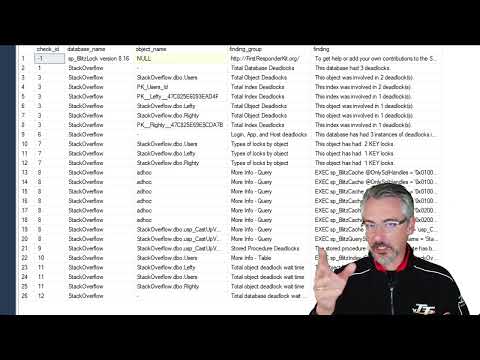
The first set of output looks like this:

Take 1

And scrolling right…

Take 2

Helpful stuff! This is all of what I’d consider useful information from the deadlock XML laid out in front of you.

And of course, we do high-level analysis of all the stuff we pull out.

Probably right!

The information in here can help you track down which tables and stored procs are involved in your deadlocks, and give you queries to get more information about them using our other scripts — sp_BlitzIndex for indexes and sp_BlitzCache/sp_BlitzQueryStore for queries/procs.

How to get support for sp_BlitzLock

The sp_BlitzLock documentation covers additional parameters that will return more results, store the results to a table, and more.

For free interactive support, you’ve got a few good options:


Rebuilding Indexes Can Slow Queries Down

Index Maintenance
6 Comments

Today, Jonathan Kehayias wrote about how fragmentation impacts execution plans. I’m really into performance tuning, so I read the post carefully, really interested to see how it impacted query runtime. You should read it too – it’s a great post with a solid demo.

But oddly, he didn’t mention the query speeds.

I thought that was kinda odd since that’s what users usually complain about – their queries running slow – so I fired open SSMS to check query runtimes, and…

The fragmented table ran faster. 3-4x faster!

  • Fragmented table: ~500ms
  • Rebuilt table: 1.5-2 seconds

Jonathan’s post explains why – SQL Server lowballs the cost estimates on the rebuilt table, causing the query plan to go single-threaded. With the fragmented table, it correctly estimates that a lot of work is going to be involved to scan those millions of rows, so it breaks the work across multiple cores – finishing it way faster.

What’s the Moral of the Story?

Rebuilding your indexes will slow queries down.

Just kidding – although the evidence does point to that. The real moral of the story is that it’s really hard to build demo code that effectively conveys the point you want to make. Jonathan’s right in that fragmentation changes the query plan. In this one case, it happens to make the query go faster.

“But what happens if you run tons of this query at exactly the same time?” you ask? As a consultant, my answer wouldn’t be to rebuild the indexes – because now, not only is your individual query slower, but the server’s still in bad shape due to the work involved with scanning 7M rows. This query maxes out an individual CPU core every time it runs – so concurrency is a hot mess.

In that case, the answer’s simple: create a nonclustered columnstore index. The query finishes in ~100ms with near-no CPU time and >10x less logical reads. That kind of magic doesn’t work in every situation – but as long as we’re using specific demos to prove a point, that one does the job quite nicely.

And that’s why in my defragmenting your indexes isn’t helping session, I explain that defragging won’t get your users to carry you through the hallways on their shoulders. The right indexes will.


GDPR: Why We Stopped Selling Stuff to Europe

Company News
210 Comments

Update 2021-03: We now sell our training classes worldwide here.

The EU’s new General Data Protection Regulation (GDPR) is a set of rules that give consumers rights about how their data is stored, used, and deleted. This step-by-step GDPR guide for managers is a great place to start understanding it, or for something a little more dry and lengthy, try Microsoft’s guide to GDPR.

As a consumer, I love a lot of things about the GDPR. I’m sick and tired of software that phones home without telling us what data it’s taking, doesn’t tell us where the data goes or who sees it, and doesn’t give us the right to have it erased.

But for businesses, the GDPR is a little vague and more than a little scary. It gives EU citizens the right to be forgotten – which means when they ask, the business has to delete everything about that customer. Plenty of gotchas apply – like you have to keep enough to still pass a tax audit – but as an example of a really curious gotcha, what about your backups?

For example, do you have to delete the customer’s data inside your past backups? There’s a discussion about that, and it’s made even harder by products like Apache Kafka that don’t really support deletes.

I can only imagine how the initial round of enforcement attempts are going to go. It’ll be a wild West for a while as software vendors, service providers, consultants, lawyers, and judges struggle to figure this thing out.

The max penalties are terribad.

Up to €20M or 4% of your company’s annual worldwide revenue, whichever is higher. (2017/12/19 – Updated wording – thanks, Michael J. Swart!)

Those numbers are big enough to get business’ attention, so I figured that leading up to the May 2018 deadline, companies would start discontinuing services. Sure enough, Microsoft has made it official – Connect.Microsoft.com is a dead man walking:

Disconnecting Connect

If Microsoft can’t even figure out how to get Connect.Microsoft.com to work with GDPR regulations, how are small businesses supposed to cope? It’s gonna be tough.

Update Dec 18th afternoon – after this blog post was published, someone edited the home page of Connect so that it no longer shows the above reason, and now just has a generic we’re-changing-stuff message. This is why you take screenshots of web sites, heh heh heh.

We used to sell online training to the EU.

We’re a small business based in the US. We sell consulting & training for Microsoft SQL Server.

You wouldn’t think that would be a big deal – but you’d be surprised. For example, students send us information about their databases all the time as part of asking questions – and they often send it unsolicited, through unencrypted email channels. That information ends up all over the place: our mail server, our desktops, phones, laptops, search indexes, etc. I’m not really worried about us maintaining the confidentiality of that data, but now we’d have to add in new audit-able tracking.

See, under the GDPR, if someone asks us to delete their data, we not only have to delete it, but we have to audit that we deleted it, and maintain those records for EU authorities. And then respond to EU requests for that documentation.

But only 5% of our revenue was from the EU.

I know with exact numbers because a couple years back, the European Union decided to start making non-EU businesses collect tax online whenever EU citizens bought stuff – even if we, the seller, had no presence in the EU whatsoever.

This represented a new burden on us – we had to start tracking EU customer locations, collect taxes, and file taxes in the EU. Thankfully, the UK offered a VAT Mini One Stop Shop: register & file in the UK, and they would pay all your taxes to the different countries in the EU. With Brexit, there was already some uncertainty about how this would work going forward.

Back then, I was fine with the additional tax hassles & paperwork because it was 5% more revenue than we had before.

Today, between the GDPR and Brexit’s affect on the VAT Mini One Stop Shop – it’s just not worth the hassle.

So we’re going to hold off selling to the EU for a while.

For 2018, we’re not selling directly to folks in the EU anymore. Thankfully, the WooCommerce EU VAT Compliance plugin makes this as easy as checking a box:

Yay, checkboxes

That plugin is totally awesome – uses things like IP address, geolocation, credit card billing address, and more to determine location. Been really happy with it, highly recommended.

We’ll still keep the blog & mailing list open to EU folks – those are a little easier to manage – and we’re still doing SQL Bits 2018 since the conference organizers are the ones who track personal data, not us.

Long term, I’m hopeful that the GDPR will get sorted out in a way that protects consumers’ rights, and still lets businesses use off-the-shelf tools and policies to provide services to the EU. Hopefully the situation improves quickly and we can revisit that policy in 2019.

Update: Q&A from Reddit

There’s a very lively discussion on Reddit about the post (and a smaller one on HackerNews) and there’s a stunning amount of ignorance in the comments about how easy people think it’ll be to comply with GDPR.

Here’s some of the more educated comments:

pure_x01: “If you have any business or registry with members of the EU you have to follow the GDPR or you are not allowed to have the EU members in your database.” Bingo. This is what’s coming as a surprise to a lot of database folks. Even worse, it’s not just about databases – it’s about anywhere data ends up, like email, direct messages, and flat files on a network share.

Silhouette: “There is huge ambiguity from a legal point of view. Experts can’t even agree on whether things like old backup/archive material that is not in active use should be covered…. Lawyers and technical experts have been discussing these issues for months, and there is no consensus yet on many of them. If you think the answers are obvious, either you don’t understand the law or you don’t understand the technology.” Very well said.

iamapizza: “…many organizations are using the May 2018 deadline as a culling phase for products which were on the backburner anyway.” Yeah, agreed. The EU has never been a primary focus for us – 95% of our training revenue comes from outside of the EU. It was nice to have, but not worth the additional work & risk involved with GDPR compliance.

SauronsUnderpants: “If companies that cannot be arsed to care about our data are leaving, that’s a good thing for European consumers.” I don’t want your data, that’s the problem. I just keep getting it sent to me unsolicited, as I wrote above. I can handle the data we collect through normal channels, but I’m not about to build an auditing/tracking system for every other channel where folks can contact us. (Hell, if someone sends me their data, query, and email address via a Twitter DM, that’s conceivably a problem.)

0b_0101_001_1010: “So yeah, all in all this is a hard social problem, and solving it requires solving hard technical problems. It might not be worth it for a small company to solve it, but it looks like at least for the European society it is a problem worth solving.” – Nicely said. I look forward to seeing how the EU solves it.

Update: Compliance Info from Automattic

Automattic, the makers of WordPress & WooCommerce, just published some great resources:

  • WooCommerce: An Introduction to GDPR Compliance“If you sell any products to customers based in the EU, or have EU visitors to your site, you’ll need to make sure your site complies with GDPR.” Again, driving that home to the folks who stick their heads in the sand.
  • Automattic and the GDPR: “We expect that Automattic products and services will be in compliance with GDPR requirements by May 2018.” And I’m really excited to see that – but I just need to see it before the fines go into effect. I’ve been burned by enough plugin bugs that I’d like to see ’em go live first.
  • CodeInWP’s WordPress GDPR Guide: really good place to start if you’re wondering how visitor data might get into your possession from various plugins. Lord knows you shouldn’t be processing credit card data yourself in the year 2017 – get Stripe.com and do it all on their end.

Update 2018/05/25: GDPR Day

Enforcement is now officially in effect, and looking back at this post from 6 months ago, I feel pretty good about our decision.

We stopped collecting a lot of data we didn’t need anyway, switched a few third party partners, and updated our privacy policy. Folks can request their data online and request erasure, and we don’t check whether they’re EU residents or not. Sure, it’s extra work for us – but I think it’s the right thing to do.

We’ve gotten a lot of press and questions around whether we’ll change our policies. Of course will, over time, when the standards are more clearly laid out and third party partners have built better tooling. Right now, though, it’s still too much of a wild west. (Hell, people still don’t even understand whether the law applies to EU citizens who aren’t EU residents.)

Update 2020/09/22: Still No Easy Compliance

I was hoping to get EU/EEA sales opened back up for this year’s Black Friday sales, but then EU courts struck down the Privacy Shield law. As a small business, I just can’t afford to dedicate legal and technology resources while the EU figures out how their laws are going to work.

I still hope at some point it’ll be easy for me to meet EU compliance goals, but when giant companies can’t do it, I don’t stand a chance.


[Video] Office Hours 2017/12/13 (With Transcriptions)

Videos
1 Comment

This week Tara, Erik, and Richie discuss virtualization, replication & mirroring, switching SQL service logins to an AD account, temporal tables, tempdb issues, migrating from SQL 2015, and Richie’s outdoor adventures in “Breath of the Wild.”

Here’s the video on YouTube:

Office Hours Webcast - 2017/12/13

You can register to attend next week’s Office Hours, or subscribe to our podcast to listen on the go.

Enjoy the Podcast?

Don’t miss an episode, subscribe via iTunes, Stitcher or RSS.
Leave us a review in iTunes

Office Hours – 12/13/17


Should I add hardware when doing a P2V?

Erik Darling: So Thomas is asking a very good question about migrate, about doing a P to V; the old physical to virtual. “I’m on five-year-old hardware and I’m virtualizing the server; should I add more resources or would the age of the physical boxes be offset by the newer hardware of the VM host?” If you guys were looking to figure out if your virtualized hardware were adequate, what would you look at?

Tara Kizer: Are you asking us, Richie and me? Well, the companies I’ve worked for, we have a performance test team that can run synthetic production loads and see if we have adequate hardware; so that’s always where we would start to answer that question. We have load testing tools that can tell us if we’re going to do okay or not.

Erik Darling: Alright, well pretend that someone doesn’t work for a billion dollar a year chip manufacturer. Where might you start [crosstalk] this stuff?

Tara Kizer: What about you?

Erik Darling: That’s a good question. So where I would start – you were already kind of doing your own form of load testing here. If you just restore whatever production databases you have on there and you do kind of regular maintenance work – like, you know, you run CHECKDB, you do some full backups, or god forbid you run an index rebuild – those are all pretty good ways to test and see if the hardware is enough of an improvement. Because hopefully, you’ve been doing that stuff on your old server too and you can figure out if those basic tasks finish in about either the same, or hopefully faster, then they do on the old hardware. If you’re breaking about even, the chances are your queries will break about even too.

Tara Kizer: That sounds about right.

Erik Darling: As always, measure your wait stats. If you have a wait to run any kind of fake workload on there, go ahead and do that. SQL Query Stress is a pretty good tool for just running a whole bunch of queries over and over again. OStress is another good tool – part of the RML utilities thing that Microsoft publishes. Those are two pretty good ways to just spin up some fake workloads on a new server. That’s how I usually do it. I actually have – do I have a blog post? I think I do.

So back when we wrote white papers for Google…

Richie Rump: You have all the blog posts; what are you talking about? “Do I have a blog post?” Well yeah, sir, you have all of them.

Tara Kizer: Thanks, Brent.

Richie Rump: Great post, Brent.

Erik Darling: Why didn’t that work?

Tara Kizer: [crosstalk] Thanks, Brent thing, while he’s looking, that used to drive me a little bit crazy on my blog posts, but I’m getting better at accepting that everyone thinks that it’s always Brent writing the blog posts. I only do like four per year, so I don’t have to get upset that often.

(Brent adds: it’s an ongoing thing around here that you, dear reader, don’t read the author names on the posts, and you assume that I write everything. If you really wanna make a blogger happy, use their name in the comment, like “Great post, Tara” – assuming of course that you use the right name. In fact, you should probably just assume that it was NOT me, hahaha.)

Erik Darling: It’s a good way to avoid getting upset. Blogging, in general, is just an upsetting process. So a while back, when we were writing white papers for Google about how to test, doing different stuff in the cloud, Tara did stuff on AGs and DR, and I did stuff on performance tuning – and I wrote a blog post about how to use OStress and agent jobs to run all different stored procedures in different ways. So if you want to go take a look at that, I stuck it in the chat comments so you can go and look and you can figure out how to run all sorts of crazy stuff on your server and give that hardware a good kick in the nards.

Tara Kizer: What was that, Richie? Was that a cat? It went by so fast…

Richie Rump: Yeah, it jumped from here, it snuck underneath, like under the camera, and then just started jiggling my monitor; and I’m like get out.

Erik Darling: enough about Richie’s cats – boring. The next thing I know you’ll be taking pictures of your food; nightmares.

Richie Rump: That’s Brent, which he’s doing right now.

Erik Darling: That’s true. He is currently taking pictures of his fancy breakfast.

Richie Rump: Rosé all day.


How fast does my bandwidth need to be for AGs?

Erik Darling: Shree is asking a very good question for Tara. “Since we talked about network speed, what’s the expected good bandwidth between two data centers in different cities when using Always On availability groups?

Tara Kizer: So the answer is more dependent upon if you’re going to go synchronous or asynchronous. If you’re using an asynchronous replica and this also pertains to database mirroring, same basic thing – synchronous versus asynchronous. If a data center is in another city, it’s not within a couple of miles from the data center, I do not recommend using synchronous replica or mirroring because of the – even 15 milliseconds network latency can be noticeable enough, it can degrade performance enough, for users to notice. I’ve accidentally left a database mirroring session in synchronous mode after a failover, we used async failover, then you switch the sync and do the failover so you don’t have any data loss, and I forgot to switch it back to async after the failover. It took a few days to realize what was going on, like, “I don’t know why it’s slower there,” because I don’t know that we had great wait stats on that stuff back in that version; it’s been quite a few years.

But to answer your question, if you were to go with synchronous replica across two cities, you better have a very small load. If you have a busy system, you’re not going to be able to do it. So I generally recommend synchronous at the same data center next rack over, same subnet, everything and then asynchronous to another city; so a disaster recovery site. As far as answering the question about network speed, well if it’s asynchronous, what matters is that you don’t get too much latency. So monitoring latency – but generally speaking, 15 milliseconds would be my target, or better.

Erik Darling: I’m with you on that. 15 to 20 is a pretty good target for latency from one site to another. One tool that you can use that’s absolutely free to test that sort of thing – you know, we always tell folks about using CrystalDiskMark to test their disks, but one good way to test your network is a free tool called Iperf. Iperf.exe – and Iperf lets you set up basically a ping flooding server on one end and then a client on the other end, and you can just send data back and forth and it will give you the network speed and how much data sent across and how much loss there was. So it’s a little bit more involved than just like a ping or like a traceroute or something, because it does send data across, but it’s a very good way to measure network speeds. I’ve used that a couple of times when kicking around hardware for clients.

Tara Kizer: Never heard of it, cool.

Erik Darling: I think even David Klee might even have a blog post where he shows you how to use it. So go out there and try to find that.

Tara Kizer: I did have a recent client that was using synchronous to another city, and it was about 500 miles and the wait stats show that they weren’t having an issue but they were going to be growing and growing and growing. So I was like, “Well you might not have an issue now, but you may in the future.”  So I did give them some HADR talk.

Richie Rump: So all I heard from that question was, “What is the airspeed velocity of an unlatent swallow?”

Tara Kizer: Alright, fantastic.

Erik Darling: Nerd alert.


If I switch all my SQL Server’s logins…

Tara Kizer: James asks a question, a security question, “If you had to switch all your SQL Server’s logins to an AD account, how would you check that doesn’t wreck any of your applications?” Well, you need to do this in a test environment, making sure that – so SQL Server logins, all that really needs to happen is make sure that SQL Server can come online and all the features that you’re using there work. So if you’re changing the agent job, make sure that that jobs are still running. But as far as your applications, no, but start in a test environment so that the production maintenance window – you don’t have any issues during that.

Richie Rump:  you know, one of the cool things I’ve been playing with this week is creating a cluster in RDS and doing that all using script; scripting all the logins and scripting all the stuff and scripting all the instances. And that has been super cool, being able to bring up a database and tear it down, bringing up the cluster and then adding all these instances to it, then going and start removing pieces from the cluster. Like what if you removed the writer or what if you removed one of the readers and you just start swapping things in and out? Oh man, that crap is powerful, and this is all from script. You can do it all right from script; there’s no need to go to the window or the console or anything. It’s just, do it, and then come in and out. Scary as hell if you’re talking about production instances, but man, I was having a blast yesterday trying to figure all that crap out.

Tara Kizer: Are you being sarcastic with blast?

Richie Rump: No, it was fun. Trying to figure out what the correct syntax is in a script, that was rough. But once I got everything working and I was able to start throwing instances out there, it’s just a matter of, “Hey, I’m going to remove this,” and it’s gone. Or, “Hey I’m going to go ahead and add another one,” and it was just there. It was like – now all of a sudden, you can start checking in your VPCs, all your networking stuff, all your database stuff, and that’s all a script that goes into GitHub and if you ever need to redeploy to a test environment, it’s just here. “Guys, run this script,” and there it goes, off and it runs, and it’s a completely different environment. Oh man, I probably need to write a post about that. that was a lot of fun.

Tara Kizer: Nesta is asking is the script that you wrote was PowerShell? Which I actually teased him earlier in our company chat room… I know the answer.

Richie Rump: No PowerShell… No, what I was doing is using Cloud Formation, which is AWS’s way to do JSON or YAML to generate pieces of cloud. So pretty much anything that you want to create in AWS, you can use cloud formation and just, with the script, do that. and I was using the serverless project as a container for that because I understand that and it’s easy for me to put environment variables everywhere and not hardcoding usernames and passwords and stuff like that into it. I’m sure you could do it using cloud formation; I just haven’t bothered to do it. And the rest of the app that I was working with was in serverless, and it was just a matter of a one line command line, it goes off and it just does everything that you need it to do.

Tara Kizer: All on one line?

Richie Rump: All on one line.

Tara Kizer: I guess that’s how it was when I was having to write the Google white paper for creating a VM and saving availability group there. There was a lot in one line for sure, but yes, figuring out the syntax was problematic. To me, it actually felt like PowerShell.

Richie Rump: Well, it’s kind of poorly documented. Because there was one issue I ran into where I was declaring the password and user in the instance, and I was also declaring it in the cluster, and then it gave me this bogus error just saying, “Hey, you want to declare that in the cluster.” And it didn’t tell me to remove it from the instance, so it tool a little digging for me to figure out, like oh, you only want it in a cluster, you don’t want it in the instance. So as soon as I had to remove a whole bunch of things, things started working. It was like, come on, you guys can write error messages a little better than this. it was like, “Please remove this from the instance because you declared in the cluster. But no, it was this really bogus, crazy – you really didn’t know what was going on with that error. I should probably blog that error too because I screen-shotted that one. I said, “This is a good one, this is crazy.”


Is OLE Automation a security risk?

Tara Kizer: Alright, Dee asks, “What are your thoughts on having Ole Automation enabled?” It’s a security concern. So I don’t know if you have any security audits, but that’s one of the items that they want you to have disabled. It’s by default disabled – same thing as xp_cmdshell, it’s a security risk. Whether or not you need it may be another story, so you can sometimes get around security audits by disabling and enabling as needed, but I don’t ever enable it on the servers I’ve supported. If you need it then you need it, but what are you doing that you need that type of thing? Why do you need that enabled on SQL Server? Why not do that type of task somewhere else?


Should I encrypt pre-2016 servers?

Tara Kizer: James asks, “Is it worth encrypting pre-2016 servers or should I upgrade to 2016 and then encrypt?” I don’t know that there’s any benefit to pre encrypting, except maybe your maintenance window will be faster because it doesn’t have to encrypt. I don’t know.

Richie Rump: I kind of see this as more of a business requirement. It’s kind of outside the technical realm. Regardless of pre-2016 or 2016, you have the requirement to encrypt, then you should encrypt at the version that you’re in and then worry about upgrading to a later – they’re not one is better versus another – you have a business requirement. Any version of SQL Server that is supported is going to be able to handle the encryption. If you need to do it then do it. Of course, those requirements need to be prioritized by your management. And hey, what’s more important; us upgrading or us doing the encryption? And meanwhile, you’ve got to let them know that there’s no technical difference between the two. There’s no benefit to one versus another. I would definitely do it in a test environment first, get more familiarized with the encryption and the certificates. It does get a little wonky there because it’s very different, but that’s a business thing and it doesn’t really depend on any technical things that the SQL Server has.

Erik Darling: Is my audio any better?

Richie Rump: Yes, you’re here.

Tara Kizer: So far so good.

Richie Rump: It’s the voice in my head, can you hear that?

Erik Darling: God, is that you?


What authors do you read?

Tara Kizer: Thomas says, “I see John Grisham and a dictionary. Who are some of the authors behind you, Tara?” The funny thing is, this actually is not my office. I’m at my parent’s house. I’ve moved into a new house and this is brand new construction and we have no internet. Been there for two weeks tomorrow, still no internet. I’ve been working at the library, I’ve been working at Starbucks and I’m so annoyed with the public at this point and I wanted to attend Office Hours, so I went over to my mom’s house, which isn’t too far away. My mom’s a big John Grisham fan. I definitely have read John Grisham. Also, Dean Koontz is also another one that’s in the background. You probably can see, or I’ve zoomed out too much, but there’s childhood pictures on the wall back there; probably some embarrassing ones, so don’t zoom in.

Richie Rump:  So I did read Murder on the Orient Express about a month ago when I was in jury duty; sitting there waiting for the entire day. And we saw the movie adaptation last night and it wasn’t bad. I was expecting meh, but it wasn’t bad. There was differences, but I was like, okay I could live with those differences. The guy who played Aaron Burr in Hamilton was in the movie, and I was like, “Aaron Burr did it; he did it.” I was screaming it because there was only four people in the theatre, “Aaron Burr did it.”


Are tempura tables delicious?

Erik Darling: So what questions you want me to get on?

Tara Kizer: Temporal tables – I can answer temp tables, but temporal tables – can you tell us everything you know about temporal tables, and our answer is, “Well I know nothing.” So moving on…

Erik Darling: I mean, I like them more than like change tracking and change data capture, but I haven’t used them a ton. I have a couple of blog posts about them. There are some blog posts out in the world about them. They’re probably more informative than anything I’m going to tell you here in the next five minutes. But I do like them and I like the idea of them, I do think it’s a much better way than having devs try and roll their own sort of system of keeping track of data changes over time. It really does depend on what your use case for them is going to be though.

Richie Rump: Okay, so think of me as a SQL Server noob for the new stuff. Tell me about temporal tables and what they can do, please.

Richie Rump: Why do you always ask the noob questions? So temporal tables…

Richie Rump: because I’ve been using Postgres, man, come on now.

Erik Darling: So temporal tables are like having a shadow copy of your table. So you have like the main copy of your table and then you have this shadow copy of your table that tracks all of the changes to data made in the base table. So you can actually query backwards in time and you can look at how your data has changed over time and you can actually, if you needed to, go back and actually pull data out and fix data with what’s in there.

So I don’t know if it’s a really sneaky way for Microsoft to not have to put object level restore back into the product, but temporal tables are a really cool way to – it’s almost like Oracle Flashback where you can – like, “Oh no, we need the table as of now, let’s just query how it used to be.” So it’s very neat for that stuff.

Tara Kizer: So if you were to use it for auditing data changes, do you just query that table or then do you move it to an auditing table; historical tables?

Erik Darling: No, you just query the table and you can see there are some keywords with the dates that you want to look at and you can do like as of or dates between and stuff like that. so you can see how data looked on a certain date, between certain dates and you can just see how particular data has changed over time.

Richie Rump: So then if I delete data, that will be there as well, or not be there?

Erik Darling: Yes – well deleted data, it will show it’s deleted…

Tara Kizer: And then you could purge the data so it’s not massive, if you wanted to.

Erik Darling: I believe you could set retention policies on it, so you can decide how much data you want to keep in there.

Tara Kizer: In what version does this start on?

Erik Darling: 2016.

Tara Kizer: I had a feeling it was newer. I had a recent client who was doing auditing via triggers, and their design was not going to – and the way that they implemented it was bad for scaling reasons. I’m kind of okay with if you just quickly dump the data into another table as is, you know, the before and after. But they were doing some off things, you know, they weren’t on 2016, but maybe that’s something I could include in the future. “When you get to 2016, look into this instead.”

Erik Darling: If you ever get to 2016, you lazy, lazy people.

Richie Rump: We’re almost in 2018, come on now, seriously.

Erik Darling: SQL Server 2018 is on the way. Here you are… This week, my clients are running – I’m looking at two servers and the clients are running 2008 and 2008 R2. It’s like why? They’re seven and ten years old at this point. I’m like why can’t anyone just upgrade? What is the hold-up? What is the issue? Which I’m sure is a question that Microsoft asks as well.


Is trace flag 834 a good thing?

Tara Kizer: Adam asks, “What are the concerns and gotchas to watch for when enabling trace flag 834, which is the large page allocations and buffer pool?” I don’t know. I’ve never implemented that trace flag. How about you, Erik?

Erik Darling: I mean, I’ve just never seen it make a difference. It’s like one of those old DBA fables, where it’s just like, “Oh all we need is the large pages and everything will be cool.” But I’ve just never seen it actually fix a problem and I’ve never seen it like even kind of improve a problem in a way where it was like, “Okay, we made it past this benchmark so now we can really focus on the stuff that will fix problems.” I’m sure that someone wrote a really interesting blog post about how cool it is for one particular thing, but often in the real world, I’ve just never seen it do much of anything good.

Tara Kizer: The trace flags that I go with are the ones that are recommended by SQL Server experts, the known people in the community that are saying, “These trace flags, you should just go ahead and enable everywhere.” And then, you know, specific issues that I’m encountering, maybe I need a database mirroring or replication trace flag so they can ignore each other and not have too much latency. So I don’t go ahead and implement trace flags just because.

Erik Darling: I guess, you know, if I was going to voice a  concern about them, my concern would be like, have you tested it in a way that you’ve seen it improve upon a problem? Like do you enable it in a development environment and – are you sure that you have a problem it’s going to solve? You’ve watched it solve a problem somewhere else and now we’re going to roll it out in production. Like that’s my concern, that you’re button smashing and you’re not actually fixing a problem.


Is it bad when TempDB runs out of space?

Tara Kizer: Alright, [Rod] has a maintenance job that’s got an error and its tempdb ran out of space tempdb because the primary filegroup is full. Any reason for concern? Well, you may need more tempdb space in order for that job to finish. And maybe it’s not just that job; maybe it’s the other load that’s occurring plus the job running at the same time. So your queries need space in tempdb to do work. Maybe you’re using temporary tables, maybe it’s a sort, maybe you’re spilling to disk, who knows what. There’s lots of reasons why tempdb gets used. And tempdb gets used a lot on SQL Server, even if you’re not doing temporary tables, it still is being used. And if you got that error, is this job important? Does it need to be able to complete successfully? And if it does and it’s continuing to fail, look at the query. Is there anything weird about the query that maybe you can make it more efficient so it uses less tempdb space, or maybe you just need to add more storage so that tempdb can grow and you don’t have that error.

I’ve said this several times in Office Hours, but I literally have supported a server had a 500GB tempdb data file sizes. There were eight files but they totaled 500GB. And I’ve got some clients who are like, “Oh my god, I’ve got 8GB to 20GB tempdb.” That’s nothing. That cost you a quarter. So I don’t worry about the temodb space. I want the queries and jobs to complete successfully. I will go back and look at the queries that may be causing it to grow past some number. There are ways to make better use of tempdb.

Erik Darling: Yeah, I think I would want to look at what the job running is. I know that DBCC CHECKDB has the tendency to use a whole heck of a lot of tempdb space. And if you’re rebuilding indexes with sort and tempdb on, you’re going to be using an awful lot of tempdb. And if all of the sporting that goes on for statistics updates – so if you’re doing statistics updates on rather large tables with a full scan, those sorts can actually go off the tempdb. And I’ve seen those sorts fill tempdb up, even on servers that have tempdb the size of what Tara’s talking about with the 500GB allotted to it. All the stuff she said, plus take a look at what the jobs you’re doing are. As always, we will not recommend that you just go and keep rebuilding indexes blindly and just hope that they fix something. Make sure that the indexes that you’re rebuilding actually need the rebuild to happen and that you’re fixing more than you’re hurting by doing it.


Any gotchas with upgrading SQL Server 2005?

Tara Kizer: Alright, one last question from James. He’s got a brand new job, and they do have a SQL Server 2005 server. It’s not his fault, he wants to make that clear; this is a new job, he’s inherited it. I don’t want to say how old he was in 2005. “Are there any gotchas I need to watch out for when I upgrade?” I mean, what are you upgrading to? I don’t think you can even go from 2005 to 2016, you know, you need a hop. So you’re going to need a 2012 box, and I wouldn’t recommend just stopping at 2012. We’re in 2017, so I’d probably go for 2016 or 2017. I don’t care which one between the two, really, unless you’re going for some feature – but you’re going to need to do a hop, probably to 2012 and then over to the new version.

Now, you can do that all in the same maintenance window, because it’s just going to be a backup and restore then another backup and restore, and you don’t have to do full backups, you can do this through log shipping and just keep sending it over to the newest server. As far as gotchas, I would recommend running the upgrade advisor tools to see if you’ve got any code. If you’re using stored procedures, it can analyze your code and let you know if you’ve got anything that may break in the newer version, but obviously, you’re going to have to test this in a test environment. In companies I’ve worked for, we’ve done full regression tests. It can take three months of testing only for a SQL Server upgrade. And obviously, they try to get in application bugs and features as well during that time, but do a full test cycle. The upgrade advisor can be helpful for that. I’m pretty sure it still exists in newer versions.

Erik Darling: Yeah, the other thing I would just be aware of is the new cardinality estimator. So if you’re moving up to 2014 or beyond, the new CE can really help queries or really hurt queries or a strange mix of the two. So before you go and set that database into the new compatibility mode, make sure that you do some testing on how your queries react to it.

Richie Rump: Or just roll it back to the old compatibility mode until you have to test.

Erik Darling: Yeah, whatever, Richie. Thanks for being thoughtful.

Richie Rump:  I’ll stop, dude. All my thoughts right now are on the Last Jedi, so…

Erik Darling: You’re in a very Jedi state of mind being that thoughtful about things, rolling stuff backwards and forwards and testing. Look at you. I bet you’d unit test that, wouldn’t you?

Richie Rump: I absolutely would.


DBAtools.io plug

Tara Kizer: One last comment from Thomas, just because it’s based upon James’ question, “DBA tools for migration for the win.” DBA Tools is a PowerShell script. I highly recommend checking out the website for it and seeing if there’s any scripts that could help you do your job. They do have migration scripts, so that is helpful. But as a long time DBA, I’m so used to my own backup restore and doing a differential and chaining together transaction logs. It’s super easy, I don’t need a script. I have custom T-SQL scripts anyway for it that I wouldn’t bother with PowerShell for that task because I’ve been around so long.

Erik Darling: Maybe if I had to transport a bunch of settings and users and all that other stuff, the PowerShell command would make sense. But just for moving the actual data over, I’m going to want something that reduces the cutover time, not something that is just part of the cutover time. Like if it’s just doing a straight backup and restore for a smaller database, not a big deal. As soon as you start getting up into like 50GB, 100GB, 200GB plus databases, you’re really going to want to do mirroring or log shipping or something else that gives the ability to do a faster cutover to the new server.

Richie Rump: Yeah, and if you’re not familiar with PowerShell, I wouldn’t start with a migration trying to get familiar with it.

Tara Kizer: Definitely in a test environment first for it. Troubleshooting those errors is horrible.

Erik Darling: Yeah. I think we have] reached about the limit of our time here. We went a little bit over because we talked about Zelda too much. I hope you’ll forgive us; we tried to make it up on the backend. Thank you, everyone for joining us. I apologize about my potato-y audio and video. I’m going to call Time Warner and yell at them again. Tara and Richie, do you want to say anything?

Tara Kizer:  Nope, bye.

Richie Rump: Go climb something…

Tara Kizer: Bye.


Database History: The Inventor of the Data Page

Do you ever wonder about the history of the systems you rely on every day?

They didn’t teach us database history in school. Instead, we got calculus and art and interpretive dance. Fat lot of good that did us, right?

So from time to time, we’re taking it upon ourselves to bring you the history of some important database concepts and features. You won’t find this stuff in Books Online, no no.

For today’s entry, we need to take you back to the 1800s.

Meet Maurice Gutenberg.

Maurice Gutenberg, Inventor of the Data Page

Maurice was the great-great-great-great-great-great-grandson of Johannes Gutenberg, the man who pioneered the mass production of books.

Maurice benefitted greatly from his great-great-…okay, let’s just say benefitted from his ancestor’s invention, living large off the printing press royalties. (Johannes also invented hardware patents.) Maurice built one of the largest libraries in Europe, devouring books from every learning institution he could find. In fact, he was partially responsible for the Great Book Price Bubble of 1899.

As Maurice’s collection grew, he needed a system to track his book inventory and pricing. He turned to computers, naturally – his neighbor happened to be building an early prototype of a machine that would later turn into the Commodore VIC-20.

To Maurice’s astonishment, the computer logged every one of his purchases and sales in single file. The data was continuously added, one row at a time. With each update of an existing row, it was simply added to the end as a new version. This system was modeled after the papyrus rolls of ancient Egypt.

Maurice immediately channeled his gr…ancestor Johannes, pulled out a page from one of his books, and pointed at it. “We should store the data like this!” he exclaimed.

“But it will get out of order!” a neighbor cried out. (Ironically, you might recognize part of that neighbor’s name…Birgitta Hallengren.)

Maurice tired of European life (especially the part about defragmenting his pages.) He later sold off his entire book collection, packed up his remaining belongings, and headed for Seldovia, Alaska’s Best Kept Secret.

But you might just have heard of Maurice’s first database: pubs, short for publications.

Meet Robert of Lochsley

Though ne’er the brightest lad, Robert was still the sole inheritor of his dad’s land, which included the largest loch known to both Robert and his dad, Auchbert.

His mother, who pretended to die during childbirth, had seen many much larger lochs.

Left on his own, Robert proceeded to spend the family fortune trying to prove that he indeed had the largest loch. Much to his dismay, he found out that other lads had lochs twice, thrice, and sometimes four-ice the size of his own.

Mad with jealousy, he began painting landscapes of his loch comically out of perspective. Often covered with arrows pointing to “my loch”, and then much smaller arrows pointing to tiny dots noted as “your loch”. Though he unwittingly also invented the poop emoji, that’s not the story we’re here to tell.

When he tried selling his paintings to other nobles, the typical response was “aye that’s nay a loch”, which lead to him being called Robert of Nay Loch.

He turned into such a laughing stock, that many years later when Microsoft needed a way to identify fools, they came up with the eponymous NOLOCK hint. Whenever someone uses this, it’s said that Robert returns from the grave to festoon their data pages with incorrect information as punishment.


Can you prevent deletes and inserts without a WHERE clause from running?

Bad Idea Jeans, Humor
42 Comments

File this under bad idea thong

In the tradition of Klaus Aschenbrenner wanting to prevent people from writing SELECT * queries, I thought it might be nice to prevent people from running deletes or updates without a WHERE clause.

In a vaguely scientific way.

Now, I don’t really condone this. It just seemed funny at the time.

There’s no way to intercept a query and check for a WHERE clause, but we can… Aw, hell, let’s just do the demo.

Here’s a table, and a 100 row insert.

Why 100 rows? Because I’m awful at math and using bigger numbers would confuse me.

And uh, here’s a trigger. Oh boy.


If you’re looking at the code, and you hate me, I don’t blame you.

We have an after trigger that takes the row count of the update or delete, and checks it against the number of rows in the table.

If the number of rows affected is within 98% of the rows in the table, the transaction is rolled back, and our end user is reminded to use a WHERE clause.

Why 98%? Well, system views and functions aren’t guaranteed to be up to the second reliable, and I needed to pick a number.

There’s no mechanism inside of triggers to tell you if you inserted, updated, or deleted rows, so when you write a trigger to handle more than one action, the only way to tell what happened is to look at the internal tables.

If there’s stuff in inserted and deleted, it’s an update. If there’s just stuff in one or the other, it’s… one or the other.

Does it work?

Like a charm!

If a charm had no charm whatsoever.

Results in:

As we can see here: Your Mom.

Your mom.


But these two queries run just fine.

Why? They’re only 97% of the table.

Only.

Because that’s cool, right?

Is there a downside?

Hell yeah. If you’ve got really big tables, the rollback can take a while.

Rollbacks are single threaded, dontcha know?

And there’ll be blocking.

But it might be better than having to restore the whole database.

Maybe.

But what if I need to hit the whole table?

Batch your modifications, you animal.

Where am I wrong?

Brent and Tara really kicked the tires hard on this one for, and I appreciate it.

My half baked idea would have be cold and soggy without them.

Now you, dear reader, get to tell me where I’m still wrong.

Thanks for reading!


Query Plan Oddities: Two Identical Missing Indexes

Execution Plans
1 Comment

As I’ve been building labs for my Mastering Query Tuning class, I’ve been spelunking through data.stackexchange.com. It’s where anybody can write queries against the Stack Overflow databases, and share them with friends.

For example, Daniel Vandersluis wrote a query to see how many edits he has:

When I run that on my unindexed copy of the Stack Overflow database, I get a missing index recommendation – no surprise there:

Execution plan – view on PasteThePlan

Zooming in a little, note the impact – SQL Server is kinda saying, “Wow, if I had this index, the query would be 49.9998% faster!”

Almost but not quite 50%

Hmm. That’s an unusual impact number.

Now if you’ve been index tuning for a while, you might know that SSMS only shows the first missing index recommendation in the plan – not all of them. Therefore, when you see a missing index, it’s prudent to view the plan’s XML to see if there might be more.

And in fact, in this plan, there are TWO missing indexes – kinda:

Two indexes, one plan

That’s two missing index recommendations, for the same index, in the same plan, each of which will make a 49.9998% improvement in our plan.

So why is that? Take a closer look at our original query and note that it has two nearly identical CTEs at the beginning:

Nearly identical – but different, one filtering for PostTypeId 1, the other for 2.

For each of those, when SQL Server optimized that part of the query, it thought, “Wow, an index on PostTypeId and LastEditorUserId sure would help here!” Therefore, it recommends two missing indexes – each of which will make the query 49.9998% faster.

That’s such a nifty example of how SQL Server breaks queries down into parts and analyzes each of them independently, even generating missing index requests independently.

Related Experiments

Erik mused – would turning on Forced Parameterization help? Here’s the plan with forced parameterization turned on, and no, that didn’t help either – we still get two identical missing index hints.

How about using the same PostTypeId in both CTEs, so it’s effectively the same query? Nope, that doesn’t help either.

Using the same variable, @PostTypeId in each CTE? Nope, same problem. In every case, SQL Server optimizes each CTE independently, generating a separate (identical) missing index for each one.

Just For Fun: Missing Index Doublemint Twins

Which led me to have a little fun – I modified both Daniel’s CTEs to have an additional join to the Comments table. Left is before, right is after with the new join:

Left is before, right is with the new join to Comments

Now, when I run the query, I get FOUR missing index requests – two identical ones on Posts, and two identical ones on Comments:

Two pairs of identical twins

But of course, when you look at the graphical plan, all you see is the first missing index request with a 39.5856% improvement – which isn’t right either:

39% my butt

And that’s why you can’t trust the impact numbers, let alone the graphical plans’ recommendations or even the field order.


What Your SQL Server Is Really Waiting On: YOU

SQL Server
4 Comments

Land of Confusion

Most SQL Servers out there have never had anyone do a thorough, targeted assessment on them, the way we do our Critical Cares.

This leads to a lot of astray troubleshooting, which may make sense for profiling other problems, but not SQL Server.

You know, the kind of tips that come from blogs so littered with typos that your monitor ends up covered with red ink and you can’t even see where SSMS is anymore?

Level one troubleshooting is looking at task manager, maybe some PerfMon counters, and pointing fingers at the disks if ever read latency touches the 20ms mark. Maybe someone pokes around the GUI, defragments an index or two, and puzzles about an imaginary problem with page splits or disk queue lengths.

Level two would be grabbing single-use, copy and paste scripts that give you an incomplete picture of what’s going on with your server and don’t provide any real analysis, just numbers. Maybe you also run DTA and create every index. Again. And for some reason I/O got worse. Again.

Level three would be setting up a repeatable process and applying it to all of your servers, like Brent wrote about recently in How to Do a Free SQL Server Health Check and How to Do a Free SQL Server Performance Check.

Beyond that are the type of shops that have dedicated, full-time staff, and SQL-specific monitoring in place. They have people and processes in place who are comfortable with the technology.

n00b gainz

If you’ve got an unhealthy SQL Server, the first 3 months of troubleshooting are typically the easiest.

There’s so much low hanging fruit, you can usually get away with just making a handful of simple changes to buy yourself time on the harder stuff.

But you actually have to make the changes. Just collecting the data isn’t enough.

Save Our Server

This is a lot like what happens to most people who start to work on some aspect of their physical appearance, whether it’s trying to get stronger, or trying to get skinnier.

You can usually find some easy changes to make at first. Stop drinking soda, or stop putting so much crap in your coffee that it turns into a cake recipe. Stop horsing around with 10 lb kettle bells and balance balls.

Structure and programming is important to any long term goal, because you’re going to hit plateaus, and those plateaus are going to be frustrating.

It doesn’t matter where or when they happen.

Eventually the impact of making sure you have your settings right and taking that shrink database task out of your maintenance plan will wear off, and you’ll need to figure out the next layer of problems.

If you don’t keep it up, things won’t magically keep getting better.

Test, Tossed

Servers are a lot like bodies, in that they process changes pretty quickly.

If you always run 5 miles, your body will get really good at running 5 miles. Likewise, your server will have a fairly constant level of performance with Cost Threshold for Parallelism set to 5.

If you always curl 20 lbs for three sets of eight, your biceps will always look exactly like they can curl 20 lbs for three sets of eight. Again, your server will have a fairly constant level with MAXDOP set to 8.

After making changes, your server will pretty quickly start giving you feedback in the form of wait stats, query plans, index usage, and so forth. It’s up to you to take that new feedback and figure out if it’s good or bad, and if you need to keep making more changes.

If you don’t follow a plan, you’ll be sitting there staring at the few changes you made wondering why you still have a lot of the same problems.

It’s time to ask: what’s next?

What kind of help do you need, and when do you need it?

You can go a long way on free stuff. Blogs, scripts, webcasts, podcasts, Q&A sites, forums — they’re fine resources, but when do you pull the trigger and spend money?

I spent about $25 and got a 515lb deadlift. The book didn’t lift the weight for me. I had to read the book, and I had to do the work. But it was enough for me.

If I wanted to double that weight, I’d probably have to spend more money on targeted coaching, equipment, and bathtub chemicals from overseas.

The same basic maxim applies to you working with SQL Server: if you do the work, and you follow a process, your server will be in better shape.

You can get by on lower levels of spending to get things to a pretty good place, even if you opt for paid training.

If you want professionals to give you an assessment and design a program for you, that’s where our Critical Care comes into play.

We’ll spend three days going over your server from head to toe, finding its biggest problems, and designing a custom plan to solve them.

And we’ll show you how to do it on all your other servers.

If that sounds like the kind of help you need, drop us a line.

But remember: if you don’t follow the program, the pain isn’t going to go away.

Thanks for reading!

Brent says: over and over again, I hear people say, “I’ve been logging sp_WhoIsActive, Perfmon counters, and file stats to a table,” but they’re not actually doing anything with it. If that rings a bell, it’s time for you to put the active in sp_WhoIsActive.


Tell Us What You Make: The 2018 Data Professional Salary Survey

Not what you’re worth, dear reader: we know your worth cannot possibly be calculated in base-10 numbering systems because you’re just so awesome, but what you make.

How many stacks of Paul Whites are you pulling down?

A few things to know:

  • It’s totally anonymous (we’re not getting your email, IP address, or anything like that.)
  • It’s open to all database platforms.
  • As with last year’s results, we’ll publish the raw data in Excel for anyone to analyze. If you want to set up your analysis ahead of time, here’s the incoming raw results as they happen (over 3,000), and we’ll share them in that exact same format. To get them in Excel now, click File, Download.
  • One interesting note already: it looks like female DBAs make less money.

Take the 2018 Data Professional Salary Survey now (closed, over), and thanks for your help in giving everybody in the community a better chance to talk honestly with their managers about salary.