Blog

Then Why Doesn’t SQL Always Seek?

Scan The Man

There seems to be a perpetual battle waged against the Index Scan.

At some point it was declared that scans were inferior to seeks, and all energy should be dedicated to eradicating them.

Much like asking why the whole plane isn’t made out of the stuff the black box is made out of, you start to wonder why the Index Scan is even an operator.

This is so dumb.

Obviously, if Microsoft cared about performance, there would be no Index Scans.

Right?

Right?

I bet Postgres would never scan an index.

Being Practical

It should be pretty easy to prove Seek Supremacy once and for all. Then you can literally (LITERALLY!) ignore every other operator in a query plan and focus the entirety of your being on this unknown astral plane toward mocking those without the mental capacity to receive your wisdom.

About Index Scans.

Let’s start with a query.

It has no predicates. It’s just joining two tables together in total.

In the query plan, we have two scans. It’s a two scan plan.

HOUR BACK GET IT?

For the Seekists out there; fear not, your moment of ascension is at hand.

This plan must surely be superior.

Prepare to be humbled

Not All Who Scan Are Lost

In this case, the Two Scan Plan does a bit better.

Not off to a good start.

The source of all those extra reads, and likely the extra CPU time for the seek plan is…

Well, it’s in the seek.

Quackin’ crazy!

You can see why the optimizer chose the scan in the first place.

Hang on though, maybe we picked the wrong table to force a seek on.

This must be the better choi-

I need to sleep more.

Important Information

The reason we get this error here is because we don’t have an index on the Posts table with OwnerUserId as a key column.

This is where most Earth Peoples start to get annoyed — they usually do have an index. In fact, if consulting has taught me anything, you have 17 of the same index with _dta_ somewhere in the name on the data you wish to seek into.

Alright then. Let’s add an index.

If we re-run our query without hints, what happens?

Darn Merges and Scans

We still get two scans!

Comparing all three plans (we can force a seek on Posts now, because we have an index on OwnerUserId), the seeks still aren’t doing so hot.

Hrmpf.

Now what?

Hopefully you learned that not every seek is great, and not every scan is awful.

If you’re joining two tables together, often a single scan of the data is the wisest choice.

The worst part of a plan may not always be obvious, and it may not always be the method that the optimizer chooses to access data with.

Thanks for reading!

New SQL Server Management Studio 17.5: It’s Classified

SQL Server Management Studio 17.5 is out, and new in this release is a SQL Data Discovery & Classification feature. The idea is that it’ll scan your database, identify columns containing potentially sensitive data, and help you become compliant with regulations like PCI, HIPAA, and GDPR.

Let’s see how it works on the Stack Overflow public data dump.

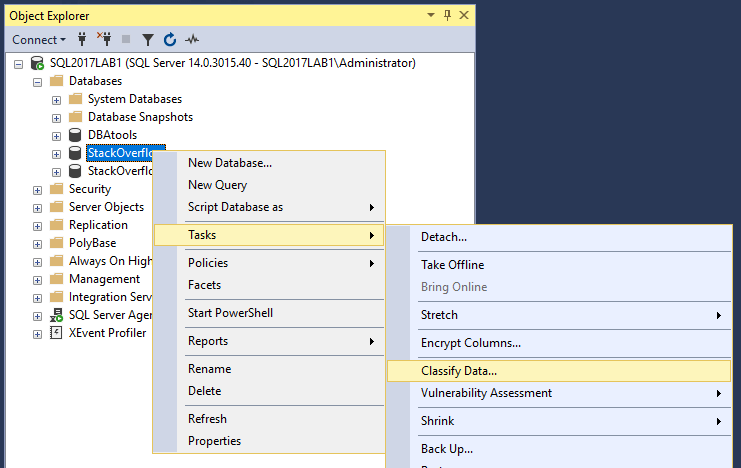
Start by opening up SSMS, and then right-click the database, Tasks, Classify Data:

I could show you this, but it’s classified

Within moments, your compliance needs are…hang on, that can’t be right:

I could teach you, but I’d have to charge

I’ve tried it on 3 VMs now, even tried with AdventureWorks, and no dice. My guess – and this is just a guess – is that maybe it has to do with the upgrade process not working, even though I even tried a full install as opposed to an upgrade. We’ll probably get another build in the next few days.

Compliance. Sure is hard.

Update: looks like nobody tested it on case-sensitive database servers:

So insensitive

C’mon, guys….


Memory Grants: SQL Server’s Other Public Toilet

Sharing Is Caring

When everything is going well, and queries are behaving responsibly, one need hardly think about memory grants.

The problem becomes itself when queries start to over and under estimate their practical needs.

Second Hand Emotion

Queries ask for memory to do stuff. Memory is a shared resource.

What kind of stuff? Well, usually to sort or hash data.

How much memory the optimizer asks for is dependent on:

  • Number of rows
  • Row goals
  • Data types and sizes
  • If the query is going parallel
  • Max server memory
  • Any memory limiting query hints
  • Resource governor settings

If you need to do something with 10 rows of VARCHAR(10) data, the amount of memory you need will generally be estimated to be much lower than if you need to do something with 10 rows of VARCHAR(100) data.

Underestimating

If I have this query plan.

The sort spills, with only 1968KB of memory granted.

Dear me.

Is this when you should worry about spills? Definitely not.

But it’s easy to see how we can influence the memory grant with One Weird Trick And Basically You’re Kidding Me.

The important thing to pay attention to here is that we’re not sorting BY a column with a large data type. We only have to sort some data by a column that has no index to support the sort order.

It’s like when you highlight an entire Excel file and order it by a single column. The whole sheet winds up sorted by that one column.

SQL Server has to do the same thing, and it wants to do it in memory, if possible. Spilling to disk stinks.

The DisplayName column is defined as NVARCHAR(40), but if we CONVERT it to have a length of 215 (this was the just the lowest number that it stopped spilling at, there’s nothing special about an NVARCHAR(215), generally) we get a larger memory grant.

We get this plan.

Harumpf

Lying about that causes the optimizer to ask for a large enough grant for nothing to spill.

This doesn’t mean you should litter every query spilling to disk with CONVERTS. The more appropriate response might be a better index that supports the sort.

Or just not asking for sorted data.

But still, this query underestimated it’s practical needs. It chose the wrong stall, to coin a phrase.

Overestimating

It’s possible for the optimizer to choose unwisely in the other direction, as well.

If we change our query to this:

We wind up with another kind of warning! An excessive grant. Again, at this size, I wouldn’t worry about it. But there it is.

Bob Dobalina

If you have a lot of queries asking for much larger grants than they’re using, you can wind up with a whole bunch of queries with big needs waiting on a bunch of queries with much lesser needs.

You’rein trouble, in other words.

You may even think SQL Server has a memory leak.

Rain Dance

SQL Server only has a limited amount of memory to do stuff, which means that when it’s given out all the memory it can, you end up with queries waiting on memory to do stuff.

Not just memory consuming stuff, either. They’ll hang out waiting for memory to start running, or even compile.

This is something you want to control, because you may have queries stealing memory space from the buffer pool, or the plan cache.

Which is worse depends on what sort of shape your server is in.

  • If you’re already under provisioned for memory, the large grants can hurt more
  • If you have plenty of memory, but maybe sup par (no 3PAR jokes, here) storage, spills to disk may be worse

Too Many Things

What causes this to happen?

  • Poor cardinality estimates
  • Parameter sniffing
  • Badly defined data types
  • Not eliminating rows early in the query
  • Selecting more columns than you need
  • Selecting all your columns at once

You can’t index for every aspect of every query, and you can’t have infinite RAM.

Yet.

Thanks for reading!


How to Suck at Database Administration

This isn’t about having a sucky job, this is about you sucking at your job. There’s a big difference. You could be sucking at your job because you hate your job and just don’t care. I get that. In that case though, you know better but choose not to do better.

I’ve encountered some people that have Senior DBA as their job title but don’t really have senior-level experience. I’ve seen some very questionable things in my career.

Signs you aren’t a Senior DBA

  1. Not checking the databases for corruption
  2. Shrinking databases on a schedule or using auto-shrink
  3. Not knowing what wait stats are or how to use them
  4. Relying on the Database Tuning Advisor to determine which indexes are needed
  5. Using Activity Monitor – I might get some flack on that one, but it’s true
  6. Thinking that 1 FULL backup and 1 LOG backup per day is sufficient for an RPO goal of anything less than 24 hours
  7. Thinking you should set MAXDOP to 1 to avoid CXPACKET waits
  8. Updating statistics after the respective index was rebuilt
  9. Not monitoring your systems – you don’t need expensive monitoring tools to monitor your systems!
  10. Manually doing a task over and over again when it can be automated
  11. Ignoring job failures and warnings/errors in the Error Log
  12. Not checking for high-value missing indexes periodically
  13. Using maintenance plans – I’m okay, though I still dislike them, if you use them for backups or DBCC CHECKDB but not for index maintenance
  14. Not patching your servers
  15. Not trying to improve your skills – don’t rely on your company to send you to training

What would you add to this list? What are the questionable things you’ve seen a Senior DBA doing or not doing?

How do you stack up?

I’ve done many of these things, but I was either a Junior DBA or an Intermediate DBA.

How many of these are you doing? The higher your number is, the less of a Senior DBA you are. It’s all fixable! Spend some time figuring out why you shouldn’t be doing these.


#TSQL2sday: What I’m Passionate About – Sas Christian’s Art

Humor
8 Comments

For this month’s T-SQLTuesday, Aaron Bertrand asked what we’re passionate about – but outside of the tech community, and asked for pictures. Seems like a great way to get to know about us.

From my personal blog and my Instagram feed, you probably already know that I’m into cars, travel, and food, so I wanted to pick something different to share with you.

I’m really into Sas Christian’s paintings. (Warning: her stuff is mostly safe for work, but her husband Colin does a lot of NSFW sculptures. Those are awesome too, but just giving you the heads up before your monitor fills up with a high-resolution alien sex organ.)

I walked through our place and took photos of some of my favorite pieces. For years, Erika’s said we have too much art, and as I edit down the number of photos I show you, I realize she’s right. (I bought another one yesterday.)

“Takes a Lickin'” by Sas Christian

I adore this 2006 piece. She’s just bad ass. The first time I saw this painting in a book, I thought she was wearing a watermelon t-shirt – I thought the holes were seeds.

Zoomed in

I’ve got a signed print and the artist’s proof, and heaven forbid the original painting ever come up for sale. I would trade a kidney for that.

After collecting a few prints, I moved up to her pencil sketches:

“Eclipse Study”

I love her pencil sketches, and luckily for me, so did Erika, so we ended up getting several that hang on the living room walls. I love that these are subtle – they force you to get right up on top of ’em and take a close look at what’s going on:

“Psychedella Ocean Study”

Eyes are a big theme in our house, too – a lot of our art involves eyes. Kinda creepy now that I think about it.

Eyes study

Which leads me to the first original oil paintings of Sas’s that I could afford:

“Peephole #1”

A series of 8″ x 10″ works with different faces:

“Peephole #3”

I used to have the Peepholes on the wall behind me, but Erika pointed out that they looked really creepy to clients when I was doing conference calls.

Sometimes she collaborates with her husband, Colin, on different techniques. This one is 18″x24″ on wood, done with metal flake paint:

“Saturday Night Sunday Morning” by Sas Christian

Glitters spectacularly in the light, and reminds me of a bass boat from my Kentucky childhood.

“Nova” watching me work

“Nova” is the little eye sculpture covered in Swarovski crystals, sitting in a little pile of keepsakes. Sas and Colin have done some neat stuff with crystals – I really, really want their recent Twinkle to Death sculpture. I’m just hoping one of you buys it before I find a stack of hundos under a couch cushion somewhere.

Wanna learn more about Sas & Colin Christian? Here’s a few links, but keep in mind that like a lot of art, some of it is very not safe for work.

  • SasChristian.com – her paintings, and her Instagram feed
  • ColinChristian.com (NSFW) – his sculpture, and his Instagram feed – seriously, he’s not safe for work. I have a couple of Colin’s pieces, but there’s a reason why they’re not pictured in this post. Don’t come blaming me when you see Miley Cyrus wearing his sculpture of a unicorn’s sex organ.
  • Juxtapoz Magazine – I found Sas & Colin via the lowbrow art movement, and Juxtapoz is a good place to see other styles of lowbrow.
  • Beautiful Bizarre – magazine not really dedicated to lowbrow, but has a few other artists I like.
  • Yuri Shwedoff – another artist I love, but he focuses on digital work. Wolf Pack is one of my favorites, and I love watching the video of how he does it.

Attending our SQLBits Pre-Con? Prepare Your Laptop Now.

SQLBits
9 Comments

If you’re joining Erik & me at our SQLBits precon, Expert Performance Tuning for SQL Server 2016 & 2017, you’ll be able to follow along with the demos on your laptop. We’re going to be showing you some common and not-so-common query anti-patterns, and explaining how they’re easier to solve with SQL 2016 & 2017.

We’re also giving you two workloads to troubleshoot: an easy set, where the queries are named with the anti-patterns they exhibit, and a not-so-easy set – where you have to figure out the problems yourself. You can work through these labs as we talk about the anti-patterns in class, and you can continue working through ’em after the conference.

To prep, here’s what you need – and we’ll also distribute USB drives with this stuff before class, but if you’ve already got it done, then you’ll be able to network with us & the other attendees before class starts:

SQL Server 2016 with Service Pack 1 or SQL Server 2017 with Cumulative Update 3 – these two updates add a lot of performance tuning capabilities, and our demos are going to flat-out require those patches. If you’re not patched, the demos simply won’t work.

SSMS 17.4 – Microsoft’s been adding all kinds of goodies in SSMS, too.

StackOverflow2010 (1GB zip) – this is a scaled-down version of the StackOverflow public data dump. It has exactly the same schema, but it only has data from the first few years of Stack (2008-2010), so it’s only 10GB in size. (You could actually follow along with the full-sized >100GB version too if you had a really beefy laptop, but it will take much longer for your indexes & queries to finish, so we’re using the smaller version for the live classes.). Remember to bump the compatibility level up to whichever version you’re following along on.

SQLQueryStress – open source load test app that lets you run lots of queries at once. If you’d like to learn more about it, here’s how I use it, and here’s the Github repo. It’s maintained by @ErikEJ, a Data Platform MVP from Denmark who’s definitely worth a Twitter follow.

Our First Responder Kit – download & install our scripts. Optionally, if you want to use the Power BI Dashboard for DBAs, then you’ll also need to install the Power BI Desktop, and set up the sp_BlitzFirst Agent jobs to collect data on your laptop during class. That part really is totally optional.

Join the Slack chat room – in large events, we handle Q&A and attendee chat using the SQL Server community chat. If you’re not already in it, get a free instant invite, and then join the #sqlbits-tuning room.

We’re excited! See you in London. If you can’t make it there, we’ve also got an online version of the course, too.


The Annals of Hilariously Bad Code, Part 2

Development
22 Comments

You’re Crazy

In Part 1, I showed you code that I think has some anti-patterns in it.

In case you didn’t recognize it, it’s actually code that Microsoft wrote. It’s from sp_delete_backuphistory, and it is plum awful.

I have a lot of personal dislike for this one, because after inheriting a server with a 25GB msdb, I nearly crashed it running this proc on one day of backups.

Back then, a really smart guy told me something: If you make a copy of it that uses temp tables instead, it’s a lot faster.

The issues I have with it can be distilled into three things

  1. Table variables, c’mon
  2. Running eight different deletes inside one BEGIN TRAN
  3. TABLE VARIABLES, C’MON

Making Faces

Anyone who has processed data in volume knows how bad table variables can be. The inserts are forced serial, they spill to tempdb a lot, and unless you recompile (which this proc doesnt), you end up with a one row estimate.

WEINER! I mean winner.

Which makes it doubly awkward to trip yourself up inserting to a table variable with a predicate on another table variable. Have mercy.

I have no idea if sticking a PK on any of these might help. Heck, the DML sort might even slow things down.

Ain’t it a pity?

But it’s not like the optimizer is gonna know you went through the trouble of selecting distinct IDs, otherwise. Table variables get no column level statistics.

This is the thing I like about the temp tables — you can stick an index on them afterwards. In this scenario, I’m in favor of that causing a statement level recompile.

Begin Without End, Amen

The worst thing, though, really is the use of a transaction around eight deletes.

You can have a god awful amount of data in these tables, even in a single day. The server that I had issues with had around 5000 databases on it, getting ~15 minute log backups.

Plus daily fulls and 6 hour Diffs.

Do that math.

The whole time a delete is running, the log backup jobs running couldn’t write to the tables.

I can see your house from here

If one of them throws an error towards the end, they all have to roll back. Imagine 7 or 8 deletes all rolling back.

Blocking your log backup jobs from writing to tables.

So you can’t take more log backups.

And these are the people who write the product

If you’re an ISV, or someone getting started with SQL Server, you might poke around the code in the system for tips and tricks.

And you’d see stuff like this.

Which may explain some things…

Microsoft — if you’d like some help with SQL Server, click the consulting link at the top of the page!

Thanks for reading!


Creating Insert Triggers to Silently Ignore Data You Don’t Want

Bad Idea Jeans, T-SQL
19 Comments

Say you’ve got an application that insists on inserting data into the database, and…you don’t want the data.

You want the application to THINK it inserted the data – you don’t want to roll it back or return an error to the end user. You just don’t want the data, and you don’t want the hassle of deleting it later.

Here’s our imaginary table Documents:

We want to ignore all documents with a CreationDate prior to 2018. Enter our new friend the INSTEAD OF trigger:

The SET NOCOUNT ON statement is important here because it hides the “1 row(s) affected” message that would normally come out of the trigger.

Now, when we insert two rows – one before 2018, and one after – they both work:

Our application thinks they were both inserted:

2 rows enter, 1 row leaves

But if I select the data out of the table:

There can be only one

This is just a starting point: you still need to communicate this to the dev team, and handle updates (because the app could set the CreationDate to an earlier value,) and deal with bulk inserts (where triggers are ignored by default.) It’s just something that I needed for a project, and I figured you might get a chuckle out of it too.


Using LIKE on Integers Gets You Implicit Conversion

T-SQL
5 Comments

Using the Stack Overflow public export, take these two queries looking for a particular user by Id (the clustering key):

The first one (=) gets a clustered index seek, does just 3 logical reads, and correctly estimates that only 1 row will be returned.

The second one (LIKE) does a clustered index scan, reads the entire table, and wildly overestimates that 475,005 rows will be returned – even though only 1 row will.

Warning, Captain Obvious

The actual execution plans complete with the warning on the SELECT statement tell the story: SQL Server thinks you’re implicitly converting the Id to a VARCHAR(12), and then doing a comparison there.

Wanna go faster without changing your code? Sure, we all do – so give SQL Server a pre-converted field that it can use for comparisons:

We’re adding a computed field, then indexing that field.

Then run your really, really stupid query again – don’t change it, just run it exactly as-is:

And presto, SQL Server does an index seek on our newly created computed field:

Magical index seek

Sure, it’s still warning about implicit conversion, but get this: it now correctly estimates just 1 row will come back, and does just 6 logical reads.

I’d rather fix the code, but if you can’t, this is a pretty spiffy way to help SQL Server do bad things – faster.


The Annals of Hilariously Bad Code, Part 1: Critique the Code

Development
35 Comments

Hey Beavis

That’s the first time I’ve used “annals” correctly. I will be 40 sooner than later.

Sometimes when we blog, we get inspiration from clients, students, other bloggers, questions on Stack Exchange, nightmares, or just drinking heavily.

I’m going to anonymize some code, and I want you to guess where it came from.

I’d also like you to to critique the code, to see if it lines up with my feelings on it.

In the next post, we’ll talk about where it came from, and how we’d fix it.

I don’t want any Big Mouths Striking Again! If you happen to recognize the code, don’t tattle.

Begin Transmission

Thanks for reading!


Things I Have Not Heard Recently

Humor
17 Comments

“No, don’t bother the DBA. It’s probably not a database problem.”

“But it says right here that it worked on my machine.”

“Solid state storage sure is overrated.”

“Thank God for auto-shrink, really saved the day again.”

“We’re not picky – you can apply updates whenever you want, whenever’s convenient.”

“The VM admin said to hold off, he thinks it’s his fault and he’s fixing it.”

“It’s okay, I thoroughly read the documentation on this feature before I decided to use it.”

“No no, I don’t need to be able to query production.”

“Our disaster recovery test went flawlessly again this quarter.”

“I just don’t understand how someone could write better queries than an ORM.”

“Money’s no object when it comes to keeping our staff’s skills sharp.”

“Definitely not real time – this report’s data could be a couple/few days old.”

“We should check with the DBA before we design this.”


[Video] Office Hours 2018/1/17 (With Transcriptions)

This week, Tara, Erik, and Richie discuss 3rd-party tools for object-level restore, patching, stringing multiple CTEs, Meltdown and Spectre, instance stacking, organizing DBA teams, DBCC checks, moving local databases to Amazon RDS, CTEs vs temp tables, and backups and restores.

Here’s the video on YouTube:

Office Hours Webcast - 2018/1/17

You can register to attend next week’s Office Hours, or subscribe to our podcast to listen on the go.

Enjoy the Podcast?

Don’t miss an episode, subscribe via iTunes, Stitcher or RSS.
Leave us a review in iTunes

Office Hours – 1-17-18


Erik Darling: Let’s start with this first question, “Hi, we have Idera SQL Safe, but it failed for very bid DBs when using object level restore. Redgate has expired this functionality recently. Can you please suggest other third-party tools to achieve object level restore?” I like Quest LiteSpeed. Quest LiteSpeed will do it.

Tara Kizer: I think that’s a good [crosstalk] – I think that’s the number one reason – one of the number two reasons that people like that product; object level restores, and then the log shipping is better with it than IDERA.

Erik Darling: Also, it’s super cool to – like they have the log reader built in, so you can read through your transaction logs and see which transactions did which bad thing. So, not only can you restore a particular object, but you can restore that object to the point in time to when something went awful. So that’s a really good tool. That’s like all my – that’s like everything that I’d want. Because I’m going to level with you guys; I hate doing restores. I hate it. It’s like the worst.

Tara Kizer: It’s boring.

Richie Rump: Why would you have been a DBA if you didn’t want to do backups and restores? That’s like the whole job.

Erik Darling: What I wanted was SA access so I could do all the cool stuff I wanted to do with perf tuning. I didn’t actually want to do backups and restores; that’s boring as hell. There’s just no glory in that. Like, no one is ever like, hi-five, dude; that was a great backup you did.

Richie Rump: Should have been a dev DBA, or just a database developer.

Erik Darling: Do you have any idea how hard it is to get SA when you’re that guy? It’s like impossible. No one gives that guy SA.

Richie Rump: I never wanted SA. That’s the furthest thing from what I want. I’ve dropped too many tables in production; no.

Erik Darling: That’s where all the good trace flags are; with SA. [crosstalk] trace flags – do stuff, get crazy.


Erik Darling: Let’s see. This one we’ll go right to Tara on – limited values of quality answers will occur. “Best way to do SQL Server patching with merge replication. What order should I patch my servers in?”

Tara Kizer: I don’t have any experience with merge replication, but we have some clients that are using it. As far as replication in general though, there is no order. It doesn’t really matter. And I’ve even patched all three at the same time, just because I want to get patching over with. If the publisher’s down, the data’s not flowing anyway so might as well also do the subscriber distributer at the same time. I don’t really see that there needs to be any kind of, you know, one server at a time. I care about if it’s an Availability Group, failover cluster instance – I want to make sure that the down time’s like 30 seconds and I’m bringing up the instance as quick as possible. That I pay attention to, but not as far as the replication instances go.

Erik Darling: Sounds good to me.


Erik Darling: Wes asks, “Can you string multiple CTEs together?” Wes, I can tell that you have the internet – I’m pretty sure…

Richie Rump: No, don’t…

Erik Darling: That the documentation is available to you. But since I’m not entirely sure, what I’ll do is I’ll show you how to do it. Now, I’ll open up management studio and we’ll get cracking on this conundrum; can we string multiple CTEs together? I should have done this when I saw it coming, but I was dumb.


Erik Darling: While we wait for this, there’s another question, “Do you have any reasons why someone should not or need not do Meltdown or Spectre patching?” Jeez, personal question.

Tara Kizer: I’m just glad I’m not a production DBA for this. The companies I’ve worked for would have been all over this; especially when I worked at Qualcomm, you know. Security team and patching monthly, we had this whole process and I can’t even imagine being a production DBA with that going on; especially as there are issues with performance because of it.

Erik Darling: Yeah, so my advice would be, if you’re not virtualized – like if you’re running on bare metal and you’re not using CLR – this is the advice from Microsoft. If you’re on bare metal and you’re either not using CLR or all the CLR is written by people in-house that you trust, then you’re not really all that vulnerable to Meltdown or Spectre. I’m just going to say anecdotally, I did patch everything for that. Some of my patches were against my will. Microsoft installed them while I was asleep and then I couldn’t do anything about it. They even restarted everything. And just anecdotally, creating indexes has been taking a lot longer.

Tara Kizer? Really?

Erik Darling: Like when I go to create – usually I can create indexes on the post table in about 30 to 45 seconds on my nice computer. Now it’s taking like a minute and a half, two minutes, to do some of these. I did a presentation on 2017 at the New York User Group last week and I had this great spill demo. I left my house with the laptop, and right before I left I tested everything and everything worked great and I shut down my laptop. When I restarted it at the user group, patches got installed and it, all of a sudden, wouldn’t finish.

Tara Kizer: Oh wow.

Erik Darling: It just stopped. Like, I was in high-performance power mode, my laptop was plugged in, the stuff was in memory already from doing other stuff. It, like, did a count query to make sure what I wanted would be in memory and it just failed completely. Like it ran for two and a half, three minutes – I was sitting there staring at it like, this took 15 seconds before. Oh man.


Erik Darling: Anyway, Wes had this question, “Can you string CTEs together?” And yes, Wes. You can string CTEs together all day. And we will do CTE 1 as – and I’ll pretend that I remember all the syntax off the top of my head – we’ll just do the SELECT TOP 1 from users – we should probably pick a column though, right? TOP 1 ID from users – and depending on what you want to do you can also – I’ll drop that down a line to make it look more clear – is use a comma; advanced comma technology. You can do CTE 2… [crosstalk] This is why I do all my typing before I leave the house usually. Look at this, I’m on this badly.

Tara Kizer: How much alcohol has he had today?

Erik Darling: Not enough, because usually when there’s a little booze in me I’m flying through this stuff. To run this, we can either SELECT* from CTE 1, or we could just, you know, forget that and we could just do SELECT from a completely different table, like posts. And we could do something else there. So you can string CTEs together just using commas and separating the CTE names with a comma. Then you can select either from the prior CTE or do a completely different query in there, and then eventually when you’re done you can SELECT nonsense from crap; and whatever else you want to do – whatever data you want to get.

Richie Rump: [crosstalk] CTE crap?

Erik Darling: Yes.

Richie Rump: So I didn’t even know you could do that until last week when I was going through a few things in sp_Blitz and I saw that there was a CTE that had strung three things together. And I’m like, “Wow, I didn’t know you could do that.” And the second thing that went through my head was, “Wow, I bet you Erik did that.”

Erik Darling: I’m sorry…

Richie Rump: That had an Erik code smell to it.

Erik Darling: I’m sorry, man. Which check was it?

Richie Rump: I’ve got to look it back up. I’ve gone over about 20 of them over the past two weeks, so…

Erik Darling: Because there’s one – rather there’s like a couple of them in particular that I remember having to do that with, where I was going through maintenance plan stuff. So I remember, I had to like shred the package XML and then do some other stuff, and I just remember having to do that with those. So that’s probably where it is.

Richie Rump: I think that’s exactly where it was, because I think I was bitching to Brent about having – stringing the multiple CTEs, but also having shredding the XML in there as well.

Erik Darling: Sorry about that.

Richie Rump: Am I asleep? Is this a nightmare? I can’t – it took me a while just to go through, like a half a day just to figure out, okay, well what the hell – first of all, what the hell are those system tables. And then, what the hell is all this XML crap and how does it all work?

Erik Darling: Sorry about that. I’ll try to make ity up to you somehow. I don’t know how…

Richie Rump: It’s not you, it’s Microsoft.

Erik Darling: It is. It is their fault. They did give me the ability to write code that bad, and then stuck all of their maintenance plan package details into almost completely undocumented XML schema.

Richie Rump: It worked, and I was shocked.

Erik Darling: I’m always surprised when my code works. Okay, I’m preemptively getting a link for a question that I’m going to ask.


Erik Darling: Someone named John – someone not named their actual name is saying that their boss…

Richie Rump: John Snow…

Erik Darling: Yeah, that is his actual name – is saying that they want to – their boss is buying big servers as part of a consolidation project. And they want to stack instances on this one big server and just have everything live on there on different instances. And we actually have a post about why you shouldn’t instance stack like that. And I’m going to point you to that URL, then if anyone wants to chime in and say something else about it, well, go ahead now.

Tara Kizer: And then also, you had a client that wanted to put tons of databases on a really beepy server, and even that wasn’t going to be recommended because they were all just so different. They weren’t the same application. So definitely, this IT leader – I don’t know.

Erik Darling: So whenever people do that, they really just shoot themselves in the foot because it’s almost impossible to do meaningful performance troubleshooting. And I know that you think you’ve bought your way out of having to do meaningful performance troubleshooting by buying like one big beefy server, but you’re going to hit a lot of walls really quickly. Namely, I think the biggest one I see is around CPU scheduling. So like when you license SQL Server, it’s by the core. And for each core, you get a certain number of threads. I forget what the exact calculation is. It’s like the number of cores minus eight times two, or something like that. It’s bizarre. But the bottom line of that is that your thread count doesn’t double when you double your core count.

Like, if you go from four cores to eight cores, you go from 512 threads to 576 threads. And when you run out of threads, you run out of basically workers to run your queries or perform backups or do any background synchronization tasks. Really, it’s just an added strain on the system that’s unnecessary. If you’re going to pursue something like that, I’d much rather see you virtualize and just have separate VMs for things. So at least then, if you had to dig into a problem, or if you wanted to try separating a part of your workload off, you’d have a much easier time doing that than you would if you just crammed everything into one big server. It’s really hard to move a single instance when you’re doing something like that; anyone else – anything fun?

Richie Rump: No, that was good.

Erik Darling: Alright, cool. I felt okay about that one. I felt like I didn’t completely swing and miss on that. [crosstalk]


Erik Darling: “We have five DBAs in the database team and we plan to divide up the roles and responsibilities. Do you have a source for definitions on how DBA teams are typically organized?”

Tara Kizer: So I can answer this, since I’ve been on a lot of database teams…

Erik Darling: I’ve always been so lonely.

Tara Kizer: Lonely, yeah; not me. We had ten people at my last job and five at one of my jobs. So all of these jobs I’ve been at, it’s been divided by application. So if you’ve got an application that requires a lot of a DBA’s time, performance tuning, whatever it is, hand-holding with the developers, then assign that to one person and then maybe they get some smaller applications. So you split up the applications that are using the SQL Servers to your five DBAs, and just making sure that they don’t have too many applications to support.

When I say applications, I’m talking about the applications the user is using and then the DBA supports that SQL Server, you know, that database, and provides help to the developers and maybe does all the application releases for maintenance windows and things like that. It’s always been either application based or, you know, when we would have a shared server, there’d maybe be a shared server assigned to a specific DBA. But as far as responsibilities, no; that’s not how it was split up. And I’m talking about almost 20 years of experience on database teams.

Erik Darling: yeah, another common way to do it, so I hear, is you actually split things up by responsibility. So like, you might have your infrastructure DBA who is responsible for like the backups and the patching and making sure that HA and DR is working well. Then you might have a more development-oriented person who’s like monitoring the server performance issues, tuning queries, tuning indexes. And then the actual developer DBA, who’s like designing tables and writing initial queries and maybe tinkering with .NET type stuff. So I don’t know – two approachable ways to split things up. I think that which one you choose is going to depend on the strengths of your team and kind of how they want to take things on.

If someone on your team is like, “Dude, I really want to do performance troubleshooting. This is what I’m into.” Don’t be like, “Well congratulations, you inherited this AG. Go patch it.” Then you’re going to only have four people on the DBA team pretty soon. Don’t do that. Don’t pigeonhole people. I think some of it too might depend on how granular you want them to get with things. If you want them doing performance tuning, clearly you can only set them on so many servers before they lose track of exactly what server does what, what application does what and all that stuff. So a good monitoring tool would be pretty necessary for somebody following that route.

Richie Rump: From a development perspective…

Erik Darling: A what?

Richie Rump: Development, have you heard of development? Exactly – I kind of lean towards the direction where we have a DBA per app. And the reasoning is, if I have to explain a problem to one person, and then something else happens a few days later or a week down the road, now I’ve got somebody else coming in, now I’ve got to re-explain all that stuff. I like to have my DBAs involved in my stand-ups and have them involved in all the decisions that are being made about the application which will affect the database. S so if we’re able to get that one person, or even two people if we’re super lucky, into the project team and into the application, I think things will run a lot smoother. Opposed to, hey, I’ve got five people but I’m dealing with Bob today, Mary another day and Tim another. Now we’ve got three people doing the same-ish type of thing and everybody needs to be brought up to speed every time.

Tara Kizer: Yeah, we had it like that at my last job. We were assigned to agile teams, and then production DBA work, which was not application related at all – so not talking about performance tuning in production, just production DBA stuff; looking at alerts, disk space, things like that. That got split up by whoever was on call that week. That person had to take care of patching if the maintenance window fell on their week or any kind of disk space lurch; things like that. Because usually, the production DBA work isn’t as involved as the other stuff, the application type stuff, where you’re attending meetings to, you know, get them to learn the application and know what the project timeline is and where you fit in that. But, you know, your mileage may vary, of course.


Erik Darling: Alright, there’s a question here form Colin, which is pretty interesting. “My DBCC checks take a long time…” First, congratulations on taking DBCC checks. That’s a good step you’re doing; you’re doing a remarkable thing…

Richie Rump: The remarkable 1%.

Tara Kizer: You are in the minority of the clients.

Erik Darling: You are in a very elite position since you’re doing that. But they take a long time and Colin is getting these messages in the error log saying that I/O requests are taking longer than 15 seconds to complete. And sometimes, they’re numbering in the tens to hundreds of thousands. What could possibly be done to correct this issue; anyone?

Tara Kizer: Are you going to answer it?

Erik Darling: Okay, usually when I see that, CHECKDB does a fair amount in tempdb. And usually what we find when people are running into that is that either they have bad disks; there are slow disks behind tempdb. Or, if they’re on a SAN, then they have really crappy pathing from the server to the SAN. It’s not actually the I/O requests. It’s not actually hitting the disk that’s taking 15 seconds; it’s queuing up all these I/O requests and sending them across this one connection between the server and the SAN. And that’s what’s slowing things down tremendously.

You could try running CHECKDB with physical only, because that skips over a whole bunch of checks. Obviously, it’s a less thorough check, but it might get you a reduction in those I/O requests. Other than that, you would have to talk to your storage team, figure out – if it’s a VM, even if it’s a bare metal server – what kind of path you have between the server and the SAN and if it’s all local storage, and figure out what kind of god-awful garbage bin sale your boss picked those [jives] up from, because they are not doing you well. That’s about all I have to say on that.

Tara Kizer: And sometimes when you see the 15-second warnings in the error log, it’s going to only be at night. Not always, but it’s only at night – I mean, you’re having some issues with I/O, but is it impacting your users? So if I/O is fine during the day but it’s bad when CHECKDB is running – I don’t know, a lot of times I’d ignore that. It just depends on your workload and if you’re 24/7; like truly 24/7.

Erik Darling: Or if, you know, something like that is causing your checks to run so much longer that they end up in the production day. That’s something I might look at as well. But generally, I agree with Tara. If it’s not really impacting users then it’s not really something I’d spend a lot of time messing with.


Erik Darling: Alright, there is a question from Ron, which I think we’re all dreading. “Are there any tools to move a local database to Amazon RDS?”

Tara Kizer: Gosh, I don’t remember Amazon RDS. Amazon would provide the tools, I would think. I know Azure does. I don’t know.

Richie Rump: Ouch…

Erik Darling: Yeah, right; low blow there, Tara.

Tara Kizer: I’m just saying, out of my knowledge. I know that Azure has tools, I just don’t know what anybody else offers.

Erik Darling: I know that there’s a migration tool. I don’t know of anyone who’s used it or done anything successful with it. Typically, when people are moving stuff up to RDS, databases are either really small, so it’s not really that big of a concern, or they’re like hiring one of those Snowball mechanisms to come so they can put data on it and then ship those drives off to Amazon to add.

Tara Kizer: Also, if you don’t have a DBA, it can make sense to use the non-VM solutions in the cloud.

Erik Darling: The reference I found – use the Azure tool, but the link is dead – Ron, I’m sorry, I’ve got nothing to do on that. If it’s that big of a database, call Amazon about a Snowball. If it’s not that big, I don’t know, do bulk export and import or something. I don’t know. I think you can probably use S3 buckets to stage some files if you wanted to load them in.

Richie Rump: Yes, have you ever put Stack Overflow Database on an RDS?

Erik Darling: An RDS? No. We have EC2 instances.

Richie Rump: Okay, so you’ve got the VMs.

Erik Darling: That’s what the – our AWS lab is all EC2. I am, admittedly, not up to date on migrations to either RDS…

Tara Kizer: But EC2 is just a backup and restore because it’s a VM.

Erik Darling: Yeah, exactly. [crosstalk]

Richie Rump: That sounds like an interesting thing to do would be, hey, how will we get the Stack Overflow database into AWS?

Tara Kizer: Isn’t it too big? I don’t know [crosstalk]

Erik Darling: No, size-wise it’s fine. The only limitation with RDS would be like the number of databases, 30. Usually, I would kick against all those pricks if someone was trying to get me to migrate a database that size up to RDS. I’m like, “No, I think I’m going to do this myself.”

Richie Rump: Right. And I haven’t done any RDS migrations. Everything I’ve messed with RDS has been greenfield; so sorry.


Erik Darling: Alright, “Are there basic guidelines to help you choose between using CTEs and using temp tables?” Anyone? Buelers? Buelers?

Tara Kizer: Do you actually have a blog article on this topic?

Erik Darling: I don’t know, maybe?

Tara Kizer: Is there something, like, you’ve written?

Erik Darling: Yeah, something stupid. So what I would say…

Richie Rump: I bet you he’s published more than he’s actually put in the draft queue.

Tara Kizer: Definitely.

Erik Darling: So one thing I would say is, if you need to reference a common table expression more than once – if you need to join out to it more than once, that’s when I would probably want to use a temp table. And I’ll give you a quick example of why…

Tara Kizer: Typing again…

Erik Darling: Oh shush, you. So, SELECT 1 as X. So I have this CTE and I can select from the CTE. And this works all quite well. Turn on query plans so this makes a little more sense. So if I run this with query plans turned on, I get this thing where I do a constant scan of that one value once. If I join as C1, and I join CTE as C2 on C1 X equals C2.X, I will get a slightly different query plan. Oh, no I won’t. Never mind. We’ll do this differently.

SELECT ID from – this will help it sink in a little better because it’s actual tables. Users and – why is that – okay, no it’s not…

Richie Rump: X…

Erik Darling: Your mom. We do this – that’s going to be annoying. Let’s just do the TOP 1. Let’s not waste anyone’s time. So I do the SELECT TOP 1 here, I will get that back, and I will have two scans of the users table. If I add another join in and I join CTE as C3 on C3.ID – wow, this is just bad. Someone should give me typing lessons. I’m like worse than Richie.

Richie Rump: Someone needs Mavis Beacon, like quick.

Erik Darling: I do, badly. If Mavis Beacon had a SQL course I’d be much better off. All of a sudden, my execution plan will have three scans of the users table. So every time I need to go and touch that common table expression again, I’m going to have to re-execute the syntax in there. So if I have to touch that CTE many times, then that’s when I’m going to want to look at using a temp table instead, because a temp table is persisted. When you persist data out, you don’t have to re-execute that syntax over and over again, then you can even index the temp table in a way that helps your query, rather than relying on base table indexes.

Richie Rump: I think when using your temp tables, the code’s a lot more readable than using CTEs, because a lot of people don’t use CTEs very often. I mean, even you stumbled on the syntax just a little bit. But you did pretty good there. That was pretty impressive.

Erik Darling: Well I wasn’t stumbling on the syntax; I just have dumb fat fingers that I can’t type with. There’s a disconnect about right here where things just get lost in translation.

Richie Rump: I could rip out a create table statement, but CTEs I just don’t use as frequently as I would a select or select into, or an insert into. So I think there’s something to be said about, hey, we’re only doing this once, it’s a temp table. Just go ahead and get it out because the junior DBA will be able to read it, or even probably the junior dev will be able to read it, as opposed to CTE and then explaining all the intricate reasons why you would use a CTE over a temp table.

Erik Darling: Yep, including that, you know, if tempdb is a disaster for you, then adding to the tempdb disaster may not be the best choice.


Erik Darling: We’ll finish up on this question from Hanan. He asks, “My current client…” Are we answering questions for another consultant? Is that what’s going on here? “My current client uses VM backups through VMware and quiesces applications. Would that be suitable for VMs running SQL Server? Thanks.”

Tara Kizer: Yep, as long it’s quiescing, you know, freezing the I/O, taking the snapshot and resuming I/O, that is a valid backup. It’s a good backup, especially when you end up having really large databases, because you have backups – [inaudible] backups can take hours. So if you get like 20TB of VM snapshots [crosstalk]… So that is how you back up large databases.

Erik Darling: Yeah, I did write a blog post pretty recently about some of the problems that you can run into with VSS snaps; namely around the amount of time that you are waiting to freeze and thaw I/O for them. So we’ve run into this a whole bunch of times with clients where they’ve taken VSS snaps, which I’m not like fundamentally opposed to. But some part of the process is just taking a long time, and we’ll see like 30, 60, 90-second pauses between the I/O being frozen and the I/O being thawed. And that whole time, no one can really do anything in the database. The database is also kind of frozen, so you know, if you’re doing that once at night, who cares? If you’re doing that every 15 minutes or ever four hours during the day, you might want to reconsider that, or at least keep an eye on the freeze and the thaws. Because if you’re freezing data for that long during the day, all of a sudden you’re adding the amount of time that data is frozen onto every query; that is no good.

Tara Kizer: And it also creates a backlog of work for SQL Server too, because everything’s pending until the I/O has resumed. So I had a client that was running them hourly and it would take like half an hour – it was happening – I figure the snapshot was fairly quick; not great but fairly quick. And it would take like a half an hour before the backlog would finally complete.

Erik Darling: Yeah, all the writes would start screaming to get through and, I don’t know, plug each other up or keep blocking or something. Anyway, we have miraculously somehow filled another entire session with questions and answers. And I’m amazed because I had my doubts at first. But it’s 12:45 and that means it’s time to go. Thank you all for joining us, asking questions, keeping us honest; we will see you next week.

Tara Kizer: Bye.


[Video] Office Hours 2018/1/31 (With Transcriptions)

This week, Brent, Tara, and Richie discuss a simple way to fill tempdb, tools for retrieving data from transaction logs, tools for diagraming server architecture, their favorite counters for checking if SQL server on VMWare has sufficient memory, SSRS subscription issues, change requests, thread pool issues, best practices for SELECT * into, failover SQL Server vs failover SAN, backups, and more.

Here’s the video on YouTube:

Office Hours Webcast - 2018/1/31

You can register to attend next week’s Office Hours, or subscribe to our podcast to listen on the go.

Enjoy the Podcast?

Don’t miss an episode, subscribe via iTunes, Stitcher or RSS.
Leave us a review in iTunes

Office Hours – 1-31-18


Brent Ozar: Brent asks – not me, but obviously a different Brent. “I was wondering if you know of a simple way to fill tempdb?”

Richie Rump: You’ve come to the right place with the right question.

Brent Ozar: Wow, these are questions we love. He says, “I’m testing out a monitoring tool and it never shows me more than 10% of space used, except I have queries saying that they’re out of space on tempdb.” That’s lovely. How would you all fill up tempdb if you were given that mission?

Tara Kizer: Doesn’t Erik have a script or something like that from the Dell DBA days?

Brent Ozar: Yes.

Tara Kizer: So whatever that does.

Richie Rump: Exactly.

Brent Ozar: What you do is you set up a table with like a char 8000 field, or a char 8000 field, depending on how you like to pronounce your data types. I’m – I hate char because I’m like, why would you want to burn your data? I’m a caring guy, so I say varchar, but a char 8000, not varchar, char 8000, which forces it to take up a whole page for every single row, and then you can insert a bunch of rows into that. Or if you want, just do select star from sys messages into tempdb, just keep naming it with different table names continuously, and you’ll fill up tempdb pretty quickly. Sys messages is a bunch of error messages in all kinds of different languages and it’s spectacularly large. Think Erik taught me that one too, I’d never seen that before. I’m like, “Where are you getting all this data from?”

Tara Kizer: One thing to note about the error, the error is coming when the users are running the queries, so by the time you go to check space, because they’ve run out of space, they have rolled back. So when you’re looking, it’s not going to be full anymore.

Brent Ozar: Richie, did you just pull up a different Rubik’s cube?

Richie Rump: No, but I do have another Rubik’s cube but it’s smaller.

Brent Ozar: My god.

Richie Rump: This is what I do during builds, by the way. Just waiting for stuff.


Brent Ozar:  James May says, and I don’t usually use last names, but James May I have to use because that’s awesome, and I’ve been watching Grand Tour. Says, “We are paying someone to back up our data warehouse to tape.” Richie does that with pen and paper too, his services are [inaudible]. He says, “They don’t think they also need database backups and they don’t test the tape backups unless we pay them. How would you communicate to the other stakeholders that this is really bad?” Well, how would you guys do that? How would you guys approach it?

Tara Kizer: Well, in my opinion, if you aren’t testing your backups and you don’t have access to those, these are not real backups. I don’t care what you’re paying another company to do, but I think that this is ridiculous. From a DBA standpoint, I would be sure to be doing SQL Server backups and then fine, move those files to tape, but I need the actual SQL Server backups because I don’t know that this other company is doing the backups correctly. Especially if they’re not going to test unless we pay them.

Brent Ozar:  I got to think they would give like a free periodic test too. You would think they would do some kind of part of their service agreement, one free test every 30 days.

Richie Rump: I’m thinking you could do something creative. I’m not thinking anything on top of my head, but have like, everybody in the room sign their name on a piece of paper and bring it back in, and then you know, mark one with the X and then send it back out and like, hey, that one’s corrupted, you just don’t know of it yet. Or have them guess like, which name it has the corruption.

Brent Ozar:  You can tell Richie’s been watching minute magic videos. It’s like, he’s putting the piece of paper underneath cups and moving them around, now guess where your data files are.

Richie Rump: David Blaine for life.


Brent Ozar:  Paul Olsen says, “If the view definition is defined with read uncommitted isolation level” – I’m guessing he means with no lock hints on the queries, “But a query uses read committed isolation calling the view, does that affect the lock hints and the query plan versus a query calling the view with the read uncommitted?”

Tara Kizer: In a view, can’t you set the isolation level to read uncommitted? Or would that – the wrong syntax or?

Brent Ozar:  I don’t know. I know you can use with no lock, but I don’t know if you can set the isolation level for the whole view. I know that when – if you change the whole databases to fault isolation level to RCSI, read committed snapshot isolation, if you use with no lock, you still get dirty reads. Like, that hint overrides it. So that’s my guess is that the hint will still override it.

Tara Kizer: Read uncommitted is considered – well, over right read recommitted, but only for the view. If you’re calling the view in an outer query, the rest of the stuff should be read committed.

Brent Ozar:  Oh man, so of course, I really want to do this. So let’s fire up – I got SSMS here, why don’t we? Hey, come on, let’s do it, let’s do it live. Where’s my SSMS? Alright, so I’m going to fire open SQL Server Management Studio. Why not? We’ll all learn together. And then we will go create a table, create a view on top of that, so let’s go create a query. Pop into the Stack Overflow database, use Stack Overflow, go create table, dbo.webcastattendees, ID int, identity 11, primary key cluster, which I probably don’t have to do here, but I’m there. Attendee name, varchar 50, because I’m lazy, and I can’t type anything correctly today. Insert into dbo.webcastattendees, attendee name, values, Tara Kizer, man, what a mess I am at typing today. Boom boom, Richie Rump, and James May. Alright, so we got those folks in there, now let’s do create a view, create view, dbo.view, Jeremiah told me to never use VW, as SELECT * from dbo.webcastattendees with no lock. Let’s go execute that guy. So then I’m going to begin tran update dbo.webcastattendees, set, attendee name equals- we’ll set everybody to Jane Doe, and we won’t do a commit, so we’ve got a transaction hanging open there. Now, over in another window, I’m going to say select star from dbo.view, like I’m ever going to be able to retype that with your name again. Got to go back and copy paste that. There we go. Execute, and it works. Alright, so that’s kind of cool.

So with no lock in the view is overriding my default isolation level, so if I roll this back, roll back, and then I’m going to go back and alter the view, create or alter view, and take – you can’t create alter the view. Are you kidding me? How ghetto is that? Man, I love the create or alter command. It’s so awesome. It works. Just Intellisense doesn’t get it. Okay cool, that’s fine. So now let’s begin tran again, and update everybody to Jane Doe. Now let’s go back and select from the view, and it’s blocked. So yes, we now know that the no lock hints in the view for sure override whatever’s in your default isolation level. Alright, don’t we all feel smarter now? I feel smarter. And I guarantee you, I’m never going to use that again in my life. Never. Not going to happen. Just like all of my high school experience.


Sree asks, “Are there any tools to retrieve the data from transaction logs for stuff like deleted records and drop tables? I usually keep 24 hours of logs and full backups for three days. Is there any free way to read the transaction log?

Tara Kizer: Quest – it’s not free, but Quest has the log reader available in their – what’s the name of their tool?

Brent Ozar:  Toad and Lightspeed.

Tara Kizer: Lightspeed. Lightspeed, yes.

Brent Ozar:  It used to work with native backups. Now it only works with Lightspeed backups. But you have to be using it – yes. That was recent because I just went to go do a demo with it, and I was like, “Wait, what happened here?” There’s FM dump db log too. Like, the list of undocumented commands to use it as a giant pain in the rear. It works, it’s just slow is all get out, and what it doesn’t show you, what I bet you want Sree, is you want to see who did the delete. You want to see like, what their login name was, what the delete command is, and it doesn’t give you all that reconstruction quickly.

Tara Kizer: And if you just want to retrieve the data, just do a side by side restore and do point in time recovery. You have the backups, so as long as you know what time – you know, around what time it happened, you’ll be able to do point in time recovery. And do it side by side so you don’t have downtime associated with the restore. But you can read. Make sure you put it into the mode where you can still query the database as you’re doing the restores. That way you can keep applying and not have to start over with the full backup restore.

Brent Ozar:  With standby.

Tara Kizer: That’s it.


Brent Ozar:  Marcy asks – and hi Marcy, haven’t seen you in a while. “Hi, I’m not a stupid person” – Marcy’s not a stupid person. “But Viseo really challenges me” – really, Viseo challenges me as well. She says, “Do you guys have a tool you like to diagram server architectures?” Richie, there’s one you use.

Richie Rump: So I guess there’s a couple things like, server architectures meaning the actual server, like, how many servers do I have in that – I think Kendal had a tool to do all that. It was a PowerShell SQL doc or something like that.

Brent Ozar:  No, but the diagraming, what’s that 3D architecture…

Richie Rump: That’s the other part of it. That’s data architecture, not server architecture, right? So we get deep here because there’s people who’s jobs that all they do is they do data modeling, and there’s a couple tools that you could try, all of which are very expensive. I’m so very sorry. But ERwin, is like the granddaddy of them all that does all this stuff. My favorite, which is

ER Studio, that is – was purchased by Idera recently I believe, and then folks really like PowerDesigner, and I think SAP bought them a few years back. Those are the big three if you want to do some heavy duty data modeling, and it literally, it does everything that you want to do. You could create trigger templates and do all this other cool stuff with it, and every single one of them – those three are phenomenal.

If you’re more budget conscious, I’ve used Toad Data Modeler, and that is free for up to 25 objects, so if you want to do something small or just kind of try it out, that’s another tool that’s out there, and there’s a bunch. There’s a whole Wikipedia article on data modeling tools, and your head will just spin with all these data modeling tools that are out there. But those are the big three and then I’ve also used Toad Data Modeler as well.

Brent Ozar:  And if you – I want to say it was you that turned me on to this Cloudcraft too. If you want just diagrams of where servers are and web servers, app server storage, this thing is fantastic. And then the other one I draw IO, I can’t remember if I saw that one or not. Yes, no, I haven’t seen that. As soon as it opens JavaScript, I’m like – which I love JavaScript, don’t get me wrong, but as soon as any kind of thing pops up – no, Cloudcraft was the big one there.

Richie Rump: Yes, Cloudcraft is what I use for all my AWS kind of mapping stuff and diagraming.

Brent Ozar:  Beautiful. They’re gorgeous.


Brent Ozar:  Let’s see, Rick says, “Have you ever tried Oracle SQL data modeler?” No, we don’t pay Richie enough to use Oracle tools. It’s not…

Richie Rump: They pay me at post crest levels. That’s what they pay me right now. My SQL.

Brent Ozar:  Rick says, “Oracle data modeler is free.” Why do I have such a hard time believing that?

Riche Rump: [crosstalk] Oracle?

Brent Ozar:  Yes, or taking the blood of your children, or – and I love Oracle, don’t get me wrong. They’re wonderful, nice sailboats, nice people.

Richie Rump: Great jackets.

Brent Ozar:  Great jackets, which is a miracle I’m not wearing one of those right now.


Brent Ozar:  Tammy says, “What are your favorite counters for checking if SQL Server on VMware has sufficient memory? We had our infrastructure team add more memory to a server without asking” – what? You should hug them – “when a customer complained that an application was performing poorly. It made it look like the DBA team wasn’t doing its job. We use a monitoring tool to monitor servers and we never saw an issue.” Bring them bourbon. Hug them. That’s great. That’s fantastic. They are in your corner, that’s good. It could be worse, they could be taking it away.

Tara Kizer: Does your monitoring tool show you the wait stats? I believe SolarWinds does. Yes, so whether or not you can read it is another story, but see what it shows in the past. Was there memory pressure? The server team maybe added more memory because it looked like the server had low memory, but if SQL Server’s configured properly, it’s always going to be high memory utilization from the server level. I mean, they’ll just have to keep adding memory if that’s the metric that they’re looking at. I would look into SQL Server to see if it was under memory pressure. Just approve that you guys were doing your job and the due diligence if that’s what you’re after.

Richie Rump: But wait, we could use that scenario, right? So maybe you’re under provisioned a little bit and so you just keep bumping up the memory and they throw memory in and then you just bump it up and you just keep – I don’t know what’s going on, you just give me more memory.

Brent Ozar: Yes, I used to – I was so horrible. I would know from overhearing that one of my sysadmins was going to look at VMware utilization on a certain date to like, do utilization checks, and I would load up CPU benchmark tools on a bunch of VMs. It’s looking pretty underpowered – terrible person.


Brent Ozar:  Thomas asks, “I’m having an issue with subscriptions with SSRS.” Uh oh, well, I’ll keep reading, even though we’re all incompetent on that. He says, “I’m able to log in to report manager, when I open it as an admin, I select the report, it runs fine. However, when I try to connect to subscription, I get an error saying that the credentials aren’t stored. When I update the stored credentials, the report won’t run. I’m using Windows authentication.” None of us know SSRS. I should have read deeper into that question first.

Tara Kizer: I’ve used quite a bit of SSRS but never the subscriptions anyway, it was always on demand stuff, so yes, I couldn’t answer it.

Richie Rump: I use SSRS in beta, back in like, 2000. Does that count?

Tara Kizer: My first interaction…

Richie Rump: Before 2000, it wasn’t in 2000, but…

Tara Kizer: Yes … 12, 13 years ago.

Brent Ozar:  Wow, wow.

Richie Rump: And I was hacking the hell out of it because they were getting all the reports in XML and we were just taking that and just throwing it on the web and taking pieces out we want and yes, those were the bad old days.

Brent Ozar:  So I’m going to – never mind. I was going to say I’m going to have you go to work on that when we get off the call and just publish some of our stuff in reporting services on the web. Can’t be that hard, said you’ve done it before.

Richie Rump: I have better tools now Brent, please.


Brent Ozar: Thomas asks a follow-up. He says, “What do you guys use for automated reporting?” We don’t. We don’t do reporting anymore. And it’s not that we’ve got anything against reporting. Like, I’m of a belief that people should do reporting; we just don’t specialize in it. We’re super specialized in one thing; incompetence. We’re really, really good at incompetence, and answering questions for free. Actually, not even answering questions for free, because you see by these answers, we don’t even have the answer to that question.


Brent Ozar: James says, “After running sp_Blitz, I’ve got 1000 things to do, but my boss wants change control requests for each one. How do I talk him out of that?”

Tara Kizer: I mean, as a production DBA, I hate having to do change requests. I just want to do the work and, you know nothing to track. I just don’t want to do all that paperwork stuff. But, from the company’s perspective, I think it’s a good thing to have, that we can go back in time and see if a performance issue can correlate to certain dates, and just having accountability in production. I don’t think I would talk him out of that; I would just go ahead and submit the change requests for each of the items. I don’t think that there’s going to be that many is sp_Blitz that you need to take action on for it to be so cumbersome to fill out these requests.

Brent Ozar: I would also, too, just make sure that you lay out pieces of paper or Word docs or whatever on your desk as you’re doing it, so when people come in you go, “I’m sorry, I’m busy with change requests.” Make it real clear… And you print them out and you bring them to his office when you’re done, “Alright, here, I’ve been working on these the last two days; here you go.”


Brent Ozar: Mike says, “Is it possible to run out of CPU threads and yet not be at 100% CPU?” Tara wrote a blog post about this, actually.

Tara Kizer: Yeah, what was the name of it?

Brent Ozar: Network Issues or Thread Pool…

Tara Kizer: Yeah, so check out the blog post. I think it’s from two weeks ago. Just search on thread pool if you can’t find it. When you have thread pool waits, usually the ones that I’ve seen on client’s systems, or just from us demoing it, CPU utilization is going to be very low when you have run out of worker threads because all these worker threads are sitting there doing nothing but waiting on the blocking to clear. So they’re not even doing anything. They’re not even using CPU, so you probably will see even low CPU utilization. Unless the top blocker is doing a scan of a large table, then that – you might see high CPU utilization, but oftentimes you will see low CPU utilization when you’ve run out of worker threads.


Brent Ozar: Wes says, “I’m using a customer supplied query that does a select into; all of the things in the from statement have fully qualified names in a derived table. I’ve seen conflicting views on the columns being listed in the…” I’m not even sure what you’re asking. Try rewording that and see what you mean here.


Brent Ozar: Tom says, “When I try to run CHECKDB, my database is 1.6TB. I get an error about being out of space on tempdb. Tempdb is 50GB…” Well, yeah, that kind of makes sense…

Tara Kizer: Can’t you do a snapshot on the drive where you have space and it will use that instead of tempdb – something like that?

Brent Ozar: It does, but then there’s gotchas with, like, when memory grant is too large and has to end up doing some spills to disk. It ends up spilling to tempdb. I would just change to doing physical only. So, if you do CHECKDB with physical only, it’s not as good as real CHECKDB, but it’s just a start and doesn’t require all the tempdb data space.

Tara Kizer: Or, do the Paul Randall approach where you break things up and you do a little bit of work each day. So you do some tables, you do CHECKTABLE, CHECKALLOC, and whatever the other one is; I think there’s three of them. And then you just do a little bit of work per day, and then you won’t need as much space.

Brent Ozar: That’s my personal philosophy as well; only a little bit of work each day. Don’t need as much space.


Brent Ozar: Wes says – he follows up with, “What are the best practices for SELECT* into?” Oh, SELECT* into…

Richie Rump: I deciphered his code in his original question.

Brent Ozar: Oh, no, no so the problem with SELECT* into is that as people add new columns, you’re going to get those in your code whether you want them or not, and some yoyo is going to add a JSON or an XML column or a varbinary max. The idiot will be Richie – he’s going to be doing it on purpose to break your code, so I don’t really blame him. I kind of like him for that.

Tara Kizer: Yeah, just definitely put the columns that you want on there to avoid memory grant issues.

Richie Rump: Yeah, the way I usually work with SELECT* is if I’m doing ad hoc and I’m just querying the database for just getting information, like on my own. I’ll use SELECT* all day long. The moment it needs to go and be checked into anything, all the columns need to be there.


Brent Ozar: Tammy says, on her follow up for the VM team who gave her memory as a Christmas gift without looking but they were trying to pull her pants down and make her look stupid, she says, the follow-up, “They were looking at page life expectancy and page reads.” Yeah…

Tara Kizer: They might have been doing the wrong thing there, because page life expectancy is going to plummet any time you do, you know, index maintenance. So maybe you’re doing index maintenance, and that’s when they looked, and the morning after that – because it is going to be low, that does not mean you have memory pressure.

Brent Ozar: And it could be, like, that they just looked at something – there’s a lot of old posts out there that say if it’s below 300 then you have a problem. If your storage is fast enough, you could even have a low page life expectancy and not be waiting on the storage. I like you – you mention that you’re using SolarWinds. I would keep using SolarWinds and wait stats tracking over those two counters. Those two counters aren’t very good. I’d just say, “Oh, sysadmins, you’re right. Oh yeah, you keep an eye on those numbers for me and if you see them low just keep the memory coming.”


Brent Ozar: James asks, “If you had to choose between a failover SQL Server versus a failover SAN, which would you go with?”

Tara Kizer: I don’t like having to make the decision, personally. It means that the company isn’t going to be investing much money into high availability, which is extremely important to a business. So how robust is the SAN – I mean, how often does the SAN fail compared to, say, a Windows crash or a SQL Server crash or something like that. I would want a failover server, if I had to choose between that and a failover SAN. I have a feeling, though, that that choice isn’t being made, because a failover SAN is going to be a lot more expensive than a failover server. So do you really – I don’t know. Failover server for me…

Brent Ozar: Or you were talking about a really crappy SAN; like a $1000 SAN or something.

Tara Kizer: I don’t want that anyway.

Brent Ozar: Those NAS toasters…


Brent Ozar: Paul says, “Can you actually see the objects from SQL Servers that are going to disk when a server is paging? I want to know which stored procedures were pushed to the page file.” Oh, that’s tricky.

Tara Kizer: sp_whoisactive, right? If you’re logging that to a table, look for the ones that have page I/O latch [inaudible] waits.

Brent Ozar: Well, but that’s just reading pages from a disk. I think he wants to know when the whole thing swaps to disk – like the C drive… Your face is…

Tara Kizer: Does that even happen anymore? I always get the sense that everyone doesn’t think that the page file is a big deal these days with SQL Server.

Brent Ozar: I’ll specifically set the – in our setup checklist, I’m like, “Set the page file at zero, or whatever is required to do a mini dump, and that’s it.” So it’s like, depending on the version of Windows, it’s like 100MB or 2GB. But no, usually too, if you go to disk, it’s not because of your stored procedures. It’s because some other process piped up and wanted RAM on the SQL Server, and SQL Server can’t see what it was.

Now, I see it when people do SSRS analysis services and integration services all on the same box, like some kind of clown car. And then at the exact moment that integration services fires up and it’s trying to repopulate a cube by querying the database, all three of these things want memory at the same time, and you know, you can only fit so much poop in a five-pound bag.


Brent Ozar: James says, How would you back up a database that is permanently in standby or read-only?” You can back up a read-only database; you can’t do it in standby though. Assuming it’s like a mirrored secondary, you can’t touch that. But I’d back up the primary. But you can back up read-only ones.

Tara Kizer: Yeah.

Brent Ozar: Then a bigger question would be should you backup read-only databases. Michael, some yo-yo is going to flip it on, like flip it on and make it writable and do something with it and flip it back, and then I’m the one who’s going to get fired for it. So I’m like, if it’s production, I’m going to back it up. It may not be every day, maybe once a week or once a month or something.


Brent Ozar: Rob says, drumroll, “I will soon install four named instances on a three-node Always On Availability Group cluster. No failover clustered instances, just Always On Availability Groups. You have to run the SQL install on the primary, then the same install on the secondaries, using all the same drive letters. Sound about right?”

Tara Kizer: No, you just, you know, at the time of restore when you’re prepping the date of the secondaries, you just use the WITH MOVE command, and it will work form there; no?

Brent Ozar: No, no, no, as soon as some yo-yo goes and adds a data file or a log file, you’re screwed, because if the path doesn’t exist on all of the instances, immediately Availability Groups break. So you can fix it by running a subsequent restore WITH MOVE or a backup restore WITH MOVE type command…

Tara Kizer: So you can do it until somebody adds a file.

Brent Ozar: Yeah, yoyos. Like, in terms of which one you install on, you can do them all simultaneously, if you wanted to; that’s totally okay.

Tara Kizer: Who’s adding files after the fact anyway? How often does that happen? It’s very, very rare. So you could just do that in a maintenance window, add it and then restore the secondaries again.

Brent Ozar: Well if you’re building them from scratch, though, just make them all identical and…

Tara Kizer: I’d want them identical, definitely.


Brent Ozar: Last one, Sreejith asks, “We’re performing benchmark testing for SQL Server on Linux and Windows. We did every effort to keep everything the same, but the Linux transactions per second and response time doesn’t keep up with Windows. We suspect Linux as a possible culprit. What should we look out for on Linux?” You should probably look out for Linux.

Tara Kizer: Nobody’s using this in production, right?

Brent Ozar: Nobody – we offered a Linux class temporarily, and we had to close it because nobody wanted to go. There are people talking about using SQL Server on Linux, I just haven’t seen anybody using it to solve a production problem yet. I’d open a support call with Microsoft.

Richie Rump: Yeah. But take into consideration, how much development time have we had on SQL Server on Linux? A couple of years at the best? And how many we had on Windows? 30? Pushing 30? So yes, it’s going to be slower because performance tweaks are the last things that we do in software development. It’s sad but true, but that’s kind of what happens. So I expect it to be slow before it comes out. I’d expect it to be a lot slower before V2 or V3.

Brent Ozar: And there are people at Microsoft who are going, “Hey look, this is going to be faster because memory management is slightly different. And like, I don’t know that I would bet on that horse. I mean, there’s a lot going on with performance tuning, above and beyond that.

Richie Rump: And I hope they’re right, but I don’t think it’s going to happen. But I’ve been wrong before. I didn’t think the Cubs would win the World Series, so…

Brent Ozar: Before? You’ve been wrong today.

Richie Rump: I’ve been wrong a lot today.

Brent Ozar: Oh, the fun of testing. Well, we are going to go back to testing our software, or breaking our software; whatever. We will see y’all next week at Office Hours. Adios, everybody.


A Gentle Introduction To the Stack Overflow Schema

Stack: Dumped

Wanna learn the schema of the free Stack Overflow public database? If you want the Full Nelson, it’s all documented here. That’s a great resource if you’re looking to learn more, but generally when you’re looking at a data dump and building up demo queries, you wanna get an idea of where the data skews, and how the tables relate.

What took me forever to break out of was always using the Id column in the Users table — it’s the PK/CX, and it’s just too easy for the optimizer to make good query plans from that. To help you get the optimizer making some bad choices, here are some other ways to think of the table relationships.

This isn’t exhaustive, it’s just for the four main tables that we use when writing demo queries. (Note: I’m using > to denote relationships, not that one side is greater than the other. They’re both great. They both get a gold star on the fridge.)

Badges
Comments
Users
Posts
Votes

Toolin’ Around

To get an idea about where interesting data distributions live, I generally use these queries. Feel free to change or remove the TOP N parts according to your needs.

All the dates are stored as DATETIME, so I tend to flatten them to DATEs. You can go further and group them by year, but it generally trends smallest to largest from 2008 to current. If the data dump you’re working with is from a partial year (like 2016-03), then the current year will obviously have less in it.

Badges
Comments
Users
Votes
Posts
Anyway, I hope you find these useful!

Thanks for reading!

Brent says: if you’re still stumbling along with that crappy ol’ AdventureWorks because the Stack database is too big, good news! We’ve released a new StackOverflow2010 database that’s only a 1GB download, no torrenting required, and extracts to a comfy 10GB database with data from the first few years of Stack Overflow’s existence, 2008-2010. That’s also kinda nice as a presenter because you don’t have to worry about the data changing and breaking your demos.


Functions Can Still Use Indexes, Kinda.

This sentence gets repeated a lot. You know the one: “Functions prevent the use of indexes.” Well, knowing you, it’s probably just your indexes. I’ve seen your indexes.

Functions can use indexes, but even so, that doesn’t mean that they’re going to perform as well as queries without functions.

Which Indexes?

In the SUPERUSER database (yeah, I know, I’m cheating on Stack Overflow), all the tables have a PK/CX on an Id column, which is an Identity.

If I have a function in my WHERE clause, will SQL undo the clustered index and use the remaining heap?

Of course not.

NOT AS OTHERS

Okay, so functions will let us use the clustered index.

What about nonclustered indexes? Will they stop us from using those?

Of course not.

Rosco P

Now, that first query may not use the index as efficiently, but it still gets used.

Profiled

In this case is doesn’t make a ton of difference, even. But you do have a seek vs a scan, which can make a bigger difference on bigger data sets.

“Prevents the use of”

So when would it look like a function prevented the use of an index? Well, maybe we can write a query that makes it look that way.

What if we change our query a little bit to look at a range of Ids — remember that Id is the PK/CX, so it’s implicitly present in all of the nonclustered indexes.

Does that change anything?

It did!

Doc Strange in the Range

Our query plan changed.

  • In the first one, we’re scanning the clustered index.
  • In the second one, we still use the nonclustered index

They pulled the ol’ natty switcheroo on us!

The clustered index seek plan went right to the range of Ids we wanted, then applied a residual predicate on ISNULL/Age.

At a later date

The nonclustered index seek plan grabs the rows for all the Ages we care about, and then applies a residual predicate on Ids.

WEEEEEEEEEEE

Much Confusion

If I were just getting started with SQL, I might think that using functions will prevent the use of indexes.

Is that right? No, but there is some value in being wrong here.

You should avoid using functions  — scalar and multi-statement table valued UDFs generally (for now), and system functions meant for formatting in relational ways.

Think functions like LOWER/UPPER, RTRIM/LTRIM, DATEPART (and corresponding YEAR/MONTH/DAY functions), SUBSTRING, CHARINDEX/PATINDEX, LEN/DATALENGTH.

It’s not a good practice — you should be writing queries in ways that look for data the way it’s stored.

If it’s not stored the way you need to query it, then you may need to look at things like computed columns, or #temp tables where you can make transformations.

Thanks for reading!


Scripting Tip: Start With Crediting Your Source

Processes and Practices
5 Comments

In the course of your career, you’re going to accumulate a folder of scripts to do various tasks. There’s one really, really important lesson you need to learn as early as possible.

In a comment, include a link to the original source.

If you started from someone else’s script – whether it’s open source or copy/pasted from someone’s blog, put a link to it.

Scenario 1: The Ugly Exit: Sooner or later, one of your employers is going to say, “So, on your way out the door, we just want to make sure you’re not taking anything with you that the company owns.” At that point, it’s incredibly helpful to be able to say, “Here’s the list of scripts that I use, and each file documents where I got it from.” That helps you prove that there’s no intellectual property issues as you enter and exit a company.

Scenario 2: The Paranoid Entrance: In the same vein, one of your new employers is going to say, “You’re not allowed to bring anything in here that might belong to another company.” Then, from your home computer, you just publish a blog post that includes a set of links to your favorite toolbox scripts. Back at the office, you can show everyone that link, point to all the openly available scripts, and start downloading those.

Scenario 3: Starting a Blog: You might want to write a blog post, presentation, or book chapter about a technique you’ve been using over the years. You want to share a script you use all the time, and you think it’s yours, but you’ve been copy/pasting portions of it from all over the place. Some of those places might be blogs, books, or open source projects – each with their own licenses. It’s so much easier if you can take your list of sources from the top of your script file, contact each of the authors, and ask for permission.

I wish I’d have learned this lesson earlier in my career. As I changed companies, I sometimes found myself having to reinvent some scripts from scratch just because I wasn’t really sure where I’d gotten the original from, or what the legal terms were.

You know how they say it’s easier to ask for forgiveness than permission? Well, with companies in the legal, security, or government businesses, maybe not so much.


Tom Roush, the SQL Server community’s best storyteller.

#SQLPass
6 Comments

You, dear reader, know a lot of SQL Server community names from their blogs, webcasts, podcasts, presentations, books, etc. It can feel pretty overwhelming – there’s so many sites to keep up with, so much good technical material.

But even still, you’re only seeing the tip of the iceberg. There are so many wonderful people in the SQL Server community who lead amazing lives, and they choose to share online the parts of their lives that are even more interesting than the technology stuff.

Tom Roush

So today I’m going to share the site of a SQL Server community member and dear friend, but it’s not about stored procedures or indexes.

TomRoush.net contains heart-warming, funny, and tear-jerking stories. As you read them, understand that this kind of work doesn’t come just from a database person, but also from a journalism and photography background. Here are some of my favorites:

  • What Heaven must be like – about flying gliders. The first post I read of Tom’s, and I talked to him for hours about it.
  • Sometimes, things go wrong – lessons about calm maturity from a toddler who just pooped on the toilet seat.
  • Baking Apples in Alaska – using a cooking technique any geek would appreciate.
  • Posts by image thumbnail – this is one of my favorite ways to browse through blogs written by gifted photographers.
  • Betty… – Tom met Betty in a cancer survivor’s support group and learned a hard lesson that we all need to learn, and re-learn, and remember, and practice.
  • The first 100 stories – to celebrate the milestone, he picked his favorite lines from each. Good way to scan and pick which ones resonate with you.

Like so many things in life, dear reader, I regret not sharing Tom with you sooner.

Tom passed away Monday, and I miss him dearly.

If you enjoyed Tom’s stories, share your love with his family on his memorial fundraising page.


Other People’s GitHubs: Fork, Clone, and Pull

SQL Server
4 Comments

Let’s say you found an interesting repository (code project) on Github, and you wanted to make a contribution to it. Here’s how it works.

Profilin’

Did you know that Richie has a stored procedure call sp_DataProfile?

I didn’t even know he had a website until today. I wish he’d talk about this stuff more.

In case you don’t believe me: he does, and it can do some pretty cool stuff.

I mean, it could. If my instance wasn’t case sensitive.

Erik Darling Is A Sensitive Man

GitHubbin’

We use GitHub for our First Responder Kit repository (repo, aka code project), which is easy. I’m like, sa on the repo or whatever, so I can do whatever I want.

Working in someone else’s repo is a little bit different. Here’s how I did it, so hopefully you can follow along if you want to contribute to the FRK, or another open source project.

I assume there are others, anyway. Probably one we use.

You’ll need an account on GitHub of course.

You’ll also wanna download a GitHub client to work on stuff locally. All my screenshots are using the CURRENT_VERSION() of GitHub Desktop.

Fork: Make a Synced Copy of Someone Else’s Project

After you sign up, head on over to whatever repo you wanna work in. There’ll be a button in the top right-hand corner of the website that says “Fork.” Fork is both a noun and a verb, and when you press it, you’re going to verb it:

Forker

When you press it, you’ll get a prompt (at least I do, apparently because I have multiple personalities) asking you where you want to fork the repo. You’ll want to fork it into your own personal account because you’re working with your own changes.

CHOOSE ME

Once the repo is forked to your account, that means you have your own copy of the repo, frozen at one moment in time. You can sync your copy to the main repo later, but we’ll leave that for a future discussion. Right now, you need to get to work on the changes you need to make, and the first step is to make like the Republic and…

Clone: Download a Local Copy of Your Repo

Clone means make a local copy of a repo. You’d think you’d be cloning the original project, but you’re not allowed to do that unless the original author has given you permissions on their repo. (That’s not gonna happen, bucko.) Instead, you’re going to be cloning your fork.

This is where the GitHub desktop app comes in. Open it up! If this is your first time, you’ll need to sign in.

Cloning me, Cloning you

Here you can choose which repo to clone, and where to clone it.

Destination: Unknown

Now you’re ready to fix your developer’s laziness! There’s a URL button here. I was going to ignore it, but I can’t ignore a button. I’m not very authoritative on GitHub, but I’m gonna guess this isn’t the one you wanna use to work in someone else’s repo.

You’ll get all sorts of permissions issues when you go to create branches or make pull requests.

Avoid this button.

Head on over to whichever directory you stuck your forked clone in. For me, it’s the Documents folder.

Not judging.
Pull: Offer Your Changes to the Project

Here’s the part where you become a good person. We’re all only human, and humans make mistakes. When we make these mistakes, we open Issues for them.

If you’ve found an Issue, you should check to make sure someone else hasn’t already found it. The only thing worse than making a mistake if having 2358969865983645986 people tell you about it. This is why I avoid Twitter. The entire platform exists for people to tell each other they’re wrong.

(Brent says: this is why I use Twitter. I like telling other people they’re wrong. See, you’re wrong, Erik. You can’t evade my judgmental spirit.)

Open and shut case

Every GitHub repo has this tab (this is the website, not the Desktop client)

Click on that button.

You’ll see Issues, but only the open ones.

Lionel Train sets are kinda neat

If you don’t see the issue you want to file there, you’ll wanna click on the link that says “Closed”.

There may be a closed Issue for the thing you wanna gripe about, meaning it’s already fixed in a newer version than the one you’re using.

That might just be the Dev branch, and it hasn’t been pushed out to Master yet.

If there are a lot of issues, try searching by a few of the key words for the Issue you think you’ve found.

If you don’t find it, start a new Issue.

How not to file an Issue.

This is a terrible issue. Don’t file this issue.

Be descriptive. Post commands. Post error messages. Screenshots are worth ONE BILLION WORDS.

Is there a debug mode? An error log? Something weird about your environment? Context is everything.

We’re focusing on bugs, here. Feature requests are a whole different matter. Open source doesn’t mean “free development on demand”.

If it’s a feature you’re going to code, that’s totally cool. Just want to hear back from the owner.

In my case, I’m gonna make the fix myself, so I get to work.

When I’m done making changes and testing them, I save the file, and head back to the Desktop client to make a commit.

A commit is where you detail the changes you’ve made.

Needs more spaces.

It should also show you red/green lines where you’ve made changes.

Note for Brent: there really is red and green here.

(Brent says: I hope this isn’t like the time you told me Shell sold booze by the gallon.)

Now, since this my local Clone, I’m working in the master branch. If I really wanted to work on a project long-term, I’d make my own local Dev branch too, so it would be easy to roll back any wonky code I tested out.

There’s something really important in that commit though: When you write “Fixes #x” or “Closes #x”, it’ll link the Pull Request (which we’re gonna make in a second) to the Issue you filed, or whichever issue you’re working on.

When the Pull Request gets merged, it’ll automatically close any Issues you’ve listed. This keeps the Issues section clean (especially if you’ve fixed a few things in one pass), so the Repo owner doesn’t have to go back and manually close out Issues.

Branch’d

When you’re ready to show your code to the world, head into the Branch menu and hit Create pull request. Sometimes it’ll ask you to publish your code first, and that’s totally fine. It just makes your Branch public, and bases your Pull Request off that Branch.

You’ll end up on a page like this! Make sure you’re comparing to the correct Branch. The correct Branch is not the master Branch, unless there’s no other Branch.

Chances are you wanna be in Dev, but that may change if you’re working on something in another Branch of code. For instance, someone asked you for help with something in a Branch they’d been working in.

DOVE LEPERS

Once you’re sure you’re in the right place, and that you really wanna do this, create your Pull Request.

LOOK MOM I POSTED IT AGAIN

You should end up in this very happy place, where your Pull Request will die a long, slow death waiting to be Merged.

Final destination

You are now a developer

Get a job in San Francisco and pay $4000 a month to rent a dog bed in a warehouse.

You’ve made it!

Thanks for reading!


Froid: How SQL Server 2019 Will Fix the Scalar Functions Problem

Scalar functions and multi-statement table-valued functions are notorious performance killers. They hide in execution plans, their cost is under-estimated, the row estimates are way off, they cause queries to go single-threaded, I could go on and on.

Microsoft is bringing a fix in SQL Server 2019, and thanks to a newly published paper, we know more about how they’re doing it. Folks from Microsoft and the Gray Systems Lab wrote Froid: Optimization of Imperative Programs in a Relational Database (17-page PDF, and slightly easier-to-digest 12-page PDF).

It’s just a little technical, but if you’re a query tuner, you’ll probably find it a clearly written, enjoyable read. (I hate most academic papers, but this one was an easy read.)

What Froid Does: Turn Scalars Into Subqueries

If the entire body of an imperative UDF can be expressed as a single relational expression R, then any query that invokes this UDF can be transformed into a query with R as a nested sub-query in place of the UDF.

At first, it sounds like they’re turning single-statement scalar functions into subqueries a la the APPLY statement. That might not sound too exciting because most of the scalars out there are multi-statement. However, keep reading, and they say they’ve already got it working with DECLARE, SET, SELECT, IF/ELSE, RETURN, UDFs (nested/recursive functions), EXISTS, and ISNULL. The 17-page version of the paper includes some decently sized functions as examples of what Froid can tackle.

Froid replaces the scalar UDF operator in the calling query with the newly constructed relational expression as a scalar sub-query.

Froid (French for cold) is the name they’ve given the technique. Not a big fan of that myself – I keep hearing it as either Freud or fraud, depending on my level of enthusiasm. (“Sometimes a subquery is just a subquery.”) Anyhoo, onwards.

That one statement comes with a lot of interesting gotchas that they discuss throughout the paper:

  • You won’t see the scalar function in the plan (just like we don’t currently see single-statement inline table-valued functions by name in the plan – we just see their effects, kinda like views)
  • The function and the underlying tables might have different permissions (you could have permissions on the function but not the tables, or vice versa, which makes compilation & execution a little trickier)
  • Code that doesn’t get used can just get removed outright (just like SQL Server can do join elimination)
  • Costs and row estimates are now useful inside the plan

Froid is an extensible framework, designed in a way that makes it straightforward to incrementally add support for more languages and imperative constructs.

They mention C#, Java, R, and Python as other candidates. Given the initial (kinda duct-tape-y) implementation of R & Python in SQL Server 2016/2017, this interests me a lot: if we’re gonna use other languages in the database, I’d much rather have them be first class citizens instead of separate services.

How Froid Was Tested: With Azure SQL DB Data

I absolutely adore Azure SQL DB, but maybe not for the reason you expect. See, now that Microsoft is charging money to host your databases, they’re starting to catch on to the performance bottlenecks. They’re probably looking at their own code and going, “Dang, if we fixed this scalar UDF problem, queries would run X% faster, and we’d be able to cut our hosting bills by 14%, and therefore we’d be able to pass the savings on to…actually, we could just keep the savings.”

An example of that pops up in the paper:

We have analyzed several customer workloads from Azure SQL Database to measure the applicability of Froid with its currently supported constructs. We are primarily interested in databases that make good use of UDFs and hence, we considered the top 100 databases in decreasing order of the number of UDFs present in them. Cumulatively, these 100 databases had 85329 scalar UDFs, out of which Froid was able to handle 51047 (59.8%).

Think about that for a second.

Yeah yeah yeah, the top 100 databases had an average of 853 UDFs in them each. Sure, that’s horrifying. But set that aside – I actually don’t think that’s so bad given that it’s the top 100 databases worldwide.

Focus on this line for a second:

…we considered the top 100 databases in decreasing order of the number of UDFs present in them.

That means Microsoft looked at all Azure SQL DBs, sorted them by the number of UDFs, and then analyzed those customers’ code.

I know sometimes people get all tin-foil-hat-conspiracy, but this does mean that Microsoft developers are reading your databases and your code. Yes, they’re using it to make the product better – but this is a good example of the fact that in the cloud, your hosting partner can (and does) read your data, your code, and your workloads. (Later paragraphs talk about how they replayed customer workloads to gauge performance improvements with Froid.)

It’s a tradeoff: Microsoft reads your data, but they use it to make the product better. Is it worth it? Those poor folks with 853 functions would probably say yes, but obviously, you can’t trust their judgment to begin with, right? Those bozos have 853 functions per database. C’mon. They can’t even be trusted to pick what we’re having for lunch.

No, seriously, the performance improvements are fantastic, of course – the same kinds of order-of-magnitude improvements that you’d normally get with rewriting the code to avoid scalars and multi-statement TVFs altogether. The engine just goes faster without changing the way you drive. That’s pretty awesome.

When Froid Might Ship: Azure, SQL 2017, and SQL 2019

He earned his query bucks this week

The paper includes this gem:

Froid is implemented in SQL Server 2017 in about 1.5k lines of code. For our experiments, SQL Server 2017 with Froid was run on Windows Server 2012(R2).

Don’t get all excited, now, speedy: that doesn’t mean they’re going to ship it in a 2017 cumulative update, although a performance tuner can dream.

Remember, Microsoft has a track record of being properly paranoid when it comes to shipping dramatic execution changes – like how batch mode is only available for queries with columnstore indexes in them. If query execution could result in incorrect results – and it has – then they’re right to be paranoid. So, it wouldn’t surprise me to see this kind of rollout come very slowly just like it did with batch mode execution. They surely won’t go wild and crazy and just release it in a 2017 CU that affects all scalar UDFs.

They’ll probably ship it in Azure SQL DB first – and hey, we can probably guess which 100 databases will get it first.

To learn more about Froid, head to the 44th International Conference on Very Large Data Bases 2018 on August 27-31 in Rio de Janeiro, Brazil. I’m kidding, of course – the paper was submitted for that, but the sessions haven’t been picked yet. And let’s be honest, if one of you goes to Brazil, you’re not going to step foot in the conference hall. You people are party animals. I’ll see you at the beach. Spring break!

Erik Says: Look, I’m willing to trade in a lot of blog posts and training material about scalar UDFs for them not to kill performance for unsuspecting developers out there anymore. I’d also love to have a very tangible reason to give clients to upgrade to 201(?). For all the things I love about 2016 and especially 2017, most of our clients wouldn’t see a lot of ROI with stuff needing batch mode to work, etc. (even with the tricky workarounds).


First Responder Kit Release: Sunday, Boring Sunday

This is a modified limited release. After a few new feature releases, we’re achieving stasis.

You can download the updated FirstResponderKit.zip here.

There are a couple points from the last release that I really need to emphasize:

  1. sp_BlitzCache got some new columns added to the output for tempdb spills. If you want to keep logging it to a table either by itself, or as part of sp_BlitzFirst, you need to either drop the table and let sp_BlitzCache recreate it, or run this command to add the new columns:

ALTER TABLE dbo.YourTable ADD MinSpills BIGINT, MaxSpills BIGINT, TotalSpills BIGINT, AvgSpills MONEY

  1. If you’re running 2017, you NEED TO BE ON CU3 for sp_BlitzCache to run. This is too important of a CU for y’all to be skipping. I’d be doing you a disservice by writing in minor version checks at this early point in the release process.

sp_Blitz Improvements

#1382 @RichBenner went to the mall and balled too hard. When he came back, he brought us a check for stacked instances. Ah, the lovely things you can find with xp_regread
#1393 @elsimer Fixed my fat fingered attempt at fixing XE session names. Apparently Microsoft meant to have one with a space in the name. Ho hum.

sp_BlitzCache Improvements

#1379 Added analysis for tempdb spills. I got so caught up in adding the new sort order, I totally brain farted on adding checks. A smart person would have implemented the easy part first. I am not that smart person.
#1380 Corrected the math used to calculate average spill size. See above comment.

sp_BlitzFirst Improvements

Nothing this time around

sp_BlitzIndex Improvements

Nothing this time around

sp_BlitzWho Improvements

Nothing this time around

sp_DatabaseRestore Improvements

Nothing this time around

sp_BlitzBackups Improvements

Nothing this time around

sp_BlitzQueryStore Improvements

Nothing this time around

sp_AllNightLog and sp_AllNightLog_Setup Improvements

Nothing this time around

sp_foreachdb Improvements

Nothing this time around

PowerBI

Nothing this time around

sp_BlitzLock

#1398 Added a proc level recompile hint.
#1395 Added filters to the checks for available proc variables. Not every check can be filtered by every variable, so counts may look a little wonky. We’ll see how it goes. If this is good enough, I’ll leave it. Otherwise, I may move to using a wide table to do all checks from.

For Support

When you have questions about how the tools work, talk with the community in the #FirstResponderKit Slack channel. If you need a free invite, hit SQLslack.com. Be patient – it’s staffed with volunteers who have day jobs, heh.
When you find a bug or want something changed, read the contributing.md file.

When you have a question about what the scripts found, first make sure you read the “More Details” URL for any warning you find. We put a lot of work into documentation, and we wouldn’t want someone to yell at you to go read the fine manual. After that, when you’ve still got questions about how something works in SQL Server, post a question at DBA.StackExchange.com and the community (that includes us!) will help. Include exact errors and any applicable screenshots, your SQL Server version number (including the build #), and the version of the tool you’re working with.

You can download the updated FirstResponderKit.zip here.