Blog

How to Tell If Your SQL Server Has Too Much Memory

Sounds impossible, right? The saying goes that you can never be too rich or too thin or have too much memory.

However, there is one good indication that your SQL Server is probably overprovisioned, and to explain it, I need to cover 3 metrics.

1. Max Server Memory is set at the instance level: right-click on your SQL Server name in SSMS, click Properties, Memory, and it’s “Maximum server memory.” This is how much memory you’re willing to let the engine use. (The rocket surgeons in the audience are desperate for the chance to raise their hands to point out different things that are or aren’t included in max memory – hold that thought. That’s a different blog post.)

2. Target Server Memory is how much memory the engine is willing to use. You can track this with the Perfmon counter SQLServer:Memory Manager – Target Server Memory (KB):

Generally, when you start up SQL Server, the target is set at your max. However, SQL Server doesn’t allocate all of that memory by default. (Again, the experts wanna raise hands and prove how much they know – zip it.)

3. Total Server Memory is roughly how much the engine is actually using. (Neckbeards – seriously – zip it until the end of the post. I’m not playing.) After startup, SQL Server will gradually use more and more memory as your queries require it. Scan a big index? SQL Server will start caching as much of that index as it can in memory. You’ll see this number increase over time until – generally speaking – it matches target server memory.

What if Total Server Memory doesn’t go up?

Say you have a SQL Server with:

  • 64GB memory
  • Max memory set to 60GB
  • 1GB of total database size (just to pick an extreme example)
  • Infrequent query workloads (we don’t have hundreds of users trying to sort the database’s biggest table simultaneously, or do cartesian joins)

SQL Server might just not ever need the memory.

And in a situation like this, after a restart, you’ll see Total Server Memory go up to 2-3GB and call it a day. It never rises up to 10GB, let alone 60GB. That means this SQL Server just has more memory than it needs.

Here’s an example of a server that was restarted several days ago, and still hasn’t used 4GB of its 85GB max memory setting. Here, I’m not showing max memory – just the OS in the VM, and target and total:

Memory metrics over time

In most cases, it’s not quite that black-and-white, but you can still use the speed at which Total Server Memory rises after a reboot to get a rough indication of how badly (and quickly) SQL Server needs that memory. If it goes up to Target Server Memory within a couple of hours, yep, you want that memory bad. But if it takes days? Maybe memory isn’t this server’s biggest challenge.

Exceptions obviously apply – for example, you might have an accounting server that only sees its busiest activity during close of business periods. Its memory needs might be very strong then, but not such a big deal the rest of the month.

How we watch that in SQL ConstantCare®

In our SQL ConstantCare® mentoring, we build automated rules for things we think are no-brainers. For example, it’s easy to find good starting point advice on how you should configure max memory.

For more advanced things, we track metrics over time and give manual advice instead. This is definitely one of those manual issues because there simply aren’t hard-and-fast industry-wide best practices yet. We’re building them as we go.

So for issues like this, we let the admins know just as an FYI. If you wanted to save some money on a smaller cloud VM, or maybe move some of this memory over to a different virtual machine that needs it more desperately, here’s something to consider.

[Video] Office Hours 2018/5/23 (With Transcriptions)

Videos
0

This week, Brent, Tara, and Richie discuss relaying SQL Server performance updates to upper management, differential backups in AlwaysOn Availability environment, replication, Troubleshooting THREADPOOL Waits, an acceptable amount of preemptive waits, Postgres, and the technologies Richie is working with these days.

Here’s the video on YouTube:

Office Hours Webcast - 2018/5/23

You can register to attend next week’s Office Hours, or subscribe to our podcast to listen on the go.

Enjoy the Podcast?

Don’t miss an episode, subscribe via iTunes, Stitcher or RSS.
Leave us a review in iTunes

Office Hours – 5-23-18


What status report should I show management?

Brent Ozar: Marci asks, “I’m looking for general advice on showing my boss a weekly basis of what’s alright with the SQL Server state. I hate SQL Server’s canned reports. I thought about the PowerBI dashboard but it takes much too much technical explaining.” That’s a really good question. So Tara, when you guys wanted to, as database administrators, how did you bubble up to management that, like, everything’s going okay?

Tara Kizer: I mean, honestly I didn’t because I can’t talk the manager speak, so my manager would do that and pass it up…

Richie Rump: Low and slow.

Tara Kizer: I had a more recent client who had really high-up people in the company join the call and they just wanted the executive summary portion and so I would talk and then somebody in that company, a sysadmin type, would have to translate. So no, I’ve never done that actually.

Brent Ozar: Marci laughs. What about you, Richie, when you want to convey to – well even to me, Where do you go to – alright, how do you everything’s okay in the environment?

Tara Kizer: He has monitoring tools…

Richie Rump: Yeah, I mean, I usually go on level of risk; maybe that’s the PM training in me. So if there’s an issue, what’s the risk level – and try to explain, hey, if we have a high priority risk, that means we need to fix something right this second or we’re in danger of losing data and then kind of breaking all the way down. So I usually try to convey it that way. I’ve been kind of lucky with having some CIOs that were previous technical people, so they could kind of understand the technical lingo. And typically, the technical CIO typically would want to go into the deeper levels because they’ve been out of it so long and they’re like, any little thing, and they kind of grasp to it. But, you know, if you’re talking to other executive-level folks, it’s usually best that you just say, okay here’s the risk, here’s the issue, we’re not going to go any deeper than that, but this is the consequence if we don’t fix X, Y or Z.

Brent Ozar: I like the risk thing. Marci says, “My boss does the Charlie Brown wah wah wah wah sound at me whenever I start talking.”

Tara Kizer: One thing that we did provide the management was the system availability. So monthly, was there any unplanned downtime – that type of thing because we did measure that. I guess we could have shown our ticketing system, you know, number of issues per system, that type of thing, but there wasn’t really any metrics that I would have gathered in SQL Server. Availability, obviously, but that was through our monitoring tools.

Brent Ozar: I always sucked at that too and I would just – I ended up going with a list of helpdesk tickets. I’m like, here’s a list of stuff I’m working on now, he’s a list of stuff that I don’t want to put out, [inaudible] because I’m going to start getting danged for having a whole bunch of issues, but those are just the only two things. I always had a tough time with that. Ron says, “Managers need pictures.” I would agree with that now.


Should I do differential backups in an AG?

Brent Ozar: Rob says, “What’s your take on doing differential backups in an Always On Availability Group environment? I realize that they’re not supported.”

Tara Kizer: They’re supported on the primary. I don’t recommend doing backups on the secondaries anyway because they’re out of date. Even a synchronous replica, they can be out of date because SQL Server can silently downgrade them to async if there’s – I forget what it is – some sort of like timeout issue. So I want my backups to be up to date so I have always ran all of my backups on the primary replica. And if you’re having to offload backups to a secondary, I wonder what else is going on in your box, you know. Why are you having to offload them in the first place? So the differentials are supported just fine; all three types of backups are fine on the primary.

Brent Ozar: Yeah, the thing that’s so tough is figuring out when the differential is going to take longer than the full, or like as long as the full, and it makes your restores take longer. Usually, when I’m dealing with an Availability Group, it’s because people want the thing up all the time and as quickly as possible and differentials make restores take longer, not shorter. So it’s kind of tricky. I always kind of aim towards doing backups, fulls daily if I could, but as soon as I get to the point where I can’t do a full backup daily, then I start to get nervous.


What replication technology should we use?

Brent Ozar: Lee says, “We have a wireless connection to SQL Server at a remote site. There’s a desire to set up some kind of replication to our primary site. What would you suggest for the least network intensive replication strategy; log shipping or something else?”

Tara Kizer: Wireless connection? I don’t know about this…

Brent Ozar: A guy with a Pringles can aimed at the…

Tara Kizer: You’re going to have to test what kind of latency you have with transactional replication, log shipping, you know. You could have some significant latency depending upon how busy your system is.

Brent Ozar: I’m a fan of, if you want to get from between two places, like, usually the shortest route is the cloud. Like, how good bandwidth can you get up to the cloud instead of trying to get to your primary site too? Because some systems will have better internet connectivity up than they do to your office, like to a flaky VPN.

Richie Rump: Interns with a USB drive.

Brent Ozar: Good point, yes. Especially redundant, you get several of them, and I don’t mean the USB drives, I mean the interns.

Richie Rump: They’re cheap, sometimes free…

Brent Ozar: Lee says, “It’s up the canyon to our water treatment plant.” I don’t know how real-time it needs to be, but now suddenly I’m really liking the sneakernet idea; that if you only need it for reporting purposes, I bet you have people going up the canyon to the water treatment plant all the time. Get your backups offsite. Start rotating backups offsite, put them in somebody’s USB drives…

Richie Rump: There’s someone on this call that would do it for free.

Brent Ozar: Yeah, maybe the listeners.

Richie Rump: There’s someone here that would do it for free.

Brent Ozar: Not you, not you? Richie doesn’t do anything for free. He doesn’t get out of bed for less than 10,000 query-bucks.

Richie Rump: Well especially hike up a canyon…

Brent Ozar: Oh, I see where you were going with that. there has to be an elevation change and all of a sudden [croostalk]. And the water treatment plant has to smell good. It can’t be just a sewage kind of thing. No one’s going to want to go hiking to a sewage place.


How should I send an error message to Microsoft?

Brent Ozar: Scott says, “We have a new 2017 Enterprise CU6.” And every hour, he’s getting an error. A user request has generated a fatal exception, SQL Server is terminating this session, contact product support services with the dump produced in the log directory. Ooh, “What is the process for passing this on to Microsoft?”

Tara Kizer: Open up a support case with them. I don’t remember what the 1800 number is, but you can go on their website and find that on there. $500 and they’ll figure it out.

Brent Ozar: And assuming it’s a bug in SQL Server, they end up refunding it to you anyway; they refund you the $500, so that helps too. If you have an enterprise agreement, like with premier support, it’s even easier. I would say don’t screw around. Go actually do it. If you’re memory dumping every hour, that can be, what we call in the industry, bad.


How can I simulate THREADPOOL waits?

Brent Ozar: Pablo says, “Ola amigos, what is the root cause of THREADPOOL waits and how can I simulate them? I tried like 500 threads but I just got a little bit of THREADPOOL waits.”

Tara Kizer: You know, it’s funny, my blog post that just went live today, when I was testing it last week, my blog post had nothing to do with THREADPOOL and I kept encountering it. It had nothing to do with blocking, it was just the amount of threads I was pushing through OStress. But if you wanted to, OStress can do it because it can hammer your box. SQL Query Stress just did not help out with that specific blog post.

Brent Ozar: There’s two magic parts there; the queries need to go parallel is the big one. You want to have like a low-cost threshold for parallelism and a wide MAXDOP. So if you’re on like an eight-core box, leave MAXDOP at unlimited – hello THREADPOOL, as soon as you hit a couple of hundred queries that should do it.

Tara Kizer: And then also, just put in – do an update statement on whatever query it is, or whatever table it is, that the selects are all going to be hitting and put it in a transaction and just don’t commit it. So now, you’re going to hit THREADPOOL fairly quickly.

Richie Rump: The wait for Deadpool is over, so go see Deadpool 2 in theatres now.

Brent Ozar: And what was your verdict on that, on Deadpool 2?

Richie Rump: I liked it, but I got all the indie comic X-Men references because I’m like a complete X-Men geek. So I was like all up in it. I was crying when he said his daughter’s name and the whole thing, but again, it was crass, it was bloody, it was violent. It’s kind of what you expect from Deadpool. They tried to put a little more story into it.

Brent Ozar: I’m happy, it really looks like it’s got legs and they’re going to continue doing this for a while, and Domino is utterly amazing. She’s fantastic.

Richie Rump: Zazee Beetz was amazing. I had my questions, like how are you going to do Domino? But no, she was great.


Should I pay attention to preemptive waits?

Brent Ozar: Daryl says, “I’m seeing more preemptive wait types lately. I’m wondering if I need to pay attention to these. What are acceptable amounts of preemptive waits?”

Tara Kizer: Which preemptive though? Is it PREEMPTIVE_OS_PIPEOPS, because that’s XP command shell, so what are you doing with XO command shell at that point? So you need to figure out what type of external stuff you’re calling. And is it SQL Server built-in – is SQL Server doing that or is your code doing that? But PIPEOPS is really the only one that I look for when looking at the list. XP command shell is almost always the case.

Brent Ozar: Let’s see, Lee says, “Thanks for the ideas.” Daryl says, “It’s COM_GETDATA on SQL Server 2014. I’ve never seen that one.

Tara Kizer: No idea.

Brent Ozar: If I had to guess – so normally when we talk about wait types and how much are too much, poison wait types are one thing and we have those listed separately on sp_BlitzFirst. But generally when we talk about wait types, I don’t really worry unless there’s at least, say, half an hour of waits for every hour on the clock. So in the span of an hour of time on the clock, if there’s not at least a half an hour of a kind of wait, I’m not usually too concerned about it. Again, poison waits are different, RESOURCE SEMAPHORE, THREADPOOL, that kind of thing, it’s totally different. But if you’re just like, CX PACKET, PREEMPTIVE whatever, page I/O latch, half an hour in the span of an hour isn’t really that big of a deal.

Tara Kizer: I just looked it up and the COM_GETDATA, if it becomes prevalent in your box, like Brent was saying, but you need to look for the query that’s causing it. And SQL Skills, you know, Paul’s information on that guide, says you might be doing a hash join or a sort. So find the query.

Brent Ozar: And if you were going to go tack down which query it was, how would you go about doing that?

Tara Kizer: Well I would be using sp_whoisactive.

Brent Ozar: That’s true.

Tara Kizer: You can use BlitzWho also. I like to do this via current activity, you’re logging it to a table. And if you do it frequently enough, you should be able to catch it if this guy is a fast query because maybe it’s a fast query. It’s just running so often, the waits are going really high for it. But BlitzCache is good for looking up queries, but you’re not getting the wait information. I need to be tracking queries so it would be sp_whoisactive to a table. It’s a lead info column. You might not catch it at the time though, that’s the problem. [crosstalk]

Brent Ozar: Yeah, people also say out there too, there are things you can do with Query Store or with Extended Events and you totally can, we’re not poo-pooing that, they’re just much harder. They involve setting things up ahead of time, running a lot of tracking. And if it’s not really a big deal then it’s kind of a pain in the rear to catch, whereas sp_whoisactive to a table is a piece of cake.


How should I troubleshoot IIS errors?

Brent Ozar: Pablo asks, “Are there some things that I should check on in IIS when my app is getting error 503 due to high concurrency?” Well, you know, we don’t really do much with IIS around here, especially if it’s 500 level errors. Those are usually application level stuff. You could look in SQL Server at the error log around the same time just to see if you’re seeing something. Richie, have you got anything to add on that one? I’m guessing no.

Richie Rump: No, I ditched IIS a long time ago.

Brent Ozar: Yeah, it’s sad but true. Richie, what kind of technologies are you working with these days?

Richie Rump: Well, I’m trying to do some updates to PasteThePlan but I keep getting some errors popping up in ConstantCare that require my attention, so it’s kind of annoying. But today, I was doing some optimization with views in Postgres, so there we go.

Brent Ozar: What kind of stuff are we looking at adding to PasteThePlan?

Richie Rump: Oh, I – I don’t even know Brent because I just started on the low-level stuff. So adding the serverless functions – not functions, but framework – to the application, and that allows us to more easily deploy the functions to Lambda and kind of hold everything in one spot as opposed to crazy gulp functions that I wrote a long time ago. Doing an upgrade to … 8.1 – in serverless, it’s just change of a text. So that’s another reason we’re doing all of that.

We’re getting rid of some of the GDPR stuff, so like the recent compliance and things like that. Just so you people know, we’re not – we want to go back to Europe at some point. We’re getting ready for it, but it’s going to take us some time. There’s only one of me and my wife doesn’t want me cloned. There’s a new version of the HTML Query Plan, so there’s a whole bunch of new stuff in there we’ll be adding as well as fixing some of the valid XML stuff that I ignore.


How hard is it for a SQL Server DBA to pick up Postgres?

Brent Ozar: Tammy asks, “Speaking of Postgres, how hard is it for a SQL Server DBA to manage? Are there any gotchas?” Well, when we switched to it, we didn’t switch directly to Postgres. Richie, do you want to talk about what we switched to and why?

Richie Rump: We just started Postgres, so there was really no switch to be done there…

Brent Ozar: Well, instead of SQL Server…

Richie Rump: Right, the idea is that it was the – first of all, there’s no SQL in AWS. There is, but it’s a whole lot of different cost level. So when they came out with Aurora about a year and a half ago, we got in the beta really, really early and we were kind of impressed at the cost per performance level that we had there. So we just kind of grew as that service grew and went live when they went live. So it was more of an organic thing for us.

It kind of made a lot of sense. If you’re a SQL Server person, just pick up a book and skim some of the topics. Everything’s going to be so very familiar to you. The indexing is the same. You’re doing the same thing just using a different engine. And some of the syntaxes is different. I know, Brent, you trip on that just a little bit because you haven’t been using it as much as I have. But everything is familiar, but just in a different language a bit.

Brent Ozar: Yeah, I love how easy it is to jump in and write queries, but there are – I’ve got a blog post started with a couple of differences. For example, you can’t just go and declare variables and put in an if statement and go, if this then go do that, if this then go do something else. There’s just a lot of subtle differences in terms of syntax and then a lot of subtle differences in data types, but nothing too big. Like, casting and converting is a little different.

Richie Rump: It’s easier, frankly, from my – and the functions are really, really powerful. So they’re kind of a step ahead of some of the SQL Server stuff as far as internally. Like, I don’t have to do an LTRIM or RTRIM; I can just trim.

Brent Ozar: The date stuff is really powerful. It’s just different, you know, it just takes a while to get used to, but I’ve been really happy with it. The one thing I adore is in the Postgres client, I use Postico. You can just hit the command and period buttons on Apple and it just runs the statement that you’re on. You don’t have to highlight the statement, it just goes, oh your cursor is here, this is the query you must want to run.

Tara Kizer: Then you move back to Management Studio and you’re expecting it to do that type of stuff.

Brent Ozar: It’s terrible. I’m like, what do you mean I have to highlight this like some kind of caveman; come on. And I was in a class and somebody was like, just hit these two keys in SSMS, and I’m like, no, that executes the whole thing. That’s just like control E or, you know – how could SQL Server possibly know what line you want to execute? My cursor is there. My cursor is on it, it’s right there. It’s not hard.

Richie Rump: One of the funny things, I think, about running ConstantCare is that, you know, we have what, somewhere around 50, 60 years combined DBA experience and I have, like, zero, and supposedly I’m administrating these things. So we may have to pass off some of the buck here to someone a little more experienced, other than the DBA noob over here.

Tara Kizer: I have the most amount of years but I have the least amount of knowledge. It doesn’t matter how many years you have.

Brent Ozar: No, man, I don’t know, it’s weird. You talk about people and they say, I have ten years of experience, but they’ve done the same thing for ten years straight. Because we deal with that a lot as consultants, you know, you walk in, you talk to somebody and they’re like, I’ve used SQL Server since four-point whatever, how come you have priority boost on, seriously? It’s not that hard, turn it off.

Or the other question we’ll ask is, when was the last time you went to training or a user group or went to a SQL Saturday, PASS, anything like that, because you can learn a lot at those kinds of events. Alright, well thanks, everyone, for hanging out with us today. That’s all the questions y’all have submitted in. we will go out, grab lunch, and we will see y’all later.

Wanna attend the next Office Hours podcast taping? Register free.


SQL Server Setup Feature List Changes 2008-2017

SQL Server
4 Comments

If you happen to install several SQL Servers in a row, you’ll notice differences from over the years in the feature list.

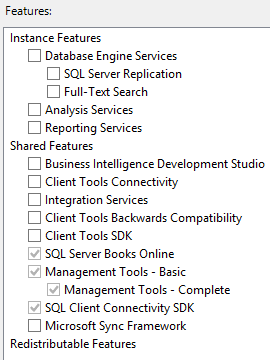
SQL Server 2008

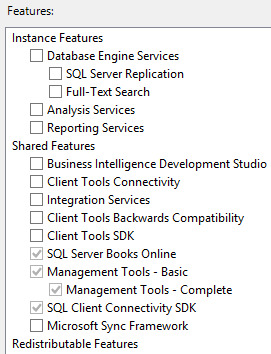
Ah, a simpler time. When you got to the feature selection screen, here were your choices:

SQL Server 2008 feature selection

In case you’ve forgotten, Business Intelligence Development Studio (BIDS) was like SSMS for BI people, and the Microsoft Sync Framework was for rolling your own replication to stuff like handhelds.

SQL Server 2008R2

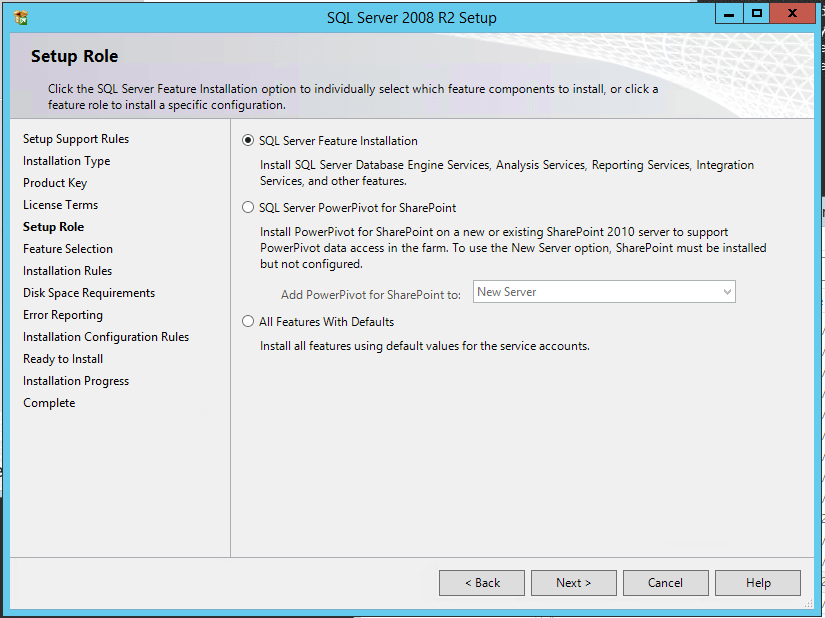
SQL Server has always had a next-next-next reputation: people threw in the install media, clicked next-next-next, and went live. That approach to installation has always led to great consulting business, but in 2008R2 Microsoft took it to the next level. If you couldn’t be bothered picking features individually, you had a new radio button: “All Features With Defaults.”

JUST INSTALL EVERYTHING, WE’LL DO IT LIVE

Hoo boy. That was a great time for consulting. Also, I’ll call your attention to “SQL Server PowerPivot for SharePoint,” rarely referred to by its acronym, SSPSP.

Assuming you weren’t on cocaine, you chose “SQL Server Feature Installation” instead of “All Features With Defaults,” so then you got the normal list of checkboxes. No changes here from SQL Server 2008, same short list:

SQL Server 2008 R2 feature list

No changes here for 2008R2. Moving on.

SQL Server 2012: Featurepalooza

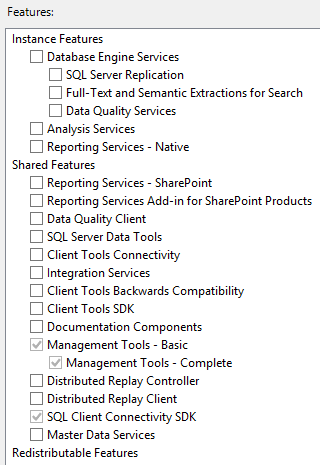
After the PowerPivot and “All Features With Defaults” screen, the feature list came up:

Picking features individually

More features! Some of the “highlights” of the new stuff included:

  • Data Quality Services
  • Reporting Services was split into Native and SharePoint
  • Documentation Components (formerly known as Books Online)
  • Distributed Replay
  • Master Data Services
  • Removed: Business Intelligence Developer Studio (BIDS)
  • Removed: Microsoft Sync Framework

Around this time, when I was talking to DBAs, I talked a lot about the danger of adopting new features. Just because something new is thrown into the box doesn’t mean it’s going to get any kind of adoption, nor any kind of further development from Microsoft. Ask folks who worked with BIDS, DQS, MDS, and Distributed Replay about how that went. (I’ll come back to that, though.)

SQL Server 2014

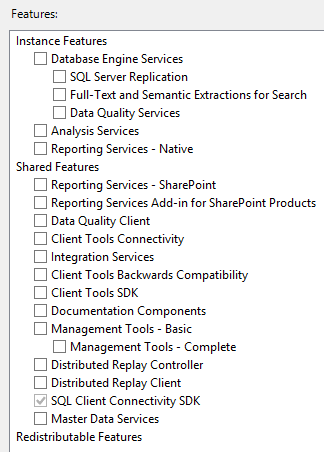
The PowerPivot and “All Features With Defaults” was still here, and after that, the feature list was the same as 2012:

SQL Server 2014 feature list

No changes. You can kinda think of 2014 as SQL Server 2012 R2.

SQL Server 2016: R, matey

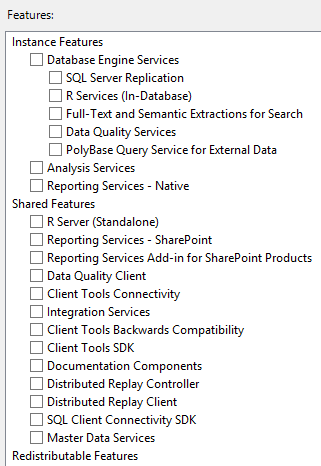
The “All Features With Defaults” and PowerPivot options were removed. Yay! After that, the feature list:

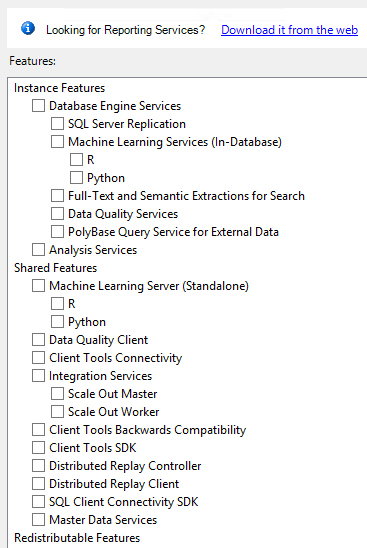
SQL Server 2016 feature list

Changes:

  • R Services (In-Database)
  • R Server (Standalone)
  • PolyBase Query Service for External Data
  • Removed: Client Tools SDK
  • Removed: Management Tools (SSMS, now a separate download)

SQL Server 2017

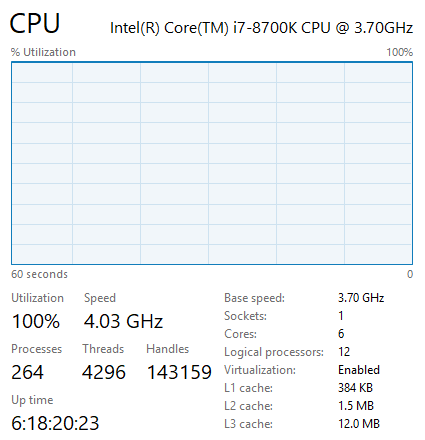
I’m taking a screenshot here of the Windows installer, but of course it was also huge news that setup worked on Linux and in containers. The feature list:

SQL Server 2017 features

Ch-ch-ch-changes:

  • Removed: Reporting Services (now a separate download)
  • Python In-Database
  • Python (Standalone)
  • Integration Services Scale Out Master, Worker

It’s interesting because it seems like there’s two warring camps at Microsoft: one camp who wants to put everything in the SQL Server installer, and another camp who wants separate installers for different services. I’m not sure the “Machine Learning Server (Standalone)” makes more sense to have in this installer – after all, the word “(Standalone)” usually kinda means, uh…well, you get the point.

Remember how I said I used to advise people to think long and hard before using new features? I’m not as concerned about that these days because Microsoft seems to also be deploying variants as cloud services. For example, R, Python, and Integration Services have bright futures in the cloud and on other platforms (like Azure Data Factory.)

One other funny note: all of these installers are currently supported to varying degrees. Microsoft has its hands full – think about the number of people they need to know all these changing features.


A Strange Place For A Memory Grant

If You Hang Around Fetish Bars Long Enough…

You learn things about memory grants in execution plans.

Stuff like the things that usually need memory

  • Hash Join
  • Hash Match
  • Sort
  • Parallelism Exchanges

But there’s something that rarely gets discussed, even in the deepest, darkest, dankest dungeons.

Let’s loosen the clamps and look at it.

Keys and Loops

In this innocent, unassuming, serial, hash and sort free plan, what could be asking for memory?

Oh you loopy things

But here we are with a 5.3 MB memory grant in the small version of Stack Overflow — the one Brent trimmed down to only data up to 2010.

Oh so quiet.

It’s A Lot Like Life

There’s a few different types of Nested Loops Joins. Some may perform prefetching, where they go out and grab rows in anticipation of needing them. Those can be ordered or unordered, depending on the query.

Sometimes, they’re also optimized.

You can either dig through a bunch of XML, or just get the properties of the Nested Loops Join.

A couple things will stand out about it.

Sore thumbs.

One is that the operator received and output memory fractions. The other, and more obvious thing, is that the Optimized attribute is true.

These aren’t normal attributes of a Nested Loops Join operator.

It’s hard to find a lot of good information about them, so here are blog posts I recommend:

Anyway, if you ever see a very simple looking plan asking for an odd memory grant, this could be why.

Thanks for reading!

Brent says: I would just like to go down on record as saying I am going to forget this, and I’m going to be looking at a plan in the near future, wondering where the memory grant comes from, and Erik’s gonna say, “It’s right here, you moron, and why don’t you remember my blog posts? You even wrote a Brent Says on there, for crying out loud.”


How to Reduce the CPU Overhead of Dynamic SQL

Development, T-SQL
14 Comments

Dynamic SQL is a good choice for catch-all type queries, but you have to be careful how you execute the dynamic string.

For frequently executed queries, “EXEC sp_executesql @sql”is a good choice but at the risk of encountering parameter sniffing issues.

For queries that aren’t executed very often, “EXEC (@sql)” can be used, but you could end up with a bloated plan cache with lots of single-use execution plans.

Let’s compare the performance difference between “EXEC (@sql)” and “EXEC sp_executesql @sql” for a frequently executed query.

The query is very fast: takes less than a millisecond to compile and execute.

I usually use SQLQueryStress to load test a query, but it couldn’t deliver what I needed. It maxes out at 200 threads for a single instance. You can run multiple instances of it to get past 200 threads, but each was using a lot of CPU for this load test. Erik pointed me to Microsoft’s ostress utility instead. He blogged about ostress last year.

EXEC (@sql)

Let’s look at the most common way to execute dynamic queries first: EXEC (@sql). The fact that it’s the most common doesn’t mean it’s the right way or the wrong way.

You may wonder why I’m calculating @d inside the proc and not just sending in a value to an input parameter. It was just to make the calls to ostress easy. I could have used a script file via the -i parameter rather than executing a single batch via the -Q parameter. Besides, this is my blog post. I’ll do what I want.

Before starting the test, I cleared out the plan cache so that when I show you the plan cache bloat you won’t wonder what was already in there.

Time to run the load test. I decided on 50 threads with 15000 iterations after running a bunch of tests. I wanted enough threads to cause high CPU utilization and enough iterations to run sp_BlitzFirst with a 30-second sample.

After a minute, I ran sp_BlitzFirst to see what was going on in SQL Server.

Though not horrible waiting time, SOS_SCHEDULER_YIELD is the primary wait here.

CPU was pegged at 100% during this load test.

After the test completed, I examined the plan cache using Kimberly‘s handy plan cache query.

The plan cache totaled 2.3GB, which isn’t that big. But it’s big when you consider that each of the adhoc plans are tiny. Most of the 36,000 adhoc plans were only used once. Why bother storing them in memory if they aren’t going to be reused?

EXEC sp_executesql @sql

Now let’s look at the other way to execute dynamic queries: EXEC sp_executesql @sql.

I again cleared out the plan cache, but this time so that we can see the difference between the two load tests.

I then ran the load test again but calling Test2 this time.

SQL Server was pretty bored with this workload even though it was running more queries per second than the previous test – not much waiting time on anything really.

CPU averaged around 45% during this load test.

Look at that tiny plan cache!

The roundup

ostress settings: threads=50, iterations=15000

Should you just use sp_executesql always?

If you have high CPU utilization and run frequently-executed dynamic queries with “EXEC (@sql)”, consider using “EXEC sp_executesql @sql” instead. You’ll need to be aware of parameter sniffing issues, but you should see a drop in CPU utilization and plan cache size.

Parameter sniffing issues are no joke. I have lost hundreds of hours troubleshooting parameter sniffing issues over the past 15 years. Know how to identify if parameter sniffing is the problem and how to troubleshoot it.

Don’t default to using sp_executesql though. If a query is not executed frequently, “EXEC (@sql)” can work just fine. Just be sure to monitor the adhoc plans in the plan cache.


Trivial Plans, Simple Parameterization and Check Constraints

Execution Plans, Indexing
0

Trivial Plans Are Weird

They’re the optimizer’s “Yes, Dear”.  The thing is, sometimes “Yes, Dear” can miss some important details.

  • Cost based decisions about operators
  • Potential index improvements
  • Contradiction detection for check constraints

Simple parameterization, according to… uh… Official Microsoft documentation? Can only occur in a Trivial Plan.

Which makes sense. Simple parameterization is considered and attempted only when the optimizer thinks that the predicate changing would not have a drastic effect on the query plan.

But That’s Not Always True

Let’s start with a check constraint on the Users table. This is the 2010 data before Mr. Skeet hit 1000k reputation, so it succeeds, and is trusted.

You can verify if constraints are trusted or not by querying the sys.check_constraints view:

Let’s take this query for example:

There’s an obvious problem

Our check constraint should negate our where clause. We shouldn’t need to touch the table at all.

To make things worse, we end up scanning the entire thing.

Bogus.

If we add something goofy to our query, we get the correct plan:

Of course 1’s gonna be in there. It’s 1. We’re selecting 1.  But this is enough to make the optimizer reflect on its choices.

Hustle real hard

Extra Crispy

I know what you’re thinking. I can read your future mind. You think that adding an index would help.

Okay, let’s add an index that covers the entire query.

Same problem.

To make matters worse, if we add a non-covering index…

We get the plan we want, but yet another plan that lies to us about Simple Parameterization.

%$&^%

But Why?

The easy answer is that with a cost based decision to make, the optimizer now has to explore optimizations beyond a trivial plan.

Now it has a choice between

  • Scanning the Clustered Index
  • Seeking into the index on Reputation, and doing a Key Lookup for DisplayName and Age

Comparing that to when the nonclustered index covered the entire query, there was no cost-based alternative. A trivial plan to use a covering index makes the most sense.

To show an absurd example, with the same single key column on Reputation, we can force the optimizer to use it for a query where it would have no benefit whatsoever.

Foolish~

Now I know. This decision is a no-brainer. But it’s still a decision, and one the optimizer has to weigh the cost of each, with no exact matching index.

Fun, right?

Thanks for reading!

Brent says: when you run sp_BlitzCache, you might have noticed the “Trivial” warning in the Warnings column. This is a great example of why we call it out – the query might be in your top 10 most resource-consuming queries not because it’s impossible to get a better query plan for it, but just because SQL Server chose not to take the time to evaluate better plans. Normally, you’ll never have to troubleshoot performance on a trivial query – but once it hits your top 10, that’s when it’s time to dig a little deeper.


Building SQL ConstantCare®: Adding Daily Emails and Recognizing Your Work

SQL ConstantCare
3 Comments

When we first launched SQL ConstantCare®, the workflow was:

  • You sent in data about your SQL Servers daily
  • Our systems sent us (not you) recommendations on what to do
  • Once a week, we reviewed those recommendations, made sure they made sense, adapted them when necessary, and then forwarded ’em on to you

Over time, we became more confident in the system’s recommendations, and we started sending the daily emails directly to some of our customers. The response was super-positive: people loved being able to get faster feedback when new urgent problems pop up.

So starting today, everybody gets the daily per-server emails. Because they’re fully automated, they should arrive within a few minutes of your regularly scheduled data collection. (I’m still doing the manual analysis emails, but now I’m holding off until you get all the basic bat-in-the-cave recommendations fixed.)

However, there are some problems you don’t wanna hear about every day. For example, you don’t wanna keep hearing that your SQL Server build level is unsupported, or that you need to disable Priority Boost – those things require a restart to fix. No sense in pestering you about that every day. So for big-picture restart-required stuff, we’re only alerting you about those on Mondays. Gives you a chance to plan your week – to figure out whether you wanna try to schedule outages sometime later.

On Mondays, we’ve also added a new section to the emails that covers what you’ve fixed recently:

Congratulations! You fixed stuff!

My goal was to give you something you could forward up the management chain to say, “Here’s what I’ve been working on, and here’s what it means to our environment as a whole.”

Toward the end of the year, we’ll give you a roundup of your overall environment that you’ll be able to use for your annual review, too. Since we’re tracking the state of your servers over time, it’s easy for me to build a report that says, “Here’s what my environment looked like at the start of the year – warts and all – and here’s what it looks like now.”

Next up: identifying bored servers

A few selected users started seeing a new piece of advice last week: your SQL Server is bored, and you could probably run CHECKDB and/or backups more frequently in order to reduce your risk of data loss and downtime.

When that advice went out, I immediately got a lot of replies asking, “Wait – I thought my server was busy? What do you mean it’s bored?” Talking with ’em, a lot of them followed up with questions like, “So if my server isn’t busy, what does a busy server look like?” That makes sense, given that 64% of SQL ConstantCare users have 3 servers or less. (77% have 5 or less.) They just don’t have perspective across a wide estate of SQL Servers.

To explain a busy vs bored server, I start by pointing folks to the video How to Measure Your SQL Server, which introduces the concept of Wait Time Ratio. Say for every hour on the clock, your server spends one hour waiting on, say, storage. That’s a ratio of 1:1 – meaning, 1 hour of waits in 1 hour of clock time.

The more hours your server spends waiting on stuff, the higher your wait time ratio is. Here’s an example of a server that’s really hustling:

High wait time ratio

For every hour on the clock, this server spends 12-26 hours waiting on stuff. That axis over on the left hand side is really important.

On the other hand, here’s a bored server:

Low wait time ratio – note the left side axis

For every hour on the clock, this thing doesn’t even spend one minute waiting on things. In a case like this, if you’re only doing monthly full backups and daily differentials, thinking you’re making your server’s workload easier, you’re not really helping. The server’s bored all night anyway. You might as well be doing full backups daily (assuming a small enough set of databases and enough backup space) in order to get a better recovery time objective.

Wanna see if your server’s bored? Start with sp_BlitzFirst @SinceStartup = 1, which tells you your overall wait times since startup. It’s not a perfect measure – it’s a sum of wait times since the server started up, which includes weekends, holidays, etc – but it’s a good free start.


[Video] Office Hours 2018/5/16 (With Transcriptions)

This week, Brent, Erik, Tara, and Richie are back in action again to and are discussing sys.dm_db usage stats, Availability Group troubleshooting, ASYNC Network IO issue, reasons for using a contained database, whether you need to add more CPUs if facing THREADPOOL (or is it Deadpool?) waits, auto-tiering tempdb, and query tuning.

Here’s the video on YouTube:

Office Hours Webcast - 2018/5/16

You can register to attend next week’s Office Hours, or subscribe to our podcast to listen on the go.

Enjoy the Podcast?

Don’t miss an episode, subscribe via iTunes, Stitcher or RSS.
Leave us a review in iTunes

Office Hours – 5-16-18


How do I remove in-memory OLTP?

Brent Ozar: Josh says, “I’m using in-memory OLTP in a synchronized AG, but as it turns out, my workload does not warrant in-memory OLTP and I’d like to back it out now, however, I can’t find the Hekaton ejector-seat handle. Books Online says I need to drop the database. Do you have any creative ideas on how to do this while minimizing downtime?”

Tara Kizer: I mean, nothing. Can’t you just not use the feature? I mean, so what if it’s enabled, as long as you’re not using it.

Brent Ozar: That’s true, you could just stop using it. You’ll still leave the file group there, but why cares?

Erik Darling: What I wouldn’t trust is that like any of the weird Hekaton bugs would just affect it having – like, it’s enabled so you’re exposed to these bugs even if you’re not directly using it. There just might be something floating that just having it turned on causes that I would freak out about.

Brent Ozar: There’s the restore one in one in one of the recent 2017 CUs. I want to say there was a restore – if you had Hekaton, you couldn’t do a restore under some circumstances. (CU4: In-memory databases in an AG hang during recovery. Then CU5: in-memory OLTP takes a long time to recover.)

Erik Darling: For the same reason, I won’t hang pictures with Command Strips over the bed because I’m just afraid, like, in the middle of the night just crashing down on top of me. Like, over the bed, I’m using nails, cement, whatever I can get up there. I’m terrified of outside of my control things and Hekaton, you turn that one, you can’t turn it off. It’s outside of your control. You might have yourself exposed to all sorts of weirdness just having it turned on.

Brent Ozar: So then speaking of that, so in that case, you’ll like what we did. At one point in Mexico, we bought a bunch of wooden carved hearts, three dimensional. They’re like probably two or three inches thick and so Erika was absolutely determined to put these over the bed. And they’re not flat; they’re freaking heart-shaped. So she put Command Strips on the back and she was holding them to the wall where the bed is. Everything seemed cool and in the middle of the night, like once a week, a wooden heart would just fall on us. After a couple of weeks of that we’re like, okay, we’re not doing that.

Erik Darling: More superstitious people would, like, start sleeping in different rooms, get divorced…

Brent Ozar: Because hearts are knocking us on the head. Josh says, “That’s why I’m trying to get rid of it, to reduce the exposure to Hekaton bugs.” Yeah, if you wanted to really get rid of it, the closest thing that I can get is to do like SSIS or something to export all the stuff out of your database over to another database. And then, maybe right at the last minute, use something like Redgate Data Compare in order to find the edge case stuff that didn’t get caught, but man, it is not going to be pretty.

Erik Darling: There are a lot of Command Strips on that answer. I guess you could like shrink the file all the way down, set it to like read-only, no auto growth, but still, it’s there and doing stuff. I don’t know, forget I said anything; it’s a terrible idea too.


What do “user lookups” mean in sp_BlitzIndex?

Brent Ozar: Chris says he’s looking at sys.dm_db_index_usage_stats. He says, “On my table, there’s 300,000 user lookups on a primary key. I think that user lookups means the number of bookmark lookups by user queries. Is that true?”

Tara Kizer: I’ve never looked up that column to see what it means.

Brent Ozar: It should be easy enough to understand, to go test, so I’d always recommend to people – because I love demoing that DMV in operation stats – is go create another table. Go create a table with nothing in it, put five rows in it and build yourself several different execution plans and you can keep seeing how those numbers change. In a perfect world, also do it in a different database that you can off-line and online again quickly so that those stats reset.

Tara Kizer: I was just going to say, even if this is the bookmark lookups, that doesn’t mean they’re a bad thing. I mean, it’s going to have bookmark lookups. You know, the fact that he’s saying bookmark lookups means he’s as old as us and has been using SQL Server for a very long time. So I catch myself and say bookmark lookups still, but these days, people call it key lookups. It doesn’t mean it’s a bad thing. You’re not going to be able to cover every single query, you know. Some of your queries need to return so many columns that you don’t want a non clustered index that covers the entire thing, so you have to do a key lookup at that point. So it’s not necessarily a bad thing. You have to examine the execution plans and look for the expensive key lookups. And if you want to improve those maybe consider covering index or look at Erik’s SELECT* information. You have a blog post on that. I know you have a presentation on it, but…

Erik Darling: Yeah, all sorts of things on that.

Tara Kizer: Yeah, that presentation will show you how to avoid the key lookup without a covering index. So it can do index intersection or do it later on so it’s not as expensive.

Brent Ozar: I would just like to point out that everyone sees that I have Chrome now. I have Google Chrome on my virtual machine [crosstalk]. Why, when I search for Erik Darling SELECT* I get Erik Darling, Every Time I go to Town?

Erik Darling: Oh yeah, there’s a folk singer named Erik Darling. He’s dead.

Richie Rump: Lies, it’s just you.

Erik Darling: If I had a burgeoning folk career, I wouldn’t be here.

Tara Kizer: I like when you say Darling though, you have to say it in Rob Farley’s voice…

Erik Darling: Very specific about that. Where is Rob Farley? I feel like I haven’t seen him do anything online in a while, like hiding.

Brent Ozar: Rob’s going to be the only one who gets this joke, but Rob is in Australia. Rob, ha ha ha – he’s probably not even going to hear that.


My ASYNC_NETWORK_IO goes up during heavy load

Brent Ozar: Pablo asks, “Ola amigos, in some times of day when I have high concurrency, async network I/O goes up and users feel like everything is slow. How can I help or what should I check?”

Tara Kizer: And then he says no application code available, because that’s an important thing because I love seeing that wait stat because it means the problem is not in SQL Server. I get to step away as a production DBA. A sysadmin jack of all trades type person is going to have to troubleshoot this, but as a SQL Server DBA, I’m like, oh the problem’s not mine. So as far as I know, there’s three things that can impact it.

It’s almost always an application problem. It can be an application server issue; if you don’t have enough memory or CPU, the application server could be struggling. And then the third one is a network issue, but it’s almost never a network issue. It’s usually an application involved in that row by row processing while SQL Server is trying to fire-hose the data to the application. So, unfortunately, it is not – there’s nothing to do inside SQL Server; you’re going to need to look external.

Erik Darling: Unless you’re just shoveling way too many rows at the application. So you know, if your user has a dashboard where they’re looking at the top 500 things and you’re shoveling like a million rows in there, you could probably page that query or just cut it down a little bit in some other way to stop shoveling that many rows at the app server. But generally, Tara’s right. Some noodle-head just wrote a for each loop to like present things or some weird presentation layer stuff that goes on once the data hits the application that just isn’t processing things as fast as you’d want.

Tara Kizer: I did see a recent server that the queries were sending over something like 50 million rows each time, but the application was then applying paging to it, so it would then filter it down to like 50 rows or something like that. So then it did a filter and the application got the data. I was like, this isn’t the right way to do things.

Richie Rump: [crosstalk] back in 2003…

Tara Kizer: And we didn’t even have 50 million rows back then.

Richie Rump: That’s right.

Erik Darling: In 2003 there were like five, 10, 15,000 rows at most; it was like nothing then.

Brent Ozar: I think one clue too might be when you say it’s really busy you get this. I would go remote desktop into your app servers and they might be doing 100% CPU, swapping to disk, no memory left. We’ve had a couple of those where we go remote desktop into the app server and it’s got two cores and 4GB of RAM and the thing’s just falling over.

Richie Rump: Exactly.

Brent Ozar: Erik’s phone.

Richie Rump: A phone has more.


Erik’s humor isn’t half bad

Brent Ozar: Marci says, “Richie’s comment reminds me that she’s really enjoying Erik’s sense of humor in the recent blog post. They remind her of the early Brent Ozar posts. They make you think, did he really just say that?”

Tara Kizer: Would that be the Jeremiah stuff?

Richie Rump: Let’s see, it wouldn’t be Brent.

Brent Ozar: It’s been a long time since I said anything offensive. I’ve got to dig back up to that.

Tara Kizer: Erik’s got a wicked sense of humor; a smart sense of humor, but wicked.

Richie Rump: I’ve amended your statement, Brent; it’s been a long time since you’ve said something offensive publicly, how’s that?

Brent Ozar: Touché.

Tara Kizer: We do have fun in that company chat room.

Brent Ozar: We do. This is probably the most fun part of our jobs is just we have a company chat room, which is why I stopped spending so much time on Twitter, because it’s so much more fun now in Slack because you can be as offensive as you want to be, throw GIFs in there, which is a horrible thing for a company owner to say. “I can be as offensive as I want in our company chat room.” It’s probably words that I’m going to regret and come back to haunt me later, but yeah, amusing.

Richie Rump: And now we have them recorded; thanks, Brent.

Brent Ozar: Yes, and especially with my wife being the human resources department and she’s way more offensive than I am…

Tara Kizer: She swore he’s not HR by the way; swears. You’re the closest person.

Brent Ozar: If she ever got hit by a car and I had to handle payroll and insurance, you would know just how good of a human resources person she is. Can you guys use 50s to pay for your surgery?

Erik Darling: By the way, I’m going to get 10 surgeries; a lot of stuff going on.

Brent Ozar: Please get a receipt this time.


Why would I want to use a contained database?

Brent Ozar: Ron asks a question that makes me want to be offensive. Ron says, “Why would I want to use a contained database?”

Tara Kizer: That’s a good question; I’ve never used them.

Brent Ozar: And the silence tells you everything. So the idea was that you would be able to deploy a database with all things like agent jobs and logins in it and then you could, like, vMotion it around the way you move a server around in virtualization with Hyper-V or VMware. That ship just sailed though. Microsoft totally missed that trend and we were just so much better off using virtualization for that, so it just died on the fire.

Richie Rump: Well that and cloud, right, so they also tried to move that idea into the cloud, where you deploy the entire database in the cloud and then everyone kind or realized that that’s kind of a silly idea.

Brent Ozar: And there are things that weren’t in the contained database; they all wanted agent jobs, they all wanted all kinds of stuff. Ron says, “I was asked that by a client and that was my response also.” Yeah…

Erik Darling: I guess if I wanted to do that – so what’s the behavior in a contained database that you’re looking for, that you’re looking to emulate, you know, like what do you want to get out of it? Or did you just hear the word and think, oh I want a contained database? Because that happens to people sometimes, like oh yeah, I’ve heard of that, I should do that.

Richie Rump: [crosstalk] database not to be contained, I mean, what if it gets out? I don’t know.

Erik Darling: Put a leash on that thing, man, give it a name.


How do I migrate from 2012 to 2016?

Brent Ozar: Renuka Devi asks, “Please tell us the steps to follow during a SQL Server migration from 2012 to 2016.”

Erik Darling: That will be $7,995…

Brent Ozar: And there’s no decimal point in there.

Erik Darling: There’s a comma.

Tara Kizer: Exactly, not a decimal point.

Brent Ozar: So why is it that when someone asks us to sketch out a new build or a new infrastructure for moving from 2012 to 2016, why can’t we do it in a paragraph?

Erik Darling: You know, it’s one of those things, when you like think about the high-level stuff, you come up with so many, like, just dead on showstoppers for things you can’t do, won’t do, ways you want to do it. And then when you get further into the details of, like, things you have going on in one place and like getting all that stuff moved over, you know, it’s easy to think about the easy stuff, like logins, agent jobs and that stuff. But then you get into using a new cardinality estimator or anything like that and this is just a lot more testing and planning than you would ever want to get into in a single paragraph, or you could ever do justice to in like a single paragraph.


Why won’t you call me back?

Brent Ozar: Guillermo says, “I sent a question through the contact us page at brentozar.com regarding the training season pass about two weeks ago but haven’t seen a reply. What’s the estimated reply time?” I haven’t seen that. If you want, just shoot us another email. There’s also an email address on the page; try that. maybe something went wrong with the web form. And you can also ask us here too, if you like.

Erik Darling: You know, a lot of people send in questions and mistype their email address and we go to reply and just get a bounce back. There’s like no way for us to like fix the email address. It’s not ever often, like, @gamal.com; it’s always just like some name butchering we can’t fix…

Brent Ozar: 42 characters in it.

Erik Darling: Yeah, exactly.


Does THREADPOOL mean I need to add more cores?

Brent Ozar: Pablo says, “If I don’t have any long-running blocking situations, can THREADPOOL be related to the need to add more CPUs?”

Richie Rump: Threadpool or Deadpool?

Brent Ozar: Which reminds me, and I shouldn’t change the question, but are you going to see Deadpool 2 when it comes out or are you going to wait a while?

Richie Rump: It comes out tomorrow. I’m going to see if I can talk my wife into going on our anniversary since we saw Deadpool on Valentine’s Day.

Erik Darling: Nice.

Richie Rump: She’ll be into it, don’t worry.

Brent Ozar: Wow, happy anniversary in advance; congratulations. I mean, one year is a long time to make it. It’s impressive…

Richie Rump: Or 19.

Brent Ozar: It’s no time at all. So THREADPOOL – if you’re facing THREADPOOL waits, do you need to add more CPU?

Erik Darling: Perhaps.

Tara Kizer: You could.

Erik Darling: I would want to take a look at a few other things first before I go and spend those licensing bucks on SQL Server stuff, like do I have MAXDOP and cost threshold for parallelism set right? Have I tuned my queries and indexes so that only the really necessary ones are actually going parallel and doing parallel things because all those parallel queries, they’ll go out and ask for, like, a whole – well ask for dot threads per parallel branch of their execution. So it’s like, they could ask for a whole lot more threads than just, like, you know, DOP.

Everyone’s under the impression that, you know, you set MAXDOP and that’s the number of cores that SQL Server can use and that will also cap the number of threads, but there is no such cap on that number of threads with MAXDOP. MAXDOP will use a whole mess of stuff. So that’s really important to keep in mind, especially if you’re – what sucks to me, like when I think about max worker threads and MAXDOP and all those other things, is when your max worker threads between one and four cores is 512. There’s no change.

So SQL Server thinks that for a single core and four cores, the best thing you can do is 512. And then after that, it doesn’t double. Like, you go up to eight cores, you don’t get 1024, you go up to 16, you don’t get 2048. Like, it just goes up by tiny increments. So like, you don’t even get that many more worker threads per CPU increment, so early on, you’re much better off tuning the server, tuning settings, tuning queries and indexes to keep only necessary things from going parallel from the get-go.

Brent Ozar: There’s a great post there, What Not to do when Adding Always On Availability Groups Databases by Warwick Rudd. And he goes into more detail with that with the little chart. While you were talking, you reminded me too of this question over here from John Smith Senior about SQL Server threads and degrees of parallelism – or was it this one? I could have sworn there was a Paul White one…

Erik Darling: Yeah, there was a Paul White on somewhere on there.

Brent Ozar: Hang on, I’ve got to find that – alright, cool.


Should I use auto-tiering for TempDB?

Brent Ozar: Alright, next up, we have – Daryl says, “We use auto-tiering on our SAN with a few different RAID levels, but I like RAID 10 for our log files as well as tempdb. I’ve noticed an increase in disk I/O after is set up tempdb with four files, but our processes run in the same timeframe. With tempdb, should I auto-tier it so that it moves around SSD?” My thought on auto-tiering, I adore auto-tiering; I’m a huge fan of it because the problem is, you don’t know which servers are really going to be active. You don’t know which servers are going to have a really hot and heavy tempdb, which ones are going to be sitting around bored and it changes all the time. The more SQL Servers that you have, the harder it is to predict that stuff. So I’m all about stuff like auto-tiering.

I know that the more admins that you have, the more people that you have, the more tempting it becomes to micromanage it. Like, I know that this one should be on RAID 10 and I know – because maybe you have a server that’s really busy and it’s worthless. For example, when I was a DBA, there was one server that just sucked at tempdb, just absolutely hammered it, but it was our website tracking software. Every time employees would go surf the web, it would log stuff into the database.

And we’re all like, we don’t care what performance is for that because it’s a backend server that nobody cares about, so we can just relegate that to the crappiest storage.

Erik Darling: You don’t have one of those, do you? Because I let some other people use my computer sometimes – I don’t know what they do so I’m just…

Brent Ozar: I share my hotspot on the street…

Erik Darling: Yeah, it’s weird, I don’t know. It’s like a whole communal thing out there. I just wanted to double check.

Brent Ozar: Yeah, I have a policy around our employee internet – don’t ask and don’t smell. I just don’t want to know. It was funny, when I first got Erika a cell phone way back in the 90s, late 99, early 2000, I got her a cell phone as a Christmas present and she’s like, you just want to track what I’m doing. And I’m like, no seriously, I don’t care. You can do anything you want. It took probably six months before she realized it and she’s like, you’re not mad at me for anything I’ve texted? And I’m like, I don’t know. I don’t want to look at the phone bill, I don’t care; so then she got into it.


We have a long-running SELECT showing sleeping…

Brent Ozar: Joe asks, “We have a long-running SELECT, over three hours, that has an estimated subtree cost of 0.003 and it’s stuck in the sleeping state. It’s going to keep running until we kill it. How should I resolve that?”

Erik Darling: I would love to see the query plan for that?

Tara Kizer: the query plan, what is it waiting on?

Brent Ozar: And, well if you say suspended, I’m curious.

Erik Darling: It says it’s sleeping, so I wonder if…

Brent Ozar: Should be able to do a BEGIN TRAN… I was going to say, or explicit transactions. So I’m going to use Stack Overflow…

Richie Rump: Is there a narcolepsy wait type? I don’t know.

Erik Darling: Tell that query to stop smoking weed, man.

Brent Ozar: Boom, so I got that SELECT running. Now while that’s running, I’m going to go pop over and run sp_whoisactive in another window once that thing finishes. So sp_whoisactive – so I have a query here it shows as sleeping, and it really doesn’t even matter what the cost of the query is, but once that query is sleeping, it’s just because somebody either restarted a transaction or they have an implicit transaction open. It’s not doing anything. It might be holding locks open.

To check to see if they’d like begun a transaction and held locks, you can do get locks equals one and then this is going to return a little property bag, a little XML property bag here. You can click on it and then it’ll show you if they have any tables locked. Odds are they just had a BEGIN TRAN somewhere and didn’t commit anything, but it’s just SELECTs. If it looks like this, where it’s just a schema level lock on the entire database, it’s fine, you can kill it. If they have a whole bunch of objects involved, then that’s where I’d get a little nervous.

Richie Rump: Brent just showed his age by using the term property bag.

Brent Ozar: How old is that too? It’s probably…

Richie Rump: I believe that was like VB – when I first started using VB and VB3, that was there.

Brent Ozar: Alright, well that’s all the questions we’ve got for this week. Thanks, everybody for hanging out with us this week at Office Hours and we will see y’all next week…

Erik Darling: Adios.

Attend the next Office Hours podcast free.


Stuff People Tell Me Is The Default

Humor
30 Comments

Playing The Odds

Assuming that life carries on as usual for a couple more weeks, I’ll have been a consultant here for three years.

In that time, I’ve had some really interesting conversations with people, mostly about why things are the way they are on their servers.

My favorite response is “isn’t that the default?”, because it’s never the default.

I think that’s called an unforced error.

Here are some of my favorites:
Oh you
  1. Nonclustered Primary Keys
  2. Fill factor < 100
  3. MAXDOP 1
  4. Fifteen minute log backups
  5. Single column indexes
  6. Indexes including every column
  7. Database shrink tasks at the end of maintenance plans
  8. Read uncommitted
  9. Priority Boost

Thanks for reading!

Brent says: Ooo, yeah, my favorite: “SQL Server has built-in emails that alert me when there’s a problem, right?”


How to Create Deadlocks and Troubleshoot Them

Deadlocks
5 Comments

Watch in awe and wonder as I create a deadlock, then use sp_BlitzLock after the fact to show you which queries and tables were involved:

How to Create Deadlocks and Troubleshoot Them with sp_BlitzLock

Here are the scripts to run in the left hand window:

And here are the right hand window commands:

sp_BlitzLock is available in our free First Responder Kit.

To learn more about locking, blocking, and concurrency, check out my Mastering Query Tuning class.


Quick Tips For Debugging Large Stored Procedures

T-SQL
55 Comments

Hell Here! Get Your Fresh Hell, Here!

Let’s face it — as far as developer tools go, SSMS is pretty bad.

Intellisense? The jokes write themselves.

Don’t get me wrong, SSMS is a good management tool, but it’s not a good development tool (and what kind of maniac sticks debug — F6 — next to execute — F5 — ?).

When you’re writing some simple queries, it’s fine.

When you’re writing code with lots of branching, dynamic SQL, temp tables, error handling, and so on… Notsomuch.

Here are some tips I’ve put together after a couple years of wrangling the Blitz scripts in the First Responder Kit.

Tip #1: Format Your Code

There’s no shortage of free and paid tools out there. This list from the Recently Legendary Aaron Bertrand on Stack Exchange has both.

  • http://www.red-gate.com/products/sql-development/sql-prompt/
  • http://www.apexsql.com/sql_tools_refactor.aspx
  • http://www.dpriver.com/pp/sqlformat.htm
  • http://www.cleancss.com/sql-beautify/
  • http://www.sql-format.com/
  • http://poorsql.com/
  • http://www.freeformatter.com/sql-formatter.html

Normalization isn’t just for data. Normalized coding patterns help you keep things organized.

This really helps in those sticky situations where you have a BEGIN without an END, a missing or misplaced parenthesis, or some single-tick nightmare of nested, nested, nested dynamic SQL.

Tip #2: Always Be Debugging

If you’re writing dynamic SQL, always add a Debug mode. It doesn’t have to be anything fancy at first, just something like:

IF @Debug = 1 BEGIN PRINT @MySQLInjectionGift END;

If you find yourself writing blocks of dynamic SQL that don’t fit in a single PRINT output, Helper_Longprint by Yildirim Kocdag is awesome.

When you get further into things, you may also want to build in a no-execute mode so you’re not off running bad dynamic SQL blocks.

Tip #3: Keep Track Of Temp Tables

… And I guess table variables, too.

In a lot of the Blitz procs where we use temporary objects, I’ll set up a Debug block that will select data out of all the temp tables we’ve put data into.

Of course, if you have a lot of temp tables, it’s easy to get lost. When I set up debugging for those objects, I like to include the table name as a column, too.

This makes sense.

Now you can see what did (or didn’t) end up in your temp tables.

Tip #4: Know Your Place

Don’t be afraid to use RAISERROR to mark off sections of your code. This also belongs in a Debug mode so you’re not needlessly returning noise, but can be super helpful for you to figure out things like which code path was hit and which section throws an error executing common code.

Why RAISERROR over PRINT? Nice message formatting, and you can use WITH NOWAIT to print messages immediately.

With PRINT, you may be stuck waiting for enough buffers to fill up to display a message.

Tip #5: Know Your NULLs

This is another one for dynamic SQL peoples. It’s so obvious, you’ll kick yourself if you haven’t already thought of it.

IF @MySQLInjectionGift IS NULL BEGIN YELL ABOUT IT BEING NULL END;

When I first started writing dynamic SQL, I can’t tell you how many times I got eaten alive by a NULL variable or value making my whole string NULL.

Which brings us to our last tip!

Tip #6: Know Your Variables

There are two ways you can do this. Either create a variable logging temp table and insert the variable name and value to it, or just use RAISERROR to print the contents to the console. In either case, this is a life saver for figuring out what values got assigned things and when.

If variables change assignment frequently, RAISERROR is a better option. If they get assigned once, the logging table is just fine.

Wishlist

While I wish SSMS, and SQL Server, had better ways of handling dynamic SQL, color coding parenthesis pairs, and matching BEGIN/END blocks better, those just aren’t built-in tools or features currently.

Many tools that are better for development aren’t necessarily better (or even good) for management. It’s a pain to switch back and forth if you need to do both regularly. Third party tools have filled many gaps, but I reckon there’s just some behavior that can’t be altered unless you get into the actual bits behind SSMS.

Maybe someday.

Thanks for reading!


How to Screw Up Your Database Updates in 3 Simple Steps

Development
5 Comments
Alex Yates

Hi. I’m not Brent.

My name’s Alex, and I care about databases, DevOps and data protection. Last year I gave a session on GroupBy all about how to do Database DevOps right. Now, dear reader, I’m going to give you a cheerful, three-step crash course about how to screw it all up.

All set? Let’s go!

Step 1: Apathy – wait until it’s too late

Dear Alex,
We’ve got a monster database.

Well, it’s actually fourteen databases split across three servers, with a tangled web of circular cross-db dependencies. We have a CLR layer (for which we’ve lost the source code) and our table and column names are obfuscated and unintelligible.

We’ve got four petabytes of data and we know a bunch of it is sensitive PII, but due to the complicated table structure and lack of documentation we aren’t exactly sure where it all lives. However, our outsourced, overseas dev team tell us it’s critical they have all the prod data in their dev database to test the Entity Framework code in their apps work.

We are running SQL Server 2005 and have 37,000 tables, some with over 1,000 columns. (That’s not including the automatically generated tables). Also, some of our stored procedures are a few thousand lines long. Needless to say, none of the database source control tools that we tried have been able to cope – so the schema isn’t in source control. Our dev and production environments have many inconsistencies.

We managed to pull off our 2015 release in under 3 months, but we’ve been struggling with our 2018 release since February and we are still trying to figure out how to make it work for our dozen or so oldest clients. (They use customised versions of the CLR layer for legacy reasons. We lost that source code too.)

We’d like you to take a few days to automate our deployment and create a test suite with 100% code coverage to help us deploy more easily.

(Also, one of my developers has told me about this new GDPR law. Do you think we should budget a day or two to cover our bases there? Thanks.)

J. Doe, Project manager at Corporation Inc.

While this email is fake, it’s made up of a whole bunch of issues I’ve seen with various real customers. The point is that people begin to understand why source control, testing and deployment automation is so awesome when their databases become hard to manage.

Unfortunately, at this point it’s often super hard to retro-fit a sensible process.

For many folks who manage legacy databases, DevOps theory and the tools that can help us are new and complicated things to learn.

In general, teams are far more likely to succeed if they learn the basics with a much simpler database. Once they’ve honed their skills with the easy stuff they are far more likely to succeed with their monster database.

The problem is that often folks don’t see the point with greenfield projects. While the schema is still relatively simple people don’t see the value in writing unit tests for their stored procedures or automating their deployment pipeline. They just want to get started cutting code.

Unfortunately, in time, that greenfield project will sure enough turn into a new monster. If they had taken the time at the start to put together a basic source control, automated build, test and deployment process they might have avoided it. When making architectural decisions they would have been forced to think not just about scalability, durability and performance etc – but also testability and deployability. Having designed the database with those things in mind they might have saved themselves a bunch of headaches a few months or years down the road – but they didn’t.

Instead, in a few years some new start-up will be able to respond to evolving market demands more quickly.

Bummer.

Step 2: Use a shared dev database

Let’s talk about how C# developers work.

Their code lives in a source control system. When they want to make changes to it they do the following:

  1. Pull down the latest code to their local machine
  2. Make their changes, run their tests
  3. Build it locally, check it works
  4. Push their changes back up to source control

It works pretty well. Imagine telling your C# developers that you wanted them to change their process as follows:

  1. The code will now live on a file share
  2. All developers will work on the same set of files at the same time
  3. When you want to commit, cherry pick the changes you made and only push those

They would either laugh, get angry or quit. (Or all three.) What you are asking is plainly bonkers for various reasons:

  • Cherry picking changes to commit makes it impossible to manage changes effectively.
  • Developers will be unable to test code in isolation – if it broke, was that because of something I did or something you did?
  • Developers will sure enough be overwriting each other’s code – and they won’t notice until deployment day when their feature doesn’t work in production.
  • If one developer breaks the code – the others will be blocked until it’s fixed. (If it’s not recoverable, they’ll lose their work.)
  • People have their opinions about branching, and I’m not going to get opinionated about it here, but it’s plainly impossible to branch effectively with a shared dev database. It’s a plain contradiction.
  • The shared dev version of the code will get bogged down with old test code and half-finished or abandoned features that never get cleaned up, meaning your dev environment behaves differently from production. Sooner or later someone will utter those familiar words… “But it worked in dev?”

There is a reason that C# developers would find this strategy entirely stupid.

So, given that it’s a one-way ticket to a world of pain, why do some organisations insist on using shared development servers for database development?

Here are a few commonly touted reasons. They are all flawed:

Solving the dev/test data problem
  • Devs need lots of data and their workstation doesn’t have enough space. (You can solve this problem in other ways.)
  • It helps me lock down my data. (Wrong. If developers can access sensitive data you are already doing it wrong. The hacker doesn’t care if that sensitive data is on a workstation or a dev server. If the dev clicks that phishing link and can also see the sensitive data – it’s game over.)
  • As a DBA how can I control the SQL estate if all developers have their own SQL instances? (You don’t. Developers are responsible for their own dev databases.)
  • My database is complicated and impossible to spin up on a dev workstation. (Congratulations, you’ve successfully achieved Step 1, above.)

If you want to ensure that your development process is doomed to be a single-threaded waterfall or a horrendously complicated attempt to implement feature branches without branching, you should use a shared development database. If you want to ensure your dev database is inconsistent with production, and you want to hear people say “it worked in dev”, you should use a shared database. If you want to build a monster database that is hard to deploy, you should use a shared development database.

There are other ways to screw up your ability to deliver database updates – but few are as effective is using a shared development database.

If you’d like to read more of my thoughts about shared development databases, I wrote about them in more detail here.

Step 3: Re-invent the wheel

One of the reasons I started DLM Consultants is because I’ve seen so many awful DevOps consultants or engineers who fly in and build a DevOps*. I thought I could do better.

The consultants circle around like vultures, seeking out people like J. Doe (who sent me the email above). They swoop in and build a custom DevOps* that’s highly customised to the specific needs of Corporation Inc. Unfortunately, the DevOps* they built is so complicated and poorly documented and no-one really understands it, so the DevOps vultures** hang around on an expensive retainer to manage all the DevOps-ing* for Corporation Inc (as the company slowly loses more and more business to the new start-ups that are eating into its market-share).

Another pest to look out for is the DevOps parasite***. These critters are typically employees at organisations, such as a developer or DBA at Corporation Inc. They might even be a DevOps engineer*. They’ll try to solve the deployment problem by building a very clever and specially customised DevOps*, but no-one else will understand it. By building it in-house they’ve managed to simultaneously become the bottleneck on the company’s ability to release database updates and also make themselves essential to the successful running of the company. They’ve found a way to siphon cash out of Corporation Inc as a salary until either they retire or the company goes bust – whichever comes first.

You can defend yourself from DevOps vultures and parasites by adopting well documented, industry standard tools and techniques where possible. These will be easier for everyone in the organisation to understand and it will be possible to recruit talent that already understands how your source control, testing and deployment tools work because they’ve used the exact same tools with previous employers.

And if you are thinking about building your own DevOps*, just remember that whatever you can come up with in an afternoon, as a side project, is not going to be as good as the tools that are available off the shelf either from Microsoft, third party vendors or open source communities who have sunk years into solving the problems you haven’t thought of yet.

Unless of course, you want to become a DevOps vulture** or a DevOps parasite*** yourself. I wouldn’t recommend it, becoming the bottleneck of your company isn’t a fun job – even if it is hard for them to fire you. But hey, if that’s what you are looking for, go ahead.

*DevOps is not a thing you do or a thing you build. It’s the way a group of people with different skills work together effectively to achieve a goal.

** DevOps is also not a breed of vulture.

*** Or a type of parasite.

Want to know more ways to screw up?

This blog post was inspired by a talk I delivered for SQL in the City Streamed back in 2016. If you would like to watch the 30-minute recording of my 15-step guide you can do that here.


Building SQL ConstantCare®: I Love Unit Tests

You know what my biggest regret is about sp_Blitz?

No unit tests.

Seriously. Back then, I wrote a bunch of T-SQL checks to see if a server had memory configuration errors, corruption, obscure trace flags, etc. Over time, sp_Blitz got bigger and bigger, and we started getting code contributions from strangers. Things got even more challenging when we open sourced it with the MIT License and put it on Github – it was even easier for people to throw in more code.

And we did the best job we could of testing it, but…people make mistakes, including us. That bug fix we did to fix one issue had an unforeseen side effect, and broke something else. Or even worse, silently broke checks – making it so we no longer alerted someone if their server had an issue.

When we started building SQL ConstantCare®, I didn’t wanna make that same mistake. Every check we coded with a PostgreSQL function, we needed to be able to automatically test going forward, every single time we had a commit. I have no idea how you accomplish something like that – I mean, I know the theory, but I wouldn’t even begin to know what tools to use. Fortunately, Richie does – so the way our arrangement works is that I write the query, and I supply him with test data to satisfy different edge cases that should pass or fail.

Example: the remote DAC rule

Take the remote DAC rule I blogged about last week. It sounds so simple: if it’s not enabled, you need to turn it on. Well, it’s just a little more complex than that:

  • If sp_configure ‘remote admin connections’ reports 0, we want to advise you
  • If sp_configure ‘show advanced options’ reports 0, then we need to have you turn that on to make the change (and possibly turn it back off afterwards if you want
  • However, if any sp_configure options have value_in_use <> value, then we need to skip this advice for now, because we don’t want you running RECONFIGURE since it would put those other sp_configure changes into effect
  • Except for a few sp_configure options where certain variances are normal (like min memory, which seems to jump back and forth between 0 and 16 all the time)

There’s a bunch of different test cases in there – and hey, that’s one of the cool things about having all this data up in the cloud. It’s easy for me to go spelunking through diagnostic data (looking only at the folks who gave us permission to use their data to improve their recommendations, of course – more on that in another post.) In a matter of minutes, I could find examples of:

  • Someone who had remote DAC turned on (so they shouldn’t get an alert)
  • Someone with remote DAC off, show-advanced on, and no pending changes
  • Someone with remote DAC off, show-advanced on, but pending changes to, say, MAXDOP
  • Someone with remote DAC off, show-advanced off, … you get the point

I can then run my Postgres function against these different clients, make sure it produces the right results, and then hand it over to Richie to build the automated tests. The testing is done with Javascript, and I am positive of that for two reasons: Richie told me, and the unit test files end with .js. I found them as part of writing this blog post, opened a couple of them, saw that they weren’t database queries, and did my best Grandpa Simpson.

Unit testing costs us money today,
and saves us money tomorrow.

The very first time you build something, it takes longer. As a small business, that cost us more time (and money, in terms of salary) to get to minimum viable product (MVP.) Each completely-brand-new feature (like the wait stats analysis we’re working on now) takes longer to build, too. However, when something goes out the door up to the cloud, we’re more confident that it works today, and that it’ll still be working five years from now despite tons of unrelated code changes.

Seven years ago, when we started this company, I wasn’t a believer in database unit testing. Today, I’m a raving fan.

If you wanna learn how to apply the same concepts in your SQL Server work, check out Alex Yates’ upcoming database devops class.


Richie says: In my opinion, when creating new features, that feature isn’t complete until tests are created. The tooling to write automated tests for code is fairly simple, we’ve been doing it for years, but creating tests for database code is a horse of a different color. In the SQL Server world, we have tSQLt and in the Postgres world there are similar tools, but for SQL ConstantCare, we built a small database testing engine using Node.js, Mocha, and Chai. These are the same tools that we use to test the serverless functions. We’re not doing anything super fancy like faking or mocking: we just load data, run a function, and verify the result. We even plugged these tests into our automated build system. And yes, we know that our database test are technically integration tests and not unit tests, so you don’t have to blow up the comments explaining the difference to us.

When I first joined the company, I begged Brent to let me write tests for sp_Blitz. Having tests around sp_Blitz would have been a huge undertaking and we had other things to do like build SQL ConstantCare. You might face the same situation. The decision to create unit/integration tests around your product might be more of a investment than what your company is willing to make. It’s a tough call. Just make sure to point out the risks during your testing and deployment to your stakeholders.


Today’s Press Conference Transcript: I’m Running for Database Administrator General

Humor
3 Comments

Thanks for joining me today – I know you reporters are all really busy, and I appreciate you taking the time to attend this press conference.

I’d like to start off by formally announcing my candidacy for Database Administrator General. There’s a lot of great candidates out there, but I think it’s time for me to step up and do my part to help our country.

I’ll take questions now. Don, go ahead.

“Don Gonya, NPR. Traditionally your party has viewed life issues as a litmus test. Where do you weigh in?”

I believe in a developer’s right to choose. I know that’s going to be controversial, and that’s why I’ve decided to run as an independent. But the thing is, I believe that developers should have the right to abort their own queries under certain circumstances. I’ve written a stored procedure so they can kill their own queries even without SA rights. I want to empower them to control their own lives, even in production, because we all make mistakes.

And Don, I’m going to speak frankly here – I also believe in the death penalty because not all queries have a right to live. (Shouting, crosstalk, not transcribed) Hold on, hold on, let me finish. We’ve had a series of incidents where queries – especially those from inside the executive branch, if I’m honest – have caused serious issues in production. I will authorize the help desk to use deadly force when necessary on these queries.

Next question – Bob, you’re up.

“Bob Woodward, Washington Post. What’s your stance on education?”

First, I believe we can take a few easy steps to better educate our team without raising the budget. My education plan includes weekly lunch and learns taught by different team members: the DBA teaching the developers about query tuning, the architects teaching the rest of the team about new database options, and project managers teaching – well, I’m not sure what they’re going to teach yet.

But education isn’t just about them: it’s about us. I believe that database administrators need to keep learning and growing as well, so I’m going to allocate spending for every DBA to attend one week of either a conference, or a training class. It’s going to involve budget increases, and there’s just no way around that.

Next question, Maggie.

“Maggie Haberman, New York Times. So you’re just going to increase spending?”

Absolutely not. I have a series of budget cuts that will result in a much smarter and leaner balance sheet. First, we’re going to aggressively replace a lot of our older VMware hosts with newer ones running less – but faster – cores and much more memory. Our Enterprise Agreement true-ups with Microsoft are just around the corner, and we simply can’t afford to spend our children into poverty by continuing to run these old, slow, 10-core CPUs that cost $70,000 apiece to license. Under my new plan, our true-up costs will plummet dramatically.

I’m also going to embrace migration. I’m going to start the conversation with a bipartisan project with our development teams, moving our full text search into ElasticSearch, and migrating our session state out of In-Memory OLTP into whatever open source platform the developers embrace. I believe in open borders because it makes us all more successful.

Next question – wait, dude, what are you even –

“Anthony Bourdain, CNN. Describe your foreign policy approach.”

Seriously, you’re a travel show host. I mean I love your work, but that doesn’t get you a press pass into a political news conference.

Techorama 2018

But since you asked, my first act as Database Administrator General will be to go to Techorama in Ede, Netherlands in October. I’m doing a pre-con:

Developer’s Guide to SQL Server Performance

You’re stuck with a database server that’s not going fast enough. You’ve got a hunch that the biggest bottleneck is inside the database server somewhere, but where? In this one-day class, you’ll learn how identify which queries are killing your server, what parts of the database server are holding you back, how to tackle indexing improvements, and how to identify query anti-patterns.

You’ll learn:

  • How wait stats tell you where to focus your tuning
  • How the plan cache shows you which queries are the worst
  • How to make fast improvements by picking the right indexes
  • How to identify and fix the most common query anti-patterns

Registration is open now. Alright, that’s a wrap, folks. See you on the campaign trail. Anthony, what’s the nearest place for fresh stroopwafels?


Informal Poll: What Are Your Favorite Error Log Messages?

SQL Server
37 Comments

I Know You Have Yours

Gone Fishin’

I have mine. When I go looking at a server for the first time, I wanna know about stuff like corruption, stack dumps, 15 second I/O warnings, frozen I/O, and non-yielding schedulers.

You know, the real meaty, hair on fire stuff.

Hm. Meat on fire. I’m hungry.

Despite how relatively easy it is to dig through the error log for stuff, most people don’t do it, even programmatically.

I can understand not wanting to go through by hand — that’s a nightmare. You end up sifting through gobs of successful backup and login failed messages. Yeah, you can suppress those, but that doesn’t help the first time you look at a server.

And so I pose the question to you, dear readers:

What are your favorite error log messages?

Leave a comment. It’s Friday. You’re already drunk, anyway.


Where Clustered Index Keys Dare

Colonel Clustered

We’ve blogged a couple times about how clustered index key columns get stored in your nonclustered indexes: here and here.

But where they get stored is a matter of weird SQL trivia. You see, it depends on how you define your nonclustered index.

“It Depends”

We all scream for dependencies! Hooray!

If you define your nonclustered index as unique, they get stored down at the leaf level. Depending on how you draw your indexes, that’s either the top or the bottom.

If you define your nonclustered indexes as non-unique, they get stored all throughout your index. Irregardless.

Proofs

We need a couple tables.

What we have here are two nearly identical tables. They only difference is that one has a unique nonclustered index, and one is not unique.

If I run these two queries, I get two nearly(!) identical plans.

Rule The World

But if you’re paying very careful attention, there are slight differences.

In the unique nonclustered index, the predicate on the Id column (which is the PK/CX), is a residual predicate, and the predicate on MoreId is a seek predicate

You’re handsome.

That means we did a seek to the MoreId value we wanted, and then checked the predicate on Id.

In the non-unique nonclustered index, both predicates are seekable.

Cells. Cells. Cells.

What Does This Prove?

Not much on its own, but let’s zoom in a little.

If we look at sp_BlitzIndex, we get different output, too.

INCLUDE!

The unique nonclustered index shoes the Id column as an Include, and is 14.1MB.

That’s not an include.

The non-unique index doesn’t list the Id as an Include, but as a regular column. It’s also slightly larger, at 14.2MB.

These two things, combined with the query plans, should be enough.

Can We Duplicate It?

Here’s another example that’s a bit more explicit. Two identical tables, except for the nonclustered index definitions.

If you examine the plans, they have a similar outcome. The two key columns allow both predicates to be seeked, and the one key/one include index results in a residual.

Say that ten times fast while you’re drunk and alone in your dark office.

What Does It All Mean?

Aside from some SQL Jeopardy points, this isn’t likely to get you much. It’s mostly an implementation point of interest.

SQL Server adds clustered index key columns to nonclustered indexes for many good reasons. It makes key lookups possible, and is probably pretty helpful when checking for corruption.

When people ask you if there’s any penalty to adding clustered index key columns, the answer is (and always has been) no, absolutely not.

They’re going to be there no matter what, but now you know exactly where they’re going to be.

Thanks for reading!

Brent says: oh wow, the predicate-vs-seek-predicate is a really good way of showing how things are ordered in an index. Nice explanation.


Book Review: Microsoft SQL Server Training, Volume 1

Book Reviews
7 Comments

Last week, I shared a few pictures out of Ron Soukup’s Inside SQL Server 6.5 book. You had a blast with that one, so I figured I’d share some more pictures from another, uh, let’s call it “well-preserved” book about SQL Server. Make sure you see the subtitle of this book before you add it to your cart.

That’s right: SQL Server 6.5. (And please do NOT pay full price for that. Used ones go on sale all the time.)

Let’s take a trip down memory lane:

Installing SQL Server on 72MB of RAM and 10GB of hard drive space

“The machine I installed it on is called a personal computer” – today, an Amazon Echo Dot has more memory than that. And frankly, better Internet connectivity options:

How to learn about getting your certifications

Ah yes, The Microsoft Network and CompuServe. I was a Prodigy guy myself – I always saw those CompuServe people as uppity.

Gotta love those old-school icons
Love those icons. And hey, SQL Trace!
SQL Web Page Wizard, the same tool that built the very blog you’re reading

Over the years, Microsoft has repeatedly tried smearing buzzwords on the database server box. “Hey, web pages are cool – we can build web pages in the database! Wait, service-oriented architectures are cool – we’ll put a messaging queue in side the database! Document databases? Sure, we’re hip to that!” And with every release, the trendy stuff fades away, and the database engine sticks around, thankfully.

Clients use terminate-and-stay-resident applications

WOW, it used to suck troubleshooting connectivity issues. We take a lot for granted today.

Back in the old days, you didn’t create a data file – you created a device first
Pages were 2K, and extents were 16K
The gift that keeps on giving
Retrieving data from a table

Okay, lemme stop for a second here to let something sink in. This is a 20-year-old book, and it’s by no means the first book to cover the SQL language. But this same technical book, funny as it may be, still uses the exact same language and syntax that you’re using to query databases today.

This page is going to start a religious war
Columns that are frequently updated are good candidates for clustered indexes – wat

Reading this book, I was surprised by how much of the information was still relevant today. It might not be accurate anymore, mind you – but it was still relevant. You could pick up this 20-year-old-book, read it cover to cover, and actually be equipped to pass a lot of SQL Server job interviews.

That’s an amazing testament to the quality of the vision of the team that built it, and the staying power of the product.


When Query Plans Lie Part 2

Getting Weirder

In Part 1, we looked at how query plans can tell us little lies.

Now we’re going to look at how those little lies can turn into bigger lies.

Adding An Index

Right now, this is our query:

If we add this filtered index, our query will have a grand ol’ time using it;

Leaving aside my own advice about filtered indexes, what happens to the query plan now?

smh

More lies! We can see in the query plan that our filtered index was used.

But… we have a warning that it wasn’t. Why?

Because filtered indexes don’t get along with variables.

But this plan is still lying to us.

Low Down

This time we have no trivial plan, and we have another Unsafe Auto-Parametization.

What a headache.

Now what does the plan cache tell us?

Whaaaaaaat

No. Really?

The plan is still showing us a warning, even though we see a literal in the cache.

This is obviously wrong. And very confusing.

Is This Documented Anywhere?

In the year of our SMOD, 2011, it was written:

SQL Server attempts to auto-parameterize queries and sends the auto-parameterized query to the query processor. Now the query processor decides if it can generate a potentially better plan given the constant values instead of the auto-parameterized query. If the query processor cannot find a better plan with the constant value plugged in, it means that the parameterized plan can be used across different parameter values. This parameterization is considered ‘safe’. In this case we cache both the parameterized and the shell query. However if the query processor can generate a better plan with the literal values, then this parameterization is considered ‘unsafe’. The query is parameterized and the shell query is cached. The parameterized query is not cached and is not visible through any of the plan cache DMV’s. The shell query points to the parameterized query and this is the only way to get to the parameterized query. In other words, unless the exact same query (and parameter value) is re-executed there is no chance of re-using this ‘unsafe’ parameterized query. Queries that already have explicitly defined parameters are not auto-parameterized.

Got that? There are shells. They’re invisible. But trust me, they’re there.

You know it when you step on them.

Thanks for reading!


The DeWitt Clause: Why You Rarely See Database Benchmarks

SQL Server
15 Comments

Back in the early 1980s, Dr. David DeWitt – who you might know from past PASS Summit keynotes, formerly of Microsoft (LinkedIn) – was working on measuring database performance. His team wrote a benchmark, ran it against Oracle, and Oracle didn’t fare well in the results.

Oracle reacted as one would expect – they were furious, and wanted DeWitt fired. You can read DeWitt’s remembrance of it in the article DB Test Pioneer Makes History by Timothy Dyck.

To prevent it from happening again, Oracle inserted a clause in their licensing that basically said you can’t publish benchmarks without getting Oracle’s explicit approval. David Wheeler has an essay about why the DeWitt clause censorship should be illegal, and I bet a lot of you agree.

And right about now, I bet a lot of you are going, “Yeah, that nasty mean Oracle is just nasty and mean.”

Except check out SQL Server’s End User Licensing Agreement, which includes the line:

BENCHMARK TESTING. You must obtain Microsoft’s prior written approval to disclose to a third party the results of any benchmark test of the software.

You agreed to it when you installed SQL Server. If that slipped your mind, you can find it in %Program Files%\Microsoft SQL Server\140\License Terms\ (or replace 140 with whatever version number you’re on.)

Open source databases don’t have restrictions like that, so the open source world is chock full of benchmarks comparing different versions, features, hardware, cloud providers, you name it. But the closed source arena? Not so much.

I understand where Microsoft is coming from – if anybody could publish benchmarks, then people with a marketing agenda would publish biased numbers using questionable methodologies in order to further their corporate goals, and that would be bad.


When Query Plans Lie Part 1

Freaking Out Brent

Is a full time job. Some days I can get him to hit the desk drawer tequila, and other days I crash and burn.

This day was so monumental I almost hired someone to do an action movie narration of this blog post.

Let’s Start Easy

Over in Stack Overflow, we’re going to run a query and get the Actual Factual Plan.

With no indexes, this query only has one possible plan. It has to scan the clustered index, and filter out rows that don’t meet the Reputation criteria.

In Theory®

The query plan shows us that we got a Trivial Plan, and that Simple Parameterization was attempted (as shown by the 100000 literal turning into the @1 parameter.)

Simple Parameterization is only attempted in a Trivial Plan.

The key word here is attempted.

Validation

There are some interesting things that don’t happen when you get a trivial plan.

The first is that missing index requests won’t appear. Not that the requests themselves are all that good, but hey.

The second thing is that certain optimizations aren’t considered — for instance, column store prior to 2017 had some issues.

We can also check using a couple system views.

Unsafe parameterizations will tell us if Simple Parameterization was attempted and rejected, and we can see if a trivial plan was used with that second query.

These counters are cumulative, so don’t run them once and freak out.

If I check in on those around another run of my query, the results look about like this.

Trivial But Not Safe©

I see that both ticked up! I got a trivial plan, but the optimizer decided that parameterization wasn’t such a hot idea. (That directly contradicts what you saw in the plan, which implied that parameterization wasn’t just attempted, but that it was completed successfully.)

The query was simple enough, but cardinality estimation gives it a nudge — a good plan for this value may not be awesome for the next value.

This only happens with literals.

Lesson One: Mistrust

The query plan that SSMS showed us said the plan was Trivial, and Simple Parameterized.

The DMVs told us otherwise — Parameterization was attempted, but not used.

What does the plan in the plan cache imply?

True Lies!

It implies that the query was successfully parameterized.

What have we learned so far?

  • Trivial Queries get Trivial Plans
  • Simple Parameterization can only occur in a trivial plan
  • Trivial Plans end optimization early and skip some phases
  • Simple Parameterization can be rejected by the optimizer after query compilation
  • Actual Plans are still Estimated Plans

In Part 2, we’ll look at where this can be even more confusing.

Thanks for reading!

Brent says: because of my standing desk setup, I don’t actually have desk tequila. But yes, as we worked through this one, I did indeed walk to the kitchen and pour myself a drink. Every time that I learn another way that execution plans lie to me, I say, “This is why I drink.”