Blog

Does It Matter Which Field Goes First in an Index?

Indexing
9 Comments

Let’s take the dbo.Users table from the Stack Overflow database, which holds exactly what you think it holds – the list of users:

StackOverflow.dbo.Users

Say I want to count up all of the people with 1 reputation point:

Without any indexes, that would scan the whole table. So to make it go faster, let’s create an index on Reputation:

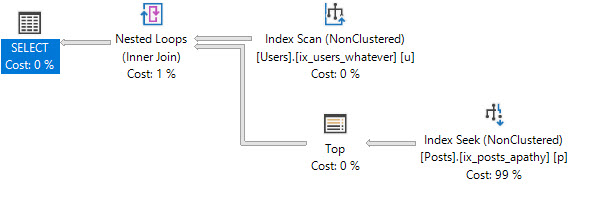
SQL Server uses the Reputation index for the count query:

Scanning the Reputation index

It does a seek to Reputation = 1, and reads all of the users up to Reputation = 2. If you hover your mouse over the Index Seek operator on modern versions of SQL Server, you get some interesting details:

Seek details
  • Estimated Number of Rows to be Read = 3.3 million
  • Actual Number of Rows Read = 3.3 million
  • Actual Number of Rows = 3.3 million

There are a lot of people at Stack who only have 1 reputation point. SQL Server knows this because of the statistics created when the IX_Reputation index was created. So far, so good.

Now let’s filter for two things.

Let’s add a second part to our WHERE clause:

SQL Server won’t use the Reputation index for this query because so many users match Reputation = 1, and it would have to do key lookups across all of them to get all their DisplayNames. That wouldn’t be efficient, so it just chooses to do a clustered index scan.

I’m the man with the scan

Not a surprise there – we’re going to need to create an index. First, let’s try just adding DisplayName to our existing index:

Run our query again, and it uses the new index:

Index on Reputation, DisplayName

SQL Server can seek to Reputation = 1, and then seek to the rows where DisplayName = ‘Brent Ozar’. Hover your mouse over the Index Seek, and now not only are we producing (outputting) less rows, but we’re also reading way less rows:
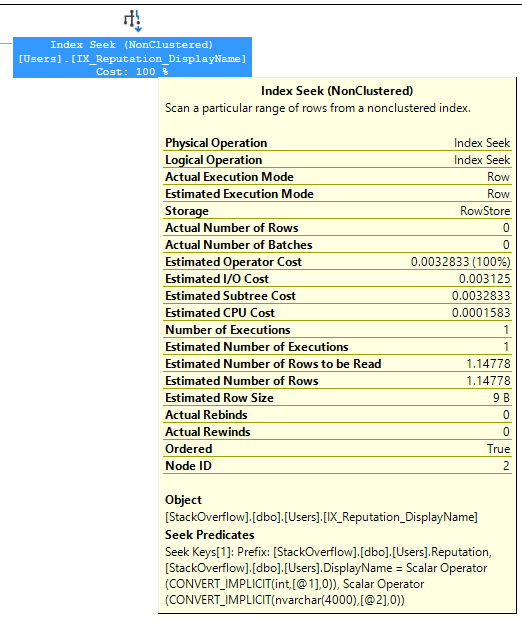
Selective, just like me
  • Estimated Number of Rows to be Read = 1.15
  • Actual Number of Rows Read = well, unknown, hidden, but trust me, none were read because…
  • Actual Number of Rows = 0

That’s a super-fast operation! Good stuff. If we drop that index, and replace it with one where DisplayName goes first:

And run our query again, SQL Server uses the index. Let’s look at the properties on that index’s seek:

Seek on DisplayName, Reputation
  • Estimated Number of Rows to be Read = 1
  • Actual Number of Rows Read = well, unknown, hidden, but trust me, none were read because…
  • Actual Number of Rows = 0

In this case, it doesn’t matter which field goes first. We’re searching for an equality on two columns, so we can seek directly on both of them.

Let’s try a different search query, though.

Instead of equalities on both things in the WHERE clause, let’s have one of them be an equality, and one of them be a range scan. Let’s say Reputation > 1 – which is a minority of the table. (The majority have Reputation = 1.)

Since we still have an index on DisplayName, Reputation, the query plan does a seek on that index – seeking directly to DisplayName = ‘Brent Ozar’ – and then scans through all of those folks looking for the ones where Reputation > 1. It’s called a seek because that’s how we start, basically:

Quick seek

If I hover my mouse over the seek to see the properties:
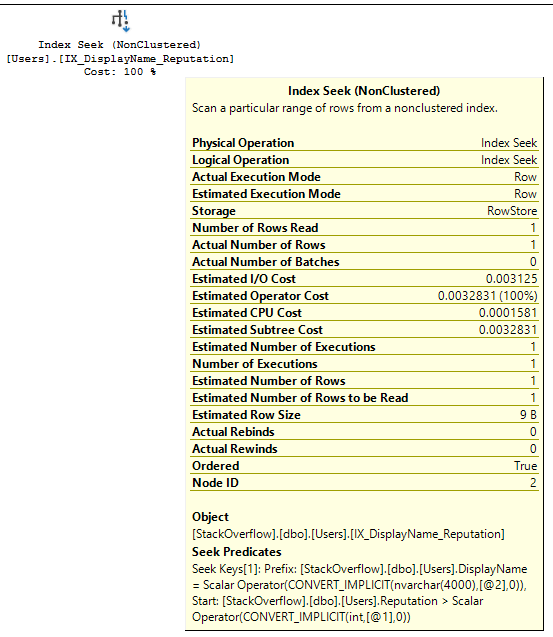
Still a nice quick seek
  • Estimated Number of Rows to be Read = 1
  • Actual Number of Rows Read = 1
  • Actual Number of Rows = 1

That’s a nice, lightweight, fast seek. But now let’s drop that index, and replace it with one where Reputation is first:

And run our query again. It’s a seek, but, uh…wait…

“Seek”

We get a missing index request because SQL Server knows there’s a problem here. Hover your mouse over the index seek to see the properties, and you’ll see it too:

Bad seek, no soup for you
  • Estimated Number of Rows to be Read = 1,999,120
  • Actual Number of Rows Read = 1,999,122
  • Actual Number of Rows = 1

SQL Server had to read two million users in order to find the row that matched. That’s not a seek, it’s arms race. Because the data’s organized by Reputation first, SQL Server “seeks” to the first Reputation >1 – meaning, it seeks to Reputation = 2 – but then it has to keep reading the rest of the table. Brent Ozar could be anywhere, at any reputation level.

Index field order matters a LOT.

In order to pick the right field order, you need to understand the selectivity of the data, the selectivity of your queries, and whether you’re doing equality searches or inequality searches, and what happens to the data after you retrieve it – like how it needs to be joined or ordered.

First Responder Kit Release: Like pssdiag, if pssdiag had parents who cared

I went to the PFE and guess what he told me?
Guess what he told me?
He said girl you better try fix those spinlocks too
No matter what you do, now run this tool

You can download the updated FirstResponderKit.zip here.

sp_Blitz Improvements
#1620@AAvella schooled us on Group Policy registry settings. Someday, we’ll get our act together as a group.
#1631: We’ll now tell you if there’s an update available for your SQL Server version. For most of you, that’s a yes.
#1633: If your plan cache has been cleared yesterday, we check the size of the userstore_tokenpermcache to see if it’s >2gb.
#1634: Update RDS compatibility. We had some recent checks built that didn’t get along well with it.

sp_BlitzCache Improvements
#1612@bertwagner has perfect hair, and perfect syntax. We bow to his knowledge of equals signs.
#1624@digitalohm let us know about a BlitzCache error when looking at large query plans.

sp_BlitzFirst Improvements
#1623@stgioia Doesn’t need to be warned about log shipping running. It should be running. You should check on that.

sp_BlitzIndex Improvements
#1610@way0utwest thinks dta indexes are poorly named, and we agree! Now if you look over in the create t-sql column of sp_BlitzIndex, we’ll give you rename commands for your dta indexes.
#1626: Brent was doing some documentation digging, and decided we should show you the page latch and io waits in dm_db_index_operational_stats when available. That Brent, always wanting to show you things.

sp_BlitzQueryStore Improvements
#1627@OmnipotentOwl is working hard and playing harder in Azure, and fixed up our version checks for Managed Instances. Oh, you don’t have a Managed Instance? Maybe try being less dull. All the cool kids have one.
#1624: Same as BlitzCache

sp_DatabaseRestore Improvements
#1645@digitalohm added the ability to choose between executing and printing commands
#1653@ShawnCrocker Got us on the right path, and switched parts of the code over to use xp_dirtree instead of xp_cmdshell
#1657@ShawnCrocker Fixed up parts of the code that weren’t using CommandExecute.

PowerBI
Nothing this time around

sp_BlitzLock
Nothing this time around

sp_BlitzInMemoryOLTP Improvements
Nothing this time around

sp_BlitzWho Improvements
Nothing this time around

sp_BlitzBackups Improvements
Nothing this time around

sp_AllNightLog and sp_AllNightLog_Setup Improvements
Nothing this time around

sp_foreachdb Improvements
Nothing this time around

For Support

When you have questions about how the tools work, talk with the community in the #FirstResponderKit Slack channel. If you need a free invite, hit SQLslack.com. Be patient – it’s staffed with volunteers who have day jobs, heh.

When you find a bug or want something changed, read the contributing.md file.

When you have a question about what the scripts found, first make sure you read the “More Details” URL for any warning you find. We put a lot of work into documentation, and we wouldn’t want someone to yell at you to go read the fine manual. After that, when you’ve still got questions about how something works in SQL Server, post a question at DBA.StackExchange.com and the community (that includes us!) will help. Include exact errors and any applicable screenshots, your SQL Server version number (including the build #), and the version of the tool you’re working with.

You can download the updated FirstResponderKit.zip here.


How The Cloud Turns Performance Tuning Into Cost Savings

Cloud Computing
0

Barely Metal

In Ye Olde Olden Dayyes, companies would outline hardware budgets and refresh cycles.

Every 3-5 years, they’d lick a thumb and hold it up to the CPU fans. If they felt a soft breeze, they’d buy the same number of CPUs. If they felt a hard breeze, they’d buy a few more. This made the hardware buy more expensive, and of course drove up licensing costs.

For physical servers, performance tuners generally keep costs level. This started to change with VMs, and server consolidation projects. But even here, costs rarely went down more after the mortar dried.

Frankly Mr. Shankly

This is way different with the cloud. In Azure, the ever-infuriating DTU reigns supreme, but machines are still priced by size. You can change that size, and how much a machine costs you by pushing a few buttons.

That means that you, as a performance tuner, can translate your skills into the kind of bottom line stuff that makes the people who decide salaries and bonuses very happy.

It does, however, require you to fight an extremely contrary urge: Hardware can only ever get bigger.

Shrinking Your Server

There’s obviously a lot to consider before decreasing hardware. You’ll need some long-term trending of performance data to prove your efforts aren’t a fluke, and that dialing CPUs back from 16 to 8 (just as an example) won’t backfire the next time there’s a surge of users. You also need to keep some hardware slack around if you’re expecting future growth.

Sonic Reducer

These are the kinds of things that companies are going to look for more and more from their DBAs and Developers, as things shift Cloudwards. People with the right set of skills go from being cost centers to savings centers.

Gaining the skills and confidence to do that can be a hard-won task. It doesn’t happen overnight, and it doesn’t happen unless you devote the time to it. Obviously my angle on it is that it makes you getting a budget for paid training (hopefully from us!) really easy.

Training is really important for you generally, to make sure your skills don’t end up full of moth holes, and that you learn the kind of changes you can make that will improve performance. Not the kind of flailing around that ends up with people chasing the wrong things and searching for a magical feature that will fix anything — Partitioning is a great example of this.

Cutting cloud costs has been coming up more and more as the reason why people have ended up in our classes. I’m sure other companies out there who do SQL Server training will tell you the same thing.

If there’s a click-baity scare line in here, it’s that if you don’t do it, someone else will.

I’d much rather you hear that from me now than after someone else has stolen your muffins.

Thanks for reading!

Brent says: one of my favorite SQL ConstantCare® moments so far is when I explained to a customer that their SQL Server is bored, and showed the metrics with proof. They dropped the server from 24 cores down to FOUR, and were fine afterwards. In the cloud, it’s so much easier for DBAs to provide value that pays off right away.


[Video] Why Performance Tuning Wisdom Needs Expiration Dates

Development, Videos
1 Comment

Several months ago, Erik said something like, “We should do a performance art piece where one person does the talking, while another person does demos that contradicts everything they say.”

I thought it was a brilliant idea. We just had to find the right place and time to try it, and find the right topic. When we got the chance to speak at the 24 Hours of PASS 2018, we figured it was a perfect fit.

Here’s how it went:

During the webcast, I played the part of an overconfident DBA with stale knowledge – hey, real stretch, I know – and Erik played the part of the person who really knew what was going on, running demos to contradict what I was saying.

This one was really fun to build. Erik and I worked on the demos in the weeks leading up to the session, trying to stitch together a series of old-school myths in a way that they played into a casual story, start to finish. It’s funny what they say – the more casual you want something to look, the harder you have to work on it – and that was really true here. Right up until the morning of the webcast, we were rehearsing and moving things around, trying to make it seem more natural.

It was especially tricky to deliver because part of the premise relied on Erik not talking at all, as if his microphone was broken, a la Penn and Teller. We didn’t want to break character. If some part of the demo went awry, he wasn’t supposed to speak up to say anything, or to say, “Hey, aren’t you supposed to be talking about ___ right now?” That takes a lot of rehearsal, plus confidence that the other person is gonna do what you expect, when you expect it.

We hope you like it – and if you do, join us at our PASS Summit pre-con, Performance Tuning in 21 Demos. Let’s have some fun while we learn.


Building SQL ConstantCare®: How We Use Feature Toggles

Development, SQL ConstantCare
0

In SQL ConstantCare®, you send in your SQL Server’s diagnostic data, our systems analyze it, and we email you a list of tasks you should perform to make your SQL Server faster and more reliable.

Some recommendations are really straightforward: for example, hey, you should turn off Priority Boost. It’s really easy to determine if Priority Boost is on or not, and it’s easy to give someone the right steps to turn it off. We coded the no-brainer stuff first. Now that we’re analyzing data for over 1,000 SQL Servers, though, we’re starting to think bigger.

For example, Erik recently coded a recommendation rule:

  • If your server has at least 32GB memory, and
  • Max memory is set to less than half of the server’s memory, then
  • You should revisit your max memory setting

Sounds straightforward, right? But hilariously, when I was picking a recommendation example for this blog post, I opened up the code for this rule, and we proceeded to have a 20-minute discussion in Slack about how the WHERE clause worked.

Building rules to generate accurate advice is hard.

So we need to roll out changes gradually.

To do it, here are some of the tables involved:

  • Registered_User – one row per customer
  • Registered_User_Level – each customer can be in one or more levels (level 1 = free users, level 2 = paid users, level 3 = early access to new rules)
  • Rule – one row for each thing we check about their data, like Erik’s new rule
  • Rule_User_Level – which rules belong to which user levels (so Erik’s new rule is only hooked up to the rule testers)

When we add a new rule, we:

  • Insert a row for it in Rule
  • Insert a row into Rule_User_Level for the new rule ID, for User_Level = 3 (early access to new rules)
  • Figure out which users should see it first, and put them in Registered_User_Level 3

When picking out which users should first see a brand new rule, we start by finding some users that should definitely get the advice, and some users that should definitely NOT get it. By this point, we’ve already tested it by manually running the queries against their data, but by letting it run on an automated basis, we’re just double-checking our assumptions.

It’s not just about testing the rule – it’s also about testing the end user reactions. People can reply and say, “Wait, that recommendation doesn’t make sense for me, and here’s why.” Their replies can influence our guidance – they might come up with something we’d never thought of before.

Then, as we gain confidence in the rule, we gradually add more users to the early-access group. Eventually, as we’re happy enough with it, we remove the users from the early-access group, and move the rule into User_Level 2 (all paid users.)

How this could be expanded

This design keeps things simple enough for our needs, but I know what you’re thinking, dear reader: “How do they test individual rules across different users at the same time?” The answer is that we don’t – at any given time, we’re beta testing a few different rules across the same small group of people. (This is why we have to be pretty confident in our rules already just by running them manually.)

In the future, it’d be cool if we also:

  • Identified new/beta rules with visual indicators in customer emails
  • Ran experiments across the entire population – like running a rule across everyone who submitted data yesterday, and returning a list of everyone who would have passed/failed that rule
  • Let users opt into riskier levels of rules – right now, we don’t want you seeing things until we’re extremely confident in the rules, but several users have told me, “we’re willing to be guinea pigs for whatever new experimental tests you want to run against our data”

To learn more about feature flags, check out:


[Video] Office Hours 2018/6/20 (With Transcriptions)

Videos
0

This week, Brent, Erik, and Richie discuss using foreign keys in a data warehouse, SQL Server virtualization on Hyper-V clusters, having all of your SQL Server instances under the same active directory account, updating stats, changing job ownership, why you would want to go to SQL Azure, and why they have an issue with replication.

Here’s the video on YouTube:

You can register to attend next week’s Office Hours, or subscribe to our podcast to listen on the go.

Enjoy the Podcast?

Don’t miss an episode, subscribe via iTunes, Stitcher or RSS.
Leave us a review in iTunes

Office Hours – 6-20-18


Can I use foreign keys on columnstore indexes?

Brent Ozar: Tom says, “Are foreign keys compatible with clustered column store indexes? Are you allowed to do foreign keys with column store indexes?”

Erik Darling: I think I remember there was – like, 2014, you couldn’t.

Brent Ozar: Yeah, he’s getting some kind of error in object explorer. He’s getting an error; column store index cannot be created on a table with a foreign key column. However, if you hit okay, it creates the clustered column store index. My guess is maybe you might even have an older version of SSMS where you’re running into this. I haven’t seen that for sure. And it may be creating the clustered column store index and ripping out the foreign key; who knows? We’ve had the discussion before about should you have foreign key relationships in a data warehouse. Well, let me rephrase this question to should you use foreign keys in a data warehouse?

Erik Darling: I generally don’t care and I usually err on the side of no just because when you’re doing ETL and you’re loading stuff, I don’t want the extra overhead of having to check that, especially when you get to the size of a data warehouse where ETL processes really start to matter. Like, you hit the terabyte plus size, you don’t want every single load to be checking over millions to billions of rows for foreign key integrity. Unique constraints are another one that I would avoid in there too. It’s just like, at that size, the benefit you get from column store far outweighs the benefits that you would get from unique constraints or foreign keys.

Brent Ozar: I’m with you. Richie, any thoughts?

Richie Rump: It should be taken care of in the OLTP.

Brent Ozar: Yeah, I’ve gotten burned so many times with data warehouses that I’ll have a bad file and I’ll want the rest of the files to still load because I only want to load the file that had the error. I’m going to load that again later just by itself, but I don’t want to stop other tables from loading just because I have one error in one file. I have such a limited nightly window, I’d rather get it out and done fast. And especially since you said column store indexes, that made me think it’s a reporting system; it’s probably not a transactional system. Somebody just had – Erik had a post this week about join elimination too. Foreign key join elimination, I’m so happy when it happens, but it’s so rare compared to other performance tweaks I can get.

Erik Darling: yeah, it’s a nice touch. Like, I appreciate the amount of time and Ph.D. students that Microsoft has thrown at the optimizer to get it to be as lazy as possible and get rid of that stuff as early in the plan as possible; it’s just not even thinking about it. I touched on it a little bit at my session at SQL Saturday New York when I was doing the optimizer demo. I touched on join elimination and stuff like that a little bit. Like, it’s really cool. I think it’s awesome, but I also just don’t count on it because who knows what some noodle-head is going to do to mess it up. So it’s not like I’m designing stuff to be, like, this is going to perfectly eliminate joins every single time. I’m like, this will probably happen most of the time, some of the time, somewhere in there.

Brent Ozar: And all it takes is one cumulative update where they tweak something and then all of a sudden you don’t get it anymore. It’s nuts.


So we’re getting started with Hyper-V…

Brent Ozar: Daryl says, “So we’re getting started with SQL Server virtualization on Hyper-V clusters.” Daryl, what year is this? Holy cow, you’re just now getting started.

Erik Darling: Hyper-V, of all the choices…

Brent Ozar: I wasn’t going to go there. [crosstalk]. I don’t know the last time we had a Hyper-V client.

Erik Darling: I had one. It was at least a year ago. It was to the point where I was just like, so, let’s look at some performance metrics, and they were just like…

Brent Ozar: We can’t.

Erik Darling: Yeah, you got some? I’ll buy some from you, some metrics that fell off a truck.

Brent Ozar: That’s so bad. [crosstalk] For those of you who haven’t played around with it before, VMware at least, whenever you’re looking at perfmon counters inside the guest, you can see data about the host and it automatically updates as you move from host to host. You can see things like how much CPU the other guests are using, how long you’re waiting for CPU time. Hyper-V, it’s left as an exercise for the reader. You’ve got to go monitor all the hosts and then you’ve got to correlate back to which guest was running on which host at which time; ain’t nobody got time for that.

So, Daryl says, “My server admin says we can pre-allocate CPUs or we can set the VM to dynamically allocate CPUs. What do you recommend?”

Erik Darling: Come on, man. This is your SQL Server. Why would you dynamically – you realize you have to pay for them, whether they’re dynamically assigned or not, right. You’re like – Microsoft doesn’t say, “Oh, well we can take seven grand off this month. Thy didn’t dynamically assign that.” No, assign the number of cores you need, adjust as necessary. That’s the beauty of virtualization, you know. You get to figure that stuff out. You could prep your machine if you know something big and bad is going to happen, if you have like a Black Friday sale or Christmas or whatever holidays you people sell stuff for. It’s nice to be able to pre-allocate those kinds of resources to a machine. Same thing, also – just because I use VMware for my home lab, I wouldn’t use it for production anything, but when I do home lab stuff, I use VMware. Over in the memory setting, make sure that’s not dynamic. Or if you leave it dynamic, make sure – I forget what the term is, but there’s a percentage down at the bottom, you want to have that up at like 80-90%. I just remember doing some load testing on SQL Servers in the past that were on Hyper-V. When I would leave the memory buffer percentage – I think the default is like 20% – things didn’t go well. Like, BlitzCache wouldn’t run, I thought there was a bug like I had massively messed up XML or something. As soon as I jacked that up to 80 or 90, everything ran really quickly. So that’s another little slider to be careful with VMware.

Brent Ozar: My whole problem with dynamic CPU and dynamic memory is they both default to relatively low numbers, so when you use the idea of dynamic CPU and dynamic memory, they’re going to default to, say, two cores and 8GB of RAM. What happens if your VM restarts? What happens if you do a patch? What happens if you have a failure and for some reason it moves from one host to another and you start at an artificially low number? Sure, someday it’s going to spin up and use more, but do you really want to deal with crappy performance at that time?

Erik Darling: It’s almost like another layer of CPU C-states, where you have to get the CPU, then they have to spin up, and then they get – it’s crazy…

Brent Ozar: Steve followed up and he said, “That sounded like Erik said no VMware in production.” I don’t think that’s what he meant.

Erik Darling: No, VMware is like – vStandard, right. Like if I had to do anything virtualized in production where things mattered, I would use VMware. I would not be using Hyper-V. that’s just how I feel about it.

Brent Ozar: Yeah, I know it was a good sell for a while because it was cheap, but I don’t know that they won that race.

Erik Darling: Just like the VMware, the tooling, the management stuff, the insights into what your guests are doing, all the metrics you can collect about things, it’s all centralized in vSphere. It’s really nice and it’s well worth the cost to have all that extra stuff, unless you just don’t need it. If you don’t need it, go ahead, Hyper-V away, but if I had to do anything serious, it would be VMware.

Brent Ozar: I always hear the Microsoft folks, the people who are really hardcore fanboys who will also say you can get all of that with System center, you just have to build it yourself. Yeah, but this is the year 2018, I don’t have time to build myself something and I’m going to do a really crappy job of it when I go and build it from scratch. And then when I walk out on vacation, all of a sudden, I have all these problems when I come back because somebody broke all my stuff.


Is it bad to use a single AD account for all my instances?

Brent Ozar: Daryl says, “All my 51 SQL Server instances are owned by the same active directory account. Is this terrible?”

Erik Darling: Not as long as nothing happens to that active directory account.

Brent Ozar: A great story there – one company I was working for, one of our employees was really pissed off and they left and they just happened to know that all of the SQL Servers were running under the same service account. It was set up that way long before I got there. I don’t know that I would have known anything different at the time. And what this person did was they went to Outlook Web Access and they tried to log in with the SQL Server account on purpose and they repeatedly used the wrong password on purpose, thereby locking out the SQL Server service account across all of my SQL Servers. That was a good time.

Erik Darling: I salute them.

Brent Ozar: I was so impressed. And the guy immediately knew that it worked because all our websites went down. God, that was brutal.

Erik Darling: So did you just unlock the account or did you have to change the password? Did you have to change…

Brent Ozar: The AD guys went – after we figured out what was going on, that the thing was getting locked out, because I’m like, I’m not doing anything. I don’t understand why it’s getting locked out. So they set it so that it could never be locked out again, but then, at the same point I’m like, now someone can just roll through and try every password over time. They have all the time in the world, so now I’ve got to start separating out all the services onto different service accounts.

Erik Darling: Which is no fun. That’s like no way that a DBA should be spending their time.

Brent Ozar: No return on investment there.

Erik Darling: End users are not like, woo-hoo, he did it. Yes, thank you, DBA Brent.

Richie Rump: I didn’t even notice anything happened.

Brent Ozar: Everything’s just as slow as it ever was.

Erik Darling: He did it; he made no difference.

Brent Ozar: Daryl follows up with, “I had a contractor change all of my database owners to SA. Is that okay?”

Erik Darling: I mean, I’d prefer that if I’m being honest about things. So, it’s not like if you have an agent job owned by an AD account, the AD account gets screwed; the agent job might start failing or whatever. It’s just as far as, like, when I think about users that I want to have elevated permissions on a database, I want to be able to assign those. I don’t want them to just have them because they’re the database owner. So having all the database owners be SA just makes that a little more clean and clear-cut to me and then I can assign – like, if that user needs SA on the database, I can give it to them, but they don’t just have it. They’re not going to be able to, like, fistfight SA for things.

Brent Ozar: And I think the public should hear too, in terms of how we handle database security at our company, right now there are changes that I need to make inside the database and I can’t do it because I’m not sysadmin on the database. I don’t even have write access to most of the tables, and I’d love that. I’m like, if something screws up, it’s not going to be because I fat-fingered an update statement because I don’t have permissions to do it.

Erik Darling: Yeah, we give all the security stuff to Richie’s German side.

Richie Rump: Yeah, they gave all the permissions to the guy who’s never been a DBA one day in his life.

Brent Ozar: And he’s doing the query tuning today too.


How should I handle disaster recovery for replication?

Brent Ozar: Steven says, “Do y’all have any recommendations for replication disaster recovery or is there anything that I should do besides just reinitializing replication from scratch?”

Erik Darling: I would argue for your use of replication for disaster recovery, Steven.

Brent Ozar: I think what he means – and I’m going to go out on a limb – I think what he means is he has replication and when he fails over to DR, he just wants to figure out how he’s going to make it working again.

Erik Darling: Oh, yeah, I don’t know then.

Brent Ozar: I don’t either.

Erik Darlin: Like capital R replication, it’s like I don’t know anything about it and I want to keep it that way because everything I hear about it is awful. It’s like, I don’t know, like Dallas BBQ. Like, I’ve never been there. It’s a restaurant chain in New York. There’s a few of them. People in there don’t look happy. I’ve never heard anyone coming out of there being like, that was the best barbeque I’ve ever had. I just kind of walk by like there but for the grace of god go I. Like not even – I’m going somewhere else.

Brent Ozar: People are drinking in there not because they’re happy, but because they’re sad.

Erik Darling: Yeah, and just big drinks that clearly came out of a machine with a little pour handle on it. Not anything that anyone cared about.

Brent Ozar: Yeah, that sounds – the only person on the team who’s ever done replication is Tara. Like, I’ve played around with it but not really done serious support in production. And she is very vehement that she does not want to support replication again either, so.

Erik Darling: Replication is so bad that it made her love Availability Groups. Just leave it at that.

Brent Ozar: It’s like some kind of Stockholm Syndrome. You’re not as bad as the kidnapper who made me deal with replication.


Should I flush the cache after updating stats?

Brent Ozar: Ronnie asks, “I was reading an article on updating table statistics using the update command. The author mentioned flushing the cache after updating stats using DBCC FREEPROCCACHE.” What the hell?

Erik Darling: You should fire that author.

Brent Ozar: Yeah, you should paste in and who that author was, Ronnie, if you remember it – we’re not going to mention their name on the air, but we’re going to make fun of them privately. He says, “Now I know that updates the cache at the server level, but I’m not sure if that’s a good idea or not. What are your thoughts on running DBCC FREEPROCCACHE?”

Erik Darling: Do you want to go first?

Brent Ozar: Would you like me to?

Erik Darling: It’s fine either way.

Brent Ozar: I don’t have a problem with it if somebody wants to do it because they think it’s going to solve a problem. The problem is with parameter sniffing, every new query that comes in from that point forward is getting optimized for whatever value someone happens to pass in. it’s like playing a whole lot of games of Russian roulette all at once. You’re just randomly spinning the barrel with whatever parameters get passed into a stored proc. I don’t like playing Russian roulette. I would rather not play that if I could so I would rather just coach the people in the – hey what do you think you’re fixing by running that command and let me see if I can fix it another way that doesn’t involve so many pistols pointed at my head.

Erik Darling: That is like Russian roulette with a Gatling gun. Like, one of those is just going to be it. So I think my problem with it is that it’s a very heavy-handed way of fixing a problem that’s probably pretty narrowly scoped. So you know, really it’s just like scorching the earth when you just need to pull a few weeds, I think. When you update stats anyway, if you had plans that were referencing them, they would be invalidated and likely recompile anyway, so there’s not a whole lot of value in also wiping out every other plan in the cache along with the ones that would be affected by the stats update. So stats update yes, free proc cache probably not. There are ways to target free proc cache to a specific SQL handle or whatever so you can, like, not go to a specific plan from cache, which is preferable to just wiping out the whole thing because seriously, you most likely don’t have a problem with the entire plan cache, just a few little pieces of it, like Brent said with the parameter sniffing.

Richie Rump: Why are you always so violent with the Russian people. I don’t understand…

Brent Ozar: The mafia and the gun jokes. I’ve been more cognizant of that lately. Like all of a sudden, I hear how many times I make gun references. And you would think I’m some sort of like violent person – I don’t watch boxing, I don’t own a gun, I never have. I fired a shotgun once and that was enough for me…

Erik Darling: He still has a bruise from it.

Brent Ozar: Yeah, these are not large arms. Recoil is not a word that’s friendly to me. Like, damn that was loud. If I wanted to hear something that loud I’d go to a Metallica concert – which I do, I mean, I like hearing things out loud, but you know, I don’t want to have to blow back on my arm whenever I do that.


Who should own my Agent jobs?

Brent Ozar: Daryl asks, “I wanted my contractor…” Daryl, why would you have a contractor? “I wanted my contractor to change my job ownership…” It’s probably the same contractor Richie’s using. “Job ownership to the same active directory account that owns the databases, but he changed the job ownerships to SA. Is that okay? Was I wrong to begin with? Who should usually own jobs?”

Erik Darling: I’m down with SA owning the jobs.

Brent Ozar: Yeah, I want the jobs to work even if some yo-yo leaves the company, locks their login, you know, if we disable someone’s login because they’re having problems.

Erik Darling: Also, have you ever run into a position where you needed a specific active directory account that would have permissions. Let’s say you had to access a FileShare way off in no-man’s land and you needed a specific account to do it. Have you ever run into that? Because that might be when you don’t want SA…

Brent Ozar: Yes, I have with agent jobs. I’ve had – like where I needed to deal with a specific file target, but I just gave the agent account permissions on that target, but that helps when I have a different agent account per server though too because if I had the same agent account across all my servers, that would suck. Suck is a strong word there, but…

Erik Darling: Less than ideal.

Brent Ozar: I would want to know, Daryl, more about the account that you wanted to use that wasn’t SA and why you wanted to use it. I don’t think we’d have a problem with that either. If you had a special AD account that you wanted to use for job ownerships, I think we’d be okay with that.

Richie Rump: Yeah, just let us know the URL to your domain and the user ID and we’ll try to lock you out.

Brent Ozar: We’ll check the password length for you. Just send us that…


Why would I want to go to SQL Azure?

Brent Ozar: Ron asks a very hard question. “Why would I want to go to SQL Azure?” Richie, why would you like to go to SQL Azure?

Richie Rump: I wouldn’t. I don’t know, I guess it depends on the app that I’m building, right. Do I need OLTP and I need to use Azure, well that’s probably [inaudible] that I need to go to. It’s not bad. I personally have never used it outside of just toying around with it, but if you’re familiar with SQL Server and you have to use Azure then go for it. Other than that, I’d probably just want to stay on-prem. If I have to go to a cloud, so you need SQL Server, do you need OLTP? There’s a lot of questions that need to be asked because now in the cloud, I can have any sort of database that I need and that’s a big bonus because now I can custom tailor my needs as the application to what data store is out there in the cloud. In fact, we have got an application that is using multiple – we’re using object data store and we’re using OLTP.

Brent Ozar: There’s one really narrow use case. Say that you’ve already got an application built and it doesn’t go across multiple databases; like it doesn’t do cross-database queries and you don’t want to host it on-premises, you want it up in the cloud with as little application changes as possible and you don’t use any of the features that Azure SQL DB doesn’t allow, agent jobs, for example, log shipping to other on-premises servers. Then that would be the use case where I would go if I wanted that hosted in somewhere that was really reliable and not in my company’s data center, it makes sense. But the instant that you trip to anything that Azure SQL DB doesn’t support – cross-database queries, the native way, agent jobs, all these other little features – then Azure SQL DB isn’t as good of a fit. Azure managed instances are a much more interesting fit. You’ve just got to make sure that the pricing makes sense for you and that their limitations like the number of replicas you have make sense for you as well.

Erik Darling: I think Azure managed instances are going to change people’s opinions about Azure pretty generally. There was a T-SQL Tuesday that was not well attended. There was like two posts on it because it was tell us about whatever experience you have with Azure, and there just wasn’t a whole lot of people being, like, let me tell you. Just because, you know, not a whole heck of a lot of adoption, especially – I don’t even know the right word for it. Like, I guess as far as people who are frequent SQL bloggers, no one’s is like, hurray Azure, my hero, you solved this massive problem for me. But managed instances, I think, are going to change a lot of that. managed instances have a lot of cool features about them. They’re sort of hybrid – you get agent jobs and a whole bunch of other stuff that you don’t get with Azure SQL DB. There’s a lot of good stuff about them and the hardware behind them is pretty beefy too, so you can put non-trivial applications up there and have them, you know, run pretty well, I think.


Why do you hate on replication?

Brent Ozar: Steven asks, “Why do you guys hate on replication?” Well I’ll be the first to answer on this one. I think it’s amazing when nothing in the app changes; like when absolutely nothing in the application isn’t going to change. Your queries aren’t going to change. Your tables aren’t going to change, your indexes aren’t going to change. But the instant that you have any changing in your application, like people add columns or drop columns to tables, they rework tables from scratch, they add stored procs and they drop stored procs, they add new databases. The more that this thing changes, the more fragile replication is and the more maintenance work that you have to put into it. Whereas when you look at alternative techniques like database mirroring, log shipping, always on availability groups, man, you can put a dinosaur in the database.

You can set the database on fire and it just keeps replicating off somewhere else. Security is less of a concern. The other problem I always ran into was people go, well I’m replicating so that I can offload the reporting query somewhere else. Wait, why are my reports three hours behind? Well, replication got behind because somebody did a bunch of updates or alter index – you know, changing a bunch of things – that cause it to have to do a new snapshot and reseed over again. Well, that’s unacceptable, we needed it to absolutely positively be on time. And it just doesn’t work that way.

Michael says, “Replication is a very powerful and useful tool.” So is a table-saw, you just don’t see me with one in my office. He says, “Especially for things like copying data from a prod SQL instance to a prod reporting instance. You offload the reporting query from your prod database…” Yeah, absolutely, it’s just the problem is as those tables change, replication is the least set it and forget it solution inside of Microsoft it is really not set it and forget it.

Erik Darling: So like, because we’ve hated on replication plenty, I will give replication one point in its favor and that is you can have replication move stuff over and then you can have like a post script run that adds different indexes for reporting. So with an AG, with mirroring, with log shipping, if you have a report that’s offloaded and is running like crap, you don’t get to create that index just on the secondary so that you can, you know, make that report better there. You need that index on the primary and that gets replicated over to the secondary. So that’s not great. So replication does have that in its favor. You can index specifically for, you know, whatever crazy Kookamunga reporting queries you have going on. So that’s nice. That’s a nice touch for the replication, but I would rather use almost anything else that’s less fragile, less prone to – I don’t want to have to send out tracer tokens and figure out what’s slow where. No thank you.

Brent Ozar: Not replicating deletes is another pro for it. You can only have your deletes happen on the production environment and not push them off to a secondary, so you can have a small primary and then a really large secondary. That’s cool too. Alright, and on that bombshell, we will leave. Thanks everybody for hanging out with us this Office Hours and we will see y’all next week. Adios!


Announcing My @DevIntersection Pre-Con: Developer’s Guide to SQL Server Performance

Company News
0

You’ve built an application that uses SQL Server or Azure SQL DB as a back end, and it’s starting to get popular. Unfortunately, the queries just aren’t returning data fast enough. You’ve run a few diagnostic queries, but you’re overwhelmed with conflicting information and no smoking gun. You want better performance by making as few changes as possible, but you don’t know where to start.

I’m here to help: I’m Brent Ozar, a SQL Server guy who does this for a living. In one fast paced day, you’ll learn 4 big lessons: how to determine your SQL Server’s biggest bottleneck, how to fix it with index tuning, and how to identify which queries to fix, and how to prove if it’s a hardware problem. At the end of the day, you won’t be a SQL Server expert – but you’ll be much, much more confident in your ability to understand what’s happening inside the black box.

As a special bonus, you’ll get a free year of SQL ConstantCare. That gives you access to dozens of hours of self-paced videos on performance tuning and databases, plus personal mentoring emails from me about the production SQL Server challenges you’re facing.

  • Where: MGM Grand, Las Vegas, NV
  • Why: DevIntersection, woohoo! Hang out with me, Paul Randal, Kimberly Tripp, Scott Hanselman, David Pless, Kathleen Dollard, Julie Lerman, Scott Guthrie, and more
  • When: December 2, 2018

Use coupon code OZAR to save $50 on your registration.

Register before July 10th, and depending on which package you pick, you can get an XBOX ONE X, an Acer Mixed Reality Headset, or a $200 gift card. Hubba hubba!


Job Duties for Database Developers, Development DBAs, and Production DBAs

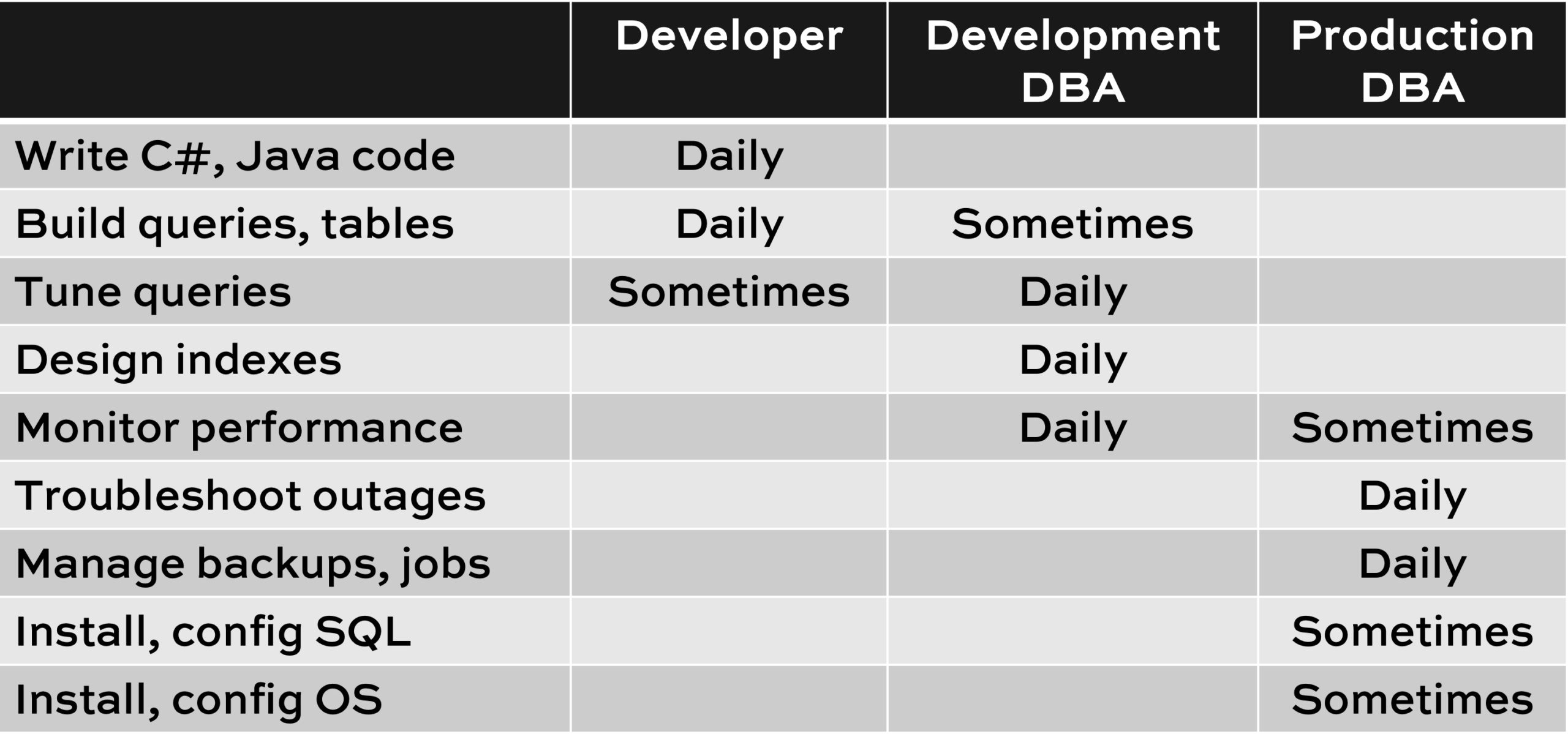
At the start of my classes and calls, I ask folks to introduce themselves – not by what it says on their email signature, but by the kind of tasks they spend most of their time on. Here’s what I show onscreen to help illustrate it:

Down the left hand side of the screen are the list of things involved with building and hosting a database application. Developers generally start their careers from the top and work down, gradually getting more involved with the database engine. Systems administrators start from the bottom and work up.

Sometimes folks will say, “I do all that stuff.” Yes, of course you know how to do all of that, but pay attention to what it says inside the boxes: which ones do you do daily, versus just every now and then? Like me, sure, I can design a table – but I don’t do that every day.

When you’re a junior jack-of-all-trades in a shop with just a couple/few database servers, you do whatever gets thrown your way. You find yourself jumping around from task to task. You tend to Google everything you’re doing, making sure you’re doing it right, and reading as you go. I used to be the guy responsible for the servers, the desktops, the printers, cobbling together a web app with “Classic” ASP (and I use that term very loosely), and oh yeah, the database server. However, that job role is not database developer, development DBA, nor production DBA. It’s just jack-of-all-trades.

All 3 of those positions – database developer, dev DBA, and prod DBA – can make good money, as evidenced in our annual salary survey. But as you’re thinking about your future career direction and the next job role you want to take, think about which of those duties you love doing the most – the ones you’d want to be doing daily – and that determines where you’ll be the happiest.

Generally speaking, for every 20 developers that you have, you’ll probably need 1 full time database development DBA (aka Dev DBA). 20 people slinging queries can easily keep 1 person busy full time monitoring those queries and tuning them. If you don’t have this position, you’ll likely spend more on hardware running those queries, plus more time troubleshooting questions around why the application is slow. It’s just a matter of choosing whether you want to spend the money on the Dev DBA role, or spend the money on hardware & licensing.

If those 20 developers haven’t been to any formal T-SQL authoring or tuning classes, haven’t read Itzik Ben-Gan’s books, etc, then you may need even more Dev DBA time.


300 Blogs And Running

Humor
26 Comments

Why Bother Blogging?

I blog primarily because there’s a Certain Kind of Person that irks me to no end.

The kind of person who:

  • Withholds information (you wouldn’t understand anyway)
  • Mocks people for not knowing what they know (oh, you silly things)
  • Uses the people they mock to validate their necessity (you’d be lost without me)

It’s an ego club that I don’t want to be a part of, and the kind of people who take great glee in being part of this sort of club are unfortunately all too common.

When I learn something, I immediately want everyone else to know it, too. I want it in as many hands as possible.

I don’t even want to charge people for it. That’s only when I have to repeat myself.

The same goes for answering questions at sites like Stack Exchange. I joke about the badge/reputation feedback mechanism a lot, but at the heart of things, I really do hope that every time my Imaginary Life Bucks go up, that it’s because I’ve helped someone out in some way.

The more people who Know A Thing, the better.

That means problems get solved faster, problems get avoided sooner, and hopefully no one has to spend hours or days of their lives banging their head against a problem.

Braining Day

What I’d love for you to take from my writing is that learning about SQL Server is like doing a puzzle that never quite ends.

The pieces I’ve put together are pieces that I picked up from a long list of people who have taken the time to write and teach things over the years — they deserve all the credit, really. My pieces are pretty small in the Grand Scheme of Things, but my aim is to leave the Grand Scheme of Things a little bit more put-together than I found them. A bit less… Fragmented.

Tee-hee.

You know why? I have kids. I don’t want them spending a single second having to think about what a primary key is. One of my grandfathers was a book binder. I’m pretty sure he never clocked out thinking “golly and gosh, I sure do hope my kids someday know the joy of an honest day’s gluing.”

In the same regard, I don’t want you, dear reader, having to glue all this stuff together on your own. The more pieces I put firmly in place, the less time you have to spend sniffing glue and having sticky fingers.

Not that that’s a bad way to spend a weekend.

Y’all Ain’t Not Nothin’

I know that as far as SQL bloggers go, I’m not extraordinary in any way. There are people who are better at writing, teaching, visualizing, and who are a heck of a lot smarter than I am.

Most of them are probably far more sober, too. Perhaps there’s a connection?

Nah. Let’s move on.

I really just want to be consistent. I don’t want to be one of those Vanishing Bloggers. The one who checks in every 6 months with a promise to blog more and a vague update about being really busy with this or that. That is, in the words of a far more consistent writer, a lot of cockadoodie.

We’re all busy. You’re either writing or you’re not.

If I’m writing consistently then I’m learning consistently. If I’m learning consistently then I’m putting more of those pieces we talked about together.

The more often this happens, the better.

The Big Payback

None of this would have been possible without the vision, extreme patience, and hard work of many other people.

My wife, for being very understanding about the amount of time I need to spend staring at glowing rectangles.

Brent, of course, for not firing me.

Kendra and Jeremiah for overlooking my mediocre interviewing skills.

Paul White and Joe Obbish for making fun of me until I get things (mostly) right.

And of course you, dear reader (and sometimes tolerable comment-leaver), for putting up with with my pop culture references that end in 1989.

As always, Thanks for Reading!


How to Fix sp_BlitzIndex Aggressive Indexes Warnings

sp_BlitzIndex
14 Comments

sp_BlitzIndex gives your indexes a psychiatrist-style evaluation. It’s a lot like a real psychiatrist: it’s just flagging behaviors, and there’s not necessarily anything wrong with being a hoarder, or a workaholic, or a furry. They’re just behavioral traits. Let your freak flag fly.

One of the warnings is “Aggressive Indexes,” which means sys.dm_db_operational_stats reports minutes of blocking happening at the row or page level on this index. That doesn’t mean this index is the problem, though – it just means it’s involved.

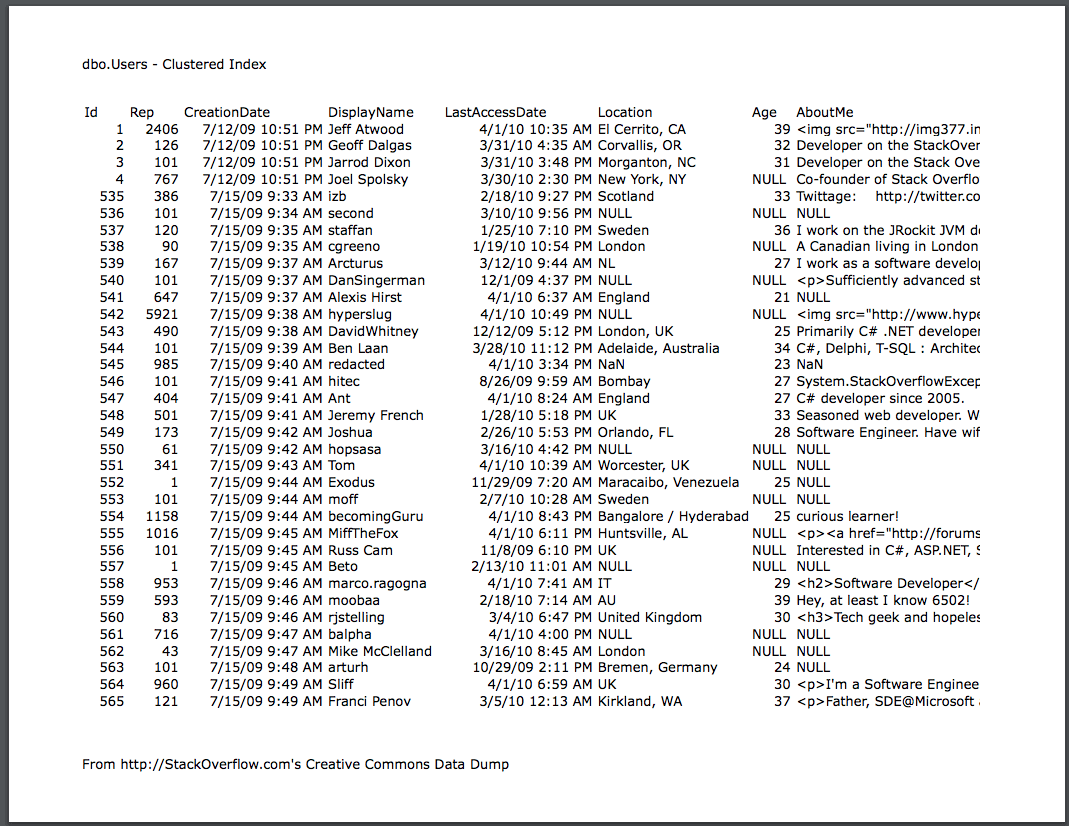
Say we’re working with the dbo.Users table from my free How to Think Like the Engine class. Let’s say we’ve only got the clustered index, aka the white pages:

dbo.Users clustered index

And let’s say you’re constantly running this query at the same time other folks are trying to run their own queries:

There will be a lot of blocking on the clustered index of the dbo.Users table – because that’s the only index we have. sp_BlitzIndex may report “Aggressive Indexes”, and point to the clustered index as being involved.

However, that doesn’t mean you need to DROP that index – it means you probably need to add other indexes to support your queries, like perhaps an index on DisplayName.

On the flip side, what if you’ve got dozens of indexes – on every field of the table – and they all include the Reputation field? Every time we run our UPDATE query, we’re going to need to gather locks across all those indexes in order to update the included Reputation field. We may end up with Aggressive Indexes warnings, but here, it’s not because we need to add more. It’s because we need to prune down our indexes.

Fixing blocking problems is about finding the right balance of enough indexes to support our workload, but not so many indexes that they slow down our delete/update/insert (DUI) queries. That’s why I talk about my rule of 5 & 5: around 5 indexes per table, and around 5 fields (or less) per index. (To learn more about that balance, check out my 3-day Mastering Index Tuning course.)

To make that troubleshooting easier, as of this month’s release, sp_BlitzIndex’s “Aggressive Indexes” warning comes in a few variants:

  • Aggressive Under-Indexing: reported when there’s a lot of blocking, and the table has 0-3 nonclustered indexes. You probably need to add the right indexes to support your DUI queries.
  • Aggressive Over-Indexing: when there’s a lot of blocking on a table with 10+ indexes. Your DUI queries are probably getting held up by acquiring locks across many of these indexes to update ’em.
  • Aggressive Indexes: we’re not judging quantity here because you’ve got 5-9 indexes. The table probably just has the wrong indexes, but remember, we’re not judgmental here. We like just the right amount of wrong. However, you’ve got the wrong amount of wrong here, and you probably need to ditch the indexes that aren’t getting used, and add better indexes to support your DUI queries. Start examining the reads vs writes columns.

Here’s an example from a demo in Stack Overflow:

Aggressive Indexes details

Now, remember, it isn’t an absolute slam-dunk: you still have to examine the indexes to figure out the right solution. I’ve seen situations where even 2-3 indexes were too many (especially if they included all of the fields in the entire table), and I’ve seen situations where a few dozen indexes were completely okay. sp_BlitzIndex is just about helping you catch behavioral patterns. It’s up to you to decide just how much freakiness you’re okay with.

I’m okay with a lot. Come sit by me.

Next steps for learning:


A Surprising Simplification Limitation

When It Comes To Simplification

Rob Farley has my favorite material on it. There’s an incredible amount of laziness ingenuity built into the optimizer to keep your servers from doing unnecessary work.

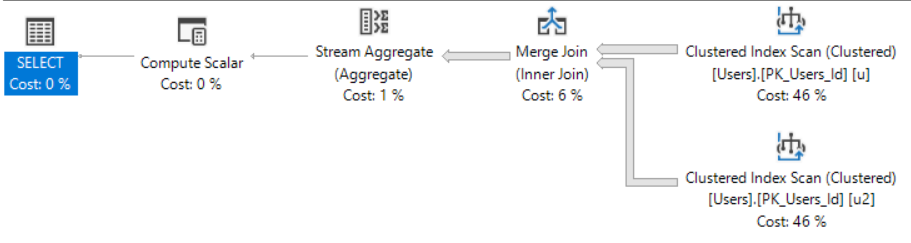
That’s why I’d expect a query like this to throw away the join:

After all, we’re joining the Users table to itself on the PK/CX. This doesn’t stand a chance at eliminating rows, producing duplicate rows, or producing NULL values. We’re only getting a count of the PK/CX, which isn’t NULLable anyway and…

Well, you see my point. It’s utterly useless as a JOIN.

Huh.

This isn’t one of those cheeky moments where I show you that the second index scan doesn’t do any work or return any rows, either.

If we compare the stats time and IO of these two queries:

The second one does exactly twice the IO.

What Does This Mean For You?

Probably not much, unless you need to make a query do a lot of extra work without changing the logic.

Is this a major flaw in SQL Server’s optimizer? No, not at all.

In fact, if you work at Microsoft on the optimizer team, and you’re reading this, don’t spend one second trying to change the behavior. People aren’t out there doing this and hitting the roof about it.

It’s just one of those things that caught my attention while I was writing some demos up.

Thanks for reading!


Updating Paste The Plan to use the Serverless Framework

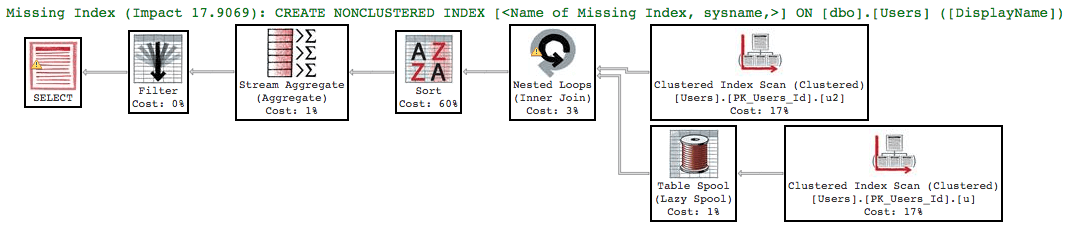
I just updated PasteThePlan, and the change you’ll notice first is that we’re using the latest version of Justin Pealing’s html-query-plan. It adds missing index hints, yellow bangs for warnings like implicit conversions and no join predicate, and more. Check out this example plan:

PasteThePlan, June 2018 Edition

Plus variable line widths for different amounts of data:

Variable line widths

One of the behind-the-scenes updates that you can’t see is that we’re now using the Serverless Framework. If you haven’t heard of the Serverless Framework that’s okay, it’s still fairly new. I’ve been using the Serverless Framework over the past year or so on other projects, and I figured it’s about time to start using it with Paste The Plan. The Serverless Framework is a huge help in deploying serverless applications to the cloud.

Before Serverless, in order to deploy a Paste The Plan function to Amazon Web Services, I had to:

  1. Run a gulp function that collected the necessary files and place it in a deployment folder.
  2. Zip the deployment folder.
  3. Go to the function in the Lambda control panel, upload the zip file, and save.

That doesn’t sound like much work, but I had to create and maintain those gulp functions that moved all of the files related to the function. Let’s just say it’s a bit messy. But the biggest problem is that these steps take time, and when you’re testing these functions in the cloud you want to move fast.

This is where the Serverless Framework comes in. The Serverless Framework packages and deploys serverless functions to the cloud. One of the best things about the Serverless Framework is that It’s not tied to any cloud provider. It works with cloud providers AWS, Azure, and Google Cloud. It even works with more obscure cloud providers like OpenWhisk and Kubeless. With the Serverless framework deployment is just one command.

In order to put Paste The Plan in serverless deployment heaven I had to accomplish the following steps:

  1. Install Serverless Framework via NPM
  2. Configure Serverless yaml file
  3. Configure environment yaml file
  4. Ensure package.json has the correct packages

Install Serverless Framework via NPM

This was the easiest step since I already had it installed. But if you’re really interested in how to install the Serverless Framewok then with NPM (Node Package Manager) installed use the following command:

And that’s it. It’s installed. Pretty easy.

Configure Serverless yaml file

The serverless.yml file is the magic of the Serverless Framework. This file is where you tell the Serverless Framework about your function(s) and your cloud environment. From here you can define what files are packaged, the settings of your function, and the role the function is associated with. But my favorite thing that you can do in the serverless.yml file is create other cloud services. You can create S3 buckets, roles, policies, Virtual Private Clouds, API Gateways, queues, and pretty much cloud service you can think of. This is extremely powerful. This means that you can configure entire serverless applications within one file and deploy them in one command. This also means that, if configured correctly, you can deploy stage environments via a single command. See the Serverless Framework documentation on how to configure the serverless.yml file for your cloud provider.

Configure environment yaml file

I had been using the dotenv npm package to use environment variables. I had to do this because Paste The Plan was created before the Lambda service had environment variables available. The environment yaml file can be named what ever you like. I prefer to use the functionname-env.yml format. You can then specify the environment yaml filename in the Serverless yaml file. In the case of Paste The Plan, it was pretty easy to reformat the dotenv environment file into the environment yaml format.

One of the things that I had to do was merge configuration files. For dotenv we had two configuration files for each function, one for production and one for development. For the Serverless Framework the environment file needed to be one file. So in the Serverless environment file we defined two sections, one for prod and one for dev, and placed the appropriate settings under each.

Ensure package.json has the correct packages

Each function in Paste The Plan had it’s own package.json. This file is created by NPM and has a list of the packages that the function uses. As it turns out there were a few unnecessary packages in package.json.

Now this didn’t affect the code, but it does affect the performance. The general rule with serverless is the larger your function is in size the slower it will take to start up. Since we have no control over when a function is started or stopped it’s best to keep the size of the function as small as possible. When going through the package.json files I noticed a few were referencing the aws-sdk. We don’t really need this package in the function because all Lambda instances already have the aws-sdk installed. I also removed references to dotenv since we wouldn’t be using it anymore.

Deployment through the Serverless Framework

Getting all of this setup really wasn’t a big deal BUT getting it deployed was tougher. Because the functions already existed in Lambda, I had to delete the existing function. While the deployment through the Serverless Framework worked, access to the function through API Gateway broke. It turns out that the new function was missing a permission that the old function had. Once the permission was added everything worked.

Next steps

The goal of this exercise was to ease the pain of deployment to the cloud. The Serverless Framework has a bunch of features that I haven’t discussed. You can stream logs, invoke functions, and even run functions locally.

At some point I would like to put all of the resources in the serverless.yml file including the API Gateway configuration, virtual private network, S3 buckets, and security roles. Overall the Serverless Framework is pretty awesome, and if you’re using serverless architecture, you should be using this framework.

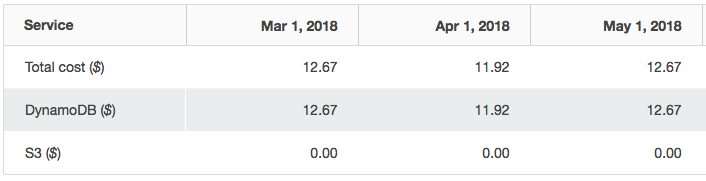
Brent says: as a small business owner who wants to give back to the community, I love serverless architecture because it keeps my hosting costs low. Here are the costs for PasteThePlan over the last few months – this is the kind of community initiative I can totally sustain:

Cheep cheep

DynamoDB is the NoSQL database we’re using, and S3 is where we store the plan files. The prices on that part don’t even round up to a penny! Gotta love the cloud.


[Video] Office Hours 2018/6/13 (With Transcriptions)

This week, Brent and Richie discuss using full-text index, Elasticsearch, server restart issues, sp_blitzfirst, Always On availability groups, issues with users connecting to SQL Server, learning the basics of Python on SQL Server 2017, VMWare Hyper-V configuration issue, and more.

Here’s the video on YouTube:

You can register to attend next week’s Office Hours, or subscribe to our podcast to listen on the go.

Enjoy the Podcast?

Don’t miss an episode, subscribe via iTunes, Stitcher or RSS.
Leave us a review in iTunes


Should I use SQL Server’s full text indexing?

Brent Ozar: Ron asks, “Recommendations for using full-text index. My database is about 50GB. I’m going to want to index about five tables with about a million rows each. 30% of the database is images, which doesn’t need to be indexed.” So I guess 70% times 50GB – about 35GB. Richie, if you wanted to full-text index 35GB worth of data, what would you do?

Richie Rump: Elasticsearch.

Brent Ozar: And that – how do you go about implementing that or where would you recommend that someone go read for more information about how?

Richie Rump: I don’t know, I guess Pluralsight would be as good a place as any to start. You know, because at least then you could get up and running really, really quickly, at least on easy scenarios and at least to get something out there and cranking. The one thing you do have to worry about is security; if you have any data that need to be secure, I’m not quite sure how you would necessarily handle that if it needs to be encrypted or something like that. I think they’ve got some stuff in there, but I haven’t taken a look at it since I started working here, oddly enough. So it’s at least three years or something like that, but yeah, Elasticsearch, there’s so much more you could do with Elasticsearch than you can with full-text search in SQL Server.

I mean, just the querying scenarios alone are just – they’re amazing, they’re phenomenal. You could do querying from URLs. I mean, it is, right now, the gold standard if you want to do any sort of things like that. So, take a look in Elasticsearch. I guess Solr is another one, but Elasticsearch is just a step ahead of Solr at any given time, so yeah, check that out.

Brent Ozar: You might be wondering why we don’t recommend SQL Server’s full-text indexing. It’s fine if you need to get started and you can literally only have one box. Like, they’re like, sorry, you can only have one server; that’s all you can ever have. But you can run Elastic on VMs, just as long as you can implement cheap VMs. It’s open source, you can run it on Linux, it’s free.

Richie Rump: Yeah, and you know, just from the what you can do from the query scenario, I mean, if you want to query – there’s like keywords you can’t use inside full-text search. And I mean, you start scratching your head, like, why can’t I do that? That doesn’t make any sense. Well, you can do it from a URL perspective in Elasticsearch and it’s all there and you can get pretty complicated, you know, searching scenarios, digging into certain things. It’s a big rabbit hole once you start getting down that, but man, it’s a fun rabbit hole when you start figuring stuff out.

Brent Ozar: If you’re going to start something in the year 2018, you know, it makes more sense to go that way. One of the bumps we hit at Stack Overflow was you couldn’t search for a term like .NET 3.5; that combination of things, just punctuation and all that.

Richie Rump: Yeah, and I believe you do need to move the data over to Elasticsearch server. It’s not like it can plug into SQL Server and everything is grand. So you will have to worry about getting data out and those types of things. But man, the power you get compared to what something you get in SQL Server, which they haven’t touched in how long, Brent? Was it 2005?

Brent Ozar: No, they did a redo of it in 2010 or – I think it was 2010. In 2008 R2 was when I think they did the redo, but…

Richie Rump: But even then, it just pales in comparison to what we can do these days with Elasticsearch and Solr.

Brent Ozar: This is also why you see people getting so excited about NoSQL databases. I was just talking to a user group last night about that. they said there was all this buzz about NoSQL databases and what is it that they can do that we can’t do. And they just make design choices. For example, with Elasticsearch, there’s not really the concept of security and auditing, it’s just anybody who is on the network could make queries against that server. And for a lot of stuff, that’s fine. You know, for a lot of kind of full-text stuff that you’re doing, products in a catalog et cetera, it’s totally okay and is so insanely blazing fast because that’s what it’s designed to do. With SQL Server’s full-text search, they kind of stapled it into the database engine.

Richie Rump: Yeah, and then you inverse that, right. And it’s like, if you want to start storing data in Elasticsearch, that doesn’t make any sense whatsoever, you know. So when you start looking at the specialized tools to do specialized things, like searching or document storage and things like that, that’s what you use NoSQL for and it’s in addition to what you need to do with SQL Server, not instead of.

Brent Ozar: That’s also a great way of saying it because I believe that if you could only pick one database, like if you’re only allowed to run just one data persistence layer, you’re only allowed to use one database, I think you could do a lot worse than SQL Server. SQL Server does a lot of things really well. But as soon as you start going, my needs are high enough that I want to add in a different layer or a different data persistence area, then that’s where these other solutions are phenomenal.

Richie Rump: And that’s where you really need to get to understand what my requirements are, what my needs are, what are the needs of the business in the future and those types of things, you know, and really pie in the sky. Well what do we really need to do and if I get this one thing done and it’s really successful, what’s the next step? And if they tell you, well we want to do more of that, then it’s more like, well, SQL Server can’t do more. I mean, we’ve hit the limit at version one. So at that point, would it make sense to go further out and what not? So these are the types of questions that you need to start asking your business and the people who know the functionality because you probably won’t know right off the bat. You could just say, oh yeah SQL Server will get that done, but maybe in their head, two years down the road, they’re thinking something else so you will need that room to grow.

Brent Ozar: Yeah, and I don’t think full-text is an area that Microsoft is really investing heavily in, in SQL Server. I think they’re adding lots of functionality to different areas; I don’t think full-text search is a big area of focus for them.

Richie Rump: You know, it’s one of those things, you’re not really growing, right. I mean, you kind of understand the scope of everything and Elasticsearch kind of handles all of that and they’re not really adding a ton of new features into Elasticsearch either. I mean, it kind of is what it is, so…

Brent Ozar: Yeah, does what it says on the label.


My SQL Server restarted. Where should I look?

Brent Ozar: Pablo says, “Ola amigos, the last four days, my virtual SQL Server got restarted due to an energy outage. No Windows logs about it but extended events shows me a resource… Mem-physical high. Can something related to memory take down the server? Where can I check?” You know, that’s really a tough one. So mem-physical high, that doesn’t sound like you’re running into a problem. That sounds like, from what I remember with extended events, that you’re totally okay, like there’s plenty of memory available. So I wouldn’t dig deeper into that one. That wouldn’t be the place that I would go. I would jump back to the Windows layer because usually, it’s not something at the SQL Server layer that causes the entire box to restart, usually it’s something else.


sp_BlitzFirst has no “more details” info….

Brent Ozar: Kevin says, “When I run sp_BlitzFirst and I click on the details link, it opens in a new window and no XML is there. Why is this?” It would depend on what was inside the details. I’m guessing it’s one of these click-to-see details. You could even just hover your mouse over it to see what it is or click on it in a different SSMS, like try someone else’s SSMS. But it might also be to do with the line that you’re on, like there’s no more details about that particular error.


How can I test connectivity between replicas?

Brent Ozar: Teshale says, “I was trying to add a node to my cluster for Always On high availability, but I keep getting an error that says the cluster node is not reachable. I can ping it both ways and also I can ping the clustered name.” Ooh, that’s good. What I bet it is, is it – so pings, when they go through, they’re on certain ports. Connecting to each other for clustering or for things like Always On Availability Groups are different ports

Though. So what I like to do is Telnet. So Telnet is – Richie and I are old enough to know Telnet. You,Teshale, are probably way not as old and grey as Richie and I…

Richie Rump: Before the web, Brent.

Brent Ozar: When I couldn’t access Gopher, I checked with Telnet…

Richie Rump: Finger, who needs that?

Brent Ozar: Oh, the finger command, and you would set a message so when someone fingered you, it would return a specific message and people would put jokes in there.

Richie Rump: Giving you the finger command.

Brent Ozar: Can’t understand why that didn’t catch on. So what you do is you Telnet into the ports that you’re trying to get access to. So for example, with Always On Availability Groups, it’s port number 5022 by default, you may have set a different one. So you would Telnet from one box to the other into port 5022 to see if you got a response back. Now, that’s pretty old school. I’m sure there are probably other ways to check to see if all the ports are reachable, but I would start there with 5022. And if you can’t, odds are there’s some kind of firewall going between those two SQL Servers. I guess I’d be a bad person if I didn’t also mention, I would make sure to check to see that you have exclusions set up on your firewall.

Brent Ozar: Teshale follows up and says that the firewall is off on both. That’s good. So at least it’s not coming from inside Windows. But what I worry about is that it’s somewhere in between the two boxes; network switches, stateful packet inspection, it could be any number of things that’s dropping connection in between the two of those. So Telnetting on port 5022, if you get a response or not, that will be the next indicator. telnet’s kind of weird to use. Like sometimes, the thing that comes back looks like it’s a blank screen when you successfully connect. So for example, to test it, test it locally first. Remote desktop into one of the boxes, Telnet into the port 5022. Make sure you get a response. You’ll see what it looks like. And then try another non-functional port, you’ll see how that looks.


SQL Server authentication stops working, needs a restart

Brent Ozar: R.P. says, “My users are connecting to SQL Server from an app and they’re providing SQL Server authentication. Sometimes they’re unable to connect and after we restart the SQL Server services, they’re able to connect. We’ve checked, but we didn’t find any issues.” You know what’s funny is I’m tempted to recycle the Telnet thing. What’s the exact error message that you get? Like, the exact error message from the client side, what’s the exact error message that they’re getting. And the second part of this, how long does it take to get the message? Does the message come back instantly, the error message, or does it take 30 seconds before it comes back?

Because if it’s 30 seconds, you may not be able to connect to the SQL Server. If it comes back instantly, it’s connecting, but there’s some kind of problem with the authentication. If it’s taking 30 seconds then the next level that I would try is, actually, what someone else earlier said – when Teschal said – is try to ping the SQL Server from that app server. Are you able to ping it? And if you’re not able to ping it, it means they can’t even connect to the SQL Server for some reason; can’t even connect to the Windows instance that it’s on.

Richie Rump: And, R.D. are you in good relationships with the network guys because maybe they’re in there going he-he, click, ha-ha, click, ha-ha, click…

Brent Ozar: Watch this…


Where should I go to learn Python on SQL 2017?

Brent Ozar: Let’s see, next, Heather says, “Do y’all know of a good resource for learning the basics of Python on SQL Server 2017?” Richie, if I put a gun to your head and said go learn Python, where would you go?

Richie Rump: Okay, so I think there’s a difference here, right. So Python, I’d go to Pluralsight because that’s kind of where I could learn the fastest. They distill it down and they say here are the things that are important. If I wanted to get deep knowledge, I’d buy a book. If I just wanted to get up and running, it’d be Pluralsight or some sort of other video training type thing.

I think your question was how do I learn Python on SQL 2017. I don’t know, it’s one of those things where it’s so new and it’s not in the bread and butter of the SQL community. So you would be – if you said R, there would be a little bit more resources because there’s more data-savvy people understanding R, but Python is a little different. I would say Google around. I don’t know of anybody giving any classes or anything. There may be something at PASS this year at the summit; maybe one or two on that. But I wouldn’t say, hey I’m going to go to the PASS Summit and learn Python on SQL 2017; you’ll get a brochure level of knowledge and that’s about it.

I would say, you may just have to get in and jump into the middle of it and just start cranking on things and reading blog posts from engineering groups and things like that and see how things are actually working out because that’s one of those things where it’s so new and people really haven’t gotten into it yet and there’s just not a lot of content out there. Just watch, somebody wrote a book and published it last week.

Brent Ozar: No, I bet you’re right. So there’s a couple of sessions on Python – they don’t focus just on Python, so there’s one, T-SQL, R and Python, there’s another one, Data Science Tips and Tricks. But what I liked about where Richie was going with that too, go talk to who the speakers are. And you don’t even have to wait for PASS. So you can go contact those speakers now. Dejan Sarka does so much SQL Server work with new features and I wouldn’t even be surprised if he’s in the midst of writing a book on this because he’s the kind of guy – I think he’s cranked out like 20 SQL Server books. The guy is a machine. He’s also really easily reachable on the web, does a lot of training classes, so I would just ping him and say, hey, what resources are out there?

Carlos Bossy, also a really nice guy. I don’t think he’s written a book on this, but I would totally ping on him as well just to go see if you can track him down and see what they know about how easy it is to get started. I’d also say, what pains are you trying to solve? Pinal points out learnpython.org. I’m going to put in that to send it to everyone, learnpython.org. And let me throw it up on the browser as well. There’s a lot of good stuff out there on just how to learn python in general. The trick is [crosstalk] – yeah, the SQL Server part.

Richie Rump: Yeah, and that’s the one that got me, like… Actually, when you said – when you said machine, it reminded me of that comedian Burt Kushner, I think. He’s got a really funny thing about the machine. I’ll forward it in chat. It’s a little blue, people, okay.

Brent Ozar: That’s our chat room. Our chat room is pretty blue.


I have users that start with a backslash

Brent Ozar: Julie says, “I’m running select star from sys.users, order by name, I’m seeing users that start with a backslash. It’s causing errors when I’m trying to add the user. I can’t run sp_user or drop user. Any ideas on how to fix?” No, you got me there, other than obviously escaping and [them] with square brackets, you know, just to make sure that you got that. But I’m sure – I know Julie is way beyond that. We see her all the time in here. So that’s the only thing that I can think of off the top of my head. I also think it’s an awesome repro to try and do. If you can create the user and then have problems dropping it, this is one of those questions that goes over awesomely well on Stack Overflow or on dba.stackexchange.com.

Richie Rump: Have you tried hitting the little pi icon in the bottom left of the screen, and then maybe that will unlock it.

Brent Ozar: The pi icon?

Richie Rump: I’m surprised you didn’t get that. That’s The Net with Sandra Bullock. That was like a whole thing.

Brent Ozar: Oh, I forgot all about that. That was so good. She had her little Volkswagen Cabriolet…

Richie Rump: Of course, you would know the car that Sandra Bullock drove in The Net.

Brent Ozar: Yes, I can’t remember the name of her co-star, the evil guy, but I can remember that she drove a VW Cabriolet.

Richie Rump: All I remember as a technologist, even a young one back then, I’m like, this is crap. This is nothing. This is stupid.

Brent Ozar: But you know, I remember – because one of the climax parts is she goes running into a computer show – I think there was a computer show – because she wanted to access the internet. I’m like, wow, there were computer shows back then. It was like car shows today, but they would have the latest models…

Richie Rump: And they were huge.

Brent Ozar: Yeah, and you would go – computer swap meets too. I would go to this school back in Memphis and we would go around – it was almost like you were going through LP records at a flea market. You were going through these different motherboards.

Richie Rump: Oh, this [mem slot] looks good. Let me pick that one up and…

Brent Ozar: Yeah, different CPU fans, you know, trying to figure out exactly what was the best one. Yeah, that was incredible. Bob Ward – uh-oh – Bob Ward says, “Oh never mind.”

Richie Rump: Computer Shopper, you know, magazines that look like phone books.

Brent Ozar: I would get so excited about that. Every time my computer shopper came out at the bookstore, I would go get it and I would fold over all the pages of the best-looking cases, the cases that I really wanted to buy. Those were good old days.

Richie Rump: And now, we just throw away machines.


I had CPU cores disabled and I had no idea

Brent Ozar: Daryl says, “Today’s blog post is fascinating…” Alright, let’s pull up today’s blog post, since, of course, on the recording, people won’t know exactly what Daryl’s talking about there. Today’s blog post was about a VMware configuration – VMware or Hyper-V configuration issue. He says, “So you’re saying I can put Standard Edition on a 24-core box and Standard Edition will only use four and if I had the issue, SQL ConstantCare would flag it?” Yes. Now it’s not that way in most hypervisors by default. Most of them will intelligently configure CPU, but a lot of times over the years, we’ve either inherited a setup from someone else or we just went and created a new VM, we didn’t really know what we were doing and we did the wrong CPU configuration.

SQL ConstantCare isn’t the only way to flag it. You can also flag it with sp_Blitz. Both of those works in terms of quickly telling you if you have that issue or not. And it’s funny because it’s not like a number one priority issue. It’s down in the teens, I think, teens or 20s. But it’s just that you have cores sitting around idle. And worst case, I have seen people with memory sitting around idle and not able to use it.

Richie Rump: Yep.

Brent Ozar: It’s so fun to now get all the data with ConstantCare and be able to trend this stuff and see, oh my god, we caught like 20 people with cores offline, you know, and have this immediate turnaround difference.

Richie Rump: Yeah, and everyone’s so, like, oh I never thought to look at that. and it’s like, well why would you, you know? It’s one of those things, like, you don’t even think about it. Well, why would they do that?

Brent Ozar: Yeah, or if they did it, why wouldn’t it be a big red flashing message that, yo, dog, I can’t use the rest of the cores. And I’ve talked to the rest of the – I don’t know why I always go to yo, dog.

Richie Rump: Yo, dog, I found some cores in your cores that are not being cored.

Brent Ozar: I heard you like cores. Turn your cores off. And in fairness to the Microsoft people I talk to when we go through this issue, they’re like, well look, we throw it in the startup event log. It’s in there as a line, we’re using this many cores, but no one ever looks. No one looks at their startup log. They never review it and there’s so much spam in there. There’s so much garbage inside there that you don’t read. Alright, well that’s all the questions that we’ve got this week. Thanks, everybody, for hanging out with us and we will see y’all next week at Office Hours. Adios.


Wanna attend our next Office Hours and ask questions live?


Can Non-SARGable Predicates Ever Seek?

Development, Indexing
4 Comments

Cheating At Candy Crush

The short answer is that yes, they can. But only with a little extra preparation.

Before I show you what I mean, we should probably define what’s not SARGable in general.

  • Wrapping columns in functions: ISNULL, COALESCE, LEFT, RIGHT, YEAR, etc.
  • Evaluating predicates against things indexes don’t track: DATEDIFF(YEAR, a_col, b_col), a_col +b_col, etc.
  • Optional predicates: a_col = @a_variable or @a_variable IS NULL
  • Applying some expression to a column: a_col * 1000 < some_value

Applying predicates like this show that you don’t predi-care.

They will result in the “bad” kind of index scans that read the entire index, often poor cardinality estimates, and a bunch of other stuff — sometimes a filter operator if the predicate can’t be pushed down to the index access level of the plan.

Most Common

Is the NULL replacement issue, I think.

If I had an index and query like this, life would be grand. I’d be able to perform two seeks into the index and only read ranges of rows that qualify.

Seekaroni

Life gets less grand if I change the query to this. We have to scan the entire index, replace null values with 0, and apply a predicate.

I’m sleepy.

This isn’t disastrous here, but I’d probably want to fix it.

Unless I couldn’t. This may be turd party code that I can’t alter.

The Workaround

We can cheat a little bit, by adding a computed column and indexing it.

Which means our original query now gets a Seek plan!

Iffy

If you compare the number of rows read between the Seek and Scan, the Seek does get just the rows it needs.

A pillar in the community

Surprises

I was a bit surprised that this worked out well. It’s a bit like function based indexes in other RDMBS platforms. It’s also nice that the expression matching portion of the optimizer was able to pick up on it easily.

Thanks for reading!

Brent says: indexed (not just persisted) computed columns are an awesome trick to have in your performance tuning bag. If you have trouble getting SQL Server to use ’em, read Paul White’s post about trace flag 176.


Why You Should Stop Depending On SQL Server Versions In Code

Development
3 Comments

It Used To Be

That when you wrote scripts that had to work across different versions of SQL Server, you were pretty safe.

Microsoft would release a new version, or a Service Pack that had something new in it, and it wouldn’t start showing up in older versions.

That’s not so true anymore. Microsoft has been doing some awesome work to add and back port new features. It’s doubly true when you’re dealing with cloud products (I’m looking at you, Azure SQL DB) where who knows what’s going to be or not be there, what version numbers will be, or anything like that. It’s the Wild West.

Which means if you write the kind of scripts that might throw errors if they go looking for a DMV or column that might not be there, you constantly have to figure out which major and minor versions you can go look for stuff in, often using dynamic SQL.

Nowadays

You still have to use dynamic SQL. That much is obvious. But it doesn’t make sense to do stuff like this anymore:

Why? Because all your code is going to do something like this:

This is gonna be a real pain in the butt to keep up with. Stuff can get released in Cumulative Updates that’s brand spanking new.

Here’s an example from 2017 CU3. That got backported to 2016 SP2.

Awesome! Unless your code looks like… that. Up there.

What’s Better?

It’s a whole lot more reliable (and a whole lot less work) to explicitly check for new things in DMVs, and use that to inform your code what to look for.

For example, this just makes sure all four columns are in dm_exec_query_stats:

Then your dynamic code becomes a bit simpler, too:

Now it doesn’t matter if Microsoft adds, removes, changes names, or definitions down the line. That stuff could normally cause problems or create a lot of busy work keeping dynamic SQL up to date. Now it doesn’t.

Hooray

Now, there’s still a whole lot of version checking in our code in the First Responder Kit. Cleaning it up isn’t a priority, but not writing more code like that is.

And this won’t work for everything, unfortunately. For example, if there’s a bug in certain versions and you need to skip those, you still need to rely on version numbers. There are likely other examples where it won’t work out there, too.

Thanks for reading!

Brent says – another thing I love about this approach is that when Microsoft backports a feature to an older SQL Server version by way of cumulative update, you don’t have to go revise your scripts right away. If the field is there, you’ll use it, whenever it happens to show up.


Nodes Offline: Why Your SQL Server VM Can’t Use All Its Virtual Hardware

Virtualization
31 Comments

When you install SQL Server Standard or Web Edition in a virtual machine with more than 4 cores, things can look like they’re just fine – when in reality, you’re not using anywhere near your server’s potential. See, these editions have a tricky limitation – let’s look at the documentation:

Standard and Web Edition Limitations

Here’s the catch: the lesser of 4 sockets or 24/16 cores. Not the greater – the lesserSo if you configure a virtual machine with, say, 8 virtual processors, you have to be really sure that you don’t accidentally end up with 8 sockets. Here’s a screenshot of Task Manager in a poorly configured VM:

8 sockets, each with 1 core

At the right, see how it says “Sockets: 8”? That means we set the VM up with 8 CPUs, each of which has a single core. Standard Edition will only use the first 4 cores here, and that’s it. No matter how much load our SQL Server gets, it’ll only use 4 cores – meaning CPU will only hit 50% busy. Our wait stats will show SOS_SCHEDULER_YIELD out the wazoo, but our sysadmins will say, “There’s plenty of available CPU power – you’re just not using it.”

Here’s an example of a reader who ran into the problem after reading this post – note how their first four cores are getting hammered, and the rest are sitting idle:

This is notoriously tricky because if you open SQL Server Management Studio, right-click on the server, and click Properties, it looks like everything’s okay. You see all 8 cores – you just can’t use ’em because they’re offline, as shown in sys.dm_os_schedulers:

There’s another clue buried in the SQL Server startup log:

SQL Server detected 8 sockets with 1 cores per socket and 1 logical processors per socket, 8 total logical processors; using 4 logical processors based on SQL Server licensing. This is an informational message; no user action is required.

Just informational. No big deal. Carry on.

How to tell if you’re having this problem – and fix it

Just run sp_Blitz, and look for the warning of “CPU Cores Offline” or “Memory Nodes Offline.” This is one of those things I found once in the field, figured I’d better check for it, and now I find it all over the place. I totally understand why – from the SQL Server side, nothing looks out of the ordinary. (SQL ConstantCare® finds this problem on dozens of servers per month, for free!)

The solution is easy:

  • Shut down the VM
  • Change the number of cores per socket – in my case, I could set it to a single-socket, 8-cores-per-socket VM, or a 2-socket quad-core, or a 4-socket dual-core
  • Turn the VM back on

And enjoy your newfound power. Be aware, of course, that your CPU percent-busy may suddenly get higher (worse) – but that’s a good thing, because it means you’re using all that horsepower you paid for.

Another cause: running Standard Edition on big servers

SQL Server Standard Edition is limited as to how many cores it can access: 2014 & prior cap out at 16 cores (32 with hyperthreading), and 2016 & newer cap out at 24 cores (48 with hyperthreading.) If you try to run one of these on, say, a 64-core server, you’ll encounter this error.

You could use all of your cores by upgrading to Enterprise Edition, but…really, who wants to pay $7,000 per core to do that? Instead, use affinity masking to configure alternate cores as active so that you can balance the workloads more effectively across the underlying physical CPUs.

For example, say you’ve got 2014 Standard (which maxes out at 16 cores, 32 hyperthreading), and you’re running it on a 2-socket, 16-core-per-CPU server with hyperthreading enabled (for 64 total cores.) You would configure SQL Server to use every other core so that it uses 32 of the 64 cores, but just every other core. That way, both of your 16-core CPUs will get activity, and it’ll balance out the heat & memory better between the processors (instead of only lighting up the threads on the first 16-core processor.)


New Stack Overflow Public Database Available (2018-06)

Stack Overflow
5 Comments

@Taryn and the kind folks at Stack Overflow publish their data export periodically with your questions, answers, comments, user info, and more. It’s available as an XML data dump, which I then take and import into SQL Server for teaching performance tuning.

You can download the 38GB torrent (magnet), which gives you a series of 7Zip files that you can extract to produce a ~304GB SQL Server 2008 database. You can then attach it to any 2008-2017 SQL Server. (If you want a smaller 10GB version, check out the mini 10GB version circa 2010.

Stack Overflow
The place that saves your job

The data goes up to 2018-06-03 and includes:

  • Badges – 27M rows, 1GB data.
  • Comments – 66M rows, 22GB
  • PostHistory -106M rows, 174GB (new)
  • Posts – 41M rows, 106GB
  • Users – 9M rows, 1GB.
  • Votes – 151M rows, 5GB.
  • And a few smaller supporting tables: PostHistoryTypes, PostLinks, PostTypes, and Tags.

As always, it’s open source, licensed under Creative Commons Attribution-Share Alike 3.0, as is the source data dump.

The new PostHistory table makes this one way bigger.

The Posts table holds questions and answers. The PostHistory table tracks events that have happened to a post over time, like edits. One of my favorite features of the Stack sites is the ability for people to edit each others’ questions and answers. You can jump right in and improve someone’s question by adding more details, or edit their answers, too.

To join them together:

Results for a very active question:

PostHistory

I haven’t included this table in the past because it’s so large, and I wanted people to be able to do Stack query demos on smaller machines. However, we’ve solved that problem by distributing a separate 10GB StackOverflow2010 database (1GB 7zip) showing data from 2008-2010.

To learn more about using the database:

  • BrentOzar.com/go/querystack – my page about the SQL Server export with more info about how I produce the database.
  • Data.StackExchange.com – a web-based SSMS where you can run your own queries against a recently restored copy of the Stack databases, or run other folks’ queries.
  • Watch Brent Tune Queries – free sessions where I take different queries from Data.StackExchange.com and tune it live.
  • How to Think Like the Engine – free videos where I show the Users table to explain clustered indexes, nonclustered indexes, statistics, sargability, and more.

Indexing Strategies For Cross Apply

Slicked Brad

The apply operator remains one of my favorite tools, but much like CTEs and windowing functions, they’re not totally magical unless you look at your indexes.

Starting with a dead simple query on the Users table, it’d be easy to come up with an ideal index for this one thing.

If you really cared the most about this, you’d probably create an index like this for it.

It’s got everything, really. It’s even ordered correctly.

Lambs To The Sausage

Now what if we complicate things a bit? What if we want to find items in the Posts table for all of those very active users?

Say we wanted to find their top 10 questions by Score. We could add this Cross Apply to do just that.

But it would be slow. Real slow. This thing does a lot of work.

There are some interesting things here!

  1. There’s no missing index request here, yet…
  2. The optimizer decided to create an index for us behind the scenes
  3. The index it created still required sorting data
It took a lifetime.

Sorted Affair

You may want to create an index like this. It has a lot of potential!

We’ll have the data sorted for our order by! Then it’s just a matter of grabbing the right users.

It’s filtered and everything.

What could go wrong?

Well, sit down for a spell, and lemme tell ya…

This thing flat out lies to us.

See where it says the Posts table was scanned once?

Malarkey!

There’s about 549 scans that we’re not being told about.

That top executed 550 times, and scanned the index for 10 rows.

Cool, huh?

Back To The Drawing Board

Our fear of needing to sort data may have gotten the better of us on that last one.

If we think back to an earlier post about how equality searches can support sorts with non-leading columns, we might try this index.

This finishes… yep. And hey, look, it’s back to being honest about the number of times we hit the Posts table.

The query plan is a less offensive version of the last one, still with no sort.

But this time sporting a much more efficient index seek.

Weary

Why Does This Work?

For the Nested Loops Join, we pass in a unique list of Ids from the Users table, and for each of them, the Top operator performs a single seek.

Since they’re processed iteratively, when we match to an OwnerUserId in Posts, Score is already ordered for us.

This takes care of almost all the work that we were doing in previous plans.

Thanks for reading!


Building SQL ConstantCare®: Why People Aren’t Using Query Store

When Microsoft first talked about Query Store, I was wildly excited. It’s basically a black box flight data recorder for SQL Server, tracking which queries run over time, how much work they do, and how their execution plans change.


And then it came out, and…hardly anybody used it.

We thought it was a good idea, so we took a few measures to encourage adoption:

  • I added a recommendation in sp_Blitz to turn it on
  • Erik wrote sp_BlitzQueryStore to make Query Store data easier to understand and use
  • SQL ConstantCare encouraged folks to turn it on where it made sense (where they had Cumulative Updates applied to fix QS issues)

And even amongst the population of SQL ConstantCare users, where we actively pester you to turn it on, adoption is still low. Amongst eligible databases, for customers willing to share their data for collective analysis:

  • 1,434 databases have it turned on (18%)
  • 6,635 databases don’t (82%)

So the question became – why?

We asked, and here’s what customers told us.

We emailed folks who hadn’t turned Query Store on for any of their databases, and here are some of the answers:

I just haven’t had the time to understand what it does, and best practice for implementation, any considerations for this specific server, etc.  I fear things I don’t completely understand.

Companies want paranoid people in charge of the databases, so this makes perfect sense. You don’t wanna go flipping switches unless you’re confident they’re going to make things better, not worse.

With each of these answers, I wanted to think about what would change that answer. Here, Microsoft needs to figure out the best practices for implementation based on their experience hosting Azure SQL DB across a lot of customer workloads, and then build those into the SQL Server product as the default settings for Query Store. (Right now, you can kinda feel during QS setup that the defaults are a shot in the dark.)

Basically, just too busy. I’m excited about it, but haven’t had a chance to really look into it too much, and I thought I saw something early on about a possible performance hit or memory usage with it turned on.

Several answers came in with that theme. There have been a few Query Store sessions at GroupBy that mentioned the overhead, and it’s measurable. Folks need more confidence in the expected overhead, plus guidance on whether their own system can safely handle that additional overhead. (This is where our work on telling you if your server is bored comes in handy.)

We have a monitoring tool (SQL Sentry/SentryOne) which allows us to see some of the plans, the database/application is not a critical one (not a high number of users/load), and we have not had a chance to really look into what’s needed from a setup and maintenance perspective.  When we migrate our critical application DBs to newer versions, we will most likely look at turning it on for them.

Makes total sense. Query performance tracking isn’t a new need – it’s been around forever – and a lot of folks are using tools that already relieve that pain point.

To change this answer, Query Store would need to be good enough at the “free” price point to beat SentryOne at its paid price point, and that definitely isn’t the case today.

We’re using SQL Server to host our ERP software from a third party vendor. I wasn’t sure what kind of benefit Query Store would give us.

I never thought about this before, but Query Store could be an excellent black box for ISVs to use with their customers. However, I don’t see that happening anytime soon – most ISVs don’t have T-SQL tuning staff on hand to leverage the plan cache, let alone build new tooling to analyze Query Store.

How that influences our development

We’re starting to work on query analysis in SQL ConstantCare®: telling you which queries are causing your performance issues, and how to go about fixing those queries. There are a few different ways we could collect the data:

  • Daily sample of the plan cache – which is really easy to do with low overhead, but it has huge blind spots, especially around servers under heavy memory pressure or building dynamic strings
  • Frequent samples of more sources – get running queries and the plan cache on a regular basis, like every X minutes – which gets much harder to do, but has less blind spots
  • Get it from Query Store – have customers turn on QS, leverage the code Microsoft has already built – which is easy, but only works on 2016+, and even then, people aren’t using it. Could overcome some of that with the open source OpenQueryStore, which works on 2008+, but there are costs and risks involved with building our products on top of that.

But these numbers make the choice clear:

  • 72% of customer databases can’t use Query Store (2014 & prior)
  • 23% are eligible, but would take training/convincing/testing to use it
  • 5% have Query Store enabled

As a tiny company, we gotta pick our battles. Right now, it makes more sense to focus on traditional plan cache analysis – something that will pay off instantly for every single customer we have – rather than try to roll the Query Store evangelism boulder uphill. (I tell you what, though: if I was a DBA again tomorrow, I’d have Query Store on for my databases.)


[Video] Office Hours 2018/6/6 (With Transcriptions)

This week, Brent, Erik, Tara, and Richie discuss index maintenance, stats updates, the acquisition of GitHub, using linked servers to move tables across, talking to developers as a DBA, the best cloud option, setting the number of tempdb files, and their favorite SQL Server features.

Here’s the video on YouTube:

You can register to attend next week’s Office Hours, or subscribe to our podcast to listen on the go.

Enjoy the Podcast?

Don’t miss an episode, subscribe via iTunes, Stitcher or RSS.
Leave us a review in iTunes

Office Hours – 6-6-18


Should I run update stats before or after index maintenance?

Brent Ozar: David asks, “Is it better to do an update stats before I do index maintenance or after and why?”

Erik Darling: It’s a trick question…

Tara Kizer: I know, for real.

Brent Ozar: Do you still beat your father? No, no, wait, yes, no…

Erik Darling: I think so – at what? Chess? So, David, around these parts we’re not too keen on doing index maintenance like your indexes owe you money. It’s not really the right way to do things. All the time and effort that you expend figuring out if an index is fragmented and then, you know, doing actual work on it is kind of a lot of wasted effort from our point of view and it doesn’t really fix the kind of performance problems you want to fix.

Updating stats is a really good thing to do. I’m a fan of that. I enjoy the stats update because it does the two best parts of an index rebuild without all the crazy work involved. It update statistics on your indexes and it invalidates old or potentially bad plans in the cache. So a really smart guy named Michael Swart once commented on one of our blog posts that index rebuilds are the most expensive statistics update in the world.

So I would tend to run with that advice a little bit and say that you should not just blindly keep running index maintenance but keep on updating those stats.

Tara Kizer: And then, to answer the question though, if you are doing index maintenance, do your update stats after and make sure it’s intelligent enough to not bother updating stats on an index that just got rebuilt because you already got update statistics if you had an index rebuild. So I normally recommend to my clients, update stats daily and index maintenance much less frequently. Some of them are really – they don’t want to make big changes, so I’ll say, okay, weekly then for your index maintenance, but I really want to tell them monthly, quarterly, you know, every once in a while maybe. It’s update stats that matters.


What are your thoughts on Microsoft’s acquisition of GitHub?

Brent Ozar: Let’s see, Michael asks, “Hi team Ozar, what are your thoughts on Microsoft’s acquisition of GitHub?”

Tara Kizer: Good question for Richie…

Brent Ozar: yeah, Richie, what do you feel about it?

Richie Rump: I’d take the money – I’d take much less…

Brent Ozar: $7.5 billion…

Richie Rump: Sounds like a good deal for GitHub. Microsoft is different than it was 10 years ago. It’s different than it was in the Ballmer era, it’s different than it was in the Gates era. They’re much more open to open source. If you didn’t know, Microsoft is the number one contributor to Linux. I mean, who’d figure that? So I think it’s a good deal for GitHub, I think it’s a good deal for Microsoft. From what I’ve read, they say they’re not going to really do much to anything to GitHub, but if you take a look at any of their dev presentations for the last three years, they’re all using GitHub anyway, unless they’re specifically showing something from the guys out in Charlotte, South Carolina. That’s where the Visual Studio Team Services team is.

Unless they’re showing something like that, it’s all using GitHub stuff. And all the Microsoft stuff, even Microsoft Docs is now over on GitHub, so it just made sense that they have all this money, they might as well put it into a system that they use, they love and hopefully they’ll continue to have it grow and more focus on the Hub part as opposed to the Git. So I like it.

Brent Ozar: And we use it ourselves. We won’t change off of it. If anything, I get more excited about it because we’re Microsoft people. We do all kinds of stuff on a Microsoft stack, so anything…

Tara Kizer: What’s this, “We people?” I mean, we don’t all use GitHub…

Richie Rump: Yeah, hey Microsoft person, what computer do you use again, I forget?

Brent Ozar: Ah yes, an Apple, yes. Somebody was like, they were telling me, are you going to leave all your stuff off of GitHub because you’re one of those open source people? I’m like, I use an Apple, I make a living with SQL Server, I really don’t care whether my stuff is open source or not. I mean, we give out open source stuff, but the things that we build aren’t open source. Our SQL ConstantCare is closed source.

We had a discussion about that when we first started too. Like, PasteThePlan, should it be open source or not? And then SQL ConstantCare, should it be open source or not?

Richie Rump: I mean, I think we’re a perfect example of how Microsoft has changed, you know. Back 10 or 15 years ago, I was 100% Microsoft stuff. I didn’t use anything else other than that and now I’m using AWS, I’m using other database tools, I’m using NoSQL tools. I’m still using .NET; I’m still using all the Microsoft IDEs, I use Visual Studio code, but there’s all this other stuff that has come into my development environment and they’re great. Microsoft stuff is still great. We still use SQL Server, obviously; we’re a SQL Server shop. But there’s other stuff that’s great too and I think that Microsoft has just kind of embraced that as well. Say hey, we make good stuff, other people make good stuff. We could leverage this stuff in our product and purchase other stuff like GitHub and hopefully not make it suck. Hopefully, it’s better than their purchase of Skype.

Brent Ozar: Skype – one thing everybody immediately goes to. And LinkedIn seems to have set a good precedence. I don’t use LinkedIn – I use it as one of those things where I go, okay I’ll accept a bunch of connections. My general filter on LinkedIn is do you have a picture? Because if you don’t care enough to have a picture then I’m not even going to bother connecting. And it’s not like I look at what you look like, I just see, is there a picture or not? And then second, does it say recruiter? Because I’m not touching a recruiter. But as long as they have a picture and they’re not a recruiter, I’m like, yeah, sure, whatever, car dealer, sure, whatever, professional photographer, whatever.


Can I use a linked server to move data between two instances in different domains?

Brent Ozar: Teschal asks, “Is it possible to create a linked server between two SQL Server instances in different domains? I want to move tables from one instance to another, but they’re in different domains.”

Tara Kizer: Oh boy, why are you using linked servers to do this job? This is not a job for a linked server. Use SSIS. Use the import-export wizard. I mean, use other features. Yes, you can do it via linked server, but it is not a great feature as far as moving data around between two servers. And it’s really easy to set up a linked server and use SQL authentication, but there’s security concerns there/ it’s just not the right tool. Use the right tool for the job.

Erik Darling: Tara, I notice that you didn’t say replication…

Tara Kizer: I’m assuming this is like a onetime move, you know. I mean, if it’s moving data all the time and if you can’t use availability groups then I’ll say, okay, replication.

Richie Rump: SSIS, I mean, this sounds like an SSIS problem. If you need to move a planet, you use Superman, but if you need to go and kill a crime-lord, you use Batman. So this seems like an SSIS problem.

Tara Kizer: I like it.

Brent Ozar: That’s pretty good.


How can I approach the developers to say SQL Server is tuned and that the application needs to be looked at?

Brent Ozar: Corey says, “Sites like Stack Overflow scale by using tools like Elasticsearch and Redis to offload requests from their expensive database server. I work in a company that has SQL Server, but we don’t have any of those tools to offload requests. Developers complain about slow performance. Assuming I’m the greatest DBA…” I like that. that’s a good one. “And my server is tuned to the max, what’s the conversation I can have with developers to say I’ve tuned everything I could and maybe the application needs to take a different approach?”

Tara Kizer: I’d be looking at BlitzCache output and look at the XPM sort order, the transactions per minute and seeing what’s in there. I bet you, you’re running queries a lot that they don’t need to be running a lot. You could be caching the data.

Brent Ozar: I’ll fire it open to show you. So if we open up – sp_BlitzCache is a tool that originally was written by Jeremiah Peschka and is these days managed by our good friend here, Erik Darling, because it has XQuery in it, and that’s like kryptonite to the rest of us. We’re like, yeah, no, sorry, unsubscribe. BlitzCache sort order equals – XPM stands for executions per minute. This will show you the queries that are running the most often on your SQL Server. And if course, mine there’s going to be nothing in here because I just started it up and IntelliSense started running. But if you scroll across just a little, there’ll be an executions per minute column. Might as well throw in a select from users, have it run a few times, select count star from DBO users. Actually, you know what, I’ll do if I want high XPM, select top one star from DBO users, go 1000, 10,000 whatever. And then as the thing starts to run more often, it will float up to the top of sp_BlitzCache. Of course, it’s not going to happen yet because we haven’t had a minute pass by, but you can also do, in cases like this, check out sp_BlitzCache sort order equals executions.

Tara Kizer: That’s one I don’t use ever with my clients. I see it in our Excel file, but I just don’t use that one.

Brent Ozar: yeah, so here he goes, there’s our select top one star from users and then it shows you the query has run X number of times. Yeah, that’s good. What else would we tell him if he wants to tell his developers to look at the application code?

Richie Rump: You need to point out the queries that are going bad. The developers don’t know and if we go up against our development or test, everything is fast and then when it goes to production, everything is slow, so you need to be the one going into the queries and seeing, hey, do I need an index here, do I need this there? What if this query needs to be changed because we’re using recursive whatever and blah, blah, blah – that needs to be you, dawg. You’re the best DBA in the world and now you need to prove it. So yeah, you need to go into it, you need to take a look at all the queries and you need to say this query is slow, this query is slow, even if we shave a half second off this, because it’s running so frequently then we’ll be saving X amount of time in and the system would be that much faster. So yeah, you need to dig into that, bro.

Erik Darling: The other thing is that, you know, when developers complain that something is slow, you need to figure out A, what they feel slow is. Like, you need to set some basic guidelines, like okay, what’s slow, like 100 milliseconds, half a second, one second, two seconds, and then show me what’s slow to you. Like, physically run something in the application that you feel doesn’t happen fast enough, then let’s try to repro that on the SQL Server itself. Because if you run that query on the SQL Server and it’s not slow then it’s slow in the application and fast in SSMS and you might have a totally different set of problems.

Brent Ozar: Oh, then you know what – there’s one thing I should say too about the last question. And god bless, Corey, you probably are the best DBA in the world, but for the folks who are reading this later or watching the Youtube video, whatever, be really careful about pointing the finger somewhere. Very often, when I was a database administrator, I’m like, it’s your application; your application sucks. And they’re like, well we just hired in an outsider and they found out that it turns out we have no indexes in our tables. What, who, wait, what? You know, or I’d totally hosed all the storage.

Richie Rump: Brent bad guy Ozar.

Brent Ozar: Brent idiot Ozar too.


Should I add multiple tempdb data files and use trace flag 1118 even without tempdb contention?

Brent Ozar: Michael says, “If you have tempdb contention that isn’t related to PFS GAM or SGAM pages, is it still wise to increase the number of files and set the…” So basically, what he’s asking is, should I set the number of tempdb files that I have and use that trace flag 1118?

Tara Kizer: I like to go, you know, as soon as I install SQL Server I go to best practices and that’s just how I configure it. And Microsoft does recommend trace flags 1117 and 1118, so I’m just going to apply those and increase the number of files up to eight, depending on the number of cores. So right off the bat, I’m just going to best practices and then I might change things later on depending upon what I see.

Erik Darling: yeah, I mean, those things became the default in SQL Server 2016 installer, like trading one tempdb data file per core up to eight cores and trace flags 1117, 1118 and a whole host of other ones just became default behavior because they were such no-brainers to turn on on modern SQL Servers with, you know, any kind of workload on them. There’s really no reason not to have them. I would be interested to see you turn those on, come back next week and tell us if you’re still having the same problems. Because if you’re still having the same problems after that then this is a completely different discussion; like what the hell are you doing in tempdb, my friend. Like, 40 concurrent sessions with four billion row temp tables getting created and then – I don’t think all the trace flags in the world are going to help.

Brent Ozar: No files…


Why does Brent always have to do such awful things to databases?

Brent Ozar: Next up, Joshua says, “Why does Brent always have to do such awful things to databases, a la today’s post.” So I will show you guys today’s post because it’s awesome…

Richie Rump: So you don’t have to…

Brent Ozar: Yes, so you learn them and you can take them to work. I loved this particular thing. I wanted to write a select where everything was keywords. So select select, from from, where where, like like, and that’s valid and that compiles. That’s kind of cool. You can put spaces in a query. Like, you can break this up, you know, query across spaces. You can break them across lines, but this one is the one that I really find delightful. This is so gorgeous. It’s only a picture on the WordPress page. I’m going to go get it from GitHub because it’s really nice when you copy-paste it into SSMS and it looks like it shouldn’t even work.

I’m going to go paste it in here – oh, this tab is hosed because of this go 10,000 times thing. I didn’t think it was going to take me seriously. I thought it would error out when I said go 10,000 because I thought there was a max. SSMS is locked up tighter than…

Richie Rump: Fort Knox…

Brent Ozar: Fort Knox is good. Golly, which means we’re probably going to lose PowerPoint here in a while too as well, but it is what it is.


Which cloud provider do you recommend for a personal lab environment?

Brent Ozar: Next we have Pablo. Pablo says, “I want to buy myself some cloud for my SQL Server lab environments. What would you recommend?

Richie Rump: A credit card with no limit.

Brent Ozar: Richie, for the record, ours has a limit.

Erik Darling: You just can’t see the limit from here. It’s like a supposed limit.

Richie Rump: I don’t know, without even trying, I’m trying, right, so there we go.

Erik Darling: Brent’s cards have a theoretical limit. You just can’t see them with normal physics, but they’re out there.

Brent Ozar: I’ve always wanted, at some point in my life, to buy a car and just put the whole thing on a credit card, say watch this and see what happens, you know. Can I try that one over there?

Erik Darling: Can I return this one, get that…

Brent Ozar: Yes, if I don’t sign it with my regular signature, can I dispute that charge? Now what – when you guys work with cloud stuff – because we’ve had the opportunity to work with Azure, we’ve worked with Google, we’ve worked with Amazon, we’ve jumped around back and forth – if you were going to tell somebody to go get started, what would you tell them? And there’s no right or wrong answer.

Erik Darling: I would say to set up an account with each of them and continue to use whichever one you find you have the easiest time dealing with because that’s going to be your main – like, if you can’t set up a server or get into your lab or make changes easily, you are going to bail on ever doing anything with your cloud environment from there on in. so whichever one you have the easiest time interacting with, setting stuff up with, that’s the one that I would go with. Whichever one you feel the best about…

Brent Ozar: Which is kind of, I think, how we feel about monitoring tools too. You should get demos and evals and you’re going to bond with one of them and you should use the one you bond with.

Tara Kizer: I bond with sp_whoisactive.

Brent Ozar: I do too. We all love sp_whoisactive. And the other thing I would say too is if you use one at work you should probably consider using that just so you get good at it.

Richie Rump: Yeah, love the one you’re with.


Should I use more than 8 tempdb data files for an instance that has 40 cores?

Brent Ozar: Augusto says, “Is it a correct approach to implement eight tempdb files in an instance that has 40 cores?”

Tara Kizer: I think he’s saying should I go above eight, so it’s plus eight. So the recommendation is to stop at eight and then if you have tempdb contention and you’ve proved that adding more files resolves it, then go higher, but otherwise stop at eight. At least that’s what I’ve read.

Brent Ozar: Yeah, a long time ago in a galaxy far, far away they said one file per core, and that’s not a good idea today.

Tara Kizer: It was the correct thing back in the day before we had more than eight cores. [crosstalk]

Erik Darling: That was an issue. Four cores, 3GB of RAM…

Tara Kizer: I remember when my database was reaching 1GB it was having some performance issues.

Erik Darling: Thomas [Grosser] tells a really funny story about how when he first started with SQL Server on, like, 4. Something…

Tara Kizer: 4.2.1, get it right…

Erik Darling: I’m not going to remember those. He used to have to go into the office 45 minutes early to hit the power button so when people started showing up for work, the SQL Server would be up and running and ready to go. Now, 25 something years later, whenever he reboots a SQL Server, it takes just as long because there’s 4TB of memory in it, it’s got to check all this stuff, go through things. So that was like 45 minutes all over again just to get the hardware up and running.

Richie Rump: There goes five nines.

Brent Ozar: Yeah, wow. Well, that’s all the questions we’ve got for today. Thanks, everybody, for hanging out with us and we will see y’all at the next Office Hours. Adios y’all.

Erik Darling: Bye.