Blog

Free SQL Server Training Next Week at GroupBy

GroupBy Conference
2 Comments

It’s time for another day of free training for the community, by the community. Here’s the lineup you voted in for next Friday’s free GroupBy.org conference:

Register now to watch live for free. If you can’t make it, no worries – sessions will be recorded and you can watch past sessions for free.

"*" indicates required fields
This field is for validation purposes and should be left unchanged.
Name*
Things I want*


What Kind Of Statistics Updates Invalidate Plans?

Basics

If you update statistics when the underlying objects haven’t been modified, plans won’t be invalidated.

That makes total sense if your statistics update doesn’t also change the statistics.  But what about when they do?

That seemed like a no-brainer to me. What if you used a higher sampling percentage and got a more accurate (or just different) histogram?

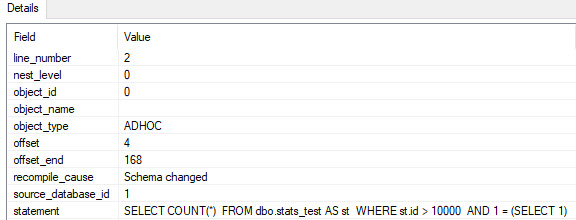
It turns out that doesn’t always trigger a recompile. At least not according to Extended Events.

Setup

This is the XE session I’m using. The settings aren’t very good for tracking recompiles generally in production.

You wouldn’t wanna use no event loss and a 1 second dispatch latency.

Just an FYI, copy and paste cowboys and girls.

Here’s the table I’m using, which is simple enough.

First, I’m going to create some statistics with a really low sampling rate.

It’s going to be the only stats object on the table.

If I run this query, the plan will compile.

Then update stats with FULLSCAN and re-run the query above…

And my Extended Event session is empty. Unless I create stats on a column my query isn’t touching.

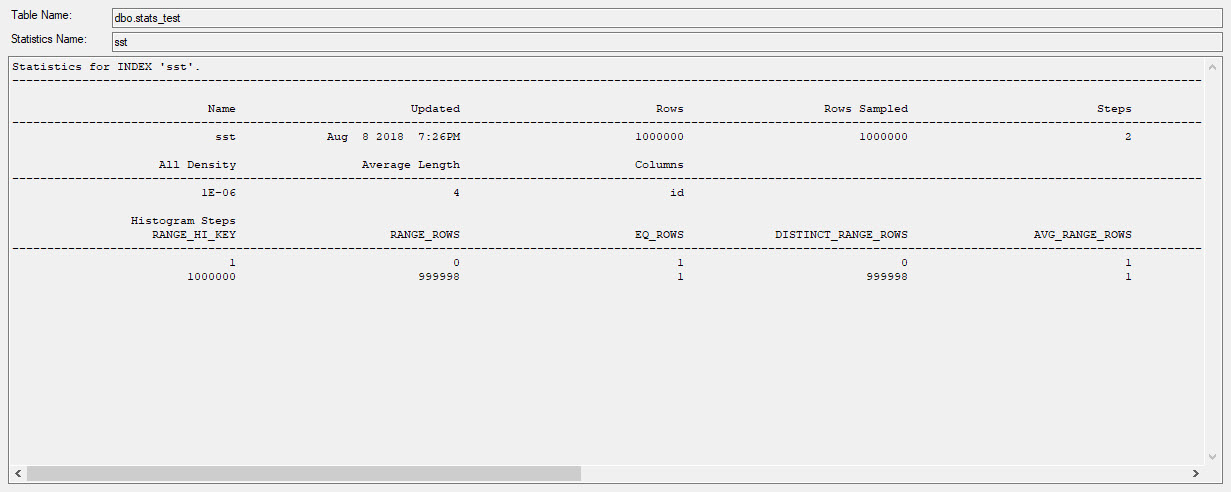
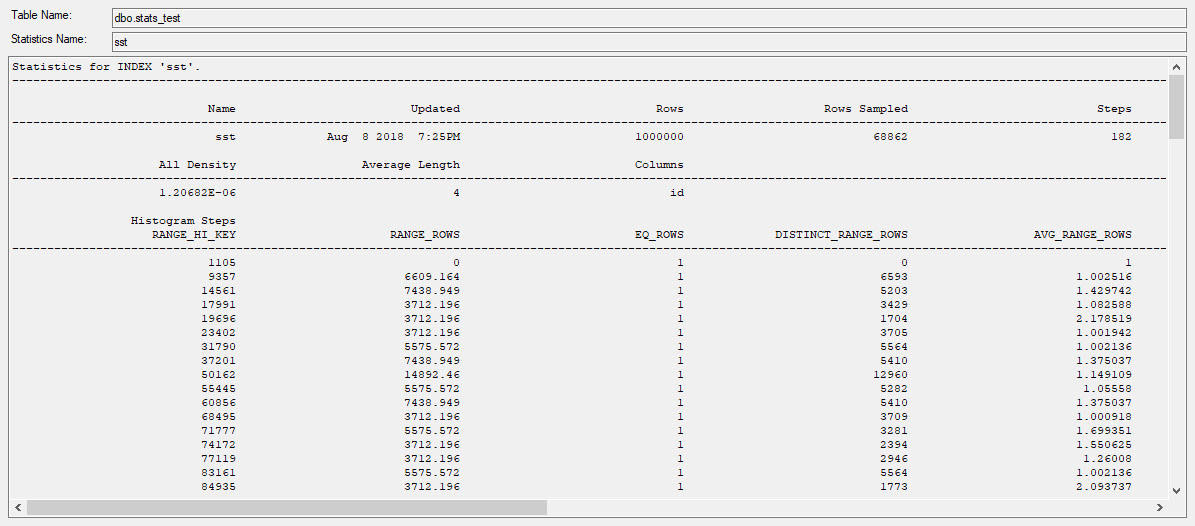
Because I know you’re going to ask — yes, the histogram is different.

Apparently this doesn’t change SQL Server’s view of things.

Before
After

When Does It Change?

I’m starting to really hate trivial plans (more). If I change my query to this:

Updating the statistics with FULLSCAN, after creating the statistics and running the query, a recompile is triggered.

WHY YOU

Stored Procedures, Too

It’s not just the Trivial Plan, it’s also the Simple Parameterization, which means…

Even with a stats update using FULLSCAN, this won’t recompile.

Unlike the ad hoc query, this won’t recompile if I create an unrelated statistics object.

Using a more complicated example in Stack Overflow results in the same thing.

What Does This Mean For You?

When you update statistics and data hasn’t changed, your plans won’t recompile. This is sensible.

When you update statistics and change your histograms, your plans may not recompile if they’re trivial and simple parameterized, or parameterized in a stored procedure.

This is perhaps less sensible, if you were counting on stats updates to trigger a recompilation because you’re trying to fix parameter sniffing, or another plan quality issue.

Thanks for reading!


What’s Different About SQL Server in Cloud VMs?

Cloud Computing
7 Comments

When you start running SQL Server in cloud VMs – whether it’s Amazon EC2, Google Compute Engine, or Microsoft Azure VMs – there are a few things you need to treat differently than on-premises virtual machines.

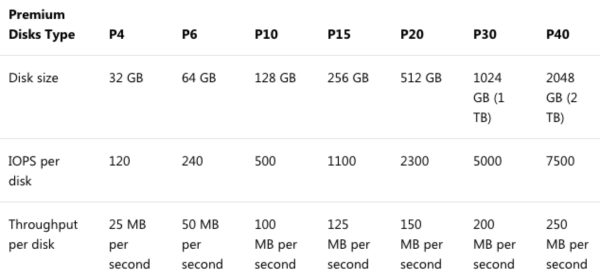
Fast shared storage is really expensive – and still slow. If you’re used to fancypants flash storage on-premises, you’re going to be bitterly disappointed by the “fast” storage in the cloud. Take Azure “Premium” Storage:

Premium compared to what, exactly

For about $260 per month, a P40 premium disk gets you 2TB of space with 7,500 IOPs and 250 MB per second – that’s about 1/10th of the IOPs and half the speed of a $300 2TB SSD. It’s not just Azure, either – everybody’s cloud storage is expensive and slow for the price.

So using local SSDs is unheard of in on-premises VMs, but common in the cloud. Ask your on-premises VMware or Hyper-V admin to give you 1TB of local SSD for TempDB in one of your guests, and they’ll look at you like you’re crazy. “If I do that, I can’t vMotion a guest from host to host! That makes my maintenance terrible!” In the cloud, it’s called ephemeral storage, and it’s so insanely fast (compared to the shared storage) that it’s hard to ignore. Not necessarily smart to use for local databases without a whole lot of planning and protection – but a slam-dunk no-brainer for TempDB.

Be ready to fix bad code with hardware. It’s so much easier in the cloud to just say, “Throw another 8 cores in there,” or “Gimme another 64GB RAM,” or “We’re hammering TempDB, and we really need something with faster latency for that volume.” On-premises, these things take planning and coordination between teams. In the cloud, it’s only a budget question: if the manager is willing to pay more, then you can have more in a matter of minutes. But in order to make that change, you really want to stand up a new VM with the power you need, and then fail over to it, which means…

“Alright, who ran Books Online through the Cloud to Butt Plugin?

Start with mirroring or Availability Groups. On-premises, you might be able to skate by with just a single SQL Server. You figure you hardly ever change CPU/memory/storage on an existing VM, so why bother planning for that? Up in the cloud, you’ll be doing it more often – and having your application’s connection strings already set up for the database mirroring failover partner or the Always On Availability Groups listener means you’ll be able to make these changes with less work required from your application teams.

Disaster recovery on demand is cheaper – but not faster. Instead of having a bunch of idle high-powered hardware, you can start with either no VMs, or a small VM in your DR data center. When disaster strikes, you can spin up VMs, restore your backups, and go live. However, you still need a checklist for everything that isn’t included in your backups: think trace flags, specialized settings, logins (since you’re probably not planning on restoring the master database), linked servers, etc. Thing is, people don’t do that. They think they’ll postpone the planning until the disaster strikes – at which point they’re fumbling around building servers from scratch and guessing about their configuration, things you would have already taken care of if you’d have budgeted the hardware (or used something like VMware SRM to sync VMs between data centers.)

You can save money by making long term commitments. I talked a lot about flexibility above, the ability to slide your VM sizing dials around at any time, but with Amazon and Azure, you can save a really good chunk of money by reserving your instance sizes for 1-3 years. I tell clients to use on-demand instances for the first few months to figure out how performance is going to settle out, and then after 3 months, have a discussion about maybe sticking with a set of instance sizes by reserving them for a year. The reservations aren’t tied to specific VMs, either – you can pass sizes around between departments. (This is one area where Google has everybody beat – their sustained use discounts just kick in automatically over time, no commitment required, but if you’d like to make a commitment, they have discounts for that too.)


What Were Your Game-Changing Discoveries in SQL?

If you like learning random tips & tricks, there’s a great discussion going on in Reddit:

What are your game-changing discoveries in SQL?

I’m only going to give away the first one just to get you started: if you need to repeatedly comment and un-comment groups of code, do this:

When you want to comment the whole thing out, just remove the top two dashes. You don’t have to put in the ending */ because it’s already there at the end, just silently getting ignored until it’s needed.

GENIUS. Head over to the Reddit thread for more.


Do You Have Tables In Your Tables?

Development
11 Comments

This Isn’t A Trick Question

Hopefully it’ll get you thinking about your tables, and how they’re designed. One of the most consistent problems I see with clients is around wide tables.

I don’t mean data types, I mean the number of columns.

Going back to Michael Swart’s 10% Rule, if your tables have > 100 columns in them, you’re likely going to run into trouble.

What Makes Them Bad?

They’re nearly impossible to index efficiently:

  • Queries will hit them in many different ways
  • WHERE clauses will be unpredictable
  • SELECT lists will vary wildly

When indexes pile up to support all these different queries, locking and blocking will start to become larger issues.

While some of them can be solved with optimistic isolation levels, writer on writer conflicts are really tough to avoid.

First Sign Of Problems: Prefixed Columns

Do you have columns with similar prefixes?

Iffy Kid

If you have naming patterns like this, it’s time to look at splitting those columns out.

I took the Users and Posts tables from Stack Overflow and mangled them a bit to look like this.

You may not have tables with this explicit arrangement, but it could be implied all over the place.

One great way to tell is to look at your indexes. If certain groups of columns are always indexed together, or if there are lots of missing index requests for certain groups of columns, it may be time to look at splitting them out into different tables.

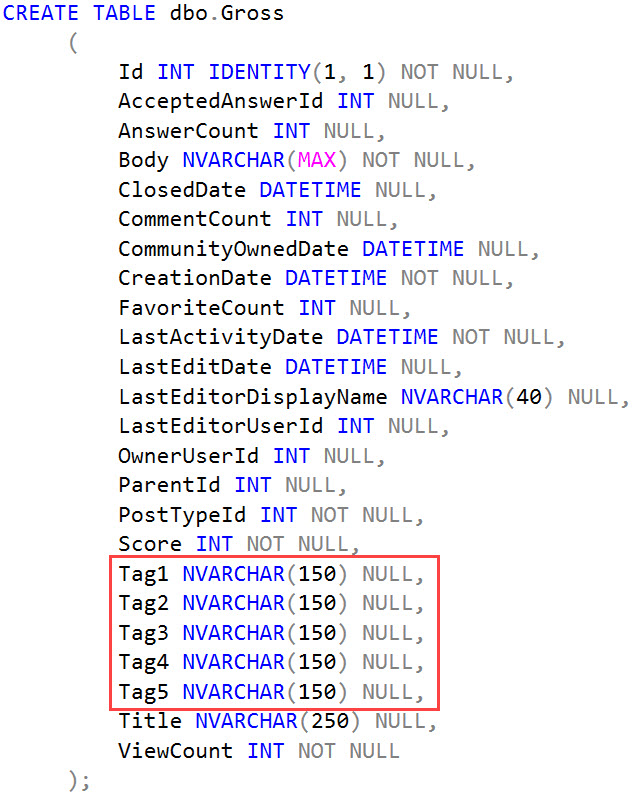
Second Sign Of Problems: Numbered Columns

Do you allow people multiple, optional values?

Maybe So.

The problems you’ll run into here will be searching across all of those.

You’ll end up with queries like this

Which can throw the optimizer a hard curve ball, and make indexing awkward.

This should also most likely be broken out into a table of its own that tracks the Post Id and Tag Id, along with a table that tracks the Ids of each Tag.

A wider index across a narrower table is typically less troublesome.

Third Sign Of Problems: Lists In Columns

Poor Tags

This should be obvious, and has a similar solution to the problem up there.

Your queries will end up doing something like this:

Which can’t be indexed terribly well, even if you go our of your mind with trigrams.

I See Tables Within Tables

If you have tables with these patterns, it’s time to take a really close look at them.

I was not here

If you’re totally lost on this, Check out Louis Davidson’s book on relational design.

Stuff like this is easy to sketch out, but often difficult to get fixed. It requires application changes, moving lots of data, and probably dropping indexes.

It’s totally worth it when you get it done though, because it makes your tables far easier to index and manage.

You’ll need far fewer insanely wide indexes to compensate for bad design, and you’ll have way less head scratcher missing indexe requests to sort through.

Thanks for reading!


Building SQL ConstantCare®: Updating ConstantCare.exe

SQL ConstantCare
0

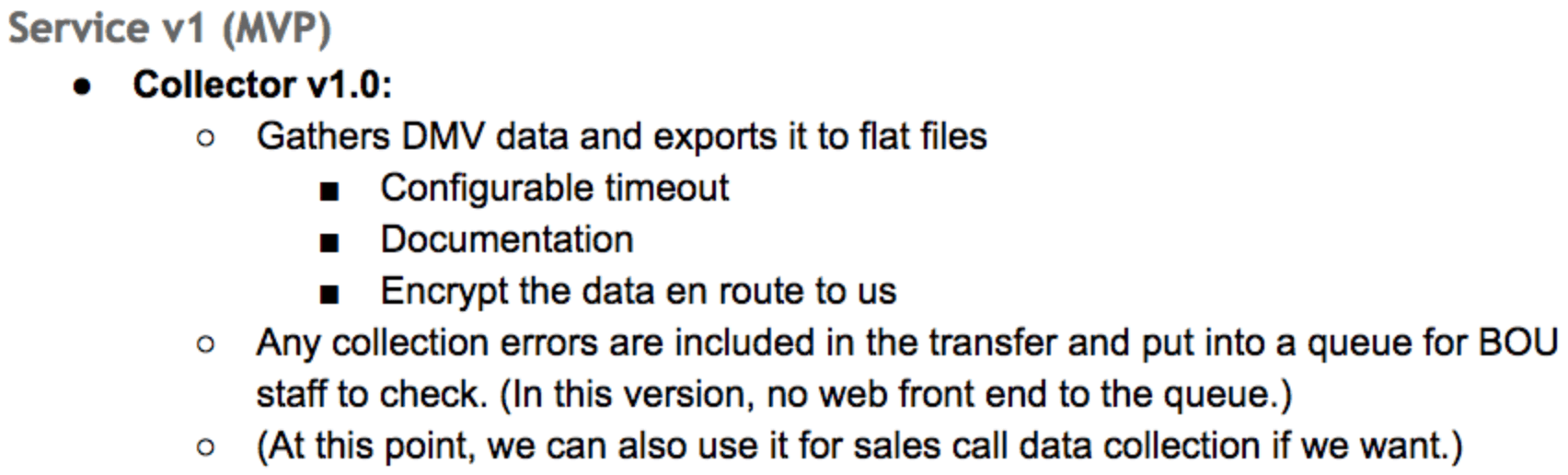
When we started designing SQL ConstantCare® (back before we had a name for it), I listed out the main components at the beginning of the design doc:

The beginning of a giant to-do list

The collector (which later became ConstantCare.exe) was the only piece that would run client-side. I wanted to keep end user support work to a bare minimum – if I could put something in the cloud, I wanted it in the cloud to keep our support costs low. It’s really easy to hop into your own cloud to dig into a problem – it’s much more painful to coordinate support calls with end users all over the world.

Then for each part (collector, ingestion, lab tech), I wrote up a list of things we had to have in the first private alphas, the first public betas, and the first version of the paid-for product. We had to make a lot of tough decisions along the way to the Minimum Viable Product – after all, I could only afford to hire one developer, and I wanted to ship sooner rather than later.

Here were the requirements for the first private build of ConstantCare.exe:

ConstantCare.exe v1 goals

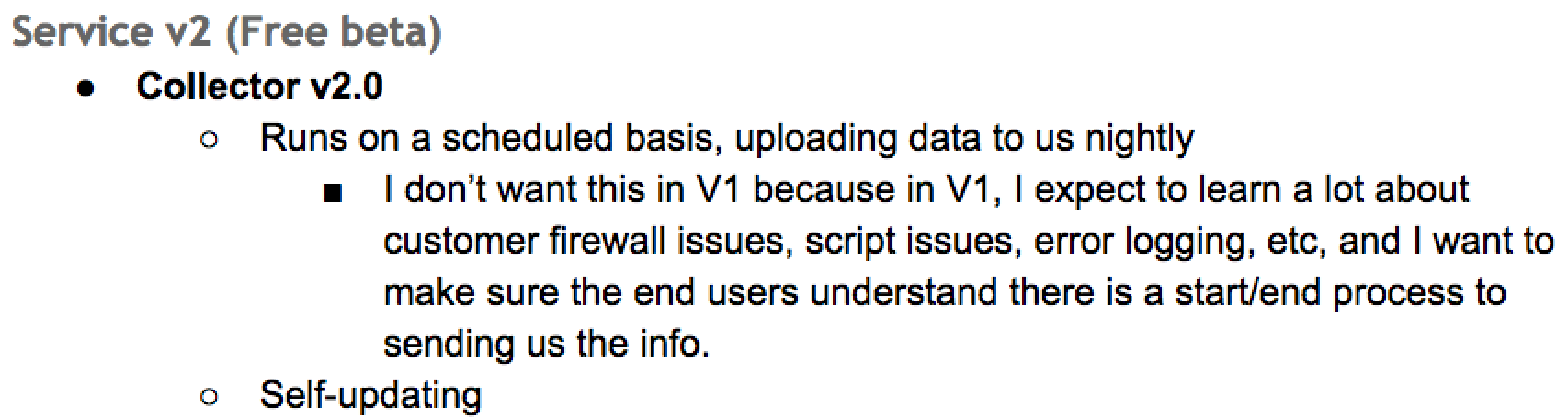
Then for v2, as we started to learn more and scale it:

ConstantCare.exe v2 goals

Note that last line – “Self-updating.” ConstantCare.exe was the only part that would require end user intervention in order to upgrade, and I wanted to avoid that hassle. We had a brand new application, and I figured we’d be shipping rapid changes to ConstantCare.exe in order to fix bugs or collect different kinds of data.

Throughout development, I told Richie that my goals weren’t set in stone. If he tried to implement a particular goal, and it turned out to be painful, we could talk through it and change our minds. Some things turned out to be easy, so he added ’em in earlier builds, whereas some things turned out to suck.

Auto-updating ConstantCare.exe turned out to suck pretty bad.

Richie kinda-sorta got it to work with Squirrel, but for it to work, it needed to run the update as an administrator. I really didn’t want to have to hassle with end users setting up a scheduled task to run under an administrator account – if something went wrong, it could go really wrong, and our goal was lower support workloads, not higher.

We ended up scratching that goal and changed the way we ship ConstantCare.exe updates. We stayed in private beta for a longer period of time, making sure things were working well for the end users. Out of the private beta applications, we purposely picked a wide variety of server versions & types to get as much coverage as we could. Then, when we finally went public, we held off updating ConstantCare.exe as long as we could, focusing on cloud side improvements instead. Looking back, I’m glad we made that decision because we just haven’t needed to update ConstantCare.exe much, and I don’t see that changing – the big ROI is the data analysis in the cloud.

Having said that – we’ve published an update to ConstantCare.exe. To update yours, open a command prompt as administrator and type:

ConstantCare.exe will then do its regular thing of polling your servers for data, and then at the end, it’ll download the latest ConstantCare.exe and update itself from v0.16.1 to v0.20.17. You can tell which version you’re on by looking at the folder names in %localappdata%\ConstantCare.

This version runs faster because it collects less data about backups and Agent jobs – and then it uses some of that given-back time to collect index metadata. You won’t see an immediate difference in your emails, but we’re starting to build index recommendations. Stay tuned!


DBAs Need a Jump Box or Jump Server.

Every now and then, you’re going to need to run a query that takes a long time. You’re going to want to make sure that it succeeds and that you can see the full output – even if your workstation disconnects – or maybe you want to check the status from home later.

You’re going to be tempted to remote desktop directly into the SQL Server itself and run the query there.

Don’t do that.

Did I ever tell you about the time a training class student started a long query, then came back to find that it had returned millions of rows, blew up SSMS’s memory, ended up filling the drive, and causing the VM to crash? That was awesome. Thank goodness nothing like that has ever happened in a production environment. <coughs>

What you want instead is a jump box or jump server: a virtual machine that lives where your servers live, so you don’t have to worry about uptime or connectivity. Install your tools there, the client for your monitoring software, SentryOne Plan Explorer, etc.

Not only does this come in handy for long-running queries, but also for emergency troubleshooting. Disasters are carefully timed to strike when you’re at your parents’ house, when somebody else was supposed to be on call, and when you didn’t bring your laptop with you. A jump box means you only have to get onto your company’s VPN, then remote desktop into your jump box, and you’re right at home.

Just be careful with capacity planning. When disaster strikes, if there’s only one jump box VM available, knife fights will break out for who’s able to log in. I’m personally a fan of a jump box for every single admin – that way if somebody hoses up their own jump box with a crappy installation or they want to reboot to fix something, it doesn’t break anyone else’s productivity. When your Recovery Time Objective is measured in minutes, you can’t afford to be waiting for a jump box.

Jump boxes were a big part of what enabled me to switch from Windows to Mac over a decade ago and continue to work happily there today. I get way less nervous about updates to my client machine when I know that the only stuff installed there is productivity applications. Worst case scenario, if my entire desktop or laptop blows chunks, I can still just remote into my jump box and keep right on working.


Tall Tales From Table Variables

Execution Plans, Indexing
1 Comment

Secret Squirrel

When you modify a table with multiple indexes, SQL Server may choose either a narrow plan, if it doesn’t think all that many rows are going to change, or a wide plan if it thinks many will.

In narrow plans, the work SQL Server has to do to modify many indexes is hidden from you. However, these plan choices are prone to the same issues with estimates that any other plan choices are. During a conversation about when temp tables or table variables are appropriate, it came up that table variables are better for modification queries, because not all the indexes had to be updated at once.

When we looked at the plan together, we all had a good laugh and no one wept into their lumbar supports.

Pantsburner

I created some nonclustered indexes on the Posts table that all had the Score column in them, somewhere. Without them, there wouldn’t be much of a story.

When we use this query to update…

We get this plan…

itsy bitsy teenie weenie LIAR

If you’re playing along at home, the single row estimate that comes out of the Hash Match persists along the plan path right up to the Clustered Index Update.

Since a one row modification likely won’t qualify for a per-index update, all of the updated objects are stashed away behind the Clustered Index Update.

It’s a cover up, Scully. This one goes all the way up the plan tree.

Crackdown

Swapping our table variable out, and running this query…

We get a much more honest plan…

Best Policy

The estimates are accurate, so the optimizer chooses the wide plan.

I can see why this would scare some people, and they’d want to use the table variable.

The thing is, they both have to do the same amount of work.

Warnings

If you use our First Responder Kit, you may see warnings from sp_BlitzCache about plans that modify > 5 indexes. In sp_BlitzIndex, we warn about this in a bunch of different ways. Aggressive locking, unused indexes, indexes with a poor read to write ratio, tables with > 7 indexes, etc.

You can validate locking issues by sp_BlitzFirst and looking at your wait stats. If you see lots of LCK_ waits piling up, you’ve got some work to do, and I don’t mean adding NOLOCK to all your queries.


It’s Time to Improve DBCC CHECKDB.

Microsoft has been resting on Paul Randal’s laurels for far too long.

From 1999 to 2007, Paul poured his heart and soul into rewriting SQL Server’s code to check for and repair database corruption. (For more about his illustrious career, read his bio and enjoy the infectious enthusiasm in his bio photo.)

Paul did great work – his baby has lived on for over a decade, and it’s an extremely rare cumulative update that fixes a bug in CHECKDB. I’d like to think it’s not because nobody’s looking, but because he wrote good, solid code that got the job done.

But Microsoft is coasting.

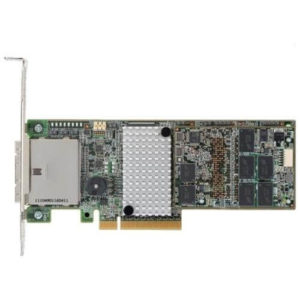
LSI MegaRAID 9285CV-8e

This is a $30 RAID controller.

Meet the LSI MegaRAID SAS 9285CV-8e, one of the most junior RAID controllers you can buy for a server. When he’s bored, he has a couple of homework tasks he likes to perform: Patrol Read and Consistency Check. Between these two, he’s checking all of the drives in the array to make sure they match each other, and that they can successfully read and write data.

This helps catch storage failures earlier with less data loss.

You don’t have to configure this or set up a schedule – he just knows to do it because that’s what he does. It’s his job. You trusted him with your data, so every now and then, he does his homework.

SQL Server needs to do that.

Some of the pieces are there – for example, SQL Server already has the ability to watch for idle CPU times and run Agent jobs when it’s bored. For starters, that’d probably be good enough to save a lot of small businesses from heartache. For the databases over, say, 100GB, it’d be really awesome to have resumable physical_only corruption checking – tracking which pages have been checked (just like how the differential bitmap tracks page changes), with page activity reset when the page is changed (again, just like the differential bitmap.) This wouldn’t count the same as a real CHECKDB, which needs to do things like compare index contents – but holy mackerel, it’d be better than what we have now.

Because I’m just so tired of seeing corruption problems, and we can’t expect admins to know how this stuff works. I know, dear reader, you think admins should know how to set up and run corruption checking because it’s just so doggone important, you say.

But if it’s so important…

Why isn’t SQL Server doing it in the background automatically like $30 RAID cards have been doing for decades?

Want it? Cast your vote here.


Foundational Material: Microsoft SQL Server Book and Blogs From The Past

SQL Server
4 Comments

What Did Dinosaurs Watch On TV?

These are some of my favorite books and blogs from Microsoft from the way-back machine.

I can’t say every bit of information is still 100% true and should be followed to the letter, but hey, that’s what happens.

This is stuff I consider foundational material, though. I’ve learned a lot from them, and I think most people who use SQL Server regularly would benefit from reading them, if they haven’t already.

They’re mostly long defunct, so don’t hold your breath on comment replies.

Blogs

Defunct:
  • Craig Freedman: This blog is amazing. I wish Craig still wrote things. Anything, really.
  • Conor Cunningham: Should need no introduction, and has the best blog title of all time.
  • Bart Duncan: Bart was blogging about some pretty crazy problems back before a lot of people even knew these problems existed.
  • Query Optimizer Team: This preceded the current Query Optimizer Team blog, and bonus points for Microsoft’s first attempt at automatic indexing.
  • Ian Jose: Not the longest or most in-depth blogs, but I like me some straight and to the point wisdom too.
Storied History:

Books

Yes, I own all of these. The bottle of wine over there is empty, but it’s one of my favorites.

Do The Worm
Ken Henderson:

Ken’s books are amazingly detailed and still surprisingly relevant.

Practical Troubleshooting was a group effort, and features a chapter from Bob Ward.

Now, I have to point something out, here.

Bob is a badass.

This book was published in 2007. That means Bob has been working with SQL Server for like 25 years.

Bob deserves some kind of award.

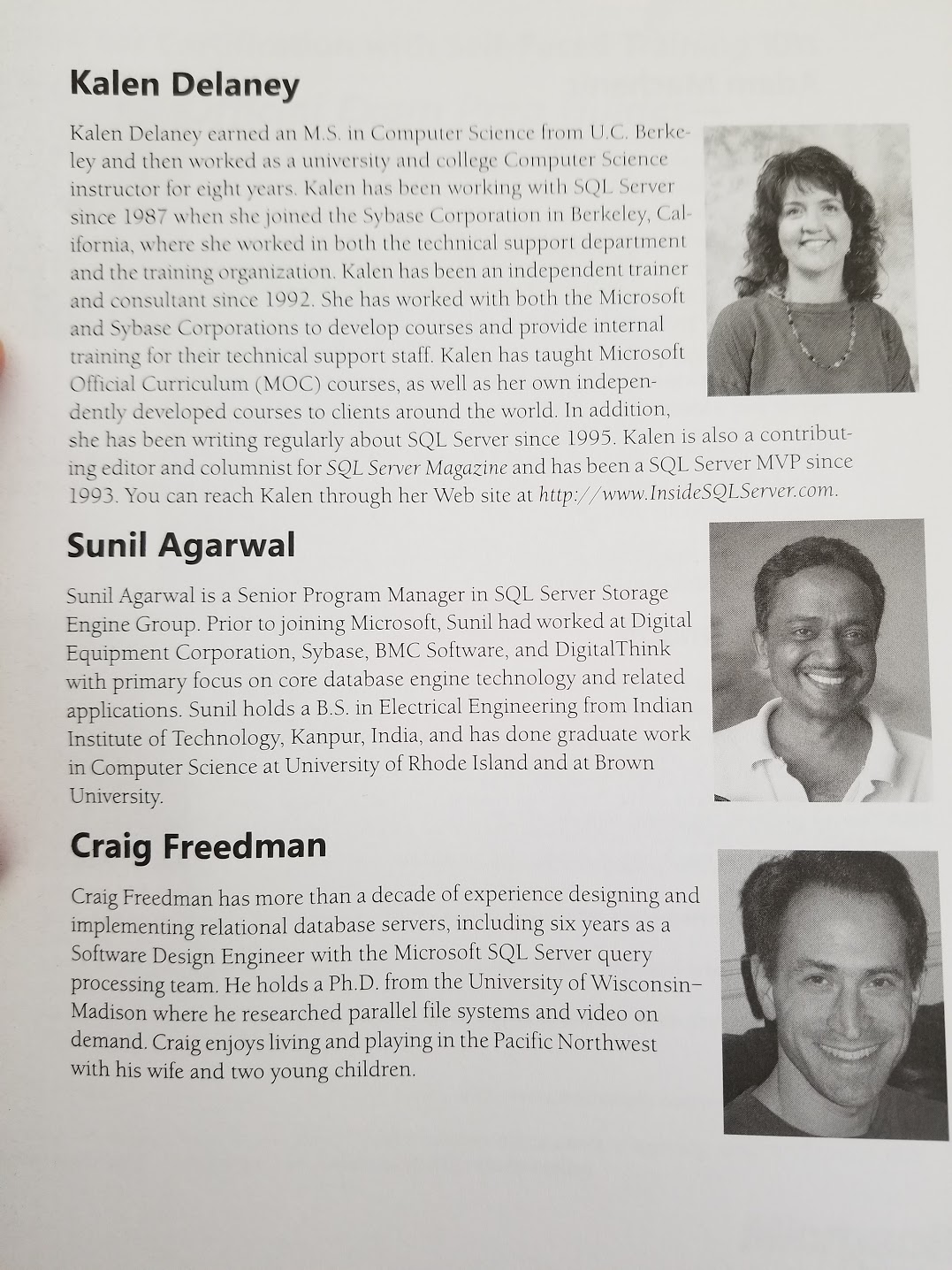
Kalen Delaney:

These books are totally worth it for the pictures alone.

Aw lookit the baaaaabiesss

Back To The Future

These aren’t the only SQL Server books I own, and there’s a lot of great, newer stuff out there that you should probably read too.

With SQL Server’s new rapid development cycle, we’re not likely to see this kind of in-depth technical book about a specific release or technology. It would simply become outdated too quickly. Even online documentation becomes difficult. A good blog one day could be mooted by a CU the next.

It’s even more frantic in the cloud, where Azure routinely has features added and removed.

Thanks for reading!


Building SQL ConstantCare®: Now Free for Consulting Customers

SQL ConstantCare
0

We’re kinda like an emergency room for SQL Server: we specialize in a 3-day SQL Critical Care® where we work side by side with you, talking about your database pains, showing you the root cause, and then teaching you how to get permanent pain relief. That works really well, and we’ve kinda got it down to a science.

When we sign a contract with a client and pick a start date, we tell ’em it’s really important not to restart the SQL Server in the week leading up to the engagement. SQL Server keeps so much good stuff in memory – wait stats, file stats, index usage & recommendations – and all of that gets wiped out on an instance restart.

Nobody wants to restart their SQL Server instance.

to reboot your server

But you know how it is.

Life finds a way.

Some well-meaning sysadmin applies a patch, or doesn’t know about the engagement, or folks just plain old run into an emergency and have to fail over.

So we thought, why not get new clients started with SQL ConstantCare® as soon as they sign a contract? We could just give them free access to start right away, sending in their server’s metrics every day.

This is so useful for so many reasons:

  • Clients start getting advice faster – like warning them about backup issues, easy misconfigurations, and things they can fix without waiting for us
  • We get better historical data – so useful in cases like a dramatically underpowered server that doesn’t have enough memory to keep plan cache contents around for more than a few hours
  • We can spot things that only happen rarely – for example, if a server has a pattern where the wait stats look wildly different on Monday mornings, we can narrow that down and understand why
  • And even after the engagement – we can keep an eye on a client’s server and know if they’re making progress on their homework, and whether they’re seeing permanent pain relief

My favorite example of how it’s been useful was a client that emailed in one Monday morning and said, “It just happened again! We had another performance-wrecking emergency on Sunday. Did SQL ConstantCare give you enough data to tell you what it was?”

Whoomp

Ordinarily, that’d be really hard to do as a consultant – I just don’t have the ability to time travel backwards and see what was going on. But since they’d been in the program already, I was able to just open up my Power BI dashboard, look at their data, and said, “Yep.”

It’s about to get even better: our beta customers with the latest ConstantCare.exe can now send in queries and query plans, too. We’re not giving automated query advice yet – that’s coming next – but at least we can capture the query plans so consulting customers can get better answers about which queries were causing the big slowdown on Sunday.


[Video] Office Hours 2018/8/15 (With Transcriptions)

Videos
2 Comments

This week, Brent, Tara, Erik, and Richie discuss error log issues, issues with moving a 2-node AG to a different VM, adding a rowversion column gotchas, using indexes, Docker & CI/CD, RESOURCE_SEMAPHORE query compile, table locks, Query Store, and best places to eat in NYC.

Here’s the video on YouTube:

You can register to attend next week’s Office Hours, or subscribe to our podcast to listen on the go.

Enjoy the Podcast?

Don’t miss an episode, subscribe via iTunes, Stitcher or RSS.
Leave us a review in iTunes

Office Hours – 8-15-18


How should I track down login failures?

Brent Ozar: So we’ll start with Lee. Lee says, “A vendor made a change on an app server and now my error log is full of these errors; login failed for user X, could not find a name matching. Any ideas on what I should tell them to look for? I don’t have access to that app server.

Tara Kizer: I used to have to just ignore that message when I worked at Qualcomm. There was some issue with the SCOM server, something like that, and they couldn’t figure out why it was doing it. But eventually, I just stopped looking at the error log. It was just clogged because – can you turn off failed login attempts? You can turn off successful; I don’t know that you can turn off the failed ones. So at some point, the spamming of the error logs – I guess I can’t use that tool anymore, except to filter it to find what I want to look for. But start with the – you’ve got the IP address, so you know what box is doing it. It’s really hard to say what to do from there, but look for a scheduled task, and application running…

Brent Ozar: And leave it. Who cares?

Tara Kizer: Well, the only thing I care about is the spamming of the error log. The error log is supposed to be used for troubleshooting issues. My client this week has successful logins going into the error log and it’s happening multiple times per second, I think it was, or per minute maybe. I was like, this is unusable now. I can filter for the four things I filter for, but that’s not going to find anything else.

Brent Ozar: Do you know about the minus sign trick with error IDs?

Erik Darling: Well that’s only event viewer…

Brent Ozar: Oh event viewer, not the error log, that’s true.

Tara Kizer: Even event viewer’s becoming a not usable tool.

Brent Ozar: Yeah, the minus sign filter helps in there.


We’re thinking about changing a lot on an AG…

Brent Ozar: Glen says, “We have to move a two node AG to a different VM. I’ve been told that the servers have to be powered down in order to migrate…” I already have so many questions, “Any thoughts on the best way to bring down the AG with a cluster to accomplish the move without going to hell in a handbasket? Also, a new IP for the heartbeat network…” Oh come on, man.

Tara Kizer: At that point, I think I would just build new servers on this new VM. It sounds too complicated and I suspect Availability Groups is not going to be happy with the exchanges.

Erik Darling: No, I’d probably just want to build out whatever new environment I’m going to migrate to and set up AGs over there and then reset them up again. There’s just too many changes all at once. That’s a lot of moving pieces, VMs, AGs, IPs.


How do you order an autographed copy of Erik’s book?

Brent Ozar: Michael Tilly asks, “How does one go about ordering an autographed copy of the book Great Post, Erik?” So there may be a book signing event at PASS. We’re waiting to see how that goes. But even if not, what you should do is bring your book to the bar whenever Erik’s around there, and he will sign Itzik Ben-Gan.

Erik Darling: Mister, buy me a drink…


Any gotchas with adding a row version column?

Brent Ozar: Chris says, “I’m going to be adding a row version column to some of our tables for sending back to a data warehouse. We used to use a changed on UTC column and trigger on that. are there any gotchas I should be looking out for when adding a row version column?”

Erik Darling: I mean, adding any column to a table’s going to have – not like adding the column. If you add a NOT NULL column to a table, you’re not going to do too much damage. But if you have, like, a default for it or if you need to go populate that column later, obviously, you could run into some issues with locking and all that good stuff. So I would be pretty judicious in how I populate that column. I wouldn’t want to just have it all filled in at once.

Brent Ozar: Chris also says he’s going to New York City, “What are Brent’s favorite places to eat there?” Well, Erik lives in Brooklyn, so he should answer this too. Erik, what are your favorite places to eat in New York City? He says he’s staying near Times Square.

Erik Darling: So tip number one, get the hell out of Times Square. Like, just leave, avoid at all costs, don’t go to Ruby Tuesday, don’t go to Bubba Gump Shrimp or whatever the crap it is…

Richie Rump: Don’t take a picture with Spiderman…

Tara Kizer: Visit it for tourist things but leave 15 minutes later. It’s just crowded.

Richie Rump: Go to Midtown Comics and then leave.

Erik Darling: Times Square Elmo will mess you up. He has a dirty gym bag…

Brent Ozar: I would say, my huge resource – all my favorite restaurants have closed. This bums me out so much, but nyeater.com – this has their best restaurants of New York – and they do this for all kinds of cities; San Diego, all kinds of places. And out of there, I’m going to scan down and see if I’ve hit any of them. I haven’t had Ping Seafood…

Erik Darling: I’ve had Ping.

Brent Ozar: Was it any good?

Erik Darling: It’s okay…

Brent Ozar: Katz’s Deli…

Erik Darling: It’s okay. If you want a really big $20 sandwich then go to Katz’s. I don’t know that I’d want it.

Brent Ozar: Momofuku – that’s the real name, yeah. What’s the dessert one? Momofuku has a dessert one – Milk Bar, I think it’s called. I really like that one.

Richie Rump: Is that David Chang’s restaurant?

Brent Ozar: Yeah, so anyway, I would start here. Start there and run from there.


Can an index really make that big of a difference?

Brent Ozar: Sheila says, “I added an index last week. This week, my batch process is running far better. The index shouldn’t have made that big of a deal. Would a query plan change occur from the index and make it that much better?”

Erik Darling: You know how indexes work, right?

Brent Ozar: No, probably no.

Erik Darling: If I’m thinking about ways to change a query plan, an index is going to be one of the first things. If I’m looking at clogging a weird process like that, indexes are going to be one of the first things I look at; not just adding them but getting rid of ones that – if I have a write-intensive process, getting rid of a whole bunch of indexes that aren’t living up to their duty, I’m going to get rid of those too. But adding an index is, like, hands down, one of the top things that you can do, even before rewriting a query, using a temp table, doing other stuff, adding an index is, like, what I’m going to go for. That’s like my first stop. What index can I – to make this less horrible…

Tara Kizer: And maybe you didn’t think it was going to help, but maybe it got rid of an expensive key lookup and that was the whole bottleneck of the query.

Erik Darling: Sort, key lookup, improved join, improved some sort of aggregation. Why knows? It could have even helped more than one query. That’s the beauty of indexes. It’s not like you add an index and you’re like, you’re for this query; no other query can use you, you’re special. No, lots of stuff can use them. So if you found that query in your missing index DMVs or something then it’s totally possible that more than one query was able to benefit from it.

Brent Ozar: Or it might have been close enough that other queries, even if it wasn’t their ideal, it was good enough.

Tara Kizer: And to help answer this question for the future on her server, set up logging to a table via sp_WhoIsActive, and if you had that in place, you can go back in time and look at the execution plan from that process and then compare it to what it is now and you’d be able to answer it yourself.


How many includes are too many?

Brent Ozar: Speaking of indexes, Steve says, “When it comes to missing index advice from execution plans, what’s the best rule of practice or a good rule of thumb for includes when you think there are too many?”

Tara Kizer: I know Brent’s rule of thumb…

Brent Ozar: What is Brent’s rule of thumb?

Tara Kizer: Well just see, are there more than five indexes per table and no more than five columns per table, and that includes the includes, you know, the key plus includes. My restriction isn’t that low, but when it’s recommending 50, I’m like, okay, that’s enough. That is way too many. Just chop off the includes at that point and then check the execution plans, if you can figure out what query it was targeting and see is there an expensive key lookup. Do you really need to return 50 columns from this query?

Erik Darling: You know, I think my rule is probably a little bit closer to 10 in 10, but that’s because I don’t do a lot of pure – at least historically, I haven’t done a lot of purely OLTP work. My stuff is always, like, a big hunk of reporting on top of stuff. So I’m a little bit more kind to having some extra indexes around. But yeah, Tara’s right about that. I also have a session at GroupBy that’s free that you can go watch about improving select star query performance. So if you go watch that, you can learn a way to change the way a query is written so that you can take advantage of narrower indexes without having to worry about adding all 50 includes because those missing index requests are kind of idiots. They’re just like bad teenage cries for help. They’re going to ask for every single included column. There’s no filter on the kind of columns that get included. You can end up with these long string columns in there, XML columns, like any idiotic data type. Anything that the optimizer is, like, oh but it will be cheaper, it will just, yeah include it in the index, I don’t care. Like, no penalty – everything’s free. It’s just an include. Don’t worry.

Tara Kizer: I mean, some of those are going to fail, you know. Varchar max, that’s just not possible in the index.


Easiest way to reinitialize merge replication?

Brent Ozar: Paul asks a question I think we’re all going to arm-wrestle to answer. We’ll be so excited…

Tara Kizer: it’s going to be Richie for sure…

Brent Ozar: Paul says, “When I’m running merge replication, is there a way other than initialization to re-sync all the data from the publisher to the subscriber?”

Tara Kizer: If you don’t mind a full copy of your database over there, just do backup restore. Sync it up that way and you could apply transaction logs to get it more in sync. And then once it’s in sync with the publisher, then set up replication and tell it, I’m already ready to go, I’ve already manually synced it on my own. But, you know, if you’re only going to be replicating some of your tables, that might not be a good solution. But if you’re going to be replicating all of them or most of them then backup and restore is a really good solution for that. And if you need to drop tables, you can do that at that point, but it at least gets you past the point where the initialize is going to take you several hours. And it affects the publisher as it’s happening, so backup and restore wouldn’t affect the publisher.


What are your thoughts on Docker and CI/CD?

Brent Ozar: Sri asks – now we’re going to make Richie come back to the microphone…

Richie Rump: Are the bad questions on?

Brent Ozar: Only the first one. Sri asks, “What are your thoughts on the Dockers and CICD?” Richie, what do you think?

Richie Rump: I love continuous integration, I love continuous deployment. And not yesterday, as the team could tell you, as things started breaking and I couldn’t figure out why – here’s a quick hint, it was someone else’s software. It wasn’t ours. It wasn’t Brent’s either.

Brent Ozar: For once.

Richie Rump: Exactly. Continuous integration and continuous development, they’re phenomenal. They’ve been, I think, a boon to us developers as far as being able to get things out quickly and with a high level of confidence of quality in that bugs will not be infecting our code. So now that we’ve got Amazon publishing, what, a new release every 12 seconds or something crazy like that, we couldn’t do that before. So CICD is something every software team – I mean, I’m a software team of one right now and I’m using CICD, so there you go, there’s the value right there. Dockers, I haven’t used Docker; sorry. I haven’t had really that much of an opinion. So again, team of one needs to be sliding things in and out or do anything like that, haven’t really needed it. I’ve got no opinion on it or the Kubernetes or whatever the cool kids are doing these days; don’t know. I am blissfully ignorant.

Brent Ozar: It feels like there’s – if you listen to the Microsoft buzz, it seems like they latch onto any buzzword that’s flying by and they try to stick it to the SQL Server product with Velcro. Artificial intelligence, got it, let’s smear some of that on there. R and Python, yeah, smear that on there. Oh, here comes Docker; grab that…

Erik Darling: Linux, machine learning – because they’ve just missed the boat so terribly on so many things. It’s like – I’m surprised that SQL Server doesn’t have like an internet browser in it.

Richie Rump: The internet, that will never be a thing. What are you talking about?

Erik Darling: Outlook for SQL Server, I’m like, what the…

Richie Rump: I don’t know, for me, as far as Docker on the server, it still doesn’t make a lot of sense for me, right. Maybe because I’ve been playing in the cloud too long and I just let the cloud vendor handle how they want to do implementation, but if I was in-house and somebody said, hey why don’t we just throw a docker out there for SQL Server, I’m like, why? What is it really buying us? And I haven’t really been able to grok my head around that quite yet.

Brent Ozar: Especially compared to platform as a service, where they just manage everything for you.

Richie Rump: Yeah, and it’s like, well why don’t we just throw it out there? I guess then we start talking business reasons of why we would do this, Docker versus the cloud or something like that or VM in-house versus something else. But I just don’t think it’s that big of a deal, when we’re talking about a server, to run the installer.

Brent Ozar: Okay, so hopefully, Sri, there’s your answer.


What causes resource_semaphore_query_compile?

Brent Ozar: Rakesh – Rakesh experienced an issue in production with lots of queries waiting on resource semaphore query compile – wants to know if that’s the cause or the effect. What you start seeing resource semaphore query compile, what do you look at next?

Erik Darling: I look at what’s running and I look at how big that query plan is. So when resource semaphore query compile hits, to back up a little bit on that, when queries compile, there are different classes of query depending on how much memory they need. There are queries that don’t need any memory to compile. That’s very tiny low-cost plans and plans that are already in cache. So they can just go and compile immediately. Then, there’s small gateway queries, which require, I think, like 380K of memory to get the query plan compiled for them. And then they kind of step up from there. And as you step up, you can have fewer and fewer queries that go into that gateway.

So, there’s no memory, small memory, medium, and then big. Up to 2014, you could only have one of those big queries going at a time. 2014 had a trace flag. I forget what the trace flag is. But then 2016 and up had this different algorithm where they scale up the number of big queries you could have compiling at once depending on how much memory you have. So with a 768GB server, I’m really concerned, not only because you have queries coming in that need to compile all the time, and enough that you got blocked up on that. Queries that, with 768GB, your plan cache should have the queries you need in there. Maybe forced parameterization is a good idea. Maybe optimized for ad hoc workloads is a good idea to help, kind of, reduce that.

But resource semaphore query compile is when you hit one of those gateways and you just have too many queries trying to go through it at once and they sit around waiting to get additional memory to compile a query. Like, they’re not running, they’re not getting data, they’re not going out and getting locks, they’re not doing anything. They are stuck waiting just to get a query plan, so it’s definitely a big enough problem that you’re going to want to address that and you’re going to want to find a root cause on.


Does lock escalation happen with deletes?

Brent Ozar: Mark says, “So table locks happen if you update 5000 rows or more. Does the same locking happen if you have 5000 or more deletes?”

Erik Darling: Yeah.

Brent Ozar: There we go. That might be the very first time we’ve been done with a question in…


What are your thoughts on Query Store?

Brent Ozar: Keith says, “What are everyone’s thoughts on Query Store?”

Erik Darling: The new Query Store? What’s the new Query Store?

Brent Ozar: This question says the new Query Store…

Erik Darling: There’s that old Query Store that’s been around since 2016. [crosstalk 0:16:02.9] It’s nifty. I like it, but I can understand people’s reticence in using it because you can’t really choose where that data gets stored. You might be storing some crazy PII in there. It doesn’t quite have the management features, I think, that a lot of people would want in order to start using it. That, and everyone who I talk to – not everyone, but a lot of people who I talk to at conferences are like, you know – because I talk about sp_BlitzQueryStore because I wrote a whole stored procedure. I was that excited about it, I was like look, I’m going to write a stored procedure. It’s going to do the same stuff at BlitzCache but with Query Store, and no one uses it because no one has Query Store turned on.

When I talk to people about it at conferences, they’re like, we turned on Query Store and CPU use went through the roof, bad stuff happened, like the drive filled up. I’m like, man, I wasted how many hours of my life writing a stored procedure for something that makes CPU go through the roof and fills up drives. I can understand why people don’t use it. I like it in theory. I like the prospect of being able to have long-term plan data in there and be able to trend queries over time rather than just depending on that one plan that’s in the plan cache. But you know, like, a lot of pushed out the door features for things in SQL Server, I’m not sure that it was quite 100% ready, like extended events.

Brent Ozar: Oh, that’s mean…

Erik Darling: Extended events is the mobile browsing of user experiences. There’s a reason that everyone has an app instead of making people use a mobile site, because it’s just miserable and painful. No matter what you do, you’re just in for pain and suffering and disappointment.

Brent Ozar: So why is it that the people who evangelize Query Store also evangelize extended events? There’s something in common. I want to believe in Query Store. Like, I think that if I was a database administrator, I like to think that I would turn it on on all my servers and just watch out for all the CUs, because this just came out in the most recent cumulative update; database performance is bad without this cumulative update. So clearly there was a performance problem, but if it wasn’t that big of a problem, I’d sure like to enable it.

Richie Rump: Can we get you a poster of, like, SQL Server Query Store in the background and it just says, I want to believe.

Erik Darling: I mean, it’d be nice because, like, the plan cache is just so temperamental. It clears out, it doesn’t have all the plans in there, it doesn’t keep a lot of historical information, so it would be beautiful to have that kind of stuff. I’m glad that it seems to be working for the robots up in Azure or whatever. It’s helping Microsoft choose between plan A and plan B, you know. For regular people, it’s…

Richie Rump: I just was cranking on a little bit a few weeks ago…

Brent Ozar: What were you cranking on?

Richie Rump: Plan cache.

Brent Ozar: Oh yes…

Erik Darling: Yeah, tell us more…

Richie Rump: We started collecting in the new version of ConstantCare. We haven’t implemented any rules for it yet, but we’re getting there. Getting the data is the first part, and then start applying rules to those plans.

Erik Darling: So you don’t know how we’re going to go through those plans, what we’re going to do with them?

Brent Ozar: One of the users replied in because we sent out an email, hey there’s an update to is, just to, like, early access beta users. Hey, there’s an update. If you want, you can send us your query plans, you don’t have to. One of the users who emailed in copied in all his database admins and he goes, “I don’t care what it takes, you get the Ozar people everything.”


Following up on resource_semaphore_query_compile

Brent Ozar: Rakesh follows up with his resource semaphore query compile and says, “We have both optimized for ad hoc and forced parameterization on.” He also mentioned that he started a case with Microsoft. That’s awesome, it’s just that you’re not going to get an answer down to root cause analysis inside a free webcast. There’s just no way we can pull that off. However, I want to leave you with a couple places you can go for help. If you go to – let me go find the page for it – dba.stackexchange.com, you can post a multi-paragraph question. Just be cautious there because it’s going to be super-specific to your company. They’re going to want evidence that you’re going to have to be able to post publically. It’s not free consulting; it’s free help, but you’re getting to a point where Microsoft couldn’t solve the problem. What you may ask form the community might be kind of tough to do. The other thing you can do is, we have actual consulting. It just so happens that this is what we do for a living. If you go to brentozar.com and click on Critical Care up at the top, we do this three-day consulting thing where we get to the root cause of your performance problems. So it may be the point where you need that as well.

Tara Kizer: He also mentioned that the change to the latest cardinality, you know, resolved the issue. So if I wanted root cause analysis, I would switch it back and start troubleshooting what are the queries that are having this issue, what are the queries that have large unused memory grants? And maybe specifically, on problematic queries, switch those guys to the legacy cardinality estimator, but not the whole box.

Brent Ozar: And to some extent, if you flip the CE and it suddenly started working, there’s your root cause. You’ve got queries that don’t work well with that CE. You can either change the queries or you can change the CE.

Erik Darling: That is also valuable feedback for Microsoft. If flipping the CEs has that profound of an effect on a server where you go from being at a complete standstill with resource semaphore query compile waits to not having any and everything being fine and dandy, that’s valuable feedback for them that should be shared, I think. You know, as much as we poke and prod, we do like to see a good competitive product that we have to work with day in and day out…

Brent Ozar: And they want these edge cases too. They want to know when these edge cases hit that are so bad.

Erik Darling: So that’s connor.cunningham@…

Brent Ozar: And his home phone number is… So that’s it for Office Hours this week, everybody. Thanks, everybody, for hanging out and we will see y’all next week. Later.

"*" indicates required fields

This field is for validation purposes and should be left unchanged.
Name*
Things I want*


A Presenter’s Guide to the Stack Overflow Database

Stack Overflow
4 Comments
Stack Overflow
The place that saves your job

You present on SQL Server topics at user groups and conferences, and you’ve been wondering how to get started with the Stack Overflow public database. Here’s a quick list of things to know.

For stable demos, use StackOverflow2010. This smaller 10GB database has data from the first years of Stack Overflow’s history. It doesn’t change, so you don’t have to worry about updating your screenshots and metrics every time Stack releases a new data dump.

Your attendees can download it from BrentOzar.com/go/querystack as a 1GB zip file with a SQL 2008 database, and then extract it to the full database. No registration is required. You’re also welcome to distribute that database yourself.

Every table has Id as a clustering key. That by itself isn’t a big deal, but here’s where it gets awesome: Stack Overflow’s URLs are all driven by that key. Look at your URL bar in your browser as you’re surfing StackOverflow.com, and you’ll start to recognize what’s going on:

https://stackoverflow.com/users/22656/jon-skeet

Simply drop off the strings at the end of the URLs, and these work as well, making it really fun to show the pages of the data you’re looking at:

https://stackoverflow.com/users/22656

Speaking of 22656, Jon Skeet’s data is unusual. Jon Skeet is a legendary user at Stack Overflow with over a million reputation points. He’s user id #22656, and that’s one number you’ll probably end up memorizing. If you want to do a parameter sniffing demo or show wild swings in data distribution, 22656 is your man.

dbo.Posts contains both questions and answers. Most of Stack’s tables are fairly intuitive, but this one is a bit of a gotcha. To join them, use the ParentId field:

Note that I’m using a left outer join because not all questions have answers.

Posts by PostType in StackOverflow2010

Posts are more than just questions and answers, too – the dbo.PostTypes table lists other kinds of posts, like Wiki, TagWiki, TagWikiExcerpt. Again, note the lumpy data distribution – this database is absolutely fantastic for lumpy distribution by date, time, scores, lengths of strings, you name it. It’s real data from real humans – just like your day job – and it’s fantastically unreliable and fun.

Data.StackExchange.com has lots of useful queries. When I wanna find real-world queries to show for tuning examples, it’s a great place to start. Just make sure you properly credit the query’s author and link back to the query’s page. Note that when you click on a query link, you’ll see the results instantly – that doesn’t mean the query is fast. Stack caches those query results.

The database schema isn’t exactly Stack’s current live schema. The database reflects the public data dump, not a backup of Stack Overflow’s database. For example, on dbo.Posts, the Tags column stores the tags for a particular question. If you want to find queries for a given tag, you have to do a string search for ‘%<sql-server>%’ – but that isn’t necessarily indicative of how the live site searches for tags today. I love it, though, because it shows how a lot of real-world databases work.

For questions about it, hit Meta. Meta.StackExchange.com is the Q&A site that asks questions about Stack Overflow itself. There’s a good starter post for the database documentation. When you see the term SEDE, it’s referring to Stack Exchange Data Explorer, aka data.stackexchange.com.


Wait Stats When VSS Snaps Are Slow

SQL Server
4 Comments

Deus Redux

A while back I wrote about the Perils of VSS Snaps.

After working with several more clients having similar issues, I decided it was time to look at things again. This time, I wanted blood. I wanted to simulate a slow VSS Snap and see what kind of waits stats I’d have to look out for.

Getting software and rigging stuff up to be slow would have been difficult.

Instead, we’re going to cheat and use some old DBCC commands.

Hold It Now Hit It

Whenever we want to do something important we’re going to freeze IO and then observe what it’s doing:

Whenever we want find out what we’re waiting on, we’re going to run:

There were a couple things that weren’t blocked, like creating temp tables, and running select queries.

Anything we did that attempted to create or modify something in Crap was blocked when IO was frozen, though.

That means Insert, Update, and Delete queries absolutely blocked read queries.

Some Pictures

Creating a table waits on DISKIO_SUSPEND.

What was really interesting here is that it would wait on it for a couple seconds, then the wait would cycle back to 0.

But at the session level, the wait accumulated quite a bit of total time.

Trying to insert into a table generated long WRITELOG waits.

They’d just keep piling up.

And they’d block other queries.

Trying to create indexes and constraints would generate PAGEIOLATCH_EX waits, which would also block queries.

Trying to create most things, like functions and procedures also generated WRITELOG waits.

You probably don’t need more screencaps of that.

Sort of curiously, if I froze IO during DBCC CHECKDB, I got a bunch of PAGEIOLATCH_UP waits.

CH-CH-CHECK

Trying to take a log backup while IO was frozen was cute. BACKUPIO waits and DISKIO_SUSPEND seemed to cycle a bit, and only added up to total wall clock time in total.

Right To Choose


Fudgey Bottoms

This is about where I ran out of stuff I wanted to see blocked. If there’s anything you’re interested in, well, you now have UNLICENSED DBCC COMMANDS to play with.

So, if you’re seeing long pauses between IO being frozen and thawed in your error log, these are waits you may be able to look for to corroborate a problem with VSS Snaps.

Thanks for reading!


How Trace Flag 2335 Affects Memory Grants

Memory Grants, SQL Server
5 Comments

This trace flag is documented in KB #2413549, which says, “Using large amounts of memory can result in an inefficient plan in SQL Server.” The details are a little light, so let’s run a quick experiment with:

  • SQL Server 2017 CU 8 (14.0.3029.16)
  • VM with 4 cores, 32GB RAM, max memory set to 28GB
  • Stack Overflow database (circa March 2016, 90GB)

We’ll use a simple query that wants a memory grant (but doesn’t actually use it):

The Users table is less than 1GB, but because the DisplayName, Location, and WebsiteUrl are relatively large datatypes, SQL Server somehow thinks 22GB will come out of the clustered index scan, and go into the sort, as shown in the actual plan:

Hello

This affects the query’s memory grant.

Default memory grant

When I right-click on the select icon and go into properties to look at the memory grant, Desired Memory is 29GB! SQL Server wanted 29GB to run this query.

However, because my server isn’t that large, the query was “only” granted 5GB. It used less than 1GB because of course there’s just not that much data in the table.

If my server was larger, the query could get up to 29GB every time it runs. Run a bunch of those at once, and hello, RESOURCE_SEMAPHORE poison waits.

That’s where it sounds like trace flag 2335 would come in. The KB article says:

One of the factors that impacts the execution plan generated for a query is the amount of memory that is available for SQL Server. In most cases SQL Server generates the most optimal plan based on this value, but occasionally it may generate an inefficient plan for a specific query when you configure a large value for max server memory, thus resulting in a slow-running query.

This is one of the trace flags that can be enabled with QUERYTRACEON, so let’s give it a shot:

The new query plan looks and performs the same – but what about the memory grants? Are those more accurate?

Memory grant with 2335 enabled

No: the memory grant is still aiming for 29GB.

That’s because this trace flag isn’t directly about memory grants for the same operation. It’s about indirectly reducing your memory grants by changing the way SQL Server decides to build the plan in the first place.

Keep looking down, and check out the Optimizer Hardware Dependent Properties. These are some of the numbers SQL Server used when building the execution plan – assumptions it made about the hardware it was running on.

Estimated Available Memory Grant:

  • Default = 716MB
  • With 2335 = 26MB

Estimated Pages Cached:

  • Default = 179,200 (which is pretty odd, given that the table only has 80,026 pages)
  • With 2335 = 1,638 pages

If you think 2335 is right for you, look for plans where 2335 changes the entire shape of the plan, getting you a query plan that aims to use less memory overall.

One place to start looking for those plans is:

Scroll across to the right and check out the memory grants columns:

sp_BlitzCache memory grants

You’re not just looking for queries with unused grants – 2335 could (in theory) help your queries with large USED memory grants by changing the shape of the plan. A successful deployment of 2335 would mean a differently shaped plan that still performs fast, but desires (and uses) way less memory.

Of course, this is a last resort – if you can change the query by injecting this trace flag, then you should probably start by tuning the query first instead.

Oh, and you might be wondering – do I actually use this trace flag? Hell no – I just ran across it in the wild, found the documentation to be pretty lacking, and figured I’d document my research here for the next person who finds it turned on somewhere.


A Common Query Error

SQL Server
18 Comments

So Many Choices

When you only need stuff from a table where there’s matching (or not!) data in another table, the humble query writer has many choices.

  • Joins
  • In/Not In
  • Exists/Not Exists

No, this isn’t about how NOT IN breaks down in the presence of NULLs, nor is it a performance comparison of the possibilities.

Wrong Turn At Albuquerque

This is a more fundamental problem that I see people running into quite often: dealing with duplicates.

Take this query, and the results…

D-D-D

It produces a number of duplicates!

This is what we’d want if we were getting any data from the Posts table, aggregating it, or if we needed it to join off somewhere else.

But we’re not, and now we’re going to make a very common mistake: We’re doing to change the wrong part of our query.

A Million

A touch of distinct…

Oh, but..

Maybe though…

Yeah nah.

This is when I start to see all sorts of creative stuff, like ordering by MIN or MAX, wild subqueries, temp tables, dynamic SQL.

Calm down.

Yelling Geronimo

Maybe a join isn’t what you’re after. Maybe you need something else.

We got you covered.

This results in an already distinct list of Display Names that can be ordered without trial or tribulation.

Figuring.

A subquery would also work here.

Style Guide

I don’t have too many rules for how queries should be written, but I do have this one:

I use EXISTS or NOT EXISTS if I’m referencing a subquery, and IN/NOT IN when I have a list of literal values.

Thanks for reading!


Setting Up SQL Server: People Still Need Help

SQL Server
6 Comments

I Like What’s Happening

I wanna start off by saying that I like what Microsoft has been doing with the setup process — it made a lot of sense to add the tempdb configuration screen, and having a checkbox to turn on Instant File Initialization was amazingly helpful.

Even in the cloud, people still need to install SQL Server, and even in the cloud, not everyone installing SQL Server is a DBA.

It helps to have a setup checklist like the one we put in the First Responder Kit if you fall into that category.

DBAs who have to install SQL Server a lot may have a post-install script they run. In the age of, well, pick any from a long list of buzz words: DevOps, containers, Docker, Kubern-whatever, it sucks to have another moving part that might fail or break.

Modest Proposal

Do for basic sanity settings what’s already happened for tempdb and IFI.

What’s a basic sanity setting?

  • Cost Threshold for Parallelism
  • MAXDOP
  • Max Server Memory
  • Enable the DAC

At the very least, these are settings that should be in front of people when they’re setting up a server.

If you wanna get extra fancy, you could even let people tweak settings to the model database like autogrowth and recovery model, and setup database mail and alerts.

Death Of The Boring DBA

The cloud is great, and the automation that Microsoft is building sure is nifty, but people still struggle with very basic setup items.

This post might look like dinosaur bones in a few years, but quite often a lot of problems stem from not taking care of the broom and dustpan stuff up front, and not going back to check on things later.

During consulting engagements, it’s really common to hear stuff like “I thought we did that” or “that’s the default so we left it” in really important places.

Thanks for reading!

Brent says: I’d really, really love to see a step in the setup wizard that offers to set up backups and corruption checking. These are table stakes for building a reliable server. I’m stunned by how often SQL ConstantCare® customers are struggling with these basics.


[Video] Office Hours 2018/8/8 (With Transcriptions)

Videos
0

This week, Brent, Tara, Erik, and Richie discuss troubleshooting port blocking, page life expectancy issues, problems with turning off CPU schedulers, coordinating two jobs across servers, adding additional log files to an almost-full partition, tips for getting a new SQL Server DBA job, using alias names for SQL Servers, database going into suspect mode during disaster recovery, SQL Constant Care “Too Much Memory” warning, index operational statistics, running newer versions of SQL Server with databases in older version compat mode, and more!

Here’s the video on YouTube:

You can register to attend next week’s Office Hours, or subscribe to our podcast to listen on the go.

Enjoy the Podcast?

Don’t miss an episode, subscribe via iTunes, Stitcher or RSS.
Leave us a review in iTunes

Office Hours Webcast – 2018-08-08


We can’t connect with Telnet. Now what?

Brent Ozar: First up is a mysterious VRP. VRP says, “Frequently, we have an issue of not being able to connect to port 1433. When we check with Telnet…” Oh, I love – Grandpa VRP, you’re with me in remembering to use Telnet… “Unable to connect to SQL Server, no ports being blocked from antivirus. After restarting the SQL Server services, we’re able to connect using 1433. What should we do to troubleshoot this next?

Erik Darling: Turn on the remote DAC.

Brent Ozar: Elaborate.

Erik Darling: So usually, when you just suddenly can’t connect and then you restart SQL Server and you suddenly can connect, you’ve hit an issue called THREADPOOL. Tara’s blogged about it. I think everyone’s blogged about it at some point. Don’t feel bad though. You’ve just got to check your wait stats. If you see THREADPOOL creeping up in there, even if it’s like tiny increments, then it’s most likely the problem you’re hitting. It’s usually caused by blocking. It’s usually caused by parallel queries getting blocked because they just take a whole bunch of threads and hang on to them and they get blocked and they hang onto those threads and then, all of a sudden, you’re out of worker threads.

So that’s usually what it is and turning on the remote DAC, enabling that, will allow you to sneak in your little VIP entrance to SQL Server and start figuring out what exactly is causing your THREADPOOL waits. You can run, like, WhoIsActive or BlitzWho or something and off to the races.

Brent Ozar: That’s good.

Tara Kizer: Have any of you guys ever tested Telnetting to the SQL to the SQL Server port when THREADPOOL…

Erik Darling: How old do you think I am?

Brent Ozar: Not when THREADPOOL’s happening though; that’s a great question.

Tara Kizer: I mean, I use Telnet all the time when trying to figure out why I can’t connect to a box, but I just wonder if Telnet would fail when THREADPOOL is happening, because you’re still connecting, just that SQL Server is not allowing you in because the server is out of threads; worker threads.

Brent Ozar: That’s such a cool question. Now, I want to find out but not badly enough that I’m going to go recreate the THREADPOOL waits.


Why is Page Life Expectancy dropping?

Brent Ozar: See, Christian asks, “We have page life expectancy dropping to zero and there doesn’t appear to be a performance dip. I’ve looked for large queries scanning big portions of data along with queries with large memory grants.” Wow, you’re like ahead of – two for two, you’re doing good. He said, “What else should I zero in on?”

Tara Kizer: Look at your jobs. See if there’s anything that lines up with when it drops because there’s lots of things that can plummet the PLE, like index maintenance, update statistics; those two. You could also check the error log to see if the, whatever, the DBCC stuff is happening that has wiped it out.

Brent Ozar: Or, when you said error log too, the other thing you could see, maybe something’s forcing external memory pressure, like something else is driving SQL Server low on RAM. Some other process is doing something in SSIS package.

Erik Darling: CHECKDB will…

Brent Ozar: But if nobody’s complaining too, I would go on with your day. Go find the things people are complaining about, like everyone wearing black in the webcast.

Erik Darling: I’m like, what does PLE drop from? Starting from like 100 to zero, then…

Tara Kizer: Yeah, what number – and do the math on that because if it’s a number that’s not ever reaching past a day’s worth of PLEs and what minutes – see if that number even correlates to how often you’re running some of these jobs. Maybe you’re never getting up to a really high number.

Brent Ozar: Or maybe it’s dropping from 5000 to 4000. Who cares?


Should I leave 2 cores offline for Windows?

Brent Ozar: Dan says, “A client with offline CPU schedulers says that they did this on purpose. They want to keep two cores for the operating system. Help me explain why leaving it this way will cause performance problems.”

Erik Darling: How do they know the operating system is only going to use those two cores? What Windows magic do they have? I’ve never seen anyone be able to say, hey, Windows, you can only use these. But maybe they know something I don’t, which is possible; I’ve just never seen it.”

Brent Ozar: Maybe they have some other app that they’ve hardcoded to only use specific cores, although I smell BS too there.

Erik Darling: Yeah, I’ve run into that a few times…

Richie Rump: No programmer’s going to do that of their own volition. It’s like, oh let me go ahead and do core programming, woo.

Erik Darling: I’ve run into that a few times. One person had a bunch of JRE executables that were, like, part of the app on their server and that’s why they left, like, two to four cores offline. Other people have claimed that it’s for SSRS or IS or whatever. I’m like, you can’t just be like, no you only get these; they use what they want. If they can provide some substantive proof that Windows is only using those cores then word-up.


How do I coordinate jobs across servers?

Brent Ozar: This is an interesting one which Richie might be involved with too. Mark asks, “What’s the best way to coordinate two jobs across servers? We’re trying to do backups on one restore and restores on another. We’d ideally like, as soon as the backup job finishes, for the restore to kick off.”

Tara Kizer: Just add another job step to your backup job and have it connect to the other box. You could do a sqlcmd and do sp_start_job on that restore. So the backup job will kick off the restore, or you could do it in reverse; the restore can monitor the backup job, I guess, and just pull it until it’s done. But I would just add a step to the backups since that’s the sequence.


I have 10,000 heaps. Why is sp_Blitz slow?

Brent Ozar: Next up, Michael says, “There’s a SQL Server 2017 server running in 2016 Hyper-V. I restore to database for testing, sp_Blitz takes eight seconds on the 2012 server but it seems to hang on 2017. Sp_WhoIsActive shows that it’s checking for heaps. The database is all heaps and it’s got about 10,000 tables. Where should I be looking?

Erik Darling: At your heaps, boy. Fix those.

Tara Kizer: Fix the problem. Don’t try to troubleshoot bullets.

Brent Ozar: The hell? I’ve got to read these questions before I ask them out loud. I think all of us would have a problem with 10,000 heaps in a database. On the bright side, you found the problem.


When I add data files, should I add log files too?

Brent Ozar: Mark says, “Afternoon, all. I have to add…” A word about time zones here, it’s 9:20 AM over in California. This time zone thing has me so flummoxed. I’ll be looking at like 2PM, in the afternoon, I’m like, where did all the emails go? Oh, that’s right, most of the country is done for the day.

Richie Rump: And what was the error that I got when I did the deployment today?

Tara Kizer: Time zone…

Richie Rump: Time zone…

Brent Ozar: I hate time zones so much. Mark says, “Good afternoon, all. I have to add additional files to my database as I’m reaching the max size of the partition…” Oh, goodness gracious. “Should I add additional log files as well?”

Erik Darling: No.

Brent Ozar: Why?

Erik Darling: Well, not like you just shouldn’t, at all, ever. Like if you have a very tiny drive and you have a log file that’s starting to get bigger and bigger and starting to outpace that drive, then yeah, you might need to add a second log file until you can get that drive situation remediated. But SQL Server writes to log files serially, so it only writes to one at a time and it will kind of like Ouroboros them. Like, if you had a single log file, it will do that from front to back anyway. It will just do that same thing. It will do that same locomotion serially across a whole bunch of log files. So no you don’t really need extra log files unless, you know, you’re running into some sort of apocalyptic situation with the one you’ve got.

Brent Ozar: I always love – every now and then, you’ll read some extreme edge-case of someone who actually needed like eight log files and when you go in, I’m like, I don’t even know how you found that problem. That’s amazing.

Erik Darling: The only person I’ve heard talk about that ever was Thomas Grosser and it was when he had, like, I want to say 128 1MB log files, each on a specific portion of a specific drive and everything was used circularly in some way that increased throughput on his whatever craze super-dome gambling box by like three billion percent. Like, listening to it, you’re like, wow, it’s amazing you came up with that. And then, it’s just like, man, why didn’t you just get some SSDs?

Brent Ozar: I hope I never have that problem.


How should I get a DBA job?

Brent Ozar: Sri has a tough question. Sri is looking for a new SQL Server DBA job. He says, “Any advice or tips, or what’s the best way to get one?”

Erik Darling: Interview… Apply… No, I don’t know.

Brent Ozar: Cross apply…

Erik Darling: I don’t know, are you, like – what are you doing now? Are you working anywhere near a database now? Are you just, like, tangentially interested in touching a database. Do you, like, program? Are you a JUnit, a sysadmin, helpdesk? Whatever you do now, however close you are to the database now, your next job should just get you a step closer to the database until someone finally allows you to put your arm around the database. Don’t air-hand it, like get in there and hug it.

Brent Ozar: And only use your arm. I would call everybody you’ve worked with in the past, or email, because you know us technology people; we don’t like phone calls. Email everyone you’ve ever worked with in the past and just be, like, hey, I’m doing more database work these days. I want to make the next step. Because they people you’ve already worked with, they know you don’t suck. They know you’re not incompetent. They know you’re easy to get along with. They’ve been out to lunch with you, et cetera.

And if that sentence makes you cringe – if you go, I can’t call anyone I’ve ever worked with before – then it’s a big clue to turn around and start doing things differently at your current job. The people you’re working around are going to be your network for the rest of your life. As I say these words, I am suicidal looking at the other people… Oh my god, I’m doomed. I’m never going to get a good job… But no, like, if any of us know people, that’s the fastest route to get into a new company. If you’re a faceless stranger, it’s really, really hard.

Erik Darling: I don’t know, like, just having put my resume somewhere, like years ago, I still get regular recruiter emails like, hey we have this technology position open, you might want to move six states away…”

Tara Kizer: Those are always funny…

Erik Darling: Become an SSIS expert.

Richie Rump: It’s like, oh, so you did Dozer Basic 6… 20 years ago.

Erik Darling: Like everyone else.

Richie Rump: Maybe go to a SQL Server user group meeting. There’s usually one or two folks popping up, hey I’m looking for this, I’m looking for that, and there’s usually a recruiter hanging around there, lurking around the back, you know. You can notice the recruiter because he’s the only one that’s talking to people. That’s the recruiter.

Brent Ozar: Usually overdressed.


I have a query that’s slow in the app, fast in SSMS…but it’s not that.

Brent Ozar: Pablo says, “My app takes one minute to execute an operation. I captured all kinds of metrics and they say that the T-SQL always finishes in two seconds max with no waits. Where should I go to seek the bottleneck?”

Tara Kizer: Seems like you’re application needs to be checked into. It sounds like the query is completing very fast and the bottleneck’s in the application.

Brent Ozar: I’d also look at the metrics on the app server, like how busy the CPU is, whether it’s swapping to disk too.

Erik Darling: So, like, async network I/O is a good wait stat to keep an eye on if SQL Server is just kind of fire-hosing data at your app and your app is not responding in a timely manner. I saw recently that balance power mode on the CPUs on an app server was cutting app response time by, like, 30% to 50%. So you know, little things that you can check on.

Richie Rump: Run a profiler in your application because you may be getting the data, but you may be doing some processing on that data which is taking a long time. So the profiler will tell you how long each function in each line is taking to execute, so…

Erik Darling: What’s a good profiler to run for that kind of app code?

Richie Rump: It depends on your language.

Erik Darling: Assuming it’s probably c# or something, what would you use?

Richie Rump: I forget the name of it. It’s the one that…

Erik Darling: It wasn’t good then…

Richie Rump: Well I haven’t had a need to run c# profiling in a very long time…

Erik Darling: Richie has a stopwatch…

Richie Rump: Whatever the one JetBrains is ranked – hey, I write fast code, man, I don’t need profilers.

Brent Ozar: I thought he was totally going to go for, well when I fix Brent’s queries that come out of PowerBI, I get out the hourglass…

Richie Rump: Can I tell you, I went in yesterday to say, okay I want to see where the slowness is going on in this server, and the top ten queries slow is, like, Brent’s PowerBI queries, boom, boom, boom. And I’m like…

Brent Ozar: I don’t write lightweight queries. I don’t also write good queries. Then there’s, like, no where clause – give me everything. So I am like the preacher who stands up on the pulpit and goes, don’t order by in the database, order by in the database is a bad idea. And you know what I have to do in my queries? I have to use order by because PowerBI can’t manage to order stuff by default on multiple columns. If you want to sort on three columns, you have to come up with a synthetic column in the application or in the database server and then order by that on the way out and then PowerBI will get it. I had to ask Erik for help in order to – I’m like…

Erik Darling: Can you imagine the level of desperation that comes from asking me? That’s like – unless it’s like, I need help moving, then…

Richie Rump: Brent was so embarrassed, he didn’t ask me; he asked Erik.

Brent Ozar: How do I come up with that row number on multiple columns? I suck so bad at windowing functions, it’s legendary. I’m just – it’s not like I don’t like them, they’re awesome. I just don’t ever get to write new queries.

Richie Rump: I think I had a presentation on windowing functions I probably should throw your way there, maybe. No…

Brent Ozar: Unsubscribe.

Erik Darling: You know, we could also just hit, like, some torrent site and get Tableau Server or something.

Richie Rump: You wouldn’t say that if you’d used it.

Erik Darling: No, probably not. But I would say that if I used SSRS, which is almost PowerBI, so I’m probably going to want to get Tableau.

Brent Ozar: You would say it if you used PowerBI…

Erik Darling: Well I do. I hit refresh on PowerBI and I’m suicidal.

Richie Rump: That’s because it hits refresh on Brent’s queries. That’s why you’re suicidal.

Brent Ozar: The lights go dim at Amazon.

Erik Darling: I just love watching the little thing spin when it’s refreshing, waiting on other queries, refreshing – like 12, this number of rows loaded and it’s just spinning and I’m like, oh…

Richie Rump: We had a huge spike in read IOPS yesterday and I’m like, what is this? What is going on here? Brent, was that you? He was like, no, that was not me, I ran at this time, and I’m like, you do realize this was like two o’clock Eastern? He was like, oh wait, yeah that was me. I’m on the West Coast now.

Brent Ozar: I’m like, oh I still have time before the afternoon rush to go run a bunch of PowerBI queries. Oh no, it’s already afternoon in Miami. It’s probably tomorrow in Miami.

Richie Rump: Yeah, it is. It is. Welcome to the future.


Should I use a DNS alias?

Brent Ozar: Hannah says, “Do you use alias names for SQL Servers? What are the pros and cons of using a CNAME for access to your SQL Server?”

Tara Kizer: No real drawbacks on it. The only thing I could think of is needing to have a relationship with the DNS team so that if you switch servers, you can get that switched over and remembering, on upgrade night, you need to get the DNS team to be ready to make that change, otherwise you’re going to be waking someone up.


Why does my execution plan show a key lookup?

Brent Ozar: Marcy asks, “I was stumped by something that feels like it must have an obvious answer. Why would an execution plan have an index seek on a non-clustered index? Everything that it needs is in the non-clustered index, but it still does a key lookup to the clustered index.”

Tara Kizer: It certainly needs something. Look at the output list of the…

Brent Ozar: Predicate…

Tara Kizer: Yeah, hover over it and see what it’s missing. It’s grabbing something…

Erik Darling: Something’s in there.

Brent Ozar: She says the predicate doesn’t show any columns and the output doesn’t show – she didn’t say the output, but I’m guessing, knowing Marcy, the output’s not in there.

Erik Darling: I was going to say, if you’re able to share the execution plan, stick it on PasteThePlan and I would be happy to take a look at it.

Brent Ozar: The other thing is, if it’s a modification query, if it’s doing an update then that can also get locks on the – I’ve seen that grab the key lookup on the clustered index, but…


I got this strange interview question…

Brent Ozar: Niraj says, “I was asked in an interview, our database went into suspect mode during a restore recovery, how would you fix it?”

Tara Kizer: I would fumble in an interview for something like this because how often does this happen? I mean, it happens so infrequently. I mean, sometimes things go into suspect because you’ve done something horribly bad. But it’s rare that you encounter, especially a production database where you’re having to do recovery. I mean, certainly a test environment, this type of thing might happen, but production, rare.

Brent Ozar: And suspect is – it’s not like it’s restoring…

Tara Kizer: Suspect is – probably you’ve lost the disk behind the database. There’s something really bad happening there.

Erik Darling: That happened to me my first day on my last job. I was sitting there looking – I was like just sitting down. I had just gotten my laptop and I was going…

Tara Kizer: They had just given you access too.

Erik Darling: Exactly, and I had like a week or two worth of alert emails that I had to delete from before I could get on my email account. And so I’m going through those and new ones start coming in, this database is in suspect mode, and I’m like, that’s it. I’m going to get fired on the first day.

Richie Rump: Wow, day one hazing rituals. That is amazing.

Brent Ozar: That would be good.

Erik Darling: It turned out that the SAN guy was like moving like moving a one somewhere and it was expected, but no one told me. I’m sitting there, like, I’m done.

Richie Rump: Why is it always the SAN guy?

Erik Darling: Because they have the most power. They control, like, everything. No matter what you use…

Brent Ozar: [crosstalk] it’s transparent, usually. But then when things break…

Richie Rump: It’s really payroll that has the most power, but that’s okay.

Brent Ozar: Human resources – especially our human resources. The only thing I’d look at – and this is terrible. I know I’m going to get flamed for it by somebody because you can never say anything perfect with suspect, but one thing I would check to see is – often I’ve seen antivirus grab a file, when SQL Server restarts, grab lock on a file and then not let go when SQL Server is trying to start up. Then it’s just a matter of getting access to the file again. That can help. The first thing I’d say too is if the thing goes into suspect mode so often that you’re going to ask me that question during an interview, let’s talk about your storage and your hardware. Is that something you’re going to have me do every day, because I’m not sure I really want this job.

Erik Darling: Fire drill.


How do you manage large amounts of VLFs?

Brent Ozar: Anna asks, “How do y’all manage large amounts of VLFs?”

Tara Kizer: Fix it. You need to fix it. Once you fix it, it shouldn’t happen again. So fix your auto-growths. Change them so it’s not 1MB or some low number. You want it to be a little bigger, but not too big. So don’t set it to some really large number. But if you fix it, it should not happen again on that database. It’s auto-growth, the size of the auto-growth of the log files what’s really important. But to fix the issue, you need to shrink it down to a really small size, grow it back out. But changing the auto-growth needs to happen so this doesn’t continue happening.


Why is SQL ConstantCare warning about too much memory?

Brent Ozar: Daryl says, “SQL ConstantCare is warning me about too much memory. I thought I was doing them a favor. Can I just push the memory back down? These folks build cubes and I thought more memory would help.” Well the way that that query is working internally is it’s checking to see that if your buffer pool had stuff in it and is now empty. Typically, what this is driven by is either someone ran a query with a large memory grant – and you mentioned building a cube, which can totally do it; select star form table with no where clause, giant order by.

That query may need a giant memory grant in order to run. And then it turns around and after SQL Server frees all that memory to go run that query, if you run sp_BlitzCache with the sort order of memory grant, you’ll see the queries that have been getting large grants. That’s what I would go through and look at troubleshooting. Do you have queries that say you’ve got a box with 256GB of RAM? Queries are getting 60GB of RAM every time they run; that’s when you start going to tune that thing.


Anything to look out for with 2016 upgrades?

Brent Ozar: Steven asks, “I would like to know your point of view on upgrading SQL Server from 2012 to 2016. Are there any considerations I should look out for or risks?”

Erik Darling: Yeah, 2018.

Tara Kizer: I don’t think I would bother with 2016. I would go with 2017 if 18 wasn’t out.

Erik Darling: Yeah, it’s not like getting a deal on a used car. It’s not like, oh, I’m going to get the 2016 model because it’s cheaper. Go to 2017.

Tara Kizer: You know what – the county of San Diego has – that’s where I started my IT career – they have a policy – and they’re not the ones that run the IT, they outsource that – but the county of San Diego, the government, has a policy that you can never go beyond the current version. They always have to be one version back. And it’s because of running Microsoft products all these years and running into major operating system issues, and so they have this policy. And now the outsource company, the IT people, they can never be on current technologies. So it’s a bad policy.

Richie Rump: What about an in-place upgrade? Should they do that?

Tara Kizer: Yeah, sure, why not…

Erik Darling: While they’re doing dumb crap, they might as well just do it. Just make the most of this. Explore the space.

Brent Ozar: Keeping out for the cardinality estimator too, there’s this cardinality estimator that’s impacted when you change the compatibility level on a database. But I’m a huge fan of the Microsoft SQL Server upgrade guides. They’ve published huge upgrade guides. You don’t read the whole thing. No one has time for that. what you do is look at the table of contents and you’ll learn a ton of stuff just by looking at the table of contents, the stuff they warn you about.

Erik Darling: Pay special attention to, like, breaking…

Brent Ozar: Yeah, small note.


Where can I learn more about index usage statistics?

Brent Ozar: Anika asks, “Is there a good explanation online…” No… “About the metrics that Management Studio shows under index usage statistics; for example, range scans and singleton lookups. I’m trying to figure out what’s going on, specifically index operational statistics.”

Tara Kizer: Well we have to wonder why you’re using Management Studio’s index stuff. Use our sp_BlitzIndex. It will become more clear.

Richie Rump: Yeah, big time.

Tara Kizer: I don’t ever look at that stuff in Management Studio. Index usage – I don’t even know how to get to that screen.

Erik Darling: Things you forget. Reports, maybe?

Brent Ozar: Yeah, and the DMVs are actually really good in terms of – the Books Online documentation on DMVs is really good. I just don’t think any of us pay attention to the specifics inside those range scans and singleton lookups because a range scan can be good or bad. Singleton lookups can be good or bad; that’s okay. I just want to know that the index is getting used.

Richie Rump: A lot of times, I want to target that range scan. I mean, I want to hit that because that’s where I want to go. I write better queries than you, Brent. Just remember that.

Brent Ozar: Look, I need select star for all the singleton lookups. I need to do range scans.

Richie Rump: Predicates? I’ve never heard of her.

Brent Ozar: Predadate, what? Anika follows up with, “Can I use sp_BlitzIndex in production? We don’t really have dev; don’t ask.” So if I had to pick the level of risk between running sp_BlitzIndex in production versus the level of risk of not having a development environment, guess which one I’m more concerned about. Take a wild hairy guess.

Erik Darling: But you know, to answer the question a little bit, we run sp_BlitzIndex in other people’s prod all the time, so we’re pretty cool with it. If it does anything weird on your server, let us know. We have GitHub for that. that’s our insurance policy. You can let us know.


Have the police got Tara surrounded?

Brent Ozar: Ron asks, “Is there a police department copter over you Tara? I hear them broadcasting over a speaker.

Tara Kizer: What?

Erik Darling: Creep.

Tara Kizer: No…

Erik Darling: Stop triangulating Tara, monster.

Tara Kizer:  Ron’s in East County too. I did hear, on Monday, I head helicopters outside and then I’ve just seen, in one of my chrome windows, a notification of a fire in a San Diego that broke out. So I’m on the call with my client and it’s like, you know, I’m in California and it is very, very active in fire season. I’m going to look out the window real quick just to make sure…

Richie Rump: Make sure the fire isn’t coming towards us; we’re good.

Tara Kizer: It was the one that started in Ramona. I think it was on Monday, but I think that one’s under control.

Brent Ozar: There have been a lot of fires this year; a lot.


Is compat level 2008 a problem?

Brent Ozar: John asks, “I have SQL Server 2016 with databases in compat level 2008. Is that limiting SQL Server?”

Tara Kizer: You’re not getting some of the T-SQL features. I mean, it just depends what you need.

Brent Ozar: Not getting some of the new cardinality estimator stuff.

Tara Kizer: A lot of people don’t want that new guy though.

Brent Ozar: Backfires…

Erik Darling: Will that mess with the windowing function and the over-clauses that were added in 2012?

Tara Kizer: Yeah.

Erik Darling: So as far as I’m concerned, you can pretty safely bump up from, like, 2008 or 2008 R2 to 2012 without sweating too much about what’s going on there. Obviously the later bump ups can cause some bumps in the night, but 2012 would probably be my bare minimum right now, just because, in case anyone doesn’t know, 2008 and 2008 R2 are no longer supported in, like, a year.

Brent Ozar: It’s coming fast. It’s going to come really fast because, you know of course, the time you start having that discussion with management about this isn’t supported next year, it’s not like they’re going to go, oh well go ahead and install 2017. Go ahead, you can do that this weekend…

Erik Darling: We just got this new server in; crazy you mention it. We got all the paperwork ready and the budget was there. It was amazing. The stars aligned.

Brent Ozar: I had a sales call a while back and somebody has had the hardware sitting in the data center for over a year. They’re like, oh, it’s ready to go for the new SQL Server. I’m like, man, by the time you put it in now at this point – this isn’t normal. Why do you leave it on the palette?

Erik Darling: We had a client-client, not just a sales call, we had a client-client who had a brand new 2016 box sitting around forever and ever and they didn’t do anything with it. They didn’t move anything over to it until they found corruption on their 2008 box. That was the impetus to start moving stuff. Like, oh wait, this one’s screwed. They were like pushed out, forced out, in order to get off that hardware.

Brent Ozar: We should get all our listeners together and do like a potluck hardware kind of thing so that the people with the extra hardware could give Anika their development server.

Richie Rump: See, I tried to do that but then Brent made me turn down the hardware in RDS, so…

Brent Ozar: Yeah, it’s true. Richie went in armed for bear.

Erik Darling: If anyone wants to buy my old, or buy my current desktop, I will sell it to you autographed for like twice as much as I paid for it.

Richie Rump: Does that come with a warranty on it, since you built it yourself?

Erik Darling: Yeah, the warranty is whatever the postal service will cover for insurance.

Brent Ozar: It comes with tire treads on it.

Erik Darling: If I can send this thing medium mail, so…

Brent Ozar: Well that does it for this week’s Office Hours. Thanks, everybody, for hanging out with us and we will see y’all next week. Later, everybody.

"*" indicates required fields
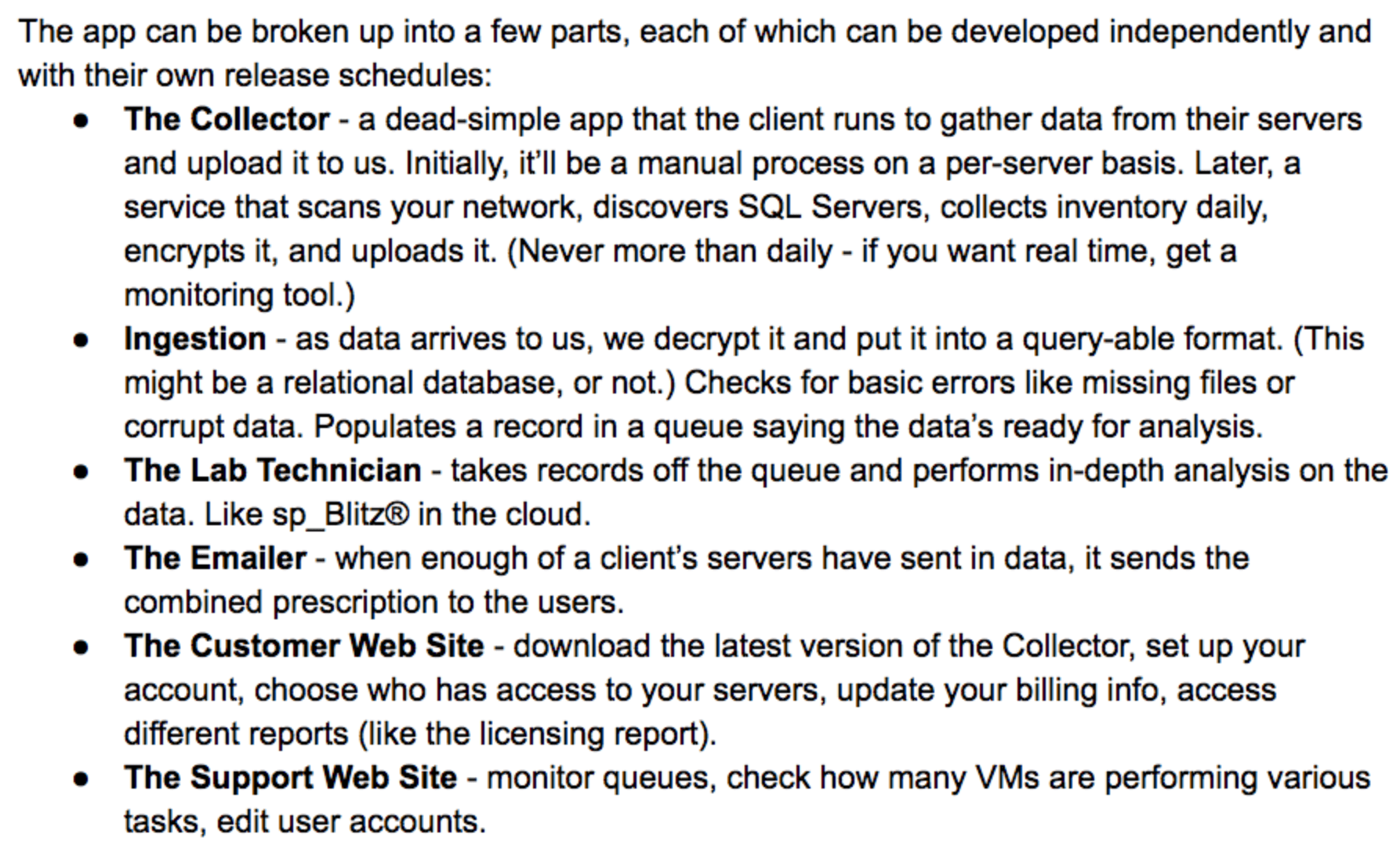
This field is for validation purposes and should be left unchanged.
Name*
Things I want*


First Responder Kit Release: A Year From Now These Will All Stop Working On 2008 And 2008R2

You think I’m kidding.

Time bomb.

Boom.

Get your upgrade underwear on.

You can download the updated FirstResponderKit.zip here.

sp_Blitz Improvements
#1664 – We’re officially smart enough to not warn people that we’re recompiling our own stored procedures.
#1669 – Reworded the stacked instances details. Servers may be installed and not running.
#1687 – @josh-simar has servers linked with AD accounts, and that’ll make for a rootin’ tootin’ bad time when you’re trying to display information about them.
#1695 – @josh-simar found another bugerino for servers that have a member_principal_id over 32,767. Personally I have no idea what that means.

sp_BlitzCache Improvements
#1666 – It took like 4 years, but BlitzCache finally got blocked on a busy server. We are officially reading uncommitted data. Hold onto your pantaloons.

sp_BlitzFirst Improvements
#1680 – You now have the power to skip checking server info, with @CheckServerInfo = 0. Thanks to @jeffchulg for the idea!
#1689 – @Adedba loves some memory analysis. We’ll now give you the skinny on what your RAM is doing.
#1679 – @jeffchulg coded up the magical ability to change the output type to none, if you don’t want any output.
#1676 – @ChrisTuckerNM hit some ran into some XML funk. There were some string concatenation issues.

sp_BlitzIndex Improvements
#1685 – We split the warnings about Heaps into two sections. One for forwarded fetches, and one for deletes.
#1697 – If you wanna examine a single table, we shouldn’t be concerned with all them darn fangled partitions that might exist on another table.
#1679 – @jeffchulg coded up the magical ability to change the output type to none, if you don’t want any output.

sp_DatabaseRestore Improvements
#1681 – @ShawnCrocker fixed a bug where the backup path for diffs wasn’t getting set to null if we weren’t restoring any diffs.
#1673 – @reharmsen fixed things up so you fine people can use Standby mode as expected.
#1672 – @marcingminski added the ability to restore from striped backups! Very fancy!
#1671 – @lionicsql coded a feature that will let you restore full and differential backups in standby. Hooray.

sp_BlitzQueryStore Improvements
Nothing this time around – WON’T SOMEONE PLEASE USE THE QUERY STORE?

PowerBI
Nothing this time around

sp_BlitzLock
Nothing this time around

sp_BlitzInMemoryOLTP Improvements
Nothing this time around

sp_BlitzWho Improvements
Nothing this time around

sp_BlitzBackups Improvements
Nothing this time around

sp_AllNightLog and sp_AllNightLog_Setup Improvements
Nothing this time around

sp_foreachdb Improvements
Nothing this time around

For Support

When you have questions about how the tools work, talk with the community in the #FirstResponderKit Slack channel. If you need a free invite, hit SQLslack.com. Be patient – it’s staffed with volunteers who have day jobs, heh.

When you find a bug or want something changed, read the contributing.md file.

When you have a question about what the scripts found, first make sure you read the “More Details” URL for any warning you find. We put a lot of work into documentation, and we wouldn’t want someone to yell at you to go read the fine manual. After that, when you’ve still got questions about how something works in SQL Server, post a question at DBA.StackExchange.com and the community (that includes us!) will help. Include exact errors and any applicable screenshots, your SQL Server version number (including the build #), and the version of the tool you’re working with.

You can download the updated FirstResponderKit.zip here.


The First 3 Things I Look At on a SQL Server

1. Are backups and CHECKDB being done? Before I step out on the wire, I want to know if there’s a safety net. If there’s a recoverability risk, I don’t stop here – I keep looking because the rest of the answers affect the safety net we’re going to put in place.

“10TB of data on a Commodore 64, interesting”

2. How’s the hardware sizing compared to data size? How much data are we dealing with, measured in both database quantity and total database file size? Then, how does the server horsepower compare – physical or virtual, how many cores do we have, and how much memory? (In a perfect world I’d know the storage specs too, but that’s usually much harder to get.)

3. What’s the wait time ratio? In any given hour on the clock, how many hours of wait time do we have? If it’s 1 or less, the SQL Server just isn’t working that hard. You can get this from sp_BlitzFirst @SinceStartup = 1. (Again, in a perfect world, I’d have more granular charting like you get from the Power BI Dashboard for DBAs.)

Armed with those 3 things, I have a pretty good idea of whether the server is well taken care of – or not – and if not, whether it’ll be vaguely fast enough to start doing the right database maintenance. For example, if I see an overtaxed, never-backed-up VM with 4 cores, 16GB RAM, and 200 databases totaling 10TB, we’re probably gonna have to have a come-to-Jesus meeting.