Blog

The Next Mastering Series is About to Start. Wanna Save $2,000?

Company News, Conferences and Classes
0

Ever wanted to take my Mastering series of classes? I recommend that you take ’em in a specific order because each class builds on the next. If you try to parachute in out of order, you’re gonna have a bad time.

The next rotation is about to start:

  1. Fundamentals of Index Tuning – Feb 13
  2. Mastering Index Tuning – March 4-6
  3. Mastering Query Tuning – April 1-3
  4. Mastering Server Tuning – May 1-3

It’s not a cheap investment, I know: the Mastering classes are $2,995 each. That’s why a lot of folks choose the Live Class Season Pass which lets you attend all of ’em for a year straight – so you can re-take classes when work gets in the way, or when you wanna take your game up a notch.

There’s a new less expensive option:
save $2,000 by skipping the lab VMs.

During the Mastering classes, you get your own private lab VM in the cloud to follow along during the labs. You’re tasked with a series of tough assignments, and they help you reinforce the concepts that you’ve been seeing during the lectures. You get a lunchtime lab, and an afternoon/overnight lab as homework.

However, some students don’t use their lab VMs – they have a pesky day job that interferes. During the lunch & afternoon breaks, they work on their day job stuff instead, answering emails and doing help desk tickets.

Since the lab VMs are pretty expensive, I’d rather pass the savings on to you. So starting today, you can pick up a Live Class Season Pass for just $3,995. Enjoy, and see you in class!
Registration Open for My Upcoming Pre-Cons: Belgium, Dallas, Iceland, Israel, Miami, Orlando!

Company News
0

Brent Ozar Techorama 2018I’m hitting the road this spring. Here’s where to find me in person:

SQLSaturday IcelandYour First SQL Server Performance Tuning Class – March 16 – You’re stuck with a database server that’s not going fast enough. You have a hunch that the biggest bottleneck is inside the database server somewhere, but where? In this one-day class, you’ll learn how to identify which queries are killing your server, what parts of the database server are holding you back, how to tackle indexing improvements, and how to identify query anti-patterns. Learn more and register. – Update: sold out! I pre-announce these to our mailing list subscribers, and they snapped up the all seats over the weekend.

SQLSaturday IsraelPerformance Tuning in 21 Demos – April 10 – You’re a developer or DBA who wants to tune indexes and queries to make your application go faster. You don’t like learning by watching slides or reading white papers – you want to jump right into the code and see what happens. You’re the kind of person who loves watching YouTube videos that start with, “Hold my beer and watch this.” Learn more and register. (24 seats left as of this writing.)

Techorama BelgiumSQL Server Performance Tuning in a Day – May 20 – You’re stuck with a database server that’s not going fast enough. You’ve got a hunch that the biggest bottleneck is inside the database server somewhere, but where? In this one-day class, you’ll learn how identify which queries are killing your server, what parts of the database server are holding you back, how to tackle indexing improvements, and how to identify query anti-patterns. You’ll get your developers, sysadmins, and DBAs all on the same page, talking about the same metrics, and understanding whether the right fix is code, indexes, or hardware. Learn more and register.

SQLSaturday Dallas – Performance Tuning in 21 Demos – May 31 – You’re a developer or DBA who wants to tune indexes and queries to make your application go faster. You don’t like learning by watching slides or reading white papers – you want to jump right into the code and see what happens. You’re the kind of person who loves watching YouTube videos that start with, “Hold my beer and watch this.”Attendees will receive a year’s access to their choice: the Recorded Class Season Pass or the Consultant ToolkitLearn more and register.

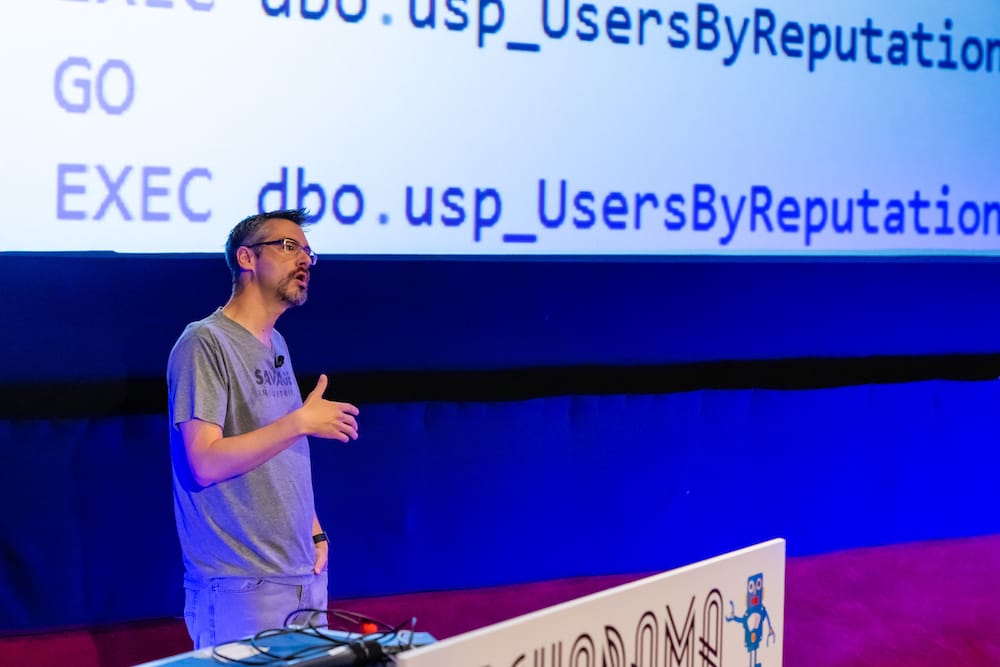
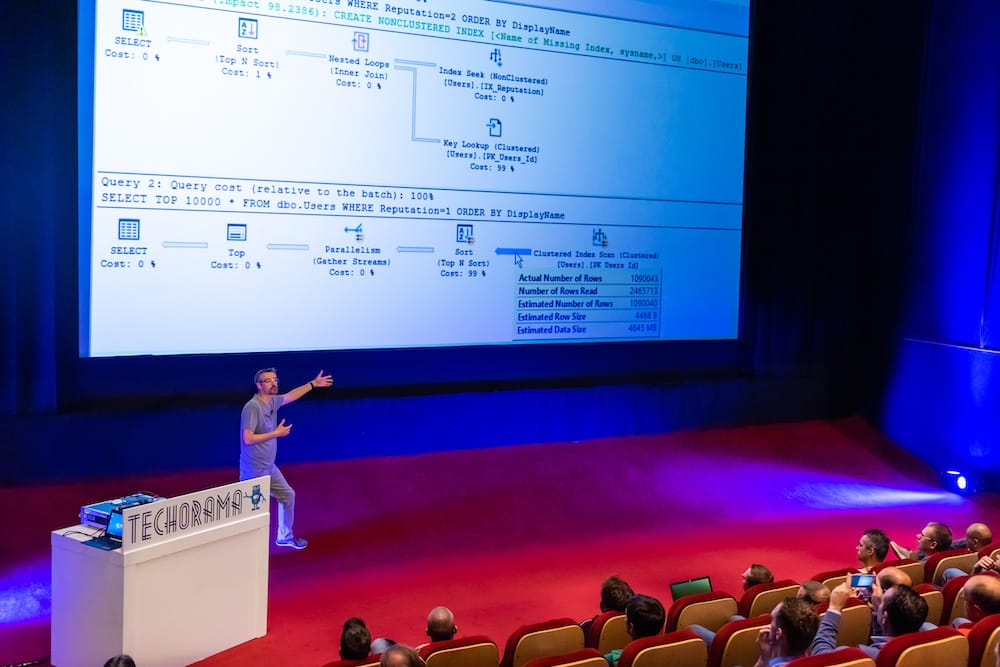
Techorama - now that's a projector
Techorama – now that’s a projector

SQLSaturday South Florida – Performance Tuning in 21 Demos – June 7 – You’re a developer or DBA who wants to tune indexes and queries to make your application go faster. You don’t like learning by watching slides or reading white papers – you want to jump right into the code and see what happens. You’re the kind of person who loves watching YouTube videos that start with, “Hold my beer and watch this.” Attendees will receive a year’s access to their choice: the Recorded Class Season Pass or the Consultant Toolkit. Learn more and register.

SQL Intersection OrlandoDeveloper’s SQL Server Recipe Book – June 9 – You and your team have to build a lot of queries: transactional insert/update/deletes, batch jobs, and reports. You’re comfortable writing queries to get data in and out, but they’re just not as fast as you’d like. You’re looking for a set of examples that you can follow – plus a list of anti-patterns that seem good until they just don’t scale. I’ll share my favorite T-SQL starting points for different business requirements. We’ll implement them on the Stack Overflow database, and you can follow along on your laptop.Attendees will receive a year’s access to their choice: the Recorded Class Season Pass or the Consultant ToolkitLearn more and register.

If you’re organizing an event this fall/winter, and you’d like me to present a pre-con, I’d love to help. Email me at Help@BrentOzar.com – the earlier, the better. I tend to book several months in advance. See you out there!


The “Guess the Next Release Date” contest continues…

SQL Server 2019
9 Comments

Back in December 2017, when I posted the Guess the Next SQL Server Release Date Contest, you could leave your guess in the comments for a chance to win a Live Class Season Pass and a Recorded Class Season Pass.

Here’s how the guesses so far have gone – and for this quick analysis, I’m only including people who followed the rules, not people who put a bunch of text in their comment. When it comes time to pick a winner, I’ll go through the text ones too.

Guess the Release Date

Looks like most folks expected it to be around the end of last year, 2018. I talked to a few folks about where their guesses came from, and they’d taken hints from the 2017 post from the Release Services team about the new Modern Servicing Model. At that time, Microsoft wrote:

CUs will be delivered more often at first and then less frequently. Every month for the first 12 months, and every quarter for the remainder 4 years of the full 5-year mainstream lifecycle.

Between that, and the quick cadence between SQL Server 2016 and 2017, they suspected that Microsoft would be shipping a new version of SQL Server every year. Made sense at the time. (Later, Microsoft revisited that support policy.)

Now, looking back:

  • SQL Server 2012: 2012-04-01
  • SQL Server 2014: 2014-04-21 (~25 months later)
  • SQL Server 2016: 2016-06-01 (~25 months later)
  • SQL Server 2017: 2017-10-02 (~16 months later)
  • Today, 2019-02-04: 16 months later

The SQL Server 2019 release cadence is actually slower than the 2017 pace. Interesting. The 2019 release is definitely more ambitious – Kubernetes, Big Data Clusters, batch mode for rowstore queries – there’s a lot of huuuuge stuff in here.

Something to think about as you place your guess. Good luck!

Update 2019/03/01 – closed comments here since folks got confused as to where the contest is happening.


[Video] Getting Started with the Consultant Toolkit

Consultant Toolkit, Videos
9 Comments

You’re a consultant who needs to figure out why your clients’ SQL Servers are slow and unreliable.

You’ve collected a bunch of diagnostic queries over the years, but they have a lot of holes, and you don’t really have the time to maintain them – let alone make ’em better. You waste time connecting to the server, running one query at a time, copy/pasting the results into Excel or taking screenshots. You’re burning the client’s money doing manual labor, and neither of you are happy with the results.

That’s where our Consultant Toolkit comes in, and today I did a live webcast talking about how it works:

Get a free trial and a big discount during our launch sale – ends Saturday.


10 Database Tasks That Sound Easy, But Aren’t

All of these are doable with scripts, tools, and/or elbow grease, mind you – they’re just not as easy as they sound at first glance until you know about the existence of those scripts, tools, and/or free people waiting around with spare elbow grease.

  1. “Go through the log and find out who ran this query.”
  2. “Apps sometimes time out when connecting to database server. Why?”
  3. “Build a new server with the same configuration as the old server.”
  4. “I just ran an UPDATE without a WHERE clause. Undo just that one query.”
  5. “Show me everyone who can read from this table, including groups and app users.”
  6. “Run a load test on these two servers and compare them.”
  7. “The reports server needs a synced copy of the accounting server’s customer table.”
  8. “What were the slowest running queries yesterday?”
  9. “Why is this query slow in production, but fast in development?”
  10. “Apply the latest updates for the cluster.”

As you read through that list and say to yourself, “Hey, I know how to do some of those really easily,” stop and congratulate yourself. You’ve learned things over the years, and you’re better at databases than when you started.


Announcing the Consultant Toolkit: Now Available in the European Union, too

Consultant Toolkit
17 Comments

Yesterday, I got a barrage of emails and LinkedIn messages that went like this:

Hey Brent, about your new consultant toolkit: I really love that idea and would want to get my hands on it. Unfortunately i originate in the EU. I know about your reasoning around not selling to EU members and I don’t want to start a discussion around that. Do you see ANY way how I can purchase it? I’ve written plenty of wrappers in the past, but I’d rather spend my time making servers faster than maintaining custom code bases whenever procedures change.

Alright, alright, alright.

You can now buy the Consultant Toolkit too!


Announcing the Official Release of the Consultant Toolkit

Consultant Toolkit
13 Comments

Brent Ozar's Consultant ToolkitYou’re a consultant, and you need to get diagnostic data from your clients’ SQL Servers.

You’ve been copy/pasting queries and results from SSMS, trying to save execution plans one by one, wasting time doing manual labor.

That stops right now.

For years, we’ve had our own slick in-house utility that makes the process way easier. Here’s how it works:

There’s no per-client pricing: use this on as many servers as you want, at as many clients as you want. This is all about helping you tackle more work, in less time, and make more money. I’m even including the same email templates and help instructions that I’ve used with clients for years.

The pricing is:

  • $495 for one user (consultant)
  • $1,995 for company-wide licenses

Let’s do this! Sign up now and make your consulting life easier.


Updated First Responder Kit with Your January Code Resolutions

I have a sneaking suspicion that a bunch of you made New Year’s Resolutions to contribute to open source, because y’all got started with a bang this year. We’ve even got improvements from Microsoft folks for Azure Managed Instances!

You can download the updated FirstResponderKit.zip here.

sp_Blitz Changes

  • Improvements: skipping checks on Azure SQL DB Managed Instance that aren’t relevant, like system databases on C, Hekaton enabled, and TDE enabled. (#1919, thanks Jovan Popovic.)
  • Fix: if you leave your Amazon EC2 VM name as the default (c’mon, seriously people), we won’t flag it as an RDS server. (#1925, thanks Randy Knight.)
  • Fix: when alerting on backups written to the same drive as databases, ignore tempdb. (#1916, thanks Henrik Staun Poulsen.)

We also added a top-row result warning if checks were skipped because it detected AWS RDS, Express Edition, or Managed Instances – or combinations, like here:

sp_Blitz running on AWS RDS Express Edition

sp_BlitzBackups Changes

  • Improvement: now raises a 16 severity error if it fails due to a nonexistent linked server, making it easier to troubleshoot failures. (#1904, thanks M-Ron.)

sp_BlitzFirst Changes

  • Fix: when sp_BlitzFirst is set up in an Agent job to call sp_BlitzCache, it now checks the SQL Server version before trying to sort by memory grants (which isn’t possible on older versions/patch-levels.) (#1910, thanks M-Ron.)

sp_BlitzIndex Changes

  • Improvement: when you pass in @TableName to do table-level analysis, we added a new result set for statistics histograms at the bottom. (#1900)
  • Improvement: in @Mode = 2 (listing all the existing indexes), we added columns at the far right with the drop and create TSQL. (#1921, thanks Joshua Higginbotham.)
  • Improvement: when @Mode = 4 doesn’t find any results, it now links to FirstResponderKit.org instead of BrentOzar.com. (Trying to remove unnecessary links to us to make it easier for consultants to copy/paste the results as-is for clients.) (#1905)
  • Fix: if you don’t set @BringThePain = 1 and we find >100 partitions, we now raise a level 0 severity error instead of 16. We don’t need to pop you over to the messages tab since there’s a line about the partitions at the top of the result set anyway. (#1914)
  • Fix: @GetAllDatabases = 1 was failing on Amazon RDS when it hit the rdsadmin database because they’re doing something fancy with the resource database. (#1927)

sp_DatabaseRestore Changes

  • Improvement: validate the @Database parameter against the full backup file. (#1894, thanks ShawnCrocker.)

For Support

When you have questions about how the tools work, talk with the community in the #FirstResponderKit Slack channel. If you need a free invite, hit SQLslack.com. Be patient – it’s staffed with volunteers who have day jobs.

When you find a bug or want something changed, read the contributing.md file.

When you have a question about what the scripts found, first make sure you read the “More Details” URL for any warning you find. We put a lot of work into documentation, and we wouldn’t want someone to yell at you to go read the fine manual. After that, when you’ve still got questions about how something works in SQL Server, post a question at DBA.StackExchange.com and the community (that includes us!) will help. Include exact errors and any applicable screenshots, your SQL Server version number (including the build #), and the version of the tool you’re working with.

You can download the updated FirstResponderKit.zip here.


How to Think Like the Engine – 2019 Edition

Indexing, SQL Server, Videos
6 Comments

You’re a developer or a DBA, and you’re comfortable writing queries to get the data you need. You’re much less comfortable trying to design the right indexes for your database server. In this series of videos, you’ll learn how the SQL Server engine looks at your indexes and builds your query results.

In 90 minutes of videos, you’ll learn:

  • The differences between clustered and nonclustered indexes
  • How (and when) to make a covering index
  • The basics of execution plans
  • What determines sargability
  • What SQL Server uses to estimate the memory your query needs

And more. To follow along, print out this 5-page PDF built from Stack Overflow’s database pages. Here’s the first module:

Wanna keep watching?

To see the rest and get the slides & scripts, head on over to How to Think Like the Engine. Enjoy!


Watch Brent Tune Queries: Fixing Nested Functions

T-SQL
15 Comments

When I do performance tuning for clients, I really pride myself on making as few changes as possible in order to make a tremendous difference. I consider it a failure when I have to tell someone to rewrite a bunch of queries from scratch.

However, there are some cases where I just can’t work around a perfect storm of anti-patterns. To understand why, let’s take an example. I’ve kept the general idea the same, but I’ve rewritten the entire example in the Stack Overflow database to protect the innocent.

The most resource-intensive query was a stored procedure – let’s say it looked for interesting users who live in the same location as you, who you might like to meet, because they’ve commented on the same answers that you have:

Uh oh – it called a table-valued function, ufn_UsersYouMightLike. What’s in there?

Uh oh – it’s getting worse. It populates a table variable, and we know those have massive problems. Then, it queries that table variable, and it has a scalar function in the where clause. What’s in that fn_HasCommentedOnAnAnswer?

Hoo boy. We’ve got some work to do. We have a few problems to fix:

  • A table variable – producing bad row estimates, underestimating costs, and probably stopping us from getting parallelism
  • A multi-statement table-valued function – which makes performance tuning way harder for my developers, who couldn’t see what was really happening inside the stored procedure
  • A scalar function – which the above function is going to run row by row, and it’s going to inhibit parallelism too

I’m going to unpack all of ’em, and I could probably fix ’em in any order. Let’s start with the scalar.

Fixing the scalar function by inlining it

My general advice on scalars is to take their logic out and try to inline them wherever they’re called. In our case, the calling query looks like this:

So in a perfect world, I’d open up fn_HasCommentedOnAnAnswer, copy the logic out, and paste it directly into the WHERE clause here. Let’s open it up and see if I can do it:

Drat – they’ve got multiple statements in here. They’re setting a configuration variable, and then using that variable in a subsequent query. The more queries you find in the scalar, the harder the rewrite is going to be.

In this case, I’m going to do a very fast and dirty rewrite. I bet the @PostTypeId is a config variable that doesn’t even change very often, and I could probably hard-code it, but I’m not going to go quite that dirty. Here, I’m just going to dump the config variable into a subquery.

Instead of this:

I’m going to do this:

I know – not elegant – but it does get my scalar function down to just one query:

Which means that now I can take that one SELECT query, copy it out, and paste it into the query where it was being called, ufn_UsersYouMightLike. Here’s the part of that function that was calling the scalar:

If I copy out the scalar’s logic and embed it into the WHERE clause, it’ll look like this:

Ugh. I’m not proud of that, but at least the scalar’s out of the way for now. Next up…

Fixing the multi-statement TVF by inlining it

After inlining the scalar, I’m dealing with an outer function that looks like this:

If you’ve been through the functions module in Fundamentals of Query Tuning or in Mastering Query Tuning, you’ll recognize the problem: this function has multiple queries in it, meaning it’s a perilous multi-statement TVF. Its true cost and work won’t show up in the calling query (the proc), so our developers had no idea how bad it really was.

Like with scalars, my general advice here is to try to turn them into inline (single-statement) functions. Again, the more statements you have, the harder this is – but here, it’s not too bad. Let’s just take the statement that was populating the table variable:

And shove that into the FROM clause, which used to be:

The fast duct-tape way of doing it would be to simply paste it in:

But let’s clean that up a little:

Now I can set aside the table variable, and this whole thing turns into one statement, a magical inline table-valued function:

We still have the stored proc calling a function, mind you – but I’m trying to change the bare minimum of things I can to suddenly get the client across the finish line.

So how does it perform?

I really wanted to show you before-and-after numbers, dear reader, but the “before” query was still going after 45 minutes – and I’m only using the small 10GB StackOverflow2010 database here!

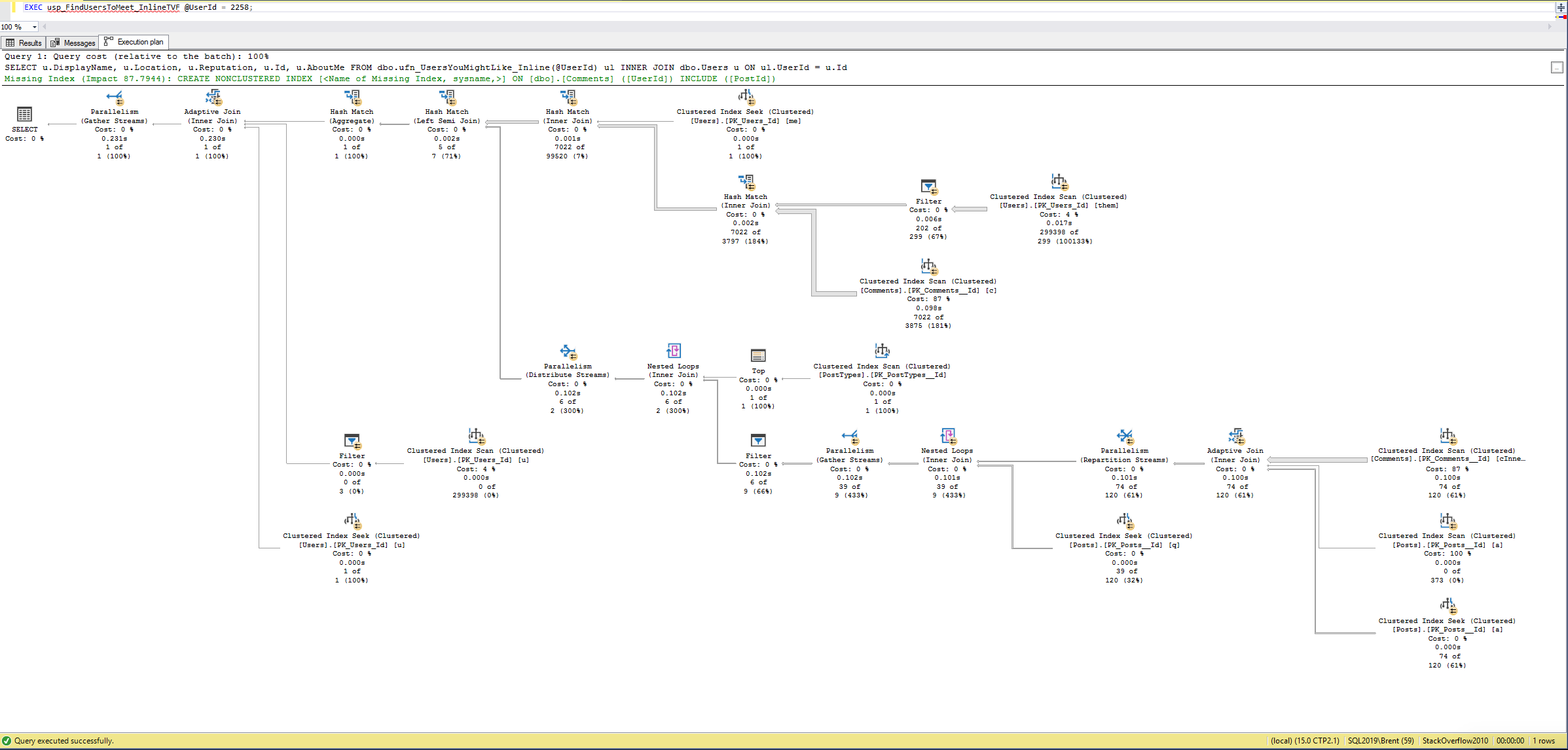
The improved version runs in under a second! Granted, the execution plan isn’t pretty:

And there are obvious improvements we could make to the code and indexes, but…who cares? IT RUNS IN UNDER A SECOND! Rather than chasing further improvements to that one, I’d hand that to my developers, walk them through the changes we made, and then talk about the next terribly long query to go tune. In most cases, the big bang for the buck will be taking those 45-minute-long queries and turning them into just 1 second, rather than turning 1 second queries into 200ms queries.

Recap and lessons learned

When I show this to a developer, there are usually hugs and sobbing involved. They believed – rightfully – that if a feature ships in SQL Server, then it should perform well. That just isn’t the reality, sadly: table variables, scalar UDFs, multi-statement TVFs – these are all things that the documentation don’t warn you about. Sure, they compile – but they sure don’t scale.

These two function examples were simple on purpose because this is a blog post, not a doctoral thesis. When you get into functions that have several statements, each building on the next, building tables and fetching configuration data, this just gets more laborious. It’s not mentally hard, mind you, it’s just hard work, rolling up your sleeves to combine queries into one big ugly monster – or rewriting it from row-by-row functions to a set-based approach inside a stored procedure.

The earlier a senior database developer can get involved in the design and code review process, the less work gets wasted by other developers who don’t know that SQL Server just can’t handle those, nor implicit conversions, dynamic WHERE clauses with OR/ISNULL/COALESCE, etc, things that compile – but don’t scale.

To learn more about why – and how to work around ’em – check out my free Watch Brent Tune Queries videos, and then graduate to the Fundamentals of Query Tuning course.


Tuning Dynamic SQL by Hand with Short Circuits

T-SQL
7 Comments

When we think about building dynamic SQL, we usually think about a stored procedure like this that takes input parameters, builds a string, and then executes that string. Here’s a simple example:

The more parameters you have, the crazier the code gets, and the harder it becomes to produce really fast plans across all the parameter combinations.

But what if a lot of the queries look similar?

For example, what if your search page has a set of defaults, and the vast, vast majority of searches just use the defaults?

In our example above, what if the vast majority of the time, people always searched for users in London whose Reputation = 1? There’s no reason we can’t put a short-circuit at the top of our stored procedure:

In complex stored procedures, this short circuit buys me a few cool advantages:

You can build a hand-crafted query. You can restructure the T-SQL to be more performant, add index hints, query hints, trace flags, you name it, things you wouldn’t normally want to add to dynamic SQL on the fly.

You can get the data from somewhere different. For example, at one client, 99% of product searches were looking for the “Item of the Day” on sale – and that product list only changed once per day. We simply built a new table with the necessary product info, populated it once per day on a schedule, and changed the search procedure to something like this (obviously with a different table name):

For that client, it made a phenomenal difference in eliminating joins, memory grants, permissions checks, and sorts. (The table only had one row in it.)

You skip the overhead of building a dynamic string. I know it sounds trivial, but when you’re dealing with tens of thousands of queries per second, this can be a big deal.

How to know if this tactic makes sense

Warning: run-on sentence incoming.

  1. If you run sp_BlitzCache and your top most resource-intensive queries use dynamic SQL,
  2. And a little further down in the results, you see a dynamic string that was built by one of these procs,
  3. And when you compare the outer proc’s resource utilization numbers (CPU, reads, duration, etc) number to the dynamic SQL’s resource utilization, and it looks like that one dynamic SQL line is a big chunk,
  4. And you think you could do better tuning that particular branch of dynamic SQL by hand,
  5. And the other branches wouldn’t benefit from you just tuning the main string itself,
  6. Then it’s a good fit.

New Fundamentals of Index Tuning Course

Indexing
2 Comments

You’re a developer who needs to make your application go faster, and you don’t want to (or can’t!) change the queries. You’ve never been to an official training class, and your manager isn’t about to spring for travel.

Fundamentals of Index TuningIn my new Fundamentals of Index Tuning course, you’ll learn:

  • How to design indexes for a query without looking at its execution plan
  • How to pick the order of keys in an index
  • How query parameter values can change which index is better
  • Where to find index recommendations using query plans, DMVs, and sp_BlitzIndex
  • How SQL Server’s index recommendations are built, and why they’re often wrong

To make the concepts more real, download the Stack Overflow database (get the smallest size so your index creations go as quickly as possible.) I’ll give you the exact same queries I’m running onscreen so you can follow along, and then after each module, you’ll have a series of assignments to complete. After you work on it, I’ll show you my answers, and you get those to download too.

  • Watch the recorded version for $195 $97.50 – half off this week thanks to our sponsor, Sentry One Essentials.
  • Or join me live for $595 $297.50 – half off this week, and when you buy your ticket, you immediately get access to the recorded version, too. That way, you can start learning now, and then reinforce the concepts and ask live questions during your live class.
  • Already a member? If you’re in my Recorded Class Season Pass, you can start watching the recordings right now. If you’ve got a Live Class Season Pass or a Team Membership, go ahead and sign up – it’s free with your unlimited membership.

Sign up now, and let’s get started!


Free Downloads for Powerful SQL Server Management

You’re responsible for managing and troubleshooting SQL Server.

Good news: you’re not alone. The SQL Server community has banded together and built a bunch of cool stuff to help you do your job easier. In a one-hour session today for the PASS DBA Fundamentals online user group (free to join, of course), I showed some off.

Tools I demoed live during the webcast

How to run a load tests: SQLQueryStress – an open source app originally written by Adam Machanic, and now maintained by Erik Ejlskov Jensen on Github. In the webcast, I’ll be using a set of free random workload scripts which run against the…

How to run demos: Stack Overflow database – the popular Q&A site StackOverflow.com gives away your questions, answers, comments, etc in an open format, and I import it into a SQL Server database you can use for learning T-SQL and indexing. I publish small (10GB), medium (50GB), and large (312GB) versions.

How to see what queries are running: sp_WhoIsActive – during the webcast, I’ll want to see what queries are causing me problems right now, and I won’t be firing up Activity Monitor. That thing is a hot mess. Instead, I’ll run @AdamMachanic‘s amazing tool, sp_WhoIsActive, and I’ll show you my favorite parameters.

How to see what queries have run recently: First Responder Kit – after the load test passes, let’s say someone asks me, “Hey, what queries were causing a problem earlier this morning?” I’ll show you how the open source sp_BlitzCache gives you the answers.

How to analyze their query plans: SentryOne Plan Explorer – when you’re struggling to understand why a query is slow, does it ever feel like SQL Server is fighting you back? Almost like it’s purposely trying to hide known anti-patterns and problems in the query plans? Plan Explorer surfaces them for you.

How to protect your databases: Ola Hallengren’s maintenance scripts – the built-in maintenance plans are a good first step at getting backups, corruption, and index maintenance. Over time, though, you’re going to graduate to needing something more powerful, and then it’s time to say hola to Ola.

And another dozen cool freebies

How to learn with free books – Redgate Books – you can download the PDF versions of their books absolutely free, including material on execution plans, source control, troubleshooting, and more. The site is just a little confusing – there are more books than you see at first. Click on the tabs under “Our books by topic” and you can see more books on SQL DBA topics, .NET, SysAdmin, etc.

How to manage more SQL Servers in less time: DBAtools.io – a collection of PowerShell cmdlets and a vibrant community of contributors. If you’re managing 50 or more SQL Servers by yourself, you need to drop what you’re doing and leverage these tools.

How to check for corruption at scale: Minion CheckDB – as your database volume grows, it can be hard to run CHECKDB frequently enough. This free tool helps you break the work into chunks and offload corruption checking easier. If your databases are 1TB or larger, you should check this out.

Monitor your servers for free: Quest Spotlight Basic – if your boss won’t spring for monitoring software, this is a free way to get a lot of useful analysis.

Watch tons of past conference videos: PASS.org, SQLbits.com, GroupBy.org – these conferences record all their sessions and distribute older ones for free. (You’ll need to create an account to watch the PASS ones, but it’s free, and worth it.)

Manage your columnstore indexes: Columnstore Indexes Script Library – written by the industry expert on columnstore indexes, @NikoNeugebauer, who’s written over a hundred CS blog posts too.

Stay up to date with newsletters: SQLServerCentral and MSSQLTips – these come out daily, so it’s a lot of email, but just don’t feel guilty about deleting ’em when you don’t have the time to keep up. When you’ve got a few minutes, though, skim the headlines on these and you’ll almost always find something of interest inside. If you want to drink from the firehose, you can follow the same blogs I read (also available as an OPML file.)

Learn SQL Server’s DMVs with queries: Glenn Berry’s scripts – these queries help you understand what’s happening inside your SQL Server, but more importantly, they show you many system tables & metrics. The amount of diagnostic goodies we have inside the engine is just astounding.

Format your T-SQL online: format-sql.com – a shortcut to Redgate’s in-browser code formatter. Not as powerful as their paid SQL Prompt, but when you’re in a pinch and you need a quick format, this is perfect.

Where to find more

I’m only scratching the surface! Check out sqlserver-kit.org, an incredible directory maintained by Konstantin Taranov in Github. He’s got everything from trace flags to downloads to lists of blogs.


Which Version of SQL Server Should You Use?

SQL Server
153 Comments

Wait! Before you install that next SQL Server, hold up. Are you sure you’re using the right version?

I know, management wants you to stay on an older build, and the vendor says they’ll only support older versions, but now’s your chance to make your case for a newer version – and I’m gonna help you do it.

I’m going to go from the dark ages forward, making a sales pitch for each newer version.

SQL Server 7.0
But I got a really good deal on this CD at a garage sale

You should consider SQL Server 2017 if…

  • It’s the only thing your vendor supports. That’s it. Mainstream support already ended in 2022, and even Extended Support (security fixes and bug fixes) ends in 2027.

It doesn’t really make sense to install a new 2017 instance today, only to be forced to replace it in just a year or two.

You should consider SQL Server 2019 if…

  • You’re working with slow-moving enterprises that haven’t updated their build test lists in years. SQL Server 2019 is well-known and accepted at every enterprise shop out there.
  • You want years of support – because it’s supported until 2030. I love new versions, but most of us have to stick on a version as long as possible, and 2019 gives you a lot of runway.
  • You want an extremely well-known, well-documented product – it’s pretty easy to find material off the shelf and hire people who know how to use the tools in this version.
  • You hate applying patches – because SQL Server 2019 CU32 is basically the end of the line. Nothing’s getting fixed here, and there certainly aren’t new features coming out for it.
  • You’re good at load & performance testing – because 2019 adds a lot of cool performance features when you enable 2019 compatibility mode, but it also makes big changes in your existing execution plans. Just to pick a number, say 99% of your queries go faster, but 1% go slower. Do you know which 1% they are, and what you’re going to do to mitigate their performance reductions? You can’t just test your slow queries on 2019: you’ve also gotta test your currently-fast queries to make sure they don’t slow down unacceptably.
  • You heavily rely on user-defined functions – because 2019 can dramatically speed those up, although you need to do a lot of testing there, and be aware that Microsoft has walked back a lot of the improvements.

As of 2023, SQL Server 2019 has the biggest installation base. It’s a really good bet for long term support.

You should consider SQL Server 2022 if…

  • You’re afraid to go live on the newest version – because 2025 is relatively new, released in November 2025, and not everyone wants to be on the cutting edge. I would seriously, seriously recommend that you keep an open mind and keep reading though, all the way through the end of this post. A lot of shops are simply skipping 2022 in exchange for 2025.
  • You rely on Adaptive Memory Grants – because these improved a lot in 2022, even in 2019 compatibility level. They were terrifyingly bad in SQL Server 2019.
  • You need the absolute longest support – because 2022 is supported until 2033, whereas 2019’s support ends in 2030.
  • You’re willing to apply patches every 60 days – because on newer releases like this, the patches are coming fast and furious, and they fix some pretty significant issues, especially with brand-new features. Odds are, if you’re going to a brand-spankin’-new version in the year it releases, it’s because you desperately need the new features. Well, those are the least-tested, and they’re the ones getting the most urgent fixes – thus the need for frequent patching.
  • Your DR plan is Azure Managed Instances – because theoretically, SQL Server 2022 makes it possible to fail over to MIs, and more importantly, fail back when the disaster is over. I say theoretically because this feature still feels half-baked to me, like how Managed Instances can take hours to provision.

In summary, you can tell that I’m not the biggest fan of 2022, and like 2017, I think a lot of shops are going to skip it.

You should consider SQL Server 2025 if…

  • You’re on Standard Edition – because Microsoft made huge improvements to Standard, like the ability to use Resource Governor, up to 32 CPU cores, and up to 256GB RAM.
  • You use columnstore indexes – because you’ll benefit massively from that new 256GB RAM cap, plus Microsoft keeps making improvements to columnstore.
  • You struggle with lock escalation – because the new Optimized Locking feature, combined with Accelerated Database Recovery, practically eliminates lock escalation concerns.
  • You’re considering using Microsoft Fabric – because Mirroring to Fabric is easier and faster on 2025. 2022 & prior versions use CDC to copy the data to Fabric, whereas 2025 uses the new change feed technology.
  • You need specific new features from 2025 – like, your app can’t go live without them, and you’re willing to start testing the new code today to learn the ins & outs. (Personally, I really love the new sp_invoke_external_rest_endpoint.)
  • You have a good relationship with Microsoft – like if you’re an enterprise customer with your own account manager, and they can help rapidly escalate your Premier support tickets. If there’s a bug – and there are historically lots of bugs in early releases – you’re going to want help, fast.
  • You need the absolute longest support – because it’ll be supported for a few years after 2025 support ends.
  • You’re willing to apply patches every 30 days – because on newer releases like this, the patches are coming fast and furious, and they fix some pretty significant issues, especially with brand-new features. Odds are, if you’re going to a brand-spankin’-new version in the year it releases, it’s because you desperately need the new features. Well, those are the least-tested, and they’re the ones getting the most urgent fixes – thus the need for frequent patching.
  • You’re okay with possibly serious bugs in those patches – because in the past, the first few really buggy, and at the moment, the fix is to uninstall the CUs, which means you’re unprotected from the original bugs you were trying to avoid.

I’m definitely excited for 2025, and as of summer 2026, I think it’s the version that most shops should consider for new installs. (And I haven’t ever said that for a new SQL Server version before, as soon as it came out!)

Code smells
Is it supposed to smell this bad?

So what’s the right answer?

When I look at that list in summer 2026, I think SQL Server 2025 is the right version for most folks to install today. It’s been a great release in terms of relatively minimal early bugs, and has a ton of new features, stability, and long shelf life.

If your vendor apps don’t support it yet, ask the vendor what their timeline looks like. If they won’t get 2025 supported within the next 6 months, then they probably don’t support new compatibility levels either. In that case, I’d go with SQL Server 2019 as a stopgap measure. 2022 adds some performance features, but you have to be in newer compatibility levels to get them, and no sense using that if your apps don’t support it.

As you’re planning to migrate to the new version, here’s how to go live on a new SQL Server version.


Wanna see Erik Darling as Freddie Mercury at #SQLbits?

SQLBits
7 Comments

Erik Darling is raising money for the Mercury Phoenix Trust, fighting AIDS worldwide to help save lives.

If we raise $5,000, he’ll present his SQLbits indexing session dressed like Freddie Mercury:

I would absolutely love to see this (well, I won’t be there, so I’ll have to settle for photos) so I’ll match the first $1,000 of donations.

Let’s make this happen, party people: make your donations and let’s make this world the fun, helpful place we want it to be.


Upcoming Free Training Webcasts

Videos
2 Comments

Brent Ozar WebcastHey, wanna learn about SQL Server for free?


Feb 7 – PASS Data Expert Series: PASS is taking the top-rated Summit 2018 recordings and replaying them live, for free, on a webcast. I’ll be in the chat room too, taking your questions. Register here, and the lineup includes:

  • SSMS & T-SQL Tricks with Bob Pusateri – 11AM Eastern
  • Fix My Functions with Kendra Little – 12:20PM
  • Getting Better Query Plans with me – 1:40PM
  • Performance Tips and Tricks with Pinal Dave – 3:00PM
  • SQL Server with Containers with Bob Ward – 4:20PM
  • Building Trust in Teams with Richard Campbell – 5:40PM

Jan 25 – How to Think Like the Engine: You’re a developer or a DBA, and you’re comfortable writing queries to get the data you need. You’re much less comfortable trying to design the right indexes for your database server. In this 90-minute class, you’ll learn how the SQL Server engine looks at your indexes and builds your query results.

Feb 1 – Getting Started with the Consulting Toolkit: SQL Server consultants: you need an easy way to run an app, gather lots of diagnostic data, save it to a portable spreadsheet that you can analyze later. Even better, you want an app that your clients can run when their server is having problems but you’re not around – and then send that spreadsheet to you so you can diagnose problems after they’ve happened. That’s my new Consultant Toolkit. In this webcast, I’ll show you how to get it for free, start using it, and teach your clients how to use it.

Feb 8 – An Introduction to GitHub for DBAs: Distributed source control is really intimidating: branches, pull requests, merges – will somebody just take my code, for crying out loud? Why does it have to be so complicated and involved? I’m with you: I’m Brent Ozar, and I hated GitHub. For years, I struggled with it, but I’ve come to a gradual truce. I’m not a GitHub pro by any means, but in the span of one session, I can explain the most important terms to you in a way that’ll make sense for non-developers. I’ll show you how to contribute to someone else’s open source project, and how to get started putting your own scripts under source control.

Feb 15 – How to Capture Baselines with sp_BlitzFirst: You’re responsible for performance tuning SQL Server, and you’ve heard the same advice a bunch of times: “You should set a performance baseline.” But what does that even mean? And how do you do it? What metrics should you gather? How often should you gather them, and how much history should you keep? I’m a performance tuning DBA with a couple decades of experience, and I’ll show you how to capture baselines by setting up the free, open source sp_BlitzFirst to run in an Agent job every 15 minutes. You’ll also learn how to use the free Power BI Dashboard to read the baseline metrics.

Register now. If you can’t make it live, no worries – the videos will be on our YouTube channel too.

"*" indicates required fields

This field is for validation purposes and should be left unchanged.
Name*
Things I want*


SQL Server Perfmon counters that are still interesting in 2019

Monitoring
14 Comments
“Page Life Expectancy? That belongs in a museum!

(Cross-posted from the PASS Blog.)

Years ago, my first go-to tool for performance tuning was Performance Monitor: it was available everywhere, worked in all versions, and gave me a lot of useful information without paying for a monitoring tool. Since then, I’ve moved on – wait stats are a much better starting point – but there are still 3 good Perfmon counters that I rely on.

No, not Page Life Expectancy, Buffer Cache Hit Ratio, and Disk Queue Length. Those are still hot garbage.

1. Forwarded Fetches per Second

When your tables don’t have clustered indexes, you’ve got a heap: a table organized in random order. Heaps are notoriously bad ideas if you do updates on variable-length fields because as SQL Server runs out of space on a page, it’ll move a row to another page where there’s available space for your new update. The more of these you have, the higher penalty you pay when scanning a table.

The Perfmon counter SQLServer:Access Methods: Forwarded Records/sec tracks how many of times SQL Server had to jump around while reading. (Think of these as extra logical reads to deliver query results.) The higher this number is, the more extra logical reads you’re doing. I don’t gauge the number by itself – I look at it as a percentage of the reads we’re doing overall. If I can cut the logical reads we’re doing by, say, 10% just by rebuilding the heap, great! That’s an easy win.

ENHANCE

With a name like “Forwarded Records/sec” you would reasonably assume that querying this number would get you the, uh, forwarded records that occurred in any given second. Nope. It’s a cumulative number from when SQL Server last restarted. That means in order to get actionable data, you need to measure this over time, and do differentials between measurements.

2. Memory Grants Pending

When your query starts executing, it usually needs a memory grant to do things like sorts, joins, and parallelism. I find this topic really intriguing, and you can probably tell – we’ve got a whole category of memory grant posts.

SQL Server:Memory Manager: Memory Grants Pending tells you the number of queries that are waiting on a memory grant before they can even START executing. When this number > 0, your apps are probably getting query timeouts, and the sysadmins are confused because CPU time looks low, but SQL Server is slow.

3. Compilations per Second

When you execute your beautifully hand-crafted query, SQL Server has probably never seen anything like it before – well, at least not since it restarted – and has to build a query execution plan.

With a regular transactional app, the same queries probably come in over and over, just with different parameters. (Data warehouses and reporting systems with a lot of truly unique queries are different – we’ll set those aside for now.)

“WHY AM I NEXT TO A HELMET?”

The SQLServer: SQL Statistics: Compilations/sec counter measures the number of times per second (hahaha, you wish) that SQL Server has had to compile a plan for a query it hasn’t seen before. The best way to evaluate this is to frame it in terms of the SQLServer:SQL Statistics: Batch Requests/sec counter, which, as you can probably guess, is also not measured per second. Totally up to you to do a differential, or to use the open source sp_BlitzFirst to do the differentials for you.

In a transactional system, I expect to see 90% (or higher) query plan reuse – so Compilations/sec should be 10% (or less) of the Batch Request/sec measure.

These 3 Perfmon counters shouldn’t be the first place you look – wait stats are still a better starting point – but sooner or later, you’re going to hit one of these issues that require Perfmon counters to solve. Ol’ trusty Perfmon is still there for you.


How to Load Test a Database Application

Development
9 Comments
Caution
I stay in the nicest hotels

It sounds really simple:

  1. Capture a bunch of production queries
  2. Replay those same queries over in a load test environment

So what’s the big deal? Why is it so hard to find good guidance on how to pull this off? How hard can it be?

Problem 1: many queries aren’t repeatable.

When you try to replay this query:

The rows have to actually be there in the table, or else your delete isn’t doing any work. That means you can’t replay that same query several times in a row. You’re going to have to restore the database after each load test, starting it back at the same point.

Deletes aren’t the only commands with this problem, either: for any query with a WHERE clause, we need the data to exist in the state we want:

In both cases, the rows for JobID 12345 have to already exist, so for a successful load test, our setup steps at the beginning of the post need to look more like:

  1. Take a backup of the production database(s)
  2. Capture a bunch of production queries
  3. Restore that same backup to the load test environment
  4. Replay those same queries over in a load test environment

(I can already hear the security crowd groaning, saying, “No no no, you’re never allowed to restore production data somewhere else.” Put a sock in it: we’re already talking about capturing queries in production, and as you know, those have personally identifiable data already. Read through til the end of the post before you get the flamethrower out.)

Problem 2: amplification introduces false blocking.

Managers think that to simulate more load, they can just take the production queries and replay them multiple times, simultaneously, from the replay tool. We’ve already talked about how you can’t reliably replay deletes, but even inserts and updates cause a problem.

Say we’re load testing Stack Overflow queries, and our app does this:

If try to simulate more load by running that exact same query from 100 different sessions simultaneously, we’re just going to end up with lock contention on that particular user’s row. We’ll be troubleshooting a blocking problem, not the problem we really have when 100 different users run that same query.

We really need to simulate activity across lots of DIFFERENT users, so you end up writing code to randomize parts of the load test. Now our load test routine looks like:

  1. Take a backup of the production database(s)
  2. Capture a bunch of production queries
  3. Analyze the production queries to see which ones need to be randomized, and write that code (or require it as part of the development process)
  4. Restore that same backup to the load test environment
  5. Replay those same queries over in a load test environment using a tool that can randomize the parameter calls

It’s hard work, but it’ll pay off because we can reuse our load test over time, right? Well, wait..

Problem 3: production is running yesterday’s code.

Load testing is (theoretically) useful to know that our new code changes are going to perform well when we deploy ’em. However, if we’re capturing production queries…they’re not running the new code yet, nor does the production database have our new columns and tables.

There goes your week

So now our testing routine looks like:

  1. Take a backup of the production database(s)
  2. Capture a bunch of production queries
  3. Analyze the production queries to see which ones need to be randomized, and write that code (or require it as part of the development process)
  4. Restore that same backup to the load test environment
  5. Apply the deployment scripts for our new code
  6. Replay those same queries a mix of old code and our new production code over in a load test environment using a tool that can randomize the parameter calls

That’s why it’s so hard to load test databases.

Everybody starts down the analysis path, gets about an hour into the planning, and realizes it’s still a big challenge in 2019. When you take all of these problems together, plus the risks of using production data in development, the capture-and-replay technique just flat out doesn’t make financial sense for application load tests.

But I was careful there to say application load tests.

Capture-and-replay load tests can still make sense when you want to test new hardware, different compatibility levels, or new indexing strategies. Just make sure to restore the database to the right point in time, and don’t try to amplify your workloads lest you introduce blocking problems.


How Should We Show Statistics Histograms in sp_BlitzIndex?

Indexing, sp_BlitzIndex
4 Comments

If you’re a graduate of my free How to Think Like the SQL Server Engine course – and you’d better be, dear reader – then you’re vaguely familiar with DBCC SHOW_STATISTICS. It’s a command that shows you the contents of a statistics histogram.

When I’m doing the first two parts of the D.E.A.T.H. Method – (D)eduplicating identical indexes and (E)liminating unused indexes – I often wanna check the selectivity of the first field in the index. However, running DBCC SHOW_STATISTICS was painful because it’s not set-based – I couldn’t easily dump out the contents of lots of indexes at once.

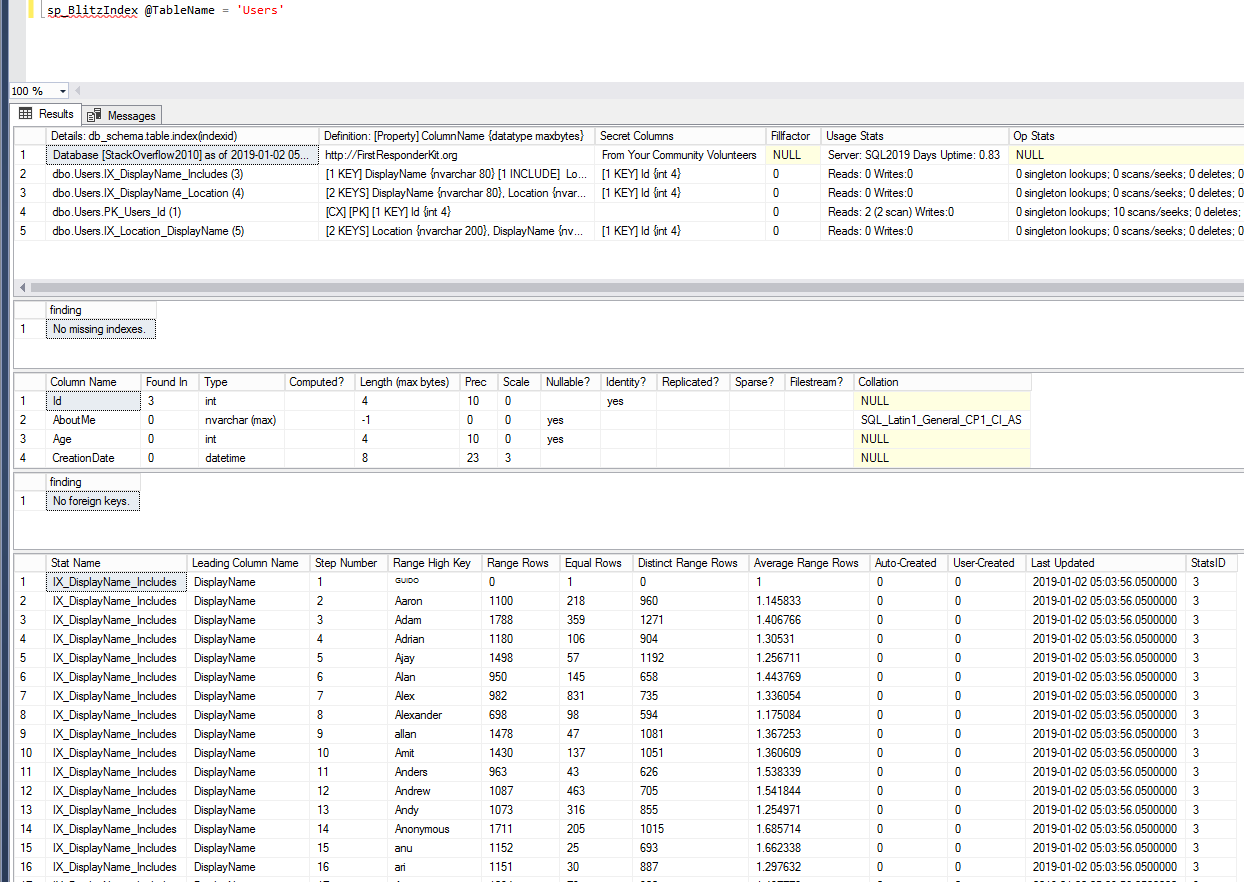
That’s where sys.dm_db_stats_histogram comes in really handy. I’ve added a new section to the bottom of sp_BlitzIndex to show its contents when you’re examining a single table with the @TableName parameter:

sp_BlitzIndex's new statistics histograms at the bottom
sp_BlitzIndex’s new statistics histograms at the bottom

In that screenshot, I’m looking at the indexes on the Stack Overflow Users table, in particular, an index on DisplayName. The bottom section shows the histogram for that index, and if you keep scrolling down – in the real output, not the screenshot, silly – you can see the histograms for the rest of the indexes.

Now, this is a brand spankin’ new feature – it’s only in the dev branch of the First Responder Kit, and sys.dm_db_stats_histogram is only available on SQL Server 2016 SP1 CU2, 2017, and newer.

Right now, the stats on user-created indexes show up first, followed by the user-created stats, followed by the auto-created stats, all in alphabetical order. This feature also only works when you’re looking at a specific table with the @TableName parameter – it doesn’t really make sense to dump out all histograms across an entire database.

My question for you, dear reader, is: are there any changes you would want to this feature before I roll it out as part of the main branch? If you want to show other data, don’t just give me the wish list – give me the problem you’re trying to solve with the additional data, because there might be a better way to render it than what I’m showing.

You can leave a comment with any changes you’d like to see, or, if you’d like to edit the code and contribute changes yourself, check out the contribution guide.


Consultants: want a utility to gather SQL Server data?

Consultant Toolkit
56 Comments

When you’re a consultant, you need to get diagnostic data from your clients.

When you’re talking to a new sales prospect – do you waste a lot of time asking basic investigation questions like what version they’re on, how much data they have, what kinds of workloads they have? You know they’re not really giving you accurate answers because often they just flat out don’t know.

Instead, imagine just emailing them a diagnostic app that gathers data and packages it into an Excel spreadsheet they can send you. You can review their server before your sales call even starts, and you can give them real value right from your first interaction.

When you’re working on a client’s SQL Server – do you waste a lot of time running diagnostic queries, saving their outputs to a file, and then trying to shuffle that data around from place to place? Do you feel like you’re constantly having to update your diagnostic queries each time you find a new problem, and you don’t really wanna be in the writing-basic-scripts business anymore?

Instead, imagine the diagnostic app running deeper diagnostic queries, like gathering the customer’s top queries by reads, CPU, duration, executions, and more, saving those execution plans out to files that you can review later. You’ll spend less time hitting F5, and more time doing the kinds of analysis that your customers really pay you for.

When a client has an emergency and you’re not around – isn’t it frustrating that they ask you, “hey, SQL Server was slow yesterday around 6pm – do you know why?” You ask them questions, but…of course they didn’t gather any diagnostic data, or if they did, it’s a useless Profiler trace with no insight. You can’t give them answers, and everybody’s frustrated.

Instead, imagine the customer running this diagnostic app whenever they have problems, and emailing you the spreadsheet saying, “Hey, when you get time, can you analyze this and see why our SQL Server was slow at this moment?” The data would include running queries, wait stats, memory metrics, and more.

When you hit a wall and you need help – do you email your network and kinda fumble around, not sure how to pass the data around? Everybody seems to use slightly different ways of gathering and viewing data, and it’s really hard to interpret someone else’s data.

Imagine being able to pass a standard spreadsheet around to your network – after redacting client-sensitive stuff – and asking, “Hey, you’ve seen this metric setup before – do anything about these metrics look weird to you? What would you do next in my shoes?” And imagine being able to just book a spot on my calendar to get that second opinion.

This app will make you more money.

This was the very first app I had Richie build when he started with us, and it’s been a core part of our business for years. It shaved hours off every consulting engagement we had and helped us do a better job every time. I can’t imagine consulting without it, and I’m excited to share it with you to see what you think.

To get it, sign up for a free trial of the Consultant Toolkit, and the download link will be on your receipt and in your My Account page. Extract it to your local drive, like c:\temp. You don’t have to run this on the SQL Server itself – you can run it from any desktop or laptop with at least .NET 4.5.2. Then, to gather diagnostic data on one of your servers, go to a command prompt and run:

Windows authentication:

SQL Server authentication:

If you use tricky characters in your server name, user name, or password, like quotation marks or spaces, you’ll need to surround it with double quotes. For example, if my password is @#!, I might want to use “@#!”.

It’ll take about 5-15 minutes to run a bunch of DMV queries, and when it’s done, check out the Output folder. There’s a zip file with your server’s data.

By default, it runs a relatively limited set of queries. When you’re working hands-on with a client’s server yourself, and you want even more, add –deepdive (that’s two dashes, not one) as a parameter, and it’ll run more. If you go into the Resources folder, you’ll see the queries it runs: things like sp_Blitz, sp_BlitzCache, sp_BlitzIndex, and other utility queries we’ve written over the years.

“Wait, what’s with this AppName.exe stuff?”

The real app name is shown in the readme file, but I’m purposely not mentioning it here, dear reader, and I never will. (You’ll see it in screenshots here from time to time, but never typed out.)

See, if you’re a consultant, you’re going to be giving this app to your clients to run for diagnostic purposes. I don’t want your clients Googling the app’s name and finding me. This is your tool, the thing that’s gonna give you an edge over the amateurs who are still copy/pasting data out of SSMS.

Now, back to what the app does.

You get in-depth diagnostic data that makes you look like a SQL Server surgeon.

You can download a sample zip file from my lab. Here’s what the output folder looks like after a run:

The output includes a spreadsheet plus query plans

The top line is a log file with any error messages from the app.

The second line is a spreadsheet chock full of diagnostic data organized in tabs.

The remainder are the most resource-intensive query plans as reported by sp_BlitzCache. (The query metrics are in the spreadsheet.)

However, note that in the output, we’re NOT showing things like sp_Blitz’s URL column – because it links back to BrentOzar.com. When you hand this app to a client, trust me, they’re going to run it and look at the spreadsheet contents. They’re going to be amazed at the amount of great diagnostics you’re getting. However, I don’t want them seeing links back to me – again, this is your app. (Besides, as a trained SQL Server professional, you know the place to find more information about each of those warnings already anyway. You’re here, reading my stuff. You’ve already found me. Carry on.)

These queries support SQL Server 2008 and newer. Older database compatibility levels will throw errors as it runs, but you’ll still get a lot of useful data.

It’s by no means a monitoring app – if you’ve got $1,000 per server to spend, I’d highly recommend a full blown monitoring application. Those will get you cool features like email alerting, historical playback, and a database repository. This is a much more lightweight, one-off utility designed to solve the 3 specific use cases at the top of this post – especially in situations where clients just don’t have the budget or approval to put in monitoring tools.

This app is our new Consultant Toolkit.

We’re offering a free trial during our early access period, and the download link will be on your receipt and in your My Account page.

The toolkit includes documentation for how to best use it as part of your pre-sales process, building a health check, and giving instructions for your clients as to how to run it during an emergency if you’re not around.

Get it, play around with it, and let us know what changes & improvements you might need in order to use it during your daily consulting work by emailing us at Help@BrentOzar.com.