Blog

Comparison Review: Microsoft SSDT vs Redgate SQL Source Control

Development
19 Comments

Hi. I’m still not Brent.

My name’s Alex, and I care about databases, DevOps and data protection. Last year I delivered a session on GroupBy all about how to do Database DevOps right, and back in May I wrote a blog post for BOU about how to screw it up.

Now, dear reader, I’m going to review and compare the two most popular tools to help you put it all together: Microsoft SSDT/Visual Studio Database Projects and Redgate SQL Source Control. I hope this post will help you to decide which is more likely to suit you and your team.

But first…

Why SSDT or SQL Source Control and not something else?

Good question.

Firstly, there are two styles of database source control and deployment: Model (aka “state”) and Migrations. I’ve written about the relative pros and cons here but the tl;dr is that neither are perfect, both hold value, and generally you do need to pick one or the other.

To avoid getting tangled up in higher level debates about whether to adopt a migrations-based or a model-based source control solution – or even a hybrid, this blog post is specifically scoped to model-based source control solutions.

So what about alternative model-based solutions?

I believe it’s important to use widely used and supported tools wherever possible. SSDT and SQL Source Control are the two most widely used tools in Europe and North America for model-based source control and deployment of SQL Server databases. Other model-based tools certainly exist (see ApexSQL source control, DBmaestro and dbForge Source Control for example) but none are anywhere near as widely used or trusted for SQL Server databases as either SSDT or Redgate SQL Source Control.

So let’s get stuck in.

Ease of use

Implementing database source control or continuous integration is a big change for your team and it will be hard on your developers and you will move more slowly to begin with. Choosing a tool that is easy to adopt will make your life much easier and lead to a far greater chance of success.

Redgate SQL Source Control plugs right into SQL Server Management Studio (SSMS), whereas SSDT lives in Visual Studio (VS).

This is enormous. If your developers and DBAs prefer to work in SSMS, SQL Source Control may feel very natural to them, but Visual Studio is full of new concepts: Solutions files? Project files? MSBuild? The list goes on. This makes the learning curve much more difficult for people who are used to working in SSMS.

It’s not entirely one-sided however. The SSDT table designer is amazing, combining the SSMS table designer and a query window and allowing you to use whichever you prefer.

SSDT Table Designer
SSDT Table Designer


On balance, SQL Source Control is much easier and more natural tool for most database folks.

Winner: Redgate

Refactoring

When deployments scripts are generated by schema comparison tools, which do not look at or understand your data, there are some scenarios which can cause the software problems. For example:

  • Renaming a column or table
  • Splitting a table
  • Adding a new NOT NULL column

Both SSDT and Redgate SQL Source Control have features to help you in these scenarios, but the SSDT features are better.

Redgate’s “migration scripts” feature is hard to understand and has a tendency to break in nasty ways and cripple your performance. In contrast SSDT gives you both pre- and post-deploy scripts and the refactor log. SSDT pre- and post-deploy scripts are a pain to maintain, but ultimately, they work more reliably.

In fairness, Redgate have recently released their own pre- and post-deploy script feature, so they aren’t far behind – but the Redgate scripts do not support SQLCMD variable syntax like the SSDT version does and they do not have anything like the refactor log.

Winner: SSDT

Filters

Perhaps you aren’t interested in versioning objects prefixed with “test_”. Or perhaps you want to filter out some other objects that are supposed to exist in your dev environment, but not production, such as the tSQLt unit testing framework?

This is a big win for Redgate – SQL Source Control filters are, frankly, awesome. Whether you want to filter out something small (like the IsSqlCloneDatabase extended property added by SQL Clone) or whether you want to set up your own naming conventions, these things work a treat. You can even use them to do quite complicated stuff to manage multiple databases with several known variations, but I’d generally discourage going down that road if you can.
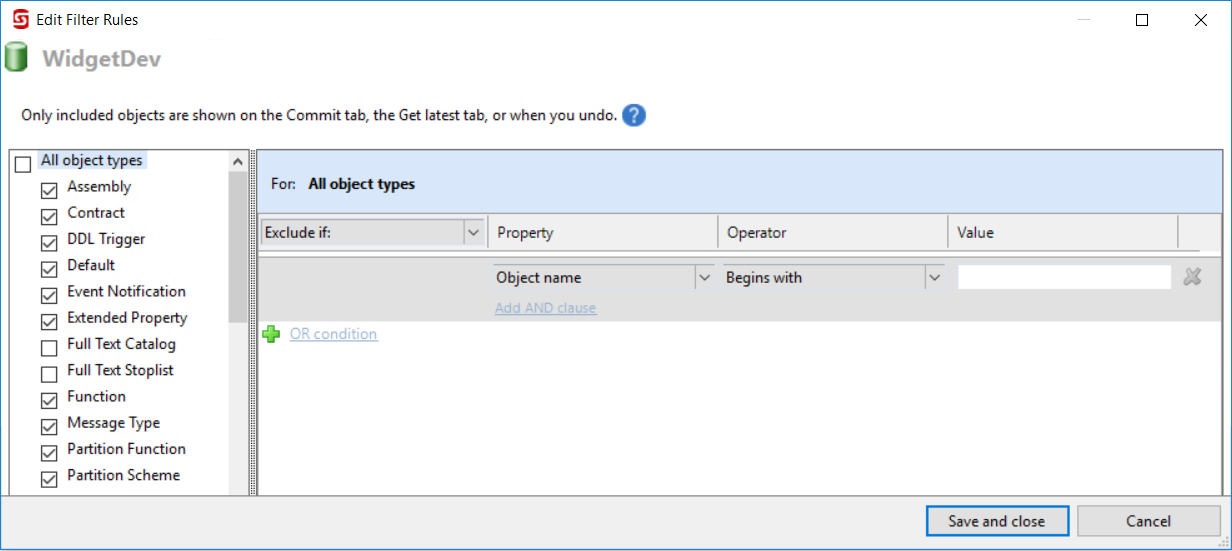
Redgate SQL Source Control filters

In contrast, while SSDT does include some filtering functionality in Visual Studio’s schema compare tool, it’s not as easy to source control your filters and to use them when publishing DACPACs to production environments. What you can do you need to do with PowerShell and the Schema Compare API, as Gavin Campbell clearly explains here. I’d also like to put in an honorary shout out to Ed Elliot’s filtering deployment contributor which makes the process a little easier, as long as your database folks are comfortable playing with C#, APIs and DLLs etc.

Another option SSDT provides, which is lacking in Redgate SQL Source Control, is to create partial projects with database references. To demonstrate how this works, read Ken Ross’ post on adding tSQLt to an SSDT project. While I prefer the way Redgate handles tSQLt for you, others like the way the SSDT database reference approach separates the tests from the rest of your code.

To summarise: The Redgate approach to filtering is generally easier to manage, especially if your team includes folks who aren’t .NET developers.

Winner: Redgate

Static data

Redgate SQL Source Control makes adding static data to source control super easy – just right-click and select the tables you want and voila.
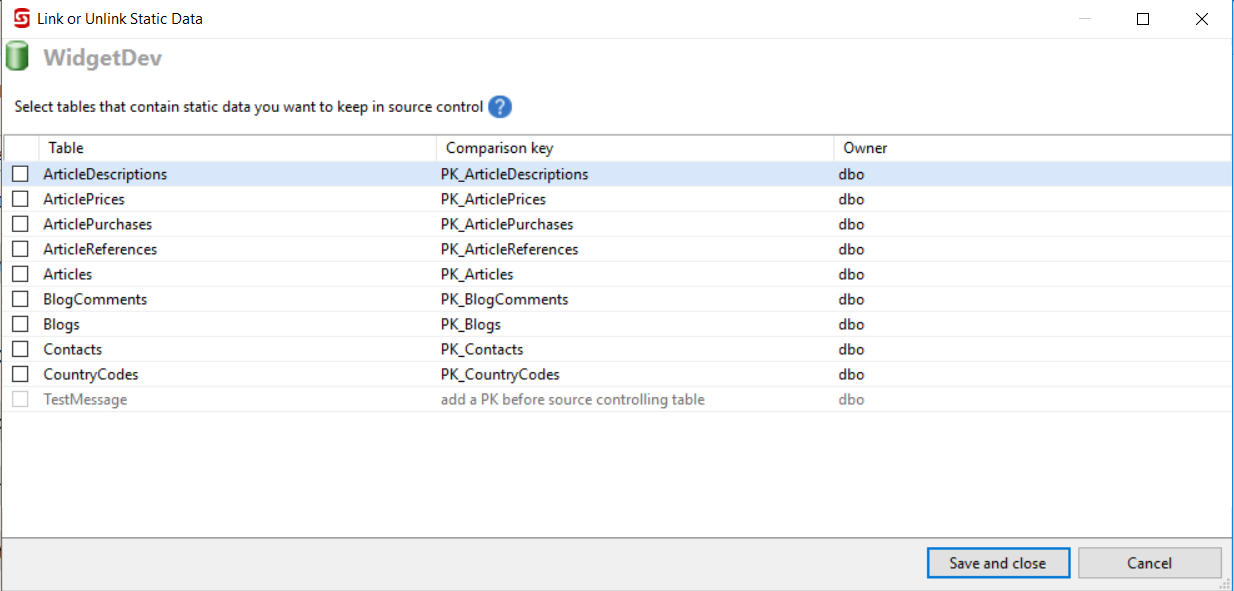
Static data in Redgate SQL Source Control


However, there are a few issues with it.

  • All static data tables require a primary key (although, to be fair, they should have one anyway!)
  • The scripts generated are not easily ‘diff-able’ because changes to the data do not appear in-line.
  • Column level or row level versioning, (e.g. to support seed data), is not supported. It’s all or nothing.
  • Adding lots of static data can have a negative impact on performance.

In SSDT static data is handled using post deploy scripts and MERGE statements. Your post deploy scripts can be a pain to manage and the MERGE scripts can be annoying to write by hand, but these pains can be minimised by separating out the data scripts into multiple scripts/stored procedures that are simply executed by a single coordinating post deploy script, and by using sp_generate_merge to create your merge scripts.

If you can get over the pain, SSDT allows you to create data scripts that are “diff-able” and with far greater flexibility, for example to support seed data.

All that being said, since you can now add a post-deploy script in Redgate SQL Source Control, this means Redgate can support both options.

Winner: Redgate

Money

Redgate costs money. SSDT is free with Visual Studio.

You can buy SQL Source Control as a standalone product, but you also want the automated deployment bits and that increases the cost because each team member will need a licence for the full SQL Toolbelt.

At the end of the day, free is always going to be more attractive than not free, so if this was the only issue, clearly we would all use SSDT. The decision you need to make is whether the benefits listed above are worth the additional expense.

Winner: SSDT

More detail

There is a lot more to say so this post risks getting very long. The first draft was over four times longer than this version! Hence, I’ve created a much more detailed whitepaper to partner this blog post. You can download it from the DLM Consultants website: www.dlmconsultants.com/redgate-vs-ssdt

The full whitepaper covers all the issues listed above in much more detail, as well as also discussing:

  • Shared development databases
  • Security
  • Deployment
  • Support
  • Complex projects

The full whitepaper has been peer-reviewed by Brent Ozar, a long list of SSDT and Redgate power users, as well as representatives from both Redgate and the Microsoft MVP program. I hope you find it useful.

Summary

To re-cap, here are our winners for each category:

  • Ease of use: Redgate
  • Refactoring: SSDT
  • Filters: Redgate
  • Static data: Redgate
  • Money: SSDT

So which is better? Which would I recommend? Well, like most things, it depends. If there was a simple answer you probably wouldn’t be asking the question.

If you have read all the above and anything has jumped out at you as being particularly important to you and your team, great. Otherwise, if you are still undecided, the proof of the pudding will be in the eating. SSDT comes free with Visual Studio and Redgate offer a free trial – so download both and give them a try.

When I went to visit Farm Credit Mid-America, we set up three parallel proof of concepts (PoCs) and our cross-functional team voted (unanimously) for their favourite. As a result, implementation was much easier for them:
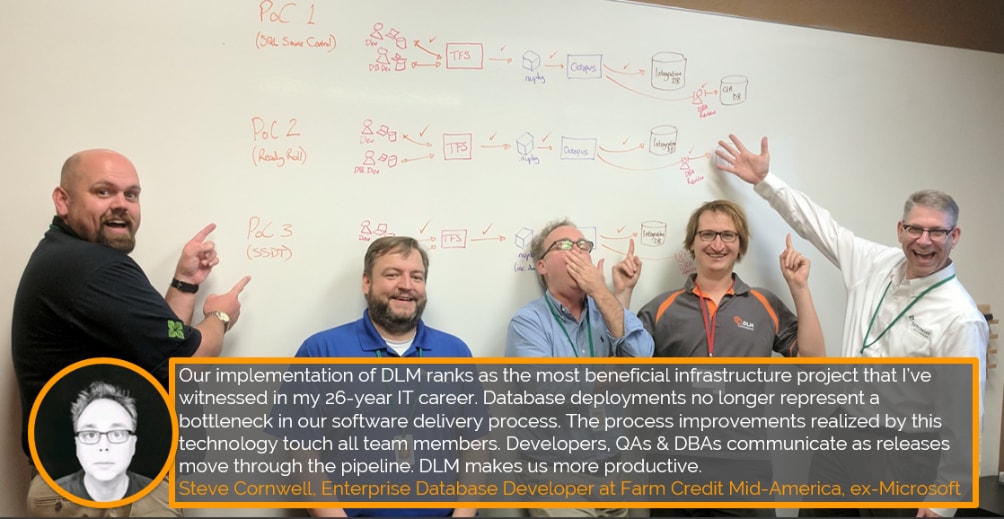
Alex Yates at Farm Credit Mid-America


Whichever you choose, both products are an excellent investment of your time and/or money.

Good luck!

Want to learn more?

I hope this post has helped you to figure out whether SSDT/Visual Studio Database Projects or Redgate SQL Source Control are likely to be a better fit for you and your organisation.

If you would like my support to build your own proof of concept, get in touch through the website.

[Video] Office Hours 2018/12/12 (With Transcriptions)

Videos
0

This week, Erik and Richie discuss TSQL classes, scalar functions, index reorganize vs rebuild, daily image backups on a fringe SQL server on VMWare, number of databases per AG, best practices for ETL operations, and more!

Here’s the video on YouTube:

You can register to attend next week’s Office Hours, or subscribe to our podcast to listen on the go.

Enjoy the Podcast?

Don’t miss an episode, subscribe via iTunes, Stitcher or RSS.
Leave us a review in iTunes

Office Hours Webcast – 2018-12-12


Erik Darling: So Marci asks, “Do you guys have a T-SQL advanced developer class that focuses on writing good SQL?” No, we don’t. I think the only person I know who has a class like that is Itzik Ben-Gan. I don’t know how hard it is to get in and do that stuff. We don’t have anything on writing it. We just have stuff on tuning it. So if you want stuff from scratch, you might learn something from mastering query tuning. There’s some pretty good advice on fixing queries in there, maybe not on how you should write them.

I think, at least for me, like once I got sort of deep enough into query tuning, there was enough carryover between, like, okay, now that I know how I would tune a query, I’m going to write this query in a way that I don’t have to tune it later. So I think once you learn how to fix a query then writing them from scratch, you kind of just naturally get better at that. So mastering query tuning might be a good fit for that, but if you’re really just looking for, like, how do I write query-type stuff, I would, instead of wasting a ton of money on training, I would probably just start with a few books. The same fellow who has the classes, Itzik Ben-Gan, has a few books on T-SQL querying that are just wonderful. One of them is a collaboration with a bunch of smart people like Adam Machanic and stuff.

So I would just get those books and not read them cover to cover, but as you’re doing something, check the contents and see if there’s a chapter or a couple of pages on what you’re actually doing. And then see if you can get any help from the book. Writing queries, you know, it’s a tough thing to teach people how to do because everyone has such different starting points with it and such different needs, depending on what their data is and what they’re looking for. There’s a big difference between writing a few small joins between tables and, like, writing really complex analysis-type queries.

Richie Rump: Right, I mean, I think really the key to writing good T-SQL is writing performant SQL. And once you’ve gotten into that, this is how the engine works and this is how certain queries react to the engine, that’s how you start writing good T-SQL; understanding that cursors are bad and SARGability and those type of things. That’s how you start writing good T-SQL. If you want to get into more advanced T-SQL stuff, I wouldn’t consider that good T-SQL, just that’s kind of authoring. And getting into things like windowing functions and stuff like that, that’s all something else. It’s not necessarily good T-SQL.

Erik Darling: It’s kind of just stuff you learn how to do along the way.


Erik Darling: Christopher asks, “For scalar functions, have you ever used the option returns null on null input? I know scalars are bad, but any possible examples of drawbacks to this?” I guess if you were depending on the output of that function to concatenate into another string, then you’re looking at an additional check to see if that’s null to replace it with something so it doesn’t make your whole string null. But, you know, scalar valued functions right now are just so bad for so many things that I wouldn’t worry about that. It’s like if, you know, I can’t even think of an upbeat analogy for this holiday season that would make sense for this. It’s not going to help you or hurt you either way. Just if you’re going to return a null value, possibly sometimes, then be careful about how you’re using that null value, because nulls have a lot of surprises in them.


Erik Darling: Theo says, “TDE is hacked. Is it still safe to use certificates?” Don’t ask me this question. I am not good at security. I had a bungle of a time just using one password to change some passwords this morning. It was awful. It was not a merry Christmas. Santa left me a lump of one password coal. You don’t want to trust me with this question. Sorry, Theo, ask someone else.


Erik Darling: Brian asks, “Do you know why an index reorg would be so much slower than rebuilds on the same index or similarly sized indexes? We noticed that maintenance was taking longer on the reorgs. As a test, I changed it to rebuild…” Yeah, so reorgs are single threaded. It’s like a little PAC-MAN that kind of goes along the leaf level of your index and sort of puts things in order. Rebuilds, if you’re on Enterprise Edition, have the ability to go parallel and all this other cool stuff. Reorgs also can do something called lob compaction, which can take a long time.

I used to run into this all the time when I was dealing with relativity indexes because there were some quite large tables in there and there were some quite large indexes and a whole bunch of lob columns, because that software is built by crazy people who let end users add columns to tables on a whim. And everyone says, I need the biggest possible column, I have no idea what’s going to show up here. So they would make all their columns nvarchar max. And then when reorgs run and they would do lob compaction, then boy howdy, that was a long time.

So the bigger your table is, the longer those reorgs take, especially if you’re doing lob compaction. I set sort of an internal threshold at around 50GB to 100GB where I’m saying screw the reorg, I’m just going to rebuild this thing if I need to. But even then, I’m not going to rebuild all that many indexes. I’m not going to do all that much index maintenance. I’m going to stick a link into the Webex howdy-doody think as soon as I find it. But I’m not that bright. I have to open up a web thing. What do they call that, goes on the internet and shows you things that people did?

Richie Rump: Facebook.

Erik Darling: Browser…

Richie Rump: The Dark Web.

Erik Darling: Yes, the Dark Web. Groupby.org… Because no one ever believes me when I say this stuff. I’m going to give you a link to Brent’s session at GroupBy about why defragmenting your indexes isn’t helping, and hopefully that will – nope, that didn’t copy or paste. This is a good day for me. Everything’s going well. Okay, so I’m going to stick that link in there. But yeah, that’s the bottom line on why rebuilds are generally faster. Reog is just, I don’t know, just kind of lightweight and wimpy. Any further thoughts on that, Richie? You don’t have to, it’s okay. There we go, I think Richie deserves some Christmas lights too.

Richie Rump: I created an index yesterday…

Erik Darling: Wow, did it make your deletes so much faster?

Richie Rump: No, it was a small table.

Erik Darling: Why did you create an index on a small table? Why are you wasting Brent’s disk money?

Richie Rump: Because it needed it.

Erik Darling: Okay, well fine then.


Erik Darling: Let’s see, I’m going to read this question first because it sounds suspicious to me. “One of our SQL admins wants to do a daily image backup on a fringe SQL Server on VMware, but I’m trying to convince him this isn’t sufficient since you want to be able to recover to at least the last hour. What are some concerns?” So I have no idea what kind of backups your sysadmin is looking to take. If it’s a snapshot of just the whole server and all the drives, it can be kind of a bummer. There are some backups – there are some VM backups, like Veeam, that will play nicely with your log backups or differential backups, so you could restore your database and then restore more backups on top of it to get you to a better point in time. But I would need more information on that before I started going off on any sort of tangent.


Erik Darling: Let’s see, Graham asks, “How many databases is an appropriate number in an AG? In my case, each database is less than 20.” So that depends a lot on how many CPUs you have and on how busy these databases are. With each database that you add in, you’re looking at adding in additional synchronization overhead, and that synchronization overhead takes CPU threads. And those CPU threads come from a kind of limited pool that SQL Server spins up based on how many CPUs you have. So really, what you want to do is think about just how much hardware you have on this server.

There’s a great post by – I’ll put the link into the chat questions – by a guy named Warwick Rudd about Availability Groups and things that you can just do massively, massively wrong with them. And it’s called What Not to do When Adding Databases to an Availability Group. And he kind of touches on a lot of this stuff. So what I would do is think, okay, if I have eight cores in this thing, I only have 576 or so worker threads that I can send out to run queries and do backups and keep these databases in sync. It’s generally not a good idea to hit THREADPOOL waits because what I’ve seen on a bunch of client servers is you have this AG and everything’s going fine, then THREADPOOL comes along and all of a sudden your error log starts filling up with messages about how the AG can’t synchronize because it couldn’t initialize a thread. So be really careful with the number of databases you stick in an AG. You can end up several creeks that probably smell like Richie’s daughter’s shoes.

Richie Rump: You don’t want that, that’s terrible.

Erik Darling: No, I seem to have lost my light. I was really liking the way this was looking, aside from the heat. Whoops, I put that in the wring window. Man, that’s hot.


Erik Darling: Okay, alright, let’s see, what’s a good new question? “Hi, what would be the best for ETL operations; a heaped table or the same table with a clustered index?” Usually, when I want to do ETL, when I’m loading data in, I don’t want any indexes. Indexes only slow me down. Usually, I just want to work with the heap and I just want to dump data in as fast as humanly possible. That’s one of the few really good things about heaps. One of the few upsides with heaps is you can just jam data in as really quickly and not have to worry about order or creating extra pages. Even a heap with a non-clustered index on top, you’re looking at dumping a bunch of data in the table and then having that and then having to dump a bunch of data in the index and it all just kind of stinks. It is not fun. So I would just generally stick with the heap on that.

Richie Rump: Yeah, I agree. And typically, I would do that, like have a heap, and then most likely I would need an index or two because I’m doing some sort of transformation on that data. But that would not be a clustered index, just because you’re constantly flowing that data through. As soon as you transform, you’re going to dump it somewhere else and then you’re going to drop that data at some point, so yeah, yippee.


Erik Darling: Let’s see here, “Have you all implemented group managed service accounts?” Absolutely not. 0% chance of that happening. Sorry, Rob, nope, I don’t do that. If you have questions about stuff like that, Denny Cherry has a book called Securing SQL Server. It’s got all sorts of good information about things that have to do with security that I am an idiot with, like one password. So please…


Erik Darling: Jim has a question, “We are getting insane page latch EX waits because of a multi-statement TVF that splits strings, but using string split directly or converting the function to an inline TVF is seven times slower.” So, Jim, this is a big question which involves code. There’s like code involved with a function that you have and other function options that you’ve tried. I would post this on dba.stackexchange.com because you could give lots of good examples. As far as why you have the page latch ex waits, it’s likely, if you have a multi-statement table valued function that’s using a table variable, you’re putting a bunch of stuff in there, that’s going to go to tempdb. That’s what the page latch ex waits are most likely going to be stemming from.

As far as a fix for that, if you’ve already tried the stuff that I would try offhand, you might want to try a different CLR version of split string. I know Adam Machanic wrote one a few years back. I don’t know where it is offhand and I think it would be detrimental for you to try to go search for it right now because all his stuff from SQLBlog has gone and moved and stuff. Post that on dba.stackexchange.com…

Richie Rump: I think he did a TechEd session about that CLR.

Erik Darling: He might have, but I don’t recall off the top of my head.

Richie Rump: Yeah, I think it’s on YouTube somewhere maybe.

Erik Darling: Probably. A lot of his stuff ends up on YouTube because he’s a very, very smart fella. Is that the right URL? That looks like the right URL. There you go, Jim, off to dba.stackexchange.com with you. Enjoy that. It will be a fun time. Everyone loves dba.stackexchange.com – it’s full of so many smart people. You might even get an answer from Paul White. Good times.
 

Erik Darling: Julie asks, “What controls the subject line for failed jobs set to notify the operator? I have two servers with the same job but the subject line is different.” God, it’s been so long since I had to look at that. That is an interesting piece of trivia. You know, I don’t know offhand; weird. I couldn’t tell you.

Richie Rump: Wow, I think it’s safe to say you would not be certified, sir.

Erik Darling: No, I wouldn’t.

Richie Rump: You failed the certification exam because you missed that bit of trivia.

Erik Darling: I’ll live. I’ll find a way to survive without that. This is why I wish Tara was here, because she would know that because she still probably has agent jobs, like, set alarms for her, send her messages while she’s on hikes, I don’t know. I don’t know offhand.


Erik Darling: Let’s see, Chris asks, “Any experience with SQL Server centralized management server to push policies…” Good heavens, push policies? No, no I am sorry that I sent you the link to the think about Availability Groups because that was a mis-copy and paste on my part, that went to the wrong line. But no, generally I have – something else that I just haven’t done any work with because that’s not the type of DBA that I care to be at work. Apologies for not knowing more about using a central management server to push policies out. That brings us to the very end of our questions.

Richie Rump: Really, no service broker questions for you?  Because you’re a big fan of that service broker stuff…

Erik Darling: We don’t have anything on service broker or replication and that’s fine because these lights are about to make me pass out, so I’m going to…

Richie Rump: Hey, if you’re ever cold in New York over the winter, you now know what to do.

Erik Darling: Yeah, you know what, I’m going to start giving these lights out to the homeless because I’m frying. I think I’m going to pass out if I don’t take these off.  So have a very merry Christmas, everyone.  Happy holidays. I hope to see you as long as these lights haven’t killed me. Adios.

Subscribe

"*" indicates required fields

This field is for validation purposes and should be left unchanged.
Name*
Things I want*


What Azure SQL DB Managed Instances Don’t Support (Yet)

Managed Instances
18 Comments

Azure Managed Instances feedbackWhenever a new product or feature comes out, I like keeping an eye on its support forums to understand the challenges users are facing.

I went through Azure SQL DB’s Managed Instance feedback forum, and here are some of the interesting issues that have been raised:

Support for other collations – sounds like right now they only support one case insensitive collation. I can see how that’d be a pretty big blocker for some existing applications, but at least it’s black-and-white clear – you’ll know pretty quickly if this is a showstopper for your particular application. Update: now supported!

Make smaller instance sizes available – I would argue that if you don’t need at least 8 cores, you should probably be looking at regular Azure SQL DB instead, but I can understand how that’s not a great answer for multi-database apps that do cross-database queries. Microsoft’s response mentions that they’re also working on dev/test licensing support – that’s something a lot of folks don’t consider when they move to Platform-as-a-Service. There’s no cheaper Azure SQL DB Developer Edition. (Same problem with Amazon RDS.) Update 2019/06/13: 4-core instances are now supported.

Make backups portable to on-premises SQL Server (unplanned) – Azure SQL DB Managed Instances are a future version of SQL Server, and we’ve never been able to restore from a newer version to an older version. This is a huge blocker for companies that want to take backups and restore them into Developer Edition servers, though, and same thing with companies that want cross-cloud disaster recovery. I don’t see an easy fix for this anytime soon.

Allow linked server to non-SQL sources – like CSV and Excel files. The problem here is, where do you put the files in a way that they’d be accessible to these SQL Servers? The networking for Managed Instances is already a huge pain in the rear. It’d have to involve files on Azure Blob Storage.

Allow non-UTC server times – Managed Instances are in UTC, full stop. That’s a problem for some apps that depend on the server being in the user’s time zone, rendering times naturally onscreen. Yes, we can argue that developers should fix their code, but that’s simply not going to happen quickly. This request is about tweaking regional settings in a way that would override the output of GetDate, but I doubt that’s going to happen either. Thankfully Microsoft has started working on this, because this is a tough one to work around. Update: now supported!

Add support for distributed transactions (unplanned) – in the comments, Ryan Adams notes that this is a blocker for BizTalk, but the Microsoft response is, “Implementing MSDTC support in cloud environment is not a trivial ask.”

There are more in the full list, but honestly…not a lot more, especially compared to the hundreds for Azure SQL DB. That’s also partially a function of how new Managed Instances are compared to Azure SQL DB, which has been around for years. I’m really liking the looks of this product for the long term.


Never Judge A Query By Its Cost

Execution Plans
7 Comments

Signs and Numbers

When tuning queries, or even finding queries to tune, there’s a rather misguided desire to look for queries with a high cost, or judge improvement by lowering query cost. The problem is that no matter what you’re looking at, costs are estimates, and often don’t reflect how long a query runs for or the actual work involved in processing the query.

You typically need to observe the query running and gather more precise metrics on what it’s really doing to judge things.

Good Example

I have these two indexes:

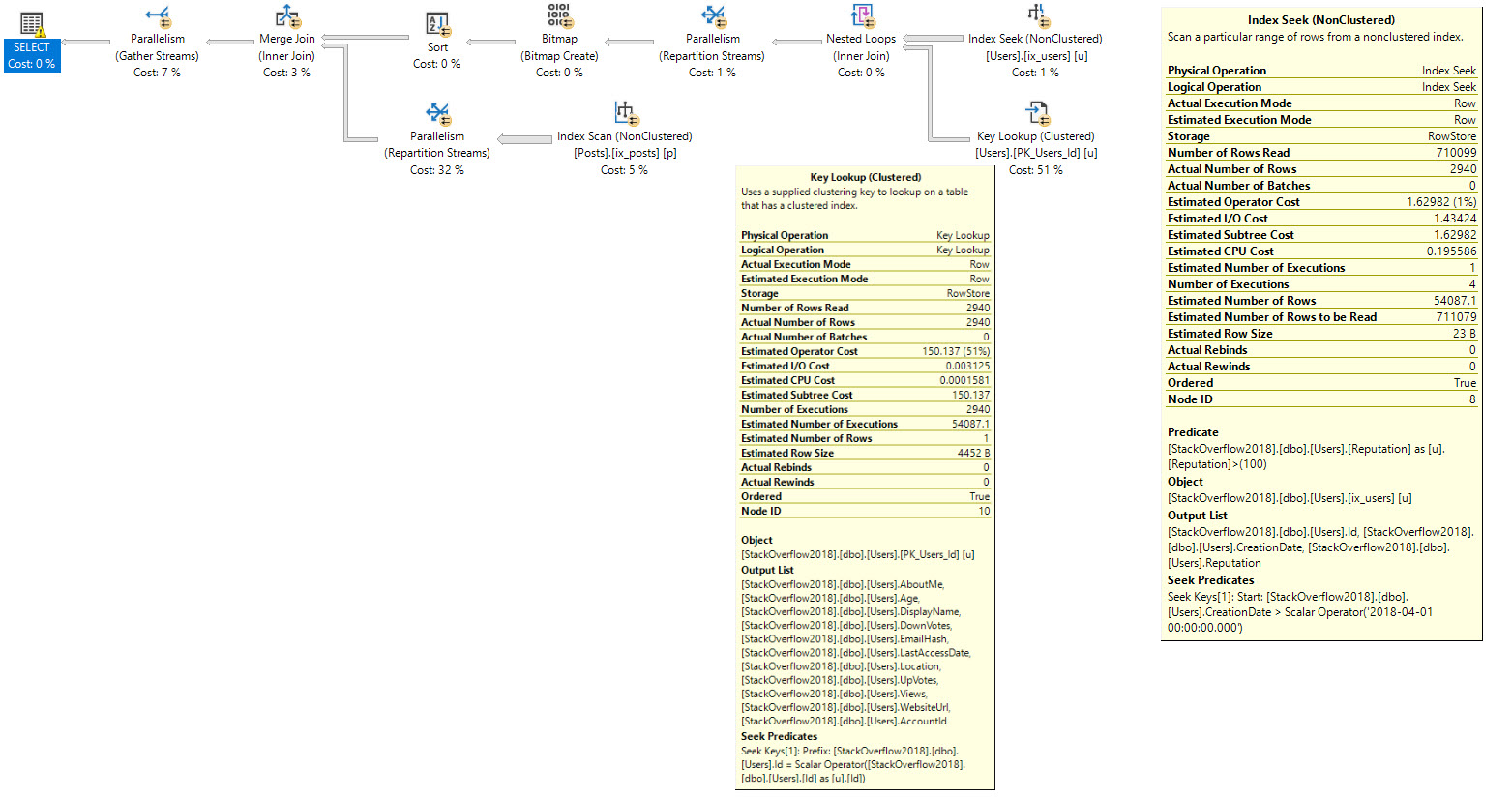
And when I run this query, I would expect to use both of them to help the join/where clause, and then do a Key Lookup to get the columns not covered by my nonclustered index on users from the clustered index.

After all, there are only about 3000 rows in the Users table that qualify for my predicates, and that only turns into about 7300 rows when joined to Posts. That seems like one of those “no brainer” places to do a key lookup, but it doesn’t happen.

Grinchy.

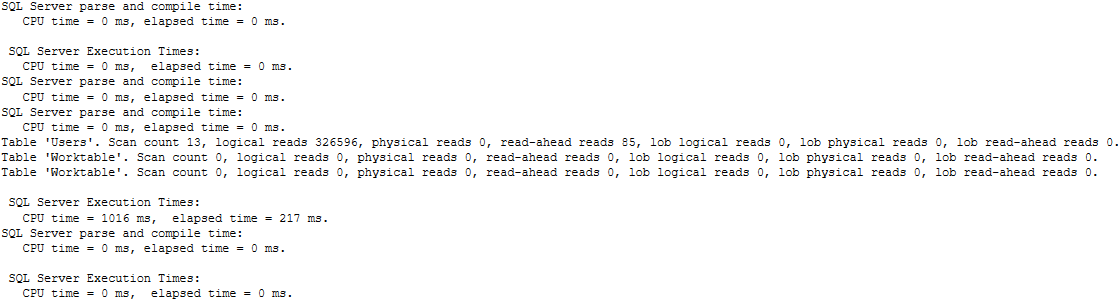
The metrics we get from stats time/io look like this (trimmed for brevity):

So about 5 seconds of wall clock time, 8 seconds of CPU time, and 150k logical reads from Users.

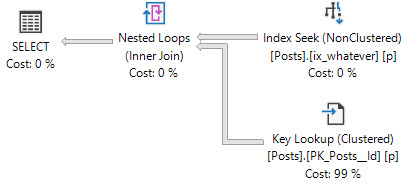
If we hint our index, to make the optimizer choose it, we get the plan we’re after.

Fancy Feast

The metrics we get from stats time/io look like this (trimmed for brevity):

Interesting! We’re down to 780 milliseconds of wall clock time, about 1.1 seconds of CPU time, and what appears to be a lot fewer reads from the Users table.

This is clearly the faster plan, so what gives?

Scrooged

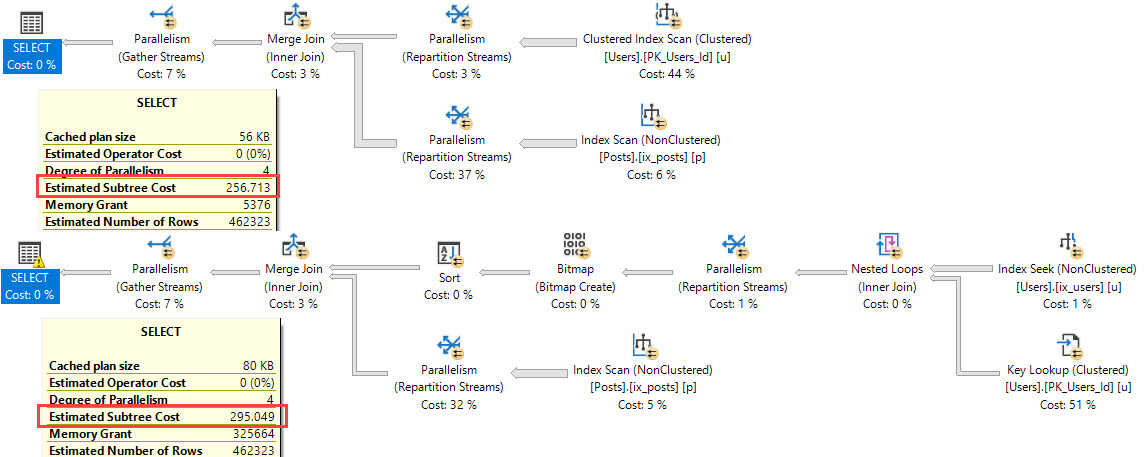
The much slower query has a lower cost!

Fraudity

The optimizer associates a fairly high cost to the key lookup. This comes from two things:

  1. The optimizer assumes data comes from a cold buffer cache, meaning no data is in memory
  2. The optimizer hates I/O, especially random I/O

I’m gonna go out on a limb and say the costing algorithm still thinks about disks like they’re creaky old spinning rust, and that it’s not hip to SSDs. I don’t know this for a fact, and I’d love to hear otherwise. When you put it all together, you get a query plan that prefers to do one sequential scan of the clustered index because no data is in memory, and because doing a Key Lookup via random I/O, or even sorting data first would be more expensive.

Costs can be helpful to figure out why a certain plan was chosen, but they shouldn’t be used to judge what the best plan is.

Thanks for reading!

Brent says: in SQL Server’s defense, I bet most plan caches are chock full of beautiful query plans where the costs accurately reflect the amount of work involved. Say maybe 99.9% of your queries get perfectly crafted plans. Still, that’s 1 in 1,000 plans that go south, and those are the ones you’re typically focused on tuning. You’re tuning them because the estimates are wrong – and that’s why you don’t wanna put faith in those estimated cost numbers. If they were accurate, you probably wouldn’t be tuning ’em.


Does low fill factor affect SELECT performance?

SQL Server
15 Comments

Sometimes good intentions lead to big problems.

Imagine a system where page splits were thought to be causing a big enough performance problem that it made sense to change the fill factor setting of a lot of indexes.

Now imagine you thought the fill factor setting was for how much free space you wanted when creating or rebuilding an index instead of how full.

OUCH.

Let’s say I want to leave 5% free space on the pages after creating or rebuilding an index, but I mistakenly use FILLFACTOR=5 instead of FILLFACTOR=95. How will this affect my server?

FILLFACTOR=5

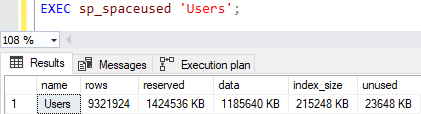
Using the Users table in the StackOverflow database, I changed the fill factor setting on the two indexes I have on the table: a clustered index/PK on Id and a non-clustered index on CreationDate, Reputation.


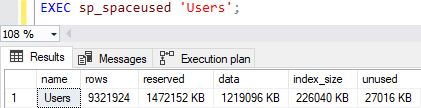
With both indexes set to 5% fill factor, the table size is 21GB.

Running a simple query against the Users table doesn’t show much of a problem.

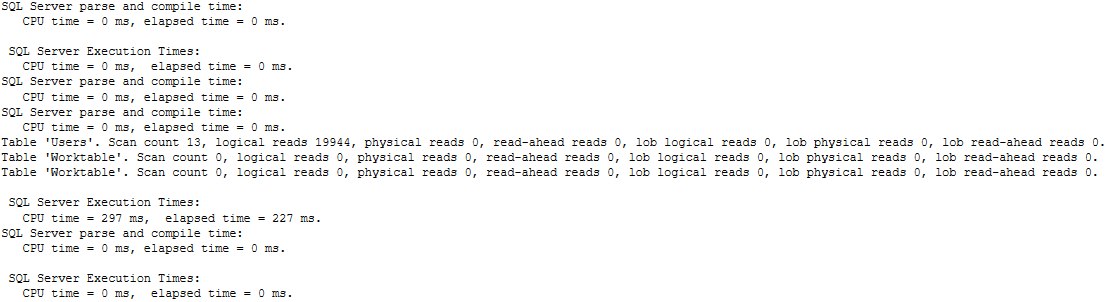
The query returns 1,102 rows, takes less than a quarter of a second and uses about a second of CPU time, but it has high logical reads. I could improve the query performance by modifying the non-clustered index to include the DisplayName column to avoid the key lookup, but that’s not the point of this post.

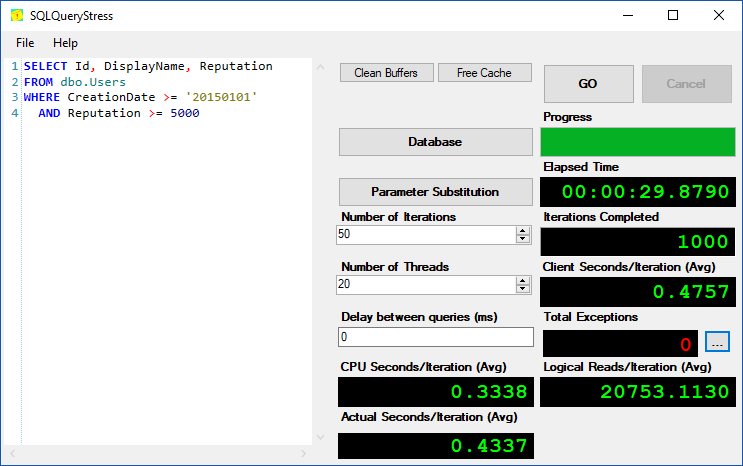
Using SQLQueryStress, I tested how fast 20 threads could execute the query 50 times (1000 iterations).

The load test completed in 75 seconds.

What happens when I “fix” it?

FILLFACTOR=95

Now time to test 95% fill factor as that was the intention of the person who mistakenly used 5%. I’ll show 100% fill factor next.


It went from 21GB with 5% fill factor down to almost 1.5GB with 95% fill factor. Woah!

But did it help with performance? You betcha.

The duration only improved a little bit, but it used a bit less CPU time and a lot less logical reads.

The load test completed much faster.

FILLFACTOR=100

Does it improve any further with 100% fill factor? Let’s take a look.


It’s a little bit smaller than when it was at 95% fill factor.

Just a tad better than 95% fill factor.

Helper query to fix it

This will generate the ALTER INDEX commands to fix this issue. Modify the FILLFACTOR setting to what you want to use, the fill_factor value in the WHERE clause to the current “bad” value and the ONLINE option as needed.

Are page splits really a problem?

There are workloads where frequent page splits are a problem. I thought I had a system like this many years ago, so I tested various fill factor settings for the culprit table’s clustered index. While insert performance improved by lowering the fill factor, read performance drastically got worse. Read performance was deemed much more critical than write performance on this system. I abandoned that change and instead recommended a table design change since it made sense for that particular table.

Pick your battles

I don’t usually even bother recommending to clients to change fill factor settings unless they are using less than 100% for identity column indexes, such as the clustered index/PK on Users. It’s just not a battle that I’m willing to fight when there are more important changes to be made to improve performance. On a system using 5% fill factor for nearly all indexes, you can bet fixing the fill factor will be the first recommendation.


Tell Us What You Make: The 2019 Data Professional Salary Survey

Salary
5 Comments

It’s time for our annual salary survey to find out what data professionals make. You fill out the data, we open source the whole thing, and you can analyze the data to spot trends and do a better job of negotiating your own salary:

Joe Sack query bucks
We make Stacks of Sacks

Take the Data Professional Salary Survey now.

The anonymous survey closes Sunday, January 6, 2019. The results will be completely open source, and shared with the community for your analysis.

Want to write up your analysis and get new readers for your blog? Check out the format of the results as they come in, and click File, Download to get them in Excel format. Get your data flows ready, and then check back here on Monday, January 7 for the final results. We’ll gather the list of blog posts as they come out, and then on the following Tuesday, January 15th, we’ll publish a followup post with links to yours. (It helps you get more readers.)

Thanks for your help in giving everybody in the community a better chance to talk honestly with their managers about salary.

Update 2019/01/06 – the salary survey has closed, and the results are out.


Have Availability Groups Gotten Easier Lately?

Easy Lover

I don’t blog a lot about AGs. If we’re being honest (and I do try to be honest with you, dear reader), I just like performance tuning topics way more. When new features get announced for AGs, some of you may ooh and aah, but not me.

I Make A Face

I don’t make a face because I don’t like the features, or think they’re bad. I make a face because I imagine them breaking. I imagine them breaking in the middle of the night. I try to think about upgrading them.

And that, dear readers, is why this Bouncer-American picked performance tuning. I didn’t learn SQL to spend more weekend nights hanging out with people I’m inevitably going to have to yell at.

But Also This

I don’t really do much with AGs, so perhaps my fears are unfounded. Once upon a time I had a home lab set up with VMs. I had FCI VMs, Log Shipping VMs, Mirroring VMs, and AG VMs. You know what they did? Gathered dust. Most of my questions about those technologies were just kind of settled.

It’s not that I don’t pay attention! I do, really. For instance, when Microsoft released this Failover Detection Utility, I thought it was super cool.

I also pay attention to stuff that gets released in updates. Just in the release notes for 2017 CUs, I found these:

::scrunch face::

This wasn’t all of them. There were some for Linux that I skipped over, and not because I think the Linux stuff is irrelevant.

It’s just so new, I expect it to be buggier than a flophouse wig stand (sorry Bob).

About You

So I gotta ask, how are you fine folks out there doing with your AGs?

  • Are you hitting bugs?
  • Are you patching regularly?
  • Are you running into other issues?
  • Did you pick up and run to the cloud?

If you’re patching regularly, are you using a pre-prod environment to test patches out?

I’m not saying you need one, but uh…

You might wanna think about getting one. Those patches can be dangerous, and troubleshooting outages can sure be a wild ride.

Thanks for reading!


[Video] Office Hours 2018/12/5 (With Transcriptions)

Videos
0

This week, Tara and Richie discuss deletes on heaps, Docker, using containers in production environment, advice for new DBA, downgrading server hardware, agent jobs, setting SQL Memory Min and Max to the same value, how to prove CPU pressure to management using the Power BI report using sp_Blitz, corruption, patching, backups, sargability, and more.

Here’s the video on YouTube:

You can register to attend next week’s Office Hours, or subscribe to our podcast to listen on the go.

Enjoy the Podcast?

Don’t miss an episode, subscribe via iTunes, Stitcher or RSS.
Leave us a review in iTunes

Office Hours Webcast – 2018-12-5


Tara Kizer: Alright, let’s get started – and I don’t have the answer to Carlos’s question right off the bat and I can’t remember – I’m going to ask anyway, “If doing a delete on a table versus truncate table for a heap, will they behave the same for [free net] pages? Will index physical stats DMV look the same afterwards?” It’s a vendor database. He doesn’t own the schema. I can’t remember for heaps. I’m a clustered index table type person and I know a lot of the ins and outs of heaps, but that’s one I don’t have memorized. Do you remember, Richie?

Richie Rump: I don’t think there’s a huge difference between the two. If this was on a test, I’d be like, yeah I think they look the same.

Tara Kizer:  I know that there’s some issue with deletes on heaps because we have an alert in BlitzIndex for it and I didn’t quite understand what it meant. And Erik has moved it as a lower-priority item further downwards. Forwarded fetches on heaps are bad. I think it has something to do with no other tables can use that space, but the heap table can reuse that space. I’m sure we have blog posts out there on it. If you run sp_BlitzIndex mode four – maybe mode zero but probably mode four – it will let you know which tables have the deletes and see that there should be a URL on that row. Click on that and you’ll learn more about deletes on heaps.

Richie Rump: Wow, I did not know that. See, even I can learn something.

Tara Kizer: I look up Blitz Index stuff, you know, day to day as part of the client engagements. It’s a row that I kind of ignore though.

Richie Rump: I’ve been looking into BlitzCache code the last couple of days.

Tara Kizer: Yeah, I’ve seen your questions in Slack. I’m like, uh-oh…

Richie Rump: Like, what is going on here, people?

Tara Kizer: That’s one I will not open. I’ve contributed a couple of changes to Blitz and I don’t think any other ones I’ve opened. But BlitzCache, that’s a hard no. There’s no way I’m looking at that.

Richie Rump: Yeah, I found one of the queries for non-SARGable stuff and I’m like, I don’t think this will ever catch anything. I’m pretty sure that this is wrong and I’m going to go the route that I would know will capture something.


Tara Kizer: Alright, Marco asks, “Some quick-start documentation for SQL DBA that they want to start on it…” oh, for Kubernetes and Dockers.

Richie Rump: You’re talking to the wrong clan here. I don’t think any of us have actually played with Kubernetes or Dockers. If I wanted to learn about Kubernetes and Dockers, not necessarily for a SQL DBA, but just as a technologist, I’m probably first go to Pluralsight because a lot of those presenters, they distill the information pretty well. And they’ve been in the technology, so if I need to learn something really quick and I didn’t want to read a whole bunch of documentation whitepaper-y type stuff, I would go to Pluralsight first. And then if there was something that the speaker was talking about that I wanted to dive into a little bit more, then I would go off to the different places on the internet and look for other people to talk about stuff. That’s how I roll.


Tara Kizer: Jeremy asks, “What are your thoughts on using containers in a production environment?” I don’t really have any thoughts. I don’t really care.

Richie Rump: It’s the same question I have for any technology in a production environment; why? What is your reasoning for using containers in a production environment? Is it for ease of setup? We have multiple servers all over the place where you just want to deploy really quickly and have that? If that’s the case then yeah, but there’s got to be a reason, not because it’s the cool new hotness and everyone’s doing it. That’s not a good reason. There needs to be a firm technical reason for why you want to have some sort of container in a production environment. So yeah, the answer to that question…


Tara Kizer: Joshua asks, “Brent Ozar Unlimited offers training on multiple paths. Other vendors do the same. Is there a path you would most recommend to a new DBA with admin focus and not development focus? Which skills would you focus on and why?

Richie Rump: Well, I would suggest you go development and not DBA because I’m a developer and that’s where I would want to go.

Tara Kizer: I mean, we do have the fundamentals of DBA course. I think those are all Erik’s modules, I’m pretty sure. Start there as far as… I don’t know…

Richie Rump: How to Think Like the Engine. Start there…

Tara Kizer: Well yeah, that’s true.

Richie Rump: How to Think Like the SQL Server Engine, start there and then wherever else Tara is going to lead you.

Tara Kizer: I don’t learn very well in the method of taking classes. When I really jumped my skill set it’s because I was being very active online in forums. And for questions I didn’t know the answer to, I would look them up and see if I could figure out the answer, and then I would play around in Management Studio and see if I could figure it out. So I learned a lot by doing and so a lot of my experience came from test environments and later production environments. Obviously, if you’re a junior DBA and you don’t have the access to production, possibly that might be harder to do. But I really get my skills from doing rather than listening to people talk about it.


Tara Kizer: Teschal asks, “We have a few tables that have foreign keys that are not trusted and I run this command, alter table with check constraint, but still see that the key is not trusted after the alter completed successfully.” That’s an interesting question. Check the query. I imagine it’s our script from our foreign key trusted post, but not sure. Not sure if that’s a bug in the script or something else went wrong. Ask that question on Stack Exchange also after checking the script.


Tara Kizer: Chuck asks, “Current server has 160GB of RAM allocated for SQL instance. We feel that the server was purchased to spend money out of the budget…” I love servers like that, “Now the server has to be replaced with limited budget. How does one go about determining how much RAM the server actually needs?” I wouldn’t be wanting to give that up. As a production DBA there’s just no way. I mean, I might be okay with having lesser cores, especially if it’s Enterprise Edition, because that’s where it really costs a lot of money for a server, the licensing aspect. But RAM, I don’t know that I’d want – it just depends on what your system needs. It’s not something that we can really answer. I’ve worked for companies that have performance load testings, and that’s something we could test in our load test environment where replaying a production load or a synthetic load there. And we could see we could reduce the RAM there – I don’t think I’ve ever done that test though because I’ve never gone down, only up. But 160GB isn’t that big of a server these days. I would look at your processors instead if it were me to reduce costs.

Richie Rump: I think that’s going to be a more valid question as more and more servers start inching up to the cloud, because once we start lowering our memory and our CPU, we start saving money. So I think it’s a valid question and really it’s up to, hey, what is your app doing?  How frequently is it doing it? How do your queries look, because if you have ill-performing queries, they’re going to have more resources, more memory, more CPU, more of everything? So you know your system and you could take a look and see what it’s doing when and just monitor it and see, hey, what are the times that all this stuff is going on and do we need more or can we actually back it down a little bit?

Tara Kizer: Yeah, especially in the cloud where you can’t really just add RAM. You have to go up in size and that gives you more processors and more RAM. That’s a really valid point that you made.

Richie Rump: Yep, I make one once a day. Thank you, guys.

Tara Kizer: That’s it, you’re done for the day.


Tara Kizer: Alright, I’m going to murder this person’s name. [Shayan] asks, “A SQL agent job executes two stored procedures. Is there a default timeout setting, how to make sure it can run for 60 minutes without timeout?” There is no default setting in SQL Server. That is imposed by applications. I’m sure – I don’t know if there’s even a setting you could change in the agent jobs. Well, you can. If you wanted to, you can have it stop after a certain amount of time. But you’re asking the opposite; how to make sure it can run to completion, basically. And you don’t have to make any changes to do that. I’ve had some jobs run over 24 hours and they just keep on running. Now, those are going to be like CHECKDBs on very large databases, but you’re good to go. Just set up a job and it should not have any problems, continuing to execute at least.


Tara Kizer: Alright, Julie asks, “Setting SQL memory min and max to the same value, why would you, or not, want to do this? Corporate policy…” So I think that in some version of SQL Server, and I’ve never encountered this, but I know about two and a half years ago, I think it was Doug that mentioned, we had a client that had min and max set to the same thing. and so I learned that day that he was remembering some kind of bug where it would wipe out the plan cache. Some odd thing was happening and it was just a bug where min and max were set to the same. So I would imagine whatever version that is, that it was a bug and it has been fixed, but I don’t know that there’s any benefit to having min and max set to the same thing.

On the systems that I’ve supported where we’ve changed the min value – normally I don’t change the min value. But we have changed the min value, it’s because we were in a clustered environment and on failover we wanted to make sure that the – I’m talking about a multi-instance failover. Say we have two nodes and two instances, one on each node, active, active, and a failover occurs for whatever reason, we wanted to make sure that that instance that had to do the failover because the server crashed or whatever, it could get some amount of memory. So by setting the min, that would allow it to steal some. I don’t know that there’s any other benefit to it. SQL Server’s not going to automatically allocate that min right off the bat anyway on restart. It takes some time to build up to that.  I don’t know that there’s any reason not to do it except with in-mind that there may be some bug in some version, and I could be completely murdering this anyway.

Tara Kizer: Sheila asks, “How can I prove CPU pressure to management using the PowerBI report using the Blitz procs? Performance keeps getting worse and the only difference is a query using five execution plans; third-party code.” I mean, CPU pressure is easy; you just pull up perfmon or a task manager and you can see it. The little graph there also in SQL Server for wait stats, you’re looking for SOS schedule yield waits. That’s a good indication. So using BlitzFirst. And Blitz will let you know towards the bottom of the output if you do have high waiting time on SOS schedule yield waits, but that’s the wait stat to keep in mind. As far as PowerBI, I’m not the right person to answer that. I think Brent’s really the only one that could answer that part of it. The fact that a query is using five execution plans isn’t really a problem.

I mean, certainly adhoc queries that have thousands of execution plans, that can be problematic. But one with five execution plans is not. I would be looking at other things. I would be looking at the wait stats, CPU utilization, I/O, that type of stuff. But start with the wait stats and that’s what tells you where to go next. Look at your indexes. BlitzIndex mode zero, looking for high-priority items. And in BlitzCache, I would be sorting by, so BlitzCache sort order equals, and then I would start with CPU; average CPU. Maybe look at memory grant, depending on what version of SQL Server that you’re on. I don’t know that the PowerBI stuff is sufficient to actively troubleshoot the issue.


Tara Kizer: Alright, Pam asks, “We’ve recently experienced corruption in two databases on indexes. Our developers are very fond of using the NOLOCK hint, and I’ve read in past versions there is a bug that can cause corruption. Does this still hold true for SQL Server 2016?” I would imagine it does not. I am not a fan of NOLOCK hints. Where data accuracy matters, you cannot use it, period, end of story. I’m not aware of it causing corruption in the past, but I’m sure that you’re right. Brent and Erik would probably have that type of stuff memorized. I would seriously doubt that it would still exist in 2016 or even any recent version of SQL Server because that’s pretty serious, because a lot of people are using NOLOCKs out there. I mean, I don’t know what the percentage is in the world, but I’d say it’s a pretty big percentage.

Richie Rump: Too damn high. And as a DBA going to a developer, you need to ask them, why are you using a NOLOCK? And they probably don’t understand actually what’s going on in the backend with the NOLOCK stuff. And then you could let them know, you can get wrong data and you can get duplicate data, and there’s all this other fun stuff that they probably don’t know about. And then you could start thinking, if we really need this kind of stuff, maybe we need to go to RCSI on a database and get rid of all this NOLOCK stuff.

Tara Kizer: Exactly, fix the root cause of the problem. NOLOCK should not be the turbo button in SQL Server. It still takes out locks anyway.

Richie Rump: It’s really just a misunderstanding on the developer’s side of what NOLOCK does. I’ve done it intentionally, hey this is a reason why we need to use NOLOCK, boom, boom, boom, boom. And in this particular instance, we had a heap and there was no inserts going on at the time and there was a reason why we did it and we decided to do it. But I wouldn’t do it without a specific reason. And going through that thought process of what NOLOCK does and what it buys you while the system is going on in a certain time set or whatnot.


Tara Kizer: John asks, “I need to set up regular patching of my SQL Servers. To be safe, is it just getting the good backup, or is there a best practice, tips, tricks that you would recommend?” I always know that my backups are okay. Yeah, I’ve worked in larger organizations with tons of SQL Servers, lots of monitoring, all this type of stuff, and we’re restoring our backups, we have this stuff automated for our important systems. So I never specifically run a backup before I start my patching. I mean, certainly you could do that, but when you’re talking about 16TB databases, you’re probably not going to run a backup before you start patching, unless you’ve got some kind of snapshot utility going.

But making sure your backups are valid, and then most of my systems would have log backups running every five to 15 minutes anyway. So that is a backup occurring before patching starts. But start in your test environment. You need to make sure that your system is okay with these service packs, cumulative update packages, because some service packs and CUs have caused problems with certain things. So do your testing.


Tara Kizer: Donald says, “Explain SARGability once more please.” So SARGability is a made up word in the database world. It stands for search argumentable , so SARGable. There’s even a Wikipedia page, it’s not just a SQL Server thing. This is a relational database thing. So we want our where clauses and join conditions, our search predicates to be SARGable to allow SQL Server to be able to pick an index seek, for instance, instead of a scan. When our search predicates are not SARGable, meaning that they’re non-SARGable, SQL Server may have to scan the index. If an index even exists for the column where the SARGability issue is happening, it may have to do a scan there. Now sometimes we won’t see a scan because in the search predicates – or it could be other filtering that can occur, maybe you have those things indexed – and so by the time it gets to this search predicate that is not SARGable, it has less work to do. So it’s not scanning anything. It’s just doing that work after it has already filtered down to a certain amount of rows

So an example of a non-SARGable search predicate is using RTRIM, LTRIM, cast convert. Some date things don’t have SARGability issues, but converting out to get the year, that would have a problem at times. Functions, implicit conversions is an example. Anytime you wrap a column with a function, the built-in functions, that is going to be a problem. And we’re talking about where clauses, join conditions, where your filtering is going on. I don’t care what you do in the select statements, although if it’s in a view and it’s in the select statement, that becomes a problem because your outer query may be using that column in the select as a where clause. So it gets a little tricky when you start nesting things down. But there’s lots of information out there on SARGability. You can even start on the Wikipedia page to learn some more about it. it’s a very common problem out there.

Richie Rump: And in fact, this is what I was adding to ConstantCare this week. So we’re going through all the query plans and then we’re seeing, okay, do you have any non-SARGable predicates that are in there? And I had to work backwards. I had to work form the XML and create the queries to generate that XML so we could test all this stuff out. So it’s a problem and soon ConstantCare will tell you that you have a problem and you should seek help.


Tara Kizer: Mark asks, “Can you recommend any free cloud SQL Servers for people to try their hand in cloud DB?” I don’t know if there’s anything out there, because I know even Microsoft Azure, the Microsoft MVPs get very, very limited free stuff.

Richie Rump: I think they get $150 credit a month, something like that.

Tara Kizer: Something like that, very low. And I guess a lot of the presenters use that up in, like, the first day. So they have to be very careful. Yeah, you have to pay to use the cloud and there isn’t really a test version of the cloud or production version of the cloud. You’re paying. Of course, you can get a smaller server. There are some, you can get a pretty small server.

Richie Rump: Yeah, so I mean, I think what most people do is they have their own Azure account and it’s tied to their own credit card. They’ll go ahead and spin up a database. They’ll load their data, or maybe their database is already there. They load it form a backup then go ahead and run that stuff. And then when they’re done, they’ll turn it back off. Then that way, they’re not incurring the monthly cost of Azure DB or RDS or whatever craziness that’s going on. And they also had a very low tier. And so actually, I think a lot of our costs when we do training are we put them up at a higher tier, so in the cloud they have their own SQL Server databases. I mean, that’s one of the advantages of training with us, because we give you all the environments in the labs and stuff like that and you’ve got hands-on stuff which is pretty darn cool if you ask me.


Tara Kizer: Theo asks, “We have a SQL Server that gives a memory error at random times, like failed to release continuous memory, blah, blah, blah.” Oh boy, if I was getting that error, I would be doing the hardware checks. I would probably be opening a case with Microsoft, checking with the vendor of the hardware. You might have corruption issues. Memory errors like that, as far as I know, that’s a bad one. You might have a bad module. I would definitely look into it more and hopefully you’ve got some kind of high availability setup for the system so that you can failover to another server while you work on whatever problem. It sounds like a hardware problem to me, and you might have some database corruption. Maybe you don’t. Hopefully you have DBCC CHECKDB running at times to know whether or not you have corruption.


Tara Kizer: Mark says, “If we disable constraints of a foreign key, we could insert faster, right? But if we enabled again, but not with check, then what is the process or workflow of the insert? Is scan all table to when it’s a position or match the constraint?”  I mean, certainly if you enable constraints, it’s going to help things out. But the constraints are there for a reason. And having trusted constraints can help you out with your queries, your select statements, because a join elimination can occur. I had a client this week that is having issues with this because they don’t have foreign keys in place or some of them aren’t trusted. So Brent’s got a module in his performance tuning class, mastering index tuning class, where he talks about this issue. And he shows you a query in Stack Overflow database. It’s between post and post types.

And if you have the foreign key trusted between the two tables and you do a query with a join to post types, it doesn’t even have to check the post types table in the execution plan because it can eliminate that. It knows that the data is fine in that table, so it doesn’t even have to bother hitting that table. So I would do some research on the join elimination topic.

Richie Rump: Right, you know, but if we’re doing loads into a table like that to make them faster, you do your cleaning of the data first in a staging environment, and then you don’t have to worry about when I put the index back on, is all the data right?

"*" indicates required fields

This field is for validation purposes and should be left unchanged.
Name*
Things I want*


“Surely this one will get a clustered index scan.”

Execution Plans
25 Comments

I love building demos for our training classes because I’m constantly in a battle of the minds with SQL Server. I try to guess what he’s going to do next, and I love it when he surprises me.

I started by building a new parameter sniffing demo with the Stack Overflow database, and in this case using the 50GB 2013 size. I wanted to demo a search stored procedure looking for the first few words of question titles.

I created this index:

It’s filtered just for questions (PostTypeId = 1) mostly because I wanted attendees to be able to build this index to follow along. I originally started with an unfiltered index on Title alone, but it took minutes even on my faster machines, so Erik suggested filtering it just for questions. Brilliant – that’d come in handy later when I wanted to show the perils of autoparameterization and forced parameterization.

Then I checked for the most popular first word in questions:

The 20 most popular first words of Stack questions:

The 20 most popular first words of a Stack question

Perfect! “How” was way above and beyond other words, and it represented a pretty good chunk of the table.

I crafted a query that would sometimes use the Title index with a key lookup, and sometimes use a clustered index scan instead:

I highlighted both queries, hit F5, and prepared to bask in the awesomeness of two different query plans.

And then something kinda odd happened. I couldn’t get a clustered index scan:

I wish I could quit you

Both of the actual query plans do key lookups. No, it’s not plan reuse, either.

  • Clustered index scan: 4,196,893 logical reads
  • “How” query above: 3,973,708 (just on the Posts table alone)
  • “Why” query above: 426,492 (so sure, okay, that should probably use the index)

Even if I use an incredibly broad WHERE clause, including any question that starts with the most popular letter (H), SQL Server 2017 is in a very serious relationship with this index:

The index that can't say no

It still does key lookups, resulting in 6,159,424 logical reads.

<sigh>

It’s not just the filtered index, either: here are the actual plans with an unfiltered index on PostTypeId, Title, and the actual plans with an index on Title, PostTypeId. They all stubbornly insist on using the index, to their detriment.

I could (should?) probably turn this into a demo about how estimate accuracy is really important, but…I don’t wanna waste attendee time creating a 1GB index on a 37GB table to prove that point. Instead, here’s a blog post. You’re welcome.


Azure SQL DB is Slow: Do I Need to Buy More DTUs?

Microsoft Azure
25 Comments

You’ve got an Azure SQL DB, and your queries are going slow. You’re wondering, “Am I hitting the performance limits? Is Microsoft throttling my queries?”

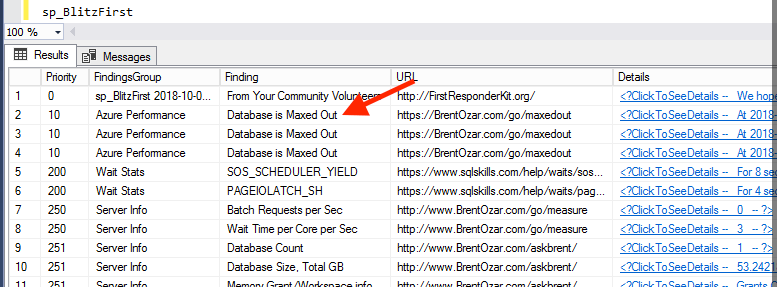
There’s an easy way to check: run sp_BlitzFirst. sp_BlitzFirst is our free performance health check stored procedure that analyzes a lot of common performance issues and then gives you a prioritized list of reasons why your server might be slow right now.

Here’s what it looks like when you’ve hit your DTU limits – note that there are multiple rows, one for each 15-second period where you approached or hit your DTU limits in the last 15 minutes:

Azure SQL DB is maxing out

If you click on the “ClickToSeeDetails” column, you get:

We’re checking the last 15 minutes of the sys.dm_db_resource_stats management view to see if you hit 90% or higher for avg_cpu_percent, avg_data_io_percent, avg_log_write_percent, avg_memory_usage_percent, max_worker_percent, or max_session_percent.

Uh oh – I’m maxed out. Now what?

You could tune queries, tune indexes, lower your app’s workload, or upgrade to a higher DTU limit.

To find which queries to tune, run sp_BlitzCache @SortOrder = ‘___’, where ___ is based on which limit you’re hitting:

  • CPU limits – run sp_BlitzCache @SortOrder = ‘cpu’
  • Data IO – run sp_BlitzCache @SortOrder ‘reads’
  • Log write – run sp_BlitzCache @SortOrder = ‘writes’

If you’d rather tune indexes, run sp_BlitzIndex and focus on the missing index warnings. They’re chock full of dangerous pitfalls, but they’re still one of the easiest ways to get started. We teach you how to interpret the recommendations in our Fundamentals of Index Tuning videos.

Lowering your app’s workload is a totally valid option, too: try caching things in your application rather than hitting the database every time, or staggering your workload so that queries are run at different times.

And of course, you could throw hardware at it by raising your DTU level. If you started on a really low level, like S1/S2/S3, and you’re constantly hitting these throttling limits, then it might be time to upgrade. To keep things in perspective, an S4 with 200 DTUs is only $300/month – if you’re any lower than that, you’re probably going to hit limits sooner rather than later.

All these scripts are part of our free First Responder Kit.


Indexed View Matching With GROUP BY And DISTINCT

Execution Plans, Indexing
5 Comments

Bit Of A Kick

I’ve been playing with indexed views a little bit lately for some demos in my Bits Precon.

There are a whole bunch of limitations in creating indexed views. One of them is that you can’t base the query on DISTINCT.

Fair enough, but you can do GROUP BY.

And what’s pretty cool is that the optimizer can match a query written to find distinct values to an indexed view with a group by.

Best Example Ever

Here’s my indexed view:

Here’s my query:

And here’s the query plan:

Cookies

I think that’s pretty nifty.

Thanks for reading!

Brent says: I’m always amazed at how smart SQL Server is when I’m least expecting it. Microsoft has put so much work into that query optimizer, and it just keeps getting better. It ain’t perfect – but it’s pretty doggone good.


Indexed View Creation And Underlying Indexes

Indexing
1 Comment

Accidental Haha

While working on some demos, I came across sort of funny behavior during indexed view creation and how the indexes you have on the base tables can impact how long it takes to create the index on the view.

Starting off with no indexes, this query runs in about six seconds.

Here’s the plan and the query stats:

Whole Lotta Hashing
Not bad, at 5.5 seconds elapsed. The optimizer thinks an index on Posts would help.

The join column is an include, which is kinda weird, but hey…

Out of curiosity, I added it, and re-ran the query.

Here’s the new plan and stats:

Still Hashing Things Out
Saved a couple seconds, but now… The optimizer is asking for a different index.

It wants on on OwnerUserId, LastEditorUserId. Okay then.

… And it doesn’t get used. It’s the same plan and stats as the last time.

I think that’s silly, and I also think it’s silly that The Optimizer doesn’t want an index on the Badges table at all.

Wonder why. Let’s add one.

Sweet death, now the query takes about a minute and a half.

Here’s the new plan and stats:

No Use For An Index
I can’t have a query run for this long. Clearly I need a way to make it faster.

This is where things got funny, I promise.

Creating The View

Here I am, a fairly experienced SQL Server user. I at least remembered that you can’t use DISTINCT in an indexed view.

You can GROUP BY, as long as you remember to COUNT BIG.

Let’s do that.

Then I went to add the unique clustered index.

Then I waited.

And waited.

And waited.

And after about 30 seconds (seriously, that’s how impatient I am), I decided to see what the create index was up to.

It had the same plan as when I ran the query, and took about the same amount of time.

Feeling a little bit crazy, I backtracked up to the point where I created the index on Badges, and re-created the indexed view.

The new plan for creating indexed view clustered index morphed back into the “fast” plan for the query.

It also only took about 6 seconds.

Is There A Moral?

There are a few!

  1. Missing index requests are kinda bananas
  2. Sometimes the lack of a missing index request isn’t bananas
  3. If you want to create an indexed view for a slow query, you can expect creating the index to take at least as long as running the query
  4. If you want to create indexed views faster, tuning the underlying indexes might not be a bad idea

Thanks for reading!


How to Log Active Queries with sp_BlitzWho

Monitoring
4 Comments

Queries are running when you’re not around. They’re wreaking havoc – maybe they’re filling up your TempDB, or causing blocking, or flushing your buffer pool out.

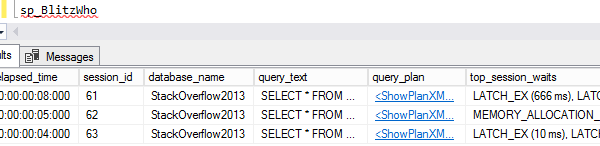
When I wanna see what queries are running, I run sp_BlitzWho:

sp_BlitzWho

That shows me who’s running the query, what it’s been waiting on over time, memory grants, blocking, and even the live query plan (if I’m on a supported build.) But of course, that’s only right now.

So to log queries when you’re not looking…

Set up an Agent job to run this every, say, 5-15 minutes:

That logs currently running queries to a table. Then, when someone asks you what was going on yesterday at 8PM, back when you were drowning your database memories in cheap beer, you can query that table’s output over time:

BlitzWho results over time

By default, only 3 days of history are kept in the table. You can control that with the @OutputTableRetentionDays parameter.

I don’t recommend leaving this Agent job running 24/7 on every server you have – if you need activity tracking, you’re better off with a monitoring tool or the Power BI Dashboard for DBAs. Instead, I like setting up the Agent job to run every minute, but disable the job. Then, when a problem is happening, I’ll train my team to enable that Agent job even if I’m not around. That way, I can go back later to see what was happening on the server at the time.

Catching blocking, TempDB usage, or long-running queries

To make these scenarios easier to troubleshoot, sp_BlitzWho has a few filtering parameters:

  • @MinElapsedSeconds
  • @MinCPUTime
  • @MinLogicalReads
  • @MinPhysicalReads
  • @MinWrites
  • @MinTempdbMB
  • @MinRequestedMemoryKB
  • @MinBlockingSeconds

So that way, if you’re specifically trying to narrow down a query that’s blowing up your TempDB overnight, you can filter it down just to queries using TempDB.

Download it in the latest version of our First Responder Kit. It works in all supported SQL Server versions, from 2008 to Azure SQL DB. Enjoy!


[Video] Office Hours 2018/11/28 (With Transcriptions)

Videos
2 Comments

This week, Brent, Tara, and Richie discuss storing phone numbers in a database, forced parameterization, how AI will affect DBA jobs in the future, what languages a DBA needs to learn, backup issues, measuring the overhead of transparent data encryption in terms of CPU on SQL Server, starting SQL server without tempdb, and much more!

Here’s the video on YouTube:

You can register to attend next week’s Office Hours, or subscribe to our podcast to listen on the go.

Enjoy the Podcast?

Don’t miss an episode, subscribe via iTunes, Stitcher or RSS.
Leave us a review in iTunes

Office Hours Webcast – 2018-11-28


Brent Ozar: Jason asks, “Do you have any suggestions on storing phone numbers? I was thinking bigint versus varchar, say, 15. Do I need to deal with international supports; smallint, ex, field for optional extension s, any thoughts?

Tara Kizer: This is a Richie question, for sure.

Richie Rump: Yeah, use character fields, because at some point you’re going to have to do international and there’s going to be a whole bunch of other stuff…

Tara Kizer: Really?

Richie Rump: Yeah, character fields. And then, what you want to do is format that, not in the database but on the way in through the app, in the app, whatever format so it’s consistent at the very least. Otherwise, you don’t want to have all these numbers and just not have any format because then you’ll have all these different formats all over the place, then your app doing all this work to reformat it. But scrub it on the way in. Have it a consistent format. Store it in a varchar because you won’t be doing any math on it, so why an int?

Brent Ozar: Leading zeros are a problem. And then the other thing you end up having to worry about is commas, because in some auto-dialer software, you need commas to wait for a specific period of time. Terrible things I’ve learned, terrible.

Tara Kizer: Not something I’ve even thought about.

Brent Ozar: No, I was going to make phone number jokes when he first asked him. Like, what is this? You’re putting your black book inside a database; what’s going on there?

Richie Rump: I mean, you don’t, Brent?

Brent Ozar: No. I’m married. I don’t even know my own phone number. I’m just like, honey…


Brent Ozar Shaun asks, “Is there a way to send unique metadata with queries that doesn’t bloat the plan cache? I’d like to send a value of where in my code a query is being called from. I have forced parameterization turned on, but most queries are already parameterized. It would be nice if there was a flag to turn on or off comment stripping before creating plans.”

Tara Kizer: I don’t even understand the question; unique metadata with queries – oh, the documentation in it? I mean, it comes across. It’s in there.

Brent Ozar: I’m going to whip out SQL Server Management Studio, because I don’t think it works exactly the way you think it does, forced parameterization. And now, when you run plan cache queries like sp_BlitzCache, that’s going to only show the parameterized string in there. So we’re going to pop into Stack Overflow 2013. I’m going to set forced parameterization at the database level. So parameterization, let’s go into forced and say okay. Let’s set a new query. And I’m going to put in a comment. I’m going to say, hi mom, and then select star from dbo.users where display name equals Richie Rump or display name equals Tara Kizer – neither of which are their real names on Stack Overflow…

Tara Kizer: No, I’m Tara Kizer on Stack Overflow.

Richie Rump: I’m not…

Brent Ozar: Are you really? You guys might be thinking DBA.StackExchange…

Tara Kizer: Oh, well no, I should be…

Brent Ozar: Alright, so here we’ll do Richie’s…

Tara Kizer: I had to ask, I think, a PowerShell question a few years ago, so I’m on the other side.

Brent Ozar: So now here’s that. If I go query include actual execution plan and I go run it, in the execution plan, it doesn’t look like it’s there. And even if you go into the add a query text, which is freaking broken in SSMS – this drives me crazy. But if I go into sp_BlitzCache and I go look at the plan cache, hopefully it’s going to be up in that list. So here we go. So here it looks like your comment isn’t included. But if I go click on the query plan, it’s going to be inside here if I edit the query text. As you can see here, the comment is completely gone. What the hell? It should have preserved the comment inside there. I would have been sure it would have preserved the comment inside there.

Tara Kizer: I certainly see comments when I open up people’s plans.

Brent Ozar: yeah, even with forced parameterization.

Tara Kizer: Maybe it’s only stored procedures?

Brent Ozar: Oh, well stored procedures will definitely do it. I’m going to gamble and move it. I’m going to try moving it in over here.

Tara Kizer: And I just looked up my name over there. It’s just Tara. I’m surprised. I’ll have to change it.

Brent Ozar: let’s free the plan cache and then let’s try it again, just to see, execute, and then run sp_BlitzCache and see. If it doesn’t show up here either, I’m going be pissed. It doesn’t show up here either. Oh, there is – we’ve already blogged about this even. How does this even happen? Shaun, if we’ve blogged about it, why are you making us look stupid on the live webcast?

Richie Rump: Because it’s so easy, Brent.

Brent Ozar: Copy, paste – I didn’t know … was a movie. Oh, Kendra blogged about it. Oh, okay, so alright. No, in that case, I would read whatever Kendra wrote and then pay attention there. Sadly, we don’t…

Tara Kizer: Consider it gold if Kendra wrote it.

Brent Ozar: It’s true. She’s way smarter than we are.


Brent Ozar: Let’s see, next up August says, “Hi Brent, I notice that you have included Ola’s scripts in your DBA first aid bundle. I was wondering how I’d manage version control between checking your updates and Ola’s? By the way, your great post, Brent, is amazing.” Someone’s trolling us. So we don’t include Ola’s scripts. We don’t include Ola’s script at all. [crosstalk]

Tara Kizer: I was just about to go check, like really?

Brent Ozar: No, no, no, no. We don’t want to manage that kind of version control either. Tara wrote sp_DatabaseRestore, which relies on Ola’s scripts, but we don’t ship them with our First Responder Kit.


Brent Ozar: Jason, throwing back to his question about how to store phone numbers says he was, “Thinking about using bigint because it would be smaller in terms of size.” Yeah, but your problems will be larger.

Richie Rump: Yep.


Brent Ozar: Let’s see, Mark asks, “How do you think artificial intelligence will affect DBA jobs in the future? Also, will DBAs need to learn more languages than just SQL? I know you dislike PowerShell.” We’ll go each through this. So how artificial intelligence will affect DBA jobs in the future – Tara, you first.

Tara Kizer: I don’t think it’s going to affect us. I mean, maybe if there’s someone starting out new, if they’re in their 20s and becoming a DBA, you know, we’re going to retire in the next 20 years or so. I really don’t think it’s going to affect us completely, but certainly, a lot of people will have moved to the cloud and you do have some changes happening for you. But it still takes a human being to be able to look at things. I mean, even BlitzCache, which has a lot of logic built in to help you find things, you still have to open it up and dig into it. And I don’t know that AI, at least for the stuff that we work on, would ever be smart enough to really do what a really good DBA can do.

Brent Ozar: For a while there, there were people who were trying to build something that would automated test your T-SQL to make sure it was the same after changes. Their goal was to have tools like artificial intelligence tune a query the way a DBA would and make sure that it returns the same results afterwards, and those projects keep stumbling all over the place too. Richie, how about you?

Richie Rump: I think we’ve been asking this question for, what, the last 40 years or so. And every time it comes up, people are going to say, we’re going to lose our jobs. But technology keeps improving and yet we still have our jobs. Now, our jobs have changed a bit. We’re not managing so much at the detail level; we’re a little bit higher up. But it’s going to be the same thing. We’re going to manage maybe something at the higher up or maybe we’re going to transition to something different, but we’re not going to be losing our jobs. It’s just going to be something else, something more important that’s going to come on and we’re just going to jump on it. I mean, even when we are working with Aurora, which is pretty much hands off – even to spin it up and to get it going, it’s just click, click, click, boom and all of a sudden we have a cluster in the cloud – there’s still stuff in it that we have to know and we have to get into because we kept crashing it. There you go.

Brent Ozar: I think it’s going to keep fixing smaller problems, you know, that we’re always fixing harder problems these days. Man, I would just love for database servers to back themselves up. It feels like is that so much to ask?

Richie Rump: You look good, won’t you back that thing up?

Brent Ozar: Why can’t, when the SQL Server gets installed, why can’t there be a wizard that says, where would you like your backups to go and how long would you like to keep them?  That seems like genuine intelligence to me. It’s not really that hard, but it’s a question of resources.

Richie Rump: Actually, the cloud does that.

Brent Ozar: The cloud does it?

Tara Kizer: Yeah.

Brent Ozar: Yeah, but it’s not artificial intelligence, it’s just a freaking wizard.

Richie Rump: That’s right.

Brent Ozar: Before it steps through, it’s really not that hard. But people are sticking with a whole lot of on-premises databases and this stuff just isn’t getting any easier. Even when you go to the cloud, there’s a lot of this, okay now I need to do a restore, I need developers to start provisioning out restores, I need to manage the security of data, I need to manage what parts of data get masks, what parts do not. There’s things I get excited about for AI to cover, but it’s just not covering everything. It’s not even close.

Richie Rump: Right now, I don’t think that any company’s going to say, let’s go ahead and put all this effort into all these little AI projects and it’s not going to increase our bottom line whatsoever.

Brent Ozar: And really, if you’re building all of that, it’s not cutting your costs today. AI is still way too expensive. Try and go find someone off the street who’s willing to work for nothing as an AI researcher. It’s not going to happen. You had another question in there too like, what languages will a DBA have to learn? If I was a production DBA today – if you made me go back and get a production DBA fulltime job where I was managing multiple servers, I’d learn PowerShell in a heartbeat; not because I want to but because I think I would have to. In our weirdo jobs as consultants, we’re really brought in to kind of resuscitate one server at a time, so we don’t end up using it. But I do believe that it’s a really cool interesting language for those of you who have to manage armies of servers. I just don’t want that work myself.

Richie Rump: That’s for the DBA side. But if you’re on the database development side, it should be Python. Python is the language you should know, not PowerShell, because I don’t even think PowerShell is a language. It’s Python. Learn Python if you are a developer.

Tara Kizer: I’ve actually written a few PowerShell modules over the years and I just learn it – I relearn it every single time I have to write a new one, and I just Google the hell out of it until it starts working.

Brent Ozar: That’s what we also call artificial intelligence.

Tara Kizer: Although I have taken a PowerShell training class a few years ago.

Brent Ozar: Yeah, it’s hard.

Richie Rump: We have PowerShell training classes coming up, don’t we, Brent?

Brent Ozar: We do, and here it is, it’s on the slide. Drew Furgiuele with Hands-on Labs. And it’s specifically for DBAs too. I’ve gone through it too as well. And it teaches you how to accomplish specific tasks that DBAs need to accomplish, which is what I think is much more important in learning. I don’t want to learn internals that I’m never going to map to my day to day job. I want to learn something that’s going to help me do better tomorrow. That’s what Drew’s stuff is focused on.

Tara Kizer: I just saw the slide. It says it uses Hands-on Labs. Is that the virtual machines from AWS also?

Brent Ozar: Yeah, exact same thing.

Tara Kizer: Awesome. I didn’t realize we had any guest speakers that were doing the Hands-on Labs also.

Brent Ozar: I try to encourage everybody to do it. Like, any class that has labs, the students seem to retain better when it’s a practical topic. It’s less about when it’s a theoretical topic.


Brent Ozar: Gordon asks, “A problem with my SSMS initiated backup is it’s timing out after less than a minute. It had to do with the execution timeout being set to 45 seconds. Why did the backup timeout since the backup had already started?”

Tara Kizer: Why is anybody changing the Management Studio timeout setting? I mean, that’s one of the benefits of being able to run queries in Management Studio, that it by default does not timeout. The answer to his question is basically it’s a kill command. You’ve cancelled the query when the timeout happens.

Brent Ozar: That would be bad.

Tara Kizer: It just seems odd to have changed that setting.

Brent Ozar: I’m wondering if maybe somebody didn’t do it to say, oh if I have a query that runs away, I want it to automatically reel back in. But man, that’s dangerous. That gives me the heebie-jeebies. I’m also a big fan of not doing backups via SSMS. I would much rather kick them off via agent jobs, even if it’s a one-time thing, just so that I can make sure that agent will keep running the thing and it will succeed to completion. That’s probably not a real phrase.


Augusto asks, “How can we measure the overhead of transparent data encryption in terms of CPU on the SQL Server?”

Tara Kizer: What kind of load testing do you have? This needs to be done in an environment before you hit production; apply a production load to a test server and see what happens. Hopefully it’s production-like hardware. Check what your system needs.

Brent Ozar: And when you don’t know how to do a load test, because a lot of us don’t, just start with index rebuilds, backups, and CHECKDB; things that you would usually do in a maintenance plan. And you can look at the differences between those while they run.

Tara Kizer: Yeah, good luck on those backups. You get no compression with TDE.

Brent Ozar: So there was a switch. So I can’t remember what Service Pack they came out with, and I want to say it was 2016, where it all of a sudden gave you compression on backups. And after that, there were like six Cumulative Updates in a row that fixed corrupt backup issues. It was so bad. Whatever you do, don’t enable this without CU whatever…

Richie Rump: Oh my gosh…

Brent Ozar: Yeah, it was bad. Plus the worst of it was that your backups succeeded but you just couldn’t restore from them.

Tara Kizer: Oh wow, and how many people are doing those test restores? I mean, I always did, but I don’t think very many people in the world are testing their backups.

Brent Ozar: Not nearly enough. Not enough people in the world take their backups.

Tara Kizer: True. We know that.


Brent Ozar: Teschal asks, “Is it possible to start SQL Server without tempdb or provide a different drive on the fly?”

Tara Kizer: What world of hurt is Teschal in right now? Certainly, it can from the command line – SQL Server .exe and there’s a switch that you can use to have minimal stuff startup. But I think tempdb can be excluded. Okay …

Brent Ozar: Of course he does.

Richie Rump: Of course he does.

Brent Ozar: There you go – /F, minimal configuration, that’s what it is. And then you can alter the tempdb location from there. So what Teschal probably did was alter and set the wrong location for a path that doesn’t exist. Teschal, I’ve been there too.

Richie Rump: I love in the cloud; I haven’t been there.


Brent Ozar: J.H. says, “I’m trying to track logins to a particular database. I’m trying to figure out if that database is still being used. Is a server-side SQL trace pretty much the T-SQL example of the profiler GUI that just runs on the SQL Server?”

Tara Kizer: I’m not quite sure what J.H. is asking because with the server-side SQL trace, you have to select which events you want to do. It’s very tedious work, so I usually use profiler first. It gives me the template after [suck all my vents], and then I script it out and then I’m good to go with the server-side trace. But you have to add your events. Server-side trace doesn’t give you anything; you have to add things to it.

Brent Ozar: Yeah, say that you want to replay exactly what happened. And I’m going to do a terrible trace here just to show as an example. And then yeah, sure, whatever, untitled one is fine. And run, and then immediately stop. If I go file templates – no it’s not templates. Save as trace template, is that what it is? Yeah, boy, it’s been a long time since I’ve done this…

Tara Kizer: No, no, no, it’s under file. It’s definitely under file. Save as – there it goes, yep.

Brent Ozar: Is that it?

Tara Kizer: Yep.

Brent Ozar: Okay, now let’s see if we can open it. Now, who the hell knows where this went?

Tara Kizer: Yeah, I was going to say… There it is.

Brent Ozar: there we go. So yeah, then you can save that as a server-side trace. But is it the same overhead, if that’s what you’re asking? Its overhead is not as bad as you’re running it on your local machine in Tucson, Arizona when your production server’s in Buffalo, New York, you know, trying to go across data centers with huge latency. It’s a lower latency. If you’ve got to do a trace, this is a better way to do it. The other thing I would do is, in a login trigger, I don’t know if you can – well, you know what, it wouldn’t matter. And you know, J.H. I don’t think yours is going to matter either because the problem is, are you really going to be sure that, say, the Stack Overflow 2010 database isn’t used. If someone could go into, say, tempdb and they can run a query like select star from Stack Overflow 2010 dbo.users, even though I’m not logged into that database, I can still run that query. So I don’t know that a trace is really going to get you there.

Tara Kizer: I would probably just disable logins, rather than taking the database offline, just disabling it and then I would imagine that the applications have some kind of alerting in place to notify you’ve got some kind of problem.

Brent Ozar: I love it. That’s even better than – I was going to say – set it to read-only, but that’s bad. I like your idea better.


Brent Ozar: Sheila says, “We have a mass run…” And as soon as she says that, all I can think of is the video Chicken Run, where these chickens are running from the…

Richie Rump: I was thinking like a marathon and we have all these little jobs just in corrals and everybody’s just trying to get through that one start just to get going.

Brent Ozar: That’s because Richie works with our serverless applications, where we have, all of a sudden, thousands of jobs that are trying to – or Amazon Server, Postgres…

Richie Rump: Run at the same time, yeah.


Brent Ozar: “We have a mass run with high executions every night at the same time. We have no consistency with the number of claims per second that get processed during that time. CPU and memory are all consistent from one night to the next and I’m gathering wait stats every 10 minutes now via the first aid kit. What should I look for?” So I would – god, there’s so many interesting things here. I would probably start with when you say our first aid kit, it’s one thing to gather the stats. The other thing you want to do is use the PowerBI dashboard to go check and see the wait stats over time. Richie’s giving a face. Are you giving that face because you can’t believe that I said the words PowerBI, or what are you saying?

Richie Rump: I still can’t believe you actually use PowerBI.

Brent Ozar: I know, right, and enough that I use it in my browser now. I have an Azure account to use it.

Richie Rump: It’s insane – so easy, Brent Ozar can use it.

Brent Ozar: And enjoys it, yeah. It still has more bugs than a mass run of whatever. It’s buggy, and it’s missing tons of features, but I still like it a lot. So this is what I would start with; graphing things out with the First Responder Kit’s PowerBI dashboard, and then you can see what wait stats look different during that time and tackle whatever your top wait type is. Maybe it’s blocking, for example, and that’s why you can’t get more throughput. That’s a common one. THREADPOOL waits, there could be all kinds of things that would get you. Alright, well that’s all the questions that we have this week at Office Hours. Thanks, everybody for hanging out with us and we will see y’all next week at Office Hours.


What Is SQL Injection?

T-SQL
4 Comments

Say we have a stored procedure that queries the Stack Overflow database. We have two separate parameters, @DisplayName and @Location, so folks can search for people by name, location, or both.

For performance reasons, we decide to build dynamic SQL:

When we run it, it works, and we can see the query on the Messages tab in SSMS:

Finding Bobby Tables

But look what happens when the bad guy runs it:

Well, that’s not good

The bad guy can:

  • Close the DisplayName search string by adding a couple of apostrophes
  • Add a semicolon to end the first query
  • Add his own evil query, like drop database or create login or whatever
  • Finish the batch and ignore any subsequent syntax errors by throwing in a couple of minus signs

That’s a really simplistic example, but it can get way worse, as Bert Wagner explains in this GroupBy session on SQL injection.

The first step in avoiding this problem is to avoid using user inputs as-is. Pass the parameters in to sp_executesql instead, like this:

sp_executesql lets you pass in a list of parameter definitions, and then pass the parameters in safely. Now, when the bad guy calls it, here’s what the query looks like:

Whew – safer.

The bad guy doesn’t get a list of your databases.

Avoid EXEC, and use sp_executesql instead. Then, for more learning, check out:


Updated First Responder Kit for November 2018: Get Into Sports Dummy

First Responder Kit Updates
0
COACH!

I dunno, I just like this picture.

You can download the updated FirstResponderKit.zip here.

sp_Blitz Improvements

#1786 – @dallyhorton made a good point: if we’re gonna warn you about Change Tracking, we should tell you which database it’s enabled for.
#1791 – Who do DMV queries think they are, blocking each other? Get over yourselves.
#1793 – CheckIds shouldn’t be twins, I suppose.
#1794 – We now skip growth checks on read only databases. A sensible change.
#1797 – Better support for Managed Instances.
#1799 – Filter out Managed Instance waits
#1802 – Skip alerting that your alerts aren’t alerted in RDS
#1814 – 2012SP3 is now officially unsupported. YOU KNOW WHAT WHAT MEANS.
#1839 – Added Managed Instance specific info
#1840 – There are a lot of false positives about Linux. Now there’s one less.
#1856 – More complete list of DBCC command sources to ignore

sp_BlitzCache Improvements

#1806 – You know what really helps when you’re reading long numbers? Commas.
#1812 – Hopefully avoid some invalid length errors on substrings.
#1819 – Improves checks for cursor problems in XML
#1847 – Joe Obbish discovered that you can have a bigint of statistic modifications. Someone get this guy a stats update, would ya?
#1855 – SQL Server 2014 SP3 added row goal information to query plan XML.
#1858 – Expanded the @StoredProcInfo parameter to also search for triggers and functions.

sp_BlitzIndex Improvements

#1848 – It was pretty weird realizing we didn’t collect check constraint information in here. Now we do, and we check to see if you’ve got a scalar udf in the definition. That’s all for now.

sp_BlitzFirst Improvements

#1795 – Something about delta views for multiple servers. Everything named Delta just goes over my head.
#1799 – Like Blitz, not filters out Managed Instance wait stats
#1807 – If you’re on a version of SQL Server that can use show you live query statistics, we’ll throw in warnings if we detect running queries with cardinality estimation or skewed parallelism issues.
#1815 – In Azure SQL DB, we now check sys.dm_db_resource_stats to see if your instance is being throttled.
#1836 – Improved startup time calculations for Azure SQLDB. Until they change something in a week.
#1857 – Re-ignoring some CLR waits that we used to ignore and stopped ignoring. Long story.

sp_BlitzWho Improvements

#1829 – You can now write sp_BlitzWho to a table. In another database. With filtering. It a whole thing, and on Monday, Brent will have a blog post explaining it. We just don’t support it < 2012 yet. You should really just upgrade anyway.

sp_BlitzQueryStore Improvements

#1819 – Same cursor stuff as BlitzCache
#1847 – Same stats mod counter stuff as BlitzCache
#1860 – Skip queries that hit sys.master_files in Azure

Power BI Dashboard for DBAs

#1810 – @hfleitas got mobile reports working. Now you can keep your SQL Server in your pocket, where hopefully it won’t get all warm and smushy.

sp_BlitzLock

#1841 – Removed duplicate columns from output. How they got in there is a mystery.
#1860 – When you run BlitzLock, the default search path is the system health session XE file. That throws a kinda obtuse error in Azure, where file paths like that have to be URLs that point to Azure Blob Storage. I didn’t fix anything, I just give you a more helpful error message.

sp_ineachdb Improvements

Aaron Bertrand was kind enough to open source this script and allow us to distribute it with the FRK. Everyone say thank you to Canada for making Aaron.

There were no changes to sp_AllNightLog, sp_AllNightLog_Setup, sp_DatabaseRestore, sp_BlitzInMemoryOLTP, sp_BlitzBackups, or sp_foreachdb this time around.

For Support

When you have questions about how the tools work, talk with the community in the #FirstResponderKit Slack channel. If you need a free invite, hit SQLslack.com. Be patient – it’s staffed with volunteers who have day jobs, heh.

When you find a bug or want something changed, read the contributing.md file.

When you have a question about what the scripts found, first make sure you read the “More Details” URL for any warning you find. We put a lot of work into documentation, and we wouldn’t want someone to yell at you to go read the fine manual. After that, when you’ve still got questions about how something works in SQL Server, post a question at DBA.StackExchange.com and the community (that includes us!) will help. Include exact errors and any applicable screenshots, your SQL Server version number (including the build #), and the version of the tool you’re working with.

You can download the updated FirstResponderKit.zip here.


Tales From Overindexing: Too Many One Column Indexes

Master Plan

Sometimes you see a query, and it’s hitting one table, and then the query plan looks like a vase full of spaghetti.

Usually, there’s a view involved.

Usually.

Sometimes, there’s just really weird indexing.

Here’s A Thing, Look At It

Promises

This is a query against one table. No views, no functions, no triggers.

How To Think Like An Index

When most people think about the way a query can use indexes, they usually think it’s limited to one, or sometimes two, if you do a key lookup. And most of the time, that’s about what happens.

A key lookup is when SQL Server gives your nonclustered index inadequacy issues. It’s basically saying “I’m busy Saturday, let’s hang out on Tuesday.”

If we have this index, and this query, we’ll get a Key Lookup.

Just Coffee

A Key Lookup is basically a join between the clustered index and nonclustered index. This is one reason why clustered index key columns are in all your nonclustered indexes, and you should be really careful how you choose your clustered index key columns.

That Seek Predicate down the bottom is the join relationship between the clustered and nonclustered indexes, which is the clustered index key column.

For every row that comes out of the nonclustered index, we grab the associated key column value, and join it to the clustered index to produce the columns that aren’t in the nonclustered index.

Look at me. I’m you.

You can’t control what kind of join gets used here (though that would be neat, maybe).

This is the most common, but not the only way that SQL Server can use multiple indexes.

What Happens With A Bunch Of Narrow Indexes?

Like, say, one on almost every column in Posts, but with only one column in each index.

And then a query that kinda sorta does some self-like joins with some specific predicates.

Unnatural Selection

You end up with the query plan I showed you earlier.

Promises

What’s happening here is called index intersection.

It’s pretty rare to see it for a variety of reasons. Most people don’t create a single column index on every eligible column of the table. There’s a special place in hell for people who do that.

By hell, I mean a soup restaurant in a Faraday Cage, with no liquor license, and live comedy.

It’s sort of an expensive process, joining a bunch of nonclustered indexes together, so the optimizer has to really think it’s a worthwhile strategy. You’re talking about reading N number of separate objects, hoping they’re not locked, joining all those objects together, etc.

Remember that you’re probably not joining any of these indexes together on their leading key column. Many of the join types are hash joins, or merge joins that require sorts. Both of those things will drive up the query memory grant.

In all, this query uses 10 nonclustered indexes, and does three separate key lookups back to the clustered index. You could really cut down on the amount of joining, sorting, and hashing, by adding some composite indexes that let our query get all its data from a single source.

Thanks for reading!

Brent says: this blog post stems from a query we saw in the wild leveraging something like 8 different indexes on the same table – even though the table was only specified twice in the FROM clause! I was so impressed by the sheer number of indexes that I said we should blog about it, except that it would probably take days of experimenting to make this happen with the Stack Overflow database. And of course Erik did it that day.


How to Troubleshoot Blocking and Deadlocking with Scripts and Tools

Deadlocks, Monitoring, sp_BlitzLock
2 Comments

When you need to find which queries are blocking other queries, your decision comes down to when the blocking happened. Is it happening now, recently, or coming up soon?

During a live emergency, start with sp_WhoIsActive. Adam Machanic’s excellent free sp_WhoIsActive replaces Activity Monitor, sp_who, and sp_who2, and it’s way more powerful. The documentation is extensive – check out how to find blocking leaders:

This is probably my favorite way to see blocking live, but it only works right now. You can log sp_WhoIsActive’s results to a table, but don’t be a hoarder – don’t set this up to just continuously log to disk if you’re not actively doing something with the data.

If it’s 1-2 hours after the live emergency, use sp_BlitzLock. Sometimes people call you up and want you to troubleshoot deadlocking that finished recently, but you didn’t have anything set up on the server ahead of time. If you’re on SQL Server 2012 or newer, download the First Responder Kit, install sp_BlitzLock, and run it:

sp_BlitzLock output

It checks the default system health session and shows you recent deadlocks, the queries that caused them, and the indexes involved. Download sp_BlitzLock in our free First Responder Kit, and read more documentation here.

If you can prepare ahead of time, set up Extended Events. Jeremiah Peschka wrote an easy Extended Events session and a query for it. You don’t want to leave that running all the time, but if you know you’re heading into a time when blocking is traditionally a problem, fire it up and start keeping an eye on it. For blocking specifically, this is even better than logging sp_WhoIsActive to a table since it grabs blocking more frequently, but at a lower overhead. It’s missing a lot of the juicy details sp_WhoIsActive has, but it’s still effective at capturing lead blockers.

If you’ve got a monitoring tool, learn to use it well ahead of time. It’s not enough to just have it installed: just like a database, you need to understand how to leverage its power.

After you’ve had a monitoring tool installed for a few months, learn how to use it to troubleshoot blocking. Cause a blocking situation yourself by creating a table, then doing a BEGIN TRAN in a couple of different session windows and trying to update all of the rows. Let the blocking go on for a while, and see what kinds of emails and alerts you get from the tool. Then close the sessions, wait a while, and see if you can go back through the history to spot the lead blocker.

If you try that, and you still can’t spot the lead blocker with your monitoring tool, it’s time to hit the manual or call the vendor’s support line for help. They definitely want you to be able to use their tools – the more effective you are at using ’em, the more likely you’ll be to renew your support. Take advantage of the help before blocking strikes.


Getting Sneaky With Forced Parameterization

Execution Plans
0

Silly Rules

I’ve blogged about some of the silly rules about where Forced Parameterization doesn’t work.

One rule that really irked me is this one:

The TOP, TABLESAMPLE, HAVING, GROUP BY, ORDER BY, OUTPUT…INTO, or FOR XML clauses of a query.

TOP and FOR XML, get used, like, everywhere.

TOP is pretty obvious in its usage. FOR XML less so, but since it took Microsoft a lifetime to give us STRING_AGG, lot of people have needed to lean on it to generate a variety of concatenated results.

Heck, I use it all over the place to put things together for in the First Responder Kit.

Examples

In a database with Forced Parameterization enabled, these queries cannot be parameterized.

If we look at the query plans for them, we can see partial parameterization:

Halfsies

The literals passed into our query outside of the illegal constructs are parameterized, but the ones inside them aren’t.

Which means, of course, that we could still end up with the very plan cache pollution that we’re trying to avoid.

For shame.

The Adventures Of Irked Erik

I figured I’d try out some different ways to get around those rules, and it turns out that APPLY is just the trick we need.

For some reason, that’s not mentioned on that page.

I can’t find a newer version.

Maybe my internet is broken?

But anyway, if we change our queries to use APPLY instead, we get full parameterization:

If we look at the new query plans, we can see that:

I see variables.

Bonkers

Partial disclaimer: I only tested this on SQL Server 2017 so far, and that’s probably where I’ll stop. Forced Parameterization is a fairly niche setting, and even if you have it turned on, you may not be able to change the queries.

It’s just something I thought was cute.

Thanks for reading!


Not So Forced Parameterization

Execution Plans
0

Asking The Wrong Question

Sometimes, when you wanna turn on a feature, you spend so much time wondering if you should, you don’t bother asking if it’ll even work when you do.

There are a long list of things that are incompatible with Forced Parameterization, on a page that’s pretty hard to find.

Now, there’s nothing in that list that says what I’m about to show you won’t work, but it’s kind of inferred here.

Statements that reference variables, such as WHERE T.col2 >= @bb.

When you’ve finished rolling your eyes around the known universe, keep reading.

This Also Goes For Assigning Variables

So, if you’re the kind of nutso-wacko that wants their variables to have values, hold onto your Librium!

Let’s check it out.

This sets FP on.

Now I’m gonna run two queries. One of them selects a count, and the other assigns that count to a variable.

The first query is parameterized just fine.

See those little parameters? They used to be literals.

How nice for you.

The second query doesn’t fare so well. 

No. Not at all. One may even call it unfair.

Ribbit.

Workarounds?

If you have queries that do this, and you want them to benefit from parameterization, one workaround is to insert the value you would assign your variable to into a temp table, like this.

This query will get parameterized.

Nifty.

Then you can just hit that temp table for the value.

Not bad.

Not great if you do it a lot, but hey.

Thanks for reading!