Blog

Index Tuning Week: How Many Indexes Are Too Many?

Indexing
34 Comments

This week I’m running a series of posts introducing the fundamentals of index tuning. First up, let’s talk about understanding how many indexes make sense on a table.

The more nonclustered indexes you have on a table,
the slower your inserts and deletes will go.

It’s that simple.

If you have a table with 10 nonclustered indexes, that’s 10x (or more) writes an insert has to do for all of the data pages involved with each index. (The data page writes happen later, asynchronously, during a checkpoint, but that’s still more work for storage, and there’s still synchronous blocking involved.)

I’ve seen so many DBAs that scream bloody murder about 15-second IO warnings on their storage, and then when we go to look at their tables, they have dozens of indexes on every table. We remove the unneeded indexes, and presto, suddenly their storage workload drops. Their storage does less work, which means it can react to other requests faster, and suddenly they have a cascading performance improvement throughout their queries.

People weren’t complaining about the speed of inserts and deletes – but those background operations were killing storage with a thousand small cuts.

To help performance tuners, I came up with Brent’s 5 and 5 Rule: aim for around 5 indexes per table, with around 5 columns (or less) on each.

This is not set in stone. It’s simply based on the fact that I have 5 fingers on one hand, and 5 fingers on my other hand, so it’s really easy to remember.

Brent’s 5 and 5 Rule

5 and 5 is just a starting point for discussion.

Sometimes, 5 indexes aren’t enough. Sometimes your users want to filter or sort by lots of different fields on a really wide table. However, the more indexes you add, the slower your inserts and deletes will go, and the more competition pages will have for precious memory space. You may have to throw hardware at it in the form of more memory and faster storage.

Sometimes, even just 5 indexes are too many. When you have a table where insert and delete speeds are absolutely critical, and select speeds don’t matter, then you can increase performance by cutting down on your indexes.

Sometimes, 5 columns are too many. If you’re indexing big VARCHAR(MAX) columns, or you’re index hot columns (columns that constantly change), you can still run into problems. And yes, included columns count against your total – if that surprises you, watch my free How to Think Like the Engine class to learn how pages are built.

Sometimes, 5 columns aren’t enough. Maybe you’ve got a query that has 3 fields in the filter, the combination of which is extremely selective, and they just need to return 4 fields in the SELECT. That’d be 7 fields. That’s completely okay – remember, Brent’s 5 and 5 Rule just stems from the fact that I have 5 fingers on my left hand, and 5 fingers on my right hand. If I’d have had an accident in shop class, we might be talking about Brent’s 4 and 5 Rule, and laughing about my lack of skill with the table saw.

Wanna learn how to pick which indexes you should build, and what columns should go in ’em? That’s where my Mastering Index Tuning Class comes in.
Pour One Out for Database Diagrams, and Good Riddance

Development
101 Comments

Update 2019/06/11: they’re back! Microsoft heard your pleas, and Database Diagrams are back in SSMS 18.1.

Update 2020/04/26: they’ve been broken since they came back (link broken by Microsoft), and it’s been almost a year now without a fix. In fairness, Microsoft deprecated this feature because they couldn’t support it, and the last year has been a pretty conclusive track record – they were right, they can’t support it. If you need a database diagramming tool, get one, but it’s simply not a priority in SSMS.

Update 2021/08/28: Microsoft took down the feedback site. The above “broken” link used to point to the user feedback item talking about the problems with Database Diagrams, and Microsoft solved that problem – by taking down azure.feedback.com. There’s currently no way to leave product feedback for SSMS.

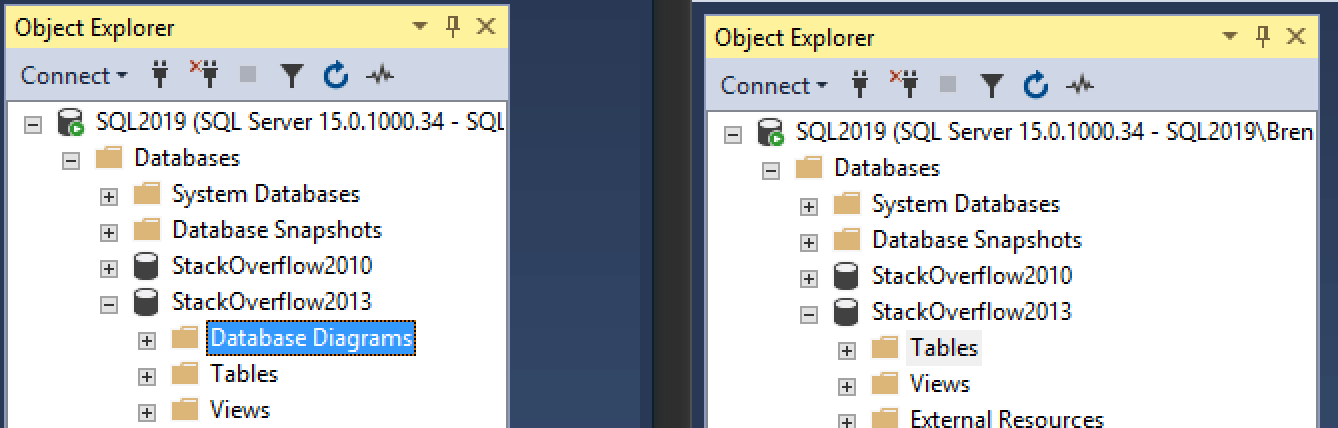
On the left hand side, you see SQL Server Management Studio 17.9. On the right side, 18.0. Something’s missing in the new 18.0:

Rest in peace, Database Diagrams

SSMS 17.9 on the left has Database Diagrams at the top.

SSMS 18.0 does not. Database Diagrams are simply gone. Hallelujah! For over a decade, people have repeatedly cursed SSMS as they’ve accidentally clicked on the very top item and tried to expand it. One of the least-used SSMS features had one of the top billings, and generated more swear words than database diagrams.

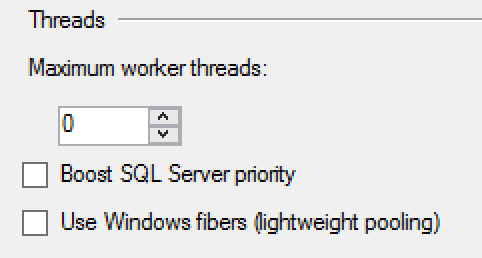
The good news continues when you right-click on a server, click Properties, and click Processors. Here’s the old 17.9:

SSMS 17.9

And the new 18.0, the bad idea jeans are no longer in the shopping catalog:

SSMS 18.0

Oh they’re still there alright – just harder to get to. You have to go into Properties, Advanced, and they’re buried in a list of options.

This isn’t an accident, either. The SSMS 18.0 release notes say:

Removed risky ‘lightweight pooling’ and ‘priority boost’ options from SSMS GUI

And:

Unappreciated and deprecated

I would just like to take a moment to say thank you to Microsoft for focusing on the core ideas of their products, the good things that produce great results. These are easy improvements that will make lives just a little bit better.

Hurrah!


[Video] Office Hours 2018/10/3 (With Transcriptions)

Videos
1 Comment

This week, Tara and Richie discuss database corruption, CLR, DBCC issues, adding identity columns to databases, distributed transactions, tracking how recently a procedure was executed, maintenance plans, recompiling stored procs, parameter sniffing issues, troubleshooting replication with Always On, forecasting database growth and estimating capacity issues, tools for database growth forecast reports, RCSI, and much more.

Here’s the video on YouTube:

You can register to attend next week’s Office Hours, or subscribe to our podcast to listen on the go.

Enjoy the Podcast?

Don’t miss an episode, subscribe via iTunes, Stitcher or RSS.
Leave us a review in iTunes

Office Hours Webcast – 2016-10-03


Why do I have rows in suspect_pages?

Tara Kizer: Andrew has a question. I actually saw this question in the help account too. Not sure if it got answered or not or if we directed you to Stack Exchange. It’s a little lengthy, but since we don’t have that many questions, I’ll go ahead and say the question and answer it. So it’s asking about database corruption, CHECKDB versus suspect_pages, so the suspect_pages table is in MSDB database and if there’s a row in there, it indicates you’ve had past corruption. He’s saying that he ran CHECKDB against that database where the suspect_pages row is showing that there’s corruption. CHECKDB is good and there was a row for tempdb as well, but that value was from the year 2015 and tempdb gets recreated every time we restart SQL Server.

So to answer your question, the database corruption existed at some point. Maybe the restarts of tempdb has resolved it. If you haven’t moved hardware in the past three years, chances are, the database corruption issue, whatever the root cause was, may still exist, depending upon how out of date your I/O subsystem drivers, all those types of things, are. But if you had any rows in the suspect_pages table, you had database corruption. Maybe it doesn’t exist now, but if you haven’t fixed the root cause of it, it can come back. So it’s something you want to take a look at. Make sure you run CHECKDB against all databases. Do the full check, don’t just do physical-only. I know some people only run physical-only, but once you have a row in the suspect_pages table, I think it’s prudent to go ahead and run a full CHECKDB against all of them. And see how out of date you are for patches. SQL Server can cause database corruption if you’re not on the latest Service Pack and Hotfix. Remembering that, going forward, Microsoft is moving away from Service Packs, so you’ve got to apply Cumulative Update packages. And then the other side of the database corruption is usually somewhere in the I/O subsystem. It’s not necessarily a disk is bad. It can be, but it could be just out of date drivers, firmware, all that type of stuff. So make sure all that stuff gets up to date fairly frequently. You know, once every couple years is not enough.


How can I track memory usage from CLR code?

Tara Kizer: Alright, question from Christopher. This is probably going to be a Richie one to answer. So, “Developers have created a lot of code that caused external CLRs and we’re seeing memory pressure events and those CLRs get unloaded and then reloaded. Aside from an extended event profile where I just line up the times when the CLRs are unloaded and reloaded and just try to line up the poor memory-hogging queries, is there any way to see memory usage by CLR?” I thought it was going to be a Richie question, but I don’t think it is.

Richie Rump: No, I mean, I like the concept of the CLR, it’s just, I think the hard part about CLR in SQL Server is knowing when to use it and when not to use it. And sometimes, us developers, all we know is, I could put .NET code inside of SQL Server. Yeah, I could do that; that seems like a great idea. Nine times out of 10, it’s really not a good idea.

Tara Kizer: I get stuck on some clients. We’ll see CLR wait stats come up and it used to be that we’d ignore those wait stats because SQL Server is using CLR stuff and so there could be a lot of waiting time on that stuff. It’s ignorable, but there was a client who had a CLR issue. Redgate software was pointing it out and we didn’t see this issue because it was on our ignore list. So we had to take it off the ignore list, and now I see it all the time as being one of the top three waits on a system. And I always have to ask, are you using any CLR. And unfortunately, a lot of clients are not sure… I do not know… So usually, it’s SQL Server stuff, but troubleshooting it is challenging. I mean, it’s not running – you’re not going to see the stuff that it’s running. Unless it’s running stored procedures, this is all external stuff that it’s doing. So I don’t really have an answer to this question, except you need more memory.

Richie Rump: In case you didn’t know, SQL Server does use the CLR. You can’t turn it off. It’s just going to happen. If you take a look at, like, a lot of the new stuff they put in T-SQL in 2012, that is mostly CLR stuff. I mean, I could take you right back to the .NET function – oh, that’s exactly what that is and that’s how it’s using it. And my cat’s trying to crawl on my keyboard and that’s not a good thing.

Tara Kizer: Oh, and that Redgate software, the version they’re using, I’m almost positive it was the free version. So maybe try out that, the Redgate free monitoring tool, and see if it points to an issue with CLR. It might give you some more detail. I’m almost positive it’s the free version of the software.

Richie Rump: I guess the other question is that, if this is a problem, if memory is a problem, then why not just throw more memory at it? I mean, you may be spending a lot of time, hence your money, because they’re paying you for your time, and why not put that towards more memory, towards the box. Just food for thought.

Tara Kizer: Yeah, and the two ways that I look at memory as far as T-SQL goes, which may not apply to the CLR, depending upon what the CLR is doing. I’m looking at sp_BlitzCache, reads, average reads, and then the memory grant sort orders. So reads and average reads will take a look at what’s using a lot of data pages, so the buffer pool, and then memory grant is the query workspace area in RAM. So is there anything that’s giving large memory grants that maybe it’s clearing out a lot of space in RAM and now that CLR has come under pressure and it’s being unloaded. So I would look there and look at BlitzCache and reads, average reads, and memory grant sort orders.


Should I use Hekaton or SSDs?

Tara Kizer: Alright, Steve asks, “We are in the process of having an argument – discussion – about the relative merits of Hekaton and SSD. Care to chime in?” I don’t know that we’re the right people to talk about Hekaton. I mean, we’re generally against – Hekaton is in-memory OLTP, right? I always forget what the acronyms are later because after the product gets released, we don’t use that term anymore. We start using the real term…

Richie Rump: The product name.

Tara Kizer: Yeah, so Hekaton is in-memory OLTP. SSD, yeah, love SSDs, love it, especially for tempdb. But I’m not sure what the discussion about Hekaton and SSD, what that correlation is.

Richie Rump: Yeah, I played with Hekaton when it was still in beta and there were a lot of issues back then and still they’re in the back of my mind, and I don’t even know if they’re issues anymore. So you know, once you create a table on it, using in-memory was really difficult to take it off, or you couldn’t take it off at all and you had to drop the table. And there was a lot of other, you know, kind of wonky stuff. You couldn’t put some constraints on it and things like that. It was like – it’s not what you think it is. So if you’re thinking of, I just want my normal OLTP database and maybe this one table will go faster if it’s in-memory, it probably is not going to do what you think it’s going to do. I confess, SSDs are always phenomenal.


I have this failing maintenance plan…

Tara Kizer: Alright, Lee has a question, “I inherited a SQL Server and it has a DBCC job that is a maintenance plan. It is failing, but if I run the DBCC command in SSMS and loop through all the databases it works fine. I have recreated the job, but it still fails.” I mean, this is the reason I don’t use maintenance plans ever. I haven’t used maintenance plans since SQL Server 2000. And I only used it back then because that’s what log shipping used. Maintenance plans are hard to troubleshoot. Some people know how to troubleshoot them better and say that they’re okay as long as you know how to troubleshoot. But I’m just like, why do I have to learn this other thing when I can just use custom code to do the same task. So if you’ve inherited the SQL Server and you’re the one that’s going to be maintaining it going forward, put your job in place instead. Get rid of the maintenance job. Maybe it’s not even doing the task that you want it to be doing. But if it’s DBCC, it’s probably doing a CHECKDB, and I would be using Ola Hallengren’s integrity checks stored procedure instead. I would not be using maintenance plans at all.


We need to add primary keys to thousands of heaps…

Tara Kizer: Alright, Nika, “Long story, we need to add primary keys to thousands of heaped tables and 30-plus databases. What major issues may come up if we just add an identity column? How can I know which tables may need to be rebuilt.” Well, if you’re adding and identity column, it needs to be rebuilt. You can’t just add it. So that is going to be a fairly big task. Make sure you have a fairly large maintenance window for this and maybe tackle one database at a time, maybe a set of tables at a time. And if these have a lot of reads versus writes, besides just adding the primary key, make sure it’s clustered. So heaped table is a table without a clustered index, and if you have a lot of reads as compared to writes, it probably should be a clustered index table. If a lot of writes as compared to reads or if write performance is way more important that reads, keep it a heap. So primary key, non clustered, but make sure you make that decision per table. If this is an OLTP system, generally all tables will be clustered indexes, unless they’re staging tables.

Richie Rump: Yeah, I think the other thing that you need to look for is data quality. So when you’re adding primary keys, most likely, you don’t have unique indexes on there either. So you’ll probably have duplicate data in there at some point. Finding that is crazy and it takes time. And a lot of times, you’re trying to go through all these rows, like okay, which ones the real row and which one’s connected to other tables, and all this other stuff. But once you put the primary keys on, that’s an exercise you probably should step through either during or once you’ve already done all that work. Because guaranteed, if you don’t have unique indexes on there, you will have duplicate data. It just happens.


Are distributed transactions okay?

Tara Kizer: Alright, Jason asks, “Do you guys have anything against distributed transactions?” The only thing that I have against it is if it ever leaves an orphan transaction out there. So as long as it’s cleaned up the work when a rollback happens and it’s committing transactions as fast as possible, I don’t have any issues with it. As far as a DBA, I always was annoyed when java developers would want me to set up the XA distributed transactions thing. it was a manual step. I think I read, in newer versions, maybe it’s 2017 or the new version, 2019, that automatically has that set up now, since a lot of people are using it. So I was always annoyed DBAs were having to do this extra work. It was an easy task, but it was just very time-consuming across multiple servers I would have to do it on. So just making sure that rollbacks occur and not orphan transactions and the transactions are committed as fast as possible. Do you have anything on that topic, Richie?

Richie Rump: Nope, nope, thank goodness. Never needed to use it…

Tara Kizer: Yeah, it sure complicates the system involving other pieces.

Richie Rump: I think it’s one of those things that, as you’re architecting it, you always go, okay, do you need this? And you try to do everything possible not to do that. And that was actually one of those things. Distributed transactions, no, I don’t want to do that. That makes things a lot more complicated, and as architects, you’re trying to make things simpler, not more complex, even though that’s where we tend to go because we like to join lines and boxes on whiteboards. I mean, that’s our profession. But yeah, I mean, that’s one of the things that I never want to put into. It’s like, okay if we really need to, then we’ll do it. But there’s a lot of pain involved there and I’m not one to run towards pain at all.

Tara Kizer: Yeah, and ask yourself, does it really need to be synchronous as part of the – or can it be asynchronous, so it’s not in a transaction?

Richie Rump: Yeah, even banking systems, they’re not synchronous. You would think they need to be. Nope…


When was a proc last executed?

Tara Kizer: Alright, Shaun asks, “Is there any way to tell how recently a procedure has been executed?” I can’t think of anything where the system is storing this. So if you need to know this information, you know, modify the stored procedure to write this information… You could set up a job to write current activity to a table, such as every minute, let’s say. But that’s only going to catch the stuff that’s running at that moment in time and if the stored procedure is extremely fast, you may never catch it when that job runs.


Management wants me to use maintenance plans…

Tara Kizer: And Lee follows up with his maintenance plans question that, “Management wants to use maintenance plans for some reason and cannot change it.” I just would not be at that job if that were the case. If I were forced to use maintenance plans, I literally would not work there anymore. This is a showstopper for me. If I’m the one in control of the SQL Server, I’m going to be making the decisions for how the jobs are set up. Maybe I won’t have control over the domain and the operating system version. A lot of times, I’ll input for those things, but as far as jobs go, I’m going to be the one in control of those. I will be open to moving job start times, but no, maintenance plans is a complete showstopper for me.

Richie Rump: I mean, that’s curious. I’ve always, when management, when I didn’t work at the place I don’t really work at, but when management forced something technical upon us, I’d always – probably in a closed door, I wouldn’t do it in front of everyone – but ask, why? What’s the business reason why we need to use this particular feature or function? And most of the time, they had a good business reason, well we want to do this and this and down the line, this is the feature where we’re trying to go. And I’m like, okay, we’ll work it out. But sometimes, it’s like, well no, I thought that this plan thing is what everybody else used and it was a best practice. And it’s like, no, you’re misinformed. So a lot of those technical things, you know, the managers at some point were technical, and maybe four or five years have gone by and that’s no longer the case. And so we have to re-educate them and it’s like, yeah that’s not really current thinking. That’s kind of a bad idea nowadays. And what I’m using in the cloud, there’s a lot of things that when we weren’t in the cloud were good ideas that are absolutely horrible ideas in the cloud. And when we’re talking about stateless processing and things like that – so I feel you. I know where you’re at, but ask those questions first. Don’t snapback or anything, just ask for the business justifications for using these things. And if they are sound and valid, then you have to run with it. But if you have other suggestions on how to accomplish that without doing something that’s not quite kosher technically, then go ahead and offer those up.


Can I dynamically recompile long-running queries?

Tara Kizer: Teschal has a great question, “I have a job to recompile stored procs if their value of max-elapse time is greater than 0.08 milliseconds…” which I think is wow, okay. “Initially, it was for one stored procedure and the job has one step, but now it becomes multiple procs and multiple job steps. How can I make this dynamic so I don’t need to add a job step every time a proc becomes bad?” Teschal, you need to take a step back. We would create these jobs back in SQL Server 2005 and older days. We didn’t have a lot of tools available to us to troubleshoot parameter sniffing issues.

Adding a recompile job for stored procedures once they surpass a certain elapsed time, I mean, sure, maybe do that, but you need to start troubleshooting why you’re encountering parameter sniffing and look towards the newer features of SQL Server, starting with SQL Server 2008. We’ve got option recompile available, so you can do it at the query level and not at the stored proc level. I mean, obviously you’re doing sp_recompile, but option recompile. We also have option optimize for, so optimizing for a specific input parameter. I like that one a lot and I’ve done that both hardcoded as well as in the plan guide.

If you’re on SQL Server 2016 or newer, we’ve got the fancy query store feature, and that would be an excellent feature for you to use. It’s got a nice interface where you can see execution plans degrade, you know, the performance degrade of a query and you can tell it, I want to use this other plan. So I would be taking a step back and not doing the approach that you’re doing. What you’re doing is what we did a while ago. Start looking into why the parameter sniffing issues are happening and what other workarounds should we put in place. Don’t default to recompiling it.


What should I measure when Always On slows down?

Tara Kizer: Alright, Pablo asks, “What should I monitor when trying network if replication with Always On gets slow?” So replication…

Richie Rump: Networking team? I don’t know…

Tara Kizer: I don’t know that I’ve ever really blamed the networking team if the replication is getting slow. What I would be looking at is the replication monitor and seeing, did we have a large transaction run? Look at the publisher to distributor history, and if you see a large amount of rows or records having to be scanned in the transaction log, you probably had something large run. Look at the distributor to subscriber, the history there, and the unpublished commands, or whatever; it’s been a while since I’ve looked at replication. Look there. You probably have a large transaction run and a lot of data now needs to move from the publisher to the distributor and the distributor to subscriber. Yes, it does go across the network, but I don’t think I’m blaming the network for that issue. Large transactions are going to cause latency for replication.


What should max memory be set to?

Tara Kizer: Thomas asks, “I’m running SQL Server 2014 Enterprise. I have max-server set for 89GB of RAM and I always have 6GB available. Is this setting okay? Do I need to turn it down a little for the OS to run?” Okay, so you told us you have max-server memory set for 89GB of RAM, but we don’t know how much RAM your actual server has. So our really quick rule of thumb is to give 4GB or 10% of RAM back to the OS and other processes. That’s just a quick rule. Jonathan Kehayias has a different type of calculation you can do. So depending upon how much RAM you have, you end up needing to give the OS and other processes a lot more RAM. I did write a dbatools PowerShell function that can do this work for you.

Okay, so he follows up and says he has 96GB of RAM. So 96 minus nine – you’re right around where we would recommend and that fact that you have 6GB always available, you’re probably okay. and maybe you could give more to SQL Server. Are you having a memory issue? I think your setting is just fine where it is.

Tara Kizer: Alright, Darshan asks, “Would you know how to forecast database growth over a period of time and how can we estimate capacity issues?” That’s something that DBAs struggle with; how much storage are we going to need in two years? What’s the growth going to be? And as a DBA, I don’t answer that question. I go back to the business and they have to tell me what their forecasts are for application features, are we going to be on-boarding a lot more customers going forward. I can tack it, and I can check out the growth of it. I can chart it out, but that doesn’t mean that a new feature is going to come out that’s going to be using a lot more data. Maybe a year from now, our sales are going to be great and we’re going to have more products, more customers in the system, things like that. So I can track it and I can forecast current growth rate, that doesn’t really tell me the growth rate of the business.


Tara Kizer: Christoper asks, “Wait, your SQL Servers have more than 4GB of RAM?” You’d be surprised what some of our clients – how small their servers are and they’re coming to us for help and we’re like – a lot of times, our replies are, even my laptop or desktop has more RAM than your little bitty server. What are you guys doing?

Richie Rump: My favorite is, my phone…

Tara Kizer: Yep, I just got the new iPhone XS. It’s way better than my old iPhone 7 – it wasn’t even that old. It’s probably a year old, and I just got the upgrade.

Richie Rump: And I have the iPhone 10 – the 10S by the way, not the XS – and I feel like it’s so old.

Tara Kizer: Some people will say 10, some people will say X – I never know which one to go by.

Richie Rump: This is less than a year old and already I’m feeling like, man, I should need a new phone. Jeez…


Should I set minimum memory?

Tara Kizer: Alright, Thomas asks, “Is there ever a reason to use minimum memory settings?” So, at one of my companies, we would set the min-server memory to half the amount of max-server memory, but this was on failover clusters where we had multiple instances, and we don’t recommend instance stacking. So if you have two instances, we would normally recommend three nodes in a cluster. But we would set that just in case a failover occurred and we wanted to make sure an instance got a minimum amount of RAM if it ever had to share. So you could do that to make sure that even on a non-failover cluster, standalone – but I would only do this if I had multiple instances, and these days, I wouldn’t have multiple instances.

Richie Rump: You know, we had a failover incident in ConstantCare on Monday afternoon. I don’t know if you saw that. So we are running in Aurora on AWS, and so we have a cluster. And when we start pegging the database, sometimes things kind of get log jammed a little bit, occasionally. And we had a failover and so we had files fail. All our data is encrypted and it just automatically failed over and I just came home that night, reset everything to run, and everything reprocessed. So those are the weird things about serverless and the cloud, that when you have these failover instances, these things that happen, you just always have to figure out how to retry it, right? So the weird cloud thing – most of the time, when we used to create stuff, it’s like, retry? We never would have re-tried something. Now, everything has to be re-tried in the cloud now. You hit that button and all of a sudden, everything fails, gets pushed back up… Failures…


Can I use PowerShell to set max memory?

Tara Kizer: Jason wanted to know the name of the max-server memory function I created over at dbatools. I don’t remember it. dbatools.io is the website – in Google, SQL Server dbatools; that will bring you to the website for the dbatools. There’s probably hundreds of functions out there. Search for all the ones that say memory. It probably is, like, set max-server memory, I just don’t remember. I tried searching for it while Richie was talking about the failovers, but unfortunately, it’s not on this specific machine that I worked on; it’s on my laptop.

Richie Rump: So you’re actually trying to get something done while I was talking about my failovers. At least something good came out of it.

Tara Kizer: I was just scrolling through Windows Explorer real quick.


Does sp_BlitzIndex check databases or indexes?

Tara Kizer: Nika asked, “Does BlitzIndex work at the database level or per index? And how long should I plan for it to run if I know there are significant issues with indexes and up to a total of 300GB in index space on the database?” So, it’s not the size of the indexes that’s going to be the problem for BlitzIndex; it’s the number of indexes. Normally, BlitzIndex doesn’t take very long to run on most people’s systems. But if you have thousands of indexes, it’s going to take a long time. I recently had a client that Blitz Index would timeout through a collector tool that we use. And even when I ran it, it was taking forever. I forget how many indexes they had, but it was in the thousands and it took like 45 minutes to run. That is not normal. It should take a minute, two minutes; it just depends on the number of indexes. And it doesn’t really matter about the significant issues either; it’s the number of them that matters. Just let it run in Management Studio though. By default, there isn’t a timeout value there.


How should I forecast database growth?

Tara Kizer: Darshan asks, “Which tool can I use to create database growth forecast reports?” I actually do have a .NET CLR object out there from many, many years ago. This is probably 10 years ago. You could use it and store the data into a table and point an Excel at it. I don’t remember what that’s called. It’s on my very, very old blog, weblogs.sqlteam.com/tarad – D as in my maiden name initial. It’s out there, I think it’s called like database growth. And it actually was featured in SQL Server Magazine a few years ago, but I don’t think I would use that anymore. I don’t know what I would use. It’s not something I’m looking at these days.

Richie Rump: Blitz-something, right? I don’t know, maybe…

Tara Kizer: Oh yeah, BlitzFirst can collect it. It does collect the file stat information, so you could utilize that. so if you download our First Responder Kit, the PowerBI dashboard can read the Blitz tables. I think there’s a script to set up the jobs to run BlitzFirst every 15 minutes. And one of the things it can collect is file stat information. So you would have to take a look, you know, write a query to call those tables. I’m not sure if the PowerBI dashboard would show you the growth chart, but at least you have the table to collect that data, or the tool to collect it.


I’m running out of worker threads due to my AG…

Tara Kizer: Alright, Celso asks, “We have a SQL 2016 Availability Group set up with local as well as WAN secondaries. We have about eight Availability Groups with about 40 total databases on them. I got…” Oh, he got excess today. Anyway, “It’s a four core server with 72GB of RAM. I ran some queries to see how many of my 512 workers were used and I notices that on the secondaries, the number of committed workers is much higher than on the primary. What gives?” I haven’t looked at the worker threads on a secondary to see what the difference is. There’s probably Availability Group worker threads in play. There is an article out there, and I don’t have the link handy but it’s probably on MSDN. It will show you how many worker threads an Availability Group can use. And four cores may not be enough for your setup if you have this many databases. The more databases you have, the more worker threads are going to be needed just for Availability Groups. And if you ever have a blocking chain occur, you will, much quicker, run into THREADPOOL waits than someone who is not running an Availability Group with lots of databases. You have to be very careful with the number of databases for a low-core server when using Availability Groups. Four cores is not a lot of cores these days.


I enabled RCSI, but it’s not working the way I want

Tara Kizer: We’ll do one more question…

Richie Rump: Ooh, look at you, the overachiever…

Tara Kizer: Alex asks, “I set read committed snapshot on, but still having problem with readers blocking writers, selects versus update according to sp_whoisactive. Am I missing something?” Alex, when you have – read committed snapshot is RCSI, read committed snapshot isolation level. It will help out with readers versus writers as far as blocking and deadlocks go, but there are times where RCSI does not get mapped, so your transactions have to be read committed. That’s why it’s called RCSI. So the RC is read committed. You have to be using read committed for RCSI to get mapped to it. If your transaction is read uncommitted, such as no lock hints, that doesn’t get mapped to it. Also, there are times where we need to escalate above RCSI behavior to make sure blocking occurs. So we’re protecting data and not allowing anybody to read or write for the specific row or page or whatever it is. So we may go to serializable isolation level for specific business cases. So you’d have to look into what’s going on with those.

If these are deadlocks, you could use our sp_BlitzLock, which will give you isolation level information. But start tracking – oh, with sp_whoisactive, add the GET_ADDITIONAL_INFO input parameter to your sp_whoisactive execution. So set that equal to one, and then there’ll be an XML column, additional info, I believe it’s called. Click on that and it will show you the isolation level of those. And then take a look at the actual queries. Are they escalated to serializable isolation level? For instance, UPDLOCK HOLDLOCK is serializable, but you could also set isolation level to serializable. So there’s things that do not get mapped to RCSI and read uncommitted and serializable do not. And somebody found the name of the PowerShell object. It is test-dbamaxmemory and set-dbamaxmemory, so there you go. Thank you, Jason and Teschal who found those. Alright, that’s the end of Office Hours. We will see you guys next week; bye.

"*" indicates required fields

This field is for validation purposes and should be left unchanged.
Name*
Things I want*


Making The Query Plan Profile Hint More Useful

Execution Plans
2 Comments

Way Back When

I blogged about the new USE HINT that logs query plans that use it to a new XE session. The use hint and session both share the same name — query_plan_profile.

There are currently some rather unfortunate limitations to the event in the GUI. Right now, there’s no query plan tab so you can easily view the plan, you have to collect the text of the query separately, the session doesn’t collect any plan-identifying hashes by default, and the Select operator is missing from the plan.

Plus, in typical Microsoft fashion, information is presented alphabetically, instead of grouping related attributes.

If one undertook the task of deciphering the different memory portions of the query plan, one would find themselves quite disappointed.

C’MON JIMMY

If You Wanna Get Some Basic Data Out

And you created the same Event that I did, you can do some of this:

And some of this:

In case you were wondering — yes, this is the weirdest bit of XQuery I think I’ve ever written:

So weird that I asked Mikael Eriksson about it, and he Swede-shamed me into doing things the right way:

If you want to aggregate things a bit, you can do this:

If you want to check other useful DMV data, you can do this:

Will This Take Off?

Well, I don’t know.

Part of me hopes so, because one of my wish list items has always been having the additional “actual plan” information to analyze in BlitzCache, and this looks like a close bet.

It’s tempting, but I think I’m going to hold off to see if it gets any traction first. I tried to aid traction with sp_BlitzQueryStore, but I don’t think that really worked, both because of the slow trickle to 2016+, and the weariness of turning the feature on for various reasons.

I’m hopeful that it’ll get better someday, but I think I’d have to run into a few clients using this before I invest a lot of time in it.

Thanks for reading!


SQL Server Management Studio 18’s Execution Plans Will Change The Way You Look At Plan Tuning

Execution Plans
9 Comments

The preview of the next version of SQL Server Management Studio is out, and it has a radical improvement to query plans that will shock and amaze you. It’s best to just show you:

Estimated vs actual rows

You can see the estimated and actual number of rows right there on the query plan just like live query plans! You no longer have to waste hours of your life hovering over different parts of the query plan in order to see where the estimated row counts veer off from the actual row counts.

This doesn’t require SQL Server 2019, either.

I am fully prepared to call this the Best Management Studio Ever.

However, one could still look this gift prize-winning thoroughbred in the mouth and point out that it only works on actual plans, not estimates. (It’d be nice to see the estimates on estimated plans.)

Also, the readability on this is pretty bad, especially on large query plans. We desperately need commas to separate thousands and millions, and some color coding for variances would be kinda nice. Here’s a live view of me looking at a large plan and trying to figure out if there’s a variance between tons of large numbers:

Not sure if 59758912 ~= 6851048

We Need to Talk About the Warnings In Your Query Plans.

SQL Server, thanks for coming today. Have a seat.

Yes, this might seem odd – there are a lot of us here.

And yes, we are locking the door behind you.

We all care about you – all of us care very deeply – but we need to talk about some warning signs. Specifically, the warning signs you’ve been putting in query plans.

You’ve been exaggerating things that aren’t a problem, and it needs to stop. We’ve already had an intervention about your false nested loop warnings, but your behavior has been getting worse.

Type conversion warnings are crying wolf.

In the Stack Overflow database, run this simple query:

We’re fetching just one row from the Users table, and Id is the clustered index. SQL Server dive-bombs directly to one row, pulls it out, and we’re done here. But look what the query plan shows:

WARNING TYPE CONVERSION MAY AFFECT CARDINALITY ESTIMATE

Uh, no, SQL Server, the cast in a select – the data going out the door after the row has already been found – will not affect the cardinality estimate. I realize that you’re using the wishy-washy “may affect” language, but for that matter, you could say that Erik may turn down a free glass of Lagavulin. You’re welcome to keep trying, but I haven’t been able to get it to happen. (Disclaimer: I have not really been trying.)

“Excessive Grants” is a part-time Chicken Little, too.

Let’s take this query plan. See the terrible yellow bang on the SELECT operator? Hover your mouse over it to see what it’s whining about:

EXCESSIVE GRANT

It’s screaming that we have an “Excessive Grant, which may impact the reliability.”

The memory grant is 10MB.

On a server with 16GB of RAM.

There is no chance, barring the entire population of Earth trying to run this query at the same time on this server, that this query is going to impact the reliability of this server. Yes, I understand that only 296KB of the 10MB was used, and that from a percentage standpoint, that might seem like a big deal – but but we’re only talking 9.7MB of extra memory grant here.

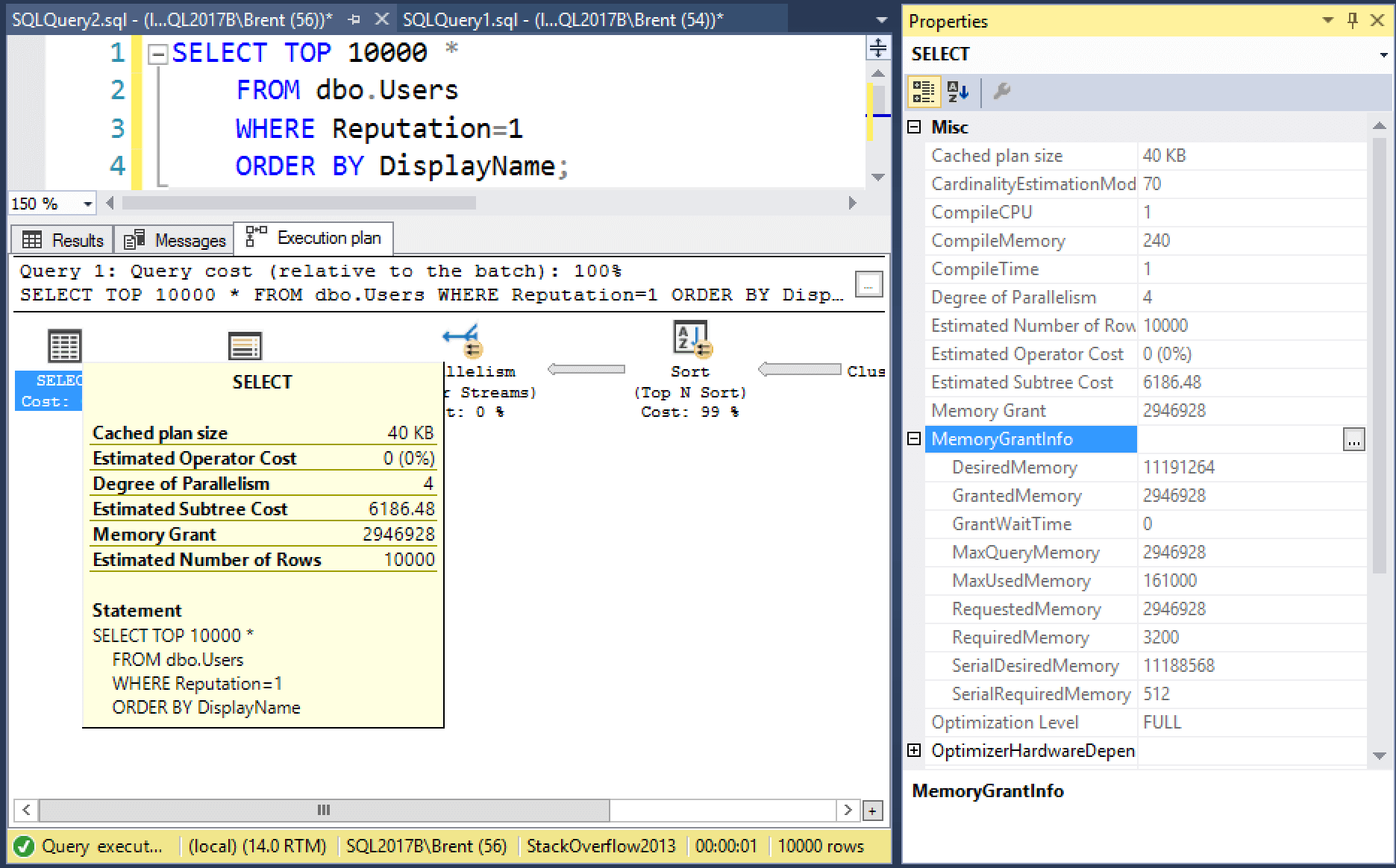
Whereas this next query has no warning signs whatsoever, but…

WHERE IS YOUR GRANT NOW

But check out the metrics:

  • Desired memory: 11GB
  • Granted memory: 3GB
  • Used memory: 161MB
  • Wasted memory: 2.9GB every time this query runs

But there’s no warning! This is where memory grants can actually impact reliability, causing resource_semaphore waits, and this is the kind of query we need to be alerted about.

SQL Server, we know your heart is in the right place. We don’t have a problem with you – just some of your behaviors. We don’t want to get to the point where we start just ignoring your warning signs in query plans altogether because they’re so unreliable.


First Responder Kit Release: Fingers Crossed!

First Responder Kit Updates
0

This is a small release just to make sure you don’t forget about us.

We know you’re busy.

You can download the updated FirstResponderKit.zip here.

sp_Blitz Improvements
#1755 – @MisterZeus added a new check for alerts that don’t send information out. I mean, is that even an alert?
#1766 – @jadarnel27 added some code to help folks who have a standard (non-sa) db owner not get warned about their standard user being the db owner.
#1782 – @RichBenner added an additional check to prevent trace file missing/moved errors.

sp_BlitzCache Improvements
#1748 – @RichBenner fixed up a divide by zero issue – what a hero!

sp_BlitzIndex Improvements
#1751 – I’ve attempted to make mode 0 more useful, by including a few more high priority issues. There was just too much missing between Mode 0 and Mode 4 (which gives you everything back that we find).
#1767 – Sometimes checking for duplicates looked like we fired false positives in Mode 0 because we weren’t also filtering the initial results by size
#1778 – @arampendley added code to output additional columns from op stats when you write to a table
#1780 – Fixed an issue where the string we cast a number to wasn’t long enough, and added some formatting to make long strings easier to read.

sp_BlitzFirst Improvements
Nothing this time around

sp_BlitzWho Improvements
Nothing this time around

sp_AllNightLog and sp_AllNightLog_Setup Improvements
Nothing this time around

sp_BlitzQueryStore Improvements
Nothing this time around – WON’T SOMEONE PLEASE USE THE QUERY STORE?

sp_DatabaseRestore Improvements
Nothing this time around

PowerBI
Nothing this time around

sp_BlitzLock
Nothing this time around

sp_BlitzInMemoryOLTP Improvements
Nothing this time around

sp_BlitzBackups Improvements
Nothing this time around

sp_foreachdb Improvements
Nothing this time around

You can download the updated FirstResponderKit.zip here.

For Support

When you have questions about how the tools work, talk with the community in the #FirstResponderKit Slack channel. If you need a free invite, hit SQLslack.com. Be patient – it’s staffed with volunteers who have day jobs, heh.

When you find a bug or want something changed, read the contributing.md file.

When you have a question about what the scripts found, first make sure you read the “More Details” URL for any warning you find. We put a lot of work into documentation, and we wouldn’t want someone to yell at you to go read the fine manual. After that, when you’ve still got questions about how something works in SQL Server, post a question at DBA.StackExchange.com and the community (that includes us!) will help. Include exact errors and any applicable screenshots, your SQL Server version number (including the build #), and the version of the tool you’re working with.


Unused Indexes – Are they really unused or have they just not been used YET?

Indexing
12 Comments

During our Critical Care® sessions with clients, we often see unused indexes (reads=0) with high writes. Sometimes these unused indexes have very high writes. If an index is never being used to help with performance but SQL Server is having to maintain it for INSERT, UPDATE and DELETE operations, then why keep the index around?

Rarely does anyone have enough index usage data to make a decision of whether or not to drop the index. If you are on SQL Server 2012 or higher, index usage data is wiped out when you rebuild the respective index. In earlier versions, index usage data is wiped out when the SQL Server service stops.

What could possibly go wrong?

About 10 years ago, I decided to drop an unused index on a table that had 2 billion rows. The database was around 7TB in size. We were having storage and performance issues. I thought I could help the system out if I were to drop the index.

4 days after I dropped the index, I got a call from our NOC that CPU utilization was pegged at 100% for an hour so they were reaching out to the on-call DBA to check it out. I logged in and saw a query using A LOT of CPU. Its WHERE clause matched the index I had dropped. The execution plan showed it was scanning the table.

It turned out that I only had 2 weeks of uptime, which didn’t include the 1st of the month. The query that was causing the high CPU utilization was a report that ran on the 1st of each month.

Don’t be me. Learn from my mistake. Well, that should be plural. I’ve made lots of mistakes in production, including these two.

Saving the data

As the index usage gets wiped out with service restarts and index rebuilds, you should save the data on a periodic basis, such as daily. I’d also recommend saving the data prior to doing index maintenance.

Utilizing the Output option of sp_BlitzIndex when using @Mode=2, I wrote a script to track this data.

Making a decision

It is important to know your workload when deciding to drop an unused index. Are there any monthly, quarterly or annual reports? Is there any large task that doesn’t run very often? When was the last SQL Server restart? When was the index last rebuilt?

If I had known there was a monthly report and that the index usage data only went back 2 weeks, I would have waited until I had more than 31 days of index usage data.

Once you’ve collected enough index usage data for your system’s workload, consider dropping the indexes that haven’t been used in that time. Check the BlitzIndex_Mode2 table for the last time the index had any writes.

You could get a lot fancier with the script, but this gets you started.

Brent says: SQL Server Agent has a way to kick off jobs when SQL Server starts. Wouldn’t it be cool to have a way to kick off jobs when the server was about to shut down? I’d totally add this script to catch index details before someone shuts the server down.


The New Lightweight Query Plan Profile Hint

Execution Plans
0

Recent Updates

To SQL Server 2016 and 2017 introduced a new USE HINT that lets you direct an actual execution plan to a new Extended Event, called query_plan_profile.

The hint by itself doesn’t do anything, and the XE by itself doesn’t do anything. You need to have both.

Alright then, let’s do that.

Sessions

Assuming you’re on a supported version, and you have a c:\temp directory, you should be able to just F5 this.

With that set up, let’s run a query that will trigger our event. We’ll start simple

Now let’s view our event data. Yeah, I know. The words you’ve been waiting to hear.

Okay, little weird. In other Events that collect query plans, there’s a little tab that has the query plan in it.

Fwhaaaa

For example, the query_post_execution_plan Event looks like this.

Details, details

Well, maybe that’s coming in the next version of SSMS, or something.

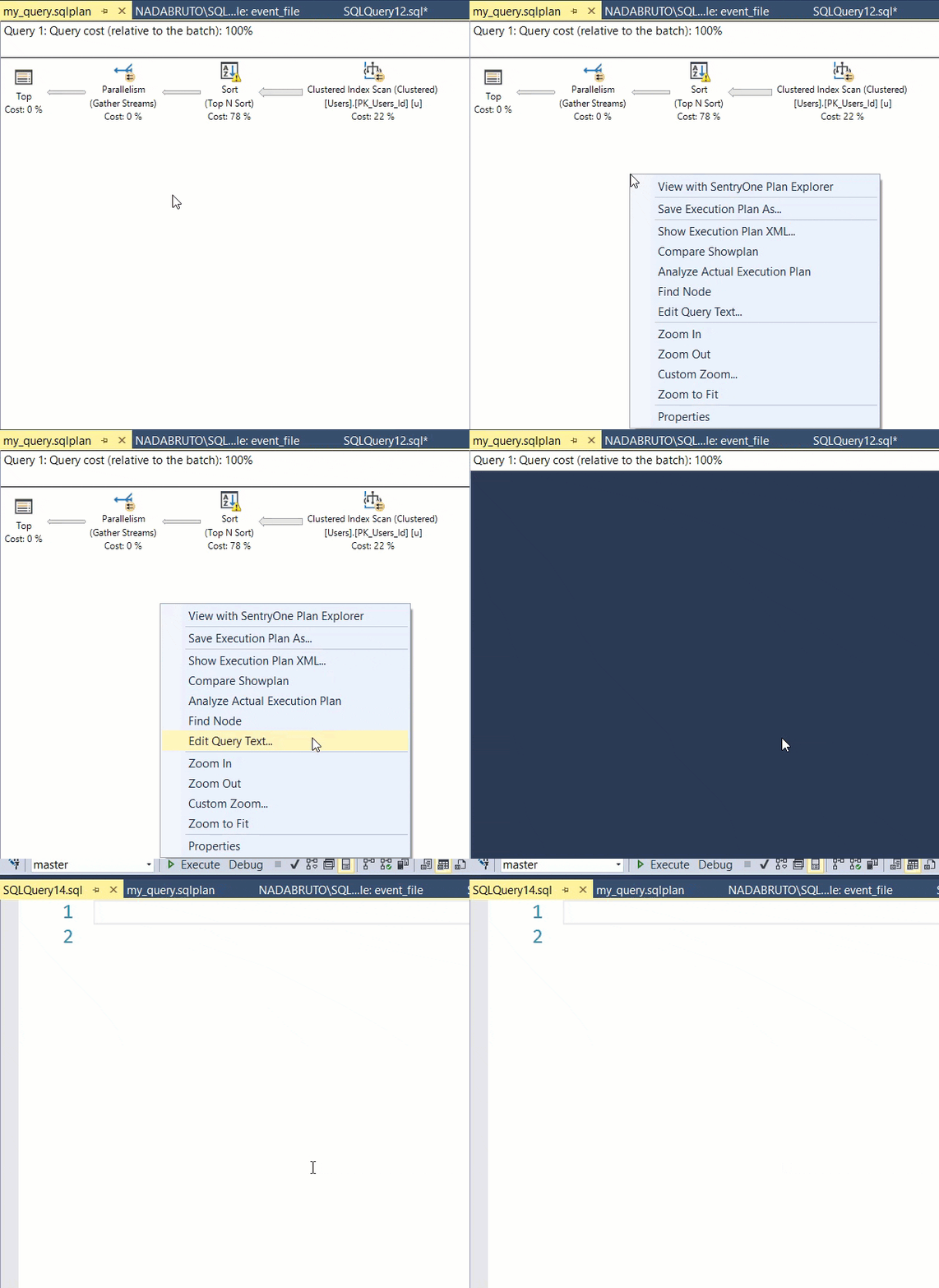
Or maybe we can click on the XML and get a plan to open up. Let’s try that.

Not JSON

Alright, so that didn’t work, but it did open the XML, so we can save it and then open it as a graphical plan.

I’m still excited! Alright! Let’s take a look.

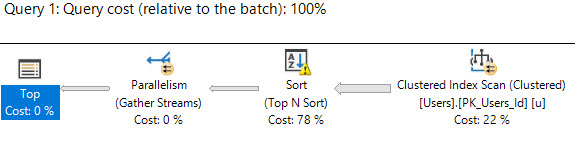
A plan at last

If we click around, it has all the stuff you’d expect a plan to have.

Except a SELECT operator. The first node is the TOP, so you don’t get some of the information you’d usually get from properties and tool tips there.

You get some of it in the details pane, but not all of it.

Well, that’s okay. Let’s look at the text of our query. I mean, no one’s just going to look at a query plan and be able to tell what their query was.

Alright, so no query text there.

Thinking Time

If you’re like me, you’re thinking two things:

  1. You just ran the query, bonehead, you know damn well what it was.
  2. I bet this’ll work if you collect sql_text in the Event.

And yeah, you’re right, I do know. This time.

But if I have multiple people using this technique to get plan information, it might not be so easy.

Adding the sql_text to the Event will show the query that ran in the Details pane, but it still won’t show the query text if you try to access it from the plan itself.

Collecting the text of a query won’t always be light, so I sorta get why it’s left out. Though I don’t think you’d add this to, like, every statement in a really long procedure, and if you’re doing this for a single really long query, you probably know what you’re getting yourself into.

But there’s nothing to uniquely identify a plan in the Event. If you wanna use other DMVs to get plan information, you have to set it up to grab the query and plan hashes from the get go.

Ideally, you’d set the session up to look like this.

… And then write a bunch of XQuery to parse the Event, join to various system views and functions, and maybe even convert that plan XML to something you could just click on.

But That’s For Next Time

It is, after all, Saturday morning, and my wife is once again staring at me because I’m sitting here writing instead of getting ready to leave the house.

Thanks for reading!


When You Need to Tune A View, Don’t Just Get Its Plan

Execution Plans
2 Comments

Say your database has a view, and everybody’s queries use it. Let’s take the Stack Overflow database and create this view:

Not pretty, but that’s why you’re here, right? Real world code is ugly.

And say my users are running queries like these:

Notice that the select, where, order by etc all have variations in them. They’re not all asking for the same fields, which means SQL Server can make different decisions about:

  • Which tables in the joins are necessary
  • Which indexes should be used on each table
  • How much memory to allocate to each query

As a result, the execution plans all look totally different:

Totally different query plans

The thing those queries all have in common is the view, so sometimes folks say, “I need help tuning this view.” They run:

They get the execution plan, post it at DBA.StackExchange.com, and everybody tells them how terrible that view is. Thing is, that doesn’t really prove anything – because SQL Server uses the view in different ways. It’s just a starting point for the query’s execution plan.

When you need to tune a query that hits a view, don’t just investigate the view’s plan. Investigate your slow query’s plan, and you’ll get much more useful and targeted advice.


What’s New in SQL Server 2019 System Tables

SQL Server 2019
6 Comments

The free SQL Server 2019 preview download is out, and here are quite a few things to check out that aren’t documented yet:

New System Objects

Starting with new stored procedures:

  • sys.sp_add_feature_restriction
  • sys.sp_autoindex_cancel_dta
  • sys.sp_autoindex_invoke_dta
  • sys.sp_cloud_update_blob_tier
  • sys.sp_configure_automatic_tuning
  • sys.sp_diagnostic_showplan_log_dbid
  • sys.sp_drop_feature_restriction
  • sys.sp_execute_remote
  • sys.sp_force_slog_truncation
  • sys.sp_internal_alter_nt_job_limits
  • sys.sp_rbpex_exec_cmd
  • sys.sp_set_distributed_query_context
  • sys.sp_set_session_resource_group
  • sys.sp_showinitialmemo_xml
  • sys.sp_xa_commit
  • sys.sp_xa_end
  • sys.sp_xa_forget
  • sys.sp_xa_forget_ex
  • sys.sp_xa_init
  • sys.sp_xa_init_ex
  • sys.sp_xa_prepare
  • sys.sp_xa_prepare_ex
  • sys.sp_xa_recover
  • sys.sp_xa_rollback
  • sys.sp_xa_rollback_ex
  • sys.sp_xa_start
  • sys.xp_copy_file
  • sys.xp_copy_files
  • sys.xp_delete_files
  • sys.sp_change_repl_serverport
  • sys.sp_getdistributorplatform
  • sys.sp_MSget_server_portinfo
  • sys.sp_MSset_repl_serveroptions
  • sys.sp_persistent_version_cleanup
  • sys.sp_persistent_version_store
  • sys.sp_sqljdbc_xa_install
  • sys.sp_sqljdbc_xa_uninstall

New tables and views:

  • sys.dm_column_encryption_enclave
  • sys.dm_column_encryption_enclave_operation_stats
  • sys.dm_db_missing_index_group_stats_query
  • sys.dm_distributed_exchange_stats
  • sys.dm_hadr_ag_threads
  • sys.dm_hadr_db_threads
  • sys.dm_os_job_object
  • sys.dm_tran_aborted_transactions
  • sys.edge_constraint_clauses
  • sys.edge_constraints
  • sys.external_libraries_installed
  • sys.sensitivity_classifications
  • sys._trusted_assemblies
  • sys.persistent_version_store
  • sys.persistent_version_store_long_term
  • sys.tbl_server_resource_stats

New functions:

  • sys.dm_db_page_info
  • sys.fn_dbslog
  • sys.fn_getproviderstring

New Fields in Existing Objects

  • all_sql_modules – inline_type
  • all_sql_modules – is_inlineable
  • all_views – has_snapshot
  • availability_replicas – read_write_routing_url
  • column_master_keys – allow_enclave_computations
  • column_master_keys – signature
  • databases – catalog_collation_type
  • databases – catalog_collation_type_desc
  • databases – physical_database_name
  • dm_db_column_store_row_group_operational_stats – returned_row_count
  • dm_db_column_store_row_group_operational_stats – returned_aggregate_count
  • dm_db_column_store_row_group_operational_stats – returned_group_count
  • dm_db_index_operational_stats – version_generated_inrow
  • dm_db_index_operational_stats – version_generated_offrow
  • dm_db_index_operational_stats – ghost_version_inrow
  • dm_db_index_operational_stats – ghost_version_offrow
  • dm_db_index_operational_stats – insert_over_ghost_version_inrow
  • dm_db_index_operational_stats – insert_over_ghost_version_offrow
  • dm_db_index_physical_stats – version_record_count
  • dm_db_index_physical_stats – inrow_version_record_count
  • dm_db_index_physical_stats – inrow_diff_version_record_count
  • dm_db_index_physical_stats – total_inrow_version_payload_size_in_bytes
  • dm_db_index_physical_stats – offrow_regular_version_record_count
  • dm_db_index_physical_stats – offrow_long_term_version_record_count
  • dm_db_log_info – vlf_encryptor_thumbprint
  • dm_db_log_stats – log_state
  • dm_db_xtp_checkpoint_stats – tail_cache_max_page_count
  • dm_db_xtp_checkpoint_stats – tail_cache_min_needed_lsn
  • dm_db_xtp_checkpoint_stats – merge_outstanding_merges
  • dm_db_xtp_checkpoint_stats – merge_stats_number_of_merges
  • dm_db_xtp_checkpoint_stats – merge_stats_log_blocks_merged
  • dm_db_xtp_checkpoint_stats – merge_stats_bytes_merged
  • dm_db_xtp_checkpoint_stats – merge_stats_user_time
  • dm_db_xtp_checkpoint_stats – merge_stats_kernel_time
  • dm_db_xtp_checkpoint_stats – bytes_of_large_data_serialized
  • dm_exec_external_work – status
  • dm_exec_query_statistics_xml – statement_start_offset
  • dm_exec_query_statistics_xml – statement_end_offset
  • dm_exec_requests – page_resource
  • dm_hadr_availability_replica_states – current_configuration_commit_start_time_utc
  • dm_os_host_info – host_architecture
  • dm_os_memory_clerks – parent_memory_broker_type
  • dm_os_schedulers – ideal_workers_limit
  • dm_os_volume_stats – incurs_seek_penalty
  • dm_os_worker_local_storage – extensibility_ctxt_address
  • dm_resource_governor_workload_groups – request_max_memory_grant_percent_numeric
  • external_data_sources – connection_options
  • external_data_sources – pushdown
  • external_file_formats – first_row
  • external_library_setup_failures – error_timestamp
  • external_library_setup_failures – error_message
  • external_tables – rejected_row_location
  • fn_get_audit_file – connection_id
  • fn_get_audit_file – data_sensitivity_information
  • fn_get_audit_file – host_name
  • resource_governor_workload_groups – request_max_memory_grant_percent_numeric
  • server_event_sessions – has_long_running_target
  • server_file_audits – retention_days
  • sql_modules – inline_type
  • sql_modules – is_inlineable
  • stats – has_persisted_sample
  • stats – stats_generation_method
  • stats – stats_generation_method_desc
  • syscscolsegments – bloom_filter_md
  • syscscolsegments – bloom_filter_data_ptr
  • sysextfileformats – first_row
  • sysextfileformats – extractor
  • sysextfileformats – null_values
  • sysextsources – connection_options
  • sysextsources – pushdown
  • sysexttables – rejected_row_location
  • sysprocesses – page_resource
  • system_sql_modules – inline_type
  • system_sql_modules – is_inlineable
  • system_views – has_snapshot
  • views – has_snapshot

What’s New in sp_Configure Options

3 new options show up in sp_configure and sys.configurations:

“allow filesystem enumeration” – defaults to 1, can be 0 or 1. If you’re trying to host a secure SQL Server and you don’t want people looking at the file system, like say you’re running Azure SQL DB, you might want to disable folks from browsing the file system. This would be useful for other hosting providers, too.

“column encryption enclave type” – default 0, can be 0 or 1.

“polybase enabled” – default 0, can be 0 or 1. Polybase helps you get your Hadoop on, and is part of the new Big Data Cluster stuff.

What’s New in Perfmon Counters

  • SQLServer:Availability Group – Active Hadr Threads – worker thread exhaustion has been a painful issue when managing hundreds of databases across multiple Availability Group replicas, and this is a step in the right direction for preventative monitoring
  • SQLServer:Databases – Active parallel redo threads – similarly, this feature came out in 2016 to fix a single-threaded problem with AGs, but it didn’t always run faster.
  • SQLServer:Databases PVS in-row diff generated/sec – PVS is the new Permanent Version Store
  • SQLServer:Databases PVS in-row diff retrieved/sec
  • SQLServer:Databases PVS off-row pages allocated/sec
  • SQLServer:Databases PVS off-row pages deleted/sec
  • SQLServer:Databases PVS off-row record generated/sec
  • SQLServer:Databases PVS off-row record retrieved/sec
  • SQLServer:Databases WPR add lsn bucket miss – WPR is the new Write Page Recorder, mentioned in the new sys.messages
  • SQLServer:Databases WPR bucket swaps
  • SQLServer:Databases WPR stale check bucket miss
  • SQLServer:External Scripts Partition By Executions

As always with new versions, some features may not be turned on yet, may require a trace flag, and may be wildly unreliable. But hey, that’s the fun, right? Hold my beer.


What’s New in SQL Server 2019’s sys.messages: More Unannounced Features

SQL Server 2019
19 Comments

The system table sys.messages holds error messages that SQL Server needs to return to end users. When a new build comes out, I love checking this table to see what features Microsoft has coded, but isn’t quite ready to announce yet. When SQL Server 2017 came out, that’s how I unmasked snapshot materialized views, a hidden feature that sadly never got enabled.

The official “What’s New in SQL Server 2019” lists a lot of stuff, but there’s even more they haven’t talked about yet. Here are the new messages, along with my thoughts on a few – and 2628 is going to go down as my absolute favorite message of all time. (Note that yes, there are plenty of typos, grammatical errors, and capitalization mistakes throughout the messages, and no, it’s not because I typed all these out. This is a straight dump from sys.messages, errors preserved as-is.)

And if you like this kind of thing, you’ll also like Aaron Bertrand’s writeup of what’s new (so far) in SQL Server 2019.

New Severity 10 Messages:

Logged to the event log:

  • 663 – Wait for redo catchup for the database “%.*ls” is taking longer than “%d” seconds for the LSN “%S_LSN”.
  • 664 – Aborting the query because it is trying to do logical revert on a readable secondary.
  • 892 – Using shared memory in the memory manager.
  • 893 – Failed to release latch. BUF address %p. Database ID %d. File ID %d. Page %S_PGID.
  • 3462 – Redo observed a higher LSN on the PFS page %S_PGID for transaction ID %S_XID, database ‘%.*ls’ (database ID %d). Redo LSN: %S_LSN, Page: LSN = %S_LSN, PrevPageLSN: %S_LSN. This can happen in the presence of concurrent PFS updates. No user action is required.
  • 3911 – Persistent version store is full. New version(s) could not be added. A transaction that needs to access the version store may be rolled back. Please refer to BOL on how to increase database max size. (Brent says: I’m constantly chuckling when people say robots are taking the jobs of database administrators, and yet with every version, the things we humans have to manage just keeps going up as fast as the robots take away the menial work. You would think that in the year 2018, when introducing a new feature, it’d be able to manage its own size without asking a human being to go read Books Online. Anyhoo, until now, the term “version store” referred to row versions that lived in TempDB, enabled optimistic concurrency, and cleared out on restarts.)
  • 10661 – The refresh operation for all snapshot views failed because there was another refresh operation (either for all or a single snapshot view) in progress. (Brent says: snapshot materialized views were somewhat baked in the product in 2017, but never released. The presence of new messages gives me hope that maybe, just maybe, this feature might still see the light of day.)
  • 10662 – The refresh operation for snapshot view ‘%.*ls’ failed because another refresh operation for the same snapshot view was already in progress.
  • 10663 – The refresh operation for snapshot view ‘%.*ls’ failed because refresh operation for all snapshot views was already in progress.
  • 49921 – Total Log Writer threads: %ld. This is an informational message; no user action is required.
  • 49935 – Enclave of type %d initialized successfully.
  • 27801 – Successfully initialize HPC environment from provider ‘%ld’, device type ‘%ld’ DLL version %ld, and find %ld device(s), %ld of them are used.

Not logged:

  • 3946 – The transaction was aborted because the secondary compute is taking long time to catchup redo.
  • 13809 – Warning: No datasets were found that match the expression ‘%ls’.
  • 15668 – No edge constraints reference table ‘%ls’, or you do not have permissions on referencing tables.
  • 15806 – Statement ID: %s | Query hash: %s | Distributed request ID: %s
  • 49716 – Database override on the category is not supported yet (Server: ‘%.*ls’, Database: ‘%.*ls’, Category: ‘%.*ls’).
  • 49717 – Failed to apply database override on category ‘%.*ls’, because physical db or instance ‘%.*ls’ in server ‘%.*ls’ is currently not in ‘Ready’ or ‘Deactivated’ state.
  • 49718 – The category name is either invalid or not supported yet. Server: ‘%.*ls’. Database: ‘%.*ls’. CategoryName: ‘%.*ls’.
  • 836 – Database ID %d, stale page %S_PGID is under restoring.
  • 890 – Could not create, retrieve or persist a bucket for the Write Page Recorder in database %ls. (Brent says: the WPR also surfaced in a new 2017 error message, but no word about it from Microsoft yet.)
  • 7223 – Warning: Enabling ‘remote proc trans’ is not supported on this instance. Defaulting to disabled.
  • 9113 – Warning: Creating and updating statistics will force FULL SCAN in this version of SQL Server. If persisting sample percent, persisted_sample_percent will be 100. (Brent says: in these messages, “version” usually refers to what you might think of as platform – cloud vs on-premises, or Azure SQL DB vs Managed Instance. It’s interesting that a version would only allow 100% stats scans – to me, that would either imply it was designed for small amounts of data, or else the data might be distributed across multiple servers, and all servers would report all of the data to recombine stats centrally.)
  • 9246 – Distributed Exchange moved %I64u rows and %I64u bytes.
  • 10667 – Warning: Create Index was started with MAXDOP %d. The operation will resume with MAXDOP value %d.
  • 11906 – The operation cannot be completed because a connection to the SBS file could not be made. Please try to run the operation again. If the error persists, please contact support.
  • 12112 – Warning: %ls statement is being forced to run WITH (%S_MSG = ON) because the ELEVATE_%S_MSG database scoped configuration is set to FAIL_UNSUPPORTED. The statement may fail. See the SQL Server error log for more information. (Brent says: folks had asked for the ability to run alter index rebuild with online = on, even on Standard Edition, but just have it fail gracefully or ignore the hint.)
  • 12623 – Clone backup succeeded and is stored in %ls.
  • 12624 – Clone backup failed.
  • 12625 – RESTORE VERIFY failed on the clone backup %ls
  • 12626 – Clone database verification has passed. (Brent says: this and the other clone warnings might imply that cloned databases are becoming first-class citizens like database snapshots, possibly even no longer requiring a DBCC command in order to do a clone. I’m sure Microsoft doesn’t want people running DBCC commands as part of regular workflow in Managed Instances. In a related example, there’s a new system dynamic management object to replace DBCC PAGE.)
  • 12627 – Clone database verification has failed.
  • 12628 – NO_STATISTICS and NO_QUERYSTORE options turned ON as part of VERIFY_CLONE.
  • 12629 – Database ‘%.*ls’ is a cloned database.
  • 13936 – Warning: Edge constraint ‘%.*ls’ on table ‘%.*ls’ was disabled as a result of disabling the index ‘%.*ls’.
  • 19246 – Incomplete message error is returned from SSPI but failed to proceed.
  • 19514 – Failed to wait for primary partner’s transport up while starting up secondary remote replica.
  • 22002 – Wait for the persisted version store page tracker to be enabled for the database “%.*ls” is taking longer than expected.
  • 22004 – [%d]. System transaction with xdes id %S_XID was aborted due to failure injection while moving rows from one page to another.
  • 22220 – Beginning database migration scan for database “%s”. (Brent says: I bet this has to do with Microsoft’s contracts with US immigration authorities, right? That’s what it is. For sure.)
  • 22221 – Database migration scan for database “%s” is complete.
  • 22222 – Database migration scan for database ‘%.*ls’ was aborted. Internal error. Migration scan was aborted.
  • 22227 – TIERED Storage Scanner encountered an error message “%ls” in “%ls”. (Brent says: I’m not SURE why TIERED would be CAPITALIZED unless it’s SOME new kind of ACRYONYM that I’ve never HEARD bEfOrE. Or maybe it’s like SHIELD, some kind of supergroup that will protect our storage.)
  • 33333 – The connection had a send posted for over %d seconds. The connection is suspected hung and is being closed.
  • 33334 – Error while setting up ssl channel. Error code: (%d, %d, %d)
  • 35511 – ABORT
  • 35512 – allow_enclave_computations
  • 41664 – Failed to refresh remote replica configuration for fabric service ‘%ls’. (Brent says: just because you see fabric messages in here doesn’t mean we’re going to get on-premises Managed Instances, but man, it sure would be nice.)
  • 41665 – Failed to resolve DW logical node id for physical database ‘%ls’, which is hosted by compute service: ‘%ls’.
  • 41870 – Dropped %d Orphan Internal Table(s).
  • 47059 – Reason: Unexpected error while swapping the session peer address with the VNET CA.
  • 47060 – Reason: Unexpected error on TDS readhandler, payload length > sni packet buf size
  • 47061 – Reason: Replicated Master is not ready at this point and user connections are disallowed. (Brent says: this is likely only for Azure Managed Instances, which replicate the contents of the master database to other nodes. It’d be awesome if we got that for master, model, and msdb for the boxed product though.)
  • 47062 – Reason: lock timeout expired while looking up interface endpoints list
  • 47063 – Reason: lock timeout expired while looking up interface endpoints list
  • 47064 – Reason: The incoming login VNET metadata was not found in the list of interface endpoints configured
  • 47065 – Reason: Unexpected error on Interface Endpoints access lockdown check
  • 47066 – Reason: Allow All Azure rule can’t be evaluated at DB level Firewall Rule for Interface Endpoints connections
  • 49503 – %.*ls: Page %d:%d could not be moved because it is an off-row persistent version store page.
  • 49504 – Error updating failover proc.
  • 49820 – Managed Server Resource Stats Timer task encountered an error (SQL Error Code: %d).
  • 49821 – Rg Metrics Reporting Timer task encountered an error (SQL Error Code: %d).
  • 49822 – Move Cost Calculation and Reporting Timer task encountered an error (SQL Error Code: %d).

New Severity 13-14 Messages:

Just two, and they’re both logged to the event log:

  • Sev 13: 10660 – The online index build operation was chosen as a deadlock victim over 500 times while attempt to process a single row. Resolve the blocking concurrent operation, and rerun the query. (Brent says: 500. That’s a lot.)
  • Sev 14: 15719 – User does not have necessary permissions (%ls) on current database to execute the stored procedure.

New Severity 15 Messages:

None of which are logged to the event log:

  • 12356 – Comparison, sorting, and manipulation of character strings that use a UTF8 collation is not supported with %S_MSG.
  • 12357 – Indexes on character columns that use a UTF8 collation are not supported with %S_MSG.
  • 16205 – Invalid read length provided in OPENROWSET query. Length has to be greater than zero.
  • 46528 – SHARDED DISTRIBUTION is allowed for SHARD_MAP_MANGER data source only. (Brent says: sharding, you say?)
  • 46532 – Sp_rename is not supported for data pool external table.
  • 46533 – Internal error occurred during distributed operation.
  • 46534 – A maximum of three NULL_VALUES are allowed in the list.
  • 46535 – Unable to retrieve secret [%s] from the secret store.
  • 46536 – Unable to process secret [%s] from the secret store.
  • 10665 – ‘%.*ls’ with DROP_EXISITNG option is not supported with %S_MSG option.
  • 13939 – The target table ‘%.*ls’ of the OUTPUT INTO clause cannot be on either side of an edge constraint relationship. Found edge constraint ‘%.*ls’.
  • 16203 – The option “INLINE=ON” is not valid for this function. Check the documentation for the constructs supported with INLINE option in a function.
  • 16204 – Invalid column ordinal provided for column %d. Column ordinal has to be greater than zero.
  • 46529 – Allowed integer values for FIRST_ROW are between and including 1-101
  • 46530 – External data sources are not supported with type %S_MSG.
  • 46531 – Support for external data sources of type HADOOP is not enabled. To enable, set ‘hadoop connectivity’ to desired value.

New Severity 16 Messages:

Logged to the event log:

  • 27802 – Failed to initialize HPC environment.
  • 939 – Database ‘%.*ls’ cannot be started because it failed to initialize the persistent version store due to error %d. Refer to previous errors in the error log to identify the cause and correct any associated problems. (Brent says: ooo, a new problem to look out for during troubleshooting.)
  • 3464 – An error occurred while resolving the deferred transaction. Transaction outcome: %d, IsDeferred: %ls.
  • 3465 – An error occurred while resolving the deferred transaction. Transaction not found.
  • 9114 – CREATE/UPDATE STATISTICS is not supported on the specified internal table.
  • 10666 – Cannot resume index build as required DOP %d (DOP operation was started with) is not available. Please ensure sufficient DOP is available or abort existing index operation and try again.
  • 12845 – CREATE DATABASE statement failed; cannot specify both CONTAINMENT = PARTIAL and CATALOG_COLLATION.
  • 15708 – Invalid automatic tuning option name.
  • 15709 – Invalid automatic tuning option state.
  • 15710 – Invalid database tuning mode string.
  • 15711 – Cannot acquire shared lock over the database.
  • 15712 – Invalid server tuning mode. (Brent says: Azure SQL DB’s automatic tuning can create indexes, drop them, and force old query plans. Automatic server tuning would be awesome if it ships for the boxed product – for example, try different Cost Threshold or MAXDOP settings. If anyone is listening at Microsoft: maybe start by changing the defaults.)
  • 15713 – Cannot acquire update lock over the database.
  • 15714 – Cannot execute stored procedure on this database type.
  • 15715 – Setting Automatic Tuning option %.*ls to DEFAULT is not allowed while in CUSTOM database tuning mode for database %.*ls.
  • 15717 – Requested automatic tuning configuration is not supported or parameters are invalid.
  • 15718 – Automatic tuning dependancy not met (%ls).
  • 17261 – initdata: No shared memory for kernel buffers.
  • 49402 – Failed to initialize the covering resilient buffer pool extension for foreign file ‘%.*ls’ with HRESULT 0x%x.
  • 49406 – Recovery modes other than full are not supported for Socrates(VLDB) compute. (Brent says: well, look what we have here – a new code name.)
  • 49969 – Cannot initialize the %d enclave for Always Encrypted. Error: %s.
  • 49970 – Loading simulator enclave of type %d for always encrypted.

Not logged:

  • 5345 – Both OFFSET and LENGTH parameters have to be provided together with inline schema (WITH clause).
  • 13808 – Starting offset cannot be larger than the file size.
  • 13958 – Internal Error: Unable to compile MATCH query with derived table or view ‘%.*ls’.
  • 13959 – Introducing edge constraint ‘%.*ls’ on table ‘%.*ls’ may cause cycles or multiple cascade paths. Specify ON DELETE NO ACTION or modify other constraints.
  • 13960 – Cannot define edge constraint ‘%.*ls’ with cascaded DELETE on table ‘%.*ls’ because the table has an INSTEAD OF DELETE TRIGGER defined on it.
  • 13961 – The alias or identifier ‘%.*ls’ cannot be used in the select list, order by, group by, or having context.
  • 15805 – An error occurred while calling to external extractor ‘%ls’. HRESULT = ‘0x%x’.’
  • 16301 – User ‘%.*ls’ not found.
  • 16302 – Role ‘%.*ls’ not found.
  • 16303 – ‘%.*ls’ is not a feature than can be restricted.
  • 16304 – ‘%.*ls’ is not an object class than can be restricted.
  • 16305 – The database does not support feature restrictions. (Brent says: so cool! We’ve wanted to restrict Developer Edition down to Standard Edition for the longest time, and looks like we’ve got a few related messages in here.)
  • 16306 – Failed to add the feature restriction.
  • 16307 – Failed to drop the feature restriction.
  • 16308 – Invalid parameter ‘%.*ls’: Must be unicode string with length between 1 and 127.
  • 22006 – Version cleanup was aborted for database id ‘%d’ due to database exclusive waiter.
  • 25037 – Cannot publish article ‘%s’ as it contains columns of UTF8 collation. If you are using SQL Server Management Studio to publish columns of non-UTF8 collation and receive this error, use stored procedures to add this article instead.
  • 25038 – Cannot publish column of UTF8 collation.
  • 25039 – Cannot publish column ‘%s’ as its collation is UTF8.
  • 25040 – Cannot publish primary key columns for article ‘%s’ of UTF8 collation.
  • 25041 – Cannot publish clustered index columns for article ‘%s’ of UTF8 collation for indexed views.
  • 25042 – Cannot add column of UTF8 collation to a replicated table.
  • 25043 – Cannot set collation to UTF8 for column that is part of replication.
  • 33199 – Only Active Directory logins can impersonate other Active Directory logins.
  • 39111 – The SQL Server Machine Learning Services End-User License Agreement (EULA) has not been accepted.
  • 40973 – Can not drop database because a failover operation is in progress on the failover group.
  • 40974 – Partner region specified does not match region of partner managed instance.
  • 41668 – Failed to transition to forwarder role for physical database ‘%ls’ (ID %d) of Windows Fabric partition ‘%ls’ (partition ID ‘%ls’).
  • 41924 – All files need to be smaller or equal to 1TB in this edition of Managed Instance. File id: {0}. Size: {1} bytes.
  • 41925 – If DB has multiple data files, all files need to be larger than {0} MB in this edition of Managed Instance. File id: {1}. Size: {2} bytes.
  • 41926 – Secondary filegroup is not supported in this edition of Managed Instance. File id: {0}. Filegroup name: {1}.
  • 41927 – The file name ‘XTP’ is reserved for the files containing In-Memory OLTP data.
  • 41928 – The filegroup name ‘XTP’ is reserved for the filegroup containing In-Memory OLTP data.
  • 41929 – One or more files are not in online state after the restore.
  • 45161 – Managed instance ‘%.*ls’ is busy with another operation. Please try your operation later.
  • 45407 – The operation timed out and failed: ‘%ls’
  • 45408 – Resource not found: ‘%ls’.
  • 45409 – Network resource provider returned following error: ‘%ls’.
  • 45410 – Network resource provider denied access: ‘%ls’.
  • 45411 – Virtual network firewall rules are not currently supported on servers with failover groups configured with automatic failover policy. Please configure the failover groups on the server with manual failover policy.
  • 45412 – Failover Groups configured with an automatic failover policy are currently not supported on servers configured with virtual network firewall rules. Please configure the failover group with manual failover policy.
  • 45413 – Only one Interface endpoint profile is allowed.
  • 45414 – The instance collation cannot be changed on Managed Instance.
  • 45415 – Creating secondary of secondary (a process known as chaining) is not supported when enabling Transparent Data Encryption using Azure Key Vault (BYOK).
  • 45416 – Cannot create a Managed Instance with collation ‘%.*ls’. Please use collation ‘SQL_Latin1_General_CP1_CI_AS’ instead.
  • 45417 – Vulnerability Assessment storage container path must be supplied
  • 45418 – The operation failed because the SQL instance had high CPU usage of %.*f%%. The current threshold is %.*f%%. Please wait for it to go down and try again.
  • 45419 – The operation failed because the SQL instance had high log write rate of %.*f%%. The current threshold is %.*f%%. Please wait for it to go down and try again.
  • 45420 – The operation failed because update elastic pool safety checks could not be completed. Details: ‘%ls’.
  • 45421 – The operation failed because a long running transaction was found on the elastic pool. Please wait for the transaction to finish execution and try again.
  • 45422 – The operation failed because the elastic pool had high CPU usage of %.*f%%. The current threshold is %.*f%%. Please wait for it to go down and try again.
  • 45423 – The operation failed because the elastic pool had high log write rate of %.*f%%. The current threshold is %.*f%%. Please wait for it to go down and try again.
  • 46660 – GENERIC
  • 47123 – Creation of system availability group ‘%.*ls’ has failed. this availability group contains system attribute. System AG only can be created before any AGs. Verify specified availability group availability options are correct, then retry the operation.
  • 47124 – Creation of replicated master failed. Only system AG can create replicated master. Verify availability group availability options are correct, then retry the operation.
  • 47125 – Joined system availability group ‘%.*ls’ has failed. Verify there is no other availability group existed, then retry the operation.
  • 47126 – Joined system availability group ‘%.*ls’ has failed. Verify there is no user DBs, then retry the operation.
  • 47127 – Join or Creating system availability group ‘%.*ls’ has failed. This instance is not enabled to create or join system availability.
  • 47128 – Creating system availability group ‘%.*ls’ has failed. For system AG, all databases will be added to system Ag. Remove databases from availability group speicifcation and then retry the operation.
  • 47129 – Build Distributed availability group ‘%.*ls’ has failed. Cannot build Distributed Availability Group on top of System Availability Group. Verify Availability Group’s name, then retry the operation.
  • 47130 – Creating system availability group ‘%.*ls’ has failed. For system AG, The master and msdb must be added to system Ag and no other DB is allowed. Add master and msdb and remove other databases from availability group speicifcation and then retry the operation.
  • 49508 – DBCC SHRINKFILE for data files is not supported in this version of SQL Server.
  • 698 – Internal error. Unable to gain access to the blob container accessor.
  • 699 – Failure to read data expected in Azure Block Blob Storage. Error code 0x%X.
  • 887 – Invalid RBPEX operation. Error: %ls.
  • 888 – Resilient buffer pool extension must be enabled while running this operation ‘%ls’. (Brent says: when Buffer Pool Extensions came out, they didn’t see much adoption because performance just wasn’t that good. I’ll be curious to see what’s been fixed. Hopefully “resilient” doesn’t refer to its ability to tolerate criticism without changing its ways.)
  • 889 – Resilient buffer pool extension must be disabled while running this operation ‘%ls’.
  • 997 – Failed to get the update lock on database ‘%.*ls’.
  • 1484 – Database Mirroring cannot be set for database ‘%.*ls’ because the database has Accelerated Database Recovery enabled. (Brent says: awwww yeah, I like acceleration. Database recovery is what happens on startup, mirroring failover, Availability Group failover, etc. It’s interesting that there’s a message here for mirroring, but not Availability Groups, which would indicate that AGs will probably be supported. I don’t blame Microsoft for not investing further in mirroring – after all, it’s deprecated – but also note that they did add the error message, which means mirroring will probably still ship as a supported (just deprecated) feature in SQL Server 2019.)
  • 1859 – Create database is not allowed in the model database context. Switch context to other database with USE statement and retry. (Brent says: that’s surprising.)
  • 2628 – String or binary data would be truncated in table ‘%.*ls’, column ‘%.*ls’. Truncated value: ‘%.*ls’. (Brent says: OMG THEY ARE FINALLY FIXING BINARY OR STRING DATA WOULD BE TRUNCATED!)
  • 2816 – The metadata for object with id %d has changed. Retry the statement.
  • 3079 – Could not find the blob file %.*ls. Please make sure that the file name points to a valid blob file.
  • 3080 – Invalid Backup Path. The length of the default backup path provided exceeds supported limit (maximum length is: %d). Correct the default backup path.
  • 3761 – Could not delete SBS backed file ‘%ls’. See the SQL Server error log for more information.
  • 3905 – The number of nested transactions has reached the maximum allowed value of 4294967296. (Brent says: seriously, who writes code like that?!? This is where I feel sorry for Microsoft support folks, having to deal with truly heinous code. I don’t mean in SQL Server, either, dear reader. I mean your code. Let’s be clear about this.)
  • 3907 – ADR failed to operate on nest transaction rollback, see previous errorlog message. (Brent says: ADR refers to Accelerated Database Recovery.)
  • 3941 – The transaction cannot modify an object that is published for replication or has Change Data Capture enabled because the transaction started before replication or Change Data Capture was enabled on the database. Retry the transaction.
  • 3947 – The transaction was aborted because the secondary compute failed to catch up during the redo. Retry the transaction. (Brent says: in theory, developers build retry rules for all of the error messages that can come out of a SQL Server, and handle them appropriately. In practice, they take code that worked fine on an old version, and just migrate it to vNext, not reading all the fine print about new error messages they now have to handle. In practice, we’re too busy adding new features to our apps.)
  • 4361 – Redo LSN has not changed for a while. Abandoning the wait as this could be a deadlock. Redo LSN %.*ls, HkRecoveryLsn %.*ls.
  • 4458 – The partitioned view “%.*ls” is not updatable because one or more of the partioned tables is a Hekaton table and the partitioned column is being updated. (Brent says: I would just like to point out that in the year 2018, the term Hekaton is indeed still a thing, and still being used in new error messages. Good job, Dr. DeWitt – your legacy continues.)
  • 4526 – Cannot use isolation level table hint on view ‘%.*ls’ that has snapshot materialization without EXPAND VIEWS query hint. (Brent says: ooo, please finally enable snapshot materialized views!)
  • 4527 – Cannot ALTER VIEW ‘%.*ls’ with SNAPSHOT attribute. Use CREATE VIEW instead.
  • 5340 – WITH schema clause cannot be specified together with FORMATFILE or SINGLE_BLOB/SINGLE_CLOB/SINGLE_NCLOB option.
  • 5341 – WITH schema clause cannot be provided without FORMAT = ‘CSV’ option.
  • 5342 – ROWTERMINATOR and FIELDTERMINATOR cannot be provided without WITH schema.
  • 5343 – ESCAPECHAR can be used in BULK INSERT and OPENROWSET only when CSV format is specified.
  • 5344 – Duplicate column ordinal cannot be provided in WITH schema clause.
  • 5868 – File system DMV/F’s has been disabled. (Brent says: I’m going to go out on a limb and guess that in the cloud, Microsoft wants to disable the file system objects so you can’t see what folders they’re using to store your data.)
  • 5869 – Changes to server configuration option %s are not supported in SQL Database Managed Instances.
  • 5870 – Changes to server configuration option %s are not supported in SQL Database Managed Instances.
  • 5871 – Cannot set the column encryption enclave type to Virtual Secure Mode (VSM) – the operating system does not support VSM. (Brent says: check out the new enclaves for confidential computing.)
  • 5872 – Invalid column encryption enclave type %d specified.
  • 6636 – Unable to read the compressed showplan xml because it was made with a newer version of SQL server. (Brent says: one of the challenges with storing query plans is that they take up a lot of space. Set that aside for a second though – this implies that SQL Server will be able to attach databases from future versions of SQL Server – something we’ve never been able to do before.)
  • 7222 – Only a SQL Server provider is allowed on this instance. (Brent says: this is part of the Satya’s New Microsoft, embracing other platforms. You thought running SQL Server on Linux was big? That’s nothing – starting in 2019, your instances will also be able to host Oracle, DB2, Access, and MongoDB. Okay, maybe this line is sarcasm.)
  • 7224 – Enabling ‘remote proc trans’ is not supported on this instance.
  • 8736 – Input parameter cannot be large object type such as VARBINARY(MAX).
  • 9041 – Could not retrieve backup uris for log backup query from the fabric property BackupUris.
  • 9042 – The log file’s ‘Size’ and ‘FixedVlfSize’ fields specified are invalid. Review the sizing requirements for a fixed VLF log. (Brent says: fixed VLF, interesting. VLFs have been problematic for DBAs for years.)
  • 9045 – Could not initialize the components required to dump page log records.
  • 9046 – Log record at LSN %S_LSN is not a page log record. (Brent says: between this and the above one, I’m curious.)
  • 9112 – Incremental statistics are not supported in this version of SQL Server. (Brent says: go on. Tell me more. It didn’t say this edition – it said this version, which implies the cloud might get it first.)
  • 9115 – CREATE/UPDATE STATISTICS failed. Please execute the statement again. (Brent says: why? SQL Server says: screw you, that’s why, just retry it. I said please.)
  • 9830 – %ls cannot be less than zero.\nParameter name: %ls.
  • 9831 – %ls cannot be larger than length of string.\nParameter name: %ls.
  • 9832 – Index and length must refer to a location within the string.\nParameter name: %ls.
  • 9833 – Invalid data for %ls-encoded characters
  • 10664 – Cannot specify included columns for indexes on memory optimized tables.
  • 10668 – The %S_MSG option is not supported for creating an index on a heap.
  • 10669 – The %S_MSG option is not supported for creating a nonclustered index on clustered columnstore index’.
  • 10670 – Resumable index creation for %S_MSG ‘%.*ls’ failed because the index includes a large object column ‘%.*ls’.
  • 10671 – The %S_MSG option is not supported for creating a filtered index.
  • 10672 – The %S_MSG option is not supported for creating a clustered index on a relation that has a filtered index.
  • 10673 – Cannot resume index creation due to incorrect persisted state found. Please ABORT the operation and try again.
  • 10674 – The %S_MSG option is not supported for creating a clustered index on a table containing nonclustered columnstore index.
  • 11439 – Resumable Online Index Build is not supported in tempdb.
  • 11561 – The %.*ls parameter %.*ls value has a length greater than the maximum allowed. Please try again with a valid parameter.
  • 11562 – The stored procedure ‘sp_showinitialmemo_xml’ is not available in this edition of SQL Server.
  • 11563 – The stored procedure ‘sp_set_session_resource_group’ is not available in this edition of SQL Server.
  • 11564 – The %.*ls JSON parameter %.*ls is missing or incorrectly formatted. Please check the formatting of the JSON.
  • 11565 – The %.*ls JSON string could not be parsed. Please check the formatting of the JSON.
  • 12111 – MODIFY MAXSIZE failed. The DynamicFileAllocationDetectionUnderLock is running by other thread, try again later.
  • 12113 – %ls statement with multiple clauses failed. The ELEVATE_ONLINE database scoped configuration requires single-clause DROP INDEX, ALTER TABLE ADD CONSTRAINT, and ALTER TABLE DROP CONSTRAINT statements.
  • 12114 – ALTER INDEX REBUILD does not support rebuilding ALL WITH (RESUMABLE=ON) and the ELEVATE_RESUMABLE database scoped configuration is set to FAIL_UNSUPPORTED.
  • 12115 – ADD COLUMN statement failed by the ELEVATE_ONLINE database scoped option; column could not be added online.
  • 12116 – Statement ‘%.*ls’ failed, because it attempted to set the ‘%.*ls’ option in tempdb.
  • 12117 – Cannot free the plan because a plan was not found in the database plan cache that corresponds to the specified plan handle. Specify a cached plan handle for the database. For a list of cached plan handles, query the sys.dm_exec_query_stats dynamic management view.
  • 12630 – VERIFY_CLONE option cannot be specified together with SERVICEBROKER option.
  • 13801 – TEXT, NTEXT, SQL_VARIANT and IMAGE types cannot be used as column types in OPENROWSET function with inline schema. These types are not supported in WITH clause.
  • 13802 – CLR types cannot be used as column types in OPENROWSET function with inline schema. These types are not supported in WITH clause.
  • 13803 – Table types cannot be used as column types in OPENROWSET function with inline schema. These types are not supported in WITH clause.
  • 13804 – Invalid escape character specified for bulk load. Escape character can be one single byte or Unicode character.
  • 13806 – It is not possible to expand wildcards in path to provided data source.
  • 13807 – Content of directory on path ‘%ls’ cannot be listed.
  • 13930 – Edge constraint cannot be created on table ‘%.*ls’. The table is not an edge table.
  • 13931 – Edge constraint ‘%.*ls’ references invalid table ‘%.*ls’. Table could not be found.
  • 13932 – Cross-database edge constraints are not supported.
  • 13933 – Edge constraint must reference node tables.
  • 13934 – Could not drop node table ‘%.*ls’ because it is referenced by an edge constraint.
  • 13935 – Cannot enable edge constraint ‘%.*ls’ as there are no online, unique, unfiltered $node_id indexes on one or more target node tables.
  • 13937 – Cannot disable clustered index ‘%.*ls’ on table ‘%.*ls’. Permission denied to disable edge constraint ‘%.*ls’ on table ‘%.*ls’ that references this table.
  • 13938 – The target table ‘%.*ls’ of the INSERT statement cannot be on either side of an edge constraint relationship when the FROM clause contains a nested INSERT, UPDATE, DELETE, or MERGE statement. Found edge constraint ‘%.*ls’.
  • 13940 – Cannot use a derived table ‘%.*ls’ in a MATCH clause.
  • 13941 – Cannot create an edge constraint that references a node table with a disabled $node_id index.
  • 13942 – The initial recursive quantifier must be 1: {1, … }.
  • 13943 – The final recursive quantifier must be greater than the initial recursive quantifier.
  • 13944 – Cannot truncate table ‘%.*ls’ because it is being referenced by an EDGE constraint.
  • 13945 – Cannot delete from a node table that is the target of both an edge constraint and a foreign key constraint on the $node_id column.
  • 13946 – Cannot create a foreign key constraint referencing the $node_id or $edge_id column of a graph table.
  • 13947 – Merge statements containing a MATCH clause do not support derived tables or views in the MATCH clause.
  • 13948 – The table name or alias ‘%.*s’ must be marked as FOR PATH to be used in the recursive section of a SHORTEST_PATH clause.
  • 13949 – The table name or alias ‘%.*s’ was marked as FOR PATH but was not used in the recursive section of a SHORTEST_PATH clause.
  • 13950 – Node table name or alias ‘%.*ls’ was used more than once in a SHORTEST_PATH recursive section.
  • 13951 – Aggregate function ‘%ls’ is not supported with WITHIN GROUP (GRAPH PATH).
  • 13952 – No columns in the aggregate ‘%ls’ WITHIN GROUP(GRAPH PATH) reference a recursive path.
  • 13953 – Columns in the aggregate ‘%ls’ WITHIN GROUP(GRAPH PATH) reference more than one recursive path.
  • 13954 – Identifier ‘%.*ls’ in aggregate ‘%ls’ WITHIN GROUP(GRAPH PATH) is not referencing a recursive path and cannot be used.
  • 13955 – Recursive MATCH queries cannot be used in a table-valued function.
  • 13956 – Recursive MATCH queries cannot be used on the right side of APPLY.
  • 13957 – Recursive MATCH queries cannot be used in subqueries.
  • 15720 – Setting Automatic Tuning option to DEFAULT is not allowed while in CUSTOM server tuning mode for server %.*ls. (Brent says: ooo, custom server tuning. Also interesting that they would put the server’s name in the error message, right? That implies that a single SQL Server will be returning error messages for other servers, like a federation or cluster.)
  • 15801 – Initialization of external distributed computation library failed.
  • 15802 – Request to perform an external distributed computation has failed with error “%s”.
  • 15803 – An inline schema must be specified to read distributed files instead of FORMATFILE option. Please use OPENROWSET(BULK) WITH (schema_desc) option.
  • 15804 – Could not load external extractor ‘%s’.
  • 15901 – Query not supported: Cannot determine result column sources.
  • 15902 – Query not supported: Cannot determine result column sources.
  • 15903 – Query not supported: Cannot determine result column sources.
  • 15904 – Query not supported: Cannot determine result column sources.
  • 16101 – Option ‘%.*ls’ is not supported for sensitivity classification.
  • 16102 – Object name specified ‘%.*ls’ is not valid.
  • 16103 – Sensitivity classification is not supported for the specified object.
  • 16104 – Sensitivity classification option ‘%.*ls’ was repeated.
  • 16105 – Option ‘%.*ls’ is too long (max %d chars).
  • 16106 – Option ‘%.*ls’ is empty.
  • 16107 – Schema ‘%.*ls’ was not found or you do not have permission to access it. (Brent says: looks like they’re making it harder to fish for object names that you’re not supposed to see. Now the messages are more security-savvy, meaning it might be the same error message whether the object exists or not.)
  • 16108 – Table ‘%.*ls’ was not found or you do not have permission to access it.
  • 16109 – Column ‘%.*ls’ was not found in table ‘%.*ls’ or you do not have permission to access it.
  • 16110 – Specification of database part of object name is not supported.
  • 16111 – Sensitivity classification operations cannot be used on computed column ‘%.*ls’.
  • 16113 – Label is missing.
  • 16114 – Information type is missing.
  • 16200 – The statement failed because ‘APPROX_COUNT_DISTINCT‘ does not support DISTINCT parameters. Consider using ‘APPROX_COUNT_DISTINCT’ without DISTINCT, or COUNT or COUNT_BIG with DISTINCT. (Brent says: Microsoft had already mentioned publicly at conferences that this new function was coming, excited to see it taking shape.)
  • 16201 – The statement failed because ‘%.*ls’ does not support DISTINCT parameters.
  • 16642 – Conflict logging retention period parameter is required if conflict logging is turned on.
  • 16643 – Data Sync conflict logging feature is not enabled. (Brent says: Azure Data Sync was in preview limbo for years, but but suddenly came back to life in June 2018 and went to general availability. Microsoft will probably pitch this as a replication replacement that works better with Azure SQL DB, and goes both ways, unlike transactional replication. The “sync group” and “data sync” messages below are likely Azure Data Sync as well despite the lack of capitalization.)
  • 16644 – Value for data Sync conflict logging retention in days should be positive or zero.
  • 16645 – The sync group is already being dropped.
  • 16646 – The sync member is already being dropped.
  • 16647 – Failed to perform data sync operation: %ls
  • 16648 – The sync database specified (%ls\\%ls) does not match the existing sync database (%ls\\%ls).
  • 16649 – Hub logical server %ls does not exist.
  • 16650 – The sync agent %ls already exists.
  • 16651 – The sync agent with the id %ls already exists.
  • 16652 – Cannot update the sync group because it is currently being dropped.
  • 16653 – Cannot use datawarehouse edition in data sync. (Brent says: interesting choice of capitalization here. Also, there is not currently a Data Warehouse Edition for SQL Server, although there is Azure SQL DW.)
  • 16654 – Cannot use logical master in data sync.
  • 19513 – Cannot create a distributed availability replica for availability group ‘%.*ls’. Distributed availability group cannot be built on top of basic local availability group. Please make sure you are specifying the correct local availability group name.
  • 22001 – FreeStaleVersionSpace failed for page %S_PGID for database id ‘%d’. It will be retired in the next iteration of the version cleaner.
  • 22003 – Stale/aborted version cleanup was aborted for database id ‘%d’ due to database shutdown.
  • 22005 – CTR cleanup failed for database id ‘%d’.
  • 22201 – Internal error. Unable to acquire the latch holding buffers for DW Tiered Storage ColumnStore Scan.
  • 22202 – Internal error. Unable to run the remote cs garbage collector. Error Code 22202.
  • 22203 – Internal error. Unable to update the blobs table in the catalogDB. Error Code 22203.
  • 22204 – Internal error. Unable to refresh catalog db information for service uri [%ls].
  • 22205 – Internal error. Unable to get catalog information via the catalog helper.
  • 22206 – Internal error. Unable to get lock for protected shared buffer
  • 22207 – Internal error. Unable to get a valid dbtable. Error Code 22207.
  • 22208 – Access to DW Tiered Storage ColumnStore blob failed. See earlier errors for cause.
  • 22209 – Internal error. Unable to populate instance member list.
  • 22210 – Internal error. Unable to get instance member.
  • 22211 – Internal error. Invalid instance member state.
  • 22213 – Internal error. Unable to get catalog information via the sp.
  • 22214 – Internal error. Unable to initialise XODBC Connection Manager.
  • 22215 – Internal error. Unable to get catalog information.
  • 22216 – Internal error. Protected buffer failure.
  • 22217 – Internal error. Persist lru cost info failure.
  • 22218 – Internal error. Catalog Communication Failure.
  • 22219 – Internal error. Internal table base failure.
  • 22223 – Internal error. Unable to refresh migration type from fabric property.
  • 22224 – Internal error. ADW Optimized for Compute storage detected. Unable to retrieve blob.
  • 22225 – An internal error (%d, %d) occured. Please retry the operation again. If the problem persists contact Microsoft Azure Customer Support.
  • 22226 – An internal error (%d, %d) occured. Please retry the operation again. If the problem persists contact Microsoft Azure Customer Support.
  • 22587 – Non-SQL Server Publishers and Subscribers are supported only on Windows. The platform detected is %s. (Brent says: this seems to imply that replication will get more cross-platform support, maybe to Azure SQL DB. No, you will not see me investigating that further. No, I am not interested in working on replication. I like that it still exists though.)
  • 22588 – Publications on non-Windows platforms cannot support updateable subscriptions. The platform detected is %s. The values of @allow_sync_tran and @allow_queued_tran must be ‘false’ or NULL.
  • 31205 – The import population for database %ls (id: %d), catalog id: %d is being cancelled because of a fatal error (‘%ls’). Fix the errors that are logged in the full-text crawl log. Then resume the import either by detaching the database and re-attaching it, or by taking the database offline and bringing it back online. If the error is not recoverable, rebuild the full-text catalog.
  • 33185 – An error ocurred while attempting to copy the encrypted DEK from the DBTable.
  • 33186 – Cannot alter the credential ‘%.*ls’ because it is being used by an active audit session (‘%.*ls’).
  • 33187 – Enclave was provided with an invalid authentication tag.
  • 33188 – Enclave was provided with insufficient buffer for ‘%hs’. The provided buffer size was %d, while the required size is (at least) %d.
  • 33189 – Enclave is out of session resources.
  • 33190 – Enclave attestation information requested for an unsupported enclave type.
  • 33191 – Enclave host encountered a runtime error: ‘%hs’
  • 33192 – Enclave raised an exception (major = %d, minor = %d). See error log for more information.
  • 33193 – Assert failure occurred within the enclave at file ‘%hs’ and line %d.
  • 33194 – Internal error. The enclave bcrypt method %hs failed with status 0x%x
  • 33195 – Enclave was provided with an invalid session handle.
  • 33196 – Error encountered during VSM enclave attestation. API: ‘%s’, ReturnCode: ‘%ld’.
  • 33197 – The value specified for TYPE option is not supported in this version of SQL Server. Allowed values are E (EXTERNAL_USER) and X (EXTERNAL_GROUP).
  • 33198 – TYPE and SID options have to be used along with each other, in this version of SQL Server.
  • 33331 – DBCC CLEANUPCONVERSATIONS is not allowed on this server.
  • 33332 – DBCC CLEANUPCONVERSATIONS cannot be executed through MARS connection.
  • 33528 – Valid values of the database compatibility level are %d, %d, %d, or %d.
  • 33529 – The audit filter predicate exceeds the maximum allowed length of %d characters.
  • 33530 – The combined length of audit name and blob storage container name exceeds the maximum allowed length (by %d character(s)). Please use shorter audit or container name.
  • 33531 – The specified value for QUEUE_DELAY is not valid in this version of SQL Server. Specify value higher than 0.
  • 33532 – Invalid value given for parameter PATH. Please specify a valid blob container path with the following format : https://.blob.core.windows.net/
  • 33533 – SHUTDOWN on failure option is not supported in this version of SQL Server. (Brent says: oh, interesting – this refers to auditing failures causing an instant shutdown, I assume, which is supported in the boxed product but not in Managed Instances.)
  • 33534 – Unable to initialize enclave
  • 33535 – Enclave call failed for method ‘%s’.
  • 33536 – Encryption scheme mismatch for columns/variables %.*ls. The encryption scheme for the columns/variables is %ls and the expression near line ‘%d’ expects it to meet one of the following conditions: 1) use deterministic encryption and column encryption key that is not enclave-enabled, 2) use randomized encryption, bin2 collation for string types and an enclave-enabled column encryption key, 3) be plaintext.
  • 33537 – Encryption scheme mismatch for columns/variables %.*ls. The encryption scheme for the columns/variables is %ls and the expression near line ‘%d’ expects it to meet one of the following conditions: 1) use randomized encryption, bin2 collation for string types and an enclave-enabled column encryption key, or 2) be plaintext.
  • 33538 – The credentials of blob storage container ‘%.*ls’ are invalid.
  • 33539 – The blob storage ‘%.*ls’ was not found. Verify your storage account name.
  • 33540 – Invalid audit or database names, please use valid URL characters.
  • 33541 – The credentials of blob storage container ‘%.*ls’ was not found.
  • 33542 – Unsupported operation near line ‘%d’; operation on encrypted columns with string data types need *_BIN2 collation.
  • 33543 – Cannot alter column ‘%.*ls’. The statement attempts to encrypt, decrypt or re-encrypt the column in-place using a secure enclave, but the current or/and the target column encryption key for the column is not enclave-enabled.
  • 33544 – Cannot alter column ‘%.*ls’. The target plaintext type for the column is different from the current plaintext type. Changing plaintext type cannot be combined with encryption scheme changes in a single statement.
  • 33545 – Cannot alter column ‘%.*ls’. The statement attempts to change an encryption scheme of the column in-place, which requires a secure enclave, but the enclave has not been initialized in the SQL Server instance. Check the status of the enclave in sys.dm_column_encryption_enclave.
  • 33546 – Enclave runtime error: CEK not found. Check that: (1) column encryption setting is enabled on connection, (2) driver is enclave-enabled.
  • 33547 – Enclave runtime error: Duplicate initialization of the Always Encrypted Enclave.
  • 33548 – Enclave runtime error: Enclave out of memory.
  • 33549 – Enclave runtime error: OSF Serialization error.
  • 33550 – Enclave runtime error: Invalid input.
  • 33551 – Enclave runtime error: Nonce checking in secure channel failed.
  • 33552 – Enclave attestation error: enclave platform returned unexpected output.
  • 33553 – A failure occurred during initialization of an Audit to External Monitor target. See the errorlog for details.
  • 35391 – Could not build or rebuild clustered columnstore index ‘%.*ls’ online, because the the table has secondary indexes. Please perform the operation offline, or remove the secondary indexes and try again. (Brent says: we’re getting online rebuilds for clustered columnstore indexes, woohoo!)
  • 35393 – Columnstore tuple mover unit tests can’t be run under master database.
  • 35394 – Transaction %d reached %I64u log used bytes and %I64d reserved log bytes. In order to minimize log usage %d suboptimal rowgroups were created, which is not allowed since it compromises index quality. Please re-run query at a higher resource class, and also consider increasing DWU. See ‘https://aka.ms/sqldw_columnstore_memory‘ for assistance. (Brent says: the robots won’t increase your bill for you automatically, which is smart, but at least they’ll tell you that your data has grown beyond the scope of the instance size you’re using for hosting.)
  • 35395 – Transaction %d reached %I64u log used bytes and %I64d reserved log bytes. In order to minimize log usage, %d suboptimal rowgroups were created, which is not allowed since it compromises index quality. Please re-run the query with more memory (change your Resource Governor settings or upgrade to a higher SLO) or target fewer partitions in the load if your target table is partitioned.
  • 37108 – A job account could not be linked to database ‘%.*ls’ on server ‘%.*ls’ because it is a geo-secondary database.
  • 37109 – Database ‘%ls’ on server ‘%ls’ is already linked to another job account.
  • 39101 – ‘%.*ls’ failed because it is not supported in the edition of this SQL Server instance.
  • 39102 – Duplicate column names are not allowed in ‘%.*ls’. Column name ‘%.*ls’ is a duplicate.
  • 39103 – Parameter ‘@input_data_1_order_by_columns’ is not allowed without parameter ‘@input_data_1_partition_by_columns’.
  • 39104 – Column ‘%.*ls’ in ‘%.*ls’ is not defined in the SELECT clause of ‘@input_data_1’ parameter.
  • 39105 – Invalid syntax for parameter ‘@input_data_1_partition_by_columns’. Specify a list of comma separated columns.
  • 39106 – Invalid syntax for parameter ‘@input_data_1_order_by_columns’. Specify a list of comma separated columns and an optional argument for sorting order <ASC|DESC>.
  • 39107 – Columns in parameters ‘@input_data_1_partition_by_columns’ and ‘@input_data_1_order_by_columns’ must be unique. Column name ‘%.*ls’ appears in both parameters.
  • 39108 – Maximum number of concurrent external script users has been reached. Limit is %d. Please retry the operation.
  • 39109 – The combined total number of columns given in parameters ‘@input_data_1_partition_by_columns’ and ‘@input_data_1_order_by_columns’ exceeds the maximum %d.
  • 39110 – Maximum number of concurrent external script queries for this user has been reached. Limit is %d. Please retry the operation.
  • 40934 – Server Dns Alias name ‘%.*ls’ cannot be empty or null. It can only be made up of lowercase letters ‘a’-‘z’, the numbers 0-9 and the hyphen. The hyphen may not lead or trail in the name.
  • 40935 – The endpoint ‘%.*ls’ is already in use. Use a different Server Dns Alias name.
  • 40936 – The Server Dns Alias ‘%.*ls’ already exists for the server ‘%.*ls’.
  • 40937 – The Server Dns Alias ‘%.*ls’ does not exist for the server ‘%.*ls’.
  • 40938 – The Server Dns Alias ‘%.*ls’ is busy with another operation and cannot perform the ‘%.*ls’ operation. Please try again later.
  • 40939 – The scale operation from service level objective ‘%.*ls’ to new service level objective ‘%.*ls’ is not supported. Please file a support ticket.
  • 40940 – The elastic pool ‘%.*ls’ cannot be updated because one of its databases is performing a copy or geo-replication failover operation.
  • 40941 – Copy operation for the database ‘%.*ls’ on the server ‘%.*ls’ cannot be started because the elastic pool ‘%.*ls’ is currently being updated.
  • 40942 – A service objective assignment operation cannot be performed because copy or failover operation for the database ‘%.*ls’ on the server ‘%.*ls’ is in progress.
  • 40943 – A Failover Group cannot be created on the server ‘%.*ls’ because the Table Auditing feature is enabled for this server.
  • 40944 – The database ‘%.*ls’ on the server ‘%.*ls’ cannot be added to a Failover Group because the Table Auditing or Security Enabled Access feature is turned on for this database.
  • 40945 – The Table Auditing feature cannot be turned on for a server that contains Failover Groups. Please try Blob Auditing instead.
  • 40946 – The Table Auditing or Security Enabled Access feature cannot be turned on for a database that is part of a Failover Group.
  • 40947 – The Table Auditing or Security Enabled Access feature cannot be turned on for a database that is located on a server with a Server DNS Alias.
  • 40948 – A Server DNS Alias cannot be created for the server ‘%.*ls’ because the Table Auditing feature is enabled for this server.
  • 40949 – A Server DNS Alias cannot be created for the server ‘%.*ls’ because the database ‘%.*ls’ has the Table Auditing or Security Enabled Access feature enabled.
  • 40950 – The Dns Alias ‘%.*ls’ already exists for the elastic pool ‘%.*ls’ on server ‘%.*ls’.
  • 40951 – The Dns Alias ‘%.*ls’ does not exist for the elastic pool ‘%.*ls’ on server ‘%.*ls’.
  • 40952 – A Server DNS Alias cannot be created because server ‘%.*ls’ would exceed the allowed Server DNS Aliases quota of %d.
  • 40953 – A Failover Group cannot be created because server ‘%.*ls’ would exceed the allowed Failover Groups quota of %d.
  • 40954 – The Table Auditing feature cannot be turned on for a server that contains Server Dns Aliases. Please try Blob Auditing instead.
  • 40955 – The operation cannot be performed due to insufficient file space in the elastic pool. The operation requires (%d) MBs file space and there are (%d) MBs file space available. Unused file space must be reclaimed before retrying the operation. Please refer to the following article for details on reclaiming unused file space: https://go.microsoft.com/fwlink/?linkid=864775.
  • 40956 – The Server Disaster Recovery Configuration feature is deprecated. Please use Failover Group instead.
  • 40957 – The DTU min per database must be at least (%d) for service tier ‘%.*ls’.
  • 40958 – The VCore max per database must be at least (%d) for service tier ‘%.*ls’.
  • 40959 – The VCore max per database cannot exceed (%d) for service tier ‘%.*ls’.
  • 40960 – The VCore max per database (%d) for the elastic pool does not belong to the specified values for service tier ‘%.*ls’.
  • 40961 – The VCore min per database cannot exceed (%d) for service tier ‘%.*ls’.
  • 40962 – The VCore min per database must be at least (%d) for service tier ‘%.*ls’.
  • 40963 – The VCore min per database (%d) for the elastic pool does not belong to the allowed values for service tier ‘%.*ls’.
  • 40964 – The VCore min per database (%d) cannot exceed the VCore max per database (%d).
  • 40965 – The service level objective ‘%.*ls’ does not support the license type ‘%.*ls’.
  • 40966 – No service objective was found for capacity ‘%d’ in edition ‘%.*ls’
  • 40967 – More than one service objective was found for capacity ‘%d’ in edition ‘%.*ls’
  • 40968 – Operation results in exceeding quota limits of %d. Maximum allowed: %d.
  • 40969 – Cannot open server ‘%.*ls’ requested by the login. Client is not allowed to access the server.
  • 40970 – Can not change from ‘%.*ls’ edition to ‘%.*ls’ edition.
  • 40971 – Cannot open Failover Group “%.*ls” requested by the login. The login failed.
  • 40972 – Database copy limit per database reached. The database ‘%ls’ cannot have more than %d concurrent database copies.
  • 41216 – The SEMANTICSIMILARITYTABLE, SEMANTICKEYPHRASETABLE and SEMANTICSIMILARITYDETAILSTABLE functions do not support common table expressions.
  • 41666 – Waiting for replica catchup before GeoDR role change failed for with error %d for database ‘%ls’, DBID %d, AGID ‘%ls’, and ReplicaID ‘%ls’.
  • 41667 – Fabric Service ‘%ls’ (partition ID ‘%ls’) encountered error (error code: 0x%08X) while setting Fabric property ‘%ls’.
  • 41904 – BACKUP DATABASE failed. SQL Database Managed Instance supports only COPY_ONLY full database backups which are initiated by user.
  • 41905 – Stored procedure %ls is not supported in SQL Database Managed Instance. (Brent says: for more info, see the differences for Managed Instances.)
  • 41906 – Statement ‘%.*ls’ is not supported in SQL Database Managed Instance.
  • 41907 – Unsupported file type during restore on SQL Database Managed Instance.
  • 41908 – Only ‘local’ routes are supported in SQL Database Managed Instance.
  • 41909 – Modifying logical file name is not supported in SQL Database Managed Instance.
  • 41910 – Add/remove/modify of log files is not supported in SQL Database Managed Instance.
  • 41911 – Adding or removing XTP file or filegroup is not allowed in SQL Database Managed Instance.
  • 41912 – Maximum number of databases for SQL Database Managed Instance reached.
  • 41913 – Multiple filestream files are not supported in SQL Database Managed Instance.
  • 41914 – SQL Server Agent feature %ls is not supported in SQL Database Managed Instance. Review the documentation for supported options.
  • 41915 – Memory-optimized filegroup must be empty in order to be restored on General Purpose tier of SQL Database Managed Instance.
  • 41916 – Maximum number of %u files for SQL Database Managed Instance reached.
  • 41917 – Dropping local instance via sp_dropserver is not allowed in SQL Database Managed Instance.
  • 41918 – Specifying files and filegroups in CREATE DATABASE statement is not supported on SQL Database Managed Instance.
  • 41919 – Multiple backup sets in a single backup file are not supported in SQL Database Managed Instance.
  • 41920 – This feature is not supported through T-SQL on SQL Database Managed Instance. (Brent says: somebody got tired of writing all the individual error messages above, hahaha, and made a generic one.)
  • 41921 – Restoring from a backup that contains multiple log files is not supported in SQL Database Managed Instance. (Brent says: wow, that’s pretty surprising. Tells you about an architectural change in Managed Instances. I mean, in theory you probably don’t want multiple log files, but I’ve used an extra 1mb one as an emergency escape valve for a database that started to fill up its regular log drive, and I couldn’t let a transaction fail, so I added another file and let it autogrow until the transaction finished.)
  • 41922 – The backup operation for a database with service-managed transparent data encryption is not supported on SQL Database Managed Instance. (Brent says: hmmm, I guess that makes sense, but it’s interesting: if you let Microsoft manage your keys, you can’t get a backup out? Would be a big drawback for service-managed TDE.)
  • 41923 – Cannot find server certificate with thumbprint ‘%.*ls’. Please use PowerShell Cmdlet ‘Add-AzureRmSqlManagedInstanceTransparentDataEncryptionCertificate’ to create the certificate.
  • 42034 – Boot of federation host failed with error 0x%08X.
  • 43020 – The storage size of %d MB is not a valid configuration. Valid storage sizes range from minimum of %d MB and additional increments of %d MB up to maximum of %d MB.
  • 43021 – The point in time %S_DATE is not valid. Valid point in time range from %d days early to now and not before source server creation time.
  • 43022 – The edition %.*ls is not a valid edition. Edition cannot be changed by restoring. (Brent says: Huh. That’s odd.)
  • 43023 – The storage size of %d MB is lower than the source storage size.
  • 43024 – The version %.*ls is not a valid version. Version cannot be changed by restoring.
  • 43025 – Input parameter is incorrect. Please double check the input.
  • 43026 – Cannot drop system database ‘%.*ls’, skipping.
  • 43027 – Geo Restore is not supported.
  • 43028 – The replication feature is not supported. (Brent says: me too, SQL Server. Me too.)
  • 43029 – Edition %.*ls must be the same as the primary server when creating a replica server.
  • 43030 – Version %.*ls must be the same as the primary server when creating a replica server.
  • 43031 – The storage size of %d MB is lower than the primary server’s storage size.
  • 43032 – No available primary server %.*ls is found when creating a replica server.
  • 43033 – The primary server %.*ls already has the maximum of replica servers.
  • 43034 – The replica server is not in ready state when promoting.
  • 43035 – ‘%.*ls’ and ‘%.*ls’ cannot be updated together.
  • 43036 – Input parameter is incorrect when creating a replica server. Please double check the input.
  • 45123 – Updating max size is not supported for database ‘%ls’. Database size will grow automatically as more data is inserted.
  • 45344 – Catalog DB creation failed.
  • 45345 – Cannot cancel database management operation ‘%ls’ in the current state.
  • 45346 – Subnet resource ID ‘%ls’ is invalid. Please provide a correct resource Id for the target subnet.
  • 45347 – LongTermRetentionBackup is enabled for server ‘%ls’. Move server cross subscription is not allowed.
  • 45348 – LongTermRetentionBackup is enabled for server ‘%ls’. Move server cross resource group is not allowed.
  • 45349 – The operation could not be completed because certificate rotation is in progress for server ‘%ls’. (Brent says: one of the gotchas of Transparent Data Encryption is that when you’re rotating certs for a database, you can’t do backups. The error message makes sense – you probably can’t add replicas or move an Azure SQL DB or Managed Instance to someone else’s subscription while this is taking place, either, since those likely involve backups.)
  • 45350 – MODIFY MAXSIZE failed. To reduce the database size, the database first needs to reclaim unused space by running DBCC SHRINKDATABASE. Note that this operation can impact performance while it is running and may take several hours to complete. Refer to the following article for details of using T-SQL to run DBCC SHRINKDATABASE: ‘https://go.microsoft.com/fwlink/?linkid=852312’
  • 45351 – MODIFY MAXSIZE failed. The requested database size is smaller than the amount of data storage used.
  • 45352 – Create Managed Instance failed. Provided virtual network subnet is located in %ls, which is a different region than the one you are provisioning Managed Instance in (%ls). To create a VNET-joined Managed Instance, the instance and the virtual network have to be located in the same region.
  • 45353 – This private cluster is associated with TR %ls. You specified TR %ls as a parameter.
  • 45354 – Tenant ring %d already has positive placement weight set(%d) and can’t be used for private cluster for subscription %ls. Please ensure that the ring is actually not used, reset weight back to 0 or -1 and re-run the SignalPrivateTenantRingReady CAS.
  • 45355 – The storage account %ls is not valid or does not exist.
  • 45356 – The storage account credentials are not valid.
  • 45357 – Auditing cannot be configured on secondary databases.
  • 45358 – Server auditing settings are being updated for server ‘%ls’. Please wait for the existing operation to complete.
  • 45359 – Database name validation failed. The database name is not allowed because it contains trailing whitespace characters.
  • 45360 – The operation could not be completed because app config deployment is in progress for the app ‘%ls’.
  • 45361 – Invalid subnet address range (%ls). Address range has to be in CIDR format (IP/MASK) where IP is a valid IPv4 address and MASK is a number between 0 and 28.
  • 45362 – The operation could not be completed because the Azure Key Vault principal certificate has expired. The error message from Active Directory Authentication library (ADAL) is ‘%ls’.
  • 45363 – Server automatic tuning settings from previous request have not propagated to all databases yet. Please try again in few minutes.
  • 45364 – The operation could not be completed because database ‘%ls’ on server ‘%ls’ is currently unavailable. Try again later. If the problem persists, contact customer support.
  • 45365 – vCore value (%d) is not valid. Please specify a valid vCore value.
  • 45366 – The retention days of %d is not a valid configuration. Valid backup retention in days must be between %d and %d.
  • 45367 – Invalid virtual network configuration. This is not allowed: %ls.
  • 45368 – The given rule ID: %s is invalid. You can find valid rule ids in scan results file.
  • 45369 – No baseline is set for rule ID: %d. You should first set a baseline for this rule.
  • 45370 – Vulnerability Assessment scan on the resource ‘%ls’ is in progress. Please wait for the existing operation to complete.
  • 45371 – Cannot cancel management operation ‘%ls’ in the current state.%ls
  • 45372 – Automatic tuning option ‘%.*ls’ was not found for requested resource.
  • 45373 – Automatic tuning is not supported for SQL Data Warehouse.
  • 45374 – HardwareGeneration ‘%ls’ is not valid. Please specify a valid HardwareGeneration value.
  • 45375 – vCore value (%d) and HardwareGeneration ‘%ls’ is not a valid combination. Please specify a valid vCore and HardwareGeneration value.
  • 45376 – Managed Instance cannot be joined to a classic virtual network. Please provide a Resource Manager vnet to join.
  • 45377 – The provided Key Vault uri ‘%ls’ is not valid. Please ensure the key vault has been configured with soft-delete. (https://aka.ms/sqltdebyoksoftdelete)
  • 45378 – geo-redundant-backup not supported for the current edition.
  • 45379 – geo-redundant-backup value is not allowed to update
  • 45380 – The edition %.*ls is not a valid edition. Edition cannot be changed by update.
  • 45381 – SKU Name ‘%ls’ is not valid. Please specify a valid SKU Name.
  • 45382 – Read or write operaions are not allowed on the storage account ‘%ls’.
  • 45383 – The storage account ‘%ls’ is disabled.
  • 45384 – The encryption protectors for all servers linked by GeoDR must be in the same region as their respective servers. Please upload key ‘%ls’ to a Key Vault in the region ‘%ls’ as server ‘%ls’. (https://aka.ms/sqltdebyokgeodr)
  • 45385 – Unexpected Key Vault region found in the response for Key Vault ‘%ls’ associated with server ‘%ls’. Expected region: ‘%ls’, Region receieved in response: ‘%ls’. (https://aka.ms/sqltdebyokgeodr)
  • 45386 – The key vault provided ‘%ls’ on server ‘%ls’ uses unsupported RSA Key Size or Key Type. The supported RSA Key Size is 2048 and Key Type is RSA.
  • 45387 – Invalid hardware generation. It isn’t allowed to have both Gen4 and Gen5.
  • 45388 – Target subnet has associated Network Security Group (NSG). Remove %ls. (https://go.microsoft.com/fwlink/?linkid=871071)
  • 45389 – Target subnet has no associated Route Table. Associate Route Table with single User Defined Route (UDR): Name: default, Address prefix: 0.0.0.0/0, Next hop type: Internet. (https://go.microsoft.com/fwlink/?linkid=871071)
  • 45390 – Target subnet has associated Route Table with invalid configuration %ls. Associate Route Table with single User Defined Route (UDR): Name: default, Address prefix: 0.0.0.0/0, Next hop type: Internet. (https://go.microsoft.com/fwlink/?linkid=871071)
  • 45391 – Invalid virtual network configuration %ls. Add Azure recursive resolver virtual IP address 168.63.129.16 at the end of your custom DNS list: %ls. (https://go.microsoft.com/fwlink/?linkid=871071)
  • 45392 – SQL service endpoint is currently not allowed on Managed Instance. Remove SQL service endpoint from %ls. (https://go.microsoft.com/fwlink/?linkid=871071)
  • 45393 – Target subnet is not empty. Remove all resources from %ls or use a different empty subnet. (https://go.microsoft.com/fwlink/?linkid=871071)
  • 45394 – Virtual network for the target subnet is locked. Remove the lock from %ls. (https://go.microsoft.com/fwlink/?linkid=871071)
  • 45395 – Gateway subnet cannot be used for deploying managed instance. Use a different empty subnet. (https://go.microsoft.com/fwlink/?linkid=871071)
  • 45396 – Target subnet %ls does not exist. Use a different empty subnet. (https://go.microsoft.com/fwlink/?linkid=871071)
  • 45397 – %ls. (https://go.microsoft.com/fwlink/?linkid=871071)
  • 45398 – The specified edition %ls is not consistent with the specified SKU %ls.
  • 45399 – The specified license tpye %ls is not valid.
  • 45400 – Invalid storage size: %ls GB. Storage size must be specified between %ls and %ls gigabytes, in increments of %ls GB.
  • 45401 – Ring buildout ‘%ls’ has no support for small VMs roles, role: ‘%ls’.
  • 45402 – Ring buildout ‘%ls’ does not support multiple DB roles.
  • 45403 – The operation could not be completed because a service tier change is in progress for managed instance ‘%.*ls.’ Please wait for the operation in progress to complete and try again.
  • 45404 – The operation failed because update SLO safety checks could not be completed. Details: ‘%ls’.
  • 45405 – The operation failed because a long running transaction was found on the SQL instance. Please wait for the transaction to finish execution and try again.
  • 45406 – Provisioning of zone redundant database/pool is not supported for your current request.
  • 46629 – EXTRACTOR (Brent says: I love the thought of an error just yelling out of nowhere, “EXTRACTOR” – like it’s Arnold yelling, “GET TO THE CHOPPA”)
  • 46655 – rejected rows location
  • 46656 – CONNECTION_OPTIONS
  • 46657 – PUSHDOWN
  • 46658 – GENERIC
  • 46659 – BLOB_STORAGE
  • 46724 – Communication error during bulk copy operation.
  • 47115 – The ‘%ls’ option is not valid for WSFC availability group ‘%.*ls’. Remove the option or set the ‘CLUSTER_TYPE’ option to a different value, then retry the operation.
  • 47116 – The external lease cannot be set on availability group ‘%.*ls’. External Lease updates are not enabled for this availability group.
  • 47117 – The ‘%ls’ option must be specified with a valid time value when updating the Availability Group’s external write lease status on availability group ‘%.*ls’.
  • 47118 – The ‘%ls’ option must be specified with a valid value when updating the external lease status on availability group ‘%.*ls’.
  • 47119 – The current write lease of the availability group ‘%.*ls’ is still valid. The lease expiration time cannot be set to an earlier time than its current value.
  • 47120 – The READ_WRITE_ROUTING_URL ‘%.*ls’ specified for availability replica ‘%.*ls’ is not valid. It does not follow the required format of ‘TCP://system-address:port’. For information about the correct routing URL format, see the CREATE AVAILABILITY GROUP documentation in SQL Server Books Online.
  • 47121 – The replica spec for the local replica ‘%.*ls’ has an invalid availability mode. Valid values are SYNCHRONOUS_COMMIT and ASYNCHRONOUS_COMMIT.
  • 47201 – Procedure expects ‘%u’ parameters.
  • 47202 – Procedure expects ‘%u’ parameters and ‘%u’ for _ex version.
  • 47203 – Procedure expects atleast ‘%u’ parameters and ‘%u’ max.
  • 49404 – Value ‘%.*ls’ for option ‘%.*ls’ is not supported in VLDB.
  • 49407 – Error: %ls.
  • 49408 – Error: %ls. Error code: %d.
  • 49409 – Special procedure is not available on the current SQL instance.
  • 49505 – Registering extended stored procedure failed because it is not valid to use UNC path for DLL name. Use local path for DLL name instead.
  • 49506 – The DBCC operation failed because it is not supported in an explicit transaction when Constant Time Recovery is enabled on the database. Commit or rollback the current transaction and run the operation again. (Brent says: Constant Time Recovery, I like that. I have no idea what it means. I like it anyway, like Cheeseburger Pizza. I’ve never had a cheeseburger pizza, but when you put those two words together, don’t they sound awesome? That’s what Constant Time Recovery sounds like. Cheeseburger Pizza.)
  • 49507 – Object ID %d, index ID %d, partition ID %I64d, alloc unit ID %I64d (type %.*ls), page %S_PGID, row %d: Row is aborted.
  • 49603 – CREATE FILE encountered operating system error %ls while attempting to copy the physical file ‘%.*ls’.
  • 49965 – The operation timed out and failed: ‘%ls’
  • 49966 – Resource not found: ‘%ls’.
  • 49967 – Network resource provider returned following error: ‘%ls’.
  • 49968 – Network resource provider denied access: ‘%ls’.
  • 49971 – Cannot initialize the Virtual Secure Mode (VSM) enclave for Always Encrypted, the operating system does not support VSM.
  • 49972 – Virtual network firewall rules are not currently supported on servers with failover groups configured with automatic failover policy. Please configure the failover groups on the server with manual failover policy.
  • 49973 – Failover Groups configured with an automatic failover policy are currently not supported on servers configured with virtual network firewall rules. Please configure the failover group with manual failover policy.

New Severity 17 Messages:

Logged to the event log:

  • 1133 – The managed instance has reached its storage limit. The storage usage for the managed instance cannot exceed (%d) MBs.
  • 49403 – Database ‘%.*ls’ does not allow autostart operations. An explicit ONLINE database operation is required.
  • 49405 – Skipping the default startup of vldb database ‘%.*ls’. The database will be started by the fabric. This is an informational message only. No user action is required.

Not logged:

    • 8737 – Error %I64d occurred when sending data over the network to another distribution. Please try to run the query again. If the error persists, please contact support.
    • 8738 – An error occurred when opening a connection from distribution %d to distribution %d. Please try to run the query again. If the error persists, please contact support.
    • 8739 – Error occurred when sending metadata over the network to another distribution. Please try to run the query again. If the error persists, please contact support.
    • 8740 – The row is too large to be shuffled between distributions. Row Size in Bytes: %d: Max Allowed Row Size in Bytes: %d. Please contact support for assistance. (Brent says: It’s tough to describe this feature in words, so I’ll just link you to a demo video.)
    • 8741 – An error occurred when reading data moved from one distribution to another. Try to run the query again. If the error persists, contact support.
    • 12450 – Could not allocate memory for DW query or Showplan of size (%ld). (Brent says: your query plan is so big we can’t even get the memory for it? Wow. Achievement unlocked.)
    • 13805 – An internal error has occurred during wildcard expansion.
    • 35396 – Effective DOP of %u is too high for columnstore compression on table id %d because each thread only has %I64d KB for compression. Please retry using the MAXDOP hint to use a lower DOP.

New Severity 21 Messages:

Logged to the event log:

  • 3463 – An error occurred while recovering database ‘%.*ls’. Transaction outcome could not be resolved. (Brent says: this is a good example of how people just assume the database will handle everything perfectly, but if you really wanna guarantee zero data loss, it’s gonna be hard. Plus, you’re going to have to read the error log closely on failovers.)

Not logged:

  • 9047 – Async recovery thread has exited unexpectedly, shutting down xlog reader.
  • 22212 – An error occurred while reading remote column store segment HoBt 0x%I64X, Object %d, Column %d, Type %d in database %d. The segement could not be decrypted.
  • 41869 – In-memory OLTP version %u.%u is not supported on this platform. (Brent says: implying that there’s going to be a new/better version of Hekaton somewhere – maybe Azure first, or maybe Windows before Linux, so that’s interesting.)

What’s New in SQL Server 2019: Faster Table Variables (And New Parameter Sniffing Issues)

For over a decade, SQL Server’s handling of table variables has been legendarily bad. I’ve long used this Stack Overflow query from Sam Saffron to illustrate terrible cardinality estimation:

It puts a bunch of data into a table variable, and then queries that same table variable. On the small StackOverflow2010 database, it takes almost a full minute, and does almost a million logical reads. Here’s the plan:

SQL Server 2017 plan

See how the top query has a cost relative to the batch of 100%, and the second query says 0%? Yeah, that’s a vicious lie: it’s based on the estimated cost of the queries, even when you’re looking at an actual plan. The root cause is the number of rows SQL Server expects to find in the table variable in the second query – hover your mouse over that:

Estimated number of rows: riiiiight

The estimated number of rows is only 1 – way low, because we just got done inserting 2.7 MILLION rows into it. As a result, SQL Server says, “I’ll just get that one row out of the table variable, do one matching index seek in the Posts table, and then I don’t have to bother sorting this data until later in the plan.”

In the past, we told people to fix it by replacing table variables with temp tables, or slapping an OPTION RECOMPILE on the relevant portions of a batch. However, both of those require changing the query – something that’s not always feasible.

Now, let’s try it in SQL Server 2019.

Same query, no changes, just running it in a database with compatibility level 150:

  • Duration: before was 57 seconds, now 7 seconds with 2019
  • Logical reads: before was ~1 million, now about 70k with 2019

Here’s the 2019 query plan:

2019 plan with table variable

Now, SQL Server 2019 estimates 800K rows will come out of the table variable – still not exactly accurate, but a hell of a lot more accurate than estimating 1 row. As a result, it decides to sort the contents of the table variables to find the top 100 rows FIRST before doing the seeks on the Posts table.

Suddenly, 2019 produces better table variable estimates out of the box. It’s all cake and no vegetables, right?

Now we have a new problem: parameter sniffing.

I’m going to create an index on Users.Location to help SQL Server understand how many rows will come back when we filter for a given location. Then, I’m going to create a stored procedure with 2 queries in it:

The first query loads the table variable with all of the users in a location.

The second query fetches the rows back out of that table variable, does a lookup, and sorts the data. This means SQL Server needs to estimate how much memory it needs to grant for the sort operation.

Let’s free the plan cache, and then call it for a really big location:

Putting India in the plan cache

Here, I’m hovering my mouse over the table variable scan to show the estimated and actual number of rows – they’re absolutely perfect! This is awesome! That means SQL Server allocates enough memory to sort those 1,902 rows, too.

Now let’s run it for a really small location:

My backyard is smaller than India, go figure

Just like every parameter sniffing issue from the dawn of time, SQL Server cached the execution plan for the first set of parameters that got sent in. Now, it’s estimating 1,902 rows – from India – every time the query runs. That’s not a big deal here where the memory over-estimation for this query isn’t large, but now let’s try it in the opposite order.

Free the plan cache, run it for My Backyard first, and SQL Server 2019 caches the execution plan for a 1-row estimate:

Caching a 1-row estimate

And then run it for India, and presto, the sort spills to disk:

India reuses the 1-row-estimate plan

Most of the time, SQL Server 2019’s table variable handling will be WAY faster.

Before, table variables generally produced bad plans ALL of the time. It was black and white. Performance just sucked.

Starting with SQL Server 2019, we stand a better chance of getting good plans at least some of the time, if not most of the time. We just have a new problem – parameter sniffing – and hey, you can learn how to fix that pretty easily. That seems like a pretty good tradeoff to me!

To learn more about this feature, check out Aaron Bertrand’s writeup on how it works in Azure SQL DB, and for other new goodies in 2019, check out what’s new (so far) in SQL Server 2019.


What’s New in SQL Server 2019: Adaptive Memory Grants

When you run a query, SQL Server guesses how much memory you’re going to need for things like sorts and joins. As your query starts, it gets an allocation of workspace memory, then starts work.

Sometimes SQL Server underestimates the work you’re about to do, and doesn’t grant you enough memory. Say you’re working with a table variable, and SQL Server only estimates it’ll find one row inside – but millions of rows start to come back. Your query doesn’t get granted more memory, oh no – it just spills to disk (TempDB.) What’s worse, if you run that query a hundred times, it’ll spill to disk every single time.

Other times, SQL Server overestimates the work involved in your query, and gives you too much memory. That sounds awesome – but the memory comes at the expensive of other running queries and the buffer pool, leaving you less able to cache data, query plans, and let multiple big queries run at once. Again, SQL Server was kinda death-do-us-part here in the past – it would keep wildly over-granting memory on every execution of the query.

Microsoft knew this was a problem, and they’ve been moving towards a fix:

Now, SQL Server 2019 brings adaptive grants to regular queries. Your plain ol’ rowstore tables operating in row (not batch) execution mode get adaptive memory grants. This is the kind of “it just runs faster” feature that everybody can benefit from – although there are a few gotchas.

Let’s see how they work.

We’ll start with the StackOverflow2010 database, the small 10GB version so you can play along at home. I’m going to set the database’s compat level to 150:

Then I’m going to run a query that produces an artificially high memory grant, but doesn’t actually use it:

The first time I run the query, the execution plan shows the cowardly yellow bang with a warning about a too-high memory grant:

First execution, plan warning

If you right-click on the SELECT, go into properties, and check out the grant info:

Grant’s First Try

Desired memory is 1.8GB, and feedback isn’t adjusted yet because this is the first execution.

Run it again, and the plan’s warning is gone!

Bang a gone

And in the memory grant properties, the memory grant is WAY down. Desired memory is only 111MB, and we see that the memory grant feedback is adjusting:

Adjusting

Put your finger on F5 and hit me baby, one more time, then:

Totally stable now, just like Britney

The memory grant has stabilized at 111MB!

This is awesome, but there are drawbacks.

If the grant vacillates too often, like if your query is sensitive to parameter sniffing issues and has wildly different memory usage numbers, SQL Server will try to adjust the grant, but then eventually give up after 32 executions.

If you rebuild your indexes or create new indexes, the grants reset. SQL Server starts its learning curve again – yet another example of why focusing on fragmentation is likely hurting your performance, not helping it.

But here’s the really tough part: it’s not easy to see that this is happening, let alone happening in a way that’s beneficial to you. When you’re looking at query plans in the plan cache, their memory metrics are totally devoid of any feedback whatsoever:

Cached plan

Here, I’m looking at the query plan from the cache (using sp_BlitzCache), and I don’t get any feedback data at all. There’s a small clue if I analyze the wide variations in min and max grants from sp_BlitzCache, which comes from sys.dm_exec_query_stats:

sp_BlitzCache showing grants

But that’s it. There are no Perfmon counters to show you this is happening. To diagnose problems with it, you’re going to need to bust out Books Online and set up an Extended Events session watching for memory_grant_updated_by_feedback and memory_grant_feedback_loop_disabled.

In summary, I love it. When I explain memory grants in our training classes, people are stunned to find out that they’re not adaptive. SQL Server 2019 just quietly fixes something that’s been a problem for a long, long time, and doesn’t make a big deal of it. I love it – it’s just like the new improvements to table variable estimations. And for more 2019 info, check out Aaron Bertrand’s writeup of what’s new (so far) in SQL Server 2019.


[Video] Office Hours 2018/9/19 (With Transcriptions)

Videos
2 Comments

This week, Brent, Tara, Erik, and Richie discuss moving views between databases, Cluster Quorum File Share on AlwaysOn, checking for corruption, rebooting/restarting SQL server after applying cumulative updates, how many drive letter to use for a VM, decimal precision and scale value settings on SQL Server 2016 vs 2008, and nested views.

Here’s the video on YouTube:

You can register to attend next week’s Office Hours, or subscribe to our podcast to listen on the go.

Enjoy the Podcast?

Don’t miss an episode, subscribe via iTunes, Stitcher or RSS.
Leave us a review in iTunes

Office Hours Webcast – 2018-09-19


Should I put views in a different database?

Brent Ozar: Justin says, “If you have views in a database, would there be any reason to move those views to a different database?”

Tara Kizer: Interesting, odd question.

Richie Rump: Try and get more information.

Brent Ozar: I’m trying to come up with a reason why I would do it and I can’t think of a reason. Oh okay, I got one; if you wanted to restore the database. I used to do this on a log ship secondary. We would have complex views set up and then replace the database underneath from time to time because the views couldn’t be on the original database. That’s the only thing I’ve got, though. I can’t think of a reason why… Okay, so I’m going to stretch, SQL Server 2016 has database level things like MAXDOP and parameter sniffing. So you could put views in different databases if you wanted people to have different MAXDOP settings and you didn’t want to use resource governor.

Tara Kizer: Would that work though, because you’re going to be referencing objects in the other database? I guess that would work.

Brent Ozar: Yeah, it’s based off whatever database you’re currently in. Justin follows up with, “We have developers who have two databases. One has tables and the other has views pointing back to the tables.” Okay, no, no, no credit there.
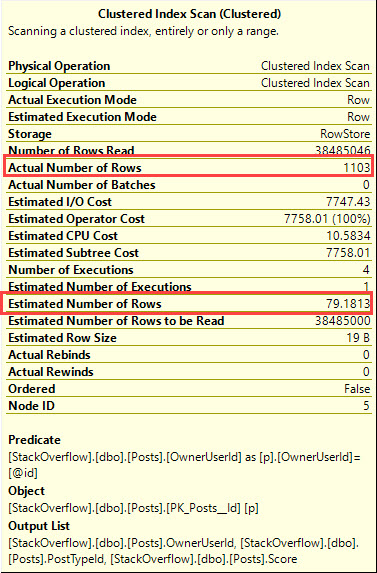
Richie Rump: this reminds me of the early days of Access, where we had one database with the data and then we would have another database with all the screens and reports and all that stuff.

Brent Ozar: Thank god that’s over. Justin says, “We think it’s a bad idea.”

Tara Kizer: It’s not necessarily a bad idea, just it’s odd. I wonder why he thinks he needs to do that.

Brent Ozar: Version control is going to be harder; deployments are going to be harder. Yeah, it strikes us as a bad smell.

Richie Rump: It’s a bad idea.

Brent Ozar: I can’t come up with a scenario where it’s a good idea to do new development that way.


How should I configure quorum?

Brent Ozar: Rob says, “Hi, we’re about to build a two node Always On cluster with four named instances.” I think, and you may want to follow this up, Rob, I’m not sure if you mean an Always On Availability Group, or a failover clustered instance, your grandpa’s cluster. “As far as quorum, will I need to specify a file share on some server when I install clustering for quorum due to the even number of nodes?”

Tara Kizer: Yes. You need a third guy for quorum, and most people for Availability Groups are using a file share witness. On failover cluster instances, a lot of us use a quorum disk, you know, a SAN drive, a [Q] drive maybe.


Where should I run CHECKDB in my AG?

Brent Ozar: Pablo says, “Hello, folks. Can you suggest the best way to check for corruption on replicas on a high transactional server with Always On…” I assume he means Always On Availability Groups, since he means replicas. “Best way to do CHECKDB…”

Tara Kizer: I like to offload that task. I mean, if your system is 24/7, which a lot of peoples are, and you can’t take the hit of CHECKDB at any time of the day, then you offload that task to another server, backup restore, SAN Snapshot, something on another box. But you just have to keep in mind that you’re supposed to also CHECKDB your replicas, but that brings in licensing concerns because you’re offloading production work to another server, and also that other server for the backup restore.

Brent Ozar: And make sure you’re doing it wherever you do backups. Like, you want to be checking the one that you’re doing backups on, otherwise, your backups may be garbage.

Tara Kizer: you could break up the task. So CHECKDB is just a bunch of other check things, you know, like CHECKTABLE, CHECKALLOC. It’s a bunch of stuff. So I know when I worked for Qualcomm, we had our large systems where we couldn’t offload tasks to another server. Maybe because they were too big, we didn’t have enough SAN storage, I don’t know. But we broke that up into multiple steps and by the end of the week, all steps would have been performed. So a full CHECKDB would be performed every week, but it would be a daily task of small pieces.

Brent Ozar: I haven’t used this myself, but I’ve heard Sean and Jen McCown – god, their site’s hacked again. Alright, well so much for that… A part of me wants to recommend this, but their site’s hacked again. Whenever their site gets unhacked, Minion CheckDB has the ability – they have a set of open source scripts. I’m not sure if they’re free, open source, whatever, but a set of scripts where you can offload parts of CHECKDB to different servers. You can have this server check catalogues, this server check this file group. It looks really slick. I’ve never used it myself, but also, when you click on it, you get a choose your price sweepstakes, so clearly something’s wrong with their site at the moment, so we’re going to just close that browser and go back.
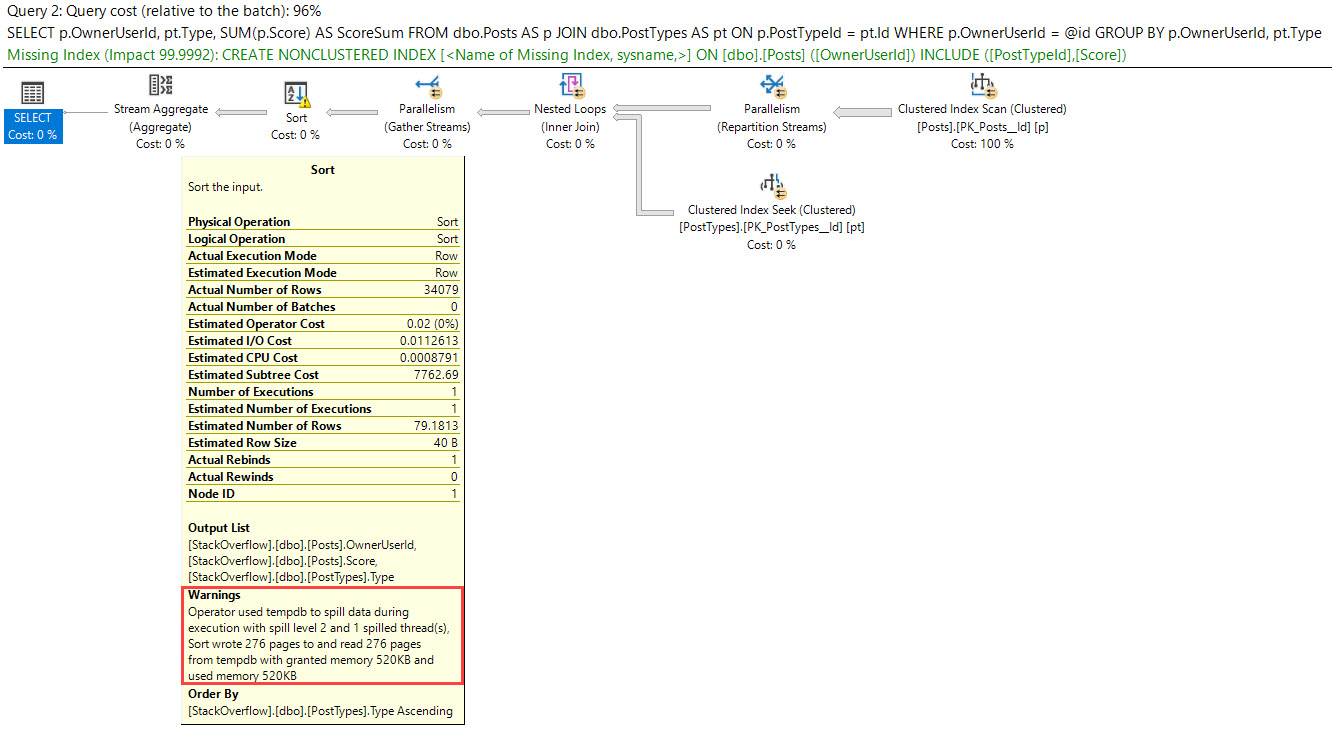
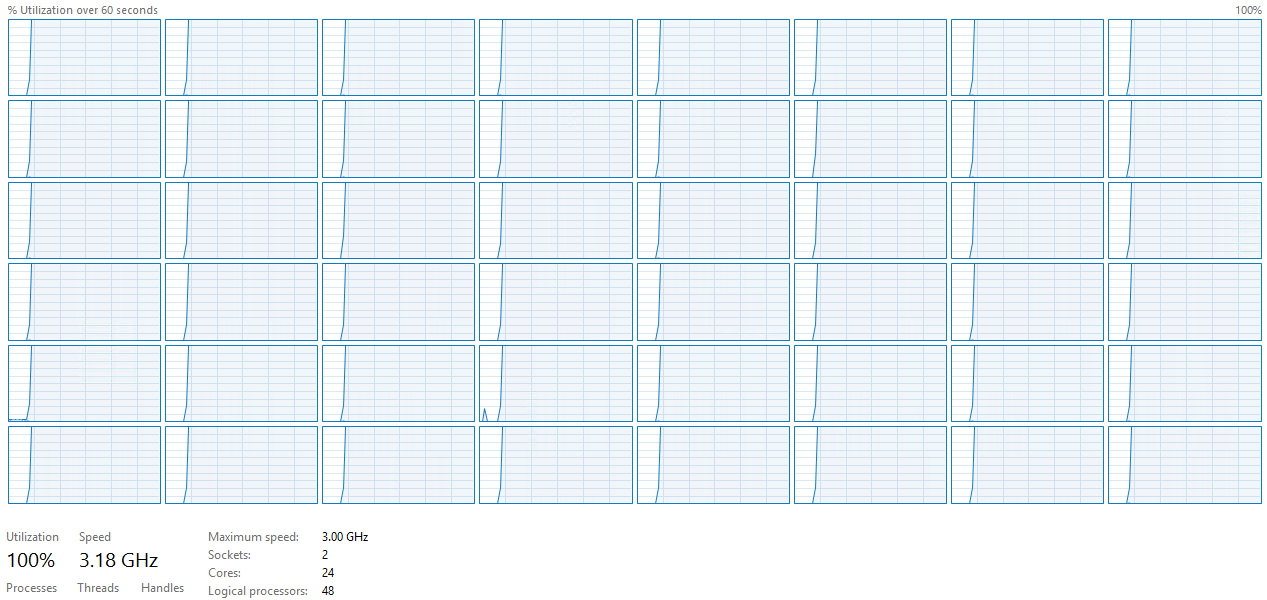
Richie Rump: Burn that VM to the ground.

Brent Ozar: Websites suck.


Do I need to restart after patching SQL Server?

Brent Ozar: [Joy Anne] asks, “Is a Windows reboot or SQL Server restart recommended after applying Cumulative Updates? I just realized that the CU9 security update requires a Windows reboot before I can apply CU10.”

Tara Kizer: I mean, it goes through the reboot restarts, or the restarts at least, during the installation, the restarts of SQL Server as needed. But yeah, I mean, I would definitely reboot. Now, if it’s my own desktop machine, I don’t. I mean, if I can get away with not rebooting and it’s not asking for a reboot, I do not. But on production, I’m in a maintenance window, I’ll probably reboot it at the end, even if it doesn’t ask.

Brent Ozar: Plus, usually, you want to do Windows patching at the same time. If I’ve got to restart SQL Server, I want to fix the Windows patches, which seem to come out more frequent than the SQL patches.


Should I put everything on the C drive?

Brent Ozar: J.H asks, “When setting up a SQL Server 2016 Always On within two VMs, is it theoretically okay to have one large C drive, like 1TB, on each VM, that holds everything? SQL Server install all system databases, tempdb, user databases, log files, et cetera, or should I separate them out onto smaller drives?”

Tara Kizer: I don’t ever put database files on the C drive. The C drive is the number one place to run out of disk space because of Windows security updates. You could put a large drive there. Definitely, the SQL installation and all the shared stuff – shared files, not the shared system databases. I would not put your database files on the C drive. There’s no reason to and it’s so easy to create a drive.

Brent Ozar: Yeah, the filling up thing is the one thing that scares me. The other thing that scared me before is when you want to do VSS Snapshots, it has to quiesce everything on that drive, you know, so you may just want to snap databases and not the OS. And there was another that hit me and I was – so if you ever have, for some reason, I’ve had situations where I needed to just get copies of the user databases and log files somewhere else, like I wanted to do an upgrade of a Windows or SQL Server and I wanted to go test it somewhere else, so much easier to take a snapshot of just where the data and log files live and present that over instead of having the whole C drive.

Tara Kizer: I would have the minimum of three drive letters for a VM. You know, C drive, maybe a D drive for the user databases and some of the system databases, and then another drive for tempdb, putting tempdb on its own drive.

Brent Ozar: I’m with you, because plus too, it’s tuning. For the SAN admin, it’s easier for them to tune for different access patterns. So, like, tempdb, I might want that on blazing insane fast storage if I have a tempdb problem, otherwise ,I might want it on garbage. I just might want it on junk storage if I don’t care about it.

Tara Kizer: Richie just got a better offer, I think. See-ya…

Brent Ozar: In the middle of the webcast, like, forget it… That, I think, might be the first time we’ve ever seen Richie disappear when it didn’t involve a blue screen of death, because usually Richie drops it when he has blue screens of death. Richie, your computer stayed on and you left. That might be a first.

Richie Rump: Yeah, I had a delivery notification.


Have precision and scale changed across versions?

Brent Ozar: Robert asks, “Is there any difference in decimal precision or scale between SQL Server 2016 and 2008? I’m getting a different value on the two servers and they’re both set to the same precision and scale settings.”

Tara Kizer: That’s interesting. I would imagine, if the version number is the reason, that people would have blogged about this or, you know, hit it.

Brent Ozar: It should be easy to do a repro query there, just like repro the exact same query on the two boxes and then post it to, say, dba.stackexchange.com.

Tara Kizer: Declare a variable, just in a Management Studio test, and set it to whatever data type and size it is and see what you get on the two boxes. I just wonder, is it a query issue instead?

Richie Rump: Or data issue.

Brent Ozar: Or regional settings. I’m trying to think if there would be a way that regional settings would hose you, like if it’s different currency formats. I’m not sure what that would be.


Is there ever a good reason to nest a view?

Brent Ozar: And then Joe asks, “Is there ever a good reason to nest a view?”

Tara Kizer: I tell you, as a performance consultant, I cannot stand nested views, and I’ve had a client where I gave up after like five times. I was like, okay, now we’ve got to open up this view, now we’ve got to open up this view. I was like, I’m out. I mean, we have limited time on this call. There’s just no way I’m going through this.

Richie Rump: I mean, nested views make sense from a developer perspective, but when you take a look at performance-wise, it makes zero sense. I mean, it’s like going back to the old days of oobject-orientedprogramming. We had this and we’d build on top of another one and build on top… And it makes a lot of sense to developers, but they don’t ever go under the hood and see the garbage that it’s doing underneath. Just don’t do it.

Brent Ozar: And it’s one of those things where it works on my machine when it starts, you know. You have really limited data sets, you’re just getting started with the application, nobody’s using it. So it seems like everything’s cool, and then just later when you get to rreal-worldscale, performance goes to hell in a handbasket. It’s one of those that I would kind of coach people towards, hey, if you have a choice, I wouldn’t do it. I’d rather you do something else.

Alright, well a short list of questions here today. Y’all didn’t have any other questions, so we will bail out early and go start using our unlimited drink package. So we will see y’all next week at Office Hours. Adios, everybody.

"*" indicates required fields

This field is for validation purposes and should be left unchanged.
Name*
Things I want*


Leaked: SQL Server 2019 Big Data Clusters Introduction Video

SQL Server 2019
12 Comments

Psst – you’re probably not supposed to see this yet, but look what @WalkingCat found:

https://x.com/h0x0d/status/1042979511074086913

What the video says

Growing volumes of data create deep pools of opportunity for those who can navigate it. SQL Server 2019 helps you stay ahead of the changing time by making data integration, management, and intelligence easier and more intuitive than ever before. 

Yep, that’s a Microsoft video alright.

Polybase

With SQL Server 2019 you can create a single virtual data layer that’s accessible to nearly every application. Polybase data virtualization handles the complexity of integrating all your data sources and formats without requiring you to replicate or move it. You can streamline data management using SQL Server 2019 Big Data Clusters deployed in Kubernetes. Every node of a Big Data Cluster includes SQL Server’s relational engine, HDFS storage, and Spark, which allow you to store and manage your data using the tools of your choice.

Big Data Cluster

SQL Server 2019 makes it easier to build intelligent apps with big data. Now you can run Spark jobs to analyze structured and unstructured data, train models over data from anywhere with SQL Server Machine Learning Services or Spark ML, and query data from anywhere using a rich notebook experience embedded in Azure Data Studio. The torrent of data isn’t slowing down, but it doesn’t have to sink your business. Sail through with SQL Server 2019, and shorten the distance between data and action.

My take on the Big Data Clusters thing

<sarcasm> It’s like linked servers, but since they don’t perform well, we need to scale out across containers. </sarcasm>

Today, Polybase is a rare and interesting animal. You’ve probably never used it – here’s a quick introduction from James Serra – but it wasn’t really targeted at the mainstream database professional. It first shipped in PDW/APS to let data warehouses run queries against Hadoop, and then it was later added to the boxed product in SQL Server 2016.

Polybase is for data warehouse builders who want to run near-real-time reports against data without doing ETL projects. That’s really compelling to me – report on data where it’s at. That seems like a smart investment as the sizes of data grow, and our willingness to move it decreases.

I like that Microsoft is making a risky bet, planting a flag where nobody else is, saying, “We’re going to be at the center of the new modern data warehouse.” What they’re proposing is hard work – we all know first-hand the terrible performance and security complexities of running linked server queries, and this is next-level-harder. It’s going to take a lot of development investments to make this work well, and this is where the licensing revenues of a closed-source database make sense.

If you want to hitch your career caboose to this train, there are all kinds of technologies you could specialize in: machine learning, Hadoop, Spark, Kubernetes, or…just plain SQL. See, here’s the thing: there’s a whole lot of SQL Server in this image:

Big Data Cluster

If you’re good at performance tuning the engine, and this feature takes off, you’re going to have a lot of work to do, and the licensing costs of this image make consulting look inexpensive. This feature’s primary use case isn’t folks with Standard Edition running on an 8-core VM. (I can almost hear the marketers wailing, “But you COULD do it with that,” hahaha.)


6 DBA Lessons I Wish Someone Would Have Taught Me Earlier

I was talking to a DBA friend of mine, reminiscing about some of the hard lessons we learned early on in our career. The more we talked, the more we realized that there should probably be a one-page cheat-sheet that you’re required to read before you open SQL Server Management Studio.

1. The name of the job isn’t necessarily what it does. That “Backup All Databases” job probably doesn’t, and it probably has a shrink step in there for good measure.

2. A completed backup job doesn’t mean anything. Maybe the job isn’t set up to back up all of the databases. Maybe it’s a homegrown script that has a bug. Maybe it’s writing the backups to the very same drive where the databases live.

3. A lack of failure emails doesn’t mean success. It can also mean the failure emails stopped working, or they were being sent to a distribution list that has been deleted, or that the mail server is down, or that the email filter you set up the other day is wrong.

4. The last admin meant well. They weren’t incompetent, just overworked and undertrained.

5. Software vendors aren’t psychic. You can complain all you want about their crappy performance, but the reality is that your users might be using the software in a totally different way than anybody else. If you don’t give them clear, easy-to-understand performance data about query and index issues in your environment, they’re not going to be able to guess about it, much less fix it.

6. For maximum learning, you need peers and challenges. If you’re the only DBA in a shop, and you get your servers under control, you’re not going to grow. You need to tackle new challenges that you haven’t seen before, and you need outside opinions to challenge what you think you already know. You might be a big fish in a little pond today, but when you take a job in a bigger pond, be humble about what you think you know. You might be wildly incorrect.

What about you? What do you wish someone would have told you earlier?


Finding & Fixing Statistics Without Histograms

Statistics
38 Comments

Men Without Hats – now those guys were cool:

Statistics Without Histograms – not so much.

If you have a database that’s been passed along from one SQL Server to another, gradually upgraded over the years, or if you’ve had a table that’s been loaded but never queried, you can end up with a curious situation. For example, take the StackOverflow2010 database: I build it on SQL Server 2008, detach it, and then make it available for you to download and play with. The nice thing about that is you can attach it to any currently supported version – SQL Server 2017 attaches the database, runs through an upgrade process, and it just works.

Mostly.

But when you go to look at statistics:

We can leave your stats behind

That means when we ask SQL Server to guess how many rows are going to come back for queries, it’s going to act real rude and totally removed.

Finding This Problem in SQL Server 2016 & Newer

Starting with SQL Server 2016 Service Pack 1 Cumulative Update 2, you can run this in an affected database to find the tables with missing stats, and generate an UPDATE STATISTICS command to fix them.

Warning: before you run this, test it in development. In the comments on this post, we’re getting reports that querying this new DMV is causing some servers to restart! Michael J. Swart reports that it was fixed in 2017 Cumulative Update 8.

That gives you a list of fixes:

Everything’ll work out right

Run those in a way that makes you feel – what’s the word I’m looking for – safe. Depending on your server’s horsepower and the size of the objects, you may want to do it after hours.

Updating statistics can be a read-intensive operation since it’s going to scan the table, but at least it’s not write-intensive (since statistics are just single 8KB pages.) However, be aware that this can also cause recompilations of query plans that are currently cached.

Finding This Problem in Earlier Versions

That’s left as an exercise for the reader. Parsing DBCC SHOW_STATISTICS would be a bit of a pain in the rear, and I’m already dancing to a list of YouTube’s related videos. Good luck!


A Simple Stored Procedure Pattern To Avoid

Get Yourself Together

This is one of the most common patterns that I see in stored procedures. I’m going to simplify things a bit, but hopefully you’ll get enough to identify it when you’re looking at your own code.

Here’s the stored procedure:

There’s a lot of perceived cleverness in here.

The problem is that SQL Server doesn’t think you’re very clever.

Pattern 1: Assigning The Variable

Leaving aside that optional parameters aren’t SARGable, something even stranger happens here.

And I know what you’re thinking (because you didn’t read the post I just linked to), that you can get the “right” plan by adding a recompile hint.

Let’s test that out.

Here are the plans, for all you nice people NOT WORKING AT WORK.

Just like in the post I linked up there (that you still haven’t read yet — for SHAME), the first plan refuses to recognize that an index might make things better.

The second plan does, but as usual, the missing index request is rather underwhelming.

But what’s more interesting, is that even with a recompile hint, The Optimizer doesn’t ‘sniff’ the variable value in the first query that assigns to @id.

you’re crazy

This only happens in queries that test if a variable is null, like the pattern above, and it becomes more obvious with a better index in place.

Parades!

We’ve got it all! A seek vs a scan, a bad estimate! Probably some other stuff!

Pattern 2: Using That Assigned Variable

The Great And Powerful Kendra blogged about a related item a while back. But it seems like you crazy kids either didn’t get the message, or think it doesn’t apply in stored procedures, but it does.

If we look at the plan generated, the cardinality estimate gets the density vector treatment just like Kendra described.

Commotion

In my histogram, the values plug in below, and give us 79.181327288022

This gets worse when a user with a lot of data, where other parts of the plan start to go downhill.

Everyday I’m Suffering.

How To Avoid These Problems

Both of the problems in these patterns can be avoided with dynamic SQL, or sub stored procedures.

Unfortunately, IF branching doesn’t work the way you’d hope.

If you’re ever confused by bad query plans that crop up in a stored procedure, sneaky stuff like this can totally be to blame.

Thanks for reading!


One Hundred Percent CPU

Humor
15 Comments

Raise Your Hand If

You’ve ever wanted to play a prank on your co-workers, but just didn’t have a any ideas that didn’t involve exploding Hot Pockets.

Now you have something even less safe than molten cheese squirts!

A stored procedure that pushes CPUs to 100%.

All of’em.


Probably Don’t Do This In Production

We got this tested on 48 cores, and it was pretty sweet.

RUN, FORREST, RUN

Special thanks to Forrest for testing this out on his dev server for me.

At least I hope it was.

Thanks for reading!

Brent says: wanna test your monitoring or alerting processes and see how quickly folks get alerted, start troubleshooting, and get to a root cause? Run this in your QA environment and see how fast folks react.