Blog

How to Check for Non-Existence of Rows

Execution Plans, T-SQL
8 Comments

You’re writing a query, and you wanna check to see if rows exist in a table.

I’m using the free Stack Overflow database, and I wanna find all of the users who have not left a comment. The tables involved are:

  • In dbo.Users, the Id field uniquely identifies a user.
  • In dbo.Comments, there’s a UserId field that links to who left the comment.

A quick way to write it is:

And this works fine. When you read the query, you might think SQL Server would run that SELECT * FROM dbo.Comments query for every single row of the Users table – but it’s way smarter than that, bucko. It scans the Comments index first because it’s much larger, and then joins that to the Users table. Here’s the plan:

Doing the scan-scan
Doing the scan-scan

But another way to write that same query is:

This can be a little tricky to wrap your head around the first time you see it – I’m joining to the Comments table, but it’s an optional (left outer) join, and I’m only pulling back rows where the Comments primary key (Id) is null. That means, only give me Users rows with no matching Comments rows.

This join plan is completely different: there’s no stream aggregate, and now there’s a filter (c.Id IS NULL) that occurs after the merge join:

Filters are like rose-colored glasses

It’s completely different:

  • The Users table is processed first
  • There’s a different kind of merge join (left outer)
  • There’s a filter after the join

To see which one performs better, let’s use the metrics I explain in Watch Brent Tune Queries: logical reads, CPU time, and duration. In the 10GB StackOverflow2010 database, both queries do identical logical reads and duration, but the join technique uses around 20-30% more CPU time on my VM.

But don’t draw a conclusion from just one query.

I tell my developers, write your queries in whatever way feels the most intuitively readable to you and your coworkers. If you can understand what’s going on easily, then the engine is likely to, as well. Later, if there’s a performance problem, we can go back and try to nitpick our way through different tuning options. The slight pros and cons to the different approaches are less useful when you’re writing new queries from scratch, and more useful when you’re tuning queries to wring every last bit of speed out of ’em.


Why Does My Select Query Have An Assert?

Execution Plans
4 Comments

You And Ert

This is a quick post because it came up with a client. I like having stuff to point people to — that’s sort of like automation, right?

Anyway! Lots of plans have Assert operators in them. But they’re usually performing modifications.

Assert operators are used to check Foreign Key and Check Constraint integrity when you modify tables. When you see them in DUI plans, you don’t bat an eye.

But what about in a select query?

Lowered Expectations

You’re probably expecting some trick here, but there isn’t one. Take this query:

Because it’s a scalar subquery — if AccountId returns more than one value, an error is thrown — the optimizer has to check that a single value is returned somehow.

That somehow is an assert operator.

Passive Assertive

Once the Users table has been scanned and values aggregated via a Stream Aggregate, the Assert operator kicks in to validate that only one value is returned.

Is This Bad?

No, not at all. It’s just an explanation. If performance is a concern, you can try to replace the subquery with EXISTS or CROSS APPLY, but without indexes on columns being matched on, you’re not likely to see much for gains.

Like most other performance problems in SQL Server, queries and indexes tend to work together to solve them.

Thanks for reading!


A Visual Guide to Choosing an Index Type

Indexing
6 Comments

Warning: I’m about to overly simplify a whole lot of topics to make things easy. Armchair architects, warm up your flamethrowers.

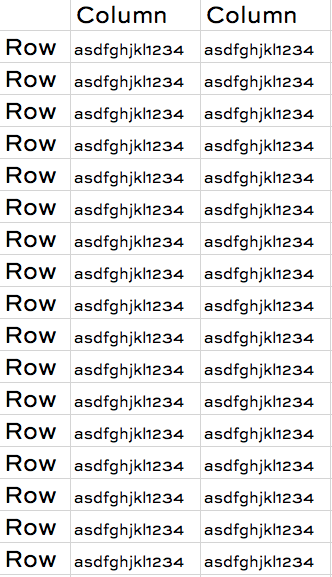
Your table has rows and columns kinda like a spreadsheet:

In most applications, your users care about all of the rows, and all of the columns. However, they put certain columns in the where clause more often than others, so you design indexing strategies around those. You may also get fancy with indexing for group by, order by, windowing functions, etc.

Their queries are vaguely predictable, and they don’t change too often, so you can design indexes every now and then, and you’re good.

That’s how normal tables work.


In some apps, your queries only care about a very specific set of rows.

They constantly – and I mean CONSTANTLY, like 99% of your queries – filter for a very specific set of rows, like under 5% of the table, and these rows are easily identified by specific values in a given column:

This is a great candidate for a filtered index – an index with a where clause.

Filtered indexes make the most sense when they’re highly selective. In the above example, if 99% of our rows had matched the filter we were looking for, then a filtered index isn’t usually going to dramatically improve performance.


In some apps, data is loaded and deleted in big groups.

The classic example is a big (say, 1TB+) sales table in a data warehouse where every row has a SaleDate:

Partitioning candidate

At first glance, you’d say, “Ah, this data is clearly grouped together! I should partition this data by SaleDate, and it will make my queries faster!”

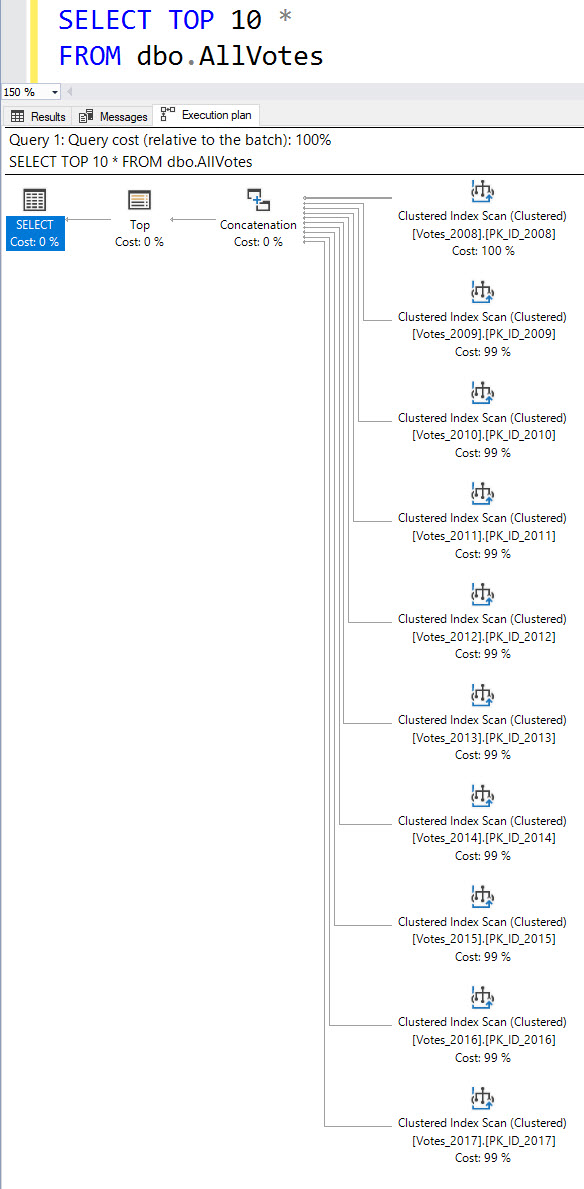
In some cases, it does – but partitioned tables and partitioned views can often make queries slower rather than faster. If your query doesn’t filter by that partitioning column, SQL Server has to reassemble the rows from the different partitions before moving on to the other parts of your query – and this can involve some painful re-sorting depending on how your joins work.

Where partitioned tables and partitioned views make the most sense is where you need to load an entire partition at a time, or drop an entire partition at a time, in the fastest time possible.


In narrow tables, clustering key design is really important.

If your table only has a couple/few columns:

And if you always filter for equalities on just one or two fields, then you might be able to get away with just a clustered index and nothing else.


When your table is really wide, nonclustered index design becomes more important – and harder.

The more columns you decide to pack into a table:

The harder it is to design enough nonclustered indexes to support your queries – without simultaneously slowing down delete/update/insert operations to an unacceptable degree.

That’s where columnstore indexes can come in handy. If you have a table where you can’t possibly predict what people are going to query on, group by, and order by, and especially if they run a lot of running totals, then columnstore indexes can help.


All of the index types I just covered have huge drawbacks and implementation gotchas. This is just meant as a starting point for your index design journey. Start with regular nonclustered indexes, and then when you hit one of these unusual designs, you can start looking at more niche features.


Two Important Differences Between SQL Server and PostgreSQL

PostgreSQL
25 Comments

SQL ConstantCare® uses PostgreSQL as a back end – specifically, AWS RDS Aurora – so I’ve spent a lot of time writing Postgres queries lately. Here are some of the things I’ve noticed that are different.

CTEs are optimization fences.

In SQL Server, if you write this query:

SQL Server builds a query plan for the entire operation at once, and passes the WHERE clause filter into the CTE. The resulting query plan is efficient, doing just a single clustered index seek.

In Postgres, CTEs are processed separately first, and subsequent WHERE clauses aren’t applied until later. That means the above query works just fine – but performs horribly. You’ll get much better results if you include your filters inside each CTE, like this:

That’s less than ideal.

You can’t just leap into an IF statement.

In SQL Server, you can just start typing conditional logic and execute it:

That’s useful if you want to do conditional processing, set variables up, populate them for different scenarios, etc.

In Postgres, you have to do a little setup to declare that you’re doing procedural code:

But that doesn’t work either, because you can’t output data from a DO:

<sigh> You really want to create a function. Which reminds me: Postgres functions are the equivalent of SQL Server stored procedures. Sure, SQL Server’s user-defined functions have a really bad reputation: most of ’em get bad row estimates, inhibit parallelism, and cause performance tuners to point and giggle. Postgres functions? Totally different. Just basically stored procs.

And one less-important difference: GREATEST and LEAST.

Every now and then, I need to find the higher (or lesser) of two things in a row. Let’s say our dbo.Users table has two columns, UpvoteDate and DownvoteDate, and I’m trying to find the most recent date that they cast ANY kind of vote. Postgres has this really cool trick:

GREATEST is like MAX, but across columns. GREATEST and LEAST are two conditional expressions that we don’t get in SQL Server. Nifty.


[Video] Office Hours 2018/8/1 (With Transcriptions)

SQL Server, Videos
0

This week, Erik and Richie discuss monitoring tools, finding all unused tables across databases, query tuning, deleting vs hanging on to indexes, sharding databases, query editors, aggressively-locked indexes, why a plan would not be in the plan cache, and Richie’s current housing situation.

Here’s the video on YouTube:

You can register to attend next week’s Office Hours, or subscribe to our podcast to listen on the go.

Enjoy the Podcast?

Don’t miss an episode, subscribe via iTunes, Stitcher or RSS.
Leave us a review in iTunes

Office Hours Webcast – 2018-08-01


Erik Darling: Let’s see – [Shoab] asks, “In your experience, what is the best third-party tool for monitoring query performance, tracking slow queries, and is also user-friendly?” Well, [Shoab], assuming you’re not talking about something for free – if you want something for free, our First Responder Kit has a Power BI dashboard where you can go in, it will log a bunch of stuff to tables, it will show you wait stats and stuff. Power BI, not necessarily the most user-friendly thing in the world – it’s probably not going to give you all the slices and dices and reports that you want, which is shocking for a tool that’s called Power BI.

If you’re comfortable with spending around $1000-$1500 per monitor instance, SentryOne Performance Advisor is a perfectly good third-party monitoring tool. Quest Spotlight is also another perfectly good monitoring tool. I would check those two out. They’re just about commensurate in, like, you know, dashboards and gidgets and gadgets. It all just comes down to which one you end up being more comfortable with, or whichever – you know, if you are comparing products, you can make the salespeople fight to the death, so whichever salesperson wins is usually the product you go with.


Erik Darling: Boy oh boy, there are some long questions in here – I’m trying to read… Rob asks, “I’m trying to upgrade from 2008 R2 to 2017; having problems with queries using a linked server.” Boy, howdy… Post that one on dba.stackexchange.com. There is no easy way to troubleshoot something like that from here. You’re going to want to include all sorts of linked server details and login details and stuff like that. I’m sorry, Rob, that is past the limit of what I can troubleshoot quickly via webcast not looking at your screen.

Richie Rump: I understand people who have to use linked server, but I’ve really never been a big fan of using linked server. I’ve always been more of a fan of, hey I’m just going to shove the data over to another server and work from it from there.

Erik Darling: But you know, normally I would be like, cool just use SSIS. But then I’m thinking, man, upgrading SSIS packages and all the other stuff, maybe that linked server doesn’t sound so bad.

Richie Rump: Yeah, well to an SSIS guy, they’d be all excited for that kind of stuff…

Erik Darling: yeah, that’s a good source of consulting hours.

Richie Rump: Yeah, a DBA and a dev would be, like, SSIS? No, please no. it works. Don’t touch it.

Erik Darling: When I type in SSIS, nothing comes up in the thing; how do I do it?

Richie Rump: I’m just glad I don’t have to do that anymore.


Erik Darling: Let’s see, [Nika] asks, “We have 2008 R2. Is there a simple way to find all unused tables across databases?” Yeah, all those scripts that do that are kind of liars. So we have sp_BlitzIndex, and sp_BlitzIndex has a parameter called GetAllDatabases. And GetAllDatabases will go and look, just like it sounds like, at all of your databases and it will go and look at indexes and diagnose stuff. The trouble is that index metadata isn’t the most reliable thing in the world. So figuring out if a table is used or unused isn’t really as simple as, like, when was the last use or seek or scan, because that metadata could have gotten knocked out for some reason. It might not be the kind of long-term thing – it might not be long-term enough to have detected some use.

One thing that we’ve run across many times is, like, we’ll be looking at BlitzIndex and be, like, man, we have this completely unused index. This server has been up for three weeks. No one’s touched this thing ever. This thing must stink. But then, it’s attached to some quarterly report or some monthly report that only gets touched once in a while, but when we need it, we really need it. So if you think that you have unused tables across your databases, just start changing the names of them and if anyone complains or if queries start failing then change them back. Just kidding…

Richie Rump: Millions of people can’t access your website anymore…

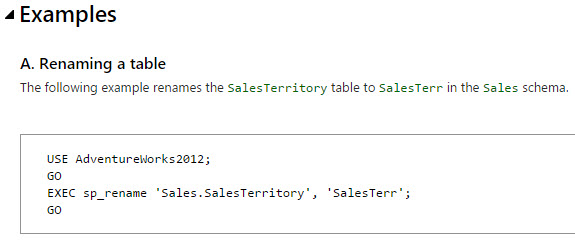
Erik Darling: No problem, just sp_rename.

Richie Rump: Please call Erik…

Erik Darling: No, don’t call me. But there’s really no great way to tell that and there’s really no simple script to be able to tell that. The only way you’re going to be able to figure that out is really profiling the application and figuring out who uses what. So, unfortunately, no, there’s really not a good way to do that.


Erik Darling: Let’s see here. You can tell there are some humdingers in the list. “On SQL Server 2014 Standard, I have a query that is not utilizing seeks. I am getting an excessive memory grant warning. What is going on? Why can’t I seek on any of my clustered indexes? This is a simple query; no distinct, just joins left outer.” Eric, I know that you spell your name wrong because it’s with a C, but let me tell you, I have no magic crystal ball to peer into to tell you how you have done something ridiculous with your query that is disallowing seeks.

A lot of the times, if you’re just joining tables together, unless you get a nested loops join – like if you’re using a hash join or a merge join – and you don’t have a predicate on that table, a lot of the time, you will just see an index scan because it makes a whole lot more sense to go and read through the data, scan through it, get all the rows and then figure out which ones you’re keeping or getting rid of at the join operation. So don’t be all hung up on seeks versus scans. Scans are not your enemy. You want to be careful of the bad kinds of scans. And the bad kinds of scans come from awful things like non-SARGable predicates and functions and joins in where clauses; stuff like that. also, index key order will matter; so if you do have some predicates in there, the ability for an optimizer to seek into an index is determined by key order.

So there’s a lot of potential issues; a lot of things that could potentially lead to the fact that you are not seeing seeks in your scan. But I don’t immediately look at an index scan and say, oh my god, the world is coming to an end. It’s a bit of a knee-jerk reaction.

Richie Rump: The world turned upside down.

Erik Darling: Things just seemingly spinning out of control…


Erik Darling: Sheila asks, “If an index only has a value less than 10 in user updates and zero seeks or scans, is it worth keeping?” Sheila, I don’t think you have enough information about that index to make a decision about if it should live or die. I think that you should hang onto that index for a little while longer and see what happens with it. A lot of people want to jump to get rid of indexes. I just don’t know how long your server’s been up for. I don’t know, like, what your application looks like. There could be a lot of outside factors that would make having that index around useful; like if it’s a unique index maybe or if it’s a filtered index or if it offers the optimizer – if it’s like on a foreign key. There are a lot of reasons why we keep indexes around even if they’re not getting used a whole lot. So don’t just go and get rid of that index willy-nilly.

Richie Rump: yeah, and you know, the other thing to think about is, if I get rid of the index, what is that going to buy me? Do I have disk issues? Do I have a shortage of memory? And in that case, maybe I should get more disk. Maybe I should get more memory. Having an index is not a bad thing. If it’s duplicate, then yeah, get rid of one of them. But if it’s a small table or even a medium sized table and there’s an index there, ask yourself, what am I getting if I actually delete it?

Erik Darling: You know, a lot of the times, people want to get rid of indexes because I have this gigantic index that never gets used and it’s just taking up a bunch of space when I back it up and I restore it, when I run CHECKDB. Or, you know, if a table is just, like, plain over-indexed and there’s just a bajillion indexes on there and it’s time to start consolidating, chopping some of them off – because having way too many indexes can obviously lead to bad locking problems. You have a whole bunch more copies of that data that you have to lock when you want to modify it, but it doesn’t sound like it’s being written to a whole lot.

And from the amount of time that you’ve been observing it, it doesn’t sound like the index has been used. So I would just keep a closer eye on it. I would probably want to trend that usage over, like, a month or three and just kind of see what happens. also be careful because, you know, rebuilding indexes, adding and dropping indexes on the same table can also reset the stats for how much that index gets used. So don’t just jump to conclusions on that.


Erik Darling: Let’s see here, “Database sharding – is anything coming to SQL Server to shard databases with?” I don’t think so. I mean, you could use merge replication, if you’re an awful, awful person, but no.

Richie Rump: Yeah, I don’t – I haven’t heard anything.

Erik Darling: I would ask, why do you want to shard your database? What problem are you having that you think sharding might solve?

Richie Rump: Sharding your SQL Server database…

Erik Darling: Yes, your SQL Server database. Other databases might already by sharded. What’s the word for it? Shardified?

Richie Rump: I’m not even going to pretend because there’s a lot of jokes that could have come from that one. Like S3 – I mean, it is a database, so you put files in there and it’s up in the cloud and whatnot and you can actually shard it by, I think, the first couple of characters, and that’s how it determines where it decides to store things. So if you have a lot of data in a bucket in S3, what you would need to do is verify those first three characters so that they all go to different places so that you have uniformity in your data. So those types of things are built into more cloudy type stuff as opposed to stuff like SQL Server.

Erik Darling: Like document databases – you see that a lot there. [Oracle does – it pays too much money to shard so…]


Erik Darling: Steve asks, “I’m looking for a query editor that will only allow select statements, no data or object editing at all. I need to give it to a person that shouldn’t be able to edit data or objects directly, but because of their SQL permissions for a third-party application, SSMS and similar tools will allow them to write and run delete, update…” Wow-wee, that’s a humdinger.

Richie Rump: What about permissions? I mean…

Erik Darling: Well he’s saying that because of their SQL permissions for a third-party application, SSMS and similar tools will allow them to run delete, update, and insert queries, along with drop and create. Boy…

Richie Rump: Yeah, there’s – I mean, query editors, all they do is run SQL, so they don’t filter out what kind of SQL you can run and whatnot. They may do some nice things as far as syntax highlighting and other stuff, but they don’t – when they push stuff to the database, there’s usually not a filter for that kind of stuff. So I don’t know of one that would do anything like that. I would remove the third party permission account from this user or make him a DBA. And if something goes wrong, he gets a phone call in the middle of the night.

Erik Darling: It’s a little unfair to ask you to support someone’s ill-conceived permissions in SQL Server. So what I would say is, fine, this person has the ability to do this. If they do any of these things, I am not fixing it. It is up to them to fix it, because that’s messed up. I would just draw that line. I would make a moat around that.

Richie Rump: I would bet you, that user has a title of CEO or something, or C-level…

Erik Darling: Analyst – always the analyst; always.

Richie Rump: But yeah, they have the user ID for the third-party app password; I’m not down with that. My developer bones are jiggling. No, that’s not for you; that’s for the app.

Erik Darling: I would really want to ask why we can’t give them a separate read-only login just to do this stuff and then have them, you know, have the app do its other stuff, like its login with the appropriate permissions. Someone would have a really hard time justifying that setup to me without me, like, starting to throw things.

Richie Rump: yeah, in fact, this week I created a role for Brent and Erik that’s just read-only. I called it neutered admins. All they could do is just read-only and that’s all you could do. Sorry, you’re neutered. He doesn’t play with other puppies anymore. Sorry, Erik.

Erik Darling: Ah, feels good. Actually, in a way, I’m grateful to have that kind of restraint. I’m happy that I can’t accidentally mess anything up. I’m thrilled. I can’t make that mistake. I can’t update or delete that thing. I can insert some things sometimes to very specific places where it’s not going to break anything, but it’s not on me. Richie, in his wonderful responsible foresight, has taken away my ability to do more damage than I should be able to do and I am grateful to have that shock-collar.

Richie Rump: I mean, when I was consulting fulltime, I absolutely told them, I do not want permissions to prod. You can give me read-only, but I will not take any account that has permissions for prod. That is not my job. My job is to write code, development. Give me full access to development. I will fight for that, but anything else, I will not accept that login. I will not open that email. I don’t want anything to do with it.

Erik Darling: Nope, I’m deleting that thing on sight. I have a special thing that checks email for the word SA, for that letter combination; just no. it destroys it.


Erik Darling: Let’s see here – Joe says, “BlitzIndex says aggressive index on PK. Row locks and waits are very high; lots of contention. Many key lookups, no missing indexes, should I tune indexes to eliminate key lookups? Boy, oh boy. Yes and no. When BlitzIndex warns about aggressively locked indexes, it’s basically saying that queries are waiting a long time to get locks on that index. So other locks are being held on that index for a long period of time. There are a lot of reasons for that. Usually, it’s that your modification queries, anything that wants to, you know, update or delete or insert, does not have a really good index to find its way to the data needs. This is particularly true of updates.

I see this a lot. Updates and deletes mostly – inserts, not as much because an insert, you’re just kind of putting stuff in. I’ll talk about that in a second.. But usually, for updates and deletes, there’s usually a where clause and that where clause needs to get supported, just like a where clause for any other query. So most of the time, when I see aggressively locked indexes, it’s for one of two reasons. It doesn’t sound like the first reason’s going to be for you because it doesn’t sound like you have a bunch of other non-clustered indexes on there that are also getting locked. It’s just a primary key, which seems to me like this table is under-indexed for other queries.

So rather than focus on key lookups, which are a totally okay thing to tune for if you find them being problems, mostly what I would want to do is start looking at the modification queries that my app or whatever issues and I would want to start looking at the where clauses for those and making sure that they have a good path to the data they need to get so that locks get in and get out faster.

For inserts, updates, and deletes, batch size is very important. So if you have quite large tables and your queries are looking to modify quite large chunks of data at a time, that’s usually when we start to see stuff like – we’ll see lots of lock escalation or attempted lock escalation or queries that run for a long time because they’re waiting to get locks across all the huge chunks of data. So a fellow named Michael J Swart has – I’ll find the link and I’ll paste it in there because I’m sure it’s up in my do-da bar. Anyway, one thing that you could do to attempt to reduce aggressive locking is to not try to lock as much stuff at once. So if you bring your batch size down to like 1000, 5000 rows, somewhere in there, you usually have less aggressive locking going on behind it.


Erik Darling: Let’s see here. We’ve got one more and we’ll finish strong on this. Teschal says, “My proc cache is almost one year old. If the last execution time of a proc is NULL, is it safe to say the proc has never been called?” No; it’s never safe to say that because someone might recompile something. A plan for that thing could be invalidated and that plan could just appear from cache. It is not safe to say that in the least. This is one of those – again, like with the unused tables and indexes thing, this is not something that you can hit F5 on once and make a call on. This is something you have to profile over time, especially for something as ephemeral as the plan cache which is – wait a minute… Richie, are you thinking what I’m thinking?

Richie Rump: No, I never think what you’re thinking; it gets me in trouble with the wife.

Erik Darling: This server hasn’t been rebooted in a year. This server hasn’t been patched in a year. That sounds suspicious to me. So, Teschal, what I would say is patch your server because it sounds like this thing hasn’t had any patching love in quite a while. But beyond that, no. again, there are a lot of reasons why a plan might not be in the plan cache. If you hit F5 once and you want to drop a procedure or a table or an index, you have lost your mind. This is the kind of thing that you have to, you know, learn over time, profile your app, profile the queries that run in, try to make some determination on there. If you have folks who are spinning up things that are out of use or out of favor and don’t get used anymore then they have to be responsible for the change management procedure to get rid of those things. It is not something that someone should be trying to ascertain from looking at DMV diagnostic data because it can be terribly misleading and it can be terribly inaccurate sometimes too.

Richie Rump: Like me…

Erik Darling: Richie’s very misleading. He’s always wearing these short shorts to the company outings. I’m like, hey, how’s it going? And he’s like, don’t look at me.

Richie Rump: No, don’t.

Erik Darling: Alright, that’s all the time we have this week, folks. Thank you for joining us. We will see you next week. Brent will hopefully be back from his road trip to San Diego…

Richie Rump: Brent Ozar’s Big Adventure…

Erik Darling: Weekend At Brenty’s.

Richie Rump: He’s on a red bike right now traveling across the country.

Erik Darling: He’s got his peewee suit; it’s nice. He’s having a good time. Alright, take care, y’all, bye.


How to Check Performance on a New SQL Server

So you just built a brand new SQL Server, and before you go live, you wanna check to see if it’s going to perform as well as your existing server.

The easy way: test your maintenance jobs

I’m just asking for the chance to test it, that’s all

It’s as easy as 1, 2, 3:

  1. Restore your production backups onto the new server
  2. Do a full backup, and time it
  3. Run DBCC CHECKDB, and time it

Oh sure – this is nowhere near as good as testing your application code, and you should do that too, but this is your very first test. It’s extremely easy, and often it surfaces trouble very quickly. If your backup and CHECKDB runtimes are slower than your current production server, ruh roh – you’re in trouble.

This isn’t perfect because:

  • Your job start times may be different – for example, if your production backup jobs run in the middle of the night at the same time as your ETL jobs, then your production backups could be artificially slower.
  • Your concurrent workload may be different – maybe all your production backup jobs point at the same shared file target at midnight, making it dead slow. When you test your new server at 1PM in the afternoon when nothing’s happening on the shared file target, they may be artificially fast.
  • Your backup target may be different – the production servers might be writing their backups to local storage, which is of course one hell of a bad idea.
  • Your new version of SQL Server may be different – if you’re migrating from 2014 to 2016, and you find that CHECKDB runs faster, it might be the CHECKDB improvements in 2016.

But again – all of that said – if you find that your new production server’s maintenance jobs run slower than your current production servers, time to set off the alarms.

The easy but wrong way: test a synthetic workload

You could download HammerDB, an open source load testing tool, and run the kinda-sorta TPC-C workload against your SQL Server. It’s not an official TPC benchmark, but it’s a repeatable workload that you can run against multiple servers to see whether one is faster than the other.

At that made-up workload.

Which is probably nothing like your real apps.

Using HammerDB to compare two of your production servers is like comparing a Porsche 911 and a Chevy Corvette by measuring how many live babies they can carry in the trunk. It doesn’t really matter who wins – the comparison is meaningless.

The harder way: test individual queries

Use sp_BlitzCache to build a list of your worst-performing queries. Then run those same queries against the new production server to compare:

  • Their logical reads
  • Their duration
  • Their CPU time
  • Their execution plans – to understand why the above numbers are different

Just running the same queries back to back isn’t all that hard, but the reason I call this method “harder” is that you have to have enough SQL Server performance tuning knowledge to understand why the numbers are different, and what control you have over them. Are they the result of version/edition changes, SQL Server setting differences, or hardware differences? This stuff takes time to analyze and correct.

The really hard way: test your real workload

“Just run the same queries we run in production – how hard can it be?” Well, at scale, very hard – because it involves:

  • The same starting point – after all, you can’t run the same delete statement twice in a row to achieve the same effect, and every insert statement affects subsequent test runs
  • The same data load distribution – it’s easy to run an identical query across 1,000 sessions, but if they’re all trying to lock the same row, then you’re just reproducing blocking issues that you don’t have in real life
  • The same workloads – and since your app and your database is constantly changing, the query traces you gathered 3 months ago are meaningless today, so you have to keep rebuilding this wheel every time you want to tackle a load testing project

Is it possible? Absolutely – but just start with the easy stuff first to get as much valuable data as you can in less time.

Because remember – even when you find differences between the servers, that’s still only the start of your journey. You have to figure out why things aren’t performing as well as you’d expected – and now you’re right back at the prior step, comparing query plans and doing root cause analysis. Before you try to do that across 100 queries, start with your worst-performing query by itself.


Wait Stats Should Be Easy By Now

Wait Stats
1 Comment

Why Is My Query…

We’ve all started a question with a close approximation of those words. No matter how you finish that sentence, there’s some basic information that you need to collect to figure it out, like:

  • Query plan
  • Wait stats
  • Other server activity

Those are a good place to start. It’s easy enough to get a query plan, either by running the query with actual plans on, getting an estimated plan, or retrieving it from the plan cache with sp_BlitzCache.

The last two can be tough, unless you’re observing the problem, or you have a monitoring tool in place.

No, I’m not trying to tell you to buy a monitoring tool.

SQL Server Should Do This

We’ve got Query Store. It tracks an insane amount of metrics about nearly every single query that runs.

Per database.

We’re talking aggregate metrics, the query plan, the text, set options, compile time and memory, and with SQL Server 2017, we get aggregate wait stats in there, too. That’s totally awesome information to have. You can go a long way with that information.

The trouble is that people aren’t really adopting it quickly. There are a lot of questions about the overhead, about the kind of information it collects and if it will expose user data (which is yet another check box if GDPR is a concern to you), how much space it will take up, and more.

That’s why I’ve opened this Connect Feedback item:

Database Level Option For Storing Wait Stats

Vote Early, Vote Often

I’m hoping that a feature like this could solve some intermediate problems that Query Store doesn’t.

Namely, being lower overhead, not collecting any PII, and not taking up a lot of disk space — after all, we’re not storing any massive stored proc text or query plans, here, just snapshots of wait stats.

This will help even if you’re already logging wait stats on your own. You still don’t have a clear picture of which database the problem is coming from. If you’ve got a server with lots of databases on it, figuring that out can be tough.

Understanding what waits (and perhaps bottlenecks) a single database is experiencing can also help admins figure out what kind of instance size they’d need as part of a migration, too.

Especially going to the cloud, configuring instances can feel a lot like hitting the “Random” button on your character configuration screen. You just keep pressing it until something makes you laugh.

Thanks for reading!


How I Configure SQL Server Management Studio

Ever go into Tools-Options? SSMS has a stunning number of options these days. Here are some of my favorites:

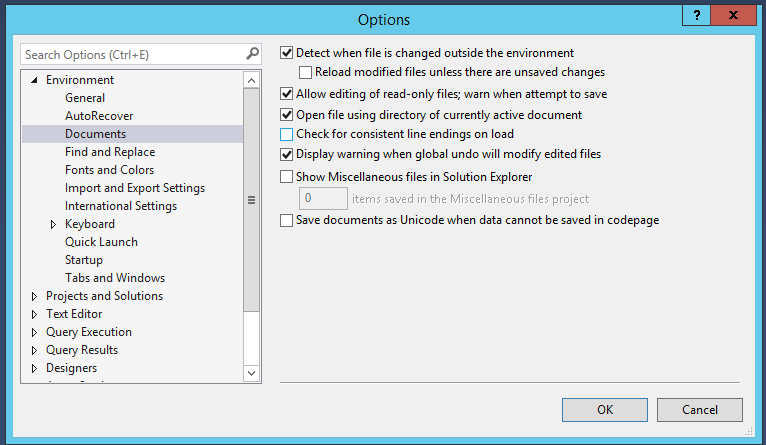
Documents options

On the Documents options, I uncheck “Check for consistent line endings on load” because I constantly get scripts with all kinds of wacko line endings. That warning is a pain in the butt.

On the Fonts and Colors options, I used to get fancy. There are all kinds of “best programming fonts” articles out there with great-looking fonts. However, when I did screenshots for presentations or clients, people kept asking, “Why does your SSMS look so weird? Is it because you’re on a Mac?” These days, I leave those options at their defaults.

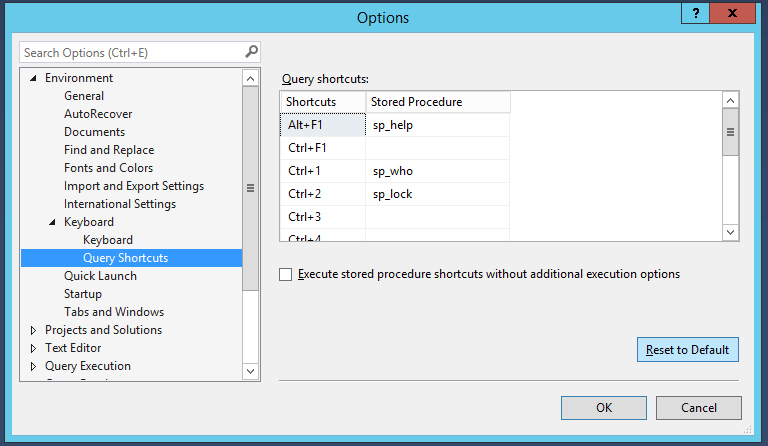
Query Shortcuts screen

On the Query Shortcuts screen, you should set up shortcuts for the scripts you run most often. I don’t – but it’s only because I have a wacko job as a consultant. I’m constantly jumping into an SSMS on someone else’s desktop, and they won’t have the shortcuts set up, so I don’t wanna develop muscle memory for something I won’t have access to. If I was you, though, dear reader, I’d set these up.

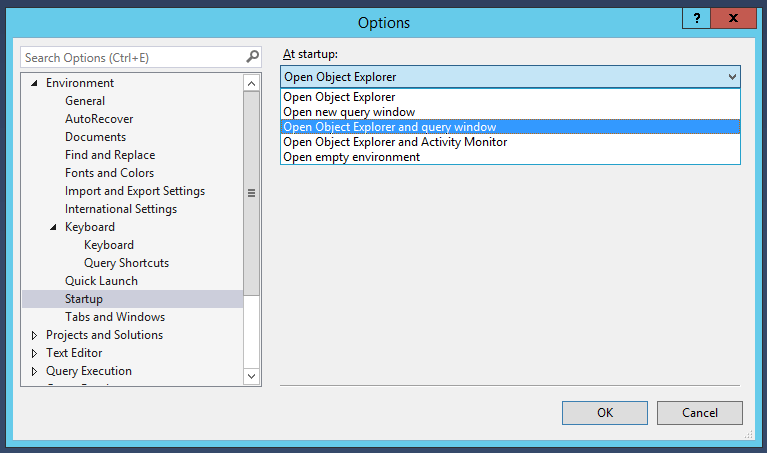
Startup options

On startup, SSMS defaults to just opening Object Explorer. I like to open a query window too, though – after all, I’m probably opening SSMS to run queries.

Tabs and windows setup

Under “Tabs and Windows,” check the box for “Show pinned tabs in a separate row.” This way, when you click the pushpin on a given tab, he pops up to the top like this:

Pinned tab

I love that for frequently-used tabs – I might have a dozen query windows open, but I keep coming back to, say, the window with sp_WhoIsActive open. I save that tab with a recognizable query file name, and then when I pin it, it pops up to the top in that separate row.

Speaking of which, those default tabs are hideous – go to Text Editor, Editor Tab and Status Bar:

Editor Tab and Status Bar

Scroll down to “Tab Text” and set everything to False except for “Include file name.” When you click OK, it doesn’t take effect on existing tabs, but after you close & reopen them – ahhh, much more legible. Check out how many more tabs you can fit on a screen:

Tabs, compacted

Next up, going back a little in Text Editor, go to All Languages, Scroll Bars:

Scroll Bars

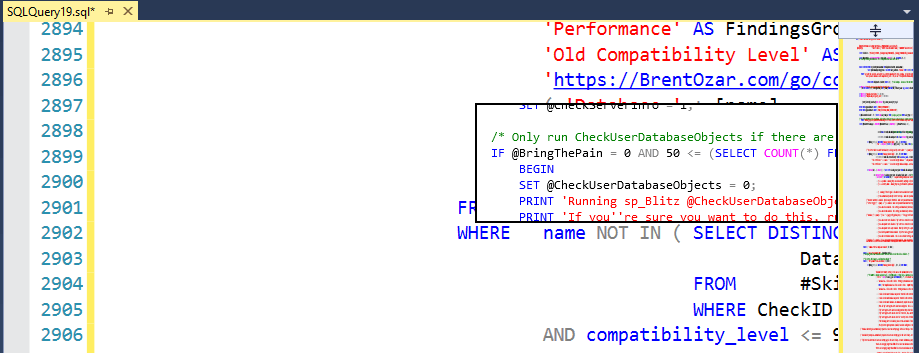
The default behavior is bar mode, but if you change it to map mode, you get a text map down the right hand side scroll bar. I don’t find that all that useful, so I don’t enable it, but if you’re the kind of person who has long stored procs, you might. The really cool part is when you hover your mouse over the scroll bar map on the right, you get a little zoom popup so you can see a preview of the code at those lines:

Zooming on the scroll bar

I don’t set mine up that way, but I can see why people do, and if you’re reading this post, you’re probably interested in that option. Anyhoo, moving on to All Languages, Tabs:

Losing my religion

SSMS defaults to tabs, and so I switch it to “Insert spaces.” Insert religious flame war here. Moving on….

T-SQL, General

Under Transact-SQL, General, I check the box for “Line numbers.”

Query Execution, Advanced

I would just like to point out that no, I do not set my deadlock priority to high. As far as you know.

Results to Grid

Under Query Results, SQL Server, Results to Grid, I change my XML data size to unlimited so that it brings back giant query plans. (Man, does my job suck sometimes.)

A lot of presenters like to check the box for “Display results in a separate tab” and “Switch to results tab after the query executes” because this gives them more screen real estate for the query and results. I’m just really comfortable with Control-R to hide the results pane.

Designer jeans

Under Designers, I uncheck the box “Prevent saving changes that require table re-creation” because I never just hit save when I make changes in a designer anyway. I always click the generate-scripts button, but strangely, you can’t even generate scripts when a table re-creation would be required. Personally, I’m a big fan of recreation. Also, parks.

Object Explorer drag and drop settings

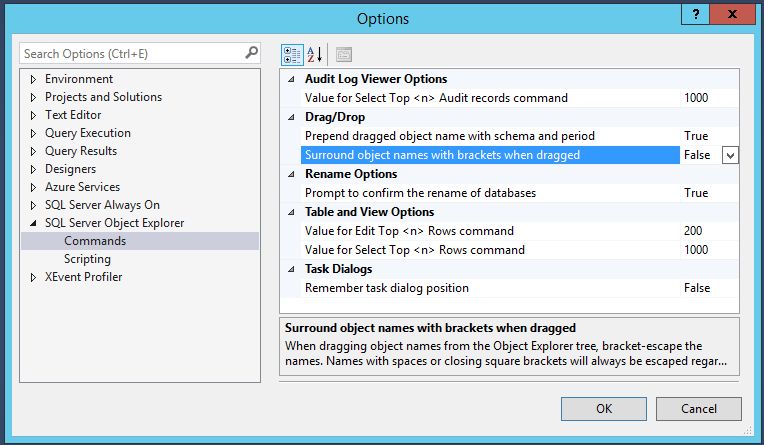
Under Object Explorer, Commands, I change “Surround object names with brackets when dragged” to False. I usually find that when I’m dragging an object from the OE pane over into a query, that I specifically need it without brackets for some reason.

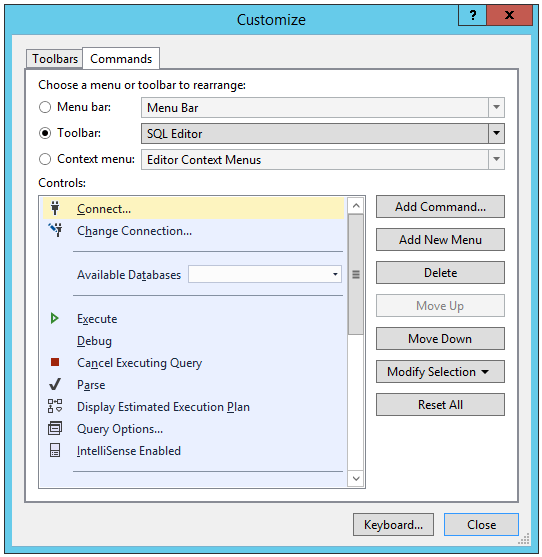
After I’m done in Tools, Options, I go into View, Toolbars, Customize. Click on the Commands tab, then choose Toolbar, SQL Editor:

SQL Editor Toolbar

These are the buttons that get shown when you’re working with T-SQL. I click on the Debug control, take a deep breath, and while I’m clicking the Delete button on the right hand side, I scream at the top of my lungs, “WHO THE HELL THOUGHT IT WAS A GOOD IDEA TO PUT THIS BUTTON RIGHT NEXT TO EXECUTE?!?!?”

I have less passionate feelings about the rest of the buttons, but I still end up deleting most of them. I don’t really need a button for Query Options or IntelliSense, and I like a clean, minimal UI. After I’m done cleaning out the SQL Editor toolbar, I click the toolbar dropdown, choose the Standard toolbar, and clean that out too. No, I’m never starting an Analysis Services DMX Query. I certainly don’t need buttons for copy or paste. (The only reason I even leave “Execute” as a button is because sometimes I like showing training class attendees that the execution is about to start.)

Minimal toolbars

The end result is a much smaller set of buttons, and they all fit on a single row even when I’m editing queries.


A Query That Should Be Contradicted

Execution Plans
21 Comments

Innocent Enough

I was writing another query, and became enamored with the fact that HAVING will accept IS NULL or IS NOT NULL as a predicate.

What I ended up writing as an example was this query:

Why this query?

I figured the optimizer would take one look at it and bail out with a Constant Scan.

After all, the WHERE clause filters to only NULL UserIds, and this column is NULLable in the Votes table.

The HAVING could only ever produce a NULL. And according to the laws of Logical Query Processing, WHERE is processed earlier than HAVING is.

But that’s not what happens.

Query At Work

And how.
Ach.

Smarter People

Just may kick my butt in the comments about why this doesn’t bail out. My soul and butt are prepared.

Thanks for reading!


New Classes: Dashboard in a Day, Database DevOps, tSQLt, SQL Server Internals, and Avoiding NOLOCK

Company News
0

We’ve got a few new goodies, and they’re 50% off for a limited time!

Dashboard in a Day – A hands-on workshop using Power BI to rapidly produce great looking interactive reports and dashboards. Your instructor, Microsoft MVP Steph Locke, has a decade of BI and data science experience. Learn more and register.

Database DevOps Featuring Microsoft SSDT – Managing database changes is hard. Learn how to do it properly with Microsoft SSDT in 2 days of hands-on labs. Taught by MVP Alex Yates who has been doing DevOps with databases since 2010. Learn more and register.

Faster Transactions Without NOLOCK – Your application has grown over time, and performance has started to degrade due to blocking and deadlocking. Taught by MVP and published author Kalen DelaneyLearn more and register.

SQL Server Internals 201 – You’re curious. You love learning about the internals of the tools you use. You’re comfortable writing queries, and you’re ready for the next level. Taught by MVP and published author Kalen DelaneyLearn more and register.

Test-Driven Database Development with tSQLt – Learn how to use tSQLt effectively to improve the quality of your database development work. Taught by MVP Alex Yates who has been doing DevOps with databases since 2010. Learn more and register.

And Brent’s next round of Mastering classes starts September 4th with the next Mastering Index Tuning. When you take the Mastering classes, we highly recommend that you take ’em in order – Master Index Tuning, then Mastering Query Tuning, then finally the hardest one, Mastering Server Tuning. If you want to get in on all 3, the one-year Live Class Season Pass is on sale for $2,000 off for the next 10 buyers. That lets you attend all of Brent’s classes for a year straight – enabling you to go again & again.

See you in class!


Common Entity Framework Problems: N + 1

Development
23 Comments

I wanna dance with common problems

One of the most common issues that I’ve seen with Entity Framework isn’t technically an Entity Framework problem at all. The N + 1 problem is an anti-pattern that is a problem with ORMs in general, which most often occurs with lazy loading. There was a lot going on in that paragraph, so let’s break it down.

The N + 1 problem occurs when an application gets data from the database, and then loops through the result of that data. That means we call to the database again and again and again. In total, the application will call the database once for every row returned by the first query (N) plus the original query ( + 1).

All of those calls could have been accomplished in one simple call. Let’s look at an example in code:

Here’s the SQL generated from this code:

In this example, we’re getting data from the Posts table, and the PostTags table where the Tag equals “sqlbulkcopy”. The problem starts to occur in this line:

Do you see it?

The problem is that in our original query we’re not getting data from the LinkedPosts entity, just data from Posts and PostTags. Entity Framework knows that it doesn’t have the data for the LinkPosts entity, so it very kindly gets the data from the database for each row in the query results.

Whoops!

Obviously, making multiple calls to the database instead of one call for the same data is slower. This is a perfect example of RBAR (row by agonizing row) processing.

This is the SQL generated from our code:

This query is sent to SQL Server 449 times, and the only thing that’s changing it the EntityKeyValue value.

Ugh.

How can we fix it?

There is one fast way. It’s not optimal, but it will be better! Use an Include (also called eager loading) in the LINQ statement. Using an Include will add ALL of the data from the LinkedPosts entity, but it’s a simple fix without much retesting. Who likes testing code? No one. That’s why companies pay through the nose for software that does it automatically.

Now when the LinkedPosts entity is called, the Posts entity will have all of the data for the LinkedPosts entity. It will not make any additional calls to the database. That’s a good thing, right? Databases are cranky. That’s why DBAs are cranky.

Here’s the SQL that’s generated:

See what I mean by it not being optimal? We could rewrite the LINQ statement to have it generate a more optimal query, but that’s not the point of this post. If the performance of the query isn’t satisfactory, you can go down the rewriting the LINQ statement route.

How can we find N + 1 issues?

Not to toot the company horn (but I’m totally going to), one of my favorite ways to find N + 1 problems from the database is by using sp_BlitzCache. After running sp_BlitzCache @SortOrder=’executions’ I get this:

n-plus-1-find-the-issue


Look at those tasty executions!

Captain, I think we found the problem. Now, it doesn’t tell me what line of code is causing the issue, but it does give the SQL statement. I’m sure if you work with the devs, you can figure out where the problem is and fix it. Having the problem statement makes searching the code base a little easier, and there’s a good chance someone will recognize where it comes from.


[Video] Office Hours 2018/7/25 (With Transcriptions)

This week, Erik and Richie discuss whether it’s relevant to specify data in logs in SQL cloud environment, licensing, using canary tables on Availability Groups, how Entity Framework limits tuning, reusing older databases, and more.

Here’s the video on YouTube:

You can register to attend next week’s Office Hours, or subscribe to our podcast to listen on the go.

Enjoy the Podcast?

Don’t miss an episode, subscribe via iTunes, Stitcher or RSS.
Leave us a review in iTunes

Office Hours – 7-25-18


In the cloud, should I separate the log files?

Erik Darling: Brad asks, “Is it relevant to specify separate drives for the data and logs in a SQL cloud environment since I/O is not the limiting factor?” So the cloud is tough because you don’t know where your disks are, who they’re hanging out with, what they’re doing. So separate drives, I’m not sure that’s going to buy you much, unless you specify – so different cloud vendors do it differently, so different sized files, different sized drives can sometimes get you better speeds. So basically, the more you pay for your drives, the better the throughput is on them.

So if you have a higher tier of drives or if you have write specific drives that you want to put tempdb or log files on, that would make sense to me. But just separating them for the sake of separating them, I don’t think that’s going to buy you much, especially because in the cloud, it’s so easy to up instance sizes, it might make a whole lot more sense to solve your storage problems by adding memory rather than add more storage or separate things out. How about you, Richie; any thoughts on cloud drives I/O things?

Richie Rump: No. I mean, it’s such a different world up in the cloud. I didn’t think separating will really buy you much, but then again, I don’t deal with a lot of the SQL-ness in the cloud. I’ve been doing a lot of managed providers where you don’t even have a choice of where the logs go; they just go.

Erik Darling: Yeah, you create a database and they go where they damn well please.


How does Development Edition licensing work?

Erik Darling: Julie asks, “Can you explain the licensing for 2014-16 SQL Server dev, especially the not for use with production data? Does that mean you can’t copy production data to the dev box for testing and development?” No, what that means is, as with all things licensing, please check with your licensing representative, whoever you buy stuff from, to make sure on this. But generally, what it means is that you cannot be serving up a production workload from that server.

So, like, you can’t have customers going in and doing stuff, but if you have your developers going in and testing new code and new indexes on there, then that’s considered development. You can use production data for that, but should you?

Richie Rump: No. You absolutely should not. There’s a lot of reasons why you shouldn’t use production data. One off, that happened to me many, many years ago, where you had production emails, or actually emails of users in there and now you start testing email functionality and emails start going out to customers from dev boxes and things like that. But, you know, the question is, do you want actual production data in the hands of your developers? Wouldn’t it be better if you actually had a set of data that you hand-crafted to go off and test certain things that doesn’t usually occur in your production data or may not be in your current production set?

There’s something to be said about having a known set of data outside of production so that you can do really some valid unit tests or valid integration, system integration, tests with. So I don’t usually recommend copying production over into a test or dev environment. Maybe if you’re doing some system testing or some other type of speed test or whatever, but even then, it gets kind of wonky because you’re probably not on the same hardware as you are on production anyway. So I don’t recommend just copying over production and saying hey, dev, go for it, you know. You need to think about it a little bit more and have dev create some data that will go through some tests. So when you are running it, hey, what about this situation or that situation or what if the data gets out of whack here? How’s the system going to go about that, especially if there’s some sort of regression in the software?

Erik Darling: There’s a lot of tools and products out there that can help you, sort of, scrub data or, like, mung stuff up so that it’s using – like you take a production dataset, you change, you flip things around, you kind of make it, you know, illegible to normal people. But that kind of comes back to another thing where it’s like, you know, you have to be very comfortable if you’re going to give developers access to that data. With the data you’re giving them access to – because for everything that people worry about with developers walking out the door with intellectual property, whatever else, walking out the door with customer data is arguably even worse because you take that to a competitor – you know, it’s a much bigger edge to have a customer list rather than, like, some stored procedure that any dingdong could write. So be careful with that too. But further to that, if you’re already giving your developers access to production to do whatever developer nonsense they have to do, you’re running into a whole different set of problems. So aside from the fact that you shouldn’t be using production data in dev, you also shouldn’t be giving your developers access to crazy production data in production. That’s how I would sum that up. I got off on a little bit of a tangent there.

Richie Rump: Well you know, that’s how I roll.

Erik Darling: So, you’re wearing a Cubs shirt. Are you looking forward to more baseball post-season fun this year?

Richie Rump: Oh, no we’re totally going to tank. We’re awful…

Erik Darling: Totally going to tank? Okay, just making sure.

Richie Rump: We lost, like the last two or last three or whatever and we’re terrible. So if we win the next two or something, we’re going to the world series, but as of right now, after last night’s game, [crosstalk].

Erik Darling: Yeah, Mets suck this year too. Just like trading people – no, go ahead, go have fun…

Richie Rump: The Mets were amazing because they were going to the World Series after 11 games, you know. They won 11 straight or something like that, then all of a sudden, everyone went to the hospital and just never came out…

Erik Darling: Aw, like grandparents.


What happens when a cluster poops the bed?

Erik Darling: Daryl says – so Daryl actually has a bunch of questions about Brent’s senior DBA class videos. I apologize that Brent is not here to answer them, so I would say, Daryl, if you have questions that you want Brent to answer about his videos, I would leave them either as comments on the videos or drop him an email with everything in there. I haven’t watched the senior DBA class videos in a while, so I don’t know that I would be able to answer them terribly well. The first one, though, is sort of answerable. Brent talks about the current vote and how it floats between both nodes. Daryl has one for each of current nodes. So the big question for me is, do you have an even number of votes or an odd number of votes? Do you have dynamic quorum or dynamic witness? Like, for me, there’s a lot more than just is each node having a vote a good idea? Like, you want to make sure that you have an odd number of votes so that, you know, the cluster will stay up if one thing kind of poops the bed in a not fun way. So I would need a little bit more information about that to give you further advisements.

Erik Darling: Tammy says, “Poops the bed in a non-fun way, as opposed to pooping the bed in a fun way.” Yes, Tammy, there are different ways to poop the bed that are varying degrees of fun. It’s a wild world out there. Let’s see, long questions, short questions, all sorts of questions…


I have these circular logic permissions problems…

Erik Darling: Ooh, Brian has a question that I think would be good for dba.stackexchange.com, “I have a circular logic issue with database ownership permissions.” Yeah, so that’s a tough problem for me to solve right here, so I would say post that on dba.stackexchange.com with as much information, as much, hopefully, obfuscated code as you’re willing to share about the issue and hopefully you will get an answer from someone who has been through that before. Any other thoughts on that?

Richie Rump: My mind’s blank on that stuff.

Erik Darling: We specifically avoid security anything in our client work because it is such a hassle and liability. And sometimes I feel even dirty when Blitz is like, these people are all sysadmins. I’m like, I don’t want to see their names, what they’re doing…


Should I have canary tables in an AG?

Erik Darling: Let’s see, Daryl asks, “Should I have canary tables on my AGs?” Only if you care about knowing how up to date they are when they failover, so yes. Most people have AGs thinking that they’re not going to have any data loss, or very little data loss. So I would say generally, canary tables are a good idea.


Does Entity Framework limit my tuning capabilities?

Erik Darling: Pablo says, “My dev team always blames ORM for bad performance. How does Entity Framework limit tuning?” That sounds like a Richie question.

Richie Rump: Yeah, the real problem is that it’s kind of obfuscated. So when you write a query for Entity Framework, you have to use their proprietor, or whatever, ORM and you’re using that language which is then translated into SQL which is then translated by SQL to do the plan and do all the other stuff. So yeah, it’s more of an art than I could tell you, hey, if you’re looking for this then you do that and it’s all one, two, three. You have to take a look at what’s going on in your plan, if you have any – sp_BlitzCache is probably the one that I would use first and see if you’ve got some really bad stuff going on there. And then kind of have to trace it back to the actual Entity Framework piece of code and then rework those queries in entity framework so that those are a little bit better to the SQL Server. There’s a lot of stuff that’s going on out there. I think I’ve got a few posts on brentozar.com about some Entity Framework stuff. There may be another one coming out. I think Brent may have released the hounds on another one soon.

Erik Darling: It was sitting around as a draft for like a year and a half. Like, was Richie done with that?

Richie Rump: Turns out I was and I just never looked. I mean, that wasn’t published, who knew? I’ve been busy on this constant thing…

Erik Darling: Yeah, constantly busy working on this constant thing.

Richie Rump: So yeah, it’s not because of entity framework, but a lot of times, it’s the way the developers crafted the code in their linked syntax and the way that gets translated by the Entity Framework itself. There are ways you could go and write your link code so the Entity Framework can write a better query, but it’s a trial and error thing in a lot of ways. So I would say, find your bad queries using sp_BlitzCache, trace them back to the link query, change your link query and then kind of do that back and forth so that you can actually start tuning those queries just a little better. Or, you could just drop it and say, I’m going to write a SQL statement for it or a stored procedure, and just do it that way.

Erik Darling: All sage advice. That’s advice I’d follow too…

Richie Rump: If you ever touch Entity Framework…


How can I build my dev databases faster?

Erik Darling: On that note, I’m going to mess this name up because I have never seen a name that looks like this – Terje – I’m sorry man, or woman, I don’t know how that one goes. If you want to phonetically give it to me in chat, I’ll say your name right. “Our development team complains about slow build times.” So basically, they have this server where they spin up a whole bunch of new databases to do new builds of the app, it sounds like. Sometimes the server has a whole bunch of old databases on it that need to get cleaned up, it bloats out a bunch of stuff, it’s not fun. See, in my head, I’m thinking why are you reusing a server for this? Why wouldn’t you just spin up a VM and have your new stuff all roll out to that VM? But maybe I’m missing something. Richie, what do you think?

Richie Rump: I’m not even sure exactly what the question is over all that.

Erik Darling: The question is, “Wouldn’t it be better to reuse some older databases and just run schema changes instead of building brand new databases each time?”

Richie Rump: Oh, boy, okay. In a build scenario, you typically would want to build it from scratch, okay, and you have all the data and you want to reload it, so just so you make sure that everything is kind of working and there’s no – you’re not worrying about deltas. So when I run the test, the test runs and it works every time, so you want to start from scratch. So yeah, if you’ve got a slow database machine, it could be slow. I’d look for other ways to make that a little bit faster. I feel your pain. Every time that I run a build or check in something into Git for ConstantCare, it automatically builds a new database for Postgres and then it loads data and it runs, you know, 500 different, maybe even more at this point, different SQL tests and it checks a whole bunch of stuff. So I feel your pain.

Ours don’t take as long as you. I think ours take about ten minutes, but it does take a little bit of time. And the more you add, the longer it’s going to take. So if you could start looking for different servers or different ways, maybe creating a VM or having a VM ready to go, I don’t know. There are different ways, but having build servers and stuff like that, that’s a whole different ballgame than what we’re normally used to here at Brent Ozar. You’re talking about building it each and every time. Now, are you creating the server every time is really the big question, because if you’re doing that, install, yeah, that’s going to take forever. But if the server’s up and running and you’re just creating databases, yeah – I’m not sure if I answered the question or not, but…

Erik Darling: Even if you can just spin up a VM that’s already imaged to have SQL Server on it configured a certain way and then just build stuff inside that VM, I think you’d be a lot better off than trying to just abuse this one poor machine over and over again.

Richie Rump: Which is – actually, we use a system called AppVeyor. It’s in the cloud. That’s exactly what it does. It has a standard image. We add some node packages. I think we actually uninstall a node version, we install a different node version and then Postgres is already there. So we’re not installing Postgres ourselves. It’s there and we’re just saying, create this database and create these tables, create these schemas, create all this other stuff and then run some tests.

Erik Darling: Alright, that is all the questions that we have for this week. Thanks, everyone for coming, hanging out, showing up. We will see you next week. Maybe Brent will even show up from a U-Haul, we don’t know yet.

Richie Rump: More from my parent’s house next week.

Erik Darling: Hopefully I’ll still be home, so I don’t know, get the whole thing. Alright, take care, y’all.

Wanna attend the next Office Hours podcast taping live?

"*" indicates required fields

This field is for validation purposes and should be left unchanged.
Name*
Things I want*


[Video] “Actual” Execution Plans Lie for Branching Queries

Execution Plans
3 Comments

In which I show why you can’t trust “actual” execution plans for branching stored procedures, and you’re better off using sp_BlitzCache to figure out what branches you need to tune:

Demo code:

This is one of the reasons you won’t catch me using the “Edit Query Text” in query plans during this week’s Mastering Query Tuning class.


Do I Have A Query Problem Or An Index Problem?

SQL Server
7 Comments

Party Up

When someone says “this query is slow”, and you can rule out contextual stuff like blocking, odd server load, or just an underpowered server, what’s the first thing you look at? There’s a lot of potential culprits, and they could be hiding in lots of different places.

Pick a card, any card.

After several minutes of thinking about it, I decided to call my method QTIP, because I like to look at the:

  • Query Plan
  • Text of the query
  • Indexes used
  • Parameters used
Query Plan

I really like to understand the scope of what I’m dealing with. Queries can hide a lot of complexity from you, and if someone is working on a stored procedure with many statements in it, knowing where to start can be daunting.

Even though costs are estimates, they can often be a pretty good starting place to direct your tuning efforts.

There may also be something very obvious hiding in the query plan that looking at the query wouldn’t give you any insight into, like a spill, spool, expensive optional operators, or operators with many executions.

Text of the query

If I see something in the query plan I don’t like, or if something related to the query text gets flagged in sp_BlitzCache then my next step is to look at the text of the query.

Yeah nah

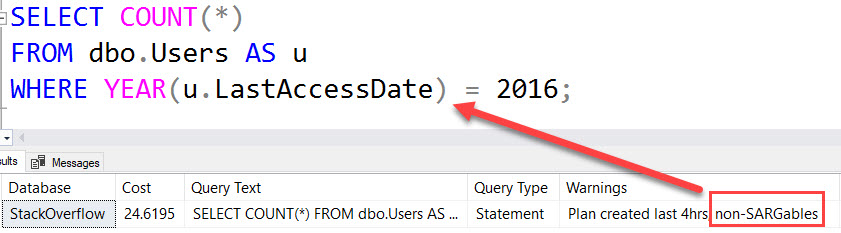
As a simple example, non-SARGable predicates were flagged here, because we have a column wrapped in a function.

Granted, you could spot this by hovering over tool tips in the query plan, but in a complicated enough plan, it would be easy to miss.

Indexes used by the query

Looking at the indexes generally makes sense to do after poking around the plan and the text.

You may spot something suspicious in the plan, like a heap, or no nonclustered indexes being used — this goes out the window if you’re using a data warehouse, of course — or you may just want to see what indexes are available.

We see a lot of apps that were produced with an initial set of indexes that helped the initial set of queries, but many releases and code changes later, they’re far less useful than they used to be.

Index tuning is a lot like losing weight: The longer you wait to do it, the harder it is. You’ll have to sift through a lot of deduplicating, ditching unused indexes, fixing heaps, and evaluating missing index requests before you start to see those spray tanned abs.

Parameters used by the query

Anyone who has dealt with parameter sniffing issues knows how much different values can change query plans and execution times.

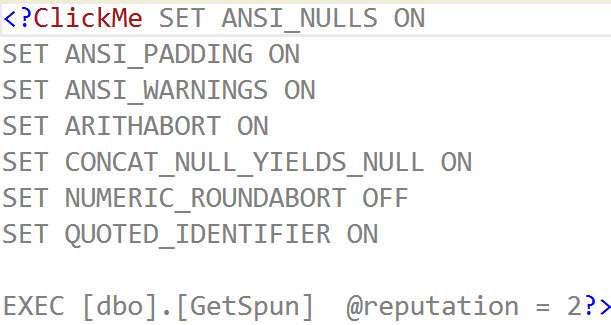
You have to dig up the parameters the plan was cached with, executed with when it was slow, and client connection settings.

I tried to make this a little easier with sp_BlitzCache, by adding the cached execution plan parameters column:

I still hate XML

If you click on it, you’ll get something like this:

One Stop Shop

This doesn’t help you with what parameters were used when the plan was executed most recently — nothing like that will aside from a dedicated monitoring tool — but it’s a pretty good start.

Party On

I know this post is going to frustrate some people — it’s a big outline without much detail. It would be really difficult to go into necessary detail on each of these here, but it’s a good starting place.

And besides, maybe I’m planning on turning it into a presentation.

Thanks for reading!

Brent says: I love the QTIP approach because it reminds me not to get bogged-down in one thing. It’s so easy to just focus on the query plan without looking at the indexes, or to focus too much on getting exactly the right parameters. You’ve gotta use all the parts of the QTIP.


Does your backup strategy achieve RPO and RTO goals of the business?

Backup and Recovery
0

When deciding on a backup strategy for a database, there are various things we must consider:

  • Does this database need point-in-time recovery?
  • What are the RPO (data loss) and RTO (downtime) goals? No one likes losing data or encountering unplanned downtime, but the business must decide on these goals so that we can setup an environment that can meet those goals. You want no data loss and no downtime? Okay, who is going to write the check for this?
  • How much backup retention is needed short term and long term?
  • How fast are the backups and how quickly can I restore?
  • Should I use a SAN snapshot or similar if my database is a VLDB?

Sometimes we overlook things

Given my backup strategy, can I hit the RTO goal when needing to do a restore?

What if I need to restore lots and lots of transaction log backups?

There’s a script for that

I’ve got various scripts in my toolbox, one such script reads a folder and writes out the RESTORE LOG commands. This is handy when I need to setup an Availability Group, Database Mirroring or Log Shipping and need to get the secondary server caught up with the transaction log chain. It can also be used for an unplanned restore. The script assumes that the files are in order when sorted alphabetically.

I recently came across transaction log backups that were named in such a way that my script didn’t work. This system had Sun, Mon, Tue, Wed, Thu, Fri or Sat in the backup file names, so Monday files were listed before Sunday files. I was fumbling to fix the script, but then I just decided to manually work around it so that we could make progress on the task at hand.

While I was trying to make the script work, I thought to myself, “There’s no way I could hit the RTO goal here if this were an unplanned restore.”

Be prepared for an unplanned restore

Given your environment, you need to be ready to do a restore that can meet the RTO goal.

This must be practiced. If you can’t achieve the business’s RTO goal, your backup strategy needs to be changed.

Brent says: Like Mike Tyson said, everybody has a plan until they get punched in the cluster.


Is the CXCONSUMER Wait Type Harmless? Not So Fast, Tiger.

Let’s say you’ve got a query, and the point of that query is to take your largest customer/user/whatever and compare their activity to smaller whatevers. If SQL Server doesn’t balance that work evenly across multiple threads, you can experience the CXCONSUMER and/or CXPACKET wait types.

To show how SQL Server ends up waiting, let’s write a query that compares Jon Skeet to 1000 users with the lowest activity. To make this easier, I’m not going to go through with the comparison, I’m just going to set up the aggregations we’d need to do that.

I’m going to do this on the smaller 10GB version of the Stack Overflow database. I need a few indexes first:

MAXDOP is set to four, and CTFP is set to 50. Now for the query:

This Query Goes Parallel, Gets CXCONSUMER Waits

This query hits a dead end really quickly. If I sample wait stats with sp_BlitzFirst, they tell an interesting story:

At the query level (yes, that’s 26 minutes in), we’ve been waiting on CXCONSUMER nearly the whole time.

You have died of consumption

The wait stats generated for a 30 second window are no less appealing. Nine total waits, each lasting 136 SECONDS on average.

Just Ignore Me

In this sample there are absolutely no waits whatsoever on CXPACKET.

They are nonexistent.

If you were hoping to find out that they were way crazy out of control call a priest and ditch your bar tab we’re driving on the train tracks, you’ll be awfully disappointed.

There just aren’t any.

There’s only one core in use for nearly the entire duration, aside from some blips.

Jammin On The Ten

Here’s the plan for it, so far. This is only an estimated plan.

Can I Fix CXCONSUMER Waits with MAXDOP 1?

Yes, but in most cases, my query will run slower.

However, in this case, because SQL Server wasn’t balancing the work evenly across multiple threads, adding a MAXDOP 1 hint to that query reduces query time to about 55 seconds.

It’s also possible to get faster queries by supplying join hints, though not faster than limiting DOP to 1.

Here’s the plan for it.

The wait stats for it are pretty boring. Some SOS_SCHEDULER_YIELD, some MEMORY_ALLOCATION_EXT.

Stuff you’d expect, for amounts of time you’d expect (lots of very short waits).

CXCONSUMER Wait Types Don’t Mean You Should Set MAXDOP to 1.

This isn’t a call to set MAXDOP to 1, or tell you that parallelism is bad.

Most of the time, I feel the opposite way. I think it’s a wonderful thing.

However, not every plan benefits from parallelism. Parallel plans can suffer from skewed row distribution, exchange spills, and certain spooling operators.

Today, it’s hard to track stuff like this down without capturing the actual plan or specifically monitoring for it. This information isn’t available in cached plans.

This also isn’t something that’s getting corrected automatically by any of SQL Server’s cool new robots. This requires a person to do all the legwork on.

One other way is to use sp_BlitzFirst/sp_BlitzWho to look at wait stats. If you see queries running that are spending long periods of time waiting on CXCONSUMER, you just might have a thread skew issue.

If you blindly follow random internet advice to ignore this wait, you might be missing a pretty big performance problem.

In Updating

This query is now about 17 hours into running. Through the magic of live query plans, I can see that it’s stuck in one particular nut:

Look at you with your problems

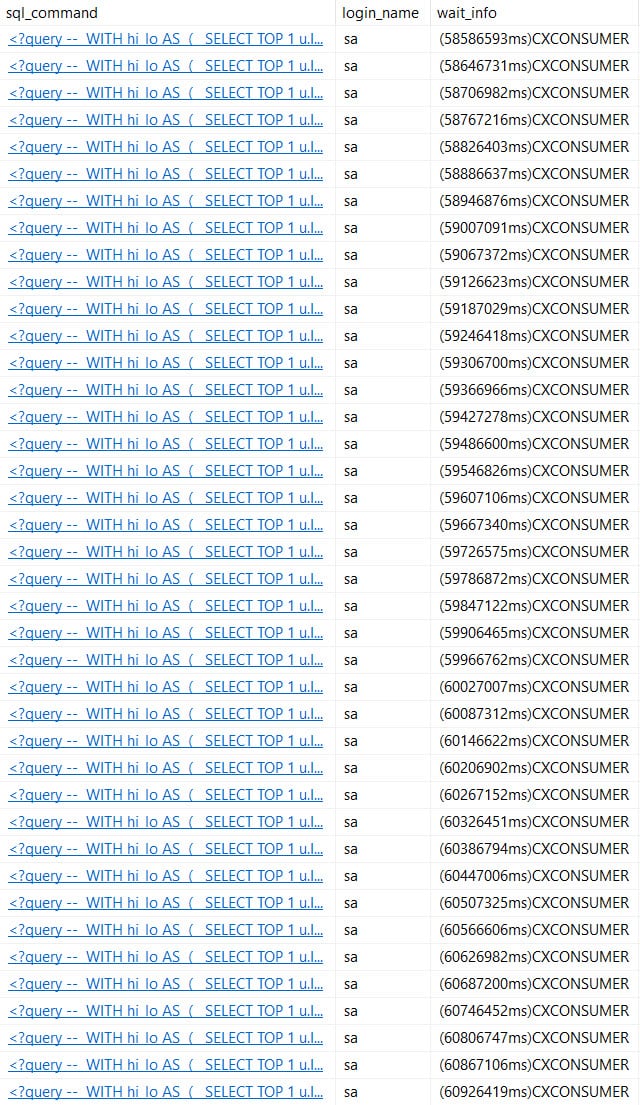
I got paranoid about missing cumulative wait stats, so I started logging sp_WhoIsActive to a table.

Here’s what that looks like, for the most recent rows.

Into The Future

Right now it’s July 20th. This post is scheduled to go live on the 24th.

Will it finish before then?!

In Updating More

This query ran for a over 45 hours.

Squinting

The full plan for it is here.

Somewhat laughably, the wait stats for this query show up like this:

The CPU time for it looks like this:

And the last few minutes of CXCONSUMER waits look like this:

Consumed

I missed the last 30 seconds or so of the query running, which is why the CXCONSUMER waits here don’t quite line up with the total query CPU time, but they’re very close. Why doesn’t that wait show up in the query plan? I have no idea.

What really gummed things up was the final Nested Loops Join to Posts.

That’s a 13 digit number of rows for a database that doesn’t even have 50 million total rows in it.

Insert comma here

Bottom Line: Don’t go ignoring those CXCONSUMER waits just yet.

Thanks for reading!

What To Learn Next


Building SQL ConstantCare®: What Mentoring Is (and Isn’t)

SQL ConstantCare
0

When we built SQL ConstantCare® as a mentoring – not monitoring – product, I really meant the word mentoring.

A lot of us are loners – the only SQL Server person in the office. Nobody really understands what we’re doing, and … we’re not even sure we understand, either. We were self-taught, and we didn’t have anybody around to bounce ideas off of.

I wanted to build a mentoring service that acted as a peer to:

  • Reviewed your database server configs
  • Told you where your blind spots were
  • Gave you personalized training recommendations on what to learn next
  • If you didn’t have SQL Server problems, told you to move on with your day and focus on other stuff
  • And most importantly, listened and discussed when you hit reply

Mentoring is a conversation.

Customers can hit reply to ask clarification questions about a recommendation, or tell me about extenuating circumstances. Maybe max memory is set to only half of the memory on the VM because you’re preparing to install another instance on there soon.

It’s a two-way street, though: sometimes customers are surprised that I would push back and say, “No, I’m not muting that alarm. You need to fix it, and here’s why, and I’m not going to send you further recommendations until you fix that first.” I’ve also had plenty of tough-love conversations where people thought they knew something, but were wildly incorrect. Examples:

  • Lots of folks believed they didn’t ever need to run CHECKDB on read-only databases because they can’t possibly become corrupt – the data can’t be changing, right? It makes sense – until you realize that storage doesn’t obey your silly read-only rules.
  • People weren’t bothering to back up system databases believing they’d never need to restore them. Ideally, that’s true – but in reality, folks have a nasty habit of sticking tables in databases where they’re not supposed to, especially when everyone’s a sysadmin. (Besides, those databases are tiny – just do it.)
  • And no, frequent memory dumps will not go away on their own.

Some of my favorite value-providing moments are just telling stories of my own history – times when I’ve thought the same way the customer thought, and how I got burned. Telling those personal stories helps folks understand where the advice comes from – and helps get those recommendations implemented.

I don’t think we’ll ever be able to fully automate the process. People believe their situation is different – and sometimes it is – and they want to be able to have that conversation about why a particular recommendation really applies to them.


[Video] Office Hours 2018/7/18 (With Transcriptions)

Videos
0

This week, Brent, Erik, and Tara discuss their SQL server specialization, CPU-ready time, making SSIS changes globally rather than one at a time, creating an Always On AG farm, Azure managed instances, going from log shipping to Availability Groups, tracking folks that executed queries, moving databases into Availability Groups, an exciting update to SQL Server 2016, and Brent’s upcoming move across country.

Here’s the video on YouTube:

You can register to attend next week’s Office Hours, or subscribe to our podcast to listen on the go.

Enjoy the Podcast?

Don’t miss an episode, subscribe via iTunes, Stitcher or RSS.
Leave us a review in iTunes

Office Hours – 7-18-18


How much vCPU Ready Time is too much?

Brent Ozar: Greg asks, “How much vCPU Ready Time is too much?”

Erik Darling: Ah, Greg must be talking about a virtual machine.

Brent Ozar: Oh yeah.

Erik Darling: So if I recall correctly about CPU Ready Time, it’s not something that you want to just look at once. It’s something that you need to look at over time. I forget all the details on it. I admit, I’m a bad virtual DBA sometimes. I forget the ins and outs of every single metric life that. Maybe someone else remembers them.

Brent Ozar: I would just start with SOS_SCHEDULER_YIELD – is SQL Server actually waiting on CPU time and how long is it waiting on CPU time – because if SQL Server’s not waiting on CPU, I don’t really care that much about vCPU Ready Time. It can be other things inside your guest that are waiting for CPU time. Then what I just do is, if I’ve got SOS_SCHEDULER_YIELD waits inside a VM, I’m just going to go to the VM admin and go hey, do you know what CPU Ready Time is? Can you show me that inside of vSphere? Can we look at it together? Oh, you see those huge spikes in the numbers, does this mean anything to you? And they’re like, oh yeah, we overcommitted that host. We have 42 other guests on it. And just even having that discussion starts to help, but that’s the only time I would go to them is first if I could prove it with SOS_SCHEDULER-YIELD waits first.


How do I make a change in a lot of SSIS packages?

Brent Ozar: Steve asks, “Today, I had to change a data type from Unicode string to decimal…” Holy smokes, “In the advanced editor of an Excel source within an SSIS package. Is there a way I can make a bunch of SSIS changes globally rather than one at a time?” Oh, dude, have I got bad news for you. You are in the wrong webcast here.

Tara Kizer: Well, I might be able to give a clue though. So at my last job, we had a lot of SSIS stuff. And when we were moving everything over to Availability Groups and multi-subnet failovers, we were trying to figure out is there a way to modify all of the SSIS packages programmatically so it wouldn’t require so much touching, manually making changes to each – you know, because we were having to swap out OLE DB to ADO.Net. anyway, the dev DBAs had figured out that BIML would provide a lot of help. So I suspect that BIML helps with this. If you’re using SSIS, you probably know about BIML already. So I would look into BIML and then maybe check out Andy Leonard.

Brent Ozar: Yes, up on the screen now, Andy’s class on expert SSIS actually has stuff on BIML inside of it, the BI markup language. It lets you generate your SSIS packages programmatically. Of course, it’s kind of a start from scratch kind of thing, but if you’re the kind of shop that needs to do that all the time – and I hate giving Steve that answer too because Steve’s like a good friend of ours and is with us all the time and, you know…

Erik Darling: We just don’t use that much SSIS ourselves.

Brent Ozar: It’s not that we have any negative feelings towards it. I’m totally fine with it. It’s just one of those things where as you get to become a database professional, you start specializing in things. So I should ask that too. So as we were going through our careers, what did y’all decide to specialize in and what called to you inside of the SQL Server engine? Erik, what called to you as you were learning more about SQL Server?

Erik Darling: Oh, I mean, obviously the performance stuff; anything involving query plans, optimizer weirdness. That just popped right out at me immediately. At first, I thought I was going to be like, oh well I like ETL. I like getting this crazy file and then doing stuff to it and that magically goes in the SQL Server and then people can do whatever they want with it. But that really got to a point where, like, I didn’t want to start learning other languages and every time I opened up SSIS I cried. So when Brent says we don’t really have negative feelings towards SSIS, I’m going to say, like, the first time I dipped my toe in that water, I was like, no. there was things, drawings and arrows, I just couldn’t wrap my head around that. I never invested a lot of time in it, but I just didn’t – and then as things went on and I got past the ETL hump and I had a stable enough process to deal with that and I started working on more reports and stuff, it would always come down to, like, well why is the report slow today? And other big questions like that that got me more into the reporting end of things.

Brent Ozar: Tara, how about you?

Tara Kizer: Well, I mean, my story is a little unique because I was just placed into a DBA role and I was just happy to get a fulltime job in IT right out of college. And I really enjoyed what I was doing but my focus for what I like has always been performance tuning and then a few years later when I got into HADR topics. Those are the areas that I really enjoy. They aren’t necessarily what got me into it because I was just placed in the job.

Brent Ozar: Yeah, I’d say to anybody watching, there’s so many good careers in SQL Server. There are so many things that you could specialize in. whatever you choose to specialize in, the deeper that you know, the better off you’ll do.


Should I stack instances and run AGs on them?

Brent Ozar: Next up, Joseph asks, “Are there any good suggestions for resources on creating an Always On Availability Group farm; as in lots of instances on two servers running SQL Server 2014 Enterprise?” And I think by instances, he just means a bunch of AG listeners. I don’t think he means a bunch of SQL Servers. I’m an optimist.

Tara Kizer: No, he used that word instance and it’s an instance installation. My answer is stop. Do not keep going with this. Two servers, I would have no more than two instances, one instance per server.

Brent Ozar: And if you mean listeners then we feel differently, but yeah, in terms of instances, we have kind of passionate feelings against them. Oh goodness, Joseph, oh, Joseph follows up with his Availability Group thing and he says his boss is requiring it as multiple instances, not listeners. Oh, Joseph.

Erik Darling: Yeah, that’s just going to crash and burn. I wouldn’t do that at all ever to anyone. I don’t care; no. Like sure, if you want me to technically implement this, yes, but I’m not supporting it because as soon as anyone does anything on this, it is going to be awful. There are a lot of words I left out of that sentence.

Tara Kizer: Virtualize – just create smaller VMs for each instance. I get that you’re using Enterprise Edition, so you just want to stack everything onto it, but just create smaller VMs and just split your licenses across.

Erik Darling: Yeah, like for Enterprise Edition, if you license at the host level, you can spin up as many enterprise instances as you want on there. So your ball’s in a better court when you do that both from resource partitioning, you know, licensing, all sorts of stuff. I would much rather go with lots of VMs than two monolithic instances of arguing Availability Groups.

Brent Ozar: Nice flexibility on patching, on outage windows, you can do different ones for each VM instead of trying to patch an entire cluster at once.

Erik Darling: You can have different people on different hosts, some affinity rules so that people aren’t stacked up too much on one host over another. I mean, putting everything on one box is just not going to be a happy place for anyone or anything anywhere – any…

Brent Ozar: Joseph follows up with, “Okay, thanks, you guys.” And I get the feeling it’s a really short response as in, okay, yeah, whatever, I’m screwed. So here’s what you do, Joseph. We’ve played this game so many times with managers. Here’s how you run it is you email help@brentozar.com and you copy your boss and you ask it in the most politically polite way possible and we’ll remember who you are from Office Hours and we’ll give you all of the answers. So we go, well we would never do that in production; here’s why… Never is probably a strong word, but I would do it if there was a million dollars on the other end of the line, sure, as long as I didn’t have to support it after.

Tara Kizer: And just be aware, our replies may not be politically correct though.

Brent Ozar: What are you, effing stupid? What kind of… And if you don’t like your manager, just send us a separate email first going, I don’t really like this guy, and then we’ll really just lay on the F-bombs and all kinds…

Brent Ozar: I have a folder of GIFs just for bosses.


Can I run SSRS on Azure Managed Instances?

Brent Ozar: Bill says, “Do y’all know if Azure managed instances can run reporting services or do you still have to run reporting services in your own Azure VMs?”

Erik Darling: Oh, I don’t know.

Brent Ozar: I do and you can’t.

Erik Darling: Alright, well…

Brent Ozar: SSRS is in this weird lifecycle thing right now where it’s kind of hovering around and they’re like, it has a separate installer and you can do it on Linux or whatever, but they don’t really have a cloud story for it right now. It’s not that it’s a bad product, it’s just kind of in a weird spot right now. So they just announced that Power BI – the Power BI reporting server and the stuff up in the cloud – now starts to have SSRS functionality. So I’m like, man this is just a weird time to be in SSRS.

Erik Darling: Yeah, everything about SSRS sounds like end of life.

Brent Ozar: A friend of mine said – working for a company – SSRS is like the store brand spaghetti sauce. You get it because it’s cheap and it’s on sale and it works, but it’s not like when family comes over or other people come over you really want to serve them the store-bought spaghetti sauce. You want to put your own tomatoes in there, something like that, to make it taste better.


What should I look out for when changing fill factor from 10% to 80%?

Brent Ozar: Mike asks, “When I’m changing fill factor on a whole lot of indexes from 10% up to 80%, what should we consider, i.e. transaction log size, plan cache, et cetera?”

Tara Kizer: I want to know how you got to 10%. Was that just a mistake and you were supposed to be 90%? We’ve had clients in this situation before. It’s like, do you know that your pages are mostly empty?

Erik Darling: Yeah, that’s tough. I don’t think I’d be terribly worried about the plan cache. I think making that change is a far more important one performance-wise than maintaining the plan cache there. Transaction log size is going to be interesting, especially if you have any HA or DR technologies in there like availability groups or mirroring or log shipping. I’d also be really mindful of locking. You may not be able to get this all done in one go. If you just have a standalone instance, this might be one of those we’re going to switch into simple recovery maintenance windows, flip that stuff over, do your changes and then flip stuff back to full. That was the first thing that I would start looking at.

Tara Kizer: And if you’re Enterprise Edition, which a lot of people aren’t, but if you are, do the online equals on option so that the existing index stays online. That’s if you care for production to continue while this maintenance window is occurring.

Erik Darling: I would want to time that too, on a dev instance, just so I know what I’m in for.

Tara Kizer: And then just make sure you have enough free space in the transaction log for the largest index. So if your largest index is say 100GB, that you have at least 100GB transaction log file size. I’d want to make sure I’d have like 150GB or so, but it’s around 100% of the size of your largest index.

Erik Darling: Yeah, I’d want to think about sorting in tempdb too on that, while we’re talking about options.

Brent Ozar: I like that. I was going to say too, the thing that always gets me is even if I’m not allowed to put them in simple recovery model – I said model, Tara…

Tara Kizer: You did, yay…

Brent Ozar: If they still have to be in full recover model then you got to do transaction log backups frequently…

Tara Kizer: Every minute.


Should we use log shipping or AGs?

Brent Ozar: Bill says, “Okay, forget my last really long question…”

Tara Kizer: I liked his question too. I was going to summarize it because I did read the whole thing.

Brent Ozar: Really? Do you want to summarize it and answer it?

Tara Kizer: Sure, so they were using log shipping, didn’t have a whole lot of issues. The reason is a warm backup, rarely had a problem, they run SQL Server 2005, they moved over to Availability Groups in SQL Server 2012 and started having some issues. There were some hiccups in the application when failovers would occur and just wants to know, should we move back to where we weren’t having issues? Is there a learning curve to Availability Groups? Sure, there’s a learning curve to Availability Groups, but you can’t really compare the two environments that they had because log shipping has no automatic failovers. What is probably happening, either the manual or automatic failovers, you’re doing a failover and the databases go through crash recovery. So the databases are not available when this occurs.

The same thing would have happened with log shipping but it would have been a very manual step, it would have taken longer and your applications would have had hiccups too. You went from a disaster recovery technology to a high availability technology. You can’t really compare your two environments. You’re not using them the same. Both of them are susceptible to latency. His information indicated that the secondary gets a lot out of sync with Availability Groups; the same thing must happen on log shipping, you just weren’t monitoring it, I bet. And it would probably be even worse there because there’s a delay. You’re waiting for the log backup to occur, the copy to occur, the restore log to occur, whereas availability groups, it’s always happening asynchronously. It’s happening at a much lower level than the file level that log shipping happens at.

So log shipping would have had way more latency than Availability Groups, at least from what I’ve seen. As far as learning curves, sure, big learning curve. We do recommend training, at least to DBAs. You don’t have to be a DBA to support this, but clustering knowledge is very, very helpful, making sure you have a staging environment. I mean, I like Availability Groups; just what are you trying to achieve? Do you just need a warm standby? Use Availability Groups and have it be asynchronous and then it kind of acts like log shipping and there’s going to be manual steps to do those failovers. But if you’re wanting high availability, you know, to reboot a node or if you’re patching or whatever and just a quick downtime for the application, the hiccups are going to be normal. That’s what occurs when you do a failover and the same thing with log shipping.

Erik Darling: And if you feel like you’ve bit off more than you can chew with the availability groups, you can always switch to me and Brent’s favorite setup, which is the failover cluster plus log shipping. Then you get HA from the failover cluster and you get DR with the log shipping and you don’t get all of the headaches of the AG.

Brent Ozar: Classic two-piece suit of high availability and disaster recovery.


How can I tell who ran a query?

Brent Ozar: Pablo says, “When I look at the plan cache, is there a way I can tell who executed those queries without starting an audit of some kind?”

Erik Darling: I’m going to answer in Spanish; no. Unfortunately, plan cache doesn’t keep that kind of information around. You would have to either audit it or run sp_WhoIsActive or sp_BitzWho – log that to a table, get a monitoring tool, one of those things, to make sure you collect that information when queries run. You could probably do it with extended events, but I would be hesitant to want to collect that stuff with extended events, just because usually when you set up that kind of session, you’re looking at collecting the SQL text or the query plan or something like that and collecting that stuff with extended events is just a nasty, angry, just woke up from hibernation, bear. It just wants to treat you like a salmon in a warm stream.

Brent Ozar: The other thing I’d ask is why you want to do it. If you’re doing it for audit purposes, like you want to know who broke something if you’re looking for inserts, updates, and deletes. You could use transaction log reader utilities. Those are not easy or straightforward. They’re kind of a pain in the rear in order to use. If you have control over the query, like over the stored procedure, I love putting a line to log it to a table. Just, like, inside the stored procedure, put in an insert into a table with the person who called it, the time they called it, et cetera.

Erik Darling: Yeah, if it’s write queries, you can do that with a trigger. If it’s just read queries, you’re in a little bit of a different place.


I’m getting this error when I run a backup…

Brent Ozar: Drew says, “I’m having some issues with SQL Server backups.” And then he goes on for four paragraphs. Okay, hold on a second. Let me see if I can spin this in a new window. Holy cow, Drew. He says, “I have an error…” Oh good, oh – so I have to read this out loud for posterity now because it’s interesting. Drew says, “I’m having some issues with SQL Server backups which are being written to a share on an AWS appliance from an EC2 SQL Server.” This is like there’s Rube Goldberg OK Go music video going on here. “I’m consistently getting the same error in the SQL Server event log for two of my SQL Server instances saying that they failed to write to a backup device, i.e. an unexpected network error occurs.” Welcome to the cloud. You should expect writes to fail from time to time in the cloud, especially going across a network share.

What I would probably do is – and this is a terrible thing – I would try to find the most reliable file path that you can, whether it’s a Windows server or whether you do it locally, whatever. But then after the writes finish, as soon as they finish, then you sync the file somewhere else. And I would also say just to be paranoid, do your log backups pretty much continuously but get them off the box as quickly as possible, even while you’re doing the fulls, because a half hour long – two hours – you’re saying two hours into your backup – two hours into your backup fails, you’re going to miss your RPO and RTO by a mile.


Can I use log shipping to seed an AG?

Brent Ozar: Next up we have Katie. Katie says, “We’re looking to move some databases into an Availability Group.”

Tara Kizer: I like these people.

Brent Ozar: Right, yeah…

Tara Kizer: It’s good to have no replication questions, all Availability Groups.

Brent Ozar: Don’t jinx us now. All the replication questions happen when… Katie says, “We were hoping we could speed things up by using log shipping and then adding the databases into the Availability group. Does this seem logical or are there better methods?”

Tara Kizer: Yeah, definitely, although I think it just adds too much complexity having to set up yet another tool just to get Availability Groups synced, so I just do it manually. And I just went through this exercise on Monday with a client – a client hired us for consulting hours rather than our critical care and so I was helping them set up – it was database mirroring, but same thing, and starting with the full backups from last night, rolling through all the transaction logs – so I have a handy script to do that. You can use log shipping, but there’s scripts out there to roll through the logs. We also have the sp_restore – whatever the name of that stored procedure is in the First Responder Kit that can help with that.

And as long as your files are named in such a way that sorted alphabetically in, say, Windows Explorer, they’re in the right order, that script would work. It assumes Ola Hallengren naming convention, but any convention, as long as once sorted alphabetically they’re in the right order, that script would help you. I had another script in my toolbox. I was using that and this client had the weekday name in the file name, so Monday was coming before Sunday, so I had to manually move commands around, which was annoying. But sure, you could use log shipping, I think it just complicates things by having to have another tool in there.

Brent Ozar: And if you’re on 2017, something kind of cool came out this week. So I’m going to go to sqlserverupdates.com which is where we post the most recent updates. No, I lie to you, I said 2017; it’s 2016. So in 2016, there is a brand new improvement in the latest CUs where you can automatically seed replicas. You can change the settings so that as you add databases to an existing Availability Group, SQL Server will automatically do direct seeding to other replicas. There’s a gotcha that I’m remembering as I say it out loud. It was a distributed Availability Groups only, which makes me want to give it the finger, but yeah, whatever.

Erik Darling: Katie brings up another point. She says she has a couple of terabytes of data and she’s trying to minimize downtime, so when I’ve had to do this in the past, when I did large data migrations, I set up mirroring because it was just like an easy one-way ticket. I put it in asynchronous mode up until I was ready to go live, flip it to synchronous, and then do the failover then. I had a pretty easy time with it. I know Tara doesn’t like it because it’s too complicated but…

Tara Kizer: No, database mirroring I will use. Log shipping is just bleurgh… Not a fan. I mean, the situation still exists. You still have to get it to apply the last transaction log, so that’s the challenge, especially when you’re talking about a couple of terabytes of data. Now, if we’re talking about say one or two databases, I’m probably going to switch my method and not use full backups so that I can get the data over quicker via SAN snapshots, restore that and then apply. I mean, you could do that, right, with the no recovery and apply a transaction log chain, so I’d probably be looking into other methods if I’m talking about a lot of data. But if it’s a lot of databases, then yeah, that’s not really going to help.

Erik Darling: For the really big ones, I had the easiest time by using a full and a diff and then going over there. And the full and the diff combo usually got me to a close enough LSN where mirroring was like, cool.

Tara Kizer: I had a 7TB database that I would have to mirror and occasionally there would be issues and we’d have to start it over again and we went from San Diego to Las Vegas for primary and disaster recovery and the network wasn’t fast enough to transfer the backup file. Even with compression, the backup file was just too long and the backup retention wasn’t long enough. By the time I was ready to start applying transaction logs, they were gone. They’d already been deleted from production and I couldn’t change that for legal reasons. And so we occasionally had some employees traveling to Las Vegas, and so we’d send a tape. We’d fly a tape with them and so they would hand deliver that and that would allow us to catch up. It was funny; flying is faster.

Brent Ozar: Katie follows up with she has four nodes in her Availability Group so she wanted to do log shipping to get all four of them into quick succession, versus mirroring, which restricts me to only one node; makes sense.


How can I do USE in Azure SQL DB?

Brent Ozar: Bill says, “Since you can’t use the use command in Azure SQL DB, how do you modify scripts that get a list of databases and look at something on each database?” Well, Bill, as soon as you figure that out, let us know because that’s one of the big reasons why things like sp_Blitz don’t work in Azure SQL DB.

Erik Darling: Sadness…

Brent Ozar: I wish that we had that capability. I wish that we could get – there’s two things that really kill me about Azure SQL DB; the inability to have the use command and the inability to do three-part naming. You know, as in database schema table – those two things are just so huge. So yeah, it’s – and it’s not that we don’t want to get these scripts to be compatible, we just don’t have clients using Azure SQL DB. So every time someone comes in from the community and they’re like, hey can you make this work in Azure SQL DB, I’m like, you’re using Azure SQL DB you say?  Why don’t you make them work? Well, that’s too hard. Exactly…

Erik Darling: It’s not any easier for us. We have access to the same stuff you do.

Brent Ozar: We are big fans of getting it to work in managed instances. We immediately, as soon as managed instances came out, we were like going through all the scripts to make sure that they work, but that is much easier.

Erik Darling: Yeah, well those just don’t have the limitations. Like you can have the use command and you can cycle through all the databases on a managed instance. If we could do that everywhere, we would just do that everywhere.

Brent Ozar: Piece of cake. Well thanks, everybody, for hanging out with us this week at Office Hours and we will see y’all next week. Adios.

Register here to attend the next live Office Hours podcast taping on Wednesday.


How to Test Disaster Recovery Before You Go Live

High Availability
9 Comments

When I build a server, success means not touching the server again for 2-3 years. I already have enough crappy, unreliable servers that fall over when someone walks past. I only wanna build good, permanent stuff going forward.

So when I build disaster recovery for something, I want to test it 3 ways:

  1. Planned failover without data loss
  2. Unplanned failover WITH data loss
  3. Planned fail-back without data loss

Let’s say we have a really simple scenario: a 2-node Always On Availability Group with one replica in our primary data center on top, and a second replica in our DR data center (or the cloud, or someone else’s computer, or whatever) on the bottom:

Simple Always On Availability Group

Here’s what those scenarios look like.

1. Planned failover without data loss

If you want to leverage your AG for easier patching with less frequent downtime, you can:

  • Patch the secondary on a weekday when you’re caffeinated and sober
  • During a maintenance window, fail over to it (which will involve steps like switching to synchronous mode if you normally run async, and then possibly switching back to async after the failover)
  • Patch the former primary
  • During another maintenance window, fail back to the former primary

This would be a planned failover, and you should be able to do it without data loss whether you’re using Availability Groups, database mirroring, log shipping, SAN replication, whatever.

As you step through doing it, document the work involved, taking screenshots as you go. Write down any jobs that need to be changed, how to check backups, etc. The goal here isn’t necessarily for anyone on your team to be able to patch your SQL Server – the goal is to enable them to do a planned failover.

Say you’re out on vacation, and your company gets word that there’s a data center emergency, and you have to migrate everything out quickly. Someone should be able to grab your checklist, follow the steps, and fail over with confidence.

2. Unplanned failover WITH data loss

Assuming that you normally run in asynchronous mode, when you experience a disaster in your primary data center, you’re gonna lose data. Some of the transactions won’t have replicated over to DR.

To simulate this:

  • Run a workload on the primary (rebuilding indexes is great for this because it generates a ton of transaction log activity, fast)
  • As the primary gets farther behind, shut it down not-at-all gracefully (I like simply disabling the network ports behind the scenes
  • Now, tag, you’re it.

Your job is to:

  • Figure out how much data you’re going to lose when you bring the DR secondary online
  • Communicate that to management to get their consensus as to how hard it will be to get that data back (to learn about that process, watch this Senior DBA class video)
  • Bring the DR secondary online

Again, document your work as you go, building checklists and taking screenshots. This is the checklist I really wanna be confident in – when the hurricane hits, I want any of the members of the IT team to be able to accomplish this. I don’t write documents for the janitorial team, mind you, just the IT team.

3. Planned fail-back without data loss

Then continuing the above scenario, bring the former primary back online. This part is way, way more tricky than it looks. Depending on your business, you may need to take backups of the former primary, start documenting what data was lost, and maybe even pave the former primaries and rebuild them completely if they were far enough behind.

This scenario is the one least likely to be done without the DBA’s involvement. Once you truly pull the trigger to fail over to DR, you’re not going to want to jump back into that hot water quickly.


After you’ve done all three of the above scenarios, and you’ve got checklists for them, you’re much more confident in how the infrastructure is going to react to problems. The end result is something that is more likely to stand the test of time, being predictable and reliable over the course of several years.

However, you can only do this BEFORE you go live, not afterwards. Nobody wants to take production down repeatedly to test this.

That’s why when I’m asked to build an Availability Group, I usually start by saying, “Great, let’s build it from scratch in an isolated environment so you can write all these checklists out and be confident in how to manage it.”


Election Injection

Development
7 Comments

Setting politics aside (Lord knows I’d like to), this ABC 7 Chicago news story covers how Russians hacked the Illinois State Board of Election in 2016:

SQL, an acronym for Structured Query Language, is a database programming language. An “SQL injection” is a common piece of cyber-trickery used to illegally gain access to government, financial, business and private computers. Experts estimate that 8 of every 10 data breaches occur as a result of SQL injection.

Cyber-trickery.

“Processor usage had spiked to 100% with no explanation” state investigators determined. “Analysis of server logs revealed that the heavy load was a result of rapidly repeated database queries on the application status page of the Paperless Online Voter Application (POVA) web site” they said.

I see.

The official report (PDF) is pretty light on details, but yeah…SQL injection.

I know, dear reader – you think everyone knows about SQL injection today, but have you had the talk with your developers recently? Why not schedule a lunch-and-learn and watch Bert Wagner’s GroupBy video demoing SQL injection?