Blog

Announcing “Great Post, Erik” – A Book of Erik’s Best Work

Company News
13 Comments

Erik Darling blogs a lot.

Not lightweight stuff, either, but ambitious posts with a lot of demo scripts, screenshots, and detailed explanations about why SQL Server does what it does.

Great Post Erik - Book CoverSo as he approached his 300th blog post, we decided to build a best-of book with his favorites.

There’s no new content here: if you’ve read all of Erik’s posts, then you already know what’s in the book. But if you’re like me, dear reader, you can’t absorb Erik’s work right away, and you want a way to revisit it when you’re on a train or waiting for your friend to arrive at the bar. In that case, you’ll love this book – it’s 62 of his blog posts formatted for easier reading. The electronic forms of the book preserve the hyperlinks, too.

Each post includes a link back to the blog so you can ask questions about what you’re reading. I’m kinda excited by this because it lets you have an ongoing dialog with the author, getting clarification about what you just read.

Or, you know, tell him, “Great post, Erik.”

The title stems from a running joke here at the blog: when a good post goes out, people comment, “Great post, Brent” regardless of whoever wrote the post. I wish I was half smart enough to write some of these.

Shout-out to Eric Larsen for his awesome cover illustration and to Pankaj Runthala at Manuscript2ebook for heroically converting hundreds of pages of WordPress output to print-friendly form.

The book is 8.5″x11″ (also, I have weird hands)
The full color pages look great
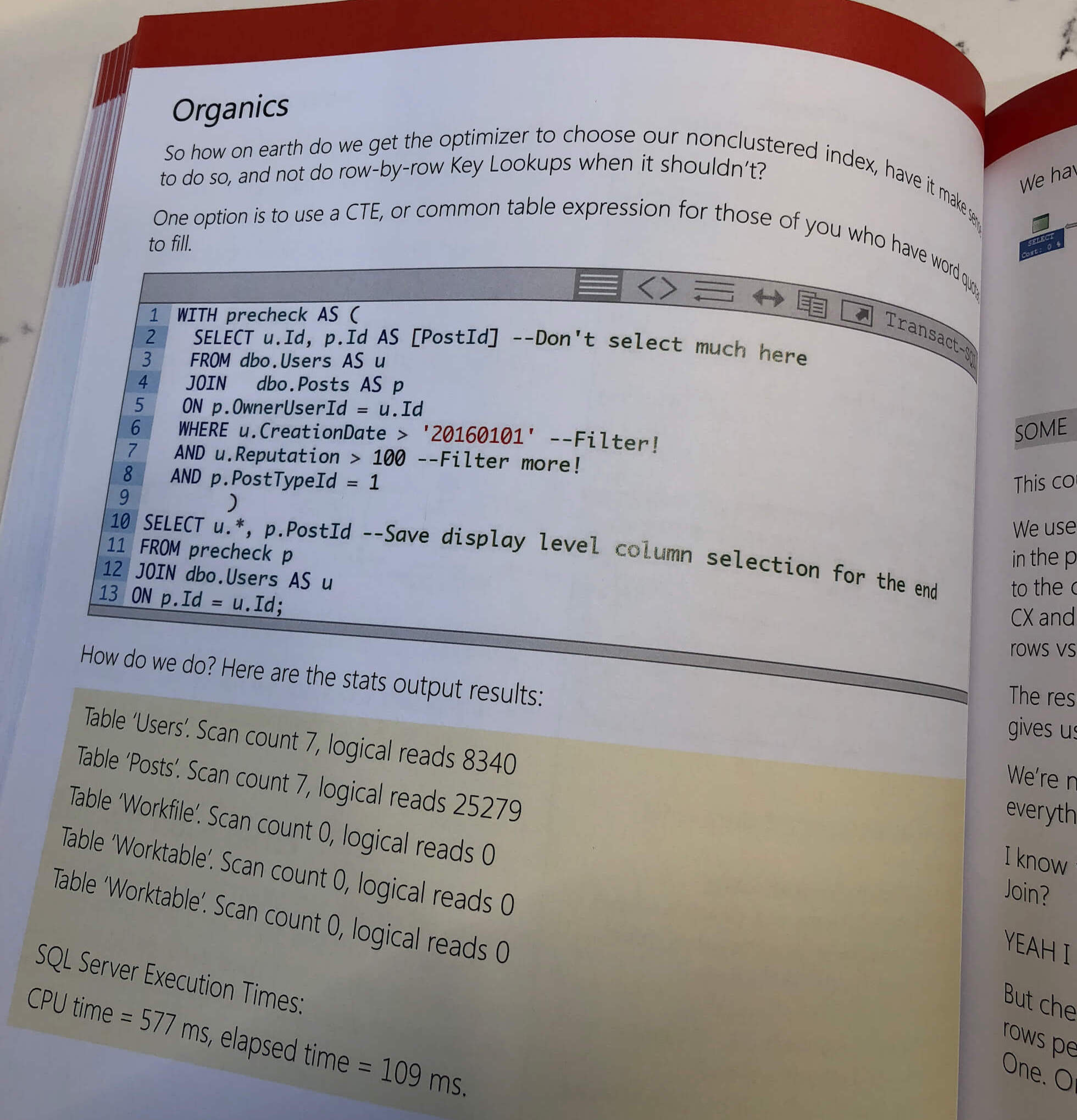
Full color code samples are way easier to read, too

You can buy “Great Post, Erik” in Kindle or paperback, click on the book’s picture to see a preview inside it, and if you’re a KindleUnlimited subscriber, you can even read it free. Enjoy.


A Quirk In Parallel Hash Join Plans

Execution Plans
0

Bailing, Takes Me Away

Both of these queries will return zero rows, in the 2010 version of the Stack Overflow database.

Querying a couple of the larger tables, with no indexes on the join columns leads to hash join plans.

Whizbang!

If you’re wondering why I’m forcing the second plan serial, using the MAXDOP 1 hint…

Wait No More

All Or Nothing

This is kind of a cool optimization that has been around for quite a while.

In the serial hash join plan, only one thread is working. When it figures out that the scan of Votes doesn’t return any rows, it can quit doing work there. The hash table is empty, so it doesn’t have to touch the Posts table.

In the parallel query, with multiple threads at work, both branches of the query plan can be active at the same time. That means threads may start up and do some work on the Posts table, only to get shut down when other threads signal that no rows got produced to work on.

In this scenario, the work is minimal. Of course, this doesn’t mean you should go around slapping MAXDOP 1 hints on your queries on the off chance that you run into this. There’s nothing particularly actionable here, only explainable.

I Know What You’re Thinking

Maybe it’s not the hash join. Maybe it’s a different optimization.

After all, hashes (both match and join), along with sorts, require all rows to arrive before they can begin processing them. They’re often called blocking, or stop and go operators because of this.

It might seem logical that the optimizer could do something similar when a blocking operation before a join produces zero rows.

Unfortunately, that’s not the case. Altering the queries slightly to force a merge join like below…

The plans end up sorting all over the place:

Crud.

And both queries appear to read fully from the Posts table, despite the sort operator after the Votes table producing 0 rows.

Posted up

Thanks for reading!


A New tempdb Trace Flag Appears!

SQL Server
19 Comments

Coming Around

Microsoft has been doing a good job of taking stuff that used to be Wizard Hat and making it part of out of the box functionality.

Starting with SQL Server 2016, you didn’t need to keep these in your setup checklist:

  • Trace flag 1118 to reduce SGAM contention
  • Trace flag 1117 so when a single file in a database filegroup needs to grow, they all grow together
  • Trace flag 2371 so statistics are recomputed less rarely as tables grow larger
  • Trace flag 8048 enables SOFT NUMA when SQL’s NUMA-awareness code doesn’t work on larger systems

These became defaults. This was especially helpful to me as a consultant because I could focus in on other problems.

Creature Feature

That changed the other day, when Pam Lahoud from Microsoft published this post: TEMPDB – Files and Trace Flags and Updates, Oh My!

I’ll let you head over there to read the juicy details, but gist of it is this:

There are some cases where having multiple files alone does not completely address PFS contention. For these cases, we have implemented a fix where we not only round robin between the files, we also round robin between the PFS pages within the files, allowing us to spread the object allocations across all the files and within the files themselves.

The fix that Pam talks about is Trace Flag 3427. The KB for it is over here.

Bottom Line

If you’re on SQL Server 2016 or 2017, and you’re noticing tempdb contention, you might need to enable this Trace Flag.

I’m assuming a little bit here — namely that you’ve already got multiple tempdb files — since that’s part of the setup process for SQL Server now.

If you don’t, start by adding them. There’s a good set of instructions at the link.

Thanks for reading!


Building SQL ConstantCare®: What Cloud Hosting Costs

In our behind-the-scenes posts about building SQL ConstantCare®, I’ve written about how we picked serverless architecture for the application layer, and how we picked AWS Aurora for the database layer. Hosting costs were a big driving factor in those decisions – so how has that worked out?

Presented for your enjoyment, here are our total SQL ConstantCare® hosting costs (including both production and development environments) from AWS Billing Explorer for a rolling 30-day period as of when I’m writing this post:

  • Relational Database Services: $1,418.59 – even using relatively small AWS Aurora PostgreSQL clusters, the database layer is still the most expensive. Production is a pair of db.r4.xlarges (4 cores, 30GB RAM) and dev is a pair of db.r4.larges (2 cores, 15GB).
  • EC2-Other: $64.43 – networking infrastructure (NAT gateways, load balancers, elastic IPs, Cloudwatch.)
  • Lambda: $58.58 – like an application server equivalent for serverless. You pay by the millisecond that your code runs, with a multiplier for how much memory you need.
  • S3 (Simple Storage Service): $11.02 – the cloud equivalent of a file server, S3 is where we store your uploaded files.
  • DynamoDB: $6.80 – key/value database where we store the list of incoming files and what we’ve done with them. Databases don’t get a whole lot cheaper than that.

I joke with clients that managers are magnetically drawn to the largest number to ask, “How can we make that number smaller?” In this case, roughly 90% of our costs come from the relational databases, so that’s the obvious focus for cost reductions.

Side note – DBAs: if you want your new server to have monitoring software, just include that as a line item in the purchase, but also include the SQL Server licensing costs. The manager will focus on that $50,000 licensing cost and start asking questions there instead of asking about your $2,000 Idera SQL DM, Quest Spotlight, or SentryOne license. (This same trick works with our own AWS bill for this same rolling 30-day period, where I rarely look at the SQL ConstantCare hosting costs – the top costs in this 30-day period were the $4,454.93 cost of running VMs for last month’s Mastering Index Tuning class, hahaha. But back to the focus of this post, SQL ConstantCare’s costs.)

Cutting RDS costs with Reserved Instances

By default, RDS instances are paid per-hour with no up-front costs and no commitment. That made sense when we first started the project because we had no idea what our performance needs would look like (and indeed, we changed instance sizes a couple times along the way.)

As your project matures and you can start to predict hosting horsepower requirements, you can switch to Reserved Instances: making a commitment as to how much you’ll use, and scheduling a regular (discounted) price for that resource. Our production servers are a pair of db.r4.xlarge’s – each with 4 cores and 30GB RAM, priced at a whopping $0.58 per hour. We can commit to reserving them and get a discount:

Reserved Instance pricing for db.r4.xlarges

I think a 3-year term doesn’t make sense here because of what’s coming with Aurora Serverless, but more on that in a second. A 1-year term is a no-brainer though – we can cut our costs by 34% right out of the gate by committing to a 1-year term, or get an even bigger savings if we prepay the year’s bill outright.

Keep in mind that the costs shown in that screenshot are for just one instance. If I prepaid a 1-year term for our production and development clusters, we’d be looking at a credit card charge of around $8,310 – doable, just something you want to think about when you’re a small business. (Without getting to finance-y about the time value of money, the zero-upfront method will cost me about $1,676 extra over the span of a year.)

For the production cluster, a 1-year commitment with no upfront costs was a no-brainer given our current project status – saving us thousands of bucks over the course of a year. I hit Purchase on that while writing this post.

Other ways to cut database costs

RDS metrics from production

Here are the less-common ways of doing it, arranged in a rough order of easiest to most complex:

  • Switch to AWS Aurora Serverless – where the database doesn’t even run unless you’re querying it. Unfortunately, that’s only available in MySQL flavor right now, but the instant it’s available for PostgreSQL, we’ll probably switch the development environment over to this for starters and whack a couple hundred bucks out of our bill right away. (That’s why I didn’t reserve instances for the dev cluster.)
  • Downgrade production to smaller RDS VMs – right now we’re running 4 cores, and based on our CPU workloads, I’m pretty confident we could drop even further to 2 cores and still churn out customer emails rapidly. However, when I do ad-hoc queries for analysis, I still want fairly quick response times, and my ad-hoc queries are terribad. I’ve become that manager I’ve always complained about. (Richie makes sure I only have read access to production though.)
  • Host PostgreSQL ourselves on even smaller VMs – given that our workload is really bursty, we might even be able to get by on $70/mo t2.larges (2 cores, 8GB). Hell, we could prepay for a year and get it down to $40/mo. However, then we’d have to start managing our own PostgreSQL, and there’s a labor cost to that.
  • Store data in even cheaper databases – I tell you what, when you look at that $7 bill for DynamoDB and realize that it includes both production and development, you start wanting to put a whole lot more data in there. For example, as we start analyzing query plans, it’s obvious that the XML plans don’t belong in a (relatively) expensive database: we knew that already from PasteThePlan, where we store metadata in DynamoDB and the plans in S3. Furthermore, the business logic of analyzing them doesn’t belong in the data layer either.

I find it hilarious that the relational database portion of our bill is the most expensive, while simultaneously being the least flexible. It’s just like every other project I’ve ever worked on: relational databases are expensive, and that’s why we’re all here, dear readers. Thanks to the cloud, relational databases are getting less expensive – but for production-scale deployments, they’re still not getting truly cheap in the way serverless code is.


[Video] Office Hours 2018/7/11 (With Transcriptions)

Videos
0

This week, Brent, Richie, and Erik discuss best account practices for SQL Server, change tracking, disabled indexes, measuring queries to gauge their speed, overcoming issues between Management Studio and integration services, deadlocks and long-running processes, query tuning, and lock escalation.

Here’s the video on YouTube:

You can register to attend next week’s Office Hours, or subscribe to our podcast to listen on the go.

Enjoy the Podcast?

Don’t miss an episode, subscribe via iTunes, Stitcher or RSS.
Leave us a review in iTunes

Office Hours Webcast – 2018-7-11


Brent Ozar: Alright, Donna asks, “Should SQL Server run under the local system account, an active directory account, or NT authority network service? What’s the best practice or easiest to support?”

Erik Darling: I always went with the service account. I liked being able to control permissions to places outside of the SQL Server. I liked to very specifically have my service accounts inherit certain permissions; so either lock pages in memory or perform volume maintenance tasks. But really, aside from that, you know, if you’re not doing anything crazy and you find yourself spending more time creating different service accounts and trying to figure out what to do with them then just use the local ones. But if you have a need for, you know, going places outside of the SQL Server or assigning specific permissions, I really like the service account better.


Brent Ozar: Mark says, “Afternoon, y’all. I’m investigating blocking caused by the change tracking cleanup process running on some heavily updated tables during production hours. My thinking is to turn off auto-cleanup and manually clean by looping through the tables using the documented stored procedure sp_flush…”

Erik Darling: I really wish you had read this before you started reading it out loud.

Brent Ozar: Even our transcriptionist is like, what the heck did you just say? Note to transcriptionist, I apologize for that. You don’t have to get it right. It doesn’t matter. We wish we wouldn’t have read the question. We’re all full of regret at this point.

Erik Darling: Our transcriptionist just became an anti-Putin blogger to get a more safe line of work. What just happened?

Brent Ozar: Mark, I don’t think any of us have every used change tracking. I don’t even think – Richie, have you ever used it? You’ve never used it either, right? No. his video either froze or he’s shocked with horror. He might be shocked with horror. Now, at this point, we should make Miami jokes [crosstalk 0:02:05.5]… Our poor transcriptionist… Richie, I love Mexico. What could I say that would shock him and make him move? Oh, he did disappear. It was his internet…

Erik Darling: Here in crime-free Brooklyn the sirens go on forever.

Brent Ozar: Oh my gosh, mark says, “In testing it takes upwards of six hours to complete.” I would actually open a support case. I would open a support case with Microsoft because I think it’s probably going to be the cheapest way to get that answer. Or I would post it on dba.stackexchange.com, just because that way, I think there’s other people out there using change tracking. I don’t have an anti-change tracking field; it’s totally fine, I just never run into people using it, so you got me there.

Erik Darling: I think, just from having read some change tracking questions on Stack Exchange, I’m at least sort of sure that you can index tables differently to help these processes along. So I would ask there, open u a thing with Microsoft if you have support with them and start from there. We just don’t use it enough to be terribly helpful with that.

Brent Ozar: That totally make sense. It looks like the slide deck froze too on Drew Furgiuele too. Let me move that a little, there it goes…

Erik Darling: Everything is frozen today. Richie had a blue screen.

Brent Ozar: I wish I had a way to easily show you guys the screenshot of Richie’s blue screen. Richie also has more computers probably than any of us, more laptops, more of this gear but none of them work for – if you ever wonder why it takes a long time for us to get software out, it’s not because Richie’s not a good developer. He’s a great developer. His machines just keep blue screening.

Erik Darling: It’s his damn Windows developers ruining everything for him. They can’t get those audio drivers synced up.


Brent Ozar: Joe asks, “What happens when an index is disabled?” Joe’s probably our favorite name too. We know a lot of good Joes. “What happens when an index is disabled? Is there any overhead or is it taking up space on disk?”

Erik Darling: Nah man, you disable that index – you do have to be careful because there is some locking involved when you do the disable, but it will de-allocate all the pages were associated with it and you just keep the definition of the index in object explorer or in SQL Server stiff it will show up as a disabled index. It makes life pretty easy if you disable something that you wanted to keep. You can just kind of right-click and hit rebuild and have it come back to life. You do have to be careful though if you’re using maintenance plans or do any sort of index-y stuff on your servers. They will re-enable disabled indexes for you without asking, so fun stuff there. But aside from that, no, not really an overhead.

Brent Ozar: I could not believe it when I first ran into that. somebody told us if you run maintenance plans, it enables disabled indexes. And I thought there is no way maintenance plans can suck that bad. I don’t like maintenance plans, but wow, they do suck that bad.

Erik Darling: The stuff you run into like that that just makes you lose your damn mind, like now I have to know this. I have to remember this, I just forgot someone important’s birthday because now I have to remember this thing about maintenance plans. Like that part of my brain just went…

Brent Ozar: Erika asked me yesterday, she’s like, how old are your parents? I’m like, I have no idea. No idea. What birth year are they? No clue. Do you know their birthdays? Mom’s in February, dad’s in June, just no clue.

Erik Darling: No, but I can tell you all about the 8K page structure, like everything else…


Brent Ozar: Pablo asks, “My prod and QA servers have different storage and my dev team doesn’t care. They say, when they develop stuff, don’t worry it will be faster on production anyway. How do I measure…” I’m going to change what he asks to make it make more sense, “How should my development team measure their queries to know whether or not they’re going to be fast in production?”

Erik Darling: I would disregard disk almost entirely and I would focus on making sure that I have enough RAM so that whatever the disk subsystem is, I’m not spending a lot of time touching it when my queries run.


Brent Ozar: Next up, Steve asks, “Do you have any tips…” Oh, do we ever…

Erik Darling: Frosted sometimes…

Brent Ozar: “For overcoming the version mismatch issues between management studio and integration services?” Oh, that’s so terrible.

Erik Darling: No, I still don’t know how to open SSIS, so no.

Brent Ozar: What I had to do as a database administrator, and this is going back years ago, but I had to maintain different VMs with different versions of management studio so that I could go open up different integration services packages.

Erik Darling: Oh yeah, because maintenance plans from one to the other would just be like, we can’t figure this out.

Brent Ozar: Yeah, it sucked so bad. And these days, with the fast and furious release of SSMS, I’m kind of even more interested in that because they’ve brought out stuff that breaks functionality and they’re like, we’ll ship a fix soon. And I’m like, yeah but I need to create a table today.

Erik Darling: 17.8.1 is now available…

Brent Ozar: Which tells you something in the agile – and it’s not that I want it to go back to only updating every service pack. I like where they’re going, but there’s a mix in between those two.

Erik Darling: You know, and I understand the pain of frequent release cycles. I’ve had less than perfect First Responder Kit releases. There’s been some weird stuff that’s gone on in there. So I don’t pretend to be totally guilt-free and innocent with the whole thing, but I’m one person testing against a limited amount of stuff. I would hope that with Microsoft’s nearly unlimited financial resources, they’d have some case-sensitive instances to back stuff up against. I don’t know, little things.

Brent Ozar: And you would also hope that the people who are managing Azure in-house would [dog food 0:08:14.0] first. And Microsoft keeps talking, “Everything we give you, we’ve already been using for months up in the cloud.” And then they ship an SSMS that doesn’t work with Azure SQL DB. I’m like, what, what are they using up there?


Brent Ozar: Joe asks, “We seem to experience deadlocks during long-running CPU intensive processes, like stuff that takes 15 minutes or more. Is there a relation between deadlocks and long-running processes?”

Erik Darling: I mean, when you have a long-running process, you kind of tend to increase the likelihood of hitting or locking or deadlocking scenario, especially if those long-running processes are crammed inside a BEGIN TRAN or whatever. You know, usually when we talk to people who have these problems, like the three most common solutions are either to make sure you have the right indexes in place to make these things fast, maybe batch your modifications so that you’re not spending a long time getting a ton of locks, trying to escalate locks, all that other stuff – batch sizes of 1000 or less for your modifications. If you can, look at an optimistic isolation level like RCSI or snapshot isolation if you just want to, like, have certain queries knock against each other for readers and writers.

There’s a lot of options to kind of make your life a little bit easier when you have long-running processes. But you know, obviously, the first goal is to have good indexes, to make sure that we have processes that run as quickly as possible before we go jumping into other things that are a little bit more rocket science-y.

Brent Ozar: Yeah, a link we always point people to, Michael J Swart’s Take Care When Scripting Batches, talking about how you do work in smaller chunks. I also want to throw a plug out for Erik’s excellent sp_BlitzLock. This thing is awesome. So I’m going to fire open SQL Server management studio. I don’t have a deadlock already in here, so we’ll see if – I don’t think I’m going to be able to – I’ve got a script real quick where we’ll go and create one, just because we’ve got time on here and I love you people. Deadlocks are fun.

Erik Darling: Yeah, why not? Let’s spend time with each other.

Brent Ozar: So I’m going to say – yes, even us on camera time together. I love you, man. So sp_BlitzLock will go through and look at the system health session in order to see if any deadlocks have happened recently, what queries were involved. So right now, I just ran it and it doesn’t show any results. So let’s fix that. So what I’m going to do is I’m going to go get out a query that I’m going to be running later this week on a training class, actually.

Erik Darling: Now, if you have an extended events session that is capturing deadlock XML, you can also point BlitzLock at that. you don’t have to just use the system health one. If you have specific monitoring for it, you can go and look at that too.

Brent Ozar: So over on the left-hand side, and I’ll switch into the Stack Overflow database just because I don’t like doing things in master – so over on the left-hand side, I’m going to start by creating a couple of tables. I’m going to create lefty and righty. They both have just a few rows in them. They both have a primary clustered key, so lefty and righty both exist right now. Over in the left-hand side window, I’m going to start a transaction and I’m going to lock lefty. So lefty is now locked in the left-hand side because I didn’t commit yet. All I did was begin the transaction…

Erik Darling: But it feels like someone else did.

Brent Ozar: But it feels like someone else… I don’t know how many of our audience is going to get that, but I was pretty proud that I got it.

Erik Darling: You’ll know by the amount of people that drop off the call.

Brent Ozar: These people have no – what are they talking about? Adolf Garlic – what? So over on the left-hand side, lefty is locked. Over on the right-hand side, righty is locked and everything works fine here so far. They can both hold locks on two separate tables. Now, over on the left-hand side, I’m going to go through and try and update righty. And it won’t work because right now, over on the right-hand side, righty’s already locked.

So on the left-hand side, this guy is blocked. There’s no timing for block outs, blocking by default on SQL Server. By default, blocking can go on forever, but I’m going to do something on the right-hand side and things are about to happen real fast. So I’m going to explain what happens before it happens. On the right-hand side, I’m going to try to update lefty. Now, at this point, the left-hand window is waiting for stuff on the right, the right-hand window is waiting for stuff on the left. It’s exactly like the Reservoir Dogs scene in the garage where they’re all pointing guns at each other and the mafia and all that other good stuff from Stack Overflow.

So when I hit execute on this right-hand side, within five seconds, SQL Server is going to all of a sudden wake-up and decide to kill one of these transactions. It decides to classically kill the one that’s the easiest to rollback. In this case, they’re both roughly the same. The one on the right was chosen to die because he hadn’t done any work yet, whereas the one on the left had updated both tables. So we had a deadlock. The transaction was deadlocked, try to rerun your query – screw that. What we’re going to do is we’re going to go look at…

Erik Darling: You might want to keep that up. Sometimes the first lock doesn’t end up…

Brent Ozar: Ye of little faith. You’re probably right. Look at that, oh god, look at you. So let’s try it again, right side, let’s go update, BEGIN TRAN…

Erik Darling: I kept running into that when I was writing BlitzLock. I’d be like, okay, clear things out, start fresh, deadlock. Where’s the deadlock? Damn, where is it?

Brent Ozar: Please work this time… No, still. Alright, so BEGIN TRAN, BEGIN TRAN, update, update – oh, he’s still executing. Hold on, rollback. This is going to be all kinds of fun. Rollback… People are like, I just wanted to get my question answered and I had to sit through and watch them herpa-derp through one deadlock after another.

Update, update… sp_BlitzLock, there we go, look at that.

Erik Darling: That felt good.

Brent Ozar: Do you wish to commit these transactions? Hold on, cancel rollback. It’s Richie Rump, ladies and gentlemen. So forget everything we’ve just said in the last five minutes.

Erik Darling: Yeah, we lied.

Brent Ozar: So now, what sp_BlitzLock shows you is here are the queries, here’s deadlock number one, here’s deadlock number two, shows you who the winner was, who the victim was. You can see from DBCC INPUTBUFFER type stuff. Here’s the exact queries that are involved. Here are the object names that are involved in the block. Here’s the query that was involved, or here’s the application that’s involved. One of my favorite things is that you can see, because people are like, “I swear I’m only running everything in NOLOCK with read committed snapshot isolation or read uncommitted.” You can see right here what’s going on. Then, he’s got a really nice summary grid down here were you can get more information about the queries that were involved, run sp_BlitzIndex to see which indexes are missing. All kinds of fun stuff.

Erik Darling: If you scroll a little bit to the right, one of our new contributors added the entire XML deadlock graph; Joshua Darnell added that in a recent thing. So if you need to go send that off to someone else, you can go just copy and paste it form right over there.

Brent Ozar: Or, if you want to show it in SQL Sentry Plan Explorer, visualization of deadlocks, copy and paste it into there. The world is your oyster; your terrible smelling oyster.


Brent Ozar: So let’s see – next question, Jim says, “Hi, guys. We’ve been using 2017 read scale availability groups without a windows cluster. We thought we’d be able to do backups on our secondaries but our secondaries are never detected as a preferred backup replica.” Yeah, no you don’t want to do that. “Is that a limitation of clusterless read scale availability groups?” I don’t know if it’s a limitation of it documented or not, I’m just a huge fan of only running backups on a primary. In our senior DBA class, we talk about why. So, unfortunately, no dice.


Brent Ozar: Paul asks, “I’m creating log shipping across two separate domains. What would be the best way to set up the service account that will run the log shipping process?”

Erik Darling: I’ve never done a cross-domain – I’m not even sure where to begin looking for issues with that.

Brent Ozar: I just wouldn’t. I mean, you can do the log shipping, but they don’t need to be identical service accounts. Like earlier, Erik goes, “Just make sure that they’re service accounts so that you can designate those service account permissions on the file share where the backups are going to be.” But that’s all you should have to deal with. They shouldn’t be directly talking to each other at all. We should put in a plug for sp_AllNightLog too, but then I’m not going to demo one more thing inside this session. That’s about where I draw…

Erik Darling: And now we have this server over here… No, we don’t.


Brent Ozar: Marci asks, “I loved y’all’s post, Why Multiple Plans For One Query Are Bad. Have you seen any success with dynamic shops using either optimized for ad hoc or forced parameterization? We have a query with over 1000 plans. It’s not too terrible, but which option should we try?”

Erik Darling: Whichever one you can support, I guess. So like, there are some times where I’m working with a client, I’m like, look you have these three options to fix parameter sniffing. Which one are you mist likely to go with and which one puts your server in the least amount of danger? And any single one of those can be a reasonable solution in a certain set of circumstances. So like, if you have a query that doesn’t run very often and it’s just always going to be weird and different and you don’t have anyone sitting there checking out the plan cache and monitoring stuff, throw a recompile hint on it.

I’m not going to argue with you, I’m not going to yell at you. It’s probably not going to do anything to awful to your server. It really just kind of depends on your situation and the amount of time and effort you have to fix things. If you really want to spend a lot of time and dig deep and fix queries and indexes and try rewrites and temp tables and CTEs and whatever else, go ahead. But generally, it falls upon the person who has to support it long term to decide which thing works best for them.


Brent Ozar: Josh says, “If you stop and restart the system extended events session, you’ll get results in BlitzLock.” That’s not a bad idea too, but I’m of the band my head against the wall repeatedly until the stuff comes out. I’m all about that.


Brent Ozar: Oh my god, Paul… Paul asks, “The developers at my job…” They need to spend more time hanging out with Richie. “The developers at my job want to disable table lock escalation to alleviate locks during large data processing sessions. Is this a good practice? If not, why?”

Erik Darling: No. So lock escalation is a cheeky monkey and it’s going to – SQL Server does it for a good reason. Like, SQL Server only has so much memory that it’s going to give out for locks and when a query is – when SQL Server is like, oh this query is going to need five, 10, 15,000 page or row locks, I’m going to try to get this table level lock to just lock the one object. You don’t want that much memory being overcommitted to locks. You don’t want SQL Server waiting to get memory to give out to locks. You don’t want any of that stuff happening. That’s generally a pretty bad idea.

If you are having that much trouble with locking in this situation, this is what partitioning is for. It’s not the magic performance feature that a lot of people think it is; it is exactly the stuff like this. It’s a data management feature so you can easily work on a single partition, swap partitions in and out without killing concurrency too badly.

Brent Ozar: I also worry about – you know, we just demoed deadlocks – what happens if you have say five, 10, 100,000 locks pending against two different sessions and then they want to start stepping on each other and you run into a deadlock? Holy cow, the rollbacks are going to suck. The rollbacks will just be terrible; absolutely awful.

Erik Darling: And you know, even with partitioning, Microsoft, when that came around, they brought out a new lock escalation level which was auto, which would escalate locks from a row or page to a partition. Even in there, there’s a big bold note in the release, like this may cause deadlocks in certain scenarios if you’re doing it, like, you know, if these partitioning queries start stepping on each other’s partition. So it’s not – there’s no such thing as a free lock, no matter how you take it.


Brent Ozar: And then finally, Sreejith asks, “Upgrade question – what year will Richie’s t-shirt’s stars get upgraded from four stars to five stars?”

Richie Rump: Not this year; we’ll just put it that way. So for those who don’t know, that’s for each World Cup that a team has won. Every team that has won the World Cup puts a star on there, except Uruguay. Uruguay has won two World Cups, they have four stars, so…

Erik Darling: How do they do that?

Richie Rump: Well because they count their Olympic wins in there, which nobody else does.

Erik Darling: Oh, that’s cheating.

Richie Rump: It’s cheating.

Brent Ozar: Thanks, everybody, for hanging out with us this year. Now we’re all going to go off and watch – I almost said Americas Cup, but World Cup. There ain’t no America this year. Americas Cup is sailing and there ain’t none of that. So thanks, everybody, and see ya’ll at the next week’s Office Hours. Adios.

Erik Darling: Bye.


[Video] Office Hours 2018/6/27 (With Transcriptions)

This week, Brent, Erik, Tara, and Richie discuss using SQL Server 2016 vs 2017 for production environment, reporting, reindexing jobs, Azure vs Amazon, parameter sniffing, creating custom alerts for agent jobs, activity monitor, troubleshooting SQL Server 2014, replication, turning off auto-updating stats on tempdb, and why Brent can’t get a tan.

Here’s the video on YouTube:

You can register to attend next week’s Office Hours, or subscribe to our podcast to listen on the go.

Enjoy the Podcast?

Don’t miss an episode, subscribe via iTunes, Stitcher or RSS.
Leave us a review in iTunes

Office Hours Webcast – 2018-6-27


Brent Ozar: Tom starts out by asking, “Does the team still recommend SQL Server 2016 over 2017 for production environments?”

Erik Darling: I don’t know that we ever recommended one over the other. I usually recommend being on whatever is the newest version, like, for new environments. Like if I was spinning up a brand-new SQL Server box for production today, I wouldn’t want to be on 2016 SP2, I want to be on the newest one. I want to be on the most recent version because that’s the most likely to get back-ported fixes and improvements and all that other stuff and then when you bug Microsoft for support, they’re more likely to respond because they’re like, oh crap, this is our newest one. If there’s a problem here, it’s going to be a problem later when people actually – when real people start using it. So I would always recommend being on the most recent, even if it’s a little scary.

Brent Ozar: I’m there too because I don’t want to reinstall this thing that often. I’m going to put the SQL Server in and it’s going to be there for like ten years because my managers never ever let me upgrade or install anything. So I want to get on – man, if they could let me get an early access build to 2018, I’d probably be in. like, alright, let’s do this.

Erik Darling: I can get you one of those for $5.

Brent Ozar: $5, they’re at Chinatown, right? They have all those DVDs…

Erik Darling: SQL Server.

Richie Rump: Is that one of those places where it’s kind of like a storage unit and you say, I want that one, and they say come back in 30 minutes and then they’ll have your DVD ready?

Brent Ozar: Or you go through an ally and go past all the fake Rolex watches; the Folex watches…

Erik Darling: Yep, your Casios, your [Boonie and Dereks], whatever you want.

Brent Ozar: I do have to say, it does bother me that you can no longer get – I can no longer get – fake watches in New York, because I used to love going and getting a $20 Breitling or something because I thought they were funny as hell. They would die, and then of course, when they die, you’re not going to take them in to get the battery replaced because you don’t want to be like, hi can I get the battery replaced in my $20 Rolex?


Brent Ozar: Brian asks, “Hi team, my boss wants some readable databases on another server, but we can’t use Availability Groups because this SQL Server is stuck on 2008 R2 for a while. Could I do some kind of database mirroring or automated nightly snapshots, or is there a better way to do this?

Tara Kizer: Replication.

Brent Ozar: That’s fair. So what kind of replication… [crosstalk]

Tara Kizer: Only because of the old version though. My client right now, they’re on 2008 R2 and they would like a reporting environment. Well, you get log shipping or you get replication. They can’t handle the latency of delaying the restore, so if they get replication – you can do it with a database snapshot, but you know, you have to do it regularly, put it on a schedule and the data is immediately latent. It’s not being kept up to date so you have to rebuild it all the time. I really don’t think that a snapshot on top of a mirror is a good solution for me for reporting.

Brent Ozar: It’s Enterprise only, you’ve got to pay [crosstalk] bucks for it.

Tara Kizer: yeah, transactional replication…

Erik Darling: My question would be, like, how old does that data have to be? Because like Tara’s saying, if you want it to be up to date, then replication is probably a good bet. If you can withstand some latency in the data then log shipping might be a good bet. There was a really good answer on Stack Exchange recently about taking snapshots with mirroring where someone was talking about setting up a database with – it’s all synonyms that point to the snapshot and then dynamically rebuilding them with a new snapshot name whenever you generate one. I thought that was a really cool idea because that’s a lot better than – what I always learned was the very manual process of taking a new snapshot, draining users out of the old one, directing them to the new one. Like, I thought the synonym idea was – I think it was Aaron Bertrand or someone from Microsoft. But I was like, wow that’s cool; I never would have thought of that.

Brent Ozar: I have done that and the pain in the rear is, if you can’t get single user basically on the database, your script goes halfway through altering the synonyms and then breaks because somebody has the object open and it’s blocked. So then some of your queries are pointing to one snapshot and some are pointing to another. Yeah, that’s…

Erik Darling: Just use NOLOCK.

Tara Kizer: The fact that you said automated nightly snapshot is a possible solution means that latency is tolerated here, so I mean, for me, I might even just do a backup and a restore. You could either do log shipping with a delay – you know, that way you skip like eight hours out of the day then it will catch up on its own – or a backup and a restore, but you know, that’s probably one of the least desirable as far as fast. Snapshot replication can do it too, you know, it doesn’t have to be transactional.

Erik Darling: Yeah, you know, if you were going to go the backup and restore route, I would probably want to grab the PowerShell scripts from dbatools because they have a good automatable restore thing. Or grab like Quest LiteSpeed, which is pretty cheap per server. And they can automate a lot of that stuff too.


Brent Ozar: Let’s see, next up, Jeremy asks, “We had a re-index job running on a 4TB database. Our Availability Group…

Tara Kizer: See what you’ve done with this re-index job…

Erik Darling: You can just see Tara’s face turning…

Brent Ozar: It’s going straight to her. “On the secondary server, the database was in a recovery state. How do I see what it’s doing or any progress?”

Tara Kizer: Good luck with that. Progress check the error log… Check the error log. It should tell you the phases it’s in, in percentage, because if it’s in recovery then it’s going to crash recovery over there. I mean, at least this only happened to the secondary. If you have a re-index job during job during a failover and it happened to be working on a large index, oh boy, crash recovery is going to take a while. So this sounds like it might have been async, since I would have thought that if it was sync then the primary would have had issues too. I don’t know. A lot of people can’t run re-index when you use Availability groups, especially on high-volume systems and 4TB. So I’ve had to completely disable maintenance on Availability Groups, and guess what, no performance issues. I had an update stats job once or twice a day and I was fine.

Richie Rump: Yeah, I had a 60TB database that went into recovery and it took weeks; weeks. And the database, it was completely the database administrator’s fault. He was doing something he shouldn’t have done and he was not fired.

Tara Kizer: And you guys just left it that way? You didn’t just start the restore process? I mean, 60TB – I can’t imagine how long that’s going to take.

Richie Rump: the server was pretty beefy, so I quickly essentially failed it over manually with just data and just started using that for processing. So I saved the day.

Tara Kizer: Richie pulled out his DBA hat.

Erik Darling: Quite the DBA hat he has. SQL Server DBA, Postgres DBA, cloud DBA…

Richie Rump: One server failed – look the other failed over – that one failed, oh look it goes back the other way, that failed. Oh look, it goes back to the other one and it fails.

Brent Ozar: Some fun times with our own hosting.


Brent Ozar: Ron asks a relevant question. He says, “If y’all are going to pick hosting, do you pick Azure or Amazon?” Richie, what did we pick and why?

Richie Rump: We picked Amazon because Brent was using Amazon. I mean, really, that’s the only – at this point – I guess the other thing was that we were looking into serverless and the serverless story was better at the time at Amazon than it was in Azure. But really, they’re so comparable these days. I mean, if you’re on SQL Server and you don’t want to use RDS and you just want to go ahead and use Azure or whatever, go do that. I mean, if your company is already using Azure, go use Azure because the resources are probably there and you have knowledge in the company and stuff like that. But they’re both pretty comparable. I find Amazon a little bit easier in some things and I find Azure a little bit easier in other things. So it is what it is.

Brent Ozar: I would say too, just like we picked one based on one particular service that wasn’t available anywhere else at the time. You may have the same kind of thing. There may be some business make or break that – man, I have got to have exactly what Azure CosmosDB offers. This is make or break for me for some reason, but it’s fairly rare.

Richie Rump: Yeah, I would love to use CosmosDB in some of our scenarios. That would be really, really interesting to use some of that stuff, but it’s fine. We get along with what we got.

Erik Darling: I think I would avoid Azure because DTUs terrify me…

Brent Ozar: Now you can get cores and RAM. They let you buy Azure SQL DB in cores and RAM. Because you and everyone else in the world – it sure terrified me.

Erik Darling: Like what the hell – it’s like getting a weird tax at the end of the month, like, what is…

Richie Rump: Yeah, I will say this; I do find Azure security much more difficult to grok than AWS security I think because they added that Enterprise layer to it, it’s just a little more difficult to put your head around some things.

Brent Ozar: Look, dude, there have been like three GitHub issues in a row where we’ve added new tables and we can’t get permissions to access them. If it’s this bad in AWS, how bad would it be in Azure. Holy smokes…

Richie Rump: Oh no, that’s just me being a jerk. What are you talking about?

Brent Ozar: Richie’s like, I got this new table over here. We go to query it; access denied.

Richie Rump: It’s fine in dev, if you ever worked in dev, you know…

Erik Darling: We don’t have access.

Brent Ozar: Sadly, I do have access, I just always forget to go over there.


Brent Ozar: Pablo asks, “Hey, I’m trying to work on this parameter sniffing problem in QA and I’m wondering, if I rename a table and name it back, will that recompile my query?”

Erik Darling: Yeah, I think that’s enough of a DML change for it to happen.

Brent Ozar: I wouldn’t do that if you want to recompile. I would do something else.

Tara Kizer: Well it sounds like the dev team did it and he’s wondering if that could have fixed the performance issue.

Brent Ozar: yeah, that would do it. Don’t let them do that very often.

Erik Darling: don’t reinforce that bad behavior.

Tara Kizer: Show them how to really recompile. You can recompile just the query. You don’t have to rename things.


Brent Ozar: Daryl says, “I’m not getting any positive feedback at work, but SQL ConstantCare is my only happiness when y’all say congratulations. I worked my hiney off last week and I cleared tons of errors but I didn’t get any feedback. How do you decide what to congratulate and what not to?” Richie, when do the congratulations rules on SQL ConstantCare – how do those work?

Richie Rump: Well, see I have this bag of dice here and what I do is I roll them. Let’s see if I can get them up here. See I roll all of these dice and I roll them and then whatever rule number it comes on is what we congratulate on.

Erik Darling: Are there any dice with negative numbers on them?

Richie Rump: If I draw a negative in front of them…

Erik Darling: Can you buy any with negative numbers?

Richie Rump: You can buy any dice you want, man…

Erik Darling: yeah, because I feel that would be an interesting thing. If you could possibly get a negative number it would go like the opposite favor…

Richie Rump: Stats can have negative numbers, right. [crosstalk] Your charisma stats or down the tube, man. It’s awful.

Erik Darling: I think I’m an Ork. I think I’m an Ork character; that’s basically what happened.

Brent Ozar: Troll maybe. So the way that they work is they run every Monday afternoon – well, on your Monday collections; whenever your Monday collections run. And they don’t trigger or everything. So for example, if something bad happened during the week, we may not believe that you’ve truly fixed it yet. It may still be triggering, so we get a little paranoid on those.


Brent Ozar: Let’s see, John asks, “Is there a way to raise an alert for a long-running agent job? For example, if an agent job normally takes ten minutes but it’s now taking an hour, I want to see an alert for that.”

Tara Kizer: yeah, just need some custom scripting and you can do a raise error. Have the raise error post a message that can be sent out automatically via alerts. But yes, custom scripting would be needed here for sure.

Brent Ozar: And it’s not like you’d want to hardcode a time; you’d want some kind of standard deviation or rolling average of the last ten days on that task.

Erik Darling: And then is it like the whole job or just a particular step in the job or, like – there’s a lot of stuff at stake there.


Brent Ozar: Next up, Mike asks, “Activity monitor, does this require any special permissions?”

Erik Darling: Who knows…

Tara Kizer: Activity monitor, we don’t use it. A client earlier this week had it up, I was like, can I close this? I need more screen space. I don’t want to see this. Can we download whoisactive?

Brent Ozar: Yeah, I would say talk about what you’d use instead of activity monitor.

Tara Kizer: Okay, sp_whoisactive. Got to whoisactive.com, download the latest version and off you go. I haven’t been using – I mean, I sue BlitzWho occasionally if I don’t have whoisactive on a client machine and I have to be able to – but whoisactive has more features, more columns, more capabilities. And I log that to a table and I can query the table instead of running the stored procedure. There’s a little bit of a learning curve with it, you know, figuring out which input parameters you want to use. I always use get plans – get plans equals true – so I can see the execution plans, just in case I need to look at them.

Erik Darling: I mean, Adam has a lot of great documentation on the site about how to use it. Like Tara said, go to whoisactive.com. There’s a download link, there’s documentation links. He walks through everything. And aside from like, I think, general Azure compatibility improvements, I don’t think any of the parameters or anything have changed in like a decade.

Tara Kizer: … familiar with running sp_who or sp_who2, just download whoisactive and then sp_whoisactive and that will be your replacement. It’s getting the data from other places, whereas who and who2 get it from sys.processes.

Richie Rump: Is it weird that I have more than one set of polyhedral dice?

Brent Ozar: No, I would be surprised if you didn’t have four or five different colors knowing you. I don’t think I have any. I don’t think I’ve had a single die in here for years. I gamble on the SQL Server. I use RAM.

Richie Rump: Do I shut it down? Snake-eyes, yeah.


Brent Ozar: Steve asks, “What’s with the word on the street, holdup on SQL 2017 cumulative update eight?” I think Microsoft’s services team had a real rough week last week. They took a while to get CU8 out the door, they took a while to get the release notes out, the release notes had problems. Then SSMS 17.8 had a problem and couldn’t create a database or something, so just a bad week. We all have bad weeks sometimes.


Brent Ozar: Paul says, “I have the transaction log in tempdb grow out of control. After I reviewed the log, I found the query that was causing the issue, but it wasn’t directly causing the issue. There was this query that was saying select statman on the table that was causing the long-running query. Why would – what’s this query and what’s it doing?”

Erik Darling: That is update stats, baby.

Tara Kizer: Maybe if you don’t have a job, maybe the auto update stats kicked in.


Brent Ozar: Teeshal says, “Are indexes that are not used for reading, could they still be useful for updating in large tables?”

Erik Darling: No, they would be the opposite. They’re not helping any read queries and you have to update them. You are generating negative I/O. Like, the negative dice numbers. Like, generally the kind you don’t want if you have to update those indexes but they’re not helping any read queries because they’re not helping the update or delete.

Brent Ozar: Well, they could be. If you say update on a really big table where hair color equals grey, and that’s the only time you ever use the hair color field and you want to avoid a table scan, yeah, that can be useful for quickly narrowing down the rows that you want to update. But…

Erik Darling: But if they’re not being read then no.

Brent Ozar: Well, if you say – so let’s say I want to avoid the table scan and I don’t want to…

Erik Darling: I get what you’re saying. If you have a where clause on that column, but if like, it’s just not being read at all then it’s not helping.

Tara Kizer: Yeah, I just wonder [crosstalk], you know, reads equals zero or by not being used for reading, I wonder if she’s referring to selects.

Erik Darling: We’ll wait for a follow-up.

Richie Rump: Yeah, well, it actually could be used for foreign keys as well and updates on other tables. Things like that.

Erik Darling: Who has foreign keys though?


Brent Ozar: Aaron says, “Got a web app,” and he’s got a big long thing, Aaron, because of the length of that, you probably want to post that on Stack Overflow. You’ll see the pages go by with info on how to post that.


Brent Ozar: Joe says, “Currently I have SQL Server 2014 on a SAN. I have a couple of large MDF files that are on a sinology box, like a cheap toaster [NAZ] in a different location. The databases can’t find the drive or the drive is inaccessible, however, I can access the drive when I remote in. Where should I start troubleshooting?”

Tara Kizer: Good lord, so you can’t connect to the drive where your files are supposed to be? What on earth? It’s at another location? Oh my goodness. Hire us. It sounds like you need to hire us. [crosstalk0]

Brent Ozar: My guess, and this is just a guess is that when you remote desktop in, you have drive mappings that are like automatically mapping a letter to that sinology. SQL Server doesn’t log in remotely so it doesn’t have drive mappings.

Erik Darling: You could use XP Command Shell to run net use and set up those drive mappings if you wanted. But then you would have to make sure that the account that the SQL Server is running under has permissions to that drive. So it could be a permissions thing too.

Brent Ozar: And you’d have to make sure that net use runs every time so that the drives are there when you restart.

Tara Kizer: This is a terrible architecture, I’m sorry.

Brent Ozar: Everything about this is setting off alarm bells. We usually try to keep a poker face with y’all, like, we don’t ever want to say, “Hey, put some pants on,” but in this case, this is no pant alarm.

Erik Darling: I wouldn’t gamble with that with my large MDF files.

Tara Kizer: I mean, what kind of a budget were they given to set this up? Like, 20 bucks?

Erik Darling: You can buy anything from the bargain bin at Staples you want to build this thing. There was some adhesive spray, there were thumb drives.

Richie Rump: Yeah, we have some zip drives back here, you know.

Brent Ozar: Sinology, great for a home NAZ, for your…

Tara Kizer: Yeah, I was going to say.

Erik Darling: Like, it’s like, do you have your plex server on there too? Like, what else…


Brent Ozar: Terry says, “Brent, isn’t it summer in Chicago yet? Don’t you ever go outside? Your blue wall makes you look very pasty white.” No, I am pasty white. I just got back from California. That’s – and I tan like that. I mean, I just tan immediately, and I still, no, nothing.

Erik Darling: Also, what a lot of people don’t realize is that Brent is perfect Pantone white. It’s like, not regular, like, perfect, perfectly calibrated Pantone white. Not by accident.

Richie Rump: But you know, it makes complete sense because he lives up in Chicago in the winter and then it’s instant camouflage. Take off the shirt, take off the pants, and nobody sees him.

Erik Darling: Brent has strangely never been mugged naked. I don’t know how…

Brent Ozar: Sweet Jesus.


Brent Ozar: Steven says, “While we’re on the topic of replication,” – no Steven…

Erik Darling: We are not.

Brent Ozar: I saw you add that question, Steven. You added it way after we were on replication. He says, “Any recommendations on giving our subscribers back in sync after we restore them from a backup other than reinitializing? I have several publications that transfer data across the LAN, reinitializing these is a very lengthy process.”

Tara Kizer: Yes, so restore your transaction log chain and get it to the same point in time, and then set up replication and say I’m already initialized, just start sending me data.


Brent Ozar: Oh, Paul has a weird one. He said, “Would it be a good practice to set auto update statistics to false on tempdb?” Should he turn off auto updating stats on tempdb?

Erik Darling: I wonder even how he came up with that question. Like, what did you see that made you worry about auto update stats on tempdb? I would be curious about that.

Brent Ozar: Me too.

Richie Rump: Did the developer suggest it?

Brent Ozar: Then if that’s true, you should just take them at their word because they’re very sharp people. Also, they control my permissions.


Brent Ozar: And then Jeremy asks – so Jeremy had the follow up too, he had the AG failover when in the middle of rebuilding an index. He says, “Here’s the error. Recovery of database is 0% complete. Phase one of three, this is an informational message only.”

Tara Kizer: This is like my worst nightmare on Friday when my client’s machine went down and we were watching crash recovery, watching grass grow, basically. Eventually, it came online, but you know, I replied to Jeremy I believe earlier, just saying, yeah, if it stays in this state, 0% after like a day, then I would just punt and remove the secondary out of the AG and then re-add it.

Erik Darling: So what you need to do is grab a chair, go down the hall to the vending machine and smash it and grab every Snickers bar in there because…

Brent Ozar: You’re not going anywhere for a while.

Richie Rump: Hungry?

Brent Ozar: I’d also say too, if you’re in an AG, that means you got multiple nodes. Take one of the nodes that isn’t doing this and go start restoring a database onto there, just get yourself a plan B. Because I know it’s four terabytes and you may not have the space, but if the SAN admin can get you the space pretty quickly, that’s what I would do.

Erik Darling: I had a five terabyte database take like, 21, 24 hours to go through crash recovery, and that wasn’t even like, an AG thing. That was just a VLF thing. Like, so those honkers can take a while to budge. And it’s not like you’re sitting there hitting at five and like, getting constant feedback. It’s just sitting at a number for a real long time. It’s rough.

Brent Ozar: No visibility into what’s going on.


Brent Ozar: Paul’s asking about tempdb, the turn off auto update stats, and he said that the reason why his drive filled up was that that statman query was running, it caused his transaction log to grow to 100GB and that’s why he thinks that the thing…

Erik Darling: Oh no, so that’s going to happen – user databases are going to do that work there too. So it’s not going to help to turn off auto update stats in tempdb. User databases would also do their stat sorting there so sorry about that. Get a bigger tempdb drive. 100GB is not that much.

Tara Kizer: No.

Brent Ozar: We usually – just as a ballpark, at least 25% of the size of your databases, so like, the total database size on the instance, if you’ve got a one terabytes worth of user databases on there, it’s not unrealistic to think that you need at least 250GB for tempdb.

Erik Darling: Just to put things in a little bit of perspective, I have a 256GB micro SD card in my phone right now. So like, you know, that’s in my phone and I don’t even think I’m smart enough to put apps on it.

Brent Ozar: Did you expense that?

Erik Darling: No, I got it for free. I bought a Galaxy S8 and they sent me this like, whole VR kit for free that I didn’t want and I sold, but the one thing I kept was the 256GB memory card that was I guess supposed to hold all my sweet VR games. Okay, thanks. I’ll keep this.

Brent Ozar: Alright, well that’s all the questions that we got for today. Thanks, everybody for hanging out with us this week at Office Hours and we will see you all next week. Adios.


[Video] SSIS Design Patterns: Extract, Load, and Transform – and Save 50% on Training

Videos
0

This week, we’re sharing Instant Replay videos from our training classes. Last but not least this week, Andy Leonard is talking about the Extract-Load-Transform design pattern in SSIS – different from the old Extract-Transform-Load:

That video is from the Instant Replay recordings of Andy’s 2 1/2 day class, Expert SSIS Training.

The reviews are great.

This training with Andy was really good. We are just in process of building our data warehouse Phase1 and this course was very timely for me to really dig deep about how it all works and what endless possibilities are there to take it to the next level. I definitely be going back to watch recordings as it was a lot of information to take in all at once and will be spending more time on Andy’s Blog where he also shares tons of SSIS wisdom. Thank you for it all Andy!!!! – R. Kaur

And:

The training was fantastic and I learned a lot. Will be coming back to the recorded training many times. Andy is a good presenter and the pace was good. While not all of the training will be applicable in my specific job, it was good to learn new things. If you use SSIS, take this training. – James Roes

Here’s what you’ll learn in the course – you will learn to improve data integration with SSIS by:

  1. Building faster data integration.
  2. Making data integration execution more manageable.
  3. Building data integration faster.

Agenda/modules:

  • SSIS Design Patterns for Performance – how to build SSIS packages that execute and load data faster by tuning SSIS data flows and implementing performance patterns.
  • SSIS Deployment, Configuration, Execution, and Monitoring – the “Ops” part of DevOps with SSIS using out-of-the-box tools and the latest utilities.
  • Automation – how to use Business Intelligence Markup Language (Biml) to improve SSIS quality and reduce development time.

Save 50% on Andy’s next course this week only – register now for the Sept 10-12 class.


[Video] Interpreting Missing Index Recommendations

Indexing, Videos
0

This week, we’re sharing Instant Replay videos from our training classes. Next up is Pinal Dave talking about missing index requests from the dynamic management views. It doesn’t matter whose script you use – they’re all built atop SQL Server’s missing-index DMVs, and they all have the same limitations. Treat the missing index requests the same way you would treat appetizers in a restaurant – if you order an appetizer and it’s no good, don’t order more dishes.

That’s from Pinal’s Practical Real-World Performance Tuning class. It’s a fast-moving 4-hour class where Pinal races through one demo after another, showing you how the engine works and how to make a difference, quickly.

The reviews are fantastic.

This was a great class and I believe that Pinal did a great job keeping the class interesting and on track. He encouraged student participation and that helped with the learning process. I thought I knew exactly how indexes use was determined but learned a huge gotcha at the end of the class. – Cindy Pieper

There’s dozens of public reviews like this on the product page:

Great training class; fast paced, with great examples. I thought I understood indexing somewhat, but Pinal does an excellent job explaining all aspects of index use and how they work. Looking forward to optimizing our databases and queries. The three rules really help and make it clear how and when to deploy indexing. – Joe Titus

And Pinal’s delivery wins raves:

Very good class. I’ve been working in SQL Server since 6.5 and there were a lot of interesting and useful ideas presented that I did not know. Or that confirmed suspicions I had but did know fully understand the logic behind. Very well presented. Beats the usual dry power point classes by a mile going away. – Jay Bruner

Here’s what you’ll learn:

Module 1: Indexing, Worst Practices, and Solutions (70 minutes)

Indexes are often considered a silver bullet to solve performance problems, but the reality is far from the age-old myth. The right index can help improve performance, but the wrong indexes often play party spoiler and reduce your server’s performance. Identifying which indexes to create and which indexes to delete can be cumbersome (or near impossible) if we do not know how to do workload analysis.

In this module of the workshop, we will see some neat tricks related to how to create useful indexes which last longer. We will also build a preventive auto-healing system which can help you focus on more complicated performance issues.

Module 2: WhichIndex™ – An Interactive Game with WHERE clause and Multi-Column Indexes (70 minutes)

WhichIndex™ is the interactive game that gives a new experience to teach you how to understand how multi-column indexes work with queries with multiple conditions.

This game follows the format of open book exams where every user begins with answers to the questions. Once we understand our solutions, we start our journey to this interactive game. At a different interval of this game, users have to answer the question WhichIndex™ to the quiz master.

In this self-scored game, the winner is the person who gets the maximum answers wrong. If you have not understood the basics of indexes and performance tuning concept, you will solidify that concept while we play this game.

On a side note – cheating is not only allowed but is heavily encouraged as well!

At the end of this game, users will have an understanding of three essential rules related to Indexes, which YOU will never forget.

Module 3: Don’t Change Code – An Interactive Game with Functions, Views, and Indexes (50 minutes)

Any good singer needs the support of the decent sound system and cooperative band to be successful. Similarly for any index to be successful, it requires a supportive environment. It is incredibly critical to learn how indexes selection takes shape when functions are used in the query.

We start with a problem where there is a query and an index. The query is not using the index. The challenge which we have to solve in this game is to make the necessary modification, so our query uses our index. However, there is one condition – Don’t Change Code. We are not allowed to change the query.

While I struggle to solve this puzzle, your responsibility will be to help me out with various ideas and also help me honor the one condition of the game – Don’t Change Code.

The game is indeed a very fast paced but at every twist and turn we will take few moments to understand the secrets of indexes.

Join Pinal on August 2nd for 4 hours of fun for just $297.50 – that’s half off, this week only. Register now.


[Video] PowerShell Functions and Parameters, and 50% Off Training Classes

Processes and Practices, Videos
0

This week, we’re sharing some of the Instant Replay videos from our training classes. First up is Drew Furgiuele talking about PowerShell functions and parameters:

That’s module 4.1 of Drew’s PowerShell for Database Administrators class. It’s 2 days of lectures and labs – Drew talks about how to do something, then gives you a challenge for you to accomplish in your lab VM. (Every student gets their own VM to follow along.)

The reviews are glowing.

Fantastic class! This is the best online training I’ve ever taken. Very slick setup using the webinar for learning, an AWS VM for labs, and slack for interacting with the class. This course teaches more than just PowerShell for SQL Server – the general training on day 1 will leave you ready to tackle anything with PowerShell. – Grant Schulte

Another:

Excellent class! As a PowerShell novice, I loved that the first day was spent learning the PowerShell basics and the second day was spent applying those theories to something I do know, SQL Server. The class was well paced with lots of challenging exercises. Drew is a great teacher. His knowledge and enthusiasm made the two days a fun and effective learning experience. I recommend this class for all DBA’s that want to add PowerShell to their toolbox.

And Instant Replay is a hit too – when you buy your seat, you can actually start watching Drew’s recordings right away:

I really enjoyed this class! I knew very little PowerShell and was intimidated when looking at scripts I found online. I feel much more comfortable trying my hand at PowerShell after taking this class. Drew was a great instructor, and I thought the material, demos, and labs were all very good. I also appreciate that the class recordings are available – I had to miss part of the class due to some work issues. Thanks!

Class Modules & Agenda

Day 1

  • What is PowerShell? Writing Your First Script – In this section, we’ll learn what PowerShell is. We’ll cover the very basics, such as how variables work, and how to write code using different IDEs.
  • Working with cmdlets and the pipeline – With the basics covered, we’ll move into more meaty code examples using cmdlets (command-lets). We’ll explore some handy built-in commands around working with the Windows file system.
  • Working with objects – Objects make up a large part of the PowerShell experience, so understanding what they are is crucial. We’ll explore how they are created, how to access properties, and execute methods. We’ll also look at the most handy of all the PowerShell cmdlets.
  • Logical operators and loops –  Once we have an understanding of basic PowerShell syntax, we’ll learn how to create iterations with loops and logical operators. We’ll cover basic loops (such as a While loop) and more advanced loops that let you iterate through collections of objects.
  • Parameters and functions – Here we’re going to tie all our previous sections together and write our first function. We’ll also go over adding parameters to your scripts to make them re-runnable and also talk about other common parameters you can include.

Day 2

  • The SQL Server PowerShell Module – We’ll kick off day 2 talking about the SQL Server PowerShell module, how you install it, and how you can use it to browse SQL Server.
  • Scripting SQL Server objects with PowerShell – Tired of clicking through management studio to look at multiple objects? Want a way to take backups of your indexes? We’ll learn one how to take objects in SQL Server and script them out with PowerShell.
  • SQL Agent and PowerShell – If you’ve ever wanted a better way to get a handle on all your SQL Agent Jobs and History, PowerShell is the answer. We’ll explore some handy ways to code some automation around the SQL Server Agent.
  • SQL Server backups with PowerShell – Wouldn’t it be nice to standardize your SQL Server database backups, and never worry about adding or removing job steps for new or retired databases? In this section, we’ll look at using PowerShell to manage (and test!) your backups.
  • Auditing SQL Server permissions – Hey, information security professionals are people too. So why not help make their lives a little easier? We’ll explore combining Active Directory and SQL Server PowerShell modules together to come up with a handy solution to audit your database permissions.
  • Importing and exporting data – In this final section, we’ll look at PowerShell methods for importing and exporting data with SQL Server, including working with text files and other database servers.

Wanna join Drew’s next class on July 26-27? It’s on sale this week only for 50% off! Register now.


#TSQL2sday: +

SQL Server
5 Comments

For this month’s T-SQL Tuesday, He of Perfect Hair, Bert Wagner asked, “What code have you written that you would hate to live without?”

There are a lot of pieces of code I frequently need to reuse when working on the First Responder Kit, like string splitting, XML PATH-ing, and converting milliseconds to some human consumable elements.

But deep down inside, I know that I couldn’t live without dynamic SQL, and dynamic SQL couldn’t live without the humble + operator.

Sure, 2012 brought us CONCAT, and much more recently, 2017 brought us CONCAT_WS, but I can’t really use those regularly.

Why? Because I have to wait until 2019 for SQL Server 2008 and SQL Server 2008R2 to be out of mainstream support before I can develop for 2012 onward, and it’s a Monkey Knife Fight getting you all to raise your compatibility level, never mind upgrade to a version that isn’t old enough to do basic math.

In that spirit, this code will only run on SQL Server 2016+ (GET IT?!)

Going Going Back Back

Plus (GET IT?!), for all of my early years with SQL Server, I had to write dynamic SQL the old fashioned way.

And boy did I write a lot of dynamic SQL.

This was often a source of pain and confusion. The errors are terribly unhelpful — Incorrect syntax near ''. — and displaying longer strings is a plain nuisance.

But I’m not going to harp on that stuff today, I’m going to harp on something much more fundamental: SQL is not a strongly typed language, no matter how hard you press the keyboard.

That means that even if you declare a string variable as a certain length (or MAX), it may not always stay that way.

For instance, you might expect this to return 8000, but it doesn’t.

One way to get our expected result is to do this:

Triviality

Of course, that’s a silly example, but it should help you understand a longer example.

The code is a simplified block from sp_BlitzCache, and it’s far too long to post here. But if you follow the link to that GitHub Gist, and run it in SSMS, you’ll get some funny results.

That’s not good.

Going one step further, if you try to execute the first piece of dynamic SQL, you’ll get a Very Unhelpful Error Message®

The reason that the second string is able to successfully concatenate beyond 4000 characters, and successfully execute a query, is this little break:

Without it, concatenating the second string gets into trouble.

If we check how long each block is, we can figure out the problem:

Maff.

Just like in the simpler example, the first concatenation is what broke things. We could have avoided it by writing our code like this:

To Recap:
  • The first string has a length of 3875 characters
  • It’s typed as NVARCHAR 4000
  • The second string gets cut off at the difference

Long Strings

So, the next time you’re writing dynamic SQL that produces large output, don’t get caught off guard by thinking that just declaring the string as a MAX type will carry over. Other concatenations might reduce the typing to a lower number, and result in difficult to track down error messages.

If you have to do this kind of stuff all the time, check out Helper_LongPrint by Yildirim Kocdag.


#TSQL2sday: How Much Plan Cache History Do You Have?

Execution Plans
22 Comments

For this month’s T-SQL Tuesday, Bert Wagner asked, “What code have you written that you would hate to live without?”

I bet you think I’m going to say sp_Blitz, and I would indeed hate to live without that, but you already know about that one, dear reader. Lemme show you something else cool.

Before I run sp_BlitzCache to analyze which queries have been the most resource-intensive, I wanna know, “How much query plan history does SQL Server have available?” Looking at the top 10 plans in the cache doesn’t do me much good if:

I could go on and on – there are so many things that give SQL Server amnesia. So here’s how I check:

Here are the results on a server that just restarted:

Freshly restarted

That means:

  • We have 53 cached plans that were created in the 6AM hour today
  • We have 412 that were created in the 5AM hour

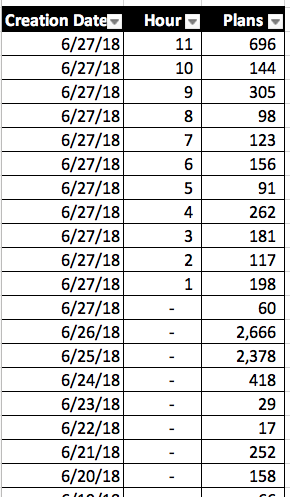
In that environment, sp_BlitzCache is gonna be much less useful. However, let’s look at data from June 27th for a stable server that’s been up for a long time – shown in Excel because we have a tool that automatically grabs query data for us and puts it in spreadsheets:

Plans by date and time

The query breaks up results into hours for today, but then older than today, it just groups stuff into whole days. (After all, I don’t care what hour a query was compiled on two days ago.) On that server, I can be pretty confident when I query the plan cache – I’ve got a lot of history. There are still new queries coming in, and I may be facing some non-parameterized one-off issues, but it’s not that bad.

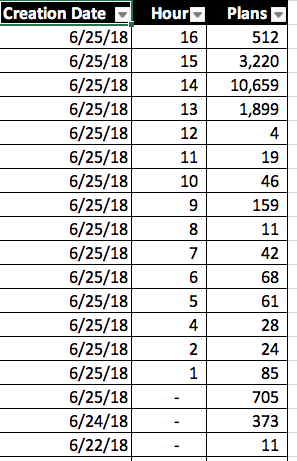
This one is a little more curious – it was collected on June 25th:

Something happened today in the 1400 hour

We do have valid query plans going all the way back to June 22 – meaning, no one has run FREEPROCCACHE – but there are only about 1,000 plans from prior to the current date (June 25.) The vast majority of cached plans are from today, and furthermore, there were over ten thousand new plans generated in the 14:00 hour!

This might indicate that:

  • Someone rebuilt a ton of indexes around noon-13:00
  • We have an application that isn’t parameterizing its queries, and is sending in a flood of single-use strings, and SQL Server is flushing them out of memory (and no, Optimize for Ad Hoc doesn’t fix that)

This query doesn’t give me the answers, mind you – it just helps me ask better questions, faster. Hope it helps you too! You’re free to use that for any purpose – here’s a Github Gist with the code & license.


Building SQL ConstantCare®: Analyzing Query Plans

SQL ConstantCare
3 Comments

XML Delenda Est

Last week, I talked about how we’re going to be collecting query plans from users who opt to have us do so (and only users who opt in! No surprises, here) by leveraging code we already have written in sp_BlitzCache, and how we’re going to do the XML analysis on our end using a Real Programming Language®.

That means we’ll be taking the ~60 some odd checks that we run on query plans, and converting them from T-SQL over to another language. For example, this is the check we use to see if your query plan is being forced to run serially.

Why So Serial?

This is a great thing to know, which was introduced in SQL Server 2012. That’s right — earlier versions don’t have this. I’m glad that 2008 and 2008 R2 are going out of support next Summer. No more guessing.

Goin’ Nowhere

There are some things I would love to do with the plan cache that aren’t possible. I started doing them in sp_BlitzQueryStore, but only in ways that I felt wouldn’t make running it counterproductive. For instance, there’s a parameter sniffing column that generates some warnings based on significant differences in plan metrics from execution to execution.

Grandiose

If I really wanted to abuse your expensive CPUs, I could take different plans generated by the same query and compare them, looking at the operator choices, and highlighting ones that make your code more sensitive to parameter sniffing.

To break it down:

  • The audience isn’t there for Query Store, and
  • Doing that kind of XML parsing (especially on large plans) would be painful in T-SQL
  • The plan cache doesn’t have historical data like that to analyze

What Changes In SQL ConstantCare®

We’ll have really good historical data about collected plans, and a process completely detached from the database to analyze the XML.

That means better long term analysis to help you:

  • Solve tough parameter sniffing issues
  • Monitor plans for improvement and regression
  • Chart how tuning has changed wait stats

Long term, we’ll be able to build in cool stuff:

  • Improve on existing missing index recommendations
  • Make our own index recommendations
  • Offer potential rewrites when we spot antipatterns

For example, here’s part of the XML of a plan broken down before any index tuning:

Hashy

And here it is after adding some helpful indexes:

Loopy

Matching queries on identifiers like Query Hash and SQL Handle allows us to validate tuning efforts over time. There are a lot of other metrics we can retrieve as well, this is just a screenshot friendly example.

Thanks for reading!

Brent says: and when you throw in things like stored procedure and function names, then long term, we’ll be able to trend your performance tuning efforts over time even as query hashes change. We’ll be able to tell you which query to tune, and why, then later on, tell you, “Your query tuning efforts for usp_SalesReport paid off in 80% less logical reads.” This isn’t going to be easy – but it’ll pay off. That’s what we mean by mentoring, not monitoring.


Why SQL Developers Keep Making The Same Mistakes

Development
23 Comments

Dead Horses

I read a lot of SQL blogs, both new and old. What’s striking is how many blogs seem to cover the same subjects from different angles, over and over again.

This isn’t to knock anyone’s blogging at all — but what I do want to do is try to proffer an explanation as to why this happens.

Many SQL bloggers are consultants. That means we work with (hopefully) many clients, and end up seeing the same very basic problems over and over again.

For FTEs who blog, this can still happen. They may be overseeing developers who often forget lessons learned.

Of course, some FTEs get to deal with lots of very specific, or brand new problems, and have some leisure and luxury to really explore them.

Michael J. Swart and Joe Obbish are fantastic examples of this, but there are even themes within their blogs.

Michael talks a lot about matters of concurrency and blocking. Joe talks a lot about column store, and optimizer issues.

 What’s With Developers?

When new developers start, they often

  • Have minimal SQL Server experience
  • Have bad SQL Server experience
  • Have never had SQL Server training

That means that existing code is the standard they look to when they’re writing new code. Any bad habits you’ve got in there become part of your code’s culture, and people will repeat them.

I LEARNED IT FROM WATCHING YOU

If you’ve got any code smells, you can bet that developers will pick up on them for all the wrong reasons.

Functions, non-SARGable queries, poorly written dynamic SQL, bad hints, local variables, table variables — you name it.

That doesn’t rule out finding some bad or old advice out there on the internet, though. There’s plenty of that to go around.

Good DBAs often get called Bad Names

They need to enforce standards that make life difficult for other people, who are often developers.

Stuff that’s easy or convenient for devs is often quite difficult and inconvenient for SQL Server

  • No, you can’t use that function
  • No, you can’t add a 50 column index
  • No, you can’t just join on LEFT(REPLACE(REPLACE(SUBSTRING(CASE WHEN…

For every story you hear about a grumpy DBA, you’ve probably got a person who has been fixing the same type of problems for many years.

By the time developers listen to them, they’re off to a new job. Now grumpy DBA has to start over with whomever replaces them.

Low Standards, No Standards, Bad Standards

Defeating bad coding culture needs a two-pronged approach

  • Fix old code so that bad ideas don’t get enshrined as “the way its done”
  • Review new code for relapses into bad practices

Another worthwhile approach is to get developers appropriate training or resources, so that they can recognize bad patterns on their own.

Often, that kind of empowerment is more productive than having them report all their code to a figurehead for review.

Thanks for reading!

Brent says: when I was getting started, I repeated a lot of bad practices when I was handed code to start with. “Here, always start with this stored procedure template, it’s what we’ve been using for years.” It was just the default, and no one ever questioned why – me included.


Ola Hallengren’s Scripts Keep Getting Better

SQL Server
6 Comments

You Know Him, You Love Him

You trust your database backups and integrity checks to him, and he has been KILLING IT on new features lately.

A while back, Ola decided to Open Source his scripts on GitHub (Soon to be known as Microsoft LiveHub for Business Essentials). As more and more people embrace GitHub and are getting used to how it works, the feature suggestions have been rolling in.

And Ola has been hard at work making your Maintenance Dreams come true.

Eye Spotting

Here are a few things that he’s done lately that have caught my eye — if you’re not constantly paying attention to the GitHub repo, or checking in on his website, you may not be aware of them.
Tokenized Directory Structure
Don’t like the default directory structure? Don’t want your AG Replicas or FCI nodes writing to different places? Use the parameters @DirectoryStructure and @AvailabilityGroupDirectoryStructure to fix that! You choose which elements to base the path on.
There are other examples over on his site that show you more configuration options.

More Stats Update Control & Incremental Statistics Support

One issue I always ran into was with @OnlyModifiedStatistics: it was just yes or no.

Which isn’t bad, but it meant that if there was a single modification, stats got updated. Most people would wanna wait until a good chunk of modifications happened, and now you can. Just set @StatisticsModificationLevel to a comfy percentage and skip over all those low-modification statistics. This can be a real time saver in large environments.

Incremental Stats Updates let you update statistics at the partition level, if you have @PartitionLevel = ‘Y’. That’s the default, so if you’ve got partitioned tables, you can just let the script do its thing.
Ordering for Backups and CHECKDB

Got databases you want to backup in a certain order? Now you can! For backups, you can order by database name or size, and for CHECKDB you can also order by the last good check locally or on a replica..

Just like with the stats updates, this is badass for people with limited maintenance windows — which means — you guessed it! They work alongside the @TimeLimit parameter. Let’s say you’ve got 5-10 really big databases on your server, and you can only get a couple of them in. You used to have to jump through some hoops to set up different schedules, or build your own dynamic list. Now you have your jobs pick up where the left off the night before.

This Stuff Is All Free

Remember folks, Ola doesn’t charge a dime for any of this. You can put it on as many servers as you want, for free.

Lord knows I have.

Head over to his site and check out his GitHub repo to get new versions of the scripts, file bug reports (as if Ola has those!), request features, and most importantly — SAY THANK YOU!
Thanks for reading!

10 SQL Server Feature Requests I’ve Upvoted Recently

SQL Server 2019
28 Comments

In no particular order:

  1. Database Level Option for Storing Wait Stats – just like we can store query plan history in Query Store, it’d be awesome to get performance history over time.
  2. Give more info on the “String or Binary Data Would be Truncated” error – tell us which column, and what row tried to violate it.
  3. Sync instance-level objects in an AG – logins, linked servers, Agent jobs & schedules, encryption keys, certs, etc. Doesn’t have to be all objects – could be just objects created with a FOR REPLICATION option kinda like how replication does it, but I understand that it’d be a pretty big change to pull that off. Make no little plans.
  4. SSMS keyboard shortcut to execute just one statement – execute the line where my cursor is on. Man, I adore this feature in the PostgreSQL client that I use, and every time I come back to SSMS, I cringe that I don’t have it.
  5. Query stats DMV doesn’t include batch mode spills – columnstore is still a bit of a niche product, but as batch mode processing inevitably comes for rowstore tables, this bug is going to become a much bigger deal.
  6. Add a built-in numbers table – these things are fantastically useful, and having a built-in standard one would make code portability better.
  7. Unlogged tables – there are some tables you just don’t need to cleanly recover (like staging tables in a data warehouse) and you’d be willing to sacrifice recovery for faster loading. No, non-durable tables aren’t the answer because those are in-memory only.
  8. Minimal logging problems in 2017 – minimal logging has never been easy to achieve, but now even when you play by the rules, it’s getting harder.
  9. SSMS edit-query-text doesn’t show you the real query text – this bug bugs the hell out of me.
  10. SSMS add a search box to Object Explorer – on databases with hundreds of objects, this would make life way easier.

Honorable mention:


Management Studio Hides Missing Indexes From You.

Indexing
1 Comment

SQL Server Management Studio only shows you the first missing index recommendation in a plan.

Not the best one. Not all of them. Just whichever one happens to show up first.

Using the public Stack Overflow database, I’ll run a simple query:

Here’s the execution plan – and ah-ha, it needs an index!

The plan

When you right-click on that query plan and click Missing Index Details, Clippy’s excited to tell you about an index on the Comments table that would improve performance by about 23%:

23%. Remember that number. Now go back to the plan, right-click on it, and click Show Execution Plan XML. Look what we have here:

Missing indexes, as in plural

There are not one, but TWO missing indexes – one on the Comments table, and another on the Posts table. The Posts missing index is estimated to improve performance by 76%. Now, I’m no data scientist, but I think 76% is higher than 23%.

In Pinal Dave’s Practical Performance Tuning class, he likes to call missing index requests in the plan appetizers: they’re a good place to start, and if you like the first one you see, you should probably dig deeper and keep going. But they’re just appetizers – they’re not the main course.

sp_BlitzCache calls ’em right out to you in the list of warnings so that before you look at the query plan, you know that you need to dig deeper:

sp_BlitzCache showing the number of index requests


In PasteThePlan, we show you these right at the top, too – here’s that plan:

Paste-the-Plan

Shout out to Justin Pealing, the developer of html-query-plan – we’ve been sponsoring his open source development work for a couple of years now. This is the same query plan viewer Microsoft is using in SQL Operations Studio, too, so as Microsoft updates their version of html-query-plan, you’ll be able to see missing indexes in SOS, too.


Building SQL ConstantCare®: Collecting Query Plans

SQL ConstantCare
4 Comments

Coming Soon

In an upcoming release, we’ll start collecting query plans from your servers. Since this may result in the transmission of PII, it will be opt-in only. We won’t be getting this by default, because we don’t want anyone to be uncomfortable with the level of data we’re collecting from their servers.  This is an important goal.

Like Brent said in another post, not enough subscribers are using Query Store yet to build any tooling around it. I have a feeling that this is the refrain from a lot of vendors. In the years since Query Store was announced, I haven’t seen any big vendor announcements that they’re supporting or analyzing it.

Free markets are wonderful for market research, just ask Extended Events.

How We’re Doing It

We’re departing a bit from our usual data gathering method, where we have a single query that does a simple select from a DMV. In this case, it makes sense to pre-assemble some things to make sure we get relevant details in a snapshot. For that, we already have a great query in sp_BlitzCache. It gets the top N plans by different important metrics: CPU, reads, writes, duration, executions, etc. and does some Highly Advanced Maths (multiplication and division, and even summing) to calculate resource usage of queries.

Where things change, though, is what happens next. In a normal run of sp_BlitzCache, we’d get the plans by a metric, then do a bunch of XML parsing and processing, generate and roll up warnings, and return a bunch of information to you. That makes sense for a single user running a single script on a single server to look at, but it makes far less sense when we need to just gather data from (up to 60!) servers from a single user, and then look at the data later. We can’t afford to lose time with a bunch of XQuery Hanky Panky®.

Instead, we’re running the gathering query in a simple loop to sort your plan cache by different important measures, and spitting a limited number of high value offenders out.

Backenders

Another important goal is to introduce as little overhead as possible. We’ve seen your servers — many of them are in tough, tough shape. Sometimes when I’m looking at server data, that Sarah McLachlan song from the animal shelter commercial starts playing. So if we’re going to help, we can’t start by hurting.

That’s why all of the analysis is going to be done on our end, not on yours — we’ve got a tough end. It’s not that running sp_BlitzCache is unsafe, or will drive your server to its penitent knees, but let’s face it: XML has never been SQL Server’s friend. And besides, if we’re just going to take XML out of the database, we might as well take it all the way out.

We try to be kind to all databases, which means we’re not going to heap abuse on Postgres by introducing a bunch of XML processing there, either. I have no idea if Postgres is good, bad, or indifferent to XML, and I don’t want to find out. I want to use something that I know is good at it, and will put as little strain on our server as possible.

Pick and Fuss

We’re still deciding between C# and Python for the XML parsing. Which one we go with will ultimately be decided by what makes Richie’s life the least difficult around writing unit tests for, etc. Your favorite language may not win, and I’m sorry for that. You can talk about how awful we are on Hacker News, if you want. I’ll understand completely.

By taking this part of the processing out of the database and making it asynchronous, it allows us to embrace fuller linguistic support of XML and do even deeper trending analysis of your query plans. I’ll talk about that in a future post.

I’m really excited to be working on this piece of SQL ConstantCare®, and I think you’ll like getting the analysis you’re used to from sp_BlitzCache, and a whole lot more.

Thanks for reading!

Brent says: I’m excited about doing big-picture analysis in query plans, too. Often, when I’m looking at a client’s sp_BlitzCache output, I say things like, “I see we really like using table variables, and we really like using scalar functions as filters. Let’s start with an hour’s worth of training on those two topics, and then let’s look at your query plans, and you’ll see things in a fresh new light.” I’m looking forward to taking the same kind of approach with SQL ConstantCare® mentoring.


[Video] What to Do When SQL Server is Slow

Monitoring, Videos
4 Comments

Someone comes running in and asks, “Are you doing something on the SQL Server right now? Can you take a look at it? It seems really slow.” It’s one of the most common complaints we get about our databases – and yet, most of us don’t have a written plan with what steps to take, in order.

I do this for a living, so I’ve had to make a written checklist to handle it. I’ll give you the exact same checklist I use, then walk you through several performance emergencies. I’ll show you how I use open source scripts like sp_WhoIsActive, sp_BlitzFirst, sp_BlitzCache, and more to find the root cause fast. We won’t cover performance tuning – our goal in this hour is just to have a written triage process so we don’t look like bumbling idiots. Let’s get good at this!

For more videos like this, check out the PASS DBA Fundamentals YouTube channel. They’ve got stuff like:


[Video] SQL Query Optimization: Why Is It So Hard to Get Right?

Videos
0

The first paper on cost-based query optimization was published in 1979 by Patricia Selinger from IBM Research. This paper laid the basic framework for optimizing relational queries that is still in place today. While there have been many technical enhancements since 1979, query optimizers still fail to pick the best plan when faced with a complex SQL query.

In this talk I will describe the basic mechanisms used by modern query optimizers including plan enumeration, the use of histograms to estimate selective factors, and plan costing. I will also talk about a new approach to query optimization that I believe will revolutionize the optimization of queries in the cloud.

About the presenter – Dr. David DeWitt has positively wowed audiences at the PASS Summit over the years, consistently delivering amazing technical keynote presentations. You can read his bio at LinkedIn, or check out his Wikipedia page, or his past work at the University of Wisconsin. He could talk about pretty much anything, and I’d listen.

Here are the slides, but note that they use animations extensively – for the best effect, download the PowerPoint directly and step through it in presenter mode to see the animations.