Blog

How to Create Deadlocks and Troubleshoot Them

Deadlocks
5 Comments

Watch in awe and wonder as I create a deadlock, then use sp_BlitzLock after the fact to show you which queries and tables were involved:

Here are the scripts to run in the left hand window:

And here are the right hand window commands:

sp_BlitzLock is available in our free First Responder Kit.

To learn more about locking, blocking, and concurrency, check out my Mastering Query Tuning class.

Quick Tips For Debugging Large Stored Procedures

T-SQL
55 Comments

Hell Here! Get Your Fresh Hell, Here!

Let’s face it — as far as developer tools go, SSMS is pretty bad.

Intellisense? The jokes write themselves.

Don’t get me wrong, SSMS is a good management tool, but it’s not a good development tool (and what kind of maniac sticks debug — F6 — next to execute — F5 — ?).

When you’re writing some simple queries, it’s fine.

When you’re writing code with lots of branching, dynamic SQL, temp tables, error handling, and so on… Notsomuch.

Here are some tips I’ve put together after a couple years of wrangling the Blitz scripts in the First Responder Kit.

Tip #1: Format Your Code

There’s no shortage of free and paid tools out there. This list from the Recently Legendary Aaron Bertrand on Stack Exchange has both.

  • http://www.red-gate.com/products/sql-development/sql-prompt/
  • http://www.apexsql.com/sql_tools_refactor.aspx
  • http://www.dpriver.com/pp/sqlformat.htm
  • http://www.cleancss.com/sql-beautify/
  • http://www.sql-format.com/
  • http://poorsql.com/
  • http://www.freeformatter.com/sql-formatter.html

Normalization isn’t just for data. Normalized coding patterns help you keep things organized.

This really helps in those sticky situations where you have a BEGIN without an END, a missing or misplaced parenthesis, or some single-tick nightmare of nested, nested, nested dynamic SQL.

Tip #2: Always Be Debugging

If you’re writing dynamic SQL, always add a Debug mode. It doesn’t have to be anything fancy at first, just something like:

IF @Debug = 1 BEGIN PRINT @MySQLInjectionGift END;

If you find yourself writing blocks of dynamic SQL that don’t fit in a single PRINT output, Helper_Longprint by Yildirim Kocdag is awesome.

When you get further into things, you may also want to build in a no-execute mode so you’re not off running bad dynamic SQL blocks.

Tip #3: Keep Track Of Temp Tables

… And I guess table variables, too.

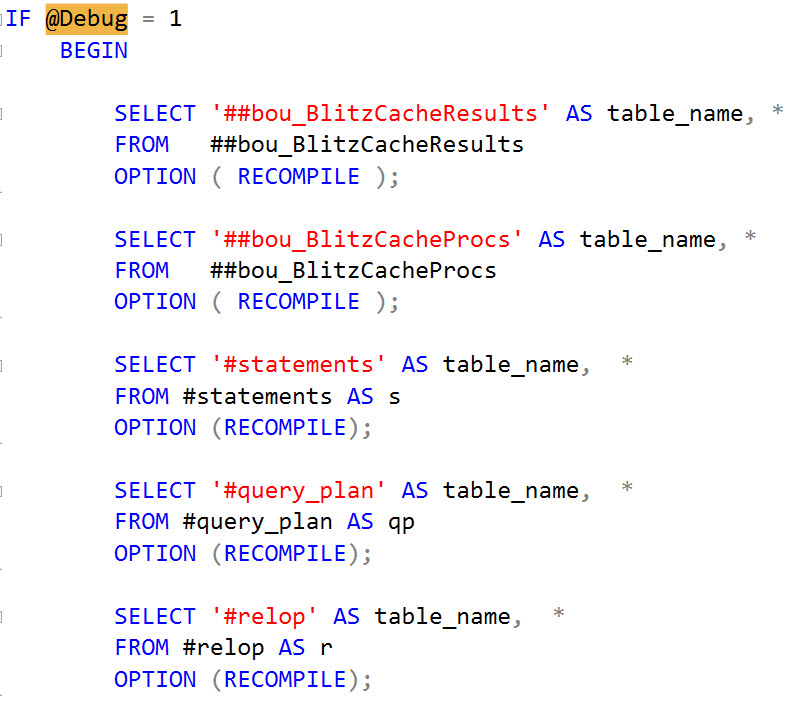
In a lot of the Blitz procs where we use temporary objects, I’ll set up a Debug block that will select data out of all the temp tables we’ve put data into.

Of course, if you have a lot of temp tables, it’s easy to get lost. When I set up debugging for those objects, I like to include the table name as a column, too.

This makes sense.

Now you can see what did (or didn’t) end up in your temp tables.

Tip #4: Know Your Place

Don’t be afraid to use RAISERROR to mark off sections of your code. This also belongs in a Debug mode so you’re not needlessly returning noise, but can be super helpful for you to figure out things like which code path was hit and which section throws an error executing common code.

Why RAISERROR over PRINT? Nice message formatting, and you can use WITH NOWAIT to print messages immediately.

With PRINT, you may be stuck waiting for enough buffers to fill up to display a message.

Tip #5: Know Your NULLs

This is another one for dynamic SQL peoples. It’s so obvious, you’ll kick yourself if you haven’t already thought of it.

IF @MySQLInjectionGift IS NULL BEGIN YELL ABOUT IT BEING NULL END;

When I first started writing dynamic SQL, I can’t tell you how many times I got eaten alive by a NULL variable or value making my whole string NULL.

Which brings us to our last tip!

Tip #6: Know Your Variables

There are two ways you can do this. Either create a variable logging temp table and insert the variable name and value to it, or just use RAISERROR to print the contents to the console. In either case, this is a life saver for figuring out what values got assigned things and when.

If variables change assignment frequently, RAISERROR is a better option. If they get assigned once, the logging table is just fine.

Wishlist

While I wish SSMS, and SQL Server, had better ways of handling dynamic SQL, color coding parenthesis pairs, and matching BEGIN/END blocks better, those just aren’t built-in tools or features currently.

Many tools that are better for development aren’t necessarily better (or even good) for management. It’s a pain to switch back and forth if you need to do both regularly. Third party tools have filled many gaps, but I reckon there’s just some behavior that can’t be altered unless you get into the actual bits behind SSMS.

Maybe someday.

Thanks for reading!


How to Screw Up Your Database Updates in 3 Simple Steps

Development
5 Comments
Alex Yates

Hi. I’m not Brent.

My name’s Alex, and I care about databases, DevOps and data protection. Last year I gave a session on GroupBy all about how to do Database DevOps right. Now, dear reader, I’m going to give you a cheerful, three-step crash course about how to screw it all up.

All set? Let’s go!

Step 1: Apathy – wait until it’s too late

Dear Alex,
We’ve got a monster database.

Well, it’s actually fourteen databases split across three servers, with a tangled web of circular cross-db dependencies. We have a CLR layer (for which we’ve lost the source code) and our table and column names are obfuscated and unintelligible.

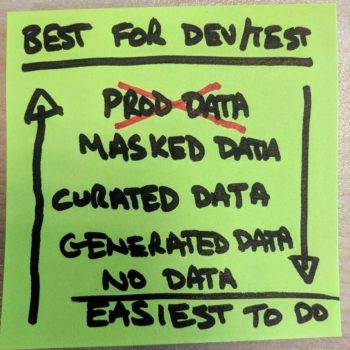
We’ve got four petabytes of data and we know a bunch of it is sensitive PII, but due to the complicated table structure and lack of documentation we aren’t exactly sure where it all lives. However, our outsourced, overseas dev team tell us it’s critical they have all the prod data in their dev database to test the Entity Framework code in their apps work.

We are running SQL Server 2005 and have 37,000 tables, some with over 1,000 columns. (That’s not including the automatically generated tables). Also, some of our stored procedures are a few thousand lines long. Needless to say, none of the database source control tools that we tried have been able to cope – so the schema isn’t in source control. Our dev and production environments have many inconsistencies.

We managed to pull off our 2015 release in under 3 months, but we’ve been struggling with our 2018 release since February and we are still trying to figure out how to make it work for our dozen or so oldest clients. (They use customised versions of the CLR layer for legacy reasons. We lost that source code too.)

We’d like you to take a few days to automate our deployment and create a test suite with 100% code coverage to help us deploy more easily.

(Also, one of my developers has told me about this new GDPR law. Do you think we should budget a day or two to cover our bases there? Thanks.)

J. Doe, Project manager at Corporation Inc.

While this email is fake, it’s made up of a whole bunch of issues I’ve seen with various real customers. The point is that people begin to understand why source control, testing and deployment automation is so awesome when their databases become hard to manage.

Unfortunately, at this point it’s often super hard to retro-fit a sensible process.

For many folks who manage legacy databases, DevOps theory and the tools that can help us are new and complicated things to learn.

In general, teams are far more likely to succeed if they learn the basics with a much simpler database. Once they’ve honed their skills with the easy stuff they are far more likely to succeed with their monster database.

The problem is that often folks don’t see the point with greenfield projects. While the schema is still relatively simple people don’t see the value in writing unit tests for their stored procedures or automating their deployment pipeline. They just want to get started cutting code.

Unfortunately, in time, that greenfield project will sure enough turn into a new monster. If they had taken the time at the start to put together a basic source control, automated build, test and deployment process they might have avoided it. When making architectural decisions they would have been forced to think not just about scalability, durability and performance etc – but also testability and deployability. Having designed the database with those things in mind they might have saved themselves a bunch of headaches a few months or years down the road – but they didn’t.

Instead, in a few years some new start-up will be able to respond to evolving market demands more quickly.

Bummer.

Step 2: Use a shared dev database

Let’s talk about how C# developers work.

Their code lives in a source control system. When they want to make changes to it they do the following:

  1. Pull down the latest code to their local machine
  2. Make their changes, run their tests
  3. Build it locally, check it works
  4. Push their changes back up to source control

It works pretty well. Imagine telling your C# developers that you wanted them to change their process as follows:

  1. The code will now live on a file share
  2. All developers will work on the same set of files at the same time
  3. When you want to commit, cherry pick the changes you made and only push those

They would either laugh, get angry or quit. (Or all three.) What you are asking is plainly bonkers for various reasons:

  • Cherry picking changes to commit makes it impossible to manage changes effectively.
  • Developers will be unable to test code in isolation – if it broke, was that because of something I did or something you did?
  • Developers will sure enough be overwriting each other’s code – and they won’t notice until deployment day when their feature doesn’t work in production.
  • If one developer breaks the code – the others will be blocked until it’s fixed. (If it’s not recoverable, they’ll lose their work.)
  • People have their opinions about branching, and I’m not going to get opinionated about it here, but it’s plainly impossible to branch effectively with a shared dev database. It’s a plain contradiction.
  • The shared dev version of the code will get bogged down with old test code and half-finished or abandoned features that never get cleaned up, meaning your dev environment behaves differently from production. Sooner or later someone will utter those familiar words… “But it worked in dev?”

There is a reason that C# developers would find this strategy entirely stupid.

So, given that it’s a one-way ticket to a world of pain, why do some organisations insist on using shared development servers for database development?

Here are a few commonly touted reasons. They are all flawed:

Solving the dev/test data problem
  • Devs need lots of data and their workstation doesn’t have enough space. (You can solve this problem in other ways.)
  • It helps me lock down my data. (Wrong. If developers can access sensitive data you are already doing it wrong. The hacker doesn’t care if that sensitive data is on a workstation or a dev server. If the dev clicks that phishing link and can also see the sensitive data – it’s game over.)
  • As a DBA how can I control the SQL estate if all developers have their own SQL instances? (You don’t. Developers are responsible for their own dev databases.)
  • My database is complicated and impossible to spin up on a dev workstation. (Congratulations, you’ve successfully achieved Step 1, above.)

If you want to ensure that your development process is doomed to be a single-threaded waterfall or a horrendously complicated attempt to implement feature branches without branching, you should use a shared development database. If you want to ensure your dev database is inconsistent with production, and you want to hear people say “it worked in dev”, you should use a shared database. If you want to build a monster database that is hard to deploy, you should use a shared development database.

There are other ways to screw up your ability to deliver database updates – but few are as effective is using a shared development database.

If you’d like to read more of my thoughts about shared development databases, I wrote about them in more detail here.

Step 3: Re-invent the wheel

One of the reasons I started DLM Consultants is because I’ve seen so many awful DevOps consultants or engineers who fly in and build a DevOps*. I thought I could do better.

The consultants circle around like vultures, seeking out people like J. Doe (who sent me the email above). They swoop in and build a custom DevOps* that’s highly customised to the specific needs of Corporation Inc. Unfortunately, the DevOps* they built is so complicated and poorly documented and no-one really understands it, so the DevOps vultures** hang around on an expensive retainer to manage all the DevOps-ing* for Corporation Inc (as the company slowly loses more and more business to the new start-ups that are eating into its market-share).

Another pest to look out for is the DevOps parasite***. These critters are typically employees at organisations, such as a developer or DBA at Corporation Inc. They might even be a DevOps engineer*. They’ll try to solve the deployment problem by building a very clever and specially customised DevOps*, but no-one else will understand it. By building it in-house they’ve managed to simultaneously become the bottleneck on the company’s ability to release database updates and also make themselves essential to the successful running of the company. They’ve found a way to siphon cash out of Corporation Inc as a salary until either they retire or the company goes bust – whichever comes first.

You can defend yourself from DevOps vultures and parasites by adopting well documented, industry standard tools and techniques where possible. These will be easier for everyone in the organisation to understand and it will be possible to recruit talent that already understands how your source control, testing and deployment tools work because they’ve used the exact same tools with previous employers.

And if you are thinking about building your own DevOps*, just remember that whatever you can come up with in an afternoon, as a side project, is not going to be as good as the tools that are available off the shelf either from Microsoft, third party vendors or open source communities who have sunk years into solving the problems you haven’t thought of yet.

Unless of course, you want to become a DevOps vulture** or a DevOps parasite*** yourself. I wouldn’t recommend it, becoming the bottleneck of your company isn’t a fun job – even if it is hard for them to fire you. But hey, if that’s what you are looking for, go ahead.

*DevOps is not a thing you do or a thing you build. It’s the way a group of people with different skills work together effectively to achieve a goal.

** DevOps is also not a breed of vulture.

*** Or a type of parasite.

Want to know more ways to screw up?

This blog post was inspired by a talk I delivered for SQL in the City Streamed back in 2016. If you would like to watch the 30-minute recording of my 15-step guide you can do that here.


Building SQL ConstantCare®: I Love Unit Tests

You know what my biggest regret is about sp_Blitz?

No unit tests.

Seriously. Back then, I wrote a bunch of T-SQL checks to see if a server had memory configuration errors, corruption, obscure trace flags, etc. Over time, sp_Blitz got bigger and bigger, and we started getting code contributions from strangers. Things got even more challenging when we open sourced it with the MIT License and put it on Github – it was even easier for people to throw in more code.

And we did the best job we could of testing it, but…people make mistakes, including us. That bug fix we did to fix one issue had an unforeseen side effect, and broke something else. Or even worse, silently broke checks – making it so we no longer alerted someone if their server had an issue.

When we started building SQL ConstantCare®, I didn’t wanna make that same mistake. Every check we coded with a PostgreSQL function, we needed to be able to automatically test going forward, every single time we had a commit. I have no idea how you accomplish something like that – I mean, I know the theory, but I wouldn’t even begin to know what tools to use. Fortunately, Richie does – so the way our arrangement works is that I write the query, and I supply him with test data to satisfy different edge cases that should pass or fail.

Example: the remote DAC rule

Take the remote DAC rule I blogged about last week. It sounds so simple: if it’s not enabled, you need to turn it on. Well, it’s just a little more complex than that:

  • If sp_configure ‘remote admin connections’ reports 0, we want to advise you
  • If sp_configure ‘show advanced options’ reports 0, then we need to have you turn that on to make the change (and possibly turn it back off afterwards if you want
  • However, if any sp_configure options have value_in_use <> value, then we need to skip this advice for now, because we don’t want you running RECONFIGURE since it would put those other sp_configure changes into effect
  • Except for a few sp_configure options where certain variances are normal (like min memory, which seems to jump back and forth between 0 and 16 all the time)

There’s a bunch of different test cases in there – and hey, that’s one of the cool things about having all this data up in the cloud. It’s easy for me to go spelunking through diagnostic data (looking only at the folks who gave us permission to use their data to improve their recommendations, of course – more on that in another post.) In a matter of minutes, I could find examples of:

  • Someone who had remote DAC turned on (so they shouldn’t get an alert)
  • Someone with remote DAC off, show-advanced on, and no pending changes
  • Someone with remote DAC off, show-advanced on, but pending changes to, say, MAXDOP
  • Someone with remote DAC off, show-advanced off, … you get the point

I can then run my Postgres function against these different clients, make sure it produces the right results, and then hand it over to Richie to build the automated tests. The testing is done with Javascript, and I am positive of that for two reasons: Richie told me, and the unit test files end with .js. I found them as part of writing this blog post, opened a couple of them, saw that they weren’t database queries, and did my best Grandpa Simpson.

Unit testing costs us money today,
and saves us money tomorrow.

The very first time you build something, it takes longer. As a small business, that cost us more time (and money, in terms of salary) to get to minimum viable product (MVP.) Each completely-brand-new feature (like the wait stats analysis we’re working on now) takes longer to build, too. However, when something goes out the door up to the cloud, we’re more confident that it works today, and that it’ll still be working five years from now despite tons of unrelated code changes.

Seven years ago, when we started this company, I wasn’t a believer in database unit testing. Today, I’m a raving fan.

If you wanna learn how to apply the same concepts in your SQL Server work, check out Alex Yates’ upcoming database devops class.


Richie says: In my opinion, when creating new features, that feature isn’t complete until tests are created. The tooling to write automated tests for code is fairly simple, we’ve been doing it for years, but creating tests for database code is a horse of a different color. In the SQL Server world, we have tSQLt and in the Postgres world there are similar tools, but for SQL ConstantCare, we built a small database testing engine using Node.js, Mocha, and Chai. These are the same tools that we use to test the serverless functions. We’re not doing anything super fancy like faking or mocking: we just load data, run a function, and verify the result. We even plugged these tests into our automated build system. And yes, we know that our database test are technically integration tests and not unit tests, so you don’t have to blow up the comments explaining the difference to us.

When I first joined the company, I begged Brent to let me write tests for sp_Blitz. Having tests around sp_Blitz would have been a huge undertaking and we had other things to do like build SQL ConstantCare. You might face the same situation. The decision to create unit/integration tests around your product might be more of a investment than what your company is willing to make. It’s a tough call. Just make sure to point out the risks during your testing and deployment to your stakeholders.


Today’s Press Conference Transcript: I’m Running for Database Administrator General

Humor
3 Comments

Thanks for joining me today – I know you reporters are all really busy, and I appreciate you taking the time to attend this press conference.

I’d like to start off by formally announcing my candidacy for Database Administrator General. There’s a lot of great candidates out there, but I think it’s time for me to step up and do my part to help our country.

I’ll take questions now. Don, go ahead.

“Don Gonya, NPR. Traditionally your party has viewed life issues as a litmus test. Where do you weigh in?”

I believe in a developer’s right to choose. I know that’s going to be controversial, and that’s why I’ve decided to run as an independent. But the thing is, I believe that developers should have the right to abort their own queries under certain circumstances. I’ve written a stored procedure so they can kill their own queries even without SA rights. I want to empower them to control their own lives, even in production, because we all make mistakes.

And Don, I’m going to speak frankly here – I also believe in the death penalty because not all queries have a right to live. (Shouting, crosstalk, not transcribed) Hold on, hold on, let me finish. We’ve had a series of incidents where queries – especially those from inside the executive branch, if I’m honest – have caused serious issues in production. I will authorize the help desk to use deadly force when necessary on these queries.

Next question – Bob, you’re up.

“Bob Woodward, Washington Post. What’s your stance on education?”

First, I believe we can take a few easy steps to better educate our team without raising the budget. My education plan includes weekly lunch and learns taught by different team members: the DBA teaching the developers about query tuning, the architects teaching the rest of the team about new database options, and project managers teaching – well, I’m not sure what they’re going to teach yet.

But education isn’t just about them: it’s about us. I believe that database administrators need to keep learning and growing as well, so I’m going to allocate spending for every DBA to attend one week of either a conference, or a training class. It’s going to involve budget increases, and there’s just no way around that.

Next question, Maggie.

“Maggie Haberman, New York Times. So you’re just going to increase spending?”

Absolutely not. I have a series of budget cuts that will result in a much smarter and leaner balance sheet. First, we’re going to aggressively replace a lot of our older VMware hosts with newer ones running less – but faster – cores and much more memory. Our Enterprise Agreement true-ups with Microsoft are just around the corner, and we simply can’t afford to spend our children into poverty by continuing to run these old, slow, 10-core CPUs that cost $70,000 apiece to license. Under my new plan, our true-up costs will plummet dramatically.

I’m also going to embrace migration. I’m going to start the conversation with a bipartisan project with our development teams, moving our full text search into ElasticSearch, and migrating our session state out of In-Memory OLTP into whatever open source platform the developers embrace. I believe in open borders because it makes us all more successful.

Next question – wait, dude, what are you even –

“Anthony Bourdain, CNN. Describe your foreign policy approach.”

Seriously, you’re a travel show host. I mean I love your work, but that doesn’t get you a press pass into a political news conference.

Techorama 2018

But since you asked, my first act as Database Administrator General will be to go to Techorama in Ede, Netherlands in October. I’m doing a pre-con:

Developer’s Guide to SQL Server Performance

You’re stuck with a database server that’s not going fast enough. You’ve got a hunch that the biggest bottleneck is inside the database server somewhere, but where? In this one-day class, you’ll learn how identify which queries are killing your server, what parts of the database server are holding you back, how to tackle indexing improvements, and how to identify query anti-patterns.

You’ll learn:

  • How wait stats tell you where to focus your tuning
  • How the plan cache shows you which queries are the worst
  • How to make fast improvements by picking the right indexes
  • How to identify and fix the most common query anti-patterns

Registration is open now. Alright, that’s a wrap, folks. See you on the campaign trail. Anthony, what’s the nearest place for fresh stroopwafels?


Informal Poll: What Are Your Favorite Error Log Messages?

SQL Server
37 Comments

I Know You Have Yours

Gone Fishin’

I have mine. When I go looking at a server for the first time, I wanna know about stuff like corruption, stack dumps, 15 second I/O warnings, frozen I/O, and non-yielding schedulers.

You know, the real meaty, hair on fire stuff.

Hm. Meat on fire. I’m hungry.

Despite how relatively easy it is to dig through the error log for stuff, most people don’t do it, even programmatically.

I can understand not wanting to go through by hand — that’s a nightmare. You end up sifting through gobs of successful backup and login failed messages. Yeah, you can suppress those, but that doesn’t help the first time you look at a server.

And so I pose the question to you, dear readers:

What are your favorite error log messages?

Leave a comment. It’s Friday. You’re already drunk, anyway.


Where Clustered Index Keys Dare

Colonel Clustered

We’ve blogged a couple times about how clustered index key columns get stored in your nonclustered indexes: here and here.

But where they get stored is a matter of weird SQL trivia. You see, it depends on how you define your nonclustered index.

“It Depends”

We all scream for dependencies! Hooray!

If you define your nonclustered index as unique, they get stored down at the leaf level. Depending on how you draw your indexes, that’s either the top or the bottom.

If you define your nonclustered indexes as non-unique, they get stored all throughout your index. Irregardless.
Proofs

We need a couple tables.
What we have here are two nearly identical tables. They only difference is that one has a unique nonclustered index, and one is not unique.

If I run these two queries, I get two nearly(!) identical plans.

Rule The World

But if you’re paying very careful attention, there are slight differences.

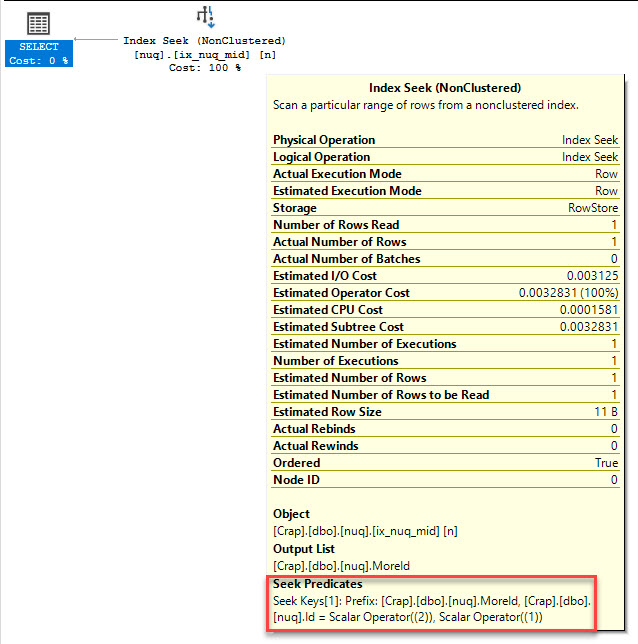
In the unique nonclustered index, the predicate on the Id column (which is the PK/CX), is a residual predicate, and the predicate on MoreId is a seek predicate

You’re handsome.

That means we did a seek to the MoreId value we wanted, and then checked the predicate on Id.

In the non-unique nonclustered index, both predicates are seekable.

Cells. Cells. Cells.

What Does This Prove?

Not much on its own, but let’s zoom in a little.

If we look at sp_BlitzIndex, we get different output, too.

INCLUDE!

The unique nonclustered index shoes the Id column as an Include, and is 14.1MB.

That’s not an include.

The non-unique index doesn’t list the Id as an Include, but as a regular column. It’s also slightly larger, at 14.2MB.

These two things, combined with the query plans, should be enough.

Can We Duplicate It?

Here’s another example that’s a bit more explicit. Two identical tables, except for the nonclustered index definitions.

If you examine the plans, they have a similar outcome. The two key columns allow both predicates to be seeked, and the one key/one include index results in a residual.

Say that ten times fast while you’re drunk and alone in your dark office.

What Does It All Mean?

Aside from some SQL Jeopardy points, this isn’t likely to get you much. It’s mostly an implementation point of interest.

SQL Server adds clustered index key columns to nonclustered indexes for many good reasons. It makes key lookups possible, and is probably pretty helpful when checking for corruption.

When people ask you if there’s any penalty to adding clustered index key columns, the answer is (and always has been) no, absolutely not.

They’re going to be there no matter what, but now you know exactly where they’re going to be.

Thanks for reading!

Brent says: oh wow, the predicate-vs-seek-predicate is a really good way of showing how things are ordered in an index. Nice explanation.


Book Review: Microsoft SQL Server Training, Volume 1

Book Reviews
7 Comments

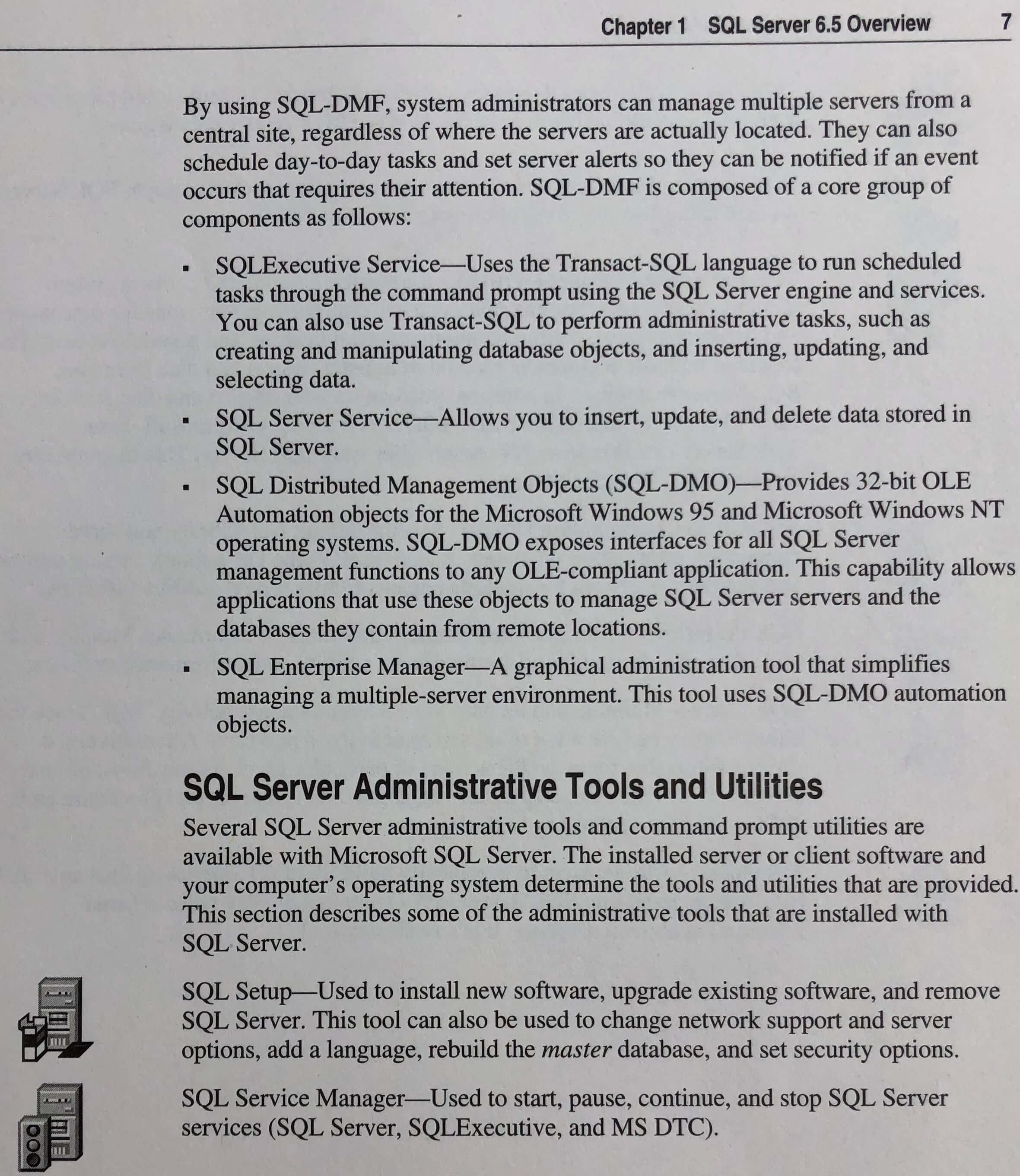
Last week, I shared a few pictures out of Ron Soukup’s Inside SQL Server 6.5 book. You had a blast with that one, so I figured I’d share some more pictures from another, uh, let’s call it “well-preserved” book about SQL Server. Make sure you see the subtitle of this book before you add it to your cart.

That’s right: SQL Server 6.5. (And please do NOT pay full price for that. Used ones go on sale all the time.)

Let’s take a trip down memory lane:

Installing SQL Server on 72MB of RAM and 10GB of hard drive space

“The machine I installed it on is called a personal computer” – today, an Amazon Echo Dot has more memory than that. And frankly, better Internet connectivity options:

How to learn about getting your certifications

Ah yes, The Microsoft Network and CompuServe. I was a Prodigy guy myself – I always saw those CompuServe people as uppity.

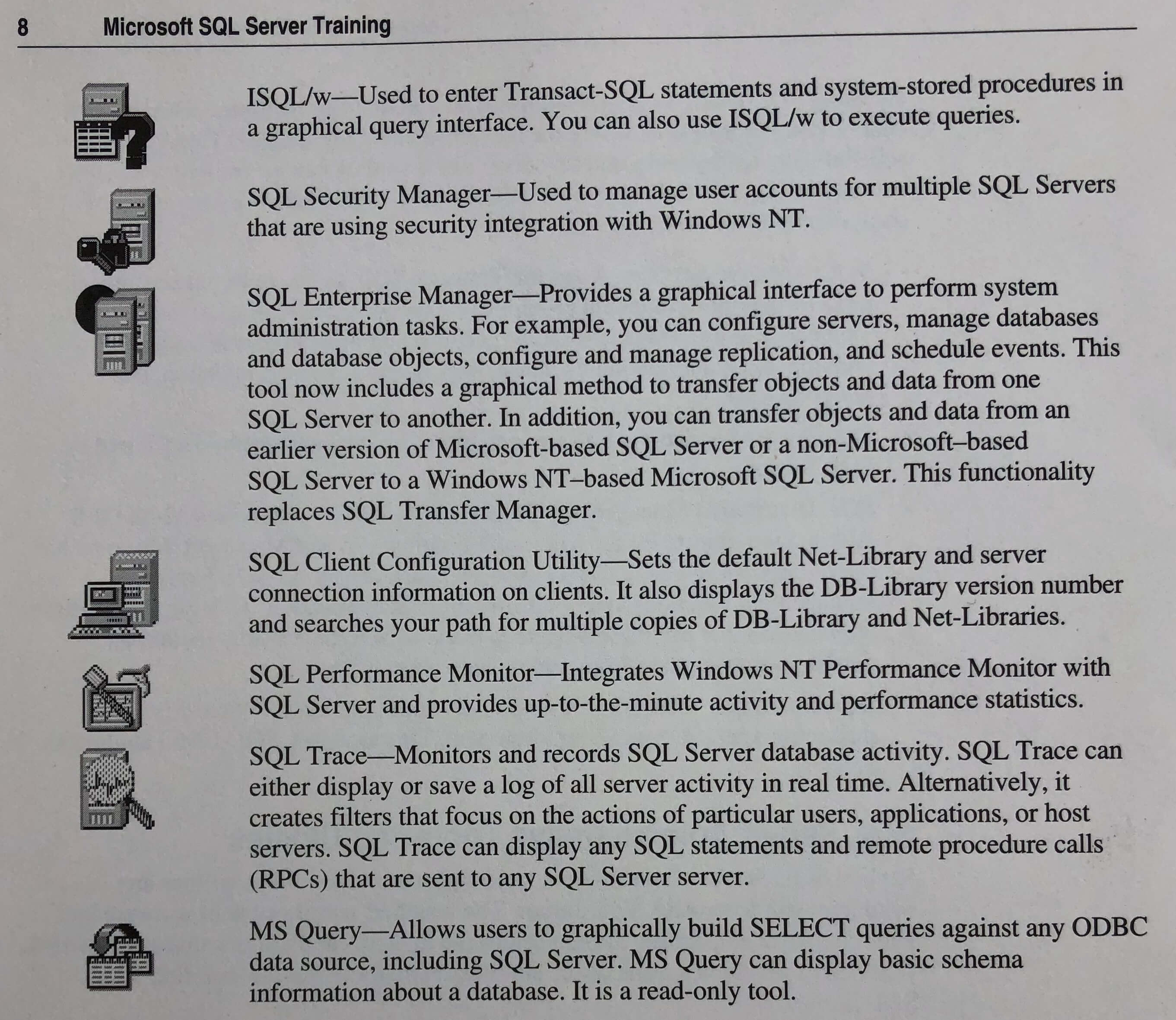
Gotta love those old-school icons
Love those icons. And hey, SQL Trace!
SQL Web Page Wizard, the same tool that built the very blog you’re reading

Over the years, Microsoft has repeatedly tried smearing buzzwords on the database server box. “Hey, web pages are cool – we can build web pages in the database! Wait, service-oriented architectures are cool – we’ll put a messaging queue in side the database! Document databases? Sure, we’re hip to that!” And with every release, the trendy stuff fades away, and the database engine sticks around, thankfully.

Clients use terminate-and-stay-resident applications

WOW, it used to suck troubleshooting connectivity issues. We take a lot for granted today.

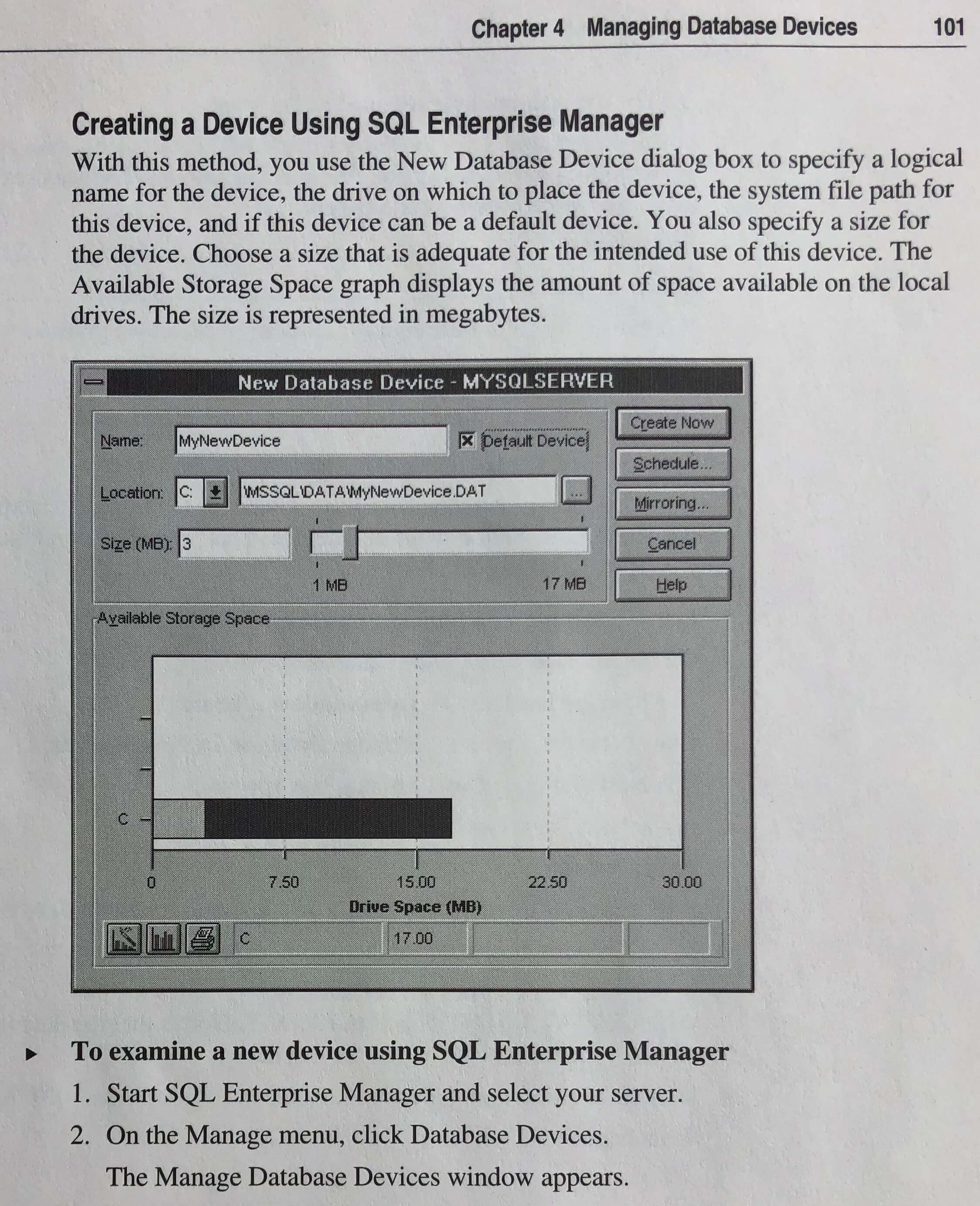
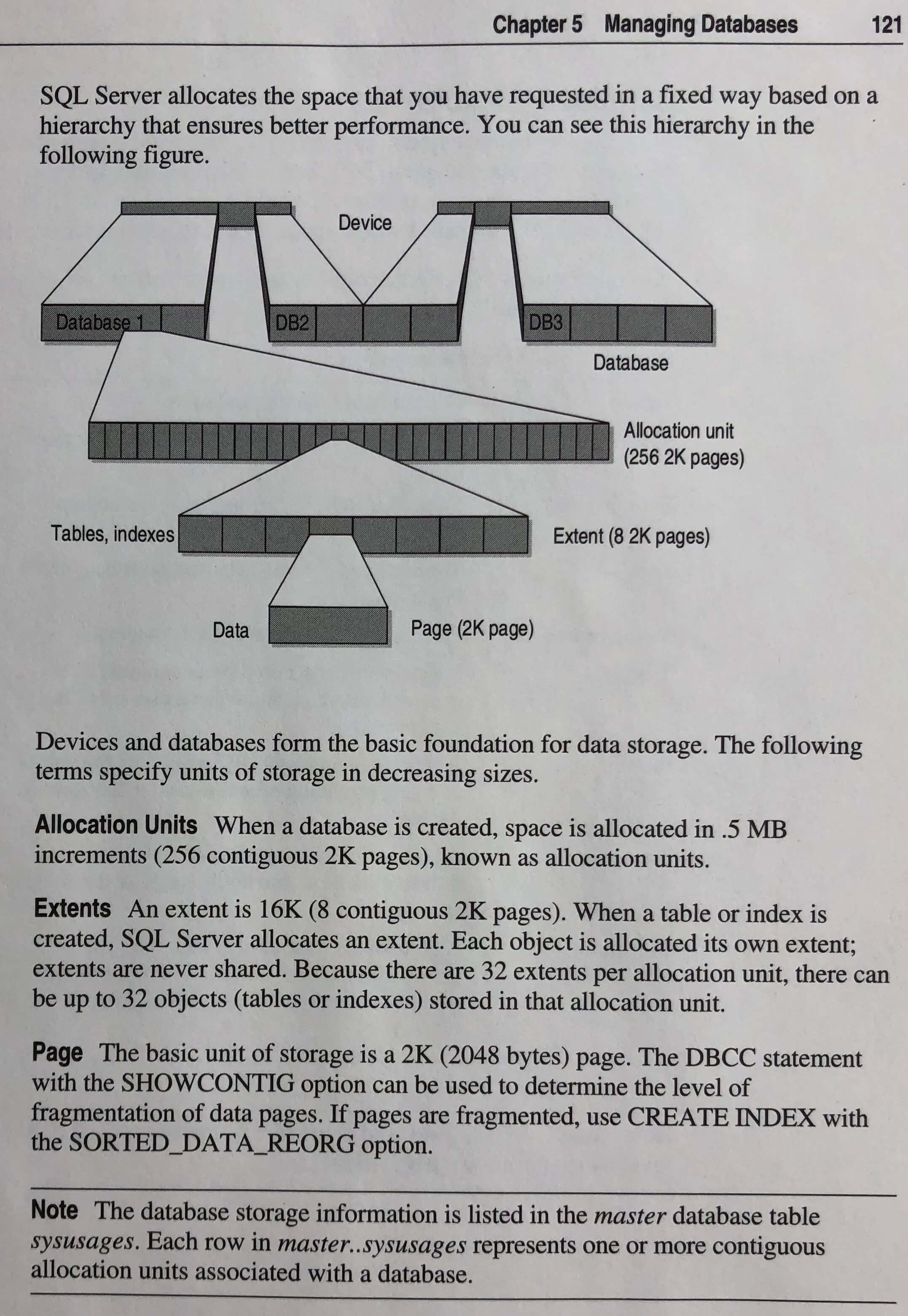
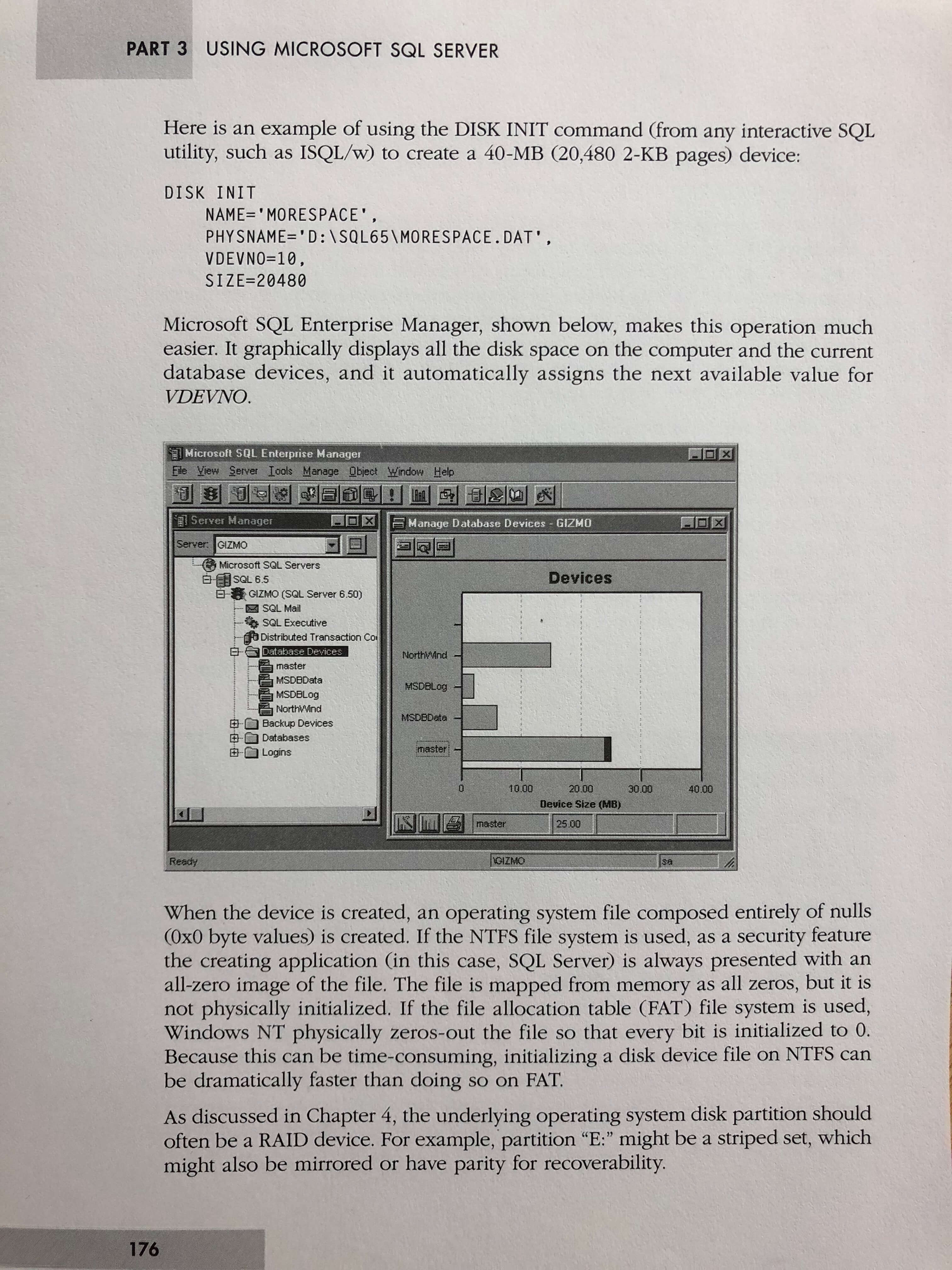
Back in the old days, you didn’t create a data file – you created a device first
Pages were 2K, and extents were 16K
The gift that keeps on giving
Retrieving data from a table

Okay, lemme stop for a second here to let something sink in. This is a 20-year-old book, and it’s by no means the first book to cover the SQL language. But this same technical book, funny as it may be, still uses the exact same language and syntax that you’re using to query databases today.

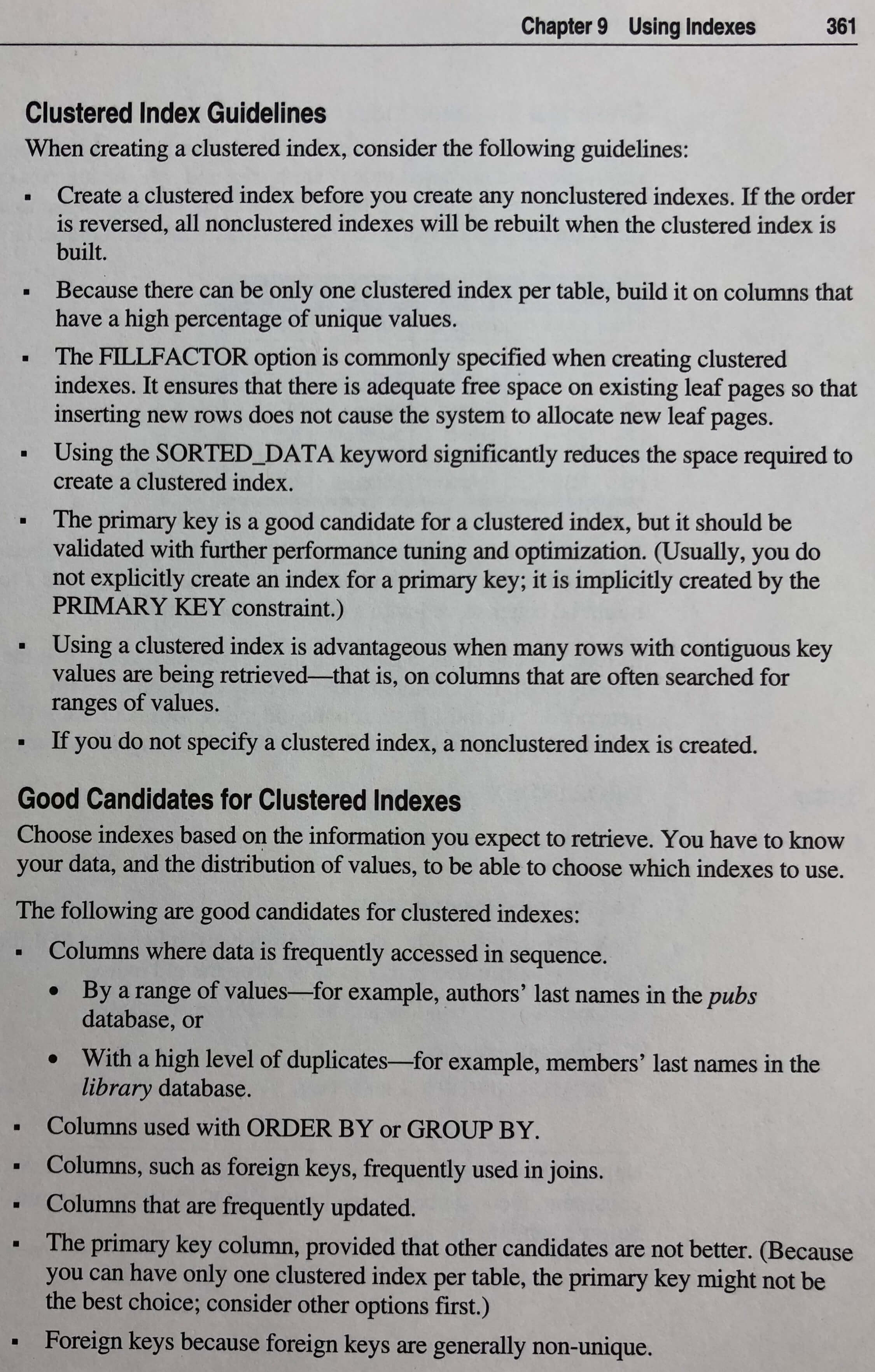
This page is going to start a religious war
Columns that are frequently updated are good candidates for clustered indexes – wat

Reading this book, I was surprised by how much of the information was still relevant today. It might not be accurate anymore, mind you – but it was still relevant. You could pick up this 20-year-old-book, read it cover to cover, and actually be equipped to pass a lot of SQL Server job interviews.

That’s an amazing testament to the quality of the vision of the team that built it, and the staying power of the product.


When Query Plans Lie Part 2

Getting Weirder

In Part 1, we looked at how query plans can tell us little lies.

Now we’re going to look at how those little lies can turn into bigger lies.

Adding An Index

Right now, this is our query:

If we add this filtered index, our query will have a grand ol’ time using it;

Leaving aside my own advice about filtered indexes, what happens to the query plan now?

smh

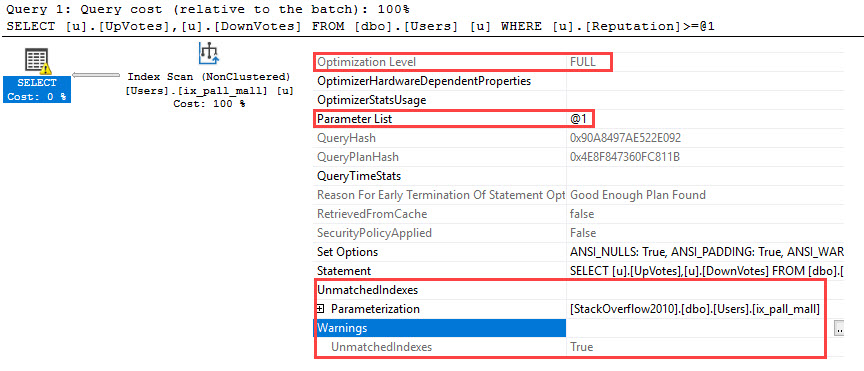
More lies! We can see in the query plan that our filtered index was used.

But… we have a warning that it wasn’t. Why?

Because filtered indexes don’t get along with variables.

But this plan is still lying to us.

Low Down

This time we have no trivial plan, and we have another Unsafe Auto-Parametization.

What a headache.

Now what does the plan cache tell us?

Whaaaaaaat

No. Really?

The plan is still showing us a warning, even though we see a literal in the cache.

This is obviously wrong. And very confusing.

Is This Documented Anywhere?

In the year of our SMOD, 2011, it was written:

SQL Server attempts to auto-parameterize queries and sends the auto-parameterized query to the query processor. Now the query processor decides if it can generate a potentially better plan given the constant values instead of the auto-parameterized query. If the query processor cannot find a better plan with the constant value plugged in, it means that the parameterized plan can be used across different parameter values. This parameterization is considered ‘safe’. In this case we cache both the parameterized and the shell query. However if the query processor can generate a better plan with the literal values, then this parameterization is considered ‘unsafe’. The query is parameterized and the shell query is cached. The parameterized query is not cached and is not visible through any of the plan cache DMV’s. The shell query points to the parameterized query and this is the only way to get to the parameterized query. In other words, unless the exact same query (and parameter value) is re-executed there is no chance of re-using this ‘unsafe’ parameterized query. Queries that already have explicitly defined parameters are not auto-parameterized.

Got that? There are shells. They’re invisible. But trust me, they’re there.

You know it when you step on them.

Thanks for reading!


The DeWitt Clause: Why You Rarely See Database Benchmarks

SQL Server
15 Comments

Back in the early 1980s, Dr. David DeWitt – who you might know from past PASS Summit keynotes, formerly of Microsoft (LinkedIn) – was working on measuring database performance. His team wrote a benchmark, ran it against Oracle, and Oracle didn’t fare well in the results.

Oracle reacted as one would expect – they were furious, and wanted DeWitt fired. You can read DeWitt’s remembrance of it in the article DB Test Pioneer Makes History by Timothy Dyck.

To prevent it from happening again, Oracle inserted a clause in their licensing that basically said you can’t publish benchmarks without getting Oracle’s explicit approval. David Wheeler has an essay about why the DeWitt clause censorship should be illegal, and I bet a lot of you agree.

And right about now, I bet a lot of you are going, “Yeah, that nasty mean Oracle is just nasty and mean.”

Except check out SQL Server’s End User Licensing Agreement, which includes the line:

BENCHMARK TESTING. You must obtain Microsoft’s prior written approval to disclose to a third party the results of any benchmark test of the software.

You agreed to it when you installed SQL Server. If that slipped your mind, you can find it in %Program Files%\Microsoft SQL Server\140\License Terms\ (or replace 140 with whatever version number you’re on.)

Open source databases don’t have restrictions like that, so the open source world is chock full of benchmarks comparing different versions, features, hardware, cloud providers, you name it. But the closed source arena? Not so much.

I understand where Microsoft is coming from – if anybody could publish benchmarks, then people with a marketing agenda would publish biased numbers using questionable methodologies in order to further their corporate goals, and that would be bad.


When Query Plans Lie Part 1

Freaking Out Brent

Is a full time job. Some days I can get him to hit the desk drawer tequila, and other days I crash and burn.

This day was so monumental I almost hired someone to do an action movie narration of this blog post.

Let’s Start Easy

Over in Stack Overflow, we’re going to run a query and get the Actual Factual Plan.

With no indexes, this query only has one possible plan. It has to scan the clustered index, and filter out rows that don’t meet the Reputation criteria.

In Theory®

The query plan shows us that we got a Trivial Plan, and that Simple Parameterization was attempted (as shown by the 100000 literal turning into the @1 parameter.)

Simple Parameterization is only attempted in a Trivial Plan.

The key word here is attempted.

Validation

There are some interesting things that don’t happen when you get a trivial plan.

The first is that missing index requests won’t appear. Not that the requests themselves are all that good, but hey.

The second thing is that certain optimizations aren’t considered — for instance, column store prior to 2017 had some issues.

We can also check using a couple system views.

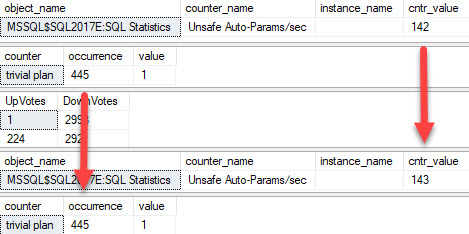
Unsafe parameterizations will tell us if Simple Parameterization was attempted and rejected, and we can see if a trivial plan was used with that second query.

These counters are cumulative, so don’t run them once and freak out.

If I check in on those around another run of my query, the results look about like this.

Trivial But Not Safe©

I see that both ticked up! I got a trivial plan, but the optimizer decided that parameterization wasn’t such a hot idea. (That directly contradicts what you saw in the plan, which implied that parameterization wasn’t just attempted, but that it was completed successfully.)

The query was simple enough, but cardinality estimation gives it a nudge — a good plan for this value may not be awesome for the next value.

This only happens with literals.

Lesson One: Mistrust

The query plan that SSMS showed us said the plan was Trivial, and Simple Parameterized.

The DMVs told us otherwise — Parameterization was attempted, but not used.

What does the plan in the plan cache imply?

True Lies!

It implies that the query was successfully parameterized.

What have we learned so far?

  • Trivial Queries get Trivial Plans
  • Simple Parameterization can only occur in a trivial plan
  • Trivial Plans end optimization early and skip some phases
  • Simple Parameterization can be rejected by the optimizer after query compilation
  • Actual Plans are still Estimated Plans

In Part 2, we’ll look at where this can be even more confusing.

Thanks for reading!

Brent says: because of my standing desk setup, I don’t actually have desk tequila. But yes, as we worked through this one, I did indeed walk to the kitchen and pour myself a drink. Every time that I learn another way that execution plans lie to me, I say, “This is why I drink.”


Availability Groups Bug with Indexed Views

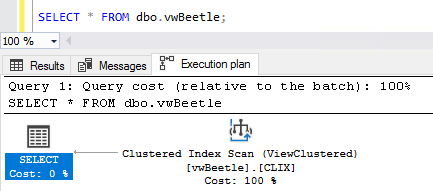
The short story: if you drop an index on an indexed view, queries on the Always On Availability Groups replicas that point to that indexed view will cause memory dumps.

The long story: to reproduce – AND DO NOT DO THIS IN PRODUCTION – on the primary, create a couple of tables, an indexed view, and hold my beer:

Over on the secondary, run a query against that view, and look at the execution plan, making sure it’s actually using the index on the view:

Successful

Then, over on the primary, drop the index – but not the view:

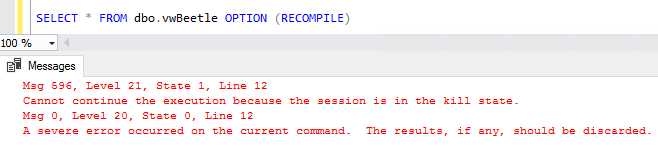
On the secondary, run your query again, and – uh oh:

The Kill State

What happened was that the secondary tried to use an execution plan that pointed to the index on the indexed view – but the index no longer existed.

The secondary’s error log shows a memory dump, always a good time:

Mama always said you were exceptional

And I know what you’re thinking – we just need to recompile the query to build a new execution plan that doesn’t include the index on the view:

Sad Trombone (which happens to be the official state song of the Kill State)

And no, sp_recompile and DBCC FREEPROCCACHE don’t work either. Even getting an estimated execution plan for anything related to the view causes a memory dump.

The only way to stop the continuous memory dumps is to free the system caches:

Microsoft is now aware of it, and working on a fix for a future cumulative update.

In Azure SQL DB, the problem manifests itself differently: instead of repeated memory dumps, the secondary replica restarts itself after the first query fails. Subsequent queries don’t because the server restart “fixed” the system cache issue. At first that sounds awesome – until you realize that the secondary replica can also be a primary replica for other databases that happen to be running on it.

I wanna give a big shout out to the nice folks at iQmetrix, especially Chris B. and Patrick H. They got SQL ConstantCare® alerts about a flurry of memory dumps on one of their replicas, so they opened a support case, kept us in the loop as the case progressed, and let us share the results with you to hopefully prevent more heartbreak until the patch comes out.


Parameter Fluid Optimization

SQL Server
0

Optimizer Studies

I don’t have a real job, which means that if something strikes my fancy, like staring at a spot on the wall for an hour, I can do it.

Occasionally things are a bit more inspired, and so I go poking around what SMRT PPL might be up to.

All you nice people out there paying $7k a core for Enterprise Edition make really cool research, especially into databases, possible.

There’s all sorts of cool stuff in there that has been surfacing in the product lately, from plan progression to the coLUmn ____St0r3! improvements to, well, click around a little.

Modern Plans

The general direction of the optimizer is not only towards automation, but also towards adaptation. Hence all the work in 2017 for Adaptive Joins, Memory Grant Feedback, and Plan Correction.

One of those research papers looks especially interesting to me, despite being named with the intent of dissuading readership:

Leveraging Re-costing for Online Optimization of Parameterized Queries with Guarantees

Art School Confidential

If you don’t have an advanced math degree or a couple hours of spare time, just read the abstract:

Parametric query optimization (PQO) deals with the problem
of finding and reusing a relatively small number of plans
that can achieve good plan quality across multiple instances
of a parameterized query. An ideal solution to PQO would
process query instances online and ensure (a) tight, bounded
cost sub-optimality for each instance, (b) low optimization
overheads, and (c) only a small number of plans need to be
stored. Existing solutions to online PQO however, fall short
on at least one of the above metrics. We propose a plan recosting

based approach that enables us to perform well on
all three metrics. We empirically show the effectiveness of
our technique on industry benchmark and real-world query
workloads with our modified version of the Microsoft SQL
Server query optimizer.

Hang The DJ

If you’ve been using SQL Server for a while, you’ve probably had to ask the question “why is my query suddenly slow?”, you’ve likely come across the term Parameter Sniffing, and you’ve maybe even been sent directly to a Summer Forest.

Will this fix every parameter sniffing problem? I don’t know!

Like I always say — if performance was never good, there’s no automatic fix for it (yet!). You could go from having one bad plan to having ten bad plans.

You’ll still have the same underlying plan quality issues to address, with no magical fixes in sight.

“lol why is max degree of q-bits set to 1 trillion?”

I love having this kind of stuff to look forward to. People ask if I’m scared that X feature will put X line of work out of business.

My answer is always the same: I’d be a lot more scared about going out of business if there were suddenly no new features to learn.

Thanks for reading!

Brent says: With open source databases getting better, and Platform-as-a-Service options like Google Cloud SQL for Postgres and Amazon Aurora catching on, Microsoft has to keep innovating to stay ahead. They have a neat advantage: the money they invest in database development pays off both in their Azure SQL DB hosting, and in their SQL Server boxed product offering. It’s really cool to see them recognize that and to continue investing research money into features nobody else has yet.


Hey, That’s Not My Sort!

Understand Your Plan

Mr. Optimizer does the rock n roll hoochie koo with Mrs. Optimizer, c. 1953.

When reading query plans, you may sometimes see a sort when you didn’t explicitly ask for data to be sorted.

Sometimes they show up to support order-preserving operators like stream aggregates, merge joins, or segments. Other times, they may show up to help optimize an operation that would otherwise rely on random I/O.

Random I/O is estimated to be much more expensive than sequential I/O. This comes from the optimizer being a bit long in the tooth, and not being hip to storage that doesn’t have design features in common with a record player.

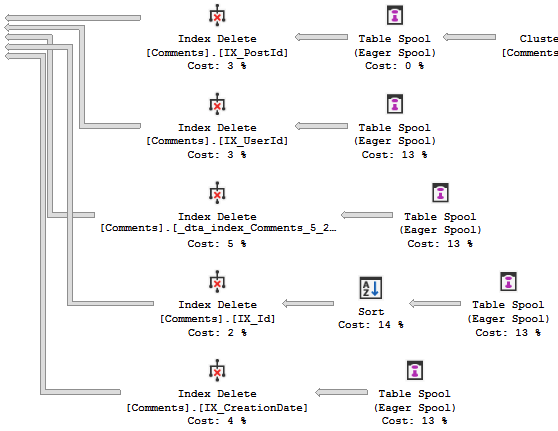
This can be pretty confusing sometimes, so I’m going to highlight five queries and their plans where the optimizer has injected a sort operator, when we haven’t asked for any particular ordering.

The point isn’t whether the Sort is good or bad, or if you need to index to support the ordering that that optimizer has inflicted upon your plan, it’s just to show you why they sometimes show up.

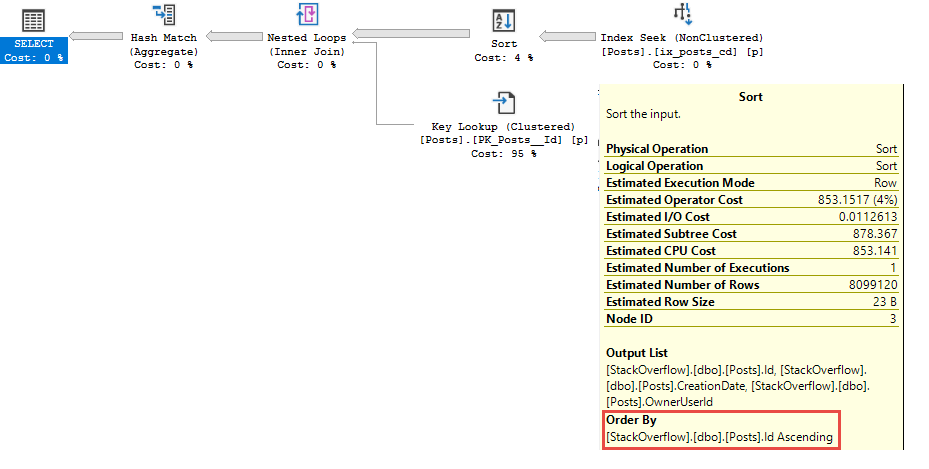
Plan One: The Optimized Key Lookup

I’ll say it one more time in case you’re playing catch up: clustered index key columns are implicitly (or inherently, if you’re feeling rhymey) present in all of your nonclustered indexes. Where they’re stored in the index depends on uniqueness, but if your nonclustered index leads with columns that aren’t your clustered index keys, they’ll like fall out of order in the index pages.

When the optimizer chooses a key lookup plan, it effectively joins the nonclustered index to the clustered index using the clustered index key columns in both.

In some circumstances, the optimizer may decide to sort the output of the nonclustered index to reduce the random I/O involved in the key lookup.

It Just Runs Faster

This is what happened here. The Id column in the Posts table is the PK/CX. The nonclustered index that got used for our query looks like this.

Clearly the Id column isn’t in the definition.

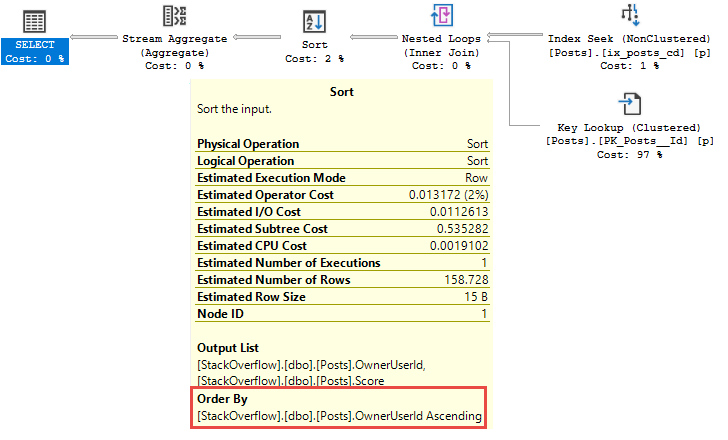
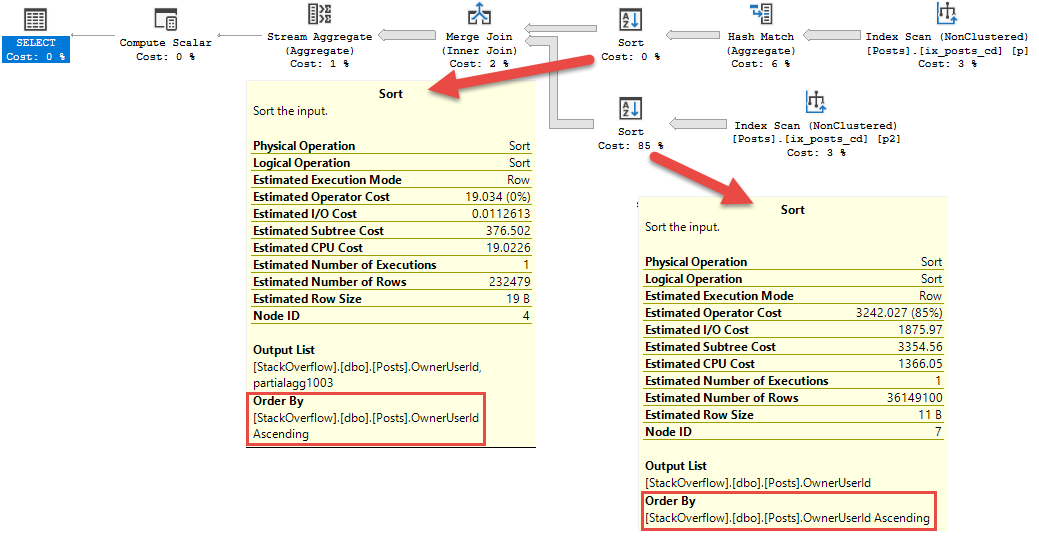
Plan Two: The Sort To Support A Stream Aggregate

The Optimizer has chosen a Stream Aggregate over a Hash Aggregate. Unfortunately (using the same nonclustered index as before), the OwnerUserId column isn’t ordered in any way. It’s only an included column in the leaf level of the index, and not in any particular order, and doesn’t exist in the intermediate pages in a seekable fashion.


Islands In The Stream

Where Hash Match aggregates can take data in any order (this doesn’t necessarily make them better, but hang on), Stream Aggregates need everything in order first.

This is a trade off, though. For a Hash Match aggregate, it behaves a bit like a Hash Join in that all the rows have to arrive at the operator before hashing can begin. With a Stream Aggregate, if the data isn’t in index order, it needs to be sorted. The Sort behaves similarly to the Hash Join (huzzah! The trade off!), and all rows have to get to the Sort operator before sorting can begin.

The other thing that sorting and hashing have in common is they’re both memory consuming operators. This is what all the fuss about memory grants is about.

Plan Three: The Sort To Support A Merge Join

Just like a Stream Aggregate, Merge Joins need sorted input. There’s some sense to this plan, in that with two Sorts, you can deduplicate some amount of data prior to sorting. There’s also that Stream Aggregate after the Merge Join, which needs sorted input. If the Sort were after the Merge Join (for some strange reason), there could be a whole lot more data to sort.


Wild, huh?

Traffic Jam

The Hash Match is applied to one side of the join to reduce the number of rows to sort and join.

Why not both sides?

Good question.

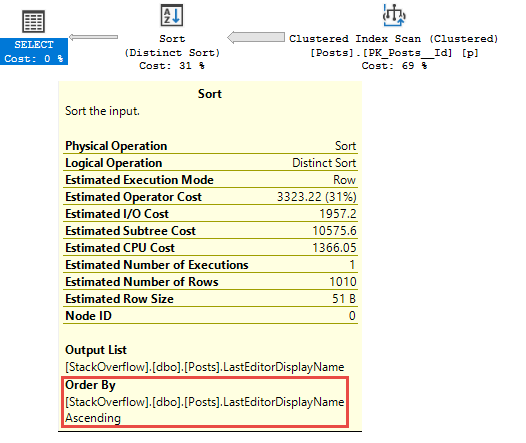
Plan Four: The Distinct Sort

This one is a little more obvious, but I decided to include it because I think you’re all nice people who deserve mostly complete blog posts.

I hope someday you find them.

Ha ha haaaadhefoiwsoihrgjergopjh.

This wine is only okay.

If you use DISTINCT or GROUP BY in your queries, the optimizer may choose to implement them with a Distinct Sort.

Why not a Sort and then a Stream Aggregate?

Good question.

Maybe it’s both?

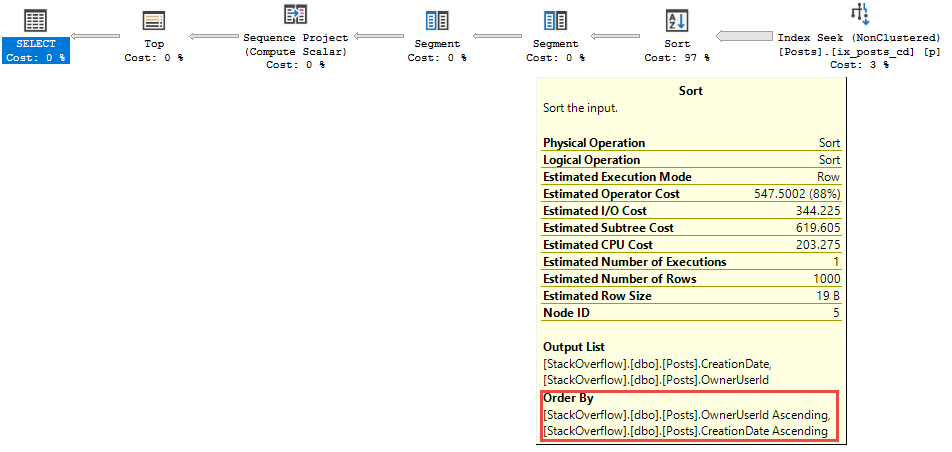
Plan Five: The Windowing Function

I know, you think I’m cheating here. You think I’m a big fat cheaty cheater. Liar liar plans on fire.

There’s an order by here, but the Sort has almost nothing to do with it. All of these queries use the same index as before. The order by for CreationDate is fully supported.

You’re a good time

Or at least it would be, if we didn’t have to Partition By OwnerUserId first.

Partition By sorts the data, too. This is why indexing correctly can be important.

The optimizer doesn’t really have any alternatives. In many of the other plans, things could have been done differently. This one is all you.

Or me.

Where were we?

Put On A Happy Face

Now when you see a mysterious Sort operator appear in your query plans, you’ll have some more clues as to why.

Hopefully this helps you out, and helps you make a decision about how to interpret and tune things where necessary.

Remember that the only cure for a SARGable Sort (a Sort that’s not on an Expression) is an index that supports it. Adding or rearranging indexes may help (query rewrites may also help, sometimes…).

Thanks for reading!


Book Review: Inside SQL Server 6.5

Book Reviews
44 Comments
Books Offline

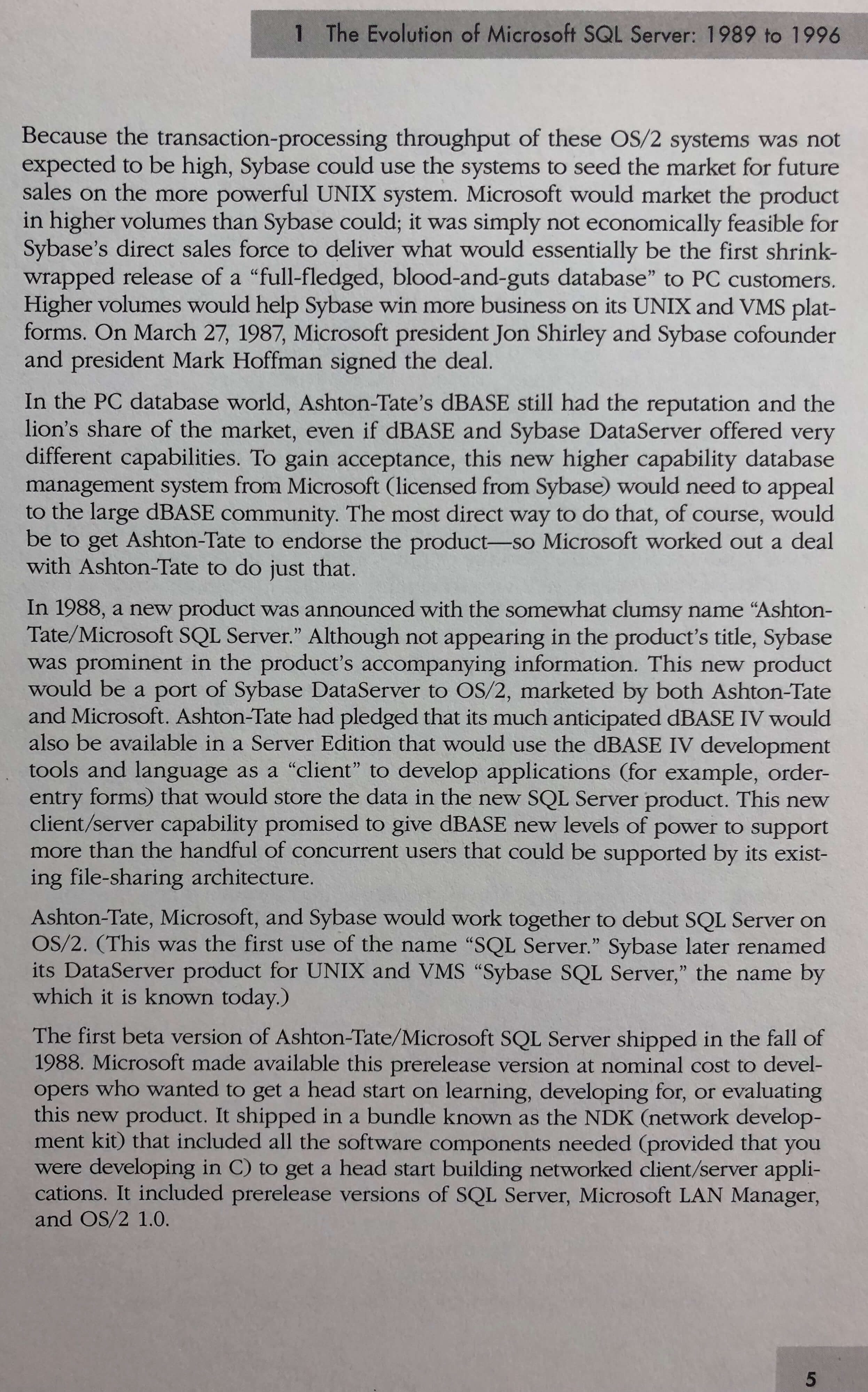
30 years ago, back in 1988, Microsoft, Ashton-Tate, and Sybase got together to start building SQL Server 1.0 for OS/2.

I wanted to take a trip down memory lane to celebrate, but I didn’t wanna go back quite that far. I wanted to go back to what would probably be fairly recognizable – say, over 20 years ago: SQL Server 6.5 as of 1996.

I picked up half a dozen used books about SQL Server 6.5, then spent a delightful weekend reading them. Seriously delightful – lemme tell you just how into it I was. Erika and I eat all weekend meals out at restaurants, but she saw me so happily curled up in my chair reading that she insisted on going out and getting tacos for us just so I wouldn’t have to get up. I was having that good of a time READING BOOKS ABOUT SQL SERVER 6.5. (Also, Erika is amazing. Moving on.)

To bring you that same fun, I wanna share with you a few pages from Inside SQL Server 6.5 by Ron Soukup, one of the fathers of SQL Server. (And please do NOT pay full price for that. Used ones pop up for sale all the time, or support your local Goodwill or used book store. It’s not like it really matters which one of these 6.5 books you buy, hahaha – they’re all a hoot to read.)

This book was written long before Microsoft Press descended into bland marketing material. Back then, Ron could still pepper the book with all kinds of personal opinions and stories, bringing the material to life. Forgive the pictures – my scanner’s got a big line going down the middle, and I’ll be doggone if I’m going to buy even MORE old technology!

Chapter 1: a little business history to warm you up

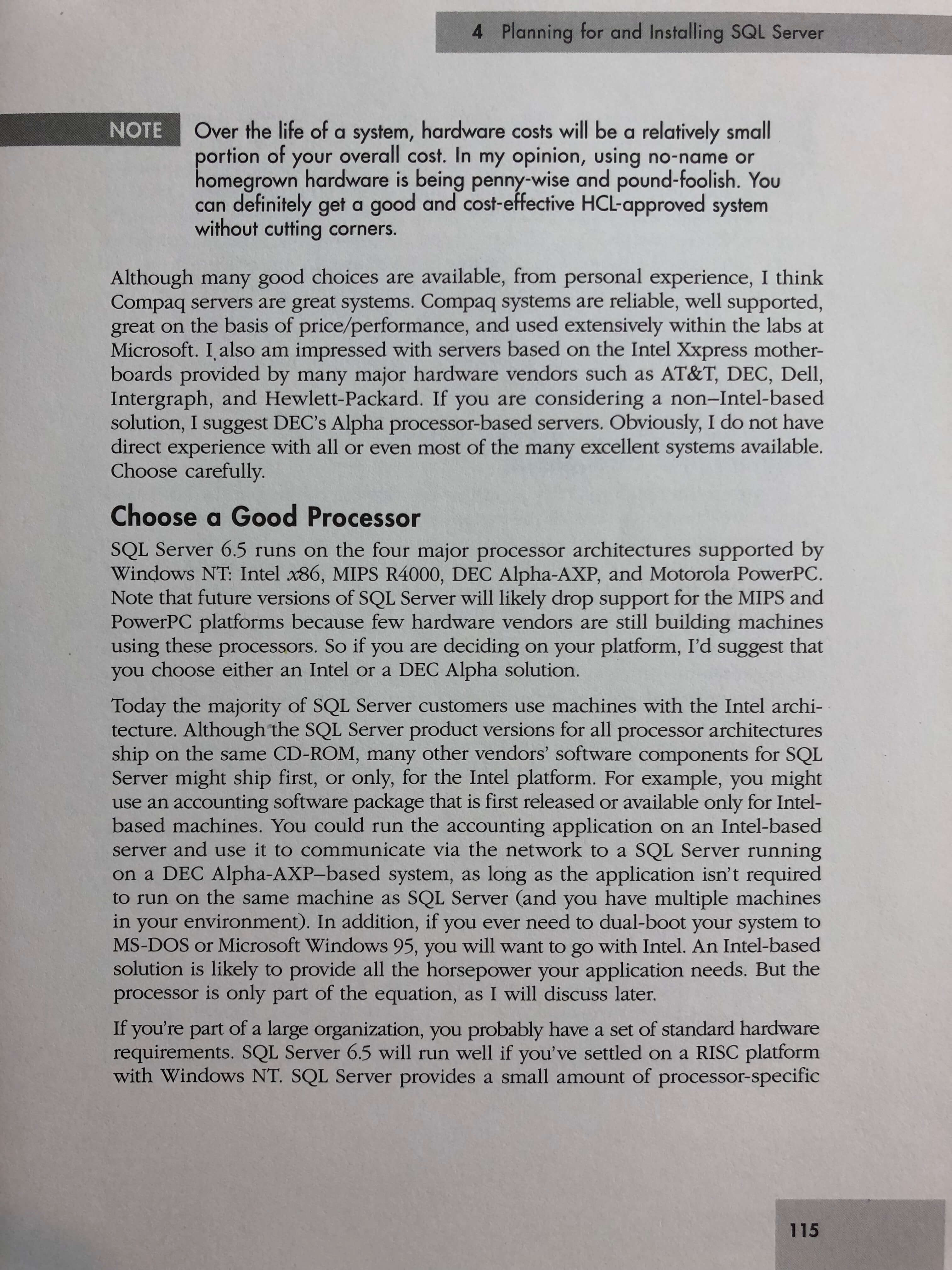
Now, let’s move on to choosing the right hardware:

Installation time: picking between processor families

That’s right: SQL Server used to support Intel x86, MIPS R4000, DEC Alpha, and Motorola PowerPC. When I first read that, I thought, “Wow, I forgot how much of a Wild West hardware used to be.” But you know what? Today’s really no different – cloud vendors are the new processor choices. (And just like you, dear reader, don’t usually make the decision about the cloud vendor, you wouldn’t have been the one making the hardware decision either. That was done by big executives on golf courses as they talked to vendors.)

Once you’ve picked hardware, now it’s time to fill that box up with memory:

“I’d recommend start with enough memory to give SQL Server at least a 10-MB cache.”

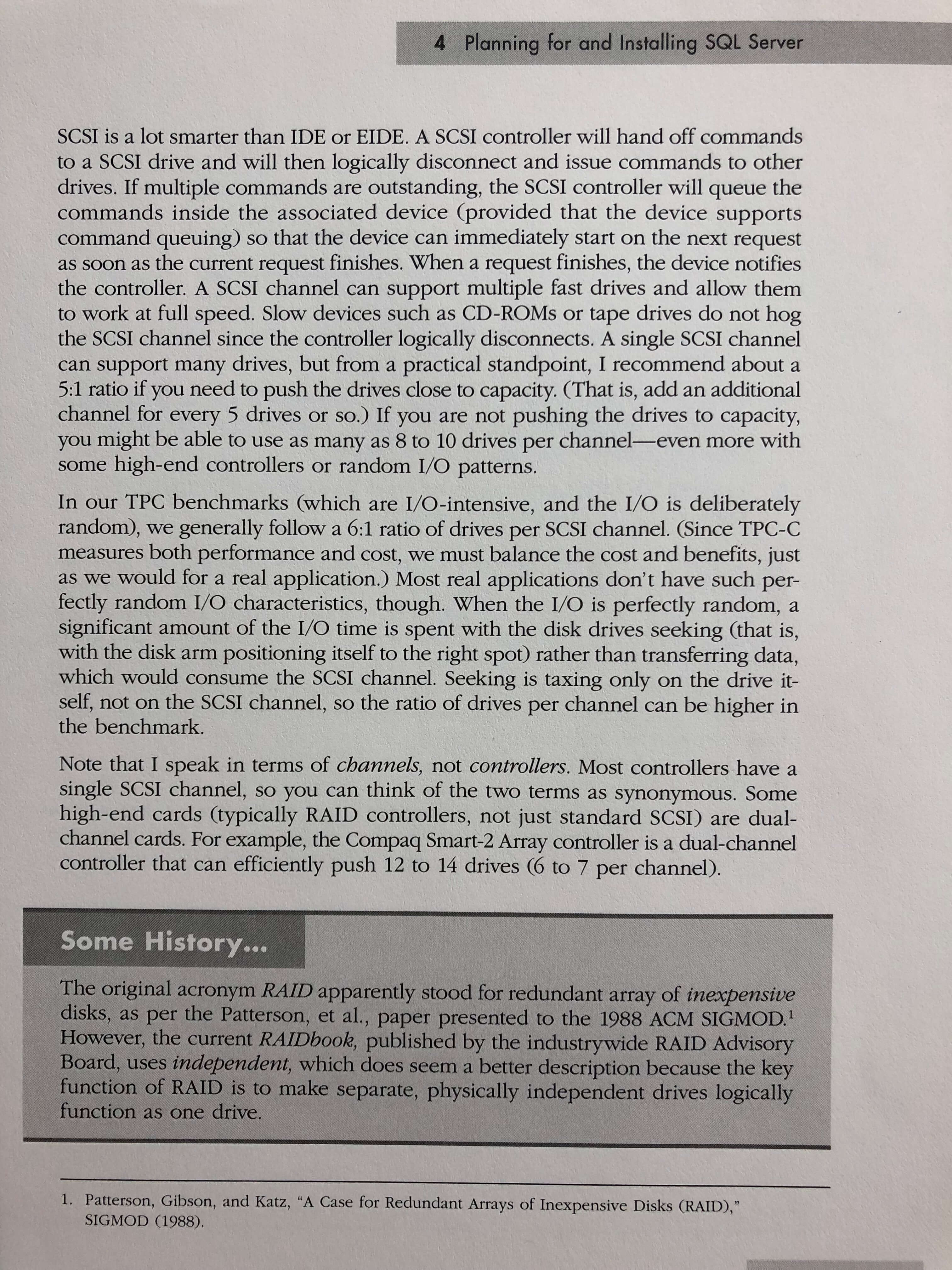
Choosing storage is important too, of course:

You don’t have to worry about the CD-ROMs and tape drives being on the same SCSI channel. They don’t hog bandwidth.

As antiquated as this stuff sounds, DBAs are still dealing with the same problems today – it’s just that the problem has different names now. The work you have to do today to get maximum throughput from Azure VMs is really no different than what these people were monkeying around with 20 years ago. It’s just that instead of 6 drives per SCSI channel, now you’re dealing with how many Premium Disks you have to stripe together to saturate the network throughput of a given VM type. Same math, different names.

Then, how are we going to license our 1996 server?

The old server + CAL model

Hold on, hold on, that looks cheap, but it’s not as cheap as you think. When you translate it into today’s dollars due to infl….uh, actually, yeah, that’s still pretty cheap.

Alright, moving on. It’s purchased – let’s start installing and configuring it. Take memory, for example:

How to set max memory

Twenty years ago, way back in the dark ages, we had to use formulas in order to tell SQL Server – this massively powerful database system – how much memory it was allowed to use.

Today…we still do.

Today, software that costs $7,000 per core still can’t suggest a default amount of memory to take. These are the things that really blow me away as I read these books – sure, the terms have changed, but so much of the work we’re doing today is still exactly the same. I keep hearing about these magical robots that are going to take our job – so are we going to have to tell the robots what their max memory is, too? Or set their MAXDOP so it isn’t unlimited by default? (That’s how the world is going to end, by the way: Microsoft is going to bring out a robot, tell us to set its MAXDOP as part of the unboxing process, and a bunch of people are just going to open the box, let it breed, and we’re all going to die. Seriously, Microsoft, nobody reads the manual. Try not to kill us.)

Moving on – let’s create a database. Back in SQL Server 6.5, you had to create a “device” (not a file) on disk, then put the database inside the device:

It creates a basket, and then it puts the lotion in the basket

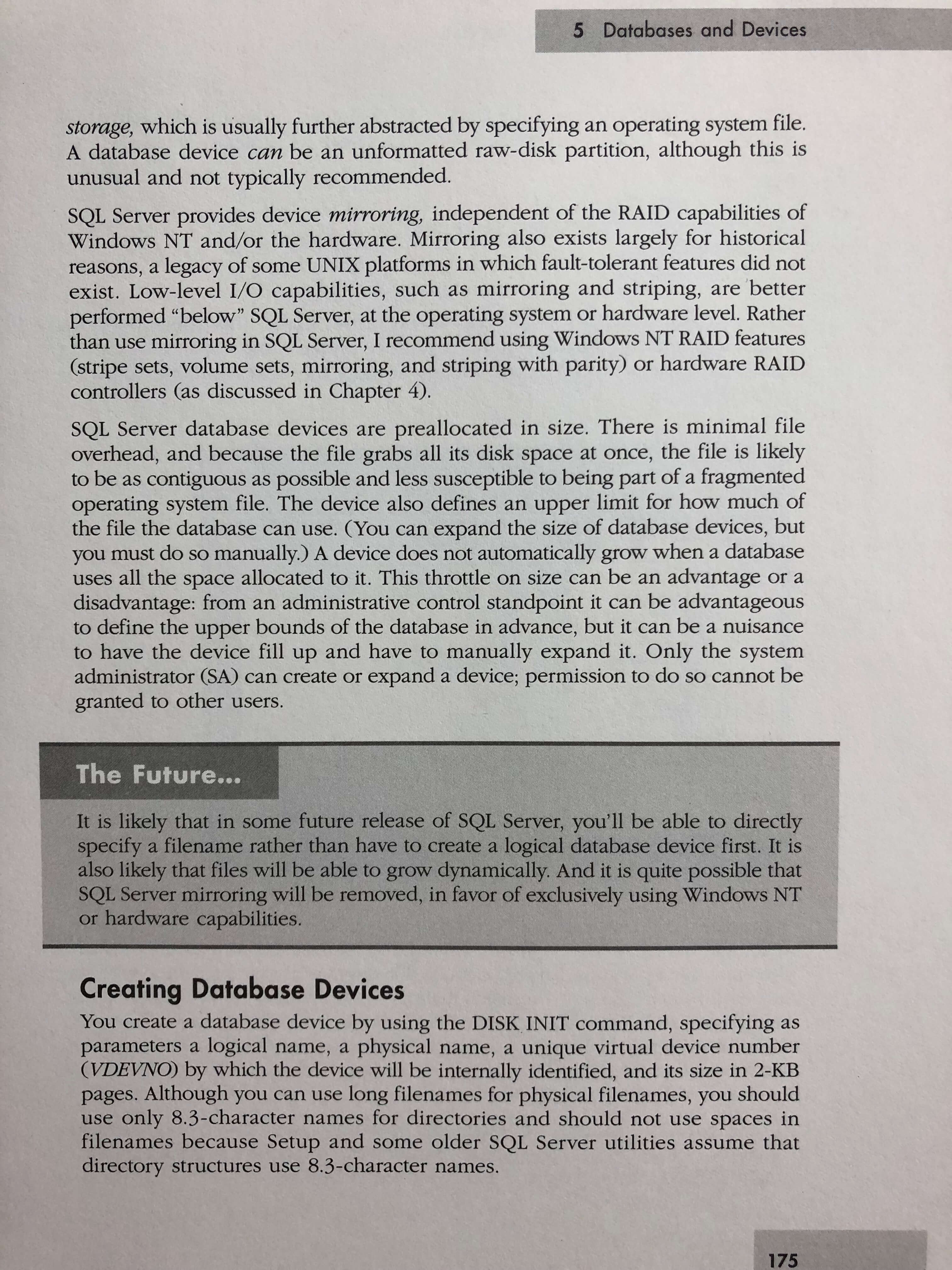
And I can almost hear you giggling, ha ha ho ho, Grandpa Database Administrator was so backwater, but stop for a second to think about what you do when you build a brand new, state of the art Azure Managed Instance.

You have to specify how big the storage is going to be.

For a database that doesn’t exist yet.

And when it runs out of space, you have to deal with it – just like Grandpa did.

Not so fancy now, are you, kiddo? Well, I’ve got good news: in this book, Ron gives us a vision into The Future:

The Future

THE FUTURE IS HERE, RON, AND IT’S AWESOME, BUT IT’S NOT ALL THAT DIFFERENT

Alright, moving on – let’s start storing some data:

Clustered indexes

Twenty years ago, you could buy a book off the shelf – just one book – and it gave you the history of the database system, licensing, purchasing, configuration, internals, how to write a query:

Working with CASE statements

That part about the comments down at the bottom is kinda funny – there was a 64KB limit for stored proc comments. However, “neither of these limitations is much of a worry.”

Oh, Ron, the future is terrible. Microsoft lifted that limit, and people build stored procedures that make Shakespeare look like an essayist.

Performance tuning checklist

That performance tuning checklist is still viable today. I could totally see this pinned up on a DBA’s cubicle wall. I’ll be tickled pink when the robots master any of this stuff. Take it. Please. Get it under control.

This performance tuning snippet intrigues me:

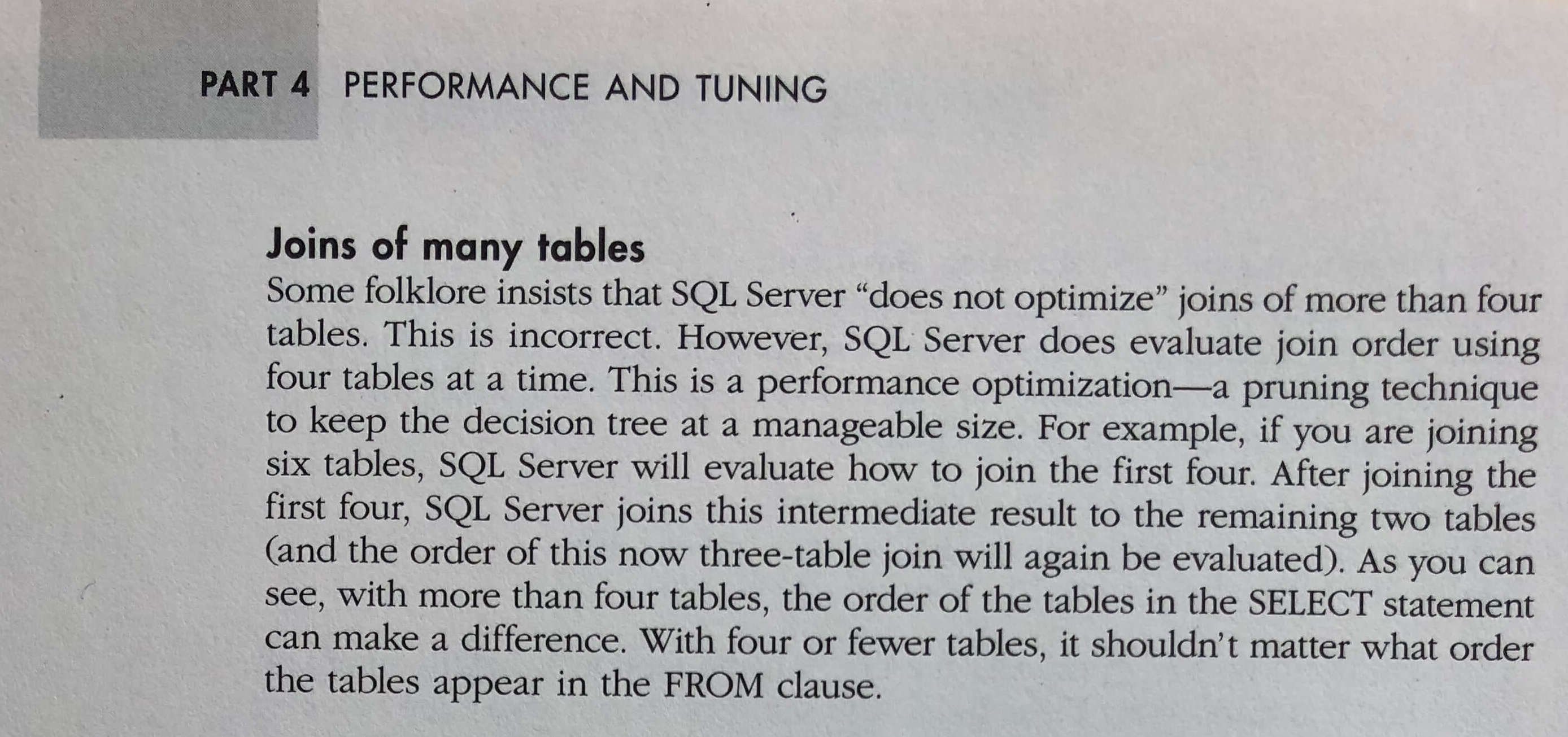
Joins managed in groups of 4 tables

I’ve heard this “groups of 4” thing repeatedly from different people, and I wonder if this is where it got its start. I’ve noticed that on really complex queries (20+ joins), if most of the filtering is done on tables far down the join list, I get a massive speed boost by moving those to the first 4 tables joined, and filtering on them as early as possible. Just seems to shape which query plan SQL Server considers first. It’d be neat to know that it actually is a hard solid rule of 4 though.

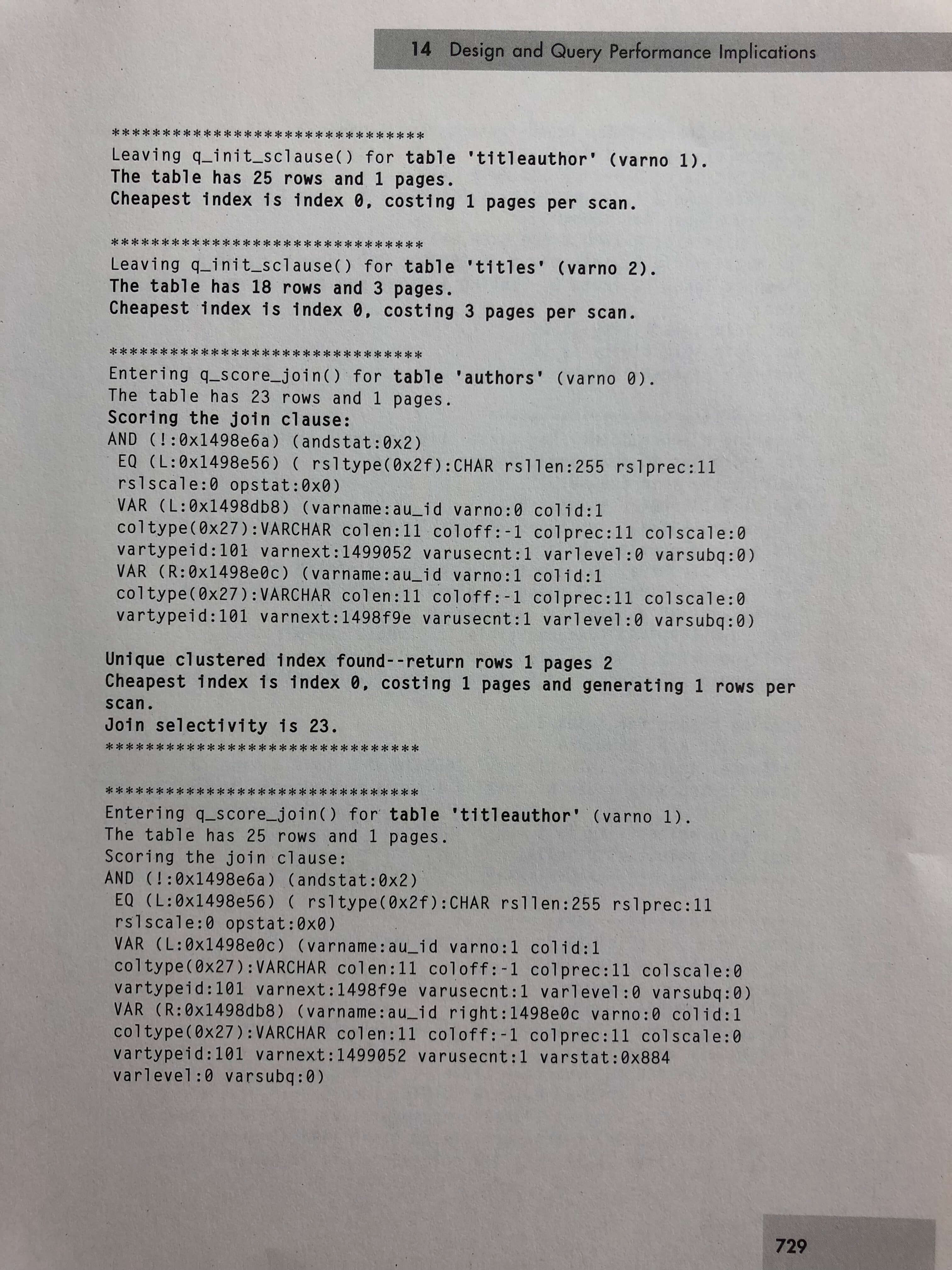
The “Watching the optimizer’s decision process” section is mesmerizing, seeing how they used to work through this stuff:

Hello, trace flags
What the trace flags produced

Man, Grandpa had it rough. Moving on.

Priority Boost: bad idea for 20+ years

They’ve been telling you Priority Boost is a bad idea for over TWENTY YEARS, but I still find it in a disturbing number of servers.

Whew. What did I learn from this monster book? Well, Ron could have finished writing this book, jumped into a time machine, walked into any modern database shop, and his 1990s skills would have translated pretty well into what we’re doing today. The data is bigger, the servers are faster, and the costs are way higher – but the basic plumbing is all still the same. SQL Server has made some things easier – but it’s added a whole lot more toys in the box, and those toys still aren’t easy to manage.

Reading these books, I’m more convinced than ever that I picked the absolute perfect career. I love working with databases – really, really love it – and there’s always so much more to learn. Part of me wishes I could have gotten started earlier to see more of the original genesis, but the rest of me knows that so much awesome stuff keeps coming into view, and I wouldn’t wanna miss that either.

If you liked this one, holler – I bought a few others and read ’em for fun, and I can share those as well if there’s interest.


I’m speaking at SQL Saturday NYC

SQL Server
5 Comments

No, Not Brent

Just me. And a few dozen other people, on May 19 (2018).

I have sessions on the query optimizer, and all the stuff I think is cool in SQL Server 2017.

Away Days

You know, I get it. The weather is just finally getting nice in these parts.

No one wants to spend a Saturday inside thinking about their job. But free training days like this are priceless.

In a lot of ways, I consider the first SQL Saturday I went to back in 2012 to be a deciding factor in sticking with it as a career.

That and I won a book. I still have the book.

I’d give it away as a prize, but it’s about SQL Server 2012.

Is that thing even supported anymore?

Location, Location, Location

Besides, look how nice Times Square is.

Go here to register for FREE.


First Responder Kit Release: Darn May Showers

There’s usually something that I think is funny in this space. Instead, I’m going to extend my already extensive day of civic duty by letting you know something interesting about jury duty.


Sometimes, if you show up when they ask you to, they can make you come back for a second day if they don’t pick enough people to fill a a jury on the first day.


They’ll also be kind enough to give you absolutely no notice and be entirely inflexible about letting you reschedule.


Ah, the joys of not having to worry about customer satisfaction.


Not like us. We care about what each and every one of you thinks about these scripts, for free.


(strums guitar)

sp_Blitz Improvements

#1537: In older versions of SQL Server, if you ran into CMEMTHREAD waits, you’d flip on Trace Flag 8048 at startup and your problems would likely go away. On 2016+, that’s the default behavior. But apparently you can still run into CMEMTHREAD. We tried to give you better guidance, but Bob Ward wouldn’t let us put his phone number in there. Can’t imagine why. Oh well. Hi Bob!
#1552: Ever go to fix a typo and make another typo? Well, that typo is fixed now. Fixed for good.

sp_BlitzCache Improvements

#1522: We sort the second result set more prettier (according to Brent) now. It has good Lo Mein or whatever.
#1525: Busy Loops wording is more consistent. It used to be “frequently executed operators”, which was downright confusing at times.
#1528@RichBenner is a much more forgiving entity than I am. We’ll now let you get away with not patching 2017 past CU3 without throwing vicious errors.
#1543: With 2016 SP2 getting released, a bunch of the XML attributes that used to only be in 2017 got back ported. Stuff like tempdb spills and row goal information. You should totally upgrade. I’ll be your best friend.

sp_BlitzFirst Improvements

#1545: Eagle Eyed Professional Man With Standard @goochjj noticed that some of the dynamic SQL in sp_BlitzFirst was adding single use plans to the cache. He fixed that with some rather cunning parameterization.
#1388#1389#1396@EmanueleMeazzo did a metric t-rex load of work rewriting the views and view creation syntax so they’ll be faster. This has been in the works for a while, but totally worth it. We salute your patience!

sp_BlitzIndex Improvements

#1532: The taller and better looking version of me, @amtwo, spotted some wonkiness with the way we displayed data types for indexes with descending orders. Namely that uh, we weren’t showing them. Case expressions are hard sometimes. You just never want them to end.

sp_BlitzWho Improvements

#1527@TaraKizer noticed that sometimes wait times were wrong for parallel queries. This has been corrected with gusto.
#1531: A lot of times when you’re troubleshooting parameter sniffing, you can see the bad plan running. Getting the plan handle to knock it out of the cache is a pain. There’s right clicking and XML. Or at least there used to be. Now we surface it in @ExpertMode.

sp_BlitzQueryStore Improvements

#1544: I had made a bunch of changes in BlitzCache to put some checks in @ExpertMode and tidy up URLs, etc. They’ve all been added here so output should be aligned. There were also some behind the scenes changes to make sure we’re only diagnosing parameter sniffing for multi-use plans, and we’re not flagging unmatched indexes in trivial plans.

sp_DatabaseRestore Improvements

Nothing this time around

sp_BlitzBackups Improvements

Nothing this time around

sp_AllNightLog and sp_AllNightLog_Setup Improvements

Nothing this time around

sp_foreachdb Improvements

Nothing this time around

PowerBI

Nothing this time around

sp_BlitzLock

Nothing this time around

For Support

When you have questions about how the tools work, talk with the community in the #FirstResponderKit Slack channel. If you need a free invite, hit SQLslack.com. Be patient – it’s staffed with volunteers who have day jobs, heh.
When you find a bug or want something changed, read the contributing.md file.

When you have a question about what the scripts found, first make sure you read the “More Details” URL for any warning you find. We put a lot of work into documentation, and we wouldn’t want someone to yell at you to go read the fine manual. After that, when you’ve still got questions about how something works in SQL Server, post a question at DBA.StackExchange.com and the community (that includes us!) will help. Include exact errors and any applicable screenshots, your SQL Server version number (including the build #), and the version of the tool you’re working with.

You can download the updated FirstResponderKit.zip here.


Building SQL ConstantCare®: Refining Our Recommendations

SQL ConstantCare
6 Comments

One of the fun things about building SQL ConstantCare® as a cloud-based service is that we can iterate fast, making improvements based on the data we find. We can assess the population as a whole, figure out what people are doing well, and look more closely at the rules they’re struggling with.

What checks are everyone passing?

Let’s look at a sample day from last week when 562 servers sent in data (out of the users who agreed to share their data to improve recommendations):

  • No one was using the -x startup flag
  • No one had known-dangerous third party modules installed
  • No one was running a 32-bit SQL Server
  • No one had high memory usage for in-memory OLTP (Hekaton)
  • No one’s plan cache had been erased recently (aside from server restarts)
  • No one needed to restart to fix a TempDB file configuration mismatch in the DMVs
  • Everyone on 2016 Standard Edition had patched to SP1 to get the free features

That’s not to say no one was having these problems when they first started ConstantCare – the subject of which rules people are fixing the fastest is the topic of another upcoming post.

What recommendations are people struggling with the most?

  • 276 servers need to enable remote access to the DAC
  • 197 servers have databases with no CHECKDB in the last couple of weeks
  • 135 servers have over 10,000 plans cached for a single query
  • 132 servers have databases with transaction logs larger than their total data file sizes
  • 89 servers have databases with no recent full backups
  • 79 servers have databases in full recovery model, but no recent log backups (kinda ties into the 132 with big log files, too)
  • 78 servers have databases without checksum page verification turned on
  • 70 servers have max memory at the default (unlimited) or larger than their physical memory
  • 69 servers have user databases on the C drive (and 60 have TempDB on C)

As I look at that list, I ask myself:

  • Are the recommendations right? Are the thresholds valid, or do I need to tweak some?
  • Why aren’t people doing those tasks?
  • What can I do to make those tasks easier?

Lemme share 2 examples of how we’re adapting the emails based on your data.

Making the DAC recommendation easier

Take the top one, enabling remote access to the DAC. I believe the recommendation is right, and I don’t think that many people are pushing back due to valid security concerns. (Hardly anybody is muting that recommendation.) However, it sounds dangerous the way it’s written, and the call to action was kinda vague: go read this blog post and watch this video to learn how to fix the problem. It sounds like it’s going to take work on your part – when in reality, it’d be really simple. I was just making it sound harder than it is.

What I really needed to do was rewrite the guidance to get faster adoption. Here’s the new one:


Enable the Remote DAC – When poison wait issues like threadpool strike, you can fix them by connecting to the Dedicated Admin Connection (DAC). However, by default, you can only do this by remote desktopping into the box – something I’m not a big fan of doing. Run the below command, and the next time SQL Server restarts, you’ll be able to access the DAC remotely. More information about the DAC.


And in case you’re curious, yes, we can adapt the T-SQL in the recommendation based on whether it’s safe to run in their environment, like if they have any reconfigurations pending or if they don’t have show-advanced-options turned on. (To do that, I found myself building dynamic SQL in PostgreSQL. Man, my life is weird.)

That new recommendation will go into production soon, and we’ll see how that affects completion rates. I really take that stuff seriously – if your servers aren’t getting better, then we’re not doing our job and earning our keep.

Changing thresholds for plan cache guidance

The remote DAC recommendation make sense, and I just needed to tune the advice to make it easier to follow. However, what about the 135 servers with over 10,000 plans cached for a single query? Fixing that is much harder: changing apps to send in parameterized queries can take a long time, and forced parameterization comes with some risks.

For this one, I stepped back and asked – “Am I really sure this is a problem for all of these servers? Or are we maybe triggering that recommendation a little too casually?”

Upon further investigation, I realized that most of these servers had no memory pressure. Many of ’em were outright bored – with wait time ratios below 1.0, and in many cases below 0.1! To pick an example: if a server has 256GB RAM, spends less than 10 minutes per hour waiting on resources, and has days of queries in the plan cache, is it really a problem if 10,000 plans are cached for a single query? I mean, sure, it’s bad, but in the grand scheme of things, how bad is it? Especially when you’ve got lots of servers and lots of tasks to perform?

Some customers even emailed in the sources of these queries – they included backup software, monitoring tools, and even sp_BlitzFirst’s logging query! Granted, with open source tools, smart folks like Gooch can check in improvements to mitigate the problem – but realistically, is your backup vendor going to react to issues like this? Probably not.

Therefore, we’re editing that rule’s thresholds so it only fires when you’re under serious memory pressure, and you can’t keep much in the plan cache, and there are tens of thousands of queries for a single plan in the cache. We’ll also consider it when it looks like your server is under heavy CPU load due to high compilations per second.

Analyzing customer data from SQL ConstantCare® is my favorite part of my job right now. We’re building a new set of realistic, doable performance recommendations that make a measurable difference in servers – cutting the fluff, and focusing on the big bang for the buck tasks. I want you to be able to make as few changes as possible, and see as big of a difference as possible. We’re learning more every week.


[Video] Office Hours 2018/4/25 (With Transcriptions)

This week, Brent, Erik, Tara, and Richie to discuss cloud server disaster recovery, Availability Groups troubleshooting, SQL Server deadlocks, slow tempdb latency, migrating to Azure, SQL Server 2017 gotchas, how to set up your dev environment when looking for a job, best allocation unit size for disks hosting data files and good replacement for linked servers.

Here’s the video on YouTube:

You can register to attend next week’s Office Hours, or subscribe to our podcast to listen on the go.

Enjoy the Podcast?

Don’t miss an episode, subscribe via iTunes, Stitcher or RSS.
Leave us a review in iTunes

Office Hours – 4-25-18


Does Azure have a good hybrid DR option?

Brent Ozar: Alright, let’s see here. Anon says, “Do y’all know if Azure has a good hybrid DR option? We’re rolling onto SQL 2014 on-premises and I was just told we’re going to need disaster recovery.” I like that, we were told we were going to need disaster recovery. “Apparently, we don’t have any and it’s just me, so I thought maybe Azure might have something better than physical servers.”

Erik Darling: I love just picturing this conversation where it’s like, this is going to be a disaster…

Brent Ozar: We need to be able to recover from this disaster. I don’t know about Azure – we actually wrote whitepapers on a technique that works across all cloud providers. I’ll point way over to the – oh, I got the wrap around thing… So Tara, about that whitepaper that you wrote for Google

Tara Kizer: It’s a cheap solution, but it is a very valid solution. So sending your backups to the cloud into a storage bucket and then when the time comes, spinning up a VM and getting your system restored over there. Just tack the SQL Server component and you really can get your system up and running fairly fast. But just make sure you understand what you need to do to get your application server, web servers. Make sure you’re setting your source code to the cloud also because having your database backups is not enough to get your site back up and running.

Erik Darling: Yeah, and if your company already has, like, pretty tightly defined RPO and RTO goals, you need to make sure that there’s a separate discussion around what they’re going to be for DR, especially if you use the  cheaper DR option where you’re just sending the backups up because oftentimes it’s going to be outside what your current windows are. It’s just not going to be as immediate or as fast as manual work involved to bring stuff online.

Tara Kizer: And you can still use the whitepaper, you know, if your RPO and RTO is lower, just make sure you’re not only sending your backups to a storage bucket. Also, have the restores happening; the VM set up and the restores happening.


My app server has these errors in the event log…

Brent Ozar: Rakesh says, “I’ve got multi-subnet Always On Availability Group. If I have JDBC and it goes to connect to the listener, is it going to attempt to get all of the IPs?” Hold on a sec – let me finish answering. He also says, “My application is working fine but the log file is filled with errors.” That’s like a three-part question. Okay, let me sum up and rephrase. So he’s using Always On Availability Groups and he’s using the option where it will automatically try to connect to all of the servers at once. Is it a problem that logins are failing on the servers that aren’t the primary?

Tara Kizer: I’m confused by the question because he’s asking if it will connect to all IPs. And that’s going to be dependent upon if your database driver supports multi-subnet failover. It says you’re using JDBC, but it doesn’t provide the version number. JDBC 4.0 does offer the multi-subnet failover equals true option. So make sure you’re on JDBC 4.0. And I would hope you are, since that’s been around for a very long time; you shouldn’t be on older stuff. And then your connection string needs to include multi-submit failover equals true into it. I wonder if you’re getting 50% success for the – is it just the secondary servers that have the errors?

Brent Ozar: He didn’t say, but I would bet it is.

Tara Kizer: Yeah, because I don’t know that the errors on the secondary – I guess that would be trying to connect to it if you don’t have multi failover subnet in there. So check your driver version and check your connection string. Multi-subnet failover equals false is the default. So you have to turn it on. And Microsoft actually recommends that you go ahead and enable this feature even if you aren’t using a multi-subnet configuration to indicate there’s some performance benefits just using Availability Groups in a single subnet.

Brent Ozar: Oh, this is interesting. He follows up with, “We’re using JDBC 6.2…” Okay, that’s good. “We’re getting 100% success, but the errors are in the application log, indicating connection failure.” The application event log in the SQL Server or the app servers? If it’s the app servers, I don’t think we care. We’re database administrators.

Tara Kizer: I don’t even have access to those servers.

Brent Ozar: Yeah, Rakesh says it’s in the application server. Yeah, then don’t worry about it. As far as I’m concerned, that’s an application problem.

Tara Kizer: Filter them out.


Where can I learn about deadlocks?

Brent Ozar: Teschal asks, “Where can I get good information on SQL Server deadlocks?”

Tara Kizer: Good information…

Erik Darling: Good information is tough.

Tara Kizer: Jonathan Keheyias would be who I’d think of. He loves deadlock troubleshooting. He might be the only person in the entire world that loves it. They’re frustrating. I’m just like, have you enabled RCSI? Because that’s where I’m stuck.

Brent Ozar: It is hard. Erik actually wrote a tool around it too.

Erik Darling: Oh god, yeah. I was drunk on a plane with Brent, so if there are any errors, don’t take them personally. It’s in the First Responder Kit, so if you head over to firstresponderkit.org there’s a stored procedure in there called sp_BlitzLock, which is I guess a little bit misleading because it’s actually to look at deadlocks. You can have it look at the system health extended events session. It only works on 2012 plus because the deadlock definition changed a whole bunch in the XML and documents, so I’m just kind of crap out of luck on that. but it will look at either the system health extended events session, or if you have a custom extended events session that capture deadlocks, you can pass that in as one of the parameter variables or whatever. It will give you back all sorts of cool parsed out information about which queries did what and when and all sorts of stuff.

Brent Ozar: It’s really awesome. I even like it just for regular locks, not even deadlocks because, half of the time, there’s some deadlocking involved, it’s just not big and it gives you a place to go start. Since Kehayias is really hard to spell, I’ve got it up on the screen there as well. He’s got several posts about it. The Simple Talk one is fantastic.

Richie Rump: You’re IEing again.

Brent Ozar: I am. I’ve got to put Chrome on this thing. It’s so terrible. It’s so bad.

Erik Darling: You got to use IE no matter what because it’s the browser you don’t use. There’s no history in it. There’s no bookmarks. It’s like the only public-facing safe browser you can do is that and you can only Bing things. Otherwise, no, avoid chrome in public.

Tara Kizer: I have a little bit of a funny story, since we don’t have a whole lot of questions in the queue anyway. So in February, I was trying to get a permit to a very popular place and we went to the website a couple of minutes before 7AM when it was supposed to go live. And in Chrome, refresh, control F5, and it would not pull up the reserve button. So you know what, I’d probably a caching issue, even though I’d tried all the tricks. So I pulled up Edge, you know, Microsoft Edge was on this computer and sure enough, it worked over there so I was able to complete my permit and get this extremely hard permit because I hadn’t gone to the website yet in Edge. A lot of people encountered it and it would work from their phone but not their desktop.

Brent Ozar: See, I would have thought have using my phone before I would have thought of using Edge.

Tara Kizer: I was panicking too.

Erik Darling: That happens to me a lot with Microsoft sites. Like, I’ll open them in chrome and it will say like error, connection refused or like connection broken, and then I open it in Edge and it comes right up. I’m like, okay come on, guys.

Tara Kizer: See, I don’t even think about it for that; I just don’t get to go to that page today, I guess.

Brent Ozar: I get it with Books Online and Tacknet stuff all the time; you have to log in to see this. Screw you.

Tara Kizer: Wow, I’ve never encountered that, huh.


I added TempDB files, and my latency went down…

Brent Ozar: Let’s see, Adrian says – he has a follow up on last week’s slow tempdb latency. He had an eight virtual core server. It had eight data files; nine seconds latency on each tempdb data file. Now that he only has one tempdb data file, the latency is only 12 milliseconds; no more sad trombone. I have a hunch that it’s not related to the number of files. I have a hunch that something else is going on. It’s possible, I just think…

Erik Darling: It seems like the opposite of the way things usually go.

Brent Ozar: It’s possible. It is possible. There’s so many…

Tara Kizer: [crosstalk] they had to restart SQL Server, so if I wonder if something else happened there.

Brent Ozar: yeah, that’s what I’m thinking too, like patching or just a parameter sniffing issue.


My company wants to migrate from SQL Server to CosmosDB…

Brent Ozar: Phil says, “My company wants to migrate SQL Server up to…” What the…

Erik Darling: No.

Brent Ozar: God bless you, Phil, this is a good question. “My company wants to migrate some SQL Server databases to Azure Cosmos DB in order to go faster. They use the XML data type, so they see it as a silver bullet. Are there any metrics you know of to evaluate RDBMS to DocumentDB’s suitability?

Erik Darling: How is Richie still standing?

Tara Kizer: Just shaking his head.

Richie Rump: I mean, if you’re using XML as a document and you’re storing it in a relational database, you’re missing the point, right. So you need to shred all that out and put that into a relational manner. You’re using a relational database as a document data store. So you’re going to get bad performance from that even though you can get XML indexes and all the other crazy stuff on top of it. You’re going to get better performance from a document database when you’re using documents. That’s just kind of the way it is. Now, if there’s any metrics or anything I know; no. You’ve just got to put a test set and say here’s one and here’s the other and then go for it, but then the document database is always going to be faster for documents.

Brent Ozar: The other thing is, Azure Cosmos DB has nothing that SQL Server has. It doesn’t have any of the fancy-pants stuff that SQL Server does. Transaction logging – you get snapshot point in time backups like once every four hours and that’s it.

The thing that I would usually ask companies too is, okay, so you’re going to rewrite the data layer, right, because you now have a totally different layer going over to Cosmos DB. Of course, it’s going to be faster because you’re not going to be so drunk this time when you go and rewrite it. You’re like, oh we never should have built it that way and we never should have built this, and it’s going to be faster when you rewrite it.

Richie Rump: Yeah, you know, or you could take a look at it and say do I have relational data? Am I storing it in XML because somebody, like Brent said, drunk that day and whatnot and we just stored it in XML because we’re lazy or somebody was lazy? But is this relational data – I think that question needs to be asked first before you go and ask what’s my database going to be. Well, what kind of data do I have? Then you can answer the database question.


Have you used @@dbts?

Brent Ozar: Pablo is asking us an interesting one, “Have any of y’all used @@DBTS, the timestamp?”

Tara Kizer: No – I’m like, what is that?

Brent Ozar: No, I’ve never used this either. None of us – Pablo, we won’t be able to give you a good answer, but what I would do is ask it on dba.stackexchange.com. I’ve never seen that either, so…

Erik Darling: Just to follow up a little bit on Phil’s thing, using XML in SQL Server religiously is like throwing your database the hardest knuckleball you can possibly throw it. Whatever’s in that document is like kind of unknown. Like, getting the certain paths and the tributes and evaluating them is just a nightmare. This is nothing that the optimizer is good at or was built for and there’s no special rules built in to, like, make XML better for that. So if you’re querying XML in SQL Server without XML indexes or without parsing it out first, yeah, it’s going to suck all day long.

Brent Ozar: Phil follows up with, “Yes, XML does suck.”

Erik Darling: JSON’s not any better.

Richie Rump: It’s not XML; it’s just the data format. I mean, SQL Server just wasn’t designed for XML. It’s a CSV – it’s just any – it’s a data format. SQL Server was designed for relational data. You put in rows and columns and then you can do other things and make it super fast. But when you don’t do that and you just throw data at a row and a column and say here go and search for something, it doesn’t like it. And it doesn’t matter if it’s XML or JSON; it’s using the same things behind the scenes.

Brent Ozar: Files, all kinds of stuff.

Erik Darling: XQuery is hard.

Brent Ozar: Says the guy who writes XQuery.

Erik Darling: I know, it’s hard. It’s not fun.

Richie Rump: You’re insane.


Any new gotchas with 2017?

Brent Ozar: Steve says, “I’m going to go install a new instance of SQL Server 2017 and it’s just a dev instance. Are there any new gotchas with 2017?”

Tara Kizer: What version is he coming from? 2012 or older? Because the new gotcha from 2014 up is the new cardinality estimator, which can cause some performance degradation for some queries. So just be aware of that if you’re coming from an older version or you are using a compatibility level that is 2012 or older.


Is it okay to force legacy cardinality estimation?

Brent Ozar Which segues beautifully into – Jordan asks, “I ran into the new 2016 cardinality estimator issue with a script. I have several tables joined with two views.” We’re off to a good start, “It took less than two minutes on 2008 R2.” You were happy with that? “Less than two minutes on 2008 R2 and over 15 minutes on 2016. If I remove either view in the join, it goes back to two minutes. My solution right now is to use a forced legacy cardinality estimation. Do you have any concerns?

Erik Darling: Yeah, but not with the hint. I’m concerned with everything you’re doing that’s leading up to the hint. I hear joining to views and in my head I immediately see views within views within views that are joined to other views. And I know that the problem is in that process – it’s like the code that Brent always talks about that’s like 90 years old that no one wants to touch because if you move a comma it breaks. So I feel for you on that, but my concern is not with you hinting the old cardinality estimator.

Brent Ozar: Jordan followed up and he said, “You know, if we’re honest, the real problem is that it’s a select and a cursor, which is the real tyrant.”

Erik Darling: Is there a trigger and a function? What kind of sadistic bingo are you playing?

Tara Kizer: Non SARGable process, yes.

Richie Rump: Please tell me the database is less than 1GB.

Erik Darling: By the way, it’s in AdventureWorks.

Brent Ozar: He gives an industry, but I’m not going to repeat that on here just in case – because the thing’s recorded, of course, and put in publically, but yes. So does it give us concern? If it makes it go fast, obviously you specialize in duct taping things together in order to get past the next hump so this should be perfectly comfortable with you. It’s normal.


I have this 8-socket, 1-core-per-socket VM…

Brent Ozar: Let’s see, Robert says, “I have a VM configured with eight sockets and one core per socket.”

Erik Darling: Boo…

Tara Kizer: Well, that’s unusual.

Brent Ozar: And why boo?

Tara Kizer: You know, I’m not going to answer that, you know I won’t.

Erik Darling: So, why boo is – I mean, just immediately, whenever I see anyone who has done this, it’s always on Standard Edition and they always have cores and or memory offline. I don’t have any particular gripe with the setup outside of that. Like, as long as it fits within your licensing and everything’s online and available, I kind of don’t care. But immediately I jump to, you know, you’re on Standard Edition and two of your cores are completely offline and maybe memory – four of them are offline, sorry and maybe even memory offline as well; I don’t know.

Tara Kizer: Run sp_Blitz. At the bottom of sp_Blitz, there’s a section that will let you know if some of them are offline or not.

Richie Rump: ConstantCare would do the same thing.

Brent Ozar: It sure would. Richie and I have caught a lot of people with cores and memory offline and that’s one of my favorite things to email people. Check this out; you server’s about to go twice as fast as soon as you – it’s incredible.

Tara Kizer: It’s in the hardware numa config section in sp_Blitz, just to give a hint.


What’s the best way to set up a lab?

Erik Darling: Niraj says, “I’m not working and I’m looking for a job. What’s the best way to set up my environment to practice until I get a job?” The only answer I have for that is set up your environment for the job you want to get. If you want to do, like, perf tuning stuff, set up whatever version of SQL Server Developer Edition you have available to you. 2016 and 2017 are totally free. Download a great big honking database like Stack Overflow and do your practice and setup stuff in there. If you’re looking for SSIS or SSRS work or just like plain old DBA work then install whatever tools you need.

If you’re looking to do, like, infrastructure or prod stuff, you know, use Hyper-V because it’s free as all get-out and you can create VMs, you know, primary domain controllers, make AGs, log shipping, mirroring, whatever. Set up your environment for the job you want. That’s the best advice I have.

Brent Ozar: I like that. There’s also the Microsoft Virtual Labs too. Open up Internet Explorer – brace yourselves, everybody. So Microsoft marketing wants to get you to get the latest certifications and play around with the new technology. So they do their own labs online that you can go through – I’m not going through all those. So there’s a bunch of self-paced labs on here that you can go through…

Erik Darling: What has Stretch Database come up first?

Brent Ozar: Marketing is like, come on, we got to get this pig to fly.

Erik Darling: Use it, someone…

Brent Ozar: But the thing that I adore about these are they’re all free and you don’t have to use them to do what the labs want you to do. They’re just VMs, so you could use them for anything you want. You could set up database mirroring, you could set up log shipping. There is a gotcha…

Erik Darling: Mine Bitcoin…

Brent Ozar: The Gotcha is that there’s no copy paste and there kind of silo-ed off from an internet perspective. So it makes it really hard to go download the stuff you want. But as long as what you want is included in the boxed product, it’s easy enough to play around inside there and totally free. I want to say they go away after two hours or something like that…

Erik Darling: Yeah, they have a time limit on them.


Any overhead in cross-database stored procs?

Brent Ozar: Michael asks, “Is there any overhead from calling a procedure in one database from another database? Like, if I’m in AdventureWorks and I go call something in Northwind?”

Erik Darling: Like, performance like finding the procedure perspective? It’s minimal.

Tara Kizer: As long as it’s not on another server using linked servers. It sounds like it’s on the same instance.

Brent Ozar: Then he says, “Is there any significant overhead on using one procedure to call another? We’re keeping legacy procedures in an old location while reorganizing where the current prod procs live.”

Erik Darling: No, but it can make your plan cache really confusing because whatever stored procedure calls substored procedures will get all of the resource use attributed to it. So if you have a stored procedure that calls like three other procs and you run the two – let’s say, I don’t know, let’s go crazy, sp_BlitzCache, then you see that calling stored procedure way up at the top of the list, just keep in mind that all three of those – whatever all three of those stored procs do is going to be attributed to that calling proc. So it can make things a little confusing, but there’s generally nothing crazy insane that’s going to go wrong with it.


What’s the best NTFS allocation unit size?

Brent Ozar: And then Pablo asks, “What would be the best allocation unit size for my disks where I host my data files when I format my drives?”

Erik Darling: We’re here from 2003, I guess [crosstalk] cursors and… Whatever your vendor documentation says. If you’re using local disks then – I can’t even remember the last time I even bothered thinking about that. like, when I first started here and people were still using SQL Server 2003, we would, you know, look at disk allocation and…

Brent Ozar: Windows Server…

Erik Darling: Windows Server 2003, right. But yeah, we used to look at that way back then. There were some, like, boss command, but I can’t remember – most people on SANs or whatever else, it’s whatever the vendor docs say.

Brent Ozar: Because half the time, they’re using a different format under the covers anyway. Like, NetApp, it’s all 4K underneath.


What is a good replacement for linked servers?

Brent Ozar: Oh, Kevin. Kevin asks, “So, what is a good replacement for linked servers?”

Erik Darling: Who’s that bearded guy? That guy with the beard that was supposed to be here that has a good replacement for linked servers; what’s his name?

Brent Ozar: Oh, yes…

Erik Darling: What’s that guy?

Brent Ozar: Andy Leonard.

Erik Darling: Andy Leonard, that’s right. What’s that thing he uses? What’s that thing [crosstalk 0:20:21.2]?

Richie Rump: Reporting services or something like that?

Erik Darling: Almost…

Richie Rump: That was it; DTS packages.

Erik Darling: [crosstalk] SSIS. SSIS is a great replacement for linked servers because there’s no linking because it’s just a thing that sits there and moves data around.

Tara Kizer: I mean, it also depends on what the linked servers are doing. If you’re just using it to grab data bulk type stuff, then SSIS. But if it’s not a bulk type thing then your application should be smart enough to go to another server to grab data and then you join the data together at the application side.

Richie Rump: Depends how much data we’re talking about here and how many transactions are involved and are we using an ORM to get all this data?

Erik Darling: Or are we?

Brent Ozar: Oh my goodness, we…

Erik Darling: Can you edit that out later? Pavel, can you blank that section? Put a do-over on that.

Brent Ozar: Ah, Kevin says, “It’s researchers pulling data into their working databases.”

Erik Darling” Oh, just use Access. I’m just kidding.

Brent Ozar: That’s different. Yeah, in that case, SSIS is magical. Like, I’d be like totally, teach them how to start transforming the data, put it into to different style. SSIS is great for that. I would just make sure that they – and this is not a plug for Andy’s class, but it’s just a plug for any kind of education. Make sure that they know vaguely what they’re doing, otherwise they’re going to hook SSIS up to production and suck all the tables down every time. They’re not going to do any change detection; they’re just going to try and pull all the data down every time.


Ah, that’s why the other TempDB files aren’t getting used

Brent Ozar: Adrian says – uh-oh, this is a follow up on his tempdb, I think. He says, “I’m using SentryOne to look at data patterns as well and we can see that all the I/Os only flow into the primary data file. Now, I will do a restart and revert if there’s anything insightful I can find.”

Tara Kizer: He’s the one mentioned the nine-second waits and – he said he hasn’t even restarted the server, but they don’t even take effect until you restart the SQL Servers at least. So I’m not sure what’s going on.

Erik Darling: Yeah, he mentioned something earlier about 1MB auto-growths and stuff too. So I wonder if you don’t have instant file initialization turned on and your disks are, like, not able to keep up with the growths and everything, like lots of little growths.

Brent Ozar: Or the files are all different sizes. Like you added a bunch more files and they’re all really tiny. They all need to be exactly the same size. SQL Server will do proportional fill and work really heavily on the busy one.

Erik Darling: Yeah, whatever the biggest file is will kind of black hole all the stuff going on in there.

Brent Ozar: Perfect, well that’s it for this week. Thanks, everybody, for hanging out and we will see y’all next week on Office Hours; adios, everybody.


How to Delete Just Some Rows from a Really Big Table: Fast Ordered Deletes

Say you’ve got a table with millions or billions of rows, and you need to delete some rows. Deleting ALL of them is fast and easy – just do TRUNCATE TABLE – but things get much harder when you need to delete a small percentage of them, say 5%.

It’s especially painful if you need to do regular archiving jobs, like deleting the oldest 30 days of data from a table with 10 years of data in it.

The trick is making a view that contains the top, say, 1,000 rows that you want to delete:

Make sure that there’s an index to support your view:

And then deleting from the view, not the table:

This lets you nibble off deletes in faster, smaller chunks, all while avoiding ugly table locks. Just keep running the DELETE statement until no rows are left that match. It won’t necessarily be faster overall than just taking one lock and calling it a day, but it’ll be much more concurrency-friendly.

A similar method is to use a CTE:

Wanna see Fast Ordered Deletes in action? No? Then just copy/paste my code, put it straight into production like you always do, and get back to work. For the rest of you, keep reading.

Demoing Fast Ordered Deletes

To demo this technique, I’m going to use the cloud setup for our Mastering Query Tuning classes:

  • An 8-core, 60GB RAM VM with the data & log files on ephemeral (fast) SSD
  • The Stack Overflow public database as of 2017-Aug
  • The dbo.Comments table – which has 60M rows, 20GB in the clustered index
  • I’ve created 5 nonclustered indexes that total about 5GB of space (to make the deletes a little tougher and more like real-world tables)

The Comments table has a CreationDate field, and let’s say I need to delete the oldest comments – we’re going to delete all the ones from 2008 and 2009:

Comments by year

2008 & 2009 had a total of 1,387,218 comments – but that’s only about 2.3% of the table’s overall rows.

First, the plain ol’ DELETE.

I could try just deleting them outright:

It takes 39 seconds. Here’s what the actual execution plan (PasteThePlan) looks like:

DELETE dbo.Comments WHERE CreationDate < ‘2010-01-01’

It’s what we call a “wide” execution plan, something I first heard from Bart Duncan’s post and then later Paul White explained in much more detail. Because we’re deleting so many rows, SQL Server does a bunch of sorting, and those sorts even end up spilling to TempDB.

Plus, it’s taking a big table lock as it works. That’s no good, especially on big tables.

If you can get away with a 39-second table lock and activity in TempDB, the plain ol’ DELETE technique is fine. But let’s pretend you’re working in a mission-critical environment where a 39-second table lock is out of the question, and you need a faster background technique.

Demoing Fast Ordered Deletes

Like we talked about at the start of this odyssey, create a view:

Make sure that there’s an index to support your view:

And then deleting from the view, not the table:

It runs nearly instantly (because we’ve got an index to support it), and here’s the plan:

Fast ordered deletes plan

At first, it looks the same as the plain DELETE plan, but look closer, and there’s something missing:

Just like me with the tequila – no spills

There’s no yellow bangs because there’s fewer sort operators and they’re not spilling to disk. Similarly, the memory grant on this query is way lower:

  • Plain DELETE memory grant: 118MB (only 64MB of which gets used, but it spills to disk anyway because not every operator can leverage the full grant – you can learn more about grant fractions from Joe Obbish)
  • Fast Ordered Delete memory grant: 1.8MB (only 472KB of which got used)

The grants are lower because we’re handling less data, which is also evidenced by the STATISTICS IO output:

  • Plain DELETE logical reads: 25,022,799 on the Comments table (plus another 4.1M on the worktables)
  • Fast Ordered Delete logical reads: 24,732 on the Comments table, plus 2K on the worktables – but that’s with me using TOP 1,000 in the view. If I change it to TOP 10,000, then the reads jump to 209,163. Still way better than 25,022,799 though, but it brings up a good point….

If you need to do this regularly, tune it.

You can play around with:

  • The number of rows in the view (say, 1K, 5K, 10K, etc, keeping in mind the lock escalation threshold)
  • The delay time between deletions

That way you can find the sweet spot for your own deletes based on your server’s horsepower, concurrency demands from other queries (some of which might be trying to take table locks themselves), the amount of data you need to delete, etc. Use the techniques Michael J. Swart describes in Take Care When Scripting Batches.

For more learning on this topic, read Microsoft SQLCat on Fast Ordered Deletes – Wayback machine copy because Microsoft deleted a lot of pages during one of their annual corporate shuffles. You can tell it’s old because…MySpace, yeah.