Blog

SUM, AVG, and arithmetic overflow

T-SQL
15 Comments

You Shoulda Brought A Bigger Int

Sometimes you run a query, and everything goes fine.

For a while. For example, if I run this query in the 2010 copy of Stack Overflow, it finishes pretty quickly, and without error.

If I run this query in the full version, it runs for a minute and a half, and then returns an error:

They Shoot Horses, Don’t They?

Now, we’ve had COUNT_BIG for ages. Heck, we even need to use it in indexed views when they perform an aggregation. More recently, we got DATEDIFF_BIG. These functions allow for larger integers to be handled without additional math that I hate.

If one day you got an email that this query suddenly started failing, and you had to track down the error message, what would you do?

I’d probably wish I wore my dark pants and start running DBCC CHECKDB.

I kid, I kid.

There are no pants here.

Anyway, it’s easy enough to fix.

You just have to lob a convert to bigint in there.

Data Grows, Query Breaks

This is a pretty terrible situation to have to deal with, especially if you have a lot of queries that perform aggregations like this.

Tracking them all down, and adding in fixes is arduous, and there’s not a solution out there that doesn’t require changing code.

I was going to open a User Voice item about this, but I wanted to get reader feedback, first, because there are a few different ways to address this that I can think of quickly.

  1. Add _BIG functions for SUM, AVG, etc.
  2. Add cultures similar to CONVERT to indicate int, bigint, or decimal
  3. Change the functions to automatically convert when necessary
  4. Make the default output a BIGINT

There are arguments for and against all of these, but leave a comment with which you think would be best, or your own.

Thanks for reading!


You read reviews before you buy training, right?

Company News
0

Confession time: I love buying stuff.

It’s not so much the buying as it is the comparing. I go to The Wirecutter, I read every review on Amazon, and I make little Excel spreadsheets to show differences between products.

So what about when you buy database training? Do you read the reviews? If you’ve been considering classes at a local center, do yourself a favor and read their Yelp reviews.

Customers tell me that they’ve been to training classes at local companies only to find out:

  • The instructor was just reading from a book somebody else wrote
  • The material was outdated
  • The instructor couldn’t answer detailed questions because they had never done the job they were trying to teach
  • The class focused on passing certification tests that didn’t match up to real-world problems

Our training is way ahead.

We’re proud that we know our stuff, we do these jobs for a living, and we love answering questions from students. That’s why we encourage past students to post reviews on our training classes, and they say things like:

“What an fun, fact filled, enjoyable class. I’ve been avoiding PowerShell for years. Wish now I hadn’t. The way Drew steps through things is really helpful. Everything builds on something else and ends up with a very practical application of the tool being used with SQL Server.” – Jay Falck about PowerShell for Database Administrators

“As they say the proof is in the pudding. Using techniques and queries from this class I was able to increase performance 3 fold, decrease the database size 2 fold. The primary lesson learned was throw out everything you thought you knew about indexing, (start from scratch..delete all your existing indexes..ugh) and most pointedly forget anything about index profiling you “learned” from Microsoft. These are paramount concepts in database indexing and are a must for every DBA or software developer.” – Carl Bondeson about Practical Real World Performance Tuning

Dashboard in a Day

“Great class! I knew practically nothing about Power BI before the class other than how to use the FirstResponderKit Power BI template. Lab section was constructed in a way that everyone could go at their own speed and while I was able to complete in the allotted time, I will be repeating the process several more times to gain proficiency. I would like to request a follow up class where we could present our work with specific questions and/or an Advanced class to build on what we learned. Well worth the expense! Many thanks to Steph and Oz and also to Brent for making it possible.” – Greg Smith about Dashboard in a Day

“As a self employed BI professional in small projects, I tend to figure it out all by myself. I used this course to assert my own build, integrate and deploy solution. Alex Yates is a great teacher and he inspired me to adapt to best practices. As a bonus, you learn to appreciate the Red Gate SQL Server tools.” – Frans van der Geer about Database DevOps

Mastering Query Tuning

“Brent is a truly amazing instructor. I always find myself glued to my monitor during class in awe at how knowledgeable he is and how he can explain things so clearly and make each subject that he teaches so interesting. He always knows how to deliver the material in a fun and unique way that helps to more easily grasp the ideas and concepts. Erik and Brent are a great team and I found myself learning so much from them along with laughing out loud throughout the training which makes these classes not only full of great information but delivered in an exciting and entertaining way. These classes are NEVER dry, dull, or boring.” – Heather Hahn about Mastering Query Tuning

And here’s what Bert Wagner said:

I love our classes.

But don’t take my word for it. Go read the reviews.


[Video] Office Hours 2018/10/24 (With Transcriptions)

Videos
0

This week, Brent, Tara, and Richie discuss increasing a table’s varchar field from 1 to 2, predicting how long CHECKDB should take, SQL Server configuration options, reporting, reducing high waits, analysis services for SQL Azure, advice to first time PASS attendees, compatibility levels, cardinality estimator, PowerShell, and Tara’s hairdo.

Here’s the video on YouTube:

You can register to attend next week’s Office Hours, or subscribe to our podcast to listen on the go.

Enjoy the Podcast?

Don’t miss an episode, subscribe via iTunes, Stitcher or RSS.
Leave us a review in iTunes

Office Hours Webcast – 2018-10-24


Should I use SSIS to manage AG backups?

Brent Ozar: Let’s see, Josh asks, “We have a suggestion for backup jobs to use an SSIS package around to move the jobs to whatever node is the primary in an Availability Group. Have you seen this setup and can it work well?”

Tara Kizer: I haven’t seen that for the Availability Groups that I’ve supported. We had two different methods at three companies that I had Availability Groups. But at the last one, we just had a server that would run the backups and it would just point to the listener name. So all of our backups, index maintenance, anything that needed to connect to a specific replica, we would just put the jobs on that server instead and it would be a SQL CMD and it would point to the listener name. And we did that for the backups because we wanted the backups to be on the primary replica. I don’t necessarily agree with offloading such a critical task.

Brent Ozar: And why not?

Tara Kizer: Well even on a synchronous replica, it’s not completely up to date. So that is just a good idea if your RPO goal is so low.

Brent Ozar: Between that advice too, and if you think about an SSIS package that would move stuff around, there’s going to be a delay there. Like, your backups won’t be up to date until the SSIS package moves a job around. And if that job process breaks, you’re not getting backups. I’d be like, I can’t unsubscribe fast enough from that plan. What I would do there instead is Ola Hallengren’s stuff. Ola Hallengren’s backup scripts will automatically run on every replica and just backup wherever you tell it to; like, if you want to prefer a secondary or if you want to prefer the primary. Configuration’s not super simple on Always On Availability Groups, but it works.


I need to go from VARCHAR(1) to VARCHAR(2)…

Brent Ozar: Pablo says, “Hello, friends…” Hello Pablo, “I have an 800GB table that needs to increase the size of a varchar field from one to two. What way would you recommend doing that to reduce impact?” Isn’t that an instant change?

Tara Kizer: Yeah, I was going to say, I don’t know that this is going to take a while. Run that on a test box.

Brent Ozar: Yeah, I’m pretty sure that that’s going to be instant.

Tara Kizer: Yeah, and if it isn’t, I would probably just move the column to another table. I would cheat because your table’s just so big. Remove the column – I realize that there’s a huge impact there, but…

Brent Ozar: Somebody had a really good post just recently about a switching cups way to do it. What you do is add a new column with the new data type that you want, but with a different name. You put in a trigger so that whenever an update happens, it sets the new column over to the old value’s name. Then you go through and roll through in batches of like 4000 rows at a time, gradually updating the new column. Then you switch column names.

Tara Kizer: Oh, I like it. [crosstalk] I mean, it’s 800GB. I mean, we don’t even know the row count, because maybe it’s 800GB because of data, you know, the size of a row.

Brent Ozar: Yeah, let’s try it and see. And I’m just going to grab, out of the Stack Overflow post table, I’m just going to grab one of the columns post-only because – oh, you know what I’ll do, find out if votes has a varchar in it. No, it doesn’t. Posts has a varchar and posts has a decent number of rows in this. I’m going to change title from nvarchar 250 to nvarchar251. Alter column, and then I’m going to freeze because I get a spinning beach ball. Oh, that’s excellent, c-c-c-c-column. It’s like some kind of pop song.

What did I say I was going to do? Title nvarchar 251, and let’s see if that happens instantly. So the next thing I’m going to do is switch into the right database, then I’m going to run it. There you go. Yeah, that’s a metadata change. It should happen instantly, regardless of the number of rows in the table. Love it when we can give people good news instead of bad news.

Richie Rump: It doesn’t happen often.

Brent Ozar: It does not happen often.


How long will CHECKDB take?

Brent Ozar: So next up, Brian says – Brian, this is a great question, “Is there a good way to predict how long CHECKDB should take? I’ve tried to space out my various jobs, but sometimes they step on each other’s toes with my jobs running into business hours on the next morning.” Any ideas, Tara, Richie?

Tara Kizer: I mean, you know, CHECKDB, I don’t even like to run that on a production server. I offload that task to another box which, obviously, you have to license that other box. But I like a box that maybe doesn’t have a lot of hardware, but it can churn through just running CHECKDB in all the databases. Eventually it completes, and maybe it’s doing the work for more than one server, but it might have lesser cores for licensing reasons, because you do need to license it.

Richie Rump: I mean, do you need to license that?

Tara Kizer: You do.

Richie Rump: Wouldn’t the development work?

Tara Kizer: No, because you’re offloading a production task. That’s the key there.

Richie Rump: Semantics.

Brent Ozar: If you just happened to be restoring it every night into your development environment and you wanted to make sure that your development environment was okay, that’s totally still not legal, but there we go.


Brent Ozar: Marci says, “Hey, did you get my question?” Yes.


What should my setup defaults be?

Brent Ozar: Jason says, “When you helped us configure our SQL Server 2012 database a few years ago, you recommended that we start with MAXDOP 8, cost threshold at 50, and eight tempdb data files and then tweak from there. We’re not switching to 2016. Do you recommend we start those same settings?”

Tara Kizer: Yeah.

Brent Ozar: Assuming you’re going to the same size or bigger of a box. Heaven forbid you’re going to a two core box or something like that.

Tara Kizer: I don’t know if this is in our set of checklists. I don’t think it is. But on 2014 and lower, it’s recommended to have trace flags 1117 and 1118, but on 2016 and greater, you don’t need that anymore because it’s on by default for tempdb specifically. The trace flag on older versions would apply to all databases, unfortunately, but still recommended. But yeah, I don’t know if Jason would have that in place anyway, but that would be the one change if I’m setting up a new 2016 or 2017 server; I’m just not going to be putting those trace flags in place like I would on older versions.


Is the color right on my monitor?

Brent Ozar: Michael says he is, “In shock and awe of Tara’s new hairdo.”

Tara Kizer: Me too. It’s going away this evening. I have an appointment. Not all of it, it’s just too much red, you know. It needs to have a little bit of brown here because when I’m on these calls with my clients, I see the webcam picture and it’s driving me just bat-shit crazy.

Brent Ozar: Really? Oh…

Tara Kizer: Yeah, because you don’t have to look at yourself all the time in your normal day. You look at yourself in the mirror when you’re in the bathroom and that’s about it. But the webcam is like, oh my god, my hair is so red.

Richie Rump: But we do have to look at Brent all the time. It’s that required photo of Brent on our desk.

Brent Ozar: It’s got the little googly eyes on it, they follow you around the room.

Richie Rump: Oh really, I thought those were cameras and you were just watching us all the time.

Brent Ozar: I don’t want to see you people. You don’t even put on clothes for your job. You’re still wearing your PJs from yesterday. I know how this works.

Tara Kizer: I did actually shower this morning. I don’t have my PJs on today. I normally do. My PJ shirt clashes with the hair because it’s like a pinkish color, so it’s like oh my god, I can’t wear that.


We have a corrupt SSAS cube….

Brent Ozar: Marci says, “We have an SSAS cube whose refresh job is in SQL Server agent and it failed with physical file corruption…” why don’t I read these questions before? Marci… “I have job notifications turned on so I was aware of the failure, but I want other email recipients to see the job log as well without having to log into SSMS. SQL Server doesn’t appear to have an easy button to include the agent job log in an email notification, or am I missing something?”

Tara Kizer: You could set up something fancier for the failed jobs, but the failed notifications, it’s not going to send that out to you. You would need to go into SSMS. But how often are jobs failing? You know, this type of job…

Brent Ozar: Wow, that’s – okay, now I’m going to get really fancy and terrible. You could do something like, since you’re using SSIS already, you could look in MSDB’s agent job history tables and if there’s a failed job, you could go look at the file, pick it up, and email it to somebody. That, I think, would be relatively trivial as an SSIS job, not an agent job, to not T-SQL code. I wouldn’t want to do it in T-SQL code; like trying to pull XP command shell and get a file. But I love the idea, that’s really cool.

Richie Rump: I’m sure you could do it in PowerShell with some salt or Salt Bae or something.

Brent Ozar: And if you need any help with that, it’s Richie@BrentOzar.com

Richie Rump: Actually, I just changed my name to Erik Darling…

Brent Ozar: It’s been a while since we’ve had Erik do anything with PowerShell. He’s not on the call. We should probably assign him something.

Richie Rump: Totally.

Tara Kizer: I’m the only one in the company that likes PowerShell, so you can send it to me. And I don’t really necessarily like it, I just don’t hate it. You guys hate it.

Richie Rump: I don’t hate it. I just don’t think it’s the right tool for every job. I mean, I take a look at it from a programmatic standpoint and a developer standpoint and it’s like, why do I want to do everything in this? That doesn’t make any sort of sense, which is what a lot of DBAs kind of force. Oh look, here’s my hammer; the PowerShell hammer, everything’s a nail.

Brent Ozar: And we’ve had that same feeling about all golden hammers. We had a question a while ago from someone who wanted to use T-SQL to do bulk copy inserts from files with changing columns and all this. And we were like, no, there are different hammers for different purposes. SSIS is a great hammer for that…

Richie Rump: Well I mean, it even works for SQL Server features, right, cues and things, let me go in and just – what is that silly file thing that they had a few years ago?

Brent Ozar: Well there were two; file stream and file table…

Richie Rump: yeah, file stream, it was like, what? No, no, stop, just stop.

Brent Ozar: Great moments and bad ideas. I say that casually and then this is when all my Microsoft friends come out with knives and they’re like, what do you mean the feature I implemented is a bad idea? Well it just wasn’t a great idea. It wasn’t your best idea.

Richie Rump: Well I mean, the use case is a very thin and narrow use case where it is a good idea. And then people take a look at that and say, oh it’s a new feature, then I can use it for everything. And that’s when we start getting problems and they start calling us and…

Brent Ozar: And it seems like Books Online never says, this is a bad idea; this particular feature is a bad idea in these circumstances. So I was thinking the other day, the pages for scalar functions, table variables, et cetera, in Books Online, they should really have a disclaimer at the top; hey, bud, before you use this feature, here are just things to be aware of. And I thought, well it’s also open source. I could go write that and check that in as a pull request. And I think we all know how that story would end.

Tara Kizer: The thing is about Books Online, MSDN, is that at least for my usage, I don’t even look at the top of the page. I immediately scroll down to the examples. So I’m going to miss that it’s a bad idea anyway. I am only going out there to look for examples.

Brent Ozar: Yeah, so the other thing we should do is, down in the code examples, we should put in code that specifically doesn’t work. Like, make it break so people go, I copy pasted it and it didn’t work… then they won’t read the directions and they’ll just stop.


Can I ignore CLR_SEMAPHORE waits?

Brent Ozar: Joe says, “I’m seeing very high waits for CLR_SEMAPHORE; 300 seconds in a 30 second sample. Are these truly safe to ignore? Is there anything I need to do to reduce these?” For this one, check Paul Randal’s wait stats library. Anytime someone asks a wait stats question, I always want to make sure that they know about that. So if you fire open the web browser – and usually, even if you just search for the wait type – Richie is moving his webcam.

Richie Rump: Yeah, it was crooked and now I’m trying to fix it, and then I’m just like, that’s a kind of cool…

Tara Kizer: Now he’s on a cruise ship…

Brent Ozar: Walking around drunk.

Tara Kizer: This one’s on his ignore list, I’m pretty sure. Yeah, filter out. So we had it filtered out, but we added it back in so it was viewable because I had one client where they were having really bad CLR waits that they needed to address. I didn’t even notice them because it was on the ignore list. And I believe it was the Redgate free monitoring tool that they were using, which was showing that there was an issue here. And they’re like, yeah we use CLR. I was like, oh… So we added it back in because of this one specific client. So anytime I see it as a high wait – because I do see it a lot on client machines as a high wait – I’m like, are you using CLR? And almost always, the answer is no. And if that’s the case, this is all built-in SQL Server stuff, you know, so contact Microsoft if there’s a lot of waiting time. But as Paul says, it’s mostly ignorable.

Richie Rump: So CLR is another one of those, hey it works great in these narrow use cases, and then people start using it for all these other things and it’s like…

Brent Ozar: Yeah, absolutely.


Does Power BI need SSAS or Azure?

Brent Ozar: Steve says, “Here’s a stupid question. In PowerBI, do you need an Analysis Services on-premises or SQL Azure to have your users start using this? Everywhere I’ve read says it uses SSAS or Azure.” When it first got started, it was really focused on those databases, but they’ve very rapidly added compatibility with lots of other databases, for example, I use it with Postgres and Amazon RDS. So you definitely can throw all kinds of data into it. You may need an on-premises gateway server, which is just a VM that the PowerBI services will connect to your gateway server, and then go pull the databases that you want. For example, Microsoft can’t directly query Postgres. They have to go through the gateway server to go do it. But yeah, you don’t have to have analysis services or SQL Azure.


I’m a first time PASS Summit attendee. Now what?

Brent Ozar: Colin asks a great question that we’ll all have to switch around and answer differently. Colin says, “What advice would ya’ll give a first time PASS attendee?” Richie, you’re making faces. What would be the first thing that you would…

Richie Rump: Oh, go to all the parties. Don’t worry about tickets. Got to every party. I wouldn’t even worry about attending all the sessions either. I would star the things I’m really curious about or really interested in and go to those. And as you’ll see, as you go on through the conference, you’ll hear things or you’ll talk to people, oh I was really doing this, or you’ll meet speakers, oh I’m really talking about this… And then, fill your schedule up with that stuff. Also, don’t forget the hallway track. The hallway track is just you wandering around meeting people, talking with them, because they’re skipping stuff like you are and they have time and you could find some really good stuff.

I remember, I was at the Microsoft booth and I got this one on one conversation with one of the Microsoftees about parallel data warehousing. I knew zero, and when I walked out of there, I’m like, I know exactly what it’s doing. That thing is costly but kind of cool.

Brent Ozar: Tara, how about you?

Tara Kizer: I agree. Make sure you go to all the parties. I mean, PASS, you’re going to learn some stuff in the presentations that you pick, but a lot of PASS is networking and meeting people and hearing about their environments, and socializing, non-SQL Server stuff. I think PASS still has the newbie – I think it’s like Tuesday evening. The main conference starts on Wednesday. So on Tuesday evening, they have a newbie mixer type thing and generally it’s all first-timers there. So you’ll meet first-timers. And if you ever go to PASS again, you might see some of the same people because a lot of people, once they go to PASS, they want to keep going to PASS. It is a fun conference and, you know, your company can pay for it because you are learning as well.

Brent Ozar: And if your company does pay, one thing to do is go to your boss with the schedule and say, can you pick two sessions or three sessions that you want me in, that when I’ll come back, I’ll debrief the rest of the team on. So that way, it makes the manager feel like they’re getting money’s worth out of the conference. Then, go sit in those sessions, take notes, and when you come back, go kind of give like a five minute, here are the things that I learned and here’s where to go to learn more, recap. Because that way, then your boss is more likely to send you to the conference next year instead of somebody else who came back and didn’t share any knowledge.

Richie Rump: The other thing is, don’t be afraid to bail on sessions. If in the first ten minutes, you’re not getting out what you thought you were getting out of this thing, dip. Leave, go to something else. Don’t waste your time there on something that maybe it wasn’t fleshed out correctly in the description. Maybe it was a kind of bait and switch type thing with the title. I mean, there’s a lot of things that go on. Don’t be afraid just to get up and walk out. No one’s going to be offended. And if they are, then it’s Buck Woody, and you sit your butt back down and you listen to Buck.

Tara Kizer: And it’s awkward though if it’s not a highly attended session, because they’re going to see you.

Brent Ozar: And they’re wailing as you’re walking out the door…

Tara Kizer: One of my 20 people have left…


Should I change my compatibility levels?

Brent Ozar: Brian says, “I’ve noticed on our server that we have a ton of databases with different compatibility levels. I guess they retained the original compatibility level from earlier. Should I change this? Is it a good practice to just change compatibility levels when I upgrade the database, other than the whole cardinality estimator thing in 2014?”

Tara Kizer: Oh, he knows about the cardinality estimator. So that is the big risk for me. Microsoft has a whitepaper on that cardinality estimator topic, and it says do not change your CE to 2014 or greater because you need to spend the time testing performance outside of production. It says, if you do not have time to do a full test, then do not change the CE. This is a Microsoft whitepaper. It’s a fairly recent whitepaper I think, so there’s risks there. You’re saying except for the cardinality estimator thing, well, you do need a test. Depending on how old the SQL Server compatibility level, you already could have some T-SQL errors, so definitely advised to test that out.


What logins should I use for Power BI reports?

Brent Ozar: Nika says, “We have a client wanting to connect PowerBI to our production instance for reporting. Would you use a SQL login or a Windows login, and what difference does that make as far as security?” generally, I would use a Windows login. I would use either at-person’s login, so you can identify who’s running the crappy queries; assuming it’s the PowerBI desktop that they’re connecting in with. And then that way, you can shut off their logins when they leave. You’ll also hear people say, if it’s groups of people using PowerBI, you’re better off with a Windows group, like an active directory group, so then your helpdesk can control those permissions without getting you involved every time.


Is Brent wearing PJs?

Brent Ozar: Marci says, “I was wondering if Brent is wearing red pajamas because his red doesn’t show.” I do have both red and blue pajamas, but I’m not wearing my pajamas today at work. I have a huge wall of windows right over there, so it would be awkward for me to be wearing my PJs where all of downtown San Diego can see me. Not that it would stop me, but it would be…

Richie Rump: That confused me. I’m like, why?

Brent Ozar: Not that it would stop me.


When would filestream be good?

Brent Ozar: Ron asks a tricky question, “When would filestream be good?”

Tara Kizer: I’ve no idea. I’ve never looked into it.

Brent Ozar: The one thing that I’ve seen – the use case that people will say is, when you absolutely have to have transactional consistency on a group of files that must be restored to the same point in time as the database. But frick, man, when you start putting files in the database, there go your backup sizes. So just be really careful. Yeah, so many bad things there.


Can I run Ola Hallengren’s scripts from another server?

Brent Ozar: Brain says, following up on his question, he’s using Ola Hallengren’s scripts for database … “Can that be set to run from a different server?” Dude, so here’s the thing; when you call scripts across servers, you’ve got to make doggone sure that that call is running every time. Because if that call stops working and you don’t get any job failure emails, you’re going to assume everything’s okay when it’s not. So can things be called from another server? Absolutely, you can set up agents centrally on one server to call jobs across other places. You can do linked server calls. There’s lots of tricks you can do. But just make sure that whenever you do it, that it’s bulletproof reliable.


Can I export query results to Excel with PowerShell?

Brent Ozar: Cee asks, “Speaking of PowerShell, is there a quick way to export query results to an Excel worksheet?” I don’t know…

Richie Rump: Copy paste?

Tara Kizer: there is because PowerShell supports the CSV output type and Excel can automatically read CSV.

Brent Ozar: So we’ll Google real fast because I have a feeling that the dbatools have it. Export query results to Excel… there’s a script. There you go, there’s a script gallery to do it. I’m surprised that there’s not a thing in dbatools to do it.

Tara KIzer: I think if you had switched that to CSV, it might have shown up.

Brent Ozar: That’s probably true…

Richie Rump: PowerShell hammers.

Tara Kizer: Maybe … is not good on their website.

Brent Ozar: On dbatools, maybe? But there’s other scripts to do it, so that’s cool. Oh, export CSV, that’s kind of cool.

Tara Kizer: Yeah, I was going to say, I think that is part of the language.

Brent Ozar: Makes sense.


How do I configure Ola Hallengren’s scripts?

Brent Ozar: And then last but not least, J.H. says, “I downloaded Ola Hallengren’s scripts and I want to do a test run on just one database. The script is quite lengthy and a bit confusing. Where in the script do I tweak this?” It’s in the call parameters, so when the stored procedure has parameters for CHECKDB or index optimize, whichever one you want to do, and there’s a databases list and you can pass in databases by name, you can pass in exclusions, all kinds of stuff, so very easy to do there.

Richie Rump: I mean, going back to the Excel thing, it’s a lot more complex than just a CSV. I mean, if you want different queries on different tabs and if you want [crosstalk] adding and if you want – I mean, there’s a ton of stuff going on inside of a zip file, which we would call an Excel SX file.

So I don’t know why I would have any knowledge of any of that around here. Someone around here thought it was a good idea to output stuff into Excel. I’ve never heard of such…

Tara Kizer: I can’t do my job without that file, by the way. So if Brent ever fires me for whatever reason, I have to still use that.

Brent Ozar: When Richie first started, when we first brought him on, I said, okay here’s the thing that I need you to do. I don’t want you to spend more than one to three months or something on it, but it needs to run all of our diagnostic scripts and put the script results in different tabs. So it would have sp_Blitz on one tab, sp_Blitzcache on another tab. But as soon as you say export stuff to Excel, not only is it complicated in terms of dumping out the results, but there’s some things that won’t work in Excel. For example, query plans. And so Richie wrote this tool that will loop through query plans. Also, if the query plan is in the column for the output, it will go dump that into a separate file and all that.

And I know what y’all are going to ask; can we have that utility? And the answer is no. When we first did it, I was like, this is going to get us by for two years, maybe three years worth of consulting, because next, I’m going to have you build this thing called ConstantCare. It’s going to take a lot longer, but eventually, we’re going to switch over to using that. And I promise, you won’t have to support this. It will be legacy code. I won’t ask for a lot of work. And Richie knocked it out of the park.

Tara Kizer: And the reason why we use Excel is because we’re not always connected to our client’s machine. We’re connected for a few hours, and then that’s it. So this is just an easy way to have all the data collected in one place.

Brent Ozar: And before we connect to them too.

Richie Rump: Yeah, and one thing I didn’t tell you, Brent, is that I have dumped stuff into Excel programmatically for my entire career. So I mean, okay, we could do this damn thing again…

Tara Kizer: I like that Excel, you just need to have the file with the format you want and Excel just uses that format. So you have a template format.

Richie Rump: Yeah, it will just dump it to the cell if there’s a format there, but we could programmatically overwrite that format if people so desire, which we don’t because it’s just easier to format the page.

Brent Ozar: Alright, well thanks everybody for hanging out with us this week and we will see y’all next week at Office Hours; adios.

"*" indicates required fields

This field is for validation purposes and should be left unchanged.
Name*
Things I want*


Filtered Indexes vs Parameterization (Again)

Execution Plans, Indexing
2 Comments

At First I Was Like…

This won’t work at all, because parameters are a known enemy of filtered indexes. But it turns out that some filtered indexes can be used for parameterized queries, whether they’re from stored procedures, dynamic SQL, or in databases with forced parameterization enabled.

Unfortunately, it seems limited to filtering out NULLs rather than exact values.

Easy Example

If I set up this proc and index, and then run it, it’ll use the filtered index even though it seems like it maybe shouldn’t.

wakka wakka

Even if I pass in a NULL for @age, it works. If I were searching for IS NULL or IS NOT NULL, well, that wouldn’t work, but that’s also pretty tough to parameterize. Heh.

Horse Water

This really only helps if you have a parameterized predicate on a column with a good chunk of NULL values in it. You can bypass indexing, and queries needing to navigate all those NULL values, with a filtered index.

But if you want to do something more specific, things don’t work as well. Using a slightly different example, with forced parameterization, this doesn’t work.

The query plan will skip our filtered index, and warn about it in the select operator properties — just hit F4 to bring those up.

Letdown
Other People’s F4

Neck Pain

If you’re one of those crazy kids who lets NULLs walk all over their data, you might find some performance gains by filtering them out of your indexes, but only if they make up a good chunk of your data.

This is also a bummer for people who rely on forced parameterization to help deal with other issues — it takes a potentially really powerful tool out of your arsenal for query and index tuning.

Thanks for reading!

Batch Mode For Row Store: Does It Fix Parameter Sniffing?

Snorting The Future

SQL Server 2019 introduced batch mode over row store, which allows for batch mode processing to kick in on queries when the optimizer deems it cost effective to do so, and also to open up row store queries to the possibility of Adaptive Joins, and Memory Grant Feedback.

These optimizer tricks have the potential to help with parameter sniffing, since the optimizer can change its mind about join strategies at run time, and adjust memory grant issues between query executions.

But of course, the plan that compiles initially has to qualify to begin with. In a way, that just makes parameter sniffing even more frustrating.

I Hate Graphic Tees

But I like this demo. It’s got some neat stuff going on in the plan, and that neat stuff changes depending on what you look for.

I also like it because it returns a small number of rows overall. I’ve gotten complaints in the past that queries that return lots of rows are unrealistic.

Moving on.

Here’s The Procedure

Here’s The Indexes

Parameter Sniffing Problem

My favorite user in the Users table is Eggs McLaren. If I wanted to find Eggs, and users like Eggs, I could run my proc like this:

It finishes pretty quickly.

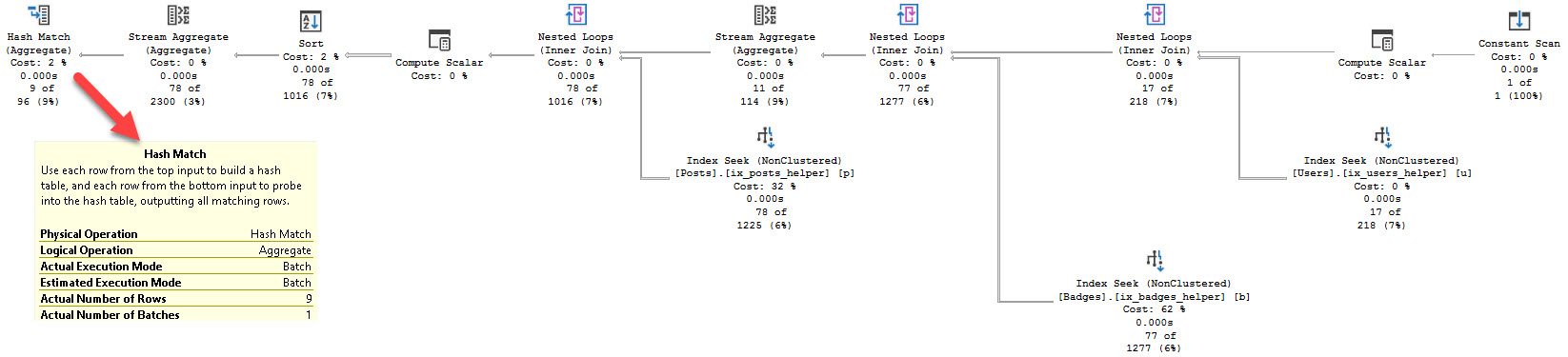
The plan for it is what you’d expect for a small number of rows. Nested Loops. Kinda boring. Though it has a Batch Mode operator way at the end, for some reason.

Flight of the Navigator

I say “for some reason” because I’m not sure why batch mode is a good option for one batch of 9 rows. It might just be in there as a safeguard for memory adjustments.

But hey, I’m just a bouncer.

If the next thing we look at is for users who didn’t register a proper handle on the site, we can run this query:

We might even find this guy:

Hello, new friend!

The plan doesn’t change a whole lot, except that now we have a couple spills, and they’re not even that bad. If we run the users query a couple more times, the memory grant stuff will iron out. Kind of. We’ll look at that in a minute.

Tripped, fell

The metrics for this one are way different, though. We do a ton more reads, because we get stuck in Nested Loops hell processing way more rows with them.

Five Seconds Doesn’t Seem Bad

To most people, it wouldn’t be, but it depends on your expectations, SLAs, and of course, which set of parameters more closely resembles typical user results.

Especially because, if we recompile and run it for users first, we do much better. Far fewer reads, and we trade 30ms of CPU time for about 3.5 seconds of elapsed time.

Even Eggs is in okay shape using the ‘big’ plan. Yes, metrics are up a bit compared to the small plan, but I still consider a quarter of a second pretty fast, especially since we do so much better with the users plan.

Most of the reason for this is the adaptive join between Users and Posts.

Avedsay Atinlay

See, in the old days, we didn’t get that adaptive join, and when Eggs used the users plan, it would take about 2 seconds. There was a static hash join, and the startup cost and hashing process really stunk for a small number of rows.

This is a point in favor of batch mode, and adaptive joins, I think. But like I said, this is also what makes it more frustrating — if parameterized plans were treated with a little more suspicion, this post would have been over hours ago.

Is It All Sunshine And Daisies?

No, not at all. Batch Mode Memory Grant Feedback could still use some help.

See, when there are big swings, it has a hard time figuring out a good middle ground. It tries too hard to make each correction perfect for the last execution.

Here’s an example using the big plan for users.

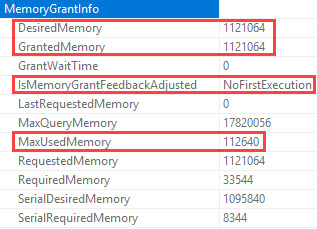
The first time it runs, there are no spills, but it requests 1.1 GB of memory, and only uses 112 MB of memory.

Good times, that.

Running it again for users, we see a downward adjustment in requested memory.

This is good; there are still no spills. Our request dropped to 167 MB.

Proud of you, kiddo!

But if we run it for Eggs a few times now, the memory grant will swing way lower.

This ain’t gonna be good, Jim.

We’re down to a 34 MB memory grant, which of course means when we run users again…

Spanish Fly

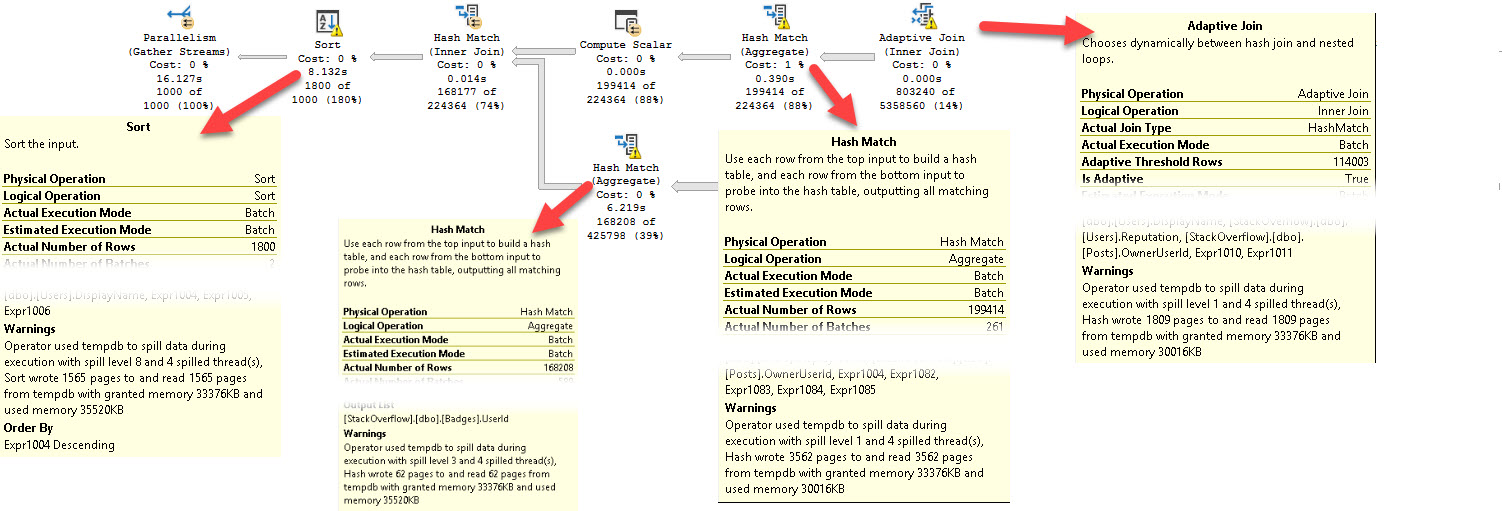
We spill in four different places, and elapsed time shoots up to 16 seconds.

Though I do wanna take a moment to thank whomever added Adaptive Join spill information to query plans. I don’t think that was there before.

I appreciate you.

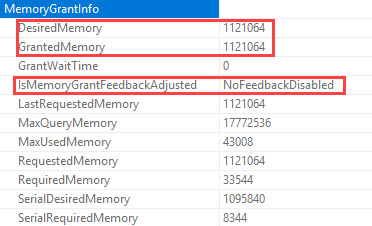
But if we keep running those procs, eventually this will happen (32 oscillations is the number I’ve been given for calling it quits). We’re back to the original grant, and feedback won’t attempt to adjust it again, unless the plan leaves the cache for some reason.

I can quit you.

What Can We Do About Memory Grant Feedback?

The Memory Grant for this never quite corrects to a “good value” — it’s either a spill, or an excessive warning. The execution metrics end up taking a bad hit on the upswing.
Since the corrective process is asynchronous, perhaps more successful exploration could be had by looking at available memory and wait stats to decide which side to error on: spill vs. excessive, and just how much adjustment really needs to be made.
Perhaps it’s okay if the small query uses extra memory if we have a lot of memory, and we’re not waiting on RESOURCE_SEMAPHORE. After all, the users query asks for 167 MB. The Eggs query eventually adjusts down to 35 MB. Do we care about ~130 MB of memory grant if we’ve got > 100 GB of memory? Likely not.
Remember kids, Standard Edition of SQL server can use 128 GB of memory just for the buffer pool.
If you stick 196 GB of memory in there, you can give Windows it’s 10% tithe, and still have 48 GB of memory for all sorts of caches, memory grants, etc.
The rest of the caches in the SQL Server memory (procedure cache, thread stack, backup buffers etc) consumes memory outside buffer pool memory. The memory consumed by caches outside buffer pool is not restricted by above memory limits and can grow up to limits defined by “max server memory”. This is not specific to SQL Server 2016 SP1 and is also applicable to earlier releases of SQL Server as well.
This has been true since SQL Server 2012. Though, you know, only with 64 GB for the buffer pool, back then.

Batch Mode vs Parameter Sniffing

There is definitely some improvement here, via adaptive joins, but memory grant feedback still needs work.

I used to really hate hints like optimize for unknown, or for a value, but it may be worth exploring in these cases to always get a medium or large plan. Getting the bigger plan with the Adaptive Join saves us trouble switching between large and small.

For instance, adding this stabilizes the plan to the large one:

But the memory grant still swings wildly. In order to make that more stable, we have to do something like this:

But if we’re going to play tricks with knobs like this, we’d better know our data, and our queries, very well.

Here at Brent Ozar Unlimited, we love us some good knobs.

Heck, some of our best friends are knobs.

Our last employee of the month was a knob.

But the more knobs we have, the more chances we have to screw stuff up. Just ask the knobs at Oracle.

Thanks for reading!


Batch Mode For Row Store: What Does It Help With?

Batch Mode, Memory Grants
0

SQL Server 2019

Introduces something pretty cool: the ability for row store indexes to be processed in batch mode. Batch mode is, of course, the preferred processing realm of column store indexes.

If you’re still in the dark about column store, you might wanna start by reading up on Niko Neugebauer and Joe Obbish’s blogs about it.

In a nutshell, it can be really helpful to reporting-style, and analytic queries, where large amounts of data are processed. Is processed?

Whatever.

There’s a Great Post® by Dima Pilugin that explains some of the things that the optimizer considers when making the choice to use batch mode for row store. Actually, all of Dima’s posts are great. He’s like the Russian Paul White. Or maybe Paul White is like the New Zealandish Dima Pilugin. I don’t know.

I’m just a bouncer, after all.

Why Batch Mode For Row Store?

Well, column store indexes are tricky. If you have a data warehouse where everything is one big shove to get data in, and then queries run, some of the trickiness is alleviated. But if you have data slowly trickling in and out via inserts, updates, deletes, and (forgive my language) merges, they can all play some nasty tricks on column store indexes. It’s sort of like how row store index fragmentation can impact large

read ahead scans, except, you know, it’s not just a problem that you saw in a demo where fill factor was set to 1%.

While we spend a lot of time having a giggle at The Cult Of Rebuild for row store indexes, column store indexes are a bit different. If data isn’t loaded in optimally, or it gets altered later, performance can really suffer. If you wanna learn a whole lot about that, and you’re going to PASS Summit, definitely attend this session. From, again, Joe Obbish. Funny how the same names keep popping up.

All of this makes adding column store indexes to existing OLTP applications tough. You probably can’t outright replace your current clustered indexes with clustered column store indexes, and adding nonclustered columnstore indexes can be confusing.

  • Should I add some of the columns?
    NO REALLY IT IS
  • All of the Columns?
  • Does column order matter?
  • What impact will this have on locking?
  • How do I maintain them? (Ola’s scripts don’t support column store yet)
  • Which queries will use my column store index?
  • Will batch mode even help me?
  • Will it cause problems for existing workload queries?

Now you can worry about that stuff a bit less.

Important Numbers and Opportunities

Dima notes in his post the hard coded value 131,072 as a built-in magical number (at least as of CTP 2 — who knows if this’ll change by another CTP, or RTM). That’s the minimum number of rows that a query will have to process before batch mode for row store will kick in, among other considerations.

You guessed it — most OLTP queries don’t touch that many rows, unless you’re running a report, or you’ve done the worst possible job indexing for your queries. There are also some query constructs that aren’t supported for batch mode, not all operators can run in batch mode, and some don’t run well in batch mode (I’m looking at you, Sort).

However, this opens up more queries to a couple new optimizer tricks introduced in SQL Server 2017: Adaptive Joins, and Memory Grant Feedback. Definitely hit the links for more details, but now you just might see the optimizer changing run-time join types based on row thresholds, and memory grants being altered between query executions.

Load Work

This is definitely cool for people running reports, though much like the new Cardinality Estimator introduced in 2014, it’s not an across the board improvement. You’ll still have to compare queries to make sure batch mode is an improvement.

hm

But what about other query types?

  • What about stored procedures that do varying amounts of work?
  • What about queries with implicit conversions, non-SARGable predicates, functions, etc?
  • What about queries with good, bad, or no indexes?
  • What about mistakes made during cardinality estimation?

In short, will batch mode for row store eat bad T-SQL for breakfast?

Stay tuned!


How to See Execution Plans in Azure Data Studio

Azure Data Studio is Microsoft’s cross-platform tool for T-SQL developers. It’s still relatively young, so it has some missing areas of functionality.

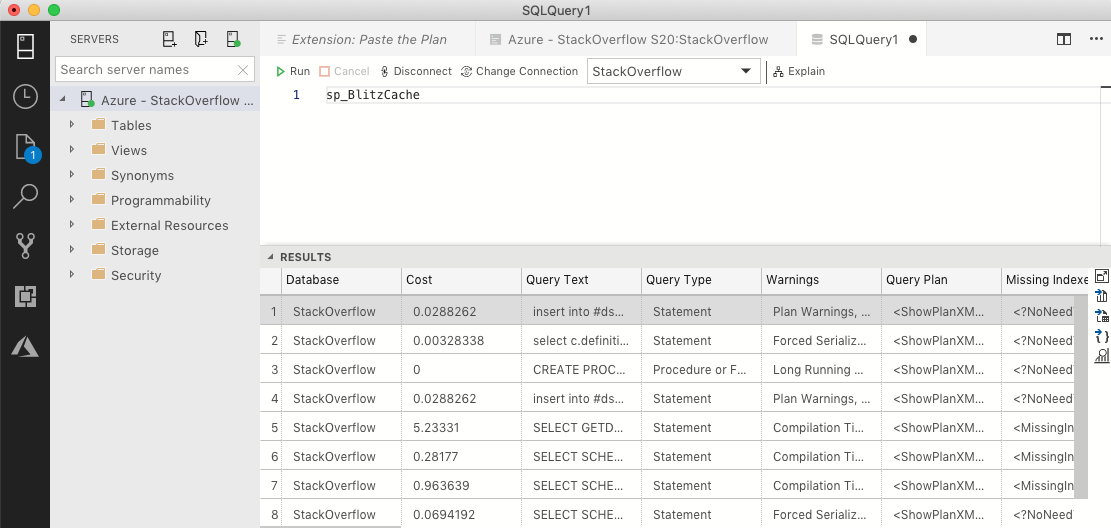
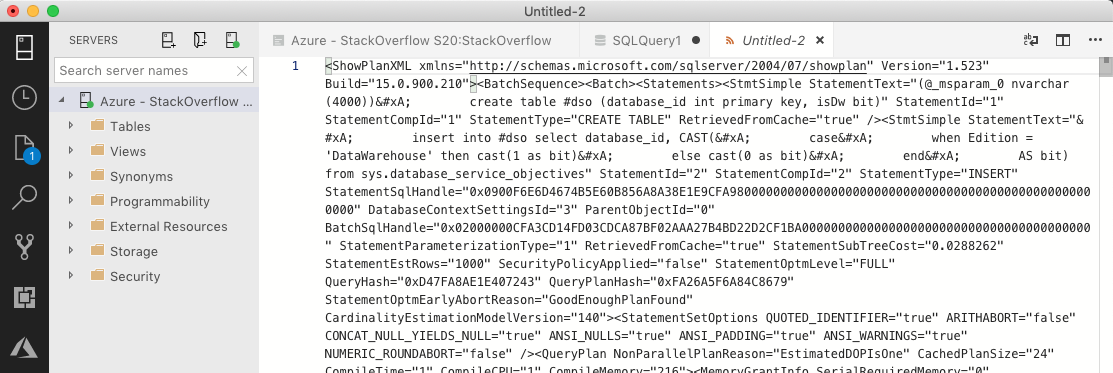
When you run DMV queries to look at query plans, they show up as XML, which isn’t very friendly. For example, here I’m running sp_BlitzCache in my Azure SQL DB:

sp_BlitzCache in Azure SQL DB

It works, but when you click on a query plan, you get sadness:

Execution plan in Azure SQL DB

Raw unformatted XML – well, that’s nobody’s idea of a good time. What you need is the Paste the Plan extension by @SysAdminDrew.

Download the latest version (VSIX) here, or find it in the extension gallery.

Open the command palette (control-shift-p on Windows, command-shift-p on Mac) and bring up Extensions, Install from VSIX. Point it at the VSIX file you just downloaded. Azure Data Studio will reload itself to enable the extension.

Then, whenever you’re looking at an ugly XML extension plan window, hit control/command-shift-p, Paste the Plan, Open in Browser. Your plan will be uploaded to Paste the Plan, and you can see it in a web browser.

Here’s an animated gif of it in action – click to view it:

Paste the Plan extension in action (click to view the animated gif)

Warning: your plan will be on the Internet. If you want to visualize plans locally, you’ll need to wait for Microsoft to implement that feature. You should read and understand Paste the Plan’s privacy page fully before using it.

Enjoy, and thanks again to Drew for writing it! You should follow @SysAdminDrew on Twitter, and check out his other Github repos.


Thank you, #sqlfamily, for donating to The Trevor Project.

#SQLPass, Company News
0

A couple of weeks ago, we told you about how Andy Mallon’s LGBTQ Meetup was raising money for The Trevor Project, and how we’d match up to $5,000 of your donations.

This weekend, you did it. You hit the $5,000 mark.

I’m so proud of you. This is the caring, welcoming community that I love. This community is one of the biggest reasons I love coming to work every morning.

So we just made the matching $5,000 donation, and I don’t think I’ve ever been so happy to part with five grand, hahaha. I’d like to thank everyone who donated – y’all reaffirm my faith in humanity, as always – and I’ll see you in Seattle at the meetup.


[Video] Office Hours 2018/10/17 (With Transcriptions)

Videos
0

This week, Brent, Erik, and Richie discuss small vendor apps, “Slow in the Application, Fast in SSMS?”, virtualization, licensing, msdb backup history issues, implicit transactions, how to convince your boss to allow you to use sp_blitz, and more!

Here’s the video on YouTube:

You can register to attend next week’s Office Hours, or subscribe to our podcast to listen on the go.

Enjoy the Podcast?

Don’t miss an episode, subscribe via iTunes, Stitcher or RSS.
Leave us a review in iTunes

Office Hours Webcast – 2018-10-17


Should I use an instance for each 3rd party database?

Brent Ozar: Donna starts out asking, “For small vendor apps, do you recommend spinning up a SQL Server instance for them so that you end up with multiple instances per server? Or do you recommend one instance with multiple databases for different apps, assuming you don’t have to give the vendor sysadmin rights?”

Erik Darling: I mean, if they don’t have to talk to each other, I’d probably want to keep them as separate as possible. Who knows, I’ve had different needs for settings. They might have some weird stuff going on. Maintenance stuff, who knows if one vendor app might support a newer version of SQL; one might not. If you want to move out to a new version, you know – you know, if things are truly different, put them somewhere else. Especially VMs make it so easy to separate stuff out like that without having a bajillion different pieces of hardware [server acts] and everything. I would much rather just do that.

Then, you know, that makes patching SQL Server easier. You don’t have to wait for downtime across a bunch of different apps. One of the servers goes down, you don’t have a bunch of apps out. There’s a lot of different reasons that I would keep things as logically separate as possible.

Richie Rump: You said virtualize and not a separate instance, right? Those are two big different things.

Brent Ozar: Yeah, and it does increase your management work. There’s more servers that you got to watch. But boy, I tell you what, the first time that you can get a restart on one of them without affecting anybody else, that’s kind of magical. Windows patches, same exact deal.

Brent Ozar: Garret follows up and says says, “But you need to license more VMs.” Well, so Standard Edition, you could do instant stacking inside one VM, but yeah, you have to license an entire host with Enterprise Edition if you want to run multiple VMs. Usually in most shops these days, you see people running VMs where the host is licensed with Enterprise Edition. They buy separate hosts just for their SQL Servers.

Brent Ozar: Pablo follows up and he says, “Do you consider contained databases?”

Erik Darling: I’ve never considered a contained database…

Brent Ozar: Only when they come up as questions. Man, there’s so many problems. The problem is, a lot of vendor databases aren’t going to support it. The vendor databases are going to require things that are outside of the scope of the contained database. They’re going to require linked servers, agent jobs, SSIS packages, et cetera. They’re going to be striped across three or four different databases. Contained databases is one of those things that seems like it works really well in theory, and then it just seems to collapse in practice.


Why am I getting a different plan in SSMS?

Brent Ozar: Jan asks, “One of our CPU costing queries is started via exec and it seems not to use an index due to a data type difference between nvarchar and varchar. I’ve simulated it in SSMS and it doesn’t seem to be the case. Why is it that I would get one query plan is SSMS and a different query plan through the application?” Three minutes, ladies and gentlemen. Three minutes before we hit the epic question.

So the thing to go look for is Slow in the App, Fast in SSMS by Erland Sommarskog. This comes up constantly, which is why you hear us kind of joking about the length of time on here. Erland’s written this epic post about parameter sniffing that goes into the reasons why you’ll get different execution plans from different places. This isn’t the only reason though. There are many possible reasons for it.

What advice would we give them? I would say, first off, in terms of the data type difference, which one’s varchar and which one’s nvarchar? Is it the table is varchar and the variable coming in is nvarchar? In which case, you’d want to make the data types match. But if the table is nvarchar and the incoming variable is varchar, that’s not the reason why you’re not using the index.

Erik Darling: A good thing that people should go to, that user voice item, the one I posted in … earlier about the reason why – adding the reason why indexes don’t get skipped.

Brent Ozar: Let me go find it in Slack.

Erik Darling: It shouldn’t be too hard.

Brent Ozar: It wasn’t that long ago. It was a really good link. Here we go – explain the scenario behind that…

Erik Darling: So our dear friend Josh was reading a blog post about a different database engine. I think it was RavenDB or something. And part of RavenDB’s execution plans is that they’ll tell you why an index wasn’t used. Like, the optimizer considered it and then said, oh, we didn’t use it because the key columns are in this order, it was missing some other stuff. So the gist of the user voice item is to explain in SQL Server execution plans why an index wasn’t used. Now granted, on tables where there’s a bajillion indexes, this might be a little painful to sift through. But on most normally indexed tables where people aren’t sure why an index isn’t getting used for some reason, too many key lookups, key columns in the wrong order, sort something, all the different weird reasons that SQL Server might not use an index get surfaced out in the query plan so that you at least have a reason from SQL Server why it didn’t get used and you don’t have to sit there and go, why didn’t you use it, damnit?

Brent Ozar: Jan says, “To clarify, I’m looking for proof that the index is not used when the query is run by the application.”

Erik Darling: I would use sp_BlitzCache and I would look in the plan cache for that query and then I would look at the query plan for that query. And I would look at what indexes I used.

Richie Rump: Plan cache…

Brent Ozar: Richie’s spending an absurd amount of time looking at execution plans lately. And it has parameters in there where you can filter for specific stored procedure names, for databases, all kinds of stuff, and then find your most resource intensive queries from there.

Erik Darling: Who knows, that query might not even be a problem. You might have much worse other queries, who knows?


Why isn’t my backup history getting purged?

Brent Ozar: Donna asks, “Sp_blitz reports that MSDB backup history is not purged. I swear I’m running sp_delete_backuphistory. What am I missing?”

Erik Darling: I guess I would look for job failures first. I think MSDB backup history was the one that I wrote a blog post about making fun of the code in. and it’s just so spectacularly bad that I’ve seen it A, deadlock, B, get hung up. I’ve seen multiple instances of it clash with each other; just all sorts of bad things. So there’s a chance that it’s just not running, that it’s failing, that there’s deadlocking out there from something. I don’t know, maybe you’re not running it frequently enough. I know that there’s some…

Brent Ozar: Filtering on parameters…

Erik Darling: Well I just mean in Blitz, I know that there’s something on how far back we check for history. I think it’s like two weeks or something like that.

Brent Ozar: I want to say, we only throw it if it’s more than 90 day’s worth of history.

Erik Darling: Yeah, but I forget exactly what that is. But it’s terrible code. There are all sorts of reasons why it may not be working.

Brent Ozar: Plus, whenever you see stuff in sp_BlitzIndex, whenever you see stuff like the MSDB history not purged, there’s a URL next to the warning. You can copy paste that URL, go into your browser, and we tell you what we’re checking, like the MSDB backup history is older than 60 days, so you can go run the same queries that are inside sp_Blitz. You can go look at the tables and see for yourself that the data is not being deleted, and then that helps you kind of dig into what’s going on there.


What should I do about implicit transactions?

Brent Ozar: Oh, Donna has another question. She says, “Sp_Blitz is reporting implicit transactions on a vendor app. Is there anything I can do to fix or work around this?”

Erik Darling: Well first, I mean, you should figure out if it’s actually causing an issue. We warn about that up front because there have been several cases working with clients where implicit transactions, for something as simple as a select, has caused really, really bad blocking chains; like monstrously bad blocking chains for hours. This is because when implicit transactions open, no matter what the statement is, it’s basically saying begin tran, do some stuff, and then I’m going to hang out and wait for the next thing to tell me what to do. And you just sit there with these open transactions and other queries are trying to come in and do stuff. Other queries might want to insert, update, delete data, other stuff going on. And they’re all opening these transactions and then they’re all finishing. Like, that statement will finish, but the transactions are still open. Any locks they took out are still open.

So first, what I would start with is to analyze the wait stats on the server where it’s happening. I would run sp_BlitzFirst with the since startup parameter. Look for lock waits. The first results set will be the wait stats and there will be a column of wait types, and there will be the category they fall into. Look for any locking waits you see in there. Bonus points, look at the average milliseconds per wait column and see that those lock waits are happening for a very long time. And that could be a sign that implicit transactions are there and causing a problem.

Implicit transactions on their own aren’t necessarily harmful. I wouldn’t design an app that uses them and I wouldn’t encourage anyone to use them for a particular reason, but them just happening, they could be very well cared for. They could be opened and closed quite responsibly, but that’s a good thing to know offhand, especially for us as consultants when we’re coming in and looking at a brand new server because we have no idea what kind of nonsense might be going on there. And with stuff like implicit conversions which can cause really bad blocking, it’s a good thing to know about.

Brent Ozar: Yeah, so here’s sp_BlitzFirst, since startup equals one. That first results set is your wait stats. What you’re looking for is any LCK waits that are in here in this wait stat column. Now, if it’s way down near the end, it may not be that big of a deal. But when you do see them in here, you want to move across over towards the right hand side, like Erik was saying here. And it will show you, here’s the average milliseconds per wait. Wait stats can be really cryptic too, so we include URLs over to Paul Randal’s excellent wait stats library over at SQLskills, where it will explain…

Erik Darling: Which he maintains manually…

Brent Ozar: Which he maintains manually. When he’s not doing the accounts payable for his company over SQLskills…

Erik Darling: He wrote every single one of those.

Brent Ozar: Yeah, so it’s excellent stuff there. So you can see right at a glance if they’re a big deal for you or not. The reason why we throw it too is that sometimes, you’ll go and spend all of your life doing index tuning or query tuning, not understanding why things aren’t getting better. And it’s because some yoyo is leaving a transaction open by default. It’s usually me more than you, Richie.

The other thing I would say is talk to the vendor and see, did you mean to have this setting on? Because, sometimes, they want to mimic the behavior of Oracle or somebody else’s default databases. Vendor databases are sometimes built to be cross-platform and may be trying to mimic somebody else’s database, not understanding that it’s a good idea over there, it’s just a really crappy idea over here in SQL Server land.

Erik Darling: And you know, those open transactions aren’t just an effect on locking. If the vendor application also wants to use an optimistic isolation level like snapshot or read committed, you know, you’re looking at the version store being alive for the length of basically any one of those because they’re all going to be doing, effectively, begin tran. So you’re looking at bloating up the version store pretty badly too while all those transactions hang out wide open. On top of the locking, there’s that and there are other, sort of, downstream, effects that I would probably want to look at too.


My manager refuses to use third-party scripts and tools.

Brent Ozar: Chris says, “My manager is against using any third-party stuff – procedure, jobs, whatever – doesn’t want me to install the sp_BlitzProcs. Same thing with Ola Hallengren’s jobs. Have you run into any customers not installing your procs due to compliance, security issues, et cetera? How can I convince them otherwise?” it’s so funny, I was just working with a customer who had the same reaction. And I said, well unfortunately, for us to get data out of SQL Server, we need to be able to query it and get lots of metadata out quickly. Would you rather write your own scripts from scratch, learn all the hard stuff? For example, we’ve got thousands of hours in sp_Blitz, BlitzCache, BlitzIndex.

Would you rather start and work now for thousands of hours to do it, or would you rather use something free that’s open source that’s being used all over the world? If you’d like to go build your own, reinvent your own wheel and start from scratch, that’s one of those discussions I’ll just have with managers and go, okay, so I’ll start working on that now. It’s going to take me, I don’t know, six months to get to a point where I can build something good. I’ll see you back in six months… Like, no, no, no, you need to get started now.

Well, I can’t, I don’t have it, I don’t have any scripts to go through and do it. And I’ll tell you a dirty little secret; for a while there, we were having people register via email to download our stuff. Microsoft Premier Support, Premier field engineers even downloaded our First Responder Kit. We could see them going through and getting our stuff. If they’re going to download it and use it, that probably tells you something.

One of my favorites was a customer sent us a report from Microsoft where they ran sp_Blitz and copy pasted the results in, and it said, based on this, we recommend that you change these things. And I’m like, well that’s kind of cool. It’s kind of strange, but kind of cool at the same time.

Erik Darling: I think, you know, if I were in that situation, my question would be, like, okay so what should I be using to troubleshoot problems? Like, if they have a monitoring tool in place that they’d prefer you use, or if they have some stuff already in place that they prefer you use, then you might not have too much of an argument. But if you’re just handicapped, like nothing going on in there, like, nope, figure it out when it happens, that’s when I’d probably start pushing back a little bit on that.

Maybe there would be a good use to spin up a VM, go through some demonstrations of how this stuff works. Show that it’s not a security issue or anything like that, we don’t introduce any vulnerabilities into the system, things like that. that’s probably what I’d go for. Also, Brent has a good thing at brentozar.com/go/askbrent, that walks through how to give non-SA users permission to run our stored procedures so that they get the full breadth of the results back without having to have full control of the server. So to kind of take the sting out of some of the – because we do require higher privileges to look at some stuff, we don’t want everyone to have to get higher privileges to do the same thing. So there’s a way to create a certificate, grant, and users be able to run this stuff without needing to have elevated privileges on the server.


What’s the best way to troubleshoot high CPU?

Brent Ozar: And Evans asks, “What’s the best way to troubleshoot CPU spikes?”

Erik Darling: Stop spiking your CPU.

Richie Rump: Stop looking at my Aurora database.

Brent Ozar: We’ve been running into some problems there. I see that we had another failover too, and this one wasn’t my fault. So finally, it wasn’t my fault.

Richie Rump: That wasn’t yesterday, that was the other night when I was screwing with it. Oh, that was totally me. It was midnight and I was messing with it.

Brent Ozar: So the way that I would start is, speaking of third-party scripts and how easy they make it, I would start with sp_BlitzCache @SortOrder = ‘CPU’. You don’t have to turn anything on. You don’t have to change any configuration settings. Your SQL Server’s just constantly gathering which queries are the most CPU intensive on your SQL Server.

Erik Darling: Yeah, those look like tough ones.

Brent Ozar: Wow, hold on a second, this is going to take me some time to troubleshoot here. So then, you can go see which ones are the most resource intensive, the problems that are occurring with them, the query plans. You can scroll across and see how many times they’ve run, how much CPU they use on average; all kinds of stuff.

Now, it’s not perfect. For example, your server may be under very heavy memory pressure, may not be able to cache execution plans for a long period of time. You might be using option recompile on queries. I can think of a long list of times when you won’t get accurate information out of here. But, this is usually just the easiest place to go start. Go shoe me the top queries in my plan cache ordered by CPU.

Erik Darling: And if that doesn’t give you what you want, then you’re kind of stuck waiting for the next CPU spike and, you know, hopping on the server and being able to run sp_WhoIsActive or sp_BlitzWho to get a snapshot of what’s currently happening on the server and just hope that the CPU wasn’t so blown out that they made just looking at stuff impossible. So if it’s not in the plan cache or you don’t have the immediate issue in the plan cache, that’s when you have to go start looking at other ways to get information out.

Because, unfortunately, right now, unless you have a monitoring tool or unless you have your own, kind of, homegrown logging stuff going on where you have whatever queries that are running gathering at an interval and syncing to table, wait stats going into a table, it’s just going to be really hard to correlate exactly when a CPU spike happened to what was going on when it happened. That’s kind of why monitoring tools make the billions of dollars that they do, because it would be really hard to do that on your own; at least efficiently, and then make graphs.

Brent Ozar: That reminded me too, if you’re going to wait for the next time for it to strike, here’s one of the queries I would run when it strikes; sp_BlitzFirst. It takes a five second sample of what’s going on, on your SQL Server, and then gives you a prioritized list of things that that might be causing you problems right now. Like right now with mine, it says no problems are found because there’s not a lot going on, on the SQL Server. But you’ll get CPU utilization, it will tell you a little bit about where the CPU use is coming from. Like, for example, if thee use is coming from outside of SQL Server, if there’s a backup running, a query is rolling back, there’s a CHECKDB – it will tell you all kinds of things that are common that will cause high CPU usage.

It doesn’t get you to the root cause of which query is causing the problem if there are end user queries. There is a parameter you can add for that – check procedure cache – where it will look at the queries that were running at the start and then again at the end, at the last five seconds; which queries ran the most in that five second time span and tell you which ones were causing the problem. I don’t have any load going on mine right now, so…

Erik Darling: Expert mode is another way to get more visibility into what’s going on.

Brent Ozar: Yeah, it shows you which queries are running at the start. So there’s nothing in here now because there’s no workload on my system. Then it will wait five seconds, take its sample, then it will also tell you which wait stats were big during that time, which files you read and wrote to, all the perfmon counters that changed during that five-second sample. So if you’re looking for something specific like forwarded fetches per second. And then again, which queries that were running at the end of it as well, all totally free.

So that’s the end of Office Hours. Y’all ran out of questions early today, so we’ll let you go play around with the Blitz scripts. Have fun and we will see y’all next week, adios.

Erik Darling: Goodbye.

"*" indicates required fields

This field is for validation purposes and should be left unchanged.
Name*
Things I want*


Is Cost Threshold for Parallelism Measured in Seconds?

Execution Plans
2 Comments

SQL Server automatically chooses when to divide your query’s work across multiple CPU cores. It makes that decision based on your query’s cost.

To see it, let’s throw 1,000,000 tiny rows in a table:

And with my server set at SQL Server’s default settings (Cost Threshold of 5, MAXDOP of 0), count how many rows the table has:

Statistics IO & time show that the query is blazingly fast, able to scan 4,545 8KB pages in about 108 milliseconds of CPU time:

Note that CPU time is higher than clock time – that means the work was parallelized across multiple cores. You can see it in the actual query plan, which includes a parallelism operator, plus the clustered index scan and stream aggregate have those cool parallelism racing stripes, as Erik likes to say.

If you hover over the select in the plan, you’ll see that the query plan’s cost is only 4.18:

Parallel plan with a cost of 4.18

That might seem confusing – after all, SQL Server’s default Cost Threshold for Parallelism is 5, and that’s higher than 4. Why did this query go parallel? To understand, let’s run the query throttled down to just one core:

It’s still blazing fast:

It uses even less CPU time – because there is an overhead to running queries with parallelism – but it did end up using a little more clock time overall. So what’s the query cost from the actual query plan?

Serial plan cost – juuuuust over 5

The serial plan’s cost was juuuust over 5, so when building the plan, SQL Server decided to put a little more time in and build a query plan that would cost less query bucks – by leveraging The Magic of Parallelism™.

Cost Threshold for Parallelism
uses the same measurement units as
Estimated Subtree Cost.

When you see a query with Estimated Subtree Cost of 5.00995, that doesn’t mean SQL Server thinks the query is going to take 5 seconds. After all, our queries here are finishing in less than 100 MILLISECONDS.

A long, long time ago, one Microsoft developer tied query costs to his computer. Those days are long gone. We’re still using the same measurements for what a query costs, but just as time has moved on, so have computer capabilities. A query that took 5 seconds in 1998 simply doesn’t twenty years later, and Microsoft hasn’t been adjusting costs to match today’s hardware capabilities.

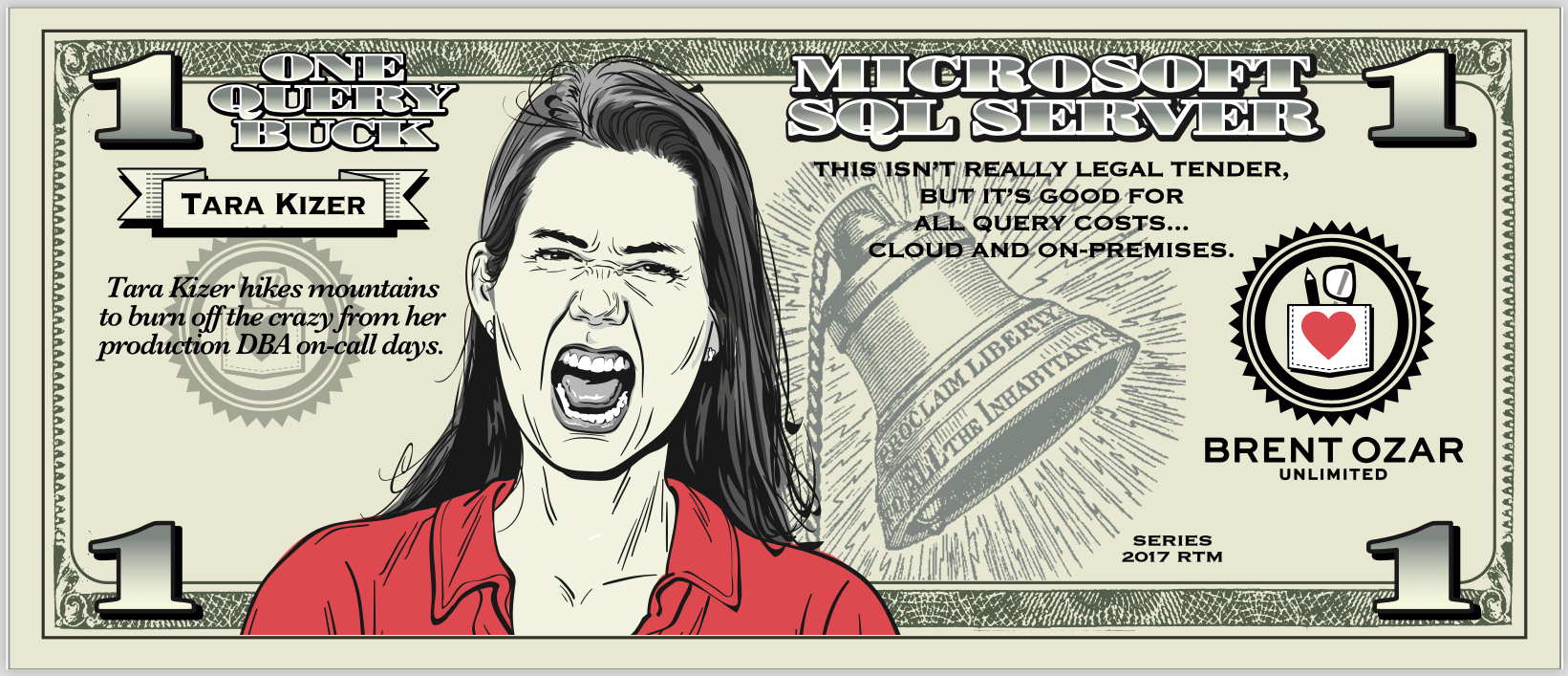
Estimated Subtree Cost is just an abstract measurement of CPU and IO work involved in building a query. To drive home that it’s completely and utterly unrelated to time, Kendra Little coined (see what I did there) the term Query Bucks. When we designed the paper version, we enshrined her as the face of the fiver, SQL Server’s default cost to make a query go parallel:

Kendra’s $5 Query Buck

You can print your own query bucks out too. Enjoy!


What Should We Change About the Data Professional Salary Survey for 2019?

Salary
37 Comments

Every year, we publish an open Data Professional Salary Survey. Last year, 3,113 folks from 73 countries answered, so we’re doing it again this year.

Here are the questions we asked last year. If there’s any changes you want to make, leave a comment and we’ll talk through it as a community. I want to make sure it’s as valuable as possible for y’all.

1. What’s your total salary in US dollars, ANNUAL BEFORE TAXES?

2. Your country: (dropdown list with countries)
Optional: Postal/zip code

3. Primary database you work with: (dropdown list populated with the top 10 from DB-Engines.com (plus a couple of niche Microsoft products.)

4. Years that you’ve worked with this database: (open)

We pay Richie in query bucks

5. Other databases you worked with in 2018: (mark all that apply)

6. Job type: (pick one):

  • Full time employee
  • Full time employee of a consulting/contracting company
  • Independent consultant, contractor, freelancer, or company owner
  • Part time

7. Job title (primary area of focus – pick one):

  • Analyst
  • Architect
  • Data Scientist
  • DBA (Development Focus – tunes queries, indexes, does deployments)
  • DBA (Production Focus – build & troubleshoot servers, HA/DR)
  • DBA (General – splits time evenly between writing & tuning queries, building & troubleshooting servers)
  • Developer: App code (C#, JS, etc)
  • Developer: BI (SSRS, Power BI, etc)
  • Developer: T-SQL
  • Engineer
  • Manager
  • Other

Optional: Other job duties (same list as above, but check boxes for things you spend at least 4 hours per week doing)

8. Do you manage other staff? (yes/no)

9. Years of doing this job: (open)

10. How many other people on your team do the same job as you? 0, 1, 2, 3, 4, 5, >5

If only our real currency was this awesome

11. How many database servers does your team work with? (open)

12. Highest level of higher education completed? (None, 2 years, 4 years, Masters, Doctorate/PhD)

13. If you have a college degree, is it computer-related? (yes/no)

14. Do you hold industry certifications? (No, yes but expired, yes and currently valid)

15. How many hours do you work per week, on average? (open)

16. How many days per week do you work from home? 0, 1, 2, 3, 4, >=5

17. What kinds of work do you do? Mark all that apply:

  • Build scripts & automation tools
  • Manual tasks
  • Meetings & management
  • On-call as part of a rotation
  • On-call 24/7/365
  • Projects
  • R&D
  • Training/teaching

18. Employer sector (pick one)

  • Private business
  • Education (K-12, college, university, etc)
  • Local government
  • State/province government
  • Federal government
  • Non-profit
  • Student

19. Are you looking for another job right now? (No, yes but only passively, yes actively)

20. What are your career plans for the year 2019?

  • Stay with the same employer, same role
  • Stay with the same employer, but change roles
  • Stay with the same role, but change employers
  • Change both employers and roles
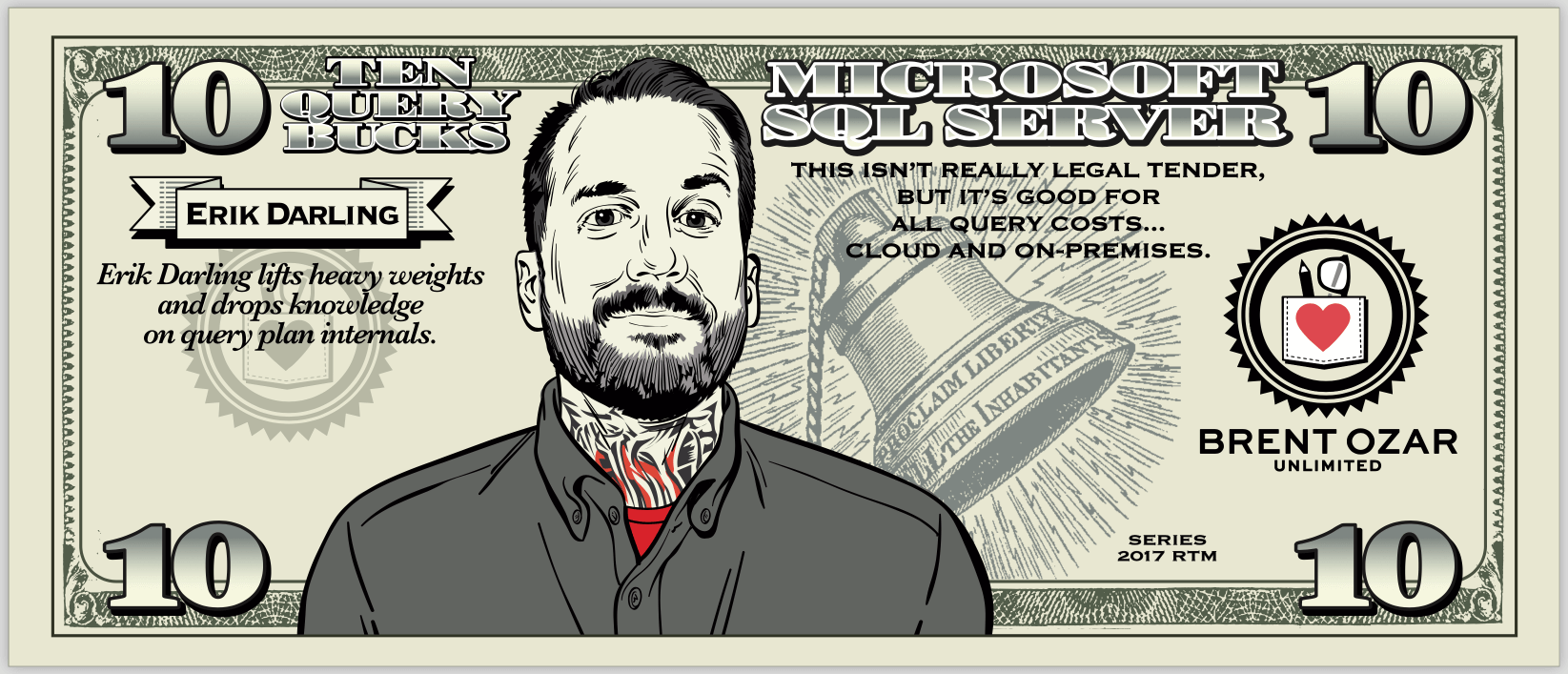
Erik launders his query bucks

21. To which gender do you most identify? (female, male, non-binary/third gender, prefer not to say, other)

Discuss changes you want in the comments below.

If you want to add a question, keep in mind that we’ll cap this at 25 questions max – the longer surveys get, the less likely people are to fill the whole thing out. You need to make a really compelling case about why it would be useful for the entire population, not just a small subset. If you want to add a question, you also need to tell us which question you’d like to remove.

If you want a fancy user interface, especially to pick a geographic location, remember that we’re doing this with Google Forms in order to keep costs down (free.) Don’t say something like, “You should build a web app that lets me point and click on a map to define where I am.” Find us something free or cheap that we can use as-is with zero development time, and I’m definitely interested.


Skewing Parallelism For Fun And Profit

Execution Plans
2 Comments

What Is Skewed Parallelism?

When queries go parallel, some assumptions get made:

  1. There’s enough work to keep multiple threads busy
  2. Each thread will get an equal amount of work to do

The ‘equal amount of work’ part is particularly important, because in a parallel plan, each thread gets an equal share of memory up front.

If threads end up doing uneven amounts of work, query performance may suffer — especially where spills are involved.

What Does Skewed Parallelism Look Like?

Unfortunately, it’s only in actual plans right now. As far as I can tell, there’s no Extended Event that will monitor for it, either.

Hey There Lonely Girl

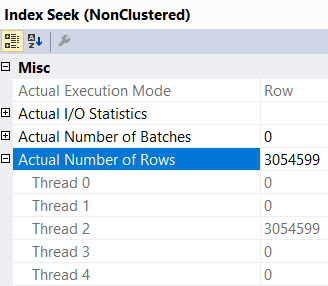
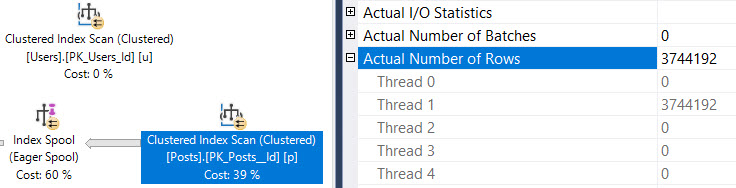
If you check the Properties of an operator, and look under the Actual Rows node, you can see how many rows ended up on each thread.

In this particular plan, all the rows ended up on one thread, and a Sort ended up spilling.

The warning on the Sort says this:

Not the worst, but…

All three million-ish rows ended up on one thread, which ended up spilling due to insufficient memory.

The memory being split evenly here came back to bite us. If rows had ended up evenly distributed, we probably would have been okay, or spilled significantly less.

What Causes Skewed Parallelism?

Most often, a flaw in the way the parallel page supplier assigns pages to threads.

But there are some operations, like Eager Index Spools, that aren’t parallel aware.

If you see one in an actual plan, you can bet that the index access immediately prior to it will have all rows on a single thread.

Oops.

How Do You Fix It?

Sometimes you can change DOP, other times you need to dig deeper and change the query in a way that will force rows through a Distribute or Redistribute Streams operator.

If this is the kind of stuff that interests you, you should totally come to our precon at PASS Summit this year, Performance Tuning in 21 Demos. We’re going to be demoing interesting behavior in SQL Server 2017, 2019, and even Azure SQL DB, showing you how query plans can go wrong.

Thanks for reading!


Using NOLOCK? Here’s How You’ll Get the Wrong Query Results.

Slapping WITH (NOLOCK) on your query seems to make it go faster – but what’s the drawback? Let’s take a look.

We’ll start with the free StackOverflow.com public database – any one of them will do, even the 10GB mini one – and run this query:

We’re just setting everyone’s web page to ours. Then in a separate window, while that update is running, run this:

The results? A picture is worth a thousand words:

WITH (NOLOCK, NOACCURACY)

Sure, we’re running an update on the Users table, but we’re not actually changing how many users are in the database. However, because of the way NOLOCK works internally, we keep getting different user counts every time we run the query!

That’s…that’s not good. But it’s exactly as designed. When you use dirty reads, also known as READ UNCOMMITTED isolation level, your query can produce incorrect results a few different ways:

  1. You can see rows twice
  2. You can skip rows altogether
  3. You can see data that was never committed
  4. Your query can outright fail with an error, “could not continue scan with nolock due to data movement”

Fortunately, there are plenty of easy fixes like:

  • Create an index on the table (any single-field index would have worked fine in this particular example, giving SQL Server a narrower copy of the table to scan)
  • Use a more appropriate isolation level – like, say, Read Committed Snapshot Isolation
  • Remove the NOLOCK hint from the query – although you can end up with blocking, so you have to resort to tuning indexes & queries

Oh, and if you try this demo yourself, be aware that it’ll only work the first time. If you want to rerun it, you’ll have to use progressively wider values for WebsiteUrl. If you’ve watched How to Think Like the Engine, I bet you’ll understand why.


Building SQL ConstantCare®: Separating Out the Videos

Company News
5 Comments

When we started offering SQL ConstantCare®, our mentoring service, I wanted to make our web site as simple as practical. Too many choices can paralyze people (and a great place to read more about that is The Paradox of Choice.)

To streamline your options, I just bundled all of our self-paced recorded training videos in a package with SQL ConstantCare, and that was that. If you wanted the training, you could either get it all for $95/mo, or $895/year – but it also included SQL ConstantCare®. It was all one package.

I immediately started getting emails that sounded like:

I want just one of the training videos, and I’m not allowed to install software at work. Can I buy just one of the videos without any software?

I fought it for quite a while, encouraging folks to just sign up for a monthly subscription. It just didn’t work – people couldn’t budget enough time to watch the longer courses inside the span of a single month.

Recorded Class Season PassSo starting now, our self-paced recorded videos are available individually again, and we’ve got a new Recorded Class Season Pass that lets you get ’em all for a year.

But, uh, I’ll tell you a secret: Black Friday is coming. Every year, we run a sale during November where we dramatically reduce prices. Feel free to poke around, maybe start talking to your manager about which classes you’re interested in (or even our live classes) – and start warming up that credit card. On November 1st, we’ll make you a deal.


[Video] Office Hours 2018/10/10 (With Transcriptions)

Videos
0

This week, Brent, Tara, and Richie discuss splitting large database files across multiple files, security auditing solutions, what Brent is currently teaching at the client location, SQL Server in containers, heap index maintenance, contained databases, extended events, the difference between a junior and Senior DBA, page file sizing, and more.

Here’s the video on YouTube:

You can register to attend next week’s Office Hours, or subscribe to our podcast to listen on the go.

Enjoy the Podcast?

Don’t miss an episode, subscribe via iTunes, Stitcher or RSS.
Leave us a review in iTunes

Office Hours Webcast – 2016-10-10


Should I split up a 200GB database?

Brent Ozar: Paul says, “One of the databases that I monitor is 200GB in size, but it only has one file. Should I go ahead and split that up across multiple files?” Tara, you’re the DBA on the call.

Tara Kizer: You too. I mean, it’s fairly unnecessary unless you have special disks, you know, a special layout where you can add a file and some of your objects will be on that file. So if you have some faster disks and you want to move some of your heavily read tables, then move them over to another file, adding another file group. But size of database doesn’t really mean you have to have more than one data file.


How should I audit SQL Server?

Brent Ozar: Jason says, “Does anyone have any suggestions on a solution for security auditing for SQL Server? Should I use in-house or third-party options?”

Tara Kizer: I have no idea. I feel like the clients that have auditing, there’s performance issues.

Brent Ozar: Yeah, you really – what I tell people is, do you have to defend yourself in front of a lawyer and a judge? Is this going to be something where you have to legally defend yourself in court? And if you do, then that kind of guides the solution that you’re going towards because you shouldn’t have something that a DBA can turn off, something that can lose events really easily. So this kind of rules out a lot of things that you would roll yourself because you would be a suspect. You have to be able to stand in court and say there wasn’t a problem. So if you have to be legally defensible, I’m a huge fan of third-party appliances like Imperva or Guardium. These are big expensive appliances that sit in between SQL Server and the rest of the network. And they log every network packet, they track who sees what, because it’s not just a matter of who does inserts, updates, and deletes. It’s a matter of who sees whose patient’s records, for example. And there is an overhead with that. it’s not usually huge, but those things are six figures a piece. Whereas when you go roll your own, there’s usually all kinds of overhead, even if you’re using SQL Server’s auditing. And it’s not going to be legally defensible in those cases. So that’s just the first place that I would start if you have to defend yourself in front of a court. If you don’t have to, if you don’t care about anything legally defensible, go but IDERA’s SQL Compliance Manager. And I’m not saying it’s not legally defensible, but I’m saying that it’s about a thousand, two thousand bucks, you install it and then it just logs to a file. Sure, you could get around it, but at least that way, you’ve checked the box and you can go on with your life.


What is Brent teaching today?

Brent Ozar: Let’s see, Michael says, “What am I teaching and doing today at the client location?” We just finished a parameter sniffing class and I don’t actually know what we’re talking about next. I have to go look at the – it’s all database developers in the room today, so I’m doing a lot of T-SQL type stuff. So between Richie and I, Richie’s dancing and laughing, like yay for database developers. But Richie is also inheriting a hot mess of SQL that I have in our current production environment…


What did Brent break this weekend?

Richie Rump: Please tell them what happened this weekend, Brent. Please, share with the class what went on this weekend.

Brent Ozar: So I used queries behind PowerBI. I used PowerBI to build a little dashboard so for SQL ConstantCare I can tell people, here’s the problem you’re having, here’s the issues behind it…

Richie Rump: And it’s great. And it’s great…

Brent Ozar: Well, no. Richie’s been hearing me complain about PowerBI. It’s the only thing we have – it’s pretty cool. It’s gorgeous. It helps me get to answers quickly. But it all depends on the quality of my queries. My queries are not very good and I was pointing at a specific replica rather than pointing at a generic reader name, like an AG listener. So when we were running both production and my PowerBI queries on the same replica, I may have caused our production servers to failover multiple times. I’m trying to troubleshoot why the server’s having problems and then I’m like, oh, it turns out…

Richie Rump: Yeah, you know, because of the way we’ve architected it, it was really easy for us to recover those files and then push them out into – nobody lost any data. Nobody didn’t get their messages, and that’s the great part about working in the cloud and in this type of environment; hey, something fails, we just push it right back through and, hey, it goes and it finishes. That has been a lot of fun. It’s like, oh, failed? Oh, no problem, just push it right back through.


Have you worked with SQL Server in containers?

Brent Ozar: Andy Leonard asks a serious question. He says, “Have y’all played with SQL Server in containers?” And we laugh, but oh man. The serious answer is no, we – no, that’s not true. I did play with them, I just stopped.

Richie Rump: I mean, is Aurora running on container? I would assume that it is, so technically yes.

Brent Ozar: Well, it’s not SQL Server though, but…

Richie Rump: It’s not SQL Server.

Brent Ozar: It doesn’t solve a problem for us. I get that somewhere somebody has a problem that containers solve, I just haven’t seen it yet. That’s not true; continuous integration, continuous deployment, that totally makes sense, I get it. But for the rest of people, for production SQL Servers, I haven’t seen the problem that it solves yet that people went, oh, we could put this in a container and it’s cool now, let’s do it. I haven’t seen that. And we work mostly on production servers, so…

Richie Rump: Okay … and let’s qualify that. For continuous integration, yes. Continuous deployment, I’m not sure. I don’t think so because continuous deployment, what are we going to do, deploy to database again? And what happens to the data that’s currently in production? So yes, continuous integration where I need to restore to a state and all I have to do is wipeout what’s currently there and rebuild it, yeah, that’s fine. But scripts work too, just saying.


Do I need to do index maintenance on heaps?

Brent Ozar: Pablo asks a question and I’m going to reword Pablo’s question just a little. He has an application where a heap is the main table and the application constantly deletes rows in the heap. Does he need to do any kind of index maintenance on that heap? And if so, how should he do it?

Tara Kizer: Why is it a heap? That’s my question.

Brent Ozar: Because he’s not allowed to change it, but I’m with you. And why would you want to get it away from a heap?

Tara Kizer: Well, I mean, heaps are great for writes, but not for reads. Clustered indexes are better for OLTP environments where read performance matters. Not a lot of change structure – that’s an odd sentence because switching from a heap to a clustered index, I wouldn’t really consider that changing – I mean, it does change structure, obviously, behind the scenes, but who is giving that kind of mandate?  But alter table rebuild, you know, you might need that.

Brent Ozar: That sucks.


Who should I hire for Analysis Services help?

Brent Ozar: Wilfred says, “We’re having analysis services problems and we know that’s not something you do, but could you recommend a consultant, preferably Europe-based, who we could contact?” yeah, Bob Duffy of Prodata.ie I think is the company’s name. But if you search for Bob Duffy Prodata, he’s based out of Ireland and does a lot of analysis services stuff.


Brent Ozar: Jason follows up on the auditing question. He says, “Well, we don’t need to defend ourselves in court, but we need to get audited by a company. We’re really just checking the accounts that have access, not all of the traffic.” So it comes down to whether or not – and I would really have this discussion with your security or legal team – would we have to defend ourselves in court? Because Enron got audited by an external company, Arthur Anderson, and they passed all those audits with flying colors, but of course, you know how that goes.


Brent Ozar: Chris says, “I’m finally switching to extended events. I’ve a few current Extended Events sessions logging to a file. Is there an easy way to view the results other than Xquery?” I don’t think any of us know of an easier way. Maybe there’s a third-party tool. Like, I think IDERA had an Extended Events tool, but I haven’t used it.


How do you feel about contained databases?

Brent Ozar: Oh, Ron asks, “Contained databases, good, bad, or ugly?”

Richie Rump: Yes.

Brent Ozar: Did you ever use contained databases?

Richie Rump: Nope.

Brent Ozar: Why?

Richie Rump: And in fact, I do remember a specific moment where I was introduced to them. I was at a code camp and my initial thought was, that’s stupid, why would you do that? And if you were moving stuff up to the cloud, then it makes perfect sense. But if you’re not doing that on a regular basis, then what’s the benefit? That’s the question; what’s the benefit for going to this specific technology? That’s usually what I ask. Well, what am I getting out of this? And if you’re not doing any of that, having that portability, it’s more hassle than anything else.

Brent Ozar: It’s not really like databases are usually portable either. There’s usually agent jobs and other stuff outside of the database, SSIS packages, that you end up having to move around. So it seemed like a really neat idea but just wasn’t finished with execution. And like a lot of features, they just launch it. And then, when nobody picks it up, they just dump it. Ron says, “I’m looking to take an on-premises database to the cloud.” If you’re just changing an existing database to be contained, I don’t think that’s going to be enough. Usually, you have things like linked servers you have to worry about, all kinds of other stuff.


Brent Ozar: Stephanie says, “For the Extended Events thing, export the Extended Events to a table and query them normally.” Ooh, I like that. you could set up an agent job, because he did say that he had a few sessions that he ran on a regular basis. You could set up an agent job to regularly import those. I kind of like that.

Richie Rump: You could transform them into JSON and you could just run JSON queries up against them.

Tara Kizer: That sounds fun…

Brent Ozar: Just when you thought Xquery couldn’t get any worse…


We have a valid use for containers…

Brent Ozar: Andy says, “We’re experimenting with using containers for SSIS testing.” See, that makes perfect sense. Spinning up a database, you spin up a sample ETL source database and a sample ETL target database and you do ETL between the two.

Richie Rump: Yeah, I mean, that makes total sense. And even if, hey, I just want to have an SSIS database just to run things off and my source and my destinations aren’t living in that container, even that might make sense, depending on where I want to spin it up, how frequently. Is it for different clients? Things like that, I get that. I buy that. But Andy’s a smart guy, so there you go.

Brent Ozar: You’re just saying that because he lives in West Virginia, well, Virginia, but he has a gun.

Richie Rump: Virginia – if it was West Virginia, I’d be like, well maybe… No, Andy’s a smart guy. I mean, I remember walking into one of his SSIS courses and I’m like, whoa, this is some good stuff. How did you figure all this stuff out? It’s not in a manual, that’s for sure.

Brent Ozar: Because the SSIS packages I used look like a kid with a crayon or a marker. God, I have no idea what I’m doing.


Network issue or threadpool waits?

Brent Ozar: Thomas posted a big long question with the big old error messages. Go ahead and post that on Stack Exchange – just usually not a good fit to dig into with a Q&A format.

Tara Kizer: I replied to his earlier – he had the same question above. Most of it’s an error message about SQL Server not being available, just that generic error. And saying, 99% of the time, it works, other times it gets that error. I posted my blog post with THREADPOOL waits, is it a network issue or THREADPOOL. So take a look at that link. If you didn’t receive the link, search on our site for THREADPOOL with my name on it. There’s a blog post, I think from last year, on the topic.


What should I learn to move from junior to senior DBA?

Brent Ozar: Josh says, “I have a noob question. I’m a junior DBA. Actually, I’m the only DBA because our senior DBA retired.” He might have literally meant senior DBA given that he retired. “Wondering what kind of things I should be looking at to start moving towards being a senior DBA.” What a good question. Tara…

Richie Rump: I know one; you could get into development. That’s what you could start getting into.

Brent Ozar: Tara, what do you think is the difference between a junior DBA and a senior DBA if you were going to tell somebody to study or what to work on?

Tara Kizer: I think a junior DBA is going to be using the GUI a lot, relying on everything in the GUI to do stuff. I will reference junior DBAs and intermediate DBAs when I’m talking about parameter sniffing with my clients and some clients are at the step where they’re either rebooting the box or restarting the service to solve performance issue that they just don’t realize are parameter sniffing issues. So you know, a senior DBA is just not going to do that type of test, but going from junior DBA to senior DBA, for me, it was just making sure I was at a company that had lots of technologies in place. I always had somebody with more knowledge than me helping to guide me, so it’s going to be challenging if you’re the only person there.

Hopefully, I would hope that is someone retired, they would go ahead and replace, hire out, for another senior DBA. That way, you have some guidance along the way. One of the things that helped me the most back then, from intermediate to senior – because before that, it was just experience and time really – but it was answering questions online. Looking at questions online and seeing the ones that were interesting and the ones that I didn’t understand and trying those out myself. If there was a T-SQL type question, I’d try it out in Management Studio. And just looking at people’s answers that were highly respected people that had really good answers and trying those solutions out on my own.

But once I started answering questions, that’s when I really started getting better because I was testing things on my own trying to get things to work and learning as I went. So for me, I would highly recommend that you get involved in the SQL Server community and attempting to either answer questions or trying them out separately and not answering the question.

Richie Rump: Yeah, I mean, jump on that. I’m not a senior DBA and never pretended to be one. I’ve never been a DBA and nor will I ever be one, but I understand a lot of what the DBA is supposed to do because I needed to understand if they were lying a lot. And frankly, a lot of times, they were, because they were terrible people that I used to work with. Anyway, I learned a lot of my information from the SQL Server community. So going to SQL Saturdays, and even attending the summit which is coming up next month, right? Am I wrong about that? A couple weeks I think. But going to those types of events, meeting these people who are actually, not only speaking, but actually attending the event and hearing some of the issues that they have and some of the solutions that they’ve come up with, and even the vendors, you learn a ton of stuff.

You get your own sessions just talking to vendors, just walking up to Microsoft and saying, hey what have you got for me? And then they’re like, oh, somebody wants to talk to me, and they’ll just spill out everything they’ve got and you just start asking questions and learning about the stuff that they’re doing and some of the problems they’re trying to fix. I think those are the types of things that will help you push not only understanding of the issues that a DBA has, but also the solutions that you will encounter when you start seeing the same things.

Brent Ozar: Buck Woody has this great saying – I’m sure he didn’t coin it, but I keep hearing it from him – “If you have one year of experience that you’ve done ten times in a row, or do you truly have ten years of unique experience?” And when you’re the only DBA in a shop, it’s really easy to keep doing the same year of experience over and over again. You don’t have anybody to mentor you, that’s where I adore Tara’s approach of going, how can I go out and see new problems that I haven’t seen before and how do I go reproduce them in my own environment? That’s probably the best junior to senior type of advice I could give somebody because no matter how well you think you master your own environment, it’s terrifying when you go to look at other people’s.


What size should my page file be?

Brent Ozar: Shaun says, “What is the best practice on page file sizing? If I have 8GB of memory or 512GB of memory, how big should my page file size be?” None of us can remember this off the top of our heads because it’s in our setup checklist. If you go get our First Responder Kit, there’s a setup checklist link to a page by Microsoft. Basically, you shouldn’t be hitting the page file. If you’re scratching the disk, you’re screwed for performance anyway, so you just need a page file big enough to do a mini-dump. And we link you to the Microsoft KB article which gives you the different file sizes for what it takes to do a mini-dump.

Tara Kizer: And then, if you actually call Microsoft for a problem, they’ll say you need to do a full-dump, unfortunately. So it ends up being, I think, the size of RAM that’s required. Because we’ve had to do that where our page file might have been on C drive and we had to allocate more space. In order to get the full-dump, that was required. The mini-dump, for whatever reason, there wasn’t enough information. But this could have been several years ago, so maybe things have changed. We needed the size of RAM.

Brent Ozar: Yeah, I think they’re still doing it kind of as a delay tactic. Hey, why don’t you take a full-dump on your server with 1TB of RAM? Okay, sure, how do you want me to get that to you? Well, erm, FedEx…Yes, Steve follows up with, “In the Windows NT days, it was 1.5 times RAM.” Yeah, those days are passed though, thank god.


How is fragmentation measured?

Brent Ozar: Mark says, “How is fragmentation actually measured? For example, if an index is 50% fragmented, does that mean for 100-page reads, it actually had to jump around elsewhere to read rows 50 times rather than reading continuously?” No, but there’s two kinds of fragmentation. There’s internal fragmentation and external fragmentation. External fragmentation basically means that the pages are out of order on disk. That only matters if you’re reading the data from disk. Because, if the data is up in RAM, pop quiz, what does the R stand for in RAM? Your pages don’t have to be laid out in order in RAM. It’s random, random access memory. So there’s no such thing as defragmenting pages externally when they’re up in RAM. Internal page fragmentation means you have empty space on each 8K page. That can affect the number of 8K pages that you have to read. That is a really big deal. But they’re measured in different ways in order. To see how they’re measured and in order to see which ones matter, search for Brent Ozar Why Defragmenting Your Indexes isn’t Helping. And I have a session over at GroupBy where I talk about why people are defragging their brains out and yet performance still sucks. Alright, well that’s all the questions that we have this week for Office Hours. Thanks, everybody, for hanging out with us and we will see y’all next week. Stay safe out there, everybody.

"*" indicates required fields

This field is for validation purposes and should be left unchanged.
Name*
Things I want*


Index Tuning Week: Missed Missing Index Opportunities

Execution Plans, Indexing
9 Comments

A Reminder

With a new baby in the house, I often find myself comparing her to various things.

Barnacles. Ham. Pugs.

No, I swear, I love her.

SQL Server Has A Baby, Too

That baby is the optimizer, and when it starts crying, it uses missing index requests to tell you something is wrong.

Usually.

See, when you hear a baby crying, it’s your job to go figure out what’s wrong. It could be anything.

Hungry. Tired. Dirty diaper.

You don’t know why, you just know that it’s crying and you need to stop it so you can maybe get another couple hours of sleep before dear god how is it already 5am?

It’s good to pay attention to a crying baby, but it’s not good to just do everything that might make it stop crying.

Sometimes Babies Are Quiet

Sneaky babies!

See, if things are just okay, they might not make a peep.

This is your proudest parental moment.

Quiet baby.

Too quiet.

Let’s check that diaper.

Dads, Moms, and SQL

Let’s say we’ve got an index. This index is keeping our baby quiet.

Let’s also say we’ve got some queries that run that…

You know, I’m past trying to come up with a good reason for these queries.

They look good. That’s what counts.

Quiet blogger.

Most people looking at these query plans would be happy.

Happy little seeks.

Our biggest problem is that we got uh… 2MB memory grants, and used 80KB.

Yep.

Happy, happy little Seeks. Even those Sorts cost nothing.

Too quiet.

Butters.

This Seek really had to Scan.

See, you’d think that with an ever-increasing predicate (from 5000 to 25000), we’d be able to do less reads as we restricted more rows.

That didn’t happen.

All three queries do this: Table 'Posts'. Scan count 5, logical reads 136856

In other words:

Rubberneckin’

Go To Sleepy Little Baby

What happened, here? Things were okay enough. The baby was not crying.

Even though the baby had spit up all over its Nick Cave onesie.

Silly baby.

Not all predicates are created equal, even inequality predicates, which are usually treated unequally.

Despite still needing to read a bunch of data, and being expensive enough (116 Query Bucks) to go parallel, the optimizer sees no opportunity to do better.

Really, the list of “despites” could go on a lot longer, but real life crying babies call.

If we shuffle our index slightly, we get interesting changes. The original index was on CreationDate, Score, but instead let’s flip the field order:

Here are the new query plans:

NQPZ

Stuff that happened:

  • Query cost dropped way down
  • Didn’t need to go parallel
  • Didn’t need to Sort data
  • Only did 5 reads: Table 'Posts'. Scan count 1, logical reads 5

The Seek predicate is even fairly interesting!

Sigmund, get my pipe

The estimate is a touch off, but that’s fine. We only read one row.

We’re also able to start the beginning of our seek on CreationDate after finding our starting Score.

In other words:

Because.

Will be the title of my next blog post.

Thanks for reading!
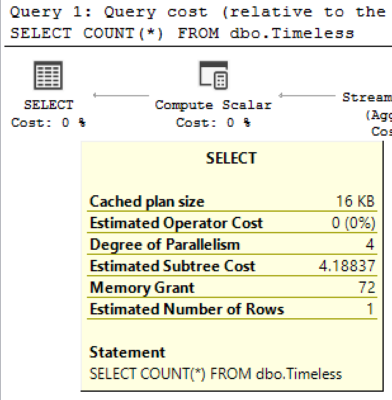

Index Tuning Week: Getting Blocking? Play “Hot or Not.”

Deadlocks, Indexing
9 Comments

This week, we’re all about tuning indexes. So far, we’ve covered Brent’s 5 and 5 Rule and The D.E.A.T.H. Method. Today, let’s talk about reducing blocking and deadlocking.

Normally, when we think about the causes of blocking or deadlocks, we use badly written queries that modify different tables in the wrong order, resulting in a Mexican standoff series of blocks. They don’t even have to be delete/update/insert (DUI) queries, either – even selects can win deadlocks. So we usually use sp_BlitzLock to look at which queries are involved in a deadlock, and think about how we can tune those queries to reduce blocking.

But before you go making extensive, expensive changes to queries, take a quick look at your indexes and ask, “Am I indexing a hot field?”

In my free How to Think Like the Engine class, I use the Stack Overflow dbo.Users table to demonstrate how clustered and nonclustered indexes work. Along the way, we constantly run queries like this:

In that class, in order to make some queries go faster, we create an index:

Sure, that makes the SELECT go faster – but it comes at a price. Say that every time a logged-in Stack Overflow user visits a page, our application updates their LastAccessDate:

By itself, in the code we’ve shown so far, that isn’t really a big deal. Sure, we need to update the clustered index of dbo.Users to reflect their new LastAccessDate, and we also need to update the IX_LastAccessDate index – but who cares?

Indexing “hot” fields has interesting side effects.

People think that when you include a field in an index – not as part of a key, but just included – that it’s somehow magically delicious. Take this index, for example:

We’re just including LastAccessDate and the user’s Reputation score – but we’re not sorting the data in that order, so it’s not a big deal, right? Wrong – every time either LastAccessDate or Reputation is updated, we have to:

  • Get the IX_Location page in memory
  • Lock the row for this user
  • Make the change to LastAccessDate and/or Reputation
  • Commit and release our lock (only after we’ve changed all of the relevant data pages)
  • Write the data page to disk

And I’m not even including the transaction log work, just simply the changes to the data page! It’s not a lightweight change – it’s a big deal. To make matters worse, imagine a setup with 5 different indexes on dbo.Users, and we’ve decided to include the LastAccessDate and Reputation fields on every index. We have to lock & write all of ’em every time any of these fields change!

This blocks queries that might have otherwise been able to use the Location index, and didn’t even need LastAccessDate or Reputation – just a seek on Location – but they’re not allowed to make progress on rows where we’re modifying LastAccessDate or Reputation.

Depending on our workloads, we might be better off making a rule to say, “Never include LastAccessDate or Reputation in any index – if you need that, you need to do a key lookup, because we can’t afford the penalty of updating it across lots of indexes.”

SQL Server doesn’t tell you whether a column is hot or not.

When you get missing index recommendations in query plans or in the DMV, SQL Server will happily tell you to index hot fields – fields that are constantly updated. There’s no way it can flag problem fields for you.

That’s where your own business knowledge has to come in. That’s why, when I talk about how many servers one person can manage, I say that if you’re going to go really deep in index performance tuning, there are only so many applications you can tune. You’re going to need business knowledge about the app.

As your application workload grows, it can be hard to strike the right balance of indexes. You want enough indexes to make your read queries fast, but not so many that they slow down your DUI queries. When you start to hit a wall, it’s time to learn to master index tuning.


Index Tuning Week: Fixing Nonaligned Indexes On Partitioned Tables

SQL Server
19 Comments

Unquam Oblite

This post will not change your life, but it will help me remember something.

When you decide to partition a table to take advantage of data management features, because IT IS NOT A PERFORMANCE FEATURE, or you have an existing partitioned table that takes advantage of data management features, because IT IS NOT A PERFORMANCE FEATURE, you may have or end up with nonclustered indexes that aren’t aligned with the partitioning scheme.

This is a bad thing because it will break those precious data management features. Of course, there are edge cases where you may want a nonaligned index, but at that point you’re probably just living with legacy partitioning that someone thought they’d use for performance even though IT IS NOT A PERFORMANCE FEATURE.

Options To Fix Things

The heading is a lie. There’s only one way to fix things, but I always forget it.

The tricky part is that you can’t use ALTER INDEX REBUILD... to do it. Your only hope is to use DROP EXISTING, or just create a new index and drop the old one.

Here’s an example. Let’s set up a table.

The good news is that if you create an index with no direction, it will default to aligning with the partitioning scheme.

How do I know it’s so? Because sp_BlitzIndex tells me!

I’M ALIGNED
SO ALIGNED

But if you’re a silly goose — you know the type — the same kind of person who runs around creating nonclustered primary keys and then wondering why we call their tables heaps? You might create an index like this, or an index like this may be hanging around from before the table was partitioned.

Unhappy

Our new indexes are not partitioned! No good can come of this.

So Here’s The Part I Always Bungle

Index rebuilds are great for changing things about an index other than fragmentation. There are all sorts of lovely options.

Unfortunately, rebuilding on a partitioning scheme isn’t one of them.

Fun. Big fun.

Potential.

Your other option would be to create indexes already aligned with the full syntax.

All Lined Up

I forget this a lot because I so rarely see clients using partitioning, at least in a meaningful way.

The conversation always goes something like:

  • “Did you know this table is partitioned?”
  • “No, wait, yeah, someone set that up years ago to fix [some problem].”
  • “So you’re not swapping partitions in and out?”
  • “Nope.”
  • “Do you want to?”
  • “Nope.”
  • “Cool, moving along!”

In those cases, it’s not worth going through the trouble to align those indexes, especially is one of them is the clustered index. You may be looking at a maintenance window. If your database is part of log shipping, mirroring, or an availability group, processing large index changes can really raise hell.

Thanks for reading!
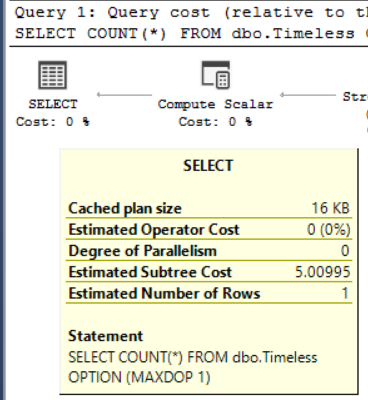

Index Tuning Week: My D.E.A.T.H. Method for Tuning Indexes

Indexing
2 Comments

This week I’m running a series of posts introducing the fundamentals of index tuning. Yesterday, I used Brent’s 5 and 5 Rule to explain why you want to aim for around 5 indexes per table, and 5 columns (or less) per index. Now, how do we get from our current database situation to a better place?

When someone hands me a database and tells me to make it go faster without changing the code, I start with my D.E.A.T.H. Method:

  • Deduplicate – remove fully-identical and nearly-identical indexes
  • Eliminate indexes that aren’t getting used
  • Add indexes to make queries go faster
  • Tune query plans with hand-crafted indexes for specific queries
  • Heaps usually need clustered indexes

Deduping and Eliminating First

I start with Deduping and Eliminating because when I’m given a database, many of the tables have a lot more than 5 indexes per table, and the indexes are crazy wide with lots of columns included. I need to get rid of the dead weight first before I start adding indexes – if I add more workload on my already over-taxed storage, I might make the problem worse instead of better.

My weapon of choice is sp_BlitzIndex, our open source index design tool that (among many other things) warns you about duplicate indexes:

sp_BlitzIndex with duplicate indexes

In the above case, we’ve got two indexes on the dbo.Posts table, both on AcceptedAnswerId. Every time we insert into dbo.Posts, we’re paying a 2x storage penalty (both on speed and capacity) to maintain those two duplicate indexes. The penalties continue every time we do a backup, checkdb, and even index maintenance.

By default, sp_BlitzIndex focuses on the biggest bang-for-the-buck improvements, things that are really easy to fix. Absolutely identical indexes on big tables fall into that category.

To get even more improvements, you can use the @ThresholdMB parameter to look at smaller tables (it defaults to 250) and the @Mode parameter to run more in-depth tests (it defaults to 0, but use 4 for deeper analysis.)

The Deduping and Eliminating only has to be done once for a database, and that in-depth spring cleaning will help you clear the way to add more indexes later. The Add step will need to be done repeatedly, tuning indexes over time, but if you do a good job of Deduping and Eliminating, you only have to do it once. Just make sure that as you’re adding additional indexes, you’re deduplicating as you go – don’t go creating yourself more problems by adding Clippy’s recommended indexes that are just a subset of indexes you already have.

Heaps Go Last for a Reason

If you’ve done a lot of index tuning, you might think you need to start by putting a clustered index on every table. Heck, even if you haven’t, you’ve probably read our posts about heap problems by now.

In the timeless words of a famous data modeler

However, setting clustered indexes up on tables can be a little invasive and controversial, depending on the folks who built and maintained the database design. They might say things like:

“Nothing about a row makes it unique.”

“The combination of fields to define uniqueness are just too wide.”

“We want to add an identity field to the table, but it’ll require reworking a whole bunch of things about our application.”

“We have a uniqueidentifier on every row, but clustering on a GUID hurts my feelings.”

No worries – hold the heap problems til the end of your tuning process. Make big gains first by removing storage and blocking problems with the D.E. parts, then make select queries go faster with the A.T. parts. Build credibility with the rest of your team, then finish it off with the rest of the D.E.A.T.H. Method.

Obviously, there’s a lot more work in the D.E.A.T.H. Method than I can describe in a post – even just picking the right index to design for a query can take quite a while. That’s why my Mastering Index Tuning class is 3 days long.


LGBTQ Meetup at the PASS Summit

#SQLPass
9 Comments

The SQL Server community is known for its welcoming acceptance of everyone, regardless of their experience or background. The SQL Server family actively reach out to help others and bring folks together.

A great example of that is the LGBTQ Meetup organized by Andy Mallon (@amtwo.) Whether you identify as gay, lesbian, bisexual, transgender, questioning, queer, ally, friend, or any other label, take a break from all the database talk, and hang out with some accepting friends for a cocktail on Thursday, November 8th.

Register here free, but as long as you’re attending, take a moment to consider donating to The Trevor Project. They provide crisis intervention and suicide prevention services to lesbian, gay, bisexual, transgender, and questioning (LGBTQ) young people.

To encourage your donations, we’re matching the first $5,000. Read more at Andy’s announcement, and I’ll see you at the Butterfly Lounge on Thursday night!