Blog

Getting Sneaky With Forced Parameterization

Execution Plans
0

Silly Rules

I’ve blogged about some of the silly rules about where Forced Parameterization doesn’t work.

One rule that really irked me is this one:

The TOP, TABLESAMPLE, HAVING, GROUP BY, ORDER BY, OUTPUT…INTO, or FOR XML clauses of a query.

TOP and FOR XML, get used, like, everywhere.

TOP is pretty obvious in its usage. FOR XML less so, but since it took Microsoft a lifetime to give us STRING_AGG, lot of people have needed to lean on it to generate a variety of concatenated results.

Heck, I use it all over the place to put things together for in the First Responder Kit.

Examples

In a database with Forced Parameterization enabled, these queries cannot be parameterized.

If we look at the query plans for them, we can see partial parameterization:

Halfsies

The literals passed into our query outside of the illegal constructs are parameterized, but the ones inside them aren’t.

Which means, of course, that we could still end up with the very plan cache pollution that we’re trying to avoid.

For shame.

The Adventures Of Irked Erik

I figured I’d try out some different ways to get around those rules, and it turns out that APPLY is just the trick we need.

For some reason, that’s not mentioned on that page.

I can’t find a newer version.

Maybe my internet is broken?

But anyway, if we change our queries to use APPLY instead, we get full parameterization:

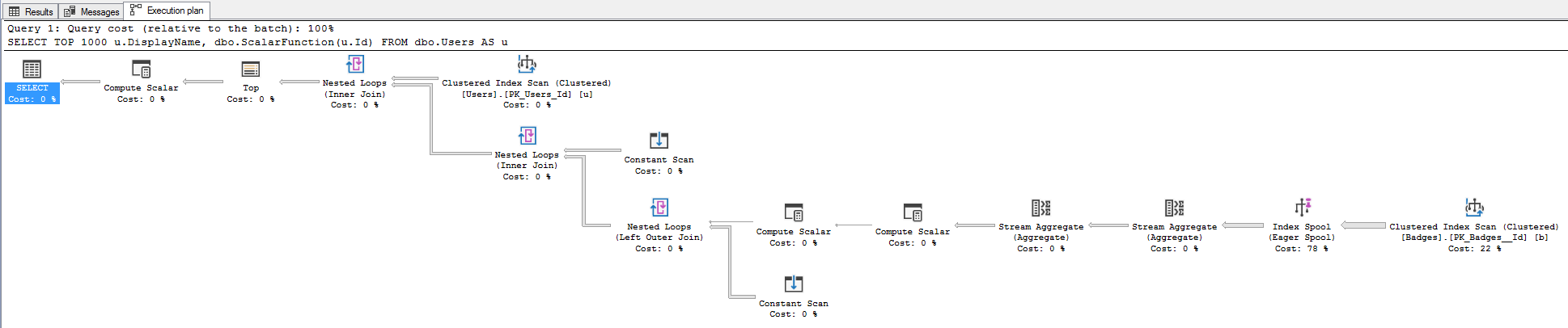
If we look at the new query plans, we can see that:

I see variables.

Bonkers

Partial disclaimer: I only tested this on SQL Server 2017 so far, and that’s probably where I’ll stop. Forced Parameterization is a fairly niche setting, and even if you have it turned on, you may not be able to change the queries.

It’s just something I thought was cute.

Thanks for reading!


Not So Forced Parameterization

Execution Plans
0

Asking The Wrong Question

Sometimes, when you wanna turn on a feature, you spend so much time wondering if you should, you don’t bother asking if it’ll even work when you do.

There are a long list of things that are incompatible with Forced Parameterization, on a page that’s pretty hard to find.

Now, there’s nothing in that list that says what I’m about to show you won’t work, but it’s kind of inferred here.

Statements that reference variables, such as WHERE T.col2 >= @bb.

When you’ve finished rolling your eyes around the known universe, keep reading.

This Also Goes For Assigning Variables

So, if you’re the kind of nutso-wacko that wants their variables to have values, hold onto your Librium!

Let’s check it out.

This sets FP on.

Now I’m gonna run two queries. One of them selects a count, and the other assigns that count to a variable.

The first query is parameterized just fine.

See those little parameters? They used to be literals.

How nice for you.

The second query doesn’t fare so well. 

No. Not at all. One may even call it unfair.

Ribbit.

Workarounds?

If you have queries that do this, and you want them to benefit from parameterization, one workaround is to insert the value you would assign your variable to into a temp table, like this.

This query will get parameterized.

Nifty.

Then you can just hit that temp table for the value.

Not bad.

Not great if you do it a lot, but hey.

Thanks for reading!


[Video] Office Hours 2018/11/21 (With Transcriptions)

Videos
8 Comments

This week, Brent, Tara, and Erik discuss update statistics, how soon it is safe to use a new version of SQL Server, VMs vs physical servers, backups, disabling TCP Chimney Offset in VMware, SQL Server on Linux, performance troubleshooting, most valuable tools to have in your SQL Server DBA toolkit, nolock and read uncommitted, and more.

Here’s the video on YouTube:

You can register to attend next week’s Office Hours, or subscribe to our podcast to listen on the go.

Enjoy the Podcast?

Don’t miss an episode, subscribe via iTunes, Stitcher or RSS.
Leave us a review in iTunes

Office Hours Webcast – 2018-11-21


Does UPDATE STATISTICS have a cost?

Erik Darling: [Chitan] asks, “Is update statistics a free tool, or does it have performance impact? How bad is it to run update stats every hour in an OLTP environment?

Tara Kizer: If you think you need to run it hourly, you probably have a parameter sniffing issue. At my last job, I inherited a server that had update stats running every 30 minutes. And I was only there about 18 months before I came here and I never wanted to rock the boat. I mean, it was working fine. I knew that it wasn’t necessary. I normally set up my servers – the ones that I am in control of – I set them up to do, once a day, update stats. And then maybe twice a day if I have a different type of load happening. But usually, I’ll run update stats after the nightly stuff runs, but it was working on that server, so I didn’t want to touch it and the people that set it up were still there and I just didn’t want to rock the boat. But it’s probably completely unnecessary to do it every 30 minutes, every hour. I mean, maybe at the most twice a day. I don’t know, it just sounds like you’re probably dealing with a parameter sniffing issue and you should be troubleshooting that instead of update statistics.

Brent Ozar: The overhead is going to be, of course, it will scan objects, you know, do lots and lots of reads. It’s not doing that many writes, but it’s doing a lot of reads and it will slow queries down while it’s happening.

Erik Darling: The one thing I can think of, if you’re on older versions of SQL Server like pre-2014, sometimes you would hit this nasty thing with ascending keys where if you had fairly large tables and you had, like, let’s just call them identity columns – it could be any column, as long as the value keeps increasing – and you had data coming in at the end and you didn’t have stats updated enough, SQL Server makes some really bad – I want to say like a one row guess for any off-histogram value. And you could have a bunch of stuff in there and SQL Server is like, nope, just the one row, please. You’re like, no, that’s wrong, please don’t guess that.

Brent Ozar: If you want to learn more about that, search for Thomas Kejser; the ascending key problem. And it’s really interesting. Most of us don’t have this problem, but it’s really interesting to read about. It’s like car crashes, you know…

Erik Darling: Erin Stellato has a pretty good post about ascending keys and a couple of the trace flags you can use along with them over on SQL Performance.

Brent Ozar: Okay, cool.

Erik Darling: So good stuff over there too.


When is a new SQL Server version ready?

Erik Darling: So, Steve, I wish there were some way that I could physically touch you, Steve. Steve asks a two-part question. I’m going to read both parts and then I’m going to let them sink in, “With SQL Server coming out fast and furious, how soon or late after a new version comes out do you bring it into your new environment? Also, physical servers or VMs?”

Tara Kizer: Completely different questions.

Brent Ozar: Wow.

Erik Darling: By the by… So let’s start with that first one. How soon after a new version on SQL Server comes out do you think it’s safe to start using it?

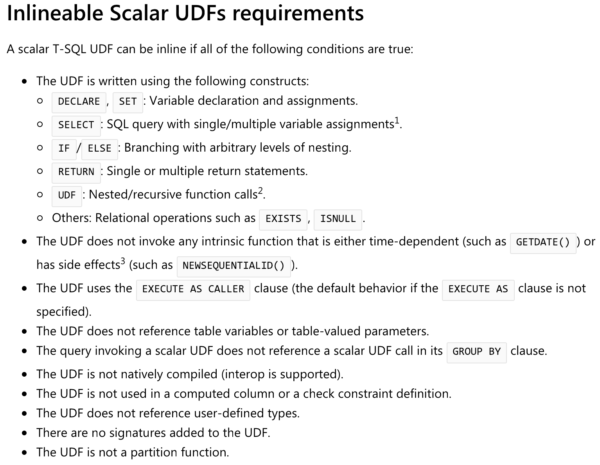
Brent Ozar: I’d go like two or three cumulative updates. I’d probably feel comfortable with doing it, but I would only go if it fixes a problem that you have. If there’s a problem you identify and go, 2019’s inlining of functions, got to have that. It’s my biggest performance bottleneck, then I want to jump. But if you don’t see something in the release notes where you go, this solves one of my biggest pain problems, I don’t know that I would jump that fast. I would probably – man, what scares me is you look at – scares is the wrong word. 2017’s cumulative updates, you look at the ones that even come out now in 2018, 2017’s been out for a while, even a dozen cumulative updates in there’s some terrifying stuff inside of there. And it’s not that older versions don’t have problems too, but I want to only go when I know I’m fixing stuff.

Erik Darling: And to be fair, even service packs today for older versions, there’s some pretty terrifying stuff in them too. It’s not like old versions are problem free. Like, these are settled. I had a boss once who was petrified of getting off 2008 R2 RTM and I was like, why? What’s going to be the problem…

Tara Kizer: What? Oh my god…

Erik Darling: He’s like, you know why? Because I know what I’m getting with it. No, you don’t.

Tara Kizer: It’s more risk to stay on it…

Erik Darling: Getting me to work weekends when crap goes wrong, that’s what you know you’re getting.

Brent Ozar: There was a good Twitter thread with Pedro Lopes of Microsoft. Someone was asking – they were like, I don’t really understand why I would upgrade this often and Pedro banged out like four things that are, like, performance, supportability, compliance, and I forget what the fourth one was…

Erik Darling: So does he… So how about that second part, physical versus VMs; what do you opt for? What’s your first choice?

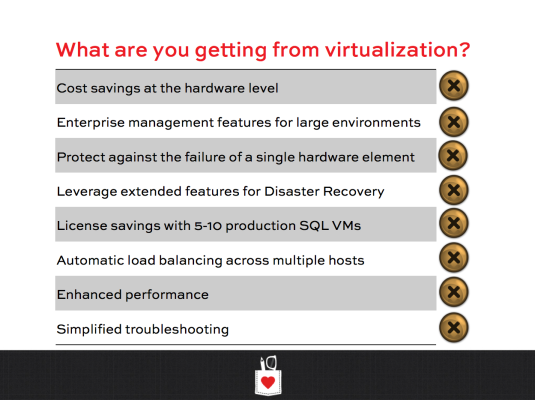
Brent Ozar: Man, I believe that every SQL Server should start as a VM; like a four-core 6GB of RAM VM. And then only add more when you believe you have a performance problem that you can’t fix by changing the queries or indexes. But we’re in kind of a weird business. We’re in this performance tuning business where people come in when they have serious performance problems. Nobody comes in when they’re happy and they’re like, things are great here, we just like hanging out with y’all. So there are a lot of times when we’ll see people on giant metal, 40, 60, 80-core servers. We’re dealing with a couple of 80-core VMs in Amazon the other day.

Erik Darling: The X1E, yeah, 128 cores, 2TB of RAM…

Brent Ozar: And you hit that size and you’re like, why are we not on bare metal, because there’s a couple of advantages you get with bare metal. You get different NUMA handling if the guest and host map up beautifully. You also get the ability to run local solid state for tempdb, which you can do in the cloud with stuff like an X1E. But when you’re running on-premises and VMware and Hyper-V, sysadmins are usually really hesitant to let you do local solid state for tempdb. So people are like, we can put a million dollars in the shared storage and make it perform really fast. Well yeah, I can strap a jet engine to a Honda Civic, but that doesn’t mean it’s a smart investment.

Erik Darling: And you know, for me, it all depends on where that server is coming from. If I have an existing server that’s already a big beast and I need to put it on something else, I don’t want a virtualized big server because you run into a thing where you have this one guest that dominates the host. You can’t have other servers on there with it. You can’t move it to other servers because they have a bunch of other stuff on there. Part of the beauty of VMware is the manageability stuff where you can put different VMs on different hosts, balance things out. As soon as you have that one big boy hanging around, you kind of lose a lot of that. You get that one to one guest host mapping. No one says, that’s my virtualization dream. Plus I hate VMs.

Brent Ozar: It only gets worse in the cloud.

Erik Darling: Alright, so Greg says – and clearly, they have reached a rocket science-y point of tuning this VM – he’s been recommended to disable TCP chimney offset in VMware to improve SQL Server performance.

Tara Kizer: Goodness…

Erik Darling: By god, you’ve done everything else haven’t you?

Brent Ozar: Somebody read a book from 2006. [crosstalk 0:08:33.5] 2006 rings a bell. We did that back in 2006-2006. There was a whole deal with TCP chimney offsets. I would guess that somebody just has a really old best practices. I would be like, if you want to do that, that’s great. Let’s just measure before and after, make sure it makes a difference. And when it doesn’t make any difference, you’ll identify they don’t have pants on.

Erik Darling: Yeah, I’d also press him and say, what metric do you expect to see improve when you make this setting? What’s going to get better? What’s going to get faster? It’s like that disk offset thing in 2003. It’s like, you’re off by 1MB, you bastard, you’ll never work in this industry again…


Who should do the SQL Server backups?

Erik Darling: So Thomas asks, “Have you ever heard of anyone not doing backups in an ERP system and letting another program like ArcServer take the backups?” He says, it sounds like they’re taking a backup of the computer and they’re not able to run CHECKDB on it. So he’s concerned about the recoverability of those backups, the integrity of his data, and wants to know if that’s a good way of doing things.

Tara Kizer: I’m just so confused.

Brent Ozar: I’ve seen people do flat file backups, like Symantec had a backup exec or something a while back that would purport to backup open files; involved VSS snapshots and all that. But the easy way for me is to just ask for a [inaudible]; I want to restore. I want to restore as of this time. You know, whatever, yesterday as of 5 pm, and you just fake it. You go, I dropped a table yesterday at 5pm, can you go ahead and restore the database for me to another server? I’m going to pull the contents across…

Erik Darling: [crosstalk 0:07:51.1] Just say you changed the stored procedure. Don’t say you lost it.

Tara Kizer: That would get escalated quick.

Erik Darling: This guy, Thomas…


Have you used SQL Server on Linux?

Erik Darling: Alright, so Mike asks, “Have you used SQL Server on Linux much? We’re going to start using it soon because our vendor uses Linux for some other apps.” It seems pretty decent to him, but he wants to know if we have any thoughts on it.

Tara Kizer: Have you guys installed it? I don’t think any of us have.

Erik Darling: Ask me if I can install Linux…

Tara Kizer: I know…

Brent Ozar: The release notes were enough that it scared the pants off – I’ve said pants like two questions in a row – scared the pants off of me is what’s not supported…

Tara Kizer: Everything…

Brent Ozar: Holy cow, there’s a lot of stuff that’s not supported. Yeah, I’m going to have to go back down. Replication wasn’t supported…

Erik Darling: Well thank god. That’s a feature, buddy.

Tara Kizer: [crosstalk 0:09:58.0] do an insert, update, delete, and select, you’re good to go. If you need any feature, you’re not getting it.

Brent Ozar: I’m going to have a tough time finding it now on demand, but I would just go through and make sure it actually supports the features that you want. I tried it on Docker containers and there were problems around parallelism, for example. Queries could only use one core. I was like, okay, I’m about enough here. That sounds cool, but I’ll let somebody else dip in.

Erik Darling: That’s a good time to bail out.

Brent Ozar: Yeah, it doesn’t solve a problem I need to fix.-


In which Richie trolls Erik

Erik Darling: Let’s see here. Another Erik – I can’t figure out if this is someone’s last name…

Tara Kizer: I think they just love you…

Erik Darling: Alright, Erik Lover, we’ll see what happens.

Tara Kizer: It’s got the K, I think he loves you.

Erik Darling: Yeah, because a sign of true love is that someone spelled my name right. I know that because my mom doesn’t spell my name right. But Erik Lover has an Availability Group they set up using 2014 and Windows Server 2012. There are three nodes and it’s running as a managed service account on each node. “Can I have Erik’s old desk…” You got me good there. Is that Richie?


Will clearing the plan cache fix my problem?

“We’re experiencing performance issues during a mass run at midnight?” Well, that’s the problem; no one’s there watching the server. “CPU peaks around 98%. The plans in the cache around 40,000. Single plans in the cache is around 18,000. Will clearing the plan cache solve my performance problem?”

Brent Ozar: If queries are already running and they’re using 100% CPU, you’re kind of screwed there. If there were new queries coming in and you had a bad plan, like the queries kept coming in, then you could conceivably clear the plan cache and get new plans coming in. But I wouldn’t do it by clearing the plan cache. I would go look at – if you search for parameter sniffing. Actually, just go to brentozar.com/go/sniff. This would be the first thing that I would suspect it would be. And on that link, we have a video that I did at a SQL Day in Poland explaining how to identify parameter sniffing and why freeing the plan cache works temporarily, but just not long-term.

Erik Darling: You know what – I’d say if you have that many plans coming into the cache, you might want to look into a setting called forced parameterization, because it will make parameter sniffing worse, but it will reduce the number of plans in the cache, so you’ll have fewer of those to look at, which is nice too. There’s all sorts of upsides to that. Because it’s a job security thing, because now you’ll have a parameter sniffing problem to fix, and you’ll have solved the problem of all the plans in the cache so someone will think you’re really, really smart. And you’re smart enough to fix parameter sniffing, so it’s a two-part approach to getting a good raise, I think.

Brent Ozar: So we also have a page on there, so if you search for why multiple plans for one query are bad, it talks a little bit more about how you get into forced parameterization.

Erik Darling: She also adds that page life expectancy is up and down, which yes, it tends to do that. It tends to do a little up-jump-boogie when memory gets different levels of usage.

Brent Ozar: Even when the server is fine it does that. it’s not necessarily an indicator of problems.


A Microsoft presenter recommended sp_BlitzIndex

Erik Darling: Someone sent a bunch of Os, I don’t know what that means. Here’s one from Chris Good, or Chris Bad, maybe, I don’t know, Chris Somewhere In The Middle, “I took a performance tuning course from Microsoft last week…” That’s not good, “The presenter suggested we look into sp_BlitzIndex…” Holy cow…

Tara Kizer: Was it Connor? I think it was Connor.

Erik Darling: It had to have been Connor.

Brent Ozar: Wow, that’s kind of cool.

Erik Darling: Yeah, I want to hang out with that instructor. They know their goods.

Tara Kizer: Yeah, send them some cookies.

Erik Darling: Yeah, right.

Brent Ozar: I really would love to know who that presenter is. That’s amazing. I remember the first time – we used to capture emails every time someone downloaded the First Responder Kit and when I started seeing Microsoft PSS people, like customer support people downloading, I was like, yes, we’ve made it; we’ve made it.

Tara Kizer: That’s awesome.


When does RCSI not get used?

Erik Darling: Alright, let’s see here – sort of a crazy question, “What are the cases when RCSI does not get mapped using SQL Server 2017 Enterprise Edition? Is there any doc or whitepaper?” I’m not sure what you mean by mapped.

Tara Kizer: Well because, you know, my client last week, I think it was – all the days are running together now, but I think it was last week’s client – they had RCSI and we still saw blocking and the select query that was causing the blocking was read committed. It hit none of the limitations. It had none of the isolation level changes, table hints. I mean, none of us could figure out what was going on there. So I don’t know if there’s ever a time where the mapping – you know, map it from read committed over to RCSI – we could find nothing that was escalating above read committed to cause what we were seeing.

Brent Ozar: And there are lists of things that will stop at select. If you put index hints or lock hints in your code, life if you say with serializable, you say with NOLOCK.

Tara Kizer: And I think that client was on SQL 2017 Enterprise Edition. I’m pretty sure that was the client. I know I had a recent 2017 client. So I wonder if there’s a change in 2017, you know?

Brent Ozar: Yeah, I would open a support case just because there was the 2016 service pack – I want to say it was SP1 CU4 – that broke NOLOCK. It suddenly started taking out locks, so it is possible. It’s happened before.


What are the downsides of indirect checkpoints?

Erik Darling: Alright, so let’s see, Rakesh asks, “What are the downsides of indirect checkpoint? We migrated to SQL Server 2016 and the new databases are using it but the migrated databases are using automatic checkpoints.”

Tara Kizer: What the heck are indirect checkpoints? When you’re actually issuing a checkpoint command?

Brent Ozar No, that was – I remember hearing about this from like Conor or something.

Erik Darling: Yeah, I don’t remember anything about it because it was one of those things, like yeah, okay, when will that come in handy?

Brent Ozar: I would honestly just Google. We don’t touch it either. We haven’t heard anything good, we haven’t heard anything bad. It’s just one of those. We all make the same gas-face as we’re reading that…

Tara Kizer: Like why would you ever change it?


We’re thinking about enabling Query Store…

Erik Darling: Well in the meantime, Zoe-Ann asks, “We have over 20 databases…” Holy cow, someone went on a spree, “We’re on SQL Server 2017 and we want to turn on Query Store. We understand that it should generate about 5% overhead. Are there any suggestions you have related to Query Store settings or any overhead that you’ve seen?”

Tara Kizer: I’ll tell you a little story about a recent client [crosstalk 0:16:59.2]. It might even be the same one, I don’t know. It was 2017 and they enabled it and the retention that they set up in the Query Store was one year and they had a failover occur through Availability Groups due to patching or whatever it was. And they were down for several hours. And it had to do with Query Store, because they opened up a case with Microsoft and they needed to put a trace flag in place. In the end, the whole issue was because of the many plans for one query. They had ad hoc queries; thousands of plans per query. And so they have, I don’t know, 100,000 plans hourly and they’re distinct plans, so all of that’s getting dumped into Query Store. So Query Store, I mean, tons of overhead because of their environment, so make sure you don’t have this many plans for one query issue, and primarily ad hoc plans.

Erik Darling: So for me, there’s a setting in Query Store, which I actually just wrote a blog post about that hasn’t gotten pushed out yet. But the setting is in the plan collection portion. And it lets you choose – there’s a setting that says collection something, and you can choose all or you can choose another setting called auto.

Tara Kizer: Auto, that’s right.

Erik Darling: And when you choose the auto setting – auto, not otto – when you choose the auto setting, what happens is SQL Server doesn’t go and collect every single plan that comes in. It only collects ones that meet some certain threshold, like capture mode. So if you change that to auto, then you’ll only get plans that use a certain amount of compile time, a certain amount of CPU, have a certain amount of executions. Before that, it just doesn’t’ stick any old thing in there. Whenever you turn on Query Store – I was experimenting at trying to write sp_BlitzQueryStore – I’d always find these ridiculous Microsoft queries in there. I’m like, why are you showing me this? This is not anything that I would ever want to look at in Query Store. Show me my bad [crosstalk 0:18:55.8]. Pretty crazy.

Brent Ozar: Yeah, so Erin Stellato also has a post – she just happened to publish her most recent one – about the overhead of Query Store. The other thing that I would say too is make sure you’re on the most recent service pack and cumulative update because man, this is one of those features that has had a lot of patches pushed to it.


What are the most valuable SQL Server tools?

Erik Darling: Alright, we have a question from Brandon who is a brand new DBA. He’s eight months into his gig and he wants to know what tools you think are the most valuable to have in your SQL toolkit for working with SQL Server and doing…

Tara Kizer: Has he heard of us before?

Erik Darling: Interesting question.

Tara Kizer: We have tools.

Brent Ozar: Ah yes so we needed those tools desperately. Every not and then, we talk about [inaudible 0:19:50.5] suck if we didn’t have them. If you click on scripts up at the top of our site, we have a whole barrage of those things. You can download them all in one chunk. If you made us each pick one, I think my favorite one would probably be sp_BlitzCache, just to rapidly point out what the problems are. That would probably be my favorite if you only let me live with one for the rest of my life. What about you, Tara? Which one would be your favorite?

Tara Kizer: Well, does it have to be one of our scripts?

Brent Ozar: No…

Tara Kizer: I think sp_whoisactive, because I can do a lot with that.

Brent Ozar: And so that’s over at whoisactive.com. And this is one of those things where there’s a download, you go install it and you run it and you think you know everything. Oh no, no, no. Go into the documentation and it’s insane. It does so much good stuff.

Tara Kizer: If it has to be one of ours it’d be, I think, BlitzFirst because normally, as a production DBA, I am troubleshooting an active performance issue and so BlitzFirst, you know, can really lend a hand to figure out what’s going on.

Brent Ozar: Erik, how about you?

Erik Darling: For me, you know, I’m just going to give a shout-out to a different group of people; dbatools. I don’t work with PowerShell. I thank god every day that I don’t have to work with PowerShell because they’ve written things that do things in PowerShell. You can do – we’ve talked about stuff that helps you troubleshoot performance and query plans and indexes and server liability. This is like bread and butter DBA tasks; moving databases, moving users, setting stuff up, stuff that I don’t ever never in my entire rest of my life want to do again. So thank goodness these people, A, work with a language that I just don’t get along with – I am incongruous to this language – and they have written tools that I don’t ever want to have to remember syntax for, look up, think about. So I think they’re a pretty cool bunch even though me and PowerShell have our disagreements.

Brent Ozar: Somebody said the other week that they were like, hey it’s been a while since Erik’s done a live blog of trying to use PowerShell. We kind of miss that. We should do that again.

Erik Darling: No one said that, did they?

Brent Ozar: They did, they did. It’s funny.


What’s better: NOLOCK or READ UNCOMMITTED?

Erik Darling: Alright, [Chetan 0:21:57.5] asks another question, “It might be a bit of a beginner question, but which one is better for performance; NOLOCK or set transaction isolation level read uncommitted?” Take it away, Tara.

Tara Kizer: I was going to reply just neither, you know, end of story. It is not the turbo button. They’re identical, you know. One of them is just put it at the top of your script and the whole thing is now read uncommitted, the other one’s at each table level. They’re identical. NOLOCK is read uncommitted just at the table level. Don’t use it. I mean, if you think that this is a performance improvement, you know, you need to figure out what the root cause of the blocking or whatever contention issue you’re having and fix that. Read uncommitted and NOLOCK is not safe for production systems where data accuracy matters. I had a client a few weeks ago that – the day three call where we deliver the findings – there were some people in management in the room – this is actually during day one – and everything said NOLOCK. And so I asked the question, does data accuracy matter on this system? And the management people are like, hell yeah it matters. And I was like, well you can’t do this then. This can give you completely erroneous data. It is not the turbo boost. Use RCSI instead. It’s safer. If you have to go the isolation level route…

Erik Darling: The thing about NOLOCK or read uncommitted, no matter which one you choose, is everyone thinks that it means that your query isn’t going to take locks out. What it really means is that your query isn’t going to respect locks taken by other queries that are trying to modify data. And you can read all sorts of just awful nasty stuff that Brent’s going to show you with this lovely typing demo.

Tara Kizer: Is he going to be able to do it fast enough?

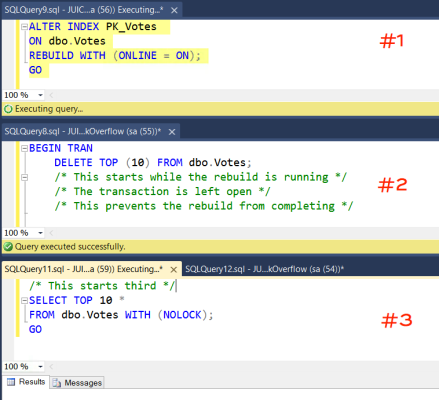
Brent Ozar: I think so. So over on the left-hand side, I’m going to run an update. Over on the right-hand side, I’m going to say select count star from DBO.users with NOLOCK. And so I’m going to, on the right-hand side, run a count at the same time on the left-hand side I am updating the table. Notice that I am not, over on the left-hand side, changing the numbers of rows in the table. It’s the same number of rows in the table; I’m just changing the contents of one of the columns. So every time I run a select count star, you would think I would get exactly the same rows. So here’s a quick rundown. I’m going to make sure I don’t have any indexes too because I’ve been playing in this database all day. So count star from DBO.users – so there’s about two and a half million rows in here. If I run it 10 times…

Erik Darling: Not 24 million…

Brent Ozar: Not 24, just two and a half; small number. Now over on the left-hand side, I’m going to do the update. At the same time on the right-hand side, I’m going to go run the select star and my numbers are all over the place. That’s kind of messed up because I’m not even, in this case, going to commit. I’m going to stop while the update’s running, and yet still the count star just sees different numbers of rows. So that’s pretty hairy.

Erik Darling: Crazy, yeah, don’t like that one bit.

Tara Kizer: Fix your queries, add indexes, you know, fix your table design, maybe use RCSI if your system can support it. In my opinion, NOLOCK read uncommitted should not be used except as a DBA or developer querying production data in Management Studio. Then I use NOLOCK because I don’t really care about the results.

Erik Darling: Only use NOLOCK in incognito mode, or else. People will see and you’ll get really embarrassed.

Brent Ozar: When you really don’t care about the quality of data – like if you’re running Twitter or Facebook and you’re just showing people cat pictures, then sure, but how often do those people put that in SQL Server? You don’t put stuff like that in SQL Server. Alright, well thanks, everybody for hanging out with us this week at Office Hours and we will see y’all next week; adios.

Erik Darling: Goodbye.

"*" indicates required fields

This field is for validation purposes and should be left unchanged.
Name*
Things I want*


Congratulations to the Scholarship Class of 2019.

Company News
4 Comments

To celebrate the holiday season each year, we give back to those who spend the entire year giving back in their own communities. We go looking for data professionals who make a difference, and we try to make a difference in their lives too.

This year, we’re proud to announce a new round of winners. We can’t mention ’em all, but here are just a handful of groups that we’re proud to help:

Pocket Square
The scholarship program makes the heart part happy.

The American Institute of Physics is committed to the preservation of physics for future generations, the success of physics students both in the classroom and professionally, and the promotion of a more scientifically literate society.

South Community, Inc. provides Ohioans with mental health care, substance counseling, psychiatric support, and much more.

UNOPS helps people build better lives and countries achieve peace and sustainable development. Yes, they’re using data, like how they’re considering artificial intelligence.

The Africa Health Research Institute works with over 60 academic and clinical institutions for the elimination of HIB and TB.

The Smith Family is an Australian charity helping disadvantaged children get the most out of their education so they can create better futures for themselves.

Easter Seals-Goodwill Northern Rocky Mountain serves children and adults with autism and other disabilities, plus disadvantaged families in Idaho, Montana, Utah, and Wyoming.

This season, take a few moments to think about how lucky you are, and how you can reach out to those around you to help them move forward, too.

Happy holidays.


A Lot of Your SQL Servers Are Unsupported.

I’m almost afraid to look into the SQL ConstantCare® client base to see the answer to this, but let’s put on a pair of rubber gloves and go find out.

SQL Server 2016: <1% out of support. I LOVE YOU PEOPLE. However, you’ve had the luxury of time here: SP1 came out in November 2016, so 99% of you have had the time and motivation to install it. SP2 is already out, but both SP1 and SP2 are supported right now. SP1 drops out of support in July 2019. SP2 came out in April of this year, and 64% of you are already on it!

SQL Server 2014: 10% out of support. Both SP2 and SP3 are supported right now, and SP2 isn’t out of support until a luxuriously long-from-now January 2020. I’m not gonna lie, though: a couple dozen of you didn’t even bother to patch the original install of 2014. Get on the ball.

SQL Server 2012: 38% out of support. Service Pack 3 just dropped out of support last month, so I’m not too surprised that a lot of folks have been caught off guard. SP4 came out just over a year ago.

SQL Server 2008 R2: 27% out of support. Service Pack 3 came out four years ago, and it’s the only remaining supported SP. Thankfully, most of you are on it. However, 14 of you are running a completely unpatched SQL Server 2008 RTM. We’re talking about an eight-year-old set of bits. They’re rotted. Throw them out.

SQL Server 2008: 65% out of support. The only remaining supported Service Pack for SQL Server 2008 is Service Pack 4, and 2/3 of y’all aren’t on it. C’mon, now, SP4 came out over four years ago – get ‘er patched.

When I talk to folks about why they don’t patch more often, I usually hear:

  • We can’t get a maintenance window
  • The vendor won’t certify their app on the new patch
  • It works well enough, no reason to risk it
  • I don’t open support calls anyway, but if we had to, we’d patch it then to get support

What about you? Why aren’t you patching your SQL Servers?


Going to SQLBits in 2019? Come to my pre-con!

SQLBits
0

My Favorite Conference

I love SQLBits, and not just because it gets me out of the country for a week. It’s about the best conference a training buck can buy. There’s tons of great technical material without a lot of the marketing schtick that tends to sneak in.

Head over here to register now.

I’m Putting Together A Team

There are a lot of great pre-cons to choose from, but here’s why you should come to mine:

For years, SQL Server has been stealing from you. Your nights, weekends, vacations you took a laptop on, and who knows how much hardware and licensing money went into it instead of into a raise or bonus for you.

I’m gonna teach you how to turn the tables on SQL Server, and start taking it all back.

You’re going to learn how to find your server’s bottlenecks, the queries that cause them, and how to fix them. We’ll be making sense of wait stats and query plans, and getting deep into not just how a single query interacts with SQL Server, but how queries interact with each other.

Concurrency isn’t just about locking and blocking; it’s about how queries get scheduled on CPUs, share memory, and move data to and from disk.

Think it’s the hardware?

I get it. You’ve been staring at monitoring tools, widgets, and charts and graphs for years, and making heads or tails out of them is just plain aggravating. There seems to be conflicting information everywhere, and no good way to get to the root of which queries were slow, and why.

You’ll head back to work with all the knowledge and tools you need to get a much better job find and fix your server’s toughest problems, and finally start getting back what’s yours.

Away Days

I’ll be writing more about what to expect, and what special goodies we’ll be giving to attendees leading up to the event.

Hope to see you there!

Thanks for reading!


How Much Memory is “Normal” for SQL Servers?

SQL ConstantCare
63 Comments

When I look at a SQL Server, one of the first things I check is, “How much memory does this thing have relative to the amount of data we’re hosting on here?” I’ve long used some seat-of-the-pants numbers, but armed with data from SQL ConstantCare® users who opted into public data sharing, let’s do a little deeper analysis.

I took last Thursday’s data for about 1,400 servers, then excluded stacked instances (multiple instances installed on the same OS), Azure SQL DB, Managed Instances, and servers with less than 10GB of data.

How much memory do SQL Servers have?

The median SQL Server has 19% of the data size as RAM. Meaning, if it’s hosting 100GB of data, it has 19GB RAM in the server. (Max memory size and file sizes are discussions for another blog post.)

To take a few examples from that median:

  • 84GB data hosted on a SQL Server with 16GB RAM
  • 166GB data hosted with 32GB RAM
  • 289GB data hosted with 55GB RAM

Let’s slice it a different way, though: let’s take the median data volume out of this sample, 219GB. (If I sort servers by how much data they host, the middle value is 219GB.) In servers in that range, a few include:

  • 219GB data hosted on a SQL Server with 15GB RAM (OS has 7% of the data size)
  • 222GB data hosted with 128GB RAM (58%)
  • 222GB data hosted with 24GB RAM (11%)

These numbers are thought-provoking, but before you ask questions, think about this one: the data size vs hardware size doesn’t by itself mean that the users are happy. There are a lot of other factors at play, like query volume, tuning done, wait stats, etc.

A few examples from the extreme ends of memory-vs-data-size provisioning:

  • 4.2TB of data hosted on 16GB RAM (HAHAHA)
  • 20TB hosted on 64GB
  • 10GB (not TB) hosted on 64GB RAM
  • 61GB hosted on 256GB RAM

As data size grows, memory doesn’t.

I split the servers into quartiles based on the size of data they’re hosting:

  • Servers hosting 10-59GB data: median RAM size is 74% of the data! (example: 27GB data, 20GB RAM)
  • 60-224GB data: 23% RAM size (example: 210GB data, 48GB RAM)
  • 225-600GB data: 13% RAM size (example: 488GB data, 64GB RAM)
  • >600GB data: 6% RAM size (example: 2.1TB data, 128GB RAM)

The low end percentages are a little skewed since in the 10-59GB tier, the OS memory means a lot. In our SQL Server Setup Guide, we tell folks to leave at least 4GB to the OS, and I think most sysadmins would consider 2GB to be the bare minimum. But still, the dropping percentages as data grows – that’s pretty steep.

Do Enterprise Edition servers have more memory?

Overall, Enterprise Edition servers handle larger volumes of data, and they are configured with more memory to handle it:

  • Standard Edition median data size is 168GB, median RAM size is 32GB
  • Enterprise Edition: median data size is 358GB, median RAM size is 54GB
  • Developer Edition: data 111GB, RAM 16GB (poor developers)

So in terms of pure server size, yes, Enterprise servers are larger, but as a percentage of data, something kinda interesting happens:

  • Standard Edition median: RAM is 23% the size of the data
  • Enterprise Edition: RAM is 17% of the size of the data
  • Developer Edition: 11% (c’mon, man, let them get some memory!)

Do older SQL Servers have less memory?

SQL ConstantCare

Y’all are starving the dinosaurs:

  • SQL Server 2008 and 2008R2 median RAM is 15% of the database size
  • SQL Server 2012: 18%
  • SQL Server 2014: 19%
  • SQL Server 2016: 22%
  • SQL Server 2017: 24%

Which might be due to a few factors, like not caring about the performance on older servers, or dealing with old servers built with much lower memory sizes.

Where to go from here

My next thoughts are:

  • Which servers are more likely to experience PAGEIOLATCH waits?
  • Which servers are more likely to experience RESOURCE_SEMAPHORE poison waits when they run out of query workspace memory?
  • Can I build a sizing tool that predicts user happiness based on data size? (Meaning, if you put 3TB of data on a 64GB RAM VM, how bad will the wait stats be?)
  • Then, can we give that same advice to customers? For example, showing them a chart of where they rank for data size vs memory vs happiness?

[Video] Office Hours 2018/11/14 (With Transcriptions)

Videos
0

This week, Tara, Erik, and Richie discuss using Docker in dev environment, in-place upgrades, disaster recovery, the minimum amount of CPU and RAM for new SQL Server VMs, troubleshooting long-running SQL agent jobs, dbcc checkdb running longer than normal, and more.

Here’s the video on YouTube:

You can register to attend next week’s Office Hours, or subscribe to our podcast to listen on the go.

Enjoy the Podcast?

Don’t miss an episode, subscribe via iTunes, Stitcher or RSS.
Leave us a review in iTunes

Office Hours Webcast – 2018-11-14


Have you used Docker for SQL Server yet?

Erik Darling: “Have you used Docker in SQL Server at all? What do you think about using it for dev instances? Short answer is absolutely no, I have not touched it.

Tara Kizer: Can barely spell it. I know they sell it at like Coles and all those kinds of places.

Erik Darling: Yep, you can get pleated ones, boot-cut ones, all sorts of things.

Richie Rump: Brent’s probably wearing some right now…

Tara Kizer: He might be, with a polo shirt… (Edit from Brent: worse: a buttondown.)

Erik Darling: With a nice weaved belt, something like that. [crosstalk]

Richie Rump: Oddly enough, pretty frequently, we don’t really do a ton with Docker or anything like that. The closest we get is Lambda, which is automatic. It does all that stuff for us. My opinion is, I don’t know what it buys you in production unless you’re really turning out a lot of servers all the time for different clients or whatnot. Maybe that might make sense in your environment. But for dev, maybe, but remember, just talking about the install, now you’ve got the data on top of that, which will change probably a lot more frequently than how frequently you create a dev server. It’s just easy. It’s more overhead, a little bit, so try it out, see if it works for you guys.

Erik Darling: It would almost make sense for us where we use a pretty static copy of Stack Overflow over and over again, but then I’m creating a new SQL Server and have to remember the settings and, like, the desired state with SQL Server is a crap-show. Nothing about it seems appealing to me.


When will the Summit recordings be available?

Erik Darling: Anyway, next question. There’s one from Colin, “Do you happen to know when the PASS Summit recorded sessions will be posted?” I’m not wearing a PASS shirt. I do not know. Please ask someone from PASS. They don’t tell us, mere mortals, these things.


Will in-place upgrades become more common?

Erik Darling: Joshua asks, “Do you foresee in-place upgrades becoming more common and acceptable for production systems given the shortened release cadence?” Tara, take it away…

Tara Kizer: I mean, absolutely not, for me. In-place upgrades are for a test environment. For production, I mean, I’ve supported some very critical systems and I will not take that risk of doing an in-place upgrade. I mean, it is not happening for critical production systems.

Erik Darling: Not for me either. You know, especially because with each new version now, they are making bigger and bigger changes to more and more critical parts of the system. Like, if you look at the stuff that came down the pipe for 2016 and then for 2017 with adapted joins and the more batch mode stuff. And now 2019, where you’ve got batch mode for row store and you’re getting all the stuff with UDF inline. If anything goes terribly horribly wrong, there is no back button that says, no I want it the way it was before. You are stuck if you just do an in-place upgrade. And if you are stuck with unhappy users and customers, you are most likely stuck on Monster.com for a while trying to figure out what happened.

Tara Kizer: Just think about your maintenance window that you would need for a rollback if something goes wrong there. I mean, I don’t have that kind of downtime in maintenance windows. I’m usually, you know, very small maintenance windows. In-place upgrade, not happening because of rollback reasons.

Erik Darling: No, everyone says, oh it’ll be so easy. We have a VM. We’ll just flip it back. Okay, fine, if anyone touched any data right leading up to that, good luck to you. No thanks. Not the kind of risk I’m willing to take with production SQL Servers.

Richie Rump: Yeah, and I think, you know, when you take a look at risk – I’m putting my project manager hat back on – that you need to actually write them out and say, hey this could happen, this could happen. And what’s the probability that can happen? Is it high? Is it medium? Is it low? And then how much you’re willing to swallow when you go to your management and say, hey if this, which is a medium risk happens, and we are down for five days, are you okay with that? [crosstalk] the risk assessment and then you go off and do what you need to do. So I find that, once they see it on paper, they’ll be like, oh really that’s a high risk, I’m not comfortable with that. Like, yeah, you know what, neither am I…

Erik Darling: You don’t mind if we don’t make money for a week, right? That’s cool, okay, we can just do this then.

Richie Rump: Yeah, no worries.


Does VMware SRM eliminate the need for AGs?

Erik Darling: Alright, there’s one from Marci now. She’s using SRM for VMware, that’s site recovery manager. She wants to know if that makes using Availability Groups for disaster recover redundant. How is that a different strategy form using, I’m going to guess, async AGs for DR? If anyone wants that, they can have it.

Tara Kizer: At my last company, we used Availability Groups, synchronous and asynchronous for HA and DR, and we were also virtualized. But on the systems where we didn’t need the really low RPO, we did use SRM. But that was like for an SSIS server and we were okay with – there wouldn’t be data loss in between. I see Availability Groups, database mirroring, failover cluster instances as lowering your RPO at the Windows SQL Server level. Because what happens when SQL Server crashes or Windows crashes, downtime is longer for those and, I don’t know, SRM, I certainly used, but it was not for my critical systems that had low RPO and low RTO.

Erik Darling: Yep, it was always for – so what I dealt with a lot working with relativity, which has – it’s not just like you have these SQL Servers. You have this sort of army of VMs that all do different units of work. Like some will index different things. I don’t mean like create SQL indexes – like create index files, some will hold files. Workers do all sorts of crazy different things within the relativity environment. So you end up with 200 to 500 VMs – tiny VMs, not big ones – that just do little things. And SRM was great for those because there was no, like, in-flight data on them. They were just doing a task when they got called upon. SRM was awesome for that. for SQL Servers, you know, if you have short RPO and RTO windows for SQL Servers, then I don’t think SRM is the solution for you. If it’s for dev stuff or it’s for things that are not critical where you have, like, 24-hour RPO or eight-hour RPO, then that might make more sense, because I just don’t think you’re going to be doing the snapshots. And I don’t think you’re going to be replicating data at a pace that’s fast enough to meet a short RPO window with it.


Should I set fill factor based on row versioning?

Erik Darling: Alright, next question. I don’t understand this one but I’m going to try to make sense of it. Joe has a job that’s set to change fill factor for row versioning where if most fill factors are between 75 and 90 on the same table, “What are your thoughts?” No. No is my thought.

Tara Kizer: I mean, how are they picking what number they want to use? Per index? That’s a lot of testing you would have had to have done.

Erik Darling: Yeah, it’s a lot of careful thought consideration and testing and not at all just picking numbers at random, I would say. If you could clarify that a little bit and maybe, you know, sneak in why they’re different for certain indexes, that might be helpful too.


What’s the smallest SQL Server I should build?

Erik Darling: Jeremy asks, “What do you recommend the minimum amount of CPU and RAM when standing up a new VM running SQL?”

Richie Rump: All of it.

Erik Darling: Is it on your laptop? What’s it for? It kind of depends. If I’m paying for the licenses then I want to use the minimum licenses that I paid for, CPU-wise. As far as memory goes, as much as I can possibly take.

Tara Kizer: As much as the Windows team will give me. As a production DBA who does not set up the hardware or Windows, I want as much CPU and as much RAM as you’ll give me, and I want more than that, actually. It depends on your system, what your system requires. Maybe eight – I don’t think I’d go any lower than, say, 64GB of RAM. But what happens if you have a 1GB database? It doesn’t need that much.

Erik Darling: No, so there are a lot of, I call them, local variables that might change the answer there. But you know, for me, I just want to make sure that I have enough hardware to meet the needs of the application. So it’s an application by application thing. If it’s a thing no one cares about, then I don’t know, two cores, 8GB of RAM. If it’s a thing that everyone cares about, well I’m going to have to have a bigger talk than that. someone’s going to have to get the credit card out.

Richie Rump: And those needs are going to change, and they most likely will change.

Erik Darling: Data grows. User accounts grow. Everything tends to get bigger and no one out there is archiving. It’s always just bigger and bigger.


I have this cursor…

Erik Darling: Let’s go here. Adam has a question about SQL Server 2012 Enterprise. He has a cursor based application and sometimes he runs into a problem when he’s doing stats maintenance when the cursor could not complete because the schema changed after the cursor was declared.

No, I haven’t run into that, but I don’t use a terribly large amount of cursors. Sorry about that.

Tara Kizer: I suspect that the app using cursors is completely irrelevant to what Ola’s stuff is doing. I think maybe you’ve got a concurrent job running that has changed things and – I don’t know. I don’t think that the application has anything to do with the error that they’re encountering. I think check for other jobs. See what else is running at that time.

Erik Darling: Sounds good to me.


How do I stop people from using regular tables as temp tables?

Erik Darling: Samuel asks, “How do I stop these DBAs…” he you-peopled us, “From using regular tables as temp tables, scripting out drops and adds. This feels wrong. I believe they are afraid of tempdb bottlenecks.”

Tara Kizer: Are you sure that they’re DBAs. I think they’re using that term loosely.

Erik Darling: I’m curious about that. So I guess, for me, it depends a bit on what they’re using those tables for. It’s kind of a wide open one. Okay, well it’s a staging table and they need to import some data, and maybe they want to keep that data around for longer than just the session they’re in. if you could do something like you could make them – if they’re going to do that – either use their own schema so that you know that they’re in a separate place, or prefix the table names with something to let you know that it’s not, like, a real table. And you could just have a job that cycles through, like once a month or once a week, and looks for tables that haven’t been touched in some period of time and just drop some out.

Richie Rump: I guess the regular tables and temp tables, it depends on what you’re doing, right? So if I’m loading like a large amount of data, I’m probably not going to do that in temp tables. And I’m processing that, I’m going to create my own regular table and do that. it depends on what we’re doing.

Erik Darling: It all gets weird. Tempdb is a strange place. Usually, DBAs aren’t afraid of it, though.


I need to troubleshoot long-running Agent jobs…

Erik Darling: Let’s see, Ronnie asks, “I’m suddenly encountering long-running SQL agent jobs that are executing for several hours overnight. Can you recommend a starting point for me to isolate the issue, other than SQL agent logs? Not all jobs are affected.” Do you have a monitoring tool, Ronald? I feel bad calling an adult Ronnie, so I’ll call you Ronald.

Tara Kizer: I would probably just log current activity to a table using sp_whoisactive and then see what was going on. Maybe log it every 15 to 30 seconds, just for this time – although I normally log 30 to 60 seconds in production always. But just get some monitoring in place. And if you don’t have monitoring, sp_whoisactive is a good place to start, and we also have BlitzWho that can do it too. I just like the additional detail whoisactive has.

Erik Darling: That’s a good place to start. Agent jobs are tough because, you know, if it’s a maintenance task like a DBCC CHECKDB or index and stats stuff, then there’s not really a whole heck of a lot you can do about it, so start there. And it might be something that you’re not expecting too. It might be like locking, blocking. It might be something that is not necessarily that the job is performing poorly, it’s just that the job is held up waiting on something else.

Tara Kizer: Yeah, and check what the wait stats are during that time window. Are you now waiting on memory, disk, see what’s going on.

Erik Darling: All that jazz.


Should I tweak fill factor for RCSI?

Erik Darling: We have one last question here. Oh, it’s a follow up. Joe says, “They have this job to adjust fill factor to account for additional bytes for RCSI. They swear…”

Tara Kizer: What? Who are these rocket scientists? I have been using RCSI for years. I mean, I’m talking not quite 10 years, but nine years, and I have never ever done that.

Richie Rump: I’ve never even heard of that. That’s amazing.

Tara Kizer: There is additional overhead for RCSI. I forget what it is. It’s really small though, like, I don’t know, four bytes or something, but I’m not changing fill factor. This is crazy. Oh, man…

Erik Darling: Well you know what – I would set fill factor back to 100% for a week and be like, if you can find me a change, if you can show me on the application where things got worse then we can go back to your way. But until then, we’re going to stick with this. That’s a whole lot of, like, we’re going to fix everything but what the actual problem is.

Tara Kizer: Oh my god, we have page splits…

Erik Darling: Exactly…

Tara Kizer: What year are we in?

Erik Darling: Everything but the problem.


How should I tune CHECKDB?

Erik Darling: Alright, one last one. Marci has another one, “If you have time for this, I’m wondering what to do checks for when DBCC CHECKDB runs for longer than normal.” Corruption, that’s what I would check for. Let’s see – disk I/O, and the error log. I would look for 15-second I/O warnings or messages about saturation or flush cache and just – because usually, when that starts taking a long time, it’s usually a sign that CHECKDB, reading all that stuff from disk, is not having a good time of it.

Tara Kizer: And check with your SAN admins if this is a SAN, because maybe they could see another server running something big and it was just the timing.

Erik Darling: Yeah, because most DBAs, when they set everything up, even though they’re hitting a SAN, all the backup jobs are at the same time, all the CHECKDB jobs are the same. Everything is very regimented. [crosstalk]

Tara Kizer: Of install scripts and you have to create the CHECKDB. We would just run them and then we wouldn’t go back and change the job scales. It was just a template that we would use basically. And we had 700 servers at that company, so you can imagine how many CHECKDB…

Erik Darling: Uh-oh, Tara was consumed by the flames. You know, at least she froze smiling. That’s nice. I’m going to take a picture of that for her…

Tara Kizer: Jobs we had all launching at the same time…

Erik Darling: She’s back.

Tara Kizer: Am I back? I need to call our internet company. It lasts like 30 seconds, so it’s not just Webex, because I could hear you guys still.

Erik Darling: Wild, ain’t that something?

Richie Rump:  Look at that.

Erik Darling: Alright, well that’s all the questions we have this week, folks. We should get out of here before Tara’s internet apocalypse continues; before it infects all of us. Alright, thanks for joining us. We will see you next week for another wonderful edition of Office Hours. Goodbye.

"*" indicates required fields

This field is for validation purposes and should be left unchanged.
Name*
Things I want*


Adventures In Foreign Keys 5: How Join Elimination Makes Queries Faster

FINALLY…

This is the last post I’ll write about foreign keys for a while. Maybe ever.

Let’s face it, most developers probably find them more annoying than useful, and if you didn’t implement them when you first started designing your database, you’re not likely to go back and start trying to add them in.

Depending on the size of your tables, and how much bad stuff has leaked in, it could be quite a project to fix the data, add the constraints, and then finally… Get a bunch of app errors, and realize why they weren’t there in the first place.

Now you’ve annoyed the developers. They’ll be coming with torches and pitchforks for the sa password.

But My Join Elimination!

Let’s start with known limitations!

  • Multi-key foreign keys
  • Untrusted foreign keys
  • If you uh… need a column from the other table

And sometimes, just sometimes, the optimizer will monkey your wrench. Here’s a funny example!

That’s Not Funny.

Here’s our constraint:

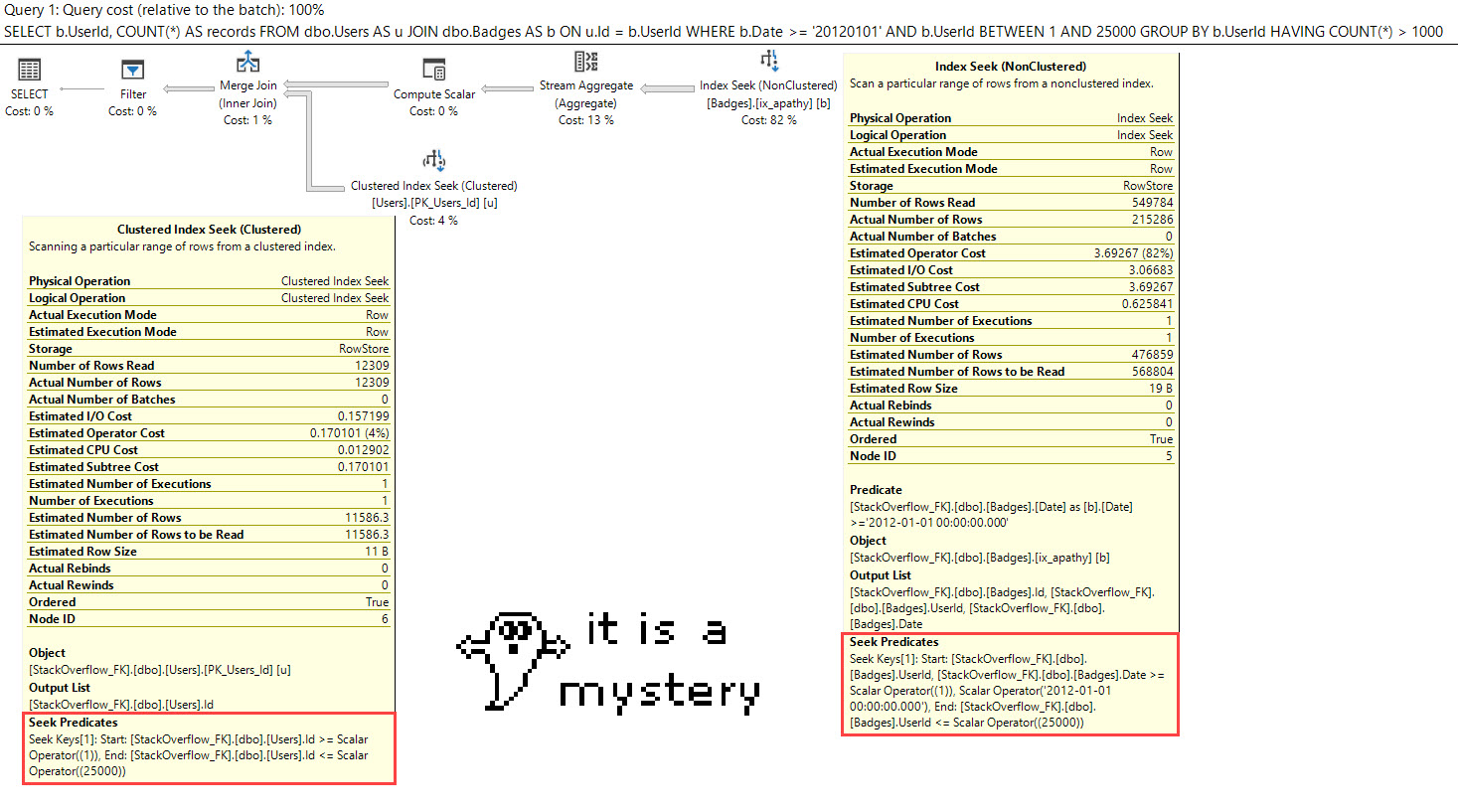
This query gets join elimination, because we followed all the rules.

Our constraint is trusted, it’s on one column, and we’re only referencing the Badges table in the important parts of the query: the select list and where clause.

OH YOU!

We’re very excited. Very excited indeed about the prospects of join elimination.

We’re so excited that now we wanna write our query to only filter down to a range of users.

Now, if you look at that query, there are a whole lot of “b” aliases. I’m not asking for anything but a join to the Users table, just like before.

The last query got join elimination. This one doesn’t.

Gh*st

That’s an interesting choice, to say the least.

But I know what you’re thinking. Between is awful. Aaron said so.

How About Equality?

Let’s look for just one user. This’ll go better, right?

Not so much.

Throb Throb

About That Join Elimination…

Sometimes, even if you do everything right, it doesn’t work out. I’m not doing anything particularly tricky, here, either.

If a Bouncer-American can find this in a few minutes of messing around, imagine what you can come up with?

Thanks for reading!


Adventures In Foreign Keys 4: How to Index Foreign Keys

This week, we’re all about foreign keys. So far, we set up the Stack Overflow database to get ready, then tried to set up relationships, and encountered cascading locking issues.

Dawn Of The Data

I don’t know how long the recommendation to index your foreign keys has been a thing, but I generally find it useful to abide by, depending a bit on how they’re used.

Without foreign key indexes, when SQL Server needs to validate data, or cascade actions, well, this could end up being pretty inefficient for large data sets. I’m not saying it’s the end of the world, but it’s an avoidable problem.

There’s also been this recommendation to create single key column indexes on your foreign keys, and to keep them around even if it doesn’t look like they’re being used. I’ve always found that curious. Do you really need that, if you’ve got a multi-column index that leads with the foreign key column?

That’s what I wanted to find out when I started writing this post.

Starting Point

To make things relatively easy, we’re going to use a single key column foreign key between Users and Badges.

Why? Because they’re two of the smaller tables, so it takes less time to add different things.

This is how most decisions get made. Don’t act disappointed.

I’m going to start with no nonclustered indexes, and then I’m going to create some with different columns, and column orders. The point here is that we don’t have an index just on the foreign key column, but we do have an index that contains it.

No Indexes

First, let’s test a query that should be eligible for join elimination. Do we need indexed foreign keys for that?

Here’s the query plan:

Hmm.

Well, it’s not that this query couldn’t benefit from some index help, but we totally eliminate the join to Users. That’s a good sign, though. Our foreign key is strong. Strong like lab rat.

We Learned Something

Even with no supporting indexes, we can still get join elimination. And this makes total sense. The constraint is there, and it’s trusted.

Maybe the advice to always index foreign keys is more like “usually” or “it depends”. If we don’t need to index foreign keys for join elimination, what do we need them for? Let’s look at a query that doesn’t get join elimination.

We’re going to break that optimization by selecting a column from the Users table. When we need data from a table, the join can’t be eliminated.

We’re also going to filter on the Date column in the Badges table.

Here’s the query plan:

PEEKABOO

This query runs in about a second On My Machine®

Is it the greatest plan of all time? No. Could an index help? Yes.

But would I count on an index just on my foreign key column being a huge performance win? No, and SQL Server is with me on this. When I tested that, the optimizer totally ignored a single column index on UserId. We got the same plan as above. Let’s throw a couple wider indexes into the mix, and see which one the optimizer picks.

Here’s the query plan:

Songs About Internet Explorer

We use the index on Date, UserId. The wider index is helpful, here.

Summary So Far

  • We don’t need to index foreign keys for join elimination
  • A single column index on the foreign key was ignored by the optimizer
  • We needed to add a wider index that was more helpful to our query

It seems like the wiser choice after these experiments is to index for your queries, not your keys. Queries, after all, tend to be more complicated than keys, and need more indexing support.

Whatabouts

I know, I know. Modifications. Cascading things.

Here’s the thing: For a single row insert, I couldn’t get any permutation to behave much worse than the others.

For a larger insert of about 20k rows, well, it was a lot like other modifications. It got a little worse with each index I added — including the single column index on UserId.

One indexes:

Two indexes:

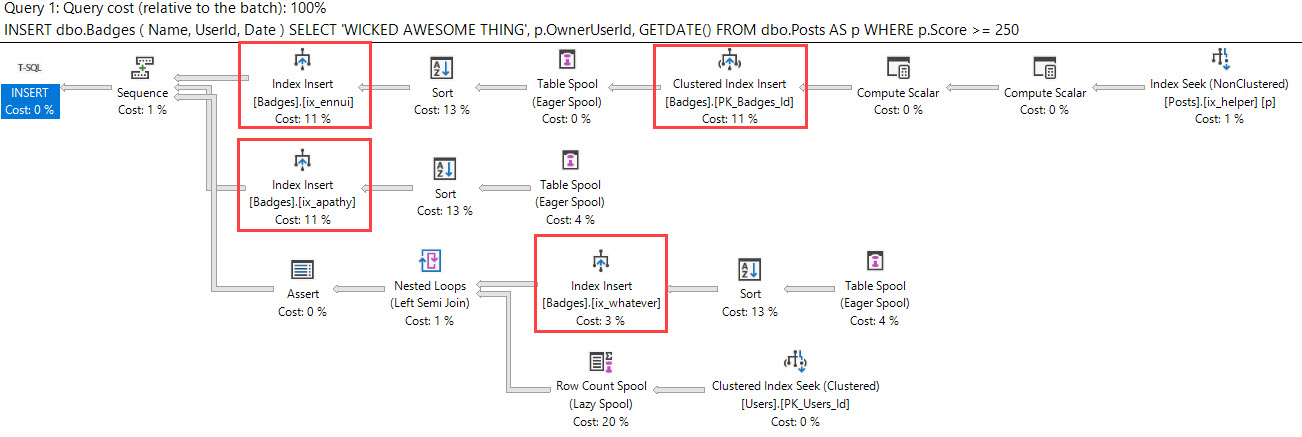
Three indexes:

With every extra index, we do a lot more work on Badges, and the Worktable used to spool rows throughout the plan. We don’t do any more on reads on Users or Posts. This is just like other data modifications: The more indexes you have, the more overhead you have.

Quadruples!

Chasing Waterfalls

The same thing goes for when modifications cascade. With more indexes, you have more overhead. In this case, with a delete, we now have to remove data from four indexes.

Piggy.


Let’s Get Out Of Here

In general, I don’t find single column indexes very appealing. They’re just not terribly helpful to many queries. I can’t recall seeing too many queries that just selected one column from one table, with some relational operation on just that one column. And when I have, most of the time it was already the PK/CX of the table anyway.

So, do you have to create an index on all your foreign key columns, and just your foreign key columns, and keep them regardless of if they’re used?

It doesn’t look like it to me. I’d much rather have people index for their queries than index just to satisfy a “rule”.

Just as an example, you have a table with a high rate of data modification, and you…

  • Have an unused single column index on the FK
  • Have wider indexes that do get used
  • Have at least one of those indexes contain the foreign key column

It just may make that unused single column index not worth keeping around.

In the next post, we’ll look at some more queries that don’t qualify for join elimination.

Thanks for reading!

Adventures In Foreign Keys 3: Why Cascading Deletes Perform Slowly

Legendreary

In the last post, I looked at some issues with implementing foreign keys with cascading actions. Namely that, well, it fell apart pretty quickly just trying to set up.

I didn’t even get to the point where I wanted to test all those relationships.

But there’s an even worse surprise waiting for you if you do implement foreign keys with cascading actions.

Locking From Hell

Let’s pretend that we gave up on stuff getting deleted from other tables if we canned a post. Let’s just get things set up so that if a user bids us adieu, we’ll get rid of their badges, comments, and posts. It’s, like, GDPR, or something.

These all get added without a problem.

What if we delete some data?

Harken Back, Ye Merry Reader

I’m gonna use some code from a previous post about locks taken during indexed view creation.

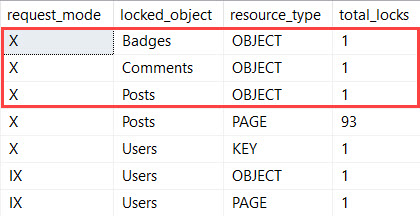
When we run a delete for a single user, we log a Whole Mess® of locks.

What comes back is pretty nasty.

My Own Little Nasty World

If you’ve ever watched locks for modification queries (and who doesn’t spend weekend doing that, really?), most of these will look normal to you.

These locks change based on how many rows we need to get rid of.

For example, User Id 1 is hardly anything, but for the rows we need to delete, we take serializable locks – RANGEX-X.

Seriously Serializable

This type of lock upgrade may come as a surprise to you, but this is how SQL Server guarantees that whole referential integrity thing so that it can trust the foreign keys you’ve got on there. Lucky you!

Let’s think about a perfect storm, where…

  • You’ve got lots of cascading actions firing off (we don’t)
  • Your foreign keys aren’t indexed well (ours are, we’ll look at the query plan in a minute)
  • You need to cascade down large amounts of data (this only hit about 400 rows at most)
  • Maybe there’s a begin tran or something in there for good measure (I did that to get the locking info, ha ha ha)

You could end up with really bad locking if any one or two of those things is true.

Let’s say we need to delete Jon Skeet. Because he’s a wonderful piece of outlier data.

SQL Server is all like “object locks immediately.” And, yeah, X locks on an object (table) are a lot like serializable locks on a range, just, you know, bigger.

BIG HUGS

You Could Learn A Lot From A Query Plan

While query plans don’t show us locking per se, they will show us needing to go out to each table that references Users.

I’ll make you a believer

And we can see a delete run on all three referencing tables for both the clustered index, and the nonclustered indexes we have to support the foreign keys.

But hey, at least I got some index seeks. My Friend Forrest® didn’t have as much luck.

Lining Bottoms

Be really careful with how you set up foreign keys. If you have cascading actions on them, you could be causing yourself a whole lot of locking headaches.

We do warn about these in sp_BlitzIndex, if you’re curious about the state of your database.

Next up, we’ll look at different tactics for indexing foreign keys.

We’re going to stay far away from cascading actions, though.

Thanks for reading!


Adventures In Foreign Keys 2: Common Foreign Key Errors

This week, we’re all about foreign keys. Yesterday’s post covered scripts to set up the Stack Overflow database to get ready, eliminating data that would violate FK relationships.

You Had Two Jobs!

Let’s say I wanted to implement Foreign Keys to do two things

  1. If a user deletes their account, all of their badges, comments, and posts will also get deleted
  2. If a user deletes their post, all of the comments and votes will also get deleted

Remember that the data dump is cleaned so user voting isn’t recorded, so we’ll steer clear of that. I also have no idea how to simply implement the removal of badges someone may have gotten from an associated post, so I’m leaving that out. The badge stays in the picture!

For the post and vote deletion — in real life, this would also be really complicated. We’d have to adjust user reputation, and info we maintain about how many up and down votes the user has cast. We’d also have to restore reputation to users if an answer they downvoted was deleted. This is well beyond what foreign keys can do well, or easily. That’s implementing business logic, which would be a better fit for a trigger, if we’re sticking to doing it in the database.

What can foreign keys do for us, then?

Foreign Keys offer you the option to have updates and deletes cascade from the parent (reference) table to the child table. We’ll look at how exactly what works in the next post, but for now let’s just try to get the foreign keys set up.

Issues, Tissues

In order to make testing this easier, I added some code to our stored procedure that drops indexes.

Now it can also drop foreign key, unique, and check constraints.

You can thank me later.

First, let’s get badges deleted if a user self-immolates.

Everything looks good so far! Let’s get comments deleted, too.

Also no problem. Okay, now let’s get votes deleted if a post goes away.

Alright, now let’s get posts deleted if a user cashes out.

This goes less well.

Orderly

If you’ve ever hit this error, you’ve no doubt landed on The Least Helpful Page On The Internet®

If you haven’t, I’ll summarize it for you: DON’T DO WHAT YOU’RE TRYING TO DO

Now, when I was testing this, I found that I’d hit that error in different places if I created things in a different order.

As a for-instance, if I start from the bottom up, I hit it trying to add a constraint from comments to posts.

It seems that I don’t have a straightforward way of getting both things to happen. I could try chaining things differently…

But the PostId column in Votes isn’t unique — the only truly unique columns in Stack tables are the Id columns. I’ll get this error.

I can’t create a unique index or constraint just on PostId anywhere, and even the combination of PostId and other columns can be non-unique.

I can make a unique index on UserId and Id, though.

But now I’m dealing with a multi-key foreign key, which’ll have some drawbacks that we’ll explore in a later post.

More locally, we’ll run into this error:

No foreign keys allowed on identity columns.

You Ain’t Got No Alibi

By now, we’re starting to ask ourselves if these cascading actions are worth it. If we don’t implement them, we can have referential integrity out the wazoo. And those trigger thingamajigs are starting to look mighty attractive. They don’t have all these “rules” to deal with, and we can offload the deletions there. Heck, if we’re using a stored procedure, we don’t even need triggers. We can just fire off deletes to any tables we care about from there.

Foreign Keys with cascading actions: Strike One. In the next post, we’ll learn why I’d give them a lifetime ban from baseball. Thanks for reading!

Adventures In Foreign Keys 1: Setting Up Foreign Keys in Stack Overflow

In A Foreign Key, In A Foreign Table

Much of what people want from foreign keys, like referential integrity and join elimination, are only as guaranteed as much as SQL Server can trust your constraints (and even then…). The same goes for check constraints, too.

Thankfully, things like Primary Keys and Unique Constraints are sort of self-trusting, in that there’s really no way to add them without checking the underlying data. Sure, you can ignore dupe keys (if SQLblog is down again, try the Wayback Machine version), but that’s a different sort of trick.

This week, I’ve got 5 posts about foreign keys to look at various aspects of implementing them, and their behavior once they’re in place. If you think I missed something, or didn’t adequately cover it, hang tight. It’ll probably show up eventually.

Pretty much maybe.

Bookworm

When you read books about relational design — Louis Davidson has an excellent one — the importance of things like this are emphasized quite a bit. If you’re starting an app from scratch, you’d be wise to heed the advice in them, especially if it’s an OLTP app. If you take care of it here, you don’t have to worry about enforcing it in your data warehouse.

If you ever want to feel poor design pain, try adding, enforcing, or loading large amounts of data into tables with foreign keys. While you do that, start learning a new language.

But what if you’ve got a database that’s been around for a while. Can you trust the data? Can you trust that no developer ever removed or disabled a constraint to “fix a problem” or “add some custom data” and then forgot to turn them back on for a week or two?

Didn’t think so.

Keying Time Had Come

Continuing to use Stack Overflow as a demo data set, let’s look at if the newest dump is foreign key-able.

Before we get started, I just want to mention that I don’t expect it to be. As far as I can tell, if a user deletes their account, their actions are mostly preserved.

In order to test our data, we’d be wise to create some indexes on important columns.

Next, let’s see what kind of nonsense we’ve got to clean up. We’re going to run some selects to get a count of rows in our “action” tables (Badges, Comments, Posts, Votes) to see which ones have orphaned Users or Posts. Since it’s long and repetitive, I’m going to put these at the end of the post. For now, let’s just look at the results.

Votes with no User sticks out, because that data is cleaned from the dump. If they published how people voted, it would be kind of terrible. Brent would find out what I really think about his Answers.

The rest are… Odd. I’m really not sure what Stack Overflow does  to remove User or Post actions when they’ve been deleted.

IRL

You’ll probably know what processes do (or don’t do) this kind of clean up work, which might make deciding what to do with dirty data easier.

You have a few options that I can think of quickly:

  1. Delete it
  2. Associate it with dummy Ids
  3. Move it to separate tables for reference

I’ll give you $100 if you guess which one I picked before I tell you that I deleted it. The delete scripts are at the end, too.

You were so close.

Deciding what to do with it (or if you’re going to do anything with it at all) is a business decision. It’s their data. If they decide to follow you on your crazy quest to implement referential integrity, it’s your job as a data person to work with them on the best way to end up with data that complies with your Utopian vision. If they want to keep it in some form, you have to respect that.

If they’re cool with deleting it, well..

Be Kind, Batchwind

Just read this post from Michael J. Swart about batching modifications.

Excellent Adventures

I’m going to do some more of these posts, and talk about the difficulties with implementing foreign keys, cascading actions, indexing, and join elimination.

Thanks for reading!

Scripts

Checking for bad data:

Deleting bad data:

[Video] Office Hours 2018/11/7 (With Transcriptions)

Videos
0

This week, Tara and Richie discuss offline file database and log backup solutions, VSS database backups, monitoring products, parameterization, page latch waits, SQL ConstantCare™, and Availability Groups on 2017 Standard Edition.

Here’s the video on YouTube:

You can register to attend next week’s Office Hours, or subscribe to our podcast to listen on the go.

Enjoy the Podcast?

Don’t miss an episode, subscribe via iTunes, Stitcher or RSS.
Leave us a review in iTunes

Office Hours 11-7-2018


Should I use VSS snapshot backups?

Tara Kizer: Alright, Gary has a question, “What are your thoughts on offline file database and log backup solutions versus VSS snapshot backups? We’ve used Redgate for years. It works great and it’s my preference. But our company switched to StorageCraft VSS snapshot backups based on our MSD’s recommendation. VSS solutions seem to be difficult to manage with the mounting of the drives to get to the MDF and LDF file.”

I am not familiar with StorageCraft. I don’t care how your full backups are happening, especially on larger databases. It’s very challenging to do SQL Native backups or Redgate backups, or any of those types of software, because of how long they take. So I do like snapshots, like a VM snapshot or a SAN snapshot. I don’t know if StorageCraft is doing that. but you have to ensure that it’s freezing the I/O for your database files so that your data files and log files are at the same point in time, you know, it’s quiescing them. And so you’ll see those messages in the SQL Server error log. SQL Server will notice I/O is being frozen. Then you’ll see resume messages. And that’s what you want to see if these are good backups. Otherwise, they’re – I forget what they’re called but basically dirty backups that you may not be able to recover from. So you have to freeze I/O and resume it with the solution that you picked. I just forget what that’s called.

Log backups, I don’t know. If I’m a DBA – I don’t know if Gary’s a DBA or a sysadmin, but if I’m a DBA, I’m going to have control over those differentials and log backups – log backups at least. I need to be able to restore quickly. That’s one of my jobs in the case of if an issue happens. Sysadmins I can see wanting to not use SQL Server technology, so I don’t know. It just depends on the situation. But the full backups, I can see why people need to use other solutions if you’ve got large databases.


A database mail job has been rolling back for days…

Tara Kizer: Alright, Christopher asks, “We have a 2012 Availability Group and a database mail job was run and took over 24 hours before someone killed it. It’s been in rollback since Tuesday with wait type blah, blah, blah… According to our database tools, which is SolarWinds, it doesn’t seem to be locking or blocking.”

I’ve never seen this situation. I would recommend that you post the question out on Stack Exchange, dba.stackexchange.com – and someone may have encountered the issue. It doesn’t seem to be locking or blocking. If it’s not causing a problem, just leave it there. Are you able to still use database mail for whatever you’re using it for? And just wait for a restart to occur down the road, and hopefully you’re doing patching every now and then so the restarts aren’t that far off.


Which recovery model should I use?

Tara Kizer: Alright, is this a different Gary? Same Gary, alright, “Secondary question regarding VSS database backups – should the database be in full or simple recovery model…” Gary, I love it, you said recovery model instead of recovery mode, “Since there’s no log backups occurring? I assume the point in time recover comes from mounting the drive…”

So, if you are using full or bulk log recover models, you are required to do log backups. And if nobody’s doing that, you’re going to, eventually, blow out – the transaction log is going to grow and grow and grow and fill up that drive. It just depends if you need point in time recovery or not. Is it okay if you restore to the last full backup or differential? If it is, then go ahead and use simple recovery model. If it’s not okay, you must use full or bulk log, and I’ve never even used bulk log because point in time recovery is so critical and you lose recovery points with bulk log. So full, and then do log backups per your RPO level, your data-loss. So it’s very common these days to see log backup jobs running every five minutes. Sometimes they’re even every minute. You must add log backups through whatever tool you want to use for that.


Can you explain the offside rule in soccer?

Tara Kizer: Joseph says, “Can you explain the offside rule in soccer?”

Richie Rump: Yeah, actually I could. I could really do that.

Tara Kizer: Even our kids could.

Richie Rump: Since Brent’s not here maybe I should probably do it. It’s really simple. The offensive player, at the point of a pass, needs to be equal to or in front of the last two defenders. That’s it.

Tara Kizer: Last two defenders or last defender?

Richie Rump: Last two defenders, because the goalie’s included in that and sometimes the goalie is up. So it’s got to be the last two defenders.

Tara Kizer: I was like, wait a minute, does Florida do it different?

Richie Rump: No, and that’s why I say the last two defenders. It’s usually just the one because the goalie’s behind, but if the goalie has come up for some reason, then it’s the – so the rules say the last two defenders. There you go.


Which monitoring tool do you prefer?

Tara Kizer: Alright, Joseph asks, “What’s your latest preference on a monitoring product? Different products seem to do different things better than others. What do you like currently and why?”

A lot of the monitoring tools are really great. They’re expensive for a reason, and they just leapfrog each other as far as features. One product will have a new release and add a new feature, and then another competing product will get that feature, plus they’ll have other new features. So they leapfrog each other. I’ve used Sentry One’s Performance Advisor and Quest’s Spotlight and Foglight tools in the past. We’ve got clients using IDERA Diagnostics Manager and they seem to be happy. Some people are using SolarWinds. That doesn’t seem to provide the level of features of those other three companies that I mentioned. Some people are using New Relic. I’d say it’s all over the place and we don’t really say, here’s the products we recommend. You guys see which product provides you the monitoring for that system.

Richie Rump: Yeah, and the tools we provide are not monitoring either, so just to throw that out there.


Should I use forced parameterization or optimize for ad hoc?

Tara Kizer: Ron asks a good question, “What are your thoughts on parameterization simple force and optimize for ad hoc workloads?” So I like optimize for ad how workloads to be enabled just as a best practice. Just get that out of the way. There’s only like one edge case where it may not work for you, and that’s if you always had two execution plans. So I enable it, basically, anytime I install SQL Server on a production box. The parameterization I like also, but there’s a downside to it.

So let me describe what forced parameterization is. So, the default for databases is simple parameterization. Any ad hoc queries that are coming in, you’re going to get ad hoc query plans and very little plan reuse of those for-ad hoc queries. They’d have to be an exact match, even for the values being passed to your search predicates; your where clause join conditions. So where column one equals 10, where column one equals two, those would generate a different execution plan if they were ad hoc.

Now, forced parameterization was introduced, I think, SQL 2012, maybe 2008. It’s not that old of a feature. You can enable that at the database level for SQL Server to convert your ad hoc queries to be parameterized. But there are some limitations to it. There’s an MSDN article that you can read about the limitations, but there’s a downside to it. And the downside is, now those ad hoc queries are vulnerable to parameter sniffing, which they were not before because it was optimizing each time, optimizing and compiling an execution plan each time it needed to create a new query plan. But now, you’re going to be reusing query plans, just like you would with parameterized queries, such a stored procedures, prepared statements, things like that, so that they are now vulnerable to parameter sniffing.

I’ve had a client who had over 90% CPU utilization basically at all times during their busy hours, and they had ad hoc query plan issues. I mean, just thousands and thousands and thousands of ad hoc query plans. They had high compilations per second and we enabled forced parameterization on the fly during the day, which we usually don’t do as part of our critical care. Very occasionally we’ll make a change because this one is low risk. And immediately, their CPU utilization dropped from 90% down to 60%. Now, there were other changes that they could make to the system, but that gave them some breathing room. They no longer had the extreme CPU pressure.


How do I fix PAGEIOLATCH waits?

Tara Kizer: Alright, Daryl says, “According to sp_BlitzFirst, our server is experiencing page I/O latch waits due to slow reads. If our VMware host and SSD SAN is not reporting any problems, what else should I be looking at?” Based upon my experience, the problem is not always at the disk level or somewhere in between. It can be on the Windows box itself. And so one particular instance where we had severe I/O issues, I opened a case with Microsoft, the SAN team opened up a case with their vendor, and we even had another vendor; I think HP was also involved. Microsoft had us update the I/O subsystem on Windows, the firmware drivers and bios and [store port] file. Anything I/O related on the Windows box itself got updated and that resolved the performance problem.

Microsoft, if you open a case with them, that may be where they tell you to start. Now, this was about 10 years ago, the support case with them. But you may want to start there because it can be an easy win, and that may be what Microsoft tells you to start with first. They can run tools to help you diagnose where the problem is. I don’t know if they’ve renamed the tool, but there used to be a tool called ETW Trace that you can run with the help of them to analyze that data. And it will tell you, is the I/O problem on the server itself or external to the server. And SSD SAN, you know, that doesn’t give you the best performance out of SSDs, you know, there’s bottlenecks there. And you are asking about a VMware virtualized system, so you update the I/O subsystem on the guest, the virtual machine itself, and the host. There’s two layers there, so making sure everything’s up to date, firmware, drivers, and bios. I’m actually working with a client this week that is experiencing that same alert in sp_BlitzFirst and I’m telling them to start with the I/O subsystem on the Windows box and the host server.


Tara Kizer: Steve says, “Richie, thanks for the Python recommendation a few weeks ago, it’s great.” Alright.

Richie Rump: He’ll love it.


How is SQL ConstantCare licensed?

Tara Kizer: Christopher asks, “Is SQL ConstantCare licensed per user or per SQL Server? I’ve several SQL Servers and only one of me.” I’ll let Richie answer that. Constant care is his baby.

Richie Rump: Per user – we get lots of servers from people and they send in all their stuff and we send them all recommendations every day.

Tara Kizer: And I think that Brent hasn’t set a limit on the number of servers yet, but he may in the future.

Richie Rump: I don’t think so yet. He does a lot of the business stuff and he says, you go make this work, and then I just go off and…

Tara Kizer: Exactly, he does that type of stuff, or makes those rules.

Richie Rump: Yeah, and then I’m like, I don’t know, wait, yeah, I could do that, yeah. A week or two weeks later, it comes back.

Tara Kizer: Yeah, and I mean, if there’s no limit, if you’ve got a lot of SQL Servers, sign up. It’s a very cost effective solution to help you with your environment. When I worked at Qualcomm many years ago, not that many years ago, but we had 700 SQL Servers that we supported. There were several DBAs to support that, but I could have signed up for an account to ConstantCare and got mentoring advice on all 700 servers. Not that I’d want to…

Richie Rump: 700, [crosstalk] conversation there…

Tara Kizer: Well, that’s when Brent was like, maybe we will restrict it…

Richie Rump: Yeah, I think at that point, we’re like, well…

Tara Kizer: Yeah, I think … I don’t think anything that high…

Richie Rump: No, no, no.


Are Basic Availability Groups worth it?

Tara Kizer: Gary says, “Availability Groups on 2017 Standard Edition seems like a pain. Given the offline status of the secondaries and the one database per group limitation, is it worth it?” I mean, it’s worth it – so we’re talking about basic Availability Groups, since this is Standard Edition. Sure, there’s some pains, but what’s your alternative for whatever you’re using the Availability Group for? So it’s a solution for HA or disaster recovery – both of those are available with basic Availability Groups, whereas database mirroring in order to get the DR support with an async mirror, that was an Enterprise Edition feature.

Basic Availability Groups gives you synchronous and asynchronous. So it is a solution for HA and DR. it is one database per group and you don’t get to use a readable secondary, but hardly anybody, out of the people who are using Availability Groups, regardless if it’s Standard or Enterprise, most people are not using the readable secondary replica, at least from what we’ve seen with our clients. Some people are, for sure, but not a lot. Most people are using it for HADR.

Alright, that’s all of the questions, so we’re going to end here. If you had any questions and just didn’t realize that we would run out of your questions, next week, get your questions in earlier. So we are out of questions. Have a good one.

Richie Rump: And it’s lunchtime.


PASS Summit 2018 Keynote Day 2: Live Blog

#SQLPass
6 Comments

Today is the second day of the 2018 PASS Summit, the largest annual gathering of Microsoft data professionals. Yesterday, we got the marketing keynote that caught attendees up with the current state of SQL Server 2019 and Azure services. The attendees I talked to yesterday were impressed with the demo amounts & topics, too.

Today is the day 2 keynote. You can watch it live starting at 8:15AM Pacific on PASSTV on PASS.org.

The abstract:

Two Decades of Data Innovation: Celebrate the Evolution of the Data Platform and See into the Future with Extreme Cloud-Based Data Solutions

Twenty years of PASS Summit and twenty-five years of SQL Server; together we’ve come a very long way. Join SQL Server team past and present as they take a journey through the evolution of the Microsoft data platform into the broad ecosystem you see today. You will hear from many of your familiar friends: Conor Cunningham, Bob Ward, Lara Rubbelke, Mark Souza and a few other surprises.

Then buckle-up for a deep dive with Microsoft Data Platform CTO Raghu Ramakrishnan on the internals of our next evolution in engine architecture which will form the foundation for the next 25 years of the Microsoft data platform. However you interact with data – be the first to look under the hood and see the future of data straight from the Azure Data engineering team.

What to expect: a new approach to a day 2 keynote. In the last several years, the day 2 keynotes have been much better for us technical geeks than the marketing-focused day 1 keynotes because:

  • Day 1 usually hopped around from topic to topic, only spending a few minutes on each, never really getting technical, just showing off lots of brochure-style demos
  • Day 2 was for the geeks: it had one speaker (recently Dr. David DeWitt or Dr. Rimma Nehme) diving very, very deeply into one specific topic, taking people from near-zero to near-hero, albeit often losing people along the way because they go so deep

Looking at today’s abstract, this looks like a really cool hybrid of the two, and the scope is ambitious for 90 minutes.  (Day 2 keynotes also involve PASS talking about the state of the union non-profit organization.)

What to expect in this blog post: I’m sitting at the Blogger’s Table in the middle of the keynote room, taking notes. Every few minutes, I’ll update this blog post. The page won’t refresh itself, so if you’re following along at home and you want to see my latest takes, hit refresh.

Today will conclude the Summit 2018 keynote coverage, by the way. There’s no keynote on day 3 of the conference.

The keynote is scheduled to start at 8:15AM Pacific. Here we go!

8:12AM – you’re likely to see a lot of guys in kilts around today – that’s a grassroots movement to support the Women in Technology luncheon on Thursdays at Summit. (I’ll see ya there!)

8:15AM – Video introducing the #SQLfamily movement. It’s so much fun recognizing all these faces up on the video. I love this community.

8:19AM – PASS VP of Finance (and excellent Chicagoan) Wendy Pastrick takes the stage. Traditionally on day 2, PASS talks about the state of the organization, how the finances are doing, event turnout, etc. First, though, she’s talking about the networking first – that’s the real value of being here, I think. (That’s why today, I’m going to be doing what we call “the hallway track” – walking around, catching up with a lot of folks from around the world that I only get to see at conferences.)

8:20AM – 185 countries, 300,000 members at PASS.

8:21AM – Wendy’s showing how the PASS organization uses Power BI to make data-driven decisions about where they should be spending the community’s money.

8:22AM – Wendy just covered the financial slides BY SINGING I WILL SURVIVE! Oh my God, Wendy is my new hero. I doubt any of us will remember the numbers (other than the finishing note that the budget is balanced), but we will ALWAYS remember that moment.

https://twitter.com/DBAKevlar/status/1060568504720486400

https://twitter.com/sqlpass/status/1060568498856910848

8:23AM – PASS VP of Marketing (and excellent former-Michigander, now Pacific Northwesterner) Tim Ford takes the stage. 40% of attendees this year are first-timers.

8:26AM – Taking a moment of silence to remember those no longer with us.

8:28AM – Tim explains how Summit’s content has adapted over the years to reflect changes in the Microsoft data platform and things the community is interested in. (Some of this is to remind Microsoft that hey, PASS wants sponsorship money because we’re hip, we’re cool. There are some tough discussions happening around the budget & Microsoft’s sponsorships going forward, especially with Ignite conflicting with the Summit dates next year. Microsoft will have some tough decisions as to which team members go to which events.)

https://twitter.com/sqlpass/status/1060569510535548928

8:31AM – Microsoft’s Mark Souza takes the stage, credits PASS for running 20 Summits, and he’s attended all of them. Now joining him are Ron Soukup, Paul Flessner, Ted Kummert, and Rohan Kumar, folks who have been running the SQL Server program since 1989! It’s an incredible amount of historical knowledge about the data platform up onstage.

8:33AM – Ron Soukup joined the team in 1989 when there were only 5 folks, ran it on 2MB of RAM, and shipped it on floppies. It focused on OS/2 initially, but OS/2 was a sales flop, so then they pivoted over to running it on Microsoft Windows instead.

8:39AM – A group of 17 folks brought SQL Server from the OS/2 release over to Windows NT, getting it from 4.2 to 6.5. Amazing to think about the knowledge encapsulated in those 17 folks. It’d be neat to read interviews from ‘em.

8:40AM – Video talking about the SQL 2000-2005 days, the Slammer virus in 2003, and how Conor Cunningham closed his office doors for a couple of weeks and created DMVs. The guy is a visionary – same thing with Query Store, something that really has the potential to change the way people do performance tuning. (People, you should be using it. Although maybe if we get to the point where it’s on by default in all databases, that might change things a lot.)

8:42AM – I totally concur. I’m on an iPad today, no wired Ethernet, and it’s been great.

8:43AM – Paul Flessner talking about how SQL Server would make a run at Oracle by upping their game and beating Oracle on total cost of ownership.

8:45AM – Paul explaining how SQL Server 7 was such a groundbreaking release in the way it automatically updated statistics. However, he got a series of voicemails from Pennzoil about how performance was initially terrible, then better, then exceeding all expectations, all within the span of 3 hours. I think we’re going to face some of those same kinds of horrible-then-delightful reactions with SQL Server 2019 with things like adaptive memory grants, batch mode in rowstore.

8:47AM – Buck Woody says via video, “I really miss the R2 designation, and I’m lobbying to get that back.” The crowd laughs, and he gives a knowing grin in the video. Now there’s a guy who knows his audience.

8:48AM – Ted Kummert managed the SQL Server business from 2005-2014. “If someone asks you if you want to manage the world’s most successful commercial database, you should say yes.” Like Ron & Paul, he seems happily laid back about reminiscing about his time here. “You gotta be great at the craft of engineering.”

8:51AM – Video of everyone recapping “The cloud: we’re all in.” They did own that phrase big time, really drumming it into every Microsoft person you talked to during the early 2010s. Got a little old.

8:53AM – Heh heh heh, Ted, I see that you read yesterday’s keynote recap, hahaha. I’m honored. It’s great seeing you onstage again.

8:55AM – Rohan talks just a little, but in fairness, he gets a lot of stage time (rightfully!) these days. It’ll be interesting to hear him look back in several years about his tenure here. Managing the data platform in 2018 has to be spectacularly challenging with so many competitors, distractions, and customer requirements. A lot of tough choices to make. (And I’m happy with where things are going, too – I was talking with Kendra and a couple of first-timers at breakfast this morning, and I just couldn’t be happier with the improvements in SQL Server 2019. Sure, I may not use all the features – I’m probably never going to touch big data clusters – but there is just so dang much good stuff in the 2019 box.)

8:57AM – Raghu Ramakrishnan @raghurwi, CTO for Data, takes the stage to talk about a future-looking vision for data management and how that becomes real in Azure SQL DB Hyperscale.

https://twitter.com/sqlpass/status/1060578154748637185

9:02AM – The cloud gives us elastic compute & storage, but these come with problems: as data grows, size-of-data operations are slow. (For example, try updating a column across all rows in a table.) The solution would be figuring out how to make them faster while masking network latencies (slow speed between nodes and their storage.) He’s starting with a big picture vision similar to how Dr. DeWitt and Dr. Nehme introduced very challenging concepts in a way that everyone in the audience can understand.

9:05AM – Paraphrasing what he’s showing above: when you have to build a bunch of database servers in an Availability Group (or something newer), even if they have local SSDs, you’re going to have to deal with latency when the primary writes to its secondaries in the same data center, and even more when you write to other data centers. There’s (currently) no way around those kinds of latencies, even with fast SSDs and networks.

9:07AM – Today, each of your database servers is a silo: your web site OLTP front end, the accounting system, the data warehouse, then flat files in data lakes. “There isn’t hope to build one system to do it all well.” Good honesty there, especially looking back in the rear view mirror at features like filestream. “So can we break data free from silos?” This is where Hyperscale and Big Data Clusters start to come in – separating compute from storage.

9:09AM – Basically what he’s describing is taking what AWS Aurora MySQL and PostgreSQL does with separating compute & storage, but then “can we open access to other heads?” Meaning, like can you use other query engines, reporting tools, dashboards, etc to connect directly to the data files that are stored on Amazon S3? (AWS wasn’t the first to do this with relational databases either, just putting it in terms that I work with and understand.) If they can execute on this, then it’s beyond what AWS Aurora is doing today. (I don’t have any forward-looking info on what Aurora’s doing in this space either.)

9:11AM – Design targets are infinite max database size, 99.999% availability, <5 minutes for right-sizing replicas, recovery in under 10 seconds, under 200 microsecond commit latency (but currently at 2 milliseconds). These are obviously forward-looking goals, but here’s the thing: you simply can’t build systems like this yourself in your own data center. If they can pull this off, then you’d be an idiot to host high-performance databases yourself.

9:13AM – Announcing that Socrates was the project name for Hyperscale because “he was a database! He went around asking queries!” HAHAHA, nicely done.

9:14AM – While talking about separating compute from storage, he points out, “Our competitors do it.” OK, good, I like that honesty. AWS Aurora MySQL & PostgreSQL are indeed doing this, but AWS was able to jump into this commodity database by taking an open source database and rolling their own improvements in the storage engine. However, that comes with a drawback: they’re limited to MySQL & PostgreSQL’s query optimizer (at least for now, although we’re seeing them improve with things like automatic parallelization of read-only queries across multiple nodes.) Microsoft has a big leg up here when they eventually deliver Hyperscale to general availability: they’re building atop SQL Server, which – and I’m not being a mindless Microsoft shill here – is better engine for a lot of use cases. They’re going to charge for it, obviously – they can’t use free code like MySQL and PostgreSQL do – but their objective is to make sure it’s worth it.

9:18AM – When separating compute & storage, you need fast caching locally to compute nodes (since network latency to the storage is higher when compute and storage are separated.) To solve that, they’re building atop the Buffer Pool Extensions code. (I have passionate feelings about that particular feature, but that doesn’t mean the next version has to be that bad.)

9:22AM – He’s explaining MVCC and the new in-database Persistent Version Store (PVS). These aren’t easy concepts to explain to non-database-administrators. I like how he gives just enough information to make the DBAs happy, but not so much that it stays in the weeds. He was maybe on that slide for one minute. (Not that the next slide is easy to grep for non-sysadmins! Gotta be a master jack of all trades in here to keep up.)

9:24AM – Not taking a lot of notes here because it’s extremely similar to AWS Aurora MySQL and PostgreSQL. If you want to learn more about how this stuff works, AWS has published a lot of re:Invent sessions about Aurora internals on YouTube. It’s not that this material here isn’t good – it is – but given time limits, he can’t really explain it in depth. This is probably a good starting point:

9:33AM – I’m not going to try to recap the technical details of this – you really need to watch the recorded version to see the slides at high resolution – but it’s neat to think about the fact that this could not have been built 5 years ago, let alone 10. The transaction logging at scale only works with today’s new hybrid memory and solid state storage. He mentions that you can get another copy of your transaction log in two Availability Zones at the price of another 1-2 milliseconds of latency, for example – that’s ambitious stuff. (Again, the same thing that Amazon’s doing, but that’s not a bad thing – it’s a good thing that Microsoft understands the competition.)

https://twitter.com/_randolph_west/status/1060585319026765824

9:37AM – Now he’s getting to the new fun stuff that AWS doesn’t do: letting other applications share the same database storage. Here’s where Microsoft has a really, really big edge: since they control other engines (like Azure SQL DW), they can make those engines read the exact same data & log structures that your OLTP servers are using. “This doesn’t mean you’ll never have copies – you already have copies in the sense that a non clustered index is a copy of a clustered index. This is the same design trade off.” Great example!

Seriously, people, this is a big hint. A very big hint.

If they can deliver this, then they will have a phenomenal sales story 3-5-7 years from now.

And that’s a wrap! Ooo, I’m really excited about that last hint. I can’t wait to see how this unfolds!


PASS Summit 2018 Keynote Day 1: Live Blog

#SQLPass
2 Comments

Today is the opening day of the 2018 PASS Summit, the largest annual gathering of Microsoft data professionals. Every year, thousands of us gather at the Seattle Convention Center to connect, learn, and share. On this first day of the conference, all the attendees go to the same room to watch the keynote speech.

To watch it live, free, starting at 8:15AM Pacific: PASS.org.

The abstract:

SQL Server and Azure Data Services: Harness the future with the ultimate hybrid platform for data and AI

In today’s world, the forces of Cloud, Data and AI are driving innovation and ushering in the era of the intelligent cloud and intelligent edge. Microsoft’s goal is to bring you the best products and tools to tackle these new opportunities—helping you build a data infrastructure that supports your organization now and into the future.

Join Rohan Kumar, Corporate Vice President of Azure Data, as he demonstrates the latest advances from Microsoft across SQL Server, Azure Data Services, Business Analytics and AI. Preview new products and features and see the innovations that make Microsoft the best data partner of any provider– on-premises or at cloud scale.

What to expect: 100-200 level tech details on Azure & SQL Server 2019. Keynotes are general marketing about features because the audience experience level is so broad. Here at the Summit, you’ve got database administrators, developers, report writers, BI professionals, data analysts, managers, you name it. Microsoft aims for the lowest common denominator here, talking about features and customer stories in a way that 99% of the audience will be able to grasp. For example, when they talk about an Azure feature, they want you to be able to follow along even if you don’t use Azure. To see what to expect, check out my live blog from the 2017 day 1 keynote.

What not to expect: truly groundbreaking announcements. The much-larger Microsoft Ignite just finished up recently (like 30K attendees to Summit’s 3K). Microsoft tends to show off the really big stuff there, like the first downloads for SQL Server 2019. This keynote is likely going to be more about fleshing out feature details, telling customer stories, and sharing delighter features that might not move licenses, but will move the excitement needle. For example, take this tweet from the Power BI CTO:

The day 1 keynote is a good way to get a fast overview of what’s new lately, and to help shape which conference sessions you want to attend.

What to expect in this blog post: I’m sitting at the Blogger’s Table in the middle of the keynote room, armed with Sony’s latest superzoom camera, taking notes. Every few minutes, I’ll update this blog post. The page won’t refresh itself, so if you’re following along at home and you want to see my latest takes, hit refresh. The keynote is scheduled to end at 9:45AM Pacific, at which point I’ll sign off, pack up my gear, and head off to watch sessions.

The keynote is scheduled to start at 8:15AM Pacific. Here we go!

8:11AM
8:11AM – folks filing in

8:13AM – surrounded by awesome folks at the blogger’s table.

8:18 – room goes dark, and they’re playing a welcome video. “PASS is a community like no other.” Amen to that.

8:20 – PASS President Grant Fritchey welcoming folks to Summit v20.

PASS President Grant Fritchey

8:25 – thanking the PASS Passion Award Winner for 2018: Michael Johnson.

PASS PASSION Award Winner Michael Johnson

8:28AM – Video showing past attendees & Microsoft staff talking about how the product and the event have changed over time.

8:30AM – Rohan Kumar, Corporate Vice President of Azure Data, taking the stage to start the demo party. He says Azure has made a big difference in helping Microsoft understand how customers use the product in real time.

Rohan Kumar

8:33AM – “Hybrid is the way of the future, and this is exactly how it should be.” Good message for this crowd. “Hybrid enables comprehensive AI and analytics.” AI and analytics are bursty workloads and unfamiliar tools for most customers, and that’s a place where cloud services work so well.

8:36AM – SQL Server 2008 and 2008 R2 end of extended support on July 9, 2019, and Rohan’s suggesting that you should move to SQL Server 2017 and Azure Managed Instances. Huh – why didn’t he suggest SQL Server 2019?

8:41AM – Microsoft’s Argenis Fernandez has the answer, and I agree 100%.

Sadly, I don’t think enough people are aware of how big migrations are, and how they need to start hustling now.

8:42AM – Rohan says these are the same four pillars they’ve been focusing on for the last several releases.

The Four Pillars™

8:44AM – “We think this will be huge for ISV developers because you can write applications in Java and not worry about security.” Oh, so many jokes here.

8:46AM – We’ll get a new CTP every month. Last night’s 2.1 added scalar UDF inlining, buffer pool in persistent memory, graph improvements, R and Python apps in big data clusters, etc.

8:47AM – Bob Ward and Conor Cunningham to show a Dell/EMC R940 with 4 sockets, 96 cores, unspecified amount of RAM, SC9000 storage with 48×1.92TB SSDs. Showing a new SQL Server 2019 build with less TempDB contention. Conor: “This is just a prototype, but we’re replacing some system tables with Hekaton tables. It’s not in CTP 2.1, but it will be in SQL Server 2019.”

8:52AM – That TempDB improvement is just sweet. That’s the kind of real world improvement that will make a difference. People have been struggling with TempDB contention issues and latch contention issues they can’t solve. This is why I love Azure so much – now that Microsoft has to host SQL Server themselves, they learn so much at scale.

8:55AM – Brief coverage of Polybase, Big Data Clusters.

8:56AM – “Our vision for Azure Data Studio is a single pane of glass that manages all your data platform assets.” Well, that’s what SSMS was – think SSIS/SSAS/etc – but now we’re starting again, now with even more platforms. It’s really ambitious to have one pane of glass to do all of this. I like ambitious.

Not just Microsoft databases, either – Microsoft’s Vicky Harp points out that PostgreSQL is on this slide:

9:00AM – Demoing querying unstructured data stored in HDFS, queried with Spark in Azure Data Studio.

9:01AM – “Let’s finish up demoing one of my favorite features, Java support in SQL Server.” Talking about how it eases migration from competitive platforms. Translation: “LOOK OUT, ORACLE, WE’RE COMIN’ FOR YOU.”

9:02AM – Rohan back onstage talking about Azure’s support for other database platforms, Azure Database Migration Service, near-zero downtime, and migration at scale. I keep picturing Azure as a giant vacuum cleaner, determined to suck up your databases into the cloud and get you hooked. (That’s not a bad thing, either – they’re going to do a better job of managing that kind of data than you are, and it’s a race between Microsoft, Amazon, and Google to see who can take over more on-premises workloads.)

9:06AM – Azure SQL DB Managed Instance’s new Business Critical instances (Availability Groups) will be in General Availability starting December 1st! That’s fantastic. Right now only the single-instance ones are in GA.

9:08AM – Recapping the Ignite public previews of Accelerated Database Recovery and Machine Learning Services in Azure SQL DB, and Azure SQL DB Hyperscale. So many announcements in the data platform. Niko Neugebauer burst out clapping at the Machine Learning Services announcement here at the blogger table, hahaha.

9:12AM – Lindsey Allen up to do 4 minutes of demos – showing quick columnstore indexes, but the sizes are bloating up fast, so she’s enabling Azure SQL DB Hyperscale. “Most customers don’t like dealing with partition keys, and they’re really hard to get right.” Lots of laughs – it’s true.

Lindsey Allen

9:13AM – “With Azure SQL DB Hyperscale, restores are really fast because they’re from snapshots. But I don’t have time, so I can’t demo it.” Chuckles. But seriously, snapshot restores will be mind-blowing for folks who haven’t tried that with SAN snapshots before. (And SAN snapshots are an intimidating feature for new shops.)

9:16AM – Accelerated Database Recovery because slow rollbacks and restores are bad. “We sure experienced those pains in Azure. Sleep deprivation is a very powerful motivator.” Showing how with ADR, the transaction log size stops growing at a certain size because it does aggressive truncation. (Has a lot more tricks than that, too – ADR just looks spectacular as a new feature. Really looking forward to digging into that.)

Here’s more info about Accelerated Database Recovery.

9:18AM – “We want to make Azure the best place to run any database,” referring to open-source databases. Recapping recent Azure Cosmos DB announcements. Microsoft has so many different data platform tools now that it’s not really effective to do demos across all of them. Even talking quickly, Rohan can’t cover all of the announcements – he’s spending only tens of seconds talking about things that took millions of dollars of investments. Microsoft’s investing a lot in data, and I bet most attendees don’t realize how wide-ranging this work is.

9:24AM  – Talking about Cosmos DB’s choices of different isolation levels. I get that it’s extremely technically hard to build, but we’re talking to an audience that has been used to changing isolation levels on the fly for decades. I’m personally excited about how Cosmos DB delivers that stuff, though.

Alright, dear readers, you know what to do: DRAW STUFF.

9:30AM – Tons of improvements for Azure SQL Data Warehouse: row level security, Accelerated Database Recovery, virtual networks. Sponsored comparisons say Redshift is more expensive and slower, and Rohan says the secret is local caching on SSDs. John Macintyre coming onstage to demo it. Processing over 1 trillion rows per second.

9:32AM – Thinking big picture for a second: Microsoft’s challenge with data warehouse implementations has never been their side of the delivery. They did a great job of building reference architectures, then working with hardware vendors to design reference systems. The challenge was that customers didn’t build it out right, either buying the wrong hardware, or not buying enough of it, or configuring it wrong. Azure SQL Data Warehouse’s wonderful speed is due to multiple factors: better architecture, but also taking customers’ grubby fingers out of the equation so they can’t screw up the hardware. You pay based on the capacity and speed you want, and Microsoft takes care of the rest.

9:37AM – Fast coverage of HDinsight 4.0, Azure Event Hubs for Kafka, Azure Data Explorer – which looks AMAZING, by the way – I love love love that, Ariel Pisetzky of Taboola coming onstage to talk about it.

9:40AM – I don’t blog about these tools, but based on what I’ve seen from it, Azure Data Explorer is the tool your analysts really want. Everything from the pricing, the speed of setup, the flexibility in querying – it looks awesome to me. I haven’t put my hands on it myself – I just don’t have the need for it – but I’d strongly recommend just watching a few demos of it so you can talk about it to your analysts. Try this one:

9:42AM – “There is no keynote complete without Power BI.” Recapping the Dataflows feature (doing ETL pulling from data lakes to into Power BI), SSRS Reports in Power BI public preview.

9:45AM – Patrick LeBlanc coming onstage to talk about SSRS reports in Power BI. The guy is a fantastic presenter, and people are excited to see him liven things up. The blogger table cheered at his name.

The SSRS experience in Power BI looks fantastic, including the printing integration.

9:47AM – Folks on Twitter starting to pass judgment on the keynote, and it’s a happy camp:

https://twitter.com/sqlgirl/status/1060228254768873473

9:49AM – Deepsha Menghani demoing Shell’s prototype of incident detection with Azure. “I’m going to do an image search for a gas station on fire.” O_O Using machine learning to detect problems by holding up a fake cigarette up to a webcam so that when it detects a potential problem, it can shut off the pumps.

And that’s a wrap! We’re done. Have fun at Summit!


What’s New in SQL Server 2019: Faster Functions

SQL Server 2019, T-SQL
10 Comments

A while back, we talked you through a public whitepaper about how Microsoft was working on making user-defined functions go faster. Now that the preview of SQL Server 2019 is out, you can start getting your hands on Froid, the performance-boosting feature. Here’s the documentation on it – let’s see how it works.

Using the StackOverflow2010 database, say our company has a scalar user-defined function that we use to calculate how many badges a user has earned:

In this past, performance for this has really sucked. If I grab 1,000 users, and call the function to get their badge counts:

The execution plan looks simple:

2017 plan that hides the scalar’s work

But it’s actually terrible:

  • It doesn’t show all the stuff the scalar function does
  • It wildly underestimates the work involved (scalars have fixed tiny costs regardless of the work they do)
  • It doesn’t show the logical reads performed by the function
  • And of course, it calls that function 1,000 times – once for each user we return

Metrics:

  • Runtime: 17 seconds
  • CPU time: 56 seconds
  • Logical reads: 6,643,089

Now let’s try in SQL Server 2019.

My database has to be in 2019 compat mode to enable Froid, the function-inlining magic. Run the same query again, and the metrics are wildly different:

  • Runtime: 4 seconds
  • CPU time: 4 seconds
  • Logical reads: 3,247,991 (which still sounds bad, but bear with me)

The execution plan looks worse:

2019 plan showing the inlined function’s terribility

Your first thought is probably, “Mother Nature, that plan looks like more work,” but the point is that it’s now showing the work involved in the function. Before, you had to use tools like sp_BlitzCache to figure out which functions were getting called, and how often.

Now, you can see that SQL Server is building a spool, or as Erik likes to say, passively-aggressively building its own missing index on the fly without bothering to tell you that it needs one (note that there’s no missing index request on the plan):

Spoolin’ up

That’s great! That means I can easily fix that just by doing index tuning myself. Granted, I have to know how to do that level of index tuning – but that’s a piece of cake when suddenly the plan makes it more obvious as to what it’s really doing.

How to find out if your functions will go faster

The documentation lists a lot of T-SQL constructs that will or won’t go inline:

From the documentation

But reading that would require you to open the code in your user-defined functions, too, and that’s one of the top causes for data professional suicide. I need all the readers I can get.

So instead, just go download the SQL Server 2019 preview, install it on a test VM, restore your database into it, and run:

There’s a new is_inlineable column that tells you which of your functions can be inlined:

sys.sql_modules

Then to find out which of your functions are actually getting called the most often in production today, use sp_BlitzCache:

Make an inventory of those, and while you’re in there looking at functions, try CPU, Reads, or Memory Grant as different sort orders. Keep an eye out for table variables, high memory grants, or low grants that lead to spills, because SQL Server 2019 improves those too:

That’ll help you build a business case to management. You’ll be able to explain which of your queries are going to magically run faster as soon as you upgrade, and how much of an impact that’ll have on your SQL Server overall – all without changing code. That’s especially powerful for third party apps where you can’t change the code, and you need a performance boost.

Wanna see examples of code that actually gets slower in SQL Server 2019?


Picking #PASSsummit Sessions to Attend

#SQLPass
0

So you’re going to the PASS Summit in Seattle this week, and you’re overwhelmed with the number of session choices. You’re not alone – it overwhelms me too. There are some slots where I wish I could clone myself and attend several sessions at once.

Here’s how I do it.

First priority: paying back your sponsor. If your manager is picking up the tab for this conference, think about the top 2-3 sessions that will make the biggest difference for them. (You can even ask ’em outright – what are the top 2-3 questions you want me to answer when I’m at PASS?)

Put those sessions in your personal calendar so that they show up on your phone/watch/laptop/whatever, and get reminders on those. You wanna make sure you have your butt in a seat, take good notes, and be ready to go back to the office to do a lunch & learn about what you learned from those sessions. That makes you more likely to get the registration paid for next year.

Next priority: paying your career forward. Regardless of what you’re doing today, you’re probably looking at that session list and thinking, “Uh, there are a lot of techniques and technologies that are new to me.” You can’t possibly master ’em all – the data platform is too wide these days. You’re also going to hear a lot of marketing hype about why “YOU MUST ABSOLUTELY LEARN TECHNOLOGY X OR YOU’RE A DINOSAUR!!!!1!1!ELEVEN!”

You gotta keep in mind that the people saying that have an agenda: they want you to be an early adopter of their particular technology/feature/product/brand. They need users for their work to succeed. However, just because they have a marketing budget doesn’t mean you have a future career in that.

Take some time to yourself to think about what you really enjoy about your job. Love managing infrastructure? Get all excited about crafting queries? Passionate about visualization? The parts of your job that make you excited, those are the sessions to attend. No matter what database niche you can imagine, there are great-paying careers in that specialty. If you really love doing something, then you can probably get paid for doing it. Go attend sessions about it, but more importantly, meet the speaker. Ask to take them to coffee after the session, and spend half an hour getting to know them. They might be your future coworker or manager.

PASS Summit 2018

The above stuff make up your must-attends. After that, don’t even try to schedule anything – wing it. Let yourself be open to a few cool discoveries:

Attend the hallway track. If you meet someone that you want to talk to, and they’ve got time to talk to you, do it. Don’t hesitate to spend half an hour talking to someone if the right opportunity presents itself. Some of my favorite relationships were built by chance when I just happened to run into someone in a conference hallway and strike up a conversation.

Visit the vendor exhibitor hall. I don’t say that to be polite to sponsors – it really is a great use of your time. Do a speed walking pass through, looking at what tools are out there, and then go back and do a slow walk, taking your time to stop and talk to vendors. Ask for a 5-minute demo. Find out what interests you. Don’t worry, they’re not going to ask for your credit card.

Keep in mind that some vendors want to keep you there as long as possible in anticipation that you’ll become a customer. Set yourself a five-minute mental timer, and when it’s up, thank the vendor and move on, saying that you’ve got other places you have to visit too. They’ll understand – the conference is a zoo.

Expose yourself to something really crazy. No, not in the bathrooms – pick a session or two about something you would never dream of using, something that seems utterly outside of your comfort zone.

And if you’re not going this year, let’s figure out how we can get you to a conference next year. Going to one of the major conferences is positively life-changing: I can’t tell you what a difference it made for me, meeting and getting into the community. Here are the conferences I’ve got planned so far for 2019:

Let’s get together! I really love meeting y’all and sharing the crazy experience of what we do.


[Video] Office Hours 2018/10/31 (With Transcriptions)

Videos
5 Comments

This week, Brent, Tara, Erik, and Richie discuss load balancing, preventing auto-updates, compatibility modes, capturing deadlock chains without tracing or extended events, blocking, which user should own databases, asynchronous processing, compressing databases, reindexing on Always On AGs, and “Making a Murderer” spoilers (not really).

Here’s the video on YouTube:

You can register to attend next week’s Office Hours, or subscribe to our podcast to listen on the go.

Enjoy the Podcast?

Don’t miss an episode, subscribe via iTunes, Stitcher or RSS.
Leave us a review in iTunes

Office Hours Webcast – 2018-10-31


Should I use a load balancer with my AG replicas?

Brent Ozar: Jim asks, “Hey, y’all, do y’all have any tips or suggestions related to load balancing of SQL Servers? We’re currently testing putting read-only AGs behind a load balancer, not to use the built-in AG load balancer. What would you prefer?” I don’t think any of us have put an AG behind a load balancer.

Erik Darling: Nope.

Tara Kizer: I wonder if it’s even needed. Are you really needing to load balance your reads? It’s not usually – I’m not even considering load balancing the reads. I might be talking about a completely different architecture of the system if I’m having to go down that route.

Brent Ozar: The thing I’d really worry about is, does your load balancer have the ability to run DMV queries to see how overloaded each replica is and then prioritize them? If all it’s doing is spraying round robin requests, then I don’t know how useful that’s going to be. You really have to have some kind of load gage in there.

Erik Darling: I wonder, because inside some SQL – like, whatever CPU DMV, there’s the node wait and exactly how much stuff is going on, on each CPU, and it would be really interesting if someone could figure out how to get, like, timely information out of that and balance things on that. But even that, like, that would be really advanced and really difficult. So I would kind of question the wisdom there of even attempting the load balance. It’s like load balance based on what, I guess?

Brent Ozar: That’s hard. And then the other thing you’ve got to think about too is how far behind each replica is. What happens if the plumbing breaks on one of them? So y’all send in another diagnostic query to check that to know when to pull a replica out of the pool.

Erik Darling: If you’re just basing it purely on, like, number of queries, then you’re in trouble if three or four big queries end up on one and a few small queries go through on another. It’s not going to…

Tara Kizer: And why not just go for bigger hardware on the one?


Can I pick my SQL updates in Windows 2016?

Brent Ozar: And Lee asks, “We’ve got Windows Server 2016 and you have to install all of the updates; there’s no picking and choosing which ones. So if a Cumulative Update comes out for SQL Server, you cannot stop it from installing. I don’t know how to prevent it installing on my production servers. How should I get around doing that?”

Tara Kizer: Does Windows 2016 really do that, all or none?

Brent Ozar: I think it does for Windows, but not for SQL Server for the Cumulative Updates.

Erik Darling: Yeah, I mean, I don’t see mine doing that. I have to patch mine manually. I have, from my whatever Visual Basic net thing, I have a Windows Server 16 thing on my desktop and I don’t have that same issue.

Brent Ozar: You know what it is? I bet it’s his systems administrators have put it in group policy. Your sysadmin should have a list of exclusions based on server name or…

Erik Darling: Ooh, or unplug the Ethernet cable…

Tara Kizer: That’ll work. I don’t let SQL Server Service Packs or Cumulative Update patches happen on my production servers through some automated process. That is all turned off.

Brent Ozar: There’s a good reason for why too. Man, this just hit this morning. I’m going to go to SQL Server Updates. So we just recently got 2016 Cumulative Update three, and when you go to read the KB article now at the top, “Important, due to a known issue with the…”

Tara Kizer: It’s never good when there’s a yellow section [crosstalk]…

Brent Ozar: “If you use the auditing feature, do not do production deployment of the present CU. If you’ve deployed already and are hitting any issues, please contact Microsoft support.” Whoops.

Tara Kizer: I wouldn’t even install it then. I mean, I don’t ever use an auditing feature, but I’m like, nope, unsubscribe.

Brent Ozar: It’s okay. But, Tara, look it says right here, SQL Server CUs are certified to the same level of Service Packs and should be installed in the same level…

Tara Kizer: Are they really? I mean, isn’t that the whole point of them moving away from Service Packs is because it took them too much time to test them?

Brent Ozar: See, that’s what I thought. And I think what they really did is they just stopped testing service packs, and that’s how they say they’re now at the same level. Just as good…


Does SQL 2014 have 2005 compat level?

Brent Ozar: Glen asks, “Can I run a SQL Server 2005 database in compatibility mode on a 2014 or newer server?”

Tara Kizer: I mean, for sure not on 2017. I think the lowest on 2017 is 2008. But 2014 maybe, but why? What do you have in there that’s going to break – can you go up to 2012 compatibility level? Because many people on 3014 have to stick on a lower compatibility level due to cardinality estimator performance issues. I just wonder why you’re stuck on 2005. Is it a vendor thing that they’re requiring 2005? And if it is, you’re not allowed to upgrade SQL Server to 2014 anyway.

Erik Darling: Yeah, depending – if it is a cardinality estimator thing and you have any control of the code, Microsoft did just add a bunch of use hints that allow you to use the cardinality estimator, or use the cardinality estimator from a specific version. That’s not helpful to a lot of people because you’re either a vendor who controls the code and cares that much, and you have to change your code to use the hints, or you’re you and you don’t control the vendor code and that just doesn’t help you at all.


Can I capture deadlocks without tracing or Extended Events?

Brent Ozar: Ouch, next up, Matt says, “Is there a way to capture deadlock chains without tracing or Extended Events?”

Erik Darling: Yes.

Brent Ozar: It just so happens there is. I’ll fire it up and you talk about it, Erik.

Erik Darling: Yes, since, I want to say, SQL Server 2008, SQL Server has, behind the scenes, been running something called the system health extended event. So it’s not anything you have to set up and look at. It’s not as good as a prebaked Extended Events session. Specifically, they capture deadlocks because it doesn’t keep a good full history in there or doesn’t persist terribly long. So if you are the type of person who has a lot of stuff going on in that background Extended Events session, then your deadlock information could very quickly run out of there. There’s a perfmon counter that tracks deadlocks, or some counter that tracks deadlocks in there.

And there are lots of times where, with a client, we run sp_Blitz and it’s like, wow, you had 500 deadlocks a day. But then we go to run at the system health session and it’s kind of unfortunate that they’re all gone from there. There’s other stuff filling that thing up. I wrote – while I was drunk on a plane last year going to PASS – a stored procedure called sp_BlitzLock. And sp_BlitzLock will examine either the system health Extended Events session, if you have your own Extended Events session spun up to do it. It will examine that on SQL Server 2012 and up.

SQL Server before 2012, the deadlock XML was kind of garbage and not very helpful, but the 2012 and up one is a lot better, has a lot more information in it. So when you go look in there, you can get a whole lot of information about deadlocks from there, that XML…

Tara Kizer: What I like the most out of sp_BlitzLock is it gives me an easy way to check the isolation level, because sometimes, for clients, they’re running serializable and they don’t even realize it. There’s just no concurrency on that. And then second of all, you may be able to quickly see in one of the columns that it’s a select versus an update; I’m like, oh hurray, I get to recommend RCSI. You know, if it’s between two writes, it’s a little bit more challenging. It’s almost never between two writes though.

Erik Darling: Yeah, sometimes it’s tough to get stuff into that Extended Events session. I remember when I was setting up – when I was trying to set up deadlocks to test BlitzLock with I was like, wait a minute. I would have to run things like five or six times before it would accurately register and get in there. It’s kind of a pain in the butt, man.

Tara Kizer: Was it just not in the system health session yet?

Erik Darling: Yeah, it took a while to flush out to there from wherever it lives and sometimes it took a few tries before it would go in there. I don’t know, it’s a whole thing…

Tara Kizer: That’s probably what Brent’s experiencing.

Erik Darling: Yes.

Tara Kizer: You need to do it 10 more times.

Erik Darling: Either that or Brent’s most recent pull request to remove columns broke everything.

Brent Ozar: It’s very possible

Tara Kizer: Maybe he has the system health, you know, disabled.

Brent Ozar: Anything is possible on my crappy system. For y’all who are watching the video or watching it live, what I’m doing is I’m reproducing deadlocks like crazy. And then, in an effort to show sp_BlitzLock, showing it in the history, and… yes…

Tara Kizer: Finally.

Brent Ozar: Alright, thank god…

Tara Kizer: And there they all are too.

Erik Darling: Yeah, they all go in at once. It takes them a while to flush out. It’s aggravating as hell.

Tara Kizer: That makes me suspicious about Extended Events sessions. What kind of delay is happening there? Is it just due to volume, you know, because there’s no load here?

Erik Darling: No, it’s just it takes a little while for stuff to just make it into the session, for the XML to refresh or whatever. It’s sort of like how when you go and look at the CPU usage in system health, like the ring buffer. It’s like every minute, but sometimes it’s like five minutes behind and you’re like, wait a minute [crosstalk].

Brent Ozar: Yeah, so that’s really slick. You don’t have to turn anything on to get it. It’s already built in by default; 2012 and newer, so very slick stuff.

Erik Darling: So it gives you all that deadlock info up top, tells you where the transaction is. Down the bottom, we try to do some, like, metadata analysis and tell you which stored procedures, tables, indexes you have the most stuff happening in. It gives you commands with BlitzCache and BlitzIndex to take a closer look at those, maybe see, oh there’s an index missing, I need to do something else. There’s something weird in the query plan, who knows? I don’t know, I was drunk on a plane when I wrote that.

Brent Ozar: And it works pretty well.

Erik Darling: I’m going to be really helpful if I’m going to be drunk on a plane, and here we are.

Richie Rump: Those first class Brent Ozar cross-country flights.

Erik Darling: When you can really stretch that back…

Brent Ozar: We try to only fly first class because we just end up getting drunk on planes and writing T-SQL that y’all can use, so it’s kind of like a tax write-off.

Erik Darling: You’re welcome.

Brent Ozar: Mike pipes in with, he just wanted to say that, “The First Responder Kit with the PowerBI piece has been great for recording and validating app query issues. Keep up the good work.” Great, glad you like it.

Brent Ozar: Jim says, “Our blocking monitor occasionally shows system processes blocking each other…” Oh god, I’ve got to read these before I start talking, “It started shortly after we introduced Service Broker. How can I [crosstalk] to see if the blocking is coming from the activation proc we’re using in Service Broker?”

Richie Rump: Don’t use Service Broker. Problem fixed.

Erik Darling: A-plus.

Tara Kizer: Just fix the blocking monitor – the [update carrier], that two system processes are blocking each other. It’s going to resolve itself, I mean, so just fix the blocking monitor to exclude blocking between SPIDs less than 50.

Brent Ozar:  Makes perfect sense.


Why don’t all my queries show clearly in the plan cache?

Brent Ozar: Pablo says, “What does it mean when I look in the plan cache and there are executions but some of them show the SQL text as empty?”

Tara Kizer: SQL text – I mean, the execution plan might be missing if you’re using BlitzCache, but the SQL text is never empty for us. Maybe he needs to use a better tool, like BlitzCache.

Erik Darling: So when I’ve seen that happen, it’s been, like, encrypted procs or sometimes what’s a real son of a gun about it is if there’s restricted stuff in there like passwords, sometimes SQL Server screens that stuff out.

Tara Kizer: But just a portion of the query, right? Not the – I mean, the entire query…

Erik Darling: Yeah, but if that’s all the query is, who knows? I don’t know what these crazy people do with their SQL Servers.

Tara Kizer: Use sp_BlitzCache and see if it happens there.

Erik Darling: That would be my vote too.

Richie Rump: They use Service Broker…


Which users should own databases?

Brent Ozar: Let’s see, next up – I swear I’m going to start reading these questions first. Alright, I’ll take this one…

Erik Darling: You say that every week…

Brent Ozar: Jeremy asks, “Is there a best practice for what users should own databases?”

Tara Kizer: SA.

Brent Ozar: And why? Why SA?

Tara Kizer: I don’t even remember the reason anymore, but I know that I’ve encountered an issue with .NET CLR objects when the owner was not SA and we moved servers and something happened there. SA fixes everything; job owners and database owners. Even if you don’t use SA, they count SA, have SA be the owner.

Erik Darling: It’s not a big deal if you have an agent job owned by someone else and that account gets disabled and it might stop working or whatever. But for me, it’s just that if someone else owns – like, if a different user owns a database, they have all the SA level privs on there, I might not want that. I might not want that person to own the database just because they happen to restore it that day. So I just like to keep everything under SA.


How should I do async processing without Service Broker?

Brent Ozar: Jim follows up with, “I know y’all don’t like Service Broker and you recommend not to use it, but do you have another suggestion to handle asynchronous processing. We’re using Service Broker to do asynchronous data processing instead of triggers.” Richie, how do you like doing asynchronous data processing?

Richie Rump: In the cloud.

Brent Ozar: In the cloud? And do you do it in the relational database, or where do you do it?

Richie Rump: I do because Brent told me I had to.

Brent Ozar: No you don’t. We use a queue… Service Broker is a queue, right, and we’re totally down with queues, we just don’t like doing them in your $7000 core relational database.

Richie Rump: Yeah, and there’s a lot of free open source queueing systems out there.

Tara Kizer: I’ve worked with a lot of Java developers who love TIBCO for cueing.

Erik Darling: What was it Jeremiah used to like, RabbitMQ?

Brent Ozar: Yeah.


Should I use row or page compression?

Brent Ozar: Let’s see, Marvel asks, “We’re looking at implementing compression on some of our largest databases, however, I can’t find information on which level of compression is best. The clearest article I’ve found is this one article that tries to tell me when to use row or when to use page.” Really, the easy thing to do there is just test. There are stored procedures you can use to test and what they do is create a compressed copy of the table over in tempdb. So then, you can check and see which one is better for you.

Tara Kizer: And it’s built-in. And there are some handy scripts that can help you interpret that data too. I forget who the person was, but it’s a female that’s got a really good script. It’s been years since I’ve looked at it…

Richie Rump: Erika Darling?

Tara Kizer: Maybe Michelle Ufford, I can’t remember though.

Erik Darling: Yeah, I know exactly what you’re talking about too. It’s a shame that SQLBlog isn’t really such a thing anymore because [Linchie Shay] used to have a bunch of great posts on compression about, like, how it affected reads versus writes. You have to go to like archive.org to try get that, it’s a pain. If you just go to the website, it’s like login failed or something.

Tara Kizer: Really?

Erik Darling: Yeah, it’s terrible. But it might not even be up there anymore. It doesn’t come up in search results.

Brent Ozar: I bet you’re right.

Erik Darling: If you went to archive.org, you can track old copies of them down, but those posts were great. And these days though, if I’m seriously thinking about tables that really extra need compression then I’m considering column store because the compression is so much better than page or row compression. But you know, there’s just as many gotchas and guidelines to follow there too.

Tara Kizer: But not for OLTP systems, right? Or at least a table that has lots of changes happening…

Erik Darling: Yeah, yeah, I mean, you know, you could make an argument for throwing a non-clustered column store index on there and just, you know, a place where maintenance actually matters with column store indexes, and then just performing fairly regular maintenance on it. But if you’re talking about, you know, a clustered column store, then it’s kind of a whole different ballgame. I would avoid that for OLTP – not be your friend…


I don’t have a lot of space left in this data file.

Brent Ozar: Thomas says, “Sometimes, when I click on the properties in my database, it shows the space available as being something I am not comfortable with, like only 4GB. However, there’s a ton of space available on the hard drive.” So it shows not a lot of space in the database, lots of space available on the hard drive, “Should I be concerned?”

Erik Darling: Leave it alone. It will grow.

Tara Kizer: I like that too. I mean, I’ve always let auto-growth just kick in, as long as I have instant file initialization in place for the data files. I know that some DBAs have scripted this out though. They’ll check for free space, and if it’s below their threshold, they automatically, later on, during a low period of the day, they will grow out that file to add additional space. But that’s too much work. I don’t care about auto-growths happening during the day, as long as I have instant file initialization enabled and the auto-growths are for the data files.

Erik Darling: Yeah, I mean, the one place where I do care about that is with log files, because they don’t get instant file initialization. So those ones, I’m okay with having empty space in and growing those out a little bit further than maybe some people would want. Some like some percentage size of the database just to make sure that I’m not waiting on those things to grow into the error log space, because who knows – you set that to a percent, you know, the bigger your file gets, the bigger that percent gets, the bigger that growth gets, the more zeros you have to write, stuff waits around. It sucks. It’s not fun. So log files, grow them out.


How can I rebuild indexes without hitting the log file?

Brent Ozar: Gus says, “What’s the best way to reindex on an Always On Availability Group database without running out of space on a transaction log?”

Tara Kizer: I thought for sure you were going to skip that question because we’re just going to make fun of the question.

Brent Ozar: It’s great. I love it.

Tara Kizer: I’m not going to answer it.

Brent Ozar: So you can’t. Rebuilding an index is a logged operation, and it’s not like you get the choice to do it in small phases. It’s a big honking transaction. So the classic example is, we had one client who had large databases, but almost all the database is one table. It was like a big, say, you’d have a 1TB database but 800GB of it would just be in one table. Man, you want to rebuild that thing. You better buckle up and take some time. It’s going to be a while and it’s going to need the whole space of the transaction log. So if something goes wrong, you’ve got to be able to rollback.

Erik Darling: Tempdb’s going to suffer. Everything’s going to suffer. A lot of people will just not do that kind of maintenance on an AG anymore just because it gets so difficult. It’s not like you have the option to switch the database into simple or bulk-logged and then run it and then not deal with that. But that doesn’t even help that much because you’re doing it all in one go. So you can’t do that with an AG anyway. I don’t know, the whole thing is just rough; not fun. And when you own an AG, you have to change the way that you think about the way you do things with data.

And it’s not just index rebuilds, like doing large modifications. You have to start batching things really smartly if you’re going to use an AG, not try to update entire tables at once or insert a bajillion rows all at once. You have to change the way that you handle and manage data because if those things fall behind, they get very, very unhappy, very unhappy.

Brent Ozar: Theoretically, there’s a new feature out in SQL Server 2019 and in Azure that will help you with that. I don’t know if it works in Always on Availability Groups or not yet, but it’s accelerated database recovery.

Erik Darling: It works with everything, according to my friend who did stuff with it.

Brent Ozar: Yes, I like that. You can sign up for the preview now. It’s available in the 2019 preview. You just need a magic secret, I would guess trace flag, in order to turn it on…

Erik Darling: Memory bit…

Brent Ozar: The debugger, yeah.

Erik Darling: Hold a magnet next to the…

Brent Ozar: Just flip the debugger, how hard can it be?

Erik Darling: Yeah, and to follow up a little bit on Thomas’s thing about the index rebuilds, it’s like, you better be solving a really, really serious problem with that index rebuild that you can’t solve with something a little bit easier on the server, like update stats or, you know, even a re-org or something, if it’s a smaller table, because re-orgs will choke on big tables. But I would make sure that I’m solving a really, really big problem if I’m taking that much of a chance with my AG falling behind or tipping over or whatever awful things happen when you throw the smallest grain of sand into the cogs of an AG.

Brent Ozar: Gus follows up with, “Do sort results in tempdb help with the space on transaction log?” Not at all, unfortunately.

Erik Darling: Nope, it does help with the space that you would need in the data file to sort the results, but it does not help with the logging of the transaction.


Does sp_BlitzCache have a divide by zero error?

Brent Ozar: And then Thomas asks, “Sometimes I run sp_BlitzCache and I get a divide by zero error. Any thoughts there?”

Erik Darling: Yes, use the latest version where that error was fixed.

Brent Ozar: We fix a lot of stuff. I mean, holy cow, we have a lot that goes through that First Responder Kit. It’s insane how fast we run through fixes in there.

Richie Rump: Well I think it’s all the unit tests you have against those things…

Brent Ozar: Yeah, you catch so many things…

Erik Darling: User tests, user tests. You people are our units and you test things in units for us. Thank you for that, we appreciate it. But yeah, stuff like this, it just makes you really kind of paranoid about when you need to start being more defensive in the way that you write code, you know. Anytime there’s division, make sure you have some protection on that divider side about zeros. If you’re using, like, substring, be really careful about when you might have a negative value passed in that will make that throw an error.

Set yourself up with some protection there so that you don’t just run into these crazy ephemeral errors that are impossible to reproduce, or even to conjure up, to think, like what bad thing could happen here? Because the error he’s talking about was when I added stuff to look at compile memory for a query plan and I was like, there’s no way anyone can have zero compile memory. It’s impossible. You can’t possibly have zero memory to compile a plan with. But you people, you people found a way…

Richie Rump: And that’s when Erik earned his senior developer wings.

Brent Ozar: God, people are creative. Alright, well thanks, everybody, for hanging out with us this week at Office Hours. And next week will be weird. Next week is the PASS Summit. We’ll see if Richie and Tara are around to see if they want to do one. I think Erik’s going to be in-flight or running around Seattle. I’ll be out in Seattle attending the Summit, so…

Erik Darling: I don’t know if I can say where I’m going to be on Wednesday. Is it Public knowledge yet?

Brent Ozar: That means I don’t know where you’re going to be on Wednesday. Oh no, yeah, sure…

Erik Darling: So lovely Claudia Coleman from Quest has sponsored a book signing. So she bought the first and only copy of my book, and she bought a bunch of those. I’m going to be sitting in the vendor hall signing those. So if you’re at PASS and you are too cheap to spend $30 on my book from Amazon, you can get a free copy with my signature, if you want it. No selfies, but you can get a signature and a copy of the book for free.

Tara Kizer: No selfies? What are you, Erika?

Richie Rump: It is a requirement that you take a selfie with Erik if you take his book. You have to take a selfie.

Erik Darling: I will punch you if you selfie in my general area.

Richie Rump: You know what you do? If he won’t take a selfie with you, then you just kind of angle your way out. As you’re walking back with the book, click-click…

Erik Darling: I’m going to wear my Richie mask so no one recognizes me.

Richie Rump: Horrifying. Straight horrifying. That is not attractive.

Erik Darling: Good times.

Brent Ozar: That will be us next week so see y’all later, adios.

"*" indicates required fields

This field is for validation purposes and should be left unchanged.
Name*
Things I want*