Blog

[Video] Office Hours 2017/02/22 (With Transcriptions)

This week, Erik, Tara, and Richie discuss tempdb etiquette for developers, elastic search vs full-text search, server CPU spiking issues, source control in a database project, querying transaction logs, and more.

Here’s the video on YouTube:

You can register to attend next week’s Office Hours, or subscribe to our podcast to listen on the go.

Enjoy the Podcast?

Don’t miss an episode, subscribe via iTunes, Stitcher or RSS.
Leave us a review in iTunes

Office Hours Webcast – 2017-02-22


Erik Darling: This is a question about indexes.
[Tara’s phone rings] Richie Rump: Shhh.

Erik Darling: Who’s on call?

Tara Kizer: Sorry, it’s now on vibrate.

Erik Darling: Tara is on call for her secret DBA job that she doesn’t want to tell us about. Her real job.

Tara Kizer: This one doesn’t pay enough.


What happens if I add clustering keys as index includes?

Erik Darling: Got to get that second paycheck in. All right, “In the event that I create a non-clustered index that needs a clustered index column, is it a problem to go ahead and add it even though I pick it up as a secret column? I want to add the clustered index for housekeeping purposes so it’s evident in the definition but I’m not sure if it causes any issues.”

Tara Kizer: I’ve wondered that. It doesn’t make a difference. It’s going to get added regardless. I don’t add them to the non-clustered index. Who cares if they’re secret as long as DBAs and developers know that that’s what’s happening. You don’t need it in there for explanation reasons.

Richie Rump: But that’s where you go wrong.

Tara Kizer: Okay.

Richie Rump: Developers don’t understand that it’s there.

Tara Kizer: That’s true. Maybe they don’t even need to know that though. Do developers need to know about the secret columns?

Richie Rump: If they’re running a lot of queries it would help them to understand, “Hey, use the index, follow the indexes,” and all that other stuff. I never used to put them in there because I understood that they were implicitly. But then someone called Kendra Little, she brought up a good point, that sometimes clustered indexes change and things like that. So if you don’t put it in there, whatever column was there, it’s going to go away and then everything just may not work the same way. So go ahead and explicitly put them in there so that way in case your clustered index changes, it’s always there.

Erik Darling: There’s also another interesting part to that where when you pick up the clustered index column, is it implicitly as involved in the non-clustered index. It’s not part of the key of the index. I believe it’s just like sitting at the leaf level somewhere. It’s not in the key. So if you need that clustered index key column to do something additional within the index, and I’d probably want to have it as a key column, right? So like if you had to like join or filter on it or do something else, I would want that to be right up in the key of the index. There’s no penalty for having it there. It’s not going to be in both places but I think that especially if my query is using the clustered index key column I would want to have it as part of the non-clustered index definition. So it depends on the queries.

Richie Rump: I put them in by default now. That’s just my answer.

Erik Darling: Wow. Look at you, big boy.

Richie Rump: Yeah, man.

Erik Darling: Congratulations.

Richie Rump: Yeah, because I can’t use to design a database, that can’t happen.

Erik Darling: No. You can ask me to fix it, I won’t design it. I can fix all sorts of stuff; I just can’t design them. I’m like a good janitor, I’m not a good construction worker.


Should I change my application timeouts?

Erik Darling: Let’s go to the next question. “A user has been complaining about query timeouts which when reviewing our monitoring tool looks like high concurrent other user activity querying a specific table. I recommended for them to increase the timeout setting on their app’s end. Anything on my DBA end that can also help?” I don’t think so. Make your server better so the queries run faster.

Tara Kizer: Figure out what the root cause is. J.H. also asks, “Isn’t it true that the timeout setting is unlimited on SQL Server side?” That part is true but I’m not sure that your reaction should be to increase the application’s timeout value. Maybe there are some queries that need a longer time at value and you can set that specific one to have a higher one. But as far as the connection stream goes, I would leave it and then from a DBA perspective figure out if you need to add any indexes, you need to fine tune the query. So you asked on your DBA end, is there anything that can help, take a look at the execution plan and see where that leads you.

Erik Darling: Sounds good to me.


What’s fill factor?

Erik Darling: Michella asks, “Can you explain fill factor?” Yes. Tara loves fill factor.

Tara Kizer: Fill factor drives me crazy, for the clients that have lowered the fill factor and the column that’s in the index is just the identity column. I just don’t see why this is being one because there is no reason to have anything but 100 percent fill factor for identity columns. Fill factor is when you have free space on a page, if it’s lower than 100 percent or 0, 100 and 0 are the same thing. This allows you to be able to do inserts into the page if there’s free space in there without having to do a page split. A page split is when you have a data page that is full and you need to insert a row in between and you’re inserting a row in between because of the clustered index that’s sorted by the key. So it has to do a page split. It creates another page and it keeps 50 percent of the rows on one page and 50 percent of the rows on the second page. Then it can do the insert into the proper order. So lowering the fill factor can reduce page splits but page splits don’t happen when you have an identity column. Then when you rebuild your indexes, you’re going to get back the fill factor. After the page split happens, eventually that page might fill up as well and then you rebuild the indexes later at some point if you’re doing that kind of maintenance and you get that free space back.

Erik Darling: Fill factor isn’t preserved when you insert or do anything else to your indexes. Fill factor is only preserved after you rebuild an index, which is something that not many people know about.

Tara Kizer: I don’t like seeing servers that have set the fill factor to a lower number. I think that if you are going to lower the fill factor, it should be on an index-by-index basis. Never set a lower than 100 at the—is it at the server level or database level? I can’t remember which one it is. But don’t lower the server-level or database-level. Do it at the index level. Really, one of the only times this should happen is on GUIDs. Don’t use GUIDs.

Erik Darling: Oh, GUIDs.

Richie Rump: Well…

Erik Darling: What I always say, it’s easy to run out of ints, it’s hard to run out of GUIDs. So if you’re concerned about having—what the bigint max, Richie?

Tara Kizer: It’s pretty gigantic.

Erik Darling: [Inaudible] followed by every other number repeated twice.

Tara Kizer: I don’t know that anyone needs that. I think that GUIDs should be used when you have to keep the uniqueness across servers, different types of servers such as say a [inaudible] or something else. Even just SQL Server instances, you need to keep that row unique amongst different servers and not just this one SQL Server instance. I don’t think that using the GUID is a good choice when it’s just on that server.

Richie Rump: So, we have a new architectures coming out as we do in the developer space. Some of those need [inaudible] GUIDs going across processes, especially in microservices, right? So as a microservice, I need an ID that doesn’t overwrite something else. So that kind of follows from service to service to service and makes those hops. So it’s tough not to have kind of a GUID in there, maybe it’s not to your clustered index but probably going to need to be in the database somewhere.

Erik Darling: Yeah, that’s a good point. A lot of times when you have the GUID that you need for that uniqueness, you don’t have to have it as the clustered index. You can have a non-clustered primary key as the GUID just to have the uniqueness there and have an index on it. But you can have the clustered index on a totally append only surrogate key like an ID column or based on a sequence next value hanging out in there. Anyway, let’s move on.

Richie Rump: I did that a couple weeks ago. Look at that. Look at me. I’m amazing.

Erik Darling: No you didn’t. Stop lying. Stop using my ideas. Pretending, using my ideas and that you’re good at something.

Richie Rump: It’s not going to happen, man. Come on.


Can I use mirroring to reduce downtime for database upgrades?

Erik Darling: Christopher has a question. He’s looking to replace his SQL 2014 Enterprise server with a shiny new 2016 server. He wants to know if he can use mirroring between 2014 and 2016 to minimize downtime.

Tara Kizer: He can, he just can’t go back. You can, if you ever do failover, you can’t go back to the 2014 instance using database mirroring’s failover. I’ve certainly done it—or I should say, I haven’t used database mirroring for my upgrades. I’ve just done custom log shipping just to get the full backup, restore, maybe apply a differential, get the log chain in place. Then at the time of the maintenance window do the final log backup and then restore that final one on 2016. So I like that method, but yeah, database mirroring works as well.

Erik Darling: I’ve used mirroring and log shipping for migrations between versions. I don’t have a favorite in either case. Mirroring is nice because you can set it to asynchronous and not have to babysit anything.

Tara Kizer: That’s true.

Erik Darling: Then when you’re ready, set it to synchronous and do your manual pushover. Log shipping is nice because it does some of the work for you. Like availability groups—for some reason, I don’t know why mirroring doesn’t do it as part of the wizard. Mirroring doesn’t initialize anything for you. Like with log shipping, it’s like, do you want us to initialize this? You’re like, “Yes. I want you to take that backup and do a restore for me. Because I’m lazy.” Mirroring doesn’t for some reason. Mirroring is just like, “Did you do it, dummy? Hey, dummy, did you do it?” So, I like log shipping just for that. Plus, log shipping is so old and bulletproof.

Tara Kizer: You trust it, yeah.

Erik Darling: So I don’t know. I don’t have a favorite between the two aside from a few setup quirks. But either way, like Tara said, it is a one-way migration. So do your failover, don’t let users in immediately. Do some smoke tests. Have like some [inaudible] devs ready to try this stuff out and make sure all the connection strings and all that garbage works. Then when you’re ready, then release the Kraken. But until then, because it’s much less painful to have to just like reinitialize mirroring or log shipping to the server again if the smoke test doesn’t work than it is to try to migrate new user data back, and if there’s identity columns and parent child tables, it’s terrible. Anyway.


What do you use for I/O testing?

Erik Darling: Another question from Michella, “Do you have a go-to script for I/O tests?” No. There are tools like CrystalDiskMark and diskspd which are much better for I/O tests. If you’re looking for just a SQL DMV one, sp_BlitzFirst, if you run it, if you download sp_BlitzFirst from FirstResponderKit.org, you can run sp_BlitzFirst either since startup, then it will look at some of SQL’s internal DMVs to tell you about I/O stuff. Or, you can run if for a sample to tell you about I/O stuff. But if you just want to do a pure test of your disk, CrystalDiskMark and diskspd, there are blog posts on our site about both of them. That’s where I usually go when I need to test a disk. When I wanted to test my brand spanking new fancy 1 terabyte M2, I used CrystalDiskMark. I made clients feel bad unfairly because I was like, “Look how fast this is compared to how you do things.”

Richie Rump: [inaudible] under your desk?

Erik Darling: Yes. When you say it like that…


How long will an index operation take?

Erik Darling: Reece has a question. “Is there a way to get a rough estimate of how long an index operation will take to complete?”

Tara Kizer: Test it. Store the database on a test server and test it.

Erik Darling: Yeah, and you know, when it’s in flight, not really. It’s unfortunate. Not really.

Richie Rump: Not like it would be right, right? You can see that little progress bar and then it stops at 96 and you’re there for two days.


Do you recommend using plan guides?

Erik Darling: Nestor asks, “Do you guys ever recommend using plan guides? Do you ever troubleshoot performance issues with plan guides?”

Tara Kizer: I do. I’ve implemented them in production out of necessity. At a company we were migrating from SQL Server 2005 to 2012. As part of that upgrade, we changed the clustered index of the core table of this critical system. That’s because the clustered index was pretty wide and that’s what we needed on SQL 2000. We wanted to go to say—it wasn’t an identity column but something else. So as part of the upgrade, we did that. Well, once we let the production users in after the upgrade suddenly performance was really bad. We realized that the execution plans weren’t picking this great index. So we converted that clustered index to non-clustered so it was still there but now the execution plans, they were not selecting that index. We proved that via index hints that that index was very helpful for a lot of queries. So rather than adding index hints into the stored procedure code, which this was all of our own custom codes so we could have added the hints directly into the stored procedures, we decided to use plan guides. So we tied a plan guide to the stored procedures that told it to go ahead and use this index or sometimes we did the optimize for, just depended upon what was needed. So I’ve definitely used them. I think only one time I talked about it with a client. That was just because we were trying to override Dynamics AX’s choice of using the optimize for unknown. When you don’t have ownership of the code, the stored procedure code, you shouldn’t be adding index hints in there. But attaching a plan guide might be something that you can do. But just be warned, when you do put a plan guide on vendor code that when the vendor application gets upgraded, you’re going to want to drop those plan guides because otherwise they won’t be able to drop and recreate stored procedure. They’ll get an error.

Erik Darling: Yep. What she said. She’s smarter than me.

Tara Kizer: Well this was when I got in the Microsoft engineer that we had flown in for this major upgrade that we were doing just in case we ran into problems. After the upgrade he did training with us, so we had him onsite and looking at our production issues. He’s the reason why we put plan guides in place and after that I knew what to do.

Richie Rump: I think the key to your entire statement there is, “When we had to.” It’s not the like the first thing, it’s not the second thing. This is like the very last thing you do is put a plan guide on. There’s nothing else. That’s when we do the plan guide.

Erik Darling: True that.


Should I use a CTE or a temp table?

Erik Darling: Brian has a question about—well, it’s not really about temp tables, it’s more about CTEs. So last week we talked about using temp tables to avoid mega join queries. Brian is asking if it would be better to use a common table expression rather than a temp table, and if not, why. Does anyone have an opinion on this matter?

Richie Rump: Sometimes I think CTEs make things a little harder to read than easier to read.

Tara Kizer: They certainly do.

Richie Rump: So, there you go. That’s my answer.

Tara Kizer: I like using temp tables when you’ve got a large query that’s getting the compilation time out, so then breaking apart a lot of those joins and putting that stuff into temp tables and then just joining to the temp table can avoid your compilation timeout. When you get a compilation timeout, you might not have gotten the best execution plan for your query. You got just whatever was the best so far.

Richie Rump: Yeah, and I could put indexes on those temp tables too if I really need them. So that adds something else.

Erik Darling: It’s true. When you start joining a lot of tables together, you may have optimal indexes for some joins but not for all of them. If your query from the final product of those requires different indexes, you don’t want to have 100 indexes on your table just to satisfy all these weird edge cases. Sometimes it’s better to dump stuff to the—especially for stuff like paging queries. There are plenty of times where there are perfectly good use cases for CTEs or using offset fetch or using top with CTEs or offset fetch to do paging queries. Other times, if you are letting people order by mounds of different columns on the result, you are better off dynamically creating temp tables and indexes so that you can support that ordering on a smaller set of data. For me though, with CTEs, it comes down to a couple other things. One, CTE results aren’t materialized. So if I’m accessing the results of the CTE multiple times, it has to execute that code multiple times.

Tara Kizer: I didn’t realize that until you talked about that yesterday with a client, so that was interesting information. So if you are going to be calling that CTE table query multiple times, throw that into a temp table to avoid running that multiple times.

Erik Darling: Yeah, one of the first goofy blog posts that I wrote on this site is called “CTEs, Inline Views, and What They Do.” I’ll throw that link into the ye olde chatter box so that you can reference that. It’s a blog post just about what happens if you reference a CTE multiple times with joins or something. What happens is that code re-executes. So CTEs, while they are sometimes good, especially with the top operator for give SQL a bit of a performance pathway or whatever you want to call it. They also do have their problems. They’re not perfect. Oracle has syntax to materialize a CTE, which I wish SQL Server did as well, but for now we have temp tables, which are perfectly good for materializing sets of data.

Tara Kizer: I feel like the fact that it does re-execute the query if you are using it multiple times that that could lead to weird issues where data has come in and the first time you accessed it, it didn’t have this and now it does. For that reason, I would definitely use a temp table if you’re going to be having to query it multiple times.

Erik Darling: For sure.

Tara Kizer: Unless, of course, you’re using RCSI then it’s just going to look at the snapshot I would assume.

Erik Darling: I don’t know. Who knows.


How do I get rid of TempDB spills?

Erik Darling: Let me see if I can figure out a short way to ask this. “I’m getting a tempdb spill on one of my queries that I can’t seem to fix. I’m doing a self join which tallies up a running total from previous days” and he can’t figure out how to get rid of a spill. Well, the only way to fix a spill is with indexes. It depends on what’s spilling. You’ll have to follow up on that, if it’s a sort or a hash spill.

(Note: theoretically, you could also fix it by stuffing the server full of RAM, adding a plan guide that includes artificially high row estimates, rewriting the query to dump stuff into TempDB first, etc., but you really should start with indexes.)


Should I use OPTIMIZE FOR UNKNOWN?

Erik Darling: Victor asks, and I’m just going through in order now, “I have a proc whose plan was somehow cleared from the cache the first execution of the plan causing parameter sniffing and high parallelism. CPU of 100 percent for 40 minutes.” Wow. “When this runs then [mumbles words]. Should I optimize for unknown along with MAXDOP?” So when would you use optimize for unknown?

Tara Kizer: Never. I know that we say use it sparingly or rarely. My answer is never. There’s just better ways of doing things. Figure out what is best. How it runs best for most executions of the parameter values. See if optimize for a value is helpful or maybe an index hint, but optimize for unknown, you’re getting a mediocre execution plan, maybe. So it does guarantee that you’ll have consistent executions—is that what it is?

Erik Darling: Yeah, so much like using a local variable, it will use the density vector to give you a row estimate. So if your data—here’s the thing that sucks about optimize for unknown. If your data is already so uniform that optimize for unknown fixes your queries, you don’t need optimize for unknown in the first place. You just need better indexes. If your data is so skewed that sometimes optimize for unknown is good and sometimes it’s not, then again, you need better statistics at that point. At that point, you’re looking at either filtered indexes or filtered statistics to try to help out things along the way. Optimize for unknown is one of those really dangerous things because as your data changes, unknown stops being a good flat estimate. Sometimes optimize for unknown turns into a whole different backfiring mess. Depending on how often the code runs, I may just want to through a recompile hint on there, especially if that’s for some reason harder than adding an index. I would much rather have a recompile hint if it’s not a frequently executing piece of code.

Tara Kizer: I’ve even put the option recompile on queries that were executed frequently just because we had the CPU overhead to do that.

Richie Rump: Yep. Yep.


What on-call software do you use?

Erik Darling: Here’s a question for Tara. “What page or texting on-call software do you guys use?” Anything free.

Tara Kizer: The first company where I was in an on-call rotation was at Qualcomm. We just had so many people in IT that we just made our own. We didn’t purchase one or use a free one. We just created our own. Then the last job, we didn’t use software. The knock just reached out to—we had a list and the knock just reached out to whoever was on call that week.

Erik Darling: Knock, knock, knocking on Tara’s door.

Richie Rump: Erik, why don’t you give your phone number out there? Because that’s what we do, any problems, we just call Erik.

Erik Darling: 1-900-MixALot.

Richie Rump: “And kick those…” Back to you, Erik.


How do I deal with TempDB spills without changing my query?

Erik Darling: Dave has sort of a follow-up to his question. “How do I deal with tempdb spills without drastically changing my query, if possible?” Any volunteers on that?

Tara Kizer: I’ll let you take that one.

Erik Darling: Without changing your query, so tempdb spills happen most frequently for two operators, and sometimes for one operator. Most frequently it’s a sort or a hash operation, so a hash join or a hash aggregate will most frequently cause a tempdb spill. You can see it sometimes with parallel exchange operator, sometimes those will spill out, but not too often. So for sorts, you need to have an index that supports whatever sort you’re doing so it doesn’t spill. That’s one way to help. For hash joins, again, hash joins get used frequently when the columns involved in the join are not lead columns and indexes that SQL is using so SQL kind of makes this horrible guess at how many rows are going to be coming in for the hash operation. So without drastically changing your query, without changing your query, change the indexes. Change the indexes so that you are no longer doing things that require sorts, like sometimes if your data is medium sized, SQL might choose a merge join and just insert a sort into the plan because it thinks that based on how many rows it’s getting back it’s going to be cheaper. Presort data and do a merge join and a hash join. Most common is because there’s a weird sort or hash in your execution plan. The only way to really get a grip on those is with indexes or with the right indexes I guess.


How do I prevent people from changing my recovery model?

Erik Darling: Graham asks, “I have a vendor who changes the recovery model from full to simple without informing us. Because where I work is cheap, I’ve created custom monitoring to report when database attributes are changed. Anyway, how do I get this special vendor to stop changing the recovery model?”

Tara Kizer: Why do they have access? I’m assuming they’ve hired a third-party DBA company and so that company is helping out? I don’t know but maybe you need to question their experience level if they’re doing that because that’s breaking your RPO. You’ve lost recovery points when it gets switched to simple. You can’t restore a full backup and the entire transaction log chain if went from full to simple. You have to do a full backup once you switch back to full so you can start that log chain again. So I would talk to the vendor and maybe management to say this is an inexperienced person touching my system and we can’t hit our RPO goal because of this.

Erik Darling: Sounds good to me.


What tools can help interpret execution plans?

Erik Darling: Doug asks, “Can you suggest any tools for helping interpret execution plans?” Interpreting execution plans? No. Getting more information, better looking information, is kind of the realm of Plan Explorer, SentryOne Plan Explorer. As far as interpreting them, you know, that’s a highly personal thing. That’s just something you have to learn over time.

Richie Rump: They’ve got books for that.

Erik Darling: They do. Grant Fritchey has a good book on—I think it’s free to download from either Simple Talk or Redgate or something.

Richie Rump: Is that book free? Maybe…

Erik Darling: They have a free download of it. But I think the previous edition is free and then the newest one is paid for. Something like that. I know that Redgate and/or Simple Talk has had his Reading Execution Plans book available for download before. I don’t know if they still do. Maybe they don’t but I remember at one point getting it from them.


Can CHECKDB cause a SAN to restart?

Erik Darling: “A friend of mine has had his DBCC CHECKDB cause his SAN to restart random vhosts. He expects performance degradation and [inaudible] stability issues. Have you guys seen anything like this? Not looking for a solution, just experience.”

Tara Kizer: I haven’t seen that specific with restarting servers that are pointed to the SAN but I’ve worked with large corporations that have dedicated SAN staff and they would come to us and say, “What are you doing in the middle of night that’s causing so much I/O load?” It was always CHECKDB that was running. So they could definitely see a spike but our hardware could support it. It didn’t cause other servers to restart. CHECKDB is a very important task that needs to be done. If your SAN is causing random hosts to restart, you need to get a better SAN.

Erik Darling: I’ve actually had this happen to a physical computer before. The reason that it was happening to me was running DBCC CHECKDB on a five or so terabyte database. This was on 2008 R2. What would happen is we had 512 gigs in there but max memory was set a touch too high. Max memory was set to like 500 gigs or something. We had to knock it down to 450 because for some reason when DBCC CHECKDB ran, it would just swallow memory and Windows would give up. So it could be a memory issue. I would want to make sure that data and memory were as close to even as possible or better than they are now maybe. I don’t know. That’s a tough one to troubleshoot from afar but that’s one thing that I’ve seen, but that was a physical host, not a VM. Anyway, we are at the 45 mark.


What is SQL Intersection in Orlando?

Richie Rump: Here’s a quick question for you though. “What is SQL Intersection in Orlando? Sounds like fun.”

Erik Darling: It’s a conference where everyone learns stuff and then and goes and does Vegas things. That’s all I know because I haven’t been.

Richie Rump: Well this is Orlando so they go and do Orlando things I guess.

Erik Darling: Oh, never mind.

Tara Kizer: Aren’t there two? Yeah, there’s the one in Vegas and one in Orlando. The one in May is in Orlando.

Richie Rump: Yeah, which Brent is speaking at.

Erik Darling: Yeah, go meet Brent.

Tara Kizer: They’ve got some really good speakers at SQL Intersections.

Richie Rump: Yeah, it’s a very curated list. They don’t bring just anybody. They really bring the best of the best there. It’s pretty good.

Tara Kizer: And it sounds like SQL Intersection is more about the learning whereas PASS is a lot about networking.

Erik Darling: … hanging out, beer. All right. That’s enough. I’ll see you guys next week for Office Hours, hopefully. Thank you for showing up and goodbye.

Tara Kizer: Bye.

Max Worker Threads: Don’t Touch That

SQL Server
57 Comments

More isn’t faster

I’ve had people give me all sorts of janky reasons for changing Max Worker Threads. I’ve even had people tell me that someone from Microsoft told them to do it.

The thing is, all changing that setting does is help you not run out of worker threads. It doesn’t make queries run any better or faster. In fact, under load, performance will most likely be downgraded to Absolute Rubbish© either way.

What’s worse? Running out of worker threads and queries having to wait for them to free up, or having way more queries trying to run on the same CPUs? Six of one, half dozen of punching yourself squarely in the nose.

In the classroom

Brent is fond of teaching people about CXPACKET by putting you in a classroom, and having the teacher hand out work to students. I’m going to stick with that basic concept.

Your CPU is the teacher, the threads are students. With 10 kids in a classroom, a teacher may have a pretty easy time answering questions, grading tests and homework, planning lessons, etc. You know, teacher stuff.

If you add 10 kids, the teacher will still have to do all that stuff, but now poor ol’ teach is bringing work home nights and weekends, and classes are going off-schedule because more kids have more questions, three of them wrote disruptive reports, one of them keeps asking the same question 1000 times a second, five of them started blocking the chalkboard from each other, and another peed their pants waiting for the teacher to call on them.

Add 10 more kids, and, well… Ever see that movie The Principal?

The lesson

Adding more kids to your classrooms doesn’t make your school any faster. At some point, you need more teachers, too.

Thanks for reading!


Let’s Corrupt a SQL Server Database Together, Part 1: Clustered Indexes

CHECKDB and Corruption
27 Comments

Hold my beer.

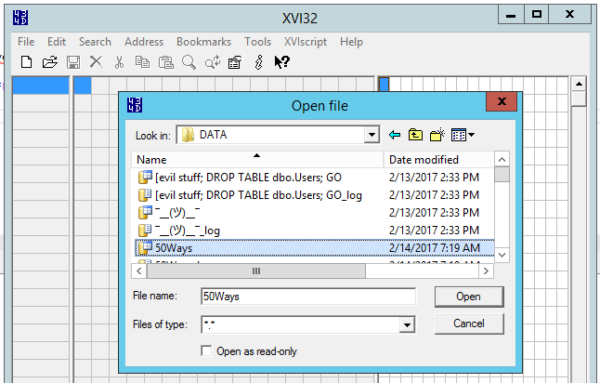
Now, let’s corrupt it. Open it with a hex editor – my personal favorite is the free xvi32 because it doesn’t require installation. Just download it, fire it up (you’ll want to run it as administrator), and open the database’s MDF file:

XVI32 opening the mdf file

Next thing you know, you’re looking at the contents of the MDF file. The scientific way to approach this would be to identify the exact 8K page you’re looking for, and jump to that point of the file. However, you have my beer, so I’m trying to finish this quickly so I can get back to that. We’ll just click Search, Find, and look for text:

Presto – now you can see the raw contents of your database. What, you thought SQL Server encrypted it or something? Heck no, Stan’s social security number, credit card number, and disease history are all in there, free for the reading.

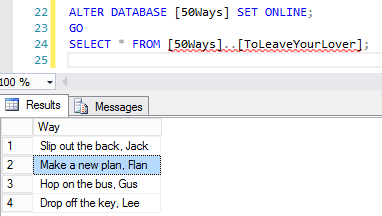
And for the writing, it turns out. Close the Find box, click on the S in Stan your right hand window, and start typing. I’ll change his name to Flan, and click Save. Close XVI32, and bring the database back online:

And see what you get:

I always did like Flan better anyway

Or rather, see what you don’t get: no corruption warnings, no dropped connection, no errors. As far as SQL Server is concerned, this is just nice good data. You can even run DBCC CHECKDB, and no errors will be reported.

What about clustered columnstore indexes?

Look, the only reason I’m doing this is because you’re still holding my beer hostage. Same script, but now with a clustered columnstore index:

After the database is offline, fire up your trusty XVI32, search for Stan, and he’s still visible in clear text:

Finding Stan

Edit him, turn him into Flan, save the file, bring it back online, and run the SELECT query again:

Delicious columnstore flan

A clustered columnstore index works just like a regular clustered rowstore index: if you don’t have page verification turned on, no corruption is detected, even when you run CHECKDB.

PAGE_VERIFY is really important.

When I created the database, I threw in this line:

That tells SQL Server not to do any page verification when pages are read or written from disk. You have 3 options:

  • NONE – just a dumb, suicidal idea.
  • TORN_PAGE_DETECTION – also a dumb, suicidal idea. You can retry this same demo with TORN_PAGE_DETECTION instead of NONE, and you’ll get the exact same results.
  • CHECKSUM – SQL Server includes a checksum as it writes each page from here on out, and then checks the page when it’s read.

If I repeat either the rowstore or columnstore demo, but this time change the PAGE_VERIFY NONE to PAGE_VERIFY CHECKSUM, I get a totally different result:

Shout out to Mr. Robot for getting me access to the source code

SQL Server didn’t detect the corruption simply by setting the database online – bringing it online didn’t read this particular data page. However, when I read the page, whammo, SQL Server detected that the data on the page didn’t match the checksum.

The checksum isn’t used for data recovery, mind you – only for alerting us that the data is wrong. This isn’t like parity in a RAID array where we can rebuild the data from scratch.

What you need to do next

  1. Run sp_Blitz, which tells you if any databases don’t have checksum enabled
  2. Set checksum on those databases
  3. Do something that causes pages to be written (like rebuilding indexes, but keep in mind that it’s going to generate a ton of transaction log traffic)
  4. Set up alerts to notify you when a corrupt page is read
  5. Attach a corrupt database (like the one you just created) to your production SQL Server, and run the SELECT statement, which should trigger the alerts you just created
  6. Make sure you’re doing CHECKDB regularly from here on out
  7. Talk to stakeholders about what’s being stored unencrypted in the database
  8. Give me back my beer

Read on for Part 2: Nonclustered Indexes


Crappy Missing Index Requests

When you’re tuning queries

It’s sort of a relief when the first time you get your hands on it, you get the plan and there’s a missing index request. Even if it’s not a super high-value one, something in there is crying for help. Where there’s smoke, there’s a bingo parlor.

But does adding missing indexes from requests always make things better?

The question goes for any tool, whether it’s DTA, or the missing index DMVs, or your own wild speculation. Testing is important.

Not all requests are helpful

In fact, some of them can be harmful. Let’s look at a recent example from the Orders database. After running for a while, I noticed the UpdateShipped stored procedure was asking for an index. And not just any index, but one that would reduce query costs by 98.5003%. That’s incredible. That’s amazing. Do you take DBA Express cards?

The code in question is the part where the update actually happens.

The index that it’s currently using is very thoughtful. Extra thoughtful. Maybe the most thoughtful index I’ve ever created for free. Though somewhat forgetfully named.

What about the query plan?

Aside from some baked-in problems, it’s pretty normal. It has a cost of 2829 query bucks. Pretty high! Like I said, baked in problems.

El Stinko

The baked in problems are an exercise for you, dear reader.

So what happens to it when we add the missing index?

It’s crappy! The query doesn’t even use it, but we do now have to update it. ShipDate is in the index, ShipDate is being updated. We have to update the index, like, now. Duh. This query now has a cost of 6792 query bucks. That’s the opposite of a reduction, and a far cry from the 98 point some-odd percent reduction the missing index DMV promised us.

Totally crappy

If we go a step further. Or farther? You tell me. We can add an index hint to force the matter, and of course, forcing the matter makes matters worse. And that matters. The forced index query has a crappy cost of 6837 query bucks. This is why our cost based estimator does not choose this plan on its own.

Most crappiest

See?

Legacy of Frugality

Lies And DMV Lies

When running sp_BlitzIndex, we often recommend testing out any index with an estimated benefit of >1mm per day. But that’s the key word: testing. A missing index request that gets added and causes harm will rarely harm the query that’s asking for it. I got pretty lucky here in demoland with an example. Usually you have to add the index, make sure it doesn’t hurt the query you’re adding it for, and then do regression testing on other queries in play. This includes modification queries.

Thanks for reading!


It’s now easier to read the BrentOzar.com archives by category.

Company News
1 Comment

With fifteen years of blog posts, we’d accumulated a lot of junk around here.

“Did I really write a blog post about buying pantyhose for turtles?”

Recently we cleaned out a lot of the trash – old personal posts about boring stuff – and categorized the remaining ~2k posts to make it easier to find stuff by topic.

Now, at the top of BrentOzar.com, when you hover over Blog, you’ll get flyout menus for categories like these:

Happy surfing.


[Video] Office Hours 2017/02/15 (With Transcriptions)

SQL Server, Videos
0

This week, Erik, Tara, and Richie discuss tempdb etiquette for developers, elastic search vs full-text search, server CPU spiking issues, source control in a database project, querying transaction logs, and more.

Here’s the video on YouTube:

You can register to attend next week’s Office Hours, or subscribe to our podcast to listen on the go.

Enjoy the Podcast?

Don’t miss an episode, subscribe via iTunes, Stitcher or RSS.
Leave us a review in iTunes

Office Hours Webcast – 2017-02-15


How can I discourage people from using TempDB?

Erik Darling: There’s some long questions in here today.

Richie Rump: If you have a short question, get them in now.

Erik Darling: I’m going to ask the short questions and in my head I’m going to be paraphrasing the long questions. I’m going to try not to “Brent” anyone. Let’s see here—there isn’t a short question, I lied. Here’s one about tempdb. Brian asks if there are any suggestions to discourage developers from abusing tempdb to teach proper tempdb etiquette to developers by not just filter-lessly WHERE clause-lessly, join-lessly dumping tables of values into tempdb and then indexing them and going crazy. So what would you do to teach developers the proper use of tempdb?

Tara Kizer: He references a script that the developers asked to performance tune. It sounds like it’s a hefty script. It’s just really long and needs to do all sorts of stuff. That’s the type of script you probably need to be using temp tables. It’s hard to really answer the specific question, but as far as massive abuse of tempdb, I don’t really discourage developers from using tempdb. So what if it gets big?

Erik Darling: I have a similar take on that. So what if tempdb gets big? But there are uses for temp tables that are better than others. A lot of people will fall back to temp tables because when they do their joins with regular tables, they suck. They have like 20 joins or they have to do all this awful joining together. There’s like no way to index for them because there’s all sorts of different sorts in like every single column. I understand why people dump stuff off to tempdb. My main pet peeve is when they just like blindly dump data in there without filtering it down to a kind of reasonable result set first. That’s my big pet peeve, is when there’s like some SELECT * INTO FROM table, no WHERE clause, nothing else like that. Anyway.

Richie Rump: The other thing in that question is a few hundred gigs almost maxed out your drive, maybe you need to get a bigger drive.

Tara Kizer: I’ve supported a tempdb that was 500 gigabytes normally. This was a mount point so it was dedicated tempdb. We got a storage alert that we were running out of space. I was the on-call DBA and checked it. It was a business user running a query. This was production data but this was a read-only replica for availability groups. It wasn’t the writeable side, just the readable side, where business users could run these gigantic queries. In order to complete this specific query that caused it to grow past 500 gigabytes in size, we had to tell them they need to start breaking up that query. It was this massive, single SELECT query. All sorts of stuff going on. I don’t know why it was using tempdb, because it wasn’t a temp table. Maybe it was an ORDER BY, I forget. I don’t remember what the actual script was, but that is what was needed for this system. Yeah, you can break apart your queries to do smaller work at a time so a single transaction doesn’t cause it to grow that big, but sometimes the instance just needs a large tempdb. It really depends on your workload.

Erik Darling: If you’re dealing with a terabyte+ size databases eventually you’re going to need a terabyte+ size tempdb. That’s just the way things go, not even just for queries. You do maintenance on a big enough table and SQL goes—there are tons of questions. There’s even a specific error you get when you try to sort something in tempdb and there’s not enough space and the file grows and it goes … it’s not fun. Tempdb should be sized in reaction to the size of your data, not to how big you generically think tempdb should be.

Erik Darling: Nick asks, “What is the thing being clustered or not when creating an index?” The key.

Tara Kizer: Just the key. It’s sorted.

Erik Darling: Yeah.

Tara Kizer: Physically sorted that way.

Erik Darling: It’s really quite boring. Whatever columns you choose to be the key of your clustered index, SQL sorts the clustered index by those columns and then at the very leaf level of the index, it has all the rest of the columns in the table hanging out down there, ready to be referenced.
Richie Rump: Right. Most of the time it’s your primary key but it doesn’t have to be your primary key. It doesn’t have to be. You want to think about how the queries are being written and how you’re reading data from it and maybe you’ll have a better primary clustered index. Maybe.

Erik Darling: I think questions like this come up because different database platforms have different but close by terminology. In Oracle there’s a thing called a cluster index where you can actually cluster tables together with an index so that values that you want to join together will be closer together on disk. Not the Oracle expert, but from the brief time I was reading about Oracle, I’m like, “This is exciting.” That’s what I got from it. Think of it what you will.


How can I determine the overhead of full text indexing?

Erik Darling: Here’s an interesting one. By interesting I mean odd. “My devs want to implement full text indexing. How can I predetermine what the overhead of this will be? Is there some metric that can tie the amount of data in the indexes to the drain on system resources?” Not that I know of.

Tara Kizer: I don’t think so. To answer it you have to have a load test environment where you do a synthetic load and you measure it yourself.

Erik Darling: Yeah, this is one of those things where full text indexing is going to be a little different for everyone depending on how you use it. It’s really hard to sort of glass ball what the load would be on your system. Unfortunately, what I would say and probably what Richie is itching to say is that if you want to use full text indexing, you should be looking at a different tool all together. Richie, take it away.

Richie Rump: Yeah, full text indexing has been around a long time, hasn’t really been touched in a long time. During that period, there’s a lot of tools that have come on like Apache Solr and Elasticsearch—probably Elasticsearch is the one everyone gravitates to—that do a much better job of searching text than full text search does. There’s always these weird, odd little things that full text search does that you don’t really expect it to do. Elasticsearch is so much better at searching text-type stuff. This is what it was designed to do than kind of SQL Server is. It would be interesting to see if SQL Server in the future wants to jump in that one like it did with the Hekaton stuff but right now we’re not hearing anything for that. I say go do a prototype on Elasticsearch. You’ll feel much better about yourself. You’ll be able to give the users a lot more results and do a lot more with it than you will with full text.

Erik Darling: I like Elasticsearch a lot. I agree with Richie on that.


What should I do with my career?

Erik Darling: Thomas asks, this is a similar question to one we’ve gotten before. “I’m trying to decide where my career should go. I have no development skills.” Good.

Richie Rump: Time to learn, bud.

Erik Darling: He wants to know, “Should I go into cloud, security, data science…?” Talk about falling off on the end there.

[Laughter]

Erik Darling: Pick something else random. Should I go into seashell collecting?

Richie Rump: I hear bus driving is pretty good these days.

Erik Darling: Yeah, why not? So, take it away, folks. What would you do if you were young Thomas?

Tara Kizer: It’s confusing. Do you want to improve your DBA skills or are you looking to move your career on a different path? You talk about cloud and security and data science. Maybe cloud we’ll do a little bit of that as a DBA, if our company is using cloud stuff. But security, no. Data science, not for a DBA. What are you trying to do? Are you trying to go down a different path or do you want to remain a DBA?

Erik Darling: Security is, I guess, to me anyway, seems like a pretty limited field for databases. Like once you get past securing perimeter stuff and once you get into, “How am I going to manage security on the database?” You read a couple of chapters from BOL about users and logins and roles and permissions and stuff. That’s kind of database security in a nutshell. You figure out what port you’re going to run it on and then what? So I don’t if security is what I would go into if I was a database guy, unless I was really into security. But if you’re going to go really into security, then be prepared to step away from the database. There’s a lot wider world out there than just database security.

Richie Rump: Data science. I think data science comes up because it’s on the top of all these, “Most hottest technology jobs” or “hottest jobs ever.” Data science, woo! Until you meet an actual data scientist and not someone who just calls themselves a data scientist because maybe they read a book or two, until you meet a real one, you don’t really understand kind of what level they are at. I was lucky enough to work for a few hours with a real data scientist. My brain started leaking out of my ears. Essentially, they’re statisticians. They’re statisticians that understand the technology side of it as well. This particular individual was a PhD in statistics. So these are the type of individuals that go and excel in data science. They’re very heavy in the stats aspect of it. They call themselves data scientists now and it’s just a marketing term. I mean, am I programmer or am I a developer? Am I an app developer? It’s just the same thing and it will be something different in five years, they’ll call it something else. But that is the type of learning that I see when I see a data scientist. That’s the type of training that you would be looking into—PhD in statistics.

Erik Darling: If you want to read some DBA-friendly writing on data science stuff, Buck Woody has a blog, Backyard Data Science, where he occasionally—I don’t really know what his blogging schedule is. I see it pop up once in a while in my RSS feed but I don’t think he blogs regularly-regularly there. But his posts are always good and entertaining and there’s enough back fill data for you at this point to read. So it’s Backyard Data Science, Buck Woody’s blog. Really smart, funny guy. Good stuff on there. If you want a DBA-friendly-ish intro to data science stuff, I would head over there and read. Probably try to not let my boss see me doing that because he knows I’m trying to switch jobs at that point.

Richie Rump: Yeah, Buck is the best.

Erik Darling: Buck is the best.


Should I be using OPENROWSET for this?

Erik Darling: Joe asks—oh boy. “Can you recommend a replacement for OPENROWSET for putting the output of a stored procedure into a table variable or temp table?” Why is OPENROWSET not working for you? What is happening?

Tara Kizer: Why are you using OPENROWSET though just to put the output of a stored procedure? Just use INSERT INTO exact stored procedure. Is this for a linked server? What are you using OPENROWSET for?

Erik Darling: There’s different uses for it. Like I was using it in some test functionality for BlitzFirst to get BlitzFirst to run for the duration of some ad hoc SQL or a stored procedure because with OPENROWSET I can just pretty easily dump stuff into a temp table to relieve the server of having to return all the data. So a follow-up question, what about OPENROWSET isn’t working and what exactly are you trying to do with these rows?


How important is physical database design when I have SSDs?

Erik Darling: Here’s one from Matthew. I think Richie is going to have something on this. “How important is physical database design in an era of SSDs, SANs, etc.?”

Richie Rump: I typically still do the physical design. Mainly it’s because a lot of the tools still kind of force you to do a physical design still to get it out. A lot of times, if you’re designing for multiple databases, that’s kind of helpful to do your logical and then your physical design so then you can output the logical design into multiple databases. Don’t think of physical design as “I’m trying to make things faster.” I’ve never looked at it in that way. It’s a way that you can get your indexes in and things like that, stuff that doesn’t really fit well into your logical design. If you want to read more about that, Louis Davidson’s Pro SQL Server Relational Database and Design Implementation, good book on that. So physical design doesn’t necessarily mean I’ve got to care about what’s going on in the hardware aspect of it. It’s how it’s physically going to be implemented into the database, whatever platform that you’re running.

Erik Darling: A lot of people used to make a much bigger deal about separating data and log files and putting certain indexes on certain file groups off somewhere else. Which made a lot more sense when storage was direct attached. For SSDs, if they’re direct attached, sure, you can still seem some difference there. For the SAN, it just doesn’t make a lick of difference. Not a single drop. Tara, what say you, ye?

Tara Kizer: The question is “in an era of SSDs and SANs.” A lot of companies don’t have those even though they’ve been around for a lot of years. So physical databases are still really important to a lot of companies, your hardware aspect, your disks. We’ve got a lot of clients that have slow I/O issues. They’re just running 15k disks, no SSDs. A lot of them don’t have SANs. Physical databases, as far as hardware goes, is really important to those types of companies because they’re not getting it right, that’s for sure.

Richie Rump: Yeah, I haven’t seen a server like that in many years, probably maybe a couple decades. It’s been a very long time. In fact, I’d just go ahead and spin up a cluster in Amazon and, poof, I don’t have to deal with any of that stuff either.

Erik Darling: That’s not exactly true because you can pick different kinds of storage up in the cloud.

Richie Rump: Yes, but [inaudible] stuff I’m using right now.

Erik Darling: Of course you do.

Tara Kizer: Erik and I know how bad the disks are in the cloud, the default ones.

Richie Rump: Yeah, they’re terrible.

Tara Kizer: You can’t do anything.

Erik Darling: No, it’s like just sludge, man. Sludge.

Richie Rump: Well since you’ll be using this new system, I’m going to definitely choose the slow disks for your stuff.

Erik Darling: It’s okay because I’m going to choose a box with the most RAM on it so I don’t have to deal with that.

Tara Kizer: There you go.

Erik Darling: Stick my thumb in your eye.
 

Why does our SQL Server’s CPU go up at 9:30pm?

Erik Darling: Daniel has a question. He starts his question with, “I have a question.” Threw me off my whole game. “For some reason the CPU on our production server has been spiking regularly every night around 9:30 for the past week. I have Redgate monitor.” Okay. “Look at the timeframe and it is not reporting any heavy queries running. Is this a virtualization issue? The top ten queries at that time are running in less than 5 seconds each.” Anyone? Virtualized?

Tara Kizer: I had a client that we couldn’t figure out why the CPU was spiking. It was a virtual environment. Brent said to take a look at Perfmon and add the counter for CPU utilization and there’s another further down below, I think it was like virtual CPU. So that would have told you what the CPU utilization was on the virtual host, not just your guest. He was saying that there would be a discrepancy there. The issue ended up being on the host, not the actual VM.

Erik Darling: This is like one of those horrible downsides of VMs that no one really talks about, especially when you put your SQL Server out there. Because you have VM admins, who are not DBAs, who if they need to will shuffle a whole bunch of other guests onto your host for no particular reason other than—or they have automated load balancing set up. You deal with the noisy neighbor. So unless you have reservations set up for your VM, where you get to hang on to your CPUs and your memory and all that stuff, then you can run into some issues. It may not be your SQL Server’s fault. So outside of SQL Server, I would yell at my VM admins and see what they’re doing. See if they’re shuffling people onto my host or whatever. For a lot of VM environments if they are putting SQL Server on them and they’re hosting multiple SQL Servers, those hosts will be kind of like holy ground. They will not let other kinds of servers live on those. They will be for SQL Servers only and those SQL Servers will take up an even portion of the resources on there, like either half and half or in quarters. I would take a closer look at my VM setup for that.

Tara Kizer: I would wonder, CPU is spiking. Do you know that it is the SQL Server .exe process? Have you gone down to that level in Perfmon to see exactly which process is the one that’s spiking? If it truly is SQL Server, Redgate monitor and all of those other monitoring tools, they’re not looking at every single query that runs during a timeframe. They’re sampling it. Every few seconds they’re taking a look at what’s running. So maybe you don’t have any long-running queries but maybe you have a spike in the amount of queries that are running. Maybe even just do a server-side trace, an extended events session, and just gather everything for like two minutes. Don’t run it for a very long time, just for maybe five minutes or so. That way you can collect the data, put it into a table and then order by the CPU column and see what happened there.

Erik Darling: Works for me, man.


Do I need a data lake?

Erik Darling: Eric Swiggum, I wish I had an answer for you but I don’t know. “I had a developer come to me saying they need a data lake now but they seem to be confused about the concept, as am I, and I’m not sure if the implementation will be successful.” Aside from coming up with a POC and testing it, I don’t have any good advice. I don’t know if you need a data lake either.

Tara Kizer: If they’re confused about it also, why are they asking for it? I’d say if you don’t know what it is, you don’t get to use it.

Richie Rump: There will be a test at the end of the webinar.

Erik Darling: If I were you I’d make them watch a bunch of those Jason movies and see if they still want a data lake.


Should I add developer skills to my resume?

Erik Darling: Thomas follows up. He says, “I work mostly on the infrastructure side right now. I’m looking to expand beyond that.” He likes all the tech and it’s hard picking one thing. “Seems like most DBA jobs are developer DBA rather than production DBA work. That’s why I’m looking to get some focus on that side.”

Tara Kizer: I wonder what industry you’re in that you’re mostly seeing development DBA stuff—or not industry—what city you’re in because there are a ton of production DBA jobs out there when I get the LinkedIn emails and stuff. I don’t really see a whole lot of developer DBA jobs here. Sometimes it will be named a little bit differently but for the most part I’ve only seen production DBA jobs.

Erik Darling: At least when you look at job postings like that, try to take them with a grain of salt. Really read the job description. If you send in your resume and you go in for an interview, I would really prod the people about what exactly their expectations of a DBA are because they might expect you to develop something that is not like a performance thing. They may not expect you to develop like queries that are going to be running for clients or whatever. They may expect you to develop some other process that does stuff like if they want to set up partitioning and automate it. They may be looking at something like that and that sort of thing could be production DBA work because, of course, partitioning is not a performance feature.


Should I consider the cloud for DR?

Tara Kizer: I like Graham’s question.

Erik Darling: Yeah, go for it. You read that one.

Tara Kizer: “As DBA, I’ve asked about having a cloud DR strategy and in the past I’ve been told it’s too expensive. Our area has been experiencing a natural disaster.” I wonder if this is the spillway that’s having issue in northern California—I forget what the city name is—Oroville. It’s near Sacramento. I think it’s Oroville. But anyways. “I brought up exploring a cloud DR strategy and was told the same thing, too expensive.” I’m kind of surprised that you’re getting that answer for cloud servers. “By the way, we have no secondary center and on-site backups. If my org can’t grasp the need for a DR strategy now, will they ever?” If there’s a natural disaster happening near you and they aren’t freaking out already, if you’re in one of those towns that possibly could get flooded, I mean, they probably just don’t want to spend the money. I’ve always worked in environments of companies that had DR sites. These days, with the cloud solutions out there, you have a much cheaper option than having to have your own DR site and servers and managing all that. I know we’ve got a white paper coming up, and I know we’re allowed to talk about this now, that we wrote for Google about using Google’s cloud to copy your backups into their cloud, into a storage bucket. You don’t have a server up but if you ever had a natural disaster, you could then spin up a VM in the cloud and then copy those files down to that server and get up and running on that. That would be a pretty cheap solution because you’re only having your files in the cloud. You’re not hosting the server until you actually need it.

Richie Rump: Yeah, until maybe they lose everything, maybe their mind will change. It’s probably what’s going to have to end up happening. When the whole building gets wiped out and all of a sudden they maybe have a backup that maybe you took, that’s probably when they’re like, “You know, maybe we should be able to get something that’s a little, I don’t know, that we could get up a little faster than a couple months.”

Tara Kizer: Do you at least have your backups being copied to tape in off-site iron mountains, that type of thing?

Erik Darling: It doesn’t sound like it.

Tara Kizer: I would hope something is going offsite.

Erik Darling: I think if I were the DBA in that position I would be totally fine with that as long as I had it in writing.

Tara Kizer: Yeah.

Erik Darling: As long as I was like, “This is what I told you guys however many months back and you said no because it was too expensive. Now we’re in this position. I can’t do anything for you.” As long as I had that in writing I would be totally cool with being like, “I have one less computer to manage.”

Tara Kizer: Talk to them about RPO and RTO goals. A lot of companies have those numbers for on-site issues. It may be they have the same RPO and RTO goals for disaster recovery but show them what the actual reality is of those RPO/RTO. Your goals are not the same thing as your current state. Let them know how long it would take to bring up production if a natural disaster occurred and maybe you’d have total data loss if your backups aren’t going anywhere.

Richie Rump: Yeah, in accordance with that, I used to be a project manager and I used to always to talk to my sponsors about risk. I used to have like a punch board of just, hey, if this risk occurs and what’s the severity, what’s the likelihood that that’s going to occur: high, medium, or low. Then how would we fix that. Having these lists and sharing that with people and saying, “These are our risks: high, medium, and low. There’s a high risk for this to happen.” Or maybe it’s a low risk that it may happen but it will cost a lot of effort to get this thing back up and running, having those types of things in front of people will actually be like, “Oh, I didn’t know that that was a problem because I never thought about it because I’m the VP of whatever and frankly servers aren’t my deal.” So keeping that kind of list was really helpful when I was a PM.


What’s the best branching strategy for database source control?

Erik Darling: Richie, I’m sorry, you just got done talking but I’m going to pick on you again. Matthew asks, “What is the best branching strategy for source control in a database project? We are using VSO front end and a Git back end.”

Tara Kizer: What’s VSO?

Richie Rump: Visual Studio Online.

Tara Kizer: Online? Okay.

Richie Rump: It depends. I think when you talk about branching with databases, I still haven’t found a database strategy that I like. Code is a lot easier but databases are a little bit harder mainly because of the deployment aspect of it than anything else. I’d say go for it. Pick one, whether you’re using something like the Git strategy or whatever and see how it works. Whatever sticks with your team is usually the one that I would stick with. Pick one, try it for a few weeks. If it doesn’t work, go for something else that kind of works with your team. I think branching is more what works with your team than actually what works technically. So just try something with your team. Talk it over with them, get some feedback. If it works, stick with it. If it doesn’t, go somewhere else.

Erik Darling: Yeah, I think it’s a bit more of a cultural thing than a tech thing. But what do I know? I’m not a developer.


Does full recovery model slow down performance?

Erik Darling: J.H. has an interesting question, “Does putting a database in full recovery model slow down performance?”

Tara Kizer: He said model!

Richie Rump: It’s catching on.

Erik Darling: “And are there any native methods to query the transaction log?” Yes and yes. That’s my answer. Tara, what do you say?

Tara Kizer: Does it really affect performance though?

Erik Darling: Inserts, updates, and deletes.

Tara Kizer: Even if you use simple recovery model it’s still writing those transactions to the transaction log. You’re not getting rid of that step. They still get written to the transaction log it’s just what happens at the end of the transaction. If you’re using simple recovery model, that transaction is now gone from the transaction log. So, yeah, you do have to do log backups for full recovery or bulk-log but do they really slow down performance in the recovery model?

Erik Darling: Yeah, so like one thing that a lot of people might be getting in simple recovery and not know it is minimal logging.

Tara Kizer: Right.

Erik Darling: Minimal logging is pretty magical for inserts. So if you’re getting minimal logging sort of by accident, if like it’s Tuesday on Mars and everything else is aligned for you and you haphazardly get it, than, yes, it can totally way speed up inserts like crazy. But, other stuff, not really.

Tara Kizer: What version did that start out in?

Erik Darling: Minimal logging? Oh, god, 2005 maybe?

Tara Kizer: Oh really? Okay.

Erik Darling: It’s been around forever. So like your database has to be in simple or bulk-logged. And this is probably why—you probably never saw much of it because you’re Miss Full Recovery Model.

Tara Kizer: Yeah, I was. Only non-prod use. I never even used bulk-logged because your RPO is destroyed with bulk-logged.

Erik Darling: Bulk-logged is like a weird joke.

Tara Kizer: Yeah, I knew about minimal logging as far as like truncate and bulk inserts and things like that, but are you saying that the insert into T-SQL command can use minimal logging?

Erik Darling: Yeah.

Tara Kizer: Okay, I’ll look into that.

Erik Darling: …sometimes you have to use a trace flag.

Tara Kizer: Okay.

Erik Darling: It only works on tables of like an empty clustered index and no non-clustered indexes or a heap…

Tara Kizer: So a lot of rules.

Erik Darling: If you’re accidentally getting it, it’s really helpful. Sometimes even when if you’re doing everything right it doesn’t work. Minimal logging. One of those things.
Tara Kizer: Michael asked what is RPO because I kept saying RPO and RTO. RPO is your recovery point objective, that’s how much data can your company lose. RTO is your recovery time objective, basically how long can you be down. How long is it going to take you to restore a failover or whatever it is.

Richie Rump: I’m pretty sure we have a page on that.

Tara Kizer: We do.

Erik Darling: Like a billion of them. Billions of pages. All right, thank you for joining us. We’ll see you next week. Goodbye, everyone. Adios.


Guess the SQL Server 2017 Release Date Contest

SQL Server 2017
286 Comments
They used to release doves, but that’s so John Woo

We’ve been doing this a while now, and time to kick it off again.

  • Leave one – and only one – comment here with your guess of the date. If you leave multiple comments, only the first/earliest one is going to count.
  • “The date” is the date that Microsoft announces as the release date. (Not the date they announce the release date, but the date where the final RTM bits will be downloadable to non-insiders, ordinary folks with MSDN access.)
  • Closest to win, without going over, wins an Everything Bundle.
  • In the event of a tie, the earlier comment wins.
  • Only comments more than 48 hours earlier than Microsoft’s public release announcement will count. If Microsoft makes their announcement, and you run over here trying to leave a fast comment with the release date, not gonna take it.
  • If Microsoft announces two release dates – one for Windows, and one for Linux – then we’ll pick a separate winner for each. (But you only get to leave one date in the comments.)

So what date are you feelin’?

Update 2017/02/23: Helpful reader Brian Boodman wanted to see what dates people were guessing, so he writes:

Quick and dirty C# snippet for “Guess the SQL Server vNext Release Date”. To use, save https://www.brentozar.com/archive/2017/02/guess-sql-server-vnext-release-date-contest/ to c:\tmp\toto\brentdate.html” using Chrome and run the code. The results of this script are intended to be read by a human. http://pastebin.com/nUTTEkqc Modify as needed. Dates earlier than 2017 are very unreliable.

Update 2017/09/25: Looks like the release date will be October 2, 2017! The winner is Martin Surasky, who guessed it first on July 19th. Runners-up are Stephen Holland (who guessed Oct 3 on Feb 17) and Joe Bednarz (who guessed Oct 1 on Feb 17).


When THREADPOOL Waits Lead To RESOURCE_SEMAPHORE Waits

Memory Grants, Wait Stats
2 Comments

Your server is underpowered

That’s an understatement. Your server sucks.

It has four cores in a single socket, data outpaces RAM by a country mile, the disks have whiskers, and the network card still has a phone jack in it.

Alright, so maybe it’s not that bad, but it’s bad enough that you run into trouble.

Always Be Blitzing

You’re a smart goofball, though. You run sp_Blitz, and sometimes you even read the output. For servers in really sad shape, it’ll warn you about something we call Poison Waits. These are a group of wait types that can really ruin your day.

Side effects range from login and query timeouts, degraded performance, nausea, vomiting, and diarrhea. Actually, those last three are limited to you, when your phone and inbox start lighting up with frantic high priority emails from people with office doors.

Unfortunate

One thing I see pretty frequently on these 99 cent bin servers, is people will respond to THREADPOOL waits by upping Max Worker Threads to accommodate additional requests. This may seem fine at first, and when your server is under similar load performance degrades… well, less. But adding all those threads to your CPUs that came with a download code for Blood II only gets you so far.

The problem with all those new worker threads is that each one takes up memory. How much? 2048 KB, or 2 MB for the KB impaired.

All those new threads, taking all that same old memory up. Any guesses where that memory comes from?

Hint: Stuff your users need. And eventually, if you have enough going on, stuff your system needs. I’ve seen people push MWT up to 2000, which is 4 GB of memory if they all get used. Depending on how much is in your system, and what else is going on, this can contribute to other Poison Waits like RESOURCE_SEMAPHORE and RESOURCE_SEMAPHORE_QUERY_COMPILE.

Better way?

The first thing to look at if you hit THREADPOOL waits are your parallelism settings. If you’re curious about those, checkout our Setup Guide. If you’ve already set those, you may need to cut MAXDOP in half, and/or increase Cost Threshold For Parallelism, so fewer queries go parallel, and fewer cores get used when they do.

After that, take a good hard look at your queries and indexes. You can use sp_BlitzCache and sp_BlitzIndex, which are also available at the First Responder Kit link above. Reducing query cost will further reduce CPU strain. This is a good thing.

Finally, tell your cheapskate boss to buy some decent hardware. If you need a starting point, this is what I have sitting under my desk. If that’s way more than what’s in your production server, you’ve got a problem.

Thanks for reading!

Brent says: when we see these symptoms, it’s almost always on VMs with 2-4 cores and 8-16GB RAM. Remember, folks, licensing is expensive. You wouldn’t bring home a present from Tiffany’s and wrap it in a Happy Meal box. Don’t run SQL Server on your grandpa’s laptop.


What is Batch Requests/sec?

Load Testing, Monitoring
46 Comments

When I first look at a server, I want to know how busy it is, where its bottlenecks are, what is SQL Server waiting on and many other things. Batch Requests/sec is one of the data points that is used to measure how busy a server is.

WHAT IS BATCH REQUESTS/SEC?

Batch Requests/sec is a performance counter that tells us the number of T-SQL command batches received by the server per second. It is in the SQLServer:SQL Statistics performance object for a default instance or MSSQL$InstanceName:SQL Statistics for a named instance.

WHAT COMPRISES A BATCH?

If I execute a stored procedure that has multiple queries and calls to other stored procedures, what will Batch Requests/sec show? Let’s test it to find out.

I created three stored procedures:

  1. Run four SELECT queries
  2. Call the first stored procedure twice
  3. Call the first stored procedure, call the second stored procedure and run a SELECT
I have no other load on my instance. Batch Requests/sec is 0 (see next section for where to find it).

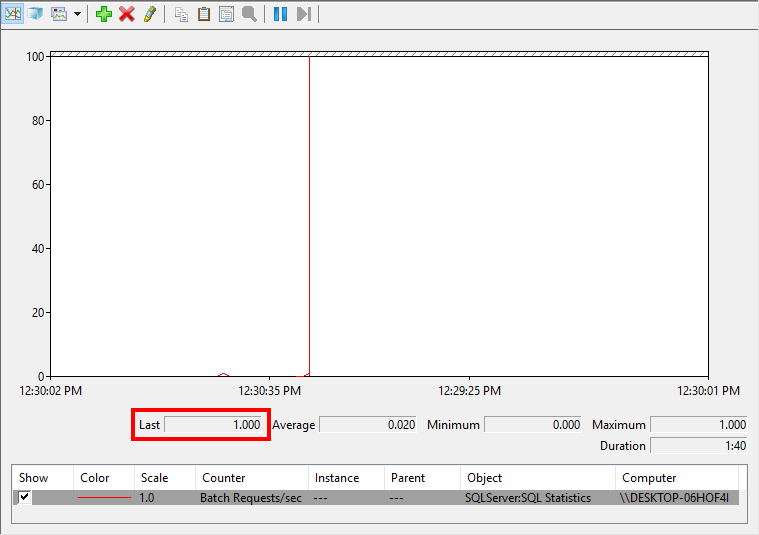
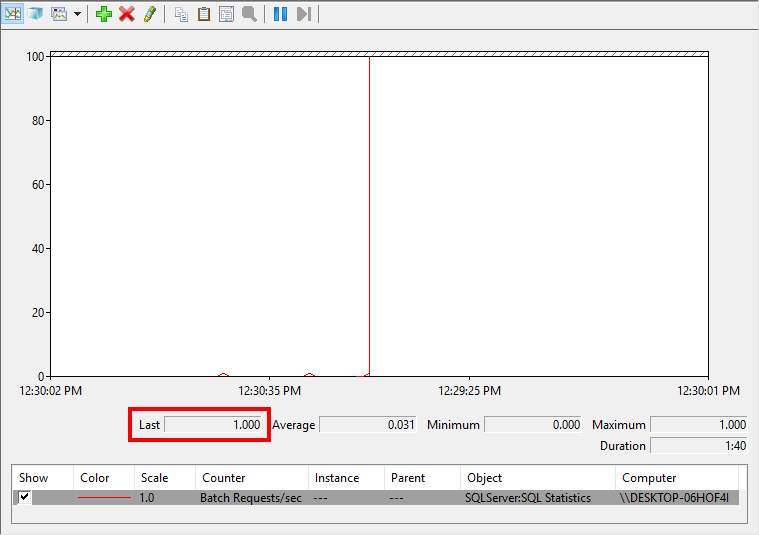
When I execute BatchRequestsTest1, Batch Requests/sec turns to 1 even though BatchRequestsTest1 contains four SELECT queries. It then goes back to 0.

Batch Requests/sec is 1 when I execute BatchRequestsTest2 and then goes back to 0.

You can probably already guess what Batch Requests/sec will be when I execute BatchRequestsTest3.

Highlight all three executions and then click execute. Batch Requests/sec is 1 as all three executions are in one batch.

No matter how many queries are inside a batch, it will add 1 to Batch Requests/sec. For systems that have very long, complex stored procedures, Batch Requests/sec may not be a good metric to determine how busy the server is. You have to combine the metric with everything else you look at.

WHAT IF MY SCRIPT HAS GO IN IT?

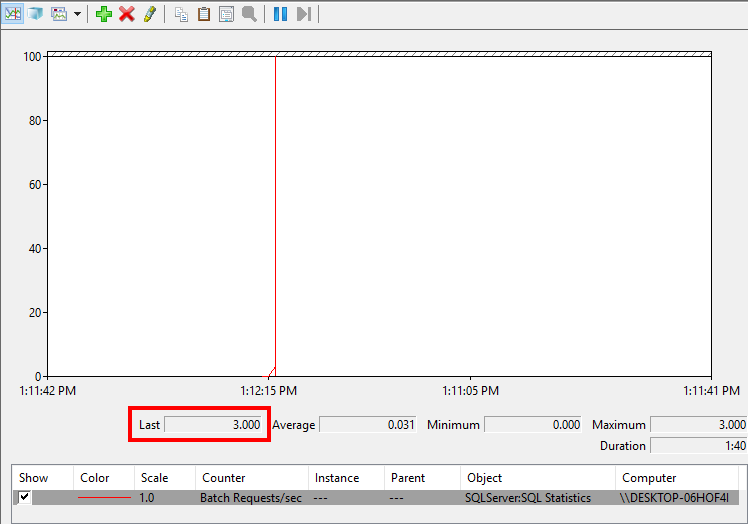
Let’s look at one more example. This script has two GOs. GO signals the end of a batch of T-SQL statements in some utilities, such as Management Studio. If I execute the below script all at once, what will Batch Requests/sec be?

Why is it 3? BEGIN TRAN to the first GO is one batch. The UPDATE after the first GO and to the second GO is another batch. And the ROLLBACK TRAN is the third batch.

WHERE CAN I FIND BATCH REQUESTS PER SECOND?

I use Performance Monitor, a T-SQL query or sp_BlitzFirst to check Batch Requests/sec. You could also use PowerShell, C# and many other programming languages to query performance counters.

In Performance Monitor, click the plus sign to add a counter and then navigate to the SQLServer:SQL Statistics or MSSQL$InstanceName:SQL Statistics performance object. Expand the object, select Batch Requests/sec, click Add and then click OK.

To query Batch Requests/sec via T-SQL, you have to calculate the difference of two samples over a time interval as the value is stored as a cumulative value since the SQL Server has been up.

Let’s look at Batch Requests/sec via sp_BlitzFirst.

If you use @ExpertMode = 1, then you’ll see it in the first result set like above and also in the fourth result set with all of the other SQL Server performance counters.

HOW BUSY IS YOUR SERVER?

I’ve supported servers that had Batch Requests/sec over 10,000. I know there are much busier systems out there too. Some of our clients have low Batch Requests/sec, under 1,000. Drop a comment with the Batch Requests/sec value on your busiest server during the busiest time of the busiest day.

Brent says: if I know a server well, this is the first place I look when someone says queries are slow. Maybe queries are slow because we’re dealing with 10x more queries than we usually get – maybe the web site is on fire because somebody made a pricing mistake, for example. When this metric goes up, it affects every other performance metric.


Simulating Workload With ostress And Agent Jobs

Load Testing, SQL Server
3 Comments

This question comes up a lot

Especially during Office Hours, and the answer is usually… not great. You can spend a lot of money on people and complicated software to design, run, and monitor workloads against test environments, or you can throw together tests with some free tools like SQL Query Stress or Microsoft’s RML Utilities.

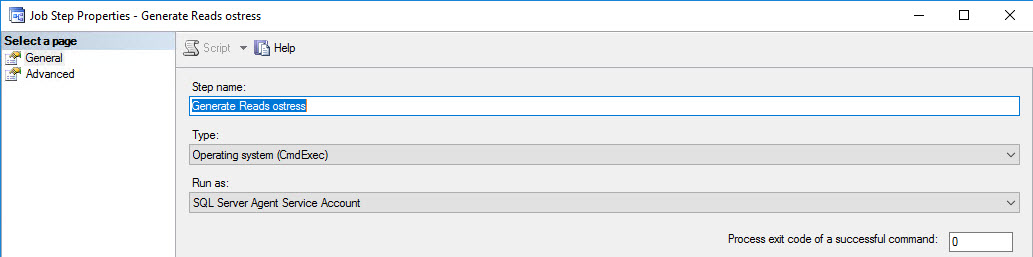
RML Utilities is pretty cool, and includes ostress.exe along with some other components. What I really like about ostress is that it’s all CLI, so you can call it from Agent Jobs, and feed it all sorts of cool options. When you create the Agent Job, you just use the Operating system (CmdExec) type of step instead of T-SQL, or whatever else.

Burgle

For the command, you’ll want to use something like this:

There are a number of other flags available in the documentation, but these are the ones I usually run with. If I wanted to feed ostress a .sql file of commands to use instead of a stored procedure or ad hoc query, I could use -i"C:\temp\BeatUpStack.sql" instead. It’s particularly important to specify different logging folders if you’re going to run ostress concurrently. Otherwise, every session will try to use the default, and you’ll get a bunch of access denied errors when it attempts to clean up logging folders at the start of each run.

For scheduling, I usually set the job(s) to run every 10 seconds, so there’s as little gap between runs as possible. It’s fine if they run over 10 seconds, I just don’t want the jobs sitting around for minutes doing nothing before they start up again.

Good enough

The end result, depending on complexity, can look something like this. I have three jobs set up that do different things. One generates reads, one generates writes, and the other generates some TempDB load. The curious thing about TempDB load is that if you don’t explicitly drop temp tables after each run, you’ll get flooded with “object exists” type errors. Your command will have to look something like this: Q"SELECT TOP (5000) * INTO #t FROM dbo.Orders; DROP TABLE #t;".

Jobs!

When jobs start running, you should see it immediately. Here’s what sp_BlitzWho returns with my workload in full swing. It’s ugly. There’s blocking, there’s heinously expensive queries, and this poor server silently weeping.

Grody

It depends

You can really do a lot to customize the simulation to suit your needs. It might not be perfect, but it’s a lot cheaper than perfect.

Thanks for reading!


[Video] Office Hours 2017/02/08 (With Transcriptions)

This week, Brent, Erik, Tara, and Richie discuss compatibility levels, SQL server SPN problems, Always On Availability Groups, failover clustering, capturing DML stuff, disc defragmentation, replication snapshots and reindexing, load testing, PowerShell, and whether you should pursue the path of a DBA.

Here’s the video on YouTube:

You can register to attend next week’s Office Hours, or subscribe to our podcast to listen on the go.

Enjoy the Podcast?

Don’t miss an episode, subscribe via iTunes, Stitcher or RSS.
Leave us a review in iTunes

Office Hours Webcast – 2017-02-08


How do I know it’s safe to delete an index?

Brent Ozar: We’ve got a bunch of questions in here already, we might as well go ahead and get started. We’re a little early, but why not? You people have good questions in here. This is an interesting one. Roland asks, “How can I be sure of no negative effects when I’m deleting an unused index? Is there any way that the optimizer is using those stats for a better plan but not using the index itself?”

Erik Darling: The only way to do that is to test, man. There’s not a better way. This is something I think I talked about in a blogpost but I can’t remember. I don’t know if it’s out yet. When you’re adding or removing indexes, or whatever you’re doing with indexes, people always focus on the one query that they’re working with. So if they’re adding a missing index they’re like, “Oh, it makes this query better.” But they never like sort of regression test other queries or other things that go on on the server as well. So really the only way to do is to know your workload, try to know your queries. I’m not asking you to know every single index they use, but try to know which queries run on average. When you go to add or remove indexes, make sure that you can replicate your normal workload to see if there’s any regressions within it. It’s hard but that’s why you get paid a lot of money, pal.


Can I get different plans in different database contexts?

Brent Ozar: Kyle says, “Can you stand just one more compatibility level question?” He says, “I’m asking about compatibility levels between databases on the same server. I had a query that went totally wonky when it queried across databases. One of my databases is 2012 compat, the other was 2016.” So could you get different query plans for having databases in two different compat levels?

Erik Darling: Yeah, cardinality estimator is different.

Brent Ozar: You can have the same query run in three different databases, as long as you fully prefix your objects with like SELECT * FROM StackOverflow.dbo.Posts, you can run that in several different databases and get several different query plans. Kyle mentioned that you’re on 2016, it gets even worse. 2016 has database-level settings like MAXDOP too, and that can give you different query plans per database that you’re in.

Erik Darling: There’s forced parameterization at the database level too.

Brent Ozar: Yeah, that’s good.


Where should I start looking for SPN problems?

Brent Ozar: Paul says, “We often lose our SPN for SQL Servers and then they need to be rebuilt.” Oh dear god. No, you don’t have to do that. “Where should I start looking for SPN problems and is this a common problem?”

Erik Darling: It is a common problem. It’s actually one that I fixed—haha.

Brent Ozar: I’m not so sure about that.

Erik Darling: Well, you know, it feels like I fixed it. For your service account user, the thing that did the trick for me, not having to rebuild them was to give it permission to delegate Kerberos authentication, it’s one of those. That’s what always worked for me. When I restarted SQL, it would re-get the SPN without a problem.


Are active/active Availability Groups a good idea?

Brent Ozar: Erik says—not that Erik—but he does spell his Erik the same way. He says he had a colleague mention that he wanted to have an active active AG—love this question already—so that we could make use of unused resources. “Basically, one node handling a database and another node handling the other database. Then synchronizes them across. I have an inclination that this is something I want to avoid. Any help would be appreciated.” I don’t know if he wants help with… what’s the question in here?

Erik Darling: Should I? Will I? Tara, take it away.

Tara Kizer: There’s nothing wrong with it. I mean, you’re going to need to license both servers. You need two availability groups since they’re going to be writing on one node and then writing in a different database another node. You may want to have a third node just in case if one node can’t handle the load of both databases if you lose a node. A third node would be recommended for a scenario like this where two nodes are active. You want to have a passive node in this scenario.

Brent Ozar: What would make you choose Always On Availability Groups over failover clustering if you had the choice between those? Is there anything that would make you choose one way or the other?

Tara Kizer: For me, I like failover clustering but we also had disaster recovery requirements so we had to pair that with database mirroring. So availability groups, we were able to get rid of FCIs and database mirroring and just use one technology. So just using one technology was my goal. Plus, we got to get rid of replication for read-only reports. So got to get rid of three things for just one feature.

Brent Ozar: Plus, we fired that guy we never really liked.


What’s the easiest way to capture DML on one table?

Brent Ozar: J.H. says, “What’s the easiest way to capture DML stuff—inserts, updates, and deletes—for a specific table?” He heard that change tracking and change data capture doesn’t track things like username, T-SQL statements, date and time, and host and IP address. Wow, you want to capture a lot of stuff for a specific table. Have you guys ever tried to audit username, host name, IP address and all of that for inserts, updates, and deletes?

Erik Darling: Not I.

Tara Kizer: The performance overhead on this kind of stuff is just not worth it usually. Why are you trying to audit this stuff?

Brent Ozar: Oh, he has a follow up question. This is, boy, this really makes it interesting. He says, “It’s in dev and there aren’t too many DMLs, so I’m not really concerned about performance. Would triggers be good? Or something better or easier?” It’s in dev, I have an easy way to do that. You restore the database every day. Every day you restore from production. Then anybody who is complaining about their inserts, updates, and deletes, whoever starts complaining that their data is lost, that’s how you find out who did it. Dev is not where you keep your data.

Erik Darling: If it were production, for that granularity I would go with a third-party tool. I would want someone who already has it figured out. Rolling your own for that is a pain in the butt.

Tara Kizer: And for a dev environment, I might even just use a server-side trace, not much activity is occurring there. Just go ahead and trace it.

Brent Ozar: Yeah, it’s easy to do. Every now and then I meet DBAs who are like, “I want to control everything with an iron fist and not let my developers do anything.” I’m like let them go put data in. They’re trying to do test cases and I know Richie puts garbage data in the database all the time. I’m not sure he puts in any other kind of data in.

Richie Rump: Yeah, “Brent sucks. Brent sucks a lot. We don’t like Brent. Go away, Brent.” You don’t actually read the dev database so I can put whatever I want.

Brent Ozar: Yeah, then it becomes production. Next thing you know, wait a minute, our website…


Have you ever had disk fragmentation affect performance?

Brent Ozar: Nestor says, “Did you guys ever experience performance problems that were due to disk fragmentation aka the hard drive?”

Tara Kizer: I would never know because I don’t ever worry about disk fragmentation. So how would I even know if I’m experiencing performance problems because of it? I don’t worry about it. Is it a problem? I don’t know. Who can defragment their disks? Who’s got the downtime to do that? I’ve always supported 24 by 7 systems that have really high SLAs.

Erik Darling: You can run into some bad problems too. If you’re on a SAN and you’re thin provisioned and you run disk defragmenter, all of a sudden you are very thickly provisioned in some situations. The last time I defragmented a disk and it did something, it was like Windows 95 and it made Riven like that much faster.

Richie Rump: Yes.

Erik Darling: Like the fog looked a little bit better in Riven after I defragmented my disk, I think. But that might have been the restart. I don’t know.

Richie Rump: Images came up just a little bit faster, right?

Brent Ozar: Don’t you think that back in those days the display of the disk defragmenter thing in Windows, that was the big reason to run it. It was really cool.

Erik Darling: … changing colors, it was nice. And like all the computer fixing suites had like their own defragmenter. Norton had one and McAfee had one and they’d all do something different.

Brent Ozar: The good ole days.

Erik Darling: Fragmentation has been a Windows lie for decades.

Tara Kizer: I wonder if the only time to worry about disk fragmentation is when you’re encountering an issue with sparse file. When you have the sparse file issue with CHECKDB isn’t that compounded by the disk fragmentation?

Brent Ozar: Yeah.

Tara Kizer: There’s a workaround for that but that’s the only thing I could think of.

Brent Ozar: Yeah, and when you talk about fixing it, if you’re really fragmented that bad that CHECKDB won’t run, then you’re really talking about restoring over to another SQL Server if you want to minimize downtime. Do log shipping or database mirroring over somewhere else. Who wants to do that? That’s a hell of a way to fix fragmentation.

Erik Darling: Yeah, plus you’re probably on some ancient, awful server with like misaligned disks and whatever, you probably have Windows 2003 or something.


More about the active/active Availability Group concept

Brent Ozar: Erik says, “I have a follow up to the active active availability group question.” He said he would rather just leave both of these databases on the primary and not have to split them up across nodes. “My real question is are there any benefits across splitting these databases onto separate nodes or would the performance be the same if they were all on the same node?”

Tara Kizer: No, the performance is different. If an instance runs on one node, another an instance runs on the other node, you’re using separate hardware so all your DML, if it’s synchronous, it’s all two-phase commit. But it’s got different plan cache, different buffer pool. You’re utilizing the hardware of two servers.

Brent Ozar: Buffer pool is a great point, yeah.


Would RCSI cause a problem in simple recovery model?

Brent Ozar: William says, “What kinds of problems would you encounter if you enabled both RCSI and simple recovery model?” I would like to point out that he used the word model which is Tara’s favorite hot button.

Tara Kizer: Yay!

Brent Ozar: Wow, that’s an interesting question.

Tara Kizer: I don’t see how they’re necessarily related. RCSI doesn’t really care. Your snapshots are being stored in tempdb’s version store. So I don’t see how—full recovery, simple recovery model, who cares?

Brent Ozar: If you have a long running transaction, a BEGIN TRAN, it doesn’t matter whether you’re in simple or full recovery or whether you have RSCI turned on. That log file is going to grow.


How do I know if SQL Server is using a lot of CPU?

Brent Ozar: Victor says, “We had high CPU usage on a SQL Server. I don’t think it was actually the SQL Server service but it’s postmortem. How can I rule out the SQL Server was the problem to my manager?”

Tara Kizer: What kind of monitoring did you have in place to have collected the data? Did you have WhoIsActive collecting data every minute or something like that? What kind of monitoring do you have in place? If you don’t have anything in place, you can’t answer this.

Brent Ozar: I feel like an idiot for not thinking about that. I was just like immediately like, “Well, you can’t.” The other thing, if you caught it within four hours, CPU usage is in the ring buffer—but I’m sure, you didn’t wait for Office Hours. It didn’t just happen two hours ago.


Is Resource Governor a good way to fix slow queries?

Brent Ozar: Doug says, “I’ve been using Resource Governor to prevent poorly written queries from specific reporting servers from taking down an entire SQL instance. Is that the proper use for Resource Governor or is there a better way to fix this?”

Tara Kizer: I get worried about slowing down problematic queries because now they’re going to be running longer and taking out locks for longer. Possibly wrecking more havoc because they’re running longer.

Erik Darling: I guess if you’re only concern is that they don’t take over the server, then that’s probably a pretty valid use for it, but you know, I would expect repercussions at some point.

Brent Ozar: Often the thing people complain about is hammering the disks too and it didn’t control I/O until 2016. So if it was written really poorly, it was still just hammering the disks.


Does a replication snapshot try to rebuild indexes online?

Brent Ozar: Philip says, “Does a replication snapshot try to rebuild indexes online?” Philip, I don’t even recognize the words in your question. It’s a long question. Now you have me intrigued. Normally, Phillip, I would have stopped here. He says, “I ask because we get application disconnections during a replication snapshot with 2012 Standard Edition. I would want Enterprise but not my choice and it wouldn’t matter because I could reindex online. I think it might be reindexing because of a message about reindexing I saw pop up on the replication monitor while it was processing the snapshot.”

Tara Kizer: It has to create the indexes if you told it to on the subscriber. So it’s not reindexing the publisher database. The only effect that takes place on the publisher as far as something bad is when it has to do the schema locks towards the end so you could experience some downtime, depending upon how sensitive your application is while at the very end of that snapshot process when it does that. Or maybe it’s during the entire snapshot process but the snapshot usually is pretty fast, even on large databases. It’s applying the snapshot on the subscriber that takes a while.

Erik Darling: I would probably just want to stop doing index maintenance and see if you still get the same messages.

Brent Ozar: Oh. That’s true too.

Erik Darling: I would just stop doing it. If your snapshots work then…

Brent Ozar: I thought you were going to say stop doing replication.

Tara Kizer: That too.

Erik Darling: I would stop doing both in a perfect world but if one’s breaking the other then you stop doing one. If the other one works, then cool.


How can I tell if linked servers are slowing me down?

Brent Ozar: I like Nick’s question. Nick says, “How do I go about getting metrics on linked server usage and performance? Someone set one up without my consent and now I need some data to back up my reason to launch them into the sun.”

Tara Kizer: I would look at the wait stats and look for the OLEDB wait stat. If that’s really high up on the list and there’s a lot of waiting time on it, linked servers are usually the culprit of OLEDB but you need to figure out what queries are running.

Erik Darling: BlitzCache will actually warn you if you have expensive remote queries in it. I wrote that one, that’s the only reason I know. If Jeremiah had written it, I would have no idea. It will check your plan cache, I forget what all the rules are but it’s like if you have an expensive remote query operator in your execution plan it will throw up a warning about that.

Richie Rump: See, I question his decision to launch him into the sun. That seems expensive. You got to get that person all the way out of the atmosphere and then breaking the gravity of the earth and into the sun. Besides, nobody can see them at that point. They’re burned up. So I think maybe stringing him up somewhere where everybody can see what happens when you do something stupid, I think that may be a better use of your time and your money.

Erik Darling: When really all you need is Aqua Net and a lighter. Can save yourself a whole lot of rocket fuel.

Richie Rump: I was just thinking duct tape and a flag pole but okay, man.

Brent Ozar: Here, ladies and gentlemen, you can see the difference between New York justice and Miami justice.


Is Always On recommended in virtual machines?

Brent Ozar: Anna asks, “Is Always On recommended in virtual machines?” Sure.

Tara Kizer: I’d support it in both. And what do you mean by Always On? Are we talking about availability groups or a failover cluster instance? Yes, virtual or physical.

Brent Ozar: Here comes Allan Hirt.

Tara Kizer: The Always On part drives me crazy. I don’t care about the space, the capitalization, things like that. “Always On” is just a marketing term.

Brent Ozar: And what does it refer to? Because there’s a couple of differences there.

Tara Kizer: Usually people are trying to refer to availability groups but Always On also has failover cluster instances underneath it.

Brent Ozar: Just like the word snapshot, there’s like half a dozen uses for it.


Can you mark a table read-only?

Brent Ozar: John asks, “Is it possible to mark a table as read only as opposed to marking an entire database as read only?”

Erik Darling: No, but you could make it so that no users can actually do anything to it.

Brent Ozar: No, you can do better than that.

Erik Darling: Really? What would you do?

Tara Kizer: Put it in its own file group and mark it read only? Is that what it is?

Brent Ozar: Yes.

Tara Kizer: Can you mark a file group read only in SQL Server or are you doing it at the file level?

Brent Ozar: You’d mark the whole file group read only. It’s elegant, users have no idea that anything changed, their just inserts, updates, and deletes fail.


Does replication split updates into deletes and inserts?

Brent Ozar: Roland says, “Are there some resources on how multiple independent updates on a table are aggregated into one transaction by an indexed view being replicated to another server?” The hell are you asking, Roland? Oh, he says in a follow up, “I think that my updates are being split into deletes and inserts.”

Tara Kizer: That’s true of replication but it doesn’t have to be, that’s just by default. Updates do get switched to delete and insert but there is a setting where you can change it to be updates.

Brent Ozar: Are you kidding me?

Tara Kizer: No.

Erik Darling: Is that a setting or a trace flag?

Tara Kizer: I don’t remember.

Erik Darling: I think it’s a trace flag that does it. Yeah, change data capture actually does the same thing when you update it, it shows an insert and delete. I’m not sure if that’s for every update because I know that behind the scenes the optimizer will make a choice to either do a simple update or an insert and delete combo. There’s like the whole split, sort, collapse chain of operators in an execution plan. So I don’t know if it’s every single one but for the ones that do do that, it’s kind of annoying.

Brent Ozar: I think between all of us working in our company chatroom I learn something sad about SQL Server every day. Many days I’m also happy I learn cool things, but most days I learn something sad too. That’s my sad thing for today.


My Windows team wants to put data and logs on separate drives…

Brent Ozar: Justin says, “My Windows team, they do our SQL backups.” This sounds like the beginning of a poem. “They want to put all of our high I/O databases onto a single drive and their logs on a separate drive. Would this be bad for performance? Right now we have multiple drives and our databases are spread out by I/O.”

Tara Kizer: What are they trying to solve though?

Brent Ozar: I like that question. I wonder if they’re trying to do like snapshot backups or a specific SAN vendor snapshot backups that makes the data and logs be on different drives. Justin says, “Our backup software has issues.” Yes.

Tara Kizer: Nix the backup software.

Brent Ozar: Yeah, or switch to native SQL Server backups. It’s just so much easier, write to a file share then backup that file share. Do like Bill Clinton, [imitating Bill Clinton] “I feel your pain. Let’s get together and fix your pain.”


How do you load test a new SQL Server?

Brent Ozar: Guillermo says, “After setting up a new instance of SQL Server, do you do any kind of load testing? What kinds of tools or methods do you use for this?” Erik is in the midst of—just finished writing a white paper for Google about this. What’s your white paper? What’s the methods in there?

Erik Darling: Goodness. The stuff that I really like to do is before you even install SQL Server, you want to get something like CrystalDiskMark or Diskspd fired up and make sure that you’re getting adequate disk throughput because if you’re not, before SQL Server is on there, it’s not going to get better after you install SQL. SQL doesn’t do anything magically to your I/O. After that, I want to throw something like CPU-Z on there and make sure that my CPU speeds are as advertised. I want to make sure that I don’t have something like balanced power mode or something else yanking them down, something ugly like that. Once I validate my hardware works as is, then I’m going to move on, I’m going to install SQL. I’m going to start running backups, DBCC CHECKDB, maybe some index rebuilds just to really test server throughput. From there, you can expand on to testing like actual query workload on there. What you really want to make sure is the basic maintenance tasks that you run on a new server run the same as they do on your old server. If you have a match on those or you do better on the new server, then you’re in good shape for going forward.


Should I learn PowerShell for my career?

(Editorial note: to the PowerShell folks who are inevitably reading this and about to convulse into spasms, ready to pound their keyboards with the force of a thousand soldiers, make sure you read the question and really digest it. The last few words of the question are really important.)

Brent Ozar: Brian asks, “My sysadmins tout their knowledge of PowerShell. I poked around with it…” [Erik makes blowing a raspberry sound] There’s your answer. I can stop reading there. “I poked around with it but as a DBA I’ve never had a substantial need for it. In your opinions, how important is it for me to learn PowerShell from a looking forward career perspective?” Well, we’ll go in a row. So, Richie, do you need to learn PowerShell for your career?

Richie Rump: F PowerShell.

Brent Ozar: Erik, do you need to learn PowerShell for your career?

Erik Darling: What he said.

Brent Ozar: Tara, do you need to learn PowerShell for your career?

Tara Kizer: No. However, I have attended a PowerShell class at one of my companies. My last job did use PowerShell quite a bit. The DBAs wrote scripts to do various things to help us do some tasks that we had to do, let’s say quarterly. The PowerShell script helped us do those tasks much more efficiently.

Erik Darling: Yeah, PowerShell has some neat stuff where you can spread out to multiple servers and do things. It has some all right integration with active directory and failover clustering, there are some cool commands that you can run and do things with. But generally for the things that I see most people applying PowerShell to, it’s like there is already a good enough hammer for that.

Tara Kizer: I think that maybe PowerShell would be useful for larger corporations that have a lot of SQL Servers and you need to loop through those servers to do the same repetitive tasks across all of them.

Erik Darling: But you’ll run into problems in there too.

Richie Rump: There’s an opening for Oracle PL/SQL report writer, maybe I’d rather be doing that.

Erik Darling: When I had to use PowerShell, like when I tried to use PowerShell across an enterprise, I got screwed so many times by just like there’s different versions of PowerShell on some machines. PowerShell isn’t set up to be remotely accessed on some machines. You always had to do this annoying check to make sure you could actually execute a remote script or something. Just like the whole thing was like…

Richie Rump: Yeah, I got a few things about PowerShell. I actually had to write some—what was that, a week ago? A couple weeks ago? I don’t know. The problem is is that the documentation isn’t that great compared to things like C# and some other stuff. It’s really hard to get in there, okay, how do I do X? Or how does this thing work? It’s not that intuitive. The other thing is if I wanted to do X, which way to do that? The blogging community, there’s like 15 different ways to do that. There’s not one generically, hey, this is the right way to do it. It’s always the next version is the right way to do it, but you don’t know, like Erik said, which version is on which machine. So things get all out of whack. It gets all out of hand. The other thing is the PowerShell community, I’d lump them in with the Apple and the Crossfitters.

Brent Ozar: And vegetarians.

Richie Rump: Vegans, really. Not vegetarians. At least I can get along with them. Hey, let’s have some fish. The problem is is that everything is PowerShell. It’s never, “Hey, can we try another technology, maybe do it better?” No. The answer is always PowerShell. I’m Thor PowerShell wielding a PowerShell hammer and I’m going to beat you into submission. I’m a multi-toolset guy. I like to use a lot of different technologies depending on what I’m using. Just the other day I was using DynamoDB and Postgres. I work for a SQL Server company, people. Seriously. I just don’t get the one tool fits all thing.

Erik Darling: “I wrote some PowerShell that runs a SQL query.” Like, what? All right.

Brent Ozar: I have this thought and I’ll keep beating the dead horse. I’m really motivated by retirement, like I want to cross the finish line to retirement so I can go drink and do whatever it is retired people do, just vegetate on a beach. If something will make my salary go up, I’m interested. I’m vaguely aware. If something won’t propel my salary upward, I’m kind of like, yeah, it’s cool, but there’s so many things I’d rather learn. I want to learn Spanish and French. There’s all kinds of things, or how to bake bread.

Erik Darling: Oracle.

Brent Ozar: Oracle, yeah. Postgres. DynamoDB. All kinds of stuff. So I’m kind of like is PowerShell going to make me more money? It’s a good scripting language I guess but if I’m going to learn a programming language at this time, it’s going to be C#. It’s going to be something that I can reuse across a wide variety of stuff. I didn’t say JavaScript.

Richie Rump: JavaScript.

Brent Ozar: That ranks up there with SAP. I get that you make a boatload of money doing it, but it is hard.

Richie Rump: So he’s motivated by retirement and yet he still employs me, ladies and gentlemen. I’m not quite sure I understand.

Brent Ozar: You’re inspiring. Being around you is so calming and soothing because nothing gets worked on. It’s almost like I’m retired already.

Richie Rump: Hi, I’m Richie Rump. Have you met me at all?


Is every DBA supposed to know ETL and data warehousing?

Brent Ozar: Graham says, “I’ve been looking at job postings for senior DBAs and I see a lot of data warehousing and ETL experience required. I’ve also seen a job that asks for 8+ years of experience with SQL Server 2012. Are these job postings from people who want the flavor of the month or are ETL and data warehouse work really becoming the purview of DBAs?”

Tara Kizer: I just see those and go, “Next.” I just look right over them. I don’t give them any attention whatsoever.

Brent Ozar: Wait a minute. Why are you looking at job ads at all?

Tara Kizer: They just come through LinkedIn all the time. I find it entertaining for the most part. I’ve always looked at the recruiter emails over the years and I was very happy at the time with where I was. But as far as the 8 years of experience with SQL Server 2012, they just mean SQL Server and they want you to have experience with 2012. But the ETL/ data warehouse thing, the company is just looking for a jack of all trades. They want to pay for one person and not two. This is just a money thing. You don’t have that experience and you don’t have any interest, just don’t apply for it. I wouldn’t be applying for that job, that’s for sure.

Erik Darling: The other thing to keep in mind is that the people who write job postings are either HR people who have no idea what they’re asking for. Or, they’re tech people who are supremely pants-less when it comes to what they need for SQL Server. So they will just throw whatever crap out there they think might be necessary. They’ll just like open up the installer and be like, “Yeah, we need database engine. We need R. We need SSIS, SSRS. We need data quality. Yeah, data quality sounds good.” They’ll just throw anything in there, years of experience, you need AG, performance tuning, backups.

Richie Rump: I think there’s a mentality too to cast the net wide so I could theoretically get more candidates and then hopefully I’ll get the one I want in that wide net. Typically, that usually doesn’t work well for, especially guys like me. I’m like, “No.” Because I see the same thing that Tara does. You want a jack of all trades and that’s not me. So have a nice day.

Brent Ozar: They’re writing that position to replace somebody who was stressed out and left. It was the one person, the one DBA who had to put together 15 things with duct tape and he’s like, “I’m so tired of this, working with this. I’ve got to get out of here.” Then they’re like, “Okay, we’ve got hire somebody to replace him,” not thinking that there’s a reason that guy left.


Can CHECKDB be slower on an AG secondary?

Brent Ozar: Tim asks, “Can CHECKDB be blocked? I was running it on a secondary in my availability group and it took 9+ hours but when I restored it somewhere else it only took an hour.”

Tara Kizer: I would look at the load on the original server. CHECKDB is a very I/O intensive resource process. If you’re running it when other loads are occurring, it’s going to slow it down. Even if it’s off hours, a lot of people have a lot of maintenance type stuff that has to occur at night and your test server probably doesn’t have any load. I’m surprised that a test server would complete in an hour when it’s nine hours in production because usually a test server has much lesser hardware and could take a while.

Brent Ozar: Slower storage.

Erik Darling: One thing that Brent wisely has brought up in the past is when DBAs set up their jobs, they set them all up on every server to run at the same time. So it’s always like all your backups start at midnight, CHECKDB always starts at 2:00 in the morning. Your index rebuilds all start at 4:00 in the morning, so that SAN at every like two hours just gets a new set of maintenance tasks.

Tara Kizer: Our SAN admins always knew when CHECKDB was running just based upon the I/O load.

Brent Ozar: Because you’re like, well, it’s all different servers. How bad could it be? Not knowing that they all have something in common.


Should DBAs be in the 90th percentile of the SAT?

Brent Ozar: Tim might have seen the strangest thing that I’ve seen in a while. He says, “I’ve seen a job listing that mentions that they want a candidate to be in the 90th percentile of ACT and SAT testing for their DBA.”

Richie Rump: I.e. we want somebody young.

Tara Kizer: I never even took them. I had no plans of going to a four-year college right out of high school. I was going to go to junior college. That was always the plan to save money and it’s not required to go to junior college so they would not be able to hire me with that.

Erik Darling: I never took the SATs.

Brent Ozar: I was top 1 percent of top 1 percent. I was a National Merit finalist, got full rides anywhere I wanted to go and I just wanted to go as far south as I could. I went to Houston just so I could get away from the snow. I’m like, “This place is amazing. There’s Mexican food and all kinds of stuff.”

Richie Rump: Houston is far from amazing, Brent.

Brent Ozar: Oh, it’s fantastic. To live there.

Richie Rump: It’s terrible. I spent 24 hours with you and I’m like, “Get me out of here.”

Brent Ozar: It’s probably easier—yeah—and at the time I was a Cure fan. I had long, dyed black hair. It was an unusual time of my life.

Erik Darling: So Texas was the place for you.

Brent Ozar: It was. Well, I continuously got pulled over. I had a Camaro, like an IROC Z kind of Camaro with T-tops and like black louvers and all that over my windows. I was continuously getting pulled over because they thought I was trafficking weed back and forth between Michigan and Texas when I would go up to see my family or whatever. I fit some kind of stereotype, I just don’t know what it was at the time.

Richie Rump: It wasn’t a stereotype here in Miami, I’m sorry, Brent. You would be pulled over too just because you’re weird.

Brent Ozar: Although I—well, yeah. See, that immediately makes me want to go down to, “Well I wasn’t that European guy coming over to Miami wearing a thong.”

Richie Rump: We welcome them with open arms because they have money. Please come.

Brent Ozar: They do have a lot of money, yes. You opened your arms kind of outstretched though, like you’re looking for a hug. I don’t know that you want that with the big European guys in speedos.

Richie Rump: How much will I get for this hug?

Erik Darling: The good thing is they’re covered in so much oil they’re easy to squirm away from.

Brent Ozar: That’s gross.

Richie Rump: You were speaking of retirement, Brent. That is my retirement goal. That’s to hit 300 pounds so I fit in my speedo. That is my retirement.

Erik Darling: Tara looks so disgusted right now.

Brent Ozar: Our next company retreat is going to be somewhere that requires parkas and fur coats.

Erik Darling: Now Tara is really looking at those job postings.

Tara Kizer: I’m in a down jacket today and have been for the past two weeks probably. I live in San Diego and I still have to wear a down jacket so I’m just going to freeze in August for the retreat.

Richie Rump: Yes, and I, like some of our clients, am not wearing pants.

Brent Ozar: Many, many of our clients.


What does a typical DBA’s day look like?

Brent Ozar: Last question we’ll take. Chris says, and this is so interesting, “I’m a database developer looking to move into a more traditional DBA role but I’m not quite sure what I would do on a daily basis. What does a typical day for a DBA look like?” We’ll work across and go from—in say your last job, Tara, as a DBA period, whatever DBA means to folks. What did your typical day look like?

Tara Kizer: I was usually working on project work. I had things assigned to me to go do. Sometimes I would be doing performance tuning, production stuff that wasn’t running very well, trying to see why it suddenly went from good performance to bad performance. You know, bad execution plans and things like that, looking over the WhoIsActive data. Usually, I was just assigned tasks. As an on-call DBA, when I was on call I’d have to be checking all the alerts and resolving whatever issues those were. Last job was a bit different. I’d say at other jobs though performance tuning was a great deal of my time and unfortunately, troubleshooting replication was a sizable percentage at times. That was unfortunate. But working on emergencies constantly. Just production outage type problems where maybe it wasn’t a server down but a significant blocking issue that the application seemed like it was down. Fighting fires a lot of times.

Brent Ozar: Erik, how about you?

Erik Darling: I think my last job was of course, I was a DBA at a Relativity shop, which changes things I think a little bit from traditional DBA roles where you’re just full time supporting a third-party application. So you’re maybe not doing query tuning as much. You are doing server and hardware tuning and coming up with plans and maybe separate heavy use cases out to other servers and stuff like that. You will do like index tuning because kCura is awesome about you adding indexes. They just say go crazy, whatever fits your workload, if it fits your macros approach to indexing, which is nice. So you can have control of that. On top of that, Tara’s different from me because she was always part of big DBA teams. When I was a DBA, I was by myself. So whenever there was an outage, whenever there was a restore that needed to get done, whenever something broke, it was just me. Me constantly. So that’s why it kind of depends on what sort of environment you end up in, the breadth and girth of the things that you’ll be exposed to and end up doing in a day.

Richie Rump: Chris, I’m going to talk to you. Just you. I like my coworkers but they lie. What you do when you walk in, you see, did my backups run? Then you figure out I need to schedule my backups. Then you run your backups. Then you leave, then you go and do it all again. That is a DBA. You don’t want to do that, man. You want to continue where you’re at. If you’re a database developer now, learn more about SQL. Learn more about the internals and how it works, how to performance. Do that and then get more into the development side. Get more into JavaScript, C#, those types of things. Get more project work because when you’re on a project, you don’t have a pager. You do not want a pager. Don’t do that. All right, man, don’t throw your life away man. You are too good. I love you, man. I’m talking to you. You’re the best. You’re the fairest. You see what I did there? You’re awesome. Don’t do this to yourself, man. You have too much to live for.

Erik Darling: I agree with Richie.

Brent Ozar: If you like database development, if it’s something that you’re enjoying and having a good time with, because it is a fun career. There’s a lot of cool stuff around being a data developer but I was intoxicated by the—I wanted to be in the middle of the room. We would have a bunch of sysadmins and network people and developers and executives and there’s an addictive thing to being the guy who troubleshoots the problems. But the flipside of that is, you are the guy who troubleshoots the problems. It’s the on call, when I finally switched to going into consulting and I didn’t go on call was probably the best month of my life when I realized that I’m like, “I can leave the phone over there.”

Tara Kizer: Being the guy that troubleshoots everything, that’s who I was two jobs ago and even when I wasn’t on call, I really was on call still. I always had to be the one that they called even when I wasn’t on call.

Richie Rump: You don’t want to be in the room where it happens. It’s all a façade. You don’t want to do that. Don’t be in the room where it happens. Just let them do it.

Brent Ozar: It’s so different at different times of your career. The first three or four years of your career suck to be the one who’s in the center of the room. You have to gain enough experience where you’re comfortable and go, “No, I can step in front of that train and I know exactly how to get this thing to work.” But, yeah, the first few years are rough. Just when you think you know what you’re doing, then all of a sudden some consultant comes in and finds out you don’t have backups and autoshrink is on, and you’re not wearing any pants. Thanks, everybody, for hanging out with us this week. We’ll see you guys next week on Office Hours. Adios.

Erik Darling: Later.


The Blog Posts You Loved to Talk About: Top-Commented Posts

SQL Server
4 Comments

In WordPress, I happened to sort our posts on the comment count column and got a huge laugh. I figured you’d like to see this list too, dear reader:

20. SQL Server 2014 Standard Edition Sucks, and It’s All Your Fault – 137 comments

19. How to Set Up Standard Edition Always On Availability Groups in SQL Server 2016 – 139

18. Microsoft SQL Server Licensing Simplified into 7 Rules – 140

17. SSD RAID Load Testing Results from a Dell PowerEdge R720 – 141

16. 7 Things Developers Should Know About SQL Server – 144

15. Jeremiah & Kendra are Heading Out – 149

14. SQL Server 2014 Licensing Changes – 150

13. You Can’t Kill Transactional Replication – 172

12. Contest: I ___ With Brent – 188

11. Meet PASS Board Candidate Matt Morollo – 200

10. How to Get a Junior DBA Job – Part 1 – 214

9. How to Set Up SQL Server 2012 Always On Availability Groups – 226

8. Top 10 Reasons Why Access Still Doesn’t Rock – 234

7. SQL Server 2012 CTP3 is Here! Five Things to Know – 237
(included a comment contest to guess the release date)

6. Stop Shrinking Your Database Files. Seriously. Now. – 244

5. Contest: SQL Server Theme Songs – 244

4. An Introduction to SQL Server Clusters – 312

2. (tie) Log Shipping FAQ – 338

2. (tie) Contest: We’re Renaming sp_BlitzFirst. What Should the New Name Be? – 338

1. Contest: Write the Scariest DBA Sentence – 1,268 comments!

Hmm, come to think of it, it’s been a while since we ran a contest….


A Tourist’s Guide to the sp_Blitz Source Code, Part 1: The Big Picture

First Responder Kit, sp_Blitz
10 Comments

sp_Blitz is our open source free SQL Server health check script.

From a really high level, here’s what it does:

  • Create #BlitzResult, a temp table to hold its output
  • Check something on your SQL Server, and if it’s found, insert a row into #BlitzResult
  • Check something else, and insert a row if it’s found
  • Do that a whole bunch of times
  • Finally, SELECT * FROM #BlitzResult

In this blog post, I’m going to give you a guided tour, and then over a few more posts, dive into some more interesting features.

TOURSTOP01: Creating #BlitzResult to Hold Data

If you’d like to follow along in the current sp_Blitz source code, do a search for TOURSTOP01, and you’ll come to this portion of the code:

TOURSTOP01

I’m using TOURSTOPXX rather than line numbers because line numbers will change over time.

The best way to explain #BlitzResults is to show you what comes out of sp_Blitz at the end:

sp_Blitz default output

That should look pretty familiar. Everything about sp_Blitz centers around populating #BlitzResults, and then showing it to the users.

So how do we populate #BlitzResult? Let’s go on to…

TOURSTOP02: Populating a Row in #BlitzResult

Search for TOURSTOP02, and bathe in the glory of CheckID #7:

TOURSTOP02: CheckID #7

Eagle-eyed readers will notice that there’s additional code above and beyond what’s shown here in the screenshot – more on that later. Let’s focus on just this screenshot for now.

If there are any stored procedures that run on startup, insert them into #BlitzResults along with an explanation.

This check inserts a row for each problem that it finds because startup-level stored procs are a Pretty Big Deal, and you probably want to know about all of them. However, that’s not the only way sp_Blitz checks work:

  • Some checks only insert a single row if they find a problem – say, a server-level configuration issue
  • Some checks insert a summary row with the number of problems they found – like heaps, because you don’t want to know about every single active heap, but just a total

TOURSTOP03: Running Checks in Every Database

If @CheckUserDatabaseObjects = 1 (and it is by default), then sp_Blitz checks inside databases too. Here’s an example:

TOURSTOP03 – sp_MSforeachdb checks

We’re using the known-crappy sp_MSforeachdb to loop through all databases and run a check. When we first started, it was the only way we could guarantee it’d work across everybody’s server. I’m not happy about that – sp_MSforeachdb hits every database, with no options to skip them, except that also sometimes it just skips databases for no reason.

Aaron Bertrand wrote a more flexible and reliable sp_MSforeachdb, and recently he was kind enough to add that to the open source First Responder Kit. We have an open Github issue to change the parameters to make it a drop-in replacement for sp_MSforeachdb – making the parameters and output compatible – but I haven’t had the chance to work on that yet. So for now, sp_MSforeachdb it is, but eventually we’d like to switch sp_Blitz over to Aaron’s new proc.

sp_MSforeachdb changes into each user database (sorta, but you still usually need to USE the database), then executes your query.

To make doggone sure we’re in the right database, we start with USE [?]; – and sp_MSforeachdb drops in your database’s name, like USE [StackOverflow];.

Then, we run the query we want to run, which is an insert into #BlitzResults if we find any problems that match our sp_Blitz check. In TOURSTOP03, we’re looking for databases that don’t have Query Store turned on yet. (I’m a big fan of that feature.)

All database-level checks are done in the section of code that starts with IF @CheckUserDatabaseObjects = 1.

TOURSTOP04: Dealing with Version Differences

SQL Server has gotten more powerful over time, adding more diagnostic tables we can check out, but sometimes those queries will fail if run on an older version of SQL Server.

TOURSTOP04 is an example:

TOURSTOP04 – skipping checks on 2000 and 2005

If you try to query the is_encrypted field on sys.databases in SQL 2000 and 2005, your query will fail because that field didn’t exist at the time. Therefore, we frame the whole thing in dynamic SQL.

TOURSTOP04 is a good example of several other things:

  • SQL 2000 and 2005 aren’t supported anyway, but this code is still in there. The code used to work okay on 2000/2005, but we’ve given up on that now that those are no longer supported, and we’re using things that only exist on 2008.
  • There are better ways to check versions, and not all the code is consistent in checking for it. In a perfect world, our code would be perfect. In practice…
  • Our indenting sucks.

TOURSTOP05: Outputting the Results

After populating #BlitzResults for thousands of lines of checks, time to dump it out:

TOURSTOP05 – last call for alcohol

And that’s it. You get a nicely formatted list of issues with your server.

This means that writing a new check is as easy as writing an INSERT statement. Well, almost – it gets just a little bit trickier because people are allowed to declare checks they want to skip.

TOURSTOP06 and TOURSTOP07: Users Can Skip Checks

Every check in sp_Blitz has a unique ID – here’s the current list of sp_Blitz CheckIDs (you have to scroll right to see the CheckIDs) and it’s also available as a Markdown file inside the First Responder Kit zip file.

The unique checks are used to build tools atop the sp_Blitz output, and they’re also used to let people skip specific checks. To see it in action, TOURSTOP06 is just a little above TOURSTOP02:

TOURSTOP06 – skipping checks if desired

There’s an IF NOT EXISTS statement that looks for a record in #SkipChecks, which is created and populated in TOURSTOP07:

TOURSTOP07 – populating #SkipChecks

When we first introduced that, people thought @SkipChecksDatabase by itself would skip all checks for that database, but that’s not how it works. @SkipChecksDatabase, @SkipChecksSchema, and @SkipChecksTable let you pass in a database, schema, and table where your own SkipChecks table lives.

Inside that table:

  • If ServerName is populated, and DatabaseName & CheckID are null, then all checks are skipped for that server
  • If DatabaseName is populated, and CheckID is null, then all checks are skipped for that database
  • If CheckID is populated, but ServerName & DatabaseName is null, then that check is skipped everywhere

That’s the theory, anyway. We don’t get a lot of bug reports on that capability, so I’m not sure how many people are using it, but sp_Blitz uses it too.

TOURSTOP08: Skipping Checks for Amazon RDS

Amazon RDS for SQL Server is their hosted & managed flavor of SQL Server. It’s real SQL Server, but they’ve disabled some administrative capabilities, so there are some queries you can’t run.

To work around that, we simply skip the checks we can’t run in RDS:

TOURSTOP08 – populating #SkipChecks for RDS

This works really well because RDS can execute everything else in sp_Blitz. This approach doesn’t work for Azure SQL DB because DMV access is so incredibly hobbled – for example, sp_MSforeachdb is out the window.

So there you have it – your first guided tour to the sp_Blitz source code. I’ll do another post to lay out a few more intriguing areas, like how we output to tables & Markdown.

Related stuff:


Inline Table Valued Functions: Parameter Snorting

You’ve probably heard about parameter sniffing

But there’s an even more insidious menace out there: Parameter Snorting.

It goes beyond ordinary parameter sniffing, where SQL at least tried to come up with a good plan for something once upon a compile. In these cases, it just plain gives up and throws a garbage number at you. You’ve seen it happen countless times with Table Variables, Local Variables, non-SARGable queries, catch-all queries, and many more poorly thunked query patterns.

While Scalar and Multi-Statement Table Valued Functions get lot of abuse around here (and rightly so), Inline Table Valued Functions aren’t perfect either. In fact, they can snort your parameters just as hard as all the rest.

Heck, they may even huff them.

First, let’s get Jon Skeet and his impersonators

In the Stack Overflow database export, there are four people in the Users table that have a DisplayName like Jon Skeet. Note that this query is most definitely not SARGable, but it gets the job done:

The results:

Gross

If we run a query like that, it turns out pretty alright. No problems here; at least none that couldn’t be solved if I could be bothered to create a covering index that starts with DisplayName. The real Jon Skeet is obvious enough. He’s the one that has a Reputation that looks like a PowerBall jackpot.

Put that query in an inline function

Let’s look at a function I use in a few demos. Awkwardly, I use it to demonstrate how much better Inline Table Valued Functions are. I never said perfect! Call my lawyer. Whatever.

Simple enough, right? Return a count from the Badges table based on UserId. There’s only one statement here, so this function goes inline – the best kind of function.

Let’s go on a date, just me and Jon Skeet. Let’s feed the function literal values because parameters are lovingly tended to, and they get their own special fancy plan.

Chicken taco. Steak taco. Missing index.

The first plan (the real Jon Skeet) has a plan that includes a stream aggregate because he has a boatload of badges.

Jon Skeet’s Mentor has, uh, two. Which is still probably more than you have, so stop snickering. He gets a slightly different plan that doesn’t include a stream aggregate.

Uh oh – that sounds like parameter sniffing

One query, two plans depending on parameters – ah, it’s our old friend, parameter sniffing. When you see that, you should also try running the query with local variables to see another potential problem:

Then our plans look like this:

Same little plan

We’ve been snorted. Snorted real hard. Both Skeets – the big one and the little one – are getting the local variable treatment. SQL Server’s optimizing for a relatively small number of badges, and neither plan includes the stream aggregate.

That means we can use a RECOMPILE hint to go back to the original plans with literals. We can also use unsafe dynamic SQL.

If we use parameterized SQL, we used the a cached plan for whichever value goes in first. This is a lot like what happens with dynamic SQL and filtered indexes.

Same big plan this time

Icky

While I’d much rather see you using Inline Table Valued Functions, because they are better than the alternatives somewhere in the neighborhood of 99% of the time, you should be aware of this potential performance hit.

Thanks for reading!


Using Trace Flag 2453 to Improve Table Variable Performance

I recently saw a server with trace flag 2453 configured. I hadn’t come across this trace flag before, so I did a little research. Microsoft says it allows “a table variable to trigger recompile when enough number of rows are changed”. This can lead to a more efficient execution plan. Trace flag 2453 is available in SP2 or greater for SQL Server 2012, CU3 or greater for SQL Server 2014 and RTM or greater for SQL Server 2016.

I was curious how a query using a table variable performed as compared to the “same” query using:

  • trace flag 2453
  • OPTION (RECOMPILE)
  • a temporary table

DEMO SETUP

BASELINE

Table variable details:

TRACE FLAG 2453

Table variable details:

OPTION(RECOMPILE)

Table variable details:

TEMPORARY TABLE

Temporary table details:

THE RESULTS

The baseline query has a clustered index scan for the table variable since almost 3.5 million rows are returned from it. The other 3 queries have the same execution plan and stats IO output, with a clustered index seek on the table variable or temporary table since 963 rows are returned from it.

WHAT WOULD TARA DO?

Should you always use trace flag 2453 or OPTION (RECOMPILE) if you are using table variables? Maybe. But I’m leaning towards “it depends”. Microsoft says the “trace flag must be used with caution because it can increase number of query recompiles which could cost more than savings from better query optimization”.

Some people say to use table variables if the table will contain a small data set. I’ve been burned by that before. I’ve experienced poor performance when the table variable always only had one row in it. Switching it to a temporary table improved the performance dramatically. Your mileage may vary.

I’ll just stick with temporary tables.


[Video] Office Hours 2017/02/1 (With Transcriptions)

This week, Brent, Erik, and Richie discuss AlwaysOn Availability Groups, execution plans, speeding up log shipping, applying wrong service packs, why servers “page wildly” when copying mid to large-size files from one SQL server to another, their favorite high availability solutions, and much more!

Here’s the video on YouTube:

You can register to attend next week’s Office Hours, or subscribe to our podcast to listen on the go.

Enjoy the Podcast?

Don’t miss an episode, subscribe via iTunes, Stitcher or RSS.
Leave us a review in iTunes

Office Hours Webcast – 2017-02-01


Is it worth learning Always On?

Brent Ozar: James says, “I’m a mid-level DBA.” I think that’s kind of like a mid-level manager, he’s kind of sort of a DBA. “We do not currently use Always On, however, is it worth learning the technology and how many of your clients use Always On?” Erik, what do you think? Is it worth learning the technology?

Erik Darling: It’s always worth learning, whether it’s worth implementing, whether it’s worth emotional pain that you can go through where every time you think you know what’s going on with your availability group, you don’t actually know what’s going on with your availability group. We’ve said it a million times before, or at least I have during Office Hours and to clients, is I’m an idiot. I can set up an availability group. It is dead simple to set up. What sucks and what’s hard is when they break. As soon as an availability group breaks or as soon as you have to make hard decisions about bringing an async replica online, if the primary [inaudible] goes down, what do you do? That’s where availability groups gets hard. So learning how to set one up is easy. Learning how to keep one up and learning what to do when something goes wrong with one is all the hard stuff. So, worth learning? Yeah. Worth implementing? It’s your coronary.

Brent Ozar: You have to think about what the real cost is. Tara writes about this in her white paper on the Google Compute Engine stuff. She says you really have to have a staging environment that’s separate. You have to rehearse everything in the staging environment, be comfortable with how things work. The second part of your question was how many of our clients use Always On Availability Groups. I don’t know ballpark on a percentage, I think on a percentage it’s probably fairly low but you have to remember that we’re kind of an emergency room for SQL Server. People either come in when the performance is bad or when it’s unreliable. When people come in for unreliable SQL Servers, it is often Always On Availability Groups, that they can’t understand why failovers happen for example.

Erik Darling: Just to add a little bit to that. I’ve never recommended availability groups to anyone. Part of our Critical Care, we can do some HADR architecture spec talk. I have never once recommended availability groups to a client. Beyond that, I think the percentage of clients using them is a much different percentage than clients who are using them happily. I’d say like maybe 3 to 4 percent of clients are using them. There’s an even smaller percentage who are like, “We’re psyched. This is going great. Got my happy face on.”

Brent Ozar: It’s often the reason why they’re calling, that there was a problem with it. I don’t believe it’s that the technology is broken, it’s just hard. There’s a wizard and it looks like you can just step through the wizard and you’re done. People are like, “That wasn’t so hard. What’s the big deal with that?” Man, it’s what happens afterward that’s harder.


Why are query plans different between two servers?

Brent Ozar: Josh asks, “I have SQL Server 2012 Expensive Edition” as we like to call it. He says, “There’s a difference in execution plans between two different servers, between dev and QA. I’ve tried making everything identical. What else can I look for that would cause execution plans to be different?” He’s ruled out clearing the plan cache, my set connection options, the hardware is the same, partition tables and indexes are identical. What would you guys look at?

Erik Darling: Different execution plans…

Richie Rump: Look at stats.

Erik Darling: Yeah.

Brent Ozar: I like it, yeah. Because what if the databases aren’t from the same point in time? What if there has been changes to them? What if one of them updated stats and the other one didn’t? That can hugely make a difference.

Erik Darling: Yeah, I’d double check other settings too. I would just make sure MAXDOP and cost threshold are in the same place. I would make sure that all of that stuff is floating around the same area. Just to dot the i’s and cross the t’s.

Brent Ozar: I would also say too that there’s a really cool tool built into Management Studio 2016 that lets you compare execution plans. If you Google for – and I’m not just saying that because today is like Google day – if you Google for compare execution plans with SQL Server 2016, it will show you what the differences are. It will show you what’s unequal. It can be things like the cardinality estimator, not on 2012, but it will show you all the differences between the plan, like what influenced it to do different things.

Erik Darling: One thing that might be even fun to try is see if there’s any hinting or whatever you can use to get the plan to be the same. That way, if it’s like a difference in a join type, try forcing the join type. If it’s a difference in joint order, try forcing the joint order to see maybe why that other server isn’t picking it. You may find that for some reason, somehow, that plan on that other server is getting a different cost estimate or something.

Brent Ozar: That’s true.
Brent Ozar: Roland says, “I’m running an Always On Availability Group with two nodes in synchronous mode. Could running a CHECKDB on the secondary replica somehow affect the primary replica?”

Erik Darling: Yes.

Brent Ozar: Yes. It’s going to slow things down, yes. If you’re doing inserts, updates, and deletes against the primary and then the secondary isn’t responding to writes as quickly, yeah, unfortunately that is going to slow down the primary.

Erik Darling: Another thing that could be happening is if you were one of those weird people who has an AG and still has a SAN behind it, you could be sucking all that DBCC CHECKDB data through the SAN and the other AG is sort of sharing that same pipe or whatever boobidi-babbidi and things are just kind of beating each other up there. Don’t make that face, Richie. You know boobidi-babbidi is a perfectly technical term for IO.

Richie Rump: Someone has a young daughter, that’s all I’m saying.

Brent Ozar: Is this like a Sponge Bob thing?

Richie Rump: It’s like “Bibbidi-Bobbidi-Boo,” Cinderella thing.

Erik Darling: “The thing-a-ma-bob that does the job.”

Brent Ozar: A VM host too, if they’re on the same VM host that would be horrible for other reasons.


Will a CONVERT function be SARGable?

Brent Ozar: Dimitri asks, “If I do a convert function in a where or a join, is that still going to be SARGable?”

Erik Darling: Only for some things, not for all things. The one that he explicitly asked about was date/time. There is a special optimizer rule built in for date to date time conversions where SQL can still use an index and still do a seek because the left-most part of the date is still part of the histogram and all that. So SQL can still do all sorts of nice stuff with just the date part to date time. It doesn’t work as well for all converts, tasks and whatnot.

Brent Ozar: The thing that’s tricky is it may still do a seek but the estimates can be wrong. In one of our classes I show that using that convert date and it gets a seek but it only estimates one row instead of like 4,000.


How can I reduce log shipping latency?

Brent Ozar: Tim says, “What are some ways to speed up log shipping to an off-site read-only standby with an app that can create hundreds of transactions even on a simple order lookup?” I guess what he’s really asking is – so if you can’t write less to the log file is there a way to speed up pushing that log data to another location?

Erik Darling: It depends on which part is slow I guess. You could take more frequent log backups.

Brent Ozar: Yeah, oh, yeah.

Erik Darling: …smaller logs across. I would rather send a 10 or 30 second log of data across than five or ten minutes. I think that’s going to help.

Brent Ozar: And if you’re worried about latency, that makes me think that maybe your querying the secondary in which case taking more faster log backups isn’t going to help a whole lot unless you’re kicking people out every time you do a restore.


Should I learn the cloud?

Brent Ozar: Interesting. Clark asks, “As a DBA who only became comfortable with virtual servers running Microsoft SQL, do I now have to swallow the red or blue pill and learn cloud-based servers? If yes, where do I start? My current employer would never agree to cloud-based anything.” No, if you’re not doing it, don’t go learn it. If the company won’t accept it, don’t bother learning. You’ve got enough things to learn. Focus on the things that will make you more valuable at your employer.
Richie Rump: Unless you want a new employer and you’re really passionate about cloud computing and cloud databases, then by all means, start spinning stuff up, start learning it. But if you’re comfortable where you’re at, you like where you’re at, and you like what you’re doing, there’s really no need.

Erik Darling: One thing I will say is that the perfect cure for interest in the cloud is learning the cloud.

Brent Ozar: Oh god, suddenly I’m scared. Hold me. Yeah, poor Richie has been spending the last two, three days, really since Friday I think struggling with a problem.

Richie Rump: Friday, yeah.

Brent Ozar: Yeah, struggling with an ugly problem.

Richie Rump: It’s been multiple build systems and multiple projects so it hasn’t just been the one. It’s been multiple and then trying to get all that automated because there’s so much documentation everywhere on how to do this stuff, you just have to figure it out.

Brent Ozar: We have a company Slack chatroom where everybody goes in and chats. One of the things that goes into one of the rooms is Richie’s failed builds so we all get to see whenever Richie’s builds are failing.


Should user databases have one file per core?

Brent Ozar: Renee says, “I have a server with four physical CPUs, each of which has ten cores. I’ve got a data warehouse, should I line up the number of data files with the number of CPU cores that I have? Should I have 40 data files for my data warehouse?”

Erik Darling: I don’t think that’s going to do much for you. I wouldn’t even say that for tempdb. I only mentioned tempdb because I can imagine that sort of thinking coming from having one tempdb data file per core so that’s why I say that.

Brent Ozar: You’ll sometimes read Microsoft Fast Track Data Warehouse reference architectures and they’ll do crazy stuff like that because they’re trying to drive 100 percent CPU use across lots of storage fabrics. That’s really a different kind of crazy town but that’s fairly rare to see. I don’t think I’ve ever seen anybody with more than ten files per file group and they didn’t like it even when they had ten.


Should I use Windows 2016 or 2012 R2?

Brent Ozar: Justin says, “Back in the SQL 2008 and 2012 days…” It’s still the SQL 2008 and 2012 days. We’re still here.

Erik Darling: For many of our clients it’s still 2008.

Brent Ozar: Tara I think answered a SQL Server 2000 question today on Stack Overflow.

Richie Rump: Noooooooo.

Brent Ozar: He says, “Have you guys recommended running Windows 2012 over Win 2008? Do you have a SQL or similar recommendation regarding on what OS you should run SQL Server 2016 on?” It doesn’t make a difference to me. Win 2012 versus SQL in 2016.

Erik Darling: Yeah, unless you’re chasing failover clusters or something else there are a few advantages to 2016, like you can add rolling cluster upgrades and some other cool stuff. I believe that if you’re running availability groups Windows 2016 is the only one that supports the distributed transactions.

Brent Ozar: Oh, yeah.

Erik Darling: So there are some advantages to Windows 2016 but generally I don’t think I care all that much as long as it’s not 2008 or 2003.


Should rename/lock/hide the SA account?

Brent Ozar: Wes says, “I have a bad question.” We’ll be the judge of that. “Do you guys lock the SA account and replace it with a new SA in order to hide the 0X01 user? Is there anything that I should think about there?” No. I don’t ever do that.

Erik Darling: I’ve disabled SA a couple times just to check off an audit box but never made a difference.

Brent Ozar: I don’t feel massively secure. My bigger problem is usually that everybody in the shop has the SA password and it’s like on every post-it note everywhere and I’m like, “Can I please get that culturally changed?” and they say no.

Erik Darling: Two things I always notice is at my last job when I walked in I asked my boss the SA password and he said, “It’s on the whiteboard by the developer section.” The other thing is, this is something that has always irked me a little bit. I say a little bit because I go back and forth on it. Everyone in Management Studio saves their password, right? Because no one wants to go do something if they’re using SQL logins. If you’re using Windows auth it obviously doesn’t matter but logging in with SA most people will save the password. I have a little bit of a gripe with that because then anyone, if you leave your workstation unlocked, they just open up Management Studio and they go right in from your workstation. So just as a best practice for you, unless you have those crazy SA passwords that you can’t remember because it’s all like hyphen, parentheses blah blah blah, then try not to save them.

Brent Ozar: Yeah.

Richie Rump: I just put it on a sticky note and post it on my monitor so I don’t forget.

Brent Ozar: Nice. Or 1… 2 … 3… 4… 5…


Should I deploy SQL Server 2014 now or 2016?

Brent Ozar: Ryan says, “We’re running SQL 2012 SP2 CU14.” Come on, now. If you have to name that I think I’m already in trouble.

Erik Darling: If you have to name that, why aren’t you on SP3?

Brent Ozar: Good point, CU14. “Our software vendor certifies what SQL Server version we can run on. They just certified 2014 and we expect them to finish certifying 2016 sometime this year. Performance is fine but some execution plans suffer. Would you wait until 2016 is certified or are the improvements in the cardinality estimator in 2014 worth making the change forward now?”

Erik Darling: I’d wait.

Brent Ozar: Yeah, me too. What are your reasons behind waiting?

Erik Darling: There are just enough bells and whistles and improvements to the cardinality estimator between 2014 and 2016 that I would just wait it out. There is no sense at this point upgrading to a version behind current especially Microsoft is getting into such an aggressive lifecycle for SQL Server. It sounds like vNext is going to be an every two-year thing now. We’re not going to see long waits between major versions. So I would be very careful with that and not intentionally put myself behind a version.

Brent Ozar: And if I do it, I only want to do it once. I don’t want to go through it in 2014 and then go through it again in 2016.


We really messed up our patching…

Brent Ozar: Rosemary says, “I have a question about applying the wrong service pack.” Well, don’t do that. She says, “On a two-node cluster someone has applied the wrong service pack for the passive node. Now the cluster won’t failover. Is the only solution to uninstall the wrong instance from the passive node and then reinstall it with the right binaries?” Based on the – and I’m skipping like five lines out of your question – call support. Call Microsoft Support. It’s $500. They’ll work the problem with you until it’s done but frankly if someone did something that incredibly stupid, like they applied the wrong version of SQL Server across, I would take this advantage to go build a new node in the cluster that I was going to then go failover to. Just something brand new from scratch that I know is going to be reliable. If someone that incompetent screwed up your service pack, god only knows what else they installed on the SQL Server. Like in our recent engagement at Google where we accidentally infected our domain controller with a virus. That would be Erik Darling.

Erik Darling: Excuse me.

Brent Ozar: Get something off of BitTorrent we said. How hard can it be we said.


How big of a drive should I use for system databases?

Brent Ozar: Tim asks, “When you guys build a new server, how big of a drive do you create for the system databases, master, model, and msdb?”

Erik Darling: I don’t ever separate those from other stuff.

Brent Ozar: Where do you put them?

Erik Darling: I put them in with whatever data files and log files I’m going to have for my user database. I might have a system folder on that drive but I don’t ever separate them out for anything. Tempdb is the only one that gets its own good boy drive.


What MAXDOP settings take precedent?

Brent Ozar: Jonelle asks, “If you set MAXDOP at the instance level, the max degree of parallelism, if you set it at one, does that disable parallelism unless you provide a query hint?”

Erik Darling: Yes.

Brent Ozar: Yes.

Erik Darling: Or, unless you’re on 2016 and you set it at the database level. There are database scope configurations for such things, which is weird because they do it for MAXDOP but not for cost threshold, right?

Brent Ozar: Right. Yeah, I wrote a blogpost recently on all the ways you can set MAXDOP and I think it was like 13 or 16 different ways that you can influence parallelism just by different settings. It’s crazy how many things you can tweak it with.


Can BEGIN TRAN fill up TempDB?

Brent Ozar: Eric says, “Is it possible…?”

Erik Darling: I did not.

Brent Ozar: What? Different Eric. He doesn’t know how to spell Erik correctly. He says, “Is it possible that a statement with a BEGIN TRANSACTION that uses tempdb that is left hanging can hold the tempdb log file hostage and eventually cause it to fill up and bring its SQL Server to its knees? If so, I find this disturbing.”

Erik Darling: Welcome to SQL.

Brent Ozar: Yep, bad news. Yes, that is possible. It’s kind of sad. I say kind of sad, it’s not like I’ve ever run into that. The problem for me hasn’t been the log files, it’s been the data files. Some yoyo dumping a huge thing into tempdb trying to join 50 tables together. It’s not always Richie, it’s just sometimes Richie. Less often now that he’s doing work in Postgres.


Why does the page file get used when I copy files around?

Brent Ozar: Guillermo says, “Every time I start copying a mid to large size file from one of my SQL Servers to another, I see the server starts paging wildly. Why is this?”

Erik Darling: I did this to a server once. If you look back shamefully, I had a Stack Exchange question, but I did it with PowerShell. I was using the move item command. I was moving a bunch of data files around and one of them happened to be like 500 gigs. As soon as I did that, the server just stopped. It was like no one could get it in. Nothing. It just stopped dead. It stopped until the file finished moving. That was because Windows tasks like that, like file system stuff and PowerShell and even like Xcopy or Robocopy, they don’t give a single care about your SQL memory. They see the memory available on the server and they’re like, “I’m going to buffer this whole file, move it over. I don’t care.” That’s why it’s very important that when you move files on SQL you do it very carefully and do not hit Control C and Control V to do it. Even just like dragging and dropping a file from one place to another can cause trouble if it’s big enough.

Richie Rump: Honey badger Windows don’t care.

Brent Ozar: Does not care. Takes all of your memory. If you’re playing around with command line stuff like Xcopy, look into unbuffered. There’s an unbuffered switch you can use for Xcopy.

Erik Darling: I think Robocopy has a similar one that I started using as well.

Richie Rump: Don’t mentioned that Power thing again please, Erik.

Erik Darling: I mention it as little as possible.

Richie Rump: We’re not on speaking terms right now.

Brent Ozar: Especially, it’s so illustrative, you can just trash servers so much more quickly. That’s not true. That’s kind of true.

Erik Darling: It is true.


Should I separate data and indexes to reduce gaps?

Brent Ozar: Heather says, “A colleague recently recommended that we should move indexes to a different file group because reorgs and rebuilds cause gaps. Is there any merit to this suggestion?” That’s incredible.

Erik Darling: Gaps? In what?

Brent Ozar: I guarantee I know what they’re thinking. They’re thinking I have like say 100 gigs that’s all completely full and I want to rebuild a 50 gig index. That it’s going to pick up that index and move it to the empty space at the end and there’s going to be a 50 gig hole at the beginning. So theoretically this could be true if you have one dominant object in the database, one object that takes say half of the database or more. But if you have, to keep the numbers simple, ten things in your database that are all equally sized, you’re not rebuilding them all simultaneously. You’re rebuilding them one at a time and you’re leaving free space behind. Is there going to be a gap? Yes, even if you put it in a different file group there will still be a gap, unless you get fancy and go back and forth between file groups or something but tell that colleague of yours to stick with the other department that their primary job description is in, management for example, but keep out of the database.

Erik Darling: Yeah, that’s one of those bananas things where it’s like how is that even going to change anything? Because SQL is going to read that from disk into memory anyway, right?

Brent Ozar: It kills me that people forget what RAM stands for. RAM doesn’t stand for sequential access memory. It stands for random access memory.

Richie Rump: How old is that server? Is it like SQL Server 6.5 or something?

Brent Ozar: Or how old is the colleague too?

Richie Rump: Goodness.

Brent Ozar: “When I was your age…”

Richie Rump: I said that this week.

Brent Ozar: What made you say that?

Richie Rump: Cloud.

Brent Ozar: Oh. “When I was your age, I would have gone into the data center and beat it with a hammer. A stone hammer, not PowerShell, the real, original stone hammer.”

Richie Rump: “When I was your age I did builds on my own machine and I liked it.”

Brent Ozar: “I really liked it because I could go do something else while my code was compiling.”

Richie Rump: “I went and got coffee.”


Should I enable xp_cmdshell?

Brent Ozar: Guillermo asks a controversial question. There’s no controversy with me. Guillermo says, “What’s your stance on enabling xp_cmdshell on SQL Server?”

Erik Darling: I don’t care. If you’ve got to use it, you’ve got to use it. You’re not any better off enabling and using xp_cmdshell than you are if you were to replace that with say using PowerShell in an [inaudible] or something. It’s just not. Plus, as a guy who has had to do a lot of dumb things with SQL Server, I have used xp_cmdshell to do many of them. My proudest moment was using xp_cmdshell to build a cookie and then use the cookie in a call to curl to download a file. Then lay that file onto a table. I was so psyched on that. It was like I don’t know why everyone hates xp_cmdshell.

Brent Ozar: That’s pretty cool.

Richie Rump: Learn a programming language, Erik.

Erik Darling: I tried to learn PowerShell because everyone…

Richie Rump: Again, learn a programming language, not script kiddie stuff, okay?

Erik Darling: … just write a quick PowerShell script to do it. I’m like, yes, quick PowerShell script. Then four days later I’m like sitting there in a pile of broken keyboards with like punches through my monitor and like teddy bear heads ripped off. Quick PowerShell script my foot.

Richie Rump: My thing is with xp_cmdshell is like should you be doing it in a database at all? Maybe this should be somewhere else other than the database.

Erik Darling: I agree but sometimes these tasks have to interact with the database, right? Like sometimes you do have to move a file. Then you can’t do anything in the database until the file is done moving.

Richie Rump: That’s why we have STKs to talk to databases with, these programming languages. You see how that works?

Erik Darling: You do. DBAs who don’t know C# and don’t have the time to learn C#.

Richie Rump: …it’s been around for – I don’t know – over 15 years. I mean, I think it’s pretty stable.

Brent Ozar: Here it comes: When I was your age…

Richie Rump: When I was your age…

Brent Ozar: I would ask – this does bring up a good point – what do you need xp_cmdshell for? That is the thing that I usually ask. Like are they trying to implement some kind of automation that is really best done in another language or in an app server. I was talking to a DBA recently who even does file unzipping through xp_cmdshell, I’m like this may not be the best use of CPU cycles on SQL Server’s licensing.

Erik Darling: 7-Zip CLI.

Brent Ozar: PKZIP… When I was your age…

Richie Rump: I could do that in Azure Functions. Just saying. Or Lambda.

Brent Ozar: When I was your age we didn’t have Lambda.

Richie Rump: That’s right.


On a SAN, does it matter if I separate data and indexes?

Brent Ozar: Dimitri says, “Speaking for file groups. If all my storage is on a SAN, does it make any difference for performance to have data and indexes on different file groups?”

Erik Darling: Not unless they’re on totally different spindles or I guess maybe if you have like a real fancy SAN and they’re routed through different storage paths, then maybe – through different network storage paths rather, not the other thing.

Brent Ozar: That was the reason we always talked about it in the old days – when I was your age – we would put the data on one set of drives and the indexes on another. The theory was you could read from the data and rebuild the indexes faster, like if you’re reading from one set of spindles and writing to the other. These days, kids seem to have this really fancy concept called memory. They put a lot of their data up in memory so then they don’t have to read from disks in order to write to disks but I don’t know, it’s just to give you the live broadcast – 64 gigs of RAM there in that desktop. Mine is a chump compared to Erik’s who has…

Erik Darling: 128.

Brent Ozar: 128 gigs of RAM in his desktop, ladies and gentlemen.

Erik Darling: Wouldn’t it be cool if SQL accepted weird slang for date expressions? Like “when I was your age.” Like “back in the day.”

Brent Ozar: We could write that.

Erik Darling: It would just interpret it, like based on your age and mindset.

Brent Ozar: Yeah.

Erik Darling: My barber is an old guy and he always says stuff like, “There was a time” and “back in the day.” Every sentence starts with it. Or it’s like “Nowadays.” Nowadays would be like the date minus seven or something.

Richie Rump: Did the html tag flash actually work? Did the marquee tag work and it scrolled across. Blink, how’s that?

Brent Ozar: Nice.

Erik Darling: Because it is a structured English query language so I think it should accept a wider variety of terms to express dates.

Brent Ozar: Yesteryear.

Erik Darling: Yeah.

Richie Rump: You want to make things more complex for DBAs? Is that what I’m hearing?

Erik Darling: Well, for developers.

Brent Ozar: No, just developers.

Richie Rump: Well then, sure, fine, why not? We’re not updating things every two weeks now, right? What could possibly go wrong?

Erik Darling: No one depends on that stuff.


Should I increase max worker threads?

Brent Ozar: Neil says, “Have you guys had any experience with high concurrent connections having max worker threads run out of idle threads? Is there a reason why I should increase max worker threads?”

Erik Darling: Noooooo.

Brent Ozar: Why no?

Erik Darling: I think we have a joint blogpost coming up about this soon about how like…

Brent Ozar: We do.

Erik Darling: So max worker threads, it sounds like one those – like, oh, if I just had some more worker threads everything would be fine because I’m running out of them. The problem is when you add worker threads, you don’t add CPUs, you don’t add CPU resources, those threads are all now competing on the same CPUs you had before. So now where your workload may not fall off into the abyss, like your server may not stop responding, but it’s going to get really close because all those threads are going to be running on CPUs and slowing down and sucking at life.

Brent Ozar: I had one client he set max worker threads at like 3,000. They actually had that many queries running simultaneously and they didn’t get – I said, all right, divide out the number of cores you have and that number of worker threads. If they’re all active and they could make progress, think about how little CPU time they get because they just go on for four milliseconds of CPU time and then step off the line for someone else to execute. They take longer, not shorter, so it’s pretty amazing.

Erik Darling: What you really want to do is if you are consistently running out of worker threads and you can’t add CPUs is start looking at parallelism because parallelism is one of the biggest consumers of threads on most servers that I see. So either cutting MAXDOP in half, instead of 8, cut it to 4. If it’s 4, cut it to 2. Maybe boosting cost threshold up, but those are short term, artificial ways to do it until you have time to do the query and index tuning you have to do so that queries don’t have to go parallel anyway.

Brent Ozar: Bingo.

Erik Darling: Again, that’s a performance hit too because now these queries, you know, either were going parallel before and aren’t going now or we’re using more cores and finishing faster now or we’re using less and taking longer. So any situation with max worker threads and all this other stuff, you are going to slow stuff down until you make it better. There’s no great solution.


How many VLFs are too many?

Brent Ozar: Renee asks, “Do you guys have a rule of thumb on how many VLFs are too many and how do you minimize them?” Yeah, run sp_Blitz. Sp_Blitz warns you and we warn you when it’s over 1,000, not because that’s bad but we want you to fix it before you get up to 15,000, 20,000. There’s a link in there on how you go about fixing those, really quick and easy fixes.


Why do my missing index suggestions disappear?

Brent Ozar: Ben says, “I use sp_BlitzIndex against a somewhat high transaction db.” Okay, quick, podium moment here. Everything you work with will always seem like high transactions or high size. Never use those terms. Instead, use real numbers. He says, “sp_BlitzIndex will display five high value missing indexes for a specific table but then I do an index rebuild and reorg on Sundays and those five suggestions disappear. Why do they come and go?”

Erik Darling: Because they’re karma chameleons.

Brent Ozar: Karma karma karma chameleon…

Erik Darling: Just kidding. I look nothing like Boy George today. So in SQL Server 2012 is the only one that still has it for limited versions of 2012 because it got fixed in service pack 3 I think, but there was a bug that happened between 2008 R2 and in 2012 where every time you rebuild an index it clears out the DMVs for that index. So like all the usage and the missing index stuff. I want to say, Kendra has a blog post on littlekendra.com about which versions and which commands still reset certain counters. I want to say that maybe the rebuild thing still might clear out missing index stuff and it [inaudible] other DMV counters. There’s something wonky about it that I’m glad you wrote down for me. I would check there and get the full list but that’s the reason why. So stop rebuilding indexes.

Brent Ozar: There you go.


What’s your favorite high availability feature?

Brent Ozar: Next up Guillermo says, “For high availability for SQL Server what’s your preferred method between failover clustered instances or availability groups?” I’m going to take away his restriction and I’m going to say any high availability mechanism and we’ll each give answers. Erik, what’s your favorite and why?

Erik Darling: I just talked.

Brent Ozar: Richie, what’s your favorite and why?

Richie Rump: Favorite…?

Brent Ozar: I’ll answer. My favorite high availability solution is usually either VMs, just a single VM, because it’s easy. It’s not perfect. There are all kinds of things it doesn’t really protect you from. If someone drops a table, if someone hoses up a patch. But it just is kind of free high availability, especially for your older stuff that you can’t afford to reinstall or buy a fancy pants edition for. Barring that, I like failover clustered instances a lot because they’re really similar to what they’ve been around for years, so it’s easy to get books and training on those.

Richie Rump: Cloud databases.

Brent Ozar: Cloud databases. That’s such a good answer.

Richie Rump: Azure SQL database you have multiple copies when you spin it up so if one fails it jumps to the next one and then starts rebuilding another one. So that’s free. It’s out of the box. You spin it up and it’s there. It’s the cheapest way to get HA.

Brent Ozar: How about you, Erik?

Erik Darling: Actually I’m going to expand a little bit on what you said. My favorite setup of all time is the failover cluster with log shipping because that gives you HA and DR outside and log shipping, it doesn’t get any easier than log shipping. If you screw up log shipping, god help you with anything else.

Brent Ozar: It’s pretty bulletproof. Doesn’t rely on Windows domains, anything like that. Speaking of which, the guys over at Madeira Data, Guy Glantser, just wrote a blogpost on building Always On Availability Groups without a domain controller. He does a three-node Always On Availability Group with no domain controller just in work groups. The checklist to do it is probably ten pages long if you go print it out. So, Guy Glantser. We’ll put that link in the show notes. It’s actually in this week’s Monday links too as well. I was like everybody needs to see this. It’s crazy. Thanks, everybody, for hanging out with us at this week’s Office Hours. We’ll see you guys next Wednesday. Adios, everybody.


Memory Grants and Data Size

What does memory do?

In SQL Server, just about everything. We cache our data and execution plans in it (along with some other system stuff), it gets used as scratch space for temporary objects, and of course queries use it for certain operations, most notably sorting and hashing. And of course, now Hekaton comes along to eat up more of our RAM.

In general, not having enough of it means reading pages from disk all the time, but it can have RAMifications down the line (GET IT?!), like queries not having enough memory to compile or run, and your plan cache constantly being wiped out.

If you’re struggling with the limits of Standard Edition, older hardware, bad hardware choices, or budget issues, you may not be able to adequately throw hardware at the problem. So you’re left to have someone spend way more money on your time to try to mitigate issues. This of course means query and index tuning, perhaps Resource Governor if you’ve made some EXTRA BAD choices, and last but not least: cleaning up data types.

How can this help?

Leaving aside the chance to maybe make your storage admins happy, you can also cut down on large memory grants for some queries. Here’s a quick example.

We’ll create a simple table. In order to make Joe Celko happy, it has a PK/CX. We have an integer column that we’ll use to ORDER BY. The reason for this is that if you order by a column that doesn’t have a supporting index, SQL will need a memory grant. The VARCHAR columns are just to show you how memory grants increase to account for larger chunks of data.

Some test queries

When we run the queries above, we can see in the query plans, and thanks to fairly recent updates (2014 SP2, 2016 SP1), a warning in actual plans about memory grant issues.

To make this a little easier to visualize, we’ll use an Extended Events session using a new event called query_memory_grant_usage. If you want to use this on one of your servers, you’ll want to change or get rid of the filter on session ID — 55 just happens to be the session ID I have.

Here’s what we get from our XE session.

Does anyone have a calculator?

Our query memory grants range from around 8 MB to around 560 MB. This isn’t even ordering BY the larger columns, this is just doing the work to sort results by them. Even if you’re a smarty pants, and you don’t use unnecessary ORDER BY clauses in your queries, SQL may inject them into your query plans to support operations that require sorted data. Things like stream aggregates, merge joins, and occasionally key lookups may still be considered a ‘cheaper’ option by the optimizer, even with a sort in the plan.

Of course, in our query plans, we have warnings on the last two queries, which had to order the VARCHAR(8000) column.

Barf

Sort it out

You may legitimately need large N/VARCHAR columns for certain things, but we frequently see pretty big columns being used to hold things that will just never approach the column size. I’m not going to sit here and chastise you for choosing datetime over date or bigint over int or whatever. Those are trivial in comparison. But especially when troubleshooting memory grant issues (or performance issues in general), foolishly wide columns can sometimes be an easy tuning win.

Thanks for reading!

Brent says: whenever anybody asked me, “Why can’t I just use VARCHAR(1000) for all my string fields?” I didn’t really have a good answer. Now I do.


SQL Server DBA’s Guide to the Gitlab Outage

SQL Server
17 Comments

This week, developer tools company GitLab had a serious database outage.

The short story:

  • An admin was trying to set up replication
  • The site had an unusual load spike, causing replication to get behind
  • While struggling with troubleshooting, the admin made a lot of changes
  • After hours of work, the admin accidentally deleted the production database directory

You can read more about the details in GitLab’s outage timeline doc, which they heroically shared while they worked on the outage. Oh, and they streamed the whole thing live on YouTube with over 5,000 viewers.

There are so many amazing lessons to learn from this outage: transparency, accountability, processes, checklists, you name it. I’m not sure that you, dear reader, can actually put a lot of those lessons to use, though. After all, your company probably isn’t going to let you live stream your outages. (I do pledge to you that I’m gonna do my damnedest to do that ourselves with our own services, though.)

I want you to zoom in on one particular part: the backups.

After the above stuff happened, it was time to recover from backups. In the outage timeline doc, scroll down to the Problems Encountered section, and you’ll see 7 bullet points. GitLab used PostgreSQL, Linux, and Azure VMs, but I’m going to translate these into a language that you, the SQL Server user, can understand.

My new transparency heroes, up there with Stack Overflow

Their 7 layers of protection were:

  1. LVM snapshots taken every 24 hours
  2. Regular backups every 24 hours
  3. Disk snapshots in Azure
  4. Synchronization to staging
  5. Replication
  6. Backups to Amazon S3
  7. Backup failure alerts

Let’s turn this into SQL Server on Windows language.

1. OS volume snapshots

In Windows, these are VSS (shadow copy) snaps. They freeze SQL Server’s writes for a matter of seconds to get a consistent picture of the MDF/NDF/LDF files of all of your databases on that volume. (These are not database snapshots, which are also useful in some cases, but unrelated.)

VSS is a building block, and you don’t hear Windows admins just using the term VSS by itself without also referring to a third party backup product. These are usually the products you despise, like NetBackup, which use VSS to substitute for full backups. Depending on your vendor, you may or may not be able to apply additional point-in-time transaction log backups to them. If the product doesn’t have that capability, it usually resorts to doing VSS snaps every X minutes, so it looks like you have a full backup every X minutes that you can restore to – but no other point in time.

Because of that, they’re usually a last-resort for SQL Server users where point-in-time recovery is required. (However, they’re better than nothing.)

2. Regular database backups

You’re familiar with native BACKUP DATABASE commands in SQL Server, and you probably know the difference between:

These are usually a DBA’s first choice for recovery. However, you’re only as good as your last restore. (In GitLab’s case, their backups were failing silently.)

I adore transaction log shipping because it’s essentially testing my log backups all the time. Log shipping is easy to set up, nearly bulletproof, and works with all versions/editions of SQL Server. Don’t think of it as just your disaster recovery: it’s also verifying that you’ve got good backup files.

3. Disk snapshots in Azure

On premises, this is the equivalent of a SAN snapshot or a VMware snapshot. The exact implementation details can either mean that the entire VM is snapshotted, or just the data/log drives.

This is a great insurance policy, and I hear some advanced SQL Server DBAs saying they do this before they undertake something dangerous like a SQL Server version upgrade or a massive schema change. However, rollback is all-or-nothing: if you revert the snapshot, you’re going to lose everything since the snapshot. (That’s why it makes sense for scheduled outages involving big changes with no simultaneous end user access.)

The usual problem with relying on volume snapshots as part of your normal recovery routine (not manual snaps) is that they’re done outside of the SQL Server DBA’s territory. The SAN admin usually controls when they happen, and who has access to them. If you’re going to rely on volume snapshots as part of your backup plan, you have to test those snaps.

In a perfect world, you build automation so that your snapshots are immediately made available to a second SQL Server, which then performs a CHECKDB on that snap. However, that costs licensing money plus personnel time, so I rarely see it done. Folks just assume their snaps are okay – but the SAN error emails aren’t sent to the DBAs.

4. Synchronization to staging

In GitLab’s case, they were pulling parts of the data to another environment. (GitLab users – I’m going to take some liberties here with the description.)

In your case, think about a periodic ETL process that takes data from production and pushes it into staging tables in a data warehouse. If the poop really hit the fan hard, you might be able to recover some of your most critical data that way.

The DBAs in the audience might immediately give that method the finger, but keep in mind that we’re in a new age of DevOps here. If everybody’s a developer, then you can do more creative code-based approaches to recovery.

5. Replication

Outside of SQL Server, it’s common to see replication used as a high availability and disaster recovery technology. Other platforms just echo their delete/update/insert operations to other servers.

GitLab wrote that their “replication procedure is super fragile, prone to error, relies on a handful of random shell scripts, and is badly documented” – and I can certainly relate to that. I’ve been in replication environments like that. (I built one like that when I took the Microsoft Certified Master exam, ha ha ho ho.)

In the SQL Server world, I see a lot of replication setups like that, so the thought of using replication for HA/DR usually prompts reactions of horror. It’s just a cultural thing: we’re more accustomed to using either direct copies of transaction log data, or direct copies of the data pages.

So when you read “replication” in GitLab’s post-mortem, think database mirroring or Always On Availability Groups. It’s not the same – it’s just what we would culturally use.

Just like your backups can fail, your AGs can fail. Replication breaks, service packs have surprises, all kinds of nastiness. Data replication in any form doesn’t make your job easier – it becomes harder, and you have to staff up for it.

6. Backups to Amazon S3

I’m a huge fan of cross-cloud backups because stuff happens. It shouldn’t be your primary failover mechanism – especially if you rely on proprietary services that only one cloud provider offers – but it should be a line in your insurance policy.

It just so happens that Tara’s working on a white paper on doing this with Google Compute Engine’s newfound SQL Server capabilities. More on that soon.

7. Backup failure alerts

I know way, way too many admins who set up an Outlook rule to dump all of their monitoring emails into a folder.

These admins say they go in and look at the contents of the folder every now and then to see if there’s anything important. They go in, do a quick scan, get overwhelmed by the thousands of emails, and move on to other stuff.

I know because I used to be one of ’em myself.

Even worse, when the backup monitoring stops working, these admins think that no emails = good news. They never stop to think that there’s a much bigger problem at play.

I went into one giant corporation, had a room full of DBAs in suits, and the first sp_Blitz we ran pointed out that they had corrupt databases. The head DBA said condescendingly, “Your script must be wrong. We have CHECKDB jobs set up on all of our servers, and we never get failure emails.” Upon drilling down, we found out that the jobs had been failing for years, but the notification emails were going to a defunct distribution list. They permanently lost data, and had a very awkward discussion with the end users.

More layers of backups only help if they’re working.

No pointing fingers at GitLab today, folks.

Go run sp_Blitz on your own SQL Servers, look for priority 1 alerts, and get ’em fixed.

I’d rather not see you on YouTube.


Always On Availability Groups Now Supported in Google Compute Engine

I’m excited to finally be able to talk about something Erik, Tara, and I have been working on for the last few months.

Here in the SQL Server community, when I mention cloud, you probably think of two companies: Microsoft and Amazon. We’ve been blogging about SQL in AWS for years, and Microsoft throws a ton of marketing money at the SQL Server community, talking about Azure at every possible conference and user group.

Turns out there’s another cloud company.

They’re kinda big. You might have heard of them. And they’re turning their attention to Microsoft SQL Server shops.

Google Compute Engine

Google Compute Engine is infrastructure-as-a-service (IaaS), selling virtual machines by the hour like Azure VMs and AWS EC2. You can run whatever you like in these VMs, and Google has long supported running SQL Server in GCE. You could build your own SQL Servers, or use pre-built (and licensed) instances of SQL Server 2012, 2014, or 2016 – but only Standard or Web Editions.

Today, GCE supports Enterprise Edition AND Always On Availability Groups.

We’ve got a white paper coming soon on how to build and test it, plus more cool stuff in the pipeline that DBAs will love.

Why Run SQL Server in Google Compute Engine?

Lemme get one thing straight first: the single biggest decision factor when it comes to cloud providers is the list of cloud services you’re already using. If your developers are building things like crazy on top of a service that’s only available in one provider, you probably want to stick with that cloud provider. If you try to span cloud providers, you’re going to run into latency issues and data egress charges.

I’m no cloud analyst, but I’d guess this is why cloud vendors are racing to build things nobody else has. (For Microsoft, that means things like Azure SQL Data Warehouse.) Cloud vendors want you to use these proprietary services so that you get locked in.

But as long as you don’t get tied into proprietary services – and most on-premises shops running SQL Server haven’t yet – then you can look at other decision factors like VM support, storage speed, networking, etc. It’s kind of a religious war right now – to give you an idea of one guy’s take, read The HFT Guy’s post. (I don’t agree with some of the stuff in that post- for example, AWS’s dedicated instances make sense if you need to lift-and-shift SQL Server from on-premises VMware licensed by the host.)

Religious flame wars aside, one of GCE’s biggest differentiators is their billing:

  • With Azure VMs, you pay a set price per hour. You can kill your VM whenever you want, and the billing stops. If you want a discount, you either gotta shut the VM off (ha ha ho ho), or you gotta contact a salesperson and sign an Enterprise Agreement. (Gotta protect those highly-paid partners.)
  • With AWS EC2, you can get discounts. If you decide you want to keep a VM instance size around for a while, you can reserve that instance, pay an up-front fee, and then pay less by the hour for that VM. It’s not very flexible, though.
  • With Google Compute Engine, your price just goes down. The longer you keep a VM running, the VM price just keeps dropping, and I’m not talking about years – I’m talking about weeks. You automatically get up to 30% off workloads that run for a significant portion of the billing month. Here’s more details.

The small business guy in me really loves the simple GCE approach. Don’t force me to make financial gambles on my 3-year infrastructure plan – that’s why I’m in the cloud in the first place.

Speaking of financial gambles, let’s talk licensing.

How to License SQL Server in Google Compute Engine

Just like the other providers, there’s two ways you can do this.

With Bring Your Own Licensing (BYOL), if you own licenses already, and your licensing agreement allows it, you can use those.

If you don’t have cloud-friendly licensing, or if you’re starting a new project, then you’ll want to avoid forking over a large up-front fee for licensing. Google will rent you the licensing along with your VM:

  • Enterprise Edition – $0.399 per core/hour (roughly $300/core/month)
  • Standard Edition – $0.1645 per core/hour (roughly $118/core/month)

Because you, dear reader, are a data geek, you’re going to run numbers and realize that renting Enterprise Edition licensing from Google for a year almost exactly matches up with what it would cost you to buy that same licensing outright ($3500/core/year). (AWS is the same story.)

If you know that your licensing needs are predictable, and that you’re going to need SQL Server Enterprise Edition for a year or more, and you can afford the up-front costs, then yes, you should buy that licensing and bring it to the cloud. But again – the cloud is about flexibility, being able to adapt to changing demands.

That’s a big focus in our upcoming white paper, too: how DBAs can help the company adapt to changing performance and availability demands by just spinning up a new VM, adding it into your AG, failing over to it, and shooting the old one.

Like admins say these days, treat your servers like cattle, not like pets – and we’re going to show you how to do it with SQL Server. I’m excited to show you that soon, and I’m honored that Google asked us to be a part of the project.

Let’s talk about it at Google Cloud Next.

I’ll be at Google Cloud Next, GCP’s conference, on March 8-10 in San Francisco. We’ll be talking more about the specifics in the Running Microsoft SQL Server on GCE session. If you’re already registered for Next, you can reserve a seat in the session now.

See you there, and I can’t wait to share more details soon.