Blog

Why Developers Should Consider Microsoft SQL Server

Development
19 Comments

I know, I know, I’m biased because I’m a SQL Server guy. Hear me out, though, and I’ll give you both sides.

The Good

It’s stable and mature. SQL Server has been out for forever, so it’s easy to find blogs, videos, books, and people who can help.

Everything integrates with it. Visual Studio, reporting tools, everything is aware of SQL Server. Everything has drivers for SQL Server.

High availability is relatively easy to implement. SQL Server has a few features (failover clustering, log shipping, and database mirroring) that work pretty well out of the box with a minimum of expertise required. If you want to get fancy, you can scale out reads and do powerful stuff with Always On Availability Groups – although I’d be the first to tell you that feature isn’t nearly as easy.

The query optimizer is really, really good. Even if you suck at writing queries, the optimizer does a pretty doggone good job of turning your typewriter-monkey act into a decent execution plan. With just a little bit of education about how it works, you can do a phenomenal job of scaling. Since SQL Server 2014 SP1, you can even watch query plans unfold live. Other databases post things like “we now have histogram-based stats” or “we have parallel scans” and I think, “woohoo, welcome to 2000!”

The built-in instrumentation is super-detailed and free. SQL Server exposes all kinds of internal data in a query-friendly format. Some platforms call these system tables – in SQL Server, we call them dynamic management views (DMVs), system functions, DMOs, etc, and there’s bajillions of them. There’s so many, and they’re so stable, that we’ve written tons of free scripts to make troubleshooting easier.

It checks a ton of enterprise boxes. When I look at feature guides at EnterpriseReady.io, I realize that I just kinda take a lot for granted in SQL Server. Sure, we have encryption, auditing, reporting, SLAs, Active Directory integration, yadda yadda yadda. If you’re building a new app today, you may not think you need that stuff – but the instant you try to sell into a big enterprise, you’ll hit walls without these features.

The community is great – not just for a closed-source product, but for any kind of product. #SQLhelp is active on Twitter, questions get answered fast on DBA.StackExchange.com,

There are a lot of storage features in the box. If you’re just getting started building something, you don’t want to hassle with half a dozen specialized persistence layers for relational data, key/value stores, spatial, XML, JSON, columnstore analytics, in-memory OLTP, full text search, R, etc. You can use one driver, dump your stuff in SQL Server, and call it a day.

The Bad

Few people use those storage features. Yeah, about columnstore, in-memory OLTP, JSON, XML, R, all that? Nobody uses those. If you run into performance problems, you’re gonna be out on your own.

It’s kinda expensive. Standard Edition (128GB max RAM) is about $2,000 USD per CPU core, which means a dual-socket, quad-core box is $16K of licensing. Enterprise Edition – and you may want to be sitting down for this – is $7K per core, which would be $56K for that same dual-socket, quad-core box. And then there’s the ongoing maintenance fees.

I try to keep the costs in perspective by saying SQL Server is one of my most valuable and reliable employees. It’s like a member of my development team. But yeah, it costs as much as a member of the team, especially when I start to scale. (But hey, it’s way cheaper than Oracle.)

The Ugly

It phones home. Starting with SQL Server 2016, it phones home by default, and in the free editions (Developer/Express/Evaluation), you can’t turn it off.

It’s closed source. I don’t have some kind of philosophical problem with closed source stuff, but you need to be aware that you’re not going to be able to examine the source code and suggest a fix for an issue that’s killing you. Your options are:

  1. Open a $500 support ticket – and if it’s a real bug, they’ll refund your money, and might even give you a hotfix.
  2. File a bug at Microsoft Connect – there’s no SLA here, and while sometimes they fix bugs in a matter of weeks or months, you still have to wait until the Cumulative Update is made public. The CU/build # isn’t posted in the Connect item, either, so you’re left reading knowledge base articles trying to figure out whether your fix is in yet.
  3. Cultivate relationships at Microsoft – I’ve had more than one Microsoft person tell me, “You could get what you want from us a lot faster if you would just network the idea with us politely.” Uh, okay, in the words of a timeless philosopher, ain’t nobody got time for that.

Disclaimer: I blatantly stole this idea from the excellent post, Why You Should Learn PostgreSQL.


First Responder Kit Release: We hired Brent back because he promised to fix his code

Humor, SQL Server
4 Comments

March comes in like a 40 of Steel Reserve and leaves like your memory of the night after drinking a 40 of Steel Reserve.

Get it here!

sp_Blitz Improvements

#758 and #756 We made it less scary to run on Express Edition. Why? Because running Express Edition is scary enough. Coded by @Totty1973 and @BrentOzar

#754 You know what Brent hates? Poison. Not the song, or the band, just the wait types. He added some more, and proud we are of all of them.

#730 You know what @TaraKizer hates? When people call it “Recovery Mode”, unless it’s Recovery Pie a la Mode. @BrentOzar fixed this egregious error.

#712 Hey, math. You do math? You ever try dividing by zero? I got some right here if you want a free sample. You know what free is? $0. Divide something by that. It doesn’t work. Thanks, @BrentOzar

#673 Names are important. Databases are important. Database names are the most important thing ever. We now show them to you appropriately in these two checks. Thanks, @BrentOzar

#670 You know what else Brent hates? Evidence. You should see the amount of stuff I’ve had to burn, shred, and bury since I started working here. I mean, you shouldn’t see it. So now we recompile the stored proc and all the dynamic SQL in it so it doesn’t leave a bunch of garbage behind in your plan cache.

sp_BlitzCache Improvements

#700 Remember back when we added those new sort orders, all and all avg? If you wanted to export those to excel, all ex-hell broke loose. Thanks, @BrentOzar

#715 Are you on 2016? Are you me? We now support using the sys.dm_exec_function_stats view. You’ll use it a ton, I’m sure.

#699 Casing is important. We messed it up, and @afscrome fixed it. Thanks!

sp_BlitzFirst Improvements

#751 We now offer vague and temporary support for Azure SQL DB. Why? Because MS has made breaking changes without much warning before, so this could break by the time you try to run it. @BrentOzar again!

#750 @BrentOzar sure likes coding again now that I have to do all this stuff. He also likes explaining how to handle high compilations.

#748 Poison! Wait! Check! Please! Thanks @BrentOzar!

#741 HEAPs are just the worst, right? Because Forwarded Records, right? They’re a zoo. Now we warn you if you have a lot of those in a sample period. You’re welcome. Now fix your HEAPs.

#740 There’s nothing worse than a false positive. Just ask anyone who’s had a paternity test. We fixed one for DBCC CHECKDB. Well, @BrentOzar but whatever.

#737 Did you know that people live in other parts of the world? There are these like, time zone things. We do a better job with them. Man, @BrentOzar was busy.

#698 One time I tied myself to train tracks. Wait, no, that was a roller coaster. There was screaming a lot of screaming and crying and sweat-soaked cotton candy. Then @BrentOzar untied me. Then he tied file speeds to wait types so you know if your storage is to blame for writelog or pageiolatch waits.

#697 We used to warn about all backups. Now we only warn if they’ve been going on for more than 5 minutes. Once again, @BrentOzar

#693 Bluuuuuue Spanish Eyyyyyeeees, prettiest fixed startup time in all of Mexicoooooo. @BrentOzar

sp_BlitzIndex Improvements

#726 @ShawnCrocker noted some incorrect square bracket technology and @BrentOzar fixed it.

#732 Joining on database IDs is the right thing to do. Then you don’t have to worry about incorrect results. @BrentOzar did this one, too. Blame him if there’s a bug. I’m just a blogger, now.

#723 The funny thing about missing index requests is that they’re not all created equally. Some of them don’t have a very high impact, and some of them don’t have a very high usage rate. We make some distinctions now. We’ll make more later.

sp_BlitzWho Improvements

#720 There was some minor rioting when we (I) changed code to look in master for sp_BlitzWho. Now we look in master or in the current database context, so if you have our stored procs in another database, you can run them from that database and probably find things.

Get it here!

Thanks for reading!


Registration is Open for GroupBy.org’s April Free Conference

GroupBy Conference
0

GroupBy.org is our community training initiative where your votes pick the session lineup. Here’s the lineup you chose for GroupBy April:

Friday, April 21:

  • 8AM Eastern – How to Use Parameters Like a Pro and Boost Performance by Guy Glantser
  • 10AM – Introducing the SQL Server 2016 Query Store by Enrico van de Laar
  • Noon – Worst Practices & Less Known Limitations for Columnstore Indexes by Niko Neugebauer
  • 2PM – Gems to Help You Troubleshoot Query Performance by Pedro Lopes
  • 4PM – Crash Course on Better SQL Development by Vladimir Oselsky

Friday, April 28:

  • 8AM Eastern – SQL Server 2016 Features for Performance Tuning Lovers by Matan Yungman
  • 10AM – SAN Primer for the DBA by Doug Bernhardt
  • Noon – Bringing DevOps to the Database by Steve Jones
  • 2PM – Azure SQL Databases: A Guided Tour by Mike Walsh
  • 4PM – Hacking SQL Server by André Melancia

If you’ve attended GroupBy in the past, you’re already registered for the April events, and you’ve gotten a confirmation.

To register, head on over to the home page of GroupBy.org. Wanna be a presenter in the next round? Abstracts are open for the June event!


[Video] Office Hours 2017/03/15 (With Transcriptions)

This week, Brent, Richie, and Erik discuss the requirements for getting a Senior DBA or Database Architect job, data migration, encryption, fragmentation, differences between SQL Server 2016 and 2014, update stats strategies for large tables vs small ones, what it takes to work for Brent Ozar Unlimited, and more.

Here’s the video on YouTube:

You can register to attend next week’s Office Hours, or subscribe to our podcast to listen on the go.

Enjoy the Podcast?

Don’t miss an episode, subscribe via iTunes, Stitcher or RSS.
Leave us a review in iTunes

Office Hours Webcast – 2017-03-15


How can I tell if a table has been accessed recently?

Brent Ozar: Let’s see what’s going on here. Bill says, “Is there a safe, definitive way to know if a table has been accessed in the last so many days?” Of course there’s the high expensive ones, like running a trace or capturing every query that runs. There’s less overhead ones that involve looking at the plan cache. There’s also, if you look at the index usage DMVs, there’s a count of the last user query, or like the number of queries and the last date and time of the user queries. If you use sp_BlitzIndex with mode equals two, I believe it is, you may have to check the documentation. Mode equals two will dump out the contents of all of your indexes. Then for any given table you can check to see when the last—it says quote/unquote user query was. But that’s any query from end users, system queries, jobs, you know, Richie’s application, whatever ran.


What’s required to get an architect or senior DBA job?

Brent Ozar: Graham says, “I know you guys are not big on formal education or certificates…” That is true.

Richie Rump: Well, he’s not. Or, wherever I’m situated is not. I dig college, dude. I had so much fun in college. I think there’s a lot of learning that you need to do as an individual in college, not necessarily to get you ready for a technical job.

Brent Ozar: Mm-hmm. Degrees show that you learn, that you are able to learn and pass tests. And finish projects so to speak, with your own education being a project. What’s your degree in?

Richie Rump: I have a bachelor of business administration and computer information systems.

Brent Ozar: Yeah, so Graham says, “Most companies have no idea how to get qualified candidates degrees or certs. So you get those to get your resume to the top of the pile.” He’s going on and on and on. He says, “What is required to get a senior DBA or database architect job?” Richie, what would you say is required for like a database architect job?

Richie Rump: Experience in designing databases. You don’t even really need to understand the tools. It helps, but understanding how to break down databases—well not even break down database—just break down requirements into a logical and then a physical model. That’s what you really need to know. Being able to talk to a user and understand this is what you really mean, not this is what you say. Right? That’s stuff that you’re not going to learn in college. It’s just, you’re not going to learn in any cert course. This is stuff that you have to go into projects and you have to build them yourself. Now, whether that’s in a job or not, that’s up to you. Probably having a job would be helpful but it doesn’t have to be. If you’re doing open source type stuff, that’s a project. You’re doing work. It’s the same deal.

Brent Ozar: Yeah. I’d say that same thing. That magic word that Richie started out with—experience—is the same thing I’d say for senior DBA working as well, both in terms of database administration and architecture. You start doing—not as your full-time job, but just as part of your job and then you gradually make it a full-time part of your job. You can start as a developer. You can start as a systems administrator, what you find really interesting and segue your way into. The other flip I ask people is think about as a business, what kind of risk are you going to run into if you hire a bad architect or a bad database administrator? It’s really expensive. So you want someone who has made some of those mistakes before.

Richie Rump: Yeah, exactly. Have someone else pay those mistakes so that you don’t have to later. I remember I had a three-key primary key once. This was way early in my career. Sure enough, the requirements had changed where you needed to add another key to that concatenated key. At that point I’m like, “Maybe I should have done something differently. Maybe I should have used a composite key.” At that point, I learned, oh, I should have put composite keys on everything.

Brent Ozar: The users swear this will always be unique. They promise on the Bible or whatever it is they like to swear on.

Richie Rump: Yeah.

Brent Ozar: Yeah.

Richie Rump: You just have to understand that, yes, the user said that and that’s what they meant right now. But in a year, they have to do something else. They may or may not understand that. So, being able to talk to a user and then essentially you’re jamming. You’re just going back and forth, “Well what about this and what about this? So what you really mean is this.” You start white boarding and it’s like, “So what I’m understanding is that this is how you want it to work” and you’re jamming back and forth on how their work is or how they see the system to do. Sometimes they have a good idea and sometimes you don’t. You just have to kind of understand that you’re not going to get a full picture from the users. Sometimes you have to kind of glue stuff together. It’s like working for you, Brent.

Brent Ozar: Things never get better though. No, yeah, it’s a discussion back and forth. It really helps everybody flesh things out and go, “Oh, yeah.”

Richie Rump: I remember having those discussions all the way down from the secretaries and the admins and then going all the way up to the CEO. Those conversations are wildly different. But being able to talk at every level of the organization I think makes a good architect. I mean because you have to be able to say, “Hey, this system has got to work for your admin level as well as what the CEO plans for it to get done.”


Is an upgrade really a migration?

Brent Ozar: Let’s see here. Terminology question from John. John says, “We have a 2008 R2 instance on a VM. We’re considering upgrading to SQL 2016 or vnext depending on when it comes out. I’ve heard that it’s generally a bad idea to do an in-place upgrade and what I should instead do is spin up a new Windows server and install SQL Server from scratch and then copy the data over. Is this a migration scenario then?” Really, for me, every time I drop a new version of SQL Server in, it’s a migration. I want to go copy all the data over first while I’m still in production on the old version and let users run acceptance testing against the new one. And go, “Is everyone comfortable with this? Do you like the way it performs?” Am I comfortable in failing it over back and forth? How my scripts work, all of that, before I then go live on it. I don’t mean let them test for 15 minutes. I mean give them that server and let them bang on it for weeks.


Do DBAs know who Scott Guthrie is?

Richie Rump: I just saw a SQL Intersections thing coming up, right?

Brent Ozar: Yes.

Richie Rump: It had Paul Randal, Kim Tripp, and then Scott Guthrie. But my question is, does your normal DBA know who Scott Guthrie is?

Brent Ozar: I think Intersections tends to be more of a jack-of-all-trades type stuff.

Richie Rump: Okay. So they wouldn’t know of the red polo.

Brent Ozar: Yeah. I’m always surprised by—like when I do sessions. It’s usually one half to two thirds developers or sysadmins, depending on the angle of it.

Richie Rump: Oh, okay. So this is most—like pure DBAs wouldn’t attend, don’t usually attend something like that? Or is this, hey, this conference brings a mix of great, a lot of good people and they kind of mix and match their experience to whatever they want?

Brent Ozar: Yeah, I’ve seen a lot of companies bring a team of three or four people, like a DBA and two developers and an architect. Then they all go fan out during the day and they hit different sessions. Then they regroup at lunch and after hours and go, “All right. Based on what we’ve learned, here’s some things that we need to do.” I’ll be accosted in hallways where I’ll get a team of like four different people with four different job descriptions that have a design question. We talk through the whole thing and sketch it out together and get everybody on the same page.

Richie Rump: Well I hope it’s not about database architecture because they’re asking the wrong dude, man.

Brent Ozar: Thankfully, no. And I never get the design questions either. I’m always like, “Just go by Louis Davidson’s book.”

Richie Rump: Yeah, exactly. You know what’s funny is I recall the one year I went to TechEd, I went with a colleague of mine. From the time that we got on the plane until the time that I got to the next plane, which was like a five-day, TechEd used to be really long, I saw him once and that was it.

Brent Ozar: Yeah.

Richie Rump: It was like, got off the plane, I’m like, “See ya, guy.” Boom. I hit every party. I hit everything. I was totally networked out that one, where he just went to session, to session, to session. I’m like, session?

Brent Ozar: I think that’s to some—I don’t know how much of an extent—but like with us when we go to PASS Summit we all end up fanning out and going to different sessions all day and then we are sometimes overlap at stuff like Speaker Idol.

Richie Rump: Yeah. But typically I go—because I could always catch a session on freaking YouTube or buy the sessions or whatever. But the value is the people that are there. They’re not going to be there when I get back home to my office. So interacting with as many people as possible is usually what I go for in a conference. Even at Code Camp, I went to one other session besides myself and the rest I was sitting there jamming out. I met a Microsoft guy. He happens to run the MVP program here in the south region. I’m like, “Are you presenting?” He’s like, “No. I’m just here supporting my MVPs.” I’m like, “MVPs need support?” What the heck is that about?

Brent Ozar: They give support.

Richie Rump: What kind of whiny crybaby MVPs are you supporting, man?

But no, it was one of those encounters that I wouldn’t have had if I was in a session.

Brent Ozar: Yeah.

Richie Rump: Just wouldn’t have happened.


What are your thoughts on security?

Brent Ozar: J.H. says, “What are your thoughts of computer and data security in the future on hearing that the CIA, NSA, everybody has access to every computer? Are data security patches and encryption passwords just a false sense of…?” He says reality but he means security. I think we are kind of weird in that we grew up at the point where we really did have privacy. Growing up, we did dumb things. There was no Snapchat. There was no Facebook. No Instagram. You could make mistakes as a kid and kind of, “I probably shouldn’t go back and do that again.” Today, I think that’s less of a case. I think we’re just the one generation of people that go, “Oh my god, this is terrifying.” But when you talk to kids they’re like, “Yeah, I just Facebook everything and I Instagram everything and I Snapchat everything.” They’re just not really as concerned about it.

Richie Rump: Yeah. Something else that had come up with genetic testing and having your employer being allowed to genetic test and stuff like that, that horrifies me.

Brent Ozar: Yes.

Richie Rump: Because if—because now my genetic makeup is given to my employers and who knows what is in there that they could use against me. Of course, once that data is out, you don’t know where else it’s going. Right? I mean, it’s behind someone. So, yeah, a lot of this stuff does scare me but what’s the alternative? Do nothing?

Brent Ozar: Tinfoil.

Richie Rump: Right. So why don’t you just remove all your firewalls to your networks and keep it open? We still have to do our due diligence and encrypt where we can. If that other person or entity can unencrypt it, then they can. But we still have to do our due diligence and do what we can.

Brent Ozar: Especially for today.

Richie Rump: Yeah, and hopefully newer tools come out that will prevent the decrypting of your data. But if they can, they can. So remove the door off your house because anyone could go ahead and break it down.

Brent Ozar: And you know it’s a matter of time. Like what people can encrypt with today, computers will be able to crack that in ten years, fifteen years, twenty years. So if you have any encrypted backups lying around, so to speak, if you’re dropping them on Dropbox, Amazon S3, whatever, you have to know that it is a matter of time until that gets out. It’s just a matter of time. It’s a time bomb. I think if you come into a different perspective that everything I leave out and around sooner or later somebody is going to get it, I think that changes a little bit of the security discussion.

Richie Rump: Yeah, what was the one that was just verified that it was… it was SHA-1, right? Yeah, got to move something else.

Brent Ozar: It’s a matter of time.

Richie Rump: Yep.


Why aren’t you guys concerned about fragmentation?

Brent Ozar: Joshua asks a polarizing question. We’ve got whole bunch of questions in here. “Webinar yesterday with Tim Radney talking in part about fragmentation being a big deal. You guys are not fans to say the least of defragmenting. Can you recap why the differences in expert opinions and what’s your stance again?” I have this thing where I like to grab people by the shoulders and go, “What are you doing?” Just shake them and, yes, sometimes as Richie says, “By the throat.” I want you to have evidence of what your pain point is and then…

[Brent’s audio cuts out] [Brent’s mic turns back on]

Richie Rump: Oh, there you go. Thank you, Brent, for saving me. Thank you. The audience thanks you too because I was going to start talking about Node.js and everything was going to go away.

Brent Ozar: Well before I got caught by the fragmentation police. I want to make sure you know what your pain point is and how you’re tying the relief to that. I have never, count them, never seen a server where people are going, “Oh my god. Performance is so horrible,” and then defragmenting your indexes took you across the finish line in the end user’s eyes. I’ve seen cases where it has cut I/O by some percent or cut some query execution time by some percent. But when you look at alternatives like tuning your indexes or tuning your queries or putting the right amount of RAM in the server, defragmentation is just usually shuffling deck chairs on the Titanic. There are edge cases where it can make a difference. But what I would just say is, have you ever seen a demo that really conclusively proved fragmentation took a query from 30 seconds to 3 seconds? If not, if it took it from 30 seconds to 23 seconds, do you think end users are happy with that? Tim is a genius. I really like him. Great guy. But these are the kinds of things that just make a little bit of difference. Fragmentation, sure, it makes sense as a best practice preventative type thing, but when people are coming to us screaming for performance problems, just never seen fragmentation fix the problem.


Does IntelliSense cause deadlocks?

Brent Ozar: Kelly says, “Have you ever run into a deadlock with something called F check and cleanup cache temp table? I had SSMS IntelliSense recently get killed by it. I know IntelliSense is no big deal but management was like, ‘Why did this happen?’” I would step back further and go, “Why was a deadlock a big deal?” What was the query on the other end of the deadlock? If it’s IntelliSense, don’t get me wrong, it’s not great, but what is it that was locked on the other side? That’s what I would want to hear more about.


What’s the SYSNAME data type for?

Brent Ozar: Guillermo asks, “Have you guys ever used the sysname data type when writing T-SQL and what did you use it for?” Have you ever used it for anything?

Richie Rump: Sysname? No, no, no.

Brent Ozar: The only thing I’ve ever used it for is in like sp_Blitz, BlitzIndex, BlitzCache just because it cleanly, supposedly, converts system name objects, like if they change the system name type or something. That’s my extent of it.


Can I ask a replication question?

Brent Ozar: Justin says, “Can I ask a replication question?” The answer is no.


Will SQL 2016 help data marts?

Brent Ozar: M.M. says, “For a large reporting data mart application, what are the differences between SQL Server 2016 and 2014?” Large data mart. Have there been any features that got you excited in SQL Server 2016, Richie?

Richie Rump: Nope.

Brent Ozar: No? Oh.

[Erik Darling joins Office Hours] Brent Ozar: Oh my god. It’s Erik Darling.

Richie Rump: It’s another Brent Ozar.

Brent Ozar: So for the large reporting data mart, the one thing that’s kind of nifty is columnstore index improvements. In 2012, you could have non-clustered columnstore but they made the whole table read only. In 2014, they added clustered columnstore. In 2016, they made all kinds of improvements to columnstore. So that would be the one that I’d be most interested in. Columnstore has two big benefits. One is it can make your SELECT queries go faster but the other one is that it compresses the tables too. If you want to learn more about columnstore, go to columnstore.net. This is Niko Neugebauer’s site that just focuses exclusively on his columnstore blogs. Pretty slick stuff.


Does shrinking the log file fragment it?

Brent Ozar: Next up. Let’s see here. M.M. says, “A follow up to the defrag. Shrinking a log file does not fragment the file. Correct?” That is correct but what are you doing that for? I want to know more about why you’re doing that. So with that, if you do shrink the log file, just know that whenever it grows back out again, instant file initialization doesn’t help you here. SQL Server pauses while the underlying storage is being written out with zeros so to speak to grow out the file. So make sure that you’re solving a problem there.


We stopped defragmenting. You’ll never believe what happened next.

Brent Ozar: Bill says, “We’ve cut way back on index defragging and reorging based on your article and have had no issues.” If you read the comments on my blog post about fragmentation, that’s some of the coolest stuff. Jeff Moden is an outspoken SQL Server guy in the community, has all kinds of polarizing opinions like me. He said, “When I read this blog post it sounded like you were drinking bong water so I did it just to prove you wrong. I turned off all my defragmentation jobs and my database kept getting faster the longer I left it without defragging. So now I like bong water.” There you go.


How are Angie, Doug, and Jessica doing?

Brent Ozar: Let’s see here. John says, “Have you guys heard how Angie, Doug, and Jessica are doing? I miss them.” Yes. Angie, I wish Angie had a blog. She does post on Instagram. If you search for her on Instagram, she’s got an account over there. She’s been posting travels of her and her husband, Leif, have been all over the place, really cool places. They have a really cool dog too. Doug is posting under—he has a website called SQL Theater where you can watch some of his newer tutorial videos. Super high production quality. Always makes me laugh, really fun to watch.

Erik Darling: I think this is working now.

Brent Ozar: I hear you.

Richie Rump: He’s not just a pretty face anymore.

Erik Darling: Second time is a charm. Not just an eyebrow floating in the screen anymore.


How should I update statistics on large tables?

Brent Ozar: Funny. I have a perfect timing for a question for you too as well. Guillermo says, “Do you have different update stats strategies for large tables?” He says a large table is a million rows. I’d switch a “b” in for that. A million rows as opposed to smaller tables.

Erik Darling: You know, it really does depend on the frequency of data churn for them and how sensitive the data skew is. So like I’ve had giant tables where I turned off automatic updates and I’ve put on the no recompute thing. Because when I take a full scan of those statistics, I want those statistics left alone because I have some data sensitivity issues. So there are times when I do that but most of the time I just let the update stats thing run. I may run it more frequently if it’s a large table but I’m not going to—there’s not too many dials and knobs that I’m going to mess with in there.

Brent Ozar: One person says that the only way our conferences would be more comically is if children ran in in the background. That could totally happen. Both Richie and Erik, both have kids at their houses that could come in at any moment. We talked about that in the company chatroom. I said, “Look, whatever happens, you just put them on your lap and you just keep right on going.”

Richie Rump: Put them on your lap, break out the switch, and let it go.

[Laughter]

Brent Ozar: Same thing you would do if the webcam wasn’t on. You beat them senseless.


How should I handle two versions of data?

Brent Ozar: Adam says, “I’m tasked with loading data from one system with two versions.” His metadata is different between the versions. Should he store the versions separately with views to join them or force them into one schema? Before we even answer it. We should probably just say where should he go to learn more? Or what resources should he talk to? Because it’s not us. It might be Richie because he likes this kind of thing, but, yeah.

Richie Rump: Maybe. But I don’t write about it.

Brent Ozar: Louis Davidson would be the guy I would probably ask. If you search for “Louis Davidson SQL Server database modeling,” he’s got a blog out there on SQLblog and takes questions via email. Is there anybody else you would ask?

Erik Darling: As far as a specific person goes, I don’t know. This is, again, the slide is up so DBA.stackexchange might—as long as it’s not too broad of a question. If you can get a decent amount of specifics in there without giving up the ghost on sensitive company information, DBA.stackexchange is a great resource. Lots of smart people read that who can give you—there’s always questions and advice about data modeling on there, normalization, and stuff.

Richie Rump: Typically what I would do is I would just model it out and then throw some data, some real live data, maybe not production data but something that would be representative and then just start writing queries up against it. Then talking about the data with the developers and/or other DBAs. Just run some modeling tests yourself. Sometimes flexibility is first and foremost, which will then drive your model to however what level of normalization you’re trying to get. Sometimes speed is more important which is—that’s when we start denormalizing. I would say go ahead and model it out and start running tests because that’s when you’ll really know when it hits the fan. When I try to be super clever with my model and I don’t do the testing, that’s when I come into trouble. It’s never trouble right now, it’s always trouble like six months to a year where things start really blowing up. So I would definitely say test it out, model it out.

Erik Darling: When actual data starts getting involved.

Richie Rump: Yes.

Erik Darling: Things go boom.

Richie Rump: Yeah, and that takes time. A lot of times when we’re architecting we don’t have that kind of time to do that stuff. But that’s when you’ve got to start begging your boss and saying, “Hey, look, if we figure this out now, it’s going to be a lot cheaper rather than us figuring out six months in having to rewrite all this code.”

Erik Darling: The other trouble with architecting is that you tend to only put perfect data in. You don’t tend to put in weird edge cases or try to account for all the anomalies and bizarre stuff that users can enter in. You can try to, but it’s impossible. You kind of spend more time spinning wheels than trying to figure out what could be wrong and putting in that wrong data.

Richie Rump: Yep.


Why don’t I have missing index requests?

Brent Ozar: Mike says, “I’m running sp_BlitzIndex and I’ve got aggressive indexes but there’s no missing indexes.” This is where you want to start playing around with sp_BlitzCache, which will show long running queries. You can sort by duration for example and then start digging in to see which indexes you would personally add. I say that because it’s near and dear to my heart because I’m teaching a tuning class in two weeks where we do that.


How should I get started with distributed replay?

Brent Ozar: Mandy says, “Do you recommend any advice or resources for getting started with distributed replay?” Jonathan Kehayias. Jonathan Kehayias has—if I remember right—a course on it on Pluralsight. But if not, he’s written about it in the past as well.


What’s it take to work for Brent Ozar Unlimited?

Brent Ozar: The last one that we’ll go hit, Ronnie asks, “Many questions are asked about how to get a DBA job, but what is required to work for Brent Ozar? What skill set do you look for?” So what I’m going to do is I’m going to turn around and ask these guys. So first, Richie, if you had to hire for your own position, what skills would you look for and why? I’m going to tape this because I’m going to replace you soon.

Richie Rump: Good lord. A certain bit of insanity has to be involved working here. Being able to work on your own and especially with my position and being able to take minimal requirements and turn that into code, so that means a lot of imagination. So being able to take on concepts very quickly and then being able to write requirements and then write code up against that. As well as an ability to learn very quickly with new things. We tend to gravitate towards a lot of new things right now. The stuff that I’m writing now is stuff that I haven’t touched like ever. Like nine months ago I had never touched Node, I had never touched serverless, I’d never touched cloud, I’d never touched Postgres. I’d never touch all these different technologies and I’m using it on a daily basis now. So that would be it. It’s not even about the technology stuff because if you’re quick in learning and you understand that stuff, that stuff will come. So a lot of soft.

Brent Ozar: I point over in a general direction, I go, “Richie, I want a serverless. Make it blue.”

Richie Rump: I’m like, “What’s serverless?”

Brent Ozar: Erik, how about you?

Erik Darling: I guess once you get past sort of like the SQL knowledge necessary, you know, be on the phone with someone and get to their pain points and how to solve them, I would say being comfortable talking to people. Being able to talk and listen and Google.

Brent Ozar: Simultaneously.

Erik Darling: Yeah, so like being comfortable with people. Not being uncomfortable and turning into super robot-y on the phone with people where like you just sort of like recite stuff. You have to be able to be kind of loose and talk and sort of like flexible. You learn as you go as well, stuff like that. Another important thing is how would you spend your free time. If you get off the phone and the first thing you do is get up and walk away, I don’t know if that’s a good fit. There’s a lot of stuff you have to do with like the—the stuff I like to do is blogging and writing training materials. I don’t know. Writing in general.

Brent Ozar: Scripting.

Erik Darling: Stuff that I enjoy doing. Working on scripts. Someone who is able and willing to do that would be who I would look for in replacement Erik.

Richie Rump: For the record, Erik and I do completely different things. We’re completely different.

Erik Darling: Different set of expectations.

Brent Ozar: I wouldn’t, like in terms of a skill set, I wouldn’t aim for a specific skill set because with small businesses it changes so fast what you need. Like the next person that we would hire would probably be a customer success person who helps customers get up and running successfully. It just changes every year on what you look for and what you move into next. Well thanks, everybody, for hanging out with us at this Office Hours. We will see you guys next week. Adios.


Connect Item: Query Plan Hash in sys.dm_exec_query_stats vs Query Plan Hash in the query plan

SQL Server
6 Comments

Shifty Henry said to Bugs

You know those moments when you’re looking at something for so long, and it’s still not working, and you’re pretty sure you’re losing that final grip on your sanity?

Well, that feeling was multiplied this week by an odd bug that I found, where Query Plan Hashes in system views had leading zeroes after the 0x that were stripped out in the plan XML.

This is just a quick blog post to get some attention to the issue.

The Connect Item is here.

The GitHub issue with more information is here.

If any of you bold and brave people feel like upvoting, or checking their system for similar issues, thanks in advance.

And thanks for reading!


sp_BlitzCache Tip: Cutting Through Heavy Dynamic SQL Use

It keeps me up at night

Out of the box, sp_BlitzCache will give you enough stuff to work on in your server’s plan cache to last a month of leap days.

This is great for most people, but if you use a ton of dynamic SQL in stored procedures, it can make things difficult.

What’s the frequency, BlitzCache?

The trouble with dynamic SQL in stored procedures is that when we sort by normal metrics like CPU, reads, duration, etc., all of the underlying dynamic statements accumulate towards the calling procedure.

It can make really analyzing your plan cache contents difficult. You open the plan for a stored procedure that creates and executes dynamic SQL, and there can be hundreds or thousands of variable declarations and assignments, string concatenations, etc.

These all generally show with 0% cost, and then you’ll have a few lookup queries get socked with the entire plan cost, even though they have close to 0 cost. They’re just higher than the actual 0 cost operations that litter the plan.

The Tip

If you want to ignore stored procedures and only look at statements in your plan cache, you’ve had a way to do that since, like, forever. Use the @QueryFilter parguablemeter.

Here’s what @Help will tell you about it.

You need help.

Cool! How does it change things?

A quick glance at my servers where I was running a workload on our Orders database looks like this.

Just procedures:

You’re so cool

Just statements:

I wish I were you

I don’t have any dynamic SQL procs in my plan cache, but if I did, using the @QueryFilter = 'statement' variameterable will ignore stored procedures, and focus on statements.

This should get you the actual statements that you built up with dynamic SQL and executed, not just the stored procedures that built them up.

Thanks for reading!


Indexed Views And Data Modifications

Indexing
5 Comments

Love/Hate

When indexed views help, they make aggregation queries super fast. There are some kind of horrible limitations and requirements. When they hurt, your modifications slow to a crawl because SQL has to not only keep your horrible indexes synchronized, it also has to keep your indexed view indexes in sync now, too.

But SQL Server is sort of smart about some modifications. Why it isn’t smart about all of them is beyond me. Let’s take a look at why, with StackOverflow.

Silly Demo

We’ll jump through the usual hoops to create an indexed view first.

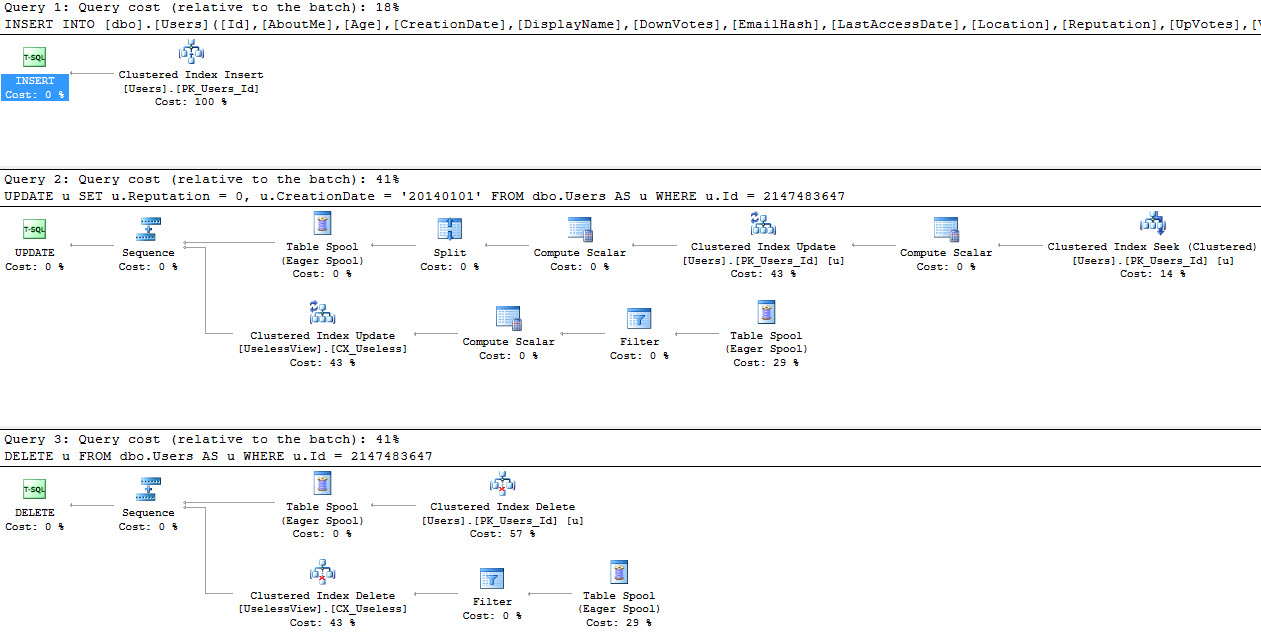
Let’s look at where SQL is smart first. This section is lovingly called “inserts”. Our indexed view is filtered on people with a Reputation higher than 1, and whose account was created in the year of our deterministic date, 2016. When we insert single rows in the table, which is how many OLTP apps work, SQL is able to figure out which data is going to require updating the indexed view index.

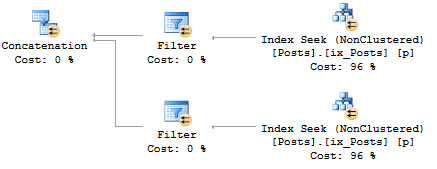
The execution plans for these are what we’d hope for. Where rows don’t qualify for our indexed view filter, it doesn’t touch the indexed view.

100%

Unfortunately

This doesn’t seem to extend to updates and deletes. If we insert a single row that doesn’t qualify for our indexed view filter, then update it so it really doesn’t qualify, and then delete the rows, SQL turns into a big dumb dumb.

Oh, get out.

You did so much extra work.

Now, I know. That’s not really fair. We’re just updating and deleting based on the ID, and while it’s reasonable to think SQL might keep track of what’s in the indexed view, or that it might just check the indexed view and then discard the unnecessary operators, it doesn’t. In fact, even if we give the optimizer some extra help, it only kind of works.

Let’s be explicit about the fact that this row couldn’t ever possibly be in the indexed view.

Two out of three ain’t bad. The insert and the delete get it. The update is still being a big dummy. I’m not calling update plans easy to implement; I’ve read Conor’s chapter more than a few times. Updates are hard. In this case, though, roughly 72% of the plan cost is invested in the indexed view nodes of the plan.

Why, update? Why?

I think this is weird, too

It’s certainly not what I expected to happen when I first decided to test this out. To be fair, I didn’t invest much time in trying to find a workaround for the update plan. Frankly, you shouldn’t have to. I did try changing the WHERE clause to lower values, and direct equality comparisons, but nothing changed the plan.

Thanks for reading!


No seriously, don’t use SQL_VARIANT for that

Development, T-SQL
13 Comments

I’d been meaning to write this for a while

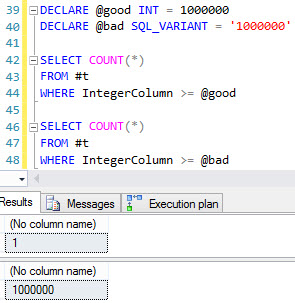
I half-stumbled on the weirdness around SQL_VARIANT a while back while writing another post about implicit conversion. What I didn’t get into at the time is that it can give you incorrect results.

When I see people using SQL_VARIANT, it’s often in dynamic SQL, when they don’t know what someone will pass in, or what they’ll compare it to. One issue with that is you’ll have to enclose most things in single quotes, in case a string or date is passed in. Ever try to hand SQL those without quotes? Bad news bears. You don’t get very far.

That can cause some issues with integers. Heck, even if you don’t quote them, you run into performance trouble.

Enjoy the free-of-charge code and picture show below.

No words

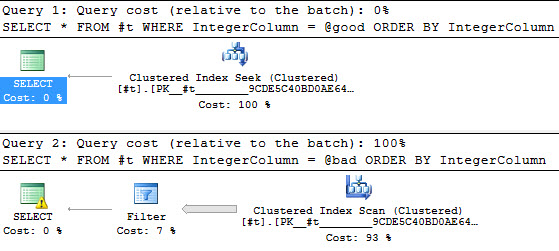
Right but bad

Typical implicit conversion

Wrong and bad

Binary
Let’s call the whole thing off

Convincing

This is a bad idea and you shouldn’t do it. If you use this in any of your code, you could have a whole lot of wrong results going back to users.

Thanks for reading!

Brent says: O_O


Why Cost Threshold For Parallelism Shouldn’t Be Set To 5

CURRENT_YEAR()

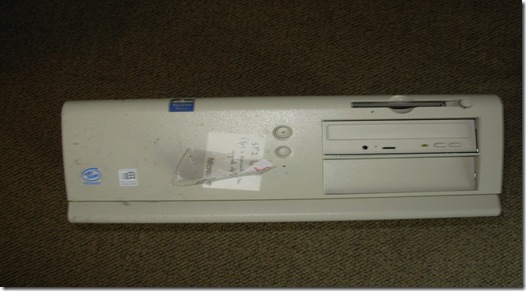
Here it is, 2017. A full 20 years since SQL Server 7. Back then, there was a developer named Nick. Nick was on the development team, and apparently the query-costing-magic development was done on his machine. All of it. The magical metric was that for every second a query ran, it would cost another query buck. If a query ran for 5 seconds, meaning it cost 5 query bucks, the optimizer would start examining parallel plans.

These query bucks still exist today, but due to massive inflation, they are no longer worth the same amount. In the words of Joe McGrath “See this quarter? It used to be a nickel.”

They’re still a valuable reference metric, but they are, even for actual plans, still an estimated cost. Pay attention to them. Pay attention to the fact that THEY DON’T MEAN SECONDS ANYMORE.

The thinking, of course, is that if you gave a query more cores and more threads, it would run faster. If you give it another core, 2x faster. If you give it four cores, 4x faster. The math behind this was done by a guy named Gene Amdahl. I didn’t know anything about Gene Amdahl until Adam Machanic talked about him, and that’s still as much as I know about him.

This story is corroborated, at least in part, by a Conor Cunningham talk at SQLBits. There’s another blog with the picture of Nick’s computer.

For posterity

Your server

I’ve seen your servers. I’ve made fun of your servers. I built a home server just so I could make more fun of your servers.

Despite all that, I’m willing to allow that your server, even if it was built special for 2008R2, is better than Nick’s computer. I mean, my cell phone is better than your server, but still.

So why is it that you’d want to use 1997 settings on present day hardware?

Tiny Queries

Small queries, let’s say with a cost under 50, typically don’t see any stunning improvements when comparing parallel vs. serial execution. They may even degrade slightly just because of the startup and computational overhead of going parallel.

But the real stinker is something I’ve talked about a couple times before. You can actually harm concurrency and force yourself into some nasty THREADPOOL situations if you don’t control parallelism. Parallel queries use more threads. Your server has a finite number of threads. When every little query is going parallel, you run out of threads faster. When you run out of threads, no one is happy. It’s like running out of toilet paper. People start getting anxious.

You can also run into situations where, when many queries start going parallel, one of many threads may get blocked, or held up, and then SOS_SCHEDULER_YIELD kicks in. That’s SQL telling your query it’s time to take a break and let someone else try to run. If your server has long average waits on CXPACKET or SOS_SCHEDULER_YIELD, you can bet your bottom query buck that CPU contention is occurring.

This is beyond Cost Threshold, though it’s important to start here. Usually 50 is a decent number, but you can go up or down based on your workload. You’ll also want to set MAXDOP appropriately.

After that, it’s all sorts of nasty query and index tuning to get things under control.

You should call a professional for that.

Brent says: this is one of those areas where I wish Microsoft would publish better guidance (if they won’t flat out change the defaults). 5 is clearly wrong today, and I’m kinda surprised that they haven’t gathered better evidence from Azure SQL DB and 2016’s phone-home defaults.


[Video] Office Hours 2017/03/08 (With Transcriptions)

This week, Erik and Richie discuss creating/updating statistics, tools for viewing large flat file tables, the worst code they have ever seen, high disk queue length, dealing with databases that store blobs, reindexing jobs, transparent data encryption, and more.

Here’s the video on YouTube:

You can register to attend next week’s Office Hours, or subscribe to our podcast to listen on the go.

Enjoy the Podcast?

Don’t miss an episode, subscribe via iTunes, Stitcher or RSS.
Leave us a review in iTunes

Office Hours Webcast – 2017-03-08


How should I configure max server memory with 512GB RAM?

Erik Darling: Clark asks—I’m not going to try to pronounce that last name, I’m just going to call you Clark Ginger. “I’m configuring a SQL Server 2016 64 Enterprise instance.” His previous DBA, the guy who presumably he took over for, left this value set to 256 gigabytes on a server that has 512 gigabytes installed. What would I set it to? It would depend on a couple few things that you take into account when you’re setting max memory on a server. If you have goofy other services installed on there, like SSIS, AS, or RS, you might need to bump SQL Server’s memory down a little bit to accommodate those. If you have multiple instances on there, you may need to bump it down to accommodate those. If you have a failover cluster, where it is active active and you might need to have another SQL Server instance failover to that node, I would probably set it a little bit lower. But if it’s a standalone or if it’s never going to have any company on there, I would probably set that to about 475 or 480 gigs to start and just kind of see how things go. Usually when you have a server with that much memory on it, you’re trying to account for a fair amount of data. So when you run CHECKDB and other tasks that get pretty big memory grants and require a lot of memory to run, you can end up in some trouble if you set max memory too high. I had a failover cluster that would fail every weekend when CHECKDB ran on a four and a half terabyte database, really just setting max memory down a little bit lower to 480 solved it. It was set to 500 before that.

Richie Rump: We could have fun with this, right? You could say, “Roll 25 d20 and add it up and then that could be your max number.” Because that sounds about what this guy did. It’s totally random. 256 because…?

Erik Darling: Well, it’s half. It’s exactly half.

Richie Rump: But why?

Erik Darling: I don’t know. I wasn’t there. I didn’t ask him. If I was there, I would have had questions.

Richie Rump: I still like my d20 idea.

Erik Darling: Your d20 idea is not wrong. It’s just he had a pretty good roll I would say.


Should I update statistics if I’m doing index rebuilds?

Erik Darling: Here’s a funny question. Alex asks, “If we have enabled auto create statistics for a database and are doing index rebuilds, do we need an additional SQL agent job to create statistics for a database or is it okay to allow SQL Server to take full responsibility?” Okay, so here’s the thing. When you auto create statistics that just means that if you have a column that’s not the left-most lead column in the key of an index, whether it’s clustered or non-clustered or whatever else, that means if you run a query where you want to look at that column but it’s not in an index like that, SQL will generate a separate statistics object that’s just a histogram on that column by itself. So if your where clause is like “select blah blah from table where unindexed column equals something or greater than/less than something,” SQL will usually go ahead and create some statistics on that column so it can make a better guess about what that where clause is going to produce. So you don’t have to go and automatically create statistics based on that. You are probably going to want to have an update statistics job and you’re probably going to want to scale that rebuild stuff back a little bit because this—I don’t know if you know this but you’ve wondered into sort of a wasp nest of anti-index rebuild sentiment with Brent Ozar Unlimited. We prefer update statistics jobs to index rebuilds because index rebuilds, as the great Michael J. Swart says are a tremendously expensive way to update statistics. I would just mention that offhand.

Richie Rump: Yeah, and I don’t think there’s anything to worry about having SQL Server control the statistics creation or anything like that.

Erik Darling: Nope.

Richie Rump: I think that only a handful of times in my career I’ve actually had to create statistics on a column or multiple columns or something.

Erik Darling: Yeah, and it’s always some weird kind of statistics, like multi-column or filtered. It’s never been like, “Oh, I just need a statistic.” Unless it was like something weird with an index view where it was not doing its job.

Richie Rump: Yeah, that’s exactly right.


Should I turn on remote admin connections?

Erik Darling: “SQL 2012 sp_configure remote admin connections 1. Do you recommend having this on by default?” Yes, absolutely. That is the remote DAC. That is your VIP entrance, your lifeline to SQL Server. If you ever can’t connect via more traditional methods like Management Studio or RDP or the application. Go in there, run sp_whoisactive a whole bunch of times and see what’s going on. So, yeah, turn that thing on. Unless you have some crazy security concern.

Richie Rump: We should have like different names for all these different features. Like, that’s the “velvet rope.”

Erik Darling: Yeah, right? It is the “bouncer.”


What should I do about MAXDOP 1 problems?

Erik Darling: David asks, “I have taken over for a server.” Well, there’s your problem. You’re not a server. You’re a human being, you silly goose. “I see that MAXDOP has been set to one. I have tried anything over one and the server just locks up. What would be your first move to troubleshoot this? Cost threshold is set to 100.” Geez Louise. Sounds like you have some CPU issues over there. See, that’s one of those things where I would need to know a lot more, like how many CPUs and cores you actually have in there and what kind of application you have in there. Is that SharePoint?

Richie Rump: That’s it. What’s your app? That’s the big question.

Erik Darling: If it’s SharePoint or one of those other dingdong applications, you have to leave MAXDOP set to one or else they just go all … on you. So I’d just be careful with that. Setting cost threshold to 100 doesn’t matter if you have MAXDOP set to one. A query could cost a billion query bucks and it wouldn’t go parallel.

Richie Rump: I do have a special name for SharePoint at that’s SharePoint-less because that’s what I feel like when I deal with it.

Erik Darling: My daughter would call it SharePoop. So that’s that.


Can you blog about Kerberos double hops?

Erik Darling: Brian asks, “How often have you had to deal with Kerberos authentication issues?” Double hop stuff. No? Okay. Yes, please blog about it and shoot us or me an email when you have completed that blog because if I find it to be of value, I will send people to it constantly if they ask me other Kerberos authentication questions. I’ll send them there blindly too. Like all I have to do is here the word “Kerberos” and I’ll go, “Oh, this blog post…” Same way I do with most other things. “Oh, this is blog post…”

Richie Rump: So here’s a nice comment. “I should not have done shrooms before this webinar.”

Erik Darling: Me either.

Richie Rump: I’m just wearing one.

Erik Darling: Richie looks like stained glass. It’s weird. I keep thinking it’s my glasses.


What do people think about your tattoos?

Erik Darling: Clark asks a non-SQL Server question. “When you tell people what you do for a living and you say it’s a nerd-related activity, do they do a triple take with my tattoos?” No. Because usually the only people who ask me what I do for a living are doctors and I’m already in their office because I have nerd sinuses so they are not surprised at all. When they find out I work with computers they’re like, “Oh, geek. Good job.” It’s like, “Yes, you’re here because you have a double XL nose that you somehow can’t breathe out of.”

[Richie Laughs]

Erik Darling: A vacuum cleaner attached to your face and you can’t breathe for some reason. So, there we go.

Richie Rump: What does he look like he does? I mean seriously.

Erik Darling: I dress like a bouncer so I get it.

Richie Rump: “I drive a subway train, man, you know?” It’s like the worst Uber driver ever. It’s like you don’t want to get into Erik’s car.

Erik Darling: No. I wouldn’t because I don’t have a license. Whatever car I’m in is stolen. It’s not a good sign for you.

Richie Rump: [Laughs] I’m so sorry. I’ve gone totally off the rails here.

Erik Darling: That’s all right. There’s not that many questions anyway. Just kidding.


How should I open large flat files?

Erik Darling: J.H. asks if we know of any free tools to download to view large flat file tables, like greater than 8 gigs since Notepad and other common ones are unable to open. What do you use, Richie?

Richie Rump: It’s been such a long time since I had to do that. Umm.

Erik Darling: I’m going to throw out something weird.

Richie Rump: I can’t think of anything off the top of my head. There was a couple special tools that I needed because I was doing large data loads and things like that but I can’t think of them off the top of my head because I haven’t had to do things like that in such a long time because, well, we live in 2017 and these large files, they don’t exist. We just have, you know, a billion of them now as opposed to having one large file.

Erik Darling: Sometimes. This guy apparently, J.H., doesn’t. So, J.H., what I would do, and I only know this because I have opened the Stack Overflow database with it, is a hex editor called HxD can open up large flat files. You’ll have to deal with like the hex stuff in there as well but you’ll be able to look at other stuff. It’s free to download as long as you’re on Windows I guess. I never tried to download it for a Mac.

Richie Rump: Yeah, that’s my hex editor of choice actually.

Erik Darling: Yeah, it’s a nice one. I like that one. I just like the logo for it.


Will hardware ever be able to beat bad code?

Erik Darling: Let’s go on down here. Guillermo Garcia asks, “Will hardware technology ever get fast enough that SQL performance issues are no longer a thing even with bad code, bad indexing, and everything else?” No. The thing about hardware is that it just responds. So you could write a terrible query and the hardware will respond to that terrible query. That terrible query will use so much of that hardware that other things will just start going wonky. The other thing is that data just keeps getting bigger too. So you know, at some point, sure, if you have like a tiny little, dingy little tables, a little 8-gig database or something, you could probably stick that on a S7 or iPhone and get pretty okay performance out of it. But, you know, if you have genuinely large data workloads, hardware is never going to make it so that you don’t have to do any work. But, interestingly, Microsoft is working on some stuff that was, they started talking about it at PASS. One of those things was adaptive query plans where the optimize will start responding to feedback from query execution and change things in flight. Oracle has been doing it for years, which is awesome. Oracle has got the adaptive query thing down flat. So if you can imagine like where SQL, some parameter sniffing issue, SQL selects a crappy little nested loops join plan and then halfway through they realize that there’s about five million more rows in play than they estimated, and it will switch that over to a merge or a hash join or something else more appropriate.

Richie Rump: So it’s no longer going to say, “Hey, you have a trillion rows in this query” when you only have like 100?

Erik Darling: No, it’s still going to say that. It’s just in flight it’s going to say, “Oh, we made a mistake. We’ll do something else instead. We don’t need a 250 gig memory grant. We can just take a couple gigs and do that.”

Richie Rump: Give it all the memory. Give it it all.

Erik Darling: Yeah. I mean you can certainly cover up a lot of developer sins and indexing laziness and bad code crap with hardware but it’s never a replacement. It’s just a band-aid or bandage. What’s the worst code you’ve ever seen written?

Richie Rump: Who, me?

Erik Darling: Yeah, what’s like the crappiest code you’ve ever seen?
Richie Rump: Usually they’re written by DBAs. I can’t think of anything off the top of my head but I’ve seen some pretty crappy stuff.

Erik Darling: Like queries or like tasks?

Richie Rump: Queries.

Erik Darling: Okay.

Richie Rump: Tasks are pretty simple, right? It’s usually because DBAs aren’t used to diving into data.

Erik Darling: True.

Richie Rump: At least a lot of the ones that I’ve dealt with because they’re DBAs, right?

Erik Darling: Right.

Richie Rump: Hardware and backups and all this other stuff. But, when you’re digging in really deep into this stuff, especially large datasets, things just kind of blow up.

Erik Darling: I’m with you. I’ve met several DBAs who can barely write a select query. Like they’ll get the order of like from and where and group by wrong regularly. Like they’ll just mess that up. But, you know, they can do all sorts of cool stuff with their high availability and backups and all that but when it comes to a simple query they’re like, “Where do you join?” I’m like…


How should I learn PowerShell?

Richie Rump: All right. You got the next question because for some reason I have to let my wife in the house.

Erik Darling: Oh, okay. Well, I’m not going to wait for you then. “You may have answered this question before, how do you learn PowerShell on self-pace, like books, videos you recommend?” I don’t know. I never really learned PowerShell all that well. I messed with it a little bit to get familiar enough to do a few things but I didn’t like learn PowerShell. Mike Fal, F-A-L, is a great blogger. He writes a lot about PowerShell. If you want to look at some cool PowerShell code, PowerShell DBA Tools has some good—well I guess good PowerShell code there. I don’t know if you’d call it good regular code. Then, I want to say that a while back there was a learn PowerShell in a month of lunches, or something like that, that had a pretty good explanation of stuff. Also, there’s like some PowerShell newsletter that I used to get that would send out like pdfs with all different PowerShell topics on it. Anyway, Richie is back. So I can stop with my fluff answers.


Did you have clients affected by the Microsoft account outage?

Erik Darling: Michael asks, “Did either of you have any clients affected by the Microsoft account outage?” No. I didn’t.

Richie Rump: Oh, yeah, that’s…

Erik Darling: It happened. I don’t think we had anyone affected by it, at least no one that bothered us.

Richie Rump: But, but, we were affected with the S3 outage.

Erik Darling: That’s true.

Richie Rump: That wasn’t fun. Oh, and by the way, as soon as it went down, I mean as soon as it went down, I saw right away because things started failing. Then I had all these other people that I know started messaging me, saying, “Is S3 down? Is S3 down?” I’m like, am I Amazon?

Erik Darling: You’re the website. You’re “Is S3 down Richie.”

Richie Rump: What? But Paste the Plan never went down. Never went down. Amazing.


Is my high disk queue length a problem?

Erik Darling: Eric asks—not me, some guy who spells Erik wrong—“My SAN admin said he is seeing high disk queue length and he is blaming SQL Servers. Can I trust my perfmon counters, etcetera etcetera.” I would ask him what problem high disk queue length is causing for him other than it being on a graph somewhere. I’d want to know what about disk queue length he thinks was an issue for him and what’s going on with that.


How should I store BLOBs in the database?

Erik Darling: Guillermo asks another good question. Here we go. “What’s your strategy dealing with databases that store BLOBs? Do you move BLOB data files to a storage different than your regular data files are? I feel like they just waste disk space which is optimized for regular data pages.” I feel like you’re right. Richie, do you have any input on the BLOB question?

Richie Rump: Yeah, somewhere in the mid-90s I think I put BLOBs in databases and learned that was not very good idea. They’re there. They take up space. You’re absolutely right.

Erik Darling: But we need to edit pdfs in SQL. [Laughs]
Richie Rump: I know. And then getting them in and out becomes a problem as well. So definitely store them on disk and then access them that way. Actually, I did a test not so long ago about putting BLOBs in DynamoDB, which ended up working. It worked fine.

Erik Darling: Really.

Richie Rump: But then you pay for the storage costs associated with DynamoDB. I’m like, “Do I want to pay more for that storage or should I just pay less and put it in S3?”

Erik Darling: That’s a very good question.

Richie Rump: So we just put a link to S3 there. We read that, go get it, and Paste the Plan gets that stuff from S3.

Erik Darling: That’s a good idea. There’s a post that Jeremiah wrote when he was still hanging out with us about getting BLOBs out of the database that I’ve always found pretty good about that. My take on it is that you should just store a path to the file in the database and then get that file some other way.

Richie Rump: Yep.

Erik Darling: Don’t make SQL Server store your GIFs.

Richie Rump: If you’re really paranoid about, “What about my file? What if someone deletes it?” Then right a process every night that reads it all and just figures it out if it’s there or not. If you’re paranoid. Some of us aren’t that paranoid. Who cares if it’s there or not.

Erik Darling: Especially about BLOBs. Like unless you’re dealing with like really sensitive financial or government or like you know other documents that you need to have complete consistency on.


How much space do index rebuilds need?

Erik Darling: J.H. asks another banger of a question. “When preparing to allocate enough space for a reindexing job is it correct that it will need the same size space as its current index used size?” Are you talking about the data file or the log file? The data file I just store it in tempdb anyway. Then for the log file, I usually say about one and a half times the size of your largest index. That’s only because you need to accommodate that largest index and you might have other stuff going on at the same time, so I’d just give myself a little bit of slack on that.


Does CHECKDB slow down query activity?

Erik Darling: “Does CHECKDB affect performance on a high-volume database?” It affects performance on just about any database. It’s an intense task, even if you do physical only. It takes up CPU and memory and it reads everything from disk and it does a whole bunch of crap. Yes, so the answer is, yes, absolutely. This is why a lot of people choose to offload CHECKDB so they don’t have to deal with it affecting their transactional data.


How much memory does my SQL Server need?

Richie Rump: I see a good one somewhere there.

Erik Darling: Yeah? Which one? You go ahead and read one.

Richie Rump: I will read one. But that’s it, Erik. I’ve had enough.

Erik Darling: All right.

Richie Rump: “VM architect won’t give me more than 16 gigabytes of RAM. Our db is over 150 gigabytes, four core, 2014 Standard. What do you say of that?” You know what has more RAM? My phone! You want to put SQL Server on this?

Erik Darling: I mean my laptop has 32 gigs of RAM in it. The desktop that sits at my feet like an obedient dog has 128 gigs of RAM in it. Your VM architect—I don’t know where he got that title from. He won’t give you more than 16 gigs.

Richie Rump: My tablet has 16 gigs of RAM. My tablet.

Erik Darling: Yeah, so I would just avoid him at all costs. He doesn’t sound like a terrifically bright individual.

Richie Rump: And it’s really not a question of going physical. It’s a question of this guy needs to get a clue about what SQL Server needs and how it performs. It sounds like you’re going to need to do a little bit of education on him, or his superior, to get the RAM that you need. Some basic education needs to happen to understand that everything SQL Server needs it needs to put in memory first. And every time you have too little, then it’s doing a lot of this swapping all over the place and that slows everything down.

Erik Darling: Brent has a great post called “The Sysadmin’s Guide to SQL Server Memory.” I’ll grab the link on that but that’s where I would point him to. So even though he is a VM architect, even though he I guess went to art school or something, and learned how to be an architect, he might be part sysadmin underneath so I would send him to that link and say, “Hey, before I have to start punching you, please give me more memory.” That’s fun.


Are page splits causing my performance issues?

Erik Darling: All right. We have a few minutes left, let’s see here. “Are page splits causing performance issues?” No. No, they’re not.


Can I claim my conference expenses on a tax return?

Erik Darling: “I know this is not a financial advising session. My company is not paying for training or conferences. I am willing to pay out of pocket. If I pay myself, can I claim my expenses on a tax return?” I don’t know. I would just get a new job. I think it would be less painful to get a new job than to deal with the IRS on that.

Richie Rump: You could. I think you can claim that. I’m not sure if you need to create your own organization or not because I always kind of had my side thing going down, so everything was kind of funneled through that if I paid for anything. So talk to an accountant. Unfortunately, we don’t do accounting talk here because we’re not accountants. But your tax professional will have an answer for you.


Does an explicit transaction lock differently?

Erik Darling: Michael asks—Michael tried to sneak this one in via email and since he’s a diligent attendee I’ll let him get in the last question on this one. He wants to know, “We’re trying to debug a deadlock that happened on a couple delete queries,” then got off on a tangent about if there’s a difference about the way locks escalate if you declare an explicit transaction within your stored proc or whether the default auto commit works the same way. “Does an explicit transaction have a higher lock mode? Does it do anything other than give you a mechanism to handle the role back?” Not in my experience. How about you, Richie?

Richie Rump: Not that I know of.

Erik Darling: Yeah.

Richie Rump: I really haven’t messed with it that much. I’ll plead ignorance here.

Erik Darling: Yeah, so, I guess what I’ve observed, I wouldn’t take this as biblical truth. This would be a pretty good question for Stack Exchange but I’ll just give you a little bit of what I’ve observed, is that, no, the only thing that declaring a transaction buys you, especially if it’s a named transaction is the ability to a) see in the transaction log where stuff happened if you name it and b) you can do the commit or rollback or do some error handling within it. Other than that though, I’ve never seen a lock escalation or lock duration difference unless someone forgets to commit or rollback a transaction. In which case, all heck could break lose. As long as you put the begin tran and the rollback are committed in the same place that it would happen automatically. I don’t think that would have a different outcome in it.


Do you like Transparent Data Encryption?

Richie Rump: I think we could go one more because we started late.

Erik Darling: Yeah? Okay.

Richie Rump: I have one last one.

Erik Darling: Okay.

Richie Rump: It will probably fit right within the one minute we have left. “We have several clients asking about encrypted data at rest. Any experience/comments on transparent data encryption or any other approaches you have seen success with?”

Erik Darling: Are you asking me? Or did you have a good answer for that?

Richie Rump: No, I’m asking you, dude. You’re the database expert.

Erik Darling: I am. Oh my god, I always forget. So TDE, it’s interesting, but it only encrypts data at rest. It does not encrypt data at flight. So it takes a whole lot of software engineering work to have end-to-end encrypted data. It also, prior to 2016, breaks a few cool things like instant file initialization and whatnot. So, that’s what you get out of TDE.

Richie Rump: TDE does do the encryption. I’ve used TDE, not from an admin perspective. It works but there are gotchas around the certificate and the encryption keys and all this other stuff. When you do restores, before you implement it, you probably want to do some test restores because that becomes more complex as well.

Erik Darling: Any high availability, mirroring, log shipping, availability groups, those all get weird with TDE. You better make all sorts of concessions. Well not concessions, you just have to plan for it.

Richie Rump: That’s exactly right. I’ve seen it work. It adds additional overhead to your CPU usage as well.

Erik Darling: Takes a while to happen depending on the size of the database.

Richie Rump: Yeah, and I’ve seen large databases have it, multi-terabyte databases have TDE there, but you need to do your own testing on it. Your situation is unique. Your experiences are unique. I would say go in to a test environment. Start running some tests, see the gotchas. Do your restores. Run some load tests. Do some perf on it. See if it will work in your environment.

Erik Darling: Yeah. Sounds good to me. Also, you know, just be aware if you’re on a version of SQL prior to 2016 and you’re compressing your backups, that’s going to stop working too. So all sorts of fun stuff in there. You can still like do row or page compression if you’re still into doing that.

Richie Rump: Yeah, but it is important because when you do your backups, that data is not encrypted.

Erik Darling: I mean, they do have encrypted backups.

Richie Rump: Yes.

Erik Darling: Which is …

Richie Rump: How many of us are actually doing that, really?

Erik Darling: Zero percent. I did a demo of it once for a client because they wanted and you can do it with Ola Hallengren scripts. I’m sure you could do it with MinionWare too, I’ve just never tried. But just to prove it worked I was like oh, I’ll do this. I hated every minute of it.

Richie Rump: Yeah, there’s a lot of hoops that you have to jump through through TDE, but if it is a requirement at your location then it’s in the box. Might as well use it. So there’s some benefits that are there but try it on your own. Start to get comfortable with it because there are some things there that are a little bit wonky, some things you thought worked kind of don’t work the same way when you turn on TDE.

Erik Darling: All right. I think we did a good job of making up for the fact we started a few minutes late.

Richie Rump: I think so too. Although we don’t look as pretty as Brent I think the two of us together equal like a quarter Brent.

Erik Darling: Maybe. Maybe if you like got on my shoulders.

Richie Rump: Yes, yes. Maybe you could have the coffee and I’ll have the Kind bar and we’ll be good.

Erik Darling: You know what, who gets the wine?

Richie Rump: We both get the wine.

Erik Darling: Okay. Oh wait, the coffee and wine combo.

Richie Rump: Coffee and wine combo but the question is are we splitting the wine case in the middle or is someone going to get a different bottle or whatever?

Erik Darling: You get the part of the bottle that has the cork in it and I’ll just take the part that has the wine.

Richie Rump: Well I would give you a couple extra bottles because I want to keep your wife happy because I know she’ll probably drink most of it.

Erik Darling: Yeah, usually. I mean, she has to put up with me, so all alcohol is welcome. All right, anyway. Thank you all for attending and listening to me and Richie babble incessantly. I’m going to go refill my coffee and try to get the rest of this optimum nutrition off my shirt. Thanks, guys and gals. Catch you next week.


[Video] Office Hours 2017/03/01 (With Transcriptions)

This week, Brent and Tara discuss Always On failure scenarios, partitioning without consulting vendors, multi-subnet clustering with AGs, licensing, long running queries, replication, improving index maintenance, avoiding deadlocks, index space usage, and much more.

Here’s the video on YouTube:

You can register to attend next week’s Office Hours, or subscribe to our podcast to listen on the go.

Enjoy the Podcast?

Don’t miss an episode, subscribe via iTunes, Stitcher or RSS.
Leave us a review in iTunes

Office Hours Webcast – 2017-03-01


Should you mess with AG preferred/possible owners?

Brent Ozar: We’ll go ahead and start tackling some of the questions here. Richard Seltzer asks, “I’ve read that you shouldn’t mess with preferred and possible owners for availability group roles in Failover Cluster Manager since SQL Server dynamically sets those. But what about the failover and failback settings like max number of failovers per period, prevent and allow failback? Can I set those other than the default? If so, what should I set them to?” Have you ever touched those?

Tara Kizer: I don’t really touch anything in Failover Cluster Manager if it’s an availability group. All of my config goes into the availability group in Management Studio or T-SQL commands. But Failover Cluster Manager, I can’t really think of anything except for checking the status of say the listener, that type of thing. Just be looking for red/green type stuff.

Brent Ozar: I get where you’re going with the prevent/allow failback stuff, Richard, but yeah, I would never touch those either. Failbacks aren’t going to happen automatically anyway. Once an AG is running on a node, it’s just going to keep running on a node. It’s not going to come back, by default, as soon as the primary owner comes back up. I can’t think of a scenario where I’d want to touch those. That’s a really good question for Stack Exchange though. If you go to dba.stackexhange.com and post that, because I bet people do have reasons for changing it. I just can’t think of any where I’d want to change away from the defaults.


How should I configure a 22-core processor?

Brent Ozar: Kyle says, “We have a server with one specific Xeon processor. It has 22 cores and 44 threads.” He has hyperthreading turned on. Dude, I don’t know if you’re trying to set some kind of licensing record on how much you pay for a single processor, but that is a lot of freaking money. “This also means that there’s 11 cores per NUMA node. Sp_Blitz reports that node zero has 11 cores. This is a really bad NUMA configuration. This is how the chips should be [inaudible]. Should we be concerned?” I would not run SQL Server on that. At Enterprise Edition, that’s $7,000 a core. Standard Edition, it’s $2,000 a core. But either way, that is a ton of licensing. If you really need that many CPU cores, you probably need more than one socket. I’d rather have multiple sockets broken up that way. I would want to know more about what the chip choice was with that.


What’s faster: triggers or doing the work separately?

Brent Ozar: Next up, J.H. says, “Would performance be the same if I created after insert triggers dumping into a history table or as opposed to having my T-SQL insert statement process that?” He says, “I’m doing it like 100 times a day, what’s the best way to capture changes with a trigger or by changing my code?” J.H., my thing is if it’s only 100 inserts per day, it shouldn’t be that much of a bottleneck. That’s only four times and hour, five times an hour. If shouldn’t be too bad. If it’s only run that often, I’m kind of okay with it being in a trigger just because that way it’s only one place to change the logic and you’re done. If it’s 100 times a second, then things start to get more interesting. But at 100 times a day, don’t worry about it.


Where can I learn about Availability Group failures?

Brent Ozar: Brian says, “I haven’t made it through the Always On Availability Groups in the HA/DR module on your site.” Well get to work, Brian. Come on. What are you doing? “I wanted to ask if you could recommend a site that would have a compilation of various Always On failure scenarios.” Oh, what a great question. Stack Exchange. Go to dba.stackexchange.com. Search for AlwaysOn—one word, no spaces—grammatically incorrect but that’s how they tag it over there. You will find a spectacular amount of failure scenarios there.

Tara Kizer: I attended a session in PASS 2014, I forget who it was but it was someone from Microsoft put it on that went over the most common issues and what the resolutions were and how to monitor. It was really a nice session. I think that he said that it was supposed to be like a half-day session because there’s just so many problems but he condensed it to the most common ones and had an hour session of it.

Brent Ozar: Man, if any of you ever get the chance to go to major conferences and you get the chance to see someone at Microsoft present about Always On Availability Groups, I would totally do it. They have a lot of really good presenters, and a lot of really good presentations too.


What’s a cheap place to play with the cloud?

Brent Ozar: Brian asks another question. “Is there a good, cheap place for developers to work with cloud-based Windows virtualization, such as Google Cloud or Azure?” The catch with machines up in the cloud is that there’s no difference between production and development, it’s the same price essentially to the provider whether you’re using it for production work or development. So when you talk about cheap stuff in the cloud, that gets a little bit trickier. What you could play with if you just want to experiment with someone else’s VM is search for the Microsoft Virtual Labs. Microsoft has a bunch of VMs that you can spin up and use for—I want to say it’s like two hours at a time. They’re free. You can’t copy/paste. There’s some other limitations, yada yada yada.


Can I partition a 3rd party vendor’s database?

Brent Ozar: Guillermo asks, “Have you ever partitioned a table in a third-party vendor app without consulting the vendor about it first? Are there any possible issues with implementing partitioning without breaking the app?” Tara, is that something that you would go do?

Tara Kizer: Never. The most I do in vendor databases is maybe create indexes, update statistics, that type of stuff. But, yeah, I don’t touch things because a lot of times it’s going to violate your contract and if they see that you’ve messed with things, that could cause some problems for you. What are you trying to solve though? Is it for performance or are you just trying to get rid of data easier, faster? Wonder what you’re trying to solve here.
Brent Ozar: You can totally break apps by doing that, absolutely. Man, I’ve done stuff like that, even just adding an index I broke somebody’s app because they did a deployment script and they were renaming things, renaming indexes and they chose an index name that happened to be the same as what I was using…

Tara Kizer: Oh, geez.

Brent Ozar: And the script broke. It was a bad day.


How do you feel about multi-subnet AGs?

Brent Ozar: Robert asks, “How do you feel…” Wonderful. “…about multi-subnet clustering with AGs? I have one machine in one location and another machine in another subnet.” Tara, how do you feel about that?

Tara Kizer: Love it.

Brent Ozar: Love it, yes.

Tara Kizer: I love everything about availability groups. At the companies I’ve worked with, they’ve all had disaster recovery requirements so when we deployed availability groups all of our availability groups were multi-subnet configurations. The only issue is maybe legacy applications can’t use the multi-subnet failover equal true connection parameter. So you want to make sure you have database drivers that can, otherwise you might have issues connecting at times, you get 50 percent failure rate. There are some ways to work around it. My last client was able to work around that issue because they had a lot—I think like hundreds of legacy applications. One of the workarounds did work for them. As I was talking to them, I said, “None of these workarounds worked at my previous companies.” They’re like, “Oh, it worked for us.” I was like, “Oh, finally a success on one of those workarounds.” We tried them all.

Brent Ozar: He says, “Is the main pain point for it the network setup and possible latency between the sites if it’s not done right?” What would you describe as like pain points that you would worry about?

Tara Kizer: I don’t really have any pain points with the multi-subnet configuration. As long as your application can use that connection parameter. It’s only going to connect to the active site anyway. You’ll have two IP addresses and only one of those IP addresses will be active. So there isn’t a performance issue. There isn’t a performance issue between the two. However, if you set up your replicas to be synchronous across to your other site, now that’s where performance can certainly have problems due to the network latency, but that’s not really relevant to the multi-subnet configuration question. It’s related but, not relevant.

Brent Ozar: Did you guys use synchronous replication between multiple subnets or did you just use it for async, like DR type stuff?

Tara Kizer: Almost entirely it was all synchronous at the primary site and then asynchronous to another site. However, there was one application that we were able to get away with synchronous between the primary and the DR site. Which were probably like 200, 300 miles away. That’s because that system, that application had such low throughput it didn’t matter, very, very small transactions. And the network latency, whatever it is, 15 milliseconds, just wasn’t noticeable enough. So we wanted to limit how many replicas we had. So it made sense for that specific database to be synchronous across sites. Other than that, synchronous is terrible. You want to stay away from that if performance matters.

Brent Ozar: Yes.


Can I use Developer Edition to verify my backups?

Brent Ozar: Reece says, “We’re finally setting up backup and restores to a new database server for verifying them. We should have done this a long time ago. If the database is production, is it legal to restore them on a Developer Edition for the purpose of verification only or do we need to buy another Standard Edition license to be compliant?” This is tricky. What I would say is you should have a development server that you restore to everyday that your developers can go run queries and tests against it. Then that way, you’ve accomplished the goal that you’re looking to accomplish and it’s still just a Developer Edition server.

Tara Kizer: I was going to ask that question because I’ve been asking questions about this this week. I was wondering because I had systems were I restored a developer database because they needed access to production data and it could be older. So they developed against it and we ran CHECKDB there. I was like, “Was I supposed to license that with production licenses?” We did have msdn licenses for those developers, so they were covered there.

Brent Ozar: The trick is CHECKDB. As soon as you offload CHECKDB, if you’re not doing it in production, and you are doing it on this other server, then suddenly that’s magically much more like offloading production workload. That’s a little trickier.


Should I change auto create statistics for tempdb?

Brent Ozar: Tom says, “Is it a good idea to set auto create statistics to on for tempdb? I realize that it’s already defaulted to on for model, so we think tempdb gets these settings from model where it’s created each time it’s restarted.”

Tara Kizer: Yeah, I’ve never even changed tempdb setting like that. You noticed it from model, why aren’t you able to check it for tempdb? Just right click on the database and see is it on.

Brent Ozar: Yeah, it’s already on. It should be on. And is it a good idea to leave it on? Yes. Yeah.


How do I identify long-running queries in a data warehouse?

Brent Ozar: Bobby says, “We have a data warehouse on SQL Server 2008 R2 and [inaudible] are allowed to run ad hoc queries against it. When a query has been running for a long time, meaning hours, we can usually tune it. However, we don’t have a systematic approach to identifying long-running queries. Is there a low overhead way to gather the most long-running queries that users are running?”

Tara Kizer: Have you heard of us? We have the Blitzes. Use sp_BlitzCache to figure out what your long-running queries are. You can sort it by average duration, duration, average CPU, CPU, there’s all sorts of things you can sort the plan cache by and BlitzCache can help you do that work. It gives you all sorts of neat warnings that have been worked into it, the execution plan, so much wealth of data returned from BlitzCache. Use that. Also, use sp_BlitzIndex for help with adding high value missing indexes that maybe didn’t uncover by looking at execution plans.

Brent Ozar: You don’t have to install anything other than the stored procedure. Just works immediately. It makes you look like a rock star consultant. More like her, less like me.

Tara Kizer: And they’re very lightweight. On servers where we’re running it on, you won’t even notice a hit when these things are running. They may run for several minutes depending on how big your plan cache, the complexity of your execution plans are, but it’s not going to be a noticeable load added to your system while it’s running.

Brent Ozar: Ben says, “Tara sounds so proud, like it’s her new Blitz baby.”

Tara Kizer: Oh no, god, no. That’s not me.

Brent Ozar: That would be Erik Darling.

Tara Kizer: I one time modified code for sp_Blitz and it has probably been about three or four months. It’s like I don’t know if I ever want to do that again.

Brent Ozar: I am constantly amazed that people contribute code because sometimes I’ll go into a stored proc I haven’t seen for a while and I’m like, “Oh, god.”

Tara Kizer: You don’t even know where to go and you’re trying to follow the logic and…

Brent Ozar: It’s huge.

Tara Kizer: Then GitHub is just tough also.

Brent Ozar: Yes, yes. GitHub, it took me years to get used to GitHub. Jeremiah was always pushing that on me. I’m like, “No. It’s evil. It’s awful.”


What’s better: AG replication or transactional replication?

Brent Ozar: Mike asks a question that I think is custom written for Tara here. “We have heard that Always On replication is much better for replication than regular SQL replication. Is that the case and why?”

Tara Kizer: I’m confused by the question. Always On replication?

Brent Ozar: Well, when you choose between Always On and say transactional replication, which is better under which circumstances?

Tara Kizer: So they’re asking about a readable secondary as compared to using transactional replication? Okay. I mean, I prefer availability groups for readable secondary. So I supported transactional replication for years and years to offload select queries to another system to avoid blocking issues, even with RCSI in place we were having issues. So we offloaded work and when availability groups got announced and I realized it was going to be HA/DR plus readable secondaries, I was like, “Yes, finally.” My whole goal was to get rid of transactional replication. It was nice to also be able to consolidate the number of features we were using down to just one. So when you’ll use transactional replication as compared to readable secondary availability group, that’s going to be dependent upon if your reporting databases can be identical to your OLTP database, then you can use availability groups. If you need additional indexes added to your reporting database, you will have to add those to your OLTP database because it’s an exact copy of your database. Transactional replication, you can add objects, you can have different indexes. It could be hosting the database for another application and you’re just replicating the extra tables over to it. So it just depends on what that reporting database is going to look like. Can it be a copy of your production database or is it going to be different?


How do I prove I have a storage network problem?

Brent Ozar: Graham says, “We have SSDs that host the data and log files for our various servers. I think the SSD drives are overwhelming the 10 gig NICs on some of our servers. We’re experiencing query timeouts. But the server team isn’t convinced that it’s the NICs. What should I look at?” I’d just run a load test straight against from the SQL Server to those solid state drives. Run a load test and have your network team look at network utilization during that time. It should be very easy for them to monitor switch port utilization. Then if they say, “Oh, there’s more headroom, you could get more through it,” have them do more things, like give you more solid state drives to test against. Then you should be able to see that thing go up. Generally speaking, I don’t see switch port utilization monitoring done full time. It’s something that people only drop in periodically and go look at. I haven’t seen a lot of good monitoring apps that can trend that over time.

Tara Kizer: Just to add, he’s mentioning experiencing query timeouts and then going into all this SSD and network stuff. I was like, that’s not where I would be starting. I would be capturing activity via sp_WhoIsActive on a regular basis and then going back and looking at what queries did timeout. Maybe the ones that took 30 seconds, 31 seconds, whatever your application query timeout is and seeing what those queries were waiting on. Start logging activity every 30 seconds, every 60 seconds, maybe even more frequently so you can catch more. Just be careful with how much you’re going to be looking at and the retention of that. But I wouldn’t be looking at these things first. I would be looking at what are the queries waiting on. That’s going to tell me where I’m going to go next.


More about 3rd party database partitioning…

Brent Ozar: Guillermo asks a follow up to his partitioning question. He says, “Regarding third-party apps and partitioning their tables. The reason I asked is to improve index maintenance on very large tables.” So if you wanted to improve index maintenance, what would you do?

Tara Kizer: I would disable the jobs.

[Laughter]

I’d get rid of it. I would only be looking at really update statistics and does that help with table partitioning and how long is that taking? As far as index maintenance, what are you trying to prove? Are you trying to run it daily and have less locking? I just don’t think that index maintenance is too important. I’m of the opinion of maybe run it monthly, quarterly. Run update statistics daily but the other stuff less frequently, just isn’t really needed.

Brent Ozar: It’s one of those things where I notice people are like—you also have to know it’s in your transaction log. So you’re scrambling all this data doing all these writes. Even if you’re only doing a portion of the table, you’re still writing a ton of data there. If the table is big enough to be partitioned, you probably have years’ worth of history inside there, how much do you really want to go scrambling that data all the time?


More about triggers…

Brent Ozar: J.H. asks, “An add-on to my earlier trigger question. Would performance be the same if the inserts were much higher, like 100 times a second for triggers versus inserts?” This is where you just have to look at, for example, the logic that is going into the insert table, the transaction volume of other things hitting the same table at the same time. If my application is able to do the change in one statement and make a log to a logging history table, I might even say that logging history table may not even be in the same database or on the same server. I may have a really crappy history server where I go just dump things like logs that I’m not as urgent with. I have one client for example that goes to try to get 50,000 inserts per second into a table. So they do their inserts in one table and logging any changes that they do over in a totally separate environment. It’s not even SQL Server.


How do I avoid deadlocks?

Brent Ozar: Perkash says, “How do I avoid deadlocks due to a clustered index on a table? I have multiple sessions that are inserting records at the same time and I’m seeing deadlocks.” That’s kind of a trick question there.

Tara Kizer: Maybe the clustered index key needs to be changed so that you don’t have the hotspot? Because can’t an identity column—that has a hotspot. I know that we don’t really concern ourselves with hotspots as much, like on SQL Server 6.5, hotspot was like the thing we always talked about. But do we talk about that much anymore? I wonder what the key is on.

Brent Ozar: Yeah, well I would want to see the deadlock graphs. I have a hunch…

Tara Kizer: I don’t want to see that.

Brent Ozar: That’s a good point.

Tara Kizer: I can’t read those darn things.

Brent Ozar: Neither of us really want to see it.

Tara Kizer: Send it to Jonathan Kehayias. He loves looking at those things.

Brent Ozar: Yes. Post it at—I want to say it’s sqlserverperformance.com or is it sqlperformance.com? Kehayias answers questions on there. You can include the deadlock graphs. I have a very strong hunch that there’s other tables involved or other indexes involved in that, not just the clustered index.


How do I learn more about resource semaphore waits?

Brent Ozar: Ben says, “I’m looking for good ways to investigate resource semaphore waits.” Also, he wants to know if there’s a way to push something through when that is the wait type. Tara, have you played around with this wait type and if you’re facing it, where do you go look to identify more?

Tara Kizer: I have to look it up every single time because I can’t remember. I haven’t experienced it in a while so all these poison waits that we see with our clients, I’ve never experienced these. I don’t have these quite memorized. I know that this one is the severe memory pressure, right?

Brent Ozar: Yeah.

Tara Kizer: This is a really bad memory pressure issue. Pushing something though? I wonder if maybe he’s referring to—when resource semaphore occurs, is it like the denial of service that you see with threadpool?

Brent Ozar: It’s a lot like it except it’s memory instead of worker threads.

Tara Kizer: Okay. What errors do they start getting?

Brent Ozar: You get no errors at all. The queries can still pile up on worker threads but you do see resource semaphore as a wait type. What you need to do is, and Erik actually improved sp_BlitzCache because we started running into this a lot at one period in time. With sp_BlitzCache, there is a sort by memory grant. So you can sort by memory grant to see which queries are getting granted the most memory and then go tune them so that they don’t ask for ungodly amounts of RAM. Maybe it’s query tuning, maybe it’s index tuning, it’s different in every case, but that’s how you go about tuning those queries. Is there a way to push something through? Yeah, make it use less memory. Change the plan so that it only needs a tiny amount of memory to get through instead of gigabytes.


How do I find out what licensing I have?

Brent Ozar: Perkash asks, “How do I find out what license type and the number of licenses I have on an existing instance?” We shall play the sad trombone for him. There is no way of knowing. You have to go to the accounting department. Sadly, so SQL Server doesn’t have a key that you have to put in—up until 2016, they started asking for the key. But before that, you could install Enterprise Edition without being licensed for it. That’s why we hired Tara to get her out of a program because she had put in thousands of instances of Enterprise Edition without paying, so we had to get her out. Stop installing that!


Should I index foreign keys by default?

Brent Ozar: Let’s see here. David says, “Hi. First time with you live.” As opposed to when we’re dead. He’s enjoying the catch up shows. “Here’s my question. Years ago I created a script that added indexes for foreign keys.” That’s kind of cool.

Tara Kizer: I love it. I like it so far.

Brent Ozar: Yeah, you should start a blog and share that because people would get excited about that, lots of people like doing that. He says, “Now, after running sp_BlitzIndex I find most of these are not used. So before I delete them, what’s my opinion on creating indexes for foreign keys in order to aid joins?”

Tara Kizer: When I’m creating a new database and it’s ready to go into production, I want all my foreign keys to be indexed, just as a starting point. Because those are usually the columns that we’re going to be joining on. Now if they end up not being used, I would wait, write down when your last server restart was. Wait a couple weeks, four weeks, you need a lot of workload to occur. Then look at the unused indexes. Then make decisions based upon that. I always tell this to my clients, I dropped an index on a Tuesday about ten years ago on a 7-terabyte mission-critical database and on a Saturday I called by our knock. CPU had been at 100 percent for about an hour before they called me. I logged in. Sure enough, CPU still high. I ran a query to check who was using the most CPU. The query that was doing it, it’s where clause matched exactly that index I had dropped. I had dropped that index two weeks after we had last restarted the server. We did the Microsoft security patches monthly. It turns out there was a query that would run on the first of every month and that query, the first of the month was not included in my workload when I checked that report. So, we ended up moving that query to another system anyway because it didn’t need to run on production, on real-time data. But, it’s really important when you look at the unused indexes that you know how long your system has been up and what your workload is. Do you have weekly queries? Monthly queries? Make sure you have some up time.

Brent Ozar: I think we’d all agree it’s a good starter practice. Like when you don’t know anything about a database, it’s a nice place to start.


Any upcoming deals on training?

Brent Ozar: Guillermo asks, “Any upcoming deals on Brent Ozar training?” We tend to run a few sales a year. One of them is our Black Friday sale in November. One of the other ones we run is the company’s anniversary sale in May. So in May, we’ll run a deal. I don’t know what the deal is yet. For years it was when we had our first year we gave people 10 percent off, two years 20 percent, three years 30 percent, even up for five years, last year, was 50 percent off. I’m just guessing it will probably be 60 percent off at our sixth birthday in May. It will only be on the online stuff though, not in the in-person training.


Why does a table get bigger when I rebuild it?

Brent Ozar: Deborah says, “Can you help me understand index space usage?” Yes. “I have a table with a primary key, SSMS indicates that at a certain size an index space is a certain size. So I add two more indexes and the index space is higher. Next I rebuild something in the index…” Oh, so let me boil down your question, say it a different way. Why when I rebuild an index would it get larger?

Tara Kizer: Fill factor is the only thing I can think of. So you’ve got a lower fill factor.

Brent Ozar: Yes, yes.

Tara Kizer: So maybe your fill factor server setting has changed to a lower value and you weren’t expecting that. Or maybe you are using the lower fill factor than 100 percent. So look at your fill factor for that index.

Brent Ozar: And where do they find fill factor?

Tara Kizer: For the index, just go to the properties of that index. Oh, and then at the server setting, right click on the server in SSMS and I think it is the database settings that’s in there.

Brent Ozar: [Mumbles name]—I believe I’m saying his name completely incorrectly—keeps sending in messages about how to see licensing. Unfortunately, that’s just the number of sockets and cores you have, not how many you’re licensed for. That’s the problem there. I can go set up an 80 core server and yes I have 80 cores. That doesn’t mean I magically made $560,000 worth of licensing appear from the darkness.


Is it possible to have too many statistics?

Brent Ozar: Tom says, “Is it possible to have too many statistics?” Yes. So what are the problems when you have a boatload of statistics?

Tara Kizer: I don’t know. Keeping them up to date?

Brent Ozar: Yes. SQL Server has—Tara has a great post on this. If you search for “statistics explosion Kendra Little.”

Tara Kizer: I do not. I was going to say, you said Tara. I’m like, “I do not.”

Brent Ozar: Oh, Kendra.

Tara Kizer: No such thing.

Brent Ozar: Yeah, so Kendra years ago wrote a blogpost about the secret I/O explosion. If you have ten statistics on a table, SQL Server will scan the freaking table ten times in order to update stats.

Tara Kizer: Oh, I did not know that.

Brent Ozar: I know, me neither. Because I’m like, who creates that many statistics on a table?


Do I need a heartbeat network in my cluster?

Brent Ozar: Robert says, “I’m setting up a two node cluster on Win 2012 R2. Do I need a heartbeat network or does the virtual cluster adapter take care of this?” When you were building clusters, did you build a separate heartbeat network?

Tara Kizer: I let my sysadmin take care of that kind of stuff. I worked in organizations that had Windows teams, Unix teams, SQL Server teams. We all had our role. I did the SQL Server installation after the sysadmin team had configured the cluster and done that stuff. I know we had heartbeat IPs, I don’t know what the virtual cluster adapter is, so.

Brent Ozar: A lot of people, you find the bigger that the company is, the more the Windows team will build clusters and then hand off the working cluster to the SQL Server team, with the understanding being that if the cluster service doesn’t start, then it’s a Windows problem. The Windows team troubleshoots it. It’s hard for a SQL Server DBA to be good across the entire stack. I loved working in tiny companies where I got to do everything but then I did a crappy job at everything.

Tara Kizer: Yeah, right.

Brent Ozar: Then to say, I would never do a heartbeat adapter these days. In the days of 10 gig Ethernet, you just don’t need separate throughput to dedicate. There are edge cases where you do if you’re doing iSCSI and regular network traffic over the same stupid 10 gig adapter, then you can run into saturation. But that’s fairly unusual.


How can I get my coworkers to write good T-SQL?

Brent Ozar: Colin says, “I work with morons…” You haven’t come to work here, yet. “…who constantly write cursors and triggers. What can I do to get my coworkers to write good T-SQL?” I’ll rephrase this differently. Are cursors and triggers bad?

Tara Kizer: They can be. It just depends. Is the database designed in such a bad way that cursors and triggers are needed? Triggers can be fine because it depends on how you’re using them. If you’re using it so that you’re protecting the integrity of the database and putting business logic into them, then that’s a really valid point. If you’re using triggers to do auditing, yes, that’s good too, but that adds performance overhead. If you’re using triggers to do all sorts of other work and just adding time to your transaction time, I don’t like that. But cursors, it just depends and what is needed to complete the task. So maybe they’re constantly having to write cursors because that’s what the database design requires. That means that the database design needs to change. But, there are things that require cursors. Can the queries be rewritten to be set-based instead? Work with them and show them that this cursor can instead be rewritten to do this and maybe they’ll learn.

Brent Ozar: What I seem to find is that when someone resorts to it in one certain coding pattern, it’s because it’s what they know. It’s just the way they’ve always seen it. So training usually makes a bigger difference. The other thing is sometimes they have a manager with a gun to the head saying, “You have to ship 15 features today. It’s got to get out.” So they’re just trying to find the fastest, dirtiest ways to ship it. No one wants to write crappy code, other than me, I thoroughly enjoy it every time I get to do demos. The keyword being that you work with morons. So you basically have two choices. Either get the morons trained or go somewhere where you’re not working with morons. Bad news: there are morons everywhere.

Tara Kizer: Everywhere, yeah.


Should I disable an index or drop it?

Brent Ozar: John says, “Related to the unused index question. Is it safer to disable an index instead of dropping it?”

Tara Kizer: Sure, I mean disabling it does remove the space that it’s using. All it does is it’s keeping the index definition in place so that if you decide to rebuild an index it’s now in place again. You don’t have to go through email, through your scripts, or your source control, to figure out what that index definition is. I’ve actually never—I’ve never disabled indexes. I just drop them when I don’t need them and I know that all of this stuff has been in source control because that’s what we did at these companies.

Brent Ozar: I like disabling indexes only for one purpose. This is the only time I’ve ever done it. Was when I had a third-party vendor and they were like, “You can’t touch our indexes.” I could disable their indexes and they didn’t know they were disabled, because they still look like regular indexes in object explorer. Other than that, I drop them too. If I need to get rid of them, just drop them. I feel differently about tables. If I need to drop a table, I will rename it with like “to be deleted” at the end of the table name with a date.


Does auto update statistics cause performance problems?

Brent Ozar: I’ll take one last question from Nestor. Nestor asks, “Have you ever encountered a performance problem due to auto update statistics being set to on?”

Tara Kizer: I actually have. I didn’t disable auto update statistics on it. What I did instead is I made sure that my statistics were being updated with our own code, daily, multiple times per day, so that the auto update statistics wouldn’t kick in. I wanted it still enabled in case we weren’t hitting a new table, at least that would kick in for that new table for instance. But I believe that the issue was that the auto update statistics uses sp_UpdateStats which uses the last—it uses a weird sample. So our code, well, in our opinion, through testing, our code did a better decision on what the sample size should be. So we wanted our custom code to run usually.

Brent Ozar: All right. Thanks, everybody, for hanging out with us this week. We will see you guys next week at Office Hours. Adios, everybody.


New White Paper: How to Build a SQL Server Disaster Recovery Plan with Google Compute Engine

You’re a systems administrator or database administrator who wants to protect your production SQL Server. However, you don’t have a separate data center or another colo site.

Learn about what we call Log Shipping 2.0

You’re looking for instructions on:

  • How to copy your SQL Server databases to Google Cloud Storage
  • How to spin up a SQL Server VM in Google Compute Engine to test your backups
  • How to use our free scripts to restore your backups to the most recent point in time
  • How to test the backups to make sure they’re corruption-free

Your goal here is a very, very inexpensive disaster recovery option. It won’t be a hot standby ready to automatically fail over – there’s going to be manual labor involved – but at least you won’t be starting from scratch.

In this 54-page white paper we built with Google (available in our free First Responder Kit), we’ll introduce you to Log Shipping 2.0. (You can also get it over at Google.)


Announcing Google Managed PostgreSQL (and why SQL Server DBAs should care)

You’ll notice that we’ve been blogging and writing a lot about Google here this week. I gotta tell you – it’s totally bizarre sitting in a Google Cloud Next conference session in San Francisco, watching presenters using Macs, coding with Visual Studio Code, demonstrating SQL Server.

I even talked to a SQL Server DBA attendee yesterday who said, “My employer won’t send me to PASS, but they sent me here because they’re thinking about moving everything to the cloud, and they want me to be ready.”

Yes, this stuff matters to you.

Now, with that out of the way, let’s get started. In managed platform-as-a-service databases like Microsoft Azure SQL DB, Amazon Relational Database Service (RDS), and Google Cloud Spanner, the vendor takes care of basic care and feeding like:

Do you know me? That’s why I carry this.
  • Backups, restores, and corruption checking
  • Hardware & storage provisioning and maintenance
  • OS & database patching
  • And all the really boring stuff you never really liked to do anyway

Developers love PaaS databases because, uh, they hate DBAs. I mean, they don’t hate us as people – especially when we can help make their apps go faster – but we’re often labeled as Don’t Bother Asking because all we do is say no. With PaaS databases, nobody says no. (That’s totally not true – it’s just that the vendor’s the one saying no, and it’s really clear black-and-white, as in no, that feature simply isn’t turned on for anyone in the world. It’s not just you.)

SQL Server DBAs haven’t worked much with PaaS.

In the Microsoft space – where you, dear reader, probably make your living as do I – platform-as-a-service means Azure SQL DB. That’s been a total non-starter for migrating most existing apps over because it requires so much work:

So you probably haven’t seen your developers racing to convert their SQL Server apps over to Azure SQL DB. (I’d argue that for building a new SQL Server-based app, though, you should default to Azure SQL DB first. Although if you’re building any app, you should look at the PaaS options out there – for example, we’re using PostgreSQL for our new development. No, don’t worry, we won’t turn this into a PostgreSQL site.)

But away from Azure SQL DB, things are different.

I have to say this because if you read SQL Server blogs, they’re likely written by SQL Server folks who spend the vast majority of their time focused on the Microsoft ecosystem. (That’s especially true of MVPs – Microsoft heavily markets Azure to them, and encourages them to blog about Azure.)

When you get away from Azure SQL DB, there’s a very different story happening in the rest of the database community. Developers who built their apps on MySQL and PostgreSQL, the two big open source databases, have all kinds of cool options on where to host their apps with dramatically fewer (or no) code changes:

  • Amazon Relational Database Service is hosted/managed MySQL, PostgreSQL, MariaDB, Oracle, and yes, SQL Server
  • Amazon Aurora is MySQL and PostgreSQL compatible, but actually a different storage layer underneath, giving you performance and scalability capabilities you didn’t even have with those databases (seriously, the Aurora promo video is the best explanation I’ve ever seen for PaaS databases)
  • Heroku Postgres is managed PostgreSQL, got a lot of early traction because Heroku offered a lot of cool services for developers, but that’s fallen off the radar lately

Developers can just take their MySQL/PostgreSQL apps, forklift ’em up into the cloud, and run them as-is. That’s pretty doggone compelling. That’s why PaaS databases are on fire – outside of the Microsoft market.

Today, Google announced Cloud SQL, their competitor.

Today at Google Cloud Next this morning in San Francisco – it’s like their Microsoft Build – Google announced Cloud SQL, their own managed PostgreSQL database-as-a-service in beta.

Cloud vendors are racing for managed support of every database – including SQL Server. If your existing app’s database will work up in their cloud, then you can move your entire workload up to their cloud – and that’s what they want.

In the day 1 keynote, Eric Schmidt – the chairman of Alphabet – focused entirely on databases. His whole point was that if you can get your valuable data unlocked from your on-premises proprietary database, and get it up into the open cloud, then you can run all kinds of analytics and machine learning against it. He said you’ll want to use Google’s team – not just their services, but their team, touching on their acquisition of Kaggle – to help unlock the value.

He wasn’t talking about lowering costs or reducing staff. He was talking about adding value. (This is a refreshing change from earlier cloud vendor marketing that kept touting reduced costs, which frankly almost never happens when you move an existing company up to the cloud. It totally does happen for new businesses, though – I ain’t buildin’ no data center.)

So what do Microsoft SQL Server pros need to take away?

Imagine if you were a PostgreSQL DBA and you saw these things happening. You’d probably be scared for your job.

In reality, PostgreSQL people still have a huge amount of work ahead of them. (As an HSBC exec said during the day 1 keynote, the hardest part is finding people who can use all these data tools.) Their jobs won’t change tomorrow, but they will gradually change over the coming years. The crappy part of database administration – backups, recovery, patching, failovers – become the vendor’s job. That’s awesome.

Do SQL Server DBAs need to learn PostgreSQL? If you’re already a DBA, no. Your job is still safe working in the Microsoft SQL Server stack. Even if you do want to jump ship, be careful which parts you learn. I wouldn’t want to focus my career on the internal plumbing, the parts that the cloud is abstracting away anyway. Focus on things like query construction, tuning, and index design.

Do SQL Server developers need to consider PostgreSQL? Probably yes, the next time you start a project. Developers are in the business of constant learning. Every time they start a new project, they consider new frameworks, languages, and persistence layers. I don’t think you have to pick up a good PostgreSQL book yet, but I think you should at least know that the option is out there – and it’s a good one.


New White Paper: SQL Server Performance Tuning in Google Compute Engine

You’re a database administrator, Windows admin, or developer. You might even be a marmot. You’re building your first SQL Servers in Google Compute Engine, and you’re stuck at the create instance screen. How many CPUs should you use? How much memory? How are you supposed to configure storage? Will it be fast enough, and what should you do if it isn’t?

Learn my performance tuning methodology

Relax. Have a drink. In this white paper we built with Google, we’ll show you:

  • How to measure your current SQL Server using data you’ve already got
  • How to size a SQL Server in Google Compute Engine to perform similarly
  • After migration to GCE, how to measure your server’s bottleneck
  • How to tweak your SQL Server based on the performance metrics you’re seeing

We’re going to be using T-SQL to accomplish a lot of this, but you don’t need to be familiar with writing queries in order to follow along. The sample database and scripts are all located here.

We’ll even let you in on a secret: you don’t even have to be using Google Compute Engine in order to learn about SQL Server performance tuning methodologies covered in this white paper. These same techniques can be used for your on-premises VMs and bare metal SQL Servers, too. You might even be able to use them in other cloud hosting environments, if others exist. I’m really not sure about that part.

It’s available in our free First Responder Kit, and you can also get it from Google – and thanks for reading!


New White Paper: How to Build an Always On Availability Group in Google Compute Engine

You’re a database administrator, Windows admin, or developer. You want to build a Microsoft SQL Server environment that’s highly available, and you’ve chosen to use Always On Availability Groups.

Our newest white paper – download

In this white paper we built with Google, we’ll show you:

  • How to build your first Availability Group in Google Compute Engine
  • How to test your work with four failure simulations
  • How to tell whether your databases will work well in GCE

In theory, setting up an AG is pretty easy. Slap a couple of Windows VMs together, throw the clustering feature in, next your way through a couple of wizards, and you’re done.

In practice, building a reliable AG – especially in the cloud, where you’re dealing with software-defined networks spanning multiple subnets – is another matter entirely. That’s why this isn’t a little 5-page white paper – this thing is a 97-page monster, and we worked closely with the Google Compute Engine team as we wrote it.

It’s in our free First Responder Kit, or get it from Google and let us know what you think.


sp_DatabaseRestore: Open Source Database Restore Stored Procedure

You use Ola Hallengren’s maintenance scripts to do your database backups on SQL Server 2016 or newer, and you want to do things like:

  • Restore the most recent database backup
  • Test it for corruption
  • Initialize restores to get ready for log shipping or replication

That’s where the open source sp_DatabaseRestore comes in, from our free First Responder Kit. Here’s one way to run it:

Input parameters include:

  • @Database NVARCHAR(128) – name of the source database
  • @RestoreDatabaseName NVARCHAR(128), default=NULL – name of the restored database, can leave off or set to NULL if the restored name will be the source database’s name
  • @BackupPathFull NVARCHAR(MAX) – full path with ending backslash where the FULL backups are stored
  • @BackupPathLog NVARCHAR(MAX) – full path with ending backslash where the LOG backups are stored
  • @MoveFiles BIT, default=0 – whether or not you want to use a different location for the database files than what was used on the source server, leave off or set to 0 if using the same path as the source
  • @MoveDataDrive NVARCHAR(260), default=NULL – new location for the data file(s), used when @MoveFiles=1
  • @MoveLogDrive NVARCHAR(260), default=NULL – new location for the log file, used when @MoveFiles=1
  • @TestRestore BIT, default=0 – whether or not you are testing restores, if set to 1 then it drops the database at the end
  • @RunCheckDB BIT, default=0 – whether or not you want it to run DBCC CHECKDB after the restore, it assumes you are using Ola’s DatabaseIntegrityCheck stored procedure
  • @ContinueLogs, default=0 – whether or not you are continuing to restore logs after the database has already been restored without recovering it
  • @RunRecovery BIT, default=0 – whether or not to recover the database (RESTORE DATABASE WITH RECOVERY so that it is now usable)
  • @StopAt, NVARCHAR(14) null – if you want to stop restoring logs as of a certain time, you can pass in a date/time pass in a date time like ‘20170508201501’. This doesn’t use the StopAt command for restores – it simply doesn’t restore transaction logs that have this date/time in it.

Some common ways to call it include:

Restore the newest FULL backup and all LOG backups but keep it in the NORECOVERY state so that more LOG backups can be applied:

Restore more LOG backups but keep it in the NORECOVERY state so that more LOG backups can be applied:
Restore more LOG backups, if any, and then recover the database so that it can be used:

For Support


4 Free Things to Do with a Slow SQL Server

Step 1. Run sp_Blitz and look for urgent warnings. sp_Blitz is one of the free scripts in our First Responder Kit. Just open the sp_Blitz.sql, run that to create the stored procedure, and type:

It returns a prioritized list of things that are wrong, broken, or dangerous about your SQL Server. Focus on things in priority 1 through 50 – these are the big, urgent issues that can get you fired, or can cause showstopper problems:

sp_Blitz results

If you’ve never run sp_Blitz before, the results can look overwhelming. That’s okay – just read through them one by one, copy/pasting the URL into your web browser for any alerts that you don’t understand.

This is like getting a totally free health check on your server. Often, we find huge performance issues in here, like misconfigured memory or parallelism settings. If you can, fix as much of the low-hanging fruit in here first – often, you can make a huge difference in performance just by working through this list.

Step 2. Run sp_BlitzFirst @SinceStartup = 1 to get your top wait type. This is another script in the First Responder Kit, and it’s focused on performance. Install it by running the contents of sp_BlitzFirst.sql, and then run it:

The @SinceStartup parameter tells you what SQL Server’s wait stats have been since it started up:

sp_BlitzFirst showing wait stats since startup

When SQL Server is working on stuff, it tracks what it’s been waiting on. The columns:

  • WAIT STATS – the thing we’re measuring (if you go down further in the results, we show you more stuff in sp_BlitzFirst – ignore that for now)
  • Sample Ended – when you ran sp_BlitzFirst
  • Hours Sample – how long the server has been up
  • Wait_Type – cryptic, more on this in a second
  • Wait Time (Hours) – how long SQL Server has waited on this wait type

Here, in 1.9 hours, SQL Server has spent 116.8 hours waiting on something called SOS_SCHEDULER_YIELD. These wait types have a lot of oddball cryptic names, but here are some of the most common ones:

  • SOS_SCHEDULER_YIELD – waiting on CPU cycles
  • PAGEIOLATCH* – waiting to read data pages from a data file
  • WRITELOG – waiting to write delete/update/inserts (DUIs) to the log file
  • CXPACKET – parallelism, and this one’s complex enough that I wrote a post for it

Step 3. Run sp_BlitzCache to find the resource-intensive queries. The next script in our arsenal will examine SQL Server’s query stats. Run sp_BlitzCache.sql to install the proc, and then execute it:

In that example, I’m sorting by the most CPU-intensive queries, but you can also sort by reads, writes, duration, executions, and more.

Step 4. Ask for help. Now, you’re armed with great configuration data about your SQL Server, your top wait type bottleneck, and the queries causing that bottleneck. You’re much better equipped to post questions at DBA.StackExchange.com, SQLServerCentral’s forums, or SQLteam.com.

And hey, we’re here for you too. We’re in the business of making slow SQL Servers go faster. We’re not free, though – make sure you give the above stuff a shot first, and if you can’t make the progress you want fast enough, that’s where we come in.


What Kinds of Raises do DBAs Get?

I took the data from the 2017 Data Professional Salary Survey, and filtered just for database administrators in the United States. Then, I pivoted it on the two experience questions. First, we’ll cover database experience, and then we’ll cover job experience.

How many years of experience do you have with this database?

I stopped the analysis at 20 years of experience because the numbers drop dramatically at that point. (Makes sense, SQL Server 7 wasn’t even out 20 years ago.)

Average raise: 3%

Each year of database experience seems to correlate with about a 3% raise. Sure, some of the years represent a drop, but the overall trend is positive over time:

Up and to the right

However, here’s the tricky part: just because you’ve been gaining database experience doesn’t mean you’ve held the same job over time.

For example, going back through my own career, there were definite jumps up in my salary – but they corresponded with times where I changed my job position. Going from jack-of-all-trades to developer: big bump. Going from developer to DBA: another big bump. Which leads us to…

How many years of experience do you have with this type of job?

This tells a very different story:

Years in this type of job

For your first few years as a DBA, you probably shouldn’t expect much in the way of a raise. There are bumps along the way, though:

Things that go bump in the night: your salary

My hunch: you don’t get a big bump for the first couple/few years because you tend to stick with the same company. You end up getting bored (or ambitious) after a few years, and then you jump to another company as a DBA – and that’s where the raise comes in, about five years in.


Vote Now to Pick the #GroupBy April Lineup

GroupBy Conference
0

GroupBy.org is a new free online conference by the community, for the community.

You get to pick the session lineup. Yes, you. We just run whatever you wanna see.

Here’s how to do vote:

  • Open one browser with the list of abstracts for details
  • Open another browser with the GroupBy voting page
  • If you haven’t already created an account and logged in, you can do that on the right side of the voting page (only logged-in users can vote)

Voting is open through March 15th, at which point we’ll close voting, announce the lineup, and let you register for the sessions.

Can’t wait that long, and wanna get your learn on now? You can watch past session recordings and subscribe to the free podcast via iTunes, Stitcher or RSS.

We’re even transcribing the sessions, so if you want to just read the content, check out these sessions:


Let’s Corrupt a Database Together, Part 2: Nonclustered Indexes

In part 1, I showed you how to corrupt a database – not because you’d need to do it, or because SQL Server has some kind of vulnerability. I just wanted to show you how SQL Server reacts when it finds corruption in a data file, why you should check your databases for CHECKSUM settings, and set up alerts so you can react fast.

However, in part 1, I purposely kept the data simple to teach you the basics first.

This time around, I want to teach you the concepts of what happens when you have multiple copies of the data. Let’s make our table a little more complex, and have both a clustered index and a nonclustered index:

Here’s our data:

Louis Davidson would be so proud

As we did in the first post, let’s fire up XVI32 and edit our mdf file. This time, though, when you do a search for Stan, you’ll find it in two different places in the data file – once for the clustered index, and once for the nonclustered index (which only has Guy and ID on its 8K pages.) For more details on how those are stored, check out my free How to Think Like the Engine class.

Clustered index (note that it has both the way and the guy)
Nonclustered index (which only has the guy, not the way)

Let’s do something a little tricky: let’s edit the nonclustered index (the latter screenshot) and change Stan to Flan, then save the file and bring the database online again. What’s our data look like?

Stan and Flan

His name is either Stan or Flan – depending on where you get his name from, the clustered index or the nonclustered index! SQL Server doesn’t catch this unless you have checksums turned on. (Again, really important: if you inherited somebody else’s server, or if a vendor is creating databases for you, you need to run sp_Blitz and make sure checksums are on for all of your databases. Just because you’re running current versions of SQL Server doesn’t mean you changed database settings along the way as you upgraded. Trust me, I’ve seen your databases. They’re heinous. Also, you need to floss.)

If you query msdb.dbo.suspect_pages, the kinda-sorta-system-table that tracks pages where SQL Server suspects corruption, it comes back empty:

SQL Server doesn’t suspect anything

SQL Server can’t know that there’s corruption if there’s no checksums. We’re flying blind here.

To catch this problem we have to run CHECKDB.

I’m trying to get better at calling it CHECKDB instead of just saying DBCC, because DBCC has other useful commands like SHRINKFILE and DROPCLEANBUFFERS and INPUTBUFFER and … wait, none of those are really all that useful. Anyway, here’s CHECKDB:

Whew – CHECKDB caught that.

CHECKDB has a heck of a lot of work to do: it has to read every page and identify differences between objects that are supposed to be the same. In this case, it basically joined the clustered index and the nonclustered index together, detected that not every field matched, and told us exactly what 8K pages had problems.

More data, more pages, more indexes = more time.

If you read CHECKDB’s output in that screenshot carefully, you’ll see that it says “index ID 2” – which means our nonclustered index. (Index #0 is a heap, and #1 is a clustered rowstore index.)

Oh, and by the way – even though DBCC CHECKDB realized that something is wrong with the page, and our index rebuild failed, the suspect_pages table is still empty:

Still no suspects

Muhahaha. There’s a very specific list of times when SQL Server will populate the suspect_pages table, like errors 823 or 824, but this particular issue isn’t in the list.

How do you fix this corruption?

In the real world – especially after you read this post – you’ll have checksums on all of your pages, which makes this kind of thing really simple:

  • The clustered index says his name is Stan, and the page has a correct checksum
  • The nonclustered index says he’s Flan, but the page has an incorrect checksum

By reading CHECKDB’s output, looking at index ID’s, and looking at page numbers, I can figure out whether I need to just drop & recreate the nonclustered index, or whether I have more widespread problems with clustered indexes too.

In this case, I can’t just rebuild it to make the corruption go away, because that fails:

Put the beer down

Instead, I have to actually recreate the index by dropping it and recreating it.

This was an artificially simple scenario (and I’m still coming up on a thousand words) because I need you to understand that:

  • Clustered and nonclustered indexes get corrupted independently
  • The same field can have different contents in different places
  • CHECKDB won’t do all of the work for you, and you have to do some manual work to recover from corruption even in the simplest cases

I haven’t even covered:

  • How to parse CHECKDB’s output at scale (multi-terabyte databases, thousands of corrupt pages)
  • How to recover from single-instance-storage failures (where a field’s only existence is corrupt, like when there’s not an index copy)
  • How to do page-level restores

What you need to do next:

I said it in the first post in the series, but I need to drive it home again: enable checksums. No foolin’, this is important stuff. It doesn’t stop corruption, but rather just lets you detect it faster.

You might go your whole life and never experience the sheer terror of corruption. However, if you wanna be more prepared – or if you’re like me, and you just find these kinds of stunts fascinating – check out Steve Stedman’s Corruption Challenge. He gives you ten corrupt databases, and you have to figure out how to recover with as little data loss as possible.

In the next part in the series, you’ll learn what SQL Server operations do – and don’t – detect corruption.