Blog

What Questions Would You Ask on a Salary Survey?

Let’s run an anonymous database-industry-wide salary survey that you could actually use when talking to managers.

Here’s the questions I’ve thought of so far – not unlimited, but just trying to strike a balance between questions that would actually give you some value, versus not so many questions that people won’t bother filling it out:

  1. Salary in USD, annual
  2. Continent (multiple choice)
  3. Country (multiple choice)
  4. State/province (multiple choice if I can get it to work)
  5. Primary database you work with (multiple choice with the top ~10 databases from DB-engines.com, and “other”)
  6. How long have you been working with this database, in years
  7. Other databases you work with (multiple choice, same list as #5)
  8. Job title (multiple choice, with “other”)
  9. How long have you been doing this job, in years
  10. How many other people on your team do the same job as you
  11. How many database servers does your team work with
  12. Employer (full time employee, full time employee of consulting/contracting company, or independent/freelance/contractor)
  13. Highest level of college education completed (no college degree, bachelors, masters, doctorate)
  14. If you have a college degree, is it in computer science? (yes/no)
  15. Do you have current industry certifications? (yes/no)
  16. Are you looking for another job right now? (no, yes but only passively, or yes/actively)

Are there any other questions you’d want to ask? We’ll gather your feedback and then launch it next week.

Update 2017/01/05 – thanks for the ideas, everybody! Closing the comments on this one, and the survey is open now through January 15, and we’ll publish the results on the blog on January 19th.


Announcing T-SQL Tuesday #86: SQL Server Bugs & Enhancement Requests

T-SQL
36 Comments

I know this is going to come as a stunning shock to you, dear reader, so you may want to be sitting down.

SQL Server isn’t perfect.

It’s okay. Deep, calming breaths. We’re going to get through this together, and here’s how:

  1. Go to Connect.Microsoft.com, the place where we file bug reports and enhancement requests
  2. Use the Search to search for your favorite commands, or keywords like error or incorrect results
  3. Realize that the search function is incredibad, and instead switch to using Google to search for terms or bugs marked as won’t fix
  4. Find the most interesting bug or enhancement request (and it can be your own), and write a blog post about it (including a link to the Connect item so that folks who agree with you can upvote the item)

The Connect item doesn’t have to have anything to do with T-SQL – it could be about the engine, SSRS, R, the installer, whatever. Now, more than ever, Microsoft has started to respond to Connect requests and get ’em fixed not just in upcoming versions of SQL Server, but even in cumulative updates for existing versions.

It’s an incredible rush of a feeling when you see that Microsoft closes one of your favorite bugs as fixed. It’s happening fast these days – and I want you to enjoy that feeling too. So it’s time to get to know Connect!

The T-SQL Tuesday Rules

T-SQL Tuesday
T-SQL Tuesday

It wouldn’t be a database event without rules, right? Here’s a quick summary of the T-SQL Tuesday Rules:

Publish your blog post on Tuesday, January 10, 2017. The post needs to include the T-SQL Tuesday logo at right, and a link to this invitation post. If you tweet the post, include #tsql2sday.

Let me know about the post – either include a link from your post back to this one (which will automatically add a trackback ping), or come back here and leave a comment on this post. I’ll assemble a recap of everybody’s favorite Connect items along with links to your blog, and on the following Tuesday, January 17th, brace yourself for a rush of traffic as our readers become your readers.

Want to host your own T-SQL Tuesday? Email Adam Machanic at amachanic at gmail dot com and volunteer. The 2017 calendar is wide open, and it’s a great way to bring new readers to your blog.


[Video] Office Hours 2016/12/28 (With Transcriptions)

SQL Server, Videos
0

This week, Brent and Richie discuss Azure VM, min server memory, backup solutions, autogrowth in tempdb data files, parameter sniffing, sp_whoisactive, the worst feature in SQL server, why you should never use SQL server for sending or receiving emails, and how many Cubs shirts Richie owns.

Here’s the video on YouTube:

You can register to attend next week’s Office Hours, or subscribe to our podcast to listen on the go.

Enjoy the Podcast?

Don’t miss an episode, subscribe via iTunes, Stitcher or RSS.
Leave us a review in iTunes

Office Hours Webcast – 2016-12-28  


Should I back up system databases on an Azure VM?

Brent Ozar: Let’s see what we got here for questions. “Should I still be backing up system databases in an Azure VM?” What a great question. I don’t even know if you can. Oh no, I’m thinking Azure SQL DB, of course, in Azure VMs. I have this philosophy that you backup data, not servers. There’s a saying in the cloud, “Treat your servers like cattle, not like pets.” Or as like Richie and I like, to just not have any servers at all. We don’t even like to have cattle. Not that we’re vegetarians, we just don’t like servers up in the cloud. That’s not true. I’m generalizing just to joke here because I know I’m immediately going to get in trouble for saying that. My thing is if something hosed on your system databases, I don’t want to take the time to try to recover that, I just want to failover somewhere else. Maybe that somewhere else means I’m doing log shipping. Maybe it means I’m doing database mirroring. But generally, I don’t want to put anything irreplaceable in the system databases just in case if I lose those VMs.


Is there any advantage to setting min server memory?

Brent Ozar: Next up, Robert says, “Is there any advantage to setting min server memory?” Most people set max server memory and then min server memory there’s kind of some fuzzy questions around. “I’ve been a DBA a long time…” Me too, Robert. “We always leave it at zero with no issues. I realize SQL Server will ramp up to this amount but do I get like a performance boost?” I’m in the same camp that you are, Robert. I just leave it at zero. I’ve never seen a problem that I’ve solved by setting min server memory. The problem with min server memory is SQL Server doesn’t use all of it immediately. SQL Server gradually inches up its memory based on demands. So if you think you’re going to lock down that RAM and nobody else can use it, that’s not how min server memory works. I’ve seen people say, “I want to make sure SQL Server always at least has this much.” Well, I’m the kind of guy that if SQL Server is coming under memory pressure from something, it’s like an app or something that’s starting on the SQL Server and burning memory. I want to find out whenever SQL Server isn’t using the max, that’s usually my bigger concern. Then just immediately alert me on that so I can go track down what app is using that extra memory. But if the app wants to use extra memory, I’d rather have SQL Server up than have Windows crash due to an out of memory exception. So I’m kind of okay with leaving it at zero. If anybody has a problem where setting min server memory has actually fixed the problem—not like made the problem look like it’s not there—but fixed the problem, I’d love to hear about it too, that’d be interesting. I’m always like there’s probably some exception to the rule, I just haven’t hit it yet.

Richie Rump: There’s got to be a reason why it’s there, right?

Brent Ozar: See, that’s one of those things I don’t agree with. I hear people say that all the time for Microsoft. Man, there’s features in that product that should never be there. They’re just a bad idea. Priority boost was the one where it made sense a long, long time ago in weird situations. It should be out of the product now. Auto close and auto shrink, I get it in some ISV situations. But there’s a lot of features that just shouldn’t exist.

Richie Rump: In other words, there’s a reason why it’s there, it just may not be a relevant, current reason why it’s there.

Brent Ozar: Yeah. Just like Julie Citro says, you can still buy candy cigarettes and cigars in some places. That’s true. It’s kind of morphed now. Now it’s an adult joke thing. Now it’s like you get these candy cigarettes and you laugh about them because of what a bad childhood we all had.


Do you like NetBackup for SQL Server?

Brent Ozar: Fellow human says, “Long shot: Do you have any opinions on…?” Boy, do we have opinions. We could go for days on our opinions. “Do you have any opinions on backup solutions, good or bad, from your clients? Specifically, NetBackup for SQL Server.” Man, I’ve heard horror stories about everything.

Richie Rump: First thing I thought—long shot—I’m like, hey, that’s a great X-Men character—Longshot. I really dug Longshot. Longshot was pretty cool.
Brent Ozar: That’s such a good name immediately for a character. What was Longshot’s special power?

Richie Rump: Gosh, I forget. Some energy thingy or other. He was just kind of this cool character, always fought against Mojo. I remember when I was collecting as a kid he was around, but he’s not around anymore. Then I thought long shot and I’m like don’t throw away your shot, because Hamilton is still in my head. So, sorry dude. There’s something else I need to get, maybe a drill, a special Hamilton drill to get it all out.

Brent Ozar: I listen to Adam Savage’s podcast and he was on Hamilton for like six months straight, listening to it on endless repeat. So you got a ways to go.

Richie Rump: Yeah.

Brent Ozar: I would say in terms of backup solutions, I’ve seen so many bad horror stories, even with native backups. It all comes down to the people and process. Do you have regular routines for checking your backups? The horror stories I hear around NetBackup usually involve DBAs saying, “It’s out of my control and I don’t know when it’s going to run the backups.” Like that someone else is managing that for me now. That’s a problem. If you can’t predict when they’re going to happen, you don’t know when they’re going to recover to and you don’t when your server is going to be under performance loads. So generally speaking, I like stuff like NetBackup, TSM, when it takes the backups away from the DBAs to let them focus on something that they love doing and when the people who are taking over the backups have plenty of time on their hands and they can carefully craft backup scenarios. Now otherwise, I kind of just like backing up to a share. Just backup to a file share, let the DBAs manage those backup schedules, and then backup the stuff off the file share.


Should I turn off autogrowth on TempDB?

Brent Ozar: Tempdb data files. Robert says, “It is always a good practice to turn off autogrowth?” I’m one of the weird people who I like to set aside a volume for tempdb, just one volume for tempdb permanently. That’s all it’s going to be for because sooner or later somebody is going to run it out of space and I don’t want it running the whole server out of space or like the OS drive or the user database files. I just like having a tempdb volume. It also usually has different IO patterns than the rest of my databases. Often I’ll use local solid state for that. So with this, I’ll just go ahead and grow out the files to fill out that volume. So say that I have 100 gigs of space on the volume, I’m just going to grow out my tempdb data files to fill it up. If you don’t have that luxury, if you don’t have the luxury of a separate volume just for tempdb, then you may have to leave autogrow on.


Cataract surgery and chitchats

Brent Ozar: Someone says, “I just had cataract surgery. Now I don’t need glasses, it’s the best.” Wow. You know what’s funny—this is going to sound really weird—I always think of cataracts in terms of dogs because I’m so used to being a pet owner and seeing dogs with cataracts.

Richie Rump: Woof, woof.

Brent Ozar: You’re more of a cat guy. I’d expect meow from you.

Richie Rump: Yeah, knowing that I don’t have any dogs, nor have had any dogs and have six cats, yeah, that would be appropriate—but I was more referring to the way you see me. But that’s okay.

Brent Ozar: Oh, loveable pet, drools on the couch sometimes.

Richie Rump: Yeah, I occasionally leave a mess, especially in the cloud.

Brent Ozar: Unconditional love.


How do I call a stored proc on a linked server and populate a temp table?

Brent Ozar: “Using a linked server, when I try to populate a temp table with the exec results I get an error procedure blah blah blah…” What you want to do with this, because he’s got like three sentences in there. Just go post that on Stack Exchange and there’s a few workarounds using OpenQuery and OpenRowSet. I know because I happen to use these all the time. It’s beyond what I can explain quickly in a verbal answer. But OpenQuery and OpenRowSet are tricks that I use to get around building a temp table. If you wanted to see how we use it, open sp_Blitz. Open sp_Blitz and look for the word “OpenQuery,” all one word. I show how I use that to build temp tables, call stored procedures, and populate them into temp tables. Trivial pursuit.


How do I fix a huge transaction log?

Brent Ozar: Next question. “Someone set bulk logged as my recovery model…” First off, I just want to say that Tara Kizer, if she was here, would be proud of you for using the word “model” instead of “mode” because so many people, including yours truly, keep using the word
“mode.” Trying to break that habit. “I have a six-gig database and it has a 330-gig transaction log file.” Oh, sweet potato. Holy… Wow. “If I just set the recovery model to simple, will that commit the transaction so I can shrink the log file or do I have to do a backup of that huge file before I can shrink it?” There’s a couple different questions in here. One is about committing the transaction. The transactions can be committed. It’s just that whenever you’re at either full or bulk logged, SQL Servers is going to keep around that transaction log until you back it up. What you could do, if the business is okay losing point-in-time recovery temporarily, yeah, throw it into simple recovery model. You hear that, Tara? Model. I said it correctly. Throw it into simple recovery model, shrink it to the size that you want, and then turn it back into full or bulk logged, whichever you prefer. But in those full or bulk logged, then you have to start doing transaction log backups.


What’s the worst feature in SQL Server?

Brent Ozar: “What do you think is the worst feature in SQL Server?” Whoa. Worst feature in SQL Server? Query notifications. For me, query notifications sounded amazing when they came out because what your app could do, and I’m so totally not a developer, but what your app could do is it could connect to SQL Server, run a query, and leave the connection open and get a ping back whenever your results changed.

Richie Rump: Oh, cool.

Brent Ozar: This sounds amazing. It sounds like some kind of caching thing. It’s genius. But then here’s the flip of it: your app has to leave the connection open for every query so that suddenly you have a spectacular number of connections open against your SQL Server, all just sitting there waiting to know if anything changed. You multiply that times a whole bunch of app servers and suddenly your SQL Server starts running into connection issues. What people started doing in order to work around that was they would build one query that basically hit all of their tables and got all the databases that they wanted, even just to count * from several different tables to get all the rows in them, so they would know whenever the number of rows change. But of course, the bigger you craft your query, the more notifications you get because people are constantly adding things to tables. So it sounded so awesome and I bet it does solve real pains in specific issues but I’ve just seen enough people get burned by that that I think I would call that the worst one. How about you, Richie?

Richie Rump: Shrink.

Brent Ozar: Oh yeah. Oh, yeah.

Richie Rump: It’s not that it’s bad, it’s just that people don’t know when to use it and you can really screw things up.

Brent Ozar: It’s interesting, people always talk about, “Databases are going to be self-managing. Database administrators are going to be out of a job.” To some extent I think that that’s true, especially when you start moving toward stuff like Azure SQL DB. But Microsoft with every new version gives us interesting new ways to shoot ourselves in the feet and the basic stuff like file size management still isn’t taken care of for you.

Richie Rump: And it’s true in NoSQL as well. You have certain situations where you could really shoot yourself in the foot even though it’s super fast and super everything, things could go kablooey very quickly. When that happens, most of the developers don’t have the knowledge to go in there and figure out what’s going on with this particular work pattern that I’m now thrashing my NoSQL db on. I sat in a session at AWS and they started going into that when DocumentDB starts going awry. I was like, oh, this is good. Then they went off it and I’m like, I need more, come on.

Brent Ozar: I sometimes think about this on the way out here. You wonder if at re:Invent they’re not allowed to tell stories of bad internals or problems just because maybe it’s a marketing conference or an Amazon-owned conference.

Richie Rump: Yeah, but that’s when you get a deeper understanding of the product and how to write your code a little bit differently because you know how the product works. But we’re weird. We’re just strange people. I’m just convinced of that.

Brent Ozar: There are a slew of questions piled up but I have to ask you something just because I’m curious. How many Cub shirts do you own?

Richie Rump: A lot. Let’s just say it’s really increased over the past month or two.


How big should my TempDB log file be?

Brent Ozar: Tempdb setup question. “I’ve got four data files and one log file on one 30-gig drive. I’m not allowed to move it. How much space should I leave for the log file?” I love this question. I actually just divide them evenly because it’s really hard to get a good scientific answer. In this case, if you’ve got four data files—those of you listening to the podcast can’t see me holding up all my fingers, which are also bedazzled and covered in diamonds—that’s not true.

Richie Rump: And pearls.

Brent Ozar: And there’s eggroll juice on there. Four data files and one log file, just divide 30 gigs by five and call it a day.
Brent Ozar: “Is dynamic SQL the best approach to deal with sometimes slow queries due to bad parameter sniffing?” Parameter sniffing is one of those problems that has all kinds of different solutions and there’s no one perfect solution. I’m actually a huge fan of Erland Sommerskog’s epic post—see, we made it 15 minutes before I talked about Erland Sommerskog’s epic post. If you search for “Slow in the App, Fast in SSMS,” Erland has a great rundown of all the different solutions for parameter sniffing and their pros and cons. I keep saying this on every podcast, which has also made me realize I need to write that post. I need to write a post that tells the story a little differently, the way that I want to tell it. Erland’s post is epic but every time I show it to someone they say, “Oh my god, this has a table of contents and it’s 50-pages long.” Can you just give me the TL;DR?

Richie Rump: It’s slow and it’s fast.

Brent Ozar: Option (recompile).

Richie Rump: Yes, option (recompile), will fix it all, man. With some NOLOCKs, you’ll be good.

Brent Ozar: Yes, and NOLOCKs.


When building a 5-year SQL Server plan, what should I consider?

Brent Ozar: “I’m working towards a five-year plan for our SQL infrastructure. What are some big gotchas that you guys usually look out for when planning for the future, apart from constant Microsoft licensing changes?” This is such a good question because I was just having a conversation with Tom Norman. Tom Norman runs the Virtualization Virtual Chapter at PASS. He’s a volunteer who manages a bunch of volunteer presenters who all come in and give different sessions on virtualization. He said, “Hey, you want to talk in 2017?” I said, “I actually don’t have any more virtualization talks. I don’t think virtualization is the future anymore. Virtualization is just the standard.” This is what it is and everybody kind of has to know it. It’s just kind of table stakes. But if I’m looking down further, because like the old Gretzky saying is you want to skate to where the puck is at, this is one of those moments where I feel really sorry for our… [Richie makes hand motions] What?

Richie Rump: The puck is going to be. You want to skate where the puck is going to be, not where the puck is at.

Brent Ozar: Yes, yes. Skate to where the puck is going to be. Now this is one of those moments where I feel really sorry for our transcriptionist. God bless you for typing this, Gretzky is G-R-E-T-Z-K-Y. You want to skate to where the puck is going, which means if I’m looking five years out, for me, it’s one of two things. It’s either cloud—which cloud can either mean infrastructure as a service or platform as a service—or it means containers. Those are the two, and it can mean both. You can totally run containers in the cloud. But five years out, when I plan for a SQL Server infrastructure, I would expect to be some percentage in Google Compute Engine, Amazon Web Services, Microsoft Azure. It’s going to be there. Richie is a great example of this. Richie, as we’re building out applications and we’re building out stuff for the future, when you think about how you’re going to choose where you store data at, what are the things that you think about five years out?

Richie Rump: I’m actually thinking a ton five years out. Is the service going to be up or not? When you’re talking S3 storage, the really question isn’t where we’re going to be five years out, the really question is going to be is my usage, this file, where should it be? Should it be in a database? Should it be in S3? What service would be applicable to that? That’s really more the question than where we’re going to be in five years. If we’re going to say, “We’re going to be in five years in the cloud,” we don’t have the answer for that because they’re constantly changing things in the cloud. We have to build for what is here today, with the exception of we’re in the beta of one of the database products.

Brent Ozar: Aurora.

Richie Rump: Aurora, for Postgres, but that is here. Right? That’s here now because even though we’re in the beta, we could build towards that because we’re using it now. I can’t build towards something that I don’t know where it’s going to be. Storage in the cloud, we could just buy more and that’s that. We’re not using VMs or anything like that so we don’t have to really worry about a lot of that stuff in the cloud. So the questions change in the cloud as opposed to when you’re on prem. They’re different questions that you ask.

Brent Ozar: Capacity management has gotten—both performance capacity and just outright storage capacity—has gotten so much harder in the last six to twelve months because now there’s so many gotchas around what knobs you’re allowed to tune up in the cloud, what knobs you can tune on premises. It’s really fun to watch Argenis Fernandez, he’s a storage guy at Pure Storage. The kinds of things that he talks about, even how the way that you test storage is so rapidly changing, even on premises. The stuff that you can do on premises for storage is so cheap. Intel is now down to $1,000 for a two-terabyte PCI express drive. $1,000 for a two-terabyte drive. Those aren’t desktop class, those are enterprise-grade PCI express drives with sub-millisecond latency. It’s just amazing how fast that is changing and still at the same time, the amount of stuff that people want to shove into the database is just epic, the kind of crap that people want to pour into there for no apparent reason.

Richie Rump: That’s why the question is where should it be? Should it be in the database or should it be somewhere else? Then the question is, is this data going to be accessed frequently or infrequently? That will even choose what data solution that we have, whether that is in Aurora, or in some NoSQL, or in something else. You get so much flexibility in the cloud and not one data platform is going to handle everything because you could very easily spin up another data platform that may handle that one use case better.

Brent Ozar: And six months from now a new option comes out.

Richie Rump: Yeah, and then you’re like dammit, I just got this thing working.


What’s up with user-defined data type security?

Brent Ozar: Fellow human asks, “Why do you have to grant access to user-defined data types? What a weird concept. I asked last week but I wanted Brent’s point of view.” It’s funny, I read that transcript and I didn’t know either. I don’t touch that with a ten-foot pole. The whole security thing is so totally—it’s the one thing that’s in our contracts that we just totally don’t touch. If you want to learn more about what you do is you go grab the book Securing SQL Server by Denny Cherry. I can’t remember if he’s in the third or fourth edition of it but it’s great, brings the subject to life. Has a lot of good stuff.

Brent Ozar: Nathan says, “I have another question. When Microsoft said when using a linked server, setting it up as an open tran, pulls the info back much quicker but it seems to truncate about one percent of the results. Any ideas?” Definitely setup a repro script that you can run every time. If it truncates one percent of the results every time, then go post it on dba.stackexchange.com and you’ll be amazed at the quality of answers you get. I’ve never heard that problem, that’s why I would say go post it. It may totally be real, I’ve just never seen it.


Where can I find all the service packs and CUs?

Brent Ozar: “Is there a database that has all of the SQL Server service packs and CUs?” Yes. Go to sqlserverupdates.com, it lists the most recent ones. I know because I updated it this morning with 2014 service pack 2 cumulative update 3 thanks to an eagle-eyed reader who spotted that it had come out and I’m like okay, screw it, I’m on my Christmas break but why not?

Richie Rump: Hashtag #NeverVacation.

Brent Ozar: #AlwaysAtTheKeyboard.

Richie Rump: Sounds like a good podcast that we probably will never do.

Brent Ozar: When he’s not away from the keyboard.


Have you ever seen an inactive process use 100% CPU?

Brent Ozar: Oh man, lots of good questions this week. Sam asks, “Have you ever had a scenario where an inactive or sleeping process is taking 100 percent CPU? If so, what steps can I use to investigate it further?” I would start with sp_WhoIsActive. Sp_WhoisActive is Adam Machanic’s excellent stored procedure. It has a whole lot of extra parameters that you can call to say what the object has locks on. It will also pull back sleeping SPIDs, all kinds of things. Rollback is another classic example of course too that will use 100 percent CPU just because something is rolling back.


I got this odd DBA interview question…

Brent Ozar: One person says, “I’m going through an interview process for a senior DBA job. I got T-SQL questions with a dataset. The dataset had lots of errors. It had two tons of duplicate records. Was this a test? Should I consider working for this company?” I would ask if they’re hiring for a developer or a DBA position because usually if I’m dealing with bad data that’s something that I hand to Richie. I say, “Richie, you figure out how to make sense of this.”

Richie Rump: Yeah, literally, that’s my gig. As a data developer, T-SQL is my native language. It’s my native tongue. I don’t expect my senior DBAs to understand some of the stuff that I put out. I don’t really want them to be, I want them to be good at hardware. I want them to be good at backups. I want them to be good at finding problems with statistics and things like that and indexes. I don’t really want them to be good at T-SQL. That’s my opinion.

Brent Ozar: We talk about in both of our classes, the Senior DBA and the Performance Tuning class, I start out by laying out the job descriptions of what a DBA is. I break that into production DBA versus development DBA and then database developer. They really are three different roles as you grow your career. When you get started, if it touches SQL Server, you’re expected to know it. But as you mature, especially when you throw the word senior in there, a senior DBA shouldn’t be deduping data. A senior database developer, yes, absolutely. The other thing I would say is before you say, “No, I shouldn’t work for this company,” it’s really hard to do interviews and sometimes people will just google for interview questions because they don’t know what to use and they’ll expect—for example, one of my clients is saying, “I can’t believe that none of my job interview candidates can explain the Halloween Problem.” I’m like, dude, if you called me in cold and asked me to explain the Halloween Problem, I don’t know that I could do it under pressure in an interview either. I just don’t have to deal with that. That’s what the database is for. I can’t tell you how the suspension in my car works internally but I could still—I can’t really do a decent job of driving. But I don’t get into accidents. I haven’t been in accidents.

Richie Rump: That’s what Google is for really, right? Am I here to answer trivia or am I here to manage databases?

Brent Ozar: Why are you here?

Richie Rump: I ask myself every day.


Can SQL Server receive email?

Brent Ozar: I love this question, another ancient history. “SQL used to be able to respond to email. Can SQL Server still send and receive, specifically receive email, using database mail?” Do not do this. SQL Server is the world’s worst email processing software. Just because you can doesn’t mean you should. Go get a finely qualified developer, not like Richie, someone who is actually qualified.

Richie Rump: Yeah, who is good. Then the question is like, how much are you spending for email to process? I mean, holy crap, that must be expensive.

Brent Ozar: Yeah, that’s so so expensive. $7,000 a core Enterprise edition, hideous.


Are XML data types the worst feature?

Brent Ozar: Phil says his vote for the worst feature is the XML data types. I don’t know. I’m kind of mixed about this. I don’t like storing XML in the database. That’s the wrong place for a relational database but I have seen clients where they do need to dump an XML blob in there and they need to query on specific keys and XML indexes were actually really fast. Granted, behind the scenes it’s actually turning your XML into a table and it takes a buttload of space—that’s a scientific metric. Angie asked me one time, “What is an actual buttload?” I’m like that’s true, you can’t actually store that much in your butt. But a buttload, we usually think of it as a large thing. XML data types do make sense in those. I’m not as big of fan on JSON in the database.

Richie Rump: Okay, it’s the same, right? I mean, it’s the same mechanisms here. So JSON versus XML, it’s just different formats but the same underneath mechanisms. So why would you be okay with one versus the other?

Brent Ozar: Because they didn’t do indexes the way that they did with XML.

Richie Rump: Oh, okay. So the next version when they do do the indexes correctly, then you’ll be okay with it?

Brent Ozar: I bet they will because developers want that feature so bad.

Richie Rump: Again, it’s one of those things like, yeah, on the cover as a data developer and an architect, yeah, I kind of agree with you. But again, there’s certain things that you can—in the cloud it’s different—XML, I’m going to shred that off in S3 and I’m done with it. On prem, maybe there’s a case where I may be able to put that in SQL Server and occasionally use it. Yeah, that may be okay. It’s been helpful in some cases. Just look at sp_Blitz and stuff.

Brent Ozar: Yeah, that’s true, sp_BlitzCache especially. Erik Darling has done some wonderful work shredding XML in sp_BlitzCache.

Richie Rump: Yeah, he can’t close his eyelids anymore. It’s pretty amazing.


“Should DBAs learn NoSQL and Hadoop?”

Brent Ozar: We’ll take one last question. There’s so many good ones this week I’m actually going to take the questions from this and do a whole separate blogpost because there’s so many good questions this week that we’re not going to get to. Michella asks—and I wonder if that’s how you pronounce your name—Michella. Because I have a friend of mine who is Mikella and writes kind of the same way. Again, our poor transcriptionist, “How do I type the differences?” Mikella is M-I-K.

“Do you think that we database administrators should start learning NoSQL and Hadoop for the future?” I think if you’re a technical data professional, you should follow the things that you love. Follow the apps, the servers, if there’s something that you go, “Wow, this is amazing. I really want to learn more about this,” you can make a living with almost any product or technology. If you’re passionate about it, it will not seem like work. There’s that cheesy quote, “Do what you love and you’ll never work a day in your life.” That’s totally not true but it will seem like you’re working less. If you love NoSQL, go for that. If you love Hadoop, go for that. But don’t think that as a database administrator you need to know how those technologies work. Even as a consultant, my best value is just to recognize patterns and say, “Here’s where you should be using a NoSQL solution, and if so, here’s the one that I would recommend. Here’s where you should be doing processing in Hadoop rather than doing some kind of scale out processing in SQL Server.” But am I the guy to implement that? Not no, but hell no.

Richie Rump: Yeah, I always do like the C-level test. Can I hold a conversation about that technology at a C-level executive, mainly a technical C-level, like a CIO or CTO. That’s the type of information that I want to be at, maybe a little bit more so I can add a little more value, but at least so I could have that conversation with that C-level executive. That’s the levels that I always kind of want to be at with the newer technology and the stuff happening around the periphery. Now if it’s something that’s really cool, I’m really excited about, then I’m going to jump on in and do that but with Hadoop and NoSQL and all the flavors thereof, you probably are going to be wasting your time unless you want your next job to be in those technologies.

Brent Ozar: When Postgres started catching on in the SQL Server community three, four, or five years ago, I installed it on my Mac, I did Aqua Data Studio, or whatever it was that I was using as a frontend at the time. I played around with it and I’m like, yeah, it’s a database. That’s cool. And then I’m like what am I going do with it?

Richie Rump: Yep.

Brent Ozar: If I can’t personally get on it every day then I don’t really want to dig deeply into it. I want to play with it just to see: Does it work? How does it work? What kind of problems do they face? Same thing with MySQL, I dabble in MySQL just to see how it works but as soon as I realized every time I dip my toes into something else, MySQL, Postgres, ElastiCache, Elasticsearch, all kinds, DynamoDB, I’m like, man, SQL Server is amazing. Our developer tool [inaudible] is fantastic. Management Studio should be sainted, it’s incredible.

Richie Rump: It’s so true. You’re using Postgres and you’re like, “I’ve got to use this crap? What the hell is this?” I mean, damn, this is like command line versus Siri. This is just so manual. It’s like oh, crap.

Brent Ozar: I’m a real designer-y look and feel kind of guy—says the guy with the Apple Watch and all that kind of stuff and the Mac with the Touch Bar, but I come back from using other tools, from using Postgres tools, from using MySQL tools, I come back to SQL Server and I’m like this is just—Management Studio is beautiful, it’s gorgeous. Yeah, sure, it doesn’t look like an Apple product but in terms of the database world, we are some of the luckiest database professionals out there.

Richie Rump: Yeah, I agree wholeheartedly. It’s the same thing with Visual Studio, how I feel about Visual Studio.

Brent Ozar: Yes.

Richie Rump: With its debugging capability and remote debugging and all this other crazy stuff. Once you get it going, it really works really well. I’m starting to feel the same way about Code knowing that I’ve been using a lot of JavaScript and Node and that’s where I’ve kind of gravitated to is Visual Studio Code. It’s really powerful. There’s a lot of stuff to get into. I was a Sublime user as well, as well as an Atom one too. If you haven’t checked into Visual Studio Code, even just as a text editor or a markdown editor or anything like that, check it out. There’s a lot of cool stuff in there that you could use. Even as a DBA, just looking at text files and scripts and stuff like that, it’s a really powerful tool.

Brent Ozar: It’s always funny, I read Hacker News. It’s a non-Microsoft site for the most part. They’re really big on, “What is the biggest framework of the day?” Rails, Python, whatever. Whenever a Visual Studio post comes up and people have a discussion, the elite hacker guys will be like, “I don’t understand why anybody would ever use that.” There’s immediately a barrage of comments like, “No, seriously, you should check it out. It’s actually pretty good.”

All right, thanks, everybody, for hanging out with us this week. We’ll see you guys next year… dun dun dun. Adios, everybody.

Richie Rump: See ya.


Your 10 Favorite Blog Posts of 2016

SQL Server
2 Comments

Here’s the stuff you clicked on this year:

1. When Shrinking TempDB Just Won’t Shrink – Tara Kizer – If there’s two things you people love, it’s TempDB and shrinking databases. Pair the two of them together, and it’s like peanut butter and jelly.

2. Cheat Sheet: How to Configure TempDB for SQL Server – Brent Ozar – We kept getting this question over and over again during our Office Hours podcast, so presto.

3. SQL Server 2016 and the Internet: Forced Updates, Phoning Home – Brent Ozar – I didn’t make any friends at Microsoft when I broke this story, and the highly voted Connect item still hasn’t gotten an official response. I think Microsoft’s hoping nobody notices that SQL Server still phones home, and for some editions, you can’t turn it off.

4. SQL Server 2016 Installation Screenshot Tour – Brent Ozar – People love a quick walkthrough of things they don’t have the time to do themselves, so I do this whenever a new version drops.

5. Splitting Strings: SQL Server 2016 To The Rescue! – Erik Darling – Developers are gonna absolutely love STRING_SPLIT. 2016 had so many cool new delighters.

6. For Technical Interviews, Don’t Ask Questions. Show Screenshots. – Brent Ozar – My favorite interview technique, and it spawned a series of interview blog posts with screenshots.

7. HOLY COW. Amazon RDS SQL Server Just Changed Everything. – Brent Ozar – AWS’s Azure SQL DB competitor beat Microsoft to market with an easy way to import or export your data via simple native backups. (Microsoft still doesn’t have this.)

8. Microsoft SQL Server is Coming to Linux. – Brent Ozar – I get that a lot of the MVP community is wildly excited about this, but almost a year later, we still don’t have answers to most of the questions in that post – except the licensing one, which is going to cost the same as SQL Server on Windows.

9. The Top 4 Job Tasks DBAs Forget – Brent Ozar – Practice responding to corruption, automate full & log backup restores ahead of time, set your monitoring tool’s thresholds, and take care of yourself.

10. Well, That Sucked: Laying Off Half the Company – Brent Ozar – This decision was really tough at the time, but looking back, it was the right thing to do. We’re back to profitability, and I’ve given up on trying to make the jump from 3 consultants to 10. I have nothing but respect for companies that are able to make that leap. We’re still growing, but just in a different way, and we’ll have fun announcements about that in 2017.

Happy New Year!


Some Plans Are Wider Than Others

Execution Plans, SQL Server
0

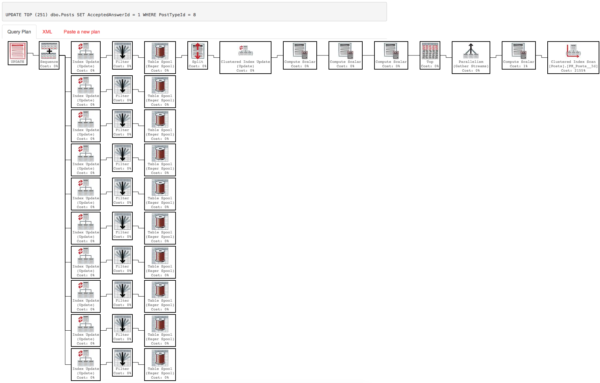
Using the publicly available Stack Overflow database (the 100GB 2016/03 version), here’s an execution plan for an update statement:

The Narrow Plan (click to see PasteThePlan details)

It’s a pretty simple query – it just scans the Posts table looking for any post with PostTypeId = 8, and then updates a single field for the first 250 rows it finds.

And here’s another execution plan for the exact same query – except it updates 251 rows instead of 250:

The Wide Plan (click to see PasteThePlan details)

Whoa – that’s totally different!

I’m not changing the table, the number of rows in it, or the number of indexes each time.

The problem is that we’re updating the AcceptedAnswerId field, and we’ve got a whole bunch of indexes with that field as part of their key or their includes. (For the repro script, check out Erik’s Github issue. More on that in a second.)

SQL Server has to update these indexes, and it’s easy to see the work involved in the wide plan. In the narrow plan, the indexes are still there – but you have to hover your mouse over the Clustered Index Update operator to see them. (Yes, that actually works in PasteThePlan – go see.)

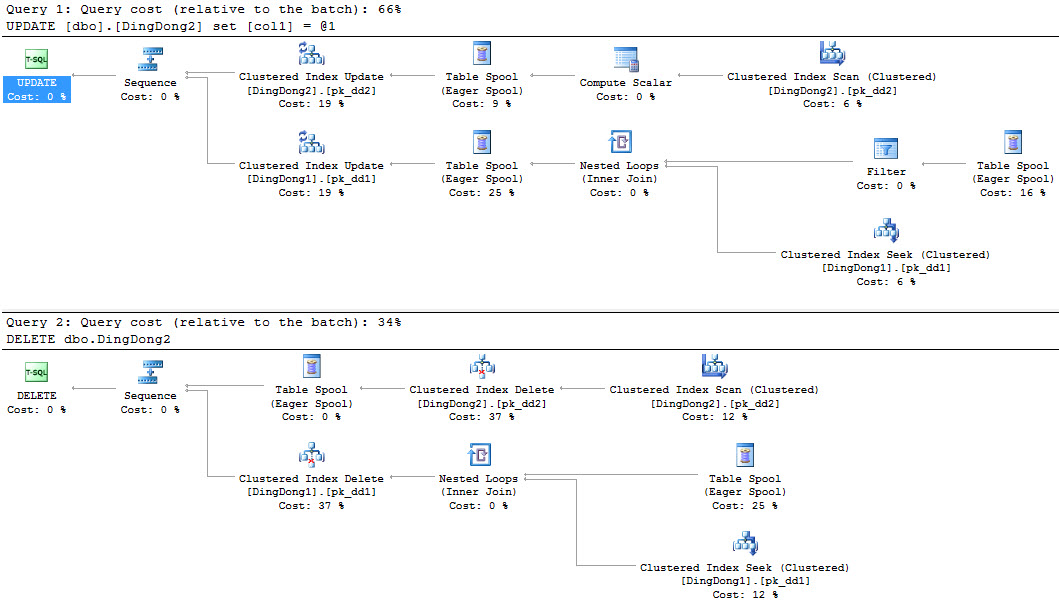
When you’re doing performance tuning, you even have to pay attention to delete, update, and insert (DUI) operations to understand how many indexes are affected and how much work is required.

But in the timeless words of the philosophers, ain’t nobody got time for that.

So that’s why Erik came up with the idea to add an sp_BlitzCache warning about the number of indexes affected by an operation. The differences between the narrow and the wide plans also mean it was harder to code than you might think at first glance, and you can learn a lot about SQL Server plans just by reading that Github issue.

End result – check out the Warnings column:

sp_BlitzCache index warnings for DUI operations

Ta-da! That’ll be in the January release of the First Responder Kit, or if you’re ambitious, you can go visit the dev branch (zip file direct link) now.


Build Me A Build: What Would You Do?

Hardware
8 Comments

We already know what I’d do

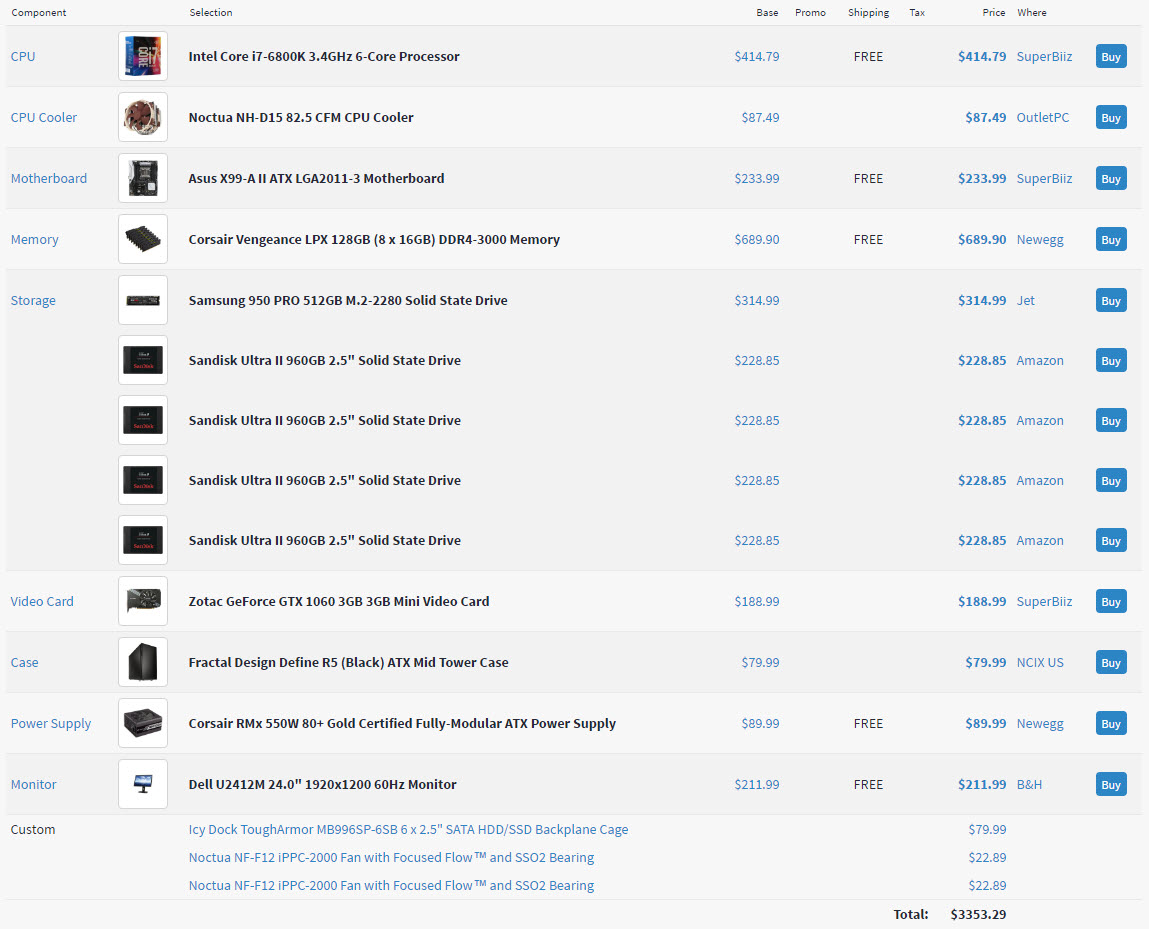
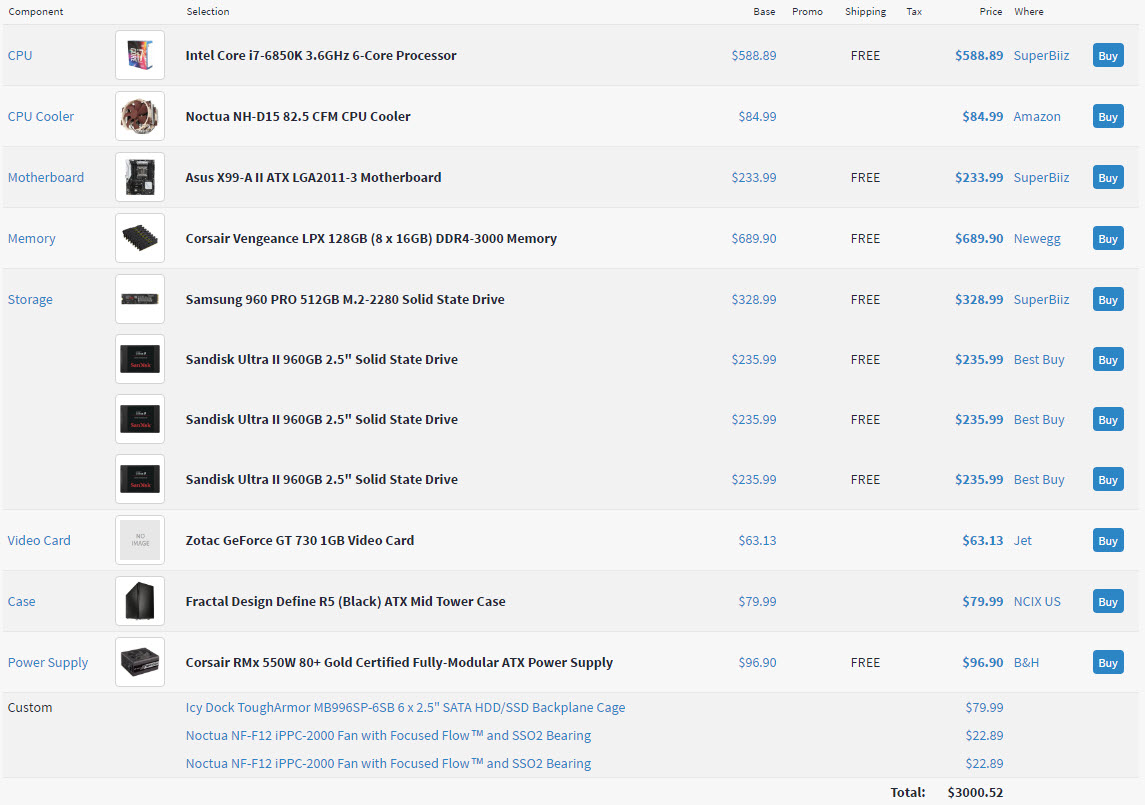
In my last post, I talked about the desktop I’m building with my hardware budget for this year (and, uh, some of next year’s, too…). Based on awesome feedback from you all, I made a few changes to the specs.

And holy cow, ordering made things even more different. Here were the problems I ran into:

  • The websites with the lowest prices were often out of stock on items with no restock date
  • Some websites said they had things in stock, but after my order was placed I got sad face emails
  • The number of items I wanted were only partially available

With everything ordered, plus tax (holy cow the tax), I ended up a little extra over budget, and with a 1 TB M.2 instead of the 512 GB.

Why? I already had to pare down the number of SSDs I was getting because of stock limitations, and a price bump. I can try again for those in the new year.

Of course, the 1 TB M.2 is a pre-order, so I’m going to be waiting a bit for that. Fun!

What went well?

I found the CPU and MB at Microcenter for much lower prices, so things balanced out a little bit. I was able to walk over and pick both up same day.

The worst parts about this experience?

  • It was like 0 degrees Kelvin and windy for my 20 minute walk
  • I now have to fight the urge to try to jam them in my laptop

Most everything else I wanted was available at close to the price I wanted between Amazon and NewEgg. Hooray for competitive commerce.

Now it’s your turn

I don’t mean that Brent is giving you $3k to build a computer. I’m curious what kind of specs you’d choose for different scenarios.

  • Scenario One: You have a $5k budget to build a server for your developers to use. Assume local storage.
  • Scenario Two: You have a $15k budget (not including licensing) to build a server for Standard Edition. Assume the server needs local storage, and will be taking part in Log Shipping.
  • Scenario Three: You have a $50k budget (not including licensing) to build a server for Enterprise Edition. Assume the server needs local storage, and will be taking part in an AG.
  • Scenario Four: You have $3k to build a computer to play your favorite video game on, and you get to donate whatever’s left to your favorite charity.

How would you spend money differently in different scenarios?

Thanks for reading!

Brent says: I got so excited when I realized it was my turn, and then I realized I was going to spend the next hour working on it. Damn you, Erik…


[Video] Office Hours 2016/12/21 (With Transcriptions)

This week, Erik and Richie discuss latency, partition tables, SOS_SCHEDULER_YIELD, alerts, nolock, and what people look for in Senior DBA.

Here’s the video on YouTube:

You can register to attend next week’s Office Hours, or subscribe to our podcast to listen on the go.

Enjoy the Podcast?

Don’t miss an episode, subscribe via iTunes, Stitcher or RSS.
Leave us a review in iTunes

Office Hours Webcast – 2016-12-21

Should TempDB be on SSD?

Erik Darling: Let’s get this firing squad on the way. Our first question, “Should tempdb be on SSD?” Gosh, that depends on so many things.

Richie Rump: If you can, yes.

Erik Darling: There’s a good one. That’s a good answer. I would expand that a little bit and I would say if you’re on a VM, you’re kind of hosed and you’re not going to get that local storage—you don’t get the VM goodness if you start using local storage. So careful there. If you’re using tempdb heavily and you have local storage anyway, a bare minimal server, there’s really no reason for it not to be on SSD. Or if you really want to step things up, throw on a PCIe, flash memory or flash drives, and really let that thing zoom around. Anything else on that? I don’t think so.

Richie Rump: Nope. If you can, do it.

Erik Darling: Yep, cool.


What’s the #1 issue with latency?

Erik Darling: Next question down, “What is the number one issue with latency? Is it usually a sub-storage problem?” No. It’s usually a pre-storage problem. It’s usually you have a SAN, which is perfectly capable of giving you data and a crappy little pipe that is really incapable of serving that data to the server. SQL Server CPUs can consume a whole lot of megabytes per second, like hundreds of megabytes per second. Usually the problem is that you have like, you know, a 1 gig iSCSI or a 2 gig or a 4 gig fiber channel, or even like just a single 8 gig fiber channel. If you have multiple sockets and multiple cores, you’re not going to be able to serve data up fast enough to keep all your CPUs and stuff busy unless you have enough RAM to cache everything so that you don’t go and poop all over the storage every time you run a query.

Richie Rump: But, jumbo frames.

Erik Darling: [Laughter] Those will solve everything, large pages and jumbo frames.

Richie Rump: Everything. You NOLOCK with jumbo frames and…

Erik Darling: Large memory pages, what else is there?

Richie Rump: Done.

Erik Darling: You don’t even have to hit F5, the query just runs for you. Done.

Richie Rump: It just starts coming at you.

Erik Darling: Yeah, it’s crazy.


What’s the best type of column to partition on?

Erik Darling: Oh boy, partition tables, “What is the best type of column to parse on? Is it date?” No. It is the column—at least for me—it is the column that is most likely going to end up in your where clause so that you get good partition elimination from your queries. So if you don’t have date anywhere in your where clauses or your date isn’t in a quality or range that’s going to fit a partition, or something that will fit parts of partitions in your where clauses, don’t even bother with date. Do it on something that’s going to be in your doodads. It can certainly kind of lopside partitioning if you do it by like customer ID and you have some customers who order a ton of stuff and some customers who hardly order anything, but if date isn’t in your where clause, partitioning is not going to do you any good.

Richie Rump: But I will say 90 percent of the time I think it’s going to be date because you’re going to want to start archiving things and rolling things off and doing that kind of stuff. For warehouses, it’s going to be date. I’m going to assume that it’s going to be date. But like you said, bro, if you need the partition elimination because you have a—I don’t know—six terabyte table, then you better use that date in your queries. Otherwise, you’re just going off to the abyss and [inaudible] things and all of a sudden things just…

Erik Darling: You’re scanning the whole table anyway.

Richie Rump: Yep.

Erik Darling: If you’re going to try out something like partitioning, you may want to give yourself the easy button first and try partitioned views out rather than going straight to table partitioning because you get a lot of the same magic without a lot of the same sort of stifling rules and weird stuff that can happen. If you want to test out your theory, look at partition views. I have a post on it from a while back where I turned the votes table in Stack Overflow database into a partition view. There’s pictures and execution plans and all sorts.

Richie Rump: Of course you have a post, of course you have a post.

Erik Darling: I have to contribute something around here.

Richie Rump: Oh you have to contribute? What about me? What am I doing?

Erik Darling: I don’t know.

Richie Rump: I don’t know either. I live in a cloud. That’s what I do.

Erik Darling: GIFs.

Richie Rump: GIFs, yes. I contribute GIFs. And I’m damn good at it too.

Erik Darling: GIFs and chat.

Richie Rump: But going back to the partition, you can put an index across the entire table and that will be fine but you lose that partition swapping.

Erik Darling: Yeah.

Richie Rump: I had a solution for a client where that was the actual solution—the partition swapping isn’t really for us, it’s really to partition elimination, except these few queries and these few queries we need them to run within the hour. So we threw indexes on there. We said the hell with partition swapping. If they ever needed to do it, they’d have to drop the indexes, swap it out, and then rebuild the index again.

Erik Darling: What Richie is talking about is non-aligned indexes where the indexes aren’t built aligned to the partitioning key. So you lose all the swap in and swap out magic. That stuff is well documented in Books Online if you want to go ahead and take a look there.


What does SOS_SCHEDULER_YIELD mean?

Erik Darling: That’s a long question, I’m going to save that for later. “What does SOS_SCHEDULER_YIELD mean?” It means that your query has yielded its spot on the CPU to another query because it did not have what it needed to run. What happens is a query will start running and it will get a thread. That thread will be on a scheduler or a CPU and it will sit there and it will say, “I’m going to run, I’m going to run, I’m going to run.” If it doesn’t have everything it needs to keep going within 4 milliseconds, it exhausts its quantum and it is shuffled to the back of the queue and SQL Server says, “Wait your turn. Something else is going to try to run now.” So something else will go and try to run and it’s just kind of on and on until everything actually runs.

Richie Rump: I love that term, quantum, that’s awesome.

Erik Darling: Yeah, exhaust the quantum. SOS_SCHEDULER_YIELD isn’t usually a big deal unless you have sort of like long average waits on it. So if you see long average waits on SOS_SCHEDULER_YIELD, it can be a sign of pretty bad CPU pressure. If you see a lot of short average waits on SOS_SCHEDULER_YIELD, it usually means that your CPUs are just dead dog slow. I just stopped myself from saying like four curse words in a row saying dead dog slow instead.

Richie Rump: Unlike the new beast that you’re putting together. That will not be dead dog slow.

Erik Darling: No, that one is going to be happy dog. I have most of the parts for it. This is exciting.

Richie Rump: Oh, no.

Erik Darling: This is exciting. If we run out of questions, I’m going to start showing people computer parts, that’s what I will do.

Richie Rump: No more questions, people. Computer parts are fun.


What permissions do you need for user-defined types?

Erik Darling: “I have learned the hard way that you have to give permissions to use user-defined types. Do you know why SQL Server would require you to have permission to use user-defined types?” No, I do not know. I am not great at security stuff. You might want to ask a fella named Denny Cherry about that or go buy his book, Securing SQL Server. There might be something in there about it. I don’t do a lot of security work. I hate roles, permissions, and all that garbage.

Richie Rump: Or, K. Brian Kelley, one of the two. Those are our two security people, go to.


Does it make sense to reorganize GUID indexes?

Erik Darling: “Is there an actual time where rebuilding reorg indexes would benefit queries that always have where equals GUID? I know your stance and don’t disagree but need to be able to explain why.” So if your where clause is on a GUID that brings up an interesting architectural question. Let me start from the beginning. If you have a GUID column in your table, a lot of people will say, “This GUID is unique so it’s going to be my primary key.” They also make that their clustered index and that’s where they shoot themselves in both feet with large, large cannons because with GUIDs, unless you use new sequential ID or your app uses a sequential GUID, you’re inserting data all over the place. Think about if you say were partitioning and you used a sequence and you only had the numbers 1 to 100 over and over again, that would be great for like hash partitioning because you could just dump everything into your hash partitions over these 100 numbers. But with a GUID, you’re just sticking random data in all over the clustered index, just getting shuffled around. It can be painful. In those cases, you typically want to lower fill factor until fragmentation kind of levels off. Beyond that, you want the GUID to be the non-clustered primary key and then stick your primary key on an ascending column that kind of gives you an append-only workload.

Richie Rump: Yeah.

Erik Darling: When you do those three things: the non-clustered primary key, the clustered index on an ascending column, and the lowered fill factor on the GUID index, you do yourself a lot of favors as far as page splits, fragmentation, and stuff happening all over the place. In those cases, you will have to rebuild or reorg less frequently because you will have diminished fragmentation to a point where it’s much less of a problem.

Richie Rump: Yeah, and if you’re getting your GUIDs from some other source, other than the database, such as .NET, there’s a way that you can order your GUIDs so that they’re in the same order as SQL Server. Because SQL Server handles its GUIDs a little differently than .NET does. I did a post on that many, many years ago. It’s on Jorriss.com. I still get lots of hits for this thing. I don’t understand why we need to figure out the order of GUIDs to align with SQL Server nowadays. Back then, I had an Entity Framework 1.0 problem but we don’t have these problems anymore.

Erik Darling: Some people might. We have people on SQL Server 2000. Some people might have Entity Framework 1.0 problems, we don’t know.

Richie Rump: There’s a way you could do some bit swapping to align those GUIDs so that they’re in the same format as SQL Server.

Erik Darling: Sounds dirty.

Richie Rump: It was kind of messy trying to figure out how all of this stuff worked. Then everything starts aligning up and you won’t get like these big blocks of, oh, these are from SQL Server coming from a load, and oh, these were not. These were coming from the .NET application. They’ll still be in different order somewhat, but they won’t be as stark.

Erik Darling: There we go.


How should I fix RESOURCE_SEMAPHORE waits?

Erik Darling: Next question. “I’m getting the resource semaphore wait type while a bulk insert via SSIS is running. Do you have a rule of thumb on how to handle that besides more memory?” Stop everything else from running? You can use Resource Governor to limit, if you’re on Enterprise Edition, you can use Resource Governor to limit the amount of the memory grant your query can ask and get. If you’re on—I guess, geez, let me rattle off the editions—SQL Server 2012 SP3, 2014 SP2, or 2016 all, you have min grant percent and max grant percent query hints where you can set minimum and maximums for memory grants at the query level. I don’t know if that works with bulk insert though. I couldn’t tell you on that. I’ve never tested that. That’s a really interesting question. Let me know if you come up with anything.


If you could only watch one SQL Server metric, what would it be?

Erik Darling: We have a question here. “If you could only watch one baseline for a SQL Server database, what would it be?” Wait stats. All of them. Just wait stats. That’s what I would look at. I would run sp_BlitzFirst which you can get from firstresponderkit.org. I would just take 30 second samples of that and I would log it and I would trend it and that’s all I would watch is wait stats. I would say, “Look at the things I can make better with wait stats. I don’t care about anything else.” It’s all about what the server is waiting on. I don’t care if there’s a CPU spike for ten milliseconds. I don’t care if memory dives when I run DBCC CHECKDB or take a big backup. It happens. Watch your wait stats.


Is XML shredding easier on SQL 2016?

Richie Rump: Next one is a good question.

Erik Darling: Are you talking about the XML question?

Richie Rump: Did you put that there?

Erik Darling: I wish I was that thoughtful. “Have there been any improvements with XML shredding on SQL Server 2016 vs 2014?” Absolutely positively not. The last cool thing that XML shredding got, well, it wasn’t even XML shredding, it was just XML in general was in 2012 when we got selective XML indexes. Since then, there has been bupkis. That is why every time I work on sp_BlitzCache I have to drink an entire bottle of Lagavulin.

Richie Rump: The other question is, why are you doing XML shredding inside of SQL Server? I understand, Erik, why you’re doing it because it’s [crosstalk]. There’s no choice for you because that’s how they put the plans in, right? But from an architectural perspective, if you’re putting stuff in XML in SQL Server and then you’re shredding it inside of XML, why are we doing that? That should be done on an app server, really. I could do that in the cloud with Lambda or Azure Functions, right?

Erik Darling: I used to have to do ETL stuff where I would get an XML flat file and I would import that in but I would shred the XML in a staging table and then dump the relational data into a table and never touch the XML again because XML sucks.

Richie Rump: Yeah, it’s one of these things where, hey, let’s do what each piece is good at, right? SQL databases, not very good at XML. So why don’t we do something where CPU is a little freer and less expensive? That’s in the app tier.


Can I exclude high severity alerts by IP address?

Erik Darling: There is a question about alerts. “I’ve set up high severity alerts for severity 20 errors. Our security team does tests where they send bad packets by design. Can I filter alerts to exclude certain IP addresses so I don’t get alerted every time they scan?” I don’t think so. I don’t think the alerts are that smart. I think you either get them or you don’t. I would set up an email rule to look for that specific error and have that just send something off to a different folder rather than try to get the SQL Server itself to do that.


Is NOLOCK okay when…

Erik Darling: Next up, “Is it okay to use NOLOCK on insert into an archive database where the select from live db is stagnant and won’t change?” Yes, I don’t care. NOLOCK is a problem when the data underneath it is volatile and you end up with incorrect results. That is my beef with NOLOCK. Just like I said in the blog post that I wrote, the main problem with it is that people misunderstand what it does. They think, “I’m not going to take any locks. This is going to be awesome. I’m not going to block anything.” That’s not the case, it’s just that you don’t respect locks taken by other queries. If that data isn’t doing anything underneath, then NOLOCK your heart out. See if it makes a difference.

Richie Rump: Yeah, I had a large system I worked with and everything we did was NOLOCK. That’s because it was only additions to the database. It was no updates. None. We understood our workloads and guess what, we went ahead and used NOLOCK because we could use it with confidence that we weren’t going to get anything crazy with it.


What should I do about 15-second IO waits?

Erik Darling: “When dealing with a hardware-encrypted SAN and seeing SQL has encountered however many occurrences of 15 second I/O waits, any suggestions for investigation or remediation?” Yeah, again, this is often not the SAN. Well, this is often not the storage. This is often not the disks. This is often the connection between the server and the disks that’s the problem. It’s you’re either trying to suck too much or push too much or do both at the same time through too small of a pipe. If you have to read a bazillion gigs or even just like ten gigs of data across a really small one gig pipe, it’s going to take you a while. So look at your storage connections, not your storage. Look at the pathing.


What does DBCC SHRINKFILE lock?

Erik Darling: “What does DBCC SHRINKFILE actually lock when moving data around?” Pages, just like everything else.

Erik Darling: “Can table compression be done online?” Yes, you can rebuild an index online in Enterprise Edition. Why don’t you just try that? Online equals on with the compression syntax. Just try it. I promise you can try that on a development server and figure it out. You are a smart person. I know that because you’re here and you want to listen to Richie talk.

Richie Rump: Yeah, sure, yep. Exactly. What he said.

Erik Darling: Follow up question on partitioning, “Does partition elimination still happen if you have [inaudible] a non-aligned index?” No.

Richie Rump: No.

Erik Darling: You’re lucky if it happens with an aligned index, forget a nonaligned index.

Richie Rump: Yeah, there’s quite a few hints I had to drop when working with that particular system. Just make sure you use this next, please, thank you very much.


Any experience with Git as a code repository?

Richie Rump: “Any experience with Git as a code repository?” Why, yes. Erik, tell them all about it.

Erik Darling: When I hit the sync button, I break something. When I hit the commit button, I fix something. Sometimes when I make a pull request, everything works. Other times, I fat finger something and I do the wrong—you know what, Git I’m sure is fine. It’s just me. I’m the problem.

Richie Rump: Yeah, it’s you. I think the big problem with Git is you need to use it every day. You get used to the Git workflow. If you’re not into that kind of every day, it’s kind of rough. Do I have to commit first? Do I stash it? What’s push versus pull? And getting all that.

Erik Darling: One thing that hit me in the butt when I first started was I didn’t realize that after I made a pull request, if I made more changes, I had to sync those changes. I just thought like, I made a pull request, I’m working in my repository, everything go up to the cloud where it makes everyone happy and they get new warnings about their plan cache crap, but no. I had to keep syncing stuff and the pull request was like five commits behind. I was like, “Where’s all the good stuff?”

Richie Rump: Yep, got to merge everything back. There are some good courses on Pluralsight on that, on Git. What I like, it’s not even on Git, it’s on Mercurial, it was Joel Spolsky’s tutorial on Mercurial. I thought he did a really excellent job. Mercurial and Git are really side by side. They’re very, very similar to one another. So you’ll be able to pick both up very quickly. I like that one and I forget what the name is but it’s Joel Spolsky. He has a tutorial on HG or Mercurial. Those were great. I also use a tool called SourceTree. That seems to make things a little easier from a GUI perspective. I like that a lot, I know there’s some folks on this team that don’t like it as much. It makes things a little easier for me so I can see things visually about what’s coming up and I’m not at the command line all the time. Although, I do use both. I do use both the command line and I use the visual SourceTree. So, there you go. So, hey, I got some dev-y things in here. What’s up?

Erik Darling: Yay. Good for you.

Erik Darling: Fellow human says, “I have set up eight tempdb files for 24 cores.” Good.


What do you look for in a senior DBA?

Erik Darling: Another fellow human says, “What do you look for in a senior DBA?” I don’t look for anything in a senior DBA.

Richie Rump: Grey hair. I usually look for the grey hair and the worry lines. The worry lines are a dead giveaway that they’ve been through hell.

Erik Darling: Swollen liver is another good one. If their liver is large and firm, I think that’s a good sign. Bloodshot eyes is another good one.

Richie Rump: A little twitch. You know, you get that little twitch going on. Just every once in a while, just kind of twitch a bit.

Erik Darling: You know what, it’s either a facial tick or a hand tremor. That’s how I know.

Richie Rump: Oh yeah, the hand tremor, they’re the best ones.

Erik Darling: Yeah. When they eat potato chips and it sounds like maracas, that’s when I know that’s a senior DBA.

Richie Rump: I like to say, give me your opinion on ORN and if they turn red, you know it’s a good one. You know it’s a good one.

Erik Darling: It’s a good question because in my line of work—not your line of work, but in my line of work—I’ll often get on the horn with people who are like, “I’ve been working with SQL since 6.5 and I’m 20 years doing development.” I get on and within 15 minutes I’m like you may have been doing this for 15 years but I don’t think you’ve been paying attention. There’s something missing here.

Richie Rump: Yeah, you’re right. Not so much on the dev side because in dev you’re constantly learning new things, so everybody is in year one, two, three, or four and then we learn something else. But in the DBA data world, you could have that same person doing year one for 20 years. So they have 20 years with experience for the very first year. They don’t go past that because they just get comfortable in what they’re doing and they’re like, “Let me check the backups, let me do all this stuff, and then that’s it. It’s very surface-level knowledge. If you want to kind of get a really good understanding of how SQL Server works, you have to go past year one. You got to get underneath. You’ve got to get under the covers. You’ve got to get underneath the architecture. You got to do what Erik does up there and try to understand what all these yields and all this stuff—so if you want to be a good DBA, then you’re in the right place here trying to figure all this stuff out.


Should I enable RCSI on SQL 2012 SP3?

Erik Darling: Let’s see here. “Running SQL 2012 SP3, is it recommended enabling recommitted snapshot isolation?” No, because you need to test your code carefully to see if it works. We have great blog posts and linkfests on recommitted snapshot isolation. You need to just go read a whole lot more about it. Nothing I say here is going to make sense to you. You should go read and learn.

Richie Rump: But we love it here.

Erik Darling: Yes, when it’s appropriate.

Richie Rump: Yep. And if it’s greenfield, just turn it on when you first create the project in the database, just turn it on.

Erik Darling: Yeah.

Erik Darling: “Are there any downsides to not discarding temp tables or table variables when used in stored procs?” No, they get destroyed when the session is done.


Hardware Show and Tell

Erik Darling: You know what? I just want to show people hardware for a minute. I want to show people all the stuff that I’ve been getting. This is my CPU. I’m going to cover up the price so no one gets weirded out. This is my I7 6850.

Richie Rump: That doesn’t look like an I7. That looks like a box.

Erik Darling: It’s right there. You can see it, it’s in there.

Richie Rump: That’s getting better.

Erik Darling: Here’s what I’m really psyched about. This is the one I’m super into: a 128 gigs of RAM. I’m going to change the world with that, ma. Actually, you know what, the rest of it is kind of boring. I’ve got some hard drives. I got my Icy Dock. I got my motherboard. I got my case over there that’s like 50 pounds. I’m not going to bring that out. But these are the things that I’m most psyched on, my big honking processor and my big honking RAM. If I drop one of these, I’m going to kill myself. So I’m going to put them down now.

Richie Rump: No, drop them. Drop them. Go ahead.

Erik Darling: You’re funny.

Richie Rump: This is what came in the mail for me today.

Erik Darling: Wow.

Richie Rump: Wolverine and his motorcycle. Look at that.

Erik Darling: Cool. Check him out. Those big, dead eyes.

Richie Rump: Yeah. He’s going to scrape your eyes with that one.

Erik Darling: That’s true. People who like the computer parts stuff, as soon as I have all the parts, I’m still missing some, I still don’t have everything in the mail, I’m still missing my graphics card and my M2 chip and some other stuff but as soon as I have everything, which is going to be some time after the first, I’m going to have blog posts with all the pictures of me opening stuff and putting it together and probably gauging my eyes out while I try to figure this god awful mess out. “What motherboard?” Oh, god, please don’t let me drop anything. I got this ASUS motherboard, which is pretty cool.

Richie Rump: Which doesn’t have onboard video, does it?

Erik Darling: No, this one does.

Richie Rump: Oh, that one does.

Erik Darling: I got one that does because I saw your comment about that in chat and I was like, “Oh, that’s probably not a good idea.” I got a couple of my disks. I don’t have all of them yet. I need four more of these, 960 gig SanDisks. Those are all going to go in this six-slot SSD.

Richie Rump: Oh, gosh. That’s crazy.

Erik Darling: I know, I’m building a server. This is my chance to build a home server. I am never again in my life going to have this good of an opportunity to do this with Brent’s money.

Richie Rump: I’ve even started setting up mine.

Erik Darling: There you go.

Richie Rump: Little bonus.

Erik Darling: After the first, I have to order the four more hard drives and get all that stuff in. Because like when I went to place the order, the low price on most of it was out of stock on these like shady [inaudible] I was like, what the hell. So I had to go and look at real prices for people who actually had stock to send me. I was like, oh, that’s 50 bucks more. So with tax and then shipping on some stuff, I didn’t get exactly what I wanted from the PCPartPicker build, but I was still pretty psyched about the amount I could get in one shot and I can just finish up with buying the rest of the parts next year.

Richie Rump: What are you going to use for the software for your virtual machines?

Erik Darling: For VMs I’m going to run Windows Server 2016 because I really want to play with some of the stuff in there. There’s some cool new features. Windows Server 2016, I’m going to poke at. I’m not going to do too many spoilers here but the stuff I want to mess with.

Richie Rump: That’s going to be your base OS, right?

Erik Darling: You know, I haven’t decided on that. I’d like it to be because I feel like if I’m building a machine of that size, server software is kind of like the legit choice because I’m not going to be playing games. I’m not going to be doing goofy stuff on there. I don’t need Skype for business.

Richie Rump: That you know of, yet.

Erik Darling: Yeah, who knows? My plan is to make this as server-y as possible so that I don’t even have the temptation to be like, “Let me see how Team Fortress 2 runs on this.”

Richie Rump: Oh, you know you want to. I know you want to.

Erik Darling: That’s why I bought a 512 gig graphics card. I want no temptation here. I want nothing. I don’t want it entering my head.

Richie Rump: You know what, in a week your tech budget refreshes again.

Erik Darling: I know, that’s when I’m going to buy the rest of the drives. Don’t tell Brent.

Richie Rump: That’s when the video card comes in and Erik just went, “Bleep it.”

Erik Darling: Right? I’ve decided to start rendering video and it turns out I do need… Sorry.

Richie Rump: …5k at 60 frames a second, it’s amazing.

Erik Darling: And this gaming mouse for some reason. I could just plug this one in. Come on, cord. I got this one here. I just use this for clicking around.


How do I prove it’s a SAN problem?

Erik Darling: We’ll do one last question, we have one minute left. “I need to prove that the systems and SAN people that it is their infrastructure that is causing the disk latency up to 1200 milliseconds and I’m going to…” Disk queue length? Come on, man, use a metric that’s been relevant since 2003. We are on VMware, what is the best way to do this? Go to brentozar.com/go/cdm. Download a tool called CrystalDiskMark and you can use it to benchmark your disks. What you’ll probably find is that the top line, the top lines up there, are going to be just about what your disk network is capable of pushing. That doesn’t mean it’s what your disks are capable of pushing, your disks are probably sitting there going [inaudible]. But it’s always going to be—this is like the third time this has come up in one go around—it’s always the connection between the server and the SAN. It’s never the SAN or the server. Some dingbat put a one gig iSCSI between the two and you’re getting reads that are like the wagon line out of [inaudible], it’s the slowest thing in the world.

Richie Rump: Yeah, a few weeks ago we ran that on a server and it was like 150.

Erik Darling: Yes.

Richie Rump: Tara ran it on her own machine and it was 450. A few days later, Nick Craver from Stack Overflow sent theirs out there and it was like 10,000. I’m like oh my gosh, these guys, man. They’re amazing.

Erik Darling: Yeah, local SSD is amazing. I can backup Stack Overflow in like three minutes because I’m getting like 500, 600 megs a second just local SSD. I’m like, “Look how crappy your server is with a $300,000 EMC SAN.” Shhh. Don’t tell them. Look what you could get if you spent $500. It’s fun. It’s funny.

Erik Darling: Someone says, “GUI or core?” GUI. I can’t type. Look at me. Look at these hands. These are not typing hands. Get out of here. All right. We’re at 12:46, we overshot by a minute. I’m keeping Richie from lunch and who knows what else. Thank you all for joining us. We will not see you next week, we will see you the week after. There is no Office Hours next week. Don’t show up. You’ll be sadly disappointed. Goodbye and merry Christmas and happy New Year and drive safely and to all the good drunk…


GroupBy Registration is Open for 3 More Days

GroupBy Conference, SQL Server
0

GroupBy is a new community-driven conference where your voting picks the lineup. Here’s the sessions you chose:

Friday January 13th:

Friday January 20th:

Wanna attend? Register now – space is limited to 1,000 attendees, and we’ve already got over 1,200 registered. We’re going to close registrations Monday as sold-out because our webcast platform caps out at 1,000 simultaneous attendees. If you can’t make it, no worries – we’ll be recording the sessions for YouTube and a podcast feed. See you there!


Filtered Statistics Follow-up

During our pre-con in Seattle

A really sharp lady brought up using filtered statistics, and for a good reason. She has some big tables, and with just 200 histogram steps, you can miss out on a lot of information about data distribution when you have millions or billions of rows in a table. There’s simply not enough room to describe it all accurately, even with a full scan of the stats.

The good news: filtered statistics can totally help you isolate chunks of data and provide more granular details

The bad news: well, they probably don’t do exactly what you want them to do.

A little setup

To make math easy, we’re going to stick a million rows in our table, with 10% (100,000) of them having a BIT flag set to 1.

With that out of the way, and our filtered statistic created, let’s see what happens when we query it. Filtered statistics behave just like filtered indexes when you run ad hoc queries: when you pass in literals, they get used.

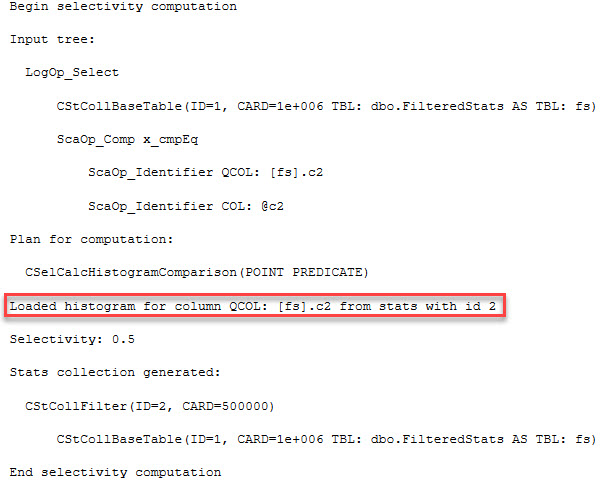
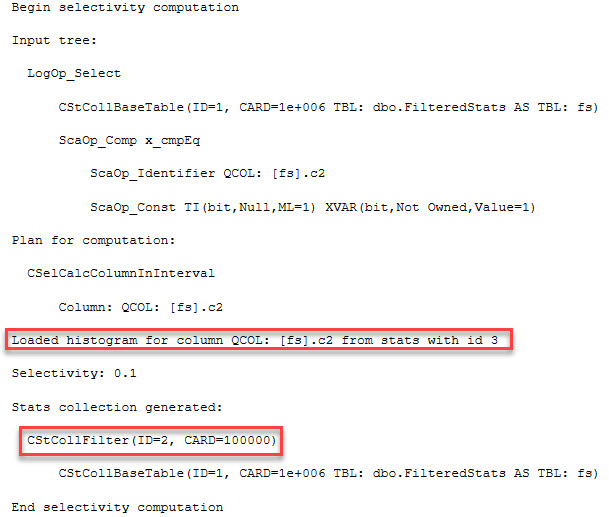
Note the fancy trace flags to output statistics examined and used by our query. These only work on 2014 and up. If you want to look at this sort of information on older versions, have a look at Mr. Black Magic himself, Paul White’s blog post. When we check the messages tab for output, part of it looks like this:

I have all my stats IDs memorized. Don't you?
I have all my stats IDs memorized. Don’t you?


Alright, so which stats object is that?

Choices, choices
Choices, choices


Okay, cool. Our stats with an id of 3 is indeed the filtered one. If you go back and flip the 1 to a 0 the query will use stats #2, which isn’t filtered. At least as of this writing, SQL doesn’t generate filtered statistics on its own.

Where things get a little yucky is with variables. Check this out:

This breaks everything, and falls back to using the system statistic as well.

You stink.
You stink.


As you’d expect, the estimates fall apart here as well because we’re using a local variable. The way around this, for better or worse, is a RECOMPILE hint. This ‘fixes’ everything. As long as you don’t run this code a lot, you probably won’t break a CPU coming up with a plan this simple.

Correctimate
Correctimate

Where things get super awkward

Stored procedures and parameterized dynamic SQL can be sniffed. Well, their parameters can be, anyway. Groovy. But stored procedures have a hard time using filtered indexes when the variables passed in make up all or part of the where clause. This is a plan caching issue. If your query plan is produced using a filtered index, SQL may not be able to reuse it if a value outside of your filtered index is used. Take our BIT search for example; a plan using the filtered index for 1 can’t be used very well to find 0. This is where filtered indexes and statistics diverge.

Filtered statistics can still be used for cardinality estimation, and they can make parameter sniffing a bit more of an issue. Let’s procedurize our code and see why.

The first run works fine. We use our filtered stats, we get the good cardinality estimate. Mission accomplished.

Compile!
Compile!


At least until the next run:

What happened to our guessing game?!


If we switch over to the query plan, we can see just how off our estimates are. We’re getting the cardinality estimate for the 100k rows. Again, this makes sense. We had a parameter, it was sniffed, and a plan was compiled for it. The plan gets reused for the second call to the stored procedure, by design. It doesn’t matter a lot here because the system stats object (id 2) has the same information. We’d run into the same parameter sniffing problem regardless of the filtered statistics object. It’s just funny to me that it will get used at all.

But is this what we want?
But is this good?


Helpful or not?

The answer is a lukewarm ‘sometimes’.

For ad hoc queries that either don’t use variables, or can be recompiled, filtered statistics can certainly help.

For stored procedures, they can exacerbate parameter sniffing problems, or you may end up with your filtered stats not being used at all if the plan is first compiled with values that don’t fit the filter definition. That’s probably not what you wanted to hear. Unfortunately there are no hints to force SQL to use a particular statistics object, only indexes.

Thanks for reading!


Ten Ways to Set MAXDOP

Configuration Settings
15 Comments

Whenever I work with SQL Server, I’m amazed at how many ways there are to influence its behavior. For example, take the maximum degree of parallelism for a query. Just offhand, I thought of ten different ways you can tweak it:

1. At the server level with SSMS. In SSMS, right-click on the server, click Properties, Advanced, scroll down into the Parallelism section, and set MAXDOP to 1. Click OK. (Be aware that this blows your plan cache instantly.)

2. At the server level with sp_configure. Just the command level version of the above, with the same side effect:

3. At the query level with hints. Use OPTION (MAXDOP 1) at the end of your query to tie its hands behind its back. Interestingly, when you view the execution plan, the SELECT operator’s NonParallelPlanReason says “MaxDOPSetToOne” – which it is, but just at the query level, not what you might have expected. Even less expected: your hint can go HIGHER (not just lower) than the server-level setting.

NonParallelPlanReason

4. By setting Cost Threshold for Parallelism really high. If you play around with this lesser-known parallelism setting and raise it up in the thousands (or millions or whatever), you can effectively set MAXDOP to 1. This comes in handy when some jerk puts a high MAXDOP hint in their query: they’re only picking the max degree of parallelism IF the query goes parallel. By setting CTfP high, you’re making sure it won’t go parallel. Insert diabolical laugh here.

5. By configuring Resource Governor. This Enterprise Edition feature lets you create a workload group with a MAX_DOP hint. (Yes, it has an underscore between MAX and DOP. No, I don’t know why. Yes, this can also override the server-level setting upwards.)

6. By using parallelism-inhibiting T-SQL. Paul White has an excellent rundown of things that will effectively set your entire query (or zones of the plan) to be MAXDOP 1.

7. By using query-level trace flag 8649. In that same post, Paul shows how OPTION (QUERYTRACEON 8649) can force your query to go parallel. Look, I didn’t title this blog post “Great Ideas in Query Tuning.”

8. By using Adam Machanic’s make_parallel() function. Add this adorable little function to your queries, and SQL Server thinks it’s going to be dealing with 1,099,511,627,776 rows – when there’s really only one. Hee hee!

9. By putting scalar functions in computed columns. Erik discovered that just by having these nasty little devils in your database, you’re not just causing user queries to go single-threaded, but even index maintenance and CHECKDB operations miss out on the joy of parallelism.

Database-scoped configurations in SQL 2016

10. By setting it at the database level in SQL Server 2016. Right-click on your database and click Properties, and in the Options pane, there’s a handful of nifty new options including Max DOP and Max DOP For Secondary.

10a. By creating a different database just for parallelism. If you fully-qualify your database objects in queries like this:

Then you can get different MAXDOP settings simply by running your query in different databases – depending on their database-level parallelism settings. Here’s a screenshot of my database list that may help explain where I’m going with this:

Crazytown

That’s right – depending on where I run that query, it’ll get different parallelism options.


Is NOLOCK Ever The Right Choice?

I’ve poked a lot of fun at NOLOCK

I mean, it sucks. You can get incorrect data, and it can throw errors if your data is particularly volatile. Generally, outside of testing a query or grabbing some sample data, I’m going to avoid it.

Crappy in every language

But what if…

What if it’s about all you can handle? Or your server can handle?

Picture a couple developers who started their app in the cloud, where they can’t get fancy with tempdb, fast disks aren’t in the budget yet, along with that beefier server with some extra RAM. They may not be able to turn on RCSI or SI at the drop of a hat; tempdb would keel over with the row versioning as part of a workload that already uses it pretty heavily.

They still need to run reports, either for users, or for higher ups at the company, and they can ask for them at any time. Caching the data when user activity is low and reporting against it when someone asks may raise some questions, like “why doesn’t my sales data show anything from today?”, or worse. You could invalidate the cache every X minutes, but that doesn’t help because then you need to re-run that reporting query every X minutes. That’s only moderately better than letting users query it at will.

Even with the right indexes in place for their workload, readers and writers will block each other, and long running reports can be painful.

What other options might they have? READPAST?

Informed choices

Ultimately, the goal should be to get your server, and your skills, to a place where they can handle optimistic isolation levels. Until you get there, you should know what NOLOCK actually does.

What everyone thinks: It doesn’t take out any locks
What it really does: Doesn’t respect other locks

This is where things go bad. You can get partial data, double data, and if you catch an update that gets executed as an insert and a delete, both versions of the row. That’s just for starters. And that’s tough news to break to people who just may well want accurate reports.

You might be able to get away with them just not noticing if things don’t line up. You might not. You could just ask them to re-run a report if they come to your desk with a hug full of dot matrix printer paper festooned with sticky note tabs, but if that happens enough times…

ISVs have it especially tough

Anyone with a credit card can install their software. Thinking about an application like kCura’s Relativity, where servers who have never met a DBA often end up with multiple terabytes of data, what would happen if a few cases got really lively? Picture tempdb with one file on a 100 GB C: drive. It ain’t pretty.

You can make all the best practice setup guides you want, but it doesn’t mean anyone’s going to follow them.

And so I ask you, dear reader

Are you ever okay with NOLOCK? Under what circumstances?

What options do DBA-less, development focused shops have?

Thanks for reading!

Brent says: I’m always okay with NOLOCK because I just pretend it’s another one of SQL Server’s incorrect results bugs.


Hidden in SQL Server 2017 CTP v1.1: sys.dm_db_stats_histogram

It’s Friday night, so I’m waiting for new CTP Releases

As soon as I got the email, I started reading the release notes. Some interesting stuff, of course.

Batch mode queries now support “memory grant feedback loops,” which learn from memory used during query execution and adjusts on subsequent query executions; this can allow more queries to run on systems that are otherwise blocking on memory.

‘New’ string functions like CONCAT_WS, TRANSLATE, and TRIM.

STRING_AGG WITHIN GROUP (ORDER BY)s.

Cool.

Poking around

I started looking for new objects in sys.objects, comparing it to what’s in 2016.

GREAT GOOGLY MOOGLY

I don’t know how this didn’t make the release notes. But there it is. My first Connect baby with Microsoft. I’m a proud papa.

What and how

So, what does it look like, and how do you use it?

It’s a pretty simple CROSS APPLY, like many other system functions.

What you get out looks like a histogram. Because, well, it’s a histogram, but in rows.

THIS IS

sysrowcols whatever GIMME

AWESOME!

It’s not exactly perfect

For instance, if you just let it loose without filters, you get a severe error. The same thing happens if you try to filter on one of the columns in the function, rather than a column in sys.stats, like this.

Oops

But I don’t even care. It’s brand new, and it’s so much better than trying to tabularize DBCC SHOW_STATISTICS output.

Thanks, whomever worked on this.

And thanks for reading!


[Video] Office Hours 2016/12/14 (With Transcriptions)

This week, Brent, Erik, and Richie discuss their craziest SQL server troubleshooting issues, common causes of SSPI handshake errors, setting deadlock priority “high” on a query, vmotion high availability, best practices on Windows Server 2012 page files, and whether a career as a Database Administrator will be good for the next 40 years.

Here’s the video on YouTube:

You can register to attend next week’s Office Hours, or subscribe to our podcast to listen on the go.

Enjoy the Podcast?

Don’t miss an episode, subscribe via iTunes, Stitcher or RSS.
Leave us a review in iTunes

Office Hours Webcast – 2016-12-14


Brent Ozar: Let’s see, I suppose we should get into questions. It is 15 minutes after the hour. We’ll start off with the first one, it says, “I have a replication question. Just kidding.” I guess this person sees that we don’t have Tara here, so we’re fresh out of replication.


Brent Ozar: Fellow human says, “I have a nephew who is very interested in what I do. Is database administrator still a good career choice for someone who’s in high school now? Is this career going to be good for the next 40 years?”

Erik Darling: In some form, but maybe not in like a traditional DBA sense. I think data is always going to need a steward. I think it’s always going to need someone to take care of it and to protect it in some way and to watch to make sure that certain things are happening that safeguard it. I don’t think that it’s always going to be the same backup and restore and corruption checks and, you know, query and index tuning that it is now. But I think in some way data is always going to need someone to make sure that the right processes are happening with it. It’s good to learn what’s happening now and maybe get into it now and get your feet wet so 40 years from now you can say, “Back when I started, I used to do backups myself. I used Ola Hallengren—the senior, not the junior.” So it’s good to get your feet in and start doing stuff now but whether this job, in this role, and the way it is now is going to last for forty years, I doubt it. Think about cab drivers five years ago.

Richie Rump: Look at me. I am the future of your data. This is it. My role.

Brent Ozar: That’s terrifying.

Richie Rump: It’s the future.

Brent Ozar: So what do you think, Richie?

Richie Rump: I think it’s going to be the person that understands the development side as well as the data side, that is going to be your steward. That is going to be the person that in the future with the cloud and all this other stuff that is going down, I think that’s going to be the person that is going to understand the data, how it works. It’s not going to be this low-level “Oh, I do the backups,” because those are all going to be automated in SQL Server 2030, whatever that is.

Erik Darling: But who runs the cloud?

Richie Rump: Someone who understands the code, someone who understands the data, that is going to be the future of the DBA.

Erik Darling: Who clouds the cloud, Richie? Who clouds the cloud?

Brent Ozar: I think if you step back generally, too, if you say, is any career going to be good for 40 years? That answer is probably no. With our parents, or grandparents, like my grandpa held the same job for I want to say 40 years at the same factory, he was a union’s rep or a union relations rep. Retired, he knew everybody in the community. My dad has held—I want to say four different careers. I’ve held a bunch of different jobs even, just every two or three years switching out. The things that you have to learn so much quicker is just very different.

Erik Darling: My dad has been doing the same kind of thing forever and ever doing sort of like technical sales writing and marketing but the companies and the stuff he’s been doing it for have been all over the place over the years. He’s at Oracle now but he started a little company called Data General in Massachusetts that was doing, at the time, tiddlywink hardware where like NT clusters were like holy crap.

Brent Ozar: Yeah.

Richie Rump: So now you don’t have to go anywhere else, Erik. You’re in your last job.
Erik Darling: That’s true. Ever.

Brent Ozar: We think he’s going to die with the rate that we eat and drink. So you can have one career, it’s just a really short lifespan now.

Erik Darling: I basically have the lifespan of a fly.

Brent Ozar: Watch him age in front of our eyes.


Brent Ozar: Next question, we’ve got some interesting soft skills questions here today. “What is the craziest thing you’ve heard someone wanting to do with SQL Server? Or the craziest troubleshooting issue that you’ve had?” Well, Richie went second last time, we’ll make him go first this time. Richie, what’s the craziest thing you ever heard someone wanting to do with a database server, or just in general?

Richie Rump: With a database server? Oh, geez, I’d have to think about that one.

Brent Ozar: Then Erik goes first.

Erik Darling: Well, a couple things that pop out in memory since I’ve been here was one person who basically, it was using CDC, change data capture, but it wasn’t working the way they wanted so they rewrote a layer over change data capture with Dynamic SQL. It was like CDC broke for us so we had to rewrite it. So they basically had this layer over CDC that did stuff for them. Another one that came to mind was people who are partitioning data by day but when they receive data it could update prior day’s stuff, so all these merge statements that they wrote were just going kablooey. Like they were just not getting the kind of partitioning magic that they were hoping for with things. There was sparse little partition elimination happening in that scenario.

Brent Ozar: How about you, Richie?

Richie Rump: The craziest thing, and actually it didn’t turn out to be so crazy, but I was working with a QSR company, fairly large. They had decided to write their own NoSQL database.

Brent Ozar: Oh, okay, which is common now these days.

Erik Darling: Everyone is doing that.

Richie Rump: Yeah, so it’s all this payment processing that’s coming in and they decided to write their own SQL database to store all this information. Where I came in is that they had no way to report off of that. So they started dumping it into SQL Server and that’s how I came into the project. It ended up working out for them. They put a ton of effort into building their own NoSQL stuff, but it worked out. So again, maybe crazy like a fox, maybe a bit. So I can’t wait to hear them upgrade to Cassandra. That would be fun.

Brent Ozar: I’d say the weirdest thing—there are a couple, two come to mind. One was storing Access databases inside a SQL Server database and they were redoing a terabyte of Access databases every day. So that was spectacularly challenging. The thing that I was most horrified by was I went to go troubleshoot queries and I’m like, “Where are these queries from?” The guy says, “Perl.” He goes, “Yeah, we have a Perl application, a Perl script that goes through and generates dynamic T-SQL.” I’m like, “Okay. All right. I’m curious now. You have to show it to me.”

Erik Darling: So where does Perl sit? She writes some interesting T-SQL. What’s her email? Let’s bring her in here. Another crazy thing is a friend of mine works for—he’s a lead developer at a rather large company that does news stuff. They’re still currently, as far as I know, using Oracle. Years ago, when I first started working with databases, I was like, “Do you guys do anything with databases?” He’s like, “Yeah, we use Oracle but we’re migrating away. We’re going to start doing everything with files on disk because there’s no locks and it’s faster.” So like every six months I’ll be like, “Hey, how’s that migration going?” He’s like, “We still haven’t got off Oracle.” Still working on it.

Richie Rump: The Oracle rep was not worried about losing that account, at all.

Erik Darling: He’s like, “Oh, cool.”

Brent Ozar: “Yeah, you want another renewal?”

Erik Darling: “Whenever you’re ready, just sign them.”

Richie Rump: “No discount, sorry.”


Brent Ozar: Let’s see here, next question, “What are some common causes of SSPI handshake failed errors?” Dagnabbit, what I’ll do is I’ll add in the weekly notes a link that I’ve got. Robert Davis has a post. If you search for Robert Davis SSPI and setspn, set service provider name, just all one word, setspn, he has a great post on how to fix that.

Erik Darling: Yeah. His posts offer the T-SQL Tuesday really cool about backups and restores.

Brent Ozar: Yeah.

Erik Darling: Because I don’t do a lot of backup and restores anymore so it’s cool to like reread someone who is like, “No, this is my thing.” Talk about LSNs and, you know, catching stuff up with differentials and logs, and like NoRecovery posts. Interesting stuff. I love reading his blogs.

Brent Ozar: You know, he has a function to convert the LSNs from fn_dump_dblog.

Erik Darling: Yeah, but it’s a scalar valued function so I can’t use it.

Brent Ozar: That’s not fast enough for me.

Erik Darling: No, it’s against my religion. I can’t do it. I can’t have the parallelism inhibited when I’m converting LSNs.

Richie Rump: So it’s against the Jedi religion? I didn’t know that. That’s good to know.


Brent Ozar: “Have any of you found useful situations in which to utilize SET DEADLOCK_PRIORITY high?” He’s got a whole paragraph of other stuff in there, but basically, have you ever thought about setting DEADLOCK_PRIORITY high on a query?

Erik Darling: No, only low, and only for like index rebuilds which I think was what it was for, for the most part. But, no.

Brent Ozar: Yeah, I always get worried overriding someone else’s session and like making them rollback when they may not be the cheaper one to rollback.

Erik Darling: Yeah.

Brent Ozar: I would also say if you find yourself doing DEADLOCK_PRIORITY high and if it’s anything like a report, maybe it’s time to think about a reporting server or a different isolation level.

Erik Darling: Or at least there’s NOLOCK hints, man. Come on.

Brent Ozar: Yeah. Dirty reads.

Erik Darling: Wrong data.

Brent Ozar: We need to kill a DBA on a song called dirty reads.

Richie Rump: Yes.

Brent Ozar: Someone make this happen.

Richie Rump: Straight out of Detroit, it’s Dirty Reads.


Brent Ozar: Fellow human asks, “We run update stats with full scan on our key tables every night. I noticed the other day that there was a command update statistics with full scan that was threaded out, meaning it went parallel. My concern is that I currently have MAXDOP set to 1. Do some Microsoft commands simply ignore MAXDOP and do what they want?”

Erik Darling: Yes, they do.

Brent Ozar: Yes, they do. Does update stats do that? I don’t even know.

Erik Darling: Yeah, I want to say it’s Bob Ward, but it might have been another Bob or someone else at Microsoft, but I just associate most of the really good blogs with Bob Ward—or the Bobs, the Bob blog. But there was one, I think it might have been during his 2016 “It Just Rans Faster” talk. I think he was talking about how sometimes even on a server with MAXDOP set to 1 you’ll still see some CXPACKET waits for some things. That’s because some system commands will use parallelism behind the scenes, whether you want them to or not.

Brent Ozar: Which is cool. I like that.

Erik Darling: I think stats is one of them. There was that trace flag where you could update more than one stat at a time on a table. That was one of those things where it was like, “No, these are definitely going to go parallel because you probably need it if you’re doing all that.” But there was something about parallelism in that one too.

Brent Ozar: Nice.


Brent Ozar: Oh, god, Tammy asks a question. I’ll try to keep the poker face on for Tammy there. “You are all smart so I thought I’d ask.” There’s your first mistake. “I want to query Active Directory.” Okay, strike one. “Using PowerShell.” Strike Two. “To get all the CNAMEs for my servers.” Strike three. “Any suggestions?” Mike Fal. You want Mike Fal. It’s like the word fall but only with one L. Mike Fal—really nice guy, PowerShell guru, knows systems-type stuff and he may be able to answer that one for you. If not, I would actually post it on Stack Exchange, dba.stackexchange.com, and I bet somebody has got a script for it already.

Erik Darling: If you’re more of a Slack person, the SQL community chat has a big PowerShell room where they work on DBA tools. Someone in there might be able to help because, shot in the dark, but I’m willing to bet someone in there is maybe doing something with log shipping where getting CNAME alias would be really helpful.

Richie Rump: As opposed to going to DBA, Server Fault is probably the better one to post that in.
Brent Ozar: Oh yeah, you’re right. Yeah.

Richie Rump: Server Fault, so not the dba.stackexchange.

Erik Darling: It’s weird that there’s no powershell.stackexchange.com, right? You’d think they’d want to keep those people out of general population.

Brent Ozar: I thought when Erik said, “go to the Slack channel,” it’s basically because if you tell someone, “Can you do this in PowerShell?” the answer is always yes.

Richie Rump: Yes, there’s lots of Thors wielding the PowerShell hammer in that room over there.

Brent Ozar: Which is good, we love them. Nothing against them. DBAtools.io is where you’ll go find their site and their Slack channel.

Erik Darling: I change my underwear with PowerShell.
Brent Ozar: Only once a week though.

Erik Darling: True story.


Brent Ozar: “Would like to get Brent’s take on vMotion for high availability. Can it replace SQL Server clustering?” Erik, how about your take?

Erik Darling: I don’t have one. You know me and VMs, man. I never spin those up. So VM, vMotion, no, because if SQL crashes, all right, where a cluster would pick that up and say, “Hey, we’re going to try to restart SQL or I’m going to try to restart SQL on another node,” VMware doesn’t really cover that too well as far as I know. So I don’t know if that’s the way I would go with it.

Richie Rump: We could actually say that we got a call on Sunday with this exact problem, where they had a vMotion on a backup and they thought that was adequate and the whole database got corrupt and there was a whole bunch of other stuff and they couldn’t get it back. So there’s your answer.

Brent Ozar: That wasn’t even availability, let alone high availability. It was un-availability.


Brent Ozar: Next question, “What’s the best practice on Windows Server 2012 page files? As my Window’s admin says we only need 16 megabytes for the crash dump and then leave the rest to physical RAM but I’m seeing a scenario where SQL Server needs more memory and it’s showing RESOURCE_SEMAPHORE waits.” Okay, so hold that thought. So, Erik, do you want to answer that one? Would you increase the page file size…?

Erik Darling: No. Because I really wouldn’t want SQL Server paging that to disk. I would probably want to add more actual memory or increase the max memory if it’s undersubscribed right now. Like if you have more memory in the server than you’re giving to SQL, but really RESOURCE_SEMAPHORE means that SQL Server does not have enough physical memory. That is not a page file problem. Page file should be teeny tiny on a SQL Server because you shouldn’t be doing anything with a page file there. You should avoid that like the plague. Eek, no. You know what’s funny? During the first DBA days someone was like, “Should I have a 512 gig page file?” I thought that you guys were messing with me. I thought I was being hazed. It was like, “Did you ask me that right?” I was like 512 gigs? No. I was like they’re screwing with me. Like Jeramiah is going to come up behind me and give me an atomic wedgie after I answer this question and is going to like Indian burn. There’s no way this is a real question. Really, no. RESOURCE_SEMAPHORE waits are horrible. They are poisonous. So RESOURCE_SEMAPHORE, you may also see RESOURCE_SEMAPHORE query compile, when that pops up and that is stuff just does not have enough memory to do anything when that happens. You have queries waiting to compile because it can’t get memory to compile and queries waiting to run because they can’t get memory to run. I don’t see the question but if you’re on a newer version of SQL Server, you can run sp_BlitzCache and sort by memory grants. So if you’re on SQL Server 2012 SP3, or 2014 SP2, or 2016 any ole version, you can run BlitzCache and sort by memory grants and get all sorts of good information about what queries are using giant chunks of memory and maybe get a hint there. But really, if your server has like 12 gigs of memory in it, that’s your bigger problem, not the query memory grants.

Brent Ozar: I have to say, that’s one of my favorite questions ever. I like that quite a bit.

Erik Darling: Well then you answer it.

Brent Ozar: I saw your face go and I’m like, there he goes, that’s awesome.

Erik Darling: It just reminded me of that DBA Days thing that I got all nostalgic and I was like they asked me if I should have a 512 gig page file.

Brent Ozar: And now those of you watching on the webcams can see Jeremiah sneaking up and giving Erik an atomic wedgie.


Brent Ozar: Next, “We have a transaction log backup that keeps hanging, meaning it runs for hours until I manually cancel and restart it. Normally it only takes ten seconds to run and it just happens randomly. Any suggestions on where to start investigating?” I like WhoIsActive for that. I would run sp_WhoIsActive and see if there’s either that something is blocking it, because I can envision scenarios where MSDB, there’s blocking in MSDB, and the thing isn’t able to update the MSDB completion-type stuff. Or, that it’s waiting for something, like a wait stat shows something, growing a file, creating a file on a network file share. That’s probably where I would start.

Erik Darling: So like what waits would you look for? Would it be backup I/O or async I/O completion or backup thread? Or just one of those things maybe just going?

Brent Ozar: I have a feeling that it’s—and of course, I’m just making stuff up—but I have a feeling that it’s creating the file. That it’s either creating a file or writing to the file. Like if you have a network blip and suddenly there’s a problem writing to the network server on the other end.

Erik Darling: Or like if it happens at a particular time where it’s kind of like it’s repeatable, I bet a bunch of stuff is writing to that drive at the same time and it’s all just kind of saturated, that could be it too.

Brent Ozar: Yeah, over and over again I see DBAs go set up all their log backups to run every 15 minutes and everybody is in like nuclear clocks synchronized so exactly at 15 minutes the file share just falls over.


Brent Ozar: Fellow human says, “vMotion cannot get guarantee transactional integrity.” Put the crack pipe down. It totally works just fine in terms of transactional integrity. What you might be thinking is it can cause a cluster to failover, or database mirroring to fall over, but it is completely transparent to SQL Server otherwise.

Erik Darling: One thing that does come up sometimes with vMotion is that if Windows crashes, you have the reboot time wherever it brings back up. So you know, it’s not as fast as a cluster where that other node is just sitting there like, “I got Windows. I got some ready to go.” It’s just like where you fail SQL Server over and it’s just pretty much the SQL Server startup time and whatever resource failover happens.


Brent Ozar: Follow up on the page file question. He says, “We did increase the physical RAM but then earlier we’d had a paging issue and modified memory grew. Even after we added physical RAM the modified memory is not getting released.” I’m not sure what you mean by modified memory. If you want, search for—just hit Google and Brent Ozar “Sysadmin’s Guide to SQL Server Memory.” We explain how the basic memory process works in there and whether or not it gets freed up and why.


Brent Ozar: Next one, “I need to migrate a bunch of larger databases and I can’t take a significant outage on Saturday night.” Okay, well, so how about Sunday? Sunday works for me. Sunday works not for me, I’m going to be somewhere else. “I was thinking about Saturday morning restoring the last full backup and diff and then an hour before a short outage, I take this…” All you really want to do is log shipping. Either do log shipping or database mirroring. I’m kind of a fan of log shipping for this because it works kind of like what you’re describing. Database mirroring is a little bit more painful to setup. It’s still pretty easy, but log shipping is really slick. We actually cover this exact technique for migrations in our Senior DBA class, which I happen to be teaching this week online. Yesterday, I was talking about how you use log shipping to migrate databases from one place to another using the WITH NORECOVERY for your last transaction log backups, so check into that.

Erik Darling: I think I’m working again.

Brent Ozar: I don’t know that you’ve ever really worked, but you’re audio is working.

Erik Darling: Before I worked here. Before I got hired here rather. I did quite a bit of work, sir.


Brent Ozar: Eric asks, “I went away from Idera’s defrag manager and I went to Ola Hallengren scripts. However, the update usage and stats step is trashing tempdb. Why is this? I’m on SQL Server 2008 R2.”

Erik Darling: Update usage? Ola Hallengren runs update usage?

Brent Ozar: I’m surprised. I can see it in the CHECKDB step maybe, maybe in the CHECKDB, it has DBCC update usage, but I’d be surprised at that too.

Erik Darling: No, no.

Brent Ozar: No.

Erik Darling: I’ve never seen that. I used to run that all the time and I never ran into that.

Brent Ozar: Stats step too, I mean, updating statistics that would trash tempdb, I would imagine, so I’m going to say something horrible. Anything Ola’s stuff does, Idera should have been doing. So that would kind of make me wonder the opposite thing. If Ola script is doing it, I wonder why Idera’s is not.

Erik Darling: Yeah. I would also be curious about what values you’re running Ola scripts with. That’s what I would have some questions about because you know like for the years and the number of machines that I’ve run Ola scripts on, I never had a problem with them trashing tempdb. The one time that a stats update trashed tempdb was when I updated with a full scan all the stats on a table used for some kind of logging that was around 2.8 terabytes in size. So that was the one time I messed up tempdb doing a stats update. That wasn’t Ola though, that was me. That was one file that got real big.


Brent Ozar: “What kind of advice do you guys have for managing batch loads to a database while end users are still querying it? Like do you manage locking when you’re doing batch loads?” Richie, how about you? Have you got experience with that? Like doing batches?

Richie Rump: While they’re querying? No, not that I’ve had any problems with locks or anything like that. So not on some really high transactional system. We’ve always been able to dump data and locks are handling it. Usually if your hardware is good enough, you should be able to handle pretty much anything.

Brent Ozar: So they’re basically saying that your hardware isn’t good enough. That’s what Richie is saying here. Have an SSD, good luck. How about you, Erik? Any advice on that one?

Erik Darling: It depends on what kind of situation you’re in and how you’re doing your loads. If you’re using bulk insert, you can control the batch size so that maybe you don’t put a million rows in at once. You can do like smaller chunks going in. If you’re on expensive edition or 2016 SP1, you have some partitioning tricks you might be able to do so you don’t totally wonk up people’s stuff when you’re loading data into a new partition and then swapping it in. I guess as a third option, if you’re on just about any edition and you sort of have some competency, you could always try using optimistic isolation levels to cut down on the amount of locking problems you have while you’re pushing data into a thing, jam it on in there, like Al Bundy with a fat woman’s foot.

Richie Rump: I love bulk loads. It’s so awesome.

Brent Ozar: I’m just going to leave that there. I’m not going to ask anything about that. I’m just going to leave that just where it is.


Brent Ozar: J.H. asks, “I have SQL Server 2008. I’ve got the latest and last service pack applied to it. Is it possible to apply vulnerability hotfixes afterwards? Should a specific KB article be applied to fix it?” That’s a great kind of question that you can go ask Microsoft Support or go into stackexchange.com. Usually, if you go filter for those kinds of KB articles, you can find more details about those. We don’t do any patching on SQL Server 2008. Nothing against it, it’s just not something that we go dig that much into.


Brent Ozar: Fellow human says, “I’ve discovered ten custom statistics. Thank you for sp_Blitz. I deleted them. As a result of deleting my custom statistics, CPU utilization dropped by 20 percent. Does that mean that custom statistics were giving me suboptimal execution plans?”

Erik Darling: Maybe.

Brent Ozar: Maaaaybe. If you suspected that a change to SQL Server was making execution plans better, where would you go look?

Erik Darling: If a change to SQL Server was making execution plans better, where would I look? Well that’s really hard for statistics because you don’t know what statistic SQL Server is using unless you use some black magic trace flags. So it’s tough to look there for statistics. You don’t get a lot of information about stats the way you do about indexes. You don’t get like usage counts or like how fragmented they are. Just kidding. But you don’t get that kind of information about statistics unless you use some crazy trace flags out there, which you can Google about. Paul White talks about them in several blog posts. I use them in several blog posts but you should really go back to the source and look at Paul White’s blog posts about where stats are getting used.

Brent Ozar: You would have to know the queries ahead of time and run them with those trace flags in order to know whether or not it was getting better or worse. I would just, if I was you, take full credit for it and tell your boss, “Yep, I totally did that and then keep right on trucking.”


Brent Ozar: On that point, “We dropped 400 hypothetical indexes the other day. Hypothetical indexes have real stats. My mind was blown. In all my years of being—in all my year—of being a DBA, I’d never seen that.” Well, yeah, because SQL Server has to figure out whether or not it would use those hypothetical indexes. So it builds stats on them when it goes and builds the hypothetical index.


Brent Ozar: Christopher says, “I have a SQL Server 2012 Always On Availability Group created and it works well. However, a dev has asked me for a reporting server off of this data. I don’t want their reports to interfere with production. Do I make a new separate SQL Server or can I just add it to the existing secondaries and make sure they put Application Intent = Read Only and how do I police that?” That’s a good set of questions.

Erik Darling: I wish Tara was here.

Brent Ozar: So the first thing you want to know is like is it synchronous AGs? If you’re doing asynchronous AG, then putting queries on the secondary can totally slow it down. Even in an async, you can get into positions where queries can cause locks that will slow down applications on the primary. I wouldn’t let that slow me down. If you’re interested in it, what I would let it slow me down is the licensing because if you now have to run reports against a server, it now has to be licensed. So I would want to check with management and see, and of course that’s Enterprise Edition if you’re talking readable secondaries, that’s real money.


Brent Ozar: Interesting question. “Have you guys considered talking about any add-on tools such as MDS, SSIS or Analysis Services in your podcasts?” No. Only because we don’t use it. We’re super specialized in just the engine. We just focus on the database engine. Even if you just look at the database engine, the size and scope of that thing has grown so much in the last two releases: R, PolyBase, Hadoop, columnstore indexes, CLR, DLLs. I mean you could go on and on for all the stuff in the engine that we don’t even cover. So yeah, we try to just be good about queries, indexes, high availability, disaster recovery.

Erik Darling: There are so many people out there who are already good at that stuff and specialize in that stuff that if I need to figure something out or help someone with something or learn something about a particular topic outside of the core engine realm, then I can go Google it and read about it. But me, I still haven’t opened a single one of those and I install SQL on my laptop. I only install the core engine, and well Management Studio, it’s a separate, but I don’t touch that other stuff.

Richie Rump: If I have to touch SSIS again, I’m going to run out of this room screaming.

Brent Ozar: Every time there’s a new release I always add in all the extra features that are new and then I discover within a month that I don’t touch them. Like I installed R and I saw that it added like 20 service accounts to my engine and I’m like what in the Sam Hill is this? I don’t even know what an R script looks like, so yeah.

Erik Darling: It’s not that I wouldn’t want to learn R, because like Buck Woody talks about R and makes it super interesting. I always want to look at his blog and be like, “Oh, cool, let me see what’s going on here.” But then like at the end of the day, I just have so much regular SQL stuff to do and learn and write about that I just can’t. Unless I was really forced to, I don’t think I could invest that much time in R.

Brent Ozar: Yeah, and I’m not going to be the guy who forces you to do that.

Richie Rump: So the answer is can’t touch this, that’s pretty much…

Brent Ozar: [Hums U Can’t Touch This by MC Hammer] If you want to learn about the stuff that’s outside of SQL Server’s engine what you should do right now is, for those of you who are watching the live podcast, go over to groupby.org—as in the SQL statement—groupby.org has sessions available for voting right now. There are sessions in the running for R, columnstore, Apache Zeppelin. One of the ones that’s highly ranked right now is SSRS, a high-performance SSRS session that looks like it’s going to make the cut. So if you’re listening to the podcast afterwards, voting is already finished. Voting closes Friday, December the 16th. Then the live free webcast will be on Friday, January 13th. So you can go over to Group By and register to attend the free webcast.

Erik Darling: One of the crazy things about all these new features is that sometimes you just have to be your own expert in them, because there isn’t one. There’s no, you know, no one knows all the best practices around PolyBase and that stuff these days. There’s no one who’s an expert in it. So maybe you can be the expert in it. Maybe you figure that all out.

Richie Rump: Maybe you can be Lewis or Clark—which one shot himself in the head? Lewis?

Brent Ozar: Every time there’s a new feature out, like before when columnstore came out, I’m like, you could be the Kalen Delaney of columnstore. You can be the Paul Randal of R. It’s just wide open to anybody who wants to blog about it. But you are going to have to use it in production, get your hands dirty, and then blog and share what you learn. All right, well thanks everybody for coming and hanging out with us this week. We will see you guys next week in Office Hours. Adios.


Indexing Temp Tables

People often don’t give this thought

Which is a shame, because I see people sticking fairly large amount of data into temp tables. On the rare occurrence that I do see them indexed, it’s a nonclustered index on a column or two. The optimzer promptly ignores this index while you select 10 columns and join 10,000 rows to another temp table with another ignored nonclustered index on it.

Now, not every temp table needs a clustered index. I don’t even have a rule of thumb here, because it depends on so many things, like

  • Are you joining it to other tables?
  • What does the execution plan look like?
  • Is this even part of the stored procedure that needs tuning?

Pretend That We’re Dem

Assuming that all three things lead us to index temp tables, let’s create some and see how they react to different indexing strategies.

We have three temp tables with 100k rows in them. I joined them a bit to make sure we get good correlation in the data.

If we get the plan for select statement, this is our query plan. A bunch of table scans and hash joins. SQL is lazy. I don’t blame it one bit.

I'm so parallel.
I’m so parallel.


After frequent user complaints and careful plan analysis, we decide to add some indexes. Let’s start with nonclustered indexes.

I’ve gone ahead and added two indexes to #TempPosts so the optimizer has a choice if joining in another order is more efficient.

How’d we do?

Not so hot.
Not so hot.


Not quite there. Two table scans and an index seek followed by a key lookup that SQL estimates will execute 62k times.

What's wrong with your hair?
What’s wrong with your hair?

Do over

Let’s try that again with clustered indexes. We can only give #TempPosts one, so I picked at random. In real life, you might want to do your job!

Blastoff
Blastoff


Our indexes get used and everyone is happy. Well, sort of. TempDB isn’t happy, but then it never is. It’s like your liver, or Oscar the Grouch.

Used and abused

When starting to index temp tables, I usually start with a clustered index, and potentially add nonclustered indexes later if performance isn’t where I want it to be.

You can do yourself a lot of favors by only bringing columns into the temp table that you need. If it’s still a lot, there’s a much higher chance SQL will judge a table scan cheaper than using a narrow nonclustered index along with a lookup.

Remember to test this carefully. You want to make sure that adding the indexes doesn’t introduce more overhead than they alleviate, and that they actually make your query better.

Thanks for reading!


Build Me A Build: What’s Your Hardware Budget?

Hardware
51 Comments

UPDATED 12/15/2016

Spending Brent’s Money

Reason number infinity spacetime + 1000 why working here rules is having a generous annual tax writeoff hardware budget. The first time around, I basically blew it all on working from home essentials. This time around I’m building a cool toy: a big beefy desktop.

Why, in the age of the cloud, am I doing this? Well, our AWS lab is cool, and has versions going back to 2005 for testing script compatibility, but I have to turn it on and off, spinning up new machines adds new costs, and spinning up enough to account for the different HA/DR scenarios I’d like to explore would be annoying. There are other reasons the cloud can be difficult: networking, good I/O is expensive, and emulating shared storage is a bummer.

With a beefy home desktop, I can create my own VPC with all the VMs I want, my own AD, and with enough hardware, the limits on what I can set up are few. I can have VMs for Log Shipping, Mirroring, Failover Clusters, and AGs. I can also mix features to look at interoperability.

Doing that on my laptop would kinda stink, especially because most of the time I’m also trying to work on it. That means I have a bazillion Chrome tabs open, Slack, PowerPoint, Excel, SSMS, and various productivity apps like Spotify. With 32 GB of RAM, I have plenty of room, until I start doing anything with the Stack Overflow database. While I could get a second laptop, it costs a lot more to put in commensurate hardware, and you hit hardware caps a lot earlier than you do with desktops.

TABLES


Shutting SQL down helps, but I still have a lot going on.

Shut It Down


My CPUs are generally quiet. These aren’t a problem, until I start doing something stupid in a couple different SSMS windows while I’m trying to do other stuff. Then things get messy.

Palooza.

Choices

Since a desktop would be the best fit, I started trying to find one that would work for me out of the box. Cursory Google searches for “128 GB desktop” were useless. Sites like Logical Increments can give you a decent baseline for building a gaming computer, but the RAM tops out at 64 GB, and you can’t mix and match components to test different combinations for different price points. This didn’t help me because I don’t need a crazy graphics card, but if I had to build a gaming PC, I’d probably start here.

Where you can play the mix and match game is PC Part Picker. Here you can mix and match, you get warnings if parts are known to be incompatible, and you can keep an eye on your power draw vs your power supply. Good? Good.

Honorable mention: Buying a barebones Dell Precision workstation and outfitting it with the parts I want. You get the case, the motherboard, a power supply, and (usually) a fan. The rest is up to you. My processor choices here were limited to Xeons, which wasn’t a dealbreaker, but the sourcing made it a bit more difficult to check for incompatibility issues.

What did I end up with?

A beast by any other name


The link to the build is here, if you want to play with it.

During the process, I sent my potential build to a couple people who really helped me out. My Favorite College Boy, Jeremiah Peschka, and The Man Whose Tweets Change Software Development, Nick Craver. While I’d love to build the official Stack Overflow developer desktop, it’s a little too far above my budget cap of $3000. I could have split the costs into next year, since it’s so close to the New Year, but whatever. I’d rather save that just in case I have a laptop failure, or Mark Rippetoe designs a computer desk that’s also a power rack, for full

SSD

HIP

DRIVE

Are you out there?

So, hardware people, have at it. See any glaring problems? Obvious tweaks? Better choices? Let me know. I haven’t started ordering parts yet.

I’ll be blogging more about this when I do start ordering parts and building in a week or so. It’s my first from-scratch desktop build, so it should be a hoot.

Thanks for reading!

UPDATE!

After tons of great feedback in the comments section, I made some changes to my build. Most notably, upped the CPU, downed the GPU, and went with the slightly newer M.2, plus I got rid of the monitor, since I really don’t need it. I also took off one SSD to compensate on the price. I’ll probably end up ordering drives after the 1st to fill up the ICY DOCK, but it’s okay because I don’t need those immediately. I have no idea how long it will take me to get parts and build this, so waiting on extra drives isn’t a big deal. Of course, here’s the link if you want to mess with it.

Brand new

Brent says: It’s crazy that you can get 128GB RAM in a desktop for under $3k. Also crazy: 38″ ultrawide curved monitor for $1500. When you get $3k/year for hardware, you can start making these longer-term investments in your working gear.


Things I Would Love to Put In sp_BlitzCache

This is my favorite script to work on

Getting stuff to work sp_BlitzCache is so rewarding because XML querying is so ridiculous. I wish Mikael Eriksson would write a book already; it’d make my life a whole lot easier.

Along the way, I see a lot of things that I would love to warn people about, but it’s either not present in cached plans, or not retained in the XML at all.

Here’s a list of my top 5 Query Plan XML wishes

Isolation Level

It would be great to be able to call out potentially harmful isolation levels.

Aside from read uncommitted, being able to warn about repeatable read or serializable would be nice. Especially when it’s set at the query level.

On a related note…

Locking Hints

There’s an open issue for this in the GitHub repo.

The best option so far is wildcard searching the query text for hints like ROWLOCK, PAGLOCK, HOLDLOCK, AND UPDLOCK. That stinks, especially for long queries.

This seems like really logical information to include. If someone didn’t put the hints in, the SQL Handle would be different, etc.

Partition Information

This is only available in actual plans! You can see which partitions were used, and which were eliminated.

At minimum it would be nice to tell people if they’re getting any partition elimination, but that’s a no go with cached plans.

TempDB Spills

Another actual-only piece of information. I understand why this isn’t in the XML. One execution might spill, another might not.

It would be cool to have aggregate information about spills available somewhere, like sys.dm_exec_query_stats though, since so much other related information is in there.

Cascading Foreign Keys

Did you know that when foreign keys perform cascading actions (update/delete), they take out serializable locks under the covers?

That stinks. And the actions just get tacked onto the plan without any notice. Catching these and triggers would be fun.

People might be surprised how much weight they can tack on.

One po-table, Two po-table

Is there anything I’m missing?

If you take a look at the showplan schema, there’s tons of information to harvest. If there’s anything you’d like included in sp_BlitzCache, head on over to GitHub to make a request.

Just make sure it can be caught in cached plans, and that you can provide a repro script. There’s a lot of great stuff that’s actual only in all that mess, like the newly added wait stats.

Thanks for reading!


First Responder Kit Updates: New Checks Across the Board

First Responder Kit
1 Comment

It’s the December to Remember Script Event, and we’ve got updates to everything. Shout out to our contributors this month: @BlitzErik, @RichBenner, @runamuk0, @SQLMonger, and @BrentOzar.

Grab the newly updated First Responder Kit, and here’s what’s in it:

sp_Blitz Improvements

  • #591 – add check for 2016 Standard installed without Service Pack 1 (coded by @RichBenner)
  • #615 – add check for trace flag 834 used in combination with columnstore indexes (coded by @RichBenner)
  • #603 – add check for min server memory = max server memory (suggested by @BlitzErik, coded by @RichBenner)
  • #598 – added checks for non-default database configuration scoped settings in SQL 2016 (suggested by @HenrikStaunPoulsen, coded by @BrentOzar)
  • #593 – added check for Instant File Initialization using new sys.dm_server_services field in SQL 2016 SP1 (suggested by @BlitzErik, coded by @BrentOzar)
  • #592 – added check for Lock Pages in Memory using new sys.dm_os_sys_info field in SQL 2016 SP1 (suggested by @BlitzErik, coded by @BrentOzar)
  • #582 – added check for TempDB file creation error (suggested by @BlitzErik, coded by @BrentOzar)
  • #616 – improved Target Recovery Time warning because some SQL tools set it to 0 and some set it to 60 (suggested by @aclenscorp, coded by @BrentOzar)
  • #619 – fixed case sensitivity bug introduced in another patch (coded by @mikejwhitty, only visible to folks like us who work in the dev branch)

sp_BlitzCache Improvements

  • #617 – add alert for computed columns with scalar operators (coded by @BlitzErik)
  • #626 – add alerts for more kinds of expensive remote queries (coded by @BlitzErik)
  • #228 – skip offline databases (coded by @BlitzErik)

sp_BlitzFirst Improvements

  • #599 – made it more PowerShell-friendly by making all column names unique in the FileStats column output (coded by @runamuk0)

sp_BlitzIndex Improvements

  • #615 – added warning if trace flag 834 is used in combination with columnstore indexes (coded by @RichBenner)
  • #622 – stop counting hypothetical indexes in the total number of indexes on a table (coded by @BlitzErik)
  • #607 – now works in partially contained databases (reported and fixed by @SQLMonger)

sp_BlitzWho Improvements

  • #544 – added database name in the output to show the query’s context (coded by @BlitzErik)

[Video] Office Hours 2016/12/07 (With Transcriptions)

This week, Brent, Tara, Erik, and Richie discuss replicating TRUNCATE TABLE command between nodes, how to cope with social isolation that comes with working from home, database shrinking, how to improve log wait times, how to figure out the mac stop and threshold cost setting for servers, and laziest methods to deploy objects and run scripts.

Here’s the video on YouTube:

You can register to attend next week’s Office Hours, or subscribe to our podcast to listen on the go.

Enjoy the Podcast?

Don’t miss an episode, subscribe via iTunes, Stitcher or RSS.
Leave us a review in iTunes

Office Hours Webcast – 2016-12-07


How do you convince the SAN admin that there’s problems?

Brent Ozar: Michella asks, “How do you convince a storage administrator that the database is having IO issues?”

Richie Rump: Chainsaw.

Tara Kizer: It’s a tall order. I’ve worked at large companies with large DBA teams and large SAN teams and talking with them about IO issues can be challenging because in their monitoring tools, they’re not seeing the IO issues that we’re seeing on the server. So they point the finger back at the server, at Windows, at SQL. We point the finger back at them. It can take a lot of tools to figure out where the actual issue is. Now the one problem I have with the monitoring tools that the SAN teams use is that they are averaged over a minute. So they’re not seeing the heavy spikes that we might be seeing because maybe it’s fine 45 seconds for each minute but that 15 seconds is where we’re being hammered and because it’s getting averaged out, they won’t see it. One thing, I’ve worked a lot with SAN teams as well as Microsoft to figure out where the issue is. You can open up a case with Microsoft for help in determining if it’s an issue on a server or somewhere outside the server. They use, it’s an ETW trace that they can help you with and they can interpret it. It will tell you, is the problem on your server or external to it. Now, if it’s external to it, you might have to get other people involved besides SAN teams. You might have to put some kind of—I forget what they’re called—but they can put some packet captures on there to see where the problem is because it could be fiber, could be a lot of different places.

Erik Darling: I would run CrystalDiskMark and I would show the SAN team the results I get from that. We have a blogpost on our site, if you just search for brentozar.com for CrystalDiskMark or diskspd, you’ll get some primers on a couple different ways to test your storage out. Now I would actually turn your question around and ask you why you think you have a storage problem. Then I would ask you to meet your SAN team in the middle on the connections to the SAN because that’s usually what the problem is. The SAN is usually cruising along, the SQL Server is usually cruising along, but you usually have a really crappy either single connection or like not a very good double connection to the SAN from the server. That’s what I would do there.

Brent Ozar: We also have a request for a shout out to Rich Hansel. So there you go, Rich. Howdy. Oh, wow. The hotel housekeeping staff said to send you the house shout out. I said, “Yep, you’re doing a much better job cleaning the room.” That’s totally not true.


Should I worry about trace waits?

Brent Ozar: Next question. “I am seeing trace write waits among my top wait stats. Should I be concerned about trace write waits?”

Erik Darling: Not really. I would only be concerned if I had like double the trace time waits as up time, because that might mean that a couple people are running traces. But if my trace write time to my up time is kind of one-to-one, I’m not that concerned. It usually means that there’s a monitoring tool or something else keeping an eye on your server, or it’s kind of one of those like benign waits that’s not really going to do much.


Do we still need maintenance plans with SSDs?

Brent Ozar: Man, Troy has a great question. I think we’re all going to like chiming in on this one. He says, “Our network engineers are replacing our spinning disk storage with solid state. Our vendor says with solid state we don’t need maintenance plans. Can I really get rid of my maintenance plans?”

Tara Kizer: I’m not sure what they mean by maintenance plans. Are they referring to the actual maintenance plans that SQL Server is providing or they’re referring to something else? Because I don’t know how disks are going to determine if you’re using maintenance plans or not. Regardless of my storage, I’m using Ola Hallengren solution for instance or some custom solution and I just stay away from maintenance plans regardless.

Erik Darling: We like to say that index fragmentation doesn’t matter anyway, so no matter what kind of drives you’re on, who cares. But don’t get rid of all your maintenance plans because some of them might be taking backups.

Tara Kizer: Oh, you’re saying that they’re probably referring to the index maintenance.

Erik Darling: Maybe, I don’t know.

Tara Kizer: So is the question if they can get rid of the index maintenance plan? Or maybe, you can still use a custom solution. So I’m not sure what exactly they’re saying.

Brent Ozar: I hope it’s not that they’re talking about getting rid of backups. That would be bad, or CHECKDB.


Does Metallica’s new album rock?

Brent Ozar: Next comment is, “Metallica’s new album rocks if you care.”

Tara Kizer: I do care. Metallica used to be my favorite band.

Brent Ozar: As long as I can still hear the Black Album, that’s all I really care about because I could keep hearing that forever.

Richie Rump: Jay Z’s Black Album? Or…?

Brent Ozar: Anyone who has a black album, I’m into it.

Richie Rump: I’m listening to The Hamilton Mixtape right now, so I’m not paying attention to you guys, so, sorry.

Brent Ozar: I believe it. I would sing songs off of there but I haven’t gotten that one yet.


What happens when I truncate a table in an AG?

Brent Ozar: Next up, Vladimir asks, “What happens when I do a TRUNCATE TABLE with Always On Availability Groups? How does the TRUNCATE TABLE command get replicated between nodes?”

Tara Kizer: It’s still a logged transaction, it just deallocates the pages, I think. So you’ll still get the truncate on all your replicas.

Brent Ozar: And it’s quick, it’s still quick.

Erik Darling: Well, faster than a delete anyway, usually.

Brent Ozar: Yes.


Should I add more memory incrementally or all at once?

Brent Ozar: Ryan asks, “When I add more RAM to the database server, like from 64 gigs to 128 gigs, is there any reason not to increase the max memory parameter all at once? Should I inch it up incrementally or just go straight up to the number I want to end up at?”

Tara Kizer: Just go straight up. SQL Server is going to incrementally start using it.


Does Agent have problems with daylight savings time?

Brent Ozar: Someone asks, “Doesn’t SQL Server Agent have the smarts to avoid daylight savings time problems?”

Erik Darling: Like what?

Brent Ozar: Elaborate on the problems you’re having. I would be curious to hear more about that.

Tara Kizer: I used to work for a job where our servers had to use GMT time zones that we could do easy conversions for all the time zones where our customers were. So there was a lot of code that you just had to go into—we were actually using UDF to do the time zone conversions at the time. A lot of work had to go into it once the daylight savings time rules changed. Now that was all custom code, there was no issue with SQL Server. I think that maybe around the DST savings time there was a hotfix and then it got put into a service pack. So just make sure you’re not running really old builds of whatever version of SQL Server you’re using.

Brent Ozar: Because those are really common for us. Whenever we code Agent jobs to put our own date logic in there. So that could be some of what’s going on with that.


How do you cope with the social isolation of telecommuting?

Brent Ozar: Fellow human says, “I’m starting a new job where I work 100 percent remotely.” Congratulations.

All: Yay, yeah.

Erik Darling: Welcome to the dream.

Tara Kizer: Pajama [inaudible] coming up.

Brent Ozar: “How do you guys cope with the social isolation of working from home?” Oh, that’s such a good question. Who wants to go first?

Tara Kizer: I don’t cope. I just stay inside now. [Laughter]

Brent Ozar: You like the isolation. You embrace the isolation.

Tara Kizer: I go hiking a lot. So my hiking game has definitely increased since working from home.

Brent Ozar: You can leave the computer for a period of time and not be on call. That is what I think is the most [inaudible].

Erik Darling: We’re talking to customers pretty much all the time over WebEx though. It’s a little bit less isolated. Plus, you know, I got a wife and kid here so if I’m ever feeling lonely, I can just stick my head out the door. But generally, I don’t know, I always kind of liked the alone time anyway even when I’m kind of locked away in my office pounding away at stuff. I kind of enjoy the solitude.

Richie Rump: I think I’m the only really isolated one where I don’t talk to customers. This is our once-a-week, everybody, where we actually get face-to-face time with one another. This is probably about it. I have a wife and kids here. They’re here all the time. Twitter is a good outlet for me when I just need to see what’s going on and chat with some folks. The company chat room is pretty active, especially when I start stirring the pot and then people know that, “Hey, you guys are too quiet.” But I’m with Erik, I prefer the solitude. I can buckle down. I can really think about things. I kind of need silence for that, or at least really loud music to drown everything out. So it doesn’t bug me much at all. But then again, I do my own podcast where I talk with people about their lives and stuff. I’ll go to user groups. I have my own user group. So there are outlets for me that are outside of really work stuff.

Brent Ozar: For me, I’ve been telecommuting since I think 2003. For me, it was really hard initially because I’m very much a people person. I love being around people. So I started with co-working. If you search for co-working spaces in your city, you can get a desk in an office with a bunch of other people. What I love about co-working is they’re not tech people. They’re wedding photographers, artists, salespeople, independent freelancers, just all kinds of things. But I do so much work with clients and training-type stuff that I can’t really be in an open [inaudible] anyway. So I just like, the instant 5:00 hits, I’m out. I like walk out and around. I’ll take a walk, go get coffee. 4:00, really. It’s 5:00 somewhere.

Richie Rump: Actually, Brent is a people person unless you put him in a conference with 32,000 of them. Then all of a sudden he does not become a people person anymore.

Tara Kizer: “Hope they don’t recognize me.” Brent’s got the most famous face in all of the SQL Server world.

Brent Ozar: Wear a hat down real low.

Erik Darling: Get you some of those Kool Moe Dee shades.

Richie Rump: Maybe a Geordi VISOR, that’d be awesome.


Can I add tempdb data files on the fly?

Brent Ozar: Alexandra asks, “We only have one tempdb file and then we have 16 cores on one production server. Can I just add another seven files during business hours, and if so, what’s the recommended size for each of them?”

Erik Darling: I would say yeah, go ahead. I add tempdb files whenever I wanted. Never really bothered me. As far as the recommended size, as long as it’s going to match the size and the autogrowth of the current tempdb file, or else that one tempdb file is just going to kind of black hole all the queries if it’s larger. Then if you make the other ones bigger, they’re going to absorb the work. So same size and autogrowth as the current file and then add them whenever you want.

Tara Kizer: If you don’t have enough storage to add seven more files of that same size of the first file, what I tell my clients is add seven files, divide your total size of your first file by eight and add seven new files with that size, same autogrowth as the first file, and then go back and shrink your first file down so it’s the same size as the other seven.

Erik Darling: Database shrinking? Oh no!

Tara Kizer: Sometimes we do say shrink. Shrinking is bad but there’s some instances where you need to do it.

Richie Rump: Shriek. They meant shriek, databases shrieking.


More about the Agent job issue (and bugs in general)

Brent Ozar: We have a follow up on the Agent job question. He says, “My SQL job was supposed to run every ten seconds all the time but when daylight time fell back, it did not run for an hour.” Oh, that’s really interesting.

Erik Darling: Oh.

Brent Ozar: I would want to know more about what happened with it because it could be a lot of interesting things around like job history tables or whatever. But if you wanted to, I would post that at dba.stackexchange.com and include as much logging detail as you can because I haven’t run into that. When times fall back, it still continues to run every minute for example but it would be interesting to see.

Tara Kizer: You might need to open up a support case with Microsoft on that one. It might just be a bug.

Brent Ozar: I’m pretty sure it’s not. I’m pretty sure it’s just you.

Richie Rump: We’ve never seen bugs in SQL Server. That never happens.

Brent Ozar: One of my bugs got fixed today.

Tara Kizer: Wow, which one?

Brent Ozar: The one when you save an execution plan and then you go to click file, open recent, it’s not there.

Tara Kizer: Oh, I don’t even use that feature.

Brent Ozar: … every Connect item I’ve ever put in, that would be the lowest priority.

Erik Darling: It was also the easiest one.

Richie Rump: Yeah, the MRU list, that one is the easiest one. Sorry, guys.

Brent Ozar: Chris says, “I had a job where I was the only IT person and now I have a whole team of goofballs and I think it has lowered my stress dramatically.” Well you know, you can have people who are goofballs who aren’t in IT as well.

Tara Kizer: All the weight is lifted off your shoulders when you have lots of people doing the work.


Why is my query slow in the app, and fast in SSMS?

Brent Ozar: Larry asks, “We have a simple select from a view. It has two where conditions. When I run the same query from the query window, it chooses a different index.” So he’s saying when he runs it in the application, it performs differently than when he runs it in SSMS.

Tara Kizer: Brent, are you going to say your article, “Slow in the App, Fast in SSMS?”

Brent Ozar: Go right ahead.

Erik Darling: Mark it.

Tara Kizer: Oh no, you guys go ahead. I don’t know the name of the author. I mean, I know how to answer the question but take it away because I don’t know who has that web page.

Erik Darling: Erland Sommarskog.

Tara Kizer: Okay. What the issue is likely is that when you connect from an application, you have different set operations than when we connect in SSMS. So when I’m trying to troubleshoot why it’s slow in the application and fast in SSMS, I’ll run a, let’s say just a very, very quick profiler trace. Only leave the existing connections in there, that event, and then start it and then immediately stop it. Then find your user ID and then grab those set operations that came out of the profiler trace. Dump those into Management Studio. Then run your query in that same window. So that query window has the same set options as your application user. So when the set options are different, you will have your own execution plan and it can be different than what the app has. You can also get this through a DMV query, I believe, the set operations, but I’m just so used to doing a profiler trace with existing connections and only running it for one second. So it’s easy for me.

Erik Darling: Also, if both of the plans are in cache and you can catch them with sp_BlitzCache, if you scroll all the way to the right in BlitzCache, it will give you the set…

Tara Kizer: It does? Wow, I didn’t know that.

Erik Darling: Yeah, no one ever scrolls that far.

Tara Kizer: I only ever scroll to the right to look for the cache time and last executed and the execution plan. I pretty much ignore columns, I should start looking I guess.

Brent Ozar: I forgot it was in there until this week.

Erik Darling: You should see what happens when you put in expert mode equals one.

Tara Kizer: Oh. See I didn’t even know it had an expert mode.

Erik Darling: Yeah.


Why are my tempdb data files in use?

Brent Ozar: Bert says, “I’m trying to reduce the number of tempdb data files I have. I had four, then I tried six, and now I want to go back to four but every time I try it, SQL Server tells me the file is in use, even after a reboot.”

Tara Kizer: Probably have to run alter—whatever it is—empty file. Yeah, it’s shrink command. You have to specify the empty file. It will empty the file and it will no longer be used and then you’ll be able to remove that file.

Brent Ozar: Yeah, there’s also a—one of you guys told me—blowing the plan cache. You can have a plan cache issue. Was it you, Erik? Or was it Tara?

Tara Kizer: It was me. I encountered that at my last job. So yeah, there’s a blog post on that. But the shrinking wasn’t working I believe. We couldn’t shrink it down and had to [inaudible] the procedure cache.

Richie Rump: You can’t blow in it like an NES cartridge?

[Laughter]

Erik Darling: You can, but you may have mixed results.

Richie Rump: You have to do it again, and again, and again.


If we have high log write waits, what do we do?

Brent Ozar: Someone says, “Thanks for the Christmas card. If we have high log wait times on an app and we can’t change the code,” it’s relativity, they say. So I’m teaching a class in here this week and immediately one of the guys from [inaudible] pops up, “what?” “Any suggestions on how to improve this?” So it’s long wait times, and he says log wait times. “I’ve read it helps to commit less often but since I can’t change the code, is there anything I should do?”

Erik Darling: Get faster drives.

Brent Ozar: One of the reasons why stuff like relativity will have high log wait times is you’re writing a lot of stuff from the database. You’re doing lots of inserts which take a long time to write. You could get faster transaction logs. You could—I have an awful idea, but I’ll wait to see what Erik is going to say.

Erik Darling: My whole thing for that is just the faster disk because you’ve got lawyers going through and updating one thing at a time and that triggers the audit record insert and then there’s just a whole bunch of other stuff going on under the covers when they change something, redact something, and make a production. There’s a lot of stuff that happens whenever you change one thing. You’re not just changing one thing. There’s a lot of little other things going on. So the faster drives is always a good one for me. But I’m sure Brent has something nefarious to say.
Brent Ozar: I have a really bad answer and you shouldn’t quote me on this and surely it’s going down in the recording, but if you’re on SQL Server 2014…

Erik Darling: Agh.

Brent Ozar: Yeah, right? … delayed durability, which means your inserts, updates, and deletes are consider committed as soon as SQL Server hears them. They don’t even harden to disk. Now, this is so bad for two reasons. One, you can lose data when you’re not expecting it, like when SQL Server fails over. Whenever there’s a failover, anything that didn’t make it to the disk to log file, you’re out of luck. Second, you could lose data even on a graceful shutdown. SQL Server does not flush the log file to disk when you do a graceful shutdown. So this really is like a last resort if you didn’t care about the data. And when it’s relativity data, I would find it very hard to believe you would not care about that data.

Brent Ozar: Jackie asks, “How do you guys calculate…?”

Richie Rump: Wow.

Brent Ozar: Right, I know, see? And aren’t you proud to work with me? This is why I’m not allowed in front of people very often.

Richie Rump: It’s like how do NoSQL SQL Server. Hmm.

Erik Darling: You know what? They’ll put out that as a feature but they won’t put out un-log tables as a feature. They’ll un-log everything but you can’t just choose a table for it. What a–.

Brent Ozar: Either you care about nothing or you care about everything. There’s nothing in-between.


How do you calculate MAXDOP and Cost Threshold for Parallelism?

Brent Ozar: Jackie says, “How do you guys figure out the MAXDOP and cost threshold settings for servers?”

Richie Rump: 20-sided dice.

Erik Darling: That’s not a bad answer.

Tara Kizer: We have recommendations but it’s going to be dependent upon your server. We recommend cost threshold for parallels be 50. Five is the default and it’s a really old value and we think Microsoft should really raise it but they like backwards compatibility. MAXDOP, maybe half of your processors, up to eight, usually don’t go over eight. Then if any queries that you have are suffering with those server settings, then you can add the OPTION MAXDOP to that individual query to affect it, maybe to use less processors or maybe even more.

Brent Ozar: You’ve got lots of options once you start playing around. You can even do things with like resource [inaudible] guides but of course that takes much more work. So the 50 and up to eight works really well.

Erik Darling: You know what, there’s actually a good script on dba.stackexchange.com, like how to calculate MAXDOP. I think that guy Ken wrote it and it’s just a script that you run and it basically gives you like however many cores are in a single socket up to eight. So if you have dual sixes or dual fours, it will give you six or four.

Brent Ozar: If you happen to find that, make yourself a note and send it to me because I’m doing like an all-Stack week’s link for next week.


How should I deploy changes to my database?

Brent Ozar: Next one, “I use a SQL command script to run deployment scripts.” Whoa, my god, my condolences. Richie immediately is even like backing up. Tell me more.

Erik Darling: Are you on Express Edition? Why are you doing that?

Richie Rump: Oh no, don’t tell me more, not at all. No, I don’t want anything to hear about this.

Brent Ozar: “I hear there are deployment tools that do sync and compare and I’m looking for the laziest method to deploy objects and run scripts.”

Tara Kizer: I don’t know, SQLCMD is easy. You’re just typing in a command and you’re running a SQL file through it. But as far as what other people have used, my last job used Visual Studio’s schema compare to come up with the scripts and then we would just run those in Management Studio. But I have used the SQLCMD method, not because I chose it but because that was what was delivered from development. That works fine too. It is a super easy way to do it, but who’s writing the SQL script? If you’re the one writing the SQL script, are you asking, how are you generating all the commands to compare, to development, to production so you do the deployment? Visual Studio’s schema compare does that as well as Redgate has a schema compare as well.

Richie Rump: Redgate is the really good one. Visual Studio is the free one. I’ve used both with good success on both. So have at it.


Is there a contemporary music artist you all like?

Brent Ozar: Same person continues their question with kind of a horrifying question, “Also speaking of music…” We weren’t speaking of music, but that’s okay, I’ll allow it. “Is there a contemporary artist you all like?” That is definitely a no.

Tara Kizer: Contemporary. [Laughter] I don’t know if we agree on anything.

Richie Rump: You should have seen us in Austin, man. It was not pretty. It was not pretty at all. Red Hot Chili Peppers came on and like half the room cleared out.

Tara Kizer: I had to leave.

Richie Rump: It was almost fighting words.

Tara Kizer: That’s like the worst band ever. I like that kind of music, that genre, I just do not like the Red Hot Chili Peppers.

Brent Ozar: Metallica might not be that bad of a shot. Richie? No, no on Metallica.

Richie Rump: No, I have to draw a line somewhere.

Erik Darling: I’m with you. It’s like pre-Black Album is all I can deal with.

Tara Kizer: That’s how I am too, but I say they were my favorite band, they are no longer. I kind of liked Richie’s playlist that he shared with us a few months ago in a Spotify list. It was a bunch of 80s music, so I’ve actually listened to a bunch of that stuff. It’s a really good list.

Richie Rump: Actually, that was Erik’s. That wasn’t mine. I was doing the alt stuff. That was Erik’s.

Tara Kizer: No, no, it was yours. Maybe it wasn’t 80s then. I just can’t remember what genre it was.

Erik Darling: I have never shared a Spotify playlist in Slack because I don’t want you guys poking around my other playlists.

Richie Rump: Mine is really easy now, it’s just like been all Hamilton stuff because the kids have been singing it nonstop so the past couple weeks have just been that.


Can you explain what reads means?

Brent Ozar: This one is interesting. “Can you explain to me what specifically this means?” I believe this has Richie all over it.

Tara Kizer: Stats IO output.

Brent Ozar: Scan count, some number, logical reads, some number, physical reads, some number, and read ahead reads, some number. I think those are lotto ticket suggestions is what that is.

Richie Rump: Yeah, we may win something here.

Brent Ozar: Yeah, so you read a table multiple times. Logical reads means you read those 8k pages out of memory. Physical reads means you read some of those pages out of disk. Read ahead reads means SQL Server saw you reading a bunch of pages off of disk and started reading in front of you even further.

Tara Kizer: I recently read that read aheads were an Enterprise Edition feature, is that true?

Brent Ozar: Standard will read ahead, just not as far as Enterprise Edition.

Tara Kizer: Oh, okay.
Brent Ozar: So in terms of what it means, you only read 28,000 pages, like the logical reads thing. So that actually doesn’t scare me that bad. That shouldn’t be terrible. Scanning isn’t necessarily bad either, so I wouldn’t just go based on that.

Erik Darling: Well the scan count isn’t actually scans, it’s just index accesses. So it’s not like you scanned the whole index that many times. If a query goes parallel, you can have multiple things reading from it and you get a whole mess of scan counts that aren’t actual full index scans over and over again. It’s just chunks of the index.


Why is CPU time low but elapsed time high?

Brent Ozar: There’s an interesting one. Kenneth asks, and I’m going to rephrase his question a little. Kenneth says, “I have a query where CPU time is only a couple seconds but elapsed time is 30 minutes. What are some things that could account for that?”

Erik Darling: Compiling.

Tara Kizer: [Laughter] That would be a lot of compiling, dang. We’d need to see what you’re waiting on, probably being blocked I would imagine, but you’re waiting on something. During that 30-minute window, check what you’re waiting on.

Brent Ozar: Disk could be reading from disk, but I like the locking thing a lot.


Can you use Standard Edition for development?

Brent Ozar: Sam asks, “Can you use SQL Server Standard Edition for development? If so, do you simply license your developers with MSDN?” Developer Edition is free, so I would just use Developer Edition instead. Stick with that one.

Richie Rump: But you could license with MSDN too. I think those images are up there as well. So if you say, “We really don’t want any developers touching any Enterprise Edition stuff,” you could do that.

Erik Darling: I can’t confirm but I’ve heard that if you are a Standard Edition shop and you have like a thinner edition on a laptop, Microsoft is not going to make you license it like Standard Edition, but you know, it’s up in the air a little bit. I wouldn’t bet on it.

Brent Ozar: But Erik’s answer is due to the fact that he’s covered in tattoos and when the licensing person came to audit, they just kind of were like, “Yeah, no, no, you’re good. You’re all right.”


Brent Ozar: The follow up on the SQL command deployment scripts, someone says, “I hate SQL command for deployments because it only returns one line of output. If there’s an error further down the script, you’d never know.” That’s a great point.

Tara Kizer: I haven’t seen that occur though. I’ve seen lots of outputs. I’m wondering if it’s maybe just the command. So you can use the -o, I think it is, parameter, to put that into a file. I haven’t seen that before.


How can I prevent a SELECT from blocking?

Brent Ozar: J.H. says, “Any methods to prevent blocking from a select statement?”

Erik Darling: From a…? Oh, so like, do you mean like the schema stability lock that it takes?

Brent Ozar: It might even be just pessimistic locking, where the lock is taking forever.

Erik Darling: Yeah.

Brent Ozar: What are some of the ways you could get around that?

[Crosstalk]

Erik Darling: Not even no lock prevents…

Tara Kizer: That’s true. I wonder what they mean though. They’re probably talking about the select is blocking other connections and maybe it’s not just a schema stability lock.

Erik Darling: Could be, not sure though.

Tara Kizer: Need more info.

Brent Ozar: If you search for isolation levels on our site or if you go to brentozar.com/go/rcsi, which is funny, it’s just a module I just got done presenting in class here. We have a whole section just of resources on that that you might be really interested in. The big takeaway is readers don’t block writers and writers don’t block readers.

Erik Darling: But writers will still block writers.

Brent Ozar: Yeah.

Brent Ozar: We’ll take one more question. I’m going through the ones that are 15 lines long and past that. Someone says, “Yes, do not use locks.” So follow up on the select thing. This person is doing an insert. He’s doing an insert into a table using select from. So you could do with no lock on your select thing. You just know you’re getting dirty reads, so you could see rows twice or not see them at all, or your insert could fail.

Erik Darling: I would like to know how many rows you’re selecting because if you’re selecting a lot of rows, that could lead to higher level locks. There’s a great a blog post by Michael Swart about batching modifications. I’m going to find a link to it and I’ll put that in chat. It’s a really good read about how to batch things properly. So if you’re selecting a lot of rows, you could be getting some weird locking patterns from that as well.

Brent Ozar: Perfect. All right, thanks everybody for hanging out with us this week. Head over to GroupBy.org. This is a totally free conference where you get to pick the sessions. Voting is going on right now. So go to groupby.org, pick what you want to see, and then we’ll be taking the top ten or top five to seven and we’re running those in January. Thanks, everybody. See you next week.


Vote Now to Pick the GroupBy Conference Lineup

GroupBy Conference
0

Voting closes soon at GroupBy, the new free online conference where YOU pick the lineup. Here’s the sessions up for votes – there’s a lot of them, so maybe focus on rating the sessions you find the most interesting – quantity of votes counts for a lot here:

Analytics and Business Intelligence:

Database Administration:

Development:

Performance Tuning:

PowerShell:

Multiple Categories:

Voting closes next Friday. Make your voice heard and pick the conference lineup.


Should I Install Multiple Instances of SQL Server?

Licensing, SQL Server
46 Comments
Marina Towers in Chicago

Instance stacking is the technique of installing multiple instances of SQL Server on the same Windows instance. For example, you might have a VM or server named SQLPROD1, and have:

  • SQLPROD1 – default instance of SQL Server, say SQL 2016
  • SQLPROD1\SQL2014 – for our older apps
  • SQLPROD1\SharePoint – because it’s supposed to be on its own instance
  • SQLPROD1\development – for our QA & testing

The Benefits of Instance Stacking

Lower SQL licensing costs – you only have to pay for one license, and then even Standard Edition lets you install dozens of instances on the same Windows base.

Lower Windows licensing costs – you only have to pay for one Windows.

Easier Windows patching – since you only have to patch one OS install.

The Drawbacks of Instance Stacking

Much harder performance tuning – all of the instances share the same CPU, memory, network pipe, and storage pipe. While SQL Server does offer tricks like affinity masking and memory settings to alleviate the first two, it’s got no answers for the second two. A backup on one instance will knock out performance on the other instances regardless of how much tuning work you put in. If none of the instances are performance-sensitive, this doesn’t matter – but how often does that happen? And how do you figure out what the “right” memory or CPU settings are? It takes so much human work and experimentation that it really only makes sense when you have plenty of free time per DBA per server.

Much harder reboot planning – you have to get all of the customers on all of the instances to agree on a time to patch Windows.

Security challenges – sometimes, we get those awful folks who insist on being able to RDP into the Windows instance that hosts their databases. If they insist on being sysadmin on the box altogether, then they can make changes that wreak havoc on the other running instances.

The Alternative: Virtualization

Whenever you think about carving up a single server into smaller pieces, think virtualization instead. It’s a great default place for new SQL Servers.

Every SQL Server deserves its own Windows instance. Yes, this does mean higher licensing costs – you’ll need to license SQL Server Enterprise Edition at the hardware host level, and then you can pack in as many VMs as possible into the host.

Then, each VM gets their own performance management, patch schedules, and security. Plus, surprise bonus: every VM, even the tiniest ones, get all of the features of Enterprise Edition.