Blog

Should I Install Multiple Instances of SQL Server?

Licensing, SQL Server
46 Comments
Marina Towers in Chicago

Instance stacking is the technique of installing multiple instances of SQL Server on the same Windows instance. For example, you might have a VM or server named SQLPROD1, and have:

  • SQLPROD1 – default instance of SQL Server, say SQL 2016
  • SQLPROD1\SQL2014 – for our older apps
  • SQLPROD1\SharePoint – because it’s supposed to be on its own instance
  • SQLPROD1\development – for our QA & testing

The Benefits of Instance Stacking

Lower SQL licensing costs – you only have to pay for one license, and then even Standard Edition lets you install dozens of instances on the same Windows base.

Lower Windows licensing costs – you only have to pay for one Windows.

Easier Windows patching – since you only have to patch one OS install.

The Drawbacks of Instance Stacking

Much harder performance tuning – all of the instances share the same CPU, memory, network pipe, and storage pipe. While SQL Server does offer tricks like affinity masking and memory settings to alleviate the first two, it’s got no answers for the second two. A backup on one instance will knock out performance on the other instances regardless of how much tuning work you put in. If none of the instances are performance-sensitive, this doesn’t matter – but how often does that happen? And how do you figure out what the “right” memory or CPU settings are? It takes so much human work and experimentation that it really only makes sense when you have plenty of free time per DBA per server.

Much harder reboot planning – you have to get all of the customers on all of the instances to agree on a time to patch Windows.

Security challenges – sometimes, we get those awful folks who insist on being able to RDP into the Windows instance that hosts their databases. If they insist on being sysadmin on the box altogether, then they can make changes that wreak havoc on the other running instances.

The Alternative: Virtualization

Whenever you think about carving up a single server into smaller pieces, think virtualization instead. It’s a great default place for new SQL Servers.

Every SQL Server deserves its own Windows instance. Yes, this does mean higher licensing costs – you’ll need to license SQL Server Enterprise Edition at the hardware host level, and then you can pack in as many VMs as possible into the host.

Then, each VM gets their own performance management, patch schedules, and security. Plus, surprise bonus: every VM, even the tiniest ones, get all of the features of Enterprise Edition.

Availability Groups: More Planned Downtime for Less Unplanned Downtime

I often hear companies say, “We can never ever go down, so we’d like to implement Always On Availability Groups.”

Let’s say on January 1, 2016, you rolled out a new Availability Group on SQL Server 2014. It’s the most current version available at the time, and you deploy Service Pack 1, Cumulative Update 4 (released 2015/12/22). You’re fully current, and it’s a stable engine from 2014 – how many more bugs can they find, right?

Here’s what your patching schedule would look like:

2016/02/22Cumulative Update 5 – corrupted columnstore indexes when AG fails overstack dumps on AG secondaries.

2016/04/19 – Cumulative Update 6 – non-yielding schedulers during AG version cleanup, FileTables unavailable after AG failover, canceling a backup causes the server to crash (not related, but cringeworthy) – whew! This one has a lot of big fixes. We should definitely apply this.

2016/05/31 – OH SNAP! CU6 broke NOLOCK. Sure hope you didn’t apply that. Time to take another outage to apply the revised version.

2016/06/21 – Cumulative Update 7 – SQLDiag fails in AGs. You could probably skip this one if you don’t use SQLDiag, and most shops don’t.

2016/07/11 – Service Pack 2 – improved lease timeout to prevent outages, filestream directory not visible after a replica is restarted (wait I thought we fixed that in CU6? no wait that was FileTables), missing error numbers in XE.

2016/08/26 – Cumulative Update 1 – memory leak on AGs with change tracking, error 1478 when you add a database back into an AlwaysOn availability group (sic).

2016/10/18 – Cumulative Update 2 – no AG fixes, woohoo!

What do you mean there's only one engine?
What do you mean there’s only one engine?

That’s 5-7 patch outages in 11 months (and I’m not even listing all of the fixes in these, which include things like incorrect results bugs, plus awesome new DMV diagnostic features that you definitely want.)

Here’s the way I like to explain it to companies: if you have an airplane, it’s absolutely imperative that its engines not fail mid-flight. In order to accomplish that, you have to have regular downtime for mechanics to examine and replace parts – and that doesn’t happen up in the air. With Availability Groups, we’re lucky enough to be able to transfer our passengers databases from one airplane to another quickly – but we still have to have those other airplanes getting constant examinations and patches from mechanics.


Selective XML Indexes: Not Bad At All

Indexing, SQL Server
19 Comments

Promises, Promises

I said I’d follow up on this, and here it is. I’m by no means the world’s foremost authority on these, I just played with a simple example until I figured out what worked the best for my query. So you can all play along at home, I’m using XML we all have access to: Query Plans!

If any of you have ever used sp_BlitzCache, you’ll know there’s a ton of XQuery involved. I can’t promise that I’ll be adding XML indexes to it in the near future. Selective XML indexes are 2012+, so I’d have to wait for 2008R2 to go out of support. At this rate, that won’t happen until I throw SQL Server out a window and open a bar that I only let my friends drink in.

Other forms of XML indexes can end up being quite large, and often not worth the resource expenditure to create for the relatively small amount of XML processing we limit it to, by default. The performance gains just wouldn’t be there.

Hey, Bartender

So what is a Selective XML index? It’s an index! For XML! Where you pick the parts of the XML to index. Other XML indexes are rather all or nothing, and can end up being pretty huge, depending on the size of your documents. I think they’re at least size of data, if I recall correctly. Let’s take a look at some examples.

I’m lazy, so I’m just grabbing a bit of code from BlitzCache to query our XML.

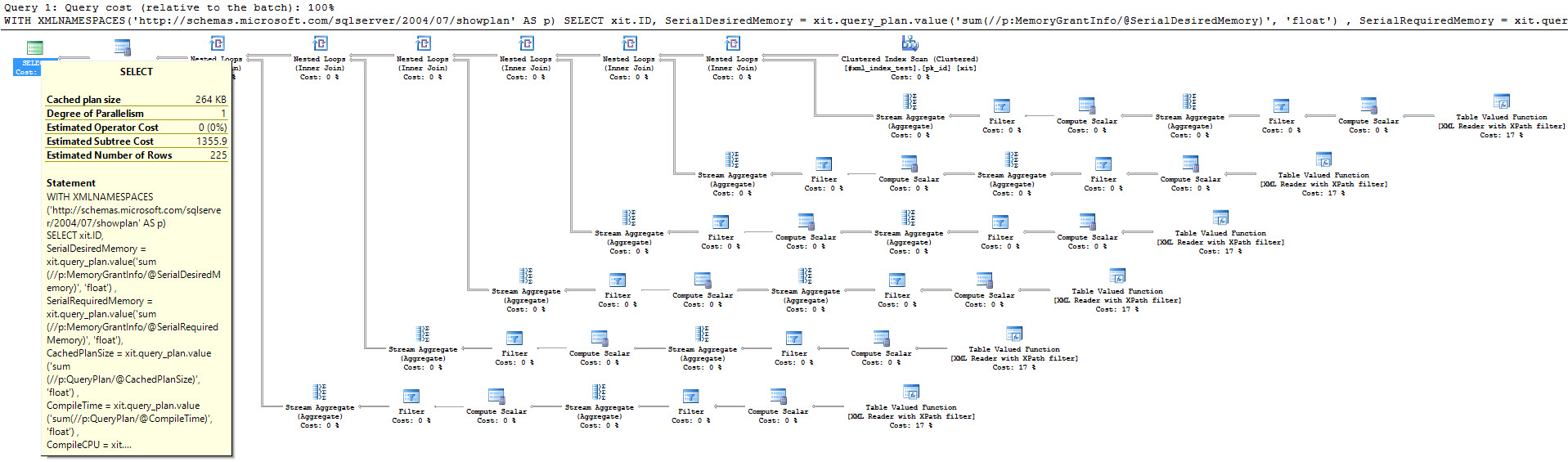
Right now, there are a paltry 225 query plans in my temp table. I know, right? Some consultant I am. I’m not even generating a ridiculous workload to pollute my plan cache.

But the query plan I get looks ridiculous and costs 1355 query bucks. Ew. I already regret working with XML, again.

I'd rather be querying .jpgs
I’d rather be querying .jpgs


The first kind of Selective XML index we can try is defined on the two nodes we’re querying. You can create it like this:

If we run our query again… Nothing changes, only gets worse. Well, not literally worse. The plan and cost are the same, but now we have a useless index.

Well, nuts. What else can we try?

This also makes no difference whatsoever. I tried defining each path as the SQL type I’m returning. Again, same plan, same cost. What’s next?

Finally, I tried defining each path as the XQuery expression I’m using to retrieve them, along with the data type. This finally makes a difference, and a huge difference. Query cost is down to 0.55. That ain’t bad for an index.

What time is it, even?

Just Selecting XML

I’m not getting into the other possible XQuery methods, like .exist(), .nodes(), or .query(), or using sql:column to join data anywhere. That’s more XML than I care to mess with in one blog post. If you use XML a lot, and you’re on SQL Server 2012+, you may want to give SXIs a shot. They can be pretty cool when you get them working.

Thanks for reading!


Test: The Top Two SQL Server Problems I Find Everywhere

Companies call us for performance or high availability issues, but over and over, the very first two things we find are:

  1. They’re not taking backups to match the business’s RPO and RTO
  2. They’re not doing CHECKDB weekly, or at all, and don’t understand why that’s an issue

So let’s walk through a simple scenario and see how you do.

It’s Thursday morning at 11AM, and you get an email: users are reporting corruption errors when they run SELECTs on a critical table. You run the query, and it turns out the clustered index on the table has corruption.

Here’s your maintenance schedule:

  • Full backups nightly at 11PM
  • Log backups every 15 minutes
  • Delete log backups older than 2 days (because you only need point-in-time restore capability for recent points in time, right?)
  • CHECKDB weekly on Saturdays at 9AM
Our national symbol is ashamed of your RPO/RTO

You can’t repair the corruption (it’s a clustered index, and there aren’t enough nonclustered indexes to cover all the columns), and the business needs that data back. You’re on: answer these questions:

  1. What backups do you restore, in order?
  2. Will they be free of corruption?
  3. How much data will you have lost?
  4. How long will that process take?
  5. Given that, what’s your effective RPO and RTO?
  6. If the business said that wasn’t good enough, what specific steps could you take to improve those numbers without spending money?

This week, while folks are working at low speed due to the holidays, double-check those backups and corruption check jobs.


The Cost of Adding a Reporting Server

“We’d like to offload our reporting queries to a separate SQL Server.”

The first costs are fairly obvious.

Hardware and storage – even if you’re running it in a virtual machine, you need to account for the costs of say, 4 cores and 32GB RAM. Not only will you need storage for the databases, but you’ll also need to decide whether this server gets backed up, and copied to a disaster recovery data center.

Software licensing – Standard Edition is ~$2k per core, and Enterprise Edition is ~$7k per core. Toss in Windows (especially now that it’s licensed per-core), your management/backup/antivirus tools, and your monitoring software.

Project planning – you’ll need to design how to get the data from production to the reporting server, like with Always On Availability Groups, log shipping, or transactional replication.

App modifications – the app running reporting queries will need a new connection string. Even with Always On Availability Groups, reads aren’t automatically offloaded to readable replicas – you have to use the connection string parameter ApplicationIntent = ReadOnly to tell SQL Server that you promise not to try to write anything. If you have a single app that does both reads and writes, and you only want to offload some of the queries, you’ll need to go through the code to switch those queries over to the new connection string.

The rest of the costs are surprises.

Adding a troubleshooting process – sooner or later, the data replication process will break. Depending on the method (AGs, log shipping, replication) and failure type, it’ll fail in different ways – maybe all of the data is old, maybe just some of it is, or maybe the reports aren’t accessible at all. You’ll want to list out the failure methods and explain what symptoms will look like. This helps business users recognize when their reports are wrong, and react appropriately. If you don’t do this step, then after the first failure, people are just always going to expect that there’s a bug in the report data.

Prepare for failure – for each of those failure methods, decide how you’re going to react. For example, if AG replication breaks and reports are out of date, will you point reports at the primary until the problem is resolved, or will users just have to deal with unavailable reports while you troubleshoot or resync the replicas? If you don’t do this step, then you’re going to be winging it every time, and you’ll look unprepared while reports are wrong or down.

Set realistic expectations for RPO and RTO – based on your process and preparation, make sure the business users understand how long their reports will be down when things break.

Measure the overhead of replication – AGs and transactional replication can add performance slowdowns beyond what the reports used to cost. For example, if you were only running a few reports an hour, and only hitting a subset of the data, then suddenly replicating every individual delete/update/insert operation can have a huge overhead.

Add monitoring – you need to start monitoring how far behind the reporting server is, and how performance is doing on both. Performance troubleshooting becomes a lot harder, too – for example, when you’re doing index tuning, you have to combine data across both the primary and the reporting servers in order to find the right mix of indexes across the board.

Are you sure you really need to offload reporting?

Before you embark on this expensive project, ask:

  • What’s the primary wait type that we’re facing?
    (Find out with sp_BlitzFirst @SinceStartup = 1)
  • What’s the cheapest/easiest way to reduce that wait type?

Time and again, I see people facing PAGEIOLATCH waits (which mean waiting to read data pages from a data file), and they’re juggling a 1TB database with 16-32GB RAM. Don’t spend tens of thousands of dollars to fix that problem – buy $1,000 of RAM and spend some time doing index tuning.


7 Things I Learned About Aurora at AWS re:Invent 2016

Richie and I attended the AWS re:Invent conference in Vegas last week. Here’s some of my favorite takeaways about Amazon Aurora, their homegrown relational database with MySQL compatibility.

1. AWS has a grudge against Larry Ellison. Andy Jassy’s keynotes made repeated jokes about Oracle’s cloud product (or lack thereof), the high cost of proprietary databases, and expensive sailboat hobbies. Larry’s big, bold personality makes for an easy target, but I couldn’t help but wonder if AWS will come after SQL Server’s costs next.

2. Amazon’s database products are lucrative. Their database products are their fastest-growing products in history. The cynic in me suspects that they’re measuring growth in terms of revenue, not customer count, and since databases are expensive, voila.

3. Amazon’s Aurora product is ambitious. Aurora is their home-built relational database product. They manage backups, availability, and patching. In 2014, they announced full MySQL compatibility – you could point any MySQL app at Aurora, and it’d work just fine. This year, they announced PostgreSQL 9.6.1 compatibility, too.

4. Aurora PostgreSQL was 3 years in the making. That’s gotta make you wonder: are they trying to build SQL Server compatibility? Granted, it’d be a lot of work – it’s a closed source database. Feature compatibility would be an arms race: Microsoft would rapidly try to add features to entice users onto newer versions, while at the same time Amazon would have to race to keep up. (Hey, interesting coincidence – Microsoft’s been suddenly shoving features in – even in service packs.)

5. I’m guessing Aurora Oracle compatibility will come next. In the PostgreSQL announcement session, the speakers pointed out that PostgreSQL is the most Oracle-compatible database, with some 60-70% of applications being able to switch over. Theoretically, AWS could fund open source development of further Oracle compatibility, but given AWS’s lack of contributions back to open source projects, I wouldn’t bet on that. Instead, I’d bet on them doing something internally that only Aurora would offer.

Before going to re:Invent, I would have bet against AWS aiming for Oracle compatibility. However, during the keynotes, I kept hearing enterprise stories over and over. AWS really wants to be the default data center for enterprises, and enterprises run Oracle (and SQL Server of course).

Amazon won’t have an easy road. Their edge is that they’re essentially getting two database platforms for free: MySQL and PostgreSQL. Amazon has developers, sure, but they don’t have to build a query optimizer, for example. Thing is, those platforms aren’t Oracle.

AWS Performance Insights

6. Amazon’s throwing in free performance monitoring tools. The new Performance Insights tool shows wait stats, top resource-intensive queries, lock detection, execution plans, and 35 days of data retention. It’s designed by a former Oracle (there we go again) performance tuning consultant to match his workflow. You don’t have to install an agent, configure a repository, or keep the thing running. It’s in preview for Aurora PostgreSQL today, and will be rolled out to all RDS databases (including SQL Server) in 2017.

7. You don’t need to learn Aurora today. This isn’t going to be one of those doom-and-gloom posts that says, “The cloud is coming for your job!” The cool thing about Aurora is that it works just like the MySQL and PostgreSQL you know and love don’t know anything about and aren’t particularly fond of – it just takes away the crappy parts of database administration, like backups, corruption checking, and HA/DR failovers.

If you were a MySQL or PostgreSQL query/index tuner, you could keep right on working in Aurora – only now, your skills relate in direct cost improvements. If you can tune queries and indexes well, you can cut your company’s cloud bill directly – and see the improvement in your very next bill.

The same thing will happen when Amazon comes for Oracle, and eventually, SQL Server. Your performance tuning skills will still work – and they’ll even be worth more.

As they say in Vegas, place your bets.


Date Math In The WHERE Clause

Execution Plans, SQL Server
20 Comments

Oh, THAT SARGability

I realize that not everyone has a Full Metal Pocket Protector, and that we can’t all spend our days plunging the depths of query and index tuning to eek out every CPU cycle and I/O operation from our servers. I mean, I don’t even do that. Most of the time I’m just happy to get the right result back!

I kid, I kid.

For those of you out there that have never heard the word before, go watch this. You’ll thank me later. Much later.

What does that have to do with me?

It has to do with you, because you’re still formatting your WHERE clause poorly. You’re still putting expressions around columns and comparing that output to a value, or another expression.

Huh?

Think about times when you’ve done something like First_Name + ‘ ‘ + Last_Name = ‘Meat Tuperello’, or even worse, when you’ve totally broken a date into YEAR(), MONTH(), and DAY() and compared them all to values.

Yes, you. Yes, that’s bad.

More Common

Sometimes people forget that DATEADD exists. They go right to DATEDIFF, because it sounds like it makes more sense.

What’s the difference between these two dates? Can I go home now? I’m so hungry. No one takes the Esperantan money you pay me with, Mr. Ozar.

But this can get you into a lot of trouble, especially if you’re either dealing with a lot of data, or if the WHERE clause is part of a more complicated series of JOINs. Not only does it not make efficient use of any indexes, but it can really screw up cardinality estimation for other operations. What does this peril look like?

Looks good to me

Of course it does. That’s why you’re reading this blog. You have questionable taste. There are some problems with this, though.

Your mom.
Your mom.


We didn’t do too bad with cardinality estimation here. The Magic Math guessed about right for our 10,000 row table. But breakthroughs in Advanced Query Plan Technology (hint: GET OFF SQL SERVER 2008R2) allow us to see that we read all 10,000 of those rows in the index, rather than just getting the 5003 rows that we actually need. Shame on us. How do we do better?

No Sets In The Champagne Room

We’re going to flip things around a little bit! We’re going to take the function off of the column and put it on our predicate. If you watched the video I linked to up top, you’d know why this is good. it allows the optimizer to fold the expression into the query, and push it right on down to the index access. Hooray for us. Someday we’re gonna change the world.

Now we get a cheaper index seek, we don’t read the extra 4997 rows, and the cardinality estimate is spot on. Again, it wasn’t too bad in the original one, but we got off easy here.

Just you, and nobody else but you.

Face 2 Face

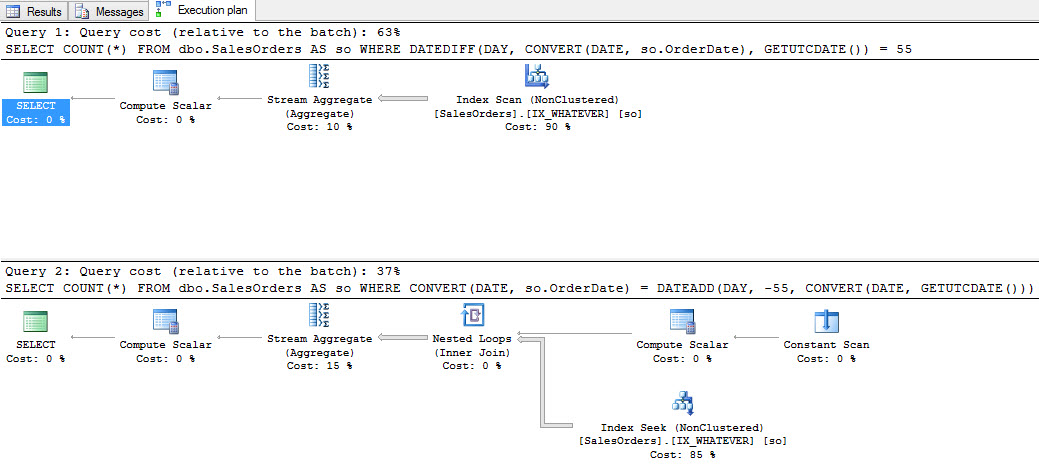
If you’re wondering what the plans look like side by side, here you go.

Gateway Goth
Gateway Goth


Both plans are helped by our thoughtfully named index on the OrderDate column, though the one with cheaper estimated cost is the bottom one. Yes, I know this can sometimes lie, but we’re not hiding any functions in here that would throw things off horribly. If you’re concerned about the Nested Loops join, don’t worry too much. There is a tipping point where the Constant Scan operator is removed in favor of just index access. I didn’t inflate this table to find exact row counts for that, but I’ve seen it at work elsewhere. And, yeah, the second query will still be cheaper even if it also scans.

Thanks for reading!

Brent says: this is a great example of how people think SQL Server will rewrite their query in a way that makes it go faster. Yes, SQL Server could rewrite the first query to make it like the second – but it just doesn’t go that extra mile for you. (And it shouldn’t, you wacko – write the query right in the first place.)


Spills SQL Server Doesn’t Warn You About

Execution Plans, SQL Server
28 Comments

Don’t make me spill

Table variables get a lot of bad press, and they deserve it. They are to query performance what the TSA is to air travel. No one’s sure what they’re doing, but they’ve been taking forever to do it.

One particular thing that irks me about them (table variables, now) is that they’ll spill their spaghetti all over your disks, and not warn you. Now, this gripe isn’t misplaced. SQL Server will warn you when Sort and Hash operations spill to disk. And they should! Because spilling to disk usually means you had to slow down to do it. Disks are slow. Memory is fast. Squatting in the Smith Machine is cheating.

Wouldn’t it be nice?

Why am I picking on table variables? Because people so frequently use them for the wrong reasons. They’re in memory! They made my query faster! No one harbors delusions about temp tables, except that one guy who told me they’re a security risk. Sure, we should get a warning if temp tables spill to disk, too. But I don’t think that would surprise most people as much.

So let’s see what hits the sneeze guard!

You’ve been here before

You know I’m going to use Stack Overflow. Here’s the gist: I’m going to set max memory to 1 GB, and stick the Votes table, which is about 2.4 GB, into a table variable. While that goes on, I’m going to run sp_BlitzFirst for 60 seconds in Expert Mode to see which files get read from and written to. I’m also going to get STATISTICS IO information, and the query plan.

First, let’s look at stats IO output. The first section shows us hitting the Votes table to insert data. The second section shows us getting the COUNT from our table variable. Wouldn’t you know, we hit a temp object! Isn’t that funny? I’m laughing.

The query plan doesn’t give us any warnings. No little yellow exclamation points. No red X. It’s all just kind of bland. Even Paste The Plan doesn’t make this any prettier.

The query plan doesn't warn us about anything.
Oatmeal


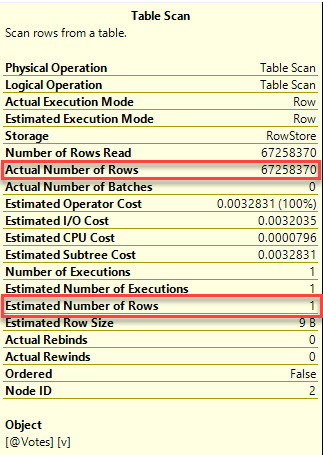
Well, unless you really go looking at the plan…

Oh, that terrible estimate

Okay, that sucks

Let’s look at sp_BlitzFirst. Only Young And Good Looking® people contribute code to it, so it must be awesome.

Just too physical
Just too physical


Boy oh boy. Boy howdy. Look at all those physical writes. We spilled everything to disk. That’s right at the 2.4 GB mark, which is the same size as the Votes table. We should probably know about that, right?

Is a temp table any better?

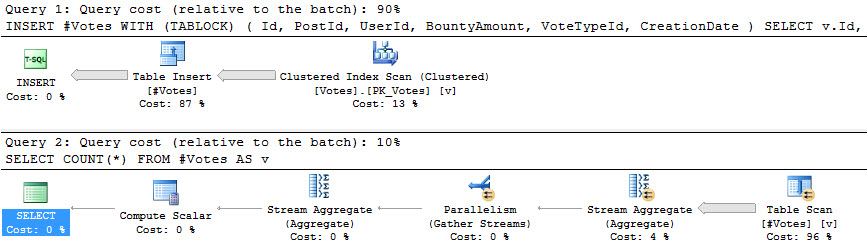
In short: kinda. There are some reasons! None of them are in stats IO. They’re nearly identical.

For the insert, the scan could go parallel, but doesn’t. Remember that modifying table variables forces query serialization, so that’s never an option to us.

In SQL Server 2016, some INSERT operations can be fully parallelized, which is really cool. If it works. Much like minimal logging, it’s a bit of a crapshoot.

The COUNT(*) query gets an accurate estimate and does go parallel. Hooray. Put those pricey cores to use. Unless you recompile the query, you’re not going to get an accurate estimate out of your table variable. They’re just built that way. It doesn’t even matter if you put an index on them.

Promised Land
Promised Land


Does sp_BlitzFirst tell us anything different?

SCANDAL
SCANDAL


Yeah! For some mystical magical reason, we only spilled out 1.8 GB, rather than the full 2.4 GB.

Party on, Us.

I still hate table variables

I mean, I guess they’re okay if the # key on your keyboard is broken? But you should probably just buy a new keyboard and stop using Twitter.

Anyway, I think the point was that we should have some information at the plan level about spills to disk for table variables and (possibly) temp tables. It wouldn’t help tools like sp_BlitzCache, because spill information isn’t in cached plans, but it might help if you’re doing live query tuning.

Thanks for reading!

Brent says – OMG THESE ARE SPILLS TOO. I never thought of it that way.


Announcing Group By: A New Kind of Free Community Conference

GroupBy Conference
2 Comments

group_by_conference_logoLet’s try something new. Let’s build a free event by the community, for the community, where:

Speakers submit abstracts publicly online. Anybody can submit an abstract on any topic – community members, software vendors, even Microsoft’s Bob Ward has submitted a session on 2016: It Just Runs Faster.

Attendees suggest tweaks to the abstracts. You leave comments on the abstracts, and you rate the topic, the abstract, and your likelihood of attending. Your constructive criticism helps refine their abstracts. For example, Alex Yate’s session on DevOps 101 has had a lively discussion in the comments, and he’s using that feedback to help craft a better abstract. If you’re a presenter, you should put in an abstract just to get the detailed, insightful feedback people like Hugo Kornelis and Adam Machanic have been giving.

The 5-7 top-voted sessions are picked. You, dear reader, are building this conference for yourself. Voting closes on December 16th, and the ones you’re most likely to attend – those are the ones that will be picked.

On Friday, January 13th, the whole thing happens live. Register to watch, and we’ll do it live, with me as your cohost throughout the event. I’ll take your typed-in questions and ask ’em out loud, help with technical glitches, and manage the recording process. If you miss the event, no worries – the sessions will be posted to YouTube, a podcast feed, and the site.

Everything gets done transparently in public: the abstracts, the presenters, the comments, the voting, and the conference itself.

It’s called Group By. Go check it out, and rate the sessions you’d like to see!


[Video] Office Hours 2016/11/23 (With Transcriptions)

This week, Brent and Richie discuss their hardware setups, lazy spools, SQL 2016 Service Pack 1, Always On Availability Groups, Database IDs, GroupBy.org, SQL on Linux, and new features they would like to see in the new version of SQL.

Here’s the video on YouTube:

You can register to attend next week’s Office Hours, or subscribe to our podcast to listen on the go.

Enjoy the Podcast?

Don’t miss an episode, subscribe via iTunes, Stitcher or RSS.
Leave us a review in iTunes

Office Hours Webcast – 2016-11-23


What do you guys think of my blog?

Brent Ozar: All right, let’s see what we’ve got for questions here. Nate says, “I don’t know if you guys are open to this or not–” No, we’re not, really. Next question. Just kidding. “I’d love to have you check out my blog.” He says, “I’m a new blogger and I write about DBA stuff since that’s my current job and passion. I’d love to have some feedback from the pros.” I assume he’s talking about Richie. URL is natethedba.wordpress.com. Nate, the one piece of advice I’d give you is go get your own URL. It’s only like $10 a year. You can get them from GoDaddy, from AWS, Namecheap. There’s a bunch of providers that do it. WordPress will charge you—I want to say it’s $30 a year to be able to use your own vanity URL but the thing is that way it’s totally you and it looks way more professional. You’re going to be telling it to people for years so you might as well just get the URL that you want there.

Richie Rump: Yeah, don’t do Jorriss.com because you’re going to have to tell people that there are two Rs, two Ss, and they’re like, “What’s Jorriss?” In the 90s, it made sense, not so much nowadays.


What should I do about lazy spools?

Brent Ozar: Fellow human says, “In one of the previous Office Hours webcasts, Erik mentioned that lazy spools are often an indication of bad performance. Can you elaborate on why and how to avoid them?” That hasn’t been my experience generally that I see a one-to-one when there is a lazy spool I go after that. I think what Erik was saying, and I think I agree with because of course, he’s not here so I can speak for him, is that when there’s a plan and I see a lazy spool, it’s a crappy query that I need to do something about or a crappy plan, not enough indexes, whatever. I don’t focus on the spool, I take a step back and just start looking at, all right, what’s this query doing? How am I assembling data together and what can I do in a better way? Often it involves things like index tuning or query tuning, but I don’t focus on the spool itself.


Is 403 page reads per second a problem?

Brent Ozar: Next up, someone says, “My Buffer Manager page reads per second is 403. However, my page life expectancy is 22,089. What’s the problem?” First of all, I don’t look at either of those numbers but I’ll tell you what’s happening. What’s happening is stuff is staying in memory for a long period of time. However, you’re having to read 400 pages from disk. 400 pages times 8K is nothing. It’s not that big of a deal. I could read 400 8K pages in one second. I’ve taken speed reading classes.

Richie Rump: Yeah, no.

Brent Ozar: I wouldn’t comprehend any of it. Richie has seen me read documentation, even when I read only one page a minute, I’m like, “What’s this mean again, Richie?”

Richie Rump: Even his emails. Just, no.

Brent Ozar: It’s about the rate of emails that I get. What I would say is, you don’t necessarily have a memory pressure problem. SQL Server is just reading some stuff from disk. What you want to look at is wait time instead. If you search for wait time on brentozar.com you’ll get a whole bunch of blog posts about how to do that. My personal favorite way to do that is sp_BlitzFirst. Sp_BlitzFirst will tell you what your performance problems are right now.


We changed a bit to an int. Why did .NET break?

Brent Ozar: Next up, Nate says, “Pretty please, I promise I have a real question to ask too, maybe even blog about. We had a view which had a BIT casted to an int column. When we changed it back to a BIT, it broke the .NET app with an invalid cast exception. It’s using Entity Framework. Any ideas why that would happen? I thought the app code would handle implicit gracefully but I guess not.” What on earth are you doing that for?

Richie Rump: Well, you do have to change your code. If you have an Entity Framework entity, because of what it is, and it’s mapped to a table or a view, it’s not implicit. You’re actually declaring it in the background as an INT or string or whatever. So you’ll have to go into the code and then tell it, “Hey, by the way, this is an INT or a BIT.” So that’s probably where you’re broken. You’ll just have to change that mapping and those should be fixed.

Brent Ozar: I also have this horrible vision that somewhere data is coming back as like a 9 or a 14 instead of a 5th just with somebody’s crazy cast.


Should I switch from a Surface Pro 3 to a Mac?

Brent Ozar: “I’m thinking of a Mac since the battery-gate with my Surface Pro 3, even though they finally fixed it. How has your battery been on the Surface Pro 4?” You have a 4, right?

Richie Rump: It’s been fine but what I’ve been telling people about my Surface 4 is I like it. I really love it, but this is my third machine. Like I actually have three machines that I actively use. I’ve got one I’m using right now. I’ve got this baby that I use at night and then the Surface Pro 3 is essentially a large tablet for me. Everything has been fine on it though. I had one problem and it was a hardware problem. I’ve had it since day one. I went right into Microsoft’s store, they exchanged it right out and I was back up and running literally within the next hour or so. But the way I use my Surface Pro is not the way I would normally use a machine.

Brent Ozar: You don’t run like three instances of Visual Studio on there.

Richie Rump: No. No, no, not at all. I mean, it’s all there. But I don’t actively write code on it or anything like that.

Brent Ozar: So you’re the same as me. That’s what you’re saying. It’s installed.

Richie Rump: In ten years when I’m not actually doing anything with technology, I will be you, yes, exactly.

Brent Ozar: Yeah, might take longer than that. Yeah, sadly. To take your skills to atrophy, to this level, it’s, you know, measured in decades.

Richie Rump: You forget, developer skills, they go quick. Right? A lot quicker than DBA skills.

Brent Ozar: Yeah, wow, you guys have to learn new languages every six weeks.

Richie Rump: Haven’t we had this conversation before?

Brent Ozar: Yes.

Richie Rump: I watched a Pluralsight course yesterday, Brent.

Brent Ozar: To give people in the background an idea, we develop stuff like, so you take Paste the Plan for example, which is developed in AWS using Lambda which is function as a server, aka server-less code. It’s not really server-less. Nick Craver has a heart attack every time we say that but there are real servers behind…

Richie Rump: It’s just bad marketing.

Brent Ozar: It is bad marketing. But new frameworks come out with that like every sixty days on how you go about accomplishing this stuff.

Richie Rump: Yeah, and not even that but even some of the new features that have been around a little bit. What I’ve been playing with this week is ECMAScript 6 which is the next version of JavaScript. So I’ve been messing with that in Lambda this week. It just makes things a lot cleaner. All the spaghetti code I had to write with Paste the Plan, now with using ES6 syntax will be a lot cleaner. I’m smiling a lot more this week than I did when I was writing Paste the Plan. So that’s good.

Brent Ozar: Golly, I would also say don’t change from Windows to Mac—don’t take that lightly. Changing either way sucks, jumping platforms. I’ve tried to switch back over to Windows repeatedly because Windows 10 is amazing. Windows 10 is freaking fantastic.


Should I use SQL Server 2016 SP1 in production?

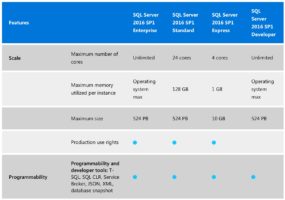
Brent Ozar: Someone says, “Now that SQL Server 2016 Service Pack 1 is out there, would you feel comfortable using that in production? Of course after testing in a test environment first.” I’m actually working with a client today on 2016. That’s going to be one of my recommendations is to go to Service Pack 1. People get really excited about having Standard Edition to have the same capabilities for developers that Enterprise Edition has. Forget that. There’s really cool DMV and execution plan changes that are awesome. In this case, it’s exactly going to help the client get better execution plan insight when they’re going and doing query performance tuning. So if you’re on 2016, I would totally go to SP1, just make sure you test it first. If you’re trying to consider a new deployment today, I would totally vote for 2016 and with Service Pack 1. It’s just great.

Richie Rump: Do you want to mention Erik’s post on 2016 SP1?

Brent Ozar: Yeah. Erik has an opinion, and I agree with entirely, Erik said that when Microsoft put the Enterprise Edition—and for those of you who are listening, I have air quotes around my head—Enterprise Edition features in 2016 Standard Edition in Service Pack 1, they really kind of took the leftovers. They didn’t take the best features. They just took these fringe features that are well tested and everybody kind of knows how they work but nobody really wants to use them. Great examples of that are Always Encrypted, partition tables, you hardly ever see that stuff out there and, yes, it’s going to make ISVs’ lives a little easier, but it really doesn’t help DBAs at all. DBAs, all the features that we wanted, online index rebuilds in Standard Edition, creating indexes online, merry-go-round reads, there’s a lot of things that I think we should have had in Standard Edition if we’re going to get features and we didn’t get those.

Richie Rump: Yeah. As a developer, I should be really jazzed about all the cool stuff they threw in Standard but without raising the memory limits, it’s meaningless.

Brent Ozar: Yeah.

Richie Rump: It’s almost like, “Hey, look all the stuff that you can get and you can do.” And I’d be like, “Yay, I get to play.” Then all of a sudden it’s like, but you only can stay on Standard and like why is it so slow? I don’t understand.

Brent Ozar: Yeah, if you need partitioning, the odds that you’re going to be able to still perform well on 128 gigs of RAM are not good. Usually, stuff like partitioning is designed for much larger datasets.

Richie Rump: Yeah.

Brent Ozar: I’m actually—like when I saw it drop I’m like, okay, I have a vision two years from now the amount of partitioning work we’re going to be doing is skyrocketing because everybody is going to go throw partitioning in as soon as they can and then they’re going to find out, “Oh, it actually makes queries slower instead of faster.”

Richie Rump: Yep, and, “Why I can’t do partition swapping because I’ve put an index across the entire table,” and, yeah. Yeah, that’s going to be fun.

Brent Ozar: Yeah, not a performance fix.

Brent Ozar: Someone says, “So is 2016 better than 2014 and worth going to?” Absolutely, for DMV improvements that are much better. Query Store is my personal favorite. I believe that feature alone is worth going to 2016 for. Thanks, Conor Cunningham, I love you, even though you don’t love me right now because I wrote a blog post that made you angry.


Why do I have user problems when I fail over an AG?

Brent Ozar: One person, let’s see here, says, “Doing some testing with Always On Availability Groups and I’m having trouble with SQL users in the replicated database losing their mapped link after a failover. Is there an easier way to reestablish this link after failover? It must be a common issue.” It is and in this case Always On Availability Groups has a lot of similarities to database mirroring. Database mirroring exhibits the same problem. The guy who wrote the book on database mirroring, his name is Robert Davis, aka SQLSoldier, if you search for SQLSoldier sync logins—not as in sank my battleship—but as in synchronize logins, he has a script out there that will help you go about doing that.


How do I get my RPO and RTO in writing?

Brent Ozar: “Any suggestions for getting RPO and RTO for high availability disaster recovery from an organization?” Yeah, absolutely, go to our site. Go to brentozar.com. Put in your email address or click on “free stuff” up at the top of the blog. We have a worksheet, an HA/DR worksheet for this exact purpose. What this does is it lets you fill in the current state first. You fill in how much data you’re going to lose when the server goes down, how long you’re going to be down for based off of things like your backups and whatnot. Then hand that to the business and say, “Here’s current state. If you want it to be nicer, you pick what you want.” The second page of that worksheet has prices to help you make that a lot easier with the business.


What causes database timeouts?

Brent Ozar: J.H. says, “What are some factors on the database side of things that cause timeouts?” So there’s really two parts to a timeout question. One is timing out before you connect to SQL Server. The other part is timing out waiting for your results. For timing out connecting to SQL Server you really have to watch on the application side of things because often SQL Server never even hears the call. For timing out on query executions, SQL Server doesn’t have a timeout. It will sit there and run your crappy query for years or decades. So then that’s also an application setting on how long you want to wait for your queries. So on both cases of those I start working with my developers and saying, “All right. If you’re having problems connecting, then let’s go set up ping monitors, any kind of monitoring utility from your application server over to the SQL Server so we can start to see when you’re not even able to ping the SQL Server. Then we can work with the network guys to figure out how to fix that.”


What should I do with statistics IO output?

Brent Ozar: Oh, there’s someone who asks an interesting question. “Set statistics IO on gives you great information where tuning in terms of reads.” I know where you can go with that information. Richie, tell them where they can go with their set statistics IO output.

Richie Rump: Thanks, Don Pardo, you could go to statisticsparser.com.

Richie Rump: Dang, I was almost there.

Brent Ozar: So close. The Don Pardo thing was what did it. I was like, ah, that’s good. He says, “Am I correct in assuming that each read is 8K so when I’m talking to my developers I can tell them how much data their current query is reading and start asking does it make sense that this thing is reading say 10 gigs worth of data when they’re writing their queries?”

Richie Rump: Yes.

Brent Ozar: Those are great, good—and it’s always a consistent number. It doesn’t change.

Richie Rump: Yeah. And if you go to statisticsparser.com it will not only parse it out for you so you can actually read it and know that that’s millions and not just kind of having to do the, “Oh, here’s a comma, here’s a comma, here’s a comma,” but also aggregate it for you as well. So it will give you the total number of page reads over a query.
Brent Ozar: Super helpful.


Can database IDs be different on AG replicas?

Brent Ozar: Someone says, “How do I resolve the issue where a database…” blah, blah, blah, “I have a database with one database ID say 6 on the primary and 8 on the secondary in Always On Availability Groups.” That’s totally okay. It doesn’t affect anything at all. Database IDs can be different on every server.


Thanks for helping me with Twitter.

Brent Ozar: Someone says, “Brent, you are awesome because two years ago I was new to Twitter and posted a question not using the #SQLHelp, instead I just named certain people. I was mocked by others while you helped me understand how to use #SQLHelp by reading your blogs.” I’m glad I could help. Twitter is not intuitive. Twitter is the opposite of intuitive. It’s like those old IRC—Richie, were you ever on IRC?

Richie Rump: Uh, of course, Brent.

Brent Ozar: Yeah, I thought so, and BBSs and all that.

Richie Rump: Oh, BBSs, oh. Let’s upload more stuff so I can get more download credits.

Brent Ozar: Or that deal—there was a ZMODEM hack where you could cancel your download at the last second and it would not fill up your account points. It would do it right after you sent the confirmation. Yeah, no, I’m all for that. Everything about databases is cryptic, online is cryptic, so whenever I can help people. Just make sure you can pay it forward.


Psst – introducing Brent’s newest project

Brent Ozar: My current attempt to go pay it forward is GroupBy.org. If you go to GroupBy.org, all one word, no spaces or minus signs, at GroupBy.org we’re building a platform where people can teach each other. Where you can go submit a session. You can vote on which sessions you’d like to see. You can leave feedback to presenters so that they can help make their own abstract better. So it’s like a live conference submissions process. We’re just going to take the top-rated submissions from readers and then go let them present them online on January 13th.

Richie Rump: It’s such a great idea.

Brent Ozar: Thank you.

Richie Rump: It’s such a great opportunity, man.

Brent Ozar: It’s going to be so much fun. Plus, it uses the exact same platform that you’re looking at here. Those of you who are online, those of you who are listening to the podcast, same exact deal. So you’ll see talking heads. Like I’ll be in there as a cohost for whoever is doing the presenting. So if something goes up in flames, we can still have a good time talking about it. I could post the questions that people ask verbally, just really helps presenters relax as they see the talking heads and not freak out.

Richie Rump: Yeah. I could totally see how me presenting with Brent Ozar’s face right there is not going to freak people out at all. No, no. I mean, it’s totally normal. It happens to me all the time.

Brent Ozar: I could wear a mask. Yeah, see, now that you say that, I’ve kind of always thought of myself as being like—no, but yeah, no, I think you have a point there. I could be actually worse. And it won’t be me every time, too. We’re going to rotate in and out hosting duties. So we’ll do just like go contact people in the community who like doing that kind of co-hosting duty and different, other people can do it. Because no one wants to see me every webcast. It needs to be moving around to different people.

Richie Rump: Dude, you’ll totally get some troll in here, you know, like myself. “Wroooong! That is incorrect!”

Brent Ozar: Or just hold up little signs like, “This slide I’m voting a 2.”

Richie Rump: Yes.

Brent Ozar: Someone says, “When will the registration option be available at Group By?” (Update: it’s available now.)


Are you seeing much interest in SQL Server on Linux?

Brent Ozar: Next one. “Are you guys seeing much interest in SQL on Linux? Allan Hirt told me he was in August at his class in Chicago.” Nope. Nope.

Richie Rump: I’m surprised someone actually has interest in SQL on Linux. Please, tell me more.

Brent Ozar: Yeah, I don’t get it. I get that there are people who are Linux-only shops and they want an easier way to run databases. I find it kind of suspicious that people who have standardized on a free, open-source operating system are going to spend $2,000 a core on Standard Edition and $7,000 a core on Enterprise Edition.

Richie Rump: Yes.

Brent Ozar: There are some pretty good open-source databases out there. I’m not saying SQL Server sucks. It’s amazing. I love SQL Server. It’s fantastic. But if you’re really drinking the Linux kool-aid, which is a delicious kool-aid, and I endorse it highly, great stuff, I don’t see a lot of people going, “I sure can’t wait to give Microsoft my database money.” I just don’t see that.

Richie Rump: Yeah, let me just throw out this Postgres thing that does some things really, really well and let’s get into this SQL Server thing and it’s not really running on Linux but on this kind of faux hybrid OS-y thing that runs on top of Linux. Let’s go with that.

Brent Ozar: Yeah, it’s a virtualization layer basically. Drawbridge, which is now known as SQLPAL 2, SQL Platform Abstraction Layer 2. Anthony Nocentino has a great blog post about it that will be in next week’s weekly links, how he reverse engineered what Microsoft is doing in order to run SQL Server on Linux. Early testing, for example, Klaus Aschenbrenner has done some early testing with Hekaton and found that it’s almost twice as slow. Now, I have no reason to believe that Microsoft won’t fix that stuff as we get closer to production but I don’t see a lot of people going, “I’d like to use it on Linux and have it be slower, please.” I just don’t see that.

Richie Rump: Yeah, let me use an in-memory database that’s slower and it costs me more.

Brent Ozar: Yeah, yeah. Someone else says, “I realize it’s not a replacement for Windows, it’s more for people running a lot of Linux concurrently.” Linux isn’t starving for database choices. What Microsoft will tell you is that people who are using Oracle are looking for a way out. I would just say, as an independent database consultant, if you’re going to go rewrite your app, because essentially if you’re using PL/SQL, you’re going to be doing an app rewrite to move from one database to another. If you’re going to rewrite your app, why not go with open source? Why not go with something that has no licensing costs to it? Sure, you’re going to still pay support but Postgres has got some pretty good looking legs on it right now.

Richie Rump: [Whistles] I mean at that point if you’re thinking about changing your platform, why not go to the cloud? I mean, there’s a lot of stuff out there that’s looking really, really good right now and just because I get to play with it every day, I’m not just saying that, right? It’s true. There’s some good stuff out there right now.

Brent Ozar: Yeah, but AWS has Aurora, there’s all kinds of interesting scalable databases. I am a huge fan of Azure SQL db. I think if you’re going to write a .NET application that wants a relational database up there and you can build it from scratch inside one database, no cross-database queries if you can avoid it, Azure SQL db takes a lot of crappy work out of database administration, stuff that we just don’t like to do.

Brent Ozar: Follow up question, “Can you teach a fish to climb a mountain? Linux is a different animal. I don’t see that getting anywhere.” Well, so, because I happen to be an Alaska guy, I’m a real big fan of Alaska, I’ve seen salmon going upstream, so I do know that that can happen. And they taste fantastic.


What do sleeping queries mean?

Brent Ozar: Next question. “When queries are in a sleeping status, does that mean that the application is not closing out the connection to SQL?” Yep, exactly. If you look with one of my favorite diagnostic tools, sp_WhoIsActive, if you look with sp_WhoIsActive, that’s something that’s not included with SQL Server, it’s an additional diagnostic tool that Adam Machanic out of the Boston area wrote, it will not only show you if it’s sleeping, it will show you if it has open transactions too as well.


Why are partitioned table queries slower?

Brent Ozar: Next question. “Why are queries slower on a partition table? You just mentioned this.” If you go to brentozar.com/go/partitioning, we have links that explain it. Kendra Little did a few example blog posts using the Stack Overflow database. If you split a table up into a bunch of little, bitty child tables underneath, SQL Server has to recombine those results when it goes to join them to another table. So you can end up with even more expensive sorting. There have been a couple of clients where 80 to 85 percent of the cost of their select queries was simply reassembling the data from multiple partitions and then resorting it into a way that you could have had an index on a non-partitioned table. “Well, you can put indexes on a partition table.” Yes, but then you can’t do partition switching. You can’t drop a partition or load a partition at once.

Richie Rump: Yep. That’s why we always—I had a rule when I was working on that 60-terabyte [monster monitor] database that we always had to include the partition key. That way we didn’t get any sort of craziness, joining things back together and things like that.

Brent Ozar: You mean included in the select query, like in the where clause.

Richie Rump: That’s correct, yep.

Brent Ozar: As long as you can do partition elimination, as long as you can tell SQL Server, “Only look in these partitions” and it’s a minority of the partitions, you can get good performance improvements. And I’m not saying I don’t love partitioning, partitioning is awesome. You just have to find the right use case for it. Maintenance, making table maintenance faster is the great use case for partitioning. Making selects faster, not quite as much.

Richie Rump: But if you do the maintenance incorrectly, you could totally hose up a database. Let me tell you.

Brent Ozar: Oh, I need to have a blog post from the team on what were your worst database memories. Worst outages we’ve ever had.


We got an error…

Brent Ozar: Let’s see, we’ll take two more questions. One of them is, “We tried to install SP3 to SQL Server 2012 and got an error hexadecimal value, invalid character, blah blah blah. Tried redownloading the SP, same error.” I would just open a support call with Microsoft. Things like that they may actually even know about the problem and have a fix for it.


What feature do you wish SQL Server would add?

Brent Ozar: Last one we’ll take is, “What would be the number one feature you would want to see in the next version of SQL Server that some other database platform has but we don’t?” So I’ll let you think for a minute, Richie, because I have mine, and both me and Erik have blogged about this. I want non-logged tables. I want to be able to say that this specific table I don’t need to log it at all. Whatever data is in there I’m going to live with. If something hoses up mid-transaction whatever I have for records in there is totally fine for me. The great examples of that are sessions, state tables, reporting tables for like data marts that I could just clean out at the drop of a hat. You can’t just fix this by putting a database into simple mode—model. Tara will kill me if I don’t say “model.” Simple recovery model will still log all your inserts, updates, and deletes to disk. Whereas if like Postgres has non-logged tables, that would let me solve some problems with clients really quickly by just saying, “This table is garbage. Let’s turn off the logging.” Like if I had that over the last year how many real customer problems would I have solved? It’s probably on the small number of fingers on one hand, it’s just so cool, so I’m kind of jaded there. How about you, Richie?

Richie Rump: So I could go the, hey let’s get some of the windowing functions to spec fully because they’re mostly there but they could—but I’m not going to go there. There’s a feature that they just released for Aurora that I’ve been playing around with, probably finish playing around with this week, but you could load data from S3 into Aurora, so I’m going to say that, being able to load data from a JSON or XML file and just by one line on the command line and it just goes up and does it.

Brent Ozar: All right, so now I can think of another one. I would also love to have on Always On Availability Groups, I would love to have—and this is just pie in the sky, this is never going to happen. I would love to have one replica that doesn’t have indexes. I would love to have a replica that is just purely the clustered index, not any of the nonclustered indexes, or different nonclustered indexes somewhere else. So it would kind of give me the best of transactional replication plus Always On Availability Groups. It is never going to happen. I say that, I would love to have it happen, I just don’t see it happening. J.H. says, “How about table level restores?” All the third party backup software can already do that anyway so I’m kind of like, eh, I’m used to seeing that out of LiteSpeed, Redgate, and Idera. So if you want that, you can get that today for like $1,000 a server.

Richie Rump: There’s another comment, “Am I mistaken but isn’t no-logged table the same as in-memory tables? Or do those get logged?”

Brent Ozar: It’s not. With in-memory tables, first off, you have to accept all the restrictions of in-memory tables, which rule out a whole lot of capabilities of regular, plain old tables. Plus, if they’re durable, they are still written to disk. They’re just written to disk in a different format. You can say nondurable in memory tables but those are simply erased whenever you go restart that SQL Server. I do want the data there, I just don’t need it logged.

Richie Rump: Yeah, another great way to put session information inside of SQL Server because that’s always a great idea. Yeah, let’s do that.

Brent Ozar: And you know, so I actually came around. When they said that they’re going to allow Hekaton in Standard Edition I was like, okay. So finally, I will accept session state in Hekaton on Standard Edition. I’m not happy about it, not excited about, it still seems like flushing money down the toilet but if you had to flush money down the toilet, now you can just flush it down with Standard Edition money instead of Enterprise.

Richie Rump: Yeah, so if you want to flush any more money down the toilet, you can go to Richie Rump Palmetto Bay, Florida 33157. There you go.

Brent Ozar: There you go. And on that bombshell, we will end. Good night, everybody. Thanks for watching. We will see you next week. Adios.


SQL Server 2016 SP1 Bug with Graphical Execution Plans

Execution Plans, SQL Server
19 Comments

Early adopters: if you’re rolling on SQL Server 2016 SP1, you may have noticed that when you click on query plans in sp_BlitzCache or sp_WhoIsActive, they sometimes render as ugly XML rather than the beautiful graphical showplan.

Here’s a 3-minute video showing the bug:

To work around it, save the XML plan as a file – but you’ll need to frame the name in double quotes, like “my beautiful query.sqlplan” and end it with a sqlplan extension. Then, open it up again, and SSMS renders it as a graphical plan.

To get this fixed, vote up these 3 Connect items:


Index Scans: Not Nearly As Bad As You Might Think

Execution Plans, SQL Server
14 Comments

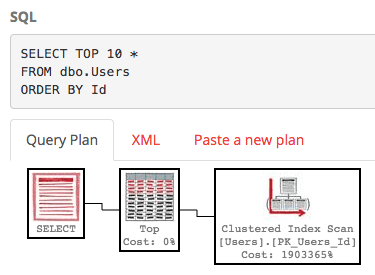
Using our good old buddy the StackOverflow demo database, let’s look at the Users table. I want to get the first 10 users in the table ordered by Id, the primary clustered key, which is an identity field.

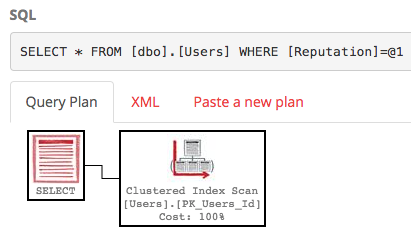
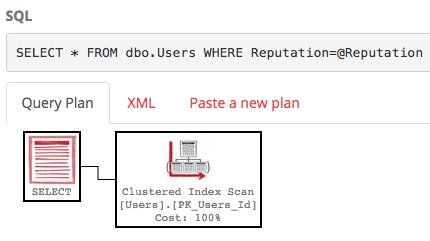
Here’s the actual execution plan:

https://www.brentozar.com/pastetheplan/?id=HyuSDxZye

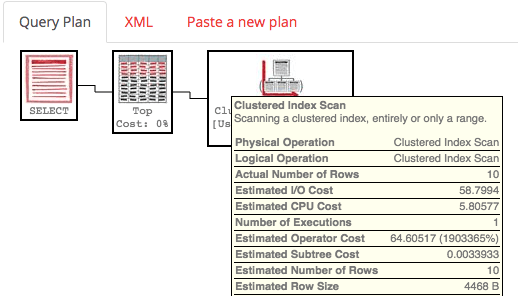
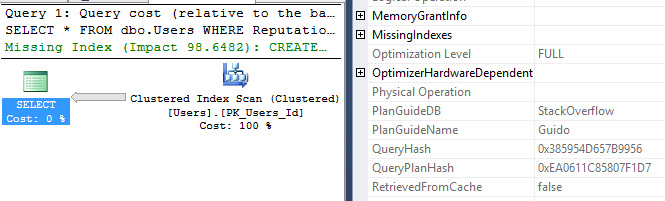
Ooo – clustered index scan – that’s bad, right?

Not so fast. Click on the plan to view it in PasteThePlan.com, and hover your mouse over the Clustered Index Scan:

Only 10 rows read. Hmm.

We didn’t scan the whole clustered index – just part of it.

And you’ve always heard seeks are great, right?

Let’s test that out too with a very similar query:

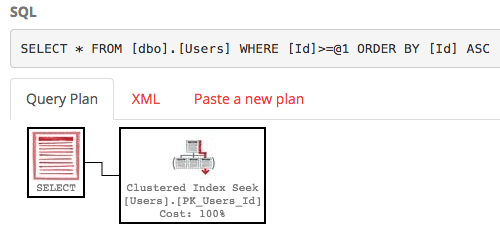
https://www.brentozar.com/pastetheplan/?id=B1laKeWJg

That query plan gets a clustered index seek. Perhaps we’ve been told that seeks are better than scans. So is this query less impactful than the first query? Absolutely not – this query takes a heck of a long time to run, and if you click on the plan and hover your mouse over that seek operator, you’ll see a lot more than 10 rows get returned.

The only difference between seeks and scans: where you start.

Seek means we know the starting point’s value. The starting value might happen to be the first row in the table, but that’s irrelevant. Seek means we know the value – in the case of our latter query, we knew the Id would be 1. Sure, as human beings, you and I know that we started our identity field with a value of 1 – but SQL Server doesn’t know that, nor does it know for sure that you never set identity insert on, and backloaded a bunch of data with negative identity fields.

Scan means we start at one end of the index, regardless of what value we find there.

Neither seek nor scan has anything to do with where we stop reading. We can do a scan that only reads a few 8KB pages, and we can do a seek that reads the entire table.

This has two big performance tuning implications. First, when you see a plan, you can’t just look at seek vs scan. Second, when you read the index usage DMVs, you can’t judge efficiency based solely on seek vs scan.


What’s the Difference Between Estimated and Actual Execution Plans?

I’m going to use the dbo.Users table in the StackOverflow demo database and run a pretty simple query:

First, hit Control-L in SSMS and get the estimated execution plan. Here it is:

Estimated execution plan: https://www.brentozar.com/pastetheplan/?id=H1TeRlZke

Click on the plan, and hover your mouse over the various operators. You’ll notice that almost all of the fields are prefixed with “Estimated” – because of course SQL Server doesn’t know how many rows will come back, how many times an operator will get executed, or how big the rows will be.

Now in SSMS, click Query, Include Actual Execution Plan, and then run the query. Here’s the actual execution plan:

Actual execution plan: https://www.brentozar.com/pastetheplan/?id=SJUjCeZkx

At first glance, the overall shape and the operators look identical. Hover your mouse over each operator, though, and you start seeing a lot more information. Here’s a few examples:

  • On the index seek, the estimated number of rows was 1,416, but the actual number of rows was 858
  • That influences the Clustered Index Seek (aka Key Lookup), where we thought we’d have to do 1,416 executions, but Number of Executions is actually 858
  • On the SELECT itself, the estimated plan didn’t say anything about degree of parallelism or memory grant, but the actual plan does

When I tell people to always start tuning with the actual execution plan, it’s not because the shape of the plan might be different. (It might – but that’s typically due to runtime differences in memory available, like if a server doesn’t have enough RAM to let the query go parallel.) Instead, you want to look at the actual plan simply because it’s got more juicy metrics available, especially metrics that point out where SQL Server’s estimates were off.

Estimation mistakes can be caused by:

  • Non-sargable queries
  • Out-of-date statistics
  • Missing statistics
  • Cardinality estimation bugs

And much, much more. To catch this stuff, you need the actual plans.


The Brighter Side of SQL Server’s future

SQL Server
9 Comments

Believe it or not, I sometimes like things

SP1 for 2016 has a bunch of cool new tricks:

I’m pretty psyched on the Wait Stats stuff in actual execution plans. I hope it eventually comes in some form to cached plans, or at least Query Store plans, but this is a good start! Even if it’s just averages, it’d be nice to know what plans were usually waiting on. Ditto the CPU and elapsed time. Brilliant additions that I can’t wait to see more of.

CREATE OR ALTER is so much nicer than the ol’ OBJECT_ID song and dance. I still can’t use it, on account of all the backwards compatibility our scripts have to deal with. Is there an EOL on SQL Server 2014 yet?

Getting IFI and LPIM info via DMVs is also pretty sweet. We’ll have those in Blitz soon, I’m sure, along with the Database Scoped configurations.

Overall, there’s a nice range of stuff that got added. It’s an exciting time to be working with SQL Server.

But oh wait, what’s that?

If you head over to the vNext page, there are two things on there that make downright amorous.

Clustered Columnstore Indexes now support LOB columns (nvarchar(max), varchar(max), varbinary(max)).
The STRING_AGG aggregate function has been added.

Oh my. That’s awesome. Beyond awesome. Right now, if you have tables with MAX datatype columns (and who doesn’t really?), you can either create nonclustered ColumnStore indexes around those columns, or you can move them off to another table and drop them from your main table to create a clustered ColumnStore index. Ask me about the night I spent converting the StackOverflow database to ColumnStore. I was so tired, I didn’t even do any experiments with it afterwards.

And that second one? STRING_AGG? Be still my heart. You’re killing me. It’s not just that it’s going to exist, it’s that I hope I had something to do with it existing. I may not have, but it feels nice to feel like you’re being heard. Right?

Are you there Microsoft? It’s me, Erik.

See, a while back I wrote a couple posts about Oracle and Postgres features I’d like to see in SQL Server. And while stuff like unlogged tables (my Connect Item for that got unceremoniously closed, but Brent’s is still alive) didn’t make it, some really cool stuff is in the pipeline. Being able to easily create delimited strings was one of the items in my Postgres post, and Adaptive Plans was something I mentioned in the Oracle post. Head on over to the link for some positing on what that might mean for SQL Server that I largely agree with. I’m imagining a world without parameter sniffing. It’s a beautiful place. It’s basically the party scene from PCU, except forever.

Again, I’m not saying I’m the reason for these features coming about. It’s just super cool to write about something, and then see it start to happen. Even though my Connect Item that got fixed doesn’t appear to be in SP1 or vNext, it’s still pretty rad that it will be in the future. Probably. In some form.

I got to talk to a few people from Microsoft at PASS, like Joe Sack, and they had some truly interesting things to talk about that are coming to SQL Server. Hopefully nothing that will put query tuners out of business, but hey, I’ve always wanted to take up water colors and drink wine all day. Buck Woody talked about R, and even though I didn’t understand any of it, it made me want to. I’m also probably lucky Kevin Farlee didn’t shiv me when I asked about the internals of Direct Seeding. Overall, it was a nice afternoon.

I think the functionality coming to SQL Server is great. Even if it’s not making it in there because I asked for it in a blog post, thanks for making me look all prescient and stuff!

And thanks for reading!

Brent says – For a while there, we were hearing that DBAs needed to learn Azure SQL DB or they were dead meat walking. Microsoft’s newfound love of the boxed product is a great sign that they understand the realities of development – some apps just don’t work in Azure SQL DB, and some companies just won’t adopt it – and there’s still a lot of real money to be made in the boxed product.


Initial Thoughts on 2016 SP1

A really odd choice

I’ve talked a bit about my annoyance with hardware limits for Standard Edition here and here.

If you’re a bunch of SQL-savvy developers who understand the Enterprise Edition features that are now available in 2016 SP1, great. You’re a very small minority of shops. I’m talking about places like StackOverflow and kCura.

If you’re not, prepare to join the breadline of dba.se users asking why Partitioning didn’t speed up their query. This is most shops who are just happy to get the right results back, and mostly interface with SQL via EF or another ORM. Not your target audience for Change Data Capture and Hekaton.

Why these features?

It kind of feels like you’re getting leftovers. There’s a meatloaf edge, congealed creamed spinach, mashed potatoes that have become one with the Styrofoam, and fossilized green beans. You don’t get the Full Monte AGs, TDE, online index operations, etc.

Don’t get me wrong, ColumnStore and Hekaton are neat, but you’re capped at 32GB of RAM each for them. If you’re at a point with your data warehouse or OLTP app where, respectively, those technologies would make sense, you’re not dealing with 32GB of problem data. You’re dealing with hundreds of gigs or more of it.

What still doesn’t quite make sense to me is why Microsoft would open up all these edge case tools that they spent a lot of time and money developing and implementing, rather than saying “here’s all the hardware you can throw at a problem, but if you want the Enterprise features, you gotta pay”.

Enterprise to me means HA/DR (AGs), it means data management tools (Partitioning), it means crazy fast data ingestion (Hekaton), it means security and auditing (all that other stuff).

Facing some tough facts

The amount of people who need all the functionality Microsoft opened up (Multiple Filestream Containers?!) pales in comparison to the amount of people on Standard Edition who have more than 64/128GB of data. And I know something about pale. I used to date a lot of girls who had Bauhaus posters in their bedrooms. It’s just not a very compelling argument to me. People need more memory, and hardware gets cheaper and more powerful every year. They don’t need more features to shoot themselves in the foot with.

If they’re not stepping up to pay $5k more per core going to Enterprise from Standard now, this stuff isn’t going to open any wallets. The amount of money it costs to put an extra thousand dollars of RAM in your server is absurd when you add on the Enterprise Licensing costs.

My proposition would be to raise the base RAM cap on Standard Edition for 2016 to 256GB, and either remove or double it to 512GB for shops that have Software Assurance.

Thanks for reading!

Brent says – Microsoft says they’re trying to make life easier for ISVs to have a single code base and use the same programmability features across the board. If that’s true, then they would also deploy these same capabilities across the other under-support versions of SQL Server (2014, 2012, etc) because after all, ISVs have to deal with clients on those older versions too. But they didn’t – and that’s your first clue that this isn’t really about making life easier for ISVs. It’s about increasing the adoption rate of SQL Server 2016. (Which is a perfectly cool goal, and I salute that – but that’s not the story you’re being told.)


[Video] Office Hours 2016/11/16 (With Transcriptions)

This week Richie, Tara, and Erik discuss replication, mirroring, memory grants, sp_BlitzCache, failover cluster instances, VLFs, restoring databases, qualifying schema and object names, multiple instances, and table variables.

Here’s the video on YouTube:

You can register to attend next week’s Office Hours, or subscribe to our podcast to listen on the go.

Enjoy the Podcast?

Don’t miss an episode, subscribe via iTunes, Stitcher or RSS.
Leave us a review in iTunes

Office Hours Webcast – 2016-11-16

Erik Darling: “Should mirroring be removed where the mirrored database server will be offline for several days?” Yeah, because your transaction log isn’t going to be able to truncate for those several days. So if you take log backups, it’s not going to help because mirroring is going to be like, “Hey, I need to be able to send these transactions else-whistle before the transaction log can be cleared.” So if it’s going to be down for several days, yeah, I’d probably want to remove mirroring. Unless you can afford to have your log file balloon out to gigantic sizes.


Erik Darling: “Does this new version support online index rebuilds yet?” You know, it doesn’t appear to—at least Aaron Bertrand’s roundup said that it doesn’t. I don’t know if anyone else saw that it did somewhere else. I haven’t tried it yet and I have a puzzler of a time trying to use Standard Edition because all I have is Developer Edition which is Enterprise anyway.

Richie Rump: Come on, can’t you burn two hours of your valuable time to figure this out? Come on, man.

Erik Darling: I could, but then I wouldn’t be able to release cool things in sp_BlitzCache for people so that they can know when they’re using table variables and heaps and functions that ruin their performance.


Erik Darling: “Right after VSS snapshot taken of all server volumes, vendor then backups the databases on the SQL Server instance with a destination of something like file equals one [inaudible]… this breaks the log chain. Contacting vendor rep, but why is this happening?” I don’t know. Ask the vendor. That’s dumb that they do that, break the log chain. Couldn’t tell you. If I could ever see inside the mind of most vendors who work with SQL Server, I would probably just go mad.


Erik Darling: “Recommended MAXDOP on a four-core SQL Server to start. They have CPU count equals four and hyperthread ratio of one.” If you have a four-core server, a single socket four-core server, I would not change MAXDOP. I would not set it to anything. It’s not really going to do you much good. I would still want to change cost threshold for parallelism though. You might want to be a little extra aggressive with that and make sure that if something goes parallel it’s because it really needed it. You might even find 50 is a bit low because parallel queries, they use extra threads, they use extra resources. If you have a single socket four-core server, I’m willing to bet you also don’t have much RAM either. So you could be in for a load of performance hurt if too much stuff starts going parallel. You could start taking thread pool. You could start seeing all sorts of resource semaphore waits. So I would mind my beeswax when it comes to parallelism there. I wouldn’t totally disable it. I wouldn’t set MAXDOP to one. I would leave it at zero and just set cost threshold high enough so that things aren’t just wanting to be going parallel.


Erik Darling: “Blame Paul Randal since he kills cats for every shrunk database apparently.”

Richie Rump: It’s true.

Erik Darling: Yes. That is true. Slowly and savagely. It’s nasty really. I don’t know how he lives with himself.

Richie Rump: Just don’t shrink a database and you won’t have to worry about that anymore.

Erik Darling: Yeah, exactly. It’s like all the weird scenes out of The Cell where it’s just like intestines and weird…

Richie Rump: I’m not familiar with that and I will continue to be so.

Erik Darling: You never saw The Cell?

Richie Rump: No.

Erik Darling: It has JLo and Vince Vaughn in it. How have you not seen The Cell? She like plays a psychiatrist who goes inside a serial killer’s mind to help find some girl who he is like holding hostage.

Richie Rump: That’s probably why.

Erik Darling: Yeah, all right. Sorry you have no taste in movies.

Richie Rump: Did you just drop a 90s film reference? Like a really obscure 90s film reference?

Erik Darling: It’s not even obscure. There’s a sequel to it. It’s not obscure. It’s totally—it’s got Vincent D’onofrio in it.

Richie Rump: Yeah, like they made a sequel to Anaconda. Whatever.

Erik Darling: I don’t know. It’s true. Did they make a sequel to that shark movie with Samuel L. Jackson and LL Cool J?

Richie Rump: Deep Blue Sea.

Erik Darling: Yeah, was there a sequel to that?

Richie Rump: I would assume that SyFy probably did something like that.

Erik Darling: Yeah, probably. That’s what turned into Sharknado probably.


Erik Darling: Let’s see here. Someone is using Windows “21012 R2, SQL Server 2012,” also R2. There is no such thing as SQL Server 2012 R2. There is only 2012. “How much RAM for OS, how much for SQL? 32 gigs on the server.” I would probably give 8 gigs back to Windows that it can do things. That’s it.


Tara Kizer: Can you guys hear me?

Erik Darling: Yes.

Tara Kizer: Finally.

Richie Rump: You’re still a little faint but we can hear you.

Tara Kizer: All right. I’m as high as it can go. It doesn’t happen on WebEx.

Richie Rump: Hear that everyone? She’s as high as she can go.

Erik Darling: Rocket man. So Tara, there was a replication question.

Tara Kizer: Yay.

Erik Darling: Yeah, I know. It’s a good one, maybe. “Does the snapshot folder for replication need to be on its own drive?”

Tara Kizer: It does not but you may run into a problem with disk space. We had all of our stuff separated into mount points and the default location for the snapshot folder ends up being put with the system databases, maybe not tempdb, but the other stuff. You know, also where the error log is. In my environments, that mount point was always created small since everything there is usually small, so it caused replication to fail at one point when we were doing a snapshot. We just didn’t have enough disk space for it. So we ended up moving it to its own mount point so that it could not impact the system stuff also. So not required but it might be recommended, depending upon the size of your snapshots.

Erik Darling: All right then. Well, hope that answers your question, replication person. Your life is hard enough with replication in it.
Erik Darling: “I have someone hogging the cache and killing page life. I am aware of a couple DMVs that can point out possible offenders but could it be possible that the offending query doesn’t show up in these DMVs?” Geez, that’s a weird one. So if you could clarify a little bit. When you say that you have “someone hogging the cache and killing page life,” I assume you mean that their query is asking for a memory grant or asking for memory that is draining the buffer cache, the data cache, from SQL Server. If you’re on a decent version of SQL, like 2012, I think SP 2 or 3, or 2014 SP 2, or 2016, you have a lot of good information about memory grants, prior to that you don’t have a lot. What you could try doing is if you’re on a more modern version of SQL Server you can run BlitzCache and you can order by memory grant or average memory grant. You can see if any queries are asking for great big memory grants and if they have unused memory grants. I added a couple months back. Prior to that, not really a lot of good information on that. It would kind of be hunting and pecking to try to see how much memory you’ve got assigned to a query. Anyone else? Want to chime in on that?

Tara Kizer: No.

Erik Darling: No? All right. You’re fine.

Tara Kizer: You got it.


Erik Darling: “While you are on MAXDOP and WIN 20000 R2, 8 procs, cost threshold 50, MAXDOP 4. Why do I have nine ECIDs for one SPID?” Was anyone paying attention when I did the parallelism [inaudible] at the precon?

Richie Rump: No.

Erik Darling: No.

Tara Kizer: I was tired.

Erik Darling: Everyone was tired that day. So the reason you have 9 is because parallelism doesn’t just control cores, it also controls threads. So you can have up to four threads per parallel operator per core. So if you have two—let’s just call them clustered index scans—happening on two different processors and they’re both using four cores, they’re both using four threads on each core rather, you will see four threads a piece and then one thread coordinating. So that’s probably why you see nine. That’s what I have to say about that.


Erik Darling: So, “sp_BlitzCache?” That’s someone’s question. Have you no decency, sir? Have you no decency?

Richie Rump: So, sp_BlitzCache. Go!

Erik Darling: Oh my word. How do you end up in Office Hours and not know about BlitzCache? How does that happen?

Richie Rump: That is what we like to call in the business a softball.

Erik Darling: Man. All right. Well, I’m going to send that link to the First Responder Kit out and you can go and you can look at all the awesome and interesting things that we have in there. There’s Blitz, it’s BlitzIndex, it’s BlitzCache, and it’s BlitzFirst, and now it is also includes BlitzWho because we separated out some of the code from BlitzFirst into its own stored procedure. BlitzyMcBlitzFace is not in there, yet.

Richie Rump: Damn it.

Erik Darling: We’re working on it. We’re trying to figure out how to get it to just return weird ASCII faces but I’m just not good enough at using replicate to do that.

Richie Rump: And I’m not going to help you.

Erik Darling: No, no one is helping. I keep emailing Kendra and Jeramiah like, “Dude, you’ve got to help me with BlitzyMcBlitzFace” but they’re like, “No. We have lives now.” I’m like, okay, fine.


Erik Darling: All right. Tara, here’s one for you. You’re going to love this. “I have a two-node failover cluster, SQL Server 2014 Enterprise and Windows 2012 with a default instance. I want to add named instances to the same machines. Do I need a SQL cluster and separate drives for each new instance?”

Tara Kizer: You need to install a new failover cluster instance. So you install SQL Server and installation is going to recognize that you’re on a cluster and it’s going to install a new instance using the cluster—go through the wizard with the cluster stuff. Then you do need separate drives for each new instance. I’m not sure that you want to put more than one more instance on a two-node failover cluster though. That wouldn’t be recommended, really only one is recommended for a two-node failover cluster, but maybe two. I wouldn’t go for three though or any higher.


Erik Darling: “Is pull better than push for replication performance?”

Tara Kizer: I don’t know the answer to that. I’ve never used a pull subscription, always push. I think that most people who use transactional replication use push. That’s the default. I have no idea about performance though.

Erik Darling: All right. Good stuff. I don’t know the answer either, clearly. No replication going on here.


Erik Darling: We have a question about BlitzCache. “SQL Server 2014 Standard. When I run BlitzCache during the day I’m seeing that everything in there has been created within the last minute. Am I right to assume from that that we are constantly recompiling our code?” No. If you are constantly recompiling your code there would be nothing in there. If you’re constantly compiling your code, you’ll have a lot of single use plans in there. So where you’re asking about temp tables, that will cause a statement level recompilation, that won’t cause the whole thing to recompile. And that will only happen when the temp table changes enough to trigger a recompilation. So it’s typically like six uses or a lot of modifications within the temp table. There’s a great post by Paul White called “Temp Tables and Stored Procedures.” I’m going to grab that link for you in case you don’t already have it. I’m going to drop that into the Q and A section so you can read that. Since you’re on 2014, one thing you can do to help stave off recompilations based on temp tables is if you’re adding indexes to them you can add indexes as part of the inline syntax.
Erik Darling: Wow, another replication question. Tara, you ready?

Tara Kizer: I actually might have some information on that one.

Erik Darling: All right, all right. I hope I’m reading the right one then. “Distribution database. 8 million rows. Retention set to four days due to Informatica PowerExchange and specific requirement. Can we set allow anonymous and immediate sync in publication? Is it good practice?”

Tara Kizer: Unfortunately, I don’t have the answer to the actual question but I do have a comment on your retention of four days. I have worked at a job where we did use Informatica PowerExchange. I’m very familiar with this issue. It causes blocking in the distribution database. Informatica reads the distribution database directly rather than being an official subscriber in replication. We had to set our retention down to, I think it was 12 hours. So the Informatica team that we had said that—I think the minimum that they were saying was two days. Actually, I think they wanted four days but we had agreed to two days. We ended up having to go down to 12 hours due to how busy our system was, how much data was—you know, inserts, updates, and deletes on the publisher. So you do not have to keep yours to four days. We definitely did not use it. If you ever need to do a resync, you’re going to have to do a snapshot obviously, but how often does that happen? And with Informatica Power Exchange, they create the publication so if they’re not setting allow anonymous and immediate sync this is really a question for Informatica rather than for us. Contact them to see what they allow for the publication properties.

Erik Darling: Curse you, Informatica.

Tara Kizer: I did not like supporting that environment.

Erik Darling: I don’t blame you. From what I hear, that’s a tough one. Informatica is like difficult for like really smart people. I can only imagine how lost I would be if I had to deal with that.

Richie Rump: Yeah, I didn’t like Informatica at all. It was no fun.

Erik Darling: It’s just weird because it’s a widely touted ETL tool. People are like, “Yeah, Informatica. Get all your data…” blah, blah, blah. I’m like, okay. I will write my own damn BCP. But I’m dumb, so don’t always do what I do.


Erik Darling: Eric asks… Eric, you spell your name wrong, first of all. “Someone has been trashing tempdb on a dev server.” So my first question is, who cares? “How can I catch someone after the fact that has been killing tempdb?” Well, you can’t. Not really. You can check the plan cache and see if anything in there is weird but there’s not really a way to sort by tempdb usage after the fact. I don’t know guys, what do you think?

Tara Kizer: After the fact? I don’t really think so but if this is a recurring problem start logging the data. Start logging sp_WhoIsActive maybe every 30 seconds, maybe more frequently temporarily. At my last job, we had a 500 gigabyte tempdb database and I think our mount point had like 800 gigabytes. This was for business analytics type stuff. Crazy, crazy queries pulling massive amounts of data. We got an alert that our tempdb mount point was running out of space. I took a look and sure enough it had grown past our half terabyte, up to 800 gigs or whatever it was set to. All I had to do was going into sp_WhoIsActive and look at the past couple hours and you can see under—I forget what the call name is but it’s like tempdb allocations, I think. Immediately I could see a query that had a massive amount of tempdb allocations. It just jumped right out. I did an order by that column and it was really easy to see. So I would highly recommend that in any production environment that you do log sp_WhoIsActive every 30 seconds, every minute let’s say, keep maybe ten days of data. Then if you need to do this like in a dev environment, you know, just do this temporarily or just don’t log the data very frequently.

Erik Darling: Again, this doesn’t help you after the fact, but if you want to bust someone for doing it, I wrote a blog post a while back about tracking tempdb growth with extended events. So if you want to fire that on up, you can see if you catch anything interesting happening. I’m willing to bet that someone is just like doing something dumb like rebuilding indexes and sorting in tempdb. That’s always fun.


Erik Darling: There’s an Entity Framework question, Richie.

Richie Rump: Uh-oh.

Erik Darling: Let’s see, “I am seeing Entity Framework running ‘set showplan all’ on and then seeing ‘showplan permission denied’ in database in traces for user errors. Also seeing ‘must declare the scalar variable at 469’ errors in Entity Framework. Are these settings I can ask the devs to change or is someone…?”

Richie Rump: I have not seen anything that sets showplan on. I would assume that it’s somewhere in the code somewhere. That would be my first guess. You really shouldn’t need showplan, right? I mean unless we’re actually doing something in the application with our execution plans, then probably I would need it. But yeah, I’d dig into that just a little bit and take a look at the actual code. Not the code that’s going into SQL Server but the code that from Entity Framework and your data access layer. I’m assuming someone probably copied something somewhere and it’s explicitly putting that line into probably the Entity Framework pipeline to go to SQL Server. So that would be my gut check because I don’t know of anything in Entity Framework that does showplan.

Erik Darling: No, especially showplan all. I would be careful if someone is running like profiler or DTA on the server. They might be doing something kind of weird and trying to like gather stuff while it’s running. They might be profiling the code in some way.


Erik Darling: Let’s scroll on down. “What version of Windows 2016 Server should be used for SQL Server 2016 Enterprise?” Ugh.

Tara Kizer: “What ver–?” I don’t understand.

Erik Darling: I guess because you have like Standard and Enterprise and Core at all that stuff. I’m pretty agnostic on that one. I don’t really have a lot of opinion on that.

Tara Kizer: I’ve used—not for 2016—Standard and Enterprise and a lot of times we would use SQL Server Enterprise with Windows Standard. We just didn’t need the Enterprise features of Windows. But you need to compare the editions for Windows 2016 Server and see what you require for your business. One of the things is going to be how much memory do you need on that server.

Erik Darling: Good point on that one.


Erik Darling: VLFs. “On a scale of 1 to 5, with 5 being how much attention we should pay to it…” That is not how you scale a question. You should have a most and least in that. “What is your opinion, is there a way to measure its benefit?”

Tara Kizer: So VLFs are a problem for database recovery. When you restart SQL Server, it goes through crash recovery and if you have a lot of VLFs on your database, that database may not come up for a while. I’ve had a database that have 75,000 VLFs in production, it was a mission-critical database. I didn’t know about VLFs, this was probably about ten years ago at this point, but the database took 45 minutes to come online. After contacting Microsoft, I learned about VLFs, so we had to reduce them. Once you fix your autogrowth, you’re not going to encounter the VLF issue anymore. It’s a problem with restoring a database, and for most people, it’s going to be what happens to the database when you restart the SQL instance as it goes through crash recovery. I’ve seen some comments about it possibly affecting performance but I don’t know how to even check that. I’ve never been told that performance issues were due to high VLFs. But as a result of the 45-minute outage we had, I then set up monitoring for VLFs. Run it maybe once a week, a VLF script across all your servers and databases and then report back in for anything that’s showing high numbers. Once you fix it though, it should not be encountered again on that same database.

Erik Darling: I once had a database with a 500 gig log file that had 5,000 VLFs in it and it took 21 hours to recover.

Tara Kizer: Oh, wow.

Erik Darling: Thankfully this wasn’t like a production outage 21 hours. This was like me restoring it to offload DBCC CHECKDB. But as soon as my script went into the restore portion, it sat there for 21 hours. Just an amazing amount of time. So it’s totally something to pay attention to if you restore a database and you see that it takes a long time. I’d probably pay more attention to it then or if you’re like planning on doing some setting up for log shipping or mirroring it might be something to look into. But overall, I think Tara is right. Check in on it like once a week or once a month. Again, once you fix it the first time, it’s hard for it to get out of hand again.


Erik Darling: “SQL 2012–” but this really can be asked for any question. I don’t think this is just for SQL Server 2012. “For app developers, do you recommend always using fully qualified object names? Example, database, schema, object, most specifically schema.” Yes, yeah. I would qualify schema and object.

Tara Kizer: Schema and object, yeah, but not the database really.

Erik Darling: Yeah, not database.

Tara Kizer: Unless you need to cross over to another database. You’re going to get the database attached through whatever database you connect it to from your connection string but if you need to cross database, then that’s when you do three-part name.

Erik Darling: Yep.

Richie Rump: It depends how you are architect the database though right? I mean if you’re not using schemas then what does it really count?

Tara Kizer: Well, yeah. I like the best practice of having always using dbo. if you’re not using schemas.

Richie Rump: Yeah, I got into an argument at like a code camp or something with some Oracle guy that was telling me that I should always qualify with schema and all this other stuff. I’m like, “Look, what does it matter unless I’m actually using schemas? If I’m not using schemas, who really cares?”

Tara Kizer: Yeah.

Richie Rump: He huffed off in his Oracle, huffy, I’m-better-than-you way.

Erik Darling: Well, in Oracle everything is a schema, right?

Richie Rump: That’s right.

Erik Darling: You don’t have as much database separation as you do within SQL Server. SQL Server you have an instance and you create databases. In Oracle, you have a database and that’s your instance. If you want another database, you have to install another instance. So within a database, you may create lots of different schema to separate user workloads out but you still sort of end up with just this one monolithic pile of garbage. Not that I’m saying Oracle is garbage, it’s just tough to maintain all that.


Erik Darling: Obvious follow up on the cluster question. “Why aren’t multiple instances recommended?” For the same reason you don’t recommend multiple instances anywhere. It is a pain in the butt, the entire butt, to troubleshoot performance stuff when you have stacked instances. Anything else you guys want to add on that?

Tara Kizer: I don’t like to stack instances on a single server. So let’s say it’s a two-node cluster. If you have two instances and they were both running on the same node, that’s the same thing as stacked instances anyway. But now let’s take a look at a two-node cluster where we make it active-active. I know that that terminology isn’t used anymore—you know, isn’t the right terminology—but it is still used. So you’ve got an instance running on each node. I actually like that environment because we’re using the hardware. The caveat though—and Microsoft highly recommends that you do not do this—you run active-passive instead so only one instance on a two-node cluster. So the caveat is if you have an outage, you lose a node, both instances are now running on the same server, can that hardware support the load of both instances? I always tell people, well, so what if we have an outage. The companies that I’ve worked for, we had these expensive contracts with the vendors to replace hardware within like four hours. So it’s not like we’re going to be running on the same node for two days. We’re going to have it replaced and fixed in probably less than an hour. But let’s just say it’s a major hardware issue, it’s going to be within four hours or so. So, I don’t care about that. I like to use all my hardware that I can.

Erik Darling: Cool.


Erik Darling: I think the last question that we have time for, “Is there ever an instance where a table variable is better than a temp table?” Do you guys have anything?

Tara Kizer: As far as better, I mean the only time is if you want to persist the data. If a transaction gets rolled back, the data gets rolled back in the temp table but if you put it into a table variable, that data would still persist. It survives the rollback transaction, but I just use temp tables everywhere until I have a tool that won’t allow me to. For instance, SSIS, and I can’t remember the specific issue, but I had a stored procedure that was using a temp table and it would not—there was some kind of bug in the SSIS and I had to switch that specific code to use a table variable to get it to work and it killed me to do this because I hate them for performance reasons but it was the only way we could get the package to work. It’s a known bug apparently.

Erik Darling: So for me, there is one other sort of interesting side to table variables, that is that they will never cause a recompilation. So SQL doesn’t generate statistics for table variables so if you use them in a stored procedure, you will always, each and every single time, you’ll get the same heinous cardinality estimate but you will never trigger a recompilation. The tricky, sucky thing is that the only way to get an accurate cardinality estimate out of a table variable is to use a recompile in it. So it’s just like you have this feature, it’s like, it won’t cause recompile but if you want good performance, you have to recompile. So my use of table variables is pretty much limited to code and tasks where performance does not matter. A perfect example is Ola Hallengren scripts, he sticks everything into table variables and runs off those, it doesn’t use any temp tables just because performance doesn’t matter. He’s just iterating over one object at a time anyway. So that’s the kind of stuff where I do the table variable, maybe, but not even then guaranteed. That brings us to 12:45. Welcome back, Tara. It was lovely having you here.

Tara Kizer: Yay.

Erik Darling: Answering these replication and clustering questions.

Tara Kizer: There were a lot today.

Erik Darling: There were a lot last time too and I just didn’t read them.

Tara Kizer: Sorry.

Richie Rump: Yeah, he just walked right over them. Just like blah, blah, blah.

Erik Darling: Like nope, nope, nope, nope, not happening. All right. Cool. See you guys next week. Thanks for coming. Goodbye.

Tara Kizer: Bye.


A Little Fun With Math

SQL Server, T-SQL
5 Comments

I’ve never been much at math

But I’ve always liked reading about it. It’s super interesting, and it always blows my mind. Like, guaranteed. Once in a while I’ll even try my hand at solving problems I read about in SQL. Not because SQL is a particularly good language for it; but just because sometimes I get sick of trying to find new ways to look at DMV data! I stumbled across this Popular Mechanics article recently about five simple math problems that no one can solve. The title is a little misleading, but whatever.

The Collatz Conjecture

The only problem in there that could really be written in SQL was the Collatz Conjecture. It states that when you take any number, and if it’s even you divide it by 2, and if it’s odd you multiply it by 3 and add 1, you’ll always eventually end up with 1. Fair enough. There’s probably a use for that out somewhere out there.

Writing it in SQL was super easy, of course. Just throw a CASE expression at it.

Stumbling blocks

I tried throwing some larger numbers at it, but once you get up around the BIGINT max any time you try to multiply by 3 you end up with errors. Even dividing 9223372036854775807 by 3 got me more arithmetic overflow errors than successful tries.

I know, I know. It’s not set-based. Shame on me. But it still runs pretty darn fast, even when you get up to higher numbers. The most steps it took me to get to 1 was 723, and even that ran in milliseconds.

Maybe SQL is alright for math after all!

Thanks for reading!


Using Plan Guides to Remove OPTIMIZE FOR UNKNOWN Hints

Say you’ve got an application that has tons of OPTIMIZE FOR UNKNOWN hints in the T-SQL, and you’re getting bad query plans.

We’re going to use the same StackOverflow query (and the same index on Reputation) that I demoed in the post Why Is This Query Sometimes Fast and Sometimes Slow? This technique produces a query that will produce two different execution plans depending on the Reputation parameter.

Disclaimer: This post is not about different ways of fixing parameter sniffing, or the dangers of plan guides, or why OPTIMIZE FOR UNKNOWN is bad – it’s specifically about removing OPTIMIZE FOR UNKNOWN when you can’t fix the queries. There are a lot of other ways to fix this problem, but I got backed into a corner with one particular application, and this was the only way I could fix it, so I’m sharing it here.

I’m going to cover two kinds of queries:

  • Single-statement batches (one-line queries)
  • Multi-statement batches (multi-line queries)
  • (Stored procedures are also doable, but not covering those here)

Building Plan Guides for Single-Statement Batches

If the app passes in a single query like this with parameters:

Then test it by building dynamic SQL like this:

Assuming we’ve got the index on Reputation discussed in the earlier post, SQL Server ends up using that nonclustered index, which turns out to be a really bad idea:

Check out estimated vs actual number of rows on the right side

You can see the actual execution plan here, and hover your mouse over various parts of it to see the estimated vs actual rows.

The OPTIMIZE FOR UNKNOWN hint tells SQL Server to use the density vector rather than column statistics, so it only estimates that 1,865 rows will come back – when in actuality, 3.3mm rows come back. In performance tuning, that’s what we call a “bad thing,” since SQL Server ends up doing around 10mm page reads due to that key lookup. It would have been much more efficient to just do a clustered index scan.

To remove that hint without changing code, we can create a plan guide with the @type = ‘SQL’, which means one single statement:

In the @hints parameter, I’ve added OPTION (RECOMPILE) because this is the only way I’ve found to override the hint OPTION (OPTIMIZE FOR UNKNOWN). I haven’t been able to use a plan guide to override the UNKNOWN and pass in a specific value instead.

Using RECOMPILE has a couple of big drawbacks:

  • Added overhead for execution plan compilation every time the query is run
  • No cached execution plan metrics to check the overhead of this query

But in my particular case, it’s worth it. Test it by running your single-statement query again, this time with actual execution plans included. Look at the execution plan’s details by right-clicking on the SELECT statement and click Properties:

Guido the Guide
Guido the Guide

The new execution plan does a clustered index scan. Notice on the right of the screenshot that we have a PlanGuideDB and PlanGuideName, and RetrievedFromCache shows as false. More importantly, hover your mouse over the clustered index scan, and we’re now getting an accurate estimate for the number of rows returned (instead of using the density vector.)

And that’s it. Now let’s tackle the other two kinds of queries – multi-statement batches and stored procs – because the plan guide syntax is a little different there.

Building Plan Guides for Multi-Statement Batches

Say the query in question looks like the below – which is a bad example, because local variables use the density vector anyway, but that’s not the point of this demo:

Books Online doesn’t include an example of this, but after a bottle of wine, I got it working. Here’s the plan guide syntax:

The differences here:

  • The @module_or_batch parameter has to have the full, exact syntax of the entire batch that the statement is in. No shortcuts here – it has to be EXACT, down to casing, spacing, and comments.
  • The @type parameter is SQL even though this is a batch.
  • The @params parameter is null because the parameters are defined inside the batch itself.

When you get all this perfect, your actual execution plan will show the PlanGuideDB and PlanGuideName fields in Properties:

Plan guide in action

However, this is extraordinarily tough to get right. The batch has to be EXACT, and even an extra line return or a GO in there will throw it off.


SQL Server 2016 Standard Edition Now Has Many Enterprise Edition Features.

Starting with today’s release of SQL Server 2016 Service Pack 1, Standard Edition now has a lot more of the features of Enterprise Edition. Here’s the list from Microsoft’s announcement post:

  • Performance features – in-memory OLTP (Hekaton), in-memory columnstore, operational analytics
  • Data warehousing features – partitioning, compression, CDC, database snapshots
  • Some security features – Always Encrypted, row-level security, and dynamic data masking
The updated edition comparison page

The updated edition comparison page (Update 16 Nov – I’m hearing this grid isn’t quite right still) shows that these things still aren’t in Standard Edition:

  • Full Always On Availability groups (multiple databases, readable secondaries)
  • Master Data Services, DQS
  • Serious security features – TDE, auditing
  • Serious BI – mobile reports, fuzzy lookups, advanced multi-dimensional models and tabular models, parallelism in R, stretch database

Why would they be so generous? It’s simple: they need to drive SQL Server 2016 adoption. Lately, Standard Edition users just haven’t had a big reason to upgrade.

And now they do. If you’re on pre-2016 builds, it’s time to start having 2016 upgrade discussions with management. Go get ’em, tiger, and check out the full list of new and improved features.


Why Is This Query Sometimes Fast and Sometimes Slow?

You swear you didn’t change anything, but all of a sudden the SQL Server is going doggone slow. What happened?

Parameter sniffing might be the problem, and to explain it, let’s see how it works. I’m going to use the StackOverflow database – particularly, the Users table that I demo in How to Think Like the Engine. I’m going to add an index on the Reputation field:

That index is ONLY on the Reputation field – so it can be used for this below query, but it’s not a fully covering index:

That query finds all of the data for users whose Reputation score = 2. There’s not a lot of folks in the Stack database that match – the default Reputation score is 1, and people either stay there, or they start working their way up the charts.

Here’s what the query plan looks like:

Index seek with key lookup

SQL Server does an index seek on our IX_Reputation index to find the 5,305 rows that match, then does a key lookup to get the SELECT * part (because the index doesn’t cover all those fields.) Look at the execution plan, hover your mouse over the index seek, and you’ll see that SQL Server expected 5,305 rows – and 5,305 actually came back. Awesome.

Now let’s try that query looking for Reputation = 1:

The Plan with the Scan

Note that even though SQL Server auto-parameterized the query (that’s the @1 part at the top), SQL Server chose a different execution plan. This time, the actual plan shows that SQL Server expected 3mm rows to come back – so here, it makes more sense to do a clustered index scan rather than first make a list of the users that match, then do 3mm key lookups to get the SELECT * part. SQL Server is using our index’s statistics to guess how many rows will come back. (You can learn more about that in our statistics course.)

The same query can produce 2 different plans with 2 different parameters.

(More complex queries can even produce more different plans than that.)

Let’s put it in a stored procedure and see what happens.

This stored procedure is pretty simple:

Run it with @Reputation = 1, and you get the clustered index scan:

Perfect plan for big data

Then run it with @Reputation = 2, and you get…wait a minute…

Scan, but not as bad as you think

You get the execution plan from the first pass. That’s because SQL Server caches stored procedure execution plans – it builds a plan for the first set of parameters that happen to get passed in when the plan needs to be built, then caches that same plan to reuse over and over. The plan will stay in cache until you reboot Windows, restart the SQL Server service, rebuild indexes, update statistics, run DBCC SHOW_STATISTICS, etc.

Here, that’s not such a big deal. I know, you see clustered index scan, and you think performance is bad – but it’s not really that big of a deal:

  • @Reputation = 1 with index scan – does about 80k logical reads, takes about 30 seconds (but mostly because SSMS has to render 3mm rows)
  • @Reputation = 2 with index scan – does about 80k logical reads, takes about a second (because there’s only 5305 rows)

If you look at the actual plan for @Reputation 2 here, and hover your mouse over the Clustered Index Scan operator, you’ll notice that SQL Server doesn’t just save the plan – it also saves the estimates. We’re expecting 3.3mm rows to come back here – even though only 5,305 do. Who cares, though? Overestimating is awesome, right?

But then something goes wrong.

Somebody:

  • Restarts Windows
  • Restarts the SQL Server service
  • Frees the procedure cache
  • Puts the server under memory pressure (thereby pushing this plan out of cache)
  • Doesn’t run the query for a while
  • Rebuilds indexes on the Users table
  • Updates statistics on the Users table

And somehow the execution sequence is reversed. First, we run it for @Reputation = 2:

The seek shall inherit the mirth

We get an execution plan beautifully designed for tiny amounts of data. Hover your mouse over the index seek, and you’ll see that SQL Server accurately expects that only 5,305 rows will be returned. With the index seek, we only do 16,268 logical reads – even less than before! Great! Now that plan is in the cache.

You can hear the train coming. Let’s run it for @Reputation = 1:

We reuse the plan for tiny data

SQL Server uses the cached execution plan, but it’s ugly, which means:

  • We do an index seek, plus 3.3mm key lookups
  • We do a staggering 10,046,742 logical reads (up from 80k) due to those repeated key lookups
  • We only estimate 5,305 rows will come back, which means if we had added joins or sorts in this query, they would have spilled to disk
  • We can’t see the terrible awfulness in the plan cache, which only shows estimates, not actuals

This is parameter sniffing.

SQL Server builds one execution plan, and caches it as long as possible, reusing it for executions no matter what parameters you pass in.

The next steps on your learning journey: