Blog

PasteThePlan.com Winners and Sample Plans

When we announced PasteThePlan last week, we wondered what kinds of plans you folks would paste in. Six of you won free Everything Bundles:

  • Ajay Dwivedi
  • Samuel Jones
  • Stefan Gabriel
  • Stephan Schon
  • Steve Armistead
  • Vesa Juvonen

But rather than stepping through their plans (which are awesome too), I’m going to show a few bits and pieces from the hundreds of plans you all pasted in during the first week.

Long batch – this one’s got tons of issues, but even just the first statement has one of my favorites: parsing a string in order to build a subquery, and then checking to see if elements of that string are numeric. Cardinality estimation hell.

Helpful comment block – hey, whenever you have to read long queries in foreign languages, it’s always good to start with a useful comment block. At least SET NOCOUNT ON is documented.

Forget deadlocks, we have a bigger problem

Deadlock checking – first thought: ooo, wow, someone’s checking for deadlocks. Second thought: OH GOD, THAT PLAN. (Pictured at right.)

Seemingly simple select – it’s just a one-line select * from a view – how bad can it be? Holy cow, how many tables are in this view?!?

Shredding URL strings in the WHERE clause – not to mention trimming phone numbers. Hoowee.

Dirty reads and table variables – actually, Dirty Reed and the Table Variables sounds like a great name for a band.

Nested selects causing table scans – when people tell me Entity Framework writes bad code, I’m going to point them to this query and say no, YOU write bad code.

It’s been so much fun watching folks paste plans in and get help on StackExchange. We’re already coming up with lots of ideas on how to help make this process easier for you and get you tuning advice faster. Stay tuned!

(Get it, tuned? Tune? Oh, fine, I’ll go back to T-SQL.)

The Open Source Tools of Paste The Plan

PasteThePlan.com
8 Comments

If you couldn’t tell, we’re big fans of open source software. We like it so much that we recently released our First Responder Kit, including sp_Blitz, under the MIT license. So when we were building Paste The Plan, our free tool to share SQL Server execution plans, there was no question that we were going to use a bunch of open source software. Here’s the rundown of which open source tools we used and why we chose it.

Open Source Tools In the Presentation Layer

HTML Query Plan – This fantastic piece of code allows the XML query plan to be displayed graphically. If this little gem wasn’t around I’d still be figuring out how to draw a line between plan operators. A big thanks to Justin Pealing for making this available to all.

Bootstrap – Ahh Bootstrap, how do I love thee? Created by the folks at Twitter, Bootstrap is a front-end framework that makes it easy to create great looking websites. Paste The Plan’s tabs and messages utilize Bootstrap. Bootstrap also has a great grid system that makes it easy to position UI elements on the page. At this point, I’m not sure I’d build a website without Bootstrap.

jQuery – It’s the most used JavaScript framework on the web for a reason. jQuery makes writing client-side JavaScript drop-dead simple. If we were writing a JavaScript library, I’d think twice about including it, but since Paste The Plan is a web application it’s inclusion is a no brainer.

Clipboard.js – Clipboard.js allows us to put content in the user’s clipboard thus allowing a one-click copy. We used to have to do this with a tiny Flash application. Thankfully, by using Clipboard.js, Flash-based copying is a thing of the past.

Code Prettify – Reading code is a tedious task. In order to help the reader read crazy amounts of XML we’re color coding the XML using Code Prettify. Created by Google, it does the heavy lifting of making text output more readable. It supports a vast amount of languages (including Mumps and Nemerle if you’re into that kind of thing) and easy to get working.

Bluebird.js – We’re using API Gateway in AWS for the Paste The Plan API. In order to communicate with the PasteThePlan API, we are using code that API Gateway makes available (thanks Amazon). This code is using a new-ish feature called promises. Now, every modern browser supports promises, but wouldn’t you know it Internet Explorer doesn’t, so this is where Bluebird comes in. Bluebird allows older browsers like IE to use promises. Instead of rewriting the communication code to API Gateway, we used Bluebird and had an early lunch.

Open Source Tools in the Application Layer

libxmljs/node-libxslt – For our application layer, we’re using AWS Lambda with Node.js. Node is an interesting language in that, unlike Java or C#, most of your base functionality isn’t baked into the language. In order to parse the query plan XML, we need to either write the parser ourselves or find a library to do it. This is where libxmljs and node-libxslt come in. We’re using these tools to not only parse the XML but to format, to traverse, and to transform the query plan into HTML.

shortId – Generating unique ids are a pain. This is how why we get fun stuff like guids in our databases. Our problem was how do we generate a unique readable id. Shortid creates small, non-sequential, url-friendly unique ids which solved our problem perfectly.

ADM-ZIP – We wanted to use zip compression on the JSON files that we’re storing in S3. This not only minimalizes storage size in S3 but it also minimizes transport size too. ADM-ZIP allows us to compress the JSON object in memory before we save it to S3. Best of all is that it doesn’t have any additional dependencies.

dotenv – We have Paste The Plan installed in multiple environments. In order to let the application know which database to connect to or which S3 bucket to use we’re using an environment file. With dotenv you can declare an .env file and have the application read it at run-time with just one line of code. This saves a bunch of time from having to read and parse the file yourself.

Brent says: just reading this reminds me of why I gave up doing development work. My hat is off to Richie for continuing to challenge himself by embracing new technologies, picking up different tools, and figuring out creative ways to get problems solved. Throughout this, I kept asking Richie, “Do you want to keep going with this, or switch back to the Microsoft stack?” He kept right at it, and I think the result is worth it.


How We Architected Paste The Plan

If you’ve ever heard the Away From the Keyboard, a podcast that I co-host with Cecil Phillip, you’ll quickly discover that I love hearing stories about how products are created. Now I get to tell you the story of how Paste The Plan became real and the architecture around it.

In a world…

Here at Brent Ozar Unlimited, Brent likes to meet with us individually on a monthly basis to review the company performance and our personal goals. During one of these meetings Brent causally mentioned that he wished there was a site that would make it simple to share query plans. So that got me thinking. I could whip up a site that could do just that, but the hard part would be displaying the query plan graphically. As it turns out that would be the easiest part because of Justin Pealing’s HTML Query Plan tool. This brilliant piece of code takes a query plan in XML and transforms it to HTML. Best of all, it’s open source.

With the graphical query plan piece settled, I started to figure out the architecture of Paste The Plan. I gravitated towards the traditional Microsoft stack: ASP.NET MVC, Entity Framework, and SQL Server, held together with C#. I presented this to Brent and his reply was “What if we put this in the cloud? More specifically, Amazon Web Services (AWS), and what if we went Serverless?”  To quote one of the greatest movies ever made “That’s a horse of a different color.” It was an intriguing thought. But that would mean we would have to throw out the entire Microsoft stack with the exception of SQL Server. We’re a SQL Server shop. Of course we would use SQL Server…right?

So I got to work investigating. What is this “Serverless” thing and how does it works in AWS?  As it turns out, “Serverless” actually runs on servers, but you aren’t managing them. Serverless really means that there are a group of managed services that your application runs on. This excites some folks and horrifies others. Count me in the excited category.

So let’s go over the Paste The Plan layer by layer.

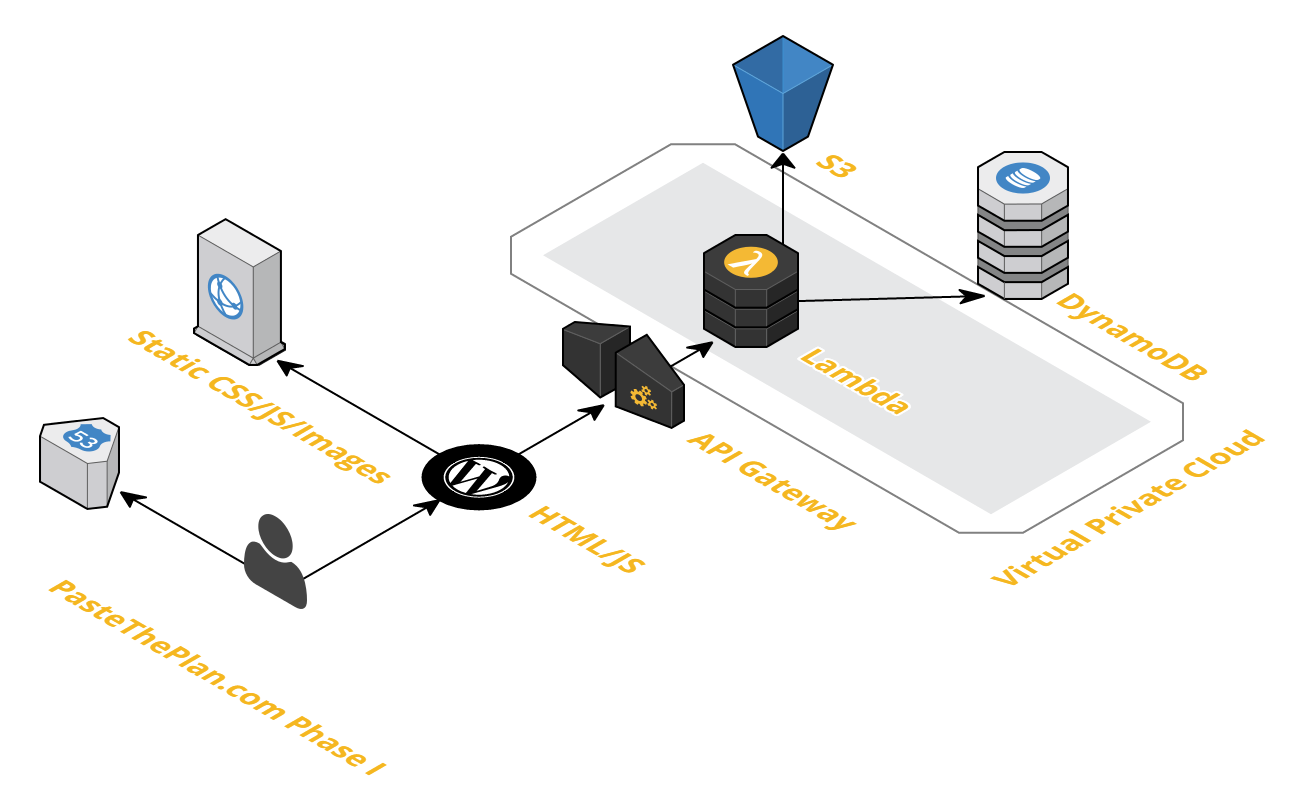
PasteThePlan Arch Final
Paste the Plan’s Architecture

Presentation Layer

The presentation layer in a typical Serverless AWS web application is hosted in a S3 bucket that has static website hosting configured. That means we couldn’t use server-side web technologies like ASP.NET or PHP. Originally, I set up Paste The Plan this way but we wanted to integrate Paste The Plan with BrentOzar.com, which runs on WordPress, hosted by WPEngine. So a WordPress template was built so we didn’t have to deal with crazy iframes.

We also used CloudFront to house some of the other JavaScript, CSS, and image resources. Cloudfront is a content delivery network that puts static resources on servers all around the globe. So when a client tries to access content, Cloudfront delivers that content from the server that can deliver it the fastest.

Application Layer

The application layer is where all of the magic happens. When you press “submit” or view a query plan via a URL, the presentation layer calls the app layer to process that query plan or retrieve it from the data layer. In the AWS Serverless stack, you have only one choice for computational processing, Lambda. Lambda allows code to run in the cloud without having to worry about those pesky servers. Lambda is doing a bunch of our heavy lifting like parsing query plan XML, transforming XML to HTML, pulling SQL out of the XML, and saving data to the database. Just in case you’re curious, all of our code in Lambda was written with Node.js.

Now we have a problem — Lamba can’t directly communicate with the presentation layer. This is where the API Gateway comes in. API Gateway acts as the front door to Lambda and creates a RESTful API for the presentation layer. Now we have a fully fleshed out application layer that processes query plans and returns the output. All we need to do now is tie it all together with SQL Server right? Yea, about that…

Data Layer

Let’s take a look at the kind of data we need to store:

  • Id (string)
  • Date created (date)
  • XML hash (string)
  • Query plan XML (string)
  • Query plan SQL (string)
  • Query plan HTML (string).

At first glance this shouldn’t be a problem for SQL Server, but the query plan XML, SQL, and HTML strings could be large (we set the cap for the query plans at 2 MB). It’s not ideal, but we know SQL Server can handle it.

So here’s where the other side of working in the cloud comes in…cost. As of this posting (September 2016), the cost of the smallest reserved instance of SQL Server (db-t2-small, we don’t want Express edition) is $73.00 (USD) monthly. And that’s for the Web edition, not Standard edition. For Standard Edition the cost jumps to $623.42 monthly. So for an annual cost of $876.00 we could use SQL Server as the database for Paste The Plan.

But this is 2016, and there are alternatives in the cloud. AWS features a document/key-value database called DynamoDB. Take another look at what we’re trying to store: it’s not complex relational data, it’s just one table. DynamoDB seems like the perfect fit for the types of data Paste The Plan is going to generate. But what about the cost? I’m glad you asked. Amazon must have found an ancient rune stone that explained the formula for pricing NoSQL data hosting because it’s not simple. But let’s just say we needed 1,000,000 reads and 1,000,000 writes for Paste The Plan; that would cost us around $7.50 (USD) a month. Once a month, Brent is going to have to skip his daily Starbucks visit. (Brent says: bad news, Richie, it’s coming out of your paycheck.)

But storing all of that query plan text in DynamoDB didn’t sit well with me. Doing so would cost us more in reads, writes, throughput, and storage. That kind of text data doesn’t really belong in a database. It belongs in a file system. And wouldn’t you know it Amazon has a bang up file service in S3. So we decided to put the query plan XML, HTML, and S3 into a JSON object, compressed it, and put it in S3. But here’s the kicker, the cost of S3 is $0.04 (USD) per gigabyte.

It’s alive

So that’s how Paste The Plan was brought to life. We learned a bunch by bringing this little app to life. Working in the cloud is trickier than on-prem, with lots of little details to consider. Most everything in the cloud has a cost associated with it. Storage, data transfer, computation, and memory all need to be taken into account when building cloud-based applications. We hope you enjoy our little foray into the cloud.


Announcing PasteThePlan.com: An Easier Way to Share Execution Plans

PasteThePlanSince the dawn of man, people have struggled with sharing execution plans with each other for performance tuning. Now, it’s easy.
First, get yourself a plan:

  • Get the estimated execution plan by hitting control-L or clicking Query, Display Estimated Plan. Right-click on the graphical plan, and click View XML. Copy all of that.
  • Or even better, get the actual plan by first clicking Query, Include Actual Execution Plan, and then running the query. After it finishes, click on the Execution Plan tab, right-click on the plan, and click View XML. Copy all of that.
  • Don’t know which query to check out? Get your top 10 most resource-intensive queries using the totally free sp_BlitzCache.

Make sure it doesn’t have private data. Your company may consider database names, index names, queries, or parameters to be private data. (This same advice holds true whenever you script a database, give someone a query, or post a question online, but I feel like I just gotta repeat it here to be clear.)

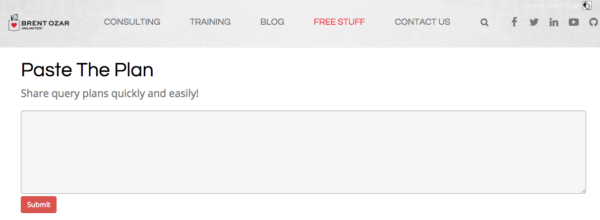
Then go to PasteThePlan.com and paste it in:

pastetheplan

It’s a free community service. We hope you love it as much as we do, especially all the cool new execution plan icons by our illustrator, Eric Larsen.

Down the road, we’re thinking about adding logins (so you can see past plans you’ve submitted), execution plan advice, image and HTML downloads (so you can embed the plan in your own blog or report), zooming, and more.

Show Us Your Worst Plans
and Win an Everything Bundle

We wanna see the worst queries you can cram under the upload size limit (2MB). We’re specifically looking for:

  • Lots of different operators (like, as many different plan operators as you can get into a plan)
  • Huge, ugly statements
  • Large numbers of statements that do crazy things

They don’t have to be “in-the-wild” queries – you can totally design and build your own test queries to enter.

If you’re entering the contest, leave a comment here with your plan URL and what you think is bad about the plan. Entry deadline is Sunday, September 18th. We’ll judge what we think are the 5 worst execution plans, and we’ll give each winner a free Everything Bundle.


Learn to Use sp_Blitz, sp_BlitzCache, sp_BlitzFirst, and sp_BlitzIndex with These Tutorial Videos

There have been so many improvements lately to our First Responder Kit scripts that it was time to update our tutorial videos. Each of these is about ten minutes long and shows how to use ’em:

How to Use sp_Blitz for a Health Check

How to Use sp_BlitzCache to Find Slow Queries

How to Use sp_BlitzIndex to Check Your Indexes

Download the free First Responder Kit and start making your SQL Server healthier.

And oh yeah, there may also be a little surprise hidden in the sp_BlitzCache video. Just sayin’.


[Video] Office Hours 2016/09/07 (With Transcriptions)

This week, Brent, Richie, Erik, and Tara discuss parameter sniffing, database backups, referential integrity in databases, clustering, creating and using indexes, in-place upgrades, bench marking tools, and more.

Here’s the video on YouTube:

You can register to attend next week’s Office Hours, or subscribe to our podcast to listen on the go.

Enjoy the Podcast?

Don’t miss an episode, subscribe via iTunes, Stitcher or RSS.
Leave us a review in iTunes

Office Hours Webcast – 2016-09-07


What’s parameter sniffing?

Brent Ozar: J.H. says, “Would the following two queries with the same execution plans but with different costs be considered parameter sniffing?” He’s got two different queries with just different where clauses, specifying different values. Totally. Imagine for a second that one has more data than the other, one has a million rows and the other has just five rows. So they could totally end up—I’m fresh off of parameter sniffing, I’m giving our parameter sniffing class as we speak during our week-long performance class so I immediately jump in. I’m like, “I should answer that, no one else knows.” Everyone else on the team knows.

Erik Darling: No, that’s like textbook parameter sniffing to me, right? When just one thing changes in the where clause. Like given that query, it’s probably even just getting a trivial plan so SQL is just like, “Oh, I got this thing… go do something…”

Brent Ozar: What’s your favorite resource on parameter sniffing, if you wanted to go learn more about it or go tell someone to learn?

Erik Darling: Ours. I would look it up on our site.

Brent Ozar: That’s not fair.

Erik Darling: Yes it is. It’s totally fair. This is our webcast.

Brent Ozar: We need a shortcode on that.

Richie Rump: [inaudible 00:01:05]

Brent Ozar: We need a shortcode for parameter sniffing on our site come to think of it.

Erik Darling: You know, that’s actually a good question because I feel like I’ve learned so much in small pieces over the years. I couldn’t point to one thing that I’m like, “Oh, that’s where I figured it all out.” It’s been like just little chunks and bits of, “Oh, that’s…oh…that’s… and I fix it with what…”

Tara Kizer: J.H. follows up and says, “Slow query has much less rows. Kind of weird.” I would say you could try out the optimize for option if you’re on SQL 2008 or greater. Try optimizing for whichever value has the faster speed.

Brent Ozar: Yeah, know that it’s technical debt. When you do that, you’re hardcoding it into your query.

Erik Darling: I would actually try recompiling first, just to see if you get a different plan for one or the other.

Tara Kizer: I would argue that they don’t have the same execution plans. They may be the same shape and have the same operators, but they are not the same if the costs are different.

Brent Ozar: Yeah, agreed. Especially, it just may just be larger amounts of data that’s moving from one place to another but your giveaway there is that the costs are different.

Tara Kizer: Yeah, the arrows in between the operators are going to have different sizes or whatever it is.

Brent Ozar: If you have access to SQL Server Management Studio 2016, so Management Studio 2016 is totally free to go download. There’s a new compare showplan feature where it will show you just the things that are different between two execution plans. It’s not perfect. It’s got a lot of gotchas and drawbacks, but if you google for SQL Server Management Studio 2016 showplan or compare showplan, there’s a bunch of folks who have written up different write-ups on how you go about using that.

Erik Darling: You know what, actually given his circumstances and the relatively small amount of questions that we have, we can spend some extra time on it. I would actually start looking at statistics at this point. If there are a much smaller amount of rows but it’s much slower, because I think something weird might be happening with the histogram, like maybe it’s not picking up on the skew or something. I would take a look at that and check when the last time stats got updated. Or just look at the histogram and see if it’s an off histogram step, if it’s just sort of guessing a bad amount of rows for that value.

Brent Ozar: The other thing we pop up a lot is the Erland Sommarskog’s epic post “Slow in the App, Fast in SSMS.” So if you search for “Slow in the App, Fast in SSMS,” Erland has like this 50-page long treatise on parameter sniffing. It gives all kinds of different causes and all kinds of different fixes too.

Richie Rump: Wow. That only took four minutes to bring up that post. That must be a record.

Brent Ozar: I was going slow. I was like, “I shouldn’t… I shouldn’t… Not introduce this immediately.”

Richie Rump: Pull the trigger.

Brent Ozar: I can’t believe I don’t have a parameter shortcode for that. Like Brent Ozar.com/go/ — should be probably be Erland, because I just reference that guy so much for that one post.

Erik Darling: There are so many great treatises, like biblical, like “In the beginning, there was SQL Server 2000.”

Brent Ozar: I did an entire week newsletters just of Erland Sommarskog’s post at one point. One of our Monday newsletters was nothing but Erland’s post. Just wonderful, gift that keeps on giving. Which reminds me that I need to set up a watch that page alert for whenever his posts change.

Erik Darling: It changes.

Brent Ozar: Yeah.

Erik Darling: Because he is nice enough to keep them updated.

Brent Ozar: He is.


Should I run my backups as an SSIS job?

Brent Ozar: Frederick asks, “Can you guys think of any reasons to run your database backups through an SSIS job? I took over servers from another DBA and it seems he was obsessed with SSIS. I want to replace all these backup jobs.” Tara, did you do backups through SSIS? Because I know you were an SSIS and RS fan.

Tara Kizer: Of course not, I didn’t do data backups through SSIS. But, to answer the question directly. Is there any reasons to run them through SSIS? No. But is there any reason to change it? Not really if it’s working. But if you want to change and the guy is no longer around and you’re not going to hurt his feelings, change it. Use a custom solution. I mean, it’s working though.

Erik Darling: Yeah, one reason that I can think of to do it is if I had a centralized SSIS server that I wanted to run jobs in a bunch of other servers for. So if I wanted to not manage backup jobs on each and every server and I just wanted to have one central server that I could reach out to other stuff with, I might do it that way then, but I also have never opened SSIS, so.

Tara Kizer: Yeah, we did have an SSIS central server to run everything on all the AGs and stuff, but the actual backups were on the actual SQL instance because you want to be able to backup system databases. You can still do that through SSIS, but we just had the other things for SSIS on the central server.

Richie Rump: It just smells like bad idea jeans. You know?

Brent Ozar: It does smell like bad idea jeans, yeah.

Erik Darling: It smells like someone was most comfortable with SSIS and just used that hammer for every nail.

Richie Rump: Such an awkward hammer, oh my gosh.

Erik Darling: Well, it’s a graphical hammer, where you can put things where you want them and then point arrows to other things.

Richie Rump: There’s no leverage in a hammer.

Erik Darling: It’s actually a two-dimensional hammer.

[Laughter]

Brent Ozar: To be fair, we like SSIS. Nothing wrong with SSIS. Just use it for what it’s used for, backups is kind of an oddball thing. I tried to come up with reasons why someone would want to do something and I’m like, “I’ve got nothing.”


Why are my deletes taking five seconds per record?

Brent Ozar: The Unknown Unknown asks, “I’m deleting records from a table and it takes five seconds per record.” Five seconds per record. We will now pause and simulate how long it takes this man to delete one record. One… Two… Three… Four… Five… He says, “There are no triggers in the database. What else should I look for?”

Tara Kizer: See what the query is waiting on. Do sp_whoisactive, sp_who, sysprocesses, whatever your favorite tool is to take a look at current activity. See what that’s waiting for. Probably blocking, I’m assuming?

Brent Ozar: Oh, I like that. Richie, what did you think?

Richie Rump: I’d check the indexes, maybe it’s trying to do a lookup on a foreign key somewhere.

Tara Kizer: That’s true, yeah.

Brent Ozar: Oh, I like that too. Erik, how about you?

Erik Darling: I would not look at index fragmentation. Let’s see, I think I’m with Tara on this one with the blocking.

Brent Ozar: Yeah I love sp_whoisactive for that.

Erik Darling: It might be weird, like just going through for it and fetches whatever to find what it needs.

Brent Ozar: Oh, a heap with large amounts of deallocated space, if you have to scan the whole heap, that could do it too. Oh, this would make a great blogpost. So Unknown Unknown, I’ll actually just bang out a blogpost about here are all the places I would go look next but I think the start of all our troubleshooting would just be run sp_whoisactive to see what that wait type is for that query when it’s running.

Erik Darling: I’d also kind of be opposed to deleting things one record at a time. Like if the mechanism you’re using to delete one record at a time is slow, like if it’s a cursor or a weird while loop that does some other stuff.

Brent Ozar: Or the foreign key referential integrity thing, if it’s even deallocating heaps, I mean that one at a time would kill you there too.

Erik Darling: Yeah, a lot of stuff.

Richie Rump: Yeah, one of the things that I—when I used to go into client’s, first thing I did is, “Oh look, you don’t have any indexes on your foreign keys. You just had a script that automatically populated all of them.” And all of a sudden, “You’re a genius. What did you do?” “Oh, I don’t know, some secret sauce or something I can’t divulge,” blah blah blah. But yeah, it’s the easiest thing to do you. You don’t have indexes on your foreign keys, all of a sudden your updates and your deletes are faster too.


Should I enforce referential integrity in the database?

Brent Ozar: This makes for an interesting question. How do you guys feel about referential integrity enforced in the database? So like do you like having foreign keys? It’s so interesting because Tara goes thumbs up. Richie goes thumbs down, or thumb sideways. Erik, how about you? Any opinion?

Erik Darling: Absolutely. I like having referential integrity enforced in the database for perf reasons, aside from things get weird. If you do have foreign keys and you index them properly, you can get join elimination and some other nice stuff out of execution plans. But there are some issues with when you have cascading actions attached to your foreign keys, especially if you’re altering large amounts of data under the blankets. Under the blankets what SQL does in order to enforce the cascading actions is put into the serializable isolation level which can cause some pretty nasty blocking and blocking situations if you’re not careful.

Brent Ozar: Tara, you immediately put your thumb up, like way up. So why is it—you’re really excited about it. What do you like about it?

Tara Kizer: As a production DBA, you want to protect the data. You can’t rely on the developers to do the referential integrity, to follow the business rules in the application. So you want it on both sides really.

Brent Ozar: Then it’s funny that our developer, Richie, immediately put his thumb down.

Tara Kizer: Of course. This is why DBAs don’t like developers.

Richie Rump: I thought we were going directly towards the cascading, which I hate. I mean, it’s just really annoying. Referential integrity, yes, absolutely. Cascading, down, bad. I’ve had arguments with architects for some people I used to consult for about having referential integrity inside a database because, “Oh, the app will do it. It will always do it.” “It will never load data inside the database directly to it with like a bulk load?” “Well, occasionally.” “Well don’t you think it’d be nice to have the referential integrity there to protect the data?” “Well, maybe.” Yeah. Okay, yes. And the answer is you need it in both.

Erik Darling: One reason why I’m really in favor of doing it via foreign keys and stuff is because people will often fall back on triggers as a second option to enforce it and that just ends up with all sorts of bad news stuff happening.

Brent Ozar: Yeah. I like it because I don’t usually see it as a big performance drawback. Why would you not like data reliability at hardly any of a performance impact?

Erik Darling: It’s just a few asserts in your execution plan, what’s the big deal?

Brent Ozar: Just a few asserts. Besides all those table scans that you’re doing for other reasons, this is the least of your problems.


Is VMware HA as good as SQL clustering?

Brent Ozar: J.H. says, “Our VM SAN admin is trying to persuade our DBA team to move away from Windows clusters. He said that his VMware technology provides high availability. I think we still want clustering. What do you guys think?”

Erik Darling: Prove it.

Tara Kizer: You can have both. Do it on the VM side as well as do it on the Windows side. You want to be able to have a failover cluster or some other node, database mirroring, availability groups, some other high availability solution in place for Windows that when you do Windows patching you don’t have a lot of downtime waiting for the VM to reboot. You just have the 30 second failover for instance. Technologies work in conjunction with each other, I mean, they’re completely separate but you can do both.

Brent Ozar: The more protection the better, right?

Tara Kizer: Yeah.

Brent Ozar: The problem with the VM as high availability is when somebody screws up a Windows patch or a SQL patch or drops a table or trashes a system object, all of a sudden I can be totally screwed. Somebody fills up the C drive is the other classic example. So again, nice high availability there in clusters.

Erik Darling: Another thing that a lot of people don’t think through when they do that is that you then have to set up some DM affinity so that your nodes don’t end up on the same server at the same time because then that kind of ruins your high availability. Because if that one node goes down, both servers are on that, goodbye.

Brent Ozar: High unavailability.

Erik Darling: Yes, you’re highly unavailable.


Can I use statistics to figure out where I need indexes?

Brent Ozar: Brent asks—not me—but another Brent asks, “Is there a way to use statistics to see where I should put indexes? So if SQL Server has automatically created several [inaudible 00:12:36] stats, should I create indexes on those same fields?” Erik got excited there.

Tara Kizer: Take it away, Erik.

Erik Darling: I did because that’s really cool because SQL does create statistics on columns, if it finds them interesting. Do you need an index there is a good question though because you wouldn’t just go and create a bunch of single column indexes on every column that SQL has created a statistics object for. And you wouldn’t want to create one wide index across all of the statistics objects that SQL has created system objects for, because SQL only creates a histogram based on the left-most column in your indexes. So SQL, obviously, your where clause may, you know, you have more items or your joins have more different items in them than what is just in the outer most column of the histogram. So I wouldn’t just haul off and be like, “Yeah, let’s just create an index on everything that SQL has a statistics objects for.” I would go back and I would start looking at my queries. I would start looking at my execution plans, perhaps for more obvious—either for straight up missing index recommendations or for some obvious index tuning opportunities, like if you have like any big sorts or any hash joins on small amounts of data, stuff like that.

Richie Rump: Yeah, my favorite tool to use would be sp_BlitzCache, take a look at that and see what’s being slow in cache.

Erik Darling: Or BlitzIndex in the old mode three will get you all your missing index requests.

Tara Kizer: Is it mode three? It’s mode four.

Erik Darling: Three for just missing indexes.

Tara Kizer: Oh.

Brent Ozar: Four gets you everything. Three only gets you the missing indexes. It’s funny, we all use them in different ways. I’m like, yeah, I never use mode three.

Tara Kizer: I’ve used mode three but it doesn’t show any output. So maybe it was a different version. Well, there’s missing indexes. Maybe it was a bad version.

Brent Ozar: Which we have a lot of. Speaking of which, which also reminds me I’ve got to fix—I was doing a demo today and I realized that sp_BlitzIndex now, with get all databases equals one, the indexes aren’t sorted in impact order. They’re sorted backwards for impact order. I’m like, oh, man, I’ve got to go look at that.


Why do your first responder kit stored procedures start with sp_?

Brent Ozar: Unknown Unknown asks in a related question, “Why do your first responder…”

Erik Darling: Sirhan Sirhan

[Laughter]

Brent Ozar: Madonna Madonna asks, “Why do your first responder names start with sp prefix, sp_? Doesn’t Microsoft still advise avoiding this special prefix?” Okay, so I’m answering this because this is one of my personal hot buttons and Aaron Bertrand can go suck it. So Aaron Bertrand is one of the other big guys in the SQL Server community who is like, “Don’t name your stored procedures with sp whatever, you know, a row and a record are different. Fields and columns are different.” So there are edge cases where the column of a stored procedure can incur some extra penalty if SQL Server has to do name resolution to find the stored procedure because it’s going to look in master when stored procedures start with sp_. Guess where people but the blitz stored procedures? In master. Guess where they want to run it from? Every database. They want to be able to run, for example, sp_BlitzIndex from any database without prefixing anything. Here’s the deal. I don’t care if all your stored procedures begin with sp_. If the time it takes to resolve a name is the biggest problem in your environment, you deserve a Medal of Honor and a big slab of chocolate cake. That is not any kind of significant performance impact for any environment that I’ve ever seen. Meanwhile, I’ve seen people going, “Make sure your stored procedures are named correctly” and the code inside the stored procedure is so heinous I need to take a shower after I look at. So, focus less on the names and more on the content. Now, having said that, you probably shouldn’t look at the content of our stored procedures either because that’s heinous too.

Erik Darling: And it’s a little bit awkward for Aaron to say that considering he wrote sp_foreachdb.

Brent Ozar: That’s true. Yeah.

Erik Darling: Yeah, a little awkward. So sp_foreachdb is really cool. It’s sort of Aaron’s replacement for the built-in stored procedure MSforeachdb which loops through your databases and adds a bunch of known problems around skipping databases and not being able to figure things out. So Aaron rewrote this cool thing called sp_foreachdb. It has a bunch of awesome flags where you can skip over things and put in name patterns and skip system databases and all good stuff. I used to use it all the time back when I was doing relativity stuff and I had to deploy indexes across all the databases. Because it was a lot of work to do to make sure that there were actually columns that matched the names in all those… God, I’m going to go cry after this.

[Laughter]

Brent Ozar: Bad times episode.


Where do sp_BlitzIndex’s missing index recommendations come from?

Brent Ozar: Nate asks, “sp_BlitzIndex has recommended some high value missing indexes that don’t seem right, especially ones that include almost every column in the table. Why is that and where are those indexes coming from?”
Erik Darling: Anyone? All right, fine.

Brent Ozar: You worked on it recently, so.

Erik Darling: They come from missing indexes. I know, it was probably me, I may have forgot to put descending in for that…

Brent Ozar: No, I tested it too and it looked good to me.

Erik Darling: Oh, crap. All right, it’s something else then, woo hoo. So missing index requests come from a part of the query optimization process called index matching. What index matching does is SQL Server takes a query and it says, “If I needed the perfect index for this query, I would go and look for this one.” It sort of throws the dice and if it doesn’t find exactly the index that it wants and it feels that that index could reduce the query cost by some internal algorithm percent or amount then it logs that opportunity in a missing index DMV. Sp_BlitzIndex only looks at missing index DMVs. We try to do some smart filtering on what would actually improve performance, but we can’t know everything about your server just from the missing index DMVs. The reason that you’re coming up with these indexes that are perhaps keyed on one or two columns but include every other column in the table is someone is either running select * queries or you have EF developers who are not trimming down the columns that they actually need from their EF queries. So you really are selecting every single column in the table and your where clauses only keyed on perhaps an ID column or maybe an ID and a date column or something. So that’s why it has those two key columns there but the only way for SQL to really make an efficient index to resolve that query is to include every single other column because it’s dragging back every single column and it may not want to do key lookups for all those columns, even if it’s just keyed on a couple for the where clause or join. That’s all I got to say about that.

Richie Rump: In defense of entity framework folks, sometimes we do need to get all the data from a table.

Erik Darling: That’s fine, create an index for it.

Richie Rump: But not all the time, people, it’s ridiculous. Sounds like a post I’ve got coming out soon.

Brent Ozar: There is a post. Richie has a post coming out about how to change entity framework so that it doesn’t select all the columns. It turns out it’s easy. So easy a caveman could do it. I was impressed. I’m a caveman.

Erik Darling: I still couldn’t do it. I’m still partially frozen, so.

Brent Ozar: Just a simple unfrozen caveman.


Are there any gotchas with failing over an Always On Availability Group to DR?

Brent Ozar: Temple asks, “I have a four-node cluster running SQL 2012 with Always On Availability Groups configured. I have one node in a fileshare off at another site. I want to failover to that other site and test our DR plan.” Any gotchas from our experience?

Tara Kizer: Oh, I got this one, I got this one.

Erik Darling: Take it away.

Tara Kizer: You only have two resources at that other site. So if you lose the network connection between the two sites, your cluster is likely going to go down. Your production databases will be down. So you’re going to need a third resource. So maybe have another node. Having one node out there is not the greatest. What happens if something happens to that node? So maybe two nodes out there and your fileshare witness. So you don’t want just two servers for a quorum and having votes.

Brent Ozar: That would be awkward.

Tara Kizer: Yeah, when I first set up an availability group in production we had six nodes, three at the DR site, three at the primary site. This was on SQL 2012. So one of these servers at the DR site was a cold standby. You couldn’t have that many replicas but we needed to have identical hardware at both sites, that was a requirement that we had with our customers in case we had a failover. So we did have a network glitch between the two sites. That is going to happen at times. At the time, before that, we’d always used failover clustering and the Windows admins had taken care of quorum and votes. And with availability groups, that falls on both teams basically. I didn’t know about votes and suddenly production was down when we lost the connection between the two sites. That is when I learned about cluster votes. We had to disable the votes on the DR site and then we had node majority on the primary site.

Erik Darling: Which version of Windows was that with?

Tara Kizer: Yeah, that would have been Windows 2008 R2, but yeah, Windows 2012 R2 you do have the dynamic quorum and it can manage that for you and a fileshare witness is recommended and I believe the default on that version of Windows. Still, you should still understand quorum and votes even when using 2012 R2.

Brent Ozar: Oh yeah, because if you lose network connectivity between the two data centers, even when 2012 R2 can’t recover in time, if too many of them fail all at once, it’s going think that there was a split brain scenario and yank the plug.

Erik Darling: But you can do forced quorum resiliency and you can bring one side up, right? Isn’t that the way that works?

Brent Ozar: Well, you have to do it and then you have to restart the cluster again because you can’t start in an availability group when you did a forced quorum. I have an hour-long session during the senior DBA class where I walk through this happening and show people screenshots and eyes just kept getting bigger and bigger. Like, “You should do this before you have to do it live.” That, of course, that’s only one of the gotchas there. There can be all kinds of other gotchas. Make sure you enable your backup jobs over on the other side. I’m a huge fan of the instant that I failover if I don’t already have full backups on the other side, I need to take a full backup as quickly as possible. If I have fulls but no logs on the other side, I need to take a deferential as quickly as possible. Make sure that your log backup jobs are up and running over there. Your user accounts can be different on both sides. You need to sync SQL agent jobs, all kinds of things you’ve got to sync across there.


Should I set MAXDOP = 1 if I’m running 300,000 queries per second?

Brent Ozar: Unknown asks, “Could there be some performance improvements combining NUMA with MAXDOP equals 1. Sorry if my question is vague.” It is. “But I heard this a few days ago from the DBA of a high throughput system, 300,000 transactions per second, and I wanted to ask you.” So, I’m not saying 300,000 transactions a second is impossible, it’s doable, but that person is probably doing some very specialized tricks. I would ask for more information about what the system is like, where his guidance is, because there are people out there—dagnabbit—what’s the guy in the suit? Thomas Kejser. Thomas Kejser is a classic example of guys who do this. Who’s the other guy in New York?

Erik Darling: Thomas Grohser.

Brent Ozar: Thomas Grohser, yes. These guys have great—they’re so cool to listen to their stories but what they’re doing is very different than the rest of us great unwashed out in the gutters are doing.

Tara Kizer: The 300,000 transactions per second probably if you looked at batch requests per second it’s probably much lower. Usually transactions per second is a very inflated number as compared to batch requests per second.

Brent Ozar: Well, and, I have so many thoughts on that. If they are 300,000 per second, you probably do only want MAXDOP 1, ain’t nothing going parallel when you’re doing 300,000 queries per second.

Erik Darling: Yeah, at that point, you’re doing very narrow key lookups, you’re doing one row at a time stuff. You’re not doing reporting the queries. Everything is very properly indexed. Your isolation levels are on point for, and change within the stored procedure. You’re doing everything right.

Brent Ozar: Well, I would argue you’re doing one thing wrong, which is you’re doing 300,000 queries per second against a single box. You should shard that out and spread the load around, but that’s cool.


When is SQL Server 2018 coming out?

Brent Ozar: J.H. says, “I saw your recent email on SQL 2018 features. Any idea when that’s coming out?” Should we go migrate now to SQL 2016 or is the community not at all confident yet? J.H., that was a joke. Those features, if you read those features carefully, for example “scented error messages,” your server is pretty safe. Those are not coming out any time soon.

Richie Rump: No, but if it was?

Brent Ozar: What if it was? Then I would hold out for the edible result sets. That alone would be worth the results there, worth the upgrade.


The Upgrade Advisor says it’s okay, so should I?

Brent Ozar: Person with a very tough to pronounce first name, whose first initial starts with “s” says, “I have a SQL 2012 to 2016 upgrade I want to do. I want to do it in-place. I ran the upgrade advisor. I only got a few warnings, so should I go ahead and upgrade this thing in-place?” What do you guys feel about in-place upgrades?

Tara Kizer: I didn’t even used to in-place upgrades in the test environment. Just too much disaster can happen. You don’t have a fallback plan if you do an in-place upgrade. Just imagine trying to undo that if it doesn’t work. I’ve done side-by-side upgrade when each instance exists on the same physical server or VM, because that’s still considered side-by-side when the instances are next to each other, you know, backup and restore, detach, attach, whatever it is. I usually prefer though that the servers be completely different. But in-place upgrade I think is risky, even in a test environment.

Brent Ozar: Yeah, I have the same exact feeling on it.


What precautions should I take on a web-facing SQL Server?

Brent Ozar: Lori says, “A developer is requesting a separate SQL Server to house the data for an internet-facing application because he’s concerned about security if his data shares stuff with the payroll application data. As a DBA, what should I do about setting up separate security precautions about this kind of application?”

Tara Kizer: I think the developer is right. I mean I think that you should separate this out. That’s what I’ve always done. It usually has special firewall rules in place to really lock it down and your internal stuff is going to be on the intranet. Yeah, I would not put these on the same server if I were the DBA. As far as if you are going to put it on the same server, as far as security goes, make sure no one has sysadmin. Pay attention to what kind of server roles users have. I don’t even like db owner for applications. I like just the minimum amount of permissions for each application account. I like stored procedures in that sense, so it’s just exec.

Brent Ozar: I would also explain what licensing looks like because on an internet-facing server you are licensing by the core. There’s no CAL licensing available on that, so it’s the real deal.


Followup questions

Brent Ozar: Unknown follows up with his 300,000 queries per second, he says, “Please don’t say the company name but the company name is” blank. I’ve heard that company name before and I think they are doing SQL Server. I vaguely remember hearing this. I wouldn’t be surprised if they were doing 300,000 either batch requests a second or transaction requests a second but you would want to shard that out. You mentioned that you’re taking an interview. This is one of those ways if you want to strap a rocket to your back and learn a ton, if you want to learn a lot about how high concurrency stuff works, just make sure you strap it to your back and not your rear end because you go into a shop where they’ve done something like that and you’re on call, you can have a really ugly [inaudible 00:28:04].

Erik Darling: That’s weird, I’ve never heard of Gabby’s Goldfish before.

[Laughter]

Richie Rump: I love them.

Brent Ozar: Contoso. Interviewed at Contoso.

Brent Ozar: The in-place upgrade guy follows up and he says, “This is SharePoint.” Again, yeah, we wouldn’t do in-place upgrades.

Tara Kizer: No, doesn’t matter.

Erik Darling: Makes no difference.

Tara Kizer: Could be AdventureWorks, I’m still not doing it.

Brent Ozar: Yep, no thank you.


Do you have a favorite hardware benchmarking tool?

Brent Ozar: Unknown says, “Do you have a favorite hardware performance benchmark tool?” If you’re going to go benchmark new SQL Servers, do you guys use anything for benchmarking? Have any of you guys ever done benchmarking? I don’t know that I have.

Erik Darling: Yes, minimal.

Tara Kizer: Yeah.

Richie Rump: I’m in the cloud now so I don’t do any of that stuff.

Brent Ozar: In the cloud, there are no benchmarks.

[Crosstalk]

Tara Kizer: I can’t remember, it is SQLIO Stress? Or something like that…? Yeah, we did that. But we also had a whole performance load test team. They would just hammer the server, when new hardware came.

Brent Ozar: That’s kind of awesome. Wow. What kind of job would that be?

Erik Darling: That would be fun as hell. That would be like us at DBA Days all the time.

Brent Ozar: Oh my god, that would be so much fun.

Tara Kizer: It requires very special, like developer knowledge, because they are writing scripts and doing programming and stuff like that. So it’s really not a DBA-type role. I liked working with them though. I get to find all these cool things.

Richie Rump: Yeah, nobody wants to be a developer. They suck.

Brent Ozar: I was going to say, no, she’s saying that because she’s seen our code.

Tara Kizer: I’m just saying from a DBA perspective going into performance load test team might be challenging if you don’t have a developer background.

Brent Ozar: Every time we bring out a new version of sp_Blitz or sp_BlitzIndex, she hears us complaining about our lack of unit testing. “Is anything broken?” “God, who knows.”

Erik Darling: Works on most of these versions, in most scenarios, but I don’t know.

Brent Ozar: Yeah, that’s about it. Well, thanks everybody for hanging out with us this week. We will see you guys on the next Office Hours. Adios everybody.

Erik Darling: Bye-bye.


[Video] 500-Level Guide to Career Internals

#SQLPass, SQL Server
5 Comments

This week , I was honored to give a session about hacking your career. Here’s the abstract:

This is not yet another career session that tells you to be friendly and network. Forget that – this is about using your IT skills to reinvent the way you get paid. I’ll explain how I went from DBA to MVP to MCM to business founder.

I’ll show you simple techniques to build a blog, a brand, and a business without that pesky personal networking stuff. I’ll explain why you have to give everything away for free, and why you cannot rely on the old methods to make money anymore.

It will not be easy – and that is why this session is level 500. This session is about radical methods that achieve radical results.

Here’s an abridged version of the slides:

http://www.slideshare.net/BrentOzar/500level-guide-to-career-internals


DBA Days: Pre-maintenance Window Rituals

Like a DBA batter’s box

While we were hanging out in between webcasts at Dell, we got to talking about stuff we used to do before maintenance windows. Things that brought us good luck, warded off blue screens and failed patches, and just generally made us feel better about working well into the early AM on a weekend.

You know, things that made staring at a command prompt until PING … -t tells you that your server is back up. Hooray.

We were also all pretty grateful that we don’t have to do that stuff anymore. If you want to learn how to not do that stuff, too, check out Brent’s 24hop session on career internals.

My personal ritual was to listen to Black Celebration and make sure my lucky server upgrade mustache was properly groomed. Not a lot of fuss. My Divining Disc of Pergamon has been on loan to a museum for a while, and apparently it doesn’t work the same via Skype, so I work with that I got.

What’s your ritual?

Whether it’s installing updates, rolling out database changes, new software builds for your in-house or 3rd party apps, or just turning OFF Priority Boost, what do you find yourself doing while preparing to make changes to your servers?

If you have a particularly amusing ritual, you might just win yourself a book.

Brent says: my favorite was a big steak dinner right before we started patch night. That way, even if things went to hell in a handbasket, we still had a good memory from that day.


DBA Days: Killing TempDB softly

Bad Idea Jeans, SQL Server
32 Comments

Don’t make me regret publishing this

This really will take a server down immediately. You can restart it, as we learned during DBA Days, but… If you also go ahead and make this an Agent job that runs at startup, there are additional challenges.

Like every time Agent starts up, your server goes down. Score one for Express Edition, I suppose.

I mean it. Don’t put this on a server that anyone cares about. Don’t make it an Agent job. Don’t make that job a startup job. It’s horrible.

So what does it do?

It uses an undocumented command, DBCC WRITEPAGE, to overwrite values stored on your data pages. This causes problems for SQL Server for a couple different reasons. Depending on which pages get hit by WRITEPAGE, it could be critical database information. Boot pages, PFS, GAM, SGAM, etc. If those are bad, your server is pretty helpless to give up any information whatsoever.

If it hits user data pages, SQL will recognize that it’s serving up bad data and warn you about corruption. The second part assumes that you’ve got your database PAGE VERIFICATION option set to CHECKSUM, and that you’re alerting for 823, 824, and 825 errors that warn you about torn pages and other I/O related corruption issues.

We’re taking information from sys.dm_db_database_page_allocations, which is also undocumented, so double the fun, and feeding it into our DBCC WRITEPAGE command using dynamic SQL. No, sp_executesql won’t protect you from this.

We need a database ID, a file ID, and a page ID. We need a start and offset, and we need the value we want to overwrite our data with in hexadecimal format.

In our case, we’re using 138, which is just like, the most punkest-rockest number around.

So there.

Take that, parents.

Abandon all hope

So, uh, here it is.

Thanks for reading!


DBA Days: Chaos Sloth

Bad Idea Jeans, Humor, SQL Server
7 Comments

I love a bad idea

I mean, just look at me. I’m covered in them! So when Brent wanted to randomly make his server act crappy, I wrote a script for it.

Usual caveats here. Don’t run this in production. I’m not responsible for anything you do after you hit copy and paste. In fact, I’m not responsible for anything before or in between, either.

You are your own fault.

What does this thing do?

It randomly generates values and changes some important configuration settings.

  • Max Degree of Parallelism
  • Cost Threshold
  • Max Memory
  • Database compatibility level

This was written for SQL Server 2016, on a box that had 384 GB of RAM. If your specs don’t line up, you may have to change the seed values here. I’m not putting any more development into this thing to automatically detect SQL version or memory in the server, because this was a one-off joke script to see how bad things could get.

How bad did they get? The server crashed multiple times.

Umpire sits

Here’s the script. I highly don’t recommend setting it up as an agent job that runs every 10 minutes.

Thanks for reading!

Brent says: the name comes from Netflix’s Chaos Monkey, part of their open source Simian Army set of tools that will randomly break things in their AWS environment. They figure if they randomly take things down, it’ll force developers and admins to build a more reliable, tolerant infrastructure.


DBA Days: Scripts from Downtime Train

SQL Server
8 Comments

ostress is so much fun

It’s totally free to download and use as part of Microsoft’s RML Utilities. What else is in there? Stuff I’ve never used! I hear you can read trace files or something else perfectly adequate.

Even though it’s a CLI, it’s still a bit less insane and confusing than HammerDB. Plus it’s way easier to plug in your own queries.

I wanna stress you up

Let’s look at one of the commands I ran, so it’s a bit easier to see what’s going on. This is the first one, which caused some tempdb contention. The query itself is just a simple dump of 10,000 rows into a temp table.

Here’s an explanation of the flags I’m using, in order:

Flag Argument
“-S” Server name you’re connecting to
“-d” Database name you want to run commands in
“-Q” Query you want to run
“-E” Use Windows authentication
“-q” Run without displaying query results
“-n” Number of connections you want to spawn
“-r” Number of times to loop through your code
“-o” Directory to output logging files to

Other useful commands that I’m not using here:

Flag Argument
“-T” Any trace flags you want turned on for your session
“-U” Username for a SQL login
“-P” Password for SQL login
“-i” Path to a SQL file you want to execute. You can use a *.sql wildcard here to execute a bunch of scripts, but it doesn’t support much else for pattern matching.

One sort of weird quirk I’ve found is that it doesn’t like spaces in between flags and their arguments. That’s an interesting choice.

Fabled variables

My contempt for table variables knows no bounds. It’s always fun to show people that they’re not ‘in-memory’, and can cause all sorts of other issues. This is a simple script for creating tempdb ugliness with them.

Remember, kids

The time to run this on a production server is before it goes live. Don’t haul off and point scripts like this at anything business critical. Better yet, don’t point them at anything that isn’t your local instance until you know how it will behave. Unless your laptop is business critical.

And it might be.

I’ve seen some of the servers out there.

Sheesh.


DBA Days: Money for Nothing, Chips for Free

SQL Server
3 Comments

Throwing hardware at it

We gotta move these E5-2670 v3s

These were just sitting around Dell. On a table. Not doing anything. They might have been broken; I’m not sure.

But that’s not the point.

The most meager of server blades hanging out here had 128 GB of RAM in it.

One-hundred-and-twenty-eight. Gigabytes.

Let that sink in for a minute, then we’ll talk about why it matters to you.

Cache is king

How big is your database?

How much RAM do you have?

If the first number is way bigger than the second number, ask yourself why. The most common answers I get from clients are:

  • We’re on Standard Edition
  • We had way less data when we built this box
  • We already have 32 GB in here, how much more do we need?
  • WE NEED HOW MUCH MORE?

I’m not saying you need a 1:1 relationship between data and memory all the time, but if you’re not caching the stuff users are, you know, using, in an efficient way, you may wanna think about your strategy here.

  • Option 1: Buy some more RAM
  • Option 2: Buy an all flash array

You’ll still need to blow some development time on tuning queries and indexes, but hardware can usually bridge the gap if things are already critical.

If you need help figuring out if memory will help for now, head over here and here.

No favors from Redmond

This is something I have real beef with, and I’ve written about it before. It takes Microsoft near-zero development time to let you cache more than 128 GB of data. Why do they charge you $7k a core for it? The features that are hard — Availability Groups, for instance — I totally get why they charge Enterprise Edition licensing for them. Lots of people spent lots of time getting them to you, along with many other features in Enterprise Edition.

No vendor is perfect on this. Oracle doesn’t allow for parallel query processing in Standard Edition, Postgres is just getting the hang of parallelism period, and MySQL… Uh… Exists.

This isn’t something that you can escape in the cloud, either. Azure’s biggest box packs 448 GB (and costs about 15k a month), and Amazon’s biggest box that’s compatible with SQL Server has 224 GB. You can go bigger if you want to run SAP’s Hana, but it’s pretty expensive.

And then you’d be on SAP Hana, and I’d miss you reading my blog posts.

What’s the point?

Staring at the hardware that was literally sitting on a table doing nothing all week was simultaneously refreshing and frustrating.

Refreshing because some people really get what hardware is helpful for SQL Server performance, and frustrating because I could solve so many client problems with just a few sticks of the RAM in one of those idle and unplugged blades.

And no, they wouldn’t let me take any. And no,  they didn’t think my “Ozar’s Eleven” joke about stealing it was funny. But who doesn’t want their own security escort?

Yeah buddy that’s his own RAM

Caching data doesn’t solve every problem, though. If your problem is blocking or deadlocks, memory won’t necessarily make it go away. It doesn’t fix your bad design choices, lack of referential integrity, cursors, scalar functions, or 16 column clustered indexes.

For that you’ll need some young and good looking consultants.


[Video] Office Hours 2016/08/31 (With Transcriptions)

This week, Brent, Richie, and Tara discuss corruption, resetting query stats, fixing parameter sniffing issues, how to suggest features for our scripts, and why Brent is sporting an Oracle sweatshirt.

Here’s the video on YouTube:

You can register to attend next week’s Office Hours, or subscribe to our podcast to listen on the go.

Enjoy the Podcast?

Don’t miss an episode, subscribe via iTunes, Stitcher or RSS.
Leave us a review in iTunes

Office Hours Webcast – 2016-08-31


How can I start learning Service Broker?

Brent Ozar: We might as well go ahead and fire away and starting doing some questions here. Let’s see here, Brandon says, “Do you guys know of any good blogs to read on Service Broker? I have a developer that wants to start using it and I need a crash course in it.” Jorriss Orroz [Richie Rump] has no idea, he’s down below his desk. Tara, have you ever worked with Service Broker?

Tara Kizer: No, we’ve only ever talked about it. We wanted it implemented to start doing different things with jobs, have like this central job server and it would be very smart and it was going to be with Service Broker and it never developed.

Brent Ozar: That’s like how all software design starts. “It’s going to be very smart.” Then in reality it’s like, “I just hope it has all its fingers.” So the two good resources, Klaus Aschenbrenner has a book on Service Broker if you go and hit Amazon.com or whatever you like for books, there’s a book on Service Broker, yellow and black cover. It’s the only book as far as I know. Also look for Adam Machanic, like car mechanic, but M-A-chanic Workbench Service Broker. He has a set of scripts that you can use to learn Service Broker. That’s what I [inaudible 00:01:08 stepped] through for the Microsoft Certified Master exam. It’s just like, hey, here’s a feature, here’s how it works. I don’t know anyone personally using it. I know a lot of people from training classes when I go, “Hey, quick show of hands, how many people are using Service Brokers?” and hands go up. I’m like, “Do you know how it works?” They’re like, “No, the last guy did it.” So somewhere out there in the world there is some guy who’s running around implementing Service Broker like crazy and then the rest of us have to deal with it afterwards.

Richie Rump: It was at my last job, one guy was doing it. I didn’t have the guts to go up to him and say, “Why? What problems are we solving that need Service Broker and that we can’t put on a separate app server with another tool or technology?”

Brent Ozar: Yeah, that’s my thing. That’s what app servers are for, and queues.

Richie Rump: That’s right. There’s a ton of [inaudible 00:01:54] for that.

Brent Ozar: Yeah.


Is it bad if I have one TempDB data file at 170GB, the rest smaller?

Brent Ozar: Kahn says, “Good morning, I added tempdb data files but I’ve noticed that the files are not used or their growing has been a little uneven. My original file was 170 gigs, do I need to make all my additional files 170 gigs too? I don’t have enough space.” So it sounds like to rephrase, you originally had one file that was 170 gigs and you’ve added a few more files but they’re really tiny. What should Kahn do next? [Richie Rumps mimics scene from Star Trek] [Laughter] Star Trek.

Tara Kizer: Check the file sizes, check the autogrowth. I suspect that you have uneven file growth on them which sp_Blitz would tell you about. Run sp_Blitz and it will tell you if anything is off on your tempdb configuration, that’s likely what you have. You probably have the first tempdb file. Might have the ten percent autogrowth by default and maybe you set up the other files to use one gigabyte for instance, you would just need to fix the first file. Make sure that they’re all the same size and they all have the same autogrowth. You can shrink these days. For a few years we thought that there could be corruption that occurs if you shrink tempdb and that ended up not being the case. It was fixed back in SQL 2000, Paul Randal confirmed that with Microsoft a while back.

Brent Ozar: It doesn’t mean they all have to be 170 gigs. You can make them smaller.

Tara Kizer: Yeah, go ahead and shrink that file down. If you need 170 gigabytes, divide 170 gigabytes by the number of files, maybe it’s eight. That’s your target size for each of those files.


My CHECKDB jobs are failing. Now what?

Brent Ozar: Nate says, “I was afraid of corruption.” I know that feeling, Nate. I am afraid of corruption a lot. “On some of our databases because my CHECKDB jobs were failing in production, specifically LiteSpeed CHECKDB jobs.” I didn’t know LiteSpeed ran CHECKDB. “But when I ran Ola Hallengren’s CHECKDBs on the same databases over some backups on a new dev box it was fine. Should I worry?” I don’t know that LiteSpeed… What I’m thinking is maybe you got LiteSpeed jobs that run a restore of the database and run CHECKDB there somewhere else. They could be failing for all kinds of reasons. Run CHECKDB in production. Go ahead and run it in production and see what you get there. I’m not saying you always have to do that, just because you’re getting any corruption warnings, I’d just want to give that a shot and go from there.


Why does sys.dm_exec_query_stats reset?

Brent Ozar: Shawn says, “I’m using the DMV sys.dm_exec_query_stats to find the most frequently run queries. A couple of times a day the counts are getting reset. My server isn’t getting restarted and I swear no one is running DBCC FREEPROCCACHE. What else can reset my query stats?”

Richie Rump: Junior DBA?

Brent Ozar: Junior DBA. It could be so many things. You could be under memory pressure which can start flushing the execution plans and stats out of cache. You could be rebuilding indexes, which will update statistics, which will invalidate query plans. You could be updating statistics. You could be hitting the update stats threshold if you devote 20 percent of the data and a table changes, that can cause plans to get flushed out of cache. Someone could be running sp_recompile. All kinds of stuff that can run to cause that. I would never count on that stuff staying the same for forever but just I wouldn’t expect them to change a few times per day throughout. That would make me suspect memory pressure.

Tara Kizer: Yeah, I had a client maybe a couple months ago that basically it was getting wiped out every five minutes. It was severe memory pressure. We couldn’t even look at the plan cache. I mean it was horrible.

Brent Ozar: Reconfigure is another one that will do it. So if you run a reconfigure statement, if you change certain settings, like someone changes MAXDOP or cost threshold, I remember we had this one client that was changing MAXDOP automatically, like several times a day for different data warehouse loads and that was…

Tara Kizer: Wow. I didn’t know that reconfigure did it. Some clients have asked me for some of the changes that I’ve recommended that they do on their servers. You know, sometimes it’s changing the MAXDOP. They say, “Can you run those during the day?” And I said, “I’ve run those during the day.” So maybe I’ll change my tune. Don’t run the reconfigure, maybe schedule the reconfigure later on.

Brent Ozar: Yeah. I’m all about it. I’m like, “Let me just hit sp_BlitzCache first so that I got good data.”

Tara Kizer: Yeah.


How should I learn Always On Availability Groups?

Brent Ozar: Mark Henry asks, “Do you have a good book on preparing for Always On?” And just one thing we’ll say just because there are grammar Nazis, the grammar Nazis will tell you that—you did great putting a space between Always and On but they will also tell you you need to say Always On Availability Groups because technically failover clusters are also called Always On these days as well. I’m assuming that you mean Always On Availability Groups. I don’t think we’ve seen any good books on it yet. Have you, Tara? Have you seen, or Jorriss, you’ve seen, either, no?

Tara Kizer: No.

Brent Ozar: Yeah, that’s kind of a bummer.

Tara Kizer: I started working on availability groups just from scratch, just playing with it. We wanted to have it in production for a certain application so we started it in the dev environment and learned as we went. It was probably six months before we deployed to production, so we had a fairly good understanding of how to use it. I know that we say that there’s some complexities to it, but it is fairly easy to understand if you spend the time to learn certain topics, like quorum and votes.

Brent Ozar: Really, I think Books Online is pretty good now these days with it too. They go into detail. If anything, it’s too long. It’s really good.

Tara Kizer: And with SQL 2016, they’re making things easier with the Distributed Availability Groups. I think they’re trying to resolve the fact that a lot of companies have had issues with availability groups, when they have a failover availability group for HA at the primary site, DR site, then they lose the connection to the DR site and the whole cluster goes down. So Distributed Availability Groups to me seems like Microsoft is just trying to resolve companies having downtime and really it was because they didn’t set up their systems correctly.


I’m trying to kill Idera SQL DM’s queries, and I’m getting an error.

Brent Ozar: Tim says, “Idera SQL Diagnostic Manager has 31 connections open with a specific wait type, it’s like mSQL exact manager mutex for days. Tried killing two and they’ve been at zero percent rollback for a day. Any suggestions?” Call Idera.

Tara Kizer: Why are you killing them though? What problem are they causing?

Brent Ozar: Yeah, well they’re causing a problem now.


How can I fix parameter sniffing issues?

Brent Ozar: J.H. says, “I thought we might have had a parameter sniffing issue on a couple of complex queries. I’ve tried OPTION (RECOMPILE) but that didn’t help out. What are my options for fixing parameter sniffing issues?” So what are a few things that he could start with thinking about there?

Tara Kizer: Optimize for a specific value, do some testing to see if there’s a specific value that works well for most cases. You know, it’s probably not going to work well for all cases. You probably don’t want to do optimize for unknown. That’s basically the option that we had in SQL 2005 and earlier where we declared a local variable and it just optimizes for an average value and an average value is not good. You might as well spend the time to do some testing to see what value works best in most cases. If OPTION (RECOMPILE) didn’t work, maybe play around with option—I don’t know, MAXDOP wouldn’t solve a parameter sniffing issues. Plan guides. I really like plan guides, when you don’t have the option to modify stored procedures. If you’re the DBA, you can just go ahead and throw that plan guide out there. What I like to tell people though if you do use plan guides, make sure they are stored with the stored procedure in source control because they’re tied to that object. If a developer goes to try to alter the stored procedure in dev and you put the plan guide in there too because you want production to match dev, they’re going to get an error and they’re not going to know what to do with that. So, yeah, attach it to the stored procedure in source control.

Brent Ozar: Yeah, every time you go to change the stored proc, too, you’re going to just want to know that there’s a plan guide because you may need…

Tara Kizer: Yeah, it’s just an easy way to get around having to modify the stored procedure or if your queries are inside the application, locked in the application, then a plan guide is a way to affect the execution plans but if there are stored procedures and you have access to those, you could just do index hints or optimize for, these are the types of things you can do in a plan guide without modifying the code.

Richie Rump: Yeah, the one keyword that pops out to me was complex. Any time that I saw a complex query, I always tried to simplify that, whether that’s by multiple statements or whatnot and make it easier for SQL Server to come up with a good plan.

Tara Kizer: That’s true. Maybe changing the complexity, use temp tables to help that out.

Brent Ozar: Yeah. Also, for an epic post on that, google for “Slow in the App, Fast in SSMS.” Slow in the App, Fast in SSMS. It’s an epic post by Erland Sommarskog, it’s like 50 pages long and it’s fantastic.

Tara Kizer: Does that have to do with the user connection parameters that the application has a different set option than SSMS does? Yeah, every time that I am working with an execution plan in production and my query is fast and the app is still slow, you want to grab the application’s user connection options, the set options, and what I do really quick—I know profiler is a bad thing in production—do a really quick profiler trace in production, even use the GUI. All you need is the existing connection event in there. Start it and then five seconds later stop it and then grab one of the set options from there. Then put that in your Management Studio window and now you’ll have the exact same execution plan as the application and you can start testing from there.


How should I configure identity fields with merge replication?

Brent Ozar: Paul says, “I’m working with merge replication.” My condolences. “I was wondering what your thoughts are on setting up the identity fields to use half of the values on the publisher and the other half on a subscriber like one to two billion on the publisher and two to three billion—” You know, zero to one billion on one, one to three billion on another. All this helps you with is insert conflicts. It doesn’t help you with update conflicts. I do like it just so that you can see where inserts came from, but it’s not like a total panacea. I like starting at positive one on one going up in one, negative one and going down by one on the other two.

Tara Kizer: Yeah, that’s what I would recommend, negative values and positive values. I don’t know about, I mean why would—you mention updates, why would the identity values be updated? That’s pretty rare I would think.

Brent Ozar: Yeah, I’m just saying if you want to figure out where something came from. You can’t tell…

Tara Kizer: Oh, gotcha.


Will index rebuilds be faster in simple recovery model?

Brent Ozar: Mark says, “What are your thoughts on rebuilding all the tables in simple model? We have a very fragmented large database and in testing it takes forever because of the transaction log.” Let me rephrase your question, Mark. If I’m doing a lot of work, is that work faster in simple recovery model as opposed to full recovery model?

Tara Kizer: Absolutely—it’s not for this though. I mean, for bulk-logged, right? The amount of space you’re going to use in the transaction log is still the same in simple recovery model as compared to full recovery model. So that’s not going to help you any, and you’ve lost your recovery points. If you have an outage and you need to do a restore, you won’t be able to do a restore to any point in time while it was in simple model.

Brent Ozar: So what is the difference between simple recovery model and full recovery model?

Tara Kizer: It’s just happens when the transaction completes, is it cleared out of the log. With simple model it is cleared, but with full you have to do a backup log before it’s cleared out. So I don’t know, I don’t know what’s going on with your system because it’s not going to be IO because it’s the same amount of work. So I don’t know.

Brent Ozar: Yeah, what we’re just saying is that simple isn’t going to solve the problem there. If you have crappy IO, it’s going to take a long time to rebuild your indexes.

Tara Kizer: What are you trying to solve? Is your very fragmented large database causing problems? I would bet you don’t have performance problems as a result of it. You might have storage problems as a result of it, but not performance.

Brent Ozar: And you’re making your storage performance worse usually by doing heavy reindex rebuilds. I was just literally emailing back and forth with a client who was trying to do index rebuilds every night and it’s taking longer and longer, making the backups take longer, making the outage windows take longer. I’m like, what problem are you trying to solve here?


Brent Ozar: Michelle asks, “Brent, how did you like Alaska?” I was there last the last week of July, beautiful state. I adore Alaska. I’ve been there I think five, six, seven times now on cruises. I would never want to live there but it’s just really nice to roll through on a boat and eat steak and crabs.


Brent Ozar: Michael says, “Who does the very cool caricatures—I can never…”

Tara Kizer: Caricatures.

Brent Ozar: Cartoons. For our website? It’s a guy by the name of Eric Larsen. If you search for ericlarsenartwork.com he has a cartoonist style. We’re actually on his example pages. He uses us as examples too.


Why does the same query do different numbers of reads?

Brent Ozar: Mandy says, “Hi. SQL 2014 Standard here.” I think we’re going to call you Mandy rather than SQL 2014 Standard. “I’ve seen a proc captured by profiler perform very high reads, in the tens of millions, but when I run the same proc in SSMS with the same parameters I see very few reads. Why the big difference?”

Tara Kizer: Different execution plans. You have different set options, like I just mentioned, your Management Studio window has, I think it’s like one different set option that’s different between Management Studio and what normal applications use, Java, .net, they just have different set options. The set options affects whether or not you’re going to get the same execution plan. So as far as high reads, it’s probably a missing index. Compare the execution plan that the app is getting to the one that you’re getting and maybe you’re going to need to force the plan that you’re getting over to the application, the stored procedure. Put a plan guide in or something, optimize for.

Brent Ozar: I can’t say enough good stuff about that “Slow in the App, Fast in SSMS” blogpost. Huge, epic, really goes into details on them.


Small talk

Brent Ozar: Following up on Tim’s problem with Idera, he says, “Idera won’t [inaudible 00:15:42] the server because it has the maximum number of connections open and they’re all stuck with that wait.” Oh, then definitely call Idera because they may have run into this before. This may be something where they have a query going to hell in a handbasket.

Tara Kizer: There is nothing that we can do to help out with that.

Brent Ozar: “Just restart the server, how bad can it be? Do it live. Oracle guy says so.”

Brent Ozar: Kyle says, “A few weeks ago I sent a question about a nearly 50 gig database.” Here’s the deal, Kyle, if you send in a question and we don’t answer it across the span of a few weeks, either we’re not going to remember it or go post it on Stack Exchange. He says, “The table sizes were small in SSMS reports. Someone else’s…” blah blah blah. “Any thoughts on additional features in Blitz to check for abnormally sized system tables?” So, if you want to suggest features for our scripts, go to firstresponderkit.org. Then click on GitHub up at the top. From there, there’s information about how you can contribute, how you can suggest features, all kinds of good stuff. So go ahead over there.


Why am I getting a login error on my linked server?

Brent Ozar: Ronny says, “Hi guys and Tara. I’ve set up a linked server from server A to server B.” Well, why? Stop doing that. “In the security page for the linked server I’m using this [inaudible 00:17:03] using the security context and I’m using [inaudible 00:17:05] login that I’ve configured on server B. I’m consistently getting a login failure and I know that the login or password is correct. What should I do?”

Tara Kizer: I don’t know how to solve that error but you should not be using that option on your linked server. Does that user only have read access to a particular table? Then maybe use it. But oftentimes what I’ve seen on linked servers is that they point to an SA account and that means every user on your entire system has access to server B using SA and they could do terrible things with it. But why are you getting login fail? I don’t know.

Brent Ozar: The other thing that’s real easy is just trace. Go run a trace over on the server B where the login target is going. What I see over and over again is there is some kind of name resolution problem, like someone thinks they have the right server name but their actually pointed at the wrong server.


Should I put TempDB’s log file on a separate drive in a VM?

Brent Ozar: J.H. asks, “I have a virtual machine. Should I put tempdb on a separate log? Tempdb’s data files on one drive and log files on another. Like tempdb data files on T and the log files on U.” I’ve never seen that recommended even on physical boxes.

Tara Kizer: We always had it separated for my last three jobs. When the SQL 2012 installer GUI came out, it had the separate—didn’t it have the separate [inaudible 00:18:18] for data and log? Yeah, I don’t think that it necessarily makes a difference as far as performance goes but we liked it because if you run out of disk space on one of them, you’re not running out on both. It doesn’t really matter because it’s just tempdb.

Brent Ozar: Yeah.

Tara Kizer: It’s just going to roll back the query. I don’t know. Yeah, we had them separated.

Brent Ozar: “Gotta keep them separated.” [Said to the rhythm of “Come Out and Play” by The Offspring] I have no opinion. If that’s your biggest performance problem, you’re in just a wonderful situation. I normally just throw them all in the same drive and I just like using, say that you’re going to have four data files, just because I have this number of fingers on my hand, say that you’re going to use four data files and one log file, I just take the space available and divide it by five. So if I have 100 gigs available, I’m going to have four 20 gigs data files and one 20 gig log file and just set that up when I have no else clue on how the SQL Server should be set up.


What do you think about SQL Server on Linux?

Brent Ozar: [Inaudible 00:19:09] says, “What do you guys think about SQL Server on Linux?” All right, Richie is making a face. Richie, you answer first.

Richie Rump: I think Linux has plenty of good relational database systems. I’m not quite sure why we need SQL Server on Linux at this point.

Brent Ozar: No one pays Microsoft to use them.

Richie Rump: I guess. There’s got to be some sort of Azure story here about why they’re doing it. I’m not particularly enthusiastic about it. I’d use Postgres on Linux, you know, if it was me. But it’s going to be interesting. It’s going to be interesting to see the bugs coming out of it too.

Brent Ozar: How about you, Tara?

Tara Kizer: Basically the same answer as Richie. What I don’t like about it though is that they have such limited features, they’re going out with a very small—it’s not supporting everything and they’re very selective of who’s getting to use it right now. I think that MVPs are now able to get their hands on it and before they couldn’t but some companies are actually running it and Microsoft is working directly with them. I don’t know why it was needed. Maybe it’s just because some applications require SQL Server and companies don’t like Microsoft products so they want to run Linux as their operating systems for servers at least, probably not for desktops.

Brent Ozar: Yeah, I don’t get it either. The thing that I really don’t get is I don’t see any bloggers or presenters going, “Yeah, I’ve needed this for so long. Here’s why…” I really think it’s a business marketing type decision. The only thing that gives me hope is, Richie kind of hinted at it with maybe it’s an Azure thing. What if you’re the Microsoft sysadmin team responsible for running Azure SQL db? What if you’re frustrated with problems with Windows and running Azure SQL db and you see moving to Linux underpinning that as being a better solution? What if Microsoft constantly likes to tout, “We’ve been running it in the cloud for so long, that’s why SQL Server 2016 is awesome, Azure SQL db has been soaking in it for the last 16 months.” What if Microsoft comes out and says, “We’ve been proving Azure SQL db running on Linux for the last six months and we didn’t even tell you.” That would be kind of amazing. That would be kind of cool if they do that. I just don’t know that it’s going to affect a lot of on-premises shops.

Tara Kizer: Yeah.

Richie Rump: Yeah, sounds like a lot of people are going to end up having to learn Linux because of all this that’s going to happen. “Hey, now I don’t have to pay a Window’s license. You, Bob, you go learn some Linux now.” “Okay.”

Brent Ozar: Costs $10,000 in training to save $1,000 in licensing. Yeah.

Tara Kizer: Yeah, that’s true.

Brent Ozar: Joseph says, regarding the SQL Server on Linux, he says “The biggest problem with SQL Server is the Windows OS.” I would beg to differ. Beg very much to differ.

Brent Ozar: William says, “Brent is wearing an Oracle sweatshirt. Mind blown.” They have a really good sailing team. Also, Larry Ellison owns an island. Who can’t love that? I’ve never used their database platform. They make nice clothes. If Microsoft made sweatshirts that were this nice, I would be all over them. I have an MVP jacket that’s really nice.

Brent Ozar: Thomas says, “You’ll be able to use PowerShell to support Linux.” That’s great, now at least four or five DBAs will be qualified to do it.

Richie Rump: Linux had a Shell problem. What? That doesn’t make sense to me.

Brent Ozar: It’s true. The Linux guys have been using GUIs for the last decade. Linux guys have been begging for, “Please let us stop using this GUI.”


Do UNIONS always perform better than OR filters?

Brent Ozar: Joseph says, “We had a query with an or condition that caused a big, nasty, ugly join. I replaced this with two different queries to join together with a union in order to accomplish the same thing and it returns immediately. Is this a good idea? Should I check for this on a query-by-query basis? Is this a known bug?”

Tara Kizer: I actually learned about that from Jeremiah’s PASS session back in 2011. It was like Refactoring T-SQL, or something like that, was the title of it. I actually blogged about it the next day. I didn’t know that trick and I’ve actually tried to use it a few times since then and sometimes it works and sometimes it doesn’t. I’m not too sure why sometimes—so when I’ve seen or issues with clients, I say, “Consider testing union. I can’t guarantee it’s going to fix the problem. But you should try it out.” The thing I don’t like about that solution is then you have repeated code. Someone goes to make a feature change or a bug fix, you’ve got to remember to do it on every single one of those union queries.

Richie Rump: Yeah, is that a union all or just a straight union?

Tara Kizer: I think that he said replace it with a union and if you can do union all then that’s great, that’s better.

Richie Rump: Okay, all right.


Should I use temp tables or table variables?

Brent Ozar: Nate says, “I listened to a podcast recently where they basically said always use temp tables, never use table variables. What has been you guys’ experience around that?”

Tara Kizer: That is my mantra. We followed the old advice back on 2005—if you have less than 1,000 rows use table variables, more, then use temp tables. So we did that and boy did we have performance issues. We were working with Microsoft engineers and this was an extremely critical system. One of the engineers suggested, “Oh, just try swapping the table variable for a temp table. Let’s see what happens.” Boom. Performance was solved. I mean, it was amazing. And there was only like one to five rows in the table. So it was a really small dataset. Since then, I will not even use a table variable except in ad hoc, if I’m doing like a forum, if I’m trying to answer a question on a forum, I’ll go ahead and use a table variable in my Management Studio window, but that’s it. Table variables I think are just terrible for performance. You know, if Microsoft did make improvements in, what is it, 2014 or 2016? But it’s still not good enough.

Brent Ozar: Yeah, I bet the podcast you listened to was Wayne Sheffield on Carlos L. Chacon’s SQL Data Partners Podcast which is a fun—if you like podcasts—and of course, some of you are listening to this—SQL Data Partners Podcast is good. It kind of takes presentations and turns them into podcasts. Wayne Sheffield knows what he’s talking about. His evidence is good. Nate says, “Yes, Brent nailed it.” Yep, that’s the one. It’s good stuff.

Tara Kizer: You have an incredible memory by the way, Brent. You just remember all these things. I’m just like, “I know I heard about this somewhere. I can’t think of what to Google to find it.” From now on it doesn’t matter if it’s about SQL Server, it could just be about cooking, I’m going to ask you. Maybe you came across it.

Richie Rump: Yeah. I’m like, “I think I was on that podcast once. I’m not sure. Was I? I don’t remember.”

Brent Ozar: “I was on roundtable with, I can tell you people were on it.”

Richie Rump: Oh my god.

Tara Kizer: My 8-year-old son has an amazing memory. He always has. We backpacking recently with a family and there was boy. Someone asked the other boy whether or not he remembers getting bit by red ants. He’s like, “I don’t think I ever have.” My son said, “Yeah, you did. Several months ago you got bitten by a whole…” and he described the place. The kids like, “Oh yeah, that’s right.” You’d think he would remember getting a whole bunch of red ants on you and them biting you.

Brent Ozar: You wonder like what shapes kids and how they have these memories that he’s going to remember forever.

Tara Kizer: Yeah. It’s not a good thing sometimes, that’s for sure.

Brent Ozar: No. All right. Thanks everybody for hanging out with us this week. It’s always a pleasure hearing your questions. We will see you guys next week on the podcast and on Office Hours. Adios, everybody.

Tara Kizer: Bye.


First Responder Kit 2016-09: sp_Blitz, sp_BlitzCache, sp_BlitzIndex Improvements

First Responder Kit, SQL Server
0

First, thanks to 5 community volunteers for contributing code this month. In addition to lots of bug fixes, small stuff, and a new Github issue template (thanks, Konstantin Taranov) here’s the big improvements:

sp_Blitz Changes

@OutputServerName writes output to remote server (Haris Khan) – for years, these stored procs have had an @OutputServerName parameter just waiting to be hooked up, and Haris is doin’ the hookin’. Now you can push your sp_Blitz results to a central server for easier monitoring! He’s doing the same with the rest of the stored procs, too, and we just have to put more work into testing those.

New warning for unevenly sized TempDB data files (Brianc-DBA) – we’d always checked for different autogrowth sizes, but shockingly, we weren’t looking for unevenly sized files! Great catch, Brian.

@CheckServerInfo = 1 now includes Windows restart time (Julie OKC) – it had always included the SQL Server instance restart time, but now you get Windows too.

@CheckServerInfo = 1 now checks for Instant File Initialization (Tara Kizer) – starting with SQL Server 2014 SP2 and 2016, Microsoft’s logging it in the error log on startup, so we’re checkin’ for it. We only say yes if it’s enabled – we can’t say for sure that it’s not enabled, since you may have cycled the errorlog since startup.

sp_BlitzCache Changes

New warning on unused memory grants (Erik Darling) – thanks to new DMV improvements in 2012/2014/2016 that show how much memory queries are granted versus how little they actually use.

Add @SortOrder options for ‘memory grant’ and ‘avg memory grant’ (Erik Darling) – makes it way easier to troubleshoot queries that get a huge memory grant.

sp_BlitzFirst Changes

Add waits from sys.dm_os_waiting_tasks to wait stats (Erik Darling) – now, if we’ve got a long-running query blocking others, the lock waits will go up even though the query hasn’t finished. Before, we were only adding up activity from sys.dm_os_wait_stats, which doesn’t increment until the wait clears.

sp_BlitzIndex Changes

Better version number/date formatting (Jorge Solorzano) – making it easier to update new versions of sp_BlitzIndex.

New @SkipPartitions parameter (Erik Darling) – for faster processing on databases with large numbers of partitions.

Better results when @GetAllDatabases = 1 (Erik Darling) – when you’ve got lots of problems, you want ’em sorted by priority.

Download the latest First Responder Kit now, and if you’d like to help, check out the issues list and see how you can contribute.


Upcoming SQL Server 2019 Features

Humor, SQL Server 2019
72 Comments
If you think that's big, you should see the size of the drink
If you think that’s big, you should see the size of the drink

I happened to be in Seattle this week after finishing up an Alaska cruise, and I had the chance to sit down with some of the PMs responsible for upcoming SQL Server features. It turns out they’re already deep in development with some truly revolutionary capabilities.

Now, I probably shouldn’t be sharing these with you, dear reader, but I bet you’re going to be as excited as I am, so here goes: SQL Server 2019’s upcoming feature list:

  • Edible Result Sets
  • Self destructing transactions
  • New SSMS color schemes by Karl Lagerfeld
  • Deep South Parent/Child Referential Integrity (I didn’t wanna ask for details there)
  • Eventual consistency
  • Scented error messages
  • Duraflame Transaction Log
  • Access storage engine
  • MAIM command – like KILL, but lets you keep up to half of the result sets that have already been delivered
  • Renaming SQL Server Agent to Cortana
  • Twitch integration for video replay of cool transactions
  • Azure Power Enterprise Server – I’m not quite sure what this is because the description changed three times while we were talking, and the name changed four
  • Opinion-based triggers
  • TSA-grade security

Erik says: I’m kinda excited about the new upcoming family valued functions, emoji support, and Haskell functions. The best, though, has to be IntentiSense, which replaces IntelliSense, and detects what you meant to write.


Learn T-SQL with the StackOverflow Database

SQL Server
8 Comments

Background: a company came to us with a request: they had a lot of smart people who wanted to learn the basics of T-SQL in a day. Could we build an intro-to-T-SQL course that didn’t suck? Well, sure – as long as we could give it away free on the site. So here it is:

You work for a company that’s got a lot of data in Microsoft SQL Server, and you want to work with it – but you’re not sure how to start. You’re also afraid that your queries might be “bad,” and you don’t want to cause problems on someone else’s server – even when you need to work with a lot of data.

In this one-day self-paced course, we’re going to cover:

  • How to write a SELECT query to get data out of one table
  • How to filter the data to find just what we want
  • How to sort data
  • How to join multiple tables together
  • How to tell if our query will be slow before we run it
  • What books, videos, and web sites to use for learning more

To explain it all, we’re going to use the StackOverflow.com site, database, and their open-source Data Explorer (it’s like a web-based SSMS). You’ll learn the basics of the StackOverflow database, look at a page on StackOverflow.com, and then write a query to deliver similar data.

Head on over and get started, and let us know what you think.


[Video] Office Hours 2016/08/24 (With Transcriptions)

This week, Richie and Erik discuss in-place instance upgrades, availability groups, the cloud, job security, business intelligence and user adoption, and much more!

Here’s the video on YouTube:

You can register to attend next week’s Office Hours, or subscribe to our podcast to listen on the go.

Office Hours Webcast – 2016-08-24


Erik Darling: First one, I already said, take it to Stack Exchange because I have no idea what’s going on there. Grant has a question where he gives some context. Thankfully, finally, someone gives context. “Doing server instance upgrade from 2008 R2 to 2012.” Already no, already no. N-O. Probably P.E., nope, no, don’t do it. The thing at the bottom is that he found a bunch of check constraints that were untrusted and he’s asking if this is something that a senior, not a junior, DBA would be responsible for. If you want to be a senior DBA, you will stand up for the fact that in-place upgrades are idiotic. Don’t do them. Stop it. Fresh hardware. Because you have no back out plan, right? This is something that a senior DBA will let everyone know about. If you upgrade your instance in place and something goes wrong, you don’t have an instance anymore. If you build a new instance and you set up log shipping or mirroring or you just do a backup and restore during a maintenance window to get your application over there, you have a back out plan in case anything goes horribly wrong. Rule number one of being a senior DBA, always have a back out plan. Keep a pair of pants in your pants.

Richie Rump: Yeah, don’t be a developer. Have a backup plan.

Erik Darling: Even Richie uses GitHub, even Richie.

Richie Rump: I check in once a week, come on.

Erik Darling: It’s good enough.


Erik Darling: Next question, “Our tempdb is hosted on a SAN. How can I tell if it’s the bottleneck?” Oh boy, couple of different ways. One, you can check your wait stats and see if page latch stuff in tempdb is going crazy and you can see if tempdb is even a point of contention within SQL Server. Then you can always check the dm file stats, DMV, to see what kind of read and write lag you have on your data files and log files. So if you’re having trouble writing to the files, if you have latency writing to the files, or latency reading from those files, you can check that out and see if it is indeed a bottleneck there. Okay, that’s my answer on that. I should probably start, “answered verbally.”


Erik Darling: Let’s see, let’s scroll on down. This question looks like I’m going to read it. “Currently we have common two-node cluster with SAN running SQL 2014 Enterprise instance for HA. Let’s call it S1. We will create another VM SQL 2104…” What year are you from time traveler? Instance S2 with its own drives and add it to S1. Can we create availability groups? If so…” Good god, man. You need to put that down. If these are your questions about availability groups and failover clusters, you need to put the availability group down. You’re going to have a very hard time managing that availability group and if anything bad happens with it, that availability group, you better pray to the Google gods that your answer lies somewhere readily available or else you are hosed. You should probably step back and use a technology that’s a bit more manageable by people who don’t need to ask availability group questions during a 30-minute webcast, you know, log shipping or mirroring, because you are not prepared for the availability group hell that you are going to face.

Richie Rump: So, Erik, tell me how you really feel.

Erik Darling: I feel like Microsoft hands out these shiny brochures and pamphlets, like retirement home style. Like, “Send your data to shady availability group villages.” And everyone is just like, “Cool. I’m just going to have availability groups. It’s going to be great.” Then they start using them and then you see like the string of down voted questions on Stack Exchange. Like, no, this is not a real question about computers. Stop it. Use something else, because they’re hard. The brochure makes it look like, yeah, you just set it up—because they’re dead easy to set up. I can set them up on my own. Like I can do that. It’s so easy I can do it. But then as soon as you start having to like troubleshoot them, you have a problem with them, and you want to figure out where to take backups and then you realize you have to take DBCC CHECKDB everywhere. And just like all the other stuff that comes along with them. People are just thoroughly unprepared for the amount of administrative work that goes into an availability group. It’s not just like you know like setting them up or getting them kicked off is hard, that’s pretty easy, but geez, as soon as stuff starts failing, that’s when people run to the hills.
Richie Rump: So the tl;dr in availability groups is it’s easy-ish to set up but there’s a lot of gotchas once you start getting into it.

Erik Darling: Yeah. So I would really try to set things up in a development environment first, in a non-production environment, and see how that goes and see what issues arise and what issues you can create on your own. I mean, just sort of figure out if this is actually what you want to do, if this is the right solution for you. Because most people just dive right in saying, “Oh, we’ve got availability groups. We’re going to go for it.” But they don’t actually do any like kicking of the tires or they don’t do a test drive on the technology before they go into it. So mirroring is deprecated but still supported through 2016. Log shipping ain’t going nowheres. You have options other than availability groups that people without advanced SQL degrees can manage fairly easy, mostly just don’t try to use synchronism because that can be tough too.


Erik Darling: All right. J.H., the mysterious J.H., “Parameter sniffing. When using OPTION (RECOMPILE) at the end of a slow secondary ad hoc query with criteria, will it affect/mess up stored plan… anything else on first initial…” I don’t quite understand your question. You’re asking if you have a good plan in cache and then you run a query that gets a bad plan and use recompile, will that keep the bad plan out of cache? If you can clarify that, we might be able to go somewhere with it. I’m not exactly sure what you’re getting to there. Going on down the list…

Richie Rump: A lot of caching going on in that question.

Erik Darling: A lot of caching. Cache is king.


Erik Darling: Ted Locke says that Anchorage airport for 24 hours is much worse than Dallas. Doug Lane is not here to defend Alaska, so I am not going to let that fly. I’m sure the Anchorage airport is lovely.


Erik Darling: Tim Hughes, or just “Timmy Tim” as I call him on the streets, “Can you explain why a different query plan would get created for the same SQL statement and parameter values when using sp_executesql versus running the SQL with parameters in SSMS, even when doing DBCC FREEPROCCACHE before running each?” Well, golly and gosh, Tim. If you are using local variables in Management Studio, then you could totally end up with a weird execution plan because SQL estimates things for local variables a bit differently than it does for parameterized SQL. Parameterized SQL will of course use the statistics histogram and it will happily create a query plan based on the cardinality estimate from that. If you’re in SSMS and you’re using local variables, it will do some fuzzy math based on the rows in the table in the density vector… it will do some fuzzy math, it will multiple those and it will say, “This is your cardinality estimate,” which is usually wrong, horribly wrong. So that’s one possible reason why. If you have more questions on that, I would head on over to Stack Exchange where you can paste in your code and show everyone what it’s doing and the execution plans involved. Gosh, if only there were an easy way to share execution plans.

Richie Rump: Oh, man. Wow.

Erik Darling: Wouldn’t that be a killer product?

Richie Rump: That would be interesting.

Erik Darling: An easy web-based way to do that. We should talk to Brent about that.

Richie Rump: I may have to start thinking about that.

Erik Darling: That’d be a good thing to think about.

Richie Rump: Would that be one of those Erland Sommarskog white papers? You could take a look for that question?

Erik Darling: Sure. There may be some more information on that somewhere on the internet. Let me actually pull up the…

Richie Rump: “Fast in SSMS…”

Erik Darling: So Mr. Erland Sommarskog has a great article called “Slow in the Application, Fast in SSMS?” which delves into some query plan mysteries about why things get weird when they do get weird.


Erik Darling: Eric Swiggum. I don’t think that’s a real name but I’m going to answer this question anyway. Eric Swiggum has a question. “When you go to Server Properties –> Connections under Remote Server Connections, the checkbox “Allow remote connections to this server” what is that exactly? Can I uncheck it in a live production environment? What would happen?

[Laughter]

Dude, no. No. Don’t uncheck that in a live production environment. I’m pretty sure that would classify as an outage, as a forced error. Do not check that box. Do not pass go. Yikes.

Richie Rump: Well, I mean, let’s just put it this way. If we had no idea what that is, what would you do? If you had a checkbox, there’s no documentation on it, how would you go about approaching seeing how that worked?

Erik Darling: I would go on Google and I would put in quotes “allow remote connections to the server, management studio” or SQL Server, or something like that, add in some buzz words. I would see what comes up and I would see what Microsoft had to say because perhaps there is documentation about that that would lead me to not uncheck that box in a live production environment willy-nilly.

Richie Rump: I mean, the next step would be what? Go into a dev environment, unclicking it, running some tests up against it, see what happens.

Erik Darling: Perhaps try to connect to that server after unchecking it.

Richie Rump: Yes, because my guess is that they will not be able to connect.

Erik Darling: Yeah, so that’s a lot like turning off your server without turning off your server. I would avoid that like the plague.

Richie Rump: All the folks running on the local would be fine, right?

Erik Darling: Yeah, so anyone just RDPing into the server, opening up SMSS, hacking away queries, they’re good to go. The funny thing is, oh god, so I bet if you uncheck that and you click OK, I bet if you were doing that remotely it would sever your connection and you wouldn’t be able to recheck it.

Richie Rump: Oh, sounds like we could have some fun in the lab.

Erik Darling: Maybe the next DBA Days we can do that. Just kidding. We’re not doing that. Don’t do it.

Richie Rump: Yeah, “Little do we know, we removed all the remote connection on Brent’s server. Let’s see what happens next.”

Erik Darling: Yeah, let’s watch Brent’s server stop responding.


Erik Darling: Thomas Strike asks, “Do you think working on a Security+ certification as an adjunct to my SQL knowledge is a better way to go or should I be more focused on Azure and AWS for adding some job security through knowledge?” Richie, what do you think about the cloud, or the “clued,” as they say in Canada?

Richie Rump: I like the cloud although at this very moment I’m very frustrated with the cloud because I’m running into some problems with one of my VPCs right now. But my personal opinion, there’s no such thing as job security. There’s only what you know. I don’t think there’s anything as bad knowledge but I think that there’s better knowledge. Certification, depending on where you want to go. The security certification is fine, it’s just not going to get you any jobs. It may get you into a door, but that in itself is not going to get you any new jobs. Maybe it will get you a bonus at work, but probably not. What you’ll get is the knowledge that you obtain from getting the certification. At the end of the day, you have a piece of paper and probably out about $500 or so, whatever it takes to take the test. The cloud, in my opinion, is where everyone is going to go. It’s just so easy to get up and running and running at scale. I was able to spin up a VPC yesterday and get a whole virtual private cloud and get a whole network up and running and me as a developer with very little networking knowledge and it’s dead simple. The cloud is all about the little gotchas. There’s what you can and cannot do inside of the cloud, that is where the keys to the knowledge lies. I think you probably need a little bit of both but I think you need to sit down and say, “Where do I want my career to go?” and then make a plan out for that.

Erik Darling: Good points, good points. From my perspective, I think security is just too damn hard to mix in with SQL knowledge. Like, you can run out, grab Denny Cherry’s book Securing SQL Server and you can have a pretty good idea about security from a SQL Server perspective. But then if you want to run out and then learn the vast surface area, the vast swath of security stuff that can go on outside of that, that’s great knowledge to have, but if I wanted to focus on security, it would probably be in the situation where I am stepping away from SQL Server to focus solely on security. Because security is so big and so hard and so vast that piling that on top of SQL Server is just not intuitive to me. SQL Server plus Azure or AWS is much more intuitive to me because your SQL Server can run there in either one. I mean, not like literally there, but you can run SQL Server in either one. There are different tradeoffs and gotchas and backs and forths that you have using SQL Server there but that’s for you to read about later. So if you’re planning on continuing with SQL Server, I would also learn SQL Server in the cloud. If you’re planning on learning security because you’re stepping away from SQL Server, then by all means, go with security. But you know, security within SQL Server is probably its own subject which you can read about at length anywhere.

Richie Rump: No offense to security people but it seems like there are a lot of broken people out there that are security people. They start getting into it and it’s like, “Oh my gosh, there’s nothing that’s secure that’s out there.” It’s just this wide, eye-opening aspect to there’s nothing safe. Once it’s out there, it’s out there.

Erik Darling: Yep. I—actually, no—I’m not even going to tell this story. I don’t want to get anyone in trouble. But I’ve heard things from people who work in the security sector basically along the lines of, “All your passwords are useless.” So, there’s that.

Richie Rump: Yeah, but they’re thinking at a different level rather than us, “Oh, trying to hack in,” and blah blah blah. They’re thinking of all these different vectors to get in and whatnot. I think once you get into that, you start thinking at a different level than normal, run-of-the-mill IT person.

Erik Darling: Yeah. That’s very true.


Erik Darling: All right, let’s get away from this. Heather has a question, “I need to add a large-ish data file to a database that has frequent log backups but getting message 3023, back file manip encrypt must be serialized. Would it be better to add a small file and increase it? I don’t want to interrupt the log backups.” My first question to you is do you have instant file initialization enabled? Because that makes adding large data files pretty quick. Instant file initialization is of course when you have the perform volume maintenance tasks privilege assigned to your SQL Server service account, so that SQL can go and hug a whole bunch of disk space and say, “I’m going to use this eventually.” I’m not going to zero it all out because that’s really the slow part of adding data files is the zeroing out of stuff. So if you have IFI enabled and you’re still getting that, I would probably request a maintenance window where I can pause log backups for a minute or two, maybe five minutes. Add the data file at the size I want and then go on and resume log backups. Otherwise, your idea to add a small file and increase it is probably palatable but you know, if you can mix that all in, then great, if not, you’re going to need that maintenance window.

Richie Rump: [Inaudible 00:16:13]

Erik Darling: Yeah, that’s how I feel about that. Cool.


Erik Darling: Nate Johnson has a question about big data and business intelligence… Nothing. BI, nada. No thoughts. No. You can go to the BA Con. Just kidding, you can’t go to that.

Richie Rump: Not anymore. That’s not a thing. So what’s the question? The question is—because I’ve had thoughts on this stuff. “What do you guys recommend for a company that’s about five to ten years behind the curve just beginning to understand that we need business intelligence/data warehouse types of things to help drive business decisions.” You need to ask what questions you want answered. This isn’t a technology thing, this is a business thing. The business has to sit down and say, “What questions would we love answered?” Then the data team needs to go out and say, “How do we go out and answer these questions? Can we do it with our normal data or do we need something that’s better?” Whether that’s a star schema or a data warehouse or Tableau or whatever, whatever Microsoft BI stuff, Power BI, that’s irrelevant. The question is what questions does the business need answered so they could do XYZ things in the future. So it needs to start with the business. If it’s a data warehouse, a data initiative that’s not started with the business, it’s probably going to end up failing because no one’s going to adopt it.

Erik Darling: I agree.

Richie Rump: I answered a question.

Erik Darling: Good for you. That means you get paid with money this week. You do not get a bag of circus peanuts.

Richie Rump: Thank god. That Life money, nobody is taking that, The Game of Life money. I’m going to the grocery stores like, “But I got $100,000 right here” and they’re like, “No.”

Erik Darling: “I’ve got 1,400 Brent bucks, what can I buy with this?”

Richie Rump: “But Brent said…”

[Laughter]

Erik Darling: I owe my soul to the company store.

Richie Rump: Yeah, I wondered why Erik Larsen’s art was on my cash dollars I got from Brent. I should have guessed that it wasn’t legal tender. That’s crazy.

Erik Darling: 40 Brent bucks.


Erik Darling: All right, Fizal says, “We are getting a dedicated integrity checking server. I want to make sure we have it set up as best as possible. Obviously, I want to maximize throughput. We’ll be spreading tempdb and data file across as many spindles as we can and the logs on a lower spindle count. Is there anything that we need to take into account before we install SQL Server?” We have a setup guide that is applicable to any SQL Server, well except for like SharePoint ones, but who cares about those? Probably [inaudible 00:18:57 dynamics] do. But we have a setup guide. If you go to BrentOzar.com/Responder, you can get the First Responder Kit which has our setup guide and checklist in there which will walk you through all the stuff you need to do from soup to nuts setting up and validating a SQL Server install environment plus all that good stuff. Just because it’s only for offloading DBCC CHECKDB doesn’t mean the normal rules don’t apply to it.


Richie Rump: Here’s a question by Raul. “Is it good practice to run the upgrade advisor before performing an actual SQL Server instance?” Well, I think we know what you meant, Raul.

Erik Darling: Let me show you my stroke face, dear. “Is it good practice to run the upgrade advisor before performing an actual…?” I’ve never actually run the upgrade advisor because I’m crazy like that but it probably is a good practice to do it if I were to…

Richie Rump: To do an upgrade.

Erik Darling: If I were to think about it, I would probably want to do that. But in fairness to me, most of the upgrades that I’ve done have been on SQL boxes that were hosting third-party vendor apps where they had already done the testing ahead of time. So I didn’t have to do that sort of thing. All I had to do was get the okay from the vendor that, “We have tested our product on SQL version XXX and you are good to upgrade on that.” So aside from some in-house code stuff like CLR or the things that I kick developers to work on doing, I’ve never actually had to run the upgrade advisor on a piece of in-house software. It’s always been third party stuff. If you’re doing in-house stuff that’s not vendor certified or anything like that, then yeah, I’d probably run it before moving anything over.


Richie Rump: All right. So what replication question do want to answer now, Erik?

Erik Darling: None.

Richie Rump: All of them.

Erik Darling: None, ever.

Erik Darling: J.H., “Does performance improve by placing tempdb data files onto a different drive than its tempdb log files even within a virtual environment?” Probably not if it’s on a SAN. They’re all using the same sort of shared pool of disks anyway. I’m would not go crazy on that.


Erik Darling: All right, you pick a question. I’m sick of picking questions.

Richie Rump: Oh, “Small shop. Accidental DBA here.”

Erik Darling: [Inaudible 00:21:10]

Richie Rump: Yeah, let’s do it. You draw the short straw, congratulations. “If SQL Server is in Windows Authentication Mode, what happens if the domain controllers become available for some reason? Would the cache credentials on my workstation still allow me to connect?”

Erik Darling: You know what, that has never happened to me and I don’t know.

Richie Rump: You stop them. You stop the … Erik.

Erik Darling: I’ve just never run into that. Let’s see, so what I can tell you from some experience is that if you have SQL agent jobs that are running under an active directory account and the active directory account is disabled, that job will usually stop working. So following some sort of logic, I think that if your AD controller goes down, that you may have trouble but the extent of that trouble, I’m not exactly sure on.

Richie Rump: Sounds like it’s a good thing to get into the cloud, set up a lab, domain controller, SQL Server, bring it down, see what happens.

Erik Darling: Or just even set up a Hyper-V environment on your desktop or laptop or whatever kind of top you have. I have one on mine.

Richie Rump: I have my head in the cloud today, man. I’m cloudy.

Erik Darling: You do. I’m not opposed to the cloud but there was a very funny post recently by a Microsoft PFE, that’s a Premier Field Engineer, and even he had limited Azure developer credits. Like he doesn’t even have free reign to Azure. Azure his tail off. So that’s weird too.

Richie Rump: Poor guy.

Erik Darling: Can you imagine, you work for Microsoft and your Azure access is limited.


Richie Rump: All right, last one. “What are your thoughts about being a multi-platform aka polyglot DBA?”

Erik Darling: Aka polyglot. You know, I like exploring other database platforms. I like looking at Oracle and Postgres stuff because I find their implementations of SQL interesting. As far as actually doing the production work on them, if you’re going to be a polyglot, I would want to be a limited polyglot. I would probably want to specialize in one platform but be able to back up DBAs from another platform and their tasks. So you know, learn as much as you can. Learn as much as you want. Those are my two preferred platforms if you want to learn something else and you know help other DBAs out in them until you get your skills up to par with production DBAs in a different platform, that’s totally up to you, but I’m pretty cool with it.

Richie Rump: Yeah, I think it’s a good idea. Not just the relational side either, but there’s a whole slew of databases that are becoming very popular in the NoSQL world, like Mongo, Cassandra, and those of the ilk. It’s probably a good idea to start getting an understanding on how those things work as well. So I heard, last night, I was at the ballpark because there was a tech night at the ballpark, because that’s what you do here in south Florida.

Erik Darling: Wow, check you out.

Richie Rump: So I was talking with someone from a large software organization. I’m not going to say who. But they’re moving their entire platform from SQL Server over to Mongo. I giggled inside because they have relational data and they’re going to a non-relational store. But I’ve used both and I understand the pros and cons of both. So if you could talk intelligently about both platforms, then you could kind of educate other people on the team and it’s not just a buzzword bingo type thing. So definitely, you definitely want to take a look and see what everyone else is doing. If you want to get deeper, go do what Erik has suggested. I think that’s a great way to go.

Erik Darling: All right. That looks like 12:46 to me so I think we are done here for today. Thank you everyone for showing up, asking questions. Sorry we didn’t get to everything. There’s always next week. There’s only two of us, so things tend to go a little bit slower.

Richie Rump: Yeah, and maybe we’ll have an Ozar sighting next week which would be pretty cool.

Erik Darling: Maybe. If he doesn’t get eaten by Smokey the Bear.

Richie Rump: That would be pretty horrible. We wouldn’t want that.

Erik Darling: No, we would not want that.

Richie Rump: The company will go on because Ernie lives.

Erik Darling: That’s true. The company is in Ernie’s name, so. We all just do what Ernie says anyway.

Richie Rump: Pretty much.

Erik Darling: All right. See you in chat.

Richie Rump: Peace.


How to Run DBCC CHECKDB on a Log Shipping Subscriber

At first glance, if you set up log shipping the way most folks do, it looks like you can’t run CHECKDB on a subscriber:

Database cannot be opened. It is in the middle of a restore. Please close the bathroom door.

On SQL Server Enterprise Edition, you can try working around it by creating a database snapshot – but that won’t work either:

The database must be online to have a database snapshot. Please stop taking pictures in the bathroom.

Here’s the trick: your database needs to be in standby mode instead of norecovery. When you run restores with the standby option, you’re able to query the database in between restores.

You don’t even have to restore a transaction log in order to switch the database over to standby mode – you just have to run the restore with standby command, like this:

Operators are standing by

Now, you can run CHECKDB against that database – or run any ol’ select queries that you want:

DBCC CHECKDB at your service

Now you can feel confident that your log shipped secondary is ready to go. Remember, it’s only applying log file changes from the primary – just like Always On Availability Groups, just because CHECKDB succeeds on the primary doesn’t mean the secondary is free from corruption.


Bad Idea Jeans Week: Dynamically Generating 999 Indexes on a Table

Let’s say, just theoretically, you wanted to demo a query that takes SQL Server a long time to compile.

And in order to make SQL Server’s job tougher, you wanted to create the maximum number of indexes possible on a table.

You might do something like this:

Which would generate output like this:

Look, you're the one who comes here to "learn stuff"
Look, you’re the one who comes here to “learn stuff”

The CHARACTER_MAXIMUM_LENGTH <> -1 OR IS NULL stuff is because I don’t want to try to index NVARCHAR(MAX) fields, but I do want to index NVARCHAR(50) fields.

The ORDER BY is because I wanted to get a wide variety of leading fields. If I just ordered by c1.COLUMN_NAME, I wouldn’t get all of the first fields covered in the first 999 indexes. (And I’m not even using a large table.)

I could have dumped all these into strings and executed them, but depending on the speed of the system, the demos I’m trying to do, the fields in the indexes, etc, I may not want them all created right away. Sometimes I experiment with just 25-50 indexes before moving on to, uh, 999.


Bad Idea Jeans Week: Dynamically Generating Long Queries

Bad Idea Jeans, Humor, SQL Server
12 Comments

As part of an experiment, I needed to build a really long query. (Don’t ask.)

From another recent experiment, I know that SQL Server won’t let a query return more than 65,535 columns. I set about writing a one-line query that would return 65,535. I’m a big fan of writing the simplest reproduction scripts possible – I don’t want them to rely on tables if they don’t have to – so we’ll start a CTE like this:

My favorite Thanksgiving side dish

That’s a simple CTE which gives me a fake table called Stuffing, with one field named Stuff.

I want to select that Stuffing field 65,535 times, but ideally, I’d like to return that field with a different name each time. (I might use this to artificially insert 65,535 columns later.) I’ll need a trusty numbers table (like Method #7 from this StackOverflow answer), which will give me 65,535 rows that I can use to build dynamic SQL:

Including 8, 6, 7, 5, 3, 0, and 9

Now we’ll use those to build dynamic SQL:

Using SQL to Build SQL

And I can just copy/paste that stuff into my SELECT statement and run it:

Hey, Mister DJ, I thought you said we had a deal

Alright, so we’ve learned that I can’t return more than 65,535 columns, AND I can only use 4,096 elements in my SELECT. I can think of several workarounds there – 65,535 / 4096 = about 16, which means I could create a few tables or CTEs and do SELECT *’s from them, thereby returning all 65,535 columns with less than 4,096 things in my SELECT. But for now, we’ll just start with 4,096 things in my SELECT:

Lots of Stuffing
Lots of Stuffing

Presto! We’ve got stuffing. As long as we’re here, it’s interesting to see how SQL Server clips off queries in execution plans. If we hover the mouse over the query in a plan, we can see the query – or at least, the beginning of it:

Hovercraft
Hovercraft

Right-click on the plan and click Show Execution Plan XML, and you can see exactly where SSMS clips it:

Cuts out at n156 (of 4096)

This is why I say you should never comment your code. You want to make sure you can see your entire query in its glorious glory. If you absolutely have to comment your code, avoid vowels at all costs, and type like a 14 year old texter.