Blog

Updated First Responder Kit: sp_Blitz markdown output, sp_BlitzIndex statistics checks

In addition to lots of bug fixes and tweaks, my favorite option is:

sp_Blitz @OutputType = 'markdown'
sp_Blitz @OutputType = ‘markdown’

sp_Blitz @OutputType = ‘markdown’, @CheckServerInfo = 1, @CheckUserDatabaseObjects = 1

See, recently I’ve spent a lot of time looking at Stack questions going, “Man, if I just had the output of sp_Blitz, I bet I could answer that question in five minutes.” But sp_Blitz’s output doesn’t lend itself well to copy/pasting.

StackOverflow lets you format your questions and answers with a flavor of Markdown, a cool way of editing text files. So I added @OutputType = ‘markdown’ with a bullet-list-tastic format. (Sadly, Stack’s flavor of Markdown doesn’t support tables, which would have made things easier.)

I don’t include all of the fields from sp_Blitz’s results – for example, there’s no URLs or query plans, because those things don’t make as much sense here.

In other news:

sp_Blitz v53.3:

  • New check for failover cluster health (Matt Tucker) – warning if you don’t have failover cluster nodes available in sys.dm_os_cluster_nodes.
  • New check for endpoints owned by user accounts (HBollah)
  • New check for wait stats cleared since startup (Brent Ozar) – useful in combination with @CheckServerInfo = 1, which includes any wait stats that are bottlenecks.
  • Improved Amazon RDS and SQL Server 2005 compatibility (Brent Ozar)

sp_BlitzFirst v25.2:

  • Split what’s running now code into new sp_BlitzWho (Ryan Howard) – several folks said they found this section useful on its own. We’ll add more into sp_BlitzWho down the road.

sp_BlitzIndex v4.2:

  • Added statistics checks (Erik Darling) – warning about outdated stats and stats with low sample rates.
  • Added database name to multi-db result sets (Brent Ozar) – notable because it’s a breaking change if you’d built anything on top of @GetAllDatabases = 1.

Go get the goods now, and if you’d like to contribute code or file issues, head over to the Github repo.


Questions You Should Be Asking About Your Backups

#basicbackup

So you’re taking backups! That’s great. Lots of people aren’t, and that’s not so great. Lots of people think they are, but haven’t bothered to see if the jobs are succeeding, or if their backups are even valid. That’s not great, either; it’s about the same as not taking them to begin with. If you want an easy way to check on that, sp_Blitz is your white knight. Once you’ve got it sorted out that you’re taking backups, and they’re not failing, here are some questions you should ask yourself. Or your boss. Or random passerby on the street. They’re usually nice, and quite knowledgeable about backups.

These questions don’t cover more advanced scenarios, like if you’re using Log Shipping or Mirroring, where you have to make sure that your jobs pick up correctly after you fail over, and they certainly don’t address where you should be taking backups from if you’re using Availability Groups.

How often am I taking them?

If someone expects you to only lose a certain amount of data, make sure that your backup schedules closely mimic that expectation. For example, when your boss says “hey, we can’t lose more than 15 minutes of data or we’ll go out of business”, that’s a pretty good sign that you shouldn’t be in simple recovery mode, taking daily full backups. Right? Plot this out with the people who pay the bills.

I’m not knocking daily full backups, but there’s no magic stream-of-database-consciousness that happens with them so that you can get hours of your data back at any point. For that, you’ll need to mix in transaction log backups, and maybe even differentials, if you’re feeling ambitious.

Am I validating my backups?

Most people see their backups completing without error as victory. It’s not bad, but making sure they can be restored is important, too. Sometimes things go wrong!

It’s also helpful for you to practice restore commands. A little bit of familiarity goes a long way, especially when it comes to troubleshooting common errors. Do I need to rename files? Restore to a different path? Change the database name? Do I have permissions to the folder? This is all stuff that can come up when doing an actual restore, and having seen the error messages before is super helpful.

Where am I backing up to?

If you’re backing up to a local drive, how often are you copying the files off somewhere else? I don’t mean to be the bearer of paranoia, but if anything happens to that drive or your server, you lose your backups and your data. And your server. This puts you in the same boat as people not taking backups.

How many copies do I have?

If you lose a backup in one place, does a copy exist for you to fall back on? Are both paths on the same SAN? That could be an issue, now that I think about it.

How long do I keep them?

Do you have data retention policies? How often are you running DBCC CHECKDB? These are important questions. If you have a long retention policy, make sure you’re using backup compression to minimize how much disk space is taken up.

How do I restore them?

Here’s a great question! You have a folder full of Full, Differential, and Log Backups. What do you do to put them together in a usable sequence? Paul Brewer has a great script for that. If you use a 3rd party tool, this is probably taken care of. If you use Maintenance Plans, or Ola’s scripts you might find that a bit more difficult, especially if the server you took the backups on isn’t around. You lose the msdb history, as well as any commands logged via Ola’s scripts. That means building up the history to restore them is kaput.

Way kaput.

Totes kaput.

Thanks for reading!


The Problem with Windows Server 2016 Licensing

Licensing, SQL Server
33 Comments
Windows Server 2016 Licensing Guide (PDF)

Windows Server 2016 is now licensed by the core, but that’s not really the big problem. The bigger problem is buried in the licensing guide (PDF):

  • “A minimum of 16 core licenses is required for each server.”
  • “A minimum of 8 core licenses is required for each physical processor.”

When most sysadmins see that, they’ll think, “Okay, so I shouldn’t bother buying a server smaller than 2 8-core processors.”

But here’s the problem – SQL Server’s licensing guide (PDF) says:

  • “A minimum of four core licenses are required for each physical processor on the server.”

For years, we’ve been teaching DBAs to buy the bare minimum of cores necessary in order to run their workloads. At around $2K USD per core for SQL Server Standard Edition, and $7K for Enterprise, you want as few cores as you can get.

If your sysadmins buy hardware without knowing about SQL Server’s license costs, you might be doubling your licensing costs right out of the gate by buying 8-core processors you don’t need. You’re going to have to educate your sysadmins that yes, we’re going to be throwing away a little money on Windows licensing costs – but that will save us from throwing away much more money on SQL Server licensing that goes unused.

And I can almost hear the open source folks in the comments saying, “Maybe you should just stop throwing money away on licensing.” Shut up, you.


Why I Love kCura RelativityOne Even Though I Don’t Use It

At RelativityFest this week, kCura showed more details about how their upcoming software-as-a-service hosted in Microsoft Azure works. I really like where they’re going with it.

Presenting at Relativity Fest 2016

I’ve blogged about Relativity before, especially about how it uses SQL Server, but here’s a quick recap:

  • It hosts legal data (think lawsuits, cases, investigations)
  • Every case is its own database
  • New databases are created all the time by end users
  • Lawyers work in these databases, putting in their work product
  • Losing data would be extremely expensive

This makes database administration a real pain. A lot of HA/DR technologies require you to do manual work as new databases are added, or else you have to build your own custom apps to protect newly added databases automatically. Databases appear out of nowhere, and suddenly get terabytes of data loaded into them over the span of a week, and can then go idle for weeks, then suddenly get a new load of user activity. It’s really hard to predict and protect this stuff, which also makes budgeting for hardware extremely tough. By the time a case comes in and explodes, you don’t have the money for it, and when you get the hardware in, it’s too late.

It’s absolutely perfect for the cloud.

Today, the first private beta iteration of RelativityOne uses SQL Server 2016 hosted in Azure VMs, protected with Always On Availability Groups. (While that option doesn’t really make sense for on-premises HA failover protection, it works for a hosted version for reasons that are kinda unrelated here.) kCura’s own teams are doing uptime and performance support in real time – just like you’ve been doing for years.

I get excited about this because:

kCura’s DevOps teams are learning the challenges of AGs firsthand. I like to say that Always On Availability Groups are the opposite of the easy button – they’re awesome, but they require a ton of work. kCura’s feeling those pains, and as a result, they’re examining their own software to figure out how to improve the HA/DR situation.

kCura can react faster to performance issues. Before RelativityOne, if a new version of Relativity shipped with some less-than-fast queries, you (the DBA) were the first to know. You’d open a support ticket to alert kCura, and they’d work with you on a fix – but that fix may require a patch, and you might need an outage to apply it, and the business might not give it to you. With RelativityOne, kCura will catch the problem first.

Furthermore, it’s in kCura’s best interest to fix performance issues. When a query burns up a ton of server horsepower, it hits kCura directly in the wallet. They can’t pass on increased Azure resource costs to you if they put out a bad query – they have to temporarily absorb it, and then fix it so they can save money. As they do performance tuning, those same fixes will be in the on-premises version too, since it has the same code base.

Everybody wins:

  • If you use the Azure-based RelativityOne, you can avoid the crappy parts of database administration: backups, CHECKDB, server patching, and outage troubleshooting.
  • If you use the conventional on-premises version, you get the benefit of better application code because the software vendor is now doing the same work you’ve had to do.

And when I eventually do use RelativityOne – because I think all e-discovery software will end up in the cloud sooner or later – I really love RelativityOne because we still get query access to the databases. I’m amazed they’re giving customers that power – and responsibility.


Set Statistics… Profile?

Development
4 Comments

Forgotten, But Not Gone

Two of the best built-in tools to figure out if your query tuning efforts are headed in the right direction are SET STATISTICS TIME ON and SET STATISTICS IO ON. If you’re really fancy, you can use SET STATISTICS TIME, IO ON. By fancy I mean lazy. By lazy I mean efficient. You get the idea. Magic.

They’re so cool that our very own Richard Q. Rump created a website to make better sense of them. This might be a lot to take in if you’ve never used those commands. Most query tuning efforts focus on how many hours/minutes/seconds/milliseconds SSMS says your query runs for. And that’s fine (sort of. sometimes.)! At least you’re tuning queries. Maybe even indexes. You miraculous go-getter, you!

But if you want more information, those commands rule. You’ll probably also start looking at execution plans. You may even notice that when you get an execution plan, STATISTICS TIME  takes a little longer. Well, graphics aren’t free. Neither is XML. Someone has to sit in Azure and read the XML and draw all that stuff. Seriously. Nothing else happens in Azure.

Execution plans have tons of good information, and make it super easy to see which parts of your plan are icky, get missing index requests for a particular run of a query, and all that. But some stuff that the graphical plans have is a pain in the butt to look at and remember.

How many estimated vs. actual rows were on that Merge Join?

What was that Sort sorting?

Which columns were output by that Key Lookup?

Tool tips kind of disappear the second you breathe near your mouse, which isn’t great. If you’ve spent long hours yearning for something that looks a lot like EXPLAIN plans in Oracle, Postgres, and (maybe MySQL? I don’t know. Can anyone connect to it? I’m not sure what PHP is.)

Which brings us to our titular line: SET STATISTICS PROFILE ON

Stylin and Profilin

Before you think this is to perf tuning what boxed wine is to pest extermination; it’s not. It’s another tool that has pros and cons. The plan cache is cool too, but cached plans don’t have all the information that actual plans do. You can run Traces or Profiler or Extended Events, but they all sort of have their own caveats, gotchas, and overhead. If you don’t have a monitoring tool, though, what are you left with?

Let’s take a look at what you can do with STATISTICS PROFILE, and then the (rather obvious) limitations. Here’s the setup and a simple query.

And here’s what we get back. It’s a bit much all at once, text-wise. We’ll look more closely at things, don’t worry.

Words!
Words!


But some familiar things should pop out at you. Estimates and Actuals. Costs. Physical and Logical operations. Fun. Yes. If you want a definition of all the columns, follow the BOL black hole to the SHOWPLAN_ALL page.

So you get some of the Estimated and some of the Actual. But the nice thing is that it’s all laid out for you. If there were a huge skew in estimated rows or executions, you’d immediately be able to see it. You could even potentially follow the bad estimate through your plan to see how other things go bad.

Looking a little more closely at the Physical Operations we get some more good information that we’d have to look at in the properties of an actual factual graphical plan.

Optimized with Prefontaine?


Because it’s apparently Paul White week here (well, what week isn’t?) If you read our weekly links, you may have seen this article which explains what Nested Loop Prefetching is.

But What If We Crappify That?

I read you reading my mind that I was reading too.

Now we get all sorts of nonsense, but also out first shortcoming. I mean, aside from kind of confusing, text-in-a-grid results. Stick with me here.

There will be tears.


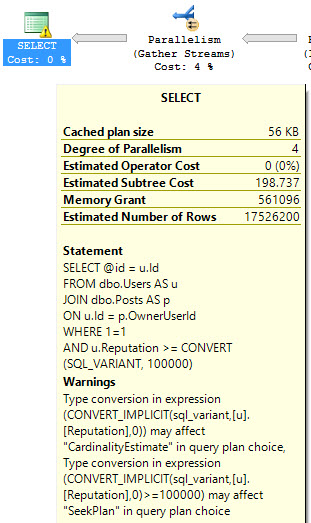
What’s the shortcoming? Well, the Warnings column is NULL. If you’ve been staring at SQL long enough, you should know that the convert to a SQL_VARIANT causes implicit conversion, which modern versions of SQL Server warn about. The estimates and actuals are all screwed up. The number looks like you did a bad job importing an Excel file. The plan now goes parallel and does all sorts of Hashing and Filtering and other horrible stuff.

Over in Graphical Plan land, we see the warning and the implicit conversion that you’d jump over your own mother to fix.


Too Much Horror Business

What About Missing Indexes?

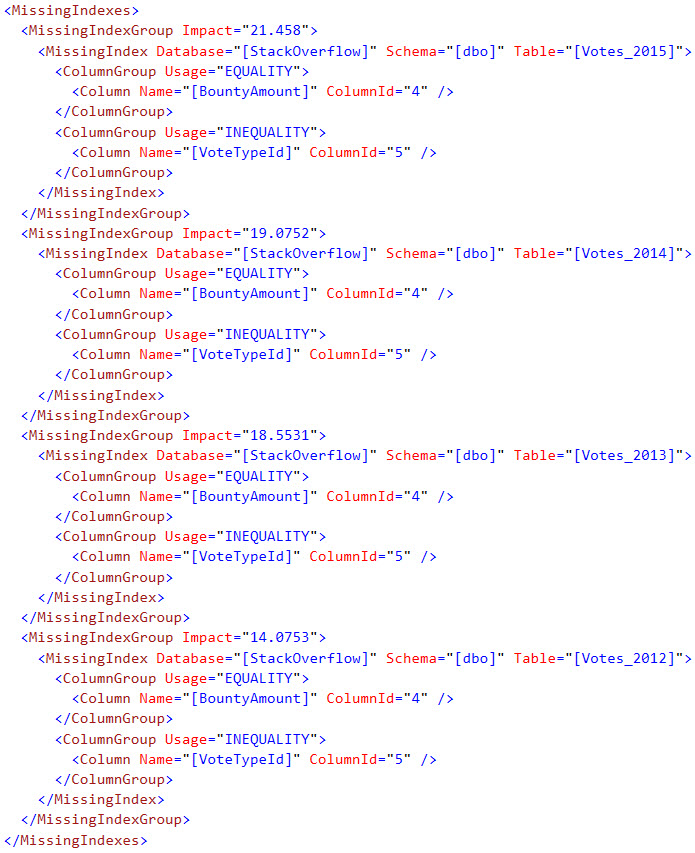
No. Nope. They don’t show up here. Which can be a good thing, because the missing index requests are ABSOLUTELY INSANE sometimes.

But since you asked, here. It’s not exactly the most prolific missing index request, but it also exposes something sort of annoying about graphical plans, which you may or may not have noticed.

Here’s what we get back from STATISTICS PROFILE

This may look familiar.


No missing index request, but over where the pictures are pretty…


Annoy yourself doot doot doot


But here’s the annoying part about even graphical plans! They don’t show you all, or even the best, missing index request in the XML.


You can't possibly want to query this.
You can’t possibly want to query this.

Sometimes Helpful

Again, this isn’t always good, great, or helpful. It’s just another potential tool for troubleshooting a query. Yes, you can turn this on along with the other options with SET STATISTICS TIME, IO, PROFILE ON. It’s not a bad way to get some more information out of SQL Server, especially if keeping the ins and outs of a graphical plan in your head is difficult.

Thanks for reading!


[Video] Office Hours 2016/10/05 (With Transcriptions)

This week, Brent, Richie, Tara, and Erik discuss their learning styles, Always On Availability Groups, memory leaks, Windows updates, how to transition from developer to DBA, upgrading SQL server from 2008 to 2014, temp tables vs table variables, and how to become an MVP.

Here’s the video on YouTube:

You can register to attend next week’s Office Hours, or subscribe to our podcast to listen on the go.

Enjoy the Podcast?

Don’t miss an episode, subscribe via iTunes, Stitcher or RSS.
Leave us a review in iTunes

Office Hours Webcast – 2016-10-05


Brent Ozar: We got a couple of early questions, or not really questions, but comments from folks. One person says, “Thank you for the set SPN answer last week. Robert Davis’ blogpost SQL Solider was great.” Totally agree. I love that myself, refer back to it all the time. Another person says, “Last week I asked about parameter sniffing issues and as you guys suggested, I’ve applied the update statistics and it worked for me. Thanks for your help.” Awesome. Glad to hear it. That’s very cool.

Erik Darling: Handy dandy. That will be 50 bucks.

Brent Ozar: Just hold your credit card up to the screen and then…


Should I put 3 2TB databases on one server, or 3?

Brent Ozar: Upendra asks, “We have three critical databases and the total size of them is about six terabytes. Would you recommend putting all three databases on the same instance or breaking up each database onto its own instance?”

Tara Kizer: Are you virtualized? Because that might change my answer. If you’re virtualized, I’d probably split them up into three virtual machines.

Erik Darling: I’d probably split them up either way.

Brent Ozar: And why? What would be your guys’ concerns when you’re running databases of that size?

Erik Darling: Resource contention, locking. That would be a concern of mine with a database that size but not necessarily with keeping them on the same server. But yeah, resource contention mostly. One big giant table starts getting write in, buffer pool gets cleaned out from something else, so all of sudden just kind of fighting each other. Unless you have terabytes and terabytes of memory to make sure everything is cached when you need them, could be trouble.

Brent Ozar: I like it in terms of management for backups in CHECKDB too. Man, if you’re going to do a backup or a restore of a two terabyte database, that can be pretty tough, and other people on the same box will feel it at the same time you’re running backups or CHECKDBs. At this tier, it’s likely going to be Enterprise Edition. It’s likely going to be SQL Server Enterprise Edition so it’s going to be expensive when you say, “I want to break it out to multiple servers.” So start with that question around how long can we be down when this box goes down. If that answer is shorter than your time to restore, like if it would take you eight hours to restore all these databases, it’s time to start thinking about things like clustering or Always On High Availability.


Is there any good documentation on Always On?

Brent Ozar: Which leads to a next good question. “Is there any good documentation on Always On High Availability?” Before I let anybody else answer, I just want to give you gold star for putting a space between Always and On. Look at you. I still do Always On as all one word myself. Microsoft keeps changing this stuff. So you guys, where do you go to learn about Always On High Availability stuff?

Tara Kizer: When I was learning it back in 2012 and 2013, I actually learned by doing it. Just implementing it. Starting in a test environment, dev environment and promoting it through the different environments. Working with QA and development, making sure that everything worked properly. I’m not even sure that I referred to any documentation back then. Maybe for some quick help but I’m a learn-by-doing type person.

Brent Ozar: Yeah. How about you, Erik?

Erik Darling: Same boat. There is not a lot of great documentation, at least for free, unless you work here. So I would say learn by doing. If there’s anything you can’t figure out, ask a question specifically about that on dba.stackexchange.com or something until you get a really specific answer because a lot of the documentation is pretty high level. That’s probably the road I’d take.

Brent Ozar: I think to some extent that’s probably something we all have in common too. When you have to learn new features as they’re just coming out, there just isn’t good documentation yet. You have to start playing around with betas. When Always On Availability Groups first came out in 2012, those of us who wanted it had to start playing with it as soon as the alphas and betas were hitting. There wasn’t a good Books Online. You had to go and do. Often, I’m the kind of a guy who given the choice between reading about it and actually trying to do it, I’ll go copy/paste me some syntax and start breaking around to see what happens. Richie, I know you’ve been having to learn stuff like crazy as we’ve been developing new apps. When you go to learn, what’s your style of learning?

Richie Rump: So you know, I don’t always go learning things, but it turns out that we have a nice blog called brentozar.com. Is that too upfront? No?

Brent Ozar: No.

Richie Rump: Even before I came and worked here, I was constantly on—not only our blogsite but also I actually picked up a couple of our courses. I love our courses. I think we’re some of the best in the business. I tend to do a lot of video courses so the Pluralsights and even some of the YouTube stuff because those kind of get to the meat of the matter. I can kind of passive listen to a lot of those things. As I’m kind of doing something else, email or whatever, I can kind of grok what’s going on. If I need to go back, I can go back. But that kind of gets you—hey, all I want is enough to get going. When I get going, if I run into other problems, then I could do the Stack Overflow or whatever but I just need to get started. The stuff on YouTube, but mainly Pluralsight and our site, brentozar.com, has been really helpful.

Brent Ozar: If you’re a developer out there in the audience, Pluralsight is a great investment, just the rapidity of how of how fast they bring out new courses. It’s also interesting that between the crew of us, I think Richie is actually the only one who likes learning via videos or likes learning passively, which is hilarious for me to say because we run a training company that sells videos. I love doing them and I know that a lot of customers enjoy learning via videos. I don’t like watching learning videos at all. They make my skin crawl.

Erik Darling: Maybe what it is, is you don’t like other people’s videos.

Brent Ozar: Oh. You know what? That’s true.

Erik Darling: You found a formula for videos to make the videos the way you like videos.

Brent Ozar: You’re right, because I loved watching Doug’s. Doug’s videos I had such a good time with. He had such a good theatrical kind of quality to them. I can’t watch training videos where I don’t see the person. If I can’t see the person talking, I’m out. I need to see a human being that I can pay attention to.

Richie Rump: I think one of the things that make your videos so great, Brent, is that whole interaction. Yeah, the whole song and dance. I can now connect to someone as opposed to this voice kind of out there speaking to me, you know? Dropping knowledge. It’s a personal thing. It’s like, oh, you’re talking to me as opposed to wah wah wah.

Brent Ozar: Charlie Brown’s parents teach you SQL Server.

Erik Darling: A disembodied voice with just some quick typing in the background. This like ongoing monologue where you’re like, “I don’t understand what you’re saying. Like, stop.”

Brent Ozar: You can hear the guy flush the toilet. You’re like, wait a minute, did I just hear that?

Erik Darling: He’s blowing his nose.

Richie Rump: If I had a dollar every time I email Pluralsight, “The audio in this course is terrible,” I’d have one month full of free subscriptions.


Can SQL Server run on Windows Nano Server?

Brent Ozar: Next question we have is, “What are you guys’ thoughts about running SQL Server on Windows Nano Server?”

Tara Kizer: What is that? I’ve never heard of it.

Brent Ozar: Everybody’s faces tell the story there. Windows Nano Server is a really lightweight stripped down version of Windows. SQL Server does not work on Windows Nano Server. There’s no indication that it ever will. It might, I just have never run into an instance where I’ve said, “Oh, I really wish I had less Windows stuff on this SQL Server. It would have made my pains go away.”


How do I find a memory leak in SQL Server?

Brent Ozar: Next up, someone says, “How can I find a memory leak in SQL Server?” Wow.

Erik Darling: Attach a debugger.

Tara Kizer: Why do you suspect that SQL Server has a memory leak?

Brent Ozar: If you’re looking at SQL Server always using more and more memory, that’s what’s SQL Server does. If you google for a sysadmin’s guide to SQL Server memory, there’s a post I wrote a few years back explaining how SQL Server uses RAM.


Why aren’t SQL Server patches visible in Control Panel?

Brent Ozar: Next question. “SQL Server patches are not visible under control panel.” I’m assuming that you mean Windows update. “What do you guys do if you don’t see SQL Server updates available under Windows control panel? What’s the reason for that and how do you go fix it?”

Tara Kizer: I just download it from the Microsoft website, the ones that I’m interested in—service packs, cumulative updates. I like that they’re not available in Windows updates. I don’t want that stuff just pushed out to my environments.

Erik Darling: There was a recent charge—was it for 2016 where it started showing up?

Tara Kizer: Yeah, where it automatically pushes.

Erik Darling: Or it wasn’t service packs that started showing up, cumulative updates is what started showing up.

Tara Kizer: And doesn’t SSMS automatically get patched now?

Brent Ozar: Yes. At least it tells you you can go download one. I love that.

Erik Darling: An update is available. But then there’s no update dialog internally, it just brings you to a website. It’s like, “Okay, I guess I’m clicking on this.”

Richie Rump: “Update is available. More stuff is broken.”

Brent Ozar: That’s the really bad part is that you end up with like the 16.4, the most recent update, came out and broke up alter scripts. So they took it back down and two days later bring out another build. I’m so happy that they’re updating Management Studio. That’s wonderful.

Erik Darling: Yeah.

Brent Ozar: I don’t want to sound like I’m looking a gift horse in the mouth, I am just absolutely in love with how much resources SQL Server is getting these days. Speaking of which, Erik, you should announce that you got extra resources in SQL Server.

Erik Darling: I did.

Brent Ozar: What happened recently?

Erik Darling: I got my very own developer and he fixed a connect item of mine. Well, he addressed a connect item of mine. I complained that DBCC SHOW_STATISTICS is an old and clunky and kind of a horrible way to get information about your statistics histograms and whatnot. It looks like that got fixed somehow. I don’t know with what or anything. I don’t know if it’s a function or if it’s a DMV or any of that stuff but it’s out there on some developer’s desktop waiting to be released. Thank you whoever did that, or whoevers, maybe it took more than one of you. You know what? I bet I’m so special that Conor did it himself.

Brent Ozar: You know, I bet your name is in the source code. I bet it says, “This is done in order to make Erik Darling happy.”

Erik Darling: “Love, Conor. XOXO.”

Richie Rump: “Bleep you, Erik.”

Erik Darling: I spent my weekend…

Brent Ozar: So if any of you ever have things that you want to see changed in SQL Server, go to connect.microsoft.com. That’s where you can log bugs or requests for enhancements in SQL Server. They’ve been better at addressing these. I always used to joke that then they’ll ignore you the same way they ignore me. They’re actually fixing things. It’s fantastic. And things that aren’t even necessarily bugs, like Erik’s is not even a bug. It’s just something that would be cool if we add it.

Erik Darling: Yeah. One of the first things I ever heard to describe Connect was just like an idea graveyard.

Brent Ozar: That’s so true.

Erik Darling: [Inaudible 00:11:13] for ideas. They just go there to die.

Brent Ozar: And drive real slow.

Richie Rump: We should change ours to the Connect.

Brent Ozar: Yes.

Richie Rump: We should change it to Connect.

Brent Ozar: We’ll have to put in some kind of buffer so that it runs really slowly and the search sucks.


How can I move from SQL Server developer to DBA?

Brent Ozar: Next question. “I am a SQL Server programmer. How can I move from a SQL Server developer to become a DBA? I’ve been working in development for eight years and I want to become a DBA.” Richie, what would you do?

Richie Rump: Don’t do it. That’s why. I don’t want to be on call. What’s wrong with you people?

Brent Ozar: On call is a really good point. A really good point. I know when we go out and hire people, that’s one of the biggest things that I go tout. “How would you guys like to never be on call again?” Just all of a sudden you can hear the choir singing and the angels…

Erik Darling: My question would be why do you want to move from development to DBA. If you think it’s like a money thing or a career thing?

Tara Kizer: Usually money, but in order to get the more money, you have to be on call. So it’s a double-edged sword. If you can find a DBA job that doesn’t have an on-call rotation, then that’s like the best.

Richie Rump: Then you’re working for us. That’s how that works.

Brent Ozar: If you think that more money sounds attractive, look at what the more money is and think about what could you do if you worked part time after hours on a schedule that you controlled, especially since you’re a developer. If that means building projects, if there’s some kind of application that you want to go build, what could you do to monetize that in time windows that you could predict and control? Instead of being on call and never seeing your family again.

Richie Rump: If you’re serious about becoming a DBA, then you need to immerse yourself in DBA topics. Being here is a good way to do that. You need to learn about the hardware, probably take a huge Windows 800-page SQL book, probably the SQL Server Internals. I think that’s probably a good place to start. Start learning how everything works internally.

Erik Darling: Yeah, the Kalen Delaney books on internals are a great place to start if you want to become the all-knowing DBA swami and sit in the lotus position fixing corruption.

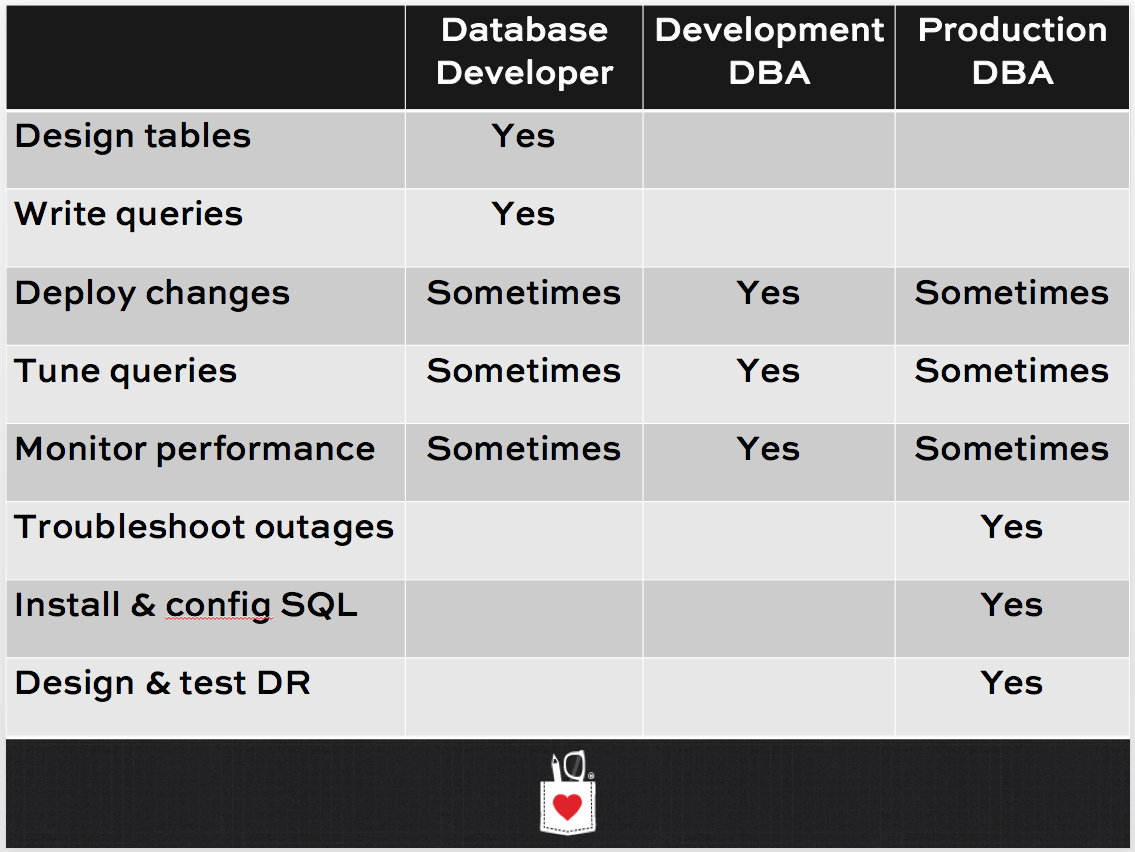
Brent Ozar: Because I have control of the PowerPoint, I’m actually going to dump in a PowerPoint from this week’s training classes. I’m teaching this week about performance tuning. One of the modules that we start out with—I’m going to fast forward to the slide that’s involved. When people say DBA, there’s a few different job roles that DBA means. Down the left-hand side, those of you who are listening to the podcast, I just want you to close your eyes. Ideally you’re not driving, but if you are driving, you know, it’s been a good life.

Erik Darling: YOLO.

What kind of DBA are you?

Brent Ozar: Down the left-hand side you have the lifecycle of a database from designing tables, designing indexes, writing queries. From the bottom up, you have the systems administration part of database work: designing high availability and disaster recovery, installing SQL Server, troubleshooting outages. If you have eight years’ worth of development, start from the top of this chart and work down. Go from right—designing tables, writing queries—then work your way through monitoring performance. I don’t expect you to become a great production DBA on the far right-hand column. That’s kind of hard. But the job role that might interest you a lot is development DBA. All right. Let me throw the slide deck back on there.

Brent Ozar: Let’s see what our next question is.

Erik Darling: A lot of salaries flying around in that window.

Brent Ozar: Money, money, money. Which I think is generally true. I think a good database administrator can make pretty good money. But it’s the on call and it’s that there’s no school for it, that’s pretty tricky.


Should I do my backups on my primary or my secondary replica?

Brent Ozar: Shan says, “I’m struggling with the decision on whether or not I should do my backups on my primary replica or my secondary replica. If I’ve got Always On Availability Groups, where should I run my backups?” We could probably break this up into full backups and log backups. For this, I’m going to turn directly to Tara, our Always On Availability Groups expert.

Tara Kizer: I don’t know about expert. I prefer running them on the primary replica because I know that the primary is up-to-date with data. Even on a synchronous replica, it may not be up to date. So if you’re running backups there, your backups may not have up-to-date data. I don’t like that. When your RPN and RTO are really really low, I need to run them on the primary replica. I don’t necessarily see any reason to move them to another server. Backups should not be causing resource issues unless you have severe bottlenecks.

Erik Darling: If your bottlenecks are that bad you probably should not have an availability group on there.

Tara Kizer: Yeah.

Brent Ozar: You’re clearly using Enterprise Edition, which is an expensive edition in terms of SQL Server. If you were going to offload the backups to a secondary, that means you have to license it. So at $7000 US per core, generally the smallest Enterprise Edition box I see is eight cores, that’s $56,000 US of licensing that I would go put on the secondary. Maybe I’d want to go put a few thousand dollars’ worth of hardware on the primary first, rather than spending the money to license that secondary.

Erik Darling: RAM is cheap.

Brent Ozar: RAM is cheap.


Is there a checklist for upgrading from SQL Server 2008 to 2014?

Brent Ozar: Kahn says, “I think someone asked this question before.” All right, you lose. Next question. “I’d like to ask it again. We decided to upgrade from SQL Server 2008 to SQL Server 2014. Is there a checklist or a to-do list before the upgrade?” I would break this into two parts. Do you guys want to upgrade a SQL Server in-place and then is there any kind of checklist that you would look for as you go do these processes?

Tara Kizer: I’d like to start with the best practices. The BPA, Best Practices Analyzer, just so I can identify if there are any code issues. If your data access is through stored procedures, it can identify if there are any issues. The BPA is a great tool to help you identify problems for the things that it checks. It doesn’t check for everything. We found an issue where the raise error command, that this application had been using, was using old syntax and the BPA in 2014 did not alert us to that issue. So there are things that it’s not going to find but make sure you test things. I don’t know, is the BPA available for 2016 yet? I don’t know if I’ve seen it. I know it wasn’t available when it RTM’d.

Brent Ozar: I think 2014 is the most recent. But still really valuable. There’s also a technical upgrade guide if you search for SQL Server 2012 or 2014 technical upgrade guide. But warning: this is 200, 300 pages’ worth of stuff. It’s a monster. I like the BPA a whole lot better.


Do you prefer temp tables or table variables, and why?

Brent Ozar: How about an interesting question. Do you guys have any preferences between temp tables versus table variables, and why?

Erik Darling: Boy, do I. There’s a little bit more to that question about if you can create nonclustered indexes on table variables. The answer is yes, in 2014 plus. But, you still don’t get any statistics on those table variables. You still get crappy estimates. So in 2014 and up, it’s 100 rows. Prior to that it is one row when you select data out of them. When you modify a table variable, it’s all serialized. So when it comes to performance, I generally tend to go with temp tables because you can index them, they get statistics a little bit easier for SQL to make good decisions based on that. But if I’m just doing some kind of routine DBA chore and I don’t really care, I will use a table variable.

Tara Kizer: I had a system that had, this was on SQL Server 2005, and the stored procedure was using the table variable. There was only ever one row in that table. Always. A lot of times we’ll say table variables are okay since statistics are assuming one row anyway. We had severe performance issues with it, we were having to recompile all the time. A Microsoft engineer had this test whether or not a temp table would resolve it and it was night and day, the performance improvement that occurred here. So I don’t use table variables ever. Except for ad hoc in Management Studio when I’m just testing something out. Or like Eric said, it deviates [inaudible 00:19:32].

Richie Rump: I never use table variables. Ever.

Brent Ozar: I’ve never even seen an instance where table variables solved a problem for me. Every time I’ve ever run into them, they’ve caused problems for me.

Tara Kizer: I think there was an SSIS package issue that I encountered that I had to switch to a table variable. Yeah, I remember it now. It was a stored procedure that had a temp table and I don’t remember what component in SSIS was causing the issue but I researched it and found using the table variable worked around the issue and it drove me crazy. My rule is to not use table variables.

Erik Darling: That’s horrible. Ouch.


Do you have plans to come to India?

Brent Ozar: Another question. “Do you guys have any plans to do SQL Server seminars or training in India?” No, it’s kind of interesting how this works financially. There are big tax implications for doing work in India. I looked into having doing this at one point because we were going to have a client in India. The Indian government was going to make me open up a bank account and pre-pay taxes on things and I would only get them back a year later. I’m like, “Nah, you know what, between the travel and all of that, I’m good, thanks.”

Erik Darling: That’s wild.

Brent Ozar: South Africa was a similar kind of deal. It was really tricky in terms of taxes.


Will RCSI help alleviate my blocking problems?

Brent Ozar: Next question, “Is read committed snapshot isolation helpful if I want to get less locking? Can RCSI help eliminate my blocking issues?”

Tara Kizer: Then it says, “Readers do not block writers.” Is that what he’s seeing on his system, or…?

Brent Ozar: I think he’s kind of asking, “Is that how this works?”

Tara Kizer: Yes. You can get a big performance boost. I went on maternity leave—on the system I was just talking about, on SQL Server 2005 and my company ended up signing a very large customer and performance went into the [inaudible 00:21:18]. The database had tons and tons of customers in it. My manager who was also a SQL Server DBA not just a [inaudible 00:21:24] manager. He implemented RCSI and it significantly improved performance. Now it didn’t exactly resolve the issue but it allowed more concurrency, less blocking, and it allowed us to have more time to figure out what was happening which it was bad execution plans, parameter sniffing type stuff. But I came back and I was like, “What is this RCSI?” I had to learn about it because I was the primary DBA on the system and he’s an Oracle DBA and a SQL Server DBA. He was saying SQL Server could finally compete with Oracle once Microsoft added RCSI to SQL Server. Oracle has had it for a long time.

Erik Darling: It’s the default in Oracle. Not exactly, but same principle.

Tara Kizer: Exactly.

Richie Rump: When I do new databases it’s always RCSI. That’s the default for me.

Tara Kizer: I started putting it on the model database that way if anybody created a database it was already automatically RSCI.

Erik Darling: There are potential gotchas though. You can run into raised conditions with your code. If you haven’t tested things, if you do sort of queuing transactions. For that reason, some people choose snapshot isolation instead, which does the same thing as RSCI but you have to request it at the query level. And snapshot can also be used for modifications. So if you’re problem is writers blocking writers then you can do it there too if you’re crazy and have lots of time to…

Brent Ozar: I think there’s only two super fast buttons in SQL Server that if you push them in the right circumstances it just makes an unbelievable difference in the SQL Server. RSCI is one of those, my other big one there is forced parameterization. In both cases, neither of these solve everything. But in the exact situation where you’re facing those problems, you just push this button and the angels start singing.


Do you recommend using RAID with solid state drives?

Brent Ozar: Next question. “Would you guys recommend storing SQL Server data files on solid state drives that are configured in RAID?” Yes, absolutely. If you’re going to use solid state drives, really any drives, same thing with magnetic, you want some redundancy there because drives fail, all of them. Solid state drives, magnetic, you name it.

Erik Darling: RAID 0 was not a good choice with anything with SQL Server. There’s some best practice stuff around RAID 10 for the right workload stuff like tempdb and log files in RAID 5 for the read workload stuff like the data files but generally you need some sort of RAID on there. If you’re buying a modern SAN, a lot of them have their own under-the-covers RAID configuration anyway. I know Nimble and some other ones have their own black magic RAID thing going on so you might not even have to worry about it.


How can I become an MVP?

Brent Ozar: And the last question we’ll take is for Tara. “Tara, how can I be an MVP like you?”

Tara Kizer: Well a few years ago it wasn’t exactly hard, it just took a lot of your time answering questions on the internet and getting your post count high to be noticeable to Microsoft or someone recommending you to Microsoft to be an MVP. These days though it’s a lot harder, a lot of people are losing their MVP. They’re not writing blogs. Maybe they’re still presenting every now and then at SQL Saturday but it’s not enough anymore. I don’t know if answering questions on forums is enough anymore. Microsoft is changing the program and they want more out of you than just answering questions.

Erik Darling: And it all has to be on Azure.

Tara Kizer: They would prefer people to start talking about Azure, be an evangelist for it.

Richie Rump: Those are fighting words. I’ve had to deal with Azure all week.

Brent Ozar: Yes. I would also throw in there that Microsoft runs open MVP days. They’re regional in large cities so Chicago, Seattle. If you can try to put words in with Microsoft people you know, if you know any Microsoft employees, then just ask. Is there an MVP Days event coming up. At those events you get to meet the Microsoft employees, meet other MVPs and ask them questions directly and it puts you on their radar. That may help your edge in becoming an MVP. I would also ask just what you want to be an MVP for. What is it that’s important to you. Almost all the MVPs that I know, the MVP is kind of a side effect from things that they were doing anyway. That they love helping the community which is very fulfilling in and of itself. So if you love doing that kind of thing, you’ll find becoming an MVP much easier.

Richie Rump: Yes, I would absolutely say don’t try to be an MVP. Try to help the community, try to get involved in a community, try to run a user group, try to start a podcast, start sharing your information, start a blog. Once you start doing that, the MVP things will start coming along as well as some other good things that come out of sharing your knowledge and information.

Brent Ozar: It’s amazing to watch every time, so October 1st was the last renewal date for MVPs or the last round of dates. It was so funny to see so many people on Twitter go, “I can’t believe I got an MVP. I’m so not worthy. This is such an honor,” and whatnot. Think about that mindset, maybe there’s a reason why these people are like, “I just do this for fun and it turns out I’m recognized for it.” That’s amazing.

Richie Rump: Yes, I’ve already made the decision that if I was ever made an MVP that nobody’s going to know about it. I’m not going to tweet it, I’m not going to do anything, it’s just going to be out there.

Brent Ozar: So you could be an MVP right now and we wouldn’t know.

Richie Rump: You wouldn’t know.

Brent Ozar: I’m going to go right now and look up in the directory.

Erik Darling: You’re an MVP to me, Richie.

Richie Rump: No, you the real MVP, Erik.

Erik Darling: No, man.

Brent Ozar: You’re an MVP to me. Minimal viable product. All right so thanks everybody for hanging out with us this week and we will see you next week on Office Hours.

Erik Darling: Adios everybody.


The Law Of The Minimum

Monitoring
15 Comments

I like science fiction

Not enough to go to conventions, or memorize every line, but I have some opinions on things. Dune is probably my favorite series of stories in the genre. Yes, I think Paul would beat Luke in a fight. Sorry, Star Wars people. He’s just kind of a wimp.

Throw grenade, digress

One of my favorite quotes from Dune is from a fella named Kynes. It’s somewhere around page 136, and it goes something like this:

You are dealing, you see, with the Law of the Minimum… growth is limited by that necessity which is present in the least amount.

I love this line, because it’s practical and realistic. In a nutshell, there’s no such thing as infinite access to a finite resource. Keeping this in mind has helped me countless times, and you can apply it anywhere. Your career, your personal growth, heck, even your SQL Servers, if you’ve got nothing better to think about all day.

Since I started working here, I realized just how much time was the minimum resource before. Now my troubles are stuff like “my bar cart doesn’t have enough space for me to grow my scotch collection” and “learning French by going to French restaurants doesn’t work but is delicious”. I suppose the ‘moral of the story’ here is to make sure that your resources are being consumed by the right things. They should matter to you. If they don’t, it’s time to reevaluate.

But since you want to know about SQL

I can’t keep writing this obituary to the years of my life spent responding to work emails and problems into the wee hours. Plus, some of that was kind of fun. So without further ado, here’s a tolerably short list of signs your server is dealing with The Law Of The Minimum. I guess that makes it ‘the list of the minimum’, huh?

CPU

This one can be tough! If you’re not looking at some performance assessment tool that says your CPU is constantly at 100%, what else might clue you in? The first thing that comes to mind is THREADPOOL waits. That’s basically your SQL Server running out of worker threads to give to new tasks, and holy smokes is that a tough situation. You can hit this wait hard just by having enough concurrent queries running, especially if they’re going parallel and hanging out for a while.

Memory

This is fairly easy to spot, but not always easy to remedy. You may see waits on RESOURCE_SEMAPHORE or RESOURCE_SEMAPHORE_QUERY_COMPILE. The former means your queries can’t get memory to start up, and the latter means your queries can’t even get enough memory to get an execution plan. The worst part about it is that you could be constrained to a limited amount of memory by so many things. Old OS or hardware, Standard Edition, or a crowded VM host. And the list of things in SQL Server that use memory is outlandish. Buffer pool, various caches and DMVs, queries compiling, queries executing. And then there’s Windows. If Windows doesn’t get enough memory, more than SQL is in trouble.

Disk

This is related to memory, because if data isn’t in memory, it has to come from disk. You may see a lot of PAGEIOLATCH waits if you’re short on memory, but you’ll see really long waits if your storage is old and crappy. WRITELOG may also pile up here as well. More RAM can help reads, but it can’t help writes. For that, you need better disks. Your SAN admin may send disdainful emails about the response time of the disks your troublesome database files sit on. That’s when it’s time to start asking about how your server is connected to those disks. Perhaps that single 1Gb connection wasn’t the best idea.

Figuring it all out

Very few servers are waiting on nothing, sitting around bored. The ones that are often still get blamed for performance problems, when it’s the application that stinks. You can usually prove out either scenario, but you’re going to have to watch your server a bit. For this, you need something that measures wait stats, and aggregates them in some meaningful way. Whether it’s a free script or a monitoring tool is up to you.

After all, that’s your minimum.

Thanks for reading!


Update On Connect Item To Replace DBCC SHOW_STATISTICS

SQL Server
17 Comments

ALL CAPS EXCITEMENT

In rather fun news, a Connect Item of mine about replacing DBCC SHOW_STATISTICS with a DMV or function got updated as ‘Resolved as Fixed’. It was only slightly odd, because I intentionally funneled votes to Greg Low’s item after realizing I had duplicated it. So, Greg, if you’re out there… Uh, hi!

Root cause: Microsoft employees also have a hard time searching Connect Items.

So what does it look like?

I have no idea. I don’t know if it’s a DMV or a function, I don’t know what it’s called, and I don’t know what information it exposes. I also don’t know how it will get joined to other DMVs. There were no details offered up when the status changed. And I’m fine with that! I’m pretty psyched that it got enough traction to get a fix to begin with. If anyone from MS feels like shooting me an email with details, I won’t complain.

But since we don’t know, we’re free to speculate. Like all those History Channel shows about aliens and fake animals and where the Templars secretly buried Jesus’ gold teeth in Arizona. It’ll be fun!

A Function!

It could be a lot like sys.dm_db_index_physical_stats! Maybe sys.dm_db_stats_stats! Heh. No, don’t do that. I think sys.dm_db_statistics would work. It could take inputs for database id, object id, and optionally index id and partition number to retrieve more specific stats. One input that would be killer here is for column name, so you could see any statistics objects that reference a particular column. Why? Because system generated statistics on _WA_sys_iuwghaiuhareiugh982375 aren’t helpful. In the words of Doug Lane: “that’s crap”.

This would be cool, because it would be easy to CROSS APPLY with existing queries to gather stats info. No learning new JOINs and all that hocus pocus relational database nonsense! It’s basically NoSQL with less curly brackets and reliable results.

A DMV!

Now, this could go two ways. It could be additional data tacked on to sys.stats, or it could be something like sys.stats_details (yeah, not exactly inspired), and join pretty easily to sys.indexes, sys.tables, sys.partitions, etc. These are probably the most common DMVs that you’d use along with this one.

What should it tell you?

Well, most statistics information queries I’ve written return a good bit of information. Not everything is easily accessible, so this could be expanded.

  • Table name
  • Index name (if not system generated, or a stats object without an index)
  • Statistics object name
  • Name of the column used for the histogram
  • Last time the stats were updated
  • Rows in table/index (different for filtered indexes, etc.)
  • Rows sampled by the last update
  • Modifications since last update
  • Modifications before auto update
  • Histogram steps
  • If the statistics are marked as ascending
  • Use count

Use Count?

HECK YES USE COUNT!

No, not because I want to start dropping statistics. But this would be AWESOME for maintenance scripts like Ola Hallengren’s when deciding which stats to update. Right now, you can skip statistics that haven’t been modified, and that’s great. But why bother updating statistics that aren’t even used? Building off other information exposed, you could also choose between full or sampled updates based on how many rows are in there.

But what about the Histogram?

What is it? Why is is capitalized here and nowhere else? The histogram is where the data for the leftmost column in your [object] gets described. There can be up to 200 steps in a histogram, and there are several columns of information in there. If this is also exposed, you may need something like sys.stats_histogram, or a function that accepts a stats ID and returns the histogram as well.

What would you want to see?

Leave a comment below if you think I missed something! Who knows, there may still be time for some lucky developer to make changes before this gets released!

Thanks for reading!


SQL Server Timeouts During Backups and CHECKDB

So you’re hosting your SQL Server in the cloud – say Amazon EC2, Azure VM, or Google Compute Engine – and you’ve noticed that when you’re running a backup or a DBCC CHECKDB, you suffer from extreme performance problems.

Queries run slow, and even worse, applications report timeout errors even just trying to connect to SQL Server. More symptoms can include database mirroring and cluster failovers. What’s going on?

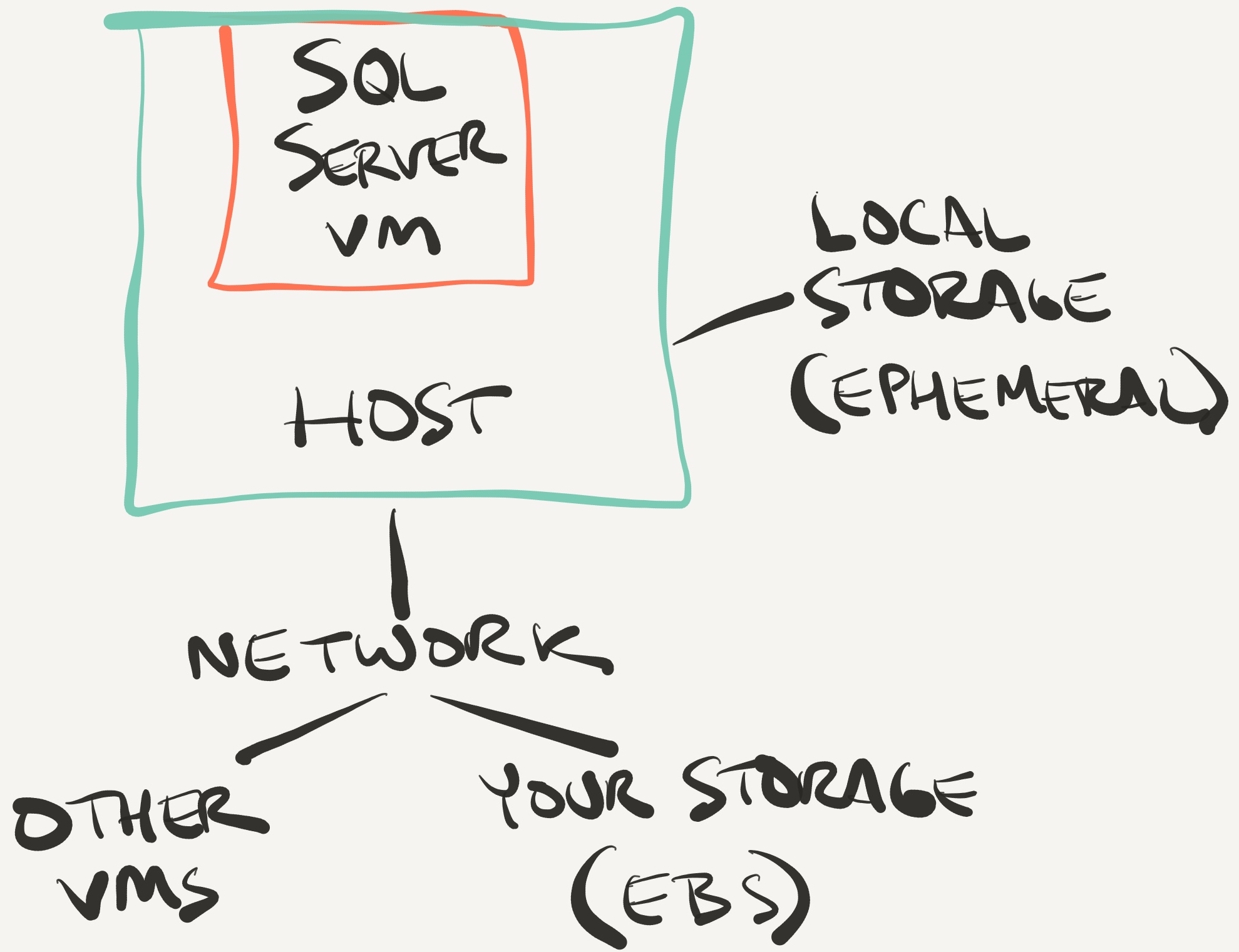
To understand it, let’s look at a quick sketch of your infrastructure:

I told you it was a fast sketch

Your SQL Server virtual machine lives on a physical host, and it accesses your storage via the network – plain old Ethernet, the same Ethernet you’re using right now to surf our web site.

The advantage of Ethernet-connected storage is that it’s really, really cheap to build and manage.

The drawback of Ethernet-connected storage is that if your network connection isn’t really robust, then it’s really, really easy to saturate. 1Gb Ethernet maxes out at around 100MB/sec – for comparison, a single $250 1TB SSD pushes around 500MB/sec. During high-throughput activities like backups and corruption checking, your storage is more than capable of pouring tons of data into your SQL Server – thereby completely saturating your network connection.

It gets worse: in most cases, you’re not the only VM on a given host, so your cloud provider has to throttle your network throughput.

So your network connection matters – a lot.

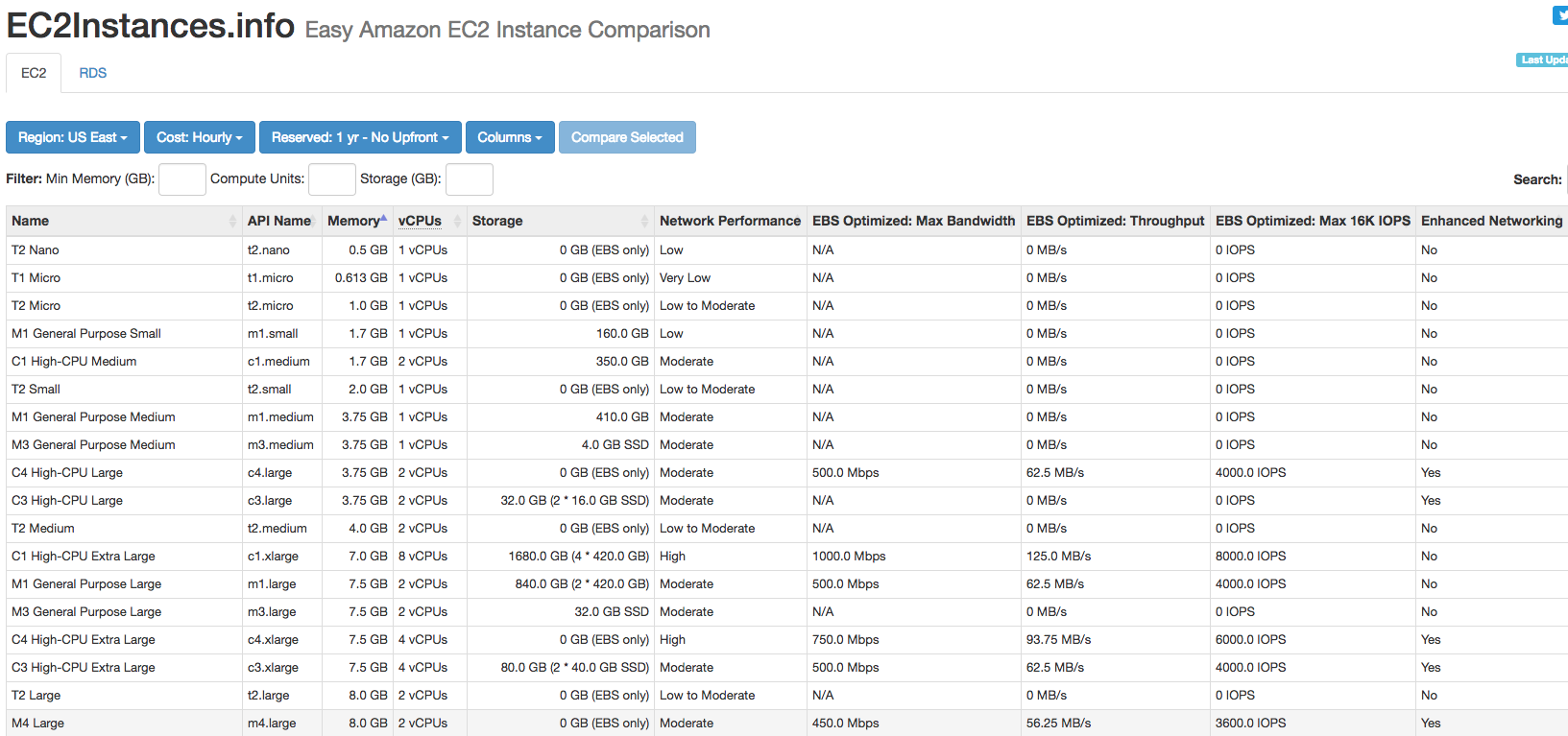
Faster (and/or separate) networks are certainly available to you in the cloud – it’s just a matter of budget. For example, the excellent ec2instances.info lists all of the VM types at Amazon. It includes columns for Network Performance, plus a whole bunch of EBS columns that aren’t shown by default (click the Columns dropdown to see them):

EC2instances.info
EC2instances.info

The eye-opening column is EBS Optimized: Throughput – how much you can get from your storage in a best case scenario, typically streaming sequential reads like backups. (Don’t expect to get that from small random activities like OLTP database operations.)

Sorting by that column, here are your capabilities for the very largest VMs:

EC2 instances by throughput

While 1250 MB/sec is good, that’s also expensive: those two instance types are $8/hour and $19/hour. Once you’re past those, the throughput simply plummets right down to that single $250 SSD we were discussing earlier.

So what’s an admin to do?

One option is to bypass the network entirely. Note how in the architecture sketch, local ephemeral solid state storage isn’t hooked up through the network at all. Ephemeral storage is blazin’ fast and super cheap (included with most SQL-Server-sized instance types these days).

There’s just one little drawback: it can disappear at any time.

So if you’re going to use that for user databases, you have to protect your instances using technologies like Always On Availability Groups or database mirroring. Those can get you automatic failover with no data loss (not guaranteed, though), at the cost of slower deletes/updates/inserts due to synchronous writes across multiple servers.

Or, uh, you could just skip backups and CHECKDB. I wish I was joking, but I’ve seen more and more folks simply opt to run with scissors rather than have timeouts. That’s a bummer.

The cloud: giving you new ways to save money and run with scissors.

Erik says: The Cloud: Like getting a haircut from your ex-girlfriend.


Applications are Open For Our 2017 Scholarship Program

Company News, SQL Server
18 Comments
That heart means something.

Last year, we gave dozens of amazing people a helping hand so they could improve themselves – and the world around them. I was really touched by the heartfelt thanks we got – and yep, tears were shed. (On both sides of the screen.)

So it’s time to do it again.

You work with Microsoft SQL Server – maybe as a developer, report writer, analyst, sysadmin, or DBA.

You want to learn more about how to make it faster and more reliable.

But your company can’t afford training. Maybe it’s a charity that needs to save every dollar to make a difference in the lives of others. Or maybe it’s a non-profit arts foundation, or a small startup that’s barely making ends meet.

We want to hear from you.

The fine print:

  • You must already have a job working with SQL Server.
  • You must work for a foundation, non-profit, charity, or similar company that’s doing good work. It can totally be a for-profit company, just as long as they’re making a difference. (If you work for Ginormous Profitable Global Corporation, forget it.)
  • Your company or government rules must allow you to receive free or discounted training. (Some companies prohibit their employees from accepting gifts.)
  • You can be anywhere in the world. (Some of our scholarships will involve in-person training, and some will be online video training.)

Update: applications are now closed (Oct 15). The winners will be announced on Wednesday, October 26th. Stay tuned!


[Video] Office Hours 2016/09/28 (With Transcriptions)

This week, Brent, Richie, Tara, and Erik, discuss non-clustered indexes, dynamic SQL, replication, setups for servers dedicated to reporting services and warehouse databases, cross-cluster migrations, employment opportunities in the current market, and much, much more!

Here’s the video on YouTube:

You can register to attend next week’s Office Hours, or subscribe to our podcast to listen on the go.

Enjoy the Podcast?

Don’t miss an episode, subscribe via iTunes, Stitcher or RSS.
Leave us a review in iTunes

Office Hours Webcast – 2016-09-28


Can I create a nonclustered index on a partitioned table?

Erik Darling: It is 12:15 so I’m fixing to start asking some questions. Whoever wants to answer them can answer them. The first one we have up is from someone named Lori. Says, “Can I create a nonclustered index on a partitioned table? Does anyone have an opinion on this?” Tara looks like she’s concentrating, so I’ll go ahead.

Tara Kizer: I’m trying to figure out the slides still.

Erik Darling: Yes, you can. You can absolutely create many nonclustered indexes on partitioned tables, but you’re going to want to make sure that you align them to the partitioning scheme or else you will lose all of the magic management stuff that comes out of partitioning your table. You won’t be able to swap in or swap out or do any of the other cool stuff. So when you create your nonclustered indexes, make sure that you don’t create them on primary. Make sure you create them on whatever the partition schema is called.

Richie Rump: I actually worked on a system where we didn’t intentionally align them with the partitioning.

Erik Darling: What? You’re crazy.

Richie Rump: Yeah, because partition swapping wasn’t something that we really needed.

Erik Darling: Oh, there you go.

Richie Rump: We just needed the data partitioned so that we could query it better.

Erik Darling: Why didn’t you just create a partition view then?

Richie Rump: I didn’t—I came in and they already had all that stuff. Some of these tables were like five, six billion rows.

Erik Darling: That’s it?

Richie Rump: They just said for size perspective, getting on different drives and stuff, they did the partitioning.

Erik Darling: All right. I will consider that one answered. I don’t want to right click on anything there.


Which Summit R session are you most excited about?

Erik Darling: Angie asks, “Which R session are you most excited about seeing at Summit?” The third one.

Richie Rump: The Star Trek one over at the EMP. That’s probably the one that I’ll be heading off to.

Erik Darling: Whichever one is the quietest when I have a hangover in the morning, whichever one has the comfiest seats.

Richie Rump: Since when did the PASS Summit turn into the R Summit? That’s what I want to know.

Erik Darling: As soon as PASS starting being PASS and stopped being the Professional [garbles words], words that I somehow can’t pronounce at the tender age of 950.

Erik Darling: “May be in left field…” I don’t know. Who plays left field for the Cubs?

Richie Rump: Depends on the day, usually Jorge Soler.

Erik Darling: Yeah, who else is on that?

Richie Rump: Kris Bryant plays some left field. Chris Coghlan played last night. Szczur was in there as well.

Erik Darling: Who’s good? Who’s your favorite left fielder?

Richie Rump: Uh. Moisés Alou from the early 2000s.

Erik Darling: Oh. That’s a weird one. Where did that come from? What did he do?

Richie Rump: He almost caught the Bartman ball.

Erik Darling: Oh, okay. Little biased.


Can PowerShell integrate with Azure SQL DB?

Erik Darling: All right, let’s see. Oh yeah, “May be in left field, can PowerShell integrate with SQL Azure databases?” I don’t know because I have never touched Azure but I see a lot of stuff about Azure and CLI and whatever. So I assume that there’s some integration. How deep it is and how effective it will be depends on your ability to stare at dollar signs and periods for long periods of time.

Brent Ozar: I concur.

Erik Darling: Yes. Brent is here. He just flew in and boy are his arms…

Brent Ozar: Pale.

Erik Darling: Boy are his arms…

Brent Ozar: All right. What did I miss?

Erik Darling: We’re having a really high energy Office Hours. There are three or four questions. There was one about partitioning.

Brent Ozar: Uh oh. Have we started asking? Shall I be MC or is someone playing MC today?

Erik Darling: I was asking but I don’t care if you want to ask.

Brent Ozar: No, you go ahead.

Erik Darling: Okay, all right. Fine. You get to ask some questions.

Brent Ozar: I get to answer, yes.


How do I solve SPN issues?

Erik Darling: Here’s one just for you. I’m going to tee this one up for you. “Having an issue with SPN SSPI across domains. It works in each domain but not across the two-way trust.”

Brent Ozar: Man, I was literally just on site at a client in Omaha yesterday and they were running into this. What we’ll do is I’ll post a blogpost because I never remember how to do this either. If you search for “set SPN” and then “SQL University Advanced Training Week,” then “set SPN.” There’s a blogpost by Robert Davis. Another set of search terms you could use is “SQL Soldier.” Robert Davis is an MCM who has step-by-step instructions on how you go about fixing that, which is good because I never, ever, ever remember it. I mean, ever.

Erik Darling: I ran into that back in the bad old days. It was always like an adventure for me to fix, like the DOS commands. I’m like, “Oh yeah, I’ve got to do it for the domain and then for the server without the domain,” and just the whole thing was…[sighs].

Tara Kizer: Then depending on the version sometimes it was the port, sometimes it was the instance name.

Erik Darling: Yeah.

Brent Ozar: Yeah. Don’t feel bad whoever is asking, don’t feel bad if you don’t remember because no one ever remembers this. It’s a hard pain in the rear.

Erik Darling: Yeah.


How should we configure our reporting and data warehouse servers?

Erik Darling: We have one from a fella named Jason who said, “When you worked with our organization you suggested our production transaction db start up with the settings of MAXDOP 8 and cost threshold 50 to use 8 tempdb files and then modify accordingly. Do you recommend that same setup for servers dedicated to only reporting services and what about data warehouse databases? We are on SQL Server 2014.”

Brent Ozar: I’ll take the data warehouse one just because I’m like, “If any query is going to be a data warehouse-y kind of query, it’s going to be large anyway. It’s going to blow past the cost threshold of 50. You may still have some tiny queries on there that are like inserting, updating, and deleting a small number of rows but they’re not likely going to crossover that 50 threshold. So I still like the 50 threshold. Same thing with the number of tempdb data files. Servers dedicated SSRS, that’s kind of tricky. Do you mean they’re just running the engine? Or are they running reporting queries for SSRS? Or if they’re just like servicing as the SSRS database where they’re holding like the report server db and report server tempdb? In which case, those queries are going to be kind of small and you wouldn’t want them to go parallel either. I still would stick with the same numbers. How about you guys?

Tara Kizer: Just because how the question was posed, it makes me think that they do have the reporting services service and the databases, the report server and report server tempdb databases on the same server. If that’s the case, the best practice is to separate them. Our recommendation is for the SQL Server instance, it could be that report server and report server tempdb are on that instance. That’s where our recommendations are [inaudible 00:06:39] for the SQL Server instance. Once you start getting into all these other services, those should be on another box.

Brent Ozar: Like it.

Erik Darling: Groovy.


Why do I only see 4,000 characters of my dynamic SQL?

Erik Darling: We have a question from a fellow human about Dynamic SQL. It says, “I set my string to nvarchar max but I am only seeing 4,000 characters. Is there a way around this?”

Brent Ozar: I should make you answer this because you’re like Mr. Dynamic SQL.

Erik Darling: Fine. Yes, there are ways around it. The trouble is that Management Studio can only print so many characters. So your string is probably longer than that. What you’re going to need to do is do some substrings of your string. You need to do from 0 to 4,000 and 4,000 to 8,000 and from blah, blah, blah because you are using nvarchar max you can only print the 4,000 because it’s Unicode. If you were using varchar max, you could print 8,000 but that might screw you up when you try to do sp_executesql. Because you’re doing Dynamic SQL, I expect you’re using sp_executesql and not just exec because that would be naughty. That’s how I usually get around it. You’re going to have to print out substrings. What I usually do is I take the length of the string, like I get the actually length of it. Then I just divide that into chunks of 4,000 and I get the substring of each 4,000 chunk and print that out. That usually works.

Brent Ozar: I like it.

Erik Darling: Another trick that sometimes works is if you select the thing for XML path. SQL can sometimes print out more XML than…

Brent Ozar: Oh.

Erik Darling: Yeah.
Brent Ozar: Wow. That’s kind of cool.

Erik Darling: Yeah. It doesn’t always work because sometimes you have some weird characters in Dynamic SQL.
Brent Ozar: Yeah, sure.

Erik Darling: Yeah, they don’t really fancy printing in the XML. But if you have like a pretty generic string, you can do the for XML path trick and select your thing as that and it will print out magically a whole mess of characters.

Brent Ozar: I love it.

Erik Darling: I don’t, but it sometimes works. One thing that I found out, this is sort of on topic for this so I’m going to say it here. If you’re using Dynamic SQL and you are using nvarchar max and you are concatenating chunks together. So it’s like you have a dynamic block and then like something else and then a dynamic block, it’s really important that you preface each of those blocks with a capital N or else they get converted down to nvarchar 4,000 from nvarchar max. So it will actually sort of implicitly truncate your code. I found that out the hard way. I was working on some stuff in BlitzFirst. So be very careful with that as well.

Brent Ozar: It’s also not really good in terms of performance, like if you’re continuously adding on small pieces of the string together in SQL Server, SQL Server is not particularly quick at that. The longer the string gets, the worse it gets.

Erik Darling: We’re living proof.

Brent Ozar: Yeah. We build sp_BlitzCache as a huge amount of Dynamic SQL, then search and replace in the Dynamic SQL, and it’s genuinely hard to work on. So we feel your pain.


Why is our replication distribution job frozen?

Erik Darling: We have a question from Paul—not a fellow human—which planet are you from, Paul? “My team just moved our production SQL Server VM from one machine to another. During the move we also applied server updates. Everything tested as successful. Today, I found the job replication monitoring refresher for distribution running for over 24 hours. It is hanging. It is on the sp_repl.” Tara, take it away.

Tara Kizer: I’ve actually never seen that occur. I assume that you tried to stop it and maybe you couldn’t get it to stop. Did you try killing the SPID? I’ve never encountered that issue and I’ve used replication for a few years.

Erik Darling: All right. So we are undecided on that one, Paul. Sorry about that.

Brent Ozar: We would probably give the crappy answer, like restart the SQL Server instance. See what happens again. If it happens twice in a row, then open a support ticket with Microsoft.

Tara Kizer: You could also try restarting just the agent since that’s not going to affect the databases at least. Just make sure that if you do that you check what’s running. If you have like a rebuild index job, you don’t want that to stop because that will cause a large transaction to roll back possibly.


New PasteThePlan Laptop Skins

Erik Darling: That’s so cool. What you got there?

Brent Ozar: Those of you who are only on the audio will not be able to see this, those of you on YouTube will be able to see. I have laptop skins and iPad skins for the icons that we have from Paste the Plan. I was wondering how they were going to turn out. They are just completely and utterly gorgeous. I will send you guys links on how to order these. You “guys” meaning the team. I guess we could send them to the public too.

Erik Darling: We could make magnets out of them.

Brent Ozar: We could. Oh my god. Dude, that’s genius. Then you could like put them on your fridge and build your execution plan. Erik, that is utterly genius.

Richie Rump: We should put our team member faces throughout those as well.

Brent Ozar: I love it. We’re totally doing that.

Erik Darling: I got hired because I’m an idea man.


When will the training classes go on sale?

Erik Darling: Let’s see. We have another fellow human. “I thought I saw a sale on the SQL Perf Tuning four-day class last week but it’s gone this week. It’s probably a secret but when is the next big sale?”

Brent Ozar: It’s really neat how sales work. They expire. Then if they don’t buy in time and they go, “Boo, they’re gone.” Our next big sale, and really the only big sale through the rest of the year, will be the Black Friday sale. On Black Friday—and I always forget what the day is—it’s in November. It’s the first Friday after Thanksgiving. We will be running huge 50 percent off sales on the training classes. In the past, we’ve run one dollar sales, like you’ve been able to get one seat in a class for one dollar. We may still do those, it will be like a midnight doorbuster type thing. But through the rest of the day, we’ll have a limited number of seats in the classes for 50 percent off. So instead of being $3,995, they’ll be like $2,000.

Erik Darling: Word.


Will there be replication problems when we migrate clusters?

Erik Darling: We have a fellow human who asks if we have any experience with cross cluster migrations. “Is it is okay to go from SQL 2012 to 2014 or 2016 and would there be any problems with replication?”

Tara Kizer: That’s a very complicated question there. Is the person asking that they have two clusters and they’re going to be migrating the databases between the two clusters? Is that what that is asking?

Brent Ozar: I think that’s what they’re doing.

Tara Kizer: It doesn’t really matter that there is clustering involved. The migration is really still the same as far as SQL Server goes. Would there be any problems with replication? Did you test it? I don’t have any issues with replication when I’ve moved from one version to the next. You just have to reset it up and get everything in place.

Brent Ozar: That’s a great point. Say that you’re moving from 2012 to 2016 or 2014 to 2016, when you’re thinking through that, because Tara you’ve done this a bunch of times, when you’re thinking through a move from one server to another, one cluster to another, whether there’s replication involved or not, how do you go about building another environment and testing out your plan?

Erik Darling: Question mark.

Brent Ozar: That was you, Tara.

Tara Kizer: Oh, I thought it was a rhetorical question.

[Laughter]

Tara Kizer: It’s the same process for any project, application release. I don’t know necessarily build out a plan. I just go through the same setup that I do with any new instance. If you’re setting up a new cluster, a new SQL instance, I have the same set of steps that I go through really. And maybe on the cluster I have a couple extra things that I need to check, but as far as an upgrade, I do the same process every single time. It doesn’t matter if there’s clustering. It doesn’t matter if there’s replication involved. And replication, I might need to research to see if the distributor database is supported on whatever version that I’m on and is it cluster aware? Can it go into a failover cluster instance? Can it be part of an availability group, that type of a thing. As far as my steps, it’s the same steps as always really. I do backup and restore and I prep the database ahead of time using a recovery. Full backup maybe a day before the migration. Differential, no recovery, maybe a few hours beforehand. Then I start applying logs, that way when I’m ready for the production, the actual maintenance window, I just have to apply maybe one or two transaction logs and I’m basically done at that point so downtime can be just a couple minutes even.

Erik Darling: One thing that I noticed with—I don’t know if this helps you, I don’t know if this is applicable for you but one thing that I saw that’s kind of cool with Windows Server 2016 is that they have the concept of a rolling upgrade for the whole cluster. The cluster will exist on the older versions until you have all of the cluster nodes on the same Windows version. Then you can use a PowerShell do-dad to upgrade them all at once. I don’t know if that makes things easier or if it doesn’t apply to you, but I did see it out there and it is something to think about if you’re out there in the world and you need to upgrade a cluster.

Brent Ozar: Yeah, you should think about building out the new cluster on whatever new version of SQL Server it is. Fail it over back and forth, test your maintenance jobs, test how long they take. Do load testing against your storage. Really kick the tires on it really hard. Go through our setup guide just to make sure that you’ve gone through all the steps to set up a SQL Server correctly. If you go to the homepage of brentozar.com, scroll all the way to the bottom. There’s an email box. You can just put in your email and get our First Responder Kit. It has the exact same setup checklist that we use when we’re building new SQL Server instances, which I have to go update because it has a couple things in there that I’m like, “I’m not especially proud of that.” It has like partition alignment. Partition alignment is now [inaudible 00:15:38]. Yeah, I can take that stuff out.

Erik Darling: Yeah. Cool, all right.


When I add a new index, the query goes faster even though it doesn’t use the index?

Erik Darling: We have a question from another fellow human. “A new index I created helps a specific query drop from 15 minutes down to less than one second.” Yay. “However, the new index does not appear in the execution plan. I even tried dropping and recreating the index and the performance differences are still there. Why is this?”

Brent Ozar: I bet you had a bad execution plan at the time, at the time that you were getting a really slow query, it was taking 15 minutes. When you added a new index it just caused SQL Server to go build a new execution plan with whatever parameters you happened to pass in. Once it has that execution plan, great, life goes right on, but you may be a victim of something called parameter sniffing. In a perfect world, I wish you would have caught the bad plan initially and saved it. If you catch the bad plan initially and save it, if you right click on the select statement or insert, update, delete, whatever it is, in the plan right click on it and click “properties.” Over in the properties window you can see what parameters it was built for. That was probably what caused the slow execution plan. But if you don’t have the plan anymore, it’s kind of tough to figure this out but that also means that it may strike again at some point. Whenever the query is slow again, make sure to save that execution plan. Then you’ll be able to compare the two and see if it’s for example an issue of parameter sniffing.

Erik Darling: One other possibility, and something that I’ve seen, is that if the index you created was unique, SQL can sometimes use that additional information about a column to come up with a better plan for something. It can say, “I’m not going to use this index but there is a unique index so I know that this column is unique. So I do things far differently than I would if I have a column that I’m not sure is unique or not.”

Brent Ozar: A fellow human follows up with, “There are no parameters. It’s just an ordinary query.” SQL Server may be parameterizing the query for you. SQL Server will auto parameterize a query and turn your literals out into variables too.


How is the SQL Server employment market?

Brent Ozar: There’s a question in there about how do you guys feel about employment opportunities in the current market. Did you guys tackle that before I came in?

Erik Darling: No, that came up when we were asking other stuff.

Brent Ozar: So, “How do you guys feel about employment opportunities in the current market? SQL Server seems less in demand than AWS.” It’s kind of like anything else with supply and demand, right? If there’s no supply for it, it seems like, “Oh my gosh, this job is amazing,” just like with analytics right now. “Oh my god, we really need someone with ten years of experience in analytics.” That’s because there’s only four people in the world with that level of experience. AWS, it’s the same thing. Everybody who is going in AWS wants to find the five people in the world with ten years of AWS experience. There just aren’t that many so there’s a temporary gold rush. It’s just like when we went to go start to build applications. We wanted someone with ten years of good experience building Enterprise apps. We couldn’t find them so we had to settle for Richie instead.

[Laughter]

Sometimes you’re just kind of stuck. But the SQL Server jobs are still phenomenal. It’s still a really good market. I was just at this other client and they’ve been hiring DBAs for a while, can’t get good, experienced people where they’re at.

Tara Kizer: I think it depends on where you’re at. I know in San Diego SQL Server jobs are booming right now. The number of recruiters contacting me, it’s getting annoying right now. There are just a lot of SQL Server DBA jobs in San Diego right now. Unfortunately, the amount of DBAs in San Diego is not very many as compared to the number of jobs. Not just DBAs, SQL Server developer jobs, there’s a lot of BI. There’s just a ton of SQL Server jobs right now in San Diego, just not enough people to fill those positions.

Erik Darling: Today was born the Tara Kizer Employment Agency.

Brent Ozar: All the recruiters listening to this podcast are like, “Quick. Get her!”

Erik Darling: My two cents on that is I hope I don’t have to find out anytime soon. That’s all I got to say about that.

Richie Rump: Yep. I’m in that boat.

Tara Kizer: It’s not like I’m telling recruiters to contact me, just to make it clear. I am happy where I’m at.

Brent Ozar: Sure, Tara. Tara is out there on Monster, Dice, LinkedIn. “Please rescue me. I’m tired of being in this house.”


Should I back up multiple SQL Servers to one network share?

Erik Darling: We have a question from Alexandra—last name I’m not going to try to pronounce because I don’t want to appear insensitive. “Sorry, not a DBA here. Is it good practice to do backups from many different production servers on one network share? If so, should we use network service for service accounts on production servers and add permissions for network service on the share?”

Brent Ozar: That’s such a good question.

Tara Kizer: I don’t like using the network service for the services in the first place. I like a domain account that does not have local admin on the box. Use a domain account and then grant that account the access to the network share. You could do the network service and I think that when you add the permissions to the network share you just have to add the computer account which is the server name $ I believe. So you can do it that way. I prefer a domain account.

Brent Ozar: Agreed. Is there performance bottleneck with doing backups from multiple SQL Servers to a single network share at the same time? Sure it can be whatever the throughput is on that network share on the other end. Sometimes I see people backup to one net app. Like they’ll have one net app file share that has all kinds of capacity and performance and they’re able to do a whole lot of backups without really getting overwhelmed. Then also I’ll see people backing up to like a toaster NAS that has two hard drives in it and it simply goes to USB thumb drive speeds when you try to do multiple writes simultaneously. What you can do is you can map a drive to whatever that network share is and use the tool CrystalDiskMark. If you search for CrystalDiskMark on our blog, we’ve got several articles on how to use it. You can run one test from one server then run several tests at the same time from several different servers. You’ll see what the throughput looks like. Maybe it’s a network bottleneck. Maybe it’s a disk bottleneck underneath. Then your performance tuning adventure starts over on whatever is managing the backup share. But is it something that we generally recommend? Totally. I always want to have people backup off the box. If your backup requires the SQL Server’s Windows operating system to be up, it’s not really a backup. Sometimes I’ll see people who will backup locally and then copy the files off elsewhere. I often see those same people get kind of incompetent with their shell scripts and they don’t actually copy the files off that often. So just backup straight up to a UNC path and call it a day.

Erik Darling: That’s a wrap.


Should I run SQL Server as local service or a domain account?

Erik Darling: A fellow human says, “Speaking of domain accounts, thoughts on running SQL as the built in service account versus a domain account and why?”

Brent Ozar: Why? I’m with Tara, I’m a huge fan of using domain accounts because often I want to grant permissions to the service account to go do something, like go access this file share. Or—it’s always go access this file share.

Erik Darling: xp_cmdshell.

Brent Ozar: xp_cmdshell, yes. So it’s just so much easier with a domain account as opposed to using a local system.

Erik Darling: Some stuff still works. You can grant the built-in accounts instant file initialization the same way you grant a domain account that but the question for me is always like where else does this server have to get to? What else does it have to do? I’d rather have a domain account that I can be in control of and all the other stuff. Not a domain admin, not a local admin, doesn’t have too many permissions where it shouldn’t. I want to be able to control that sort of stuff and the domain accounts make that a bit easier.

Brent Ozar: There’s some kind of deal too with Kerberos authentication and an Always On Availability Group, all the SQL Servers in the same availability group have to use the same domain service account if you want Kerberos authentication to work. At this point, I might as well be a meat puppet that’s being voiced by someone else because that’s literally—I know to parrot that sentence and that’s all I know. I’d go hit Books Online if I want to know more.

Erik Darling: Part of the domain account thing is that they have to have special delegation privileges and they have to be able to set and reset SPNs and stuff like that to make those switch overs easy. Make sure you don’t run into the SPN SSPI stuff that sometimes people run into. I like that.

Brent Ozar: Yeah.

Erik Darling: Anyone else like that?

Brent Ozar: I like that a lot. You’re not alone. We love you. I’m just over here playing with my Paste the Plan icon sheets. That’s all. Beautiful icon sheets.

Erik Darling: I’m totally listening to you. I’m not distracted at all.


Should we split TempDB data files across multiple volumes?

Erik Darling: Real question from Angie, whoever that is.

Tara Kizer: Who is she?

Erik Darling: I don’t know. Some chick who just keeps showing up. I don’t know. All right. “Any reason you should split tempdb data files? We’ve got eight but split across two drives on a hosted VM so I don’t know the actual drive layout.” What y’all think?

Brent Ozar: In edge cases for certain storage controllers, certain storage vendors will actually tell you to do this. Dell Compellent, when we were back at Dell DBA Days, Compellent told us something interesting. That you want to create one volume for every controller that the Compellent had. So if the Compellent had two controllers, you would create two volumes and put half your files on one and half on the other in order to maximize your throughput. Generally, on a VM you don’t usually hit bottlenecks that hard but I wouldn’t have any problem whatsoever if someone chose to do that. That would be completely fine.

Erik Darling: She says, “The writes are horrible,” so I’m thinking that’s not the case.

Brent Ozar: Yeah, and you can test it usually with like CrystalDiskMark. Just test it with plain old CrystalDiskMark and usually it’s that the underlying storage is crappy so it’s not really helping you anything to stripe it across two drives.

Erik Darling: Are the reads also horrible or is it just the writes, that’d be my next question. Because I did write, did horribly write also a blogpost about caching. So I would check also the kind of caching that you have for the SAN that those drives are sitting on because certain kinds of caching can have write impact and especially for things like tempdb where you’re writing away. The cache, if it’s like write through I think, I forget. That’s why I wrote it down so I wouldn’t have to remember it. So certain kinds of SAN caching can bunk things.

Brent Ozar: The other thing I would throw out there too is there’s a service pack—if you search for tempdb less eager writes on our site, there’s a service pack and cumulative update for 2012 and I think it’s just built in the box in 2014 where it writes less frequently to disk. You’ll get a bonus. Holy cow. She says it’s 5,000 milliseconds for writes. Whoa. There’s a little guy with a stone tablet on the other end of that network wire scribbling things done. Five seconds. That’s pretty bad.

Erik Darling: Like one of those court transcriptionists in there.

Brent Ozar: That’s pretty heinous.

Erik Darling: I would also look at what I’m doing that’s hitting tempdb to do that.

Brent Ozar: Yeah.

Erik Darling: What’s going in there and doing that write. It’s weird.

Brent Ozar: Well thanks everybody for hanging out with us this week. It was an enlightening half hour as always. We will see you guys next week on Office Hours. Adios.

Erik Darling: Adios.

Tara Kizer: Bye.


Divide By Zero Hero

SQL Server
20 Comments

Alright, so at least they’re not NULLs

But zero is actually literally much more problemaaaaatic per se (add lots of annoying vocal fry to this when you read it) when it comes to math. Or maths, depending on which message board you read. Zero has a weird history. It wasn’t always a number, and it can be a difficult concept in cases.

After all, what is zero? Is it actually zero? Is it my favorite Jami Gertz movie and third favorite Bret Easton Ellis book “Less Than Zero“?

Probably not

But we also don’t need to have that deep a discussion about zero, or my favorite books and movies. We just need to avoid this error:

Msg 8134, Level 16, State 1, Line 24
Divide by zero error encountered.

Why? Because it’s just as nebulous and unhelpful as certain other error messages, but thankfully it’s a bit easier to root out. After all, you just need to look at columns taking part in some division arithmetic.

Method to the sadness

There are several options for fixing this. For instance, you can use a CASE expression, or COALESCE, but I find they get a tad muddled to write after a while, especially if we’re safeguarding multiple columns from our mathematical disaster. Plus, under the covers, the functions I like to use are just case expressions anyway. Isn’t it nice that SQL Server will save you a touch of typing? I think so. What a considerate piece of software!

This is a bit of a beginner tip, but it came up while we were at DBA Days, so I figured I’d write about it in case anyone runs across it.

Let’s get ourselves a table!

It has some numbers in it! More precisely, it has 10,000 random rows of the numbers 0-9 in each column. Precisely random.

See?

Zeros and zeros and zeros

This will cause problems!

Query-ending problems. Literally. Termination. Error. Red text. Red text everywhere.

To fix it, you can use a built-in function called NULLIF, which will return a NULL if the first value you pass in tests true to the second value. Words. Words are hard. Queries are easy, right?

This works, but then we have a couple thousand rows of NULL being sent back at the beginning of our results. This may confuse people. How can math be NULL? Where did my life go? Am I getting enough fiber?

Well, uh. Remember our other NULL handling function? ISNULL? We can wrap the whole expression in that.

This returns a zero for any columns that return NULL, which will happen when you try to divide any number by NULL. A lot of people will be tempted to replace NULLS with ‘N/A’, or something similar, to denote that the math couldn’t be applied, but you can run into type conversion errors when you do that.

This is because the column starts typed as an integer, and SQL can’t gracefully convert ‘N/A’ into an integer. No way, no how. I know that sounds annoying, but believe me, it’s much better than columns changing datatypes on you mid-flight. That’d really screw everything up! If you’re dead set on doing this, you need to add in a bit more code.

This will run without error, and so long as you don’t need to do anything integer-y with the results, probably won’t harm anything.

Probably.

Thanks for reading!


Are You Load Testing for Best Case Scenario, or Worst Case?

In preparation for a recent load testing engagement, we started talking about the company’s goals. The DBA said something really insightful:

“We want to get to 1,000 page requests per second, which is around 5,000 batch requests per second. We’re testing with all of our caching turned off, because we want to simulate what might happen on Black Friday if our caching layer fails – we still want to be able to sell stuff.”

The hottest craze for this year's Black Friday sales
The hottest craze for this year’s Black Friday sales

Read that again, because there’s a lot of juicy details inside there. (I was so impressed by the DBA’s acumen that I actually wrote it down!)

The DBA knew that the real business metric isn’t queries – it’s how many pages we can deliver to customers. He also knew how many queries an average page requires in order to render.

He also knew that he can’t cheat – he can’t use all kinds of cool caching techniques in his tests because the caching layer could fail, and he has to still be able to deliver.

That’s a really admirable set of goals, but on the flip side, it means that if you’re designing hardware to satisfy peak loads like Black Friday, and you’re trying to survive even if caching is off, you’re probably only using 5% of your hardware capacity at any given time the rest of the year.

This is a business problem, not a technology problem, but it’s the reason why Infrastructure-as-a-Service (VMs in the cloud) are so doggone appealing to managers. As Black Friday approaches, you provision a new super-beefy VM, set up SQL Server on it, migrate your databases over to it, and have plenty of horsepower to survive the holiday loads. After the rush subsides, transition back over to a dramatically cheaper VM instance type, and go back to your regularly scheduled programming.


What To Do If sp_BlitzFirst Warns About High Compilations

Compiles Aren’t The Same As Recompiles

If you’re seeing high RECOMPILES, this post isn’t for you. We’ll talk about the differences between compiles and recompiles, but not how to troubleshoot recompiles.

Recompiles mean one of two obvious things: You have a RECOMPILE hint at the stored procedure or statement level, or SQL found a reason that a new query plan had to be compiled, despite the presence of what was once a perfectly good query plan.

The reasons for this are usually sound:

  • Table definition changed (columns, constraints, triggers, defaults)
  • Index(es) added or dropped
  • Statistics were modified, or judged to be out of date

There are other rules that deal with ANSI SET options, which is why I usually beg people not to change those unless they have good reason to. Although not all of the SET options trigger recompiles, here’s a list of the ones that do. You may also run into a situation where the use of temp tables in your code causes recompilation (scroll down to the section called ‘Recompilation Thresholds’).

Compiles, on the other hand, are when SQL gets a query, and either hasn’t seen it before, or doesn’t know that it HAS seen it before. So it compiles a plan for it and sends it on its way. SQL can either be very smart or very dumb about this. Sort of a mix Between ‘Finding Dory’ and ‘Memento’, but with less water.

Are Compiles A Problem?

In the same breath that sp_BlitzFirst warns you about High Compiles/Sec, it may also warn you about CPU utilization being high. If the two go together, this could be a problem worth looking into. They usually do, so it usually is. Shot, chaser, hangover.

Compiling plans is CPU-intensive stuff. Even if they’re not huge plans, and even if it’s just for a handful of queries. When they’re executed frequently they can really gang up and make your CPUs work harder than your liver on an airplane.

Those poor CPUs that you paid thousands of dollars to license SQL Server on. There are better things for them to do, you know.

EXEC dbo.sp_BlitzFirst @ExpertMode = 1, @Seconds = 30

Let’s Look At A Few Ways To Troubleshoot This

This post assumes that your server has ‘enough memory‘, and isn’t facing memory pressure issues that can cause the plan cache to get flushed out. It also assumes that you don’t have any wayward jobs executing reconfigure options that wipe your plan cache, like changing MAXDOP, Cost Threshold for Parallelism, Max Server Memory, etc.

It also assumes that you’ve addressed other high CPU causes, like rubbish indexes, implicit conversion, wonky functions, and a host of other things. For example, you’re not running on a 2-4 core VM where all your queries are going parallel across 1.8GHz cores and you have missing index requests that look like the wine prices at Le Meurice.

You may be seeing high CMEMTHREAD waits, but in general resource contention is low. You’ve tuned your queries and indexes, and things still suck. Now what?

Signs and Wonders

The first question you should ask yourself is: am I passing in a bunch of queries-as-strings from my application? If you’re not sure what that looks like, it’s probably something like this:

I’m not going to say ‘shame on you’ for not using stored procedures, but here’s one place where using them can have some really positive benefit: plan caching and reuse. If you are using stored procedures and still facing this issue, keep reading to find out why. There are some limitations to what SQL Server can safely cache and parameterize.

If you’re totally opposed to stored procedures, I’d point you to sp_prepexec to get similar behavior without sticking all your code in stored procedures. I know, it’s more typing, but think about how busy you’ll look doing it. Your boss will think you’re Powerdeveloper 5000.

Even THAT might be too much work for you! So there’s a database-level setting called Forced Parameterization which, as the name implies, forces SQL Server to parameterize all those yucky-duck, string-concatenated queries instead of treating them like individual queries in need of their own plans. The downside here is that they’ll be more sensitive to parameter sniffing, so you want to make sure that your indexes are spot on for your queries, and possibly think about taking other steps to branch code for values that will return many rows vs. values that only return a few.

Another downside is that Forced Parameterization has some limitations, which are discussed at the link. Not every part of every query can be parameterized, and there are some very common query patterns listed here that could leave your queries in the lurch.

And no, I don’t endorse RECOMPILE or using OPTIMIZE FOR hints here. The RECOMPILE hint puts you right back to the problem you’re trying to solve, and OPTIMIZE FOR UNKNOWN is… well, something you’d tell your stomach before eating fast food.

You could try OPTIMIZE FOR (specific value), but unless it’s a value that you’ve artificially injected into your database so you can control its pervasiveness, you can run into trouble down the line if that value grows in an unanticipated way, or is no longer a meaningful presence compared to other stored values. And then you’re tasked with making sure your artificial data isn’t causing you other problems, since you now have to back it up, restore it, check it for corruption, etc.

Hinting Plans

Somewhere in the middle exists a couple query level hints. These aren’t perfect either. Just like stored procedures, sp_prepexec, and forced parameterization, they’ll make your queries more sensitive to parameter sniffing. But hey, if your problems are high compilations and high CPU, these are all things that can offer relief, and maybe that once-in-a-while bad query plan is well worth the trade off. I’m talking about OPTION KEEP PLAN and KEEPFIXED PLAN.

To quote Microsoft:

KEEP PLAN
Forces the query optimizer to relax the estimated recompile threshold for a query. The estimated recompile threshold is the point at which a query is automatically recompiled when the estimated number of indexed column changes have been made to a table by running UPDATE, DELETE, MERGE, or INSERT statements. Specifying KEEP PLAN makes sure that a query will not be recompiled as frequently when there are multiple updates to a table.


KEEPFIXED PLAN
Forces the query optimizer not to recompile a query due to changes in statistics. Specifying KEEPFIXED PLAN makes sure that a query will be recompiled only if the schema of the underlying tables is changed or if sp_recompile is executed against those tables.

That means no matter which hint you choose, you’re going to have to pay very careful attention to whether or not the query plan you lock in is always appropriate. If your workload is consistently a bunch of single row look ups, you’re pretty safe. If you’re running customer reports for some people who have 10 orders, and some people who have 100,000 orders, you may not be.  Fun! Data! Mosquito bites!

But… you still have to KNOW what’s compiling. And how do you do THAT? You’d think it would be the simplest thing. sp_WhatIsCompiling, or something. Right? Well, not exactly. Brent would tell you to use Profiler, and that’s totally valid. But it’s CURRENT_YEAR, and Brent is busy antagonizing his illegal sturgeon farm into laying more eggs for his caviar bath.

Extended Event Planning

There are two interesting Extended Events for this.

If you’re using stored procedures and having this problem, sp_cache_miss can help you find which stored procs are looking for existing plans, not finding them, and bailing out to compile.

If you’re using more ad hoc code, query_pre_execution_showplan, is your best bet. It’s more of a catch-all, and will show you everything that’s compiling.

These ONLY work on SQL Server 2012 and up. If you’re on an earlier version, you’re going to want to crack open Profiler, and use SP:CacheMiss and Showplan XML For Query Compile to get similar information. This is where my support of Profiler begins and ends!

Usual Caveats About Extended Events

These can cause really bad observer overhead, so you’re going to want to do this on a dev server with a simulated workload. If you run this in production with no filtering, it’s going to hurt. The second one especially, which captures query plans, even warns you in the XE session GUI that it will put your server in a bad way.

Fair warning.
Fair warning.

I’ve seen a lot of good recommendations around filtering sessions like these. You can filter to a database, and do some modulus math on session_id to only capture data from a subset of users, etc. But really, the safest bet is to hit a dev server.

Cache Misses

If This Is Empty, Congratulations

Stored procedures are not your problem. At least they weren’t during the window you observed. If you’re *only* using stored procedures, you may want to keep sampling at different times and intervals until you’ve captured a representative workload. If you already knew that, because you’re not using them, this second XE session may work better. You shouldn’t have even bothered with this one. What’s wrong with you?

Compiling Plans

This should give you, if nothing else, a comprehensive list of things that SQL compiled during your sampling window. Now you know what you can attack with different methods.

You can try Forced Parameterization, OPTION KEEP PLAN or KEEPFIXED PLAN, or sp_prepexec. You may also want to strongly consider moving to stored procedures to get, at least, clearer reasons for why your plans aren’t being reused. Or, you know, SQL might just start re-using those plans all of a sudden. Wouldn’t that just be your lucky day? It may also take moving away from some of the limitations discussed in the Forced Parameterization article and Plan Caching and Reuse whitepaperto get there.

Yes, I’m ignoring Plan Guides and Query Store’s plan forcing here. Why? Because I’ve never used them to solve this problem. I’m not sure forcing a plan with either method would work if SQL doesn’t recognize that it’s getting the same query. It’s something interesting to test out another day.

Thanks for reading!


[Video] Office Hours 2016/09/21 (With Transcriptions)

This week, Brent, Richie, Tara, and Erik discuss enhancing queries, database corruption, availability groups, parameter sniffing, sending mail via SQL server, whether SQL 2016 is solid or not, other versions of SQL, physical servers vs virtual servers, and much more!

Here’s the video on YouTube:

You can register to attend next week’s Office Hours, or subscribe to our podcast to listen on the go.

Enjoy the Podcast?

Don’t miss an episode, subscribe via iTunes, Stitcher or RSS.
Leave us a review in iTunes

Office Hours Webcast – 2016-09-21


Is there a way to improve a query without editing it?

Brent Ozar: J.H. says, “Is there any way to enhance a query without altering it? Like adding query hints or rewriting SQL when the optimizer is using parameter sniffing? Like I want it to go parallel when it needs to. My developer is complaining that his query is running slow and he doesn’t want to change his query or code.” How would we go about doing that?

Erik Darling: Are you properly indexed for this query is my first question? One way that parameter sniffing is kind of aided is if you have the right indexes in place so it’s not making constant bad query plans for your query. You have a pretty set one that’s pretty decent.

Brent Ozar: I like that. What else? There’s a technique Tara uses. She’s said it several times in webcasts. I’m always like, “Yes! Yes!”

Tara Kizer: A plan guide.

Brent Ozar: Yes!

Tara Kizer: A plan guide is similar to adding index hints directly in the query. It just allows you to have the object outside of the stored procedure code, if it is a stored procedure. Then you can add a plan guide to a query that you don’t even have access to change that’s hidden in an application. It mentions not going parallel when usually it does go parallel, I would look at the query cost and if the query cost is lower than your cost threshold for parallelism and you still want it to go parallel, then use the option MAXDOP. Add option MAXDOP to your query and compare the performance though.

Erik Darling: They don’t want to change the code so they’re kind of stuck not using hints.

Tara Kizer: I wonder if when they say they don’t want to change the code, maybe it’s a complex query and it’s going to take a long time, but just adding option MAXDOP, maybe that it is acceptable.

Erik Darling: Maybe.

Tara Kizer: You could still do a plan guide in that case. It supports those options.

Brent Ozar: Option MAXDOP won’t force it to go parallel, will it? If the cost is too low?

Erik Darling: No. There’s a trace flag.

Brent Ozar: What?

Erik Darling: There’s a trace flag. I always use it. Don’t you read anything I write?

[Laughter]

There a cool trace flag: 8649. If you want to use it as a query hint it’s option QUERYTRACEON, all one word, 8649. What it effectively does is drops cost threshold for parallelism for that query to zero. So it pretty much forces a parallel—well it’s a pretty good way to force a parallel plan if parallelism is possible for that plan. So like if you have other things going on in your query like scaler UDFs or whatever else that are keeping your query from going parallel, it’s not going to overcome that because the optimizer still has those limitations. It will make the parallel plan look pretty cheap in comparison to the serial plan.

Tara Kizer: So what’s the issue with option MAXDOP?

Brent Ozar: I don’t think it forces parallelism if the query cost is too low for the cost threshold for parallelism it won’t go parallel. It just says if you do go parallel use up to this many cores.

Tara Kizer: Oh, kind of sucks then.

Brent Ozar: It totally sucks. We need an option MINDOP is what we really need. I want go at least this parallel, not that MAXDOP isn’t awesome. MAXDOP is awesome but MINDOP would be even cooler.

Erik Darling: Conor Cunningham is sending a team to your house right now to talk to you about MINDOP.

Richie Rump: I need to talk to this developer because if you want to go ahead and write queries and then shove them in the application and then don’t want to touch them, we need to have a little discussion. We need to have a little talk.

Brent Ozar: You want a job there, right? You want to be able to go to work there.

Richie Rump: Yeah, we’re going to have it out. Because the data changes over time and sometimes the queries need to change too, so if you’re not going to throw that into a stored procedure and if you’re going to want to take it into your own application yourself, you’re going to have to be willing to change those queries as it goes along too. There’s no magic bullet or anything that some DBA can just poof on it—well, sometimes—but you have to be willing to be able to change your own code as things change in the data.

Erik Darling: Or at least be open to hints.

Richie Rump: Yeah. That’s changing code, right? I mean, I’ve got to change something.

Brent Ozar: If you want to change the code you could even use Adam Machanic’s function make_parallel. He has this function that will force your query to go parallel by creating a big fake table. Totally horrific idea. Horrible idea. But, you know, that might entice the developer into changing the code because it’s just so cool.

Erik Darling: Then he also has all that CLR stuff from that other manhandling parallelism talk. He just makes something wink for like two milliseconds and then, I don’t know, it’s ridiculous.

Brent Ozar: It’s neat. It’s a CLR object that takes your query and then parallelize it and then combines all the results back in. He’s got some slick tricks there.

Erik Darling: I think the whole point of it is to make sure that you have even row distribution on your threads. It’s like, how do you even get inside there to do that? Maniac.

Richie Rump: He’s our mad scientist.

Erik Darling: I get to eat his brain someday.

Brent Ozar: And he’s so nice and humble about it too. He’s like, “Everyone should use this.” This is totally approachable. It’s safe for everyone.


How do I handle corruption in the model database?

Brent Ozar: Upendra asks, “We have a model database that gets corrupted.” Oh my goodness, this happens often? “Tempdb depends on the model database and thus the SQL Server instance is not coming up. Is there any way we can bring the instance online as quickly as possible without rebuilding the model database?”

Tara Kizer: Simple. Just copy in model MDF and LDF from another server that you have. While the service is stopped, replace those two files. It should come online but you need to figure out why it’s getting corrupted. You probably have an issue where other databases might start getting corrupted.

Brent Ozar: That’s terrifying.

Erik Darling: The first thing I would do is run DBCC CHECKDB on other stuff because who knows what else is happening.

Tara Kizer: Yeah, and check your event log. You might have some disk issues.

Brent Ozar: Model is so tiny relative to the rest of your databases. So if the model database is repeatedly corrupt when you start SQL Server, that’s where I get really worried. That’s terrifying. Where would you guys look to find corruption issues in term of if any events were happening, where else would you look other than the SQL Server error log? Any place else?

Tara Kizer: System log and event log. If it’s a cluster, maybe the cluster log as well.

Brent Ozar: God, it could be [inaudible 00:06:27].

Tara Kizer: But really, DBCC CHECKDB and see how bad it is.


How should I handle AG listeners with legacy applications?

Brent Ozar: Next up, Jon says, “We have a legacy PowerBuilder application. It connects using a High Availability Group Listener.” I don’t know where high availability group keeps coming in—I keep saying even, they call them “HAGs” I’m like, no, no, no, we don’t use that term. “Availability Group Listener and it doesn’t support the new parameter MultiSubnetFailover=True. Are there any ways that we can handle multiple subnet roundrobin for legacy connections?”

Tara Kizer: You can drop your, whatever it is, there’s a parameter in the cluster that you can drop to help with that I believe. I forget what it’s called, the IP…? I don’t remember what it’s called.

Brent Ozar: Register…

Tara Kizer: Yeah, the register one…

Brent Ozar: Yeah, register all IP…

Tara Kizer: That’s one of the recommendations by Microsoft. We didn’t use PowerBuilder but we had other legacy applications. That solution did not work for us but it is one that Microsoft says that could work for you. Another option is to change your connection timeout to a really high value so that it has time to check both or all IP addresses that are attached to the DNS record. That also did not work for us. So we tried a whole bunch of things and we ended up having to go with the standalone SQL instance name instead of using a listener which meant that on failover there would be an issue. So a DNS alias was used instead. That way the DNS would only need to be changed, rather than the connection string. I don’t know what change was made but at my last job where we had this issue, the Windows administrator ended up changing the DNS record so that it was referring to itself and didn’t have the two IP addresses, or something like that. They ended up doing something weird and it solved the issue. I just don’t remember what it was. It was DNS magic.

Erik Darling: I was talking to a client recently about CNAME aliases and they seemed to be more in favor of an ANAME. I didn’t know what that was because I’m not too network-y or DNS-y, but that might have been it. I don’t know.

Tara Kizer: Yeah, maybe.

Brent Ozar: I know there’s also magic that your Windows admins can do to make DNS resolution always point to the closest server. I don’t know what any of the technical terms of it are, but like yeah, it just automatically gets the nearest server to you. The problem of course is whenever your SQL Server failsover it is not going to return the secondary server first.

Erik Darling: Oh.


Are you guys getting away from Office Hours?

Brent Ozar: Fellow human says, “Due to the difficulty I had trying to figure out how to register Office Hours on your website, are you guys getting away from Office Hours every Wednesday? Manually searching for the link did not work. I could also be old, blind, and deaf.”

Tara Kizer: We also have that issue internally. We’ve had this issue. Like, “Where’s the link?”

Brent Ozar: Where the hell is this thing? If you go to… and I don’t even know where the heck this thing is. It may not be in the menu anymore. No, it probably isn’t. All right, I’ll make a note to myself. You’re not old, blind, and deaf. Note to self—add Office Hours to menu. No, we’re definitely not getting away from it. This is fun. I kind of like this. It’s a lot of fun. Plus, it’s nice that it’s just our chance to get together and laugh at your questions. Just kidding, just kidding. Totally taking your questions seriously.


Is SQL Server 2016 solid and ready for public use?

Brent Ozar: J.H. says, “Is SQL Server 2016 solid?”

Erik Darling: I don’t use it in production.

Tara Kizer: Yeah, we’re not production DBAs anymore.

Brent Ozar: Have we seen anybody using it in production?

Tara Kizer: Not as far as our clients go but as far blogs and the MVP mailing list. Clearly, some people are using 2016. Is it solid? I think it’s solid but you’re going to need to test whether it’s solid for you.

Erik Darling: My Developer Edition has been pretty solid so far. One thing I will point out is that Stack Overflow has been using it for a while. I’m pretty sure that if it were gelatinous in any way, Nick Craver would be letting us all know about it.

Richie Rump: [inaudible 00:10:57] in the morning, every morning.

Erik Darling: So I mean it’s probably all right. They released a CU for it. So you got some stuff solidified by that. Try it out with your workload. What do you have to lose? Developer Edition is free.

Brent Ozar: I don’t think we’ve heard any horror stories. I haven’t read anything where people said, “Oh, god, there’s all these problems.” Management Studio has been a hot mess off and on for a couple of releases. That thing has been buggy as all get out.

Richie Rump: Still.

Brent Ozar: They just released an update to it yesterday. Did you get the update yesterday?

Richie Rump: I haven’t installed it but there were a couple of people I saw on Twitter that were complaining about it still.

Erik Darling: See with Microsoft what you have to watch out for are the service packs. The service packs are always what bite you. RTM, rock solid, you know what you’re getting. Service pack one, boom.

Brent Ozar: So what problems went out there in 2012 and 2014 service pack 1?

Erik Darling: All the stuff that you emergency blogged about with breaking availability groups and the clustered index corruption and all that other fancy stuff that just went horribly, horribly wrong.

Brent Ozar: Yeah, it’s amazing. Everybody thinks service pack 1 is a safe release and that just hasn’t been the case lately.


Which SQL Server is most common in production today?

Brent Ozar: J.H. follows up with, “What version do you think is most in production right now?” This is actually kind of interesting.

Tara Kizer: There was a survey recently, wasn’t there? Maybe like six months ago? It was SQL Server 2008 R2, wasn’t it?

Brent Ozar: Yes. Go to spotlightessentials.com. Spotlightessentials.com is Dell’s totally free Spotlight. What’s interesting is they post a lot of the data out of there. So if you go to spotlightessentials.com and then you click on “Collective IQ” up at the top. Collective IQ has a lot of data that’s available to the public. The number one version out there right now? SQL 2008 R2 at 38 percent of the install base. Now, this is only the SQL Servers that people care to monitor with Spotlight Essentials, so there may be other servers that you don’t care to monitor. But that’s number one with a bullet. SQL 2012 is second place with 27 percent, then 2008 with 11 percent. 2016 is actually even lower than SQL Server 2000. It’s ringing in at zero percent right now whereas 2000 rings in at two percent, so that’s kind of scary.

Erik Darling: It’s worse than android fragmentation.

Brent Ozar: It’s worse than android fragmentation.

Erik Darling: [inaudible 00:13:32]

Brent Ozar: I know, right? The 2016 piece?

Erik Darling: Yeah, well, six-year-old software. 2008 R2 was 2010 so, you know. Your server software is now going into first grade and probably dressing itself.

Brent Ozar: Hurling on the floor of the minivan. I’m of the opinion for the most part, 2008 was really good. It serviced a lot of needs. People were pretty happy with it. It’s not terribly broken. The part that gets broken is if you want to do Always On Availability Groups, man, you really need to jump all the way to 2012 or 2014. That can be a big, scary jump for people. But those are awesome versions.

Erik Darling: I wouldn’t deploy a new availability group on 2012.

Brent Ozar: Why not?

Erik Darling: Well it’s still v1. You know? It’s the first availability group rollout. It doesn’t have all the cool new features and optimizations and other stuff. Like it doesn’t have all the extra stuff that 2014 added and 2016 added. If I were doing a brand new install—one thing that I would wonder about for the reason that people are on such old versions is like, are they just using vendor software and the vendor hasn’t okayed newer versions? Why are they stuck there? That’s the big question for me. Why are you stuck?

Brent Ozar: Yeah, the problem that I had with 2012 is whenever you lose the primary, the secondaries, the databases just disappear out of object explorer, so it’s hard to tell like for example, a query how far behind the replica is. Your [inaudible 00:15:11] reports fail. Then you have to go force one of them to be online or wait for automatic failover to happen. In 2014, even when the primary is down, your secondaries, you can still go query the databases. You can’t get there through the listener, you have to know which server name to connect to directly but at least the replica is there for you to run queries against. Another thing that’s interesting out of Spotlight Essentials over there, 59 percent of all SQL Servers being monitored are virtual as opposed to 41 percent are physical. I would read some of that as the people who would use a free monitoring tool are also probably the kinds of people who have virtual servers. Whereas the kinds of people who have big, beefy psychical SQL Servers might be more likely to use a paid monitoring tool.


How do I troubleshoot mail-sending code in SQL Server?

Brent Ozar: Eric asks, “I’ve been trying to troubleshoot a stored procedure that is sending mail.” Look, stop trying to send me mail, Eric, I don’t appreciate it. “Are there scenarios when SQL Server fails to log mail activity in either sysmail log or sysmail mail items? Because that is what I am seeing.” Have any of you guys used SQL Server to send mail and had to troubleshoot it afterwards?

Erik Darling: Yeah, tons.

Tara Kizer: Yeah, more for like DBA processes than an application process. I wonder if Eric has tried the sysmail_allitems. You might find data in there. I don’t know that I’ve ever seen it fail to log. I’ve definitely encountered issues with database mail. You could try restarting just database mail rather than the whole SQL Server service. Try sysmail_allitems.

Brent Ozar: I like that. The problem I always have with stored procedures sending mail is you’ve got to be really sharp about debugging that stuff. There was this one time when we tried to send out emails to customers and we had a little bit of a loop in the code. I woke up to over 50,000 emails in my inbox. I thought that was bad until I realized that everyone in the company had over 50,000 emails in their inboxes. We’d filled up the Exchange server’s drives.

Tara Kizer: We did that with SCOM. SCOM was sending out twelve emails per alert on a lot of our systems then we had some kind of massive outage. So hundreds of servers were suddenly sending emails. The Exchange admins were like, “What did you guys do?”

Brent Ozar: Denial of service attack against our email server.


Are there tools to help with a SQL Server to PostgreSQL migration?

Brent Ozar: Fellow human asks, “Hi all. We’re planning on migrating from Microsoft SQL Server to Postgres. Do you know of any good tools?”

Erik Darling: Excel.

[Laughter]

Tara Kizer: SSIS.

Brent Ozar: Yeah, SSIS has connectors to both. That’s like a big bang migration. It’s not like you gradually feed—it’s like you’re going to take a big outage and you’re going to push all the data across and then stand up on the other side. That’s kind of risky. I would be really interested in hearing why you’re migrating. What is it that you’re migrating for because we always find that kind of thing really interesting.

Erik Darling: Probably licensing costs.

Brent Ozar: That’s what he says.

Erik Darling: That’s the most common.

Brent Ozar: Reducing the project costs. So it’s kind of funny. From a tools perspective, what you seem to find is people who are migrating to a cheaper platform in order to save money, there don’t seem to be a lot of good tools there because tool vendors don’t want to make tools for people who don’t want to spend money. I’m certainly not saying Postgres is bad. Postgres is awesome. But your tools that you’ll be looking at will be open source rather than a lot of paid tools.

Erik Darling: PgAdmin is ugly.

Richie Rump: Yeah, oh, gosh.

Brent Ozar: Aqua Data Studio will let you query either SQL Server or Postgres but it’s just a querying tool and it’s ugly.

Richie Rump: Yeah, I think when you’re doing that kind of migration, you can do a big bang but you can do a thing in vertical chunks if you’re kind of moving the app along at the same time. To do the big bang, you’re going to want to do it over and over and over and over again. You’re going to want to test the heck out of it. I’m guaranteeing you, there’s going to be some data that’s going to be all screwed up and you’re going to need to go back and you’re going to fix it in the source system. Then you want to test it in the target system then. It’s just that continual loop of debugging your data as well as your process, your loading process.

Brent Ozar: You’ve got to make sure that the app, whenever you go move over to the new apps that you designed, that it has all the features that you want. Because what happens after go live day is two days in some user says, “I could have swore I used to have this feature. How come it’s not on the new side? Can I just use the old tool until you add the feature back in?” It’s like, “No, sorry, we cut the data over.”

Erik Darling: That and performance, right? You’ve got to make sure performance stands up on the other side as well. Postgres, I mean depending on what version you’re going to, it may or may not have any parallelism in it whatsoever and the parallelism that you do get in Postgres these days is not as complete as Microsoft SQL Server. Not saying that that’s a robust reason to stay, but that is one thing to consider.

Brent Ozar: They’re saying, “We’re facing issues on moving procedures over to functions and some data types are not supported.” Yeah, it’s really a code rewrite. Whenever you move from one database to another it’s going to be a code rewrite. You’re going to touch ever line of code.

Erik Darling: God, I was working with a client a few weeks ago and they were like, “We want to move everything to MySQL.” I was looking at their code and I was like, “See all those common table expressions? You’re going to have to rewrite all of those.”

Tara Kizer: And are you really saving money if you have to do a complete rewrite, if the application is already out there?

Brent Ozar: Yeah, that’s so rare.


Are physical servers better than virtuals for huge databases?

Brent Ozar: Upendra says, “Are physical servers better than virtual servers for huge databases?” Whenever you say “huge” make sure you qualify that with a size because what seems huge to one person doesn’t seem huge to another. Let’s say for the sake of argument that one terabyte is the mark that we’ll use, databases over one terabyte in size. “In my case, my architects are recommending physical servers for huge databases. What would you guys recommend?” If you guys are going to build a new SQL Server for a one terabyte database by default, do you with a virtual server or a physical server and why?

Tara Kizer: I don’t think it really matters these days. Maybe a few years ago DBAs were uncomfortable running production databases on virtual servers but these days I don’t see any reason why they can’t be virtual. As long as everything is configured properly, your hardware supports it, I don’t think it should matter. For a lot of companies, it’s more about being able to maintain the servers, that’s why they go virtual. They might even have one guest and one host for all the production servers. In that scenario, yeah, you don’t need to have virtual but they’re doing it for maintenance and support reasons.

Brent Ozar: Right.

Erik Darling: Yeah, I’m on board with that. It depends on why you’re virtualizing, if it’s ease of management or if it’s sort of a consolidation thing, then I’m with it—but no one virtualizes for performance. You might be able to eke out close performance but that virtualization layer is always going to be sitting in the middle telling your stuff what to do.

Richie Rump: Yeah, the largest database I’ve seen on virtual is 60 terabytes. We were running a 60 terabyte databases on virtual.

Brent Ozar: And it was Standard Edition. Just kidding.

Richie Rump: Yeah. No, actually.

Erik Darling: It was Web.

[Laughter]

Brent Ozar: Express.


Should you pre-size data and log files?

Brent Ozar: J.H. says, “Should you pre-size a data or log file to use up 100 percent of your hard drive space in order to avoid the slowdowns when files grow or is there any reason that I should leave a little space available on a volume in order to breathe?” What are some reasons that you guys wouldn’t grow out a data or log file to the whole drive size?

Tara Kizer: It changes my monitoring. At my last three jobs we’ve used SCOM. We’re monitoring not just SQL Servers, I mean the SCOM admins are monitoring not just SQL Servers but the entire Windows environment. If we grow the files out to fill up the mount point or drive, then our monitoring breaks in the sense that DBAs are now getting alerted all the time. Yeah, you could have some rules in place to have different alerts for the SQL Servers, but then you have to monitor the growth inside the files. I like generic alerts so we don’t have to make exceptions on certain servers. But still, monitor the growth inside the database files and do your manual growths during a maintenance window if the autogrowths are killing you. I’ve never really had a problem with autogrowths.

Brent Ozar: You want to set your autogrowth size to something that isn’t going to kill you. With data files, you just turn on instant file initialization and that problem kind of goes away. With log files though, we still have to pause when the log file grows out. Just figure out how your growth size can be where users won’t freak out. That’s what you set your autogrowth size at. Any opinions “One Metric Erik” and “Enjoy PastethePlan.com?”

Erik Darling: No, you guys covered it.

Brent Ozar: The other reason I’d say I wouldn’t want to pre-grow out is development environments. Sometimes you want to restore from production over to development. You don’t want to take up more space than you need to. So if you’re tight on space in development, you may not have that full drive file size space.

Erik Darling: I think my one exception would be tempdb, but anything else I would just let that grow. Look at how full the files are now and look at how much drive space you have. It’s like, okay, how long is it going to take me to grow into that drive space?


Are there any issues renaming SQL Server clusters?

Brent Ozar: Mike asks, “Do you guys ever have any issues renaming a SQL cluster?” Let me back up. I have never renamed a SQL cluster. Have any of you guys? Erik says no.

Tara Kizer: I can’t remember. I think maybe one time for a very valid reason. I don’t remember though.

Brent Ozar: This is a great question for Stack Exchange. I know I’ve seen a post by somebody back from when I used to work at Quest, there was a post on how you go through and rename a cluster. It was horrific. It had like 50 steps in it. I’m just like names don’t mean that much to me. If I wanted to change the name that bad, I would just add a DNS record for whatever people wanted to point to, for the new imaginary name.

Tara Kizer: It mentions the named instance. You can’t rename a named instance. You’d have to reinstall. I don’t even know if this question pertains to a cluster, just SQL Server in general you can’t rename an instance.

Brent Ozar: If you want to change the name of an instance, the way that it looked to people, you can add an alias. You can push out an alias via group policy and have everyone get it. That’s a giant pain in the rear though. I only know one person who’s ever done that.


Can we limit the emails we get during maintenance windows?

Brent Ozar: Terry says, “We have alerts set up for SQL severity errors 16-25, however we have an app that tries to break into SQL Server and when this happens we get a whole lot of emails for severity 16-20. Is there a way to turn off emails during a certain time frame or from a certain IP?” I bet what you really want is delay between responses. There’s a parameter on your alert emails that says delay between responses, set that to like 60 seconds or 300 seconds so that you only get one email per minute per severity level. Now of course that’s still going to happen on every single SQL Server so every SQL Server will fire off an email during that time, but yeah.

Erik Darling: You could do the bad idea route. I know that under operators there’s like an on duty schedule or there’s an off duty schedule where you can set “don’t send me emails between these hours,” but then you’re not getting emails from any alerts from those hours. That may not be what you’re after.

Tara Kizer: You could also just use a monitoring tool rather than using SQL Server’s built-in alerts. Monitoring tools can handle this type of situation.


Do you like SQL Sentry Plan Explorer?

Brent Ozar: Next question. “I know you guys like Idera based on the webinars.” We like everybody. We like all tool vendors, except for that one. You know who I’m talking about. No, just kidding. We like all of them. We’ve done webinars for everybody. We actually stopped doing webinars for vendors just so that we can start being totally independent again. “But SQL Sentry just released Plan Explorer’s full version for free. Do you have any opinions on it?” I think all of us have used Plan Explorer.

Erik Darling: I used to pay for it.

Tara Kizer: Yeah. The problem that I’m having with Plan Explorer, I used it yesterday with a client. On the new version, I can’t find the default window that comes up. I’m still running the old version on my desktop. I was comparing what I was seeing on the client’s computer to what I see. The screen that shows the—it’s a stored procedure, let’s say with many statements. The default says, “This query is taking this much. That query is taking that much.” You can immediately drill into which one to start your troubleshooting on. Where did that go in the new version?

Erik Darling: I still have that in mine.

Brent Ozar: I had to grab a hold of all of the dividers and move them around. One of them all of a sudden when I moved it, it showed up. I was like, “How did that happen?”
Tara Kizer: Maybe that’s it. Maybe whoever built that installer had it all the way up.

Brent Ozar: Yeah, weird. But yeah, we totally like it. It’s cool. Totally. We brought out this thing called Paste the Plan. If you go to pastetheplan.com you can paste in execution plans in there. For example, if you want to use Plan Explorer to anonymize your plan and then share it with the public, you can totally do that too. We like Plan Explorer.


How can I get a new execution plan without dropping the stored procedure?

Brent Ozar: Fellow human asks, “I am facing—” I’m going to rephrase this a little. “I’m facing parameter sniffing issues. How do I get a new execution plan without dropping and recreating the stored procedure? Right now they’re dropping and recreating a stored procedure.” That’s a great question. The fact that we’re all trying to keep a poker face should not dissuade you in any way. He says, “Some stored procedures take four minutes.” So what would you guys do when you’re facing parameter sniffing issues and you want to get a new execution plan for a stored procedure?”

Tara Kizer: Sp_recompile that’s been available since I’ve been working on SQL Server. Never drop and recreate the stored procedure because than you’ve lost permissions. You clearly know what permissions to add back to the stored procedure. An alter does not lose the permissions but that also doesn’t get you a new execution plan. So just sp_recompile but I’d be looking into what’s going on specifically and what version of SQL Server is that on.

Brent Ozar: They said they’ve done sp_recompile and they’ve also rebuilt indexes. Wow.

Tara Kizer: If you’re using sp_recompile and you still have poor performance, you need to take a look at what the execution plan was optimized for. Take a look at the showplan xml. Go to the bottom and then scroll up a little bit. It will tell you what parameter value it was optimized for. Which execution plan gets put into plan cache depends on who runs the stored procedure after you run sp_recompile. Sp_recompile is no different than if you do the drop and create. It’s just who’s running it first, that’s who it gets optimized for.

Brent Ozar: If you go into an execution plan and you find a good set of parameters that produce a good plan, what do you do next?

Tara Kizer: Erik will do the optimize for and I’ll do a plan guide.

[Laughter]

Erik Darling: I won’t do optimize for. I will never do optimize for. Now I’m onto KEEPFIXED PLAN. I’m all over that, the stored procedures. That thing is beautiful.

Tara Kizer: But we’re not sure if that option is going to be available in future versions. There’s hardly any information about it out there.

Erik Darling: Still works.

Brent Ozar: It’s like fashion. We have different fashions based on month of the year and quarter of the year or seasons. I used to be totally anti plan guide until they saved my life. Then I was like, “Plan guides are amazing.” I used to be totally anti query hint until I saw how easy that was. If you search for—and check your watches, ladies and gentlemen—we’re 30 some minutes into the webcast and we finally announced it—the epic blog post “Slow in the App, Fast in SSMS” by Erland Sommarskog. Search in Google for “Slow in the App, Fast in SSMS.” It’s an epic treatise by Erland Sommarskog that talks about the different treatment options that are available to you whenever you’re facing parameter sniffing issues.

Erik Darling: Use Paste the Plan. Post it on Stack Exchange. Maybe we’ll answer it. Maybe someone much smarter than us will answer it.

Brent Ozar: That’s true. Yeah, because usually when you get wildly different execution plans, there’s other ways you could fix it without having to force it. Usually if you tune the query or tune the indexes, there’s a huge difference you can make to get a reliable execution plan permanently.

Erik Darling: Temp tables. No local variables. Da-da-da-da…

Brent Ozar: Listen to us rant about query plan problems. Thanks everybody for hanging out with us this week. We will see you guys next week at Office Hours. Adios.

Tara Kizer: Bye.


Partitioned Views: A How-To Guide

This is not about table partitioning

If you want to learn about that, there’s a whole great list of links here, and the Best Blogger Alive has a tremendous post on why table partitioning won’t make your queries any faster over here.

With that out of the way, let’s talk about partitioned views, and then create one from a real live table in the StackOverflow database.

What is a partitioned view?

It’s a view that combines the full results of a number of physical tables that are logically separated by a boundary. You can think of the boundary the same way you’d think of a partitioning key. That’s right about where the similarities between table partitioning and partitioned views end.

For example, you have Table1, Table2, and Table3. All three tables are vertically compatible. Your view would look something like this.

Hooray. Now you have to type less.

Partitioned views don’t need a scheme or a function, there’s no fancy syntax to swap data in or out, and there’s far less complexity in figuring out RIGHT vs LEFT boundaries, and leaving empty partitions, etc. and so forth. You’re welcome.

A lot gets made out of partition level statistics and maintenance being available to table partitioning. That stuff is pretty much automatic for partitioned views, because you have no choice. It’s separate tables all the way down.

How else are they different?

Each table in a partitioned view is its own little (or large) data island. Unlike partitioning, where the partitions all come together to form a logical unit. For example, if you run ALTER TABLE on a partitioned table, you alter the entire table. If you add an index to a partitioned table, it’s on the entire table. In some cases, you can target a specific partition, but not all. For instance, if you wanted to apply different compression types on different partitions for some reason, you can do that.

With partitioned views, you add some flexibility in not needing to align all your indexes to the partitioning key, or alter all your partitions at once, but you also add some administrative overhead in making sure that you iterate over all of the tables taking part in your partitioned view. The underlying tables can also all have their own identity columns, if you’re into that sort of thing. If you’re not, you should use a Sequence here, assuming you’re on 2012 or later.

Are partitioned views better?

Yes and no! The nice thing about partitioned views is that they’re available in Standard Edition. You can create tables on different files and filegroups (just like with partitioning), and if you need to change the data your view covers, it’s a matter of altering the view that glues all your results together.

Tables can have different columns (as long as you account for them in your view definition), which isn’t true for partitioning, and you can compress or index different indexes on different partitions differently depending on the workload that hits them. Think about reporting queries that want to touch your historical data. Again, not ‘aligning’ all your nonclustered indexes to the partitioned view boundary doesn’t necessarily hurt you here.

They do share a similar problem to regular partitioning, in that they don’t necessarily make your queries better unless your predicates include the partitioning key. Sad face. It is fairly easy to get partition elimination with the correct check constraints, as long as you include a partition eliminating element in your query predicates. If your workload doesn’t reliably filter on something like that, neither form of partitioning is going to help your queries go faster.

One problem I’ve found particularly challenging with partitioned views is getting the min/max/average per partition the way you would with normal partitioning. There are a couple good articles about that here and here, but they don’t really help with partitioned views. If anyone out there knows any tricks, leave a comment ;^}

Modifications can be tricky, too. Bulk loads will have to be directed to the tables, not the view itself. Deletes and updates may hit all the underlying tables if you’re not careful with your query predicates.

Ending on a high note, the view name can obfuscate sensitive table names from them there hackers.

From the comments!
Geoff Patterson has a Connect Item about pushing Bitmap Filters through Concatenation Operators, which would be really powerful for Partitioned Views.
If this kind of thing would suit your needs, give it an upvote over here.

Enough already, what’s it look like?

Download the script below. It assumes that you have a copy of the StackOverflow database with the Votes table, and that you’re not a StackOverflow employee running this on the production box. Things might get weird for you.

Partitioned_View_Votes

Assuming everything runs correctly, in about a minute you should have a series of tables called Votes_20XX. How many you end up with depends on which copy of the database you have. Mine has data through 2016, so i have Votes_2008 – Votes_2016.

Each table has a PK/CX on the Id column, a constraint for the year of dates in the table on the CreationDate column, and a nonclustered index to help out some of our tester queries. You can just hit f5, and the RETURN will stop before running any of the example queries.

You should see something like this when it’s done. Yay validation.

Rows and Sizes. Important stuff.

How does query work?

It’s pretty easy to see what I was talking about before. If you’re not looking at CreationDate in the WHERE clause, you end up touching a lot of tables. When you use it, though, SQL is really smart about which tables it hits.

Avoidance
Avoidance

Ranges work pretty well too.

Good for you, man.
Good for you, man.

Even when they’re broken up!

OR OR OR
OR OR OR

But if you don’t specify a date, you run into trouble.

Scan every index
Scan every index

You’d think this would go better, but it doesn’t. I mean, the MAX date would have to come from the… oh, forget it.

Kinda dumb.
Kinda dumb.

That’s all, y’all

I hope you enjoyed this, and that it helps some of you out. If you’re looking to implement partitioned views, feel free to edit my script to work on your table(s). Just make sure it’s on a dev server where you can test out your workload to make sure everything is compatible.


How to Select Specific Columns in an Entity Framework Query

SQL Server
42 Comments

One of the most frequent complaints that I hear when presenting to DBAs about Entity Framework is that it’s “slow” and that “developers should be endlessly tortured for using it”. Ok, the second part I just made up but the sentiment exists. DBAs just don’t like developers using Entity Framework and with good reason. Entity Framework can make SQL Server work awfully hard if the developer isn’t careful. No, it’s not April Fool’s Day, we’re really going to go over some Entity Framework code. But I promise you it won’t hurt…much.

One of the biggest problems that I’ve seen developers make is retrieving too many columns in a call to the database. I know what you’re thinking, “Why in the world would they retrieve more columns than they need?” Well, because it’s easy.

Let’s try and get all of the rows in a table using Entity Framework.

The context object allows interaction with the database. Stuff like getting data from the database, saving data to the database, and putting data into objects. This line Is where the magic happens:

This one little line tells Entity Framework to go to the Posts table in the StackOverflow database, get ALL of the rows, and put them into C# objects. No SQL statement. No loading of data into business objects. Just one line and we have data from the database in the programmatic objects that we need them in. Super easy.

Of course, returning all of the rows from a table isn’t what your developers are probably doing but let’s see what kind of SQL Entity Framework generates from that one statement.

In case you were wondering, yes, this is every column from the Posts table. So in one simple, statement we generated a query that moves a ton of data that you probably don’t need. And let’s not talk about the additional CPU, I/O and the full scan of the clustered index that probably just happened.

Let’s take a look at a more real world example.

This one’s a bit more tricky but let’s walk through it. We’re getting data from the Posts table where the Tags column equals “<sql-server>” and selecting every column from the Posts table. We can tell because there are no specified properties in the Select. Even though this statement looks more complex it’s only three lines and looks somewhat like a SQL statement. But it’s really a LINQ (Language Integrated Query) statement, specifically a LINQ to Entities statement. This LINQ statement will be translated into this SQL statement:

See what I mean? The real question is “Do we need all of those columns?” Sometimes, the answer is “Yes” and that’s fine. But what if it’s “No”? How can we specify columns in our query? One easy way is to specify an anonymous type. Don’t be confused by the $2 word wizardry. Just think of an anonymous types as a way to put data into an object without defining an object. We can do that simply by using the “new” operator and selecting the properties from the object that we need. In this case, we only want to retrieve the Id and Title columns.

And the SQL generated:

There. That looks better. But what if the developer needed a strongly typed object returned in the query? We can do this seamlessly by defining the class for the object and calling it in the SELECT. These types of objects are commonly referred to as Data Transfer Objects or DTOs.

In case you were wondering, using a DTO will not change the SQL that’s generated.

That’s it. Now you can dig into some code and help tune those pesky Entity Framework queries.


Asynchronous Database Mirroring vs. Asynchronous Availability Groups

When Database Mirroring came out in SQL Server 2005 Service Pack 1, we quickly dropped Log Shipping as our Disaster Recovery solution. Log Shipping is a good feature, but I can failover with Asynchronous Database Mirroring faster than I can with Log Shipping.

When Always On Availability Groups (AG) came out in SQL Server 2012, we were excited to get rid of Transactional Replication, Failover Clustering and Database Mirroring. It solved our reporting needs (your mileage may vary), our High Availability needs and our Disaster Recovery needs.

But what if you only have Disaster Recovery needs and want to use Availability Groups since Database Mirroring is deprecated? Make sure you have quorum setup properly!

Let’s look at the big difference between Asynchronous Database Mirroring and Asynchronous Availability Groups.

ASYNCHRONOUS DATABASE MIRRORING

For asynchronous Database Mirroring, all we need is two servers: the principal at the primary site and the secondary at the DR site. Setup async mirroring between the two, and you’re done. If the secondary server goes down, production still continues. The transaction log isn’t clearing when the log backups occur because the principal still needs to send those log records to the secondary. As long as you have enough disk space where the transaction log resides to support this until the secondary server comes back online, production still continues. Of course if you run out of disk space, users will start receiving errors. But that can take some time and often times is enough time to get the secondary back online.

ASYNCHRONOUS AVAILABILITY GROUPS

We still need two servers for our asynchronous AG: the primary replica at the primary site and the secondary replica at the DR site. Once the two servers are in the same Windows Server Failover Cluster (WSFC), setup the Availability Group with the two replicas, specifying asynchronous-commit for the availability mode. Now take the secondary replica down and see what happens. Did the primary replica also go down? We’ve heard from many people that their primary replica goes down when they do maintenance on their secondary replica, and they aren’t sure why. It’s because quorum and/or voting is not setup properly. Availability Groups use WSFC which requires quorum. You’ll need another resource at the primary site to achieve quorum. I usually use a file share witness. I did use a shared disk on one AG though. Once those are setup, modify the WSFC’s quorum to whichever you picked. For instance, “Node and File Share Majority” or Node and Disk Majority”. Now when the secondary replica goes down, production continues on the primary replica because the cluster still has a quorum (2 are up, 1 is down).

Both servers and the third resource all have quorum votes by default. In this simple example where we have just two servers, it would be okay for the secondary replica to have a vote. It may not be okay if you had a more complicated setup, like the one I setup for the system that needed HA, reporting and DR. I learned about quorum votes fast when a network interruption between the two sites took production down! That system had 5 replicas (1 primary, 4 secondary): 3 at the primary site, 2 at the DR site. So far so good. But we also had a 3rd server at the DR site in the cluster. This was using SQL Server 2012, so we were limited to 4 secondary replicas. That 3rd server at the DR site was a cold standby (we decided against Log Shipping to it), and it too had its quorum vote enabled. The cluster lost quorum when the network between the two sites went down as there were 6 votes and 3 went “down”.

If you are using Windows 2012 R2, you’ve got Dynamic Quorum! It is enabled by default. The votes can be dynamically adjusted by the cluster as needed. Dynamic Quorum would have come in handy for that system I mentioned, but this was before Windows 2012 R2 came out.

Brent says: something to think about – the book on database mirroring is 400 pages. The book on Availability Groups…still isn’t out yet. It’s not delayed because it’s easy, it’s delayed because it’s hard. It’s doable, it’s just…harder than mirroring.


[Video] Office Hours 2016/09/14 (With Transcriptions)

This week, Brent, Richie, and Erik discuss execution plans for table value functions, how to prepare for the Senior DBA course, source control software, generating fragmentation, backups, and the new TV shows the team is looking forward to this season.

Here’s the video on YouTube:

You can register to attend next week’s Office Hours, or subscribe to our podcast to listen on the go.

Enjoy the Podcast?

Don’t miss an episode, subscribe via iTunes, Stitcher or RSS.
Leave us a review in iTunes

Office Hours Webcast – 2016-09-14


Brent Ozar: It’s a quarter after, we might as well go ahead and get started. Let’s see what we’ve got here. Folks, feel free to type in your questions over in the questions pane in GoToWebinar. We will work through them one by one. Don’t hold your questions until the end because people inevitably end up putting in their questions right now, yours won’t get answered.

Erik Darling: Speak up, fellow humans.

Brent Ozar: Speak up, fellow humans.


How can I see the execution plan of a table-valued function?

Brent Ozar: Mandy says, “How can I look at the execution plan of a table-valued function? I know there’s drawbacks, I just can’t replace this one at the moment and I’m trying to figure out a way to improve its performance.” How do you find the execution plans for table-valued functions?

Erik Darling: You can get the estimated plan of whatever query calls it. It will have a little box underneath that shows what the function does.

Brent Ozar: When we say estimated plan, is that a different shape from the actual plan that will execute? What’s different between the term estimated plan and actual plan?

Erik Darling: Great question. It doesn’t give you any of the actual values that get returned. It just gives you what SQL estimates. SQL goes to the optimization stuff, up to the point where it would actually execute the query—it doesn’t actually execute it. It just gives you the plan with the basics. Like, “We think this many rows are going to come back. So we’re going to do this, this, and this to get you your query.” I know that works with scalar valued functions. If you’re talking about multi statement table-valued functions, I think that also works. But with a table-valued function, if it’s an actual table-valued function, I don’t think you get the separate execution show beneath.

Brent Ozar: Yeah, I believe you only get it on estimated plans. The other way you can do it that’s really useful is sp_BlitzCache. Sp_BlitzCache, when you run that and sort by executions, there’s a sort order parameter. If you sort by executions, it will tell you the queries that ran the most often. Most likely it’s going to be your function. One of the top ten will be your function.


Do you have any good tips for preparing for the Senior DBA Class?

Brent Ozar: Next question, “Do you guys have any good tips on preparing for the Senior DBA course next week?” Yes, if you’re in America, get caffeine. It starts at 3:00 a.m. Central Time. I am certainly going to be getting myself some caffeine. The best thing I can tell you—this one is targeted at the European audience. It starts at 9:00 a.m. in London. The best advice I can give you is go run sp_Blitz to go look at all of the gotchas on your SQL Servers. Then the really big one is go get our download pack, our First Responder Kit. In there, there’s a worksheet for your RPO and RTO, your recovery point objective and recovery time objective. Spend some time getting to know that form and thinking about what the values are for your most mission critical SQL Servers. A lot of what senior DBAs do is driven around RPO and RTO.


How can I tell what queries are blocking my nightly stored procedure?

Brent Ozar: Next question, “What the easiest way to check for queries that are blocking my nightly stored procedure? Please don’t tell me I have to be at my desk at midnight.”

Erik Darling: Turn off your index maintenance because I’m willing to bet that’s what it is. Aside from that, I would actually turn on the Blocked Process Report for that.

Brent Ozar: Have you actually used the Blocked Process Report?

Erik Darling: To some degree, with some success, yeah. Michael Swart has that Blocked Process Report reader which is really handy too. Which is really the best way to do that because I would never do that on my own. That, or you could log sp_whoisactive to a table. Then you can get the blocking stuff from that as well.

Brent Ozar: Oh, I love that even more. If you go to brentozar.com/responder there is an article by Tara Kizer on how you log sp_whoisactive to a table. Sp_whoisactive is a great stored procedure by Adam Machanic that tells you what’s going on right now. It includes execution plans too. You can run that every minute. I would just set up a scheduled job to run it every minute during the time window that you care about, during your nightly job. That’s fantastic. Blocked Process Report Viewer is cool too.


What accounts should I use for replication security between domains?

Brent Ozar: Paul asks, “I am building a distribution server to handle replication between our local site and a data center. How and what accounts would you set up locally and on/or the domain. There are going to be a couple separate domains involved. Any other advice on setting up a distribution server? Also, will you start reading these questions ahead of time before you start saying them out load?” [Laughter] I don’t know. I have no good advice on that whatsoever. Any of you guys? No?

Erik Darling: Nada.

Richie Rump: No.

Brent Ozar: Yeah, we’ve got nothing on that. If you go to Amazon and look at the books on replication, there’s one by (UPDATE: Sebastian Meine). That would be the one that I would recommend there. Or just post this one on Stack Exchange, it’s actually a really good question for Stack Exchange. Break it up into a couple pieces. Have one about the security and another one about best practices around that.

Erik Darling: Yeah, that’s a really, really specific situation. I don’t think you’re going to find that covered like in a textbook example. What you’re doing is a bit out of bounds for what most people do with replication. I’ve seen some crazy merge replication strategies, and that’s bananas.

Brent Ozar: There’s nothing to say it’s wrong with it. Totally okay. It’s just unusual.

Erik Darling: Yeah.


What source control do you recommend?

Brent Ozar: “Which source control software do you recommend?” Richie, that’s a good question.

Richie Rump: No, Brent, you. You love source control. I know you’ve got a couple of your favorites.

Brent Ozar: Absolutely. Visual SourceSafe is by far and away the best product out there. (laughter)

Richie Rump: No. No. I still have corruption nightmares from dealing with Visual SourceSafe. I go back, man. I go all the way back to CVS and Visual SourceSafe and all that other junk that we had back in the days. Git is by far the best these days. I know a lot of companies that still use TFS. Just to show you what the folks think about TFS, there’s now a Git to TFS piece of software where you could use Git, then it moves it to TFS. GitHub is free. It’s really the best thing that’s out there. It’s great. We use it here. I use it personally off hours. Go GitHub. Rah GitHub.

Brent Ozar: I hate source control. I hate it with a burning passion because it’s hard, it’s complex. You are dealing with merges and all this. And I’ve even grown to love Git. Between the clients for it and the website, GitHub is fantastic. Fantastic is the wrong word. It’s doable. It hardly sucks at all.

Erik Darling: I like Git. I just wish that there was some like big, blaring sign that says, “You are working with this branch.” Or like, “You branched from master. Not from dev” or “you did this.” Yell at me, man. Make it really obvious. There’s nothing worse than doing something and being like a half hour into it and then realizing, “Oh, I branched from master and now I break everything… ugh.”

Richie Rump: Dammit, Erik, you did it again. Stop doing this to me.

Brent Ozar: There needs to be a dumbed down version of GitHub for the rest of us. Don’t let me touch master. Just let me work over in dev. Force me to start a new branch. Never allow be to commit directly to dev. Yeah, it’s pretty insane.
Richie Rump: So for those of you who just want to get—I know you guys don’t like this, but I use it all the time—it’s called SourceTree. It’s a free editor by Atlassian to help you with some Git-y stuff. So if you’re more visual oriented as opposed to command line oriented, you could use SourceTree and it helps get over that. You still have to understand how Git works and how the Git process works, but once you get over that, you don’t have to be command line typing it like you would in Git. I use both. Command line and I switch back to SourceTree when I want to do a quick check-in. Check it out, SourceTree.


Why does the number of rows affected seem off for updates?

Brent Ozar: The next one we’ll go tackle is, “I’ve got an update query that runs. Whenever it runs I get the little number of rows returned thing back in messages. I think I’m only updating 500 rows but it keeps saying 1,000 rows affected. Is there anything that will affect what it says the number of rows affected is?”

Erik Darling: Hmm. Is there a trigger on the table?

Brent Ozar: I like that. That make sense. Someone else answers too, in the Q and A, someone else put in triggers, which means someone else has been burned by this as well.

Erik Darling: I was thinking back to when I was writing that stupid trigger for the DBA Days stuff. I was like, “Oh, yeah, that’s a lot of…” What I tend to do is set no count on and just blindly put a print statement at the end of the trigger to tell me how many rows are affected by the trigger. So I have a separation. It’s like, okay, the trigger affected this many rows on its own. So that gives you the count of how many things.

Brent Ozar: Genius. Plus, what I love about the print is that then people know that there was an actual trigger that was involved in an execution.
Erik Darling: Yeah, you just set something to row count and print rows affected by trigger, blah, blah, blah. You can see exactly how many rows the trigger hit. In my case, it was like 250 million.

Brent Ozar: You could also start a clock at the beginning of the trigger. Stop it again at the end and say “This number of milliseconds was burned up waiting for the trigger.” I’m joking, people. Please don’t do this.

Erik Darling: What you could do is have your trigger kick off an extended events session and measure disk… Get back all the information about the trigger… Don’t do that.


What was the most surprising thing you learned while building Paste the Plan?

Brent Ozar: So folks, we’re out of questions. This is probably a first ever for Office Hours. Feel free to type in any questions that you’ve got. As long as they’re not asking questions, that means we get to ask questions. I’m going to start asking Richie questions about Paste the Plan. This week we went live with our new Paste the Plan in order to share execution plans online. What was the most surprising thing you learned out of building Paste the Plan?

Richie Rump: Gosh, there was a lot of things I had to learn. The biggest problem was using the new technologies that I had never used. I had never built really anything substantial, that’s been in the cloud. The hard part was I couldn’t use any of the tools that I have used for 15 years on that. So, C#, MSSQL. We could have gone MSSQL but we didn’t. NVC. All the, ASP.NET, all the stuff that I’ve really honed and now it’s just kind of second nature, I had to learn something new. Even the language which was Node.js which is JavaScript on the server, that is completely different than you would think that’s JavaScript on the client. They’re two different things. Figuring out those nuances, figuring out how do I actually do processing in the cloud using AWS Lambda functions. And even to our own database. We did the analysis, saying, “How much would it cost if we used DynamoDB versus SQL Server? What’s the difference there?” We did all that work to try to figure out what would be the best bang for our buck for Paste the Plan. And if this is just a small little thing, we wouldn’t be out thousands of dollars because we’re spinning up all these EC2 instances, the databases, and all that stuff. So it was definitely eye opening to get into the cloud and figuring out, “What’s this server listing? How does it work? How do I connect my client into the server and write to the database?” All that stuff. It took me a little bit longer than I expected it to but it was fun getting into and trying to figure out the problems and how to work around some of those things.

Erik Darling: When you’re learning a new language like you did for that, how much do you go out and look for example code versus how much do you try and just bang it out yourself for the first time and see what you can do?

Richie Rump: The difference I think between Node.js and the more traditional languages, like Java and C#, is that the community wants to install packages. There’s all these little packages that does all these little bits of code. It’s kind of understood that you would just go in and download a package that does it for you. So there’s all these little bits of code out there that actually help you do certain things. One of the big interesting things was we need to do a lot of XML parsing. We’re pasting XML. We’ve got to read it. We’ve got to parse it. We’ve got to validate it. We’ve got to do all this stuff to it. There’s nothing in Node that lets you do XML parsing. It’s not there. So the community has taken a C project and ported it over into Node. We use that in order so that we can do all our XML processing. Whereas opposed to C# and JavaScript, it’s just there. You don’t have to think about it. So that’s just kind of the paradigm for the Node community and how they tend to work. It’s backfired on them because one guy, a few months ago, he pulled one of his packages from the library and about 15,000 projects broke because they were using that one piece of code. So it is a fragile ecosystem but it seems to work pretty well.

Erik Darling: Wasn’t that code like one line too?

Richie Rump: Yeah, it was a one-liner. It was I think like pad right or pad left or something. Yeah, it was silly. But again, that’s the culture of Node and that’s kind of how they work. That’s how that community has decided to work, not to say it’s good or bad, that’s just the way it is.


Are you okay with doing edition – not version – upgrades in place?

Brent Ozar: We got a few questions in. Mandy says, “I’m thinking about going from Standard edition to Enterprise edition of SQL Server 2014. I know I’m not supposed to do a version upgrade in-place. I know you guys don’t like doing version upgrades because you don’t have a back out plan. What about an edition upgrade? Would you be comfortable doing an in-place edition upgrade?”

Erik Darling: I’m pretty amenable to that. I think that’s probably the simplest way to do it. You don’t really need much of a back out on that, unless like you know, something explodes.

Brent Ozar: You’re taking an outage to do it, but it’s going to be so short relative to building a whole new box.

Erik Darling: Because they don’t really have to add anything. It’s just kind of a skew where they’re just like, “You can do all the cool stuff now. Welcome to the big kids table.”

Brent Ozar: What you have to do is restart set up and then go up, up, down, down, left, right, left, right, B, A, B, A, start. Then immediately it starts using the Enterprise edition features.

Erik Darling: When you’re walking through the Secret Woods… Left, left, up, down. Then throw a boomerang.

Brent Ozar: This is where our transcriptionist is going to hate our guts.

Richie Rump: Place the bomb on the far wall.

Erik Darling: You have to kneel in front of the statue with the red orb. It only opens if you have the fire chain.

Brent Ozar: Make sure in Contra that you just stick with the spray gun. Don’t change guns. The spray gun is the one you want to take through all of the levels… This is why we can’t have nice things.


How do I create fragmentation for demos?

Brent Ozar: “Is there a way to create fragmentation to the table? I want to test my index optimization solution but when I hand my work to a QA team, I’m not seeing anything it needs to defrag.” Oh man, we wrote code just like this. What did you end up doing, Erik, in order to generate fragmentation?

Erik Darling: There are a couple approaches you could take. One is GUIDs. GUIDs will always be fragmented because they insert all out of order. Another thing that you can do is if you have date columns, or not unique ascending ID columns, you can always just insert a range of values into those over and over again. They’ll become, not like massively fragmented, but they’ll get pretty fragmented over time if you dump in random dates from spreads of time, or random numbers from spreads of time between a range. If you just keeping dumping in the numbers 1 to 200, you’re going to have to put numbers in all over the place in that index. If it’s the leading key of the index then it’s going to get kind of chopped up. Another thing that kind of works too is if you have longer text fields. You can update those. Sometimes you get pages to move around that way too. You get page splits and whatnot.

Brent Ozar: We’re really focusing on building new tables and then dumping data into there, which is what I would recommend for you if you’re going to test defrags. You don’t want to do it with existing tables because they just won’t move around that much.
Erik Darling: My big question for this fellow human is why aren’t you using Ola Hallengren’s index defrag routine? It’s free and it works really well. If you have a real job, it’s so helpful.

Brent Ozar: ola.hallengren.com. O-L-A dot H-A-L-L…

Erik Darling: I’m going to paste that in before Brent falls off the spelling bee bus.

Brent Ozar: It has things like a timer on it, it will work for a certain number of minutes. It will break out gracefully. It will work on just the fields that you want, just the tables that you want, all kinds of things that are just spectacular. And it’s totally open source so you can take it and then change it if you want instead of writing a new one from scratch. He keeps it updated with new features and versions, all kinds of stuff.

Erik Darling: It’s also version and edition aware too, so you’re not going to try and do something crazy on 2012 that you can do on 2014.


What backups should I do on the primary or the secondary?

Brent Ozar: A fellow human asks, “I have backup jobs running on my secondary for both the database and transaction logs. What’s the best practice for doing backups on the primary?”

Erik Darling: Tara?

Brent Ozar: Where are you, Tara Kizer? Based on your terminology, I think you’re using Always On Availability Groups. In that case, what I would actually recommend is always do your log backups on the primary because if the business tells you we’re not allowed to lose more than say five minutes of data, or ten minutes of data, if synchronization breaks between the primary and your secondaries, or just if it gets behind, the secondary may be backing up old log data. It may not have current data. So I’m always going to run my log backups on the primary. My fulls, I may be okay offloading to a secondary since I can just go back to an older full backup and keep restoring all the transaction logs since. But whenever you backup from a secondary, there’s two important things that you need to understand. One is that you have to license it because offloading backups equates to offloading production work. Two, means you have to run CHECKDB on it because if you’re going to do a backup on something, you need to know that it’s corruption free. Just because you’re doing CHECKDB on the primary doesn’t mean that the secondary where you’re doing the backups is actually clean.


What’s the name for joins on multiple fields?

Brent Ozar: Angie says, “In my company I’m seeing joins that are on multiple fields. For example, I’m joining from person to address and the joins in there are not just on ID but on a couple of IDs or a couple of different key fields. Is there a name for this kind of join?” Oh man, that’s a really good question. I don’t know if I’ve ever seen a name for this kind, like compound keys?

Erik Darling: Multi-join predicates or something?

Brent Ozar: Yeah, or multi-predicate joins? I don’t think I have ever seen a name for that.

Richie Rump: I used to just call them a join.

Erik Darling: They’re totally valid and reasonable because a lot of times what happens is you’ll find lazier developers who just know, “Oh, I have this key to this key.” Then they get a bunch of duplicate data. They throw in a distinct rather than the appropriate join. So it’s totally okay if you’re joining on multiple keys. I’d just want to make sure that all of the keys that you need for the join are indexed together so that you’re not having to key lookup, do a predicate key lookup somewhere else, or do a nasty hash join, or have a filter later on in the query.

Brent Ozar: Is there anything wrong with it? Not at all. Totally okay.


What’s the CHECKDB parameter for indexed view checks?

Brent Ozar: Next question. “On the webinar yesterday,” I did a webinar for Idera on filtered indexes, indexed views, and computed columns.

Erik Darling: Oh, sexy.

Brent Ozar: Right? Artisanal indexes. “Brent said you had to use a special parameter for CHECKDB whenever you have a filtered index.” It was actually about indexed views. “I didn’t get a chance to write it down. What was it and do Ola Hallengren’s scripts do that?” Yes. It is extended logical checks. Extended logical checks will build a copy of your indexed view. So it does take more time. It builds a copy of your indexed view and compares to what’s actually in the indexed view. By default, CHECKDB does not do that for you. So does it take longer? Yeah. Absolutely.

Erik Darling: I was going in the total opposite direction of that. I thought he wanted to just skip over everything. I was just like, physical only.

Brent Ozar: To explain, Erik’s check does less work. Erik’s check checks even less things, physical only, which is faster, much faster.

Erik Darling: Erik’s checks used to have to go over like 50 terabytes of data at nights. Erik’s checks had to go fast. Get out of the way.

Brent Ozar: Because at the end of the day, if you have indexed view corruption, it just means—just—just means data that’s going to come back isn’t accurate. But you can totally recreate that by dropping the index view and recreating it. So when you’re in Erik’s position and you’ve got 50 terabytes of data, at night you just can’t check everything. It just doesn’t work.

Erik Darling: Actually I have a question about that. If an indexed view is corrupt, how likely is it that it is just the view and not the underlying data? If you went to select from an indexed view and SQL is just like, “No, corruption.” What are the odds it’s the indexed view versus the underlying data or pages?

Brent Ozar: This is what’s going to blow your mind. There’s a known bug in indexed views when you use things like the merge command. When you merge against the underlying tables, the indexed view isn’t updated, or it’s updated with nulls. So it’s physically not corrupt. It’s fine physically. But logically, the data that’s in it is corrupt. So when people do a select against it, they don’t get errors. They don’t get any corruption errors at all. It’s just that the data that’s coming back is wrong.

Erik Darling: That’s so bad.

Brent Ozar: To me, that’s the worst kind.

Erik Darling: It’s not even indexed views though, it’s merge.

Brent Ozar: Yeah. It’s only merge with indexed views.

Erik Darling: But merge on its own does all sorts of other stuff, like skip foreign key stuff, and just referential integrity kind of goes out the window in a few different cases. Aaron Bertrand, I don’t know the link off hand, but he has a long list of merge bugs. It’s sad to look through them because they’re like years old. You look through the list and so many of them are “Closed, this won’t fix.” “Closed, it’s by design.” “Still open.” You’re looking like, “Oh, god.” Don’t use merge. I beg of you. Please don’t.

Richie Rump: I love the functionality of merge. I love it. As a developer, it makes things a whole lot easier, especially when you’re dealing with data warehouse-y stuff. But, the bugs, ugh. It makes me scared.

Erik Darling: And the syntax.

Richie Rump: The could get used to the syntax. The syntax is weird but I could get used to that. But, ugh, bugs.

Brent Ozar: Paul says, “What would you use besides merge?” Unfortunately, it’s plain old roll your own insert, update, and delete statements.

Erik Darling: The nice thing about those is that you can optimize them separately. You don’t have to worry about, “Does this whole merge work good?” You get to have three separate things that work and you can fix them on their own and make sure they work on their own. You can batch them really well, which I’m a fan of.

Brent Ozar: So if you have even any slight interest in using merge, google for merge and the name Aaron Bertrand. There’s a great huge two-page long list of bugs that are open with the merge statement.

Erik Darling: I’ll just try to find the link while you guys talk.

Richie Rump: That’s a feature. Not a bug. They’re features.

Brent Ozar: Corruption is a feature.


Small talk about offices and company retreats

Brent Ozar: Someone says I need pictures on my wall. The catch with that is I use this for recording training videos, so it needs to be entirely green. The other walls in my office have lots of art. I have all kinds of crazy stuff including, I still haven’t mounted it yet, but I have a whole bunch of graphics from the video game Asteroid that I’m going to stick across my wall. Plus, I have tires from an Audi. My office is like a garage now.

Erik Darling: But from whose Audi? We don’t know.

Richie Rump: It is Chicago, you know, they kind of do that kind of thing.

Brent Ozar: It was parked on the street, that’s just like giving permission.

Erik Darling: I wish my office were that well put together. I ordered my desk and my desk is coming, and a bookcase coming. For now, I just have some boxes and a telescope and a Dune poster hanging up behind me.

Brent Ozar: So the telescope, do you do it from inside the place or do you go up on a roof deck? What do you do?

Erik Darling: At our last apartment we had roof access, so we could go up to the roof and just look at stuff. You get the ambient light noise, so you can’t see everything but we had some pretty good views. There was one night we caught Jupiter with several moons really well. There was one night where we caught Saturn where you could make out the rings. That was nice. We don’t have roof access at this apartment unfortunately so I’m probably just going to keep the telescope around and stare at my neighbors creepily. [Laughter]

Brent Ozar: That’s not a bad idea for a company excursion, like whenever we go do a retreat, see if we could find a telescope, that would be awesome.

Erik Darling: Yeah, because Tara likes to hike so it would get us out in the middle of nowhere. We could do a night out, tents and telescopes, getting too drunk to use telescopes.

Brent Ozar: Which reminds me of my other idea for the next company retreat. I have two bad ideas but this is one of them. A road trip. We pile everybody into a couple of campers and we go road tripping. We’d have to fly somewhere interesting, where it was like national parks or whatever. That could be fun.

Erik Darling: I’d be in for that but I’d feel bad because neither of us drive because we’re city folks with Metra cards.

Brent Ozar: Yeah.

Erik Darling: On the other hand, we’re the only ones who can always drink, so.

Brent Ozar: That’s right. That’s actually kind of a bonus. Suddenly I might have lost my license. Do you have another chair over there?

Richie Rump: Yeah, that’s my chair. Since I redid the whole house and hardwired most of everything, I just have network equipment. I shoved most of it in the closet but it’s just all boxes all over the place.

Erik Darling: Yeah, how’s that going? Do you have full wired internets yet?

Richie Rump: Yeah.

Erik Darling: Nice.

Richie Rump: Mostly everything is wired now. I still need to cut a few more cables but the whole closet part is done. I got the last piece in yesterday afternoon. Plugged it all in, it’s all on backup now. So I’ve got like four hours of backup when the network goes down.

Erik Darling: Check you out.

Richie Rump: During a hurricane, it helps out a lot to have all that stuff on a backup. You could actually watch TV and stuff.

Erik Darling: Cross your fingers, no hurricanes.

Brent Ozar: What do you do for cable? Do you have cable then? Or DIRECTV?

Richie Rump: Nothing. We cut DIRECTV off after 15 years earlier this year. We stream everything.

Brent Ozar: I was like, how are you getting TV? That makes much more sense.

Brent Ozar: We’ll take a pair of questions. One person says, “Extended logical checks, does it take longer on databases if it doesn’t have indexed views?” It also checks other things. Things like persisted computer columns, but there’s a few other logical devices that it will go check. Also, one person says, “Can you create an indexed view on top of a view that has multiple joins calling other views?” Go hit the Books Online page on indexed views. There’s a big, huge, long list of limitations. One of them is no self joins, no left outer joins. There’s a bunch of things that you can’t do inside an indexed view. Not uncommon there.

Erik Darling: They are disappointingly limited.

Brent Ozar: Yeah.

Erik Darling: You have to have a COUNT_BIG.

Brent Ozar: Not a count small, a COUNT_BIG.

Erik Darling: A regular count.

Brent Ozar: Even though they’re the same thing under the covers, they both use bigints under the covers. Thanks, everybody, for hanging out with us this week. We’ll see you next week on Office Hours. Adios, everybody.

Erik Darling: Later.


PasteThePlan.com Winners and Sample Plans

When we announced PasteThePlan last week, we wondered what kinds of plans you folks would paste in. Six of you won free Everything Bundles:

  • Ajay Dwivedi
  • Samuel Jones
  • Stefan Gabriel
  • Stephan Schon
  • Steve Armistead
  • Vesa Juvonen

But rather than stepping through their plans (which are awesome too), I’m going to show a few bits and pieces from the hundreds of plans you all pasted in during the first week.

Long batch – this one’s got tons of issues, but even just the first statement has one of my favorites: parsing a string in order to build a subquery, and then checking to see if elements of that string are numeric. Cardinality estimation hell.

Helpful comment block – hey, whenever you have to read long queries in foreign languages, it’s always good to start with a useful comment block. At least SET NOCOUNT ON is documented.

Forget deadlocks, we have a bigger problem

Deadlock checking – first thought: ooo, wow, someone’s checking for deadlocks. Second thought: OH GOD, THAT PLAN. (Pictured at right.)

Seemingly simple select – it’s just a one-line select * from a view – how bad can it be? Holy cow, how many tables are in this view?!?

Shredding URL strings in the WHERE clause – not to mention trimming phone numbers. Hoowee.

Dirty reads and table variables – actually, Dirty Reed and the Table Variables sounds like a great name for a band.

Nested selects causing table scans – when people tell me Entity Framework writes bad code, I’m going to point them to this query and say no, YOU write bad code.

It’s been so much fun watching folks paste plans in and get help on StackExchange. We’re already coming up with lots of ideas on how to help make this process easier for you and get you tuning advice faster. Stay tuned!

(Get it, tuned? Tune? Oh, fine, I’ll go back to T-SQL.)