Blog

Bad Idea Jeans Week: Prevent the Use of the Database Engine Tuning Advisor

Bad Idea Jeans, Humor, SQL Server
12 Comments

Every now and then, we put on our bad idea jeans in the company chat room and come up with something really ill-advised. We should probably bury these in the back yard, but…what fun would that be? Bad ideas are the most fun when they’re shared.

One day, after seeing enough horrific but well-meaning indexes created in production by the Database Engine Tuning Advisor, we got to brainstorming. Could we set something up that would stop the DETA on a production box, but let it keep running in a development environment? Meaning, not break the contents of a database, but somehow disable DETA at the server level?

Sí, se puede – and the first step is to understand that the DETA creates these tables in msdb when it first fires up:
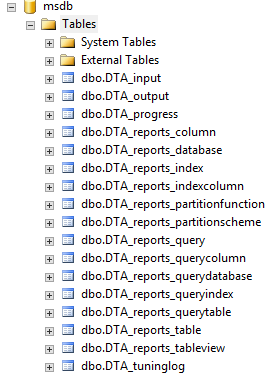
I see what you did there

So all we have to do is set up a database trigger inside msdb on the production server. Trigger adopted from an idea from Richie:

This database trigger in MSDB stops the prevention of any tables with DTA in the name. Now, whenever you try to point the DETA at the production server:
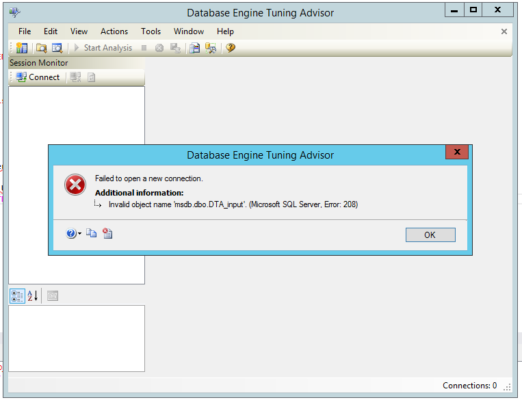
 

Gosh, I can't imagine what the problem might be
Gosh, I can’t imagine what the problem might be

In the immortal words of a timeless philosopher, no no, no no no.

(People who liked this post also liked how I proposed to stop changes to tables.)


Query Tuning Week: How to Run sp_BlitzCache on a Single Query

The most popular way of using sp_BlitzCache® is to just run it – by default, it shows you the top 10 most CPU-intensive queries that have run on your server recently. Plus, it shows you warnings about each of the queries – if they’re missing indexes, experiencing parameter sniffing issues, running long, running frequently, doing implicit conversion, you name it.

But sometimes you just want to see the warnings for a query you’re working on – and the query isn’t in your top 10 most resource-intensive queries.

First, get the query hash. Run the query with the actual execution plan turned on, or just get the estimated plan in SSMS by hitting control-L. Right-click on any of the SELECT statements in the plan (or the one you’re most interested in) and click Properties.

Check out the QueryHash in the Properties pane:

Right-click on a select, click properties, and check out the QueryHash

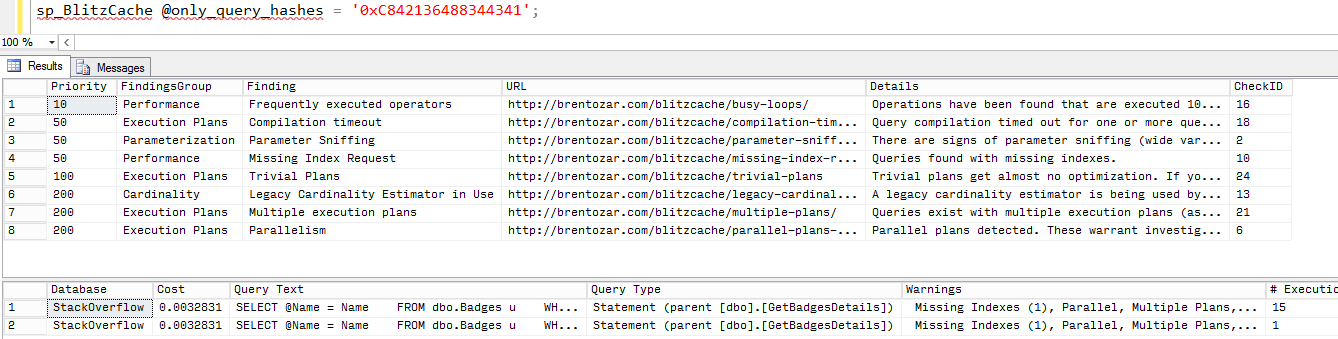
Now you can run:

And you get:

sp_BlitzCache filtered by query hashes

You get all of the executions of this query – which might be in different connection contexts, too, indicating you might be catching some parameter sniffing issues.

Want to see all of the other queries in that same stored procedure?

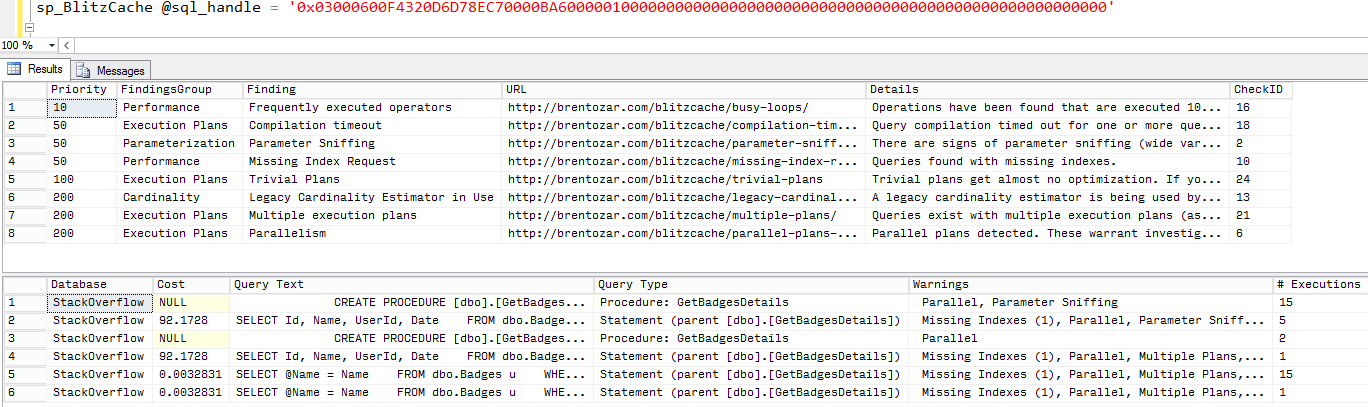
Scroll across to the SQL Handle column, copy that data out, and paste it into sp_BlitzCache:

And you get a detailed analysis of that stored procedure and its queries:

sp_BlitzCache filtered for one SQL handle

If you’re on 2019, you can even see the last actual plan.

SQL Server 2019 introduced a new database-level option to store the most recent actual execution plan as queries run. This has to be enabled in the database ahead of time, though:

Once you turn it on, your sp_BlitzCache execution plans will show the last actual plan – super useful if you’re trying to track down things like estimation errors and TempDB spills. There’s a performance impact to it, and there’s some debate about the exact overhead – I would just only turn this on when you’re going to be actively tuning a particular database, and then turn it back off once you’ve got the information you need.

Go download it, put it to work finding your ugliest queries, and discover what sneaky anti-patterns hide in the code. Yours, I mean, not ours. Ours has plenty too.


Query Tuning Week: What’s the Difference Between Locking and Blocking and Deadlocking?

If Erik takes out a lock on a row,
and no one else is around to hear it,
that’s just locking.

There’s nothing wrong with locking by itself. It’s perfectly fine. If you’re the only person running a query, and you have a lot of work to do, you probably want to take out the largest locks possible (the entire table) in order to get your work done quickly.

You don’t want to monitor for locking – it just happens, and that’s okay. Until…


Solves all your blocking problems

If Erik takes out a lock on a row,
and shortly thereafter Tara wants that same row,
that’s blocking.

Blocking is bad, but note that you won’t see blocking until you see concurrency. This is one of the many reasons why that application runs so well in development, but then falls over in production – there’s not enough concurrency to cause blocking.

Blocking will solve itself whenever Erik’s query releases his locks. Tara’s query will wait forever for Erik’s query to finish. SQL Server won’t kill or time out Tara’s query automatically because there’s no reason to. SQL Server, sweet naive fella that it is, believes Erik’s query will eventually finish.

(Note that I’m not specifying the difference between readers and writers here – by default in the boxed product of SQL Server, readers can block writers, and writers can block readers.)

Users hate blocking because it exhibits as very slow query performance.


If Erik takes out a lock on a row,
and Tara takes out a lock on a different row,
and then Erik wants to add a lock on the row Tara already locked,
and then Tara wants to add a lock on Erik’s locked row,
that’s a deadlock.

Both queries want something that the other person has, and neither query can finish on its own. No query will automatically relinquish its lock – both of them are going to wait forever for the other query to finish because neither one is really aware of why it can’t get the lock it wants.

(I’m keeping this one simple by referring to rows of the same table, but this can happen with lots of different objects scattered through different databases.)

SQL Server fixes this one for you by waking up every few seconds, looking around for deadlocks, and then killing the query that it believes will be the cheapest to roll back.

Users only notice blocking if it’s in a user-facing application that doesn’t automatically retry deadlock victims. More often than not, deadlocks happen silently to service applications, and nobody even knows they’re happening – except the DBA. The developers just assume that their queries fail sometimes for no apparent reason, and it’s probably their own code, so they keep quiet.


How to Fix Locking, Blocking, and Deadlocks

Here’s the short version:

  1. Have enough nonclustered indexes to support your queries, but no more than that – typically, I recommend that you aim for 5 or less nonclustered indexes, with 5 or less fields each
  2. Keep your transactions as short and sweet as possible – don’t do a BEGIN TRAN, and then lump in a whole bunch of SELECT queries that grab configuration values from various tables
  3. Use the right isolation level – by default, SQL Server uses pessimistic concurrency (read committed), but there are better optimistic concurrency options like snapshot isolation and RCSI

Want the long version? We’ve got a whole ton of blocking resources to help you identify if you’ve got locked waits, which tables have the worst blocking problems, and find the lead blockers in blocking firestorms.


Question From Office Hours: SQL Handle vs. Plan Handle

Execution Plans
12 Comments

Great question!

We recently added some columns to sp_BlitzCache to help you remove undesirable plans from the cache. Doing this will force SQL to come up with a new plan, or you know, just re-create the old plan. Because that just happens sometimes. I answered it, but I wasn’t happy with my answer. So here’s a better one!

Handles and Hashes

SQL Server stores a whole mess of different things used to identify queries. Query Hash, Query Plan Hash, SQL Handle, Plan Handle, so on and so forth until eventually you get a collision. They identify different things differently, but let’s answer the question rather than get bogged down in pedantics.

SQL Handle is a hash of the SQL text. This includes comments, white space, different casing, etc. It will be unique for each batch.

Plan Handle is a hash of the execution plan. Both of them are stored per batch, but this one isn’t guaranteed to be unique. You can have one SQL Handle and many Plan Handles.

Query Hash and Query Plan Hash are a little bit different. They’re explained really well over here.

Thanks for reading!


How to Start Troubleshooting Parameter Sniffing Issues

When a query is sometimes fast and sometimes slow, for the same input parameters, and you swear nothing else in the environment is changing, that’s often a case of parameter sniffing.

After SQL Server starts up and you run a stored procedure, SQL Server builds an execution plan for that proc based on the first set of parameters that are passed in.

Say we’ve got a stored procedure that runs a report based on country sales data:

  1. EXEC rpt_Sales @Country = ‘China’    — SQL Server builds an execution plan optimized for big countries with big amounts of sales, and it runs in about 750 milliseconds.
  2. EXEC rpt_Sales @Country = ‘Monaco’   — it reuses China’s cached execution plan for big data. It’s not great for small countries, but who cares – it’s a small amount of data, so it still runs in 500 milliseconds.

Now we restart the SQL Server, and someone queries for Monaco first:

  1. EXEC rpt_Sales @Country = ‘Monaco’   — SQL Server builds a plan optimized for tiny countries with tiny amounts of data, and it runs in just 50 milliseconds – way better than when Monaco reused China’s plan. Yay!
  2. EXEC rpt_Sales @Country = ‘China’   — it reuses Monaco’s cached plan for tiny data. It takes 30 seconds, and suddenly our server starts falling over because several people are running queries at a time.

SQL Server sniffs the first set of parameters that get used. Even though nothing in our environment has changed, suddenly the SQL Server runs much more slowly, and query times for China are horrific.

How to Fix Parameter Sniffing Temporarily

Parameter sniffing fixes are based on your career progression with databases, and they go like this:

1. Reboot the server! – Junior folks panic and freak out, and just restart the server. Sure enough, that erases all cached execution plans. As soon as the box comes back up, they run rpt_Sales for China because that’s the one that was having problems. Because it’s called first, it gets a great plan for big data – and the junior admin believes they’ve fixed the problem.

2. Restart the SQL Server instance – Eventually, as these folks’ careers progress, they realize they can’t go rebooting Windows all the time, so they try this instead. It has the same effect.

3. Run DBCC FREEPROCCACHE – This command erases all execution plans from cache, but doesn’t clear out many of SQL Server’s other caches and statistics. It’s a little bit more lightweight than restarting the instance, and can be done online.

4. Rebuild indexes – Doing this has an interesting side effect: when SQL Server reads an entire index to rebuild it, it gives you double the bang for the buck, and also updates your index’s statistics at the same time. This fixes the parameter sniffing issue because when SQL Server sees updated stats on an object used by an incoming query, it’ll build a new execution plan for that query.

5. Update statistics – As folks learn the above juicy tidbit, they realize they could get by with just updating stats. That’s a much lighter-weight operation than rebuilding indexes, so they switch over to just updating stats. However, I didn’t say it was lightweight.

6. Run sp_recompile for one table or proc – This system stored procedure accepts a table or a stored procedure name as a parameter, and marks all related execution plans as needing a recompile the next time they run. This doesn’t change the stats – but if you run it for China first this time, you may just get a more accurate query plan using the same stats.

7. Run DBCC FREEPROCCACHE for a single query – This one’s my favorite! Run sp_BlitzCache @ExpertMode = 1 and scroll all the way to the right hand side. You’ll see plan handles and sql handles for your most resource-intensive queries, along with a DBCC FREEPROCCACHE command for it. Find the one experiencing the parameter sniffing issue, and save its execution plan to disk first. (You’ll want this later.) Then pass its sql or plan handle into DBCC FREEPROCCACHE. Presto, just one plan gets evicted from the cache. It’s like a targeted missile strike rather than a big nuclear bomb.

How to Prepare to Fix Parameter Sniffing Permanently

Assuming you saved the execution plan like we just discussed, you’ve got a huge head start! That plan includes:

  • A set of calling parameters for the stored proc
  • An example of what the execution plan looks like when it’s slow

Now you need:

  • At least one other set of calling parameters that produce a different execution plan (like our Monaco vs China example)
  • An example of what the execution plan looks like when it’s speedy for each set of parameters

To get that info, check out How to Start Troubleshooting a Slow Stored Procedure.

Once you have all that, you’re ready to build a single version of the stored procedure that is consistently fast across all calling parameters. Start digging into Erland Sommarskog’s epic post, Slow in the Application, Fast in SSMS. Even though that title may not describe your exact problem, trust me, it’s relevant.


Query Tuning Week: How to Start Troubleshooting a Slow Stored Procedure

When you need to find out why a stored procedure is running slow, here’s the information to start gathering:

Check to see if the plan is in the cache. Run sp_BlitzCache® and use several different @sort_order parameters – try cpu, reads, duration, executions. If you find it in your top 10 plans, you can view the execution plan (it’s in the far right columns of sp_BlitzCache®’s results), right-click on a select statement in the plan, and click Properties. You can see the optimized parameters in the details. Save this plan – it might be a good example of the query’s plan, or a bad one.

Collect a set of parameters that work. Sometimes the reporting end user will know what parameters to use to run the stored procedure, but that’s not always the case. You can also check the comments at the start of the stored proc – great developers include a sample set for calling or testing. Once you get past those easy methods, you may have to resort to tougher stuff:

  • If it runs frequently, run sp_BlitzFirst @ExpertMode = 1 while it’s running, and save the execution plan to a file. Look in the XML for its compiled parameter values.
  • Run a trace or use Extended Events to capture the start of execution. This can be pretty dicey and have a performance impact.
  • Worst case, you may have to reverse-engineer the code in order to find working params.

Find out if those parameters are fast, slow, or vary. Ideally, you want to collect a set of calling parameters that are slow, another set that are fast, and possibly a set that vary from time to time.

Find out if the stored proc does any writes. Look for inserts, updates, and deletes in the query. There’s nothing wrong with tuning those – you just have to do it in development, obviously. Not only that, but you also have to watch out for varying performance.

If it does writes, does it do the same amount of writes every time? For example, if it’s consistently updating the same rows every time it runs, it’ll probably take the same amount of time. However, if it’s adding more rows, or deleting rows, it may not – subsequent runs with the same parameters might not have work to do, or might have a lot of work to do. You may have to restore the database from backup each time you test it.

Does the stored proc run differently in development? Is it slow in production, and fast in development? Or is it consistently slow in both locations? If you measure the query with SET STATISTICS IO, TIME ON in both servers, does it produce the same number of reads and CPU time in both environments? If not, what are the differences between those environments? You may have to change the dev environment’s configuration in order to reproduce the issue, or you may have to resort to tuning in production.

Erik says: Relying on SQL to cache, and keep cached, relevant information about stored procedure calls can feel futile. I’d much rather be logging this stuff in a way that I have better control of. Whether it’s logged in the application, or the application logs to a table, it’s a much more reliable way to track stored procedure calls, parameters passed in, and how long they ran for. You can even track which users are running queries, and bring people running horrible ones in for training. This can take place a classroom or a dark alley.


[Video] Office Hours 2016/08/10 (With Transcriptions)

This week, Brent, Richie, Erik, and Tara get together in Round Rock, TX, for Dell DBA Days, to talk through your SQL questions and answers. They discuss what they are working on at Dell during the event, as well as Windows Kerberos and NTLM Authentication, Always On Availability Groups, Microsoft’s Document DB, automating restore databases to other servers, why they are wearing “fun” hats, and much, much more!

Here’s the video on YouTube:

You can register to attend next week’s Office Hours, or subscribe to our podcast to listen on the go.

Office Hours Webcast – 2016-08-10


Brent Ozar: All right, it’s 11:01.

Erik Darling: Which means it’s 12:01.

Tara Kizer: It’s 9:01 right there.

Brent Ozar: So this week we are in Round Rock, Texas at Dell. We could turn this around and show you the other way, but it’s a whole rack of servers and then you hear all the sound humming from all the servers yelling at each other. So this week we’re actually in the same room together. Oh my god.

Erik Darling: Amazing.

Brent Ozar: Unbelievable.

Erik Darling: Reasonably priced Round Rock.

Brent Ozar: And we had a reasonably priced dinner last night.

Erik Darling: It was great.

Tara Kizer: With such great weather.

Brent Ozar: If you ever are looking for a place to come for vacation, Round Rock in August is not an excellent choice. Not a very good choice at all.

Richie Rump: Hades would be cooler.


What We’re Testing at Dell DBA Days

Brent Ozar: I thought you were going to say Haiti, which would also be cooler. Holy smokes. So yeah, it’s been 100 every day. So today, Richie, what are you working on today?

Richie Rump: I’m working on testing loads with bulk loads and C# and that would be today. Tomorrow I’ll be doing things like what if you’re using selects and doing raw inserts and concatenation? What about entity framework? What [inaudible 00:01:11] entity framework inserts? How long will it take to do 100,000 inserts with that? Will it even finish?

Brent Ozar: Now, I keep hearing you swearing, dropping all kinds of like… So what kinds of errors have you been running into?

Richie Rump: Oh, wow. I’ve been running into errors just getting data out and putting it into a format to consume via programmatically. I have a gig file that I’ve created of just straight JSON, of just SQL, from system Stack Overflow. Reading that and getting into the application and then being able to put it back in has been very challenging with the size of data that we’re dealing with, right? I tried with one million, half a million. Now, I’m down to 100,000, seeing how that works. I’m running out of memory. That’s been the biggest problem.

Brent Ozar: But to be fair, on your laptop.

Richie Rump: On my laptop. But a lot of this stuff would be running in some app server, depending on if it’s a client or whatever. So I don’t really want to run it on the big, beefy servers because that’s kind of cheating.

Brent Ozar: That’s fair.

Richie Rump: It’s kind of cheating. You’re not going to have app servers the size of the stuff that we’ve got.

Erik Darling: App servers do not get the same love.

Brent Ozar: In many cases SQL servers don’t even get the same love.

Erik Darling: That’s true. Sometimes they’re on the same hardware.

Brent Ozar: Tara, what are you testing so far today?

Tara Kizer: I’ve been working on backup performance, seeing if there’s any differences in backup times between 2014 and 2016, since they say 2016 “just runs faster.” Not noticing any performance gains with backups at least, not that we were expecting any, but it was a good test. Now, just testing all the different parameters that you can use to affect the backup performance and seeing what works best.

Brent Ozar: When I was a database administrator, I don’t think I ever touched any of those settings, except for the number files. I played with the number files but beyond that, I was like, “There’s a what?” Erik, how about you?

Erik Darling: I am testing a few different things. I’m testing some stuff from the 2016 “it just runs faster” line. The first thing I’m testing is DBCC CHECKDB which it just runs faster because it skips some stuff. But it seems to be going pretty well. I have it tested on 2016. I’m now running commensurate tests on 2014. I’m also testing a feature where 2016 has multiple log writers. So doing a bunch of single row inserts should theoretically go faster on 2016 but that test is running as we speak right now. The other thing that I’m planning on checking is—oh, gosh, what was it? The soft NUMA workload scaling. I’m going to try and put together something that checks on that and see if it actually is 30 percent faster with MAXDOP set to the number of cores in a socket.

Brent Ozar: It’s weird. So the way that they do soft NUMA on 2016, I hadn’t seen this. We’re dealing with these 72 core systems where, theoretically, each NUMA node really has 36 cores but we see, when we run sp_Blitz will show you—with CheckServerInfo equals 1—will show you how SQL server has divided it up in multiple NUMA nodes.

Erik Darling: Yeah, pretty crazy stuff.

Brent Ozar: You don’t have to do anything with it. It just happens automatically. As to whether or not it just runs faster, the jury is still out. Overnight, I ran a load test on, I would add one index, run CHECKTABLE, add another index, run CHECKTABLE. I wanted to see if it scaled exactly linearly or approximately linearly or if I hit any kind of hockey stick where as I started to run into problems with the table being larger than memory, where would I run into problems with this thing taking a stratospheric amount of time? And because we have a relatively limited amount of time here with the boxes, what I just do is I’ve been running the tests and just dumping the data into a database. I’m not even analyzing the outputs of it yet. In the coming weeks, we’ll start to digest and slice and dice these so that we can go give you blogposts on what are the results of these, lay them out in a nice visual fashion so I can see graphs. But the next thing will be that I want to play around with, is memory grants. I want to play around purposely constructed—it’s easy to write bad memory grants on the sizes of data that we have here and then see if I can easily reproduce stuff like RESOURCE_SEMAPHORE query compile issues and see if I get different memory grant estimations back between 2012 and then 2016 CE.

Erik Darling: The query compile ones, for me, have always been a lot harder to hit than just the straight RESOURCE_SEMAPHORE ones. Anyone can blow up memory by getting the query compile ones. Getting SQL to the point where it can’t get memory to even figure out how to run a query is impressive.

Brent Ozar: Yes, which now it’s easier with 72 cores, I can actually have enough running queries and really just drain this guy dry.

Richie Rump: You guys have been.

Brent Ozar: Yes.

Richie Rump: You guys have definitely been draining them.

Brent Ozar: I love this stuff. Let’s see here. So if you guys have questions, now is the chance. There’s only like 20 of you guys in here. Now is the chance to go put your questions in because we usually go through these chronologically. We tend to hit the ones that come in early first. If you add more questions later, you may get missed. You may not actually get the answer in. If you want, we’ll go ahead and get started just since we have folks in here already. We’ll go ahead and start going through these.


What’s the difference between Kerberos and NTLM for Windows authentication?

Brent Ozar: Nate says, “First off, thanks to you all guys for doing this. The videos and transcripts are a big help to me and the rest of the community. How much of a difference is there between using Kerberos and NTLM for Windows authentication?” Oh, you’re breaking up. I can’t…

[Laughter]

So do any of you guys know anything about NTLM versus Kerberos? Because I am certainly not that guy.

Tara Kizer: Microsoft says Kerberos is the recommendation so we use Kerberos for now.

Erik Darling: All the applications I’ve ever dealt with use Kerberos too. There was never any, “Oh, you have to use NTLM for this one weird thing.” It was always, like Richie’s shirt: Kerby, Kerby, Kerby.

Richie Rump: Kirby Link.

Erik Darling: Yeah, whatever. I get it. I get it…

Brent Ozar: I have no idea what’s happening here. Graham says, “Kerberos is OS agnostic and more complicated than NTLM.”

Erik Darling: Thanks, Graham.

Tara Kizer: It’s definitely more complicated.


Should I use managed service accounts?

Brent Ozar: Graham says, “I want to use managed service accounts for SQL Server service account. Did you use them?” Did you use MSAs?

Tara Kizer: Nope.

Richie Rump: No.

Erik Darling: No.

Brent Ozar: It was one of those where it came out in Books Online and Microsoft was like, “Yeah, we have these now.” I didn’t see anybody using them. I know you couldn’t use them with AlwaysOn Availability Groups when they first came out and I know that’s fixed now but I just don’t know, because I don’t really know what problem it solves.

Tara Kizer: What’s the difference between MSAs and regular?

Brent Ozar: I think you don’t have to have the password or something like that? Like SQL Server manages or Windows manages the password for you…

Jason Hall: [Inaudible 00:07:43] I don’t know how it works behind the scenes but I know that’s the advantage of it is they can change the password in the backend and it propagates out to all the…

Brent Ozar: So we have here Jason Hall from Dell as well.

Richie Rump: All he is just fingers.

Brent Ozar: Magic, vibrating fingers.


Should I get my own OU in Active Directory?

Brent Ozar: Graham continues: “I would like to manage my own OU in Active Directory, but it’s a pending review in my organization. Is asking to manage my own OU too much? Current management is no bueno.” I never, I don’t know—well, what do you guys feel about that?

Erik Darling: I always wanted my Active Directory guy to just tell me what accounts I can use and just run with it. Separate myself from it a bit.

Tara Kizer: I believe we managed our own OU at one of the corporations I was at, but that’s because we were very trusted by the IT team. But other than that, and I’m not even too sure why we needed to manage it, because it’s not like it was changing very often.

Brent Ozar: If your AD admins are so slow in getting you what you want, if you need to spin up that many SQL servers with different service accounts all the time and virtual computer objects, I would probably ask you why you want that. You know, just what the big benefit is for you to have the rapidly changing AD stuff. I don’t think I’ve ever heard of a DBA getting to manage—I hear a lot of DBAs who are sysadmins who are Active Directory admins, and I was that way. But splitting off into separate OU, I never got that.

Erik Darling: Because like most of the time when you set it up, as long as it’s right the first time, you get like the set service principle stuff, privileges—like the, what is it? Delegate something. It’s another setting that has to do with delegation.

Brent Ozar: Cluster and all that.

Erik Darling: Yeah, yeah, so as long as you get that stuff set up the first time, there’s not really a need to go back and tinker with it again after that. Just set the password to never expire and roll with it. I think managed server accounts, much like in SQL server, the multiple active results sets where like kind of a checkbox for one customer, one big customer who wanted something. They just said, “We have it now.”

Tara Kizer: One of the corporations I worked at, we had about 700 SQL Servers, and we were spinning up SQL Servers pretty quickly. After moving from one service account to—each server got its own service account and the agent got its own. We required the AD team, or whoever was setting up the accounts, to create 100 new accounts for us. That way we didn’t have to keep requesting it and waiting on them. If we ever ran out, we would ask for another 100 of these.

Brent Ozar: I bet they were like pushing you, “Here’s your own OU. Please.”

Tara Kizer: It wasn’t the sysadmins that had to do this. They’d given some other help desk people privileges to add the accounts. So it wasn’t a big deal to them, but it did take a while for them to turn around those 100 accounts.

Brent Ozar: It’s not like they’re adding value. It’s not like they’re doing some—if you’re letting help desk people do it. Graham says he wants his own OU because there’s an AD overhaul going on. “Thanks for the recommendations.”

Erik Darling: There’s the benefit, good luck.


Are there any improvements in SQL 2016’s Always On Availability Groups?

Brent Ozar: Mark asks, “Any improvements in SQL Server 2016 with AlwaysOn?”

Erik Darling: I don’t know if I’d call them improvements, but there are some new features. One that I’ve been writing about a lot is, oh god, what do you call it?

Tara Kizer: Direct seeding.

Erik Darling: Yeah, that thing. I have a whole series of blogposts about direct seeding, what’s kind of good about it, what’s kind of bad about it. Things it works with, things it doesn’t work with. I recommend you go back and take a look at that. The problem that solves is actually really cool, because I look on dba.stackexchange a lot, and there are constantly availability group questions where people want to know, “Is there a way that I can automatically get a database added to my availability group and seed it out without writing a script?” Okay, we added backup, restore, blah blah blah. There never was that, but direct seeding attempts to solve that problem. It’s still got some stuff to work out, it’s a little bit janky, it’s the first run of it. I’ve got some faith in it. I think it’s going to end up being all right.

Brent Ozar: You’re so polite.

Erik Darling: I try. I’m in Texas, I’m trying to be a gentleman.

Brent Ozar: There we go.

Erik Darling: I’m making a nod on that.

Brent Ozar: Multiple availability groups, so you get an AG of AGs is the new distributed availability groups feature. No GUI. But it lets you have one AG in one cluster, another AG in another Windows cluster. Can be in different Windows domains even. And then another AG on top of that. So thinking with it as an AG of AGs. Sounds kind of crazy and complicated, but the nice part is whenever you want to roll out SQL Server 4096 or whatever comes next, then you can go build a separate AG there and directly move your data across from one AG to another. No GUI.

Tara Kizer: It sounds from the documentation that I was reading about, it sounds like they’re trying to solve people that have disaster recovery solutions so that you don’t have to have an AG across both data centers. To me, it sounds like they’re trying to solve how people are configuring their AGs in 2012 and 2014 and not having the quorum in both set up properly. Which you can do it in 2012 and 2014, if you do it correctly. But distributed availability groups makes it simpler.

Brent Ozar: You nailed it when you said they were fixing kind of the wrong problem, is that because it’s built on top of clustering, the cluster can fail, so people kind of want a plan B. More clusters! I’m like, how about you not use clustering as the base level technology? But of course that ship has just sailed. It is what it is.

Erik Darling: I think you also get—what is it? You get some more replicas now, you also have parallel redo on the…

Brent Ozar: Yeah, performance improvements.

Erik Darling: Yeah, performance improvements and probably some compression stuff they improved. I couldn’t tell you more about that.

Brent Ozar: It’s nice to see that they’re actually investing in that technology, that things are getting better there.


Why are you wearing the fun hats?

Brent Ozar: Amber asks, “Why are you guys wearing the fun hats?”

Richie Rump: We’re always wearing these hats.

Tara Kizer: Howdy.

Brent Ozar: We are in Texas. We’re in Round Rock, Texas, for Dell DBA Days. There’s a big, ginormous rack of servers behind you. There’s a wall, a bar over on this other side of the room. We’re eating Mexican food and barbecue and all kinds of things that are going to kill us, steak.

Erik Darling: I think this means that Amber has not been tuning into DBA Days, which is a darn tootin’ shame.

Brent Ozar: Amber, it’s totally free. If you go to https://www.brentozar.com/go/DellDBADays, we still have three webcasts left on Thursday and Friday. What’s coming up tomorrow?

Erik Darling: I’m doing a webcast tomorrow called Downtime Train, which explores some of the bad things that can happen when you don’t pay enough attention to tempdb.

Richie Rump: Will you be cosplaying as Rod Stewart?

Erik Darling: The question is, when am I not? That’s the secret, I’m always Rod Stewart.

Brent Ozar: Then we’re also doing one on Thursday afternoon, talking about the performance overhead of various features, where we’re going to look at some of the results that we’ve gotten and just talk about the tests that we ran and what kind of performance impacts that we saw. Then Friday we’re going to start pulling plugs and doing diabolical things to SQL Server in order to make them break, just for fun. Because when we walk out of here, we want to leave the servers in a smoking pile of rubble, just as we leave.

[Laughter]

Appreciate the sponsorships, see you next year!


Where can I get help with SPN configuration?

Brent Ozar: Nate says, “Thanks for addressing my question earlier.” Let’s see, Nate’s question was the one about Kerberos and NTLM. He says, “Our environment was never set up with correct SPNs.” Was anyone’s, though, really, when you get right down to it? So all SQL connections are using NTLMs, sounds like it’s time to saddle up and bring it up with the domain names.” One of my favorite, if you’re looking for help on the setspn thing, if you Google for “setspn Robert Davis,” Robert Davis has a post talking about how you go about identifying when you have the service provider name problems and how you go about fixing them. I used to have that stored in my bookmarks, I go back to that every time.

Erik Darling: One thing that I notice frequently when we check up on clients is that in the error log they will have “SQL could not” whatever “with SPN handshake.” I’m like, ugh?

Brent Ozar: Do you ever tell them what to do to fix it?

Richie Rump: No, because it’s never related to a problem.

Tara Kizer: [Looks at laptop screen] We knew it.

Brent Ozar: Folks, you’re saying that the webcast quality seems to be a little bit above and beyond what the Dell DBA Days one is. Yes, we’re using different platform here so it’s a little nicer.

Erik Darling: Thank Richie for setting up the microphone.

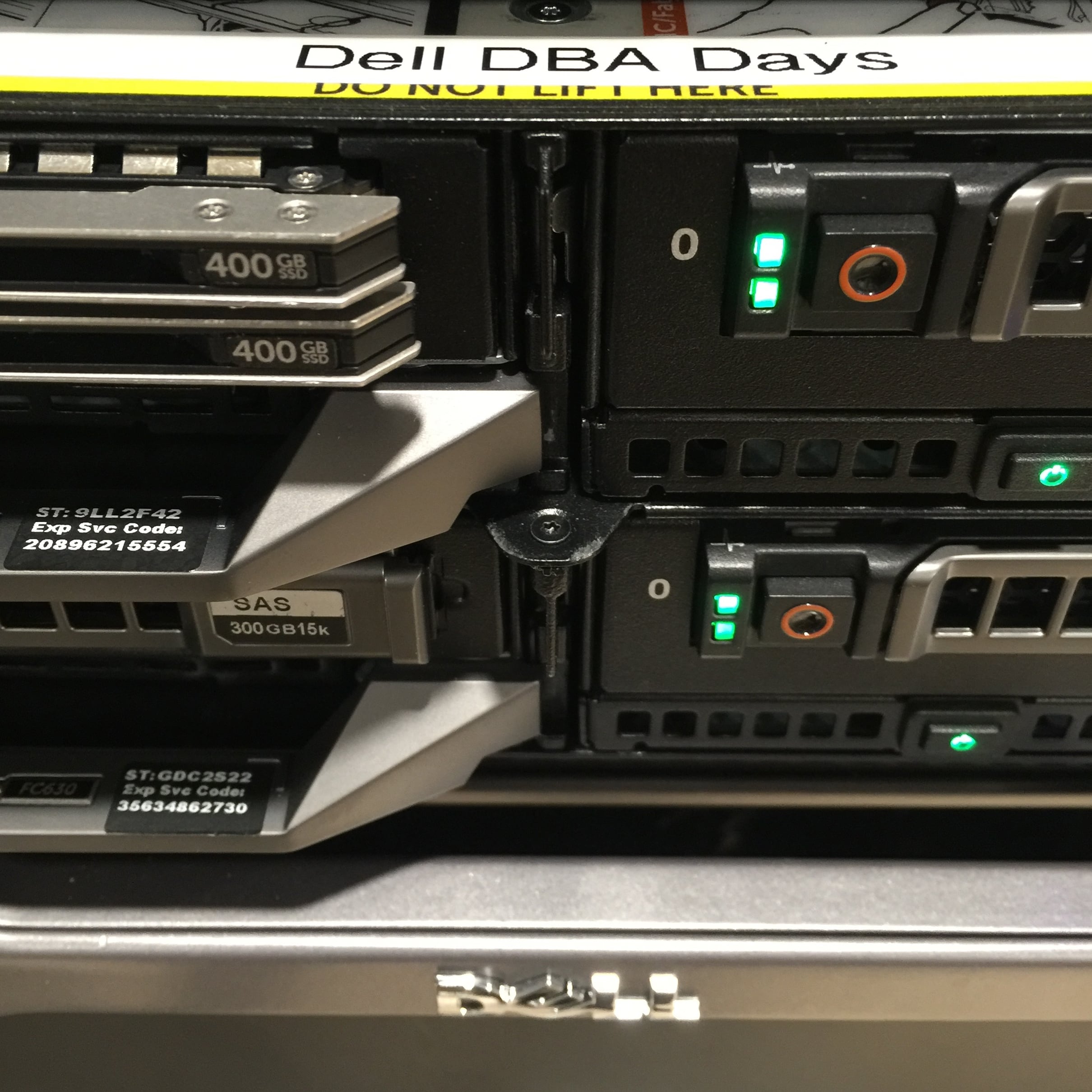
Brent Ozar: Yes, and the camera, and yes. Also, this tells you what it’s like here at Dell DBA Days. We are holding the webcam up with a couple of SSDs, that’s how much hardware we have to play around with. We’re just using them for all over the stuff.

Richie Rump: That’s funny, but it’s not a joke. It’s reality.

Brent Ozar: We really are.

Richie Rump: Some SSDs holding up the…

Brent Ozar: To those of you who are watching the Periscope, you can actually see the SSDs now over in the Periscope side.

Erik Darling: So if you want to see even more of us…

Brent Ozar: Yeah, we’re everywhere. All of us.


What’s the impact of snapshot isolation levels on tempdb?

Brent Ozar: Mandy asks, “Erik, in your Downtime Train …” She even got it spelled correctly. “Downtime Train webinar—will you be covering tempdb impact of snapshot isolation levels?”

Erik Darling: Oh, Mandy, yes. Yeah, that’s actually what makes things break at the end of the day is that tempdb wasn’t watched appropriately and someone went and turned on a cool feature and then tempdb stopped responding.

Brent Ozar: BEGIN TRAN.

Tara Kizer: I once had a database, it was a Java application, and…

Brent Ozar: You can stop the story there, it sounds terrifying.

Erik Darling: Yeah, we get it.

Tara Kizer: There were times where, and I don’t remember what it was, hibernate maybe, but there was a bug where it would just do a BEGIN TRAN, and it just would forget to commit. We were using RCSI, similar to snapshot isolation, on the database. Eventually tempdb would run out of space. That’s when I learned about the version store, because we were new to RCSI at the time, it was many years ago, back around 2005. I had to write a job to start looking for this condition and kill that. I just wouldn’t kill an open transaction just because, but if it had been open for several hours, you know, then I’d have to get rid of it so we wouldn’t encounter this tempdb issue. When I left that company, just three years ago, that issue still existed. So it was years of this bug in place, and it wasn’t an application bug, it was the framework they were using.

Erik Darling: I dealt with a very similar bug with a third party vendor back when I worked at a market research company. What would happen sometimes is a telephone interviewer would start asking a question and they would go to edit something. So SQL would start to issue an update to the table to mark a response, but it wouldn’t commit until they hit the next button, so there’d be all these…

Richie Rump: Bad developer.

Erik Darling: “What happened?” “I don’t know.” This was like my first feet in the water with SQL thing too, so I would see this stuff and just… I don’t know.

Brent Ozar: Is this normal? yeah.

Richie Rump: Well, it shouldn’t be normal, how’s that?

Erik Darling: We would see this stuff pile up and they were like, “I can’t do the survey.” “Nope, you can’t.”

Brent Ozar: Kevin says, “Microsoft has a free tool for Kerberos called Kerberos Configuration Manager.” Never seen that. That is pretty sweet, it probably hasn’t been updated in 14 years and has 60 known bugs.

Richie Rump: Why does everything have to be a manager of something?

Brent Ozar: Or enterprise.

Richie Rump: Or enterprise. Maybe enterprise manager of something.

Brent Ozar: As your enterprise manager of Kerberos…


What’s using all the space in my database?

Brent Ozar: Kyle asks, “I have a database which is using 40 gigs of space, and I don’t know where that space is being used. I use various queries to list space usage for table, including the built in SQL Server Management Studios reports, and it shows maybe five gigs use of space usage in table. I’ve tried DBCC UPDATE USAGE and there’s no change. There’ve been no recent upgrades or [inaudible 00:19:31] usage. Where should I look to see what’s taking up that space?”

Erik Darling: Heaps.

Brent Ozar: Oh, I like that. So where would you look to see that?

Erik Darling: You can actually run sp_BlitzIndex and you can figure out if you have heaps with a lot of deletes against them. I talked about it a little bit earlier, when you delete from heaps, you don’t actually deallocate pages from the table, you just delete rows from the pages. So you could have gigantic heaps with very little data in them. That’s very common if people have staging tables or they’re just deleting from the staging table rather than truncating.

Tara Kizer: So that space usage per table report would reflect that?

Brent Ozar: I have no idea.

Erik Darling: sp_BlitzIndex would.

Brent Ozar: But he’s saying he ran the space usage…

Erik Darling: Oh, yeah, I’m not sure what that would show for that.

Tara Kizer: Since you’re looking at reports in SSMS, look at the disk usage. Not per table, just disk usage, and you’ll probably see it’s free space.

Brent Ozar: I like that.

Erik Darling: That doesn’t mean you should shrink your database.

Brent Ozar: Why not? I hear so many good things about shrinking databases. It’s all over the web, everyone says that I should do it.

Erik Darling: Well you have to figure out if that free space is actually a problem or not. If it’s a 40 gig database, if you have, hopefully, you’re living in recent history and you have at least a 100 gig or 200 gig drive, it’s probably not a big deal.

Brent Ozar: True. The solid-state drives we’re using to hold up the webcam are 120 gig drives, that’s why they’re lying around in here like popcorn after a movie theater closes. Because you can buy a 120 gig drive these days, is like $80 on Amazon. It’s really cheap.

Erik Darling: So if your database grew to be that size once, there’s a pretty good chance it’s going to be that size again. If you just kind of leave it how it is, you just save yourself the trouble of having to regrow your data file.


Which conference should I attend, the PASS Summit or SQL Intersection?

Brent Ozar: Nate asks a question, “This year in October, both the PASS Summit and SQLintersection are two different conferences that are scheduled at the same time. Which would you guys recommend?”

Tara Kizer: Both.

[Laughter]

Brent Ozar: That’s hard to go wrong.

Erik Darling: I would recommend coming to our precon then going to Intersections.

Richie Rump: Interesting.

Brent Ozar: That’s what I did last year. So what do you guys recommend and why?

Tara Kizer: I haven’t been to SQLintersections, but I want to go.

Brent Ozar: Especially because it’s in Vegas.

Tara Kizer: In Vegas, yeah. But I don’t want to miss PASS. I don’t know. Tough.

Richie Rump: What are you trying to get out of a conference? They are two very different conferences, right?

Brent Ozar: That’s a great question.

Richie Rump: If you’re going to PASS, it’s going to be much more of a community level event, much more of real people who use these technologies day in and day out, they’re going to be the ones presenting. Microsoft presenters are there as well. Intersections, there’s a whole bunch of other different technologies going on at the same time. If you’re more of a widespread, “Hey, I like a little dev, I like a little of this, a little of that,” Intersections may be something good for you.

Brent Ozar: That’s true. I go back and forth to them all the time. I like both of them. PASS is kind of life changing because you see 5,000 people in the same conference center that do the same thing that you do. There are 25 tracks, or whatever it is, going on at exactly the same time. So there’s a bunch of the topics covering everything you could possibly imagine, but only SQL Server. The presentations can be hit or miss, because you got to remember that a lot of us are just community presenters who don’t present full time, they’re going to share what they learn. It’s a lot of real world type stuff there. So don’t get hung up as much on the quality of the presentations, as much as it is you’re getting learning from somebody. Don’t be afraid to go talk to them afterwards. A lot of us will go through, I used when I was attending, just make this list of sessions that I wanted to run from, from one to the next. Stop and just find the ones you really want and talk to people afterwards, go talk to the presenter, take your time.

Erik Darling: If you want five different introductions to R, go to the Summit.

Brent Ozar: Five sessions on an intro to R. Intersections, the presenters tend to be a little bit more full time presenter-y, like professional trainers. There’s less simultaneous tracks, there’s only going to be like three or four SQL Server tracks simultaneously. So you don’t quite get the breadth. But just, you know, six of one, half dozen of the other. Seattle in October sucks. Vegas is a little bit more fun. So if you’re going just as an excuse to write a check and go party somewhere, go to Vegas.

Richie Rump: Yeah. I would say probably the “hallway track” at PASS is probably best. The hallway track being, “Hey, I’m not going to go to a session, but I’m going to talk to people just hanging around and get learning from that.” I would say PASS is probably best for that. I remember I was at PASS and I had cornered one of the Microsoft guys. I got a two-hour conversation on just the things that I was looking for. So I had like my own private session for a couple hours. Those are the kind of cool things that I think that happens at PASS that maybe not so much will happen at some other conferences.

Brent Ozar: The after hours track at PASS is huge too. Like there’s so many parties every night that vendors put on, that individuals do, karaoke-type things. Intersections, at 5 o’clock or whatever it is, everyone disappears. Everybody goes off and does their own thing. The speakers still get together, and if you’re an attendee that wants to get to the speakers, go talk to one of the speakers and they’ll tell you wherever they’re going off as a group that night. It’s just very different from the SQL family thing that a lot of people talk about at PASS.


Does the Senior DBA class cover the cloud?

Brent Ozar: Amber says, “Does your senior DBA class include cloud technologies as well?” We do one hour on the differences between platform as a service and infrastructure as a service, and why senior DBAs typically want infrastructure as a service, but it is only one hour. Typically, if you want more in-depth cloud stuff, here’s the thing, it changes so fast that generally you don’t want to go get a regular cloud training class on it. You want to go directly to the cloud vendor and explain to him what your use case is and they’ll help get you set up.


Have you used Microsoft’s DocumentDB?

Brent Ozar: Graham asks, “Any of you guys have any experience with Microsoft’s DocumentDB?” Have you seen anybody using that, Richie?

Richie Rump: I haven’t seen really many people use it hardly at all. From what I understand, it’s very similar to the stuff they have over at Amazon, and Dynamo and things like that. Which I’ve worked with.

Brent Ozar: DocumentDB?

Richie Rump: No, I’ve worked with Dynamo, I haven’t worked with DocumentDB yet. It’s on the list of things to do, and it’s very long.

Brent Ozar: Tell me about the kinds of experiences that you had with Dynamo.

Richie Rump: With Dynamo, essentially you’re just going to have one flat table, and it’s going to be very fast in that flat table. If you need to run with one particular index on it, you can do that. Any more than that, you’re kind of sunk. You’re not going to want to do like a lot of OLTP type stuff.

Brent Ozar: Relational…

Richie Rump: Yeah, like have my whole bunch of other tables and they all relate to one another. You probably want one unique thing in one table and then have something else that’s not related in another table. Very fast, great performant, but you’re not going to get the niceties of transactions and things like that, ASCII compliance, that you would get with your regular SQL.

Brent Ozar: Relationals.

Richie Rump: Yeah.

Brent Ozar: The thing I would look at with DocumentDB is the maximum size of the document, and then the maximum size of a collection as well. I forget what DocumentDB calls the collection thing, but it’s fairly limited, as is Amazon’s. They’re both pretty limited.

Richie Rump: Yeah, we were messing with some of that stuff a few weeks ago. We had decided not to put it inside the database but move it off to like S3 storage or BLOB storage. Because from a cost and from pulling it out, and doing all that stuff, it just didn’t make sense.

Brent Ozar: And the file size.

Richie Rump: Yeah, the file size. It’s that learning stuff that you just learn, it’s like, “Oh, this is not like a regular database. This is something completely different.”

Brent Ozar: And it changes so fast. Every six months, you have huge, massive changes with it. We know the new product manager for DocumentDB, Denny Lee, was at Microsoft years ago, worked in the SQL CAT team and then left to go do NoSQL work and then came back to Microsoft. So, they’re investing in it at least. They hired a new product manager for it.


Does optimize for ad hoc help performance?

Brent Ozar: Dennis asks, “In your experience, when you’re dealing with SQL Server 20012 …”

[Laughter]

We don’t deal with that a lot, but we’ll tell you about its grandpa, 2012. “Does turning on optimize for ad hoc help performance when we have a few stored procs and a whole bunch of ad hoc developers?

Tara Kizer: I don’t know that it helps necessarily with performance, but it helps with memory. You’re going to use less memory for your ad hoc plans because with that setting on, it’s going to mean that when the query runs the first time, the stub record is going to be loaded into the plan cache rather than the full execution plan. If that query runs again, then it’ll load the full execution plan. A lot of times with ad hoc queries, they only ever run once. I was actually investigating this last week because a client asked if entity framework queries come in as ad hoc because they had most of their plan cache was ad hoc queries. They said, “We can’t possibly have that many employees running queries to have caused this.” I did a little research, and there was a Stack Exchange answer that said, “Yes, entity framework comes in as ad hoc.” So I would recommend that if you are using entity framework, to go ahead and enable this, especially if the ad hoc query bucket is a significant percentage of your plan cache. That way, you can use less memory for the plan cache.

Erik Darling: Group question, because I’ve heard rumors but I’ve never actually witnessed it. What are situations where turning it on could backfire?

Tara Kizer: There’s one, and it’s when a query runs twice and no more times than twice.

Brent Ozar: Because you compile twice.

Tara Kizer: Compile twice, yeah. That’s usually not the case, it’s usually one or more. Usually one.

Brent Ozar: I’ve seen people add it in their setup checklist just as a default, and I never raise that. I’m like, “Okay, that cool. Yeah. If you want to use it, that’s fine.”


I’m an MCSE – what should I do now that the MCM is gone?

Brent Ozar: Alberto says, “I’m a Venezuelan guy currently living in Argentina.” You sound like a good time. I like you already. “I’m an MCSE in SQL Server and I would like to know what should be my next step now that the MCM is gone.” I don’t know, what country do you guys think he should move to next?

Erik Darling: Go for Brazil.

Tara Kizer: Brazil, yeah.

Richie Rump: Chile.

Brent Ozar: Yeah, the mountains are beautiful. All right, sadly, there is no advanced certification. There’s Microsoft’s new Big Data University, what is it that they call that thing? So, there’s some kind of Big Data University thing that they’re kind of positioning as a college degree except it’s not. It’s not like an accredited kind of thing. Sadly, you are at the pinnacle, and not just because you’re living in cool places. You’re as good as it gets. I would say, instead of thinking about spending time studying for a cert, now’s the time where you start giving back. You start writing blogs, doing presentations, because that will enrich your career way more than a certification will. Anybody can get a certification.

Erik Darling: Could try getting a job.

Brent Ozar: Try getting a job, yeah.

Richie Rump: It’s a data science “degree,” right? It’s “degree.”

Brent Ozar: It’s like the antiperspirant, it’s not really a degree.

Tara Kizer: So who’s going to be going after those data scientists? Wouldn’t that be on the BI side? And if you’re an MCSE asking about MCM and other certifications, probably not interested in data scientists.

Brent Ozar: God, I hope not. Nothing against data science. It’s wonderful.

Erik Darling: It’s a very specific career path, not necessarily one for DBAs.

Tara Kizer: It’s not DBAs, yeah.

Richie Rump: [Inaudible 00:30:39] Buck Woody doesn’t pop up behind you, [crosstalk 00:30:41] data science there.

Tara Kizer: We’re not talking bad about it, it’s just DBAs aren’t going to be going down that track, probably.

Brent Ozar: He had a blogpost recently where he said don’t learn data science. He said, “Whatever you do, don’t learn data science. Learn specific topics. Pick things, I want to solve this problem this week.” Because it’s going to take you five years to be a data scientist, just pick things you can nibble off in a week.


I have a really long question…

Brent Ozar: David says, “I’ve read that SSMS 2016 is no longer directly connected to the version of database that you’re running. I’ve downloaded SSMS 2016 and I ran into what must be an easy problem.” Then he lists four pages of things. Hold on, he says, “I’m trying to import…”

Tara Kizer: I think the answer’s going to be we don’t know.

Brent Ozar: Just at a glance, what I would do is any time you have a multi paragraph thing with an error message, just post it on Stack Exchange. Go to dba.stackexchange.com and you can post it over there. Hope people can get you the exact answer on that one.


Weren’t SQL Server Cumulative Updates always included in Windows Updates?

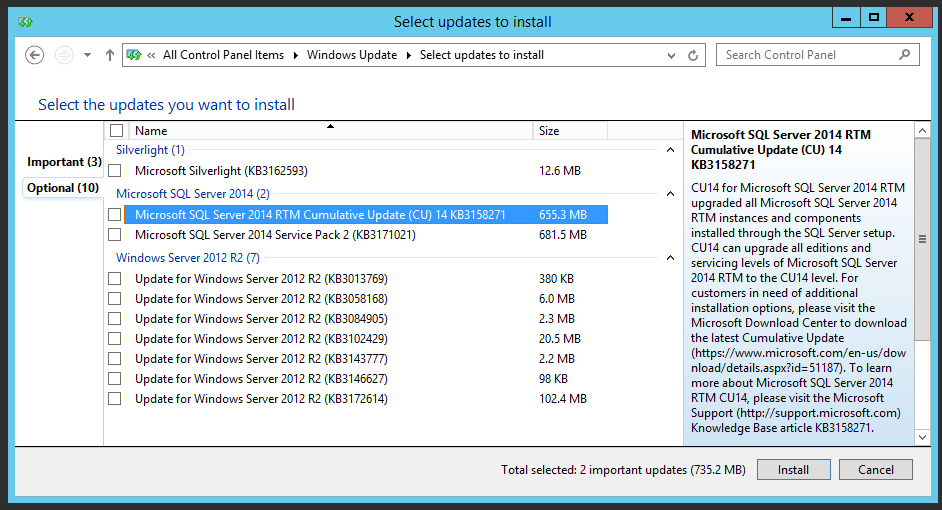
Brent Ozar: Rob says, “I see this week in the blog that Microsoft is putting out SQL Server cumulative updates in their Windows updates. Weren’t those always in Windows updates in the past?” No. Service packs were. Service packs have been for the longest time, but cumulative updates popping up in Windows updates, that is new. Microsoft hasn’t gotten its act together either. I have a screenshot in that blogpost where it shows both CU14 and Service Pack 2 inside the same thing where it’s going to tell you to download a gig and a half of updates, and one of them just replaces the other.

Tara Kizer: In bigger organizations, you’re going to have Windows updates turned off on your servers and possibly use SCCM, System Center Configuration Manager, to manage your updates and what you’re going to be pushing to the servers. A lot of organizations on the SQL servers, you might push the patches to the server but you’re not installing them yet. The servers have already downloaded them but then a DBA comes along or a sysadmin and double-clicks on the bubble that appears and just installs it. Then you can reboot and you do your failovers.


How do I keep server objects in sync between different SQL Servers?

Brent Ozar: The man with the coolest first name in the world, Rowdy, asks, “I’m working on …” And yes, I know who you are, Rowdy. Because it’s not like, how many people do we know named Rowdy? There’s one guy named Rowdy and I recognize his last name. “I’m working on some scripts to ensure that our DR instances remain in sync with our failover cluster instance. So far, I’ve got scripts to check logins and SQL agent jobs. Next, I’m working to compare the contents of sys configurations. What else would you compare?” That’s such a great question.

Tara Kizer: I would stop and don’t reinvent the wheel. There’s tools out there that can do this for you already. I used to do all of this manually and you’re talking about a lot of things you’re going to have to check. Alerts, operators, besides jobs and logins, there’s a lot of things that are stored outside of your user database.

Brent Ozar: Is there any third party that…

Tara Kizer: I know Bill Graziano has a tool, I don’t know if that’s the most popular tool. He wrote one a few years ago, I know that he keeps it up to date. I’m not sure about other tools though.

Brent Ozar: What’s the name of it?

Tara Kizer: I don’t remember his tool.

Erik Darling: So that’s Bill Graziano, G-R-A-Z-I-A-N-O?

Tara Kizer: Yeah.

Brent Ozar: I’m going to go fire up Google.

Tara Kizer: I think he is scaleSQL.com.

Brent Ozar: Yeah. Let’s see here, I’m sure he’s got … yeah, go start there.

Tara Kizer: I think that there’s another tool that maybe people are using.

Brent Ozar: Redgate’s Schema Compare.

Erik Darling: SQL Compare.

Brent Ozar: Yeah, SQL Compare.

Tara Kizer: It does the server level? Okay.

Jason Hall: Toad has a server compare built in too, it’s not enabled at the moment, which is kind of a shame for this use case. You want to try to trial, you could at least do one and list off all the differences that it checks…

Tara Kizer: I’m not sure if they can hear him since he’s so far from the microwave… Microwave?

[Laughter]

It’s almost lunchtime.

Tara Kizer: Microphone. Jason was saying that Toad has it also, but it would require you to run it manually.

Brent Ozar: So what are he’s saying is go get the trial, it’s like 14, 30 days, something like that, for free. Then you could at least compare the two servers, see what it flags, and then that’s …

Tara Kizer: That’s true, yeah, and then you can script it.

Jason Hall: [inaudible 00:34:47]

Tara Kizer: Yeah, there’s a lot of things stored outside of your user database. Usually for me it was just logins and jobs and that was it. Not a whole lot.

Erik Darling: Good luck, Rowdy.

Brent Ozar: Good luck, Rowdy.


Why is instance stacking a bad idea?

Brent Ozar: Dan asks a question that I know is near and dear to all of our hearts. “My manager wants me to install a second named instance on an existing SQL Server because we have an app that requires its own named instance. What issues can I expect?”

Erik Darling: All of them.

Tara Kizer: I would want an answer to a question first from Dan. Is this a virtual machine or a physical server? If it’s a virtual machine, just spin up another virtual machine. If it’s a physical server, then… He says it is a VM. Why don’t you just spin up another virtual machine? Maybe tune down the other server if you don’t have the resources, and split them up. We don’t like the idea of stacked instances when there’s multiple instances on a server, and especially when it’s a VM, because you have options with virtual machines.

Brent Ozar: Somebody emailed us at help and asked, because they’d heard us rant against stacked instances several times on different webcasts. They said, “No seriously, what are the issues?” So we’ll just start brainstorming some of them. My big one is always security. If I have to get someone Windows admin rights because that vendor, if he wants his own named instance, he’s going to want to remote desktop in, and then he’s going to want to change things. I only want him breaking his own VM, not other people’s VMs. Patch timing, like when I’m going to have to patch this thing, Windows and SQL Server patches, when they’re going to do restarts, I’d rather have that separate. Because sooner or later this app is going to be like, “I can only go to SQL 2012 Service Pack 1,” and everybody else wants to go to newer, like 2014, then you end up peeling them off onto different VMs anyway. Different failover options, performance troubleshooting is a nightmare. Where is my CPU usage coming from? Then people will start playing around with affinity masking and they’re hardcoding how much CPU each instance can actually get, it’s just a big pain in the rear.

Tara Kizer: Yeah, CPU and memory would be my two biggest. I mean, even if you use Resource Governor, that can’t control everything.

Erik Darling: You’re using direct attached storage…

Brent Ozar: Oh yeah, yeah, yeah. [crosstalk 00:36:56] Fighting over the same SAN [inaudible 00:37:00].


Should I go to a training class or a conference?

Brent Ozar: Kyle says, “I was given the thumbs up to attend PASS this year but I will not be given any money on training or travel next year. I was looking into your performance tuning class or your senior DBA class online, but I’ve never been to an in-depth SQL course. I’m leaning towards one of the training classes instead of PASS. What would the difference be in the long run?” Oh, this is such a good question. I’ll give you my take. PASS gives you a lot of different 60 to 75 minute sessions. It is not really a start-to-finish drill down into one topic. However, PASS is better if you want to network, meet people, build a reputation in the SQL Server community, get help from other people in person, see vendors in the exhibitor area. It’s really more of a networking thing than it is an educational thing. Don’t get me wrong, there’s good sessions at conferences. My always experience has been, I’m only going to get to say five or six sessions per day, max. And three of them might suck, so I might get happy with two of them. Whereas, when you go to our training, let’s say four days straight, I guarantee no more than two sessions max will suck in any given day. Most of them will be okay. You don’t do that much networking. You network amongst the 15 to 30 people who are there in training and you meet them for life. But it’s just a different kind of setup deal.


How many people actually automate their restore checks?

Brent Ozar: Graham says, “I’ve automated …” Oh, Graham, I like you already.” I have automated my database restores and CHECKDB with the results of each process getting logged to a table. I know that this is recommended, but how many people actually do this? And is there a tool or something that can help automate this for me?” Do you guys have anything that helps automate restoring databases to another server?

Jason Hall: We do exactly this. I will tell you a lot of people do this, some of who have it sounds like done it the hard way. Apologize for the pitch here—but LiteSpeed for SQL Server, our backup and recovery tool, about a year ago introduced a feature called Automated Restore. The whole idea is you point Automated Restore to a folder. LiteSpeed’s going to scan through that folder and automatically find the latest backup set. So if you’ve got fulls, diffs, logs, all mixed into this folder, we’ll do the hard work for you and find the latest backup set to recover. We’ll recover it to a target system. There’s a lot of reasons why you may want to do this. One of which is just test the restore, right? The best way to know it can recover? Recover it. If the restore is successful, LiteSpeed can just drop the database, right? You’re done, let’s free up the space. Let’s move on to the next ones. You can now set up this round robin. The second reason you can set up an automated restore is exactly this: after your database is restored, run your CHECKDBs against it, so LiteSpeed can do that too. We give you all the CHECKDB options that you might want to set. After the CHECKDB is done, we’ll log the results into a central repository. Again, if it’s successful, you can drop the database, free up the space, and move on to the next one. If it fails, it’ll leave the database around, so you can get in there, figure out what’s going on, hopefully fix the issues. So yes, if you’re looking for a third party approach, LiteSpeed does exactly this. It’s probably one of our more interesting features we’ve added in a while to be honest with you. We’re starting to see a lot of traction. Certainly you can do it the hard way, it’s a lot of scripting though. There’s a lot of variables you have to consider: where your backups are, the types of backups there are, the parameters you need to use for recovery, and then all the CHECKDB options. So if you’re looking for a way to automate it, then yeah, LiteSpeed for SQL Server. If you Google it, you’ll get right to the product page. There’s a free 14-day trial for LiteSpeed. So if you wanted to kick the tires on it and make sure it does what you need it to do, you can run it for 14 days. Yeah, thanks for the plug.

Brent Ozar: I have to say too, people will often ask, “Why would I still get something like LiteSpeed when I get backup compression in the product?” This is one of the reasons why. I also like a better log shipping GUI. It’s easier to reinitialize whenever log shipping breaks. It’s easier for me to get undos for particular transactions. Danny, the developer, dropped a table, he even did a truncate table, which people will say isn’t logged—it is, but just not in the way that you would expect. LiteSpeed can go through and read your log files, reconstruct the table from scratch. It’s the easiest way to get back to a point in time before Danny screwed your database.

Erik Darling: It also does object level restores. So if you have a very large database and Danny the developer drops like 10,000 rows out of a [crosstalk 00:41:32] anything like that, you can restore a particular object and you’re much better off.

Brent Ozar: I knew you couldn’t resist.

Jason Hall: Since we’re shamelessly plugging, one of my favorite features of LiteSpeed, it’s actually a subset of our object recover functionality. We call it Execute Select. You can actually run queries against your backup files. I’m sure this has happened to someone before, where somebody comes in, maybe it’s an auditor, and they say, “Hey, I need to look at some records from four years ago.” Normally you scramble, you find a server to recover the backup to, you make sure you allocate enough space. You wait four hours for the restore to finish. You run your one query and then you drop the database. LiteSpeed just takes that query, runs it against the backup file, and you get your data back. You can output either just to Management Studio results set grid, you can output to CSV. If you want the data offline, it’s a really nice option. We started to see customers even start to kind of reevaluate their data management processes now. Think of this, you can use a backup file as a read-only data source. Think of the options this gives you for ETL. If you’re backing up your databases every night, why go back to the production system to extract data if you can just extract it from the backup file? Right, maybe you shave three hours off of maintenance Windows that you can now use for better index maintenance, scheduled recording, CHECKDBs, so absolutely. Again, thank you for the shameless plug but anyone out there who maybe has used LiteSpeed in the past, or has heard about LiteSpeed, please don’t consider it just a compression tool. It’s one of hundreds of amazing features the product has. Most of the enhancements we’ve made to LiteSpeed over the last several years have been more around these exact things. How do we recover from scenarios faster? How do we help you manage backups across large installations of SQL Server? Compression is great. There are millions of ways to compress data. If you come to me and say, “Hey, all I want to do is shrink my backups,” there’s lots of ways to do that. Many of them are included in SQL Server itself. But if you’re looking for a broader data management platform that will assist with both managing backup and recovery and helping you recover from scenarios faster, LiteSpeed is a great option.

Tara Kizer: Just to add two points to the question that Graham asked. I had this automated for mission critical databases that had performance issues when the CHECKDB would run on production. If we didn’t have any issues on the databases, then CHECKDB just ran there. It was just mission critical databases that have performance issues when CHECKDB was running. There are performance issues because CHECKDB is a very IO intensive resource, CPU. So on the lower priority, or if you have enough resources on your server, just run CHECKDB in production. My second point is, if you’re using a SAN, you can do SAN snapshots, that way you don’t have to do a restore. You can have your database, if you’re on another server, within a few seconds, and then run CHECKDB against that.

Brent Ozar: I’d almost say, like if your databases are less than maybe 50, 100 gigs, you should be running it in production, just because you want the fastest alerts that your data is no bueno.


How much does LiteSpeed cost?

Brent Ozar: Scott says, “Since you’re shilling LiteSpeed, what’s the rough pricing for the product?” You should probably contact your salesperson for that. I want to say it’s between $1,000 and $2,000 a server.

Jason Hall: You’re right on. General licensing right now is per instance of SQL Server. You can buy as many of them as you want, volume discounts apply.

Brent Ozar: Yeah, the more you buy, the more you save.

Erik Darling: Don’t accuse your salesperson of shilling, you will not get a good discount.

Brent Ozar: Unless his name is Curt Schilling.

[Laughter]


Where can I learn about replication?

All right, that gets us to the end of today’s questions. Mike asks, “Looking for training on replication, do you have any suggestions?” I would say books.

Tara Kizer: I don’t think that there is a… books, yeah.

Brent Ozar: Yeah, go hit Amazon. Hilary Cotter and Kendal Van Dyke have books on them, but other than that, I think that’s it these days.

Erik Darling: I think there’s a free Simple Talk book about replication. I couldn’t tell you who wrote it or what the name of it is, but I know Simple Talk and Redgate do a lot of the free e-books.

Tara Kizer: I learned in production replication. I’ve been using replication for many years and as you’re troubleshooting and trying to figure out why there’s errors, why there’s latency, learning on the fly and then Googling things. So I started in production with it.

Richie Rump: You’re book will be coming out when?

Tara Kizer: I will never ever again write even a chapter on SQL Server.

Erik Darling: I’d rather just learn a reliable technology.

Brent Ozar: So which training would you recommend for AlwaysOn Availability Groups? No, not ours either. It’s hard, that those kind of high availability and disaster recovery ones are, you really have to get really far in depth, and it’s whatever way your architecture is designed. Same thing with replication, so many different options for architecture. So welcome to real world doing it live.

Erik Darling: Allan Hirt has really good training for the HA and DR stuff if that’s what you really want.

Brent Ozar: Yeah, like three days, four days.

Erik Darling: He sets you up a lab, you get to play with the lab, you get to cover all sorts of scenarios that are just really hard to cover in a book.

Tara Kizer: Looks like Redgate has an e-book that Scott commented on. Fundamentals of SQL Server 2012 Replication. It’s a PDF.

Brent Ozar: There you go, nice. All right, cool.


Brent Ozar: Thanks, everybody for hanging out with us this week, and we will see you through the rest of the week on the Dell DBAs Webcast. If you want to go to brentozar.com/go/DellDBADays, will be the webcast for the rest of this week, and then we’ll see you at the next Office Hours as well. Bye, everybody.

Tara Kizer: Bye.

Richie Rump: Happy trails.

Brent Ozar: Happy trails.

Wanna attend the next Office Hours live? Register here, or subscribe to our podcast.


What kind of hardware can you buy for one core’s worth of Enterprise Edition?

Licensing, SQL Server
13 Comments
Dell R730
Dell R730

Microsoft charges $14,256 for a 2-core pack of SQL Server 2016 Enterprise Edition.

So how much hardware can we get for $7,128?

I started with one of the more common 2-socket server models, a Dell PowerEdge R730, and then optioned it with:

  • Chassis – up to 8 2.5″ drives (because 2.5″ drives aren’t just the future, they should be your default today)
  • Two Intel Xeon E5-2637 v4 – quad core, 3.5GHz – I splurged $995.41 to get the second processor
  • Four 32GB RDIMMs – that’s 128GB memory
  • PERC H730P RAID controller – a $605.05 step up, and I felt a little guilty about this, but I’m assuming that you’re going to add more drives over time, and I want the best storage throughput I can get from the vendor
  • Two 200GB SSD boot drives – which sounds crazy to do SSD on a boot drive, but c’mon, they’re only $174.31 apiece, which is less than the magnetics, and gives you enough space to house Windows Updates
  • Two 480GB SSD MLC drives – at $376.22 each – as a mirrored pair for
  • Redundant power supplies – $181.71, but a common sense safety measure for database servers
  • Total: $7,196.71 (plus tax, shipping, etc)

That’s a lot of hardware horsepower for the cost of just one core of Enterprise Edition.

Wanna go wild and crazy and buy two cores worth?

Take that same starter box, and throw in some power-ups:

  • Upgraded redundant power supplies – $60.58 extra to handle the…
  • 512GB RAM – gonna need another 12 memory sticks for $5,806.92, which sounds like a lot, but now we’re caching pretty large databases in RAM, avoiding writes to TempDB, and giving queries plenty of room for workspace
  • That brings us to $11,128.55 from Dell, leaving us $3,127.45 change left over, which I’ll use for…
  • Two 800GB Intel P3700 PCI Express SSDs – each just $1,277.02, a crazy deal for their rockin’ performance, and we’ll mirror them together for even faster reads (and leave the two 480GB SSDs for TempDB or logs or whatever, hey, who cares, hardware is cheap)
  • Total: $13,682.59

And take the remaining change and buy yourself some nice training and a tasty dinner.

SQL Server Enterprise Edition makes great hardware look cheap.

I’m not saying Enterprise Edition is overpriced – I think it’s completely fair given its amazeballs capabilities. The problem I have is with people who pour all their money into licensing and proceed to install it on something with less cores, memory, and solid state space than a Microsoft Surface.

When you’re struggling with performance management on a 4-core Enterprise Edition VM, wheezing with 16GB RAM, storing data on spinning rusty frisbees, spending weeks of developer time trying to rewrite legacy code, take a break and run some numbers:

  • How much do your developers and DBAs cost per day?
  • How many days have they spent working on the performance issue?
  • How much have you paid in Software Assurance over the last couple of years?
  • How much would your hardware cost today to replace? (Not what you originally paid for it.)

Bad Idea Jeans: Dynamically Generating Ugly Queries and Task Manager Graffiti

Say you’re at Dell DBA Days, and you want to build a really ugly query, fast. You want to generate a StackOverflow database query that will take a long time to compile, and maybe demand a huge amount of memory to run, but not actually take any time to execute.

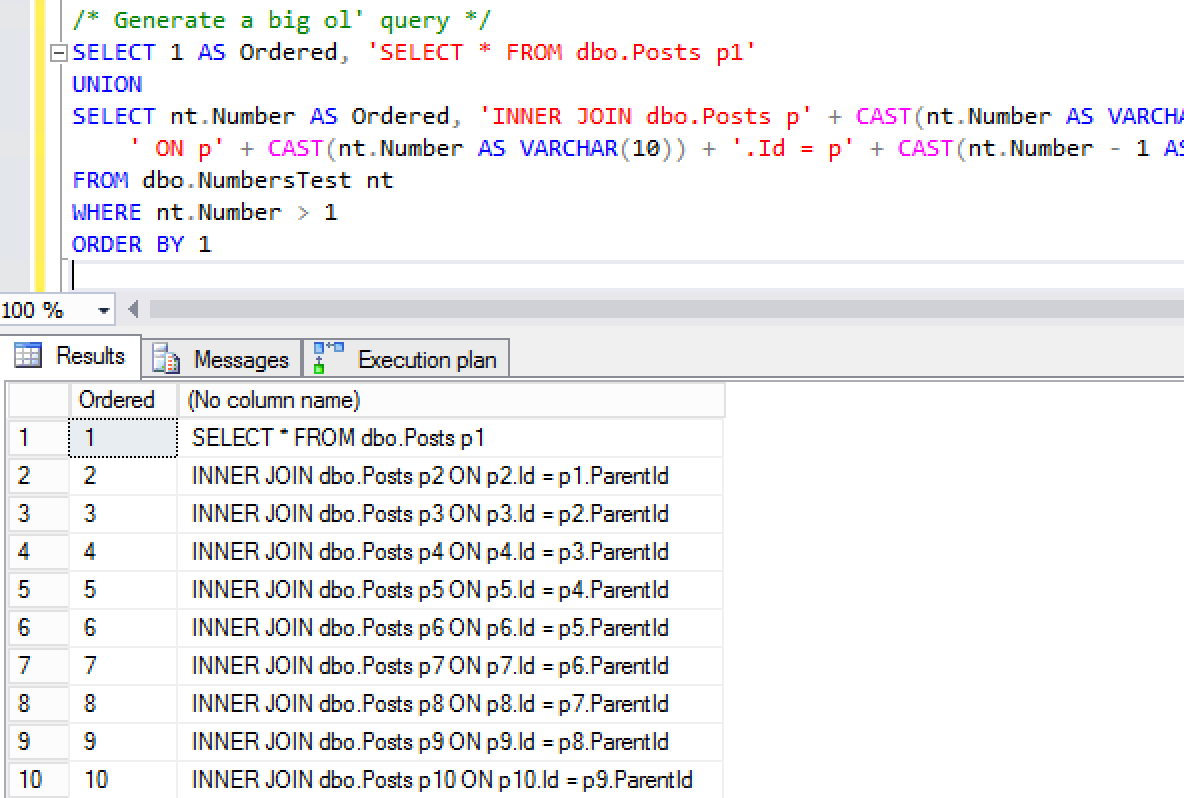
You might start by building a numbers table with Method #7 from this StackOverflow answer, and then:

Which gives you a 10,000 join query, but I’m only showing the first 10 lines here:

Big dynamic query
Big dynamic query

So then you can copy/paste the contents of that second column into a new window. You could also assemble a string, but I like having it available for copy/paste because it, uh, doesn’t exactly work the first time.

For example, when I run it with 10,000 joins:

When I drop it down to a much more realistic 5,000 joins:

Ah! Okay, that’s fair. (That’s also two error messages I’ve never seen before. Probably a good thing.) Alright, let’s take out the SELECT * and replace it with SELECT p1.* and see what happens:

Come on, SQL Server. Work with me. Cowboy up. Alright, let’s try 2,000 joins, and….

Fun trivia: SQL Server uses exactly one core to compile a query.

Fifteen minutes later, SQL Server is still trying to compile an execution plan for the two-thousand-join query – and I know for a fact that the query won’t produce a single row.

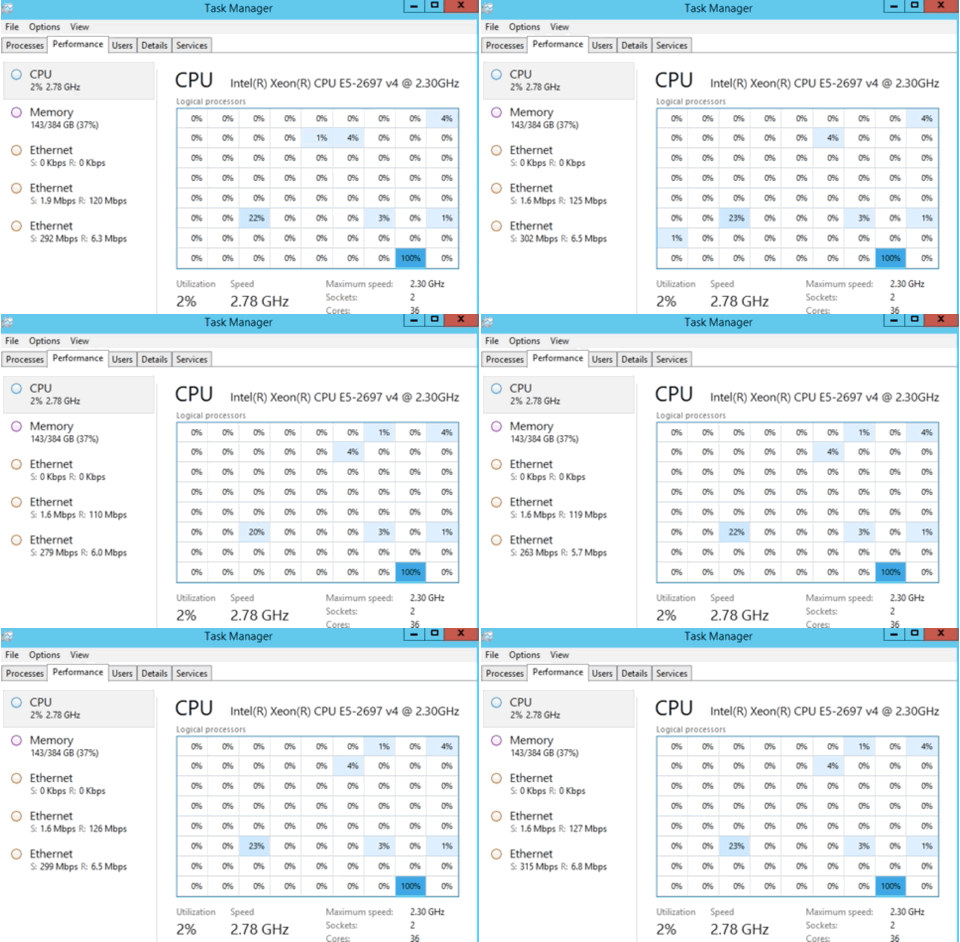
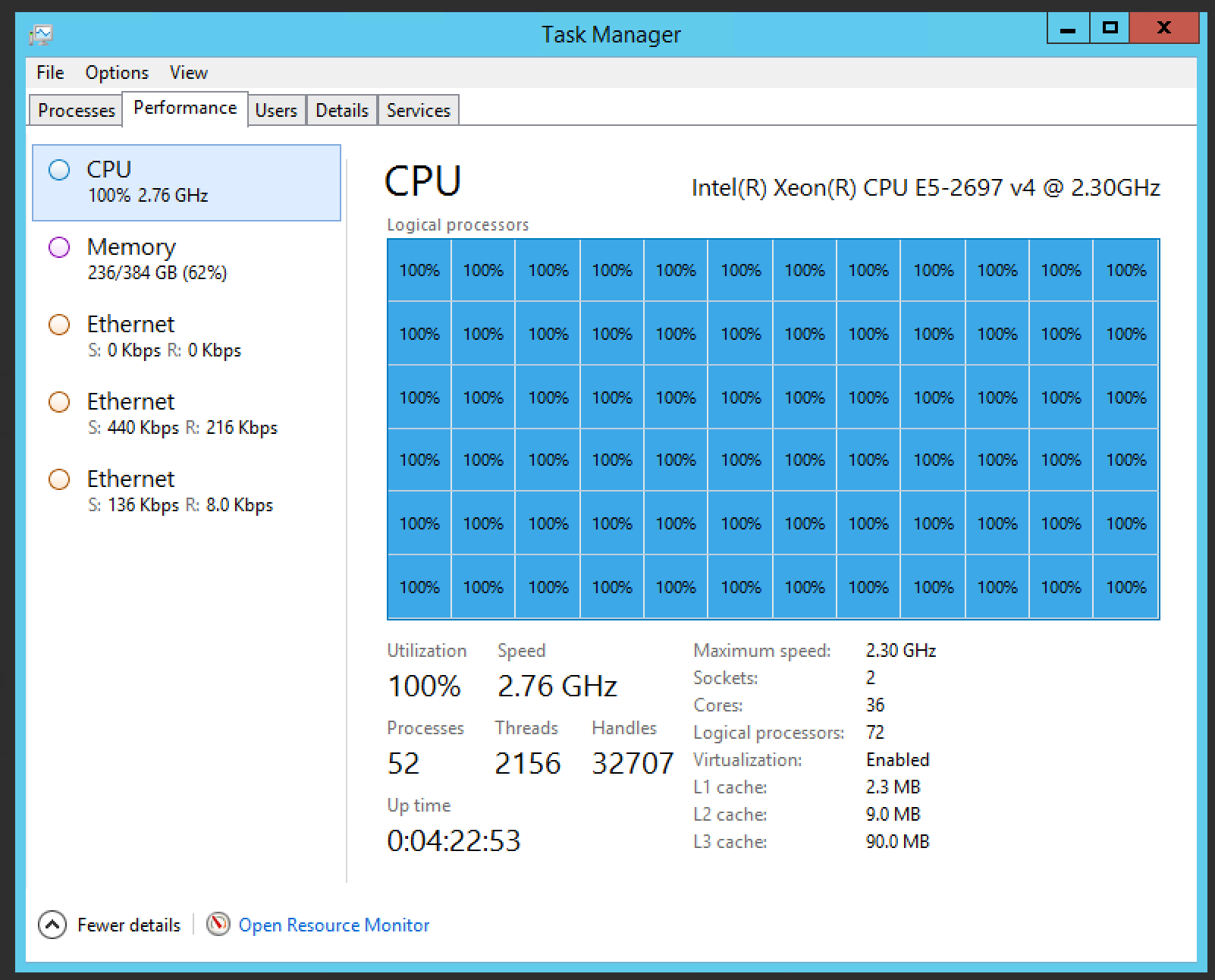
So as long as I’m waiting for it to compile, might as well have a little fun with Task Manager. On a 72-core box, this query:

When combined with a really ugly CPU-burning query, you get:

Graffiti in Task Manager

Over an hour later, it was still trying to build a query plan for the 2,000 join query, so I figured hey, let’s put affinity masking back the right way, then throw the query into SQLQueryStress and run 72 executions of it:

FIRE IN THE HOLE
FIRE IN THE HOLE

Which gives me a slightly different Task Manager:

High score!
High score!

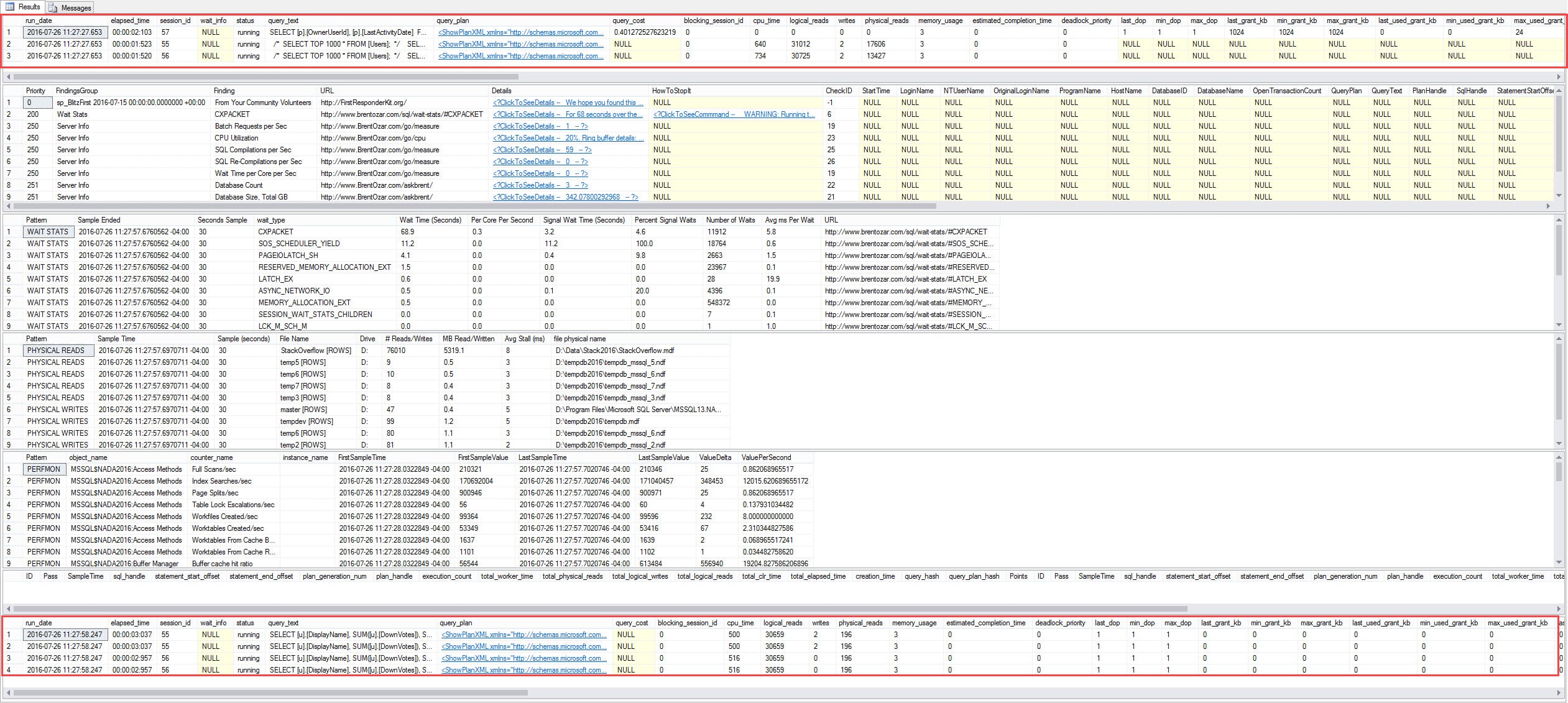
It’s surprisingly hard to achieve 100% CPU usage across all 72 cores, but be patient, and you can get it. SQL Server is in bad shape, too – if you run sp_BlitzFirst to check the running queries:

The elusive RESOURCE_SEMAPHORE_QUERY_COMPILE

Most queries are waiting on RESOURCE_SEMAPHORE_QUERY_COMPILE – which means they can’t get enough memory in order to start compiling.

I canceled that – fun, but not all that useful – and over 90 minutes later, I was still waiting for the 2,000 join query to compile.

Wanna watch these kinds of shenanigans? Watch the recordings of Dell DBA Days 2016 webcasts.

Update: after 12 hours and 43 minutes, the compilation gave up:

SQL Server puts in half-days

Announcing Training Class Instant Replay, Plus New Classes in Philly, San Diego, and Online

SQL Server
2 Comments
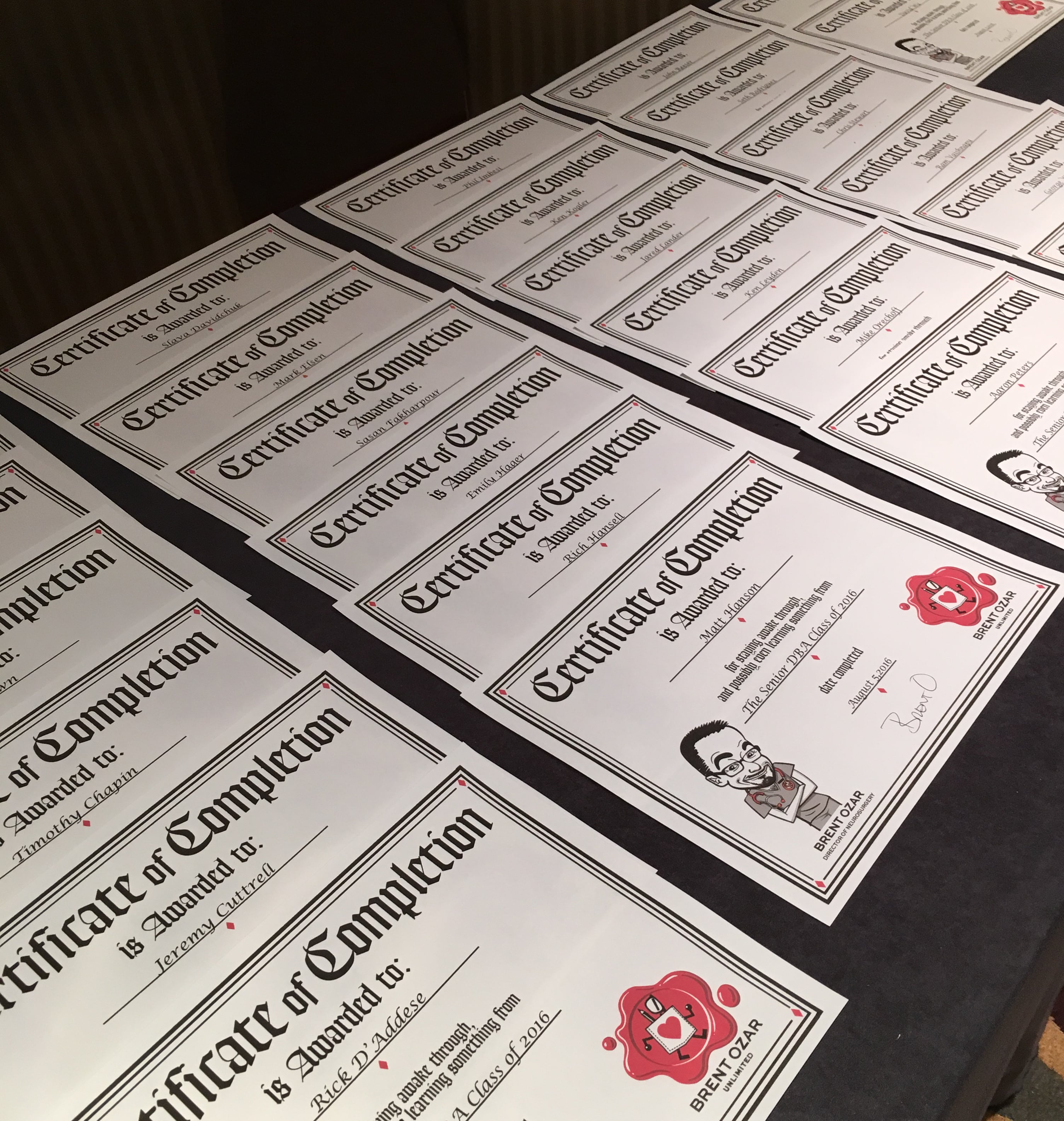
Graduation Day in Philly

When we ask students for feedback about our in-person classes, they said one thing over and over: “It’s just so much information. Can we get an easier way to refer back to everything?”

Now you can, with Instant Replay: starting with classes this month, you can watch an online recorded version of the class for 6 months after the class finishes!

You can go back, polish up on topics you love, focus in on topics that you have to tackle at work, and re-watch sections that were initially over your head.

We’ve also learned that students prefer our classes at the 4-day length rather than 5. For our in-person classes, this gives folks a day to travel, and for our online classes, it gives them…I have no idea what it gives them, but they seem to love 4 days.

So here’s my upcoming lineup:


The Senior DBA Class: You’re a SQL Server DBA who is ready to advance to the next level in your career but aren’t sure how to fully master your environment and drive the right architectural changes.

  • Sept 20-23 – Online, London-focused (4AM-Noon Eastern)
  • Nov 1-4 – Online, Sydney-focused (6PM-2AM Eastern)
  • Dec 12-15 – Online, 9AM Eastern
  • March 20-23 – San Diego, CA
  • Learn more and register now

SQL Server Performance Tuning: You’re a developer or DBA who needs to speed up a database server that you don’t fully understand – but that’s about to change in four days of learning and fun with Brent.

  • Sept 6-9 – Online, London-focused (4AM-Noon Eastern time)
  • Oct 4-7 – Online, Sydney-focused (6PM-2AM Eastern)
  • Dec 5-8 – Philadelphia, PA
  • Jan 9-12 – Online, 9AM Eastern
  • March 28-31 – San Diego, CA
  • Learn more and register now

Memory Grants Added to sp_BlitzCache and sp_BlitzFirst

Exciting New Doodads

When SP3 for 2012 dropped, we were all super excited by the new query tuning-centric features that were at our disposal. Now all we had to do was get people to install SP3! Great features like this make patching an easier sell. Now with SP2 for 2014 out, a lot of those great features finally made it to 2014. Let’s talk about what they mean for you, and what they mean for us.

For you, dear reader

If you’re rocking the second-newest version of SQL Server, you can get all sorts of cool new insights into what your queries are doing when you’re not watching, as well as when you are. There are some great additions to execution plans baked in here, too. Some, like the TempDB spills, are in the actual execution plan only, but don’t let that get you down. This stuff was all included in 2016, so don’t feel like you’re going to miss out if you set your upgrade sights on the brand new. Note to self: someday this blog post is going to sound hopelessly outdated.

Seriously, if you build applications that hit SQL Server, get them tested on these newer versions. I’m not just trying to line Microsoft’s licensing pockets here, I’m trying to help you out. Many of these things are awesome for tuning performance problems. They will make your life easier. You’ll look like a hero when you can quickly diagnose why something is slow on a client’s kajillion dollar server that they don’t have any monitoring for and their DBA is a SAN admin who restarts SQL every morning because it’s using too much memory.

For us

As consultants who build tools to make your SQL Server life easier, they’re great opportunities for us to not only see how these new features work, but also to figure out ways to let you know how to read, interpret, and troubleshoot problems with new information. We’ve been hard at work updating sp_BlitzCache and sp_BlitzFirst to keep you a sane and functioning SQL user.

Having this information standard across the three most recent versions makes presenting and analyzing it much easier. So what did we do?

sp_BlitzFirst

If you run this with @ExpertMode = 1, you get a snapshot of what’s currently running at the beginning and end of the window you’re measuring. So, if you use @ExpertMode = 1, @Seconds = 30, you’ll see what was running on both sides of that 30 second window.

Excuse the hugeness.

Pretty sweet. If you’re on a version that supports it, you’ll also get these columns in your results.

They all love your miniature ways.

If your query isn’t running for the first time, or coming back from a recompile, these columns can have some useful information in them about all the many resources they’re using. You may be able to spot variations in here that can explain why things are slow ‘sometimes’. You may also be able to spot large memory grants on rather small queries, and/or rather large queries that for some reason aren’t going parallel, etc. Good stuff! Thanks, Microsoft.

sp_BlitzCache

Everyone’s favorite tool (poll in company chat) for spelunking your plan crevasse got some new columns and some new sort modes specifically for memory grants. Again, only if you’re on a supported version. You’ll see columns for Min and Max Memory Grants, Min and Max Used, and Average Memory Grant. There’s a new warning for when queries use <= 10% of their memory grant, which is configurable.

Sorting by memory grant will sort by the maximum grant requested column, and average memory grant will sort by the largest average, determined by max grant / executions.

New columns:

Percent Used isn't displayed
Quantify!

New warning:

The Unused
The Unused

If you’re living in the present

Give these new versions a shot, and if you’re giddy about GitHub, drop us a line with any issues, or code contributions.

Thanks for reading!


[Video] Office Hours 2016/08/03 (With Transcriptions)

SQL Server, Videos
0

This week, Richie, Erik, and Tara discuss availability groups, sharding databases, using DNS entries to mask DB server names, and Erik’s passion for internet buttons.

Here’s the video on YouTube:

You can register to attend next week’s Office Hours, or subscribe to our podcast to listen on the go.

Office Hours Webcast – 2016-08-03


How can you create test data?

Erik Darling: Okay, there’s a question from Joseph. “Are there any products or tools that you like to use to create volume data for performance tuning queries? I’ve tried a couple but I’m not satisfied. I’d like something I can kind of point at a table and it’s going to then figure out what dependencies exist and create appropriate data.”

Richie Rump: Sounds like magic. Wizardry.

Erik Darling: So I’m not sure which tools you’ve already tried. The only one that I’ve messed with, and it was sort of a beta version, was a Redgate tool that created a bunch of data. I was okay with that. If you don’t do that, if that doesn’t meet your needs, then you might have to home grow something because I’m not sure of anything that you can just point at a table and create a bunch of dependencies like that. Anyone else? You guys ever do anything?

Tara Kizer: No, I’ve always worked at large organizations where we have a performance team and they use tools like LoadRunner. They have tools. It’s all magic to me.

Richie Rump: Yeah.

Erik Darling: Like, “How did you do that?”

Tara Kizer: Yeah, I just come in after the database is ready and we start a load test.

Erik Darling: There you go.

[Richie starts speaking]

Erik Darling: Oh, go ahead, Richie.

Richie Rump: No, it’s just a lot of the perfs that I’ve done is actually, “Hey, production is slow,” right? Everyone is going crazy.

Erik Darling: That one’s fast.

Richie Rump: That’s right.

Erik Darling: Now it’s slow. Now it’s fast.


How do you set up distributed availability groups?

Erik Darling: Tara, this one is right up your alley. Tommy asks, “Do you have any experience with setting up distributed availability groups? What are the requirements and best way to use them?”

Tara Kizer: What is meant by distributed though? I’m not familiar with that.

Erik Darling: Oh, I believe he means—oh, I think I read something about this. Give me a second because I have to take my internet buttons off my fingers. So SQL Server 2016, distributed availability groups… All right, I will paste that link over to you if you want to give that a look at. I’m going to paste this into chat since I don’t think any of us have a particularly good answer on that just yet because it’s maybe some new magic that we haven’t played much with. Tara would have the best chance of knowing some magic on that one.

Erik Darling: Let’s see, Joseph says, “There was some great music in the 80s, it just gets lost under the hair and makeup.” Yes. So did my grandmother. We still haven’t found her. It’s just a pile of hair and makeup.

Tara Kizer: Oh, so you have two availability groups. I haven’t done it that way. The availability groups that I’ve used have been for HA reasons and DR reasons so it was a multi-subnet configuration. We had one availability group stretching across two sites. Three replicas at the primary site, two replicas at the DR site. So I haven’t used this methodology before. Yeah, this is new for 2016 and I’ve only used it for 2012 and 2014. So I’m not sure what the advantage is of using a distributed availability group as compared to just say a multi-subnet configuration with one availability group.

Erik Darling: Maybe that’s something we could toodle around with at DBA Days when we have all that hardware at our disposal. I mean, none of it’s really like widespread so I don’t think we can get any of the funkiness that comes along, but we could try to do it.

Tara Kizer: I’ll definitely look more into it.

Erik Darling: Cool.


How does licensing work for upgrades?

Erik Darling: All right. Joseph has a follow-up question asking—we’re going to go back to the upgrade past 2005 to 2016. That double hop should not be a licensing issue. I think they give back level licensing with your latest level, right?

Tara Kizer: It depends if you have software insurance.

Erik Darling: Yeah. You have to pay that SA tax, buddy.

Tara Kizer: Yeah, just to add to that. Microsoft does want you to upgrade so if you don’t have the 2012 bits to get it installed, I would contact whoever sold you the license and see if you can get that because they really want you to upgrade off 2005. So I’m sure that they could help you here.

Erik Darling: Sure enough.


When I call queries across servers, where is the work done?

Erik Darling: Ian asks, “If I call a sproc from server A that is on server B, where will it be processed? In other words, where will the memory and CPU and disk be hit?”

Tara Kizer: It depends how you’re doing it. I believe if you use OPENQUERY that that will actually run everything on the remote server. So we’d have to see how this is being called. So where does the stored procedure… oh, it’s on server B.

Erik Darling: Yeah, so it changes a little bit. It depends on where the data is. So if you’re using linked servers, if you’re using distributed queries, Conor Cunningham has a great talk about this on the SQLBits website but I’m also going to answer it a little bit. So it really depends on where the data is and also then further where the SQL decides the best place to have the data is. Because it can actually push some results around from one server to the other. If there’s a smaller table on server A, it can actually bring that data over to server B and do a join there. Conor is a really smart guy. He’s one of the architects of SQL Server. He’s been at Microsoft forever and ever. He knows absolutely everything about this so you will probably get all the information and more that you need from this talk. I highly recommend it.


Does sharding data across SQL Servers help blocking problems?

Erik Darling: Lee asks, “What about the idea of sharding a 1.5 terabyte database into multiple databases on separate SQL instances in order to help performance issues related to blocking? I have a couple of developers who are pushing this idea on me despite my strong resistance. They believe it will help performance because it will be less data for SQL Server to traverse during queries. I feel the complexity simply is not worth it and that sharding isn’t the silver bullet in this situation.” Any initial thoughts on that?

Tara Kizer: I don’t like the sounds of it. I mean, I agree with Lee that this is going to be complex. How are you going to keep them all in sync or are these completely separate databases that you don’t have to keep in sync? What performance issues are you having now? You’re likely missing indexes, bad queries, there’s something wrong. A 1.5 terabyte database, it’s large, but it’s not that large. I’ve seen bigger databases than that.

Richie Rump: Yeah, it’s not large and I think are you going to have to pull the data together and process it, right? So now you’re going to multiple servers, multiple databases. Then I’ve got to put it into one place, then I’ve got to actually get the results I want out, and that is a pain. It is terrible.

Erik Darling: That is a really painful process. So some things you can try instead if you want to talk to those little hamster wheel developers that you have trying to get you to shard everything, like this is a dupe. So what I would suggest is a) if you’re having problems with blocking, right? You have performance issues related to blocking. Try an optimistic isolation level, like snapshot isolation or read committed snapshot isolation. Also, make sure that your indexes are effective. Make sure there are no missing indexes on that table. Make sure that there are no crazy indexes on that table. If you have a lot of duplicate, borderline duplicate indexes, or some overly wide indexes, a lot of the queries that are going to modify data can hold some pretty long locks on things and keep your other queries from doing stuff for a while. Don’t use NOLOCK, it’s not going to help you. If you find that you really do need to partition things out, I would try to go with the partitioned view idea before I would go to actual partitioning. That’s just where you create tables for a segment of data and you create a view that queries them all together. If you have the right constraints, by date, or some other identifying characteristic, you can actually get pretty good elimination of certain tables when you hit that view. So there’s a lot of stuff you can do before you go crazy separating a database out to a whole bunch of different servers that can help things.

Richie Rump: Yeah, I’ve always just used straight partitioning but when you do that you have to always query by the partitioning key at that point.

Erik Darling: Yeah, you also have to align all your indexes to the partition and… crazy stuff goes on.

Richie Rump: Yeah.

Erik Darling: This button does not partition tables.

Richie Rump: But again, 1.5 terabytes, these days, isn’t really a ton of data. I feel it’s more the norm than anything else.

Erik Darling: Yeah, we deal with some pretty big databases day to day. Just today, I was working on a database that was 450 gigs. Back when I had a real job, the biggest database I ever had was around 11 terabytes. So there’s a lot of stuff you can do before you start having to get all hamster-y about trying to shard data. Really because SQL Server wasn’t really built for sharding like that.

Richie Rump: So what was everyone’s largest database that they’ve dealt with?

Tara Kizer: The one that I was primary DBA on was 7 terabytes at one point but however the actual SQL Server DBA team the largest one I believe at the time was 16 terabytes. I just wasn’t primary on that one.

Erik Darling: Did you ever have to do anything with that?

Tara Kizer: You know that was a third-party product so they did have partitioning set up. They definitely had performance in mind and setting it up properly, had to do with a patent database.

Richie Rump: Yeah, mine was 40 terabytes.

Tara Kizer: Oh, wow.

Richie Rump: Yeah, it was fun. That had some really unique problems to it that you just had to think outside the box to fix them.
Erik Darling: So how much of that was like normal data and how much of that was just like crazy LOB columns?

Richie Rump: It was all normal data. It was all POS data coming in from 35,000 stores across the U.S. So there was just massive amounts of data there that are coming in on a daily basis. The good thing is that they only needed stuff that was for the day or for the month and then the rest of it essentially is not queried very often.

Erik Darling: Oh, man.

Richie Rump: We had a lot of rollups and data warehouses and big Teradata implementation and stuff like that. But, yeah, everything was stored in SQL Server.

Erik Darling: So Lee actually follows up and says, “We are using RCSI and have been for a while. I agree sharding is overly complex to solve blocking issues.” So if you’re using RCSI and you still have blocking issues, give us a call, because that sounds like an interesting problem.

Richie Rump: Erik will look at your database.

Erik Darling: Yeah, I want to stare at that thing for a while and just see what’s happening.


How many databases can I fit on one VM?

Erik Darling: Anker asks, “We use VM environment for our SQL 2014. I want to know the thresholds where I can say that this VM is done with new databases and time to spin a new VM up. Everyone says CPU disk memory, but how much? Do you have any SQL which can tell this? Thanks.” So guys, what thresholds do you look at for resource consumption before you say it’s time to get a new server going and put some other stuff on there? Another question would be, how many resources do you give each server and expect to see consumed by your workload?

Tara Kizer: It’s really hard to answer. If I’m looking at new hardware, trying to decide what size hardware to buy for a new database, I’m thinking about what this database is going to need and how much the company can afford. So I like to go all out as far as hardware goes. That way you can be on that hardware for maybe a couple more years than if you went cheaper. But as far as a SQL query, there really isn’t one. If you’re on older hardware and your CPU is up and maybe if you don’t have enough memory, look at your wait stats, have you tuned everything that you can? If you have, you may need to upgrade to newer hardware.

Erik Darling: So you get a button that sends up a new VM.

Tara Kizer: Yeah.

Richie Rump: That’s right.

Erik Darling: This one shuts the old ones down. What I would do is I would, like Tara said, start looking at your wait stats. If you have hit a bottleneck in one of those areas, do that. Or, sp_BlitzFirst. You can run that over spans of time: 30 seconds, a minute, five minutes, whatever. Just see what your wait stats are. See what your bottlenecks are during your load times. Because not every server is going to be the same, right? As far as just one single query that does it, you’re not really going to get that. There are queries out there that exam wait stats and aggregate them over time but you really want to know what you’re waiting on when things are busy, right? You don’t care what things are waiting on when you’re doing maintenance. You don’t care what things are waiting on when you’re doing backups and DBCC CHECKDB or index stuff, because that’s not customer facing. I would run BlitzFirst. I would get a good idea of what my bottlenecks are and I would try to tune from there. Like BlitzFirst will tell you if your CPU utilization is really high. So like with a VM, you want to typically be using a little bit more than you do with a physical box because with VM resources that are sitting around idle can actually be a performance drag on that. I believe David Klee has a good blog post on that somewhere. I don’t have it handy though. I would just make sure that my CPUs aren’t just constantly pegged at 100 percent. I want to make sure that my memory is, I’m not constantly reading from disk, getting a lot of page IO latch, or stuff like that. So I would want to measure each server differently, find out whatever bottleneck I’m hitting.

Tara Kizer: Just a quick correction. I said SP3 was released a couple weeks ago—I really meant SP2. I got my numbers mixed up for 2014.

Erik Darling: SP3 is 2012.

Tara Kizer: Yeah, exactly.

Erik Darling: This button downloads SP3 for 2012 and this one downloads SP2 for 2014. God, that’s confusing.


What are symlinks and how do they work?

Erik Darling: Monica asks—is this an Excel question? “What do you know about symlinks? We are running out of space on our SAN causing our backups to intermittently fail until we can get the space added. One of the suggestions was to move a database to another server and use a symlink.”

Tara Kizer: I don’t know what that is.

Erik Darling: Me either. Is that a SAN thing? Because that doesn’t sound like a SQL Server thing.

Richie Rump: No, it’s a symbolic link. Think of it as like a super…

Erik Darling: A pointer.

Richie Rump: Yeah, pointer. A shortcut, right?

Tara Kizer: Does SQL Server support that? I mean, is it a SAN technology that’s going to redirect it somewhere else?

Richie Rump: From the OS perspective, it thinks the file is actual there but it goes to somewhere else. I’ve never tried it with SQL Server. It seems slow. It would feel, I don’t know, but it’d be interesting. Go ahead and give it a try and see what happens.

Erik Darling: Yeah, I don’t know, I would be very concerned about… Okay, so you want to move a database to a symlink. No. It sounds like a horrible idea. Because where would the symlink be? It sounds like it would be physically further away, right?

Tara Kizer: Is it another SAN? I just wonder if this increases your risk of database corruption.

Erik Darling: Yeah, I would be concerned about a lot of things.

Tara Kizer: I’ve never heard of it being used for SQL Server.

Erik Darling: Yeah, I would rather point my backups to a symlink than anything else.

Richie Rump: Well now with SQL Server on Linux, you may get your chance of symlinking all day long with SQL Server.

Erik Darling: I always wanted SQL Server on Linux. I’m so excited. That was like the one thing missing in my life. I was like, wife, kid, good job… SQL Server on Linux, where are you? Because Windows Core wasn’t good enough. I need Linux. I want to bash everything. Run my cron jobs to defragment all my indexes. Dream of mine. It’s a dream we all live in.


Should I use DNS CNAMES to mask server moves?

Erik Darling: Gregory asks, “Have you ever used DNS entries to mask your db server names to avoid connection string changes when you change or move hardware? Kicking the idea around. Thoughts?”

Tara Kizer: All the time. I’ve used it a lot. I’ve used it back in SQL Server 2000. I actually prefer, I think that right out of the gate you should be using DNS entries and not the actual SQL Server name because over the years you’re going to be upgrading and moving hardware.

Erik Darling: So are you talking about like a CNAME alias in DNS or something else?

Tara Kizer: A CNAME alias.

Erik Darling: That was his question too. So tell us more about it because we don’t have any other questions. So if you want to expound on this…

Tara Kizer: I can’t expound on the actual DNS portion of it, but yeah, we used it a lot. As a matter of fact, there is a way for availability groups to, if your applications are running using older database drivers that do not support the multi-subnet configuration, you can set up the DNS alias so that it redirects to itself I believe is what we did at my last job. It was really fancy. It was a fancy DNS thing. I wasn’t the one who set it up like that but a sysadmin knew what to do. But yeah, I probably used at least 100 DNS aliases over the years.

Erik Darling: Nice.

Tara Kizer: I much prefer it.

Erik Darling: Yeah. So one thing that the CNAME alias is very common with is log shipping. That’s because log shipping doesn’t support any of the connection string fanciness that mirroring and availability groups do. So with log shipping, if you failover and you expect your application to just say, “I need the server,” then you need a CNAME alias so that log shipping can gracefully—or that your application can gracefully handle the log shipping failover to some other server out in the great wild west. This button has nothing to do with CNAME aliases or DNS. Nothing to do with it.

Tara Kizer: You like your buttons.

Erik Darling: This button might end the webcast if someone doesn’t start asking a question or if Richie doesn’t have something really interesting to talk about.

Tara Kizer: We have eight more minutes.

Richie Rump: I think it’s just going to be funny to see you setting all that up in AWS. I think it’s just going to just be kind of a hoot.

Erik Darling: Oh no, I’m going to make you write the code.

Richie Rump: Oh dang it.

Erik Darling: Yeah.

Tara Kizer: I thought it was already set up.

Richie Rump: Oh man.

Erik Darling: No, because they’re going to do all sorts of different things. Like I want once click to do one thing and two clicks to do another thing. Three clicks is going to turn the TV on in the middle of the night and freak everyone out. It’s going to be like, I think you could actually have like a whole Scooby-Doo episode of some dude just hanging out with IoT buttons. Just like: Ghost. Martians. Stair creaking. Chandelier drops. Just like all sorts of stuff. Like pillowcase on coat hanger down hallway. That’s what I would do.

Richie Rump: “If it wasn’t for you and you pesky kids…”

Erik Darling: You pull the mask off and it’s Jeff Bezos like, “Grrr!”

Richie Rump: “I would have stole that money from that old woman.”

Erik Darling: It’s a good idea. I think you could make that work. You could have a whole genre of mysteries surrounded by IoT buttons. By the way, I don’t get any kickback for showing these things. I just enjoy the way they feel in my hands. They’re like little maracas.

Richie Rump: You know, they only have like 1,000 clicks. So you don’t want to be wasting those clicks, man.

Erik Darling: I’m not even clicking. I just did the clicking action. It’s like practice clicking.
Erik Darling: Mike asks…

Tara Kizer: This is a good one.


What do you think of Ola Hallengren’s maintenance scripts?

Erik Darling: “What do you think of Ola Hallengren Maintenance Solution’s script jobs?” We love them.

Tara Kizer: We recommend them to all of our clients. A small minority of our clients are already using them. So yeah, we definitely like them.

Erik Darling: They handle all of those grody broom-and-dustpan tasks that no DBA actually wants to do. So backup, DBCC CHECKDB, and index and statistics maintenance. Hooray. And it’s all written out. It’s very well coded. Much better than you could do on your own. It’s kept up to date. Totally free. All sorts of bug fixes and stuff comes out with new versions. So totally recommend them. They are awesome.

Tara Kizer: Just to give you a number. At my job three jobs ago, we had it on about 700 servers so it’s definitely, it’s probably on thousands of servers around the world.


What does SOS_SCHEDULER_YIELD mean?

Erik Darling: Gregory asks, “You know anything about SOS_SCHEDULER_YIELD waits? I get CPU queue length waits on my VM db server sometimes.”

Tara Kizer: All right, so sometimes, but what is your overall wait stats since SQL Server has been online? Are you just seeing SOS_SCHEDULER_YIELD sometimes or is that like your top wait? Give us some more information.

Erik Darling: If it’s only SOS_SCHEDULER_YIELD that’s a little weird because usually that comes along with CXPACKET. There’s a lot of CXPACKET. But SOS_SCHEDULER_YIELD is of course when something gets on a worker to start running and for some reason it can’t keep running. Like it’s waiting for a lock on something else to release so it can run. As it exhausts its quantum, its quantum has four milliseconds to get everything it needs and keep on going. If it doesn’t get that, it goes to the back of the queue and waits its turn patiently like a good Englishman to go back and run again. So we would need some other wait stats along with SOS_SCHEDULER_YIELD to give you a better diagnosis.


Do we need to do CHECKDB on multiple copies of the same database?

Erik Darling: Mikal asks, I believe it’s Mikal [pronounces name like Michael], it’s M-I-K-A-L. If I said that wrong, I’m sorry. “We do a full DBCC on a restored production database weekly. Do we also need to do it on the actual production database?” No.

Tara Kizer: You do not.

Erik Darling: You can if you want, but…

Tara Kizer: Yeah, on these VLDBs you’re going to want to do that. You’re going to want to have a SAN snapshot or something that gets the database to another server and run CHECKDB there because you just can’t possibly run CHECKDB on very large databases.

Erik Darling: Yeah, so one thing I used to do was I would offload the full DBCC check to another server but I would periodically do physical only checks on my actual production. Just because they’re quicker and they’re a little bit more lightweight. They’re still horrible but they’re a little bit easier to stomach than the full run. So you could like once a month or once a week still run it on your primary but offloading is totally a legit strategy for the full DBCC check. As long as it’s on a full backup, clean, full backup every single time.


Are there any gotchas with storing unstructured data in a relational database?

Erik Darling: We have a couple minutes left and a couple questions left. Joseph asks, drumroll, “Do you have much experience with people storing unstructured data in the database, CLOB, BLOB or XML data, querying, retrieving, etc.? Does it perform well or does it have issues/gotchas? How does it compare to something like a dupe?” Don’t know about a dupe, do query a lot of XML.

Tara Kizer: And XML parsing. I’ve seen some clients that do a lot of XML parsing. Unfortunately, it’s just slow in SQL Server so I have a hard time telling them what to do. Move all of that XML parsing into the application and don’t do that work in SQL Server.

Richie Rump: Yeah, don’t do it in SQL Server.

Erik Darling: But if you have to do it in SQL Server there are some things you can do to help it. One thing that I usually suggest is if you are constantly depending on like an exists query in your XML to give you something then I make a computed column out of that and I just query the computed column. XML indexes are also wonderful things. They can really help if you are looking for a few consistent paths. So check out the rules around XML indexes and see if they could be useful to you. One really big downside to XML stuff in SQL Server is that it always runs single threaded, will serialize anything. So you can’t see any parallel processing of XML data. So that’s one reason why it’s always going to be a little bit slower and why you shouldn’t do it in SQL Server. But if you’ve got to, check out indexes, check out computed columns based on certain XML queries because they’re usually better options than doing all that processing on the fly.

Richie Rump: We can just put everything in JSON. That’s faster in SQL Server, right?

Erik Darling: Yeah, totally! That’s the best way to do things! That’s the way everyone should… No.

Richie Rump: Or maybe it’s the exact same code.

Erik Darling: Yeah, get the BLOBs out of the database.

Richie Rump: Agreed.

Erik Darling: With that, I think I’ve had enough for one day. How about you guys?

Tara Kizer: Sure.

Erik Darling: All right, we are at time. It’s been lovely chatting with you all. We will see you—well no, we won’t see you next week because next week we’ll be at DBA Days.

Richie Rump: So we will see you next week.

Erik Darling: So we’ll see you in different ways at DBA Days.

Tara Kizer: Make sure you register, sign up.

Erik Darling: Yeah. We’re going to break all sorts of stuff. Adios.

Tara Kizer: Bye.


Windows Update Now Delivers SQL Server Cumulative Updates

SQL Server
13 Comments

When the SQL Server Release Services team said they were going to start treating cumulative updates just like service packs, you may not have expected this part:

Windows Updates
Windows Updates

This means if your Windows admins approve and install patches, they may also be patching your SQL Server a little more frequently than you’re used to. Cumulative updates tend to come out about every 60 days – you can see the cadence over at SQLServerUpdates.com‘s detail pages for each version.

Windows Update isn’t a great way to deliver patches – for example, in the screenshot above, my VM is going to download 1.3GB of redundant patches, possibly going through the patch process twice – once for RTM CU14, and then for the chronologically-later Service Pack 2. In this case, there’s no need to download or install CU14 – just applying SP2 would be the appropriate action, assuming your apps are approved for SP2.

I’m sure some folks are going to protest installing cumulative updates – CUs don’t always go well – but note that these updates aren’t flagged in the Important category, only Optional.

I love this change because it makes SQL Server servicing easier for non-DBAs. It’s hard for sysadmins and accidental DBAs to keep up with available patches, and this helps.


An Introduction to Query Memory

Microsoft has been quietly making some amazing improvements for performance tuners in SQL Server 2012, 2014, and 2016. This week, we’re going to introduce you to just how awesome they are. (They being the improvements, not Microsoft. You already knew they were awesome.)

Using the freely available StackOverflow database, let’s start with a simple query – SELECT * FROM Users:

Simple query with no ORDER BY

When I hover my mouse over the SELECT in the execution plan, I get a little popup with things like estimated subtree cost, estimated number of rows, and more.

Now let’s add an ORDER BY:

Execution plan with a memory grant

When I hover over the SELECT, there’s a new line in town: Memory Grant. SQL Server needs RAM to sort the list of users before delivering them back to us. It didn’t need memory for the prior query because it was just dumping the data out as fast as it could read it.

You can see more details about the memory grant if you right-click on the SELECT and click Properties:

Memory grant details in the Properties pane

When SQL Server builds your query’s execution plan, it has to guess:

  • Desired Memory – how much this plan wants in a perfect scenario, in kilobytes. Cached as part of the cached execution plan, and will remain consistent for all executions of this plan.
  • Granted Memory – how much this execution of the query actually got. This can vary between execution to execution depending on the server’s available workspace memory at the time. Yes, dear reader, this is one of the reasons why sometimes your query is slow, and sometimes it’s fast. This value is not cached as part of the plan.
  • Grant Wait Time – how long this execution of the query had to wait in order to get its memory. This relates to the Perfmon counter Memory Grants Pending. Not cached, since it varies from execution to execution.
  • Max Used Memory – how much this execution used, and also not cached obviously. This is where things start to get interesting.

SQL Server’s query grant memory estimates are really important.

If it estimates too little memory, then as your query starts to bring back more and more data and it runs out, then you’ll be spilling to TempDB. That’s why we freak out when user-defined functions only estimate 1-100 rows will come back, or when table variables only estimate 1 row will come back.

As we join those objects to other things in our query, SQL Server may wildly underestimate the amount of work it has to do for the rest of the tables. You can see this in action in my Watch Brent Tune Queries video from SQLRally Nordic in Copenhagen.

On the other hand, when SQL Server estimates too much memory is required, we have a different problem:

  • Your query may wait a long time just to start because that estimated memory isn’t available
  • SQL Server may clear out a lot of otherwise-useful memory just to run your query
  • Other people may have to wait for memory because a ton got allocated to your query

You can see this one in action in Kendra’s AdventureWorks query that estimates bazillions of rows. It estimates 10.5 terabytes of data will be handled, when in actuality it’s only 292MB.

But we’ve been flying blind – until now.

Until now, it was really hard to troubleshoot these issues. While the plan cache does show us how much memory a query would want, it didn’t show us how much was actually used.

We could try running the query to get the actual plan, but even that didn’t always get us the right answer. If we were suffering from parameter sniffing problems, one set of parameters might work fine while the other would produce catastrophic underestimates or overestimates.

We could try using Profiler or Extended Events to catch spills or huge grants as they happened, but…let’s be honest, you’re not doing that. You’re the kind of person who barely finishes reading a blog post, let alone starts firing up a tool before problems happen.


Cardinality Estimator Trace Flags and Links

SQL Server
13 Comments

This comes up during Office Hours once a week

Which pretty much gives it a 100% hit rate. I’m writing this mostly to have something to reference when people ask.

Trace flags

If you restore a database on a SQL Server 2014 or greater instance, you have choices to make. You can either set the compatibility level to 120 (or 130, if 2016), and your queries will start using the new CE. If you leave it at a compatibility level below 120, it will continue to use the old one. You can change this at the query level by hinting with Trace Flags.

9481 will force the old CE in >= 120 database
2312 will force the new CE in a < 120 database

This gives you the ability to test queries, ALL OF YOUR QUERIES, with the new optimizer to check for regressions.

What’s the difference?

The new CE no longer assumes data independence. That means if you were searching a city and state combination, it would make no fuss about the relationship between the two. That doesn’t quite make sense, does it? The new CE aims to fix that, but it’s not always right either.

For more detailed write-ups on the inner workings, here are some links:

Optimizer guarantees

Microsoft has also made guarantees that you’ll no longer face regressions when upgrading, because you won’t be using the newest CE unless your database compatibility level is set to the latest version. If you’re on 2016, you get some extra power over this with the Query Data Store.

Thanks for reading!

Brent says: this is one of the features we’ll be demonstrating during the Performance Overhead of Various Features session at Dell DBA Days 2016. Just by flipping one switch at the database level, you can get different query plans – so it’s important to know whether things are getting better or crazy better. (Okay, or also worse. But let’s think positive.)


Dell DBA Days Prep: Country Songs About Databases

Humor, SQL Server
67 Comments

I travel a lot, and I’ve seen a lot of things, but even I was surprised this week when I sat down in a Cracker Barrel Restaurant that had the oddest soundtrack. It turns out there’s an entire sub-genre of country music that specializes in database songs.

While I was sitting there eating my Uncle Herschel’s Favorite Breakfast (with country ham and hash brown casserole, of course), I heard tunes like:

Hardware with our name on it
  • Your Cheatin’ Transaction
  • The Day I Lost My Tables
  • Papa Warned Me About Triggers
  • He Left Me with MongoDB
  • God Bless the Transaction Log
  • The Night of the Cold, Dead SAN
  • Save Me from Books Online
  • She Thinks That She’s an Admin
  • Distributed Transaction Blues
  • Workin’ 99.999 to 5
  • Why Won’t You Commit?
  • The SQL Server 2000 I Hide
  • The Best Little Data Warehouse in Texas

Amazing. I had no idea these were even a thing. I’m sure we’ll hear more next week in Round Rock. I might even sing a few for you – register to watch and find out. Leave your suggestions in the comments, and we’ll pick our favorite one Monday, announce it on the first Dell DBA Days webcast, and give the winner a free Everything Bundle.

Erik says: My favorites were “Mamas Don’t Let Your Babies Grow Up To Be Developers”, “Ring Buffer Of Fire”, and “Patching After Midnight”.


Using Stack Overflow Queries to Generate Workloads

One of my favorite questions is, “How can I generate workloads to run against SQL Server for testing?”

Step 1: get the StackOverflow.com database. This database has a relatively simple schema, just a few tables, real-world data distributions, and enough rows that you can generate seriously slow queries. You can use any size, small medium or large, and they’ll all work.

Step 2: get the top user queries. Over at Data.StackExchange.com, users write their own queries to learn things about Stack’s data. I’ve taken a dozen highly-voted queries and turned them into stored procedures, all of which take a single integer parameter. This way I can call ’em with a single random number and get constantly varying queries.

Step 3: call them randomly with SQLQueryStress. The last stored proc in the above script is usp_RandomQ, which uses a random number generator to pick one of the stored procs and run it. I use a recompile hint on usp_RandomQ because I don’t want his metrics sticking around in the plan cache – the real workload is the various stored procs that he calls. Just set up SQLQueryStress to repeatedly call usp_RandomQ from, say, a dozen threads, and presto, your SQL Server will fall over.

I use these 3 in combination all the time in my sessions. Enjoy!


[Video] Office Hours 2016/07/27 (With Transcriptions)

This week, Brent, Richie, Erik, and Tara discuss speeding up performance, how to make SSRS highly available, what to do with SSIS packages when making upgrades, Windows Core, and how to hide data from DBAs when they have SA access.

Here’s the video on YouTube:

You can register to attend next week’s Office Hours, or subscribe to our podcast to listen on the go.

Office Hours Webcast – 2016-07-27


Should I use a covering index or an indexed view?

Brent Ozar: Shaun asks, “I have a number of tables that get loaded every night in an ETL process. Most queries only use a limited number of columns and rows from these tables. Should I use a covering index, an index view, or just put that data in a separate table?” Oh, it took me a minute. I had to read it a couple times. So most of your queries only use a few columns in a wide table. So how do you go about making that kind of stuff fast? I should start picking people, and Tara is reading it, so I’ll pick Erik.

Tara Kizer: Yeah, I’m still reading it.

Erik Darling: So an index view doesn’t really help you there. There’s a lot of rules around index views and it’s just hitting a single table. Index views really shine when you need to sort of aggregate stuff and go crazy. So I wouldn’t recommend an index view there just because of the added complexity. Also, there’s a lot—well not a lot of—but there is some overhead when you insert or modify in index view. We have a blogpost about that hanging out somewhere on the site I believe Kendra or Jeramiah wrote it. But there is that. So for you, my good man, I’m going to go with a covering index to speed up those queries. And if they really only use a limited number of columns and rows, you may even be able to get away with a filtered index to further drop down the amount of indexing you have on this table that’s getting cabobbled every night.

Tara Kizer: I was going to suggest a filtered index as well.

Erik Darling: Ha, I’m awake this week.

Tara Kizer: If it’s the same rows at least amongst most of the users.

Erik Darling: Yeah. There are some funky rules around filtered indexes too and we have many blogposts about those on the site as well so give those a read through if you’re interested in more.


100% CPU, ASYNC_NETWORK_IO, PREEMPTIVE_OS_PIPEOPS, Oh My

Brent Ozar: Breck says—Breck just throws a whole bunch of metrics out. It’s almost like he’s playing metrics bingo. He says, “100 percent CPU. Top wait. ASYNC_NETWORK_IO 40 percent. PREEMPTIVE_OS_PIPEOPS 31 percent. Would this indicate an application load spike?” Wow, that’s kind of tricky.

[Laughter]

Richie Rump: I don’t have my Magic 8 Ball here. I need it. Where did it go?

Tara Kizer: If SQL Server is waiting on the app, for ASYNC_NETWORK_IO, almost always means SQL Server is waiting for the application to tell it to keep sending rows. The application is doing row-by-row processing. But if SQL Server is just waiting, it’s not turning through CPU during that time, I mean it’s just sitting there waiting, holding the data—I don’t know, are you sure that it’s SQL Server?

Brent Ozar: Yeah, I like that. Could be something else burning the CPU cycles.

Erik Darling: Yeah.

Tara Kizer: And the preemptive OS is external, it’s an OS process for that preemptive wait.

Erik Darling: Yeah, so one interesting thing I’ve seen is that PREEMPTIVE_OS_PIPEOPS sometimes correlates to people using xp_cmdshell for stuff. So if you see high waits for that and someone is using xp_cmdshell, you could be waiting on xp_cmdshell to fire off some other application on some other commands to the OS. So I’d be careful there as well.

Brent Ozar: Good point.


Is 140MB usage in TempDB a problem?

Brent Ozar: Shaun says, “I have a SQL 2012 R2 standard cluster. It’s got about 250 gigs of databases. Tempdb has got eight files, 16 gigs of space. During business hours, tempdb only uses like 140 megabytes, is that a problem?”

Tara Kizer: It is not a problem. You could probably shrink down your files but 16 gigabytes is really small. Disks are cheap, right?

Brent Ozar: If it’s a problem, if you would like to fix it, just go create a bunch of tables or queries that dump stuff into tempdb. That problem will be solved right away.


Idle Chit-Chat

Brent Ozar: Next up, we have J.H., asks, “Have you had a chance to check out super soldier Captain Randy Cramer as he looks and sounds like your twin clone?” I have no idea who that is, so the answer is no. Immediately Tara goes and takes her headphones off so she’s got to have like a super soldier Randy Cramer toy or something like that. No—is that true? No, she’s not. Tara, I thought you were going to come running back with a super soldier Randy Cramer thing.

Tara Kizer: No, sorry. I was turning off my fan in case that’s why my audio is bad.

Brent Ozar: Funny. Wes says, “Tara sounds like she’s in a bottle.” That’s because she is in a bottle. She lives in one of those build a ship bottles, it’s just a really large bottle.

Erik Darling: She is a resident SQL genie.

Tara Kizer: Does it sound better now?

Brent Ozar: No, I think it’s some kind of like USB audio thing. It’s like echoey but it might be that your gain is up too high or something.

Tara Kizer: I have no idea what to do.

Brent Ozar: Yeah, I know. It’s not that bad. It sounds fine, it’s not that bad. It’s like you’re literally in a bottle.


How do you make SSRS highly available?

Brent Ozar: Let’s see, Tommy says—Tommy is like [inaudible 00:04:24] initials champion here. SSRS, SSIS, HA, SQL 2016. All right, “Can you recommend articles to provide a good way to accomplish HA with SSRS?” How do you guys make SSRS highly available?

Erik Darling: I use Tableau.

[Laughter]

Erik Darling: Get my own Tableau server, hang out with that.

Brent Ozar: That’s just mean, man. That’s like Power BI, everybody then has Excel at that point, it’s highly available. So SSRS is not cluster aware, so what you usually do is you stand up a bunch of little cheap VMs because SSRS also isn’t really resource intensive. A bunch of little cheap VMs and then you throw a load balancer in front of it, an F5, an IP… I’ve forgotten what the IP deal is. Then you just round robin across those. If one of them dies, who cares, it doesn’t matter. Licensing isn’t cheap on that but when you’re licensing VMs at the host level then it’s not quite so bad.


Is it common to see 8-10 instances on a 3-node cluster?

Brent Ozar: Ryan says—I need to take a deep breath as I ask Ryan’s question—“Our normal configuration is a large three-node cluster with about eight to ten instances setup as failover clustered instances.” I can already see us all kind of like itching away from the webcam.

Tara Kizer: I have him beat on that by the way, I am embarrassed to say.

Brent Ozar: What was your typical when you were dealing with stuff?

Tara Kizer: No, no, I have him beat as far as number of instances on a cluster. I had a four-node cluster with 11 instances. It wasn’t even the worst I saw. It’s the worst I implemented. I was forced to do this.

Brent Ozar: “I was young. I needed the money.”

[Laughter]

Brent Ozar: He says, “I’ve been told by a few different people that this configuration isn’t very common.” You have now been told by four more people. “Some vendors have scoffed at it. Is it really that rare in favor of say a two-node with a single default instance that runs as active/passive?” Think of it as like a bell curve. Normal people are out there and you’re definitely on the edge of the bell curve. It’s fairly unusual.

Tara Kizer: Yeah, I mean the reason why I hated it back then is because we were on SQL Server 2005 and in order to install anything, SQL Server service packs, whatever, all four nodes had to be in agreement that didn’t have to reboot again. It was insane to have to install a new instance or a service pack or hotfix. I had to reboot all four servers, usually like five times each just to get the installation to finally agree, okay, all four nodes are finally fine. It was horrible. But starting with 2008, you could do one node at a time. But yeah, what’s the purpose of having eight to ten on a three-node cluster? Why not just have several two-node clusters instead?

Brent Ozar: It’s a party.

Tara Kizer: Or, do you have duplicate database names, is that why you’re having to spread out across SQL instances? Why not just put them on a three-node cluster, use two SQL instances and then have all the databases from all eight to ten on those two?

Brent Ozar: Wow, you just blew my mind with the duplicate database name thing. I’m like, why would anyone ever do that—then [makes explosion sound].

Erik Darling: Oh, yeah. Yeah, because we’ve dealt with a couple of clients who use vendor products who all have their vendor name as the database name and they’re like, “No, we can’t separate things out. We can’t do these things because everything is going to this database.” It’s like, ugh, why?

Brent Ozar: That’s incredible.


Why does sys.dm_exec_requests show suspended?

Brent Ozar: Greg asks, “Why does sys.dm_exec_requests return a status of suspended when a query is still executing?” That’s a really good question. The first thing I can think of is like a BEGIN TRAN. Somebody does a BEGIN TRAN, executes something, and now we’re suspended. What else would do it?

Erik Darling: If it’s being blocked by something else, would it be suspended? Or is that still runnable?

Brent Ozar: Oh, I bet you’re right, I bet if it is blocked.

Erik Darling: Yeah, that would be my first guess.

Brent Ozar: I like that.

Erik Darling: Because it’s like, suspend is like when it’s waiting on a resource or something else to go through I think.

Brent Ozar: Oh, he says, “It’s in a query that runs in a restore.” Oh, I wonder if it’s waiting for file activity? Or if it’s part of like, I don’t know, or it could be extended store procedures. I wonder if it’s doing something preemptive?

Erik Darling: Yeah, I would make sure if it’s during a restore, I would make sure that I have instant file initialization turned on to limit the amount of things that I would have to wait on during that process. You do that by giving the SQL service account perform volume maintenance tasks permissions and the security policy user rights assignment, secpol.msc, for the curious.

Brent Ozar: Nice.
Brent Ozar: Scott sends in a URL for super soldier Randy whatever-it-was, Randy Cramer…

Erik Darling: I ain’t clicking that.

Brent Ozar: …who claims to have spent 17 years on Mars and spending three years serving on a secret space fleet. You know, we do look a lot alike in this webcam and his picture. I do have to give it to you. Suddenly, I feel like I need to put on a nicer shirt. J.H. says, “After—”

[Erik laughs]

Brent Ozar: You looked at the picture, didn’t you? We are disturbingly alike. That’s totally going in the webcast notes. I’m going to reply to all just so everyone can see it. “This is Randy…” So then everybody can go click on that link. So it’s now in the answered questions for us.


Why can’t I shrink this file down from 5GB to 2GB?

Brent Ozar: J.H. says, “After I shrink a datafile to its minimum size…” Stop doing that. “I.e., five gigs within the Management Studio GUI, how come the space used is smaller afterwards?” Oh, wow. So he did a shrink to five gigs in the GUI but the space used… man, I had to read that three times to understand what’s going on. Let me rephrase J.H.’s question. So he’s got a file and when he used the GUI it says you can only shrink it down to five gigs. “But when I look at the space used, it’s only using two gigs, why can’t I shrink it down further?” I bet it’s a log file.

Erik Darling: Yeah, so check in sys.databases and see if there is a log_reuse_wait_desc. So just like look like database name and log_reuse_wait_desc from sys.databases and see if you’re waiting on something weird. Like if you used to have replication but you didn’t remove replication right, it could be waiting on that. If you used to participate in mirroring, if you haven’t taken a log backup, there are a lot of reasons why it may not be. You could also just try running a manual checkpoint and seeing if you can shrink it down if the database is in simple recovery.

Tara Kizer: Why are you trying to go from five gigabytes to two gigabytes is my question. That’s just ridiculous. I can understand if it was 500 gigabytes and maybe you could get it down to 200 gigabytes, but from five to two, that’s just—it just seems like a waste of time to me.

Brent Ozar: He’s running SQL Server on a Raspberry Pi, he’s only got so much space left on his thumb drive. He needs to free that up.


What should I do with my SSIS packages when I upgrade from 2008 R2 to 2014?

Brent Ozar: Anker says, “Hi, I am Anker.” Hello, I’m Brent. Actually right now, all of us are Brent. “We are upgrading SQL 2008 R2 to 2014. We have some SSIS packages. Should I open them in SQL Server 2014? I’ve heard that if I open them in 2014 it’s going to update them to 2014. What should I do with my SSIS packages if I’m doing this big, fancy upgrade process? Should I move them to the 2014 server or leave them on 2008 R2?”

Tara Kizer: If you open them up in Visual Studio that’s when in the newer version of the tools, that’s when it would upgrade. And you don’t have to save those changes. But I mean, where are you opening up these files? If you modify your SSIS packages using Visual Studio 2008 and just change the data source to point to the SQL 2014 new SQL instance, save that, and you’re good to go. Just deploy that 2008 package to wherever your 2008 SSIS repository is.

Brent Ozar: This is one of the reasons I like having a separate server for it too.

Tara Kizer: Yeah.

Brent Ozar: Build your own SSIS server, leave it in a corner, do whatever you want with it on a separate version upgrade plan.

Erik Darling: This is one of the reasons I like having Tara, because I still haven’t opened SSIS.

Tara Kizer: I used it quite a bit at my last job for [inaudible 00:12:07] type tasks.

Richie Rump: I’m systematically forgetting all of my SSIS information.


How common are database snapshots?

Brent Ozar: Ryan says, “I’m on database snapshots. Have you guys used database snapshots? How common are they to see out in the wild?”

Erik Darling: Very uncommon.

Tara Kizer: I’ve used them.

[Speaking at same time]

Tara Kizer: I used them a couple of times. I think on Twitter or on the [inaudible 00:12:32] mailing list there’s people that really like to use them and revert to them if they run into problems with an upgrade. We used them on the asynchronous database mirror for some internal users to run their horrible queries against it so they wouldn’t touch production.

Brent Ozar: Yeah, I’d have to say out of every SQL Server I’ve—we have a warning in sp_Blitz that tells us when there’s database snapshots and I can’t remember the last time I saw that warning. But that probably has more to do with the fact that people call us when they’re having performance problems and they probably delete the snapshots in order to avoid performance problems.

Tara Kizer: I’ve seen it a couple times in Blitz and then I immediately, I just ignore them, because there’s really no issue with having a snapshot. I mean as long as you’re refreshing them, you’re not just leaving them out there.

Erik Darling: Yeah, I’ve thought about using snapshots on a couple occasions for things but my main kind of gripe with them was that there are point and times when you create them and then if you want to keep refreshing them, then you have to create a new one and sort of drain users over. It just seemed like way too much of a process for what I was getting out of it.


More About Shrinking Databases and Rare Steaks

Brent Ozar: J.H. says, follow up to his shrink question, he says, “The database was actually 80 gigs in size and he was shrinking it down to five gigs.” Five gigs is good. You can stop there. That’s cool.

Tara Kizer: Yeah.

Richie Rump: Yeah.

Erik Darling: Yeah.

Tara Kizer: Yeah, that makes more sense.

Erik Darling: I have pictures bigger than that.

Tara Kizer: It’s all the detail on the tattoos.

Erik Darling: Yeah, pretty much. I get real close up on those food pictures. I want Brent to see every grain.

Richie Rump: Every spice.

Erik Darling: I want Brent to be able to see my steak’s thoughts when I take a picture of it.

Brent Ozar: Because it’s still alive too.

Erik Darling: Yeah, it still remembers its name. That’s how rare it is.


How common is Windows Server Core?

Brent Ozar: Jeff says, “Have you any of you guys stood up a SQL Server instance on Windows Core?” I’ll raise you guys on that question. Have you ever used Windows Core?

Tara Kizer: I have.

Brent Ozar: Tara has, yeah.

Tara Kizer: It was a proof of concept, it was three jobs ago, and as part of our review cycle we had to have these goals. My manager set a goal to on a Windows Core server install SQL Server, figure out all the different commands you’d have to run to say set lock pages in memory, everything that we would normally do. I went and did that and then the Windows team just wasn’t able to support it yet in our very large environment. We had like 700 SQL Servers at this job. So yeah, we had this proof of concept. I suspect that that job now has Windows Core deployed because that was a big push due to having to patch Windows every month. If you get on Windows Core there’s less patching, you might even be able to skip some months. It was painful.

Erik Darling: Was that the patching next Tuesday people?

Tara Kizer: It was, but it was a different division. So the one division I referred to was the Thursday after and this other division was the following week.

Erik Darling: So from proof of concept to poof goes the concept.

Tara Kizer: Yeah, I think it was on Windows 2012 and it wasn’t as good then. Was Core available on 2008 R2 for Windows? I can’t remember.

Brent Ozar: I think so.

Tara Kizer: Maybe that’s what it was, it was just a lot harder. You didn’t have any GUI whatsoever. On the new stuff, you can bring in some of the GUI.

Richie Rump: Yep.

Erik Darling: It’s just Microsoft’s attempt to be more like Linux.

Brent Ozar: Yeah. I taught a class on it. Dandy Wey of Microsoft was like, “I need someone to proctor something at TechEd, can you teach it?” I’m like, “Yeah, sure, what is it?” “Windows Core.” “Dang it.” I’m like, okay, all right, I’ll learn it. I go and learn it and the whole class—it was all an interactive lab where all the attendees had their own SQL Servers. The whole class, all the Q and A consisted of people raising their hand going, “Can you tell me how to do this in Core? Can you tell me how to do this in Core?” “No, I don’t know, sorry, I don’t know. I have no idea.”

Erik Darling: “I can only tell you what’s in the book.”

Brent Ozar: Yes, I felt like that. You know, like you always go to New Horizons or Global Knowledge and the instructors have no idea how to do anything. I’m like, I’m that guy. I’m that guy. Ugh. I even asked, “Is there anyone more qualified to teach this?” “No, no one else wants it either.”


Is it safe to apply all up-to-date Windows patches?

Brent Ozar: J.H. asks, “Way back, Microsoft had issues with a couple of Windows patches which caused Java security connectivity. Do you know if they’ve fixed this and if it’s safe to apply all up-to-date Windows patches?”

Tara Kizer: Just by the question, it says “way back” and now asking can he apply the Windows updates. If there was a bad patch out there, I think the one that you’re referring to that we did encounter and it was fixed like within the next week or two. So I mean if you’re way far behind on Windows updates, yeah, you can go ahead and roll forward all those patches. I can guarantee my other job have installed them all.


How do you hide data from DBAs who have SA access?

Brent Ozar: Anker asks, “What’s the best way to hide data from DBAs when they’ve got SA access?” Oh, I love this question so much. So if someone has SA access, how do you hide data from them?

Richie Rump: Put it in Mongo.

Brent Ozar: Hides it from everyone.

Tara Kizer: Encrypt it. Other than that, there’s really no way that you’re going to be able to hide from us. We can get in.

Brent Ozar: And when you say encrypted, elaborate more on what you mean.

Tara Kizer: I mean either application encryption or is it transparent data encryption, scramble the data for us.

Brent Ozar: And TDE, we can still read it. TDE only encrypts it on disk.

Tara Kizer: That’s true, yeah.

Erik Darling: You could try Always Encrypted but there are so many holes in that and ways around the Always Encrypted columns that that’s not even practical…

Richie Rump: Encrypt it before it lands to the database. Salt it, and you’re good.

Erik Darling: And pepper.

Brent Ozar: A little eggnog in there, some cardamom. When you talk about doing this in the application layer, is it like easy to do for developers? Or is this something that there’s a bunch of different approaches to do and people have to figure it out?

Richie Rump: You know, I just had to do this in Node, which is JavaScript. Literally, it was installing a package and then calling one function and everything was encrypted. I was using it for a checksum but the concept is essentially the same. The encryption has gotten a lot easier, as before, I was doing it 20 years ago and there was a lot of stuff we had to do. Now, there’s packages that really help us out to do this a lot easier than we used to have to, so yeah, it’s fairly easy. All the base encryption loggers are in any major language. You should be able to do it without a problem.


Wait – why would you want to hide data from DBAs?

Brent Ozar: Wes asks, “Why would you want to hide it from DBAs? They should be trusted with all the data.” Here’s the deal, Wes. You didn’t spell trusted correctly. So if I can’t trust you to spell the word trust correctly, I don’t know that I can trust you. We’ve all been in really weird high security type environments so it would be interesting to hear. My approach with that was usually the developer stored stuff unencrypted in the database, it was stored unencrypted the whole way through. Management wasn’t happy about that. Management didn’t trust any of us but they didn’t have a fast way of getting everything encrypted quickly. So it wasn’t just that they didn’t trust the DBAs, they didn’t trust anybody, especially you know somebody rolls in in a really nice car, like DBAs, and they’re like, “Where did you get the money for that?”

Erik Darling: Beep, beep.

Brent Ozar: “Because I sold the data to the Chinese.” Steve says, “Throw money at the DBA not to look at the data.” Man, we’ll not look at the data all day long for free. Tell us what your data is, we promise we won’t look at it. Dollar a month, that’s cool.

Erik Darling: It is safe from us.


Should I use a server level trigger to alert about sysadmin role changes?

Brent Ozar: J.H. asks, he says, “Sorry, I asked this a few weeks ago, but I missed the answer.” All right, so what I’m going to do is I’m going to wait like 60 seconds to see if you stick around just as a test. He says, “Are there any things to be aware of, such as downsides, when I’m implementing a server level trigger that emails the DBA team when the sysadmin role gets modified?”

Tara Kizer: I like it. It sounds good. Because you’re not monitoring an application table here, it’s sending an email. It’s a server level trigger, how often is a sysadmin role getting modified. I’m not sure that this is the approach that we took. We did a lot of auditing at my last job making sure that Windows administrator group, someone didn’t slide into there, the sysadmin role, things like that. We just used PowerShell and queried the data. We just queried it say every hour or every five minutes. We didn’t set up a trigger on the instance.

Brent Ozar: If I had to do it for an auditor, I might get nervous because anybody who knows enough about this to go hack you knows enough to disable your trigger.

Tara Kizer: That’s true.

Brent Ozar: They can turn off database mail. They can break database mail if they want to break your alerting. But if you’re worried about your incompetent coworkers or your sysadmin buddies who could screw something up, I love this. I’m all for this. DDL triggers are another thing, I’m not quite as fond of that. I mean, I’m fond of them, they just have drawbacks and gotchas because if the trigger fails then all of a sudden somebody’s code fails and then you know, it causes a mess.

Erik Darling: I ran into a really interesting one with a trigger recently with snapshot isolation. Wherein the trigger there was a temp table getting populated and a clustered index getting made on the temp table. But under snapshot isolation that wouldn’t work because data definition language like that isn’t snapshotted, so it just failed immediately. So you had to just take the index tree out of the trigger. It was crazy.

Tara Kizer: Was the error clear and that was the issue?

Erik Darling: Yeah. As soon as I took the index tree out of the trigger language, it ran fine.

Brent Ozar: Wow, and folks, if stories like that interest you, go onto BrentOzar.com and search for “bad idea jeans.” We have several blogposts in the past where we’ve done crazy, stupid things with temp tables and triggers because there’s one for one third-party vendor, who Erik and I know very well, did some wild things with temp tables. So I knew that they needed an index so I set up a trigger, a server level trigger whenever the table was created in tempdb if it matched this definition I would go add an index to it immediately. Talk about a bad idea.

Erik Darling: Wow. That was worse than my idea.

Brent Ozar: So bad. I had to like give big, written instructions to the client, “I’m leaving here but you better make sure you know this is in place because it’s going to break your codes sooner or later.” Well that’s all the questions we’ve got this week, everybody. Thanks for hanging out with us and we will see you guys next week on Office Hours. Bye, everybody.

Erik Darling: Adios.


How To Fix Forwarded Records

Some of our clients have very high forwarded record counts and aren’t aware of it until they run sp_BlitzFirst and get an alert about high Forwarded Records per Second. Some of these clients are using Ola Hallengren‘s IndexOptimize stored procedure to maintain their indexes. This brought up a question of whether or not rebuilding a heap fixes the forwarded records or if IndexOptimize is excluding heaps.

What is a heap?

A heap is a table without a clustered index. It is not stored in any kind of order. Think of a heap like a teenager that has been asked to clean their room. The teenager grabs everything off the floor and crams it into the closet. The room looks orderly at first glance, until you examine the room. When everything was crammed into a pile in the closet, it was done randomly and without order. That pile is a heap.

What are forwarded records?

Forwarded records are rows in a heap that have been moved from the original page to a new page, leaving behind a forwarding record pointer on the original page to point at the new page. This occurs when you update a column that increases the size of the column and can no longer fit on the page. UPDATEs can cause forwarded records if the updated data does not fit on the page. Forwarding pointers are used to keep track of where the data is.

How do you fix forwarded records?

You have two options to remove the forwarded records.
1. Rebuild the heap: ALTER TABLE TableNameGoesHere REBUILD;
2. Add a clustered index to the table

Option 1 is a temporary fix. Forwarded records can still happen, so you should monitor for forwarded records and rebuild the table to remove them. Note that rebuilding heaps was added to SQL Server starting with SQL Server 2008. You can’t rebuild heaps in SQL Server 2005 or lower.

Option 2 is a permanent fix. There are some people that prefer heaps for performance reasons. I am not one of those people. Writes on heaps do perform well, but reads do not. Think of the teenager cleaning their room analogy. The teenager can “clean” his/her room quickly but can’t find things easily. Finding one item might not take too much time, but imagine having to find 10 items from that pile.

Add a clustered index to all tables with the exception of staging tables or those used for ETL.

Can you show me a demo of this?

Using the StackOverflow database, I created a heap by dropping the clustered index on the Posts table. Even though this isn’t a small table, the clustered index dropped in just over a minute. I could have used a smaller table or created a new one, but I was too lazy. I save my energy for hiking, plus I always start with Posts.

Examining the table, we see it has 0 forwarded records:

Create some forwarded records:

Examining the table again, we see it now has 36 forwarded records:

Time to rebuild it:

Check the forwarded record count again:

Yippee, no forwarded records after the heap was rebuilt!

Ola Hallengren’s IndexOptimize does not rebuild heaps.

IndexOptimize does not rebuild heaps as of this writing. It specifically excludes them with “indexes.[type] IN(1,2,3,4,5,6,7)” since type=0 is a heap. If you want Ola’s script to do that, edit the IndexOptimize proc and look for this area:

And add 0 in the list of types, as in:

Just keep in mind that you’ll need to edit Ola’s proc each time you update it. To be alerted if/when Ola changes this, watch this Github issue.

Brent says: I was shocked when I learned this. I thought for sure Ola would take care of me. Turns out there’s a few things I still have to do for myself.


HOLY COW. Amazon RDS SQL Server Just Changed Everything.

Platform-as-a-Service users (Azure SQL DB, Amazon RDS) often ask me:

OMG
OMG
  • How can I move my data into the cloud? Can I just take a backup on-premises, and restore up in the cloud?
  • How can I use the cloud as inexpensive disaster recovery?
  • Once I go to PaaS, why can’t I just get a backup file with my data?
  • How can I refresh an on-premises dev server from cloud production?
  • How can I do cross-provider disaster recovery inexpensively, like have a primary in AWS and a secondary in Azure?
  • Why am I locked into just one cloud provider once I go PaaS?

Until now, the single biggest problem has been that both Azure SQL DB and Amazon RDS SQL Server don’t give you access to backup files. If you wanted to get your data out, you were hassling with things like import/export wizards, BCP, or sync apps.

Today, Amazon RDS SQL Server announced support for native backup/restore to Amazon S3.

This is a really, really, really big deal, something Azure SQL DB doesn’t support (and I dearly wish it did). I get even more excited reading this because now Microsoft has to do it in order to remain competitive, and that’ll make Azure SQL DB a much more attractive product for traditional DBAs.

Here’s the use cases that it supports:

“I’m on-premises, and I want to use the cloud as DR.” Just keep taking your full backups as normal, but use a tool like Cloudberry Drive to automatically sync them to Amazon S3. When disaster strikes (or preferably, when you want to test and document this process long before disaster strikes), spin up an Amazon RDS SQL Server instance and restore your backups. Presto, you’re back in business. (I’m glossing over all the parts about setting up web and app servers, but that’s a developer/devops/sysadmin problem, right?)

“I have big databases, and I want to experiment with the cloud, but can’t I upload fast.” Ship your USB hard drive to Amazon with your backups, they’ll copy ’em into S3, and then you can spin up RDS instances. Got more data? Check out Amazon Snowball.

“I’m using the cloud, and I want cross-provider DR.” Run your primary SQL Server in Amazon RDS, schedule regular backups to Amazon S3, and then use a cross-provider file sync tool or roll your own service to push those backup files from Amazon S3 over to Azure or Google Drive. When disaster strikes at Amazon (or if you just want to bail out of Amazon and switch cloud providers), just restore that backup somewhere else. Same thing if you want to refresh a local dev or reporting server, too.

“I’m using the cloud, but I might outgrow Platform-as-a-Service.” PaaS makes management dramatically easier, but both Amazon and Azure set limits on how large your databases can get. Putting your database in Amazon RDS or Azure SQL DB is basically a bet that your data will grow more slowly than their database size limits. If you bet wrong – which is a great thing because your data skyrocketed, usually indicating that you’re in the money – you have an easy transition into IaaS (self-managed SQL Server in the cloud) rather than the painful hell of dealing with data exports.

This right here changes every SQL Server cloud presentation that I give. It’s really that big.