Blog

SQL Interview Question: “How do you respond?”

SQL Server
40 Comments

Brent’s in class this week!

So you get me instead. You can just pretend I’m Brent, or that you’re Brent, or that we’re both Brent, or even that we’re all just infinite recursive Brents within Brents. I don’t care.

Here’s the setup

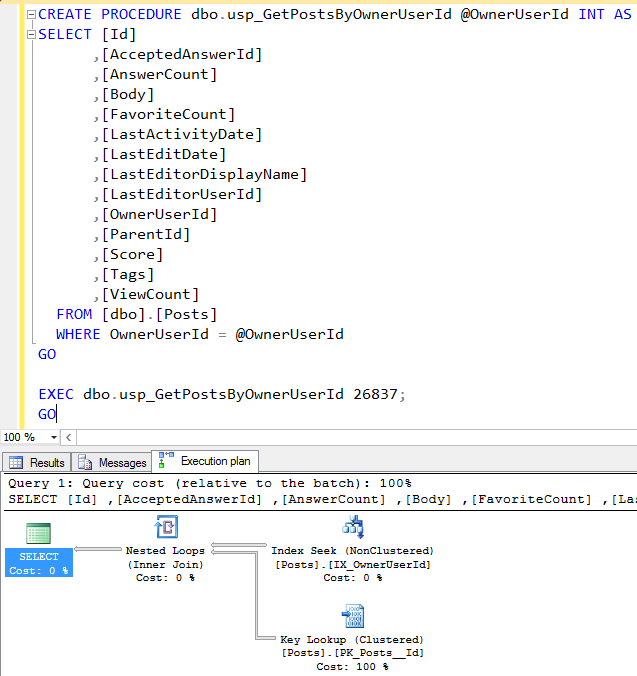
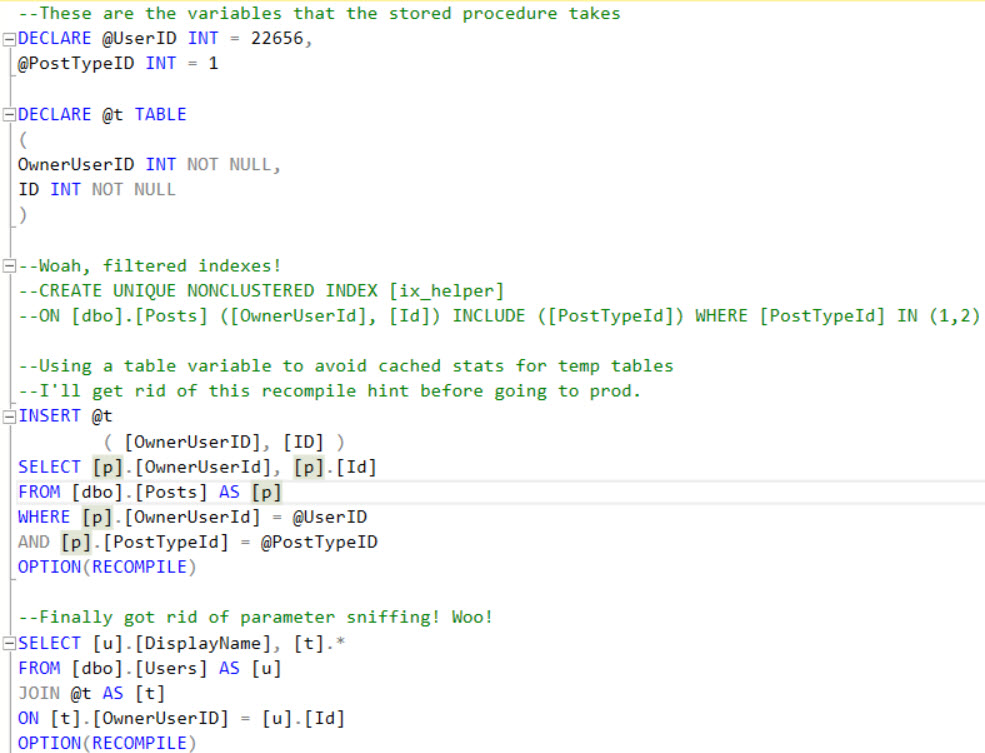
A new developer has been troubleshooting a sometimes-slow stored procedure, and wants you to review their progress so far. Tell me what could go wrong here.
You are now reading this in Pat Boone's voice.
You are now reading this in Pat Boone’s voice.

Remember, there are no right answers! Wait…

[Video] Office Hours 2016 2016/06/01 (With Transcriptions)

SQL Server, Videos
0

This week, Brent, Angie, Erik, Tara, Jessica, and Richie discuss SSMS issues, security auditing, snapshot replication, SSIS Cache Connection Manager, AlwaysON Availability Groups, deadlocks, and Jessica’s trip to Mexico.

Here’s the video on YouTube:

You can register to attend next week’s Office Hours, or subscribe to our podcast to listen on the go.

Office Hours Webcast – 2016-06-01

Jessica Connors: All right, I guess we should be talking about SQL Server.

Erik Darling: Nah.

Brent Ozar: Oh no.

Erik Darling: Boring.

Jessica Connors: That one product.

Angie: Meh.

Erik Darling: Snoozefest.

Brent Ozar: Which is out new today. So ladies and gentlemen, if you’re watching this, SQL Server 2016 is out right now. You can go download it on MSDN or the partner site. There’s places where you can go it. Developer Edition is free so you can go download the latest version right now. As we speak, Management Studio is not out yet but will be coming any moment.

Jessica Connors: That was our first question too: Is 2016 out yet?

Brent Ozar: Dun dun dun.

Jessica Connors: Are you hearing any rumblings on problems with it?

[Laughter]

Brent Ozar: We all start laughing. There were a lot of problems with the community previews. For example, SQL Server Management Studio would crash every time I would close it. So I’m really curious. Usually you don’t see stuff quite this buggy as you get close to release. But at the same time, I’m like, well, no one ever goes live with it in production the day it comes out anyway. People are just going to get widespread experience in development, in dev environments, and QA, then they’ll go find bugs hopefully and fix them. Hopefully.

Angie Rudduck: Wait. So I shouldn’t install that in our production servers running everything?

Brent Ozar: Yeah, no. I would take a pass for a week or two. Just let things bake out just a little bit.

Jessica Connors: Let it just wait.


Jessica Connors: Let’s take a question from Dennis, SSMS question. Is there a way to have SSMS format the numbers in the output messages? Not data in the query, like the row count at the bottom?

Tara Kizer: What are you trying to solve here? Because this is a presentation layer issue. Management Studio, it’s just a tool for us to query data, why does the formatting of the output matter? If you have an application you’re developing in .NET, format your data there. The row count at the bottom. No, Management Studio, there isn’t a way to format it. You can change the font and things like that in the tools options but I’m not sure that that’s what you’re asking.

Richie Rump: Is there a way, Brent? Could we format that?

Erik Darling: One thing you can do is if you’re interested in just having commas in is you can cast it as money or convert it to money with a different culture and you can get commas put in. But other than that, I’m not really sure what you’re after so if you’re a little more specific.

Brent Ozar: Well and return it as results. Whatever you’re looking for, return it as results instead of looking at what comes out of SSMS. Then you can format it there as well.

Jessica Connors: Dennis hasn’t replied to us.


Jessica Connors: Let’s go to Ben. He says, “[inaudible 00:02:24 old] to SQL. Hearing rumors about going to the cloud, MS, or Amazon, specifically in terms of security. What are the gotchas and pain points? Security is not our forte.”

Brent Ozar: This is so totally different from on-premises because on-premises you don’t have any security risks at all. No one could possibly access your data. I’m sure it’s locked down tighter than the pope’s poop chute. I mean it is completely secure as all get out. Just me, I’m usually like… Erik says, “Pull my finger.” I would say usually it’s more secure because you don’t go wild and crazy with giving everybody sysadmin. So I just turn it back to people on-premises and go, “So let’s talk about your security. Let’s go take a look at what you got. Everybody is SA. You haven’t changed your password in three years? Yeah, I think you should get out of on-premises. On-premises is probably the worst thing for you.” Nate says, “The pope’s poop chute? Really?” Yes. This is what happens when you work for a small independent company. You can say things like “tighter than the pope’s poop chute.” Probably can’t say that but we’ll find out later.

[Laughter]

Angie Rudduck: You’ve already said it at least three times, we’re going to find out. You’re going to get an official letter from the pope.

Brent Ozar: The Vatican, yep.

Angie Rudduck: Yeah.

Brent Ozar: “The pope does not have a poop chute.”

[Laughter]

Erik Darling: Going for a world record, most references to the pope’s butt in one webcast.

Angie Rudduck: Stop it.

Brent Ozar: Dad always said that to me, so yeah, there we go. Someone else should probably tackle the next question.

Richie Rump: Yeah, somebody else talk now, please.

Jessica Connors: Brent, I’ll just put him on mute.

Erik Darling: Looser than Brent’s…

[Laughter]

Erik Darling: Wallet, wallet, wallet.

Angie Rudduck: Wallet on the company retreat.

Brent Ozar: There we go.

Jessica Connors: I’m glad it’s a short week.


Jessica Connors:  Question from J.H. “Would creating a server trigger and emailing our DBA team if someone makes changes to the server role safe? Hard triggers affect performance, but it’s rare in our case that we have server role changes but want to catch it if a network admin puts himself in the sysadmin role without letting us know.”

Tara Kizer: We had security auditing at my last job. I’m not too sure what was used. Well, I think the other DBA who set this all up, he just set up a job and queried for the information. Then the job would run every few minutes I believe and would send the DBA team an alert if anything changed.

Brent Ozar: Yeah, I like that. My first reaction was Extended Events.

Tara Kizer: We had really strict auditing that we had to put in place due to the credit card information. It was encrypted but we had to be very careful with everything.

[Erik and Brent speaking at same time]

Brent Ozar: Would you say you had tight security? How tight was security? Go ahead, Erik, I dare you.

Erik Darling: Oh, sorry. I was going to say that you can set up the event data. You got me all flustered now. You can set up event data XML. It’s pretty good for modification triggers like that. It’s not like, you know, if you put triggers on tables and you’re doing massive shifts of data or you know before and after stuff. It’s a pretty lightweight way to just log changes as they happen.


Jessica Connors: Let’s see here. Question from Terry. “Is there a way to set up databases in an AG without doing a backup and restore?”

Erik Darling: Not a good one.

Tara Kizer: No.

Brent Ozar: 2016 there is. 2016 we get direct seeding where we can seed directly from the primary, so starting today you can. But unfortunately, not before today.


Jessica Connors: All right, a security question. This is from Nate regarding security auditing. “Any suggestions on getting some basic setup that tracks and alerts for security changes and schema changes?”

Tara Kizer: I don’t know.

Brent Ozar: I don’t know either. Is there like an Extended Event or something you could hook into?

Tara Kizer: Probably. What we had set up for security would have just been queries, just to query for the information. Look at the system tables and views. For schema changes, I don’t know.

Angie Rudduck: I think somebody set up a simple, “Hey, there’s somebody new in this group” for a security group. I think it was PowerShell at my last place just to like all of a sudden somebody is in the DBA sysadmin group. How did you get there? It would fire off of one server in the domain but I don’t know anything about schemas.

Brent Ozar: Yeah, schemas are tricky because you can log DDL changes. The problem is if your trigger fails, then the change to the table can fail and that can be kind of ugly. You can also set up event notifications and dump stuff into a queue with Service Broker, but it is kind of challenging and kind of risky. If you want to learn more about it, search—god, I’ve got to type this woman’s name out—Maria Zakourdaev. So if you search for “event notifications and SQLblog,” that’s what you do: “SQLblog Maria.” SQLblog is all one word. Maria Zakourdaev, and I’m sure I’m butchering her name, from Israel has a post on how you go about setting up event notifications and how they break because they do break under some circumstances.

Erik Darling: Everyone mark it, not only with SQL Server 2016 release today but Brent recommended Service Broker.

[Laughter]

Brent Ozar: It’s a great solution.

Richie Rump: You didn’t see the disdain on my face when he said that? You didn’t see that at all?


Jessica Connors: Let’s talk about snapshot replication from Trish L. “I have…

Tara Kizer: I’ve got to go get my coffee.

Brent Ozar: I know, we’re all like, “I’m out of here.”

Jessica Connors: Maybe we could tackle this. “I have snapshot replication which is scheduled to run one time per day but recently I’ve started to see blocking done by the snapshot replication. Do I need to [Inaudible 00:07:53] the distribution agent as well because it is running automatically now?”

Tara Kizer: I’m not sure about that but the blocking, you’re going to encounter that because it has to lock the schema. That’s one of the last steps it does. So anytime you have to do a snapshot, whether it be snapshot replication or transactional replication, I assume with merge replication too. Anytime you have to do that initial snapshot or reinitialize a snapshot, it does block changes—data changes, schema changes, you’ll see a lot of blocking as it’s going through the last bits of the snapshot creation.

Brent Ozar: What would make you choose snapshot replication? Like what would be a scenario where you’d go—or have there been any scenarios where you go, “Hey, snapshot replication is the right thing for something I encountered.”

Tara Kizer: I’ve never used to it but if users are willing to accept that their data is a day old, let’s say. Any time that I’ve used transactional replication, they’ve wanted near real time data. They wanted zero latency. We couldn’t deliver that in replication. But yeah, snapshot replication, it just depends on what your user wants as far as the data goes.

Richie Rump: I’ve used it for reporting solutions.

[Richie and Erik speaking at the same time]

Jessica Connors: What?

Erik Darling: I was asking Tara if a different isolation level would help with that blocking.

Brent Ozar: Oh.

Tara Kizer: We were actually using RCSI so, yeah, it was definitely a schema lock. We definitely still had blocking.

Brent Ozar: Makes sense. It was probably worse without the schema, or without the snapshot or CSI, probably horrible.

Tara Kizer: It was very rare we had to do the snapshot but sometimes replication would be broken for whatever reason and we couldn’t figure it out and we’d just have to restart replication. Our database was large. It took like five to eight hours to do. Not the snapshot portion, the snapshot took like about 45 minutes I believe but there was a lot of blocking during that time.

Richie Rump: I like snapshot replication for reporting purposes, right? So again, you just dump the data over there and it’s okay that there’s a time delay for the reporting aspect and there’s your data.

Tara Kizer: I just wonder instead of snapshot replication if people should be, not backup and restore because that might take too long on larger databases, but a SAN snapshot, a daily SAN snapshot, because it’s just available right away. You don’t have to wait for anything.

Brent Ozar: No schema locks, it doesn’t matter what the volume of change data is, yeah.


Jessica Connors: While we’re on the hot topic of replication, there’s another one from Paul. “I am replicating a database using merge and had an issue where if the developers changed a procedure on the original database, the change would not be pushed to the replicated database. Replicate schema changes is set to true. Any guidance on the reason why the changes won’t replicate? I did a snapshot before initiating replication.”

Tara Kizer: So replicate schema changes has to do with the table changes, it does not have to do with stored procedure, views, functions, or anything like that. So if you do an alter table, add a column, that will get replicated if you have the replicate schema changes set to true but you would have to also have in a publication either your current publication or a different one to also replicate the stored procedures.

Brent Ozar: I wouldn’t do that in merge either. Like I would—if you’re going to change stored procedures, just keep them in source control and apply them to both servers.

Tara Kizer: Yeah.


Jessica Connors: Let’s move onto a question from Justin, SSIS Cache Connection Manager question. “I want to load several objects into cache, about one to five million records, but can’t figure out how to access that cache’s source of data. It’s quite a bit faster for us to load to a cache versus staging tables. Is this possible? If not, how would you store this?”

Brent Ozar: Have any of us used the caching stuff in SSIS? No, everybody is…

Tara Kizer: No, I’ve used SSIS a lot and have not used that.

Brent Ozar: The one guy I know who does is Andy Leonard. If you search for Andy Leonard SSIS, he’s written and talked about this. I know because it was in his book. I didn’t read the book, I just remember seeing the book. It was on my shelf at one time. It was a great paperweight. Smart guy, really friendly. Just go ask him the question, he’ll be able to give you that right away. Normally we’re all about, “Go put it on stack exchange.” Just go ask Andy. Just go “Andy Leonard SSIS” and he’s super friendly and will give you that answer right away.

Erik Darling: Tell him Brent sent you.

Brent Ozar: Tell him Brent sent you on this.


Jessica Connors: Question from Tim L. He says, “I’ve got an ancient Access expert here at my company. I’m having SA access. He has a lot of ODBC from multiple Access dbs into my 2008 R2 SQL Server. How do I find out what tables he updates? There’s nothing in terms of jobs or stored procedures that references his data pull and updates.”

Tara Kizer: You could do an Extended Event, run a trace, add a trigger.

Brent Ozar: It’s 2008 R2 though. I like the trigger.

Angie Rudduck: I like cutting his access.

Richie Rump: I love that, “ancient.”

Tara Kizer: Yeah, why does he need SA access?

Brent Ozar: Just go ask him. He’s ancient. He’ll be a nice guy. He’s mellow by now. If you run a trace, that’s going to be ugly, performance intensive. The trigger will be intensive.

Erik Darling: Well you can at least filter the trace down to table name.

Brent Ozar: Well but if he wants to know what tables he’s doing, it’s going to be every time…

Erik Darling: Oh, never mind.

Brent Ozar: Yeah.

Tara Kizer: He could filter by his login at least, if that’s what it’s going through at least to connect to SQL Server.

Brent Ozar: And don’t try to log his insert statements or updates deletes. Just put a record in a table the first time he does an update, delete, and then immediately turn off the trigger on that table, or the trace on that. But, yeah. That’s tough. Just go ask the guy. Go talk to the guy. It would be nice.

Erik Darling: Shoot him email.

Brent Ozar: Yeah, shoot him an email. Buy him a bottle of Bourbon.

Erik Darling: Yeah.

Brent Ozar: It’s a human being.

Richie Rump: Yeah, just don’t give away the wine. Right, Brent?

Brent Ozar: If you were going to give somebody wine, you should give them like Robert Mondavi.

[Laughter]

Brent Ozar: He’s Access. He’s not, you know. That’s not true. Cliff Lede, ladies and gentlemen. This webcast is brought to you by Cliff Lede wines.
Jessica Connors: Do any of us participate in SQL Cruise?

Brent Ozar: I cofounded that with Tim Ford. Tim and I cofounded it and when we split up the consulting company versus the training and cruise-type business, I wanted to let him go do his own thing there and not be on it because I felt like I would kind of shadow in on it and make the thing murky. It is a wonderful experience. I strongly recommend it to anyone who thinks about going. It’s fantastic for your professional development. It’s limited to just say 20 attendees and like 5 to 10 presenters, so the mix, the ratio of presenters and attendees is fabulous. You get to hang out with them. You get to have dinners, from all of this you get to know them really well. So it can be a rocket ship for your career and it helps you really build networking bonds with not just the presenters but the other attendees who are there. The downside is you get to hang out with the presenters in hot tubs so that may be a pro or a con depending on what your idea of a good time is there. So it’s not for everybody but it is truly fantastic.

Erik Darling: Grant Fritchey in a speedo, ladies and gentlemen.

[Laughter]

Jessica Connors: Do you still go on the cruise then? Are you done?

Brent Ozar: I don’t. I totally stopped doing that. I go off and do my own cruises. My next one is in Alaska in August I think, going on that one with my parents. But I haven’t done a technical cruise since. Most of the time what I like to do now is just go out on a cruise and not talk to anyone. I like to go out and sit and read books.

Erik Darling: You did Alaska before, right?

Brent Ozar: This is my fifth time I think, yeah. Absolutely love it. It’s gorgeous. I never was a snow kind of a guy but you get out there in the majestic snow and mountains and bears and all that, it’s beautiful.

Jessica Connors: Nice.

Angie Rudduck: Minus the jacket.

Brent Ozar: Yes.


Jessica Connors: Let’s talk to Graham Logan, he’s got some problems. He says, “SSMS crashes when expanding database objects in objects explorer. Database is about 1.2 terabytes and has about two million objects.”

Tara Kizer: Oh good lord.

Jessica Connors: But, he says, “[inaudible 00:15:43] design. It’s not mine. How to view all database objects without SSMS crashing.”

Tara Kizer: You just cannot use object explorer. You’re not going to be able to use object explorer. You can’t use the left pane in Management Studio. You’re going to have to write queries to see things. It’s very unfortunate but that’s a heck of a lot of objects in the database.

Brent Ozar: Before you expand the list, you have to right click on the tables thing and click filter. Then you can filter for specific strings but without filtering, it’s useless… I’d go information schema tables, information schema, yeah, all columns, all kinds of stuff.


Jessica Connors: Kyle Johnson has a new one. “We have a 4.2 terabyte database with a single data file. I’m working on a plan to migrate to multiple ones. Shrinking the database to a level with the data between files isn’t really practical with a six-hour window of no users. Have any other suggestions? Reindexing tables and specifying the file groups to move the table to two?” From Kyle Johnson.

Brent Ozar: Not a bunch of good options here.

Erik Darling: Brent is getting ready to tell you about Bob Pusateri.

Brent Ozar: I was. You are psychic. You are phenomenally psychic. Tell us more. I want to subscribe to your newsletter.

Erik Darling: Bob Pusateri, which I feel like this webcast has been obscene enough without me saying that, has a blog post about moving file groups, a lot of the gotchas, and you know, bad things that can happen to you. I will track down the link for it and send it to you but I would not do it justice just explaining what goes on it, because it’s scripts and everything, so.

Brent Ozar: Bob had a 25 terabyte data warehouse with thousands of files in it because the prior DBA thought it was a good idea to create a separate file group for every employee and then later came to regret that decision so he has a great set of scripts on how you go about moving stuff around and keeping them online wherever possible. So it’s really slick. So you do that prepping leading up to the six-hour window so that your six-hour window is only dealing with stuff that you can’t do offline, like moving the LOB data if I remember right.


Jessica Connors: Question from Claudio. “I’m trying to understand the differences between the new AlwaysOn Basic Availability Groups and the synchronous commit mode and the mirroring and high safety mode but they look identical except AlwaysOn seems more complicated to set up and manage. Are there any benefits to either solutions, features, performance, licenses, liability? Which one would you recommend to adopt?

Tara Kizer: Database mirroring is being deprecated so you’re going to want to move over to the AG basic availability groups. Get on it now. It’s the replacement for database mirroring.

Brent Ozar: The drawbacks, so you’ve managed both too. What would you say the strengths of AlwaysOn Availability Groups are over mirroring and vice versa? That’s not a trick question, I promise.

Tara Kizer: Mirroring you’re not failing over groups at a time. You’re failing over a database at a time. So availability groups let you failover in groups which is good when you have an application with multiple databases that it needs.

Brent Ozar: To be clear, so you’re saying the guy is saying Standard too, so you only do one database at a time. You could script those too, just like you would with mirroring. I’m trying to think if there’s anything that would be… have to have a cluster but you don’t have to have a domain with mirroring. But you don’t either with 2016 either. You can do it between standalone boxes.

Tara Kizer: With mirroring, if you want the automatic failovers, you need a witness. With AGs you do need a quorum but it could be a file share on another server, you know, on a file server that you have or a disk on a SAN could be a quorum. Mirroring does require another box, a VM, it can be Express Edition.

Brent Ozar: Yeah, I used to be the biggest fan of mirroring. I’m having a tough time coming up with advantages as 2016 is starting here.

Tara Kizer: I did a lot of failovers with mirroring, log shipping, and then later availability groups and by far I like availability groups best for DR failovers. It was just so much easier. You just run a failover command and you’re done. With mirroring, you’re doing it database by database. Log shipping is, you know, all sorts of restores going on. Mirroring is certainly easy, definitely easy, but I like the slickness of availability groups and readable secondaries and the choice of asynchronous and synchronous.

Brent Ozar: Yeah, that’s where I was going to go too. Because even in Standard, you get choice between synch and asynch now. And you can use one technology that works on your Standard stuff and your Enterprise stuff so you only have to learn one feature instead of learning two. That’s kind of slick too.

Tara Kizer: When we used mirroring, we would use asynchronous mirroring to the DR site then for high availability solution at the primary site we used failover clustering. So availability groups it just solves both solutions in one feature, plus reporting, we got rid of replication.
Jessica Connors: All right. Let’s move on to a question from Chris Woods, a regular attendee. He says, “Migrating MDF with LOB data, L-O-B data, I don’t know how you call that, from one drive to another with minimal/no downtime. Can you use log mirroring to mirror it to a new database on the same server that shut down the original during a quick downtime?”

Brent Ozar: You can’t do mirroring to the different database on the same server, can you? You can do log shipping, can you do mirroring to the same instance?

Tara Kizer: No.

Brent Ozar: You can do log shipping to the same instance. That will work. Your downtime will be super fast. Because what your failover process would look like is when it comes time for failover, you do a tail of the log backup up on the main database, then restore that tail-log on the other database. Rename the old primary as like, the old primary database just like “database old.” Then rename the new one as “database new” and then whatever the new database name is or the original database name is. So you could do that in like a 30-second outage. You don’t have to change connection strings because it’s all the same server still. So that’s kind of slick.

Tara Kizer: If this is a SAN drive, even moving from one SAN to the next, we did all this stuff live. I don’t know what the technologies are called but we would move arrays live. The SAN administrators did some magic and it just copied over the data and once the copy was complete, it did a switcheroo between the two pointers, or, I don’t know what the technology was but the SAN can handle this without any down time.


Jessica Connors: Rob is adding a new instance to an existing active active cluster. I think he’s talking me about his process so that we can say if it’s yea or nay. He says, “I would need to failover the existing instances to one node, install the new instance on the node with no instances. Service pack it up and failover the instance to the node I was just on. Then run the install in another node, apply SPS, then rebalance the instances.” Does that sound about right?

Tara Kizer: It does but you know we don’t recommend active active clusters. What happens if you lose a node? I don’t at least. I’ve had four-node clusters where all four nodes were active. It’s just a nightmare. If you lose a node, can your other nodes support all of the instances at the same time until you get that other node fixed?

Brent Ozar: Richie is showing something on his iPad. What I would say is…

Erik Darling: It’s too bright.

Brent Ozar: I still can’t see it. We do recommend active active with a passive node.

Tara Kizer: Yeah, okay. Right.

Brent Ozar: Yeah, multi-instance clusters, just have a passive in there somewhere. Your scenario is exactly why you want a passive node laying around.

Tara Kizer: At least what you wrote out here for the question, yeah, that is the process.

Brent Ozar: Also known as miserable.

Tara Kizer: Yeah. At least since SQL Server 2008 we’ve been able to have where it can install it just on one node. Prior to that, all nodes in the cluster had to be online and have the exact right status in order for the installation. Because the installation occurred across all nodes at the same time. Service packs, the engine, everything. On a four-node cluster, there’d always be one node that was misbehaving. It just says, “I need a reboot.” And you’d reboot it 20 times and it would still say, “I need a reboot.” Then finally that one would be okay and now another node would say, “I need a reboot.” It was just ridiculous. So I’m glad that Microsoft changed the installation process starting with 2008.

Brent Ozar: It’s like taking kids on a road trip. “Everybody ready…?” “No.”

Erik Darling: “I have to pee.”

Richie Rump: I got excited, I thought we had a Node.js question but I guess not.

Erik Darling: Never have, never will.

Richie Rump: Brent has.

Brent Ozar: I have.


Jessica Connors: Let’s take one more question. Let’s see here. “Good morning, Brent and Tara, Erik, Richie, and Angie. Says, “Yesterday we had a problem with the process that normally moves data from table queue and delete it after it’s done. This is a standalone database. We stopped the inflow of data but it didn’t help. We got thousands of deadlock alerts. I notice that the disk queue length on the log drive is higher than usual. Here is a sample of the deadlock.” He provides it. “Is there anywhere I could look for this issue?”

Tara Kizer: If you’re getting deadlocks you should turn on the deadlock trace flag 1222, maybe run an Extended Event to capture the deadlock graph. Having just the deadlock victim isn’t enough to be able to resolve it.

Brent Ozar: It’s a separate technique I think that not a lot of database administrators get good at because it’s one of those things where you’re kind of like, “Hey, you should fix your indexes in your queries.” Then people go off and do their own thing. It’s one of those where when you do want to do it, it takes a day or two to read up and go, “Here’s exactly how the [Inaudible 00:25:00].” There’s also not a lot of good resources on our site for it. We don’t go into details on deadlocks either. Have any of you guys seen resources on deadlocks that you liked?

Erik Darling: I like just hitting Extended Events for it. The system health session has quite a bevy of information on deadlocks and you can view the graphs and everything which is pretty swell.

Tara Kizer: I attended a session at PASS in 2014, Jonathan Kehayias from SQLskills, it was all about deadlocks. It was invaluable information. He went over different scenarios and stuff. He said that he loves deadlocks. It was like, whoa, I don’t know that anyone has ever said that before. But it was really great information. I haven’t looked at—I do read his blogs—but I suspect he’s got a lot of deadlock information on the blog to help you out.

Richie Rump: He also loves XML.

Brent Ozar: He loves XML and Extended Events. If you have a Pluralsight subscription. So Pluralsight has online training. I want to say it’s like $39 a month or something like that. I think Kehayias has a course on deadlocks. I’m not 100 percent sure but if you search for SQL Server deadlocks if Kehayias has a course on there, it would be wonderful.

Erik Darling: Also, if you don’t have Pluralsight but you want to try it, Microsoft has a Dev Essentials site I believe where if you sign up for that, you get a 30-day free trial of Pluralsight and you also get Developer Edition and a copy of Visual Studio that’s free, Visual Studio Community or something for free. So it’s not just the Pluralsight subscription for 30-days but you do get a couple other goodies in there that last you a little bit longer.

Richie Rump: The course is called SQL Server Deadlock Analysis and Prevention.

Angie Rudduck: Someday still has a Pluralsight account.

Jessica Connors: All right guys, that’s all we’ve got for today.

Brent Ozar: But thanks for hanging out with us. Man, time goes so fast now. Gee, holy smokes.

Erik Darling: And they’re sobering up.

Brent Ozar: Well, back to work. The Cliff Lede, ladies and gentlemen. Enjoy the High Fidelity. See you guys next week.


[Video] Office Hours 2016 2016/06/08 (With Transcriptions)

SQL Server, Videos
0

This week, Angie, Erik, Doug, Jessica, and Richie discuss DB migration, rebuilding large indexes, recommendation for SQL dev ops tools, best practices for disabling SA accounts, compression, and more!

Here’s the video on YouTube:

You can register to attend next week’s Office Hours, or subscribe to our podcast to listen on the go.

Office Hours Webcast – 2016-06-08

Jessica Connors: Question from Justin. He always asks us something. Justin says, “Is it advisable to move the public’s role from being able to query sys logins, sys databases, and/or sys configurations in master?”

Erik Darling: Advisable for what? I’ve never done it. I never cared that much. But I’m not like a big security guy. Any other big security guys want to talk about it…?

Doug Lane: Yeah, I’ve never done anything with public’s role and I’ve never seen it be a problem, but again, we’re not security experts.

Erik Darling: Again, we always recommend that when people ask sort of offhand security questions, Denny Cherry’s book Securing SQL Server is probably the go-to thing to read to figure out if what you’re doing is good or bad.

Jessica Connors: Yeah, Justin says that they got audited and [Inaudible 00:00:47]..

Erik Darling: What kind of audit was it that brought those up? I’d be curious.


Two Servers, One Load Test

Jessica Connors: Let’s move on to a question from Claudio. He says, “I would like to load test a new SQL Server instance with real production data. Is there anything we could put between clients and two SQL Servers that will intercept the queries for them to both SQL Servers and return the response only to one SQL Server?

Erik Darling: Yes, and I also have a magic spell that turns rats into kittens. No. That’s a bit much and a bit specific. You’re going to have to come up with something else. If you want to get really crazy, you’re going to have to look at Distributed Replay and come back in three years when you finish reading the documentation.


How do I configure multi-subnet AG listeners?

Jessica Connors: Okay. Let’s see here. This is a long one from Richard. Let’s tackle this one. “I will be adding a remote DR replica, non-readable, to an existing local availability group on a multi-subnet cluster to be able to use the listener at the DR site. I know a remote site IP address will be added to the listener. Is there anything else that has to be configured in the availability group or cluster besides DNS and firewall rules?”

Erik Darling: Brent?

Doug Lane: Yeah.

Jessica Connors: Where are you, Brent?

Erik Darling: I don’t know actually. I would be interested so I want you to try it out and email me if you hit any errors because I would be fascinated.

[Angie Rudduck enters webcast]

Jessica Connors: Oh, hi.

Doug Lane: Oh, we heard Angie before we saw her.

Angie Rudduck: Thought I had my mute on.

Doug Lane: As for the AG mystery, we’re going to leave that one unsolved.

Jessica Connors: Unsolved mysteries.


How should I configure database maintenance tasks?

Jessica Connors: Question from David. He says, “For routine tasks, index maintenance, backup, etcetera, is it preferred to use agent jobs or maintenance plans? It seems to be the DBA preference. Any reasons to lean one way or the other?”
Erik Darling: Ola Hallengren. Angie, tell us about Ola Hallengren.

Angie Rudduck: Ola Hallengren is amazing. I tell every single client about Ola Hallengren. I used it at my last place and in production across every server. You can do all backups, full disk logs. You can do it separated for your user databases versus your system databases. You get your CHECKDBs in there, user versus system databases. You even get index optimize and even better, Brent, aka Erik, has a really good blog post about how you can use it to just do update stats which is a great follow-up from his post about why don’t do index maintenance anyway, right? Just update stats. I love Ola. I’m working on a minideck to pitch all of his stuff in one instead of just the indexing.

Erik Darling: Nice.

Angie Rudduck: But I’m too busy with clients.

Doug Lane: Plus, he’s a Sagittarius.

Angie Rudduck: Gemini.

Erik Darling: I’ve heard rumors that I’m a Scorpio but I’ve never had that confirmed.

Jessica Connors: Use your Google machine.

Doug Lane: [Imitating Sean Connery] Do you expect me to talk, Scorpio?

[Laughter]


How do I set the default port for the DAC?

Jessica Connors: Let’s take one from Ben. He says, “Oh, SQL stuff. Here’s one. In old SQL, we had to set a registry key to set a static remote DAC port. Is there a better way in SQL 2012, 2014, 2016? What’s the registry key?”

Erik Darling: A static remote direct administrative connection port?

Jessica Connors: Mm-hmm.

Erik Darling: Weird. No, I don’t know, I’ve never done that.

Doug Lane: Yeah, me neither.

Angie Rudduck: What is old SQL? Like what version is old SQL?

[Laughter]

Angie Rudduck: 2005?

Doug Lane: 2005 he says.

Erik Darling: Hmm, I don’t believe that’s changed much since then.

Richie Rump: Yeah, it sounds like a blog post you need to write, Erik.

Angie Rudduck: We’ve got something on the site about remote DAC because…

Doug Lane: That doesn’t say anything about the port though.

Angie Rudduck: No, but it’s pretty detailed, isn’t it? I don’t know maybe go check that out, Ben, and go from there. I think it’s just go/dac. I don’t know. I’m making up things now.

Erik Darling: Brentozar.com/go/dac, D-A-C.

Jessica Connors: What’s the oldest version of SQL you guys have worked on?

Erik Darling: ’05.

Angie Rudduck: 2000.

Doug Lane: In Critical Care, ’05.

Angie Rudduck: Oh, yeah.

Richie Rump: No 6.5 people? No?

Angie Rudduck: Tara is not here.

Jessica Connors: Yeah, she’d probably have a story about the oldest version she’s used. She’s got the best stories.

Erik Darling: “It was on a floppy disk…”

[Laughter]

Doug Lane: I worked on 7 once upon a time. I didn’t actually like do real work on 7, it was just, believe it or not, writing stored procedures in the GUI window.

Angie Rudduck: Query explorer or whatever it is?

Doug Lane: No, it was like the properties of the—it was crazy when I think back on it. There was like no validation of any kind except the little parse button. This was back when Query Analyzer and Enterprise Manager were separate and I was doing it in Enterprise Manager.

Angie Rudduck: We had a 2000 box at my last place and I knew nothing about 2000. I tried logging in there and I was like, “Wait, where is Management Studio?” That was really hard to try to figure it out. The management administrative part is really scary in 2000 and I was on the server directly. It was like already a precarious server about to tip over. So, scary.


What’s the best way to rebuild a 2-billion-row table?

Jessica Connors: Question from Joe. He says, “What is the best way to rebuild a very large index without taking outage or filling the log? Rebuilding after two billion record delete.”

Doug Lane: Oh, are you sure you need to delete two billion rows from a table?

Erik Darling: Maybe he was archiving.

Doug Lane: Yeah, I don’t know if you want to flag them as deleted and then move them out some other time or what, but, wow, that’s a lot of log stuff. You can do minimal logging if it’s a table that you really don’t care about it being fully logged on but there are disadvantages to that too.

Erik Darling: What I would probably do, I mean, if you’re on Enterprise you’re kind of out of luck either way, right? There’s no online index operations there. You can help with the log backup stuff if you put it into bulk logged and continue taking log backups, but at that point, if anything else happens that you need to be recoverable after it starts bulk logging something, you’re going to lose all that information too. So bulk log does have its downsides. It’s not a magic bullet. So depending on your situation, you might be in a little bit of a pickle. A better bet is if you’re deleting two billion records and depending on how many records are leftover, you might just want to dump the stuff that you’re not deleting into another table and then do some sp_rename and switch things around.

Doug Lane: You can actually just drop the index and recreate it. Sometimes that goes a lot faster.


Are there any problems with SQL role triggers?

Jessica Connors: Question from J.H. He says, “Anything to be aware of or downsides of setting up SQL role triggers, mainly sysadmin role changes?”

Erik Darling: All these security questions.

Doug Lane: Yeah.

Erik Darling: We bill ourselves as not security people.

Doug Lane: Like the one before, I think we’re going to punt on that.

Jessica Connors: Thomas Cline says, “No security questions.”

Angie Rudduck: Too bad the slides aren’t up.

Jessica Connors: Yeah.

Erik Darling: “For security questions…”

Angie Rudduck: “Please call…”

Erik Darling: Yeah, there we go.

Angie Rudduck: I’ll do them because it usually works for me.

Erik Darling: Attendees… staff… Angie. I’ll just mute you, just kidding. There we go. You are presenting.


What are the HA and DR options with Azure VMs?

Jessica Connors: All right, who wants to answer some Azure questions?

Erik Darling: Nope.

[Laughter]

Jessica Connors: Does anybody here know the HA and DR options with SQL 2012 Standard in Azure VMs?

Doug Lane: Oh, no. Not me.

Erik Darling: Using a VM? If you’re just using the VMs, I assume it’s the same as are available with anything else. It’s only if you use the managed databases that you get something else but I think it’s mirroring either way. I know Amazon RDS uses mirroring.

Richie Rump: Yeah, I think they have like three copies and if one goes down it automatically fails over to the other two or something like that. Don’t quote me.

Jessica Connors: Okay, we’re all being quoted. We’re actually all being transcribed. We’re all being recorded. We’re all being watched.

Erik Darling: Really?


Is there a better solution for replication than linked servers?

Jessica Connors: Question from Cynthia. She says, “My developers have a product that uses linked servers for parameter table replication. I’ve read that linked servers aren’t the greatest. Is there another way to do this?”

Doug Lane: Okay, that’s actually kind of a two-part question because you’ve heard that linked servers aren’t the greatest. You’re right. So with SQL Server 2012 SP1 and later, you don’t have to blast a huge security hole in order to get statistics back from the remote side in linked servers. It used to be that you had to have outrageous permissions like ddl admin or sysadmin in order to reach across, get a good estimate, when it then builds the query plan on the local side. That’s not the case anymore. The problem that you can still run into though is that where clauses can be evaluated on the local side. Meaning, if you do a where on a remote table what can happen is SQL Server will bring the entire contents of that remote table over and then evaluate the where clause locally. So you’re talking about a huge amount of network traffic potentially. That’s what can go wrong with them. The other question, “Is there a better way?” That kind of depends on what flexibility the app gives you because you say that this is a product. So I don’t know if this is something that you have the ability to change or not but if you’re talking about replicating from one side to the other, there’s any number of ways to move data from A to B.

Jessica Connors: And why do linked servers suck so bad?

Doug Lane: I just explained that.

Jessica Connors: Oh, did you? I didn’t hear you say why they suck so bad, sorry.

Doug Lane: Because you can end up with really bad plans either because permissions don’t allow good statistics or you end up pulling everything across the network just to filter it down once you’ve got it on the other side.


Are there any good devops tools for SQL Server?

Jessica Connors: Question from Joshua. This might be one for Richie. “Do you have any recommendations for Microsoft SQL dev ops tools?”

Richie Rump: There’s not a ton. I guess Opserver. I guess from Stack Overflow would be one of them but not that I know of that there’s like out-of-the-box ways to do that kind of stuff. I know when I was consulting with one firm, they had built their own dev ops tools. I think they had Splunk and then they just threw stuff out from SQL Server logs and then did a whole bunch of other querying to put dashboards up so they could do monitoring amongst the team and do all that other stuff. I think Opserver does a lot of that stuff for you but it’s a lot of configuration to get it up and running. I’d say test it out, try it out, and see if that works for you but I’m not aware of any kind of things you could buy and it’s kind of ops-y things. I don’t know, what do you think guys?

Erik Darling: I agree with you.

Doug Lane: I don’t live in the dev ops world.

Jessica Connors: I agree with you, Richie.

Angie Rudduck: Yeah, whatever the developer says.

Jessica Connors: What he said.


Should we disable the SA account and set the DB owner to something else?

Jessica Connors: Question from Curtis. He says, “I’m looking for a clarification on SA usage. sp_Blitz [inaudible 00:12:03] to having DB owner set to SA, not a user account. But what about the best practice of disabling SA? Should DB owner be set to a surrogate SA account?

Erik Darling: Nope. It’s not really catastrophic because it’s something that you should be aware of because usually what happens on a server is someone will come in and restore it. Someone will come in and restore a database, usually from an older server to the new one. They’ll be logged in with their user account so they’ll be the owner of that database. The owner of the database has elevated privileges on the database equal to SA, which you may not want always and forever. That’s why SA should be the owner, even if it’s disabled and the user account shouldn’t be. Even if the user is a sysadmin, you kind of just don’t want them to also be the owner of a database.


How do I migrate databases in simple recovery?

Jessica Connors: Question from Monica M. “We are migrating and upgrading from SQL 2008 R2 to 2014. We use simple recovery as our reporting/analysis rather than OLTP. Our IT department said after I copy/restore the databases to the new server it will take them two weeks to go live. By this time, our DBs will obviously be out of sync. What simple method would be best to perform this move?”

Angie Rudduck: Every time I moved, we did some server upgrades where we just created a new VM and ended up renaming it to the old server name eventually but what we did was we took a full backup like the day before, hopefully, but if you have to do two-weeks, we took the full backup when we knew and then we took a differential right when we’re ready to make the cut over. So let’s say at 6:00 p.m. the maintenance window is open and I’m allowed to take the database offline. I put it in single-user mode. I took a differential and then applied that to the new server. Then took it out of single-user mode on the new server. Then we did all of our extra work. So it’s not perfect for two weeks of data change, so if you could keep applying the fulls until like the night before, that would give you a little bit better change over.


Jessica Connors: Trying to find some questions here. You guys are real chatty today.

Erik Darling: Everyone is all blah, blah, blah, problems, blah, blah, blah.

Jessica Connors: “Here is my error…” They copy and paste it. I’m never reading those.

Erik Darling: “Here’s the memory dump I had.”

Angie Rudduck: Jessica likes to be able to read the questions and she doesn’t read SQL, so nobody reads computer. Nobody really reads computer, including us.

Erik Darling: “Yeah, I found this weird XML…”

Jessica Connors: Richie reads computer.

Angie Rudduck: That’s true, Richie reads computer.

Richie Rump: I was reading XML before I got on.

Angie Rudduck: That’s disturbing.

Erik Darling: Naughty boy.


How do I shrink a 1.2TB database?

Jessica Connors: Here’s a question from Ben. He says, “I have a large 1.2 terabyte [inaudible 00:14:51] queuing database. Added a new drive and a new file device. DBCC SHRINKFILE does not seem to be working on the original file. Seems that the queuing application reuses space before it can be reclaimed. Any suggestions?”

Angie Rudduck: Don’t shrink.

Erik Darling: I don’t know what you’re trying to do. Are you trying to move the file to the new drive or what are you up to? I don’t think you’re being totally honest with us here.

Angie Rudduck: Yeah.

Jessica Connors: But you shouldn’t shrink, huh?

Doug Lane: Spread usage across drives, okay.

Angie Rudduck: Maybe put it on one drive, I don’t know? I guess that’s hard to do with such a large file size.

Jessica Connors: 1.2 terabytes.

Erik Darling: So you have your database and you bought a new drive. Did you put like files or file groups on the new drive? Did you do any of that stuff yet?

Angie Rudduck: He says he has to shrink because the original drive is maxed and he needs workspace. I think it’s just not creating—maybe he has to do what you’re saying, Erik, about creating an additional file group to be on the other drive.

Erik Darling: Right, so what you have to do is actually move stuff over to that other file. So if you haven’t done it already, you have to pick some indexes or nonclustered or clustered indexes and start doing rebuild on the other file group.

Angie Rudduck: Then you’ll be able to clear out space to shrink your file.

Erik Darling: Hopefully.

Angie Rudduck: Maybe, yeah. Let us know next Wednesday.


Has anybody played with SQL Server 2016 yet?

Jessica Connors: Have we played with SQL 2016 yet?

Erik Darling: Oh, yeah.

Doug Lane: Yep.

Jessica Connors: No? Some of you?

Erik Darling: Yes.

Jessica Connors: Have you played around with the 2016 cardinality estimator and do you know if it works better than SQL 2014?

Erik Darling: It’s the same one as 2014.

Jessica Connors:         Is it?

Doug Lane: So there’s the new and the old. Old is 2012 and previous and the new is 2014 plus. There’s all kinds of other new stuff in 2016 but the cardinality estimator actually hasn’t been upgraded a second time.

Erik Darling: Yeah, Microsoft is actually approaching things a little bit differently where post 2014 with a new cardinality estimator, they’ll add optimizer fixes and improvements for a version but you won’t automatically be forced into using those. You’ll have to use trace flag 4199 to apply some of those. So even if you pop right into 2016, you may not see things immediately. You may have to trace flag your way into greatness and glory.


Are high IO waits on TempDB a problem?

Jessica Connors: Here’s a good question from Mandy. She says, “I’ve been on a SQL 2014 standard cluster with tempdb stored on SSDs for several months. The last few days we’ve been seeing a lot of alerts and spotlights saying that we have high IO waits on those tempdb files. The IO waits are as high as 500 to 800 milliseconds. Is this a high value? I’m new to using SSDs with SQL Server and I admit that I just don’t know what high is in this case. Any thoughts?”

Doug Lane: It’s high but how frequent is it? Because if you’re getting an alert that like once a day that you’re hitting that threshold, it may not be something you need to worry about too much depending on what it is that’s hitting it. So what you want to do is look at your wait stats and look at those as a ratio of exactly how much wait has been accumulated versus hours of up time. If you’re seeing a lot of accumulated wait versus hours of up time, not only will you know there’s a problem but you’ll also be able to see what that particular wait type is and get more information about what’s causing it. Then you can put that together with what might be happening in tempdb and possibly come up with an explanation for what’s going on.

Erik Darling: Yeah. I’d also be curious if something changed that started using tempdb a whole lot more or if maybe you might be seeing some hardware degradation just after some time of use.


What should I do when my audit stops working?

Jessica Connors: Question from James. He says, “I’ve installed a SQL Server audit and noticed it stopped working. Is there anyway to be alerted when a SQL Server audit stops or fails?”

Angie Rudduck: Is that the Redgate tool? Because I feel like Redgate had some auditing tool or encrypting tool that went out of support. When I was at my last place and we had to change over so I’m not sure what that is.

Doug Lane: If it throws a certain severity error then you can have SQL Server notify you of those kinds of things. But as far as like audit as a product, I’m not sure.


Will backup compression compress compressed indexes?

Jessica Connors: Then we’ll move on to J.H. Says, “When compressing all tables page option in a database does compressing its backup gain more compression?”

Erik Darling: Yes.

Angie Rudduck: Compression squared.

Erik Darling: Compression times compression. Are you really compressing all your tables to get smaller backups?

Jessica Connors: Is that really bad?

Erik Darling: No. It’s just kind of a funny way to approach it.

Doug Lane: I don’t know if that’s the purpose but…

Angie Rudduck: I think he has no drive space, tiny, tiny, tiny SAN.

Erik Darling: Buy a new thumb drive.

Doug Lane: Talk to Ben because he apparently has the budget to have new large drives.


Are there performance issues with SSMS 2016?

Jessica Connors: We have somebody in here that’s playing with SQL 2016. He says, this is from Michael, “SQL Server Management Studio 2016 sometimes goes into not responding status when using the object explorer window such as expanding the list of database tables. These freezes last around 20 seconds. Is there any known performance issues with SSMS 2016?”

Doug Lane: I found one. I was trying to do a demo on parameter sniffing where I return ten million rows of a single int-type column and maybe about half the time SSMS would stop working and it would crash and force the restart. So I think SSMS 2016, at least related to the RTM release, is a little bit flakey.

Jessica Connors: For now.

Erik Darling: Yeah, it might depend on just how many tables you’re trying to expand too. I’ve been using it for a bit and I haven’t run into that particular problem with just expanding object explore stuff. So how many tables are you trying to bring back would be my question.

Angie Rudduck: I was just about to say, we had that question last week or the week before about SSMS crashing when they tried to…

Erik Darling: Oh, that’s right.

Angie Rudduck: Remember? They were trying to expand their two million objects.

Erik Darling: Yeah, that’s not going to work out well.

Angie Rudduck: So maybe this is the same person, different question.

Doug Lane: I was going to say I think it might just be a little…

Angie Rudduck: Yeah. It’s brand new, what do you expect? It’s a week old. It’s going to be flakey.

Richie Rump: Something to work when you release it?

Angie Rudduck: No, come on.

Richie Rump: I’m just saying, it’s a crazy idea, I know. I have all these crazy ideas but…

Angie Rudduck: Unrealistic expectations, Richie.

Erik Darling: That would require testing.

Jessica Connors: Richie has never released anything with bugs.

Angie Rudduck: Who needs to test things? I did have a client recently ask me what test meant when I was talking about test environment.

Jessica Connors: I know, what?

Richie Rump: What’s this test you speak of?

Erik Darling: Just for the record, Richie wipes cooties on everything he releases.

Angie Rudduck: Kiddie cooties.

Doug Lane: All right, looks like we’ve got two minutes left. Lightening round, huh?

[Group speaking at the same time]


What’s the best SQL Server hardware you’ve ever worked on? And the worst?

Jessica Connors: Question from Dennis. He wants to know, “Tell me the best SQL hardware environment that you have ever worked on.”

Doug Lane: I would say when we went down to Round Rock last year. I got to play with I think it was a 56-core server, that was pretty fun.

Erik Darling: Yeah, I think my best was 64 cores and 1.5 terabytes of RAM.

Richie Rump: Yeah, I had 32 cores and 2 terabytes of RAM.

Erik Darling: Nice.

Jessica Connors: What about the worst you’ve seen with clients?

Erik Darling: Ugh. Probably an availability group with 16 gigs of RAM across them. That was pretty bad. And it had like one dual core processor. It was pretty, yeah. It was Richie’s laptop.

Angie Rudduck: Worse than Richie’s laptop.

Doug Lane: That sounds about like the worst I’ve seen is like dual core, 10 or 12 gigs of RAM.

Angie Rudduck: 500 gigs of data.

Erik Darling: I’ve had faster diaries than that.

Jessica Connors: All right, well, we’re out of time.

All: Bye.


Getting Started With Oracle Week: Creating Indexes and Statistics

Oracle
9 Comments

This is not a deep dive

If you’re looking for lots of internals and explanations of what happens behind the scenes, don’t read past here. I almost made a READPAST joke. It’s that kind of day. This is just a basic overview of creating some indexes and gathering statistics. Why? Because someone just paid about $47.5k for every 0.75 cores of Oracle Enterprise licensing and they probably expect some performance out of it. This isn’t MySQL. We don’t have all day to get query results.

If you remember last time, we created a couple tables of random data, HR.T1 and HR.T2. They are currently sitting in TABLESPACE, where no one can hear you scream.

The first thing you want to do is forget about clustered indexes. Oracle has Cluster Indexes, which allow frequently joined rows from separate tables to sit on the same block of data, to reduce I/O when joining tables. Oracle has Index Organized Tables, which can be defined by a Primary Key.

But that’s more than I want to bite off!

Index Gang

Creating a Primary Key ain’t too far off from SQL Server. But there are some weird points, too. For instance, when you create a Primary Key, you can let it create an associated index, specify an index to associate with, or let Oracle pick the first index it finds to associate with the Primary Key. Full disclosure: it may not be the index you’d pick, it may be the first index that has the PK column as a leading column.

Here are some examples!

If, at some point, you realize you chose the wrong Primary Key, you can drop it without dropping the index.

Can’t cluster this

You can also create some pretty familiar looking index structures. There’s even an online option, if you paid through the nose. You can, of course, define your index as UNIQUE for free (for now, anyway)!

But man oh man, the best part of this to me brings in a little something from when we created the tables and test data! Creating indexes with no logging! Creating indexes online with no logging is like perf tuning God mode. Oracle for the IDDQD!

Other options

Oracle doesn’t exactly have filtered indexes. They have function based indexes, but to my SQL Server soaked brain, they seem more like a computed column with an index on it than a filtered index.

You can also create bitmap indexes, which are good for low density columns. That’s fancy talk for ‘not very unique’. Our bit column would fall into that category. Other entrants would be stuff like gender, marital status, or Favorite Rebecca Black Song would also probably qualify.

Ain’t no STATMAN here

To create, update, or otherwise manage statistics you use the DBMS_STATS package. It has subprograms for so many things, it’s hard to list them all. Oracle treats statistics much more importantly than SQL Server does, and with good reason: THEY ARE!

I also like the advice that the Oracle crowd has had on index fragmentation, since around 2002:

My opinion — 99.9% of all reorgs, rebuilds, etc are a total and utter waste of time and
energy. We spend way way way too much time losing sleep over this non-event.
If you are going to spend time on this exercise — make sure you come up with a way to
MEASURE what you’ve just done in some quanitative fashion you can report to your mgmt
(eg: these rebuilds I spend X hours a week doing save us from doing X IO’s every day, or
let us do Y more transactions then otherwise possible, or …..) No one, but no one,
seems to do that (keep metrics). They just feel “it must be better”. Who knows — you
may actually be DECREASING performance!! (you’ll never know until you measure)

If we wanted to gather statistics on all columns in our T1 and T2 tables, we could run commands like this:

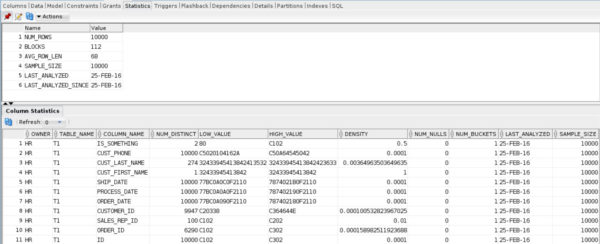
You can check on Oracle statistics in the GUI, and see that they provide pretty commensurate information to SQL Server’s statistics.

That's a thick milkshake.
That’s a thick milkshake.

I’ll revisit this down the line

But there’s a lot I want to explore here, first. Hopefully you learned a few things along the way. I know I did writing this!

Thanks for reading!


Getting Started With Oracle Week: NULLs and NULL handling

Oracle
33 Comments

We’re not so different, you and I

In any database platform, you’ll have to deal with NULLs. They’re basically inescapable, even if you own an island. So let’s compare some of the ways they’re handled between Oracle and SQL Server.

Twofer

If you take a look at the two queries below, there are a couple things going on. First is the NVL function. It’s basically the equivalent of SQL Server’s ISNULL function, where it will return the second argument if the first is, well, NULL.

The second thing you may notice is the ORDER BY. In here we can do something really cool, and specify whether to put NULLs at the beginning, or end, of our results. SQL Server will just put them first, for better or worse. If you want to put them last, you need to do some dancing with the devil. Or just use a CASE expression in your ORDER by.

I love stuff like this, because it gives you easy syntactic access to presentation goodies.

There’s another function, NVL2, which I haven’t quite figured out a lot of uses for, but whatever. It takes three arguments. If the first argument is NULL, it returns the third argument. If the first argument isn’t NULL, it returns the second argument.

The results end up something like this below.

I just learned how to do this, too.

There’s also NULLIF! Which does what you’d expect it to do: return a NULL if the two arguments match. Otherwise, it returns the first argument. Dodge those divide by zero errors like a pro.

At long last, not a Rump

Last, but certainly not least, is the lovely and talented COALESCE. It’s a dead ringer for SQL Server’s implementation, as well.

Is it me you're looking for?
Is it me you’re looking for?

Intentionally left blank

NULLs happen to the best of us. Three-valued logic can be sneaky. I prefer to use canary values when possible. Those are values that could never naturally occur in data (think -999999999 or something). Again, this isn’t meant to be an exhaustive piece on NULLs and NULL handling, just a toe in the water for any SQL Server people who need to start working with Oracle.

Thanks for reading!


Getting Started With Oracle Week: Aggregating

Oracle
11 Comments

I probably should have written this one first

Most of these are exactly the same as in SQL Server. There are a whole bunch of interesting analytic functions, most of which should look pretty familiar to anyone who has spent time querying SQL Server. Most, if not all, can be extended to be window functions, if you need per-group analysis of any kind.

Counting!

All of this works the same as in SQL Server.

Oracle does have something kind of cool if you only need an approximate count of distinct values. Don’t ask me why there isn’t a similar function to get an approximate count of all values. I wasn’t invited to that meeting. This is good for really large data sets where you just need a rough of idea of the values you’re working with.

Sums and Averages

Fun fact: under the covers, AVG is just a SUM and a COUNT anyway.

The Max for the Minimum

You also have your MIN and MAX functions, along with the HAVING clause, to filter aggregates.

Something not boring

The LISTAGG function is something I’d absolutely love to have something like in SQL Server. It takes column values and gives you a list per row, delimited by the character of your choice. It’s pretty sweet, and the syntax is a lot easier to bang out than all the XML mumbo jumbo in SQL Server.

And the puppies is staying, yo!

For reference, to do something similar in SQL Server, you need to do this:

Good luck remembering that!

SQL is a portable skill

Once you have the basics nailed down, and good fundamentals, working with other platforms becomes less painful. In some cases, going back is the hardest part! My knowledge of Oracle is still very entry level, but it gets easier and easier to navigate things as I go along. I figure if I keep this up, someday I’ll be blogging from my very own space station.

Thanks for reading!


Getting Started With Oracle Week: Joins

Oracle
4 Comments

Oh, THAT relational data

Thankfully, most major platforms (mostly) follow the ANSI Standard when it comes to joins. However, not all things are created equal. Oracle didn’t have CROSS and OUTER APPLY until 12c, and I’d reckon they’re only implemented to make porting over from MS easier. It also introduced the LATERAL join at the same time, which does round about the same thing.

Here’s some familiar joins to keep you calm.

That was boring, huh? It’ll all work just as you expect it to. But we’re not done! Oracle is not without a couple neat things that it wouldn’t hurt SQL Server to implement.

Using, Naturally

I think these constructs are pretty neat. The first one is a Natural Join. This is kind of like Join Roulette, in that Oracle will choose a join condition based on two tables having a column with the same name.

The other slightly more exotic join syntax I like uses USING to shorten the join condition.

You can extend the USING syntax to join multiple columns, too, which I like because it cuts down on typing.

But what else?

Oracle also has some pretty fancy syntax for dealing with hierarchies. Even with all the options, it’s about 6 universes ahead of the recursive CTEs you have to bust out in SQL Server (if you’re not using a hierarchyid, which you’re probably not).

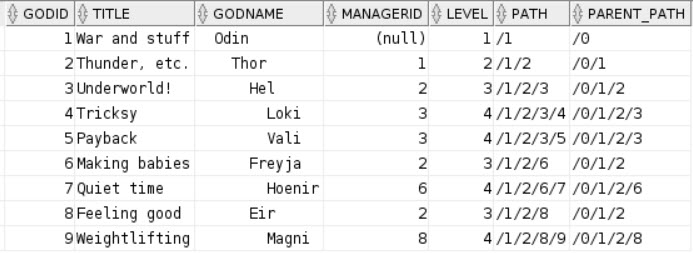
Here’s the Norse God table I used to show that SQL Server’s recursive CTEs are still serial in 2016:

Ignoring the somewhat awkward looking inserts I was experimenting with, that’ll get you the table structure. In Oracle, CONNECT BY is used to generate hierarchies. There are many built-in components that give you information about the structure of your hierarchy as well.

Let’s talk about some of that!

  1. The first thing you may notice is that we use LPAD to give an indented structure to the names to make the chain of command more obvious.
  2. Both LEVEL and SYS_CONNECT_BY are built in components you can use to see which step in the hierarchy you’re on, and how you’ve stepped through it so far.
  3. I’m also using STARTWITH to dictate which part of the hierarchy I want to begin recursion at. Since this is a small table, I want everything. I can either specify GODID = 1, or MANAGERID IS NULL. In this case, both indicate Odin.
  4. Here comes CONNECT BY PRIOR, which joins GODID to MANAGERID, which is the point of the whole thing.
  5. Lastly, ordering SIBLINGS by either GODID or MANAGERID NULLS FIRST gives us our desired display order.

Here are the results!

Any similarity to Marvel characters that might get us sued is absolutely ridiculous.

JOIN ME NEXT TIME

Just kidding, I wouldn’t do that to you.

Having standards is important. Especially if you drink a lot. The ANSI Standard gives us a good starting point for writing code that’s portable across multiple systems. Though it will (likely) never be flawless, joins are one area you can worry a bit less about.

Thanks for reading!


Getting Started With Oracle Week: Generating Test Data

Oracle
10 Comments

Bake your own cake

Pre-cooked example databases are cool for a lot of things. The first being that everyone can have access to them, so they can follow along with your demos without building tables or inserting a bunch of data. If you mess something up, it’s easy to restore a copy. The main problem is that they were usually designed by someone who didn’t have your issues.

Most of the time it only takes a table or two to prove your point, you just need to cook up some data that doesn’t have anyone’s real information in there. With Oracle, you have a couple different options.

SQL Server-ish

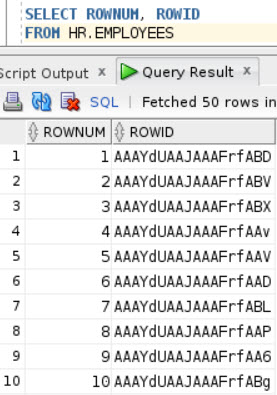
Baked into every Oracle table I’ve queried thus far, are two intrinsic columns: ROWID and ROWNUM. The ROWNUM column, at least, gives us the ability to skip over generating sequential numbers with the ROW_NUMBER function. The ROWID column is a confusing string of nonsense.

AAAY LMAO
AAAY LMAO

To die for

Have you ever wished you could create a table… Let’s say a demo table! And it since it’s of no consequence, SQL just wouldn’t log any changes to it? Or even that it ever existed? I mean, we have minimal logging, but what if we wanted no logging at all? Minimal logging doesn’t always work, and requires a few pre-requisites, and, well, you get the idea. If it’s high tide on St. Patrick’s Day and Jesus is eating Cobb Salad with a T-Rex in a rowboat, your inserts will be minimally logged.

Oracle can do that, with the magic of NO LOGGING!

I tried to make the rest of the code as close to the usual demo table SELECT INTO stuff I normally do.

  • ID is an incrementing integer
  • ORDER_ID is a random number between 1 and 10,000
  • SALES_REP_ID is a random number between 1 and 100
  • CUSTOMER_ID is a random number between 1 and 1 million
  • The three date columns use the ROWNUM to subtract a span of days, and then a static number of days are added to put a little distance between each activity
  • The two name columns are based on substrings of GUIDs
  • CUST_PHONE is a random 9 digit number
  • IS_SOMETHING is a random 1 or 0 bit column

Easy enough! And quick. 10,000 rows get inserted on my woeful VM in 0.297 ms. That’s about as long as it just took you to blink.

Of course, there are some built in Oracle goodies to generate data a little differently, but they’re (in my mind, anyway) a bit more complicated. They rely on the DMBS_RANDOM functions. There’s a lot you can do with them! The documentation is right over this way. In particular, the STRING subprogram can give you all sorts of nice junk data.

Here’s a quick example using DBMS_RANDOM.

Quick example, he said! Alright then! The date stuff in here took me quite a while to get right. If you follow along, you have to: cast the truncated value from a range between the current system date cast as a string in Julian date format as a Julian date and… I think there’s more? I forgot this as soon as I went to bed.

But the number and string stuff is really easy! Feeding in a range of numbers is super simple. The string stuff is just one upper case character with a random-length string appended to it. These look more like names that GUID substrings, but are probably only useful to anyone trying to come up with names for an entire colony of aliens.

I apologize if your name is in here.

This insert took 1.466 seconds, plus who knows how long getting date ranges figured out. Julian! JULIAN! Why I never.

So now we have some tables

We should probably add some indexes, and figure out how to join them, huh?

Those sound like good future blog post topics.

Thanks for reading!


SSMS 2016: It Just Runs More Awesomely

SQL Server
71 Comments

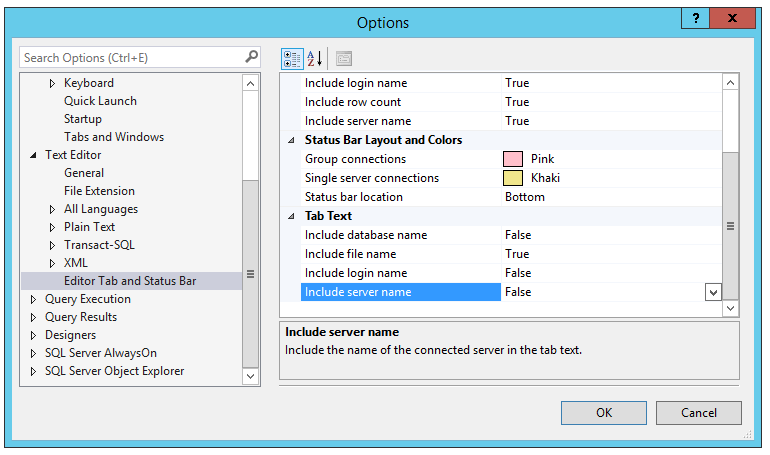
Step 1: configure SSMS to only show file names on the tabs. Click Tools, Options, Text Editor, Editor Tab and Status Bar, and set all of the tab texts to false except file name. After all, not like all this stuff fits on the tab.

SSMS tab name configuration
Step 1: SSMS tab name configuration

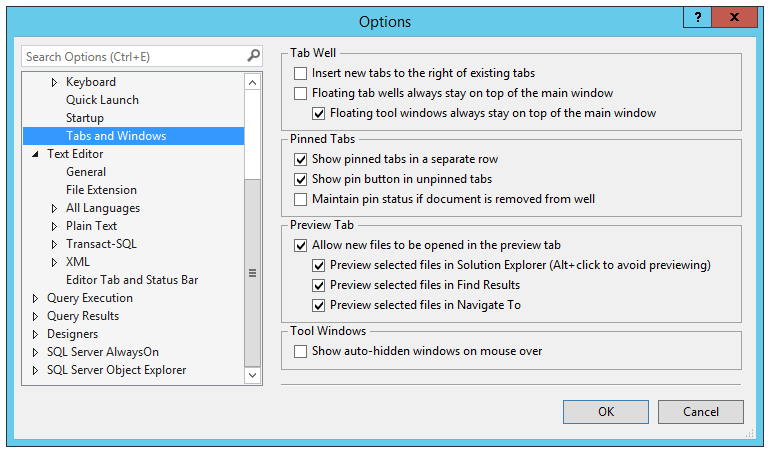
Step 2: while you’re in Tools, Options, click on Tabs and Windows. Check the box for “Show pinned tabs in a separate row.”

Step 2: Put pinned tabs in a separate row

Step 3: start new windows for your favorite utility queries, and save them with the right names. For example, I have a window open just for sp_WhoIsActive, so I save that as sp_WhoIsActive.sql. It doesn’t actually have the sp_WhoIsActive CODE in that window, just a simple EXEC sp_WhoIsActive.

Then pin those tabs – click the little pin on those windows, and voila, they show up in their own row:

Presto - named, pinned tabs in their own row
Presto – named, pinned tabs in their own row

Go get SSMS 2016. It just runs more awesomely.


Is your SAN’s cache killing tempdb?

SQL Server, Storage, TempDB
3 Comments

Let’s start with definitions

Many SANs have caching built in. What kind of cache is important, because if you’re dealing with non-SSD storage underneath, you could be waiting for a really long time for it to respond.

Let’s start with some definitions of the most popular caching mechanisms available for SANs. I’m not going to say ‘only’, because some vendor out there might have some proprietary stuff going on that I haven’t heard of.

Write-through: Much like synchronous Mirroring or AGs, writes have to be confirmed twice. They’ll write to the cache, but they’ll also write to the underlying disks, and then throw a secret handshake saying that it’s committed and all is well. This SUCKS if your underlying pool of disks are slow, saturated, or otherwise abused.

Write-around: Basically does this to the cache, skipping it entirely, and writing to disk. This can be fast, but then any data you write directly to disk will have to be read into cache when something needs it. If your application relies heavily on recent data, this can be a really lousy choice.

Write-back: Like good ol’ asynchronous commits, this writes to the cache, says everything is cool, and eventually writes it to hard storage. That means your most recent data is in cache and available, but maybe not on the most stable ground just yet. If you have slow disks underneath, and the power goes out before it writes to them, you could potentially lose some data here, unless your cache has some resiliency built in. So be careful what you wish for, here.

Why tempdb?

Because you people beat so much tar and sand out of it that you’re either going to strike oil or find a new dinosaur. If writes here are slow; if SQL is waiting more than 1 second for data to just write out to here, all of your subsequent reads are at the mercy of those writes.

  • What’s the sense in tuning a query that will always have overhead writing to tempdb?
  • Users complain that inserts are slow because you have a trigger (you know those use tempdb, right?) that stalls out for three seconds at run
  • Your maintenance (DBCC CHECKDB, indexes sorted in tempdb) can’t finish because your tempdb write stalls are the envy of only a Gutenberg Press.

The moral of the story

If you’re using local storage, there’s no excuse for not going SSD.

If you went out and got yourself an expensive SAN, and now you can’t afford to put good drives in it, you’re SAN poor and you made a bad choice.

If you run tools like CrystalDiskMark or DiskSpd, you’re using SQL’s DMVs to check on disk performance, or your monitoring tool is showing bad write latency, check to see what kind of caching you’re using. Start asking questions about the underlying drives, the SAN connections, and ask for numbers from your SAN admin. Downloading more RAM won’t fix slow writes!

Thanks for reading!

Brent says: Intel’s speedy 400GB PCI Express SSDs are down in the $700 range. Just do it.


#DellDBADays 2016: What Would You Do with Unlimited Hardware?

Humor
94 Comments

Last August, we got the team together in person for Dell DBA Days. We ran all kinds of interesting experiments with SQL Server, and shared the results with you via live webcasts.

https://www.youtube.com/watch?v=Gn43sOLrcVs

You can watch our recorded episodes from last year – I’d highly recommend the last one, Watch SQL Server Break and Explode. Erik showed how to make a SQL Server crash instantly and reboot. Kendra demonstrated what happens when you run thousands of databases in an Availability Group. Doug and I yanked hard drives out of a server one by one to show how RAID controllers react.

This August, we’re heading out to Round Rock again – and you can be a part of it. What experiments would you like to see us run on SQL Server 2016? We’ve got all the hardware a DBA could want, and the only limit is your imagination.

If we pick your idea (and we may pick more than one!), we’ll give you a free Everything Bundle, plus credit you on air during the webcasts. Leave your idea in the comments – let’s see what you’d do if you were let loose in the Dell data center.

Update – let’s focus on experiments where you can actually learn something helpful. Think about what we could test in a lab that might change the way you administer databases, like whether TempDB still really needs 8 files in the year 2016, or what the impact of Transparent Data Encryption might be on a particular workload. We don’t need your help coming up ways to set SQL Server on fire. 😉


SQL Server 2016 and the Internet: Forced Updates, Phoning Home

SQL Server
91 Comments

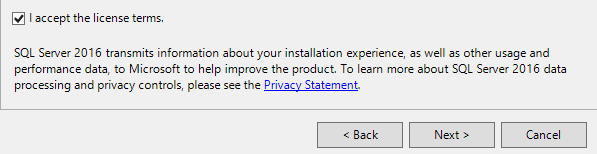
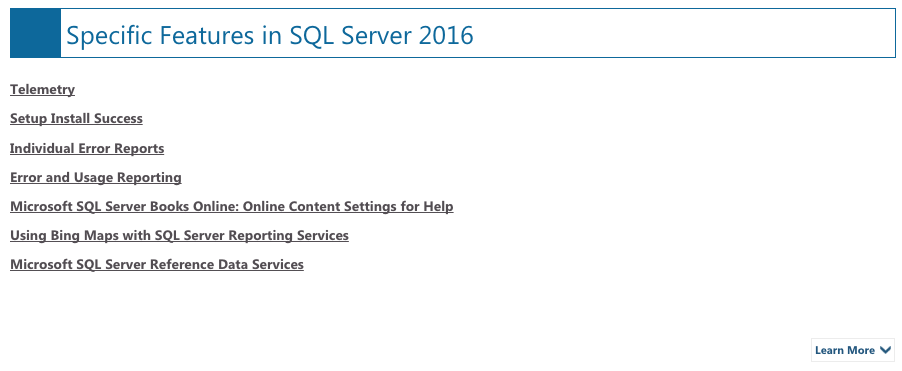
SQL Server 2016’s End User License Agreement (EULA) contains a couple of surprises for those who let their SQL Servers connect to the internet. No, I don’t mean where the Internet connects to you – I mean where the SQL Server can reach the internet, like open a web page.

Issue #1: You may get updates whether you want them or not.

You probably shouldn’t run 2016 side-by-side with older versions because:

IMPORTANT NOTICE:  AUTOMATIC UPDATES TO PREVIOUS VERSIONS OF SQL SERVER.  If this software is installed on servers or devices running any supported editions of SQL Server prior to SQL Server 2016 RC (or components of any of them) this software will automatically update and replace certain files or features within those editions with files from this software.  This feature cannot be switched off.  Removal of these files may cause errors in the software and the original files may not be recoverable.  By installing this software on a server or device that is running such editions you consent to these updates in all such editions and copies of SQL Server (including components of any of them) running on that server or device.

You consented.

Issue #2: Your SQL Server phones home to Redmond by default.

We collect data about how you interact with this software. This includes data about the performance of the services, any problems you experience with them, and the features you use…. It includes information about the operating systems and other software installed on your device, including product keys. By using this software, you consent to Microsoft’s collection of usage and performance data related to your use of the software.

Before 2016, you had to manually opt-in by checking a checkbox during installation.

With SQL Server 2016, there’s no checkbox – you’re opted in by default.

I’m actually a huge fan of app telemetry – sending crash reports and usage data back to the application developers in order to help make the app better. I want developers to know how I use their apps, because I want them to improve the parts of the app that I use the most. Heck, I’d be fine if SSMS turned on the microphone while I worked, and then did sentiment analysis. (They would see a very high number of four-letter words tied to the term “IntelliSense.”)

Here’s the relevant part of setup:

If you install it, it's phoning home
If you install it, it’s phoning home

The Privacy Statement links to https://www.microsoft.com/EN-US/privacystatement/SQLServer/Default.aspx, which at first glance looks like it has some juicy hyperlinks, but they’re not links. You have to click on the Learn More link at the bottom right:

Would you like to learn more?

How to Turn Off the Phone-Home Option for Standard and Enterprise Edition

That above link explains:

Enterprise customers may construct Group Policy to opt in or out of telemetry collection by setting a registry-based policy. The relevant registry key and settings are as follows:

Key = HKEY_CURRENT_USER\Software\Microsoft\Microsoft SQL Server\130

RegEntry name = CustomerFeedback

Entry type DWORD: 0 is opt out, 1 is opt in

Be aware that editing the registry, much like the Wu-Tang Clan, is nothing to, uh, mess around with.

Issue #3: You can’t Turn Off the Phone-Home Option for Developer, Express, and Evaluation Editions

Jason Ash points out that the KB 3153756 says:

You can disable the sending of information to Microsoft only in paid versions of SQL Server. You cannot disable this functionality in Developer, Enterprise Evaluation, and Express editions of SQL Server 2016.

I’m curious to see how customers react to these new changes. I bet in the days of phone app telemetry, folks are okay with it. I certainly am – as long as we don’t find out that things like memory dumps with end user queries (especially insert statements) are making their way to places unknown.

Update 2016/06/01 – Microsoft’s Jeff Papiez points out KB 3153756: How to configure SQL Server 2016 to send feedback to Microsoft. That KB explains the registry changes required to turn off telemetry, and also lists a couple of sample DMV queries whose results could get sent back to Microsoft.

If you believe you should be able to disable phone-home telemetry feedback for Developer, Express, and Evaluation Editions, vote for this Connect item.


First Day Deal Breakers

Starting a new job can be scary

If you’re not already established in your field, don’t know the company all that well, or taking on a role with a higher level of responsibility, it’s totally okay if you start drinking in the parking lot. Just kidding! Start drinking at home, that gives you more time to drink and bet on horses. Lifehack!

Assuming you make it into the office and don’t spend your day betting on the pony with the best name, and HR doesn’t immediately hand you substance abuse pamphlets, you begin your glorious career as Employee #2147483647. Hooray.

But will it last? Or are there things that may have you hastily editing your resume and angrily calling your recruiter by lunch?

Office Oddity

I’ve had some strange things happen to me when I started jobs (sober, I promise) that let me know exactly how long I’d be sticking around.

  • Boss wasn’t sure a second monitor was in the budget
  • SA password on the whiteboard by the developer cubicles
  • IT contractor passed out in the hallway outside the door

First Day, Last Day

Feel free to share in the comments if you’ve had any first day deal breakers. If you’ve ever:

  • Quit by lunch
  • Looked at glassdoor.com after it was too late
  • Found out you replaced a dead person

This is the right blog post for you!

All of these things I do
To get away from you

Altered Images – “I Could Be Happy”

Brent says: I was interviewing for a DBA job, and the final interview took place in their offices. I took a tour, and one of the IT rooms was loaded with a couple dozen student desks. Each desk was barely big enough for a single small flat panel, a keyboard, and a mouse. Any team member could reach out their arms sideways and touch the person on either side of them. I didn’t even care what their jobs were, or if I’d be working in that room – I was done right there. Any company that treats any of their people that way, isn’t somewhere I wanna work.


Preparation, Is It In You?

Backups aren’t just for databases.

BitLocker Blowup
Are you ready for the BitLocker of Doom?

Back in 2012, I started on a journey of sharing my technical knowledge by giving technical presentations. Now this might scare the living jeepers out of most people, but I found it exciting and fulfilling. Since then, I try to speak at ten events a year. Recently, I had the opportunity to speak the most awesome SQL Saturday Houston. Everything lined up for this to be a slam dunk. I was scheduled to give a presentation on Entity Framework, a presentation that I had given many times including the PASS Summit last year.

The afternoon before the event I was in my hotel room about to rehearse the presentation one more time. I take out my laptop, hit the power button, and nothing. It doesn’t boot, it just sits there. I whip out the power cord, plug it in to the laptop and it boots! Disaster averted. As it turns out the battery totally failed. Now, I could have used the laptop as is and everything would have gone just fine but I pulled out a second laptop, started it up, and rehearsed from that. I didn’t have to install anything. I didn’t have to restore a database or move files. I just opened Visual Studio, SSMS, and PowerPoint and I was ready to go. When you’re a speaker you need to be ready for anything, especially hardware problems.

So in celebration of my near disaster here are some of my tips for a disaster proof presentation.

BRING A SECOND LAPTOP

It’s going to happen at some point. Your machine is going to die. Sad but true. You don’t know when, you don’t know when. So have a second machine ready when you present. Have all of your demos and decks ready to go before you walk on stage. I like to put the second machine in sleep mode so that if I have to switch to it, it’s up in seconds. If you don’t have a spare laptop lying around, see if you can borrow one from work or from a friend. Although now that I think about it, if a friend is going to let you borrow a laptop that’s a great friend. You should take them to a nice dinner.

USE A FILE SYNCHRONIZATION SERVICE

I’m finding file synchronization service like Dropbox or OneDrive invaluable these days. These services serve three functions: 1. Puts a copy of your files in the cloud. I hear backups are good. 2. Allows you to share your files between different machines. 3. Allows you to share and collaborate with others. That’s all well and good, but the short of it is that when you use these services when you update a file on one machine, it will sync the changes to another. So when you update that PowerPoint presentation or that demo script you can be sure it will make it to your demo machine.

CREATE A DEMO FREE BACKUP PRESENTATION

Ah, the infamous demo failure. It’s the bubonic plague of technical conferences. Don’t fall victim to this epidemic. Wash your hands after…wait, that’s not it. Create a backup presentation that has screenshots of your demo. This way when the demo plague hits you can make a nice easy transition to your backup deck with the screenshots like a pro. Some presenters have even recorded their demos and used the videos as a backup. Sounds like a good way to spoof cloud presentations if you ask me.

KEEP DEMOS AND PRESENTATION FILES ON A THUMB DRIVE

This may be overkill but hear me out. This is your last line of defense. The line must be drawn here! This far, no further! When all else fails, this is your secret weapon. You now have a portable copy of your presentation. Beg to use someone’s machine, pop in the thumb drive, and you go get ’em tiger!

Brent says: at a recent conference, another speaker was struck by disaster in the prep room: his video card died. I handed him my spare laptop, and off he went. So don’t just think of your spare as your own spare – it can help others, too.


[Video] Office Hours 2016 2016/05/25 (With Transcriptions)

This week, Angie, Erik, Tara, and Richie discuss Veeam, replication, setting up alerts, using multiple instances, and much more.

Here’s the video on YouTube:

You can register to attend next week’s Office Hours, or subscribe to our podcast to listen on the go.

Office Hours Webcast – 2016-05-25

Does turning on trace flag 2861 cancel out optimize for ad-hoc workloads?

Angie Rudduck: Let’s go with Gordon for the first question of the day.

Erik Darling: Oh no.

Angie Rudduck: He wants to know if switching on trace flag 2861 which is cache zero-cost plans he thinks, will that cancel out enabling optimize for ad hoc workloads?

Erik Darling: No, it shouldn’t because optimize for ad hoc workloads affects plans differently. Optimize for ad hoc the first time you run something you’ll get a stub. The next time it will cache the actual plan. So the zero-cost plan cache engine should not change that behavior. You can test it though if you don’t believe me.

Angie Rudduck: How would you test that?

Erik Darling: Run a zero-cost plan more than once.

Angie Rudduck: Hopefully that answered your question, Gordon.


Why am I getting update cascade errors?

Angie Rudduck: We’ll just go down the line. Wes. He is trying to use update cascade and he’s getting an error about it not being able to cascade directly. When he takes it away, it works. Is there a way to get around this error?

Erik Darling: Yes. Stop having foreign keys reference in a circular motion because it will just try to delete in a big, horrible ouroboros until all your data is gone.

Tara Kizer: So you won’t be able to do that specific foreign key. You may need to handle the deleter, the update, in a store procedure instead or maybe a trigger. We don’t recommend foreign keys, cascading foreign keys, anyway.

Erik Darling: Why not?

Tara Kizer: I looked at your slide. The serializable isolation level, the most pessimistic isolation level it is.

[Laughter]

Erik Darling: That’s right. Wes, there’s another hidden gotcha to those foreign key cascading actions. That’s whenever they run they take out serializable locks on all the tables that have the cascading action happening on them. So if you’re doing a large deleter update or whatever with a cascading action, you could take out some pretty heinous locks on your objects that really block other processes out. So be very careful when using those.

Angie Rudduck: He’s so smart.

Erik Darling: Nah.

Richie Rump: From an architecture perspective, I’ve always wanted to be explicit with what we’re deleting and/or updating. So from an architect’s perspective, that’s why I just never used any of that stuff. At least not since Access 2.0.

Tara Kizer: Access 2.0.

Angie Rudduck: I didn’t know that was a thing. Moving along.

Richie Rump: You weren’t born yet, Angie.

Angie Rudduck: Speaking of born, tomorrow is my birthday if you didn’t see calendars on Brent’s calendar.

Erik Darling: Happy tomorrow birthday because I’ll forget tomorrow.

Angie Rudduck: Don’t worry I will unless I look at my calendar.

Erik Darling: Brent didn’t send the card for me?

Angie Rudduck: Yeah, we’ll blame Brent. He’s not here.


How do I get around CRLF characters in an input file?

Angie Rudduck: J.H. has a situation. “A user entered a carriage return in a free form text field. Now trying to bulk insert along with format file relevant flat text file.” How can he skip the unwanted carriage return and use only the last column carriage return for that particular row?

Tara Kizer: You just need to pick a different delimiter, right?

Erik Darling: Right but I think the problem is that the delimiter is a carriage return for all the other rows.

Tara Kizer: You’re right.

Angie Rudduck: Can you just edit the file and delete that carriage return?

Erik Darling: Yeah, what Angie is saying, I would probably do a process that pre-cleans files for things like that.

Richie Rump: Yeah you would encode it in a different string type or whatever, like basic C4 or something or other.

Tara Kizer: I wonder if he could get around it by quoting the column so that the carriage return is in between quotes so it won’t read it. I’m not sure though.

Angie Rudduck: You’d still have to edit the actual file before. He’s going to have to do some processing on the file before it goes anywhere it sounds like.

Tara Kizer: But I wonder if you don’t need to do it though. If you select the option to—or not select the option obviously since it’s… well, okay, yeah.

Richie Rump: By quoting it with a pipe or something like that?

Tara Kizer: Something so that it’s surrounded, but yeah, the file does need to be modified to include that. It might just be easier just to get rid of the carriage returns and not allow those carriage returns from the application side.

Richie Rump: Yeah, unless you need them.

Tara Kizer: Yeah.

Angie Rudduck: Carriage returns.

Erik Darling: Yeah, as someone who’s done a lot of horrible file loading in his lifetime, I always try to make my delimiters as unlikely to happen in real life data as possible, either like double pipes or something like that just really, you’re not going to see it pop up too often.

Angie Rudduck: That’s a smart idea.


Could Veeam replication cause 8TB databases to go into suspect mode?

Angie Rudduck: All right, we’ll move on. Eugene wants to know has anyone seen issues running Veeam replication interfering with large SQL Server databases where the databases go into suspect mode? They have an 8 terabyte database and it seems like “each time our server team has enabled Veeam replication it caused issues where the 8 terabyte database goes offline.”

Erik Darling: I think it sounds like what’s happening is it’s freezing IO for a long time. A frozen IO makes SQL think that the database perhaps the drive that it’s on is unavailable and that, you know. So I would check your SQL error log and I would look for frozen IO, I would search for frozen IO and see how long the IO is being frozen for. Because I think if it happens for over a certain amount of time, SQL just starts assuming that the disk that the file is on isn’t available and it just says, “Nope. Not here.” A sort of like a similar thing happened, I’m sure, Tara, you’ve seen it where if a log file goes missing on a drive like that.

Tara Kizer: Mm-hmm.

Erik Darling: It will go right into suspect mode.

Tara Kizer: I wonder if it’s due to the database size because it’s having to freeze it for so long to take a snapshot of an 8 terabyte database. Just might be something that you just can’t do due to the size of the database. I would contact the vendor and see what they say as far as database size and how long that snapshot is going to take.

Angie Rudduck: I learned a trick when you’re search for your error log for your SQL Server error log. We always look for frozen but then if you see it’s frozen how long before it resumes. So you don’t see the resumed ones. But if you search for resume, you see both the frozen and the resume responses. So gives you a little bit more insight to how long your database files were really getting held up.

Tara Kizer: Yeah and it should be less than a second that IO is frozen. I mean we’re talking milliseconds. I don’t know about an 8 terabyte database though.


Can I do both Veeam full backups and native SQL Server full backups?

Angie Rudduck: Yeah, well we’re just going to keep going with Veeam because Sean has a question as well. They have a maintenance plan, the full backup, running every day as well as Veeam doing backups every day. “How do these two tasks affect logs? Don’t both tasks truncate logs? Should one be scheduled before the other? Or should one not be done if the other one is being done?”

Tara Kizer: No, they don’t impact the logs because the logs care about LSNs. You can use either of them too, either of the full backups to do your restore. You just have to make sure you get the right log sequence. It does impact differentials though so if the Veeam backups aren’t using the copy only option, the differential base could be a Veeam backup or the regular native backup. If you’re not doing differentials then it doesn’t matter.

Erik Darling: Yeah. Only transaction log backups will truncate the log file, nothing else will. So backups don’t do that.

Tara Kizer: Right.


Should I run the publisher and distributor together, or the distributor and subscriber?

Angie Rudduck: All right. Paul says, “Currently at my job they are running the distribution service off that same database server that the database is on. I’m going to propose an additional one replication to a reporting server, the original replication is merge. What considerations are there when you do this? Would it be better to run a separate distribution server?” Tara.

Tara Kizer: Yes, definitely.

Angie Rudduck: We all know that answer is yes.

Tara Kizer: The best practice is the publisher needs its own server. The distributor need its own server. The subscriber needs its own server. The distributor does a lot of work and it should not be on the same box with the publisher especially. When I’ve had to share servers, I’ve put it on the subscriber but it really depends upon the load of those boxes. You are going to need licenses for the distributor to be on another server so that’s something to take into consideration but the best practice is that they’re all on their own boxes.

Erik Darling: Heck yeah.

Angie Rudduck: What Tara said. Justin, I will not be turning 21, thank you. I am a tiny bit older than that.

Richie Rump: 19.

Angie Rudduck: I will be celebrating my one and only 29th birthday. Thanks very much.

Tara Kizer: We can do the other replication question from David.

Angie Rudduck: Yeah? All right. I have to scroll way up for that one now.

Tara Kizer: Okay.


How do I know when replication’s initial load is done?

Angie Rudduck: David said they’re setting up replication. How does he confirm that a data loads replication is complete so he can start the job to load the app dbs?

Tara Kizer: So what you can do is you in Management Studio object explorer, expand replication, local publications, then you’ll see your publication. Right click on it and you can do the view snapshot agent status. That’s the snapshot that is snapshotting the publisher. Also right click on the publication for view log reader agent status. Then you get to go into right click on the replication and launch replication monitor. I’m pulling mine up right now. Mine is in failure. I created one as a test. But after you pull up replication monitor, you navigate to the publication and then you click on the all subscriptions tab on the right pane. Then double click on the row that shows up there. Then you could look at the publisher to distributor history, distributor to subscriber history, and you will be able to see where it’s at in the process. You can also insert a tracer token into the publisher. It’s not a row in the table but it’s like a test row basically and once it makes it to the subscriber you know the whole process is complete.

Angie Rudduck: You’re so smart about replication.

Tara Kizer: I don’t know about that.

Angie Rudduck: I’m so glad we have you around.

Tara Kizer: There are definitely smarter people.

Angie Rudduck: To answer all these questions for these poor souls who still have to use it.

Erik Darling: It’s nice because I get to zone out while you…

Angie Rudduck: I know, I’m like, I’ll read the questions to see who should answer it next.


How do I find out all SSIS packages that ran under a specific login?

Angie Rudduck: Nate wants to know if there’s a way to find all SSIS packages that have been executed under a specific server login. He’s trying to remove this login because the employee has left the company. Anybody got any suggestions?

Tara Kizer: If you’re using the SSISDB catalog you probably can go through those tables which has information. If it’s not using that, there is a logging table in msdb somewhere, I don’t remember what it’s called but there is a table there. So you’re going to have to do some sleuthing here to figure out which tables are but these are things that people have blogged about so you should be able to find which tables they are.

Erik Darling: Yeah, we don’t do a ton of work with SSIS in these parts. So if you really want a better answer for that, you might want to go to dba.stackexchange.com and ask around there if nothing in the great blog world turns up for you.


When did my AG last fail over?

Angie Rudduck: Tammy wants to know if there is a way to use T-SQL to determine when databases and availability groups failover last. She’s been looking through DMVs but hasn’t found anything.

Tara Kizer: Yes. I don’t have the DMVs memorized but, yeah, it’s in there.

Angie Rudduck: It’s dmv_ag_failover. Just kidding. Don’t really go to that.

Tara Kizer: I’m pretty sure at least I’m thinking about failed over last. If not, search through the error log because it’s definitely in there.


Are there any drawbacks of setting up SQL Server alerts?

Angie Rudduck: A. Deals wants to know if there are any impacts of setting up alerts from 17 through 25, 823, 824, 825, and 832. Did you get that off of our website?

Erik Darling: I think the bigger impact would be if you don’t set them up.

Angie Rudduck: Yeah.

Erik Darling: And then one day your database is corrupt and you don’t know how long or what happened to it or any of those things.

Tara Kizer: I think that our link says 19 through 25. I’m not too sure what you’re going to get for 17 to 18 so you might get too much to work on. I’m not sure about 832 either. I know 823 to 825 are in there but I’m not positive about 832.

Erik Darling: Yeah, I think if you turn on alerts for 17 and 18 you’re going to get a lot of stuff for failed logins and some of the lower lever old SQL Server errors. So we try to stick to 19 through 25 which are the severe ones and then 823, 824, and 825 which cover the hard and soft IO errors that come along with corruption. What about that one from Dennis?


Should I stack multiple instances on the same physical box?

Angie Rudduck: Dennis, all right. Dennis says he’s got an opinion question. Using SQL 2008 R2 Enterprise what’s better 5 by 8 to 12 cores and 128 gigabytes of RAM or one 60 core with 1 terabyte of RAM server? Oh I see.

Erik Darling: So I would only assume that you’re talking about stacking a bunch of instances on the server which we are all vehemently opposed to. Stacked instances are horrible ideas.

Angie Rudduck: Now if you have a bunch of Lego servers and you can break them apart and have five different servers or one mega Transformer server and you’re looking at spec’ing this out before purchasing, maybe there’s some more questions. What do you guys think if he’s not instance stacking? If he’s legitimately just spec’ing out, should he buy one server or five servers? You should buy five servers if you need five instances.

Erik Darling: Right. So it sounds like you’re either going to stack instances or you’re going to stack applications together on a single instance. Either way I’m opposed to and very. If you have no choice then you have no choice. Or if like you know you’d have like your crappy app server that you stick a whole bunch of like internal apps on. That’s one thing. Servers at the size that you’re talking about though, I’m looking at very special, specific hardware for each one. So if there’s a performance problem with one database or one application, I’m troubleshooting a performance problem with that one database and that one application. Not for that one database or one application and the 28 that you have surrounding it. Make life easier on yourself. Separate things as much as you can.

Angie Rudduck: Dennis follows up saying that he was gifted two of the big servers and now he has to find a use for them. If you have spare hardware sitting around…

Erik Darling: Dev servers.

Angie Rudduck: Yeah, staging. Dev test environments.

Erik Darling: I’ll forward you a DBCC_CHECKDB this way.

Angie Rudduck: Because you’re doing that, right? Nightly? Full checks?


What’s a good way of encrypting data in a database?

Angie Rudduck: What’s a good way of encrypting data in a database? Cameron wants to know.

Erik Darling: Transparent data encryption if you’re on Enterprise edition. If not, there are the various third-party tools out there. I believe one from a company called—well it used to be called GreenSQL now it’s called something I can’t remember the name of, Hexa… Dexa… Donkey something. They changed their name to something.

Angie Rudduck: So look up GreenSQL and see what really pops up.

Erik Darling: Yeah, see what their new name is and if you can remember it and spell it and email, shoot them an email about how to encrypt your database. Unless you’re on Enterprise, then use TDE then you can come back next week and ask us questions about TDE.

Richie Rump: Yeah, I’ve used TDE as well as you know regular third-party or just middleware-type components where we would just encrypt certain parts of data and then throw the encryption stuff into the database.

Erik Darling: Yep.


If I’m having CXPACKET issues, what should I do with MAXDOP?

Angie Rudduck: J.H. wants to know he has a particular database sometimes experiencing frequent CXPACKET. He wants to know if changing MAXDOP recommended—if it’s recommended. If yes, could it hurt performance for other databases running at the same?

Erik Darling: You betcha. MAXDOP, unless you’re on SQL Server 2016 is a server-level setting. So if you change MAXDOP to 1, then you will affect all the other databases. Your best bet is to actually do some work tuning queries and indexes on that database to make sure that the cost of the query stays low enough so that they don’t have frequent CXPACKET problems.

Angie Rudduck: What if he doesn’t have MAXDOP configured at all? Could that possibly be his problem?

Erik Darling: Sure could.

Angie Rudduck: What would you recommend starting out with MAXDOP?

Erik Darling: I don’t know, it depends on how many cores you have, right?

Angie Rudduck: It’s a multi-layered questionnaire.

Richie Rump: Would it be better to just set MAXDOP in a particular query?

Tara Kizer: You could.

Erik Darling: If you change that, sure. If you can change the code, sure.

Angie Rudduck: I like asking questions on questions.


What’s the best isolation level to use with Entity Framework?

Angie Rudduck: Let’s go with developers from Paul. The developers are using Entity Framework to create their application, what’s the best isolation level to use?

Richie Rump: Well what would be the best isolation used without any framework? Same thing?

Tara Kizer: Who is the question by?

Angie Rudduck: Paul. He’s kind of in the middle. Right below all the happy birthdays.

Tara Kizer: I sorted by asker so maybe it will find it.

Angie Rudduck: Oh. So smart.

Erik Darling: There’s really no single best isolation level. It kind of depends on what you end up running into as your application grows and matures. So if you run into a lot of weird blocking and deadlocking and you’ve tried your best to sort it out then read committed snapshot isolation could really help you. Otherwise just leave SQL as is.

Tara Kizer: I don’t think that Entity Framework being used is even related to why you would set the isolation level to be something different than the default.
Richie Rump: Right, exactly. If you are having problems with locking and stuff like that then you need to fix the queries, the Entity Framework queries. Either you need to change the link statement or you just trash the link statement if it’s too complex and then write your own SQL statement to be embedded either in the code or in a store procedure.

Erik Darling: My preference is to have everything in a stored procedure and then just have a new framework called the stored procedure.

Richie Rump: Yeah, it’s up to the team itself. I’ve been on some teams where they didn’t want any stored procedures because they wanted the app to update everything when they do deployments because they’re doing deployments once a day and it’s like, “Oh, okay, we’ll do it that way.” And I’ve been on some other teams where they’re all stored procedures. Where we have thousands of stored procedures sitting out there and everyone is rewriting the same stored procedure over again because they can’t find the old one. So you know, it’s up to the team on how they want to do it.

Angie Rudduck: More horror stories there, Richie?

Richie Rump: Oh, I’ve got many. So many.


I’m getting backup IO errors and CHECKDB errors on my backups.

Angie Rudduck: Let’s move on to Gordon. He says SQL log is reporting VSS backup IO errors and suggesting running DBCC CHECKDB on the VSS backup. Is that relevant and if so, how does he do that?

Tara Kizer: I don’t know how you would do that.

Erik Darling: I don’t think—there’s no way to, currently, to run DBCC CHECKDB on a backup. You would have to just run it on the database itself.

Tara Kizer: You have to restore it.

Erik Darling: Yeah.

Angie Rudduck: Yeah that seems kind of strange. Maybe it’s referring to like what we talked about early about taking your backup, restoring it elsewhere, and then checking db.

Tara Kizer: I’d be interested in the error that is actually suggesting running DBCC CHECKDB on the VSS backups. I wonder if you’re misreading the error. If you can pop the error in the message box, we could take a look at it. We might not be able to answer it though.

Angie Rudduck: Yeah. We’ll see if he gets that error in there.


How can I get a readable replica database without replication?

Angie Rudduck: In the meantime, let’s see what Nate has to say. “Given the complexities and general distaste for replication, what’s the best alternative to maintain a quote ‘read replica type of database’ in Standard Edition?”

Tara Kizer: Wait, I know this answer. Availability groups. Even with Standard Edition you can use synchronous replicas. Enterprise edition gives you asynchronous replicas but I’m right, aren’t I right? That Standard Edition offers synchronous replication? It does not offer synchronous at all?

Erik Darling: No. SQL Server 2016.

Tara Kizer: 16?

Erik Darling: Right. That’s when availability groups came to Standard Edition. They are asynchronous only.

Tara Kizer: That’s what I was trying to remember.

Erik Darling: And you don’t get a readable replica with it. So it really does put the “basic” in basic availability group. So what I would do is sort of depending on how fresh the data needs to be is I would probably try log shipping with a caveat that every x amount of hours people are going to get kicked out so the data can be updated by restoring logs. Or if I’m using mirroring, I’m going to take a database snapshot and go through all the pain of programmatically funneling people off to a different database snapshot.

Tara Kizer: And you have to make sure that you refresh that snapshot on a schedule. Otherwise it’s going to just keep growing and growing. I would actually use replication in this scenario though. Yeah, there are some issues and it can be complex and it takes a lot of time to set up on a large database but it works. If you really don’t like it, move to Enterprise Edition or upgrade to 2016 after it’s released so Standard Edition has the readable secondaries.

Angie Rudduck: Yeah, just because we don’t like replication all the time, it doesn’t mean that it’s not valuable. It just means that it’s not used correctly a lot of the times.

Erik Darling: Yeah, unfortunately a lot of people…

Tara Kizer: And it’s hard to troubleshoot.

Erik Darling: Yeah, there’s that. But a lot of people use it for HADR which it really isn’t a good solution for.

Tara Kizer: I like it for reporting if you can’t use availability groups to do your reporting. You just have to know that you might be spending a lot of time working on replication if that’s the technology you use. It took a lot of my time.

Erik Darling: Yeah, make sure that you are very precise in what you’re replicating over.

Tara Kizer: Yeah.

Erik Darling: If you can put filters on it, put filters on it. If you can get away with only moving certain tables that are necessary for whatever reporting over, only move those tables over. Move as little as possible. Don’t just push everything.

Angie Rudduck: Yeah, that’s good.


Should I disable my SA account, rename it, or both?

Angie Rudduck: Okay, Konstantinos wants to know, auditors are telling them—excuse me, they’re requesting to disable their SA account or to rename it. Is it safe to do either of these?

Erik Darling: Yes.

Angie Rudduck: And when is it the best time to do it? Do you do it in a production environment that is two years old for example?

Tara Kizer: I love that. I mean you’re not supposed to be using the SA account. Disable it. Create a new account and grant that sysadmin or just rename the SA account to something else. Don’t ever use SA. And don’t ever even use this other account. Give it a really complex password, put it in a lockbox, never use it. You should be connecting with your own Windows account or you know if you’re having Windows authentication issues, some other SQL account, but really Windows authentication, you should almost never need the SA account. You don’t really need to do this in a maintenance window unless the other things are using SA which they shouldn’t be.

Erik Darling: Yeah, just a quick word of warning on renaming SA is in the past some SQL updates have broken when SA was renamed because even if the account is disabled it was attempting to do something with the account where it got screwed up so you don’t have to rename it but disabling it is fine.

Tara Kizer: Yeah.


How do I convince my server admin that multiple instances are a bad idea?

Angie Rudduck: All right, I have a good one from Karen. How can she convince the server admin that multiple instances are a bad idea? I’m guessing she means stacked instances.

Tara Kizer: Why do they think it’s a good idea? I mean why do we have to install more? It’s hard to maintain. How are you going to split the resources? You know, memory, CPU, everything is shared. I mean, yeah, you can use Resource Governor and specify our server configurations but I don’t know.

Angie Rudduck: It’s worse performance than it is cheaper, Karen. It will cost them more in headaches for performance, your clients are going to be complaining, than it would be if for instance you had couple VMs and you were being really diligent about not overcommitting your host with resources to all of your VMs.


What’s the right threshold to use for index maintenance jobs?

Angie Rudduck: Let’s see, we’ve got a few more minutes. Did anybody see anybody? I thought I saw one I liked but I’m trying to find it.

Erik Darling: Yeah, there was a Mandy Birch one.

Angie Rudduck: Oh, yes, okay. I didn’t see hers. Mandy wants to know they are trying to determine their optimal thresholds of index fragmentations to use. Deciding for reorg versus rebuilds. They’ve been using the default 5 percent reorg and 30 percent thresholds for rebuilds but they’ve been reading those are probably unnecessarily low. What do you guys recommend? What do we recommend?

Tara Kizer: What are you trying to solve? Is fragmentation really a problem?

Angie Rudduck: Are you on a Standard Edition?

Tara Kizer: Yeah, if you’re on Standard Edition, you’re not going to get online rebuilds so these indexes are coming offline while you’re rebuilding them, but, yeah. I’m not sure why the SQL industry just wants to rebuild their indexes all the time to get rid of fragmentation. It can help you with storage because the more fragmentation you have the more storage it’s using but it’s not helping you with performance. I mean you are getting updated statistics but rebuild indexes less frequently than you probably are doing now and I would set much higher thresholds.

Angie Rudduck: Yeah, I think commonly we say anywhere from 30 to 50 for reorganize and even 60 to 80 percent for rebuilds. Something else I would say is check out Erik’s blog about just updating stats.

Tara Kizer: Update statistics daily or more often and then rebuild or reorg indexes less frequently. I mean I don’t think you even need to do it weekly.

Angie Rudduck: Is there any performance impact to updating statistics?

Tara Kizer: It does add a load, yeah, especially if you’re doing a full scan on a large table but you can have custom scripts to decide on what the sampling is going to be. The bigger the table, the less sampling you may need.

Erik Darling: The other thing that can happen is if you update a lot of statistics and then a lot of queries decide to recompile. Then that can happen. Also updating the statistics themselves can have an IO impact on your server, you know, reading a lot of statistics, big tables, that can certainly make some stuff happen. There is no such thing as free maintenance but updating statistics is a much more lightweight operation than index reorgs or rebuilds.

Angie Rudduck: Yeah. All right, well, it’s 45 after the hour now in everybody’s time zone. Should we call it a day?

Erik Darling: Yeah, might as well.

Angie Rudduck: Let’s all go to the pool, drink, or something, you know.

Erik Darling: Boat drinks.

Angie Rudduck: Bye guys. See you next week.

All: Bye.


Breaking News, Literally: 2014 SP1 CU6 Breaks NOLOCK

Breaking News, SQL Server
31 Comments

Just announced on the Microsoft Release Services blog, if you run a SELECT query with the NOLOCK hint and your query goes parallel, it can block other queries.

This is a bug, and it will be fixed soon, but it is a very big deal for people who think NOLOCK means, uh, NOLOCK.

More technical details:

  • While one transaction is holding an exclusive lock on an object (Ex. ongoing table update), another transaction is executing parallelized SELECT (…) FROM SourceTable, using the NOLOCK hint, under the default SQL Server lock-based isolation level or higher. In this scenario, the SELECT query trying to access SourceTable will be blocked.
  • Executing a parallelized SELECT (…) INTO Table FROM SourceTable statement, specifically using the NOLOCK hint, under the default SQL Server lock-based isolation level or higher. In this scenario, other queries trying to access SourceTable will be blocked.

If you haven’t already installed CU6, don’t.

If you have installed it, Microsoft recommends that you leave it in place unless you experience this exact issue, at which point you’d need to uninstall CU6.

To know when a fix comes out, watch the CU6 download page, or subscribe to SQLServerUpdates.com and we’ll email you.

UPDATE 2016/05/31 – It’s back! Microsoft has released a fixed CU6.


sp_Blitz v51: @IgnorePrioritiesAbove = 50 gets you a daily briefing

sp_Blitz
15 Comments

You have a monitoring tool, but you’ve set up an email rule to dump all the alerts into a folder.

You’re not particularly proud of that, but it is what it is. You’re just tired of the spam.

Group query in the registered servers list

But when you get in in the morning, you want a simple screen that shows you if anything is really and truly broken in your environment.

Step 1: set up a list of registered servers or a Central Management Server. This lets you execute a single query across multiple servers.

Step 2: start a group query. Right-click on the group of servers, and click New Query.

Step 3: run sp_Blitz @IgnorePrioritiesAbove = 50, @CheckUserDatabaseObjects = 0. This gets you the fast headline news, especially when used with the improved priorities in the latest version in our SQL Server download kit:

sp_Blitz across multiple servers

You’ll discover when:

  • Corruption has been detected
  • Databases in full recovery mode aren’t getting log backups
  • You’re running a known dangerous build of SQL Server
  • Poison waits have struck
  • And much more

On Monday mornings, start here. I know, you’re probably not going to find anything, because your servers are in flawless shape and nothing ever goes wrong.

But just in case….


Spring Cleaning Your Databases

Index Maintenance, SQL Server
11 Comments

Even with lots of monitoring in place, we should perform periodic checks of our SQL Servers.

Think of this like “Spring Cleaning”, except I would recommend that it be more frequently than just once a year. Doing it monthly might be a bit ambitious due to our busy schedules, but quarterly could be achievable.

Below are the areas I recommend for Spring Cleaning your databases.

SP_BLITZ

There is so much good stuff reported by sp_Blitz. You’ll find common health, security and performance issues in there. Once you’ve fixed the issues of concern, you should periodically check if there are any new issues being reported. Did someone enable xp_cmdshell? Is it reporting any poison waits? Is there a new sysadmin that you weren’t aware of? This once happened at my previous job. Desktop Support team had added a user to our DBA group because it resolved an issue. This user was not even in IT. Imagine the damage that could have been done since it was common for most people to have Management Studio installed.

For more information about sp_Blitz, go here and here.

SP_BLITZINDEX

sp_BlitzIndex does a sanity check of the indexes in your database. You can increase your query performance by having the right indexes on your tables. sp_BlitzIndex helps with that. Don’t just look at it once, review the output on a regular basis, especially the High Value Missing Index, Duplicate Keys, Borderline Duplicate Keys, Unused NC Index, Active Heap sections.

For more information about sp_BlitzIndex, go here.

HIGH-VALUE MISSING INDEXES

When adding high-value missing indexes, be sure you aren’t creating a duplicate or borderline duplicate key index. Review your current indexes to determine if the high-value missing index can be combined with an existing one. Maybe an existing index just needs some INCLUDEs.

DUPLICATE AND BORDERLINE DUPLICATE INDEXES

Duplicate key indexes mean that you have two or more indexes that have the same exact key. Borderline duplicate key indexes mean two or more indexes start with the same key column but do not have completely identical keys. You may be able to combine these into one index, but analysis is needed as there are some that shouldn’t be touched.

Check this out to get more details about duplicate and borderline duplicate keys.

UNUSED INDEXES

Unused indexes are tricky. When you are analyzing this data, you have to keep in mind that this data is only available since the last restart. If you rebooted the server yesterday and are viewing the data today, you might see a lot of unused indexes in the list. But are they really unused? Or have the indexes not just been used YET? This is a very important point when deciding to disable or drop an index based on this list. If you reboot your servers monthly due to Microsoft security patches, consider reviewing the list the day prior to the reboot. I once dropped an index 3 weeks after the server was rebooted, thinking that the entire application workload must have been run by now. A few days later, I got a call on the weekend that the database server was pegged at 100% CPU utilization. I reviewed which queries were using the most CPU and found that the top query’s WHERE clause matched the index I had dropped. That query only ran once a month, which is why it hadn’t recorded any reads yet. We later moved that monthly process to another server that was refreshed regularly with production data.

HEAPS

Generally speaking, a table should have a clustered index. A good exception is staging tables, such as those needed for ETL processing. When a table doesn’t have a clustered index, it’s called a heap.

Heaps are great for INSERTs but not for SELECTs. DELETEs leave the space behind unless a table lock is used during the delete, either via a table hint or by lock escalation. Empty space takes up space in backups, restores and memory. If you scan the heap, you must also scan the empty space even if there are no rows. And then there’s UPDATEs. UPDATEs can cause forwarded records if the updated data does not fit on the page. Forwarding pointers are used to keep track of where the data is (a different page). This means extra and random IO.

Heaps cause fragmentation, extra reads and sometimes a huge waste of space.

Just say NO to heaps unless it’s a staging table or some other really, really good reason.

DATABASE SIZE AND GROWTH

Is your database growing faster than you expect? Knowing how big your database is and how fast it is growing can help you plan for future hardware upgrades including memory and disk space.

DISK SPACE

Most of us have monitoring in place to alert when a drive is running out of free space. Wouldn’t it be nice to proactively add storage before you receive an alert? Keep track of total and free disk space over time to help you determine when to add more space or even when to order more storage.

VIRTUAL LOG FILES

If a database has a high number of Virtual Log Files (VLFs), it can impact the the speed of transaction log backups and database recovery. I once had a database with 75,000 VLFs. I didn’t even know what a VLF was at the time (hence having so many). After rebooting the server, a mission critical database with extremely high SLAs took 45 minutes to complete recovery. We were in the process of opening a support case with Microsoft when the database finally came online. The next day, I contacted a Microsoft engineer and learned about VLFs.

For more information about VLFs and how to fix them, go here.

BACKUP TABLES

During a production problem, you might be saving data to a backup table to later review or possibly restore from. But are you remembering to drop these objects at a later time? Search for key words such as “backup”, “bkp”, “bak”, “temp”, or even your name or your initials.

SP_WHOISACTIVE

Hopefully you’re saving sp_WhoIsActive data to a table regularly, such as every 30-60 seconds. You may be using this data to help you find blocking, slow-performing queries, bad execution plans, or tempdb contention. But you probably are looking at the data when there is a current production problem. It might make sense to review the data periodically even if there isn’t a production problem. You might be able to spot a problem or a trend before it becomes a larger problem.

If you aren’t saving sp_WhoIsActive data, check this out for one method.

SP_BLITZCACHE

For sp_BlitzCache, I would take a peek to see if anything stands out. Capture the output of sp_BlitzCache into a table so that you can compare it to previous checks. Is there a stored procedure that’s running slower than it did previously? Is there anything surprising in there, such as a stored procedure that executing several times per second? I once supported a system that had a stored procedure running several hundred times per second. This isn’t necessarily a problem, but I wasn’t sure if it should be running this often. After speaking with the developer, I learned that it was an application bug. The developer fixed the bug in the next release, and I verified it by checking how often it was executing.

For more information about sp_BlitzCache, go here.

WRAPPING IT UP

Wouldn’t it be great to automate collecting all of this data? I leave that exercise up to the reader, but I think it’s important to also do manual checks of your SQL Servers. Set aside some time to proactively fix problems.

How often do you “Spring Clean” your SQL Servers and databases?

What else would you add to this list?

Brent says: as a DBA, it’s so easy to become completely reactive, putting out fires. There’s always gonna be a fire to distract you – you just have to buckle down and set aside time to get proactive.


Temporal Tables, Partitioning, and ColumnStore Indexes

This post is mostly a thought experiment

The thought was something along the lines of: I have a table I want to keep temporal history of. I don’t plan on keeping a lot of data in that table, but the history table can accumulate quite a bit of data. I want to partition the history table for easy removal of outdated data, and I want to use ColumnStore indexes because I’m just so bleeding edge all of my edges are bleeding edges from their bloody edges.

Fair warning here

This post assumes you’re already familiar with temporal tables, Partitioning, and ColumnStore indexes. I’m not going to go into detail on any of the subjects, I’m just walking through implementation. If you’re interested in temporal tables, Itzik Ben-Gan has a two part series here and here. We have a list of great Partitioning resources here, and of course, Niko Neugebauer has a (so far) 80 part series on ColumnStore over here.

On to the experiment!

The hardest part was getting the ColumnStore index on the history table. Let’s look at the process. There’s a lot of braindumping in the code. Feel free to skip the setup stuff, if you don’t care about it.

Wew

If you’re here, I should make a couple notes. Microsoft added a really cool feature to Temporal Tables recently: The ability to mark them as hidden. This is gravy for existing apps and tables, because you don’t have to store the row versioning data along with all your other data. It would be really nice if they’d add valid date ranges (read: expiration dates) to the syntax, but hey, maybe in the next RC…

I explicitly named our history table, because SQL will name it something horrible and dumb if you don’t. You don’t have much control over History table creation or indexing at conception, but you can make changes afterwards. SQL will drop a clustered index on your table that mirrors the clustered index definition of the base table.

ColumnStore Party!

So let’s see here. I have a base table. I have a history table. I have a Partitioning Scheme and Function. How does one get their history table to Partitioned and ColumnStored status? With a few catches!

First, you have to drop the index on the history table:

The first thing I tried was just creating my Clustered ColumnStore index in place:

But that throws an error!

Msg 35316, Level 16, State 1, Line 119 The statement failed because a columnstore index must be partition-aligned with the base table.

For reference, trying to create a nonclustered ColumnStore index throws the same error.

The next thing I did was create a nonclustered index, just to make sure I could create something aligned with the Partitioning. That works!

Please and thank you. Everyone’s a winner. But can you create ColumnStore indexes now?

Nope. Same errors as before. Clearly, we need a clustered index here to get things aligned. The problem is, you can’t have two clustered indexes, even if one is ColumnStore and the other isn’t.

Msg 35372, Level 16, State 3, Line 121 You cannot create more than one clustered index on table ‘dbo.RockwellHistory’. Consider creating a new clustered index using ‘with (drop_existing = on)’ option.

Ooh. But that DROP_EXISTING hint! That give me an idea. Or two. Okay, two ideas. Either one works, it just depends on how uh, bottom-side retentive you are about how things are named. This will create a ColumnStore index over your clustered index, using DROP_EXISTING.

This will drop your current Clustered Index, and create your Clustered ColumnStore index in its place, just with a name that lets you know it’s ColumnStore. Hooray. Hooray for you.

SUCCESS!

Never tasted so… Obtuse, I suppose. Maybe like the parts of a lobster you shouldn’t really eat. Anyway, I hope this solves a problem for someone. I had fun working out how to get it working.

I can imagine more than a few of you seeing different ways of doing this through the course of the article, either by manipulating the initial index, creating the history table separately and then assigning it to the base table, or using sp_rename to get the naming convention of choice. Sure, that’s all possible, but a lot less fun.

Thanks for reading!

Brent says: when Microsoft ships a feature, they test its operability. When you use multiple new features together, you’re testing their interoperability – the way they work together. Microsoft doesn’t always test – or document – the way every feature works together. For example, in this example, if you want to play along as a reader, your next mission is to look at query plans that span current and history data, see how the data joins together, and how it performs.


SQL Interview Question: “Tell me what you see in this screenshot.”

You’re a data professional working with (or at least applying to work with) a company using the StackOverflow database (I’m using the March 2016 version today). Your users are complaining that this stored procedure is slow:

usp_GetPostsByOwnerUserId

They didn’t give you parameter 26837 – I’m just giving you that so you can see an execution plan.

You don’t have to talk me through the query itself, or what you’d want to do to fix it. In fact, I want you to avoid that altogether.

Instead, tell me what things you need to know before you start tuning, and explain how you’re going to get them.

I’ll follow up in a few days with my thoughts.


Update 2016/05/28 – 71 comments, holy smokes! One thing is clear: you folks like interviewing for jobs. Because there were so many comments, here’s what I’ll do this week: I’m going to start by talking about what I had in mind when I wrote the interview question, without looking at your answers, then I’m going to read yours because I bet you had even better ideas than I did.

For me, the most important part is, “Can you follow directions?” It’s so tempting to jump in and start fixing the query, but I asked two very specific questions, and I was looking for the answers to those.

Before I start tuning this query, I want to know:

  • What parameters make this query run slow?
  • What does “slow” mean – in concrete time terms?
  • Is it always slow for those same parameters, or does the time vary widely?
  • How fast does it need to run when I’m done? Or, how long should I spend tuning it? (Typically, I ask the user to tell me if I should spend 15 minutes, 1 hour, or 1 day tuning the query.)
  • How often does it run?
  • Could we cache the data in the application layer?

To get these answers, I’m going to:

  • Talk to the users for speed guidance
  • Query the execution plan cache using sp_BlitzCache® to see if this query shows up in our top 10 most resource-intensive queries, and if so, does it have warnings for Frequent Executions, Parameter Sniffing, and/or Long-Running Queries
  • Look at the execution plan to see what parameters it was compiled for
  • Talk to the developers to see if caching in the app tier is an option

Now, let’s see what you submitted, and look for neat ideas.

  • Mazhar wanted to know the table’s size – great idea! You’d want to tune indexes on a 1GB table differently than you’d tune a 1TB one.
  • Raul @SQLDoubleG was one of the first to point out that this code and execution plan are a perfect example of a parameter sniffing problem, good job.
  • Mike Taras asked who’s running this proc, users or apps? Good question – you might tune end-user facing code differently than service-based code. He also asked if we really need to return all of these fields.
  • Russ suggested zooming out and checking the server’s health overall. A+! That’s the first step in my BE CREEPY tuning process, blitzing the box with sp_Blitz®.
  • James Anderson turned it around on the users and said, how do you know this is the proc? Are you running traces to find out that it’s slow? I like James. I bet he has ways of making his users talk.
  • Thomas Pullen asked if it was lunchtime yet. I’ll meet him at the pub for a pint and we can laugh about the slow queries in our shops.
  • Mike F wondered what the users’ SET operations are, because that’s one of the things that can make troubleshooting parameter sniffing harder.
  • Jason Strate emphasized getting real numbers because without that, it’s like “knocking on doors at random in Chicago hoping to find Brent’s swag penthouse.” For the record, I have a doorman, but you’re on the guest list, Jason.
  • Stephen Falken wants to know what’s changed on that server recently, ask who has elevated permissions on the box, and what they changed.
  • Chintak Chhapia asked how frequently data is added & updated to this table, and what columns are updated. Very good question because it determines your indexing strategy.
  • And If_Luke_Skywalker_Was_A_Troll gets very high marks for asking excellent followup and challenge questions throughout, getting folks to think deeper through their suggested answers.