Blog

Spring Cleaning Your Databases

Index Maintenance, SQL Server
11 Comments

Even with lots of monitoring in place, we should perform periodic checks of our SQL Servers.

Think of this like “Spring Cleaning”, except I would recommend that it be more frequently than just once a year. Doing it monthly might be a bit ambitious due to our busy schedules, but quarterly could be achievable.

Below are the areas I recommend for Spring Cleaning your databases.

SP_BLITZ

There is so much good stuff reported by sp_Blitz. You’ll find common health, security and performance issues in there. Once you’ve fixed the issues of concern, you should periodically check if there are any new issues being reported. Did someone enable xp_cmdshell? Is it reporting any poison waits? Is there a new sysadmin that you weren’t aware of? This once happened at my previous job. Desktop Support team had added a user to our DBA group because it resolved an issue. This user was not even in IT. Imagine the damage that could have been done since it was common for most people to have Management Studio installed.

For more information about sp_Blitz, go here and here.

SP_BLITZINDEX

sp_BlitzIndex does a sanity check of the indexes in your database. You can increase your query performance by having the right indexes on your tables. sp_BlitzIndex helps with that. Don’t just look at it once, review the output on a regular basis, especially the High Value Missing Index, Duplicate Keys, Borderline Duplicate Keys, Unused NC Index, Active Heap sections.

For more information about sp_BlitzIndex, go here.

HIGH-VALUE MISSING INDEXES

When adding high-value missing indexes, be sure you aren’t creating a duplicate or borderline duplicate key index. Review your current indexes to determine if the high-value missing index can be combined with an existing one. Maybe an existing index just needs some INCLUDEs.

DUPLICATE AND BORDERLINE DUPLICATE INDEXES

Duplicate key indexes mean that you have two or more indexes that have the same exact key. Borderline duplicate key indexes mean two or more indexes start with the same key column but do not have completely identical keys. You may be able to combine these into one index, but analysis is needed as there are some that shouldn’t be touched.

Check this out to get more details about duplicate and borderline duplicate keys.

UNUSED INDEXES

Unused indexes are tricky. When you are analyzing this data, you have to keep in mind that this data is only available since the last restart. If you rebooted the server yesterday and are viewing the data today, you might see a lot of unused indexes in the list. But are they really unused? Or have the indexes not just been used YET? This is a very important point when deciding to disable or drop an index based on this list. If you reboot your servers monthly due to Microsoft security patches, consider reviewing the list the day prior to the reboot. I once dropped an index 3 weeks after the server was rebooted, thinking that the entire application workload must have been run by now. A few days later, I got a call on the weekend that the database server was pegged at 100% CPU utilization. I reviewed which queries were using the most CPU and found that the top query’s WHERE clause matched the index I had dropped. That query only ran once a month, which is why it hadn’t recorded any reads yet. We later moved that monthly process to another server that was refreshed regularly with production data.

HEAPS

Generally speaking, a table should have a clustered index. A good exception is staging tables, such as those needed for ETL processing. When a table doesn’t have a clustered index, it’s called a heap.

Heaps are great for INSERTs but not for SELECTs. DELETEs leave the space behind unless a table lock is used during the delete, either via a table hint or by lock escalation. Empty space takes up space in backups, restores and memory. If you scan the heap, you must also scan the empty space even if there are no rows. And then there’s UPDATEs. UPDATEs can cause forwarded records if the updated data does not fit on the page. Forwarding pointers are used to keep track of where the data is (a different page). This means extra and random IO.

Heaps cause fragmentation, extra reads and sometimes a huge waste of space.

Just say NO to heaps unless it’s a staging table or some other really, really good reason.

DATABASE SIZE AND GROWTH

Is your database growing faster than you expect? Knowing how big your database is and how fast it is growing can help you plan for future hardware upgrades including memory and disk space.

DISK SPACE

Most of us have monitoring in place to alert when a drive is running out of free space. Wouldn’t it be nice to proactively add storage before you receive an alert? Keep track of total and free disk space over time to help you determine when to add more space or even when to order more storage.

VIRTUAL LOG FILES

If a database has a high number of Virtual Log Files (VLFs), it can impact the the speed of transaction log backups and database recovery. I once had a database with 75,000 VLFs. I didn’t even know what a VLF was at the time (hence having so many). After rebooting the server, a mission critical database with extremely high SLAs took 45 minutes to complete recovery. We were in the process of opening a support case with Microsoft when the database finally came online. The next day, I contacted a Microsoft engineer and learned about VLFs.

For more information about VLFs and how to fix them, go here.

BACKUP TABLES

During a production problem, you might be saving data to a backup table to later review or possibly restore from. But are you remembering to drop these objects at a later time? Search for key words such as “backup”, “bkp”, “bak”, “temp”, or even your name or your initials.

SP_WHOISACTIVE

Hopefully you’re saving sp_WhoIsActive data to a table regularly, such as every 30-60 seconds. You may be using this data to help you find blocking, slow-performing queries, bad execution plans, or tempdb contention. But you probably are looking at the data when there is a current production problem. It might make sense to review the data periodically even if there isn’t a production problem. You might be able to spot a problem or a trend before it becomes a larger problem.

If you aren’t saving sp_WhoIsActive data, check this out for one method.

SP_BLITZCACHE

For sp_BlitzCache, I would take a peek to see if anything stands out. Capture the output of sp_BlitzCache into a table so that you can compare it to previous checks. Is there a stored procedure that’s running slower than it did previously? Is there anything surprising in there, such as a stored procedure that executing several times per second? I once supported a system that had a stored procedure running several hundred times per second. This isn’t necessarily a problem, but I wasn’t sure if it should be running this often. After speaking with the developer, I learned that it was an application bug. The developer fixed the bug in the next release, and I verified it by checking how often it was executing.

For more information about sp_BlitzCache, go here.

WRAPPING IT UP

Wouldn’t it be great to automate collecting all of this data? I leave that exercise up to the reader, but I think it’s important to also do manual checks of your SQL Servers. Set aside some time to proactively fix problems.

How often do you “Spring Clean” your SQL Servers and databases?

What else would you add to this list?

Brent says: as a DBA, it’s so easy to become completely reactive, putting out fires. There’s always gonna be a fire to distract you – you just have to buckle down and set aside time to get proactive.
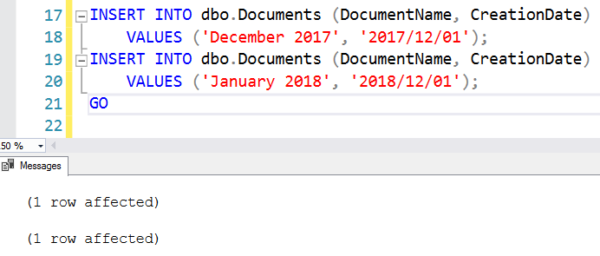
Temporal Tables, Partitioning, and ColumnStore Indexes

This post is mostly a thought experiment

The thought was something along the lines of: I have a table I want to keep temporal history of. I don’t plan on keeping a lot of data in that table, but the history table can accumulate quite a bit of data. I want to partition the history table for easy removal of outdated data, and I want to use ColumnStore indexes because I’m just so bleeding edge all of my edges are bleeding edges from their bloody edges.

Fair warning here

This post assumes you’re already familiar with temporal tables, Partitioning, and ColumnStore indexes. I’m not going to go into detail on any of the subjects, I’m just walking through implementation. If you’re interested in temporal tables, Itzik Ben-Gan has a two part series here and here. We have a list of great Partitioning resources here, and of course, Niko Neugebauer has a (so far) 80 part series on ColumnStore over here.

On to the experiment!

The hardest part was getting the ColumnStore index on the history table. Let’s look at the process. There’s a lot of braindumping in the code. Feel free to skip the setup stuff, if you don’t care about it.

Wew

If you’re here, I should make a couple notes. Microsoft added a really cool feature to Temporal Tables recently: The ability to mark them as hidden. This is gravy for existing apps and tables, because you don’t have to store the row versioning data along with all your other data. It would be really nice if they’d add valid date ranges (read: expiration dates) to the syntax, but hey, maybe in the next RC…

I explicitly named our history table, because SQL will name it something horrible and dumb if you don’t. You don’t have much control over History table creation or indexing at conception, but you can make changes afterwards. SQL will drop a clustered index on your table that mirrors the clustered index definition of the base table.

ColumnStore Party!

So let’s see here. I have a base table. I have a history table. I have a Partitioning Scheme and Function. How does one get their history table to Partitioned and ColumnStored status? With a few catches!

First, you have to drop the index on the history table:

The first thing I tried was just creating my Clustered ColumnStore index in place:

But that throws an error!

Msg 35316, Level 16, State 1, Line 119 The statement failed because a columnstore index must be partition-aligned with the base table.

For reference, trying to create a nonclustered ColumnStore index throws the same error.

The next thing I did was create a nonclustered index, just to make sure I could create something aligned with the Partitioning. That works!

Please and thank you. Everyone’s a winner. But can you create ColumnStore indexes now?

Nope. Same errors as before. Clearly, we need a clustered index here to get things aligned. The problem is, you can’t have two clustered indexes, even if one is ColumnStore and the other isn’t.

Msg 35372, Level 16, State 3, Line 121 You cannot create more than one clustered index on table ‘dbo.RockwellHistory’. Consider creating a new clustered index using ‘with (drop_existing = on)’ option.

Ooh. But that DROP_EXISTING hint! That give me an idea. Or two. Okay, two ideas. Either one works, it just depends on how uh, bottom-side retentive you are about how things are named. This will create a ColumnStore index over your clustered index, using DROP_EXISTING.

This will drop your current Clustered Index, and create your Clustered ColumnStore index in its place, just with a name that lets you know it’s ColumnStore. Hooray. Hooray for you.

SUCCESS!

Never tasted so… Obtuse, I suppose. Maybe like the parts of a lobster you shouldn’t really eat. Anyway, I hope this solves a problem for someone. I had fun working out how to get it working.

I can imagine more than a few of you seeing different ways of doing this through the course of the article, either by manipulating the initial index, creating the history table separately and then assigning it to the base table, or using sp_rename to get the naming convention of choice. Sure, that’s all possible, but a lot less fun.

Thanks for reading!

Brent says: when Microsoft ships a feature, they test its operability. When you use multiple new features together, you’re testing their interoperability – the way they work together. Microsoft doesn’t always test – or document – the way every feature works together. For example, in this example, if you want to play along as a reader, your next mission is to look at query plans that span current and history data, see how the data joins together, and how it performs.


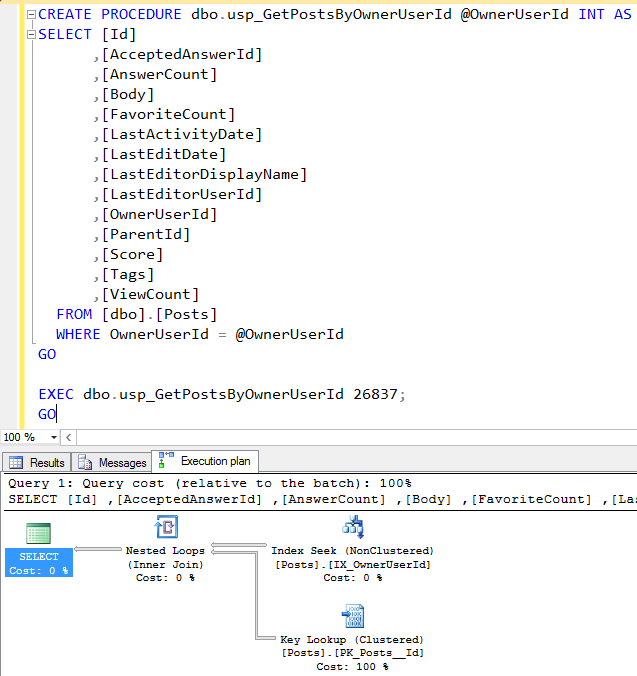
SQL Interview Question: “Tell me what you see in this screenshot.”

You’re a data professional working with (or at least applying to work with) a company using the StackOverflow database (I’m using the March 2016 version today). Your users are complaining that this stored procedure is slow:

usp_GetPostsByOwnerUserId

They didn’t give you parameter 26837 – I’m just giving you that so you can see an execution plan.

You don’t have to talk me through the query itself, or what you’d want to do to fix it. In fact, I want you to avoid that altogether.

Instead, tell me what things you need to know before you start tuning, and explain how you’re going to get them.

I’ll follow up in a few days with my thoughts.


Update 2016/05/28 – 71 comments, holy smokes! One thing is clear: you folks like interviewing for jobs. Because there were so many comments, here’s what I’ll do this week: I’m going to start by talking about what I had in mind when I wrote the interview question, without looking at your answers, then I’m going to read yours because I bet you had even better ideas than I did.

For me, the most important part is, “Can you follow directions?” It’s so tempting to jump in and start fixing the query, but I asked two very specific questions, and I was looking for the answers to those.

Before I start tuning this query, I want to know:

  • What parameters make this query run slow?
  • What does “slow” mean – in concrete time terms?
  • Is it always slow for those same parameters, or does the time vary widely?
  • How fast does it need to run when I’m done? Or, how long should I spend tuning it? (Typically, I ask the user to tell me if I should spend 15 minutes, 1 hour, or 1 day tuning the query.)
  • How often does it run?
  • Could we cache the data in the application layer?

To get these answers, I’m going to:

  • Talk to the users for speed guidance
  • Query the execution plan cache using sp_BlitzCache® to see if this query shows up in our top 10 most resource-intensive queries, and if so, does it have warnings for Frequent Executions, Parameter Sniffing, and/or Long-Running Queries
  • Look at the execution plan to see what parameters it was compiled for
  • Talk to the developers to see if caching in the app tier is an option

Now, let’s see what you submitted, and look for neat ideas.

  • Mazhar wanted to know the table’s size – great idea! You’d want to tune indexes on a 1GB table differently than you’d tune a 1TB one.
  • Raul @SQLDoubleG was one of the first to point out that this code and execution plan are a perfect example of a parameter sniffing problem, good job.
  • Mike Taras asked who’s running this proc, users or apps? Good question – you might tune end-user facing code differently than service-based code. He also asked if we really need to return all of these fields.
  • Russ suggested zooming out and checking the server’s health overall. A+! That’s the first step in my BE CREEPY tuning process, blitzing the box with sp_Blitz®.
  • James Anderson turned it around on the users and said, how do you know this is the proc? Are you running traces to find out that it’s slow? I like James. I bet he has ways of making his users talk.
  • Thomas Pullen asked if it was lunchtime yet. I’ll meet him at the pub for a pint and we can laugh about the slow queries in our shops.
  • Mike F wondered what the users’ SET operations are, because that’s one of the things that can make troubleshooting parameter sniffing harder.
  • Jason Strate emphasized getting real numbers because without that, it’s like “knocking on doors at random in Chicago hoping to find Brent’s swag penthouse.” For the record, I have a doorman, but you’re on the guest list, Jason.
  • Stephen Falken wants to know what’s changed on that server recently, ask who has elevated permissions on the box, and what they changed.
  • Chintak Chhapia asked how frequently data is added & updated to this table, and what columns are updated. Very good question because it determines your indexing strategy.
  • And If_Luke_Skywalker_Was_A_Troll gets very high marks for asking excellent followup and challenge questions throughout, getting folks to think deeper through their suggested answers.

[Video] Office Hours 2016 2016/05/18 (With Transcriptions)

This week, Brent, Angie, Erik, Jessica, and Richie discuss sp_Blitz® updates, merge replication, detecting index fragmentation, how to punish your DBAs, and Brent’s new chroma key backdrop.

Here’s the video on YouTube:

You can register to attend next week’s Office Hours, or subscribe to our podcast to listen on the go.

Jessica Connors: Let’s talk about some merge replication. Paul asks, “What are the ways to handle manual identity management…?”

Brent Ozar: God bless.

[Laughter]

Brent Ozar: Oh man, Paul, you have a crappy job. “What are the ways to handle manual identity management for merge replication?” So what you do is for identities, when you only have two servers and you’re dealing with merge replication, you start one a positive one and goes upwards. The other a negative one and goes downwards. The more servers that you add the more complex you have to get. For example, you can start one at one and then go up by two so that it’s hitting all the odd numbers, 1, 3, 5, 7, 9. You start another one at two and it goes up at two, so it’s 2, 4, 6, 8, and so forth. Then you do the same thing with negatives. The more servers that you have the more complex this gets and you start buying Bitcoin rigs in order to calculate prime numbers and all that kind of crap. You can also do ranges. You can start at the maximum of one identity and go in the other direction. It is just not pretty the more identities that you add.

Erik Darling: Use GUIDs.

Brent Ozar: GUIDs? Yeah, I actually like GUIDs a lot for that. Also, so you are telling me when I said that he had a crappy job.


What’s the most accurate way to detect index fragmentation?

Jessica Connors: Gregory has a question about detecting index fragmentation. Wants to know which is more accurate, DBCC CONTIG, might be config, or sys.dm_db_index_physical_stats. I know the DMV is supposed to be more accurate when measuring across multiple files but in my environment, that isn’t a factor. Which metric is more accurate, scan density or logical scan fragmentation?

Erik Darling: Wow. That is a weird question.

Angie Walker: Does it matter that much? I’ve never heard of that.

Erik Darling: How accurate do you need it to be? Are you worried about like 51.1 percent versus 51.2 percent fragmentation? Like I assume that you’re going to only act on this fragmentation at a whole number anyway. So, unless you’re worried about wildly different results, then I wouldn’t really sweat it. The dm_db_index_physical_stats function is the one that everything I’ve ever seen used to detect it at least in modern versions of SQL. Ola Hallengren scripts, maybe some other reindex tools that Brent likes.

Jessica Connors: Yeah, he said he uses Ola Hallengren scripts.

Erik Darling: Why do you have to do anything with them?

Brent Ozar: I want to say that isn’t DBCC SHOWCONTIG deprecated? I’m not 100 percent positive. Yeah.

Erik Darling: If it’s not deprecated then it’s like on the way out. It’s one of those like SQL 2000-ish commands, you know, DBCC PINTABLE.

Brent Ozar: Grandpa told you about.

Erik Darling: Yeah.

Angie Walker: Tell your developer to stop pretending that they’re the DBA. If you’re the DBA you do defragmentation index remaintenance and leave it alone.

Erik Darling: Don’t actually do it and save yourself a whole bunch of time.

Angie Walker: Read Erik’s blog about not reindexing at all.

Brent Ozar: But to get that information, when you scan that DMV, it actually reads the tables. It will do scans depending on what parameters you pass in. I don’t want developers looking at that during the day during business hours. You want to explain to them what it actually does behind the scenes like that it reads huge quantities of large tables. So I just would say, “Hey, dude, if you want I’ll capture that after hours, using Ola Hallengren scripts to just capture it after hours. But don’t touch it during business days.”


Can you detach and reattach a database in a restoring state?

Jessica Connors: Question from Bill. “Hey, is it possible to detach, rename the underlying files and reattach a database in a restoring state?”

Angie Walker: Not in restore… what?

Brent Ozar: I think you can. I think you can because I remember having to do something with this around log shipping. Like getting the examples right and all that I would have no clue about, like attaching in a database in a restoring state but just go try it. If you run into problems with it, this is a great example of posting it on Stack Exchange. Go to dba.stackexchange.com and post what you’re trying to do and someone else can walk through the exact syntax. If you don’t get a good answer within a day or two, shoot us an email but I’m pretty sure that you can do that.

Angie Walker: Scott also says you can.

Brent Ozar: Yeah, okay cool.

Angie Walker: Whoever Scott is on the internet.

Brent Ozar: He must be right, right? He’s here. We only have smart people in our Q and A. He’s here for the A. Not as much for the Q. Yeah, I think I’ve done that for log shipping databases.

Jessica Connors: Got ya.

Brent Ozar: Scott says, “I do it at least once a quarter.” This isn’t about your personal life, Scott.

[Laughter]

This is a work webcast. Congratulations, but…


Can I rename a SQL Server cluster’s virtual network name?

Jessica Connors: Let’s move on to Nate Johnson. He says, “How easy is it to rename a SQL Server specifically a failover cluster virtual network name, i.e. the physical node names will remain the same, the Windows clustered name will remain the same, but the SQL virtual instance name or the cluster name needs to change.” Thoughts?

Erik Darling: I have never tried to do that.

Brent Ozar: You don’t have to. You don’t have to. There’s an easy work around. All you do is create a DNS CNAME. You create a DNS CNAME of whatever new name that you want and you point it to the existing cluster’s virtual name. Leave the cluster virtual name exactly the way it is. Then just create a DNS CNAME that points to that. I’m saying this really quickly but DNS CNAME. So the letter “C” and then name. Ask your systems administrators to create that for you, they’re the active directory guys, or DNS guys. It’s so simple, takes 30 seconds. Then end users will never know that it’s a different SQL Server. And both names will continue to work forever.

Angie Walker: But what if it’s in the GUI, like in the failover cluster? Maybe that’s why he needs to rename it. Maybe they’re being crazy and then they’ll have two of the same.

Brent Ozar: Look at the GUI, get out of there. I love the GUI. I’m a big GUI kind of guy.

Jessica Connors: Nate is also in a pickle. He looks like he had, he’s broken replication.

Richie Rump: Good.

Angie Walker: Tara is not here.

Erik Darling: You fixed replication.

[Laughter]

Brent Ozar: Sounds like success to us.

Angie Walker: Where’s the hammer? Fixed.


We broke replication. Now what do we do?

Jessica Connors: He says, “We broke replication, transactional replication. We tried a reinstitute with new Snap and then canceled due to the CPU spiking. Now we’re missing schema and data. How to recover besides a full reinstitute? We’ve got the schema synced up manually but the missing data is turning out to be huge because some tables are millions of rows. Any recommendations?”

Brent Ozar: Let’s see in reinitialization, I think with a backup—I truly don’t do transactional replication—but what I would do is if you know that some data but not all data is there, you can insert it across yourself. You can do your own inserts and then just tell transactional replication, “Hey, we’re good. You don’t have to bother to reinitialize.” But you said that there’s millions of rows missing. Then yeah, then you have to put those rows back. That’s the part that blows.

Erik Darling: Unless you can get away with it and throw a filter on there to not put all the rows in. You could start small.

Brent Ozar: I like that, filtered publication. Only the stuff that is current to people.


Jessica Connors: Nate Johnson is on a roll.

Brent Ozar: Oh, on a roll.

Jessica Connors: He’s on a roll. He has another question.

Brent Ozar: Not in a good roll. This poor guy is like having to throw so many questions, “Another thing, quick, I’ve got to get these in before you guys close the webcast because this is on my homework.”

[Laughter]


Should I upgrade SQL Server 2005 to 2008R2 in-place?

Jessica Connors: I’ll take one more from Nate. He says, “It’s taking months longer than anticipated to prep SQL migration and new hardware to a 2005 to 2014 upgrade. Can I convince managers that a 2005 to 2008 R2 in-place upgrade is a good idea to buy us more time and compliance?”

Erik Darling: No. In-place upgrades are the devil, especially major versions like that. Run screaming. Run screaming into the night.

Angie Walker: Plus, why do you want to go to 08 R2?

Brent Ozar: I think he wants to get under warranty support because he’s worried about 2005 being out of support and I get that.

Erik Darling: So you would have to upgrade to 2008 R2 and then to Service Pack 3 so you’re looking at some pretty big jumps.

Brent Ozar: Yeah, that makes me nervous. With no backout plan if anything goes wrong.

Angie Walker: So maybe to let him know what would be—if right now he has a problem, he’s on 2005 and he calls Microsoft. Are they going to tell him sorry? Shut the door in his face? Or are they going to make him pay extra money for help?

Brent Ozar: God, 2005, I don’t even think they take support calls anymore. It’s not like, this is too, a couple of us were joking around recently. It’s like, how often do you really call Microsoft anyway, right? Do you really get on the phone with Microsoft a lot? Does it really matter that you’re out of support? That’s horrible for me to say but if it’s a production application—I mean, we only want to work on stuff that’s in support. We don’t take work on out-of-support databases unless it’s an extra charge kind of thing. Yeah, you look at Erik fist pumping. Yeah, that’s tough. I would actually stand up and do VM, just a virtual machine in the meantime assuming that you’ve got those. If you could make that work performance-wise, that’s what I would go for until they get the new hardware you want.


Should adding logins or taking backups go through change control?

Jessica Connors: A quick question from Samuel. He says, “On production do you agree that adding a login or taking a backup should require change control?”

Brent Ozar: Don’t you love it when people ask, “Do you agree?” It’s like this big leading question. “Wouldn’t you say that…?” Leading question, your Honor. All right, so we’ll go through, we’ll ask each person. So just as I’m looking at my monitor, Erik, would you go through change control if it involved adding a login?

Erik Darling: Adding a login, it would depend on for what. If it was a new developer or a new DBA I probably wouldn’t go through change control for that. If it was for a new application then I certainly would or something else that needed access to the server from outside, I might. What was the other part?

Brent Ozar: Backing up database? Was that what it was?

Erik Darling: If you want to go through change control every time you take a backup, you’re going to spend a lot of time with change control.

Brent Ozar: The only time, when you say take a—like if it’s an out-of-band backup maybe, like if somebody wants to take a backup in the middle of the day and it’s going to slow down performance, but otherwise I would hope that if you have to file a change control, yeah, I think we’re generally we’re going no across here. But in terms of adding a login, yeah, it just depends on what it’s for. If it’s a read-only login that is deny datawriter then I’m kind of comfortable with it as long as it’s not personally identifiable data. You know, it’s not like credit card data or social security numbers.

Erik Darling: If it is an out-of-band backup, you want to be looking at taking a copy only backup, not a regular full backup.

Brent Ozar: Oh, that’s a good point. Richie, how about you?

[Sirens in background]

Are the police coming for you? Is that what that is?

Erik Darling: Uh, no. They’re coming for me first of all.

Richie Rump: It used to be for you remember all the sirens you used to get? But now it’s Erik.

Brent Ozar: The guy in Brooklyn.


Should I add multiple transaction log files for better speed?

Jessica Connors: All right, sp_Blitz question. Bruno says, “sp_Blitz warns me that there are multiple log files on the drive and that this is not a performance booster because log file access is sequential not parallel but isn’t this considered a best practice to minimize contention problems?”

Erik Darling: If it’s sequential, then there’s no contention.

Brent Ozar: There’s a super rare edge case that Thomas Kejser blogs about where they end up with a bunch of really small log files in order to… [Laughs] Erik is throwing his headphones. Just wildly rare, ridiculously, crazy rare, where they have a whole bunch of really small log files in order to minimize log buffer rights. That’s like in the million transactions a second territory. That’s like a totally different world than what most of us out there deal with.

Erik Darling: You also have to put them all on separate drives, all sorts of other stuff too.

Brent Ozar: Yeah. Solid state drives.

Erik Darling:  In Oracle, it is a little bit different. Oracle will use the multiple log files at once but that’s not a contention thing, that’s a redundancy thing. So you can have multiple log files to get the same synchronous data pushed to them but even that’s not going to do much. SQL uses them serially, it’s not going to paralyze the log writes.

Jessica Connors: So sp_Blitz does check for too many virtual log files?

Brent Ozar: Yes, yes, it does. I want to say we alert you around 1,000. I don’t think 1,000 is bad but we just want to give you the heads up before you hit some ridiculously bad number. So at 1,000 we’re like, “Hey, maybe you should think about shrinking this log file. Doing something about that.”


How can I gradually move databases from one AG to another?

Jessica Connors: Question from Gregory. He says, “Is there a way to gradually move databases from one instance to a separate AlwaysOn Availability Group without any application changes? I would like to use an alias DNS record but I think the movement would be all of the databases at once. I was hoping the alias record would just be the name of the AG listener but I don’t think both servers can use it at the same time to allow gradual migration.

Erik Darling: Couldn’t you use multiple connection strings on that?

Brent Ozar: Yeah, yeah, yeah. Keep going. Keep explaining there.

Erik Darling:  Oh, god, I don’t—I just know that that exists. So with availability groups you can use connection strings for different activities. So you have one for reads and one for writes and one for everything else. I think you might be able to do something where you set up and assuming it’s .NET, so this is a multi-subnet failover. Yeah, so something that you would use when it’s a .NET application and you can use that stuff. You should be able to use different connection strings to push different activities to different servers and/or databases. Which is probably what I would do if I had a real job.

Brent Ozar: Each connection string can use a different DNS CNAME and then you can gradually move those apart to different listeners if you like.

Erik Darling: Yeah. Thanks for smartening that up for me.

Brent Ozar: Oh, and then, when a big database or a big query loves a small database very much…

Erik Darling: It goes to jail for a long time.

[Laughter]


In virtualization, how do I use local SSDs for TempDB?

Jessica Connors: Question from Sean. How can tempdb be placed on a local SSD in a failover cluster? System is two-node Hyper-V slow SAN SQL 2012 Standard.

Erik Darling: That kind of dive bombs for me when you say Hyper-V or really any sort of virtualization because then you have that machine tied to that host. Then you would have to on every host have that thing set up for that VM and it gets messy. Get a better SAN. Sorry.

Brent Ozar: Yeah. So often you’ll see people saying, “Virtual machines can be just as fast as physical ones.” Not when you do stuff like this. There’s still some tricks that you only get in physical machines. Some people will say, “Well what I could do is in an AlwaysOn Availability Group put a different VM on each node and have him use local storage.” Yeah, but then when the host dies you’re screwed. That whole thing failsover.

Erik Darling: Let’s be honest, whenever you hear about someone saying, “Oh I made this machine so much faster by virtualizing,” it’s always like, “I took a SQL 2000 box and I put it on modern hardware and now it’s miraculously faster.” It’s never, “Oh, I had two equivalent boxes sitting on SQL Server,” let’s say 2012, keep it sort of recent. “One was virtual, one was physical and they were both the same speed.” No one ever says that. Everyone is always showing off about some old really old application that they upgraded the hardware on. It’s like, so? I don’t get it.

Angie Walker: Yeah, usually much simpler setup than this too. I mean one standalone server with tiny data. Not as much of a problem.


How should I punish DBAs who put production databases in simple recovery model?

Jessica Connors: All right. Justin wants to know how to punish his DBAs. “What’s the appropriate punishment for a production DBA who puts all the production databases into simple recovery mode?”

Erik Darling: He has to do his MySQL.

Brent Ozar: That will also do the trick.

Angie Walker: Does the business care? Come on. Maybe you don’t need full recovery model. Who cares about logging every transaction if you don’t need point in time restore? Or anything more than a week’s RPL goal maybe?

Brent Ozar: Data warehouses, when you’re going to reload from scratch every day. Normally I would give Angie a gold star but the only thing I have is a gold screen protector.

Angie Walker: I will accept it.

Richie Rump: See you start with a box and then you put nails… Oh, I’m going to stop right there.

Angie Walker: Bad developer.

[Laughter]

Jessica Connors: All right. Mike has a question and he saw you in Houston last week.

Brent Ozar: Oh, cool.


How often should I rebuild indexes?

Jessica Connors:  Mike says, “I’m hoping to convince my customers to let me pull the plug on index rebuilding MX plans temporarily in order to accumulate x amount of time of usage stats. What is a minimal amount of time you feel is sufficient? In Houston you said to get a few weeks but do you think that one week would be enough? One particular customer will be having anxiety attacks about not running index maintenance though it’s going to be a tough sell so I’m hoping maybe a week would be good enough.

Brent Ozar: Mike, I have phenomenal news. SQL Server 2012 had a series of cumulative updates come out yesterday that fixed the index usage stats bug. So starting—dun dun dun—2012 SP whatever it is, if you go to SQLserverupdates.com, if they’re on SQL Server 2012 the latest update that came out yesterday for both the service pack and the one before the current service pack, so it’s like CU3 and CU12. Now let SQL Server’s index usage statistics persist. Missing index recommendations do not persist but at least the usage stats do. So if they’re on 2012, have them go get that. 2014 that fix is not out yet. Because the 2012 one came out, I feel I would be kind of like I’m not going to pick that battle with my customers. I’ll just go back and apply the 2014 CU when it comes out.

Erik Darling: Since if you install the service pack you may have to reboot anyway, which will clear out your stats anyway. What I would do is I would just scale my index maintenance back to only reorganize stuff which doesn’t wipe stats out. So that you have stats persist and they still get their precious fragmentation lessened and you get to collect usage statistics. Only rebuilding clears those out to clarify.

Angie Walker: Since there’s a fix for it, we can officially call it a bug now, right? Like it’s not just…

Brent Ozar: Right. That’s what I call it, yeah.

Erik Darling: See now I have egg on my face because I’ve been telling people that 2012 wasn’t going to get the fix because the original announcement about that change said 2014 and 2016 only. So, omelette everywhere.


Where do I download SQL Server for Linux?

Jessica Connors: Speaking of 2016, since SQL 2016 for Linux is not scheduled for general release until 2017 have you heard of any preview versions available?

Angie Walker: That is a no.

Brent Ozar: The way that Microsoft does its preview-type stuff is often people who have NDA or who get early access programs get access to early betas. We are not in that program, we’re not in the one for Linux. We were in the one for 2016 as you can tell when we bring out blog posts and we have screenshots available five minutes within the release coming out. In terms of other people though, what you want to do is get in contact with your Microsoft sales rep. If you don’t have a sales rep or a TAM, a technical account manager, then you’re probably not going to get into the program.

Jessica Connors: Wah-wah-wah.

Brent Ozar: Wah-wah-wah.


How do I measure storage bandwidth?

Jessica Connors: From Dennis, he says, “Do you guys have a good way to measure a 10GB iSCSI bandwidth to the SAN?” This does not sound like a database engine question.

Brent Ozar: How do you guys like to do storage testing?

Erik Darling: CrystalDiskMark or Diskspeed.

Brent Ozar: There you go. CrystalDiskMark, yeah, it’s excellent, it’s an easy button for storage testing. If you go to our site and grab CrystalDiskMark there’s a post on exactly on how to use it. It’s current with the current version of CrystalDiskMark too. They changed the screenshots around.


What’s the difference between a unique index and a unique constraint?

Jessica Connors: All right. Question from Jonathan. He says, “From what I understand there is no internal difference between a unique index and a unique constraint. Which one do you all prefer and why?”

Brent Ozar: Isn’t there a difference?

Erik Darling: A unique constraint is backed by a unique index, right? All constraints are backed by indexes basically.

Angie Walker: Correlation not causation or something.

Richie Rump: I always thought it was syntactic sugar. I could be wrong.

Brent Ozar: It is. If you go to Stack Exchange, if you go to dba.stackexchange.com, there’s a question “When should I use a unique constraint instead of a unique index?” Like for example, a unique constraint cannot be filtered, a unique index can be filtered. There’s a bunch of little, super tiny differences between. Unique constraint cannot be disabled however unique index can be disabled. I’ll post this, I’ll just put it out on Twitter what the differences between these. I’m going to tweet that right now. Tweet.

Angie Walker: Andrew proved that even short questions can be answered on Stack Exchange if you don’t get around to our webcast.

Brent Ozar: Yeah, the answers are huge. The answers are like pages long on this. People go into details.


How do I rename my Active Directory domain?

Jessica Connors: All right. Let’s take one from Corey. He says, “Management would like the local AD domain name changed to reflect their new brand. We have a single SQL 2008 R2 database for document management. We have about 30 users. Is this realistic? Any gotchas? My background is not SQL, just a basic network admin.”

Brent Ozar: It depends on whether or not you have a cluster. If you have a cluster, this is the part that sucks. But if you don’t have a cluster, it’s totally easy. It’s a total piece of cake. What a lot of people do is just stand up a new domain and then move stuff across from one to the other or a new forest. Erik’s got an idea.

Erik Darling: No, I don’t have an idea. I just finally understood the question.

Brent Ozar: Oh.

Angie Walker: Yeah, answering it for me—I was like, “Does he really just want to change the server name?”

Erik Darling:  It was confusing to me too. I was like—then, no, that’s bad.

Brent Ozar: Yeah, so it is a giant pain in the rear. I visited a company this past Monday I guess that had to go through that and it was ginormous work for all the DBAs involved.

Jessica Connors: The green looks good on you. You stand out. Brent has this green wall behind him. He just painted the wall behind him green. It’s this bright, bright green and it actually looks really good.

Brent Ozar: Thank you. It depends a lot on the webcam and like how much sunlight is in here for a while. So sometimes I look like pale, alien pale. So had to get the right lights working. I look alien pale in the daylight too as well so. Yes, we did that for the green screen effects that we use in our training videos. Doug does the same thing down at his place, has a wall set up so that he can make the background disappear. It’s called chroma keying. It’s really fun.


Can I ignore the QDS wait types?

Jessica Connors: Nice. Bruno had the sp_Blitz question earlier. I think he has a follow-up. He says, “Can I ignore all the QDS wait types?”

Brent Ozar: Yeah, stands for Query Store and you can totally ignore all the sales in the Query Store.

Jessica Connors: All right.


Should I index my temp tables?

Erik Darling: There’s a question from Dan that looks kind of interesting. I can read it to you if you like interesting.

Jessica Connors: Read it.

Erik Darling: He has a temp table in the store procedure and it has three nonclustered indexes on it but the execution plan is showing a table scan rather than hitting any of the nonclustered indexes. Now what you could be looking at is you have these nonclustered indexes that may well satisfy your predicate like a where clause or a join or something but they may not have enough included columns in them to tip the balance over to use those indexes rather than just scanning the entire table to get all the data. So if you’re selecting all the columns in the table but your where clause is only on a column or two, you may see that the optimizer chooses to scan the entire table because it’s cheaper than hitting the nonclustered index and doing a key lookup back to get all the other columns up.

Jessica Connors: There you go.

Erik Darling: Start with a clustered index on a temp table rather a nonclustered index. That’s usually my rule of thumb.

Jessica Connors: All right.

Brent Ozar: I like it.


Can I force my AG users to query the listener rather than server names?

Jessica Connors: We have another question from Gregory. “Is there a way to enforce the use of AG listeners and AlwaysOn Availability Groups versus just connecting directly to an instance?”

Brent Ozar: Oh, wow. No. No, I don’t think so. Wow. What a good question. I don’t think so. Could you force…? Yeah, I can’t think of a way that you would be able to do that. No, other than being the obvious jerk and changing the names of your servers all the time so that people can’t guess them that way but yeah, I don’t think there’s a way to do that. Greg, you should totally ask that on Stack Exchange and then whether you get an answer or not, email us, because I would like to hear about that and see if anybody comes up with answer.

Erik Darling: That’s pretty [Inaudible 00:25:07]

Brent Ozar: Or, so I’m going to go out of the box. Maybe like if you use F5 Global IPs or Impervas or Guardiums, those network appliances that sit in between your SQL Server and the network but other than that, that would be a firewall’s stateful packet inspection.

Jessica Connors: All right, let’s do one more. From our buddy, Nate. He’s my friend today because there’s not many people asking questions. It’s like three people who are having at it.

Angie Walker: A high honor you guys, to be Jessica’s friend.


Have you ever worked with Microsoft Dynamics NAV migrations?

Jessica Connors: Yeah, I’m going to add him on Facebook after this. He says, “This might be a shot in the dark but have you guys ever worked with a client who was running Microsoft Dynamics NAV. If so, do you have any experience with migrating or upgrading the backing to SQL Server that’s running the NAV databases?”

Brent Ozar: How about you guys?

Erik Darling: Nothing.

Angie Walker: We don’t really help with migrating and upgrading clients’ databases specifically, not on a regular basis.

Brent Ozar: I don’t know that we really help with anything. I don’t even know if we help on some things.

Angie Walker: Well, I help with some things.

[Laughter]

Erik Darling: Big hand wavy.

Angie Walker: I pull all of the skeletons out of the closet and then I set them up for Erik and Doug and Tara to beat them down a little bit.


Why do low-cost queries sometimes go parallel?

Erik Darling: There’s a good question in here that I want to get to. It’s from Samuel and he asks, “I have a query that is less than the cost of parallelism but it’s still giving a parallel plan. Why would this be?” It’s because it’s not the cost of the parallel plan that has to exceed the cost threshold. It’s the cost of the serial plan that has to exceed the cost threshold for parallelism and the parallel plan has to be cheaper. So what you’re seeing is a parallel plan that is cheaper than the serial plan that crossed the cost threshold.

Brent Ozar: Dun dun dun. So you can see what the cost of the serial one was by going option max stop 1 in a query and you’ll get an idea unless it’s a stored procedure, then it gets a little trickier.

Erik Darling: Yep.

Jessica Connors: Cool beans. I’m hungry, my stomach is growling.

Brent Ozar: Oh, where are you going for lunch?

Jessica Connors: I’m getting some UberEATS. Unless you want to go somewhere. You’re right down the street today.

Brent Ozar: Oh, no. I’m good. I think I’m going to just phone in and have something else delivered here as well.

Jessica Connors: Yeah, UberEATS is awesome. Three minutes. Hot meal.

Richie Rump: I’ve got to go to FedEx and drop off a computer. Thanks, Brent.

[Laughter]

Brent Ozar: Oh, Richie. Richie chose poorly, not chose wisely. Yes, his machine. I hope they don’t ruin your stickers. All right, thanks everybody and we will see you next week.


SQL Server 2016 Maintenance Plan Improvements

Let’s just get one thing out of the way first.

Yes, I understand that you, dear reader, probably hate maintenance plans. You associate them with everything dumb that you did early on in your career, like setting up a single plan that reorganized indexes, then rebuilt them, then updated their statistics. You are older and wiser now, and you swear by tools like Ola Hallengren’s maintenance scripts or Minion Reindex.

This blog post, however, is not about you.

It’s about all of the SQL Servers out there that have not yet had the wonderful opportunity to feel the tender loving hand of a qualified database administrator such as yourself. It’s about the tools that accidental DBAs will use over the years to come.

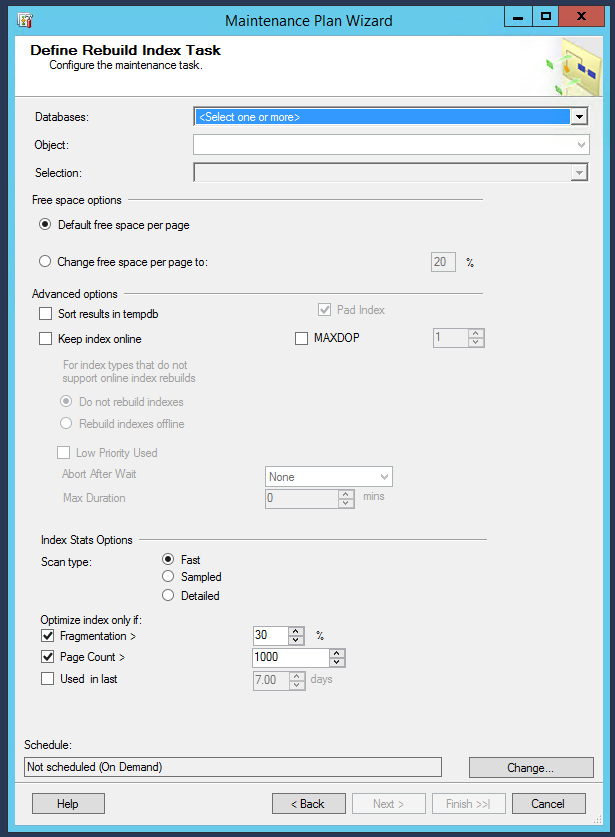
So let’s start with the index rebuild task:

Index rebuilds in SQL Server 2016

Be still, my beating heart.

You can tell it’s kinda slapped together haphazardly – note the awkward spacing of the “Used in last” line at the bottom – but God bless ’em, Microsoft’s heart is in the right place. We have new options to only rebuild indexes if they’re a certain percent fragmented, or a certain size, or they’ve been used recently.

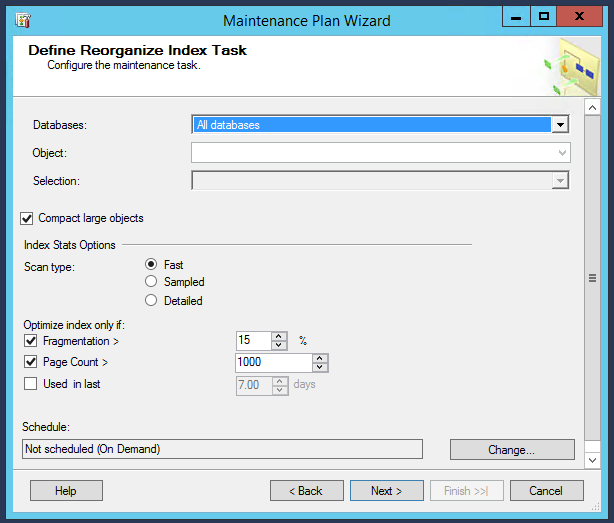
The goodness continues on the reorg screen:

Reorganizing indexes in SQL Server 2016

Same nice options about only optimizing indexes that are in use, or are in bad shape.

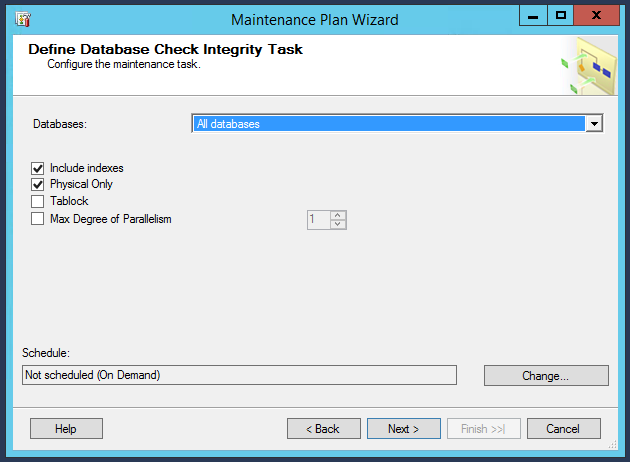
The CHECKDB screen shows off its new MAXDOP capabilities, now that DBCC CHECKDB can take a hint:

maintenance-plan-checkdb

Part of me is happy because undereducated database caretakers now have new, more powerful tools at their disposal.

The other part of me is a little bit sad because it’s still not easy to use. If maintenance plans are designed for the accidental and junior DBAs amongst us, I don’t think a lot of this stuff should even be an option. It should just default to the right thing, and take care of the database with Microsoft’s best practices set up as standard.

But that is a really, really small part of me. Maintenance plans are getting better, and that means something good.


What to Do When DBCC CHECKDB Reports Corruption

The instant you encounter corruption in a production SQL Server database, stop. Read this entire article first to understand the big picture, and then come back here to take action.

First, understand that you shouldn’t start by trying to repair the corruption. You may be facing a storage subsystem problem where your storage is corrupting the data underneath you. In a scenario like that, your corruption repair efforts – simply reading and writing data – may be making the situation worse. Your primary goal is going to be to communicate how widespread the corruption is, and get off the storage immediately. You just can’t know the root cause until you do thorough investigation, and by then, it may be too late – the corruption may have spread to more areas in your database.

Now, let’s walk through the checklist:

1. Query the msdb.dbo.suspect_pages table. This system table tracks up to the last 1,000 corrupt pages detected. The query will respond instantly, so do this first rather than trying to check the database for corruption. This will give you a quick idea of how widespread the corruption might be. Given those results, send an email to your manager, team, and app stakeholders:

SQL Server (INSERT NAME HERE) just reported corruption in these databases: (LIST OF DATABASES). This indicates that it has storage problems. We need to fail over to another SQL Server immediately – come to my cube (OR ONLINE MEETING OR WHATEVER) to discuss our options. I’m going to have to drop everything and do emergency troubleshooting.

At that point, look at your disaster recovery plan to figure out where you’re going to fail over (like a log shipping secondary.) You’ll need to check that location for corruption as well, but if we’re dealing with widespread, multi-database corruption, it’s beyond the scope of what I can teach you to do in a blog post. You can keep reading for single-database corruption recovery options, and use these same tactics across multiple databases, but it’s going to be a ton of work.


2. If you’re using a SAN, alert the storage team. If your data and log files reside on shared storage, there may be a more widespread issue. Multiple databases or servers may be affected if the shared storage is having problems. Copy/paste this into an email:

SQL Server (INSERT NAME HERE) just reported corruption in a database that lives on the SAN. I don’t know yet whether this is due to a storage issue or a SQL Server bug. I’m dropping everything to do emergency troubleshooting, and I’ll let you know more in half an hour, but if you hear anything from other server admins about SAN issues, please let me know.

3. Alert the application owners and stakeholders. Copy/paste this into an email:

SQL Server (INSERT NAME HERE) just reported database corruption. I’m dropping everything to do emergency troubleshooting to find out if we’ve lost data, and how we’ll recover it. I’ll let you know more in half an hour, but in the meantime, I would recommend taking the applications offline. If more data is added after this point, I may not be able to recover it.

Step -1: pour a glass of wine. That's for your spouse, while you tackle the bottle.
Step -1: pour a glass of wine. That’s for your spouse, while you tackle the bottle.

This sounds paranoid, but as an example, here’s a corruption case I had recently: shortly after detecting corruption, the team realized they’d have to revert to a backup of the database from a few days ago. Rather than telling users about that possibility, they let the users keep adding data into the already-corrupt database while the DBAs did troubleshooting. Several days later, as the corruption got worse, even Microsoft couldn’t repair the corruption – and the affected tables went completely offline, permanently. If the users would have been alerted earlier, they could have avoided even more data loss.

4. Turn off your backup-delete jobs: you’re gonna need ’em. If you have any kind of job that automatically deletes backups older than a certain number of days, turn off that job. Depending on the type of corruption, you may have to restore a clean full backup from before the corruption occurred, plus all of the transaction log backups since.

5. Review the history of your CHECKDB and backup jobs. Fill out these answers:

  • When was the most recent clean CHECKDB? (Meaning, when did CHECKDB run against this database without errors?) ________
  • Do we have a full backup available from prior to that date? (For example, if CHECKDB said this database was okay on January 15th at 10PM, what’s the latest backup we have BEFORE that date, like January 14th at 11PM.) ________
  • Do we have all of the transaction log backups since that date, yes/no? ________

If you can pass all three of these, great news! You’re going to have an alternate recovery path. If any of these backups are not online (like if they’re on a slow virtual tape library, or have been sent offsite), get one of your Windows admins to start retrieving these backups and putting them on a very fast network share as quickly as possible. You may need to restore all of these backups in a subsequent step.

6. If you have the full CHECKDB output, look for an easy fix. DO NOT RUN CHECKDB in this step – that can be a long process, and before you go down that road, I need you to do other stuff first. I’m just saying that if you do happen to have the CHECKDB output that shows the corruption, look at the index IDs involved. If the only corruption involves an index with an ID of 2 or higher, that means it’s only corruption in a nonclustered index, and you’ll be able to repair that relatively quickly by:

  • Run sp_BlitzIndex® to list out the index definitions on the affected table:
    EXEC sp_BlitzIndex @DatabaseName = ‘MyDB’, @SchemaName = ‘dbo’, @TableName = ‘MyTable’
  • Find the corrupt index by its ID
  • Copy out the CREATE INDEX statement from sp_BlitzIndex’s output
  • Drop the index
  • Recreate it again
  • To verify that no other corruption exists in the database, run:
    DBCC CHECKDB(‘MyDB’) WITH NO_INFOMSGS, ALL_ERRORMSGS, EXTENDED_LOGICAL_CHECKS
  • If it comes back clean, you’re good, and you can email the teams that things are OK, but jump to the Aftermath section at the end of this post
  • If it doesn’t come back clean, keep going

7. Fork your recovery efforts into multiple teams. Grab other members of your team and assign them tasks that will be done in parallel:

  • Team 1: Restore clean backups to another server – this team grabs a different SQL Server of the same version as production. For example, if production is a SQL 2012 box, grab a development server that’s also SQL 2012. Restore the full and log backups from the dates specified in step 5. After it finishes, run DBCC CHECKDB to make sure there’s no corruption in this copy. This may take a long time, but if it works, you’ve got an excellent plan B.
  • Team 2: Open a support call with Microsoft. If you don’t have a support agreement with Microsoft, grab a credit card and call professional support. It’s about $500, and they work the problem with you until it’s done. Don’t be afraid to say, “We’re not making progress fast enough – I’d like to escalate this call to the next support level.” (But at the same time, you’d better be doing what they tell you to do.)
  • Team 3: Run CHECKDB if you don’t have the output. If the corruption was detected by an end user’s query or a monitoring system alert, run this, save the output to a text file, and then analyze the output with Gail Shaw’s corruption recovery instructions. Depending on the database’s size, this can take hours:
    DBCC CHECKDB(‘MyDB’) WITH NO_INFOMSGS, ALL_ERRORMSGS, EXTENDED_LOGICAL_CHECKS
  • Team 4: If you don’t have a clean backup, restore the most recent backups to yet another server. If you’re going to try your own attempts at corruption repair, you’re going to want another copy of the corrupt database on a different server where you can test first before trying in production. As soon as that restore finishes, if the other teams aren’t ready to try their corruption repair commands yet, create a new database on this same server, and start copying as many tables as you can from the corrupt database into the new one. You want to be able to salvage as many tables as you can.
  • Team 5: Contact a data recovery company. If things are looking bad, and management wants another option, contact Kroll Ontrack for a quote for database recovery. The pricing isn’t public, and it will likely vary based on the complexity of the situation.

8. Send out a status update as work starts. As soon as the above team task assignments are done – not when the work stops, but when it starts – it’s time to communicate your status to your manager, team members, and the application stakeholders.

Your update email will be based on what you’ve learned so far, but here’s an example:

Update on the corruption issue: we have identified that the corruption is confined to the SalesSite database, and it occurred at some point after 2016/05/04. We have split up our recovery efforts into three teams. Based on a quick assessment, we believe Team 1 will be the first to finish, and we hope to have a clean copy of the database up on DevSQL2012. If we have to fail over to that, we’ll have a one-hour outage. We’ll update you in another half-hour as we know more.

9. Keep working the plan. Don’t panic – let each of the teams do their thing independently. Keep doing check-ins across teams every 30 minutes, see which team is the closest to a solution the business is comfortable with, and keep the end users informed.

The Aftermath: Avoiding Corruption Next Time

As soon as practical, get on the most current service pack and cumulative update for your SQL Server version. You may have hit a bug like the notorious online index rebuild bug or the NOLOCK UPDATE bug, and  patching will reduce the chances that you hit that issue again.

If you can’t rule out a SQL Server bug as the cause of the corruption, work with your storage teams to make sure your storage gear is patched up to its most recent firmware and driver versions. Check to see if there were any storage errors over the last several weeks – not just in the Windows event logs, but in the storage gear’s logs as well.

Corrupted system tables may require more drastic measures

Once you’ve hit corruption on a server, consider taking a few proactive measures:

  • Run CHECKDB more often, like every night (which sounds crazy – until you hit a corruption scenario)
  • Keep your backups for a longer length of time – if you’re only running CHECKDB every week, you need at least a week’s worth of full and transaction log backups so that you can recover via restores
  • Run transaction log backups more frequently, like every minute
  • Put your RPO and RTO in writing – the business always assumes databases can’t lose data, and you assume that the business understands technology breaks sometimes. Get everybody on the same page.
  • Based on your RPO and RTO, revisit how many databases you have on each server. If your hardware isn’t able to keep up with backups and corruption checks, it’s time to up your horsepower or switch to snapshot backups.

Erik says: Brent is spot on with how to react to corruption scenarios. I’m all about not being past the point of no return in the first place. Whether it’s:

sp_Blitz® can help you find all sorts of dangers and inadequacies with your server set up. Run it on all your servers. You may be surprised what you find.


Extended Events: Where They Hide The Good Stuff

SQL Server
3 Comments

You can do a lot with Extended Events

I’m really looking forward to the stuff in 2016 becoming mainstream in 2020 or so. Raise your hand if you’re using SQL Server 2014 in production. Raise your hand if your vendor supports SQL Server 2014.

Okay then.

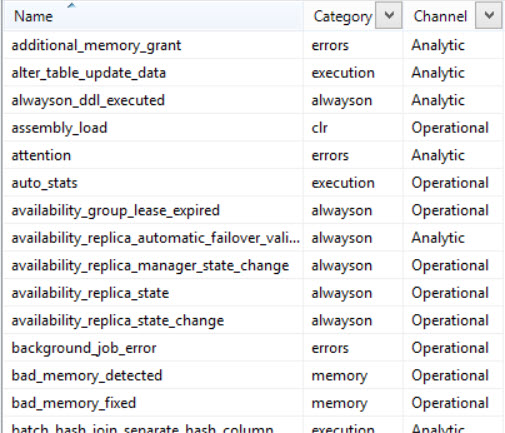
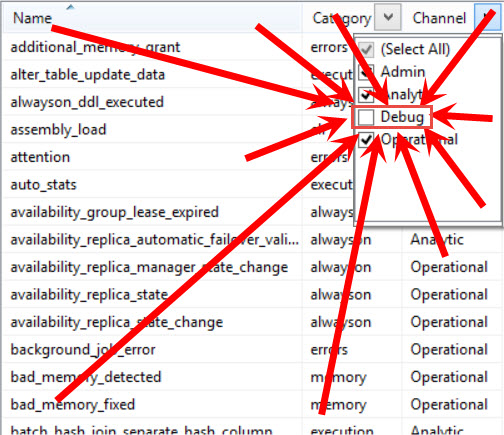
When you open up the New Session dialog to create event session, the default screen has a nearly overwhelming amount of stuff in it. It’s good that you can search for things, but the search is kind of iffy. Not all words hit, even if you spell them right.

Where do you even begin?

Assuming things

You’d think that with Trace being deprecated and XE being the new hotness on the block, that everything would be up front to help you find what you need, expose some cool functionality, and ideally get you started trying to parse the Codd forsook hunks of XML that session data is stored in. But no. You gotta go hunting for that, too.

Ugh.
Ugh.

What’s in there?

Everything. Literally everything. Every weird and awesome thing you can imagine. Seriously, go look. If I started writing a list, I’d just list everything in there.

Thanks for reading!


What TRY/CATCH Doesn’t Handle

SQL Server, T-SQL
25 Comments

We were once asked in class what TRY/CATCH doesn’t handle besides object existence errors.

It’s well documented in Books Online (BOL). If you’re like me, then tl;dr. Are we even calling it Books Online these days? I still say “bookmark lookup” instead of “key lookup”. I suppose I’ll be saying Books Online for quite some time too. At least these days it really is online.

Here’s a shortened version:

  • Warnings or informational messages that have a severity of 10 or lower
  • Errors that have a severity of 20 or higher that stop the session
  • Attentions
  • When a session is KILLed

In addition to the above, there are some errors that are not handled when it occurs at the same level as the TRY/CATCH:

  • Compilation errors
  • Errors that occur during statement-level recompilation (object existence errors fall into this category)

In all of these cases, be sure that the calling application/object handles the error.

My favorite usage of a TRY/CATCH construct is when you are purging data and retrying the DELETE due to a deadlock:

Brent says: when you’re looking at TRY/CATCH, it’s also good to remember the traditional guidance about transactions: keep ’em short. Do your selects, variable settings, background info gathering, etc before the transaction starts.


SQL Interview Question: “Talk me through this screenshot.”

After writing about “For Technical Interviews, Don’t Ask Questions, Show Screenshots”, lots of folks asked what kinds of screenshots I’d show. Here’s this week’s example.

I show each screenshot on a projector (or shared desktop) to the candidate and say:

  1. What’s this screen from?
  2. What does the screen mean?
  3. If it was a server you inherited from someone else, would there be any actions you’d take?
  4. What questions might you want to ask before you take those actions?
  5. Would there be any drawbacks to your actions?
  6. What would be the benefits of your actions?
Rorschach test
Rorschach test

After a few days, I’ll follow up with my own thoughts.


UPDATE 2016/05/20 – Great thoughts, everybody. This one was fun because it stems from real-life scenarios I’ve seen several times. You wouldn’t believe how long it takes folks to recognize this screen in real-life interviews – often it takes DBAs tens of seconds to realize they’re looking at TempDB. (They often start by talking about some other database because the file name tempdev is so deceiving.)

The DBA heard that they were supposed to create a file for each core, but they misunderstood the difference between cores and processors. The server had 2 processors, each with 4 cores – but they created 2 data files originally.

They had a super-fast SSD attached to the SQL Server as E:, and it’s got a relatively limited amount of space – say 128GB – so they started with small file sizes and let them autogrow.

At some point, the SSD ran out of space, so the DBA added another emergency overflow file on a slower drive (M:). Maybe they shrank it back manually, or maybe they have a job to shrink it – in either case, I get a little suspicious when I see small file sizes because there’s probably shrinking going on.

I got a chuckle out of the answer about the server being a dev box because the database file is named tempdev – even though I see a ton of servers, the default “tempdev” makes me pause every time because it was such an odd file name choice by Microsoft. Funny how everybody’s just as bad at naming conventions as I am.

So to answer the questions:

3. Would I take actions? I’d check to see if there are shrink jobs set up on TempDB, and if so, I’d start by disabling those. I might consider adding more TempDB data files, although if it only had one data file, I’d be a little more careful because it can have a funny side effect.

4. What questions would I ask? What wait types is this server facing? Is the E drive actually a good spot for TempDB? How are the file stats looking on that drive? Have we had a history of running out of space here? How big are the user databases? Are we sorting indexes in TempDB?

5. Any drawbacks? If TempDB is getting regularly hammered, and it runs out of space and needs the overflow file, I might not know it due to the shrinks. I’d start by disabling the shrink jobs so that I can see if this thing grows, and what it ends up growing to. That’ll help me plan for capacity.

6. Benefits to my actions? Some folks mentioned adding files or pre-growing files can make it faster for end users, but be really careful there. Anytime you say something will be faster, then as an interviewer, I’m going to challenge you to define what you would measure, and how it would change. If you don’t have metrics at the ready, then I’m going to suspect cargo cult programming.


[Video] Office Hours 2016 2016/05/11

This week, Brent, Angie, Erik, Jessica, Richie, and Tara discuss backups, failover events, tempdb errors, errors, other errors… oh, did we mention errors?

Here’s the video on YouTube:

You can register to attend next week’s Office Hours, or subscribe to our podcast to listen on the go.

How do you feel about third party backup software?

Jessica Connors: We have a question from Marcy. She says, “Any experience/thoughts on backup software? Do you know will doing a local backup invalidate the restore chain up to time of last full?”

Erik Darling: Yes, unless you do copy only.

Brent Ozar: So copy only, what kinds of backups does that affect? Like if you take a full backup with copy only what does it do?

Erik Darling: It takes a full backup of the database without changing the LSN differential base. So you can take a copy of it, those are really good for restoring to refreshing dev databases or doing other stuff like that.

Brent Ozar: It’s particularly important for differentials if you’re the kind of shop that’s taking differentials. If all you’re doing is transactional backups, it doesn’t matter. Transactional backups can hook up to any full. It just really matters when you’re doing differentials.

Erik Darling: Yep.

Brent Ozar: Often when people ask this, “What kind of backup software are you using?” They’re trying to mix native backups and like Backup Exec or Veritas. But when you’re doing your backups, you want copy only. Often these third-party options don’t have those config settings.

Erik Darling: Or a lot of people if they’re doing something like log shipping won’t be able to use the jobs inside there or like they’ll have their backup software still timed. I’m like, “No.”

Brent Ozar: Yeah, oh, that’s a good point, too.

Erik Darling: That won’t work.

Brent Ozar: If you’re doing log shipping, don’t use the Backup Exec or Veritas log backup jobs. I don’t know that we even need to tell them that because within five seconds of doing it, you’re going to figure out its broken.

Erik Darling: Unless you’re not learning or anything.

Brent Ozar: Well that’s true. That’s true.

Jessica Connors: Hey, Brent. Your email is popping up on the slides.

Brent Ozar: …Twitter. Like how does that happen?

Jessica Connors: Uh-oh.

Brent Ozar: Now that people know it, they’re going to be tweeting like crazy and having it show up on the webcast.

Erik Darling: I’m famous.
[Laughter]


What’s your favorite kind of backup software?

Jessica Connors: Do we prefer any certain kind of backups? Like on SQL Critical Care, like the intro or our sales calls, they say they’re either using SQL native backups, they’re not doing transaction logs, or they’re using [inaudible 00:01:58] third-party software. Is there one that’s standard? Better than the other?

Brent Ozar: All right, we should go around through alphabetical order. Angie, what’s your favorite kind of backup?

Angie Walker: Ola Hallengren.

Brent Ozar: Let’s see here. The other Brent Ozar in the black shirt.

[Laughter]

Erik Darling: I like Dell LiteSpeed.

Brent Ozar: Why do you like it?

Erik Darling: Because it has cool stuff other than backups. You can read transaction logs with it which I love and you can do object-level restores which I love.

Brent Ozar: Yeah.

Erik Darling: DBA-friendly stuff.

Brent Ozar: I would have to say as the other Brent Ozar, I agree with you there. The ability to pluck objects out of a restore, that’s freaking phenomenal. To be fair, IDERA SQL Safe and Redgate SQL Backup have those same capabilities as well. Richie, how about you? What’s your favorite kind of backup?

Richie Rump: A DBA that does them.

Brent Ozar: Yeah, right. Or Azure? That was your chance to say Azure.

Richie Rump: I said that last time. I said that last time.

Erik Darling: SAN snapshots.

Brent Ozar: Tara, how about you?

Tara Kizer: I used LiteSpeed back when it was Quest. We converted over to Redgate SQL Backup just because of the cost reasons. They were basically the same product but Redgate’s solution was just so much cheaper and they threw in SQL Bundle for the whole DBA team at a job a few years ago. But native backups with compression. As long as your backups are compressed, that’s what I’m happy about. Then having full backup, possibly differentials and transaction logs, very frequent transaction log backups.

Brent Ozar: I like it.


Should you run CHECKDB on a log shipped secondary?

Jessica Connors: All right. Let’s move on to a question from Heather. She says, “Do you need to run DBCC CHECKDB on a log ship secondary that is always in restoring state?

Tara Kizer: So you can’t, right? I mean because you’re not able to run commands on it.

Brent Ozar: Can you take a snapshot on a database that’s in restoring?

Tara Kizer: No.

Brent Ozar: I didn’t think so.

Erik Darling: No. You could bring it into standby and do that but…

Tara Kizer: You can bring it into standby mode every single time log shipping has to do the restore which is generally every 15 minutes or more frequently. Is your DBCC CHECKDB command going to complete in that window, which it’s not on larger databases. So, you’re screwed there.

Erik Darling: Well log shipping won’t pick back up until you take it out of standby. So it will just accumulate logs.

Brent Ozar: Oh, no. It will keep right on going. It will just go to the next log.

Tara Kizer: You’d have to disable the jobs for it to stop.

Brent Ozar: Especially if you’re one of those guys who sets up log shipping to kill all the user connections whenever it’s time to do a restore.

Erik Darling: I’m not one of those guys.

Brent Ozar: Nice.


Why don’t my Extended Events work when I fail over?

Jessica Connors: All right. Nick asks, “Is it possible to hook into failover events? My extended events are never on after it fails over. It doesn’t happen often but it’s a pain to lose all my query [inaudible 00:04:35] events.”

Brent Ozar: Oh, wow. I bet you’re using AlwaysOn Availability Groups. So why wouldn’t you just run it all the time? If it’s an extended events session why wouldn’t you run it on every server?

Erik Darling: Oh, I bet he doesn’t have them set to automatically start when SQL starts.

Brent Ozar: When the server starts?

Erik Darling: Yeah.

Brent Ozar: Oh. Okay. So if it’s a failover cluster, you probably want it to just start every time the SQL Server starts up. If it’s an availability group and you’re failing around the AG from node to node, I would have it run with server startup there too. Just so that, because people could start running queries on the secondary. Tell us more about, if you want to, Nick, follow up with more about your question and your scenario, that’s curious, I’d like to hear more about that. If it’s kind of extended events, I don’t know that I want to hear more about it, but I probably should.


How do you know when Resource Governor is causing a bottleneck?

Jessica Connors: Question from Dennis. He says, “How do you know when the Resource Governor is causing a wait type?”

Brent Ozar: Oh, that’s a good question. Oh, without hitting the Resource Governor DMVs, I don’t know if you could. There’s Resource Governor DMVs where you could look at the pool.

Erik Darling: What wait type specifically?

Brent Ozar: SOS_SCHEDULER_YIELD. So if you’re banging up against CPU. If you have a CPU limit [inaudible 00:05:47] latch, now if you’re dealing with the new storage waits. That is such a good question. I’m actually going to look at that in the transcripts because that’s a great idea for a blog post because I want it to hit it first the Ask Brent. I would want to know during a five-second sample that queries are being throttled by Resource Governor and I don’t know how to do that offhand. If anyone knows in the listeners who is watching, in the chat feel free to post in a question that answers that because we would all love to see that and then you’ll save us from doing work. We don’t really want to do work today. We’d rather surf right now.

Angie Walker: Hey, I have to work today after this.

Richie Rump: I haven’t been able to work today. So I would like to do some work today, how about that?

Brent Ozar: Oh, I’m scheduled in meetings with all of you. I guess that’s actually work.

Angie Walker: For you.

Brent Ozar: Yes, for me.


Are there any bugs with SQL Server 2014 SP1 CU6?

Jessica Connors: Let’s see, do we know of any issues or bugs with SQL 2014 SP1 CU6. We have our buddy, Scott, he is about ready to deploy to production after lab testing.

Tara Kizer: That’s very specific.

Brent Ozar: There’s one with Hekaton. If you’re using Hekaton there’s an issue with backups. I don’t know that the hotfix is available to the public yet. Right now they’re saying if you have Hekaton and you’d like backups, because you know, they’re kind of nice to have. Then you want to stick with CU3 I believe it is. There’s a regression that came in, then 4, 5, and 6. That’s the only one that I’ve heard of though.

Angie Walker: I used SP1 CU6 at my last place. We rolled it out. We did dev and staging, all our environments. We didn’t have any problems but it’s going to [inaudible 00:07:28] vary everywhere you go. So if you tested it in your environment…

Brent Ozar: I call BS on that because this came out April 19th. You’ve been working with us for a while.

Angie Walker: Oh, no, no, no, maybe it was…

Brent Ozar: Are you holding out two jobs? Are you working somewhere else on the side?

Erik Darling: Moonlighting.

Angie Walker: Puppy databases.

[Laughter]

Angie Walker: I think I missed the SP1 part. We were just running CU6. I think RTM CU6.

Brent Ozar: There you go.

Angie Walker: Never mind.


How do I move a lot of data into the cloud?

Jessica Connors: Phyllis says, “I’m a developer and have restorative backup to my local machine. I need to remove most of the data so it can be easily copied up to Azure for testing. Most of the data is in three tables. These three tables have between 500 million and 800 million records I need to delete. What is the fastest way to delete this amount of data?”

Erik Darling: Don’t do it.

Jessica Connors: “I have a bunch of a foreign keys in the mix so I don’t think I can just copy the data to keep truncate and move it back.”

Erik Darling: You don’t have to do any of that. You don’t have to a lick of work. You can script your database to statistics only and you can put that anywhere. You can actually just run that as a script and it will create all your tables and it will create the associated statistics. Then every query you run, SQL will act like it’s hitting those tables because the statistics will feed the optimizer certain information. I think there’s a blog post out there somewhere about it that I’ll dig up.

Richie Rump: Right. But if in this, so if you’re moving it up to Azure for testing, you’re probably doing some app testing. How would that work with that, Brent Two?

Brent Ozar: It’s going to fail anyway. It’s Azure.

Richie Rump: Oh.

Brent Ozar: I kid. So what you do and to elaborate on Erik’s just because not everybody is going to get this. You have to go into tools options in SSMS. Scripting the statistics is not on by default. So go into tools, options, and there’s a script set of options. So whenever you go to script out a database, you need to include statistics and things like partitions, partition functions, there’s a bunch of things that aren’t included by default. Then after you change those options, you can right-click on the database and go script, and there’s a little wizard for it. So, Richie, brings a great question. What if there’s—or if there’s some parts of some tables that you want to keep, you can script out those tables. You can script them as inserts with the select, with the data inside there. Or, if you’re a developer, dude, you know how to insert data out. You go through and select the data out and you go insert it in somewhere else. So create the schema up in Azure first because [inaudible 00:09:53] that’s going to fail, you’re going to need some kind of objects that aren’t supported in Azure SQL DB. You’ll go figure out what those are and then after you fix those, then you go insert the data up there, just the parts you need.

Tara Kizer: If you have queries that can determine which parts you need, you could just BCP the data out using those queries, using a view, or a query, and then BCP that data into Azure.

Brent Ozar: Yeah, it’s going to be fast.

Tara Kizer: Or SSIS, you know, import/export wizard, whatever.

Richie Rump: That’s what I would normally do is if I need to copy from one place to another, it would just be a query or something, dump into a clean schema and then away we go.

Jessica Connors: All right, Nick R., extended events, Brent.

Brent Ozar: Oh.


How do I capture queries that last longer than 5 seconds?

Jessica Connors: He said, “It’s actually not an AlwaysOn Availability Group. It’s a window cluster.” He wasn’t aware of setting and automatically start extended events on SQL Server. He is looking at any query that runs longer than five seconds, doesn’t have a DBA, so he uses the extended events to hit any one with a stick. [Inaudible 00:10:47]

Brent Ozar: I like it.

Erik Darling: Five seconds seems a little bit low to me unless there’s something really cool about your environment where you have like an SLA of under ten seconds. But any query over five seconds seems a little punch happy to me.

Tara Kizer: I used to support a system that had an SLA of three hundred milliseconds. It was a big deal. So five seconds, someone would have been at my door.

Brent Ozar: So Tara… she stood there with a kill command ready to fire.

[Laughter]

Brent Ozar: We should also say too, so now you learned something. You have the session for setting for extended events to turn it on. While we’re talking extended events, we actually like extended events. Be aware that the more stuff you capture, you can cause a performance problem. So if you get things like the query plan and sometimes if you get the full text of the query you can cause incredible slowdowns. So just make sure that you’re gathering as little data as possible in order to get your stick on.

Tara Kizer: We did our query performance monitoring outside of SQL Server and instead the application logged all this information and we used Splunk to turn through the data and it would send alerts if performance was poor. So we didn’t have to add any overhead to SQL Server.

Brent Ozar: Did you just have like your own inside app you would start logging whenever you called Sequel Server log…?

Tara Kizer: I don’t know how the developers did it but it was all developer magic to me. Then we had Splunk.

Brent Ozar: Smart people like Richie. I would say too, if you’re interested in that and you’re a developer, check out the MVC MiniProfiler. The MVC MiniProfiler, you don’t have to be using the MVC design pattern but the MVC MiniProfiler will log whenever you write queries. It will log what queries they are. You can log it to, I want to say, not just SQL Server but Redis and other caching type layers. So you can then analyze which queries are taking the longest in your application. It was totally open source, totally free, it’s by the guys behind Stack Overflow and it’s what they use in order to monitor their query…


Have you ever seen this TempDB error….

Jessica Connors: A question from Justin. He’s wondering if we have ever seen this error in tempdb. Have you seen a query case cause this error in tempdb? The error is “property size not available.”

Brent Ozar: I have when running SSMS 2016 against an older SQL Server instance. Older being like 2014 or things like that. It has something to do with it expects memory in memory objects in there. So make sure you’re on the latest SSMS 2016 or release candidate or whatever they’re calling it. Or just try with SSMS 2014.

Jessica Connors: Let’s go back to Nick. He says, “Is there a way to know if my extended events are taking too many resources? I don’t log too much but Brent mentioned the query text which I do log.”

Brent Ozar: There’s a bunch of wait types. If you go to brentozar.com/askbrent. Ask Brent will give you your wait types on a SQL Server and if your extended events wait types show up as big on the list, it can be an issue. Doesn’t mean that it is but you may be just tracing a bunch of stuff. That doesn’t mean it’s a bottleneck. What I would say is too, when you set up your, and we talk more about the wait types in Ask Brent’s documentation. When you set up your extended events session, log asynchronously off somewhere else to a file and allow multiple event loss. There are settings to say, “Don’t lose an event no matter what it is.” You don’t really need that. Allow multiple event loss in case the SQL Server is under pressure. That way you can kind of make the increase more likelihood that you’re not going to slow the server down.


How do I know if my network is my backup bottleneck?

Jessica Connors: Let’s go back to backups. Jonathan says, “In my quest to make our backups faster, I found that specifying the buffer count and max transfer size values have increased speed immensely while stripping the backup to multiple files has had no effect. My server is now under significant CPU disk pressure at this time. Is network bandwidth my limiting factor?”

Tara Kizer: You can test it by backing up to the nul device to see what your throughput should be without any external factors such as the network. So do the backup command, do it to the nul device instead and that will tell you what your system can support. Then you compare that to what your backup time is if it’s going to a NAS device and you know what the network is doing at that point. But buffer count and max transfer size can make significant improvements in your backup times. There are specific values you can pass it if your backups are to a NAS or to a SAN or a local drive. I don’t have those numbers memorized but I think there’s some blog articles out there that can tell you what the optimal values are for those two for wherever you’re backing up, wherever you’re sending your backups too.

Erik Darling: Another limiting factor might be the disk you’re backing up to. If you’re only backing up to one disk, you could just be saturating that disk with the backup. So it might be a bottleneck there. Another thing to be careful of is if you’re altering buffer count and max transfer size and you’re also using compression, compression has a [siren wails in background]. Whoa.

[Laughter]

Excuse me.

Tara Kizer: New York City.

Erik Darling: Crime free. When you use compression, it’s three times the memory penalty. So if you’re altering buffer count and max transfer size, you want to watch your memory usage during backups because there’s three different streams. There’s the read, compress, and write up stream. So there’s three times the memory overhead as a regular backup. Just be careful with that. Don’t set your values up too high, you could crash your server.


Are there issues with the latest Visual Studio database projects?

Jessica Connors: Let’s move on to a question from Sheldon. “Do you know of any issues with upgrading to the latest versions of SQL database projects in Visual Studio that might impact releases?”

Brent Ozar: Richie, any word on that? I don’t think any of use it.

Erik Darling: I’m trying to Brady Bunch point at Richie, but it’s not working.

[Laughter]

Richie Rump: Yeah, I know nothing, especially as of the last couple Virtual Studio versions, they’ve done a pretty good job about not breaking anything even in the solution. Because before we used to have different solutions but we could link to the same files underneath because of the different solution. The different Visual Studio versions had different stuff inside of them but now especially, I think starting in Visual Studios 13 and especially now in 15, everyone on those lower versions can use it. So I would test it out, upgrade it, have a couple people look into it, but yeah, you shouldn’t have any problems with it at all. Thank you for using it because not enough people use database projects. I think it’s a neat little tool there.

Tara Kizer: We used it at my last job extensively. It has been five months, so obviously as far as latest versions go, service packs, we went beyond the latest versions from when I left at least. But we didn’t have any issues with the various versions as long as you are running the right Visual Studio version or lower for the SQL Server version, you’re okay. If you are trying to use a higher version of Visual Studio than SQL Server, when I say higher version I mean like let’s say SQL 2014, I forget what the versions was. But like Visual Studio 2013 you would use for SQL Server 2014. If you have 2012, you would use for SQL 2012. But you could also use VS 2010 Limited.

Richie Rump: Yeah, don’t use 2010. Let’s not go back there.

Tara Kizer: We had to have it installed as well as Visual Studio 2008 because we had some SQL Server 2008 R2 things that we still were supporting so we had multiple versions of Visual Studio on our desktops.

Richie Rump: I’m glad I’m out of that game and not having four versions of Visual Studio anymore.

Jessica Connors: All right, another error somebody is seeing.

Erik Darling: Yay.


How do I know if I have a memory problem on a 296GB RAM box?

Jessica Connors: It says, “There is insufficient memory available in the buffer pool during very busy times. It’s 296 GB box of RAM on the box. Is this because SQL tries to allocate a minimal amount of RAM for a query?”

Brent Ozar: You know what you want to do is run sp_Blitz. sp_Blitz will tell you the number of times you’ve had forced memory grants. Forced memory grants are when SQL Server says, “Look, I know you want a Gig of RAM to run the [inaudible 00:18:51]. It’s $3.95 and 14KB of RAM.” SQL Server tracks this in the DMVs. You can see the number of times it’s happened since startup. It doesn’t tell you when they’ve happened, it just tells you that they’ve happened. So run sp_Blitz and it will tell you all kinds of things about forced memory grants. It’s just a nice thing to run in terms of a health check too. It will tell you things, if you have suspiciously high free memory, which can indicate that queries are giving a large memory grant and then releasing it. Lots of neat memory troubleshooting things that we’ve had across the last five or ten releases in that.

Jessica Connors: People are just copying and pasting their error messages now. You can’t do that.

[Laughter]

Erik Darling: Jessica has to read this stuff, man.

Brent Ozar: “Have you ever seen a rash this bad?”

Angie Walker: Thank god they didn’t send us pictures.

[Laughter]


How do you deploy code with zero downtime?

Jessica Connors: David has an actual question. He says, “Do you know a way to apply a new app release with zero downtime?”

Tara Kizer: Yeah, just make sure your code is backwards compatible. If you’re going to be adding columns that your application is not using SELECT *. You’re altering store procedures. If you’re adding new store procedures, those get added before you change your code. Yeah, you could definitely do it with zero downtime. We did it all the time. We had releases every two weeks for the e-commerce website and that was with zero downtime. They use farms of virtual servers for the web tier and all that stuff and then they just made sure all the store procedure code and all the schema changes, it was always backwards compatible. So no matter what version of the application that they ended up using after the deployment was done, it still worked with whatever. We didn’t have to roll back the databases changes.

Erik Darling: Another thing you can do is only add new features. Don’t fix anything old.

[Laughter]

Brent Ozar: The trendy term for developers is called additive changes, that you’re only adding things, you’re never taking things away. If you want to see how Stack Overflow does it, Nick Craver, their site-reliability engineer, wrote a blog post called “Stack Overflow: How We Do Deployment – 2016 Edition.” He goes into insane details about how they do deployments with near zero downtime. Another site if you’re interested in this kind of thing is highscalability.com. High Scalability profiles a lot of websites and how they do database and IIS and Linux-type deployments. There’s a lot of spam in there, there’s a lot of noise. But they’ve got some good signal from time to time, like how Etsy does deployments.

Richie Rump: Yeah, it’s definitely a practice. You’re not going to just like jump into it and say all of a sudden “I’m doing it.” It takes a lot of work to change the way you do development in order to get zero downtime. It’s definitely an effort where all levels need to be bought into it.


Where can I learn more about columnstore indexes?

Jessica Connors: Our friend Nick is back. He says, “Any great resources on understanding columnstore indexes? Trying to wrap my head around them but I can’t figure out when to use them over row storing and how to set them up.”

Erik Darling: Niko Neugebauer, I believe that’s how you pronounce that last name. I’ll get a link to it but he’s done like an 80 bazillion-part series on columnstore indexes which answers more questions than you may even possibly have. He started like when they first dropped and he’s sort of cataloged things through until now. So there’s a lot of good information in there.

Brent Ozar: His website is nikoport.com, N-I-K-O-P-O-R-T dot com. He’s from Portugal. Niko is his first name so that’s where that URL comes from and 80-some parts in there in that blog post series. Where it’s for is especially perfect for data warehouses where you have a fact table that’s really wide, so it’s got lots of columns in it. It’s really deep, it’s got lots of rows in it. You can never predict what users are going to filter on or what they’re going to sort by and the table is highly compressible because it has the same data in it over and over again, like sale dates that have compressrf really well. Quantities, those just compress really well as well. So it’s not unusual to see like an 80, 90, 95 percent compression rate with columnstore tables but it is very specifically for data warehouses. It is not for OLTP.

Erik Darling: And it does a lot of really great things for like aggregate queries too.

Brent Ozar: Yeah.

Erik Darling: So it’s really, whiz bang on that.


How do you make Reporting Services highly available?

Jessica Connors: Let’s talk about HA. Monica had asked, “What are the best options for SSRS HA? We are most likely moving to an HA DR solution using a failover cluster with log shipping. Right now we run SSRS on our main production server.”

Angie Walker: Where’s Doug?

[Laughter]

Brent Ozar: I sat in his [inaudible 00:23:36] session so I know this answer. What you do for SSRS is you run it in a bunch of virtual machines. You run it in a whole bunch of virtual machines that are behind a load balancer and if any one of them trips and falls over, you just don’t care as long as there’s others that are all pointed to the same report server DB. So if you want to patch one, you can, totally not a problem. SSRS, relatively lightweight resource requirements so you don’t need physical boxes for it in most cases. You can just get by with relatively small VMs, but a lot of them.

Jessica Connors: Michael keeps copying and pasting that error.

[Laughter]

Angie Walker: Jessica is not reading it, sorry.


Why can’t I connect to my server?

Brent Ozar: Connectivity issues. So Michael asked a connectivity issue thing. We’ll be honest, it’s way faster, there’s a slide on here that says, “For multi-paragraph questions, go ahead and ask those at dba.stackexchange.com.” We got that up on the screen right now. Go ahead and put in dba.stackexchange.com in your browser whenever you’ve got multiple paragraphs that are involved in your question or error message. It’s a wonderful site, really love it a lot because other people answer it than us. That’s why I’m one of its biggest fans.

Erik Darling: Yeah, I mean, just generally looking at that, I would just say make sure that SQL Browser is turned on.

Tara Kizer: Browser and then see if you can telnet to the port on the client machine, do a telnet session and telnet to the SQL Server with the port. If it returns a blank screen, it means your connectivity is fine. If you get an error, you’ve got something blocking the access, network firewalls, something.

Erik Darling: Something is amok.


Are there any drawbacks with trace flags 1204 and 1222?

Jessica Connors: Let’s do one more. Marcy asks, “I know I can try this on a pre-production server just wondering if you do or do not recommend setting trace flags 1204 and 1222 to get additional deadlock information?”

Erik Darling: Yes. But if you are on a newer version of SQL, you can get really great information from the extended events session. There are queries out there to do that if you feel like [inaudible 00:25:36 doggeling].

Brent Ozar: Yeah, really good. So if you Google for like “extended events deadlock session” there’s one blog post that’s notoriously great for this. Read the comments of the blog post. I can’t remember the author’s name but if the webpage is black, keep reading through all the comments and there’s lots of improvements to the query inside the comments.

Jessica Connors: Cool. Well it’s 11:45 here in Chicago. So…

Erik Darling: 12:45 New York time.

Brent Ozar: Time to start drinking, whoohoo.

Erik Darling: Water.

Brent Ozar: All right, bye everybody. See you all next week.

All: Bye.


What I Look For When I’m Hiring Database Professionals

Matan, Guy, and I recording the podcast

On today’s episode of the SQL Server Radio podcast, I talk with Guy Glantser and Matan Yungman about what we look for when we’re hiring.

In the broadest sense, don’t think junior or senior:

  • I’m hiring someone for what they already know, or
  • I’m hiring someone for their capability to learn

(In reality, it’s usually a blend of both, but just think big picture for now.)

If I’m hiring you for what you already know, then I’ve got a list of skills, and I want to see your proficiency in those skills. If one of those skills includes communication, then I’m going to judge you based on how you communicate your mastery of the other skills. For example, I might be looking at your blog posts, presentations, or webcasts about the topics you’re great at.

If I’m hiring your excellent learning skills, then I want to see what you’ve been interested in learning in the past, and how you’ve gone about learning those topics. It doesn’t have to be technical, either – maybe you were interested in perfecting an Eggs Benedict recipe. Show me what resources you used, your preferred style of learning, what lessons you picked up along the way, and how you would recommend that I learn that same thing as fast as possible.

To hear more about my philosophies on that, and hear how Guy and Matan approach hiring for their own companies, check out the half-hour SQLServerRadio podcast.


Implicit vs. Explicit Conversion

SQL Server
10 Comments

Everyone knows Implicit Conversion is bad

It can ruin SARGability, defeat index usage, and burn up your CPU like it needs some Valtrex. But what about explicit conversion? Is there any overhead? Turns out, SQL is just as happy with explicit conversion as it is with passing in the correct datatype in the first place.

Here’s a short demo:

One table, one million rows, two columns! Just like real life! Let’s throw some queries at it. The first one will use the wrong datatype, the second one will cast the wrong datatype as the right datatype, and the third one is our control query. It uses the right datatype.

The results shouldn’t surprise most of you. From statistics time and I/O, the first query is El Stinko. The second two were within 1ms of each other, and the reads were always the same over every execution. Very little CPU, far fewer reads.

So there you go

Explicit conversion of parameter datatypes doesn’t carry any horrible overhead. Is it easier to just pass in the correct the datatype? Yeah, probably, but you might be in a position where you can’t control the parameter datatype that’s incoming, but you can CAST or CONVERT it where it touches data.

Thanks for reading!

Brent says: the key here is that we’re taking an incoming NVARCHAR variable, and casting it in our query to be VARCHAR to match the table definition. This only works if you can guarantee that the app isn’t going to pass in unicode – but in most situations, that’s true, because the same app is also responsible for inserting/updating data in this same table, so it’s already used to working with VARCHAR data. Also, just to be clear, Erik’s talking about casting the variable – NOT every row in the table. That part still blows.


Why monitoring SQL Server is more important than ever

Monitoring
14 Comments

Moving parts

SQL Server keeps on growing. With every new edition, you get more features, feature enhancements, and uh, “feature enhancements”. As I’m writing this, SQL Server 2005 is less than a week away from support ending, and SQL Server 2016 is up to RC2. Brent’s retrospective post got me thinking a bit.

We went from Log Shipping, to Log Shipping and Mirroring, to Log Shipping and Mirroring and FCIs (yeah, I know, but Clustering 2005 was a horror show), to Log Shipping and Mirroring and FCIs and AGs, and Microsoft now keeps finding ways to add Replicas and whatnot to AGs. Simple up/down monitoring on these isn’t enough.

Dumbfish
Dumbfish

You need to make sure your servers are keeping up on about half a dozen different levels. Network, disks (even more if you’re on a SAN), CPU, memory, etc. If you’re virtualized as well, you have a whole extra layer of nonsense to involve in your troubleshooting.

And this is just for you infrastructure guys and gals.

For those of you in the perf tuning coven, you have to know exactly what happened and when. Or what’s killing you now.

Tiny bubbles

SQL Server has pretty limited memory when it comes to these things. Prior to 2016, with the advent of Query Store, and a ‘bug fix‘ to stop clearing out some index DMV usage data, your plan cache and index DMVs may not have all that much actionable or historical information on them.

And none of them keep a running log of what happened and when. Unless you have a team of highly specialized, highly paid barely cognizant familiars mashing F5 in 30 second intervals 24/7 to capture workload metrics and details, you’re not going to be able to do any really meaningful forensics on a performance hiccup or outage. Especially if some wiseguy decides the only thing that will fix it is rebooting SQL.

Monitoring is fundamental

If you have a DBA, you (hopefully) have someone who at least knows where to look during an emergency. If you don’t, it becomes even more vital to use a monitoring tool that’s looking at the right things, so you have the best set of information to work with.

There’s a learning curve on any tool, but it’s generally a lot less steep than learning how to log a Trace or Extended Events session (probably a whole mess of Extended Events sessions) to tables, and all the pertinent system DMVs, and blah blah blah. You’re already sweating and/or crying.

Because you know what’s next.

Visualizing all that data.

Time and Money

You don’t have time to do all that. You have too many servers to do all that. You need it all in once place.

SQL SentryDell,  and Idera all have mature monitoring tools with lots of neat features. All of them have free trials. Just make sure you only use one at a time, and that you don’t stick the monitoring database on your production instance.

The bigger SQL gets, the more you need to keep an eye on. Monitoring just makes sense when uptime and performance are important.

Thanks for reading!


[Video] Office Hours 2016 2016/05/04

This week, Richie, Erik, Angie, and Tara discuss deadlocks, replication, SQL Server 2016 features, and more.

Here’s the video on YouTube:

You can register to attend next week’s Office Hours, or subscribe to our podcast to listen on the go.

Transcript:

Does NVARCHAR(255) Cost More Than NVARCHAR(30)?

Angie Walker: All right. So Steve has a nvarchar(255) column that he knows will never have more than 30 characters. Will it take extra space to store this column and will there be a performance penalty?

Tara Kizer: It’s already using double since you’re using the nvarchar and not just varchar. It’s Unicode so it’s going to be using 60 bytes instead of 30. But is it going to use more space? No. I’ve seen developers want to do this where they want to have every single column standardized to the same data types and size. I don’t understand that reasoning except for laziness. It doesn’t take long to figure out what each column should be. I mean what happens if it ever…

Erik Darling: My only issue with it as like from a development standpoint is SQL error messages for if you try to insert too much data into a column suck. It’s like “string or binary data might be truncated.” And you’re like, oh, I’ll just go figure out which column that was because the error message doesn’t tell you. Nothing tells you. So you have to go back and guess a million times. So I understand why developers are like, “Let’s just make this a 255 because it’s a variable column anyway. It’s not going to mess anything up.” But, you know, figuring out the right length should be a priority at some point because you may have inserted incorrect data into a column if you give it too long of a length if it’s more than it will ever be or more than it could ever reasonably be. But I understand why developers want to do it because tracking down those errors sucks.


Why Is Perfmon Wrong or Missing Counters?

Angie Walker: Okay, Jason says their performance monitoring tool is showing that OS CPU is around 25 percent. The instant CPU that they’re getting from a DMV is running around 80 to 90 percent. “It has been suggested our counters are messed up and to unload and reload these counters. Any experience on doing that?”

Tara Kizer: I have many, many years ago. I don’t remember what it was but back in the day there were lots of issues with performance counters. I just don’t remember what you have to do. You could just restart SQL Server or the box to possibly fix this issue. That was one of the solutions back in the day. But yeah, you’ve definitely got something messed up here because the ring buffers should show the same CPU utilization as what Performance Monitor or Task Manager is showing.

Erik Darling: Yeah, I’ve had to reset them a couple times. Actually when you clone a machine and you turn into a VM a lot of performance counters get screwed up. Like a lot of them just don’t even show up anymore. So I had to like mess with loading and reloading them. If I remember correctly, they were pretty simple DOS commands.

Tara Kizer: Yeah, yeah.

Erik Darling: But they weren’t like… you know.

Tara Kizer: Yeah, I don’t remember what they are.

Erik Darling: I lost my notes on that, sorry.

Richie Rump: Sounds like a blog post, Erik.

Erik Darling: You know, Richie, your blogging has been pretty light lately. If you want to take that, it’s all you.

Richie Rump: Yes, yes.

Erik Darling: I leave that in your capable hands.

Richie Rump: But I’ve been working, so, there’s that.

Erik Darling: Yeah, see all those pictures from Disneyland, hard worker.

Richie Rump: Disneyworld.

Erik Darling: Whatever.

Richie Rump: Disneyland is a different place.

Angie Walker: Folks, if you want your questions answered. You have to type them.

Erik Darling: I see one here about deadlocks.

Angie Walker: I saw that one.

Richie Rump: That movie was great. I loved that movie.

Angie Walker: The difference between Jessica and I reading it, I know when you guys aren’t going to want to answer some of these.

Tara Kizer: You can go ahead and ask it.


Do File Growths Cause Deadlocks?

Angie Walker: All right. So for deadlocks from Adeels Webb, “When there is a file growth we see deadlock and the object identified is one of the indexes. Is there a way to debug this related to storage or IO?”

Tara Kizer: I would be looking definitely at your IO. I mean how long is that growth taking and if it’s on the data files, do you have Instant File Initialization setup because if it’s not setup then it has to zero out the file and that can talk awhile depending on how slow your storage is. The log file, you can’t use Instant File Initialization but the data files can. So take a look at the perform volume maintenance tasks inside the local security policy on your box and see if the SQL service account is a member of that privilege. If it’s not, you should add it and restart SQL.

Erik Darling: Or in your maintenance window. Not like…

Tara Kizer: Yes, not now.

Erik Darling: Not like right now. Don’t tell your boss we told you to do it right now.

Tara Kizer: I would also be looking at performance monitor counters average. Look at the logical disk counter. The average disk seconds reads and writes and if your values are over say 20 milliseconds you potentially have a storage, an IO slowness issue. The values are going to be in decimal though. So it’s .020 I believe is 20 milliseconds.

Angie Walker: Whatever she said, I don’t…

Erik Darling: Sounds good to me.


How Do You Pronounce VARCHAR?

Angie Walker: Yeah. Here’s a good one from Greg. “Is it ‘var’ ‘car’ or ‘var’ ‘char?’ What do you guys say?”

Tara Kizer: I actually say “var” “char” but since you guys had already said “var” “car” I went with it.

Richie Rump: Wow.

Erik Darling: I always say “var” “car” because the variable is character.

Tara Kizer: Yeah, exactly. Yeah, I do say “var” “char” but I see why people say “var” “car.” I think most people do say “var” “car.” I’ve worked with a lot of developers and DBAs in the past 20 years and most people say “var” “car.”

Erik Darling: In Boston, it’s [speaking with a Boston accent] var car though.

Angie Walker: I also recently heard that it should be “vare care” because variable characters. So like you were saying, Erik, but I was like that sounds funny. Like it sounds like a Care Bear character maybe.

Tara Kizer: I think the real question though is do you say Sequel or S-Q-L? That’s an important one.

Erik Darling: Sequel, I don’t have time for S-Q-L.

Tara Kizer: Microsoft is the one who created the product and they specifically said on the Wikipedia page it was pronounced Sequel and not S-Q-L. People from different languages had a problem with it because when they see the letters S, Q, L, it does not pronounce “sequel” to them. So Microsoft changed the Wikipedia page to say it can be pronounced either way. But the original product was pronounced “Sequel” Server.

Angie Walker: Interesting.

Tara Kizer: There was this big debate on the Wikipedia page, I don’t know, like ten years ago or so.

Erik Darling: Which brings us to another interesting question, is it “wi-ki” or
“wee-ki?”

Angie Walker: Wiki. What about “DAY-ta” or “DA-ta?”

Tara Kizer: “DAY-ta.” “DA-ta” drives me crazy.

Richie Rump: Captain Picard called him Data. So it’s “DAY-ta.” Captain Picard is always right.

Angie Walker: I like “DAY-ta” too. It also sounds kind of funny “DA-ta” base because of the off “a” is…


Are There Any Alternatives to Transparent Data Encryption?

Angie Walker: All right. Adeels has another question. “What do you guys think about TDE with mirroring or replication and are there any alternates to TDE?”

Erik Darling: Not within SQL Server. TDE is what you get and that’s an enterprise-only feature. If you use it alongside any other feature, it’s going to be interesting because TDE breaks a lot of stuff. TDE, it encrypts TempDB and it also breaks in some file initialization because you have to write out a bunch of junk. So it’s totally fine to use the features together, just be aware of how they operate next to each other.


What Happens If I Run Standard Edition on 20 Cores?

Angie Walker: Sean says they have a server with 20 cores but they’re only running Standard Edition that only supports 16 cores. Is there a negative performance impact with this configuration?

Erik Darling: There is if you have to cross NUMA nodes for some things.

Angie Walker: So when would you see that scenario? Do they have to have a specific of NUMA nodes for it to come into play or they already have too many NUMA nodes?

Erik Darling: So is it, how many CPUs? I get that it’s 20 cores but how many…?

Angie Walker: So we have two CPUs.

Erik Darling: Oh, wait, wait, wait. Hold on, yeah… VM 1 uses 20 cores…

Angie Walker: No, the one below that.

Erik Darling: Oh.

Angie Walker: The one from Sean. Yeah, I didn’t read the giant one.

Erik Darling: It depends, Sean. Two CPUs, so no, probably not. But it’s not ideal. It’s not something that I’d aim for. It sounds like someone bought like the dual ten core CPUs thinking that they were going to be really fast and awesome but they’re probably like a really low clock speed or something which is what dual ten core CPUs are. So for something like Standard Edition, we usually recommend getting like dual two four six or eight, whatever the highest clock speed is. Because you go up to 16 and you get the fastest processers to push your workload through. Dual ten core chips usually have a much lower clock speed and kind of stink.

Angie Walker: Yeah. I’m just going to follow up, Dennis, sorry, sad face, that license question. That’s a big license question. We’re not Microsoft. We don’t charge you so I would talk to your Microsoft rep or your software vendor rep. Ask them how you’re going to get charged. Someone else, sorry. But there was a question.


How Should I Document SQL Server and Scripts?

Angie Walker: Oh, I think Richie I want to hear from you from Brandon’s question. “Do you recommend any tools for documenting changes in SQL scripts? How about documenting SQL Server? Right now they use Excel and a lot of worksheet tabs to document their SQL Servers.”

Richie Rump: So I don’t have any recommendations for any tools to do this. We always had, at least every organization I’ve been in, we’ve had pretty rigorous change control. So all the scripts would be not only put into a version control system like Git but they would also go down to test, preproduction, and then finally a production area. So we usually didn’t have that big of a problem because all the changes were being tested as it went down the train, the pipeline. So as far as documenting SQL Server, I know there’s a couple products out there. I would just try them out and see how they work for you.

Erik Darling: Yeah, Red Gate has a tool called SQL Doc that works all right.

Richie Rump: Yeah, I’ve written kind of my own tools as I kind of saw fit. But we didn’t have any really big documentation requirements either. So it depends on your requirements and your budget and how much you’re willing to put into it.

Erik Darling: I bet someone out there who really likes PowerShell and really wants to tell you all about PowerShell has written something that would document SQL Servers.

Richie Rump: Yeah, there’s a guy here in Florida, a couple hours up the road here. He spent many years working on a PowerShell documenter, so that’s probably a good one to check out.

Erik Darling: There we go.

Richie Rump: Kendal Van Dyke. Kendal Van Dyke’s, what’s that? SQL Power Documenter or something like that?

Erik Darling: Power Doc is it?

Richie Rump: Power Doc, that may be it.

Erik Darling: Maybe.

Richie Rump: Because everything was being…

Erik Darling: There’s someone walking by your window.

Richie Rump: Dude, it’s the mailman. Oh my gosh.

Angie Walker: He’s already that way.

Richie Rump: He’s at my door. So…

Angie Walker: Wait your dogs are going to start barking.

Erik Darling: There he goes again.

Angie Walker: Okay.

Erik Darling: All right, who’s next?


Can I Monitor for Changing Execution Plans in 2008R2 and 2014?

Angie Walker: So, Jason. He wants to know if there’s a way to monitor when SQL decides to change plans or use a bad plan. He knows in 2016 they’re introducing Query Store but what can he do for 2008 R2 or 2014?

Tara Kizer: I’ll tell you what I implemented at the job I was at for 12 years. We had a very very critical system. We’d have severe performance issues if bad plan would happen for a critical store procedure. Every single time I’d just recompile the store procedure and the entire system would start performing better because the bad plan would cause really high CPU. So what I did is I used the ring buffers DMV that was mentioned in an earlier question and I wrote a store procedure to query that and to monitor CPU utilization because I knew that CPU utilization would remain at say 30 percent during the day when this issue didn’t occur. But it would go above 60 percent, 80, 90 percent. So I would monitor CPU utilization and then check the number over like three minutes. If it’s at a high number across several samples, I would then look at the plan cache. What was using the most CPU in the plan cache and then recompile that object. Then it would wait a minute and then check to see if it improved. If it didn’t improve, it would then recompile the next one at the top of the CB list. That caused it to not have to wake me up in the middle of the night or not have to manually recompile store procedures. So you do have that option, the ring buffers DMV gives you CPU utilization and you just write code to do this work for you.

Erik Darling: If monitoring the ring buffers is difficult or beyond your gasp, sp_BlitzCache can help a lot with that. So what you’ll see, you run sp_BlitzCache by CPU. You may see a line for your store procedure and then you may see a separate line for the text of the store procedure that has higher average CPU or reads or something or max worker time or something like that. As like just sort of different averages that make you think, “Okay, this statement may have gotten the wrong plan or something is amuck because this store procedure has these numbers but the statement has these numbers.” So you could see some differences there. If you’re feeling really fancy, in 2014 you can also use Extended Events to capture when plans recompile. I wouldn’t grab query plans along with it maybe because that’s a dodgy enterprise in Extended Events but it certainly is an option.

Tara Kizer: But maybe storing the results of BlitzCache into a table and then comparing the average CPU average reads and if it’s off by a certain percentage, then you possibly know that a plan difference is enough to have caused an issue and that you have a bad plan.

Erik Darling: Yep. There’s some like really interesting parameters in sp_BlitzCache that I’ve never used. Like you can set up variances for like the difference between those things. If it’s over a certain amount it will warn you about it but usually there will just be sort of a general warning for parameters missing where it will tell you all about that.


Does Replication Work in Amazon EC2?

Angie Walker: Good information guys. So Mike says that they’re addicted to replication, sorry, Mike. There might be pills for that now. But they’re moving to AWS EC2. “Any comments on replication in the EC2 section of the cloud?”

Tara Kizer: I don’t have any specific experience with this but I would probably just be concerned about latency between the publisher and the subscriber. Or I should say between the publisher and the distributor and the distributor and the subscriber. Because the publisher doesn’t connect directly to the subscriber goes to the distributor. Make sure that it’s flowing nicely because any kind of backlog on the distributor subscriber or publisher can cause for you to take production down if you run out of log space where all the replication log records are being stored in the publisher log file.

Erik Darling: Yeah, one thing about EC2 instances is that you have to pay for a pretty large box before you get over the initial networking bandwidth of 125 megs a second I think. So if you’re really pushing a lot of data across, I would pay a lot of attention to the type of box and monitor how much network bandwith and utilize and all the other stuff and just6 any latency, I would really want to keep really close eye on the latency whether it’s network or just between all the boxes.


Does Brent Still Work Here?

Angie Walker: I saw that Richie. Did anybody read the permanently storing objects in TempDB blog?

Erik Darling: No, I only read my own blog posts, sorry.

Tara Kizer: Who wrote it? Was it one of ours?

Angie Walker: It went live today.

Tara Kizer: Okay, then I didn’t read it.

Erik Darling: Brent wrote it.

Angie Walker: I didn’t get to it yet. I’m backlogged on all of Erik’s while I was gone.

Erik Darling: Not “me” Brent. Not Erik. Real Brent wrote it.

Angie Walker: The real Brent wrote it.

Richie Rump: He still works here?

Angie Walker: Yeah. Well… define work.

Erik Darling: He shows up in chat once in a while.

Angie Walker: Oh no, that’s Erica.

Richie Rump: Yeah, that was Erica.

Tara Kizer: Oh, I did read this before it got published. Is there a specific question on it?

Angie Walker: Just what do we think about it.

Tara Kizer: Oh, I mean, I don’t think that TempDB should be a place where you store objects permanently. If you need to store objects permanently, setup a database for it.

Erik Darling: I think, great post, Brent.

Angie Walker: Or Brett.

Erik Darling: Great post, Brenda.


What’s Your Favorite Missing Feature in SQL Server 2016?

Angie Walker: All right. Well since we really have no more questions and seven, eight minutes left, we’ll follow up with Brandon’s “if there are no questions” question. “Does anybody have a favorite feature from SQL 2016 or is there anything that you wish made it into 2016 that didn’t?”

Tara Kizer: I think we can probably all agree to the Query Store. We’re all looking forward to using that but it appears to be an enterprise edition only feature which…

Erik Darling: No, they changed it.

Tara Kizer: They changed it again?

Erik Darling: They changed it.

Richie Rump: Yeah, they announced it. They changed it and they changed it back.

Tara Kizer: They changed it again? Okay.

Angie Walker: So it’s for everybody now?

Erik Darling: Real ding dongs.

Tara Kizer: The product hasn’t RTM’d yet. So June 1st, so they could change their mind again.

Angie Walker: That’s coming close though. Less than 30 days.

Tara Kizer: Yeah.

Erik Darling: So what I’m consistently mad at Microsoft about is their restore stuff. Microsoft spends a lot of time and money investing in like Oracle competitive checkboxes. But we still have the same, clunky, all-or-nothing restores. [Inaudible 00:16:54], right? It’s like if you want to restore like a table, you have to restore the entire file. There are third-party tools you can do object-level restores, you know? Like Dell LiteSpeed and probably some other backup software. Tara, does Red Gate do that object-level restore stuff?

Tara Kizer: I know it used to.

Erik Darling: Okay, so, maybe it still does. But I get continuously annoyed. Especially because Microsoft has embraced this, you know, “We’re going to support you using petabytes and petabytes of data.” But if you take a backup of that and you have to restore a table because some ding dong broke 50,000 rows in part of a table, then you still have to restore your entire database. There’s no object-level restore natively with SQL Server. There’s no way to natively read through a log file in SQL Server without memorizing those crazy fn_dblog and dump_dblog commands where you have to pass into default 64 times. There’s no good, intuitive way to figure out when something bad happened and restore it to that point. Oracle offers stuff like Flashback where you can flashback a table to a point in time. You can flashback an entire database to a point in time. You can do all this stuff and get really easy, really restorable data. You just get all your stuff back really easily. I think it’s sort of obscene that Microsoft is still making you restore a 5TB database just to get one table back.

Richie Rump: And that’s Erik’s favorite 2016 feature that’s not there.

Angie Walker: Yeah. What about you, Richie, since there are still no questions, is there anything from a developer’s side of things that you wish there was? Or you don’t really care about?

Richie Rump: It’s not like 2012. 2012 we got a lot of good goodies. In 2014, there was nothing for us and then 2016, it’s the Query Store, right? A lot of people talk about the JSON stuff. I am not thrilled with it. I haven’t really played with it too much but it’s just going to make things easier to go in and out but I don’t like the XML data type or XML stuff in SQL Server so why should I like the JSON stuff in SQL Server? It just doesn’t feel right. It’s just something else that us as developers can screw up. So it’s probably one thing that I’ll be keeping an eye on over the next few months is the JSON data type and kind of how we could use some of that responsibly and not like in the way we’ve seen some XML data types go awry.

Erik Darling: Yeah, like what developer bones got thrown in 2016 like what DROP IF EXISTS and the string splitter. That was it. Like there’s been no like further improvements to window end functions like making a using range over rows, you know, not be horrible. So no like further improvements to T-SQL to make it more ANSI compliant or add in more like the ANSI standard stuff to it. So it’s pretty underwhelming to me from at least from a development standpoint.

Richie Rump: Yeah, and if us as a community aren’t screaming about it, then it’s going to be low on the totem pole. So I think there was a fair amount of people screaming about the JSON stuff because practically every other database has JSON compliance.

Erik Darling: Practically every other database has a way to concatenate comma delimited strings without using XML path in some convoluted voodoo language too.

Richie Rump: You can always just use .NET for that, dude, come on.

Erik Darling: Yeah, I have .NET, Richie. Me.

Richie Rump: That’s why I’m here, right? That’s why I’m here. No other reason just not to write .NET.

Erik Darling: Just to make my string concatenating life easier.

Richie Rump: That’s right.


How Do You Verify Your Backups?

Angie Walker: We finally got a new question. It’s from Adeels again. He says he understands that restoring and verifying backups is the way to go. So good for knowing it. But he says it’s not always physically possible. Is doing RESTORE VERIFYONLY good enough or do you have another recommendation?

Erik Darling: Good enough for what?

Angie Walker: I think he’s trying to say if he can’t test his backups by restoring them somewhere else, is it okay to just do RESTORE VERIFYONLY and say that your backup is good and not corrupted or something?

Erik Darling: I mean all that does is test the header and makes sure that it’s a usable backup file. It doesn’t actually test the contents of it for anything. So, it’s fairly reasonable to assume that you can restore that backup. That the header and the format of the backup file are correct. The data within that could still be bonkers.

Angie Walker: So still run your DBCC CheckDB, right?

Erik Darling: Run your DBCC CheckDB, turn your page verification on, make sure your backup checksums are on. Lots of stuff to do there. Make sure that you’re getting alerts for your 823 824 and 825 errors. Other things.

Angie Walker: We have that on the web.

Erik Darling: We do.

Angie Walker: On the blog.

Erik Darling: If you go to BrentOzar.com/go/alerts. We have that all setup for you.

Angie Walker: Yeah, some good stuff out there.

Erik Darling: At least the alerts end.

Angie Walker: We’ll tell you how set them up.

Erik Darling: Yeah, basically.


What Tool Should I Use to Read Execution Plans?

Angie Walker: Sean wants to know if there’s a better program that’s free to analyze execution plans.

Erik Darling: Where you have been? SQL Sentry Plan Explorer.

Tara Kizer: That’s what we use. That’s what we use here. It’s what we used at previous jobs too.

Erik Darling: What do you using, Toad? I don’t know.

Richie Rump: That’s still a thing?

Erik Darling: I guess, yeah. I mean there’s still a Toad World website. I don’t know. Maybe someone with MySQL uses it.

Richie Rump: Maybe some of those Oracle guys still use it because that’s when I used it.

Erik Darling: Everyone uses SQL Developer with Oracle. The fancy pants one.

Richie Rump: Not in the 90s, man.

Erik Darling: The 90s are over, Richie. Sorry.

Richie Rump: No.

Erik Darling: Sorry.

Richie Rump: Next thing you know, Nirvana broke up, right?

Erik Darling: No, they’re still together. Don’t look at MTV.

Richie Rump: Whoa, man.

Angie Walker: Just go back and watch I Love the 90s on VH1 on demand or something.

Erik Darling: Kurt Loder will be there. All your friends will be there.

Richie Rump: Daisy Fuentes.

Angie Walker: On that note, folks…

Tara Kizer: I don’t think Angie is old enough for these references.

Angie Walker: Hey, I used to watch I Love the 90s. On that note, we’re going to have to end this episode of Office Hours. Thanks for watching, listening, or reading on the blog. See you all next week.

Erik Darling: Bye.


RAM and Sympathy

With the release date for 2016 finally announced

Everyone can start gearing up to gaze upon its far shores from the 2008R2 instance they can’t or won’t upgrade for various reasons. I’m excited for a lot of the improvements and enhancements coming along, and generally hope I’m wrong about customer adoption.

One annoyance with the new release is the increase in CPU capacity for Standard Edition, with no increase in RAM capacity. You can now have up to 24 cores on your Standard Edition box. Yep, another $16k in licensing! And they’ll all be reading data from disk. Don’t kid yourself about Buffer Pool Extensions saving the day; nothing is going to beat having your data cached in memory. How many people on Standard Edition have CPU bound workloads?

Alright, now set MAXDOP and Cost Threshold to the right values. Anyone left?

Alright, check your missing index requests. Anyone left?

But Enterprise needs to be different

It’s already different. It already has a ton of features, including a plethora that smaller shops can’t or won’t ever touch. Full blown AGs, Hekaton, Page/Row Compression, ColumnStore, Online Index Create/Rebuild, Encryption, really, the list goes on and on. And c’mon, the HA/DR parts are what define Enterprise software to me.

24 cores and nothing on.

Having a fast ship is way different from having a ship that’s hard to sink.

So what’s the solution?

Microsoft needs to make money. I get it. There’s no such thing as a free etc. But do they really need to make Enterprise licensing money off of people who will never use a single Enterprise feature? Should a small shop with a lot of data really have to make a $5000 jump per core just to cache another 128-256GB of data? That seems unreasonable to me. RAM is cheap. Licensing is not.

I wouldn’t suggest à la carte pricing, because licensing is already complicated enough. What could make sense is offering higher memory limits to shops with Software Assurance. Say up to 512GB on Standard Edition. That way, Microsoft can still manage to keep the lights on, and smaller shops that don’t need all the pizzaz and razzmatazz of Enterprise Edition can still hope to cache a reasonable amount of their data.

If Microsoft doesn’t start keeping up with customer reality, customers may start seeking cheaper and less restrictive solutions.

Thanks for reading!

Brent says: Adding 8 more cores to Standard Edition answers a question no one was asking. It’s almost like raising the number of available indexes per table to 2,000 – hardly anybody’s going to actually do that, and the ones who do are usually ill-advised. (Don’t get me wrong – there’s some good stuff in 2016 Standard – but this ain’t one of ’em.)


Creating Tables and Stored Procedures in TempDB – Permanently

No, not #tables – actual tables. Here’s how:

The first one disappears when my session is over, but the latter two persist until the SQL Server is restarted.

Why would you ever do the latter two? Say you need to share data between sessions, or between different applications, or staging tables for a data warehouse, or just faster tables that live on local SSDs in a cluster (as opposed to slower shared storage), or you wanna build a really crappy caching tier.

If you use global temp tables or user-space tables, though, you have to check for duplicates before creating your tables. Local temp tables are just all yours, and you can have a thousand users with the exact same-name local temp tables.

Next up, the ever-so-slightly different magic of temporary stored procedures:

Here, the first TWO disappear when my session is over, and only the latter one sticks around. Diabolical. So the ## temp stored proc doesn’t really help me here because I can never tell when the creator’s session is going to finish. (Not God. His session keeps right on going.)

So why would you ever create stored procedures – temporary or user – in TempDB? You might not have permissions in the user databases, just might not be technically allowed to change things, or maybe you’ve got monitoring queries that you want to hide, or you want to create procs temporarily to check parameter sniffing issues.

All of the above will disappear when the SQL Server is restarted – or will they? Not if you create them permanently in the model database, which is the source of TempDB’s creation when SQL Server restarts:

Why would you ever wanna do this? Well, say you need to make sure that, uh, in case … look, I’m just an idea man. Somebody, somewhere, is looking for a really bad idea. That’s what I’m here for.

Want to learn more? Take my class.

My Fundamentals of TempDB class is for curious folks who want to learn:

  • What uses TempDB, and how that affects performance: not just temp tables and table variables, but also triggers, cursors, sorting indexes, workspace spills, the version store, and more
  • How to host TempDB depending on how you use it: understanding what goes in the log file, the data files, why the number of data files matter, and whether your particular workload should be on SAN, local storage, or ephemeral storage, and why
  • How to monitor it: after you understand what uses it and how to host it, you need to keep tabs on how its performance changes over time using DMVs, Perfmon counters, and the First Responder Kit scripts

Learn more and register now.


Where Clauses and Empty Tables

SQL Server
3 Comments

Sometimes SQL is the presentation layer

And when it is, you end up doing a lot of concatenating. This isn’t about performance, or trying to talk you out of SQL as the presentation layer, this is just something you should keep in mind. SQL is a confusing language when you’re just starting out. Heck, sometimes it’s even confusing when you’ve been doing it for a long time.

Let’s say your have a website that stores files, and when a user logs in you use a temp table to track session actions as a sort of audit trail, which you dump out into a larger table when they log out. Your audit only cares about folders they have files stored in, not empty ones.

Here’s a couple tables to get us going.

And then we’ll stick some data into our session table like this.

Everything looks great!

Select max blah blah blah

But if your table is empty…

You may find yourself with a bunch of junk you don’t care about! Empty folders. Contrived examples. Logic problems. Stay in school.

What do you think is going to happen? We truncated the table, so there’s nothing in there. Our WHERE clause should just skip everything because there are no dates to qualify.

NULLs be here!
NULLs be here!

Darn. Dang. Gosh be hecked. These are words I really say when writing SQL.

That obviously didn’t work! You’re gonna need to do something a little different.

Having having bo baving banana fana fo faving

One of the first things I was ever really proud of was using the HAVING clause to show my boss duplicate records. This was quickly diminished by him asking me to then remove duplicates based on complicated logic.

Having is also pretty cool, because it’s processed after the where clause, so any rows that make it past there will be filtered out later on down the line. For our purposes, it will keep anything from being inserted, because our COUNT is a big fat 0. Zero. Zer-roh.

This inserts 0 rows, which is what we wanted. No longer auditing empty folders! Hooray! Everybody dance drink now!

Mom will be so proud

Not only did you stay out of jail, but you wrote some SQL that worked correctly.

Thanks for reading!


SQL Interview Question: “Talk me through this query.”

Interviewing, SQL Server
48 Comments

Last month’s post “For Technical Interviews, Don’t Ask Questions, Show Screenshots” was a surprise hit, and lots of folks asked for more details about the types of screenshots I’d show. Over the next few weeks, I’ll share a few more.

Normally I’d show this query as a screenshot, but for easier copy/pasting into comments, I’m showing it as code here.

I’d say to the job candidate, “You’ve been asked to take a quick look at this code as part of a deployment. Explain what the business purpose of the code is, and tell me if there’s anything that concerns you.”

After a few days, I’ll follow up with my own thoughts in the comments.


SQL Server 2016 Release Date: June 1, 2016

SQL Server
23 Comments

It’s the news we’ve all been waiting for!

Microsoft just announced the SQL Server 2016 Release Date: June 1, 2016.

This PDF lays out the differences between editions, and here’s a few points that stand out:

  • Standard Edition now goes up to 24 cores, and still just 128GB max memory
  • Query Store is Enterprise Edition only (see update below)
  • Always Encrypted is Enterprise only, thereby killing its adoption rate among ISVs
  • In-memory analytics, R integration are Enterprise only
  • Business Intelligence Edition is gone with the wind
  • According to the newly released TPC-H benchmark Executive Summary, Enterprise Edition still costs around $7k USD per core

Great news! Let me know what you think in the comments.

UPDATE 6:30PM – Microsoft unveiled a more detailed feature comparison by edition, and this one says Query Store will be available in all editions (including Express!)


[Video] Office Hours 2016 2016/04/27

This week, Brent, Erik, Jessica, Angie, and Tara discuss SQL service packs, partial restores, breaking replication, backups, as well as their favorite TV shows.

Here’s the video on YouTube:

You can register to attend next week’s Office Hours, or subscribe to our podcast to listen on the go.

If you prefer to listen to the audio:

Transcript:

Jessica Connors: Let’s start with the service pack question from Jay H. He asks, “When patching applying SQL service pack to passive node in a cluster should one put into pause mode or okay to simply run the service pack?”

Tara Kizer: I’ve never put it into pause mode. I’ve patched hundreds, maybe thousands of servers.

Brent Ozar: Well but do you patch the passive? I mean you patch the passive and there’s no services running on it so you really don’t have to worry about it.

Tara Kizer: Yeah, nope.

Brent Ozar: Yeah, am I going to have to worry about something failing over to it in the middle of the service pack? I’ve never done it either. Talk about a first-world problem there. So I’ve never paused it. I don’t know, if I was probably going to get ambitious, like PowerShell script the whole thing out, I would probably put in some kind of pause there but I’m just not that guy.

Jessica Connors: What’s this about Terabyteasaurus Rex?

Brent Ozar: That is a presentation that I do about very large databases. There’s things that you want to do to first avoid very large databases. Then once you have one, how you do to cope with the aftermath. It’s like having your own little pet dinosaur. You have to plan for things ahead of time and don’t bite off more than you can chew.

Angie Walker: Like a Tamagotchi.

Brent Ozar: Like a Tamagotchi, yes. Only you can’t carry it around in your pocket.

Jessica Connors: Is that a … presentation you’re doing coming up?

Brent Ozar: That one’s actually from our regular training classes. I’m doing it for IDERA. IDERA pays us to periodically do free presentations for the community. We give them like our menu of private training courses and just go, “Here, which one do you want to buy for the community?” They go buy one and we give it out for free to everybody and off we go. So it’s really awesome how we work that with vendors.

Jessica Connors: Nice.

Brent Ozar: Everybody wins.

Jessica Connors: All right. This question is pretty vague from Abdullah. He says, “Hello. We have just received new hardware with 124 cores and 1 terabyte of memory to host many of our SQL instances.”

Tara Kizer: Dang.

Brent Ozar: Big spender.

Erik Darling: Bad news: the only licensed …edition.

[Laughter]

Brent Ozar: Wow. One word, virtualization. Virtualization. Normally, I’d never buy a host that big but I just wouldn’t do instance stacking. I wouldn’t run one Windows OS and then a lot of instance stacking. Have you guys ever run multiple instances on a server and what problems have you seen from it?

Erik Darling: Not willingly. I’ve inherited them and it’s always been like, okay, we’re going to really stifle this one which is less important because this other one is just choking it out anyway.

Tara Kizer: I used to have a four node cluster with eleven SQL instances on it.

Brent Ozar: Oh.

Tara Kizer: Yeah, the biggest challenge was installing patches. There was always some node that suddenly had to be rebooted. This was back on before 2008. It was horrible. Even after you rebooted the server it would say, “Oh, that server needs a reboot.” It would take an act, a miracle, for all four nodes to agree it’s now time to patch. I would reboot like 20 times before it would say it. It was horrible.

Jessica Connors: Oh boy. Did you end up running them all? Did you end up consolidating?

Tara Kizer: We ended up upgrading to newer versions where you could install it passively. Back then the SQL instance had to be in the right state on all four instances, or not the SQL instance, but you had to patch all four instances at the same time. So all four had to agree that it was ready to be patched.

Brent Ozar: Miserable.

Tara Kizer: It was horrible.

Brent Ozar: Still even today Windows patching is a giant pain in the rear. Do you want to take down all of the instances at once just in order to patch Windows? Windows patches come out kind of fast and furious. So virtualization adds that little bit layer of lower performance, and I’m not even going to go down the is virtualization slower or not. But worst case scenario, it’s a little slower and you deal with that. But then you get so much better management. Holy smokes. It’s way easier.

Jessica Connors: All right. Let’s talk about partial restores. “Can you recommend a good article on doing partial restores? I want to move my historical data to a separate NDF file so I can restore just the active portion right away so the users can use the database then restore the historical part.”

Tara Kizer: Do we have an article? I mean I know someone who does a session.

Brent Ozar: Who?

Tara Kizer: I’ve seen it twice.

Brent Ozar: Is it available publicly? Is there somewhere, a blog we can link to?

Tara Kizer: I don’t know. I’ve sure she has a blog. Kimberly Tripp has a whole session on it. At patch she’ll bring a USB, all these USBs, and she’ll unplug them to simulate losing a drive and the database stays online because it’s all in memory. It’s really cool but it has to do with the partial restores as well.

Brent Ozar: I bet if you go to hit Google and you do like “partial restore site:SQLSkills.com” I bet she’s got blog posts on it too because it’s one of her more famous demos. We talk about it in our training classes but I was just sitting there thinking, I don’t think we have a single public post on it.

Erik Darling: I was working on something similar when I was messing around with some foreign key stuff but SQL outsmarted me so I didn’t end up writing the post.

Tara Kizer: Erik will take care of that in the next 15 minutes though.

[Laughter]

Brent Ozar: Erik “the blogger” Darling.

Erik Darling: Oh, get out of here.

Brent Ozar: There’s Bob Pusateri, @SQLBob on Twitter. Bob Pusateri has an article too on his site to help move your stuff into a historical file group. He has really nice scripts that help you rebuild objects onto other file groups which is way trickier than it looks like. There’s things like off-row data that don’t move by default.

Erik Darling: If you’re on a version prior to 2012, a lot of that stuff is still offline, especially for large varchar and varchar types.

Jessica Connors:         All right. A question from John. He says, “When looking at statistics properties, it gives the date and time when statistics were last updated. How can I tell if that statistic’s object was last updated using a full scan or a sample scan and what that sample scan value was?”

Erik Darling: I know all of this.

Jessica Connors: Do you?

Erik Darling: Off the top of my head. So if you run DBCC SHOW_STATISTICS on the table and index that you’re interested in, you can either run the whole command or you can run it with stat header which will just give you the top row of output. There will be two columns in the stat header part. One will be rows and one will be rows sampled. If rows equal rows sampled, then you did a full scan. If rows sampled is less than rows, then it used a percentage. You can also hit a function sys.dm_db_stats_properties. If you cross apply that with sys.stats, you can pass an object ID and the stats ID and that will also tell you rows sampled versus rows in the table. So you can figure out all that stuff there. If you want to calculate a percentage, just put a calculation in your queries. That’s the way to tell.

Jessica Connors: Thanks, Brent Ozar.

[Laughter]

Why are you still Brent Ozar?

Brent Ozar: My alter ego. He’s logging in first to start the webcast because I’m shlumpy, lazy, and I don’t show up on time. So god bless him.

Erik Darling: Brent is taking cold drugs and hanging around.

Brent Ozar: Yes.

Jessica Connors: Got ya. Okay, question from Cameron. He says, “If you want to purposely break replication…”

Brent Ozar: What?

Jessica Connors: Why would you purposely break replication?

Brent Ozar: Is he trying to drop the microphone on his way out the door?

Angie Walker: Should we continue answering this question?

[Laughter]

Jessica Connors: “Is it better to unsubscribe from the () database or should you delete the publication from the master?”

Brent Ozar: Oh, he wants to do a restore.

Tara Kizer: I haven’t used that term () database, I assume he’s referring to the subscriber for a restore.

Brent Ozar: Subscriber.

Tara Kizer: I just right-click on the publication and say drop it and it takes care of everything.

Brent Ozar: Like it’s hot.

Tara Kizer: But no, you don’t delete the publication from the… I’m confused by the terms that he’s using.

Brent Ozar: I bet, so one thing I would say is I would do Tara’s approach rather than trying to remove any subscriber’s setups because what happens if you leave the publisher’s setup and somebody doesn’t do the restore? Like I’m assuming you’re trying to restore the publisher, not the subscriber. You can leave a hosed up replication setup behind. So as long as there’s only one subscriber, just delete it at the publisher.

Tara Kizer: If you end up with the hose situation, you can run sp_removedbpublisher, something like that. It’s remove something. Remove db something. That will just clean up anything that was left behind.

Brent Ozar: That’s how you know somebody has worked with replication before.

Tara Kizer: Yes.

Brent Ozar: She’s like looking up the rest.

Tara Kizer: Bailed over to the DR site and forgot to drop replication beforehand and it like orphaned at that point. It’s like, what is that command?

Brent Ozar: Oh god.

Jessica Connors: Tara has the best stories.

Tara Kizer: Lost lots of sleep.

Brent Ozar: God bless.

Jessica Connors: Yeah, you could have your own podcast. Yeah, that’s what he says, he says it’s just to do a restore. He’s not in there just for the sake of breaking stuff now that we know his first and last name.

Tara Kizer: I know how to break replication too. He meant drop it.

Jessica Connors: All right. Let’s talk about stack dumps. Chris has a question. He says, “My SQL error logs show a stacked up. Total server memory is 16GBs, Mac memory is setup just above 13GBs, LPIM is enabled. Available memory went to zero just before the crash according to my monitoring software. I’m thinking I should lower the max memory or disable the LPIM. What do you think?”

Tara Kizer: You need to figure out what is using the memory but I don’t think your 2.5 is enough for the OS. The 2.5 I mean.

Brent Ozar: Yeah, when Tara says find out what’s using the memory, it’s not SQL Server, or at least not the engine. It could be other things in SQL Server like integration services or analysis services or whatever but you set max memory, you set lock pages, and memory turned on. So that’s cool. That amount is locked but now, and people will often say, “I should turn on lock pages and memory. That way I don’t have to worry if something else needs RAM.” Hell yeah you do. You just did. You just suffered a crash because of it. SQL Server couldn’t back down on the amount of memory it needed. So now your fun journey begins to go troubleshoot what is using that extra memory. What would you guys use in order to find out what tools or what apps are using the extra memory?

Tara Kizer: Well I had low memory on my laptop on Monday during a client session. So after I was finally able to investigate it after the call in either the app log or the system log, it told me what the top three processes that were using the memory. It was two SQL server instances and WebEx; those were the top three. I’m not too sure if that would be seen if your actual server crashed though, but maybe. There might be low memory alerts in there leading up to the crash.

Brent Ozar: You’re right on the thing in saying lock pages and memory, should I maybe turn it off. I would while I’m doing the investigating. Just leave it off just to prevent—because this other app is probably going to fire up again before you have the chance to fix it.

Jessica Connors: All right. So let’s talk about what to do when your backups fail. Fred has a question. He says, “Checkdb is successful and our backups always complete successfully but trying to restore the backup gives an error that the backup failed, the data is invalid. Any thoughts on where to look.” He’s running SQL 2008 R2 Enterprise. Not using any Enterprise-only features. Four backups later we usually get a good backup that we can restore from.

Erik Darling: My first question is are you running backups with checksum enabled and do you have page verification turned on for that database? Because you could at least narrow down where the issue is happening. So if you have page verification turned on, SQL will start writing checksums to your pages to make sure that nothing wonky happens to them on disk. Then if you run backups to the checksums, SQL will check those checksums as it does the full backup. So you at least have something verifying there that it’s not SQL and that it’s something with your disk media or like when you’re transferring files over that’s happening. The only time I’ve ever seen that happen was when I was restoring a backup on a dev server and it turned out that one of the disks on the dev server was actually suffering from some malady, some lergy. So that was the issue on that. So I would absolutely verify that it’s not something happening on the primary sequences and then my investigation would be on whatever hardware I have on the instance I’m trying to restore it to.

Brent Ozar: I’ve seen it when you write to crappy storage for your backups, like the backup reports writes successfully but then the data is trash when you go through to read it. But I would like to say, just like the great singer Meatloaf, two out of three ain’t bad. Four out of five successful backups, that’s not such a bad number. 80 percent, that’s a passing score. You probably didn’t need one out of five. It’s probably not that big of a deal. But yeah, I would just try immediately after the backup finishes, try doing a restore with verify only. Either from the same SQL Server or from another SQL Server and that will at least tell you if the backup’s file is hosed.

Jessica Connors: All right. Back to replication.

Brent Ozar:          How come nobody ever says, “What do you guys think about flowers? What’s your favorite kind of chocolate?”

Erik Darling: How much do you like [inaudible: Casa Playa]?

Brent Ozar: It’s dreamy.

Jessica Connors: Let’s see. Question from John. He says, “Is it possible to mirror via transactional replication a SQL 2008 R2 database to a SQL 2016 database?”

Brent Ozar: Wow. I bet it would be.

Tara Kizer: I think so since 2016 goes all the way down to 2005 compatibility level.

Brent Ozar: Yeah, I bet you could.

Erik Darling: The only thing I’ve ever seen stand in the way is backwards stuff.

Tara Kizer: Mirroring and transactional replication, replication doesn’t really care about versions. Mirroring does.

Brent Ozar: Yeah, he should be fine.

Tara Kizer: Either way, it should be fine.

Jessica Connors: Can you just upgrade both to 2016?

Brent Ozar: I bet he’s so tired of running with his 2008 R2 box and he’s like just trying to give his users something that has nice, new functionality on 2016. That’s probably what it is. He’s like, “Here, go query over here. It’s really nice and fun.” Maybe he’s got nice nonclustered column store indexes on the table over there, make his queries fast. Maybe that’s what it is.

Jessica Connors: Kanye or Wanye West.

Brent: Wanye. [Laughter] Oh, Wayne you are never going to live that down, Wanye.

Jessica Connors: I think that’s a good question. Where is Richie?

Brent Ozar: Oh, he’s in Disneyworld.

Jessica Connors: Of course he is. He’s always getting lost at Disneyworld.

Tara Kizer: Driving home.

Angie Walker: Yeah, he’s on the road.

Jessica Connors: Let’s see here. Question from Jay H. He says, “Last year after applying a couple of particular Windows KB updates issues arose with JBDC TSL connections and had to be removed. Has Microsoft fixed this and can updates now be applied?”

Brent Ozar: I remember seeing Aaron Bertrand blog about this. This is one of those SSL and the connection string I’ve never paid too much attention to but I think Aaron Bertrand blogged about this. Other people are nodding like we vaguely have seen something along these lines.

Erik Darling: Yeah. I’ve just seen some stuff sitting around 2016 with TLS 1.1 and 1.2 having some weirdness bug things.

Brent Ozar: Yeah, we don’t touch it with a ten-foot pole. If you search for SQL Server TLS Aaron Bertrand and Aaron is A-A-R-O-N Bertrand, I bet you you’re going to find a blog post in there where he went into detail on that. Because like anything else with SQL Server updates Aaron Bertrand looks over those with a magnifying glass and a fine-tooth comb.

Erik Darling: In a kilt.

Brent Ozar: In a kilt. So Rusty Householder already replied with the answer, blogs.SQLSentry.com TLS support. I’m going to put that in the resources for everybody there. But yeah, it is a thing that Aaron blogged about.

Jessica Connors: Let’s see. This is the last comment/question. People have been pretty quiet today. From Chris Wood, he says, “Thanks for the help on the blocking.” You helped Chris with blocking?

Brent Ozar: I believe we did last week I think. I think we did.

Jessica Connors: Via Critical Care?

Brent Ozar: Oh no, it was a question about—I remember this. It was a database restore involving Relativity. He was doing a database restore on Relativity and I think we posted the question on Stack Exchange as well. SP who was active showed blocking and we couldn’t figure out which query it was that was doing the blocking. Turned out it was a system SPID that was a doing a full text crawl. So when you finished doing restore, it did a full text crawl and it locked some of the tables in the database. People weren’t allowed to access them. Awesome. Got to love that. People are like wow…

Erik Darling: I could have answered that one.

Brent Ozar: Oh could you, have you had that same problem?

Erik Darling: Yeah, embarrassingly.

Brent Ozar: Unbelievable.

Jessica Connors: Angie is getting a shout out. Were you posting on #SQLhelp?

Angie Walker: Nope. [Laughter] Apparently I have an impersonator. I didn’t think there were any other Angies out there. Oh, Tara, ah. It’s pretty hard to tell us apart, I know.

Brent Ozar: Just one of us cartoons, all our cartoons look like.

Erik Darling: I get mistaken for Jessica all the time.

[Laughter]

Erik Darling: They’re like, “Hey we need to buy some stuff.” I’m like…

Brent Ozar: Unsubscribe.

Jessica Connor: Yeah. Let’s see, Brent. Brent’s an awesome name. He says, “Any experience with Experian Correct Address which has to be installed on the database server for SQL CLR. Do you have any experience there?”

Brent Ozar: Oh, I’m vaguely remembering that this calls a web service. That it goes and validates people’s addresses. The way that it does it, whenever you want to like validate someone’s address you call an extended stored procedure, a CLR stored proc and it goes off and it calls a web service. So it’s possible that this is working on one node and not another because of firewall rules or network permissions. Windows Firewall, UAC, I mean, it could be almost anything that involves accessing the interwebs.

Erik Darling: I hate to say it but this is actually something that Master Data Services is good at.

Brent Ozar: Really?

Erik Darling: Yeah. You can do like address lookups and have like post office integration where you can get whatever like you know a post office valid address for a thing is, it can validate that. I don’t know a ton about it because I’ve only ever seen it in action a couple times but that’s actually something that Master Data Services does well which I feel filthy saying.

Brent Ozar: That’s a couple times more than me. I’m guessing it didn’t require CLR then, it was probably just stuff built into the database server?

Erik Darling: Yeah, but I don’t know how it was called so it still might have been CLR but it was integrated with Master Data Services. So it was like SQL friendly. It didn’t need to call out to anything else. It was already like built in somewhere.

Brent Ozar: Doing its thing.

Erik Darling: Yeah.

Jessica Connors: Let’s see. I think we talked about this last week. Nick Johnson, he says, “I found a couple articles that talk about how compatibility level 90 2005 does not work in SQL 2014. You guys have any confirmation on that even though 2014 in fact shows it, it doesn’t work.”

Erik Darling: You can’t upgrade directly, isn’t that it? Or is that from 2000?

Brent Ozar: I can’t remember either.

Angie Walker: I think in general, you can’t do more than two versions, right? You couldn’t go through 2005 to 2012 or straight to 2014. You’d have to make the hop in between.

Tara Kizer: You can’t restore but the compatibility level is there. So on 2014 you can go all the way down to 2005 compatibility level. Like he’s saying, the option is there but apparently some articles are saying it doesn’t work. I don’t know. I see it.

Brent Ozar: Yeah, I vaguely remember that during the release process, like it worked in SSMS but the ALTER didn’t work, like the ALTER DATABASE didn’t work. I think people thought, “It’s not going to work when it finally releases,” like that they’re going to yank 2005 compat. But I’m pretty sure it still does work because I distribute Stack Overflow in that format too and Doug was asking questions about that this week. It should work fine. I don’t know if it runs in 2016, if 2005 compat mode runs in 2016. No clue. And who the hell would use that? Why would I swear in the middle of a podcast? Who knows. Don’t do that. Don’t do that. By that, I mean 2005 compat mode, not swearing. You should totally swear. You’re a grown person.

[Laughter]

Jessica Connors: All right, Abdullah asks or states he’s in progress building a DR site on a multisite topology. Any recommendation for SAN replication?

Erik Darling: The fast one.

Tara Kizer: It’s going to be expensive.

Brent Ozar: And the cheap one.

[Laughter]

Brent Ozar: Yeah, you don’t get much of a choice. It’s whatever brand your SAN supports. I think EMC makes stuff as well, like appliances that will do between SANS. But cha-ching.

Erik Darling: Also make sure that you are deleting old snapshots and copies because you can find yourself—depending on like how big these copies are, deleting them could take a very long time so you want to make sure that you have enough room to both copy and have other stuff being deleted off. Because deleting 20 terabytes of SAN replication snapshots is time consuming no matter what.

Jessica Connors: All right, well I guess while we’re on the topic of that, do we like async DB mirroring as a DR strategy?

Tara Kizer: Yes.

Erik Darling: Yes.

Tara Kizer: I do. I used it for years. So when I joined a company three years ago, we were on SQL 2000 using log shipping and only upgraded 2005. We were relieved to get rid of log shipping just due to the amount of work it took to failover to DR site for a lot of servers. It was a lot of work. We were real excited about mirroring. We used asynchronous mirroring between our two sides. There was about 300 miles apart. We could not have done synchronous database mirroring because of the drastic performance degradation that you would have. But async mirroring worked great. We failed over to the DR site regularly, two, three times a year. Ran production out of it for a few weeks then failed back with it. It works great. All you have to do is when you want to failover, set it to synchronous mode, let it catch up, then do your failover and set it back to async.

Jessica Connors: There’s a Trump DBA handle on Twitter. Are you guys familiar with this?

Bret Ozar: Yes. I encourage humor in the SQL Server community. It’s not me doing it. That’s somebody else doing it. But I’m always like, if people want to have fun, that’s kind of cool.

Jessica Connors: What about DBA Reactions? Are you still involved with that?

Brent Ozar: I am. I took a brief hiatus from it while other people kept submitting stuff. Other people were submitting so many things. So I just went in and approved them all the time. Then of course I fell back in love with GIFs. I’m like, “Oh, let me go in and look and see because it’s been a while.” Oh my god, there’s so many good GIFs these days. So I started queueing them up again. I think I’ve already gotten them written through most of next week.

Jessica Connors: Oh, so you’re still doing that.

Brent Ozar: Yeah, I love it. I have a disturbing amount of fun with it.

Jessica Connors: They used to get a newsletter, the DBA Reactions.

Brent Ozar: I cut it back to like only once a week. It was going Tuesdays and Thursdays. Now it’s down to either just Tuesday or Thursday, I forget which one because I didn’t want to overwhelm people’s email boxes. There are like 5,000 people signed up to get this in their email box every week.

Jessica Connors: Yeah. I remember the time that somebody called for SQL Critical Care and they’re like “I heard about you guys from DBA Reactions. I love … I’m like, “we made a sale.”

[Laughter]

Brent Ozar: Well and at that point they’re going to call us because anybody who’s crazy enough to go, “I like DBA Reactions, they’re my people,” they already know exactly what we’re like. They know exactly how we work.

Jessica Connors: That’s fair. Cool, well you guys are being fairly quiet today so I think we’ll end there.

Brent Ozar: Thanks everybody for hanging out with us. We will see you guys next week.