Blog

Don’t Use Scalar Functions in Views.

T-SQL
3 Comments

The short story: if your view has a scalar user-defined function it it, any query that calls the view will go single-threaded, even if the query doesn’t reference the scalar function. Now for the long story.

Quite often people will inherit and rely on views written back in the dark ages, before people were aware of the deleterious effects that scalar valued functions can have on performance.

Of course, for some people, it’s still the dark ages.

Sorry, you people.

Questions and answers

So what are the side effects of relying on an old view that has scalar valued functions in it? Well, it depends a little bit on how the view is called.

We all know that scalar valued functions are executed once per row, because we all read my blog posts. Well, maybe. I think the CIA uses them instead of waterboarding. Not sure how much they make it out to people not classified as enemy combatants.

But what about if you call the view without referencing the function?

It turns out, it’s a lot like when you use a scalar valued function in a computed column. Let’s look at how.

We’re gonna need a function

This function doesn’t touch data, and doesn’t even return anything of value. But it can still mess things up.

Let’s stick it in a view, and watch what happens next.

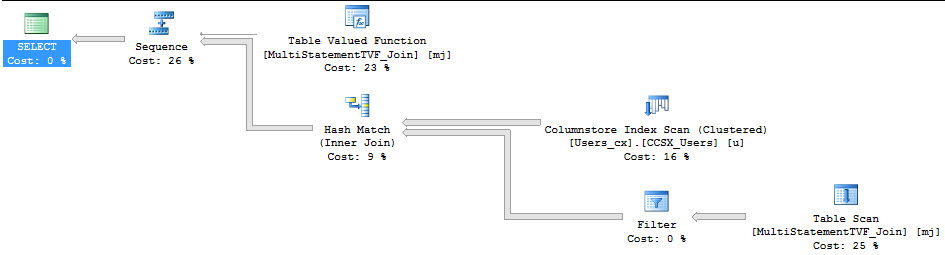
There’s a difference when we avoid selecting the column that references the scalar valued function.

So what’s the difference?

Crud and Crap

Well, both queries are forced to run serially because of the scalar valued function. That warning is surfaced in sp_BlizCache in not-decade-old versions of SQL Server.

But only the query that referenced the scalar valued function directly picked up the overhead of the row-by-row execution of the function. This is proven out in the ‘# Executions’ column.

The function was called 1000 times, not 2000 times. Our TOP 1000 view ran twice, so if the function had run for both, it would show 2000 executions.

There’s still a problem here

Both queries are forced to run serially. If you have a big bad view that does a lot of work, and performance is important to you, you probably won’t want it to run single-threaded because of a silly function.

This doesn’t give scalar valued functions (in general, or in views) a pass, but you can avoid some of the overhead by not referencing them when you don’t need to.

Thanks for reading!
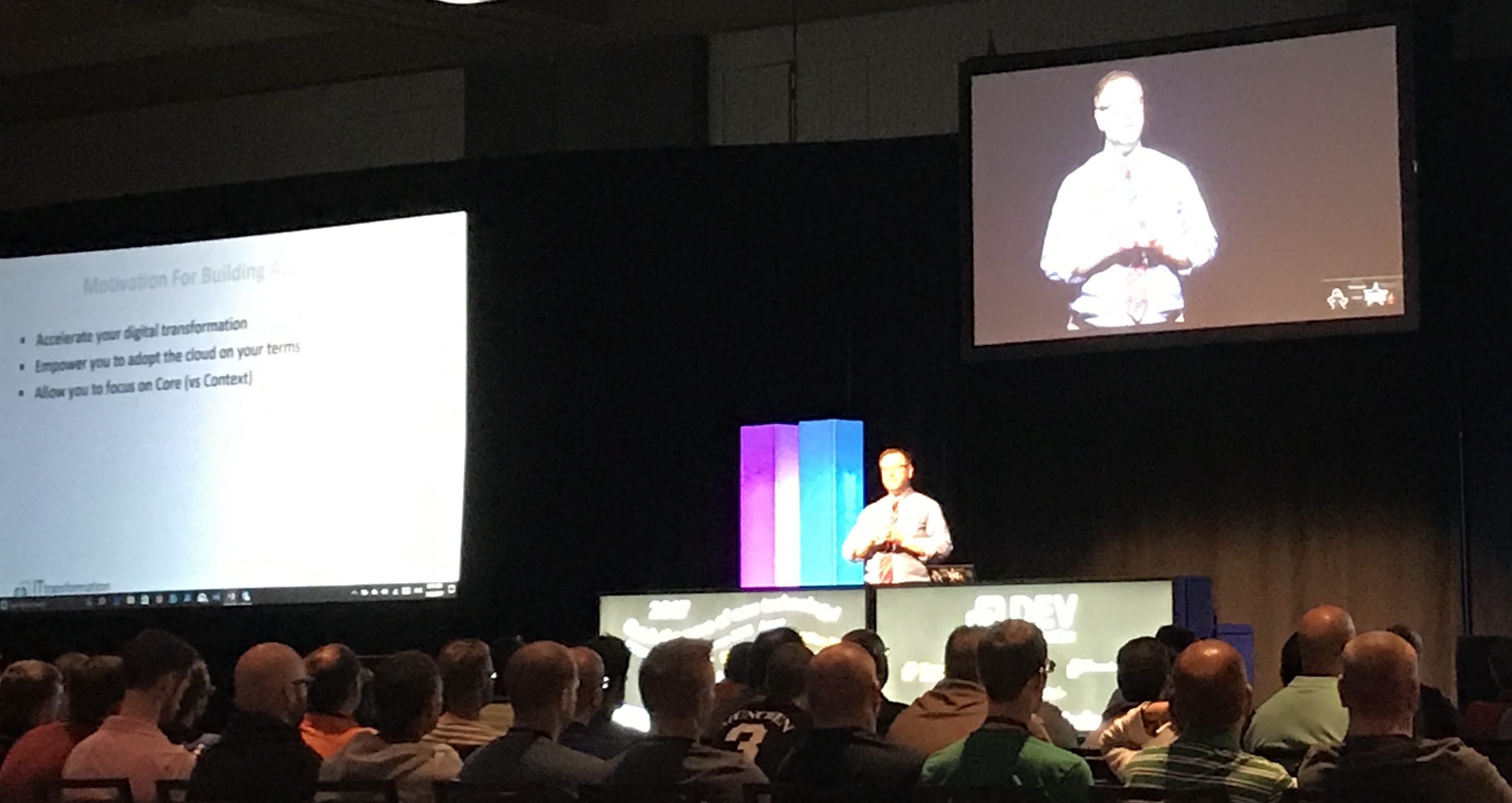

#DevIntersection Keynote Notes: Jeffrey Snover on Azure Stack

Microsoft Azure
7 Comments

Preface: data professionals, if you’re in a hurry, skip this post. Nothing in here is directly relevant to your career in the next couple of years. I found it interesting because it explains where Microsoft’s developer story is going, though.

At DevIntersection/SQLIntersection today, Microsoft’s Jeffrey Snover (@jsnover) talked about Azure Stack, something data professionals haven’t been hearing much about.

In a nutshell, Azure Stack means running parts of Microsoft Azure on-premises (including databases). Most companies aren’t going all-in with the cloud – they’re just moving some of their workloads up. Azure Stack is Microsoft hedging their bets, letting you use Azure services, but without handing data and control over to Microsoft.

Jeffrey Snover

Snover said, “The cloud is a model, not a location.” By that he means that you can get Azure stuff from:

  • Microsoft
  • Service providers (think Rackspace, for example)
  • In-house in your enterprise
  • And of course, a mix (with some of your stuff running on-premises, and some elsewhere, and hopefully it won’t matter where you move stuff to down the road)

Microsoft’s taking what has traditionally worked well for them – selling through partners and enterprises – and has traditionally not worked as well for their competitors (Amazon and Google.)

Buying and Deploying Azure Stack

To get Azure Stack, you pick a vendor (Cisco, Dell, HP, or Lenovo), pick your capacity, and the vendor brings the hardware in and wires it for you. “This is better because in the past, you bought your hardware from one place, the software from another place, the network from another – with Azure Stack, you pay one bill, and you get end to end support.”

Data professionals have seen – or at least heard – of this model before. It’s the same thing behind Microsoft’s Parallel Data Warehouse, their Fast Track Data Warehouse Architectures, and the Database Consolidation Appliance. Thing is…I bet most of you haven’t actually used one of those. The adoption rate in the SQL Server community was extremely low. I don’t see this as being really different.

In theory, Azure Stack’s one-throat-to-choke model appeals to enterprises and small businesses alike who’ve struggled with deployments. Oddly, though Snover talked about you being able to call anyone you wanted – the hardware vendor, Microsoft support, or your implementer – and they’ll all work together harmoniously in order to get you the right resolution. I know a lot of us have had tough experiences with that kind of support, but if there’s truly standardized hardware/software/networking, and really good support runbooks, it might work.

Thing is, I see a lot of sysadmins going in the opposite direction. They’re going for lowest-cost, commodity, interchangeable hardware running virtualization that means the hardware differentiators are meaningless. The idea of buying higher-cost sealed appliances is the old mainframe way, and I’m not sure that’s going to catch on.

Patching and Maintaining Azure Stack

Snover described on-premises Azure Stack maintenance as a low-skilled job. “We have a light come on to tell you what gear to replace, and you call for support to handle unusual problems.” In the same breath, he described SAN admins as low-skilled jobs, saying, “SAN admins don’t really log into servers and look at specific data. They just replace drives that go bad.” (I’m still kinda stunned at that diagnosis.)

Azure Stack patches itself, Snover said. Microsoft tests patches and makes sure they’re going to work well, and you don’t have to worry at all about what they patch, and when. It’s just going to work.

I know, dear reader, you expect me to make a lot of snide jokes here. Thing is, I don’t think I’ve heard a single horror story out of Azure PaaS patching. Yeah yeah, we’ve had our share of breaking news for on-premises SQL Server, but Microsoft’s doing a pretty good job of patching stuff (and probably catching/repairing deployment bugs) that they control directly. I don’t have a problem with this – it actually sounds great.

Building Apps (and Resumes) with Azure Stack

In a keynote room full of developers, Snover pitched Azure Stack as a resume builder. If you hone skills that only work with public clouds (Amazon & Google), then you can only work at companies willing to use the public cloud. However, if you hone Azure Stack skills, you can work at any company. (Errr, any company that uses Azure Stack. That’s where this argument kinda falls apart today, but in 5 years, this might well be different.)

I think he’s burying the lede here. Function-as-a-service (aka serverless) is going to eat conventional development alive over the coming decade. If you’re a Microsoft developer, I’d simply ignore Azure Stack altogether and focus exclusively on Azure Functions. Azure Stack includes the capability to run your Azure Functions on-premises (along with supporting services for file storage, load balancing, etc.)

I’m drinking the serverless Kool-Aid big time, so in my mind, the keynote would have been better spent with 80% of the time spent on Azure Functions, and 20% of the time explaining that you’ll be able to run your FaaS code on-premises with Azure Stack. That’s just me though.

There’s never been a time in my personal history where I wanted to go back and redo my career. I’m pretty happy where things ended up. However, I’m jealous of folks coming fresh out of school these days, ready to start using function-as-a-service computing. You can build anything and scale like crazy for really low down payments. It’s a great time to get started as a developer with a business idea.


This Year is Your Best Chance to Speak at the PASS Summit.

Me presenting, photo by John Martin

The call for speakers at the PASS Summit is open now.

As of this writing, there are less than 120 sessions submitted. To put that in perspective, in 2016, there were 758 sessions submitted overall, and about ~175 general session spots.

Your chances have never been better. Get in there, people. If you’ve spoken at 3 events – whether they’re SQLSaturdays, local user groups, online webcasts, CodeCamps, anything – you’ve met the minimum bar to entry.

If your session is approved, you get a free entry into the PASS Summit. Yes, you’ll still have to pay your airfare, hotel, and meals, but I bet your company might pony up for those fees if they know you’ve been accepted to speak at one of the industry’s most premier events. It’s a Big Deal.

You should do it. It will change your life. It certainly changed mine.

And if you’re not going to do it, I’m curious: why not?


[Video] Office Hours 2017/05/17 (With Transcriptions)

This week, Erik, Tara, and Richie discuss enforcing password expiration for SA logins, keeping things in sync between servers, development/prototyping missions of on-premise vs. cloud, ways of backing up databases, and more.

Here’s the video on YouTube:

You can register to attend next week’s Office Hours, or subscribe to our podcast to listen on the go.

Enjoy the Podcast?

Don’t miss an episode, subscribe via iTunes, Stitcher or RSS.
Leave us a review in iTunes

Office Hours Webcast – 2017-05-17


Should I enforce password expiration on the SA account?

Erik Darling: Richard wants to know, “if there are any issues with enforcing password expiration for SA logins; like something may stop working when the password expires or auditors want it turned on global.”

Tara Kizer: I don’t like it for accounts, or as the application, service count, because you’re going to have to set a reminder to fix these before it expires because you don’t want, you know, for it to expire at three in the morning on a weekend, and you know, suddenly somebody’s got to work on it. So I don’t like it, and at least when I’ve had auditors at previous companies, you can push back on those auditors and say we’re just not going to do this one.

Erik Darling: Yeah, for me, you know, it’s less of an issue because I don’t like letting anyone use SA anyway, I let apps use it, I don’t like anyone losing it. So like [crosstalk]

Tara Kizer: I guess the was specifically the SA login and I jumped into just, you know, authentication of – SQL authentication.

Erik Darling: Yeah, like if it was domain accounts I would say go to hell because what’s that going to change, if it’s a domain account? But for SA, like, I mean, I’m surprised that the auditor remark was that they want a password enforced when they usually just – usually auditors are like, we want this disabled.

Tara Kizer: Exactly, I don’t even use the SA account so that’s fine if it’s going to expire. Usually, we either disable it or rename it, so it’s a different name at least, but yeah disable it.

Erik Darling: Have like a proxy SA account [crosstalk] has a weird name, I don’t know…


Is anything cool happening at Google IO?

Erik Darling: Wes – well that’s not a SQL question, “can we spend the next 45 minutes praying to the Google gods for awesome stuff to be announced at 10PST?” Sure, you can spend [crosstalk]…

Tara Kizer: What’s going on? Is there a conference or something? What’s happening in the next 45 minutes?

Erik Darling: I don’t know, I’m unaware. Alright, it’s going to be a quick Office Hours.


Should I change this global temp stored proc?

Erik Darling: Kirk, Kirk is asking the question that he asked yesterday on dba.stackexchange, Idera analysis is suggesting that he use tempdb and he makes some ANSI set commands and then he alter a global temporary stored procedure. Kirk, Tara and I both left comments on your Stack Exchange question asking for more information. Please [crosstalk] I can’t tell you if you should make that – because I’m pretty sure it’s dynamics, that’s what those pound, pound ZDP things usually are, and unless you tell us what the rest of that stored procedure does, I don’t know if I can tell you to change it. It’s a silly question.

Tara Kizer: Probably ignore Idera here unless you’re in control of the software that is upgrading these because you’re not going to be able to make the changes.

Richie Rump: It’s GP dynamics.

Erik Darling: It is, so I don’t really know what you’re going to get out of changing that, what’s it going to do?

Tara Kizer: Probably can’t even change it.


How do you keep things in sync between servers?

Erik Darling: Michael says, “I have an ETL process that runs on two servers independently, each row gets an ID, what ways have you guys used to keep these in sync between two servers?”

Tara Kizer: I haven’t ever needed to keep things in sync between two servers, besides reporting and things like that, but you’re talking about something separate, but you know. If it’s an ID, it’s an identity column I suspect you’re referring to, the, I mean, what people usually do is they reserve identity values on one server and then reserve another set of identity values on the other server. Like negative numbers for one server and positive numbers, and then to keep them in sync, you just, you know, replicate between the two, bi-directional replication between the two, and there’d be no collisions.

Erik Darling: Yeah, I’d be curious what the use case is to have IDs synced by UTL processes on two servers. That seems like something that should be resolved during the, whatever, L to main data source you’re going to end up with. It doesn’t [crosstalk]

Richie Rump: I’ve always worked on systems where we have a single point of truth, right, and then that gets federated to all the other systems. Now, we may have one system and it may be on multiple servers, right, but that bit of data’s truth is on that server, and then that gets sent around all over the place wherever it needs to go. So yes, having it – is that for speed, I guess, maybe? Maybe there’s a lot of data coming in and you’ve got it being processed in two separate systems, then you need to zipper them back up, and at that point, what’s your alternate key to align them back up again? That’s about as best as I could gather for you, man.

Erik Darling: Yeah, I don’t even know what – since it’s running, it’s ETL running in two separate places, I don’t even know, like, how you would resolve, like what the resolution would be if IDs were mismatched, like what would happen [crosstalk]…

Richie Rump: well typically, I mean, you’d go to the natural key, right. The natural key would tell me if it’s the same or not, but not all data has a really good natural key, and if you don’t, well how am I going to zipper that up in with using some sort of made up ID that’s out of the ether of SQL Server?

Erik Darling: what’s the worst data you’ve ever dealt with? Coming up with something like relations for or something, what’s the worst data you’ve ever had to deal with?

Richie Rump: I think – I had to deal with a bunch of – like large data, like 60TB stuff, but that wasn’t bad in itself. I think the worst data I had to deal with was, I was working really early in my career, so it had to be over 20 years ago, and it was weather data coming from the government. And, you know they – I was given this blue book, right, this thin blue book. It looked like an exam book, and it had all these formats in it, and we had to figure out which format that you’re dealing with. And it was a ton of just flat-file data, and it didn’t even have an end-of-line, you know, the whole deal, and it’s…

Erik Darling: Yeah I’ve dealt with healthcare data like that, that was awful. It’s like the healthcare encoding, I forget what it’s called but there’s like specific encoding that you have to use for stuff that’s miserable, and when I was in market research, would get all these, like, this time zone and zip code information that was just, like, a nightmare. Like FIPS code and DUNS code…

Richie Rump: The codes are a nightmare.

Erik Darling: Oh it’s awful.

Richie Rump: The codes are a big problem of why we have our health problems today.

Erik Darling: Yeah, like all the electronic records – I don’t want to touch you, you’re gross.

Richie Rump: You gross, I don’t want to touch you.

Erik Darling: It’s all gross. Let’s talk about something else, let’s stop talking about gross data.


Are you celebrity DBAs?

Erik Darling: Michael asks, “he would love to hear the thoughts of the Office Hours celebrity DBAs”…

Richie Rump: I’m not a DBA [crosstalk] I am not one.

Erik Darling: Yeah, we don’t have any DBAs or celebrities.

Tara Kizer: You’re now a celebrity, people in Poland saying hi to you and…

Erik Darling: Oh, that’s one guy from Microsoft, that’s not people in Poland.

Tara Kizer: You’re not celebrity level. Richie and I still have to work towards that.

Richie Rump: Yeah, yeah…

Erik Darling: [crosstalk] Just blog more and you’ll soon reach the very heights of SQL Server…

Richie Rump: What I blog about people don’t want to hear, it’s like I get like ten comments. Brent is does, like, some crazy, you know, hey what do you think about this, and all of a sudden there’s 100 comments coming in.

Tara Kizer: you’ve got to leave a question at the end, that’s – some of mine that have a lot of comments I’m, you know, asking people.

Richie Rump: I don’t want to ask people anything. What do you think about Entity Framework? I don’t – I know what you think, okay, I know, I don’t want to hear it.

Erik Darling: That’s like 50 angry responses, no one [crosstalk]

Richie Rump: Only? Wow, it’s a good day.


Should I develop apps in the cloud or on-premises?

Erik Darling: Alright, let’s see here – anyway, forgot what I was doing… Michael says, oh boy, let’s see, “implementing SQL Server via on-premise database platforms versus Azure or cloud-based database platforms, things like development prototyping issues, lifecycle costs and administrative DBA considerations. Jeez, that’s like seven books.

Richie Rump: At least.

Erik Darling: That’s a lot. Richie, what would you say about the development and prototyping issues of on-premise versus cloud, if anything? You can tell me to screw myself if you want to…

Richie Rump: Well, off camera, because I don’t want to say it. It’s different, right. So it’s significantly different. Not happy, happy, I’m trying to click not happy, but…

Erik Darling: Tell me more.

Richie Rump: It’s – so in the cloud, you’re essentially, if you’re dealing with a pure cloud application that you’re going to build in there and you’re talking about services talking to one another, and there’s a whole different philosophy that you’re going to have to go and develop your application. If you’re talking about taking an application and then setting up some VMs and having that run in the cloud, I don’t consider that a cloud application, I consider that an on-prem application that’s running in the cloud. So there’s a lot of things that we say, it’s in the cloud but it’s not really in the cloud type stuff.

I haven’t really messed with SQL Server database a whole lot. I’ve actually messed with Postgres in the cloud a lot more than doing SQL database. So I’m going to have to punt over to you guys about some more of those questions.

Tara Kizer: All I know is that the – our clients that are in the cloud are having severe performance issues, especially severe slow I/O. They’re not spending enough money on, you know, what they’ve selected for their server and are experiencing pains because of it. It’s not cheap to get really good performance out of the cloud.

Erik Darling: If performance is your number one consideration, you should – you need to either be prepared to stay physical or spend a lot of money on upsized cloud instances, especially for what Tara’s talking about. The stiff that is at the biggest premium up in someone else’s computer is storage and networking. So as soon as, you know, you need to write data to disk or you need to move data from your server somewhere else, you can run into some tremendously slow speeds from both of those, avenues I guess we’ll call them. Just because it’s, you know, the cloud disk if you want, you know, a good fast storage… You know, like when we were messing with Google compute, it’s not only tied into the type of disk but also the size of the disk. So like a bigger SSD means it goes faster, like if you spin up a 50GB SSD you get worse than, like, SATA speeds. So there’s a whole lot of stuff you have to consider. It’s a little bit easier if you have a current physical workload that you can compare it to and compare metrics to and know. That makes it a little bit easier, but if you’re starting from scratch, then you know, you’re just going to have to be prepared to size-up regularly.

Richie Rump: Yeah I think, you know, if you could find a small application and then bring it up to the cloud and then do some learnings on that, maybe if it’s an application that’s not even in production, or whatever, and so that you can say how will this application work in the cloud. It’s really hard for us to understand if the cloud is right for you without understanding what your needs are. Does it need to be fast, does it – how much traffic does it get, I mean what’s the performance? I mean, there’s a lot of stuff that goes on here, and since you run the app and you run the system, probably best to get into it and figure out, hey, will the cloud work for this app or will the cloud work for another app? Is it worth for us to start prototyping this stuff out? And then you can – there’s hard numbers, right, so how much is this costing on-prem versus how much would this be costing us in cloud? There’s a ton of stuff there that, you know, needs to be sifted through.

Erik Darling: Yes, you know, and another thing that comes up always is staffing complexity, you know, up in the cloud depending on how you choose to, you know, provision things. You could either have, you know, the cloud taking care of backups and, you know, high availability for you and all that stuff. But I don’t know if that meets your needs, because, you know, if you need to offload reporting or something else then you still need to come up with your own sort of solutions there.

Richie Rump: Yeah, it’s still in its infancy, I mean, there’s still a lot of growing pains in the cloud. It’s a lot easier if you’re Greenfield development. If I’m building something new in the cloud, things get a lot easier as opposed to I have something old and I’m bringing it up. We could code around a lot of different issues because we’re actively developing as opposed to I have this thing, this app, that was built to have a server right next door to it, right, talking to one another, and now I’m bringing it up into the cloud and everything’s going to crap. Well, those servers aren’t near one another, that’s just kind of the way it works out there. And they may not always talk to one another, and you know, if a switch goes down in your data center, everything goes crazy. If a switch goes down in the cloud, they yawn, you know, and they move on.

Erik Darling: Yes, cool.


Is there a better way to do backups than the backup command?

Erik Darling: Renee asks a question that I find particularly odd. I think Tara’s going to screech at this one too. “Do you know about a way to backup databases besides SQL Server built-in functions, stuff like copying data files and log files and pasting them?”

Tara Kizer: What are you trying to do?

Erik Darling: Stop, put the database down, stop, I’m begging you. That’s stop with an A and 15 H’s, “Stahhhhhhhhhhhhhhhp.”

Tara Kizer: Whatever backup software you’re intending to use, make sure it’s VSS aware so that it does a, it quiesces the database files and when it does the snapshots so that the data files and the transaction log files are at the same moment in time so that you’re not doing a dirty snapshot. Also SAN snapshots, but again, it needs to be quiesced.

Erik Darling: We’re not even there yet. Renee is asking about copying and pasting data and log files.

Tara Kizer: I know.

Erik Darling: We’re not even at the [crosstalk] part yet. So a long time ago I inherited a process that was an archival process. And the archival process would go through and it would find databases no longer in use on this awful clown car of a server that had upwards of 5000 databases on it. It would take them offline and then it would copy and paste the data and log file – it wouldn’t copy and paste, but it would use an SSIS-like package to move stuff over.

And there were times when the data transfer would be interrupted or go awry in some other way, and so one of the files would be incorrect, and so you wouldn’t be able to bring the database online, because say like a data file would have some issue inside it or a log file would have some issue inside it. And so I really can’t recommend enough to not do that, at all, ever. Like, aside from the permissions issues nightmare that you face trying to do that, you can also screw yourself up in a lot of different ways. Even, you know, if you wanted to do something like zip the files up and then move them, it’s still a heck of a problem. You’re really – take a backup or, you know, use backup software from a known vendor who does things reliably. Don’t copy and paste, please.

Richie Rump: Keyword, reliably.

Erik Darling: Yeah, because another problem with copy and paste is if you have large databases and you use copy and paste, that data has to buffer somewhere and it’s going to be on your server. So you’re going to have this horrible RAM nightmare when you copy and paste. [crosstalk] It happened to me once using PowerShell. I used a move item command to try to move a 5TB database from one drive to another. Do you know what happened? The server ground to a halt for about 45 minutes. Nothing else going on in there, that circuit was closed.

Tara Kizer: [crosstalk] Snapshot or something?

Erik Darling: We didn’t have that available to us, unfortunately.

Richie Rump: So you’re telling me it’s – you ran, you ran so far away?


What’s your second favorite Flock of Seagulls song?

Erik Darling: I did, I did, I ran all night and day. What’s your second favorite A Flock of Seagulls song?

Richie Rump: They had something other than one?

Erik Darling: Yeah.

Richie Rump: Really?

Erik Darling: I swear to god. Well Ah-Ha is a real tough one to come up with a second favorite for. A Flock of Seagulls is easy; an astute observer of new wave music like yourself, Richie, should have a very easy time with your second favorite A Flock of Seagulls song.

Richie Rump: I’ve been in alt-rock the last two years, and the Hamilton’s soundtrack, so – bet everyone knows that.

Erik Darling: You have a new wave playlist, you showed it to me and we argued about U2 being on it.

Richie Rump: [crosstalk] That’s the early U2…

Erik Darling: I don’t know about that. But no second favorite Flock of Seagulls – Tara, how about you?

Richie Rump: I can’t think of one.

Tara Kizer: I love that genre of music but I don’t have the bands memorized, so I’d have to look up what are their songs. I know the band name and I definitely know their music.

Erik Darling: Alright, so Space Age Love Song is an obvious second favorite, in case anyone needs to know, in case anyone is curious out there, that’s the second best A Flock of Seagulls song.


When I cancel a query, do I need to roll it back, too?

Erik Darling: Alright, Alex Ozar, wow, he is a [crosstalk] Ozar. He executed a long complex query with a BEGIN TRAN and a rollback in management studio and he clicked cancel – yes…

Tara Kizer: he’s asking whether or not he has to issue the ROLLBACKTRAN command or if the cancel would roll it back.

Erik Darling: The cancel should kill the transaction and roll everything back, as far as I know.

Tara Kizer: You’ll know if you try to close the window. Try to close the window and SSMS is smart enough to know whether or not you still have an open transaction.

Erik Darling: Yes, or you could run sp_WhoIsActive and see if you have any – or if you’re too lazy to download WhoIsActive you could run DBCC OPENTRAN. [crosstalk] Like the 90s, just like the 90s.

Richie Rump: Or you could just run ROLLBACKTRAN yourself?

Tara Kizer: Yeah, go ahead and run it. It will just error if you don’t have an open transaction.

Erik Darling: Alright, let’s see here. Ronnie is asking something about logins. Ronnie, that’s a better question for Stack Exchange because I don’t see an error message or anything in there, so you’re just kind of asking us to blindly troubleshoot your login issues, which is impossible, sir. Unless it’s an SPN issue, in which case, go look for SQL soldier SPN things and you’ll find good information.


Does SQL Server need the log files after a clean shutdown?

Erik Darling: Nick is asking, “when SQL Server stops cleanly, is everything in RAM flushed to data files such that the log files don’t contain anything important anymore? Just curious, I promise I’m not backing anything up with copy and paste.” Yeah, I believe part of the shutdown process is checkpoints, right?

Tara Kizer: Yeah, so any uncommitted transactions in the transaction log file are rolled back and anything that was completed get applied. So, but if your transaction log files still has the transactions in them, because that’s going to be dependent on your recover model and if it is full or bulk-logged, then it’s going to depend on your log backup frequency. It’s not necessarily about SQL Server stopping and restarting; that stuff still exists in there.

Erik Darling: Yes, so one kind of interesting thing you’ll see when you start up SQL Server is, if you go in the error log and you look at the very beginning, you may see a whole bunch of messages like, X amount of transactions rolled forward in this database, and stuff like that. So that’s how you know SQL is keeping track of what’s going on. That’s all I have to say about that; I got nothing else on that one. You guys?

Tara Kizer: No.

Richie Rump: No that’s – oddly enough that’s all the questions we have too.

Erik Darling: That is, alright, so unless you guys really want to hang out and babble, we can just call it a day here.

Tara Kizer: Sounds good.

Erik Darling: Alright, cool. Thanks everyone for showing up, we are leaving five minutes early because we have no more questions, but thanks for stopping by and we’ll catch you next week.

Tara Kizer: Alright, bye.


What Do You Want to See in a Free Query Store Tool?

I love Query Plans

No seriously, I love digging into query plans. Even writing XQuery to dig into them in sp_BlitzCache. I was both honored and horrified to take over development of it from Jeremiah.

It’s a beast, but it’s my kind of beast. At around 4500 lines of code, when you want to make a change, well, &^%$ happens sometimes.

It used to make sense

When the plan cache was the only bar in town, that’s where you clinked your glasses.

It was okay that sometimes it was packed and sometimes it was dead and sometimes they were out of what you wanted to order.

With the advent of the Query Store, it was like, well, the plan cache got gentrified.

You didn’t have to worry about restarts anymore, there was some GUI love, and much more in the way of information persisted to views that you used to have to go gnarling through XML to pull out if you wanted to do any searching on your own.

All that XML processing was slow and expensive, too. I had a couple copy/paste incidents with Code From The Wild© on servers I was desperately hoping to find some problems on (in the process I probably created some problems).

Kick it around and talk some more

I’d been planning, and I’ve actually started and decided I hated, several iterations of a stored procedure to go at Query Store. Due to Other Things® coming up and all the usual excuses (not to mention the perilously low adoption rates for versions of SQL that actually have Query Store on them — we just don’t have much 2016 work coming through the door) I kept putting it off.

But then vNext/2017 happened.

And that damn Wait Stats DMV.

And now I’m just a little too excited about getting something written.

But I’d love to hear from you, first.

What questions would YOU like to ask the Query Store?

Best Laid Plans

My vision for the moment is to bring a lot of the same information and warnings out of plans, and probably the same options for sorting (CPU, reads, etc.), but with the opportunity to ask some more interesting questions up front.

This doesn’t mean sp_BlitzCache is going away. As long as there’s a plan cache, and people using versions of SQL prior to 2016, well, there will probably be a need for it. At least until they’re all out of support. Ho ho ho, ha ha ha.

It also gives me a chance to tame some of that absolutely insane dynamic SQL.

So, please, if there’s anything out there you’d like to see, figure out if it’s possible, whatever, leave a comment.

I’ll be here forever, writing XQuery and dynamic SQL, so you don’t have to.


Do SQL Server 2017’s Adaptive Joins Work with Cross Apply or Exists?

I think I’ve mentioned that the most fun part of new features is testing them with old ideas to see how they react.

It occurred to me that if Adaptive Joins didn’t work with APPLY, I might cry.

So, here goes nothin’!

Cross

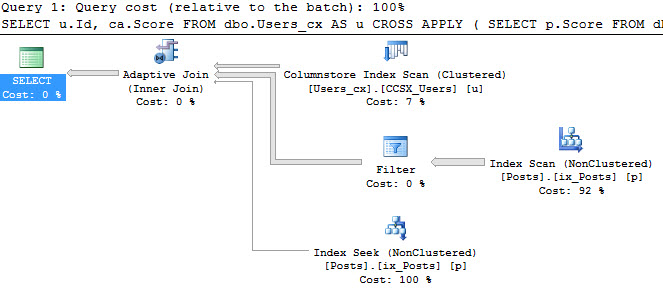
Simple Cross Apply…ies can use Adaptive Joins, though at first glance there’s nothing special or different about this plan from the regular Inner Join version.

Backwards pants

I do have to point out that Cross Apply used to only be implemented as a Nested Loops Join. I learned that many years ago from one of the best articles written about Cross Apply by Paul White. That changed recently — it’s possible to see it implemented with a Hash Join in at least 2016. I’ve seen it crop up in Cross Apply queries without a TOP operator.

It may have been in previous versions, but… Yeah. ColumnStore before 2016.

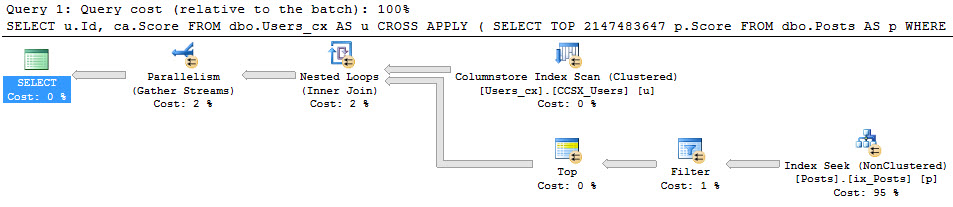
Anyway, the Cross Apply with a TOP operator does appear to skip the Adaptive Join and favor Parallel Nested Loops, as you can see in this particularly Machanic-y query.

PNL4LYFE

Outer

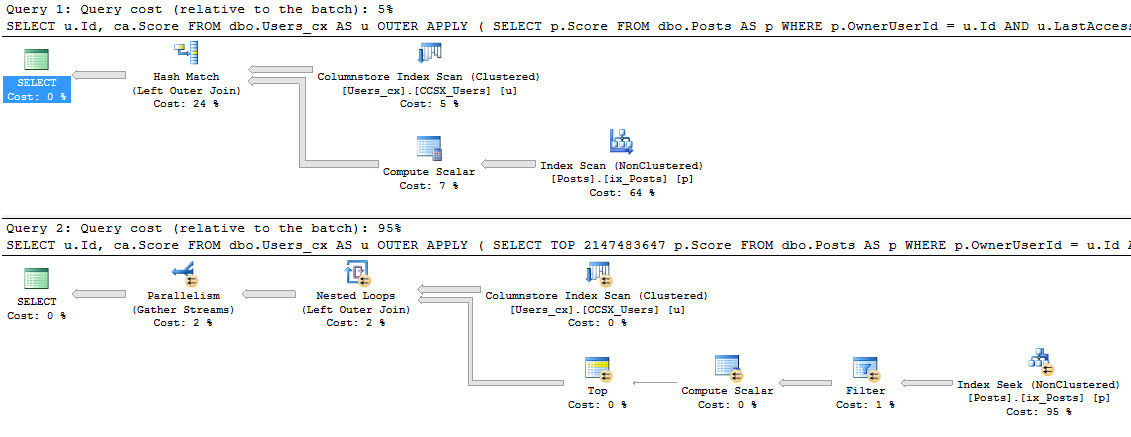
Outer Apply suffers a rather gruesome fate, where neither implementation gets an Adaptive Join.

No one likes you anyway

Sad face. I still haven’t gotten anything to show up in my Extended Events session for why Adaptive Joins were skipped for certain queries.


Exists

Exists not only doesn’t get an Adaptive Join, but… MY EXTENDED EVENTS SESSION FINALLY SORT OF TELLS ME WHY!

I mean, it doesn’t make any sense, but it’s there.

Like your alcoholic aunt.

I’m going to skip showing you a non-Adaptive plan, because you’ve seen enough of those.

Here’s what the Extended Events session shows. The query in the XE session and the query I ran are slightly different because I was testing different permutations (I paid like $7 for that word) to see if it made any difference.

Ho hum.

Got that? eajsrUnMatchedOuter.

I’m going to say that the next time a bartender tries to cut me off.

Not Exists

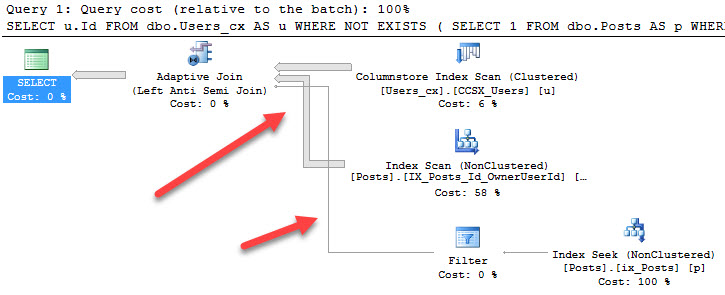
Would you believe that Not Exists gets an Adaptive Join, but Exists doesn’t?

And… would you believe that there’s a bug in the query plan that makes the lines all woogy?

Fire Hydrant

Sir, I’m going to need you to step out of the vehicle.

Territory

I just love looking at and experimenting with this stuff! I hope you’ve been enjoying reading about it.

Thanks for still doing that!


Building a Faux PaaS, Part 2: Choosing and Testing a Cloud Vendor

Background: I’m working with kCura to build a Faux PaaS: something akin to Microsoft’s Azure SQL DB, but internally managed. In Part 1 of this series, I talked about why we’re building it, and today, I’ll talk about where.

The database team rarely gets to pick the cloud vendor.

The choice between Amazon, Google, and Microsoft is a very big decision involving:

  • What services you need – because not every cloud vendor offers every service, and some vendors offer killer advantages in specific services
  • Pricing, discounts, licensing, and contracting – classic example being Microsoft’s willingness to wheel and deal to get enterprise customers up into Azure
  • Datacenter availability – because sometimes for legal reasons, you need a very specific service in a specific country or location

For this project, for reasons outside of the DBA team’s scope, the SQL Servers had to live in Microsoft Azure. However, I’m going to try to write this series for as many readers as possible (even on-premises and hybrid folks.)

So I need you, dear reader, to understand that in this series:

  • The general strategies will be relevant to all cloud providers, and even on-premises private cloud hosting, but
  • The specific techniques are for Microsoft Azure VMs only, and
  • The exact implementation details are specific to one client’s business requirements, at one frozen moment in time.

Design starts with your RPO and RTO.

Recovery Point Objective (RPO) is how much data the business is willing to lose.

Recovery Time Objective (RTO) is how long the business is willing to be down.

These two numbers, multiplied across a few different scenarios, are the very first thing you gotta consider when doing a new SQL Server implementation. You’ve gotta make sure you’re going to be able to restore databases on a timeline that works for the business. As a refresher, you’re going to want to have read these posts before going further:

But ironically, the business can’t give you RPO/RTO numbers set in stone. During the course of a project, as costs, requirements, and capabilities change, you should expect the RPO/RTO numbers to change repeatedly. (And that’s fine.)

However, two RTO numbers are really important, and the business needs to give me ballpark ranges as early as possible. We take the HA/DR Planning Worksheet from our free First Responder Kit, and we discuss what happens when we have database corruption or oops queries:

RPO/RTO for Corruption and OOPS Queries

In the event of database corruption, if the business wants near-zero downtime, we’re going to need automatic page repair for starters, which means we need database mirroring or Always On Availability Groups. However, there are some kinds of corruption that even automatic page repair can’t repair, and you need to plan your strategy for that ahead of time.

The much harder one is “oops” queries because SQL Server can’t protect you from those.

How bad is a really bad “Oops” query?

Folks always think of a DELETE without a WHERE clause, but that’s by no means a bad query. That’s fairly easy to recover from. Instead, let me tell you a more diabolical story. The times, tables, and names have been changed to protect the innocent.

4:30 PM: Dan the DBA is doing a deployment. He’d tested these scripts before going live, but something seems to be going wrong in production. He needs to run a script on each of the 200+ databases on the server, but some of them are failing, and he’s not sure why yet.

4:45 PM: He realizes some of the tables have data that isn’t supposed to be there – test data that got migrated during a prior deployment. Some of his scripts are violating unique key constraints. He decides to get the test data out of all of the databases.

5:00 PM: He’s still struggling, and the outage window is ending now. He gives managers the green light to let people into the database because he believes he only has to delete old testing data.

5:05 PM: Customers start putting data into the databases again. Meanwhile, our intrepid DBA is automating the data cleanup work by running it with sp_msforeachdb, a stored proc he thinks he’s pretty good with.

5:15 PM: sp_msforeachdb finishes, and Dan notices a bunch of errors. He starts troubleshooting. Customers are still putting live data into the databases.

5:30 PM: Dan realizes his error – his command wasn’t quite right, and he’s effectively destroyed data in all of the live databases, and even worse, he doesn’t know exactly which rows were involved. (He’ll be able to figure it out by going through logs, but it’s going to take hours.)

5:35 PM: Dan alerts management, who then has to decide:

  • Should we get everybody out of the app?
  • Should we restore the databases?
  • If so, what point in time do we restore to?
  • When does the RTO clock start? (Some folks will say it’s already started at 5:15 PM, when Dan’s query trashed live customer data, because customers may already be noticing invalid data.)

That’s why restore speed is really important.

If the business’s service level agreements (SLAs) may involve service refunds, attorneys, contracts, etc, then these details are important. I can’t help with the business decisions, but I can build a SQL Server infrastructure to match their goals. They’ve just gotta tell me what the goals are.

If the RTO for that scenario is, say, X hours, then get a load of this:

I can’t put more data on a server than I can restore in X hours.

Good techniques from the bad robot

Relational databases have non-restore features to protect you from corruption, failed service packs, or broken VMs, but if Dan drops a table, we’re screwed. I’m not saying we always have to protect from Dan – and in most projects, the business actually chooses not to. Businesses say things like, “Well, we’ll make sure to be real good and careful around the database server. We’ll be sober when we touch that one.”

In this project, we needed better protection than that.

That means something special for cloud projects. In the cloud:

  • Storage throughput is expensive
  • Network throughput is expensive
  • Often, backup targets are slow

Believe it or not, backup and restore speed often present the very first bottleneck that we have to overcome for performance reasons. That’s why the techniques in Erik’s white paper, SQL Server Performance Tuning in Google Compute Engine, comes in so handy for all of the new-build projects that we do.

In this particular project, the requirements included:

  • Microsoft Azure as the IaaS vendor
  • A specific list of data centers (which determines the types of instances available for us – Azure doesn’t offer the same instance types in every data center)
  • A set of RPO/RTO requirements

And the question was, “How can we meet our RPO/RTO goals and query performance goals in Azure VMs while keeping costs under control?”

Start by testing the cloud vendor’s restore speeds.

We set about the first set of tests to determine:

  • What’s the fastest place to write backups?
  • What’s the fastest place to host data & log files, in terms of the fastest restore speeds?
  • How much data can we restore onto a given instance type within our RTO window?
  • Given that capacity, what’s the effective cost per terabyte, per month, of that instance type?

We built this testing process as a repeatable methodology that the DBA/DevOps teams could iterate over. In the cloud, all this stuff changes over time:

  • RPO and RTO – after all, the business may suddenly say, “What would it cost to achieve a 30-minute RTO?”
  • Data center acceptability for the business (like we suddenly have to add servers in Korea)
  • VM instance type availability in a given data center
  • VM and storage speeds – you may fall victim to noisy neighbor syndrome, even within your own cloud account due to shared resource utilization, so we’re working on sp_BlitzBackups to monitor RPO/RTO

Yes, you can performance tune restores.

There’s a catch: you have to do it ahead of time, not after the fact. Once the disaster has started, it’s too late to start performance tuning.

Write your backups to a location that helps restores go faster. Traditional DBAs will hear that and think, “Ah, he’s telling me to write to a fast file server.” Think bigger: does the cloud vendor have a file-server-as-a-service with faster performance than an old-school VM file server? Do they have something that can handle automatic file replication across multiple data centers, without you having to manage anything? In Azure’s case, this is Azure Blob Storage.

Tune your backup files for restore speed. The most common backup tuning tip is that striping your backups across multiple files can make backups faster, but it holds true for restores, too. Interestingly, during my testing for this project, we saw different sweet spots for restore speed than backup speed. Striping backups across 20 files meant slower backups than 8 files, but at restore time, the 20 file backups restored faster than the 8-file ones. (The exact file numbers can vary by backup target, number of cores, number of drives, etc.) We also saw different throughput for different numbers of Azure Blob Storage accounts: for example, backing up to 8 files on the same storage account sucked, but backing up to 8 files on 8 different storage accounts was much faster. Like so many infrastructure decisions, it comes down to your willingness to trade implementation complexity for performance. Easy is rarely fast. Along those same lines, here’s a ton of great resources around backup performance tuning. (Just know that you have to test the restore speed on those techniques, too.)

In an emergency, spin up a replacement instance with phenomenally fast storage. If you’re under the gun to restore fast, you can leverage the flexibility of a cloud by throwing down your credit card and getting the fastest instance money can buy. It’s easier said than done, though: long before disaster strikes, you need to do load testing on the various VM types to know which one is the fastest for your needs. Do you need high network throughput to copy large backups from a UNC path? Or do you need all solid state storage underneath? Is your VM type fast enough to leverage that much storage? Would your app support splitting the databases across multiple servers to get them back online faster, but with different connection strings? The cloud offers a lot of design options, but you have to think them through ahead of time.

Implement tiering: different availability levels. Put the most critical databases on fast storage and make sure they get restored first. Then, after the most critical stuff is online, restore less-critical databases onto slower storage. For more about this technique, read my post Tiering kCura Relativity Databases (Or Any SaaS Product).

Try file snapshot backups. If you host your databases on Azure blob storage, you can leverage file snapshots to take nearly-instant backups. Pay close attention to the limitations on that page, though, in particular the frequency of backups, where the backup files are located, and the performance impacts. Plus, check out the limitations on storing data files in Azure blobs, like the storage-account-level security, and the inability to add files to a database in an AG. For a bunch of those reasons, this feature wasn’t a good fit for this particular project, but I really like where it’s going in the future. Just keep an eye on the performance limits and pricing.

As you test, measure and document your results.

For this project, we built a shared spreadsheet with:

Instance-level details:

  • Instance type (L16S, H16mr, etc)
  • Spec (cores/CPU speeds/memory)
  • Network speed (because this definitely impacts restores)
  • Region (because not all instance types are available in all data centers, but we wanted to test in case we saw a dramatic difference and needed to talk to our MS rep about getting a specific instance type added to a region)
  • Instance cost per month, without SQL licensing

Storage details:

  • Location (ephemeral or persistent)
  • # of disks, total capacity, cost per month
  • Encryption
  • Caching settings (Azure VMs use caching by default, using local ephemeral storage, and on some instance types, you can set the caching to off, read-only, or read-write)

Performance details:

  • Synthetic tests (like CrystalDiskMark, a quick sanity check on whether the VM was OK)
  • Backup tests, MB/sec – to different destinations (nul, local ephemeral, persistent, blob storage, UNC paths) and with different file quantities (1, 4, 8, etc.)
  • Restore tests, MB/sec – with same permutations as above

Let’s see some raw numbers.

See the test data in Google Sheets

Here’s an abridged version of the test results. (We actually ran more tests than that, but it’s a good starting point to show the methodology.)

Make sure to read the notes at the bottom. The Azure costs are rack rates, but the licensing number is just a rough ballpark – it’s not this company’s licensing rates, nor is it probably yours, but you need to fill in yours from your licensing agreement. (To edit the sheet, you’ll need to make your own copy of the file. You’re welcome to do that, by the way.)

Note 7 points you here to this blog post because some of these numbers need more explanations:

Column AF, Max data we can restore in RTO from Cost Drivers, in TB: if we have, say, 2 hours to do a restore, then how much data can we restore on this server in those 2 hours? This is calculated using the restore speeds from column AE, network restores of a 20-file backup. That’s probably not going to be the final backup/restore config – we still have performance tuning to do on backups & restores. We wanted to get the machine type first, then work on tuning for that particular machine type.

Note that as you adjust RTO – say, down to 30 minutes (.5) or 24 hours, this changes the hosting sweet spot. At a 30-minute RTO, the H-series makes more sense, and at a 4-8 hour RTO, the DS-series makes more sense.

Column AG, Lesser of max restore, vs storage capacity: you might have blazing-fast restore speeds, but a really tiny drive. (Hello, H-series.) In that case, we can’t just use column AF as your total hosting capacity on this instance type because the drive space is limited. On the flip side, you might have a huge drive, but dead-slow restore speeds. (We ran into that right away with magnetic storage, for example.)

Column AJ, Cost per TB per month: think of this as restorable cost. The instance might have 10TB of storage, but if you can only restore 1TB of data inside your RTO window, then the cost is calculated with the 1TB number.

Note that in this spreadsheet, I’m only calculating costs for each type of storage individually, not the sum total of possible storage on a given server. For example, in the LS series, you could use both the ephemeral AND premium managed storage, and possibly get higher throughput during restores (assuming you weren’t network-bottlenecked), and get better bang for the buck.

This kind of raw data helps you answer questions.

We reviewed the full spreadsheet (more tests, more instance types, more backup targets, etc) to figure out stuff like:

  • Should we host the databases in ephemeral or persistent storage?
  • Given that choice, what’s the right instance type with the best bang for the buck?
  • If we change the RTO goal, how does that change the cost-per-terabyte equation?
  • Should we back up to local (ephemeral) drives to finish backups faster?
  • Should we restore directly from a network share, or copy/pre-stage backups locally first?

“But where are the easy answers?”

I know what you’re thinking, dear reader:
“DAMMIT, BRENT, WHAT ARE THE ANSWERS?
CAN’T YOU GIVE ME A TL;DR FOR THIS?”

No, because remember: the exact implementation details are specific to one client’s business requirements, at one moment in time. I’m teaching you how to fish rather than giving you the fish, especially because the fish will quite possibly be spoiled and smell terrible by the time you get around to reading this post. (Seriously, we even made assumptions based on things Microsoft says they’ll bring to market at various times during the project’s deployment.)

The goal here wasn’t to test Amazon, Google, and Microsoft and then determine a winner.

The business dictates things like the cloud vendor, and then your job is to test the different hosting options inside that vendor to choose the right instance, storage, and backup design for one project’s needs. And now, over 2500 words later, hopefully you’ve got some insight as to how you’d do it for your own business requirements!

Continue Reading Part 3:
What the Ideal Engineering Team Looks Like


How Scalar Functions Can Stop You From Getting Adaptive Joins

If you’re not aware of the performance problems scalar valued functions can (and often do) cause, well, uh… click here. We’ll talk in a few days.

If you are, and you’re worried about them crapping on Adaptive Joins, follow along.

The big question I had is if various uses of scalar valued functions would inhibit Adaptive Joins, and it turns out they’re a lot like non-SARGable queries.

Starting with a simple function that doesn’t touch anything.

We can all agree that it doesn’t access any data and just returns the INT max. Now some queries that call it!

If you’re the kind of monster who puts scalar functions in WHERE clauses, you deserve whatever you get. That’s like squatting in high heels.

Not that I’ve ever squatted in high heels.

Alright look, what’s that Brent says? I was young and I needed the money?

Let’s forget about last week.

Query Plans!

By this point, you’ve seen enough pictures of Adaptive Join plans. I’ll skip right to the plan that doesn’t use one.

Ew

It’s for the last query we ran, with the scalar function in the WHERE clause with a predicate on the Posts table.

See, this isn’t SARGable either (and no, SCHEMABINDING doesn’t change this). When a predicate isn’t SARGable, you take away an index seek as an access choice. You don’t see too many Nested Loops with an index scan on the other end, do you?

No.

So there you go. It’s not the function itself that bops our Adaptive Join on the head, but the lack of SARGability.

Thanks for reading!


SQL Server 2017: Interleaved MSTVFs Vs Inline Table Valued Functions

But is it faster?

Now, I know. There are very few “always” things out there in SQL Server. This is also true for functions.

A lot of the time — I might even say most of the time, inline table valued functions are going to be faster that scalar and multi statement table valued functions.

Before you huff and puff, I’ve seen cases where a scalar valued function was faster than either other kind of function.

Of course, Jeff Moden was involved, so there is clearly black magic at play here. Or maybe just some more beer popsicles.

Unfortunately… Or, I don’t know, maybe fortunately, Microsoft doesn’t seem to have been putting much development time into improving the performance characteristics of scalar valued functions. Just little bits.

Us vs Them

Let’s get back to the point at hand, though. MSTVFs have been improved in certain circumstances. Inline table valued functions are the reigning champions.

How do they stack up?

I’m going to take my best-timed MSTVF with Interleaved Execution, and put it up against an inline table valued function.

Here are my functions.

Here are my queries.

Start your (relational) engines

First, here’s are the stats on my MSTVF


Table 'Users_cx'. Scan count 1, logical reads 0, physical reads 0, read-ahead reads 0, lob logical reads 626, lob physical reads 0, lob read-ahead reads 0.
Table 'Users_cx'. Segment reads 1, segment skipped 0.
Table '#B42CA826'. Scan count 1, logical reads 754, physical reads 0, read-ahead reads 0, lob logical reads 0, lob physical reads 0, lob read-ahead reads 0.

SQL Server Execution Times:
CPU time = 1117 ms, elapsed time = 1122 ms.

Here’s the execution plan (I collected this separately from getting the CPU timing).

No funny business

Second, here are the stats on my inline table valued function.


Table 'Users_cx'. Scan count 1, logical reads 0, physical reads 0, read-ahead reads 0, lob logical reads 626, lob physical reads 0, lob read-ahead reads 0.
Table 'Users_cx'. Segment reads 1, segment skipped 0.
Table 'Badges'. Scan count 1, logical reads 1759, physical reads 0, read-ahead reads 0, lob logical reads 0, lob physical reads 0, lob read-ahead reads 0.

SQL Server Execution Times:
CPU time = 250 ms, elapsed time = 271 ms.

Here’s the execution plan (again, collected this separately from getting the CPU timing).

Double filtered for your pleasure

Well then

In this case, the inline table valued function wiped the floor with the MSTVF, even with Interleaved Execution.

Obviously there’s overhead dumping that many rows into a table variable prior to performing the join, but hey, if you’re dumping enough rows in a MSTVF to care about enhanced cardinality estimation…

Picture my eyebrows.

Picture them raising.

Thanks for reading!

SQL Server 2017: Interleaved Execution for MSTVFs

What I don’t want you to take away from this

Is that I want you to start using Multi Statement Table Valued Functions all over the place. There are still problems with them.

  • Backed by table variables
  • Lots of hidden I/O cost
  • Number of executions may surprise you

One important current limitation (May-ish of 2017) is that Interleaved Execution doesn’t happen when you use MSTVFs with Cross Apply. It’s only for direct Joins to MSTVFs as far as I can see.

But does it improve anything?

Well, kinda.

Let’s get physical

I’ve got this stinker over here. It stinks. But it gets me where I’m going.

I wanted to run different kinds of queries to test things, because, well Adaptive Joins require Batch mode processing which right now is limited to ColumnStore indexes.

“Good” news: Interleaved Execution doesn’t require a ColumnStore index.

Confusing news: They still get called Adaptive Joins.

Yeah. Words. More pictures.

Old plans

I lied. More words first.

Dropping compatibility levels down to 130 (I know, down to 130, what a savage) pulls Interleaved Execution out of the mix.

Running against both a ColumnStore index version of Users and a Row Store version…

Here’s the stats time and IO results.


Table 'Users_cx'. Scan count 1, logical reads 0, physical reads 0, read-ahead reads 0, lob logical reads 626, lob physical reads 0, lob read-ahead reads 0.
Table 'Users_cx'. Segment reads 1, segment skipped 0.
Table '#AC8B865E'. Scan count 1, logical reads 754, physical reads 0, read-ahead reads 0, lob logical reads 0, lob physical reads 0, lob read-ahead reads 0.
SQL Server Execution Times:
CPU time = 1250 ms, elapsed time = 1996 ms.


Table 'Users'. Scan count 0, logical reads 888887, physical reads 0, read-ahead reads 6, lob logical reads 0, lob physical reads 0, lob read-ahead reads 0.
Table '#AC8B865E'. Scan count 1, logical reads 754, physical reads 0, read-ahead reads 0, lob logical reads 0, lob physical reads 0, lob read-ahead reads 0.
SQL Server Execution Times:
CPU time = 2344 ms, elapsed time = 2742 ms.

Alright, pictures.

But you say he’s just a friend

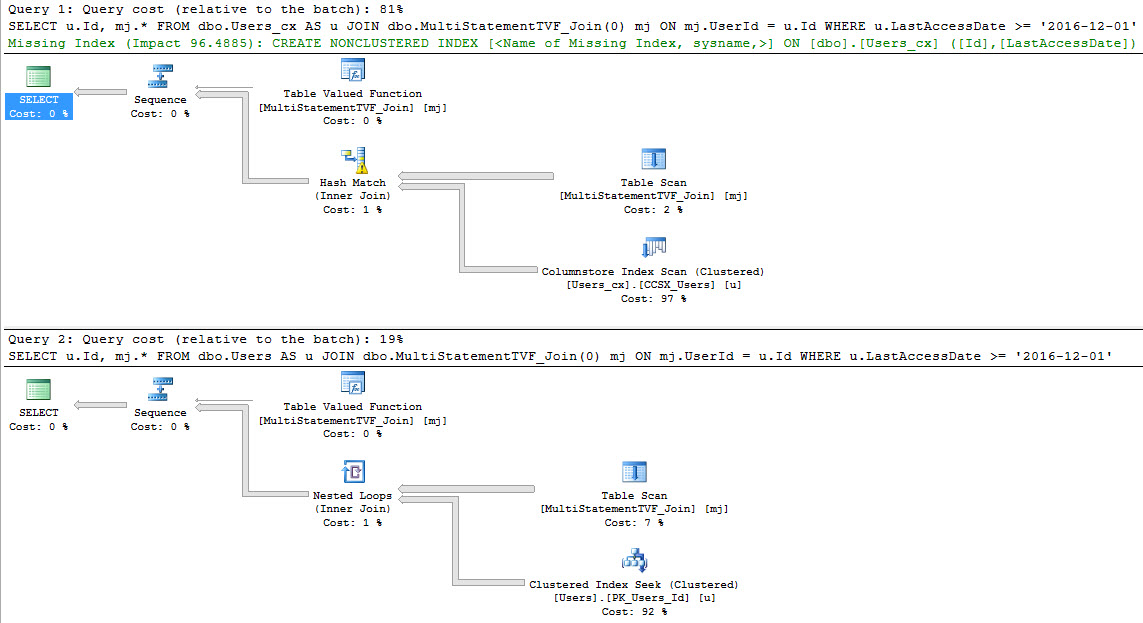
Isn’t it weird and confusing when you get these missing index requests on queries that use ColumnStore indexes? I can’t figure out who’s wrong.

Are my queries that bad? Does the optimizer not have a rule about this? Did it break the rule because my query is so bad?

Why… why do you wanna have a different index, here, SQL? What’s on your mind?

What if I add the index?

EVERYTHING GETS WORSE

The plan looks just like the Row Store plan from before, and has the same stats time and IO pattern.

Lesson learned: Stop listening to missing index requests when you’re using ColumnStore.

New Plans

Calgon, take me away.


Table 'Users_cx'. Scan count 1, logical reads 0, physical reads 0, read-ahead reads 0, lob logical reads 626, lob physical reads 0, lob read-ahead reads 0.
Table 'Users_cx'. Segment reads 1, segment skipped 0.
Table '#B1503B7B'. Scan count 1, logical reads 754, physical reads 0, read-ahead reads 0, lob logical reads 0, lob physical reads 0, lob read-ahead reads 0.
SQL Server Execution Times:
CPU time = 1488 ms, elapsed time = 1633 ms.


Table 'Workfile'. Scan count 0, logical reads 0, physical reads 0, read-ahead reads 0, lob logical reads 0, lob physical reads 0, lob read-ahead reads 0.
Table 'Worktable'. Scan count 0, logical reads 0, physical reads 0, read-ahead reads 0, lob logical reads 0, lob physical reads 0, lob read-ahead reads 0.
Table '#B1503B7B'. Scan count 1, logical reads 754, physical reads 0, read-ahead reads 0, lob logical reads 0, lob physical reads 0, lob read-ahead reads 0.
Table 'Users'. Scan count 1, logical reads 145, physical reads 0, read-ahead reads 0, lob logical reads 0, lob physical reads 0, lob read-ahead reads 0.
SQL Server Execution Times:
CPU time = 1530 ms, elapsed time = 1592 ms.

Exciting already! The ColumnStore index is right about in the same place, but the RowStore index is much faster.

But why?

Choices, choices

This part is pretty cool!

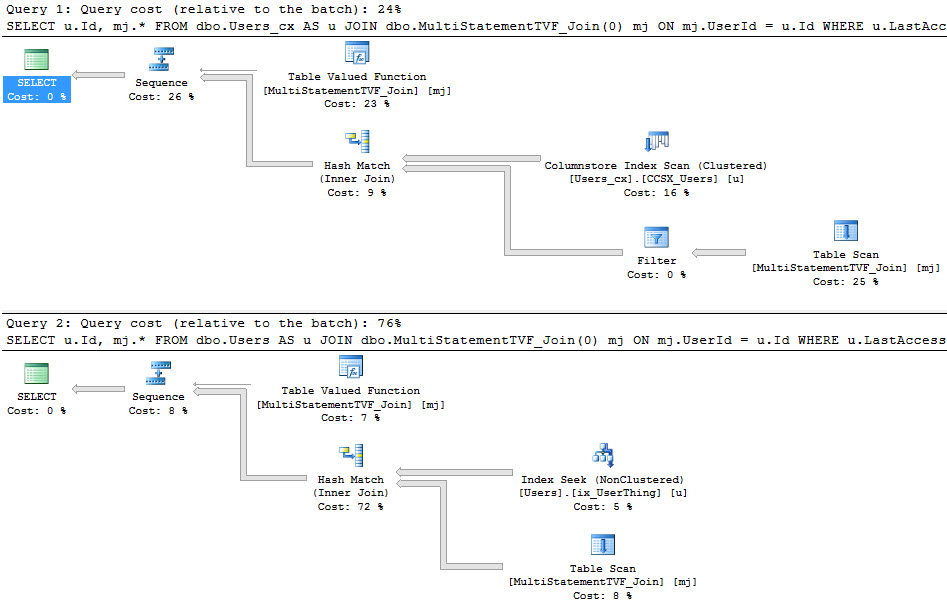
In the first plan, the optimizer chooses the ColumnStore index over the nonclustered index that it chose in compat level 130.

This plan is back to where it was before, and I’m totally cool with that. Avoiding bad choices is just as good as making good choices.

I think. I never took an ethics class, so whatever.

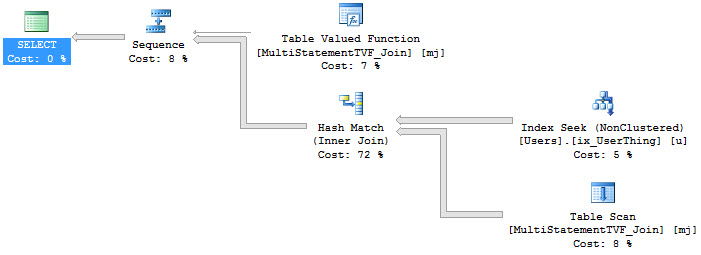
In the second plan, there’s yet another new index choice, and the cpu and IO profile is down to being competitive with the ColumnStore index query.

The optimizer realized that with more than 100 rows coming out of the MSTVF, it might be a good idea to use a more efficient index than the PK/CX. Another good move. Way to go, optimizer. Exactly how many rows did it estimate?

The Operators

An Interleaved Execution plan doesn’t have any special operators, but it does have special operator properties.

Ain’t nothin special

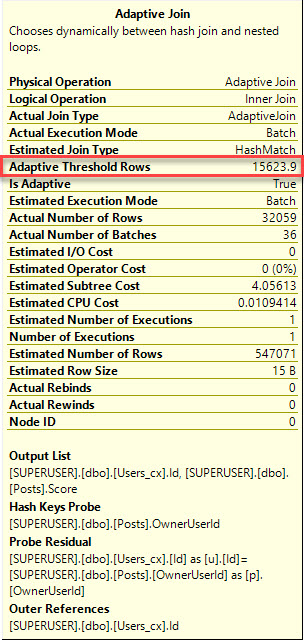
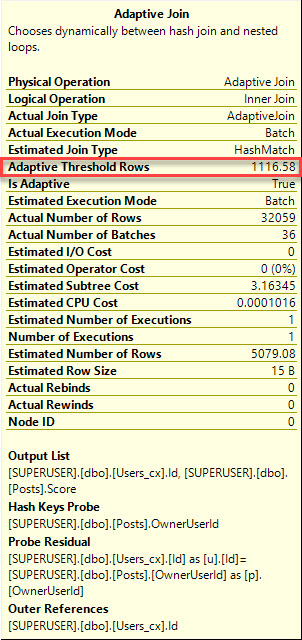
Hovering over the topmost Table Valued Function operator, that’s where some of the new properties live.

I promise this will be in sp_BlitzCache

Even though this is all in Row mode, the Join type is Adaptive. I’m guessing that Adaptive Join is going to be an umbrella term for new reactive optimizations.

Maybe. I’m guessing.

One thing you want to pay extra attention to here is the estimated number of rows.

It’s not 100 anymore.

It’s the actual number of rows that end up in the table variable.

Ain’t that somethin?

The bottom Table Valued Function operator doesn’t have the Interleaved property, but it does show that it’s an Adaptive Join, and we have the correct estimate again.

ooh barracuda

Not bad

If you have a lot of MSTVFs in legacy code that you don’t have time to untangle, SQL Server 2017 could save you a ton of time.

This is a huge improvement over what you used to get out of MSTVFs — I wonder if something similar might be coming to regular old Table Variables in the near future?

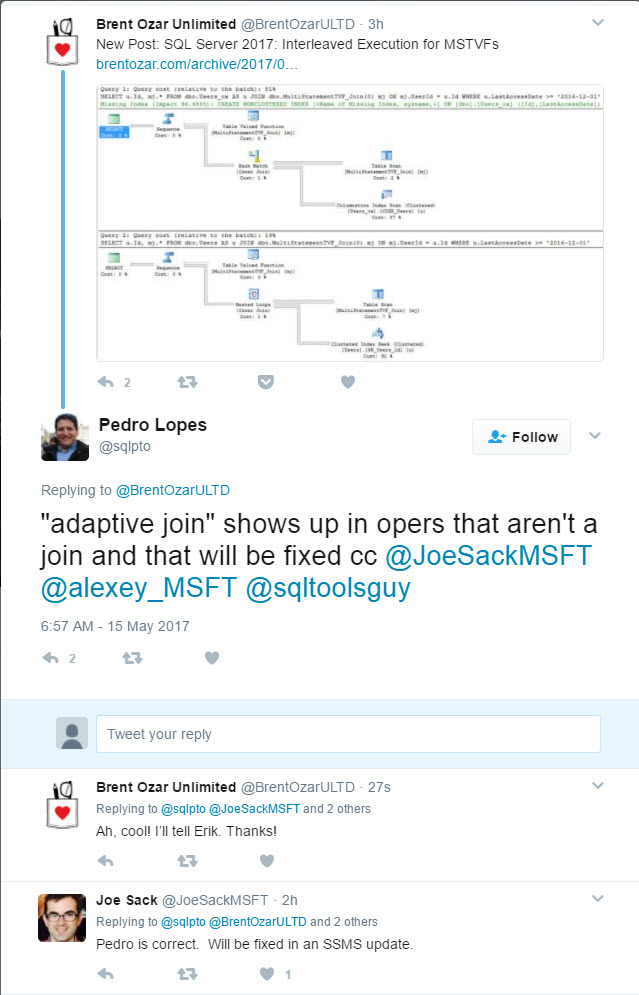
UPDATE: Them’s bugs! Calling interleaved execution joins Adaptive Joins is an error, and will be fixed in a future version of SSMS.

Twitter is for work.

Thanks for reading!


[Video] Office Hours 2017/05/10 (With Transcriptions)

This week, Tara and Richie discuss increasing the size of tempdb, splitting database across several files, tracking DML changes to a table, upgrading different versions of service packs, recommendations for improving T-SQL skills, trace flags, replication, Always On Availability Groups, compatibility level of databases,  and more…

Here’s the video on YouTube:

You can register to attend next week’s Office Hours, or subscribe to our podcast to listen on the go.

Enjoy the Podcast?

Don’t miss an episode, subscribe via iTunes, Stitcher or RSS.
Leave us a review in iTunes

Office Hours Webcast – 2017-5-10


Do tempdb growth settings require a restart?

Richie Rump: So Wesley asks, “Here’s my really dumb question of the day, and a yes or no is fine; no explanation needed…” I say it is needed. “If I increase the size of my tempdb, do I need to restart the servers to pre-provision it?”

Tara Kizer: No, you’re good to go. I think the only time you have to restart SQL Server for a tempdb change is if you change its location. If you, like, move it away from, you know, the system databases because, you know, you accepted the default string installation. You can make the change, but it doesn’t take effect until after you restart SQL. But just increasing the size or even shrinking it, you know, you can do that live. It takes effect right away.


How do I spread data across multiple files?

Richie Rump: Okay, so Mark asks, “because of space requirements, I need to split a 1.4 terabyte database into three 5GB files, one file group. What’s the best method to equally spread the current db across three newly created files?

Tara Kizer: I’ve had to do that work. I mean, if it’s one file group, you know, you add the three files and then you rebuild indexes, you’re going to have to rebuild the indexes maybe even a few times. At least that’s what I had to do to do that. If you’re using multiple file groups, it different. There’s an article by Bob Pusateri, you might remember the article, Brent and Erik would know that. But there’s an article from him on how to move the objects around with no downtime. But one file group, I think you’re stuck with rebuilding the indexes so it spreads the data across those three files.

Richie Rump: I remember that article, I know which article you speak of.


What’s the best way to track DML changes?

Richie Rump: So next question, “I am currently tracking changes to an audit table using triggers; the problem is, I’m using triggers. Is there a better way to track DML changes to a table?

Tara Kizer: I always wonder, you know, are people trying to solve an auditing thing at their company, you know, it’s a policy, for whatever reason, it has to be tracked, or are people just curious? Because, I mean, you’re adding overhead to the transactions to do it. I mean, you know, a lot of people have used triggers to do it. I think change data capture also helps you here, or maybe it’s change tracking; I can’t remember which one.

Richie Rump: Change tracking.

Tara Kizer: Change tracking, yes. So I don’t like the idea of adding time to my transactions auditing.

Richie Rump: Yes, I concur there.


Can I manually commit someone else’s transaction?

Richie Rump: Alright, “so after finding a session with an open transaction that will likely never commit or rollback on its own and preventing version store cleanup, what steps would you take to determine the session can be killed, or is there a way to manually commit the transaction on behalf of the session?”

Tara Kizer: there’s no way to manually commit the transaction on behalf of the- session, that just – it’s not possible. If you restart SQL Server, it’s going to go into crash recovery because it has to rollback, and I can’t remember if you can determine how big the rollback will be. I don’t remember that, but you know, look at WhoIsActive, DMVs, sp_who2 to see what kind of writes it has done, that spin session ID has done to see if it’s just a small amount of writes. Your rollback should be pretty fast, even during crash recovery. You know, what is that session doing? I don’t necessarily agree with never – although I guess I have seen some sessions that just are stuck, you know. They’re not doing anything, I don’t think that they were waiting on anything… I don’t have a good answer for you.

Richie Rump: We have no good answers, only bad ideas.

Tara Kizer: I would suggest maybe posting that question on Stack Exchange or even Twitter using the #SQLhelp. SQL help hashtag, you know, it’s a little lengthy but you could shorten it to 140 characters or do two tweets like I do sometimes [crosstalk].


Can I update when I’m doing a join?

Richie Rump: So J.H. needs, “to update a row – rows in a standalone table based on multiple other tables join on after updates, inserts, deletes, triggers. Can you provide or point me to examples that I can use in tweaking?”

Tara Kizer: J.H. asking about triggers, because his join on after updates – well, at any rate, you know, you can do joins and updates and inserts and deletes just like you can with a SELECT. The syntax is basically the same thing. Write your SELECT query and then grab – starting at the FROM, all the way down and then paste that into your UPDATE, INSERT or DELETE. I mean, it’s the same command, it’s just the B NULL at the top. As far as examples, just Google SQL update join example, you’re going to see it; but it’s the same syntax.


Is there a third party app to check service packs?

Richie Rump: Yep… “Is there a third party tool that will tell me if SP3 will break my application before packing to SP3? Currently, we’re on SP2, SQL Server 2012.” Is there magic, is there magic somewhere here that will tell my application if it will break or not?

Tara Kizer; No, between SP2 and SP3, there’s nothing that’s going to break your application. It’s the major versions that there’s potential for, you know, syntax getting deprecated, you know, old ANSI join syntax, maybe later versions, I think, is gone. I’m not positive on this – deprecated for years. But it’s the major versions that you really need to run like the upgrade advisor, but between SP2 and SP3, no. your only concern is, you know, the inflation succeeding, making sure you have backups, so make sure you install it in a test environment. Always test your application in a test environment when you make a change like that, but, you know, there’s no third party tools to help you out with this.

Richie Rump: Do you have a patronous, maybe expect patronoum, maybe? That’s a Harry Potter reference, people.

Tara Kizer: Okay, I was going to say, I have no idea what you’re talking about.

Richie Rump: Wow, wow, and I read them as an adult, I mean really, seriously.

Tara Kizer: I’m just – I’m not a book reader, that’s all.

Richie Rump: Oh, I’ve got like four sitting right here that are just staring at me. It’s like, why are you working? Read me.

Tara Kizer: I’m in the middle of a book series, but you know, it takes me an eternity to finish stuff.

Richie Rump: Ooh, which one?

Tara Kizer: Divergent.

Richie Rump: Oh, you’re reading Divergent, okay. I haven’t cracked that one open yet. I’ve been hardcore nonfiction for a while now so…

Richie Rump: Okay, next question. “Where do the sub-tree costs come from in the execution plans?” I remember someone saying it was from the late 90s, and which was nothing wrong with that. There was a lot of good things happening in the late 90s, let me tell you people.

Tara Kizer: I started my career in the late 90s as a DBA. I know that Erik will say that it’s someone from Microsoft, I forget the person’s name, but someone’s desktop was used as like the baseline and the calculations were based upon that. But other people have disagreed with that; I’m not sure who’s right, but it’s just some number that Microsoft is coming up with. So when we see high costs, it just means that that operator is doing a lot of work, or, you know, maybe it’s more complex. Apparently it was all based on someone’s computer back in the 90s.

Richie Rump: yes, what that means to us is that it’s a random [crosstalk]. Right, I mean it’s like a foot the size of the king’s foot essentially?

Tara Kizer: Yes, exactly, right.


What’s new in SQL Server 2017?

Richie Rump: I’m going to ask this question and – just because I know the answer. “What’s new for 2018?”

Tara Kizer: Go for it…

Richie Rump: I don’t know, I haven’t been paying attention.

Tara Kizer: Well there’s nothing new, the product is SQL Server 2017, they’ve already announced that it’s 2017. So, I don’t know if there’s going to be a 2018 version; I actually doubt it. I think some of the community is a little upset that 2017’s been released so early after 2016, you know. There’s not much adoption for 2016 as it is, so 2017 will probably be even lower. But 2017, I think – I saw a blog or something like that about – it is being released this year because they’ve already named it 2017, but maybe it’s soon, I don’t know.

Richie Rump: Yes, so I’m just going to move all my production workloads over into Azure, into manage Postgres and just say, well sorry SQL Server, now that Postgres is here, everything’s going over there. So, that’s my story…


How should I learn more about SQL Server?

Richie Rump: Alright, let’s see what other questions – you guys have been talking a little bit, so let’s see what else we’ve got. “Do you have any recommendation of the best ways to improve your –SQL skills?”

Tara Kizer: I mean, it depends on what your level is at right now. I had a recent client that was doing some pretty complex stuff in their T-SQL and, I mean, really this stuff was beyond what I could help them with, you know. I helped them with everything else, but Brent had the suggestion to recommend that they attend Itzik Ben-Gan’s advanced T-SQL class. If you’re in the United States, he does come here. He lives somewhere else, but classes offered all the time; so if you’re looking to become, you know, really, really advanced, definitely is class, I think, is supposed to be like the best out there for advanced query tuning.

I mean, if you’re more of a beginner level – I mean, the way that I improved my skills for free is I just started, you know, looking at questions in forums and trying to answer them on my own in management studio and then as I learned more, I started, you know, answering questions. So I’m more of a learn on the job type person.

Richie Rump: Yes, and I’m more of a book-y type guy, so a couple of books, SQL For Smarties, I think is one of them, by Joe Celko. I remember reading that. Anything by Itzik Ben-Gan; we talked about him before, his class, but seriously, really in depth stuff on T-SQL. I do a lot of dumpster diving in docs, in the documentation. So it’s kind of how I learned all the new-y stuff in SQL Server 2012 when that first came out. And – because that is the last, essentially new feature dump that we have gotten in T-SQL over the past couple of years, with 2012, and it was just a ton of new stuff in there. While doing my dumpster diving, that’s when I learned that we have a lot of .NET stuff underneath the hood of T_SQL.

So when people say, oh I just turn off .NET, it’s like, no you don’t. It’s back there, it’s running, there’s nothing you could do to turn it off. Now you may be able to turn off the user executions of the .NET, you know, CLR inside of it, but it’s using >NET in the background and all that stuff. So it’s pretty interesting stuff when you start actually reading the documents and things like that, but that’s just my craziness when I just can’t fall asleep at night.


Should I upgrade to 2016 or 2017?

Richie Rump: Alright, next question, “My boss wanted me to start testing to upgrade our production servers to 2016 Enterprise. Is it worth pushing to 2017, will adaptive joins be added to 2016?”

Tara Kizer: I mean, if it were me, it would depend upon your timeline. So, you know, are you talking about this summer? Because I don’t know that I would be comfortable – you know, depending on when 2017 comes out, I don’t know that I would be comfortable upgrading to 2017, because that doesn’t give you a lot of testing time on it. You know, the product gets released, now you’ve got to complete the full, go through the full test cycle, you know. As far as the adaptive joins, very unlikely to go into 2016. From what I understand, they don’t back-port features. They’ll back-port, you know, bug fixes and minor stuff, but I think adaptive joins is a pretty big thing being added to 2017. It’s extremely unlikely to go to 2016 in my opinion, you know, who knows?

Richie Rump: I think I’m going to stand up, because I am standing up, and I’m going to say no, it will not be in 2016. That’s – I don’t think I can remember a feature that was back-ported to older versions. [crosstalk]

Tara Kizer: Yes, the only thing that I know of that was back—ported was troubleshooting data for large memory grants – the memory grant information is in 2012 SP3 and 2014 SP2, not available in the versions prior, in the builds prior to that. But that’s not a feature, that’s just more troubleshooting data available to us as performance tuners.

Richie Rump: It’s not a feature, it’s a bug. We’re pretty sure that’s a bug.


Can I run Standard Edition on a 32-core server?

Richie Rump: Alright, so Stuart has a 32 core server running SQL Server 2016 Standard Edition. I wonder if he stole Erik’s workstation? “I think the maximum cores allowed for this version/edition is 24. Can I keep my server at 32 cores and use the rest of the core capacity for non-SQL database engine activities such as SQL porting services or other non-SQL utilities?”

Tara Kizer: You know, I’m not a big licensing person, but I’m pretty sure you’re in violation of your license. You’d have to disable those eight cores. Whatever cores you have in the box have to be licensed, even if you’re not going to use them. There’s a way to do an affinity masking, so you can, you know, disable those other cores, but I’m not sure if that’s in violation of your Standard edition license. I would contact your licensing person to see if this is even allowed.

Richie Rump: Yes, so we’re not going to release your name or your location to anyone, just – it’s between you and me, buddy, you and me, Stuart. Alright – oh and I just released his name; there it goes. I’m sorry dude…You hear a knock on the door, yeah, that’s Microsoft coming.


Can tempdb slow queries down?

Richie Rump: Alright, so, “can a tempdb cause the database queries to be slow? I allocate a large tempdb data files for 4GB temp files instead of the auto-growth option. I wonder if I/O can cause the latch I/O wait with tempdb?”

Tara Kizer: I mean, can tempdb slow things down? For sure, you know; tempdb’s recommended, you know, to put that on the fastest disk possible and your four 10GB files are actually pretty small, in my opinion. That’s only 40GB. I’ve had tempdbs that were over 500GB total, so spread across eight files. So, in my opinion, you have not allocated large tempdb data files. But definitely, if tempdb is on slow storage, it can certainly cause your query’s overall system performance. So tempdb is critical for system performance to be as fast as possible. SSDs, you know, implement trace flags 1117 and 1118; those are recommended my Microsoft. They affect the other databases, but they do help out tempdb.


I’m having a problem querying LDAP…

Richie Rump: Okay, so Deb has two identical SQL 20… 2005, sorry Deb, my apologies, test and production. “One accesses LDAP perfectly, the other one does now. Any hints as to why or why not?” So what kind of troubleshooting steps would you take?

Tara Kizer: I don’t have any experience with querying LDAP from SQL Server. I know that it can be hard to configure. I’m not the person to ask. I would ask the question on Stack Exchange instead.

Richie Rump: Yes, I’m thinking some connectivity, I do some connectivity testing; making sure I could hit the server. And then maybe sure I could hit the service outside of SQL Server. Maybe it’s some sort of permissions deal that is going on from server to server. That’s kind of where I would go first, but I’ve been working in the cloud for almost a year now, and everything I go is security. So that’s just where I’m going now.

Tara Kizer: Yeah…


Can trace flag 4136 cause issues?

Richie Rump: alright, so Richard has a trace flag number, so here we go; trace flag bingo. “Can you tell me if trace flag 4136 for disabling parameter sniffing can cause issues?”

Tara Kizer: Heck yeah it can cause issues. I mean, I don’t have any experience with 4136, but if it does disable parameter sniffing, I don’t think that that’s what I would want to put in place in my production environment. Instead of that, you need to work on why you’re encountering bad parameter sniffing. Parameter sniffing is a good thing; if you disable it, every single query has to compile. You’re talking about needing large amounts of CPU for that to occur.

You know, if you have a really slow system, not much batch request per second, for instance, then maybe your server can handle it, but if you disable that, you’re going to see CPU issues because every query has to be compiled. So instead of that, your default needs to allow parameter sniffing to happen; it is a good thing, except when it’s not. So there is bad parameter sniffing. You need to work on what specific items are encountering bad parameter sniffing and put the workarounds in place. You know, sometimes all you have to do is add a covering index to fix the issue. I’ve had to put plan guides in place, index hints, you can use the optimize for. One of the less desirable approaches is optimize for unknown. But you need to find the specific queries that are having issues and resolve those, put workarounds in place for those. Otherwise, you’re talking about probably needing better hardware, if you’re going to disable parameter sniffing.

Richie Rump: yes, one of the problems I had a few years ago with a client that – they had this query that kept running. I mean they have it running at multiple times a minute, and their solution was option recompile. And it was okay for them because they had a pretty beefy system and the way their data patterns worked, they kind of wanted just for that one – a plan just for that one. They had plenty of memory, everything was good, we tested it for a few days and everything was great, but that’s not really the recommended way we, kind of – it’s not the first thing we went for, right, I mean…

Tara Kizer: Yeah…

Richie Rump: But that’s – in the end, that’s kind of what worked for them.

Tara Kizer: Yeah, I mean, you know, I’ve definitely used option recompile. And back in SQL Server 2005, we didn’t have that, so you did with recompile, the stored procedure [inaudible]. So I’ve definitely put that in place in production, even on queries that were run extremely frequently. You just have to be aware of that, you know, option recompile, you know – extra CPU time and if you’re going to put it on every single query it’s basically the same as disabling parameter sniffing. But it’s definitely – that’s one of the workarounds which – I want you to put that on, the specific queries that are having a problem. Let parameter sniffing be your friend until it’s not and then fix those specific queries.

Richie Rump: Alright, so we are out of questions. I don’t know if that’s a good or bad thing, but that’s a thing [crosstalk]

Tara Kizer: Are you not seeing more questions?

Richie Rump: I am not seeing any more questions.

Tara Kizer: Oh, okay, I’ll ask a couple…

Richie Rump: So now’s a perfect time to get some questions in. if not, we will…

Tara Kizer: There was one about trace flag 4199, I’m trying to find it in my list. I like that question.


How should I do replication for a reporting server?

Richie Rump: Oh here’s one, “I like to replicate a couple of databases from 2008 to 2014 for reporting from the 2014 SQL Server. Is that possible and which form of replication would you recommend, tips, tricks, gotchas?” Thanks.

Tara Kizer: yes, it’s definitely possible, but – you know, for reporting, yes I’ve definitely used transactional replication for reporting. You can also do snapshot replication. I don’t have any experience with snapshot. The business requirements for, on my reporting environments, were, you know, that the data needs to be near real time, and so that’s – transactional replication is the solution for that. If there can be a lot of latency then, you know, maybe snapshot replication, and you may even be able to do, you know, log shipping with the restore – put a delay in the restores on the secondary server. But replication is a really viable option for a reporting environment and you definitely can go between two versions.

Richie Rump: yes, I’ve used snapshot for reporting to reporting databases and it worked great. I’ve even used merge replication and then, you know, about once every six months we pulled our hair out, and that’s kind of the way that worked.


Would you recommend trace flag 4199 by default?

Tara Kizer: Yeah, I found that question about trace flag 4199. So it’s from Steve, “would you recommend turning on trace flag 4199 globally to enable optimizer fixes?” And for my experience, the answer is yes, except on 2016. I believe 2016 is the version that they have rolled in those fixes into the, you know, you don’t have to enable a trace flag anymore to do it. It might be 2014, I think it’s 2016. You’ll need to Google for that.

At one of my jobs, we deploy 4199, basically, on every new server because it proved to be beneficial. Microsoft was always about backwards compatibility, so I mean, they didn’t want to roll in these fixes by default; so that’s why it’s available in the trace flag.

Richie Rump: Yeah, almost to a fault, I would say. I mean backwards compatibility almost to a fault. You know, I don’t know if I want – you know, I know there are some companies out there that like, look, I have a 20-year-old VB, you know, 3 app, that needs to run. And it will run on Windows 10, but I don’t know if I’ll ever need to run a VB3 app ever again, or open the IDE, or anything else like that. So it’s kind of scary…


How can I let users query reporting tables during updates?

Richie Rump: So, we do have some more questions, which is great. “So what’s the best strategy to allow users to query reporting tables while they’re being updated? I.e. morning loads overlapping with users starting their day without blocking the morning loads.”

Tara Kizer: I like recommitted snapshot isolation level for this. I mean, you could also use snapshot isolation, but then you have to change your code to use snapshot isolation. So recommit snapshot isolation level was added in SQL Server 2005. In my opinion, SQL Server 2005 was the first product that could finally compete with Oracle, and that’s because of RCSI. So recommit snapshot isolation level is RCSI. So with RCSI, reads don’t block writes, writes don’t block reads. Now, if you’re increasing the isolation level in the query, you know, say do a UPDLOCK and an HOLDLOCK, that winds up at [inaudible – serializable] isolation level, you will have blocking at that point. So as long as you’re not adding those kinds of hints in your queries, you know – reads don’t block writes, writes don’t block reads.

But the thing to know about RCSI is it’s compatible only with read committed, which is the default of the database and is the default for your connection strings.

If you’re using NOLOCK hints or read uncommitted, then that is not compatible with RCSI. It can still live happy in that database, but you’re not getting the benefit of RCSI for those specific queries. So you need to switch your connections, make sure they’re recommitted and then start removing your NOLOCKs. In my opinion, RCSI is much safer to use than NOLOCK hints, because NOLOCK hints you’re not guaranteed to get good data. You can get completely bad data, whereas RCSI you’re at least getting good data, just might not be completely up to date.

Richie Rump: So back in the SQL Server 6.5, 7, 2000 days we used to copy tables in with a different table name, and then we would drop the reporting table – rename, I’m sorry, rename the current table that’s there, then quickly rename the new table that’s in there, and then drop the table that was originally there. So that was our poor man’s replication back in the day.

Tara Kizer: yeah…

Richie Rump: I’m showing my age now.

Tara Kizer: You’re as old as me.

Richie Rump: Scary… Not old as Brent.

Tara Kizer: We’re just barely under him though, I think.

Richie Rump: Yes, yeah by a year, but you know, I shove it in his face as often as possible, man. Wait until he reads the transcripts of this, it’ll be fun. (Brent says: this is totally going in your employee file.)


Should developers be allowed to view server state?

Richie Rump: Alright, “interested in your opinion of granting developers view server state or access to read error log?”

Tara Kizer: I don’t know, I don’t like – if someone needs elevated permissions then, you know… Developers need elevated permissions besides just selecting production, which is the only thing I allow in production, and even then I sometimes don’t give it out, then they need to be put on the on-call rotation with me because, you know, the more access you need, the more – you’re a DBA here. Is there an issue with the [inaudible] accessing the error log – what are they needing to see? What is going in the error log that developers are needing to see? If the application is writing messages to the error log, well I’m of the opinion that that should stop. That information should not be going to the SQL Server error log. Put it somewhere else, in the application.

Richie Rump: Yeah, I agree and when I walk into a place I’m like, I don’t want even access to production, I don’t even want read access.  Now eventually I’ll end up getting it and then they’ll probably – they try to talk me into writes as well, I’m like no, you’ve got someone else’s, no…

But I’m of the opinion that if you have a developer environment, then give them full access to everything, so then they can start testing new features and start playing around with certain things. And maybe they’ll even get better in their query writing and understanding SQL Server and all that stuff. Like that’s their area, but production, I’m a dev, I don’t want it; I don’t want access to it at all. And yet, I still have access to it here. What’s going on with that, man?


Can I use AGs without a listener?

Tara Kizer: Ron’s question, going back to the question about using replication for reporting, he asked, “why not use always on without a listener for reporting?” Just for clarification, always on isn’t a feature, it’s a marketing term. The feature you’re referring to is called availability groups. So always on is availability groups and it’s also failover cluster instances. So I think you’re referring to availability groups here and you’re having a readable secondary. That’s definitely a viable solution for reporting; that’s one I’ve deployed to production and supported. However, it’s not available in Standard Edition, which is what the person asking the question was using.


Does SSMS affect compatibility level settings?

Richie Rump: Alright, we’ll go one more. “What is the compatibility option used for SSMS? When you restore a db it has different levels depending on which version you have, you restore it for them.”

Tara Kizer: Yes, so I mean, Jamie’s referring to the compatibility level of the database, it has nothing to do with SSMS. So wherever it came from, whatever compatibility level it was using on the source server, that’s what it’s going to be restored to unless that lower compatibility level is not available in the version you’re restoring to. So if you restored from – if you were in 2008 with a 2005 compatibility level database and restore that up to 2016, it would not use a 2005 compatibility level because it’s not – 2005 wouldn’t be supported in 2016. So in that instance, it would raise you to the lowest compatibility level that that version supports.

So if you want to see the compatibility levels, just right click on the database, go to properties and I think it’s in the options page and just look for compatibility level. 90 is 2005, 100 is 2008 and 2008 R2, and then up from there. 2016 is what, 130 I think, something like that.

Richie Rump: Yep, that’s – I think that’s all we got. We’re almost at time.


Can I blame someone without access when the server breaks?

Richie Rump: Actually Ben had one last comment, “if you do not have access to it, you cannot be blamed when it breaks.” As a developer, that is wrong, that is absolutely wrong. You don’t have access to it, you still could be blamed when it breaks because someone had – end up writing that app…

Tara Kizer: Your code…

Richie Rump: And someone’s going to end up getting blamed, so… It’s a nice theory but it doesn’t really work in practice very much. Alright, so unless you’ve got anything more, Tara?

Tara Kizer: No.

Richie Rump: We’re good, alright, see everyone next week.


Breaking: SQL Server 2016 SP1 CU2 Supports ENABLE_PARALLEL_PLAN_PREFERENCE Hint

Hot Diggety!

After reading an excellent tip by Dmitry Pilugin about the new hint for forcing a parallel plan in SQL Server 2017, I figured I’d test it out on SQL Server 2016’s latest CU to see if it had been back ported yet.

Good news! It has. Obviously. That’s the title of the blog post.

Puddin’

Here are the test queries I ran.

And here are the boring results!

Like a version

And here are the query plans I get.

Of trace flags and men

News

Good news: You don’t have to wait until SQL Server 2017 to use this.

More good news: It doesn’t require ColumnStore to work!

Bad news: You have to be on 2016 SP1 CU2 (at minimum, I’m guessing — if anyone wants to test 2016 SP1 with CU1, or 2014, feel free to see if the hint passes or errors).

More bad news: It’s still not documented. And, along with Trace Flag 8649, it seems like neither one ‘forces’ a parallel plan anymore.

Going a ways back, Trace Flag 8649 could generally get a parallel plan under, well… I’d never seen it NOT make a plan parallel (unless it couldn’t go parallel because of scalar UDFs or other ickypoo yuckies).

Testing some simpler queries with both options (the TF and the hint), some wouldn’t go parallel with either. Or both. I had to actually make SQL do some work.

Thanks for reading!


SQL Server 2017: Statistics Information Comes To Query Plans

Warm fuzzies

I think this is how my mom would have felt if I went to college.

You see, once you stop cargo culting around index fragmentation, and disk queue length, you start to realize which things are actually important to query performance.

Things like statistics, and cardinality estimation. And, sure, having the right indexes can help with that, too.

Annoyance in chief

Microsoft, in the past, has surfaced Proustian levels of information about indexes, and fragmentation, and they published numbers at which you should reorganize and rebuild your indexes on those 5200 RPM drives to keep disk queue lengths low.

Or something.

This has led to an astounding, if not absurd, number of questions about index maintenance.

It doesn’t help that Microsoft hasn’t budged from the 5%/30%/1000 pages numbers, the same way they haven’t budged from the MAXDOP/Cost Threshold for Parallelism defaults despite modern single CPU sockets that have more cores than entire server rooms had when the defaults were decided on.

Finally

More information about statistics has started to get added and surfaced. Helpful information!

Starting with the vNext DMV sys.dm_db_stats_histogram.

Now, something else cool got added. Statistics information resides in query plans, and not just when you use a special Trace Flag.

Diddly!

Now, it’s not quite as verbose as other statistics information that you can get with certain Trace Flags turned on (2363 if you’re on 2014+, 9202/9292 previously), but it’s a real good start.

You can immediately get an idea of how stale your statistics are via the last update and modification values, and how high or low your sampling rate is.

And yes, I’ll be surfacing this in sp_BlitzCache. Just, you know, you’re gonna have to upgrade to see it.

Won’t you please just upgrade?

Hugs

I wanna hug whoever added this.

Fair warning: if I find out who you are, and you’re at PASS, the hug is happening.

Thanks for reading!


Will SQL Server Always Do Index Seeks on Numbers?

Indexing
3 Comments

I often get the question of “Will SQL Server do an index seek with ____?”

Another way to phrase it is, “Is this query sargable?” We throw the term “sargable” around to mean that SQL Server can do an index seek to satisfy your search arguments. (We’re specifically talking about index seeks here, not scans – not that either one is necessarily better than others in all cases.)

The best way to show it is with a series of queries. I’m going to use the Stack Overflow Users table from the SQL Server data dump download, the same table I use in my free How to Think Like the Engine class.

StackOverflow.dbo.Users

The StackOverflow.Users table is really simple – it holds exactly what you think it holds – and it has fields with a few different data types:

  • Age – int
  • CreationDate – datetime
  • Location – nvarchar

We’ll create indexes on each of those fields to start with. This way, when I’m searching for those specific fields, I may be able to get an index seek:

Now let’s try a few queries and see what happens.

Simple integer comparisons

When we do an equality seek on Age, like WHERE Age = 21, of course we get an index seek. But what about when we CAST Age as a tinyint or bigint?

Casting Age as Other Numbers

All three of those get an index seek on our IX_Age index. Yay!

Let’s make things a little more difficult: let’s look for Age = 3 * 7.

This one would have stumped 1977 Brent

AWESOME. SQL Server is smart enough to do the math first, and even comes up with the right row estimates! Love it.

What if we use a function that isn’t exactly predictable, like getting the number of minutes after the hour:

Put 21 minutes on the clock

SQL Server still does an index seek. Isn’t that awesome? I think it’s awesome. I’m easily impressed, though.

But what if we pass in a string?

When we pass in a different data type, SQL Server does implicit conversion. It guesses what it should convert.

Implicit conversion in your favor, collect $200

SQL Server is smart enough to realize that it can just convert your string over to a number. If you hover your mouse over the index seek in the plan, it’s also got the right number of estimated number of rows, too.

The same thing happens if you pass in a string variable, too:

Int vs string variable

It turns out that SQL Server is really good with integers. On this monster data type conversion chart in Books Online, almost everything converts beautifully when you’re comparing it against an integer field:

Data type conversion rules

Looks like a really bad game of Othello.

What if we pass in…a date?

Things start to fall apart in the blue squares, though. Check this out:

Believe it or not, that query is technically, morally, and legally valid:

You got your datetime in my peanut butter

Yes, we’re comparing a datetime to an integer.

And ironically – this returns no rows, but it does an index scan rather than a seek. SQL Server upconverts everyone’s age into a datetime! If you hover your mouse over the SELECT, surprisingly, the warning doesn’t say anything about your lack of sobriety.

I know what you’re thinking: how could you possibly convert an integer to a date? Well, it’s quite easy:

Casting ages as datetimes


Yes, for SQL Server, the number 26 is the same as January 27th of 1900.

So let’s say – just theoretically – that you had a valid reason to pass in a datetime from end users, and compare that to an integer field. Could you make this query do an index seek rather than an index scan? Absolutely – we just have to do our own explicit conversion rather than relying on SQL Server’s implicit conversion. The highlighted part of the query is the key:

Explicit in more ways than one

Voila – now I get an index seek, which is good. However, hovering my mouse over the index seek returns something curious – SQL Server expected tens of thousands of rows to come back:

Expected number of rows

But no rows are returned because Methuselah doesn’t have a Stack account. YET.

Casting GETDATE() as INT

Which brings up an interesting point.

There’s two parts to this sargability thing.

First, can SQL Server take your search arguments and turn them into an index seek rather than a scan?

Second, can SQL Server use your search arguments combined with statistics to make a good estimate on how many rows will come back? To learn more about that, watch our video class Statistics: SQL Server’s Guessing Game. Enjoy!


Group Post: If I Took Another DBA Job, My First Question Would Be…

“Question 1: how do you predict how long a rollback will take?”

Brent says: “How many people are in the on-call rotation with me, and can I give them each a technical test?”

Once you get out of the on-call rotation, it’s really hard to go back to the electronic tether. I’d be willing to do it, but only if there are other sharp people to share the burden with me. The questions on the test wouldn’t be trivia – I would just want to hear more about their troubleshooting process, learn what actions they were comfortable taking, and know that I could trust them to make situations better rather than worse.

Bonus points if they have a good change control process that avoids random changes to production servers, thereby ruining my drinking night because some yo-yo wanted to deploy a new version of their non-critical app and suddenly adds an N+1 bug that knocks out services to unrelated apps.

Erik says: “What’s the oldest version I’d have to support, and what are your upgrade plans?”

We see who the real manager is

Back when I started working here, SQL Server 2014 was still pretty new. It also didn’t have what I’d call anything “groundbreaking” in it. There were some okay new doodads, but I didn’t point in awe like “THIS WILL SOLVE SO MANY PROBLEMS”.

That’s not true for SQL Server 2016, and oh-my-dear-sweet-Robert-Smith-wig, it is ever not true for SQL Server vNext. The stuff in those two releases is heart and mind changing. Like, I think people will actually hate Microsoft less because of what they’re doing these days. Maybe. As long as they leave the Start menu alone.

Knowing what’s available in newer versions makes supporting and troubleshooting (especially performance troubleshooting) older versions downright annoying for FTEs.

Tara says: “How often does the on-call DBA get called during his/her week of on-call duty? What is the most common thing that the on-call DBA gets called for in the middle of the night? Which monitoring tools do you have in place?” 

You know why she’s smiling? She’s not on call.

Like most production DBAs at large companies, I’ve been through horrific on-call weeks where you don’t get much sleep. As long as the bad weeks don’t happen too often, you can manage it. When every week is a bad week, you may start looking for a new job.

I’ve been in on-call rotations where there are a few hundred SQL Servers. It was rare to not get called at least once while you were sleeping during your on-call week. Most of the late night calls were due to disk space issues. Most of those should have been handled during the day. It’s imperative that the production DBAs be proactive to limit the on-call work. The on-call team needs to have enough time in their day to do proactive work. If they don’t have extra time, then the team is not sufficiently staffed.

Monitoring tools are a critical component of production environments. If I get woken up at 3am for a performance issue, I want to have monitoring data that I can look at to help solve the problem quickly so that I can go back to bed. Even if your company can’t afford a really nice monitoring tool, you can create your own. At the very least, log current activity to a table with sp_WhoIsActive. There are lots of other free tools.

Richie says: “Who would I be reporting to, and what level of interaction would my manager have with the team that I’m on?”

No, Richie, we’re not pulling your finger again

Actually, that’s not true. My first question would be “Why in the hell am I taking a DBA job?” If you are unaware I’m the only developer on the team (official title: dataveloper) so for me taking a DBA job would be a bit out of my comfort zone. So let’s change DBA to developer.

The most important factor for me taking a new gig is who would I be working for. The manager literally defines success for their employees. If you get a good one, they’ll create an environment that encourages your success. If you get a bad one, they’ll give you unrealistic deadlines, change the definition of success, and blame you for their failures.

Modern corporate software development is also team undertaking. I may have one of the few jobs where I’m working on software all by my lonesome. The success of a project isn’t defined by your individual contributions but the completion of the team goals. I’ve been with some companies where my manager had no interaction or control over the team/project that I was a part of. When that happens the manager is getting information about your performance second hand without understanding the full circumstances. Like a child’s finger painting, the performance review becomes an ambiguous, inaccurate mess.

In the end get a manager that you can trust. I’ve worked fourteen hour days for two straight months for a manager that I trusted. I’ve also had a manager that I refused to be in a room alone with him. I think that’s why it was so easy to join Brent Ozar Unlimited. I’ve known Brent for a long time and knew I could trust him. I knew he would be honest with me and let me know when there was a problem. I knew he would create the environment for my success. Please don’t tell him that I said any of this. He’d probably have me walk over hot coals if he knew.

What about you? What would your first question about the job or company be?


Building a Faux PaaS, Part 1: The SQL Server DevOps Scene in 2017

In the cloud, treat your servers like cattle, not like pets.

Rounding up a herd of servers in Texas

In the cloud, systems administration is very different than the on-premises stuff you’re used to. When you build VMs in the cloud with Infrastructure-as-a-Service (IaaS, meaning AWS EC2, GCE, or Azure VMs), you expect them to die. It’s just a matter of time. If you’re lucky, it’ll be years from now, but if you’re unlucky, it’ll be tomorrow.

This sort of thinking drove Netflix to create the Chaos Monkey. In their 2010 post 5 Lessons We’ve Learned Using AWS, they wrote:

“One of the first systems our engineers built in AWS is called the Chaos Monkey. The Chaos Monkey’s job is to randomly kill instances and services within our architecture. If we aren’t constantly testing our ability to succeed despite failure, then it isn’t likely to work when it matters most?—?in the event of an unexpected outage.”

That’s right: they have a tool that randomly terminates production instances.

Imagine being an admin in an organization that runs the Chaos Monkey. You start to think completely differently: that precious server you’re about to put into production was born to fight a villain enemy out to kill him. The enemy will win the battle, but not necessarily the war.

You have to be able to lose soldiers – individual servers – at any time, but design your infrastructure in a way that the entire application, whatever service you’re providing, will win the war overall.

That’s why cloud sysadmins have started treating infrastructure as code.

Don’t think of VMs as servers you build.
Think of them as applications you deploy.

In companies like this, from the moment the VM powers on, everything you do to get it ready for production needs to be scripted, repeatable, and eventually, automated to the point where it happens without human involvement. And when you’ve got this much scripting in play, that also means controlling the source code just like you would an application’s code.

You rarely see Chaos Monkeys around database servers.

Database administrators have always treated our servers like the most special of pets. We pick just the right breed, we give them special names, we train them very carefully, we teach them tricks, and we build a personal bond with them. When they die, we’re heartbroken, and we feel like we have to start over from scratch.

Most SQL Server shops big and small simply aren’t prepared to do all of this in an automated fashion:

  • Deploy Windows
  • Install & configure failover clustering so the server can join an AG
  • Install SQL Server and configure Always On High Availability
  • Join the right cluster
  • Install all your utility stored procedures, backup jobs, Agent alerts
  • Restore the relevant databases
  • Join the right Always On Availability Group with the right replication type (sync vs async)
  • Modify the read-only routing lists on all the replicas

This stuff is hard to do manually, let alone automatically. Therefore, we think of our servers as precious hand-crafted pets rather than cattle we could just lose at any time without heartbreak.

That’s what a Platform-as-a-Service does for you.

Azure SQL DB and Amazon RDS do all this stuff for you at the swipe of a credit card. They take away the plumbing parts of database administration that suck: building, backing up, patching, corruption repair, etc. For any new app builds today, I recommend thinking about PaaS first. (It’s what we use for our own development.)

But for existing apps, PaaS has a few showstoppers. Let’s take kCura Relativity, an app I’ve blogged about before. Here’s why they can’t just switch to PaaS hosting:

  • Missing features – for example, Relativity relies on linked server queries. Amazon RDS has a kind of sketchy implementation, and Azure SQL DB requires you to pre-define individual table structures. Neither of those work with the way Relativity is built today, and the code changes required to support either platform would be fairly expensive. (That’s not the only one, obviously, but I’m keeping the examples simple for this post. I can already hear the armchair architects going, “just tell the stupid developers to rewrite their stupid app.” That ain’t how the real world works.)
  • Capacity/performance limitations – Azure SQL DB maxes out at 4TB per database, and Amazon RDS maxes out at 30 databases per instance. Both of those present problems for Relativity.
  • Exporting raw data – Relativity users want to be able to sync on-premises versions of the data, sometimes migrating from on-prem to the cloud, and sometimes migrating back out. With PaaS, this involves long outages that aren’t acceptable to attorneys in the middle of frantic case review.

So in this case – as I’ve seen with a few other clients – PaaS isn’t quite ready today to handle the challenges of a global ISV with a mature, profitable application. They simply can’t hit the pause button on building new features, and take time out to do an expensive back end rewrite. (Although in the case of kCura, they’re moving some parts of the data out of SQL Server where it makes sense, thereby making the app easier to handle in PaaS-like environments.)

Hmm. If Azure SQL DB and Amazon RDS aren’t a good fit yet, but we want bulletproof reliability and automatic scaling, and we gotta use the boxed product (Microsoft SQL Server), what do we do?

What would SQL Server need to go up against the Chaos Monkey?

What if, at the push of a button, we could deploy a VM with the right Windows config, set up clustering, get SQL Server installed correctly, restore the right databases, and join an Availability Group?

Sure, that would help us defend against the Chaos Monkey because if any one instance disappeared, we’d be able to rapidly stand up its replacement just by hitting the button. The other AG members would cover in its place for a while.

Example: a dog’s butt

Even better, what if we mounted that button in a place that anyone – or anything – could push? What if we enabled our monitoring tools to push that button for us when things were going wrong?

That button would be good for a whole lot of bonus stuff.

That button could completely change how we do patching, for example. Rather than patch an existing server, just define (in code) the appropriate patch levels, and hit the button. Let the system stand up a new replica with the right patch levels. When it’s good to go, simply fail over to it, and then delete the old replica. Cattle, not pets – that cow did a good job, but it’s not needed anymore, and we can just make it go away.

The button would change how troubleshooting works. Having problems with a janky replica? Can’t figure out why it’s failing or throwing strange errors? Just hit the button, and a new one appears to replace it.

SQL Server DBAs have a hard time with this button.

We’re so attached to our pets that we have a hard time saying, “Aw, screw it, just stand up another SQL Server and kill that troublesome one.”

We need to flip things around:

My job: 90% Excel, 10% WordPress


Ops/cloud admins are all about putting a lot of work into building that button, and then hitting that button as often as necessary.

That button is what kCura’s Mike Malone termed a Faux PaaS: it’s like Azure SQL DB’s Platform-as-a-Service, but something you build and manage yourself. It’s a SQL Server service that stands a much better chance of overall success against the Chaos Monkey. Sure, you could build this kind of thing on-premises, but the cloud’s easier deployment APIs make this more feasible.

I’ve had clients build this kind of thing privately, but I’m excited that for the first time, I’m on a project that I can talk about publicly. Over the coming weeks, I’ll talk about why you might build something like this, design considerations, and common gotchas. Next week, we’ll cover choosing the right instance types, storage, and backup location for your RPO/RTO goals. Along the way, I’ll even share new open source tools with you to make the journey easier.

Continue Reading Part 2:
Choosing and Testing a Cloud Vendor


The Case of Entity Framework Core’s Odd SQL

Development
17 Comments

Recently, Julie Lerman contacted me about some strange SQL that Entity Framework Core (EF Core) was generating. Now, EF Core is fairly new and works with Microsoft’s newest framework .NET Core. I haven’t had a chance to get my hands on EF Core yet so I was excited to see what it was doing. And of course when I saw the SQL my jaw hit the floor. Here’s an example of the SQL she sent me to accomplish an insert:

If you’re an experienced SQL tuner, you’ll notice some issues with this statement. First off the query has not one but two table variables. It’s generally better to use temp tables because table variables don’t have good statistics by default. Secondly, the statement uses a MERGE statement. The MERGE statement has had more than it’s fair share of issues. See Aaron’s Bertrand’s post “Use Caution with SQL Server’s MERGE Statement” for more details on those issues.

But that got me wondering, why would the EF team use SQL features that perform so poorly? So I decided to take a closer look at the SQL statement. Just so you know the code that was used to generate the SQL saves three entities (Katana, Kama, and Tessen) to the database in batch. (Julie used a Samurai theme so I just continued with it.)

A Deeper Look

The first part of the SQL creates a table variable called @toInsert0. This table variable will have the values that we want to insert into the Weapons table. It also adds a column called _Position, this will keep the order that the row was inserted in. This is needed later so that the WeaponId can returned in the order it was received.
The next bit is pretty straight forward. This inserts the data of the three entities into the @toInsert0 table variable. The @toInsert0 will be later used to insert the data into the Weapons table.
A second table variable, @inserted0, is created but this time with WeaponId and _Position as columns. This table will hold the new WeaponId’s that will be generated by inserting the data into the Weapon table.
This is where the magic happens. EF Core is using the MERGE statement to insert data from the first table variable (@toInsert0) into the Weapons table. The join that it is using is 1=0, which will always be false. So this statement will always run the WHEN NOT MATCHED section and insert the data into the Weapons table. Then, the OUTPUT line will put the newly created WeaponId and _Position into the @inserted0 table variable. This is necessary in order to return the newly created WeaponId to the client. In this case, WeaponId is an IDENTITY column which means SQL Server will automatically assign a value for WeaponId upon insert.
The final statement returns the newly created WeaponId(s) to Entity Framework. A few things to note: you could rewrite this statement to exclude the join and just select the data from the @inserted0 table variable, but I understand why they did it. What they’re doing is insuring that the data returning actually exists in the Weapons table. The other thing to note is the ORDER BY. In general, we want to avoid ORDER BY but the EF team needed to guarantee the order that was returned is the same order that was inputted so that the WeaponIds can be assigned to the correct weapon entity.

With a bit of testing, I realized that this statement wasn’t only being used for batch requests, but also for entity inserts with more than one entity being saved. Also, it appears that the limit per statement is 2,000 attributes. For example, if 6,500 attributes are being initially saved to the database EF Core will create four of these statements: three statements of 2,000 attributes and one statement of 500 attributes . The number of entities that are saved in each statement depends on the number of attributes being saved. In this case, 1,000 entities were saved per statement for a total of 3,250 entities saved to the database.

Rationalizing It All

Now that we’ve taken a look at the generated SQL, shouldn’t we be enraged? Wouldn’t we rip our devs a new one if we saw table variables, merge statements, and unnecessary sorts in their SQL? But let’s take a look at the core problem that the EF team is trying to solve: performance. Yea, I said it. In previous versions of Entity Framework, data was inserted one statement at a time. So if you needed to insert 5,000 rows into a table, you got 5,000 insert statements. This was necessary because the application needed the SQL-Server-generated identity value. But with this new approach, you could insert 5,000 rows of data with one statement.

But wouldn’t it be faster with temp tables? Sure! But you can’t guarantee a temp table name would be unique in your session (because you may have done other things along the way.) You could name a temp table with a guid, but there’s no guarantee that a guid is unique either. So the safest route would be a table variable and not a temp table.

But why use the MERGE statement if it’s so buggy? I think this goes back to the performance question. We could use n number of inserts but that’s not solving the performance problem that we originally had. In short, I think I’m OK with the MERGE statement. It’s only being used for inserts, and it’s faster than 5,000 insert statements.

But what about that ORDER BY in the SELECT statement? You kinda got me there. Could they be doing the sorting in the code but they went the SQL route. But it’s not so bad, since they’re creating a new SQL statement for every 2,000 entities SQL Server will only be sorting 2,000 rows.

To decide if it’s a bad thing, let’s compare the older version of Entity Framework (EF 6) with the new version (EF Core). In my totally unscientific tests, saving 10,000 entities to the database using the EF 6 took 4.06 seconds while saving the same 10,000 entities with EF Core took 1.46 seconds. So yes, the SQL isn’t perfect, but it’s 248% faster.

Brent says: hoo, boy. This is…not ideal.


[Video] Office Hours 2017/05/03 (With Transcriptions)

This week, Brent, Tara, and Richie discuss choosing batch sizes, SQL 2017 on Linux, how much memory to leave on the OS for the SQL server, parameter sniffing, allocation unit size of SQL Server, triggers, X-Files, aliens and much more!

Here’s the video on YouTube:

You can register to attend next week’s Office Hours, or subscribe to our podcast to listen on the go.

Enjoy the Podcast?

Don’t miss an episode, subscribe via iTunes, Stitcher or RSS.
Leave us a review in iTunes

Office Hours Webcast – 2017-5-3


How should I update 50 million rows with minimal impact?

Brent Ozar: Jam says, “Do you guys have a good blog post that I can use to update 50 million rows in a SQL Server table? Should I use like the top clause?” I guess a bigger – I wonder like how many rows are in it, if you’re trying to update all of them or if it’s a percentage, what else would you ask?

Richie Rump: Indexes? How many indexes are on there and constraints?

Tara Kizer: Yes, do you need to drop them? I’ve had to do these at EMS, I don’t know if we have a blog post on the website or not but I’ve had to do massive data changes at times. You might want to break it up into batches and use top clause and keep going until you’re done. That’s going to run slower but the idea is to run slower at times so you don’t cause so much blocking. But if you have a maintenance window and if it will fit in the transaction log as one big transaction, you could do it as one, but I don’t think I’d recommend it as one just because it’s so many rows and in case it does rollback you don’t want to be you know, having to wait a long time. So make sure you test it somewhere, but yes, even if you’re in a maintenance window and if your system is 24 by 7 and you don’t want to cause too much blocking, you can break it up into say, 10,000-row chunks. That’s usually what my batch size is, 10,000.

Brent Ozar: Michael J. Swart has a great post on picking your batch sizes, if you search for Michael J. Swart and batch sizes, he’s got a great like AB test graph where he shows all kinds of different batch sizes. The idea isn’t to use his sheet to find the right number for you; it’s to use that methodology to find the right number for you. I’m with Tara, I just use like 5000 or 10,000 and I call it a day.


Can you use Azure SQL DB for your HA/DR?

Brent Ozar: Trisha says, “Is it even possible to…” Aliens. “Do an HADR type solution using built-in functionality between an on-premises server and something like Azure SQL DB?”

Tara Kizer: Availability groups, right? You can…

Brent Ozar: No.

Tara Kizer: You can’t? Is that only when you do the other way?

Brent Ozar: You have to build a VM. So if you build a VM you can, but they don’t let us do a replica up in Azure SQL DB yet and I know somebody in their grandma’s basement – no offence to Tara, nothing to do with – she’s at her mom’s, but somebody and specifically the basement with no windows…

Tara Kizer: We have no basements in San Diego.

Brent Ozar: That’s true.

Richie Rump: Or Miami.

Brent Ozar: Chicago actually – where is it that they actually have basements? Somebody in mom’s basement is going to say, you can do replication using transaction replication, but it’s not DR. That’s designed for a one-way move and you don’t come back.

Tara Kizer: On my Brent Ozar Unlimited profile, I think I say replication is not an HA or a DR solution. I’m adamant about that. I don’t care if you’ve used it for HADR, it is not.

Brent Ozar: It is so true. Tara had me at “It is not a…”


Will SQL Server on Linux catch on?

Brent Ozar: Andrew asked an interesting question, “How do you guys foresee the uptake for SQL 2017 on Linux and do you think that Microsoft will now start to attract the Oracle enterprise database market share?” What do you guys think?

Tara Kizer: I don’t know that we’re going to – that’s going to attract the Oracle market share. I don’t know. Maybe the other database technologies out there but Oracle, I don’t know. I don’t see that happening.

Brent Ozar: Richie what’s your thought? Reading tea leaves. Which character is that that you were flying in front of the webcam there?

Richie Rump: That’s Star Lord in the Milano.

Tara Kizer: Don’t even know what that is.

Richie Rump: Guardians of the Galaxy volume two, coming out, actually today and that’s why Balls IM’d me because he had an extra ticket in Orlando and I’m like, I’m not in Orlando, like I thought you were in Orlando, I’m not going to freaking Orlando, but I considered it. I think the Linux thing is interesting, the question is not to go to Linux from SQL Server, but why would someone on Linux go to SQL Server as opposed to Postgres Oracle? So that’s the question rather than anything else. So I mean, are they going to lower the price so now we’re half as price as Oracle, maybe then that’s a question?

Tara Kizer: We are already. We’re cheaper than Oracle because in order to use any feature in Oracle, you have to pay for it, whereas SQL Server, you do that one payment or whatever, enterprise or standard and then you’re done. Oracle, you have every single feature, you have to add, add, add, add. It’s super expensive in Oracle. Even enterprise edition SQL Server is cheaper than Oracle.

Richie Rump: Yes, so now the question is if it’s not the cost, so is it Linux really the big driver of people going to a different database?

Tara Kizer: It is for one of my companies. They were anti-Microsoft, I mean, every desktop was Windows but servers, they wanted all Linux and we were still a bit SQL Server shop but maybe for companies like that, it might make sense but if they’re anti…

Richie Rump: I have not run to one of those companies yet, so – and I’ve been bounced around a lot like a tennis ball, so the question is why wouldn’t I go to Postgres at that point, right? So if I have a Linux machine, why am I not going to Postgres? What features are in SQL Server that are not in Postgres that I could use or some other database engine? I kind of dig Postgres, I’ve been doing it a little bit, I’m doing a little Postgres dance…

Tara Kizer: Not going to the dark side.

Richie Rump: Oh, it’s dark too and it’s kind of musty but – and it’s different, and it’s definitely different, but if I’m looking at SQL Server on Linux, my question would then be why or what’s – why am I doing that? Because you know the first release isn’t going to be as good as it’s going to be on Windows, so why are we doing it? I don’t know, I just don’t see the end game.

Tara Kizer: [crosstalk] either that hardly any of the features are in the product.

Richie Rump: Yes, exactly. I don’t see the end game, maybe in three years I will but I don’t see a reason why me as a CTO would go to Linux on SQL Server yet. The carrot’s not there yet.

Tara Kizer: Wait a minute; did Richie get to promote it to CTO? Did he get a pay raise with that?

Riche Rump: Actually I had to pay Brent.

Tara Kizer: Maybe I should look at that senior network job on LinkedIn.

Brent Ozar: I’m the same way. The only edge case I’ve ever heard about it is with somebody wants – they have an ISV app and they it’s only certified to use SQL Server and the company refuses to use Windows. That’s the only thing I’ve heard. That’s it.

Brent Ozar: Wesley says, “I know why SQL Server on Linux – because I am a SQL Server lover who is a closeted Linux lover, then I can be like, yes I do that at our local user group meetings.”

Tara Kizer: You’ll be the only one.

Brent Ozar: Exactly. What about all your co-workers? Imagine that you got production SQL Servers on Linux and they barely know Linux and they barely know SQL Server and now they’re herp-a-derping they’re way through both.

Richie Rump: Well, I mean look how quickly adoption is for 2016.

Tara Kizer: Yes, that’s true.

Richie Rump: How quickly is adoption going to be for SQL Server on Linux on a completely different platform?

Brent Ozar: And I always want to show that just because it’s so interesting. I’m going to…

Tara Kizer: I can never remember the website address for that.

Brent Ozar: Yes, SpotlightEssentials.com is Quest’s free version of Spotlight and if you click on Collective IQ up at the top, they have the stats for all of the people who are using Spotlight Essentials, so out there in the wild, they’re seeing zero percent 2016…

SQL Server 2016 adoption rate vs SQL 2000

Tara Kizer: It’s not zero, around eight.

Brent Ozar: Just rounding, but then 2% of SQL Server 2000, so yes, that’s – and it’s not – to be really clear, all of us like 2016. I think it’s the best release yet, I would put it into production myself, big huge fan. And 2000…

Tara Kizer: The issue is that starting with 2008, SQL Server is a really rock solid product. We can compete with Oracle as far as performance goes and there’s a lot of features in there, so why upgrade if it’s working?

Richie Rump: Because it’s six years old.

Tara Kizer: Well, I agree, but that’s what customers are thinking – people who are using 2008. I don’t know what our percentage is for clients. I think 2008 R2 for me might be, I don’t know, 40%, somewhere around there. Most around 2012, 2014. I’ve had one client that’s been on 2016. I’m like, uh-oh, I don’t know if I know how to use it.

Richie Rump: It’s so interesting because it’s so different than from the open source community where we’re getting new versions on a weekly basis. I spent almost all day yesterday upgrading a project because I upgraded one piece of open source project and then it cascaded down to all these other projects that I had to update, and I had to update the unit test, I had to go check all this other stuff just because I updated one, you know? And it was because of a security issue. I needed to update it and then all of a sudden I needed to go down that path of updating everything else and that’s just the way it is in open source, and so not updating your servers, which has things like that and getting the new features and all that, it doesn’t make sense to a developer’s head, which is why I think that we have a lot of disconnect between the way DBAs think and developers think.


Can I do cross-platform Availability Groups?

Brent Ozar: Andrew, I’m going to – I see two things in there that tell me a whole lot about who you are and what you’re doing and I’m not going to mention last names but you’ll see why here in a second. You said for Linux availability groups, he says for one cross-platform availability groups except for the only way that that’s useful is for reading. It’s not useful for automatic failover between those, as far as I know, like the last time I looked at it for the CPT2, you couldn’t do automatic failover back and forth between Windows and Linux.

Tara Kizer: Wait a second, so availability groups now will support another server being Linux just for reading?

Brent Ozar: For reading, that was the last thing I saw on CTP2.

Tara Kizer: Okay, because in 2012 and 2014, probably 2016, you couldn’t even have a different version of Windows. Windows 2012 R2 and Windows 2012, that was not allowed.

Brent Ozar: Yes, starting with Win 2016 and SQL 2016, you can for upgrade purposes.

Tara Kizer: But just reading, okay.

Brent Ozar: Yes, and the other thing he says is try docker containers for your apps. He’s talking about apps that he’s building though, that’s the thing is that when you upgrade one part of it.

Richie Rump: Right, so this is all like MPN pack – I’m going to do this in a database thing because that’s what I’m going to do. So it’s an MPN package, one little piece of software. I’m actually running this app server-less. I don’t worry about the OS, I don’t worry about the runtime, it’s all given to me. This is the actual pieces of software that I downloaded from MPN where one little piece started a cascading effect on everything else underneath it and that’s just the way it works, right? Either you don’t upgrade and you stick to where you’re at or you have to continually change your code and update as the pieces of code that you bring into your application updates. I mean, I got a whole talk on this if you want man, I could go off, but I’m not going to do that.

Brent Ozar: Not today.

Richie Rump: No.


Why is my SQL Server rolling transactions forward on startup?

Brent Ozar: Don says, “Good morning, we had a power failure a few weeks ago and I noticed on SQL Server start-up that there were many hundreds of transactions rolled forward on all databases including master and model. Why were there so many transactions rolled forward when it was off hours and no user transactions were involved?”

Tara Kizer: How many had it completed? I mean, start logging your activity to who is active and see what’s going on. If it were my system at one of my jobs, I would immediately suspect a hibernate issue where the application loses track of transactions and is leaving open transactions. So at previous jobs we’ve had it set up automated stop-to-kill transactions because eventually it starts causing tons of blocking, so maybe you’re experiencing – maybe you’re not using hibernate but maybe you’re experiencing transactions being left open and not being committed or rolled back.

I love it.


How much memory should I leave free, and why?

Brent Ozar: Guillermo says, “What’s the correct formula” – we have all kinds of ideas, I don’t know if any of them are correct – “and what’s the correct formula to determine how much memory to leave on the operating system for a SQL Server? I thought 4GB to 6GB for Windows would be enough but I recently heard it should be more on a 380GB of RAM server.”

Tara Kizer: We have a blog article on that. I don’t know if you want to post the link but it says 10% or 4GB, whichever is higher. So for you, that’s 38.4GB left to the Windows and the other processes and then after that, there’s an article that Jonathan Kehayias has over at SQL Skills that he says after you’ve done that, monitor your available megabytes and for a system of 384GB, you just want to make sure the Windows and other processes always have at least 1GB of free. So let it run, after you’ve given 10% back to the OS, let it run for a couple weeks and see what available megabytes are, and so you can possibly can get back more to SQL Server. But right now you need 38, according to the best practice.

Brent Ozar: Great example for why I was working with a guy in our senior DBA class and he said nothing could possible use that much memory and I said, wait a minute, didn’t you just say you had a Fusion-IO drive in there for tempdb? And he goes yes, and I said, you know they use RAM for their drives that keep a map in memory of where all the stuff is? He said it can’t be that big, and we popped open the manual and I said well, based on the size of your drive and the model, it needs 58GB of RAM per drive. Per drive.

Tara Kizer: Wow.

Brent Ozar: Yes, not a small amount of memory, so definitely watch how much memory you have available there.

Richie Rump: Oh my gosh.

Tara Kizer: That’s insanity.

Brent Ozar: Intels don’t do that but SanDisk, the Fusion-IO stuff keeps maps in memory of where your data lives.

Tara Kizer: Man, I had no idea. One of my jobs, we – and that system is still in production, it’s using Fusion-IO and that was a 256GB of RAM and I would have configured it to the 10% best practice, oops.

Brent Ozar: And you really got to dig to find this out. Like you got to go digging through best practice manuals and go hey, how much does it need. It’s based on the NTFS allocation unit size and the size of the drive.


Why is my stored procedure’s query plan changing?

Brent Ozar: Mark says, “Hi guys. I have a stored procedure that sometimes changes its plan based on an unusual parameter passed into it and then it runs badly for normal parameters. I’ve been using traces to see execution time for that stored procedure and then if I see it increasing I clear the plan and let it recreate with the normal parameter.” What should he do differently?

Tara Kizer: Well, I mean why is it happening? What is causing the good plan to go out of the plan cache? I’ve spent hundreds of hours on this topic in parameter sniffing and I put plan guides in place in 2012 and greater to make sure we get the right plan. I know in older versions one of the solutions was to create a job and that would just run the stored procedure every minute or so, so that if the good plan got out of the plan cache, there was a chance for another good plan to get loaded because they had tested the parameter values. But you can’t do that when the stored procedure is using inserts, updates, and deletes. But look into index ins, plan guides, as well as, you know, option recompile. If you can, depending upon how often and query runs.

Optimize for, that’s a really good one. So if you know what parameter values work best when it gets optimized for a certain set of parameter values then optimize for can be a good choice. I like optimize for the best and I have – instead of putting that directly into the stored procedure code, I have put that into a plan guide just because I didn’t have access to the source control, stored procedure stuff and I can put a plan guide on top of a stored procedure.

Brent Ozar: It works beautifully.

Richie Rump: Do you think Stack Overflow had that problem with John Skeet, and they created their own John Skeet stored procedure for that?

Brent Ozar: Yes, there’s so many good stories around that, especially over at Stack. We did some branching code, if the user ID is this, go run this code, otherwise, run this other code. It has to be in different stored procedures for the store. If you want to deep dive way deeper, go to GroupBy.org. GroupBy.org is our totally free community conference, it’s online, the next one is coming up on June 2th and 9th but Guy Glanister last week had – two weeks ago, had a really good session on how to use parameters like a pro and boost performance. It’s like 90 minutes long, so go to GroupBy.org and click Watch Past Sessions, then go to Parameters down there and really good fast paced session. He goes really quick in there.


What’s different about AGs in Azure VMs?

Brent Ozar: Ben says, “My company is about to set me up with an Azure infrastructure services, including” – nothing against – you know, just if they’re going to set you up, like a Porsche or a Ferrari, not like a server – “including always on availability groups on SQL Server 2012. What should I watch out for with always on availability groups and how is Azure different from private Cloud VMs?” If you were going to give somebody a shorter starter guide on what to watch out with for AGs, what would you warn them about?

Tara Kizer: Well, they’re specifically asking about Azure, so I mean, if this were – to me, it doesn’t matter what the – if it’s on-prem or Azure or somewhere else. What I would look for, for availability groups, is making sure I have the cluster configuration properly, make sure I have a witness, make sure that I have the votings set up properly because, in my environments, we’ve had disaster recovery sites, servers participate in availability group at another site, so voting and [inaudible 0:16:54.2] are the two big ones for me as far as making sure you don’t cause an outage due to misconfiguration. But that’s on-prem or Azure or EC2 or GCE, doesn’t matter. I don’t know specifically about Azure, I don’t know if you have something on that brand.

Brent Ozar: Yes, up on the screen, I’ve got – if you go to simple-talk.com, simple-talk.com is Redgate’s community blog thing and they had two – Joshua Feierman, I believe is how you pronounce his name, or Feerman maybe, had two really good posts a couple, few weeks ago about Azure load balancers and Azure networking. It’s way harder to do this – I say way harder, yes, I think it’s way harder to do this in Azure than it is AWS or GCE. You have to create a load balancer and you have to know how their sub-nats work so that the listener isn’t managed by SQL Server, it’s actually managed by Azure. So he has a great two-part write up in there about Azure load balancers.

Richie Rump: Yes, I found that to be true kind of overall in most things in Azure, that AWS is easier to manage than an Azure – it feels like Azure kind of adds in this enterprise layer that for most people, kind of don’t really need.


Does NTFS allocation unit size affect performance?

Brent Ozar: Guillermo says, “What’s the performance impact in SQL Server of an allocation unit size of 4K versus 64K?”

Tara Kizer: I think I asked that question when I attended SQL skills training years ago and I forget which one it was, Kimberly or Paul, but they didn’t think that that one was as big of a deal as people had made it. We still made sure that we were using 64K for our mount points that had the database files and stuff that had the smaller files we would use the default, but I still do 64 just as a best practice.

Brent Ozar: It’s way less of a deal than it used to be. When we had dedicated magnetic spinning rust then it made more of a difference, but like these days on modern sans, net app does everything internally in 4K chunks anyway for example, so it matters less. Just check with your storage vendor. For example, with Google compute engine, they actually recommend 32K, and that’s actually for SQL Server. I don’t know why, I mean just yes, oddball, they get the best performance that way. Also too, I’m like if that your biggest problem, you’re in pretty good shape. Usually, you see this when people have like 8GB of RAM.

Tara Kizer: If you’re creating a new server you might as well get it right the first time because after the thing goes live and you realize you didn’t set it up right, it’s not easy to fix. We’re talking about reformatting that driver mount point and you know, bringing the files back.


How do I monitor what’s on my SQL Server’s clipboard?

Brent Ozar: I love questions that none of us are going to know how to answer and I’m really curious to see because I don’t know the way to do this. Greg says, “Are third party SQL Server app uses speech recognition and dictation to enter information in the SQL Server and it stores all the text in the clipboard? Do you guys know of any way to monitor and manage the clipboard?”

Tara Kizer: I feel like that this needs to be thrown out. Is this the clipboard on the database server or on the client side? I would hope that this is client side, because, man, I would hope that you have the hardware in place on the database server to – that’s going to be using a lot of memory.

Richie Rump: I mean, the only thing I use with the clipboard is ditto, which is a clipboard manager, which means I can kind of go through all the stuff that I clip, but it doesn’t monitor and it doesn’t do alerting or anything like that. If you need that, no, it sounds like the weirdest thing ever.

Brent Ozar: That’s so cool, I get excited by that kind of thing. Who comes up with this idea?

Richie Rump: I’m not building it for you.

Tara Kizer: Your phone has the dictation and stuff but that’s client side. It’s not doing that on the SQL Server side, if that’s what the back end is, so I don’t think that this is being done on the back end.

Brent Ozar: I bet it’s like, people are saying things and the app puts it into the buffer and then somehow pastes it into like access or something horrific like that, and I get even more mesmerized by that because like with Apple devices, things that I put on my clipboard on my phone or my iPad switch over to my laptop too. So it would be terrifying if someone is using my phone and it goes into my copy paste buffer and goes into the database server.


Does the blocked process report use a lot of CPU?

Brent Ozar: Kelly says, “Is it normal for the blocked process report to use a huge amount of CPU? It’s coming up as who is active as the top consumer and our current blocked process threshold is ten.”

Tara Kizer: I don’t ever use it so I don’t know.

Brent Ozar: Me neither.

Tara Kizer: I use who is active and maybe sometimes if I’m just typing the assist processes on sp_who too, but for blocked processes, I do not use the report.

Brent Ozar: If you want an alternative to it, if you search for – second time Michael J. Swart’s come up on our site – blocked process report viewer. This guy knows a whole lot about the blocked process report. I would go check in with him. He has even written his own blocked process report viewer too. Any time have to troubleshoot any kind of blocking for that long, like I’m either going to log sp_whoisactive to a table or else I’m going to go get a monitoring app that just does it for me.

Tara Kizer: Yes, exactly.


I have this trigger and a multi-threaded application…

Brent Ozar: And then the last question that we’ll take is from Chase. Chase says – why don’t I read these questions before I say this? Chase says – alright Chase, we’re committed, let’s do this – “We have a trigger on a table on a project that I inherited. The application is multithreaded and at times two different threads can pick up the same method for modification.”

Tara Kizer: Stop there, something’s wrong with the trigger. That should not be happening.

Brent Ozar: Oh god. “Are there hints that can be added to the trigger to prevent collisions on inserts and updates so that a primary key violation is not throws or is there a way to ignore the primary key?” Yes, take off the primary keys.

Tara Kizer: There you go. I had a recent client who is a vendor application, no primary key constraints in the [inaudible 0:22:52.1], really old app too and they wanted to use transactional replications like, well, you’re going to have to add primary key constraints. But something’s wrong with the trigger. That should not happen. There is no reason that’s a – I’ve worked on systems that had 5000 to 10,000 bat requests per second, very high insert volume in tables that had triggers. No problems like this, so something’s wrong with your triggers.

Brent Ozar: Something odd with an isolation level, something unusual is going on.

Maybe using identity instead of scope identity, you know, things like that, things can get weird in triggers.

Brent Ozar: That’s a great point. So elaborate on that, if you search for add at identity and add at scope identity, you’re going to see…

Tara Kizer: Not add at scope identity. Scope_identity parenthesis, parenthesis, yes, I don’t know why they changed, it’s weird.

Brent Ozar: It’ll say why – you know what, just plain old identity can get overwritten by triggers.

Richie Rump:  Yes, my big question is why were you using triggers for processing like this?

Brent Ozar: He inherited it. He had a nasty grandpa, it was all he got left.

Richie Rump: This smells like a queue, it breathes like a queue, it should be put into a queue in process. It’s – I know he said he inherited it, I’m hoping that’s true, but it’s a lot of things.

Tara Kizer: Chase says, “Yes, so it probably is a queue.”

Brent Ozar: It’s probably not even his real name.

Richie Rump: Sorry Chase, sorry.


How much does an app DBA know about the data?

Brent Ozar: I guess we’ll take one more because this is really interesting and we’ll all have opinions. M.M. says, “In general, how much does an application DBA know about the data content that flows through the servers? Like what’s in various tables and what data is upstream and what data is downstream.”

Tara Kizer: He/she said application DBA, so that’s kind of important to the question. I feel like an application DBA should know all about that. A production DBA may not though. At my last job, even though I was the primary DBA for a system, I never even really learned it in my year and a half there and I barely knew what the business knowledge was for that system because it was just so complex and it had been around for so long, but an application DBA, which I think is also a developer DBA, they need to know that kind of stuff.

Richie Rump: Yes, I’ve never met a DBA that I personally worked with had a title DBA that knew what was going on in the database. It was myself as the app developer/designer that understood what the data was and how it should be formatted and stored and what not.

Brent Ozar: Let’s drill down into that. How many DBAs have you worked with that even understood how SQL Server worked?

Richie Rump: They’re on my hand. Not two, but definitely one.

Tara Kizer: I’ve been fortunate, worked on really great SQL Server DBA teams here. Very, very knowledgeable.

how-many-servers-can-one-person-manage

Brent Ozar: Yes, so my feeling on this comes down to this blog post. How many servers can one person manage, and it’s not just the image that’s up on the screen. If you go through and read, I’ve got an explanation of what I’m about to tell you.

When all you do is rack and stack hardware, if you work for Google, Facebook, Amazon, Azure, whatever, you can walk a cart through a data center, anything you see with a red light, you pull it out and replace it with something with a green light. One person can manage thousands of servers.

The instant that you layer on the operating system, Windows, Linux, whatever, one person can manage the patching, configuration, and provisioning of hundreds of servers.

Then when you start to layer in SQL Server, one person can effectively manage 50 to 100 instances of SQL Server, but you’ll notice that as you scale up this ladder, the people up here tend to know less about the stuff down here. They just don’t go into the data center anymore. Then if you layer in high availability and disaster recovery, always on availability groups, and I’m going to say the word replication even though it’s not high availability [crosstalk]…

Tara Kizer: Next you’re going to say recovery mode.

Brent Ozar: Simple recovery mode. One person can manage like 10 to 50 instances of SQL Server and then by the time you get to performance tuning, you have to know database contents, you have to know what the tables mean, what the queries are doing, when it’s safe to change a query. One person can generally manage between one and five applications. Now, that application may be spread across 50 SQL Servers. I’m working on a gig this week where it’s just one app and we’re going to build hundreds of SQL Servers. One person can performance tune all of them because they’ll know the queries and tables, but you could also be on a situation where you have one server with 50 databases on it that are all different apps and you can’t know all of them. You may know the queries that suck but you’re just not going to know the data that flows in and out at all. Every now and then, I’ll also hear someone say, “I have to manage all of that and I have 150 SQL Servers” and I’m like, yes, but when I run sp_Blitz on your servers, they all suck. There are no databases and no back ups, your corruption errors out the wazoo.

Tara Kizer: How did you come up with these numbers? I feel like this is pretty accurate for the jobs I’ve been at.

Brent Ozar: Right? This I wrote in 2015, yes, so it took me years to figure this out. Like how many servers you guys manage and then came up with this over the years.

Richie Rump: He was actually rolling for a character in Dungeons and Dragons.

Tara Kizer: One of my jobs, we had 700 SQL Servers and it was like you know, five full-time SQL Server DBAs and you know, we did have HADR and then I was a performance tuner as well but performance tuning, it really was one – I’d say about three systems that I was really specialized in but we had 700 servers.

Brent Ozar: And it wasn’t that you can’t do it. I mean, you can jump over to another server and start doing performance tuning but every hour that you’re on that, the other ones are falling apart so. Alright, well thanks everybody for coming and hanging out with us this week at Office Hours. We will see you guys next week! Adios.

Tara Kizer: Bye.


Adaptive Joins And SARGability

There’s a famous saying

Non-SARGable predicates don’t get missing index requests.

And that’s true! But can they also stifle my favorite thing to happen to SQL Server since, well, last week?

You betcha!©

One Sided

I’m going to paste in some queries, each with something non-SARGable.

There are two tables involved: Users and Posts. Only one table will have a non-SARGable predicate in each query.

What do you think will happen?

Will all of them use Adaptive Joins?
Will some of them use Adaptive Joins?
Will none of them use Adaptive Joins?

Will you stop asking me these questions to fill space before the picture?

Half and half

I told you something would happen

The queries with non-SARGable predicates on the Users table used Adaptive Joins.

The queries with non-SARGable predicates on the Posts table did not.

Now, there is an Extended Events… er… event to track this, called adaptive_join_skipped, however it didn’t seem to log any information for the queries that didn’t get Adaptive Joins.

Bummer! But, if I had to wager a guess, it would be that this happens because there’s no alternative Index Seek plan for the Posts table with those predicates. Their non-SARGableness takes that choice away from the optimizer, and so Adaptive Joins aren’t a choice. The Users table is going to get scanned either way — that’s the nature of ColumnStore indexes, so it can withstand the misery of non-SARGable predicates in this case and use the Adaptive Join.

Thanks for reading!

Brent says: when you see stuff like this, it’s tempting to slather columnstore indexes all over your tables, including OLTP ones. Before you do that, read Niko’s post on using UPDATEs with columnstore, and watch his GroupBy session, Worst Practices and Lesser-Known Limitations of Columnstore Indexes. Yes, you can still get excited about adaptive joins, but they’re not quite a solution to bad OLTP queries – yet.


Adaptive Joins And Local Variables

With new features

I really love kicking the tires to see how they work with existing features, and if they fix existing performance troubleshooting scenarios.

One issue that I see frequently is with local variables. I’m not going to get into Cardinality Estimator math here, we’re just going to look at Adaptive Join plan choice for one scenario.

Understanding local variables

When you use local variables, SQL Server doesn’t look at statistics histograms to come up with cardinality estimates. It uses some magical math based on rows and density.

This magical math is complicated by multiple predicates and ranges.

It’s further complicated by Adaptive Joins. Sort of.

A simple example

The easiest way to look at this is to compare Adaptive Joins with literal values to the same ones using local variables. The results are a little… complicated.

Here are three queries with three literal values. In my copy of the Super User database (the largest Stack Overflow sub-site), I’ve made copies of all the tables and added Clustered ColumnStore indexes to them. That’s the only way to get Adaptive Joins at this point — Column Store has to be involved somewhere along the line.

The last day of data in this dump is from December 11. When I query the data, I’m looking at the last 11 days of data, the last day of data, and then a day where there isn’t any data.

I get Adaptive Join plans back for all of these, with accurate estimates. I’m looking at the Live Query Statistics for all these so you can see the row counts on the Users table. You can see this stuff just fine in Actual and Estimated plans, too.

Just trust me

The first two queries that actually return rows estimate that they’ll use a Hash Join, and both choose the Index Scan of the Posts table branch of the plan to execute. The last query chooses the Index Seek branch, and doesn’t end up needing to execute either branch because no rows come out of the Users table. It also estimates that it will use a Nested Loops Join rather than a Hash Join because of the lower number of rows.

Think Locally, Act Mediocrely

If I flip the query around to use local variables, some things change. I’m using all the same dates, here.

A bunch of stuff changed, mainly with estimates from the Users table. Which makes sense. That’s where u.LastAccessDate is.

Most importantly: they’re all the same now! All three estimated 143,495 rows would match from the Users. And this is where things get interesting.

HEH HEH HEH

The second query chooses a different index, but with the same estimated join type (Hash), and the third query bails on the Nested Loops Join it estimated when it gets no rows back.

They both have unused memory grant warnings — only the first query asked for and used its entire grant.

Lesson: Adaptive Plans can still get wonky memory grants with local variables.

But what actually happened?

Exactly what was supposed to happen. The secret is in the thresholds.

In the local variable plan, the threshold for Join choice is MUCH higher than in the plan for the literal. When the actual rows (1202) doesn’t hit that threshold, the Join type switches to Nested Loops, and likely abandons the memory grant that it asked for when it estimated a Hash Join.

30 KAZILLION

The plan with the literal values has a threshold of 1116 rows for Join choices. We hit 1202 rows, so we get the Hash Join plan.

Yeah that’s what adaptive means, knucklehead.

Is that better or worse?

Well, the real lesson here is that local variables still aren’t a great choice. The Adaptive Join process figures that out now, at least.

I’m not sure if it gives the memory grant back immediately when it figures out it doesn’t need it. That’ll take some digging. Or someone from Microsoft to comment.

Thanks for reading!

Brent says: In the last year, Microsoft has been generous with backporting memory grant info all the way to 2012 via cumulative updates. However, it’s still a relatively new topic for a lot of performance tuners. To learn more about that, check out our past post on An Introduction to Query Memory, and check out sp_BlitzCache’s @SortOrder = ‘memory grant’.