Blog

Why Missing Index Recommendations Aren’t Perfect

Indexing
6 Comments

Using the good ol’ Stack Overflow public database, get the execution plan for this query – either estimated or actual, doesn’t matter:

In the execution plan, SQL Server asks for a missing index on the LastAccessDate field:
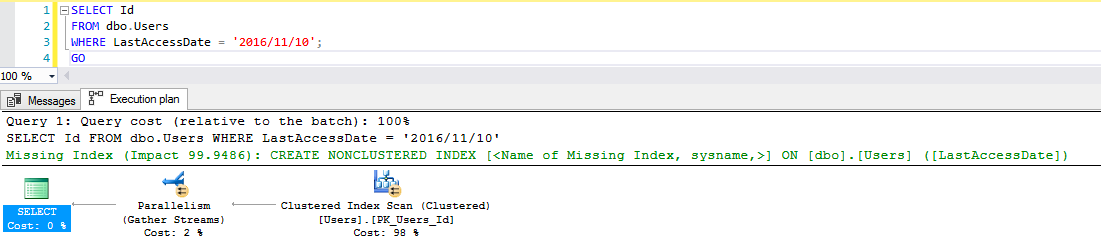
Missing index #1 on LastAccessDate

If you right-click on the plan and click Show Execution Plan XML, you get more technical details:
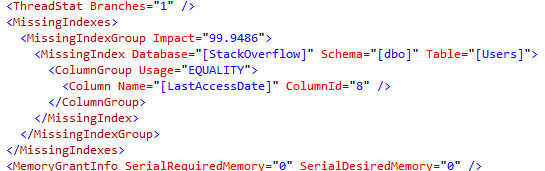
Missing index #1 XML – equality

SQL Server’s telling us that it needs an index to do an equality search on LastAccessDate – because our query says LastAccessDate = ‘2016/11/10’.

But in reality, that’s not how you access datetime fields because it won’t give you everyone who accessed the system on 2016/11/10 – it only gives you 2016/11/10 00:00:00. Instead, you need to see everyone on that day, like this:

The missing index is just a little bit different already:

Missing index #2: now with Id field included

Huh. Now SQL Server is recommending that we include the Id field. Technically, Id is the clustering key field on the Users table – so why did SQL Server tell us to include it this time? God only knows, and by God I mean the people on the query optimizer team, because in my eyes, they’re gods.

Let’s see the hand of God by right-clicking on the query, click Show Execution Plan, and:
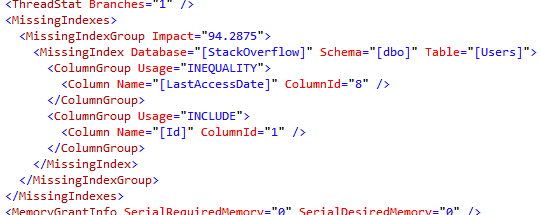
Missing index #2: inequality on LastAccessDate

This time around, SQL Server’s saying that we’re doing an INequality search on LastAccessDate. When you look for a range of values, you get an INequality index recommendation.

What happens when we use NULL and NOT NULL?

Are those considered equality searches? Well, I wanted to show you that with LastAccessDate just to keep the demo consistent, but there’s something amusing about the way the LastAccessDate field is created with SODDI: it’s not nullable. As a result, SQL Server is way too smart to ask for an index on that field:
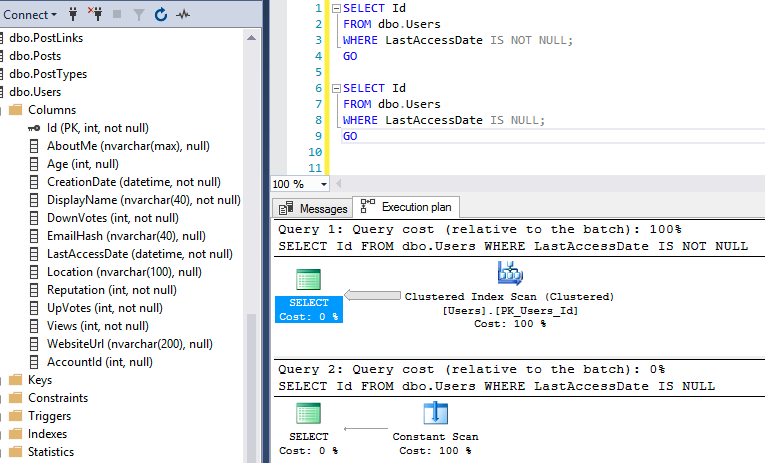
Is NULL or is NOT NULL

Instead, I’ll use the nullable Location field. In both cases, SQL Server asks for an index on the Location field:
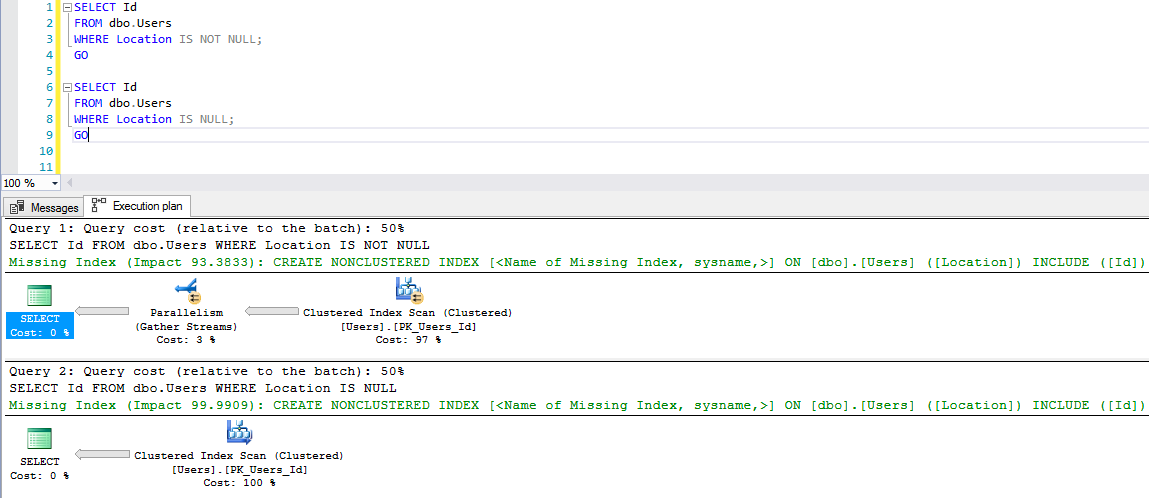
Indexes on nullable Location field

As you might expect, the IS NOT NULL query’s missing index is an INequality one, since we’re not doing an exact value match:
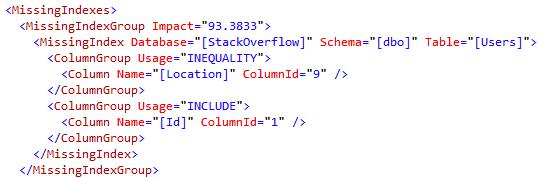
Inequality index on location

Whereas the IS NULL is considered an equality search, and gets a separate equality index recommendation:

Equality index on location

Note that I got two different hints in the XML because my two queries were separated by a GO. When I ran only one batch with both queries in it, and no GO, I got a single missing index with INequality.

What happens when we filter on two fields?

Here’s where understanding the difference between equality and inequality starts to pay off:

The LastAccessDate is an EQUALITY search, while Location is an INEQUALITY search:

The missing index XML

And when you look at the missing index hint on the query, the equality field is first:

Seen on the side of a milk carton

This recommendation makes perfect sense for this query because LastAccessDate is very selective: it’s going to filter our query results down to nearly no rows. Generally speaking, you want the most selective field first in your nonclustered indexes. The IS NOT NULL search on Location isn’t selective at all – it brings back millions of rows – so you want to perform that filtering second.

But what happens in the opposite scenario – when the equality search isn’t all that selective at all?

In the query plan’s XML, the missing index hints show that we’re doing an equality search on Reputation, and an inequality search on Age:
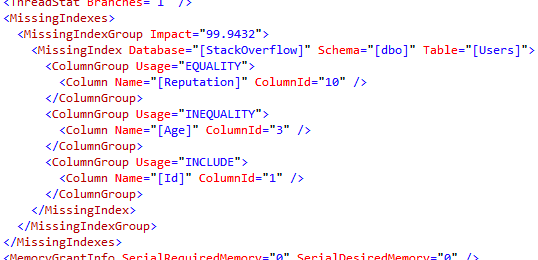
Equality on Reputation, inequality on Age

But here comes the curveball: there are millions of users with only one reputation point, but only about 1,000 users with Age between 90 and 99. Age is way more selective in this case. So what does SQL Server Management Studio recommend for our missing index?

See the full details at SadTrombone.com

The first index recommendation bombshell:
the index fields aren’t in order.

SSMS is following three out of four of Books Online’s guidelines for human beings to interpret missing index DMV data:
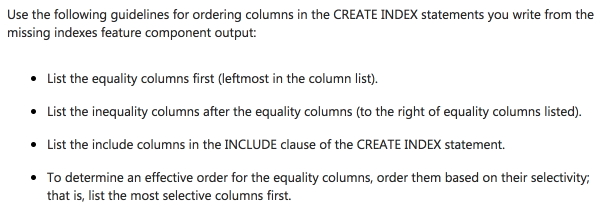
Don’t be sad, cuz three out of four ain’t bad

It’s up to you, dear reader, to do the fourth bullet: order the fields based on their selectivity. SSMS can’t do that when it’s rendering a query plan, because that would require querying your database. sp_BlitzIndex suffers from this same limitation, too, as does every single tool that uses the missing index DMVs.

I’m not mad at Microsoft, either: they do a great job of laying out the issues on the page Limitations of the Missing Indexes Feature.

In this case, the ramifications are no big deal: if we create SQL Server’s index on Reputation, then Age, it can seek first to Reputation = 1, then seek to Age = 90, and it gets the job done in just a handful of reads. However, in real-world, 3-4-5 key indexes, with a mix of equality and inequality predicates in your query, plus grouping, the difference can be staggering.

When you see a missing index request, don’t think of it as a request to create a specific index. Think of it as SQL Server tapping you on the shoulder, going, “Hey, friend, take a look at your indexes.”


First Responder Kit Release: Yukon Ho!

We’re going to Alaska this month, so try not to find any bugs, okay?

To celebrate, I’m channeling childhood nostalgia, and quoting a verse from one of my many Taco-Bell-dripping-stained Calvin and Hobbes tomes.

We’ll never have to clean a plate,
Of veggie goops and goos
Messily we’ll masticate,
Using any fork we choose!

When I was a kid, the word “masticate” was always good for a chuckle.

Until I found a dictionary.

You can download the updated FirstResponderKit.zip here.

sp_Blitz Improvements

  • #962@RichBenner – the man, the myth, the guy who cares about trace file names. Thanks to him, you’ll never have to worry about one being folded, spindled, or mutilated.
  • #1008: We added a debug mode. Actually, we added two debug modes. Using @Debug = 1 will print out CheckIds as they run, and @Debug = 2 will print out CheckIds and dynamic SQL used in some checks. This will help us identify errors and slow-moving queries. You’re welcome.
  • #1023: We noticed that there were some undeclared character lengths, and fixed them. Who cares, right?
  • #1029: We’ll only give you warnings about CMEMTHREAD when you have multiple NUMA nodes. Spiffy!
  • #1041: When we look at DBCC commands that have been run in the default trace, we ignore anything run by common monitoring tools. By “common” we mean “good”. If your monitoring tool isn’t on the list, perhaps this is a good time for silent reflection about the choices you’ve made.
  • #1042: The only thing worse than knowing fill factor is low is not knowing how low it is. Now you’ll know, and you can begin the long march to the bottom of your Desk Whiskey® bottle.
  • #1043: Endpoints; ah, Endpoints. Those verdant fields. It’s fine if sa owns them. Now you’ll know that too.
  • #1049: The memory dumps check was missing a BEGIN and END. Using advanced control-flow technology, we can now avoid running syntax when our Super Cool Consultant Criteria® isn’t met.

sp_BlitzCache Improvements

  • #1030: We’ll give you a holler if there’s a high variation between the rows estimated to come out of a query’s SELECT operator, and how many rows are returned on average by a query. This is v1, so if you run into anything weird, please let us know!

sp_BlitzFirst Improvements

  • Nothing this time around

sp_BlitzIndex Improvements

  • Nothing this time around

sp_BlitzWho Improvements

  • #1017: Not all blocking would be flagged. Sometimes none of it would be. The whole thing stunk! Stunk! Like the way those zit popping videos probably smell.
  • #1031: DMVs are awful. Has anyone else noticed that? One day you’re cruising along with a positive elapsed time, the next day SQL Server decides you’re a negative number. Yeah. Cool. Thanks, SQL Server.

sp_DatabaseRestore Improvements

  • Nothing this time around

sp_BlitzBackups

  • #977: In the humble words of @TheUsernameSelectionSucks “this is broken”. Now it’s fixed, with the healing powers of QUOTENAME. It turns out that thing you only ever used in dynamic SQL is good for other things, too.
  • #1039: Moving files broke really easily, and didn’t take into account if you were restoring a database with a different name. Now it breaks far less easily, and takes name changes into consideration.

sp_BlitzQueryStore

  • #908: Added filtering for plan_id and query_id. Why? Because I needed it for 24HOP.
  • #1030: Same row variation item that got added to sp_BlitzCache
  • #1034: Future-proofing for SQL Server 2017. Some new columns got added with query metrics in them.

sp_AllNightLog and sp_AllNightLog_Setup

There were like 10 changes here, and I’m far too hungry to write something funny for all of them. If you’re interested, here’s the full list of issues in this release.

Installer Scripts

Two turned into three! Yes, three! There are now two installers for the core Blitz scripts. One has sp_BlitzQueryStore in it, and the other doesn’t. The installer for all scripts includes everything. I’m not making a special one that doesn’t have sp_BlitzQueryStore in it for that one.

Deprecated

sp_BlitzRS and sp_BlitzTrace are no longer under active development. Whatever version of them you have is the final version. It would take a really, really impressive code change to get us to take them out of retirement. If you want them, you can still find them here.

You can download the updated FirstResponderKit.zip here.


What is the biggest mistake you made in production?

SQL Server
76 Comments

This has been blogged before by several people. One thing I’ve learned from Brent is to not let the fact that the topic has been blogged before stop you from blogging about it. With that out of the way…

When you have sysadmin access, you are bound to make a big mistake in production at some point in your career. Not everyone has. Maybe they’re perfect, or maybe it just hasn’t happened yet. I’ve made two big mistakes in production.

Mistake #1

15 years ago. I remember it like it was yesterday. This was back in SQL Server 2000 days. We were using Log Shipping for our Disaster Recovery needs. This company failed over to the DR site 1-2 times per year and would run production there for 2-3 weeks at a time. This had two big benefits.

-Proves to the customers that the DR plan works (as long as resources are availabe in an unplanned situation)
-Allows you to do major maintenance at the primary site

During one of the planned failover maintenance windows, I was tasked with dropping Log Shipping and setting it up again in the reverse (from DR site to primary site). One of the drawbacks with Log Shipping is that after you failover to the secondary server, you can’t reverse it without dropping Log Shipping and setting it up again.

Well 15 years ago, I was a lot less experienced than I am now. My steps would be different these days. But here’s what I used to do:

  1. Drop Log Shipping
  2. Check the Log Shipping tables in the msdb database to make sure it dropped cleanly (back then there were often rows that had to be manually deleted)
  3. Drop the database at the primary site to avoid having to use WITH MOVE in the RESTORE DATABASE command
  4. Setup Log Shipping

I accidentally dropped the database at the DR site where production was now running. I immediately told my manager and the manager of the WebOps team. We were still inside our maintenance window, so I started restoring the database. I restored to the last transaction log backup that had been run, but there’d be data loss if I stopped there. I got lucky on that system that the incoming data could be recovered from text files. The bad news was that someone else had to do that task as it wasn’t a SQL Server task. I felt bad for not only having dropped the database but that I increased the work of someone else who already had a ton of stuff to complete in that maintenance window.

Now every time that I have had to drop a database in production, it takes me a good minute before I am confident that I am doing it on the right server and on the right database.

Mistake #2

I’m embarrassed to say that my second big mistake in production occurred 2 years ago. The system that this big mistake occurred on required many manual data changes due to various reasons, such as the application not having a certain feature or an application bug that hadn’t been fixed yet.

I needed to delete some data in a table. You see where this is going, right?

First I had to query the table to see what needed to be deleted so that I could get my WHERE clause right. I changed the SELECT to a DELETE. The full DELETE query was in the query window including the WHERE clause. I highlighted the query (I had other things in the query window) and hit F5.

The problem was that I accidentally missed highlighting the WHERE clause and hit F5 too fast. To top it off, I had dismissed the SSMSToolsPack warning about deleting data without a WHERE clause. I was so used to dismissing the warning that I clicked it without even thinking about what it said.

My stomach dropped. I noted the time (this is important for point-in-time recovery). I ran to my manager’s office and fessed up to what I had done. He told me to start the side-by-side restore while he worked on figuring out the impact. We had enough disk space that I could restore the database with a different name so that there wouldn’t be downtime. I restored the database and then the transaction logs to the point in time before the DELETE command had been run. I then copied the data over to the actual database. There wasn’t foreign key data that I had to worry about, luckily. It was just the data in this table that needed to be recovered.

So, fess up! What have you done?

What is the biggest mistake you made in production? Feel free to comment with non-SQL Server mistakes, just as long as they were made in production. Mistakes in non-production can be costly, but doing them in production takes it to another level.

Brent says: I’ve done a lot of dumb stuff, and I should probably write a whole compendium blog post. One of my favorites was trying to move a big 4U rack-mount server from a bottom spot to a top spot, by myself, in the middle of the night during a Saturday maintenance window. I’m no Erik Darling, and my pencil-thin arms managed to drop the server from above my head. It missed my foot by maybe an inch, shattering the raised floor tile. Took me a good half hour just to calm down. I have to hand it to IBM, too – that x445 kept right on working when I plugged it back in.


[Video] Last Season’s Performance Tuning Techniques

#SQLPass, Development, Videos
0

You’re kinda-sorta comfortable doing performance tuning on SQL Server. You’ve read a few blogs, you monitor Page Life Expectancy, you rebuild your indexes, and you add an index here or there. However, you haven’t been to a day-long performance tuning class yet, and you’re wondering what you’re missing.

Thing is, in SQL Server, performance tuning changes fast. One day Perfmon counters are in, and the next day they’re out. It’s totally okay if you’re still using SQL Server 2008 – that’s not the problem. You shouldn’t be wearing hammer pants, and you shouldn’t be looking at PLE, monitoring Disk Queue Length, or putting your data and log files on separate drives.

In this rapid-fire session, Erik and I will show you specific examples of why performance tuning tips and tricks have fallen out of fashion, and why they’re not too legit to quit:

You can get the slides and demos here.

(While there’s some awesome historical photos of Erik and I in here, PASS didn’t include the video camera recordings. That’s kind of a bummer because I had some awesome costumes.)

If you learned stuff in that session, that’s a good thing: it means that while your skills might be drifting out of date, you can still catch back up. Erik and I are doing a full-day pre-con at the Summit called Expert Performance Tuning for SQL Server 2016 & 2017. Go read more about that, check out the cool free stuff you’ll get for attending, and then register now. See you in Seattle!


[Video] Office Hours 2017/07/29 (With Transcriptions)

SQL Server, Videos
0

This week, Brent, Erik, Tara, and Richie discuss SQL Server performance monitoring, ASYNC_IO_COMPLETION, AWS SQL Server licensing and fees, rebuilding indexes, licensing model for Blitz scripts, stored procedures, using (or not using) primary key on a table, choosing ORMs and other tools, and more.

Here’s the video on YouTube:

You can register to attend next week’s Office Hours, or subscribe to our podcast to listen on the go.

Enjoy the Podcast?

Don’t miss an episode, subscribe via iTunes, Stitcher or RSS.
Leave us a review in iTunes

Office Hours Webcast – 2017-07-27


What should I monitor on 2,500 SQL Servers?

Brent Ozar: Christopher says, “2500 SQL Servers and I’m growing at about ten per week…” That’s kind of like my savings account right there, “And I’m managing [inaudible] – if I have to monitor 2500 SQL Servers, what performance statistics would you look at in order to find the really big problems that I would have to fix right now?” He says, “The schema across all these instances [inaudible], it’s just that the amount of data varies.” Wow, that’s an interesting question.

Tara Kizer: That’s a lot of servers, how big is the team?

Brent Ozar: I was going to ask the same thing, yeah.

Tara Kizer: I’ve worked at a company where there were, I think, five local DBAs and we had three offshore DBAs, you know, eight of us, and there were about 700 servers, I think. I imagine that these 2500 servers are small, maybe they’re virtual machines. Sounds like it’s the same database across each of these systems, but that’s still a lot of servers, there’s a lot of patching you have to do; maybe they’re not patching though. But I’d want to know about just the [crosstalk]. You know, CPU utilization, job failures, I mean just the normal set of monitoring stuff and just making sure that all that stuff is going to the team.

Brent Ozar: Oh man, he has a follow-up. He says, “The dev team is 30 people, there’s only one DBA.” But he says, “I’m more of a perf…” At least he says, “I’m more of a [inaudible] developer.

Tara Kizer: One DBA… [crosstalk] Don’t even have time to work on any of this stuff, you know. Yeah, you can start monitoring it, but who’s going to work on the alerts?

Brent Ozar: How do you even deploy performance monitoring across 2500 servers when you only have one full-time DBA? [crosstalk]… That’s true, oh, I don’t even know that I would want alerts of 2500 servers if I’ve only got 30 developers. That’s pretty tough. Man, what would I collect? I would collect wait time per hour, but I don’t know that I would go any deeper than that because, in terms of urgency, the amount of data you’re going to get is going to be staggeringly tough to slice and dice. Anything else that I would gather – yeah, really I would just go to wait time per hour. Then you set – whichever servers are having the worst wait time per hour, then go tackle those servers. But the amount of data that you would have to collect, even just building a database to house that across 2500 servers, is going to be a problem.

Erik Darling: Yeah, I’d probably want to get really clear priorities for which servers I need to focus on, from management. And that’s based just – and that’s probably going to just be based on, you know, how much money is coming in from certain people every month. So I’d probably just want to get, you know, three or five servers from my boss that they want me to focus on, focus on those and then see if any of the performance things can trickle down to other servers in the environment. For example, if you find some really slam-dunk missing indexes on your top three to five servers, it’s totally possible that when you go and you start looking at your other servers, those missing indexes, if they’re not usable now, will be in the future. So I’d probably want to, you know, get some priorities and then – tune my priorities and then see what would apply to the rest of the environment; because it’s a lot easier to collect data from, then analyze and then make meaningful changes on a handful of servers than it is to do it across all of them. So you want to do it and test it where it matters and then deploy across the rest where it would count.


Should I do DML with literals or variables?

Brent Ozar: Let’s see, J.H. says, “Which DML statement would be faster? If I do something with parameter values, or do I do it hard-coded as batches like strings?”

Tara Kizer: I don’t understand the question. What is meant by hard-coded versus parameter values? I don’t…

Brent Ozar: I bet you he’s doing stings of, like, insert into or update into and he’s just doing a list of values or if he’s doing parameters. You can run into parameter sniffing. I’m thinking specifically of update statements. You could run into parameter sniffing hitting update statements, but if you want to paste in a couple of examples, then we may be able to tell you more details.


Are multi-database joins slower than single-database joins?

Brent Ozar: Let’s see here, [Anupinder] asks, “For performance of queries that do joins across multiple databases on the same server, are they any slower or is there anything extra that I have to look at?”

Tara Kizer: I mean, if it’s on the same server, it’s just the normal stuff. Just look at the execution plan and see what’s going on there. What is the query waiting on also?

Brent Ozar: Is it any worse than – if I say four tables across four databases, is it any worse than four tables in the same database?

Tara Kizer: I haven’t seen any performance difference between that, but maybe I could be wrong, I don’t know. [crosstalk]

Erik Darling: Usual stuff like volume of data, if my index is lined up for the query that I’m running, all that stuff. You know, look for blocking across databases. That might be a little bit more challenging to not go, because imagine if a join is blocked in one database but not in all the other ones. What’s SQL going to get up to?


Is it bad to run linked server queries to localhost?

Brent Ozar: Steve comes back with a clarification, and I’m so sorry to report this answer. He says he’s “Doing a linked server from self to self.”

Tara Kizer: Sucks to be you.

Brent Ozar: Oh dude. Alright, so the problems, and I’m probably going to miss some of the problems, but I’m going to say one and [inaudible] guys know any others. Here’s the big ugly part, whenever you’re doing linked server queries out, those results are not going to be cached; not even just the results, the log data pages aren’t going to be cached. Every time, SQL Server is going to be like, whoa, I got to go do linked server query, who knows what happens over on the other side?

SQL Server can even make dumb decisions about predicate pushdown. It may bring back table results across the linked server and then do the joins to the tables. So if at any possibility, I would go try to run them without the double linked server and see what happens, see if you get a performance difference there. I’ve seen a couple of cases where it was staggering. Like SQL Server was dumping a bunch of stuff into tempdb because it didn’t have enough RAM to cache all these tables that it was bringing back from the linked server. Any other things that I would worry about there? Distributed transactions would suck. Anything else that I would worry about?

Erik Darling: I’m just sill so puzzled by the concept of it and how this is the vendor’s big idea for high availability. Like, performance hasn’t even hit my mind yet, I’m just…

Tara Kizer: I know, what article did they read that they thought that it was a good idea and it would solve [crosstalk]

Erik Darling: It’s like, no, no, no we’ll query the server from itself to itself using a link. That’s like brushing your teeth with your weak hand, like what?

Brent Ozar: The one that I saw once that – a vendor was telling me about this, he was like, “Look, we just have one linked server for production, we have another linked server for dev and another for QA, but sometimes they’re on the same server, sometimes they’re on different database servers…” I’m like, no, no, oh god no, no.


What does ASYNC_IO_COMPLETION mean?

Brent Ozar: Let’s see, Graham says, “We have an instance that’s [inaudible] thousand batch requests per second.” He says, “My expensive queries are always updates and inserts but my biggest wait type is async I/O completion. What does Async I/O completion mean?”

Erik Darling: That’s tied up into backups a lot.

Tara Kizer: Backups and [crosstalk]. It keeps coming up on client’s systems, and I’ve been saying, you know, this is the full backups or possibly differential backups. It doesn’t apply to the transaction log backups. But I suspect – I mean it’s also at checkpoints and I think that the checkpoints are notable on these client systems. So in the past, I’ve said it’s  probably your backups, your backup throughput is not the greatest, but when their backup is fine, I think they are experiencing an I/O issue, even though the other I/O wait stats aren’t as significant. But I think it’s the checkpoints, you know, writing the dirty pages to disk.

Erik Darling: I’ve never seen those tied in together. That’d be interesting if it did. Just for async I/O completion, it’s always just like from the start of a backup to the end of a backup, you’re accruing that wait.

Tara Kizer: Right, so the number of average waiting time on, it doesn’t reflect the backup job time. That’s why I’ve been confused on it, so I looked up Paul Randall’s async I/O completion article and he mentions checkpoints in there. So yeah, I wish that these wait stats wouldn’t have multiple meanings, you know. Separate them out, separate checkpoints out from backups.


Does AWS have extra licensing fees for SQL Server?

Brent Ozar: J.H. says, “Does AWS SQL Server have any extra fees, like the amount of data that gets queried, high availability clustering, or are all these fees upfront with licensing?” So licensing is one part of it, you can either bring your own licensing or you can pay Amazon by the hour, or longer term if you do reserved instances. There are the normal Amazon, and all cloud providers, have egress fees for networking, like how much data you pull out of the server. Generally, in terms of queries, that’s not a big deal. But if you do backups every day and you pull those backups out of SQL Server and put them somewhere else like on-premises or in another cloud, you can run into egress charges if you do enough of that.


Do stats updates help my update queries?

Brent Ozar: Tim says, “I’ve got an ERP update that times out updating a table. Whenever I rebuild my indexes, all of a sudden these updates no longer time out. Could this be an issue with statistics?”

Tara Kizer: Statistics or just, you know, putting those indexes back, you might get a different execution plan. So it could just be a bad plan cache too. Do people still – when loading data, is it common to still drop all the indexes, load the data in and then create the indexes again?

Brent Ozar: You know, I’ve seen it happen in a couple…

Tara Kizer: Back in the day, that’s what we did, but I don’t know that that’s common anymore.

Erik Darling:  Whenever I’ve had to do it, rather than go through all that, I would always just have a staging table so that I could get my fancy minimal logging and all that other garbage, dump data in as fast as I could, and then put it out to my prod tables in batches so that I didn’t have to drop all my indexes and all that other stuff.

Richie Rump: Yeah, and I guess it depends on how much data you’re loading, right? I mean, if we’re loading a gigabyte of data, I may want to drop the indexes, I don’t know.

Erik Darling: So one thing that I would be curious about is prior to SQL Server 2014, SQL would have a whole lot of trouble with execution plans if there were ascending keys involved. So if your update is only, say, hitting the most recent chunk of data and you haven’t hit a statistics update threshold yet and it’s an ascended key, well you can run into some performance trouble in that regard. And then the index rebuild would update stats at the full scan, you would have that ascended key information in the histogram now, and that might do it.


What licensing model to the Blitz scripts use?

Brent Ozar: Tim asks, “What licensing model do the Blitz scripts use?” We use the MIT license, which kind of means that you can do anything with it that you want as long as you retain the copyright notice inside the script. Like if you go hand it out to other people or you change it, you just need to include the copyright notice, but you can charge for it, you can give it to strangers on the street, whatever. And then, “Do you retain any rights to pull back data, even aggregated, for the servers that it’s on?” Because it’s the MIT license, that doesn’t say anything about what we could do with the data, however, all the sp_Blitz scripts are just plain T-SQL that send results back to you. So they don’t do inserts over the internet or push stuff back to us in any way shape or form. We did used to, a long time ago in a galaxy far, far away; we had a Windows app that could have been able to do that. It didn’t, but just in terms of any time you run a Windows app, find out where the data’s going.

Erik Darling: You know, what’s really funny is when I first started working here, there was a conversation about the Windows app. And I Googled something and someone had, like, uploaded a PDF of the findings from the Windows app to the website and it was searchable. And so I click on it and I’m looking at it and I’m like, someone put this miserable sp_Blitz output online and it was searchable. Like you could find it by searching some of the Blitz text. I was like holy cow, someone did that. Like, I thought I was the only one who ever downloaded the app.

Brent Ozar: Oh, what I’ve learned over time is, if you give people an easy way to share stuff, they will do it. One way or another – here’s my social security number, can someone tell me how to fix my credit?


Would you rather use the server name or a DNS CNAME?

Brent Ozar: Brandon says, “When you guys let apps or clients connect to a SQL Server, would you rather have them connect to just the server’s name, or would you rather connect a DNS CNAME or a SQL alias and why?”

Tara Kizer: So having done some desktop support in the past and any time the server name changes, you know, it’s painful to update all those connection strings out there in the world. So I’m a big fan of using DNS aliases, and if you’re opt using some kind of fancy feature like either database mirroring or availability groups, which has the ability to point to – you know, like availability groups point to a listener name. but if you’re not using stuff like that – I like the DNS CNAMEs. I have used SQL aliases, but that has to get deployed to every single machine, it’s not just on a SQL Server. That’s every single place that has to connect. You can deploy that easily, it’s just a registry file, you can deploy it easily via some kind of login script, and I’ve done that in the past. But DNS alias, I think, is the best solution if not using something like an availability group listener.

Brent Ozar: As someone who’s had to play around with group policy before to push out SQL alias…


Should my SSRS reports use a stored procedure?

Brent Ozar: Dan says, “When you have an SSRS report…” And this really could be for any report, “Would you rather have the data be fetched from a stored procedure or a query built into the SSRS report?”

Tara Kizer: I prefer stored procedures because if you have to make a change, you could just modify the stored procedure. You don’t have to go and fix the report, the application or whatever. You know, I’ve had situations where there was a little tiny bug in the code and it required a full release to get this thing to ploy to production, whereas if it’s in a stored procedure, I could just go fix that real quick. And yeah, I’m going to do change control and all that stuff, but it’s so much simpler. I mean, there’s benefits to using stored procedures besides that, but I don’t like just throwing the queries into the report.


Why would you NOT create a primary key on a table?

Brent Ozar: Let’s see here, Mark says, “Why would you not create a primary key on a table?” He says, “I’ve got tables with 100 million or more rows and they’ve got a unique clustered index, but they didn’t create a primary key. Why wouldn’t you create one?”

Tara Kizer: So I had a client, this is a few months ago – it’s a vendor application and there were absolutely no primary keys anywhere, and they needed to move their data to other systems, and so they could not use transactional replication because transactional replication required primary keys. So they were using – I think this client was using peer to peer replication or some other, you know, some other SQL Server replication that did not require primary keys. Now, they did have the unique indexes and unique clustered indexes, but I mean, I like constraints because they’re meaningful and they tell you about the data, whereas a unique index, yeah this portion of the data is unique, but that doesn’t mean that that is the actual constraining uniqueness of that row.

Richie Rump: I mean, I think the only time I wouldn’t put a P key on there is like if it’s a loading table or something like that. Even if it’s a sorted key, I would most likely put it on there. 99 times out of 100, 999 times out of 1000 the primary key is going to go on that production table, unless it’s some sort of loading table, which is probably in a different database, as it were.

Brent Ozar: I’ve heard people say, like, I just don’t want to enforce referential integrity in the database, I believe it’s going to slow me down. So I’ve heard people say that; I don’t agree with it, but I’ve just heard people say it.

Tara Kizer: And it’s always developers that say it.

Richie Rump: There’s this thing called “indexing,” people, that you could put onto those keys to kind of speed things up a little bit. I’ve heard – it’s a thing now, I guess, I don’t know.


Is there a best ORM out there?

Brent Ozar: So speaking of things now, Nick asks, “Is there a best ORM out there or are they all pretty much the same?”

Tara Kizer: I don’t care what tool people use. I’m just – I’m coming from the perspective fighting fires in production. I just want things to perform well and not wake me up at three in the morning so that I can do proactive administration and not have to constantly be working on production problems. A lot of the time, production problems are performance based and I’ve had a lot of bad experiences with performance problems that were due to ORM. So I do have a blog post out there that’s got a bunch of activity on it. I don’t remember what the title is but it basically is why I don’t like ORMs. It’s not really about the ORM, it’s about the performance problems that they cause. I don’t care what tools you use, just don’t cause performance problems.

Richie Rump: And I’m the opposite side of that, I kind of like ORMs, I kind of like them a lot. So I don’t think there’s really a best one out there, it’s just a tool that you and your team feels most comfortable with. I’ve been on teams that have just gone straight to stored procedures and it’s thousands of lines of code written by developers, and you can see how fast that’s probably going to run. And we go to an ORM like Entity Framework and things get a lot faster. Now, you’ll run into a lot of issues because the team or the individual doesn’t understand what the ORM does on the backend and how it creates the queries and doesn’t even look at the queries on the backend.

So when you get to more complex stuff, there’s not a lot of thought there. It’s like, oh it works in dev, then you throw it into production with all the production data and it just starts slowing everything down. The best thing you can do for any tool that you have is understand that tool. And I know – understand that it’s hard for us developers because we have lots and lots of tools that do lots of different things, but if you don’t have that understanding, an ORM is going to be bad for you because you’re going to put it in situations that are not the best situations for the tool, for the ORM.

Erik Darling: When it comes to stuff like that, where I don’t have a vast or deep knowledge of what each and every tool is best or worst at, I would just want to ask two questions; what are most people doing and what are most people that are doing what you’re doing using? So that’s how I would at least narrow product choice down. I mean, Richie, can you think of an ORM outside of Entity Framework that’s really competitive with Entity Framework?

Richie Rump: Yeah, Hibernate. And Hibernate has been around forever…

Erik Darling: Okay, so what else? Like if you had to name a top three or five…

Richie Rump: So now you go into micro ORMs like Dapper and… There’s a ton of them. So what happens is that people, you know, like their developers say Entity Framework sucks, so I’m going to go create my own flavor of Entity Framework which is just going to do a small little thing of – it doesn’t do everything entity framework does, but it just does this little thing and it does it really super well. And that’s how you get all these little ORMs going on all over the place; everyone has their own little take on it and now all of this stuff is blowing up and everybody had their own simple version. And yet, mine’s the best, mine’s the best, mine’s the best, and therefore you get these developer wars going on, which I particularly hate; there’s no need.

Brent Ozar: It’s good Richie doesn’t like conflict.

Richie Rump: Yeah, me – I’m here with my hand on the detonate button right now, you know…

Erik Darling: He doesn’t like conflict or developers, so it’s just a weird pacifist line he’s drawn in the sand…

Richie Rump: I want to kill myself, essentially, at any given time, yes.


Can I prevent developers from using app logins?

Brent Ozar: J.H. Asks a really interesting question. “Do you have any suggestions on how to prevent developers from connecting in with the app’s logins accounts into production servers?”

Tara Kizer: I’ve struggled with that and for me the answer is why do the developers have that user ID and password? Isn’t there another team that has the production access – developers, at least in my environments, developers did not get to see the connection strings in production. They could see it in other environments. At my last job, or a couple jobs ago, they were talking about having some kind of encrypted application that we would control that we would be able to put whatever password we had selected when we created the account and then it would be encrypted. So even if developers had access to be able to look at the web config or whatever file it was, they couldn’t read the value and use it.

Richie Rump: Yeah, and there’s a setting, if you’re using c# in Windows config or app.config or whatever, if you’re using .NET, you can encrypt those encryption strings so nobody can see them. And it’s actually really easy to do inside the application to encrypt it.


What’s the biggest problem you faced when becoming consultants?

Brent Ozar: Now, last question that we’ll take, and this one’s kind of tricky. This is from Graham, and Graham, we may not be the right people to answer it, but we’ll give it a shot. “What’s the biggest issue or problem that you all faced when becoming consultants? Do you have any tips on how to get plugged into the SQL Server consulting community? I know blogging helps, but what else?” Richie, you went off on your own and did the consulting thing for a while; what kind of things did you see people going off and doing to get into the consulting business?”

Richie Rump: I saw a lot of people struggling, like myself. It’s a grind, right. I mean it’s a hard thing to do. So much so that I went and got a full-time job because there’s a lot of it that I just didn’t like. So the marketing and – it’s a constant getting yourself out there, going to different conferences and meeting different people, you know, write people, getting people to say yes. There’s a lot of soft skills involved within that. The stuff that Brent does really, really well, I don’t do well at all. So hey, now you know why I’m working for him; that’s just kind of the way that works.

Brent Ozar: Yeah, the hardest part by far is getting the business, getting enough business to keep yourself busy. And it’s this weird cycle where if you don’t do enough of the marketing then you don’t bring enough business in. so people will go off and they’ll get a 40 hour a week contract, it’ll last for three months, but when the contract’s over, there’s no business coming in if you weren’t building up that funnel leading up to it. So you nailed it, Graham, with blogging. Anything, blogging, presenting, writing, doing guest posts for vendors, webcasts for vendors, you’ve got to be out continuously, beating the drum going here’s what I’m good at, when you need help with this, call me. If you don’t love doing that and if you can’t do it at least eight to 16 hours a week, go work for a consulting company. It’s so easy to go to join a consulting company. Say like ours, you’ve got me, who does some of the marketing stuff to bring business in and some of the sales stuff in, but then you don’t have the pressure of how do I bring business in. It is really, really terrifying to try to [inaudible]

Richie Rump: yeah, I would even say it’s more than just the 16 hours, right? I mean I was pouring – it was almost like a second job to me, you know. Coming home, it’s three o’clock on the morning I’m still cranking out podcasts and practicing presentations and trying to avoid writing. That was kind of the norm for three and a half years. Unlike Brent, my 40 hour a week client didn’t last three months, it actually lasted three years. So that kind of helped prolong it a bit, but I still had real trouble getting people into that funnel.

Erik Darling: I was going to say, beyond marketing, just establishing a reputation has to be tough, like a trustworthy brand and reputation has to be tough. You could really establish any kind of reputation you want, but having it be a good one to bring in business is completely different.

Richie Rump: Even if you have a bad reputation [crosstalk]

Brent Ozar: Alright, well thanks everybody for hanging out with us this week. Adios, everybody.


Live Blogging: Erik vs. PowerShell

Humor
42 Comments

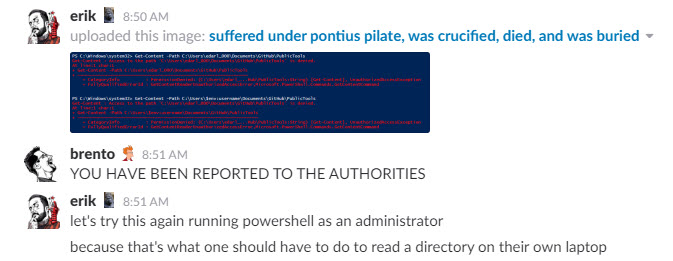
Oh, hey, happy Saturday

First, I’d like to apologize to Conor Cunningham for the blatant theft of a blog title.

That’s what you get for not posting in three years (like the desert miss the rain~).

Why am I here? Why am I writing PowerShell, my sworn enemy?

I do it for you. I’m trying to be a good open source maintainer, so you don’t end up with a useless (hmpf! useless!) script on your servers. Instead of saying “go ahead and drop it if you don’t want it”, I’m going to properly address the issue.

Here’s where I’ve been so far:

Keeping it Family Friendly®

Well, alright, so at least I’m narrowing things down.

Brent Cares©

He’s going to spend $10,000 on brunch for Ernie after this.

Adventures In PowerHELL

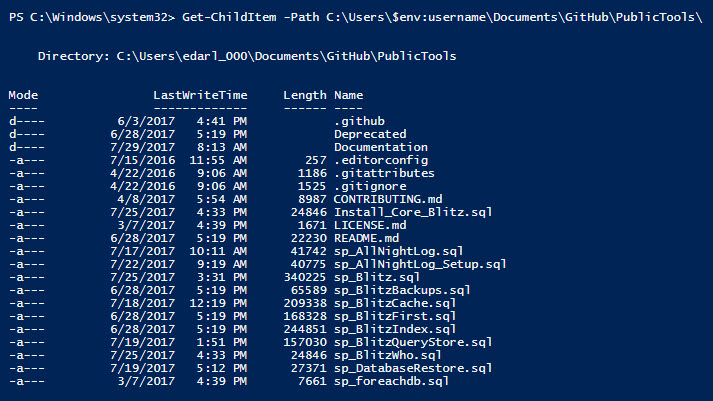
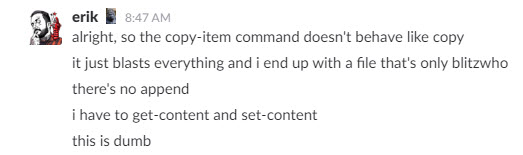
But hey, you know, PowerShell has a Copy-Item command.

Off to a good start!

According to the laws of “what’s the most obtuse way we can give people to clobber files together”, we have to use not one but TWO commands!

We have to Get-Content and pipeline (|) it to Set-Content.

Sounds reasonable, let’s get going.

Calgon, take me away

Where will we go next? Follow along!

Alright, let’s try a different command. Maybe the administrator thing is silly. Maybe I’m stepping in the wrong direction.

What… What doesn’t exist?

It existed a minute ago when you didn’t have permission, dummy.

Maybe I’ll try using -LiteralPath, because that’s an option. I like options. If I could drive, my Citroen would have 42 ski racks.

No, that doesn’t exist either. Riiiiiight.
Psychic friend

WE ARE NOW RUNNING AS ADMINISTRATOR, EVERYONE STEP BACK

Do you believe?

Access is still denied running in Admin mode. That’s nice. Time to stick in some humorous dialog while I try to figure out something else to do.

White Whine

Breaking through!

Gotta call me on the yacht

ACCESS NOT DENIED!

SMH

DEAR GOD WE HAVE FILTERING

It’s like progress, but less rewarding

We’re having fun, really.

I’d Rather Be In Jersey

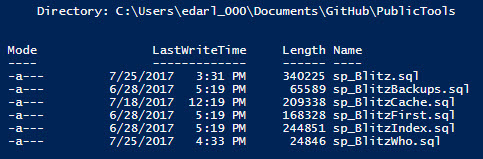
Alright, now we have to try to exclude sp_BlitzQueryStore!

So uh, about that.

What on earth

Holy cow, it took 15 minutes of tinkering to get this working.

Apparently if you want to do what I’m trying to do, you can’t use (???) -Filter. Maybe? Something like that? You need to use -Include and -Exclude. And you need to… surround your path in quotes. And use a wildcard at the end? I don’t even understand how I ended up here, honestly, I just kept changing things until something worked.

[Sometime around 10:30]

INTUITIVE AND USER-FRIENDLY THEY SAID

LEARN IT IN AN AFTERNOON THEY SAID

THERE GOES YOUR SATURDAY MORNING, THEY NEVER SAID

Finally this is what worked.

I’m so alone.

So an hour and a half later, I have a list of files. I still have to get their content and set their content. This is fun. Learning. Hey, does anyone have a book on Replication?

Falling flat

Alright, so knowing just enough to be dangerous, after a pipeline I can pass in [something] from the previous command. So, I tried $.Name, and $.Path and $.FullPath. They all threw about the same error.

[Sometime around 10:45]

My wife is now standing in the office doorway asking me when I’ll be done. Good question.

At first glance, never.

Oh… Select-Object.

HNNNGGGGG

Shout out to Cody Konior for being the only person to blog about this using -Property *.

Alright, so now that I can get the right path, all I need to do is figure out how to pass that to Get-Content. Fingers crossed. Here we go.

Nope.

Oh. I need a ForEach loop. Okay.

[Sometime around 11, I think]

If anyone’s wondering, Brent left 45 minutes ago to to try to smother himself with a pillow.

But success! We’re now able to print the contents of every file out to the console. That must mean we’re close to being able to dump them to a single file.

HOLY MOTHER OF GOD IT WORKED

Wrap up

If you’re out there wondering why people hate PowerShell, here’s a good example of why. There was a whole lot of nonsense just to get some files copied into a single file. None of it was intuitive, and it took a lot of searching and tinkering to get things right. I can’t imagine what it’s like when you have to do something more complicated.

Now I have to go watch the Emoji movie sober and my wife is mad at me.

Thanks, PowerShell.


SQL Server 2017: Less xp_cmdshell?

Pokin’

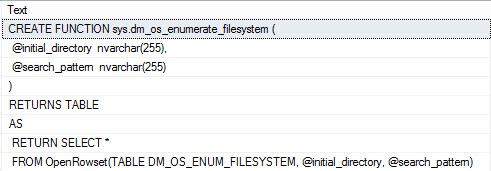
SQL Server 2017 RC1 dropping recently reminded me of a couple things I wanted to blog about finding in there. One that I thought was rather interesting is a new iTVF called dm_os_enumerate_filesystem. It looks like a partial replacement for xp_cmdshell in that, well, you can do the equivalent of running a dir command, with some filtering.

The addition of a search filter is particularly nice, since the dir command isn’t exactly robust in that area. If you’ve ever wanted to filter on a date, well… That’s probably when PowerShell got invented.

If I run a simple call to the new function like so…

I get this back:

This can be particularly useful for backup tasks, or folder watching tasks. For instance, I can look in a backup directory for recent backups with a size greater than 0 bytes that haven’t been written to in the last 30 seconds (a pretty good sign that a backup is completed, no?)

And that’s a heck of a neck easier than what we have to do, currently.

Thanks for reading!


ColumnStore Indexes And Recursive CTEs

Alone Together

When I think about SQL Server features, I often picture a high school cafeteria.

AGs are making fun of Mirroring, index rebuilds are walking around taking everyone’s lunch, dta is making a glue sandwich, and no one knows who Service Broker is even though they’ve been going to school together since Kindergarten.

At the artsy table are two oft-misunderstood and unpopular features: ColumnStore indexes and Recursive CTEs. The oldest person on Stack Overflow, Joe Obbish, recently blogged about a deficiency in ColumnStore indexes when it came to doing string aggregation. When someone says “X is bad at Y”, my first reaction is generally to try to find other things X is bad at, and kicking X while it’s down.

Lace Up Your Boots

I know what you’re thinking: WHY WOULD YOU EVER DO THIS?

Well, ladies and gentlemen, that’s what consultants specialize in.

Stuff no one else would ever do.

There’s a really interesting relationship in the Stack Overflow database both within the Posts table, and connecting the User and Comment tables. You can build up pretty interesting hierarchies with them.

The Posts table has both questions and answers in it. You can tell them apart using the PostTypeId column, and you can also look at the ParentId column. If a post is an answer to a question, it’ll have the Id of the question populated.

Likewise, the Comments table connects comments to posts and answers, and both tables track the Ids of users. This comes in Handy for grabbing DisplayName from the Users table.

Having spent an amount of time only a consultant can looking at stuff in the database, I know that post 184618 currently (2016-03 data dump) has the most answers in the Posts table, at 518. So that’ll be our performance bar.

Gangland

Let’s start by indexing and querying rowstore tables.

Here are our awesome nonclustered indexes.

And here’s our extra fun recursive query.

With my indexes in place, here are my stats Time and IO results. I’ve lopped off all the zero-read operations. for readability.

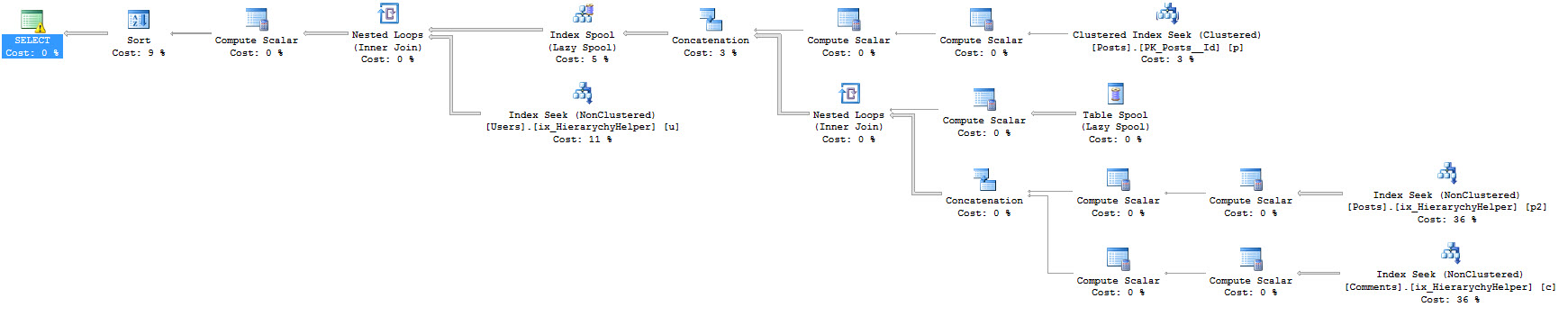
I even have what most would consider a reasonable execution plan for such a query.

Methinks the lady doth compute too many scalars.

Inflection Point

With that in mind, let’s hop on over to my ColumnStore version of the Stack Overflow data dump. All of the tables here either have a clustered ColumnStore index on them, or a nonclustered one if they have columns with datatypes that make that impossible (Users and Posts both have columns that are MAX types, which makes CS puke).

Running the same query, here are the results of stats Time and IO. What you’re looking at are the results of the second run with a warm cache. The first run took about 4 minutes and did a bunch of physical reads, and that didn’t seem fair.

If you’re wondering what those milliseconds are in minutes, it’s 3:17. So uh, there’s our first problem.

And here’s the query plan, which bears some interpretive dance. It looks a whole heck of a lot like the previous plan. Prior plan? One of those. Except two index spools are introduced.

We’re a lot alike, you and I

Funny things you should know about Index Spools: They’re single threaded, and I’m going to go out on a limb and say SQL doesn’t build ColumnStore Index Spools. They cache data in tempdb. When they’re Eager, they cache all the rows coming to them, and when they’re Lazy they only cache rows as required. This makes Lazy Spools much more benign than Eager Spools (there’s a Lazy Spool in both of the query plans).

They also make up the majority of the work our query is doing here in ColumnStore land. There are other obvious problems with it, like it running in Row mode rather than Batch mode. I stuck the query plan in Paste The Plan for anyone interested in poking around more.

I’m not getting any prettier, here

Stuff like this is part of the reason why we’ve started warning about Index Spools in sp_BlitzCache and sp_BlitzQueryStore. We started warning about ColumnStore indexes operating in Row Mode a while back because it’s basically a death knell for performance.

This post should have a point, right? ColumnStore! Not good at everything. Pretty spiffy for aggregations, but there are plenty of times when traditional row store indexes will out-perform them.

For more information about Spools, check out these links:

Fabiano Amorim: Part 1 and Part 2

Paul White: Part 1, Part 2, Part 3

Rob Farley: Part 1

A most excellent dba.stackexchange.com question, in which Joe Obbish gets prescribed some Spool Softener

Thanks for reading!


Other People’s Blog Posts I Talk About the Most

Development
5 Comments

In my work with clients and classes, some blog posts come up a LOT.

Forcing a Parallel Query Execution Plan by Paul White – Paul’s posts usually cover execution plan components in incredible detail, but the real gem in this one is the section called “Parallelism-Inhibiting Components.” If your T-SQL includes this stuff, the whole plan or a zone of it will go single-threaded.

Use Caution with SQL Server’s MERGE Statement by Aaron Bertrand – Whenever someone’s question starts with, “I’m using MERGE to…”, I immediately open this page and show them the list of known problems with MERGE. Their response is, “Oh my God, you mean these are really known bugs? What should I use instead of MERGE?” We have a discussion about rolling your own upsert. MERGE needs a 12-step recovery program.

Take Care When Scripting Batches by Michael J. Swart – When you need to affect a lot of rows – like a big delete or update – and you need to do it repeatedly over time, batching can help. If you really want the most performance, you need to run scientific experiments like Swart does in his post:

Logical reads per delete – read Swart’s post for what it means

Serverless Architectures by Mike Roberts – Also known as Function-as-a-Service (FaaS), serverless is a new way of application development and deployment. This post is a monster, but just read the first section, “What is Serverless?” and stop at the “Benefits” section. Knowing just that part will help you have better conversations with architects and developers.

Juggling Writing AND a Job? Figure It the %$&* Out by Chad Gervich – This one’s professional development, not tech, but it comes up a lot. It’s for people with day jobs who want to become screenwriters, but the exact same advice holds true for aspiring bloggers. It doesn’t matter if you want to build something – we all wanna build stuff. You also have to have the spare time, or make it by making sacrifices in other parts of your life.

Slow in the Application, Fast in SSMS by Erland Sommarskog – Listeners of our Office Hours podcast probably feel like this one comes up every single week.

Maker’s Schedule, Manager’s Schedule – if you want an employee to finish hard tasks, block out their calendar so they don’t have to context switch.


Let’s Corrupt a Database Together, Part 3: Detecting Corruption

So far in this series, I’ve shown you how to corrupt a clustered index, then how nonclustered indexes can be corrupted independently. If you haven’t read those, you should start there first.

Let’s start again with our 50Ways database, but this time we’re going to be good and make sure that we’ve got checksums enabled, and that we’re in full recovery model:

Then fire open your trusty hex editor, like xvi32, and open up the MDF file just like we did in Part 1. Change Stan’s name to Flan, save the MDF, close your hex editor, and bring the database back online again:

Thanks to the magic of checksums, SQL Server knows what you did last summer:

So the table is toast, right?

Try inserting more rows.

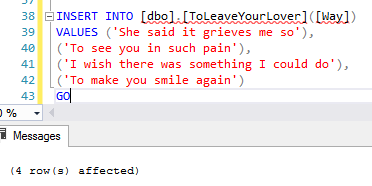
Let’s add another four rows:

And if the moon is right, it works just fine.

4 rows affected

Adding more data doesn’t necessarily detect corruption. But if you try to select them back out, you’re still going to have a problem.

This is the worst part about database corruption – SQL Server will let your users keep right on databasin’, adding more data into a corrupt database. You have a serious time bomb on your hands here: the longer you let this go on, the more dangerous things get. Watch this.

Take a full and a transaction log backup of your database again:

And they work fine – no errors. And guess what happens when you try restores? You’ll need to change M:\MSSQL\DATA\ to your own data/log paths here (I try to keep scripts super-generic so they work everywhere, but restore ain’t so flexible):

No errors there either.

By default, backups and restores don’t detect corruption.

So now think through the timeline of what we just did:

  1. We created a database
  2. We put some data in it
  3. We took a full backup #1
  4. We took a log backup #1
  5. We corrupted the data
  6. We took full backup #2 (which backed up a corrupt data page)
  7. We took log backup #2

If we need to recover from the corruption that just happened (and assuming we can’t do page-level restores, which is for another blog post), the proper sequence is:

  1. Take a tail-of-the-log backup, which gets the last of our transactions and seals the database as read-only
  2. Restore full backup #1 (from before the corruption happened)
  3. Restore log backup #1
  4. (Skip full backup #2 altogether, because its data page is corrupt)
  5. Restore log backup #2
  6. Restore the tail-of-the-log backup

But this only works if you actually have log backup #1. This is kinda horrifying because I bet you:

  • Do CHECKDB once a week, like on Saturdays
  • Do full backups every day
  • Do transaction log backups multiple times per day, like hourly
  • But due to limited drive space, you delete log backups older than 24-48 hours

So take this timeline:

  • Saturday – DBCC CHECKDB runs, reports success
  • Sunday – full database backup, and logs all day long
  • Monday – full database backup, and logs all day long,
    and we delete Sunday’s log backups
  • Tuesday – full database backup, and logs all day long,
    and we delete Monday’s log backups
  • Wednesday – we find database corruption.

Depending on when the corruption happened, you may not be able to restore without experiencing serious data loss.

Thankfully, it’s easy to detect corruption.

Once you’re aware of this problem, you have a few great options.

You could keep your log backup files around longer. In theory, you keep them all the way back to your last clean CHECKDB. In practice, you’ll need to keep them longer than that. If you do CHECKDB every 7 days, and you delete log files older than 7 days, then when CHECKDB fails, a human being probably won’t disable the log-deletion job fast enough to keep the log backups online. In that scenario, 10-14 days of log backups might be a better choice – especially if there’s only one DBA, and everyone else just leaves the alert emails for the DBA to handle when they get back from vacation.

You could run CHECKDB more often, or on a restored copy of production. It kills me when I see people doing index rebuilds every night, but CHECKDB only once a week. Your priorities are backwards. DBAs get fired for lost data, not for slow performance. (Are you kidding me? You actually get extra training and tools budgets when your server is slow. Come to think of it, you should probably go hit the turbo button on the SQL Server just to make it slow down for a while. The turbo button doesn’t exist anymore? Maybe change your power plan down to Fair and Balanced instead of High Performance.)

Configure your alerts and failsafe operator. By default, SQL Server keeps its secrets and doesn’t tell you when it detects a corrupt page. It’s crazy easy to set up alerts – check out our SQL Server Setup Guide in the First Responder Kit.

Use the WITH CHECKSUM command on backups. When specified, this makes SQL Server check the checksum on pages while backing them up. It’s not as good as a full CHECKDB, but in the case of our toy database, it works like a charm:

You could implement mirroring or Always On Availability Groups. By themselves, these don’t make it easier to detect corruption, but they make it easier to deal with the aftermath. Sure, they have Automatic Page Repair, but they also have something simpler: a separate copy of your database’s data files. Instead of your data files being a single point of failure, now they’ve got redundancy from storage failures (assuming of course that they’re on separate physical storage, not on the same storage device.)


[Video] Office Hours 2017/07/19 (With Transcriptions)

SQL Server, Videos
0

This week, Erik and Richie discuss performance tuning, relativity, Always On Availability Groups, parameter sniffing, technical debt, unit testing, deadlocks, testing storage performance, and more…

Here’s the video on YouTube:

You can register to attend next week’s Office Hours, or subscribe to our podcast to listen on the go.

Enjoy the Podcast?

Don’t miss an episode, subscribe via iTunes, Stitcher or RSS.
Leave us a review in iTunes

Office Hours Webcast – 2017-07-19


Erik Darling: James says, “Thank you for your DBA fundamentals videos.” You’re welcome, James. It’s a pleasure recording them. I have to re-record one on setting up Ola Hallengren’s scripts this week, so there’ll be another one coming down the pipe in the near future.


Can I trust the index usage DMVs?

Erik Darling: [Tashea] wants to know, “Can I trust sys.dmdb_index_usage_stats to drop indexes which are not used? What else resets its readings other than a SQL restart?” Well, there are a whole bunch of wonky things that happened in certain versions of SQL Server 2012 and 2014 where the behavior is different between service packs and CUs. There are certain ones, like I think almost all of 2012 until SP3 and probably 2014 up until SP1, where if you rebuild an index then that will clear out all the usage stats. And up until now, on many versions and editions, if you add an index or drop an index, it will also reset some things. So be very careful with that one, especially if because even if your system has been up for a long time, you may have rebuilt indexes, you may have added or dropped indexes, and there also might be really important indexes sitting around that just don’t get used frequently.

So one thing that I always caution people about is, you know, always remember to disable your indexes, don’t drop them. Because if some query comes along that runs, you know, for the super important guy who sits in an office that runs every three months or six months at some quarterly or whatever financial report or something, and there’s a very important index for the query that you just disables because it had one use in the last three months; well, you could be in trouble. So make sure you don’t drop indexes, make sure that any indexes you choose you just disable them.

One really good way to trend that kind of usage is by using sp_BlitzIndex. It’s a free script that we write. It’s available over at FirstResponderKit.org. If you head over there, you can download it for free and run it for free on as many servers as you want, for free. And it will give you the usage stats and you can copy out to an Excel file and kind of keep track of usage over time. You can also persist it to a table, if you’re that kind of person… I don’t know, maybe you are – maybe you’re not. Anyway, I hope that answers your question.

Richie Rump: Yeah, we call those people hoarders. Or Hordor, I don’t recall…

Erik Darling: I don’t know, Mordor hoarders, The Hoarders of Mordor? That would be a good show, The Hoarders of Mordor. Just Orcs with like a pile of bones, like this is mine…

Richie Rump: Just this random weapon and armor, just throw it all over the place…

Erik Darling: It’s like my office, it’s just garbage everywhere.

Richie Rump: Yeah, it’s just body parts, you know, maybe they categorize them, you know, and they’re just in different places.

Erik Darling: Yeah right, it’d be weird.


Why is CXPACKET my top wait percentage?

Erik Darling: James asks, or says, rather – says then asks, “My prod server has 12CPUs and I have my MAXDOP set to eight and cost threshold set to 65, however, I still see CXPACKET has 49% of the overall wait stats on my server; why?” James, you should know better than to tune wait stats by percentage. You’ve been to Brent’s classes, you know these things. You don’t tune things by what percentage they are. You should revisit some of Brent’s lessons on that. For the benefit of the group though, it is absolutely natural to have parallelism on your server, unless you’re running SharePoint or something else that forces you to set MAXDOP to one.

Trying to stamp out all evidence or all percentages of parallelism is not a terribly good idea. You still have parallel queries on your server because you still have queries where the serial plan has a cost of greater than 65, and those queries go parallel because the parallel plan was cheaper. That’s why you still have CXPACKET waits. Who cares if it’s 49% of the waits on your server? It all depends on what the total waits are and other fun things like that.


Should I use RCSI for kCura Relativity?

Erik Darling: Let’s see here, Jack asks, “Do you have clients successfully using RCSI with Relativity or Tunnel Vision?” Well I’ll be dead honest with you, I’ve never heard of Tunnel Vision. For Relativity though, no, and the reason for that is because every single Relativity query, behind the scenes, is generated with NOLOCK hints. And when you have query level hints like that, they override database level settings like snapshot or recommitted snapshot isolation. So it wouldn’t do any good to turn those on and overwhelm tempdb with all the modifications that come in only to have all your read queries use NOLOCK anyway. You would really need to do a lot of app redesign to benefit from having NOLOCK on there.

A long time ago, when I was a DBA at a Discovery shop, I opened up a [table] with Relativity and I was like, “Hey, how come you guys don’t use RCSI instead of just NOLOCK hints?” And at the time when the app was designed, and it’s still true to this day, many shops that run Relativity do not have a DBA or a DBA team or anyone really paying close or good attention to those servers in any way. If you just – if you install SQL Server and click next a whole bunch of times on 202, 2008, 2008 R2, all the older versions that were around when Relativity was first getting started, you didn’t have all those cool options and features kick in that you do with 2016 and up. So you wouldn’t have the installer going and creating multiple tempdb data files for you, you didn’t have anyone adhering to server best practices by not putting tempdb on the C drive. Just, you know, regular DBA stuff.

So, just the amount of work that has to go into supporting something like an optimistic isolation level is not trivial to a shop that does not have the correct staff for it. So, no is the answer and that’s the reason why; fun stuff, right? Fun stuff right, Richie?

Richie Rump: If you say so, sir…

Erik Darling: Are you enthralled yet? Are you riveted?

Richie Rump: I actually – someone put a link out for the collector’s edition of Star Trek Adventures the RPG and it’s like $500. It’s amazing but it’s like $500, and no…

Erik Darling: Well, I don’t know [crosstalk]

Richie Rump: Can I expense it?

Erik Darling: If it’s office equipment, I don’t see why not. I mean, what’s left on your hardware budget? You might as well…

Richie Rump: Not much…

Erik Darling: I got like 500 bucks left, I’m thinking about getting one of those desk-risers so that  I can have like a fake stand desk, but I just don’t know how that’s going to work with the wires. I’m kind of terrified of it. I’m like oh if I hit the button everything’s just going to tip over and unplug and it’s going to be…

Richie Rump: Well what you could do is, you could get a mount for your Hoss and mount it underneath the tabletop.

Erik Darling: For my what?

Richie Rump: For your Hossmachine, and like mount the machine underneath the desk, and that way you could raise it and lower it.

Erik Darling: I think I’m just going to get real strong and lift the desk up when I’m ready to stand.

Richie Rump: That’s too close to a table flip, man. You’re just going to be like… I just finished a job.


If a sync AG replica goes down, does the AG switch to async or go down?

Erik Darling: Steven asks a question about availability groups, which I will answer to the worst of my ability. “If Always On sync goes down, does it automatically change to async and just start filling the log, or does it go down?” There are a lot of weird things that happen when an availability group goes down that are different between 2012, 2014 and 2016. So in 2012, it’s like if one goes down, the whole thing goes down if quorum gets messed up.

On other versions, it could stay online, but either way, I think what you’re asking is if it stays online and it stays in good shape. But the answer is kind of no; you want to get things up and running as soon as possible. You also want to make sure that log backups, if it does failover – if it does failover, you want to make sure you get log backups going on the new primary. If the primary just goes down and you’re working off replicas, well you should work on getting that primary back up or making one of the replicas the new primary so that your AG is complete. That’s all I have to say about that. If Tara were here, she’d probably have a better answer. That’s my patchwork answer.

Richie Rump: Definitely more complete, sir.

Erik Darling: I don’t know what that means.

Richie Rump: I don’t know either, but it’s definitely better than my answer.


What is parameter sniffing?

Erik Darling: “What is parameter sniffing and how does it work?” God, well that’s the funny thing, is that it doesn’t if it’s parameter sniffing.

Richie Rump: No, it works then it breaks, right?

Erik Darling: Parameter sniffing is when you have some code that accepts parameters. And on first compile, that code executes and compiles with those parameters. And then on subsequent executions, that code repeats as if it’s received the same parameters, even if the parameters are different. So, that is parameter sniffing and that’s how it works. If you have a stored procedure, and let’s say it takes a date – let’s say it takes a start date and you say – let’s just say it takes a date for an equality. And you run your stored procedure and it brings back everything in the table that is equal to that date, and that date was 2017/7/19, right; so that’s today.

And then the next time that stored procedure runs, it runs and it runs as if – with that date you pass in as 2017/7/18, so that was yesterday, and all of a sudden you have to bring back a lot more rows because you had a lot more time to insert data yesterday. Let’s say you had a million rows on the 18th and you only have about 20 rows on the 19th. So that stored procedure that compiled and ran expecting to get 20 values back, all of a sudden, has to go and pull a million values back. And when it pulls that million values back, the execution plan that it uses to do that may be inadequate because a million is a lot more than 20. So there may be a case where a different execution plan would have been more appropriate for a different value. Say for a small amount of rows, you do a key lookup, you use a non-clustered index, you do a key lookup, you get some columns back from the clustered index. For the million rows, it just may make more sense to scan the whole clustered index and get the rows back that way. So it’s all out there in fun land – because it happens every single week because we talk about it every single week, I’m going to stick the link up there for it, Erland Sommarskog. So the man himself, or his self, depending on how you like to talk, has a blog post called “Slow in the Application, Fast in SSMS.” And what it does is attempt to explain to you parameter sniffing in biblical blog post fashion. If you are really interested and that is not where your question ends, I would read that entire blog post and see where it gets you. If you have more specific questions, come back and ask.

Richie Rump: So, if I did run into some parameter sniffing, what type of things would I do to fix it? See, this is what they call, in the business, a softball. Hit the softball.

Erik Darling: Okay, well if I was really crappy at my job, I’d restart SQL Server. If I was a little bit less crappy at my job, I would probably clear the entire plan cache. If I was slightly less crappy than that, I would probably clear that plan out of the plan cache. If I was a little bit less crappy, I might recompile, or throw a recompile hint on the stored procedure or the statement in the stored procedure that’s causing my parameter sniffing. If I was much less crappy, I might take a look at my indexes and try to figure out what a good index is to take bad choices away from the optimizer, regardless of the value that gets passed in. So, perhaps making that nonclustered index covering, or rearranging the key values in a non-clustered index to make it more aptly used, no matter what.

There are all sorts of things that you can do down the line including rewriting the query to need less columns to begin with and do all that sort of fun stuff.

Richie Rump: Yeah, what I found with parameter sniffing is sometimes the answer is a recompile, maybe it just doesn’t run frequently enough and, you know, you throw a recompile on it and it’s just not going to tax the system and you’re good to go. Sometimes it is the index, I mean, you just – when doing tuning, I’ve always gone, what’s my output goal? Right, you could get lost in tuning land and just get – oh I need to get it further down, further down, further down, but what’s your exit criteria? So you say, hey, the exit criteria, for me, is that it’s got to run another second and it doesn’t raise these metrics up this much. And when you hit that, you leave and you go onto the next problem.

Erik Darling: That sounds like a good plan to me.


Can I set isolation level in my connection string?

Erik Darling: So there is an Entity Framework question that I think you should take while I get a link for Kevin.

Richie Rump: Yes, so the question is, “Hi…” [crosstalk]

Erik Darling: It’s hi with an ellipsis afterwards, so it’s more like hi…

Richie Rump: “We have an Entity Framework application running on SQL Server 2014 Enterprise. I wanted to know if it’s possible to set the transaction isolation level at the connection string level.” So, I don’t believe so. I don’t believe that is the case. I’ve never tried it; I don’t recall ever seeing any parameters in the connection string for setting the isolation level. I’m pretty sure on EF6, the default isolation level is read committed snapshot; don’t quote me on that. I haven’t done much with transactions in Entity Framework proper. A lot of transactions that I’ve done in my career have been in queries themselves, and of the times I have used transactions, it’s been in code in Entity Framework. I don’t believe that is the case… [crosstalk]

Erik Darling:  I think I’ve seen people use, specifically for snapshot isolation, a separate connection pool that is set up to use that isolation level rather than go in with a default…

Richie Rump: Yeah…

Erik Darling: But I don’t know how to do that because I’m dumb at Entity Framework.

Richie Rump: Yeah, and you could totally do that. Say hey, for these queries, go and run this isolation level, right, but you need to know what those queries are. It’s not going to be a [crosstalk]… Now I could totally be wrong, got to Stack Overflow, ask the question there, that’s probably a better place for it. You could go to, you know, #EFhelp. I think Julie Lerman monitors that one. So as far as I recall, I don’t think you can, and if you need that kind of stuff, you need to change code. So there is not an easy, oh just let me change a connection string and not the application, I’m pretty sure you’re going to need to change the application.

Erik Darling: Or just throw it out and start a new one; that’s what I’d do.

Richie Rump: Listen, Entity Framework, it’s not broken, the way we use it as developers could be broken.

Erik Darling: Is usually horribly broken…

Richie Rump: Yes, and it’s just – there’s nothing different than what we see with SQL Server. We see all these bad implementations and we see all the breaking of best practices and we see all this crazy stuff going on, especially here at Brent Ozar Unlimited, because we see all these different things. And maybe you’ve actually walked into a new organization and you say, why would you do this and why is your backups here and where are your logs? Well it’s the same thing in developer land, you know, we just don’t understand our tools and we just start throwing things out there – and, hey look it works on my machine, it must work out there in production.

Erik Darling: Well the worst part about it is the overwhelming pressure to ship often gets in the way of doing things correctly, designing things correctly, you know, making sure that you have the right query, saying, okay well maybe this isn’t a good idea to run this 10,000 times a minute, perhaps we should wait three or four weeks before we ship this and invest in some sort of caching layer for this query instead. But that sort of stuff all gets shoveled by the wayside because you have some jerk sitting up top who wants you to ship, ship, ship to make someone happy.

Richie Rump: Let’s get it out, we’ll mark it as technical debt, we’ll deal with that down the road, just go, go, go. And the problem may be bigger than you think because, well, we don’t think very hard on the problem and what could happen down the road. So we don’t take a look at the risks and do a risk assessment and say, hey if we don’t do this it’s going to cost us this much money down the road because we don’t equivalate risk to dollars. And that’s, you know, a lot of problems with projects that I’ve seen is that no risk assessment to dollars; but it’s hard to do, frankly.

Erik Darling: The thing about technical debt is, it is a lot like regular debt and everyone wants to spend more instead.

Richie Rump: You know, the other thing about technical debt is that it’s very hard to quantify, right. I can’t put a dollar amount to it because it’s all – ooh it’s technical debt, you know, and how much will that cost to fix and how much would that cost to throw it down the path; nobody does that. Nobody says, oh if we make this technical decision, how much will that cost us in the long run? Because we don’t equate dollars to technology outside of, I need to purchase something.

Erik Darling: It’s like, you know, how much hardware can I mortgage to pay off my technical debt? But if I buy 512 more GB of RAM, the problem goes away. Well alright, guess I’m going to buy…

Richie Rump: You know – and from a developer perspective, there are certain things that we could do to, kind of, alleviate some of that, right. I write unit tests, okay, if I change something it will let me know if that is, if I have the right test and all that other good stuff, but even writing something simple as, you know, in 2017, as writing unit tests, that gets kicked on the curb too as, oh we’ll just do that later. And well, now we’ve got 15 people testing this thing, you know, and we make one change and everything breaks, you know. Well, that’s what you’re going to get.

Erik Darling: Yeah, well I guess for me, the thing is, it’s like okay, you want to write all these unit tests, but man, with a database where you have to have so many things to come up with a condition, or to reenact a condition, to make sure – it’s tough for some things. There are some really hard conditions to replicate. I’m not saying all of them and I’m not saying there’s not some laziness behind it, but there’s this perfect storm of, okay how do I replicate this particularly low memory condition with these parallel queries doing this? And figuring out how to write a single repeatable test for that once just to unit test this one thing over. It’s like, man…

Richie Rump: Yeah, unit testing queries is exponentially harder than unit testing code. It’s because we’re dealing with data, now I got to worry about setting up my data, I got to worry about running and I got to worry about what my result is. And doing all that is so much harder than saying, I’m just going to go ahead and fake this and mock this and do this and now I’ve got a result.  When I’m writing unit tests, and frankly I’ve never done it with queries because it is so stupid hard [crosstalk]… I was on one project where I did it, and we actually had to write our own unit test, kind of, module to do that because there was no tool out there to do this kind of thing. But still, you had to load the data, run it, and then you had to see what the expectation is and you had to do that, and it took forever. It’s one of those things – I still follow the 80/20 rule with running unit tests.

Hey, if I could get 80% of this stuff and the other 20% is going to take me another day or two or whatever, I’m just going to punt on that stuff and I’m only going to get the stuff that’s going to get the main course on it, right. And let’s keep moving forward and if we run into a problem, I’m going to write a unit test for it and we’re just going to keep moving forward.

Erik Darling: Right, so it’s like the main goal is to get things working, and then you can catch the edge cases on down the line.

Richie Rump: Yeah, I don’t get paid to write unit tests, I write unit tests because I get paid to verify my functionality, not because I want all these unit tests to do that. Writing a unit test is not fun.

Erik Darling: No, it doesn’t look like fun. Like I have a thing to get to in GitHub where I need to write code or stored procedures that will inflict upon a server various warnings that BlitzCache and BlitzQueryStore will flag, and I’m dreading that because there are so many things – I’m going to be like –  a lot of these stored procedures are going to have to add and drop indexes or do something else awful or run for a long time to get these things to happen. Like there’s some stuff you see out in the wild where you’re like, oh I can easily write code that will catch that and I can do that on the spot because this condition exists right here where I need it, but recreating that condition sucks. Databases are hard. People should get paid more for working with them.

Richie Rump: I know, I know.

Erik Darling: You hear that, Brent? People should get paid more for working with data.

Richie Rump: I’m very happy, sir. May I have another day.

(Brent writes: get back in the data mine, peons.)


Can transactions help avoid deadlocking?

Richie Rump: We’ll wrap this thing up here. So here’s another interesting question, “Can begin and end transaction encapsulating DMLs help avoid deadlocking?”

Erik Darling: No, no it can’t. No, it won’t help with that. You will have…

Richie Rump: Why?

Erik Darling: Because you will have just have things wrapped in a BEGINTRAN and ENDTRAN, it doesn’t matter. It does not matter, it won’t help you. There is another question…

Richie Rump: That question fell flat. [crosstalk] I thought there was more of a story there, but I guess not…

Erik Darling: No, no, no BEGINTRAN and ENDTRAN, all that does – I mean, that will isolate a single transaction, it’s not going to help you with other transactions though.


I have this problem with Idera…

Erik Darling: Let’s see here, “Idera SQL monitoring tool and services…” Dude, open a ticket with Idera. Do I look like Idera tech support? You pay them money, probably…

Richie Rump: Now that you mention it…

Erik Darling: You probably pay them money; you should open a support ticket with them. I have no idea why Idera would stop working. I have never used Idera, so I couldn’t tell you there. Couldn’t tell you on that one.


How should I test storage performance?

Erik Darling: Let’s see here, Uday wants to ask, “Do you have any recommendations on how to test storage performance?” That’s a good one. CrystalDiskMark is a good tool; it’s free. And also DISKSPD is a good tool as well. Those are the ones that I would go to there.

Richie Rump: So is there – I’m going to cut you off man, just cut you off. Is there an asset management tool besides MAP that reports on SQL Server versions… [crosstalk] Oh, look at that, now you cut me off that I cut you off.

Erik Darling: Yeah. [crosstalk]

Richie Rump: Don’t cross the streams, Ray…

Erik Darling: That’s a bad idea. So I think Redgate has some stuff like that. Redgate has some tools that do that. They’re not free though, at least not for more than two weeks; or not if you want to get all sorts of stuff out of them. I don’t know the names of all the Redgate tools, because they have a new one like every week and I’m not sure what they do past, like, SQL Prompt. There was SQL Octopus and SQL Lighthouse and SQL Crack… I don’t know, SQL Titanic – but they have tools out there that will do server discovery, I want to say, so I would go and check out “el Red Gatto,” the red cat.

Richie Rump: I know Kendal Van Dyke wrote a tool in PowerShell that does some of that stuff…

Erik Darling: I want to say I tried to use that at my last job to find stuff out when I first started and I did not have good luck with that. I don’t know if he keeps it up to date.

Richie Rump: It’s called SQL Power Doc, that’s what it’s called. Try it, it’s free. I mean, it’s only going to cost you your time, right. And if it gets you what you want, then you can move onto some of the paid versions – or if it doesn’t then you go onto some paid versions. I know he put a lot of work into it and I remember him talking about that like way back, I’m doing this power thing… And I’m like…

Erik Darling: Yeah, I mean, I just wonder what SQL MAP does differently than PowerShell. Like it probably queries the same things, you would think.

Richie Rump: Yeah, I don’t know. I know that – he was a consultant at the time and he’s  moved on to Microsoft since – but he was a consultant and he would go into environments and he would have no idea where any of the server are or what is actually running, so he wrote this thing to actually go and find all these servers and figure out what’s on them, where they’re running and doing all this stuff. So if you’re looking for something like that, you know, that may be something for you. Try it and let us know.

Erik Darling: I mean, especially because he went to work for Microsoft, I’d be pleasantly surprised if it was still being worked on, still in development and all that stuff.

Richie Rump: What are you trying to say?

Erik Darling: I’m trying to say that Microsoft… [crosstalk]…

Richie Rump: Ready to be updated? Yeah, I know that, thank you, thanks, Erik…

Erik Darling: Yeah, we need to get those [segment] eliminated things from Columnstore in there because there’s a massive rush to the Columnstore mall, next to the Columnstore store. Everyone’s buying into that one.

Richie Rump: I’m not. Let them go, let them go.

Erik Darling: Alright, fine. Anyway, we’re at 12:46…

Richie Rump: Yeah, baseball’s already started so we’d better [crosstalk] so we can watch the baseball…

Erik Darling: Goodbye everyone, thank you for joining us, we’ll see you next week, hopefully, if I ever get some sleep. Adios.


sp_AllNightLog: Poll Vaulting

Carry on

It turns out that the only thing harder than checking for new databases restored to a SQL Server, is checking a folder for a backup of a database that doesn’t exist on another SQL Server.

These are both part of what sp_AllNightLog has to do.

The other components, which use workers and a queue to backup and restore databases, were fairly easy to write. The important code had already been written.

Don’t thank me.

Seriously, don’t. I didn’t write any of that.

Prince Poll

Polling on the “log shipping primary” basically just looks for new databases in sys.databases, and dumps them into our queue table to work on. This is easy enough.

On the “log shipping secondary”, we had to do some ballet.

Yes, it involves xp_cmdshell. If you’re horrified by this, feel free to stop reading and resume telling people that the sky is falling.

We do some checking to make sure that the path exists, and isn’t empty.

When we find folders for the first time, we have to restore the initial full backup. We insert some special canary values so our restore workers know this is the case.

After that, we just keep piling on log backups. This is the right thing to do.

This is the part of the code that calls sp_DatabaseRestore — and believe me, I’m so glad I didn’t have to write any of this.

Poll Exemplar

Some of the ‘interesting’ parts of the restore polling code are in here. The backup polling code is literally just an intermittent check on sys.databases. If that makes your pants move, you can look at the code on your own time, creep.

First, we grab the path from a configuration table that gets populated when you run setup. Don’t worry if you mess this up, you can update it.

Assuming that all works out, we set up our xp_cmdshell command, and insert that to a table variable.

I know, I know. but they kinda deserve each other.

It’s important to use /b in the dir command, so you don’t end up with an unparseable blob of directory information.

We also do some path checking here to make sure to make sure something usable comes back. The results when that’s not the case are pretty specific — there’s one NULL row, or you get a message like ‘The system cannot find the path specified’ or ‘File Not Found’.

Then we take the folder list from our table variable, and insert anything into the restore worker table that isn’t there already. Ah, the joys of NOT EXISTS.

Road trip!

Down the line, I do need to add a slightly more recursive check to make sure any ‘new’ database folder has a subdirectory called FULL in it, and perhaps a bit to delete rows from the worker table if restore attempts come up empty. We’ll see how much of a problem certain scenarios turn out to be.

Thanks for reading!


What Do You Think About ORMs?

Development
26 Comments

I was recently asked what I thought about ORMs (Entity Framework, NHibernate, Dapper, etc) while we were looking at implicit conversion warnings in execution plans.

Before I answered the question, I let them know that my answer is based on being a production DBA and the numerous performance problems I have had to troubleshoot that were caused by improper usage of an ORM.

What I don’t like about ORMs:

  • Implicit conversions due to nvarchar variables vs varchar columns
  • Queries grab every single column, regardless if they are needed or not
    • Expensive key lookups
    • Very wide missing index recommendations
  • The resulting query is hard to read

I first came across the implicit conversion problem 10 years ago and blogged about it (back then I didn’t realize the culprit was the ORM and instead blamed the database driver). I had been battling very high CPU utilization for a few weeks and finally figured out it was due to an implicit conversion that caused the plan to scan a very large index. Why did it take several weeks to figure this out? I’ll have to chalk that up to inexperience back then. I’m a much better performance tuner these days.

Based on the servers that I see as a consultant, implicit conversions is a very common problem. Sometimes it’s due to the ORM, but sometimes it’s due to a data type mismatch in the join conditions (Table1.ColumnA is varchar, Table2.ColumnA is nvarchar) or in the stored procedure (@var1 is nvarchar and is being compared to a varchar column). Avoid the data type mismatch issue by being diligent with the data types.

If you are using an ORM, be sure you know about the implicit conversion issue and how to work around it. Like I said, I’m a production DBA and not a developer. I can’t tell you how to fix it, I can tell you why it’s slow and how to find queries with this issue.

To help figure out if you are experiencing implicit conversions, look at the Warnings column when you run sp_BlitzCache. For more information, check this out. It links to a good article about implicit conversions.

This is not an anti-ORM blog post. This is the “I’m on-call 24×7 and am sick of being woken up at 2am because a query generated by an ORM is causing a severe performance problem” blog post.

Brent says: It’s not that ORMs are inherently bad – I’m usually for anything that gets products to market faster – but the problems hit when you scale the app without putting additional work into performance along the way. ORMs are like any other technical debt: as the app becomes popular, you’re gonna need to pay that debt back down sooner or later.


Last Season’s Performance Tuning Techniques: Slides & Demos

#SQLPass, Development
6 Comments

Right now, Erik and I are presenting at the 24 Hours of PASS. We’re talking about Last Season’s Performance Tuning Techniques:

Wanna play along with us as we show how your performance skills might be a little out of date? Here’s the demos and the slides:

https://www.slideshare.net/BrentOzar/last-seasons-performance-tuning-techniques

Fill Factor: Doing the Page Splits

You can do this one in any database, but you’ll want to do it on a server with very low load. If anybody else is doing any deletes/updates/inserts at all, it’s going to skew your numbers.

Questions to think about:

  • What does a page split really mean?
  • Is there such a thing as a good or a bad page split?
  • How do you know which ones you’re having?
  • Would setting fill factor have prevented that page split?

Missing Indexes

This one requires the Stack Overflow demo database. If you don’t already have a copy of that, don’t try to download it live during the session – it’s too big (~15GB torrent, then expands to a ~100GB SQL Server database.)

Get the estimated execution plan for this:

And then ask yourself:

  • What index am I told to create?
  • Does that index make sense?
  • Is there anything SQL Server isn’t telling me?

Now try the estimated plan for this:

And ask yourself those same questions.

BEGIN TRAN ERIK

CTEs

Sometimes a CTE won’t change anything at all. This is the case with simple predicates.

CTEs don’t materialize results. What do you think this is, Oracle?

If you join a CTE to itself, you’ll run the CTE query again.

Thankfully, nested CTEs don’t exhibit the same problem.

CTEs and derived tables will behave similarly as far as performance and query plans go.

One difference is that you can’t reference a derived table more than once, where you can do that with CTEs.

CTEs are cool though. You can filter on things on the outside that you can’t filter on the inside.

Functions

This query runs without a function and finishes pretty quickly.

If we turn that string aggregation expression into a scalar valued function…

Now we can crap up all our queries effortlessly.

Checking on query performance with sp_BlitzQueryStore…

Computed columns with Scalar Valued Functions in them will be similarly crappy.

Crappiness doesn’t depend on whether or not we select the computed column. It’s there no matter what.

Let’s see what happens when we add in a check constraint based on a UDF.

What to look for in XE: executions of function after inserting rows. Executions after selecting data.

Using an inline TVF makes things faster for the query, but we can’t use it in a computed column. Other downsides: inline TVFs aren’t tracked in DMVs (2016 has a function_stats DMV that doesn’t catch them).

This is the same in Query Store.

Temp Tables or Table Variables

Table variable modifications are forced to run serially.

They’re also not guaranteed to be in memory. Backed by temp objects which may spill to disk.

Bad estimates may prevent parallel plans from happening when they should have.

Does recompiling always make things better?

Temp tables generally work better!

Do indexes change anything?

ROLLBACK ERIK

Are your performance skills out of fashion?

If you learned things during the webcast, and you’re starting to question your taste, have no fear: we’re here to help. We’re doing an all-day pre-con class before the PASS Summit called Expert Performance Tuning for SQL Server 2016 & 2017. We specifically designed it to update your performance skills for today – and a lot of the techniques are even useful on currently patched versions of 2012 & 2014, too. Learn more and register for the pre-con.


sp_BlitzCache: Eventual Compatibility With Azure

Better than nothing

Yesterday it was announced that global temp tables were available in public preview for Azure. That means that unmodified versions of sp_BlitzCache (which uses a global temp table to hold a whole bunch of information) will be compatible up there.

This is a nice addition for Azure, and an even nicer addition for me.

Why global?

I don’t know! You’d have to go bug Jeremiah about that one. One reason that I kept it the way it is, though, is ease of troubleshooting.

See, when there’s a results bug, or when you want to add a new check, it’s really easy to run the proc, then select data from the global temp table. It also makes things super easy if you want to work on a portion of the code without running all of it. With a global temp table, you can easily shred out the XML for examination (just like we do in the proc) to work on XQuery. Trust me, you’re gonna need to work on XQuery.

Advil

If you’re using the public preview and want to give sp_BlitzCache a spin, head on over to our GitHub repo to download it. That’s where you should go if you run into any funny business while testing, too. Blog comments are the devil for that stuff.

Thanks for reading!


SQL 2016 SP1 Shows You Wait Stats in Execution Plans. Or Does It? [UPDATED]

SQL Server 2016 Service Pack 1 brought us performance tuners all kinds of shiny goodies – like the ability to see wait stats inside a query’s actual execution plan. I was really excited when this first came out, but I keep seeing some real oddities.

Let’s keep this one really simple: I’m using the Stack Overflow public database, and any version will do. Start by purposely kneecapping your SQL Server, restricting it to just 1GB of memory:

After that finishes, pop open another window, give your SQL Server amnesia, and start sp_Blitz for a 60-second monitoring span:

Then start another window, turn on actual execution plans, and run this simple query which scans the Posts table – which is quite too large to fit into 1GB of RAM:

Assuming this is the only query running at the time, you would expect that the server-level wait stats would match the execution plan’s waits. Here’s what the query plan shows:

Query-level wait stats

That sounds amazing! Our server only had 706 milliseconds of wait time altogether, none of which was spent waiting on storage! Our storage must be super-blazing fast, and there’s practically no way to tune it to wait less than 706 milliseconds, right?

Just to show that I’ve got nothing up my sleeve, here’s the waits in the XML plan:

Wait wait don’t tell me

Your first clue that these aren’t quite accurate is the fact that this query went parallel, but no CXPACKET waits are shown.

Your second clue: this query took a full 39 seconds to run, and CPU wasn’t 100% the whole time. Here’s a quick shot of Task Manager just to prove that point:

Task Manager

So what was SQL Server waiting on? Server-level wait stats tell a very different (and more accurate) story:

sp_BlitzFirst @ExpertMode = 1, @Seconds = 60

Ah-ha! We waited a heck of a long time for PAGEIOLATCH_SH, which means reading data pages from a data file. And while we’re looking – that “actual” execution plan didn’t mention anything about CXPACKET waits either.

Can you see wait stats in query plans? Sure. They’re just not accurate – yet, at least – so don’t go making any complex tuning decisions based on those. Keep your eye on this Connect item to know when it’s fixed.

Cue the sad trombone

Update 2017/10/05: Bad news.

Microsoft marked the bug as “Won’t Fix” and wrote:

This results in PAGEIOLATCH_* wait type and other IO waits not being tracked per session, because by-design these are SOS waits that are tracked at the server level. Potentially tracking individual IO requests per thread and session also has performance considerations that would impact query execution.

So no, 2016 doesn’t really show wait stats in query plans.

To me, this is worse than not showing any wait stats at all because the waits aren’t anywhere near accurate. Some poor performance tuner who hasn’t read this post is going to start analyzing their query’s wait stats in the plan, do all kinds of work to “fix” it, and not understand why the query’s not getting faster.

Ouch.

Update 2017/10/05 Part II – there might be more hope! Pedro Lopes reopened the Connect item for discussion.


SQL Server 2017 Release Date: October 19, 2017?

SQL Server 2017
5 Comments

Eagle-eyed @NikoNeugebauer (who you should definitely be following on Twitter) noticed something interesting in one of Lenovo’s recent TPC-H benchmark results.

The benchmark PDF shows:

Possible SQL Server 2017 release date at bottom right

Now this isn’t necessarily accurate – someone could have just stuffed in a placeholder date, or maybe SQL Server 2017 will be available earlier but the hardware is delayed until 2017/10/19, or maybe Lenovo’s trolling us.

Also, note that in the pricing section, SQL Server Enterprise Edition comes in at around $7k per core, indicating that there’s no big revolution coming in the pricing department.

I don’t consider this an official announcement by any means, so the Guess the SQL Server 2017 Release Date Contest is still on.

In related news, the SQL Server 2017 Release Candidate 1 (RC1) downloads are available now. Enjoy!

Update 2017/09/25: Looks like the release date was pretty doggone close, about two weeks off. The real date will be October 2.


[Video] Office Hours 2017/07/12 (With Transcriptions)

This week, Brent, Richie, Erik, and Tara discuss partitioning tables, native backups vs 3rd party agent backups, page life expectancy, query tuning, deadlocks, drawbacks of RCSI, triggers, replication, Always On Availability Groups, and forest fires.

Here’s the video on YouTube:

You can register to attend next week’s Office Hours, or subscribe to our podcast to listen on the go.

Enjoy the Podcast?

Don’t miss an episode, subscribe via iTunes, Stitcher or RSS.
Leave us a review in iTunes

Office Hours 2017-7-12


At what size do tables benefit from partitioning?

Brent Ozar: Richard says, “Is there a rule of thumb for a number of rows that would make you want to partition a table? I don’t need archiving, I don’t need sliding window loads; I just have a 230 million row table with about 45GB on disk. Is there some rule of thumb when I should consider partitioning?”

Erik Darling: Not if you don’t need those things.

Brent Ozar: What would make you think you need it?

Erik Darling: Needing sliding windows and archiving. Because it’s not going to help for performance, it’s not – it’s going to make things more complicated for you [crosstalk]

Richie Rump: Partition elimination?

Erik Darling: Yeah, if you get it, if you’re real lucky.

Richie Rump: Yeah, well you would have to use that partition key in order to get that.

Erik Darling: Yeah, so if your queries don’t match your partitioning key then it’s no good.

Richie Rump: Yeah you’re screwed, sorry.

Brent Ozar: And it’s becoming worse instead of better. SQL Server has to reassemble those results again; it’s tough. In terms of, is that a large table or not either, I don’t think it’s large for SQL Server anymore. I mean, the rule of thumb for VLDBs was always 1TB or one billion rows in a single table. So in the hundreds of millions, I mean, it feels intimidating, but remember, you’re always going to be working with the biggest servers you ever worked with. Your career’s always going to progress forwards until you have that one accident where you drop tables, drop the database, then you temporarily get fired but then you get another job…

Tara Kizer: I was okay when I did that…

Brent Ozar: Did you blame it on anybody else or?

Tara Kizer: No, no, no I always take – I always raise my hand.

Brent Ozar: What was the first worst memory when you dropped a table or dropped a database?

Tara Kizer: Oh goodness, the first? It would have been about 2002 or

2003 when I’d just started at Qualcomm, that’s the company that had Las Vegas DR site. And we did a planned failover to Las Vegas, they did it one or two times per year and we were production out there for a couple of weeks at least. And this was back in SQL Server 2000 days, so we were using log shipping and after we were done with the failover our process was to now drop log shipping and set it back up in the other direction. So what I would do is I would drop the database at the other site because it’s in a recovery state. So I would just drop and start the research. Now, you don’t have to do it that way, but that’s what I did. And I accidentally dropped the production, the one we had failed over to, because it was now production. So, you know, we were in a maintenance window, so it wasn’t a huge deal, you know. And back then databases weren’t big anyway, but it didn’t take me long to do a restore. But that system, that database had been online after the failover while we were working on all these other issues with other databases, other applications.

Erik Darling: It figures, that’s like the one time that a dropped database works on the first try. [crosstalk] no you can’t do it… What does it matter, SQL’s just like yeah, go ahead.

Brent Ozar: Yeah, it’s the same thing with SSMS letting you click twice slowly on a database name and just rename a database. Some things should be a little harder than that.

Erik Darling: Bad news, everyone has to use tilde now. That’s the first thing I hit instead of hitting escape.


Should I put dev/test/prod all on one VM?

Brent Ozar: Let’s see here. J.H. says, “What are your thoughts on having one SQL Server VM serving as all three dev test in prod, and then just use three databases, one named dev, one named test, one named with prod and just use different logins? What do you think about that?”

Tara Kizer: Oh my god, no. No, no, no, no, no. What are you doing? So this is going to be on the same SQL Server instance – you get a QA person who’s got elevated access in the test environment, and suddenly they brand this massive query and, you know, hogged up all the CPU and memory. I mean, wow, no. [crosstalk]

Erik Darling: Yeah, the size of that box would have to be so gigantic for me to be comfortable with all three environments sharing that it would probably just outdo any gains you got from it.

Brent Ozar: And your licensing would suck then at that point, because you were doing Standard or Enterprise on there, as opposed to Development Edition, which is free these days.

Tara Kizer: J.H. says it’s a VM, so why are they sharing? Don’t you have other servers?

Brent Ozar: He says, as a follow-up, “It’s very small DBs for one specific team”.

Tara Kizer: I don’t care. Prod is prod. Everything else can go on the same box, I don’t care. Put dev, test, stage – well maybe not a load test environment, maybe not stage, the ones that should mimic production. But all those other smaller databases that are not prod, they’re on one same server, I don’t care about that.

Erik Darling: Someone monkeys around with an agent job or something else in there, that’s prod affecting too.

Brent Ozar: Richie, I assume that – Richie does all the development here and manages all the databases – even with us as all database administrators, we use separate dev and test and prod environments, I assume?

Richie Rump: Yes, we sure do, absolutely. [crosstalk] SQL side, we do that.


Should I use Ola’s scripts or Unitrends?

Brent Ozar: Let’s see, next up Doug says – not Doug Lane, but another Doug; although hi Doug Lane, wherever you are. Doug says, “Currently using Ola’s scripts to manage backups for about 20 instances of SQL Server. Our operations manager is pushing something else, Unitrends Enterprise Backup. What are your thoughts on native backups versus somebody else’s third party agent stuff?”

Tara Kizer: I don’t like it. I especially don’t like the fact that – Unitrends Enterprise Backup, I’ve never even heard of that. I mean, a lot of clients aren’t using native backups, maybe they’re using other things… but we’ve at least heard of the technology that they’re using. This is – I’ve never heard of this. I would say no.

Brent Ozar: I think it’s CA. I think it’s Computer Associates, I’m not100% positive. Like it’s one of those mainframe-y companies…

Tara Kizer: Yeah, but if no one else is using it in the SQL Server world, or hardly anyone is and you’re not seeing any information out there about it, I would not go that way.

Brent Ozar: And what are some of the reasons why you don’t like third party backup things that are outside of the DBA instead of native backups?

Tara Kizer: So at one of my jobs, every few years they would ask, can we move to, say, NetBackup for the backups. Don’t do native backups – because before, we were doing native backups and then sweep those to take with NetBackup. But they wanted to get rid of the native backups for SQL Server because the Oracle side was using NetBackup. So we did this whole proof of concept and stuff, and it worked fine, but as a DBA, I don’t want to have to go to some other tool. I’m not even the one managing that software over there, you know.

In the companies I’m at, you know, we’ve got sysadmin teams, we have SQL Server team, you know, everyone’s different. So, I have to go to a sysadmin to tell them what to select for the restore and point in time recovery and all these things. So it just complicates things for a DBA when it comes time to do a restore. And when it’s time to do a restore, that’s a very critical task.

Brent Ozar: yeah, log shipping makes those things less useful to me because I want access to those log backups. If I need to reinitialize a database mirror or Always On availability groups, those things don’t help me very much. So huge fan of – when the folks say, I want to use Unitrends, NetBackups, whatever, I’m like sure, go backup the file share where I write my backups too; you can totally use the agent there.


Why is PLE different across 2 NUMA nodes?

Brent Ozar: Gordon says, “I’m seeing a large difference between page life expectancy on two nodes of a two CPU environment.” He’s got numa, so he sees two different tracks for page life expectancy. “Shouldn’t they be the same?”

Tara Kizer: Gosh, I remember there’s an article about this topic, that if they are not the same then there’s an issue.

Brent Ozar: Kehayias Paul Randal has one about it; we’ll have to put it in the show notes. But essentially, you can have different workloads happening across the two different nodes, I just wouldn’t focus on PLE and I’d jump out and look at wait stats instead. Because PLE can be in the toilet and your server may not be waiting on memory, you know, may not be waiting on storage, in other words reading data pages from a data file. Your PLE can also be fantastic and yet the server performance can be in the toilet; like you have locking problems or blocking issues. So I just wouldn’t use PLE that much anymore.


Why is a query faster on one AG replica?

Brent Ozar: Let’s see, Matt says something that’s going to be near and dear to Tara. “We are going to move from a single SQL Server to an availability group. The new Ag servers have more memory and CPU than the old server, but when I’m testing the same query on both environments, the AG servers are eight seconds slower. Where would I look to see why a query is faster on one server than another?”

Tara Kizer: Who wants to do it?

Brent Ozar: Erik, you haven’t answered a question in a while.

Erik Darling: There’s lots of stuff to look at. The first place I would look is the execution plan.

Brent Ozar: And what do you look for – like how do you compare to execution plans?

Erik Darling: Me? Oh god, I’m a horrible klutz with – I always just open stuff up in plan explorer. So you could look there – let’s see… I really thought the AG thing was going straight to Tara [crosstalk]

Tara Kizer: I mean, this isn’t an issue with the AG though.

Erik Darling: Alright, alright. So I would look at settings on there, see if maybe MAXDOP or cost threshold is different, but that might show up in the execution plan. Let’s see what else, what else would be good? I don’t know…

Tara Kizer: [crosstalk] waiting on, maybe it’s waiting on something different on this server than on the other server.

Erik Darling: My first instinct is just to check the execution plan…

Tara Kizer: Exactly, this sounds like just a bad execution plan parameter sniffing issue, but you know, parallelism settings, maybe check out the wait stats. Not maybe, do check out the wait stats, but maybe the wait stats is going to show HADR sync commit has a very big waiting time as compared to system up time. And if that’s the case, maybe the two sync commits to the other server. If you’re using a synchronous commit replica from the AG, maybe it’s adding a lot of overhead because you do not have blazing fast storage and blazing fast networking; those are critical for synchronous commit replicas. So wait stats and then what is the query waiting on. Look at sp_whoisactive on top of the execution plan stuff.

Erik Darling: Or sp_BlitzWho, sp_BlitzWho is okay too.

Tara Kizer: I’m just so used to whoisactive, you know. Something so rock solid for so many years and this other tool comes along. You know, I don’t need to switch to another tool. I like BlitzFirst, don’t get me wrong, I just, you know, for current activity I’m going to whoisactive. Sorry.

Erik Darling: No loyalty

Tara Kizer: the loyalty is to the product I’ve been using all these years.

Erik Darling: How much does Adam pay you?

Brent Ozar: Boos… The other thing is, of course – don’t forget the obvious thing is different data across the two different servers too if you haven’t restored that AG server in a while. Also, if you wanted to share the plan with other people, I don’t know how sensitive the query is but you can also use Paste the Plan. If you go to PastethePlan.com, you can paste in your execution plan and then you can give both of those links in a Stack Overflow question, you can post it on SQLTeam, SQL Server Central and say hey, help me figure out what the differences are between these execution plans so you can see which one’s better or worse.


Can I help my developers reduce deadlocks?

Brent Ozar: J.H. asks, “I had a developer recently experience deadlocks, and he asked if anything can be done on my end as a database administrator. I played pin the blame on the developer, but is there anything else I can do in order to make these deadlocks disappear?”

Tara Kizer: Well Brent, last week you mentioned how deadlocks was like your thing that you needed to work on, the thing that you’re weak on, and then you said, you know, as soon as you get to that deadlock graph, you mentioned that’s – you know what to do. I can’t read deadlock graphs.

Brent Ozar: I love – I mean, there’s two parts to it. One is troubleshooting why the deadlock is happening and then the other part is doing something about it. And the place that I would start is, often tables have no indexes, they have a clustered index and that’s it. Imagine the phone book, the white pages of the phone book that grandpa kept on top of the fridge. Well if I told you, go through the white pages and update everyone whose first name is Brent, you’d end up doing lock across that entire phone book, finding all the Brents and doing the updates. Whereas if you had the right non-clustered index on first name, you’d be able to seek directly to the Brents, you’d be able to know how many rows are going to come back. Some of this is a database administrator’s job, assuming that database administrators are the one in the shop fixing the indexes. You could also play around with read committed snapshot isolation.

Now, this isn’t bulletproof. If two people want to lock the same row, you’re still screwed, but if you go to BrentOzar.com/go/RCSI, as in remote controlled Subaru Impreza. If you go to BrenOzar.com/go/RCSI, Kendra Little has a great write up on everything you need to think about, how RCSI makes your database queries faster and what you need to tell your developers in order to implement RCSI. Start with indexes; RCSI is probably the next level up.

Richie Rump: Yeah that’s funny, as a developer, I know very little about deadlocks. I know that when it happens I go straight to the indexes, right, and it typically fixes my problem. And in fact, anything I do new that’s greenfield, RCSI is the first thing that’s turned on. Any new database come on, RCSI – and if there’s a problem that we need to fix and turn off or whatever, which I’ve never had happen to me, then we can handle it there. But it’s usually a good default to turn on RCSI.

Erik Darling: I’d say if you’re in a position where changing the indexes or changing a setting like RCSI isn’t possible, I would have the developers just build in retrial logic, so that if they hit a deadlock they catch that error and retry their transaction. Like wait for a second, wait for half a second and then retry.

Richie Rump: Still not fixing the deadlock…

Erik Darling: No, but at least you’re trying it again so you’re not missing the transaction.

Brent Ozar: Which may be fine. I mean, in some shops it’s totally okay to just retry [inaudible] behind the scenes.

Brent Ozar: Robert says, “Are there any drawbacks of RCSI?” The big classic one is that some yo-yo begins a transaction on Friday, locks his workstation and then goes home for the weekend, and then tempdb explodes in terms of size. So long running transactions is the big ugly one. You can learn more about it though at BrentOzar.com/go/RCSI. Got huge write ups in there.


Have you done cross-database queries in Azure?

Brent Ozar: Wilfred says, “Do you folks have any experience doing cross-database queries in Azure?” I assume he means Azure SQLDB. The answer on that is no because it sucks. You have to predefine your tables on both sides, or on whatever side you’re going to do a linked server query to. Like I have to define what the remote table’s going to look like as an external data source, and that’s just a brittle slow-down for most of my developers. Developers just want to go database name.dbo.table name, and having to predefine the table makes things a little wonky.


Can I redirect queries between AG replicas?

Brent Ozar: Kelly asks, “With a read only secondary in an availability group, is there a way to redirect queries back to the primary when the secondary stops responding?’ You know, her “sandbox environment, some of the mount points for the secondary went down” – not laughing at you, I’m laughing with you – “and my read only connections for my reports went along with it.”

Tara Kizer: it’s the read only routing list, so you have that set up to go back to itself if the other replica is down. So it’s read only routing list. And make sure that the read only routing URL is correct for it.

Erik Darling: Is that available in all availability group versions, or is that…

Tara Kizer: I mean, I don’t know about basic availability groups – well there’s no readable secondary, so no. yes, it’s available since 2012, definitely. There’s no GUI for it, so it’s easy to miss. I missed that when I first set up availability groups four years ago, and read only routing was not working.

Brent Ozar: The part that sucks is, you’ve got to make sure your developers understand application timeouts too. The connection timeouts may need to be set longer, because if they have short timeouts, like 30 seconds, it may take 30 seconds for the connection driver to try the first server that’s down and then go retry the second. It also won’t fix queries that are in flight. Once the query starts, if all of a sudden the mount points disappear under the secondary, that query is toast. You just have to build in some kind of retrial logic, but leave it to the consultants to say, build retrial logic into all your application queries.

Richie Rump: Oh it’s so easy, yeah, let’s go ahead and do that… Just do it, developer.

Erik Darling: I have supported entire applications that were built on retrial logic, so it can’t be that hard.

Richie Rump: It takes time, money and effort, that’s all.

Brent Ozar: And retrofitting it into an existing application is a nightmare; it’s just a nightmare.

Richie Rump: yeah, and typically when you say use retrial logic, that is our scenario, right? It’s not something we’re building new, because the new stuff is probably going to be in the cloud, which already has automatic retries. Thanks, guys.


Any free tools to develop triggers?

Brent Ozar: J.H. says, “Do y’all know of any free tools to help develop and troubleshoot triggers?’

Tara Kizer: No.

Richie Rump: The delete trigger command, I don’t know…

Brent Ozar: there was – I just saw this hit recently, and I’m going to go look to make sure it’s not a joke… Hold on a second [crosstalk] It had the feel to it. Yeah, so if you go to Amazon, Thomas LaRock put together a book recently, an ebook called The Trouble With Database Triggers. I have not read it, as I had to go look and make sure it wasn’t a joke, but it’s – oh, it’s 15 pages. 15 pages, okay, well it might be a starting point then. [crosstalk] 15 pages, that sounds real, okay, that’s legit. But I remember writing my first stored procedure, and I remember being a developer and going to the book store and there was actually a book on stored procedures, and I was like, this is awesome, this is fantastic. It’s actually harder than it looks, so I thought maybe there was going to be one on triggers, but it’s 15 pages.

Erik Darling: Aaron Bertrand though does have a pretty good talk, I believe it’s SQLBits, about triggers that I would recommend. If you’re getting into the business of triggers, give that a watch. It’s about – it’s like an hour or so; not the rest of your life.

Brent Ozar: Somebody said a couple of weeks ago, they were like, you know it’s amazing when you guys go and just open the URL on the webcast so we can go see what you’re talking about. [crosstalk]

Erik Darling: No I mean don’t use the site search on SQLBits.

Brent Ozar: Yeah, no it’s bad. So SQLBits is a conference where they record all their sessions, and it’s totally available for free. If you go all the way down to the bottom, they have previous sessions and previous speakers. So go to previous speakers and then look for Aaron… First on the list, look at that. Mother optimized, mother, parents, father optimize for the SQLBits list…

Erik Darling: they should have just put his name in quotes…

Brent Ozar: Ooh, five ways to write more effective triggers. And then you can download the slide deck or watch the video right there inside the browser.

Erik Darling: I’d watch the video, Aaron’s a handsome feller.

Brent Ozar: Oh does it actually have the camera? It does, wow.

Erik Darling: I think he’s in a kilt too, so it’s like double your pleasure.

Brent Ozar: I would play it now but then we would lose the entire audience and that would be the end of it. Forget watching these people, we’ll just go watch Aaron Bertrand in a kilt.


Do I need to stop replication to patch?

Brent Ozar: Let’s see here, Philip says, “Do I need to stop replication to do a cumulative update on either server? My assumption is that it will pick up and restart and reboot without recreating replication.”

Tara Kizer: The answer is definitely no. you’re free to go ahead and install it and it will pick up again. You should not receive any errors from replication. Usually, the errors for replication have to do with somebody manually modifying data on the subscriber and now, say, a delete isn’t working, so it’s causing replication to be in a broken state. So yes, you’re good to go there without doing anything to replication.

Brent Ozar: Am I the only one who heard Tara say you should never get any errors from replication? [crosstalk]

Tara Kizer: Reboot.


How do maintenance tasks work in Availability Groups?

Brent Ozar: Richard says, “In an availability group, do the maintenance tasks move across with availability groups? Meaning like updating stats and rebuilding indexes.”

Erik Darling: They sure do…

Tara Kizer: Absolutely not. The only thing that moves over when you have a failover of an availability group is those databases. That group has failed over, only those user databases inside the group has failed over. Nothing else, no system database information, so you’re missing jobs, missing linked servers, you’re missing server level prints. You’re missing a bunch of stuff and so it’s your job, as a DBA who has set up availability groups, to understand these and make sure that other server has a copy of those objects. And you could copy those jobs over and have all the jobs check if they’re a primary replica, and if they are then run the jobs step, the rest of the job step. If they’re not, then do no other work.

So your job is to copy those jobs over and make them AG aware by having an IF statement inside the jobs step to check, am I a primary replica. The alternative solution, because people don’t like having jobs, you know – if you’ve modify a job on one server; you’re going to have to remember to modify the job on the other server. So some companies, they’ve chosen a third server to be their job scheduler where their job steps are pointing to the availability group listener name. So, it is already AG aware, it doesn’t matter which node, primary…

Erik Darling: See I interpreted that question a little bit differently. I thought he meant if the effects of the jobs went across from one to the other. That’s why I said sure do, because I was – you’ve been in the spot where you’ve had to turn off index rebuilds altogether with an AG [crosstalk]…

Tara Kizer: My client this week, I’m telling them to do that too. [crosstalk] I mean, they’re having tons of issues with rebuilding indexes and they have an availability group.


What’s the best way to put 6,000 databases in an AG?

Erik Darling: Speaking of tons of issues with an availability group, I see a question from a feller named Jeff.

Brent Ozar: I was holding Jeff’s one until the last, but alright, let’s tackle it. Jeff says – and it sounds like Erik is excited to do this as well. Jeff says, “What is the best way to do Always On availability groups with an instance with 6000-plus databases?”

Erik Darling: With log shipping.

Tara Kizer: Do not go there. Do not use availability groups for this many databases.

Brent Ozar: Talk about the problems with it.

Erik Darling: Which one, I’ll start with thread pool – oh I didn’t know who you were pointing at…

Brent Ozar: No, you were excited for this question…

Erik Darling: You had a non-deterministic point, I couldn’t help it, I didn’t know where that was going. So the main problem that you’re going to run into there is keeping all those databases synced up, because the processor that you would need, to support 6000 threads, I don’t think has been invented yet. And you’re going to run into all sorts of issues with thread pool and keeping all those databases in sync is going to require worker threads to work on that, and then you’re going to have nothing for user queries to run. So, that’s going to be tremendously painful, you’re looking at breaking that out into probably at least six to eight servers before you even have a manageable amount of thread usage.

Brent Ozar: The worker thread count is tied into the number of cores in your processor, but you could also override it. There’s a setting called max worker threads, why wouldn’t you just change that?

Erik Darling: Because when worker threads are constantly context switching like that, you can run into performance issues waiting for a worker thread to pick back up on a query or pick back up on synchronizing a database. So you could lose synchronization process or it could like time out, or you could lose – queries would degrade performance OIs waiting to get back on these treads that are spread all around.

Brent Ozar: To learn more about that, there’s a great post by Warwick Rudd on – it used to be Simple Talk – Always On availability groups, what not to do when adding databases. And he goes in detail into the worker thread exhaustion issue. So you said log shipping instead, so what would drive you towards log shipping and why?

Erik Darling: the fact that we wrote a couple of stored procedures that do log shipping pretty well at scale like that. So, I mean, just for log shipping in general, it would just be that it takes a lot less from CPU usage and from a performance point of view to back up logs than it does to constantly keep data flowing from one database to another. So you could have – even if you just used standard log shipping with log backups, you know, sort of paste, not like every job starting every five minutes, because that might cause you some issues as well, but if you, you know, spackle the jobs so that they kind of start at different times, you could have pretty good luck getting log shipping to work in a reasonable manner.

I mean, 6000 databases is even pushing it with log shipping for me, but AGs is just off the table immediately.

Tara Kizer: I’d use log shipping for disaster recovery and then I’d use a failover cluster instance for the HA portion.

Erik Darling: the old FCI and log shipping…

Tara Kizer: Yeah, but all they’re using the AG is for HA then I would not use log shipping. I’d use log shipping for DR.

Erik Darling: Yeah.

Brent Ozar: We joke around all the time that a lot of times clients will come to us and want advice on high availability in disaster recover, and sometimes we feel bad saying failover clustering and log shipping, because it’s such a good default answer. It just works for so many things, here you go, failover clustering and log shipping, here you go, failover clustering and log shipping… But it works really well. At 6000 databases, there is something you still need to be aware of; that’s startup time. Startup time can take a long time to make all of the databases available. There’s another great post, and I can’t remember who this one’s by and it will take me forever to find it, but it’s the order in which databases start up. It’s based on the database ID. You can easily run into a scenario where the first hundreds of databases are online but the last hundreds are not.

When I have the page up for sp_allnightlog, just because this is what Erik and I have been working on for the last couple of weeks for a client gig, and I have been continuously singing Lionel Richie for like the last month. Just every time I pop open this code…

Richie Rump: So do you owe him royalty rights for naming this all night log?

Brent Ozar: I can only imagine, especially every time I’ve sung it. He’d probably pay me to stop singing it at this point.

Richie Rump: I just still see Chris Tucker and Fifth Element, yeah, I go right there.

Erik Darling: Yeah, that was me as well [crosstalk].


Should I directly query a 3rd party database, or use their API?

Brent Ozar: Samantha says, “Our developers want data from a vendor-supplied app.” So it’s a third party app that they’re not supposed to touch and they get to it through API calls. “In the spirit of collaboration, I let them know we could do availability groups with a read only replica. This way, they won’t have to wait on the vendor to write new APIs, we can just query their database directly. However, they want to write indexes for their own lookups. Should I do transactional replication instead of an availability group? Should I even do this at all?”


Tara Kizer: I like her thought process. I mean, moving those queries over to another server so you’re not impacting your OLTP database, where all the important stuff is occurring. But if they need very specific indexes for their queries that you don’t want on that production database, you can’t use availability groups. As you know, it’s a copy of your database. But then you’re stuck with transactional replication, and I don’t like supporting transactional replication. You support it for so long and the troubleshooting is ridiculous and it takes a long time to set up on a sizable database any time you have to reinitialize it, for whatever reason.

Brent Ozar: Richie, go ahead because I think I know where you’re going and, Richie, I’m with you.

Richie Rump: Okay, so you have this API that sits in front of a database which the vendor manages. Then you’re going to want to get behind that database and write your own queries. So what happens when the new version comes out, they modify the database and now your application goes splat, because you’re reading stuff that’s not there or stuff that’s been added and now your data has changed and you haven’t realized it because they’ve changed the key in the background or something crazy like that.

If you’re willing to jump into that, just know that you’re going to have some maintenance stuff that’s going to happen with a new release, and you’re not going to know what that is because the vendors kept it hidden because it’s in a database and they have to give you the API which they publish. And they’re probably not going to give you a schema, which they publish, which they probably won’t publish to you. So it’s tough. If I had to do this, I probably would put my own API in front of it and manage it that way as opposed to the developers having access directly to the database, and now I have all these queries going around touching the database, as opposed to one central point where all you do is change the API and it’s done.

Erik Darling: Cache it in Mungo, as they say.

Richie Rump: Or elastic search…

Brent Ozar: Instant technical debt.


Fast answers to several questions

Brent Ozar: Then we’ve got like six seconds, I’m going to rip through the answers really fast just so that we can nail them all before we bail out. Let’s see here, Jeff says, “Don’t only active AG replications take worker threads?” That’s true, but say that a secondary goes down or restarts and you’ve been doing index rebuilds over on the primary; immediately all of that data is going to try flow through to the secondary, and immediately the primary falls over.

Brent Ozar: Michael says, “Any gotchas with setting up an on-prem linked server to an Azure SQL database?” Yes, security. Gotcha on that one, that one’s a little tricky.

Brent Ozar: Oh there was another one that was epic. “What about moving those 6000 databases to Azure SQLDB?” Cha-ching, hello. Just remember that you can buy elastic pools of databases and then provision capacity by the pools, but there’s no pool for 6000 databases. So now you’re going to have to start micromanaging across all of those. You may save money on staffing, but you may end up spending a whole lot more money on capacity planning and performance management as well.

Erik darling: That goes the same for RDS as well, just because RDS has a 30 database per server limit. So what’s 6000 divided by 30?

Richie Rump: A lot.

Erik Darling: I’m not a math guy, so I don’t have an answer.

Brent Ozar: 200?

Erik Darling: 2000 maybe? I don’t know.

Brent Ozar: Alright, well thanks everybody for hanging out with us and we will see you guys next week on Office Hours. Adios.


Sliding Scale Parallelism: Why Stop At DOP?

SQL Server
11 Comments

This is a thought experiment

Just fair warning, you’re probably not going to learn anything new here. This also isn’t hidden in a CTP of SQL Server 2017, and as far as I know, it’s not a consideration outside of this post. Seriously, lawyers, I know nothing.

I was just thinking (while sober, mind you), in a what-if scenario, parallelism settings weren’t so two dimensional. When you hit X you get X. I know, that’s vastly oversimplified, and there’s all sorts of stuff to figure out DOP and parallel query placement. That’s fine.

But let’s say the knobs you had to turn were

  • MAXDOP — duh
  • Cost Threshold for Parallelism — duh again
  • Starting DOP — The DOP a query would get when it breaks CTFP
  • DOP increment — The number of cores to add per CTFP increment
  • CTFP increment — The cost increment at which more DOP is assigned

I know, it sounds weird, but bear with me.

What if you set CTFP to 50, and you’re cool with a query that costs 50 Query Bucks going parallel, but you don’t want it chewing up DOP 8.

Granted, these costs are estimates, and the estimates are wonky as all get-out sometimes.

But we’re already basing the decision to go parallel on wonky costing. Why not have more control over it?

Why not say, at CTFP 80 you can have 4 DOP, at 120 you can have 6 DOP, and for anything over 200 you can have 8 DOP?

It’s certainly an interesting conversation, especially with SQL Server licensing.

What’s licensing got to do with it?

When you opt in to Enterprise Edition, you pay $7k per core. Most people out there do the logical thing, and buy the smallest number of the fastest cores they can to support their workload.

When you start running AGs, or bringing on users, thread count becomes more of a consideration.

You don’t get infinite threads. When you run out of them, you run into THREADPOOL. This is not the idyllic swimming pool at a Club Med. This is the pool you get stuck in right before ending up in a PSA for gasoline huffing.

Looking at the chart for Max Worker Threads: at 32 cores (that’s about 225k in licensing bucks), you only get 960 threads. That means you can run 120 simultaneous parallel operations. Not 120 simultaneous queries, 120 simultaneous operations. Remember, a parallel query can have mulitple branches, and each of those branches will get DOP threads. So if you have a query that does four joins, it could get DOP 8 * 4 threads. That’s 32 threads.

One way of controlling thread consumption is tuning parallelism settings. This would be a couple additional knobs to turn for folks running into issues without sacrificing performance for more costly queries, and without having to go through code and add in MAXDOP hints. After all, if you run into a parameter sniffing issue in a stored procedure, the cost you get for one query could be terribly, wildly different from another query. Those MAXDOP hints could come back to haunt you.

This opens up a more complicated can of worms: is DOP influencing cost estimation now a recompile reason?

It used to be.

Stay Adaptive, Pony Boy

With SQL Server’s new Adaptive Join technology, this could be another consideration along with join type. Rows are a part of cost estimation, and if we’re deciding join types on the fly based on row thresholds, certainly we could apply additional DOP logic as well.

Thanks for reading!

P.S. Oracle doesn’t have this, so Microsoft could totally one up them here to make up for the fact that they don’t have a cool floating super fast yacht.


What I Love About the Stack Overflow Database

Development
8 Comments

I’ve been using the Stack Overflow public database for my performance tuning demos for a few years now, and I just keep finding more reasons to love it.

It’s got a few simple tables with a lot of data. The main ones are Users, Posts (questions & answers), Comments, Votes, and Badges, ranging from 1GB to 90GB (as of 2017/06). The database is small enough that you can work with it on a modern laptop, yet large enough that even simple queries can turn into performance problems. (I hate seeing AdventureWorks demos of “bad queries” that run in less than a second. That simply isn’t what you do for a living, so it’s useless for training.)

The data means something to data professionals and developers. After all, you’ve been using StackOverflow.com for years. It’s kinda fun to query for your own data while we’re doing demos.

The data has real-world data distribution for lots of data types. Take the Users table, for example. There’s datetimes, integers, short strings (DisplayName and Location), and long strings (AboutMe), all with real-world representative data. There’s even gotchas with Unicode, nulls, and data you can’t trust (like Age has some surprises.)

The Users table (click to zoom)

This is so much better than expanding small databases artificially, like scripts that try to expand AdventureWorks to a much larger size. This is real data with real data distributions – with plenty of opportunities for parameter sniffing examples.

The tables have easy-to-understand relationships. Every table has an identity Id key, and other tables can point to it. For example, in the Comments table:

  • PostId links to Posts.Id, which is either a question or an answer
  • UserId links to Users.Id, the person who posted the comment

The relationships even give you some fun for complexity: in the Posts table, the ParentId field links back to Posts.Id. See, both questions and answers are stored in the Posts table, so for answers, their ParentId links back to the question’s Posts.Id.

There’s a web front end. When I want to explain how the Users and Badges tables are related to each other, I can simply open my badges page on Stack, talk about how a user can earn badges, and earn them multiple times. I can walk the students through writing the exact query in SQL Server that will produce the results shown on the web page.

There’s a repository of sample queries. At Data.StackExchange.com, people have written thousands of queries against a recently restored copy of Stack Overflow’s databases. They’re real queries written by real people, which means they have real-world performance anti-patterns that are fun to unearth and tune.

It’s licensed under Creative Commons Attribution-ShareAlike. This means you’re allowed to share, copy, redistribute, remix, transform, and build upon the material for any purpose, even commercially as long as you give appropriate credit and share your work under the same license.

This means we can use it in our community training events – like our upcoming 24 Hours of PASS session, Last Season’s Performance Tuning Techniques. Register for it, go get the Stack Overflow database, and you’ll be able to follow along during our demos. We’ll be posting the scripts as a blog post here right at the start of the session. Let’s have some fun!