Blog

My Transaction Log File Is How Big?

SQL Server
2 Comments

How bizarre

So there’s this funny thing about SQL Server: many units of measure boil down to 8k pages. That’s the size of a data page, so when you measure reads, or size, sometimes the only thing you can do is convert that to MB or GB, or if you’re super lucky, TB.

But transaction logs don’t have pages. Not 8k, not any other kind. Log files are full of Virtual Log files, or VLFs. These VLFs hold transactions, and can vary in size if you have your logs set to grow by a percentage.

Basically.

Which brings up a curious bit of documentation for sys.database_files and sys.master_files.

So… that’s how big?
Ah, right.

Options to convert

All of these queries give me correct results. The math has been around forever in a billion blog posts, and it’s not that interesting. Dividing by 128 or multiplying by 8 and then dividing by 1024 will get you to the same place.

Where does it come from?

Running sp_helptext on sys.database_files and sys.master_files sheds some light on things. Namely, that it doesn’t want light shined (shone?) upon it.

Trying to query any of these system views will fail miserably.

You have my permission to deny

Really, the only hint is sitting in a function that… you guessed it, we don’t have access to!

kthen

What was the question?

Given the amount of potential confusion that it could cause, it’s an odd choice for Microsoft to store log files in sizes apparently converted to 8k pages. It makes querying the data a bit easier, which I appreciate, and perhaps it’s just the documentation that could use an update.

Thanks for reading!


Performance Tuning? Plan the Work, Work the Plan.

In our new 2-day hands-on lab course, Performance Tuning By Example, students have a series of performance tuning goals they have to accomplish. For example, in one scenario they have to fix the performance problem only using indexes, and in another they’re only allowed to change code (but not indexes.)

In each lab, they have just one hour to do their work. It’s way harder than it sounds, so I give them a time budget for starters. Here’s Lab 3’s budget – keep in mind that by now, they’re already used to running & measuring a workload very quickly, so they don’t have much time to do that portion:

Budgeting time for one hour

Sketching out a high-level project plan of what you want to do when performance tuning helps you understand the depth to which you can go in the limited time you’ve got.

If someone hands you a 1,000 line stored procedure and asks you to make it go faster, think about:

  • Getting a working set of parameters to run it
  • Verifying that the parameters take the right amount of time to run in development (for example, make sure it’s as slow in development as it is in production)
  • Measuring the code to see which part of it is consuming the most resources
  • Reading through that part of the code to get a rough idea of what it’s doing
  • Making a hypothesis about why that part uses so many resources, and what you could do to cut that resource consumption
  • Testing that hypothesis – writing the code, and testing the performance difference
  • If it works, getting other parameters for the proc and making sure their performance doesn’t get worse
  • Testing the validity of the data output (making sure it still returns the same result)

After you’ve done this a lot, you’ll understand how much time each of those steps takes for your particular application, and you’ll be able to do better work estimates. However, when you’re just getting started, a lot of those can be shots in the dark.

When I first got started building the labs for this class, I thought I’d have to put together complex scenarios with hundreds of queries running concurrently, making students sift through all kinds of conflicting data in order to find the right next steps. The more I ran through the labs myself, though, the more I remembered just how hard this stuff is when you’re facing a database you may never have seen before!


An Expensive Reason To Avoid AGs In Azure

Cash Rules

Most people, when they get through paying for Azure, and SQL Server Enterprise Licensing, are left with a hole in their wallet that could only be filled with something that says “Bugatti”, and has a speedometer with an infinity sign at the end.

Recently, while working with a client, I found out that it’s even worse than I thought.

DBCC CHECKDB and You

When you license SQL Server with SA, you get a free warm standby server. This is true for a FCI, Log Shipping, Mirroring, or AGs. Not combined, of course. I said “one warm standby”, not “every warm standby”.

The second you offload anything to one of those servers, you need to license it like it’s another server. I’m okay with that. It’s totally worth the money to offload some queries. I never quite understood it for maintenance tasks, but hey. It takes all kinds.

Savvy DBAs know that you can’t REALLY offload DBCC CHECKDB to another server unless it’s the recipient of a full backup or SAN snapshot specifically for that task. Running DBCC CHECKDB against a Log Shipped, Mirrored, or Availability Grouped database doesn’t necessarily tell you if the Primary in any of those scenarios is corrupt. Ditto that checking the Primary doesn’t tell you if the Secondary is corrupt.

Those same savvy DBAs may want to run DBCC CHECKDB on a Secondary before failing over.

After all, you restored a Full backup many moons ago, and you’ve just been adding transactions ever since. SQL isn’t sending bad underlying blocks from your data files over the wire.

Who knows what’s been going on over there?

Down and downer

When I found that our client, who has many savvy DBAs on staff, wasn’t running DBCC CHECKDB on their AG secondaries in Azure, I was puzzled, and I asked why.

They mentioned licensing costs, and I said “but that’s just for offloading, not for additional checks, right?”

Wrong.

Lo and behold, they had emails where licensing reps told them that if they run DBCC CHECKDB on a Replica, the server is considered active, and they have to fully license it.

Just to make sure they’re not failing over into corruption.

Choices

This leaves you with one terrible option, assuming you don’t want to double your licensing costs.

You have to wait until you fail over, then run DBCC CHECKDB, and hope it doesn’t find anything.

If you want to automate it in case of unplanned failovers, you’re putting kicking off a DBCC CHECKDB after an unplanned failover in the hands of a piece of code that may need to understand if it’s not in a maintenance window.

This does not give me the warm fuzzies.

How about you?

I’m curious to hear from anyone out there in a similar situation.

If you’re using Azure

[Crickets]

And AGs in Azure

[Crickets Intensify]

Are you running DBCC CHECKDB on Replicas?

[Crickets Block Out The Sun]

And if so, are you fully licensing that secondary?

[Crickets Become The Universe]

Thanks for reading!


[Video] Office Hours 2017/08/23 (With Transcriptions)

SQL Server, Videos
0

This week, Brent, Erik, Tara, and Richie discuss index fragmentation, Azure disk speeds, Availability Groups, database restores, optimize for ad hoc setting, forced parameterization, BI consultants, index views, SPN registrations, and more.

Here’s the video on YouTube:

You can register to attend next week’s Office Hours, or subscribe to our podcast to listen on the go.

Enjoy the Podcast?

Don’t miss an episode, subscribe via iTunes, Stitcher or RSS.
Leave us a review in iTunes

Office Hours Webcast – 2017-08-23


Can I stop page splits by reorganizing indexes?

Brent Ozar: Larry says, “In Paul Randal’s 2012 article Trimming the Transaction Log Fat, he makes a case for index fragmentation slowing performance due to large numbers of page splits caused by index fragmentation. Is reorg sufficient to avoid this problem, or is this a case for rebuilding indexes?”

Erik Darling: Neither.

Brent Ozar: And why?

Erik Darling: Because that’s never going to be your problem. That’s never going to be the thing that makes your server make or break. It’s one of those, like weird edge case optimizations where, like if you have nothing to do on the rainiest day of the year, you might want to say okay, I’ll look at this; but that’s never going to be the server’s main problem. That’s never going to be what’s slowing you down the most. You’re going to have a whole host of other crap going on that you’re not even thinking of.

Brent Ozar: Yeah, look at your top wait type and focus on what the top wait type is, otherwise you’re kind of shuffling deck chairs on the Titanic.

Erik Darling: Your top wait type is never going to be page splits [crosstalk]. You could always go ask Paul on his free webcast.

Brent Ozar: That’s true, yeah, it’s every – oh wait… No, but he does have the answer. If you go to SQLSkills and you can contact – they will answer any question that you send over. It doesn’t matter how hard, you can put as much evidence as you want in there. They’ll do it all, totally for free. We will not.

Erik Darling: We will send you right to Stack Exchange.

Brent Ozar. Yes, he is super friendly and he loves answering questions like that; so he’ll be all over it. Or, if you’re on Twitter too, you can ask him – it’s probably beyond 140, you probably want to send it in an email, but yeah, free consulting from Paul via email, check it out.

Richie Rump: And now they’re going to get like 50,000 emails… [crosstalk]

Erik Darling: Let’s put their email address up on the screen so everyone has it. Free consulting.

Brent Ozar: I have a good story there, I’ll tell that…

Erik Darling: [crosstalk] You don’t have to spell Jonathan Kehayias’s last name when you send it, it’s just Jonathan@SQLSkills.

Brent Ozar: And at least Kehayias’s last name is pronounceable. I’ve heard like three times in the last two weeks where someone has said “Hola Allengren”.

Erik Darling: “Oly Allengran”…


What should I test with my new AGs?

Brent Ozar: Tammy says, “Thank you all for your generous support…” I’m sure you guys must have donated her query bucks or something. “I’m trying to come up with some test cases for SQL 2012 availability groups with two sync nodes at my primary data center and two asynchronous nodes at the secondary DR data center. I’ll be testing manual failovers and surprise restarting of nodes; what else should I test?”

Erik Darling: Network outages.

Tara Kizer: Yeah, definitely dropping a line between the two sites and see if you’ve got quorum and boding set up properly.

Erik Darling: Pulling quorum disks would be another good one.

Brent Ozar: I like that. Patching is like [crosstalk]

Erik Darling: Oh yeah, patching.

Brent Ozar: Patch Tuesday – people have a tendency to reboot multiple machines at once. Rebuild three machines and see how that works out for you.

Tara Kizer: And then your last test, pretend that the primary site has gone and do a manual failover to the other site, because you’ll have to do the different command, the force allow data loss command in order to do that failover, since primary is no longer available. But I’d do that at the end, because you won’t be able to continue testing without resetting everything else again.

Brent Ozar: And I would go the other way too. After you force failover with allow data loss, then assume that the secondary data center site is live, figure out how to synchronize going back the other way too.

Erik Darling: I would say, one of the most important thing you can do is make sure your agent jobs behave as expected when you failover. Make sure that they either – when they’re on secondaries, they’re not running or trying to run too much; and make sure that when they become primaries, that they pick up and start running as expected.


Is Azure IaaS disk speed getting faster?

Brent Ozar: Let’s see, next up, Larry says – having caught up on the last 18 months of Office Hours, he said he, “Heard a lot about Azure infrastructure as a service disk being slow. I recall Microsoft announcing doubling the speed, but I didn’t hear anything from your team about that. Is disk speed still a major issue on Azure?” It’s really funny, it was just discussed in the MCM mailing list, and people are doing tests on that and it’s still a major issue for folks. It still comes down to your VM speed or your VM type, and then the number of disks that you use.

Tara Kizer: And it’s not even just Azure. That’s just how these cloud providers are. The cheaper your company’s going to spend, the worse your I/O is going to be.

Erik Darling: I kind of like the way Google does it; where the bigger disk you buy, the faster it goes, up to a certain point.

Richie Rump: Well, I mean, that’s the same thing with serverless, right? It’s the higher memory you have, the more CPU you have. It has nothing to do with disk, but it’s the same kind of concept with that.

Brent Ozar: Tied in, it’s just one slider. You’re just moving one slider and faster as your credit card gets larger.


Are -3 SPIDs a concern?

Brent Ozar: Joseph J – we’ll just say, Joseph… Joseph says, “I’m seeing SPIDs of negative three in my database. They disappear on their own; should I be concerned?”

Tara Kizer: I was actually Googling this while we were talking to see what negative three is, because I knew that these were abnormal things. Negative two is orphaned distributed transactions, because it doesn’t know what that other thing is or something like that. But I couldn’t find anything on negative three, but it’s going to be something weird. Should you be concerned about it? I would say no, but it’s probably something weird that’s happening, so maybe contact Microsoft to see exactly what negative three type is. Because once it goes negative – I mean, these are system SPIDs, but once they go negative, I think they have very special meaning.

Brent Ozar: He says, “Deferred transaction…” Holy cow.

Tara Kizer: What does that even mean? [crosstalk]

Erik Darling: Or doing something weird, I wouldn’t – I would probably just leave it alone.

Richie Rump: [crosstalk] Upside down or what, I don’t know…

Brent Ozar: Queries coming from Australia. How would you know if it’s blocking anybody else?

Erik Darling: You could use a free stored procedure like sp_BlitzWho. Or you could use sp_WhoIsActive. You could log sp_WhoIsActive to a table. Tara knows the most about that. If you want to Google Tara Kizer, log sp_WhoIsActive to a table…

Tara Kizer: Oh yes, I’ve got a great article on that [crosstalk] No it wasn’t that one, it was the tempdb one. That was the big one.

Brent Ozar: Oh wow, yeah, the recompile thing.


Should I drop a database before I restore over it?

Brent Ozar: J.H. asks, “If I’m going to refresh a development database from production, do you just back up production and restore over development, or is it better to drop the development database first and then restore over the top of it?” I’m okay with either of those.

Erik Darling: Yeah, clean slate it away.

Tara Kizer: Actually, the recommendation is to leave it in place and restore over it because SQL Server can reuse the files. So if you don’t have IFI set up, instant file initialization, it’s going to have to – when you do the restore and the database doesn’t exist, it’s going to have to grow out those files as data files. So if IFI is configured, it probably doesn’t matter which way you go with, but it’s recommended that you database in place, restore on top of it and SQL Server can reuse that allocation, that disk allocation, I believe it is.

Erik Darling: Can you do that with a log file too? That would be an interesting test.

Tara Kizer: Probably, I bet you it can. So that’s probably faster since IFI doesn’t [inaudible].

Erik Darling: Or, if like the log file is bigger, can already use this part, and then…

Tara Kizer: Yeah, I wonder.

Erik Darling: Just grow a little bit, rather than the whole thing. I want to say that it can do that because that would be so cool, but then I think about all the other things that I think will work because they’d be so cool – I’m like, no never mind.

Richie Rump: I would also ask your devs and your testers if they have any data there that they want to keep, because maybe they’re using for test runs and things like that that they haven’t scripted out. I’ve never been a big fan of moving production over to a dev environment. One, you have a problem of, now I have production data, which may need be encrypted or removed or whatever, I’ve got to handle that. But the second thing is, I now have some other test stuff that should be in there that probably is not in the production database. Some outlying test cases or things that shouldn’t happen but we’re testing for anyway, those type of things really need to be in the database and it probably won’t be in your prod. So I’m not a big fan of going over production, but that’s another level of development that you need to hit and work towards. It’s a tough thing to get to, but it’s worth it when you get there. [crosstalk]

Erik Darling: That’s the developer’s responsibility.

Richie Rump: Oh absolutely, absolutely a developer’s responsibility. But if the DBA says, I’m not restoring production, then they’ll get on that, right.

Tara Kizer: So have a separate environment for this restore, not over dev is what he’s saying. Still, do it, but not over dev.

Erik Darling: Or just have like a post-deployment script that will create the stuff that developers need.

Richie Rump: Exactly, yeah.

Brent Ozar: I’m also a fan of just telling management, alright look, if we restore from production over into development then anybody can take all our data and sell it to, how we say, the Chinese. I don’t know why I say the Chinese; I should say the Russians these days, seems to be sexier. Or Google, whatever.

Brent Ozar: J.H. says – he follows up with, “A recently strange thing is that I used to restore over a database, but weirdly a couple of tables were not in sync. Was that maybe a bug in SQL 2014?” No way…

Erik Darling: Don’t blame it on bugs.

Tara Kizer: No, you did something wrong there.

Brent Ozar: We won’t tell anyone, J.H., whose full name is…


Is Optimize for Ad Hoc ever a bad thing?

Brent Ozar: Hannah asks, “Optimize for ad hoc – other than – is there any time when this is a bad idea to turn on, other than when all of your queries are ad hoc? When shouldn’t I turn it on?”

Tara Kizer: Kimberly answered this question in 2014 at PASS. I remember it specifically because someone was asking – it was either 2014 or 2011, but the only edge case – she said, I think it was [inaudible] had come up with the edge case, but Kimberly talked about it. She said the only time where you wouldn’t do this is when all queries are going to be used twice and only twice. So it’s either – usually, a query’s going to be used once or multiple times, but if all queries are only used twice and never again, then don’t enable this, because there’s no benefit to it at that point.

Erik Darling: I mean, one thing I kind of hate about that setting is it messes – well it doesn’t mess up BlitzCache, but it doesn’t give you a plan that you can analyze. So if you run a query and you’re like, I can’t figure out why it was slow this one time, but it’s just a stub and you can’t do anything with it. There’s no information about it, which kind of sucks.

Brent Ozar: I’ve never seen a time where I go, I turn this on and my server is suddenly okay; like this was the thing that crossed the finish line. I’ve seen a lot of people turn it by default, and I don’t have a problem with it, but it’s just I’ve never seen somebody go, oh thank God we turned on optimize for ad hoc, now everything’s fast again.

Tara Kizer: We actually had that come up three jobs ago. So, I wasn’t the primary DBA on it, so I don’t remember the exact system, but it had a massive procedure cache and enabling this resolved an issue there. It was one specific system, and I’ve supported over 1000 servers in the past.

Brent Ozar: And usually when it is, it’s that some bozo is building strings continuously…

Tara Kizer: Strings are – this was a third party application, so who knows.

Erik Darling: That’s what something like forced parameterization would help.

Tara Kizer: Exactly, I don’t know that that option was available. Do you guys know what version that came out in, or has it been around for a while?

Brent Ozar: 2005, I think…

Tara Kizer: This probably was a 2008 system, I bet. And maybe we just didn’t know about it. Honestly, I didn’t know about forced parameterization until maybe last year with you guys.

Brent Ozar: One of those hammers that you hardly ever see used, and when you need it, it’s amazing.

Tara Kizer: This has solved, I think, three recent clients of mine. One was massive performance improvement and then two other ones it was noticeable.

Brent Ozar: Wasn’t one of them – it was like 80%, 90% CPU and it dropped to like nothing?

Tara Kizer: It dropped to under 50 and they were – they were so excited because we did it right then and there. I think that one was late last year. That was the one that it resolved their primary pain point, which was awesome. And of course, I was the one on the call so I got all the credit. You guys were the ones that told me to go do it, but I’m just the one on the call.

Brent Ozar: [crosstalk] The force, you’re now knighted with amazing…

Tara Kizer: That’s where I learned about it; it was right then.

Brent Ozar: Richie just sent over in Slack, your PC ran into a problem so Richie has disappeared.

Tara Kizer: I had to go through an hour of updates yesterday, it was horrible. And then my – so that was on my laptop, and then my surface did it for like an hour and a half or something. So there’s some kind of massive update [crosstalk]

Erik Darling: Was it Creator edition of Windows…

Tara Kizer: Creator. Did that get forced on everybody?

Brent Ozar: Yeah.

Erik Darling: They keep trying to get me to install it on my desktop server. In fact, I had to use Windows 10 on my fun desktop server because Windows Server 2016 didn’t have the right driver for my network card. So my network card would not work with Windows Server 2016. It worked beautifully with Windows 10. And I searched high and low for this damn driver.


What are you doing with next year’s hardware budget?

Brent Ozar: I have to ask now too – there’s a bunch of questions in the queue but I’m going to interrupt and ask one of my own. So, because speaking of your desktop, so our hardware budgets are coming up – I say coming up, like I’m the kind of person who shops at [inaudible] – have you guys thought about what you’re going to do for your hardware budgets for next year?

Tara Kizer: I was actually just on Amazon today thinking about it, because I thought about it on the cruise, I think I’ve got a bit of money left over, because I only bought my office chair, so there’s a little left over money. So I was just going to browse the electronics section and see what’s out there. I don’t know. I probably need a desktop, but I don’t know.

Brent Ozar: Works fast enough…

Erik Darling: So for me, I think I have like 500 bucks left on this year’s… Brent’s like, what, you’re draining that thing dry… But I think ideally what I’d like to do is replace my two 27s with one big monitor and then get one of those desk-risers, so I can have like a modified standing desk, because I need the L shape… sort of how my office is to keep all my crap on, and I don’t have awesome feng shui office like Brent does. So I’d probably get one of those desk risers so I can just boost everything up and just have one monitor, so I don’t have to worry about …

Brent Ozar: I thought, for sure, when you said – I thought you were going to get like Tim Radney has, another set of racks up above your monitor so you could have…

Erik Darling: It’s going to be like an 80s drum set in here, just monitors.


Will you present remotely for user groups?

Brent Ozar: Let’s see here, Larry asks, “Some other high profile DBAs…” He’s talking about Paul and Kim, “Have offered time for local PASS chapter presentations. Is that something you guys do as well?” Yeah, absolutely. Just go to BrentOzar.com and click contact up at the top, and you can send in requests for presentations. Keep in mind, we usually only do them either during working hours or stuff that’s close to working hours. We have different working hours on the coast, so that makes it a little bit easier for some folks, but it’s tough for us to abandon the families too late at night. Plus I’m also trying to nicely say I go to bed at 7:30…

Tara Kizer: Grandpa Ozar… [crosstalk] can confirm.


Know any good BI consultants?

Brent Ozar: Next up, Eric says, “We’re looking at implementing an Enterprise-wide BI offering. We’re currently looking at the Microsoft BI stack. Can you recommend a consultant resource that has knowledge of the entire BI stack?” He says, “Adam Saxton comes to mind.” Not the whole stack. Like I talked to Andy Leonard for SSIS, Steph Locke for the analytics part of it, like R, Python. Analysis services is ProData.ie out of Ireland. It’s Bob Duffy out of Ireland. Is there anybody else? reporting services, Jessica Moss. Who else, any other BI consultants we know?

Erik Darling: Oh god…

Brent Ozar: Well he doesn’t do BI anymore…

Erik Darling: Scottish…

Brent Ozar: Jen Stirrup.

Erik Darling: Jen Stirrup, there we go.


How should I mask production data in development?

Brent Ozar: Let’s see here, next time – M.M. says, “As far as production data in development, do you have any suggestions for masking software, such as Delphix?” We do have – if you search for masking on our site, I have a post about why masking is so hard and some of the things you should look for. So check out that post first.


Where are you located?

Brent Ozar: Next up, Larry asks, “Where are you located?” I’ll let each of you guys answer that.

Erik Darling: Parts unknown.

Tara Kizer: I’m in San Diego, California.

Richie Rump: Miami, Florida.

Erik Darling: New York-ish…

Brent Ozar: And Chicago. Larry also says, “Seeing you guys for the first time after only listening for a long time. Two things were a surprise: Tara is much younger than I was expecting…”

Tara Kizer: I was just replying to him because I wasn’t sure you were going to get to that one.

Brent Ozar: Oh, what you say?

Tara Kizer: You know, we’re all around the same age. I do look young but I’m not, you know. I’ve been a DBA, full-time DBA for almost 20 years. You can do the math…

Richie Rump: She started when she was nine.

Tara Kizer: I became a full-time DBA in 1999. I did graduate from college though.

Brent Ozar: He says he, “Had the impression that Richie was of Chinese heritage.” Yeah, so now that you’re on the webcast, you understand that he’s Italian, but it’s hard to see, that’s all.

Richie Rump: Totally Italian, maybe a little bit Russian, you just never know.


Do I need schemabinding for indexed views?

Brent Ozar: J.H. asks,  “Is it correct that if I’m going to create indexes on a view that the view also needs with schema binding?”

Erik Darling: Yes.

Tara Kizer: Yes, and a whole bunch of other rules.

Erik Darling: There’s no way around that. There’s no top, no outer joins, no cross apply. If you want to – any columns that you want to aggregate can’t be NULLable. There’s just so much crap with indexed views.

Richie Rump: I always thought schema binding was a good idea anyway on views.

Erik Darling: And functions.


Any risk to adding SPN registrations?

Brent Ozar: Larry says, “Are there any risks to adding SPN registrations for existing database engines that are running with active directory service accounts that didn’t have the permissions to register their own SPNs?”

Tara Kizer: No, I’ve had service accounts that did not have the permission. We had to beg and beg and beg to get it eventually, and sometimes we just see errors in the error log that couldn’t register and SPN issues. [crosstalk]

Erik Darling: So glad I don’t have to deal with that. Because you’d always get those emails in the middle of the night and you wake up and be like … Oh it’s that, I’m going back to bed.


How is ARITHABORT messing up queries post-restore?

Brent Ozar: Doug says, “I have a development SQL Server environment where production is restored every night. In some days, in development, we receive insert, update and delete failures due to set options have incorrect settings, like ARITHABORT. The application isn’t changed, I swear, only the database. What might be causing this for some restores and not others?” Wow…

Tara Kizer: I don’t know that this is a restore issue. I wonder if it’s just – it sounds like an application issue to me.

Brent Ozar: And maybe it is – I wonder if, if the application is connecting and when their database isn’t available they’re ending up in the wrong database, maybe? And they have the wrong set ARITHABORT sessions in there maybe, or their connection gets reset and doesn’t set the right ones? I like where you’re going with that, but I can’t think of where I would do that either.


I want to do a linked server to Azure…

Brent Ozar: And then the last question in the queue, Michael says, “I have a linked server from on premises to Azure.” And he’s, “Getting an error that Access to the remote server is denied because no login mapping exists. I tried a provider string thing and I had no luck.” We don’t have any luck there either.

Erik Darling: We are luckless.

Brent Ozar: I would post that on DBA.StackExchange.com. I don’t think there’s a lot of people doing that, the linked server piece, because man, as Jeremiah used to say, hello latency.

Tara Kizer: I mean, these servers are slow enough just to another server that’s sitting next to it. Just imagine going to the cloud, wow, nope.

Richie Rump: That’s about just as fast as I drink my wine.

Tara Kizer: Yes.

Richie Rump: Which is very slowly, everybody, very slowly.

Tara Kizer: Richie is not on the same caliber as us.

Richie Rump: No, and I don’t even try to keep up.

Tara Kizer: Right, doesn’t want to be.

Erik Darling: Well it’s good, because someone’s going to have to be the liver donor in this company.

Tara Kizer: A couple more company retreats and we’re in trouble.

Erik Darling: Staring at Richie like he’s a buffet, like I’m going to take that part. The kidney…

Brent Ozar: We should probably motivate him to jog and eat healthy too, just so he has some real healthy organs along the line.

Richie Rump: Yeah, can I have a second glass of wine? No, you cannot because I need that liver later.


Microsoft says 90% migration to the cloud by 2025…

Brent Ozar: Good living. Larry says, “I just heard that Microsoft’s newest corporate conference has almost no mention of on premises. Instead, they’re defining the IT marketplace as just cloud and Azure. And also, they predict 90% migration to the cloud by 2025. Comments?”

Erik darling: They were high as hell.

Richie Rump: That’s exactly what they want. They want that…

Tara Kizer: They want that, that’s why they’re not mentioning on premises.

Richie Rump: They want you to – hey, we want that constant money flow coming in. pay us a little bit, pay us a little bit, pay us a little bit. That’s exactly where they’re going. If you notice, over the past six months to a year, the dev advocates for Azure, they’ve been hiring like mad. I mean like insane; so you could tell that they’re really ramping up and trying to get more people onto the Azure bandwagon. I think it’s a great platform. I don’t really have that big of a problem with it. But if I have a legacy application that I spent three million dollars building and I’m a small to medium sized company, am I going to spend that effort now, anther three million dollars to dump it in Azure? Probably not; it works, why rewrite it?

Erik Darling: If there was a cloud in that room, I bet I know what it smelled like.

Brent Ozar: The other thing, I mean, their job is to market. I mean, they need to market things so they want to teach things as if they’re already happening. Artificial intelligence is taking over everything, you won’t need staff anymore. Put your 20s in the front of the machine, you know. The same thing they used to say, SQL Server is a self-tuning database, you won’t need any help, things will just work. You’ll put in queries in raw English and the answers will come out the other side. You know, it’s [crosstalk].

Erik Darling: Think about what you want and I’ll give it to you.

Richie Rump: Does anybody remember RAD Development? Rapid application development. Was it fast? Not really, it took the same amount of time.

Erik Darling: Did anything get developed? No. Ulcers, maybe.

Brent Ozar: Yeah. It’s not that we don’t believe in the cloud. We’re huge proponents of the cloud, it’s awesome and fantastic. You’ve just got to take some of those things with a grain of salt.

Erik Darling: The cloud has great fits for a lot of different applications in a lot of different situations, and I’m totally cool with it. Take the DBA responsibility away from people who don’t want to be DBAs, who can’t be DBAs, they have other things to do. Go with it, that rules, but it’s not realistic to expect the entire world to shoehorn into Azure’s cloud or Microsoft’s cloud or any cloud. Some people need that physical landing space.


Should I use four part names in stored procedures?

Brent Ozar: Let’s see here, Larry says, “We have a vendor that uses four port names in stored procedures.” For those of you who haven’t seen, that’s server and database and schema and table. “We installed the app using a SQL alias, but then the references used the alias. I added a second server definition, linked servers…”  He’s got all kinds of questions in there. I would just push back on the vendor and go, what the hell are you doing with four port names? Seriously, what sense does that make? That is horrific. And if you want, send examples of those queries to us and copy the vendor and just go politely, hey, what might be the drawbacks of this. And then we can elaborate on it. If you’re comfortable doing it publically, you could post it at Stack Exchange and then you’ll see, but that’s tough to do with vendors.

Erik Darling: I would say that what that reminds me of is a question that a stumbled on when I had food poisoning a couple weeks ago, when you asked me what could cause the same stored procedure to have different plans, and all those different names and references would have all sorts of different plans attached to them because that’s different, it would have different hashes.

Brent Ozar: Alright, well thanks everybody for hanging out with us. There were a few long questions we didn’t get to, like multi-paragraph questions. Go ahead and post those over at DBA.StackExchange.com. You’re going to get amazing answers out there because you put the time into building a really big clear question. And then we will see you guys next week at Office Hours. Adios everybody.


Wanna join us at next week’s Office Hours and ask your own questions? Just put in your name and email address.


What Are Poison Waits?

Wait Stats
5 Comments

Most of the time, SQL Server performance tuning starts with your top wait stats. Run sp_BlitzFirst @SinceStartup = 1, look at your top couple of wait types, and that’s where to focus your efforts.

However, even small amounts of certain wait types can indicate big problems. When these waits strike, it can feel like the server is frozen or unresponsive.

Pechuga style Mezcal = made with raw chicken. Surprisingly, not poisonous.

It’s kinda like having cocaine in your employee blood test results – if the company sees any of it, they’re going to freak out. (Not us, obviously. We don’t drug test our employees. We understand that DBAs need some pharmaceutical help to survive the database tragedies we see on a regular basis.)

That’s why sp_Blitz, our free health check stored proc, flags these wait types (and a few others) as poison waits:

RESOURCE_SEMAPHORE_QUERY_COMPILE – this means a query came in, and SQL Server didn’t have an execution plan cached for it. In order to build an execution plan, SQL Server needs a little memory – not a lot, just a little – but that memory wasn’t available. SQL Server had to wait for memory to become available before it could even build an execution plan. For more details and a reproduction script, check out my Bad Idea Jeans: Dynamically Generating Ugly Queries post. In this scenario, cached query plans (and small ones) may be able to proceed just fine (depending on how much pressure the server is under), but the ugly ones will feel frozen.

RESOURCE_SEMAPHORE – this means we got past the compilation stage (or the query was cached), but now we need memory in order to run the query. Other queries are using a lot of memory, though, and our query can’t even get started executing because there’s not enough memory available for our query. In this case, like with the prior poison, small queries may be able to get through just fine, but large ones will just sit around waiting. For more details and a repro, performance subscribers can watch my training video on RESOURCE_SEMAPHORE waits.

THREADPOOL – while the first two poisons involved memory issues, this one is about CPU availability. At startup, SQL Server allocates a certain number of worker threads based on the number of logical processors in your server. As queries come in, they get assigned to worker threads – but there’s only a finite number available. If enough queries pile up – especially when queries get blocked and can’t make progress – you can run out of available worker threads. The first temptation might be to increase max worker threads, but then you might simply escalate the problem to a RESOURCE_SEMAPHORE issue.

When sp_Blitz sees a history of any of these poison waits, it includes an urgent alert because this is about to become a big deal. If you don’t get on top of it, things will only get worse.

So go download & run sp_Blitz today, and if you get that warning, sing along with me: that wait is poison.


Should You Use Always Encrypted?

Development
36 Comments

Everybody wants an easy button to keep their SQL Server data safe at rest. Always Encrypted can keep your most sensitive data – think credit cards and social security numbers – safe by encrypting them in the database driver, running on the app server. That way, when it gets to the SQL Server, it’s already encrypted. As far as SQL Server is concerned, it really is always encrypted.

But that comes with a few big drawbacks. They’re really well-documented, but here’s the highlights:

Do you need to query that data from other apps? Do you have a data warehouse, reporting tools, PowerBI, Analysis Services cubes, etc? If so, those apps will also need to be equipped with the latest database drivers and your decryption certificates. For example, here’s how you access Always Encrypted data with PowerBI. Any app that expects to read the encrypted data is going to need work, and that’s especially problematic if you’re replicating the data to other SQL Servers.

Do users perform range scan queries? For example, say you’ve got a customers table, and your customer support team wants to run queries like this:

SELECT * FROM dbo.Customers WHERE Location LIKE ‘%Chicago%’

Nobody ever reads the documentation

Unfortunately, if the Location field is Always Encrypted, then it’s encrypted inside the engine, and SQL Server can’t do a string search inside the contents. SQL Server will return a full list of the Location field for every Customer back to the app server’s database driver, which then decrypts every location and does a string comparison. That’s not gonna be a good time.

Do you use full text indexes? If you’re doing the above design pattern and you’ve chosen to use full text indexes instead, no can do. That’s one of the many non-supported features.

So when does Always Encrypted actually make sense? Remember at the beginning of the post when I mentioned credit card numbers and social security numbers? You shouldn’t be doing any of these things on that kind of data. Always Encrypted is great for very limited amounts of data that you don’t search on or display to end users – data that you need to hold, but you really wish you didn’t ever have to show to anybody.

Or the way I say it to clients is, if you would use the encrypted data in the WHERE clause – and especially if you would get back more than one row – Always Encrypted probably isn’t a good fit.


ColumnStore Indexes: Rowgroup Elimination and Parameter Sniffing In Stored Procedures

Yazoo

Over on his blog, fellow Query Plan aficionado Joe Obbish has a Great Post, Brent® about query patterns that qualify for Rowgroup Elimination. This is really important to performance! It allows scans to skip over stuff it doesn’t need, like skipping over the dialog in, uh… movies with really good fight scenes.

Car chases?

Soundtracks?

Soundtracks.

Fad Gadget

With Joe’s permission (we’re a polite people, here) I decided to pick on one of the queries that was eligible for Rowgroup Elimination and stick it in a stored procedure to see what would happen. I’m interested in a couple things.

  1. Is Rowgroup Elimination considered safe with variables?
  2. Will the plan change if different numbers of Rowgroups are skipped?

With those in mind, let’s create a proc to test those out. Head on over to Joe’s post if you want the setup scripts.

With literal values, the optimizer/storage engine/unicorn toenails behind the scenes are able to figure out which Rowgroups are needed to satisfy our query.

With stored procedures, though, the first execution will cache a particular plan, and the rest of the queries will reuse that plan.

Let’s test our first hypothesis! Will different passed in values result in appropriate Rowgroup Elimination?

All of those queries use the exact same execution plan:

Cache Me Outside

But do they all use it as efficiently?

Well, in short, no.

Things start off okay, and to be fair, Rowgroup Elimination occurs as appropriate.

But once our high ID hits 10000000, things start to slow down.

And by the time we hit ID 100000000, things have melted into a fondue almost no one would want.

Five seconds! Five! Who has that kind of time on their hands?

The performance cliff can be further exposed by incrementing IDs between 10000000 and 100000000.

While Rowgroup Elimination occurs just like before, CPU keeps on going up.

It looks like we found a potential tipping point where a different plan would be more effective.

State of Confusion

So where are we? Well, we found that Rowgroup Elimination is possible in stored procedures with ColumnStore indexes, but that the cached plan doesn’t change based on feedback from that elimination.

  • Good news: elimination can occur with variables passed in.
  • Bad news: that cached plan sticks with you like belly fat at a desk job

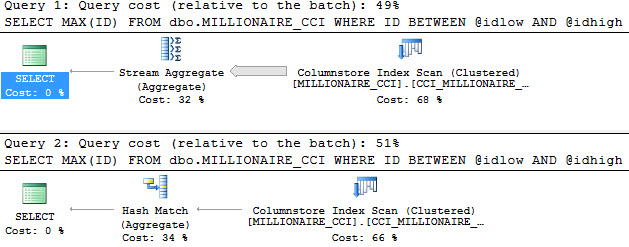
Remember our plan? It used a Stream Aggregate to process the MAX. Stream Aggregates are preferred for small, and/or ordered sets.

How do we know this is the wrong plan, here? How can we test it?

If we run the stored proc once the regular way, and once with a RECOMPILE hint, well…

The query plans decide to be cheeky and have similar costs. You’ll notice that the Hash Match plan is 51% of the cost, and the Stream Aggregate plan is 49%. The relative difference is tiny, though. The Stream Aggregate plan costs 27.8431 query bucks, and the Hash Match plan costs 28.8442 query bucks. That’s a difference of 1.0011 query bucks, which is exactly the cost difference between the Stream Aggregate operator, and the Hash Match operator.

No Cache No Care

But in this case, cost is one of those awful, lying metrics. Let’s look at the different execution times.

The plan with the RECOMPILE hint finished in 49ms. That’s, like, 1000x faster. The difference of course is the Hash Match Aggregate operator replacing the Stream Aggregate operator.

So what happens if we run things in reverse order after freeing the cache?

It turns out that the Hash Match Aggregate plan is just as good for the ‘small’ query. It has the same metrics that it did when using the Stream Aggregate plan when it ran first. In this case, there are no other differences to account for, like Key Lookups, or Parallelism.

Happy Mondays

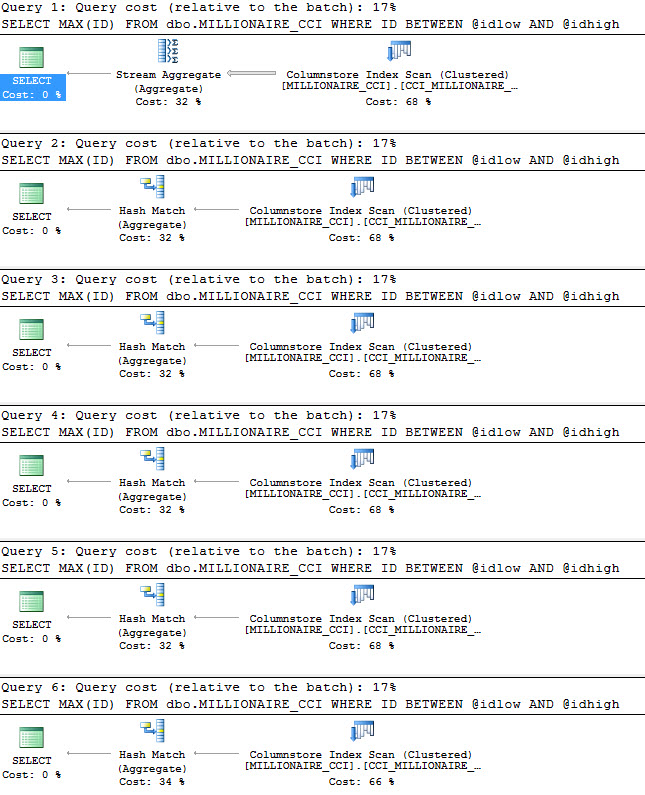
We’ve come this far, so let’s answer one last question: At which point will ol’ crazypants choose the Hash Match plan over the Stream Aggregate plan? To answer that, we’ll go back to our original test scheme, and add in recompiles so each execution gets a fresh plan.

Limited Values Of Helpful

The answer is, unfortunately, pretty early on. The second query chooses the Hash Match plan, which means that, well, almost every single execution would have been better off with a different set of values passed in first, and the Hash Match plan chosen. Hmpf.

Human League

What did we learn, after all these words? Rowgroup Elimination is possible in stored procedures, but it doesn’t provide any feedback to plan choice. No matter how many were eliminated or not, the plan remained the same. As eliminations decreased, performance got worse using the ‘small’ plan. This is textbook parameter sniffing, but with a twist.

I also tested this stuff on 2017, and there was no Adaptive magic that I could find.

Thanks for reading!


Register Now for Next Friday’s Free GroupBy Conference

GroupBy Conference
0

It’s that time again! Register for free now to attend next Friday, September 1. Here’s the lineup:

And for the following Friday, September 8:

Wanna join in the fun and present a session yourself? There’s still time! Submit a session before Saturday for the December 1 & 8 event.


SQL Server 2017: Potentially Interesting New Extended Events

SQL Server 2017
4 Comments

You still won’t use them

And I predict that Extended Events will remain as niche-only use for specific troubleshooting scenarios. Very few monitoring tools use them, and the ones that do still rely on traces and DMV queries for the bulk of their collection.  That’s not a good sign, in 2017, considering how long Extended Events have been around.

Why?

They’re a pain in the butt. Microsoft has invested a ton of time expanding the potential uses of them without dedicating any time to making them friendlier to use. Brent and Tara would still rather fire up Profiler, even with equivalent templates in Extended Events.

2 for 1

Why?

XML, probably.

With that out of the way

There are, as of RC2 being released, 194(!) new Events to Extend your mind with. Not all of them are interesting to me, and I haven’t had time to pry into all of the ones that are interesting just yet.

This is a rundown of the new Events with names or descriptions that I found interesting, and will try to spend some time with.

I can’t promise anything

After all, getting some of these to fire is tougher than using a Debugger.

adaptive_join_skipped

I covered this a bit a while back. It still makes the list because uh… It’s my list.

excessive_memory_spilled_to_workfiles

The idea of this one is interesting, but check out this threshold!

100 GB!

If you have queries doing that, you don’t need an Extended Event, you need to replace your developers with pet rocks. They’d be less dangerous.

forced_param*

There are two here, forced_param_clause_skipped_reason and forced_param_statement_ignored_reason. The reasons are listed out here, and have been for years, but now you’ll know why queries aren’t receiving all the wond’rous joys of forced parameterization, without having to guess too much.

implied_join_predicates_possibility

Do all roads lead back to Craig Freedman? Maybe.

Switch!

“Feature switch” sounds like “Trace Flag” to me. I’m not cool enough to know, but I’m curious if this re-introduces the feature that Craig talks about in his post. I poked around a bit for a regular setting, but couldn’t find one, or a reference to one — sometimes sys.databases will get a column for stuff like this if it’s a database level switch.

interleaved_exec*

There are a bunch of these: interleaved_exec_disabled_reason, interleaved_exec_stats_update, interleaved_exec_status, interleaved_exec_tvf_failed, recompilation_for_interleaved_exec, and sql_tvf_build.

These are all related to interleaved execution of MSTVFs. It’s curious that there’s so much more collection done for these than Adaptive Joins, but maybe that means Adaptive Joins are perfect? Ah, to dream~

It’s like when your mom tells you you’re perfect. She’s had to forget a lot to get those words out of her mouth.

join_condition_description

Woah ho ho, this one is gonna get some noggins joggin! I want you to pay careful attention to this!

EXPENSIVE COMPARE TYPE!

Whether the join condition contains a string, binary, uniqueidentifier, or other type that is slow to join on (true) or only simple types like int and datetime (false). Intuitively, these are mostly types > 8 bytes (hence called large). However, even a varchar(6) is consider expensive so will have a true value for the event, though it is less than 8 bytes.

Is SQL Server 2017 jabbing GUID users? Finally admitting that you shouldn’t join on people’s names? Or perhaps just chiding you for being the kind of person who stored a GUID as a NVARCHAR(36)?

We’ll wait and see if this wording changes, before someone out there gets triggered so hard they migrate to DB2.

large_cardinality_misestimate

Occurs when the smaller of the estimated or actual cardinality of an iterator is at least 1 million rows and if the estimated and actual cardinality differ by at least 1 order of magnitude.

This sounds good to me! We recently started doing something similar to this in sp_BlitzCache and sp_BlitzQueryStore. Our math is a little different, but that’s okay because more people use our scripts than Extended Events.

I’m guessing, anyway.

memory_grant_updated_by_feedback and spilling_report_to_memory_grant_feedback

memory_grant_updated_by_feedback will fire off when the memory grant of a query plan is updated after subsequent executions.

spilling_report_to_memory_grant_feedback will give a holler if batch mode queries spill data as part of the feedback process.

This is a pretty cool new feature, and you should all take a minute to thank Joe Sack and Co. for this one. This’ll be awesome.

If you ever upgrade…

Ahem.

operator_type_detected

I know, I know. What the heck? Is Microsoft in a secret arms race with us to tell Paul White if someone finds a Switch operator? I don’t know!

This one is a bit mysterious.

So hey what’s your name?

I’m interested! to see which operators this Event finds interesting!

Maybe I’ll find a new one in there!

potential_batch_mode_colocated_join

This one caught my eye because it makes me wonder if collocated is misspelled.

Anyway!

I’m more interested because I wonder if join collocation wasn’t possible with ColumnStore indexes before 2017, or if we just got an XE to detect it now. It’s been available for partitioned rowstore tables since 2008. I say that like we’re old pals, but I’ve never seen it happen out in the wild.

query_optimizer_cardinality_guess

This one is funny. Aren’t all cardinality estimates guesses?

Well, now you’ll know the type of guess, too. Lucky you.

Good? Bad? Mediocre?

subquery_shape_check

It’s like a Presidential Fitness Test for your subqueries. Or something. Maybe? Not sure where they’re going with this one.

Less exciting

udf_reordering_in_residual_expression

This sounds super fancy, and there’s a Trace Flag involved. That must mean it’s special, no?

What kind of udfs?!

One’s left to wonder what kind of UDFs will benefit from this optimization, and if this might be a subtle fix for the much maligned Scalar UDF.

Probably not, but hey.

Can’t fix everything in 25 years.

Thanks for reading!

Brent says: (sigh) it’s true, I’d still rather use Profiler than XE for most use cases (the exception being Jeremiah’s blocked queries & deadlocks script.) For me, the problem is that the behavior seems like it keeps changing between 2008, 2012, 2016, and now 2017. Since I have to keep jumping between boxes, I don’t really wanna adapt my techniques on the fly – I need something that works every time. XE is more powerful, and now that 2012+ seems to have at least 50% market share, I should probably revisit that.


What If Week: What Would You Add?

SQL Server
21 Comments

For this week’s What If series, we’re exploring what would happen if you had access to SQL Server’s source code – like if you got a job at Microsoft, signed a partner NDA, if the code leaked, or if it went open source.

Today’s question is, “What would you fix or add?”

Erik says: Skipping Logging

Okay, look, minimal logging is okay, but the song and dance you have to go through to get it is ranges from absurd to impossible.

And it’s only for inserts.

Not everyone can be in Simple or Bulk Logged. I mean, really. Mirroring? AGs? Nope! Log Shipping? At least Bulk Logged!

Plus, the list of things that can be Bulk Logged is depressingly limited.

But that doesn’t mean you care equally about every table or process.

  • Do you really want to fully log every change to an ETL table?
  • Does that index rebuild to align to a partition need to take up 500 GB of log space?
  • Does changing a column data type really need to be fully logged? (Before and after seems reasonable)

This isn’t crazy talk either, other database platforms have it implemented. Brent has a Connect Item about it, if you feel like voting.

Plus, the way I see you folks taking backups, you might as well not be logging anything anyway.

Brent says: Unsupported Trace Flag for Unlimited Memory in Standard Edition

Look, I know everybody needs to pay their bills and put food on the table. I understand Microsoft would certainly go broke if they let Standard Edition users leverage all the memory you can cram in a 2U pizza box these days. I totally understand Nadella needs his Nutella.

So here’s a compromise: let’s sneak in an unsupported trace flag that lets gambling users run unlimited memory in Standard Edition.

It’ll leak out on the Internet, and we’ll start using it, and get addicted to In-Memory OLTP and building big ginormous columnstore indexes. Eventually, we’ll need to make a support call, and we’ll drop back down into limp-home mode, at which point our bosses will realize how awesomely fast memory is these days.

What about you? What would you want to sneak in?


What If Week: What Would You Fix Or Change?

SQL Server
36 Comments

For this week’s What If series, we’re exploring what would happen if you had access to SQL Server’s source code – like if you got a job at Microsoft, signed a partner NDA, if the code leaked, or if it went open source.

Today’s question is, “What would you fix or change?”

Erik says: Dynamic SQL

I love dynamic SQL, I really do. But it’s a real pain in the butt sometimes!

  • If you’re using NVARCHAR strings, you need to prefix all of your string concatenations with N, or you could end up silently truncating your final product.
  • If you use CASE to branch concatenation paths, it can also silently truncate a string.
  • Figuring out how many single quotes you need to properly quote things is awful, sometimes.
  • PRINT is limited to 8000 characters, RAISERROR even fewer.
  • If you’re using sp_executesql, it’s a real chore to get the variables as the query ran without additional logging.
  • Concatenating non-string data requires CAST/CONVERT.
  • Sometimes surprise NULL concatenations leave you with EMPTY strings.

There’s a lot that could be done to make dynamic SQL easier (and safer!) to use. This may not be terribly popular, but hey, if I take the popular stuff, you won’t have anything to comment on.

You’re welcome!

Brent says: I’d Fix the Database Tuning Advisor

And by “fix,” I mean castrate it to avoid any unfortunate offspring.

The DTA is one of those great ideas that only works if the developers are allowed to continue to put work into improving it. v1.0 simply doesn’t cut it for a product like this. While Microsoft has put more work in, it’s only been to suggest even more kinds of indexes, not make smarter index recommendations.

So it’s time to get out the knife and do the needful. Sorry, Clippy – your parents just never could afford to send you to college, and I can’t let your greasy hands on my database anymore.

Tara says: I’d get rid of two deprecated features

Microsoft deprecated Database Mirroring and SQL Server Profiler in SQL Server 2012. Both are still available in SQL Server 2017! That’s 4 major versions.

I’m still recommending Database Mirroring to some clients because Basic Availability Groups requires a Failover Cluster. I tell the clients that Database Mirroring is deprecated, is still fully supported and still available in SQL Server 2017, but that I’m recommending Database Mirroring because of its simplicity. If it meets their RPO/RTO goals, why should we complicate things?

Though I know we should be using Extended Events instead of Profiler, Microsoft is going to have to cut the cord. But before they do that, I hope they provide a simpler GUI for Extended Events. Keep the flexibility of the current GUI, but also provide a simple version of it that Accidental DBAs can run. Most companies don’t have the luxury of having a very experienced DBA.

What about you? Leave your answer in the comments.


What If Week: What Would You Look At First?

Humor
7 Comments

For this week’s What If series, we’re exploring what would happen if you had access to SQL Server’s source code – like if you got a job at Microsoft, signed a partner NDA, if the code leaked, or if it went open source.

Today’s question is, “What would you look at first?”

Brent says: I’d look at the trace flags list.

Trace flags are switches you can use to flip features on & off. Erik’s compiled a list of known trace flags (and whether or not you should freak out when you see them enabled.) It’s a fun read.

But I’m sure it’s not complete, and I’m sure there’s many that Microsoft would rather never see the light of day again. You know how it is – you’ve got a specific problem you have to solve for a specific customer, and there’s just no other choice than to hard-code something into the engine itself.

I don’t want to use those, mind you.

I just wanna see what they are because I’d get a chuckle out of it.

So I’d go looking for any instance in source that checks for the existence of a trace flag, and then go read the comments. I bet there’s some swearing in there.

Erik says: I’d stare my enemy in the face

The first thing I’d do is look at how Scalar Valued Functions work.

Why do they do such awful things?

Did they do something wrong in a past life?

This has been a big issue in SQL Server for many years, and it doesn’t seem to be changing anytime soon.

Unfortunately, there are some things that you can only do with scalar valued functions. You can’t use iTVFs or MSTVFs in computed columns, because they’re not guaranteed to only return one value.


What If Week: SQL Server Code Review

Humor, SQL Server
8 Comments

Top Secret

For the sake of any lawyers out there reading, I want to start by saying we do not now, nor have we ever possessed SQL Server’s source code.

I wouldn’t even know what to do with it if I did — I doubt it’s written in crayon.

Heck, I’m not even competent enough to use a debugger, though I have tried. Bob Ward and Paul White just make it look so glamorous.

With that out of the way, let’s pretend we did, for some reason. Say something like:

  • SQL Server went open source
  • You got a job at Microsoft working on it
  • The source code leaked

And now we can pretend that we’re competent code readers and writers and start flipping through the pages (these things are like books, right?).

Topical Thunder

This week, we’ll run a series of short blog posts asking you, our dear and beloved readers, what parts of the code you’d want to get a gander at in different scenarios.

Why this series? Why this week? Because Brent is converting us into an offshore team we’re on a cruise in Alaska, and this is a nice time for you to discuss things among yourselves without moderation. Or moderators.

Bear with me

Hopefully WordPress sends them all out on schedule!


Abstracts Open for GroupBy December

GroupBy Conference
0

Want to present at the upcoming GroupBy December 1 & 8 online conference?

If your bucket list includes speaking at a major industry conference like the PASS Summit, then GroupBy can help you get there. Your Summit resume needs to include sessions at a few events, and GroupBy’s online video archives help you really stand out amongst other applicants.


How to Drop All Your Indexes – Fast

Sometimes I need to reset stuff during performance training classes. I know some of you teach classes, too, and some of you just like doing crazy stuff.

So here you go, a stored procedure to lose weight fast:

DropIndexes for SQL Server 2016 & Newer

DropIndexes for SQL Server 2008-2014

This one doesn’t include support for the @ExceptIndexNames parameter because I’m lazy:

Look, you’re the one who reads this blog, alright? Don’t blame me for the fact that you’re – STOP COPYING THAT, AND NO, DO NOT PASTE THAT INTO PRODUCTION.

No, this one’s not going into the First Responder Kit.


sp_AllNightLog: Creating Jobs Like I’m The President

Look, we need these things

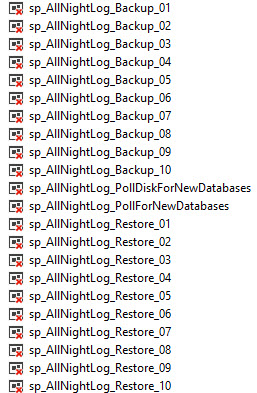
The setup for sp_AllNightLog creates jobs for four separate activities

1 job to poll for new databases to back up (primary)
1 job to poll for new databases to restore (secondary)
10 jobs to poll for backups to take (primary)
10 jobs to poll for restores to… whatever (secondary)

And, as Mr. Swart notes: “In the land of Mordor where the shadows lie.”

The number of backup and restore jobs is configurable, but we estimate that having between 4 and 20 jobs should suffice for most RPO goals.

Naming things

Economical

All jobs are attached to the same schedule, called ten_seconds. Why? Well, if a job fails completely, we want it to restart. Most jobs run in a constant loop (While @Option = 1, BEGIN…), with a fair amount of error handling. Total failures should be rare. Having them all use the same schedule was an early design choice.

Along the way, we perform various checks to make sure that our target database exists — right now that’s hardcoded to msdbCentral, which helps easily tie using this into sp_BlitzBackups to trend RPO and RTO across servers. Huzzah! We also check that Agent is running, you haven’t attempted to insert an absolutely abhorrent backup path, and some other niceties that people often overlook. If there’s anything you think we should have in here, let us know!

Configurable

We really wanted to surface most settings. There are some table names that aren’t negotiable. You can change RPO, RTO, Backup, and Restore paths easily. Either update the tables directly, or use the Setup proc with the @Update action.

We also want you to be prepared for what’s about to start happening on your server: Either a Whole Mess® of backups or restores. That’s why the Agent jobs aren’t activated from the get-go. You’ll have to do that when you know you’re ready.

Optimizations

We really only had to make one tweak to sp_DatabaseRestore, to take into account log backups that have already been restored.

Unfortunately, when you run a dir command via xp_cmdshell, there’s not a great way to filter files based on a date. That would have made the insert to table variable more efficient, sure. But we settled, and we just delete from the table variable before a certain date. This means that for a directory with thousands of log backups in it, you’re not restoring headers for all the ones you’ve done already to see if you need to do them again.

We hope you find these stored procs useful. If there’s anything we can do to make them more useful or applicable, head on over to our GitHub repo to let us know.

Thanks for reading!


Out of Office: Time for the 2017 Brent Ozar Unlimited Retreat

Company News
7 Comments
“Now I just need a big enough drink glass”

For the next 10 days, we’ll still be publishing scheduled blog posts, but we’ll be responding a little slower than usual, and probably a little more relaxed as well.

That’s right – it’s time for our annual company retreat.

This year, we’re back aboard a cruise ship – this time taking the Ruby Princess from Seattle to Alaska, with stops in Juneau, Skagway, Glacier Bay, Ketchikan, and Victoria. It’s a route Erika and I have taken several times, and we’re excited to share it with the team & their spouses.

During this week, we’ll have limited access to our email, but if you’d like to follow along with our photos, check out my Instagram feed, or check out photos from my first Alaska cruise back in 2010.

In the meantime, we left this friendly guy in charge of support.

“Tell me why you need the SA password.”

Five Mistakes Performance Tuners Make

There’s no Top in the title

And that’s because a TOP without an ORDER BY is non-deterministic, and you’ll get yelled at on the internet for doing that. This is just a short collection of things that I’ve done in the past, and still find people doing today when troubleshooting performance. Sure, this list could be a lot longer, but I only have the attention span to blog.

So in a totally non-determinstic order, here they are, just like when you write a TOP without and ORDER BY:

Only testing indexes with the query you’re tuning

Number three and climbing the B-tree! You get a query that needs to be tuned, there’s a missing index request, case closed. Right? Well, aside from the fact that you shouldn’t always believe missing index requests, there’s a bigger problem.

You guessed it!

Other queries might decide to use that index, too, and they may not perform as well when they use it. Weird, right?

When you add an index, make sure you test out other important queries that hit the table you added it to, to see if their plans change. On the flip side, you could hit performance wins for multiple queries. In which case, you should do the Ickey Shuffle into your boss’ office and demand a raise immediately.

Only testing with one query running

Coming in at number five and looking alive! Did you know that query plans can be different on busy servers? I bet not! And aside from that, your performance problem might not even be the query itself, it may be blocking, or a poison wait. This stuff may not show up in Dev, unless yous spend a lot of time and money engineering load tests.

This is what safety groups call “Situational Awareness”, and this is the kind of stuff that you really want a monitoring tool in place for. Sure, that query ran slowly, but if that’s all you know, and you can’t reproduce it, then you need to start digging deeper.

Not testing modification queries

Number two is just for you! And this is one that a lot of people miss by a country mile. Maybe even a continent mile (I’m not sure if that’s longer or shorter than an incontinent mile). SQL Server has to keep all your indexes in sync, well, synchronously. When you issue DUIs, guess what? You need to maintain nonclustered index data right alongside clustered index data.

SQL may give you a wide plan where it shows you all of them, or it may bury them all under one “nonclustered index [modification]” operator. Fun, right? All those modifications need locks, and they may need spools, and it’s really just a whole ordeal. Eventually, maintaining all those indexes may start to slow write queries down, even for a single row. This should prepare you for number three, which is…

Testing with too much RECOMPILE

Four up from the floor up! So there’s like this whole Parameter Sniffing thing. When you use RECOMPILE hints, SQL Server generates a new plan for you, every single time. This may make it seem like your code or index changes are bulletproof, because every single time you run your query, it’s fast, and the plan is awesome. As soon as you pull out that hint, you may cache one of those awesome plans, and it might not be so awesome for another set of paramiablements.

Not testing with enough RECOMPILE

The Numero Uno That You Know! So you run your query with a set of values, and the plan looks good. Then you run it with another set, and they get the same plan. It’s still fast; lucky you! But uh… what if that second set of values goes first? Do you get a different plan? Is it still fast? What happens if another set of values gets that plan?

Oh dear, you’ve shot the other foot.

Honorable Mention

I know, I know — that’s a lot to absorb all at once, and you’re feeling like you need to call old employers the way you called all your exes that time you had an ingrown hair that you weren’t sure was an ingrown hair to let them know they may have a problem that needs to get checked out. Don’t worry, like reading a WebMD article about headaches, it’s about to get worse.

  • Testing With Local Variables
  • Not testing in an environment that mimics production. What does that mean? Well, if you’re using Log Shipping, Mirroring, or AGs, all those unbatched DUIs might behave a whole heck of a lot differently once then squeak out into production.

Thanks for reading!

Brent says: another one I’ve been seeing lately is running DBCC DROPCLEANBUFFERS to “clean out memory” in between query runs. People think they’re testing more accurately because data isn’t in RAM, but that may not mimic production. In one example, the tests didn’t show any performance difference between query versions – but it was because the storage was so doggone slow that any query was horrible.


[Video] Office Hours 2017/08/02 (With Transcriptions)

This week, Brent, Erik, and Richie discuss unit testing, tSQLt, availability groups, duplicate indexes, reporting services 2016 on availability groups, troubleshooting Entity Framework queries, joining views in tables, SQL Server caching issues, and why procedures have plans inside the cache.

Here’s the video on YouTube:

You can register to attend next week’s Office Hours, or subscribe to our podcast to listen on the go.

Enjoy the Podcast?

Don’t miss an episode, subscribe via iTunes, Stitcher or RSS.

Leave us a review in iTunes


Office Hours Webcast – 2017-08-02


How do I sync settings across SQL Servers?

Brent Ozar: We’ll start with Rowdy. Hello, Rowdy. He says, “Hi folks, I’m migrating off a well-designed…” He’s only saying that because he doesn’t want to insult his predecessor. “Agent availability group, it’s SQL 2012 on Windows 2008 R2, it’s new hardware and a new OS  but unfortunately it won’t involve a SQL Server version change.” He says, “Are there any tools you’d use to check to make sure that all the settings and users and jobs are identical in the new availability group before cutting over?”

Erik Darling: Well, knowing Rowdy, I’m surprised that he hasn’t stumbled on DBA Tools for that because I know that they have instance comparison functions for SQL Server. I’d be surprised because I know he’s a PowerShell guy.

Brent Ozar: Erik and I were talking about this as part of the Faux Pas Project, the thing that we’re doing – these days it’s log shipping at scale but for a while, we were talking about building availability groups at scale. And the idea was could we conceptually script out all of the contents of a server, like all the metadata, trace flags, sp_configure settings, dump all that out into one file and then use it to import again into another one. It’s not out there; like the functionality to do it just isn’t there. There’s nothing to compare two servers identically. The closest two things that I’ve seen are, a Redgate schema compare will check and see the differences between DMVs, if you want it to, but of course, it’s going to produce all kinds of false positives that are just garbage; false change differences that are just garbage. Or Kendal Van Dyke wrote this SQL Power Dock that dumps out a lot of configuration into Excel. It’s built atop PowerShell. Kendal hasn’t maintained it for at least a year or two. He went to work for Microsoft and just stopped working on the project…

Richie Rump: People get busy at Microsoft, Brent, come on now.

Brent Ozar: I actually wrote a blog post about that this morning, it’s very funny how that works. But yes, so that’s a way you could go down and start, but I haven’t seen anything that catches all the trace flags, sp_configure settings, master database objects…

Erik Darling: I don’t even think there’s a good framework for it. Like, if I had to do it from a purely tSQL point of view, I couldn’t see creating a linked server or creating synonyms to all the DMVs that point to the other server and then just doing like an intersect or accept query that would catch things that are different between the two. That’s a nightmare because I would miss something; I would miss lots of things.

Brent Ozar: And even that, we’re talking about just differencing scripts. We’re not even talking about application either, you’d have to apply the differences too, and that’s even harder. Rowdy says, “I have found DBAtools.io…” So you know what I would do is, DBAtools.io has a super lively participation group in Slack. I would ask over there because I think – I’m sure that they don’t have an answer either, but I bet that they know people who would be interested in building that kind of thing, just long term.


Is there a benefit to duplicate indexes?

Brent Ozar: Let’s see, next up, Hannah says, “Is there any reason that I should want to keep duplicate indexes? I’m a junior DBA at a new software development company. I’m only working with developers and I’m the only DBA. They create stuff nobody has ever gone back to review or maintain. We have thousands of duplicate indexes in an instance, some because of uniqueness, some clustered with nonclustered indexes, some because there was a typo. So is there any reason I should keep those?”

Erik Darling: She mentioned a couple of the reasons that I think would be good if they were enforcing referential integrity or uniqueness. You know, if they were backing up a foreign key or something – but exact duplicates, where you see one has all the reads and the same amount of writes as another one that has none of the reads, then I would just start disabling those.

Brent Ozar: There’s one gotcha, which is if some developer has named the index in an index hint, their query will simply break. It won’t adapt and use another identical index, it will simply not work. Me, I look at that as a benefit, because you shouldn’t be hard coding index names inside your queries. So just if you do it, just disable the indexes rather than drop them. The only reason I say that is because then that way if somebody runs in and says my queries are all failing, then you can do an alter index rebuild and it’s hydrated back up in a relatively short period of time.

Richie Rump: Yeah, I love that problem, because us devs, we take a look at it, we run in a query and all of a sudden it says, hey you may be missing this index. And then we’re like, oh okay, let’s go ahead and throw that on there; let’s throw that shrimp on the barbie, I don’t know what it does, we’ll just go ahead and do it. And sure enough, it probably was there already, it just didn’t use it at that point and here we go, duplicate, duplicate, duplicate, duplicate.

Erik Darling: Now you have 40 indexes called, name of missing index SNAME.

Brent Ozar: So I go to a client and go onsite and I’m in the room with the DBA. They’re having all these performance problems, and there’s nobody in there, just me and the DBA. One of the things I run is sp_BlitzIndex and we’re looking at it and one of the tables has 174 identical missing indexes. 174 indexes, not like on different tables, 174 on the same table. So you try to keep the poker face as a consultant and I’m like, hey so what’s up with this? Can you tell me a little bit about where we got to these 174 indexes? And the developer says, well when someone brings me a slow query, I go look at it, figure out – it says indexes are recommended and then I go and add those indexes. Again, I’m trying to keep the poker face and I’m like, well but all these are identical. He says, “Yeah it always recommends that I create an index, but the name already exists; I just figured it’s the name because you’re using tools like the DTA and the missing indexes [crosstalk].”

He would just put ASDF, ASDF, you know, bang on the keyboard at the end of the index name to give himself a name. I said okay, so where are you doing this at? Where are you doing your index tuning? He says, “I’m doing it over in development. I know better than to do it over on the production environment.” And I said, “When was the last time you refreshed development from the production environment? When was the last time you restored it over?” And he stopped and thought and he goes, “I don’t think I ever have.”

So the poor guy was repeatedly recreating exactly the same index because it was missing in dev and never actually bringing it over from production. You’d be amazed at what you see out there. The good part was is I said, look I’m explaining to you what’s going wrong. It’s just you and me in this room so what we’re going to do is drop 173 of these indexes and we’re going to go back and tell your boss that we found the magic go faster button and everyone’s just going to love you to death; and they did. Everybody learns somehow.


How can I easily troubleshoot EF queries?

Brent Ozar: Next up, Grahame says, “I’m troubleshooting entity framework generated SQL queries. Is there a methodology or a tool I could use to make this easier? I’ve suggested that the developer start using LINQPad, but is there something else?

Richie Rump: I guess that’s my question, right? There are a couple of monitoring tools out there; I can’t think of them off the top of my head right now…

Erik Darling: ANTS, Redgate ANTS. Just kidding…

Richie Rump: Well ANTS is for memory and some other stuff. If you’re running through it, the code, it will actually give you times. Like writing your code and you’re debugging it, how long this ran and how long that ran. If you’re dealing with specific entity framework problems, it’s not going to tell you what the query was or anything like that. It’s just going to tell you that this function that you ran it in ran in 30 seconds. And then it will tell you, probably, the query in itself ran for 29 seconds. That’s what ANTS will give you. I love ANTS, I think ANTS is a great product.

There are a couple of Entity Framework tools, and it depends if you’re using Core versus Entity Framework 6; they’re essentially different products that you could go and actually monitor stuff. I’ve used them. If I needed to do an EF thing right now, I probably wouldn’t. I’d probably just go into dev, run profiler and start grabbing some of the queries from there and just start tuning some of that stuff. Probably actually run sp_BlitzIndex or something and start taking a look at the indexes, because that’s probably what it is. That’s where I go first, then I start looking at the queries themselves and see what’s going on inside of them. BlitzCache is another good one for that, if I start taking a look at what’s going on inside of the cache and where my queries are and how long things are running.

That’s probably where I would start, but there are some monitoring tools out there that you can use for Entity Framework to kind of see what’s going on inside and what’s taking so long. It’s probably some really complex queries that’s generating some suboptimal SQL and you probably just need to back away from that and use a stored procedure, or figure out what exact data you need in that connect query.


Any gotchas to adding SSRS to an AG?

Brent Ozar: Let’s see, Matt has a follow-up. He says, “I already have a 2016 availability group for a production website and this will just be on the same group of servers but in a different AG.” Yeah, in that case, I don’t think we’ve got anything since we don’t do reporting services work. I would just read the books online, stuff on adding availability groups in for reporting services because I want to say that there are some gotchas there. But we don’t do a whole lot of that, so you got me there.


How many cluster nodes can go down at once?

Brent Ozar: Gordon says, “I’m somewhat confused as to the minimum number of cluster nodes that need to be online for the cluster to still be up.” And he’s got a whole bunch of information down there about his specific scenarios. He’s got “Two nodes and a file share witness with dynamic quorum enabled, what happens if I lose one node, what happens if I lose another?” Now, unfortunately, this is beyond the scope of what I can answer fast. I actually have a whole 30-minute session on it in the senior DBA class, where I walk through the problems with dynamic quorum and dynamic witness. In theory, if you’re lucky and the right node owns the vote at the time, you can get all the way down to last man standing. If you’re unlucky, in a two node plus witness configuration, and the wrong node goes down, then you can’t get down to last man standing. So that’s why things are a little bit tricky there in terms of the articles you’ll see out there. Some of them just assume that the right node happens to own the vote. Some of them explain it, if you don’t have the right node owning the vote, you go down hard.


Are views slower when joined to tables?

Brent Ozar: Don asks, “I have a query that’s joining a view, then joining a table to add another column that probably should have been added in the view. Performance is terrible. Is there a known issue with joining views in tables?”

Erik Darling: No, there’s not a known issue with views in tables, but if those views call other views, like if you have nested views, you could end up with a whole weird thing. What I would want to do is start with the query plan for that and I would want to start with taking a look at that to see if there’s anything obvious jumping out at me there for why this might be so god awful slow if you’re joining just to add one column in. I know this is going to sound weird and hand wavey, but every time there’s been a case with me as a DBA where a developer has said, I’m just going to add this one column in. Two days later, this query is still running with, like, this awful key lookup and I’m sitting there like, yeah you just added that one column in, thanks, boss, saved the day.

Richie Rump: Yeah, I love the whole views on views things, because as a developer, that’s kind of what you want to build, right. Hey, I’ve got this one little piece of code and I’m going to build it on top of that, and now I have this, you know, flexibility. So if something changes here, it automatically goes up here and – all of a sudden I start nesting all these views and it makes great sense, right, from a developer’s perspective. But for performance, man, it’s just dog, it is terri-bad, just don’t even do it; don’t even think about it.

Erik Darling: I’d really want to get the difference too between the query that the view produces on its own versus the query that it produces when it’s joined to the other table because that could also give you some unique insight into what’s changing underneath.

Brent Ozar: It can be – judging that you’re asking this question too, what you probably want next is help from someone looking at the views or looking at the execution plans. This is why we made PaseThePlan.com, and by we, I mean Richie. So PasteThePlan.com is where you can go paste in execution plans on our site and then they’re uploaded and shared with the public. Now, the first thing you need to know is these are now public execution plans. Anyone can see them. So if you have stuff in there that the company’s kind of ashamed of or social security numbers, credit card numbers, you probably don’t want to paste the plan.

If it’s totally public and you don’t mind sharing them, then put both of those two execution plans on there, upload both of them and then go to DBA.StackExchange.com. And at DBA.StackExchange.com you can ask questions about SQL Server that span multiple paragraphs, include the links to Paste The Plan and people will go through and look at those differences. If your query plans are private or you’re not supposed to show any of that data, go get SQL Sentry Plan Explorer. [crosstalk]

Erik Darling: SentryOne, rebranding…

Brent Ozar: They’re going to be cursed with this for years. SentryOne’s Plan Explorer is totally free and one of the features that is has is the ability to anonymize your plan. So it takes your execution plan, replaces all the tables with object one, object two, object three. Now from there, you can take that execution plan and post it on Paste the Plan. But here’s the thing, you don’t want to bother doing that, because no one wants to read your hideous execution plan once it says things like object one, object two, field one, field two.

So instead, at the top of SentryOne’s Plan Explorer, there’s a button that says post to SQLPerformance.com. This is where people, smart people like Paul White and Aaron Bertrand are sitting around waiting for your execution plans. And because they’re paid to do it, they are much more likely to look at that heinously ugly execution plan through object one, object two, object three. They can give you advice, but know that their advice is going to be things like, you should join object three field 60 to object two field 11 in order to improve your cardinality, and it just won’t be as easy as having somebody look at the real plan.

Erik Darling: And to be fair, they are also sitting around doing the same thing on DBA.StackExchange.com for free, so the advice is way worse, because it’s free, so you really can’t ask for a refund on that. Paul gives great answers, for free.

Richie Rump: Crazy great answers. It’s like whoa, I need to clear my mind, go do some yoga, read it, go do some more yoga, meditate on what he just wrote… Yeah.

Brent Ozar: I have read whole book chapters that are easier to get through than one of Paul White’s Stack Exchange answers…

Erik Darling: But you also learned less.

Brent Ozar: By far, yeah, yeah. Whenever I see Paul White has a new answer that’s more than a page long or he posts a blog post, I’m like alright, let me clear out a spot in my calendar here because I’m going to need to focus for a while.

Erik Darling: Pressing the print button…

Brent Ozar: Can I bring this with me to the plane?

Richie Rump: You’ve got four different color pens, you know, and writing notes on it.

Brent Ozar: I find stickers to be really helpful, you know, stickers with little arrows, maybe a unicorn for the good parts.

Erik Darling: I hired some paralegals to just go through and make sure everything – cited it and annotated it and put headers and footers on all these things. I don’t feel dumb…

Brent Ozar: I still feel dumb when I finish but – no I feel smart enough.


Why does the plan cache use so much memory?

Brent Ozar: Kelly says, “I have one SQL Server instance, 2012 Service Pack 1…” Well first off, you should get on a supported Service Pack, because that’s not even supported anymore. “Where the optimizer accumulates and holds memory over time, maybe weeks, until there’s very little memory available for database caching. I’m seeing this via IDERA SQL Diagnostic Manager. When I restart the instance, that resolves it, but then it just restarts again accumulating more cached plans. What should I do?

Erik Darling: Stop restarting your SQL Server instance. So that sounds like a pretty natural way that SQL Server works to me. Over time you read more things into memory and all of a sudden you’re fully cached, or at least you have as much stuff cached as you can fit into memory. I’d probably want – Brent has a good article on that, it’s called the Sysadmin’s Guide to SQL Server Memory.

Brent Ozar: That’s true.

Erik Darling: That’s true, he does have that. I think, that sounds like the tree you’re barking up, where SQL Server keeps using more and more memory and you don’t like it.

Brent Ozar: I wonder, when you say that SQL Server has little memory available to cache data, I would question, what’s the problem there? Are you seeing page I/O latch waits? Page I/O latch waits means that SQL Server has to go out to storage in order to pull data back and it’s waiting for that. If you’re looking at page life expectancy and going, this is way too low I have a problem, don’t do that; that’s not the real problem there. I’m going to give you a truly horrible answer too, if you wanted to reduce the amount of memory used to cache execution plans – is anybody looking? You could run DBCC FREEPROCCACHE, which will clear out all the execution plans stored in memory. This is a spectacularly bad idea, but if you were determined to do bad things, that would be a bad thing that you could do.

Erik Darling: Also, I’d be concerned about what IDERA Diagnostic Manager is telling me, because SQL will only reserve so much space available for caching query plans, and it will evict those plans quite frequently. You see all sorts of memory pressure stuff coming in. So I guess what I would be concerned about, maybe, is maybe I have a query that’s asking for a gigantic memory grant that’s clearing out the buffer cache and the plan cache. But still, SQL is pretty aggressive about the way it chooses to cache data where it points to – you know, it will want to cache data for queries that are going to read stuff versus where it’s going to cache stuff like execution plans or DMV info or other things like that.

Brent Ozar: Brian Maynard also says, “Maybe check ad hoc plans and use optimize for ad hoc.” Yeah, that will reduce the issue. I would just kick back and go – I don’t think it’s really an issue at all.

Richie Rump: Maybe the answer is, what’s the problem?


Why does CHECKDB cause a restart?

Brent Ozar: Tami says, “Hi…” Hello Tami, “I have a SQL Server 2014 development instance. When I run CHECKDB on a 25GB database, it uses up most of the memory then crashes the virtual server and requires a reboot.” First, I would step back right there and go, any time something crashes, that’s probably not a SQL Server bug, there’s probably something else going on, or even a SQL Server workload issue. The crash, I might even think about opening a support call with Microsoft, because a crash shouldn’t happen regardless.

She goes on and says, “The server has 16GB of memory and about 13GB of it is allocated to SQL Server. If I reduce the allocated memory a little bit, it doesn’t crash. Does it seem right that DBCC should be able to cause this issue and is it a bug?

Erik Darling: So the answer is yes, and I actually dealt with this at my last real job where I had a server with 521GB of memory, and when I had max server memory set to 485GB, DBCC CHECKDB on a 4.5TB database would crash the server. When I set it to 475GB, it would run fine.

Brent Ozar: Get out of here. Because it got a different memory grant based off that or?

Erik Darling: I think – honestly I don’t know what it was. I didn’t have the memory grant saved from one to the other, but I’ll just tell you, that 10GB of max memory changed everything. I want to say that Windows hit some breaking point where it was just like, I can’t manage this, and quit and that was it. Because it wasn’t SQL Server crashing, it was Windows.

Richie Rump: So Windows rage-quit, is that what you’re trying to say?

Erik Darling: Basically.

Brent Ozar: She says, “If I set it to 12.2GB it doesn’t crash.”  There’s two things I would say. Make sure you’re fully patched because there was a known bug around CHECKDB’s memory grants.

Erik Darling: That’s old though…

Brent Ozar: The other thing I would say is, this is a laptop from 2012, circa 2012. It has 16GB of RAM on it. I don’t know that a VM with 16GB of RAM – I don’t know that I would go troubleshooting that much further if you’re having memory issues. I would go add RAM, and if you’re really hard up, I’ll loan you some at a conference, because this isn’t even a recent laptop…

Richie Rump: Yeah, 2013, 32.

Erik Darling: The one on my desk, 32, the one under my desk, 128.

Richie Rump: My tablet, 16.

Brent Ozar: My phone, 128… No that’s [inaudible]. My thumbnail, a micro SSD card.

Erik Darling: My water bottle…

Brent Ozar: In my pants…


How can I learn to troubleshoot replication?

Brent Ozar: Marcy says, “SQL Server transactional replication is so freaking hard to understand. Are there any good websites to decode it for troubleshooting?”

Erik Darling: TaraKizer.com…

Brent Ozar: You know, I don’t even know if she owns that.

Richie Rump: Well I do now…

Brent Ozar: If we weren’t on camera I would totally go buy that. I would just call Microsoft in terms of support. There are a couple of good books on Amazon, Hillary Cotter had a book, I want to say Kendal Van Dyke had a book on it as well.

Erik Darling: There’s a free one from like Redgate or something. Like Understanding Transactional Replication, I want to say. I started to read it like two or three years ago because I said, I’m going to put my nose to the grindstone and learn about replication because customers keep asking. And then I got like three pages in and said I’m not learning about transactional replication, you’re going to hear about something else instead.

Brent Ozar: It’s really funny, the people who wrote those books even have all gone on to other things in their career. There was a while there when one of the authors was emailing us and going, can you please take all replication consulting from me going forward? I was like, nope, not interested.


Why does my SQL Server use all of its RAM immediately on startup?

Brent Ozar: Matt says, ‘I have a server that’s got 32GB of RAM…” Like both of the laptops we just saw. “SQL Server is configured to use 24GB of RAM. When it starts, it consumes all 24GB. Is there a better way to configure memory for SQL Server? Is there a way to not have it consume all 24GB when it starts?”

Erik Darling: Why would you not?

Brent Ozar: I don’t know, I’m just the questioner here. Maybe he wants to save it for later. It’s like when I get a big [inaudible] from Wishbone Café down here in Chicago. [crosstalk]

Erik Darling: You could set max memory lower and then slowly increase it as it’s up longer, but I wouldn’t.

Brent Ozar: That’s cool…

Erik Darling: No it’s not.

Richie Rump: Maybe you could set an alarm for every hour that you could actually – every time it’s up, you could increase it 10MB…

Erik Darling: Or get one of those, like, bird things that goes like this and just hits F5. So like, every once in a while it will increase max memory.

Richie Rump: Maybe you should write a PowerShell script to do that, Erik.

Erik Darling: Yeah, that’s – I’ll get right on that, and I’ll see you guys in two years.

Brent Ozar: I would say, you may check to see if you’re using any trace flags or if you’re using lock pages in memory. There was one trace flag that involved enabling large pages. I want to say, for some reason, it was 834, I can’t quite remember, which causes you to allocate all memory on startup, which is by design…

Erik Darling: And could cause slow startup on servers with a lot of RAM. But Matt, you are not in that danger zone.

Brent Ozar: Tami who had the 16GB of memory says, “I’m being memory shamed?” Hey listen, it was much worse on my call this morning when somebody had a 1TB database and had 80GB of RAM. I was like look, here’s the deal, my desktop has 64, Erik is showing pictures of his desktop with 128…


Brent Ozar: [Tashal] points out that the free book that Erik mentioned is called Fundamentals of SQL Server 2012 Replication.

Erik Darling: There it is, written by [Tashal].

Brent Ozar: By all means, even though it says SQL Server 2012, it’s still good for 2014, 2016 and 2017, because Microsoft hasn’t put one peso of development into improving those features.

Erik Darling: Me either.

Brent Ozar: Me neither.


More about my ginormous plan cache

Brent Ozar: Kelly says, following up on her IDERA SQL Diagnostic Manager and plans question, she says, “Following up, most of the memory gets pinned to the optimizer, FREEPROCCACHE has no effect and ad hoc is enabled.” We’re hitting the end of the call, but the thing that I would dig into for follow up, because you could post this to Stack Exchange if you wanted. There’s a great place for that. Also include the total amount of memory on the server and the total database size. If you look at sp_Blitz, there’s an output type from markdown. Markdown is the question format that Stack Exchange uses, Google for sp_Blitz markdown and there’s instructions on how you can include that output on your Stack Exchange question, that will save a whole lot of back and forth with people asking for more details.

Erik Darling: You know, I’d probably also want to go to IDERA and figure out exactly what that means, because when you say something like memory gets pinned to the optimizer, I’m sort of baffled by like how memory gets pinned to the optimizer. Because the optimizer is not really something that memory gets pinned to, it will take a little bit of memory to compile a plan, but it’s not a memory [crosstalk], yeah.


Why would a proc have multiple cached plans?

Brent Ozar: Alright, and the last one we’ll take, Rowdy says, “I’ve been working on getting intended execution plans published to our development team. One of the things I’ve found when I was exporting execution plans from cache is that some of my procedures have multiple plans in cache. Why would a procedure have multiple plans inside the cache?”

Erik Darling: Lots of reasons…

Brent Ozar: Like…?

Erik Darling: So many reasons. Different white space, different things getting passed in. God, there are so many; I’m trying to think of a good one, though.

Brent Ozar: My favorite good one is – so say you have the same stored procedure and it’s called by – say one is by SSMS and one is by your app server, if you have different ANSI NULL options ARITHABORT settings, anything about your session, you’ll end up getting different execution plans cached.

Erik Darling: If you have the same stored procedure in multiple databases you’ll have different ones.

Brent Ozar: Even if it’s the same procedure in the same database, if you call it from different databases, you’ll get it. If you call it fully qualified from, say, tempdb and master and a user database, you’ll get it. And the epic blog post on this is Slow in the App, Fast in SSMS. This comes up at least once at every Office Hours, and frankly, I would say folks, any time you’re troubleshooting any kind of issue with SQL Server, whether it’s a failing cluster, always on availability groups broken, 2005 no longer under support or a query performance problem, you should start with Erland Sommarskog’s excellent post, Slow in the App, Fast in SSMS. And if you Google for that, it’s about 50 pages long, has a table of contents, but it makes your hair fuller, it brightens your skin…

Erik Darling: It’s a testosterone booster, it’s everything, it’s just amazing.

Brent Ozar: Makes grown men cry, makes young men cry, makes women laugh, yes. Well thanks everybody for hanging out with us this week at Office Hours and we will see you guys next week, adios.

Richie Rump: Can I go back to Postgres now, please?

Brent Ozar: You can go back to Postgres now.

Erik Darling: Get out.


Chaining Agent Tasks For Alerting The Right Way

Step By Step

When you think about setting up maintenance, a persistent fear is that tasks may step on each other. You probably don’t want backups and CHECKDB and statistics maintenance running at the same time as statistics maintenance (notice I didn’t say index maintenance, here, because you’re smart and you skip it?). You may also throw in some other steps, like cleanup tasks something.

Your next fear is that if one step fails, you won’t go to the next step. For instance, a Sort from Statistics maintenance may fill up TempDB, a drive for backups may run out of space (or the network path could get yoinked), or there might be some (DEARPLEASEGODDONTLETITBECORRUPTION) error associated with DBCC CHECKDB (like one of those weird NTFS fragmentation errors) or something.

At no point should one step failure lead to another step not running, so you do something like this.

On failure report success: Government work at its finest

The trouble is, when a step fails, there’s no way for you to get a notification that a step failed (unless you write some custom code within the job).

Bummerino mi amigo.

Soldier Forth

In The Know

The smart thing to do is use built-in stored procs to call other jobs.

Pants: On

This allows you to retain control over job run order, and still get emails when individual job steps fail, because each job can report and alert on failure.

Update Antony correctly points out that this will go out and run your jobs asynchronously. There’s a second part to this where I discuss how to control that further.

Thanks for reading!