Blog

[Video] Office Hours 2017/06/14 (With Transcriptions)

SQL Server, Videos
0

This week, Brent, Erik, Tara, and Richie discuss setting up an archive process, CTEs vs temp tables, deadlocks, alternatives to replication, Erik and Brent’s pre-con for this year’s PASS Summit, and more.

Here’s the video on YouTube:

You can register to attend next week’s Office Hours, or subscribe to our podcast to listen on the go.

Enjoy the Podcast?

Don’t miss an episode, subscribe via iTunes, Stitcher or RSS.
Leave us a review in iTunes

Office Hours Webcast – 2017/6/14


How should I archive data?

Brent Ozar: Alright, we’ll go ahead and get started. So James says, “do you know any good blog posts on setting up an archive process?” And if you don’t have good blog posts, I would say what are some of the lessons you’ve learned around setting up an archive process?

Erik Darling: Batching.

Brent Ozar: Go on…

Erik Darling: Batching is super important with the archive process, especially if you’re not using, sort of, table partitioning, where it’s easy to swap things in and out, or if you’re not using partition views where, like, you sort of have free reign to knock a table out if you don’t want the data in it anymore. If you don’t feel like dealing with it then you have to be really careful, kind of dealing with, sort of, one giant monolithic table, that you don’t lock the whole thing down trying to delete a few hundred thousand or million rows at a time. You kind of want to break that into smaller bites.

Brent Ozar: The thing that I didn’t ever understand until, I don’t know, I started doing the whole consulting thing was the whole lock escalation process.

Erik Darling: Yeah, it’s no fun.

Brent Ozar: I’m just like, I’m only deleting 15,000 rows, you know, what’s the big deal?

Erik Darling: Why do I need a table lock? Oh…

Brent Ozar: Yeah, and when there’s like five million rows in the table, 50 million rows in the table, what’s the big deal? Tara, what about you, what other lessons have you learned along the way with building an archive process?

Tara Kizer: I mean databases that I’ve supported have had to, maybe not archive the data, but purge the data based upon whatever the data retention policy was for customers. And, you know, these systems have existed since SQL Server 2000, and it was always just some kind of delete process, but batched, you know. Definitely batching, you know, while loop and delete top whatever. But, for me, if it were a new system, I’d be putting table partitioning or partition views in place right off the bat because I don ‘t want to have to put those in place later on when the database gets bigger, because it’s harder to put in place later. So start off with it, even if you don’t think your database is ever going to be big. I want to start avoiding the deletes and having to – most of the systems I have supported have been 24/7, you know. Maybe there’s a slower period, but it’s still – there’s users using the system and those deletes are just problematic; even in small batches. Or it would be because you do such a small batch, your job ends up taking hours because it’s only doing a little bit of work at a time, so it starts creeping into the busy times.

Brent Ozar: I would say, another thing I’d recommend with archiving is, if you can archive at certain days and times – say it’s Sunday at 10pm, if you can only archive at that one time, which is awesome, after you’re done archiving, put the database in read only mode. The other database where you’re archiving to, if you have the wonderful luxury of being able to archive to a different database, seal that database as read only, and that’s when you take your backup. You don’t have to backup that database again until your next round of archiving hits. Granted, that’s more technical data 0:02:43.2], It’s more work that you got to go take on, but when you start to grow to large sizes of databases, it’s totally awesome.


How is “Michaella” pronounced?

Brent Ozar: Ah man, Michaela, you got to send me an instruction on how to pronounce your name, because I’m going to see you all the time in here, you’re a faithful listener…

Tara Kizer: It’s usually Michaella.

Brent Ozar: That’s what I thought too…

Erik Darling: But then last week he said Michaella, something else, and she said you got it right, but we didn’t know which one it was for.

Brent Ozar: Like a Hawaiian kind of thing. Michae-la [crosstalk] there we go. See, the thing is Michaella, I’m not going to remember next week.

Tara Kizer: He can’t even say my name right, so you have no hope.

Brent Ozar: I literally had – when Tara started I literally put a Post-it note on my screen that said “tear a piece of paper”, because that’s the instruction that she gave me on how to pronounce her name.

Tara Kizer: That’s what people teased me for in school.

Brent Ozar: And it works. So Michae-la piece of paper, I might be able to remember that.


What’s better, CTEs or temp tables?

Brent Ozar: Michaelle says, “CTEs versus temp tables; I notice that on SQL 2016 Service Pack one that the CTE is using indexes from the table…” which might imply that maybe the temp table is not. So Erik, speaking of your T-SQL Level Up level two, I believe you talk about CTEs inside there.

Erik Darling: Oh I sure do. I think I talk a little bit about temp tables as well. So CTEs are okay for certain things. I think what you’re looking at is, is there a performance difference? Well the CTEs can use the base tables and they can use any indexes you have on the base tables. Whereas when you stick stuff into a temp table, you’re responsible for indexing that temp table. CTEs have always been able to use indexes because they’re accessing the base tables in the query. I think the main difference that I would put between them is that CTEs don’t materialize, whereas temp tables do. So if you, you know, run a CTE, you’re just essentially running a query and you can use the results of that query and, you know, anything after that. Whereas temp tables, you can stick data in there and then you can query them all day long.

Brent Ozar: And the other thing I would say is, if you know you’re going to reuse something 50 times, temp tables make so much sense there.

Erik Darling: Because there’s a weird quirk with CTEs where if you – the more times and, like you know, subsequent SELECTs that you join to a CTE, the more times that syntax has to execute. So if you, you know, you can just write a simple mockup of this. I think I actually have a blog post about it; I’ll find the link. Much easier than explaining it…

Brent Ozar: And it seems so obvious, when you look at the query I’m like, I only wrote the CTE once, shouldn’t you just execute it? It’s like some kind of sub-query, you just execute against once and then everything gets joined to it. Michaella – see, I got it right there Michaella, and the reason why is I left it on the screen where your answer was. Michaella says “yes, the CTE is called eight times”. Yeah, that’s one of those examples where it might make more sense to do a temp table.

Erik Darling: Hang on, I’ve got a link for coming up for you then Michaella. I’m going to say it as not Michelob. That’s how I’m going to remember it.

Brent Ozar: Oh my goodness.

Tara Kizer: But, you know, if the CTE is recursive, then if you switch that to a temp table, you’re having to update that temp table, right, in order to achieve the same recursiveness?

Brent Ozar: And then recursive CTEs have their other problems too, which is, don’t those ones go single threaded?

Erik Darling: Well the recursive part runs serially. Anything on the outside can go parallel; it’s funny.


What’s an alternative to replication?

Brent Ozar: James says, “what is…” Oh Richie’s here. James says, “what is an alternative solution besides replication?” He hates it.

Erik Darling: Buy a printer.

Tara Kizer: Do you have Enterprise Edition? That’s always my first question, because if you don’t, replication is the right solution, in my opinion, for reporting; if you’re asking about reporting.

Brent Ozar: Or log shipping…

Tara Kizer: I hate log shipping as a solution for reporting.

Brent Ozar: What?

Tara Kizer: Well because as far as – if you can put a delay in your restores, log shipping’s a good solution, but every single time that transaction log has to be restored, it kicks out the reports, and generally speaking you’ll have long running reports that could take a couple of hours to run; so you have to have a delay in your restores. And the systems that I’ve supported cannot have that long of a delay in the data, you know. Even just the latency that’s caused by say the archival process is problematic for the systems that I’ve supported. Or rebuilding indexes causes a lot of latency, so log shipping delay – it just depends on your company, of course. But if you have Enterprise Edition, I’d go for a different solution.

Brent Ozar: What would be that solution?

Tara Kizer: I’d go with availability groups with a readable secondaries.

Brent Ozar: it’s so much easier – it doesn’t matter if the database changes, it doesn’t matter if people change – if they add 50 tables tomorrow, if they drop 50 tables tomorrow, AGs are just going to work.

Tara Kizer: one of the drawbacks with AGs though is that in transactional replication, a lot of times your reporting solution would have different indexes because you just didn’t need those on the OLTP side, you needed more indexes on the reporting solution. That’s not possible in AGs; you’re stuck with putting all of your objects, tables, indexes, everything has to go on the writable side so that the readable side has it. It’s a big drawback and if you do a synchronous readable secondary, then that can cause performance issues to the writable side. So you may want to do asynchronous where there’s some latency.

Brant Ozar: You can have different amounts of data on both sides, for example. You cannot replicate deletes over to your secondary, so then that you can keep forever history over on your replication subscribers. Pretty slick stuff.


How do I resolve deadlocks?

Brent Ozar: Uday says, “do you guys have any recommendations or blog posts on how to approach resolving deadlocks?”

Tara Kizer: Only thing I can think of is anything Jonathan Kehayias writes, you know. He’s the deadlock expert, that I know about at least, you know. I’ve attended a deadlock presentation he did at PASS a few years ago; it’s good information. It’s a really complicated topic. If there’s anyone who has a blog post out there, it would probably be him. They’re not fun to troubleshoot – I know he thinks it’s fun, but most of us really want to stay away from that. I’ve had to do significant deadlock troubleshooting where just one stored procedure would take like three weeks to figure out because it was just – the stored procedure wasn’t necessarily complex, but understanding everything else that went into it, it was hard to figure out. On systems that I’ve supported where I know what the application can do, I’ve recommitted snapshot isolation level to help reduce deadlocks and blocking, but not all systems can support that.

Erik Darling: And the other thing with RCSI is that if you’re dealing with dueling write operations, then you don’t get much dice out of that. And enabling snapshot isolation to deal with, you know, dueling writes is complicated. [crosstalk] Yeah, you have to have all this crazy error handling and…

Brent Ozar: I have it as a bold point on a slide, you can use this for updates, any questions? Okay no, great, moving on. I just kind of cheat on deadlocks. So what I would do is I would run sp_BlitzIndex. With sp_BlitzIndex, it gives you this warning about aggressive indexes, meaning indexes that have had a lot of lock waits on them. This isn’t smoking gun proof that it’s tied into your deadlocks, it’s just that in the kinds of places where I see aggressive index warnings, those are usually the tables that are involved. And then I’ll just look at what are the right non-clustered indexes to add into this scenario and maybe do I have – one of two things is happening, either I have way too many indexes and updates are taking forever to lock all of them, or I don’t have any. Like there’s a clustered index on a table and every time I’m trying to do an update I’m locking the whole honking table.

I’d also say that this is a great time for monitoring software too. If you have a SQL Sentry performance advisor, or what do they call it, SQL Sentry One? Sentry One SQL Sentry for SQL Server Sentry… whatever. Idera SQL Diagnostic Manager or Quest Spotlight, they will all send you emails with the deadlock graph every time deadlocks occur. I’m not saying that makes it easy.

Tara Kizer: I had performance advisor at my last job and that three week stored procedure – it took three weeks because we were doing load testing, trying to simulate production load to cause the deadlocks to happen, because you can’t necessarily replicate this in your test environment, dev environment. You need a production load on it, so it took us a while, plus I was also working on other things. But I had the deadlock graph, I’m just like, okay. You know, so I knew what indexes were involved and I knew what processes are involved, I was like oh [crosstalk]…

Erik Darling: Then the other SSMS window…

Tara Kizer: Yeah, and this is – they use NOLOCK like it was the turbo button, you know, because this was implemented before I joined the company. But NOLOCK was everything and it still is deadlocking.

Erik Darling: You know, if you don’t have a monitoring tool, what – I would probably just fall on the sword and fire up extended events to catch deadlocks, because you get the whole deadlock graph…

Tara Kizer: It’s pretty low, you know, it doesn’t use a lot of resources when it’s just – you know, it fires after it happens. It’s not like you’re gathering execution plans, which is a major hit. [crosstalk]

Brent Ozar: Lou Fritz says, “Kendra Little has a great free session on deadlocks.” I totally forgot about this. So if you go to SQLworkbooks.com, this is Kendra’s new site for training courses, and she has a course that’s free right now. She may end up charging for it later, so if you want it, I would go sign up for it now, look at her trouble shooting blocking, locking and deadlocks for beginners.

Tara Kizer: I might even check that out, except I hate deadlocks; it’s a tossup. Do I really want to learn more? I do want to learn from Kendra, she’s a great presenter, you know.


What’s up with licensing?

Brent Ozar: When we first started carving up our video courses – our in person courses, Jeremiah, Kendra and I were carving up modules, like which ones of us were going to tackle which courses. And one of them was licensing, where like we have to have licensing in the senior DBA class and all of us made the same face that you did. All of us were like screw that, and I lost the rock paper scissors. And now I love licensing…

Tara Kizer: Oh good.

Brent Ozar: Well I had to spend like three weeks of my life researching licensing to write training decks. Now I’m like, it’s so cool.

Erik Darling: Learning to love licensing.

Tara Kizer: It’s funny about licensing, the Microsoft employees don’t even understand the licensing. They will tell you, you need to buy licensing for this server, and it ends up being completely false, you now, it’s just a salesperson trying to get you to buy more licenses; but they don’t understand it either. So you pull the legal documents and say, no right here it says I don’t have to.

Erik Darling: Yeah, they just hope you won’t do that.

Tara Kizer: Exactly.

Erik Darling: No, no you need licenses for that.

Richie Rump: I just always installed dev edition, and I’m good.

Brent Ozar: Says the guy who’s doing all of our production work…

Erik Darling: No one ever checks. They have so many customers, what are the odds? It’s like cigarettes, what are the odds? …

Brent Ozar: Oh god, this is why our company’s going to go down the drain, people, you’ll remember this moment.

Tara Kizer: You know what’s funny, two jobs ago I was assigned the licensing task and it was about a month before I left my job because…

Brent Ozar: It’s going to take me about 35 days.

Richie Rump: Now, you leaving has nothing to do with that licensing thing does it? Oh no, of course hot. Oh no…

Brent Ozar: Can you hand over the work that you’ve gotten done so far? Oh my dog ate it, oh dang, I had a hard drive crash…

Erik Darling: There was a printer jam and that was it.

Richie Rump: I lost my 3.5 floppies, it was here somewhere. I’m missing floppy 35 of 35 [crosstalk]

Tara Kizer: Installing Windows NT 351 on floppies, there was like 40 or something.

Brent Ozar: Yes, I remember signing up for a Windows beta, just so I could get 30 some free floppy disks. Like this is awesome, they’re just going to give them to me?

Erik Darling: Free storage.


Introducing our first-ever podcast sponsor

Brent Ozar: So we’ve come to a point in the podcast where – we’ve never really wanted to take ads on the podcast, but we’re going to go and start something new. We always wanted to keep it purely educational, but Microsoft came to us and they said, hey, you know what? There’s some parts of SQL Server that just don’t get the attention that they deserve, and we want to start publicizing these parts of SQL Server so that people can get more mileage out of them. So with that in mind, I’d like to introduce our first podcast sponsor.

Now we’re not perfect. All of us have our little individual quirks, we don’t highlight the right things in the script when we go to execute. We write things we didn’t really mean to intend. Sometimes we import the wrong data or sometimes we just code a really crappy stored procedure that has the wrong impacts that we don’t want. You don’t want to redefine all your table from scratch.

Tat’s why our podcast today is brought to you by the DELETE command. The DELETE command doesn’t judge. Whether it’s a single row or thousands, DELETE is there for you in your darkest hours to hide all of your mistakes. DELETE is there when you need to hide the bodies.

So remember, when you’re in a dark place, there’s always the DELETE command. So thanks very much to the DELETE command for being the first sponsor on our webcast.

Erik Darling: A subsidiary of Truncate co…

Brent Ozar: A subsidiary of Truncate Incorporated…

Richie Rump: Yeah don’t use those crappy WHERE clauses, they tend to foul things up, so…

Brent Ozar: Well it’s a performance tuning technique; the WHERE just slows you down. WHERE would require you to use an index.

Erik Darling: It’s complicated, there’s logic, you have to think about them. Who wants to do that? I don’t have time for that.


How do I preserve row order during ETL?

Brent Ozar: So Ben says, “when we’re using SSIS and we’re importing from a flat file, can the  identity column in the destination table ensure preservation of original order of rows in the source file?” Oh you’re getting tricky. Am I the only one who’s done this? Judging by thee looks…

Tara Kizer: I’ve done it.

Erik Darling: With SSIS, yeah, maybe. I haven’t done that with SSIS.

Brent Ozar: So the way that the table is sorted, even if you have an identity column, that doesn’t mean that table’s sorted in that order. Even if the clustered index is on it, the order that the rows, paired with the clustered index, can matter. So you want to have an ORDER BY basically on whatever you’re pulling out of the source file; you can sort the stuff in SSIS to determine the direction of what’s coming out. I just would never rely on it, because what happens, if you start loading duplicate rows, you’re going to over – if you tune the SSIS package, you’re going to update existing rows, so they won’t be in the same order in the table.

Tara Kizer: If I’m moving data via SSIS and I want to preserve the identity column value, which is a little bit different than what Ben’s asking, then I’m using the identity insert on option, so that I’m copying over exactly the value. That’s a sysadmin function though, so you have to make sure that, you know, the job, the process, has sysadmin. But I don’t want different values on two systems for the same row. So I’m preserving the identity value with that function.

Richie Rump: Okay, so why do we care about order with an identity column, right? So identity is a surrogate key; as a surrogate key, it’s meaningless. It should never have any sort of meaning. So, when we put some sort of order on it, now we’re inferring some sort of meaning onto that. Just dump it. Have a separate column and put an order there, if you really need it., but it shouldn’t be on the identity column, at all.

Brent Ozar: He adds, “there’s no identity in the source file, but the problem is that the order of the rows in the source table is critical, it’s just not specified in the source file.” Yeah, with like SSIS, you can add your own fields as part of the import, and that’s what you would add a row number, as part of that.

Richie Rump: Exactly.

Brent Ozar: Don’t rely on the database’s side, because you’re going to import the file over and over again, and you want that row number every time.

Tara Kizer: So the order of the data in the file is sorted, from what I’m gathering. So it’s in the correct order, and when you are inserting from a file to SQL Server with an identity column, it should preserve the order, because it’s going to be inserting row by row by row over.

Brent Ozar: Yeah, I just worry about somebody doing something like resetting an identity field, you reseed it and go in the negative direction, you know, anything like that. He says, “ah derived field, you rock”. Yeah, every now and then we get one right.

Erik Darling: Can that be parallelized? Because I wonder if that might screw up order as well.

Richie Rump: It will screw up order if it is parallelized. If you want to do a bulk upload on that, it will screw it up. So yes, you want to do that before you do all your, sort of, your imports.


What’s up with the PASS Summit this year?

Brent Ozar: Nice. Coleen says she “went to Kendra’s PASS 2016 session on deadlocking” and said, “it rocked.” Yeah, Kendra’s a great teacher, really fun to learn from.

Richie Rump: I was there and I was completely lost, but I’m not [crosstalk]…

Tara Kizer: Yeah, wasn’t that the session that we all showed up and she said you guys don’t belong here, this is for beginners.

Erik Darling: Yeah, that was the one.

Tara Kizer: I still learned some stuff.

Brent Ozar: I think that’s true with every session at Summit. I don’t think I’ve ever gone somewhere and not learned something, you know. There’s always some like tidbit where you’re like, whoa, I never thought of that. So speaking of which, Erik and I have pre-con this year. So Erik, what’s our pre-con about this year at PASS Summit?

Erik Darling: Perf [crosstalk] perf tuning, expert perf tuning. In the year 2017, so we’re not going to sit there and talk about profiler with you. We’re not going to…

Brent Ozar: Oh man, I’d written a session already.

Erik Darling: You’re fired. Fired from the pre-con.

Brent Ozar: Damn it.

Erik Darling: You can still get…

Brent Ozar: So yeah, it’s about 2016 and 2017, so what are you talking about during the pre-con?

Erik Darling: Well, I’m going to talk about that new stored procedure that’s up on the screen – oh, that was up on the screen. Now I look dumb, now I look quite foolish. So I wrote I stored procedure recently, another one. This one is called sp_BlitzQueryStore, and this one does for the query store what sp_BlitzCache does for your plan cache. It does have a little bit of a different method to it. It goes in and kind of looks at your worst periods of time for certain metrics and then collects anything that ran during those time periods. So it’s a little bit different, you’re not just giving it one sort order and saying give me the whole thing by this. But I’m going to be talking about how to use that to sort of delve into query store the way you delve into the plan cache with BlitzCache. So that will be fun.

Brent Ozar: Yeah, I’m going to start off with looking at wait types. I’m like, screw perfmon count, or screw this queue length, screw page life expectancy. All those things, they’re not really relevant anymore. What makes so much more sense is just asking SQL Server, hey, what’s your bottleneck? And then focusing on that one thing, because none of us can do a perfect job of systems administration. You’re going to have a slow tempdb, you’re not going to have enough RAM, you’re not going to have perfect indexes. Just focus on the one thing that the business users are going to notice as quickly as possible. So we’re going to talk about how to analyze wait stats with sp_BlitzFirst, how to look them at short periods of time or since the server startup, and then a quick decoder ring as to which wait types mean different things.


Are you coming to the mid-Atlantic?

Brent Ozar: Ben says, “when are any of you in the Mid Atlantic?” I don’t think ever. Mid Atlantic is like North Carolina, right? [crosstalk]

Erik Darling: I can’t row that far either.

Brent Ozar: Yeah, I don’t think we have anything planned for that anytime soon. I’m in Boston at the end of this month, but that’s as close as I get. Richie…

Erik Darling: I think south, you know, if I went any further south, I’d be out of Brooklyn, so I don’t want to do that.

Brent Ozar: And yeah, if Richie went any further north, he’d be out of Miami Dade, so yeah, neither of those work.

Richie Rump: I’d be out of Northern Cuba…

Erik Darling: There be snakes.

Brent Ozar: Coleen says, “one more and I’ll shut up. I went to your session too, Brent, and waited for a selfie, but the line was too long.”

Tara Kizer: That’s crazy.

Erik Darling: There was no line for me. Tara had a longer line than me.

Tara Kizer: I was surprised when people would come up to me while we were walking and Brent would be right there and they were like, hey Tara, I recognize you from [inaudible] Why are you recognizing me, here’s Brent.

Brent Ozar: Yes, it will be even funnier as more of those cartoons get out; it’s fun. Tara has a new, like, It Rocks cartoon, and it’s pretty cool. Alright, well thanks everybody for hanging out with us this week at Office Hours, and we will see you guys next week. Adios everybody.


Query Plans: Trivial Optimization vs Simple Parameterization

Facemaking

You know when you think you know something, and the obviousness of it makes you all the more confident that you know it?

That’s usually the first sign that there’s a giant gotcha waiting for you.

And that’s what happened to me over the weekend.

The setup

I answered a question.

And after I answered it, I got to thinking… Would partitioning help? After all, smart people agree. Partitioning is ColumnStore’s friend.

So I started looking at it a little bit more differenter.

First, I had to set up a partitioning function and scheme. I used dynamic SQL to create the function because no way in Hades am I typing numbers from 1-999.

Next, I loaded in a billion rows.

Yes, a billion.

And you know, it turns out generating a billion rows at once is terribly slow. So I wrote an awful loop to insert 1 million rows 1000 times.

Then, you know, I needed some indexes.

Lemme be straight with you here: don’t create the indexes first. After about the 4th loop, things grind to a halt.

This is why other smart people will tell you the fastest way to load data is into a HEAP.

Lemme be straight with you about something else: I couldn’t figure out how to just create the ColumnStore index on the partitioned table. I had to create a regular clustered index, and then the ColumnStore index over it with DROP_EXISTING.

So there I had it, my beautiful, billion-row table.

Partitioned, ColumnStore-d.

What could go wrong?

Plantastic

Let’s look at one query with a few variations.

The plan for it is alright. It’s fairly straightforward and the query finishes in about 170ms.

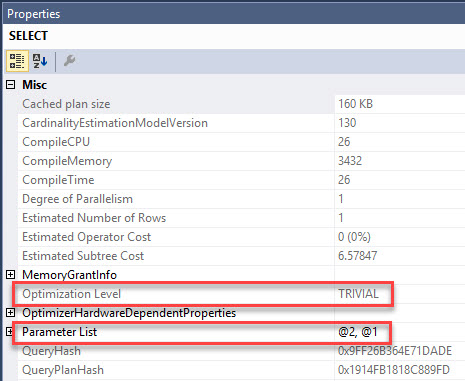
We can see from the graphical execution plan that it’s been Simple Parameterized. SQL Server does this to make plan caching more efficient.

GOLD STARS FOR EVERYONE

With parameters in place rather than literals, the plan is accessible to more queries using the same predicate logic on the Id column.

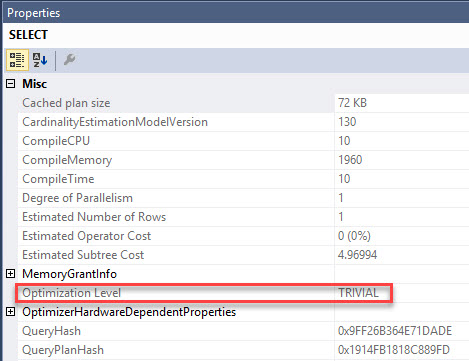
We can also see the plan is Trivial. If you’re following along, hit F4 while the SELECT operator is highlighted in the query plan , and a Properties pane should open up magically on the right side of the screen.

Pallies

Well, I can change that! I know a trick! I learned it from Paul White!

If I add 1 = 1 somewhere in my WHERE clause, I can get around Simple Parameterization and the Trivial plan.

Right?

Heh heh heh, that’ll show you.

Stringy

Oh but, no. The plan is still trivial, and it still runs in about 172ms.

D.R.A.T.

So how do you beat the trivial plan?

You use yet another trick from Paul White.

Dear Paul,

Thanks.

— The rest of us

If you stick a goofy subquery in, the optimizer will regard it with contempt and suspicion, and give it a full pat down.

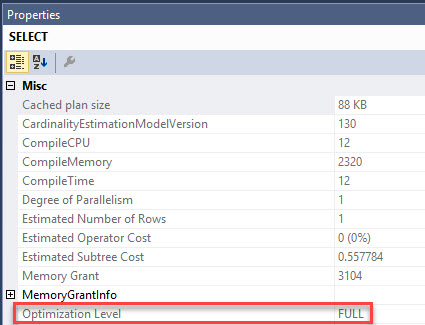
Here’s the plan for this query.

Still not Simple!

And, amazingly, it gets FULL optimization.

Full of what, exactly?

Why is this better?

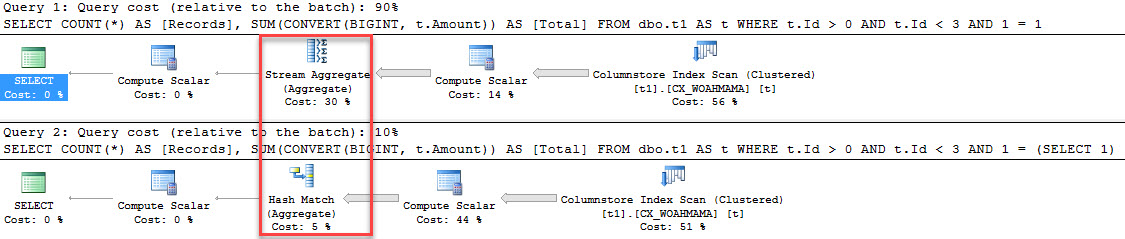
Astute observers may have picked up that the plan changed a little bit. Earlier plans that got Trivial optimization used a Stream Aggregate operator, where the Full optimization plan uses a Hash Match Aggregate.

What’s the deal with that?

Aggregatin’

To make matters more interesting, the Full optimization query finishes in 11ms.

That’s down from 172ms for the Trivial plan.

What else was different?

There’s a really important difference in the two plans.

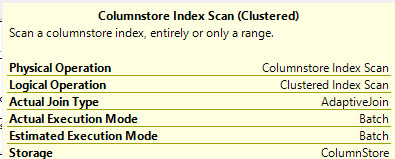
The Trivial plan was run in RowStore execution mode. This is the enemy of ColumnStore indexes.

It’s essentially using them the old fashioned way.

Voices carry

The plan that gets Full optimization runs in Batch execution mode, and this makes everyone very happy.

CAUGHT

This is why sp_BlitzCache will warn you about both Trivial plans, and ColumnStore indexes being executed in RowStore mode.

Because that’s why.

Thanks for reading!


New #SQLPASS Summit Pre-Con: Expert Performance Tuning for SQL Server 2016 & 2017

#SQLPass, Company News
0

Going to the PASS Summit in Seattle this year? Join me & Erik Darling on Tuesday, the day before the conference, at our pre-con session, Expert Performance Tuning for SQL Server 2016 & 2017.

Your job is making SQL Server go faster, but you haven’t been to a performance tuning class since 2016 came out. You’ve heard things have gotten way better with 2016 and 2017, but you haven’t had the chance to dig into the new plan cache tools, DMVs, adaptive joins, and wait stats updates.

In one fun-filled day, Brent Ozar and Erik Darling will future-proof your tuning skills. You’ll learn our most in-depth techniques to tune SQL Server leveraging DMVs, query plans, sp_BlitzCache, and sp_BlitzFirst. You’ll find your server’s bottleneck, identify the right queries to tune, and understand why they’re killing your server. If you bring a laptop with SQL Server 2016 and 120GB free space, you can follow along with us in the Stack Overflow database, too.

Along the way, we’ll give out great prizes for the best questions and run an end-of-day competition to win the best stuff. You’ll go back to the office with free scripts, great ideas, and even a plan to convince the business to upgrade to SQL Server 2016 or 2017 ASAP.

Can’t upgrade to 2016? We’ll even show you memory grant and compilation tracking tricks that work in newer service packs for 2012 and 2014.

This is not an introductory class: you should have 2-3 years of experience with SQL Server, reading execution plans, and working on making your queries go faster.

Attendees will even get a one-year Enterprise (Everything) Bundle – with that, the $495 pre-con pays for itself!

PASS Summit 2017

Head over to PASS.org and register now. During registration, pick our Tuesday pre-con. See you in Seattle!

Update 2017/09/22 – over 300 seats are sold, so if you still wanna join in, move quick before it sells out.

Update 2017/9/25 – we’ve added stretch goals! If we hit 325, 350, 375, or 400 attendees, you’ll win even more training.

Update 2017/10/06 – the pre-con is now sold out! If you couldn’t make it to Seattle or didn’t get your tickets in time, we’re teaching it online, too.


New Class: Data Science Fundamentals with R

Now that SQL Server ships with R, and you can use R code in T-SQL, your managers might be asking, “Hey, can you start doing some analysis and visualization?”

Good news! We’ve got a new class for that.

Come learn the fundamentals of analysis & machine learning in R, and how to operationalize your work. In this live two-day course, we’ll take you from no data science knowledge to understanding the fundamentals and being able to put them into production using SQL Server.

Focusing on using R, you’ll learn how to important exploratory data analysis, build common predictive models, and embed them with best practices.

You won’t be a PhD in Machine Learning by the end of this, but you’ll be comfortable coding in R and understand the basics of data science.

Steph’s Data Science Fundamentals with R

Let’s get together for a live 2-day online class to cover:

  • Basics of R – Understand how R fits into the data science world, get comfortable with the coding environment, and perform basic manipulations of key R objects.
  • Data Manipulation in R – Learn how to read data in from different sources, work with columns and rows, join tables, and more. This is the biggest task in any data science project so we need to do this well.
  • Data Visualization in R – Get practiced with exploring and presenting data in static and interactive graphics to help you and others gain understanding.
  • Machine Learning Fundamentals – Understand the most common types of models, what they’re used for, and how to code them in R. Work through the data science process, from data preparation to sampling to building models to evaluating them.
  • Working with R from SQL Server – Understand how you can work with R in SQL Server and what architectural and operational considerations you should think about. Embed models into SQL Server and learn how to use these models for batch and real-time predictions.

I’ll be attending myself – Lord knows with my math skills, I need it – and I’m excited to announce that our medical school teacher for this course is Steph Locke (@SteffLocke). If you’ve been around the SQL Server data science community at all, you’ve seen Steph around community events. She’s an MVP with a decade of BI and data science experience, and she’s got a ton of blog resources out there too.

Wanna watch a free presentation from Steph? Register for GroupBy.org’s September event, where she’s giving Statistics 101.

The class is October 10-11 online. Read more about it, and use coupon code JoinOnline to save $1,000 if you register in the month of June.

See you there!


New Class: Always On Availability Groups: The Senior DBA’s Field Guide

Availability Groups are all the rage right now, especially since they’re included with SQL Server 2016 Standard Edition. Our Availability Groups blog post category is one of the most popular on the site, and in my 4-day Senior DBA class, people have always been asking for more in-depth coverage of clustering and AGs.

Let’s get together for a live 3-day online class to cover:

Edwin’s Senior DBA Field Guide to AGs
  • Fundamentals of Windows Server Failover Clustering
  • Designing & implementing a cluster for both HA and DR
  • Designing & implementing AGs
  • Leveraging readable secondaries, distributed AGs, and basic AGs
  • Managing & monitoring AGs
  • Troubleshooting when things go wrong

To do it, we’ve partnered with Edwin Sarmiento, a Microsoft Certified Master and MVP out of Canada who I’ve known for years. He’s been cranking out great HA/DR training material – I’ve heard great stuff from readers who have been through his classes.

The class is September 5-7 online. Read more about it, and use coupon code JoinOnline to save $1,000 if you register in the month of June.

See you there!


Ola Hallengren’s Maintenance Scripts are Now on Github.

For some of you, the headline is self-explanatory, and you just want the URL, so here it is: https://github.com/olahallengren/sql-server-maintenance-solution

For the rest of you, here’s what it means.

What are Ola Hallengren’s maintenance scripts?

Ola Hallengren’s maintenance scripts are a widely used replacement for maintenance plans. His backup, integrity check, and index optimization stored procedures are powerful and flexible. The whole thing is open sourced with the MIT License, which means you can use them at work or even bundle them with paid products. (For example, kCura ships a modified version with Relativity.)

Ola’s site has phenomenal documentation, but if you prefer video format, or if you just wanna see & hear Ola himself, here’s his session from the 2014 PASS Summit.

https://www.youtube.com/watch?v=4gt8NOggkJk

I highly recommend his scripts for backups and index maintenance.

Why do I care that they’re on Github?

If you use Ola’s scripts by downloading them from Ola.Hallengren.com, configure them once, and just rely on ’em, then you don’t care. You can keep using them exactly the same way – and for most people, that’s the right answer. Ola’s download process is a piece of cake and his documentation is great.

But 3 kinds of people care:

  1. People who modify the scripts for their own use, but want to sync their versions with Ola’s latest changes
  2. People who want to give their own code to Ola, but want to make it as easy as possible for him to see the differences, and decide whether to put their code in his main branch
  3. People who deploy servers via automation scripts, and want to just fetch Ola’s latest version from Github automatically during deployment

If you’re not in one of those 3 categories, ignore this blog post. You simply don’t need to do anything at all. I can’t emphasize this enough – the stuff I’m about to describe isn’t intuitive or straightforward for most database professionals. Just go on about your day.

But in the Faux PaaS project, we happen to fall in all 3 categories – more about that soon – so Scott Ellis and I asked Ola if he’d be willing to host his scripts in Github. (The way they’re licensed, we could have hosted them ourselves, but I believe Ola should still be the Commander in Chief for these. He’s got the best vision for what makes them successful.)

How do I get started with Github?

Ola’s Github repo

Watch means you’re going to get an email every time he makes a change.

Star is like bookmarking it as one of your favorite Github repos. For example, here’s my starred repos.

Fork means create a copy of Ola’s scripts in your own Github account. It’s kinda like clicking File, Save As, and putting the project in your own home directory. For example, I’ve forked Ola’s repo, so it shows up in my own Github profile, but I’m only linking to it so I can explain how this will look on your own account.

How do I make changes to Ola’s scripts?

The easy way is to simply contact Ola. That works just as well as it ever has – he’s really responsive for a guy who must get a gazillion emails, especially all the thank-you emails that you folks are sending him because you rely on his work every day to save your job. (You DO send him thank-you emails, right? Right?)

Right now, Ola’s using Github as a mirror for his download page. It’s not his main development workflow. However, if you, dear reader, are an excellent open source citizen and you do a great job of submitting clean, easy-to-test pull requests, we might be able to make his life easier with Github.

If you haven’t used Github at first, seriously, stop here. It’s not easy or intuitive. I’m going to explain the big picture only to talk about why it’s tougher than emailing Ola directly.

Github is confusing at first. On Ola’s repo, there’s a “Clone or download” button, and if you install the Github app on your machine, it’ll open and let you edit Ola’s scripts. However, when you try to do submit your changes to Ola, you’ll get permission-denied errors.

In summary, you have to:

  1. Fork Ola’s repo into your own account (so you’re working independently)
  2. Create a branch for the specific change you want to give back
  3. Check your code into your branch in your repo
  4. Submit a pull request back to Ola explaining what you changed, and why

This stuff is way, way harder than it looks. Here’s learning resources to get started:

After you step through this grind – and I’m not gonna lie, it took me months to get vaguely comfortable with Github – you might have a little bit of a grumpy attitude. (I certainly did.)

As a result, when I checked in changes to somebody else’s stuff, my pull requests had an attitude. I had put in so much work that I felt like I was doing the code author a favor. “Look,” I said, “I’ve gone through all this work to give you my code – the least you can do is just click Merge to accept my changes.”

Don’t be that person.

If already you’re a Github pro, great – but then again, you probably stopped at the first line of the post. If you’re new to Github, I just wanted to explain why the rest of us are excited. You don’t need to use Github to be a good DBA. But if you do start down the Github path, keep an upbeat, thankful attitude because the code authors on the other side are doing this in their spare time for the love of the community.

And take a moment to thank Ola.

He’s at ola@hallengren.com, and he’s been making DBAs’ lives easier for almost ten years. Now, he’s taking things to the next level again, and that’s awesome.

And if you run into Ola at a conference, Scott tells me Ola’s a fan of Johnnie Walker Blue Label, so buy him some.


[Video] Office Hours 2017/06/07 (With Transcriptions)

This week, Brent, Erik, and Richie discuss running SQL Server 2017 CTP on Linux, receive side scaling on servers and VMware, query tuning, nested roles vs. assigning roles to users, hierarchical data type, apps and scripts for automating restores, and learning Azure and AWS.

The audio’s kinda rough this week because Brent & Erik were in the same room, using a webcam microphone instead of our usual high-quality headset-type microphones. We feel sorry for our transcriptionist on this one, and we didn’t even try to make edits on it because reading it makes us chuckle as-is.

Here’s the video on YouTube:

You can register to attend next week’s Office Hours, or subscribe to our podcast to listen on the go.

Enjoy the Podcast?

Don’t miss an episode, subscribe via iTunes, Stitcher or RSS.
Leave us a review in iTunes

Office Hours Webcast – 2017-06-10


Have you worked with SQL Server on Linux?

Brent Ozar: Michael says, “have either of you installed or configured SQL Server 2017 CTP, like the community previews of SQL Server 2017; any initial thoughts or impressions?

Erik Darling: There’s a follow up down there, it says [crosstalk]

Brent Ozar: Oh have you done it on Linux, oh god. Oh that changes everything, I liked your original question better.

Erik Darling: I don’t I could hang out with this Linux…

Brent Ozar: So why haven’t you?

Erik Darling: I’m just not a Linux guy. I feel like I would not learn anything that I want to learn by installing SQL Server on Linux. I’ve used Linux before, I’ve installed it. I’ve tried to install Arch Linux once, it didn’t go well. I’m not a fan of just all the weird command line stuff you have to do on Linux. It doesn’t do it for me – not want to spend time fixing that.

Brent Ozar: Richie, how about you? Out of your array of laptops, do you got any VMs that are running Linux or any ones running Linux [inaudible 0:00:57.5]?

Richie Rump: No, no. I mean I’ve got plenty of other stuff in the cloud that are running stuff, but everything that I run, I can run on Windows. And it’s not really about the OS at that point, it’s about the language and the application, for me. And the question, for me, with SQL Server on Linux is, why? Right, is there a reason for you running Linux in SQL Server, this brand new product, essentially, from the ground up? And if the answer is, because that’s the only knowledge we have is Linux, I’d be like, well why not Postgres? Right, why not MySQL, why not MariaDB, right? [crosstalk] it’s alright.


Should I use receive side scaling in VMware?

Brent Ozar: Let’s see here. So next up we’ll take – Gregg says, “what’s the recommendation on enabling receive side scaling on both servers and VM network adapters? This is VMware, I’ve got SQL Server 2008 R2.” If you’re playing around with receive side scaling, make sure you Google for receive side scaling and SQL Server and VMware, because there was a huge bug that performance just died with SQL Server, which I should have remembered on that client the other day. But I don’t know what the symptoms are or anything like that, I just remember reading a blog post and going ooh wee. I’ve never had a problem that I went back and went, this, this is the answer here, you know, receive side scaling. But I would also argue that most of the problems that I run into are either CPU and memory, that they surface bigger that way and it’s easier to play around within – I have no problem with receive side scaling, I just haven’t used it to solve a problem yet.


Why do Excel queries use more resources than SSMS ones?

Brent Ozar: Let’s see, Michaela asks – I’m just going to pronounce your name different every single time, so this time I’ll say Michae-la. Michaela asks, “why do Excel queries seem to use more CPU and memory than the same query in Management Studio?” That’s a great question, which one of you wants to answer it? No, come on… There’s the same post that we – Michaela says, “got my name right”. So it is maybe Michae-la, maybe I got that right.

So my thing would be probably parameter sniffing, so there’s this thing called slow in the app, fast in SSMS. And you know what’s funny, somebody said the other week, why don’t you guys show the blog post up when you’re talking about it? You know, like it made a huge difference with them with Office Hours. And you know what, that’s exactly what I’ll do. So if you search for slow in the app, fast in SSMS; if you want, for bonus points, if you want to spell Earland Sommarskog’s name out, you totally don’t have to. But this thing is an epic monster post, it’s huge, it has a table of contents and it lists out the different things that can cause your query to be slow in one app and then fast in another, and vice versa.

So that’s the place I would start is looking at the two different execution plans on them and see if you can get them to be the same just by blowing the plan cache, using the trick techniques that he shoes inside there. But otherwise it shouldn’t make a difference – no, that’s not true. Okay, so there’s one other scenario where it could make a difference. Let’s say that your Excel user is in, like, Tijuana and you SQL Server is in Alaska, whatever the network pipe is across there, if you’re facing ASYNC network I/O waits, meaning it’s taking a long time to push the data across the…

Erik Darling: It’s asking pretty specifically, why does Excel use more CPU and memory…

Brent Ozar: That’s true. [crosstalk]

Erik Darling: It seems like they’re hitting some sort of resource there. I’d be curious about what they’re actually pulling, because…

Brent Ozar: How many rows…

Erik Darling: Just because I, for a very short time, gave project managers access to SQL Server via Access, because they were incapable of getting it any other way. So I would just set up Access as a data provider to SQL Server and they would be off to their tracks, you know, looking at their various supports and stuff. And writing access queries is awful, so even if you’re hooking it into SQL Server, it’s not fun. So at this point I would just want to know what’s going on with it, why Excel’s the choice for expressing the data.

Brent Ozar: And then if you want to share, if you can share, the execution plan to see what the differences are between the SSMS query and the Excel query, there’s this tool that Richie Rump built, Paste The Plan. So if you go to PasteThePlan.com; Richie, tell them what they’ve won…

Richie Rump: You’ve won a website that will actually format the crap for you. Actually that’s another website, oh my gosh, you just got me all mixed up with the different websites. No, this will actually – you paste in your XML and it will then give you a link, and then with that link you can then share that with other people. I went Statistics Parser on you, oh my gosh.

Brent Ozar: They’re totally different. So it shows the plan – this one’s not a good example because it’s a WHERE condition. [crosstalk]

Richie Rump: Actually, we’ll have a release here pretty soon that will remove that and will format all that cursor-y stuff. It will actually show you a plan for all that.

Brent Ozar: Don’t you go breaking my heart. That sounds amazing; I want this. Let’s see here – oh, and Michaela asks – Michae-la says, “report people love Excel and charts.”

Erik Darling: Ah, there you go.

Brent Ozar: I’m with them on that.

Erik Darling: You use a graph database.

Brent Ozar: Whoa, a graph database, that’s good.


I have a normalization argument with a developer…

Brent Ozar: Wes says, “I’m writing a back end database for a coworker, moving things from Access to SQL Server. I have it in perfect Boyce-Codd normal form and he wants to make changes to break data integrity in normalization. What’s the best way to pushback?” Richie, that’s got you written all over it.

Richie Rump: You could roll up tables for that, I mean, if you’re against it. I’m not one of those guys who says that everything needs to be in perfect third normal form, or fourth or fifth normal form. I’m one you go to third and if your performance or your needs need to back off and de-normalize, then go ahead and de-normalize it. It depends on the scenario that you need. And the normal forms are kind of primarily to save disk space, because disk space was extremely expensive back in the day. We don’t really have that problem now. So if you need to have some sort of roll up tables where or reporting tables that the data is duplicated or you actually, you know, break out into second normal form on some of your tables; I think that’s perfectly fine. You just need to take a look and say, okay, what’s our options between to fix this problem in the application, and if it is, means we de-normalize for speed, then you de-normalize. I mean, that’s just the way I look at it.

Brent Ozar: He might get excited by views too, if there’s – if he wants to pull data out more easily, you can write him some views to do easier queries.

Erik Darling: Lewis Davidson’s book.

Brent Ozar: [crosstalk] We’ll pull that up. Good, keep talking…

Richie Rump: Yeah, the cool thing about Lewis Davidson’s book is that when I was initially reading it, I didn’t know Lewis at all. I had never met him, and I had a question about the book, and so I Tweeted him the question about the book as I was reading it, and we started having a conversation about whatever question I had in real time, over Twitter, while I’m reading the book.

Brent Ozar: And, I got [inaudible 0:08:23.4]. most authors are probably excited to do that too because it’s like, oh my god, someone’s actually reading my book.

Erik Darling: We’ll pay you a fifth [inaudible 0:08:33.0]…

Brent Ozar: Yeah, and hopefully you didn’t tell him you downloaded it off of BitTorrent either. I mean, that’s always heartbreaking for authors.

Richie Rump: Yeah, this guy, Brent Ozar, send me a PDF, I don’t know where I got it from, it’s crazy.

Brent Ozar: Ys, he’s got a few of those in there. The most recent one, the very one on the top of the list is the newest one, you don’t need the older versions.

Erik Darling: I brought the newer version. It’s an interesting read; there’s some good stuff in there about storing names that even I thought was interesting, as someone who used to store a crap-ton of names, never thought of. When I read it, I thought oh it’s so good. But I’m not going to tell you what it is because that would ruin it. No spoilers from me.

Brent Ozar: If you’re the kind of person who likes saying the name Boyce-Codd normal forms, stuff like that, you’ll probably enjoy this book.

Erik Darling: Absolutely.

Richie Rump: There was another book that I used to go to all the time, it was the Data Model Design Patterns, and there was like three volumes of this thing. The cool thing about that book is it had different verticals. So if you were in healthcare, it gave you a bunch of models for that, if you were in certain order taking type stuff, it gave you certain patterns for that. That was pretty awesome; I’ll see if I can find the title of it and I’ll put it into the cat window.

Brent Ozar: There’s a few in there. Oh, there’s a volume three; data model resource book?

Richie Rump: I’ve got to look it up. You know, it’s usually on the top of my head, but because I’m on the spot and the book is in the library, I’ve got to – it’s not here, it’s over there somewhere, behind my wall.

Brent Ozar: behind my wall… Behind door number one…


Can I change passwords in a transaction on multiple servers?

Brent Ozar: J.H. says, “Will creating a stored proc with begin and end, will that rollback a user changing their own password if it succeeds…” Oh my goodness, so you’re trying to do a transaction across multiple servers through linked servers, probably, in one stored proc changing passwords. I can’t imagine that’s going to get honored.

Erik Darling: No, just begin and end [inaudible 0:10:29.4] I think you would have to do some sort of explicit BEGIN TRAN and…

Brent Ozar: Yeah, or even beyond that, what I would do is I’d like create a table of, here’s all the servers I’ve got to change, and not shucks I’m going to need their passwords, yeah it doesn’t work. You know, have you heard of Windows logins?

Erik Darling: Yeah, that would solve a much bigger problem for you.

Brent Ozar: Yeah, or just do all the changes on just one server and take the logins from there and replicate it out to others.

Erik Darling: You know what I would do, I would use a registered server query for that, because that way you can put all the servers that you need to change the password on into a group [inaudible 0:11:06.1] and do all your password changes from one place.

Brent Ozar: I like that.

Erik Darling: I mean, it doesn’t work for a stored procedure, but…

Brent Ozar: Yeah, but if it’s still like changing and enlarging. Yes, I like that a lot. So if you search for either registered servers or a central management server, just lets you execute queries across lots of servers. They may fail on one, it may still fail on one, one times out, whatever, but then at least you’ll know which one it was and you can go retry it.

Erik Darling: Would agent jobs be a good fit for that? Like if you had an agent job that [inaudible 0:11:33.3] to other servers?

Brent Ozar: The problem I worry about is, if someone’s changing their password, this has got to be like a parameter for the stored proc, and if you’re going to retry it, you’re going to write it to a database somewhere and like…

Erik Darling: Yeah, because you’re executing a stored procedure with someone, then that’s in the plan cache maybe and…

Brent Ozar: Cool… [crosstalk]

Erik Darling: Weird stuff could go on with that…

Brent Ozar: Don’t do that. So instead, if you want to sync logins across multiple servers, Robert Davis Sync Logins; Robert Davis wrote the book, literally, on database mirroring, and so he’s got scripts out there on how to copy your logins to a database. And the same trick works for even just standalone SQL Servers.


Should I have nested roles or lots of roles?

Brent Ozar: let’s see what we got next here. Deborah says, “is it better to have nested roles or assign many roles to users?”

Erik Darling: It’s much better to have an empty nest.

Brent Ozar: Yeah, much more peaceful, says the guy with kids [crosstalk]…

Richie Rump: Ten more years they go to college, yeah.

Brent Ozar: You’re going to be so lonely. I don’t think any of us have an opinion on that one.

Erik Darling: No, we don’t have a lot of security opinions in general.

Richie Rump: Do security, that’s my opinion, do security.

Brent Ozar: Someone else do security. Look Securing SQL Server by Denny Cherry. It’s now, I think, in its third edition. So just check to make sure you’re getting the most recent version – yeah, third edition. Normally I say SQL Server security book and people are like, whoa. It’s great, really well written, it’s fun to read, it’s a really enjoyable digest for reading. And if you know Denny Cherry, you’ll think that someone else probably wrote it, because there’s not a typo in the book as far as I remember seeing. It’s really nice and cleanly spelled. I kid, because I love Denny, he’s wonderful.

Richie Rump: No, you kid because it’s kind of true.

Brent Ozar: It is completely true, yes. When Denny said his wedding vows to his wife, he couldn’t even get I do correctly. It’s like yeah….

Erik Darling: Do we, do I?


Have you used the hierarchical data type?

Brent Ozar: Wes Palmer says, “have you ever used the hierarchical data type, what are your views on it?” We just had a client question about that…

Erik Darling: Yeah, it’s okay, there are…

Brent Ozar: Gleaming endorsement.

Erik Darling: It’s okay, it does solve the hierarchical problem pretty well. There are some great articles out there that, I think, are much better choices. Jeff Moden, over on SQL Server Central, has some cool hierarchy on steroids articles, where he goes through how to calculate left and right bowers and traverse trees. And then Adam Machanic has a really good one, using CTEs and some crazy CLR code [inaudible 0:14:27.9] and that was a good read. The funny thing about that article was, one of my first blog posts when I was on your site was about – just a simple thing about common table expressions and how if you join a copy table expression it re-executes the syntax, blah, blah, blah. There was a comment on it from Adam, because this thing, this monster dropped like the same day or the day after or the day before, and he left a comment on my post, like I guess we both blogged about CTEs this week, and I was like yes, I guess…

Brent Ozar: I was so proud. And then he does the big monster post, of course.

Erik Darling: Yes, and so he does a lot of cool stuff. And [inaudible 0:15:10.6] kind of thing with the same author, the T-SQL querying book [crosstalk] there’s a pretty good chunk of space dedicated to hierarchies in there as well. So those are the – I would explore those choices before committing to the hierarchy ID type, just because, you know, it can be a little bit more clean and you don’t have to have all those crazy functions in there. I’ve seen, not CLR waits, but weird sleep task waits that can kind of dominate query execution when you’re waiting on those hierarchy IDs parent of, and whatever you calculate and you come back and forth.

Brent Ozar: Just saw that…

Richie Rump: Yeah, with everything, I think I say this ever week, but test it. You know, just go ahead, try one, try the other, test it, write a CTE. I’ve written a ton of recursive CTEs; if you know what you’re doing, you can get it to be fairly fast. Just go ahead and try it, test it and see what works in your environment.

Erik Darling: The one thing that I will say is cool about the hierarchy ID type is that the functions that you can use on that to, like, calculate [crosstalk] you can make computed columns from those and index those. So you can help yourself out a little bit in those situations. Where that’s a little bit harder to do, like persist, with a recursive CTE.

Richie Rump: And it really depends what you’re doing in a hierarchy. You could actually pre-build your trees and kind of do that, if you’re not going to touch it very much. But if your trees are always, kind of, moving in flex and if you kind of want to go from one node down to another one, or move up. There’s a ton of stuff that you could do with the tree, but do you need to do those things with the tree is really the question.

Erik Darling: Yeah, I played around with it a little bit just using the stack overflow database, because in the post table [crosstalk] and then the comments table, you can track that back. So you can make these kind of cool lists. You know, here’s like the initial question, here are answers to the question, here are comments to the answers and – so you can do kind of cool stuff like that.

Brent Ozar: Sum up like total score for a question [crosstalk]


Brent Ozar: let’s see, Jacqui says, “I bought your online everything classes and looking forward to getting to review them, hope to learn a lot.” Awesome, cool, I hope you learn a lot as well. Erik’s been adding performance classes too, and added some new T-SQL classes.

Erik Darling: Yeah, I’m going to start rolling out some of the triage-y stuff. [crosstalk] Yeah, closer to DBA stuff and performance stuff. Sort of how some DBA fundamentals work.

James says, “your T-SQL level up, level two was awesome.”

Erik Darling: Oh thanks, you’re the one who watched it [crosstalk] You know, I didn’t give my mom a log in because I didn’t want her to be that one view. So thank you for being the one.


Any good apps to automate database restores for testing?

Brent Ozar: Dorian says, “are there any good apps or scripts that can automate database restores for testing and development. [crosstalk]

Erik Darling: Yeah, it’s awesome for that, they have a crap-ton of automation built in. they even have a really cool one that Jason [inaudible 0:18:27.8] was telling us about at DBA Days, where they automate the backup restore, CHECKDB and drop of databases to a secondary server, if you want to get really crazy and offload your CHECKDB somewhere else. That is a really cool [problem 0:18:41.5] with a lot of good stuff built into it.

Brent Ozar: People often say, you know, like does anyone still buy backup utilities, you know, what’s the use now that compression is in the product. Stuff like that, adaptive compression, wizards for log shipping are better and they have cool extended stored procedures you can call for log shipping; some neat stuff.

Erik Darling: They also – the stuff that always blows me away about Litespeed though is, not to get too product endorse-y, you can do object double restores, you can restore a table, they’re really good at reading – you can read through the logs, to a certain point, behind the transaction you want. So like, if you have log backups every 15 minutes, you need to restore to a point within a log backup, it makes it dead simple to bring you to like the seven, eight, nine minute mark to a certain transaction. Like the stuff that the DBA [inaudible 0:19:31.5] if you had to do that on your own at 3am, you would be [inaudible 0:19:36.5].

Richie Rump: I have a question about that question. Why are we restoring production to test? Why are we restoring to dev? Our dev and test environments should be something completely different so that the developers can test, not just the 80% case that is typically in production, but the case that is kind of out there that usually doesn’t happen when I got data, kind of, all messed up. So our test databases need to be different than production and our development databases need to be different than test. So I’ve never been a fan of just restoring production into test and calling that a good test, because typically, you’re going to get the same thing in production and not the oddball whack-a-do problems that we need to be testing in test.

Erik Darling: But production’s a good thing to base that on. If you restore production data, you can then mangle that in some way to get your edged cases in, or you can, you know, do some scrubbing.

Brent Ozar: You can sell it to the Chinese…

Erik Darling: Yeah, Russians…

Richie Rump: But at that point, put it into a stage environment and test your deployment that way. [crosstalk] You should have certain test cases, be testing out your tests in a test environment.

Brent Ozar: Yeah [inaudible 0:20:42.4] You should, dear readers, also know that we will often advocate for things we don’t do here. So like, I think our dev databases actually are different here; in this case, they’re all with Stack Overflow. Ooh, the other thing I was going to say was – mainly on CHECKDB – if you’re the kind of shop where you can’t buy tools and you’re doing the restores in order to offload CHECKDB, the Minion Ware folks have this free tool out called Minion CHECKDB. And this is so neat to me because they built in all this load balancing, and they’ve also built in a popup that I can’t seem to close. Okay hold on [crosstalk] there we go. So this thing will let you, kind of, round robin your CHECKDBs. If you only have one server to do restores, it will restore different production boxes each day. This isn’t the kind of, like Litespeed has a GUI, click your things and a wizard. This isn’t that; you’re going to be 100% table-driven here, so it’s just more work, but it has a lot of cool capabilities.


Should I start learning Azure?

Brent Ozar: Alright, let’s see, next one, Ronnie says, “based on your experience in the field, do you think it’s necessary to start learning Azure or support cloud databases to the backups restores? Is that the direction of the big money jobs or is that a specialty skill set?” Well, we should do our round robin, so…

Erik Darling: You should learn R, I don’t know.

Brent Ozar: Oh yeah, sure.

Erik Darling: No, it’s – I think it’s always worth it to know this stuff and be prepared if, you know, someone wants you to start doing it. But would I make that my primary job focus? Probably not, you know, just looking at specifically Azure adoption rates. I’m not sure that that’s where, like, the big money – you could probably find some niche work in there. I don’t think you’re going to find, you know, the end of your career in it.

Brent Ozar: And so we should explain that, because other people out there are probably like is everyone doing Azure? So the work that you do out of there, what percentage of the work is like normal [inaudible 0:22:41.7] versus Azure versus AWS?

Erik Darling: Oh I think I’ve worked on maybe one or two Azure boxes in my time consulting with you. I work on a ton of AWS boxes. I haven’t hit a Google Cloud box yet aside from when we did the white paper work, but the majority is on-prem and on-prem virtualized.

Brent Ozar: Richie, how about you?

Richie Rump: I’ve kind of never been a fan of learning any knowledge without an understanding on where you want to go with it, right. So if you don’t have a plan of what I’m going to do with this cloud knowledge, then it’s probably going to be wasted time and wasted knowledge. I’ve always preferred a, kind of, multi-step approach to learning knowledge. I want to be able to know enough about the cloud so that I can have an intelligent conversation about it and maybe not necessarily how to implement it. And if I get into a gig where I need to implement it, then I’m going to take that next step and know a little bit more on how it actually works and maybe how to implement it and how – what the nuts and bolts are. And then maybe after that, I take another step to where I’m actually teaching about it, where I’m really intimate with the product and I can kind of show others how to do it.

The second part of your question is, well is the jobs going to the cloud? Kind of, maybe. I think a lot of companies are struggling with that question, especially, you know, we’ve got CIOs saying, we’ve got to go to cloud because we’re going to save all this money; and that’s, kind of, really out for debate about what you’re trying to do in the cloud. I think those companies that are, you know, doing Greenfield development in the cloud are saving money, and those that are putting Legacy stuff into the cloud are probably not saving as much. That’s just kind of my gut feeling for it. And the whole Azure versus AWS thing, I try to be agnostic, but I do a ton of Amazon work here, and I kind of really learned to love it, and as a Microsoft geek. And 20 years of my career has all been at Microsoft, I kind of feel bad about that, but then I yell at the Microsoft PMs in Azure and I just say make it better, you know. Because this is what AWS does, and now make this better; and it kind of makes me feel good that I’ve actually, you know, unloaded stuff off my chest and say Microsoft, you need to be more like AWS because I don’t know what Azure does, because it does like four or five different things, but it’s the exact same thing.

Erik Darling: One other thing you might run into is if you – say you spend the next three to six months and you learn a whole bunch of Azure stuff, and then you put it down and you come back to it in a year, year and a half, or even six months later, a lot of what you know might not be all that relevant. It probably won’t be as true as it was when you were using it, you know, it just changes so drastic.

Richie Rump: No, it’s totally going to change, and here’s a perfect example. So Lambda when it was first released, and it was only released what, two years ago, not even that?

Brent Ozar: [inaudible 0:25:28.5].

Richie Rump: Yeah, so when it was first released, there was a certain way you needed to go and end a function, right, and the way that you would end a function, you had to call certain things and it’s done. And that is still in the documentation, because it technically still works, but now they have a new way to do it. Essentially you call a callback and it’s done, and that old way is now essentially saying we’re deprecating it. It works but at some point, we’re going to pull it. And, you know, if you kind of knew that and then you came to it now and you start writing this old way, then a few months later they actually pull it out of the product, then you’re like – well one, what happened? And two, how does it actually work now? And three, oh boy, I was way behind the curve. Or even worse, you come back to it a year later and it doesn’t even work [crosstalk]

Erik Darling: Then their apps stop working because you wrote the function.

Richie Rump: It’s so crazy on how the cloud is just constantly changing; it is maddening. Then you get to an environment like Javascript that is also constantly changing as well, right. So moving target on moving target, and you know, trying to say that this is where we’re going to be for the next five, ten years, it’s not going to happen. This isn’t like we’re writing Cobalt code and it’s not going to change for 30 years, it’s a whole different animal.

Brent Ozar: Yeah, I would concur. Especially that you don’t want to waste your time learning something you’re not using. Literally, we wrote the Google white papers, they’re out of date within three or four months, yes, things start changing. I do either an Amazon or an Azure blog post about all the stuff around backup speeds. It’s going to be out of ate within a short number, a couple months, so just change [crosstalk]

Erik Darling: Like a lot of the stuff I wrote in the perf white paper is now not exactly true anymore because AD couple memory and CPUs from being tied together. Like usually have X amount of GBs per CPU and it has to even it out and we actually need more CPUs and more RAM and stuff. I should go back and revisit…

Brent Ozar: You asked one thing that was interesting, is that the direction of the big money jobs? It’s always supply and demand. So when there’s a huge demand and low supply, all of a sudden, those people will be raking in the big bucks, but it may not be for a long period of time. So for example, R and Python right now, there’s a huge demand, there’s very little supply. Those people are raking in the bucks right now. That will change as more R and Python people just simply come out of college, because those technologies are free.

Richie Rump: I mean that was true with Hadoop too right, a couple of years ago? And now, where’s Hadoop? I mean, you don’t hear about it anymore.

Brent Ozar: We blogged about it, like Jeremiah was doing Hadoop work, and really quickly realized that, oh my god, all these college kids are coming in and they’re making, you know, $25-$30 an hour, why would you want to compete with that? It’s a bad direction. Alright, well thanks everybody for hanging out with us this week at Office Hours, and we will see you guys next week. Adios.


Hyper-V: Getting Your Host And Guest Connected

Because I always forget stuff like this

I have a confession to make, dear readers:

I am a horrible VM admin.

I’m also not great at networking.

When I go to set up a VM to do something like install SQL vNext, I want to be able to talk to it.

Why bother?

Well, SSMS is no longer part of the SQL install. I don’t really want to copy another 800 MB file over to my VM and install it.

I’m also a devoted fan of Red Gate’s SQL Prompt, because I’m lazy and forgetful. I only have the one license, and I do my very best to respect that by not installing it (even temporarily) in more than one place.

And, you know, I should also probably practice what I preach about not RDPing into a server and running SSMS. That’s not very nice. Not very nice at all.

ICU TCP

So how does one get SSMS connectivity between a Hyper-V host and guest?

The magic of magic numbers. And by magic numbers, I mean IP addresses.

In your Hyper-V Manager, click on the Virtual Switch Manager

Switch Hitter

You’ll want to create an Internal network

Internal Affairs

Next, in your VM guest settings, you’ll want to assign it to use the internal network.

Doot doot

Now, on your host, head on into the Networking Control Panel where your connections are listed. You should have a new one for the Internal network you created in Hyper-V

Iconic

Get the properties of that adapter, and go into the IPV4 properties. I set mine to a generic subnet, and a random 192.168.X.X IP address. Just be careful here if you have hard coded IPs sitting around somewhere.

IP Freely

Now when you start up your VM guest, you’ll want to repeat those steps and assign it the same subnet and a different random IP address.

IP Green

Et Voila

You may have to kill Windows Firewall, or add in the appropriate exceptions on your Guest and Host to get things working in both directions. But this should be the end of it, and now you should be able to connect SSMS directly to your Guest from your Host.

Thanks for reading!


4 DBA Resume Anti-Patterns

Every now and then, clients ask me to interview candidates for their open DBA positions. I get to see a lot of resumes, and there are a few warning signs that pop up regularly.

1. The Keyword Encyclopedia. I get it: you’ve opened SSMS before, and you clicked on all the options and wizards, and you think that makes you qualified to use ’em. However, let’s do some quick math: take the number of weeks you’ve been at this job, and divide it by the number of features you mention. If you’ve been at a job for a year, and you’ve mentioned 50 features, I’m going to bet you don’t really know any of them deeply.

2. Red Fuzzy Underlines. Sure, SQL Server keywords don’t show up in all dictionaries, so doing a spell check on your resume can be an exercise in clicking the add-to-dictionary button. Trust me, it’s worth the time. It’s hard to overcome the manager’s skepticism when you don’t spell or capitalize SQL Server correctly.

3. Homer’s Odyssey. Just because you’ve been doing this for ten years doesn’t mean you have to write an epic poem about your journey. Get your resume down to 1-2 pages. While you may still have the battle scars from that DTS package implementation in 2003, you don’t need to wear them with pride on your resume.

4. Complete Lack of Soul. You’re going up against dozens of other candidates who are all typing the same exact keywords and job duties into their resume. Bring a little fun and personality in. If you’re going to put an objective or mission statement at the top, make it warm and inviting. Make the interviewer want to bring you in just to meet the fun person behind the keywords.

If you recognize these anti-patterns in your resume, just take a quick step back and ask, “What specific tasks do I love doing? What parts of this job am I in love with?” And then figure out how to communicate that level of excitement about those tasks.


Automated Tuning And The Future Of Performance Tuners

Before you get too excited

This isn’t a dive into any of the new automated tuning features of SQL Server 2017.

I’m interested in them because Microsoft thinks they can put us out of business with them, but…

Fat chance.

See, a lot of the automated performance tuning features assume you EVER HAD GOOD PERFORMANCE IN THE FIRST PLACE.

I mean, sure, it may have seemed okay when your database was 5, 10, or 20 GB, but now it’s 200 GB and things have just been getting worse for months. Or years.

These features are cool, but they don’t go in and fix your crappy code, your wrong settings, or get you off that VM with 8 GB of RAM that your VM Admin swears by the grace of his body pillow girlfriend is all a SQL Server will ever need.

After all, he read a book once.

Best of the worst

Our typical customer is worried about…

Keeping the lights on:

  • If they’re on the right hardware
  • If they can or should move to the cloud
  • If they’re meeting RPO/RTO
  • If their HA/DR strategy is correct

Decoding hieroglyphics:

  • How do I validate server settings?
  • How do I figure out what my problems are?
  • How do I find my worst queries?
  • How do I tune my indexes?
  • Bonus points: How do I interpret output from your free scripts?

Some customers are more savvy, have pains around parameter sniffing that they’ve identified, and want help with those. They’re tired of restarting the server, freeing the proc cache, or recompiling queries. But the thing is, there’s usually so much other stuff that gets uncovered, parameter sniffing getting fixed is almost a side effect of other changes.

Some examples:

  • An index adjustment took the bad plan choice away
  • It wasn’t parameter sniffing, it was a scalar function
  • There was a blocking problem
  • Non-SARGable predicates buried four nested views deep

The future

So, while I’m totally keen on automated performance tuning, and SQL Server 2017 being able to compare and correct bad plan choices, I’m still not worried about my job.

We still talk to people on 2008-2012 who are locked in because of vendor requirements, or other reasons, who just aren’t going to see those new features in the near future.

And plus, they still assume performance was good in the first place.

Thanks for reading!


Introducing sp_BlitzQueryStore

Oh, so you’re the one

While SQL Server 2016 adoption is still pretty low, and 2017 still quite isn’t out yet, that’s no reason to not invest a few days of dev time into a stored procedure that is only usable by the smallest portion of SQL Server users. Right?

Look, someone around here has to be future-proofing things.

With that in mind

I set out to write a stored procedure that does for Query Store (BOL) what sp_BlitzCache does for the plan cache, but with a new approach. sp_BlitzCache is glorious, don’t get me wrong! You ask it a question by giving it a sort order, and it gives you all the stuff in your plan cache ordered by that metric.

But, the plan cache is a fickle flower. Prone to clearing for various reasons, and often riddled with inconsequential items. I’m not saying Query Store isn’t also riddled with inconsequential items, but we can hopefully just do a bit more to avoid them.

I also didn’t want to reinvent the wheel – after all, there’s a GUI for Query Store. It has built in reports. I don’t wanna rewrite someone else’s query and dump it into a table and blah blah blah. That’s not fun for me, and it’s not helpful to you.

What we look for when we examine slow servers

When we come in to look at a SQL Server that’s in trouble, we wanna know what was going on when things were bad.

When you run sp_BlitzQueryStore, it basically:

  • Looks at your workloads over the last 7 days (that’s configurable)
  • Finds the highest resource consuming periods of time
  • Finds the top 3 queries that used the most of that resource in that time (the top is configurable)

So, if your highest CPU usage was on 2017-05-31 between noon and 3pm, we’ll grab the top three queries that used CPU, then we’ll repeat that for all the other metrics we grab. As of now, that’s: duration, cpu, logical reads, physical reads, writes, memory, and rows returned. By sampling each of those, we can get a pretty well-rounded view of the worst stuff in your Query Store data.

After we have a list of plans to go after, we circle back to grab additional information. Doing this all at once wasn’t very efficient, especially considering the breadth of data available in Query Store, plus collecting query plans and text. Also a departure from sp_BlitzCache, we’re no longer using one impossibly wide table to store everything. Data is reasonably normalized across temp tables that have specific purposes. Weird, huh?

Parameters you pass in

Right now, these are configurable parameters:

  • @DatabaseName NVARCHAR(128) — Database you want to look at Query Store for
  • @Top INT — How many plans per metric you want to bring back
  • @StartDate DATETIME2 — Start range of data to examine (if NULL, will go back seven days
  • @EndDate DATETIME2 — End range of data to examine (if NULL, will default to today’s date, though this changes if @StartDate isn’t NULL)
  • @MinimumExecutionCount INT — Minimum number of executions a query must have before being analyzed
  • @DurationFilter DECIMAL(38,4) — Minimum length in seconds a query has to run for before being analyzed
  • @StoredProcName NVARCHAR(128) — If you want to look for a particular stored procedure
  • @Failed BIT — If you want to look for only failed queries
  • @ExportToExcel BIT — Backwards compatibility, skips the generalized warnings, doesn’t display query plan xml, and cleans/truncates query text
  • @HideSummary BIT — Hides the general warnings table
  • @SkipXML BIT — Skips XML analysis entirely, just returns unanalyzed plans
  • @Debug BIT — Prints out any dynamic SQL used for debugging

Example calls

--Debug
EXEC sp_BlitzQueryStore @DatabaseName = 'StackOverflow', @Debug = 1

--Get the top 1
EXEC sp_BlitzQueryStore @DatabaseName = 'StackOverflow', @Top = 1, @Debug = 1

--Use a StartDate
EXEC sp_BlitzQueryStore @DatabaseName = 'StackOverflow', @Top = 1, @StartDate = '20170527'

--Use an EndDate
EXEC sp_BlitzQueryStore @DatabaseName = 'StackOverflow', @Top = 1, @EndDate = '20170527'

--Use Both
EXEC sp_BlitzQueryStore @DatabaseName = 'StackOverflow', @Top = 1, @StartDate = '20170526', @EndDate = '20170527'

--Set a minimum execution count
EXEC sp_BlitzQueryStore @DatabaseName = 'StackOverflow', @Top = 1, @MinimumExecutionCount = 10

Set a duration minimum
EXEC sp_BlitzQueryStore @DatabaseName = 'StackOverflow', @Top = 1, @DurationFilter = 5

--Look for a stored procedure name (that doesn't exist!)
EXEC sp_BlitzQueryStore @DatabaseName = 'StackOverflow', @Top = 1, @StoredProcName = 'blah'

--Look for a stored procedure name that does (at least On My Computer®)
EXEC sp_BlitzQueryStore @DatabaseName = 'StackOverflow', @Top = 1, @StoredProcName = 'UserReportExtended'

--Look for failed queries
EXEC sp_BlitzQueryStore @DatabaseName = 'StackOverflow', @Top = 1, @Failed = 1

For each of these, I’ve set @Top to 1, but you can change it to whatever. I’d ask you to be reasonable (say, less than 10), unless you’re skipping XML processing; it can be time consuming. Though we do de-duplicate collected plan_ids to reduce overhead, the higher number you use here does tend to increase the chances that we’ll have more distict plans.

What sp_BlitzQueryStore passes out

Maybe that was a bad choice of words. Anyhoo, here are some example of what output looks like, with some explanation.

I wanna take you to the Query Store

No Blitz proc would be complete without some thoughtful (hey, we try) analysis of collected data. This should look familiar to you if you’ve used sp_BlitzCache:

You’re a superstar

We have the database examined, query cost, query text, if it was a statement, or if it came from a stored proc or function, the query plan, any warnings we generated, and new here is the pattern column.

We also use similar routines to sp_BlitzCache to examine plan XML for actionable items. This is still limited to data in cached plans, but hey. It’s not like you’re used to better. Tee-hee.

One new feature in sp_BlitzQuery store is a column called ‘parameter_sniffing_symptoms’. Since we have fairly robust historical data about past runs of a query, we go and look for sharp discrepancies across a range of metrics, and given enough variation, we’ll list things out for you. This hits all the metrics we have data for (cpu, duration, et al.)

We’ll give you back a list of queries in a very familiar output table with all the analysis stuff, and important metrics. We also give you a generalized warnings table, just like in sp_BlitzCache, though with some new items in it.

Remember when I said we de-duplicate plan_ids? Before we do that, we set up a csv list of all the patterns a plan popped up in, since it’s possible that a query was running during more than one top metric. Also new is the parameter sniffing symptoms column. This is a csv list of all the large deviations in execution metrics, so you know how different parameters might be causing trouble.

Swipe right for more detailed metrics

We also show you a bunch of collected metrics from the query store views. These should’t need much explanation.

Yeehaw!

One thing to keep in mind is that data in Query Store is noted in microseconds, 8k pages, and KB. We standardize that to milliseconds and MB across the board. That makes things a bit easier for you human beings to consume.

If you’re on 2017 (or if the wait stats DMV here gets back ported to 2016), we’ll show you the top 3 wait stats for each query if they’re significant. Right now significant means >= 5ms. Maybe that’ll change, or be configurable in the future. Let’s see how this thing takes off first.

If you’re on a supported version (right now, 2017) this is what the top three waits column will look like. You’ll have to forgive this screenshot being boring, I haven’t done a lot on this particular VM lately. I promise, it’ll look snazzier when you do it 🙂

It turns out MSTVFs don’t de-duplicate well.

Introduce yourself

That’s a quick introduction post to our newest stored procedure. It’s available in our First Reponder Kit, which is still free. Please give it a shot and send me any feedback. This is v1, so the water is pretty blue for suggestions.

Thanks for reading!


[Video] Office Hours 2017/05/31 (With Transcriptions)

This week, Brent and Richie discuss sp_Blitz Backups, change history tracking, exams and certifications, using Azure for DR-only, which version of SQL server to use for a new DB, adding additional data files, load balancing, trace flag 2371, dealing with reporting services, and much more.

Here’s the video on YouTube:

You can register to attend next week’s Office Hours, or subscribe to our podcast to listen on the go.

Enjoy the Podcast?

Don’t miss an episode, subscribe via iTunes, Stitcher or RSS.
Leave us a review in iTunes

Office Hours Webcast – 2017-05-31


Brent Ozar: Wesley says, “Does Brent Ozar Unlimited sell Brent Ozar Unlimited coffee mugs? I need people to know who my DBAs are.” We do, but the thing is, they cost $4,000 and they come with a free training course. So you just have to come to one of our in-person classes and that’s when we give them away.

Richie Rump: Yeah, I tell people it cost me my soul, so, there you go…

Brent Ozar: But you got like half a dozen of them, so…

Richie Rump: I got four, I got four for my soul. And I’m good with that, right, because I got one for each of us here, you know, I don’t need anymore, there’s always one available, we’re good.

Brent Ozar: That’s my entire – I have an office bathroom and the entire bathroom is completely full of swag, you know, just stuff in boxes that we… Unbelievable.

Richie Rump: I have to share – my office bathroom is right that way, I’m looking at it right now. It hasn’t been updated since 1969, and I told the girls, I am not fixing this bathroom until you learn how to take care of the bathroom because they just throw stuff everywhere. They’re girls, you know, it’s already messed up, why not. I’m like, well you’re going to have to deal with it, not me, so hey, have fun.

Brent Ozar: Don says, “you should make the coffee cups available to those of us who purchased the online training.” The problem is taxes. As soon as we deal with taxes and shipping, things get really, really ugly.

Richie Rump: So here’s the thing, don’t call it a coffee cup, this is tea. This is Earl Grey, it’s not coffee.

Brent Ozar: Earl Grey hot, I would assume?

Richie Rump: Tea, Earl Grey hot, this is loose leaf, I think it’s Teavana that I’m drinking today.

Brent Ozar: Ooh very nice, yes.

Richie Rump: Yeah, I bought a big old bag of that sucker.


Brent Ozar: Let’s see here, we’ve got all kinds of fun questions. Clark says, “in SQL Server vNext, which is officially called 2017 now, have you guys used Python and can it be used for SSIS type things?” Well, Richie, I would ask you. So if you were going to do like data sciencey work, Python, anything, SSIS to get data in and out, would you run it inside of SQL Server? Or what would you do?

Richie Rump: I’d try it. I mean, if my data’s already there, I mean, it’s already stood up, why not, but typically we wouldn’t do that in SQL Server because we haven’t had the tools to do it. I guess, now that Python and R are in it, maybe we could do some more stuff. And frankly, I doubt that SSIS will have that. Think of SSIS as a completely different product. It’s under the SQL Server banner but it’s something completely different than the engine stuff. So I’m assuming you can’t, but hey, you got c# in there, so you know, have at it at that, buddy.


Brent Ozar: James says, “sp_BlitzBackups is awesome, I love it because I can show my boss the risks the business is taking.” That’s exactly why we wrote it. We have a project where the client’s building availability groups up in the cloud and we just want to be able to monitor how long it’s going to take to restore those databases. It’s tons of fun if you guys haven’t seen sp_BlitzBackups; Erik put a ton of work into that. And he has another brand new one coming out next week, sp_QueryStore, where he analyzes your SQL Server 2016’s throughput, like looks for your worst performing period of time in the last seven days and then finds the queries that were causing that workload problem, all by just running a stored procedure; it’s amazing.


Brent Ozar: Wes Palmer asks, “I’m trying to log DML actions and throw them into and audit table using triggers. Is there a better way to log those instead of using triggers?” Have you had to do any of that work, like history tracking work of whenever people make changes?

Richie Rump: Yes, and when I had to go and redo it I created history tables for it. So as we loaded the data, the schema automatically handled all that. So we had from and through dates pretty much through everything, so I didn’t have to sit there and throw rows out or anything like that. I guess, if you can’t redesign your whole entire application, I guess you can go ahead and use some of that new-fandangled stuff that they use for odd history stuff. I haven’t used it yet but…

Brent Ozar: [crosstalk] tables…

Richie Rump: Yeah, that’s an option now.

Brent Ozar: Damn, see I forgot all about that. Yeah, before temporal tables wither you had to change the app or else you used triggers, but temporal tables, that’s a great point; which are in ever version or every edition of SQL Server now. I mean everything’s included in standard edition since Service Pack 1. So that’s a really cool idea.

Richie Rump: Yeah, it’s funny me talking about SQL Server knowing that I haven’t really done much with it, you know, in the past year or so. And it’s like hey, let’s talk about Postgres, alright, let’s do that.

Brent Ozar: As you’ve worked with Postgres, what has been your most interesting difference between that and SQL Server?

Richie Rump: You know, I haven’t got into it too deeply yet, and it’s really the programming model of it, the PG/PLSQL is different, as well as, you know – I’m doing a lot of, hey this is SQL Server and then how we would move that data over into Postgres and then how we would transform the data types and do all that other stuff. There’s a lot going on in Postgres and kind of, there’s now – sometimes there’s not a one to one mapping, you’ve kind of got to figure it out, but there’s a lot going on from a programmatic side in Postgres that you just kind of have to rethink yourself. And from a SQL Server perspective, it was like, oh, okay no that’s good, I like that. I’d love to start doing some more perf testing on the Postgres side to really start seeing how it would work, but I’m not there yet, you know, we’re in our infancies of just getting, taking a really hard look at Postgres and Postgres in the cloud and seeing what perf is and all that fun stuff.

Brent Ozar: Getting rows in and taking rows out.

Richie Rump: Yeah, we’re just trying to get rows in, we’ll figure that out.

Brent Ozar: Expert level.


Brent Ozar: Let’s see here, John says, “we have high tempdb average write stalls of about 1.4 seconds. I recently changed tempdb from one file to multiple files, when it was one file it was lower.” Well really think of this as random versus sequential activity. The more files that you add, the more random your drive access can become. A couple of things I would think about is first, make sure you’re on a recent patch level for 2012 or 2014. There were improvements in there where SQL Server’s less eager to write to disk. Next thing I would look at is — get as much RAM as you can on the box, the storage, whether it’s 600 milliseconds or 1.4 seconds sucks, I mean that’s bad either way. So if you can keep it up in RAM you’re going to be able to avoid that. It doesn’t fix everything with tempdb latency, but it’s just going to help, and I say that – so like if you’re at 64GB of RAM, now’s the time to start looking higher. And then also local solid state, local solid state makes this problem much less of a big deal. With Intel’s PCI-express cards these days, 2TB is 1,000 bucks, so it’s much more cost-effective than it has been in the past.


Brent Ozar: Wesley Crocket says that, “the MCSA in SQL Server 2016 is an Azure marketing certificate.” I felt that way about Microsoft certs for a long time, since they discontinued the master. We have this discussion every now and then, we actually lost our Microsoft partner certification because not enough of us here have SQL Server certs, or any kind of certs, because they’re just not worth anything these days. I mean you nailed it when you said it’s a marketing certification for Azure, that’s really it’s hey, we brought out this shiny hammer, show us all the ways you would use this shiny hammer. I’m like, first off, that’s not a hammer, that’s a martini glass and you need to stop banging nails with that, it’s the wrong thing.

Richie Rump: Yeah, my favorite one is when I took the 2008 exam, SQL Server 2008 exam, it was like XML all the time, the answer was always XML. And it’s like what is going on here, because, in reality, XML is kind of crappy, what is this? But it’s all about hey, this is our new feature and we want you to know it.

Brent Ozar: It’s not related to what data people do, it’s related to what people want you to know. If I designed a certificate, which we’re never going to do because it’s a money-losing mess, but if we designed a certificate, it would be around things like can you backup, can you secure the database, can you make a query go fast, can you troubleshoot an outage when it happens. But none of that is what sells certifications or moves SQL Server as a product, so they just don’t put questions in like that.

Richie Rump: Yeah, speaking of stuff like that, that’s our – my favorite part of our classes is where we say, hey here’s a query, now what would you do to make it fast, and everyone kind of looks at each other like, he’s serious, right? Okay, we’ll figure it out. And so everyone has their answers and they, well this is what I came up with, what did you – and we had this great conversation about why this index would work, why this one’s better and all that, that’s a conversation you just don’t get very much.

Brent Ozar: And then – so I’m taking it to the next level for – I just sent out a survey to like 10,000 of our email subscribers to go, alright so for a query and index tuning class, how about a class where each person gets their own VM and it’s got a workload already running on it and I’m going to give you say one hour to figure out what the problem is and how to fix it, and then you gauge how many batch requests a second you’re getting afterwards. Then we’re going to get back together and I’m going to show you on my VM what I did in the span of that same amount of time. Then you’re going to get a fresh VM and you go do it again, see if you can mimic the same stuff that I did or change what you did again. So the cloud lends all these things so much more easily now because you can do them remotely via your own desktop.


Brent Ozar: Don says, “hey team, I have to build on my question from last week…” oh come on, man, like I remember that. “I have about 30 columns and 500 to 700 rows, I’ve turned on client stats and for 300 rows it’s about 600KB of data return. Does that support our developer’s claim that the SQL query is returning too much data?” 600KB – what I would do, especially if they have a web app, is use any tool like Chrome that will show how much their webpage render size is and I bet their webpage is going to be, say, 2MB or 3MB. So I’d be like, I’ll tell you what, if you think 600KB of data is a lot, how about you try to get your web page down to 600KB and tell me what happens.

Richie Rump: Yeah, and I would say it’s probably a lot more than that, your images are probably a lot more than 2K or 3K or MB, I bet you, again, how frequently are you running this thing? Are you running this five times a second, 100 times a second, are you running this once in a while, are you running it every time that the page loads? How frequently does the data change if there’s only 500 or 700 rows? It doesn’t sound like a lot. You probably should be caching this data somewhere and it probably should be – and if you’re using ASP.NET they have built in caching right there. Hey, even if you’re doing it every ten seconds, that’s all these calls that you’re not making that would save a ton on that 600KB going across for every call, however frequently you’re calling it. Don’t fall into the trap, cache your data, this is not a DBA thing, this is an app dev thing. So mister app developer who’s not watching right now, cache it, please. For the sanity of the rest of us, please just do it.


Brent Ozar: M.M. says, “my application is a data mart and reporting app, I’ve got several terabyte size databases, but we’re supposed to have DR but the budget was denied for physical servers. What do you think about Azure for DR only?” The problem is typically restore time. Cloud storage, its strength is not restore speeds. So if you got to our site and click Tools up on the top, in our first responder kit, we actually have a whitepaper on this for using the cloud just for disaster recovery where we did an exercise with Google. Google Compute Engine just sponsored us to do all kinds of cool tricks with log shipping and we give you the exact instructions on how to do it. You can take these same techniques and use them in Azure, it’s just that the PowerShell commands and whatnot that we give you are directly tied into GCE’s toolkit, You can do the same thing with Azure, the problem that you’re going to run into is, watch how long it takes those databases to restore the first time you do it and then communicate that to the business. Hey, is it cool that we’re down for, say, eight hours, ten hours or in the case of these multi-terabyte databases and Azure storage, sometimes that can be tens of hours.

Also check out on the blog, I’ve been doing this faux PAAS, like fake platform as a service, where we talk about building your own Azure SQLDB, one of the posts in there is about benchmarking your restore speed on Azure, so you can see, kind of, how fast that goes.

Richie Rump: Yeah, that’s my biggest problem with the cloud, your disk speeds, they’re not there…

Brent Ozar: They’re challenging.

Richie Rump: yeah, and you’ve got to code around that as a programmer.

Brent Ozar: As a database administrator, you may have to put every database on its own server so you can get the restore speed that you want.

Richie Rump: Yes, that’s a good – I’m going to write that down.


Brent Ozar: Tammy says, “our developers need a new database…” Well you’ve come to the right place, “We already had of instances of 2014, we could stand up a new 2016 instance, which instance would you choose or would you wait for 2017?” Man, I’d give them 2014 right now and just let them get started. Granted there’s stuff inside 2016 that’s available in standard edition, but I’d be like look, if you need a database, here you go, here’s one on 2014, or whatever you have production or development stuff in, and just code for whatever works in 2014. You’ll be fine in 2014 or 2016. If they run into performance or scalability problems, yeah, you could talk about a new version, but if you don’t need a new server, don’t stand up a new server, they’re so expensive.

Richie Rump: Yeah, and even in – I think the last big thing we got, from a developer perspective, was 2012, was all the T-SQL enhancements that we got inside there, the additional windowing functions and all that other fun stuff. So I say, go for it, go for 2014, it’s fine. If you want to mess with 2016 in a development environment, I’d say play with it, but understand what features are in there and would you need them, right. I mean that’s the question, do you need the features that are going to be in there? 2017 is interesting because you’ve got some Python-y stuff and you’ve got some R, so maybe that’s something that developers can play with, but I kind of wait for a release t, kind of, go with that. But maybe if you want to do it in a development environment, that’s cool, but I kind of would wait until at least Microsoft has a Go Live license or something.

Brent Ozar: which is a good point because often we’ve seen stuff where they’ve brought out a feature and they’ve either canned it shortly thereafter or it doesn’t scale or doesn’t perform the way you want it to. So maybe not code directly to 2017 yet. It does bring up another point, so if you’re going to stand one up in 2014, make sure to use the 2014 cardinality estimator, just so that they get the new cardinality estimator right from the get go, theycan plan their queries around that level of performance. there was something else I was going to talk about – oh, consider read committed snapshot isolation. This is – it’s the default, it’s called optimistic concurrency or MVCC, this is a switch that’s on by default in things like Oracle and Postgres. It’s not on by default on SQL Server, and it just makes a lot of your locking problems go away. If you search for RCSI on our site, read committed snapshot isolation, we’ve got a checklist on how you go about enabling them.

Richie Rump: Yeah, I think I even went to change my model database to turn that on [crosstalk].


Brent Ozar: Rex says, “for reporting server build out, what’s the indicator that you need to set up a build out with a load balancer versus a standalone? Is it better to overbuild or convert?” The big thing there is licensing. The more servers that you stand up, you have to pay for. So that’s the thing that I would use to guide my decisions. Ask the business, are you willing to pay for multiple SSRS boxes so that I can take one out, patch it and throw it back into the load balancing? Also, do you have a team who’s successfully used a load balancer already? Because that has a high startup cost if you don’t.


Brent Ozar: Robert says, “back to sp_BlitzBackup, can it be used for non-availability group environments?” Absolutely, you can use it for standalone servers, mirroring, replication, all kinds of stuff.


Brent Ozar: Mark says, “I’m running out of disk space where my current data file resides. What’s the best way to add another data file and how will it load balance?” I’ll tell you a secret, I’m kind of lazy, I use the GUI. I would right click on the database on SSMS, go into properties and just add a file from there, because for stuff like this that I never do, I’m never going to remember the T-SQL. I’m still amazed every day that I remember how to build an index and rebuild it from T-SQL without, you know, looking anything up. But for something odd and unusual like adding a data file, you can just add it through the GUI. If you’re adding it to the same file group, like the primary file group, it will not load balance. SQL Server uses proportional fill, so it will focus more attention on whatever file is the emptiest, so it will become a little bit of a hotspot. If you wanted to mitigate that, after you add the file you can do a round of index rebuilds to kind of even out the space between those. It’s not perfect, but if it’s just purely a space issue, I would just go and add the pother file for now and call it a day.


Brent Ozar: Let’s see here – this is a good time to speak a little bit about how you give advice. So when someone asks me a question, I try to read as much as I can into what their question is. I know, as sure as I say this out loud, there are going to be armchair architects who are like, well what you should do is add two precisely evenly sized files and do your index rebuilds until it reaches a point of perfect equilibrium. Ladies and gentlemen, this was somebody asking, how do you even add in extra files? So this is how do I get him across the finish line as quickly as possible? His drive space problem will be gone at that point, so…


Richie Rump: I have a question from a developer perspective. At what point would you, say I have a table and I want to throw that into a particular file group as opposed to putting everything in primary?

Brent Ozar: That’s a great question. It depends on whether or not the application can be up without that table. If the app can be up without that table, like history tables are a great example, or reporting tables. I can put that in a different filegroup so that then I can just restore primary in the event of an emergency, and the application is online as soon as primary is online. The only time I start micromanaging that is when I know the database is headed toward the 1TB mark, and when you get to a terabyte or above, restores are a non-trivial operation. So I may want to – it’s going to take me two hours to restore this thing, what are the core subset of table that I need for the app to come online, everything else can then go into a different file group.


Brent Ozar: Let’s see, Michael says, “we have a table with 500 million rows and we add 200,000 rows a day. We find that we have to update stats every day in order to sustain query performance. is that the right answer, or is there something else that we can do?” SQL Server’s notoriously vulnerable to something called the ascending key problem. Think about a data warehouse where every day you load last night’s sales and then your users immediately go query last night’s sales and it doesn’t have any good statistics about what happened yesterday. It is normal in data warehouses to have to update stats after things like data loads complete, even in high-volume OLTP environments. For a while at Stack Overflow, we were doing stats updates every single night. I’m fine with it if you maintenance window allows for it. I’ve even handed those commands to my data warehousing team and said, whenever you get done with your nightly builds, if you can, go update statistics, just so that their report queries will be as nice as possible the next morning.


Brent Ozar: M.M. Says, “is there a trick to getting sp_Blitz’s results to getting copy pasting properly into Excel? Some of the longer fields like [inaudible] scripts don’t work…

Richie Rump: That’s it, bye, thank you…

Brent Ozar: Next question… Yeah, so it comes down to Excel chokes when you paste XML into it. So some of our scripts like sp_BlitzCache have an export to Excel flag. Turn export to Excel equals one, and then it just omits all of the big fields that Excel usually chokes on when you copy paste stuff in.


Brent Ozar: Dan Clemens wants to add trace flag 2371. See, so here’s the deal, 2371 is only automatic updates to stats. It can trigger at unpredictable times. When I’m dealing with stuff like a data warehouse, at the end of my loads, I want the stats updates to happen exactly then. Even if they didn’t hit the thresholds, I want them to go ahead and trigger. I don’t want them to trigger in the middle of my loads or ten minutes into my loads, I want to go kick them off after the loads finish so that then I can predict the times. I’m not against 2371, if people want to use it, that’s totally okay, but when I’m managing a data warehouse, that’s just why I wouldn’t go that way. And that behavior is on by default now, starting in 2016, which is kind of cool.


Brent Ozar: Chuck asks, “in an availability group setting, how should I run SQL jobs on a primary after a failover and disable them on the new secondary?”  I’m a fan of having a separate server for agent jobs. So if I have something that’s got business logic, running reports, processing files, I like that being in an agent server or an SSIS server that my developers control. They can have full sysadmin rights on it, they can change the packages whenever they want, and they just point to the AG listener. So if this thing fails over in the middle of a job run, my developers know when they can retry that and when they can’t; like when there’s some kind of manual intervention they need to do. I, as a DBA, I don’t know that. I don’t know which jobs are easily restartable and which ones are not. So I tend to offload that stuff into its own server that my devs have control over.

For my jobs as a database administrator, things like backups, CHECKDB, updating stats. I know that those things are idempotent, so I know when I can safely retry and when I don’t need to retry them. So I just have them all on every replica, and at the start of every job, or at the start of processing each database, they check and see, should I process this or not? Like, am I the primary for this database? For example with backups, if you use the current maintenance plans code, Ola Hallengren’s backup scripts or Jen and Sean McCown’s Minion Backup, these things will all produce jobs that fire off and succeed all the time, they just only backup the databases that are appropriate to backup based on wherever things have failed over. Huge fan of that. So then I can use exactly the same code everywhere.


Brent Ozar: Doug says, “we are thinking of maybe setting up a SQL Server reporting services site outside of our DMZ or intranet to build reports for client consumption. Would that be a good idea?” I don’t do reporting services, but man, the phrase DMZ kind of makes me nervous.

Richie Rump: Yes, it does.

Brent Ozar: You work with clients that have to deliver, or folks who have to deliver reports to the outside world, and if so, how do they go about doing that?

Richie Rump: We never threw a server outside the DMZ, at least a database server; that never happened. Now I haven’t had to do reporting outside to the internet for about ten years now, it’s been a while. So we do a lot of our own reporting on our own, back in the early days we used [chris] reports on the web, which was a pain in the ass. We then moved to Reporting Server, and when it first came out, I mean this was – I think it was on 2000 [crosstalk] and we were super excited for that, and so we didn’t run reporting services blank. We used a web service to go and get the HTML and then we scrubbed the HTML to fit inside of our website. Now I think there’s a viewer controller thing for all that kind of stuff, if you want to do that.

In general, having data out there outside your DMZ, especially reporting data where it’s all nicely rolled up and all that, it just seems like a very bad idea, especially with all the security issues that we’ve had over the past… ever, and it just keeps on getting worse. So I mean Chipotle was just nailed and anyone who used their credit card in Chipotle for the past two months or something, their credit card – and I got hit. I got an email from my bank saying we’re going to send you a new credit card. Thanks Chipotle for your malware, I appreciate that.

Brent Ozar: The burritos are great though, you have to hand it to them.

Richie Rump: They’re not Mexican enough for me, ma, I’m sorry. I’ll go in there and I’ll eat it but – my kids love it, but I’m just… I need some [crosstalk] sauce in there somewhere. Just somewhere it needs to be on. But yes, I would think that’s a fireable offence, especially if that got compromised in any way, if you decided to put that outside the DMZ. So I wouldn’t recommend it, but it’s not my job, so…

Brent Ozar: Yeah, that’s my thought too, I would rather not do that, I would rather build the reports internally somewhere and then go deliver them externally. Alright, well thanks everybody for hanging out with us during this week’s Office Hours. I will see you guys in GroupBy in two days, on Friday we have the next GroupBy conference, and then see you at the next Office Hours. Adios everybody.


First Responder Kit Release: Now With 50% MORE Double Checking

First Responder Kit
0

So many things happen in mid-Summer. Dreams. Death. Pit stains.

And FRK updates!

Special thanks to @digitalohm for once again taking the axe to sp_DatabaseRestore. You are the only person on our email list who isn’t getting a Box O’ Tripe®

You can download the updated FirstResponderKit.zip here.

sp_Blitz Improvements

  • #872 @MosesOfJ pointed out that, while our code is flawless, our spelling was not. Thanks, Mo.
  • #877 Dear sir Moses also pointed out that our code is not flawless, but our spelling was! Hey, we’re… 50/50. Kinda. What’s math got to do with code, anyway? Now SkipChecks work NVARCHAR(4000)% better.

sp_BlitzCache Improvements

  • #889 Added pre-2017 future-proofing to pull information about statistics and adaptive joins out of XML
  • #890 Things were formatted. No one got drooled on. Quite the day.

sp_BlitzFirst Improvements

  • #879 After a weird situation (blame @TaraKizer), we decided to stop ignoring CLR waits. Boy oh boy.

sp_BlitzIndex Improvements

  • Nothing this go around. We try not to mess with perfection.

sp_BlitzWho Improvements

  • Has attained a zen-like state and did not receive any chakra filth.

sp_DatabaseRestore Improvements

  • #871 Here we stand athwart log restores yelling STOPAT! So, you know, if you want to stop at a certain time within a log restore, you can do that now. This was all @digitalohm, whose mailbox will not smell like the worst hangover ever.

sp_BlitzBackups

  • Initial release! There were many PRs and fixes in the dev branch leading up to this that aren’t really pertinent historically, because this has no history. Literally none. This is a newborn. Give it a spankin.

sp_BlitzQueryStore

  • MAZEL TOV! It’s another new stored procedure. Requires 2016, and an enabled query store. Details will be forthcoming in a blog post this week, but you can get it now and feel the hot rush of blood that accompanies hitting F5 and finding out how horrible things truly are.


You can download the updated FirstResponderKit.zip here.


Why Your Biggest Query Plans Don’t Show Up in Some DMVs

SQL Server has three ways to get execution plans from the plan cache:

And there’s an important problem with the first one. To show it, let’s take one of my many bad ideasbuilding queries that take 12+ hours to compile. The query in that post hits the StackOverflow.Posts table, but the execution plan isn’t really bad. However, I know one particular system object that produces a kinda scary query every time it runs: master.sys.databases.

Read the fine print

A simple select from sys.databases produces a really wide plan.

So, what happens if we join it to itself a few times, using a join condition that won’t actually produce any rows. Let’s try a couple of queries – one has six joins, and the other has seven:

Turn on actual execution plans and run those – don’t worry, they actually runs quickly because they don’t produce any rows – and then check out the plans. They’re huge. I’m not even going to bother showing the graphics here, because they’re heinous, like the CGI effects of Arnold’s face blowing up in the Martian atmosphere in Total Recall.

How These Bad Queries Show Up in the Cache

Now take a look at the plan cache, and you’ll see something interesting. (I’m blowing my plan cache with DBCC FREEPROCCACHE before running the above queries in order to make it obvious.)

Here’s the query I’m using to look at the two slightly different plan cache functions:

The results:

One of these is not like the other

The query with six joins has a cached plan that you can click on – because it’s from sys.dm_exec_query_plan, a management object that returns execution plans as XML.

The query with seven joins does not. Its cached plan is too large or complex for that DMV. Microsoft quickly realized this problem when 2005 came out, so in 2005 Service Pack 2, they introduced sys.dm_exec_text_query_plan. That function returns bigger data – but it only comes back in text format.

You can’t manually format these large plans as XML with the CAST or CONVERT functions, either:

The TRY_CONVERT function is no good here either – it simply returns a null.

The lesson: if you wanna work with large plans, you’re going to need to hit sys.dm_exec_text_query_plan or sys.query_store_plan. To make matters worse, you can’t work with the plan data as XML inside SQL Server. If you wanted to use XML functionality, you would need to pull it out of SQL Server and do it in C# or something like that.

Sadly, that means sp_BlitzCache won’t show warnings for what’s happening inside that plan, either, because we rely on SQL Server’s XML functionality. <sigh>


Logical Errors And Query Performance

Execution Plans
4 Comments

Is that a nice way of saying typo?

People will often tell you to clearly alias your tables, and they’re right. It will make them more readable and understandable to whomever has to read your code next, puzzling over the 52 self joins and WHERE clause that starts off with 1 = 2. It can also help solve odd performance problems.

Take this query, for instance.

We have two references to the Posts table, as p and p2. Correctly aliased and referenced, the query finishes instantly with a pretty tidy execution plan and a total cost of 0.0166169.

Golden Earring

But what if we mess up? What if we write our query like this, and reference the outer query in the subquery? Our off-kilter where clause wreaks plan havoc.


Butt

That whole thing goes wonky, with a total cost of 161094000000. This is not helpful.

We get a similarly painful plan if we mess up the ORDER BY, referencing the outer query.

This plan is a bit less yucky, and costs a bit less, but is still all wrong. It ‘only’ costs 10705.1 query bucks.

Filth

Curiously!

If we don’t alias anything at all, the optimizer gets it right. I’m not trying to give you an excuse to not alias your tables, here. Just that the optimizer is sometimes smart enough to take the easy way out, and we’re back to our original plan and cost.

Now, I know this is a silly query, but that’s kind of the whole point. It doesn’t take much to throw performance off a whole lot. Whether it’s a typo or a logical error when writing the query, sometimes you can find easy performance wins just by double checking your work.

Thanks for reading!


Direct Seeding: I’ve Got A Wizard And You Don’t

A commenter commented

That the “New AG Wizard” in SSMS 2017 had surfaced the Direct Seeding mode for AGs.

I was pretty psyched about this because I think it’s a great feature addition to AGs that can solve for a pretty big hump that people run into when they create databases regularly.

It used to be that when you created a new database for a new user, you had to take backups and restore them. This was automated when you first created an AG, but not afterwards. SQL wouldn’t take any proactive steps to make sure new databases got added — you had to script it yourself.

With Direct Seeding, the amount of scripting is reduced dramatically, as the synchronization process is moved behind the scenes.

You still have to:

  • Create the database
  • Take a full backup (can be to NUL)
  • Add the database to the AG

GUI Goodness

It’s the first thing in the GUI now when you choose how you’re going to first sync up your AG.

Hey sailor

And the Wizard now notifies you of your choice.

Razzmatazz

What comes in really handy here, is that if you script out your initial AG config (because this is a good script to have if you need to rebuild your AG in part or whole at some point), the option is baked in for you. You don’t have to go back and alter your AG to add Direct Seeding afterwards.

Thanks, pal.

It even, quite helpfully, scripts in the new permission you need to apply to make Direct Seeding work.

CMD and CNQR

Rehash

I haven’t gone back to test things from my previous posts about Direct Seeding. Things got a little weird with TDE, and Trace Flag 9567, which enables compression, showed incorrect values in Extended Events and DMVs.

Thanks for reading!


Announcing sp_BlitzBackups: Check Yourself Before You Wreck Yourself.

If one of your SQL Servers went down at some point over the last week:

  • What’s the most data you could have lost?
  • What’s the longest you would have been down for?

To find out, Erik and I (mostly Erik) wrote sp_BlitzBackups (sure, blame me for everything. –ED).

The Easy Way: Running It with No Parameters

When you run it with no parameters, it looks at the local server’s backup history stored in the msdb database and returns 3 result sets.

The first result set says, for each database that was backed up in the last week:

  • RPOWorstCaseMinutes – what’s the most amount of data you could have lost in the last week? Say you normally run full backups daily and log backups every 10 minutes, but you had a 45-minute window on Thursday when no log backups happened. It would report 45 minutes.
  • RTOWorstCaseMinutes – what’s the longest amount of time you’d have spent restoring? By default, this is only the length of time that your backups took – and in real life, sometimes your restores take longer than your backups (especially if you don’t have Instant File Initialization turned on. Note that the RTOWorstCaseMinutes isn’t necessarily at the same point in time as your RPOWorstCaseMinutes. For example, in our full-daily-logs-every-10 scenario, your RTO Worst Case point in time is probably a point in time during the daily fulls, before they finish.
  • Plus a whole bunch of additional information fields about when the worst points in time were, how fast/slow your backups are going, their average sizes, and more.

The second and third result sets give you deeper analysis about issues with your backups, plus sizes over time going back -1 month, -2 months, -3 months, and more.

Power-Ups with Parameters

Here’s where the really neato stuff starts to come in.

Want to analyze more or less time? Use the @HoursBack parameter, which defaults to 168 hours (1 week). For example, on one project, we’ll be looking at backups every day to track holes in our backup strategy.

Want a more precise RTO? If you’ve done restore performance tuning, and you know how fast your full, diff, and log backups restore, use the @RestoreSpeedFullMBps (and diff and log). In our Faux PaaS Part 2 post, we did a lot of tuning around restores, and oddly, we actually got ’em to go faster than the backups – but of course, your mileage may vary. When you pass in these numbers, then we calculate RTO based on the file size / your throughput. (We just take your word for the throughput, though.)

Using sp_BlitzBackups with an Availability Group

Ah, this is where it really starts to shine. See, the problem with AGs is that backups can be run on any replica, but the data isn’t centralized back into one server.

In a nutshell, you’re going to:

  • Create an msdb_fake database where your backup history will be copied into
  • Add it into your Availability Group so that it fails around with the rest of your databases
  • Set up a job for sp_BlitzBackups on all of your replicas, passing in parameters for @AGName, @PushBackupHistoryToListener, @WriteBackupsToListenerName, and @WriteBackupsToDatabaseName

And then you’ll be able to analyze your RPO/RTO across the entire AG. Now, let’s get into specifics about how to do that – take it away, Erik.

Details

Part of the magic in sp_BlitzBackups is being able to centralize backup information from multiple servers into a repository for analysis.

It’s primarily aimed at people using Availability Groups, but it can be used by anyone with a Linked Server connection between one or more servers.

As of this writing, it’s a push-only model. So you’ll have to set this up on each server that you want to move data from.

We decided against writing in a pull process, because the challenges of doing this in SQL Server are just a bit silly.

  1. Dealing with lists: should we dynamically generate them? If they’re static, who keeps them up to date as servers change?
  2. Dealing with timeouts: There’s not a good way to parallelize a process like this without The Service Broker That Shall Not Be Named, or setting up multiple jobs.
  3. Not using xp_cmdshell to start a ping DDOS attack against your own servers trying to figure out if they’re up or not

We’re going to look at how to set it up using an AG Listener, but like I said, any ol’ Linked Server will do. I’m using the AG Listener so the process is failover-agnostic, meaning we’re writing to whomever the Primary is. If ‘Server 2’ is the Primary because ‘Server 1’ is down, it wouldn’t do any good trying to write data there, would it?

Also, you ever try to write data to a read only database?

Kinda sucks.

Here’s my three node AG that I swear I meant to patch before taking screenshots of, but hey. We’ll fix it in post.

It’s just wishful thinking


Turtles


Here’s my linked server pointing to the AG Listener. I’m using sa for my Linked Server connection (I know, I know) — you’ll need at least write permissions for all this to work. If there’s a service account that can get you there, by all means: be a better DBA than me.

Crap, crap, crap

The command we’re going to be using looks like this:

  • @PushBackupHistoryToListener = 1 — This skips the analysis process and goes right to the data mover. The default is 0, to analyze only.
  • @WriteBackupsToListenerName = ‘SQLAGLISTEN’ — This is (somewhat confusingly) the name of the Linked Server connection you’ll be using. Note that it doesn’t have to be an AG Listener name, but when we started writing this, we named stuff for what we thought we were going to end up with. It turned out a little bit different, but we’re heding our bets that most people using this will be using AGs, anyway. This can be NULL if you specify the @AGName variable — we’ll hit some DMVs to find the Listener name for the AG you specify.
  • @WriteBackupsToDatabaseName = ‘msdb_fake’ — The name of the database with the fake dbo.backupset table in it. Note that this can’t be msdb. We can’t write to your actual system databases or tables. I mean, we could, we just don’t want to because that’s dumb. This can’t be NULL. If you don’t have the backupset table in this database, we’ll create it for you, along with some indexes, using Leprechaun Magic.
  • @WriteBackupsLastHours = 168 — How many hours back you want to start checking for backup data to move. This can be just about any number, really. If you feed in a positive number, we’ll flip it negative to do some date math.

The process uses a batching technique inspired by (but that didn’t fit 100% in this scenario) by Michael J. Swart, Canadian Extraordinaire.

Since we take your argument for hours back, we also double check to make sure you actually have data that far back to move. To be nice to your server, we move data in 10 minute intervals from one to another. There’s no sense in looping through 10 minute intervals with nothing in them.

We’ve built in some safeguards to prevent things from going off the rails. If there’s no data to move, we exit. If the 10 minute interval is past the current server time, we break. There’s some other smart stuff, too.

With that command explained a bit, all that’s left is setting up an agent job to run.

The job itself can be a simple stored procedure call.

Sprockets

You’ll want to set the schedule at a reasonable interval — if you take backups every 10 minutes, you don’t need to run this every minute.

LERGY

To check and see if it’s working, just run a query like this to verify backup dates are being inserted.

SELECT MAX(backup_finish_date) AS max_backup_date
FROM msdb_fake.dbo.backupset

Thankfully, It Works On My Machine®


[Video] Office Hours 2017/05/24 (With Transcriptions)

This week, Brent, Erik, and Richie discuss disabling telemetry in SQL Server 2016, proper place for log files, Availability Groups, measuring data returned from a single query, whether CHECKDB should be done on tempdb, limiting tempdb usage for each session, transferring large amounts of data from on-prem to the cloud, and Iron Chef spoilers.

Here’s the video on YouTube:

You can register to attend next week’s Office Hours, or subscribe to our podcast to listen on the go.

Enjoy the Podcast?

Don’t miss an episode, subscribe via iTunes, Stitcher or RSS.
Leave us a review in iTunes

Office Hours Webcast – 2017-05-24


Should I put tempdb’s log files on a separate drive?

Erik Darling: Alright, Mary has a question about where you put your files. Mary says she, “knows it’s a good practice to put the log files on separate drives from data files, but what about for tempdb? Where should that log file be placed for optimal performance?”

Brent Ozar: I don’t know if I’ve ever seen tempdb’s log speed be a problem, and if I did, I don’t know how I would find it.

Erik Darling: I guess my thing is that like, you know, logging in tempdb is pretty well optimized. There’s a lot of – like tempdb doesn’t care about, you know, taking snapshots the way it does for like, you know, regular log files. It just cares about being able to rollback, it doesn’t care about needing to roll forward because when SQL Server restarts, tempdb just starts fresh anyway. So again, I’m with Brent, I’ve never seen tempdb’s log be a problem, but usually, when there’s an underlying drive problem, it’s affecting all of the data files and the log files. So you know, I would just say if you have tempdb I/O issues, then your problem isn’t where the log file is, your problem is something bigger.

Brent Ozar: And have you – so when you built servers, did you put tempdb on a separate log – temp db’s log file in a separate drive or did you just put it with the data files?

Erik Darling: you know, with the San it just didn’t matter all that much. I guess, you know, from – we’ve more of an availability issue, so like if tempdb’s log or data file ever started growing massively, I wouldn’t want one or the other to be impacting the other groups. I wouldn’t want the log file to grow out of control and mess up the data files, and I wouldn’t want the data files to grow out of control and squish the log files. So I would separate it for that but I never separated it for performance. It was more of a cautionary thing. By the way, this is what fell that was incredibly distracting [crosstalk ] flamingo that my kid made me in her pre-K class, and it fell. What the hell is that? Because it was right near my head.

Richie Rump: Flamingos don’t fly…

Erik Darling: I know, they just fall. It just crashed.

Richie Rump: It was like the opening of Miami Vice, right.

Erik Darling: A lot like that.

Brent Ozar: I missed that, that was nicely done, that was nicely done, I have to hand it to you.

Erik Darling: Wind blowing through my hair and all that.


What should I use as a witness in my AG?

Erik Darling: Clark asks, “in SQL availability groups”, because there’s no other kind, “are there any benefits other than cost of running a file share as a third node versus just having three or more SQL nodes to have a quorum?”

Brent Ozar: Oh man, I just did a quorum module here at SQL Intersection. Normally I don’t like having any extra nodes in the cluster that aren’t involved in SQL Server, just, you know, more complexity if something goes wrong. I would just use a file share witness. Just use a file share witness, point it at that and then Windows, starting with WIN2012R2, Windows will automatically take away a vote from the file share as well, so you don’t have to worry about it going into an even number of voters. I’m simplifying a lot there, but just that I would rather use the file share.


Is a proc’s last execution date stored somewhere?

Erik Darling: Alright, well there we have it. Deborah asks… Let’s see, Deborah asks, “is the last execution date stored persistently some place? I know about looking at sys.dm_exec_procedure_stats and its limitations.”

Brent Ozar: Ooh, what do you want to use it for? What are you looking to find out? It is – I like where she’s going with proc stats, but you probably even remember the field names by heart, given how many times you’ve been in there.

Erik Darling: I would – I don’t know…

Richie Rump: Well what have you been playing with lately?

Erik Darling: Because I’m trying to think like persistently and I’m trying to think prior to query store, and I don’t have a good answer on prior to query store. Even query store flushes data out, so that’s not even 100%.

Brent Ozar: If you’re looking to audit whether or not something’s used or not, like the easiest way to do it is create a table of your own and then add a line to the end of the stored procedure that just either inserts a record into it or updates the existing record into it. But the instant that you know that it’s actively used, you need to get that line the hell out of the code.

Erik Darling: Makes sense to me.


Which Itzik Ben-Gan book should I read?

Erik Darling: Alright, Robert asks a funny question, and it’s funny because of the way we feel about exams in the first place. Robert asks, “do you have any feedback on the book Exam Ref 70-761, Querying Data with Transact-SQL first edition by Itzik Ben-Gan? Do you have a site you go to for feedback on technical titles?” I usually just read Amazon reviews.

Brent Ozar: Yes, yeah.

Erik Darling: As far as that book goes, that’s – I mean I don’t think it’s been updated and it’s a fairly old book at this point.

Brent Ozar: Really old, yeah.

Erik Darling: So Itzik – we’re going to have to move some stuff around here, don’t mind me…

Richie Rump: Don’t fall off your chair…

Erik Darling: Look pal, if I didn’t do squats, I’d be screwed. This book is much newer, I think it’s from, what, 2014?

Brent Ozar: I think so.

Erik Darling: Yeah, 2014, it’s much newer, it’s full of great stuff. It’s probably a lot of the same stuff but just updated for newer versions as well. As far as other books, jeez, I mean I usually just read Amazon reviews or, you know, see what other people are reading. [crosstalk]

Brent Ozar: Yeah, yeah, I was going to say that in – plus too, we’ve been around in the community long enough that we kind of go by author names, probably. Or you go – yeah, the author name that you hit in this one, he is awesome, Itzik Ben-Gan is a genius, and so I would just tend to gravitate towards the latest book that he’s written, that’s the one I would go for. But in terms of – you asked something else which is the exam prep; none of us in here are currently certified, I don’t think…

Richie Rump: Oh no, I’m sorry, my PMP certification just lapsed.

Brent Ozar: Yeah, certification dropouts, and if Tara was here she’d – the problem with cert exams is that they measure what the marketing team wants you to know, not what you do in your daily job. So if your goal is to pass an exam, yeah, get an exam prep book. But if you want to learn SQL Server bust because you’re interested in that topic, get Itzik’s latest book, and it will be phenomenal.

Erik Darling: Even as far as, you know, just whatever books goes, Itzik has two other great books, they were written for 2012 but they hold up pretty well today. There’s like this thing, I believe it’s T-SQL Fundamentals and High-Performance Windowing Functions, or window functions – I always forget if the “ing” goes on there or not. But high-performance window or windowing functions for SQL Server 2012, and they’re both fantastic reads, like you’ll learn a lot even if you already, you know, have a pretty good footing in T-SQL. If you want to get those two and then work your way up to that bible, it’s a pretty good few months you have ahead of you of reading stuff.

Richie Rump: Well that, and there’s always the documentation, I usually go straight to there and there’s a whole bunch of stuff that you could actually glean from just reading the docs; that’s me.

Erik Darling: I have much worse luck just reading technical documentation that you do Richie. When I read technical documentation, I look at – I look at the full syntax where they have, like, all the brackets and parentheses and N comma stuff and I just – I blank out and I just scroll right down to the examples and think oh, that makes sense…[crosstalk ]

Richie Rump: So lame.


Why are you wearing an AWS hoodie?

Richie Rump: I have a question for Brent. So you’re in a Microsoft conference-ish, you have Microsoft employees there, you’re walking around with an AWS hoodie on…

Brent Ozar: And it was worse than that, when I got dressed this morning, the shirt underneath said Google Cloud, and I went to – I walked to the door and I took the one look at the mirror before you go out and I’m like oh, oh no I don’t think I should push that quite that far. But I’m like, it’s a really comfortable shirt and it’s a really nice hoodie, but – and for some reason, Microsoft doesn’t seem to send me free clothes anymore, I don’t know why that is.

Richie Rump: I don’t know why that is either, let me just scratch my head a little bit, I don’t know. If you’d have worn that Google Cloud thing and all of a sudden people are like, oh there’s troll boy, trolling again.

Brent Ozar: Right, yes, yeah it’s almost like I feel bad because I didn’t have any other sweatshirt, I have like a kCura sweatshirt and it’s in my other suitcase, but… So yes, that made me remind me that when I go to conferences, I need a different set of hoodies.

Richie Rump: When I spoke at the local day of Azure and spoke on Azure functions and I was wearing that exact hoodie during the whole time.

Brent Ozar: Yeah, it’s really nice.

Erik Darling: This is what you get for picking sides and wearing tech gear. You always have to worry about what you’re wearing, it’s worse than like gang territory.

Brent Ozar: Yeah, I think the only way to win is like wear Atari or Nintendo gear.

Erik Darling: Plain black t-shirts.

Richie Rump: How could you be wearing Nintendo and not an Xbox One, how dear you Brent, how dare you.

Erik Darling: Already screwing up…

Brent Ozar: That would be a problem.

Richie Rump: And you have a Macbook, oh, look at that, you are so – oh look at that, and an iPad, so anti Microsoft…

Brent Ozar: Watch, iPhone, yeah, anti community, you name it.

Erik Darling: Brent’s going to get shot at one of these conferences.

Richie Rump: Shot bad looks, that’s what’s going to happen.


How do I calculate the size of query results?

Erik Darling: Alright, we should get back to questions, I guess, maybe. Don asks, “is there a way to calculate the total number of bytes returned from a SQL query in SQL Server 2014? Our developer is saying that my query is returning too much data and it is causing the web page to load slowly.” I would tell your developer to implement a paging strategy then.

Brent Ozar: yeah, and when you say paging strategy, talk more about what you mean.

Erik Darling: I mean when people want to look at a reporting query, typically they don’t need a million results. No human is going to sit there and consume probably more than 10,000 rows of data and be able to look at it and come up with anything meaningful from it. When I talk about a paging strategy, I mean return 50 rows at a time and if you need 50 more rows to figure something out then you click load more rows and get 50 more rows and then 50 more rows as you need things. You know, your developer, DBA, isn’t necessarily wrong that your query is returning too much data and I’d stop trying to measure it in bytes, I’d measure it in what you actually need and what you actually consume when you look at this…

Brent Ozar: Rows times columns.

Erik Darling: Yeah.

Brent Ozar: If you wanted to really calculate the size, the really crafty way to do this is take the exact query and write about the FROM, put into, and then put a table name. So like SELECT stuff into whatever the table name you want is, and then you can look at the size of the table afterwards, but just – I’d take the simple way, too, rows times columns. How many rows are you bringing back and how many columns are you bringing back?

Richie Rump: Right, and the other side of that is, how frequently are you calling that? So if you’re calling it every time the page loads, ask yourself, do I need to call this ever time the page loads? Can I cache this data somewhere so I don’t have to make that SQL call? Someone once told me, the cheapest SQL call you can make is the one you don’t make, I think it was Erik, he’s smarter than Brent.

Brent Ozar: Great post, Erik…

Richie Rump: But caching helps a lot because you’re no longer querying the database. Then you can actually say, yeah maybe our cache is huge now because we’re pulling back way too many rows as opposed to calling direct from SQL and now you’re doing all that stuff across the water.


Why did you rent a Toyota Prius?

Brent Ozar: Richie’s going to be jealous of my rental car this week, Toyota Prius.

Richie Rump: No…

Brent Ozar: Every now and then I switch and play for the other team.

Richie Rump: Yeah, just so you know, I actually valeted my car just so the valet knew I was driving a convertible Mustang. That’s…

Erik Darling: Can you please take my convertible Mustang?

Brent Ozar: Can you please park it out front, and I’m going to walk around it a few times.

Richie Rump: And, you know, when you come and get it, could you swing it around a couple times so people see it?

Erik Darling: Do some donuts.

Brent Ozar: And say, the Florida Mustang is here.

Richie Rump: Not even a GT people, I mean seriously.

Erik Darling: Sad, sad day.


Should I do CHECKDB on tempdb?

Erik Darling: Alright, Grahame says he read somewhere, it doesn’t say where, he does not cite his sources, but Grahame says he read somewhere that “CHECKDB should be done on tempdb, why?”

Brent Ozar: We used to have it in part of sp_Blitz too because I’m like, hey look, anytime you find any database errors anywhere, you probably want to know, and tempdb’s often on a different set of drives. These days a lot of people are doing tempdb on, you know, local storage and flash storage, stuff like that. It doesn’t do in-depth checking the way it would on a user database. The reason that we finally pulled it out of sp_Blitz was, if you use the default maintenance plans, SQL Server actually skips – the maintenance plans skip tempdb [crosstalk].

Erik Darling: Ola Hallengren’s system databases stored procedure, excuse me, also skips tempdb, and it’s actually kind of funny, if tempdb ever does go corrupt, I think – what was the way to fix it? You have to shut down SQL, delete the files and then start SQL backup, because even though tempdb reinitializes everything, if you don’t delete the files, it will just keep using the …

Brent Ozar: Using the same one again.

Erik Darling: But that doesn’t help if your storage is zapped because…

Brent Ozar: Right, if you have crappy SSDs, yeah, it will keep getting re-corrupted.

Erik Darling: So I don’t think I’d haul off and start running CHECKDB on tempdb, but you know…

Brent Ozar: If you get error corruption errors out of tempdb then that’s when you start…

Erik Darling: Because I don’t know if you remember, back at DBA Days what happens when tempdb is corrupted.

Brent Ozar: You should explain, that was phenomenal.

Erik Darling: So back at DBA Days, we broke tempdb and we ran a stored procedure that would overwrite some page data in tempdb and just kind of insert stuff in a loop and crap things up real bad, and when you do that, SQL Server stops and restarts. And if you happen to make that stored procedure an agent job that runs at startup, SQL Server will actually not start back up, just to kind of restart that box. So when tempdb does become corrupt, you know immediately because your SQL Server ceases to exist, it just goes – waves goodbye.

Brent Ozar: And if you want the code to do that, search on the site for Dell DBA Days tempdb and Erik’s code should do it to, kind of, auto-corrupt databases is out there; we had a lot of fun with that.

Erik Darling: Also the one that randomly changes database settings is out there as well, that was a lot of fun to write and run. We got to do that stuff again.

Brent Ozar: Some days we use our forces for good, but just not usually.

Erik Darling: Not when we have millions of hardware dollars from someone else. then we’re like oh, [crosstalk] setting off fire extinguishers in the server room.

Richie Rump: That was the barbecue pork, that’s…

Brent Ozar: Which probably caused us to make more bad decisions.

Richie Rump: There was a lot of bad decisions after the big beans. The big beans were probably the bad decisions and then it just cascaded all the way down there.

Erik Darling: We were just all meat-drunk and strange things happened.


Can I limit tempdb usage per session?

Erik Darling: Alright, Renee asks an interesting question. This is a question that I would actually like to answer it myself. “Is there a way to limit tempdb usage by default for each session, kind of like an available percentage that can be used? Resource governor doesn’t give such an option, or at least I didn’t find it.”

Brent Ozar: You know how you would do it? So the answer’s no, I mean you know, but how would you do it? My first thought was I would count the allocations. So if you run sp_WhoIsActive Adam Machanic’s excellent free tool sp_WhoIsActive, it will show you tempdb allocations by session. You could read his code to see where e gets it from. I don’t – think it’s in exec requests or something, and then you could kill sessions that are using more than a certain amount of space. Man, that sounds like a bad idea, that sounds so bad because especially, what if they’re doing inserts, updates and deletes and they just happen to allocate some space as that’s running? That seems horrifically bad, but I love it.

Erik Darling: Yeah because, I mean you know, especially if, you know, if they need a temp table or they do a hash join or anything stored stuff in tempdb and you just start killing sessions because that happens. It’s like the user isn’t even doing anything bad on purpose and you’re just sitting there murdering them, murdering their queries. Brent’s video paused in like the least flattering face.

Brent Ozar: Potato. Wi-fi potato. This week’s Office Hours is brought to you by Disney. Disney’s wi-fi signal at the Swann hotel is top quality pigeons ferrying matchbooks full of TCP IP packets back and forth.

Erik Darling: In other words, it is barely brought to you by Disney.

Richie Rump: Just so you know … and a dolphin, are not owned by Disney.

Brent Ozar: They are now, they are now. Disney bought them.

Richie Rump: Disney did buy them, I don’t know why they haven’t torn them down yet then.

Brent Ozar: I don’t know, especially when you see this wi-fi signal.


Can I kick people out of SQL Server for being idle?

Erik Darling: Deborah asks another question. “Is there a way to set a timeout from the server side? We have developers on management studio, or another tool, who never seem to log off, they just don’t go away.” This developer herpes will not leave your server, will not go away.

Brent Ozar: Well the bigger question is, is that a problem? Because it’s kind of okay if people log in and never log off [crosstalk]… I used to have a Blackberry Enterprise server and it would leave connections open but they would have locks on them and so I would just go through and kill them every night at midnight. If the client is Blackberry Enterprise server and there’s locks open, just kill it. But that’s also because I didn’t really care whether my executives got my email or not, because really, the less they know, the better off that they are.

Erik Darling: If they don’t get the email that the server’s down, the server isn’t down; no one’s waking you up at four in the morning now. I would actually have that as a [crosstalk]. If the server goes down, kill the best connections so no one can get in [crosstalk].


Should I use filestream to host files in the database?

Erik Darling: Alright, let’s see here, let me think of a way to paraphrase this one. Ah yes, so John asks, he recently joined a company that’s using file stream to serve up files in SQL Server. He read that this is not a good idea, but he’s not familiar with other options and how you would serve files via SQL Server.

Brent Ozar: Well you know, you had to do this a lot in your last job, you know. You were dealing with tons of files and databases, what did the vendor end up doing there?

Erik Darling: Well storing blobs in the database is a pretty terrible idea. No one wants you editing PDFs and stored procedures, it’s not good. So usually what people will do is they will just start having pointers, file system pointers, in tables and then the application will use that pointer to open up a file as appropriate. So if you have, you know, a viewer of some sort, let’s just stick with PDFs and say you have a PDF viewer that works by hitting the database and looking at stuff, it will just follow the path to the PDF file that’s stored in the database. It will do some lookup there and rather than using file stream to, you know, pull the file up, it will just go to the file system where that path points to and grab the PDF from there.

Brent Ozar: Now, Richie, you’re working on projects these days that do a lot of files and file handling and we need to keep around for Paste the Plan. So how are we doing it for Paste the Plan?

Richie Rump: That’s it, that’s exactly how, we create some sort of pointer, tells us where it is and then the application goes and does whatever it needs to get to it. Now, our first cut of Paste the Plan actually stored all the files inside the database, then we decided that was a horrible, horrible idea, but it was a proof of concept, so it kind of worked for that. And that was one of the first things we removed and just put in where – the pointer to where it is. This is the path to where the file is, and then you can go and get it yourself.

Erik Darling: You finally read our own blog posts about getting blobs out of the database…

Richie Rump: I mean it’s – see the thing is it’s super simple, right [crosstalk] in this case we’re using DiNoDb, which is no SQL, it’s just super simple to get something up and running and shove it into a database. I don’t even have to convert it to binary stream or anything like that, you just dump it and it’s there.

Erik Darling: Magical.

Richie Rump: Yeah, but when you’re talking about – especially the cloud, now you’re talking about I got to pay for storage and I got to pay for transfer data, I got to pay for all this other stuff – just storing that kind of stuff just doesn’t make sense, so we store that in S3, a system designed to store files, and we just kind of pump it out of there.

Erik Darling: Cloud storage ain’t the fastest thing in the world.

Richie Rump: We don’t need it to be, so…

Erik Darling: But someone else might.

Richie Rump: Someone else might, you got to do your own testing on some of that stuff, but we don’t need it to be the fastest thing in the world.


How do I upload 2TB of data to Azure?

Erik Darling: Akright, Ben asks, “what is the most efficient way to transfer 2TB of data from on-prem to Azure Cloud IAAS?” Infrastructure… [crosstalk]

Richie Rump: Ah man, I asked Cecil this question yesterday because we – away from the podcast, away from the keyboard, we wanted to take all of our raw audio files and our project files and we wanted to put them in the cloud so I don’t have this hard drive which is sitting right here, always there, in case it falls or whatever. I can’t figure out a really great way. We were just talking about it, we don’t have a really great answer. I think there’s some command line tools that kind of help out with some of that stuff. There’s some .NET libs that help out with some retrial logic and all that other good stuff. But I don’t have a good answer on how to upload large amounts of data into the cloud.

Erik Darling: 2TB, man that’s…

Richie Rump: Now, AWS has a great way to do it. They have their – I think it’s called a Snowball, where they actually send you…

Erik Darling: That’s so cool.

Richie Rump: Yeah, a box, you plug it into your network, you put all the files over there, you send the box back and then they plug it into the cloud. So that is their, kind of, solution to – their sneaker-net solution to that.

Erik Darling: I miss sneaker-nets, token rings, all that fun stuff…

Richie Rump: And Brent quit, Brent quit – oh there he goes.

Erik Darling: Yeah, Brent is giving up on this one, sticking a fork in it. But that’s okay because so are we. It’s close enough to 12:45 and, well, I don’t know [crosstalk]

Richie Rump: because I wanted to know the answer to that, I want to be able to upload files pretty regularly to the cloud, I’m going to start trying some tools and trying to figure that out. The problem is that it’s complete – my upload speeds are trash and it just slows everything down here locally, so I got to do everything overnight.

Erik Darling: I can only imagine. But I know that there’s some, like, Data Migration Assistant, I think it’s called. Azure Data Migration, but I don’t know much that – I’ve never used it, so I couldn’t tell you that it’s like the greatest thing in the world. Anyway, that brings us to close enough to 12:45, thank you for joining us, thank you for, well, joining Brent, sort of, partial Brent, kind of.

Richie Rump: Brent from the future.

Erik Darling: Brief Brent. We will see you next week, hopefully with less technical difficulties. Goodbye.


Bad Idea Jeans: Multiple Index Hints

I hate that you can do this

Here’s the thing: I’m mostly writing this because I didn’t know you could do it.

But it’s cool, because it’ll reinforce some other concepts, and I’ll show you why you shouldn’t do it.

I’m talking, of course, about index hints. To be more specific, hinting multiple indexes on the same table.

Setup, setup

If I run this query and force this index, I end up with kind of a gross key lookup plan.
Aight blah

This, of course, happens because we need to show users c3, but it’s not part of the index we forced.

Ootpoot

Notice that it’s only for c3! Hooray knowledge reinforcement. We know that clustered index key columns are part of every nonclustered index.

Here’s the part I hate

I can force SQL to use BOTH NONCLUSTERED INDEXES.

See? See that?

Hey optimizer, you gotta use both these things.

Why?

Because I said so.

Oh good, we avoided a key lookup. Sort of.

This is called index intersection. It’s come up on the blog before. It’s normally where the optimizer chooses (keyword here is “chooses”, not “is forced to”) to use two nonclustered indexes in a key lookup type scenario.

Again, it uses the clustered index key column present in both nonclustered indexes to ‘join’ them together.

Hashbox 20

This will, of course, fall all to pieces if we add the fourth column into the mix.

Whyyyyy? Stop.

Now we’re on a two nonclustered index intersection plus a key lookup back to the clustered index plan, which is arguably worse than just a single key lookup plan if we were just forcing the optimizer to use one index.

The key lookup here is of course to get c4, which is not part of either nonclustered index.

But only c4!

Very special

See that seek predicate on c1? That’s our clustered index join again.

What about HEAPs

If we start over, and create our demo table with a nonclustered primary key this time (side note: you wouldn’t believe how many emails we get from people saying that sp_BlitzIndex is wrong about their table being a HEAP because it has a primary key on it).

All of the same mechanics are possible, but now every plan has a RID lookup in it (that’s a row identifier, and that’s how SQL identifies rows in HEAPs).

Since c1 isn’t automagically part of every nonclustered index now that it’s not the clustered index, we need to go back to the HEAP to fetch that column.

No thanks.

Drilling into the RID lookup of the plan where I force index intersection, it shows us this, once again confirming our super awesome knowledge about clustered indexes.

You are garbage.

Fields

Like I said, this was mostly a vehicle for the multiple index hint thing, but I hope you learned something valuable along the way.

Thanks for reading!


Building a Faux PaaS, Part 3: What the Ideal Engineering Team Looks Like

Background: I’m working with kCura to build a Faux PaaS: something akin to Microsoft’s Azure SQL DB, but internally managed. You can catch up with what we’ve discussed so far in Part 1 and Part 2 of the series.

In the last post, I talked about measuring backup and restore throughputs across different instance types, regions, storage configs, and backup locations. It’s a lot of work to answer questions like “How should we configure our new SQL Server VMs?”

And that decision work isn’t ever done.

As you read the news feeds from Amazon Web Services, Google Compute Engine, and Microsoft Azure VMs, you’ll realize that this stuff changes all the dang time. New instance types, new storage devices, new ways of storing your backups – they all pop up at least once a quarter.

Google’s Site Reliability Engineering book

In a perfect world, your ops or engineering team needs to:

  • Love the scientific method
  • Measure things and make sound, data-based decisions
  • Prefer building scripts & tools over manual tasks
  • Be fluent in PowerShell, C#, or JavaScript
  • Check their work into source control, and test it (which, with database deployment code, is much harder than it sounds)
  • Be inspired by things like Google’s Site Reliability Engineering book
  • Understand that this work is never done, and treat it as a career-long journey

A good engineering team uses code to connect dots.

Let’s take Always On Availability Groups as an example. If you’re building an automated self-healing Availability Group, you’re going to face the following failures in production:

  • 1 node down, doesn’t respond to pings (could be for 60 seconds, or 5 minutes, and you probably want to react to those differently)
  • The node is up, but 1 instance of SQL Server won’t start
  • Node up, and SQL Server is running, but unresponsive (like threadpool issues and worker thread starvation)
  • Cluster down – like insufficient quorum voters present, or IP address conflicts
  • Cluster service stops on one node
  • AG listener down, but the AG is OK
  • AG down, but cluster is OK
  • Witness down
  • Replica out of sync with the primary
  • Instance failed, and the AG can’t fail over automatically (like if the sync replicas had gotten behind)
  • Backups didn’t run
  • Extreme performance degradation
  • Storage corruption or failed CheckDB

When you only have a few AGs, you can troubleshoot this kind of thing manually. When you have a few dozen, you need to build a runbook so that multiple team members can do root cause analysis exactly the same way, as efficiently as possible. When you have a few hundred or a few thousand, these troubleshooting steps – and even some of the repair efforts – have to be automated.

Systems & database administrators are used to fixing systems.
Developers are used to fixing code and processes.
Engineering teams fix code and processes, that thereby fix systems.

It only gets harder with 2016’s new Distributed Availability Groups, which are basically an availability group of availability groups. Troubleshooting those will be fiendishly complex, and they’re going to be a lot more common as teams upgrade. Done right, they look like a great tool to facilitate upgrades from SQL 2016 to SQL 2017.

You, dear reader, may be a database administrator wondering, “Is my job safe?” I’ve got great news: if you want an engineering role like this, and you’re a good DBA, then you’re a great fit for jobs like this. Good DBAs are curious problem-solvers who love learning about things outside of their core job duties. That’s exactly the kind of seed that grows into a great engineering mind. (After all, in the team we’re building at the moment, most of the team have been DBAs of some sort or another.)

The engineering role just involves more than databases – especially in the cloud. For example:

  • Part 1 of this series talked about being able to hit a button to stand up a new replica, configure it, restore the right databases, and join it to the right AG
  • Part 2 talked about doing restores as performance tests, and how this never ends because new instance types and storage options keep coming out

Good engineering team members look at that and say, “Right, so when my button script restores databases onto the new replica, it needs to capture the performance metrics, and log those somewhere.”

Great engineering team members say, “I’ll also build this so I can run it whenever a new instance type shows up in my region. Or maybe I’ll even use the Azure cmdlets in a job to check when new instance types are available, and just do experiments as they show up.” Great engineering teams use code to be proactive because they know the cloud is going to change.

The best engineering team members think like open source developers. They don’t publish conclusions: they publish their methodology, scripts, and resulting data. Even better, they push to publish this data not just internally, but externally, working together with the community to improve everybody’s game. They default to open.

“This sounds crazy. Who’s really doing this?”

Oh sure, there’s Google’s SRE team, Facebook’s engineers, and Etsy’s deployment processes, but I’ll use an example closer to home in the SQL Server community: Stack Overflow. (See, Nick, I got the space right this time.) Granted, Stack doesn’t use the cloud the way we’re discussing in this blog post series, but I’d argue their engineering teams exhibit exactly the kinds of behavior that make good cloud engineering teams successful.

Your first clue that they’re a little different is the Engineering team bio list. The developers are intermingled with the site reliability engineers – because honestly, they have a lot in common. I used to jokingly say that Stack doesn’t have database administrators, but the reality is that a lot of their developers and SREs are better at SQL Server than the full time DBAs I know. It’s just that the database knowledge is scattered throughout the team.

To monitor SQL Server (and their other core technologies), they built Opserver. They couldn’t find a monitoring tool that met their specific and ambitious needs, so they wrote their own, and open sourced it. This isn’t a good fit for traditional DBAs, though. Take the installation instructions: “Installation should be a snap, just build this project as-is and deploy it as an IIS website.” However, if you’re in the Ops team demographic that we’re talking about here, those instructions make sense.

To send alerts, they built Bosun, and yep, they open sourced that too. Similar to Opserver, the quick start installation guide is not for the faint of heart, nor does it involve a GUI wizard.

And to top it all off, they share what they’re doing in their amazing blogs – Nick Craver (who’s an architecture lead these days) in particular:

“Uh, that sounds hard. And expensive.”

It is. These inquisitive, scientific minds aren’t cheap, and building your own tools isn’t cheap either.

Sure, companies like Stack are building a lot of open source tools to help this process, and that will eventually drive costs down. (It’s kinda like how data center operating systems used to be hella expensive, but over time, cutting edge folks put a lot of work into Linux, and now it’s the de facto OS for a lot of data center builds.)

In 2017, though, there’s a relatively limited open source community around SQL Server tooling. For example, at the start of this Faux PaaS project, we looked at DBAtools.io for tools to stand up Azure VM instances and join them into an existing AG. Those tools don’t exist publicly today – but I have confidence that sooner or later, I’ll have a project willing to sponsor that kind of development. Then, once it’s open source, it can be leveraged by more folks. Today, it’s expensive in terms of manpower.

For now, though, that means the companies doing this level of automation tend to be large, global ISVs with at least a half-dozen SQL-Server-savvy folks (if not dozens) on their ops/engineering teams.

And the point of this post (and the entire series) isn’t to get you to build your own Faux PaaS: it’s to get you to understand how hard it is, and understand why the alternative is so awesome.

For the rest of us, there’s Real PaaS.

If you have an existing SQL Server application, and you’re considering building something like the Faux Paas project to scale to thousands of databases, you should first consider Azure SQL DB or Amazon RDS. The vendors have already built this wheel for you. Yes, you’re probably going to have to modify parts of your application to get it to be PaaS-compatible, but in most cases, that’s way less work than building the engineering team, processes, and tools that we’ll be describing in this series.

If you’re building a new application from scratch in 2017, there’s a very good argument to be made that it shouldn’t be in Microsoft SQL Server at all. Google Cloud SpannerAmazon Aurora, and Microsoft’s DocumentDB CosmosDB are cloud-scale databases that give you a lot of what developers want in a database, but sacrifice the things you never really cared about (like in some cases, foreign key integrity).

A good engineering team, when building their own solutions to manage things like a Faux PaaS, is open to whatever technology makes the most sense. In the case of the Faux PaaS, we needed to store data about cluster configuration and health. We wanted that data to be available even when entire clusters (or even data centers) were unavailable. Gathering that data would be done by a brand new service coded from scratch, so it had no ties to any particular back end.

And since we’re in Azure, the first choice for that repository was Azure SQL DB.

Go figure.