Blog

Do Disabled Indexes Affect Missing Index Recommendations?

Indexing
8 Comments

I’m so glad you asked! Let’s take a look. Open up the Stack Overflow database, turn on actual execution plans, and run a query that will cause SQL Server to beg and plead for an index:

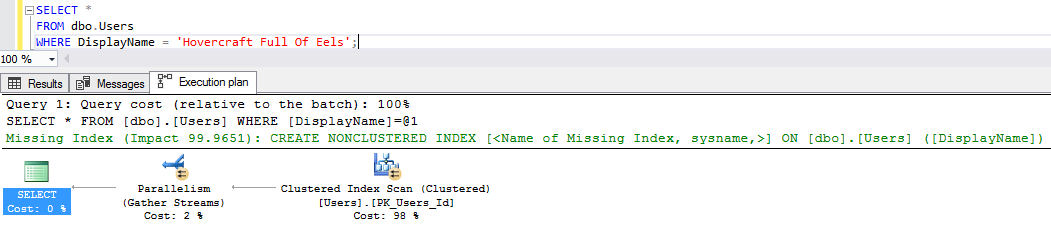
And we get a missing index recommendation in the plan:

The side of the milk carton

Now create the index, and try the query again:

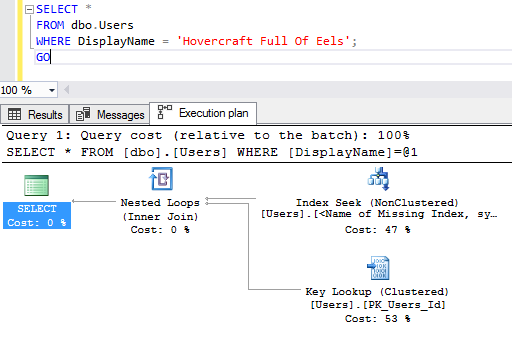
Oh, don’t act like you haven’t done that. And sure enough, SQL Server uses the index:
Not everybody likes their name or their initials

Now disable that index, and run the query again, looking to see if there’s a missing index recommendation in the plan:

And let’s see if SQL Server obeys Betteridge’s law:
Does MongoDB poop in the woods?

It does! SQL Server asks for the index. Sure, the index exists – it even has the same name – but it’s currently disabled.

The missing index DMVs even keep track, as we can see with sp_BlitzIndex:

sp_BlitzIndex @TableName = ‘Users’

Love that. Good work, SQL Server. You can take the afternoon off.


Maintenance Plans Enable Your Disabled Indexes

SQL Server
6 Comments

One of Brent’s students in the Performance Tuning class, Jason M., told Brent that maintenance plans enable your disabled indexes. What the what?

Steps to reproduce:

  1. Disable an index
  2. Setup a maintenance plan to rebuild all indexes
  3. Run the job
  4. Check if the index is disabled or enabled.

Steps 1 and 2 can be reversed and still reproduce the issue.

I tested it on SQL Server 2014, 2016 and 2017. All 3 behave the same: Rebuild Index Task in a maintenance plan enables disabled indexes.

Bug or Feature?

Not sure if Microsoft thinks this is a bug or a feature, but in my eyes it’s a bug. It should ignore disabled indexes.

We don’t advise using maintenance plans anyway. We recommend using Ola‘s IndexOptimize stored procedure, or another custom solution, for your index maintenance needs.

Why disable an index?

We often tell people to hold off on dropping an index for a little bit and instead disable them. The benefit to this is that you keep the index definition in place, so you don’t have to go find it when you realize your system needs that index. Drop the index at a later date is our advice. But now be warned if we you are using a maintenance plan for to rebuild indexes.

Thanks for reporting this maintenance plan issue, Jason!


Introducing sp_BlitzLock: For Troubleshooting SQL Server Deadlocks

Deadlocks are hard – especially when there are a lot of them. When there are dozens or more, looking at each graph is a pain.

sp_BlitzLock gives you a slice-and-dice analysis of which tables, indexes, and queries are involved in most of your deadlocks so you can quickly get to the root cause.

sp_BlitzLock works on Azure SQL DB, Amazon RDS, and Microsoft SQL Server. Parameters include:

  • @Top: Use if you want to limit the number of deadlocks to return. This is ordered by event date ascending
  • @DatabaseName: If you want to filter to a specific database
  • @StartDate: The date you want to start searching on.
  • @EndDate: The date you want to stop searching on.
  • @ObjectName: If you want to filter to a specific able. The object name has to be fully qualified ‘Database.Schema.Table’
  • @StoredProcName: If you want to search for a single stored proc. The proc name has to be fully qualified ‘Database.Schema.Sproc’
  • @AppName: If you want to filter to a specific application.
  • @HostName: If you want to filter to a specific host.
  • @LoginName: If you want to filter to a specific login.
  • @EventSessionPath: If you want to point this at an XE session rather than the system health session.

Pretty standard stuff for a Blitz script! Note that by default we look at the System Health session for deadlocks.

If you have a custom session, use the path to the files for it like so: 'c:\temp\deadlocks*.xel'.

We can’t get any custom fields that you’ve added to a session. There didn’t seem to be a lot of joy in reverse engineering a session definition from the XE DMVs, and then constructing dynamic XQuery to parse it.

If you wanna spend your weekend on that hobby horse, well, prepare for some saddle sores.

Output

So what does running it get you?

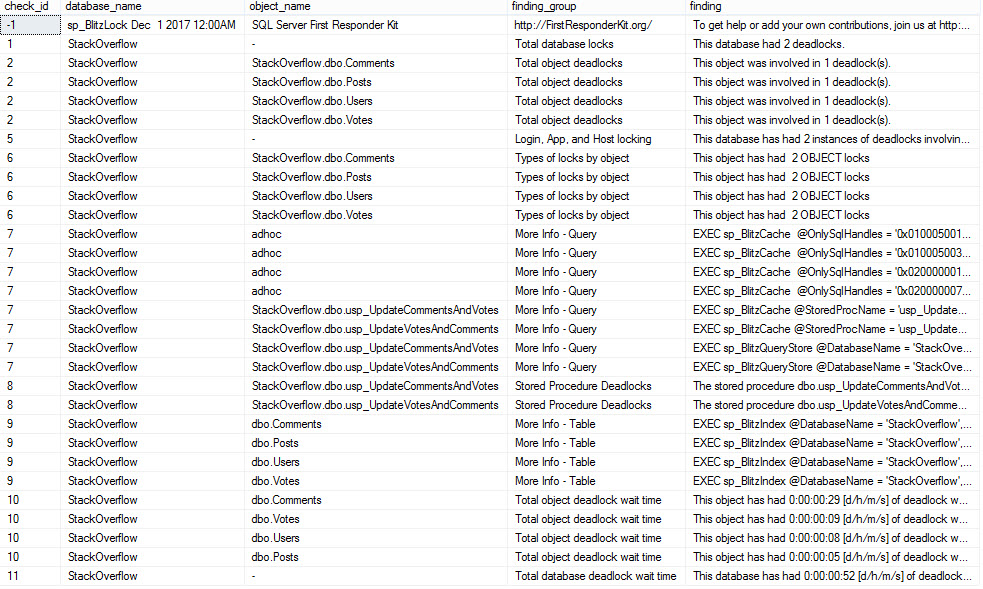
The first set of output looks like this:

Take 1

And scrolling right…

Take 2

Helpful stuff! This is all of what I’d consider useful information from the deadlock XML laid out in front of you.

And of course, we do high-level analysis of all the stuff we pull out.

Probably right!

The information in here can help you track down which tables and stored procs are involved in your deadlocks, and give you queries to get more information about them using our other scripts — sp_BlitzIndex for indexes and sp_BlitzCache/sp_BlitzQueryStore for queries/procs.

How to get support for sp_BlitzLock

The sp_BlitzLock documentation covers additional parameters that will return more results, store the results to a table, and more.

For free interactive support, you’ve got a few good options:


Rebuilding Indexes Can Slow Queries Down

Index Maintenance
6 Comments

Today, Jonathan Kehayias wrote about how fragmentation impacts execution plans. I’m really into performance tuning, so I read the post carefully, really interested to see how it impacted query runtime. You should read it too – it’s a great post with a solid demo.

But oddly, he didn’t mention the query speeds.

I thought that was kinda odd since that’s what users usually complain about – their queries running slow – so I fired open SSMS to check query runtimes, and…

The fragmented table ran faster. 3-4x faster!

  • Fragmented table: ~500ms
  • Rebuilt table: 1.5-2 seconds

Jonathan’s post explains why – SQL Server lowballs the cost estimates on the rebuilt table, causing the query plan to go single-threaded. With the fragmented table, it correctly estimates that a lot of work is going to be involved to scan those millions of rows, so it breaks the work across multiple cores – finishing it way faster.

What’s the Moral of the Story?

Rebuilding your indexes will slow queries down.

Just kidding – although the evidence does point to that. The real moral of the story is that it’s really hard to build demo code that effectively conveys the point you want to make. Jonathan’s right in that fragmentation changes the query plan. In this one case, it happens to make the query go faster.

“But what happens if you run tons of this query at exactly the same time?” you ask? As a consultant, my answer wouldn’t be to rebuild the indexes – because now, not only is your individual query slower, but the server’s still in bad shape due to the work involved with scanning 7M rows. This query maxes out an individual CPU core every time it runs – so concurrency is a hot mess.

In that case, the answer’s simple: create a nonclustered columnstore index. The query finishes in ~100ms with near-no CPU time and >10x less logical reads. That kind of magic doesn’t work in every situation – but as long as we’re using specific demos to prove a point, that one does the job quite nicely.

And that’s why in my defragmenting your indexes isn’t helping session, I explain that defragging won’t get your users to carry you through the hallways on their shoulders. The right indexes will.


GDPR: Why We Stopped Selling Stuff to Europe

Company News
210 Comments

Update 2021-03: We now sell our training classes worldwide here.

The EU’s new General Data Protection Regulation (GDPR) is a set of rules that give consumers rights about how their data is stored, used, and deleted. This step-by-step GDPR guide for managers is a great place to start understanding it, or for something a little more dry and lengthy, try Microsoft’s guide to GDPR.

As a consumer, I love a lot of things about the GDPR. I’m sick and tired of software that phones home without telling us what data it’s taking, doesn’t tell us where the data goes or who sees it, and doesn’t give us the right to have it erased.

But for businesses, the GDPR is a little vague and more than a little scary. It gives EU citizens the right to be forgotten – which means when they ask, the business has to delete everything about that customer. Plenty of gotchas apply – like you have to keep enough to still pass a tax audit – but as an example of a really curious gotcha, what about your backups?

For example, do you have to delete the customer’s data inside your past backups? There’s a discussion about that, and it’s made even harder by products like Apache Kafka that don’t really support deletes.

I can only imagine how the initial round of enforcement attempts are going to go. It’ll be a wild West for a while as software vendors, service providers, consultants, lawyers, and judges struggle to figure this thing out.

The max penalties are terribad.

Up to €20M or 4% of your company’s annual worldwide revenue, whichever is higher. (2017/12/19 – Updated wording – thanks, Michael J. Swart!)

Those numbers are big enough to get business’ attention, so I figured that leading up to the May 2018 deadline, companies would start discontinuing services. Sure enough, Microsoft has made it official – Connect.Microsoft.com is a dead man walking:

Disconnecting Connect

If Microsoft can’t even figure out how to get Connect.Microsoft.com to work with GDPR regulations, how are small businesses supposed to cope? It’s gonna be tough.

Update Dec 18th afternoon – after this blog post was published, someone edited the home page of Connect so that it no longer shows the above reason, and now just has a generic we’re-changing-stuff message. This is why you take screenshots of web sites, heh heh heh.

We used to sell online training to the EU.

We’re a small business based in the US. We sell consulting & training for Microsoft SQL Server.

You wouldn’t think that would be a big deal – but you’d be surprised. For example, students send us information about their databases all the time as part of asking questions – and they often send it unsolicited, through unencrypted email channels. That information ends up all over the place: our mail server, our desktops, phones, laptops, search indexes, etc. I’m not really worried about us maintaining the confidentiality of that data, but now we’d have to add in new audit-able tracking.

See, under the GDPR, if someone asks us to delete their data, we not only have to delete it, but we have to audit that we deleted it, and maintain those records for EU authorities. And then respond to EU requests for that documentation.

But only 5% of our revenue was from the EU.

I know with exact numbers because a couple years back, the European Union decided to start making non-EU businesses collect tax online whenever EU citizens bought stuff – even if we, the seller, had no presence in the EU whatsoever.

This represented a new burden on us – we had to start tracking EU customer locations, collect taxes, and file taxes in the EU. Thankfully, the UK offered a VAT Mini One Stop Shop: register & file in the UK, and they would pay all your taxes to the different countries in the EU. With Brexit, there was already some uncertainty about how this would work going forward.

Back then, I was fine with the additional tax hassles & paperwork because it was 5% more revenue than we had before.

Today, between the GDPR and Brexit’s affect on the VAT Mini One Stop Shop – it’s just not worth the hassle.

So we’re going to hold off selling to the EU for a while.

For 2018, we’re not selling directly to folks in the EU anymore. Thankfully, the WooCommerce EU VAT Compliance plugin makes this as easy as checking a box:

Yay, checkboxes

That plugin is totally awesome – uses things like IP address, geolocation, credit card billing address, and more to determine location. Been really happy with it, highly recommended.

We’ll still keep the blog & mailing list open to EU folks – those are a little easier to manage – and we’re still doing SQL Bits 2018 since the conference organizers are the ones who track personal data, not us.

Long term, I’m hopeful that the GDPR will get sorted out in a way that protects consumers’ rights, and still lets businesses use off-the-shelf tools and policies to provide services to the EU. Hopefully the situation improves quickly and we can revisit that policy in 2019.

Update: Q&A from Reddit

There’s a very lively discussion on Reddit about the post (and a smaller one on HackerNews) and there’s a stunning amount of ignorance in the comments about how easy people think it’ll be to comply with GDPR.

Here’s some of the more educated comments:

pure_x01: “If you have any business or registry with members of the EU you have to follow the GDPR or you are not allowed to have the EU members in your database.” Bingo. This is what’s coming as a surprise to a lot of database folks. Even worse, it’s not just about databases – it’s about anywhere data ends up, like email, direct messages, and flat files on a network share.

Silhouette: “There is huge ambiguity from a legal point of view. Experts can’t even agree on whether things like old backup/archive material that is not in active use should be covered…. Lawyers and technical experts have been discussing these issues for months, and there is no consensus yet on many of them. If you think the answers are obvious, either you don’t understand the law or you don’t understand the technology.” Very well said.

iamapizza: “…many organizations are using the May 2018 deadline as a culling phase for products which were on the backburner anyway.” Yeah, agreed. The EU has never been a primary focus for us – 95% of our training revenue comes from outside of the EU. It was nice to have, but not worth the additional work & risk involved with GDPR compliance.

SauronsUnderpants: “If companies that cannot be arsed to care about our data are leaving, that’s a good thing for European consumers.” I don’t want your data, that’s the problem. I just keep getting it sent to me unsolicited, as I wrote above. I can handle the data we collect through normal channels, but I’m not about to build an auditing/tracking system for every other channel where folks can contact us. (Hell, if someone sends me their data, query, and email address via a Twitter DM, that’s conceivably a problem.)

0b_0101_001_1010: “So yeah, all in all this is a hard social problem, and solving it requires solving hard technical problems. It might not be worth it for a small company to solve it, but it looks like at least for the European society it is a problem worth solving.” – Nicely said. I look forward to seeing how the EU solves it.

Update: Compliance Info from Automattic

Automattic, the makers of WordPress & WooCommerce, just published some great resources:

  • WooCommerce: An Introduction to GDPR Compliance“If you sell any products to customers based in the EU, or have EU visitors to your site, you’ll need to make sure your site complies with GDPR.” Again, driving that home to the folks who stick their heads in the sand.
  • Automattic and the GDPR: “We expect that Automattic products and services will be in compliance with GDPR requirements by May 2018.” And I’m really excited to see that – but I just need to see it before the fines go into effect. I’ve been burned by enough plugin bugs that I’d like to see ’em go live first.
  • CodeInWP’s WordPress GDPR Guide: really good place to start if you’re wondering how visitor data might get into your possession from various plugins. Lord knows you shouldn’t be processing credit card data yourself in the year 2017 – get Stripe.com and do it all on their end.

Update 2018/05/25: GDPR Day

Enforcement is now officially in effect, and looking back at this post from 6 months ago, I feel pretty good about our decision.

We stopped collecting a lot of data we didn’t need anyway, switched a few third party partners, and updated our privacy policy. Folks can request their data online and request erasure, and we don’t check whether they’re EU residents or not. Sure, it’s extra work for us – but I think it’s the right thing to do.

We’ve gotten a lot of press and questions around whether we’ll change our policies. Of course will, over time, when the standards are more clearly laid out and third party partners have built better tooling. Right now, though, it’s still too much of a wild west. (Hell, people still don’t even understand whether the law applies to EU citizens who aren’t EU residents.)

Update 2020/09/22: Still No Easy Compliance

I was hoping to get EU/EEA sales opened back up for this year’s Black Friday sales, but then EU courts struck down the Privacy Shield law. As a small business, I just can’t afford to dedicate legal and technology resources while the EU figures out how their laws are going to work.

I still hope at some point it’ll be easy for me to meet EU compliance goals, but when giant companies can’t do it, I don’t stand a chance.


[Video] Office Hours 2017/12/13 (With Transcriptions)

Videos
1 Comment

This week Tara, Erik, and Richie discuss virtualization, replication & mirroring, switching SQL service logins to an AD account, temporal tables, tempdb issues, migrating from SQL 2015, and Richie’s outdoor adventures in “Breath of the Wild.”

Here’s the video on YouTube:

You can register to attend next week’s Office Hours, or subscribe to our podcast to listen on the go.

Enjoy the Podcast?

Don’t miss an episode, subscribe via iTunes, Stitcher or RSS.
Leave us a review in iTunes

Office Hours – 12/13/17


Should I add hardware when doing a P2V?

Erik Darling: So Thomas is asking a very good question about migrate, about doing a P to V; the old physical to virtual. “I’m on five-year-old hardware and I’m virtualizing the server; should I add more resources or would the age of the physical boxes be offset by the newer hardware of the VM host?” If you guys were looking to figure out if your virtualized hardware were adequate, what would you look at?

Tara Kizer: Are you asking us, Richie and me? Well, the companies I’ve worked for, we have a performance test team that can run synthetic production loads and see if we have adequate hardware; so that’s always where we would start to answer that question. We have load testing tools that can tell us if we’re going to do okay or not.

Erik Darling: Alright, well pretend that someone doesn’t work for a billion dollar a year chip manufacturer. Where might you start [crosstalk] this stuff?

Tara Kizer: What about you?

Erik Darling: That’s a good question. So where I would start – you were already kind of doing your own form of load testing here. If you just restore whatever production databases you have on there and you do kind of regular maintenance work – like, you know, you run CHECKDB, you do some full backups, or god forbid you run an index rebuild – those are all pretty good ways to test and see if the hardware is enough of an improvement. Because hopefully, you’ve been doing that stuff on your old server too and you can figure out if those basic tasks finish in about either the same, or hopefully faster, then they do on the old hardware. If you’re breaking about even, the chances are your queries will break about even too.

Tara Kizer: That sounds about right.

Erik Darling: As always, measure your wait stats. If you have a wait to run any kind of fake workload on there, go ahead and do that. SQL Query Stress is a pretty good tool for just running a whole bunch of queries over and over again. OStress is another good tool – part of the RML utilities thing that Microsoft publishes. Those are two pretty good ways to just spin up some fake workloads on a new server. That’s how I usually do it. I actually have – do I have a blog post? I think I do.

So back when we wrote white papers for Google…

Richie Rump: You have all the blog posts; what are you talking about? “Do I have a blog post?” Well yeah, sir, you have all of them.

Tara Kizer: Thanks, Brent.

Richie Rump: Great post, Brent.

Erik Darling: Why didn’t that work?

Tara Kizer: [crosstalk] Thanks, Brent thing, while he’s looking, that used to drive me a little bit crazy on my blog posts, but I’m getting better at accepting that everyone thinks that it’s always Brent writing the blog posts. I only do like four per year, so I don’t have to get upset that often.

(Brent adds: it’s an ongoing thing around here that you, dear reader, don’t read the author names on the posts, and you assume that I write everything. If you really wanna make a blogger happy, use their name in the comment, like “Great post, Tara” – assuming of course that you use the right name. In fact, you should probably just assume that it was NOT me, hahaha.)

Erik Darling: It’s a good way to avoid getting upset. Blogging, in general, is just an upsetting process. So a while back, when we were writing white papers for Google about how to test, doing different stuff in the cloud, Tara did stuff on AGs and DR, and I did stuff on performance tuning – and I wrote a blog post about how to use OStress and agent jobs to run all different stored procedures in different ways. So if you want to go take a look at that, I stuck it in the chat comments so you can go and look and you can figure out how to run all sorts of crazy stuff on your server and give that hardware a good kick in the nards.

Tara Kizer: What was that, Richie? Was that a cat? It went by so fast…

Richie Rump: Yeah, it jumped from here, it snuck underneath, like under the camera, and then just started jiggling my monitor; and I’m like get out.

Erik Darling: enough about Richie’s cats – boring. The next thing I know you’ll be taking pictures of your food; nightmares.

Richie Rump: That’s Brent, which he’s doing right now.

Erik Darling: That’s true. He is currently taking pictures of his fancy breakfast.

Richie Rump: Rosé all day.


How fast does my bandwidth need to be for AGs?

Erik Darling: Shree is asking a very good question for Tara. “Since we talked about network speed, what’s the expected good bandwidth between two data centers in different cities when using Always On availability groups?

Tara Kizer: So the answer is more dependent upon if you’re going to go synchronous or asynchronous. If you’re using an asynchronous replica and this also pertains to database mirroring, same basic thing – synchronous versus asynchronous. If a data center is in another city, it’s not within a couple of miles from the data center, I do not recommend using synchronous replica or mirroring because of the – even 15 milliseconds network latency can be noticeable enough, it can degrade performance enough, for users to notice. I’ve accidentally left a database mirroring session in synchronous mode after a failover, we used async failover, then you switch the sync and do the failover so you don’t have any data loss, and I forgot to switch it back to async after the failover. It took a few days to realize what was going on, like, “I don’t know why it’s slower there,” because I don’t know that we had great wait stats on that stuff back in that version; it’s been quite a few years.

But to answer your question, if you were to go with synchronous replica across two cities, you better have a very small load. If you have a busy system, you’re not going to be able to do it. So I generally recommend synchronous at the same data center next rack over, same subnet, everything and then asynchronous to another city; so a disaster recovery site. As far as answering the question about network speed, well if it’s asynchronous, what matters is that you don’t get too much latency. So monitoring latency – but generally speaking, 15 milliseconds would be my target, or better.

Erik Darling: I’m with you on that. 15 to 20 is a pretty good target for latency from one site to another. One tool that you can use that’s absolutely free to test that sort of thing – you know, we always tell folks about using CrystalDiskMark to test their disks, but one good way to test your network is a free tool called Iperf. Iperf.exe – and Iperf lets you set up basically a ping flooding server on one end and then a client on the other end, and you can just send data back and forth and it will give you the network speed and how much data sent across and how much loss there was. So it’s a little bit more involved than just like a ping or like a traceroute or something, because it does send data across, but it’s a very good way to measure network speeds. I’ve used that a couple of times when kicking around hardware for clients.

Tara Kizer: Never heard of it, cool.

Erik Darling: I think even David Klee might even have a blog post where he shows you how to use it. So go out there and try to find that.

Tara Kizer: I did have a recent client that was using synchronous to another city, and it was about 500 miles and the wait stats show that they weren’t having an issue but they were going to be growing and growing and growing. So I was like, “Well you might not have an issue now, but you may in the future.”  So I did give them some HADR talk.

Richie Rump: So all I heard from that question was, “What is the airspeed velocity of an unlatent swallow?”

Tara Kizer: Alright, fantastic.

Erik Darling: Nerd alert.


If I switch all my SQL Server’s logins…

Tara Kizer: James asks a question, a security question, “If you had to switch all your SQL Server’s logins to an AD account, how would you check that doesn’t wreck any of your applications?” Well, you need to do this in a test environment, making sure that – so SQL Server logins, all that really needs to happen is make sure that SQL Server can come online and all the features that you’re using there work. So if you’re changing the agent job, make sure that that jobs are still running. But as far as your applications, no, but start in a test environment so that the production maintenance window – you don’t have any issues during that.

Richie Rump:  you know, one of the cool things I’ve been playing with this week is creating a cluster in RDS and doing that all using script; scripting all the logins and scripting all the stuff and scripting all the instances. And that has been super cool, being able to bring up a database and tear it down, bringing up the cluster and then adding all these instances to it, then going and start removing pieces from the cluster. Like what if you removed the writer or what if you removed one of the readers and you just start swapping things in and out? Oh man, that crap is powerful, and this is all from script. You can do it all right from script; there’s no need to go to the window or the console or anything. It’s just, do it, and then come in and out. Scary as hell if you’re talking about production instances, but man, I was having a blast yesterday trying to figure all that crap out.

Tara Kizer: Are you being sarcastic with blast?

Richie Rump: No, it was fun. Trying to figure out what the correct syntax is in a script, that was rough. But once I got everything working and I was able to start throwing instances out there, it’s just a matter of, “Hey, I’m going to remove this,” and it’s gone. Or, “Hey I’m going to go ahead and add another one,” and it was just there. It was like – now all of a sudden, you can start checking in your VPCs, all your networking stuff, all your database stuff, and that’s all a script that goes into GitHub and if you ever need to redeploy to a test environment, it’s just here. “Guys, run this script,” and there it goes, off and it runs, and it’s a completely different environment. Oh man, I probably need to write a post about that. that was a lot of fun.

Tara Kizer: Nesta is asking is the script that you wrote was PowerShell? Which I actually teased him earlier in our company chat room… I know the answer.

Richie Rump: No PowerShell… No, what I was doing is using Cloud Formation, which is AWS’s way to do JSON or YAML to generate pieces of cloud. So pretty much anything that you want to create in AWS, you can use cloud formation and just, with the script, do that. and I was using the serverless project as a container for that because I understand that and it’s easy for me to put environment variables everywhere and not hardcoding usernames and passwords and stuff like that into it. I’m sure you could do it using cloud formation; I just haven’t bothered to do it. And the rest of the app that I was working with was in serverless, and it was just a matter of a one line command line, it goes off and it just does everything that you need it to do.

Tara Kizer: All on one line?

Richie Rump: All on one line.

Tara Kizer: I guess that’s how it was when I was having to write the Google white paper for creating a VM and saving availability group there. There was a lot in one line for sure, but yes, figuring out the syntax was problematic. To me, it actually felt like PowerShell.

Richie Rump: Well, it’s kind of poorly documented. Because there was one issue I ran into where I was declaring the password and user in the instance, and I was also declaring it in the cluster, and then it gave me this bogus error just saying, “Hey, you want to declare that in the cluster.” And it didn’t tell me to remove it from the instance, so it tool a little digging for me to figure out, like oh, you only want it in a cluster, you don’t want it in the instance. So as soon as I had to remove a whole bunch of things, things started working. It was like, come on, you guys can write error messages a little better than this. it was like, “Please remove this from the instance because you declared in the cluster. But no, it was this really bogus, crazy – you really didn’t know what was going on with that error. I should probably blog that error too because I screen-shotted that one. I said, “This is a good one, this is crazy.”


Is OLE Automation a security risk?

Tara Kizer: Alright, Dee asks, “What are your thoughts on having Ole Automation enabled?” It’s a security concern. So I don’t know if you have any security audits, but that’s one of the items that they want you to have disabled. It’s by default disabled – same thing as xp_cmdshell, it’s a security risk. Whether or not you need it may be another story, so you can sometimes get around security audits by disabling and enabling as needed, but I don’t ever enable it on the servers I’ve supported. If you need it then you need it, but what are you doing that you need that type of thing? Why do you need that enabled on SQL Server? Why not do that type of task somewhere else?


Should I encrypt pre-2016 servers?

Tara Kizer: James asks, “Is it worth encrypting pre-2016 servers or should I upgrade to 2016 and then encrypt?” I don’t know that there’s any benefit to pre encrypting, except maybe your maintenance window will be faster because it doesn’t have to encrypt. I don’t know.

Richie Rump: I kind of see this as more of a business requirement. It’s kind of outside the technical realm. Regardless of pre-2016 or 2016, you have the requirement to encrypt, then you should encrypt at the version that you’re in and then worry about upgrading to a later – they’re not one is better versus another – you have a business requirement. Any version of SQL Server that is supported is going to be able to handle the encryption. If you need to do it then do it. Of course, those requirements need to be prioritized by your management. And hey, what’s more important; us upgrading or us doing the encryption? And meanwhile, you’ve got to let them know that there’s no technical difference between the two. There’s no benefit to one versus another. I would definitely do it in a test environment first, get more familiarized with the encryption and the certificates. It does get a little wonky there because it’s very different, but that’s a business thing and it doesn’t really depend on any technical things that the SQL Server has.

Erik Darling: Is my audio any better?

Richie Rump: Yes, you’re here.

Tara Kizer: So far so good.

Richie Rump: It’s the voice in my head, can you hear that?

Erik Darling: God, is that you?


What authors do you read?

Tara Kizer: Thomas says, “I see John Grisham and a dictionary. Who are some of the authors behind you, Tara?” The funny thing is, this actually is not my office. I’m at my parent’s house. I’ve moved into a new house and this is brand new construction and we have no internet. Been there for two weeks tomorrow, still no internet. I’ve been working at the library, I’ve been working at Starbucks and I’m so annoyed with the public at this point and I wanted to attend Office Hours, so I went over to my mom’s house, which isn’t too far away. My mom’s a big John Grisham fan. I definitely have read John Grisham. Also, Dean Koontz is also another one that’s in the background. You probably can see, or I’ve zoomed out too much, but there’s childhood pictures on the wall back there; probably some embarrassing ones, so don’t zoom in.

Richie Rump:  So I did read Murder on the Orient Express about a month ago when I was in jury duty; sitting there waiting for the entire day. And we saw the movie adaptation last night and it wasn’t bad. I was expecting meh, but it wasn’t bad. There was differences, but I was like, okay I could live with those differences. The guy who played Aaron Burr in Hamilton was in the movie, and I was like, “Aaron Burr did it; he did it.” I was screaming it because there was only four people in the theatre, “Aaron Burr did it.”


Are tempura tables delicious?

Erik Darling: So what questions you want me to get on?

Tara Kizer: Temporal tables – I can answer temp tables, but temporal tables – can you tell us everything you know about temporal tables, and our answer is, “Well I know nothing.” So moving on…

Erik Darling: I mean, I like them more than like change tracking and change data capture, but I haven’t used them a ton. I have a couple of blog posts about them. There are some blog posts out in the world about them. They’re probably more informative than anything I’m going to tell you here in the next five minutes. But I do like them and I like the idea of them, I do think it’s a much better way than having devs try and roll their own sort of system of keeping track of data changes over time. It really does depend on what your use case for them is going to be though.

Richie Rump: Okay, so think of me as a SQL Server noob for the new stuff. Tell me about temporal tables and what they can do, please.

Richie Rump: Why do you always ask the noob questions? So temporal tables…

Richie Rump: because I’ve been using Postgres, man, come on now.

Erik Darling: So temporal tables are like having a shadow copy of your table. So you have like the main copy of your table and then you have this shadow copy of your table that tracks all of the changes to data made in the base table. So you can actually query backwards in time and you can look at how your data has changed over time and you can actually, if you needed to, go back and actually pull data out and fix data with what’s in there.

So I don’t know if it’s a really sneaky way for Microsoft to not have to put object level restore back into the product, but temporal tables are a really cool way to – it’s almost like Oracle Flashback where you can – like, “Oh no, we need the table as of now, let’s just query how it used to be.” So it’s very neat for that stuff.

Tara Kizer: So if you were to use it for auditing data changes, do you just query that table or then do you move it to an auditing table; historical tables?

Erik Darling: No, you just query the table and you can see there are some keywords with the dates that you want to look at and you can do like as of or dates between and stuff like that. so you can see how data looked on a certain date, between certain dates and you can just see how particular data has changed over time.

Richie Rump: So then if I delete data, that will be there as well, or not be there?

Erik Darling: Yes – well deleted data, it will show it’s deleted…

Tara Kizer: And then you could purge the data so it’s not massive, if you wanted to.

Erik Darling: I believe you could set retention policies on it, so you can decide how much data you want to keep in there.

Tara Kizer: In what version does this start on?

Erik Darling: 2016.

Tara Kizer: I had a feeling it was newer. I had a recent client who was doing auditing via triggers, and their design was not going to – and the way that they implemented it was bad for scaling reasons. I’m kind of okay with if you just quickly dump the data into another table as is, you know, the before and after. But they were doing some off things, you know, they weren’t on 2016, but maybe that’s something I could include in the future. “When you get to 2016, look into this instead.”

Erik Darling: If you ever get to 2016, you lazy, lazy people.

Richie Rump: We’re almost in 2018, come on now, seriously.

Erik Darling: SQL Server 2018 is on the way. Here you are… This week, my clients are running – I’m looking at two servers and the clients are running 2008 and 2008 R2. It’s like why? They’re seven and ten years old at this point. I’m like why can’t anyone just upgrade? What is the hold-up? What is the issue? Which I’m sure is a question that Microsoft asks as well.


Is trace flag 834 a good thing?

Tara Kizer: Adam asks, “What are the concerns and gotchas to watch for when enabling trace flag 834, which is the large page allocations and buffer pool?” I don’t know. I’ve never implemented that trace flag. How about you, Erik?

Erik Darling: I mean, I’ve just never seen it make a difference. It’s like one of those old DBA fables, where it’s just like, “Oh all we need is the large pages and everything will be cool.” But I’ve just never seen it actually fix a problem and I’ve never seen it like even kind of improve a problem in a way where it was like, “Okay, we made it past this benchmark so now we can really focus on the stuff that will fix problems.” I’m sure that someone wrote a really interesting blog post about how cool it is for one particular thing, but often in the real world, I’ve just never seen it do much of anything good.

Tara Kizer: The trace flags that I go with are the ones that are recommended by SQL Server experts, the known people in the community that are saying, “These trace flags, you should just go ahead and enable everywhere.” And then, you know, specific issues that I’m encountering, maybe I need a database mirroring or replication trace flag so they can ignore each other and not have too much latency. So I don’t go ahead and implement trace flags just because.

Erik Darling: I guess, you know, if I was going to voice a  concern about them, my concern would be like, have you tested it in a way that you’ve seen it improve upon a problem? Like do you enable it in a development environment and – are you sure that you have a problem it’s going to solve? You’ve watched it solve a problem somewhere else and now we’re going to roll it out in production. Like that’s my concern, that you’re button smashing and you’re not actually fixing a problem.


Is it bad when TempDB runs out of space?

Tara Kizer: Alright, [Rod] has a maintenance job that’s got an error and its tempdb ran out of space tempdb because the primary filegroup is full. Any reason for concern? Well, you may need more tempdb space in order for that job to finish. And maybe it’s not just that job; maybe it’s the other load that’s occurring plus the job running at the same time. So your queries need space in tempdb to do work. Maybe you’re using temporary tables, maybe it’s a sort, maybe you’re spilling to disk, who knows what. There’s lots of reasons why tempdb gets used. And tempdb gets used a lot on SQL Server, even if you’re not doing temporary tables, it still is being used. And if you got that error, is this job important? Does it need to be able to complete successfully? And if it does and it’s continuing to fail, look at the query. Is there anything weird about the query that maybe you can make it more efficient so it uses less tempdb space, or maybe you just need to add more storage so that tempdb can grow and you don’t have that error.

I’ve said this several times in Office Hours, but I literally have supported a server had a 500GB tempdb data file sizes. There were eight files but they totaled 500GB. And I’ve got some clients who are like, “Oh my god, I’ve got 8GB to 20GB tempdb.” That’s nothing. That cost you a quarter. So I don’t worry about the temodb space. I want the queries and jobs to complete successfully. I will go back and look at the queries that may be causing it to grow past some number. There are ways to make better use of tempdb.

Erik Darling: Yeah, I think I would want to look at what the job running is. I know that DBCC CHECKDB has the tendency to use a whole heck of a lot of tempdb space. And if you’re rebuilding indexes with sort and tempdb on, you’re going to be using an awful lot of tempdb. And if all of the sporting that goes on for statistics updates – so if you’re doing statistics updates on rather large tables with a full scan, those sorts can actually go off the tempdb. And I’ve seen those sorts fill tempdb up, even on servers that have tempdb the size of what Tara’s talking about with the 500GB allotted to it. All the stuff she said, plus take a look at what the jobs you’re doing are. As always, we will not recommend that you just go and keep rebuilding indexes blindly and just hope that they fix something. Make sure that the indexes that you’re rebuilding actually need the rebuild to happen and that you’re fixing more than you’re hurting by doing it.


Any gotchas with upgrading SQL Server 2005?

Tara Kizer: Alright, one last question from James. He’s got a brand new job, and they do have a SQL Server 2005 server. It’s not his fault, he wants to make that clear; this is a new job, he’s inherited it. I don’t want to say how old he was in 2005. “Are there any gotchas I need to watch out for when I upgrade?” I mean, what are you upgrading to? I don’t think you can even go from 2005 to 2016, you know, you need a hop. So you’re going to need a 2012 box, and I wouldn’t recommend just stopping at 2012. We’re in 2017, so I’d probably go for 2016 or 2017. I don’t care which one between the two, really, unless you’re going for some feature – but you’re going to need to do a hop, probably to 2012 and then over to the new version.

Now, you can do that all in the same maintenance window, because it’s just going to be a backup and restore then another backup and restore, and you don’t have to do full backups, you can do this through log shipping and just keep sending it over to the newest server. As far as gotchas, I would recommend running the upgrade advisor tools to see if you’ve got any code. If you’re using stored procedures, it can analyze your code and let you know if you’ve got anything that may break in the newer version, but obviously, you’re going to have to test this in a test environment. In companies I’ve worked for, we’ve done full regression tests. It can take three months of testing only for a SQL Server upgrade. And obviously, they try to get in application bugs and features as well during that time, but do a full test cycle. The upgrade advisor can be helpful for that. I’m pretty sure it still exists in newer versions.

Erik Darling: Yeah, the other thing I would just be aware of is the new cardinality estimator. So if you’re moving up to 2014 or beyond, the new CE can really help queries or really hurt queries or a strange mix of the two. So before you go and set that database into the new compatibility mode, make sure that you do some testing on how your queries react to it.

Richie Rump: Or just roll it back to the old compatibility mode until you have to test.

Erik Darling: Yeah, whatever, Richie. Thanks for being thoughtful.

Richie Rump:  I’ll stop, dude. All my thoughts right now are on the Last Jedi, so…

Erik Darling: You’re in a very Jedi state of mind being that thoughtful about things, rolling stuff backwards and forwards and testing. Look at you. I bet you’d unit test that, wouldn’t you?

Richie Rump: I absolutely would.


DBAtools.io plug

Tara Kizer: One last comment from Thomas, just because it’s based upon James’ question, “DBA tools for migration for the win.” DBA Tools is a PowerShell script. I highly recommend checking out the website for it and seeing if there’s any scripts that could help you do your job. They do have migration scripts, so that is helpful. But as a long time DBA, I’m so used to my own backup restore and doing a differential and chaining together transaction logs. It’s super easy, I don’t need a script. I have custom T-SQL scripts anyway for it that I wouldn’t bother with PowerShell for that task because I’ve been around so long.

Erik Darling: Maybe if I had to transport a bunch of settings and users and all that other stuff, the PowerShell command would make sense. But just for moving the actual data over, I’m going to want something that reduces the cutover time, not something that is just part of the cutover time. Like if it’s just doing a straight backup and restore for a smaller database, not a big deal. As soon as you start getting up into like 50GB, 100GB, 200GB plus databases, you’re really going to want to do mirroring or log shipping or something else that gives the ability to do a faster cutover to the new server.

Richie Rump: Yeah, and if you’re not familiar with PowerShell, I wouldn’t start with a migration trying to get familiar with it.

Tara Kizer: Definitely in a test environment first for it. Troubleshooting those errors is horrible.

Erik Darling: Yeah. I think we have] reached about the limit of our time here. We went a little bit over because we talked about Zelda too much. I hope you’ll forgive us; we tried to make it up on the backend. Thank you, everyone for joining us. I apologize about my potato-y audio and video. I’m going to call Time Warner and yell at them again. Tara and Richie, do you want to say anything?

Tara Kizer:  Nope, bye.

Richie Rump: Go climb something…

Tara Kizer: Bye.


Database History: The Inventor of the Data Page

Do you ever wonder about the history of the systems you rely on every day?

They didn’t teach us database history in school. Instead, we got calculus and art and interpretive dance. Fat lot of good that did us, right?

So from time to time, we’re taking it upon ourselves to bring you the history of some important database concepts and features. You won’t find this stuff in Books Online, no no.

For today’s entry, we need to take you back to the 1800s.

Meet Maurice Gutenberg.

Maurice Gutenberg, Inventor of the Data Page

Maurice was the great-great-great-great-great-great-grandson of Johannes Gutenberg, the man who pioneered the mass production of books.

Maurice benefitted greatly from his great-great-…okay, let’s just say benefitted from his ancestor’s invention, living large off the printing press royalties. (Johannes also invented hardware patents.) Maurice built one of the largest libraries in Europe, devouring books from every learning institution he could find. In fact, he was partially responsible for the Great Book Price Bubble of 1899.

As Maurice’s collection grew, he needed a system to track his book inventory and pricing. He turned to computers, naturally – his neighbor happened to be building an early prototype of a machine that would later turn into the Commodore VIC-20.

To Maurice’s astonishment, the computer logged every one of his purchases and sales in single file. The data was continuously added, one row at a time. With each update of an existing row, it was simply added to the end as a new version. This system was modeled after the papyrus rolls of ancient Egypt.

Maurice immediately channeled his gr…ancestor Johannes, pulled out a page from one of his books, and pointed at it. “We should store the data like this!” he exclaimed.

“But it will get out of order!” a neighbor cried out. (Ironically, you might recognize part of that neighbor’s name…Birgitta Hallengren.)

Maurice tired of European life (especially the part about defragmenting his pages.) He later sold off his entire book collection, packed up his remaining belongings, and headed for Seldovia, Alaska’s Best Kept Secret.

But you might just have heard of Maurice’s first database: pubs, short for publications.

Meet Robert of Lochsley

Though ne’er the brightest lad, Robert was still the sole inheritor of his dad’s land, which included the largest loch known to both Robert and his dad, Auchbert.

His mother, who pretended to die during childbirth, had seen many much larger lochs.

Left on his own, Robert proceeded to spend the family fortune trying to prove that he indeed had the largest loch. Much to his dismay, he found out that other lads had lochs twice, thrice, and sometimes four-ice the size of his own.

Mad with jealousy, he began painting landscapes of his loch comically out of perspective. Often covered with arrows pointing to “my loch”, and then much smaller arrows pointing to tiny dots noted as “your loch”. Though he unwittingly also invented the poop emoji, that’s not the story we’re here to tell.

When he tried selling his paintings to other nobles, the typical response was “aye that’s nay a loch”, which lead to him being called Robert of Nay Loch.

He turned into such a laughing stock, that many years later when Microsoft needed a way to identify fools, they came up with the eponymous NOLOCK hint. Whenever someone uses this, it’s said that Robert returns from the grave to festoon their data pages with incorrect information as punishment.


Can you prevent deletes and inserts without a WHERE clause from running?

Bad Idea Jeans, Humor
42 Comments

File this under bad idea thong

In the tradition of Klaus Aschenbrenner wanting to prevent people from writing SELECT * queries, I thought it might be nice to prevent people from running deletes or updates without a WHERE clause.

In a vaguely scientific way.

Now, I don’t really condone this. It just seemed funny at the time.

There’s no way to intercept a query and check for a WHERE clause, but we can… Aw, hell, let’s just do the demo.

Here’s a table, and a 100 row insert.

Why 100 rows? Because I’m awful at math and using bigger numbers would confuse me.

And uh, here’s a trigger. Oh boy.


If you’re looking at the code, and you hate me, I don’t blame you.

We have an after trigger that takes the row count of the update or delete, and checks it against the number of rows in the table.

If the number of rows affected is within 98% of the rows in the table, the transaction is rolled back, and our end user is reminded to use a WHERE clause.

Why 98%? Well, system views and functions aren’t guaranteed to be up to the second reliable, and I needed to pick a number.

There’s no mechanism inside of triggers to tell you if you inserted, updated, or deleted rows, so when you write a trigger to handle more than one action, the only way to tell what happened is to look at the internal tables.

If there’s stuff in inserted and deleted, it’s an update. If there’s just stuff in one or the other, it’s… one or the other.

Does it work?

Like a charm!

If a charm had no charm whatsoever.

Results in:

As we can see here: Your Mom.

Your mom.


But these two queries run just fine.

Why? They’re only 97% of the table.

Only.

Because that’s cool, right?

Is there a downside?

Hell yeah. If you’ve got really big tables, the rollback can take a while.

Rollbacks are single threaded, dontcha know?

And there’ll be blocking.

But it might be better than having to restore the whole database.

Maybe.

But what if I need to hit the whole table?

Batch your modifications, you animal.

Where am I wrong?

Brent and Tara really kicked the tires hard on this one for, and I appreciate it.

My half baked idea would have be cold and soggy without them.

Now you, dear reader, get to tell me where I’m still wrong.

Thanks for reading!


Query Plan Oddities: Two Identical Missing Indexes

Execution Plans
1 Comment

As I’ve been building labs for my Mastering Query Tuning class, I’ve been spelunking through data.stackexchange.com. It’s where anybody can write queries against the Stack Overflow databases, and share them with friends.

For example, Daniel Vandersluis wrote a query to see how many edits he has:

When I run that on my unindexed copy of the Stack Overflow database, I get a missing index recommendation – no surprise there:

Execution plan – view on PasteThePlan

Zooming in a little, note the impact – SQL Server is kinda saying, “Wow, if I had this index, the query would be 49.9998% faster!”

Almost but not quite 50%

Hmm. That’s an unusual impact number.

Now if you’ve been index tuning for a while, you might know that SSMS only shows the first missing index recommendation in the plan – not all of them. Therefore, when you see a missing index, it’s prudent to view the plan’s XML to see if there might be more.

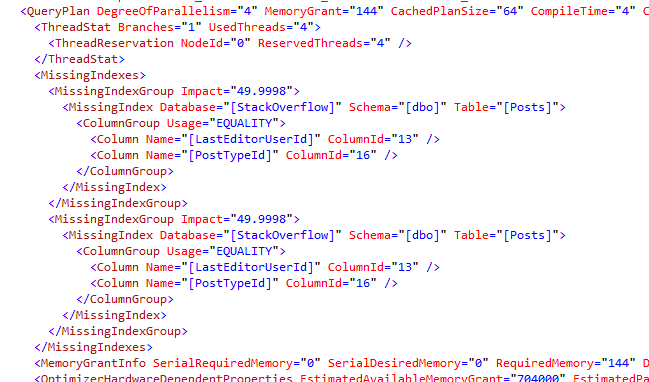
And in fact, in this plan, there are TWO missing indexes – kinda:

Two indexes, one plan

That’s two missing index recommendations, for the same index, in the same plan, each of which will make a 49.9998% improvement in our plan.

So why is that? Take a closer look at our original query and note that it has two nearly identical CTEs at the beginning:

Nearly identical – but different, one filtering for PostTypeId 1, the other for 2.

For each of those, when SQL Server optimized that part of the query, it thought, “Wow, an index on PostTypeId and LastEditorUserId sure would help here!” Therefore, it recommends two missing indexes – each of which will make the query 49.9998% faster.

That’s such a nifty example of how SQL Server breaks queries down into parts and analyzes each of them independently, even generating missing index requests independently.

Related Experiments

Erik mused – would turning on Forced Parameterization help? Here’s the plan with forced parameterization turned on, and no, that didn’t help either – we still get two identical missing index hints.

How about using the same PostTypeId in both CTEs, so it’s effectively the same query? Nope, that doesn’t help either.

Using the same variable, @PostTypeId in each CTE? Nope, same problem. In every case, SQL Server optimizes each CTE independently, generating a separate (identical) missing index for each one.

Just For Fun: Missing Index Doublemint Twins

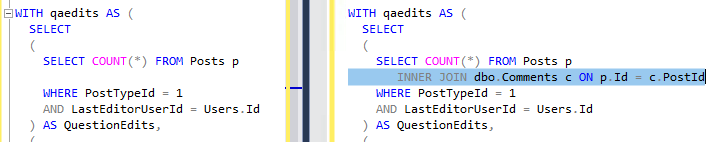
Which led me to have a little fun – I modified both Daniel’s CTEs to have an additional join to the Comments table. Left is before, right is after with the new join:

Left is before, right is with the new join to Comments

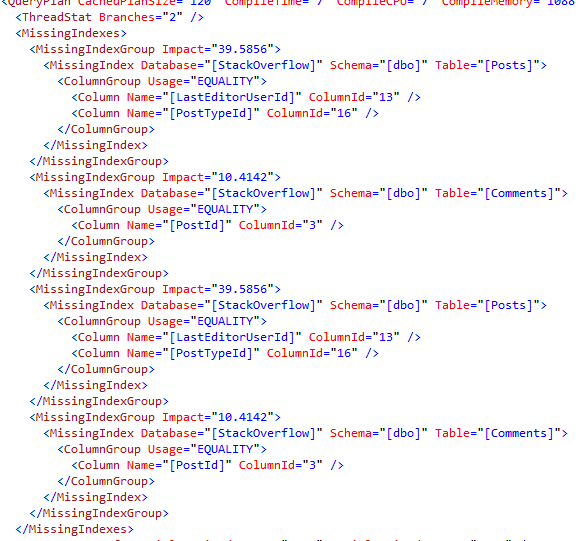
Now, when I run the query, I get FOUR missing index requests – two identical ones on Posts, and two identical ones on Comments:

Two pairs of identical twins

But of course, when you look at the graphical plan, all you see is the first missing index request with a 39.5856% improvement – which isn’t right either:

39% my butt

And that’s why you can’t trust the impact numbers, let alone the graphical plans’ recommendations or even the field order.


What Your SQL Server Is Really Waiting On: YOU

SQL Server
4 Comments

Land of Confusion

Most SQL Servers out there have never had anyone do a thorough, targeted assessment on them, the way we do our Critical Cares.

This leads to a lot of astray troubleshooting, which may make sense for profiling other problems, but not SQL Server.

You know, the kind of tips that come from blogs so littered with typos that your monitor ends up covered with red ink and you can’t even see where SSMS is anymore?

Level one troubleshooting is looking at task manager, maybe some PerfMon counters, and pointing fingers at the disks if ever read latency touches the 20ms mark. Maybe someone pokes around the GUI, defragments an index or two, and puzzles about an imaginary problem with page splits or disk queue lengths.

Level two would be grabbing single-use, copy and paste scripts that give you an incomplete picture of what’s going on with your server and don’t provide any real analysis, just numbers. Maybe you also run DTA and create every index. Again. And for some reason I/O got worse. Again.

Level three would be setting up a repeatable process and applying it to all of your servers, like Brent wrote about recently in How to Do a Free SQL Server Health Check and How to Do a Free SQL Server Performance Check.

Beyond that are the type of shops that have dedicated, full-time staff, and SQL-specific monitoring in place. They have people and processes in place who are comfortable with the technology.

n00b gainz

If you’ve got an unhealthy SQL Server, the first 3 months of troubleshooting are typically the easiest.

There’s so much low hanging fruit, you can usually get away with just making a handful of simple changes to buy yourself time on the harder stuff.

But you actually have to make the changes. Just collecting the data isn’t enough.

Save Our Server

This is a lot like what happens to most people who start to work on some aspect of their physical appearance, whether it’s trying to get stronger, or trying to get skinnier.

You can usually find some easy changes to make at first. Stop drinking soda, or stop putting so much crap in your coffee that it turns into a cake recipe. Stop horsing around with 10 lb kettle bells and balance balls.

Structure and programming is important to any long term goal, because you’re going to hit plateaus, and those plateaus are going to be frustrating.

It doesn’t matter where or when they happen.

Eventually the impact of making sure you have your settings right and taking that shrink database task out of your maintenance plan will wear off, and you’ll need to figure out the next layer of problems.

If you don’t keep it up, things won’t magically keep getting better.

Test, Tossed

Servers are a lot like bodies, in that they process changes pretty quickly.

If you always run 5 miles, your body will get really good at running 5 miles. Likewise, your server will have a fairly constant level of performance with Cost Threshold for Parallelism set to 5.

If you always curl 20 lbs for three sets of eight, your biceps will always look exactly like they can curl 20 lbs for three sets of eight. Again, your server will have a fairly constant level with MAXDOP set to 8.

After making changes, your server will pretty quickly start giving you feedback in the form of wait stats, query plans, index usage, and so forth. It’s up to you to take that new feedback and figure out if it’s good or bad, and if you need to keep making more changes.

If you don’t follow a plan, you’ll be sitting there staring at the few changes you made wondering why you still have a lot of the same problems.

It’s time to ask: what’s next?

What kind of help do you need, and when do you need it?

You can go a long way on free stuff. Blogs, scripts, webcasts, podcasts, Q&A sites, forums — they’re fine resources, but when do you pull the trigger and spend money?

I spent about $25 and got a 515lb deadlift. The book didn’t lift the weight for me. I had to read the book, and I had to do the work. But it was enough for me.

If I wanted to double that weight, I’d probably have to spend more money on targeted coaching, equipment, and bathtub chemicals from overseas.

The same basic maxim applies to you working with SQL Server: if you do the work, and you follow a process, your server will be in better shape.

You can get by on lower levels of spending to get things to a pretty good place, even if you opt for paid training.

If you want professionals to give you an assessment and design a program for you, that’s where our Critical Care comes into play.

We’ll spend three days going over your server from head to toe, finding its biggest problems, and designing a custom plan to solve them.

And we’ll show you how to do it on all your other servers.

If that sounds like the kind of help you need, drop us a line.

But remember: if you don’t follow the program, the pain isn’t going to go away.

Thanks for reading!

Brent says: over and over again, I hear people say, “I’ve been logging sp_WhoIsActive, Perfmon counters, and file stats to a table,” but they’re not actually doing anything with it. If that rings a bell, it’s time for you to put the active in sp_WhoIsActive.


Tell Us What You Make: The 2018 Data Professional Salary Survey

Not what you’re worth, dear reader: we know your worth cannot possibly be calculated in base-10 numbering systems because you’re just so awesome, but what you make.

How many stacks of Paul Whites are you pulling down?

A few things to know:

  • It’s totally anonymous (we’re not getting your email, IP address, or anything like that.)
  • It’s open to all database platforms.
  • As with last year’s results, we’ll publish the raw data in Excel for anyone to analyze. If you want to set up your analysis ahead of time, here’s the incoming raw results as they happen (over 3,000), and we’ll share them in that exact same format. To get them in Excel now, click File, Download.
  • One interesting note already: it looks like female DBAs make less money.

Take the 2018 Data Professional Salary Survey now (closed, over), and thanks for your help in giving everybody in the community a better chance to talk honestly with their managers about salary.


[Video] Office Hours 2017/12/6 (With Transcriptions)

Videos
2 Comments

This week Brent, Erik, and Richie discuss filestream waits, what to use instead of filestream, Availability Groups & clusters, implicit data conversion, using snapshot backups, MERGE statement bugs, deadlocks, the future of on-prem servers, Erik’s new sp_Blitz lock, and if the SQL Server knowledge base “Virtual Assistant” can answer DBA interview questions.

Here’s the video on YouTube:

You can register to attend next week’s Office Hours, or subscribe to our podcast to listen on the go.

Enjoy the Podcast?

Don’t miss an episode, subscribe via iTunes, Stitcher or RSS.
Leave us a review in iTunes

Office Hours – 12/6/2017


Should I be worried about Filestream waits?

Brent Ozar: Shaun says, “I’ve been using sp_BlitzFirst and logging the results every 15 minutes for the last week. I’m using the new Power BI dashboard from the First Responder Kit. I’m seeing a lot of file stream work item queue waits; what causes this wait and should I be concerned that this sometimes gets very high for a 15-minute period?

Erik Darling: I don’t know what causes that wait. I mean, it doesn’t say – what, 2012? So it’s not going to be anything in memory, because I know that Hekaton does have some FileStream stuff going on. I mean, if you’re using FileStream, sure, maybe. But my question would be is it causing a problem? When it gets high, if your server under noticeable load in some other way that’s hurting other user queries? If it’s not causing a problem then gosh, I don’t know what to tell you.

Brent Ozar: Yeah, if you Google for it – and that’s always what I would recommend people do whenever you have a wait stat, because there’s tones of detailed info – there’s one in here, DBA.StackExchange, where Aaron Bertrand elaborates that it doesn’t seem to be anything that you should worry about. I would also check and see, yeah, are you using FileStream? And why are you using FileStream?

Erik Darling: That’s the better question, why are you using FileStream?

Richie Rump: Was the file server not good enough?

Brent Ozar: Yeah, or it’s not expensive enough – wanted something more expensive. He says, “Is there a way to exclude just this wait from the Power BI chart as it’s really throwing off the vertical scale?” You can edit the queries in Power BI. So if you go into data sources, you can edit to exclude specific stuff. Or if you want, just file an issue in the First Responder Kit’s GitHub repository and we’ll take a look at it too there.

Erik Darling: That’s what I was going to say. If it’s a wait stat that we shouldn’t be looking at then we can just add it to our list of exclusions anyway.

Brent Ozar: Plus, besides it’s FileStream …

Erik Darling: [crosstalk] Three people using that in the world.


Should the AG listener respond to a ping?

Brent Ozar: Julie says, “Regarding availability groups and clusters, what should return results with either ping or NS lookup; cluster name, listener name or nodes?” All of them. You should be able to ping by cluster name, you should be able to ping by listener name, you should be able to ping by node name; the same thing with NS lookup. The Windows firewall will influence that too. If you have Windows firewall turned on, different either IPs or ports – but as long as you have firewall turned off you should be able to do any of those.

Erik Darling: Turn off all your firewalls.

Brent Ozar: Who needs those?

Erik Darling: That $15,000 Dell Sonic Wall just…

Brent Ozar: And so we talked about, briefly, DBA.StackExchange. so you can go over here to DBA.StackExchange and ask a question. We answer questions over there all the time too as well. You can post all kinds of detailed stuff inside there. Feel free to go over there. You can post your long questions and…

Erik Darling: I answered a couple of neat ones recently, actually just a couple of days ago. Let me track on some of those. One was about the number of locks that happen when you update unique key index. Another one – that one was really cool actually. I’ll stick the link in Slack, you maybe want to open it up. But I thought it was really neat because it was something that I had to look at a little bit, because it wasn’t immediately obvious to me what was happening with it. Someone was complaining that when they ran ISNULL on a NULL date column, and they wanted ISNULL just to return an empty string, it was returning a full date, and it was…

Brent Ozar: I saw that question.

Erik Darling: Yeah, it was really cool. That is not it…

Brent Ozar: Yeah, well you didn’t post the…

Erik Darling: I did, it’s in Slack.


Reading DBA.StackExchange.com questions

Brent Ozar: No, it just says /questions. Let’s see here – let’s look at the question first because it was amazing. “I have a date time table called Dock Date. I’m trying to evaluate an ISNULL against it and return a blank value instead of NULL. Here’s the select statement. It returns 1901…” Because he’s saying ISNULL Dock Date, Dock Date empty… Oh, I’m going to guess empty strings parse to 1900?

Erik Darling: Yeah.

Brent Ozar: Oh, that’s so awesome because I didn’t know that the first time I read this question. When I first read the question, I was like I don’t know what’s going on with that. Oh, now I know, that’s genius. This is what a good answer is on DBA.StackExchange.com, when you put in these kinds of repro code so that other people can run your code and understand what the answer is. That’s nicely done there. For your information, the reason for this is implicit data conversion…

Erik Darling: Yeah, but I have that in my answer.


AG questions continued

Brent Ozar: Let’s see, Julie says, “For an Ag follow up…” Oh, for some reason my questions window broke. Let me get that back out.

Erik Darling: I can read it. “When listener IP address does not return info, like a nonexistent domain, how do you troubleshoot that?”

Brent Ozar: Oh, like the NS lookup. But most times I’ve seen it is where the computer didn’t have sufficient permissions to edit DNS entries. So you could either pre-stage that – some people pre-stage the computer object, either in DNS or in active directory, but that’s the place that I would check first. You can also see it in startup; it will say SQL Server didn’t have the permissions to create service provider name or DNS entries. You’ll also see, and I want to say ever 24 hours, is an error in the error log as well, but that’s the place that I would start.

Erik Darling: I’ve ran into some other weird ones where older DNS entries actually had to get deleted so that new DNS entries could get put in that reflect the right name and all that other stuff. That’s another good one.


Any concerns about snapshot backups?

Brent Ozar: Adam says, “What are the concerns and drawbacks to consider with using snapshot backups like Rubrik or Cohesity?” Veeam is another good one.

Erik Darling: yeah, for me there’s a list of like three things. One is, are the snaps consistent? So making sure they’re not dirty snaps that can cause corruption when you restore them. Two is the quickness of the snaps. SQL Server’s error log will tell you when the snapshots get taken when data is frozen and then thawed. And then if there’s a big gap between the freeze and the thaw, like ten, 20, 30 seconds, then you need to be concerned, because at that point your backup is pausing all database activity for that amount of time. And the third one is restorability. I’ve mentioned the dirty snap thing on this end. On the other end, I would want to make sure that whatever snaps I restore, I can also apply log backups or differential backups to them after I bring them on the line – they’re just not going to like bring me back to one single point in time because at that point I’m putting myself at risk of losing perhaps more data than I’m comfortable with.


What should I use instead of filestream?

Brent Ozar: Shaun says, “Don’t use FileStream? I don’t want varbinary max using up my buffer pool, but I want file history and coupling between files and their associated table records. What should I be using instead of FileStream?”  Write to a file share. Whenever you need to up your write files to disk, write to a file share. Ideally, you work with your Windows admin so it’s a file share that people can write new files to but they can’t edit existing files; so people are forced to push in new versions every time. That way, if you need to restore from backup, your SQL data may be in the past but your files are even there for the future; you’re not losing those files. This is sometimes called a WORM file system; write once read many.

Erik Darling: One thing I’ve seen used to help couple up changes and stuff like that is one, like a plain timestamp column, to tell you which is the newest version. And two is a hash of the file, so you can figure out if there were any changes. I mean, you can’t completely deconstruct the changes, but you can figure out if there were changes and when the changes happened.

Richie Rump: And I’ve done both, and if you want to link the file to the actual record, you actually have to put the path in there. So whatever path you want, that’s how you do it. If you find a use for it, then great; use it. Hardly anyone else does because there’s really no problem that people haven’t already got a working solution for with the file system and just using a path in the record. But yeah, I’ve actually used the old, what you were talking about, Erik, the old hash method.

Erik Darling: I love a little hash trick.

Richie Rump: Yeah, you could just throw the hash in there, and if you want to check for duplicates, just check to see if the same hash is there. If it is, then hey, we don’t have to do something to this file.

Erik Darling: Yes, again, that can totally help you from having to like reload duplicative data. The other thing I like about the hash is if you choose a strong enough has, the chances of a collision are almost nil. So like the HASHBYTES function in SQL Server can give you up to SHA512. And for what you’re doing, just generating it once in a while for a file like that, you’re not going to burn up CPU like you would if you were trying to generate like a row-wise hash and keep track of duplicates.

Richie Rump: And I don’t even – I don’t think if I use that in SQL, everything was done on the app side as opposed to some heavy function in the SQL side. So I want my database to handle database stuff and I want my app side to handle app stuff; and that’s kind of an app type thing.

Erik Darling: Sounds good to me.

Brent Ozar: Especially as cheap as app servers are relative to SQL Server; seven grand per core for Enterprise Edition; holy mackerel.


Have they worked out the bugs with MERGE?

Brent Ozar: Mike asks, “Have they worked out the bugs with the merge statement from 2008 in regards to indexed views?” Well, so the place you always go to look is if you Google for merge and then Aaron Bertrand. Aaron wrote this post here; Use Caution with SQL Server’s Merge Statement. And he lists the top – not all – but the top connect bugs with the merge statement. [crosstalk] Produces deadlocks By Design. So then you can click on each of there. Note that the blog post here doesn’t reflect the updated status of the connect items, so you’ll want to click through to each of these so that you can feel just how bad it burns to feel Won’t Fix, even now in the year 2017.

Richie Rump: I mean, the best thing to do about merge is understand the issues and if you want to go use it, go ahead. But just understand that you may run into some problems. When you do, if you do, then you say “Hey, there’s a problem with merge, maybe we should go do something else.” But a lot of people use it, a lot of people use it in [jest], and it works, but there are problems. Just understand that there are problems with it.

Erik Darling: Whenever someone tells me that they want to use merge, I just ask them what’s wrong with insert and update.

Brent Ozar: I get that it’s harder to code inserts and updates. You just want to point to one table and you want to point to a source file and a destination and just tell SQL Server, “You work it out, baby.” I get that that sounds elegant, but…

Erik Darling: SQL Server isn’t working it out, though.

Richie Rump: The problem is that now I’ve got to go read it, right. Is this an update? And if it is an update, now I got to go back and I’ve got to do the update; and if it’s not then I’ve got to go do the insert. And that pattern is tiresome to write. So, if I could just write one statement and it does it all, and it does my UPSERT, then beautiful, perfect; that’s kind of how I want it. I’m not saying that it’s in some of my Postgres code that I wrote recently, but it could be.

Erik Darling: Actually, that’s an interesting question. Is merge better or more reliable in Postgres than it is in SQL Server? Like is there a list of Postgres issues like this for merge, or is it better developed or something?

Richie Rump: I would probably say it’s a little more tighter, but I didn’t look for any issues because I know that I’m not going to be dealing with a lot of stuff. It’s not going to be high volume stuff…

Brent Ozar: So if you search for Postgres merge statement bugs, you get the Aaron Bertrand post about SQL Server bugs. [crosstalk] UPSERT is probably it, yeah. Wow, Michael Swart has one too. What? I don’t even remember that one. So let’s see, Postgres UPSERT statement.

Richie Rump:  Yeah, I have a couple. It’s not production code; whoops.

Brent Ozar: it’s okay. We embrace bugs here. We’re all about bugs…

Richie Rump: It’s actually unit test code that I’ve got here that I’m running UPSERTs with.

Brent Ozar: Excellent…

Erik Darling: I think if you don’t have any bugs in your code, you’re not trying to do anything all that interesting. Like you’re just doing boring crap…

Brent Ozar: By that measure, we’re trying to do a lot of really ambitious interesting stuff here.

Erik Darling: We are, and that’s the bar I want to set.

Richie Rump: If you agree with that, Brent, then I’m going to get a lot more sleep; it’s going to be great/. I’ll get a lot more Switch time.

Brent Ozar: It’s true. If you go to BrentOzar.com/blog, down here, the second most recent one as of this moment – maybe third most recent one – Erik did a release of the First Responder Kit and we fixed all kinds of bugs.

Erik Darling: And added new ones…

Brent Ozar: And added new ones…

Erik Darling: Beautiful new bugs.

Brent Ozar: Very cool. And of course, I always feel better too when I look at Microsoft’s list of bugs. If you go to SQLServerupdates.com and you look at the updates in any of the most recent CUs – although we were just talking about how sometimes people will say, “Is SQL Server ready for primetime before Service Pack 1?” You know, “I’m only going to wait for Service Pack 1…” Well, now you don’t have Service Pack 1 anymore. So starting with 2017, it’s only Cumulative Updates. “So how long should I wait before these cumulative updates?” If you look at CU2, the things that they fixed in CU2, none of them were really that scary.

Erik Darling: It’s a snooze fest.

Richie Rump: They didn’t fix the scary ones, Brent.

Erik Darling: I mean, when people say stuff, I’m like, okay, well does SQL Server have any more bugs in it than your code base does? Then it’s like, how bad is your application? Is SQL Server really worse? What do you stand to lose?

Brent Ozar: Alright, let’s give this a shot. So SQL Server, on the Knowledge Base article here it says, “Hi, I’m your virtual agent. Tell me about the issue you need.” So let’s give it a shot. “Hello…”

Erik Darling: Say does 2017 cause corruption.

Brent Ozar: “Does 2017 have less corruption bugs in it? Is it safe to deploy?” Now, let’s see. I love how it looks like they’re typing. They get the fake typing thing in there. So suggestions – this is what Microsoft is suggesting for us, that we should just go to SQL Server 2016; that’s what they’re saying here.

Erik Darling: Well, question answered.

Brent Ozar: Did this solve the problem? Yes. Great, glad that worked. Alright, what else should we ask? “How many clustered indexes can a table have?” Let’s see if it would pass the interview question for a database administrator.

Erik Darling: the Turing test.

Brent Ozar: Not bead, “Cannot create more than one clustered index, but I don’t have any other indexes.”

Erik Darling: How many databases can I have in my availability group?

Brent Ozar: Oh that’s good, yes. Alright, so, “How many databases can I have in my availability group?” Let’s see what she says. “Get the databases that are not…” yeah, not a lot in there. We’ll try one other one. We’ll say, “How do you spell Always On? With or without a space? AlwaysOn or Always On?” Let’s see what she says… “Could you rephrase the question?” “Is AlwaysOn or Always On right for SQL Server?”

Erik Darling: Have you considered log shipping?

Brent Ozar: So, as we can see here, the first two results have no space and the third result…

Erik Darling: They don’t even have consistent capitalization.

Brent Ozar: This one’s a forum; these two are forums, so I guess I’ll give them passes on that.

Richie Rump: I don’t know that. I’m using virtual agent – how am I supposed to know that?

Brent Ozar: “Are you having as good of a time as I am?” No, certainly not.

Erik Darling: When will Twitter turn that one into an awful racist?


When will this SSMS bug get fixed…

Brent Ozar: So let’s see here. Rick – back on our real day job – Rick says, “When will must declare the scalar variable service start mode get fixed?” I don’t know if that’s a bug. What is that? Is that an SSMS bug, or where’s that from?

Erik darling: I don’t know. Now I want to go Google that variable.

Richie Rump: Maybe he was asking us to ask the virtual agent?

Brent Ozar: [crosstalk] “Service start mode…” oops…

Richie Rump: When will America switch to the metric system?

Brent Ozar: Oh damn, SQL Server 17.3 doesn’t work. SQL Server management studio 17.3 doesn’t display SQL Server agent? Oh, to a 2005 instance – come on now, what year is this? I can click okay – yeah, so it looks like SQL Server management studio 17.3 can’t connect to SSMR, can’t connect to SQL Server 2005’s agent server; oh well, you know, upgrade. How hard can it be? We asked – recently we had a training class and we were asked – at a GroupBy too – we were asking, what is the oldest version of SQL Server that people still support? And some people were still supporting seven and 2000.

Erik Darling: Andy Leonard too, during his SSIS – I was proctoring for Andy Leonard’s SSIS course the last couple of days, and he asked a similar question about versions people still have to support, and there were people going all the way back to 2000, 2005, and I was just like, still; in this day and age? And I had a sales call today with someone and the guy was talking about how he was virtualizing servers in their new environment, and he had moved a bunch of them onto new hardware, but they still hadn’t been able to switch SQL Server versions. So they were still on like 2000 for about half a dozen servers. Like, how do you even function?

Richie Rump: This one grey beard in the back goes, “4.3.”

Brent Ozar: “Running on Windows NT 3.51.”

Erik Darling: You think of a SQL Server 2000 box running today, like that thing can join the army, buy scratch tickets, it’s going into college, it’s been driving for a couple of years, it’s probably gotten a couple of girls pregnant.

Brent Ozar: I was going to say the same thing.

Erik Darling: I could see it in your face.

Richie Rump: Totally deadbeat.

Brent Ozar: SpotlightEssentials.com, you can go click on collective IQ at the top. This is Quest’s free spotlight version, and you can see what versions people are monitoring in 2005.

Erik Darling: That’s a liar.

Brent Ozar: Well I think this is lying.

Erik Darling: 6000 servers though [crosstalk] sample group there.

Brent Ozar: Wow, so 3% of them are still SQL Server 2005. 6213 times 3% – 186 servers out of the 6200 are still SQL Server 2005.

Erik Darling: That’s bizarre. I like that 2017 is on 0%. It still gets a piece of the pie – it’s still part of the pie graph but it’s 0%. [crosstalk]

Richie Rump: And this is why – and it looks like that’s a bigger percentage slice than the 3%. And people wonder why…

Brent Ozar: You’re comparing the…

Richie Rump: [crosstalk] I see, that little slice there. Okay, got it. [crosstalk]

Erik Darling: It’s like when you look at a chart of world economies, that’s Mauritania.

Richie Rump: But again, pie charts suck, right. So it’s still showing the pie chart – my point’s still valid; pie charts suck.

Brent Ozar: So here’s one that’s not a pie chart, although they put both; they put a pie and a bar chart. What percentage of servers are virtual versus… Wow, so 99% of Cisco servers are unhealthy. That’s interesting; okay. 99% are unhealthy; what are they trying to say here?

Richie Rump: What does healthy mean?

Brent Ozar: I’ve been asking my wife that for a long time.

Richie Rump: As you were eating that breakfast burrito, Brent? Is that what it was?

Brent Ozar: Like we go on vacation, and our favorite place for vacation now has breakfast margaritas. I’m like, okay, so it’s breakfast, it’s got fruit jelly in it; that seems healthy and sane.

Erik Darling: “Can you please pass the jelly?”


Will Microsoft keep supporting on-premises SQL Server?

Brent Ozar: J.H. says, “Do y’all anticipate Microsoft to continue beyond SQL 2017 in supporting on-premises SQL Server, or do you suspect that they’re going to strategically force people to go up to the cloud?”

Erik Darling: On-prem is still such a big chunk of licensing cash, and there are too many Legacy apps out in the world that just don’t fit in the cloud right now. I mean, maybe that will change in the next three to five years, but as of right now, there’s no way for them to abandon on-prem. They can keep pushing the envelope and keep pushing stuff with the cloud. But until you hit a point where you have like a net new app ecosystem where every app is a new app and it started in the cloud, it’s going to be tough to get everyone up there. Richie…

Brent Ozar: And they’ve said in the past, SQL Server, the box product, is a billion dollar a year business. If you try to walk away from a billion dollar a year business and push everyone into something else, there’s going to be another competitor waiting there with open arms; you know, Postgres, MySQL, going sure we’ll take your money.

Richie Rump: And everyone will be like, this is awesome, why were we using a SQL Server? And this was free…

Erik Darling: No one’s saying that about MySQL.

Brent Ozar: This thing is overpriced.

Richie Rump: I want my money back, and my data, what happened to both?

Brent Ozar: Ron says, “You can’t drink all day unless you start early.”

Erik Darling: Chin-chin, Ron; chin-chin.


Why don’t I get deadlock alerts for parallel queries?

Brent Ozar:  Alex says, “Hi, I’m running profiler with the deadlock class graph events. In some cases, I get a number of parallel worker query thread that was involved in a deadlock, but without an actual deadlock graph. Does that mean a deadlock was about to happen but hasn’t happened, eventually?” You can get a query that happens with a deadlock in itself. I don’t know if your rules weren’t set up quite right on the extended events session to not quite capture them or…

Erik Darling: Profiler.

Brent Ozar: Profiler, oh…

Erik Darling: Your old friend, profiler. Don’t blame my pal, that was your pal That’s intra-query parallelism. And when those deadlocks happen, I don’t know if profiler captures the XML for those reliably. You might need extended events for that. Or, if you wanted to look at deadlocks, Brent, what could you do?

Brent Ozar: I know a guy who knows a guy. I would go to…

Erik Darling: Is he good looking?

Brent Ozar: No, but he wears the same shirt every day, so he’s kind of got that look down. If you go to FirstResponderKit.org or if you go to BrentOzar.com and click on the tools up at the top, our good friend Erik Darling here has just written something called sp_BlitzLock…

Erik Darling: Don’t show them the code.

Brent Ozar: It’s not publically documented yet, but it’s amazing. You don’t have to turn on a trace, you don’t have to start extended events. It uses – Erik, where does it get this magical data from?

Erik Daring: So like since SQL Server 2008 or 2008 R2, there’s been the system health extended events session; which is just constantly running in the background collecting stuff. It doesn’t collect stuff forever; it banishes stuff out pretty quick. But, for a pretty good amount of time, it will keep deadlock information and a chunk of the system health session. So by default, sp_BlitzLock will go into the system health XML and pull out all of the – or part of the – XML deadlock report. If you have an extended event session that’s set up to capture deadlock XML, you can point it at the path for that too. But by default, it looks at the system health thing and it will pull out all the deadlock XML stuff, it will parse it out for you, it will give you details on stuff and it will like roll up information into different tables to tell you which stored procedures, tables, users, applications – all sorts of stuff about what actually deadlocks. So I’m pretty psyched on it. It is V1, and you’ll probably find bugs on it because there is only so much stuff that I can set up and test, and you people have crazy data out there, but it is pretty neat and it does work on my machine.

Brent Ozar: And works on my machine, and worked on a client’s machine as well; because of course, we test it live. This machine that I’m working on here is not set up for demos. I’m just going to run to see out of curiosity. And of course, it doesn’t have any deadlocks, so that’s fine; we won’t demo it here.

Erik Darling: We could create a deadlock real quick and show them?

Brent Ozar: No, that sounds like a perfect thing for us to do next week at office Hours. We’re at the half-hour mark everybody; thanks for hanging out with us. Dorian asks, “When is that coming out?” It’s actually already out if you go grab our First Responder Kit. Erik dropped it yesterday afternoon.

Erik Darling: There’s a blog post coming out this afternoon with details. There is stuff in the read me file that documents the variables and some of the output.

Brent Ozar: Good stuff. And really, you don’t need to read it. Just go run sp_BlitzLock and you’ll be like, oh my god this is everything I ever wanted; so good stuff. Alright, well thanks everybody for hanging out with us this week and we will see you next week at Office Hours. Adios everybody.

Erik Darling: Goodbye.


[Video] Office Hours 2017/11/29 (With Transcriptions)

Videos
1 Comment

This week Brent, Erik, and Richie discuss whether you need to know T-SQL to be a Senior DBA, if you should use SQL Server 2017 for production, monitoring tools, C# vs Powershell, IO_COMPLETION waits, DBA jobs, and SQL Operations Studio.

Here’s the video on YouTube:

You can register to attend next week’s Office Hours, or subscribe to our podcast to listen on the go.

Enjoy the Podcast?

Don’t miss an episode, subscribe via iTunes, Stitcher or RSS.
Leave us a review in iTunes

Office Hours – 11/29/17


How good at T-SQL does a senior DBA need to be?

Brent Ozar: Let’s see here, we’ll go ahead and get started with the questions. Thomas asks, “I can answer most questions about being a mid-level DBA…” Great, we’ll put you on the webcast next week. We’re going to outsource [crosstalk]. Richie’s going to go play Switch; I’m going to go surf the web. He says, “I can even answer some for senior positions. How good do I need to be at T-SQL in order to call myself a senior DBA?” That’s a great question.

Erik Darling: Does T-SQL alone make you a senior DBA? I don’t think so.

Richie Rump: No, I’ve seen senior DBAs that suck at SQL. And one of these two guys is like that.

Brent Ozar: Me… I mean, I can write a query, but I’ll sit in on every Itzik Ben-Gan session that he ever does, and probably two out of the three things that come out of his mouth are like I’m learning again. He’s probably said them before to me, but I’m like, “Oh that’s right, that’s how the sliding window function thing works.” But the same thing with our mastering index tuning class right now that’s going on, a good chunk of the DBAs don’t know how to write T-SQL. They’re trying to figure out how to make queries go faster with indexes, but you do not need to be good at T-SQL in order to be a “senior DBA”.

Erik Darling: I’ll give you another great example: Robert Davis. I have never seen him write a query in my life, but if I had to hire an infrastructure guy, I would be banging on his door so hard…

Richie Rump: Yeah, if you need to know T-SQL intimately, you’re not a DBA, you’re a database developer. So that’s the difference. Now, if you can take a look at a query in a query plan and then tune that, I think a DBA should be able to do that, but not necessarily, “Hey I need to take a look at my table structures and see…” You know, and figure out how I can get this intricate query and then pump it out. A pure DBA doesn’t do that. If you are a DBA that does some database development, that’s one thing, but a senior DBA shouldn’t have to understand that. It’s great that you do, but you don’t have to.

Brent Ozar: Michael says, “Robert is good at T-SQL.” I’m sure he doesn’t suck. No, and I know I’ve seen a function that he writes in order to parse fn_dump_dblog, but it’s just that if you were going to write a big huge reporting system, Robert wouldn’t be the guy you would call. Itzik Ben-Gan would be the guy that you would call for that.

Erik Darling: If I needed the fastest way to traverse hierarchies or solve weird problems, Itzik all the way. If I just want the most reliable 24/7 system in the world, I’m paying Robert Davis a million dollars a year, or whatever else he needs, to keep him sitting at that desk for that long and on cocaine to stay awake.

Brent Ozar: Steak, I know he likes steak.

Erik Darling: There you go.

Brent Ozar: Thomas follows up and says, “Wow that makes me feel better about my future. I’ve been focusing on HA and DR.” Yeah, that role is called production DBA. Production DBA is where you make sure that the server is on, it’s accepting queries, that there’s no corruption, that it’s backed up, restorable et cetera.

Erik Darling: You’re doing the patching, the DR plans, you’re doing all that stuff that’s fun for some people.

Richie Rump: Not to others; I’m telling you now.

Erik Darling: Not to some people.


Is SQL Server 2017 ready for production?

Brent Ozar: Tom says, “I read that you no longer have to wait until Service Pack 1 comes out with Microsoft’s new rapid release model…” Well, that’s true, there’s no more Service Pack 1 at all, there’s only cumulative updates. He says, “Would you recommend SQL Server 2017 for production at this point?”

Erik Darling: Hell yeah. Someone’s got to find those bugs.

Richie Rump: And it might as well be you.

Erik Darling: Right, they just released cumulative update 2 last night and there were like no showstoppers in there. There was like SQL Server 2017 ceases to work if you run a query… So I would just say go for it, man. Make Joe Sack happy.

Brent Ozar: I was really pleasantly surprised. Whenever a new cumulative update comes out, we have a laughing joke-fest in the company chat room, you know, laughing at all the bugs. And I was reading down that list on CU2 and I’m like, “Well that’s reasonable, that’s reasonable.” There’s some stuff with memory-optimized tables, but I’m like, “Ah who uses that anyway?”

Erik Darling: I’m like, “Yeah, I could see how someone would miss that, that’s fine.” There wasn’t anything that outlandish like, you know, what was one recently? Like updating a column store index causes corruption, I’m like, “Well no…” I mean, you shouldn’t be updating a column store index anyway, that’s the wrong way to do it, but holy cow, no.

Brent Ozar: In the old days, they would put incorrect results in the title of the hotfix. They would say incorrect results when you do whatever – these days they try to hide the words incorrect results and they put them somewhere else. They’re just like, “results issue”… [crosstalk]

Erik Darling:  Query may surprise you.


Thanks for the Black Friday sale

Brent Ozar: Results not as expected. Thomas says, “Thank you very much for the sale on the Everything Bundle.” You’re welcome; our pleasure. We have a lot of fun with Black Friday and Cyber Monday.

Erik Darling:  Brent asked me to put a price on my videos and I said basically free sounds about it.

Brent Ozar: $1.99. I said well we’ve got to make something so let’s make it $3.99.

Richie Rump: I’m not paying that much for an app, are you kidding me?

Brent Ozar: Oh wow, it’s amazing what the difference is in what people expect to pay for things.

Erik Darling: You know what else is really funny is the psychology – if you make an app cost more, people are more likely to buy it because they think they’re getting more. If you’re like, “99 cents, for what, I don’t need that…”

Brent Ozar: It’s got to be garbage.

Erik Darling: yeah, but for like ten bucks you’re like, “I’m going to get the world from this. It’s going to solve all my problems.”

Richie Rump: Look at video games, right. So you buy something for the Xbox and it’s like 70 bucks, and then you say, “Hey I’ve got a game. It may not be as full feature but you know what, you’re going to enjoy it.” And they’re like, “99 cents, are you kidding me, forget that.”

Erik Darling: One of my old roommates used to peruse the online stores for that and he would find these like magical games for like six to 12 bucks that he would play for like 100 hours. He’d be like, “Why don’t they charge more for this? This is the best game.” And I’m like, you know – you come along to something like Skyrim and you’d play it to its logical conclusion, but it would cost you like 60, 70 bucks. You’d played probably about what the game studio expected, whereas you play them for a little bit and you’re like, “Wow this is great.”

Brent Ozar: I’m still going on with Hitman. That’s still the only game that I play. Hitman and, what’s the disease one?

Richie Rump: Pandemic?

Brent Ozar: Pandemic, yeah.

Richie Rump: Yeah, Pandemic is a board game to me. It doesn’t like click as a video game, you know.

Brent Ozar: Oh, it’s so good as a video game because you don’t have to worry about saying things, setting things out or whatever, you can play it yourself on the plane. It’s magical.

Richie Rump: Yeah, but that’s half the fun, Brent.

Brent Ozar: I don’t like people, so…

Richie rump: Well, we know that, Brent.

Erik Darling: Also, board games plus turbulence – no.

Brent Ozar: And booze on the table. I mean, I spill my booze on the game.


How can I monitor what’s using TempDB?

Brent Ozar: Scott says, “Yesterday our tempdb transaction log filled…” This sounds like the start of a wonderful novel. “Filled to the size of our drive – we didn’t have any logging in place to monitor the size of tempdb and I’m trying to find out what happened. We don’t know if it happened all at once or if it was progressively getting larger; any ideas?” I have an idea – buy a monitoring app. Go ahead, Erik, you looked like you were going to say something.

Erik Darling: Oh, I mean, I have a stupid blog post about monitoring the tempdb with extended events, if you wanted to head over and pick that up.

Brent Ozar: Let’s see here, let’s open up a web browser – who knows what we’re going to find… Tracking tempdb growth using extended events; that works. I’m such a huge fan of getting a monitoring package off the shelf. It’s like a thousand bucks. Let me tell you what happens if you don’t – if you go and build your own monitoring tool right now and you go, “Oh I’m going to write something so that I never get caught by surprise by tempdb filling up again.” All you’re doing is monitoring for that one thing. Two weeks from now your server is going to break for another reason. You’re going to be like, “Oh no, I never – who could have possibly guessed that we had corruption in production? I’ll go add something to the monitoring tool for that.” So you’re always behind the eight ball. Just start making suggestions to your boss. Say, “Hey, if this is important, let’s go get a monitoring tool.”  But in the meantime, yeah, I’m such a huge fan of this.

Erik Darling: The thing with extended events is like everyone wants to pawn it off as like a replacement for a profiler or for monitoring of another kind, but there’s a billion and a half events and you really have to pick and choose which ones you want to monitor and which ones – like how you’re going to get that data from it and how you’re going to alert on that. Right now there’s not an easy way to get alerts from extended events. Like if you set up an extended events session and you wait for some threshold to be passed, there’s not a great way for you to like get an email when something happens. You have to like look at it later. So it’s a pretty good way to like persist a forensic trail and stuff that you want to look at, but really just a monitoring tool is so much handier and for the price it’s so much less work.


Should I learn PowerShell or C#?

Brent Ozar: Wes says, “As a developer DBA, is it worthwhile to learn PowerShell or c#?”

Erik Darling: I’d say c#. [crosstalk] So for me, if you said, “Erik, go learn a language that’s going to help you with SQL Server.” I would choose c# because learning c++ is no good because I can’t get to the source code. So c# is okay because you could at least make yourself useful writing some like cool aggregate functions in CLR and applying those; stuff that SQL Server can’t do, using RegEx in a more useful way than PATINDEX or CHARINDEX. So I would say c# for that. PowerShell, I think that’s, to me, more the Robert Davis style infrastructure production DBA gig, because that’s where you’re using PowerShell to do something across multiple servers and work all that stuff out with the automation.

Richie Rump: Okay, can database developers speak now?

Brent Ozar: Yeah.

Richie Rump: Okay, I think it’s c#. And there are other languages like Python and possibly even now R that could be thrown into that mix now, but for SQL Server, you’re probably talking c#. And the reason why you want to do something that’s more programmatic is because you’re going to get to a point, as a database developer, where you’re going to have to process data that SQL Server really can’t do very easily. You’re going to want to put that out there and process it inside of some sort of application and then put it back into the database. C# is great for that. It’s a very rich, deep, well-documented language. You have a lot of add-ins and code that’s already out there. You could grab it from [New Git], bring it in there. The unit testing is phenomenal – try to do that with T-SQL, suckers.

Brent Ozar: Or PowerShell.

Richie Rump: Exactly. So I’ve actually done this with a client of mine before I came here to Brent Ozar.  I was processing something like close to a billion records, or something like that. I did all that in c#. I wrote unit tests for it, and there was all this business logic that they needed to get through. So when I left, I just handed it off to someone and said, “Hey, if you need to change something, make sure the unit tests run,” and there was no problem with the handoff. I never got a phone call about, “Hey this app doesn’t work anymore.”

Erik Darling: Because you changed your phone number.

Richie rump: That too – that kind of helps. But the other reason you want to know c# first is that you’ll start to know the .NET framework. And if you know the .NET framework, PowerShell becomes so much easier because you start seeing that, “Oh it was built on the .NET framework. I understand what this does.” And I would definitely go the c# route, but some of the other languages like Python, they should get a nod too.

Brent Ozar:  I think of it as a fork in the road. Do you want to get closer to the developers or do you want to get closer to the sysadmins? If you want to get closer to sysadmins, someone could make an argument that PowerShell is better. But even there I’m going to say c# is better because it’s going to make you so much stronger and more valuable to go build apps and things that will help you with your system administration. I get it, the PowerShell crowd is totally strong, and it’s not a crappy language. It’s a great language to go learn, but you either want to get closer to the sysadmins or the developers. And if you want to get closer to the developers, I would strongly say c#.

Erik Darling: Just for me, the value of c# would be like if I had to handoff like something that does a thing to servers to people, and I could say, “Run this EXE and this stuff will happen and you can see it here.” Rather than, “Right click on this PowerShell script and over here and if you get errors then you have to do this…” Like, if you could build something graphic over someone clicks a button, it’s a whole heck of a lot easier than like, “Go to this network drive and run this script and…”

Brent Ozar: Especially as that you said you’re going to be a dev DBA. If you’re going to be a dev DBA, you’re going to be surrounded by other developers. We should say, because the PowerShell people are going to read this transcript and they’re going to be foaming at the mouth because they’re really strongly opinionated people. It’s not a bad language to learn. It won’t make your career less valuable. We’re just talking about the specific focus of someone who said they want to be a development DBA.

Richie Rump: Yeah, and you know, for me, I like to stay right in the middle of all that mess; so right between DBA and development. Unfortunately, I had to learn both that crap… Right in the middle.

Brent Ozar: Right in the middle – it’s like a Larry, Moe and Curly kind of thing…


What wait stats should I expect on a VM?

Brent Ozar; Forest asks, “What wait stats and other metrics would I expect to see on a VM with noisy neighbors?” All of them, basically. It just means that you have less capabilities for either CPU memory, network storage, whatever; it could be absolutely anything.

Erik Darling:  What I would pay close attention to there is if you run a fantastic free tool like sp_BlitzFirst, that will go in and grab your wait stats for you. I wouldn’t want to look at long average waits on stuff. I wouldn’t necessarily look at a lot of single waits. Like the total number of hours and the total number of waits might be sort of indicative. But having long waits on stuff, particularly around CPUs and memory, would be the stuff that I would focus on. Because if you have long average waits on CXPACKET, that means something is draining your CPUs. And if you have long average waits on SOS_SCHEDULER_YIELD, then your queries are waiting a long time to get back on a CPU. So it would just kind of indicate to me that SQL is having a tough time getting those resources and handing them off to queries.
Brent Ozar: Somebody is going to say what does long mean. So if I said what’s a long CXPACKET or SOS_SCHEDULER_YIELD what would you say? I’m going to make numbers up…

Erik Darling: On average, I would probably say anything over ten seconds. To me, that’s because four milliseconds is the quantum for SOS_SCHEDULER_YIELD…

Brent Ozar: Ten milliseconds, you mean, not ten seconds.

Erik Darling: Ten milliseconds, sorry.

Brent Ozar: Woo, like holy hell…

Erik Darling: I have seen ten seconds, [crosstalk]. So for SOS_SCHEDULER_YIELD, queries step on and step off, it’s cooperative. It happens in four-millisecond doses that a query gets its CPU time. So if it’s stepping off for twice as long as it takes for it to get CPU time, then I’m concerned.


I love your training videos

Brent Ozar: Let’s see here, Brandon says, “I have to say that I love your training videos…” You don’t have to say that, it’s appreciated. [crosstalk]…

Erik Darling: I can handle the truth.

Brent Ozar: He says, “They’re reliable, accurate…” Now I know he’s not talking about ours. “And they have…”

Erik Darling: Did you watch them? Did you just buy them cheap? You don’t have to…

Brent Ozar: And you should have to know, we’ve talked about this in the company chat room. We have collectors. We have people who just buy our videos and then they don’t actually watch them. So good job on watching them, that’s the key to actually learning; just having them on the shelf, that doesn’t help so much.


What could cause Page Life Expectancy to drop?

Brent Ozar: Greg says, “I’m seeing I/O completion waits. My disk average read and write times and queue lengths are all within reasonable baselines. I did see page life expectancy drops. If I’m seeing I/O completion waits, what should I be looking at now?” I/O completion, usually I would go towards tempdb. So it’s like queries that are spilling to disk because they can’t get enough query workspace – sp_BlitzCache has a sort by memory grant. Run sp_BlitzCache with sort order equals memory grant. Look for queries that are getting – this is going to sound counter-intuitive – a large memory grant, because I’m wondering if they’re still not spilling to disk, even after they get a large memory grant.

We don’t have a sort for low memory grants that are spilling to disk. I don’t think that there’s an easy way to do that. I don’t know how I would catch that without a monitoring tool, come to think of it.

Erik Darling: Stuff spilling? There are extended events for that.

Brent Ozar: Yes, that’s a good point. [crosstalk]…

Erik Darling: Sure, I concur.


Can sp_Blitz help with SAP One?

Brent Ozar: Thomas asks, “Would sp_Blitz and sp_BlitzIndex help for identifying performance improvements for SAP One?” You guys, were you on the one that was doing SAP Business One?

Erik Darling: That was Tara, but I’ve had SAP Business One clients before. Far and away the most common problem with SAP One is blocking and turning on read committed snapshot isolation is usually like a big enough improvement where you don’t have to go messing around with too much other stuff. Most SAP products are engineered to work on Oracle and DB2, which use optimistic locking by default, so turning RCSI on for those is pretty much what solves a SQL Server problem.

 

Brent Ozar: Daryl says, “I was on Erik’s stats page yesterday and it was awesome to see that you guys had totally missed example D, Nulls for Ola’s Stats.”  He’s talking about Erik’s recent blog post about why to reorganize or rebuild indexes, I think, I’m not 100% sure. He says, “There was a GroupBy by Brent on index maintenance…” Yeah, if you go to GroupBy.org and click watch past sessions at the top, you can watch all the past videos there.

He says, “There was a great comment that said Brent Ozar and Paul Randall need to get together and explain why we disagree.” We actually agree. I mean, at the end of the day, the thing is that Paul and I both agree that it could be a problem, it’s just that I want you t priorities and make sure you’re focusing on your biggest problem first. That’s why I go through and talk about wait stats in there. Paul and I are good friends, we talk all the time. He would agree that you need to focus on your top wait type first. He’s  educating you on a problem and how you go about fixing it, it’s just that I want to make sure you are focused on the top problem first. Most of the time, when I end up, let’s be honest, looking at you all’s indexes, you don’t have any indexes. And when we talk about fragmentation, I’m like, “Dude, fragmentation is the least of your problems. Meet Mister Index…”


Idle chit-chat

Brent Ozar:  Joe says, “To me, PowerShell is in a [tweener].” I’m not exactly sure what he means there.

Erik Darling: Sounds dirty – sounds like something you’d pay extra for in Vegas, I don’t know.

Brent Ozar: He says, “It’s too cumbersome to replace the old NT shell and it’s not got sufficient tooling to replace c#.”

Richie Rump: It’s never going to replace c#, don’t kid yourself. It’s not designed to replace c#.

Brent Ozar: even if it had great tooling…

Erik Darling: To me, it’s an administrative plugin, you know. If you need to automate stuff for a failover cluster, bingo bango, because it has all that stuff built in, and it’s cool that it can do that. But really, replace c#?

Richie Rump: It’s not supposed to do that. It’s a shell scripting language. At this point, do I need to start calling PowerShell folks …? Because essentially, that’s what they’re turning into…

Brent Ozar: Now, we have to be fair though. Before you get too excited and drop the microphone – what language do you spend most of your time programming in these days?

Richie Rump: JavaScript.

Brent Ozar: Which is not really designed to do what we’re doing with it.

Richie Rump: Well not – well it was designed in six weeks, Brent. What can you really design in six weeks? I mean seriously, it had the same amount of time as E.T, the Atari game did. But there’s things that we can do with JavaScript that makes it a little bit better. Would I rather be using c#? yeah, heck yeah man. There’s a lot of thought being put into c# or Python, or some other language like that, but does it do the job and has a love of people using it and has a huge community? Heck yeah. I’m not one of these guys who says JavaScript is garbage, it’s terrible. But yeah, there are issues in it, you just have to understand those issues and kind of move on from that. there’s plenty of stuff in my code where it says, “Stupid JavaScript hack.”

Brent Ozar: Is there anything in your code that says intelligent JavaScript hack?

Richie Rump: No, there is nowhere where it says that. there are some things where it says situation nominal, all filed up. I did that in there today. I’m like, “Oh I did put that in there, alright, very good.”

Erik Darling: I want to ask you the programmer bait question. Would you go straight to c# or is there like a linguistic progression you would make to get to a point where you’re a good enough programmer where learning c# would be easy? Would you go like the Python, c# route, or like the JavaScript, Python, c# route? Like if you were a beginning programmer today, what would you do?

Richie Rump:  I don’t think that the language really matters. It’s understanding the fundamentals of development and programming that really makes a good developer what it is. The language is just a tool. The thought process and understanding the basics is really what’s important. So whatever language you use is whatever. I mean, I’ve seen some really great Cobalt programmers that they’re not using object orient at all; it’s just all top-down stuff. So it’s the thought process. It’s understanding how to get in there and what makes things work from a programmatic perspective and understanding the basics is really the key.

There was a book that used to read like every year called the Object-Oriented Thought Process, and it’s just so I can hammer the basics into my head every year. And okay, this is how you build object-oriented stuff. Nowadays in modern programming, we don’t really do object-oriented so much anymore. It’s more functional programming than it is object-oriented stuff. We don’t really tie ourselves to those object-oriented paradigms. And that’s a lot, because of our toolings, we can’t get to things so we can test them and things like that. So that’s a lot deeper than I probably should have gone into database Office Hours stuff.

Brent Ozar: It’s a good question.

Erik Darling: The big takeaway there is learn Visual Basic.

Richie Rump: Visual basic worked in a lot of different ways and for a lot of years. And you know a byproduct of learning Visual Basic is that you learn a .NET framework. And you can go from .NET framework to f# to c# and a whole bunch of other languages that use the .NET framework. So there’s nothing really wrong with Visual Basic. It’s a little lengthy to type out, but I jump from VB to c# without even blinking an eye, and it’s just a matter of how will I do this from a syntax perspective.

Erik Darling: What’s that? What does c# have that f# will never have? Jobs.

Brent Ozar: Colin says, “I have noticed a significant decline in jobs when searching SQL Server DBA on Indeed.com over the past two years. I know this is a sensitive subject. Can you speak to why that is happening?” You know…

Erik Darling: The cloud, maybe…

Brent Ozar: I haven’t noticed that, but I haven’t searched. So I would say, what is it that you’re worried about? If you’re worried about having a future or something, you don’t need a lot of jobs, you just need one. And to get the really good one you need to know a company. So you build out your networking and know people, and then that finds the next job that you want. If you’re worried about finding a job from a stranger out on a recruiting farm, dude you’re doomed. A lot of companies just don’t want to hire DBAs because they’re expensive. They’re really honking expensive. They’re hard to replace, they’re niche people…

Erik Darling: They’re cranky, they drink too much.

Brent Ozar: So a lot of shops are trying to use remote DBA services – but I wouldn’t read too much into that.

Brent Ozar: Let’s see here, James [Uganda] says, “The great Argenis Fernadez told me to change your job to data engineer.” Oh sure, dev ops, data reliability engineer – yeah, you name it

Erik Darling:  the other thing is that our free scripts are so good people are finding that they don’t need DBAs anymore; they just run the scripts…

Brent Ozar: Sure, the system is self-tuning, ever since SQL Server 7, it just tunes itself.

Erik Darling: I didn’t want to say it but we are just getting replaced by the robots.

Brent Ozar: Joe follows up. He says, “I didn’t ask my question well. If I’m in a command line, PowerShell is too cumbersome and I hate it. But if I’m writing a tool or automation, why wouldn’t I just go to c#? I guess I haven’t found time to reach for the PowerShell instead of just going to c#.” If you know c#, just go to c#.

Richie rump: Yeah.


Have you used SQL Operations Studio?

Brent Ozar: And then the last question we’ll take, Ronnie asks, “Have any of you guys played with SQL Operations Studio? If so, what do you think about it?” Am I the only one? Yeah I’m the only one. So I played with it because I’m passionately excited about it. I use a Mac; I’m all about a Mac. If I could do some stuff just inside the Mac I would love it. It’s pretty, that’s cool. It has one big huge problem, which is that it doesn’t show actual execution plans graphically right now. It just so happens that that’s my job, tuning query plans, basically. So that doesn’t work too well for me.

The other big problem that I have for it is it’s licensed under the source license by Microsoft, which means you can contribute code but it’s the Hotel California – you can never get your code back out. You can’t compile this thing and distribute it out to other people. So if we wanted to like check our own code in, we can do that but then we can only compile it on our own desktops; we can’t even like give it out to somebody else. So there’s a GitHub issue to get them to change it to the MIT license, the same way that visual studio code is licensed. I have high hoped for that. if they’ve fixed the actual execution plans and switch to the MIT license, I’m going to be the world’s biggest evangelist to that thing.

Erik Darling: You should actually show that on the screen, that GitHub issue, so people can go click the thumbs up on it. That’s what gets GitHub issues…

Brent Ozar: SQL operations studio GitHub issues. Then let’s go into the search – so GitHub, if you haven’t used GitHub before, you click over on the issues tab, type in license and there’s this issue, a more permissive license, in which we lay out the reasons why this is kind of a big deal. It’s got 29 upvotes now, it would be cool if we could get more on there. And I’ll blog about that too coming up. Thanks everybody for hanging out with us on this week’s Office Hours and we’ll see y’all next week, adios.


Running SQL Server in the Cloud: 2017 Edition

Cloud Computing
25 Comments

You have two basic options:

Infrastructure as a Service (IaaS) is just VMs running in someone else’s data center – be it Amazon, Google, or Microsoft. Job duties for a DBA are the same as on-premises virtual machines: you manage HA, DR, patching, backups, and performance tuning. It’s just that you may have slightly different techniques or setup steps to accomplish those – but no different than the amount of change you had to do to switch from physical to virtual machines.

Platform as a Service (PaaS) is very different. Amazon RDS for SQL Server and Microsoft Azure SQL DB are like getting DBA-as-a-service. They manage HA, DR, patching, backups, and in some limited cases, performance tuning.

Your opinion of these two options usually depends on your job role:

Database job duties (from the DBA Skills Quiz in the Senior DBA Class)

Production DBAs usually insist on Infrastructure-as-a-Service.

Production DBAs look at the missing features in Platform-as-a-Service offerings and say, “Wait, you’re telling me I don’t get SQL Agent? I can’t directly attach a database? I can’t run sp_configure or tweak my TempDB settings? Man, screw that, that’s not a real database!” Production DBAs tend to want the hands-on control that Infrastructure-as-a-Service provides.

The problem here is that Infrastructure-as-a-Service doesn’t make your job much easier: you still have all of the job duties you had before, plus you need to learn new tools for deploying and troubleshooting Windows instances. You need to learn to treat your servers like cattle, not like pets, and use automated deployment tools.

I’m not saying IaaS is bad – it’s wonderful. As a production DBA myself, I love it.

But everybody else wants Platform-as-a-Service.

Because everybody else never really liked production DBAs to begin with.

See, production DBAs are notorious for saying “No” – as in no, you can’t have SA access. No, you can’t enable that feature. No, you can’t put the SQL Server in the DMZ. Developers, managers, and end users would love to find a way to avoid hiring the Don’t Bother Asking role.

With PaaS solutions, you pay the hosting provider to handle many of the traditional production DBA duties. (In effect, the hosting provider has the new Don’t Bother Asking role, like when Microsoft removed SQL CLR support from Azure SQL DB with one week notice.)

Developers love PaaS because there’s no DBA around to say no. Managers love PaaS because they’re having a hard time filling production DBA job openings. DBA consulting companies love PaaS because they can help clients migrate to the cloud, relieving some of the production DBA pressures.

The PaaS market is still shifting a lot right now.

As 2017 comes to an end, there are 3 options for SQL Server:

Amazon RDS for SQL Server – Amazon buys the SQL Server boxed product, installs it in EC2 (VMs), makes some changes to it so they can do management, and then resells it to you. This means it’s the same boxed product you know and love, albeit with a lot of unsupported features (AGs, stretch databases, BULK INSERT, CDC, DQS, log shipping, database mail, distributed queries, linked servers…)

Microsoft Azure SQL DB – think of it as the next version of SQL Server, but hosted by Microsoft. While it shares some of the same code base, it is most definitely not the same as the boxed product. For example, cross-database queries are technically doable but practically a giant pain in the rear. This isn’t a great fit for lifting-and-shifting an existing application up to the cloud, but it is a wonderful fit for brand-new from-scratch applications.

Microsoft Azure SQL DB Managed Instances – only in private preview now, but think of ’em like the traditional SQL Server boxed product, but with Microsoft managing it for you. This is a great fit for lifting-and-shifting an existing app, but pricing is likely to be more expensive than Azure SQL DB. (That isn’t a bad thing – it just means you shouldn’t start here for new app builds.)

In 2018, we’re likely to see:

  • Microsoft going general-availability with Managed Instances, revealing pricing and region availability
  • Amazon switching to something better than database mirroring for RDS HA/DR
  • Other players entering the market

I’m excited to see how this shapes up!

Update 2018/12/31: I had a note in my task scheduling tool (RememberTheMilk) to write an updated version of this post in December 2018. Not much has changed – Microsoft did indeed bring Managed Instances into General Availability, but that’s it. Nobody else has entered the market, and Amazon’s still using database mirroring. No sense in writing another post. See you in 2019!


sp_BlitzQueryStore: A Gentle Introduction

Odds and ends

During the precon, we asked how many people were on 2016, how many people were aware of query store, how many people were using it, and how many people were using sp_BlitzQueryStore.

About 1/3 of the hands went up at first, then for each successive question, fewer and fewer hands stayed up.

Adoption is hard, I get it.

Heck, there were plenty of folks in the crowd who weren’t using our other fabulous Blitz scripts, so I didn’t feel too slighted.

Tour de source

One of the toughest things about writing a new stored procedure isn’t figuring out what it’s going to do, but how it’s gonna do it.

I could have just dropped a copy of sp_BlitzCache for Query Store, but I wanted to do things a little bit more differenter’ly.

Given the relative instability of the plan cache, the sorting by a single metric and all that totally makes sense. It’s short term.

Query store gives you a much longer history, so we have the ability to find what was going on when your server was at it’s worst by every metric.

I also didn’t want to just rehash information you can already pull out of built in reports.

That’s no fun at all. No one’s sitting around saying “can you make this less visual? Thanks!”

At work

So how can you run this thing? Right now, these are our available parameters.

  • @Help: Right now this just prints the license if set to 1. I’m going to add better documentation here as the script matures.
  • @DatabaseName: This one is required. Query Store is per database, so you have to point it at one to examine.
  • @Top: How many plans from each “worst” you want to get. We look at your maxes for CPU, reads, duration, writes, memory, rows, executions, and additionally tempdb and log bytes for 2017. So it’s the number of plans from each of those to gather.
  • @StartDate: Fairly obvious, when you want to start looking at queries from. If NULL, we’ll only go back seven days.
  • @EndDate: When you want to stop looking at queries from. If you leave it NULL, we’ll look ahead seven days.
  • @MinimumExecutionCount: The minimum number of times a query has to have been executed (not just compiled) to be analyzed.
  • @DurationFilter: The minimum number of seconds a query has to have been executed for to be analyzed.
  • @StoredProcName: If you want to look at a single stored procedure.
  • @Failed: If you want to look at failed queries, for some reason. I dunno, MS made such a big deal out of being able to look at these, I figured I’d add it.
  • @PlanIdFilter: If you want to filter by a particular plan id. Remember that a query may have many different plans.
  • @QueryIdFilter: If you want to filter by a particular query id. If you want to look at one specific plan for a query.
  • @ExportToExcel: Leaves XML out of the input and tidies up query text so you can easily paste it into Excel.
  • @HideSummary: Pulls the rolled up warnings and information out of the results.
  • @SkipXML: Skips XML analysis.
  • @Debug: Prints dynamic SQL and selects data from all temp tables if set to 1.

At play

A couple basic examples!

This will go into the Stack Overflow database, and grab the top three plans by all the metrics query store collects between the start and end dates.

We do de-deduplicate by plan_id here, so we’re not doing a lot of extra XML analysis. But don’t worry, we tell you each metric a plan fell into!

Mondrian!


For those of you who already use sp_BlitzCache, this should look pretty similar to you.

Looking at the output, there’s a stored procedure up at the top. If we want to zoom in and look at all of its history, we just change our query a little bit.

Et voila!

Stick that in your tutu and dance

I trimmed off some of the columns to the left, like database name and cost, but don’t worry! They’re still there. I left them out to show you the parameter sniffing symptoms column.

sp_BlitzCache only warns you about parameter sniffing. It doesn’t tell you what changed or was different between executions. I’m doing that here because I want to make it easier to identify problematic symptoms over time.

If you scroll right a little bit, you get some total and average metrics.

Oh look at all that math!

There’s more stuff to the right, like first and last execution times, and context settings. It just doesn’t photograph well.

Like chowder.

No one ever looks at a picture of chowder like “oh yeah, that’s the best chowder!”.

It’s always “yeah, that’s chowder.” and you’re either a chowder person or you’re not a chowder person.

Warnings and whatnot

To make your transition to Query Store more comfortable, I also roll up warnings and information as a secondary result set for you.

This is the part that gets skipped if you choose to hide the summary.

Handy dandy

This gives you general plan warnings, and also tells you when your highest metric consuming periods of time were.

Imperial Motors

I’m going to write some other posts that look more closely at the code, and show you some more advanced examples of bad query you can track down using sp_BlitzQueryStore.

Thanks for reading!


SQL Bits: We’re Teaching Another Pre-Con!

Company News
1 Comment

Our Wednesday pre-con, Expert Performance Tuning for SQL Server 2016 & 2017, sold out pretty quickly after it was announced.

So good news: SQL Bits added a repeat on Thursday!

There’s only 100 seats available, so if you want one, you have to move fast.

If you’re already registered for SQL Bits, go to the registration page, put in your email, click Continue, and you’ll be prompted to log in on the next page. After logging in, click Agenda, scroll down, and use the radio buttons to pick the session you want. You can switch pre-con choices.

If you’re not registered yet, you should – Bits is an amazing deal. Our pre-con is £349, but don’t do that – for just £699, you can register for the entire conference including two pre-cons, plus deep dive sessions on Friday & Saturday. It’s a really good deal – honestly, better than any training classes you’ll find elsewhere. And I haven’t even mentioned the amazing party.

See you there!


What Should We Change About the Data Professional Salary Survey?

Last year, 2,899 of you filled out the 2017 Data Professional Salary Survey (results), so I figure we should probably do that again.

Here are the questions we asked last year. If there’s any changes you want to make, leave a comment and we’ll talk through it.

1. What’s your total salary in US dollars, ANNUAL BEFORE TAXES?

2. Your country: (dropdown list with countries) Last year, folks asked for a more granular location to make the results more meaningful. Of the responses, 1879 were US, 293 were UK, and Canada got 105. No other country broke 100 responses. For US/UK/Canada, I don’t think a list of states/provinces would be granular enough – for example, New York has a wide variation of salaries between Manhattan and upstate. How about we add an optional text entry box for postal code? Someone better at reporting than me might be able to build a reporting front end for that with the results. We won’t do any validation on the entered data, though – we can’t due to international addresses.

3. Primary database you work with: (dropdown list) Last year, I populated the list with the top 10 from DB-Engines.com (plus a couple of niche Microsoft products), but only MSSQL, Oracle, and PostgreSQL made it to double-digit response rates. Not surprising, given the focus of this blog. I’m going to do the same thing again this year, though, because the survey might get exposure to other platforms via blogs or whatever.

4. Years that you’ve worked with this database: (open)

We pay Richie in query bucks

5. Other databases you work with: (mark all that apply)

6. Job type: (pick one):

  • Full time employee
  • Full time employee of a consulting/contracting company
  • Independent consultant, contractor, freelancer, or company owner
  • Part time

7. Job title (pick one):

  • Analyst
  • Architect
  • Data Scientist
  • DBA (>1500 responses, so I’m going to break this out this year – more on that below)
  • Developer: App code (C#, JS, etc)
  • Developer: BI (SSRS, Power BI, etc)
  • Developer: T-SQL
  • Engineer
  • Manager
  • Other

8. Do you manage other staff? (yes/no)

9. Years of doing this job: (open)

10. How many other people on your team do the same job as you? 0, 1, 2, 3, 4, 5, >5

If only our real currency was this awesome

11. How many database servers does your team work with? (open)

12. Highest level of higher education completed? (None, 2 years, 4 years, Masters, Doctorate/PhD)

13. If you have a college degree, is it computer-related? (yes/no)

14. Do you hold industry certifications? (No, yes but expired, yes and currently valid)

15. How many hours do you work per week, on average? (open)

16. How many days per week do you work from home? 0, 1, 2, 3, 4, >=5

17. Employer sector (pick one)

  • Private business
  • Education (K-12, college, university, etc)
  • Local government
  • State/province government
  • Federal government
  • Non-profit (new for 2018)
  • Student

18. Are you looking for another job right now? (No, yes but only passively, yes actively)

19. What are your career plans for the year 2018?

  • Stay with the same employer, same role
  • Stay with the same employer, but change roles
  • Stay with the same role, but change employers
  • Change both employers and roles

Discuss changes you want in the comments below.

If you want to add a question, keep in mind that we’ll cap this at 20 questions max – the longer surveys get, the less likely people are to fill the whole thing out. You need to make a really compelling case about why it would be useful for the entire population, not just a small subset.

If you want a fancy user interface, especially to pick a geographic location, remember that we’re doing this with Google Forms in order to keep costs down (free.) Don’t say something like, “You should build a web app that lets me point and click on a map to define where I am.” Find us something free or cheap that we can use as-is with zero development time, and I’m definitely interested.

How should we break out the DBA job? We had >1500 responses last year who described their job as “DBA,” but I think we should be a little more granular. I usually think of it as:

  • DBA (Development Focus) – tunes queries & indexes, does deployments
  • DBA (Production Focus) – build & troubleshoot servers, HA/DR
  • DBA (General) – splits time evenly between writing & tuning queries, AND building & troubleshooting servers

I worded it that way because I know a lot of DBAs who say “Oh I do everything,” but then when I drill down a little, they haven’t written an end-user-facing query in 5 years. Just because you know how to do something doesn’t mean it’s your job focus.

How should we ask/answer gender? There’s been some good conversation in the comments about why folks want to see the results analyzed by gender. Here’s a few articles about how to ask the question:

We only get one chance to ask/answer this question per year, so I wanna get this right for the community and make it as valuable to you as possible. Based on the above 3 posts, here’s what I’m thinking for the question & answers. Now’s your chance to tell me how to do it differently:

“To which gender identity do you most identify?”

  • Female
  • Male
  • Non-binary/third gender
  • Prefer to self-describe as ___ (open text box)
  • Prefer not to say

I know this question can be sensitive, so if you want to send me your feedback on this one privately instead of commenting below, feel free to email brento@brentozar.com. (Only for that question though – any other feedback needs to go through the public comments.)


Index Maintenance Madness

SQL Server
39 Comments

When we look at a new server, we check out their database maintenance jobs, making sure their server is in a safe place before we dig into their pain points. We verify if their backups and DBCC CHECKDB jobs can meet their RPO/RTO goals. We also check out their index maintenance jobs, if any.

When I see that they are rebuilding/reorganizing indexes daily, I ask, “What are you trying to solve with running index maintenance so frequently?”

They usually respond with one of these answers:

  • I’m not sure. Someone else set that up.
  • To fix fragmentation.
  • If we don’t do it, performance becomes horrible.

How do I respond to each of those?

Someone else set it up

Fair enough, but let’s make some adjustments.

  • Change it to be weekly or even less frequently.
  • Use Ola Hallengren‘s IndexOptimize but don’t use his defaults. I suggest 50% for REORGANIZE, 80% or even 90% for REBUILD.
  • Setup a new job to run update stats via IndexOptimize daily. See example D on the IndexOptimize page (link above).

To fix fragmentation

See above changes, but then we also briefly discuss why rebuilding/reorganizing indexes isn’t necessary all that often. If it’s a recent client, I’ll tell them to watch Brent’s video.

For performance reasons

Now this is the one that I love to discuss.

I’ve only had a handful of clients who insisted it was necessary to avoid huge performance problems. Without even looking at the rest of the server, I am confident the issue is Parameter Sniffing or out-of-date statistics. When you rebuild an index, you get updated statistics for that index and any execution plan that references that index gets wiped from the plan cache. But that’s a very expensive way to do those two tasks! If the issue is with out-of-date statistics, then update statistics daily. If the issue is with Parameter Sniffing, then you’ve got more work to do.

I’ve lost hundreds of hours to troubleshooting Parameter Sniffing issues over the span of my career: figuring out which queries are the culprits, writing custom code to detect an issue and analyzing the queries to determine if a code change is needed, a covering indexing is needed or if a Parameter Sniffing workaround is needed.

There isn’t just one easy answer

Every query that is having issues needs to be investigated to determine what can be done to either work around the issue or fix it. Back in SQL Server 2005 and earlier, we had very limited workaround options:

  • Index hints
  • sp_recompile/WITH RECOMPILE
  • DBCC FREEPROCCACHE
  • Stored procedure branching
  • Using local variables inside of stored procedures instead of the input parameters

With newer versions, we can get fancier:

  • OPTION (OPTIMIZE FOR (@param1 = 12345)) at the query level
  • If we can’t modify the queries, we can use a plan guide (2012+)
  • With SQL Server 2016+, we’ve got the Query Store

This blog post isn’t going into detail about Parameter Sniffing

We’ve got tons of blog posts and even a dedicated page on that topic already.

This is just to get you thinking that maybe there’s an easier way to do things than extremely resource-intensive index rebuilds.


First Responder Kit Release: Treating Object References Like Object Instances, Man

Object reference not set to an instance of an object.

You can download the updated FirstResponderKit.zip here.

sp_Blitz Improvements

  • #1281 We’ve lowered the priority of Query Store being disabled. It’s just not as important as the backups you’re not taking and the corruption checks you’re not running.

sp_BlitzCache Improvements

  • #1253 Due to an unfortunate copy and paste incident, the rolled up warnings about index spools were both looking at the same flag column. That has been fixed. Thanks to @jobbish-sql for letting us know!
  • #1256 We’ve improved the handling of many indexes being modified to be more accurate. Less wrong. Ahem. Thanks to @JimmyParker for reporting this one.
  • #1261 Added a new clickable column that presents ALL missing index requests for a query in order of estimated impact. Only fires when a missing index has an impact of > 70%. Beat that, SSMS.
  • #1316 More work to tidy up the implicit conversion and compiled value clickable columns.

sp_BlitzFirst Improvements

Nothing this time around

sp_BlitzIndex Improvements

  • #1138 The aggressive lock warning was showing the incorrect number of nonclustered indexes
  • #1149 Adds an index on #IndexColumns that can maybe probably kinda help improvement when this table has a lot of objects in it. Thanks to @SAinCA for letting us know!
  • #1311 If we report that your Heaps (HEAPs? heaps?) have forwarded records in them, we supply you with the REBUILD command to fix them. Now you don’t have to go lookup the REBUILD command to fix them.

sp_BlitzWho Improvements

  • #1188 We have pruned the default columns shown! If you want to see all of the columns, you need to use @ExpertMode = 1
  • #1203 There were two columns named used_memory_kb from two different tables. We’ve clarified their origins. Thanks to @hfleitas for letting us know!
  • #1255 If you’re using context info, we’ll display that in the aforementioned expert mode. This sounds like expert stuff. Thanks to @eaglejohn81 for the request, and @SQLGumbo for writing the code and tests!

sp_DatabaseRestore Improvements

  • #1152 We can now put a database into Standby after doing log restores. Thanks to @James-DBA-Anderson for the idea and code!
  • #1242 We now throw and error when credentials to a mapped drive are incorrect.

sp_BlitzBackups Improvements

Nothing this time around

sp_BlitzQueryStore Improvements

All the same stuff as sp_BlitzCache

sp_AllNightLog and sp_AllNightLog_Setup Improvements

  • #1242 We also try to catch invalid credentials here
  • #1243 Removes a faulty where clause that prevented some backups and restores from being triggered

sp_foreachdb Improvements

  • #1318 @amtwo taught this old dog a new trick. It’s now AG aware, and won’t try to run commands on databases that are online but aren’t accepting connections.

PowerBI

  • #1257 We were missing some time slices. Now we’re not. Thanks to @tcartwright for letting us know and contributing a fix!
  • #1236 Now the Power BI Dashboard for DBAs prompts you for the server name & database when you open it.

sp_BlitzLock

We’ve got a new family member. This will examine the system health or a custom extended event session that captures deadlocks. 2012+ only. Blog posts about usage to follow. For now, head over to the GitHub documentation.

For Support

When you have questions about how the tools work, talk with the community in the #FirstResponderKit Slack channel. If you need a free invite, hit SQLslack.com. Be patient – it’s staffed with volunteers who have day jobs, heh.
When you find a bug or want something changed, read the contributing.md file.

When you have a question about what the scripts found, first make sure you read the “More Details” URL for any warning you find. We put a lot of work into documentation, and we wouldn’t want someone to yell at you to go read the fine manual. After that, when you’ve still got questions about how something works in SQL Server, post a question at DBA.StackExchange.com and the community (that includes us!) will help. Include exact errors and any applicable screenshots, your SQL Server version number (including the build #), and the version of the tool you’re working with.

You can download the updated FirstResponderKit.zip here.


Contest: Guess the SQL Server 2019 Release Date

SQL Server 2019
592 Comments

When will Microsoft officially release SQL Server 2019 for download? The dust is just barely starting to settle on the 2017 box, so it’s time to guess the next one.

  • Leave one – and only one – comment here in YYYY/MM/DD format with your release date guess. If you leave multiple comments, only the first/earliest one is going to count.
  • “The release date” is the date that Microsoft announces that the final RTM bits will be downloadable to the public from www.Microsoft.com. (Not the date they make the announcement, and we’re only talking the release-to-manufacturing public version, not a preview, CTP, RC, CU, or SP.)
  • Closest to win, without going over, wins a Live Class Season Pass and a Recorded Class Season Pass.
  • In the event of a tie (multiple people guessing the same date), the earlier comment wins both the live & recorded pass, and subsequent folks only win a Recorded Class Season Pass.
  • Only comments more than 48 hours earlier than Microsoft’s public release announcement will count. If Microsoft makes their announcement, and you run over here trying to leave a fast comment with the release date, not gonna take it.
  • If Microsoft announces two release dates – one for Windows, and one for Linux – then we’ll pick a separate winner for each. (But you only get to leave one date in the comments.)

Place your bets!

Update Nov 4: the release date was today! The winners are here. Well, I mean, technically, you’re all winners in my eyes. Most of you. Okay, some of you.