Blog

Partition Level Locking: Explanations From Outer Space

It’s not that I don’t like partitioning

It’s just that most of my time talking about it is convincing people not to use it.

They always wanna use it for the wrong reasons, and I can sort of understand why.

Microsoft says you can partition for performance.

Partitioning large tables or indexes can have the following manageability and performance benefits.

How?

You may improve query performance, based on the types of queries you frequently run and on your hardware configuration. For example, the query optimizer can process equi-join queries between two or more partitioned tables faster when the partitioning columns in the tables are the same, because the partitions themselves can be joined.

Takeaway: PARTITION EVERYTHING

But…

When SQL Server performs data sorting for I/O operations, it sorts the data first by partition. SQL Server accesses one drive at a time, and this might reduce performance. To improve data sorting performance, stripe the data files of your partitions across more than one disk by setting up a RAID. In this way, although SQL Server still sorts data by partition, it can access all the drives of each partition at the same time.

Takeaway: This was written before anyone had a SAN, I guess?

Ooh ooh but also!

In addition, you can improve performance by enabling lock escalation at the partition level instead of a whole table. This can reduce lock contention on the table.

Takeaway: Except when it causes deadlocks

HoBT-level locks usually increase concurrency, but introduce the potential for deadlocks when transactions that are locking different partitions each want to expand their exclusive locks to the other partitions. In rare instances, TABLE locking granularity might perform better.

Why tho?

Good question! In the Chicago perf class last month, we had a student ask if partition level locks would ever escalate to a table level lock. I wrote up a demo and everything, but we ran out of time before I could go over it.

Not that I’m complaining — partitioning, and especially partition level locking, can be pretty confusing to look at.

If you really wanna learn about it, you should talk to Kendra — after all, this post is where I usually send folks who don’t believe me about the performance stuff.

Demo a la mode

To talk about this, I’ve partitioned the Votes table in the Stack Overflow database by CreationDate.

Now, partition level locking isn’t the default, you have to set it per-table. It’s not the default because of the deadlock scenarios that are talked about in the BOL link up there.

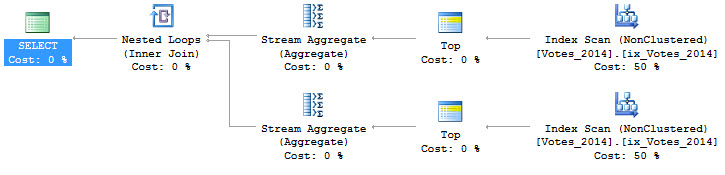
Query that

Let’s look at how updates work!

I’m going to use sp_WhoIsActive to look at the locks, with the command EXEC dbo.sp_WhoIsActive @get_locks = 1.

This query will hit exactly one year, and one partition, of data.

What do locks look like?

Confusing part, the first

We have an object lock, and a HOBT lock. Both have been granted, with a single request.

But the Object lock is only IX (intent exclusive), which means that other queries can still dance around it.

If I run a query that hits a different partition, say for the year 2014, it will finish without being blocked.

The X lock (exclusive), is just on the one partition for the year 2009. If I run a select query for that partition, it will be blocked.

Patterns

This basic pattern will continue if we cross a partitions, and hit two years of data

If we cross lots of partition boundaries

Or if we cross all of them

Confusing, part the second

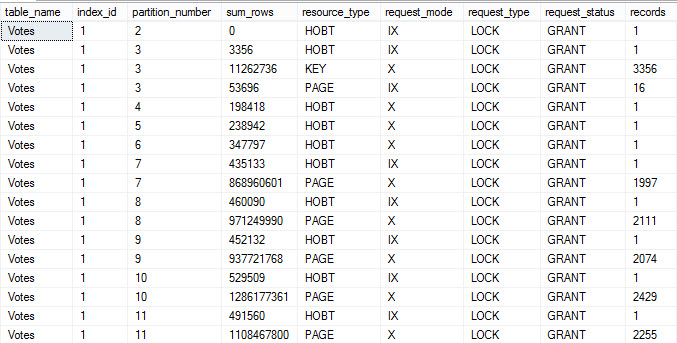
When we cross a single partition boundary, this is what locks look like. I can deal with this. The HOBT X lock has two requests. One for each partition.

This’ll happen for a few more partition crossing queries.

Until we hit 2013, and then our locks change. Now we have three requests for X locks on HOBTs, and one IX. Huh. We have a bunch of X locks on pages now, too.

When we cross every partition boundary, this is what the locks end up looking like. The HOBT locks went up, we have two kinds of Page locks, and now Key locks as well.

So what’s going on with all that?

Remember that this setting changes lock escalation. Locks don’t always escalate, and SQL Server can choose to lock different partitions with different granularity.

This becomes a little more obvious with a pretty simple query!

Different locks!


This makes the locking a bit more clear. Some partitions have different kinds of locks, different levels of locks, and different numbers of locks.

I’m not saying there’s a flaw in Who Is Active — sys.partitions is per database, so unless We added a bunch of nasty, looping, dynamic SQL in here, we couldn’t get partition-level information.

I know what you’re thinking

These are all using the partitioning key. What happens if we change our where clause to something that doesn’t? Say, where BountyAmount is NULL, instead. That column isn’t even indexed.

Heh heh heh

Our X locks are still only on HOBTs and pages. Our object lock is still only IX!

This is exciting, because even using a non-partitioning key where clause doesn’t lead to an X lock on the object.

We still lock different partitions with different granularity, too. We have a mix of HOBT, Key, and Page locks.

Thanks for reading!


So You Want a Cheap Disaster Plan

Cloud Computing, Log Shipping
17 Comments

There’s a lot that goes into a Disaster Recovery plan. One of them is offsite backups. There are some businesses that don’t have backups going offsite, let alone a Disaster Recovery plan.

This conversation has taken place more than I thought it would.

Me: Do you have any HA or DR features in place?

Them: We have backups for HA, but that’s it.

Me: Do the backups go offsite?

Them: No.

Me: What happens if a major disaster hits and the data center is destroyed?

Them: <crickets>

Me: <stares into the webcam, slowly leaning in>

Them: Is there a cheap disaster plan that we could implement?

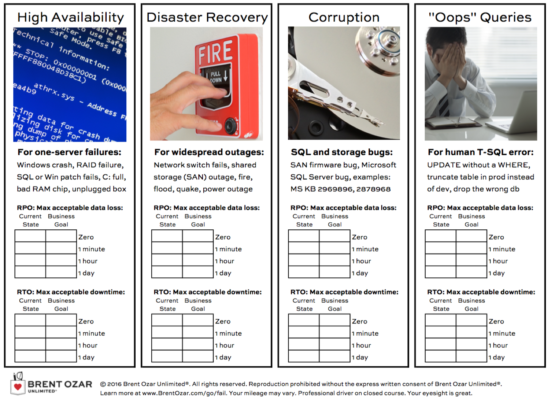
These aren’t our HA/DR clients. These are the ones that have called us to help tune their servers, but we also spend a few minutes discussing if and how they can achieve their RPO (data loss) and RTO (downtime) goals.

Is there a cheap disaster plan that we could implement?

What if you could store your backups in the cloud and then spinup the environment only when needed? Well you can!

GCE, AWS and Azure offer cloud storage. You use their tools to copy your files into a storage bucket. Their tools allow you to manage the retention, so you’re not storing everything all the time, unless that’s what you want to do.

All that you pay for until disaster strikes is the storage.

  • Copy the backups to the storage bucket after the backup completes
  • Lather, rinse, repeat
  • Disaster strikes
    • Create an instance in the cloud
    • Install and configure SQL Server
    • Restore the databases
    • Copy backups to the storage bucket
  • Disaster is over, time to failback to primary data center
    • Restore from the storage bucket
    • Copy backups to the storage bucket

Is this something you could quickly get online?

That’ll depend on if you’ve tested it and how complex your environment is. I can get the SQL Server online fairly quickly (depends on restores though), but what about everything else?

Remember that we are talking about a cheap disaster plan and your data center is either offline for a long time or for good. If we’ve got the data somewhere, we at least haven’t lost everything. Hopefully you’ve also made plans to store your source code and other dependent things offsite.

I do recommend that you test this scenario so that you know how to do it and how long it’ll take. You’d have to pay for the instance during your test, but it would be minimal as compared to paying for DR servers all the time.

Where can I get more information?

To learn more about this relatively affordable Disaster Recovery plan, check out the white paper that I wrote for Google. It’s in our First Responder Kit.

Brent says: And cloud storage is really cheap, like pennies per GB per month. I’ve been using Arq to back up my computers to multiple cloud vendors for years, and I don’t think my bill has ever approached $5 per month.


Good Reasons to Rebuild or Reorganize Indexes

Index Maintenance
56 Comments

No, not that

It’s not the F word.

Not like this embarrassing page that was somehow updated in 2017, which still tells you to reorg at 5% and rebuild at 30% fragmentation, like your data is still on a drive that looks like a record player and might still start making a clicking noise when it fails.

It also makes no mention of if this matters to data in memory.

You do have more than 3 GB of RAM in your 64bit server, right?

Fragmentation exists when indexes have pages in which the logical ordering, based on the key value, does not match the physical ordering inside the data file.

Demos

When’s the last time you saw a good demo of index fragmention causing a problem?

About the smartest person I’ve ever met, Joe Sack, once did a demo where he set Fill Factor to 5% — yes, that means the pages were 95% empty — and then scanned the entire index.

That’s empty space, not pages out of order, like the Microsoft docs page talks about.

Empty space. Caused by Fill Factor.

95% of it.

Let’s do the split

Some people will tell you that if have a lot of page splits, you should reduce fill factor.

This sounds reasonable. Sort of. With some empty space on the page, you’ll have a little more room available to insert values, which will reduce page splits.

The problem is that fill factor only gets applied when you rebuild an index, and you need to rebuild or reorg to apply that fill factor, and that lower fill factor is… Fragmentation!

If you chase that snake until the sun rises: in order to prevent logical fragmentation caused by page splits you need to introduce physical fragmentation with fill factor which is only respected when you rebuild or reorganize an index, which you do in order to remove logical fragmentation.

So why do these commands exist?

Well, I’d wager some of it is backwards compatibility. I still see questions about SQL Server 2000/2005 pop up on Stack Exchange.

There are some good reasons to Rebuild an index, like updating statistics.

Er…

Okay, maybe not that. You can always update statistics on their own.

But if you need to change something about an index (that hopefully isn’t Fill Factor), like:

  • Add some Partitioning magic
  • Add compression
  • Change an index definition
  • Change a Filegroup
  • Try to fix corruption in a nonclustered index

An easy finger to point

Index fragmentation is an L1 support tech’s Mr. Boogedy.

I’ve heard it blamed for every conceivable database problem, and so the witch must be burned every night.

The thing is, most of those witches are just nice cat ladies who keep odd hours.

Thanks for reading!


Book Review: Database Reliability Engineering by Campbell & Majors

Database Reliability Engineering – good buy

When you see the cover of Database Reliability Engineering, the first question you’re probably gonna ask is, “Wait – how is this different from database administration?”

And I’ve got good news: that’s the very first thing @LaineVCampbell and Charity Majors (@MipsyTipsy) cover in the preface.

“…for a long long time, DBAs were in the business of crafting silos and snowflakes. Their tools were different, their hardware was different, and their languages were different. (…) The days in which this model can prove itself to be effective and sustainable are numbered. This book is a view of reliability engineering as seen through a pair of database engineering glasses.”

The book absolutely delivers: it’s a 250-page version of the concepts in Google’s Site Reliability Engineering book (which I love) targeted at people who might currently call themselves database administrators, but want to go to work in fast-paced, high-scale companies.

How Senior DBAs should read this book

Jump to page 189, the Data Replication section of Chapter 10. Campbell & Majors explain the differences between:

  • Single-leader replication – like Microsoft SQL Server’s Always On Availability Groups, where only one server can accept writes for a given database
  • No-leader replication – like SQL Server’s peer-to-peer replication, where any node can accept writes
  • Multiple-leader replication – like a complex replication topology where only 2-3 nodes can accept writes, but the rest can accept reads

The single-leader replication discussion covers pages 190-202 and does a phenomenal job of explaining the pros & cons of a system like Availability Groups. Those 12 pages don’t teach you how to design, implement, or troubleshoot an AG. However, when you’ve finished those 12 pages, you’ll have a much better understanding of when you should recommend a solution like that, and what kinds of gotchas you should watch out for.

That’s what a Database Reliability Engineer does. They don’t just know how to work with one database – they also know when certain features should be used, when they shouldn’t, and from a big picture perspective, how they should build automation to avoid weaknesses.

I love those 12 pages as a good example of just how big in scope this 250-page book really is. The authors have very, very deep knowledge – not just database specifics, but how the database interacts with applications and business requirements. They abstract their experience just enough to make it relevant to all data professionals, yet keep the language clear enough that it’s still directly mappable to the technologies you use today.

For example, it doesn’t teach you how to use version control to treat your infrastructure as code. It just tells you that you should, and gives you a few key terms to look for as you start to build that skill.

You’re going to learn new terms and techniques. It’s going to take you years to turn them into a reality in your current organization. That’s okay – it’s about broadening your horizons.

How managers should read this book

Managers, you’re gonna read this and go, “Wow! I want a DBA team that thinks like this!”

Go back, read chapter 2 (Service-Level Management) carefully, and start working on it now with the staff that you have. Start crafting your service level objectives and defining how you’re going to measure them. In my experience, this is the single toughest part of the book, and it relies on the business stakeholders being able to come to a consensus. It’s a political problem, not a technical problem, and as a manager, it’s the part that you have to deliver.

That chapter’s recap includes two lines I adore, emphasis mine:

The SLOs (Service Level Objectives) create the rules of the game that we are playing. We use the SLOs to decide what risks we can take, what architectural choices to make, and how to design the processes needed to support those architectures.”

Availability and latency are to database reliability engineers as revenue and profits are to salespeople. You wouldn’t dream of telling your sales team, “Ah, just get the best price you can, and we’ll be okay.” You can’t do that with your reliability engineers, either.

How developers & sysadmins should read this book

If you’re coming into database administration for the first time, some of the concepts are going to be familiar to you (release management, SLOs, monitoring, not treating human error as the root cause.)

Chapters 10-12 will seem terrifying.

In those chapters, you’ll learn a lot of very big concepts (ACID, CAP Theorem, caching, message systems.) When you read those, your eyes may get large, and your ego may get small. Don’t freak out: just by reading these chapters, you’re already ahead of what most database administrators know about those topics.

See, most of us DBAs are resemble the way Campbell & Majors described the starts of their careers in the beginning of the book: accidental DBAs. We didn’t go to school for this, and most of us don’t have computer science backgrounds. Reading chapters 10-12, you’ll think you’re getting a crash course on something that everybody else already knows well. Good news – we don’t know it well either. (That’s also part of why I told DBAs to start with pages 190-202.)

And yes, I do recommend this book.

It’s the kind of book that’s easy to read, and hard to implement. Seriously, just implementing the SLOs described in chapter 2 takes most traditional companies months to agree on and monitor.

Over time, the brand names and open source tools will change, but the concepts are going to be rock solid for at least a decade. This book is a great waypoint marker set about 5-10 years in the future for most of us, but it’ll be one you’ll be excited to work towards.

Get the book now on Amazon.


[Video] Office Hours 2017/11/22 (With Transcriptions)

Videos
0

This week, Brent and Richie discuss the new Power BI Dashboard for DBAs, designing a new backup structure, creating SSRS reports, the difference between row and page compression, using EMC Avamar SQL agent for backing up databases, SQL Server and other books to check out, Veeam Backup for SQL Server, and how to best manage monitor over 20 SQL servers.

Here’s the video on YouTube:

You can register to attend next week’s Office Hours, or subscribe to our podcast to listen on the go.

Enjoy the Podcast?

Don’t miss an episode, subscribe via iTunes, Stitcher or RSS.
Leave us a review in iTunes

Office Hours – 11-22-17


What’s the new Power BI Dashboard for DBAs?

Brent Ozar: I guess we’ll go ahead and get into some of these questions here.

Richie Rump: Since we’re going to get started, I’m going to throw you a softball and say well, PowerBI dashboard, what the hell is that? Because I just saw that for the first time a few days ago, and tell me more, Mr. Ozar.

Brent Ozar: Right? So we have – and you know, it’s funny, I can actually do a demo of it because it happens to be on this VM. So on the blog, if you go to the blog and look for – up at the top – tools and then first responder kit, we unveiled this new PowerBI dashboard for sp_BlitzFirst where you can go in and analyze your SQL Server’s wait stats over time.

First Responder Kit dashboard in Power BI

So I’m going to go in over here, I’m going to minimize some of these sidebars so you all can see it. So the first thing that we come in to the dashboard is you can zoom in and out to various time ranges, so you can see show me the wait stats that I’m having and my number of batch requests per second. So like, you can see here in the morning, I had a whole lot of wait times – if you hover your mouse over those you can see what kind of wait category they are. Had a whole lot of wait times but I wasn’t doing a whole lot of batch requests per second, and then all of a sudden round about eight o clock, my batch requests per second is able to go through the roof, and my SQL Server’s not waiting on stuff anymore. If I want to find out what was going on, I can click on various bars and I can see more detail about those, like here’s the kind of wait types that are involved with whatever bar I clicked on, here’s the warnings that were happening on the SQL Server at that time, here’s the queries that were running around about that same time, I can right-click on any one of those queries and get more details about it, see its performance over time. It’s really cool when I go to see you know, alright, what changed about this SQL Server in this time range. I can go through the sp_BlitzFirst results and see things like I had high CPU usage – I’m going to zoom over here – someone tuned a query, someone added indexes, so we can log into what kind of changes have been made on the server and see what happened over that time range. It’s all totally free, it’s all totally open source, you can go download it off of our site. It all works off of running sp_BlitzFirst to a table, so we get a lot of cool enhancements for that plan coming up.

Richie Rump: So I want to hijack this a little bit and do the podcast hosting. So what was the – why – because I haven’t even talked to you about this, so this is a good opportunity. So why a dashboard? What was the genius or the thought and the idea about hey, maybe we could do a dashboard behind all this?

Brent Ozar: I have had for maybe the last year or two, the ability to log a lot of this stuff to a table, and I’ve heard from people that they’ve built some kind of report out of it, you know, either their own SSRS report, their own just plain T-SQL on a view, but people have been kind of reinventing the wheel and they’ve been struggling with how do I just display it in an easy way. And when I saw Patrick LeBlanc show PowerBI, and there was another blogger who did PowerBI at GroupBy, I was like, you know what, this looks easy enough that I could probably bang out in a week and be reasonably happy with it. Now, you remember what – for me, as a consultant, when you take a week off, you’re writing down a whole bunch of labor. You know, you’re kind of basically giving that away, and I don’t do PowerBI consulting and I’m not about to start. Like, I’m not about to be the guy who does PowerBI, or builds reports for people. But I was just like, if I could give the community back one week of work and say, “Here you go, you guys can now see what your waits have been over time.” Hopefully, it just helps people to solve the easy problems quicker and then save the harder problems for us as consultants.

Richie Rump: So you say it took you a week, did it take you a week?

Brent Ozar: Yes, it took me about a week of solid work, and that was spread across a span of three weeks probably, like two days here, two days there. Because a lot of it is – you know how it is when any time you build a visualization, all of a sudden you find problems with the data, and you’re like, “I got to change the way we store that”, “I need this other field to store it too”. So then it changes things that you put into the database as well.

Richie Rump: Yes, so I mean, was that about SQL Saturday Houston time last year when…

Brent Ozar: That was when I started thinking about it. Like, how am I going to go build this thing, and then I never put pen to paper until – would have been September I think? Probably round about September when Erik and I’s precon for PASS sold out, and we were like, “Alright, we got to keep bringing more and more fun things in here. What else can we give the attendees?” But the original point of thought of it came when I talked to Patrick at SQL Saturday Houston.

Richie Rump: Yes, I saw that, and I’m not getting involved in that whatsoever. I’m backed away and I’m like, “Look, here’s lunch, and look, they’re talking and I’m walking away from that. I do not want to be involved in PowerBI” at that point, right? Because it was still fairly young in its development cycle.

Brent Ozar: It’s still – like the stuff that we have to do in PowerBI to get stuff to work, I’m like, “Are you kidding me?” Like, picking times – the way that we pick times in that PowerBI file looks like the most crappy, ghetto way of doing a time slider. Like, there should be a clock or something here. Nope, there’s nothing like that, and you go out and Google “How do you make a time slider in PowerBI”, well, we don’t really have a way to do that yet. So it’s – I’m sure that there’s going to be a lot of changes over the next six months as Microsoft adds more stuff into there.

Richie Rump: So last question, is there any more coming? Do you have any more ideas to add to this thing?

Brent Ozar: Yes, because now that we got the basics in there, sp_Blitz already logs to a table, and Blitz Index logs to a table. So now I can say, “Alright, show me the most recent health check for this server, show me its indexes all inside there, like, what’s a quick psychological profile of this thing’s indexes?” And then also on the left-hand side of it, we’ve got date and time sliders. The next step is I’m going to centralize this data across multiple SQL Servers, and you’re going to have a list of checkboxes for SQL Servers as well. So if you just want to pick one SQL Server to look at, you can do that out of your entire data state as Microsoft likes to call it.

Richie Rump: Yes, I love Blitz Index and if we could get that on the dashboard, that would be amazing. Oh wow.

Brent Ozar: The other weird part with it is, when I look at sp_BlitzIndex, I want to copy things out of it and PowerBI makes copy-pasting crappy. It’s really hard to copy paste the stuff you want out of PowerBI. Like, “Basically, you write down what you see on the screen, you type that into a text editor.” Come on now, really? That can’t be. “Well, you could also print it to pdf and then copy paste from the pdf.” What year is this?

Richie Rump: Alright, I’m done hijacking. I’m done.


How often should I do backups?

Brent Ozar: Well, let’s see, now we’ll get to questions here. What do we got here? Esther says, “Our company does full backups of every database.” Good. “Each databases schedule is determined by the frequency of its data updates.” See, I’m not a fan of that. I would rather just have all the databases backed up on the same schedule, who cares when the data changes? Generally, the company will say, “I need this thing restored to the most recent point in time” and to make your life easy, you don’t want to have to guess through, “Well, which restore should I do from which servers when?” I would really just do backups on the same exact time throughout. Esther says, “What would I suggest as a starting point to help us design our new backup structure? Any specific video, tutorial, blog post, et cetera.” Go to the site and search for the term RPO and RTO, recovery point objective and recovery time objective. And we’ve got several blog posts that talk you through how you should use those numbers with the business to determine the right backup schedule.


What tool do you prefer for building SSRS reports?

Brent Ozar: Chris asks, “Do you guys use a report builder or something else to make SSRS reports?” Richie, have you ever made an SSRS report?

Richie Rump: I was using SSRS when it was still in beta. I think when it was in first best was when I started using it. No, I don’t think report builder is something – it’s been such a long time since I’ve written a report, honestly. I mean, this was a while ago, so I remember writing RDL by hand, so does that count? Does it give me bonus points for that? I remember that, I don’t remember anything with report builder. So for reporting, it’s important that you get out the data that you want and you put it in source control. I mean, really, everything else, how it’s built and how it’s generated, you know, whatever works, but as long as it’s in source control and as long as it gets you the right data for the right people, you know, you do what you need to do to get that done.

Brent Ozar: I have no experience on that either. It’s been maybe ten years since I’ve used SSRS, so it’s tough there. That was actually my favorite job duty to let go of. I’m like, I never want to work with the business again to figure out how many decimal places they want for net profit percentage. I just don’t care.

Richie Rump: I went through so many early – you know, in the web, early 2000s report engines and they were all crap. I mean, every single one of them.

Brent Ozar: Crystal. Crystal Reports.

Richie Rump: Crystal was the best, and Crystal was a load of crap.

Brent Ozar: Joe says, “You don’t get TFS version control with report builder.” Good to know.


What are the differences between row & page compression?

Brent Ozar: Brent Unrah, good to see you sir, says, “Looking to start using database compression. What are the differences between row and page level compression? How do I go about which tables get compressed?” So I only start by saying what’s the problem that you need to solve? If the problem is high page I/O latch waits, meaning you’re waiting to read data from disk, first just try tuning indexes first, because that’s usually a much bigger bang for the buck for me than doing compression. Page involves a dictionary, row involves choosing the shortest data types possible, like the engine uses the shortest data types possible for all of your fields. In terms of which ones I ever pick though, I just – I’m like, “Okay, we’re going to use” – I want to say it’s page uses both – but books online would be the best gamble for that. There’s also a stored procedure built in that estimates how much you’re going to save from compression, and what it does is it just goes and compresses the object over in tempDB and sees what the savings is. So if you’re going to go that way, I’d consider column store more than I would row or page compression, because column store’s got some amazing stuff starting in 2016.

Brent Ozar: Mike says – Gary follows up with, “I’ve never seen row compression save space. In fact, it usually makes it larger.” I’ve seen it save space where people had really crappily designed data types that – and I wasn’t allowed to change the data types.

Richie Rump: You wound me, Mr. Ozar, you wound me.

Brent Ozar: I didn’t see it here, I saw it at the last – not even my last company, two companies ago.

Brent Ozar: Let’s see here, Brent follows up on the compression question. He says, “Perfect, thanks, the devs were hoping to save space on disk; their ETL keeps filling up the drives, they thought compression would save us from having to ask for more drive space.” No – oh, I’ve so many bad ideas there and I shouldn’t voice any of them out loud.


When should I add more cores to my VM?

Brent Ozar: Gary says, “Is there a threshold of CPU use other than 100%, where we should consider adding cores to a virtual machine?” Yes, so the first thing you look at is SOS_SCHEDULER_YIELD waits. If your top wait type is SOS_SCHEDULER_YIELD, then that means that SQL Server is waiting on CPU time. We’re specifically talking about measuring wait time here, not the number of waits, but wait time. If the majority of wait time isSOS_SCHEDULER_YIELD, then you can either tune queries, tune indexes, or add cores. I would much rather tune queries or tune indexes because those are “free” because your boss considers your time as worthless.

Richie Rump: You also get the biggest bang for your buck, right? So you get more data in there and all of a sudden these queries are going to start acting – it’s still going to be acting funky, and then, “Oh, why is this slow again?” “Oh, why is it always slow?” And then, “Let’s throw some more hardware at it” and you haven’t fixed the problem.

Brent Ozar: Well, and even throwing hardware at it, say you double the number of cores. Best case scenario, that makes the queries twice as fast. You add the right index, that can go ten, a hundred times faster. It makes such a much of a bigger deal.


What do you think of EMC Avamar for backups?

Brent Ozar: Kush says – good to see you Kush, haven’t seen you in a while. Kush says, “What are your thoughts and experiences on using EMC Avamar SQL agent in order to backup databases? We have over 100 SQL Server instances.” Look at Richie’s face. So I have a weird – I’ll play devil’s advocate. I’m the weird DBA who says, I would often like to hand over backups to someone else who knows what they’re doing and has the time to fix backups when they fail. The problem is the key is there. They have to know what they’re doing because most of the time when you hand backups off to another team, they don’t know what they’re doing, they don’t trust you with readable access to the reports to know that your backups are working, and then they take forever in order to do a restore because you may have to wait for them in order to get back before you can start your restore process.

Richie Rump: You got to put a ticket in first, Brent.

Brent Ozar: And the ticket’s only supported nine to five.

Richie Rump: And then you need your boss to expedite the ticket and then he needs to talk to their boss and then all of sudden two weeks later you’re like, “Look, the data’s there”.

Brent Ozar: And the only woman who knows Avamar is gone for two weeks. She’s on sabbatical, and the guy who was supposed to train as her replacement, he’s out for pizza.

Richie Rump: This kid got sick, he went home early.

Brent Ozar: It’s tough. And it’s not that I’ve heard anything bad whatsoever about Avamar or Backup Exec or Data Domain, or any of these – well, Data Domain I have heard bad things about. But in terms of like the technology being broken, it’s just that when you hand over the keys to someone else to do a task, just make sure you got some kind of enforcement to make them do that task quickly. But yes, I do kind of love having someone else do backups as long as they’re capable. Just the same reason I love Azure SQL DB doing the backups for me, and Amazon RDS, like Aurora doing the backups for me. It’s just one less thing that I have to worry about. Do I still have to worry that they’re doing their job? Sure, but you know, you have to worry when I’m doing my job. I’m not always good at my job.

Richie Rump: That reminds me, I need to check the backups on the Aurora.

Brent Ozar: No, it’s totally automatic.


Do I need to fully qualify my table names?

Brent Ozar: Joe asks, “Do one part names, like if I’m going to ask for my table by just table name instead of dbo.tablename, do those still cause compile locks? My devs are terribly lazy and they only use one part names for everything.” You know what you want to do, if you want to teach your devs and you want to scare the holy hell out of them, what you do is add another set of tables in a different schema but with the same name, and then you set their default schema to be that and just play stupid. “I don’t know who did that, could have been anybody on this server. Everybody’s sys.admin, you guys all have permissions. Wow, it’s a shame all your code broke.” Mentally Richie is making a note to punch me in the mouth.

Richie Rump: You are evil, because I’m one of those guys. Because I didn’t grow up in the Oracle landscape where you needed to, you know, fully qualify that – I don’t qualify now [crosstalk]. If the DBA sat me down and said, “Hey look, this could be a problem under these circumstances, I would like for us to start fully qualifying all these table names because of X, Y and Z.” Then yeah, okay, let’s put that as part of our procedure and let’s go through and do all of that. But if we’ve set all our defaults and all that stuff, and they shouldn’t have access to production, let’s just put it that way, then there really shouldn’t be any reason why we shouldn’t have used one. Now, his question, does this still cause compile locks?

Brent Ozar: Yeah, so I can’t remember about compile locks, but it can cause multiple entries in the plan cache, because each person can get a different default schema. So even if they have the same default schema, SQL Server may end up caching the different plans individually. So it causes, and this is where I’ve got to have an asterisk up here, it can cause plan cache bloat. It’s just that in the year 2017, I don’t usually see that as a really big problem when people have, say, 64GB of RAM or more. I see plan cache pollution as a problem when people have like 4GB or 8GB of RAM. But then, we just have the discussion that, “Meet Mister Desktop, Mister Desktop has 64GB of RAM in the year 2017, so should your SQL Server.”

Richie Rump: Yeah, and the other thing to add onto that is that if you’re in application and the application is running these queries, you’ll only have one login.

Brent Ozar: Yeah, that’s true.

Richie Rump: So if you’ve got users that are logging in running these queries, that’s one thing, but you’ve got an application, it’s running all of that under one login, you’re not going to get that plan bloat. So I don’t see a huge problem with it, you know. If someone thinks I’m wrong about that, please @ me on Twitter because I’d love to find out if I am. But I’ve had people come up to me an start yelling at me that, “Hey your demos did not have the schema and it’s wrong…” And all that stuff. And I’m like, “Are you new to SQL Server?” And he’s like, “Well I’m typically an Oracle guy.” And I’m like, “Well there’s the door, and you could go at it, and you can give me 20 bucks on the way out because you can afford it.”

Brent Ozar: Someone in here will say that they had a problem once that was solved by fully prefixing their tables, I’m sure that it’s true. I haven’t seen it as an episode in my career when I’ve said, “Oh thank god we fully prefixed our tables, or else we would have been dead.”

Richie Rump: Yeah, I’m almost 25 years deep into SQL Server, so…

Brent Ozar: And, even if it is a really big problem for some folks, I would just say guide them to doing it from here on out, but it’s not like going back and changing all your code’s going to give you any kind of performance benefit that you’re going to be noticing there. But you’re also talking to the same guy who produces a piece of code called sp_Blitz. And if you listen to the blogasphere, they’re like, “Oh my god, it’s infinitesimally slower because SQL Server looks in the master database.” I’m like, “Yeah, that’s where it usually lives, because it’s a stored procedure that’s run by the database administrators.” “Well you still shouldn’t do that, it’s bad practice…” Yes, so is wearing socks that don’t match your jeans and I do that as well.

Richie Rump: I mean, the last thing I want to throw out to that is if you are communicating with developers and developers are writing and querying code against your SQL Server, then you need to document that. and you need to have a specific documentation that says, “This is how we write queries and these are the rules that we have.” So that way, when somebody does something that you don’t like or that you don’t like, then you’ve got something. “This is our rules, our document, that says we’re supposed to do it this way; go do it that way.” As opposed to, “That’s not best practices and where are these best practices?” [crosstalk]

Brent Ozar: They’re in my head.

Richie Rump: Write it down.

Brent Ozar: So true story, we had a client a while back who was a real big believer in the best practices type thing, and they’d even written triggers that if you tried to do a SELECT* they would get rolled back. If you tried to do any kind of create stored procedure or a function that SELECT* anywhere in it, it would get rolled back. I was like, “Really?” If you put like three spaces between the SELECT and the *, it would go right on through. You’re just literally looking for the string. Put an enter in between, anything like that…

Richie Rump: Hey, parsing is hard, Mister Ozar; parsing is hard.

Brent Ozar: I get that.


What SQL Server books do you recommend?

Brent Ozar: Thomas says, “Hey Brent, have you guys come out with a blog post listing the best books to have on your bookshelf? I have all of them from an older post, but I haven’t noticed anything since 2016 came out.”

Richie Rump: I’m assuming technical books is what he’s talking about, right? Because I could go deep into other stuff…

Brent Ozar: I was going to say, what were the last three books that you bought?

Richie Rump: Agatha Christie’s Murder on the Orient Express. I read that in the jury room…

Brent Ozar: Recently? Oh wow, sure.

Richie Rump: Yeah, it was a good read, a short read. Patrick Rothfuss, The Name of the Wind. Phenomenal fantasy book, and it’s not what you think if you’re thinking Dungeons and Dragons type stuff, it’s not what you think; it’s great. They just came out with a 10th-anniversary edition of that. And then, I forget the guy’s name but it’s a book on smart baseball. It’s on, kind of, analytics and approaching baseball strategy using analytics, type stuff. Those are the last three that I’ve read.

Brent Ozar: And when you want to learn technical stuff, where do you go?

Richie Rump: Since I’m always learning technical stuff, is that what the question is? I usually hit the documentation first. And there’s a problem with documentation, especially when we’re talking about new libraries that keep changing, is that you could have version issues with the documentations because most open source projects don’t keep previous versions. And I only say this because I hit this yesterday, because I had a new version of in one project and then the old version in another project. So everything was working right with this one code. The code was exactly the same in both services, so it was working right here but it wasn’t working right over here, and it was the stupid version number on the library. Brent was laughing at me actually. It was, ha, ha, ha, ha on Slack. That was not cute.

If I really need to learn something like brand new huge type of stuff, like Python – I’ve never used Python, I want to learn Python – I most likely will go to some sort of video training, and that’s like Pluralsight. If it’s SQL Server-based, I’ll even use our own training. People use our trainings, Brent; it’s amazing.

Brent Ozar: I don’t know about that.

Richie Rump: And then there are some – if I need something that’s core knowledge, that’s not so new, I need to learn the newest version; like maybe some computer science stuff, maybe some algorithms and security type stuff, then I’ll hit a book. But those are usually my steps.

Brent Ozar: The problem is that books are so outdated. They’re so good for core concepts, algorithms, design patterns, you know, scaling, sharding, whatever. But in terms of like SQL Server 2016 and 2017, books are so far behind. It takes a year to write a book, you’ve got to get through the editing process, then you’ve got to ship it. By the time it comes out it’s already outdated. A classic example is Alan Hurt has been working on a SQL Server clustering and high availability book for like four years. And every time he gets close to the finish line, they ship another version of SQL Server and he goes to add that into the book. So I haven’t bought a SQL Server book in maybe three or four years.

There’s two that are actually on the road to me from Amazon that I’m kind of excited about that are around design patterns, but I haven’t seen anything that I would buy around 2016-2017. My most recent book was the WD~50 Cookbook. Not WD-40 but WD~50 Cookbook by Wylie Dufresne; utterly gorgeous, just beautiful.

Richie Rump: There’s a book that actually I was looking at, and you’ll probably see the receipt here pretty soon – I haven’t bought it yet but I’m going to buy it. It’s called The Imposter’s Handbook, a CS Primer for Self Taught Programmers.

Brent Ozar: That’s cool…

Richie Rump: So Rob Conery – maybe you’ve heard of that – he actually built a video training company and sold it to Pluralsight. Well, he went ahead and wrote this book based on computer science type stuff, and it’s designed for people who don’t have a CS degree. And there’s videos along with it and all that stuff. So it’s called The Imposter’s Handbook. That’s the type of stuff that I would get as a book because it’s all core knowledge; it’s stuff that’s not going to change.


Brent Ozar: Let’s see here, Gary says, “You wear socks that don’t match? That’s against our best practices; you need to fix it by the end of the day. Absolutely, I’ll fix that by taking off my pants.


Have you heard anything about Veeam backups?

Brent Ozar: Chris says, “Backups aren’t my job. The guy sitting across from me is implementing Veeam now. Have you heard anything about it for SQL Server? Yes, we’ve even done webcasts for Veeam, actually, years ago. I like Veeam a lot, I think it’s pretty cool. There have been versions with gotchas, but the stuff that’s out now is pretty solid. The big thing to be aware of, though, is make sure you understand how point in time recovery works and to what points in time you can actually recover. Some people will set up backups say every hour and that’s it, and they’ll accomplish it via VM Snapshots with Veeam. Just know that those are the only points in time to which you can recover.

Richie Rump: I have a Veeam bottle opener somewhere in this office. That’s all I know about Veeam.

Brent Ozar: If you’re going to know something about it, that’s not so bad.


Brent Ozar: Michael says, “Happy Thanksgiving. Thankful for all y’all do. Thankful for Brent, Richie, Erik, and Tara. Avamar and SQL Server run, for me, full local native backup and they keep these local, and then they let Avamar be there for restores that are older than one day.” Yeah, I’ve seen that use. I’ve also seen people like backup to a file share and then Avamar backs up the file share as well.


Bad idea stories

Brent Ozar: Brent says, “I think your bad ideas make for great office stories though…” Okay, so one of the bad ideas, for like the slow ETL process with no disk space was I happen to have a client where the servers had a whole lot of RAM but they didn’t have a whole lot of disk space. We’re talking like half a terabyte to 2Tb of RAM, but only half a terabyte worth of disk space. So we bought RAM drive software, and I’ll let you figure out the rest from there. [crosstalk] Because it was ETL. It was like, you know, we didn’t care of the thing goes away. I’m like, alright…

Richie Rump: So wait, so you have a problem with disk space, we’re talking it’s like half a terabyte and yet the new phones come close to that? I don’t understand. It just doesn’t…

Brent Ozar: Brent says, “Was it faster?” Ironically a lot of RAM drive software isn’t actually all that fast. They have like single threaded limitations and in most cases, I can get good San storage to actually go faster, or good solid state to go faster. You would think it would be blazing fast because it’s all RAM, but RAM drive software tends to be kind of crappy.

Brent Ozar: Rick says, “USB RAIDed RAM…” The problem is, unless it’s USBC or USB3, you can hit some bandwidth limitations, and it’s really sad that I know that.

Richie Rump: Yes, it really is.


Should I enable hot swap CPUs in VMware?

Brent Ozar: Gary asks, “Do you have any experience with the impact of using hot swap CPUs? I found out it was turned on and I had CXPACKET waits.” Yeah, there are some gotchas around hot swap that don’t let VMWare expose the numa information up to the guest. Now, unfortunately, that’s beyond what I can answer fast, but if you search for Frank Denneman, he has a VMWare book and it’s absolutely phenomenal. He even goes into configuration details for SQL Server with that exact issue. Totally free too, right now, it’s sponsored by Rubrik.

Richie Rump: You know, you just recommended a book for a guy who says , “I don’t really read books much.”

Brent Ozar: It’s funny, and when it came out – Frank poked me on Twitter and he’s like, “Hey, I got a new book out.” And I’m like, “Alright, well if it’s free, I’m going to go read it.” And all I did was hit Ctrl+F for SQL and it’s like a 400-page book. I’m like, “This is actually good information.” Now, did I read it? No.

Richie Rump: Alright, there we go.


How should I monitor 20 SQL Servers?

Brent Ozar: And the last one that we’ll take is Landon says, “Do you have any suggestions for how to best monitor over 20 SQL Servers? I’ve been researching a bunch of tools like Redgate SQl Monitor, Idera SQL Diagnostic Manager or Quest’s offerings, but I wanted to see what you’ve been most impressed with over the years.” The three tools that I see people having the most success with are Idera SQL Diagnostic Manager, Quest’s Spotlight and SentryOne’s Performance Advisor; they keep changing the name of it, I think it’s called SQL Sentry right now. So Idera’s, Quest’s and SentryOne’s – those are the ones I see people having the most success with. There are other tools, I’ve just seen a lot of people who aren’t as successful with them because a lot of them don’t give you a whole lot of guidance on what does a specific number mean.

For example, they just show you that you have a CXPACKET of 500 seconds in an hour span; what does it actually mean? Those three tools seem to do a better job of getting you towards root cause analysis. They all have about the same overhead, they all cost about the same, they all do about the same amount of stuff. The way that I would do it is go get price quotes from all three of those, then pitch them against each other and see which one will knock the price down the cheapest.

Brent Ozar: Well thanks everybody for hanging out with us this week, and we will see you next week on Office Hours. Adios everybody.


How to Move TempDB to Another Drive & Folder

TempDB
66 Comments

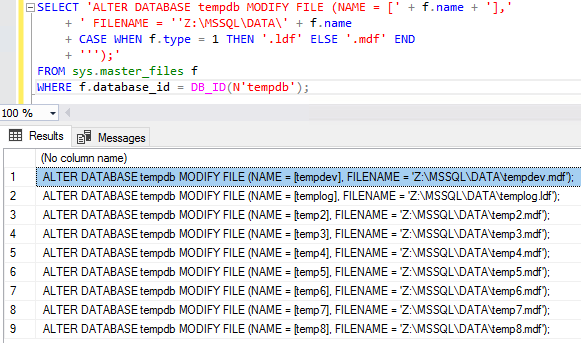
Every time I have to do this, I Google for a script. I might as well write my own and put it here so at least I find myself in the Google results:

The results:

Moving TempDB

I can then copy/paste the results into SSMS, edit them, and run ’em. I like generating scripts like this rather than flat-out executing it automatically because sometimes I need to tweak specific file locations.

I’m not bothering with detecting what the file names were before, and I’m just generating new file names to match the database object’s name instead.

Erik says: See that path? Make sure you change that path to the right one. Preferably one that exists, and that SQL Server has permissions to. If you don’t, your server won’t start up unless you Google “how to start SQL Server without tempdb” and spend the next morning explaining to your boss why you should keep your job. I mean, I’ve heard stories…

Want to learn more? Take my class.

My Fundamentals of TempDB class is for curious folks who want to learn:

  • What uses TempDB, and how that affects performance: not just temp tables and table variables, but also triggers, cursors, sorting indexes, workspace spills, the version store, and more
  • How to host TempDB depending on how you use it: understanding what goes in the log file, the data files, why the number of data files matter, and whether your particular workload should be on SAN, local storage, or ephemeral storage, and why
  • How to monitor it: after you understand what uses it and how to host it, you need to keep tabs on how its performance changes over time using DMVs, Perfmon counters, and the First Responder Kit scripts

Learn more and register now.


How to Track SQL Server Changes with sp_BlitzFirst

First Responder Kit
6 Comments

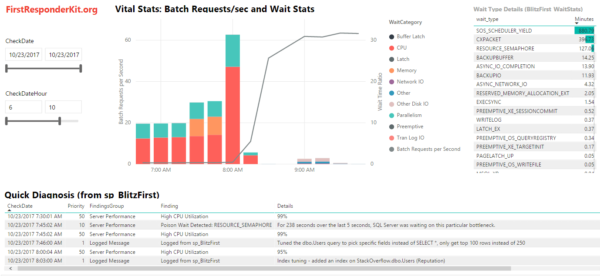
In the First Responder Kit’s Power BI Dashboard, there’s a Quick Diagnosis results area where sp_BlitzFirst takes a guess at why your SQL Server was slow – or in this case, why it suddenly got faster:

Logging your work in sp_BlitzFirst’s Quick Diagnosis results (click to zoom)

In this case, wait times were bad, and then all of a sudden the wait times just disappeared, and the line graph for Batch Requests/sec takes off. We’re doing way more queries, but waiting less times. Why?

The answer is shown in the Quick Diagnosis area – look closely at the bottom of that screenshot. Our DBA has been hard at work tuning queries and indexes:

sp_BlitzFirst logged message details

Logging messages directly into the monitoring tables means it’s way easier to understand cause-and-effect changes in performance. This helps you track your effectiveness doing performance tuning.

How to Log SQL Server Changes

First, start logging sp_BlitzFirst data to table to track your performance metrics over time.

Then, whenever you do something that might affect performance, call sp_BlitzFirst with the message you want to log:

sp_BlitzFirst assumes that you’re logging data in a DBAtools.dbo.BlitzFirst table, or in a dbo.BlitzFirst table in the current database. If you’re using a different database/schema/table name, you’ll need to fully qualify it like this:

You can run this manually, but of course you can also call it from your own utility scripts & tools like:

  • A new version deployment tool that tracks when code changes
  • A DDL trigger that tracks changes to tables
  • A nightly load process that adds a lot of new data to a table
  • Stats update jobs that change execution plans
  • SQL Server startup scripts that track when an AG failed over or was moved to a faster VM or instance type

Advanced Parameters for Custom Logging

Behold! Magic Extensibility!

  • @LogMessagePriority: defaults to 1, but you can use lower priorities like 100-200 if you want to just put in low-priority informational notes, like a data warehouse load finished.
  • @LogMessageFindingsGroup: defaults to “Logged Message”
  • @LogMessageFinding: defaults to “Logged from sp_BlitzFirst” – but with these two parameters, you could define other sources like your ETL processes
  • @LogMessageURL: defaults to “https://www.brentozar.com”, but if the message relates to a deployment, issue, help desk ticket, etc, you can link it here. Same with more info links to Sharepoint.
  • @LogMessageCheckDate: defaults to now, but if you need to retroactively log something, you can.

You can start to see where I’m going with this: I wanna give you a framework that we can use together to build a better understanding of what’s happening to our SQL Servers, and let everyone from development to sysadmins to DBAs understand why performance got better or worse.

For help:


Announcing the Free First Responder Kit Power BI Dashboard

First Responder Kit
21 Comments

What the heck is going on inside your SQL Server? Why’s it so slow?

I wrote sp_BlitzFirst to answer that question, but that only works right now. You have to be standing in front of your computer to do diagnostics when the problem strikes.

So now, you can run sp_BlitzFirst, have it log data to a table, and then later, you can analyze that data by pointing and clicking.

First Responder Kit dashboard in Power BI

Here’s a video tour of how it works.

Ready to get started?


[Video] Office Hours 2017/11/15 (With Transcriptions)

This week Brent, Erik, Richie, and Tara discuss Docker, writing to different servers in different locations, SAN Replication, reducing the size of a database, patching Availability Groups, getting rid of failover cluster instances, long-term backup storage options, VLF numbers, and more.

Here’s the video on YouTube:

You can register to attend next week’s Office Hours, or subscribe to our podcast to listen on the go.

Enjoy the Podcast?

Don’t miss an episode, subscribe via iTunes, Stitcher or RSS.
Leave us a review in iTunes

Office Hours – 11-15-17


Why would database mail go out late?

Brent Ozar: Alright, let’s see – we’ll go ahead and get started. Doug asks, “A few days ago, a rogue query…” I wonder if he called it Rogue One… “Caused tempdb to fill up, jobs to fail and notifications to be sent. We figured it out and fixed everything.” I like the way he says this, because it was probably his query, based upon this, “We figured it out and we fixed everything… Last night, the database server rebooted itself to install some Windows updates, and when it came back up it sent several more notifications with the timestamp from the day of the issue. What would cause SQL Server to hang on to notifications and send them after the reboot?”

Erik Darling: My guess would be if database mail couldn’t send, because maybe it’s on the same drive as tempdb or something.

Brent Ozar: That was my guess too.

Erik Darling: Kenneth Fisher, from SQLStudies, I think, he has a blog post about queries to help you troubleshoot database mail stuff. I’ve used that a couple of times. It’s a pretty good post, I’ll stick the ink for it in chat; give me a second to find it.

Brent Ozar: Find it in the show notes.


Brent Ozar: Kelly says, “Training videos question – are the high availability and disaster recovery videos going away? I can still get to the page, but the link isn’t on the DBA training videos page.” Yeah, our DBA training subscription now includes the senior DBA class instead, because they’re my modules. I like the newer ones better, so I like the senior DBA class better. You can still get to the HA and DR, It’s just that we’ve kind of deprecated those, so I don’t push them as much on the current subscribers.


What’s Richie doing?

Brent Ozar: Thomas says, “It’s fun to watch Richie when other people are talking.” I think it’s fun to watch Richie at all times, that’s why I have the webcam installed in his office.”

Richie Rump: Wait, what?

Brent Ozar: Richie, what do you do when we’re not on the webcast? When you code, do you dance around too?

Richie Rump: Well all morning it’s been like this, then like this… And I finally figured it out right before we started, which means I’ll have another half hour of, “Oh my god, what was I doing?”  And then this, and then all this.

Tara Kizer: And that’s due to working in the cloud, right? All the cloud stuff…

Richie Rump: You know, brain works and there’s – you know, what I’m working on, there’s been a lot of code actually written, and so you’ve got this – “Okay, if I want to do this, what needs to change around here?” And then you go off and you do the change, and then you see all the unit tests break, and then you’ve got to go back and fix all of them and create new unit tests and go through that cycle. And usually that takes about a day, if it’s a medium sized change type stuff. Yesterday, medium sized change, it was a full day fixing all that stuff.


What do you think about Docker containers?

Brent Ozar: let’s see – Thomas says, “Have y’all looked at Docker at all, and if so, what do you think about it?

Erik Darling: Not my favorite pants; I don’t like the pleats.

Brent Ozar: The belt’s not bad though. We don’t – so what we end up doing is, for the most part, people bring us in when the SQL Server is on fire, and we have to turn it around in three days or tell them what to do to turn it around within three days. And because we tend to be a little later on the adoption curve – like people don’t come to us with brand new servers, they’re usually in place for a year or two. Docker isn’t – it might be production ready for all we’re concerned with, but we tend to get brought into really high-value stuff; Docker tends to be throwaway projects, like you just spin up a SQL Server and make it disappear.

I would adore it for unit testing sp_Blitz, sp_BlitzCache, stuff like that – if we cared enough to write unit tests, which we don’t.

Erik Darling: That’s not true. I wrote a whole bunch of unit tests for sp_BlitzCache, so as soon as you want some units, I’ll send you them.

Richie Rump: I should be the one that actually knows more about Docker than anyone else, because it’s more of a dev type thing, and I know like nothing. I brought in a couple of presenters down in Miami to talk about it, and at the end of that, I’m like, “I still don’t have a good concept of how this thing works.”

Brent Ozar: And, when it first came out, there were some gotchas around persistent storage, like the idea which you don’t persist data and log files inside the Docker container, you persist them somewhere else, like out on a network; and that can lead to some performance gotchas there as well.

What else do we think about it? I adore it, the idea of containers are pretty awesome, I just usually want the SQL Server to stick around, I want the app servers to just completely rebuild all the time for version testing.

Richie Rump: Yeah, and I’ve been playing with serverless, which is completely like the next phase od Docker-less and containers. So containers is like all running on a server and we just throw all that idea away and we just run it whenever it needs to run, and that’s it. So that’s the main reason why I haven’t really messed with containers, because I’m past containers – I’m on serverless; that’s what I’m talking ‘bout.

Brent Ozar: I want to go off on a rant on serverless. Somebody says this week, they’re like, “Well you wouldn’t call Ubers carless…” And I’m like, “Well actually, you do. If you use Uber all the time, you don’t own a car, and now there’s a car involved, you just don’t have to own it or service it.”

Brent Ozar: Wes says, “I know that Kendra Little uses Docker quite a bit for her demonstrations.” Kendra’s a Mac person, like me, so in theory you would think I would love SQL Server running in a Docker container. The problem is that I really like to show things using SQL Server Management Studio, at which point, if I’m going to run Management Studio, I might as well be running Windows, because I’ve got to run it at this point.

Richie Rump: But now, with SQL… Never mind…


How do we feel about SQL Operations Studio?

Brent Ozar: John Sterrett pops on Twitter and defends Microsoft. He says, “Operations Studio still in preview. They’ve got to start somewhere. I’m sure actual plans will show up soon.” Yep… We’re going to get them next year, right Richie?

Erik Darling: That’s how I feel when I [run] all my queries; I’m sure the plan will show up soon. If I just hang on a little longer…

Brent Ozar: I’ve got to start somewhere. You might as well start with select star from table.

Richie Rump: You’re proving my point here. It takes time for this stuff to come through, and I’m not going to get all excited for something that’s pre-data – sorry.

Brent Ozar: Especially when it’s free, you know. I know what they’re going to come back to, because I already submitted my first feature request through GitHub. I’m sure they’re going to be like, “Great, the source code’s over there, Brent, good luck.” At which point, I’m going to say, “Do you really want me to submit a pull request, because I don’t even know what this is written in.

Richie rump: Is that all c++ stuff? I’m assuming…

Brent Ozar: I have no idea. I would think it would be – I doubt it’s c++ because it’s cross platform. I bet they went something really high level and abstract, like Java. It does feel like visual studio code. What’s that written in? It’s JavaScript?

Richie Rump: Well, visual studio is written in c++, but it could be…

Brent Ozar: The code, visual studio code?

Richie Rump: Oh, code, yeah that’s HML type, JavaScript…

Brent Ozar: I’m Googling. What is visual studio code built on? Electron, GitHub’s Electron.

Richie Rump: Yes, thank you. I know some web thing that they put inside the desktop.

Brent Ozar: The rest of us there, our eyes are kind of rolling back.

Erik Darling: I feel okay with that web thing.


How can I write to the same database in two data centers?

Brent Ozar: Ian says, “My boss wants our applications to read-write through different servers located in different places to the same database. Where could I find something to help me talk him out of it? We’ve already got distributed reads with availability groups, but he wants distributed writes too.”

Tara Kizer: It’s really easy. At one of my jobs, they asked this question – the business asked that question every one to two years, and all the IT department had to do was go back to the SAN vendor, what is the price point to be able to achieve that? And that was it. It was always at least a million dollars. I think the price was like two million dollars that we were always quoted. So it’s a lot of money to be able to achieve what you’re talking about, SAN replication, probably synchronous and it has to be in the same data centers, because there’s going to be latency otherwise.

Brent Ozar: The other gotcha is what happens when it breaks? So if you’re going to write to two different servers in two different places and replication breaks, because it will, it has to. Sooner or later, something’s going to break and you have different data in two different data centers. Is that okay with the customers or not? And if the answer is no, then there you go.


Do you prefer MongoDB or MariaDB?

Brent Ozar: Thomas asked a question earlier when we were talking about open source. He said, “Do you prefer Mongo or Maria?” So Richie, if we put a gun to your head and said we’re going to use a different database – we’re not using SQL Server to begin with, but if we made you choose between MongoDB and MariaDB, which one would you choose?

Richie Rump: Probably Maria. You know, it’s an offshoot of MySQL, it’s more standard and whatnot. It depends on really what we’re writing. I mean, if it’s more of a kind of object type think and NoSQL, then you go Mongo. Otherwise, if it’s more of a relational type thing, you’d go Maria. I still haven’t figured out how to report off of MongoDB yet. No one’s really found it out yet.

Brent Ozar: I should put that – well this isn’t really a family – no, it is a family webcast. I was going to open it just for the Youtube crowd, because I’m like well I don’t know if Youtube would censor us for having – so for those of you who are listening, there’s a classic joke on how do you query a NoSQL database. So just search for, “Did you go tell me to query MongoDB.” Was it MongoDB or was it just NoSQL?

Richie Rump:  I don’t remember.


How should I reduce the size of my database?

Brent Ozar: Dill says, “We have a database about 20GB in size. Our largest table is a heap. That table accounts for over half the size of the databases and the indexes are taking about 4.5GBs of space.”  He writes on for several paragraphs and he says…

Erik Darling: That should have been your first warning. We need to have like a beginning and end metric on here. Like if the beginning of a question and the end of a question are a certain distance apart, they…

Brent Ozar: The punchline of it is, “I’m trying to reduce the size of my database.”

Tara Kizer: It’s only 20GB though. Why are we bothering with this?

Richie Rump: Don’t put files in your databases. No blobs, bro… I mean, come on, man.

Brent Ozar: So these are 32GB thumb drives. I’ve got a handful of them. I’ve actually got a whole bag of them here. There’s probably two or three terabytes worth of USB drives in here. Just go and put another USB drive in the SQL Server and you should be okay.

Erik Darling: I’ll sell you a really cool thumb drive…

Brent Ozar: Wow, that’s got to be full of viruses.

Erik Darling: You have no idea. This thing is awful.

Brent Ozar: When you picked it up, I thought it was going to be a dental floss. That’s what it looked like.

Erik Darling: You could write your backups to this tape.

Tara Kizer: At the end, Dill wonders why the database size decreases after he shrunk it, and it’s not going to decrease because a heap is the table and the clustered index is the table. The size isn’t going to change here. I mean, maybe a little tiny but, but this isn’t for size reasons. Switching from a heap to a clustered index pertains to – okay, go ahead…

Brent Ozar: there can be, though, because heaps don’t de-allocate empty pages when you do deletes, but that, in most cases, is such a tiny percentage.

Tara Kizer: Switching from a heap to a clustered index is more about is your system high writes or high reads, are you having problems with forwarded records and deletes. Most OLTP tables, or really all OLTP tables, in my opinion, should have clustered indexes. It’s staging tables, ETL type stuff where you may want to have a heap.

Richie Rump: Or if you kind of know your data patterns. If you know you’re doing only write only, you’re not doing a lot of reads against it, then…

Tara Kizer: That’s what I tell my clients when I’m looking at BlitzIndex output in the heaps and there’s extremely high forwarded records, you know. They ask should we rebuild the heap or should we add a clustered index? And that’s when we scroll to the right and the BlitzIndex output and we look at the usage, you know, is it heavily writes compared to reads? And if it is heavily writes, then yeah, just go ahead and rebuild your heap on a regular basis.

Brent Ozar: Michael says, “I work with an ERP system that is all heaps, 12,000 plus tables.” SAP, I’m going to guess.

Tara Kizer: Oh, is SAP all heaps?

Brent Ozar:  I think so. I think SAP is all heaps. Man, it always seems like the bigger the system, the more Enterprise-y, the worse the database is.

Tara Kizer: And I recently had a client that was using SAP’s Business One, which is completely different that SAP. You know, SAP supports RCSI, Business One does not. There were a lot of issues with Business One, and it all looked like it had been around since SQL Server 2000 days. I mean, just some bad stuff in there.

Brent Ozar: Michael follows up with a name. He says, “Don’t say it publically, but it’s Acme…” No, just kidding.

Richie Rump: Michael just went, “Nooooooooooooo…”

Brent Ozar: It’s [Joris] Business One…

Richie Rump: Dude, he’s the guy that bought it.


Should I put a max size on the log file?

Brent Ozar: Let’s see, Lee asks, “I have a vendor that put a max size on their transaction log file…”  I shouldn’t be laughing, Lee. “I am wondering what kind of problems this could cause for our SQL Server. We just got it installed a week ago, so no problems yet.”

Erik Darling: Well what’s the max size on it? That is my first question.

Brent Ozar: I don’t have the answer, I’m sorry.

Erik Darling: Well I know you don’t.

Brent Ozar, He says 90GB.

Erik Darling: Oh, well, if you run out of that 90GB then you’re going to start seeing some funny errors.

Tara Kizer: You’re down.

Erik Darling: Maybe it’s to keep you honest. Maybe it’s to keep you taking log backups, I don’t know. That would be a fun way to put a gun to someone’s head and say, “No, you take log backups. If you don’t, nu huh buddy, don’t you rebuild that index, you only have this much space. If you go over this, that’s it.

Tara Kizer: I would wonder, you check the size of you biggest index and make sure that you’re not over 90GB because if you try to rebuild that guy, you’re definitely going to run out of space there.

Brent Ozar:  And, whatever you do, right before you go on vacation, don’t type BEGINTRAN, lock your workstation and go home for the weekend; that would be bad.

Tara Kizer: I would be nervous about having an application where the vendor put that in place, because I wonder about their best practices and how they set up the server. I would start looking at your SQL Server instance settings and see if everything’s at the defaults.

Brent Ozar: I have a bad feeling that somebody, one of their customers, filled up a drive once and so this was their answer, “Well we can’t ever let that happen again.


Are Availability Groups ready for prime time?

Brent Ozar: Thomas says, “I’m migrating three instances that are currently on a cluster. I’m not allowed to upgrade from 2012 yet on these three. Are availability groups ready for primetime with the latest service pack and cumulative update?” Oh my goodness, I think he’s talking about 2012. 2012 availability groups [crosstalk]… Yeah, so Tara’s our availability groups person, by far…

Tara Kizer: All of my availability groups are on SQL Server 2012, and we did not run into the issues that you were about to mention. I can’t remember what those issues were. But doesn’t one of our things say that if you’re going to use availability groups, to start on 2014 or higher, because of something with 2012. Whatever it was, it was like – I ran fairly large systems on availability groups on 2012 and did not have issues with it. I know Stack Overflow did; that’s different.

Brent Ozar: My only thing, and this is kind of a personal preference, my only thing is when you lose the primary, until another primary comes up, the databases disappear from object explorer. You can’t query them on any other replica, so your readable queries just fail. Now, is that a showstopper of a deal? Not really. If you’re just using it for failover, you’re going to bring up a secondary anyway, so it’s not such a big deal.

Tara Kizer: And the readable queries are only down for say 30 seconds, because these failovers are quick in AGs, so maybe even 15 seconds. [crosstalk] As long as it’s automatic, if it’s an automatic failover, yes.

Erik Darling: I think the bigger deal for me would be which Windows OS you’re on. Like I wouldn’t want to be on Windows Server 2008 or whatever…[crosstalk]

Tara Kizer: You say that, but that’s what my systems were when I first deployed; and still, we were okay. Now my last job, we were on Windows 2012 R2, I believe, for those availability groups. But I would wonder for Thomas’s question, why migrate off the cluster? What issue are you having that you want to get rid of the failover cluster instance here? For me, I wanted to get off of it because my environment that first went to availability groups, I wanted to get rid of transactional replication, which we were using for reporting, and hey there’s this new feature called availability groups. It offers HA, DR and a readable secondary. And I was like, “Oh, I have failover cluster instances, I had asynchronous database mirroring for the DR and then I have transactional replication for reporting.” So for me, I was like. “Three features gone and one of them is transactional replication.” So what are you trying to solve by migrating off FCIs?

Brent Ozar: He follows up by saying his hardware’s going out of warranty on the cluster.

Tara Kizer: I would stick with FCIs, honestly.


Should my VMs only have one core?

Brent Ozar: let’s see here, Samuel says, “I am trying to convince our sys admins to build our production SQL Servers with more than one core as standard. They want to build with one core and increase CPUs as necessary. In your experience, what would you…”

Tara Kizer: One core? Don’t most laptops have more?

Brent Ozar: This is actually what VMWare’s best practices recommend for running SQL Server…

Tara Kizer; That was a long time ago though, wasn’t it? Is that still?

Brent Ozar: No, it still is. And, the most recent Virtualizing SQL Server book that we reviewed on our blog said the same thing.

Tara Kizer: So obviously these aren’t Enterprise Edition servers, because you can’t even license less than four quarters on Enterprise Edition.

Brent Ozar: If you license by the host you can. So you license the host and then run all the… I know, I understand where these VM admins are coming from, it’s just that they’re wrong.

Tara Kizer: I would run my stuff in the cloud if I only need the one core. I mean honestly, why even host stuff for such small stuff these days… [crosstalk]

Erik Darling: Docker, I don’t know.

Richie Rump: I guess my question would be, one, are they living in a state where marijuana is illegal? Two, have they been drug tested recently? And three, do they smoke it as they’re sitting in their cube? I don’t know, but it doesn’t seem right.

Erik Darling: They must be like mining Bitcoin with all those other CPUs. They must have a side hustle on that server if everyone’s just getting one core; that’s absurd.

Brent Ozar: I would just ask them, do you expect the servers to be unresponsive during backup and CHECKDB? Because I want to be able to keep taking backups and running CHECKDB without the entire server falling over.


What do you recommend for long term backup storage?

Brent Ozar: Dorian asks, “What do y’all recommend for long-term backup storage; Disk, tape or the cloud?” I recommend that the sys admins handle that. I suck so bad at that.

Erik Darling: I don’t have a recommendation of one or the other. I would just say, as long as it’s redundant – like however you can make it redundant, that’s what I would prefer, because you don’t want to lose one and then be out all your old backups.

Richie Rump: Do they still have zip drives? Are they good for backups?

Brent Ozar: Super stable, yeah. [crosstalk] When you hear the clicking, that means they’re working.

Richie Rump: “Click, click, click, click – everything’s fine with the drive…”

Brent Ozar: Oh we’re old.


How do you patch Always On databases?

Brent Ozar: Sri asks, “How do you patch always on databases?” So Sri, just to be careful, I’d be a bad person if I didn’t mention this: call them availability groups databases. Just because there’s people out there who are kind of argh about spelling and all that. “Do you go through a Windows update, or do you just download and install and use the cluster services?” How do you guys like patching availability groups?

Erik Darling: I don’t.

Tara Kizer: It’s fine. It’s fine, just failover and patch, and whether or not you use Windows update or something else, that’s dependent upon your organization. Some of my organizations, they did use windows updates, sometimes we’d use system center, whatever it is, SCCM. And it would pre-download the updates on the server and then I would just have to click on the little bubble that would appear and install it and do my reboots and everything. So yeah, whatever your organization uses for Windows updates is fine by me.

Brent Ozar: I just wouldn’t push them out automated without a human being there, because they have no respect. They’re like the honey badger, they don’t care for backups running, they don’t care if CHECKDB is running.

Tara Kizer: You can get sophisticated – you guys aren’t going to like this answer – but you can get sophisticated with patching and use PowerShell to be able to determine – somebody launches a PowerShell script and does all the failovers to one node, launches the patches on the other node and does the reboots and the failovers. So we were working on them at my last job, it had gotten deployed fairly, not too soon after I left; so I’m sure they’ve got that all squared away. So you can get pretty sophisticated with patching.

Brent Ozar: I like that answer because someone else is doing it.

Tara Kizer: Yeah, I didn’t do it.

Erik Darling: It’s all automated.

Tara Kizer: I think we had in place for like maybe three months, and whoever was on call when the patching was happening, that’s who would have to click on it. I was like, “Please don’t break.”

Erik Darling: “Someone’s on PowerShell? Cool, I’m drunk; unavailable.”

Richie Rump: Those PowerShell people are kind of like crossfitters and vegans. You know that they use PowerShell because they’re going to tell you, right.

Erik Darling: They’re all about it.

Richie Rump: We could solve global warming with just a little bit of PowerShell.

Brent Ozar: It’s like the worst Tinder date ever. You know, you’re swiping through and you see a vegan crossfitter who works with PowerShell.

Erik Darling: Like throw atheist in the mix and you’re just never going to hear the end.

Brent Ozar: Dating advice from Brent Ozar Unlimited: avoid the vegan PowerShell crossfitters who don’t go to church.

Erik Darling: Avoid people with beliefs, really. As soon as someone has beliefs…

Richie Rump: I mean, at that point do you just delete the app, or just throw away the phone? I mean, whichever is easier, I guess.

Brent Ozar: I told you to never right swipe me here.


How many VLFs is too many?

Brent Ozar: Jim says, “I’ve got databases with VLF counts ranging from 65 to around 1000. What’s a good number of VLFs and what’s a bad number of VLFs?

Tara Kizer: A bad number is when the number is really high.

Brent Ozar: And what is really high?

Tara Kizer: I can only tell you what I experienced when I actually learned about VLFs. So this is about ten years ago doing Microsoft patching every month for that company. And every time – I had to reboot a lot of servers, so I would just connect to management studio and see if the instance was up. Then I would move along to the next server and about 15 minutes after I rebooted this box and I verified the instance was up, the app seems like, “Oh we can’t connect to the box still.”

So I went to object explorer and looked at the databases, and in horror I saw that this database was in crash recovery still. And I looked at the error log, and here it is, the crash recovery, phase one, 30%. You see all these logging messages, and this system happened to be an extremely critical system that had five nines of availability SLAs. And we were in a maintenance window, so it was kind of okay, but it was not expected for that kind of downtime in a maintenance window. But it took 45 minutes. I was on my hands and knees, praying to the crash recovery gods and I was really close to opening up a case with Microsoft, but I kept hesitating because even for, what’s it called, a CRITSIT these days? A CRITSIT, it takes an hour before you speak to someone. I was like, “I hope this thing is up before they answer the phone, you know.”

So this was like at night, and on Monday morning I contacted our Microsoft engineer, our PFE, and he’s like, “Oh what is DBCC LOGINFO show?” And woo, 45,000 VLFs on this database. This was like a 7TB database and I think that probably the auto-growths were fine at some point, but in the past they had been really small. So it got into this situation, and so once you fix it, you’re good to go, usually, as long as you fix the auto-growth. So 45,000 is a bad number.

Erik Darling: I ran into kind of a mirror situation where I was trying to restore a 5TB database that had about a 500Gb log file. But apparently, all the VLFs were like the biggest possible VLF that you can have, so that took a really long time to read through too. It’s not just the number of VLFs, it’s the size of the VLFs; there’s a whole lot of stuff to think about.

Richie Rump: [crosstalk] I remember when I was backing up a database – no, I never did any of that stuff. No, doesn’t ring a bell.

Tara Kizer: As far as numbers, I can just tell you from experience of, you know, looking for bad VLF databases, that if your transaction log file is around about 100GB, you may be able to get away with 200 VLFs, just based upon the shrinks and auto growing back out, but there really is no number. But 200, I wouldn’t use that as my threshold unless all of my transaction log files sizes were really small.

Brent Ozar: I think in sp_Blitz, I want to say we warn you at 1000, but even that is just to give you the heads up of, “Hey, you should consider doing something about this at your next convenient time.” It’s not even that urgent.

Tara Kizer: Yeah, I actually had a recent client that had 75,000 VLFs, so that was one of their pain points was to ask about – I was like, “Oh, I know this topic. I can tell you exactly…” Because crash recovery was taking 30 to 45 minutes, I was like, “Oh I’ve experienced this. I know exactly what that is. I can help you.”


Can high CPU use cause a cluster failover?

Brent Ozar: Kush asks, “If you have a two node active passive failover cluster, AKA a single instance failover cluster, does high CPU use on the active node cause a failover?”

Erik Darling: Never seen high CPU use do it. I’ve seen out of memory do it. I would imagine that there’s some crazy erase condition when CPU gets pegged at 100% that would cause a failover cluster node to say, “No, let’s not do this here anymore.”

Tara Kizer: I wonder, because I’ve been called on clusters that were pegged at 100%, even after an hour. And this was like on a Saturday, that’s why I remember it, because it’s my personal time. And it was still pegged when I logged in, so I don’t know that there’s anything – because after an hour, you’d think if there was going to be a failover, it would have happened by then. So I don’t think that high CPU is one of the triggers.


Should I run 4 tool versions on the same machine?

Brent Ozar: And then last one we’ll take, let’s see, Joe says, “I have management studio 2017, management studio 2014, SQL Server Data Tools 2014 and SQL Server data Tools 2016…”

Erik Darling: Why is this the last one?

Brent Ozar: “Should there be any issues if I am careful upgrading my code? Will I run into any problems?”

Erik Darling: Not if you’re really careful and you have a lucky rabbit’s paw and it’s next Tuesday on Mars and… I don’t know, you hit a homeless guy twice on the way to the office…

Brent Ozar: hold your left leg out of the window…

Tara Kizer: At my last job, we actually had to have machines like this because we had SSIS packages and we had SQL Server 2008 servers and 2012 servers. So we had to install various versions of thee data tools, and not necessarily different versions of management studio, but the data tools, visual studio – and it was – sometimes people would have the wrong visual studio and it would work on their machine but not when they deployed it to production. So you basically needed a chart to tell you, on this server, this SSIS package needs to be used with this visual studio and data tools. It was a problem.

Richie Rump: I’m so glad I’m out of the SSIS game. It’s the worst.

Brent Ozar: And two words for you: virtual machines. Build VMs with each one with its own different version. [crosstalk]

Richie Rump: Well, nowadays you’d just say build the Docker container, right, that has all that stuff on it.

Brent Ozar: You might say that.

Richie Rump: I’m just saying that. I’m supposed to say that, I’m a dev, I’ve got a contract saying I’ve got to say this kind of crap.

Brent Ozar: Enjoy your Docker pants. Alright, well thanks everyone for hanging out with us. Adios everybody.


Updated Stack Overflow Database Dump Importer v1.4

Stack Overflow Database
0

The nice folks at Stack Overflow publish their entire data set (data included) in XML format. It’s tons of fun for demos, but you need a way to get it into a relational database.

The Stack Overflow Data Dump Importer (SODDI) makes this point-and-click easy. Just download the latest release, install it, download the XML exports, and you can import it into MySQL, SQLite, or Microsoft SQL Server.

Last week, we sponsored @AndrewBrobston to make a few improvements and release v1.4:

  • Add support for the PostHistory, PostLinks, and Tags tables
  • Enable you to set the Id fields as identities (really useful for the workloads in my training classes)
  • Enable MySQL and SQLite support again (had broken in prior releases)

@BennetElder also added a database connection dialog to make it easier to pick & choose the target database.

Stack Overflow
The place that saves your job

Next steps:


We’re Coming to London! Announcing Our SQL Bits Pre-Con.

Company News
1 Comment

Going to SQL Bits in London this year? Join me & Erik Darling on Wednesday at our all-day pre-con session, Expert Performance Tuning for SQL Server 2016 & 2017. Here’s the abstract:

Your job is making SQL Server go faster, but you haven’t been to a performance tuning class since 2016 came out. You’ve heard things have gotten way better with 2016 and 2017, but you haven’t had the chance to dig into the new plan cache tools, DMVs, adaptive joins, and wait stats updates.

In one fun-filled day, Brent Ozar and Erik Darling will future-proof your tuning skills. You’ll learn our most in-depth techniques to tune SQL Server leveraging DMVs, query plans, sp_BlitzCache, and sp_BlitzFirst. You’ll find your server’s bottleneck, identify the right queries to tune, and understand why they’re killing your server. If you bring a laptop with SQL Server 2016 or 2017, and 120GB free space, you can follow along with us in the Stack Overflow database, too.

You’ll go back to the office with free scripts, great ideas, and even a plan to convince the business to upgrade to SQL Server 2016 or 2017 ASAP.

Can’t upgrade to 2016? We’ll even show you memory grant and compilation tracking tricks that work in newer service packs for 2012 and 2014.

This is not an introductory class: you should have 2-3 years of experience with SQL Server, reading execution plans, and working on making your queries go faster.

Attendees will even get a one-year Recorded Class Season Pass – with that, the pre-con pays for itself!

Check out the list of pre-cons, then register for SQL Bits. This same pre-con sold out at Summit long before the conference even started, so don’t wait until the last minute.

See you in London!


First Responder Kit Release: The Ides Of November

IB Rewop

This is a cleanup release to get some of the pull requests in that didn’t make it in before the precon.

There’s also a secret unlockable character that Brent is blogging about next week!

Please clap.

You can download the updated FirstResponderKit.zip here.

sp_Blitz Improvements

  • #1199 We’ve updated the unsupported builds list! Now you can numerically gauge how bad you are at patching SQL Server. Thanks to @tony1973 for letting us know about this. Apparently he’s really good at patching SQL Server!
  • #1205 We now guarantee a total lack of duplicate Check IDs. Can a primate get a primary key, here? Thanks to @david-potts for letting us know about this one.
  • #1207 If you have read only databases on your server, we’ll no longer gripe about a lack of DBCC CHECKDB. Thanks to @Gavin83 for coding this one!

sp_BlitzCache Improvements

  • #1230 Oh, that missing parameter in the dynamic SQL. Thanks to @GrzegorzOpara for letting us know!

sp_BlitzFirst Improvements

Big breaking change here: the new @OutputTableRetentionDays parameter defaults to 7 days. If you’re keeping more data than that in your BlitzFirst% output tables, set this parameter in your jobs right away, or else data older than 7 days is going to get deleted.

  • #1232 No one likes retaining things. Actually, people like retaining everything other than water. Which is weird, since HYDRATION IS IMPORTANT! I’m not a doctor, but this new @OutputTableRetentionDays parameter is a good way to purge old perf data. Put your data on a diet.

sp_BlitzIndex Improvements

Nothing this time around.

sp_BlitzWho Improvements

Nothing this time.

Next time around, we’re going to be pruning the default list of columns that it returns, and adding an @ExpertMode that returns all of them. If you have opinions, now’s the time to let us know.

sp_DatabaseRestore Improvements

@ShawnCrocker did a bang up job adding and fixing a bunch of stuff, as only someone who actually needs to restore databases all the time can do!

  • #1198 The @StopAt parameter was being ignored for Full and Diffs — no more!
  • #1192 There was a dependency bug when moving files was blank. Now we look for the default instance path.
  • #1180 You can now change the recovery model of a database after restoring it!

sp_BlitzBackups Improvements

Nothing this time.

sp_BlitzQueryStore Improvements

Nothing this time.

sp_AllNightLog and sp_AllNightLog_Setup Improvements

  • #1133 Skips over attempting to restore system databases, because what kind of maniac would want that to happen? Thanks to @dalehirt for this one!

sp_foreachdb Improvements

Nothing this time.

For Support

When you have questions about how the tools work, talk with the community in the #FirstResponderKit Slack channel. If you need a free invite, hit SQLslack.com. Be patient – it’s staffed with volunteers who have day jobs, heh.
When you find a bug or want something changed, read the contributing.md file.

When you have a question about what the scripts found, first make sure you read the “More Details” URL for any warning you find. We put a lot of work into documentation, and we wouldn’t want someone to yell at you to go read the fine manual. After that, when you’ve still got questions about how something works in SQL Server, post a question at DBA.StackExchange.com and the community (that includes us!) will help. Include exact errors and any applicable screenshots, your SQL Server version number (including the build #), and the version of the tool you’re working with.

You can download the updated FirstResponderKit.zip here.


#TSQL2sday: Brad McGehee Made a Difference in My Career.

T-SQL
7 Comments

For this month’s T-SQL Tuesday, Ewald asked who’s made a difference in our careers.

When I first got started out in SQL Server, all I had was books and Books Online. Back then, neither of them were particularly well-indexed, nor were they up to date.

Then I found a web site that turned things around.

Brad McGehee wrote web posts that were smart, easy to understand, and straight to the point. I was able to get in, get my problems solved, learn a little, and get back to work – all for free. (I’m not linking to the site because Brad sold it, and the new owners haven’t done a good job of keeping it up, and a lot of the advice is irrelevant – hey, it’s 15+ years old now!)

Brad then became an evangelist for Red Gate. When they wanted to send a DBA to space, Brad starred in a series of videos that challenged DBAs to answer trivia questions. (I had a lot of laughs out of that, especially Brad’s awesome behind-the-scenes videos.)

In 2012, Brad’s family situation changed, and he did the admirable thing: he gave up public life to be a “regular” DBA again and focus on his family. But as far as I’m concerned, Brad will never be a “regular” DBA – he’s an inspiration to me.

Every time I run into Brad at SQL Server conferences, I’m happy to see him. He’s just a really nice guy who helped set my database career in motion, and I can’t thank him enough. I’ve said it privately, but I’ve never said it publicly, so here you go: thank you, Brad. I thank you, DBAs from the 2000s all thank you, and your family thanks you. You do good work.


[Video] Office Hours 2017/11/08 (With Transcriptions)

Videos
4 Comments

This week, Richie and Tara discuss Richie’s current projects, Availability Groups, offloading reads and backups, applying service packs, whether production should ship agent jobs to production recovery server, security checks and scans in SQL Server, CPU performance issues upgrading to SQL Server 2016 and 2017, database backups and restores, whether there’s currently a DBA shortage, and Richie’s favorite board game.

Here’s the video on YouTube:

You can register to attend next week’s Office Hours, or subscribe to our podcast to listen on the go.

Enjoy the Podcast?

Don’t miss an episode, subscribe via iTunes, Stitcher or RSS.
Leave us a review in iTunes

Office Hours – 11-8-17


Do we see more on-premises or cloud servers?

Tara Kizer: Michael has a question, “Currently the SQL Server related projects you’re working on – SQL Server on-premise or SQK Server cloud based implementations…” What are you doing, Richie, for all the projects that you’re working on? Because we don’t really work on projects, Erik and I, we’re just…

Richie Rump: Yeah, so I’m kind of purely cloud-based now, so doing a lot of work in Postgres in the cloud. Not SQL Server, oddly enough, doing a bunch with some of the other NoSQL databases in the cloud as well, but mainly dealing with the NoSQL side of things with Lambda and all that. So I haven’t played much with Azure over the past six months or so, it’s all been AWS and getting stuff up running in there. So mainly the stack that we’re using for Paste the Plan is mainly the stack that I’m messing with, and c# with .NET locally. So a lot of fun stuff, but no, I haven’t been doing any SQL Server in the cloud. I probably should.

Tara Kizer: I’d say probably half of our clients, maybe, at least my clients are in the cloud, maybe a little bit less than half. And of those, most of them are using AWS EC2 specifically. I don’t think I’ve had too many Azure clients. I haven’t had any Google Cloud clients yet. Common theme for the cloud clients – all of them are experiencing I/O issues. Slow I/O is the theme on those. That’s not always the major culprit, but definitely slow I/O on those servers…

Richie Rump: I think that’s a big problem with the cloud, period, just slow I/O.

Tara Kizer: Yeah, I mean companies are looking to save money, they’re like, “Look at this cheap disk that we could use for our implementation here.” You know, you don’t get very many IOPs out of that.

Richie Rump: You should tell the managers, every time you see cheap, replace that with slow, and then reread the sentence and tell me what you think.


Is there a lot of age prejudice against DBAs?

Tara Kizer: Alright, Thomas asks, “Do you guys interview people for companies, and if so, do you see any of the prejudice towards older workers in database work?” We do offer that as a service. Brent is the one that has been handling that. I don’t know how you request it but look on our website and contact us if you’d like us to do that. I don’t know that I’m seeing any prejudice towards older workers, I don’t know. Brent’s not here to answer that question. He’s the one that tackles this. It’s definitely a service that we offer. A lot of our clients don’t have DBAs, they don’t have SQL Server knowledgeable people, or they don’t even have much of an IT staff. Some of these companies only have like two people for their entire IT department; so definitely if you guys are looking to hire a SQL Server developer or DBA and you don’t have the knowledge to be able to interview people, we do offer that as a service.

Richie Rump: Yeah, but I’ve read some articles about how that’s a problem, especially in Silicon Valley. Not only that, but diversity hires as well. So it’s interesting, and on the West Coast, it’s more of a problem. I haven’t run into it, specifically not in the database area, I haven’t really seen much of that at all. Typically I think your DBAs will tend to be a bit older because you don’t really go out of college knowing how to be a DBA. You know how to do other stuff and then you somehow fall into that DBA role.

(Brent says: nah, I’m not seeing any age discrimination at clients because DBA is one of those positions that really rewards (or requires) experience.)


Do you recommend Availability Groups for high availability?

Tara Kizer: Let’s see – Kush asks, “If there are no requirements for offload read, backups, et cetera, would you still recommend Availability Groups for high availability?” Well, since I’m the one on the call, I love Availability Groups. So yes, I implement it, as a production DBA, for everything. I know how to use it, I know how to configure it, I know what the issues are where it has caused production outages that I have experienced. I don’t need to offload reads or backups, yeah definitely.

It’s still a great HA and DR solution, offloading reads that pertain to reporting, offloading backups. I don’t even like offloading backups. I don’t really see the need to offload backups. Just how much load are backups adding to your primary replica that’s your having to offload that task? There is latency on the secondary replicas, even on a synchronous commit secondary, there’s latency there. So I want my backups to be up to date to avoid as much data loss as possible.

Richie Rump: I wouldn’t recommend that at all, because I don’t know it at all. So I’d just say go to the cloud, SQL Server in the cloud, and guess what, that has all the backups for you, all the replication stuff – Aurora does all that – you could do all that stuff pretty easily in just a couple of clicks and, “Oh look, cluster, woo, fun…”

Tara Kizer: Yeah, and if you’re looking for just simpler HA, think about database mirroring. It still exists; yes, it’s been deprecated since SQL Server 2012, but it still exists in 2016 and I imagine 2017 haven’t touched it yet. You know, use synchronous database mirroring and then have a witness, and that witness can be a SQL Server Express Edition, it could be this little tiny virtual machine with hardly any resources. You see the third resource out there – if you want to configure automatic failovers that is – if you don’t care about that, then just the two servers is fine. But synchronous database mirroring is a great HA solution. It’s easier to implement and doesn’t have as much issues as availability groups do. It’s not complicated at all. Failover cluster instances are a bit complicated. Once you know it, it’s not so bad, but you have to have knowledge about clustering to implement it; it’s the same thing with availability groups.

Richie Rump: You know what I find funny is that our website has a failover backup. I’m like, “Oh how did it get so big?”

Tara Kizer: Yeah, it was crazy, for our website, reading Brent’s blog post – I think it’s on his Ozar.me website – talking about the strategy that he has for Black Friday, what he has to think about to make sure that it scales for Black Friday and the issues he encountered last year because it was down for a little while because it ran into issues.

Richie Rump: I think that post was fascinating because he said, you know, we’re going to be doing this and I had to be notified, the website had to be down for a certain period of time for them to build up the new cluster, and then Brent told me the price and I’m like, “Okay, I guess, you know…”

Tara Kizer:  It’s shocking, the price…

Richie Rump: Yeah, you know, it’s like $6000 a month, and here I’m working on serverless products, that you know, “Hey, ten bucks man, there you go, there’s all the compute time that you need for the next month.” But it makes total sense that we want it to be rock solid so that people, when they all come rushing in, that we can handle that load.


What precautions should we take before patching?

Tara Kizer: Alright, a question from Shree: “Precautions to take before we apply service packs.” So I always recommend applying service packs in your test environments first. You burn time in test environments and then when you decide to do it to production, obviously you’re in a maintenance window, make sure you have solid backups. I don’t necessarily ever kick off the full backup job before applying a service pack, I just know that my full backup runs at night and I’ve got my transaction logs all day and we restore those in other environments.

I know that my backups are good – if you don’t know that your backups are good, maybe you should kick off a full backup. I’ve never had an issue with installing a service pack where it required me to do a complete restore reinstall, things like that. But that really is the only precaution, besides making sure you run it in a test environment.


What performance issues pop up in the cloud?

Tara Kizer: Alright, Michael asks, “I think Tara hinted at the answer, but what are the root cause issues regarding SQL Server performance in the cloud? As far as I/O issues, the root cause is that, you know, you’re not buying the disks that have tee I/O performance that your server needs. You’re seeing severe I/O slowness because you haven’t spent enough money on the disks that have been allocated to your box.

You have to be very careful, when you’re selecting your instance types, that you’re able to go up in IOPs if needed, because there’s some instance types where it maxes out at a certain number, and that’s it. I know in AWS you can start striping disks, but it gets complicated. So I think that the ceiling on EC2 or a certain type – it’s either 1000 IOPS or 3000. I can’t remember what it is, and if you need more than that, you’ve got to start doing more complicated things; striping a disk or picking a different instance type that allows you to select disk with higher IOPS.

Richie Rump: Yeah, I think the other part of that, especially talking about SQL Server in the cloud on Azure side, it’s really index maintenance too. So they just announced this week that it’s going to, SQL Azure, it’s going to be auto-tuning, and that’s going to be the default now for all new instances.  And that makes sense because people throw their stuff in the cloud and a lot of them probably don’t even know how to tune their own database. So it’s going to be auto-tuning there, and it would help out probably about 80% of folks. Now the other 20, it’d be like, “Well why is this index there,” and blah, blah, blah, but you could turn that on and turn it off and there you go. But as usual, index, when you’re calling a query, that’s probably something you need to look at first.

Tara Kizer: Yeah, and look at your wait stats if you’re able to. I don’t know if you can on some of these instance types. Maybe if you do Amazon RDS, maybe, I don’t know – but look at your wait stats and see what SQL Server is waiting on, and if it’s going to be disk, you’re going to see specific wait stats. What is your top wait stat? CXPACKET? That doesn’t really pertain to I/O, so maybe you are experiencing severe I/O slowness, but SQL Server is not having to go to the disk very often, is it really impacting you? You’ve got to know your wait stats as well.


I’m getting this error number…

Tara Kizer: Gordon asks, “Getting an error with availability groups…” Blah, blah, blah, I don’t know. I don’t have error numbers memorized. I would suggest posting your question over at Stack Exchange and asking over there, and provide some more detail so people can help you out there.

Richie Rump: Gordon, I’m sorry, I thought she would know that error right off the top of her head, so you and me are in the same boat, buddy.

Tara Kizer: Yeah, and I suspect there’s more to that error as well, that failed to join local availability group replica to AG – I need more info. Maybe it’s not at the right LSN yet.


Do I need AG knowledge before deploying AGs?

Tara Kizer Kush follows up with his, or her, I’m not sure, availability group question from earlier, “Is the recommendation based on high availability group knowledge?” Yes, definitely, but that doesn’t mean that if you don’t have any knowledge, you can’t go ahead and deploy it. You’ve got to get the knowledge, though. And the way I learned was we installed it in a test environment, QA environment, load test environment. We thoroughly tested availability groups and then went to production many months later.

Kush prefers failover cluster instances over availability groups. Brent and Erik would agree with you. My experience is that I like availability groups easier because it solves so many issues, and failover cluster instances, I have to add another feature to get DR. FCIs provide HA, but they’re not providing DR for me.

Richie Rump: Yeah, do we have an availability groups training course coming soon?

Tara Kizer: Yes, I’m not sure – I know there’s one in December from Edwin, so yes, that was really popular the first time that he did it, and Brent was the person helping out on the call in case any issues happened. I watched a bit of it; it’s really good material.

Richie Rump: And our Black Friday sales are coming up soon for that, so if you want to jump in on that, stay up late.

Tara Kizer:  Yeah, and we’ve currently got great sales on the mastering series that Brent has, and I’m actually really excited about that because it’s all hands on and I learn by doing. Most of that is going to be in production, but get your own virtual machine, so hands on there.

Richie Rump: Yeah, I fail by doing, so that’s the way that works. Oh, that doesn’t work? Oh okay, move on.


I’ve got this Analysis Services problem…

Tara Kizer: Okay, Vlad asks something about analysis services, linked dimensions… I don’t know, I’m not a data warehouse person. I’ve actually never even touched analysis services, so I can’t even go there. Richie, have you done analysis services?

Richie Rump: I have, but very minimal, to the point where I could get something up and running and that’s it. I would go over to DBA.StackExchange.com and ask the question there. Yeah, I can’t answer that question with any sort of authority whatsoever.

Tara Kizer: Yeah, at my past companies we haven’t used analysis services. We’ve had data warehouses, but it’s always been like Cognos, Informatica, these other non-Microsoft products.

Richie Rump: I’ve used all of that…

Tara Kizer: Yep, and the thing to know about Cognos and Informatica, certain versions of that don’t really work well with availability groups where you need multi-subnet configuration and readable secondaries.


Do I need to pause replication when patching?

Tara Kizer: Alright, Shree asks, “Also, if you have replication enabled, you just stop replication agent job and apply patches.”  I actually don’t even do that for patching. I just install as is, services are going to be stopped and all the patches will be applied and all the restarting of services. I don’t stop replication, I don’t stop anything as far as patching goes. The only thing that we stop is the application access, you know, shutting down the application so that they don’t start gaining – you said that there’s graceful shutdowns, and this is a planned maintenance window. So I don’t stop agent jobs, replication, anything.


Where’s everybody at?

Tara Kizer: Michael says, “Thanks for doing office Hours, very much appreciated.” Yeah, we’re out of questions here if anyone wants to get any last-minute questions in here, otherwise, we’re going to end the call early. Sorry, it’s just Richie and I to field your questions today. Brent is enjoying Cabo. He’s in vacation mode and Erik is too. I think he’s in San Francisco, something like that.

Richie Rump: So, he’s in Cabo. I didn’t know that that’s where he went. I knew he went to Mexico, I didn’t know where in Mexico.  See, that’s the extent of the questions that I ask.

(Brent says: The Resort at Pedregal. Erika got a really good Black Friday deal last year. That’s basically how our money handling works: we run Black Friday sales, and we take that money, and we…blow it on vacations. You get training and pictures of Mexico. Everybody wins.)

Tara Kizer: I only know because we’re Facebook friends and I look at Facebook and I saw his pictures and stuff.

Richie Rump: I just skim – oh Brent, alright… Actually, my data warehouse platform of choice is actually Teradata. I got some training in that and got understanding how that thing works, and I was able to get like  five billion rows into Teradata and actually do some pretty cool stuff up against it. So I actually probably know a little bit more Teradata stuff than I do the SSAS stuff; which is probably pretty embarrassing for a Microsoft guy, but I’m in AWS all day long so I guess I’m not that much of a Microsoft guy in the first place.

Tara Kizer: Wasn’t there a link that you shared that someone was saying that Oracle and Teradata are Legacy products?

Richie Rump: Yeah, and I just want to keep scrolling and say, “What are you selling?” And that’s what it was. It was someone who was, you know, “We will help you get to the cloud and off your Legacy stuff.”  And it’s like, “Yeah, Teradata and Oracle aren’t Legacy stuff.” You know, the people who need that kind of performance and power, they’re not going to the cloud; not yet, for the afore mentioned speed and the size of the data and all that stuff. They’re not going up there yet.


What’s Kendra up to these days?

Tara Kizer: Alright, Michael says, “For those interested in an Ozar alumni, Kendra Little, one of the founders of the company, she has a website, SQLWorkBooks.com. Great hands-on info regarding query tuning and much more.” Definitely, there’s a lot of good stuff there, free stuff, and she’s building up all of her training material over at SQLWorkBooks.com. And if you’re a blog reader, which hopefully you are, LittleKendra.com is where she blogs.

Richie Rump: Yeah, and she’s on the $1 denomination [crosstalk]…

Tara Kizer on the query bucks

Tara Kizer: No, I’m the $1. Brent is too. Is he going to send that stuff to us? I hope so…

Richie Rump: He is, I’m sure, once he gets back from Mexico we’ll get all that stuff. But she is on a query buck, one of them, maybe five. I know I’m 20; I’m on the 20.

Tara Kizer: My client this week, they sent one of their people to Erik and Brent’s pre-con, so they had the query bucks, but they didn’t receive all the denominations. They had mine so they showed that to me on the video, but they didn’t have them all. Not sure how that worked at the pre-con…

Richie Rump: So just for people who are confused, we do have like actual printed out query bucks with all these denominations on it and different people are on the denomination. I think Paul White’s on the 100, as he probably should be.


Should DR servers have the same Agent jobs?

Tara Kizer: Alright, Greg asks, “Should production ship agent jobs to the disaster recovery server?” Yes. So if you’ve got HADR and if you’re using an availability group where even your HA replica – it is another SQL Server instance. Failover cluster instances, you don’t have to worry about another server because it’s just one instance, but availability groups, log shipping, database mirroring, those are all another SQL Server instance that needs the jobs, it needs the logins, it needs all that stuff that is not being, quote en quote, mirrored to that other server.

Even transactional replication, if you’re using that as an HA or DR solution, which I do not agree with, but if you are, all those things require someone to set up those external objects. When I say external: external from the user database, things that are storing Master, MSDB, such as logins and jobs; those are the two most common things that you need to keep in sync, making sure that those always get updated on the other server. And I used to do this manually. There are probably tools out there that can help you script that stuff out, but definitely need to keep those other servers in sync too if you ever have to do a failover to that other server.

Especially on an automatic failover synchronous commit availability group replica, because if it automatically fails over at two in the morning and you’re missing some critical jobs that you have in place, make sure that those are over there as well.


Have you worked with Epic data warehouses?

Richie Rump: Yeah, so Wes Crocket has a question, “Have you guys ever worked with Epic Data Warehouse or reporting environments?” I can say no; I have successfully avoided Epic in my career, so there.

Tara Kizer: I haven’t either. I haven’t really touched anything data warehouse. I mean, the company has had data warehousing solutions, and so I had to get access to the systems. In Informatica, we had to set up a transactional replication publication with no subscriber, because Informatica connects directly to the distribution database; that was crazy and it certainly created some blocking issues for us. But yeah, I haven’t really touched much of data warehouse.

A lot of client’s servers that I’ve looked at – and I shouldn’t say a lot, less than 10% of my clients, I’ve been looking at a data warehouse server, but not when it comes to analysis services and the actual data warehouse product. I’m looking at the SQL Server instance.


How do you do security scans in SQL Server?

Tara Kizer: Okay, Shree asks, “How do you do security checks and scans in SQL Server?” I don’t, that’s how I do it. Ask someone else. I’ve certainly been at companies where we’ve had security audits, and they require some pretty strict things and we would just say, “Not going to do that, not going to do that.” We don’t specialize in security here, so I’m not comfortable talking about that topic.

Richie Rump: Yeah, I think Denny Cherry has a book on SQL Server security that we recommend you check out.

Tara Kizer: Alright, Shree is asking, “sp_Blitz or any other tools?” No, that’s not going to help you out – none of the Blitz stuff is going to help you out with another – oh it’s asking about security. Sorry, these things aren’t linked together in the questions panel. No, not going to help you there.

Richie Rump: No, and I’m not going to write that either, so… You’re welcome to contribute, sp_BlitzSecurity.

Tara Kizer: I think some people have actually asked for that, or thought about adding that to the blitz stuff and Brent said no, let’s keep that out. I’m not positive on that though.

Richie Rump: yeah, it seems like a completely different script and a script that I want nothing to do with because I don’t want to do anything with that, not what I want to do, sorry folks.

(Brent says: exactly, we just don’t specialize in security. You don’t want amateurs doing your security, not in this day and age. You wouldn’t wanna hire a security team to fix a performance problem, either – it’s important to understand the strengths of who you’re hiring. If someone claims to be great at everything, then they’re probably not even good at anything. They don’t even know what they don’t know.)


Should we skip SQL Server 2016?

Tara Kizer: Adam asks, “My company started upgrading to 2016 but halted due to experiencing increased CPU performance. Now SQL 2017 is being touted as being even better performing. Should we consider going straight to 2017 and scrap the 2016 upgrade?” Well, you need to look into the new cardinality estimator. I’m assuming that you’re on 2012 or lower and I think maybe what you’re experiencing with the increased CPU utilization on 2016 is performance issues due to the new cardinality estimator that was introduced in 2014. So I would advise that you look into that.

There are things that you can do to get the old cardinality estimator. I don’t advise changing the compatibility level to be lower or adding the system startup trace flag. You need to figure out what queries are having issues, find the CPU culprits – and you can use sp_BlitzCache with order CPU and order average CPU. Use those to determine your CPU offenders, and then figure out what’s wrong with them. Do those need to use the old cardinality estimators? Because you can add the query trace on trace flag to individual queries, so that’s what we recommend. We don’t recommend changing the cardinality estimator at the instance level, be it compatibility level or the trace flag at the instance level. Instead, find the culprit queries and see if downgrading the cardinality estimator on those specific ones is helpful.

I don’t think that upgrading to 2017 versus 2016 is going to fix this. You need to figure out what’s happening here, and I suspect just based on experience with clients and reading blog articles out there, a lot of people are having issues with the new cardinality estimator.


How can I restore multi-terabyte databases faster?

Tara Kizer: Alright, Dee asks, “We have large databases, 1TB on one primary file. They are all simple recovery model. They take a long time to backup even with compression. How hard would they be to restore if broken into multiple files? Very limited staff and no DR…” For very large databases, I still think that you should do SQL Server backups, but you may want to look into snapshotting technologies that can backup a 20TB database in just – snapshots, it can do it in a second. So SAN snapshot technologies and making sure that those snapshots are – I forget what it’s called, but they are using the VSS thing, and so they are valid SQL Server backups. And you can copy over massive databases to another server or test server in just a few minutes via snapshotting technologies.

As far as breaking it up into multiple files, I don’t know that that’s going to help. Breaking your backups into multiple files might help. One of the tests that I did when we did the Dell DBA days last year in Austin was to test backup files, and I think it was that four backup files was the best number to have for backup performance. going higher wasn’t very helpful and going lower wasn’t very helpful, but four was like the sweet spot. So take a look at that. But for large databases, for the full backups, I would look at other technologies to help you out with that.


What database podcasts do you listen to?

Tara Kizer: Alright, let’s see, Chris asks, “Do you have any good tech database podcasts that you regularly listen to?” Richie can probably answer that.

Richie Rump: Actually, I’m more of a content creator than I am a consumer, and now that I don’t travel anymore, my podcast listenage has just gone straight down the tubes. But yes, I do know a bunch of podcasts. One is mine, Away From The Keyboard, where we interview technologists but don’t talk about technology. We just kind of get behind the person and the technology and really talk more about who they are and what they’ve done in their career. I know that SQL Server Radio, I think that’s Matan Yungman’s podcast. They’re out in Israel, they do a really good job there. SQL Down Under – I don’t know how frequently that is being produced, but I remember listening to that a lot. SQL Compañeros, that’s another one that’s out there as well. Am I missing one? I’m pretty sure I’m missing more than one.

But Kendra has one that’s considered a podcast, but it’s really a videocast, she’s got hers as well. So yeah, there’s a bunch of them that are out there. Just do a Google search on SQL Server podcasts and there will be a bunch of them that come up, and probably some that I mentioned. Check them out, see which ones you like. Listen to them all, listen to one of them, don’t listen to any of them. Listen to mine though, that’s the one that really matters.


Is there a DBA shortage?

Tara Kizer: Dorian asks, “I saw an article about there being a DBA shortage. Are you seeing any of that?” I’m interested in seeing how the job market is doing, so I look at all the LinkedIn emails and all the recruiter emails and definitely in the market that I’m in, San Diego, California, SQL Server DBA jobs are remaining open for a very long time. We’re talking like weeks upon weeks upon weeks. Definitely a DBA shortage here.

Maybe companies need to start investing in the employees that they have and getting them trained to be able to do the senior level work, because that’s what all the job postings I’m seeing are for, senior DBAs, not seen intermediate or juniors popping up. So the shortage is on the senior side. Maybe getting someone that might be interested on the developer side, because some developers are interested in switching over to DBAs; not a lot usually. It’s usually coming from the sys admin side, the Windows administrators, that are often wanting to jump over to the DBA side. Invest in them, invest internally and get those people up to senior DBA level.


Does SQL Server have dynamic partitioning like Oracle?

Tara Kizer: Sreejith asks, “Anything close to integral partition from Oracle or dynamic partition feature in any of the newer versions of SQL Server 2016/17?” I don’t even know what those features do, so I can’t tell you if there’s an equivalent in SQL Server or not. If Erik were here, he might be able to help.

Richie Rump: Erik would be able to know that form the Oracle side. But I haven’t used Oracle since my second job out of college, which was twen… years ago, so yeah. I’m behind on my features just a little bit.


Is San Diego a nice place to live?

Tara Kizer: Ben asks, “Is San Diego a nice place to live?” It sure is. That’s why our mortgages are so high and rent is so high. In my area, you can’t even get a two bedroom apartment for less than $2200 per month. And I live in just middle-class America here, this is nothing fancy whatsoever. Definitely not a bad area, it’s just regular old middle-class people. It did rain yesterday.

Richie Rump: Yeah, but your baseball team is terrible. I mean really, I mean…

Tara Kizer: We don’t have a football team…

Richie Rump: yeah, your football team went up and left for no reason. It’s like, I don’t know man, you can’t have baseball and football.

Tara Kizer: Now that the Chargers are with the trader Las… I’m not a sports person. I grew up on sports, heavily sports family, but sports is not my thing to watch. Anyway, everybody’s into the San Diego State Aztec football team now because they’re really good, so they’ve got a lot of attendance at their local football games.

Richie Rump: Yeah, but are they 8-0? No they’re not…

Tara Kizer: I don’t know, I don’t follow…

Richie Rump: My school is, that’s right, class of 97, University of Miami. I’m not saying we’re back, but if we win today, if we win this weekend then we’re back.


Why do you wear a winter coat in San Diego?

Tara Kizer: One last comment from Thomas, “You live in San Diego and wear a winter coat inside?” Yes, I am wearing a down puffy jacket, and this thing’s pretty significant. I’m actually getting kind of warm here. But it’s chilly here in the mornings and the sun doesn’t hit my house until the afternoon, so where my desk is, it stays cool all day long. I usually don’t have to run the air conditioning until the afternoon, even when it’s 100 degrees outside.

Richie Rump: Yeah, I totally would typically wear a hoodie, except I’ve got the lights on me right now, so I’ll probably put it on after I bring the lights down a bit. But yeah, us warm weather people are really crazy because it gets below like 78 and we’re like, “Jacket time, suckers. I’m not getting cool for this, no.”

Tara Kizer: Alright, Greg says, “22 above and I’m in Minnesota.”

Richie Rump: You enjoy that. Yeah, my refrigerator’s not even 22, you know.

Tara Kizer: Alright guys, that’s the end of this call, we’ll see you next week.


How to Test Your Corruption Alerts

CHECKDB and Corruption
1 Comment

You’ve been such a good database administrator.

You followed the setup checklist in our First Responder Kit. You ran sp_Blitz. You set up email alerts for common issues. You run CHECKDB as frequently as practical – weekly, or maybe even daily.

But you just assume it’s all working.

There’s an easy way to test: go to Steve Stedman’s Database Corruption Challenge and download one of the sample corrupt databases. Attach the corrupt database to your production SQL Server, and as they say on Bravo, Watch What Happens™.

Andy Cohen’s CHECKDB alerts are working properly

Disclaimer: if there are multiple DBAs on your team, or if the discovery of a corrupt database triggers a mass panic in your company, then maybe this isn’t a good idea.

Disclaimer Part 2: This isn’t a good idea…it’s a GREAT idea. Test your fellow DBAs to see if they’re on their toes, or if they’re the kinds of DBAs who have all alert emails filed away to a folder automatically.

If you haven’t tested your corruption alerts recently, they’re probably not working. Hop to it.


Implied Predicate and Partition Elimination

Execution Plans
11 Comments

>implying

Way back when, I posted about turning the Votes table in the Stack Overflow database into a Partitioned View.

While working on related demos recently, I came across something kind of cool. It works for both partitioned tables and views, assuming you’ve done some things right.

In this example, both versions of the table are partitioned in one year chunks on the CreationDate column.

That means when I run queries like this, neither one is eligible for partition elimination.

Why? Because the CreationDate column in the Posts table could have any range of dates at all in it, so we need to query every partition for matches.

How do we know that? Well, for the partitioned table, because all 12 partitions were scanned.

12! 12 years! Kinda.

For the partitioned view, well…

That’s not cool.

I think it’s obvious what’s gone on here.

Eliminationist

Are you ready for the cool part?

If I add a predicate to the JOIN (or WHERE clause) for the Posts table (remember that the Votes table is partitioned, and the Posts table isn’t), SQL Server is so smart, it can use that to trim the range of partitions that both queries need to access.

The partitioned table plan eliminates 8 partitions, and the seek predicate is converted to the Votes table.

GR8

And the partitioned view is also smart enough to pick up on that and only scan the partitions I need.

Pants: On

Expected?

Logically, it makes total sense for this to happen. The optimizer is pretty smart, so this works out.

Thanks for reading!


Coming in SQL Server 2019: Approximate_Count_Distinct

SQL Server 2019
9 Comments

Last week at the PASS Summit in Seattle, Kevin Farlee & Joe Sack ran a vNext demo in the Microsoft booth and dropped a little surprise. SQL Server 2019 will let you trade speed for accuracy.

I have had approximately all of the breakfast margaritas

They’re working on a new APPROXIMATE_COUNT_DISTINCT.

It would work like Oracle 12c’s feature, giving accuracy within about 4% by using HyperLogLog (PDF with serious math, didn’t read). They also showed it on a slide under “Approximate Query Processing,” and the way it was shown suggested that there might be other APPROXIMATE% features coming, too.

If you have a use case for this and you’d be willing to run preproduction versions of SQL Server, contact us with info about your use case & database size, and we can put you in touch with the MS folks involved.


Partitioned Views, Aggregates, and Cool Query Plans

Execution Plans
11 Comments

The Max for the Minimum

Paul White (obviously of course as always) has a Great Post, Brent® about Aggregates on partitioned tables

Well, I’m not that smart or good looking, so I’ll have to settle for a So-So Post about this.

There are actually quite a few similarities between the way a partitioned table and a partitioned view handle these things.

Building on previous examples with the Votes table converted into a partitioned view, let’s try a couple queries out.

Selecting the global min and max give me this query plan.

And I know, it looks big and mean. Because it kind of is.

It keeps going, too.

BUT LOOK HOW LITTLE WORK IT DOES!

wtf I hate millennials now

Just like in Paul’s post that I linked to above, each one of the top operators is a TOP 1.

For the Min, you get a forward scan, and for the Max you get a backwards scan.

That happens once per table in the partitioned view.

Easier to visualize

If we focus on a single table, it’s easier to parse out.

Simpleton

A lot of people may complain that there are two index accesses here, but since SQL Server doesn’t have anything quite like a Skip Scan where it could hit one of the index and then jump to the other end without reading everything in between, this is much more efficient.

Thanks for reading!

Brent says: remember, a scan doesn’t mean SQL Server read the whole table, and a seek doesn’t mean it only read a few rows. It’s so hard to tell this stuff at a glance in execution plans, especially in estimated plans.


Microsoft’s Query Tuning Announcements from #PASSsummit

Execution Plans
3 Comments

Microsoft’s Joe Sack & Pedro Lopes held a forward-looking session for performance tuners at the PASS Summit and dropped some awesome bombshells.

Pedro’s Big Deal: there’s a new CXPACKET wait in town: CXCONSUMER. In the past, when queries went parallel, we couldn’t differentiate harmless waits incurred by the consumer thread (coordinator, or teacher from my CXPACKET video) from painful waits incurred by the producers. Starting with SQL Server 2016 SP2 and 2017 CU3, we’ll have a new CXCONSUMER wait type to track the harmless ones. That means CXPACKET will really finally mean something.

Pedro Lopes explaining CXCONSUMER

Joe’s Big Deal: the vNext query processor gets even better. Joe, Kevin Farlee, and friends are working on the following improvements:

  • Table variable deferred compilation – so instead of getting crappy row estimates, they’ll get updated row estimates much like 2017’s interleaved execution of MSTVFs.
  • Batch mode for row store – in 2017, to get batch mode execution, you have to play tricks like joining an empty columnstore table to your query. vNext will consider batch mode even if there’s no columnstore indexes involved.
  • Scalar UDF inlining – so they’ll perform like inline table-valued functions, and won’t cause the calling queries to go single-threaded.
Joe Sack peers into the hazy crystal ball

These are all fantastic news. If you’re in Seattle and you wanna learn more, Kevin Farlee will be doing a 20-minute demo at 1PM in the Microsoft Theater in the exhibit hall. See you there!