Blog

Storage Protocol Basics: iSCSI, NFS, Fibre Channel, and FCoE

SQL Server, Storage
9 Comments

Wanna get your storage learn on?  VMware has a well-laid-out explanation of the pros and cons of different ways to connect to shared storage.  The guide covers the four storage protocols, but let’s get you a quick background primer first.

iSCSI, NFS, FC, and FCoE Basics

iSCSI means you map your storage over TCPIP.  You typically put in dedicated Ethernet network cards and a separate network switch.  Each server and each storage device has its own IP address(es), and you connect by specifying an IP address where your drive lives.  In Windows, each drive shows up in Computer Manager as a hard drive, and you format it.  This is called block storage.

NFS means you access a file share like \\MyFileServerName\MyShareName, and you put files on it.  In Windows, this is a mapped network drive.  You access folders and files there, but you don’t see the network mapped drive in Computer Manager as a local drive letter.  You don’t get exclusive access to NFS drives.  You don’t need a separate network cable for NFS – you just access your file shares over whatever network you want.

Fibre Channel is a lot like iSCSI, except it uses fiberoptic cables instead of Ethernet cables.  It’s a separate dedicated network just for storage, so you don’t have to worry as much about performance contention – although you do still have to worry.

Fibre Channel Over Ethernet runs the FC protocol over Ethernet cables, specifically 10Gb Ethernet.  This gained niche popularity because you can use just one network (10Gb Ethernet) for both regular network traffic and storage network traffic rather than having one set of switches for fiber and one set for Ethernet.

Now that you’re armed with the basics, check out VMware’s PDF guide, then read on for my thoughts.

What I See in the Wild

1Gb iSCSI is cheap as all get out, and just as slow.  It’s a great way to get started with virtualization because you don’t usually need much storage throughput anyway – your storage is constrained by multiple VMs sharing the same spindles, so you’re getting random access, and it’s slow anyway.  It’s really easy to configure 1Gb iSCSI because you’ve already got a 1Gb network switch infrastructure.  SQL Server on 1Gb iSCSI sucks, though – you’re constrained big time during backups, index rebuilds, table scans, etc.  These large sequential operations that can easily saturate a 1Gb pipe, and storage becomes your bottleneck in no time.

NFS is the easiest way to manage virtualization, and I see a lot of success with it.  It’s probably an easy way to manage SQL clusters, too, but I’m not about to go there yet.  It’s just too risky if you’re using the same network for both data traffic and storage traffic – a big stream of sudden network traffic (like backups) over the same network pipes is a real danger for SQL Server’s infamous 15 second IO errors.  Using 10Gb Ethernet mitigates this risk, though.

Fibre Channel is the easiest way to maximize performance because you rule out the possibility of data traffic interfering with storage traffic.  It’s really hard to troubleshoot, and requires a dedicated full time SAN admin, but once it’s in and configured correctly, it’s happy days for the DBA.

Want to learn more? We’ve got video training. Our VMware, SANs, and Hardware for SQL Server DBAs Training Video is a 5-hour training video series explaining how to buy the right hardware, configure it, and set up SQL Server for the best performance and reliability. Here’s a preview:

https://www.youtube.com/watch?v=S058-S9IeyM

Buy it now.


SQL Server Tricks: How Can I Restore a Subset of My Tables to A Prior Point in Time?

Backup and Recovery
7 Comments

This question came up when working with a client last week. The team mentioned they were planning to move some tables into a new filegroup. The new filegroup is intended to help quickly restore data in cases when a monthly process goes off the rails and leaves the data in some tables in a bad state.

Over the years I’ve worked on a lot of backup and restore plans with SQL Server, and I learned the hard way that filegroup level restores don’t do exactly what you might think.

DBZilla Attacks!
What if he only eats a FEW tables?

In this post, we’ll talk through a sample problem. I’ll explain while filegroup level backups don’t fit the bill to solve this problem, and then talk through a couple of alternatives that may make life easier.

Our Problem: We Need to Restore the Data for Some of the Tables in a Database

Let’s say you manage a database named ImportantDB. Some tables are updated daily in ImportantDB, and other tables are only updated once per month. The tables updated once per month are updated by a legacy application and you don’t have access to the source code.

Periodically, the monthly load will fail due to issues outside of SQL Server. When this occurs, the recommended procedure is to reset the monthly tables to the state they were in prior to the monthly load job beginning, and restart the process. (Essentially, you start over.)

Restoring the entire database takes a long time, and might remove changes to the “daily” tables as well.

Attempt 1: Filegroup Level Backups

In SQL Server we have the ability to back up and restore individual filegroups. In Enterprise Edition, SQL Server also has the ability to have the Primary and select other filegroups online and responding to queries while you are restoring individual filegroups.

For situations like this, it seems like filegroup level backups and restores will be the answer to our problem. The plan we make looks like this:

  • Move the monthly tables into a filegroup named MONTHLYTABLES
  • Set the filegroup as READ_ONLY

Whenever we need to load data into the filegroup, we plan to:

  • Take a filegroup level backup of MONTHLYTABLES
  • Set the MONTHLYTABLES filegroup as READ_WRITE
  • Start the process to change data
  • If there are any issues with the data load, restore over the filegroup from the READ_ONLY backup

Why Filegroup Level Restores Don’t Solve This Problem

The restore sequence described above in SQL Server won’t work, by design. SQL Server’s mission with filegroup level restores is described in Books Online here:

Each filegroup-restore sequence restores and recovers one or more offline filegroups to a point consistent with the database.

As soon as the MONTHLYTABLES filegroup is made READ_WRITE, we can no longer restore over it with a backup made from a prior point in time and bring it online. We can perform the filegroup level RESTORE if we’re in the appropriate recovery model, but in order to bring it online we also have to restore additional log backups to bring it to a point in time that is consistent with the rest of the database. (Don’t believe me? Check out Tibor Karaszi’s fine blog on the topic with sample code. Tibor’s examples are for the full recovery model— play around with things and you’ll see that you can’t make it work in the simple recovery model, either.)

Why does it have to be this way? It’s because SQL Server doesn’t track transaction status by filegroups, and its mission is to ensure transactional consistency within a database. If we could restore individual filegroups to different points in time and bring everything online, we wouldn’t have a way to ensure consistency.

Alternative 1: Database Snapshots

If we’re running SQL Server Enterprise Edition, we can automate a solution to our process by using a database snapshot. Our monthly load procedure would look like this:

  • Create a database snapshot
  • Start the process to change data
  • If there are any issues with the data load, either:
    • Revert to the snapshot (this will impact the whole database)
    • Truncate and reload the monthly tables using the snapshot as a data source

This solution will work, but depending on the size of the monthly tables, it may have some performance problems. The database snapshot will use IO for all the data changed in the monthly tables. If the monthly tables are very large, we will end up spending a lot of writes against our snapshot file as well as the database we are repairing.

If it’s OK to lose any other data that has changed since the snapshot was taken, the revert option may work for us— provided that we don’t mind dropping any full text catalogs and rebuilding the transaction log.

The only time I really like a database snapshot option is when I’m 100% sure that other processes have not been updating data. That just isn’t the case for a lot of databases, so we may need to seek other options.

Alternative 2: Views

We could also solve this problem by moving the monthly tables into a new database named ImportantMonthly. Then, we would replace the original tables in ImportantDB with views. A simple view of “SELECT [columnnames] from ImportantMonthly.schema.table” would be put in place for each table.

ImportantDB is safe... and possibly has a friend.
Important DB is safe... and possibly has a friend.

With the views defined in this way, they would function just like tables and allow insert, update, delete, and select statements to be run against the base tables.

This would allow the process to become:

  • Take a full database backup of ImportantMonthly
  • Start the process to change data
  • If there are any issues with the data load, restore over the ImportantMonthly database

The main gotcha to be aware with using views in this manner is that if the definition of the tables in ImportantMonthly changes, you may be required to refresh the metadata for the views with the procedure sp_refreshview.

Alternative 3: Synonyms

Similar to the view solution, we could move the tables into ImportantMonthly, and then replace the original tables in ImportantDB with synonyms.

Synonyms in SQL Server don’t have the same metadata issue as views, but there is one important thing to know: you cannot reference a synonym that is on the other side of a linked server.

The Devil is in the Details

This example highlights one thing to me: when you try to solve a problem with just one kind of tool, you have to make compromises. To build a strong, reliable solution and mitigate the risks, database administrators need the collaboration of whomever controls the application code for the database, whether that be a vendor or an in-house development team.


Wanna Get Your FreeCon This Friday?

When I first started going to conferences, I thought all the value was up on the screen. I took copious amounts of notes in every session. I asked questions. I paid close attention. When the sessions were over, I packed up and went home, eager to implement what I’d learned. Of course, reality set in when I got back home. I had a gazillion emails and help desk tickets, and by the time I dug my way back out, I’d forgotten a lot of what I’d learned. My notes sat dormant on my hard drive for weeks or months.

Punch harder.
Free-Con Seattle 2010 - Homework Time

I’ve since learned that the most valuable things at conferences are peers, not PowerPoints.

I started the Free-Con to connect and inspire people. It’s a free one-day event before conferences, and it completely ignores the conference itself. We focus on improving our content, our people skills, and our sense of community. I only invite a limited number of community content creators, but they’re from all walks of life – new bloggers, MVPs, and corporate spokespeople.

The next one is this Friday, May 18th in downtown Chicago, lining up with SQLSaturday 119. We’ve had a few last-minute cancellations, so now’s your chance to sneak in.

What to Expect

Free-Con feels like a panel discussion without an audience – just one big panel. We’ve got a great list of attendees with all kinds of different experience, and everybody wants to share and help each other. To promote discussion, I’ve got a list of topics and short presentations ready, but expect to spend most of the time interacting with each other.

FreeCon Chicago’s agenda includes:

  • Your Resume is Backwards – Your resume is organized by company, then position, then skill. What if we organized it the other way and looked for gaps?
  • Lean Methodology – “Lean” is part of a manufacturing strategy for minimizing waste. I’ll explain why it’s relevant to your career and your day-to-day work.
  • Zen and V12 Maintenance – Can your work bring you closer to people who inspired you?
  • Tufte’s Supergraphics in Action – Edward Tufte wrote about how to reinvent presentations using large printed handouts. Software manufacturers are starting to do a surprisingly good job of it. We’ll examine one and see how to turn it into a full-blown presentation.
  • And more – like group discussions around where we find inspiration and how we can improve SQLSaturday.
This Could Be You
This could be you. Only older, and without the mouse ears.

The event will start at 9AM and last until 4PM. With this many bloggers in one room, we’ve got an incredible opportunity to build relationships and blog posts. We’ll cover three ways to get other bloggers involved in your blog, and then we’ll actually do it live. (Wait, not “do it” – although, I mean, if you find one of the other bloggers attractive, I suppose you could. Just don’t blog about that.)

Doors will open at 8, and if you make the list, you’re welcome to show up early. A continental breakfast will be served at 9am, and you can’t come to Chicago without having Giordano’s pizza for lunch, so that’s catered in too.

Who To Expect

This event is about you meeting your peers – not just SQL Server peers, but other people who want to build their brand online to get better jobs. I picked people I enjoy spending time with, and if I like hanging out with you, I’m pretty sure you’re going to like the other attendees. You have a lot in common, and you’ll do a better job at it if you’ve got friends you can ask for advice and help.

The attendees for this Free-Con are:

  1. Argenis Fernandez (Blog@DBArgenis)
  2. Bill Lescher (@BLescher)
  3. Bob Pusateri (Blog@SQLBob)
  4. Christina Leo (Blog@ChristinaLeo)
  5. Eric Harrison (LinkedIn)
  6. Garima Sharma (LinkedIn)
  7. Hope Foley (Blog@Hope_Foley)
  8. Jason Fay (Blog@JFay_DBA)
  9. John Mazzolini (LinkedIn@JMazzolini)
  10. Josh Fennessy (Blog@JoshuaFennessy)
  11. Louis Fritz (LinkedIn)
  12. Norman Kelm (Blog@NormanKelm)
  13. Ramin Surya (LinkedIn@RSurya)
  14. Scott Ellis (LinkedIn)
  15. Tim Ford (Blog@SQLAgentMan)
  16. Tim Radney (Blog@TRadney)
  17. Tom Norman (LinkedIn@tjnorman57)

Former Free-Con attendees include:

What Past Attendees Said

Jes Borland wrote:

“I got to pick the brains of some really smart, really talented, really motivated, really funny, really smart people. For someone who is relatively new to the database world, and really new to speaking and blogging, this was like a year’s worth of lessons crammed into a day. I got to sit next to people that I never thought I could and ask them anything about their career, their experiences, for advice, and listen to their stories. I cannot tell you how cool that was.”

Grant Fritchey wrote:

“For me, FreeCon defined some things that have been running around in my brain for the last 18 months or so. It also inspired me to pump up my blogging, to try to improve my game and my brand. I’ve done a very large number of actions in the two weeks since FreeCon went down. Many of them are already bearing fruit, for example, I’m now hosted on my own domain. Others may bear fruit in the near term, and I have EXTREMELY high hopes for these. Still more are the high level goals that I’ve started to define that will likely take me years to deliver.”

Jason Strate wrote:

“It was a terrific event and I learned a lot.  In actuality, there’ll be a free PDF up on my blog fairly soon that is a direct result of attending.  And there’ll likely be a second PDF download available before the end of April.”

Update – Filled Up!

Thanks for your emails – we’re now filled, and the attendees above are the final list.


Who’s Going to Hire You? Seriously.

Professional Development
4 Comments

I got my start in the hospitality business by working at distressed properties.  Distressed is the polite term that hotel management companies use when a hotel is in financial trouble, has health violations, and nobody in their right mind would stay there.  Thankfully, there are a lot of tourists who are not in their right mind.  Think about that the next time you pull into a hotel after a long day of travel and say, “Just give me a room.”  Here’s an example of a distressed hotel’s pool (and yes, I worked at this hotel):

The guests were distressed, too.

That particular hotel had been hit by a tornado, and the owners were fighting with the insurance company over who was going to pick up the tab for the damage.  After the tornado struck, the first management company simply closed the restaurant and shut the power – without emptying or cleaning the freezers.  I had the joyous task of getting maintenance men to clean out hundreds of pounds of rotting steak.

When I say “distressed hotel,” it’s not just the building that’s distressed.

At distressed properties, a pattern emerged pretty quickly:

  • The hotel owners would hire the management company because things weren’t going well
  • The management company brought in their own General Manager
  • The GM would bring in a bunch of his friends in for management positions
  • Things would get better – for a while
  • The hotel owners would fire the old management company and go back to the first step
  • The GM would leave the property, take their friends along, and go to another property

Each time the management company changed and the GM left, I noticed that the GMs were bringing a lot of friends along for the ride.  When the third new GM (Tom) came in, I made it a point to be buddy-buddy with him.  He was thankful for the help, and he taught me a ton about the hotel business in a matter of months.

When the owners fired this new management company, Tom headed off to Georgia to manage yet another property, but this time something different happened.  The phone rang, and Tom was on the other end.

Tom: “I’ve just taken over this hotel in Savannah.  You wanna come down here and manage the front desk staff?

I said, “I have no idea how to do that.”

Tom: “Neither did the last guy here, but at least I know I can work with you, and you’ll work hard for me.”

Sold.  I packed my car and moved down to join him.  It was the easiest promotion I’d ever gotten.  That job was never posted in the newspaper, and if it had been, I’d have never known to look in Savannah’s newspaper – and I wouldn’t have made the cut over all the other applicants anyway.  Tom called me directly and hired me because I’d already gone through a long interview with him – I’d worked for him.

Your Coworkers Are Interviewing You Right Now

There’s a pretty good chance that if your manager quits, you might not want to work for them somewhere else. You probably also only have one manager, and you don’t want to put all your eggs in that one basket.  After all, they may never leave the company.

Your coworkers, on the other hand, are plentiful and ambitious.  I bet at least one of your coworkers leaves this nasty hole every year, and they break free to get a better job somewhere else.  Wouldn’t it be nice if they called you up a few weeks later and gave you the inside track on a new job?  It’s the easiest way to get ahead, and you’ll be working with at least one person who already knows and trusts you.

Recently, I asked you to write a testimonial for the Incredible DBA Team, and I asked you how it made you change the way you see your job.  Now it’s time to go back, read the comments, and think about how you can generate some of those same testimonials for yourself.  Your fellow developers, DBAs, sysadmins, SAN admins, managers, project managers, and end users are your very best network.

Who do you want to take you along?  What can you do today to make sure they’d want to take you along for their adventures?  How do you get them to write testimonials like these?


SQL Server RDS

Amazon Web Services (AWS) is a platform that offers a ton of services ranging from block storage, operating systems, to mail queues, DNS, and caching. When you say “cloud”, a lot of people think of AWS. AWS hosts a variety of businesses, large and small. Unfortunately, you still have to administer and configure your servers. That’s not a bad thing, but it’s something that many teams have to keep in mind. Configuring SQL Server in AWS environment isn’t the easiest thing on earth: the technology behind the AWS platform changes on a regular basis and it sometimes changes in subtle ways that can change how SQL Server performs.

Relational Database Service

Amazon Relational Database Service (RDS) is Amazon’s attempt at creating a hosted database platform on top of the other AWS services. The point is to take a lot of the headache out of managing relational databases. Instead of setting up and configuring servers for MySQL or Oracle, customers can have a database server up and running in a few clicks. Backups happen automatically, restores are easy to accomplish, and instances can be easily added or removed.

The problem is that there hasn’t been a way to do this with SQL Server. Companies using the Microsoft stack but invested in AWS have had to set up and configure their own SQL Servers. While this is normal for many businesses, for start ups this is an extra expense – it means that the servers are either configured by developers or operations staff, or that the company has to bring a DBA on board sooner than they had planned.

Enter SQL Server RDS

Amazon have launched SQL Server RDS: a hosted SQL Server service. Users can easily create instances of SQL Server through a wizard, web service, or command line script. It’s easier than ever to scale your infrastructure in the AWS environment.

Previously it was possible to create a new instance of SQL Server by spinning up a new SQL Server equipped AMI, but it still took time for both Windows and SQL Server to finish the sysprep process. On top of the instance set up time, a DBA would still have to configure the instance with additional security and configuration settings. In short, you could spin up instances of SQL Server in Amazon, but someone on your own team was still responsible for patching and maintenance.

Like every other AWS service, there’s a free usage tier. Developers, or really lean applications, can start out using a free version of the software and migrate up to larger instances as needed. The majority of the instances types are supported, apart from a notable absence of cluster compute instances.

SQL Server RDS gives you most of the features of SQL Server – it compares pretty closely with SQL Server and many features are fully supported. Amazon are pretty explicit about which features aren’t supported, so if you’re expecting a SQL Server Agent, maintenance plans, or the DTA, then you’re out of luck.

Update: Things change all the time in AWS, and SQL Server RDS is no exception. As Ola Hallengren points out below, SQL Server RDS now supports the SQL Server Agent as well as SQL Server 2012, Provisioned IOPS drives, and being run inside a VPC. Make sure you check the supported feature list or the AWS blog.

The Limitations

There’s a lean set of features that can be relied on to work even if your SQL server instance needs to be restarted or if the OS disk becomes corrupted. Features that rely on MSDB or any other system databases simply can’t be used because there’s no guarantee that you’ll be attached to the disk when your new OS volume is spun back up. By making sure that the OS volume never changes, it’s very easy to upgrade an instance – you just attach a new OS volume with the requisite changes at the next reboot. Because of limited access to the system database, many SSMS standard reports don’t work.

SQL Server RDS imposes a hard limit of 30 databases per instance of SQL Server. While that seems purely arbitrary, remember that there’s an unknown pool of storage underneath the instance that is invisible to you as a consumer of the product. On that note, you also can’t scale the storage underneath a SQL Server RDS instance – once you set up your storage at a certain level, that’s the amount of storage that you are stuck with.

Many DBCC commands don’t work at all – DBCC DBINFO and DBCC LOGINFO were explicitly denied. I did, however, discover that I could run DBCC FREEPROCCACHE as often as I wanted.

Keep in mind that these limitations may change over time – new features are added on a regular basis.

Configuring SQL Server

Some system tools, like sp_configure are not available as a way to set server level settings – you can run sp_configure and see the configuration values, but you can’t change them directly in SQL Server. Instead, you create a SQL Server parameter group.

DBAs may find it frustrating to use command line tools to set up SQL Server parameters, however once a parameter group has been created, it’s incredibly easy to apply the parameter group to any number of SQL Servers at the same time. The upside is that both trace flags and sp_configure settings can be modified at the same time. The downside is that the commands to set up the parameter group are not at all intuitive. Changing a the max server memory looks something like this rds-modify-db-parameter-group sqlservergroup --parameters "name='max server memory (mb)', value=65536, method=immediate". Intuitive? No. Powerful? Yes. Once you’ve set up the parameter group, you just tell RDS to create new SQL Servers inside that parameter group and they will automatically be started with those trace flags and settings in place.

Scheduling maintenance and backups

Backups

How are backups configured and maintained? By you… in a way.

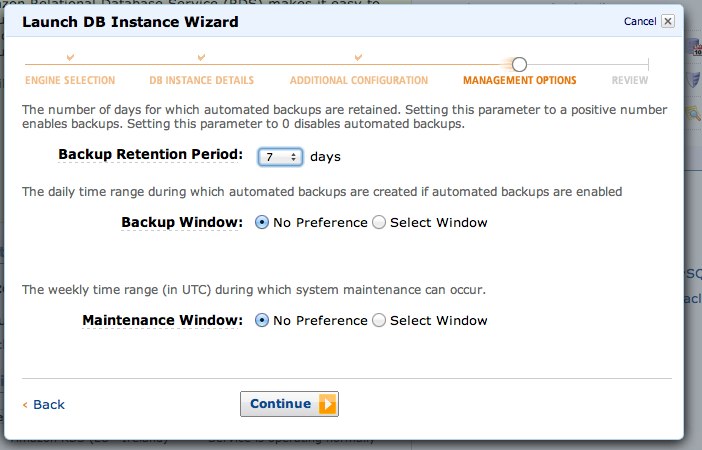
During instance creation, you specify a backup retention period between 0 and 30 days. You can also specify your backup window and maintenance window – just in case you want to specify quiet hours when maintenance should occur. Point in time restore is available via a GUI, command line tools, and that’s it. Keep in mind that these aren’t database level restores,these are instance level restores – during the backup, writes will be quiesced, the storage will be snapshotted, and then writes will resume again. Point in time recovery is also available and transaction logs are backed up every 5 minutes. There’s more information and details in the AWS RDS documentation.

And A Gotcha

When you create a user, they’re automatically given access to the rdsadmin database. This is a database that the RDS team have created to provide access to some of the low level functionality, like reading trace files and other actions that you normally must be a sys admin to perform. The big gotcha here is that any user who can access the SQL server can, by default, access the rdsadmin database and execute the stored procedures in the database. Admittedly, the stored procedures that could potentially cause any harm aren’t accessible, but the unprivileged user can still see them.

Running sp_helprotect shows that guest has privileges to execute these stored procedures. Although guest can run the stored procedures, the procedures that can potentially cause changes will fail with errors like Login needs CREATE ANY DATABASE permission. So while a malicious user could determine that you’re running your system on RDS, there’s only a limited amount they could do from that point.

When Would You Use This?

Let’s be fair, it isn’t apparent to everyone when they might want to use a hosted SQL Server. There are a lot of reasons why you would want to stand up a brand new SQL Server quickly.You may want to create multiple backend servers as you scale out your application – maybe you create one instance per customer to make billing easier. Developers can spin up a full copy of the application stack to test how changes will work – they no longer need to maintain a copy of the database locally, instead a clone of the production system can be restored and made available in a matter of minutes.

How Does It Perform?

SQL Server RDS performs admirably. I ran a variety of different benchmarks against my test instances and I maxed out the CPU of the RDS instance at 42% while running around 710 transactions per section and sustaining a decent rate of throughput. The biggest bottleneck was the CPU and network connection on the clients running the benchmarking tools. Obviously, benchmarks aren’t a real measure of anything apart from the benchmark’s performance, so test your application appropriately.

Alerting and Monitoring

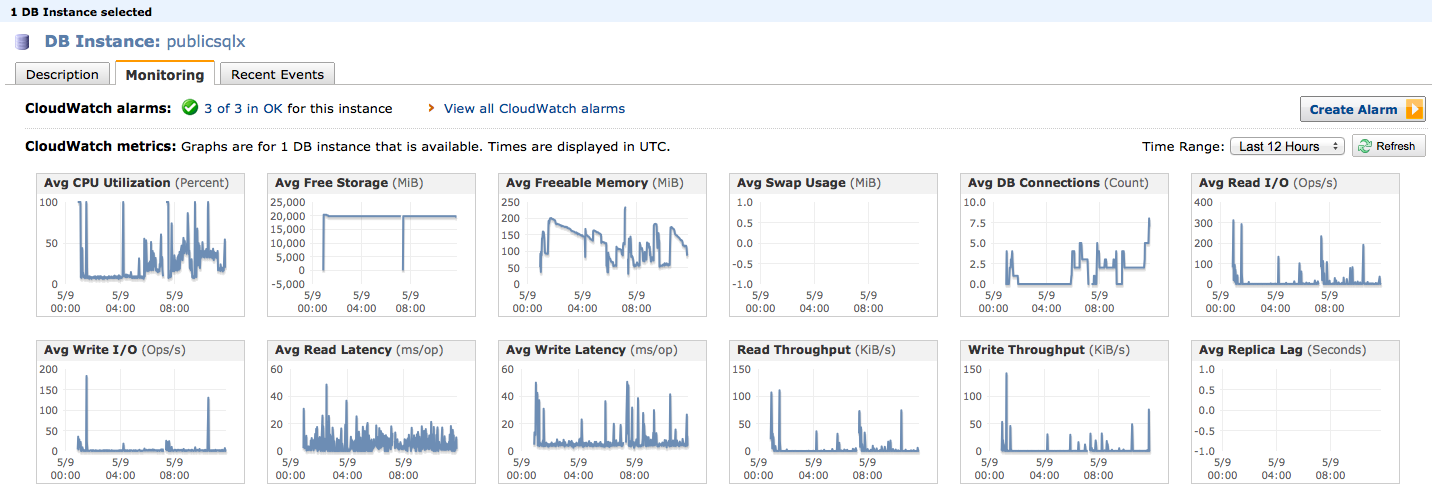
Amazon haven’t forgotten about setting up alerts and monitoring. Every piece of AWS comes with instrumentation in the form of Amazon CloudWatch. CloudWatch is a set of metrics that are collected from underlying OS or application server. Even though you have no access to the underlying OS, SQL Server RDS exposes many metrics that can help you determine whether you need to move to a larger instance, monitor CPU, tune for memory, or purchase more storage. It’s even possible to stack graphs to see how two instances compare to each other.

Monitoring in the AWS Management Console

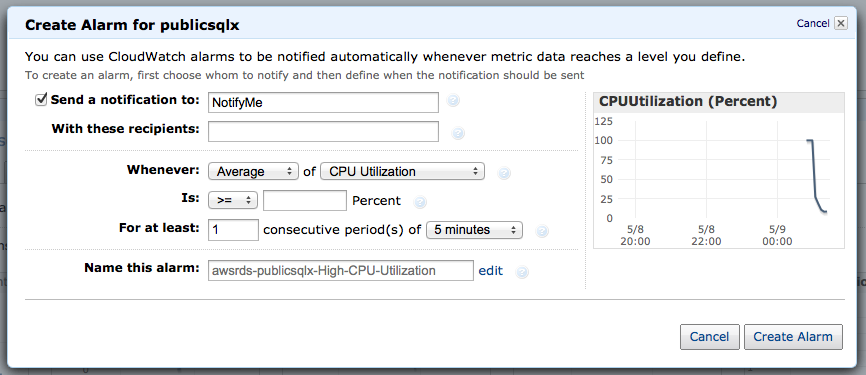
Beyond that, it’s easy to make alarms on your instances that will alert you when your instance goes beyond specific performance metrics.

Creating an Alert

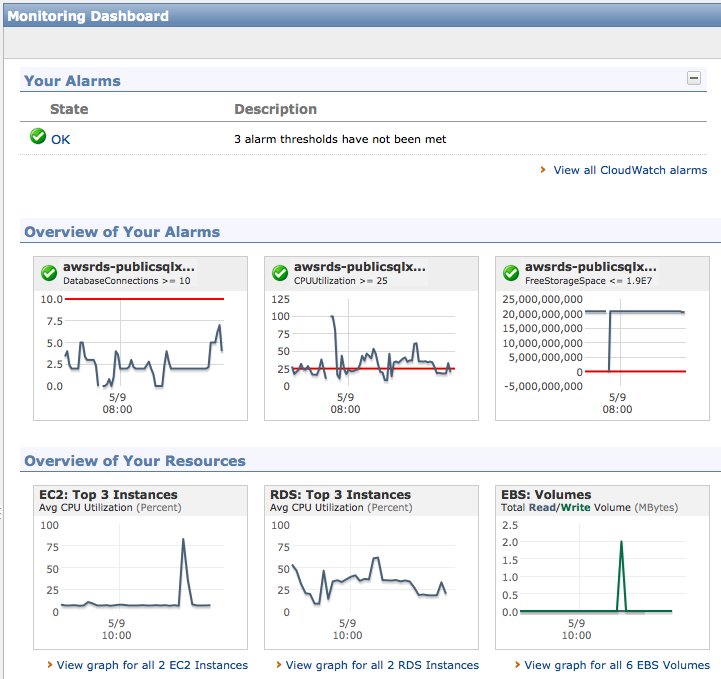
Once you’ve configured your alerts, you can even see how current instance performance compares to the alerts you’ve set up. All of your alerts for all AWS services are located in the same place, so you’ll be able to see just how your entire virtual infrastructure is performing.

The AWS Alerts Dashboard

How’s RDS Different From SQL Azure?

Microsoft’s database-in-the-cloud solution has a subset of SQL Server’s capabilities. It supports less SQL Server features, less datatypes, and smaller databases. Don’t get me wrong – it’s still a solid product – but it’s half the man that SQL Server is.

Amazon SQL Server RDS is full-blown SQL Server. You don’t have to change anything whatsoever about your apps – if it runs on-premise, it likely runs in Amazon RDS. Your tools like SSMS won’t know they’re talking to anything but a regular SQL Server instance.

However, neither SQL Azure nor RDS will act as a log shipping target or a database mirror: you won’t be restoring databases directly. Both Microsoft and Amazon try to automate routine maintenance for you, but as a result, routine maintenance tasks aren’t available to you. This limitation on database restores means Amazon RDS won’t replace every SQL Server running in Amazon EC2 today.

What’s an RDS SQL Server Cost?

The Amazon RDS pricing page has tabs for MySQL, Oracle, and SQL Server, and unlike SQL Azure, it gets complicated fast. Pricing depends on:

  • The SQL Server Edition – Express, Web, Standard, or bring-your-own
  • The hardware size – from micro (630mb RAM) to quadruple-extra-large (68GB memory)
  • The storage size – from 20GB to 1TB
  • The datacenter you choose – Oregon is cheaper than Tokyo, for example
  • How much bandwidth you use

And more. To get started, a micro instance with 20GB of storage running SQL Server Express Edition is just $.035 per hour, or about $306.60 per year. A Standard Edition, quad core, 15GB memory instance is $1.22 per hour, or $10,687.20 per year, but it drops to $6,219.60 if you bring your own licensing or $6,482.40 if you use Web Edition. Reserved instances become even cheaper by the hour in exchange for a one time upfront payment. The break even point typically comes at the three month mark – after three months you were better off buying a reserved instance. That quad core 15GB instance drops down to $3206.16 per year, plus a one time payment of $5730 for a 3-year reserved instance.

Learn more about our SQL Server in Amazon cloud resources page.


Today BrentOzar.com Turns 10 Years Old

Blogging
27 Comments

Happy birthday to my first post from May 7, 2002.

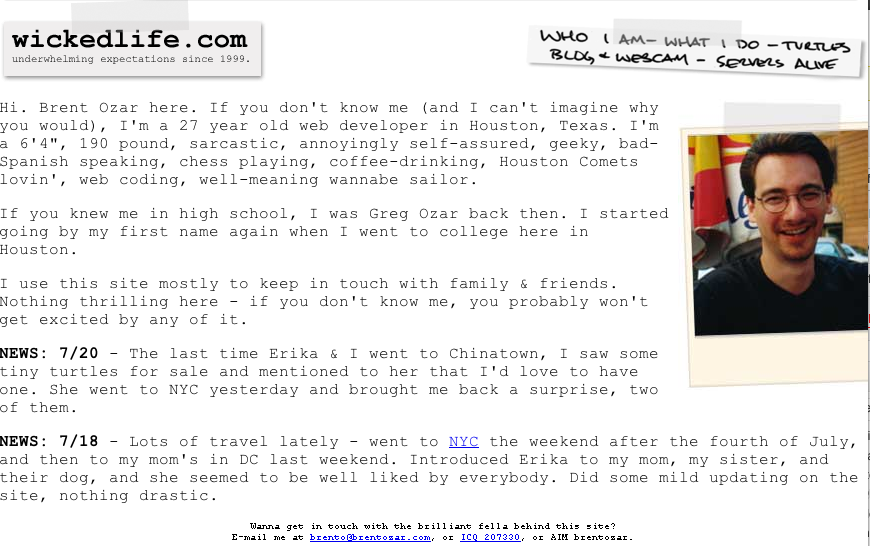
BrentOzar.com circa 2001

1,782 posts and over 12,000 comments later, I feel like I’m still winging it, but it’s time to stop and think about the lessons I’ve learned over the last decade.  This web site has turned into a consulting company that supports three of us, and tomorrow we add our first full-time employee, Jes Schultz Borland.

Here’s what I’ve learned so far:

Blogging is either your passion, your hobby, your job, or your chore. Guess which blogs will succeed and which will fail. I’ll be the first to tell you that it doesn’t feel like blogging is my passion – it’s just a hobby. I know folks who are truly passionate about blogging – they spend hours a day working on their blog, SEO, analytics, promotion, you name it. I think that’s awesome, but you don’t have to be that passionate for your blog to succeed and turn into a company. It just takes longer when it’s a hobby, and it ain’t gonna happen if you see your blog as a job or a chore. That’s okay – just find a different route to success that doesn’t involve blogging.

There are periods in my life where it’s a chore.  There have been months where you’ll be simply overwhelmed with work and unable to blog, and that’s okay.  Just know that you’re going to lose momentum in the form of stockpiled posts and eager readers.

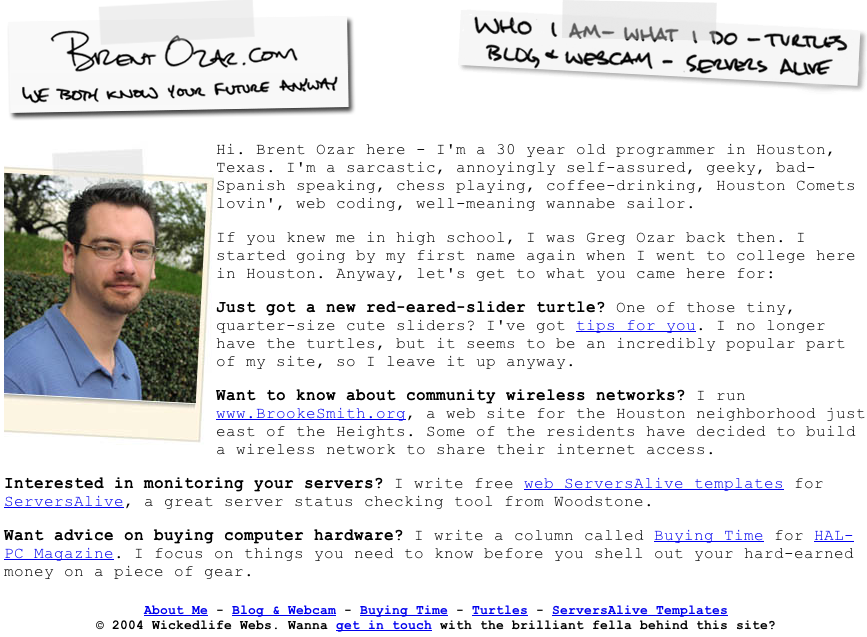
BrentOzar.com circa 2004

Use your most comfortable writing voice.  When you sit down at the keyboard, you want the words to just come pouring out.  When you first get started, just start typing.  Don’t try to mimic someone else’s writing style.

Readers want to get to know you, not just the topic.  If you want to write personality-free content, don’t bother blogging – contribute to Wikipedia.  It’s a wild, thriving community that appreciates quality contributors.

As your interests shift over time, so will your blog.  I started out shoe-gazing, then wrote about turtles, then focused on computers when I got a column in HAL-PC Magazine.  (Funny glimpses into history – in 2003, I predicted Windows Tablet would be a failure, was already writing about virtualization, and enjoyed bathroom humor.)  In my How to Start a Blog guide, I emphasize how important it is not to tie your personal site to a product or topic: don’t brand yourself as SQLWhatever.  Five years from now, when your focus changes, you’ll thank me.

The look matters, but not as much as the content.  Nobody ever forwarded a post to a friend and said, “You’ve gotta read this!  Their WordPress theme looks amazing!”  People don’t return for beauty – they return for content (although your content can be beauty, too.)  On the other hand, readers definitely do say, “I can’t read this – the theme is driving me crazy.”

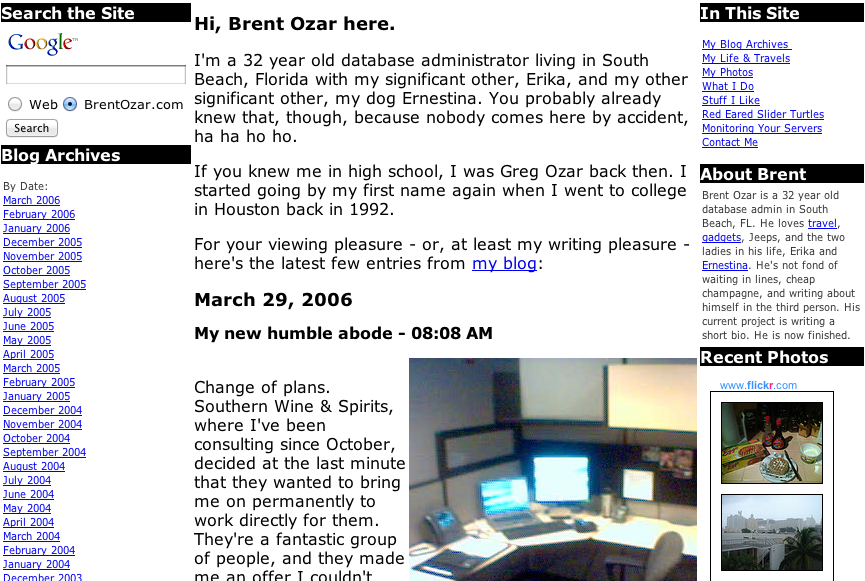
BrentOzar.com circa 2006

The Underpants Gnomes were right.  Here’s how blogging works: Step 1: Collect Followers. Step 2: ? Step 3: Profit!  Step 2 isn’t impossible – it’s just unpredictable.  Check out how a few popular bloggers turned their hobbies into a living:

  • Jeff Atwood wrote CodingHorror, a killer blog for programmers, and turned his following into a fast user base for StackOverflow.com, a killer QA site for programmers.
  • Jenny Lawson wrote The Bloggess, a hilariously offensive blog, and made money off endorsements for Chipotle turned her following into a book deal.
  • Justin Halpern just tweeted – TWEETED, mind you – hilarious stuff as @ShitMyDadSays, and within 60 days he’d been mentioned on every talk show around.  He then turned his following into multiple book deals and a TV show.
  • Just in the SQL Server world alone, Aaron Bertrand, Brad McGehee, Grant Fritchey, Steve Jones, Tom LaRock, and most recently, Robert Davis have all turned their online followings into evangelist-type jobs where they’re not on call.
  • Little old me started a blog, and now we get so many requests for consulting services that it keeps three of us busy full time.

If sharing your knowledge online is a hobby (or a passion) for you, the profit will come sooner or later.

I’m even happier having partners.  Turning this blog into a company and partnering up with Jeremiah and Kendra has been incredibly fulfilling.  We all push each other to up our game by offering feedback on our work.  I know I do a better job of blogging knowing that Jeremiah and Kendra also have their skin in the game here, and I don’t want to let them down.  I love making them proud.

You, the reader, make everything worthwhile.  Sure, I get lots of comments that say “Please send me how to be a DBA fast” or “You’re stupid” but those pale in comparison to the thank-you emails I get.  I love hearing about someone who solved their problems or got a better job through what they read here.

Here’s to another ten years.


What Does a Good DBA Look Like?

21 Comments

Developers want to work with them.

And yes, I wore that hat well.
The Classic ASP Developer Hat

Sysadmins and SAN admins want to help them.

Managers want to hire them.

DBAs want to join them.

Who are they?  They’re the Incredible DBA Team – the group of database administrators with an awesome reputation in their company.  When they walk into a meeting, project managers breathe a sigh of relief and customers know the job is going to get done, no matter what.

Today, I’ve got a simple assignment for you in the comments.  Write a testimonial for the Incredible DBA Team from the point of view of a non-DBA.  Put your developer, sysadmin, manager, or end user hat on and write the quote from their point of view.  I’ll start:

“Every time I bring one of my slow queries to them, they’re able to explain it to me in friendly terms without making me feel stupid.  I actually want to bring them my slow code.” – Dan the Developer

Your turn – what’s your testimonial for The Incredible DBA Team?  And how does it make you think about your job differently?


Things Every DBA Should Know (But Most Don’t)

Licensing
6 Comments

What if your boss walked up right now and asked you, “How many database servers do we have?”

The classic poster

Would you start sputtering, “Uh, do you mean production, or dev? Do multiple instances on a cluster count? And by the way, who’s asking?”

Or would you confidently answer with an exact, unwavering number?

When I was a DBA, I thought I had a pretty good handle on my environment. I did proactive work like building a database server support matrix, setting up failsafe operators and alerts so I’d get notified when things broke, and even attended development planning meetings so I could see what was coming down the pike. Now that I’m a consultant, though, I realize that I wasn’t really armed for the kinds of questions business users like to throw at DBAs from out of nowhere.

How many database servers do we have?

When the business asks this question, it’s only the beginning. Here’s what they really want to know:

  • How many production servers/clusters do we have?
  • How many instances running on how many servers?
  • How many databases do we have?
  • How many applications are we supporting on each database server?
The snark starts

To start the process of surveying a Microsoft SQL Server environment, check out the Microsoft Assessment and Planning Toolkit. This free tool has a sinister purpose – setting up for a licensing audit – but it’s also really helpful to get a scan of SQL Servers buried under desks or hidden on application servers. It helps you find out about servers you’d otherwise never hear of – until they crash, at which point it’s too late.

The best DBA teams track not just the number of instances and databases, but the overall data size in the environment and the growth per week. I love being able to tell business executives, “I’m managing 10.4 terabytes right now and it’s growing an average of 3% per week.” They understand growth metrics, and it shows them that I take my job as seriously as they take company sales and expenses.

Which servers are no longer under support?

Most companies are harboring a few old database servers that soldier on just fine despite being long out of support. Database administrators often take this question personally and start responding with whines about not being able to move an old vendor application off SQL Server 2000, but take the emotion out.

Farm Gold and Level Up

The Microsoft Product Lifecycle Search is a little cryptic, but

  • SQL Server 2000 – mainstream support is long gone (2008), but you can still get extended support through April 2013.
  • SQL Server 2005 – if you thought 2000 was hard to kill, 2005 is going to be worse. It’s got enough DBA-friendly features like DMVs and database mirroring that it might just stick around forever – certainly long after April 2016 when extended support ends.
  • SQL Server 2008 – we’re looking at least through January 2019 for extended support.
  • SQL Server 2008R2 – as with 2008, at least through January 2019.
  • SQL Server 2012 – servers you deploy today are safe through July 2022, or 2023 for Express Edition.

If you’ve been pushing the business to get off SQL Server 2005 for support purposes, you should find a different approach before management finds the above links.

If that database server went down, what would you do first?

Enough with the Posters Already

The business doesn’t really care how you answer this question: they just want to hear confidence. They want to hear an immediate, well-thought-out-answer that says to the world, “I’m a data professional, and I’m the person you call to the helm when the database server hits the rocks.”

Here’s the kind of answer the business wants to hear: “I’ve got a script to take a snapshot of the database mirror in our DR datacenter and check the time of the most recent record in the sales table. I tell my manager that if we have to fail over to DR, we’re going to lose X minutes of data. Then I start at the top of our troubleshooting checklist, which is posted on the wall in my cube so I can find it fast when trouble strikes.”

Confidence is a key part of being a good DBA. Don’t just take it from me – take it from world-renowned database expert Jack Palance:


SQL Server Always On Availability Groups in AWS

Many companies are investigating a move into cloud hosting. With the recent release of SQL Server 2012, these very same companies are also looking at a migration to SQL Server 2012 to take advantage of readable secondaries. Combining Amazon Web Services and SQL Server 2012 seems like a perfect match. Unfortunately, there are some gotchas, like limited support for clustering, to keep in mind as you consider deploying SQL Server 2012 AlwaysOn Availability Groups in AWS.

What’s Wrong With Clustering?

AlwaysOn Availability Groups don’t require shared storage, but they do require Windows Server Failover Clustering. Let’s be clear: there’s nothing wrong with clustering.

There’s a white paper from Amazon Web Services that suggests clustering won’t work in AWS because clustering requires support for multicast networking. This changed with Windows Server 2008 – multicast networking is no longer part of Windows Server clustering. For those who don’t know, multicast networking is delivering one packet from the source computer to multiple destination computers. Multicast relies on the intermediate hardware making the decision when to make copies of the packets to send to the destinations and, in general, relies on the hardware making that decision at the latest possible moment. Because so much of the AWS infrastructure is virtual, a lot of these decisions become trickier for the intervening networking gear (which might also be completely virtual). Ultimately, this is why you’d want to avoid multicast networking in a purely virtual environment. Since Windows Server 2008 and newer don’t use multicast networking, it’s not an issue.

It’s Not You, It’s… You

If multicast networking isn’t what stops clustering from working in AWS, what does?

Every cluster has a cluster access point – a name and IP address used to administer the cluster. The cluster access point is a virtual IP address, when you set up the cluster access point, Windows creates a virtual IP address that is used to provide a way to access the active node in the cluster. This isn’t strictly necessary for SQL Server clustering, but it does make life easier when managing the underlying Windows Server Failover Cluster.

In addition to each server’s individual IP address, the cluster access point requires its own IP address. This is where things start to get sticky. When you assign static IP addresses in AWS, you don’t assign the IP address at the server level – you assign the static IP address to a virtual ethernet adapter and attach the ethernet adapter to your EC2 instance. Each of these Elastic Network Interfaces (ENI) can only be assigned one IP address, for now.

Creating an Availability Group, Is It Possible?

Since it isn’t possible to create virtual IP addresses it would be easy to conclude that it isn’t possible to create an availability group – during availability group set up SQL Server has to get in touch with the cluster control point. There’s a way around this limitation – along as you create the availability group on the current host server of the cluster, then you can create the availability group.

It is possible to create an availability group, however it isn’t possible to create a TCP listener for the same reason that it isn’t possible to create the cluster control point – it isn’t possible to have more than one IP address per ENI in AWS. This doesn’t mean that AlwaysOn Availability Groups are a non-starter in AWS, but it does mean that you won’t have access to the full AlwaysOn Availability Group functionality until later this year when Amazon introduces multiple IP addresses per ENI.

Faking Out the TCP Listener

Here’s what we know so far:

  1. It is possible to set up a Windows Server Failover Cluster in AWS.
  2. It is possible to set up AlwaysOn Availability Groups on our Failover Cluster in AWS.
  3. It is not possible to configure a Cluster Control Point or TCP Listener.

It is possible, though, to get much of the same benefit of the TCP Listener without using the SQL Server’s built-in functionality. A load balancer like HAProxy can be used to create groups of readable secondaries for different applications. True, your applications won’t be able to take advantage of the other TCP Listener features like specifying read only intent in the connection strings, but it will be possible to create multiple connections in HAProxy that will work the same as connections specifying read only intent. HAProxy has the ability to use sticky sessions, monitor connections, and detect when servers are offline and route traffic away from the dead server. People have been doing this with MySQL for years.

Where Do We Go From Here?

Teams using AWS who need SQL Server 2012 Always On Availability Groups can start making use of these features right now. All of the benefits of SQL Server 2012 Always On Availability Groups won’t be available, but it will be possible to use multiple readable secondaries for scale out reads. Many of the features of Always On Availability Groups can be configured using a load balancer like HAProxy for now and configured using native functionality once multiple IP addresses can be attached to a single ENI. With a little work and some patience, you’ll be able to use this feature right now and be ready for when AWS supports virtual IP addresses.

More SQL Server AlwaysOn Resources

If you want to learn more about how to design, test, and manage this slick feature that offers high availability, disaster recovery, and scale-out reads, visit our AlwaysOn Availability Groups resources page.


SQL Server Virtualization Q&A

Virtualization
1 Comment

In my recent “Why Is My Virtual SQL Server So Slow?” webcast, we got a lot of great questions in chat.  Here’s some of the highlights:

Question: “Why would I virtualize a 4-core server and turn it into a 2-core VM?  Doesn’t performance go down?”

If you’ve got an existing physical box, and your only goal is to increase performance, then I probably wouldn’t virtualize.  However, it’s pretty rare that a company is only looking for more speed – usually they’re looking for lower costs, less heat in the datacenter, less power consumption, and so forth.

Question: “Is there any way to collect VMWare counters from within TSQL to capture those values for those specific counters and capture into a SQL table? I can already capture the SQL counters, but cannot find a way to collect the VMware counters?”

Not that I’m aware of, but I have to confess that I don’t look too hard for that kind of thing.  I want more than just the VMware counters – I want counters like Physical Disk Avg Sec/Read, and those aren’t available easily inside T-SQL either.  Instead, I use Perfmon to capture it as explained in my Perfmon tutorial post, or a third party SQL Server performance monitoring utility.

Question: “Hi Brent. Great presentation! How to deal with the arrogant SA who refuses to believe there is any impact to SQL from virtualizing? This guy even said that Microsoft now suggests that you virtualize SQL Server!”

Yes, take HP’s Database Consolidation Appliance developed in partnership with Microsoft.  Virtualization is a key part of that solution.  Yes, depending on how you architect it, you could take a huge performance hit – but I can say the same thing about physical boxes.  If I saddle a physical box with just 3 drives in a RAID 5 configuration, and I put the OS, SQL binaries, data files, log files, and TempDB on those drives, there’s often a big performance impact.  I’ve seen plenty of virtual servers suffering from similar design bottlenecks, like 30 virtual servers sharing 15 hard drives in a RAID 5 config.  The key is to design and provision appropriately.

Question: “Regarding Virtualization and SAN… is there a recommendation for setting block size on SQL Server 2008?”

There’s a few related settings here including NTFS allocation unit size, RAID stripe size, and partition offset.  Check with your SAN vendor’s documentation to see what’s right for you.  In most cases for OLTP databases, you’re in decent shape with 64K NTFS allocation unit size and RAID stripe size, and a 1mb partition offset.

Question: “I’m using Brand X storage.  Is that a problem?”

There was a lot of brand bashing in chat about a particular SAN vendor, and I’m disappointed by that.  I’ve seen crappy performance out of every single vendor out there – but it’s rarely due to the storage itself.  Instead, most of the time it’s us meatbags who make bad implementation decisions and cripple storage performance.  It’s a poor musician that blames his instrument.  (Unless your instrument is a software-based SAN that runs on commodity servers using crappy storage, in which case, it’s a tin can banjo, and you should blame it.)

Question: “Brent, would you ever recommend running a production SQL database on a VM?”

Yes.  I’ve been doing it since 2006, and I’ve got clients doing it.

Question: “Are virtual servers more secure than physical ones?”

I don’t think so, but I don’t think any kind of servers are inherently secure.

Question: “Can SQL perform well having thin provisioning on the SAN?”

If the primary bottleneck isn’t storage waits due to expanding the drives, yes.  For example, if you’ve got a 100GB database that’s fairly stable at 100GB, but you’ve thin provisioned the storage to grow to 500GB if necessary, then thin provisioning wouldn’t be an impact.

Question: “We are running a SQL cluster in a VMware environment. Any thoughts to this?”

Generally, I don’t like doing this.  When a business wants to do it, I ask if the databases involved are truly mission-critical.  Do they absolutely, positively, have to be up all the time, with as little downtime as possible?  If so, let’s put them on a physical cluster.  Troubleshooting clusters is hairy enough – there’s already enough finger-pointing between the OS, app, and hardware guys.  Introducing virtualization makes troubleshooting just that much more complex, and that’s an area where I want less complexity.  If, on the other hand, the database isn’t truly mission-critical, then I’d ask why we’re clustering it.

Question: “Why would you NOT want a dedicated server for your database? Does anybody think they have CPU or disk cycles lying around that they can’t use and want to share?”

So are you saying you’re running all of your databases on 8-socket monsters with solid state drives, and you’ve got 100% CPU use?  In that case, you shouldn’t virtualize.  Otherwise, you’re probably not using the latest and greatest technology on every SQL Server to begin with, so you’ve already got some headroom.  With SQL Server 2012 Enterprise Edition licensing coming in at $7,000 per core, I find that most businesses who aren’t running 100% CPU use are starting to ask tough questions to their DBAs.

My Best Practices for Virtualizing SQL Server on VMware

I’ve got a 3-hour video training session on how to manage SQL Server in VMware. Check it out now!


Writing Better Conference Abstracts and Presentations

The conference season is coming – let’s get you a speaker slot.  Before you submit an abstract, do your research.  Here’s some of my past posts about presentations and abstracts:

How to Write a Conference Abstract – the real goals of a session abstract is to get the right people into your room and keep the wrong people out.  If you write a misleading or vague abstract, attendees will be furious, and your evaluation scores will show it.  Learn how to craft an abstract that’ll put the right butts in your seats.

How to Pick Blog & Presentation Topics – we have a tendency to write the abstracts for sessions we’d like to attend ourselves, but that’s completely wrong.

How to Get Readers to Pay Attention – hit hard with the first sentence, tell ’em something they already know, and for God’s sake, check your spelling.

And yes, a lot more people came in.
Buck Woody warming up the room before a session

Who’s Your Target Audience? – you’re not writing to impress other presenters.  You’re writing to impress your attendees.

How to Rehearse a Presentation – one of the things that shows an audience you really know your stuff is how you handle the transitions between slides.  PowerPoint Presenter View helps a lot here.

What Makes a Good Conference Session? – killer presentations don’t have a magic formula with a certain number of demos or slides.  In fact, you might not need either.

Dealing with Presentation Criticism – I’ve bombed, and you probably have too. Before you submit an abstract, reread your past conference feedback to do a better job.

How to Deliver a Killer Technical Presentation – my favorite start-to-finish post with tons of tips.

How I APPROACHED 2012’s Conference Season

Last year, I wrote my sp_Blitz® session with a few specific goals:

  1. I wanted to get into the top 10 sessions for the 3rd year in a row
  2. I wanted to give attendees a Steve Jobs “one more thing” moment
  3. I wanted everybody to leave the session eager to run a ready-to-go script

I pulled it off, and you know how it goes – it’s time to raise the bar again.  Here’s my goals for this year:

  1. Get into the top 10 again
  2. Get everybody to run a script as soon as possible
  3. Get attendees to pass on the script to as many people as possible
  4. Pack whatever room they put me in

That means I need to build a session around a script that will have really wide appeal and make a big difference in their jobs.  I need to make the session a train-the-trainer session, too – I can’t just teach them what the script is doing, but I have to equip them so they can pass this knowledge onto their friends.  It’s not enough just to give them a slide deck, because many/most attendees don’t feel comfortable presenting.  I need to make the session viral, with as low of an effort as possible on the attendees’ parts.

Sounds like a lot of work – and it is.  Not every session needs to go to that level of planning and detail – but it helps to go in with a set of goals.  What is your session trying to achieve for you, and for your attendees?  Let’s really make our mark this year!


Maintenance Plans and Roombas Suck – in a Good Way

Backup and Recovery
30 Comments

Every now and then, I hear an experienced DBA say, “SQL Server maintenance plans for backups, indexes, and statistics?  What, are you kidding me?  Nobody uses maintenance plans because they suck.”

They say maintenance plans are so inflexible because they insist on defragging or rebuilding every index, every time, regardless of how little the table has changed.  Or maybe they complain about problems with scheduling, or how they saw somebody use a DBCC SHRINKDB maintenance plan once.

Well, I use maintenance plans all the time.

I even suggest ’em to my clients.

In a perfect world, every DBA would have an unlimited amount of time to get the absolute best solution to every problem.  We’d spend endless time tuning T-SQL, perfecting plans, and daddying databases.  We’d drive home from work in our Porsche 911s to our mansion on the hill.

Back here in the real world, we have a limited amount of time to work each day.  We need to implement solutions that anybody can troubleshoot and maintain with a bare minimum of knowledge.  Sure, you might be the only DBA in the shop today, but wouldn’t it be nice to get a junior person hired, and then immediately be able to pass work off to ’em?  I’ve seen shops where the lead DBA is still personally managing their homegrown maintenance scripts – the DBA doesn’t trust anyone else to touch this convoluted spaghetti code.

In the real world, we usually have two, or sometimes three, problems:

  1. The servers need to be maintained
  2. We need to save DBA time
  3. We need to save server time

Everybody has problem #1, but often problem #3 is overrated.  With careful use of maintenance plans, we can solve problems #1 and #2 easily.  Could the maintenance be done faster with custom scripts?  Yep – but when those scripts fail – and they will fail – we’ll make problem #2 worse, not better.

Maintenance plans aren’t perfect, but they require less troubleshooting time than your homemade scripts.  I know, you think your scripts are perfectly bulletproof and would never possibly have a bug, but time after time, I do SQL Server health checks and find some amazing problems.  Some highlights have included:

  • A t-log backup script that failed every night at 11pm without sending a warning
  • A 1mb database with 100GB of transaction logs because people thought it was in simple mode and their script skipped it by name
  • Databases that had never been backed up because the script used the wrong variable name for the database
  • DBCC jobs that completed successfully in under a second and nobody noticed.  They were using sp_msforeachdb, which is notoriously unreliable.

Maintenance plans have a killer advantage over custom maintenance scripts because they don’t have your bugs.  Let’s face it: we’re just not that good at writing code.  If we were, we’d be developers, not DBAs.  They do have bugs – but the bugs tend to be in bad implementation, like doing SHRINKDB, and those same problems pop up in custom maintenance scripts too.  If you’re smart enough to write a maintenance script, then you’re smart enough to use maintenance plans correctly.  (And conversely, if you’re not smart enough to use maintenance plans correctly, maybe you should ease up on those scripts, eh?)

I, for one, welcome our new fresh-smelling overlords

Maintenance plans are like my iRobot.  Their Scooba is a floor-cleaning robot that sprays cleaning solution on my wood floors, scrubs it (a little), and vacuums the liquid and dirt up.  It doesn’t do a great job – in fact, it does a pretty crappy job, leaving a damp trail of cleaning solution behind.  At first this bothered me, and I searched the web looking for ways to get it to do a perfect job and leave a dry floor behind.  No dice – everybody complains about the dampness.

Thing is, J-Lo (that’s my name for her, because she’s On the Floor) does a better job of floor maintenance than I can do in my spare time.  Once a week, I fill up J-Lo’s tank with cleaning solution, put in her battery, and turn her on.  I watch her do her thing while I write blog posts (and she’s doing it right now – I know you want to watch, but this is a private show.)  The cleaning solution evaporates, and I’m left with a cleaner apartment than I’d have had otherwise.

If you insist on using crafty scripts to do your database maintenance, use Ola Hallengren’s free scripts.  They’re powerful and he even updates ’em frequently – just this week, he added support for the new preferred-replica-backup DMVs for SQL Server 2012’s AlwaysOn Availability Groups.

That’s the curse and blessing of scripts – even good scripts like Ola’s require maintenance because new versions come out from time to time.  If you don’t have the time to maintain and debug scripts, use maintenance plans.  Take all that time you save, and keep reading blogs to fix problems that actually bother your end users.


Breaking News: Changes to Microsoft SQL Server Certifications

30 Comments

Microsoft Learning published new information today which changes the certification landscape in a big way.

Think you understand how to get certified? You’ve got a set of new terms and new rules to learn!

I’ll give you my take on the high points here. Join us next Tuesday in our webcast to get the full scoop.

Certification Names and Paths are Changing

This one’s going to cause a whole lot of chatter. The biggest problem I think there will be? So many certification names are changing that it’s a little tricky to even get your head around it. If you’ve been in the industry a while, you may be surprised at the re-use of some old and familiar acronyms.

Getting in the Game: Become an MCSA

In the current round of certifications you first work toward becoming an MCTS— the TS stands for “Technical Specialist.”

In the new certification world, you will first work toward becoming an MCSA— or a Microsoft Certified Solutions Associate. To achieve this first step, you’ll take three tests.

Advancing Your Career: Get the MCSE

Did you see that? I totally just said MCSE! That’s an older acronym that stands for “Microsoft Certified Systems Engineer.” In our new certification world, the “Microsoft Certified Solutions Expert” is the second level of certification.

The MCSE is replacing the current MCITPs (“IT Professionals”) in Database Administration and Development.

Here’s the part I want to make sure is clear here: the MCITP level is being combined. In order to get an MCSE in SQL Server, you need to pass exams for developing and designing database solutions. This is a big shift! In the new world we’ll have fewer certifications, and the trend is to have them cover more topic areas.

Become a Master: The MCSM

Once you have your MCSE, you’re ready for the Masters level. There’s only slight changes here so far— the name is now Microsoft Certified Solutions Master.

No More Versions!

Get ready for a big one: these new certifications don’t all have “SQL Server 2012” in their names. That’s on purpose, the certifications are not versioned.

Instead, certifications may cover multiple versions of the product.

What Do these Changes Mean?

Personally, I love these changes, particularly the move away from versioning. If someone holds a certification in SQL Server 2000, does that mean they remember anything about SQL Server 2000? (Trust me, that’s no small accomplishment!)

Let’s be clear: these changes do make certification more challenging for DBAs who don’t work actively with development, and who work in businesses that are slow to upgrade to new technologies. However, the changes also challenge everyone to stay current and to broaden their skills. That’s the best bet for hiring managers.

Interested in learning more? Check out the Microsoft Learning FAQ for information on exam availability, upgrades, and more.


Hash Partitioning, SQL Server, and Scaling Writes

At first glance, SQL Server’s partitioning seems like it should be an easy way to solve problems inserting data into busy tables. If the writes are spread across many partitions it only makes sense that we can avoid write hot spots in SQL Server, right? The truth is much more complicated than it appears.

Asking the Right Questions

A reader commented on Kendra’s post How To Decide if You Should Use Table Partitioning asking “what are the plusses and minuses to using Hash partitioning on OLTP tables with large numbers of inserts on a daily basis?” The pros are pretty easy to see – SQL Server will spread the writes out across many partitions which, in turn, allows you to spread the writes out within multiple file groups in each partition. It seems obvious that this will solve problems with allocation map contention under write heavy workloads.

If the only problem that you’re trying to solve is eliminating write contention in a filegroup, you can improve SQL Server performance by adding multiple files to that file group, then rebuild indexes. After the index rebuild, data will be distributed evenly between the different files. Since each file has its own set of allocation map pages, you’ll see less contention across the different allocation map pages. The upside of this approach is that you don’t have to make any changes apart from adding extra data files to the filegroup. SQL Server’s proportional fill algorithm should take care of the rest.

Of course things are never as simple as that, right?

Even if you manage to add enough data files to handle our data file write throughput, the transaction log will still be the biggest bottleneck. You can push SQL Server write performance a long way, especially if you follow the advice in these SQLBits videos from Thomas Kejser, but eventually you will hit the limits of a single transaction log. If the log can’t keep up, the number of data files won’t matter: you won’t be able to write any faster than you can write to your transaction log.

This is why it’s so important to ask “What’s the problem you’re trying to solve?”

Write Throughput & Multi-Tenancy

The original poster asked about the pros and cons of using hash partitioning in an OLTP system to deal with a large number of inserts. Hash partitioning uses some kind of hash function to evenly distribute data between a finite number of buckets. While a hash function will solve the problem of distributing data, hashing won’t make it possible to distribute writes to multiple log files – SQL Server only allows for one log file per database. Sure, you can add more disks behind the log file to make it respond faster but there is only so much you can do. Limitations are imposed on storage throughput simply because you can only fit so many HBAs in a server chassis before you run out of PCI slots and you can only buy so much Infiniband before you run out of budget.

When the transaction log becomes the limiting factor in a database’s write performance, it’s time to split the database into multiple databases. This is where things get difficult: where is the decision made to partition data across databases?

In multi-tenant systems it’s relatively easy to partition data across databases – each client’s data moves to its own database and any global metadata can either live in a central database or can be replicated to each client database. Partitioning the data by client ID is the natural way to split out the data. Most, if not all, queries will be limited to a single client and the application can handle any cross client joins that administrative users need to run.

The upside of this approach is that you can spread your data across multiple servers and handle performance problems on each server as needed. The downside is that using a hash function with a fixed number of servers means that adding another server means repartitioning all of the data and shuffling it between servers. Needless to say, this can take a long time.

Write Throughput & Single Tenancy

Let’s pretend that you don’t have a lot of different clients. You have one big client and you’re streaming a lot of sensor readings from multiple sensors into a single database. Things become more difficult when data is being streamed into a single tenant application – say you’re streaming sensor data into a single application database. Sometimes it’s not so easy to partition this data. There are a few ways to handle the load and none of them are great.

One of the most obvious ways to handle massive write concurrency in a single tenant system is to find the a level of the application where writes can be partitioned – in this example write partitioning could happen at the sensor level, sensors could be grouped, or the hash might be found by converting the current time to seconds and reversing the digits to bring more randomness the hash function output. This will help spread the load across multiple servers but it won’t make any easier to query the data. You need to do something other than spread the data randomly across some random number of servers.

Writing Faster Without A Database

Assuming that our goal is to handle more write throughput, the easiest thing to do is remove the database from the equation altogether. After all, if we aren’t writing to a database then we can’t run into issues with log throughput or allocation map contention. We can’t actually get rid of the database, but we can remove it from directly causing performance problems.

The first thing to do is add several cache servers in front of our database server. Ideally you want to have multiple cache servers for redundancy. Since the cache servers are nothing more than boxes loaded full of memory it shouldn’t be expensive to find servers that fit the bill. Before any data is committed to the database it needs to be written into the cache. It might be difficult to modify application patterns to work with the cache, but it can be done. 37signals redesigned how they handled caching page elements in their Basecamp product do use tiers of cache. The same ideas can be applied to your application – write data at the most granular level possible in your cache and cascade calculations throughout your cache.

The next step is to add a queuing mechanism to handle writes into your database. After you write to the cache, throw your writes into a durable queue. RabbitMQ is an example of a queue that can be clustered, is highly available, and can be backed by a durable store. By adding a durable queue alongside the cache it is possible to scale reads (the cache) independently of writes (the queue) without having to worry as much about performance in the underlying database.

Processing writes is a matter of setting up additional processes to read data from the queue, process the instructions, and write data to the database. This could happen by pulling off batches of tens or hundreds or even thousands of instructions at a time, processing them, and then inserting them into the database in one transaction and hopefully improving performance by avoiding a lot of small inserts. You still have to handle the write load into the database and handling scalability issues with the transaction log so this strategy relies on being able to find a performance point where it is advantageous to medium to large size batches instead of many small transactions. At some point, you might even have to start partitioning your data across multiple servers underneath the caches and queues, but your application won’t need to be as aware of that data split taking place. Caching and queuing hide that implementation pain from the middle tiers.

The Answer

There’s no correct answer. Pushing writes into a partitioned table means having to deal with the pain points of SQL Server’s table partitioning. Splitting writes out among multiple databases or servers can make it difficult to query your data. Implementing caches and queues adds operational complexity and requires expertise that some teams may not have.

The more flexibility you require, the more difficult it becomes to handle additional writes. At some point it might even become necessary to find ways to move the write heavy portions of your application out of SQL Server and into another application that does a better job of handling distributed writes.

Always ask yourself what problem you’re trying to solve and make sure that you’re solving it in the best way. Bolting something like consistent hashing on top of SQL Server is going to be painful, at best. But there may be a different way to solve the problem that’s less painful, operationally simpler, or a little bit of both.

Interested in SQL Server Table Partitioning Instead?

Before you start designing a SQL Server table partitioning strategy, or if you’re trying to troubleshoot why your partitioned tables aren’t working as fast as you expect, check out our SQL Server table partitioning resources page.


How to Interview Storage Vendors

Storage
14 Comments

Buying SAN gear is hard work.  You have to compare vendors based on performance, capacity, reliability, ease of implementation, quality of support, and of course, price.  When I’m working with a client buying new storage, here’s the questions I have them ask each prospective storage vendor.

Q: If we buy SSD, SAS, and SATA drives, how does the tiering work?  Some vendors can automatically move data between fast and slow drives, while other vendors only allow this manually – if at all.  If the storage does all the work for you, find out what kind of reporting it offers – some tiering solutions will automatically use SSDs where possible, but you’ll want to know when it’s time to buy more drives for each tier.

Q: Is SSD used for caching or for storage? How much do you recommend?  There’s no wrong answer here, but listen to their recommendations.  This is often the fastest way to improve performance.  It’s going to be expensive, but that’s not part of the technical decision.

Q: Do you support active/active multipathing for both sending and receiving on a single LUN?  If you have just one 1TB volume, and you’ve got a handful of connections to the storage, can you use multiple connections simultaneously to get more throughput during read/write intensive operations?  Most vendors just don’t support this, so ask them to be as specific as possible – it’ll help you design the right connectivity for your storage.  No multipathing capabilities means your big databases may need 8Gb FC or 10Gb iSCSI connectivity, and they may need to be broken up across multiple files on multiple LUNs.

Q: Does the system include snapshots? Are they writable?  Do they integrate with SQL Server?  SAN snapshots are one of my favorite tricks to speed up multi-terabyte database backups.  We can take a snapshot of entire SAN volumes in a matter of seconds – but only if the vendor includes this support.  Some vendors include it, and some vendors charge an arm and a leg.

Q: Exactly how much can we grow before we have to make a major upgrade?  Storage gear is a lot like servers: if you need to get an incremental performance upgrade you may be able to throw in a few more drives, but if you need to double or quadruple your performance, you might get stuck replacing the whole thing.  Ask exactly how much cache, how many ports, and how many drives you can add before you have to make big changes.

Q: What are your best practices for Microsoft SQL Server?  Ask for their technical documentation on configurations.  They may not have an up-to-date version for SQL Server 2012, for example, but they should at least have a copy for 2005 or 2008.  Examine that documentation for things like RAID levels, multipathing, drive separation, and so forth, and take those guidelines into account as you spec out hardware.  If they don’t have guidelines for Microsoft SQL Server, ask for Oracle, but if they don’t have either of those, be aware that you’re going to be on your own for performance troubleshooting.

Q: How frequently have firmware upgrades come out in the last 6 months, and what’s the upgrade process like?  Insist on specifics from their technical documentation, not general sales and marketing info.  If they’re putting out firmware upgrades every few weeks, and if they recommend these upgrades in order to get support, and if you’re required to take all attached servers down in order to perform the upgrade, that’s a problem.  If, on the other hand, they recommend performing the upgrades online, administration will be much easier.  Insist on the specifics, though, because I’ve seen SAN vendors say, “Well, you could do the upgrade online…but we don’t recommend that.”

Q: Can I talk privately to a similarly-sized customer?  Ask for a nearby reference that you can have a private conversation with – without the storage vendor’s staff around.  Try to get someone technical from the reference company, not a C-level executive, because you want someone who’s working with this thing every day.  Ask about the company’s experience with performance, capacity, reliability, ease of implementation, and quality of support.  Do it in person, not over the phone or over email, because you’ll be more likely to get the off-the-record truth.  Ask them, “If you were going to do it all over again, would you buy this product – or if you were going to buy something else, what would it be?”

After you’ve compiled everyone’s answers together, you should be able to narrow down the field to a few strong contenders.  From there, ask each vendor to provide access to a system similar to the one you’d be purchasing.  If you’re spending enough money, either you can access the system remotely, or they’ll loan you a demo set of gear to install in your datacenter.  Asking the right questions ahead of time ensures that you’ll spend the least amount of time kicking the tires of gear that just won’t perform.


How Fast Does Your SAN Need to Be for SQL Server?

Storage
9 Comments

Let’s oversimplify the bejeezus out of this complex problem.  Suspend your disbelief for a second and work with me:

We have a database server hosting just one 100GB table.  Sure, in reality, we’ve got lots of databases and lots of tables, but we’re going to keep this simple.  We’ve got a simple sales table that stores a row for each sale we’ve ever had.  We don’t have any indexes: this is just 100GB of raw data in our clustered index.

Our database server has 32GB of memory.  Some of that is going to be used by the operating system, drivers, the database software, and that bozo who keeps remoting into the server and playing Angry Birds, but again, we’re going to keep this really simple and pretend that all 32GB of memory is actually used for caching data.  We don’t have enough to cache the entire 100GB table, though.

A user runs a query that needs to scan the entire table.  They want sales numbers grouped by year, by region.  In decision support systems, users run all kinds of wacko queries, and we can’t build indexes to support all of them, but even if we could, we’re keeping this scenario simple and assuming that we have 100GB of raw data and no indexes whatsoever.  To satisfy this query, we have to read all 100GB of data.

Before our query can finish, we have to read 68GB of data from disk.  That’s our 100GB table minus 32GB of it that happens to be cached in memory.  I’m assuming that we’ve got a warm cache here with some 32GB of the data in memory, although I don’t know which 32GB, and it doesn’t really matter.  We can’t fit 100GB of data in a 32GB bag.

The user wants the query to finish in 10 seconds or less – preferably much less.  Presto: now we know how fast storage needs to be.  We need to be able to read 68GB of data in less than 10 seconds.  We can test our storage to see whether it meets that number using my recent post on how to check your SAN speed with CrystalDiskMark.

The Magic SAN Speed Formula

The final formula is beautifully simple: how much time do we have, and how much data do we need to read?  The business is responsible for telling us that first number, but the second number is a heck of a lot harder to gather.  We have to put ourselves into the above scenario and boil things down to the simplest possible illustration of the worst case scenario.

How much memory is available for caching data?  Use these simple DMV queries to find out how much memory each database is using, and even better, how much each object in each database is using.  You might be surprised at how little memory is available for caching because your server needs so much memory for other tasks like keeping the OS’s lights on and sorting your query data.  This is why I’m so emphatic that you should never remote desktop into a SQL Server – by launching programs there, you’re consuming very valuable memory.

How big is the biggest table we need to query?  Use this DMV query to calculate the size of all the tables in your database – both with and without indexes.  The results help explain why more indexes aren’t necessarily better: they’re all competing for the same memory.  When I’ve got two overlapping indexes that are both getting used, I’m cutting my cache capabilities.

Can we use an index to satisfy the query?  Sometimes the answer to faster storage is writing better queries that can leverage indexes rather than doing table scans.  This is why it’s important to understand sargability and implicit conversions.

How much of this data can we guarantee will be in cache?  Think worst case scenario: other queries may be running, or other databases on the system might be more active and taking over the cache.  The more memory I put in the server, and the more I isolate performance-critical databases away from the rest, the more I can guarantee fast queries by caching data.

Microsoft’s Reference Architecture Specs for SAN Speeds

Microsoft’s Fast Track Data Warehouse systems are purpose-built database servers that ship with everything you need to get fast performance.  They’re available from hardware partners like Dell, HP, and IBM, and Microsoft works with ’em to make sure you’ll get the speed you need.

The Fast Track reference architectures assume that we can’t satisfy queries via indexes, and they don’t even try to cache the data in memory.  They just flat out assume queries will be performed using table scans, so they require very high speed storage performance:

“…this system architecture is called the Core-Balanced Architecture. This balanced approach begins with what is called the CPU core consumption rate, which is the input capacity that each CPU core can handle as data is fed to it.”

This is a really different approach, and it starts to explain SQL Server 2012’s licensing of around $7k per core for Enterprise Edition.  If you’re going to pay big money for 40 cores of that licensing, wouldn’t it make sense to ensure that those CPUs can actually do work?  By specifying a minimum IO throughput per core, Microsoft guarantees that the server could actually get busy.  Otherwise, we’re harnessing expensive thoroughbred racehorses to a crappy chariot.  The Fast Track Configuration Guide even goes so far as showing you how to calculate a Maximum Consumption Rate and a Benchmark Consumption Rate for your system before going live. (I love Microsoft.)

In a typical customer environment I worked with recently, their current IO subsystem was able to deliver 300-400MB/sec.  By using the questions above and looking at Microsoft’s Fast Track reference architectures, we calculated that they needed closer to 4,000MB/sec in order to satisfy their end user requirements for query times.  Put another way, if we didn’t change any of the other variables, we needed to make the storage ten times faster.   Obviously, making that kind of improvement ain’t easy or cheap – and suddenly we got buy-in from management to change some of the other variables.

When you see the whole picture – licensing, storage throughput, query design, and end user requirements – it’s much easier to find the right way to get faster performance.  Sometimes it’s insanely fast IO throughput like Microsoft’s Fast Track solution, and sometimes it’s rewriting queries to improve index utilization.  Showing the real cost of storage throughput helps justify why query writers need to step back and rewrite troublesome parts of the app.


How to Test Your Storage with CrystalDiskMark

SQL Server, Storage
114 Comments

I’ve written about how to test your SAN’s performance with SQLIO, but I’ll be honest with you: that’s the hard way.  It takes knowledge and time, and you only have one of those.  (I’ll be charitable and not tell you which one.) Instead, let’s get seat-of-the-pants numbers for your storage.

Go to the CrystalDiskMark download page, but PAY CLOSE ATTENTION. This is tricky. There are multiple download links – you want CRYSTALDISKMARK, not CrystalDiskInfo, and you want the Standard Edition, Zip Version. The zip version doesn’t require an installer, which is cool because I’m not a fan of installing things on production servers. The zip version can be just saved to a network share, and then anybody can run it from there.

After extracting the zip file’s contents, run DiskMark64.exe on an idle server or desktop first (not your live SQL Server, because it’ll slow things down while it runs.)  It’ll look like this:

Across the top, set the first three dropdowns to:

  • 1 – the number of test passes you want to run.  If you want a fast seat-of-the-pants guess, do 1, but keep in mind it can be wildly variant between passes if something else happens to be going on in the SAN.
  • 1GiB – the test file size.  If you’re under the gun, do a quick 1GiB test, but for real go-live prep, I like using 32GB to reduce the chances that I’m just hitting cache and getting artificially fast numbers.  Smaller test file sizes may look fast but don’t really reflect how a large database will work. Just know that the bigger the test file, the longer it takes to generate.
  • M: – the drive letter to test.  Keep an eye on the free space there – you don’t want to create a test file that can run your server out of drive space. You want to test where your data, log, and TempDB files live, and for fun, also test the C drive and your desktop or laptop for comparison.

After making your choices, click the All button.  While it runs, here’s an explanation of each row’s results:

  • SEQ1M Q8T1 – lots of long, sequential operations. For SQL Server, this is somewhat akin to doing backups or doing table scans of perfectly defragmented data, like a data warehouse.
  • SEQ1M Q1T1 – ignore, SQL Server doesn’t work like this.
  • RND4K Q32T16 – random tiny operations, but many done at a time.  This is somewhat akin to an active OLTP server, or a TempDB drive.
  • RND4K Q1T1 – Ignore, SQL Server doesn’t work like this.

The more astute readers (and by that I mean you, you good-looking charmer) will notice that 4K operations don’t really measure SQL Server’s IO.  SQL Server stores stuff on disk in 8K pages, and zooming out a little, groups of 8 8KB pages (64K extents).  We’re not looking to get an exact representation of SQL Server’s IO patterns here – we’re just trying to get a fast, one-button-click-easy measurement of how storage performs.  Usually I find that during the first round of storage tests, it’s not performing well period – and it doesn’t make sense to bring SQL Server into the game just yet.

Sample CrystalDiskMark Results

Here’s a sample set of results from a 335GB general purpose SSD volume in Amazon EBS:

Note how you can type in the bottom box of CrystalDiskMark’s results – see how I typed Amazon General Purpose SSD? That’s great for making notes that will be visible in the screen shots to help you determine which test results came from which machine.

And here is a set from an ephemeral SSD locally attached to that same EC2 VM:

Notice how the ephemeral SSD is 10x-30x faster on reads, and 4x-18x faster on writes? Not to mention that the ephemeral drive is completely free with your VM. You can see why people are tempted to store databases on there, but that’s a discussion for another day.

You can get IOPs, latency, and throughput numbers from CrystalDiskMark too by clicking File, Save Text, then go into a text editor and open the results. The text version of the results has more details:

So what’s a good or bad number?  If your server boots from a mirrored pair of local drives, and stores its SQL Server data somewhere else (like on a larger array or on a SAN), then test the local mirrored pair too.  Compare the numbers for where you’re storing the valuable, high-performance data to where you’re storing the OS, and you might be surprised.  Often I find that the OS’s drives perform even better because we just haven’t configured and tuned our storage.

Keep these original CrystalDiskMark screenshots in a shared folder for the group to access, and then challenge everyone involved to do better.  Simple tuning techniques like tweaking the read/write bias on the RAID controller’s cache, right-sizing the NTFS allocation units, and working with different stripe sizes can usually yield double the storage performance without spending a dime.


Free Scripts to Test Your Backups on World Backup Day

March 31st is World Backup Day, and while most of the press will be focusing on backing up your priceless lolcat photos, it’s still a good time to talk with management about your database backups.

Your boss will have some simple questions, and you can arm yourself with a few easy queries.

Are We Backing Up Every Database?

It’s gettin’ hot in here

Even if you think your backups are running successfully, you have to double-check.  I had a client recently who’d copy/pasted jobs across several different servers and databases.  While editing one of the jobs, someone made a typo, and they were backing up the master database instead of the user databases.  The backups worked, ran successfully every night, but weren’t actually backing up the data that people really cared about.

This query will list the last full backup for all of your databases, and like all of the queries in this post, the results should come back nearly instantaneously with no blocking.  They’re completely safe to run in production.

Review that query result and double-check – then ask, “Do I really need to back up all of these databases?”  If you’ve got the demo databases AdventureWorks, Northwind, or pubs on your server, and you’re backing them up daily, you’re wasting resources.  Get ’em off your production servers.

Are Our Backups Fast Enough?

In the msdb database, SQL Server saves backup size and duration for all backups.  We can use those two numbers, we can use the power of math to get throughput:

The awesome part of this query is that it’s not measuring backup duration alone – sure, backups run longer as you add more data.  This query’s actually measuring backup throughput, meaning how fast the backups can get data out.

Good computers don’t go to heaven.

When I review the results of this query, I focus on the throughput_mb_sec_avg field and look for big drops (or increases) over time.  If backup speed dropped by 30% in January, I start asking questions about what network or storage changes we made at that time.

Compare that number to the bandwidth rates in Kendra Little’s “How Big Is Your Pipe?” bandwidth reference poster, and you’ll get a rough idea for comparison.  If you can’t get at least the throughput of a 1Gb Ethernet connection, it’s time to start talking to your storage and network admins about teamed network cards, RAID 10 backup targets, and how to get shorter maintenance windows with backup compression.

Are We Backing Up Corrupt Data?

Just because your backups are succeeding doesn’t mean you’re backing up legit data.  The backup process doesn’t do anything like the DBCC CHECKDB process, which checks that the data on disk actually makes sense.

I really, really care about this because if you get a data corruption error, you may have to restore the most recent database backup and see if the data’s corrupt there too.  If it is, step back and restore the full backup from the day before that – and the day before that – and the day before that.  If you’re lucky, you’ve got a copy of the data from before the IO corruption occurred.  If you’re unlucky, you don’t, and then you start looking for an uncorrupted copy of your resume.

The key to success: run DBCC more often than you expire backups.  If you only keep 7 days of backups, then you should run DBCC more frequently than that.  If you only run DBCC once a month, you won’t find corruption until long after the clean backups are gone.

Here’s how to see the last time DBCC CHECKDB finished successfully on each database (for SQL Server 2005 and newer, and must be run in a database in compatibility level 90 or higher):

The look of an unhappy sysadmin

If you’re not happy with the results of this query, it’s time to start running DBCC CHECKDB more often.  If you’re unable to run it in production due to performance/uptime issues, consider restoring your databases at least once a week to a development or QA or disaster recovery server, and run DBCC CHECKDB there. Some backup products even help schedule this for you.

Are The Backups Making It to Tape?

If you’re backing up to disk, and the network admins are backing up your disks to tape, … well, are they?  How can you be sure?

The first step is to check the archive flag.  Open Windows Explorer and navigate to the folder where you’re writing backups.  Right-click on the bar where Name, Date Modified, and Type are shown, and click More.  Choose the Attributes column, and your Explorer window will look something like this:

If you see an “A” in the Attributes column, that means the Archive bit is set – the file is ready to be archived.  When your backup software runs and sweeps these files to tape, it resets the Archive bit to off, thereby telling you that your file no longer needs to be archived.  If you see A bits on database backups from yesterday, that tells you they haven’t made it to tape yet, and it’s time to start asking questions about backup schedules.

Learn More in Our Backup Best Practices


Meet Brent Ozar Unlimited®’s Employee #1

Just a week ago, we asked who wanted to work with Brent Ozar Unlimited®. We talked about our benefits, our health check approach with clients, and our plans for Employee #1.  The emails came in fast and furious, and we are completely floored and honored by the number of people who wanted to work with us.  You people rock.

Data Geek Meets Cat Herder
We found a rare combination of skills

Early on, one factor helped weed out a lot of resumes: community participation.  We wanted people who were so passionate and excited about SQL Server that they blogged and presented even when they weren’t being paid to do it.

Some emails started out with, “I haven’t been blogging or presenting, but I promise I’ll start once you hire me.”  We just can’t recommend enough that you get started giving back to the community today in whatever form that excites you the most.  Your online presence is your new resume.  If you want a fun day job working with fun people, start by doing it after hours, and the day job will follow.

Several candidates fit the technical know-how and community participation requirements, and then we started narrowing ’em down.  Had we seen them present?  Had we talked to them at user group meetings?  Had we read – nay, subscribed to – their blogs?

Coffee-drinking candidates got bonus points if their animated behavior got us excited about technology.  We like to think that we’re pretty lively geeks, but some folks out there are so upbeat and fun that we just want to spend more time with ’em.  Being in a small business, this kind of chemistry is so important.  It’s not like we can go to one of our other coworkers and complain – it’s just the four of us!  We can’t tolerate a whiny pessimist at this scale.

Hiring just one of the applicants was hard: even with our picky personalities, we were just overwhelmed by the number of people we wanted to hire.  Every time an email came in, we’d DM each other and say things like, “Wow, I can’t believe so-and-so applied!  Any employer would be honored to get ’em, and I would totally hire them right now.”

Ultimately, the decision boiled down to making an investment in someone.  We wanted to hire someone that could grow along with us as our company grows, someone that we knew would be a continuous source of fresh ideas about technology.

You never know where consulting will take you.
Even in database consulting, considering wind direction is key.

Let me start by introducing Employee #1 without giving her name.  (See, there’s a clue – she’s a her.)

The first time Kendra saw our new hire speak was to a group of 50 people. The session was on a 200 level topic, and our new hire knew her subject front to back, and then some. She had a few authors in the audience who’ve been writing advanced books and designing solutions in her subject area for many years– and yeah, it’s a great sign that these folks wanted to see her speak! At one point, an audience member asked a 500 level question which was outside of the session’s scope. She gave a brief answer and started to move on, but the authors in the audience wanted to offer opinions. And then these authors started to talk loudly to each other. Letting this go on would have completely taken the focus away from the original topic and confused the rest of the audience.

Zillions of people would freeze up at this point. Our new hire had no trouble: she held the floor with a big smile and a friendly joke and quickly scheduled an in-depth conversation on the secondary subject after the session was over. She had everyone laughing- including the authors- and was back in business with all of her original excitement. The audience was truly with her and actively learning. Kendra was seriously impressed.

But there’s more to our new hire than just great teaching skills. She has the type of experience that’s perfect for consulting. She started out in systems administration, so she has the foundational knowledge of how operating systems, storage, and network that we use in performance tuning. She’s taken on database administration in large and small environments, she’s worked with SANs and tiered storage. She has a degree in programming, and is naturally drawn to tuning whole systems: everything from the storage to the application layer.

Oh wait, there’s more!

Reporting caught her eye early on and she’s written about SQL Server Reporting Services. We’re thrilled that our first hire is as diverse as the rest of us – she’s interested in learning, presenting, writing, SQL Server, and Reporting. Finding two of these things in one person is a feat. Finding all of them in someone is just plain exciting.

Can you tell from the post who we hired?

Less Than Dot has been hosting her blog for a while now and it has been exciting to watch her blog change over time. She has covered wide variety of topics with clarity. Her passion and excitement shine through in her writing.

At this point, I’m sure you’re anxious to find out who we hired. We were really excited when we made the choice. We wanted to tell everyone, but we managed to keep it a secret until her employer made the announcement internally.

New jobs are big changes for a lot of people. We’re incredibly excited to be starting this big change with her. We know that our first hire will jump right in. That’s part of why we knew we had to hire her – she’s excited and passionate about SQL Server, technology, and her hobbies.

Don’t think that we’re all about work over here. Our first hire is interested in more than just SQL Server. She was one of the first #SQLRunners in the Portland Half Marathon and she’s training for her first full marathon. If you’re a big fan of cheering, you can catch her (from the sidelines, of course) at the Wisconsin Marathon on May 5 in Kenosha, WI.