Blog

kCura Relativity DBAs – Meet Me at RelativityFest

kCura Relativity, SQL Server
3 Comments

I’ve been doing a lot of work lately with kCura Relativity, a legal discovery tool with a SQL Server back end.  I really enjoy working with George Orr, Scott Ellis, Mike Kolek, and the rest of the team at kCura because they’re fun people solving cool technology problems.  It’s not too often that you hear a database guy saying, “Wow, I really love this third party software,” but I do.  It’s not easy to build an ISV app that manages terabytes of data while letting complete strangers manage the database – and even add fields and indexes – so my hat is off to these guys.

If you’re a Relativity admin coming to Chicago for RelativityFest next week, say hi to me at the Advice Bar, where I’ll be hanging out in between classes.  Bring your toughest database questions and we can play Stump the Microsoft Certified Master.

And yep, I’m attending classes too – I find the whole e-discovery business really interesting, and I like being able to speak the user language.  I like being able to say, “I know where you’re clicking in the app that’s producing this database query, and here’s a more efficient way to get the data you need.”


Conference Speakers – Check Your Room Size

When you’re speaking at a conference, try to get the room schedules long before the event day.  Right now, the PASS Summit conference schedule is available, and each speaker’s room is listed.

Then, check out the building’s floorplan – in this case, the Washington State Convention Center’s floorplans page.  Check out the seating capacity for your room.

My audience (right before they walked out)

You don’t have to think about filling the room or imagining the audience in their underwear, but knowing the size of the room can help you mentally prepare yourself for what you’ll be facing.  I take different approaches in different room sizes.

In small rooms (for under 30 people), I look every single person in the eye and make sure they’re following along.  When I’m losing somebody, I’ll prompt them for questions and change my presentation pace.  I can make faces to illustrate my disbelief or happiness with a particular point, and I know everyone will see it.

In mid-size rooms (for 30-100 people), I’ll try to take the pulse of the audience by looking around.  I’m less able to change the presentation pace based on facial expressions – and I’m less able to use my own facial expressions as a presentation tool.  Repeating audience questions becomes critical here because people on one side of the room can’t hear questions from the other side.

In rooms designed for over a hundred people, I have to be more animated.  People farther back can’t see my facial expressions at all, and I need to convey more things via audible cues.  My visual cues have to consist of giant hand waving and pointing.

When I know the room size ahead of time, I can even adapt the presentation to work better.  For example, in large rooms, I’ll use visual punch lines on the slides rather than trying to tell a story with my facial expressions.  In addition, the bigger the room, the bigger the font – I can’t rely on projectors to convey small bullet points in a 500-person room.

Note that the room size – not the number of attendees – dictates your approach.  If you’re in a giant room, it doesn’t matter if less than 30 people show up – you still have to use the big-room delivery style.  And don’t judge your success based on the percentage of empty seats – that’s the success of the meeting planner, not you.  It’s their job to pick the right room size for each presentation.  Jeremiah and I are both in the monster 6E ballroom that holds over a thousand people.  They’re betting that a whole lot of people want to hear me talk about AlwaysOn Availability Groups and him talk about A Developer’s Guide to Dangerous Queries!


The Top Three Performance Tuning Mistakes

Consulting, SQL Server
6 Comments

Take it from me, performance tuning ain’t easy. To do it well you need to use all of your technical skill, plan strategically, and communicate your recommendations effectively. You also need to inspire adoption. After all, what good is a plan to change a system if you can’t convince anyone to go along with you?

We performance tune all sorts of environments— from OLTP SQL Servers running 30K+ batch requests per second to multi-terabyte warehouses. We use a wide base of knowledge about database systems to performance tune these environments, but we always make sure that our process avoids three strategic mistakes.

Mistake #1: Specialist Syndrome

It’s tempting to take on a performance problem solo with your core team of super-technical database engineers. It feels efficient, focused,  controllable. This is a strategic mistake– by doing this you exclude input from very important parts of your team.

When working with clients we bring together DBAs, developers, managers, sysadmins and business users. We show the whole team how to analyze the database environment from the storage subsystem, hardware, and OS configuration up through the SQL Server configuration and query tuning. Everyone on the team gets a broader perspective about the application environment and how bottlenecks manifest between storage, the database, the application, and the users. Everyone learns more about the problem and explores potential solutions.

We take the whole team through the process, no matter what level they’re at with SQL Server. This is tricky, because it requires explaining complex topics in everyday language. We do this because it’s important, and everyone is completely capable of getting these concepts and understanding performance bottlenecks. Everyone has different pieces of the puzzle and will play roles in short or long term changes.

I wish I knew how many times I’ve heard a business user say, “You guys are still running that? We stopped using that last year.” Unfortunately, I’ve lost count.

Luckily it doesn’t have to lie still.
[This image has been remixed]

Mistake #2: Doing Daily MRIs

Database administrators and developers LOVE routines. They naturally crave activities they can do daily. Performance tuning works best in larger phases, though: focus on a high intensity period of analysis. Then follow it with longer periods of implementing changes, while measuring adjustments in the system.

We work with clients in four day bursts of high-intensity SQL Server workouts because this pattern is effective. We first identify the big pain points we’re going to resolve. We then work through a wide ranging discovery process, put together recommendations, and take the group through training as a recap. We explain context around bottlenecks in the database server and how they relate to the client’s pain points. We plan out recommendations for the next week, the next month, and the next quarter to address those pains.

Following this intense analytical period the client teams disperse. People take what they’ve learned back into their ordinary jobs and execute on their tasks.

Think about performance tuning as a big medical exam: you’re doing bloodwork, getting XRays, and thinking deeply. You reassess your big pain points periodically and use that big burst of activity to communicate across teams and build a larger plan. Doing this intermittently allows you to lead your system to change. Trying this daily turns you into that person always sending irate emails.

Mistake #3: Old Medicine

Whether or not you’re calling in a consultant, you need another pair of eyes on your performance tuning techniques. We’ve refined our process across many clients, and we’re always thinking of new ways we can convey ideas and strategize solutions together. Inside our company, we’re always asking each other, “How can we do this even better?” Just like doctors, we can never accept that we know the best answer for all time to a pain point. We have to be open to new treatments.

Your performance tuning techniques need to evolve. This happens because of changes in your environment, software, data patterns, user patterns, and business processes. Document how you do performance tuning. This includes methods for identifying your bottlenecks and pain points as well as measuring improvement from changes in the system. It also includes defining the team, investigating pain points, planning a solution, and communicating and tracking recommendations.

How you write this down doesn’t matter. What’s important is that each time you use the process, you get feedback on how to make it better and make notes. Since you’re doing this intermittently, those notes are valuable!

If you look back at your method after a year and nothing has changed, you’re probably doing it wrong. By its very nature, performance tuning involves growth and learning. And that’s exactly what keeps it fun.


Recognizing SQL Server’s Warning Signs

SQL Server
15 Comments

It’s crucial for database administrators to recognize signs of pending doom.  Make sure you’re able to quickly spot problems in SQL Server Management Studio by studying these screenshots.

Databases that haven’t been backed up in 24 hours
Databases with old compatibility levels
Databases running out of space on the C drive
SQL Server with Priority Boost enabled
Databases infested with zombies, cockroaches, and zombie cockroaches

What’s that?  You can’t see the differences in the screenshots?  That’s because SQL Server Management Studio doesn’t show you serious problems.

The more I learn about SQL Server and the more customer servers I examine, the more frustrated I get with SQL Server Management Studio.  It’s the year 2012, and the product’s been out for well over a decade – yet dangerous settings like Priority Boost and Lightweight Pooling don’t even have warnings in the GUI.  Just enable ’em, click OK, and your server’s performance and reliability can go right down the toilet without so much as a warning icon in SSMS.

When you’re facing performance or reliability problems, your first step should be to run our free sp_Blitz® stored proc to show you this stuff.  It just breaks my heart when we do our SQL Server health checks, find these problems within the first few minutes, and everyone’s surprised that someone enabled these obscure options long ago without telling anyone.

sp_Blitz®: because no one likes zombie cockroaches in the database server.


A Week of Conferences and Travel

SQL Server
0

This week is a double conference extravaganza! That also means that this week is a double travel extravaganza, so you can expect to see a lot of moaning about airports over on twitter. Feel free to heckle me back as I travel across the country from Portland, to San Francisco, to Columbus, and back again.

RICON

On Wednesday and Thursday, I’m heading down to San Francisco to attend RICON. RICON is being put on by Basho – they’re the fine folks who make a distributed key-value store known as Riak.

RICON is more than a conference about Riak. Yes, there are going to be talks about Riak, but RICON is a conference focused on distributed systems. Let’s face it – we know that scaling up is expensive and presents a unique set of challenges around performance and budget. Scaling out presents a different set of problems. The ability to spin up hundreds of AWS instances in a matter of minutes means that we all have access to the type of scale out capabilities that were previously reserved for people with a lot of rack space.

RICON promises to bring together people who are building distributed systems. I know a few of the speakers and I’ve seen a few more of them present at different venues. These are the people who are building distributed systems in response to concrete needs. It’s not like these are developers faced with products that might go viral; these are software engineers solving problems that require large scale distributed systems.

The best part about going to RICON (any conference, really) is chatting with attendees and speakers. I’m looking forward to having interesting conversations around building distributed systems.

P.S. If you’re interested in see what all the fuss is about, the entire event is being streamed live.

Columbus Code Camp

Before moving out to scenic Portland, OR, I lived in or around Columbus, OH for 14 years. I have a lot of friends back in Columbus and, thanks to some sponsorship from Red Gate I’ll be heading back to speak at the Columbus Code Camp. A few years ago, I spoke at the inaugural Columbus Code Camp and I’m honored to be making it back this year.

While I’m in town, I’ll be giving my presentation “Failure to Launch: Code, Upload, and Explode.” This talk focuses on the importance of code performance in a world where we can attach a dollar value to every wasted CPU cycle. It’s not flattering to show off your terrible software development skills, but I’ve really pulled out all of the stops with this sample code to make sure you don’t make the same mistakes that I have – we’ll be learning from various failures in my past.

I’m excited to share my terrible code with the world, but I’m even more excited to see some of the other talks and meet up with various folks I know from the Columbus technology world. Code camps and other local events are a great way to get introduced to new ideas that you may not find at a more specialized conference.

The Theme

I’m not just excited about crazy distributed systems or hearing myself talk. I’m excited about hanging out with practitioners: the people who are putting their hands on code and solving difficult problems every day. Getting a chance to chat with attendees and presenters makes attending strange and interesting conferences worth the price of admission. Sometimes I even skip sessions just so I can chat with smart folks in the hallways.


You Can Give A Technical Presentation (Video)

In your dream, you’re standing in front of a room full of dozens of people, presentation mouse in hand, about to present to them on (insert SQL Server feature here). You wake up in a cold sweat. You’re either terrified, or excited and terrified.

Are you ready to start presenting? Join Jes as she shares her secrets to building and giving successful technical presentations!

http://youtu.be/DcrZ4lchsCU


Learn to Speak DBA Slang

Humor
40 Comments

Ever wonder what those big-company DBAs are saying when they start busting out the cryptic terms?  Learn the slang of database administrators with this handy reference guide.

Wizard of Oz – admin who makes everyone think things are automated, but he’s really just duct taping things together. “The executives think we’ve got a reporting dashboard, but the Wizard of Oz over there is just copy/pasting data into Excel and hitting Insert Chart before he prints it out.”

Food court – consolidated server with a bunch of unrelated databases. Typically not known for high quality. “The marketing team wants to install a social media program that needs a database, but they don’t have any budget. Put them in the food court.”

The last guy – the speaker in a previous time frame, like yesterday. Used for blaming someone else when it’s the speaker’s own fault.

How RAID 0 looks in the ads.
Photo by Soapbeard

Ride the unicycle – use RAID 0. “The food court was begging for faster performance, so the last guy decided to ride the unicycle.”

Suicide – killing your own query.

Genocide – killing all queries from a certain application

Two Men and a Truck – generic name for ETL programs like SQL Server Integration Services, Informatica, and DataStage. “We need a nightly job to get data from the sales system to the reporting server. Call Two Men and a Truck.”

Play Tetris – shrinking databases on a server with limited space. “We ran out of space on the L drive again. Run interference while I play Tetris.”

Tinted windows – encryption. “Tell the developers to put tinted windows on the web site database before somebody puts our password list on WikiLeaks.”

Van down by the river – server running ancient, unsupported software. Named because it’s the last thing a database ever sees before it shuffles off this mortal coil.

Blimp – monitoring software. “Jobs are failing all over the place. How’s it look from the blimp?”

100% delicious.
Photo by elizaIO

The Bakery – the department that produces pie charts. Sometimes referred to as Bakery Incorporated.

Escalate it to the documentation team – search Google.

Open a global support ticket – create a StackOverflow question.

56K modem – PCI Express solid state drive like FusionIO or OCZ Z-Drive. Named for their physical resemblance.

Keyser Soze – DBA or developer who looks ordinary but has insanely good skills, hardly anybody knows about it. Taken from the movie The Usual Suspects where the mythical main villain, Keyser Soze, is right in the middle of the group the whole time.

Smoking filtered cigarettes – doing something that appears safe but is really still dangerous.

Groundhog Day – ETL job that reloads all data from scratch every day rather than efficiently processing just the changed data. “The Wizard of Oz populates the database alright – it’s Groundhog Day at midnight.”

Saving Private Ryan – trying to do a row-level restore. Management usually calls for this task without understanding the complexity.

Fireworks store – dangerous server that crashes all the time. “Ever since the Wizard of Oz started writing his own backup software, the food court is turning into a fireworks store.”

Health Insurance – a current backup. “Make sure he has health insurance before you put a 56k modem in him.”

Read the paper – scan the event log looking for problems. “The job failed again last night. I’m going to read the paper.”

Group of blade servers in the wild.
Photo by Kismihok

Trailer park – blade server chassis. “The manufacturing team is bringing in a few new apps next quarter. Is there space in the trailer park?”

Blue jeans – full backups nightly.

Business casual – full backups nightly, log shipping every few minutes. “Does the new project server need blue jeans or business casual?”

Three piece suit – intricate high availability and disaster recovery strategy including clustering, mirroring, and log shipping.

Take a picture, it’ll last longer – advises the listener to perform a snapshot backup to make rollbacks easier. “You’ve been staring at that deployment script for an hour now. Take a picture, it’ll last longer.”

Value meal – Standard Edition server with the database engine, SSIS, SSAS, and SSRS all installed. “They needed SharePoint in a hurry so I gave ’em a value meal.”

Updating the last step in the Disaster Recovery Plan – working on your résumé.


Congratulations, You’re an MVP! Here’s What You Need to Know.

Professional Development
43 Comments

So you got an award email from Microsoft awarding you MVP status, and you’re wondering, “What happens next?  What does all this mean?”

First off, congratulations from a fellow MVP.  I’ve been one for a few years now, and for me at least, the giddy feeling doesn’t go away.  I’m really proud that Microsoft likes what I do for the community.  When I look at other MVPs, I think, “Wow, these people are awesome!”  I’m honored to be a part of that community, and you should too.  It’s a privilege.

You’ll sign an electronic NDA and behavior guidelines.  Read it carefully and take it seriously – because Microsoft does.  As an MVP, you will get access to some behind-the-scenes stuff.  If you share NDA-covered information publicly, even amongst small groups like local presentations, Microsoft can (and does) revoke your MVP status.  They’ll also yank it if you get drunk and grope Steve Ballmer.  (I’m still in the program because I was sober at the time.)

You’ll get access to a fun and insightful MVP email list.  Set up a rule in your email client (or preferably on the mail server) to automatically move these emails into a different folder outside of your inbox.  Don’t try to keep up with it in your in-box – there’s a lot of volume, and the signal-to-noise ratio can be pretty tough.  Just once a day or so, scan through the email subjects to see if there’s interesting topics.  I rarely respond – I just love soaking in the technical details, and I file away my favorite threads to read later on planes.  There’s a lot of smart people talking about wild edge cases.

You’ll be assigned an MVP lead.  If something goes horribly awry with your MVP experience, drop them a line.  They’re like the lifeguards in the pool – they’re not going to teach you how to swim, and they’re not going to clean up when you poop in the pool, but if you see somebody pooping in the pool, tell the lifeguard.

In a few weeks, you’ll get a free MSDN and/or TechNet subscription.  These give you the ability to download software for development and demo purposes.  Sometimes these subscriptions get slightly early access to beta or even production software, but don’t bank on it.  That’s just a nice surprise when it happens.  Other companies also give free software to Microsoft MVPs, so if there’s a paid product you’re considering purchasing, ask them first if they offer a free non-for-resale (NFR) license for MVPs.

Kendra, Jeremiah, and Tim Ford at the MVP Summit

Save the dates of the next MVP Summit.  Microsoft puts on an annual gathering of the geeks in Redmond.  MVPs from all disciplines attend for presentations during the day and fun after-hours events.  The session scheduling tool doesn’t always show you all specialties (just yours) and there are some sessions that are invite-only.  If you’ve got a passion for a particular technology (like Windows or clustering or Xbox), ask your MVP lead if you can get introduced to the lead for that specialty.

Every year around this same time, you’ll face the renewal process.  If you were awarded on October 1st, then your renewal email will (hopefully) arrive on October 1st.  Some time prior to that, you’ll get an email from your MVP lead asking for an update on your community activities.  To make this as easy as possible, keep your Microsoft MVP profile page up to date with your speaking engagements, webcasts, big blog posts, books, etc.  It’s somewhat of a mystery how Microsoft chooses to award MVPs, but here’s a hint from the about-MVP page:

The Microsoft Most Valuable Professional (MVP) Award is our way of saying thank you to exceptional, independent community leaders who share their passion, technical expertise, and real-world knowledge of Microsoft products with others.

If staying an MVP is important to you, keep doing what you’re already doing – giving back.  Then again, I probably don’t have to tell you that if you’re already an MVP, because you did a good enough job to get recognized by Microsoft in the first place.

You don’t owe Microsoft anything.  They awarded you the MVP status for things you’re already doing.  You don’t have to start wallpapering over negatives when you talk about Microsoft software.  You don’t have to post all-caps comments on Oracle blog posts talking about how bad their software sucks.  If Microsoft wanted cheerleading yes-men, they’d hire you as an employee.  (ZING!  There goes my award.)  Part of the MVP marketing is that you’re an independent expert.

Never forget how you feel right now: thankful.  Microsoft awarded you with MVP status, and that’s a good thing.  They’re not making you an employee, they’re not giving you stock, and you don’t get source code access.  It’s a gift.  Be thankful for whatever cool benefits come your way.  Enjoy the ride!


Troubleshooting the Top Five Waits Occurring in SQL Server DBAs

Humor, SQL Server
12 Comments

We’ve all been there: the SQL Server Database Administrator has been running slowly and everyone’s getting cranky. How can you tell what’s wrong and what steps you need to take to restore normal operations?

Database administrators have great instrumentation. When asked, they’re happy to tell you about their bottlenecks in excruciating detail. Use this handy guide to understand and troubleshoot the causes of the most common five wait types likely to impact your DBA’s performance.

5: BRAINIOLATCH_SH

This is a wait on memories that are being returned from long-term storage.

This wait frequently occurs when the DBA is trying to remember what happened that other time two years ago when queries for this application were returning incorrect results and the name of the developer who’s going to get stuck with the bug this time.

If this wait occurs frequently, the DBA needs to become harder to find.

4: TICKETLOG

This wait occurs when so many incidents are coming in that support tickets can’t be created fast enough to keep up. This wait is caused by overeager monitoring and ticketing systems that require clicking lots of buttons.

When this wait type dominates the DBA system, it can be resolved by hiring a Junior DBA for extra processing cycles.

3: LCK_USER_X

Long queues of requests form when multiple users have complaints and form a line behind the DBA’s cubicle.

When LCK_USER waits become high, the DBA can clear them by yelling “Everyone run, I see the deadlock monitor!”

2: REDDIT

No explanation needed.

1: CAFFEINEPACKET

High CAFFEINEPACKET waits are a symptom of coffee starvation in the DBA. This can occur when too much work is being requested while caffeine sources have become low in the DBA.

To address this wait, quad shots of espresso may be taken in parallel, or may be spread across as many DBA sockets as are available.


Why Your SQL Server Cluster Shouldn’t Be Virtualized

Clustering, Virtualization
66 Comments

When people buy my virtualization training video, one of the followup questions I get most often via email is, “Can I build SQL Server clusters in VMware and Hyper-V?”

In theory, yes.  Microsoft’s knowledge base article on SQL Server virtualization support says they’ll support you as long as you’re using configurations listed in the Server Virtualization Validation Program (SVVP).

But the real question for me isn’t whether or not Microsoft supports virtual SQL Server clusters.

The question is about whether you can support it.

Us geeks usually implement clusters because the business wants higher availability.  Higher availability means faster troubleshooting when the system is down.  We need to be able to get the system back up and running as quickly as possible.  Getting there usually means reducing the amount of complexity; complex systems take longer to troubleshoot.

If this is how your SAN team, VMware team, and DBA team hang out, you’re good with virtual clusters.

Adding virtualization (which also means shared storage) makes things much tougher to troubleshoot.  If the business wants a highly available SQL Server, ask yourself these questions before virtualizing a SQL Server cluster:

  • Do you have a great relationship between the SQL Server, storage, and network teams?
  • Do all of the teams have read-only access to each others’ tools to speed up troubleshooting?
  • Do all of the teams have access to the on-call list for all other teams, and feel comfortable calling them?
  • Do you have a well-practiced, well-documented troubleshooting checklist for SQL Server outages?
  • Does your company have a good change control process to avoid surprises?
  • Do you have an identical environment to test configuration changes and patches before going live?

If the answer to any of those questions is no, consider honing your processes before adding complexity.

But the Business is Making Me Do It!

They’re making you do it because you haven’t clearly laid out your concerns about the business risk.  Show the business managers this same list of questions.  Talk to them about what each answer means for the business.  Was there a recent outage with a lot of finger-pointing between teams?  Bring that up, and remind the business about how painful that troubleshooting session was.  Things will only get worse under virtualization.

To really drive the point home, I like whiteboarding out the troubleshooting process for a physical cluster versus a virtual cluster.  Show all of the parts involved in the infrastructure, and designate which teams own which parts.  Every additional team involved means longer troubleshooting time.

Once the business signs off on that increased risk, then everyone’s on the same page.  They’re comfortable with the additional risk you’re taking, and you’re comfortable that you’re not to blame when things go wrong.  And when they do go wrong – and they will – do a post-mortem meeting explaining the outage and the time spent on troubleshooting.  If the finger-pointing between the app team, SQL Server DBAs, network admins, virtualization admins, and sysadmins was a problem, document it and share it (in a friendly way) with management.  They might change their mind when it’s time to deploy the next SQL Server cluster.

More Microsoft SQL Server Clustering Resources

Whether you want help choosing between an active/passive and an active/active cluster, or if you’re the kind of DBA who knows that’s not even the right name for failover clustered instances anymore, check out our SQL Server clustering training page.


The Trouble with Keys

Architecture
22 Comments

Scaling up is hard: big hardware gets expensive fast. Scaling out is equally difficult; interesting design problems creep in to scale out solutions. One of the more troublesome issues architects face when scaling out is the issue of distributing identity. It’s often advantageous for object identity to be unique and portable across all database instances in an application – we may need to move a user from server A to server B. Once multiple database servers are involved, a centralized sequence generator can be come a single bottleneck or may even run out of values under heavy load. A solution is needed to generate unique values outside of the database while avoiding the performance problems of random, or semi-random, GUIDs.

Sequential Beginnings: Identity and IDENTITY

In the beginning, there was an empty schema. At this point an architect returned from the coffee pot and made a decision about database identities or GUIDs. There many valid reasons to make a decision in either direction – identities or sequences are controlled in the database and can be used to ensure a physical order to data. Who knew that spinning hard disks work better when data is sequential? (By the way, sequential GUIDs may not be sequential.)

You can make a lot of arguments for the right or wrong way to do things from a logical perspective, but DBAs do have a pretty good point when they say that randomness can cause problems for database performance. Generating sequential identifiers in the database may not be the most elegant solution to identity problems, but it does ensure that data is written in an order that makes sense in a world of spinning disk drives.

Database controlled sequential identity has one problem: sequential identities will need to be generated on a single server. Under sufficient load, that server will become a bottleneck for application scalability. To move past a single server as a bottleneck, a more robust and load tolerant solution is needed.

Distributing Identity: The Case for GUIDs

Architects and developers may be thinking that identities are great, but what happens when everything gets further apart?

As applications grow (or even by design), it becomes common to see teams become worried about distributing workload across many servers, using queues, or even splitting the data out into multiple databases or database servers. It’s at this point in the discussion that things get heated and people start throwing around the idea that GUIDs are the only way to solve this problem. Or that you just can’t rely on identity from the database and application generated identity is the only identity that matters.

This is where the war about numbers vs GUIDs gets nasty and someone gets their feelings hurt. Ignoring the size of GUIDs, I can say that I’ve witnessed several GUID collisions in production systems. GUIDs are only theoretically unique – they may even create a problem that you didn’t know you had.

A Better Solution for Distributed Identity

Combining distributed identity and ordered data seems like it’s a hard problem. Random GUIDs can’t be guaranteed to be unique, sequential GUIDs can’t be guaranteed to be non-overlapping, and database generated identities require a persistent connection to a database (or else they require a looser idea of identity than some folks are comfortable with).

Moving away from the database as the central keeper of all knowledge and identity is difficult and many teams seem to equate moving identity out of the database with moving all logic and functionality out of the database. This doesn’t have to be the case. The database can still be used to provide a considerable amount of declarative functionality and logic but identity generation can be moved outside of the database.

Twitter and Boundary have solved the problems of distributed sequencing by moving the work away from the data tier. Both solutions solve the problem by treating a number as if it were an array of information. The first portion of a sufficiently large number is a timestamp; the timestamp is stored as the number of milliseconds since a previous point in time. The next number is a worker identifier – this can be anything that uniquely identifies the device generating the sequence. Finally there’s a sequence itself. The sequence is typically small (between 8 and 16 bits) and it starts counting again from 0 every time the millisecond counter changes.

The machine identifier, usually the MAC address, doesn’t matter specifically, but we do need to be able to reliably generate separate sequences of IDs. This doesn’t have to be a MAC address, it could be any number of bytes that identify a unique source of sequences. By storing milliseconds since epoch as the first portion of the key, we’re able to produce a sequence that’s mostly ordered with some random jitter at the intermediate levels. On the whole, though, our inserts will be ordered.

If you’re on the .NET side of the house, I solved this problem with a library called Rustflakes. The implementation is lifted wholesale from Boundary’s flake and the generated sequence values are a .NET decimal which lines up with SQL Server’s DECIMAL data type – it’s nothing more than an ordered 128-bit number. Which, coincidentally, is the same size as a GUID.

Wrapping it Up

There’s no easy solution to this problem. GUIDs are an easier approach, but they introduce additional load and maintenance overhead on the data storage mechanism. Distributed sequences don’t solve all of the problems of GUIDs, but they provide additional flexibility for database administrators, developers, and application architects alike.


Microsoft SQL Server 2012 Always On AGs at StackOverflow

I recently finished helping the StackExchange team migrate their SQL Server 2008 infrastructure to SQL Server 2012. These servers power StackOverflow, DBA.StackExchange.com, the new AskPatents partnership with the US Patent and Trademark Office, and hundreds of other Q&A sites that together form one of the biggest web site networks. It’s one of the most visible success stories for the Microsoft web stack.

How StackExchange Used SQL Server 2008

Before we talk about their new infrastructure, let’s look at their business needs. I’ve blogged about how we designed the StackOverflow recovery strategy back in 2009, but things have changed a little since then.

We store two types of data, and let’s start with the one you already know – the questions and answers. The public-facing web site data (questions, answers, comments, users, reputation, etc) is valuable, but it’s not priceless. From a business perspective, we could afford to lose a few minutes of this data in the event of a disaster, and we could take a few hours of downtime. (SQL Server can indeed do zero-data-loss solutions, but they’re not exactly cheap, so I try to avoid those where I can.)

The second type of data is growing more and more valuable: Careers.StackOverflow.com, for example. Careers merges your online reputation (like the number of answers you make on StackOverflow) in with your traditional resume. Employers can find people who don’t just say they’re good at .NET – they actually are, and they’ve proven themselves by getting high votes from their peers. Employers pay to post tech jobs and reach the best candidates. There’s real money involved with this kind of data, so a few hours of downtime is less acceptable.

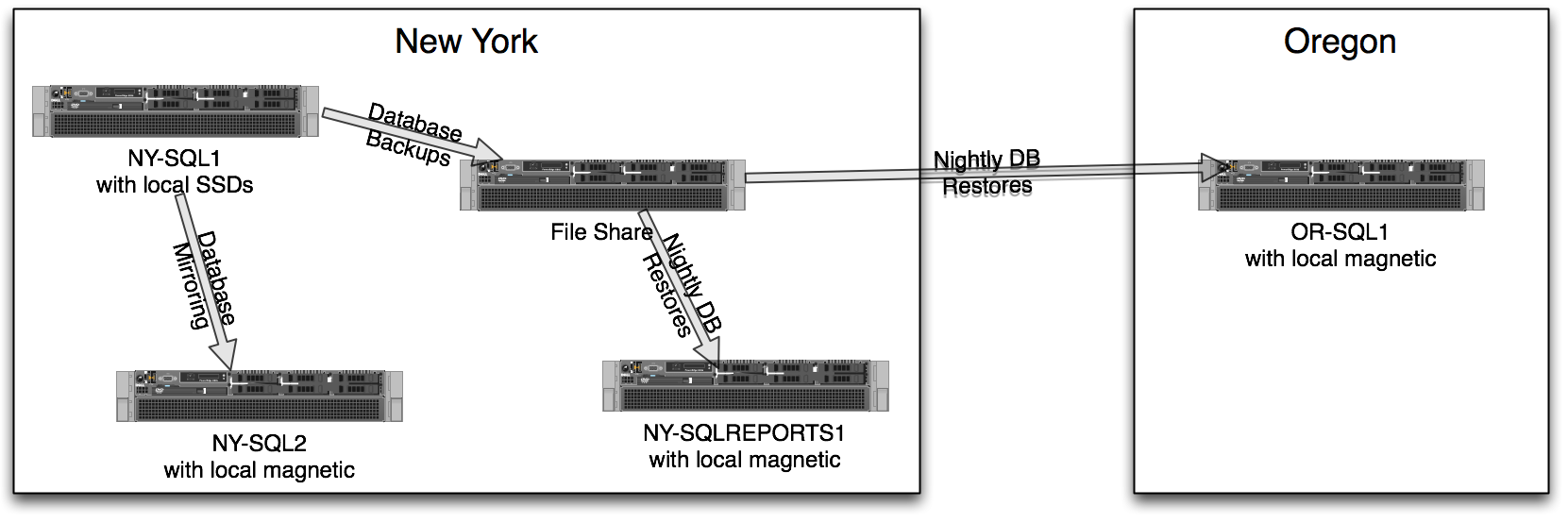
Here’s how StackExchange used SQL Server 2008 for data protection, simplified a little for illustration:

StackOverflow-SQL-Server-2008

The servers:

  • NY-SQL1 – primary. All web site connections go here.
  • NY-SQL2 – hot standby using SQL Server asynchronous database mirroring. When NY-SQL1’s not doing transactions or playing sudoku, it sends the transaction log data over the network wire to NY-SQL2, which then applies the same changes. If NY-SQL1 had a serious hardware failure, we could manually go live with NY-SQL2 with a little work. Note that the storage doesn’t have to be the same – although that can introduce some challenges. Unfortunately, this server isn’t accessible to end user queries – its only purpose is madly scribbling down the live transactions.
  • File Share – I’m a big believer in doing your full and transaction log backups to a different server, directly over the network. If you back up locally and then copy to a network, you’ve got more things you have to manage, and more things that can go wrong.
  • NY-SQLREPORTS1 – once the databases are backed up to a file share, other SQL Servers can restore the backups for development or reporting purposes. You can also run DBCC checks against these databases.
  • OR-SQL1 – offsite server with a delayed, somewhat out-of-date copy of the NY-SQL1 databases. If we lost the entire NYC datacenter, we could go live offsite, but we’d lose the changes since the last nightly backup.

That infrastructure diagram is simplified, and there’s some other business needs I’m not covering here. In reality, we had multiple sets of these servers, and the automatic backup/restore strategy was more complicated. I explained one version of this in my post on how to really compress SQL Server backups.

This setup worked well, but it entailed a lot of moving parts: database mirroring, log shipping, manual failovers involving a lot of scripting, and some painful management. I was really excited to simplify the infrastructure with SQL Server 2012.

Why SQL Server 2012 Made Sense for StackExchange

Microsoft brought its A-game to SQL 2012 when they introduced AlwaysOn Availability Groups. Now, along with the production SQL Server, we can have up to four more replicas in any number of datacenters. The replicas stay within a few seconds of the live server, yet people can query the replicas without blocking production load. This is awesomely useful for things like API.StackExchange.com and the Data Explorer (which lets anyone query any Stack database live).

Here’s a simplified version of the new SQL Server 2012 infrastructure:

stackoverflow-simple-sql-server-2012

Now we’ve got three separate pieces of hardware, and their purposes are a lot simpler:

  • NY-SQL1 – the primary StackOverflow database.
  • NY-SQL2 – the secondary StackOverflow database. NY-SQL1 sends transaction log data directly to this SQL Server, which then applies the updates. Other users (like API and Data Explorer) can query this server, and we could run backups here (but we don’t, for reasons I’ll explain later).
  • OR-SQL1 – the offsite copy. NY-SQL1 also directly sends transaction log data here – it doesn’t flow through multiple replicas. Other users can query this server too, so we can make use of both datacenters’ internet connections if we wanted to. We run offsite backups here, so we’ve got redundant backups in both NYC and OR.

A little bit more about the backups – while SQL Server 2012 can indeed offload backups to replicas, the Stack team chose to continue doing their backups on the primary. Our logic was that if replication broke, we wanted to continue to get good backups – something you can’t guarantee if the backups are happening on a secondary. Therefore, we do full and transaction log backups on the primary (NY-SQL1) plus full backups on OR-SQL1 to have local offsite copies.

This diagram has a cluster, but no shared storage. This is one of the most attractive features for StackExchange because they wanted to avoid buying complex, expensive shared storage for this project. They’re speed freaks, and it’s tough to beat local SSDs in RAID 10 for that.

Finally, this diagram is really, really oversimplified. In reality, we’ve got:

  • Multiple clusters – one for the highest load sites, and one for everything else
  • Multiple availability groups – because we want to be able to fail over databases in groups.
  • Multiple live sites – for example, NY-SQL1 doesn’t have to be the primary server for all databases in the cluster. Some sites have their primary home in Oregon rather than NYC.
  • Multiple networks, differently powered servers, and more

The new infrastructure solved StackExchange’s business problems, but it introduced a lot of technical challenges.

Our Challenges with Availability Groups

We found a new clustering bug in Windows 2008R2. One night, all four of the SQL Server instances hosting secondary replicas crashed at the exact same time – across two separate clusters. This clearly was bigger than a SQL Server issue since it was happening in separate clusters, so we opened up a Microsoft support case immediately. Thankfully, it didn’t affect the primaries, so we were able to keep StackOverflow live on SQL Server 2012. After weeks of troubleshooting (and multiple crashes per week in the meantime), Microsoft narrowed it down to a race condition in Windows Server’s clustering code and gave us a hotfix. (It hasn’t gone public yet, but I’ll blog about that when it does.)  UPDATE Dec 2012 – http://support.microsoft.com/kb/2777201

We ran into networking issues that we still don’t understand. While going live with the second set of clusters, we were stuck for hours with known problems with Windows caching ARP addresses. Once we got past that, we ran into the same symptoms described in this Exchange 2010 cluster post. SQL Server 2012 relies on Windows clustering in much the same way as Exchange does, so we tried the Exchange fix – changing an IP address temporarily. It worked.

We ran into worker thread issues in SQL Server. In the middle of the night (doesn’t that always happen?), one of our primary servers ran out of worker threads and simply stopped sending data to the other replicas. When more threads freed up again, it didn’t restart sending data. Microsoft has blogged about the number of worker threads required for AlwaysOn AGs, and we were well above that number. We manually raised the number of worker threads anyway, and SQL Server still didn’t start replicating again. There isn’t a command to restart Availability Group communication in cases like this – ALTER DATABASE XXX SET HADR RESUME doesn’t work because it’s not at the database level. To fix it without restarting the replicas, Nick came up with the idea of just changing a replica setting (like from read-only-intent to allow-all-reads) and that started communication flowing again.

Through all of this, the troubleshooting tools failed us. During our worker thread issues, the AlwaysOn dashboard reported that everything was A-OK – even when it had stopped replicating data. Even worse, the log_send_queue_size field in the DMV sys.dm_hadr_database_replica_states stopped updating itself once we ran out of worker threads. It looked like only 10MB of data was queued up – but we were actually behind by almost 10GB. Thankfully we caught it manually within a few hours, but this could have been a catastrophic problem. Using AlwaysOn Availability Groups is like flying a plane: you can’t just rely on one metric on one gauge and think everything’s okay. You need multiple copies of every gauge, and you have to watch ’em all.

Microsoft’s support failed us for a while too. I don’t envy Microsoft support at all; it’s really tough supporting a product as big as SQL Server. New features make things even tougher because it’s hard to anticipate what data will be needed to solve a support case. However, I was pretty frustrated when support repeatedly asked questions like, “How is the cluster configured?” SQL Server has had complex integration with Windows Failover Clustering for years, and support needs a better way to get the data they need. Problems with AlwaysOn Availability Groups will require a lot of background information to get a good fix, and right now, the answer is spending a lot of time on the phone trying to explain things. That led to a bad experience for the Stack guys.

I had to fact-check Microsoft support’s answers. During the investigations, I monitored communications with support and interjected where necessary. For example, one support engineer told StackExchange to enable full memory dumps – without any hint of a problem that might cause on a box with 384GB of memory. I had to explain to the support engineer why he shouldn’t be making that recommendation without also explaining the drawbacks. This kind of thing isn’t a new problem with SQL Server 2012, and customers shouldn’t have to get a Microsoft Certified Master involved just to filter answers from Microsoft support.

I don’t think this stuff will get better with SP1. For years, I’ve heard people say, “I’m not installing the first version of Windows/SQL/Exchange/AngryBirds. I’m going to wait until Service Pack 1 comes out.” SP1 usually brings a slew of fixes, and indeed, there’s already been three cumulative updates. Waiting for SP1 also gets you the benefit of better community resources – I’ve already Googled for new error numbers and come up empty, which means I’ve got some blogging to do. But even with bug fixes and better resources, I don’t think AlwaysOn Availability Groups is going to get any easier to design, configure, and troubleshoot. It’s a very complex feature built atop a lot of complex features.

The Bottom Line: It Worked, but It’s Not the Easy Button

Microsoft SQL Server 2012’s new AlwaysOn Availability Groups solve real business problems at StackExchange, allowing us to aim for higher availability with shorter failover times, but it introduced some really tough challenges.

The StackExchange team consists of the smartest sysadmins I’ve ever had the pleasure of working with (and they’re hiring!) and they don’t have a full time SQL Server DBA. I wouldn’t recommend SQL Server clusters without a full time database administrator, though, and ideally a full time team of DBAs. StackExchange’s implementation wasn’t really that complex, and yet we still spent days and days working with Microsoft support to get the bugs ironed out. Along the way, we ran into Windows and SQL Server bugs – always a risk with a new feature – and it requires a highly skilled team to get to the bottom of these complex problems fast. Thankfully StackExchange has that team, but when faced with similarly complex challenges, I’m not sure how other companies are going to react.

Learn more about the challenges of AlwaysOn Availability Groups at BrentOzar.com/go/alwayson. If you’d like help navigating the obstacles in your own AlwaysOn infrastructure, contact me.


SQL Gangnam Style

Licensing, SQL Server
3 Comments

South Korean musician Psy’s hilarious music video for Oppa Gangnam Style has been tearing up the charts:

Sure, it’s catchy, but it turns out there’s a message behind it.  Gangnam is an absurdly wealthy area of South Korea, like America’s Beverly Hills meets The Hamptons meets Tokyo.  Just like anywhere else in the world, the people who have inspire the people who don’t – but only inspired to spend like they have it, not inspired to actually make it.  As a result, there’s a running joke in South Korea about women who spend $2 on ramen for lunch and then spend $6 on coffee.

Psy’s actually from Gangnam, and his video is a series of cut-together scenes that at first look glamorous – but then turn out to be pretty sub-par.  For example, it opens with him sunning in the sand, but as the camera zooms out, you can see he’s really at a children’s playground, looking like an idiot.  He’s really making a social comment, and you can read more in The Atlantic’s piece on Oppa Gangnam Style.

In America, it’d be like a gangster rapper poking fun at guys who claim to be tough, wealthy pimps, but who drive their $100,000 car home to their $50,000 house and proceed to spend the weekend doing chores while their wives relax on the couch.  (I love it already.)

SQL Gangnam Style

THAT’S HOW I ROLL

Everybody wants 80 cores and 1 terabyte of memory on their database servers – and yeah, we work on those.  It’s fun to open Task Manager and look at all the pretty pixels.  I’ll save you the math: at sticker price, that’s over half a million dollars just for the SQL Server licensing alone.  (Thankfully, in these circles, nobody pays sticker price.)

Notice how those CPUs are just sitting there idle, not doing anything?  Hmm.

SQL Server 2012’s new core-based licensing means we have to stop flushing our money down the drain on accident.  Our SQL Server needs a balanced diet: we can’t afford to spend $6 on coffee and skip lunch.

SQL Server’s version of a balanced diet is a balance between:

  • How fast the SQL Server’s CPUs can consume data
  • How fast the storage can deliver the data
  • How fast the pipes are between the CPUs and the storage

If you’ve invested all your money in one of the three, and the other two are horrific, you’re Gangnam Style.

It’s fun to dance around doing the pony trot while yelling that you’re Gangnam Style, but don’t do SQL Gangnam Style.  Spread your budget around to get the right combination of CPU, storage, and throughput in order to make your app fly.


The Case for Core

SQL Server
19 Comments

SQL Server 2012 was the first version of SQL Server to support being installed on Windows Server Core Edition (Windows without a GUI to the rest of the world). With the impending release of Windows Server 2012 there are a lot of people who are excited about running SQL Server 2012 on Windows Server 2012 in their data center. Let’s look at what you’ll need to do to become fluent and productive with Windows Server Core.

You are sitting in front of a terminal. There is a keyboard here.

Connecting to Windows Server Core is a lot like firing up a text adventure game from the early 1980s. You’re greeted with a blinking cursor and not much else. Ready to get started? I am, too. Our first step is to change the default shell from cmd.pain to powershell.exe. You can only do make this change through the registry. Just fire up regedit.exe and LOL your way to pain.

Or, you can start PowerShell (type powershell.exe and press enter) and then make the registry change there. I found instructions through some random blog, to save you clicking, though, here’s the code:
[ps]$RegPath = "Microsoft.PowerShell.CoreRegistry::HKEY_LOCAL_MACHINESOFTWAREMicrosoftWindows NTCurrentVersionwinlogon"

Set-ItemProperty -Confirm -Path $RegPath -Name Shell -Value ‘PowerShell.exe -noExit -Command "$psversiontable'[/ps]

I can administer Active Directory from here, right?

That looks awesome, right? Now that you’ve made the change you’ll need to restart the server to see if it took effect. Just click on the Start icon and… oh yeah. Well, thankfully we can just use PowerShell to get this info through Get-Help reboot. PowerShell may have to go out to the web and download and index a help collection. Your servers can get out to the web, right? While you’re finding a network administrator to give you permission to download PowerShell help files, I’m going to sit here and play Zork.

After the Reboot

At this point, you probably think I’m behaving like a jerk. You’re right. But I’m doing it to prove a point – as much as I am excited by the idea of Windows Server Core, I’m completely terrified of it and you should be, too.

How comfortable are you solving problems without RDPing into a server? If you really want to test yourself, bribe that network administrator with an ice cream sandwich and have them block your use of port 3389 for a week. We’ll see how you feel after that.

If you’re still excited about the prospect of a world without RDP, take stock of everything that you do on a daily basis. Evaluate how comfortable you are with automating every task via either T-SQL, PowerShell, custom .NET code, or a combination of all three. This isn’t all that difficult if you’re a DBA. If you’re an admin of a different sort, this might start to get fun.

After the Double Reboot

The biggest hurdle is troubleshooting – it’s going to be difficult for you to troubleshoot hot production problems without a GUI. Sometimes you really want to remote into that server, admit it. Here’s what I want you to do: every time you solve a production issue, write down every step you take. Make sure you include all the poking around and false starts at solving the problem. Yes, I even mean staring at Task Manager and yelling. Do this for the next month.

After you’ve resolved each issue I want you to script out every step you performed through T-SQL and PowerShell. Some of those remote tasks aren’t looking so pretty, are they? Maybe there is additional logging you can enable to make the diagnosis easier. Perhaps there’s monitoring you can put in place. But right about now I’d be willing to bet a sack of chalupas that you’re getting nervous about a move to nothing but Server Core.

While you’re busy being nervous, I want you to stand up and walk over to everyone else who needs to access a server. Ask them to do the exact same thing that you’re doing – every big problem gets every step written down and then scripted out after the fact. DBAs aren’t the only people who need to access a SQL Server, so make sure that all of the other administrators are on board and are comfortable with performing their regular tasks through a combination of PowerShell and custom .NET development.

After a Month of Scripting…

I’ll be blunt – I’m excited about Windows Server 2012 No More GUI Edition, but I’m also nervous as hell about the first time I run into this scenario on a production system. You should be, too.

Windows Server Core makes an incredible amount of sense for professionals who are administering hundreds of servers. The people doing this right now already have tools in place that make their job easier, or they’ve solved the problem by hiring an army of off-shore administrators. Windows Server Core makes a lot of sense at a point when you have sophisticated monitoring and you are in a place where you can treat your infrastructure as an array of sensor covered parts – you need to know that something is about to fail before it actually fails so you can take action long before you end up putting out a fire.

This isn’t for everyone. If you’re managing less than 10 servers, Windows Server Core isn’t for you. If you’re managing a volatile number of servers, elastic demand, or a virtualized army of siloed application servers I bet you’ve already figured out how to solve your administration woes. If not, take a look into Windows Server Core. If you’re managing a critical piece of infrastructure, think long and hard about what you’re doing and take my advice – script everything you’re doing for a month and then see how you feel.


Amazon Web Services Architect Training Recap

Going into Amazon Web Services (AWS) architecture training last week, I expected to get whiteboard-level training for project planners, and it met expectations.  We spent time talking about how Amazon’s most popular services fit together and how they can be used to solve our business needs.  Nothing in the training itself was groundbreaking for me – I keep up with the AWS blog enough to know what’s going on – and I think I actually learned more about the state of consulting than I did about the cloud.  Here’s the highlights:

Most attendees were consultants trying to get their heads into the cloud.  They weren’t hands-on implementers – they just wanted to be able to point their customers to the right services.  Their heads were swimming with all kinds of crazy (no, really) ways to use cloud services to solve client pain points, like connecting Amazon-based storage to on-premise servers over Fiber Channel over Ethernet.  (Jeremiah’s retort made me laugh out loud in the middle of training: “HELLOOOOOOOOOOOOOOOOO IIIIIIIIIIIIIII AMMMMMMMMMMM LATENCYYYYYYYYYYYYYYYYYYYYYYYYYY”)

The rest were implementers tasked with moving their company’s operations into the cloud.  They had already built successful technology companies using on-premise hardware, and now they wanted to migrate out of the expensive server-and-space problems.  They wanted to know the best practices on how to make this transition.

DevOps is going to be the story of 2013.  In the cloud, you use scripts to monitor load and adjust your infrastructure automatically.  Put another way, your code makes continuous decisions about how much your monthly bill will be.  The smartest coders will use a combination of on-demand instances, reserved instances, and the new black market.  This blew away all of the attendees, and they asked a lot of questions like, “Who’s responsible for this – development or admins?”  It’s neither – welcome to the world of DevOps.  I was pretty surprised that even Amazon’s trainers didn’t bring up this concept, because it’s fundamental now.  To learn about DevOps, check out What Is DevOps?, then Dmitriy Samovskiy’s excellent primer from way back in 2010 (he’s @Somic), then Mike Loukide’s historical perspective.

Cloud service sprawl is going to make SQL Server sprawl look like nothin’.  Amazon’s architecture best practices actively encourage people to think of technology as a bunch of loosely coupled black boxes.  Sure, that works today to build a very scalable infrastructure quickly, but think about how it’ll look 5-10 years from now.  If you’re a CIO and you get a big bill for thousands of instances of hundreds of services, how do you even begin to identify where to cut costs?  Be careful what you ask for – I’d be terrified to inherit a bunch of uninstrumented black boxes.

It’s really hard to train people on cloud services.  Cloud services change everything: storage, networking, app/database interplay, caching, replication, you name it.  To get the most value out of cloud architecture training, you have to come armed with a really solid understanding of networking, hardware, server virtualization, service-oriented architecture, and more.  During the sessions, if any one attendee wasn’t familiar with any one term, we had to go off on a 5-15 minute tangent.  That was pretty frustrating for those of us who came prepared.

Everybody’s struggling to keep their skills up.  Technical services are changing faster than ever, and Amazon’s own trainers often had to stop and ask each other because things had changed since the training material was last updated.  (Example: “Wait – the prices on this slide are wrong – they’ve dropped.”)

Developers who know the cloud can run rings around everybody who doesn’t.  The most junior programmer in the room with some background in Amazon Web Services was far, far, far more capable of making business-changing improvements than the most savvy (but hands-off) consultant.  One guy actually said, “I wish there was some kind of drag-and-drop Visio-style tool to just link these services together to build stuff.”  Bad news: GUI tools can’t keep pace with the rapid changes in cloud services, and the guy who can code the cloud wins.

Thinking About Attending the AWS Architecture Training?

I’d recommend that you spend a few days working with the online services first.  Consider doing the following tasks:

  • Set up a Windows virtual machine in EC2
  • Assign it a publicly accessible Elastic IP address
  • Configure security so that you can remote desktop to it
  • Add an EBS volume and hook it up to your Windows server
  • Create an S3 volume, upload some files to it, and download them via a web browser

Those simple infrastructure experiments will get you familiar with the basics of configuring the most common Amazon Web Services capabilities.  Many of the other services build atop EC2, EBS, and S3, so this ground knowledge will help you get the most out of the architecture training.

Next, read the most recent month or two of posts from the Amazon Web Services blog.  When you don’t understand a term, spend a few minutes Googling it.  When you feel comfortable digesting posts like Amazon EC2 Reserved Instance Marketplace and AWS Cost Allocation for Customer Bills, good news! You’re not just ready for AWS training – you’ve actually given it to yourself for free.

I’m not quite sure I can recommend the existing AWS architecture training that I took – it was a rough mix of out-of-order content and basic-level questions from attendees.  I think the training would be much more valuable if you attend in a very high-tech area like Silicon Valley or Amazon’s home base in Seattle.  There, you might meet more hands-on implementers and have more valuable real-life experiences to share.  (For example, in Dallas, I was the only attendee who could answer questions about how to help clients choose between on-demand and reserved instances.)  I’ve discussed my experience with the Amazon training team, and they were already making changes to reorganize the content and raise the bar on testing attendees to make sure they’re qualified for the course.

The Biggest Thing I Learned

Even when you don’t learn much from a class’s training material, that teaches you something: you know more than you thought you knew.

I wasn’t all that upset that the material wasn’t new to me.  This just means I need to step up my blogging game here – we’ve gotta do a better job of sharing the things we’ve learned about cloud infrastructure.  People find it valuable – after all, they’re paying to attend the Amazon classes – and I heard a lot of good questions that we can address here in the blog.

We’ll be sharing more of our success (and failure) stories in migrating database applications to the cloud including our very own site.  Yep, BrentOzar.com is finally moving from a single virtual server to a highly available and elastic infrastructure using Amazon RDS, EC2, and load balancing.  We’re aiming to go live next month before the conference season starts, and you’ll know when we do – we’re bringing an amazing new look to the site, too.

Learn more about our SQL Server in Amazon cloud resources page.


Email Templates for Recruiters and Questions

SQL Server
13 Comments

I get a lot of email, and I’m zealous about staying at Inbox Zero using the Getting Things Done productivity techniques.

One of my favorite ways to handle email fast is by using templates, or as GMail calls them, Canned Responses.  Email programs like Outlook let you set up multiple signatures, and I use those to respond fast to common types of emails.  When I get a job posting from a recruiter, I just click Insert Signature, Recruiters, and in pops this:

My Canned Response for Recruiters

Thanks for the email! If you can forward on the full job description and salary range, I’ll be happy to check it out and pass it along to my network.

After being repeatedly burned (hey, buddy, check out this job – oh, sorry, I didn’t know it only paid $X for Y years of experience) I have a policy against forwarding jobs without a salary range & a job description. (I hate to say this, but “depends on experience” isn’t a range, either.)

Thanks, and have a great day!
Brent

About That Recruiter Template

The recruiter is completely clear on what they need to do next, and there’s no hard feelings.  Most of the time, believe it or not, the recruiter really does reply back with a rate. It’s not usually a good rate – think $30/hour for 10 years of experience – but sometimes it actually does make sense, and I pass it on to people who I know that are looking.

Sometimes the job description includes several different jobs, and I give constructive feedback about why they’re having a tough time finding the right candidate. Recruiters often thank me and pass that feedback along to their clients to help reset their expectations.

Another kind of email I get a lot is the Technical Support Question. I really wish I could answer every question I get from strangers every day, but I get dozens per day, and I want to help people find better solutions faster. Here’s how I respond to those:

My Canned Response for Questions

Hi! Rather than give you a fish, I’d rather teach you how to fish. There’s a ton of great places to get your questions answered online for free, and you won’t have to wait for one specific person to get freed up.

For small, non-urgent questions with only one possible answer – post on http://DBA.StackExchange.com or http://SQLServerCentral.com. Try to include as much specifics as you can so that a stranger can try to reproduce the problem you’re facing. If you haven’t gotten a clear answer within two days, email us the link to the question, and we’ll help out.

For “just curious” questions, try to figure out how to run an experiment yourself to get the answer. You’ll learn an amazing amount of stuff by getting your hands dirty and trying it yourself. Then, if you don’t get the results you expect, you’ll be able to use your sample code when you post a question on those sites above.

For urgent, down-right-now problems in production environments – call Microsoft at 1-800-642-7676 to open a support case. It’s $500, and they work the problem with you until it’s done. You can’t find a better consulting deal than that.

For bigger-picture questions that require a discussion about your environment – that’s where consulting comes in. While we do wish we could give custom one-on-one advice about your production environment for free, we have to put food on our tables. If you’d like to talk about what a consulting engagement looks like, let us know and we’d be glad to set up a free 30-minute call about our services.

I know it’s not the fast answer you wanted – and like you can probably guess, this is an email template – but I want to make sure you get the fastest answers possible, that cost as little money as possible.

Hope that helps!
Brent

About that Question Template

Yeah, every now and then I get angry replies back saying I’m a stuck-up jerk who won’t take time to help a stranger. I understand where they’re coming from – I’ve just long since surpassed the email volume where I can handle every free question, and I’ve had to come to peace with that. It’s the blessing and curse that comes with running a blog.

Most people don’t reply, though, and sometimes I go into Stack Exchange and look for the question they asked. I get so excited when I see they posted the question and got the help they needed within minutes or hours for free.

That’s so awesome – I love the satisfaction of knowing that somewhere, this person has a whole new world of fast, free help open to them, and I helped make it happen.


Why I’m at Amazon Architect Training This Week

People bring me in when they’re having data problems.  They can’t store data fast enough, they can’t make it reliable enough, they can’t hire people to manage it, etc.  When I’m in the conference room, it’s because there’s a fire in the disco datacenter.

You know how it is as a DBA, though – DBA means Default Blame Acceptor.  Everybody thinks the fire started in the database, but often it’s the SAN, VMware, crappy code, bad third party apps, or any number of combustible materials.  The company gets more and more concerned about the growing smoke, and they ask the DBAs, “Who’s a SQL Server expert you can call to put this fire out?”  The DBA thinks about my crazy blog posts and blurts my name out – mostly because he wants to find out if I’ll show up in the Richard Simmons costume.  (That costs extra.)

Budget Fire Extinguisher

Now put yourself in my shoes: I show up in a conference room or on a WebEx, and there’s a huge problem somewhere in the infrastructure.  Everybody involved is pointing fingers at each other, and they’re all armed with volumes of reports proving that it’s not their problem.  In a matter of 3-4 days, I need to:

  • Find the real root cause of the problem
  • Prove it to everyone involved using their own language
  • Show a few possible solutions and recommend the right one
  • Convince them to implement it as quickly as possible

SQL Server isn’t the only fire extinguisher, and I have to know how to put out data fires with other tools.  Amazon’s got a ridiculous list of services that are easy to get started with, including:

  • Relational Database Service – point, click, and deploy Microsoft SQL Server, Oracle, and MySQL instances. Amazon manages the backups, patching, and security. The MySQL ones even support readable replicas and replication to multiple datacenters.
  • DynamoDB – super-fast NoSQL database hosted on SSDs.  You pick how fast you want it to go, and Amazon makes it happen.
  • Glacier – store your backups in the cloud for $.01 per gigabyte per month with no cost for incoming data.
  • Import/Export – ship them a USB drive, and they’ll hook it up to the cloud.  For folks with slow upload links, this is the fastest way to move your data online.

That’s why I’m in Dallas, Texas for a few days attending Amazon Web Services Architect Training.  It’s a three-day design session that covers how to design solutions with their services.  It’s not going to make me a Certified Master of Cloudiness across their broad range of tools, but that’s not the point.  Clients don’t usually want me to do the work myself: they want me to find the right answer fast, get the staff on the right page, and let the staff knock out the work together.

If you’re a data professional, and you’re frustrated when people keep saying it’s a database problem when it’s not, what are you doing to bridge the gap?  Are you frustrated that The Other Guy doesn’t know anything about SQL Server?  Or are you reaching out to learn The Other Guy’s technology to help him to see where the smoke is coming from?


When Your DBA Job Sucks: The Phases of Burnout

When your databases always look like this, eventually you feel the same way.

Even when you love being a DBA, working the job can turn into a grind. There’s many times when you’re up all night troubleshooting just to face another day at the office handling user complaints. You hear at the water cooler that you’ll need to improve performance with less hardware for the next year. You get an email that you need to be ready to virtualize everything in the next quarter, but nobody’s even sure which hypervisor you’ll use.

Your perfmon counters show that response times from storage are getting slower, but the SAN administrator says that everything looks better than ever. One of your servers starts blue-screening periodically. Your manager announces at the weekly team meeting that you need to stop being so reactive and start being more pro-active. Right after that, you get an alert for data corruption.

Oh, and by the way: we’re going to need you to come in on Saturday.

Before you know it, you’re on the road to burnout. Your tour looks like this:

Phase 1: Denial

It’s hard to admit when you lose that loving feeling with your job. You just keep plugging away at it.

When your problems have to do either with boredom or a very high volume of reactive work, this just makes the situation worse. You’re spending a lot of time, but you’re mostly spinning your wheels. You’re not learning or growing, you’re just doing what you need to basically keep things together.

Phase 2: Anger

After a while, you get cranky. It’s pretty inevitable when you’re overworked in a DBA job, because you’re surrounded by unhappy people. Users need data faster. Developers and vendors say the problem isn’t their code, it’s your servers and maintenance. Your manager isn’t sure why you can’t keep problems from happening in the first place. The SAN Admin gets a little tired of you stopping by with another stinky performance issue again and again.

Also, at this point people in your personal life start to get impacted as well. You’re starting to get less sleep and grumble more. You vent about politics at work and things you can’t change.

You get to the point where you say things that seem perfectly reasonable in your head, but come out sounding like you’re a real jerk. Sadly, you probably don’t notice it.

Phase 3: Bargaining

Eventually you get tired of being angry. You start to think that maybe the problem isn’t your job— the problem is that you’re stuck in your job! So you decide to go about some self improvement.

At this point you decide to become amazing. You’re going to learn every feature in SQL Server. You’re going to know all the internals and when there’s a bump in the night, you’ll be the one who whips out a debugger, walks the SQL Server stack, and sends a diagnosis to the SQL Server product team. You make a deal with yourself: I’m going to read these twenty books, and then I’m going to fix my job.

Sometimes you try to make the deal with your boss. “If you send me to this training then I’ll revolutionize our team.” Sometimes you get the training, sometimes you don’t.

The bigger problem is that it’s hard to revolutionize your job when you’ve been unhappy with your job for a good long time. You try to make big sweeping changes, but it’s really hard to revolutionize processes and tasks when you’ve already got a full load of work.

Phase 4: Depression

This really is depressing, isn’t it? Honestly, I’m just depressed writing this post after analyzing what I’ve seen in my career.

Once you get to the point where you’ve tried to make big changes and haven’t had an impact, you get tired. You get depressed. You get so that you don’t even want to finish your

Phase 5: Acceptance

Some people reach acceptance with a job they’ve come to dislike, but some people never get here— they quit first.

Acceptance isn’t a happy place. Don’t envy someone with acceptance. Acceptance means that you keep disliking your job, but you limit the negative impact on your life. The one good thing about acceptance is that you figure out some change to make it livable: you keep your hours as close to 40 a week as possible. You do just a bit over than the bare minimum at work. You focus on other things. You distance yourself a bit from it all so that it’s not so much of a disappointment.

In many ways, acceptance is even more depressing than depression.

Phase 6: Action

I’ve got some good news. When your job gets bad, you do go through something like the phases of grief. That’s no fun. But the good news is that nobody is actually dead. And you’re not dead yet, either. There are still SO MANY things you can do!

Even when you’ve been down a long road of trouble in a job, you can still make real changes and make a big difference at your company. You just need to get a fresh way of looking at it, and you need to make small, strategic changes. Your mistake earlier was in trying to make grand, sweeping changes. Most of the time you just can’t win the war that easily.

Here are four successful strategies that I have used, and which my clients use to make long-lasting changes in their workplace.

  • Add a 20 minute brain workout to your day. Block out 20 minutes for your personal learning in your calendar and stick to it. Make this your workout period for your brain, and don’t let anything come between you and your learning. Especially if you’re in the “acceptance” zone, this one regular dose of learning can radically change your mindset.
  • Smile at people. Seriously. Make your face smile— it will actually change your mood, and in turn change your working relationships. If you’re in a rut, trust us, you’re NOT the only one who feels it. This is harder than it sounds like, and you may need to set a daily task or reminder to get good at it.
  • Break passive-aggressive patterns. Some of the hardest burnout problems to solve are poisonous social situations. For hard social problems, find a neutral colleague and ask them for advice on how you can smooth over a bad relationship– but make sure you don’t gossip or blame the other person in the process.
  • Bring in a technical influencer. Sometimes clients bring us into short-term gigs to help confirm where the problem is in their system and provide independent validation of where long term investments should be placed. When an environment is full of finger-pointing, as a consultant we have an advantage: we can elegantly point toward a solution without getting embroiled in the political mess.

Your Job Doesn’t Have to Stink: And You Don’t Have to Leave It

It’s a great time to be a database administrator. Technology is growing fast and people are pushing the limits of what they can do with SQL Server all the time. There are lots of jobs out there, but although you’ve been struggling, you may already have a great job.

If your team is stuck in a rut and you can figure out what you can do to make that job better, you’ve just become the most valuable employee on the market: the one who can turn around a bad situation. The secret to getting there is to figuring out the small changes to make it all work.


Where’s Your Company’s #SQLHelp Resource?

SQL Server
7 Comments

If you’re a SQL Server data professional on Twitter, you’ve probably seen the #SQLHelp hash tag.  Here’s how to use it:

  • To get help with a short, to-the-point question, post it on Twitter with #SQLHelp in your tweet. Keep Twitter open for the next 15-30 minutes and respond quickly.
  • To give help, set up a #SQLHelp search in your Twitter client. As questions come in that you’d like to help with, just respond back and include #SQLHelp in your tweet too so other people can follow the discussion

It’s pretty simple, and there’s a vibrant #SQLHelp discussion going on around the clock.  (Well, more vibrant during business hours in the US.)  It works best for simple questions that don’t require a lot of back-and-forth clarification, and when things get too detailed, the discussion often moves off to a forum like DBA.StackExchange.com or SQLServerCentral.com.

The benefits:

  • Nobody has to be “on duty” – it’s just staffed by people with free time
  • You’d be amazed at the quality of answers you can get fast
  • Everybody from full time admins to power users to amateurs can ask & answer casual questions fast

Which leads to the question – would something like this work in your own company?  Could you start an open dialog between the admins and power users to get easy problems solved fast before they escalate to help desk tickets?

Twitter isn’t the place for this sort of company discussion because your managers usually don’t want your internal technical infrastructure details aired on a public site.  Some options include:

  • Yammer – like a private Twitter for one domain name, but costs money to get what you really want like outsider consultant access
  • Skype group chats – one of my clients just leaves an open Skype chat at all times, and both internal staffers and outside consultants can drop in to help out
  • IRC – old-school internet text-only chat.  Been around forever, and is still popular amongst open source developers
  • Or any number of private software solutions

If your company doesn’t have one, start one and start evangelizing it to your internal users.  When someone emails you a question directly, here’s the template I use to push people to a more scalable discussion area:

Instead of being a bottleneck to getting problems solved, I’ve decided to help people find a better way to get their answers quickly.  The best way to get help on something like this is to narrow down the question as tightly as possible, then post it on (your discussion area).  Include as much example code as you can so that others can quickly run it and get an idea of what you’re asking, and they might even post your code back with fixes.  If you don’t get good answers fast, let me know and I’ll take a look at the question to see if there’s a way we can get better answers.  This way, you can get help even if I’m out for the day or working on an urgent project.

Then delete the email.  Out of your inbox.  Gone.  An hour or two later, check into (your discussion area) and get them an answer if they haven’t received one yet.  I know, it sounds like you’re punishing them, but this is how you teach people to fish – or at least get their fish from an entire team of fishermen rather than one person directly.


Write a Killer Technical Resume in Five Steps

Ever dreaded writing a resume so much that you put it off until the last minute? When you finally wrote it in desperation, were you happy with it? Are you kind of afraid to look at it now?

I know what that’s like, because I’ve been there. But I’ve written two resumes in the last week without any of the pain using a method I’ve found that really works. The method breaks down into five steps.

Step 1: Get the Facts, and Only the Facts

My resume from a year ago, presented as a coloring book.

First, the dirty work. Compile a list of where you worked and when:

  • Company names you worked at (with locations)
  • Your job titles
  • Start and end dates

If you’ve been working a while, stick to the last 5-7 years. I know it’s hard to leave out the cool stuff you did in the 90’s, but just post the pictures on Facebook– hiring managers don’t want to read about it.

Optional items that can set you apart:

  • URLs for relevant online profiles (Think http://dba.stackexchange.com/— even if you’ve just asked questions, that can still say something very positive to an employer.)
  • Certification Titles (be precise)
  • Degrees and graduation dates

You can be selective about how much detail you put on your resume. You do not need to list your graduation year, for example, if you are concerned about age discrimination.

Step 2: Make a Date with a Friend and a Text Editor

Here’s where we take the pain out of writing your resume. For most geeks, it’s much harder to write about yourself than it is to talk to a friend about what you did.

Identify a friend who can type and who you feel comfortable with. Ask them to spend an hour with you helping you rebuild your resume. This person doesn’t have to be a geek at all, they just need to be able to take notes and ask you a set of questions. For safety reasons, pick someone who’s not a significant other or family member.

To prepare for your interview, open a simple text editor. Create a file and enter your name and employment history, with spaces in between.  Make a basic template:

Hermoine Datasmarter
hermoine@thisisnotarealaddress.com

#WORK HISTORY#
##DBA, Stormtroopers International##
Portland, OR (2010-present)

## Helpdesk Supervisor, This Is a Legitimate Business, LLC ##
Seattle, WA (2009-2010)

## Helpdesk Tech, This Is a Legitimate Business, LLC##
Seattle, WA (2007-2009)

Step 3: Get Interviewed on Your Work History

At the appointed date and time, sit down with your friend, open your text file, and hand over the keyboard. Take a few deep breaths. Relax. Your friend’s mission is to interview you about each job and take notes. For each job they should ask you:

  • What did you learn at the job?
  • What are you proud of doing at the job?
  • What technologies did you use?
  • What processes were important to success?

Start at the job that’s farthest back because that’s probably a job where it’s OK to have the fewest details. By the time you get to your current job, you should be in the swing of things. At the end of the interview you should have a giant brain dump of details in a text file about your work history.

Step 4: Craft Your Story

Wait a day or so after the previous step. Then save a new copy of the file and start editing your “Work Mess” with gusto.

Stay in your text editor in this step! Don’t think about formatting or presentation.

Make your edits based on one big question: What story do I want to tell about where I’m going in my career? There are an infinite amount of details you could give about yourself, but you need to limit yourself to only a page.

You may choose to add an “extra” feature to the top of your resume after you finish your work history. If you’re going to do this, just pick one “extra” resume feature, and make sure you it really works for you. Here are some items that can work:

  • List of specializations. This one is common and a bit expected, but it puts buzzwords at the top of your resume. That helps with recruiters and HR. A word to the wise: only put technologies in the list that you’re great at and want to be grilled on, or this will go terribly terribly wrong.
  • Short stories of what you’re proud of. I put three recent awesome projects at the top of my resume.
  • Something playful, but relevant. Jeremiah Peschka put a countdown of information about himself on his resume. That can be risky, but if you pull it off then it’s awesome.
  • How You’re Teaching Yourself. If you’re transitioning or just starting out in an industry, you can include information on what you’re doing to build up your skills before you get a job. I encourage learners to do work in virtual lab environments— if you’re doing that, you have stories you can tell.

There are a few pitfalls that I see commonly. Avoid a statement about what job you’re trying to land. Those statements come off as predictable and meaningless. The top of your resume is the most valuable real estate on it– you need to make a great impression there, so don’t waste it on something forgettable.

Step 5: Get Feedback from a Trusted Advisor

At this point your resume is still in a text file. That’s great. You’ve been focusing on content, and guess what? Many companies are going to make you submit a text version (or a very simplified version) for their database.

Before you worry at all about formatting, get feedback on your story— that’s your resume— from a trusted advisor. After you get feedback, apply some polish and make yourself happy with the content. At long last, you can use a word processor if you’d like.

More Help: Our DBA Job Interview Kit

Good interviewing is not a talent – it’s a skill you build with study and practice. Our training kit gives you 70 technical DBA interview questions and answers, 10 situational questions with strategies on how to answer, and 20 questions for YOU to ask your prospective employer. Learn more now.