Blog

sp_Blitz® v14 Adds VLFs, DBCC, Failsafe Operators, and More

SQL Server
11 Comments

Today, we’ve got a big one, and it’s all thanks to you.

For the last couple of versions, I haven’t added any big features because I’d been focused on the plan cache improvements. Today, though, we’ve got a big one with all kinds of health-checking improvements – and they’re all thanks to your contributions.

  • Lori Edwards @LoriEdwards http://sqlservertimes2.com – Did all the coding in this version! She did a killer job of integrating improvements and suggestions from all kinds of people.
  • Chris Fradenburg @ChrisFradenburg http://www.fradensql.com – added a check to identify globally enabled traceflags
  • Jeremy Lowell @DataRealized http://datarealized.com added a check for non-aligned indexes on partitioned tables
  • Paul Anderton @Panders69 added a check for high VLF count
  • Ron van Moorsel tweaked and added a couple of checks including whether tempdb was set to autogrow, and checking for linked servers configured with the SA login
  • Shaun Stuart @shaunjstu http://shaunjstuart.com added several changes – the much-desired check for the last successful DBCC CHECKDB, checking ot make sure that @@SERVERNAME is not null, and updated check 1 to make sure the backup was done on the current server
  • Sabu Varghese fixed a typo in check 51
  • We added a check to determine if a failsafe operator has been configured
  • Added a check for transaction log files larger than data files suggested by Chris Adkins
  • Fixed a bunch of bugs for oddball database names (like apostrophes).

Here’s how to use it:

https://www.youtube.com/watch?v=2tgAAcA3Me8

Head on over to BrentOzar.com/blitz and let us know what you think. Enjoy!


SQL Server Management Studio: “Include Client Statistics” Button

SQL Server
14 Comments

I’m curious. I like to know how things work. I have to read the user manual of everything I buy so I know all of its features. I like clicking all the buttons in applications I work with. However, SQL Server Management Studio (SSMS) has so many I haven’t gotten through all of them. At SQL Saturday #118 Wisconsin earlier this year, I was watching a presentation and the presenter clicked “Include Client Statistics”.

“What is this magic?!” I thought.

MSDN says it “Displays information about the query execution grouped into categories. When Include Client Statistics is selected from the Query menu, a Client Statistics window is displayed upon query execution. Statistics from successive query executions are listed along with the average values. Select Reset Client Statistics from the Query menu to reset the average.”

I mentioned it in last week’s webcast, “SSMS: More Than Meets The Eye“, but I wanted to give you more detail about it here.

This button is located on the SQL Editor toolbar.

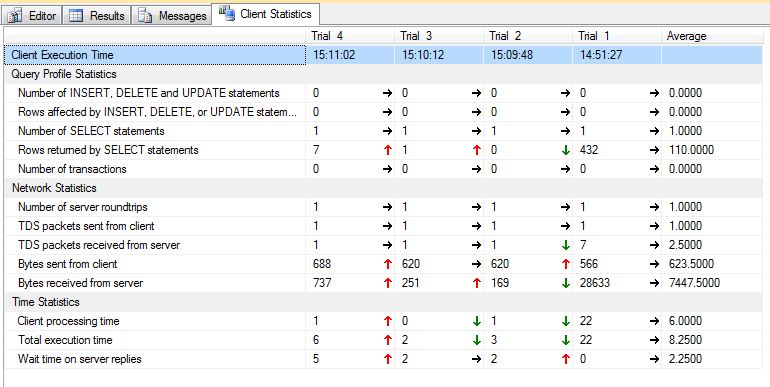
Open a query editor window, click on it to highlight it, write a query, and execute it. Your results will look like Figure 1.

Figure 1 – Client Statistics

Some really valuable information can be found here, such as the number of INSERT, DELETE, UPDATE, and SELECT statements – think of how useful that can be when tuning a complex stored procedure. You can see the number of rows affected or returned, and the number of transactions executed.

The network statistics lets you see how much traffic is moving from your client to the server and back.

The time statistics tells you how much time was spent processing on the client versus how much time was spent waiting for the server. These figures are in milliseconds.

That’s useful when you run a query once, but its usefulness becomes more apparent when you are tuning a query. Statistics will be shown for the ten most recent executions, and they will be averaged, as shown in Figure 2. Thus, as you are making changes to a query – perhaps changing the conditions in the WHERE clause, or comparing an AVERAGE to a window function – the statistics will update. You can, at a glance, compare the changes. You’ll even see green arrows for improved performance, and red arrows for worse performance.

Figure 2 – Client Statistics for multiple executions of a query

Client Statistics is not as in-depth of a tool as, say, execution plans, showing you where the performance of your query can be improved. It does, however, give you access to information that you might otherwise need to keep track of in your head, or scribbled on a Post-It Note – like I used to do when writing report queries. It’s another useful tool in the SSMS toolbox!


Bob Dylan Explains TempDB (Video)

Humor, TempDB, Videos
8 Comments

How many files must a TempDB have before it’s allowed to be fast? How many table variables must a server walk down before it’s considered a table? The answer, my friend, is blowin’ in the wind, and Bob Dylan will share it with you in this 25-minute video – hopefully you can understand him.

https://www.youtube.com/watch?v=xMWKh-ToPDQ


Backups Gone Bad: The Danger of Differentials

As your databases get bigger, you’re going to run out of time to do nightly full backups.  You’re going to be tempted by the siren song of differential backups.  The idea is that you’ll do full backups on the weekends, and then differential backups each night of the week.

Differential backups aren’t just the sum total of the transaction logs that have happened since the last full – they’re actually the pages that are different.  This can end up being much smaller than the transaction logs if you’re continuously modifying the same pages in the database over and over.  (Think a queue table with a few records that are constantly inserted, updated, and then deleted.)

When it’s time to do a restore, you just need:

  • The most recent full backup
  • The most recent differential backup (not all of them)
  • The transaction logs since the differential
Danger is my middle name.

Sounds awesome, right?  Not so fast.

Danger #1: Missing Full Backups – are you sure you’ve still got that last full backup online?  Are you sure the backup’s good?  The differential backup is useless by itself, and SQL Server doesn’t check that the full backup is actually online for you.  It’s completely up to you.  If you’ve set up maintenance plans that automatically delete backups older than X days, you might be deleting your full backups and just keeping the recent differentials around.

Danger #2: More Missing Full Backups – if someone else (because you’d never do this) takes a full backup on production to refresh the development server, you’d better know exactly where that file is.  The next differential relies on the most recent full backup – even if you weren’t the one who did it.  If you need to do a one-time full backup without affecting your differentials, check out copy-only backups.

Danger #3: Out-of-Control Change Rates – are you the kind of DBA who rebuilds all indexes nightly?  Your differential backups can easily be nearly as large as your full backup.  That means you’re taking up nearly twice the space just to store the backups, and even worse, you’re talking about twice the time to restore the database. Using differential backups means being much more judicious about index maintenance work.  Even if you’re using Ola Hallengren’s excellent database maintenance scripts, you still can’t rest easy – ideally you schedule the index maintenance to happen right before the full backup.

Danger #4: Offsite Backup Complexity – if you need to get your backups offsite as quickly as possible, and you’re copying last night’s backups to tape to move them offsite, you’re not really covered if you’re not including the full backup.  Take this scenario:

  • Sunday – full backups run and get copied to tape #1
  • Monday – differential backups run and get copied to tape #2
  • Tuesday – differential backups run and get copied to tape #3
  • Wednesday – disaster strikes

To restore, you need both tape #1 and tape #3 brought back from the offsite tape storage.  Inserting, mounting, reading, switching, these operations all take time and make your recovery more complex.

Done right, differential backups can save your maintenance window.  But if you’re not ready for the additional management discipline they require, they’re worse than no backups at all.  They’re a false security blanket that results in heartbreak.


PASS Summit Feedback: Top Ten AGAIN!

#SQLPass, SQL Server
5 Comments

Wow. Just wow. I’m totally humbled to say that my sp_Blitz® session and my AlwaysOn Availability Groups session were both voted among the best ten sessions at the PASS Summit 2012 conference.

The sp_Blitz® session felt like the best session I’d ever presented in my life. The room was jam packed full of people with great energy:

What a good lookin' crowd.
What a good lookin’ crowd.

And there were over 100 people in the overflow room watching me on video, too. I had no idea there was even an overflow room until halfway into the presentation. One of the in-person attendees said, “@RonDBA would like to ask a question via Twitter from the overflow room.” Me: “The what?”

I took risks on both of ’em: sp_Blitz® was 100% demos (which are always prone to unplanned explosions), and my AlwaysOn session was all slides (which is prone to complaints about a lack of demos). To mitigate those risks, I put a hell of a lot of time into testing my demos, and I tried to bring a lot of life to my slides. For 2013, I’m thinking about new ways to take risks and bring surprises.

This makes four years in a row that I’ve been in the top 10 sessions, and I have a theory about this. I think I get good feedback because I attract the right kind of attendees – people who want to have fun while they learn.

Thanks to you, it’s just as much fun on this side of the podium.


SQL Server Management Studio: More than Meets the Eye

SQL Server
13 Comments

SSMS is the standard tool for working with SQL Server databases. It does the job well. But if you’re using the default settings, you’re missing out! You can enable word wrap and number the lines. Change the settings when you script objects out. Filter through objects. Let Jes guide you through the world of hidden SSMS settings!

Watch the video to learn more about Object Explorer, Options, secret weapons buttons, Projects, Templates, and Snippets! Have a question? Feel free to drop me a line!

https://www.youtube.com/watch?v=BXsEikCabns

Tip: this video’s got a lot of detailed demos, so try watching it full screen. While you’re watching that way, you can click the gears icon and see the video in high resolution (like 1080p).


How to Set SQL Server Max Memory for VMware

SQL Server, Virtualization
57 Comments

SQL Server has two settings that kinda-sorta govern how much memory we’ll use to cache data: min server memory and max server memory.  I explain the basics of how they work in my Sysadmin’s Guide to SQL Server Memory, but things are a little different under virtualization.

VMware does a great job of sharing memory between different virtual machines, but to do that, sometimes it has to steal memory from one VM to take care of another.  Just because we gave 16GB of memory to our VM doesn’t mean the memory’s always there.  If a host crashes and we suddenly need to boot up a bunch more guests on our existing host, we might pull some memory away from the other guests temporarily.  If our company’s really cheap, we just might have never bought enough memory to begin with, and the memory might be stolen permanently.

Some of my restaurant choices are less satisfying than others.

To work around that, VMware admins can set a reservation for any guest’s memory.  It works like a reservation for a table in a restaurant – we’re guaranteeing that a corner table memory will be available whenever the virtual server needs it.  By default, guests don’t have reservations – they just walk up and try to take whatever they need at the time.  That works really well for most applications, but not for SQL Server.  SQL Server starts at near-zero memory used, and then gradually caches more and more data as queries request it.  Unlike most apps, SQL Server’s memory needs don’t go back down.  It’s like that guy who keeps going to the buffet over and over and claiming all the food for himself.

When we build new virtual machines, we need to come up with three numbers:

  • The guest’s memory – this is the amount of memory the guest thinks it has when it starts up.  Let’s say we’re building a virtual machine with 32GB of memory.
  • SQL Server’s max memory – I like to set this to leave 4GB of memory for the OS or 10%, whichever is greater.  In this case, we’d set SQL’s max memory at 28GB, which would leave 4GB free for the OS.
  • The VMware reservation – the lowest amount of memory the guest will have.  Ideally, this is 100% of the guest’s memory, but that’s not always practical. If a host crashes, I’d rather be able to boot up all my guests with less memory than not be able to boot them up at all.  For SQL Server, I generally set my reservations at 75% of the guest memory – in this case, 24GB.

So now we have an interesting problem: in the event of a disaster, VMware’s balloon driver may fire up and claim 25% of the memory, leaving just 24GB total for the guest.  This will come as an ugly surprise for SQL Server because he was humming along using 28GB of memory (our max).

That’s where SQL Server’s min memory comes into play.  I have to set the min memory in a way that accommodates my reservation.  If my reservation is only 24GB, that means the balloon driver might pipe up and steal 8GB of my memory at any time.  If I still want to leave 4GB or 10% free, that means my min memory should be 20GB.

Excel – When you care enough to draw the very least.

The max memory number doesn’t change – but suddenly we need to pay more attention to our min server memory number.  It’s completely okay to set that number even lower as long as you’re okay with reduced performance.  For example, if this server is a value meal that also hosts SSAS/SSIS/SSRS, you’ll need to set min memory much lower to let those other apps get their jobs done.

If the VMware team refuses to set a reservation, you can’t fake your way around it by setting a high min server memory number.  When things start swapping to disk, SQL Server is going to run slower – even if it’s not the one paging to disk.  When the OS ain’t happy, nobody’s happy.

Wanna learn more? Check out our VMware, SANs, and Hardware training videos. It’s a 5-hour training video series explaining how to buy the right hardware, configure it, and set up SQL Server for the best performance and reliability. Here’s a preview:

https://www.youtube.com/watch?v=S058-S9IeyM

Buy it now.


Long Term Backup Storage With Amazon Glacier

A while back, Jes asked who’s taking your backups. Making sure you have good backups is important. How much thought are you giving to handling historical backups? Right now, there’s a really good chance that you’re using a solution based on tape. While tape backups work, there’s a better way.

How Are You Archiving Backups Right Now?

Sending backups to tape isn’t the easiest process. For SQL Server, the process looks something like this: SQL Server backs up the database, the backup files are copied from a central location to a tape, on a regular schedule an administrator takes tapes out of the backup machine and sends them to an off-site facility. Doesn’t that sound like fun?

In addition to requiring that tapes need to be added and remove from a tape robot, magnetic tape also has the distinct disadvantage of requiring careful storage and handling to prevent damage to the storage media. There has to be a better way.

Offloading Backup Archives to the Cloud

Durable off-site storage is a must for a lot of businesses and when you don’t have requirements for physical media, I can’t think of a better option than using Amazon S3. Many companies are already making use of Amazon S3 to house durable off-site backups of data. S3 has the advantage of being durable and relatively highly available – the S3 SLA guarantees ten 9s of durability and four 9s of availability. For this privilege, we pay a pittance (between $0.05 and $0.13 per GB per month). And, let’s face it, that’s a cheap price to pay for being able to expand your archive capabilities on demand.

Amazon Glacier is a relatively new, low cost, durable storage solution. It looks a lot like S3 but has a distinct price advantage – Glacier costs $0.01 per GB per month. Glacier is built with long term storage in mind – storage is incredibly cheap but retrieval takes longer and costs more. When you need to retrieve data from Glacier you issue a request and Amazon will notify you when the data is available to download. Typically this takes a few hours, but it’s faster than getting tapes returned from off-site storage.

Automating the Archive Lifecycle

Until recently, putting data into Glacier required that administrators or developers create a set of scripts to push data into Glacier from S3 as it aged out. While this works, it’s still a manual step – if something happens to the server driving the data movement data won’t be copied. Earlier this week, Amazon announced support for automatic archiving into Glacier through lifecycle rules.

Lifecycle rules make it easy to automatically move files into Glacier based on a prefix and a relative or absolute timestamp. It’s easy to create groups of groups of backups and archive them on a daily basis. Rules can be even use to expire the files once they’ve been in Glacier for a fixed amount of time. Some businesses are required to keep backups, source data, or even older versions of the code base for a period of time – marking files for expiration makes it easy to comply with internal and external regulations.

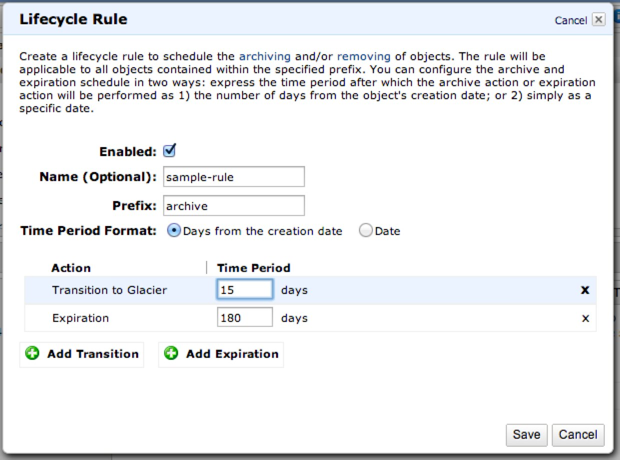
Data lifecycle rules sound like they’re going to be painful to create, right? Thankfully, it’s incredibly easy to put one together. There’s only one step. In this example, files with a name beginning in “archive” will be archived to Glacier after 15 days and deleted from Glacier after 180 days.

Creating a Data Lifecycle Rule

What Does AWS Glacier Mean For Your Backups?

It probably doesn’t mean anything right now if you aren’t already looking at using AWS. The combination of S3 and Glacier gives DBAs and system administrators another set of options for keeping backups for long periods of time. Automating data motion removes the fallibility of human processes and physical media from the equation. It’s worth considering how you can improve your backup retention, reliability, and recoverability by automating storage of backups using S3 and Glacier.

Learn more about our SQL Server in Amazon cloud resources page.


Introducing the SQL Server Plan Cache (and a Better sp_Blitz®)

When you send your beautifully hand-crafted organic T-SQL statement to SQL Server, the database engine takes a moment to appreciate the poetry of your work.  Before it turns your request into results, it has to build an execution plan.  SQL Server considers:

  • Which tables it needs to join together
  • What subqueries it needs to execute
  • Whether it can reverse-engineer your intent to achieve the same results faster
  • What indexes exist for the tables/views you’re trying to join
  • If it can do partition elimination to make things go faster
  • And much, much more

Much like you, SQL Server doesn’t like doing much work.  SQL Server put a lot of work into building your execution plan (which may also be a work of art itself), and wants to avoid reinventing that wheel again, so it caches the execution plan in memory.  If the same query comes in again, SQL Server can just check the cache, find your beautiful snowflake, and reuse the same plan.

This is the plan cache, and it stores more than just plans.  We can get metrics about how many times the query was called and how much resources it used (min/max/avg/total).

It’s not perfect – there’s a lot of things that can cause the plan cache to flush completely or in part:

  • Service restarts
  • Database restores
  • Statistics changing on an object
  • Server comes under memory pressure
  • People running DBCC FREEPROCCACHE

I still love the plan cache anyway.  It’s not perfect (just like many of the things I love) but it’s a fast, easy-to-access way to discover some of the queries that have been using a lot of resources lately.

Making the Plan Cache Easier to Analyze

I’ve built up a set of queries to slice and dice my way through the plan cache, but I wanted to make it easier for people tackling their first performance tuning project.

At the PASS Summit this month, I unveiled the latest version of sp_Blitz®, which makes all this easier.  I’ve added a few new parameters:

@CheckProcedureCache – if 1, we grab the top 20-50 resource-intensive plans from the cache and analyze them for common design issues.  We’re looking for missing indexes, implicit conversions, user-defined functions, and more.  This fast scan isn’t incredibly detailed – we’re just looking for queries that might surprise you and require some performance tuning.

@OutputProcedureCache – if 1, we output a second result set that includes the queries, plans, and metrics we analyzed.  You can do your own analysis on these queries too looking for more problems.

@CheckProcedureCacheFilter – can be CPU, Reads, Duration, ExecCount, or null.  If you specify one, we’ll focus the analysis on those types of resource-intensive queries (like the top 20 by CPU use.)  If you don’t, we analyze the top 20 for all four (CPU, logical reads, total runtime, and execution count).  Typically we find that it’s not 80 different queries – it’s usually 25-40 queries that dominate all of the metrics.

To learn more about how the plan cache works and how I analyze it, here’s a 30-minute video:

https://www.youtube.com/watch?v=NYaiXo83QLw

Or you can take a shortcut and just grab sp_Blitz® now. Enjoy!


Creating Objects on a Specific Filegroup with Policy Based Management

SQL Server
4 Comments

At PASS Summit last week, I presented “The What, Why, And How of Filegroups” to a packed room. It was great to see so many people eager to learn about something that is fundamental to every SQL Server database, but often not understood well enough.

As always, during and after the session, there were a lot of questions. One really piqued my interest: “When creating a table or index, is there a policy in Policy-Based Management to force a query to specify the filegroup instead of using the default?”

Let’s find out!

I’m going to use my DBA database on my development instance, DBAInfo. The database currently has one filegroup, PRIMARY.

Next, I’ll add another filegroup and file, and make it the default.

I double-check my filegroups.

At this point, any table added without an “ON FilegroupName” clause should be created on the default. Let’s check.

I run my “What filegroup is that on?” query:

It has been created on the default, PBMTest, as expected.

Now, I’ll add a third, non-default filegroup, PBMTest2.

I’ll check my filegroups again.

Next, I want to create a policy that says “When a new table is created, put it on PBMTest2, even if that’s not the default.” In SSMS, I expand Management > Policy Management and right-click Policies > New Policy.

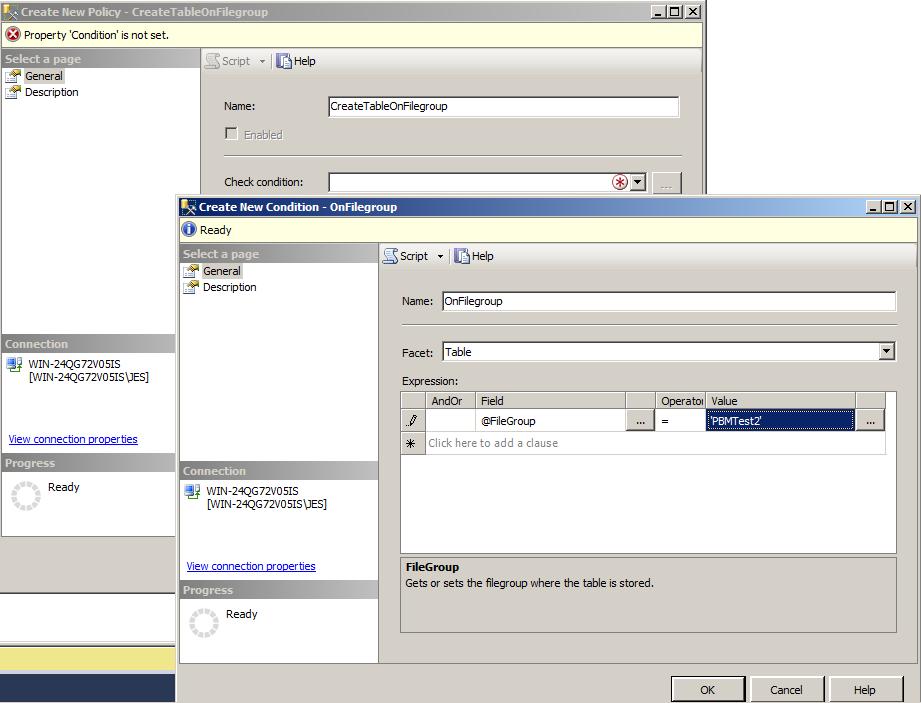
I give the policy a name, “CreateTableOnFilegroup”, and then click next to “CheckCondition” to set a condition. I name it “OnFilegroup”. The Facet is Table. I set the Field to @Filegroup, the Operator to “=”, and the Value to ‘PBMTest2’.

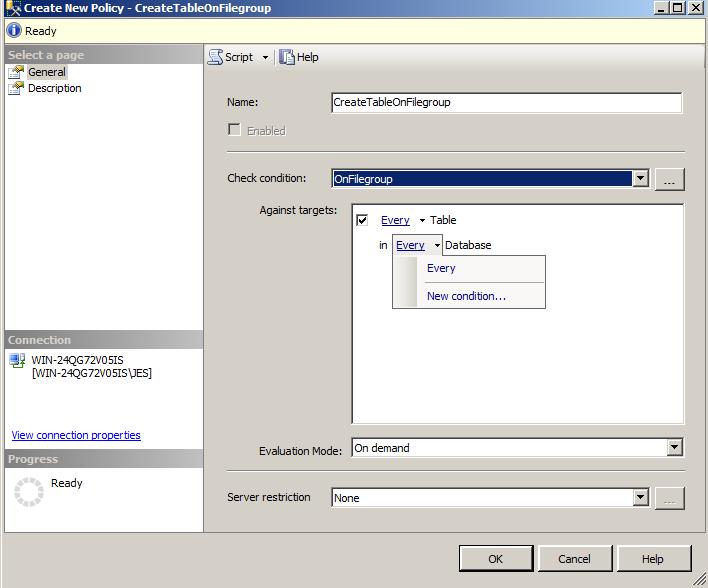
It’s set to every table in every database. I only want it to apply to my DBAInfo database, so I select Every > New Condition.

I give the Name DatabaseDBAInfo. I set the Facet to Database, the Field to @Name, the Operator to =, and the Value to ‘DBAInfo’. When I click OK, I’m back at the Create New Policy screen. I want to set Evaluation Mode to On demand and Server restriction to None. I click OK.

The one policy and two conditions are created.

Now, I go back to the query window and create another table, without specifying a filegroup to place it on.

What I want this to be created on PBMTest2. What filegroup is it on?

It’s created on PBMTest.

What? Why?

This comes down to the Evaluation Mode setting of my policy. There are a total of four modes available in PBM – On Demand, On Schedule, On Change – Log only, and On Change – Prevent. What we are looking to do here is enforce On Change – Prevent – if the table isn’t going to be created on the filegroup we specify, we want it to fail. Unfortunately, not all policies can use this mode.

I had to do some research to figure this out. First, read this blog post on Facets by the PBM team. At the bottom, there is a table showing the facets and what modes are supported. Then, read this further explanation of the types by Lara Rubbelke, Policy Evaluation on a Single SQL Server 2008 Instance. Lastly, there is this blog, Policy Evaluation Modes,by the PBM team.

For On Change – Log and On Change – Prevent to exist for a facet, there must be a DDL event triggered by it. This is not the case with every operation in SQL Server. The CREATE TABLE commands in one such example. Because of this, I cannot create a policy to check what filegroup a table is being created on before it is created.

In this case, I can still create the policy and check it either on a schedule or on demand. It will then tell me which tables were not created on that filegroup.

Thank you Simon for the great question!


What DBAs Need to Know About Hardware

SQL Server
7 Comments

If you became a database administrator by rising through the ranks of software developers, you probably haven’t built your own servers from the ground up. That’s totally okay – but you’re missing some important information that will make you a better database administrator. In this 20-minute session, Brent Ozar will help you get started exploring your hardware using tools like HP System Insight Manager, Dell OpenManage, and IBM Director. He’ll explain what you’re looking at – and when you should raise an alarm because something’s not quite right.

https://www.youtube.com/watch?v=N2gVp31uojw


#SQLPASS Women in Technology Luncheon Live Blog

#SQLPass
3 Comments

Hello from Seattle! I’m excited to be sitting front and center of the 10th Women in Technology Luncheon at PASS Summit! This year’s topic is “Women in Technology: Where Have We Been and Where Are We Going?”

We’ll be hearing from an excellent panel! Stefanie Higgins, a Sr. DBA for Disney and former PASS board member; Kevin Kline, a past president of PASS; Denise McInerney, from Intuit, who founded the WIT virtual chapter; Jen Stirrup, consultant and now a PASSion award winner; and our very own Kendra Little!

11:30 am
I got talking to Geoff Hiten. He attended last year’s luncheon and had a great story for me. Last year, one of the discussions we had was that women sometimes hesitate to apply for a job or offer to speak because they don’t feel they know 100%. He used that knowledge to help a client write a DBA job description – separating out the “required” and “preferred” skills. They hired a female DBA, who noted that helped her have the confidence to apply for the position. It’s great to hear how the panel lunch has helped people in the real world!

11:52 am
The room is filling up fast! It’s great to see so many men and women interested in the topic!

11:58 am
Bill Graziano is on stage, welcoming everyone to the 10th annual luncheon! He introduces the moderator, newly elected PASS board member Wendy Pastrick!

12:00 pm
We’ve grown from approximately 60 people at the first WIT luncheon to a room for 740. That’s amazing!

12:03 pm
Wendy introduces Stefanie Higgins, a DBA extraordinaire, former PASS board member, and WIT lunch founder! She’s talking about her reasons for starting it. She was a computer science major in college and had trouble connecting with other women in the field. A boss once told her he had a bias against women. She wanted to connect with other female computer professionals.

12:07 pm
Next up is Denise McInerney! Her first Summit was in 2002 – she had to work to find a woman to talk to at that event. Now, how times have changed! The message she got in 2003 when she saw that there would be a WIT lunch was, “This organization cares about my experience.” I love this sentiment! Women’s presence in the community has been increased greatly, from speakers at Summit to SQL Saturday organizers.

12:11 pm
Women leave technology careers at twice the rate of men. How can we solve this problem?

12:17 pm
Wendy introduces Kevin Kline. He talks about how PASS can compete with larger organizations and conferences. We have the community, and we can be the most welcoming, friendly, and hospitable environment!  He’s learned that it’s not enough to say, “Welcome, come in!” We have to say, “Come in! Sit down next to me! Let me introduce you to my friends!” We want to be that organization.

12:20 pm
Kevin is the dad of one son and six daughters. Six! He knows that men and women think differently. The challenge for men and fathers is to tell their daughters, “Come. Sit down next to me. Let me show you how I pay the bills by doing this job I love.”

12:26 pm
Jen Stirrup, SQL Server MVP and PASSion award winner, is introduced. In Europe, only 25% of jobs in science and engineering are held by women. In IT, that’s 17% and declining.  This is a global problem! The government of Scotland is making a concerted effort to make IT and data available to women, to empower them and allow them to support themselves.

12:29 pm
Jen is talking about the growth of the PASS community in Europe, and the related growth of WIT events. It’s fantastic to hear that this is growing globally! I remember that last year, after moderating the panel, I talked to an attendee from Saudi Arabia. He told me his wife faced many of the challenges we talked about, and he was excited to take all his notes from the lunch back to her. These are truly global challenges.

12:30 pm
Kendra Little, an entrepreneur, MCM, and MVP (and my co-worker!) is talking about how things have changed for her in the last 10 years. She was great at teaching herself things, and learning on her own. She used to think, “I’m a worker, and I’m smart, and I can do things. But I’m not an entrepreneur.  I’m a worker.” Now, she’s a partner here at Brent Ozar Unlimited®. PASS helped her overcome her earlier thoughts. She was taught how to be a mentor, and a leader.

12:40 pm
It’s Q&A time!

12:40 pm
“I train people to be SQL DBAs. We’ve only had one. I tell them they can make great money doing this. Women aren’t interested. Why? What can I do?” Denise says, “Ask them, “What’s stopping you?”” Kevin says, “I was once told by a woman, “Money isn’t what motivates me. What I really wanted to do was help people.” It’s the wrong appeal.” Appeal to their values. Stefanie weighs in. She says it might help to have them talk to someone who is successful in the field.

12:45 pm
“This is my third year. I run a user group. It’s so wonderful. I encourage everyone to share with their local chapters.” Wendy points us to http://sqlpass.org/wit to get more information to give to user groups and other interested people.

12:47 pm
“I have daughter, and she is going into a science and technology field. She’s come to many SQL Saturdays with me, and I think that’s given her the courage to pursue it. Thank you, from a dad.”

12:49 pm
“I have a question about work/life balance. With 40 or 50 hour work weeks, it can be hard to approach your boss and ask for flex time. How can we encourage our employers and workplaces to offer things like that?” Jen worked for a company once that regularly had meetings at 6:30 pm. She only worked their 8 months. Eventually, she started her own business, which means she can set her own contracts, work from home – and pick her son up from school. Kendra has a couple of techniques, from a boss perspective. Track where you spend your time – there are free online tools to help with this. Gather data, analyze it, and make proposals. If you’re spending a lot of time on repeatable tasks, ask how you can automate it. Use a webcam for meetings! People see you, and know you’re working. Denise says this is a major concern for employers. One of the top reasons women leave jobs is because of a lack of flexibility. Kevin says to make a proposal that you will be more productive at home.

12:56 pm
“I don’t see a lot of young ladies going into this field. I’m lucky to have gained the knowledge I have. I’m looking to start a group to share some of the things I’ve learned.” Stefanie connects her with Lynn Langit, who started DigiGirlz. [EDIT: Lynn, thanks for leaving a comment! Lynn created content for DigiGirlz. She also co-founded the non-profit Teaching Kids Programming.]

12:58 pm
“How do we bring girls into technology? They want to be rich, they want to be famous, they want to be cool. Bring Girl Scouts to these events and let them see that geek is cool.”

1:00 pm
“Can we talk at a higher level about outreach programs at colleges? There are no database clubs, or sponsors. That’s a solid thing that we could do at a chapter level.” (Personally, I would have loved this when I was attending tech school. Now I run a user group in the same city I went to school in. I think this is An Idea.)

1:02 pm
“How many of you got into computers because of video games? I have a four year old daughter, and I found out recently she loves video games. We can start early showing them this is cool.”

1:03 pm
“I’ve been saving this question since last year! It’s about organizational dynamics. When I’m on a team and it’s mostly guys, team cohesion comes from hanging out together. Those things happen to be competitive in nature. These things make me feel at a disadvantage. What are your comments or suggestions around that?” Denise says to offer an alternative – she once had a chef come in a lead a cooking class! Kevin says, they probably just haven’t thought of this. Suggest other alternatives. Jen suggests something with an environmental emphasis – something positive, like helping to plant a garden.

With that, I need to go prep for my Lightning Talk! Thank you to the wonderful panelists for sharing your insights and suggestions. Thank you to everyone who attended, and those who asked questions! Thank you SQL Sentry for sponsoring the lunch. And thank you PASS for continuing this tradition!


#SQLPASS Summit Keynote Liveblog Day 2

#SQLPass, SQL Server
3 Comments

Good morning ladies and gentlemen! The conference hall is filling up in Seattle, and it’s time to crank up another blow-by-blow commentary.  I’ll be updating this blog every few minutes with what’s happening here at the PASS Summit.  For a refresher, check out the liveblog of yesterday’s keynote.

PASS Summit Keynote Stage

8:20AM – People settled in and the room’s going dark. I’ve got a much longer zoom lens today, so I can’t really capture what’s happening in the crowd, but now I’ll be able to zoom in on the sweating faces when demos break. (No, I won’t.)

8:23AM – PASS Executive Vice President Douglas McDowell taking the stage. He’s covering financial details, and he’s excited about it.

Douglas McDowell
Douglas McDowell

8:24AM – On track to be an $8mm organization this year, up about 40% from last year, 80% from two years ago. Some of this is probably due to the economy gradually recovering, but wow, what a great quick growth.

8:25AM – “We’re a nonprofit.  We’re not trying to capture profits – we’re reinvesting them in the community.”

8:27AM – Douglas says this conference is a bargain compared to other conferences.  Well, yeah, but that’s because the speakers aren’t paid, and they have to pay their own travel, hotel, meals, etc.  Other conferences don’t do that, and we’re already starting to see senior speakers pull out of the Summit.  It’d be a shame if that continued.

Revenue & Expense Growth

8:33AM – Welcoming new Board of Directors members Wendy Pastrick, James Rowland-Jones, and Sri Sridharan.  They’ll be serving 2-year terms from January 1, 2013 to December 31, 2014. Big thanks to outgoing board members Allen Kinsel and Kendal Van Dyke.

8:34AM – “We’re volunteers. You know what volunteers are good at? Dropping the ball.” I haven’t said this til know, but this keynote isn’t going particularly well.

8:35AM – VP of Marketing Tom LaRock taking the stage to give out the PASSion award for 2012.  Two changes in the award – added an Outstanding Volunteer of the Month award, and something else.

Tom LaRock
Tom LaRock

8:40AM – The PASSion Award winner for 2012 is Jen Stirrup! Congratulations.

Jen Stirrup - PASSion Award Winner for 2012
Jen Stirrup – PASSion Award Winner for 2012

8:41AM – Tom explains that the Board members have little black books where they’re writing down attendee feedback to improve the conference.

8:42AM – Improved communications: forums, town halls, Twitter chats, social media, feedback site, new communications platform, and more.

8:43AM – PASS Summit 2013 registration open now with an early bird discount at $1,095 until January 4, 2013.  The Summit will be October 15-18, but it’s not clear what that means because they also say there’s 3 days of in-depth training.  The 15th-18th is 4 days.

8:44AM – Lots of companies have sent over 5 employees to the Summit this year, some as many as 30-40.

Companies that sent 5 or more employees to the Summit

8:46AM – Karaoke with a live band, SQLRockeraoke, tonight at the EMP Museum party.  Tom will be doing a group singalong to Careless Whisper.

8:49AM – Taking the stage, Quentin Clark, Corporate Vice President of Microsoft.

Quentin Clark talking about election analysis

8:54AM – Hotels putting RFID chips into the hotel keys.  It’s a better experience for guests – easier room access – but also lets hotels spy on which guests are using the restaurant, the gym, the pool, etc.

8:55AM – The discussion then goes into Facebook, and BI moments. This might just be our Contoso Frozen Yogurt Moment coming up.

8:59AM – The room is dead. No applause, some awkward coughing. Twitter’s lighting up that this stuff just isn’t interesting to DBAs and it’s not telling a good story.  Zzzz.

9:02AM – Julie onstage to do a demo of PASS Cinemas.

Quentin and Julie
Quentin and Julie

9:10AM – Showing various pieces of technology but not actually doing any work. We got Hadoop, PDW, Azure, and enterprise data warehouses in about 3 minutes.

9:13AM – Apparently big data means small fonts. Seriously, what the hell, Microsoft?!? We complain about this every year. Demos are tedious enough in a room this big, but gimme a break. If we can’t read the screen, we get really pissed off. Value our time.

9:18AM – Body language onstage says it all. Demos are failing, bad patter, even the presenters seem bored. The room is just dead.

Body language says it all here.

9:22AM – Demo is still just absolutely crawling. I’m cashing out mentally here. If I was watching from home, I’d have bailed fifteen minutes ago.

9:36AM – There’s a vibrant discussion going on in Twitter about how bad this keynote sucks.  Is it as bad as the fake Tina Turner that sang Simply the Best a few years ago?  What about the year when a vendor speaker kept saying, “Yadda yadda yadda”?  Tough call, but it’s definitely in the bottom.  The material may be vaguely useful, but it’s presented in tiny fonts on a big screen, totally unusable, and no cohesive story.  There’s bugs and missteps all through the demo.  The air’s totally dead, and the audience is quiet.  It’s horrendous.

With that, I’m signing off and leaving.  I don’t do this often – it’s the first time I can remember leaving a keynote – but my time is more valuable than this. I’m heading out for coffee.


#SQLPASS Summit Keynote Liveblog – Day 1

#SQLPass, SQL Server
1 Comment
PASS Summit Keynote Day 1

Good morning, folks! Lights, camera, action – it’s time for the first keynote presentation at the Professional Association for SQL Server Summit.  It’s the annual international conference for Microsoft database folks.  This year it’s in Seattle, Washington again.

Over the next two hours, I’ll be expanding this post with minute-by-minute notes of what’s being covered by Microsoft and the PASS executives.  You can refresh this page and see the latest notes.  Enjoy!

You can watch the keynote over the web here.

8:13AM – People filing in, lots of folks surrounding the blogger table. Tough to ignore all the cool people while I’m getting set up. Ah, dear reader, the sacrifices I make for you. 😉

8:15AM – PASS’s Kathy Blomstrom has informed us that “As of this morning, PASS Summit 2012 had 3,894 delegates – up 13% from last year’s previous record attendance – and 1,717 pre-conference registrations across 57 countries for a total of 5,611 registrations.”

8:19AM – PASS President Bill Graziano is taking the stage to talk about the numbers and what makes PASS successful – grassroots community involvement around the world.

PASS President Bill Graziano

8:22AM – Bill: “We are 12,000 – excuse me, make that 120,000 people strong.” That’s what I’m talkin’ about.

8:23AM – The PASS Board will be holding another open session this year for Q&A.  It’s important for the community to continue to be open and accept the tough questions, and I’m glad they continue to open the kimono.  Wait, maybe I don’t want to see inside that kimono, heh.

8:28AM – SQLRally Nordic will hold their third event in November 2013.  No SQLRally in the US mentioned yet – it was put on hold earlier this year.

8:29AM – Over 543,000 hours of training delivered by the community for the community this year.  (This is calculated with attendee numbers – if one person leads a one-hour sess

8:31AM – The first PASS Business Analytics Conference will be held in Chicago April 10-12, 2013.

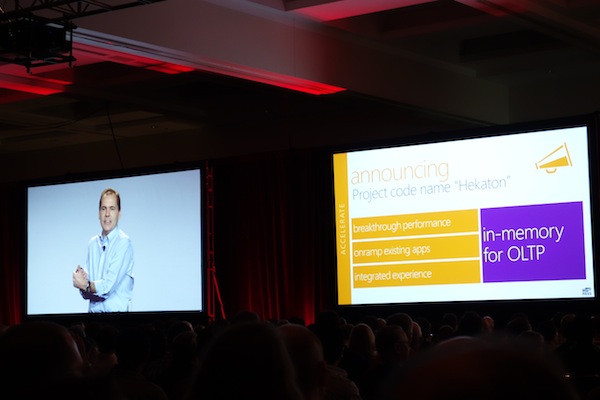
8:31AM – Microsoft announcing their new in-memory database technology, Project Hekaton.  This didn’t come from the stage – @JamieT caught it.  Excerpt:

Furthering Microsoft’s commitment to deliver in-memory solutions as part of our data platform, today we are introducing Project codenamed “Hekaton,” available in the next major release of SQL Server. Currently in private technology preview with a small set of customers, “Hekaton” will complete Microsoft’s portfolio of in-memory capabilities across analytics and transactional scenarios. It will provide breakthrough performance gains of up to 50 times, and because it will be built into SQL Server, customers won’t need to buy specialized hardware or software and will be able to easily migrate existing applications to benefit from the dramatic gains in performance.

8:36AM – SQL Server 2012 SP1 out today.

8:39AM – Ted Kummert taking the stage. He’s Microsoft Corporate Vice President of the Data Platform Group. He usually leads the Microsoft part of the Day 1 keynote and hands demos off to individual Microsofties.

8:40AM – Ted: “I continue to be impressed by how this community invests in itself.” That’s a great way of saying it – we’re all trying to improve our skills and improve those around us to increase our overall value.

Ted Kummert onstage at SQLPASS

8:42AM – Officially announcing SQL Server 2012 SP1 available today. (I caught this earlier in the press release.) Interesting that there’s absolutely no applause for this.

8:43AM – Showing a video of attendees talking about the change they’ve seen in their career and what they’re excited about for the future.  Looks like it was taken at a feedback group in the last couple of days with a combination of customers, consultants, and MVPs.

8:46AM – Starting to talk about big data.  “Approaching the tipping point.”  Talking about how we need to reason over large amounts of data every time we serve people a page.  This is where I start to get a little twitchy – the other way to think about big data is sloppy programming, but I digress.  There *is* legitimate big data, but if you reason over large datasets for each web page you serve, you’re doing it wrong.

8:49AM – Microsoft Research worked with hospitals to conquer the re-admittance problem: patients that had to come back to the hospital to get their problems solved.  They used machine learning to give patients better care to reduce return visits. Or as I like to call it, “euthanasia.”

8:50AM – “If the full dataset fits in memory, amazing transformations are possible.” Ayup. This should not be news to any database professional, let alone any database manufacturer, and it’s a little frustrating that we’d be reacting to this in the next version of SQL Server rather than, say, 2008.  I don’t envy Microsoft’s challenges in predicting the future, but this one seems a little obvious.

Project Hekaton
Project Hekaton

8:56AM – Demoing SQL Server Classic up against Hekaton.  Classic is running 2,000 transactions per second, but running into latching problems.  (Latching often means a lack of indexes.) This already sounds like a cooked demo specially created to show how fitting stuff in memory AND applying the right indexes makes things faster.  Moving it to Hekaton got a 10x improvement at around 20,000 transactions per second.

8:59AM – By modifying the stored proc, we’re up over 60,0000 transactions per second.  They didn’t cover what the modifications are, and I’ll leave that to you to think about.

9:01AM – Demoing column store indexes as a way to show performance improvements by keeping data in memory.  This works in SQL Server 2012, but coming in the next major release, they’ve added two new improvements: it’s updatable, and it can be the clustered index.  It’ll be interesting to see how they describe the differences between these to end users, and how the licensing will work.  These scream Enterprise Edition only.

9:04AM – Rick from online gaming company BWin talking about using Project Hekaton to improve their session state database. They were maxed out at around 15k transactions per second – and yes, these guys really optimize the bejeezus out of their stuff.  They’re been able to hit over 250k transactions per second with Hekaton.

9:06AM – Over 1.5mm units of the in-memory database in customers’ hands.  They’re referring to the in-memory columnar analytics stuff, which includes Excel, so that’s a little tricky – but it’s such an awesome time in technology when this kind of technology is available to end users on their laptops.

9:08AM – Ted says they’re building a lot around the Apache Hadoop infrastructure and they want you to be able to leverage everything that the Hadoop ecosystem provides.  “This may not be technology that you’re familiar with, but I’d encourage you to discover them and use the samples.”  Microsoft needs you, dear reader, to keep your skills current so Microsoft can bring you new tools and you can adopt ’em.  No pressure – I’m just sayin’.

9:10AM – SQL Server 2012 Parallel Data Warehouse will be coming in H1 2013, and it lowers costs by using Windows 2012 Storage Spaces. Christian Kleinerman onstage to demo it.

Christian Kleinerman and Ted Kummert

9:16AM – Christian Kleinerman demoing a 1PB data warehouse query finishing in under two seconds. It’s tough to do justice to this kind of thing in a 5-minute demo.  Like Kummert says, it’s a heck of a tough audience, and we take a lot of this with grains of salt.  There’s no mention of the hardware performance, storage performance, number of columns in the table that we’re not selecting, etc.

9:18AM – Official SQL Server 2012 SP1 download link here.

9:20AM – Microsoft went to Dr. David DeWitt with a question – how should the query processor change?  The answer was PolyBase, a new breakthrough in data processing for queries over relational and Hadoop data, in place.

9:21AM – Demoing Microsoft HDInsight’s web-based console using JavaScript or Hive.  That’s cool, but people don’t know T-SQL – so that’s where PolyBase comes in.  Create an external table in SQL Server (kinda like a linked server) and you can query it with T-SQL.

9:28AM – A few very awkward “BI moment” phrases which bombed.  Now showing a Great Western Bank customer video talking about how quickly they were able to recoup their BI investment in a 30TB data warehouse.  “BI makes heroes, and there’s not a lot of tools that can do that.”  I think that’s a great quote for executives, but not in a room full of developers.  Visual Studio makes heroes too.

9:30AM – Ted: “Excel is now the complete end user BI tool.”  Die, Access.  Die in a fire.

9:32AM – Amir Netz onstage! He’s the wild card of the demo crew.

Amir Netz preparing to demo Excel 2013

9:33AM – Demoing data visualization with Bing maps inside Excel.  Looks absolutely gorgeous – except for the freakin’ CAPS LOCK MENUS. Jeebus, these things bother me.  But yeah, this is a great visualization tool, and if I was an SSRS person, I’d be worried.  The same guys who love handling data in Access will love bypassing the BI crew by building their own tools in Excel.

9:37AM – Visualizing data by combining the movie award data with 11mm tweets to see when people were tweeting about movies.  Counts terms extraction by actors and actresses – Brad Pitt versus George Clooney, etc.  “Imagine that you’re a brand manager – actor names are brand names.”

9:42AM – Not much going on here. Just showing Excel moving charts. While Amir Netz is upbeat and fun, he isn’t really communicating anything technical here.

9:49AM – Audience clapping wildly, biggest applause so far, for transparent images of Angelina Jolie and Jennifer Aniston. This is a little…awkward?  The PASS folks unveiled a new code of conduct aimed at avoiding harassment, and I wouldn’t be surprised if someone complained about the appropriateness of these.

9:51AM – And we’re done! Off to a day of learnin’.

Want More? Check Out Day 2’s Liveblog.


Books, the Dewey Decimal System, and…SQL Server?

SQL Server
5 Comments

I have been in love with books and libraries most of my life.

I remember some of my earliest favorites: Little House on the Prairie, Anne of Green Gables, Bridge to Terebithia, The Chronicles of Narnia. I remember feeling grown up when my sixth grade teacher handed me Gone With the Wind.

booksI would read anytime and anywhere. While eating breakfast at the dining room table. Sitting on the swings. Walking through the halls at school. In the car on road trips. At dinner, much to my mother’s frustration. In bed, under the covers, with a flashlight. Books were my first love.

During summer vacations, my mom took me and my sisters to the library weekly. Even though I lived in a tiny town with a tiny library, this was my favorite day each week. I read entire series and genres. One summer I worked through all the Nancy Drew and Hardy Boys novels; another summer I read every Zane Grey and Louis L’Amour book I could get my hands on.

At the age of 12, I was asked to work in the school library, in place of a study hall. I kept the job for two years, and loved every moment of it. I had many tasks, from putting away returned books to checking people out. The fun of stamping the “return by date” cards remains in my memory to this day. (Ask me how this is related to Indiana Jones someday.)

Working in the library was my first introduction to indexes. Not just the index at the back of the book, either. There was the venerable and mysterious card catalog.

The words “Dewey Decimal system” still lead me to link numbers and subjects. 920’s are biographies, for example. (I remember reading George Armstrong Custer’s at least three times. I went through a biography phase.) Every book is assigned a number – a class and a section. Call numbers can be assigned. To find a book, you need to know some information about it – you need to traverse the index!

Think of the Dewey Decimal classification for a book being a clustered index. It’s unique for each book, and tells the librarian what order it should be placed in on the shelf. When looking for a specific book, you look it up in the card catalog, then walk to that area of the library – no wandering around, looking through piles of random books (like heaps!).

But what if I want to find all books by a specific author, or on a certain topic? The card catalog gives you cards organized by last name, and topic, which are like nonclustered indexes. If you were looking for a book written by me, you could flip through “B” to find “Borland”. My card would include the book title, topic, and the number. This is essentially a nonclustered index – it points to the clustered index, where I can find the book on the shelf.

I want a card catalog for my living room.

Just like a library would be a mess and books would be almost impossible to find without the Dewey Decimal system, the information in your database is going to be much harder to find – and slower to return – without indexes.

Want to learn more about indexes? It’s one of our favorite topics here at Brent Ozar Unlimited®! Visit our Index This page for more resources!


Our PASS Summit 2012 Schedule

#SQLPass, Writing and Presenting
0

Next week, the Brent Ozar Unlimited® crew will be attending PASS Summit in Seattle, WA. It’s a busy week, full of networking, learning, and teaching. Here are a few of our highlights.

Want to add our sessions to your schedule, and view more information at your fingertips? PASS Summit has gone mobile with Guidebook! It’s available for iOS, Android, Blackberry and web-enabled devices.

Monday

8:30 am – 5:30 pm: Brent and Jeremiah will be presenting at Red Gate’s SQL in the City event in Seattle. This is not a SQL PASS event, but if you’re in Seattle on Monday, find out if you can swing by– the event is totally free. Brent will be talking about “Six Scary SQL Surprises” at 10 am. Jeremiah will be talking about code quality in “Red Gate Tools- The Complete Life Cycle” at 11:30 am. Register here.

Tuesday

5:15 pm: We’ll be meeting our First Timers at the Orientation & Networking Session. This is a valuable program from PASS. A first-time attendee at a conference of this size could be overwhelmed. Then we’ll be attending the Welcome Reception, saying hello to old and new friends. What fun and games does Tim Ford have planned for us this year?

Wednesday

6:30 am: Jes will kick off the morning with the second annual #sqlrun, a 5K run along the waterfront. Get info and sign up here.

10:15 am: Jes presents The What, Why, and How of Filegroups. .

11:30 am: Jes is attending the PASS Chapters Luncheon!

1:30 pm: Bob Dylan, er, Brent will give his Lightning Talk, Bob Dylan Explains Tempdb!

3:00 pm: Brent is on deck again, this time with Real-Life SQL Server 2012 Availability Groups: Lessons Learned.

4:30 pm: Jes will be at the PASS Community Zone. This is a new area that will introduce people to all the great community events available. We’ll even have games and prizes! Please stop by, say hi, pick up a game card, and get to know the members of the community!

Thursday

11:30 am: Kendra is a panelist on the Women in Technology lunch. This great event also features panelists Stefanie Higgins, Kevin Kline, Denise McInerney, and Jen Stirrup. Jes will be sitting at the blogger’s table, capturing the discussion of “Women in Technology: Where Have We Been and Where Are We Going?”

1:30 pm: Jes is presenting “Lights! Camera! Piecemeal Restore!” as one of the Lightning Talks. Come to room 307-308 to watch us.

3:00 pm: Jes will again be in the Community Zone that afternoon.

5:00 pm: We hope you can be in three places at once! Brent will Diagnose T-SQL Performance Problems Fast with sp_Blitz®. Jeremiah is guiding the audience through A Developer’s Guide to Dangerous Queries. And Kendra will have on her lab coat as she presents Index Psychiatry: Diagnose and Treat the Top 5 Disorders.

7:00 pm: Microsoft and PASS are sponsoring the Community Appreciation Party at Seattle’s Experience Music Project!

Friday

Friday will wrap up an incredibly exciting week.

11:30 am: Jes will be hosting a table at the Birds of a Feather lunch – the dining hall will be organized into areas of interest, and you’ll be able to network with MVPs, MCMs, speakers, and more. This is a great opportunity to meet other people interested in the same field you are!

1:00 pm: Kendra has a Spotlight Session, SQL Server First Responder Kit.

If you’re attending PASS Summit, enjoy! It’s a great experience, with many hours of learning and many great people to meet. If you can’t attend (this year!), make sure to follow the #sqlpass hashtag on Twitter, and catch the live stream of two rooms from http://sqlpass.org!


Who’s testing your restores? No, really – who’s testing your restores?

I recently posed the question, “Who’s taking your backups?” This is of utmost importance, because your business’s data is the business. Protecting it and backing it up need to be priorities for DBAs.

Now, for my next question: who is responsible for restoring those backups?

The saying goes that your data is only as good as your last backup, and your backup is only as good as your ability to restore it. It’s the truth! After you back up your database, there could still be problems. You could have corruption in your database. There could have been corruption on the disk your backup was stored on. You could be missing one transaction log file in the sequence.

In the event of an actual disaster, the spotlight will be on the person who needs to restore the data. This person should have experience restoring databases, and be able to remain cool, calm, and collected. Or at least not run into the server room crying.

This is a test. This is only a test.

It’s Me

Excellent! You have an important job to do. Do you have a list of which databases need to be restored? As new databases are introduced to your environment, do you make sure they are added to the list? If your users depend on three applications to do their jobs, and databases for only two of those are backed up, your disaster recovery scenario is not complete.

Do you have a schedule for doing it regularly, whether that is daily, weekly, or monthly? It is not enough to test the restore once. Change is constant. The amount of data stored will change. The data stored will change. The media it is stored on will change. Make sure you are testing regularly so any changes are accounted for.

Are you running a DBCC CHECKDB against the restored database to ensure integrity? You need to know that the integrity of all objects in the database has been preserved. Finding corruption after restoring a database under pressure is not fun.

Are you checking how long it takes to do a full restore, and does that meet your RTO guidelines? If the business expects data to be available in 30 minutes, but the restore takes one hour and fifteen minutes, you’ll need to come up with a plan to meet the objective.

It’s Someone Else

I have the same request as last time – walk over to that person’s desk, or call them. Ask them these questions. This is another process that should regularly be reviewed and tested, to ensure that the process is still optimal for your environment.

Who’s Testing What?

While backups are important because your business data is your business, your disaster recovery plan is only as reliable as your recovery process. If there is corrupt data in your database or it was on bad media, and you can’t restore it, you are in as much trouble as if you had no backup. If you don’t know who is responsible for this task, or it isn’t being done, consider this an opportunity.

You should be familiar with the backup strategy for each database. Is it in Full, Bulk Logged, or Simple recovery model? Are you taking full, differential, and log backups? You’ll need to be familiar with how to restore each type of backup, and in what order to do it.

Here is what you should do: find the latest backups of your database. Test restoring them to a secondary server. Make sure the restore completes. Run a DBCC CHECKDB on the database and make sure it comes back error-free. Now, and only now, you can be sure that your disaster recovery process is effective.

Time the restore process. This way, when asked, “If there’s a disaster, how long will we be out of business?”, you are prepared to answer.

Automate this process. This is not a one-time operation. Just as you need to regularly back up the data, you need to regularly ensure those backups are usable. Have a monthly or quarterly disaster recovery drill in place.

I need to know more about restores!

This is a great topic to learn more about! I recommend Kendra’s article “How to Test Your Backup Strategy: Five Simple Questions” and Brent’s post on “The 9 Letters That Get DBAs Fired”. Another great resource is Grant Fritchey’s article SQL Server Backup and Restore for the Accidental DBA.


Trade Offs: Code Quality

SQL Server
1 Comment
What has two thumbs and is talking about code quality at SQL in the City Seattle?

Nearly every day, we’re faced with a decision about quality and time. Do you write quick and dirty code or do you take the time to get it right? Your decision is going to last a lot longer than you want to remember. When we’re tuning T-SQL, I often hear things like, “Ugh, I remember writing that. I meant to fix that three years ago.” We all know that we need to write good clean code, right? Nobody is debating the merits of paying down technical debt or writing good code.

How do you know that you’re accumulating technical debt? There’s no FICO score or credit report for your code. If the application is still functioning and unit tests are still passing, how can you tell that you’ve got technical debt? There are a few symptoms that I’ve seen that are good indicators of technical debt.

The Feared Function

We’ve all run into this before. There’s one function or stored procedure that nobody wants to touch. Every time someone sees the name of the function they groan and say, “We’ve been meaning to re-write that for a while.” This function starts off as a quick fix to add a new feature. The feature grows over time until hundreds, or even thousands, of lines of business logic are embedded in the database in a scalar function.

Unfortunately, there’s no easy cure for the feared function. As painful as it sounds It’s usually the case that someone will need to sit down and map out the behavior of the code in question. It’s possible to re-write the code to either operate in a set based fashion or even push the logic up into the application tier – doing a lot of computations in the application tier is cheaper than performing them in SQL Server and, potentially, much faster as developers will have full control of the algorithms that they’re using.

Presentation Code

Applications show users fully formatted data. Numbers are formatted beautifully for the user’s locale, time is displayed correctly, and HTML is added around key elements. It’s tempting to put presentation code in the database; if one stored procedure or view is changed to display formatted and localized time we can save hours or days of development and testing time in the application tier. Just one change fixes things for everyone, right?

While it’s convenient to put formatting code to the database, keep in mind that these tiny functions add up over time. Most monitoring tools filter out queries with short execution times – this is a good thing, otherwise the tools would spend all their time dealing with small queries. But these tiny presentation operations add up on SQL Server. Database servers are very expensive places to be performing a lot of presentation driven work. Most reporting and programming frameworks provide easy to use templating tools that make it easy to display richly formatted information to users.

The Master View

How often do you see a view that pulls back every column from nearly every table in the database? Don’t be shy, I bet you’ve seen this view, or even written this view, far more often than you’d care to admit. It’s okay, we all make mistakes. The master view seems like a compelling idea – it encapsulates core business logic and functionality into a single view that can be used to compose additional queries. And, after all, SQL Server should be smart enough to make sense of the body of the view itself and optimize our query based on the source of the view itself.

Unfortunately, the world is not perfect. Sometimes SQL Server is unable to divine our meaning from the query we write. IN these cases, instead of optimizing the view, SQL Server will execute the view code as written. What should have been a simple query that returns a few columns from two or three tables becomes a huge mess where SQL Server queries every table in the master view and returns every column you’ve listed in the SELECT list of the query. This is clearly a bad thing.

What can you do about this? Barring finding a new job, you can start by re-writing queries that use the master view to use as few tables and columns as possible. This is going to be a time consuming process. The worst part about this is that the idea of the master view is dangerously convenient. Views should be composable, right? Unfortunately, real world experience states that this isn’t the case. The idea of a master view works great when you’re rapidly writing code but once you need performance, it’s time to dig in and optimize your queries to make sure everything is running as fast as it can and doing as little work as possible.

Want to Know More?

If you want to learn more and you’re in the Seattle area next week, you can drop by SQL in the City on Monday, November 5th and hear more about what you can do to boost code quality, test code, and find a better way to write database code. And, if you’re at the 2012 PASS Community Summit, I’ll be presenting A Developer’s Guide to Dangerous Queries. This session is a discussion about patterns and anti-patterns that we see every day in databases.


Tadah! Welcome to the New BrentOzar.com

Company News, Consulting
41 Comments

If you swing by BrentOzar.com today, you’ll notice that ZOMG EVERYTHING IS DIFFERENT!

About six months ago, we embarked on an ambitious project to redesign the entire BrentOzar.com.  We quickly picked PixelSpoke, a web design firm based in Portland, and they knocked it out of the park.

PixelSpoke started by surveying our clients to find out why people called us for SQL Server help and what clients thought of us after the engagements.  Armed with that knowledge, they built marketing stuff like customer profiles and key differentiators.

First Up: Our New Brand and Logo

The first PixelSpoke home run – our new brand and logo:

brent-ozar-unlimited

Way back in 2011 when Jeremiah Peschka, Kendra Little, Tim Ford, and I founded the company, we wanted to use BrentOzar.com as the company’s online home base.  The domain already had a lot of visibility in search engines, and we wanted to keep moving forward with what was working.  However, we wanted clients to know our company was more than just one guy, and that the other founding partners were really equal partners.  We came up with Brent Ozar PLF by using the first letter of each founding partner’s last name (Peschka, Little, Ford).

Nobody ever understood it.  Even a year later, people still asked us in webcasts, “What does the PLF stand for? Is it like Page Life Expectancy?” It raised the wrong kinds of questions, especially since Tim had parted ways and focused on SQLCruise instead.

We changed to Brent Ozar Unlimited® because it’s an amusing play on Limited, which is used in place of LLC in some places.  Brent Ozar Limited was our first pick, and then PixelSpoke suggested Unlimited instead.

The pocket is meant to evoke images of a doctor’s lab coat, only instead of scalpels and tongue depressors, we’ve got a pencil and a pair of glasses in ours.  PixelSpoke blew us away with this – during our online meetings together, they noticed that Jeremiah, Kendra, and I all had glasses, and they wanted to bring that into the logo.  We loved it.  (Someday, we’ll blog about the entire logo selection process because this was one heck of a tough decision. PixelSpoke gave us several amazing choices.)

Next Up: Renovating the Home Page

Our old site’s top bar looked like this:

old-brent-ozar-plf

Who We Are and What We Do made sense to us database people, but as we worked with PixelSpoke more, we came to understand why these headers didn’t work for the general public.  Community was also a tough one – it led to our posters, video archives, and upcoming events, but those aren’t really communities.

The home page of BrentOzar.com was the blog.  This is the way WordPress has always been by default – the home page is the latest blog posts – but it doesn’t make sense now that we’re a consulting company.  (Frankly, I’m amazed anybody ever contacted us for consulting because we just looked like a blog.)

brent-ozar-unlimited-home-page

The first thing you’ll notice on the new home page is the “hero shot” of the four of us (Jes included) done by the wonderfully talented Eric Larsen.  We’d loved our old illustrations by Kendra, who is much more talented than she will admit, but she got tired of us saying, “Can you make me look a little more intelligent?”  We loved Eric’s analog style and sense of humor, and we added his funny illustrations on each person’s bio page too.

Above the hero shot, we’ve now got prominent links for problems we solve, services we provide, and first aid.  First aid is where our free public stuff goes, and of course we’re going to continue to amp up what we give away.

Below the hero shot, we’ve got links for upcoming events and recent posts.  We heard feedback that readers were most interested in these two things, so we wanted to make ’em really easy to access from the home page.

Everything Else is Better, Too

Of course we’re biased, but here’s some of our favorite stuff about the new site:

  • Better Blog Post Headlines – before, people kept leaving comments saying, “Hey, Brent, great post” on things I didn’t write.  That sucked.  Now, right at the top of each post, we’ve got very clear pictures showing who authored the post.
  • Better Free Video Archive – we now include all of our past videos broken up into easier-to-understand categories.
  • Better Descriptions of Our Work – PixelSpoke’s copy-writing gurus blew us away with the way they translated our personalities into the written page.  We’re so happy with the writing on the problems & services pages.
  • Better Newsletter Signup – it’s at the bottom of every page, and the newsletter is now skinned with our web site template, too.
  • Better Poster and Whitepaper Downloads – you’ve loved our posters, and now we bet managers will like our short solutions briefs too.

We could go on and on about how thrilled we are with the new site, and we hope you’ll like it too.  When (not if) you run into bugs, drop us a comment here and we’ll check it out.


TL;DR Use A Picture

When you run into problems at work, how do you tell your manager what you did? Typically you would write up the problem, the solution, and a quick summary of the outcome. If you’re like me, this isn’t a lot of fun. And, if your manager is anything like most managers, they don’t want to read a summary of the problem, your actions, and try to figure out how big or small of an impact you had.

TL;DR – use a picture

TL;DR is shorthand for “too long; didn’t read” and it’s used across the web to summarize a tedious article. Since you can’t summarize your actions with “TL;DR – stuff was broke, fixed it, things got fast” we’ll have to come up with another approach. The easiest thing I can think of is using pictures. Kendra and Jes can draw. Brent takes pictures of tater tots. I can use Visio to arrange squares to make a grid. None of us are professional artists, but we make use of a lot of pictures to make things clearer with our clients.

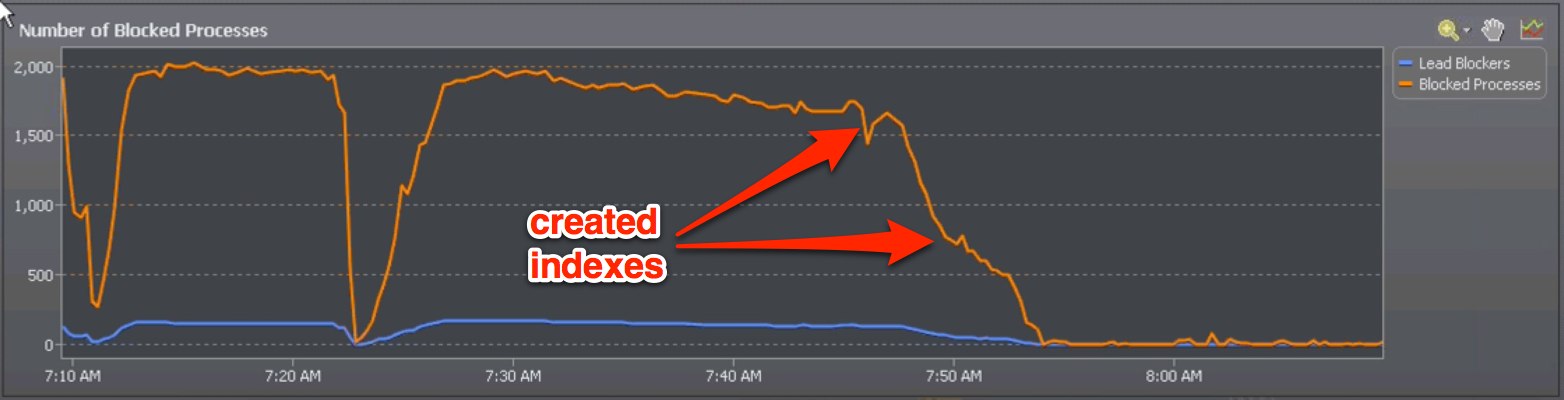
A picture is worth a thousand words, right? While true, a picture can also demonstrate your own worth. I recently worked with a client who were having massive blocking issues. A change had just been rolled out and they were furiously trying to figure out if they needed to roll back the entire change or fix a specific but currently unidentified problem in production. We looked into the situation and found that there were two missing indexes. After a quick chat I created the indexes and the blocking disappeared in a matter of minutes. After an incident, I like to write things up and send it off to my manager or everyone at a client. How do you think I wrote up this incident?

If you haven’t figured out that the answer is “a picture” or perhaps “a screen shot”, go get more coffee. I’ll wait.

That’s right, I wrote this up using a screen shot! We waited for several minutes after the problem cleared up so I could grab this:

This picture is worth at least 1002 words

I couldn’t have written this up more effectively if I had tried. Pictures convey more information in a few pixels than you can convey in the same size block of text. Best of all, pictures are immediately easy for anyone to understand and require almost no effort to produce. Grab a screen shot of Performance Monitor, Task Manager, or your favorite SQL Server reporting tool. That screen shot is gold for quickly demonstrating that there was a problem and the problem was fixed at a certain time. You don’t even really have to understand what’s going on in order to see the effects of what happen. That’s the best part! Pictures make it easy to understand what’s going on without requiring domain specific knowledge – your manager doesn’t have to be a DBA to know that you just saved the day.

Free Screen Shot Tools

Windows users: Windows 7 comes with a free tool that’s called Snipping Tool. Although it sounds like a terrible scissor infested doom, Snipping Tool is a nice utility that lets you take screenshots of a window, a region, or the entire screen.

On the Mac, I use Skitch. It does the same thing as Snipping Tool but it also lets me do some minor image editing.