Blog

Is Your Code an English Garden or Ikebana?

SQL Server
3 Comments

Erika loves having fresh flowers around the house. Every Saturday morning, I pick up a bouquet at a farmer’s market or grocery store and put it in a vase for her. I’m slowly upping my game by learning more and more about the art of arranging flowers.

When I say flowers, I bet you think about the English Garden style: a big, complex vase with all kinds of flowers crammed into every nook and cranny. It’s an explosion of color and life.

Photo Source: Conveyor Belt Sushi

That’s way too stuffy for us. We’re into minimalism, clean lines, and letting materials speak for themselves. I like plucking one or two of the more beautiful or unusual flowers and putting them in their own vase. This leans toward the Ikebana style of Japanese flower arrangement, specifically the Nageire type. (I don’t even want to think about how badly I’m going to mispronounce these if I ever have to say them out loud.)

Writing database code is like arranging flowers.

If you show someone your bouquet, they might not like it. They might give you a million reasons about why it’s not right or why another way is better. That’s not the point – does it produce the results you want?

If your goal is to get to market quickly and cheaply, just buy a premade bouquet from the grocery store, throw the flowers in the vase and be done with it. Use LINQ, Entity Framework, NHibernate, or whatever code tools make your job easy.

If you translate your app code into SQL code, you’re building an English Garden. You start by declaring variables at the center, then populating those variables by checking configuration tables, then spin out to more and more other tables, getting your results in loops and setting values one at a time. This is exactly how developers have always been taught to arrange their flowers, and it works just fine. Once you’re used to doing it, you can bang that code out quickly, and the results are attractive.

But if you need it to be beautifully fast, you need Ikebana. You need very clean, very minimalist code that gets the job done in as few statements as possible. In a database environment, this means set-based code that avoids cursors and loops.

While clean, Ikebana-style database code is simple to behold, it’s deceivingly complex to build. The first step is moving as much logic as possible from the database server to the application server – starting with the ORDER BY statement. If you’re not fetching just the TOP X rows, then do all sorting in the application server. Removing just that one line from a query will often cut its cost dramatically. Your development platform (.NET, Java, Cobol, whatever you kids are using these days) is really good at scaling out CPU and memory-intensive work like sorting, and you’re already really good at splitting out your work into multiple application servers. Leverage that capability.

Think of it like pruning your code – remove all the things that database servers don’t do beautifully, and what you’re left with will be gorgeous.



Database Quick Fire Challenge

SQL Server
0

Celebrity cooking shows are popular around Brent Ozar Unlimited®. We watch Top Chef for the creative cooking as much as the human drama. Contestants on Top Chef face huge challenges – they’re working alone, have a limited set of tools, have a fixed set of ingredients, and operate under ridiculously strict time guidelines. What makes the creativity of chefs even more interesting is the limitations they’re under: contestants have to work with strange, disgusting or difficult ingredients in order to win the favor of the judges.

Building successful software isn’t much different. Sure, there’s a team of collaborators to help us make decisions; but everyone on that team is frequently responsible for one area of the application. Success or failure depends on your ability to work with the requirements you’re given and please the final judges – the end users.

Know your requirements

The Rules of the Contest

Top Chef contestants work within the rules of the contest – they have a limited amount of time with a limited number of ingredients to make an appealing meal. The core ingredients and the time period are non-negotiable. The show’s producers call these the rules, in the world of software these are business requirements, and in the world of programming we might call these application invariants. But no matter what you call them, these things can’t change. Requirements might be something like

  • A picture can’t be viewed until four thumbnails have been generated.
  • Property listings cannot be viewed until approved by the listing agent.

Contestants on Top Chef don’t immediately start cooking – although careful editing makes it look that way. Development teams, even agile teams, shouldn’t get immediately start coding once they have their hands on requirements. It’s important to look carefully at the requirements and make sure it’s possible to deliver something that the business (the judges) are happy to see. Winning chefs don’t immediately reach for a bottle of Frank’s Red Hot to give a dish a bit of pizzazz, they consider all of the options and match their condiments to the meal, so why do we always reach for the same tools?

It’s easy to be lulled by the familiar – hot dogs and burgers are easy, but they don’t win Top Chef. While you don’t need award winning code to win the game of delivering software, you do need to make the right choices to make life easier.

Working with black chicken and monkfish liver may not be the easiest thing, but contestants on Top Chef are routinely able to turn strange ingredients into masterpieces. Business requirements spell out how our applications have to behave at the end of the day, but you’ll notice that it doesn’t matter how you get there. Just make sure you get there – solve the business problem and move on.

Start with the Ingredients

It isn’t uncommon for Top Chef contestants to scrap their first ideas after a few minutes of work. Likewise, don’t be afraid to throw away your first idea. If you’re a pack rat, write your idea on a piece of paper and hide it from yourself. It’s okay to come back to your first idea, but it’s important to think about the problem in a different way.

What are the core ingredients of your application? Just because you have chicken, that doesn’t mean you should make chicken cordon bleu. Ask yourself, “What am I supposed to create?” A few applications I’ve come across in the last year are:

  • Single sign-on systems
  • Hosted property listings
  • Utility easement tracking
  • Document tracking and signing

Each of these applications has a different set of features and functionality. Would you use the same solution for each one? Looking at it a different way – would you serve the same meal for the Superbowl as you would for Christmas dinner?

Make an itemized list of the ingredients that you have on hand. Your requirements are your ingredients. They drive the way the users will interact with the data. As you investigate the requirements, make sure you ask the users questions like, “Do you need point in time recovery for easement property maps?” or “Is it a requirement that a user have a first name, last name, bio, and profile picture or would a user name and password be acceptable?” Understanding your requirements drives your choices.

It’s All About the Ingredients

Under all of your application code, you need somewhere to store your data. One of the Top Chef judges frequently asks “Where’s the protein?” when served a salad. As you work through application requirements, use these to ask yourself “Where’s the data?”

Top Chef contestants typically aren’t told that they need to make sweet glazed salmon, they’re told to use a set of ingredients and produce a fine meal. It’s up to the chef to determine whether to use rémoulade or tartar sauce and it’s up to you to make technical decisions. The business user isn’t going to know the answers to your technical questions, but they do know that a user only needs a user name and password to use the application.

Use the business requirements to help make your database design decisions – if an image doesn’t need to be transactionally consistent with all other data, you don’t need to store it in your relational database. The rules of the contest – the business requirements – should shape how you design your application. They give you both the restrictions and freedom you need to be creative.

What Will They Eat?

Food falls into distinct cuisines. If I gave you a choice between sushi or tapas, you’d be able to make an informed choice because you know the ingredients and style used for each style of cooking.

Picky customers dictate features. Make them happy.

As you evaluate the business requirements, dig deeper and imagine the types of answers that users might look for in the data. Will users look for property along the path of a tornado where repairs need to be made? Are users searching for houses with specific features – e.g. find single family homes with 2 or more bathrooms and an attached garage? Or are users’ questions difficult to predict and completely free form?

Understanding how people will use the data guides the choices we make. If users will be performing free form text searches, a full text search engine like SOLR should be considered. If an application is pure OLTP, it’s possible that you can use a key-value database. Understanding application requirements means that you can decide whether you need to use SQL Server or you can investigate other options.

Some of the database cuisines to consider are:

  • Relational database (SQL Server, PostgreSQL)
  • Document database (CouchDB, MongoDB)
  • Text Search (Lucene/SOLR, Elastic Search)
  • Key-Value database (Riak, Cassandra)

The processing of picking a database can lead to conflict. Developers have their favorite new technologies they want to try and entrenched products are frequently favored above all others. Understanding how one database meets application requirements is important – if you don’t know which ingredients you have, you don’t know what to make; if you don’t understand the application invariants involved, you can’t know which option is the best.

Ultimately, making sure you pick the right tool for the job can lead to faster development, easier support, and better throughput.

Presentation is everything

What Do the Judges Think?

The most important thing, though, is what the judges think. It doesn’t matter if you’ve made the greatest chicken salad sandwich ever, if your work doesn’t meld with the judges’ expectations you won’t be taking home the prize. Understanding how the requirements influence the ways that users will work with data is critical if you want to be successful. Once you know how people will work with the tools, you’ll be able to make the right decisions for your application.


51 Questions About Your Conference Session Submission

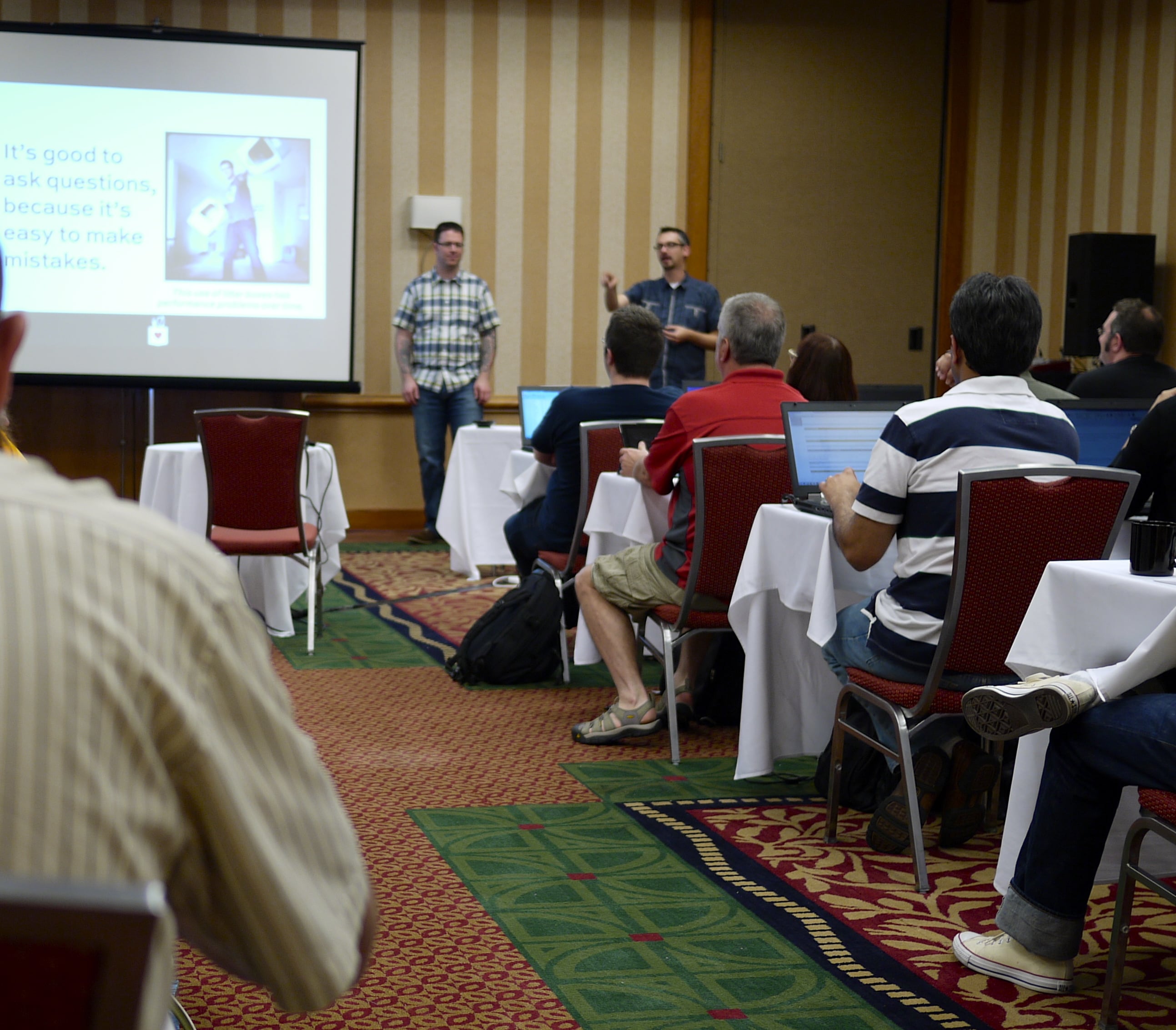
Jeremiah and I presenting in Atlanta

Whether you’re just getting started writing a presentation abstract, or whether you want to double-check it, or whether you want to understand why your abstract wasn’t picked, it’s always the right time to step back and ask some big picture questions about your conference submission.

The blessing and the curse of the active database community is that there’s so many people who want to help others – but of course this makes it harder to get your place up on the stage. It’s only going to get worse/better as more people continue to discover the community.

Here are 51 questions you need to ask yourself about your abstract, your material, and your delivery.

  1. What pain is bringing the attendee to this session?
  2. How are they going to relieve that pain when they get back to the office?
  3. What does the attendee know already coming in?
  4. Who should not attend this session?
  5. Reading your abstract, are the answers to the above four questions crystal clear?
  6. What did you learn from Adam Machanic’s post Capturing Attention?
  7. Did your abstract take one thing off before it left the house?
  8. If you search the web for your abstract title, what comes up?
  9. Who else do you expect will submit on a similar topic?
  10. How will you show your own personality and expertise in the abstract?
  11. Of ProBlogger’s 52 Types of Blog Posts, which one matches your planned sessions?
  12. What other types of sessions from that list could you use to surprise and delight attendees?
  13. Are you teaching why or how?
  14. How would a handout make it easier for attendees to learn your lessons?
  15. What visualization would bring your session to life?
  16. Could you contract out a local design student or company to build it for you?
  17. Are you presenting to teach or to impress?
  18. Have you gotten feedback on your abstract from a proven speaker you trust?
  19. If a teacher graded your abstract, would you get an A?
  20. On that 24-point scale, what would it take to succeed at a national conference?
  21. What topics are you going to avoid entirely in order to save time?
  22. How often have you rehearsed this presentation before giving it to a local user group?
  23. Have you given this presentation before at local user groups and SQLSaturdays?
  24. Did you record the session (either video or audio)?
  25. Did you watch the recording to see where you can improve the material and your delivery?
  26. What questions did the attendees ask at those sessions?
  27. What feedback did the attendees give at the user group or SQLSaturday?
  28. How will you use that feedback to improve your session?
  29. If you gave attendees a test at the end of your session, what questions would be on it?
  30. If your session was a movie, what genre would it be?
  31. What other movies would be sitting next to it in the store?
  32. Who would play the leading role?
  33. What are three words you want attendees to use to describe your session?
  34. How do your abstract, material, and delivery inspire those three words?
  35. Have you clearly attributed ownership to the code and pictures in your session?
  36. If nobody asks any questions at all, will you still be able to fill the time slot?
  37. If you get many questions, which slides/sections can you skip without losing meaning?
  38. Where will you post all of the resources for your session?
  39. If people have a question while reading those resources, how will they contact you?
  40. If this session was a module in an all-day training class, what would the other modules be?
  41. What’s the worst thing that could happen in your session?
  42. How will you recover if that thing happens?
  43. Can you form an instant community of your attendees using a Twitter hash tag or chat room?
  44. What would your session look like with no demos whatsoever?
  45. What would your session look like as 100% demos and no slides?
  46. If you started the session with a question, what would that question be?
  47. What’s the easiest, simplest way for the attendee to learn the lessons?
  48. Could you get the presentation’s learning lessons across with a blog post or series?
  49. When you ask people why they linked to your post, what do they say they found compelling?
  50. What questions did readers ask in the comments?
  51. What’s stopping you from writing that blog post right now to gauge reader interest?

No, really. What’s stopping you? Don’t think for one moment that attendees will skip your session because they’ve read your work. It’s the exact opposite: readers come to your session because they like your work. Start writing your blog posts right now to find out what works and what doesn’t.


Monitoring SSD Performance

SQL Server, Storage
2 Comments

Everyone wants to make sure they’re getting the best performance out of their solid state storage. If you’re like a lot of people, you want to make sure you’re getting what you paid for, but how do you know for sure that the drive is performing well?

Watch that Average

The first way to monitor performance it to use some perfmon counters. Although there are a lot of perfmon counters that seem helpful, we’re only going to look at two:

  • PhysicalDisk\Avg. Disk Sec/Read
  • PhysicalDisk\Avg. Disk Sec/Write

As soon as you get a solid state drive in your server, start monitoring these numbers. Over time you’ll be able to trend performance over time and watch for poor performance. When the SSDs pass out of your valid performance guidelines (and they probably will), you can pull them out of the storage one at a time and reformat them before adding them back into the RAID array. Note it isn’t necessary to do this

Although it’s risky, this approach can work well for detecting performance problems while they’re happening. The downside is that we don’t have any idea that the drives are about to fail – we can only observe the side effects of writing to the SSDs. As SSD health gets worse, this average is going to trend upwards. Of course, you could also be doing something incredibly dumb with your hardware, so we can’t really use average performance as a potential indicator of impending hardware failure.

Which SMART Attributes Work for SSDs?

What if we could watch SSD wear in real time? It turns out that we’ve been able to do this for a while. Many vendors offer SMART status codes to return detailed information about the status of the drive. Rotational drives can tell you how hot the drive is, provide bad sector counts, and a host of other information about drive health.

SSDs are opaque, right? Think again.

SSD vendors started putting information in SMART counters to give users a better idea of SSD performance, wear, and overall health. Although the SMART counters will vary from vendor to vendor (based on the disk controller), Intel publish documentation on the counters available with their SSDs – check out the “SMART Attributes” section of the Intel 910 documentation. These are pretty esoteric documents, you wouldn’t want to have to parse that information yourself. Thankfully, there are easier ways to get to this information; we’ll get to that in a minute.

Which SMART Attributes Should I Watch?

There are a few things to watch in the SMART status of your SSDS:

  • Write Amplification
  • Media Wear-out Indicator
  • Available Reserved Space

Write Amplification, roughly, is a measure of the ratio of writes issued by your OS compared to the number of writes performed by the SSD. A lower score is better – this can even drop below 1 when the SSD is able to compress your data. Although the Write Amplification doesn’t help you monitor drive health directly, it provides a view of how your use pattern will change the SSD’s lifespan.

The Media Wear-Out Indicator gives us a scale from 100 to 0 of the remaining flash memory life. This starts at 100 and drifts toward 0. It’s important to note that your drive will keep functioning after Media Wear-Out Indicator reports 0. This is, however, a good value to watch.

Available Reserved Space measures the original spare capacity in the drive. SSD vendors provide additional storage capacity to make sure wear leveling and garbage collection can happen appropriately. Like Media Wear-Out Indicator, this starts at 100 and will drift toward 0 over time.

It’s worth noting that each drive can supply additional information. The Intel 910 also monitors battery backup failure and provides two reserved space monitors – one at 10% reserved space available and a second at 1% reserved space available. If you’re going to monitor the SMART attributes of your SSDs, it’s worth doing a quick search to find out what your SSD controllers support.

How do I Watch the SMART Attributes of my SSD?

This is where things could get ugly. Thankfully, we’ve got smartmontools. There are two pieces of smartmontools and we’re only interested in one: smartctl. Smartctl is a utility to view the SMART attributes of a drive. On my (OS X) laptop, I can run smartctl -a disk1 to view the SMART attributes of the drive. On Windows you can either use the drive letter for a basic disk, like this:

smartctl -a X:

Things get trickier, though, for certain PCI-Express SSDs. Many of these drives, the Intel 910 included, present one physical disk per controller on the PCI-Express card. In the case of the Intel 910, there are four. In these scenarios you’ll need to look at each controller’s storage individually. Even if you have configured a larger storage volume using Windows RAID, you can still read the SMART attributes by looking at the physical devices underneath the logical disk.

The first step is to get a list of physical devices using WMI:

wmic diskdrive list brief

The physical device name will be in the DeviceID column. Once you have the physical device name, you can view the SMART attributes with smartctl like this:

Run against my virtual machine, it looks like this:

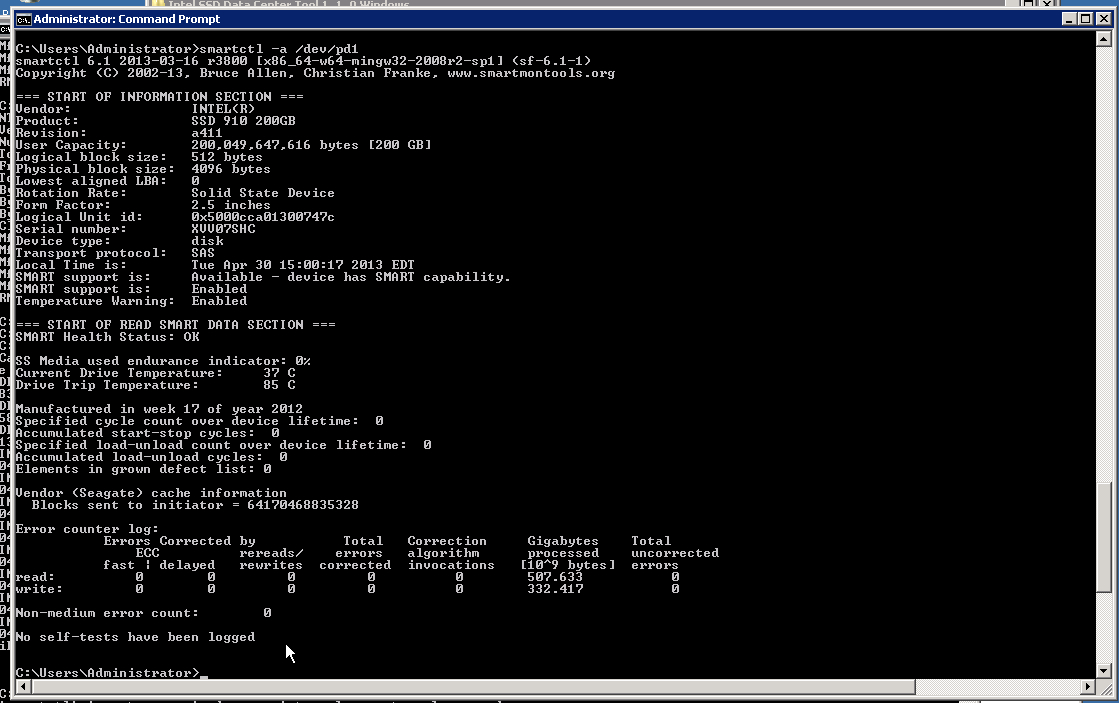
Unsurprisingly, my virtual drive doesn’t display much information. But a real drive looks something like this:

Intel 910 smartctl output

Holy cow, that’s a lot of information. The Intel 910 clearly has a lot going on. There are two important criteria to watch, simply because they can mean the difference between a successful warranty claim and an unsuccessful one

  • SS Media used endurance indicator
  • Current Drive Temperature

The Intel 910 actually provides more information via SMART, but to get to it, we have to use Intel’s command line tools. By using the included isdct.exe, we can get some very helpful information about battery backup failure (yup, your SSD is protected by a battery), reserve space in the SSD, and the drive wear indicator. Battery backup failure is a simple boolean value – 0 for working and 1 for failure. The other numbers are stored internally as a hexadecimal number, but the isdct.exe program translates them from hex to decimal. These numbers start at zero and work toward 100.

If you’re enterprising, you can take a look at the vendor specification and figure out how to read this data in the SMART payload. Or, if you’re truly lazy, you can parse the text coming out of smartcl or isdct (or the appropriate vendor tool) and use that to fuel your reports. Some monitoring packages even include all SMART counters by default.

The Bad News

The bad news is that if you’re using a hardware RAID controller, you may not be able to see any of the SMART attributes of your SSDs. If you can’t get accurate readings from the drives and you’ll have to resort to using the Performance Monitor counters I mentioned at the beginning of the article. RAID controllers that support smartmontools are listed in the smartctl documentation.

Special thanks go out to a helpful friend who let us abuse their QA Intel 910 cards for a little while in order to get these screenshots.


sp_Blitz® v22: Output Results to a Table, Better Comments, and an App

SQL Server
40 Comments

Our free server troubleshooting tool, sp_Blitz®, just learned some new tricks. If you call it like this:

EXEC dbo.sp_Blitz
@OutputDatabaseName = ‘DBAtools’,
@OutputSchemaName = ‘dbo’,
@OutputTableName = ‘BlitzResults’

It will create the table DBAtools.dbo.BlitzResults (if it doesn’t already exist) and insert the results. The table includes columns for the server name and the check date, so you can query this table to see what’s changed since the last time you ran sp_Blitz®. Plus, there’s more:

Added new checks for disabled CPU schedulers (due to licensing or affinity masking), extended stored procedures, disabled remote access to the DAC, databases in unusual states like suspect or emergency, logins with CONTROL SERVER permission.

Easier readability – whenever anyone’s asked how to add checks, I’ve always just said, “Read the code.” Last week, I read the code with fresh eyes and realized it could use some cleanup and comments. I used Red Gate SQL Prompt to clean up the formatting, which is better but could still use some work. The code is nearing 4,000 lines, so I moved the old changes out of the proc and into a new online changelog. I put in some time to explain what the proc is doing, and that should help people reading it from the first time. I’ve also started an sp_Blitz® Documentation page where I’ll be explaining some of the more advanced uses.

If there’s something you’d like to see added or changed, leave a comment here or contact us. The whole point of this thing is to make your life easier. I wish this tool would have been available back when I was a production DBA struggling to figure out what was going on in my environment, so every little improvement helps. Hopefully this can save you from the stress I had back then. Get it from the download page and enjoy!


Indexing Wide Keys in SQL Server

Indexing, SQL Server
26 Comments

Key length matters in SQL Server indexes.

It’s a best practice to keep your index keys as narrow as possible, and SQL Server enforces a maximum key length of 900 bytes on most “normal” clustered and nonclustered indexes.

But what happens if you want to optimize the lookup of a wide column? You’re not necessarily out of luck, you may just have to get a bit creative.

What If I Need to do an Equality Search on a Wide Column?

Let’s say I have a simple table. I have a narrow key on my clustered index and then I have a pretty wide variable length column. I need the wide column to be unicode, which makes it even wider, since unicode data types take up more room.

Here’s our sample table with a few rows (just pretend it has a lot more):

Let’s say we write to this table rarely, but query it often. When this query runs, I want to make it as fast as possible:

Right now, this query has to scan every row in the clustered index (the whole table) to find instances where bigval=N’bunny’. That’s not ideal, and as the table grows it’ll become worse and worse, burning more IO and CPU, and taking longer over time.

There’s usually an easy way to make a query like this fast: just create a nonclustered index on the bigval column. But when I try, it doesn’t work because of restrictions on key size.

SQL Says:

[code] Warning! The maximum key length is 900 bytes. The index ‘ix_LookupValues_bigval’ has maximum length of 4000 bytes. For some combination of large values, the insert/update operation will fail.
Msg 1946, Level 16, State 3, Line 1
Operation failed. The index entry of length 1400 bytes for the index ‘ix_LookupValues_bigval’ exceeds the maximum length of 900 bytes.
The statement has been terminated.
[/code]

Terminated. Yeah. I can’t just index this to make my query fast.

Options for Indexing Wide Keys

So what’s a performance tuner to do?

My first thought when I hit this problem was that I might have to use a fulltext index. A fulltext index can work here– it lets you index large columns, but it would be kind of a bummer to have to do it. Fulltext indexes have extra overhead and are really designed for different things than doing a simple equality search, so it would be like using a jackhammer because you can’t find a mallet.

My partner Jeremiah Peschka came up with a quick and clever solution using an indexed computed column. You can work all sorts of cool magic with computed columns in SQL Server– the trick is just to remember them!

Here’s how it works: you add a computed column to the table that’s the hash of the large value. You then index the computed column and modify your query to take advantage of it.

In this example we use SHA_512 for the hashing algorithm. This will give an output of 64 bytes— well within our limits for index key sizes.

Now, to get the query work, we need to change it a bit:

This revised approach gives me a targeted index seek and limits my logical reads. Voila!

The Fine Print on This Solution

There are a few things to note:

  • HASHBYTES results are dependent upon datatype. If my query used HASHBYTES(‘SHA2_512’, ‘bunny’), it would not find any rows, because the column is hashed unicode values and I provided a hashed non-unicode value.
  • I do still include “bigval= N’bunny'” in my query. In theory there shouldn’t be collisions with SHA-512, but it doesn’t add much expense to the query and in my example I deemed it “worth it” to me. You might make a different choice.

Sometimes Old Tools Do the Trick

What I love most about this solution is that it’s creative, but it’s not really weird, when you think about it. It uses standard features that have been in SQL Server for a long time to create a way to do something that seems like the product wouldn’t support– and that’s really cool.


3 Steps to Finding Your Secret Sauce

SQL Server
0
If there's such a thing as Data Science, why not Data Sauce?
If there’s such a thing as Data Science, why not Data Sauce?

It’s difficult to define why some things are wildly successful in a sea of forgettable products. Some recipes have a mysterious umami that comes from a subtle dash or two of magical sauce. In business and technology there’s an indefinable edge that sets people and teams apart. How do you get that special something?

Here’s one strategy businesses use all the time: layer products to build new, deeply specialized meta-products. First, they create a service or application they can sell. It generates revenue, but it also generates data. Sometimes they have to adjust (or heaven forbid, pivot) the product, but they get good at it. They start making money.

After a while they apply analysis to harvest meta-information from the product. The meta-information is used to create new, different products. These products may offer extra insights to existing customers, but they may also suit new and different customers, too. BLAMMO, the business is more diverse and successful.

These techniques aren’t just for packaged products. This is also what helps companies create services that seem a little magical, because they’re simultaneously simple and complex. We use these principles to make our own SQL Server Training super sharp and effective for students.

This isn’t something that only we can do. You can use the same techniques to find your own secret sauce.

Step 1: To Get Ahead, Look Back

You'll never get permission to have an idea.

One of our primary consulting products is our Critical Care® Sessions. We work closely with a client to identify their pain points and the bottlenecks in their SQL Server environment– issues can be anywhere from the storage layer to SQL configuration to query optimization and execution. We deliver recommendations for the client to implement within the first couple of weeks, the next month, and the next quarter. We tailor each recommendation to the client’s specific needs.

After a few weeks have passed, we meet again. We work with the client to find out how much they’ve gotten done. What’s been easy? What’s been difficult? Are there any questions we can help out with?

We listen very carefully, because this is an important source of information. Following up with your customers and finding out what has worked for them and why some tasks are trickier for them than normal is one of the most important things you can do. This tells us:

  • Where misunderstandings commonly occur
  • What types of data successfully gets buy-in to make difficult changes
  • Which scripts and tools are really critical to get people that data

The truth is this: it’s easy to know facts. It’s difficult to be effective. Because of this, we constantly collect data on what helps people get things done and evolve our tools.

This information is certainly helpful to our consulting product itself– it keeps us at the top of our game. But we also get an important component of our secret sauce from this: we can train people in the classroom to be effective using the techniques and scripts we’ve refined.

To apply this step yourself, create a habit of regularly meeting with customers and listening to feedback. Make notes. You won’t always be able to implement every idea you have, but keep track of what you find along the way. Steps 2 and 3 will give you a chance to harvest that information.

Step 2: Identify Your DifferentiatorsDon't wait until you're having problems to make your work more awesome.

Very smart people are sometimes terrible teachers. We knew we could teach on a wide variety of subjects. But how did we build a great training?

The key is to identify what sets you apart and narrow your scope to projects where you can impact your audience deeply. We don’t want to fill a training room with warm bodies and talk about general SQL Server topics. We want to get the right people into the room so that we can address their immediate problems and have them jumping out of their seats to get going.

To create great training, we identified what we do better than anyone else. These are our differentiators:

  1. We’ve built tools and scripts we can quickly train people to use effectively to diagnose server health and performance and tackle tough indexing problems.
  2. We’ve created specialized materials to help developers learn the critical factors to SQL Server performance in a short amount of time
  3. We have refined queries and techniques to teach developers to recommend effective changes in their environment
  4. We have an army of slide decks, blog posts, and even animated gifs to help developers solve performance problems, no matter how niche– so making Q&A awesome is no problem.

Knowing these differentiators made our mission clear. We knew we could change people’s careers with a short 2 day class, targeted at a specific audience (developers), and give them immediately useful scripts and techniques to improve performance.

We applied also looked at differentiators for how we offer the training itself. What new things could we do to help people access the training and make it work for them in a new way?

  • We created a business justification form to help people show the value of their training to management before signing up.
  • We also included two two-hour group Q&A webcasts for just the people in the training session two weeks after the event. You know how most trainings leave you with a feeling of confusion about a few topics when you get back to your desk and try to apply what you learned? These Q&A webcasts mean our attendees can get answers for those difficult situations.

Define your differentiators for yourself. What do you do better than anyone else in your environment? What needs do you fill, or could you fill, that nobody else covers well? Where are the gaps and needs in your workplace that you find interesting?

Step 3: Don’t Kill Yourself with Focus

You’ll never get permission to have an idea.

We didn’t start our business with the plan of giving our own training events. We love consulting. We speak in front of people all the time– we give our weekly webcasts and speak at local and national conferences, but we primarily think of ourselves as people who go out and initiate change rather than people who stand behind a podium and lecture. We naturally focused on consulting as our core business.It's easy to know facts. It's difficult to be effective.

Focus is great and it can help make you successful. But too much focus makes you predictable. It keeps you from really using your secret sauce.

We give training because we were open to a new idea. We realized that two day training is perfect to teach a developer what they need to know about performance tuning SQL Server to design changes for real-world environments. It’s just enough time to get them out of the office and teach them how to use the right tools, but not so long that they’re swamped under an incredible tidal wave of email when they return.

Set aside time at least once a month to think about how your job could be dramatically different. Don’t restrict yourself by immediate needs or how much time you have available. Give yourself room to dream of what you’d be really proud of doing in six months or a year.

Here’s the key: don’t wait until you’re having problems to make your work more awesome. Be creative and act on your aspirations when you’re already successful and busy. That’s often when you’ll have your best ideas! We added our training offering at a time when we were already very successful, simply because we knew we could offer a very high quality product and help developers in a way nobody else can.

The Secret Sauce Isn’t Out of Reach

Good news: if you read our newsletter every week or even just made it to this point in the post, you’re probably a specialist already. You may sometimes feel like a small fish in the big SQL Server pond, but that’s just human nature. If you’re even in the pond you are well on your way toward becoming very good at jobs that are difficult to fill.

Skills that can set you apart like becoming great at performance tuning SQL Servers are completely within your reach. A few steps to find the right path is all it takes.


Write a Note and Shoot Yourself Today

When I’m writing a presentation or blog post, I often start here:

Yep, still the same smile.
2004 Brent

It’s a photo of me in my office in Dallas, Texas in 2004. When I look at that picture, I remember everything like it was yesterday. I can talk at length about everything on the bookshelf, on my desk, in my drawers (the desk drawers, that is).

I can tell you what technology problems I was struggling with, plus what problems my manager was concerned about. I remember what I knew, and what I didn’t know yet. I can recite the web sites I frequented.

Next, I can turn the mental camera around and see exactly what’s outside my office door: my developers and my support team. I can tell you what they rocked at and what they wanted training on. I can remember how we decorated their cubes for their birthdays – covering Julian’s stuff in aluminum foil, building a princess’ castle for Hima.

The funniest thing, though, is that I didn’t remember any of this until I rediscovered this photo several years ago. All of a sudden, everything was clear to me.

And I realized who I was writing for.

Now, it’s really easy for me to scope my presentations and blog posts because I’m writing for 2004 Brent. 2004 Brent hadn’t studied databases and tried to turn them inside out – he just needed to store data and get it back out quickly. He wasn’t on a first name basis with book authors and MVPs – he didn’t even know what an MVP was.

You need to take this picture today.

Set up your camera with a self-timer or get a colleague to shoot a few pictures of yourself sitting in your work environment. Get pictures of the books on your shelf, the stuff on your desk, and maybe take a screenshot of your task list. Write yourself a one-page note covering:

  • The stuff you’re comfortable with
  • The stuff you’re uncomfortable with
  • The things you want to learn this year
  • The things you learned recently that surprised you

Stash these pictures and words away in a time capsule folder somewhere. A few years from now, when you’re writing a presentation covering something you’ve learned, get these back out. Think about what you knew and didn’t know, and that’s your target audience. Before you use a term or acronym, think back and ask, “Did 2013 Me know that? If not, lemme introduce the topic.”

When you’re writing, remember that you’re never writing for your current self. You’re writing for the past version of you. Having these pictures and words will help you define your audience.


The Basics of Database Sharding

SQL Server
5 Comments

There are many ways to scale out your database; many of these techniques require advanced management and expensive add-ons or editions. Database sharding is a flexible way of scaling out a database. In this presentation, Jeremiah Peschka explains how to scale out using database sharding, covers basic techniques, and shares some of the pitfalls. This talk is for senior DBAs, database architects, and software architects who are interested in scaling out their database.

https://www.youtube.com/watch?v=W6pFKihvqH4

More resources are available over in our sharding article.


5 Things About Fillfactor

Index Maintenance
73 Comments
Are you a page half full, or a page half empty kind of person?

I’ll never think “I’ve seen it all” when it comes to SQL Server– there’s just always someone waiting around the corner who’s found a weird new thing to do with it. But there are some things I really wish I could stop finding.

One of those things I hate finding is bad fillfactor settings. Fillfactor can be a useful tool to help performance, but it’s often a performance killer if you use it incorrectly.

A quick introduction: what is fillfactor, and how is it set?

“Fillfactor” is a setting for indexes in SQL Server. When you create or rebuild an index, you can tell SQL Server what percentage of each 8K data page used in the “leaf” level of the index it should fill up.

In other words, if you set a 90% fillfactor when you rebuild a clustered index, SQL Server will try to leave 10% of each leaf page empty. The empty space will be present on the page as it’s written on disk, and it’ll take up the same amount of space as it sits in memory.

By default, SQL Server uses a 100% fillfactor and tries to fill up all the pages in indexes as close to full as it can. Depending on how many rows actually fit on the page, your mileage may vary.

There are two ways to set fillfactor in SQL Server:

Index maintenance jobs sometimes automate the second of these options. If you’re using an index maintenance stored procedure you picked up from around the web, you may be setting fillfactor without realizing it.

Why do people love to set fillfactor?

DBAs and developers often read that lowering the fillfactor improves performance by reducing page splits. Perhaps they’re trying to fix a performance problem, or perhaps they’re feeling paranoid. They either lower fillfactor too much on some indexes, or apply a fillfactor change to all indexes.

Here’s the scoop: it’s true that the default fillfactor of 100% isn’t always good. If I fill my pages to the brim, and then go back and need to insert a row onto that page, it won’t fit. To make the data fit and preserve the logical structure of the index, SQL Server will have to do a bunch of complicated things (a “bad” type of page split), including:

  • Add a new page
  • Move about half the data to the new page
  • Mark the data that was moved on the old page so it’s not valid anymore
  • Update page link pointers on existing pages to point to the new page

And yep, that’s a lot of work. It generates log records and causes extra IO. And yes, if you have this happen a lot, you might want to lower the fillfactor in that index a bit to help make it happen less often.

Where do people mess up fillfactor?

Here’s the thing: having a bunch of empty space on your data pages is ALSO bad for performance. Your data is more spread out so you probably have to read more pages into memory. You waste space in cache that’s just sitting there empty. That’s not only not awesome, it can be TERRIBLE in many cases.

This is particularly wasteful because not all indexes are prone to “bad” page splits. Let’s say I have a clustered index on an incrementing INT or BIGINT identity value. I insert loads of new rows and values are rarely updated or deleted. In this case I can fill my pages very full because I’m always putting new rows at the “end” of the index. Adding these new pages aren’t bad page splits– although unfortunately they are counted in the “page splits/sec” performance counter, which makes it very tricky to find just the “bad” splits.

I frequently find that people have put a fillfactor setting of 80 or below on all the indexes in a database. This can waste many GB of space on disk and in memory. This wasted space causes extra trips to storage, and the whole thing drags down the performance of your queries.

Best practices for setting fillfactor

Here’s some simple advice on how to set fillfactor safely:

  1. Don’t set the system wide value for fillfactor. It’s very unlikely that this will help your performance more than it hurts.
  2. Get a good index maintenance solution that checks index fragmentation and only acts on indexes that are fairly heavily fragmented. Have the solution log to a table. Look for indexes that are frequently fragmented. Consider lowering the fillfactor gradually on those individual indexes using a planned change to rebuild the index. When you first lower fillfactor, consider just going to 95 and reassessing the index after a week or two of maintenance running again. (Depending on your version and edition of SQL Server, the rebuild may need to be done offline. Reorganize can’t be used to set a new fillfactor.)

This second option may sound nitpicky, but in most environments it only takes a few minutes to figure out where you need to make a change. You can do it once a month. And it’s worth it– because nobody wants their database performance to slow down and realize that they’ve been causing extra IO by leaving many gigabytes of space in memory needlessly empty.

Now that we’ve covered the basics, how about those five things? Here’s the fine print on how fillfactor is implemented, and what it does and doesn’t impact.

1) Books Online warned you

The most painful thing about finding bad fillfactor settings is that the Microsoft team has tried to warn people about how bad fillfactor settings can hurt performance. Unfortunately, most people don’t seem to find the warning.

Check out this quote in Books Online: “For example, a fill factor value of 50 can cause database read performance to decrease by two times. “

That’s pretty clear, right? So if I set a fillfactor of 70 (when I don’t need it), I risk decreasing performance by 30%. That doesn’t sound great, either. Because of this delicate balance, follow the best practices above.

2) Fillfactor does not apply to heaps

The fillfactor setting only applies to indexes, not to all tables. If you have a table which does not have a clustered index, it’s called a “heap” in SQL Server. Heaps are weird in several ways. One of those ways is that fillfactor doesn’t apply– not even the fillfactor you set at the instance level. (Page splits don’t work the same way either, but this is not a good reason to have heaps.)

3) Fillfactor doesn’t impact new pages inserted at the end of an index

SQL Server only uses fillfactor when you’re creating, rebuilding, or reorganizing an index. It does not use fillfactor if it’s allocating a fresh new page at the end of the index.

Let’s look at the example of a clustered index where the key is an increasing INT identity value again. We’re just inserting rows and it’s adding new pages at the end of the index. The index was created with an 70% fillfactor (which maybe wasn’t a good idea). As inserts add new pages, those pages are filled as much as possible– likely over 70%. (It depends on the row size and how many can fit on the page.)

4) Fillfactor does not apply to LOB pages

Fillfactor applies to in-row data pages. When you create a table, depending on the data types, you have options as to when some large types get stored on-row, or off-row. When data is not stored in-row, fillfactor settings don’t apply to those special pages.

A general rule of thumb is that if you infrequently read large object columns, it’s better to keep those columns off-row. You will incur extra IO every time you need to fetch off-row data. but it keeps the frequently accessed in-row columns of your index more efficient.

5) Someone may have changed fillfactor without you realizing it

Once fillfactor is set on an index, it stays there. Further rebuilds or reorganizations of the index maintain that fillfactor unless you specify a different value. It’s easy for a change in fillfactor to sneak in. Unless you check for indexes with a fillfactor set, you might not realize what’s going on in your database.

Like anything else, there’s weird exceptions where in very rare cases, setting a super-low fillfactor on a very heavily updated table (which is probably small), can help reduce contention. These cases are very rare. Often there’s a better long term change in the application layer that would handle the issue.

Bottom line: If you find you’re using a low fill factor and you don’t know exactly why it was needed, always look carefully to see if you’re hurting performance more than helping it. And if you’re using the same fillfactor on all of your indexes, you’re probably wasting lots of valuable memory.

How to check your fillfactor today

Our free sp_BlitzIndex® tool looks for all sorts of insanity in your indexes at the database level. It will snoop through your metadata and warn you about low fillfactor values, plus let you know exactly how big those indexes have grown. Check it out today.


Why Most People Don’t Follow Best Practices

"I don't care about best practices, I do what I want!"
“I don’t care about best practices, I do what I want!”

We write a lot about best practices, we teach customers best practices, and we publish popular references for best practices about all sorts of things like performance monitoring, SQL Server Setup, and Availability Groups.

But the internet is a sea of information and many SQL Server instances have unique needs. How does a SQL developer or DBA decide what’s a best practice?

How Most People Define Best Practices

In the real world, the #1 definition of a Best Practice in effect this: “Something we’ve been doing for years without noticing any problems.”

That’s just how human nature works. We all have a set of things we do that are “normal”, and we usually put them into our mental Best Practice Bucket. If we start to have problems, we assume it’s not due to anything “normal”.

Unfortunately, human nature makes people persist all sorts of bad practices. I find everything in the wild from weekly reboots to crazy settings in Windows and SQL Server that damage performance and can cause outages. When I ask why the settings are in place, I usually hear a story that goes like this:

  • Once upon a time, in a land far far away there was a problem
  • The people of the land were very unhappy
  • A bunch of changes were made
  • Some of the changes were recommended by someone on the internet. We think.
  • The problem went away
  • The people of the land were happier
  • We hunkered down and just hoped the problem would never come back
  • The people of the land have been growing more and more unhappy over time again

Most of the time “best practices” are implemented to try and avoid pain rather than to configure things well. And most of the time they aren’t thought out in terms of long term performance. Most people haven’t really implemented any best practices, they’ve just reacted to situations.

Why Best Practices Can Get You Fired

There’s one thing you can count on: many of yesterday’s best practices aren’t true today. Maybe the change you made long ago was a best practice at the time (or at least not an unusual or bad practice), but it may be hurting you now.

It doesn’t matter if something used to be a best practice or not. If times and technology have changed and you haven’t kept up, that outdated best practice can still get you fired if you don’t learn to let go.

What You Should Do Today

We try to make it easy for people to find out where their configuration veers away from current best practices.

Here’s what you should do today: run our free tool that checks your SQL Servers for signs you’re not following a best practice.

Look carefully and critically at everything that it points out. Don’t dismiss any of the items by saying, “oh, but we need that because we’ve always done it that way.” If it’s something you’ve been doing a long time, question it even more.


3 Things You Need to Start Doing to Your Database Server

Taking care of your health is incredibly important (says the marathon runner). Eating right, exercising, and getting plenty of rest help you stay healthy and perform optimally.

Apple Cupcake
Does “an apple a day keep the doctor away” apply to cupcake apples?

Your database server’s health is important to your company’s health. You need to take regular backups, check for consistency, and keep indexes tuned for optimal performance. Here are a few tips to make sure your database stays in top shape.

Back up System Databases

The master, model, and msdb databases on every SQL Server are integral parts of the system.

Master contains information such as logins, linked servers, and information about all other databases on the server. Without this database, SQL Server can’t start up. If you don’t have a current backup of this database and a disaster occurs, you lose this information.

Model is used as a template for every new database that is created on your system. There are certain default settings you may adjust, such as file sizes, autogrowth, and the recovery model. If you don’t take a backup of this and a disaster occurs, when you set up the server again you have to remember to reconfigure all of these settings, rather than restoring them.

Msdb contains all of the information about SQL Server Agent operators, jobs, and alerts. It also holds backup and restore history tables. If this isn’t backed up and a disaster occurs, you will need to recreate all of your Agent items. I had to do this once – it was one of the worst weeks in my first DBA job.

Ensure that your backup job covers these databases, because in the event of a disaster, you want to restore them rather than rebuilding all of that information.

Run DBCC CHECKDB On All of Your Databases

You need to run DBCC CHECKDB to check for consistency errors in your database –yes, corruption. If you’re not running this on system databases, or only running it on “important” databases, you run the risk of not finding corruption in a database.

As already explained, the system databases are incredibly important. Combine not running DBCC CHECKDB with not taking a backup, and you can have a disaster without a hardware failure of any sort.

Only checking those databases you feel are “important” is dangerous. Who defines “important”? Is archived data as important as live data? To the person that uses that information for forecasting and trending, it is. Is a system used for reporting once a quarter as important as production data? To the person that has to use those reports to file taxes, it is. If a database is truly “not important”, and isn’t being used, it should be backed up and removed from the server – not sitting out there, taking up space and resources.

Index Maintenance

Indexes are the closest thing to a turbo button that SQL Server has. Proper indexes on tables will help your select queries run faster, and won’t hinder the performance of inserts, updates, and deletes. But putting an index or four on a table when it is released to production, then doing nothing further, is not productive. Table structure, the data in the tables, and the queries from users and applications change over time.

As data is added, updated, and removed, the pages in the index will become fragmented. Fragmentation leads to poor performance. The more scattered across the disk the data is, the harder storage has to work to retrieve it. Regular, consistent reorganization and rebuilding of the indexes can combat this.

Are you wondering where to start? Ola Hallengren has a brilliant set of maintenance scripts, including index maintenance, which can help you out!

Keep Your Server Healthy

By performing regular maintenance on your SQL Servers, you’ll ensure that your data is secure and it is performing optimally. Much like you don’t want to wait until you suffer a heart attack to see a doctor, you don’t want to wait until a disaster to find the weak points in your server.


Answers to Common High Availability and Disaster Recovery Questions

In our recent webcast on HA & DR basics for DBAs, we got a bunch of questions that couldn’t be answered fast enough. Here you go:


Q: Do any of these techniques work for companies with just 1-2 IT staff?

To keep things simple, I’d check out virtualization replication like VMware SRM. SRM isn’t necessarily easy, but if you use that one technique, you can protect all of your virtual machines no matter what they’re running. That’s easier than learning different HA/DR techniques for a lot of different applications.

Q: For 1,000 databases on an instance, what uses more resources – mirroring or log shipping?

Technically, the answer is going to be log shipping because you’re probably already doing transaction log backups on those databases anyway. However, when you’re running thousands of databases per instance, several other interesting issues arise. How do you react to newly added databases? Can you back up all 1,000 in a timely manner, or do you need to roll your own transaction log backup jobs to run simultaneously? What’s your RPO/RTO? There’s a lot of neat questions that determine the real answer at this scale. Feel free to contact us for consulting help – we’ve got clients who run as many as 10,000 databases per instance, and we can help you learn lessons the easy way instead of the hard way.

Q: What happens if my DR is in a different datacenter, on another domain?

Your life is harder. Many built-in solutions become more challenging, and even just getting your users to be able to connect to the database become more challenging. This is a scenario where I like to step back and ask, “What problem are we trying to solve by using different domains?”

Q: Do my HA and DR servers have to be on the same subnet or VLAN?

No, all of SQL Server’s HA/DR features work on different subnets and VLANs.

Q: Do you have to kill all SQL Server connections before restoring a database?

Yes. Restoring a database – even a similar copy – means starting over with all-new data. Restoring transaction logs means SQL Server will be jumping around all over inside the database, and it doesn’t have time to deal with your queries. 😉

Q: Does clustering work for SSAS, SSIS, and SSRS?

Microsoft sells these things inside the same box as SQL Server, but for all practical purposes, you should consider them different products. They’re like free toys that just come in the same box, but they’re wildly different. The techniques you use to protect the SQL Server engine won’t be the same as the techniques you use for the rest.

Q: Can you read a database mirror?

Not directly, but you can take a snapshot of it and read the snapshot. I rarely see this used, though, because in order to refresh the snapshot, you have to drop it – and that means kicking everybody out of the snapshot.  Users don’t seem to be a big fan of getting their queries killed.

Q: What Windows Server edition is needed for clustering and AlwaysOn Availability Groups?

You can use any version of Windows Server 2012, but if you’re still using Windows Server 2008R2, you’ll need Enterprise Edition.

Q: How do you get hosts in different data centers into the same cluster?

Clusters don’t need shared storage anymore. This is why I wrote the post Everything You Know About Clustering Is Wrong. Things really have changed a lot in the last several years around clustering.

Q: How well do these features work over a slow connection?

If you’ve got enough bandwidth to keep up with copying transaction log backups as they’re happening, you can stay up to date. If you can’t, they don’t work well.

Q: Can you install SQL Server Enterprise on Windows Standard?

Yes.

Q: I just joined the webcast and it’s almost over. Can you send me the slides?

You’d be surprised how often I get this question. This is why we make our material available for free on our YouTube channel. I don’t usually share the slide decks, though, because I’ve had some nasty incidents of people taking my slide decks, plagiarizing them, and presenting them as their own material.

Q: I’m using an AlwaysOn Availability Group. If I fail over to an asynchronous replica, will there be data loss?

Probably. If your primary has been doing a lot of work, and hasn’t been able to send all of that work to the asynchronous secondary, you’re doing to lose that data. It’s up to you to monitor the DMVs to see how far behind the replicas are.

Q: Is (feature A) better than (feature B)?

Yes.

Q: Really?

No. They both suck.

Q: Seriously, I need an answer.

Getting to the right answer means knowing your RPO, RTO, business needs, staff capabilities, hardware, network throughput, and more. If you ask a stranger to guess the right answer for you with just five minutes of background information, odds are it’s going to be the wrong answer. You’re going to have to buckle down and do some research into the features and your business needs, or you can bring in an experienced outsider who does this for a living. This is what we do, and we can help you get to the right answer as quickly as possible, and probably for less money than you’d expect.

Q: Is there a way of automating failovers for SQL Agent jobs for HA purposes?

If you’re using clustering, then this is built in. If you’re using a solution that does failovers at the user database level, then things get trickier because you have to know which jobs you want to fail over. For example, you probably don’t want backup jobs failing over (because you can just run those jobs on all nodes), but you might want a few database-based jobs failing over. That’s left as an exercise for the reader, though, because every shop’s needs are different – often even different between database servers in the same shop.

Q: What’s the right quorum configuration for my cluster?

Check out the excellent Books Online quorum sections for Windows Server 2012 and Windows Server 2008/R2.  It’s a lot of reading, but it’s worth it – the quorum decision is a big one.

Q: Can I integrate clustering with (mirroring/log shipping/replication/AlwaysOn AGs)?

Clustering is probably the strongest feature in terms of interoperability with other features. It’s been around a long time, so it’s got a good interoperability story for pretty much everything.

Q: How can one second RTO be achieved in a DR scenario?

By having both the production and disaster recovery systems live at all times, accepting queries. At that point, it’s up to the application logic to try both servers to see which one is available fastest. Some applications do this by timing out their database connections after just one second. Other applications do it by trying both database servers simultaneously and taking the first available connection.

Q: Can you back up a SQL Server to SQL Azure?

Not in the sense that you can restore directly into SQL Azure (or as it’s known now, Windows Azure SQL Database.) However, you can use Windows Azure as a backup solution if you’re so inclined.

Q: Azure is a French word meaning blue. Americans are not pronouncing French correctly.

French is the most beautiful language in the world – when it’s spoken by the French. When the rest of us try it, we sound like we’re coughing up an unfiltered Marlboro. Thank you for your cheese, wine, and wonderful words like lingerie and ménage à trois. You are a beautiful country, and the rest of us apologize for the sounds we make when confronted with French.

Q: Can you cluster inside VMware?

Yes, but if you’re asking the question, you shouldn’t be doing it.

Q: What are the best practice recommendations for achieving 99.999% uptime?

Obviously this is way beyond what I can answer quickly, but the best advice I can give is to remember that there’s three parts to every solution: people, process, and technology. You need written processes that cover exactly how to react to an outage, and you need to rehearse and improve those processes constantly. Car racing teams practice over and over to get the fastest pit stop possible so that their race car spends more time driving and less time sitting. DBAs need to do the same.

Q: What HA option is Brent’s personal favorite, and why?

I like failover clustering because it protects everything in the instance – jobs, logins, and the server name itself – with as little manual intervention as possible. It still has weaknesses in a few single points of failure, and it’s not completely easy to implement and manage. I think the benefits still outweigh the costs.


How Much Cache Do You Have?

SQL Server
1 Comment

Without looking in your wallet, do you know how much cash you have? Most of us know within a few dollars. Now, without looking in your SQL Server, do you know much data is cached in memory? You probably don’t and that’s okay; you shouldn’t know how much data SQL Server is caching in memory. We can’t control how much data SQL Server is caching, but we can control how we cache data.

Different Types of Cache

There are a lot of different ways to approach caching. One of the most prevalent ways involves thinking about cache in two different levels (much like CPU cache): first level cache and second level cache.

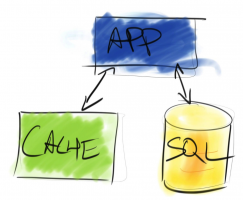
First level cache lives in the application and second level cache is in a separate service
Green means go!

First level cache is an immediate, short-lived cache that works within a single session to attempt to minimize database calls. Unfortunately, first level cache is only used for the duration of a current session or transaction (depending on your terminology). This is very short lived and it’s only useful to the current process. While helpful, first level cache has a limited scope.

There’s another type of cache: second level cache. Second level cache exists outside of the current process and can be shared between multiple transactions, processes, servers, or even applications. When we talk about adding cache to an application, we really mean second level cache.

A Bit of Cache

Even the most basic of ORMs have a little a bit of cache available. The first level cache is used as a short lived buffer to reduce the amount of work that the ORM has to do. First level cache is used for caching objects in the current transaction and query text. Although this cache can be helpful for the current process, this cache isn’t shared across multiple processes or even multiple database batches. If we want to have a more robust cache, we have to look elsewhere.

ORMs like Entity Framework or the LLBLGen Framework don’t have a second level cache. It’s up to developers to add a cache when and where they need it. This exposes developers to additional concerns like cache invalidation, cache updates, and query caching. All of these features and functionality may not be necessary, but that’s an acceptable trade off – it’s up to developers to implement cache features in ways that support application requirements.

Although it takes up developer time, building the second level cache yourself has the benefit of creating a cache that’s suited to the application’s requirements. For many application level features, this is good enough. It’s important, though, that developers pick a caching layer capable of meeting their operational requirements. Operational requirements include horizontal scalability, redundancy and fail over, recovery of cached data, or customizable cache expiration on an object-by-object basis.

These basic ORMs aren’t really all that basic – they have full features in other parts of the ORM, but they only offer basic support for automatic caching through the ORM.

A Lot of Cache

You’ve got memory. You want to use it to cache data. What’s the easiest way to do that?

One of the easiest approaches to adding caching to your application is to use a framework that supports it out of the box. A number of ORMs, including both Hibernate and NHibernate, provide this support. Enabling cache is easy – just change a few lines in a configuration file and the cache will be available to your application. Things start getting tricky, though, when you examine the richness of the caching that’s provided by these tools.

Power comes with a price. When you’re getting starting with tools like Hibernate or NHibernate, there’s a lot to take in and many developers overlook these features. Developers can choose on an object by object basis which caching strategy should be applied. Based on business requirements we can choose to treat certain cacheable objects as read only while others can be used as a read/write cache. Some objects can be cached while others bypass the secondary cache entirely – there’s a lot of complexity for developers to manage.

While this can be overwhelming, this flexibility serves a purpose – not all features of an application have the same requirements. Some features can serve old data to users, other features need to be up to the minute or up to the second. Giving developers the ability to make these choices means that there is a choice to be made. Even if it’s a difficult one, developers can choose how the application behaves and can tailor performance and functionality to business requirements.

Making the Choice

If you’ve already got an existing project and you’re planning on adding a caching layer, don’t think that you have to re-implement your data access layer just to get better support for caching. Both approaches have their benefits and it’s far more important to be aware of which data needs to be cached and the best way to cache it.


Cloud Alternatives to Microsoft SQL Server

When people say “cloud”, they’re simplifying a lot of different solutions into a single catchphrase. Let’s break out the different options and compare them.

1. SQL Server in Amazon EC2 and Azure VMs

Amazon EC2 is a virtualization platform. Amazon buys servers, installs their secret sauce software, and rents you Windows virtual machines by the hour. Microsoft offers a similar product, Windows Azure Virtual Machines, that just went officially live.

You can rent a blank Windows VM without SQL Server installed, and then install SQL Server yourself just like you would on-premise. That’s a licensing mess, though – you have to use your existing SQL Server licenses or buy new ones for your VMs. That doesn’t make much financial sense. Instead, Amazon and Microsoft will rent you a Windows VM with SQL Server already configured, and your hourly fee includes the SQL Server licensing.

SQL Server runs just as it would in your own datacenter, which means you can use this as a disaster recovery option for your on-premise SQL Servers. You can do log shipping or database mirroring up to SQL in the cloud, running in Amazon EC2 or Microsoft Azure. When disaster strikes, fail over to your EC2/MS infrastructure, and you’re off and running.

The term “cloud” conjures up images of easy scalability and redundancy, but that’s not really the case here. We’re talking about a single virtual machine. This isn’t much different from running SQL Server in a VMware or Hyper-V guest in your own datacenter or in a colo datacenter. You can use all your traditional tools and techniques to manage SQL Server, which is both a pro and a con. If you need to patch it or scale out to multiple servers, there’s no tools included here. I still consider this the cloud, though, because the infrastructure and licensing are managed by somebody else. It’s easy to get started with one – or a hundred – virtual SQL Servers with no initial investment.

This method is the most conventional, and as I explain other options, I’m going to move from conventional to really-far-out-there. SQL in EC2 or MS VMs just works – it’s easy to understand and leverage without changing your code or your techniques – but it doesn’t bring a lot of the cloud’s benefits.

2. Amazon RDS for SQL Server

Instead of running SQL Server in an EC2 virtual machine, let’s start giving up a little bit of control in order to get more of cloud benefits. The next layer of clouds is Amazon Relational Database Service (RDS). Here, Amazon builds a Windows VM, installs SQL Server, configures it, and manages both Windows and the SQL Server service for you.

This is still the real, true blue SQL Server you know and love – all of your commands still work exactly the same as you’re used to, as long as you don’t try to access the server’s local drives directly. (Example: you can’t upload a flat file to the server’s C drive and then try to BCP data from that file into SQL Server.)

Amazon RDS is kinda like they’re the DBA, and you’re a very, very powerful developer. You can create and drop databases and users, but you can’t Remote Desktop into the SQL Server, nor can you access the drives.

Amazon RDS takes a few job duties away from you:

  • Storage management – want faster storage? Just pick (and pay for) more IOPs. There’s no arguing with the SAN guy.
  • Monitoring – Amazon CloudWatch tracks performance metrics and sends you emails when they’re outside of your thresholds.
  • Patching – You pick the major/minor versions you want and when you want patches applied.
  • Backups – You pick a time window for the full backups, and Amazon manages it using storage snapshots. You can restore from snapshots just by pointing and clicking in the management console.

But herein lies the first real compromise: you can’t restore from anything except snapshots. You can’t upload your own database backup file and restore it. To get data into Amazon RDS, you’ll want to export it to a file, upload that file to Amazon S3 (cloud-based file storage), and then import it. This also means you can’t use Amazon RDS as a participant in log shipping or database mirroring.

Microsoft doesn’t have a competitor to Amazon RDS for SQL Server today. Well, I say that, but some shops already manage their SQL Servers this way – they have an internal admin team that manages Windows and SQL. Departments get access to create & drop databases, change code, etc, but they don’t get access to the server’s desktop or backups. This doesn’t really compete with Amazon RDS, though – RDS is for companies who are too small to have this kind of internal engineering infrastructure. (Or for companies that want to get rid of this large engineering burden, I suppose.)

3. VMware vFabric Data Director

vFabric Data Director is a lot like running Amazon RDS in your own datacenter, but you can control the base Windows virtual machines. You build a Windows template to be used by default whenever a new SQL Server is created. VMware vFabric manages the implementation details for backups and high availability.

vFabric also supports Oracle, PostgreSQL, and Hadoop for a single pane of glass to create and manage your database servers. When someone in your company wants a new database instance, the sysadmins open up vFabric, configure it, and within a few minutes, it’s up and running.

vFabric makes sense for 100% virtualization shops who aren’t interested in moving their databases up to the cloud, but they want easier database management integrated into their virtualization tools.

Microsoft doesn’t have a competitor to VMware vFabric Data Director today. In theory, you could build your own alternative using System Center and a whole lotta scripting. That is left as an exercise for the reader.

4. Microsoft Windows Azure SQL Database (WASD)

The artist formerly known as SQL Azure takes the least conventional approach of all. While it’s technically built on Microsoft SQL Server, that’s like saying your pants are built on your underpants. They both cover your back end, but you can’t use them interchangeably.

Microsoft essentially built a new product designed for common database storage requirements. Like your underpants, you only get a minimum of feature and command coverage here. The new features and commands Microsoft has been adding to the boxed product for the last couple of versions just aren’t available in WASD including partitioning, Resource Governor, Service Broker, and CLR. But hey – are you really using those anyway? Most folks aren’t.

Rather than building large databases, WASD encourages developers to shard out their data across multiple smaller databases. While on-premise SQL Servers have had techniques to do this in the past, Microsoft started over and developed a new technique that makes more sense for cloud implementations. Again, though – we’re talking about a difference from the boxed product, something else that developers have to learn differently. As we’ve gone up this ladder into the clouds, we’ve been handling our problems differently. WASD’s partitioning technique is a good reminder that once you’ve gone this far up into the cloud, you’re dealing with something very different from SQL Server. You’re not going to take large volumes of code written for SQL Server and simply point them at WASD – you’re going to be doing a lot of testing and code changes.

Like Amazon RDS, there’s no backup/restore functionality here to get your existing data into the cloud. You’ll be exporting your data to a file, loading it into the cloud, and then…staying there. There’s no database mirroring or log shipping to/from Azure SQL Databases to on-premise SQL Servers.

Which One is Right for You?

If you’ve got an existing app, and you just want to cut costs without changing code, you can get started today with any of the first three options. They support the same T-SQL commands and datatypes you already know and love.

If you’ve got an existing app, and you’re willing to make code changes & do testing, you might be able to save even more plus gain new flexibility by going to Windows Azure SQL Database. In most cases, though, the cost savings won’t come anywhere near the costs required for the code changes and code review. We haven’t seen a case yet where the tradeoff made sense for our clients. I’m sure it’s out there – the perfect example would be a small amount of code that the developers know very well, can easily modify, and produces large server loads in short bursts.

If you’re building a new app from scratch, then let’s take a step back and survey the database industry as a whole. This is an incredible time to be in databases and there’s a bunch of really good options we didn’t even cover here.

Learn more about our SQL Server in Amazon cloud resources page.


Brent Answers Your Virtualization Questions

I’m doing a 1-hour open Q&A session on May 8th for the PASS Virtualization Virtual Chapter.  Bring your VMware and Hyper-V questions about setup, performance, management, monitoring, or whatever, and I’ll answer ’em.

You can even get a head start here – post your questions in the comments below, and I’ll build slides to answer ’em ahead of time.  That way you can make sure you get the best answer possible.  (Well, from me anyway, ha ha ho ho.)

Then come join us on the webcast and hear the answers. See you there!


3 Things You Need to Stop Doing to Your Database Server

SQL Server
1 Comment

No one knows everything, especially about SQL Server. When you encounter a problem, especially for the first time, you may not know how to solve it. I’ve seen some crazy approaches taken to fix problems – like duct tape on a car. Many times, instead of fixing the root cause of a problem, such as a poorly-performing query, a server-level change is made.

Here are three rolls of duct tape to avoid.

car1
I hope Brent can see out of the windshield. Don’t tell him I took the company car.

Clearing the Plan Cache Regularly

“We found that the system would be running fine, then a user would run a report with a certain set of parameters, and it would slow down. Running DBCC FREEPROCACHE every day solved that problem.”

When you run DBCC FREEPROCACHE, all the query execution plans in memory are dropped. The next time every query is run, SQL Server will have to compile a plan, and this is expensive. CPU usage will increase. Queries will run slower the first time they are executed. Is it worth dumping the hundreds or thousands of plans that are saved for reuse for the sake of one or two that are bad?

If a query runs acceptably most of the time, but runs very slowly at other times, check into what else is running on the server at the same time, and also investigate statistics and parameter sniffing. Often, you’ll find that a simple change can fix the problem – without taking drastic measures that affect the whole server.

Shrinking Files Regularly

“Tempdb grows from its normal 25-30 GB to 100 GB every Wednesday night. Our drive is only 100 GB in size, so I set up a job to shrink it back down every Thursday morning.”

Or, your log file doubles in size once a week, so you create a job to run DBCC SHRINKFILE weekly, too.

If this happens, there is something running in your database that is causing the data or log file to grow. A large index is rebuilt frequently. A batch job is run to insert a large amount of data all at once, instead of in sections. You need to find the source of the problem and fix it. Constantly shrinking and regrowing files leads to fragmentation, and fragmentation leads to poor performance.

Combining Development and Production Databases on the Same Server

“Our database performance has been really bad the last month. We are testing new features in our development database, which is on the same server as our production database, and I think that might be the problem.”

When you write new code, you need to test it first. You absolutely should have separate development and production databases. You also should keep them on separate servers. When they share a server, they share resources, and poorly performing queries that are being tested in development can bring production to a screeching halt.

You have many options for setting up a development server. Trying to find hardware? Use an older server that has reached the end of its production lifecycle, or, if you have a virtual environment, request a virtual SQL Server. Worried about licensing? For development only, you can purchase a copy of SQL Server Developer Edition for about $50 per user.

Learning from the Past

These are only three of the valuable lessons I’ve learned from working with SQL Server. Finding the root cause of a performance problem and solving it is a much better long-term solution than implementing a short-term workaround.


sp_Blitz® Version 18 Out: Lots of Bug Fixes

SQL Server
14 Comments

There’s a new version in town.  v18 adds new checks looking for:

  • Backups stored on the same drive letters as user databases (Thanks @AlinSelicean!)
  • Agent jobs that don’t have failure notifications set up (Thanks @Thirster42!)
  • Shows free drive space per drive letter if you pass @CheckServerInfo = 1 in. We don’t consider this a problem – we just show additional info if you use this parameter.
  • Added the elevated database permissions check back in (whoops! dropped it accidentally)

Plus bug fixes and improvements including:

  • Lots and lots of typos
  • Ignore max file sizes for filestream data files
  • Switched a lot of @@SERVERNAME usage out with SERVERPROPERTY(‘ServerName’) because in some SQL Server cloud implementations, those don’t match, and it’s okay.
  • Changed database name variables to be NVARCHAR(128) to handle those monster SharePoint databases
  • Improved the non-aligned-indexes check to return results even if the index hasn’t been used

And more.  Version 17 also added a neat new exclusions table parameter – if you’re the kind of DBA who wants to automate sp_Blitz® data collection throughout the environment, but you want to skip certain checks or certain databases, you can do that now.  I haven’t written up full instructions on that, but the basic idea is pretty obvious within reading the first 100-200 lines of the code.

As always, you can get the latest version and instructions from https://www.brentozar.com/blitz/.  If you’d like to contribute code, you can email us at Help@BrentOzar.com.  I’m still working through a backlog of about 20 more new check contributions, and we’ve got some fun stuff coming – including a thank-you page listing the contributors and their work.


DBAs vs Devs: ORMs, Caching & Access to Prod

SQL Server
5 Comments

Developers and database administrators frequently clash on major questions about how to scale application performance. Are they just being stubborn, or is one side really right? Jeremiah and I recently gave a talk on this topic to the AtlantaMDF User group and we wanted to open this debate to the world.

Developers vs DBAs
Presenting Developers vs DBAs on three screens at the Atlanta MDF User Group
Photo courtesy of Aaron Nelson

Someone’s Right and Someone’s Wrong

Developers and DBAs are usually being stubborn, and for good reason. DBAs tend to be tasked with being the protectors of an environment, while developers are on a mission to ship more features, make changes, and bring in more money. Each side has a reason for their views, but on most controversial topics, one side actually is more right than the other.

ORMs

Most DBAs believe that Object Relational Mapping tools (ORMs) write terrible code and that stored procedures are a better data access layer. This belief is widespread because database administrators struggled for years with early versions of NHibernate and Entity Framework.

Some of the growing pains hurt: everything from type mismatches to hilariously long and tangled queries have burned people. But developers embrace ORMs for good reasons. These tools really do help build, test, and ship features more quickly. If you become a SQL Server performance tuning specialist, you can get the best of both worlds– but you have to let go of some of your hangups about ugly SQL queries.

Application Caching

It’s hard to argue against application caching… at least unless you’ve tried to implement it and come up frustrated. DBAs argue that developers should cache everything, while developers can tell you how that isn’t as easy as it sounds.

We know that usually there IS a place for caching, you just need to know how to find the “biggest bang for your buck” opportunities. (We’ve got some slides and scripts below to get you started.)

Access to Production

Who hasn’t had this argument over and over? Usually developers are fighting to get into production and DBAs are fighting to keep them out. Lots of time gets wasted on this topic needlessly.

We created tools like sp_BlitzIndex® to help people share information for performance tuning more easily. You just gotta find the right tools and the right level of access that lets everyone do their jobs (and keep their jobs).

Get the Scripts

Download ’em here.

Join Us Live

We train developers and DBAs diagnose the real bottlenecks in their SQL Servers and use data to get beyond the problems we just described. Join us at a live training event to learn how to performance tune SQL Server.


Catching SQL Server System Object Changes

SQL Server
4 Comments

Let’s say you get your hands on a brand new version of SQL Server that you haven’t played with before, and you want to know what system objects have changed – DMVs, DMFs, system stored procs, yadda yadda yadda. Sure, you could read the documentation – but ain’t nobody got time for that, and they’re probably leaving out the juicy stuff, right? Here’s what I do (thanks to improvement suggestions from Kendra):

First, create a linked server between the new version and the old version. This lets us query across servers and join things together. In my examples, I’ll be running my queries on the new SQL Server, which I’ll be calling local, and the linked server will point to the remote server.

Identify new system objects with this query:

We’re getting all local system objects that don’t have a matching system object on the other (remote) server. The “172.16.189.131” is the server name for our older SQL Server box that we’re comparing against – our linked server name. The results give you the new functions, stored procs, you name it:

Ooo! New Shiny System Objects!

We’re joining on object_id, but that’s a gamble – Microsoft could use different object_ids between versions if they wanted to. If we wanted to filter those out, we could join on name, schema_id, and type_desc (view, stored proc, etc), but that gets a little sketchy. For example, there’s now two CHECK_CONSTRAINTS views in SQL Server 2012 with different object_ids, and we wouldn’t catch that if we were only joining on names. In the below screenshot, the top result set is from SQL Server 2012, and the bottom is from SQL Server 2008R2:

One of these servers is not like the others, one of these servers just doesn’t belong

Next, we want to find new or changed columns in existing objects. Here’s how:

Note that we’ve commented out a join on name – if you’re worried that existing columns might have changed names, that’s how you’d catch it. The results:

I see what you did there.

Presto – we can see what new instrumentation fields Microsoft is giving us. This helps script authors do a better job of testing their changes across multiple versions. When someone sends me an sp_Blitz® improvement that relies on a DMV or field I’m not familiar with, I can quickly check multiple servers to see if it’s available across all of my lab servers, or which version it appeared in.

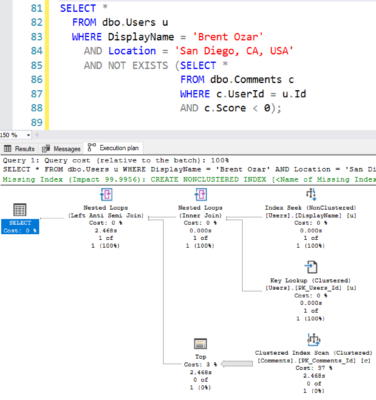
Here are several scripts that can catch all kinds of changes: