Blog

I’m ThatExcited about ThatConference
SQL Server
0
A sneak peek into my slide deck at ThatConference
A peek into my slides for ThatConference

I about to head out to a vast waterpark in the Midwest to ThatConference, where I’m going to hang out with 1000 developers, their families, and some wild animals

I’m giving a session Monday called “How to Make Deploying Database Changes Fun Again”. I’ve had a blast distilling everything I’ve learned over the years about how to to take the pain out of making changes to databases.

ThatConference isn’t platform specific, so I’m looking forward to meet lots of new people who face similar challenges managing data, but use a variety of tools. I’m looking forward to Game Night. And I’m looking forward to learning a lot.

If you’ll be in the Wisconsin Dells next week, I’d love to meet you! Holler at me on the Twitters or stop by my session!

One-Line Romantic Stories of SQL Server

SQL Server
10 Comments

When they finally sat down to define their relationship, he was stunned to discover that he had a child table.

Her love was like Transparent Data Encryption: sure, he felt a sense of security, but someone else had waltzed in the front door and stolen her heart.

..

He always knew she’d run away with everything, so he went to the only man who could help in matters like this – the Governor.

..

“I’d do anything for love,” he said sorrowfully as he denied her attempt to log into production, “but I won’t do that.”

He held her hand in the cafe and said, “Darling, I’m ready to settle down and set my MAXDOP to 1.”

She grew tired of him smoking filtered cigarettes, so she sat him down to have a serious talk about moving from simple recovery mode to full.

When waiting for her reply, even fifteen seconds felt like forever.

He knew all of the undocumented commands to her heart.


What?! Queries are Failing in My SQL Server?

SQL Server
43 Comments
Help is on the way

I came across an interesting case recently where queries were failing in a high transaction SQL Server. We knew that queries were occasionally failing with error severity 20 because SQL Server Agent alerts were periodically firing. However, those built in alerts don’t capture exactly what has failed– they just say “Something failed big. Good luck with that.”

This particular SQL Server instance runs thousands of batch requests each second. The errors would occur every hour or so at the most. This made things a bit tricky. Popping open SQL Server Profiler would have been a hot mess for performance.

What to do to find the query in distress?

Extended Events

The instance in question was running SQL Server 2008R2. This meant that Extended Events were an option. I’m open to using Extended Events, but it’s not generally my first choice. Sure, it’s a cool feature, but it tends to be time consuming to design, script, and test Extended Event sessions and then query the results. Let’s face it, Extended Events are a hornets nest full of angry XML.

In this case, however, Extended Events turned out to be pretty handy. The built-in System Health Extended Events trace already captures information for queries that fail with Severity 20 and higher– so the data was just waiting to be queried.

I Was Born to Write XQuery

That’s a lie. I figured out pretty fast that the System Health trace held the answer I wanted, but my search-engine-fu didn’t help me query exactly what I wanted. Getting the query just right was, in typical Extended Events style, a bit of a headache. I figured I’d share the information here, because you probably weren’t born to write XQuery, either. (If you were, you are probably a demon robot.)

Severity 20 Errors and Higher: System Health

If you need to query high severity errors from System Health, this query is a good place to start. The gist of the query is that you’re looking for rows in the System Health of the type error_reported. We shred out columns to display error severity, error number, error message, and (hopefully) the associated sql text, if it was captured.

Test this outside of production first. Monitor its runtime carefully: it can take a bit of time on a busy, large system. I use the temp table here for a reason– it helps SQL Server with estimates for the second query (row and cost estimates get pretty wacky in some cases if you use a CTE or a derived table).

Catching Other High Severity Errors: Preparation

The query above is great, but not every error is Severity 20 or higher. What if a query is failing with Severity 16? While we’re at it, it might be good to check for those, too.

Since we went ahead and did the hard work on writing the query to display things in a nice way, it’s not a lot of extra work to adapt it. We do have to set up a custom Extended Events trace, though, because System Health filters for error severity 20 and higher.

Before you ever create a new Extended Events session, test it out on a non-production server first. No, really, just do it.

First, make sure to check out what Extended Events Sessions are running on your SQL Server:

If more than the System Health and sp_server_diagnostics sessions are running, find out what the sessions are being used for and what’s up. You don’t want to trace yourself to death.

Set up the Extended Events Session

Here’s our goals: We’d like to catch all errors higher than a severity of 10. We want to stream the errors to a file stored on our SQL Server asynchronously. We can do that with a script like this. The script defines the Extended Events session and then starts it.

You must change directories for where the files are stored

If you’re testing this outside of production like you’re supposed to, you may want to generate some errors for testing purposes. You can do that with simple queries like this one. (Good news, if you don’t have AdventureWorks2012, it’ll still throw an error. Win/win?)

This results in a level 16 error:

Msg 241, Level 16, State 1, Line 1
Conversion failed when converting date and/or time from character string.

To make sure your trace is working, you may query from the files that are collecting data. You can query this live, while the files are being written to. You can also copy the files off to another location and query them elsewhere.

You must change directories for where the files are stored

Here’s what a bit of the output looks like on my test VM, which is a hotbed of terrible errors:

XEvents-Errors

Clean up Your Extended Events Trace

This isn’t the heaviest of traces, but it’s always important to clean up after yourself– only trace the minimum amount needed to solve a problem, and turn it off when you’re not using it.

To stop and remove your trace, you’ll need to run queries like this:

Does this Replace Application Logging?

Noooooooooo. Oh, no.

This is a good tool to use periodically to check and make sure logging in your application layer is working well. But the application really should be catching failures, retrying when appropriate, and logging in a way that lets staff know that something is going wrong.

This method doesn’t catch everything you might think of as a “failing query”, either. Application timeouts are a little different. In an execution timeout scenario, the application decides that it’s tired of waiting. It sends a notification to the SQL Server that it’s canceling its query and moving on. That doesn’t get recorded as a failing query in this way.

I don’t think that’s a problem– because it makes a LOT more sense for the application to log errors and timeouts and decide what to do in each case.

Do You Always Need Extended Events?

Oh, heck no!

This can come in handy sometimes, so I’m sharing it. But Extended Events aren’t always the fastest, simplest, or easiest way to solve a problem– particularly if you’re not yet on SQL Server 2012.

If the queries in this post help you out– rock on! But don’t dismiss simpler methods if they get you where you need to go, too. The fanciest way to do something isn’t necessarily the best.


AlwaysOn Availability Groups: The Average of its Parts

Business is booming; the sales team is bringing in more business and the software developers are successfully scaling out at the web server tier. There are signs of pressure on the database tier and you realize that it’s time to scale out. You’re using SQL Server 2012, you need to improve performance, and the first thought that comes to mind is the new hotness: SQL Server AlwaysOn Availability Groups.

Stop.

Get Your Bearings

Before making any infrastructure decisions you need to stop and consider your goals. Ask yourself: What pain am I trying to solve?

If you’re trying to scale out reads without changing much code, AlwaysOn Availability Groups are probably the right idea. With an AlwaysOn Availability Group we can scale out to a total of 5 servers to scale out reads across the board. This is fantastic for scaling out – we change a connection string or change a DNS CNAME and point connection strings at the Availability Group.

The hope and dream is that we can wildly scale with SQL Server AlwaysOn Availability Groups. Reality is different.

The Average of its Parts

Think about this – in order for an AlwaysOn Availability Group to work for scale out reads, we have to get data from the write server to the replicas. The bottleneck isn’t how fast we can read; the bottleneck is how fast we can write.

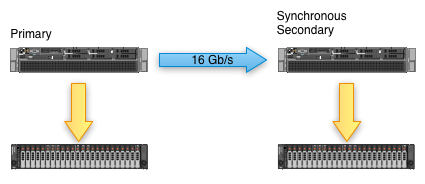
AlwaysOn Availability Group throughput isn't what you think it is.
AlwaysOn Availability Throughput isn’t what you think it is.
For synchronous replicas, every replica must be at least as capable as the the primary. If peak load on the primary is 16 gigabit per second, the synchronous secondaries need to be able to write at least 16 gigabits of data per second. To keep our application moving, and to handle potential spikes, we need to make sure that the secondaries are sized to be able to handle increases in load from the primary server. In short, we’re going to need to make sure that the secondary servers have the same storage as the primary.

Of course, you’re only going to use those secondaries for the same databases as the primaries, right? Nobody would ever want to add another database to one of those secondaries, right? Keeping in mind that we can only have two synchronous secondaries, how much faster can we make our SQL Server for synchronous data?

We can increase read performance, but write performance isn’t going to move.

The Average of its Parts… Over Time

The game changes when we bring asynchronous secondaries into the mix. With synchronous secondaries, all servers in the mix need to have the same write characteristics – if the primary has eight SSDs, the secondaries need to have eight SSDs (or at least the throughput of eight SSDs). When we’re using asynchronous secondaries, the secondaries have to be able to keep up with the primary’s workload on average.

To figure out what kind of hardware we need for the asynchronous secondaries, we need an SLA. Think about it like this: in order to make a hardware decision, we need to know how long our asynchronous secondaries can take to catch up. If we don’t know how far the secondaries can lag behind the primary, then we can’t accurately size the hardware. Conversely, once we have an SLA, we have to size all of the equipment to make sure that the async secondaries can never fall further behind than our SLA. Of course, that SLA is also going to have to include index rebuilds, bulk loads, and other activity that abuses the transaction log.

The Average of its Parts… with a Perfect Network

Assuming a perfect network, this all holds true. Once network congestion comes into play, performance guarantees go out the window.

During the design stage of building out an AlwaysOn Availability Group it’s critical that the network is taken into account as a critical component of the infrastructure. The network must be able to handle the load of multiple secondary nodes – network performance may cause more problems than poor disk performance.

Consider Your Environment in Aggregate

Before planning a SQL Server AlwaysOn Availability Group deployment, consider your environment as a whole. Make sure that you have the bandwidth available to stream regular operations between the primary and replicas as well as to stream under peak load. Remember – adding four additional servers may put considerable load on your network backplane. Also consider that these won’t be physically cheap servers; if you need performance from the primary server, the synchronous and asynchronous secondaries require enough power to meet your performance SLAs. This isn’t an activity for the faint of heart.

If you have an existing application and you want to scale with money, you may be able to get away with an AlwaysOn Availability Group deployment. You’ll be buying multiple servers, multiple SQL Server licenses, and a lot of high end switching equipment, but you’ll only have to change a few connection strings in your application.

If you’re considering scaling out and you’re willing to make code changes, consider Windows Azure SQL Database. In many cases, you’ll be able to scale out using database federations. Through the changes you’re likely to lose flexibility in how you tune T-SQL, perform database maintenance, and work within your schema. The end flexibility may be worth it, but there may be significant code changes to go along with the database changes.

If you’re considering scaling out and you’re willing to consider many options, take a step back and consider your application requirements. Think about the database features your application is using, how those features fit into different databases, and how those features can be spread across different services. There are a lot of distributed databases out there that may meet your requirements and provide better scale out functionality than Windows Azure SQL Database or AlwaysOn Availability Groups.

Learn more in our AlwaysOn Availability Groups resource page.


Trivial Optimization and Missing Indexes in SQL Server

Recently, Jes asked the team an index tuning question: “If a query has an index hint in it, will the optimizer ever suggest a missing index for that query?”

I immediately loved the question because I’d never really thought about it before. I typically think of index hints as being a very risky game and avoid them whenever I can– after all if someone drops the index you’ve hinted, any query hinting a non-existent index will start to fail. (That’s a really bad day!)

Even so, some people love index hints. And some folks inherit code that’s already littered with index hints, and they may not be able to change it. In those cases, are the missing index requests in SQL Server DMVs going to be skewed by all those hints?

Testing missing index requests

There’s a great Books Online page documenting limitations of the missing index feature, but I’m a huge fan of getting my hands dirty and testing these things myself. I powered up a virtual machine with SQL Server 2012 and the AdventureWorks2012 sample database to take a look.

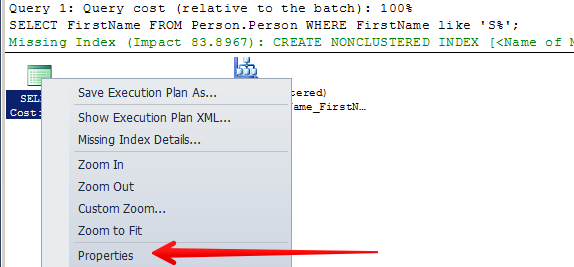
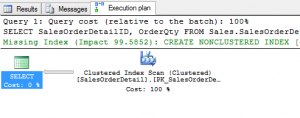
First, I ran a simple query that I knew would generate a missing index request:

Plan1

Sure enough, I got a missing index request. SQL Server scanned an existing nonclustered index to satisfy my query, but pointed out that a new nonclustered index just on the FirstName column would be just perfect for that query.

I wanted to preserve the exact plan it had selected, so I reran the query with an index hint– however I hinted the exact nonclustered index that it had decided to scan anyway:

Plan2

And look at that! No missing index request on that second query. The index hint “broke” the missing index feature. SQL Server didn’t point out that an index just on FirstName would help the query out, even though it was using the exact same execution plan it used before where it DID point out that the plan wasn’t perfect.

Not so fast, index tuner

At this point, I was pretty excited. What an interesting point! I’ve never read about this before. What a delicious geeky snack this is! Then I came back to the real world and thought, “Well, it’s kind of odd that I haven’t read about this. I should look at those published limitations again.”

The Missing Index feature in SQL Server is pretty complicated. There’s a few things that have burned me a couple of times, so I’ve learned to use it pretty carefully. As soon as I looked at the list of limitations, I had a pretty good idea I might have just been fooled.

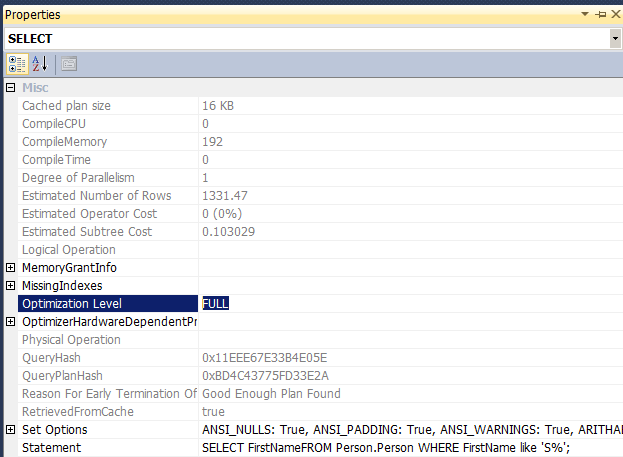
Let’s go back and look at the queries we ran before in a different way. If we take a closer look at the first query’s execution plan (this was the query without an index hint that generated a missing index request), we can see that it received “FULL” optimization:

Plan 1 - Click to see properties

Plan1 Properties Full Opt

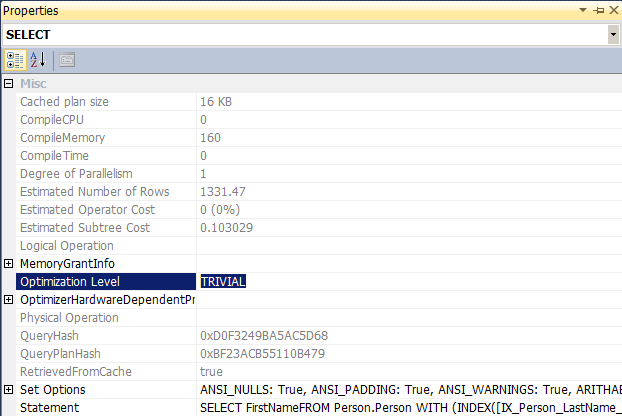
If we do the same thing for the second query (it had an index hint and did NOT generate a missing index warning), we see something different:

Plan2 Properties Trivial Opt

When we added the index hint, we did something subtle: we simplified the process of optimization for SQL Server. We gave it fewer choices– in fact, given the query there was only ONE choice for optimization. Since it only had one choice, it did a “TRIVIAL” optimization, which is more lightweight.

One side effect of trivial optimized plan is that they don’t generate missing index requests. This is one of those documented limitations we talked about earlier.

So in this case, using an index hint didn’t generate a missing index request– but that was a side effect of the change it made to the optimization process.

The second test: A more complex query

To find out if this holds true for queries using full optimization with index hints, I just changed my query up a little bit.

Here’s a little trick: It’s not hard to write a difficult-to-optimize query in AdventureWorks. All you have to do is use one of the built-in views. (Sorry, views, you just often make things messy. It’s just the truth.)

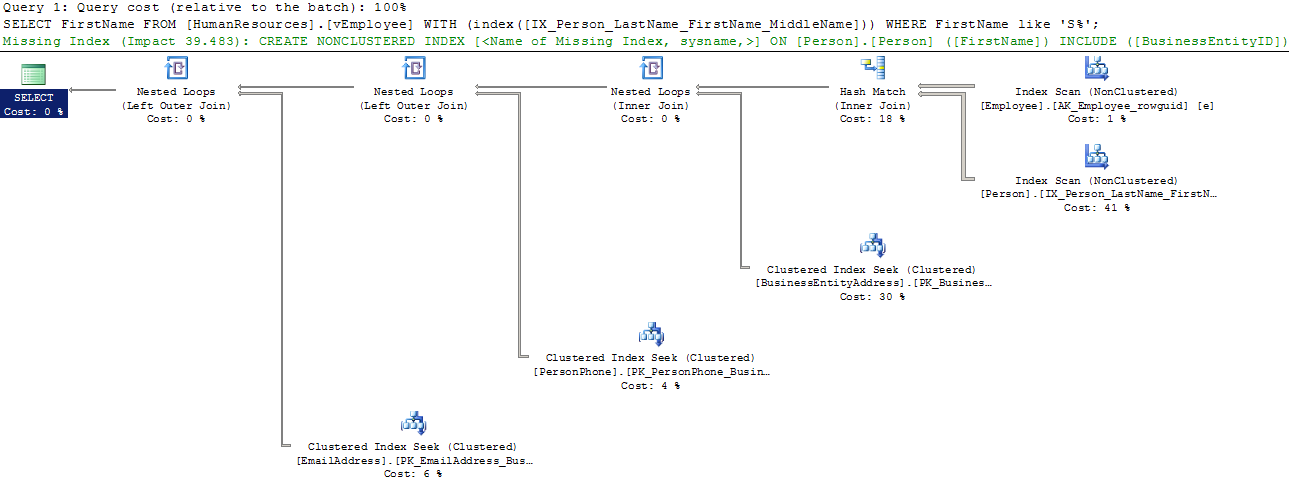
Our new query for testing is:

Plan 3

This query gets “FULL” optimization. And it generates the missing index request for the Person.Person table, even though we’ve used an index hint on that table.

Missing indexes are complicated, index hints are risky

To sum up: using an index hint won’t necessarily prevent you from getting a missing index request. In some cases it may change a query that was getting “FULL” optimization to “TRIVIAL” optimization, in which case the missing index request won’t be generated, but that also holds true for all queries getting “TRIVIAL” optimization. (Plans getting trivial optimization have some other quirks, by the way. One notable one is that they won’t consider indexed views for execution, either.)

The bigger point is that the missing index request feature in SQL Server is very helpful, but it’s not perfect. It gives you some of the “big picture”, broad stroke requests, but it really just gives you a first direction to look in.

In order to tune a workload, you also need to know a lot about your queries that run. You may have super frequently run queries that get a “TRIVIAL” optimization because the queries are simple– whether or not those queries have an index hint. If the queries are run frequently enough it can absolutely be beneficial to tune your indexes for them, even if they never make an appearance in the missing index DMVs.

I really enjoyed looking into this question because it reminded me that all changes can have unexpected side-effects. Maybe a hint makes a query faster today, but who’s to say that it’s the best optimization decision for all time, and what else you may impact along the way?

Learn More in Our Execution Plan Training

Our How to Read Execution Plans Training explains how to get an execution plan, how to read the operators, and learn solutions to common query problems.


SQL Server 2014 Standard Edition Sucks, and It’s All Your Fault [UPDATE]

SQL Server
129 Comments

Every release lately, Microsoft has been turning the screws on Standard Edition users. We get less CPU power, less memory, and few (if any) new features.

According to Microsoft, if you want to use more than $500 worth of memory in your server, you have to step up to Enterprise Edition. Seriously? Standard Edition licensing costs about $2,000 per CPU core, but it can only access 64GB of memory? That’s ridiculous. UPDATE: Thanks to complaints like this, Microsoft has raised the Standard Edition limit to 128GB!

SQL Server 2014 New Features that Aren’t In Standard Edition

Take just a quick glance at the SQL Server 2014 edition feature grid and you might be shocked at what Standard Edition doesn’t allow:

  • Database snapshots (a huge lifesaver when doing deployments)
  • Online reindexing, parallel index operations (wouldn’t you like to use more than one core?)
  • Transparent database encryption (because only enterprises store personally identifiable data or sell stuff online, right?)
  • Auditing (guess only enterprises need compliance)
  • Tons of BI features (because hey, your small business doesn’t have intelligence)
  • Any non-deprecated high availability feature (no AlwaysOn Availability Groups – you get database mirroring, but that’s marked for death)

Will We Get New Pricing and Licensing by the Release Date?

Every now and then, I hear managers and DBAs react with shock about how limited Standard is, and how much Enterprise Edition costs – $7,000 per CPU core.

Sometimes they even say, “That’s ludicrous! If I was Microsoft, there’s no way I would do it that way. And we’ve got really savvy developers – I bet we could even write a database engine that could do most of what we need.”

Okay, big shot. Time to put your money where your mouth is.

The world is full of open source databases that are really good. You’re not the only ones frustrated with what Microsoft’s done to SQL Server licensing, and there’s vibrant developer communities hard at work building and improving database servers.

What’s that, you say? You’re too busy? You’d rather keep paying support on your current SQL Server, and keep working on incremental performance improvements to your code and indexes?

Yep, that’s what I thought.

Microsoft won’t change its tack on SQL Server licensing until you start leaving. Therefore, I need you to stop using SQL Server so they’ll start making it better. You know, for me.

Download the SQL Server 2014 Trial for Free

If you’d like to play with Hekaton, clustered column store indexes, or the other new features in 2014, now’s your chance. You can download the trial edition for free, but just keep in mind that we have absolutely no idea what features will be included in each edition when the release date comes.

If You’re Stuck on Standard Edition, There’s Hope

You can save a ton of money on Standard Edition, but you’re going to have to be smarter about how you use it. You can’t just throw it into production and hope it performs.

Learn how to be a performance-tuning DBA – our free 6-month DBA Training Plan email course teaches you from backups all the way up to future-proofing your SQL Server apps for the newest 2014 features. Subscribe now.

Get trained on SQL Server performance – our training classes and videos teach you real-world tips and tricks to make your server fly.

Our SQL Critical Care® can ease performance pains even faster. In just 3-4 days, we work with you as a team, walking through your server together, showing you the coolest scripts and tools to rapidly diagnose the root cause of slow queries. Learn more about how we can help with Standard Edition pains.


How to Find ‘Secret Columns’ in Nonclustered Indexes

Indexing, sp_BlitzIndex
20 Comments

sp_BlitzIndex® just can’t keep a secret. That’s a feature, not a bug. I wrote sp_BlitzIndex® specifically so that it would rat out some things that SQL Server is doing behind the scenes to secretly help you out– because it’s really better if you know about it.

What are secret columns?

SQL Server needs a unique way to navigate to every row in an index. It also needs to maintain a relationship between every nonclustered index and its base table. In order to accomplish these two tasks, SQL Server always makes sure to add one or more columns to a nonclustered index. If you don’t add the columns yourself, it goes ahead and does it secretly. (“Secret columns” is a term I made up, because a term didn’t exist yet.)

In most cases, people create nonclustered indexes on tables that have clustered indexes. When this happens, SQL Server will make sure that all of the columns from the clustering key of the table are ALSO in the nonclustered index. Exactly how it happens is a little complicated. Here’s a quick summary of the rules involved:

  • If the nonclustered index is NOT unique, SQL Server makes sure that the columns from the clustering key make it unique behind the scenes
  • This is done by promoting the clustered key columns to the key of the nonclustered index (otherwise they can be “included” columns)
  • If the clustered index columns are NOT unique, an additional secret column called a “uniquifier” will have already been added to it– and that sneaks into the nonclustered index too

This made my head spin around the first time I tried to sort it all out. Please don’t try to memorize that!

sp_BlitzIndex® helps make this easier

I never expect anyone to remember this stuff. I built sp_BlitzIndex® so that it would give you the information you need about what’s going on in a specific index without having to memorize a whole lot of rules.

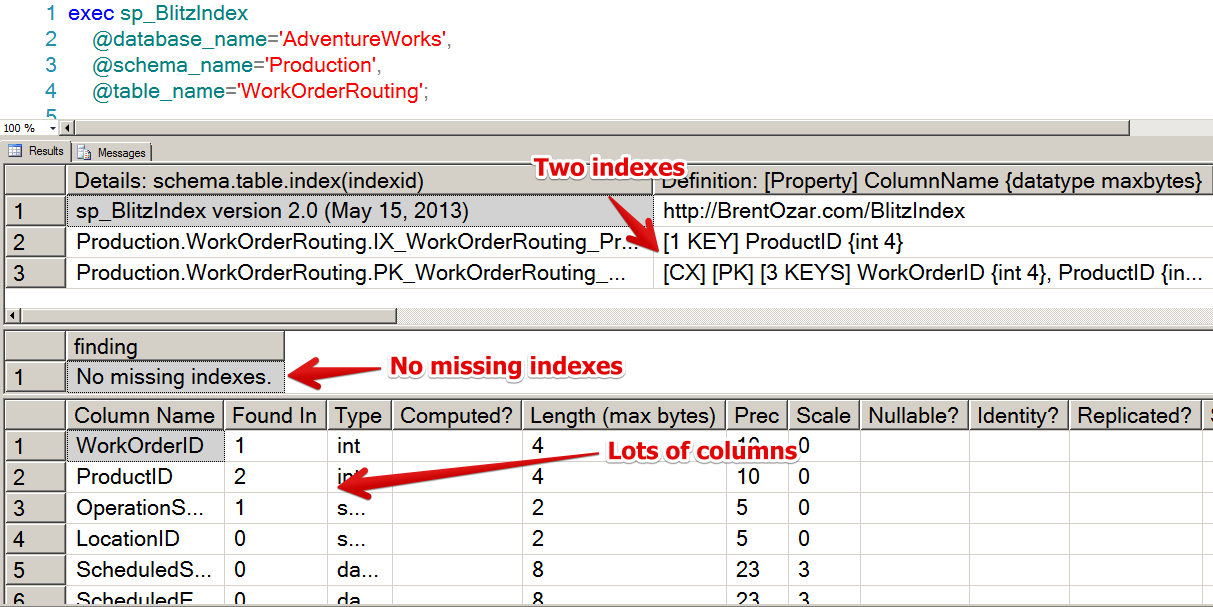
Let’s take a look at a specific example. The AdventureWorks sample database has a table named Production.WorkOrderRouting. We can take a look at the indexes, missing indexes, columns, and foreign keys on this table in sp_BlitzIndex® by running the command:

View of All Indexes

This shows us that the table has two indexes. One of these is the clustered index:

Clustered PK

The definition indicates this with the code “[CX]”. It’s also a Primary Key, indicated by the “[PK]”. Primary keys are always unique in SQL Server, so this is a Clustered PK (which is by definition unique). Because this is the clustered index we know that it will contain EVERY column in the index all of the data. The data is sorted by three key columns: WorkOrderID, ProductID, OperationSequence.

Where are the secret columns?

In this case, the secret columns are all in the nonclustered index. The nonclustered index looks very narrow and simple at first. It has only one key column, ProductID:

Nonclustered Index One Key

Scrolling over, sp_BlitzIndex® claims that things aren’t so simple. There are three secret columns in this nonclustered index, and they have been put in its key:

Secret Columns in the NC

Those are the exact three columns from our clustered index! (WorkOrderID, ProductID, OperationSequence)

Exactly how many columns are in this nonclustered index?

You may have noticed that the ProductID column appears twice in sp_BlitzIndex® for this nonclustered index. It was defined as a key column, but now we’re saying that it’s a secret column as well.

Question: Does that mean the column is stored twice? No, the column is NOT stored twice. The effective definition of this nonclustered index is that it has THREE columns in it (not just one, as the creator might have thought). The columns are in the following order:  ProductID, WorkOrderID, OperationSequence

SQL Server will only ever add columns from the clustering key to an index if you have not specified them in the index. It will never have to store a column twice. I repeat, there is no penalty if you list a column from the clustered index in your nonclustered index. (Yay!)

To determine the columns that will be in an index, look first at the index definition. Then add in the “secret” columns which haven’t already been included.

Why doesn’t sp_BlitzIndex® remove “duplicate” secret columns?

Well, it’s complicated. I made this design choice for a few reasons:

  • I wanted to preserve the definition as the index was created
  • The definition may state a column as an include that is made into a key column by SQL Server secretly. The easiest way to show this is to show both
  • I wanted to show the secret columns on their own so it would be more clear that they will stay in the nonclustered index even if you remove them from the stated definition

A more complex example

Maybe you’re not sure if I’m telling the truth about these secret columns. The good news is, I can prove it. First, let’s look at a more complex example.

We’re sticking with the Production.WorkOrderRouting table. What happens if we add a more complex nonclustered index? This new nonclustered index has two different columns from the clustering key — one as a key column, and one as an included column. I create the new nonclustered index with this command:

sp_BlitzIndex® shows that the new index is assigned IndexID=4 for the table.

New Index - Index ID 4

Definition: [3 KEYS] PlannedCost, ProductID, ActualCost
[2 INCLUDES] ActualEndDate, OperationSequence
Secret Columns: [3 KEYS] WorkOrderID, ProductID, OperationSequence

There’s some overlap here. To interpret this, we know:

  • The key columns in the user definition will be present in the order specified
  • Secret columns are being added to the key of the nonclustered index in this case. So any secret column that was listed as an “included” column of the user definition will be promoted by SQL Server.

Based on the rules, the functional definition of this index is:

5 Keys = PlannedCost, ProductID, ActualCost, WorkOrderID, OperationSequence
1 Include = ActualEndDate

We effectively had WorkOrderID added to the key (it wasn’t listed), and OperationSequence promoted to the key from the include.

Let’s prove it!

To prove it we’re going to use a handy new DMV in SQL Server 2012 and the built in DBCC PAGE command.

These are both undocumented tools. Please do not run this in production. Seriously, I’m not kidding. There are bugs with this stuff sometimes, OK? Why risk it? This is suitable for AdventureWorks on a test instance far from production, your boss, and your resume.

First, I’m going to find a single page from the leaf level of this new nonclustered index. I love the new sys.dm_db_database_page_allocations DMV because it makes this super easy, as long as I know that my new index has ID=4 (I got that from sp_BlitzIndex® earlier):

PageID

Next, I have SQL Server dump the contents of that index page to my screen. I do that by using this (not officially documented) commands:

And VOILA! I get back a dump of all sorts of information about what’s on that single page of data– including exactly what’s being used as key and includes for that index!

Verified list of columns in the index

Were we right?

Sure enough we can validate our theory. The “secret columns” put a new column in our key and promoted one column from the include.

The good news is the order of the keys we specified was preserved, and no column had to be stored twice. That’s awesome!

The bad news is that SQL Server didn’t tell us about this on our own. We had to use a special tool to figure it out. And while this is somewhat of a party trick, it’s probably not something you can trot out to fascinate the crowd at your next family reunion.

Frequently asked questions

I’m overwhelmed! What if I don’t get this? Breathe deep, I promise it’s OK. If you’re just getting started, that’s understandable. Just remember that the columns in “secret columns” will be added to the nonclustered index if they aren’t already there. That’s all you really need to get going.

Is it good to have all those columns in the clustering key? Not necessarily. You want the clustering key to be narrow– having a lot of columns or even a few large columns in it can clearly bloat all your indexes on the table and cause lots of problems. Before you get too comfy, remember it’s not always bad to have more than one narrow column in a clustering key, particularly if they create a unique, static key that is useful for range queries and has a healthy write pattern.

Isn’t it actually more complicated than this?

Isn’t this complicated enough? Sure, “Row Identifiers” (“RIDs”) come into play for heaps and there’s those pesky “uniquifiers”. That’s a bit much to explain in one post. (If they impact you, sp_BlitzIndex® will show you those, too.)

How do I get sp_BlitzIndex®? Download sp_BlitzIndex® here.


Many Masters, One Truth

As businesses grow, many teams start considering scale out database solutions but they’re cautious – they want to know how to keep data up to date in multiple places. In theory, you can use log shipping, mirroring, or AlwaysOn Availability groups. While this answers the literal question, what people really mean is usually very different. The people who ask this question aren’t typically concerned about creating a read-only replica of Site A over at Site B, they’re interested in being able to write data anywhere and read data back from anywhere. They want a database that lets them read or write data on any server transparently.

SQL Server Bi-Directional Transactional Replication

First, this has more syllables than any feature has a right to have. Second, this feature is limited to two servers. It’s relatively simple and seems like a good enough option, especially since it’s really just two transactional replicas that point at each other. The downsides of SQL Server Bidirectional Transactional Replication are that:

  • The feature uses too many syllables.
  • Only two servers can be involved.
  • Schema changes are necessary – IDENTITY columns won’t work like you think.
  • Did I mention that only two servers can be involved?
You heard the sign: merge!

SQL Server Merge Replication

This is largely used in server to client environments. You have a SQL Server Express database on field laptops and those laptops are synchronized infrequently. Merge replication has the advantage of smarter conflict resolution than other SQL Server replication options (which typically explode and stop working). Merge replication topology assumes that there’s still only one master server, even though writes can be synchronized in both directions. So, yes, in theory this could work, but data modifications won’t be replicated immediately and a large set of changes could make a merge activity take a long time. In summation – merge replication probably won’t meet your needs because:

  • Relies on a single master server.
  • Replication is typically batched, not continuous.
  • Master failover happens outside of replication.

Yes, I understand that merge replication can be run continuously. Search StackOverflow for merge replication questions and you’ll see what I mean.

SQL Server Peer to Peer Replication

In the SQL Server world, we only have one option for having multiple masters: SQL Server peer to peer replication (okay, there’s a second if you count merge replication). We’ve talked about peer to peer replication before in terms of conflict resolution, managing availability, and as a scale out solution. If you’re interested in how SQL Server peer to peer replication might work for you, feel free to check out those articles. If you’re a bit lazy, here’s the 30,000 foot overview:

  • It’s complicated.
  • It’s expensive (Enterprise Edition and schema changes are required).
  • It probably won’t solve your problem.
  • Every node has to be able to handle the write load of all nodes.

What Other Options Are There?

While it’s possible to use SQL Server, it’s always good to consider other options – especially since you need to change your data model to support peer to peer replication. If not SQL Server, what else is there?

Although implementing multi-datacenter seems like a difficult task, it’s already possible, just so long as you’re willing to make some changes. If you’re willing to consider changing your schema, what about the possibility of changing your underlying data storage system?

Before closing this browser window, hear me out.

The features of a software product are what drive the technologies used for implementation. When you need to implement a highly available SQL Server you choose between a few different options based a set of requirements. Why shouldn’t that decision extend to the database itself?

strech_gull

Stretch that Database

Different databases have different capabilities. Databases like Cassandra, HBase, and Riak offer different levels of multi-server and multi-site durability.

HBase offers strong consistency – data is written to multiple servers synchronously, just like SQL Server AlwaysOn Availability Groups using synchronous replicas. Using HBase gives you great single site durability – every write sent to the database server is committed to disk before the client receives a write acknowledgment. There’s no eventual consistency to worry about; HBase is strongly consistent within one datacenter.

If you want disaster recovery for an HBase cluster, you need to deploy HBase replication. HBase replication works by pushing entire log edits through a replication queue – this maintains atomicity for all HBase transactions. Since HBase’s replication operates at a column family level (think of a column family as roughly analogous to an RDBMS table), replication can be configured on a column family by column family basis. HBase replication can’t be used for a multi-master scenario across multiple datacenters, but it can be used to provide an asynchronous disaster recovery scenario.

Cassandra does things a little bit differently. Both HBase and Cassandra derive their data model from Google’s BigTable, but Cassandra differs in how data is moved around. Cassandra is loosely based on Amazon Dynamo – this lets the person using the database decide on the consistency of a write. This choice is one of the primary reasons for teams to choose Cassandra; different features of applications can read and write data at different consistency levels depending on feature requirements instead of platform choice.

Cassandra’s eventual consistency and data replication implementation make Cassandra an excellent choice for designing multi-datacenter applications. Within a Cassandra cluster, it’s possible to configure data replication to be rack and datacenter aware – the database will handle sending writes to other datacenters. Writes can even happen in other data centers and, because of Cassandra’s masterless architecture, those writes will eventually be replicated throughout the database cluster. The gotcha is that the last writer will win, so it’s important that applications be designed to take this into account.

Riak brings something a bit different to the table. Riak is a key/value database that shares a bit in common with Cassandra – they’re both based on Amazon Dynamo. Just like Cassandra, Riak offers tunable consistency levels for reads and writes that give developers the ability to change data access based on application functionality. Riak Enterprise is an add on for Riak that provides datacenter awareness and multiple options for data replication.

Riak has a robust conflict resolution system – although Riak can be configured for last write wins, Riak’s strength comes from the option to create a sibling in the event of a write conflict. A Sibling is just a conflicting copy of the data stored in the database. Siblings become valuable when you need to write data to multiple datacenters without routing writes; instead of routing writes for data ‘A’ to a specific datacenter, users can be directed to the closest datacenter. When data is read, conflicts can be resolved and the correct version of the data is saved back to the database.

The Verdict

It’s difficult to come up with a definitive verdict. Each solution has merit. If writes need to happen anywhere and eventually synchronize across all databases in all datacenters, Riak’s support for siblings and sibling resolution is compelling. Cassandra has compelling developer tooling and a rich suite of drivers. HBase has strong consistency within the same datacenter.

Why Care?

Feature requirements mean that sometimes you need to be able to write your data to one of multiple servers in multiple datacenters. Getting the job done with SQL Server is going to be expensive, difficult, and time consuming. Ultimately, it’s worth looking at other database options to determine if you need to stay with SQL Server or if your data storage can be moved to another platform. Remember – it’s the application requirements that dictate the database platform, not the database platform that dictates application features.


CorrugatedIron 1.4

We’re happy to announce that we’ve released CorrugatedIron 1.4.0. This release contains a large number of bug fixes, new features, and enhancements. That’s right, brand new Riak and .NET straight to you! Get it while it’s hot or keep reading for more details.

Riak 1.4 Support

CorrugatedIron 1.4.0 brings Riak 1.4.0 feature support including:

  • Index pagination & continuations
  • Counters
  • Returning index terms with keys
  • Better streaming support (now supported by Riak!)
  • Query timeout support
  • Resetting bucket properties

These new features make it even easier for developers to create rich, full featured applications with Riak and .NET.

CorrugatedIron maintains backwards compatibility with Riak 1.3. Although a large amount of functionality has changed with Riak 1.4, we still allow clients to communicate with the previous version of Riak. In most cases, no code will need to change. Wherever possible, we’ve made sure to let you know in comments or via warnings that code is Riak 1.4 only. Admittedly, you should be able to figure that out – the API is new and you aren’t using it yet.

Other Enhancements

While we were building support for new Riak 1.4 features, we found a number of places to smooth out the API. We’ve added fluent setters for a number of properties, removed methods marked for deletion, stopped you from storing nulls in indices (thanks to evanmcc for helping with that one), and host of other syntactic consistency issues.

CorrugatedIron should be much more consistent across the entire API. I’m sure there are more places for us to iron out issues, but we’re aiming to keep improving the API. Speaking of which, there’s now XML documentation for the vast majority of public methods and objects. Within the next few releases, we’ll continue to add additional documentation to the public facing classes so that your IntelliSense is even more useful.

Oh, and all of our unit and integration tests pass.

Get it now!

You can download via Nuget or build from source.

What’s Next?

A lot!

We’re going to be revamping connection pooling to remove an idle connection issue and provide additional flexibility and concurrency options. All progress will be tracked in milestone 1.4.1.

This also marks our first attempt at locking major and minor version with Riak – throughout the development of Riak 1.4, we’ll keep our major and minor version pegged alongside Riak’s. As Riak development shifts to the next release, so will we. This should make it easier to track which Riak features and functionality are supported by CorrugatedIron.


You Need This One Skill to Succeed in IT

Consulting
18 Comments

The ability to program in five languages, including one machine-level? Not it.

Project management skills, up to and including a PMP certification? Not that either.

Excellent oral and written communication skills, as noted on every job description ever? That doesn’t hurt, but can be learned.

All of the best IT professionals I have worked with have excellent problem solving skills.

That’s it.

We face problems in IT on a regular basis. From the help desk technicians who are asked, “Why am I locked out of my computer?” to the SAN administrators who have to balance the needs of different servers and workloads to the DBA who is asked, “Why is the server so slow?” we are all given problems to solve.

How we go about solving those problems is what sets the great professionals apart from the good or the average.

Problem Solving Methodology

In high school, I was introduced to the scientific method. The process is:

Does this remind you of your server room?
  1. Formulate a question.
  2. Make a hypothesis.
  3. Make a prediction.
  4. Test the hypothesis. Measurements are emphasized.
  5. Analyze the results.

Can this be applied to your problems? Yes, it can.

Formulate a question – usually, the question is asked of you. “Why is the server slow?” “Why can’t I connect to the database?” “Why is this report execution timing out?”

Make a hypothesis – perhaps a patch was installed on the server or SQL Server the night before. Maybe a network cable could have been unplugged. Maybe a developer changed a line of code in the stored procedure. Make a list of what could affect the system in question, so you have items to test.

Make a prediction – take a guess at what your results will be. If this is an error or problem you’ve encountered before, you’ll probably have a good idea of what to expect. If it’s a new problem, use your past experiences and deductive skills to determine what changes you make will do to the system.

Test the hypothesis – make a plan, make a change, and check if the problem is solved. Don’t make three changes and wonder which one fixed it – fix one at a time. Know what success looks like. If a query is slow, know what performance was before the problem occurred, what performance is when the problem is happening, and what acceptable performance looks like. Metrics are important here. You must be able to measure if things improved, stayed the same, or got worse.

Analyze the results – check those metrics. Did you get the results you expected? If so, is the problem resolved? If not, what is the next item on your list to check? Continue to iterate through your list until the problem is solved.

Anyone Can Do This

It doesn’t require a PhD in computer science. It doesn’t require a master’s degree in chemistry. What it does take is a consistent approach to problems every time. It takes curiosity and an ability to see patterns.

With practice, this becomes much easier. Practice your problem-solving skills often. They will make you a great IT professional, and set you apart from the rest of the crowd.


Will Instant File Initialization Really Help My Databases?

SQL Server
25 Comments

Do you want to make your database server faster?

If you answered no, you can go back to manually checking that all of last night’s backups succeeded.

If you answered yes, think about all the ways you can do this. From proper database design to the right hardware for your workload to proper indexes, you have many options. One step is to make sure that when your database needs to grow – whether a data file needs to expand, more files are added, or the database is restored – the growth happens quickly.

This can be accomplished by adjusting a security policy at the Windows Server level – Perform volume maintenance tasks. Giving your SQL Server service account rights to this policy allows it to take advantage of instant file initialization (IFI).

Normally, when you need to grow a file, the space to be used will be overwritten with zeros. Depending on how large your file needs to be, this can take some time. With rights to use IFI, SQL Server skips that step – the space is claimed on disk, and the stuff on disk is overwritten as needed.

It makes database growth faster.

Prove it

I have a SQL Server instance that is using SQL1 as the service account. This account is not a local administrator, nor is it a domain administrator. (Safety first!)

SQL service account

I open secpol.msc, go to my Local Policies and check User Rights Assignment. Only Administrators have permission to Perform volume maintenance tasks.

secpol

Now I’m going to create a database. How long does it take to create a file?

Statistics Time tells me:

SQL Server Execution Times:

CPU time = 15 ms,  elapsed time = 4665 ms.

Now I go to Local Security Policy and add SQL1 to Perform volume maintenance tasks, and restart the SQL Server service.

I create a second database.

What does Statistics Time give me here?

SQL Server Execution Times:

CPU time = 15 ms,  elapsed time = 659 ms.

I created two databases on the same server, the same hard drive, with the same file sizes. With IFI turned on, the database was created in 14% of the time. And that’s just with a 1,000 MB file! Imagine the time savings as your database scales up.

Like Growth Hormones, Without the Facial Hair

This is one of the fundamental steps I always have on a SQL Server database server setup checklist. If you’re not using this option yet, add it to yours!


On Bobcats per 100 Orders and Other Spurious Metrics

SQL Server
6 Comments

Did you know that you can ship a bobcat 1/30th of the time and still maintain 97% positive feedback on ebay?

What other statistical lies are lurking out there for you to find?

Cache Hit Ratio

You’re tracking your SQL Server’s cache hit ratio. That number is consistently 97-99%, surely that means you don’t need more memory, right?

Consider this: 256GB of RAM is relatively cheap. In order to move the needle from 99% to 98% on the buffer cache hit ratio you’d need nearly 2.56GB of data to not be in memory when SQL Server asks for it. Unfortunately for our monitoring, SQL Server’s read ahead mechanisms will pull data into cache during regular I/O. As long as your disks can keep up, the buffer cache hit ratio is going to stay high.

If you’re looking for a different metric, remember that it’s more important to measure disk responsiveness.

Speaking of disks…

Disk Queue Length

Once upon a time, in the dark ages of 4200RPM hard drives, there was advice given that servers with a sustained disk queue length greater than 2 per physical disk drive were under I/O pressure. This metric has continued to persist into the present day even though the world has moved on.

Modern disk drives have large caches built into the drives – consumer grade drives have 32-64MB caches on them. When you take into account RAID controllers, HBAs, and modern SANs, there can be a huge cache in place to buffer writes to disks. These same caches, plus the SQL Server buffer pool, can also be configured to cache reads.

More useful counters to measure are disk latency numbers – either Avg Disk sec/Read and Avg Disk sec/Write from perfmon or take a look in the sys.dm_io_virtual_file_stats. Definitions of acceptable latencies vary from application to application but, in general, you can reasonably expect reads to be under 100ms and writes to be under 30ms.

Shovels per beach has dropped to 1!

Page Life Expectancy

“But, I know deep down that page life expectancy should always be higher than 300!” — said every DBA, ever.

Not so fast there, sparky. Page life expectancy, as measured by SQL Server, is an average of the page life expectancy for each NUMA node. Without getting too much into hardware configurations, you’ve got a separate measure of page life expectancy per NUMA node. On a four socket system, you could have a page life expectancy of 4,000 on one NUMA node and a page life expectancy of 0 on the other three, which still averages out to a page life expectancy of 1,000.

While there are a variety of formulas to calculate an effective page life expectancy metric, it’s even more important to know what you’re measuring and why. If you’re worried about the page life expectancy dropping during index maintenance, you’re probably worried about the wrong thing. But if you’re worried about page life expectancy during OLTP or during reporting, then you’re worrying about the right thing.

Page splits

From time to time, people get so focused on tracking index fragmentation, that they start tracking page splits – it’s right there in the Page Splits/sec perfmon counter, after all. The thought behind tracking page splits is that you, as the DBA, will be able to figure out when those pesky page splits are occurring that lead to index fragmentation. By having accurate monitoring, you can figure out a better way to keep your indexes ship shape. The problem with tracking page splits is that while you’re tracking something, you’re not tracking something with meaning.

It isn’t possible to derive meaning from the Page Splits/sec counter – this number doesn’t just include all so-called bad splits – inserts in the middle of an index, this also includes good page splits.

Good page splits? A good page split occurs when new pages are allocated at the end of a table or index. These new page allocations count as page splits. Measuring page splits… well, it just measures new pages being added to the table, regardless of location.

There’s no easy metric for tracking fragmentation rates, but you shouldn’t be worrying about it too much.

Measuring user connections in the Ozar family data center.

User Connections

Most people don’t think about it, but you can track the number of users connected to SQL Server. This has an incredibly loose relationship to the maximum number of worker threads – queries use threads and users run queries, right?

Unfortunately, this is another one of those numbers that doesn’t mean a lot on its own. Modern database clients use connection pools to keep persistent connections open to the database – it’s computationally cheaper to be lazy and keep a network connection open for a long time. In the .NET world, every different connection string has a separate connection pool. Each connection pool can have up to 100 connections to SQL Server. Most of those connections are going to be sitting around doing nothing until they’re killed off by the connection pool itself.

In extreme cases a high number of active user connections (each with a lot of active threads) can lead to THREADPOOL waits. THREADPOOL waits, despite sounding marginally cool, are a terrible situation where SQL Server has run out of threads to hand out to users trying to do work.

Having a high number of user connections can be an indicator that something might be amiss, but it’s not concrete enough to raise a warning on – we can’t gather enough information with this metric.

Measure It!

You only get what you measure – by recording spurious metrics, you’ll end up with a misinformed, and potentially wrong, view of performance.

While good metrics depend on your application, there’s something you can immediately do: only monitor something that can produce actionable information. Don’t add more spam to your inbox, stop watching bogus metrics and start watching for the things that make a difference to your application performance.


The Elephant and the Mouse, or, Parameter Sniffing in SQL Server

Development
92 Comments

Imagine you work for a zoo, and you need to ship an animal to another zoo. If you are told one will be a mouse and one will be an elephant, you will need to handle them differently. The Detroit Zoo used a moving van to move two elephants, while mice can be put in a box and driven or flown.

Something Smells Funny

And it’s not the elephant. SQL Server uses a process called parameter sniffing when it executes stored procedures that have – you guessed it – parameters. When the procedure is compiled or recompiled, the value passed into the parameter is evaluated and used to create an execution plan. That value is then stored with the execution plan in the plan cache. On subsequent executions, that same value – and same plan – is used.

This is a normal, expected behavior in SQL Server. Because compiling queries is expensive, you want plans stored in the cache. You want SQL Server to re-use them as much as possible.

But what happens when the values in a table you’re querying aren’t evenly distributed? What if one value would return 10 rows and another value would return 10,000 rows, or 10 million rows? I call this the elephant and the mouse problem. You would handle one animal differently than the other; SQL Server might create different plans for the queries. But it doesn’t, because you’re using parameters. elephant

What will happen is that the first time the procedure is run and the plan is compiled, whatever value is passed in is stored with the plan. Every time it’s executed, until it’s recompiled, the same value and plan will be used – regardless of whether it is the fastest or best plan for that value. If this is happening to you, and causing performance problems, there are ways to deal with it.

Parameter Sniffing in Action

I’m going to run a few queries to show you this behavior. I’ll be using AdventureWorks2012 on a SQL Server 2012 instance.

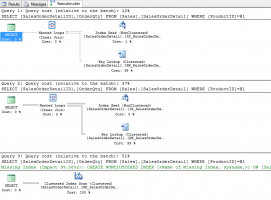
I’m going to query the Sales.SalesOrderDetail table. I want to know the order numbers and quantity ordered for specific products. My first set of queries will use literal values in the WHERE clause. When using literal values, SQL Server will compile each separately, and store a separate execution plan for each.

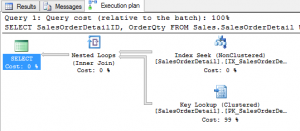
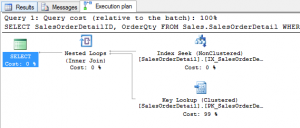
The same query was run three times. The queries returned 2, 257, and 4,688 rows, respectively. Two different execution plans have been created, even though the query remained the same!

Elephant Mouse 1

At some point, the optimizer decided it was faster to do a clustered index scan, instead of a nonclustered index seek and a key lookup.

How does this behave when parameterized? I create a stored procedure to test this.

I’m going to execute this stored procedure for the first time with the “elephant” – product ID 870, which returns 4,688 rows.

The data is retrieved through a clustered index scan once again.

Elephant Mouse 2

Now, I’ll execute this stored procedure with the “mouse” – product ID 897, which returns 2 rows.

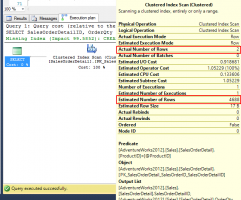
This time, instead of using a nonclustered index seek and a key lookup, the values are retrieved with a clustered index scan. Also note that the estimated number of rows and actual number of rows are very different!

Elephant Mouse 3

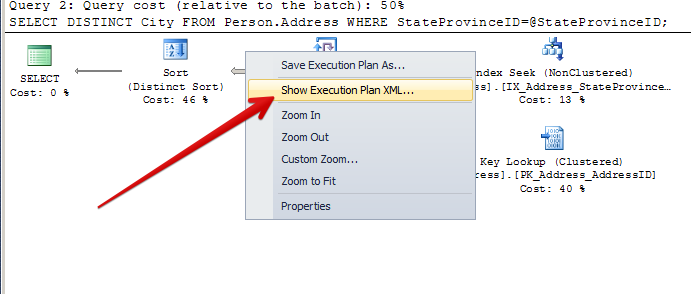
What happened? This is parameter sniffing in action. One value is stored in the execution plan, and that is used to create the plan, regardless of what value is passed in. I can verify this by right-clicking the execution plan and selecting “Show Execution Plan XML”. In the XML, I search for “ParameterCompiledValue”. I find the following line.

Elephant Mouse 4

The compiled value is 870. Until the stored procedure is recompiled, this is the value that will be used.

Is This Bad?

The real question is, “Is this bad?” It isn’t – until it is. Depending on the query and the data, each execution of this query may return the results in an acceptable amount of time. It is only when query performance reaches an unacceptable threshold that you may need to do something to prevent it from happening.

When Parameter Sniffing Stinks

When parameter sniffing is negatively affecting a stored procedure, what can you do to fix it?

The first option is to do nothing. You can explain the behavior of SQL Server to your end users. They might even listen! But they won’t be happy. They need their data, and they need it faster.

Other options you have are to recompile the stored procedure each time, use a query hint to produce a good enough plan, or do some creative coding. None of these are perfect options – they all have drawbacks. Understand the benefits and drawbacks of each option. Test the variations carefully in a development environment. The last thing you want to do is make the problem worse!

Recompiling

You can force SQL Server to recompile the stored procedure each time it is run. The benefit here is that the best query plan will be created each time it is run. However, recompiling is a CPU-intensive operation. This may not be an ideal solution for stored procedures that are run frequently, or on a server that is constrained by CPU resources already. Another thing to remember is that the plans won’t be stored in the cache, which makes them harder to find if they are problematic.

To show this, I’m going to alter my stored procedure to include the WITH RECOMPILE statement.

What plan will executing this with the “elephant” – product ID 870 – produce?

Elephant Mouse 5

A clustered index scan has been performed.

What plan will executing this with the “mouse” – product ID 897 – produce?

Elephant Mouse 7

The nonclustered index seek and key lookup are being performed, as expected. This is happening because WITH RECOMPILE tells SQL Server, “Don’t store a plan in cache for me. I’m smart enough to figure this out on my own each time.” Remember, the cost of this is increased CPU usage each time the stored procedure is run.

Query Hinting

Another option is to use the OPTIMIZE FOR query hint. This tells SQL Server to use a specified value when compiling the plan. If, through testing, you can find a value that produces a “good enough” plan each time, and the performance is acceptable for both mice and elephants, this is a good option for you.

However, understand that you are bossing the query optimizer around. You are telling it what you think is best. The biggest drawback with OPTIMIZE FOR is on tables where the distribution of data changes. The faster it changes, the more out of date this hint could become. What if the value you provide is not optimal in a month, or a year? You need to have a method in place to regularly review and revise this.

I know that using product ID 945 produces a “good enough” plan for this query, so I alter the procedure to include the OPTIMIZE FOR query hint.

What plan will the “elephant” – product ID 870 – produce?

Elephant Mouse 7

A nonclustered index seek and key lookup has been performed. Viewing the XML shows us that the compiled value is 945.

The “mouse” – product ID 897 – has the same execution plan.

Elephant Mouse 9

Be Creative

Another option may be to create separate stored procedures for each value, or at least for those values you know will produce a specific execution plan. I’m not going to show this. Why? Because it’s ugly, it’s cumbersome, and I don’t recommend it. Who wants to maintain multiple stored procedures, when you can maintain one? What do you do when the distribution of data changes? How do you make the logic clear and easily understood?

When Parameter Sniffing Stinks

Understand that parameter sniffing is not a bad thing – it is an integral part of SQL Server. The data in your tables and your queries can lead to parameter sniffing not making sense, however. Understanding how to identify if it is a problem and knowing various ways to fix it when it is a problem are valuable skills to have. When parameter sniffing stinks, test methods to correct it and determine the best way to freshen the air in the server.

Watch Brent Explain It

From the session at SQLDay Poland:

Learn More in Our Mastering Query Tuning Class

We explain how execution plans are built, cached, rebuilt, and how to fix ’em when they go wrong.


New DMVs in SQL Server 2014 CTP1

SQL Server
27 Comments

SQL-Server-2014-CTP1When you download and start playing with SQL Server 2014 CTP1, here’s a few of the new instrumentation tables and views:
New Internal Tables

  • plan_persist_context_settings
  • plan_persist_plan – Hey, lookie there! Implies that we can persist execution plans beyond a SQL Server service restart.
  • plan_persist_query
  • plan_persist_query_text
  • plan_persist_runtime_stats
  • plan_persist_runtime_stats_interval

New Views

  • column_store_row_groups
  • dm_db_merge_requests
  • dm_db_xtp_checkpoint – Note that both the DMVs and the SSMS UI imply that Hekaton will be called Extreme Transaction Processing.
  • dm_db_xtp_checkpoint_files
  • dm_db_xtp_gc_cycle_stats
  • dm_db_xtp_hash_index_stats
  • dm_db_xtp_index_stats
  • dm_db_xtp_memory_consumers
  • dm_db_xtp_object_stats
  • dm_db_xtp_table_memory_stats
  • dm_db_xtp_transactions
  • dm_io_cluster_shared_volumes – Management data about the new Cluster Shared Volumes (CSV) support for clusters.
  • dm_os_buffer_pool_extension_configuration – Management data about buffer pool extensions, storing the buffer pool on SSD. You can read more about that in my Almost Everything You Need to Know About SQL Server 2014 post.
  • dm_resource_governor_resource_pool_volumes
  • dm_xe_database_session_event_actions
  • dm_xe_database_session_events
  • dm_xe_database_session_object_columns
  • dm_xe_database_session_targets
  • dm_xe_database_sessions
  • dm_xtp_consumer_memory_usage
  • dm_xtp_gc_queue_stats
  • dm_xtp_gc_stats
  • dm_xtp_memory_stats
  • dm_xtp_system_memory_consumers
  • dm_xtp_threads
  • dm_xtp_transaction_recent_rows
  • dm_xtp_transaction_stats
  • event_session_actions
  • event_session_events
  • event_session_fields
  • event_session_targets
  • event_sessions
  • hash_indexes
  • selective_xml_index_namespaces
  • selective_xml_index_paths

New Functions

  • fn_dblog_xtp
  • fn_dump_dblog_xtp
  • fn_hadr_is_primary_replica – Makes it much easier to identify when you’re running T-SQL on the primary replica in an AlwaysOn Availability Group. Right now I have to jump through some hoops to do this, so yay!

NEW FUNCTIONS IN USER DATABASES/MSDB

  • fn_sysdac_get_currentusername
  • fn_sysdac_get_username
  • fn_sysdac_is_currentuser_sa
  • fn_sysdac_is_login_creator

New Stored Procedures IN MASTER

  • sp_cci_tuple_mover
  • sp_db_ebcdic277_2
  • sp_db_enable_clustered_columnstores
  • sp_db_selective_xml_index
  • sp_MSgetgenstatus4rows
  • sp_xtp_merge_checkpoint_files
  • sp_set_cardinality_estimation_model_110 – This one’s only in the user databases, not master. It would imply that there’s a new cardinality estimation model. (Never exactly clear on what I’m allowed to say due to NDAs, so…I’ll just leave that there.

New Fields in Existing Views

  • all_parameters – new field: is_nullable
  • all_sql_modules – new field: uses_native_compilation
  • availability_databases_cluster – new field: truncation_lsn
  • databases – new field: containment_desc
  • databases – new field: target_recovery_time_in_seconds
  • dm_exec_query_stats – new field: statement_sql_handle
  • dm_exec_query_stats – new field: statement_context_id
  • dm_exec_requests – new field: statement_sql_handle
  • dm_exec_requests – new field: statement_context_id
  • dm_hadr_database_replica_states – new field: low_water_mark_for_ghosts
  • dm_io_pending_io_requests – new field: io_handle_path
  • dm_logpool_stats – new field: total_pages
  • dm_logpool_stats – new field: private_pages
  • dm_os_buffer_descriptors – new field: is_in_bpool_extension
  • dm_os_memory_cache_entries – new field: time_to_generate
  • dm_os_memory_cache_entries – new field: use_count
  • dm_os_memory_cache_entries – new field: average_time_between_uses
  • dm_os_memory_cache_entries – new field: time_since_last_use
  • dm_os_memory_cache_entries – new field: probability_of_reuse
  • dm_os_memory_cache_entries – new field: value
  • dm_os_worker_local_storage – new field: filestream_address
  • dm_os_worker_local_storage – new field: qe_cc_address
  • dm_os_worker_local_storage – new field: xtp_address
  • dm_resource_governor_configuration – new field: max_outstanding_io_per_volume
  • dm_resource_governor_resource_pools – new field: min_iops_per_volume
  • dm_resource_governor_resource_pools – new field: max_iops_per_volume
  • dm_resource_governor_resource_pools – new field: read_io_queued_total
  • dm_resource_governor_resource_pools – new field: read_io_issued_total
  • dm_resource_governor_resource_pools – new field: read_io_completed_total
  • dm_resource_governor_resource_pools – new field: read_io_throttled_total
  • dm_resource_governor_resource_pools – new field: read_bytes_total
  • dm_resource_governor_resource_pools – new field: read_io_stall_total_ms
  • dm_resource_governor_resource_pools – new field: read_io_stall_queued_ms
  • dm_resource_governor_resource_pools – new field: write_io_queued_total
  • dm_resource_governor_resource_pools – new field: write_io_issued_total
  • dm_resource_governor_resource_pools – new field: write_io_completed_total
  • dm_resource_governor_resource_pools – new field: write_io_throttled_total
  • dm_resource_governor_resource_pools – new field: write_bytes_total
  • dm_resource_governor_resource_pools – new field: write_io_stall_total_ms
  • dm_resource_governor_resource_pools – new field: write_io_stall_queued_ms
  • dm_resource_governor_resource_pools – new field: io_issue_violations_total
  • dm_resource_governor_resource_pools – new field: io_issue_delay_total_ms
  • dm_xe_sessions – new field: session_source
  • master_files – new field: credential_id
  • parameters – new field: is_nullable
  • resource_governor_resource_pools – new field: min_iops_per_volume
  • resource_governor_resource_pools – new field: max_iops_per_volume
  • sql_modules – new field: uses_native_compilation
  • system_parameters – new field: is_nullable
  • system_sql_modules – new field: uses_native_compilation
  • table_types – new field: is_memory_optimized
  • tables – new field: is_memory_optimized
  • tables – new field: durability
  • tables – new field: durability_desc
  • xml_indexes – new field: xml_index_type
  • xml_indexes – new field: xml_index_type_description
  • xml_indexes – new field: path_id

New Fields in Existing Functions

  • dm_exec_cursors – new field: statement_sql_handle
  • dm_exec_cursors – new field: statement_context_id
  • dm_logpool_consumers – new field: log_consumer_ref_counter
  • fn_dblog – new field: Log Record
  • fn_dump_dblog – new field: Log Record
  • fn_get_audit_file – new field: audit_schema_version
  • fn_get_audit_file – new field: sequence_group_id

Optimize for… Mediocre?

Some query hints sound too good to be true. And, unfortunately, usually they aren’t quite as magical as they might seem.

Frustration with unpredictable execution times

People often learn about parameter sniffing when query execution times stop being predictable. Occasionally you’ll hear about a stored procedure taking much longer than normal, but the next time you look, it might be faster.

One of the causes of this uneven execution is parameter sniffing. Let’s take a look at how it works– and why it can actually be a very good thing!

Let’s start with two simple queries.

We work at a find company named AdventureWorks. We need to occasionally query a list of distinct cities by State/Province. We get our list by running a simple query– here are two commonly run statements:

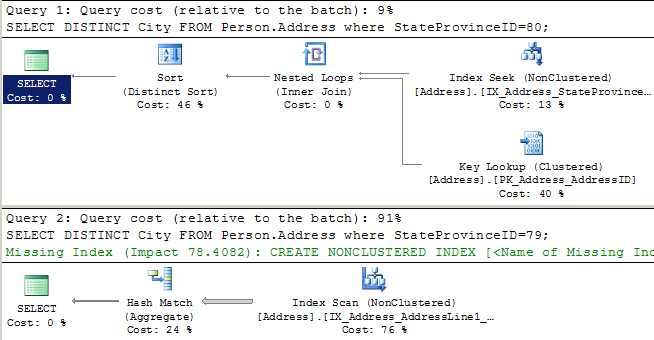
When we look at the execution plans for these, we can see that SQL Server executes them very differently. For each query, it uses statistics to estimate how many rows it’s going to get back. For the first query it estimates four rows, so it does a little nested loop to pull back the data. For the second query, it estimates it’s going to get 2,636 rows back, so it decides it’s worth it to scan a nonclustered index.

1-Literals-Plans

What if we’re using a stored procedure?

Let’s say we run this query often, and we create a stored procedure to handle our logic. Our stored procedure looks like this:

We execute the stored procedure with the same two values as before, and in the exact same order:

We’re going to get the same execution plans, right?

Well, no. Instead we get:

2-ParameterSniffing-Plans

Hey, what the heck, SQL Server? When we ran this as simple queries using literal values (no parameters), you realized that one of these got a lot more rows than the other, and you created a special execution plan for each one. Now you’ve decided to use one plan as “one size fits all!”

If we right click on the second execution plan and scroll to the bottom, we can see what happened.

3-ShowMeXML

This execution plan was compiled for one value, but was run with another value. The parameter value was “sniffed” during the first run!

4-Compiled vs Runtime

This means that the execution plan for this query will vary, depending on what values were used the last time it was compiled. Periodically, recompilation may be triggered by all sorts of things, including changes in data distribution, index changes, SQL Server configuration changes or SQL Server restarts. Whatever parameters are used when the query is first called upon recompilation will heavily influence the shape of the plan.

Enter ‘Optimize for Unknown’

Many times, people get frustrated with unpredictable execution times. They hear about a feature that was introduced in SQL Server 2008, and they apply it to solve the problem. The feature is called ‘Optimize for Unknown’. Suddenly, hints are popping up on queries everywhere!

To use the feature, you plug this query hint into your stored procedure like this:

Now, let’s run our queries again:

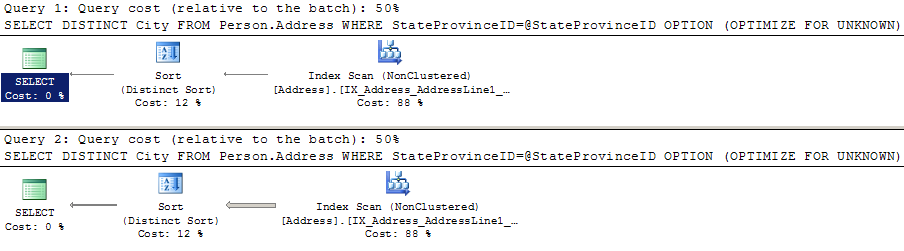
Did we get great execution plans? Well, maybe not:

5-Optimize For Unknown-Plans

Maybe this is a decent plan for some values, but maybe it isn’t. The query that wanted the “small” nested loop plan did 216 reads in scanning a nonclustered index instead of the 10 it did when it had its ideal plan. If this was a query that ran really frequently, we might not want this plan, either. (Particularly if we had a much larger table).

‘Optimize for Unknown’ has blinders on

The ‘Optimize for Unknown’ feature follows the premise that trying to get a consistent execution time for a given set of parameters and re-using a stable execution plan is better than spending CPU to compile a special, unique flower of an execution plan every time a query runs. That is sometimes the case. But you should also know that it produces a pretty mediocre plan.

Let’s take a closer look at what it did.

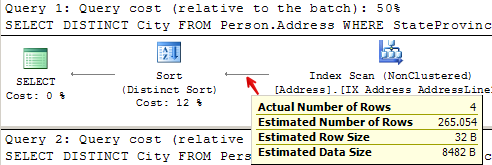
For query 1, it estimated it was going to return 265 rows, when it actually returned 4:

6-OptimizeForUnknown-Query1-Estimate

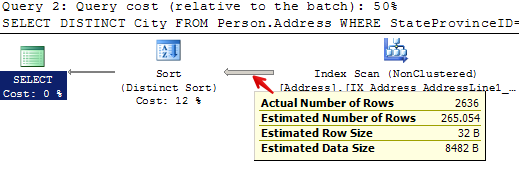
For query 2, it estimated that it was going to return 265 rows, when it actually returned 2,636:

7-OptimizeForUnknown-Query2-Estimate

In both cases, it didn’t look at the value for @StateProvinceID that was passed in at all. It pretended it was unknown– just like we told it to. This means that when the plan was created, it didn’t customize it for the values as they were passed in for that execution.

Instead, SQL Server checked out the table and realized that we have an index on the StateProvinceID column. That index has associated statistics. It looked at the statistics to get a measure of how the values are distributed in the index– this is called the “density vector” — read more about it here in a great post by Benjamin Nevarez. It then multipled the “density vector” by the number of rows in the table to create a generic estimate of how many rows might be returned for any sort of “average” value that was used to query the table.

Check it out– we can peek at the statistics header and the density vector:

8-DensityVector-StateProvinceID

The density vector for StateProvinceID is in the second result set, first row under “All density”– it’s 0.01351351. Multiply 0.01351351 * 19614 (the number of rows) and you get 265.05398514. And so the plan was created based on an “average” or “mediocre” estimate of 265 rows– which was very different than either of the queries we ran.

Well, just how bad is a mediocre plan?

In this case, this isn’t terrible. I’m just running a few test queries against a small database.

But in this case you could say the same thing about parameter sniffing. The plans I got there weren’t terrible, either! In both cases SQL Server was able to re-use execution plans without creating a freshly compiled plan for each run. That’s good because CPU is expensive: I don’t want to compile all the time.

But in a larger, more complex plan, ‘optimize for unknown’ may make execution times more consistent, but it may also produce a very inefficient plan. The “blind” style of estimate may not match ANY real values well, depending on how my data is distributed. I may end up with a plan which thinks it’s dealing with way more or less data than it’s actually handling. Both of these can present real problems with execution.

So what’s the ideal fix?

I’ve got good news and I’ve got bad news.

The bad news is that there is no single setting that will always produce the perfect exection plan without possibly having extreme adverse impacts on your performance. I can’t tell you “Just do X and it’ll always be fine.”

Instead, you should let parameter sniffing happen most of the time. It’s not a bug, it’s a feature. (Really!) Don’t default to using any query hints– just stay simple and let the optimizer figure it out.

You will have times that you find stored procedures and other parameterized queries (called by sp_executesql or queries using sp_prepare) have uneven execution times. In those cases, you need to figure out how often they’re executing and if there’s a single plan that helps them the most. You may solve the problem with an ‘Optimize for Unknown’ hint, or you may use another hint. No matter what you do, you’ll be making a trade-off between performance gains and possible different performance pains. Cross each bridge when you come to it.

What was the good news?

The bright side is that fixing these issues are fun! How queries are optimized and executed against different sets of data is super interesting to dive into. These little things mean that we’ll always need people to help make applications faster– and a little job security never hurt anyone.

Learn More in Our Execution Plan Training

Our How to Read Execution Plans Training explains how to get an execution plan, how to read the operators, and learn solutions to common query problems.


Sample SQL Server Database Administrator (DBA) Job Descriptions

Hiring a DBA? Need to get a job description for the human resources folks? Here’s how to get started.

First, decide whether it’s a production or development DBA. Think of the database in terms of a fridge. When you run a restaurant, you need at least one (and probably several) refrigerators to keep your raw ingredients and your prepared dishes cold.

Your chefs rely on the fridges to get their jobs done. They have tons of training to pick the right ingredients to put in the fridge, prepare the food correctly, and know when to take things in & out of the fridge.

If your restaurant absolutely, positively cannot go down, you’ll end up hiring a handyman or facilities guy. He has to know how fridges work, and if a fridge can’t keep the food cold enough, he steps in to diagnose and fix it.

The chefs are your developers.

Development DBAs build your data archiving strategy.

When you have a LOT of chefs, you hire a development DBAs to organize the fridge and clean it out. They don’t usually write code, but if they do, the code is inside the database – they’re not writing presentation-layer code in C# or Java.

The handyman or facilities guy is your production DBA. He’s more concerned about the back side of the fridge than the front side. He doesn’t do any cooking coding.

They all work with the fridges, but the similarities end there. Small shops might indeed hire one guy to buy the food, put it in the fridge, cook it, and fix the fridge when it breaks. However, those shops aren’t going to win any awards for food quality, and when the fridge breaks, the cooking stops while he fixes the fridge.

Sample Production Database Administrator Job Description

The open source databases say information wants to be free as in beer.

This position’s job duties and responsibilities include:

  • Ensure all database servers are backed up in a way that meets the business’s Recovery Point Objectives (RPO)
  • Test backups to ensure we can meet the business’ Recovery Time Objectives (RTO)
  • Troubleshoot SQL Server service outages as they occur, including after-hours and weekends
  • Configure SQL Server monitoring utilities to minimize false alarms
  • As new systems are brought in-house, choose whether to use clustering, log shipping, mirroring, Windows Azure, or other technologies
  • Install and configure new SQL Servers
  • Deploy database change scripts provided by third party vendors
  • When performance issues arise, determine the most effective way to increase performance including hardware purchases, server configuration changes, or index/query changes
  • Document the company’s database environment

To do a great job in this position, experience should include:

  • On-call troubleshooting experience with at least one production SQL Server for a year. You don’t have to be the only DBA or have DBA in your job description, but you should have been the one person that the company would call if the SQL Server service stopped working.
  • Finding DMV queries to answer questions about server-level performance
  • Using free tools like sp_Blitz® and sp_WhoIsActive to diagnose server reliability and performance issues

The following skills aren’t strictly necessary, but will make you a well-rounded candidate for bonus points:

  • Tuning T-SQL queries to improve performance
  • Troubleshooting hardware using tools like Dell OpenManage, HP System Insight Manager, and IBM Director

Sample Development Database Administrator Job Description

Ever since we had a BI developer get locked in the data warehouse, we've taken precautions.
Ever since we had a BI developer get locked in the data warehouse, we’ve taken precautions.

This position’s job duties and responsibilities include:

  • Ensure that new database code meets company standards for readability, reliability, and performance
  • Each week, give developers a list of the top 10 most resource-intensive queries on the server and suggest ways to improve performance on each
  • Design indexes for existing applications, choosing when to add or remove indexes
  • When users complain about the performance of a particular query, help developers improve the performance of that query by tweaking it or modifying indexes
  • Conduct SQL Server lunch-and-learn sessions for application developers
  • Advise developers on the most efficient database designs (tables, datatypes, stored procedures, functions, etc)

To do a great job in this position, experience should include:

  • Writing and improving SQL Server T-SQL queries for at least a year. You may have technically had “C# Developer” or “Java Developer” on your job title, but you were known amongst the office as the go-to person for T-SQL questions.
  • Designing tables and picking datatypes
  • Using Profiler traces and other tools to find the most frequently run queries
  • Using free tools like sp_BlitzIndex® and DMV queries to answer questions about index usage

The following skills aren’t strictly necessary, but will make you a well-rounded candidate for bonus points:

  • On-call troubleshooting for SQL Server service outages
  • Deciding whether clustering, log shipping, mirroring, replication, etc are the right fit to solve a business problem

Things I Didn’t Include In These DBA Job Descriptions

You can always tell who's using peer-to-peer replication.
You can always tell who’s using peer-to-peer replication.

If you’re using any of the following technologies, mention it in your job description so that the candidates know what to expect:

  • Failover clustering, SAN replication, and other high availability technologies
  • SQL Server merge, peer to peer, or transactional replication
  • LINQ, Entity Framework, NHibernate, or other ORMs
  • Service Broker
  • Analysis Services, Integration Services, or Reporting Services
  • Writing T-SQL from scratch, C# code, or generally building anything from scratch
  • Troubleshooting application logic or why numbers don’t add up in a report

There’s nothing wrong with having your production or development DBA work with those technologies, by the way – but they’re special technologies that require prominent placement in job descriptions.

Learn More: Our DBA Job Interview Q&A Kit

Good interviewing is not a talent: it’s a skill you build with study and practice. This set of online videos trains you to be a rockstar in SQL Server database administration job interviews by giving you practice video interviews where you can warm up with 100 real-world questions. You get:

  • 70 technical SQL Server DBA interview practice questions (and answers)
  • 10 “situational” DBA interview practice questions with strategies on how to answer
  • 20 questions for YOU to ask your prospective employer

Learn more and ace your next job interview.


The Index Your Queries will Never Request (A Clustered Index!)

Indexing, SQL Server
3 Comments

When it comes to indexes, SQL Server is really helpful. It lets you see what indexes queries are asking for both in execution plans, and missing index dynamic management views (“DMVs”). I like to look at the DMV missing index requests using sp_BlitzIndex®.

When you look at missing index requests, it’s always important to remember one of the biggest things: these missing index requests won’t ever ask for or recommend a specific clustered index.

Let’s take a look at what this might mean against a slightly modified version of the AdventureWorks2012 sample database.

Hey, we have a high Value missing index!

Let’s say we run sp_BlitzIndex® and it diagnoses that we have a high value missing index.

sp_BlitzIndex® Missing Index Diagnosis - 01

We scroll to the right on this line to get more info and see that the index request has an overall “benefit” over over one million. That benefit is a made up number– it’s a combination of the number of times the index could have been used, the percentage by which SQL Server thought it would help the queries generating the request, and the estimated “cost” of the requests. These factors are all multiplied together to help bubble up the biggest potentially useful requests.

sp_BlitzIndex® Missing Index Diagnosis - 02 - Estimated Benefit

We also see that the index request is really quite narrow. It only wants an index with a single key column on the “City” column! That seems really reasonable.

Scrolling over farther, we can see that this could have potentially been used about 49 thousand times. The queries that could have used it (it’s quite possibly more than one), were rather cheap– their costs were less than one on average– and it would have improved those queries a whole lot (around 93% overall). We currently don’t have ANY nonclustered indexes on the table in question, so we don’t have to worry about creating a duplicate nonclustered index.

sp_BlitzIndex® Missing Index Diagnosis - 03 uses and other indexes

This index seems really reasonable. It would be used a lot, and it would help those queries out.

If we keep going to the right, we see that there’s some sample TSQL to create the suggested index at the far right:

Sure enough, that syntax will create a nonclustered index. That seems really good, but hold on a second!

Always look at the whole table

Just to the left of the “Create TSQL” column is a really important helper– the “More Info” column.

sp_BlitzIndex® Missing Index Diagnosis - 04 more info

Copy the command from the appropriate row out. It will look something like this:

This command will help you look at the whole table itself and assess if there might be something you’re missing.

When you run this command, you’ll see a big picture view of the indexes on the table, the missing index requests for the table, and the number and types of the columns in the table:

sp_BlitzIndex® Missing Index Diagnosis - 05 table detail overview

In this table, note that we don’t even have a clustered index. This table is a heap! Heaps have all sorts of wacky problems in SQL Server.

sp_BlitzIndex Missing Index Diagnosis - 05 table detail- heap

In this case, we have an OLTP database and we definitely want to avoid heaps to keep our sanity.

Our queries are requesting an index on the City column, but it looks an awful lot like our table was modeled with another clustered index in mind (AddressID). Don’t just assume that the missing index request itself will always make the best clustered index. You need to take a look at your overall workload and the queries which use the table. You need to decide based on the whole workload and overall schema what should be the clustered index, if you have a primary key, and if the primary key is the same thing or different than the clustered index. After you have that design, then make decisions for your nonclustered indexes.

The clustered index is special

The clustered index in any table has special uses and significance. This index is the data itself, and it will be used in every nonclustered index in the table. If you are defining a new clustered index or changing a clustered index, SQL Server will need to do IO on every nonclustered index on the table as well. Always make sure to test your indexing changes and choose your index definitions carefully.

Wanna learn more? Check out our indexing training.


The @DBAreactions Guide to Database Administration [Video]

SQL Server
5 Comments

Sometimes, the best stories are the horror stories. Join Brent as he talks about some of the worst situations he’s seen in his years of database administration. He’ll share the inspiration behind some of his favorite entries at http://DBAreactions.tumblr.com. We’ll either laugh or cry. Or both.

https://www.youtube.com/watch?v=kHRk7J_RWAM

Liked that webcast? We’ve got many more coming up – just check the boxes and put in your email address.


Servers Need Expiration Dates

Servers are like milk cartons: both need an expiration date printed clearly on the outside.

SQL Server 2000

When a project needs a new database server, I ask the business users, “How long does this server need to last?”

Inevitably somebody gives the flip answer of, “Forever.” I laugh along with the group and then wait with a calm smile on my face, and eventually people understand that I’m serious. That’s when the uncomfortable part starts, because nobody wants to talk about old age. They want to assume they’ll live forever, their servers will always be fast, and vendors will always support today’s software.

Expiration dates can be calculated in:

  • Time – how long the vendors support each component (app code, database server, operating system, hardware)
  • Data size – we built this solution to support 100GB of data, and we could stretch it to 500GB, but beyond that it’s going to start busting apart at the seams
  • User quantity – we’re predicting 1,000 users, but if we suddenly grew to 10,000, we’ll hit concurrency issues

And each component may have its own expiration date:

  • Hardware – the server, storage, and even networking may be subject to increased support costs from the manufacturer when it’s out of warranty. Before virtualization, one of the servers I supported was a mission-critical boat anchor, and we bought a few identical ones off eBay to keep on the shelf as backups. The manufacturer just didn’t offer parts anymore.
  • Operating system – Windows has its own end-of-life dates. If you’re in the cloud, Windows Azure has its own support policy. You won’t be able to roll out new VMs with old OS’s.

  • Application language/framework/platform – Some of my clients have been excited to adopt SQL 2012 AlwaysOn Availability Groups, but then met with surprise when their third-party JDBC drivers weren’t being updated anymore.
  • Database server – of course, us DBAs, this is the only one we think about.

In any given project, some people assume the solution will be carved in stone to last forever, and others are building a cardboard house to get us past an agile finish line. DBAs are a great example – often when we build solutions for others, we try to build an amazing, scalable solution that can handle all kinds of demand. When we implement our own maintenance scripts, though, we duct tape things together, assuming that we’ll constantly be revisiting them to hone and perfect them. In reality, maybe we’re doing it backwards. Let’s build our backup and monitoring tools so that we never have to revisit them, and instead put our ongoing work into the things the business really cares about.


(Almost) Everything You Need to Know About SQL Server 2014

SQL Server
97 Comments

Just when you thought SQL Server couldn’t get better, Microsoft is announcing the features for SQL Server 2014. They haven’t announced the licensing/pricing, but I’ll tell you what I do know so far.

First, open this in another tab and hit play so you’ve got some background music while you read. Done with the commercial? Okay, let’s get to it:

Cache frequently used data on SSDs. You can specify an SSD (or an SSD array) to be used to extend memory. SQL Server 2014 will automatically cache data there with zero risk of data loss. (Only clean pages, not dirty pages, are stored there.) The best use case is for read-heavy OLTP workloads. This works with local SSDs in clusters, too – each node can have its own local SSDs (just like you would with TempDB) and preserve the SAN throughput for the data and log files. SSDs are cheap, and they’re only getting cheaper and faster. Here’s the questions you’ll want to ask before you use this feature:
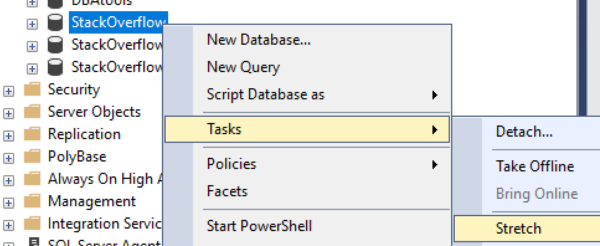
  • Is your total actively queried data set bigger than you can fit in memory? Note that I didn’t say all data: you might have archive or history or audit tables in your databases that are never queried, and there’s no sense in caching those.
  • Have you already maxed out the memory on the server? If not, start there first – memory can be used for more than just caching clean pages.
  • Do business requirements force you to use shared storage or magnetic local storage? If not, consider moving the data to local SSD entirely.
  • Does your server have room for locally attached PCI Express or SAS/SATA solid state drives?

If the answer to all of those questions is yes, an SSD buffer pool extension may be for you. Honestly, Microsoft could stop there and I’d probably still recommend the new version for most of my clients, because that’s a killer performance benefit.

More online maintenance operations. Got big data in a partitioned table? Is nobody giving you any time to do maintenance? Just no time to stop and get away cause you work so hard to make it every day? Well, with SQL 14, you can rebuild a single partition’s index online, and you can switch partitions in/out using DBA-specified lock priorities. For 24/7 workloads, this gives the DBA the ability to do maintenance with lower locking, CPU, and memory overhead. There’s also new Extended Events stuff you can use to monitor who’s getting blocked and killed. Here’s how the syntax works:

ALTER INDEX MyIndex ON MyTable
REBUILD PARTITION = 3
WITH (ONLINE = ON (WAIT_AT_LOW_PRIORITY (MAX_DURATION = 5, ABORT_AFTER_WAIT = BLOCKERS)))

The new parameters involved are:

  • PARTITION = 3 – you can pick the specific partition you want to rebuild, and you can do it online.
  • WAIT_AT_LOW_PRIORITY – just hang out when you need the schema mod lock.
  • MAX_DURATION = 5 – wait for up to 5 minutes.
  • ABORT_AFTER_WAIT = BLOCKERS – can be a few different variables. If BLOCKERS, then SQL Server will abort (kill) the queries blocking your index rebuild. If SELF, your index rebuild will give up and let user queries keep going. If NONE, everybody just keeps waiting, doin’ the neutron dance. This is the current behavior in SQL Server 2012, and it’ll be the default.

AlwaysOn Availability Groups get more secondaries. If you really need to scale out your reads, SQL 14 gives you up to 8 secondaries (up from 4). Of course, you’ll be paying for Enterprise Edition licensing on these, but if you were already going to replicate data out to various reporting or BI servers, now your life is easier.

AlwaysOn AG readable secondaries will be more reliable. In SQL 2012, if your primary drops offline or the cluster loses quorum, the readable replica databases drop offline. (This is hilarious because it’s right when you really want to be able to query the secondaries.) No way to control it – it’s totally automatic. In SQL 14, the secondaries remain online and readable when the primaries aren’t available. However, keep in mind that typical AlwaysOn AG connections go through the AG listener name, and then fetch the list of readable replicas from the primary. This just means that in order to keep your report queries online, you can’t use the AG listener – you have to connect directly to the replica’s server name. I like using a separate set of DNS records for readable replicas, like readonly.mydomainname.com, and have my report servers point at those.

Use Azure VMs as AlwaysOn AG replicas. Nobody wants to pay for expensive offsite datacenter space with machines that sit idle all the time. Now, in the AlwaysOn Add Replica wizard, there’s an “Add Azure Replica” button that integrates with your Azure subscription logins. The wizard lets you pick the VM image, VM size (cores & memory), cloud replica name, admin password, etc. Lots of gotchas here though:

  • Initializing the replica means a full database backup/restore from on-premise up to the Azure VMs, too, so this isn’t a great solution for big databases with limited bandwidth.
  • Connectivity from on-premise to the Azure VM requires a VPN appliance from your datacenter to the Azure datacenter, and today that means a hardware appliance, so there’s still some expenditures required. Still way cheaper than buying hardware for a colo, though, and much more flexible.
  • If you’re really going to use it for disaster recovery, you need a Windows Domain Controller up in Azure as well. Without that, when your primary site dies, all of your Windows machines won’t be able to log on, so that wouldn’t be very useful. SSMS doesn’t automate the deployment of a DC (nor does it alert you if you didn’t think this through.)

Failover Cluster Support for Clustered Shared Volumes. With regular volumes, only one node can own the volume at any given time. He owns the entire volume, and no other node can see/read/write files on that volume. However, Windows Server clusters have a type of drive volume called Clustered Shared Volumes with much more flexibility. Multiple cluster nodes can be connected to the same volume at the same time, but each node can access different files on the drive independently. Windows and Hyper-V have supported this for a while (see the BOL section on the benefits), and now SQL Server supports it too. The big benefit here is that if one node of the SQL Server cluster loses connectivity to the storage, it can still read and write data over the network to a different node’s SAN connection.

Smart Backup to Azure. SQL Server 2012 CU2 already lets you back up databases to Azure storage. I hear a lot of people ask me, “Brent, how can I make my backups slower and less predictable?” Those folks loved backing up from on-premise databases over their Internet connections, but that wasn’t enough. They wanted even less predictability, so now they get Smart Backups. With this feature, SQL Server figures out whether it should do a full or differential backup, how often it should do a transaction log, and more. Humor aside, this makes sense for people who host their servers in VM providers with very fast Internet connections that don’t pay for bandwidth – specifically, people hosting SQL Server in Windows Azure VMs. Both of those guys are going to be thrilled.

On-premise SQL Server with data/log files in Azure storage. Great news for those of you who really like juggling chainsaws! Now you get the best of everything:

  • Expensive on-premise licensing
  • Expensive bandwidth costs to the cloud
  • Paying for data storage at Microsoft
  • Slow backups (because your data has to come down from Azure storage to local on-premise memory then back out to wherever you want it stored, and heaven forbid you be dumb enough to send it back up to Azure storage and pay TWICE for bandwidth in and out)

Here’s the syntax:

CREATE DATABASE foo
ON (NAME = foo_dat, FILENAME = ‘https://internetstorage.windows.net/data/foo.mdf’ )
LOG ON (NAME = foo_log, FILENAME = ‘https://internetstorage.windows.net/data/foolog.ldf’);

I’ll just leave that there.

Hekaton: specialized in-memory OLTP tables. If your application is facing serious concurrency issues with thousands of simultaneous connections trying to lock data, Hekaton offers an intriguing solution. I’m not even going to try to type out an explanation here, but I’ll point out a few challenges with it:

  • You’ll probably need to change your data model. For example, identity fields aren’t supported – you’ll need to use a GUID as a primary clustered key.
  • You’ll also probably need to change your code. Hekaton works best with stored procedures, and specifically stored procs that it can compile into native code.
  • It’s memory-only. If you experience sudden data growth in your Hekaton tables, that means you can cache less of your other tables. If you run out of memory – well, let’s just say you’d better pray you don’t run out of memory, because hello, downtime.

You’re so excited, I can feel you getting hotter. But wait, there’s more.

Other cool improvements:

  • Updatable clustered column store indexes
  • Query performance improvements due to better cardinality estimator
  • Resource Governor for IO
  • Sysprep enhancements
  • Wizard to deploy database to Azure VM
  • Separation of duties enhancements to support DBAs who aren’t allowed to read the data, or auditors who are allowed to read the data but not manage the server
  • Windows Server 2012 R2 cooperation improvements – ReFS support, online resize VHDX, storage tiering, SMB improvements

My Analysis

The Pointer Sisters music probably gave away my true feelings here, but really, folks, I’m so excited. There’s very real improvements in here for everybody. If you’re a DBA on a multi-terabyte database, you’re going to love the SSD buffer pool extensions and the granular index rebuilds. If you’re BI-curious, you’re going to be experimenting with the clustered column store indexes. If you’re a software-as-a-service vendor with lots of clients, you’re going to love failover cluster support for CSVs and query performance improvements. And if you’re a developer who works with a SQL Server back end, you’ve got all kinds of new tricks to scale.

I know some DBAs were worried that Microsoft was “all in” with the cloud, and that they’d stop improving the box product. SQL2014 shows that Microsoft is still bringing the awesome.

Now, can somebody just get us a release date and some pricing? I was talking to a PR guy who almost spilled the beans, but he’s so shy.