Blog

Getting Started with SQL Server Sample Databases

SQL Server
10 Comments

The best way to improve your skills as a database professional is to practice. If you’re like me, you might even take that practice outside of the workplace and do a bit of homework on the side. You can’t take a copy of your production database home with you, so what can you do? Thankfully, the fine people Microsoft have put together a set of databases that you can download and play with.

Brightly colored sample databases for everyone!

Introducing the AdventureWorks OLTP Sample Database

AdventureWorks is a transactional database for a fictional bicycle and outdoor supply company. It’s not very exciting data and it’s not terribly big data, but it gives developers a highly normalized schema to work with for testing different querying techniques. How Microsoft managed to cram all of the relevant SQL Server features into a 215MB database is beyond me. All that aside, AdventureWorks is the first place that database professionals should go to get started practicing their skills.

There are a number of downloads available for AdventureWorks, but only a few that matter to the OLTP crowd. To get started, database professionals should download one of the following:

  • AdventureWorks 2012 Data File – this is just an MDF file. You’ll need to drop it into a folder and tell SSMS to create a log file.
  • AdventureWorks 2012 data and log file – there’s an MDF and an LDF zipped up in a file.
  • AdventureWorks 2012 OLTP Script – these scripts will create AdventureWorks from scratch.

For a local database, go with one of the first two options – just drop the files in their appropriate folders, attach the database, and then you’re off to the races. If you want something for Azure, use the script file to create the database and deploy data.

Protip: There’s usually a CS option for each of these. The CS lets you know it’s a case sensitive option. If you want to deal with international databases, pick the CS version.

A full list of AdventureWorks OLTP options is available at http://msftdbprodsamples.codeplex.com/. There are some light weight data warehouse options available, but they are still relatively small. If you’re just getting started, those are a good option (especially since there’s an SSAS tutorial available).

Introducing the Contoso Data Warehouse

Let’s say you want to do something a bit more adventurous and you want to branch out into the bigger BI world that Microsoft has to offer. The AdventureWorks data sets are a great starting place, but the data set size doesn’t pose many challenges.

The Contoso Retail DW data set is several times the size of AdventureWorks and comes as a pre-built star schema. While it’s not the biggest database (my copy is around 1.6GB), ContosoRetailDW provides a large enough data set where aspiring database professionals can really start to push the limits of a local SQL Server.

ContosoRetailDW is also a good place to try out Enterprise Edition features like table partitioning and ColumnStore indexes. The data set is large enough that it’s possible to make use of these features but it’s still small enough that you won’t need enterprise grade hardware to accomplish these things in a reasonable amount of time.

What Are You Waiting For?

Database professionals, this is your chance to start exploring the features and functionality that SQL Server has to offer. The sample databases from Microsoft give you plenty of opportunities to work with different techniques for both OLTP and data warehouse and even familiarize yourself with Azure without having to come up with your own data.


Free Ebook: SQL Server DBA Training Plan

SQL Server
4 Comments

Our Hierarchy of Database Needs training email plan has been a lot of fun. Thousands of SQL Server professionals have signed up to get an email in their in-box every Wednesday for 6 months. It’s like a part-time college course – the one you should have been given when you first got shuffled into this DBA job thingy.

Now, we’ve taken some of the content and turned it into a free 38-page PDF ebook.

It starts at the base of Ozar’s Hierarchy of Database Needs, covering backups, security, and then moves up to capacity planning and performance.

It’s not meant to be doctoral-level – this is just the intro course that we all wish we’d have gotten before management started screaming at us about why the database is so slow. And expensive. And unpredictable.

It’s like a prerequisite of things we want to make sure people know before they move up to our training classes.

Let us know what you think, and enjoy!

Download the PDF here.


What You Can (and Can’t) Do With Indexed Views

Views are logical objects in SQL Server databases that present you with a “virtual table”. Views are typically created for one of three reasons: security, simplification, or aggregation.

  • Security: we create views so that a user can read specific columns out of certain tables, but not all the data.
  • Simplification: sometimes, it’s easier to write a SELECT against one view than a SELECT against multiple tables, with joins – repeatedly.
  • Aggregation: again, it can be easier to SELECT already-aggregated data than to write the query – repeatedly.
This is my kind of view

The down side to views is that when you query them, you’re still reading data from all of the underlying tables. This can result in large amounts of I/O, depending on the number and size of tables. However, you can create a unique clustered index on the view – referred to as an indexed view – to persist the data on disk. This index can then be used for reads, reducing the amount of I/O.

There are some limitations to indexed views, but when you can create one and it improves performance, it really improves performance. But, as with all features in SQL Server, indexed views aren’t the answer to everything. Here’s a quick look at some things you can and can’t do with them.

You Can…

The view definition can reference one or more tables in the same database.

Once the unique clustered index is created, additional nonclustered indexes can be created against the view.

You can update the data in the underlying tables – including inserts, updates, deletes, and even truncates.

You Can’t…

The view definition can’t reference other views, or tables in other databases.

It can’t contain COUNT, MIN, MAX, TOP, outer joins, or a few other keywords or elements.

You can’t modify the underlying tables and columns. The view is created with the WITH SCHEMABINDING option.

You can’t always predict what the query optimizer will do. If you’re using Enterprise Edition, it will automatically consider the unique clustered index as an option for a query – but if it finds a “better” index, that will be used. You could force the optimizer to use the index through the WITH NOEXPAND hint – but be cautious when using any hint.

Choose the Right Tool

If you’re looking to have a complicated, aggregated query persisted to disk to reduce I/O, an indexed view may be the right tool for your job. Test it as an option, and if it works, put it to use!

Learn more about indexed views in Mastering Index Tuning.


Update on Stack Overflow’s Recovery Strategy with SQL Server 2014

Back in 2009 (wow, seems like only yesterday!), I wrote about designing a recovery strategy for Stack Overflow. Back then, I wrote:

With these answers in mind, Stack Overflow’s decisions not to do transaction log backups, offsite log shipping, database mirroring, and so on make good business sense. Us geeks in the crowd may not like it, and we might demand the latest and greatest in backup & recovery technology, but at the same time we want Stack Overflow to remain free. As their volunteer DBA, I’d love to do 24×7 log shipping or database mirroring to a secondary server at another colo facility – but I wouldn’t be willing to pay out of my own pocket for expenses like that.

se-iconToday, the situation is totally different. They’re in the top 50 web networks, 4.4 million users, a job posting network, dozens of crazy smart employees, and I’m not even close to a volunteer DBA for them anymore. (Heck, we’ve even paid to advertise on Stack Exchange.) I hop into the company chat rooms now and then, and I swing by the offices whenever I’m in New York, but these guys don’t need me. I jump in whenever I can for fun, because it really is fun working with engineers this sharp.

That means this time, I’m blogging about designing Stack’s recovery strategy more as an outsider’s perspective. I know you folks like reading real-life case studies, and Stack’s pretty open about their infrastructure, so this will be fun for all.

What Changed? Downtime became more expensive.

If you’ve looked at the Stack Exchange team page, you’ll notice dozens of people with the word “sales” in their job title. Stack now sells ads on the Q&A sites, plus sells job postings to companies on Careers.StackOverflow.com.

There’s real money going through the network now, and downtime starts to cost more money. If the sites are down, people may go back to Google, get their answers from another site <shudder>, and there goes some ad revenue.

This meant that at least a few databases – for ads and careers – we needed to do full recovery mode in SQL Server, and start doing transaction log backups. This didn’t start across-the-board – it started only with the most high-value databases.

As the company grew, the relative cost of standby SQL Servers in a different location started to drop. Downtime seemed more expensive, and interestingly, the actual price of the standby SQL Servers started to drop. As Stack Exchange added more systems administrators, it wasn’t really much extra work for these guys to manage a few extra database servers in other locations. And as long as we’ve got extra database servers somewhere else, kept up to date with the most recent data, we might as well put ’em to use.

What else Changed? We Scaled Out.

Stack Exchange’s API lets the public run queries against the databases in real time (and starting with API v2.1, they can even write). For a demo of how it works (but not using the live database), try out Data.StackExchange.com. For example, here’s the most recent 10 questions from Stack Overflow:

StackExchange Data Explorer
Stack Exchange Data Explorer

Yes, Virginia, that’s really an Execution Plan tab at the bottom with the actual plan from your query:

Query execution plan

Like many of Stack Exchange’s tools, Data Explorer is completely open source, so you can install this same tool in your own environment if you’d like to let internal power users query your databases without having to install SQL Server Management Studio or a reporting tool.

Enter SQL Server 2012’s AlwaysOn Availability Groups

SQL Server 2012’s AlwaysOn Availability Groups allow for multiple replicas to serve 2 purposes at Stack Exchange: easier failover to remote data centers with minimal data loss, and read-only capabilities out of those remote data centers.

I’m a huge fan of AlwaysOn AGs, but they’re like the opposite of “the easy button.” Sure, you can offload read-only queries, backups, and DBCCs to secondary replicas, but you also have to introduce a lot of new dependencies like clustering, Windows Active Directory, heartbeats, and quorums. After Stack and a few of my other clients went live with the early 2012 versions, I started jokingly calling it OftenOn – the high availability functionality ended up being a source of a lot of downtime.

Stack worked with Microsoft for months to troubleshoot sporadic outages, resulting in this Windows 2008R2 hotfix and some other fun discoveries. After a lot of challenges, Stack (and most of my other AG clients) ended up moving to Windows Server 2012 for their SQL clusters because so many of the clustering problems were fixed with rewritten clustering code.

The big gotcha, though, was that if any replica loses its network connectivity to any of the other replicas, all of the involved databases will drop offline. This is not a bug – this is the desired result.

Well, this was Microsoft’s desired result. It sure wasn’t anybody else’s, ha ha ho ho, and thankfully those nice folks at Microsoft decided the behavior would be different in SQL Server 2014. Now, if a node loses connectivity, its AG-involved databases continue to stay online.

Stack Exchange’s Upgrade to SQL Server 2014

As Nick Craver writes in his post about running SQL Server 2014 in production at Stack, this advantage was absolutely killer for Stack’s uptime goals. The Stack developers have done a killer job at coding the sites – if they detect that the SQL Server databases are in read-only mode, all of the involved sites fail into a read-only mode too, along with a nice polite banner informing the reader that they can’t make any changes right now.

The Stack engineers, God bless ’em, are so dedicated to making IT better that they’re not just willing to document their infrastructure to help others, plus build open source tools to help people, but they’re even willing to put their production web site in the hands of preview code. So earlier in November, Nick Craver and Steven Murawski did a rolling upgrade of their production clusters to SQL Server 2014.

Each cluster involves 3 nodes. Take the StackOverflow cluster:

  1. NY-SQL01 – the primary replica handling all incoming write connections. Sits in Manhattan.
  2. NY-SQL02 – the asynchronous secondary replica sitting next to it in the same cage. NY-SQL01 copies transaction log data off to this server gradually in the background. In the event of a localized failure on NY-SQL01, the admins can manually fail over to NY-SQL02 with some data loss.
  3. OR-SQL01 – the asynchronous secondary replica sitting in Oregon. NY-SQL01 also copies data here in the background, but due to the vagaries of wide area networks, it can be farther behind than NY-SQL02. To leverage extra hardware in Oregon, Data Explorer can be hosted in Oregon’s web servers using this read-only capacity.

All three were running SQL Server 2012 on Windows Server 2012. Unfortunately, with Windows clustering, we can’t upgrade any of the nodes in-place to a new version of Windows (2012 R2), so if we wanted to deploy that, we’d have to tear down some of the existing nodes temporarily. That was a lot of work for relatively little gain. There wasn’t a need for new hardware, either – the database servers typically run under 10% CPU, and they can cache everything they need in memory.

Since we could keep the same OS, the SQL Server 2014 upgrade process looked like this:

  1. Upgrade one of the readable replicas (in our case, NY-SQL02) to SQL 2014. From this point forward, replication stops to the other nodes. They can’t apply data from a newer SQL Server version, so they’ll just kinda freeze in limbo. We could still fail back to those, but we would lose all data changes made from this point forward.
  2. Test the apps in read-only against the newly upgraded replica.
  3. Test the apps in writeable mode against the newly upgraded replica.
  4. Make a go/no-go decision. If no-go, fail back to the original replica (NY-SQL01) and send the upgraded replica to detention. If go, start upgrading the other readable replicas. As they come online with SQL Server 2014, the AlwaysOn AG replication will catch them back up.
  5. Optionally, fail back to NY-SQL01 as a primary.
  6. Monitor the servers and the plan cache looking for queries getting unexpectedly poor execution plans. (Remnant of our SQL 2008 upgrade, and subsequent full text search problems.)

The upgrade went really smoothly, barring one technical issue involving a combination of the installer and Windows Core. The installer assumes that a particular feature will be installed (whether you need it or not), and that feature requires the full Windows GUI, so it fails on Windows Core. The “fix” was to tell the installer to skip feature compatibility checks.

I was online purely for comic relief. I think I made the sum total of one technical contribution during the entire call, and I left shortly after the go/no-go decision. Nick and Steven are top notch admins. Having said that, I wouldn’t recommend this DO-IT-LIVE! upgrade approach for most companies.

Should You Follow Suit with SQL 2014?

The Stack Exchange team is very in tune with what’s happening in their SQL Server environment. They know exactly which queries are the top 20 resource users, what those execution plans look like, and when a new query pops up to the top of the list. If SQL Server suddenly produces different query plans for a frequent query, these guys know how to work around it. They have great relationships with the dev teams, instant access to source code, and easy, automatic deployments to production to fix query problems.

That’s unusual.

I’m thankful that there’s cutting-edge shops out there like Stack Exchange that dedicate so much talent to managing their database stack and give so much back to the community (and to Microsoft). They’re helping make sure SQL 2014 is a solid product when it eventually hits RTM, and hopefully they’ll iron out any surprise bugs before folks like you deploy it in production.

If you believe your shop has what it takes to run SQL 2014 in production, you can join Microsoft’s early-access programs to get access to more frequent builds, extra support contacts, and community experts to help with the deployments. Contact us to get started.


How to Winterize Your Database

In Michigan where I grew up, we pull the boats out of the water at the beginning of the fall. It’s a bit of a sad time, realizing we’re done having fun on the water, and the seasons are about to change.

Winterized boats at Goose Island Boatyard - Daniel X. O'Neil
Winterized boats at Goose Island Boatyard – Daniel X. O’Neil

To prepare a boat for a few months of storage, we drain some fluids, replace others, give it a good cleaning, do some basic maintenance, and put on a tight waterproof cover.

Databases need winterizing too. I bet you’ve got an application that’s no longer used, but you still have to keep the data online just in case. Or maybe you’ve got archived sales data that we still read, but we don’t modify anymore.

Here’s how to winterize a database:

Rebuild all of the indexes with 100% fill factor. Sometimes we set lower fill factors to prevent page split problems during heavy concurrency, but when a database is going into its winter, we don’t need to worry as much about that. By setting fill factor to 100% and rebuilding the indexes, we get everything packed in tightly. This means denser data – less free space, faster reads off disk.

Update statistics with fullscan. In case we don’t rebuild the indexes, we still probably need to update our statistics. I’d recommend fullscan here because we get a great picture of the data, and then we never have to update stats again on a frozen database.

Create a read-only database login using an Active Directory group. This way, if you need to add additional users to the database for read-only permissions, you can simply add them to the Active Directory group. We don’t have to write to the database in order to pull this off – which comes in important for the next step.

Make the database read-only. Let’s be really confident that the data’s not going to change underneath us. This can also get us a modest performance gain from avoiding locking, and it’ll save me time if I’ve got an inefficient index rebuild script that keeps trying to rebuild indexes even when data isn’t changing.

Do a complete DBCC CHECKDB. We want to know that we’ve got a good, clean copy of all of the database pages.

Test the full backups. Restore it somewhere else, and know that we’ve got a really good backup that can actually be restored. Once I’m confident in that, I may even consider no longer backing up this database – especially if it’s over a terabyte – as long as I know I’ll always have that backup available in multiple places.

At the end of a database’s life, winterizing it gives me one less database to worry about. I know it’s good, I know I’ve got a backup, and I can spend my time focusing on databases that are much more volatile.


Filtered Indexes and Dynamic SQL

Indexing, SQL Server
21 Comments

I’ve been told that an attendee at the PASS Summit pre-conference event asked about using dynamic SQL to get around some of the problems with filtered indexes. I’m not entirely sure what the question was, but it did give me the opportunity to play around with filtered indexes and write some simple demo code to illustrate just the kind of shenanigans that you can get up to.

Creating a Filtered Index

The first step for our demo is to create a filtered index. Grab yourself a copy of Adventure Works and get ready for some fun. Here’s our filtered index:

That creates our initial filtered index. We want to search by OrderDate and find only those orders that were placed online. This is a realistic index to create in the AdventureWorks database, too – there are 27,659 online sales in my copy of AdventureWorks, but only 3,806 offline sales.

Want to prove that the index works? Run this SQL and take a look at the execution plan:

There’s No Problem Here!

Let’s create a pair of stored procedures:

If you were to run both of these, you’d notice that they both make use of the filtered index. What gives?

Both of these stored procedures are able to take advantage of the filtered index because the filter condition (OnlineOrderFlag = 1) is matched by predicate in the query. In other words – SQL Server can easily make this match.

The Problem with Parameters

There’s a problem, though. When we switch over to using a parameter, SQL Server isn’t able to make effective use of the filtered index. Check it out:

Oh no! This procedure doesn’t use our filtered index any more. There’s got to be a way to trick SQL Server into using our filtered index. We could resort to an index hint, but that would mean we have to keep using the same index or keep re-using the name of that index. I’m not a big fan of that, so let’s think of something else.

What if we were to use string concatenation? That sounds like magic, it has a lot of syllables.

Hooray for Strings!

We can solve the problem by forcing SQL Server to see the literal value that we’re passing in:

If you were to run that stored procedure, you’d get effective use of the filtered index. SQL Server sees the OnlineOrderFlag predicate as a literal value, matches that up to the index definition, and we’re off to the races.

There is one problem, though – because we’re also using a literal value for OrderDate, there could be significant bloat in the plan cache. SQL Server will create one execution plan for every possible combination of parameters that we pass in. In AdventureWorks there are 1,124 distinct values in the OrderDate column. That’s a lot of execution plans.
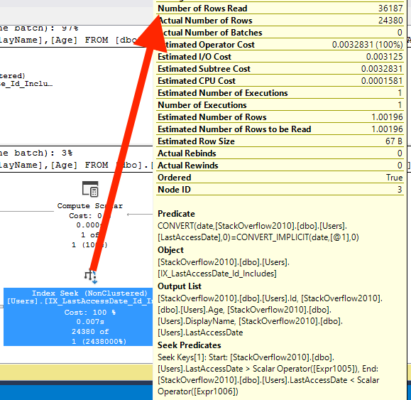
Avoiding Plan Cache Bloat

We want to avoid bloat in the execution plan cache. In order to do that, we’re going to need to parameterize part of the query but still leave the filter intact. That’s really easy to do:


By adding the @OnlineFlag as just another string, but still parameterizing the @order_date we end up with only two execution plans. One plan will be created for each value of@OnlineFlag, but we’ll still get use of the filtered index. This is all but impossible to accomplish with forced parameterization and difficult to accomplish with regular parameteriziation (usually you have to resort to index hints).
Summing It Up

Dynamic SQL and filtered indexes are a great match. By carefully making use of dynamic SQL, you can coerce SQL Server into behaving well and providing you with an execution plan that uses the filtered index. Through fully parameterized dynamic SQL you can get good plan re-use and avoid SQL injection attacks. By making careful use of dynamic SQL and filtered indexes, you should be able to get performance out of SQL Server without having to resort to tricks like index hints or plan guides.


What You Can (and Can’t) Do With Filtered Indexes

Filters aren't just for instagram photos.
Filters aren’t just for instagram photos.

When you write a query, you (usually) don’t want to return all the rows from the table(s) involved – so you add a WHERE clause to the statement. This ensures that fewer rows are returned to the client – but doesn’t reduce the amount of I/O done to get the results.

When you create a nonclustered index, you can add a WHERE clause to reduce the number of rows that are stored at the leaf level – a filtered index. By having fewer rows in an index, less I/O is done when that index is used.

Filtered indexes are great performance boosts if you have a value that is used in a predicate very frequently, but that value is only a small amount of the total values for that table. (Say that ten times, fast.) For example: I have an orders table that contains a Status column. Valid statuses are Open, Processing, Packing, Shipping, Invoicing, Disputed, and Closed. When the business first starts using this table, there’s a good chance there is a fairly even distribution of orders across these statuses. However, over time, a majority of orders should be in Closed status – but the business wants to query for Open, or Disputed, which are only a small percentage.

This is where a filtered index can come in.

When you add a WHERE clause to the index creation statement, you’re limiting which rows are stored in the index. The index is smaller in size and more targeted. It can be trial and error to get the query optimizer to use the filtered index, but when you do, gains can be significant. In one case study I have, logical reads dropped from 88 to 4 – a 95% improvement! What are some of the things you can – and can’t – do with them?

What You Can do in a Filtered Index…

  • Use equality or inequality operators, such as =, >=, <, and more in the WHERE clause.
  • Use IN to create an index for a range of values. (This can support a query that does an “OR” – read about “OR” and “IN” with filtered indexes here.)
  • Create multiple filtered indexes on one column. In my order status example, I could have an index WHERE Status = ‘Open’, and I could have another index WHERE Status = ‘Shipping’.
  • Create a filtered index for all NOT NULL values – or all NULL values.

What You Can’t do in a Filtered Index…

  • Create filtered indexes in SQL Server 2005.
  • Use certain expressions, such as BETWEEN, NOT IN, or a CASE statement.
  • Use date functions such as DATEADD for a rolling date range – the value in WHERE clause must be exact.
  • The query optimizer won’t consider filtered indexes if you’re using local variables or parameterized SQL for the predicate that matches the filter. Jeremiah explains how dynamic SQL can help.

To learn more about indexes, check out our index category, or my Fundamentals of Index Tuning course.


How I Became Employee #2

Company News
28 Comments

Let’s get this out of the way: I’m every bit as surprised as you are that I’m going to work for Brent Ozar Unlimited®. Two months ago, I would not have believed it.

I saw the blog post, just as you did. And I dismissed it. I believed because it wasn’t a BI job, I wasn’t the right person for it. I told my wife, “That’s a great job, but not for me.” Then a funny thing happened. She said, “If it’s so great, go ahead and apply for it.”

At that moment, my thinking changed from “Why bother?” to…

WHY NOT?

I went back and re-read the blog post. I read over exactly what Kendra was asking for. I noticed there was nothing — nothing — about being a DBA. I read last year’s blog post for Employee #1 and saw it was markedly different. Employee #1 had to be a DBA; Employee #2 could be anyone.

I contemplated what working for them would be like. I’d travel infrequently and work from home. I’d get to do training work. I’d get to make videos (right in my wheelhouse; I went to college to be a screenwriter). I’d learn a metric ton about SQL Server from incredibly sharp and experienced people. (In a sense, I also was picking all my co-workers — four people I enjoy spending time with.) In short, they’d pay me to do what I already love doing and I’m doing for free. As if I needed further proof, I found a note I’d written to myself over a year ago that listed my dream job attributes.

One by one, I went down the list. One by one, they matched.

Time to get to work.

LIGHTS! CAMERA! ACTION!

It was the perfect scenario. I love making videos and here I was applying to a company that (among other things) makes videos. Naturally, the only way I could possibly express interest in this job was a video. I got my hands on a trial version of Adobe Premiere, searched my mental movie library for funny clips to use, and 18 hours later I sent in the finished video. In a bit of subliminal sleight-of-hand, I titled it, “‘So You’re Hiring’ Doug Lane”.

Once I’d sent that in, I got to work positioning myself for the best possible shot at my dream job. I wanted to know what their customer experience was like, so I bought and completed Kendra’s DBA Job Interview Question and Answer Kit (I know! Too perfect!). I watched sample videos from Brent, Jeremiah, and Jes. I read the supplemental PDFs that go with the videos. I downloaded and ran sp_Blitz® on a couple of my own VMs. I wanted to be able to offer feedback on as many products as I could. I wanted them to know that I cared about their business.

WE’LL TALK ABOUT COFFEE, DOGS, DAUGHTERS…NO BIG WHOOP.

I’d never interviewed with people I knew ahead of time, let alone people I considered friends. I wasn’t quite sure how to behave. I was trying to toe the line between casual banter and serious discussion. I figured I’d let them set the tone for what was appropriate. Fortunately, Brent, Kendra, and Jeremiah all put me at ease, and I simply stopped worrying about it after a while.

I thought I only really botched one question: “When was the last time you caused a production outage?” Now, I’ve brought down a production box through pure idiocy more times than I can count, but I’ve never brought my entire company to its knees. That’s how I interpreted the question and thus answered, “I don’t think I’ve ever done that.” YEAH, RIGHT. I did go back and clarify that later on, but still felt like an doofus on that one.

After the interview, I sent them a quick thank-you e-mail restating what I thought they were looking for and how I was a good fit, as well as a couple of changes I’d suggested for sp_Blitz®.

TALK AMONGST YOURSELVES…I’LL GIVE YOU A TOPIC.

The tech interview was more challenging. In the first two minutes of poking around Brent’s VM, I had somehow destroyed it. I couldn’t right-click in Kendra’s VM so I had to ask her to do it. Every time. It didn’t help that the lighting in my house was terrible; I looked like one of those “Meth: NOT EVEN ONCE” poster guys on my webcam and it bugged the hell out of me.

I was slow to recognize certain symptoms, but ultimately found the problem. I told myself the whole interview was just okay, and didn’t feel too good about my chances. When Kendra asked, “How do you think you did?” my stomach filled with dread.

NO WAY!…WAY!

An hour later, I got another meeting request from the group. I couldn’t tell if it was to immediately disqualify me or to make an offer. I couldn’t resist screaming with joy when I found out.

And here we are.

WHAT ABOUT BI?

It seems odd to make such a sharp career turn from BI to the database engine. In truth, this has been a long time coming. My favorite SQL Server BI product, Reporting Services, hasn’t had a major update since 2008. More and more BI functionality is ending up in Excel or SharePoint: two places I’m not all that interested in following. Plus, the DAX/Tabular/Power Everything revolution meant I was going to have to start over learning a new BI language, new model, and new tools. My heart just isn’t in that — not as much as I’d need it to be to continue down that path.

At the same time, I’m looking forward to contributing what BI knowledge I have that’s still valid and useful (one benefit of SSRS’s slow pace) to Brent Ozar Unlimited®. I expect Jes and I will put our heads together for some SSRS fun in the days to come.

SECOND WIND

Last year, I hit a wall…hard. I was overworked at work. I wasn’t doing anything fun or interesting with SQL Server. I plateaued as a speaker, doing my same stock SSRS talk for every presentation. I wasn’t blogging much. I got very sick right before the PASS Summit and had a miserable time there. 2012 was awful. I couldn’t wait for 2013 to arrive.

This year has been a different story. I got three new presentations off the ground, including a murder mystery session I’ve had percolating for two years. I presented to over 300 people on Reporting Services at the PASS Summit last month. And of course, I’ve somehow talked the very nice people sketched all over this site into hiring me. Even just two months ago, I never would have thought that was possible.

I was listening to Billy Joel (I love Billy Joel) at my desk a couple of weeks ago and in one of those transcendent moments where life compels you to pay attention, I stopped working and just listened to what I was hearing:

I survived all those long lonely days
When it seemed I did not have a friend
‘Cause all I needed was a little faith
So I could catch my breath and face the world again

Don’t forget your second wind
Sooner or later you’ll feel that momentum kick in

I leaned back in my chair and fought back tears, unsuccessfully. My second wind had come.

I can’t wait to see where it carries me.


The Road to Employee #3: The Interview

Company News
2 Comments

What was the interview like for the fine folks who went through it?

Talking Points

We’re big believers that one of most important things for a consultant is their ability to interact with customers. The type of work we do relies on communicating clearly with our customers, and we wanted to make sure that our interview process reflected that.

We also wanted to make sure we asked candidates what they thought about the job without outright saying “Hey, what would you think if we asked you to do this?”

Tell Me About You

When you’re a small company, there’s no escaping your co-workers… or your management. We asked the candidates a few questions to make sure that we were all on the same page.

The questions that we ask are no different than the questions that you’ll get asked on any other kind of job interview – What excites you? What do you dread? Knowing what motivates people is really important. If you dread looking at a new SQL Server every week, you’re not going to enjoy working with us.

There aren’t any right or wrong answers, there are just answers that told us more about the candidates. That’s why we also ask fun questions like “What was the last time you caused a production outage?” We’ve all broken things and sharing funny stories about the ways that we’ve broken production environments is always a good way to break the ice, both with candidates and when we’re working with clients.

What would you say… we do here?

We asked the candidates to tell us about us. Well, that’s not entirely fair. We first asked people why they wanted to work with us. There’s no right or wrong answer, but as an employer it’s helpful to know what motivates people. There are different ways to motivate different types of people; knowing why someone wants to join the team helps us understand how we can motivate an employee and keep them interested in the job. Hey, even the most exciting job can seem like a slog some days.

How would you feel if I told you that your job would include creating an 80 slide presentation every week? What if I added in that the recommendations would be custom for an individual client? How would that make you feel? Not everything we work on is a rocket science. Sure, we do our fair share of high end performance tuning, but a lot of what we do is design ways for our clients to solve their every day problems. We help clients understand and prioritize their solutions by creating presentations that summarize the key pain points and solutions to those problems.

If the thought of writing an 80 page presentation every week was something a candidate dreaded, we knew that we weren’t the right fit. Some people are passionate about digging into problems, building a plan, and then implementing the plan themselves. Other people like to teach.

What Didn’t We Ask?

What we didn’t do is ask candidates a lot of minutiae. While it’s important to know technical details about SQL Server, we know that you can look this information up online. With co-workers like Brent, Kendra, and Jes a smart answer is only a quick email away.

There’s nothing secret about our interview process. These are the kinds of questions that potential employees can expect to hear wherever they interview.

This is a rusty metal screen and is no substitute for a real tech screen.

Was There A Technical Screen?

Oh yeah, we had a technical screen. After the first round of interviews, we discussed who should move on to the second round. Since we didn’t ask any of the candidates difficult technical questions in the first round of the process, we wanted a way to see how they worked under the usual types of pressure that we deal with.

We set up a pair of demo environments and invited Doug to take a look at them and tell us what was wrong. Once again, we weren’t looking for right or wrong answers; we wanted to see how Doug looked at each instance and get a feel for how he approached problems. In an amusing turn of events, one of our demo environments was accidentally corrupted and couldn’t even boot. We didn’t ask Doug to look at that because, let’s face it, when you find corruption you should just call Microsoft.

Throughout our process, there weren’t any wrong answers. We looked for people who were as excited about technology as we are, who share a passion for learning and growing, and who didn’t laugh when Brent broke his VM during the technical screen.


How to Be Employee #3

Company News
1 Comment

These four things are important if you want to join us in Cabo:

1. Demonstrate curiosity about the technology you use.

Don’t focus on the specific technology you think we want – follow your dreams. If you use a technology on a daily basis to get your job done, be curious about how it works. Read books and blogs. Ask questions. Debate the answers. Get involved in the places where that technology is discussed.

One of the many things I love about working with Jeremiah, Kendra, and Jes is that they want to run experiments to verify their ideas. It’s not enough for them to read an answer – they want to see it in action. When a user group attendee asks a question we haven’t heard before, we all leap to the keyboards trying to figure it out for ourselves, and then we want to blog about it afterwards.

2. Share what you’ve learned by delivering remarkable training.

When someone walks out of one of your user group presentations or gets to the end of a blog post, they should be talking about what a great job you did.

As a presenter myself, I used to think this meant uncovering an undocumented or obscure feature that nobody else knew and blowing them away with my encyclopedia of knowledge. That’s not it at all – you can be remarkable on a 100-level topic.

Don’t think “It’s all been done” – because you haven’t brought your own unique and entertaining voice to the topic. Doug’s SQL Server Murder Mystery presentation was a great example of bringing very common material to life in a fun, addictive way that gets audience members talking.

3. Have a fun yet mature personality both online and offline.

On one extreme, the market for the written instruction manual is already taken by Books Online.

On the other extreme, there’s Sandro on Project Runway.

Jeremiah never stops looking for our next employee. "There - in the window - that's the one!"
Jeremiah never stops looking for our next employee. “There – in the window – that’s the one!”

Consultants have to find a balance between the two by bringing their personality to their work, but not turning the workplace into a bad drama-laden talk show where people are screaming about politics and religion and OH MY GOD, THE SAN ADMIN IS TRYING TO RUIN MY LIFE!

During Doug’s PASS Summit presentation this year, he had a make-it-work moment when someone asked him a question and SSRS didn’t work the way he expected it to. He froze for a second, then thought through the problem, explained it, and got the audience to laugh about it. In that one moment, he showed that he was calm under pressure, and even better, calm enough to make the right joke.

4. Keep growing.

Years ago, I blogged about a couple of my own presenting mistakes. At TechEd 2010, for example, I made a political joke that didn’t fly with all of the attendees, and I reacted poorly when someone pushed me hard on a question. I watched the videos of my work, tweaked my delivery, and kept growing as a presenter and as a person. I was open to criticism, and I still am, and you’ve gotta be too. It’s not enough to just respond to comments, but you’ve also gotta be able to read between the lines and figure out what I need to do to succeed.

These tips aren’t just for becoming employee #3 at Brent Ozar Unlimited®. (After all, we had a handful of applicants who met these qualifications.) Follow these tips, and you’ll always be employee #1 at your current job, and you’ll have a line of people ready to hire you.


How to Write a Killer SQL Server Job Description

Help-Wanted-Unicorn
Hiring managers often feel like they’re trying to find a mythical creature

On September 24, we published a blog post that we were looking for a new employee. We didn’t advertise on any job listing sites (even though there are some really good ones out there). We tweeted about it a few times, but most of our publicity was that single post. We received more than 70 applications for the job by email. We were truly impressed by the applicant pool– multiple well known international speakers and Microsoft Certified Masters applied for the job.

When I talk to hiring managers, I hear that it’s hard to find good SQL Server pros for a job these days. How did we attract such cool people?

The secret to getting employees that don’t suck: Write a job advertisement that doesn’t suck.

1. Explain what YOU will do for the employee

Most job ads are written as a list of demands of the employee. You MUST have experience with X. You really ought to know about Y and Z. Good luck if you can’t recite eight decimals of PI.

We explained what the job would be like for the employee. We clearly listed a couple of requirements that employees must have. But we also devoted lots of time to describing what we will do for the employee. This means you must describe not only standard benefits, like time off, but also explain:

  • Training you’ll offer employees
  • Other opportunities they’ll have to learn
  • Whether or not flexible time/ working from home is available
  • If you pay for certification attempts or job growth
  • Times the employee doesn’t have to be on-call, and support processes that keep them from being randomized

Don’t make the common mistake of assuming people will think the job is awesome. Smart, talented, experienced people won’t just assume that at all– they’ll look for all the hidden signs that the job isn’t awesome. Show them what you’ll do for them!

2. Ask what you really want to know– and don’t ask for a resume

Are you hiring someone to write resumes as part of their job? If so ask for a resume. If not, why bother? Resumes tell you very little about an applicant. If you must have one as part of your HR requirements, you can get it later in the process.

In your job ad, ask for what you really want instead of a resume. Brent, Jeremiah and I worked together to figure out what basic things we could ask that would indicate whether the candidate would thrive in this job over time. We whittled down the list as much as possible to keep it simple. We asked for two things:

  • Recent speaking experience
  • A description of how the applicant has contributed to a technial community.

And that’s it. That’s all we wanted.

Asking for something out of the ordinary helps you understand your applicants. You can see how they think in answer your questions, rather than receiving a resume prepared for general consumption (and possibly crafted by a resume writing pro). You also save time by evaluating applicants against your specific criteria early, rather than having to hash that out later in phone interviews.

3. Have a personality. Ideally, your own personality.

We wrote our ad in the style of a “Missed Connection.” We like to play around with writing, and we like to have fun. We took the time to write our ad in a style that represents us honestly. If you’re not dry, boring, and corporate, don’t fill your ad entirely with bullet points and corporate-speak.

Understand that smart talented applicants see your ad as a description of who you are. If you like to have fun at work and want to attract fun people, show it!

How’d we know this stuff?

We’re naturally creative and charming (and modest). We followed our own experience, and it worked. But we also like data. Specifically, we like the data and conclusions drawn from the folks over at Stack Exchange on How to Write a Great Developer Job Listing


Introducing Employee #2, @TheDougLane

Company News
9 Comments

This video was my first introduction to Doug Lane (BlogTwitter):

You can see the full video on SQLcruise.com, where Doug had entered a contest for a free cruise a couple of years ago. Of course he was picked as one of the winners, because I was in stitches as soon as I saw the viking horns moving through the cubicles.

When I met him in person on the cruise, he lived up to expectations by being witty, smart, humble, and just genuinely fun to be around. I enjoyed being around him, and I wished I could hang out with him more often.

Fast forward to last month, when he answered our call for SQL Server people looking for a good time. We got a ton of good responses that we were really excited about, and this week we’ll blog about the hiring, interviewing, and tech screening process. Doug was definitely one of those people where we all said “Wow!” out loud when we saw his name on the email.

We didn’t even have to look at the email contents to know Doug’s contributions to the community. I’d been particularly excited about his recent presentation idea, SQL Server Murder Mystery Hour: Dead Reports Don’t Talk. He turned the session into a fun, interactive experience.

When we *did* look at his email’s contents, Doug blew us away again with a video about his community contributions:

https://www.youtube.com/watch?v=e2uD9Nhgj2E

He knew we did a lot of video work, and he wanted to show that he understood how we work. Jeremiah, Kendra, and I are so passionate about making databases easier – and more fun. Just like Jes (our Employee #1), Doug really gets that.

We’re so excited to have Doug join our team.


Building a Report to View Memory Usage

SQL Server
8 Comments

Memory is one of the most-used resources in SQL Server. Generally, the more you have, the better query performance you’ll get. This blog isn’t about the magic of the buffer pool or the plan cache, but you should understand how important they are to your server’s performance.  Since memory is such an important resource, you want to know how much of it you’re using at any time.

How can you track your server’s memory usage? One way is to use the Performance Monitor (Perfmon) counters exposed through the sys.dm_os_performance_counters DMV. One indicator of memory performance is Page Life Expectancy (PLE). You can capture basic memory usage over time by setting up a SQL Server Agent job to query this DMV, inserting the results into a table, and reporting on the table results.

I’ll show you how to collect this data and report on it!

Collecting the Data

I have a “DBAInfo” database on my instance that I use to track metrics and other information. I create a new table, MemoryHistory.

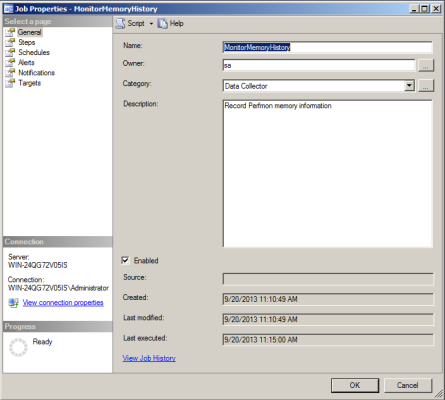
Then, I create a new SQL Server Agent job that runs every 5 minutes.

memory report 1

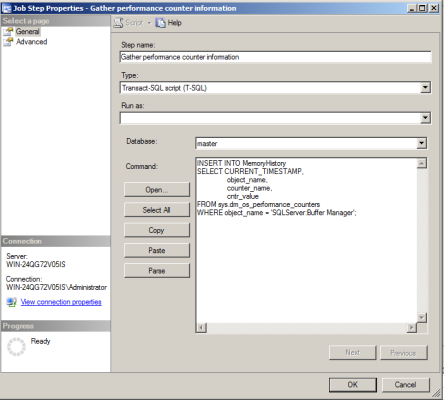
The only step in this job is the below query, which queries the DMV and inserts the results into the table I created.

memory report 2

I schedule the job to run every five minutes.

memory report 3

Viewing The Data

Now, this data isn’t going to do me any good unless I view it, and make a decision or perform an action based on what I learn.

To view the data I’ve collected, I run the following query:

memory report 4

That’s a lot of junk to sort through when all I want to see is PLE, so I narrow down the query a bit.

memory report 5

But who wants to read through results like that each time there’s a problem to see when PLE rose or fell? Not me. I’d rather see it in a graphical format. How can I do that?

SQL Server Reporting Services

I have SSRS at my disposal. I’m going to create a very simple report that will allow me to enter start and end dates, and will display a line chart for PLE during that time.

Reporting on the Data

I set up my report to have DBAInfo as my data source. In order to choose dates, I use the following query as my dataset.

I change my @Start and @End parameters to “Date/Time” so I get a date picker.

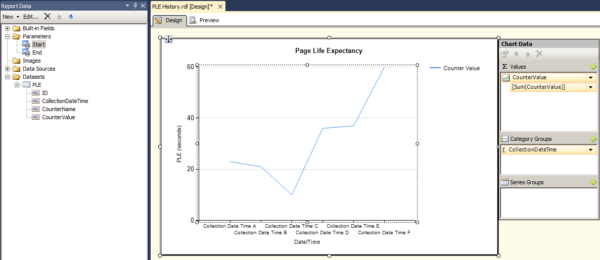
I drag a Line Chart onto the design surface and add the CounterValue as my Value and CollectionDateTime as my Category Group.

memory report 6

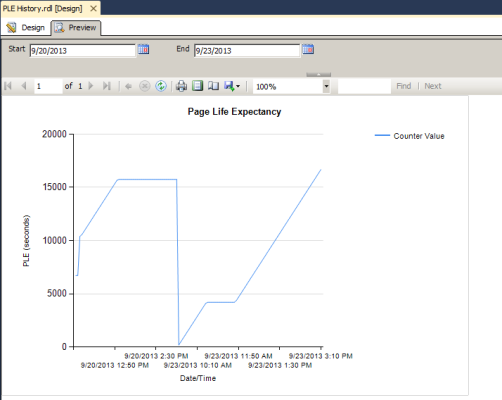
I can preview the report to view it:

memory report 7

Last but not least, I’ll deploy this report to Report Manager so that I and others can run it, or even schedule a regular subscription.

Homework

There are several ways to improve this report. How can you modify the query to capture date and time data individually? How do you add parameters to the report so the user running it can choose their own date range? How would you collect and display data for different instances?


Who Needs an Operating System?

Cloud Computing
3 Comments

In the 1950s, the global economy saw a tremendous change – container ships revolutionized global commerce. Shipping costs got 36 times cheaper with the introduction of containerization. What if you could reduce operational costs and revolutionize application and database deployment in the same way?

Containers to the Future

In the last few months, the developer world has been excited about docker. Docker is a container system. Basically, it’s an easy way to do application deployments. Rather than deploy an entire VM, Docker lets developers deploy a consistent stack – the developers can set up individual services with independent configurations and deploy them.

Sounds like a contained database, right?

The best part about these containers is that, if you do it right, you might not need an OS under the covers. Or, if you do, it doesn’t matter which one! The container hold the configuration it needs to run. It doesn’t matter if you deploy on Linux, Solaris, or (maybe) even Windows – as long as that container knows what to do, you’re good.

With the database, should you really care which edition of SQL Server you’re running on as long as it supports the features you need?

Surely My Storage Is Safe From This Madness!

The storage game is rapidly changing. Not that long ago, traditional storage vendors required that you buy expensive and proprietary big systems. That part of the industry was disrupted by modular technology like the Dell EqualLogic. As storage has become cheaper, it has returned into the chassis in specialized servers; you can easily cram 24TB of SSD storage into a server with gear you can buy off the shelf.

Large scale storage is getting even more accessible: Seagate have announced their Kinetic Cloud Storage. It’s storage that uses an API, rather than an operating system. The drives feature new technology and Ethernet connectivity. This makes it possible for application developers to interact with the drives using an API rather than through a storage controller, cache tier, and storage tiering.

The idea might sound crazy, but third party libraries already exist that take advantage of this technology. Come launch time, developers will have drive simulators at their disposal, more libraries, and you’ll have a better idea of what this costs. You’ll be able to put 2.4 petabytes into a full rack of hardware. All without buying a complex storage appliance.

How Much Farther Can It Go?

Think about it:

  1. Applications can be deployed as containers.
  2. Storage will soon be deployed as containers.
  3. Databases are on their way to being deployed as containers.

Just as the cargo container had far reaching implications for the shipping industry, the software container has far reaching implications for our industry. The operating system and even the database platform become raw materials that are used to support the applications deployed on them.

What Does It Mean?

What’s it all mean for IT professionals? It means that the times, they are a changin’. If the application can be deployed as a container, there’s likely to be a decrease in managing the complexity of production applications. Once you can treat storage as an API, you change how storage administrators interact with storage. Over the next few years, containerization is going to change the way you manage the IT infrastructure.


What Developers Need to Know About SQL Server

Development, SQL Server
1 Comment

What Developers Need to Know About Designing Databases

One of my favorite tips, and I never thought of it that way. Code is agile, and databases are brittle. It seems easy to refactor the database in the beginning, but as your app grows and more stuff interfaces with it, life gets a lot harder.

Johan means you should use the right data types, like using date or time when you’re just storing one of those. Plus, if you know a field is nullable or unique or relates to a field in another table, tell the database by setting up constraints or foreign key relationships. This can actually make your queries faster because SQL Server uses this knowledge to build better execution plans.

For example, DATE is a narrower field than DATETIME, requiring less storage, so you can pack more rows per page on your date indexes.

https://twitter.com/RealSQLGuy/status/393377820799680512

NVARCHAR is Unicode, which SQL Server uses 2x the storage space for as compared to just plain VARCHAR. This means you can cache half as many rows in memory, and your storage IO takes twice as long. If you’re not seriously going to store Unicode, stick with VARCHAR. (Then of course right-size your fields as opposed to using MAX, which can be difficult to index and may get stored off-row depending on data size and config options.) On a related note:

https://twitter.com/SirSQL/status/393383421491564544

While database vendors will say, “Sure, you can use our database as a file server!” remember that the licensing on databases is a lot more expensive than licensing on a file server. Plus, these big files hit the transaction log, making your smaller/faster transactions compete for log file access, and slowing everything down.

Primary keys (and clustering keys) should be unique, narrow, static, and ever-increasing. Don’t go redesigning an existing database to change this, because it’s probably not your biggest bottleneck, but when starting from scratch, keep these guidelines in mind.

I wrote triggers a lot too when I was a developer, but as I moved into the database side, I realized how tough they are to scale. They’re synchronous, and they can cause concurrency problems. Consider moving to an asynchronous solution that doesn’t do as much locking/blocking.

https://twitter.com/RealSQLGuy/status/393378719856742400

Narrow one-field indexes are usually less useful because you’re selecting more than one field. Plus, every index you add is like another copy of the table. Insert a record into a table with ten nonclustered indexes, and you’ll be doing eleven (or more) writes to disk each time.

SQL Server Management Studio’s index suggestions have no concerns whatsoever about adding overhead to your inserts/updates/deletes, and they’re often supersets or subsets of existing indexes.

When you first get started with a new database, don’t go crazy adding indexes with guesses about what will get queried. Indexes are easy to add later – wait to see how the queries actually shape up, and which ones get run the most often.

What Developers Need to Know About Writing Queries

This is one of my favorite tips. SQL is really easy to learn, but the underlying server code behaves very differently than you might expect. We’ve gotta think set-based. On a related note:

Learn more about isolation levels.

SQL Server licensing is about $2k USD per core for Standard Edition, and $7k per core for Enterprise Edition. These are usually the most expensive cores you’ve got in the shop. Aaron’s guidance is based on minimizing the amount of CPU clock cycles we need to burn in the database tier, and thinking about moving those to the easier-to-scale-out app tier.

Sometimes the business design requires outer joins, but beware that you can get much worse execution plans as your data grows.

Databases perform very differently at scale, whether it be scale of data or scale of underlying hardware or scale of simultaneous queries.

What Features, Commands, Datatypes, Etc. Should Be Generally Avoided

If you say BETWEEN December 1st and December 31st, SQL Server sees that last parameter as the very beginning of December 31st. Any data from, say, 1AM on December 31st and afterwards is going to be excluded.

Simplicity is a big theme here. Manhandling the engine around with hints usually results in worse performance overall.

We’re not saying nested views are wrong – sometimes they can work really well – but KBK is pointing out that you may end up dragging a bunch more tables into your query inadvertently.

https://twitter.com/SirSQL/status/393387459842560000

Always good advice – but it’s advice for managers rather than developers, right?

Sometimes, a scan is easier – especially for grouping.

For more details, watch our There’s Something About NOLOCK video.

The Best One-Line Things to Improve Databases and Apps

That’s actually how I got started in database administration – I got tired of learning the Language Du Jour because I’m not all that bright. I have so much respect for developers who can rapidly learn new languages and frameworks and then deploy them effectively. I switched to databases because I could learn one language that’s been the same for decades, and it’s even used by multiple back end platforms. I’m lazy. On a related note:

https://twitter.com/onupdatecascade/status/393383318114148353

Nick is from StackExchange, the guys who built Opserver, an open source monitoring system. They’re brilliant about watching the top resource-intensive queries on the database server, and you should be too. When something new pops up, you need to know why it’s suddenly using more resources than you expect.

Query execution plans are road maps for how SQL Server will process the data for your query. Learn more about those.

You don’t have to know how to FIX the bottlenecks, necessarily, but you have to know what’s going to be the pain point as you scale.

The best DBAs are partners, not predators. When you find a good one, they’re willing to help make you look like a star.

I’m all about this. By the time somebody brings me in for advice, the best practices guidelines aren’t usually working for them, and they need to learn how to bend the rules.

Live Video of the Twitter Chat

Here’s the 50-minute video of the Twitter chat where we built this list, plus covered a lot more tips:

https://www.youtube.com/watch?v=h_Ec9yfqFOU

I apologize for the audio – WebEx’s audio codecs are horrendous. (I’ve got a Blue Yeti microphone.)

Sign Up for the Next One:
What DBAs Need to Know About Monitoring

Page life expectancy. Disk queue length. Page splits. There’s so much old bogus advice out there around SQL Server monitoring, and it’s time to update the rules. Join Microsoft Certified Master Brent Ozar as we collaboratively write an e-book with new advice on monitoring. You can contribute too – we’ll be working together over Twitter using #DellSQL.

We’ll discuss and share:

  • What metrics every DBA should monitor
  • Which metrics are meaningless
  • Our favorite free DMV scripts

Register now to watch it live on Thursday, November 14th.


“You get free videos! And you get free videos!” #SQLintersection

SQL Server
10 Comments

This week, Jeremiah, Kendra, and I are presenting at SQL Intersection, a conference that also happens at the same place and time as DevIntersection and AngleBrackets. I like Intersections because there’s a bunch of different technologies covered – SQL Server, all kinds of development, SharePoint, cloud, and infrastructure.

Kendra Polling the Audience

For our pre-con, the Accidental DBA Starter Kit, we had a little fun with the attendees. We had a little contest, picked a couple of winners, and brought them to the front of the room. Their prize: our Make SQL Server Apps Go Faster video course, but then things got trickier. We offered to give them a different prize if they’d give that up for what was inside envelope #2. After a few minutes of toying with their emotions, we announced that they weren’t the only winners, and attendees should check under their seats.

Attendees checking under their chairs

Exactly half of the audience – the right hand side – had coupons for the video course too. We toyed with the other half of the audience (LOSERS!) for a while, and then gave them the prizes too, complete with an Oprah moment. “You get free training videos! And YOU get free training videos! Everybody gets free training videos!”

We love this stuff.

For those of you who joined us in our PASS pre-con earlier this month, you might be asking yourselves, “Hey, how come you didn’t do this at the Summit?” Well, we tried, but PASS wouldn’t let us do it:

Your prize giveaway contained direct references to your company and services…. The training material is combined with direct links to your website, other course offerings, and has your company logo viewable….

That’s a shame – we really would have loved to give away the free training to all of the attendees. After all, it’s the exact same training material they already paid PASS for, and we just wanted to make their note-taking and ongoing learning easier.

Ah, well – guess we’d better focus on our SQL Intersection post-con on Thursday. (Don’t bother checking under your chairs – or maybe I’m just saying that to throw you off the trail.)


Upcoming User Group Sessions in Chicago and LA

SQL Server
0

Coming soon to a user group near you, it’s…me.

November 13: Chicago .NET User Group
Brent’s How to Think Like the Engine: SQL Server Internals for Developers

You’re comfortable writing queries to get the data you need, but you’re much less comfortable trying to design the right indexes for your database. In this 90-minute session with Microsoft Certified Master Brent Ozar, you’ll learn how the SQL Server engine looks at your indexes and builds your query results.

December 5, Los Angeles SQL Server User Group:
Brent’s How to Think Like the Engine

You’re a developer or a DBA, and you’re comfortable writing queries to get the data you need. You’re much less comfortable trying to design the right indexes for your database server. In this 90-minute session with Brent Ozar, you’ll learn how the SQL Server engine looks at your indexes and builds your query results.

December 11: Chicago .NET User Group
Brent’s T-SQL Antipatterns

It’s not your fault: there are some things that SQL Server just doesn’t do very well. Microsoft Certified Master (and recovering developer) Brent Ozar will explain things that compile great, work great on your desktop, but then explode when you try to scale. We’ll cover implicit conversions, string processing, functions, and sargability.


Frequently Asked Questions About TempDB

SQL Server, TempDB
42 Comments

The questions came fast and furious in one of my recent TempDB webcasts, so here’s the ones I wasn’t able to answer during the live session:

Q: Virtualized OS, SAN, no dedicated LUNs, most likely scenario with no gotchas, theoretically: dump TempDB with everything else all on one virtual volume, including logs — or split to separate virtual volumes and separate from other databases and also from logs? (Matthew N.)

When building virtual SQL Server machines, always use a separate VMDK/VHD for TempDB. This lets your VMware and Hyper-V sysadmins manage your TempDB differently. Some storage systems can automatically move different VHD/VMDK files to different tiers of storage based on their access patterns. If you suddenly enable RCSI and need a lot more TempDB throughput, it’s easy for your VMware admin to adjust that when it’s in a separate file (or LUN).

Q: How many SGAM pages we have in one data file? (Alvaro C.)

One per each 4GB of data file space. To learn more about the internals of how that works, check out Microsoft’s knowledge base article on TempDB.

Q: Can filtered indexes eliminate the use of tempdb on complex queries? (Greg J)

It’s possible, but I would want to find the exact queries causing the TempDB use before I tried to prescribe a method to get pain relief. I can envision a scenario where a query gets insufficient memory grants and then frequently spills to TempDB when doing sorting and joining to other tables, but … I’ll be honest, this is kind of a stretch. Filtered indexes wouldn’t be the first place I’d turn here.

Q: How do you diagnose TempDB problems in SQL Server 2000? (Debbie C)

I don’t. I don’t work on SQL Server 2000 anymore. It’s unsupported. If anything breaks on it, you’re out of luck. When a client comes to me with a SQL Server 2000 performance problem, step 1 is to get them onto a supported version of SQL Server.

Q: If I only have RAID 5 storage available, should I keep tempdb in 1 datafile? (Mike K)

If your server’s biggest performance bottleneck is SGAM contention in TempDB, then you need multiple TempDB data files to alleviate the bottleneck. If, on the other hand, your server’s biggest performance bottleneck is storage writes, then you shouldn’t be playing around with TempDB. 😀

Q: is there a rule of thumb on the autogrowth settings for the temp db files? (Lee T)

I actually want to pre-grow my TempDB files whenever possible. They shouldn’t be growing frequently on a production box. For example, if I bought 200GB of space for my TempDB data files, I’m going to go ahead and pre-grow out TempDB to take that space. It doesn’t really make sense to wait around for users to grow it out when I’ve got dedicated storage for it. Because of that, I don’t usually focus on TempDB autogrowth sizes.

Q: My TempDB avg write is around 5ms, is that good enough? (Welly S)

Only your server can tell you: using wait stats, is your biggest bottleneck right now the TempDB writes? If yes, and if your users aren’t satisfied with performance, and it’s user queries hitting TempDB, then it’s not good enough. If TempDB writes aren’t your biggest bottleneck, or if your users aren’t complaining, then it’s fine.

Q: Sometime I use DBCC FREESYSTEMCACHE (‘All’) to shrink the tempdb. Any side effects to that? (Ashwani M)

What’s the problem that you’re trying to solve? Why are you shrinking TempDB? Grow it out to the space it needs to be, and leave it there. If it keeps growing larger, that’s SQL Server telling you it needs more space. If you want to permanently address the root cause, you need to find the queries that are allocating TempDB space and fix those.

Q: If you have only 1 tempdb file, what is the best way to add 3 more, especially if the single file is very large already. (David S)

I’m a stickler about change control. I want to make my production changes at a controlled time when I know it’s safe. Because of that, I tend to schedule non-critical changes for a maintenance window, do all of them then, and then restart the SQL Server instance afterwards. Changing TempDB configurations is a great fit for that – keep it in a change window.

Q: Can we start initially with 2 files of Tempdb or it should be minimum 4? (Syed A)

Microsoft’s Bob Ward recommended 4 in his TempDB talk at the PASS Summit, and I’d tend to stick with that guidance. I don’t see a benefit in using just 2.

Q: We tried using and SSD in various configurations and had minimal suddess. What should we look for? (Brad P)

In my recent post on benchmarking SSDs, I discussed the approach I use for load testing. I’d start there. We often uncover bottlenecks in the RAID controller, its settings, or the cabling.

Q: We have SQL Server 2008 R2 in Production. Would you recommend using SQL Server 2012 going forward? (Sreedhar L)

Sure. It’s got lots of nifty improvements that make it my favorite SQL Server version yet, and it’s pretty stable now that it’s had a round of updates.

Q: In a SQL Server 2008 R2 cluster of two nodes, would this affect the number of tempdb files? (William N)

No, the number of nodes in a failover cluster don’t affect the number of TempDB files you choose.

Q: we have 24 cores and allocated 24 tempdb files as per the recommendation 3 years ago. Is this still valid? (Nageswararo Y)

Most of the storage I test seems to work worse as you throw more random load at it. Using 24 files instead of 8 makes some storage perform much worse. Because of that, I wouldn’t go with the one-file-per-core recommendation unless I was having serious SGAM contention – and then, I’d want to load test my storage under extreme random load to make sure it performed well.

Q: I am at war with my san admins who deny there is a san issue. tempdb (using your blitz script) shows a high write stall time of 51ms to 10ms, could there be any thing else that i can do to check? or any other stats that i can gather to help me proof we have a problem? (Ozzie B)

Sure, check out our videos on storage troubleshooting and our 6-hour training class on storage, hardware, and virtualization.

Q: what to do when tempdb is full in realtime and need to troubleshoot without sql restart? (Ravi S)

Normally, I don’t want to troubleshoot in real time – I want to kill the queries involved (try sp_WhoIsActive to see which queries have TempDB allocations) and then fix the problem long term by getting more TempDB space. Someone’s always going to run a crazy query to fill up TempDB, and we need to plan for that. I’m a big fan of using third party performance monitoring tools for this type of thing – they can jump back in time to look at what was using TempDB at any point in recent history.

Q: What are the challenges if we maintain TempDB on local storage? (Nageswararao Y)

Make sure you monitor for drive failures, make sure the hot spare drive automatically takes over for failed drives, and make sure drive performance doesn’t go down as the drives get older.

Q: What if my read is 2.5 msec but my write is like 40 msec. All on raid 5 this still means I need a raid 10 or a ssd with raid1? (Pramit S)

If wait stats show that writes are your bottleneck, then yeah, you want to investigate what it would take to make the storage go faster. This can include changing to RAID 10, adding more drives, switching to SSDs, or reconfiguring your RAID controller’s settings.

Q: You mention to put TempDB files on local drive within cluster for better performance which are there any drawbacks on doing that? (John H)

It’s unsupported on SQL Server 2008 R2 and prior versions. You also have to make sure the local drives are actually as fast as the SAN, too – heaven forbid you do this with three locally attached magnetic hard drives in a RAID 5 config.

Q: Any recommendations as far as transaction logs for TempDB? (Dominick S)

TempDB’s log file tuning is the same as user database log files, so no special guidance there.

Q: Have you started using SMB 3 for SQL storage? How much gain can be made with the ability to use RAM cache for SMB 3.0 shares? (Fred P)

If I’m going to invest in more memory somewhere, it’s going to be in the SQL Server, not the file server. That’ll avoid the round trip latency off to the Windows file server box, and SQL Server can use it for other things like caching execution plans and query workspace.

Q: You mention that you don’t like to store TempDB in RamDisk, Is there a big reason for that? (Jose S)

RAM drives aren’t built into Windows – they’re third party software and drivers. If I can avoid installing software on the SQL Server, I will. I wish I could find completely bug-free software, but I haven’t seen that yet. 😀

Q: should the Recovery_Model be set to FULL OR SIMPLE for tempDB? (Sushant B)

Full recovery lets you take transaction log backups. Since you won’t be doing that in TempDB – you can’t restore that database – TempDB goes in simple recovery mode.

Q: Also, we encountered a strange issue recently which is after re-starting our staging SQL Server 2008 R2 , some queries were running slow. Why would it be? Would you need to re-build statistics or Indexes after the temDB restart? I appreciate your help. (Sreedhar L)

You got a different execution plan after the restart because when SQL Server restarts, the execution plan cache disappears. Avoid restarting SQL Server if possible. When you do run into an issue like this, you have to investigate issues like parameter sniffing and statistics. Start your journey with Erland Sommarskog’s excellent post, Slow in the Application, Fast in SSMS.

Q: since initial tempdb data file calculations are often based on core count, how does hyperthreading impact that formula? (Allen M)

As far as SQL Server is concerned, hyperthreading just doubles the number of cores. SQL Server doesn’t know whether they’re real cores or virtual. If you give SQL Server 8 cores, it just sees 8 cores. (NUMA and SMP architectures aside.)

Q: Any risks or drawbacks of using Instant File Initialization? (John M)

There’s a security risk. Say you’ve got a development SQL Server that houses a database with all your customer and payroll data on it. You drop the database, and then you go create a new database. The storage gear decides to use the exact same storage area as the database you just dropped. With Instant File Initialization, the contents of your newly created database are actually the contents of the old database file. Now, granted, you won’t see the tables in there in SSMS, but if you now detach that database, copy the MDF somewhere else, and use a hex editor on it, you’ll see the original data pages. Without Instant File Initialization, on the other hand, when you create the new database, Windows will erase out the space before it’s available to the new database.

Q: any suggestions for TempDB on Amazon EC2? (Vladimr F)

Unfortunately, if you’re seeing storage throughput as your biggest problem in EC2 (and it very often is), you’re going to have to do sysadmin-level tuning first. We’ve written a lot about EC2 tuning here at BrentOzar.com – use the search for EC2 – but the work involved changes pretty frequently as Amazon updates their infrastructure. This is one of those cases where your systems administration work is never really done. You have to figure out how to take the virtual hardware they give you and make it perform well, and those techniques change frequently.

Q: Does the Temple DB need be backup? how often? (Li Z)

No. Isn’t it nice that we have these little breaks every now and then?

Q: What type of RAID did you recommend for Local TempDB SSDs? (David W)

I suggest starting with a mirrored pair (RAID 1). If you need more space than that, you’ll need to do load testing on your server, your RAID controller, and your drives, because each combination is different. For example, in the Dell PowerEdge R720 tests we did recently with Samsung 840 drives, we found that we didn’t really pay a speed penalty for RAID 5 once we stuffed it with drives.

Q: If SQL Server recreates the tempdb when it restart, how do we configure the 4 tables every time? (Carlos M)

When you do it once, SQL Server will repeat the configuration every time. It gets saved.

Q: When SQL Server restarts would the transactions be lost inside the tempdb? (Mahsa A)

Yes. (It’s definitely called TempDB because it’s temporary.)

Q: best practice for putting temp DB on SMB 3.0 file share? (Fred P)

The best practice is not to do it – I’d always recommend using local mirrored solid state storage for TempDB because it’s cheap and fast. The instant I have to hit the network in order to access TempDB, performance goes down – because remember, I’m sharing that network for my data file access too.

Q: Should all this stuff not be done by the engine itself rather than be done by a poor DBA? (Lakshminarayan N)

If you’re a poor DBA, there’s never been a better time to look for a job. It’s a fantastic job market for DBAs who understand how to do this kind of performance tuning. Hey, think of it as job security – it’s a good thing! If SQL Server managed itself, you wouldn’t be getting paid to read this blog. (You *are* reading this blog from work, right?)

Want to learn more? Take my class.

My Fundamentals of TempDB class is for curious folks who want to learn:

  • What uses TempDB, and how that affects performance: not just temp tables and table variables, but also triggers, cursors, sorting indexes, workspace spills, the version store, and more
  • How to host TempDB depending on how you use it: understanding what goes in the log file, the data files, why the number of data files matter, and whether your particular workload should be on SAN, local storage, or ephemeral storage, and why
  • How to monitor it: after you understand what uses it and how to host it, you need to keep tabs on how its performance changes over time using DMVs, Perfmon counters, and the First Responder Kit scripts

Learn more and register now.


Index Hints: Helpful or Harmful?

Indexing, SQL Server
25 Comments

Let me ask you a question: do you want to boss the SQL Server query optimizer around?

Query Optimizer flowchart

If you answered no: good. You’re willing to let the query optimizer do its job, which is to find the least expensive way to run a query, as quickly as possible.

If you answered yes: you’re a brave person.

Maybe you’ve hit upon the perfect index for a specific query, but for some reason the optimizer won’t use it. But you know it improves performance. How can you make the query optimizer listen to you?

Index hints are a powerful, yet potentially dangerous, feature of SQL Server.

Let’s look at an example. I’m working with AdventureWorks2012. The database has two related tables, HumanResources.Employee and Person.Person. They are related through the BusinessEntityID column. I want to retrieve information about the users and their logins.

Let’s look at the execution plan.

index hints 1

A nonclustered index seek is performed on Employee.AK_Employee_LoginID, a nonclustered index on the LoginID column. A clustered index seek is performed on Person. Note the cost is 0.217439.

I notice that the Employee table has another index, PK_Employee_BusinessEntityID, which is on the BusinessEntityID column. I want to force my query to use this index instead. I can do this by using the WITH (INDEX) hint.

Let’s look at this execution plan.

index hints 2

Now, a clustered index scan is performed on Employee. Note, though, that the query cost has increased – to 0.220402.

In your case, the index you force the query to use might get the better cost – for now. But what happens when more data is added to the table, and statistics change? What happens if you update SQL Server, and the query optimizer changes?

Eventually, the index you’re using may not be the best one for the job – but SQL Server is going to continue to use it anyway. You’ve told it to do so, and it’s doing to keep doing it.

Think about how you would get rid of it. Is there an easy way to search all of your code – application code, stored procedures, report definitions – for this specific index hint, to remove it?

Another point to consider is what would happen to that code if the index was disabled or deleted? Would it continue to run? Let’s give it a try. I issue a disable index command.

Then I run the same query as before, and what happens? I get an error:

Msg 315, Level 16, State 1, Line 1
Index “PK_Employee_BusinessEntityID” on table “HumanResources.Employee” (specified in the FROM clause) is disabled or resides in a filegroup which is not online.

Index hints can be a powerful feature, but use with caution. Look for other ways to optimize your query – perhaps a different index can be created, or your query can be rewritten. If you can’t find a better way, document the use of the index hint and its purpose. When you upgrade SQL Server, test whether that index is as effective.

Remember, the query optimizer does its job really well – let it.


Announcing sp_BlitzFirst® for Troubleshooting Slow SQL Servers

SQL Server
34 Comments

When someone tells you the SQL Server is slow, what do you do?

  • Run sp_who looking for queries that might be blocking someone
  • Check the SQL Agent jobs to see if there’s a backup job running
  • Fire up Activity Monitor looking for problems
  • Remote desktop into the server to look at CPU use
  • Open Perfmon to check your favorite metrics
  • Run a wait stats sampling query looking for the biggest bottleneck

That’s all a lot of work, and I’m lazy. So right now, as we speak, I’m onstage at the PASS Summit unveiling a single stored procedure that does all that in ten seconds, plus more.

You already know how our free sp_Blitz® gives you a prioritized list of configuration and health problems on your SQL Server. Now when your SQL Server is slow, you can find out what’s going on just by asking Brent – with sp_BlitzFirst®. Here’s how it looks:

sp_BlitzFirst® in Action

In this example, I’ve got three problems, and I can click on links to get more details about the specific finding, how to stop it, and the query text.

I can also turn on Expert Mode and see some of the raw data that sp_BlitzFirst® checked for diagnostics. Here’s Expert Mode turned on with a server having a whole mess of problems:

sp_BlitzFirst with Expert Mode Enabled
sp_BlitzFirst® with Expert Mode Enabled

It returns results including:

  • Which wait stats were the biggest during the last five seconds
  • Which data and log files are getting the most reads & writes, and how fast they’re responding
  • Which queries consumed the most resources during the sample

Using the @OutputDatabase parameters, you can also log the results to table. This means you can set up a SQL Agent job to run it every few minutes, and then when someone wants to know why the server was slow last night, you can run it with the @AsOf parameter to get the results as of a past date and time.

To learn more, check out sp_BlitzFirst®’s download page.