Blog

SSMS Trick: Edit Large Procedures with the Splitter Bar

SQL Server
11 Comments

Here’s a SQL Server Management Studio trick that comes in super handy when you’ve got long pieces of code. I almost never see anyone use this, and I think the reason is that few people know about it.

When I’m working on a stored procedure, sometimes I want to add in a new variable or a temp table. I declare ’em all at the top of the procedure, but I’m working much farther down in the proc than that.
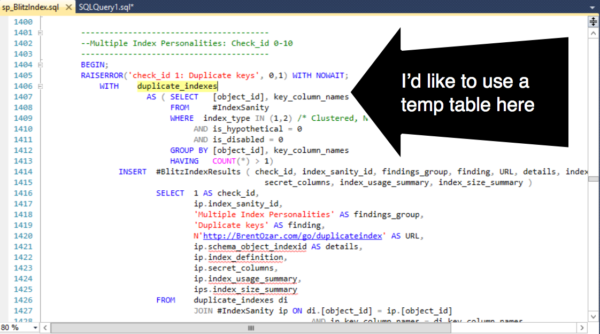
SSMS Need to add a temp table!
If I scroll up to add the temp table at the top, I have to find my way back here. And I’m *lazy*.

I don’t have to lose my place. I can split the window using a cool, but hard to see feature known as the “splitter bar”.

Finding the splitter bar icon in SSMS
This tiny icon is the “splitter bar”

Drag the splitter bar down. I now have two synchronized views into my procedure.
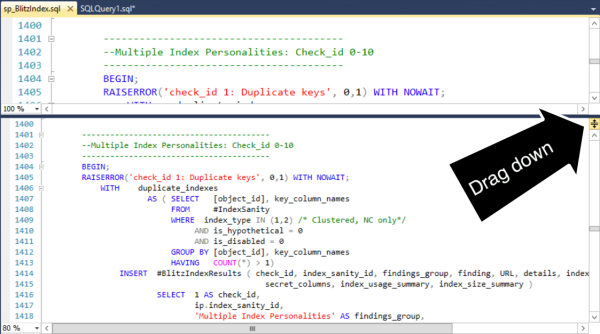
Dragging down the splitter bar
Dragging down the splitter bar opens up two work “zones” in the same document.

Voila, I can add my temp table in the right area without losing my place.

Editing two zones in SSMS
A great reason to justify that huge monitor you need for productivity.

This feature isn’t specific to SQL Server Management Studio– it exists in lots of other products. (Including Word!) But the feature is hard to spot and most folks just never seem to learn about it. (I had no idea it was there myself until Jeremiah showed it to me a while back, and now I’m addicted to it.)

Dynamic Sorting

SQL Server
36 Comments

While working on some DMV scripts, I came up with a lazy way to have a user definable sort order in the query that seemed like pure genius. I showed it to the team and they’d never seen anything like it before.

The Situation

Users like to be in control. They want to define custom columns, sort orders, and basically drag, drop, and pivot chart their way to victory. While I’m not going to show you how to build custom everything, we can look at a custom sort order.

Let’s start with a simple query:

Possible Solutions

Our users want to be able to define a custom sort order on this query. We could solve this in a few ways:

  1. Writing several stored procedures
  2. Use dynamic SQL to build an ORDER BY

Writing several stored procedures is tedious and error prone – it’s possible that a bug can be fixed in one of the stored procedures but not the others. This solution also presents additional surface area for developers and DBAs to test and maintain. The one advantage that this approach has is that each stored procedure can be tuned individually. For high performance workloads, this is a distinct advantage. For everything else, it’s a liability.

We could also use dynamic SQL to build an order clause. I wanted to avoid this approach because it seemed hacky. After all, it’s just string concatenation. I also wanted to work in the ability for users to supply a top parameter without having to use the TOP operator.

The First Attempt

My first attempt at rocket science looked like this:

Why do it this way? There are a few tricks with paging that you can perform using ROW_NUMBER() that I find to be more readable than using OFFSET and FETCH in SQL Server 2012. Plus ROW_NUMBER() tricks don’t require SQL Server 2012.

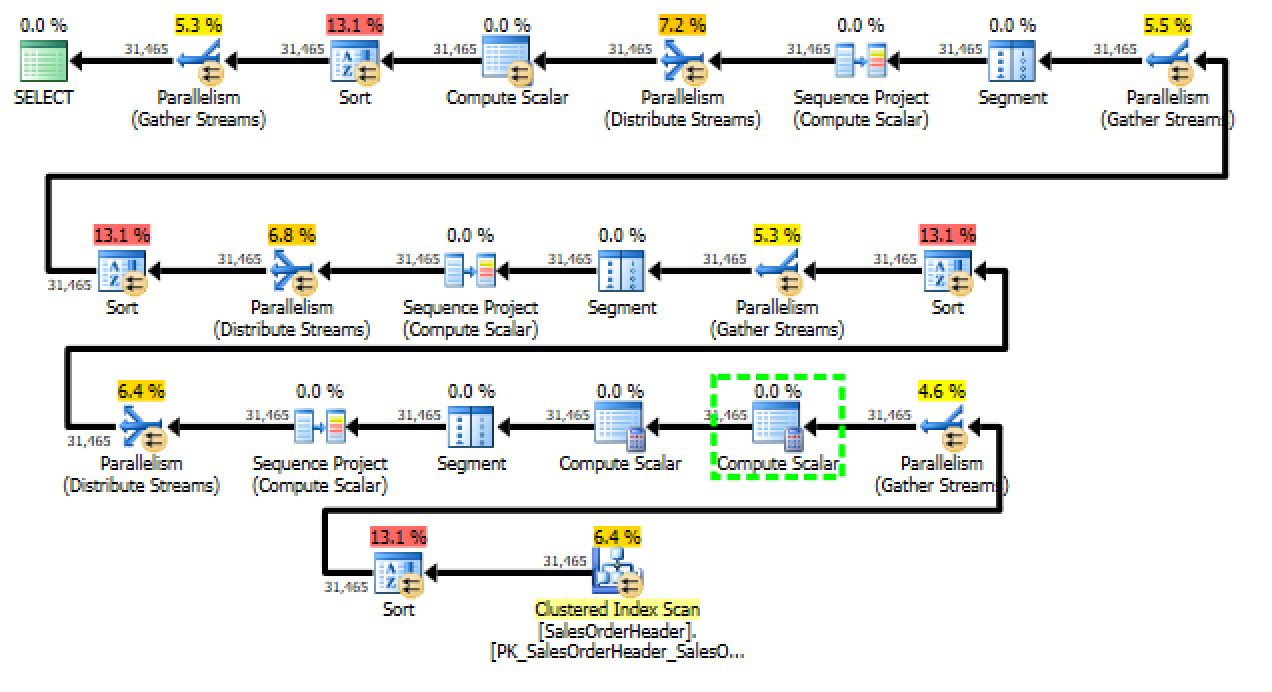
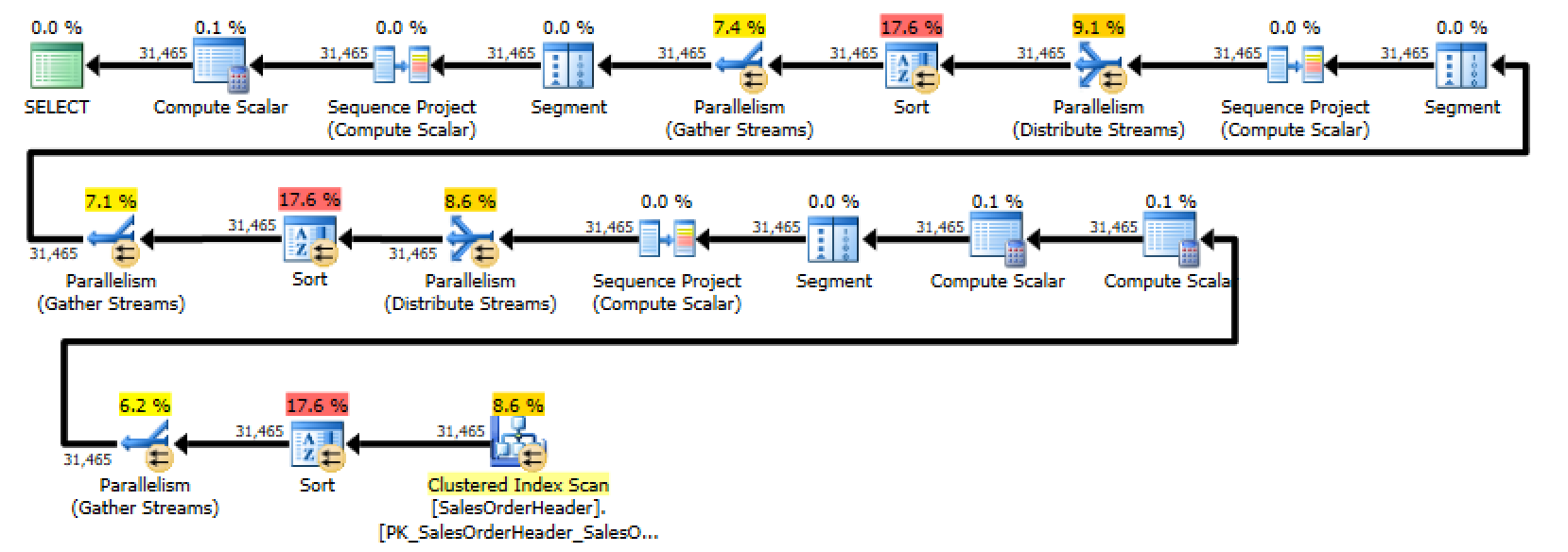
Unfortunately, when I looked at the execution plan for this query, I discovered that SQL Server was performing three separate sorts – one for each of the case statements. You could generously describe this as “less than optimal”.

A terrible execution plan featuring three sort operators.
Look at all those pretty sorts!

Even though it seems like SQL Server should optimize out the CASE statement, the obvious thing doesn’t happen. SQL Server has to compute the ROW_NUMBER() for every row in the result set and then evaluate the condition in order to determine which row to return – you can even see this in the first execution plan. The second to last node in the plan is a Compute Scalar that determines which ROW_NUMBER() to return.

I had to dig in and figure out a better way for users get a custom sort option.

Moving the CASE to the ORDER BY

My next attempt moved the custom sort down to the ORDER BY clause:

This ended up performing worse than the first attempt (query cost of 8.277 compared to the original query’s cost of 6.1622). The new query adds a fourth sort operator. Not only is the query sorting once for each of the possible dates, it’s then performing an additional sort on the output of the ROW_NUMBER() operator in the ORDER BY. This clearly isn’t going to work.

I somehow made this query even worse. You should move on.
-50% improvement is still improvement, right?

Getting Rid of ROW_NUMBER()

It seems like ROW_NUMBER() really isn’t necessary for our scenario. After all – I only added it as a trick if so I could potentially add paging further down the road. Let’s see what happens if we remove it from the query:

Right away, it’s easy to see that the query is a lot simpler. Just look at the execution plan:

Despite the file name, this isn't the winner.
A contender appears!

This new form of the query is a winner: the plan is vastly simpler. Even though there’s a massive sort operation going on, the query is still much cheaper – the over all cost is right around 2 – it’s more than three times cheaper than the first plan that we started with.

There’s one downside to this approach – we’ve lost the ability to page results unless we either add back in the ROW_NUMBER() or else use FETCH and OFFSET.

Bonus Round: Back to ROW_NUMBER

While using my brother as a rubber duck, he suggested one last permutation – combine the ORDER BY technique with the ROW_NUMBER() technique:

This ended up being almost as fast as the ORDER BY approach; this query’s cost is only 0.00314 higher than the ORDER BY. I don’t know about you, but I would classify that as “pretty much the same”. The advantage of this approach is that we get to keep the ROW_NUMBER() for paging purposes, there is only one sort, and the code is still relatively simple for maintenance and development purposes.

Check out the plan!

Victory is ours!
Victory is ours!

What Did We Learn?

I learned that trying to be smarter than SQL Server can lead to pretty terrible performance. It’s important to remember that the optimizer reserves the right to re-write. In the first and second case, SQL Server did me a favor by re-writing the query. Our third case is fairly obvious. The fourth example is somewhat surprising – by shifting around the location of theCASE, we’re able to eliminate multiple sorts and gain the benefit of using ROW_NUMBER().


Why Are You Still Using SQL Server 2005?

SQL Server
15 Comments

The year: 2005.

What was happening with the Brent Ozar Unlimited® crew?

I was working on the help desk for a small company while attending Fox Valley Tech College to earn my associate degree. I think I still wanted to go into programming at that point in time! I’d never been to a user group meeting or posted on a forum. I wasn’t even a runner!

Brent took his first full-time DBA gig at Southern Wine & Spirits. He worked on his first cluster and his first 1 TB+ database. He’d never written about Perfmon or attended a conference.

Kendra worked for a dot-com in Seattle. She spent a lot of time with 32-bit servers, automating installs, restores, and configuration of SQL Server for large environments.

The hottest phone of 2005?

Doug was working on a VB6 app for insurance adjusters. At home he had a smokin’ PC with a 1.0 GHz AMD Athlon and a 19” CRT monitor. He and his wife didn’t have kids yet, and he surprised her with a trip to Venice for Christmas.

Jeremiah was (don’t laugh) a developer. While sitting on the bench, he decided to revise the company’s project management software. He rapidly prototyped a new system using SQL Server instead of Access and the .NET Framework with an ORM instead of ad hoc SQL written in VBScript and classic ASP.

The Technology World

Star Wars Episode III was released. YouTube was launched. The Xbox 360 was released.

And, after long last, Microsoft released SQL Server 2005. It had been a long five years since SQL Server 2000. There were drastic changes between the two editions. DMVs (dynamic management views), CLR, hot-add memory, ranking functions, and the XML data type were introduced. Database Mirroring, a new HA feature, was available as of SP1. SQL Server Management Studio: need I say more? These were big changes!

Star Wars III: You know you saw it in the theater

Moving On

Jump in the time machine. 9 years later, I’m writing this blog post. It’s January, and a new year is beginning.

I’ve finished college, I’ve moved up from the help desk (way up), I’ve been to – and spoken at – a couple user group meetings just in the last month, and I’ve run a couple marathons.

Brent? He’s done OK. He’s attained Microsoft Certified Master (MCM) status in SQL Server. He’s gone from DBA to software evangelist to consultant. He’s spoken all over the world.

Kendra has also attained MCM status and become a consultant. She’s learned a lot about hardware, query tuning, and when it pays to upgrade your environment instead of sinking countless people-hours into solving a problem.

Doug is the newest member of the Brent Ozar Unlimited® crew. He’s spent his 9 years learning everything he knows about SQL Server, and becoming a blogger, presenter, and user group leader.

Jeremiah used his software project to set the course for his career. He learned he had a knack for databases, and he ran with it. He too has become a successful consultant, blogger, and speaker.

Technology? It’s changed a bit, too.

Our iPads are now as powerful as Doug’s computer was back in the day. The Xbox One and PlayStation 4 launched this year. Instead of carrying around a phone, a laptop, a camera, and scanner, we carry one smartphone that does everything.

SQL Server, 9 Years, and You

SQL Server has changed dramatically, too!

SQL Server 2012 has been out for well over a year, and SP1 was released in 2013. This release brought some big changes. Internally, the way memory is handled was changed, improving operations and efficiency. There are improved T-SQL functions, such as more windowing functions. AlwaysOn Availability Groups were introduced as the latest HA/DR technology. With a GUI, Extended Events is ready to take over Profiler’s job. Columnstore indexes were introduced to make data warehouse storage and retrieval more efficient.

What’s next? We’re awaiting word on a release date for SQL Server 2014. This release is going to have the usual improvements, and then some. There’s a new method for cardinality estimation. A new engine is being introduced – In-Memory OLTP. Backups can be done directly to “the cloud” in Windows Azure. Clustered columnstore indexes will be updateable. There’s more – check out my recent webcast!

Let Me Ask You a Question

And let’s focus on your job. Are you still using the same laptop you did in 2005? If you’re on call, are you still using the same phone – or, help us all, the same pager – you had 9 years ago? Has your company’s main business application undergone change since then?

2005: HP Compag nx9600 - loaded with a  Pentium 4 650, 2048 MB RAM, 60 GB 7,200 RPM hard drive, and almost 10 pounds
2005: HP Compag nx9600 – loaded with a Pentium 4 650, 2048 MB RAM, 60 GB 7,200 RPM hard drive, and almost 10 pounds

You have a newer laptop. You have a newer phone. The applications have been updated, or changed entirely. Why are you still on SQL Server 2005?

Yes, the process of testing a database upgrade is time-consuming. But it’s well worth it. The changes to the internals and the new features available are nothing but positive. And let’s not forget that in just over two years – Microsoft is currently stating April 12, 2016 – extended support for SQL Server 2005 ends.

Start making plans to upgrade today, and reap the benefits!


You Won the Tribal Awards With Us

Blogging, SQL Server
4 Comments

The Simple-Talk Tribal Award Winners are out, and we won in two categories – Blog of the Year for the Brent Ozar Team Blog, and me as the Person You’d Most Like to Have a Beer With.

See, now we're having a beer virtually. It's almost like - no, it's nothing like. We need real beer.
See, now we’re having a beer virtually. It’s almost like – no, it’s nothing like. We need real beer.

So three things we need to cover here.

First, when we have a beer together, don’t worry about picking the beer. Just grab us a beer. I know I’m all foodie-focused, and yes I do love champagne, but I’m not a snob. I’ll drink everything from dark Guinness to fruity hefeweizens to Corona. If you see me with an empty bottle (what, you think I need a glass?), just bring over another one and let’s talk.

Second, you can get our blog posts via email too. We stopped promoting this a while back when we redesigned the site, but the subscription still exists. One of these days we’ll add it back in somewhere. We’ve still also got an RSS feed if you’re old-school like me. (I’ve been using Feedly as a replacement for Google Reader.)

Last, thank you. Thank you for being here, listening, commenting, and enjoying the journey with us. We still joke around about how this company started as a blog about turtles and pantyhose. We’ve come such a long way over the last twelve years, and I can’t wait to see what the future brings for us all. We’re going to keep right on blogging about how you can improve your database skills, your career, and the community as a whole. That’s what’s important to us, and thanks for making it important to you, too.


What’s the Smallest SQL Server You Should Build?

SQL Server, Virtualization
53 Comments

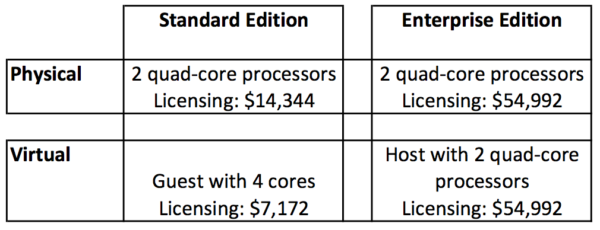
Before we pick CPUs or memory, let’s start by looking at SQL Server 2012’s licensing costs:

Sticker Price for SQL Server 2012

These are MSRP prices and do not include the extra costs for Software Assurance (maintenance) or any discounts for being a school, non-profit, or those photos you have of Bill Gates.

Physical, Standard Edition – you’ll notice that I went with 2 processors rather than 1. Technically, if you’re dying to save money, you could get away with installing SQL Server on a server with a single CPU, but if you want to save that much money, go virtual and avoid the hardware costs altogether. I could have also gone with 2 dual-core processors, but I only know of one dealer still selling those, and we’re talking about new servers here.

Physical, Enterprise Edition – that’s $6,874 per core, so it adds up fast.

Virtual, Standard Edition – here we’re using just 4 cores, the minimum license size Microsoft allows for a new server. You can build smaller ones (and I do), but as long as you’re licensing with Standard Edition, you’re paying per guest, and the minimum cost is $7,172.

Virtual, Enterprise Edition – if you really need Enterprise features in a virtual machine, you’ll most likely be running multiple SQL Server VMs. In that scenario, you’re best off licensing Enterprise Edition at the host level, and then you can run an unlimited number of SQL Server VMs on that host. (When I say “unlimited”, I’m using it the same way your cell phone company tells you that you have unlimited Internet.)

My failover cluster lab circa 2011. Feel the power of SATA.

When I’m designing servers, I start with the licensing discussion because it helps everyone focus on the real cost of the server. Often folks want to nickel-and-dime their way into 16GB of RAM and a pair of SATA drives, but once licensing costs come into play, they realize architecture here is different. Our goal is to absolutely minimize the number of cores involved – ideally deploying virtual machines as often as we can – and then when we need to go physical, we get serious about the hardware, because this stuff ain’t cheap.

Now Let’s Talk Hardware

Once you’ve picked your licensing and physical vs virtual, let’s talk hardware. I’m using a major server vendor, but the exact brand isn’t important – you can get similar pricing from the hardware vendor of your choice, and this post isn’t about making brand decisions.

Gentlemen, start your caps lock.

Notice how the numbers are displayed as total, licensing, and hardware? That’s how you need to present them to management. When a manager looks at those physical server numbers, the hardware is still clearly the cheapest part of this transaction. If they want to drive costs down, they can start by asking why this SQL Server needs to be physical – the real way to save money here is to drop down to the Virtual column.

Again, these are public sticker prices here based off the hardware vendor’s web site, and don’t include the extra costs of Windows, management software, or volume discounts. These prices also don’t include the cost of the drive space for the data and log files. Your choice between shared storage (SANs), local SSD, or local magnetic drives varies widely between shops, so I’m leaving that out. Let’s just focus on the basic hardware at first.

Physical, Standard Edition – this is a 2-CPU rack mount server with the fastest quad-core processors available right now, 96GB of the fastest memory, a pair of magnetic hard drives for Windows, and a pair of vendor-supplied-and-supported solid state drives for TempDB.

“BUT BRENT! YOU TOLD ME THIS WAS THE SMALLEST SERVER YOU’D DEPLOY, AND THAT SOUNDS LIKE AN INCREDIBLE SPEED MACHINE!!!1! WHAT ARE YOU THINKING? ARE YOU TROLLING ME AGAIN LIKE YOU DID WITH THE FRAGMENTATION POST?”

No, this is actually what I recommend to clients. You don’t waste dry cleaning money on your dad jeans, and you don’t run $14k worth of software on $3k worth of hardware. Besides, you want this thing to last for a few years, right? You don’t want to come running back to this machine again and again trying to fix performance problems that could be fixed with a basic injection of memory.

Physical, Enterprise Edition – the exact same 2-CPU box with the same processors, but upgraded to 384GB of memory and four 400GB SSDs for TempDB.

“BRENT ZOMG YOU MUST BE JOKING THAT’S CRAZY FAST, LIKE KEN BLOCK’S FORD FIESTA FAST. NOBODY NEEDS THAT MUCH MEMORY EVER, BILL GATES TOLD ME SO!!!!ONE”

Yes, my incredulous caps-loving friend, because we need to stay focused on the $55k worth of licensing costs, the dozens (hundreds? thousands?) of employees who rely on this server every day, and the capabilities in Enterprise Edition. Right now, the $55k of licensing you bought is being wasted on crappy hardware that’s more like Stason Lee’s Ford Fiesta.

Virtual, Standard Edition – since you’re licensing by the guest, you don’t have to buy an additional host for every new SQL Server you deploy. You can just mix these in with the rest of your virtualization farm and incur incremental costs. It’s certainly not free, but it’s nowhere near as expensive as a dedicated physical box.

Virtual, Enterprise Edition – since we’re going to license this at the host level, we generally only want to run SQL Server virtual machines on this host. Any other guests here are just wasting my very valuable CPU cycles and memory – at $55k for the licensing, I need to keep this focused just on SQL Server. Because of that, I’ve got a host equipped with the same power as my Physical Enterprise Edition spec – fast cores, high memory, and some local solid state to make a vSAN deployment easier for my VMware admins. (Disclaimer: when building out a real VMware host, I’d obviously tweak this – I’d end up with 10Gb Ethernet and/or FC HBAs, for example, but that depends on each shop’s network infrastructure.)

Yes, it’s another shock-and-awe post from Brent.

If you’re building physical boxes with 16GB of memory, and then you find yourself repeatedly going back to those boxes to do performance troubleshooting, the problem isn’t the app or the server or the memory.

The problem is you, and your old-school 16GB memory fixation.

You need to step back and look at the whole picture – licensing, business needs, RPO/RTO – and stop trying to save a few bucks in ways that hurt the server, the business, and your weekends.


SQL Server DMVs that Lie

SQL Server
21 Comments

sys.liesSQL Server has amazing instrumentation. Dynamic management views and functions give you great insight into what’s happening in your SQL Server and what’s slowing it down. Interpreting these views and functions takes a lot of time, but with practice and skill you can use them to become great at performance tuning.

But nothing’s perfect. Some of these DMVs and DMFs have bugs or column names that can be misleading. If you take them at face value, you can end up with egg all over your face.

sys.dm_os_sys_info – hyperthread_ratio column

This DMV is great for quickly checking the last startup time of your SQL instance and finding out if it’s virtualized. But don’t trust sys.dm_os_sys_info to tell you whether or not hyperthreading is enabled on your processors.

The “hyperthread_ratio” column is simply an indication that you have multiple cores per processor and does NOT tell you whether or not they are using hyperthreading.

sys.dm_index_usage_stats – the whole concept of “usage”

This DMV is trying to tell you the truth, but almost nobody understands what it means. This DMV tells you how many times a query used an index in its execution plan– but it doesn’t tell you exactly how many times the index was accessed. Only the number of operators referencing it when the plan was run.

A simple example: I run a query that does a nested loop lookup to retrieve a value from the index PK_Address_AddressID. The query runs once, and in that one run it executes the lookup 30 times. This is counted as one “use” of PK_Address_AddressID, even though 30 lookups were executed.

If a single index appears more than once in an execution plan (due to a subquery, union, etc), then it’ll be counted once for each operator in the plan.

TLDR; index_usage_stats does NOT show you the number of “reads” or “writes” an index is really serving up.

sys.dm_exec_trigger_stats – execution_count and last_execution_time columns

Which triggers on your server are running the most and using the most resources? The sys.dm_exec_trigger_stats DMV seems like it’s perfect to answer that question, but beware.

There’s a bug where execution_count increments due to completely unrelated actions that wasn’t fixed until SQL Server 2012. (I’ve seen the info from this DMV be wonky on 2008R2, and I’ve validated I can’t reproduce this on SQL Server 2014, but I haven’t personally tested on 2012.)

Side note: isn’t it cool that Microsoft makes the Connect bug data public? I’m not sure that I ever would have figured out what contributes to inflating the execution counts on my own!

sys.sysindexes – Rowmodctr

It can sometimes be useful to estimate how many changes have occurred since statistics were last updated on a column or index. This gives you a quick way to guestimate if those stats are maybe not-so-fresh.

Good news on this one– the column isn’t perfectly true, but Books Online has a great rundown of its issues. It lets you know that SQL Server doesn’t really use this counter for its own purposes, and that it’s only roughly accurate at best.

And then it lets you know that SQL Server doesn’t expose column modification counters, so this maybe-pretty-close-guestimate counter is still perhaps better than nothing.

sys.dm_os_performance_counters

I’m a huge fan of SQL Server’s performance counters, wheter you’re querying them via sys.dm_os_performance_counters or looking at them with perfmon.exe.

But there’s a whole host of misleading and just plain outdated counters that will lead you astray. Learn which perf counters to beware in Jeremiah’s post on perfmon.

SQL Server’s Instrumentation is Great

And honestly, so is SQL Server’s documentation. The challenge is that there’s a massive amount to document– and Books Online can’t cover all the nuances of everything. Keep using those DMVs– just keep an eye out for the gotchas.


Top 10 Signs Your SQL Server is Neglected

"That's an interesting configuration you've got there."
“That’s an interesting configuration you’ve got there.”

Sometimes you see someone with toilet paper sticking to their shoe, their shirt tucked into their underwear, or badly in need of a tissue to get rid of whatever that is hanging out of their nose. It’s only right to find a discreet way to let them know they should do some quick cleanup before they get completely embarrassed.

The same embarrassing “oops” exist for SQL Server. There are some practices and configurations which just make it look like the DBA may not have learned about this “internet” thing yet.

But, truthfully, it’s very simple to accidentally embarrass yourself. Here are the top 10 (well, 11) signs that your skills or your SQL Server are badly in need of an update:

Even if you know better, have you checked your servers to make sure that you don’t have toilet paper on your shoe without realizing it? Run our free sp_blitz® script to check for most of these issues, and more.


How to Cache Stored Procedure Results

SQL Server, T-SQL
23 Comments

Say you run an online store, and on each item’s page, you need to show related items that people purchased. Let’s take an Amazon page for my favorite rechargeable AA batteries:

Frequently Bought Together

In a perfect world, we would cache this data in the web/app tier – but back here in the real world, sometimes our developers build stored procedures to fetch this kind of data, and the stored procedure ends up getting called way too often.

To solve it, let’s build a caching layer into our stored procedure.

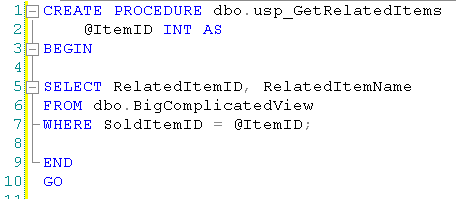
Here’s the pseudocode of how our stored procedure usually works:

Original Stored Procedure

I’m using a really simple stored procedure, but this approach works best when you have a complex stored procedure that does a lot of heavy lifting – calculations, querying big tables, aggregations, etc.

Instead of directly doing all the heavy work, check this out:

Implementing Caching, Part 1

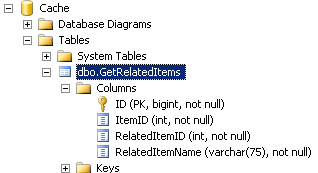
I’ve introduced a new table here – Cache.dbo.GetRelatedItems. I created a new database called Cache, and I keep it in simple recovery mode. I can use a totally different backup strategy for this database – perhaps not even backing it up at all.

Cache-Table

The Cache.dbo.GetRelatedItems table has exactly the same columns that are normally returned by usp_GetRelatedItems, plus the input field. In this case, our stored procedure has an input field of ItemID, and it returns RelatedItemID and RelatedItemName, so the table would look like the one shown at right.

Rocket surgeon readers will note that I added an ID field to give the table something unique. They will also notice that I didn’t add a DatePopulated or DateCached field – depending on my business needs, I would probably just truncate this table every night. In the case of related items in an e-commerce store, I might only truncate it every week, and I’d want to do it right before a really low load period so that the cache could gradually refresh. This outright-truncation technique is less efficient for refreshing the cache, but it minimizes the locking required by deletes. In a caching setup, I’m worried about concurrency here.

When implementing a solution like this, I usually do a lot of A/B performance testing to find the right clustered index for the table. Typically each caching table has no non-clustered indexes, and has just one clustered index designed to produce the fastest range scans for the number of parameters for the stored proc. (Before somebody posts a comment asking for that strategy, no, I’m not blogging that, because it’d take me a day, and I’m lazy.)

If you choose not to back up the Cache database, your code should not rely on the existence of objects in it. It should start by checking to see if the Cache.dbo.GetRelatedItems table exists, and if not, create it. That way if you fail over to your DR site and the Cache database is empty, your queries won’t fail.

I’ve over-simplified the stored procedure a little, though – something actually has to populate the cache table. There’s two ways I could do it: externally, like a SQL Agent job or an SSIS process, or internally – inside the stored procedure itself. Let’s code that:

Caching Part 2: The Cachening

We start by checking the cache table for results, and if we don’t find any, we add them.

I’m cringing as I write this because I can hear the screams of performance tuners. Yes, I’m adding additional write load on the SQL Server – keep in mind that I only use this approach when I’m faced with:

  • A very work-intensive but read-only stored procedure
  • Called very frequently (hundreds or thousands of times per minute)
  • Whose results change less than once a day (or where we’re not concerned about real-time accuracy)
  • A business that needs immediate speed and can’t wait for developers to implement a caching layer

As soon as I deploy a solution like this and the business pain goes away, I immediately start working with the developers on a better long-term solution. This solution is an emergency band-aid to get the business up and running, but it still incurs load on the SQL Server for writing the caching results, getting locks, and running the stored procedure. This is when I start talking to the developers about caching in the app tier, and here’s my favorite resources on that:


Meet Doug Lane (Video)

Company News, SQL Server
0

Our mysterious employee #2 – where did he come from? How did he get into SQL Server? What does he want to learn in his first year at work with us? The answers to those questions, and more, will reveal themselves in this webcast recording:

https://www.youtube.com/watch?v=SPeX4d_piiU


Q: Can High MaxDOP make a query SLOWER?

SQL Server
15 Comments

Answer: Yep, sometimes it can.

I used to think that higher degrees of parallelism followed a law of diminishing returns– you could add more threads, but the benefits would taper off. But it’s a bit more complicated than that. Microsoft’s recommendation to be careful when setting maxdop to values over 8 is a warning worth heeding.

Lowering maxdop can cut CPU without sacrificing duration

We tend to think that reducing the number of threads available MUST make a query slower– but that we sometimes need to do it so other queries can run concurrently.

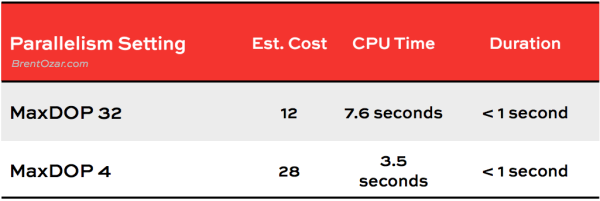
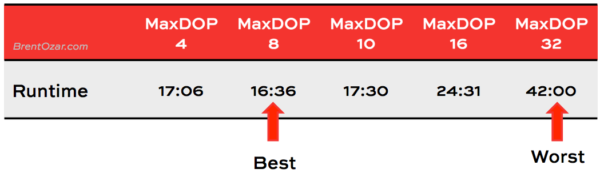
It’s great to support concurrency, but lower DOP doesn’t necessarily mean a longer runtime, even if it does lower CPU consumption. Here’s a simple example of an OLTP query run with two different DOP settings. CPU time and duration were measured using “SET STATISTICS TIME ON”. For both runs all data was in memory (no physical reads or read aheads).

OLTP Query MaxDOP

Duration in both cases was around 700 milliseconds. The lower DOP didn’t make execution time longer. It changed the way SQL Server ran the query, but it cut overall CPU usage while keeping the runtime about the same. This was great in this case, because the query in question needed to run frequently on an OLTP system.

Higher maxdop can slow down large queries

In the case of large queries, higher DOP can slow down query execution. The impacts here vary a lot by processor, memory type and amount, and whether or not your SQL Server is virtualized— not to mention based on the execution plan of the query in question.

Here’s a totally different query tested on totally different hardware. In this case the query reads in hundreds of gigabytes of data, but as in the previous example all tests were run against a “warm” cache and were not doing physical reads or read ahead reads. The server used in this test had 8 physical cores per NUMA node.

Large Query MaxDOP

Changing maxdop changes query plans

When you tune maxdop, it’s worth watching the execution plans for the top queries on your server. I’ve seen changing the amount of threads available for a query make the optimizer change its mind about how to run a query immediately– and been able to reproduce it switching the plan back as soon as I hint a different DOP.

Since impacts can be complicated I recommend changing maxdop rarely and monitoring your plan cache and wait stats for at least a week or two after the change.

Parallelism is a good thing

Don’t get me wrong– I ain’t saying parallelism is bad for SQL Server. Multiple threads can make many queries faster!

One of the gotchas with SQL Server is that the default value of “0” for the “Max Degree of Parallelism” setting can lead to poor performance– because it lets SQL Server use all your processors (unless you’ve got more than 64). Fewer threads can not only reduce CPU usage, but may also be faster.

So check your maxdop settings, and keep reading to learn more about CXPACKET waits.


Vote for yourself in the new Tribal Awards.

SQL Server
0

When you vote for us in Simple Talk’s new Tribal Awards, you’re voting for yourself.

Best Free Script – sp_Blitz® – Sure, I started this all by myself a few years ago, but it’s grown into something huge. Scroll down through the change log and get a load of the dozens of contributors who have helped make this tool amazing. I even hear from consultants who ask me, “Are you sure it’s okay to use this thing in my job?” Of course! We’re all in this together, and we’re all trying to make SQL Server easier for everybody.

Blog of the Year – www.BrentOzar.com – To me, the comments are the most fun thing about a blog. Since the first post 11 years ago, we’ve had 16,650 comments (and no, that doesn’t include the spam). This place is fun because you guys take part, and even when you say crazy stuff, at least I get to use my witty retorts.

Person You’d Most Like to Have a Beer With – Brent Ozar – Let’s be honest – you guys only nominated me because you know that whenever I’m drinking beer, I’m also ordering tater tots. It’s not that you want to have a beer with me – you want to eat my tater tots. You’re just being greedy here.

So go vote, and we all win.


How Would You Change Windows Azure SQL Database?

Cloud Computing, SQL Server
33 Comments

This artist formerly known as SQL Azure is a cloud service something akin to Microsoft SQL Server.

SQL Azure is still under legal drinking age.

When it first came out, it had a lot of challenges – a small subset of T-SQL commands and datatypes, inability to take backups, and absurdly small database sizes.

But much like Emma Watson, when your back was turned, WASD matured into a surprisingly capable platform. However, most of us still aren’t using it, preferring to run SQL Server on-premise.

This leads to an interesting question: what would Microsoft have to do to get you into Windows Azure SQL Database?


Auto-Scaling SQL Server Always On Availability Groups with Virtualization

Time for a thought exercise.

Thought exercises are hard.

You’ve got a database application that has bursty and unpredictable loads. Out of nowhere, you’ll suddenly get socked with a large amount of SELECT queries. Due to the way the app is written, you can’t cache the query results – the queries keep changing, and the business wants data from within the last couple of minutes.

In the past, you’d have used replication or AlwaysOn Availability Groups to build multiple read-only reporting servers, but that means big SQL Servers that sit around idle most of the time. You have to size them for the bursts in load. You could probably get by with a single 2-socket server most of the time, but when the loads come in, you need an 8-socket server to handle all these reads.

But what if you combined virtualization with SQL Server’s ability to add AG replicas on the fly? Think Amazon’s Auto Scaling, but on-premise. The script logic would go something like this:

  • If your current readable replicas are experiencing bottlenecks that could be fixed by adding additional replicas,
  • And the load lasts more than X minutes/hours (set by the business’s goals)
  • Start up a new virtual machine (ideally a template with SQL Server already installed)
  • Add it to the cluster
  • Restore the most recent full and transaction log backups to it (very easy if you’re already backing up to a network share, and would require no additional load on the current replicas)
  • Join it to the Availability Group
  • Add it to the read-only routing list

And presto, you’ve got more power. You can also use the same type of logic to tear down replicas you don’t need.

If you wanted to get even fancier and more proactive, rather than adding an all-new server to the Availability Group, you could have the script shut down one of the existing replicas, add more vCPUs and/or memory, and start it back up again. That way you could add more power without having to deal with backups and restores, but on the downside, this means temporarily taking away power from the existing AG.

You can even do this without affecting end users. Take the replica out of the read-only routing list, wait for the last query to finish, and then start the maintenance work on that replica.

It would only make sense at companies where:

  • The app’s config string used the ApplicationIntent=ReadOnly parameter for read-only queries, thereby letting us move those to read-only replicas
  • The write loads can still be handled by a single server
  • The script could finish in time to handle the added load (for example, this isn’t going to work with 5TB databases on slow storage)
  • There’s an incentive to get rid of unneeded replicas (because some companies are just okay running lots of unneeded servers to handle peak loads)
  • Licensing is done at the virtual host layer, not at the guest layer (which rules out Amazon EC2 and Azure VMs, neither of which would be cost-effective here)

If I was going to write something like this, I’d do it in PowerShell because I’d want one language that interfaces well with my monitoring software, VMware/Hyper-V, Windows clustering, and SQL Server. Alas, I’m not doing it anytime soon – I’ve gone through this thought exercise with a couple of clients, and in both cases, the answer has been, “Screw it, we’ll do it manually instead.” It sure is a fun thought exercise, though.

It does sound like a lot of work, but the slick part is that once the scripts are built and tested, you can leverage it to auto-scale read load for any of your AG-protected databases.

And, uh, open source it, will you? Kthxbai.


RECOMPILE Hints and Execution Plan Caching

The DBA version of an XKCD classic.

When you identify that parameter sniffing is a problem, you need to test whether implementing ‘recompile’ hints will help plan quality. (Not sure what parameter sniffing is? Learn from this blog post or this 50 minute free video.) You must decide: what hint or command do you use, and where do you put it? What trade-offs are you making when it comes to being able to performance tune your SQL Server in the future?

This post runs through common options you have to nudge (or whack) SQL Server into generating a fresh execution plan. I’ll give some pros and cons for each method and explain what’s useful and what’s worth avoiding.

To keep things relatively simple, I’m just discussing how this applies to stored procedures today–this post doesn’t cover other forms of parameterized (or non parameterized) queries. If you’ve got big questions in those areas, feel free to suggest it for a future post in the comments.

Disclaimer: Recompile hints can kill your performance by lighting your CPUs on fire when used incorrectly. Handle with care!

Useful Dynamic Management Views

When I talk about impact on the execution plan cache, I’ll refer to two DMVs:

  • sys.dm_exec_query_stats – This DMV is helpful to see the top statements on your SQL Server, regardless of whether they’re part of a procedure or not. Check out a sample query here.
  • sys.dm_exec_procedure_stats- This DMV is only available in SQL Server 2008 and higher. It tracks execution metrics for stored procedures. Check out a sample query in Books Online.

For both of these DMVs, having an execution plan in the cache is linked to being able to see execution metrics: number of total executions, total and average CPU, logical reads, etc. When an execution plan is removed from the cache due to recompilation, memory pressure, restart, or other actions, the related execution metrics are removed as well.

Executing a procedure with a runtime recompile hint

One option that I love for quick and easy testing is the ability to call a stored procedure with a recompile hint at execution time. This is great because you don’t have to change any compiled code. Your hint also just applies to what you’re doing at runtime.

To do this, you just use syntax like this:

However, there’s a little bit of a gotcha. If you have nested stored procedures, the recompile hint only applies to code in the outermost procedure. You can still get parameter sniffing on any calls to sub-procedures within the stored procedure itself.

So while I do like this sometimes for testing, if you have any nesting in your stored procedures it may not help you get a truly fresh execution plan.

Using the sp_recompile System Stored Procedure

This sometimes comes in handy if you need to intervene during a production incident if you’ve got a bad plan being used repeatedly by incoming sessions. You can force recompilation of plans by running sp_recompile against an object– most common choices are a table or a stored procedure. The command looks like this (a table in this example):

When this is run, related plans are not immediately removed from SQL Server’s execution plan cache. Instead, the magic happens the next time queries referencing the recompiled object run. At that point, existing execution statistics in sys.dm_exec_query_stats will be reset for statements in the plan.

Execution counts in sys.dm_exec_procedure_stats will not necessarily be reset at next use if you mark a table used by a stored procedure for recompilation. But if you mark the stored procedure itself for recompilation, it will be reset at the next use. (Don’t bother trying to memorize this, just read the next paragraph.)

There’s big downsides with this one. This command requires high permission — the user running it requires ‘alter’ permissions on the table. It also requires a high level of lock to complete. On busy systems I’ve seen this command take part in some nasty blocking chains. Be careful with it!

While this can occasionally be useful for troubleshooting and testing, don’t make it part of production code.

RECOMPILE hints in stored procedure headers

When you’ve got procedures that you want to generate fresh plans, you start looking at how to use hints within the procedure. The option most folks discover first is to use ‘WITH RECOMPILE’ in the header of the stored procedure, like this:

Using RECOMPILE in the stored procedure header is pretty drastic — the procedure won’t cache an execution plan when it runs. This means:

  • No execution plans in cache to review
  • No execution stats recorded in sys.dm_exec_query_stats
  • No execution stats recorded in sys.dm_exec_procedure_stats

Wow, that’s a bummer. If you need to identify the impact this procedure is having on your server, you have to run some sort of trace or extended events session and harvest and interpret the results. That’s not quick, and running traces can impact performance.

Kind of a big negative. For that reason, I don’t like this choice much at all.

RECOMPILE hints on individual statements

This option is a bit more work, but it has a much better payoff over time. With this option you take the RECOMPILE hint and apply it only to statements in the stored procedure where you’d like to implement the recompile, like this:

Even if you need to use the hint on all the statements in the procedure rather than in the header, this still has benefits! By putting the recompile hint at the statement level in the proc, you magically get:

  • Limited execution plans in cache to review (last execution)
  • Limited execution stats recorded in sys.dm_exec_query_stats. You’ll only get stats for the last execution, but the plan_generation_num column will increment, at least giving you insight that something is up.
  • Execution stats recorded in sys.dm_exec_procedure_stats

The fact that you do get some information in these DMVs can be super useful over time. Applying recompile hints only to the statements that need them is also just more responsible– it lowers your risk of burning yourself up over time with CPU burn.

DBCC FREEPROCCACHE – the nuclear option

This isn’t strictly a recompile hint– but it certainly does cause recompilation. SQL Server has a command you can use to tell it, “Start anew with fresh execution plans”. It’s usually used like this:

This command makes everything start fresh– for every query:

  • CPU usage may go up as new plans are compiled
  • Execution stats are cleared in sys.dm_exec_query_stats (immediately)
  • Execution stats are cleared in sys.dm_exec_procedure_stats (immediately)

This command isn’t evil– there’s a time and a place in troubleshooting when using it can help you get to the root cause of a performance problem quickly. However, since it impacts the whole cache and can also impact performance, you must be very careful using it. I do NOT recommend using this command in any regular jobs, automated processes, or production code.

As of SQL Server 2008, you can use this command a bit more gently– you can remove a specific plan from the cache using the “plan handle” or “sql handle”– but of course you’ve got to figure out what that handle is and why you want to remove it. This could come in useful in some niche situations, but in practice it doesn’t come up much. You can also clear a resource governor pool, but, well you’d have to be using resource governor.

What’s it all mean?

When you’re testing, there’s a place in your toolkit for both ‘EXEC procedure WITH RECOMPILE’ and the sp_recompile procedure. Use them with care and beware of possible repercussions, particularly with sp_recompile.

When you’re implementing hints in code, don’t have RECOMPILE blinders on– you can use ‘OPTIMIZE FOR’ hints sometimes successfully as well (although sometimes you’re optimizing for mediocre). And at times, dynamic sql can also help you out.

But if you do use RECOMPILE hints, please keep your recompiles at the statement level– and not in the headers of your procedures.

To learn more, check out our Fundamentals of Parameter Sniffing class.


The Four Answers To “How Big Is Your SQL Server?”

SQL Server
9 Comments

Wanna know where you fit in relation to someone else? Get the answers to these questions.

Now that's a big trophy.
Now that’s a big trophy.

1. How many SQL Server instances do you have? The pro folks use the word “instances” rather than servers because clusters may have multiple SQL Server instances per node.

2. How many DBAs work with you? One person managing 300 instances is very different than a team of 5 people managing those same servers.

3. What’s the total data size? You don’t have to get fancy and calculate space used – just add up all the files in Windows Explorer. If you want to collect this on a regular basis, use the backup sizes from the msdb tables.

4. How busy is your busiest server? Check the Perfmon counter SQL Server: SQL Statistics – Batch Requests per Second during your peak load times.

Have these answers ready off the top of your head, and you’ll get much better advice from other admins. The answers for a 100GB server doing 100 batch requests per second are very different than the ones for 10TB doing 100,000 batch requests per second.


Always On Availability Groups, Backup Checksums, and Corruption

The latest version of sp_Blitz® alerts you if you haven’t been using the WITH CHECKSUM parameter on your backups. This parameter tells SQL Server to check the checksums on each page and alert if there’s corruption.

But what about corrupt backups? Books Online says:

NO_CHECKSUM – Explicitly disables the generation of backup checksums (and the validation of page checksums). This is the default behavior, except for a compressed backup.
CHECKSUM – Specifies that the backup operation will verify each page for checksum and torn page, if enabled and available, and generate a checksum for the entire backup. This is the default behavior for a compressed backup.

Hmmm, let’s see about that. In my SQL Server 2014 lab environment, I shut down my primary replica, then busted out the hex editor XVI32 to edit the data file by hand, thereby introducing some corruption on a clustered index.

After starting the replica up again, I ran a normal compressed backup:

The backup completed fine without errors – even though compressed backups are supposed to run WITH CHECKSUM by default.

Then I ran a compressed backup and manually specified the CHECKSUM parameter:

That time, the backup stopped with an error:

And the warning to the left.
Do not stare into cork with remaining eye.

Conclusion #1: Compressed backups don’t really check checksums. No idea if that’s a bug in the code or in the Books Online article.

But the plot thickens – this particular database is also part of an AlwaysOn Availability Group. One of the cool benefits of AGs (and also database mirroring) is that when one of the replicas encounters corruption, it automatically repairs the corruption using a clean copy of the page from one of the replicas. (After all, I didn’t use a hex editor on the secondary – only on the primary’s data file, so the secondaries still had a clean copy.)

After running the first backup (compressed, but no checksum), I queried sys.dm_hadr_auto_page_repair, the DMV that returns a row for every corruption repair attempt. The DMV held no data – because a backup without checksum doesn’t actually detect corruption.

After running the second backup (compressed, with checksum), I queried sys.dm_hadr_auto_page_repair again, and this time it successfully showed a row indicating which page had been detected as corrupt. However, the backup still failed – but why?

The clue is in the Books Online page for sys.dm_hadr_auto_page_repair – specifically, the page_status field’s possible values:

The status of the page-repair attempt:
2 = Queued for request from partner.
3 = Request sent to partner.
4 = Queued for automatic page repair (response received from partner).
5 = Automatic page repair succeeded and the page should be usable.

When I first queried the DMV, the page’s status was 3 – request sent to partner. My primary had asked for a clean copy of the page, but because my lab hardware is underpowered, it took several seconds for repair to complete. After it completed, I ran the backup again – and it completed without error.

A few things to take away here:

  • Automatic page repair is automatic, but it’s not instant. When you’ve got corruption, a query (or backup) can fail due to corruption, and then magically succeed a few seconds later.
  • Unless you’re doing daily DBCCs (and you’re not), then as long as you can stand the performance hit, use the WITH CHECKSUM parameter on your backups. Just doing compression alone isn’t enough.
  • No, I can’t tell you what the performance hit will be on your system. Stop reading blogs and start doing some experimenting on your own.

Keep it Constrained

Indexing, SQL Server
8 Comments

SQL Server has this fancy feature called constraints. Database constraints are used to restrict the domain (the range of allowed values) of a given attribute. That’s just a funny way of saying: through a set of carefully crafted rules, we control the shape of our universe.

Our Test Table

We’re going to be testing with the following tables:

[code lang=”sql”] CREATE TABLE sandwiches
(
id INT IDENTITY(1,1),
title VARCHAR(60),
price MONEY
);
[/code]

Unique Constraints

A unique constraint guarantees that one and only one row in the table can have a specific value. If our application requires there is only one sandwich called “The Super Big Elvis”, we need some way to make sure that the database can’t contain two “The Super Big Elvis” sandwiches.

A naive approach would involve application code checking the database for the existence of data. This approach has several problems:

  1. Every application that connects to the database must either duplicate this logic or else use a centralized service to check.
  2. There’s no guarantee that another application won’t check for data and save faster.

Instead of requiring our applications to handle this integrity, we can push the uniqueness requirement down to the database using a unique constraint:

[code lang=”sql”] ALTER TABLE sandwiches
ADD CONSTRAINT UQ_sandwiches
UNIQUE ( title );
[/code]

There’s one important gotcha with SQL Server: only one NULL value is allowed per column (or set of columns) in the unique constraint. If you had a table with two columns, a and b, there are only three possibilities for rows that involve NULL:

  • a: NULL, b: anything
  • a: anything, b: NULL
  • a: NULL, b: NULL

If you need a uniqueness constraint to ignore NULL values, then you’ll need to create a unique filtered index like this:

[code lang=”sql”] CREATE UNIQUE INDEX UX_customers_full_name
ON customers(first_name, last_name)
WHERE first_name IS NOT NULL
AND last_name IS NOT NULL;
[/code]

Now we can at least make sure that the uniqueness applies to people with both a first name and last name.

The Primary Key Constraint

A primary key is a logical construct – it’s a set of attributes that cannot be duplicated by any other row in the table. The primary key doesn’t have to be a single column, it can be a composite key – as long as the columns uniquely identify a single row it’s a valid primary key.

Don’t confuse a primary key with a clustered index, though. In SQL Server, the default behavior is to create a primary key as a clustered index – the clustered index defines the physical order of data in the table. This has led to a slew of iffy advice like “never use natural primary keys” or “don’t use GUIDs as primary keys”.

When thinking about primary keys as constraints, concern yourself first with identifying the unique characteristics of the rows for your application. Follow that up with physical optimization decisions once you’re ready to implement the physical model.

[code lang=”sql”] ALTER TABLE sandwiches
ADD CONSTRAINT pk_sandwiches
PRIMARY KEY (id);
[/code]

Aww yeah, we’ve got a primary key. The default behavior for SQL Server is to create a clustered index under the PK if one doesn’t exist already. If you need to use a different index as the clustered index (e.g. the PK is a GUID and the clustered index is an integer) just make sure that you create the clustered index before you create the PK or that you specific the primary key as a non-clustered index:

[code lang=”sql”] ALTER TABLE sandwiches
DROP CONSTRAINT pk_sandwiches;

ALTER TABLE sandwiches
ADD unique_id UNIQUEIDENTIFIER DEFAULT(NEWID())

CREATE UNIQUE CLUSTERED INDEX CX_sandwiches ON sandwiches(unique_id);

ALTER TABLE sandwiches
ADD CONSTRAINT pk_sandwiches
PRIMARY KEY NONCLUSTERED (id) ;
[/code]

What do PKs buy us? A primary key gets you the same thing as a unique constraint with the added benefit of saying, “This is the primary identifier for this row. Other attribute combinations may be unique, but this combination of attributes identifies this entity in the database.”

Check Constraints

Check constraints give you more flexibility than the other forms of constraints. Both unique constraints and primary key constraints operate on a list of columns that we supply – they are limited to simple combinations of columns. Check constraints, however, give you something more.

On the surface, as check constraint is just as simple as any other constraint – the statement in the check constraint has to evaluate to true. Seems simple, right?

The upside of this approach is that “any statement” means that any valid T-SQL statement can be part of the check constraint… so long as the T-SQL statement doesn’t rely on access to another table. So, we can do something like this:

[code lang=”sql”] CREATE FUNCTION fn_check_sandwich_name
(
@sandwich_name VARCHAR(60)
)
RETURNS BIT
AS
BEGIN
IF LTRIM(RTRIM(@sandwich_name)) = ‘Big Mac’
RETURN 0;
RETURN 1;
END;
[/code]

We want to avoid lawsuits with a certain fast food chain, so this function should keep us safe. In order to use the function a check constraint we can just do the following:

[code lang=”sql”] ALTER TABLE sandwiches
WITH CHECK
ADD CONSTRAINT CK_sandwich_name
CHECK (dbo.fn_check_sandwich_name(title) = 1);
[/code]

Let’s try it out:

[code lang=”sql”] INSERT INTO sandwiches (title, price) VALUES (‘The Big Ozar’, 12.88);
INSERT INTO sandwiches (title, price) VALUES (‘Big Mac’, 2.99);
[/code]

The first row will successfully inserted into the sandwiches table. The second insert attempt will fail – the title matches the failure condition in the function fn_check_sandwich_name.

There’s at least one scenario that this doesn’t catch: NULLs. With code in its current state, we can insert NULL in the title column of sandwiches:

[code lang=”sql”] INSERT INTO sandwiches (title, price) VALUES (NULL, 9999.99);
[/code]

Functions used as check constraints should explicitly check for NULL inputs; without taking NULL into account, it’s possible to create a check constraint that will allow incorrect data to end up in a table. Although these data rules should be pushed down to the underlying schema where it’s easy to declare a column as NOT NULL, any check constraints that operate on incoming data need to make sure they account for NULL.

About That World…

Using a combination of table constraints, we can build a complete understanding of the totality of the data in the database without having to execute a single query. Constraints let us push universal rules about the total state of data down into the database where all applications can take advantage of them and where those rules only need to be maintained in one place.


Interview with Me on SQL Server Radio

SQL Server
1 Comment

At SQL Rally Amsterdam, I sat down with Matan Yungman for a half-hour interview for the SQL Server Radio Podcast. The podcast is usually in Hebrew, but Matan was nice enough to let me stick with English, heh.

Matan and I had a great time. He came with a list of really good questions, and he even threw some of our own interview questions back at us, hahaha.

During the show, he also interviewed Adam Machanic and Denny Cherry. I think they did it in Hebrew, but I’m still waiting for the download to finish to find out for sure. (I do know that my interview went in first though – I started listening to it and the buffering was just a little on the slow side here in the US.)

You can listen to the podcast here.


The Evolution of the Company Logo

Eagle-eyed readers may have noticed a subtle change to our site, swag, and PowerPoint templates over the last few months. Here’s the evolution as seen in our company coffee mugs:

Brent Ozar Unlimited Caffeine Delivery Devices
Brent Ozar Unlimited® Caffeine Delivery Devices

Far left, the one with the heart, is the current one, but the transition is a funny story.

Our marketing firm, Pixelspoke, first designed the logo on the far right when they came up with the Brent Ozar Unlimited® brand. Their market research said that our customers believed we were “loving commando nurses” – people who parachuted into dangerous territory, guns blazing, and saved people from danger while truly caring about their needs. (Those three words still make me giggle.) Anyway, we loved the logo, and we sent it off to our lawyers for trademarking.

And with a red cross in the middle of the logo, you can guess how that went.

We picked the only logo that is protected by the Geneva Convention. Whoops.

For round two, the designers came up with the middle logo – a white cross in a red circle. This got around the Geneva Convention issues, but between the Swiss flag and Swiss Army knives, our lawyers figured this wasn’t a very good idea either.

We were deeply in love with the pocket, so we went back to Pixelspoke’s talented folks and came up with round 3 – the red heart in the pocket. It manages to convey both medical stuff and our caring nature. We’d originally had another logo in the running with a heart in it, but we had really polarizing opinions about it. The heart does seem a little cheesy, so people either love it or hate it. After we thought about it for a while, we decided we kinda liked the polarizing aspect – after all, we’re kinda polarizing too.

It’ll take us forever to get through all of the little spots around the web where we’ve got the old logo, so if you spot one, let us know. It’s like a treasure hunt, except…the opposite.

If you want one of our mugs, you have two options – either become an employee, or buy one. We’ve got the sales set to the cheapest price possible, and we’re certainly not going into the coffee mug business. I just mention that here because people are going to ask how to get ’em, and no, we’re not giving them away for free. (Except to employees!) Rather than giving away free coffee mugs, we give away free SQL Server training. Enjoy!


Database Administrators are Plumbers

SQL Server
1 Comment

It seems a like a stretch. After all, plumbers get called when sinks are running backwards and when toilets and drains are clogged. But, really, the users and developers do the same thing with DBAs that you do with a plumber – when something is broken, we get the call.

Unclog Your Database Fast

The main thing that plumbers do is fix immediate problems. When this is your job, you have to focus on diagnosing the problem, understanding the ramifications of different solutions, and coming up with the right solution. In databases, as in plumbing, we’re almost never called on to fix problems when we can do this at our leisure – there’s a mess that needs to be cleaned up quickly.

The first thing that we need is a set of tools. Don’t go scrolling down looking for scripts, you won’t find any. The first tool that you need is the ability to listen.

You might recall when Brent had to call a plumber to fix his garbage disposal. Based on Brent’s description, the plumber had a good idea of the problem and knew that there was a simple solution: just give the disposal a good crank. Afterwards, the plumber gave Brent advice on how to keep the problem from happening again. Brent happily wrote a check and the plumber made $1000 an hour for those 10 minutes. The plumber was able to use his listening skills to quickly diagnose a problem, pick the right tool, solve the problem, and leave the customer with tools to prevent the problem in the future. As a plus, by listening, he knew that he didn’t have to bring heavy tools upstairs, just a tiny wrenchette.

As a DBA, you need a similar set of tools – when there’s a problem you need to be able to understand what the problem is, come up with a solution, implement the solution, and watch to make sure things are working correctly. But you can’t just focus on the immediate problem; take some time after you’ve solved the immediate problem to focus on the system as a whole.

The Bigger Picture

While you’re busy unclogging an index, have you ever found yourself saying “You know, if this database design was different, this wouldn’t be an issue”? You’re not alone – your plumber wants your kids to stop flushing toys down the toilet. There’s always something else that needs to be fixed; whether it’s another quick fix or a larger architectural change.

Plumbers also have a different job: sometimes a plumber gets handed a set of plans for a building and is told to make it work. It doesn’t matter that the right parts may not be on hand, there’s a deadline. Walls need to be put in place and if the plumber isn’t done on time, the entire schedule is going to slip. In these situations, the plumber has to deal with the constraints of reality. There are some things that you can do without all of the parts in place – you can put plumbing in place for a washer and dryer without the appliances being on site. But you can’t put the washer and dryer in place and expect them to work without any plumbing.

When you’re designing a new system from the ground up, you don’t have the luxury of taking all the time in the world to build things The Right Way®. You focus on filling the customer’s specs with the equipment that you have on hand. Don’t have particular type of pipe fitting? You’ll either have to wait or devise a solution. This is how things end up different in the real world from the way they were devised on paper – implementation details are frequently more than just minor details. Those database architects who really screwed things up? They weren’t incompetent, they just had a deadline.

You call your plumber to fix clogs that are happening right now. Likewise, management is usually bringing you in because there’s a clogged database. You’re there to fix a problem (unclog the database) and get back to your regularly scheduled day. It’s tempting to bring up all of the design flaws but, unless you’re asked, you probably shouldn’t bring it up. Write them down, keep a list of database design issues in your wish list. You’ll feel better about it.

While you’re writing down all the big problems that you noticed in the database, make sure you write down how this problem could have been prevented. If it’s conducting stress tests to find missing indexes, talk to the development team about the tools they can use. If the developers need some query tuning help, get in there and help them with their query writing skills.

Fixing the Problem with Great Service

Users, management, and developers don’t want to know what they’re doing wrong. They want to know how it can be made right. Sure, there are problems; nobody is happy about it, but the users know that everything can’t be made perfect.

When you help the users make things better, show them the problem. Take the time to explain why it’s a problem – “the dimensions of this toy don’t mesh with the dimensions of your plumbing, it’s only natural that it get stuck”. Then explain how the problem can be prevented going forward.

Great plumbers don’t just explain how to solve a problem, they deliver great customer service while they’re doing it. A great plumber doesn’t make you feel like an idiot because your kids decide to have a toy soldier flushing contest. A great plumber fixes the problem, tells you it happens to everyone, and makes a joke with your kids about how flushing toys is how he became a plumber.

What About the Long Term Problems?

Every time you look at a system, write down all of the long term fixes that should be put in place. Keep a list of them around and build out a plan of attack for the best way to fix it with minimal disruption. If you do a good job of solving the immediate problems, there’s good chance that someone is going to bring you back to fix problems in the future.

Don’t think you need to be silent, though. Tell the users about things you can easily fix right now. If it isn’t much effort to add an extra index during an outage window, suggest the index and go on your merry way. The last time I had a plumber over, he suggested that I throw ice in the disposal once a week in order to keep the blades sharp and to free up any gunk that was floating around in there. Did he try to sell me another disposal? No. Is that plumber going to get my business the next time there’s a problem? You bet.

You’re a plumber. Be happy that you’re unclogging a drain today. Solve the problem you’re brought in to solve and there’s every chance you’ll get to implement the plumbing the next time around.