Blog

What Does a Good DBA Look Like?

21 Comments

Developers want to work with them.

And yes, I wore that hat well.
The Classic ASP Developer Hat

Sysadmins and SAN admins want to help them.

Managers want to hire them.

DBAs want to join them.

Who are they?  They’re the Incredible DBA Team – the group of database administrators with an awesome reputation in their company.  When they walk into a meeting, project managers breathe a sigh of relief and customers know the job is going to get done, no matter what.

Today, I’ve got a simple assignment for you in the comments.  Write a testimonial for the Incredible DBA Team from the point of view of a non-DBA.  Put your developer, sysadmin, manager, or end user hat on and write the quote from their point of view.  I’ll start:

“Every time I bring one of my slow queries to them, they’re able to explain it to me in friendly terms without making me feel stupid.  I actually want to bring them my slow code.” – Dan the Developer

Your turn – what’s your testimonial for The Incredible DBA Team?  And how does it make you think about your job differently?


Things Every DBA Should Know (But Most Don’t)

Licensing
6 Comments

What if your boss walked up right now and asked you, “How many database servers do we have?”

The classic poster

Would you start sputtering, “Uh, do you mean production, or dev? Do multiple instances on a cluster count? And by the way, who’s asking?”

Or would you confidently answer with an exact, unwavering number?

When I was a DBA, I thought I had a pretty good handle on my environment. I did proactive work like building a database server support matrix, setting up failsafe operators and alerts so I’d get notified when things broke, and even attended development planning meetings so I could see what was coming down the pike. Now that I’m a consultant, though, I realize that I wasn’t really armed for the kinds of questions business users like to throw at DBAs from out of nowhere.

How many database servers do we have?

When the business asks this question, it’s only the beginning. Here’s what they really want to know:

  • How many production servers/clusters do we have?
  • How many instances running on how many servers?
  • How many databases do we have?
  • How many applications are we supporting on each database server?
The snark starts

To start the process of surveying a Microsoft SQL Server environment, check out the Microsoft Assessment and Planning Toolkit. This free tool has a sinister purpose – setting up for a licensing audit – but it’s also really helpful to get a scan of SQL Servers buried under desks or hidden on application servers. It helps you find out about servers you’d otherwise never hear of – until they crash, at which point it’s too late.

The best DBA teams track not just the number of instances and databases, but the overall data size in the environment and the growth per week. I love being able to tell business executives, “I’m managing 10.4 terabytes right now and it’s growing an average of 3% per week.” They understand growth metrics, and it shows them that I take my job as seriously as they take company sales and expenses.

Which servers are no longer under support?

Most companies are harboring a few old database servers that soldier on just fine despite being long out of support. Database administrators often take this question personally and start responding with whines about not being able to move an old vendor application off SQL Server 2000, but take the emotion out.

Farm Gold and Level Up

The Microsoft Product Lifecycle Search is a little cryptic, but

  • SQL Server 2000 – mainstream support is long gone (2008), but you can still get extended support through April 2013.
  • SQL Server 2005 – if you thought 2000 was hard to kill, 2005 is going to be worse. It’s got enough DBA-friendly features like DMVs and database mirroring that it might just stick around forever – certainly long after April 2016 when extended support ends.
  • SQL Server 2008 – we’re looking at least through January 2019 for extended support.
  • SQL Server 2008R2 – as with 2008, at least through January 2019.
  • SQL Server 2012 – servers you deploy today are safe through July 2022, or 2023 for Express Edition.

If you’ve been pushing the business to get off SQL Server 2005 for support purposes, you should find a different approach before management finds the above links.

If that database server went down, what would you do first?

Enough with the Posters Already

The business doesn’t really care how you answer this question: they just want to hear confidence. They want to hear an immediate, well-thought-out-answer that says to the world, “I’m a data professional, and I’m the person you call to the helm when the database server hits the rocks.”

Here’s the kind of answer the business wants to hear: “I’ve got a script to take a snapshot of the database mirror in our DR datacenter and check the time of the most recent record in the sales table. I tell my manager that if we have to fail over to DR, we’re going to lose X minutes of data. Then I start at the top of our troubleshooting checklist, which is posted on the wall in my cube so I can find it fast when trouble strikes.”

Confidence is a key part of being a good DBA. Don’t just take it from me – take it from world-renowned database expert Jack Palance:


SQL Server Always On Availability Groups in AWS

Many companies are investigating a move into cloud hosting. With the recent release of SQL Server 2012, these very same companies are also looking at a migration to SQL Server 2012 to take advantage of readable secondaries. Combining Amazon Web Services and SQL Server 2012 seems like a perfect match. Unfortunately, there are some gotchas, like limited support for clustering, to keep in mind as you consider deploying SQL Server 2012 AlwaysOn Availability Groups in AWS.

What’s Wrong With Clustering?

AlwaysOn Availability Groups don’t require shared storage, but they do require Windows Server Failover Clustering. Let’s be clear: there’s nothing wrong with clustering.

There’s a white paper from Amazon Web Services that suggests clustering won’t work in AWS because clustering requires support for multicast networking. This changed with Windows Server 2008 – multicast networking is no longer part of Windows Server clustering. For those who don’t know, multicast networking is delivering one packet from the source computer to multiple destination computers. Multicast relies on the intermediate hardware making the decision when to make copies of the packets to send to the destinations and, in general, relies on the hardware making that decision at the latest possible moment. Because so much of the AWS infrastructure is virtual, a lot of these decisions become trickier for the intervening networking gear (which might also be completely virtual). Ultimately, this is why you’d want to avoid multicast networking in a purely virtual environment. Since Windows Server 2008 and newer don’t use multicast networking, it’s not an issue.

It’s Not You, It’s… You

If multicast networking isn’t what stops clustering from working in AWS, what does?

Every cluster has a cluster access point – a name and IP address used to administer the cluster. The cluster access point is a virtual IP address, when you set up the cluster access point, Windows creates a virtual IP address that is used to provide a way to access the active node in the cluster. This isn’t strictly necessary for SQL Server clustering, but it does make life easier when managing the underlying Windows Server Failover Cluster.

In addition to each server’s individual IP address, the cluster access point requires its own IP address. This is where things start to get sticky. When you assign static IP addresses in AWS, you don’t assign the IP address at the server level – you assign the static IP address to a virtual ethernet adapter and attach the ethernet adapter to your EC2 instance. Each of these Elastic Network Interfaces (ENI) can only be assigned one IP address, for now.

Creating an Availability Group, Is It Possible?

Since it isn’t possible to create virtual IP addresses it would be easy to conclude that it isn’t possible to create an availability group – during availability group set up SQL Server has to get in touch with the cluster control point. There’s a way around this limitation – along as you create the availability group on the current host server of the cluster, then you can create the availability group.

It is possible to create an availability group, however it isn’t possible to create a TCP listener for the same reason that it isn’t possible to create the cluster control point – it isn’t possible to have more than one IP address per ENI in AWS. This doesn’t mean that AlwaysOn Availability Groups are a non-starter in AWS, but it does mean that you won’t have access to the full AlwaysOn Availability Group functionality until later this year when Amazon introduces multiple IP addresses per ENI.

Faking Out the TCP Listener

Here’s what we know so far:

  1. It is possible to set up a Windows Server Failover Cluster in AWS.
  2. It is possible to set up AlwaysOn Availability Groups on our Failover Cluster in AWS.
  3. It is not possible to configure a Cluster Control Point or TCP Listener.

It is possible, though, to get much of the same benefit of the TCP Listener without using the SQL Server’s built-in functionality. A load balancer like HAProxy can be used to create groups of readable secondaries for different applications. True, your applications won’t be able to take advantage of the other TCP Listener features like specifying read only intent in the connection strings, but it will be possible to create multiple connections in HAProxy that will work the same as connections specifying read only intent. HAProxy has the ability to use sticky sessions, monitor connections, and detect when servers are offline and route traffic away from the dead server. People have been doing this with MySQL for years.

Where Do We Go From Here?

Teams using AWS who need SQL Server 2012 Always On Availability Groups can start making use of these features right now. All of the benefits of SQL Server 2012 Always On Availability Groups won’t be available, but it will be possible to use multiple readable secondaries for scale out reads. Many of the features of Always On Availability Groups can be configured using a load balancer like HAProxy for now and configured using native functionality once multiple IP addresses can be attached to a single ENI. With a little work and some patience, you’ll be able to use this feature right now and be ready for when AWS supports virtual IP addresses.

More SQL Server AlwaysOn Resources

If you want to learn more about how to design, test, and manage this slick feature that offers high availability, disaster recovery, and scale-out reads, visit our AlwaysOn Availability Groups resources page.


SQL Server Virtualization Q&A

Virtualization
1 Comment

In my recent “Why Is My Virtual SQL Server So Slow?” webcast, we got a lot of great questions in chat.  Here’s some of the highlights:

Question: “Why would I virtualize a 4-core server and turn it into a 2-core VM?  Doesn’t performance go down?”

If you’ve got an existing physical box, and your only goal is to increase performance, then I probably wouldn’t virtualize.  However, it’s pretty rare that a company is only looking for more speed – usually they’re looking for lower costs, less heat in the datacenter, less power consumption, and so forth.

Question: “Is there any way to collect VMWare counters from within TSQL to capture those values for those specific counters and capture into a SQL table? I can already capture the SQL counters, but cannot find a way to collect the VMware counters?”

Not that I’m aware of, but I have to confess that I don’t look too hard for that kind of thing.  I want more than just the VMware counters – I want counters like Physical Disk Avg Sec/Read, and those aren’t available easily inside T-SQL either.  Instead, I use Perfmon to capture it as explained in my Perfmon tutorial post, or a third party SQL Server performance monitoring utility.

Question: “Hi Brent. Great presentation! How to deal with the arrogant SA who refuses to believe there is any impact to SQL from virtualizing? This guy even said that Microsoft now suggests that you virtualize SQL Server!”

Yes, take HP’s Database Consolidation Appliance developed in partnership with Microsoft.  Virtualization is a key part of that solution.  Yes, depending on how you architect it, you could take a huge performance hit – but I can say the same thing about physical boxes.  If I saddle a physical box with just 3 drives in a RAID 5 configuration, and I put the OS, SQL binaries, data files, log files, and TempDB on those drives, there’s often a big performance impact.  I’ve seen plenty of virtual servers suffering from similar design bottlenecks, like 30 virtual servers sharing 15 hard drives in a RAID 5 config.  The key is to design and provision appropriately.

Question: “Regarding Virtualization and SAN… is there a recommendation for setting block size on SQL Server 2008?”

There’s a few related settings here including NTFS allocation unit size, RAID stripe size, and partition offset.  Check with your SAN vendor’s documentation to see what’s right for you.  In most cases for OLTP databases, you’re in decent shape with 64K NTFS allocation unit size and RAID stripe size, and a 1mb partition offset.

Question: “I’m using Brand X storage.  Is that a problem?”

There was a lot of brand bashing in chat about a particular SAN vendor, and I’m disappointed by that.  I’ve seen crappy performance out of every single vendor out there – but it’s rarely due to the storage itself.  Instead, most of the time it’s us meatbags who make bad implementation decisions and cripple storage performance.  It’s a poor musician that blames his instrument.  (Unless your instrument is a software-based SAN that runs on commodity servers using crappy storage, in which case, it’s a tin can banjo, and you should blame it.)

Question: “Brent, would you ever recommend running a production SQL database on a VM?”

Yes.  I’ve been doing it since 2006, and I’ve got clients doing it.

Question: “Are virtual servers more secure than physical ones?”

I don’t think so, but I don’t think any kind of servers are inherently secure.

Question: “Can SQL perform well having thin provisioning on the SAN?”

If the primary bottleneck isn’t storage waits due to expanding the drives, yes.  For example, if you’ve got a 100GB database that’s fairly stable at 100GB, but you’ve thin provisioned the storage to grow to 500GB if necessary, then thin provisioning wouldn’t be an impact.

Question: “We are running a SQL cluster in a VMware environment. Any thoughts to this?”

Generally, I don’t like doing this.  When a business wants to do it, I ask if the databases involved are truly mission-critical.  Do they absolutely, positively, have to be up all the time, with as little downtime as possible?  If so, let’s put them on a physical cluster.  Troubleshooting clusters is hairy enough – there’s already enough finger-pointing between the OS, app, and hardware guys.  Introducing virtualization makes troubleshooting just that much more complex, and that’s an area where I want less complexity.  If, on the other hand, the database isn’t truly mission-critical, then I’d ask why we’re clustering it.

Question: “Why would you NOT want a dedicated server for your database? Does anybody think they have CPU or disk cycles lying around that they can’t use and want to share?”

So are you saying you’re running all of your databases on 8-socket monsters with solid state drives, and you’ve got 100% CPU use?  In that case, you shouldn’t virtualize.  Otherwise, you’re probably not using the latest and greatest technology on every SQL Server to begin with, so you’ve already got some headroom.  With SQL Server 2012 Enterprise Edition licensing coming in at $7,000 per core, I find that most businesses who aren’t running 100% CPU use are starting to ask tough questions to their DBAs.

My Best Practices for Virtualizing SQL Server on VMware

I’ve got a 3-hour video training session on how to manage SQL Server in VMware. Check it out now!


Writing Better Conference Abstracts and Presentations

The conference season is coming – let’s get you a speaker slot.  Before you submit an abstract, do your research.  Here’s some of my past posts about presentations and abstracts:

How to Write a Conference Abstract – the real goals of a session abstract is to get the right people into your room and keep the wrong people out.  If you write a misleading or vague abstract, attendees will be furious, and your evaluation scores will show it.  Learn how to craft an abstract that’ll put the right butts in your seats.

How to Pick Blog & Presentation Topics – we have a tendency to write the abstracts for sessions we’d like to attend ourselves, but that’s completely wrong.

How to Get Readers to Pay Attention – hit hard with the first sentence, tell ’em something they already know, and for God’s sake, check your spelling.

And yes, a lot more people came in.
Buck Woody warming up the room before a session

Who’s Your Target Audience? – you’re not writing to impress other presenters.  You’re writing to impress your attendees.

How to Rehearse a Presentation – one of the things that shows an audience you really know your stuff is how you handle the transitions between slides.  PowerPoint Presenter View helps a lot here.

What Makes a Good Conference Session? – killer presentations don’t have a magic formula with a certain number of demos or slides.  In fact, you might not need either.

Dealing with Presentation Criticism – I’ve bombed, and you probably have too. Before you submit an abstract, reread your past conference feedback to do a better job.

How to Deliver a Killer Technical Presentation – my favorite start-to-finish post with tons of tips.

How I APPROACHED 2012’s Conference Season

Last year, I wrote my sp_Blitz® session with a few specific goals:

  1. I wanted to get into the top 10 sessions for the 3rd year in a row
  2. I wanted to give attendees a Steve Jobs “one more thing” moment
  3. I wanted everybody to leave the session eager to run a ready-to-go script

I pulled it off, and you know how it goes – it’s time to raise the bar again.  Here’s my goals for this year:

  1. Get into the top 10 again
  2. Get everybody to run a script as soon as possible
  3. Get attendees to pass on the script to as many people as possible
  4. Pack whatever room they put me in

That means I need to build a session around a script that will have really wide appeal and make a big difference in their jobs.  I need to make the session a train-the-trainer session, too – I can’t just teach them what the script is doing, but I have to equip them so they can pass this knowledge onto their friends.  It’s not enough just to give them a slide deck, because many/most attendees don’t feel comfortable presenting.  I need to make the session viral, with as low of an effort as possible on the attendees’ parts.

Sounds like a lot of work – and it is.  Not every session needs to go to that level of planning and detail – but it helps to go in with a set of goals.  What is your session trying to achieve for you, and for your attendees?  Let’s really make our mark this year!


Maintenance Plans and Roombas Suck – in a Good Way

Backup and Recovery
30 Comments

Every now and then, I hear an experienced DBA say, “SQL Server maintenance plans for backups, indexes, and statistics?  What, are you kidding me?  Nobody uses maintenance plans because they suck.”

They say maintenance plans are so inflexible because they insist on defragging or rebuilding every index, every time, regardless of how little the table has changed.  Or maybe they complain about problems with scheduling, or how they saw somebody use a DBCC SHRINKDB maintenance plan once.

Well, I use maintenance plans all the time.

I even suggest ’em to my clients.

In a perfect world, every DBA would have an unlimited amount of time to get the absolute best solution to every problem.  We’d spend endless time tuning T-SQL, perfecting plans, and daddying databases.  We’d drive home from work in our Porsche 911s to our mansion on the hill.

Back here in the real world, we have a limited amount of time to work each day.  We need to implement solutions that anybody can troubleshoot and maintain with a bare minimum of knowledge.  Sure, you might be the only DBA in the shop today, but wouldn’t it be nice to get a junior person hired, and then immediately be able to pass work off to ’em?  I’ve seen shops where the lead DBA is still personally managing their homegrown maintenance scripts – the DBA doesn’t trust anyone else to touch this convoluted spaghetti code.

In the real world, we usually have two, or sometimes three, problems:

  1. The servers need to be maintained
  2. We need to save DBA time
  3. We need to save server time

Everybody has problem #1, but often problem #3 is overrated.  With careful use of maintenance plans, we can solve problems #1 and #2 easily.  Could the maintenance be done faster with custom scripts?  Yep – but when those scripts fail – and they will fail – we’ll make problem #2 worse, not better.

Maintenance plans aren’t perfect, but they require less troubleshooting time than your homemade scripts.  I know, you think your scripts are perfectly bulletproof and would never possibly have a bug, but time after time, I do SQL Server health checks and find some amazing problems.  Some highlights have included:

  • A t-log backup script that failed every night at 11pm without sending a warning
  • A 1mb database with 100GB of transaction logs because people thought it was in simple mode and their script skipped it by name
  • Databases that had never been backed up because the script used the wrong variable name for the database
  • DBCC jobs that completed successfully in under a second and nobody noticed.  They were using sp_msforeachdb, which is notoriously unreliable.

Maintenance plans have a killer advantage over custom maintenance scripts because they don’t have your bugs.  Let’s face it: we’re just not that good at writing code.  If we were, we’d be developers, not DBAs.  They do have bugs – but the bugs tend to be in bad implementation, like doing SHRINKDB, and those same problems pop up in custom maintenance scripts too.  If you’re smart enough to write a maintenance script, then you’re smart enough to use maintenance plans correctly.  (And conversely, if you’re not smart enough to use maintenance plans correctly, maybe you should ease up on those scripts, eh?)

I, for one, welcome our new fresh-smelling overlords

Maintenance plans are like my iRobot.  Their Scooba is a floor-cleaning robot that sprays cleaning solution on my wood floors, scrubs it (a little), and vacuums the liquid and dirt up.  It doesn’t do a great job – in fact, it does a pretty crappy job, leaving a damp trail of cleaning solution behind.  At first this bothered me, and I searched the web looking for ways to get it to do a perfect job and leave a dry floor behind.  No dice – everybody complains about the dampness.

Thing is, J-Lo (that’s my name for her, because she’s On the Floor) does a better job of floor maintenance than I can do in my spare time.  Once a week, I fill up J-Lo’s tank with cleaning solution, put in her battery, and turn her on.  I watch her do her thing while I write blog posts (and she’s doing it right now – I know you want to watch, but this is a private show.)  The cleaning solution evaporates, and I’m left with a cleaner apartment than I’d have had otherwise.

If you insist on using crafty scripts to do your database maintenance, use Ola Hallengren’s free scripts.  They’re powerful and he even updates ’em frequently – just this week, he added support for the new preferred-replica-backup DMVs for SQL Server 2012’s AlwaysOn Availability Groups.

That’s the curse and blessing of scripts – even good scripts like Ola’s require maintenance because new versions come out from time to time.  If you don’t have the time to maintain and debug scripts, use maintenance plans.  Take all that time you save, and keep reading blogs to fix problems that actually bother your end users.


Breaking News: Changes to Microsoft SQL Server Certifications

30 Comments

Microsoft Learning published new information today which changes the certification landscape in a big way.

Think you understand how to get certified? You’ve got a set of new terms and new rules to learn!

I’ll give you my take on the high points here. Join us next Tuesday in our webcast to get the full scoop.

Certification Names and Paths are Changing

This one’s going to cause a whole lot of chatter. The biggest problem I think there will be? So many certification names are changing that it’s a little tricky to even get your head around it. If you’ve been in the industry a while, you may be surprised at the re-use of some old and familiar acronyms.

Getting in the Game: Become an MCSA

In the current round of certifications you first work toward becoming an MCTS— the TS stands for “Technical Specialist.”

In the new certification world, you will first work toward becoming an MCSA— or a Microsoft Certified Solutions Associate. To achieve this first step, you’ll take three tests.

Advancing Your Career: Get the MCSE

Did you see that? I totally just said MCSE! That’s an older acronym that stands for “Microsoft Certified Systems Engineer.” In our new certification world, the “Microsoft Certified Solutions Expert” is the second level of certification.

The MCSE is replacing the current MCITPs (“IT Professionals”) in Database Administration and Development.

Here’s the part I want to make sure is clear here: the MCITP level is being combined. In order to get an MCSE in SQL Server, you need to pass exams for developing and designing database solutions. This is a big shift! In the new world we’ll have fewer certifications, and the trend is to have them cover more topic areas.

Become a Master: The MCSM

Once you have your MCSE, you’re ready for the Masters level. There’s only slight changes here so far— the name is now Microsoft Certified Solutions Master.

No More Versions!

Get ready for a big one: these new certifications don’t all have “SQL Server 2012” in their names. That’s on purpose, the certifications are not versioned.

Instead, certifications may cover multiple versions of the product.

What Do these Changes Mean?

Personally, I love these changes, particularly the move away from versioning. If someone holds a certification in SQL Server 2000, does that mean they remember anything about SQL Server 2000? (Trust me, that’s no small accomplishment!)

Let’s be clear: these changes do make certification more challenging for DBAs who don’t work actively with development, and who work in businesses that are slow to upgrade to new technologies. However, the changes also challenge everyone to stay current and to broaden their skills. That’s the best bet for hiring managers.

Interested in learning more? Check out the Microsoft Learning FAQ for information on exam availability, upgrades, and more.


Hash Partitioning, SQL Server, and Scaling Writes

At first glance, SQL Server’s partitioning seems like it should be an easy way to solve problems inserting data into busy tables. If the writes are spread across many partitions it only makes sense that we can avoid write hot spots in SQL Server, right? The truth is much more complicated than it appears.

Asking the Right Questions

A reader commented on Kendra’s post How To Decide if You Should Use Table Partitioning asking “what are the plusses and minuses to using Hash partitioning on OLTP tables with large numbers of inserts on a daily basis?” The pros are pretty easy to see – SQL Server will spread the writes out across many partitions which, in turn, allows you to spread the writes out within multiple file groups in each partition. It seems obvious that this will solve problems with allocation map contention under write heavy workloads.

If the only problem that you’re trying to solve is eliminating write contention in a filegroup, you can improve SQL Server performance by adding multiple files to that file group, then rebuild indexes. After the index rebuild, data will be distributed evenly between the different files. Since each file has its own set of allocation map pages, you’ll see less contention across the different allocation map pages. The upside of this approach is that you don’t have to make any changes apart from adding extra data files to the filegroup. SQL Server’s proportional fill algorithm should take care of the rest.

Of course things are never as simple as that, right?

Even if you manage to add enough data files to handle our data file write throughput, the transaction log will still be the biggest bottleneck. You can push SQL Server write performance a long way, especially if you follow the advice in these SQLBits videos from Thomas Kejser, but eventually you will hit the limits of a single transaction log. If the log can’t keep up, the number of data files won’t matter: you won’t be able to write any faster than you can write to your transaction log.

This is why it’s so important to ask “What’s the problem you’re trying to solve?”

Write Throughput & Multi-Tenancy

The original poster asked about the pros and cons of using hash partitioning in an OLTP system to deal with a large number of inserts. Hash partitioning uses some kind of hash function to evenly distribute data between a finite number of buckets. While a hash function will solve the problem of distributing data, hashing won’t make it possible to distribute writes to multiple log files – SQL Server only allows for one log file per database. Sure, you can add more disks behind the log file to make it respond faster but there is only so much you can do. Limitations are imposed on storage throughput simply because you can only fit so many HBAs in a server chassis before you run out of PCI slots and you can only buy so much Infiniband before you run out of budget.

When the transaction log becomes the limiting factor in a database’s write performance, it’s time to split the database into multiple databases. This is where things get difficult: where is the decision made to partition data across databases?

In multi-tenant systems it’s relatively easy to partition data across databases – each client’s data moves to its own database and any global metadata can either live in a central database or can be replicated to each client database. Partitioning the data by client ID is the natural way to split out the data. Most, if not all, queries will be limited to a single client and the application can handle any cross client joins that administrative users need to run.

The upside of this approach is that you can spread your data across multiple servers and handle performance problems on each server as needed. The downside is that using a hash function with a fixed number of servers means that adding another server means repartitioning all of the data and shuffling it between servers. Needless to say, this can take a long time.

Write Throughput & Single Tenancy

Let’s pretend that you don’t have a lot of different clients. You have one big client and you’re streaming a lot of sensor readings from multiple sensors into a single database. Things become more difficult when data is being streamed into a single tenant application – say you’re streaming sensor data into a single application database. Sometimes it’s not so easy to partition this data. There are a few ways to handle the load and none of them are great.

One of the most obvious ways to handle massive write concurrency in a single tenant system is to find the a level of the application where writes can be partitioned – in this example write partitioning could happen at the sensor level, sensors could be grouped, or the hash might be found by converting the current time to seconds and reversing the digits to bring more randomness the hash function output. This will help spread the load across multiple servers but it won’t make any easier to query the data. You need to do something other than spread the data randomly across some random number of servers.

Writing Faster Without A Database

Assuming that our goal is to handle more write throughput, the easiest thing to do is remove the database from the equation altogether. After all, if we aren’t writing to a database then we can’t run into issues with log throughput or allocation map contention. We can’t actually get rid of the database, but we can remove it from directly causing performance problems.

The first thing to do is add several cache servers in front of our database server. Ideally you want to have multiple cache servers for redundancy. Since the cache servers are nothing more than boxes loaded full of memory it shouldn’t be expensive to find servers that fit the bill. Before any data is committed to the database it needs to be written into the cache. It might be difficult to modify application patterns to work with the cache, but it can be done. 37signals redesigned how they handled caching page elements in their Basecamp product do use tiers of cache. The same ideas can be applied to your application – write data at the most granular level possible in your cache and cascade calculations throughout your cache.

The next step is to add a queuing mechanism to handle writes into your database. After you write to the cache, throw your writes into a durable queue. RabbitMQ is an example of a queue that can be clustered, is highly available, and can be backed by a durable store. By adding a durable queue alongside the cache it is possible to scale reads (the cache) independently of writes (the queue) without having to worry as much about performance in the underlying database.

Processing writes is a matter of setting up additional processes to read data from the queue, process the instructions, and write data to the database. This could happen by pulling off batches of tens or hundreds or even thousands of instructions at a time, processing them, and then inserting them into the database in one transaction and hopefully improving performance by avoiding a lot of small inserts. You still have to handle the write load into the database and handling scalability issues with the transaction log so this strategy relies on being able to find a performance point where it is advantageous to medium to large size batches instead of many small transactions. At some point, you might even have to start partitioning your data across multiple servers underneath the caches and queues, but your application won’t need to be as aware of that data split taking place. Caching and queuing hide that implementation pain from the middle tiers.

The Answer

There’s no correct answer. Pushing writes into a partitioned table means having to deal with the pain points of SQL Server’s table partitioning. Splitting writes out among multiple databases or servers can make it difficult to query your data. Implementing caches and queues adds operational complexity and requires expertise that some teams may not have.

The more flexibility you require, the more difficult it becomes to handle additional writes. At some point it might even become necessary to find ways to move the write heavy portions of your application out of SQL Server and into another application that does a better job of handling distributed writes.

Always ask yourself what problem you’re trying to solve and make sure that you’re solving it in the best way. Bolting something like consistent hashing on top of SQL Server is going to be painful, at best. But there may be a different way to solve the problem that’s less painful, operationally simpler, or a little bit of both.

Interested in SQL Server Table Partitioning Instead?

Before you start designing a SQL Server table partitioning strategy, or if you’re trying to troubleshoot why your partitioned tables aren’t working as fast as you expect, check out our SQL Server table partitioning resources page.


How to Interview Storage Vendors

Storage
14 Comments

Buying SAN gear is hard work.  You have to compare vendors based on performance, capacity, reliability, ease of implementation, quality of support, and of course, price.  When I’m working with a client buying new storage, here’s the questions I have them ask each prospective storage vendor.

Q: If we buy SSD, SAS, and SATA drives, how does the tiering work?  Some vendors can automatically move data between fast and slow drives, while other vendors only allow this manually – if at all.  If the storage does all the work for you, find out what kind of reporting it offers – some tiering solutions will automatically use SSDs where possible, but you’ll want to know when it’s time to buy more drives for each tier.

Q: Is SSD used for caching or for storage? How much do you recommend?  There’s no wrong answer here, but listen to their recommendations.  This is often the fastest way to improve performance.  It’s going to be expensive, but that’s not part of the technical decision.

Q: Do you support active/active multipathing for both sending and receiving on a single LUN?  If you have just one 1TB volume, and you’ve got a handful of connections to the storage, can you use multiple connections simultaneously to get more throughput during read/write intensive operations?  Most vendors just don’t support this, so ask them to be as specific as possible – it’ll help you design the right connectivity for your storage.  No multipathing capabilities means your big databases may need 8Gb FC or 10Gb iSCSI connectivity, and they may need to be broken up across multiple files on multiple LUNs.

Q: Does the system include snapshots? Are they writable?  Do they integrate with SQL Server?  SAN snapshots are one of my favorite tricks to speed up multi-terabyte database backups.  We can take a snapshot of entire SAN volumes in a matter of seconds – but only if the vendor includes this support.  Some vendors include it, and some vendors charge an arm and a leg.

Q: Exactly how much can we grow before we have to make a major upgrade?  Storage gear is a lot like servers: if you need to get an incremental performance upgrade you may be able to throw in a few more drives, but if you need to double or quadruple your performance, you might get stuck replacing the whole thing.  Ask exactly how much cache, how many ports, and how many drives you can add before you have to make big changes.

Q: What are your best practices for Microsoft SQL Server?  Ask for their technical documentation on configurations.  They may not have an up-to-date version for SQL Server 2012, for example, but they should at least have a copy for 2005 or 2008.  Examine that documentation for things like RAID levels, multipathing, drive separation, and so forth, and take those guidelines into account as you spec out hardware.  If they don’t have guidelines for Microsoft SQL Server, ask for Oracle, but if they don’t have either of those, be aware that you’re going to be on your own for performance troubleshooting.

Q: How frequently have firmware upgrades come out in the last 6 months, and what’s the upgrade process like?  Insist on specifics from their technical documentation, not general sales and marketing info.  If they’re putting out firmware upgrades every few weeks, and if they recommend these upgrades in order to get support, and if you’re required to take all attached servers down in order to perform the upgrade, that’s a problem.  If, on the other hand, they recommend performing the upgrades online, administration will be much easier.  Insist on the specifics, though, because I’ve seen SAN vendors say, “Well, you could do the upgrade online…but we don’t recommend that.”

Q: Can I talk privately to a similarly-sized customer?  Ask for a nearby reference that you can have a private conversation with – without the storage vendor’s staff around.  Try to get someone technical from the reference company, not a C-level executive, because you want someone who’s working with this thing every day.  Ask about the company’s experience with performance, capacity, reliability, ease of implementation, and quality of support.  Do it in person, not over the phone or over email, because you’ll be more likely to get the off-the-record truth.  Ask them, “If you were going to do it all over again, would you buy this product – or if you were going to buy something else, what would it be?”

After you’ve compiled everyone’s answers together, you should be able to narrow down the field to a few strong contenders.  From there, ask each vendor to provide access to a system similar to the one you’d be purchasing.  If you’re spending enough money, either you can access the system remotely, or they’ll loan you a demo set of gear to install in your datacenter.  Asking the right questions ahead of time ensures that you’ll spend the least amount of time kicking the tires of gear that just won’t perform.


How Fast Does Your SAN Need to Be for SQL Server?

Storage
9 Comments

Let’s oversimplify the bejeezus out of this complex problem.  Suspend your disbelief for a second and work with me:

We have a database server hosting just one 100GB table.  Sure, in reality, we’ve got lots of databases and lots of tables, but we’re going to keep this simple.  We’ve got a simple sales table that stores a row for each sale we’ve ever had.  We don’t have any indexes: this is just 100GB of raw data in our clustered index.

Our database server has 32GB of memory.  Some of that is going to be used by the operating system, drivers, the database software, and that bozo who keeps remoting into the server and playing Angry Birds, but again, we’re going to keep this really simple and pretend that all 32GB of memory is actually used for caching data.  We don’t have enough to cache the entire 100GB table, though.

A user runs a query that needs to scan the entire table.  They want sales numbers grouped by year, by region.  In decision support systems, users run all kinds of wacko queries, and we can’t build indexes to support all of them, but even if we could, we’re keeping this scenario simple and assuming that we have 100GB of raw data and no indexes whatsoever.  To satisfy this query, we have to read all 100GB of data.

Before our query can finish, we have to read 68GB of data from disk.  That’s our 100GB table minus 32GB of it that happens to be cached in memory.  I’m assuming that we’ve got a warm cache here with some 32GB of the data in memory, although I don’t know which 32GB, and it doesn’t really matter.  We can’t fit 100GB of data in a 32GB bag.

The user wants the query to finish in 10 seconds or less – preferably much less.  Presto: now we know how fast storage needs to be.  We need to be able to read 68GB of data in less than 10 seconds.  We can test our storage to see whether it meets that number using my recent post on how to check your SAN speed with CrystalDiskMark.

The Magic SAN Speed Formula

The final formula is beautifully simple: how much time do we have, and how much data do we need to read?  The business is responsible for telling us that first number, but the second number is a heck of a lot harder to gather.  We have to put ourselves into the above scenario and boil things down to the simplest possible illustration of the worst case scenario.

How much memory is available for caching data?  Use these simple DMV queries to find out how much memory each database is using, and even better, how much each object in each database is using.  You might be surprised at how little memory is available for caching because your server needs so much memory for other tasks like keeping the OS’s lights on and sorting your query data.  This is why I’m so emphatic that you should never remote desktop into a SQL Server – by launching programs there, you’re consuming very valuable memory.

How big is the biggest table we need to query?  Use this DMV query to calculate the size of all the tables in your database – both with and without indexes.  The results help explain why more indexes aren’t necessarily better: they’re all competing for the same memory.  When I’ve got two overlapping indexes that are both getting used, I’m cutting my cache capabilities.
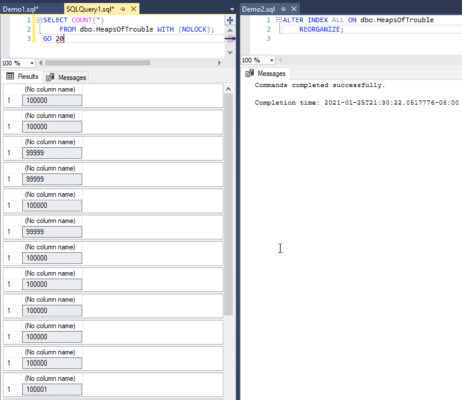
Can we use an index to satisfy the query?  Sometimes the answer to faster storage is writing better queries that can leverage indexes rather than doing table scans.  This is why it’s important to understand sargability and implicit conversions.

How much of this data can we guarantee will be in cache?  Think worst case scenario: other queries may be running, or other databases on the system might be more active and taking over the cache.  The more memory I put in the server, and the more I isolate performance-critical databases away from the rest, the more I can guarantee fast queries by caching data.

Microsoft’s Reference Architecture Specs for SAN Speeds

Microsoft’s Fast Track Data Warehouse systems are purpose-built database servers that ship with everything you need to get fast performance.  They’re available from hardware partners like Dell, HP, and IBM, and Microsoft works with ’em to make sure you’ll get the speed you need.

The Fast Track reference architectures assume that we can’t satisfy queries via indexes, and they don’t even try to cache the data in memory.  They just flat out assume queries will be performed using table scans, so they require very high speed storage performance:

“…this system architecture is called the Core-Balanced Architecture. This balanced approach begins with what is called the CPU core consumption rate, which is the input capacity that each CPU core can handle as data is fed to it.”

This is a really different approach, and it starts to explain SQL Server 2012’s licensing of around $7k per core for Enterprise Edition.  If you’re going to pay big money for 40 cores of that licensing, wouldn’t it make sense to ensure that those CPUs can actually do work?  By specifying a minimum IO throughput per core, Microsoft guarantees that the server could actually get busy.  Otherwise, we’re harnessing expensive thoroughbred racehorses to a crappy chariot.  The Fast Track Configuration Guide even goes so far as showing you how to calculate a Maximum Consumption Rate and a Benchmark Consumption Rate for your system before going live. (I love Microsoft.)

In a typical customer environment I worked with recently, their current IO subsystem was able to deliver 300-400MB/sec.  By using the questions above and looking at Microsoft’s Fast Track reference architectures, we calculated that they needed closer to 4,000MB/sec in order to satisfy their end user requirements for query times.  Put another way, if we didn’t change any of the other variables, we needed to make the storage ten times faster.   Obviously, making that kind of improvement ain’t easy or cheap – and suddenly we got buy-in from management to change some of the other variables.

When you see the whole picture – licensing, storage throughput, query design, and end user requirements – it’s much easier to find the right way to get faster performance.  Sometimes it’s insanely fast IO throughput like Microsoft’s Fast Track solution, and sometimes it’s rewriting queries to improve index utilization.  Showing the real cost of storage throughput helps justify why query writers need to step back and rewrite troublesome parts of the app.


How to Test Your Storage with CrystalDiskMark

SQL Server, Storage
114 Comments

I’ve written about how to test your SAN’s performance with SQLIO, but I’ll be honest with you: that’s the hard way.  It takes knowledge and time, and you only have one of those.  (I’ll be charitable and not tell you which one.) Instead, let’s get seat-of-the-pants numbers for your storage.

Go to the CrystalDiskMark download page, but PAY CLOSE ATTENTION. This is tricky. There are multiple download links – you want CRYSTALDISKMARK, not CrystalDiskInfo, and you want the Standard Edition, Zip Version. The zip version doesn’t require an installer, which is cool because I’m not a fan of installing things on production servers. The zip version can be just saved to a network share, and then anybody can run it from there.

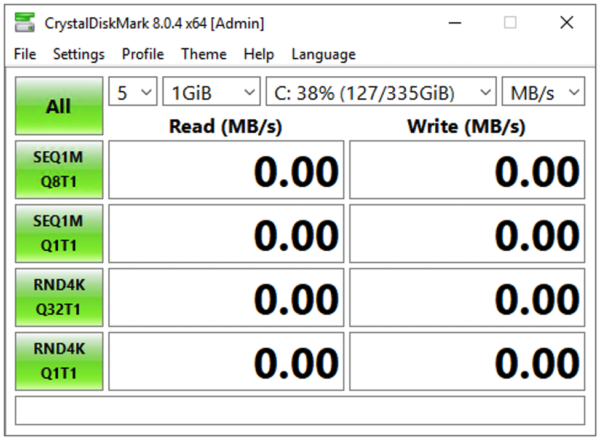
After extracting the zip file’s contents, run DiskMark64.exe on an idle server or desktop first (not your live SQL Server, because it’ll slow things down while it runs.)  It’ll look like this:

Across the top, set the first three dropdowns to:

  • 1 – the number of test passes you want to run.  If you want a fast seat-of-the-pants guess, do 1, but keep in mind it can be wildly variant between passes if something else happens to be going on in the SAN.
  • 1GiB – the test file size.  If you’re under the gun, do a quick 1GiB test, but for real go-live prep, I like using 32GB to reduce the chances that I’m just hitting cache and getting artificially fast numbers.  Smaller test file sizes may look fast but don’t really reflect how a large database will work. Just know that the bigger the test file, the longer it takes to generate.
  • M: – the drive letter to test.  Keep an eye on the free space there – you don’t want to create a test file that can run your server out of drive space. You want to test where your data, log, and TempDB files live, and for fun, also test the C drive and your desktop or laptop for comparison.

After making your choices, click the All button.  While it runs, here’s an explanation of each row’s results:

  • SEQ1M Q8T1 – lots of long, sequential operations. For SQL Server, this is somewhat akin to doing backups or doing table scans of perfectly defragmented data, like a data warehouse.
  • SEQ1M Q1T1 – ignore, SQL Server doesn’t work like this.
  • RND4K Q32T16 – random tiny operations, but many done at a time.  This is somewhat akin to an active OLTP server, or a TempDB drive.
  • RND4K Q1T1 – Ignore, SQL Server doesn’t work like this.

The more astute readers (and by that I mean you, you good-looking charmer) will notice that 4K operations don’t really measure SQL Server’s IO.  SQL Server stores stuff on disk in 8K pages, and zooming out a little, groups of 8 8KB pages (64K extents).  We’re not looking to get an exact representation of SQL Server’s IO patterns here – we’re just trying to get a fast, one-button-click-easy measurement of how storage performs.  Usually I find that during the first round of storage tests, it’s not performing well period – and it doesn’t make sense to bring SQL Server into the game just yet.

Sample CrystalDiskMark Results

Here’s a sample set of results from a 335GB general purpose SSD volume in Amazon EBS:

Note how you can type in the bottom box of CrystalDiskMark’s results – see how I typed Amazon General Purpose SSD? That’s great for making notes that will be visible in the screen shots to help you determine which test results came from which machine.

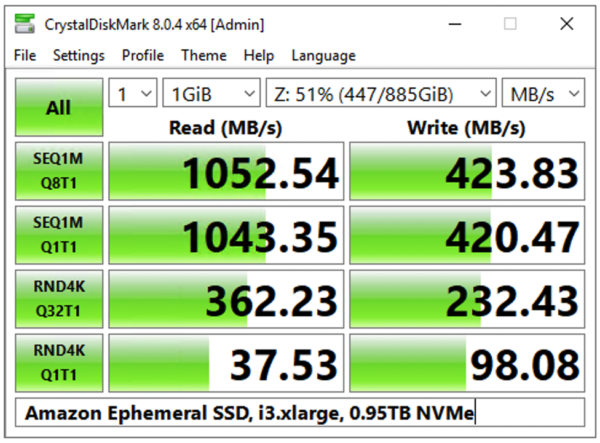
And here is a set from an ephemeral SSD locally attached to that same EC2 VM:

Notice how the ephemeral SSD is 10x-30x faster on reads, and 4x-18x faster on writes? Not to mention that the ephemeral drive is completely free with your VM. You can see why people are tempted to store databases on there, but that’s a discussion for another day.

You can get IOPs, latency, and throughput numbers from CrystalDiskMark too by clicking File, Save Text, then go into a text editor and open the results. The text version of the results has more details:

So what’s a good or bad number?  If your server boots from a mirrored pair of local drives, and stores its SQL Server data somewhere else (like on a larger array or on a SAN), then test the local mirrored pair too.  Compare the numbers for where you’re storing the valuable, high-performance data to where you’re storing the OS, and you might be surprised.  Often I find that the OS’s drives perform even better because we just haven’t configured and tuned our storage.

Keep these original CrystalDiskMark screenshots in a shared folder for the group to access, and then challenge everyone involved to do better.  Simple tuning techniques like tweaking the read/write bias on the RAID controller’s cache, right-sizing the NTFS allocation units, and working with different stripe sizes can usually yield double the storage performance without spending a dime.


Free Scripts to Test Your Backups on World Backup Day

March 31st is World Backup Day, and while most of the press will be focusing on backing up your priceless lolcat photos, it’s still a good time to talk with management about your database backups.

Your boss will have some simple questions, and you can arm yourself with a few easy queries.

Are We Backing Up Every Database?

It’s gettin’ hot in here

Even if you think your backups are running successfully, you have to double-check.  I had a client recently who’d copy/pasted jobs across several different servers and databases.  While editing one of the jobs, someone made a typo, and they were backing up the master database instead of the user databases.  The backups worked, ran successfully every night, but weren’t actually backing up the data that people really cared about.

This query will list the last full backup for all of your databases, and like all of the queries in this post, the results should come back nearly instantaneously with no blocking.  They’re completely safe to run in production.

Review that query result and double-check – then ask, “Do I really need to back up all of these databases?”  If you’ve got the demo databases AdventureWorks, Northwind, or pubs on your server, and you’re backing them up daily, you’re wasting resources.  Get ’em off your production servers.

Are Our Backups Fast Enough?

In the msdb database, SQL Server saves backup size and duration for all backups.  We can use those two numbers, we can use the power of math to get throughput:

The awesome part of this query is that it’s not measuring backup duration alone – sure, backups run longer as you add more data.  This query’s actually measuring backup throughput, meaning how fast the backups can get data out.

Good computers don’t go to heaven.

When I review the results of this query, I focus on the throughput_mb_sec_avg field and look for big drops (or increases) over time.  If backup speed dropped by 30% in January, I start asking questions about what network or storage changes we made at that time.

Compare that number to the bandwidth rates in Kendra Little’s “How Big Is Your Pipe?” bandwidth reference poster, and you’ll get a rough idea for comparison.  If you can’t get at least the throughput of a 1Gb Ethernet connection, it’s time to start talking to your storage and network admins about teamed network cards, RAID 10 backup targets, and how to get shorter maintenance windows with backup compression.

Are We Backing Up Corrupt Data?

Just because your backups are succeeding doesn’t mean you’re backing up legit data.  The backup process doesn’t do anything like the DBCC CHECKDB process, which checks that the data on disk actually makes sense.

I really, really care about this because if you get a data corruption error, you may have to restore the most recent database backup and see if the data’s corrupt there too.  If it is, step back and restore the full backup from the day before that – and the day before that – and the day before that.  If you’re lucky, you’ve got a copy of the data from before the IO corruption occurred.  If you’re unlucky, you don’t, and then you start looking for an uncorrupted copy of your resume.

The key to success: run DBCC more often than you expire backups.  If you only keep 7 days of backups, then you should run DBCC more frequently than that.  If you only run DBCC once a month, you won’t find corruption until long after the clean backups are gone.

Here’s how to see the last time DBCC CHECKDB finished successfully on each database (for SQL Server 2005 and newer, and must be run in a database in compatibility level 90 or higher):

The look of an unhappy sysadmin

If you’re not happy with the results of this query, it’s time to start running DBCC CHECKDB more often.  If you’re unable to run it in production due to performance/uptime issues, consider restoring your databases at least once a week to a development or QA or disaster recovery server, and run DBCC CHECKDB there. Some backup products even help schedule this for you.

Are The Backups Making It to Tape?

If you’re backing up to disk, and the network admins are backing up your disks to tape, … well, are they?  How can you be sure?

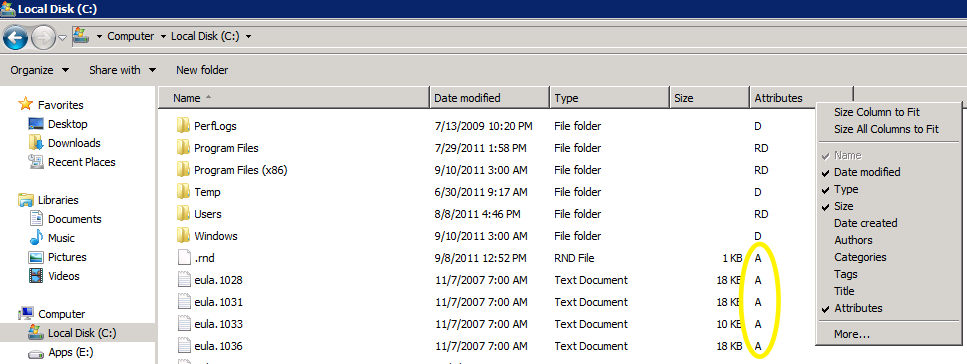
The first step is to check the archive flag.  Open Windows Explorer and navigate to the folder where you’re writing backups.  Right-click on the bar where Name, Date Modified, and Type are shown, and click More.  Choose the Attributes column, and your Explorer window will look something like this:

If you see an “A” in the Attributes column, that means the Archive bit is set – the file is ready to be archived.  When your backup software runs and sweeps these files to tape, it resets the Archive bit to off, thereby telling you that your file no longer needs to be archived.  If you see A bits on database backups from yesterday, that tells you they haven’t made it to tape yet, and it’s time to start asking questions about backup schedules.

Learn More in Our Backup Best Practices


Meet Brent Ozar Unlimited®’s Employee #1

Just a week ago, we asked who wanted to work with Brent Ozar Unlimited®. We talked about our benefits, our health check approach with clients, and our plans for Employee #1.  The emails came in fast and furious, and we are completely floored and honored by the number of people who wanted to work with us.  You people rock.

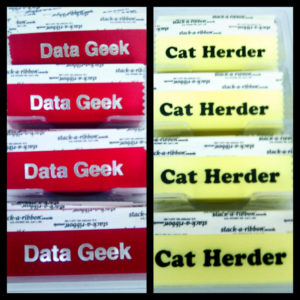
Data Geek Meets Cat Herder
We found a rare combination of skills

Early on, one factor helped weed out a lot of resumes: community participation.  We wanted people who were so passionate and excited about SQL Server that they blogged and presented even when they weren’t being paid to do it.

Some emails started out with, “I haven’t been blogging or presenting, but I promise I’ll start once you hire me.”  We just can’t recommend enough that you get started giving back to the community today in whatever form that excites you the most.  Your online presence is your new resume.  If you want a fun day job working with fun people, start by doing it after hours, and the day job will follow.

Several candidates fit the technical know-how and community participation requirements, and then we started narrowing ’em down.  Had we seen them present?  Had we talked to them at user group meetings?  Had we read – nay, subscribed to – their blogs?

Coffee-drinking candidates got bonus points if their animated behavior got us excited about technology.  We like to think that we’re pretty lively geeks, but some folks out there are so upbeat and fun that we just want to spend more time with ’em.  Being in a small business, this kind of chemistry is so important.  It’s not like we can go to one of our other coworkers and complain – it’s just the four of us!  We can’t tolerate a whiny pessimist at this scale.

Hiring just one of the applicants was hard: even with our picky personalities, we were just overwhelmed by the number of people we wanted to hire.  Every time an email came in, we’d DM each other and say things like, “Wow, I can’t believe so-and-so applied!  Any employer would be honored to get ’em, and I would totally hire them right now.”

Ultimately, the decision boiled down to making an investment in someone.  We wanted to hire someone that could grow along with us as our company grows, someone that we knew would be a continuous source of fresh ideas about technology.

You never know where consulting will take you.
Even in database consulting, considering wind direction is key.

Let me start by introducing Employee #1 without giving her name.  (See, there’s a clue – she’s a her.)

The first time Kendra saw our new hire speak was to a group of 50 people. The session was on a 200 level topic, and our new hire knew her subject front to back, and then some. She had a few authors in the audience who’ve been writing advanced books and designing solutions in her subject area for many years– and yeah, it’s a great sign that these folks wanted to see her speak! At one point, an audience member asked a 500 level question which was outside of the session’s scope. She gave a brief answer and started to move on, but the authors in the audience wanted to offer opinions. And then these authors started to talk loudly to each other. Letting this go on would have completely taken the focus away from the original topic and confused the rest of the audience.

Zillions of people would freeze up at this point. Our new hire had no trouble: she held the floor with a big smile and a friendly joke and quickly scheduled an in-depth conversation on the secondary subject after the session was over. She had everyone laughing- including the authors- and was back in business with all of her original excitement. The audience was truly with her and actively learning. Kendra was seriously impressed.

But there’s more to our new hire than just great teaching skills. She has the type of experience that’s perfect for consulting. She started out in systems administration, so she has the foundational knowledge of how operating systems, storage, and network that we use in performance tuning. She’s taken on database administration in large and small environments, she’s worked with SANs and tiered storage. She has a degree in programming, and is naturally drawn to tuning whole systems: everything from the storage to the application layer.

Oh wait, there’s more!

Reporting caught her eye early on and she’s written about SQL Server Reporting Services. We’re thrilled that our first hire is as diverse as the rest of us – she’s interested in learning, presenting, writing, SQL Server, and Reporting. Finding two of these things in one person is a feat. Finding all of them in someone is just plain exciting.

Can you tell from the post who we hired?

Less Than Dot has been hosting her blog for a while now and it has been exciting to watch her blog change over time. She has covered wide variety of topics with clarity. Her passion and excitement shine through in her writing.

At this point, I’m sure you’re anxious to find out who we hired. We were really excited when we made the choice. We wanted to tell everyone, but we managed to keep it a secret until her employer made the announcement internally.

New jobs are big changes for a lot of people. We’re incredibly excited to be starting this big change with her. We know that our first hire will jump right in. That’s part of why we knew we had to hire her – she’s excited and passionate about SQL Server, technology, and her hobbies.

Don’t think that we’re all about work over here. Our first hire is interested in more than just SQL Server. She was one of the first #SQLRunners in the Portland Half Marathon and she’s training for her first full marathon. If you’re a big fan of cheering, you can catch her (from the sidelines, of course) at the Wisconsin Marathon on May 5 in Kenosha, WI.


Brent Ozar Talks SQL 2012 and MCMs on RunAs Radio

Microsoft Certified Master (MCM)
0

Richard Campbell’s RunAs Radio podcast is a relaxed, fun discussion between IT professionals like sysadmins and DBAs who have to manage infrastructure.  Richard’s a hoot to talk to, and I really like hanging out with him.  I think that comes through on the podcasts, too – I could spend hours chatting with him, and the time goes by like nothin’.

Wanna hear what it’s like?  Listen to Brent Ozar on RunAs Radio and subscribe to the RunAs podcast feed.  I talk about SQL 2012’s Availability Groups, running databases off NAS devices, and how the MCM program has changed over time.  Enjoy!


Want to Work With Brent, Jeremiah, and Kendra?

We’re looking for a few good database professionals.

Well, actually, right now we’re just looking for one.  Things are going really well here at Brent Ozar Unlimited®, and it’s time to grow our family.  We’re hiring our first full time employee, and just like everything else we do, we figured we’d blog about it.  We figure we suck a lot less than most companies, so this is a fun way to introduce ourselves as potential employers.  Let’s start by covering what the job is like.

What We Do for Clients

Sometimes we even get to go to clients’ weddings! Thanks, Yanni!

People email us when their database applications are causing them pain.  We start new clients the same way an emergency room handles new patients – well, actually, nothing like that, because emergency rooms have a lot of paperwork and they smell bad.  What I really mean is that we triage the patient with a SQL Server Health Checkup: we spend 2-3 days together (usually remotely over WebEx) going through an extensive health review to pinpoint the cause of their technology pains.

This health check involves:

  • Querying the DMVs
  • Reviewing database schema (tables, indexes, stored procs)
  • Checking the plan cache for resource-intensive queries
  • Examining the server’s hardware
  • Digging into storage (SAN) and VMware, and much more

Unlike an emergency room, we actually teach the patient – I mean, client – as we go along.  We show them how to diagnose health and performance issues so they can repeat this same process on their other servers.  We go off on wild tangents to answer questions that they’ve always wondered about how SQL Server works.

We finish the health check with a presentation that covers the source of the pain points and a prioritized to-do list for the client’s staff.  We don’t just jiggle a few knobs and call it good – we teach the client what needs to be done so they can do a better job of solving their problems quickly going forward.  Sometimes it’s a query change, sometimes it’s a server configuration change, and sometimes it’s rearchitecting a new way to store and access data.

Doing these health checks requires a tremendous amount of expertise in SQL Server, hardware, storage, virtualization, application coding, and frankly, politics.  Your job as a consultant will eventually be to run these health checks yourself – but we don’t expect you to get there overnight.

What We’ll Do for You

If you want to relieve technology pain, you’ve gotta do research and development – and that takes time and effort.  To stay current on the latest techniques, we usually work 3-4 billable days per week.  Your 1-2 non-billable days per week will be spent improving our products (health checks & training), learning about SQL Server, and giving back to the community.  If you’d like to blog and present, you’ll have plenty of opportunity with our blogs, our free weekly webcasts, our email newsletter, our free posters, our online video library, and giving back on #SQLhelp  – we’re always looking for new ways to help people for free.

Going into consulting with us is like a turbo button for your SQL Server experience: you’ll be exposed to amazing clients doing cool things with SQL Server, hardware, virtualization, and the cloud.  This week, for example, Jeremiah is helping a business move their SQL Servers into the cloud, Brent’s planning a SQL Server 2012 AlwaysOn deployment for a TV network, and Kendra’s doing a health check and training a client on index tuning.  (Tim’s decided not to go the consulting route, so he’s taking the SQLCruise portion of Brent Ozar Unlimited® and going a separate way – here’s his post about it.)  You get to shadow us on work to increase your skills, and when you’ve got a question, you can get in-depth answers from 3 of the funniest people in the business.

Dining with Buck Woody on SQLCruise Alaska

We want happy people, so we offer great benefits:

  • 6 weeks paid vacation per year
  • 2 fully paid domestic conferences (you don’t have to be a speaker) and that doesn’t count against your vacation time
  • If you’re an MVP, we’ll pay for your travel & time to the annual MVP Summit too
  • Health insurance
  • Full time telecommuting with a max of 1 week of travel per 2 months
  • Paid certification attempts (whether you pass or fail)
  • Home internet/VOIP/cell phone expenses paid
  • $3,000 hardware/software budget every 2 years to pick your own tools (we like Apple gear, but you can pick whatever you want – you’re your own IT department)

Even though it’s full time telecommuting, this position is only open to US residents already authorized to work in the US full time.  We can’t sponsor visas, and most of our clients are in the US, so we need to keep US travel expenses & time zones in mind.

How We’ll Pick the Right Candidate

Jeremiah Peschka eating tempura fried bacon. You read that right.

We’re looking for people with at least a couple of years of hands-on database administration experience.  We love all kinds of database professionals, and we might hire the rest of you later too, but this role is specifically for performing and improving our database health checks, and we want DBA experience there.  No, we don’t have a name for this role yet – we’re not too big on titles, and we’re actually looking for input from you to define your title.  Leave your job title ideas in the comments even if you’re not applying.  The current front runners are Expert, Consultant, and Bacon Wrangler.  I’m thinking about merging all three into Expert Bacon Wrangler Consultant.

If you’re the kind of person who loves to share by writing and presenting even when you’re not getting paid to do it, we’ll know you’re passionate about technology, and that’s what’s most important to us.  You don’t have to be a Microsoft Certified Master – you just have to be genuinely excited by Microsoft SQL Server and willing to share your enthusiasm with others.

Sound like your kind of job?  Email us at Help@BrentOzar.com.  If you’ve got a resume, include it, but don’t go to any work to build a new one.  We’ll Google your name to see what you’ve been doing for the community and where you’ve been speaking, and that’s better than almost any resume we could read.

And if you haven’t been giving back to the community by writing and presenting, well – here’s your sign that it’s time to start.

Because this won’t be the last person we hire.

UPDATE Friday 16th: We found our dream hire! Stay tuned….and if you didn’t have time to apply, drop us a line. We’ll keep you on our radar for next time.


How To Decide if You Should Use Table Partitioning

Great volumes have been written about table partitioning. It’s a complex feature and you can read for days to just understand how you might apply it. But will it improve performance for you? Table partitioning produces great benefits for some applications, but causes giant headaches for others.

How do you know if you should invest your time in table partitioning?

I can help.

SQL Server Table Partitioning: The Basics

Table partitioning allows tables or indexes to be stored in multiple physical sections— a partitioned index is like one large index made up of multiple little indexes. Each chunk, or partition, has the same columns– just a different range of rows. Table partitioning is “transparent”. This means a partitioned heap, clustered index, or non-clustered index can be referenced as a single structure although it’s stored in independent physical partitions. In other words, in theory you don’t need to change any code in the calling applications. (Is this true in reality? More on this later.)

An Textbook Example of Table Partitioning

Contoso Corporation’s Froyo Division has a 2TB database named FroyoReports. Each day, 10 million rows of sales data are loaded into a table named FroyoSales. Contoso Corp has employees worldwide who query the data using SQL Server Reporting Services. Reports are run against FroyoReports 24 x 7, although there is a two hour window each day where there is significantly lighter load. 95% of reports run are against the most recent two months of data, and the DBA team controls and can tune the queries run by each report. The Froyo DBA team needs to maintain only 13 months of data in the FroyoSales table. As a safety precaution, they prefer to keep three additional months of data online, but do not want reports to access the older data.

Life used to be tough for the Froyo DBA team. Each night as data was loaded, reports repeatedly blocked inserts. To help alleviate blocking, some reports were modified to have NOLOCK hints. This meant that sometimes reports contained partial data for the most recent day, which caused problems. Users were never really sure when data was finished loading and when it was safe to run reports. The Froyo DBA team deleted old data on weekends, and that process also had problems. There was additional blocking and deletes slowed performance significantly. To solve these problems, the Froyo team implemented table partitioning. They partitioned the FroyoSales table by date.

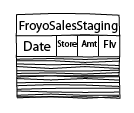
Each night, the Froyo team loads data with an automated process. First, it loads new fact data into a fresh, empty table named FroyoSalesStaging.

A staging table loaded with data

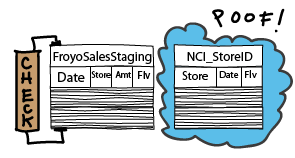
Next, it adds indexes and constraints to FroyoSalesStaging so its structure matches Froyo sales.

Preparing a staging table to be switched in to a fact table

Then, they switch the single partition out of FroyoSalesStaging and into the partitioned table FroyoSales. (This involves a few commands to prepare the metadata for the partitioned table prior to the switch– we’re going for an overview here.) This switch takes a brief moment, then all the new data is visible to users.

Switching a partition from a staging table to a fact table

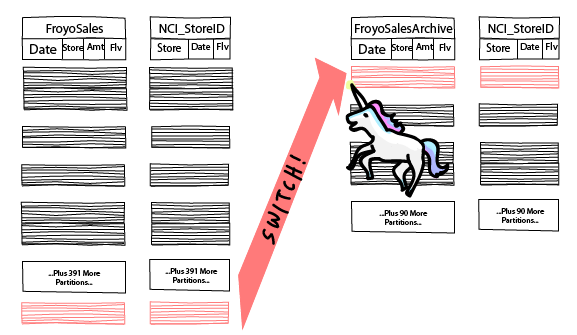
The Froyo team has also automated how they remove old data. Each night they switch the oldest day– which is now past their 13 month limit– out from FroyoSales and into a table named FroyoSalesArchive. (Similarly, there’s a few commands to clean up metadata for FroyoSales after the switch out.)

Switching a table partition to an archive table

Handy, isn’t it?

The Main Features of Table Partitioning— And the Gotchas

Here are the big attractions for table partitioning, along with the fine print.

SWITCH That Partition

As you can see above, a whole partition can be switched into the table or switched out, allowing for extremely fast loading and removal of large amounts of data. This is, in my opinion, the biggest benefit of partitioning.

There are a couple of gotchas to be aware of. Switching in and switching out partitions can be very fast, but an exclusive lock— Called ‘SCH-M’, or Schema Modification lock— is required. This means you can get blocked from loading or removing data from your table— potentially for a very long time. Also, all of your enabled non-clustered indexes must be “partition aligned” to switch a partition in. This means the partitioning key must be part of each of those indexes. If you need to maintain uniqueness on a set of columns that doesn’t include the partitioning key (which is often the case in OLTP environments), this can pose a problem.

Query Performance on Partitioned Tables: Partition Elimination and Beyond

SQL Server tries to identify when it can use limited parts of a partitioned table. The SQL Server query optimizer may direct a query to only a single partition, multiple partitions, or the whole table. Using fewer partitions than the entire table is called “partition elimination.”

Statistics are maintained for the entire partitioned table or index— you don’t get additional steps in your histogram for each partition. This means that the SQL Server Query optimizer may still have a very hard time knowing how much data is going to be returned by your query, and this difficulty will increase as your table grows. The result may be slow queries.

Queries will perform better when you specify the partitioning key in the criteria (aka the “where clause”). So, although partitioning is “transparent,” for existing applications, query tuning will almost always be required.

Partition Management

Individual partitions may:

  • Be rebuilt individually, for clustered and nonclustered indexes alike.
  • Be set to read-only, via their filegroup— gives you options to optimize backups
  • Live on different disk sub-systems — less frequently accessed data can sit on slow disk. Frequently accessed data can sit on faster disk. All this within the same table! You can move a partition to faster or slower disk online with some virtualization and SAN solutions.

There’s a few things to be aware of:

  • You want to be careful about splitting partitions— performance can be very slow.
  • In SQL Server 2005 and 2008, individual partitions may be rebuilt offline only. An entire partitioned index may be rebuilt online— but that’s a bummer if your database is 24×7.
  • Setting a filegroup to read-only doesn’t eliminate lock management overhead— that’s only true for a read-only database.

Columnstore Indexes and Table Partitioning

Columnstore indexes are a really hot feature in SQL Server 2012. These are columnar indexes optimized for blazing fast performance. Although these indexes will be read-only, partitions may be switched in to columnstore indexes.

When Is a Table Big Enough to Partition?

After covering the basics of table partitioning, this is usually the first question people have: “Is my table big enough?”  My response is: “Let’s talk about why you’re interested in table partitioning. What is the problem you’re experiencing?”

Tell Me Where Your Table Hurts

When people investigate table partitioning in SQL Server, usually they’re having a problem scaling up their database.  What you are experiencing may take many different forms. The problem can contain one or more of the following:

  • “Slow” queries that return small amounts of data
  • “Slow” queries that return large amounts of data
  • “Slow” loading of data
  • Blocking between readers and writers (inserts or updates)
  • Long-running index maintenance jobs (or an inability to run them at all because they would take so long)

“Slow” is of course highly relative. Here it means “my users are complaining” or “my webserver is timing out” or “something is failing and paging me in the middle of the night.”  Often, the tables in question are being used for a mixture of OLTP activity and reporting activity.

My approach is to talk to the team and find out what the experience of the problem is like. Literally, “What keeps you up at night about this table?”

How Is Your Overall Health?

Prescribing table partitioning is like recommending significant surgery— you don’t want someone to go under the knife unless it’s the best way to make things better. I look at the overall health of the system. Where are the current bottlenecks? What are we waiting on? How healthy are the individual components? How are the queries currently performing, and what do the query plans look like? What patterns are in use in the queries which are running? I also look at the structure of the tables and indexes in the context of the queries.

What Performance Characteristics Do You Need?

How many records do you want to load a day? How many records will you be deleting a day in six months? How many new clients is your business expecting to be bringing on, and what is the estimated impact that will have on reads and writes on your system? The number of expected clients can be tricky to translate to database activity. A SQL Server health check can produce some metrics for current activity that can be used for projections.

How Many Queries Can You Tune?

Whether or not you have the flexibility to tune queries is a big differentiator in how you choose to scale up your application. On the one hand, table partitioning is “transparent” because the name of the partitioned objects doesn’t change. On the other hand, you want to tune queries to get partition elimination and the best possible query plans after you partition— and sometimes you need to get a little creative. The structure of your tables and how queries are currently written will play a huge role if you have a limited (or no) ability to tune queries.

What’s The Best Approach to Scaling Your Application?

Here’s my secret: I don’t answer the question of “Should I use table partitioning?” Instead, I answer the question “What is the best way to scale this application?”

The right approach for your scalability problem may contain table partitioning— perhaps by itself, perhaps in combination with other technologies. In the right application, table partitioning can be truly awesome. But we also may be able to scale your application up in another way— perhaps more cheaply, perhaps more quickly, or perhaps in a way that includes built-in geo-diversity. It all depends on your database health, performance requirements, budget, and flexibility.

Still Interested?

If you got this far and you’re still interested in table partitioning, maybe it’s the right fit for you!

Before you start designing a table partitioning strategy, or if you’re trying to troubleshoot why your partitioned tables aren’t working as fast as you expect, check out our SQL Server table partitioning resources page.

Want help? Talk to Brent for free.

See sample findings now

The problem probably isn’t fragmentation – you keep defragmenting and the problems keep coming back.

Our 3-day SQL Critical Care® is a quick, easy process that gets to the root cause of your database health and performance pains.

Learn more, see sample deliverables, and book a free 30-minute call with Brent.


Why Availability Groups Make It Cool Again to Be a Sysadmin

Professions go through phases. Some skills are highly valued for a while, then go out of fashion. Just like leg warmers and skinny jeans, some skills come back into style when you least expect it.

Sideburns are back

Database Administrators Started Out in the Server Room

In the early days, most database administrators started out by racking servers. Some DBAs wrote some application code, but most DBA jobs were classified as being part of infrastructure teams. In the old days, Senior DBAs often worked with Active Directory and also helped manage domains.

This changed gradually over time. Database development emerged as its own profession, distinct from general application development and database administration. Business intelligence branched off. But database administration itself evolved and became more application-centric.

More Knobs and Dials Made DBAs Software Technicians

Over time, performance tuning has become increasingly complex. Hardware tuning is now just one of many ways to make an application run faster— we have a myriad of settings in the operating system and in SQL Server to tune performance for a given workload.

This change in breadth made database administrators focus increasingly at the Operating System level and above. The rich instrumentation in SQL Server caused DBAs to be increasingly valued for skills at interpreting results from dynamic management views, rewriting queries, and tuning indexes.

SAN and Virtualization Increased Specialization in IT

Changes in the way we manage storage and servers also shifted the role of the DBA. Infrastructure teams are larger and more specialized. In many companies there is a central IT function for the purchase and management of hardware and operating system licenses. At the extreme end, in some environments the database administrators have little insight into what host their virtual machine is connected to, and may not be aware of what type of storage is in use. Some DBAs don’t have direct access to their Windows Servers.

This very specialized DBA knows a lot about SQL Server, but not much about system administration or Windows domains.

SQL Server 2012 Will Change the Way DBAs Think

The AlwaysOn Availability Group feature in SQL Server 2012 is about to change the style again. This feature doesn’t make the DBA any less specialized, but it has components that make it cool for DBAs to get back in touch with their inner sysadmin.

First of all, this feature is hot. Readable secondaries can help scale out an application with very minimal software development costs. Lots of organizations will want to know if this feature is right for them.

Secondly, consider this: every DBA needs a sandbox that can be flattened and rebuilt at will. This sandbox is for testing new features and practicing configuration. In the past, domain membership wasn’t needed to test most important SQL Server features. You can test replication, database mirroring, and logshipping simply by installing multiple instances into a single virtual machine (or onto Windows 7, for that matter) and granting permissions using local accounts.

With AlwaysOn Availability Groups, things are more complicated. To fully test the feature, you will need to enable the failover clustering feature on multiple SQL Server hosts. This means that you need:

  • Windows Server Enterprise Edition as the operating system
  • The Windows Server instances must be part of a domain

It’s also useful to be able to provision IPs for the environment and create individual service accounts. Voila— your sandbox environment needs a domain controller.

Test Environments Will Get Bigger

My sandbox used to be just my laptop, which hosted a few virtual machines. My VMs simply ran different versions of SQL Server— I’d start up whatever VM I needed for my testing, and only run one VM at a time.

You probably don't need to go this far.

All of that is changing now. To test and demonstrate Availability groups, I need to run at least one domain controller and five additional VMs for SQL Server instances. (There’s no shortcut for this, by the way— each replica in an Availability Group needs its own Windows server installation.) I’ve found that I need at least 16GB of RAM and 4 processor cores minimum to run a light test workload on that full group.

This expanded my sandbox environment quite a bit. It also expanded my knowledge: I’ve learned that sysprep is still required for Windows 2008R2 when cloning machines that will join a domain, if you want to successfully add them to a failover cluster. (There are some blog posts out there which say differently!) I also now know that a single cluster can’t contain both full and core installations of Windows Server, either— it’s one or the other.

More Senior DBAs Will Be Managing Domains Again

… but these domains will be private test environments, not production.

As SQL Server 2012 is released and becomes more mainstream, Senior DBAs everywhere will be configuring more complex sandbox environments than they’ve ever used before. They’ll be interacting with parts of Windows that they always took for granted, and learning about how SQL Server integrates into the OS.

Of course, not everyone will adopt the Availability Groups feature in production. It’s an expensive feature, and not every application justifies the cost.

But Availability Groups do raise the bar for Senior SQL Server DBAs. It’s going to become very valuable to know and demonstrate what the feature does, whether it’s worth the cost for a given application, and what the alternatives are.

To get to know that well, Senior DBAs will be renewing their interest in systems administration.

And I, for one, couldn’t be happier.

Want to get started now? Check out Brent’s blog post on How to Install Availability Groups.


What’s Stopping You – from Snooping?

Professional Development
23 Comments

No, this isn’t a touchy-feely inspirational post that talks you into taking leaps and bounds in your career.  I write those every now and then, but that ain’t today.

Instead, today’s post is about a question: what’s stopping you from snooping in your company’s data?

You, as someone with a lot of database access, have more security permissions than just about anyone in the company.  You probably have access to payroll records, financial data, company secrets, you name it.  Sure, the company would like to think everything’s kept under lock and key, but developers and database administrators have the keys and they know how the locks work.  Even in the most secure environments, I usually find that the staff could answer any question they feel like asking.

But we rarely do.

When I was a DBA, I felt a strange pride in knowing I could query any data whatsoever, yet I was beyond temptation.  I didn’t want to know anybody else’s salaries because I believed it didn’t matter.  If someone else was making more money than me, good for them and their negotiating skills.  If nobody was making more than me, I shouldn’t be proud – I should be ashamed for taking more than I probably deserved.  I didn’t want to see anybody else’s employee review, I didn’t want to know how much the company was making, and I didn’t want to see confidential data.

Enron Complex in Houston

I’ll confess, though, since it’s just the two of us here – at a former company, when our sysadmins stumbled across a cache of videos on the file server, I stood around and watched with the rest of the IT team.  We played an employee’s videos of their trip to Russia in search of a mail order bride, and my mind is permanently scarred by the memory of that employee sitting in a hot tub auditioning a prospective wife.  It’d be one thing if these videos were in the employee’s private home directory, but these were shared with his entire department!  We called HR, and oddly, the guy kept his job.  He must have had more incriminating videos of other folks.

I’ll also confess that in the 2000s, while I lived in Houston, there were only two companies I ever aspired to work for: Arthur Anderson and Enron.  Oh, how I longed to work in the beautiful architecture of the downtown Enron complex, but the Enron scandal brought both companies down in a flaming mess, almost before the buildings were ready.  I counted my odd blessings that I hadn’t been admitted entry into those doomed businesses.  However, what if I had?  What if I’d gone to work for either company, and I suspected shady dealings?  Would I have had the foresight, guts, and security permissions to make database queries to find out what was going on behind the scenes?

My guess is no – I’d never dream of writing a query to get data I’m not supposed to access in my daily job.  Why is that, and what’s stopping you?