Blog

“Who Wrote This?” Contest

Humor
54 Comments

Over and over, readers leave comments here saying things like “Nice comment, Brent” on a post that Kendra wrote.  We laugh about it – after all, they can’t really be reading that closely if they don’t even notice the name on the bottom of the post, right above where they’re commenting – but we started to ask ourselves questions.  Are our writing styles really so similar that people can’t tell us apart despite hand-drawn illustrations, references to our favorite music, and our individual topic selections?

One lucky winner gets this prize. Hand model not included.

So we figured it’s time for a test. We’ve picked 3 topics, and Brent, Jeremiah, and Kendra each wrote a paragraph on each topic.

Your Mission: Guess the author of each paragraph.

Topic 1: Working with Bad Managers

Mystery Author A: In the real world, we don’t skip to work humming Don’t Worry Be Happy while eating a bacon-covered donut.  Sometimes we drag our feet on every step of the way, cringing as we walk in the front door of the office.  Looking back through my career, the one thing that’s always made me hate my job hasn’t been the work itself – it’s been a bad manager.  I’ve been happy doing some truly awful work, but if I’ve got a bad manager, it doesn’t matter how good the work is, because I’ll still hate it.  Working with bad managers means working against my own happiness, and I’ve come to learn that there’s no changing bad managers.  I can try to manage them and groom them, but doing so comes at the expense of my own happiness and productivity.  Life’s too short – take that effort and focus it toward getting a better environment where you can happily contribute and grow.

Mystery Author B: Let’s face it, we’ve all had bad managers. While you should never make your manager look bad, you should help them get better. Mentor your manager just like you would mentor a junior DBA. Provide them with guidance about interacting with the rest of the team – who responds well to which leadership styles – as well as help your bad manager understand how to communicate with the rest of the organization. Above all else, clearly set expectations around your role on the team and, your communication style, and just where your help is going to end. Making sure everyone knows what to expect is a good way to make the best of a bad manager.

Mystery Author C: Bad managers come in so many varieties. Ever worked for The Big Talker who sets out a bold plan, then folds at the first complaint from customers? How about The Groundhog who never remembers anything from the day before– so you get to constantly re-explain what you do? Have you reported to The Gossip, who can’t keep anyone’s secrets, much less their own? The trick to working for all bad managers is to remember that they aren’t your parent. Take charge of your career. Track your goals and weekly progress. Proactively schedule and manage meetings. Direct your own work. Make connections with your customers. People around you will notice who on your team is effective and helpful, and the skill of managing yourself successfully is well worth having in the long run.

Topic 2: Working with Remote Teams

Mystery Author A: Working remotely can be tricky; there can be a significant lag in communications and people in different time zones may have different expectations about when you leave work. Like almost anything else the key is to make sure that everyone on the team has an understanding of how and when communication will occur. If you pick up the phone at 8:00PM, then you can rest assured that your co-workers will assume you’ll be working until 8:00PM. It’s just as important to stay in communication with your remote team via email and some tool like Skype or Microsoft Communicator. It’s just as important to communicate at the right time as it is to communicate face to face.

Mystery Author B: You might not trust the guy sitting in the next cubicle over, but if you haven’t worked with successful telecommuters, you probably trust a remote worker even less.  The key to remote team success is verifiable trust: feeling confident that invisible team members are doing the right amount of the right thing at the right time.  Both words are important – verifiable and trust.  When I’m working away from the rest of the team, I stay visible on instant messaging tools and try to respond as quickly as possible even when I’m away from the computer.  A phone with email and good apps is your best friend.  When a member of the remote team drops offline for extended periods, not visible in chat and not responding to emails, trust erodes and it’s time to start doing some verification.  Are they checking in good code at frequent intervals?  Are they responding to tickets and requests from other team members?  If not, the thrill is gone.

Mystery Author C: I’ve learned one thing from years of experience working with remote teams: email can be your worst enemy. What seems clear, precise, and specific in one time zone comes across as vague, soupy, and just plain weird in another. It usually takes days to find a critical misunderstanding about instructions sent in an email, then more time to clarify the issue. Meeting regularly with webcams– at least twice per month– may require working some strange hours, but it will save your projects hundreds of hours in the long run. Schedule the meetings in advance and make sure it’s OK to use flex time to avoid burnout.

Topic 3: Working with Your Nemesis

Mystery Author A: Sooner or later, we all work with that one special person who pushes every button. You may feel that your nemesis is unethical or has harmed your career. How do you handle it? The most important technique is the most difficult: don’t gossip about the issue. Ever. If you have knowledge of specific unethical behavior, you need to report it. That’s where discussion should end. As soon as you blow off steam at work by talking about your colleague, you complicate the situation and make it more difficult to resolve. Instead, focus on what’s best for the company.  When things feel too personal, block off some time in your calendar and use it to take a walk or work on your own goals in a place where you can’t be interrupted. Every job is temporary, but your reputation stays with you.

Mystery Author B: I’ve worked with a few people that I just couldn’t stand. Part of me always wanted to be a jerk, but another part of me wants to be respected and to get my job done. When working with your nemesis, it’s important to minimize unhealthy conflict. Conflict itself is good; healthy conflict will lead to challenging your existing ideas and making you better as a professional. Unhealthy conflict is going to lead to leaving three week old tuna fish sandwiches in someone’s desk drawer. I survived working with a nemesis by cultivating healthy conflict. We challenged each other on our ideas; even when we were on different projects, I always worked to make sure we were pushing each other forward instead of down the stairs. It wasn’t always a good time, but I got better as a result.

Mystery Author C: Oh no, it’s that guy.  Try to avoid eye contact.  We’ll slink into the stairway rather than use the elevator – he’s too lazy to take the stairs, so we can avoid having to spend another lunch hour with him.  Whew!  Made it.  How the heck does he keep his job here?  They say he produces good results, but I don’t believe that for a second.  He must have incriminating pictures of somebody, because I’d have fired him long ago.  You know what?  I’ve had enough.  Let’s make a plan to get rid of that stupid, arrogant jerkwad.  We’ll take him out for drinks tonight and – no, wait, put the knife down, bear with me for a second.  When he’s plastered, we’ll steal his phone and take pictures of our junk and text it to Shiela in HR.  She’ll think it’s his junk – well, I mean, as long as she’s never actually seen his junk, but you know what a prude Shiela is, so that can’t be possible.  He’ll get fired, and then hopefully the next guy will be better.  I swear, I can’t understand why this company can’t just hire nice, normal people?  Nobody ever sticks around here other than you and me.  Raise your glass – let’s have a toast to dedicated, friendly, hard-working people like us.  Cheers!  Hey, waiter, bring us another round of martinis.

Test Time! Who Wrote What?

Copy/paste the below into your comment and give us your best guess in the comments before Sunday, March 4th at midnight GMT.  We’ll throw all the correct answers in a hat, draw one winner at random, and announce their name on our March 6th webcast, How to Get Your First Job as a Database Administrator.  If no one guesses the answers correctly, we’ll throw all of the most correct answers in a hat (meaning, if four people guessed 7 names correctly, those four people will go in the hat.)  The winner will receive a set of PASS Summit 2011 Spotlight, Half-Day and Regular Session Recordings DVDs.

The fine print: Contest limited to US and Canada residents, because international shipping is such a pain in the old blog post.  If you’re abroad, you can still enter for the fame and bragging rights, but you won’t get the prize – we’ll designate an honorary US/Canada winner on your behalf.

Good luck, and show us how you know us so well!

Topic 1: Working with Bad Managers
Mystery Author A is –
Mystery Author B is –
Mystery Author C is –

Topic 2: Working with Remote Teams
Mystery Author A is –
Mystery Author B is –
Mystery Author C is –

Topic 3: Working with Your Nemesis
Mystery Author A is –
Mystery Author B is –
Mystery Author C is –

And the Winner Is…David Skelton!

David, Andy Galbraith, and Jesse Reich all guessed the correct answers, and we pulled David’s name out of a hat on our live webcast.  Here’s the correct answers:

Topic 1: Working with Bad Managers
Mystery Author A is – Brent
Mystery Author B is – Jeremiah
Mystery Author C is – Kendra

Topic 2: Working with Remote Teams
Mystery Author A is – Jeremiah
Mystery Author B is – Brent
Mystery Author C is – Kendra

Topic 3: Working with Your Nemesis
Mystery Author A is – Kendra
Mystery Author B is – Jeremiah
Mystery Author C is – Brent



Where to Run DBCC on Always On Availability Groups

With SQL Server 2012’s new AlwaysOn Availability Groups, we have the ability to run queries, backups, and even DBCCs on database replicas.  But should we?

Paul Randal (Blog@PaulRandal) covered this issue in today’s SQLskills Insider newsletter, and he says:

“It’s not checking the I/O subsystem of the log shipping primary database – only that the log backups are working correctly…. Log shipping only ships transaction log backups – so any corruptions to the data files from the I/O subsystem on the primary will likely not be detected by the offloaded consistency checks….  I’ve heard it discussed that the SQL Server 2012 Availability Groups feature can allow consistency checks to be offloaded to one of the secondary copies – no – by the same argument.”

Actually – brace yourself – I’m about to suggest that Paul’s DBCC advice needs to be even stronger.  Take the following configuration:

  • SQLPRIMARY – primary replica where users connect.  We run DBCC here daily.
  • SQLNUMBERTWO – secondary replica where we do our full and transaction log backups.
When Bacon Flies

In this scenario, the DBCCs on the primary server aren’t testing the data we’re backing up.  We could be backing up corrupt data every night as part of our full backups.  If we experienced corruption on the primary server, and it tried to take care of business with automatic page repair by fetching a copy from the secondary server (which also happened to be corrupt), we’d be screwed.  We wouldn’t have a clean backup of the page, and our data would be permanently lost.

The moral of the story: with Availability Groups, we need to run DBCCs on whatever server is doing our full backups, too.  Doing them on the primary database server isn’t enough.  In a perfect world, I’d run them regularly on any server that could serve a role as the primary database.  Automatic page repair can only save your bacon if a replica is online and has a clean copy of the page.

One group I’m working with has taken a rather unique approach to running DBCCs.  They can’t afford the performance overhead of running DBCC or backups on the primary replica (ServerA), so every night they run backups and DBCC on a secondary (asynchronous) replica in the same datacenter (ServerB).  On Saturday night during their regularly scheduled outage, they switch into synchronous, get the boxes in sync, and then fail over to ServerB.  Then they run on ServerB all week long, and run DBCCs on ServerA every night.  It’s more manual work, but the payoff is a blazing fast and safe primary node.  (And in case you’re wondering about lost transactions in async mode, they’ve thought about that too – when the server becomes mission-critical, they plan to add a ServerC instance acting as a synchronous replica as well.)

And no, I never thought I’d write that Paul Randal isn’t telling you to run DBCC often enough. 😉


Monday Guest Post: Phony Robbins on Power

Here at Brent Ozar Unlimited®, we’re very open to alternative viewpoints on information technology. We’d like to help broaden your horizons and introduce you to new possibilities for your servers, so we’re introducing a new Monday series – the Celebrity Guest Post.

Our first guest is life coach Phony Robbins, an internationally renowned motivational speaker who’s written books, delivered sessions, and brought millions of people to the success they’ve always wanted.  With no further ado, I give you our first guest post.

What Great Admins Have in Common

Hi, I’m Phony Robbins.  I’ve studied some of the best admins around, and I’ve had the extraordinary privilege to ask them personal questions.  Why do you do what you do?  How do you help others get things done?  How do you accomplish so much at such little cost?  Where are the bodies buried?

I’ve noticed a thread that weaves all of them together.  The very best technology people like to listen.  No, not to people.  They can’t stand people.  They like listening to machines.

They jump at the excuse to walk into the datacenter and pretend like they’re fixing something, but watch what happens when they reboot a machine.  They don’t jump into another machine to check email.  They don’t update executives on status.  They just lean casually against a rack, with one hand on a server, but their relaxed demeanor hides their real work: they’re feeling the power.

Literally.

The best admins hear right away when a server reboots because the amount of power coursing through the server changes, the fans slow down, then they speed up again.  They feel the varying forces of air acting on the temperature of the datacenter and they know it all comes down to power.

Your Server is Part of the 99%

Well, that’s one way to make the server faster.

The sheep, the masses, they believe power needs to be balanced – but that’s simply not true.  A balance of power means that you have some of the power, and someone else has the rest.  If you believe that, and if you let that happen to you, then you’re never going to become one of the 1%.  That’s what you want, isn’t it?  There’s nothing wrong with wanting the very best for you and your servers.  Those suckers at Occupy, they’re going about it wrong by trying to bring the 1% down to the rest of us.  We need to bring all of ourselves up to the 1% level.

Forget 99% or 1%.  Even forget 100% power – that’s not powerful enough for us.  We need more than 100% power.

You probably think that getting all of the power is hard, that it requires political work, that it requires convincing.  Nope.  The answer is inside you, right now.  Well, it’s not yet, but it’s about to be, because I’m going to empower you with the secret to powerful success.

You just have to believe.

No, not in yourself – you’re a loser.  You have to believe in CPU-Z.  It’s a completely free piece of software that tells you how fast your CPUs are supposed to go, and how little power you actually have.  Download the zip-no-installation version, extract it, and run it on your server.  Here’s what it’s going to look like:

CPU-Z Showing How You Suck

Read the “Specification” line about halfway down the screen – that’s how fast the manufacturer told you the processor would go.  In this case, it’s 2.66GHz.  Then read the Core Speed line at the bottom left – that’s how fast your processor is actually going.

Or rather, how slow your processor is going, because your server is lazy.  Your server hasn’t awoken the power within.  In this case, this server’s plugging along at just 1995.6 MHz.  1995 was great for a year, because it was the year my book broke a million sales per year and I bought my second wife her third Mercedes.  1995 is crappy for your server’s speed, because like Sammy Hagar said, he can’t drive 1995.

Awakening the Power Within Your Server

It’s time to turn things around and take control, and we know where that happens – the Control Panel.  Open it up, and go to Power, because that’s where the 1% are keeping things back from us.  Your server will say something weaselly like Power Saver or Balanced or Saving the Whales.  That’s not powerful.  Click High Performance, and that’s powerful.

Run CPU-Z again, and if you clicked that mouse like a boss, your screen will look more like this:

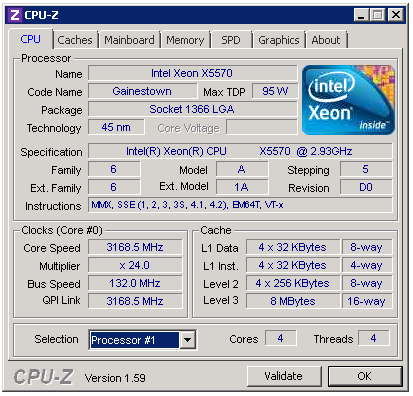
The Power of Power

The server above has a core speed of 3,168.5MHz, and the specification is only 2.93GHz (2,9300MHz).  This server isn’t part of the 99% or the 1% – this server is part of the 110%.  Isn’t that what you want, real power?  Sure, it comes at a cost of higher electrical bills that cost more money, but money isn’t a problem for the powerful, kiddo.

If it still doesn’t show at least the same speed as the Specification, your hardware guys might be holding you back, too.  Server BIOS settings can be configured to override the operating system and leave power saving – or as I like to call it, poverty-causing – enabled no matter what.  At your next scheduled outage (and by that I mean the next time you can get into the datacenter and pretend to trip over the power cord) you should change that back again.

Run CPU-Z today, activate the power within you, and stop letting the 99% and the 1% boss you around.  From this point forward, when developers or users come to you whining about why your servers are running slow, the answer isn’t your servers – it’s their weak and puny code.  After all, your server simply can’t get any more powerful.


Three Things You Should Never Say in a Technical Interview

Did I say that out loud?

When preparing for a technical interview, most people forget to think about how they answer questions.

Even though you’re focusing on technical topics, make sure you avoid some simple statements that could spoil your chances to land that job.

#3: My Coworker Was an Idiot

Whether or not it’s true, don’t let this statement come out of your mouth.

You will often be asked questions in a technical interview about mistakes you’ve made or witnessed in your career. Your job is to describe the cause of the problem, your response, and what you learned.

Whatever the incident, be cautious pointing the finger of blame. Calling out your colleagues for incompetence or stupidity will bring you down as well. After all, why didn’t you stop them? (Tip: you don’t want to answer that.)

Instead: Focus on the problem with the technology and the process. Talk about your own role– take responsibility for both your mistakes and your achievements. Talk about changes which would prevent the problem from happening again. (Bonus points if you can tell a story about helping make that happen!)

#2: That Wasn’t My Job

Technical interviews will often touch on topics outside your experience. This is no accident: screeners want to see how you react to questions either above your level or in a different area.

When the conversation goes into these areas, never make excuses. Many people try to provide explanations which boil down to “I don’t know that because it wasn’t my responsibility.” This is a huge mistake: you immediately sound like you have no passion, no intellectual curiosity, and only do what you are tasked with.

Instead: It may seem counter-intuitive, but admitting when you don’t know something can work hugely in your advantage in a technical screening. The key is to do so calmly and with confidence. If you have a theory as to how you could figure the question out, or strategies you might take to solve the problem, offer them!

#1: I’m Sorry

Unless you spill coffee on someone, apologies have no place in a technical screening.

You may apologize without even realizing it. When in a high pressure situation, it’s natural for many people to apologize if they feel it isn’t going well. The more nervous you are, the greater chance that you’ll start apologizing.

Apologizing when you don’t know things doesn’t show your strengths. Instead, it gives an impression that you’ve given up on the question.

Instead: Even if you’re on the tenth question you don’t know the answer to, keep your chin up and keep going strong. If many of the questions are on the same topic, ask if the technical screener has a good references where you could learn about that topic. You can try to save the situation by doing some research and sending a great follow up email after the screening. Whatever you do, proceed through the interview with confidence— it’s never too late to succeed.

What to Remember For Your Technical Screening

Your greatest mission in your technical screening is not to get all the questions right: it’s to best represent how you solve problems. Even if you don’t know answers to half of the questions, you can make the screening a success if you show your strengths along the way.

I have seen quite a few situations where a technical screen shows that a candidate absolutely can’t handle the job in question, but the screener is still incredibly impressed by their performance. In many of these cases, the candidate lands a job at the company— it’s just not the job they initially applied for.


SQL AZURE LOST ITS LEASE! EVERYTHING MUST GO!

Microsoft Azure
25 Comments

Crazy Ballmer’s Database Hut is having the fire sale of the century!  SQL Azure pricing is sliced in half or more. We must be crazy, they say!  Check out these discounts:

SQL Azure Pricing Reductions

When SQL Azure first came out with its absurd limitations (no backups, tiny database sizes), I viewed the pricing the same way I view cocaine pricing.  You’d have to be pretty stupid to do cocaine, but if you do, then you’re not really the kind of person who’s deterred by astronomically high prices anyway.  (You’re probably proud of the high prices, come to think of it.)

Today, it’s a different story.  We’ve got:

  • Databases up to 150GB
  • Federations to make sharding easier (not easy, but easier)
  • Backup capabilities
  • Reasonable pricing

Suddenly, SQL Azure isn’t cocaine anymore.  I’m not saying you’ll want to start sniffing it today, but for starters, why not run a query to find out how much your own server would cost to host in SQL Azure?

Disclaimer: that query is probably wildly inaccurate because I write horrendous T-SQL and barely tested it.  For exact pricing, check the Azure pricing page and scroll down for SQL Azure, or use the Azure pricing calculator.

I’m praying that you buy SQL Azure.

My query lists the data file sizes – not the actual data sizes, so if you’ve comically overprovisioned your files with lots of empty space, you’ll get artificially high SQL Azure costs.  That’s how I like to do my projections, though – if I’m worried that the data will grow to a certain size, then I size the database for it, and that’s a reasonable projection number for my SQL Azure costs as well.

That query also doesn’t warn you about features you’re using that aren’t available in SQL Azure, nor the security challenges of having your customer data offsite, nor does it cover how your applications might be impacted by a database that lives outside of your network, yadda yadda yadda.  These aren’t unsolvable challenges – especially when the price is right, and today, it’s gotten a lot closer to right.

Here’s the much harder query to write: we need to be ready when management asks, “So how much does it cost to host these databases on-premise, and do we have three replicated copies like SQL Azure?”  SQL Server 2012’s AlwaysOn Availability Groups get us much closer to that solution, but it ain’t cheap.


An Introduction to SQL Server Clusters

Clustering
340 Comments

The options for high availability can get confusing. I was lucky enough to begin working with SQL Server clusters early in my career, but many people have a hard time finding simple information on what a cluster does and the most common gotchas when planning a cluster.

Today, I’ll tell you what clusters are, what they’re good for, and why I like to plan out my clusters in a very specific way. I’ll also give an overview of how clustering relates to the AlwaysOn Availability Groups feature in SQL Server 2012, and wrap up with frequently asked questions about clustering SQL Server.

What Type of SQL Clustering are we Talking About?

There are lots of types of clusters out there. When we cluster SQL Server, we install one or more SQL Server instances into a Windows Failover Cluster. In this post I’m talking specifically about clustering SQL Server 2005 or later using Windows Server 2008 or later.

Key Concept: A Windows Failover Cluster uses shared storage– typically, this shared storage is on a SAN. When a SQL Server instance is installed on the cluster, system and user databases are required to be on the shared storage. That allows the cluster to move the SQL instance to any server (or “node”) in the cluster whenever you request, or if one of the nodes is having a problem.  There is only one copy of the data, but the network name and SQL Server service for the instance can be made active from any cluster node.

Translation: A failover cluster basically gives you the ability to have all the data for a SQL Server instance installed in something like a share that can be accessed from different servers. It will always have the same instance name, SQL Agent jobs, Linked Servers and Logins wherever you bring it up. You can even make it always use the same IPAddress and port– so no users of the SQL Server have to know where it is at any given time.

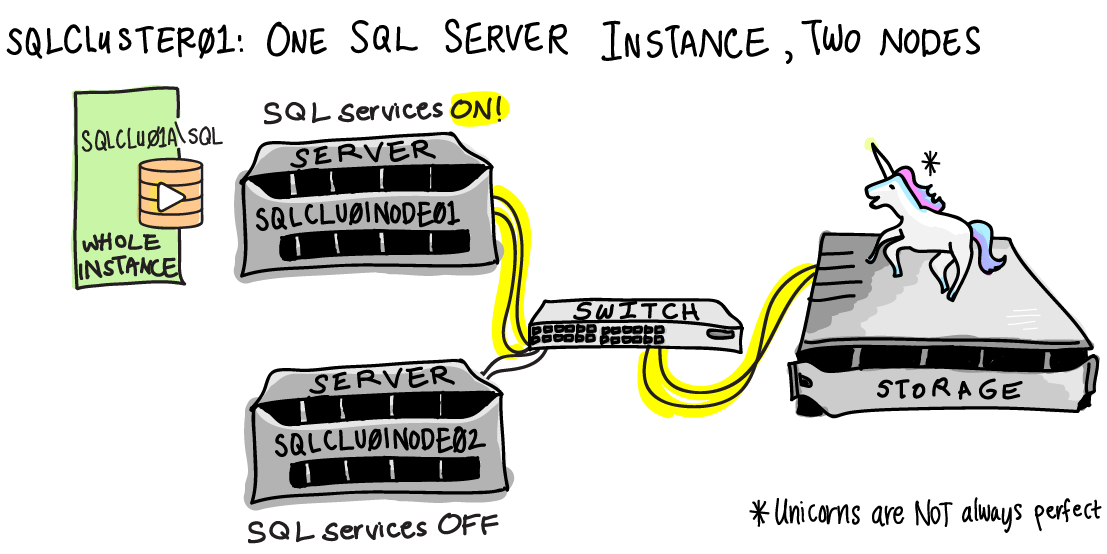
Here is a diagram of a SQL Server cluster. The cluster is named SQLCLUSTER01. It has two nodes (servers), which are named SQLCLU01NODE01 and SQLCLU01NODE02. People connect to the SQL Server instance at SQLCLU01A\SQL. The instance has been configured on port 1433.

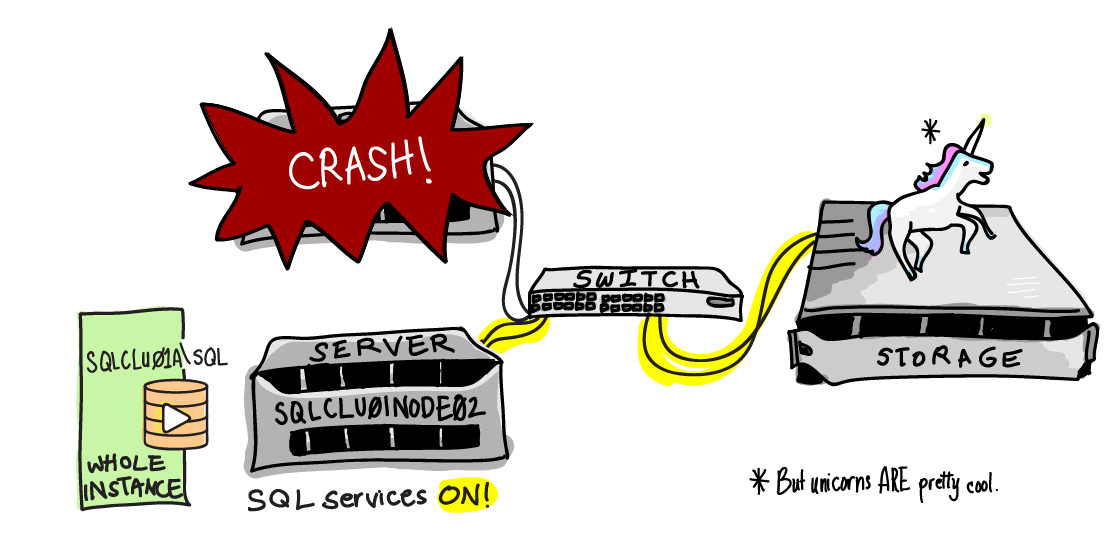
Oh no! There’s been a failure in our environment!

Here’s what happened.

The SQLCLU01NODE01 server crashed unexpectedly. When this happened, the Windows Failover Cluster service saw that it went offline. It brought up the SQL Server services on SQLCLU01NODE02. The SQLCLU01A\SQL instance started up and connected to all the same databases on the shared storage– there’s one copy of the data, and it doesn’t  move. As part of the SQL Server startup, any transactions that were in flight and had not committed at the time of the crash were rolled back.

While this automatic failover was occurring, users could not connect to the SQLCLU01A\SQL instance. However, after it came back up they were able to resume operations as normal, and had no idea that a server was still offline.

Why You Care About SQL SERVER Clustering

If you’re a business owner, manager, or DBA, you care about clustering because it helps keep your applications online more of the time— when done properly, it makes your database highly available.

Here are some ways that clustering makes your life easier:

  • Hardware failures are a nightmare on standalone servers. If a server starts having problems in a failover cluster, you can easily run your SQL Server instance from another node while you resolve the issue.
  • Applying security patches on a standalone server can be very tedious and annoying to the business: the SQL Server is offline while you wait for the server to reboot. By using failover clustering, you can apply patches with only brief downtimes for your application as you move your SQL Server instance to a different node.
  • Failover clusters can also give you an additional tool in your troubleshooting toolkit. Example: if you start seeing high latency when using storage and you’ve ruled out all the immediate candidates, you can fail to another node to try to rule out if it’s a problem with a per-node component like an HBA.
  • Clustering is transparent to the calling application. Lots of things with SQL Server “just work” with clustering, whereas they’re a little harder with other alternatives. With clustering, all of my databases, logins, agent jobs, and everything else that’s in my SQL Server instance fail over and come up together as a single unit— I don’t have to script or configure any of that. I can also cluster my distributed transaction coordinator and fail it over with my instance as well.

Gotchas and Notes for Planning a SQL Cluster

Know What Clustering SQL Server Doesn’t Do

The first gotcha is to be aware of what a failover cluster won’t help you with.

Clustering won’t improve your performance, unless you’re moving to more powerful servers or faster storage at the same time you implement clustering. If you’ve been on local storage, don’t assume moving to a SAN means a nirvana of performance. Also, clustering doesn’t guarantee that everything involved in your SAN is redundant! If your storage goes offline, your database goes too.

Clustering doesn’t save you space or effort for backups or maintenance. You still need to do all of your maintenance as normal.

Clustering also won’t help you scale out your reads. While a SQL Server instance can run on any node in the cluster, the instance is only started on one node at a time. That storage can’t be read by anyone else on the cluster.

Finally, clusters won’t give you 100% uptime. There are periods of downtime when your SQL Server instance is “failing over”, or moving between nodes.

Invest Time Determining the Right Naming Convention

You have a lot of names involved in a cluster: a name for the cluster itself, names for each of the servers in the cluster, and names for each SQL instance in the cluster. This can get confusing because you can use any of these names later on when connecting with Remote Desktop– so if you’re not careful, there may be times when you’re not entirely sure what server you’re logged onto! I have two general rules for naming:

First, make sure it’s obvious from the name what type of component it is– whether it’s a cluster, physical server, a SQL Server instance, or a Distributed Transaction Coordinator. I also recommend installing BGINFO to display the server name on the desktop for every server in the cluster.

Second, name everything so that if you later add further nodes or install another SQL Server instance onto the cluster, the names will be consistent.

Avoid Putting Too Many Nodes in One SQL Cluster

I prefer to have only two or three nodes in a cluster. For example, if I need to cluster five SQL Server instances, I would put them in two failover clusters.

This requires a few extra names and IP Addresses overall, but I prefer this for management reasons.  When you apply patches or upgrades, you must make sure that each service on your cluster runs on each node successfully after you’ve applied the change. Having a smaller cluster means you don’t need to fail your instance over as many times after a change.

Don’t Assume Your Applications Will Reconnect Properly After Failover

Even though your SQL Server instance will come up with the same network name and IPAddress (if not using DHCP), many applications aren’t written to continue gracefully if the database server goes offline briefly.

Include application testing with your migration to a failover cluster. Even though the application doesn’t know it’s talking to a cluster (it’s a connection string like any other), it may not reconnect after a failover. I worked with one application where everything worked fine after a failover, except web servers stopped writing their log data to a database because they weren’t designed to retry after a connection failure. The data was written asynchronously and didn’t cause any failures that impacted users, but the issue wasn’t noticed immediately and caused the loss of some trending data.

“Active Active” Can Be Useful

My ideal cluster layout to work with is a two node cluster with identical hardware and two SQL Server instances on it. This is commonly called “Active Active” clustering, but that term is technically a no-no. Officially this is called a “Multi-Instance Failover Cluster.” Not quite as catchy, is it?

Many people think the ideal situation is to put their most important SQL Server instance on a two node cluster and leave the second node ready, waiting, and idle. So, why do I want a second SQL Server instance?

I like to put my critical, heavy hitter database on one of those instances in the cluster. I then want to take a couple of less critical, less busy databases and put them on the second instance. The perfect examples are logging databases. There are two requirements for these databases: first, they can’t require a large amount of memory or processor use to run well, because I absolutely have to know that these two instances can run successfully at peak load on a single node if required. Second, the databases on the “quiet” instance shouldn’t cause the whole application to go offline if they aren’t available.

Why do I like having a “quiet” instance? Well, whenever I need to apply updates to Windows or SQL Server, this is the canary I send into the coal mine first. You can perform rolling upgrades with failover clusters, which is great. But it’s even better to know that the first instance you fail over onto an upgraded node won’t take absolutely everything down if it has a problem.

Notes: Because of licensing costs, this option won’t always be realistic. If you go this route you have to make sure everything can stay within SLA if it has to run on a single node at your busiest times– don’t overload that “quiet” instance!

Re-Evaluate your SQL Server Configuration Settings

Revisit your configuration settings as part of your planning. For example, on a multi-instance cluster, you use the minimum memory setting for SQL Server to configure how your instances will balance their memory usage if they are on the same node.

Do I Have to Use Clustering to Use Availability Groups in SQL Server 2012?

This is an interesting question– don’t let it confuse you. We have a very cool new feature called Availability Groups coming in SQL Server 2012, which does offer  awesome scale-out read functionality. You’ll read in many places that it “requires Failover Clustering.”

This is true. In order to use the Availability Group feature in SQL Server 2012, the Failover Clustering feature must be enabled in Windows. If you’re using Windows Server 2008 or prior, this feature is only available in Datacenter and Enterprise edition of Windows Server, so that feature isn’t free.  This feature is now included in Windows Server 2012 for all editions.

But wait, there’s a catch! Even though you’re enabling the Failover Cluster feature, you are NOT required to have shared storage to use Availability Groups. You have the option to use a Failover Cluster in an Availability Group, but you can also run your Availability Groups with entirely independent storage subsystems if you desire. The feature is required because no matter what, Availability Groups will use parts of the Failover Clustering feature to manage a virtual network name and IP Address.

Frequently Asked Questions for Clustering SQL Server

Q: Can I install every SQL Server component on my cluster?
A: Nope. SQL Server Integration Services is not “cluster-aware” and can’t fail back and forth with your cluster.

Q: How long does it take to fail over?
A: There are several factors to consider in failover time. There’s the time for the SQL Server Instance’s service to go down on one node, be initiated on another node, and start up. This time for instances to start and stop includes normal database recovery times. If you need to keep failovers within an SLA, you’ll want to test failover times in a planned downtime, but also estimate in how long failover might be if it happened at peak load.

Q: Can I cluster a virtualized server?
A: Yes, you can create failover clusters with virtual servers with VMware or Hyper-V, and install SQL Server into it. I think this is great for learning and testing, but I’m not crazy about this for production environments. Read more here.

Q: Why do you make such a big deal about the shared storage?
A: Because not everyone has robust shared storage available. You want to make sure you’re using shared storage that has redundancy in all the right places, because in a failover cluster shared storage is a single point of failure, no matter how magical the SAN seems. This also means that if your data is corrupted, it’s going to be corrupted no matter which node you access it from.

Q: What’s the minimum number of nodes in a failover cluster?
A: One. This is called a single-node cluster. This is useful for testing purposes and in case you have a two node cluster and need to do a work on a node. You can evict a node without destroying the cluster.

Q: Can I use geo-clustering for Disaster Recovery?
A: Yes, but it requires some fancy setup. Most SQL Server clusters are installed in the same subnet in a single datacenter and are suitable for high availability. If you want to look into multi-site clustering, “geo-clustering” became available with SQL Server 2008, and is being enhanced in SQL Server 2012. Note: you’ll need storage magic like SAN replication to get your Geo-cluster on.

Q: Does it matter which version of Windows I use?
A: Yes, it matters a lot. Plan to install your Windows Failover Cluster on the most recent version of Windows Server, and you need Enterprise or Datacenter edition. If you must use an older version of Windows, make sure it’s at least Server 2008 with the latest service packs installed. The Failover Clustering Component of Windows was rewritten with Server 2008, so if you run on older versions you’ll have fewer features and you’ll be stuck chasing old problems.

Q: What is Quorum?
A: Quorum is a count of voting members— a quorum is a way of taking attendance of cluster members who are present. The cluster uses a quorum to determine who should be online. Read more about quorum here.

Learn More about Clustering SQL Server

Check out our SQL Server clustering training page for more articles and videos.


Three Consulting Tools to Make You a Better DBA

21 Comments

As a consultant, I solve hard problems, and I use cool tools. These tools could help you, too– and in ways that may surprise you.

Problem 1: The DBA’s Time is Money, and It’s Limited

You know what, DBAs? You’re expensive.

DBAs are frequently involved in every task that touches a database. This includes Windows security patching, writing and running adhoc queries and reports for users, granting user access, deploying code, disaster recovery planning, high availability planning and implementation and performance troubleshooting. Additionally, DBAs must ensure that the database servers are configured in a secure way and that backup and maintenance processes are scheduled and running successfully.

Often, the tasks which are the most valuable to the business don’t get enough attention because of other demands.

The trick to managing your time— which is your company’s money— is to figure out where it’s going.

Consultant Solution: Manage Your Time with Toggl

If you aren't careful, others see you like this.

The problem with most time tracking tools is that they’re too time consuming. You start out and immediately realize you need to start tracking the time you’re spending tracking your time. You get caught in an endless loop and emerge 10 days later looking like a Unix sysadmin.

I love the Toggl interface because it’s seriously easy to use. You can very quickly record what you’re doing and classify it using a timer. You can continue activities from previous days or start new ones.

Typically, people in IT don’t do time tracking unless they’re forced to do so by management. It’s usually dreaded, but the secret is that the data is most valuable to YOU.

Track your time use for one month. At the end of the month, look at the patterns in aggregate. Look for items that took up a lot of time collectively, but which could be done by someone who is less expensive to your company, perhaps with some automation. Identify a more valuable project you could do instead, such as designing a Disaster Recovery plan for the company’s databases. Pitch this to your manager as extra value you can add, and provide the supporting data. Maybe it won’t work immediately, but over time you’re building data to help justify a Junior DBA.

Problem 2: People Don’t Know What the DBA Does

Most of your coworkers don’t understand what you do most of the time.

Solve this like a consultant. When you do a task for someone, give them a Statement of Work.

Consultant Solution: Statements of Work

A Statement of Work, or “SOW” is essentially an agreement that explains what you’re doing, what the goals are, and how much it will cost.

When you’re taking on a new project or task, make a bit of time to write up the goals for the project, how many hours of time each week you expect to devote to it, and how many weeks it will take you to complete. State what deliverables you will provide, an overview of the tasks you will do, and anything that might keep you from delivering on your estimate. This shouldn’t be lengthy or wordy— aim for clarity and brevity. Share your statement of work with your manager and the project owner.

Your statements of work can be sent by email, but store them off in a folder for your reference and review them when you complete a project. The main value you provide by writing this type of email as a DBA is helping others understand your job and see that you’re a professional.

Tip: I know you’ve got a list of things you would love to test, investigate, or research, but don’t have enough time. Once you get good at writing SOWs, you can use these to pitch projects that YOU think are valuable to your company. In exchange, you can trade off some of those time consuming tasks you tracked in Toggl that are a little too manual.

Problem 3: People Don’t See the DBA as a Person

Good news: with tools this good, you don't have to dress up.

There’s a problem that goes even deeper: Many people don’t see the extra hours you spend after a code deployment that caused the website to grind to a halt, or the late night hours you get paged because checkdb failed. Instead, they may see an empty cube in the morning if those late nights keep happening.

What people often notice about a DBA is that they aren’t in the office all the time. In many companies where there is 24×7 on-call support, the DBA may work a different schedule, come into the office less, and participate in more meetings remotely than others.

This is a huge tacit cause of friction, but you can avoid the problem.

Consultant Solution: The Webcam

Whenever I work with clients remotely, I’ve always got my webcam on. This means that no matter how long I’ve been working, I need to brush my hair, but it does something important: it helps people relate to me.

If you sometimes need to attend meetings from home, purchase a webcam, even if it’s on your own dime. Allow people to see that you’re actively paying attention to the meeting by positioning what you are working on near where the webcam is sitting— if you’re making notes on a secondary monitor, it might look like you’re ignoring the meeting.

By seeing you at work elsewhere, people will learn that you do accomplish things when you’re not at your desk. Moreover, they’ll see you much more as a person rather than a missing entity.

Being a Consultant is Fun

The true joy in being a consultant is solving problems. You can already do this as a DBA– without quitting your job! Sometimes all it takes to feel the difference is using a few new tools to help you manage your time, shape your role, and share your work with your colleagues.


How to Test Your Backup Strategy: Five Simple Questions

Backup and Recovery
13 Comments

Backup strategies are like rashes: people tend to ignore them for as long as they can, then they ask a specialist if it’s going to be OK.

There’s a lot of good ways to back up databases. The challenge is finding best strategy for your data. To find out if your SQL Server backup strategy measures up, ask yourself the following questions:

1. How Do You Know When Your Backups Aren’t Successful?

People deal with lots of databases, and it’s hard to keep track of every last one. Different strategies are used to manage backups for all these databases — sometimes a service external to the database runs the backup. Do you know when that service fails, or doesn’t start? At other times, individual SQL Server Agent jobs handle backups for each database. If a new backup is added and a backup job isn’t created, will you know it wasn’t run?

  • Make sure you have an alert system for failures.
  • Supplement your backups with regular checks of last backup date. Make sure you’re checking the last date of log backups if you’re not using the simple recovery model.

2. How Much Do You Lose if Even Just One Backup File Goes Bad?

Backups take up a lot of space. There are a lot of backups, and people rarely use them. It’s human nature to go a little cheap, and keep them only in one place. That place may have been provisioned using RAID 0. Wherever it is, a backup file might get deleted or corrupted.

You need to look at all the different types of backups you run and consider things like this:

  • If you’re using just full and transaction log backups, the chain ends at the last good log backup.
  • If you’re doing full backups once a week and differentials on weeknights, those differentials are no good without the full.

For critical databases, I prefer to keep backups in more than one place— onsite and offsite. Think you can’t afford an offsite location? Here are the rates for Amazon S3.

3. How Fast Do You Need to Restore Your Data?

If you’re a manager, this is your ‘Recovery Time Objective’. If you’re a project manager, you just call this ‘RTO’. If you’re a database administrator, this is the number of minutes until you’re pumped full of adrenaline and sweating heavily when something goes wrong. Whenever I’m considering a backup technology, I want to know how long it will take me to restore my data if everything is gone except the backup files.

This means you need to know:

  • How long will it take to get to the backup files? If they’re on tape or in a magical Data Domain device, can you access them yourself?
  • How long will it take to copy those files to a good place to restore them from?
  • If you don’t have a server to restore to, how long will it take to bring one up and configure it?
  • How long will the restore take?

If my backup technology can’t meet my Recovery Time Objective, I need to start thinking about high availability options that can mitigate my risk. Once you’ve got high availability in place, you still want to keep a plan to restore from backups and test it periodically, but you’re less likely to need to use it.

4. How Much Data Can You Afford to Lose if Your Transaction Log File is Vaporized?

When you stop and think about it, isn’t ‘Recovery Point Objective’ a strange way of saying how much data it’s OK to lose? When you think about backup strategies, you need to know:

  • Can you do incremental restores? (And have you tested it?)
  • Can you restore to a single point in time? (Example time: right before the data was truncated. And have you tested it?)
  • If your database and transaction log files disappeared and you were left with only the backup files, how much data would be lost?

5. How Much Can Your Backup Impact Performance?

Whenever your backup is running, you’re burning precious resources: CPU, disk IO, memory, and (depending on your configuration), network. In many cases, it’s just fine to use this up during non peak times. However, for VLDBs which are backing up multiple terabytes and for critical OLTP databases which serve customers around the globe, backups need to be run as fast as possible. After all, backups are only one part of maintenance.

When your performance is critical, these are the questions you need to ask:

  • Are you backing up at the right frequency? If we’re talking about a slow transaction log backup, check how often it runs.
  • Are you using all the available magic? If you’re using SAN storage, have you explored all the options for backing up your databases from the SAN?
  • Are you using backup compression? Compression can burn more CPU, but reduce the amount of writes and overall duration of your backup.
  • Does your backup have enough throughput to the storage device? Whether you’re using iSCSI or Fiber Channel, throughput is often a big part of the solution.
  • Have you read the SQL CAT Team’s Case Study on backing up VLDB’s? It’s chock full of configuration tips to make your backups blaze through faster.

That was More than Five Questions

It’s true, I cheated. Got your own backup test? Tell us in the comments!


SQL Server Certifications: What to Take and How to Prepare

Whether you’re already a database professional or would like to become one, you’ve probably thought about getting certified in SQL Server. Do you need to be certified? What certifications are available and which should you take first? How should you prepare for the exams? Kendra Little is a Microsoft Certified Master in SQL Server. She’ll explain what certifications are available, what the advantages are of becoming certified, and give practical tips for making the most of your exams.

Want to see the links from the video? Scroll on down– the links are at the bottom of the post.

https://www.youtube.com/watch?v=5ankHqGrmOc

Trying to Get Your First DBA Job?

If that’s your goal, we don’t think certifications are the best way to get you there. We’ve created a new, free ebook where we share some of our best writing on:

  • Why it’s so hard to find a Junior DBA job
  • How to get your foot into the door of database administration
  • How to handle DBA job interviews
  • How to get training on the job
  • What to do when you’ve lost that lovin’ feeling with your DBA job
  • How to get promoted

It’s all packaged up in a portable, easy to read format. Get our free eBook — “How to Develop Your DBA Career”.

SQL Server Certifications: Helpful Links

Certification Exams for Microsoft SQL Server 2008

MCTS MCITP MCM MCA
Database Administrator Exam 70-432 Exam 70-450 Exam 88-970
then
Exam 88-971
MCA Board Exam
Database Developer Exam 70-433 Exam 70-451
Business Intelligence Developer Exam 70-448 Exam 70-452 N/A N/A

Studying for SQL Server Certifications

Tools to Build Your Own SQL Server Lab

Low Cost (or Free!) Virtualization Products

Using Amazon’s EC2 as Your SQL Server Lab

Want Help with Your Resume and Interviewing?

We offer a 90-minute DBA job interview question and answer kit with fun interactive worksheets. Check it out.


Join Me for Lunch in Chicago on March 23rd

0

On March 23rd, I’ll be the guest of honor at the first SQLFriends Lunch in Chicago.  For just $30, you get lunch at Buca di Beppo on Rush Street plus two hours of talking about SQL, virtualization, blogging, consulting, the MCM program, you name it.

And you really do name it – on the SQLFriends registration form, there’s a spot to put in the questions you want answered.  I’ll get a copy of those, and I’ll come armed with things vaguely resembling answers.

This is a refreshing change of pace from user groups and presentations.  Here’s your chance to ask me anything in a friendly, relaxed environment and get insight from your peers.  Network with the kind of people who find me interesting – believe it or not, you’re not the only one.  (There’s also my mom.)

There’s only 30 spots available, so sign up now.


SQL Server 2012 BareMetal Workshop

7 Comments

Last week Brent, Jeremiah and Kendra attended the SQL Server 2012 BareMetal workshop at Microsoft Headquarters. This was a special train-the-trainer style event where Microsoft Program Manager Dandy Weyn (blog | twitter) brought MVPs, Microsoft employees, and MCMs together. We talked about implementing SQL Server, training the community to use new features, and helping people adopt new technologies to scale out their applications.

What did we think? Here’s our highlights.

Brent Says, “You’ve Come a Long Way, Baby”
I love the command line.  I love batch files.  I love queries.  But somehow, I could just never get into the habit of installing SQL Server via unattended scripting.  The GUI works well enough, and I don’t install that many SQL Servers, so why bother scripting things out when I’ve heard so many horror stories about the difficulty of unattended install scripts?

After Dandy Weyn’s #SQLBareMetal training in Seattle, I see the attraction.  Dandy’s put a hell of a lot of work into an elaborate set of scripts that:

  • Download evaluation versions of everything (Windows, SQL, Office, and more)
    Brent, Kendra and Jeremiah with Amit Bansal at #SQLBaremetal
    Brent, Kendra and Jeremiah with Amit Bansal at #SQLBaremetal
  • Create Hyper-V templates for Windows
  • Copy the templates into a domain controller VM and several SQL Server VMs
  • Creates a domain and joins the other VMs to it
  • And much more

It’s impressive.  Really impressive.  With a properly equipped host (24-32GB of memory and a single SSD or a RAID 10 of conventional hard drives), you can spin up your own SQL Server 2012 lab in an hour or two complete with a cluster and Availability Groups.

If everything works.

Unfortunately, we’ve still got a way to go.  Troubleshooting all these moving parts still isn’t easy, as evidenced by the number of stumped Microsofties, MVPs, and MCMs in the room that struggled for hours getting everything working correctly on brand-new clean virtual machines.  Troubleshooting machines in the wild is another matter altogether – scripting doesn’t make that much easier.  In fact, it’s probably worse: if you take a stranger’s scripts and run ’em, and you run into problems, you’re fighting two battles simultaneously.  You have to figure out what the scripts were doing, and figure out how to fix problems.

Sitting in the workshop, watching people struggle, it hit me: Microsoft’s not bragging about easier management of SQL Server 2012.  If you want easy management, the solution (supposedly) is SQL Azure.  SQL Server, on the other hand, gives you much more powerful features and tools, but you pay for that power by way of more difficult setup and troubleshooting.  Scripting doesn’t help that – it just makes the errors pop up faster with less repetitive manual labor.

We’ve come a long way, baby, but in terms of manageability, we’ve still got a really long way to go.

Jeremiah says, “You press the button, we do the rest.”

I love automation; the more I can remove a meat bag from a decision making process, the happier I am. It’s not because I don’t trust people; it’s because people go on vacation or play games on their cell phone, or don’t check their email for hours on end. Of course we all like to build complex Rube Goldberg style solutions to problems that should have simple solutions. To put it plainly – the more critical something is, the simpler the solution must be.

It’s pretty well known that I’m a big fan of large scale distributed databases. Part of the appeal is the massive fault tolerance that comes along as part of the deal. SQL Server 2012’s Availability Groups bring that massively robust and massively simple fault tolerance to SQL Server. Before going in to the training, I understood what Availability Groups brought to the table, but I didn’t quite see the bigger picture. As Brent mentioned, getting things up and running isn’t the easiest thing on earth. Once we were up and running with the Availability Group the administration wasn’t as simple as firing up a Riak cluster and throwing a switch, but it was really close.

During the configuration process, there were a few places where the wizards weren’t as clear as I’d like, but all of the functionality is configurable via PowerShell and T-SQL. Like Brent I love me some scripting. The ability to script Availability Groups once and then modify a base set of scripts means that I can deploy this feature fairly easily, provided that the Windows side of things is set up correctly.

George Eastman originally said “You press the button, we do the rest.” SQL Server 2012 is getting very close. The UI isn’t always as simple as pressing the button, but SQL Server will do the rest… most of the time.

Kendra says, “Give us a week, we’ll take off the weight.”

Brent told you above about how we built out a lot of installations with a great set of scripts. One thing that thrilled me about our installs was how fast and simple it was to deploy Windows and SQL Server onto Windows Server Core.


What’s different about Server Core? There’s only a very lightweight GUI: most of your work is done through a command prompt. There’s still a little bit of the old familiar, though– you can fire up Task Manager in a pinch for an easy graphic view of  what’s running on the server itself. For the most part, however, you administer Server Core locally either by command line or PowerShell. If you want to fire up the graphic Windows Event Viewer, other MMC snap-ins, or SQL Server Management Studio, you need to enable those to be run from remote machines.

Server Core is important to SQL Server database administrators for three reasons:

  1. A smaller surface area is stronger and has less room for attack. (Bonus: that means less of a surface to patch, and fewer downtimes!)
  2. Not having the GUI protects you from yourself. All those tools we run on servers use up precious resources in terms of CPU and memory. If the patient is having a hard time breathing, they don’t want a doctor who needs to sit on their chest to do an exam.
  3. In the future, Microsoft is headed toward minimal GUI features. It’s time to start adapting now.

Do yourself a favor: make one of your goals this year to install Server Core with a SQL Server 2012 instance into your development or test environment. Spend some time with it and include it in your experiments with the new features of SQL Server 2012.

Yes, there’ll be tricky points you hit. You’ll find yourself reading a few new blogs and learning a few new PowerShell commands. But in a few years, you’ll be really glad you did.


Understanding Database Choice

Architecture
3 Comments

Everyone needs a distributed database right? Wrong. It’s easy to get so excited about trying out a new technology that you close your eyes to the problem you’re trying to solve. I came across a question on Stack Overflow where the poster was asking what kind of distributed database they needed. Rather than jump right into the fray and say “You don’t need it,” I took a step back and asked myself “What’s the real question here?”

Oh boy, it's an untested database!

Understand Your Requirements

We all hope that some day our business will be as successful as Google or Facebook or whatever the next big thing is. Those business got that way by first concentrating on doing something incredibly well and then growing as needed. Nobody reasonable wakes up and says “We’re going to build this incredibly robust application and here’s how we’re going to do it.” The internet is full of articles about how different companies have dealt with their problems of scaling. Do your job well and worry about success when it happens.

In the StackOverflow question, Ted (we’ll call this person Ted) was asking which distributed database they should use to scale their system. They gave some vague requirements for data throughput, but left out why the system needed to be distributed across multiple servers.

This triggered my buzzword detector. I think distributed databases are incredibly cool, but they have a place; Ted’s requirements didn’t match at all. without much explanation for why a distributed database would be important here, it was hard to even refute the argument about using a distributed database.

Distributed databases have some operational advantages – they tend to be more robust and tolerant of equipment failures, but that’s based on certain configuration details like using multiple server replicas. RDBMSes, out of the box, aren’t distributed across multiple servers, but there are a lot of features that have been built to make it possible to replicate data across data centers or to shard the database across multiple servers. The closest thing to a business requirement was that the database needed to be free; open source would be nice, too.

Understand Your Hardware

Business requirements only matter so much. Eventually somebody has to write data to a disk. Once that drive head starts moving, the best designed software won’t matter if the underlying hardware can’t keep up with the load. That’s why it’s important to know what your hardware is capable of handling. It’s just as important to know what your application is capable of producing

Ted needed a system that would be handling less than 100 transactions per second and would probably end up writing data at a rate of around 400 kilobytes per second. Neither of these requirements are show stoppers. Assuming that the server was going to be writing at a constant rate, the amount of data generated and kept would be around 10 terabytes of data a year. While it’s nothing to scoff at, it’s not an unheard of data generate rate. The thing is, almost any off the shelf database software can handle these kinds of load. Almost any off the shelf server can handle this kind of data throughput.

The requirement to handle ~100 requests per second at around 4 kilobytes per record isn’t a matter of choosing a database product, it’s a matter of designing a storage solution that can handle the ongoing needs of the business. When SAN space can be purchased from around $15,000 per terabyte, 10TB per year becomes a minor budget line item for all but the most cash strapped startup.

Understand Your Data

There was one feature I left out until now. It’s important to understand how your data will be used. Graph databases excel at helping users explore the relationship between different data points. Relational databases make it easy to build incredibly flexible, good enough solutions to most problems. Key value databases make it possible to do single key lookups in near constant time. The way that data is read limits the playing field.

Ted mentioned that almost of the data lookups were going to be by primary key lookups. If this were the only requirement for reading data, this problem could be solved by any database. Then he threw in a little hook – there would be some joins in the data. In the world of databases once you use the j-word, your options get very limited very quickly. You have to start thinking about querying patterns, potential optimizations, and the trade offs of read vs write optimizations.

If you do need joins, you can take one of two approaches – let the database do it, or write it yourself. Neither approach is difficult (and one is certainly easier than the other), but they’re both feasible – heck the hard part has already been done for you: someone else came up with the algorithm.

Understand Obscenity

Justice Potter Stewart in an attempt to classify obscenity said “I shall not today attempt further to define the kinds of material I understand to be embraced… but I know it when I see it.” Right now, there’s no good definition of what makes data into Big Data. Some people say that you’ve hit Big Data when you can no longer predict query performance. Some people use hard and fast numbers of data volume in bytes, in data churn rate, or in the massively parallel nature of the database. There’s no right or wrong answer and Big Data is something that varies from organization to organization.

It’s important to understand what problem you’re trying to solve, understand the volume of data, and understand how the data is going to be used before making the final selection. There are many ways to store data.

What would I have done in this situation? Taking into account that I know SQL Server well, I would use SQL Server. SQL Server can perform admirably as a glorified key value store. B+trees are pretty quick in most use cases and they balance many of the problems of simultaneously reading and writing data to provide a good enough solution to the problem (with great management tools on top). When business users demand better querying capability, it’s easy enough to start adding non-clustered indexes on top of the solution.


DBA Darwin Awards: Log File Edition

Right after the DBA says “Uh oh,” they call in the consultants.  We get to see some really amazing acts of career suicide.

I'll pull in close to the island so they can see me fail.
DBSEASEA SINK

You wouldn’t believe some of the stuff we’ve seen, and some of these things are probably happening in your environment right now.  In this session, we’ll talk about some of the most common ways to shoot yourself in the foot, and we’ll show you how to put the gun back in the holster.

If you’re a production DBA of any experience level, do yourself a favor and look for these common mistakes before they call in the consultants. We’ll discuss recovery modes, bulk inserts, VLFs, replication, copy_only backups, and of course, shrinking – all so you can learn what you’re doing wrong before your boss has to hear it from the outsider.

https://www.youtube.com/watch?v=YnKW-HLuF7U

Links We Discussed

Automatically Shrink Your Transaction Logs – Jeremiah Peschka shares a diabolically dangerous idea to shrink your log files as soon as they grow.

A Busy/Accidental DBA’s Guide to Managing VLFs – Dave Levy explains the basics of Virtual Log Files, gives you a script to check how many you’ve got, and shows how to fix the problem.

Performance Impact of VLFs – Linchi Shea tested how delete/insert/update (DUI) performance is affected by 20,000 VLFs, and then follows up with an OLTP test too.

Minimally Logging Bulk Load Inserts – Greg Robidoux has a great chart explaining how to get minimally logged inserts depending on whether you’ve got clustered indexes, nonclustered indexes, existing data, etc.  Also, in the video, I don’t explicitly say that these also work in simple and full recovery modes, but they do.  (I wanted to keep things simple – no pun intended – for the 30-minute session.)

Microsoft Data Loading Performance Guide – Thomas Kejser, Peter Carlin, and Stuart Ozer discuss the improvements of trace flag 610 to get minimally logged inserts in 2008.


Availability, Data Locality, and Peer-to-Peer Replication

I want to make something clear: high availability is not load balancing. The two options don’t have to be mutually exclusive, but they aren’t the same thing. Several months ago, I wrote about resolving write conflicts. Some of the approaches I mentioned for resolving write conflicts (such as taking a “last write wins” approach) involved using peer-to-peer replication. It’s important to understand conflict resolution and peer-to-peer replication. Since I’ve already talked about conflict resolution, let’s dig into how peer-to-peer replication fits into the mix.

Peer-to-Peer Replication and You

Peer-to-peer replication is a special and magical kind of replication, it works in a ring or mesh to make sure that one row’s updates will magically spread to all servers. You’d think that this would mean every server is equal, right?

In some distributed databases actions can take place on any server. Using Riak as an example, when you want to add a new record to the database you can write the record to any server and the record will be routed to the server responsible for handling that data. This is part of the beauty of a specific type of distributed database: the database is a collection of nodes that serve reads and writes without regard for hardware failure. There’s a lot of software trickery that goes into making this work, but it works quite well.

SQL Server’s peer-to-peer replication is a distributed database, just not in the sense that I’ve used the term previously. In SQL Server peer-to-peer replication every node is an exact copy of every other node: the same tables, rows, indexes, and views exist on every node. This is where the difficulty begins – if every row exists on every node, how do we know where to update data? The problem is that we don’t know where to update a row. There is no out of the box mechanism for determining row ownership.

Distributed database systems like Riak, Cassandra, HBase, and Dynamo work by assigning an owner to every record, shouldn’t we do the same thing with SQL Server? When we’re spreading data across a number of servers, we have to ensure that writes go to the correct location, otherwise we need to build a large number of checks in to ensure that all nodes have the appropriate updates and that everyone is working on the correct version of data. Otherwise, we run into conflicts. This is the reason I hinted at using peer-to-peer replication combined with write partitioning and a last write wins method of conflict detection. If changes to a row can only occur on server A, we don’t need to worry about updates on other servers – those updates can be ignored since they did occur not in the correct location.

The difficulty lies in finding a way to do all of this. SQL Server’s replication offers no routing functionality, it just replicates data to the appropriate subscribing servers. In order to make sure that data gets to the right place, there must be another piece to the puzzle. There must be a way to correctly locate data.

Record Ownership

If you absolutely must use peer-to-peer replication as a form of load balancing, record ownership is an important concept to consider. Regardless of whether the distributed database is relational or not, software still needs to be aware of where the definitive version of a record can be found. If there’s no way to determine which version of a record is the definitive version of a record, two updates can occur in different locations. This will undoubtedly lead to painful conflict scenarios. Instead of worrying about handling conflicts, we worry about getting data to the right place. Once we know that the data is in the right place, we can trust our database to be as accurate as possible.

I use the term record instead of row for an important reason: a record represents a complete entity in a system. A row may be part of a record (e.g. a line item in an order) but the record is the complete order.

Record ownership is a tricky thing to think about; how do you determine who owns any single row? What’s a fair and efficient way to handle this? Let’s take a look at different techniques and see how they stack up. Here’s a quick list of possible ways we can distribute row ownership in a database:

  • Random
  • Range-based
  • Static

Random Record Ownership

Randomness is frequently used to ensure an even distribution. Randomly bucketizing data turns out to be a very effective way of ensuring that data will be split very close to evenly across any arbitrary number of locations. The difficulty is in ensuring randomness.

Some systems like Riak and Cassandra use a hash function to distribute data ownership around the database cluster. Different nodes are assigned a range of values – if there are four servers in the distributed database, each one is roughly responsible for 1/4 of the data in the database (I’m simplifying, of course, but you get the drift). Special routing code takes care of getting data to clients and sending writes to the appropriate place. The location of a record is typically determined by applying a hashing function to the record’s key. In this way, we can always find a row at a later date: by applying a function to the key we can quickly find the row even if the number of servers in the cluster has changed.

This mechanism provides a reliable way to uniquely identify data and distribute it among many servers. This technique is difficult to accomplish with SQL Server. There is no peer-to-peer replication functionality in the SQL Server space that makes it easy to say “This record belongs on server A and this record belongs on server B.” There’s a reason for this: peer-to-peer replication is a high availability technology. It exists to make life easier in the unfortunate event that your data center slides into the ocean. It’s possible to build some kind of load balancing layer in SQL Server using SQL Server Service Broker (or just about any other technology), but the point remains that SQL Server doesn’t provide out of the box functionality to automatically implement random record based ownership.

Range-Based Record Ownership

Range-based ownership is far simpler than random record ownership. In range-based ownership a range of records are claimed by a single server. This could be users 1 through 100,000 or it could be users whose names start with ‘A’ through users whose names start with ‘K’. At a quick glance range-based record seems like it doesn’t have many down sides: it’s easy to determine where an appropriate record goes. My data goes to server A, your data goes to server B, his data goes to server C.

Range-based record ownership has a major flaw: some servers will experience more load than others. For example, if we’re partitioning by name we will quickly discover that first names aren’t very unique, at least not in Western cultures. In a survey of first names conducted in the UK, one quarter of women were likely to have only one of ten first names in 1994. One in three women was likely to be named Emily. Needless to say, data distribution will cause skew in the activity distribution on different servers. If one server accumulates a clump of very active users (e.g. a group of active early adopters), that server may experience a higher load than the others.

Designing an effective range-based record ownership scheme for SQL Server peer-to-peer replication is possible but very difficult. The effectiveness of the scheme depends on intimate knowledge of write patterns. Most of us don’t have the time to develop a deep understanding of how data is written and then develop a scheme that takes into account those patterns.

Static Record Ownership

With static record ownership, we assign each record to a server when it is created. This could be as simple as assigning a user to the closest server or it could mean assigning records to a server by some other arbitrary means. However this is accomplished, it’s important to remember that some piece code still must able to determine where a record should go and that the mechanism for identifying that initial location should be general purpose enough to meet your user’s needs in the long term.

There are several common ways to split out data. If you have a system that’s multi-tenant, it becomes easy to assign ownership for all of a single client/customer’s data to a single server. If that customer grows, you can buy a separate server or move them onto a different server with fewer users. Every record ends up having a composite key made up of the record identifier and the client identifier, but this is a small price to pay for clearly being able to separate data responsibility by client.

Another way to split out data is geographically. If I sign up for a service, it’s nice if the primary place to write my data is as close to me as possible. In this case, the service might have three data centers: in LA, in New York, and one in London. Much like using a multi-client architecture, a geographic method to determine ownership would use the location as part of the key for each record – records stored in LA would use a composite key with the data center location (‘LA’) and some other arbitrary key value to identify a unique record.

No matter what scheme you decide to use, static record ownership is an easy way to determine which SQL Server should be responsible for writes to a single record. An advantage of static record ownership is that routing can be handled in the application or a sufficiently sophisticated router can handle routing writes without any additional application code being added to the application – just a few load balancer rules will need to be created or changed
.

In Summation

Here’s the trick: throughout all of this we’ve ignored that order of events is important. We’ve just assumed that when data is being written, we’re guaranteeing the order of events. If the data is being written to random servers, there’s no guarantee of event order. In a naive system, a record might be written to one server and an update applied to a second server before the original record even shows up! Distributing data is difficult. Randomly distributing data is even more difficult. No matter how you distribute your data or distribute writes, remember that distributing data in SQL Server through peer-to-peer replication is a high availability technology. It can be co-opted for scale out performance improvement, but there are some design decisions that must be made.


SQL Server Interview Questions and Answers – Book Review

I read a lot of technical books – stuff on SQL Server, VMware, storage – and they all start to blend together.  Within the first few pages of reading SQL Server Interview Questions and Answers by Pinal Dave and Vinod Kumar, though, it jumped out and grabbed me because it’s really different.

Just kidding. When I'm talking to a recruiter, I read The Art of War
This is gonna be the year I get a better job, I swear. I’m outta this hole.

When buying this book, you need to appreciate it for what it is: a series of questions and answers.  No more, no less.

There’s almost no code, no syntax – and believe it or not, that’s refreshing.  It’s just plain English dialog.  That’s not to say the book is shallow, either, because it touches on topics that all of us could stand a refresher on.  This book works really well for its purpose in much the same way that Applied Architecture Patterns works; it doesn’t teach you as much as it just exposes you to subjects.  From there, it’s up to you to follow the trail if you’re interested in the topic, and that’s where Pinal and Vinod break new ground.

Check out this quote from page 50:

“What is a filtered index?  A filtered index is used to index a portion of the rows in a table.  This means it applies a filter on an INDEX which improves query performance, reduces index maintenance costs, and reduces index storage costs when compared with full-table indices.  When we see an index created with a WHERE clause, then that is actually a Filtered Index.  (Read more here http://bit.ly/sqlinterview27)”

The “read more here” part is actually in the book, and it links to one of Pinal’s intro posts about filtered indexes.  Just like all of Pinal’s posts, it includes clear, easy-to-follow script examples and screenshots.  Having said that, if you don’t like Pinal’s blog, you’re probably not going to like the book either.  The book has less technical details than the blog, and there are grammatical/editing issues.  That kind of thing doesn’t bother me as much with this book because of its intended market – it’s just a series of questions and answers.

Will The Answers Help or Hurt the Interview Process?

In my DBA interview questions and SQL developer interview questions blog posts, I went out of my way not to include the answers.  I wanted to give managers some starting points for questions that they could use to filter out candidates, but I didn’t want to give unqualified candidates a leg up in the interview process.  Those blog posts are consistently popular in Google searches, but based on the search terms being used, I know the candidates are looking for ways to cheat the interview process.  Therefore, my first concern going into this book was, “Are unqualified candidates going to sneak into jobs by reading this book?”

I don’t think that’s going to be a problem because the book is more of a refresher than a cheat sheet.  As I read the questions, I found myself nodding and saying, “Yep, that’s a great way to answer that question, but if somebody doesn’t understand the underlying concepts, they’re still going to fail the interview as soon as somebody drills down.”  An interviewer can see past the fakers just by asking, “And how have you used that concept in your work?”  The book also doesn’t stand alone as a complete interview process: managers still need to ask candidates to whiteboard concepts or reverse engineer a stored procedure to see what it’s doing.  Frankly, if somebody walked into an interview with this book memorized start to finish, and they didn’t have any other skills whatsoever, they’d still be more qualified than a lot of candidates I’ve interviewed.

My second concern about the book was that an incorrect or poorly-worded answer might cause a good candidate to miss out on a job.  If a non-SQL-savvy manager asked questions verbatim out of this book and expected verbatim answers, the book could lead to problems.  Some of the book’s answers are open to interpretation – for example, on page 41, the book asks, “What is OLTP?”  The book’s answer doesn’t match with what I would give, nor with Wikipedia’s definition.  Some of the answers are more clear-cut, though, like when page 54 says there’s a limit of 256 tables per query, and that’s wrong.  I’d recommend keeping the book’s online errata handy.

I get really nervous about the thought of a manager relying on this book’s answers as their only gauge of a candidate’s knowledge.  However, I’ve been through interviews like that myself – having a disagreement with a manager about the answer to a particular topic – and that’s a place that should be inside every DBA’s comfort zone.  We work with developers, project managers, and end users who have all kinds of incorrect assumptions about technology, and they’ve got books or blog posts to back up those assumptions.  We have to be able to back up our own answers, and sometimes that means saying to a manager, “We both believe we’re right – can you pop open a search engine and let’s check the latest documentation on SQL Server from Microsoft itself?”

Is This Book Just for Job Candidates?

I also bet that any of my readers will learn at least one thing reading this book, and it’ll drive you to go dive deeper into a particular topic.  I’d already learned something by page 34 when the book covers the order of the logical query processing phases: FROM, ON, OUTER, WHERE, GROUP BY, CUBE | ROLLUP, HAVING, SELECT, DISTINCT, ORDER BY, TOP.  I read that and a little light went on above my head – I’ve seen this kind of thing before, but I hadn’t thought about it in years, and it inspired me to go hit Google and learn more about the phases again.

The funny part about this book is that I like all of the questions, most of the answers for accuracy, and the rest for provoking thought.  I know that wasn’t the original intent, and it’s a hilarious thing for me to write in a book review, but there it is.

This book is a good starting point for MCITP test-takers, too.  The questions give you an idea of your qualifications because when an answer doesn’t feel natural to you, you can go drill down into the web to learn more about the topic.  If a topic feels like a no-brainer to you, then you probably shouldn’t waste time studying MCITP information about that topic either.


SQL Server Can Run Databases from Network Shares & NAS

SQL Server, Storage
71 Comments

Geeks love duct tape.  Sure, we pride ourselves on building a rock-solid solution the right way, but when the brown stuff hits the moving metal stuff, we love to show off our ingenuity.  We carry our money in duct tape wallets, wear duct tape shirts, practice ductigami, and hang our duct tape from custom metal brackets.

I’m about to discuss a feature of SQL Server that’s probably going to horrify you at first, but take a step back and think of it as duct tape.  I don’t want you to build a solution from scratch with it, but it’s a killer tool that deserves a prominent spot in your bag of tricks.  Since I’ve started using SQL 2012 in my lab, not a week has gone by that I haven’t used this feature to do something faster and easier.

A Brief History Lesson on Trace Flag 1807

In the past, Microsoft SQL Server required its database files to be stored on local drives or SAN storage.  The SQL Server 2000 I/O Basics whitepaper explains in stern terms why not just any storage will do – we have to be sure our data will hit the disk in a calm, orderly fashion.  Server vendors got the point, and everybody’s local storage and SAN storage followed the guidelines.  Over time, we stopped buying hardware from a Windows Hardware Compatibility List because, well, everything worked.  If you could buy it off the shelf from a major vendor, you were fine.

For ambitious people who wanted to gamble with their data, trace flag 1807 let you store your database files on network shares or mapped drives.  This was a pretty bone-headed idea – heck, it was hard enough to get our local and SAN storage to be reliable enough – so few people used it.  Database administrators are usually way too paranoid to let their databases get corrupted just because somebody tripped over a network cable or a $200 NAS box failed.  Even if you didn’t mind unreliability, performance was a major problem – network file shares just weren’t fast enough to handle database access.

Network attached storage gained mainstream credibility over the last few years, and it’s gained widespread use thanks to virtualization and the Network File System protocol (NFS).  Under virtualization, each drive on your virtual server is really just one big file (VMDK or VHD), and it’s easier to manage accessing big files on a file share rather than mapping a bunch of LUNs to VMware hosts.

With tuning, NFS performance is fine for virtualization, and this has a bit of a hidden meaning: if we’re running our entire SQL Server in VMware, then we’re already doing database access over NFS.  So why can’t we let physical SQL Servers access their own databases via NFS too?

SQL Server 2008R2 and 2012 <3 Your NAS

SQL Server 2008R2 did away with the trace flag and lets you put your data & log files anywhere.  This statement works fine:

And just to make things really clear, that statement doesn’t just work fine – it doesn’t give you a single warning.  Just like that, you’ve got a database relying on a network share, along with all the gotchas that entails.  Its database icon looks just like the rest in SSMS, and there’s nothing to suggest that your hosting strategy just got a lot riskier.

The Six Million Dollar Man’s children had smaller budgets to work with.

File share access goes over the same network paths as your client communications (queries, results, RDP sessions, etc).  A heavily accessed database could saturate your network cards, thereby slowing down everything else – or vice versa.  An unrelated file copy or backup could bring your network-attached database to its knees.

You also have to start monitoring the remote file share’s performance.  It can get slowed down by CPU or memory issues, or just by other activity happening on that same file share.  This means we have to capture Perfmon data on that remote file server, including the physical disk counters.  I don’t see this as a drawback – after all, I need to do this same level of performance monitoring on my SAN, too.

Use Cases for Databases on NAS

When I first read about this SQL Server feature, I had the same reaction you’re probably having: nobody in their right mind should use this, right?  As it turns out, though, I keep using it to make my life easier.

Low log file space emergency?  Add a file on a NAS.  With a few mouse clicks, disaster is averted.  Let your transactions continue (albeit slowly), then go back later to remove that extra log file.

Need to restore a database fast?  Attach it from anywhere.  I’ve often needed to restore just one table from a big database backup, but I haven’t had the room to restore the entire database in production.  No problem – just restore the database on another server (like development), but use a network share name like \\MyFileServer\TempFolder\DatabaseName.mdf as the target.  All of the disk-intensive and network-intensive work happens on the dev server.  When the restore finishes, detach the database in development, and the production server can attach the database while it sits on the network share.  Copy out the tables you need, detach the database, and you’re off.

Hello Kitty Duck Tape

Hate drive sizing hassles?  Use NFS.  I run a lot of SQL Servers in virtualization, and I move databases around from server to server.  Rather than worrying about whether a server has enough free drive space, I’ve just created a file share on my NAS, and all my SQL Server 2012 instances attach their databases from that share.  I can manage free space as a pool, and I never have to worry about an individual server running out of free space again.

Should You Run Databases Over the Network?

The amateur question is, “Do you feel lucky, punk?”

The professional question is, “Do the performance and reliability of your network file shares match up with the performance and reliability needs of the database?”

When I’ve asked myself the professional question, I’ve been surprised at some of my answers.  Network storage probably shouldn’t be your first default choice for new databases and files, but give it a chance.

The key to success is getting everybody to agree on both the capabilities of the NAS and the requirements of the database.

Update 2021-01-16: This didn’t catch on.

Despite increasing network bandwidth, this feature just never became much of a thing. I’ve run into a few shops that used it, but we’re talking one-in-a-thousand SQL Servers type thing.


The Art of the Execution Plan

Execution Plans
25 Comments

There’s beauty everywhere – even in SQL Server.  I was just staring at this plan when I was struck by its beauty:

Stored Procedure Part 1

Oh, sure, it’s ugly, and I recoiled in horror at first, but when you get over that reaction, there’s an amazing amount of stuff there.  Someone – probably many someones – poured every waking moment of their life into building a query that does a staggering amount of stuff.  Then under that, SQL Server had to churn away to interpret all that text, look at the database, and decide how to execute this work.  All of that isn’t just man-hour – it’s man-decades, all distilled into one giant array of elbow lines.  One screen doesn’t even begin to capture it.  Let’s look at another view of that same plan:

Doing lines
Stored Procedure Part 2

It’s like a Mark Bradford piece, one of his giant collage mashups of aerial maps – you just can’t appreciate it until you see the plan in life size, scrolling around in all its sprawl. Once I saw execution plans as art, I went looking for pleasing patterns, and they were everywhere.

Parallel Parallelism

Repeated rows of parallel parallelism become little armies marching in formation.  Who cares if the work looks redundant?  Why tune the query?  Praise the developer for their artful design.

Plumbing the Depths

Lines of loops become fishermen casting their lines into the bottom of the execution plan, dragging up data from the deep.  The execution plan turns into a statement about religion: these fishers of data work diligently, raising up information to the highest power – the end user.

The Darkness Begins

Familiar enemies come to life as villains, bringing conflict to the art.  Curses, cursors!

Wiping the Slate Clean

Everyone wants a fresh start.  The artist tells of wiping the slate clean before starting anew, but thanks to the foreshadowing lines to the left, we all know how this will end – badly.  The strife begins again with each call of the query, struggling against itself.

Printing Pinstripes

Artists love to make prints, don’t they?  Some queries fancy themselves as artists, printing their own works of mysterious art.  What do they produce?  Why are the lines so long?  Seeing the plan through this small frozen window leaves the viewer wanting to know more.  Sometimes, though, you take one look at a plan and you don’t want to know any more whatsoever:

X Marks the Spot

Even SSMS can’t handle the zoom-out feature on this particular work of art.  It cries out for mercy with a blood-red X, signifying that it’s been wounded.  Everything is mortal, even software.  Ain’t art grand?


Notes on Scalability

15 Comments

We all hope that we’re going to succeed beyond our wildest expectations. Startups long for multi-billion dollar IPOs or scaling to hundreds, or even thousands, of servers. Every hosting provider is touting how their new cloud offering will help us scale up to unheard of heights. I’ve built things up and torn them down a few times over my career

Build it to Break

Everything you make is going to break, plan for it.

Whenever possible, design the individual layers of an application to operate independently and redundantly. Start with two of everything – web servers, application servers, even database servers. Once you realize that everything can and will fail, you’ll be a lot happier with your environment, especially when something goes wrong. Well designed applications are built to fail. Architects accept that failure is inevitable. It’s not something that we want to consider, but it’s something that we have to consider.

Distributed architecture patterns help move workloads out across many autonomous servers. Load balancers and web farms help us manage failure at the application server level. In the database world, we can manage failure with clustering, mirroring, and read-only replicas. Everything computer doesn’t have to be duplicated, but we have to be aware of what can fail and how we respond.

Everything is a Feature

As Jeff Atwood has famously said, performance is a feature. The main thrust of Jeff’s article is that making an application fast is a decision that you make during development. Along the same lines, it’s a conscious decision to make an application fault tolerant.

Every decision that has a trade off. Viewing the entire application as a series of trade offs leads to a better understanding about how the application will function in the real world. The difference between being able to scale up and being able to scale out can often come down to understanding key decisions that were made early on.

Scale Out, Not Up

This isn’t as axiomatic as it sounds. Consider this: cloud computing like Azure and AWS is at its most flexible when we can dynamically add servers in response to demand. To effectively scale out means that we need also to be able to scale back in.

Adding additional capacity is usually in the application tier; just add more servers. What happens when we need to scale the database? The current trend is to buy a faster server with faster disks and more memory. This process keeps repeating itself. Hopefully your demand for new servers will continue at a pace that is less than or equal to the pace of innovation. There are other problems with scaling up. As performance increases, hardware gets more expensive for smaller and smaller gains. The difference in cost between the fastest CPU and second fastest CPU is much larger than the performance gained – scaling up often comes at a tremendous cost.

don't be afraid to change everything

The flip side to scaling up is scaling out. In a scale out environment, extra commodity servers are added to handle additional capacity. One of the easiest ways to manage scaling out the database is to use read-only replica servers to provide scale out reads. Writes are handled on a master server because scaling out writes can get painful. But what if you need to scale out writes? Thankfully, there are many techniques available to horizontally scaling the database layer – features can be broken into distinct data silos, metadata is replicated between all servers while line of business data is sharded, or automated techniques like SQL Azure’s federations can be used.

The most important thing to keep in mind is that it’s just as important to be able to contract as it is to expand. As a business grows it’s easiest to keep purchasing additional servers in response to load. Purchasing more hardware is faster and usually cheaper than tuning code. Once the application reaches a maturity level, it’s important to tune the application to run on fewer resources. Less hardware equates to less maintenance. Less hardware means less cost. Nobody wants to face the other possibility, too – the business may shrink. A user base may erode. A business’s ability to respond to changing costs can be the difference between a successful medium size business and a failed large business.

Buy More Storage

In addition to scaling out your servers, scale out your storage. If you have the opportunity to buy a few huge disks or a large number of small, fast disks give serious thought to buying the small, fast disks. A large number of small, fast drives is going to be able to rapidly respond to I/O requests. More disks working in concert means that less data will need to be read off of each disk.

The trick here is that modern databases are capable of spreading a workload across multiple database files and multiple disks. If multiple files/disks/spindles/logical drives are involved in a query, then it’s possible to read data from disk even faster than if only one very large disk were involved. The principle of scaling out vs. scaling up applies even at the level of scaling your storage – more disks are typically going to be faster than large disks.

You’re Going to Do It Wrong

No matter how smart or experienced your team is, be prepared to make mistakes. There are very few hard and fast implementation guidelines about scaling the business. Be prepared to rapidly iterate through multiple ideas before finding the right mix of techniques and technologies that work well. You may get it right on the first try. It may take a number of attempts to get it right. But, in every case, be prepared to revisit ideas.

On that note, be prepared to re-write the core of your application as you scale. Twitter was originally built with Ruby on Rails. Over time they implemented different parts of the application with different tools. Twitter’s willingness to re-write core components of their infrastructure led them to their current levels of success.

Don’t be afraid to change everything.


What 2012 Work Scares You?

Professional Development
94 Comments

Right now, this very moment, there’s an ugly piece of work tapping on your shoulder – and I don’t mean your boss.

From a trip to DC
Or bacon. Bacon works too.

You agreed to do it months ago during the 2012 planning sessions, but you never really expected January 2012 to arrive.  Now that it’s here, you’re starting to get nervous because you’ve never done it before and you’re not quite sure where to begin.

I’d like to help.

I believe I can’t be successful unless other people around me are successful, and that means you.  I also believe that if there’s anything out there I haven’t done before, I bet either somebody I know has done it, or a few other readers have.  Between all of us, we can figure it out.  In the year 2012, there’s no need for you to feel alone going up against anything.  Whether it’s implementing replication, fixing a performance problem, getting your blog back on track, losing weight, or beating cancer, we’re here for each other.

Leave an anonymous comment describing the work that scares you.  We (and by we I mean the internet) will talk about our first time doing it, what we wish we’d have known when we did it, and our favorite getting-started resources.


My Easy New Year’s Resolutions (Guest Post)

Hi!  I’m your SQL Server.  I know you don’t usually listen to me, so I’ve decided to take a drastic step and find you where you spend all your time – Brent’s blog.  Seriously, you need to spend less time on the intertubes and more time on the error logs.  You’re lucky this post is about me, not about you, or else I’d also have to divulge the fact that you installed Adobe Flash on my desktop.  Whoops, I just did.

Resolution 1: Keep in Touch with Loved Ones

Bad things have been happening to me all year long, but I’ve been keeping it secret from you.  It’s time you and I were more honest with each other.  To do this, I want you to write your name in my heart – and by that I mean, set yourself up as my operator.  The below script sets you up as an operator and sends you alert emails whenever bad things happen.  Before you run it, make these two changes:

  • Change YourEmailAddress@Hotmail.com to your actual email
  • Change 8005551212@cingularme.com to your actual phone’s email address (look up your provider)

Resolution 2: Do a Data Detox Diet

Over the years, I’ve eaten a lot of bad stuff.  It’s time to do a little cleansing ritual to purge myself.  People have dumped in heaps of temporary backup tables that never got queried again.  This query looks for heaps (tables without clustered indexes) that haven’t been accessed since the last server restart (or database restore/attach).  Run it in my largest or most important databases:

These heaps are slowing down my backup times, my DBCC times, and my 100 meter sprint times.  We can make some quick judgment calls based on table names – if they’re names like Sales_Backup2009BeforeDeployment, it’s probably a table someone made once as a backup – and then forgot about it.  We could either rename them temporarily and then drop ’em in a few days, or just drop ’em outright.  Standard warning about deleting data, blah blah blah.  (Hey, my resolution wasn’t to be more cautious.)

Resolution 3: Lose Waits

Users love me, and they show it to me by feeding me huge dinners of data. I love my life, don’t get me wrong, but sometimes I see those new guys with their solid state drives and their 512GB of memory, and I think, wow, they must be able to handle anything. I’ll never be that well-endowed, but there’s still some easy things I can do to get in better shape. Right now, I’m in heart attack territory, and it’s time to fix that.

I’ll start by working out with Brent Ozar and Buck Woody, watching this video where Brent is dressed up like Richard Simmons. It’s an oldie but a goodie, and it’s better than being seen in public with a ShakeWeight.

Now, weren’t those resolutions easy?  What, we’re not done yet?  You haven’t run the scripts?  What the hell, you lazy meatbag?  I can’t pull this off by myself – I need you to do ’em.  What do you think this is, the cloud?  And wasn’t one of your resolutions this year to make sure the boss doesn’t think the cloud is better than us?  Hop to it before we lose our jobs.