Blog

The 2019 Data Professional Salary Survey Results

Salary
11 Comments

How much do database administrators, analysts, architects, developers, and data scientists make? We asked, and 882 of you from 46 countries answered this year. Y’all make a total of $84,114,940 USD per year! Hot diggety. (And at first glance, it looks like on average, y’all got raises this year.)

I make my query bucks the hard way

Download the 2019, 2018, & 2017 results in Excel.

A few things to know about it:

  • The data is public domain. The license tab makes it clear that you can use this data for any purpose, and you don’t have to credit or mention anyone.
  • The spreadsheet includes the results for all 3 years. We’ve gradually asked more questions over time, so if a question wasn’t asked in a year, the answers are populated with Not Asked.
  • The postal code field was totally optional, and may be wildly unreliable. Folks asked to be able to put in small portions of their zip code, like the leading numbers.

Hope this helps make your salary discussions with the boss a little bit more data-driven. Enjoy!

[Video] Office Hours 2019/1/2 (With Transcriptions)

Videos
1 Comment

This week, Brent, Erik, Tara, and Richie discuss whether you need to premake a destination database in order to run sp_databaserestore, restoring production statistics on dev servers to simulate productions behavior, dealing with duplicate SPNs, tools for detecting all SQL Servers in a production environment, SQL performance monitoring, dealing with very large indexes, and Brent’s recent cruise.

Here’s the video on YouTube:

You can subscribe to our podcast to listen on the go.

Enjoy the Podcast?

Don’t miss an episode, subscribe via iTunes, Stitcher or RSS.
Leave us a review in iTunes

Office Hours Webcast – 2019-1-2


Do I need to create a database before I restore one?

Brent Ozar: Mark asks, “Should I have a premade destination database in order to run sp_DatabaseRestore, or does it create one itself?”

Erik Darling: Well, I mean, the restore should create the database. If it’s not then you’ve got other things going on, perhaps a lack of permissions. If the database already exists and maybe you’re trying to overwrite it – I don’t know. That’s an odd one.

Brent Ozar: Or users have it open for a query maybe. In a perfect world, you don’t want to have the database already there when you go to restore.


Should I copy stats from prod to dev?

Brent Ozar: Pablo asks, “What do y’all think about restoring production statistics on development servers in order to try to simulate production’s behavior?” Have y’all ever moved statistics from one server to another?

Erik Darling: Yeah, but, like, as a joke.

Brent Ozar: What the hell kind of joke is that?

Erik Darling: Like I was messing with someone, I don’t know. No, I mean, I like the idea of it, but I mean, practically, I think you lose out on some aspects of being able to tune queries when you do that. You just don’t have the volume of data in there and you miss out on some of the metrics that might be making queries weird somewhere else or might be making them interesting somewhere else.

Richie Rump: Yeah, you also need developers to know what to do with that information. So they’re creating queries with the statistics that re for another system and they can’t figure out why everything is so slow and they may just go ahead and reset the stats or just rebuild indexes all over the place, and then you’ve got it out of whack a little bit. So they have to understand what statistics are and how you use them and how SQL Server uses them and go through all that. So if you’re willing to teach them about that then by all means, go and do that.

Erik Darling: Once you rebuild indexes, everything goes away.

Richie Rump: Yeah, I prefer creating queries and testing them on real data sizes if I’m doing any sort of perf type stuff. If I’m not, then, you know, we’ll wait until we get into the real thing and we’ll tune it from there.

Brent Ozar: I never understood it, the moving of statistics around, because all statistics are used for is for estimated plans. I mean, sure, they’re used for actual plans too, but all you’re going to be doing is comparing estimated plans. And if the estimates were right, you probably wouldn’t be in trouble to begin with. Usually, where your queries go to hell in a handbasket is where the estimates are wrong in plans and where stats aren’t helping you; non-SARGable queries, people doing LTRIM, RTRIM, stuff like that.

Erik Darling: Yeah, or if you’re dealing with spills or just some other weird problem…

Brent Ozar: Locking…

Erik Darling: Yeah, lots of stuff that, you know, only having the statistics won’t help you figure out, unless you’re truly troubleshooting a cardinality estimation issue, like purely that, then the value kind of dive-bombs.


Have you used Kerberos Config Manager?

Brent Ozar: Teschal asks, “Kerberos Config Manager tells me I have duplicate SPNs. Have y’all used the tool Kerberos Config Manager to get rid of the duplicates?”

Tara Kizer: I’ve never done that, but I’ve certainly dealt with the duplicate SPNs, and I just use the command line. I mean, it’s just simple to do; set SPN whatever it is.

Brent Ozar: I just have one bookmark set up for set SPN, and I always just end up going here, 2008…

Tara Kizer: Oh no, there goes your bookmark. Just set SPN/? in the command line. It will tell you what you need to do.

Brent Ozar: Damnit, I only had one. Oh no, there’s another one. Robert Davis’s kind of works. Yeah, so if you search for set SPN Robert Davis, that will get you there too.


How can I find SQL Servers in my environment?

Brent Ozar: Back over on the questions, Edwin asks, “What are the…” and I’m laughing not at Edwin’s question. I’m laughing at my one bookmark is trash now. Edwin says, “What are the tools or T-SQL scripts that I can use to detect all SQL Servers in my production environment?”

Erik Darling: Microsoft has that Discovery tool. That’s the only one – I know there used to be PowerShell scripts out there that would go and search the network and catalog stuff, but I couldn’t tell you the name of them or who wrote them.

Richie Rump: The one that Kendal wrote. I forget the name of it.

Erik Darling: Oh yeah, power something…

Brent Ozar: Power Doc on Codeplex, which, of course, is dead.

Erik Darling: When’s the last time that thing got updated?

Brent Ozar: You know, he did like a year ago. A year ago, he updated something in here, but I don’t know if it was that he moved it to GitHub or not. There’s somebody else who moved it to – but yeah, SQL Power Doc is another one. Quest had Discovery Wizard. I don’t know if they still do or not.

Richie Rump: So if the software is completed, why do we need to update it?

Erik Darling: Software is never completed, Richie.

Brent Ozar: the developer confuses me there for a second. I’m like…


What functions are involved in performance monitoring?

Brent Ozar: Ronnie says, “Can you give me a brief overview of the functions involved in SQL Server performance monitoring? What data or information am I analyzing to determine if SQL Server is performing better today than it was yesterday or last week?” That’s a good question. How do you know if your SQL Server’s better or worse?

Erik Darling: The way it smells…

Brent Ozar: Describe what I high-performance SQL Server smells like when things are bad.

Erik Darling: Burning dust. What I usually do is lick a thumb and put it up against the CPU fans. And if it feels like it was blowing harder than last week, I know something is a problem. I’ve probably been running queries in the application instead of SSMS.

Brent Ozar: Makes sense. When we talk about a SQL Server, we say it really sucks or it blows, that’s the thing that we’re talking about there.

Erik Darling: Absolutely. That’s when I know it’s time to ask Brent for more RAM.

Brent Ozar: Alright, Tara, do you have a better answer?

Tara Kizer: I don’t know. I mean, for me, a lot of it’s based upon users. If no one’s contacting me then I know that performance is either fine or tolerable. And when they are contacting me, it’s because it’s bad. My three past jobs always had expensive monitoring tools in place that made it easy to take a look at that stuff. There’s a dashboard, you can see it, and bells and whistles all over the place.

Brent Ozar: Yes, and if you were going to go pick a monitoring tool, what are some of our favorite monitoring tools out there?

Erik Darling: I like the old Sentry One. That’s a nice one. It’s got a nice dashboard. I like that you can highlight sections of the graph and zoom into what was running then or what other stuff was going on. So, nice little things that help you correlate things that are actually happening on the server. I find that a lot monitoring tools have disparate information, so it’s really hard to put the puzzle pieces together. It’s like, there are waits and there are queries and there’s a graph and there’s some plaid pants. And you’re like, I don’t really know which one to go with.

Brent Ozar: Like, I think the same way when you talk about functions; what are the monitoring tools supposed to do for me? I want to be able to isolate units of time. Show me what it was like at 8am Tuesday. Now, what was it like at 8am Tuesday three weeks ago? And it shouldn’t just be based on clock time or day of weeks. Sometimes it’s based on business processes. What was the close of month last time? Or you have bursty loads that happen at different times, depending on what was going on, or you want to see what was going on. I think the whole functionality of time replay is huge.

Erik Darling: You know, if you’re just peeking at wait stats as things are happening, you’re going to lose all the granularity that monitoring tools collect for you. They just aggregate and aggregate and aggregate. They’re not per database. They’re not, like, for any window of time. And especially for bursty workloads, servers can look really, really bored when they just have two or three busy hours a day or four to six busy hours a day, because it just kind of blurs out over time. It just kind of smoothes that line out.


Should a 32GB table have a 26GB index?

Brent Ozar: Mike asks, “I’ve found a 26GB index on a 32GB table. This index has 28 includes and two of them are varchar max. This smells bad to me. Where do I start?”

Erik Darling: Drop index – do you need me to spell one of those for you? So that smells to me like it either has DTA in the name, or it’s going to be name of missing index sysname. I would put a guess on one of those. That sounds like one of the missing index request things that comes in where you’re just like, I should never add that. But not everyone realizes that there are downsides to creating. That being said, if there’s one other index on the table and it’s that big, screw it. If it’s the clustered index and then that, I would just leave it alone.

Brent Ozar: the other thing you could look at is could you just create the index without all the includes? Just create it with just the key fields and if it’s being used a lot, then that can end up helping you there. Mike says, “Or crazy developers.” I think, kind of by definition, you have to be crazy to be a developer, or development drives you crazy because there’s so much debugging work involved. Holy moly…

Tara Kizer: Like Erik said, it smells of being a missing index, maybe for an entity framework type query where, by default, they just return all columns, and that’s what you’re going to get from a missing index.

Brent Ozar: Yeah, and, folks…

Erik Darling: The moral equivalent of select star.

Brent Ozar: And, folks, that’s all the technical questions y’all have this week. So y’all are off to a slow start. I’ll give you another minute or two to see if you want to enter in any other technical questions, otherwise, we will disappear off into eating our Christmas leftovers. What did y’all do for Christmas? Did you do home food? Did you go out somewhere?

Tara Kizer: I hosted Christmas Eve for 20 people or so…

Erik Darling: What? You know 20 people?

Tara Kizer: I have a big family. We’re Catholic…

Brent Ozar: Damn, that’s what happens when you get a new house. You have enough space, everybody’s like…

Tara Kizer: Yeah, and Christmas day was at my sister’s.

Richie Rump: That doesn’t sound like Christmas. That sounds like Nochebuena. Where do you come from? I don’t know. Okay, well come on in.

Brent Ozar: Well thanks, everybody, for hanging out with us this week. Adios!

From The Server To The SAN

Hardware, SQLBits, Storage
6 Comments

Enter SANdman

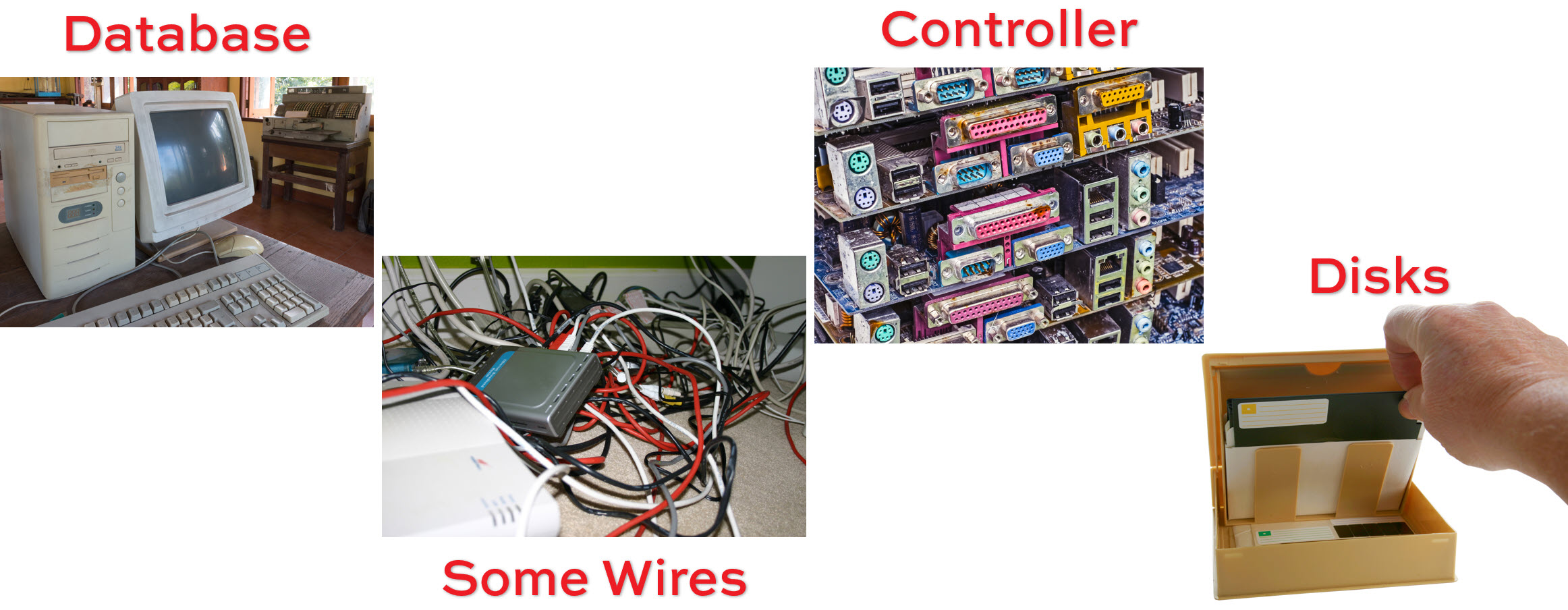
When people buy SANs, it’s often quite a large investment. Whether it’s all SSD, all flash, or there are tiers of storage that different types of data live on, those disks aren’t cheap. When people visualize their SAN, it’s usually just the server and the pool of drives.

But there’s some important stuff in between the Server and the SAN — SAN doesn’t stand for Storage Abstraction Nerglefwomp.

It’s Storage Area Network, and the “Network” part is what causes a lot of problems.

What’s going on in there?

Those wires, especially when they’re attached to a VM Host, have to manage traffic for a lot of different things at once.

It’s really easy to overwhelm even Fibre Channel wiring, when it’s either single-pathed, or when enough concurrent activity hits a multi-pathed setup.

https://en.wikipedia.org/wiki/Fibre_Channel

Round The Way SAN

Talk to most people setting up a new SAN, and they’re (hopefully) going to be using 8-10GFC (or Ethernet).

But if you’re moving hundreds of gigs, or terabytes across those wires, you better be darn sure you’ve got plenty of bandwidth. Let’s take a best case scenario, where you’re moving 1 GB across 10 GFC unhindered. It’ll take 800 milliseconds.

But there are 1000 GB in 1 TB, which’ll take around 13 MINUTES.

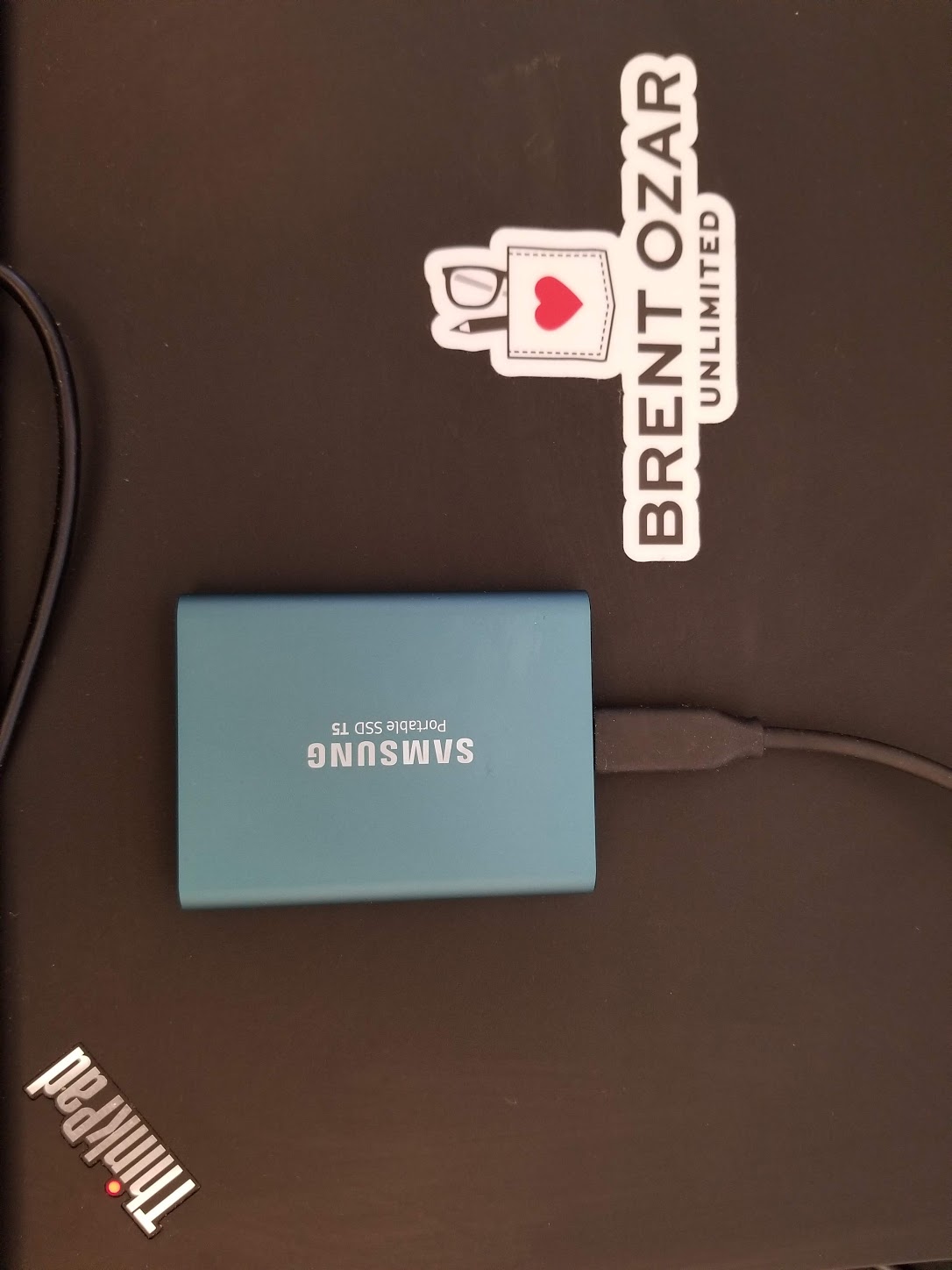
Let’s use my new hard drive as an example. I’ve got a VM with SQL Server running on there.

I am the manager.

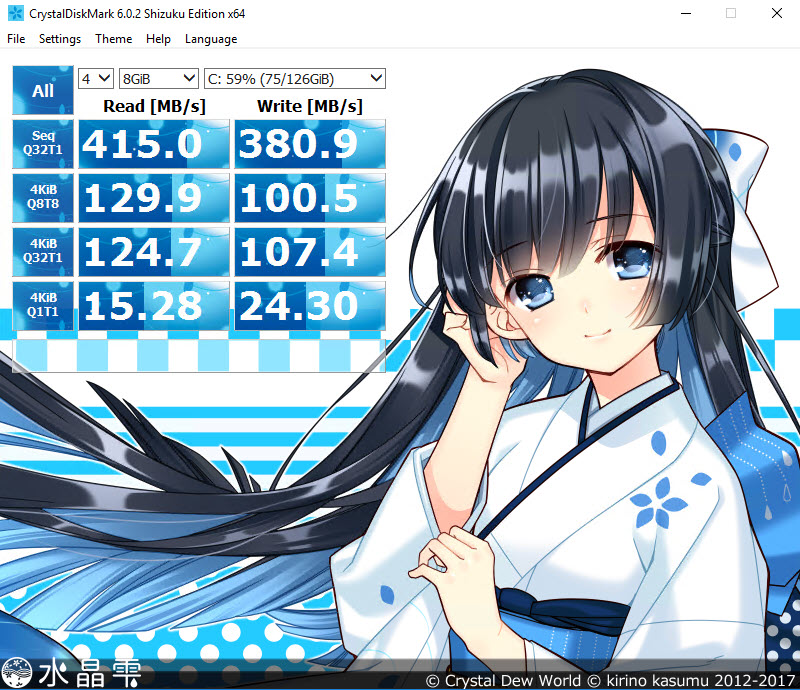
When I use Crystal Disk Mark to benchmark my storage, the results are pretty okay for an external SSD.

stop judging me

I’m doing around the 4GFC mark for sequential reads and writes.

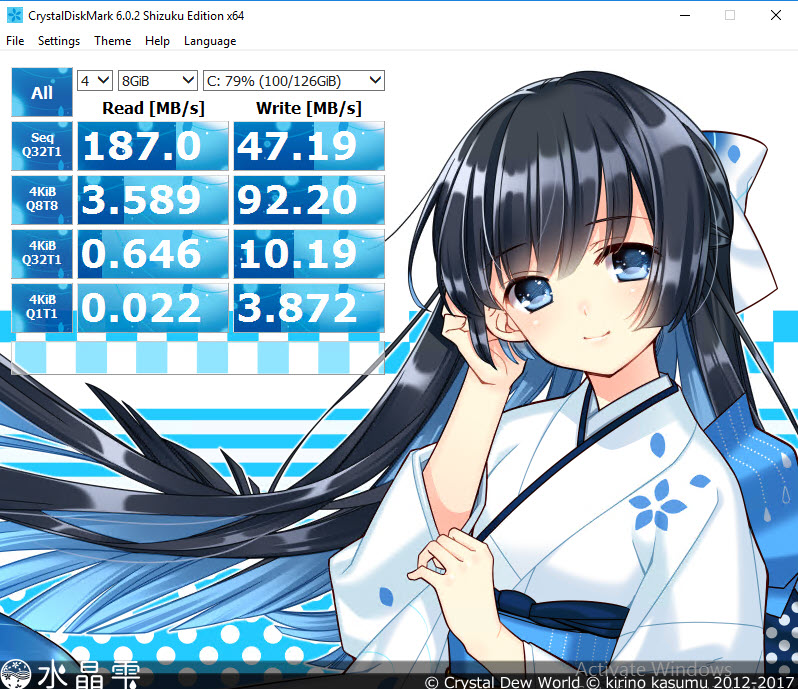
But if I run a workload that generates a lot of I/O for various reasons, and re-run the benchmark, things tank significantly.

bullies

Sharing Ain’t Caring

When multiple requests all had to go across my USB 3 connection, my speeds got cut in half, or much worse.

Now take some time to think about how many things you’re asking your storage networking to handle concurrently.

  • Think about when you have stuff like backups, checkdb, and index maintenance scheduled.
  • Think about when you’re doing ETL, or any bulk data activity.
  • Think about if you’ve got AGs or Mirroring set up.

When you ask the SAN admin to take a look at the storage dashboard to see why things are slow, they’re not gonna see a blip. Data simply isn’t arriving at the disks fast enough for them to be burdened.

If you had a bar with 100 people in it, 1 waiter, and 10 bartenders, that one waiter wouldn’t be able to take orders to the bartenders fast enough to keep them busy. Your bartenders would look bored, but your waiter would be a wreck.

What’s The Name Of His Other Leg?

If you like learning about this kind of stuff, and you’re going to the lovely and talented SQLBits in 2019, come to my precon.

I might even be bar tending.

Thanks for reading!


Database Design Choices To Consider When You’re Worried About Scale

Architecture
6 Comments

Tipping the Kilter

I’m intentionally avoiding physical/hardware choices in this post, like how much hardware to buy, and scaling out vs. scaling up.

It’s not that I don’t care about those things — I do, and they’re important — but most new apps these days are starting in the cloud, or an on-premise VM. In the cloud, you’re not making terribly specific hardware choices, and the hardware choices you make for VM hosts are different than what you’d make for a bare metal server.

CPU choice is on the top of that list, for a lot of reasons. A CPU’s clockspeed is a serial query’s speed limit, which made the typical wisdom for a bare metal server to buy a lower number of cores to get a higher clockspeed. This saves you licensing bucks, and lets your server function reasonably well.

That line doesn’t work on a VM host, where you need to have a bunch of different things co-habitating, and co-scheduling. You’re gonna sacrifice core speed for girth.

Up in the cloud, most published CPU speeds are in the 2.4-2.6 GHz range. That’s because the cloud’s really all VMs where providers had to sacrifice core speed for girth.

See? This is why I’m not talking about hardware. Any advice I give you is gonna be outdated in a quarter, and I have to keep saying “girth”.

Stick To The Ribs

With that out of the way, let’s talk about some more logical (ha ha ha) choices you can make that might save your tail later on.

Be More Optimistic

I can’t begin to tell you how many terrible things you can avoid by starting your apps out using an optimistic isolation level. Read queries and write queries can magically exist together, at the expense of some tempdb.

Yes, that means you can’t leave transactions open for a very long time, but hey, you shouldn’t do that anyway.

Yes, that means you’ll suffer a bit more if you perform large modifications, but you should be batching them anyway.

Just think of all the folly you’ll save yourself, falling into the NOLOCK trap, and the countless nights you’ll spend wondering if READ UNCOMMITTED is different.

(It’s not.)

Partition It Just A Little Bit

No, not because of some magical performance unicorn that you’ll never saddle, but because eventually someone will say: “Hey, we should archive some data”

And you can say: “No problem”

Because moving partitioned data out in chunks is a lot easier than coming up with your own strategy to move, verify, and delete data.

Partitioning isn’t a fit for every table. Things like lists of customers or users don’t often have a good partitioning key that you’d use to swap data around by. I really mean it when I say that partitioning should be considered a data management feature. If you’re going to implement it, make sure you can benefit from it.

Bite The Four Bytes Bullet

“Hey, you’re close to running out of INTs for this identity column.”

“Yeah, we don’t wanna use BIGINTs though, they’re four bytes bigger than INTs.”

“I also noticed all these first and last name columns are NVARCHAR(MAX)…”

Stop with the four byte drama. If your concern is for a database that’s going to grow into the terabytes anyway, you’re going to run out of INTs faster than you think.

I don’t mean you should throw out domain knowledge about the range of values you’re allowing in a column, but if you’re defining identity columns or sequences that don’t have any particular relational value or business meaning, just go big. It’s not worth the pain of changing later, or having to monitor and reseed.

Compress To Impress

Disk is cheap, but it’s not infinite. Unless you’ve got an Infinite Storage Repository®, of course. While not as good as columnstore, I think row and page compression are still legit choices to smush more data onto your disks.

Speaking of which…

Files and Filegroups

There’s a hard limit of 16TB for a single file in SQL Server. I’ve had to add files on a few occasions, because primary was filling up. Again, if you’re concerned about the future size of your data, this is important to consider: don’t put stuff in primary, and have a well-defined strategy for what-goes-where.

This isn’t a performance thing, really, it just gives you some freedom with how you backup and restore data, how you run DBCC CHECKDB, and being able to switch any archive data to read only. You can also do some neat tricks with moving data with no downtime.

At larger database sizes, you’re likely going to flip from taking native backups to taking SAN snapshots. I’ve heard from people on both sides of the fence, here. Some people swear they can make native backup and restore scale to be as fast as snapshots, and that snapshots have caused issues with corruption, or have silently failed in odd ways.

I haven’t personally run into either of those, but it goes to show: no matter what your backup strategy is, make sure it fits your RPO and RTO goals, and make sure it works.

Left Out

On top of hardware choice, I also left out SQL Server version and edition choices. I did that for a couple reasons.

  1. If you’re serious about scale, Enterprise is kind of a given
  2. Everything I mentioned here is also available in Standard Edition, starting with 2016 SP1

If you’re starting work on an application today, it doesn’t make sense to use a version of SQL Server prior to that, full stop.

I also didn’t go into different architecture choices, like database per customer, schema per customer, etc. Finding the right fit there can be tough, and if you’re on PaaS like Azure or RDS, you have to abide by their individual limitations (30 database limit in RDS, no cross-database stuff in Azure SQL DB, etc.).

Thanks for reading!


Why Do Some Indexes Create Faster Than Others?

Execution Plans, Indexing
6 Comments

To warn you ahead of time, this post is an exploration without an answer (yet). There’s some interesting stuff in here, but no conclusions. If that’s not your kind of post, feel free to skip it. If it is, well, here goes nothin’…

Wild, Wild Life

Creating indexes is kind of a funny thing. By the time you find the query that needs one, figure out which index will help, go through change management, and check it into source control and roll it out in production whenevs, you’re almost not even worried anymore. You’ve already been through h*ck, why would SQL Server make you suffer more?

Now, to be fair, all sorts of things can contribute to indexes creating slowly. A busy server, blocking, crappy I/O, not enough memory, creating really wide indexes, etc.

All totally legit reasons for it, too. It’s a database, not a genie here to grant your wishes because you’ve got a magic rub.

Ruling Reasonable Things Out

On my desktop, I don’t have any of those problems. I’m the only user, I’m not blocking myself, I have a 1TB NVMe card, and I’m creating, in these examples, single column indexes on integer columns.

To further rule out any hanky panky, I’m gonna create the indexes offline. Creating indexes online is a bit more complicated, though doing this exhibits the same pattern.

Here are the indexes I’m going to create.

Why MAXDOP 6? Because I have 6 physical cores in my desktop. There are those among us who loathe hyperthreading, and would surely cast their cursed stones upon my Great Post.

The Comments table has 68,343,743 rows in it. Not a lot, but not a little, either. It’s a moderately sized table, depending on who you talk to.

Heat Rash

Starting with no indexes on the table, I’m going to create these in order. This isn’t a case of indexes helping indexes. They all do the same number of reads, but…

What in the heck did that index on Score do? Why does it take a full minute to get created? And… Why did it need a worktable?!

Size Isn’t Everything

Plans, Man

The first clue is in the query plans.

*blinks internally*

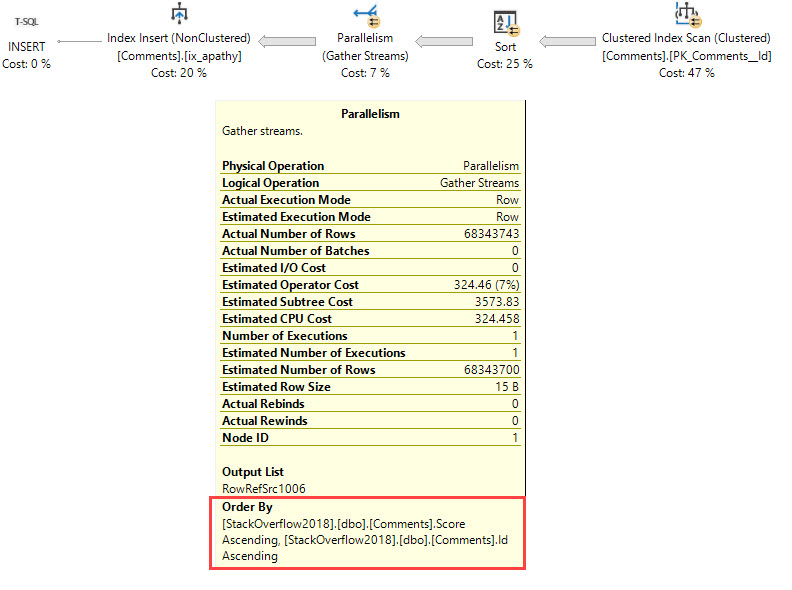
You may notice something slightly different about these plans. The top and bottom indexes, the ones that are created quickly, are fully parallel. The slow index on Score starts out parallel, but ends up serial for the insert into the index. That’s also the one that needed the worktable.

This is upsetting. That Gather Streams and serial insert cause the index creation to take a much longer time. Why could that be?

Could It Be NULLs?

At first glance, I thought I had something, but this isn’t the answer. UserId and Score are both NULLable, but only Score results in an early-serial plan.

*blinking intensifies*

Imagine if I could give you a really good reason like this to use default values.

But this ain’t it. Throw that dream away.

Density Vector?

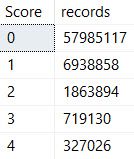
My next guess was that it was based on the number of distinct values in a column. I don’t think that’s quite true either. Columns with totally different distributions would get the serial insert plan.

For example, the AcceptedAnswerId column on the Posts table:

No sir.And the Score column on the Comment table:

I didn’t like it.

These both get the much slower serial insert treatment, but have very different value distributions. There are other columns with similar value distributions that get parallel inserts. I won’t bore you by showing you all of them. Just know that they’re out there, and that I couldn’t discern a pattern.

Sort Of Different

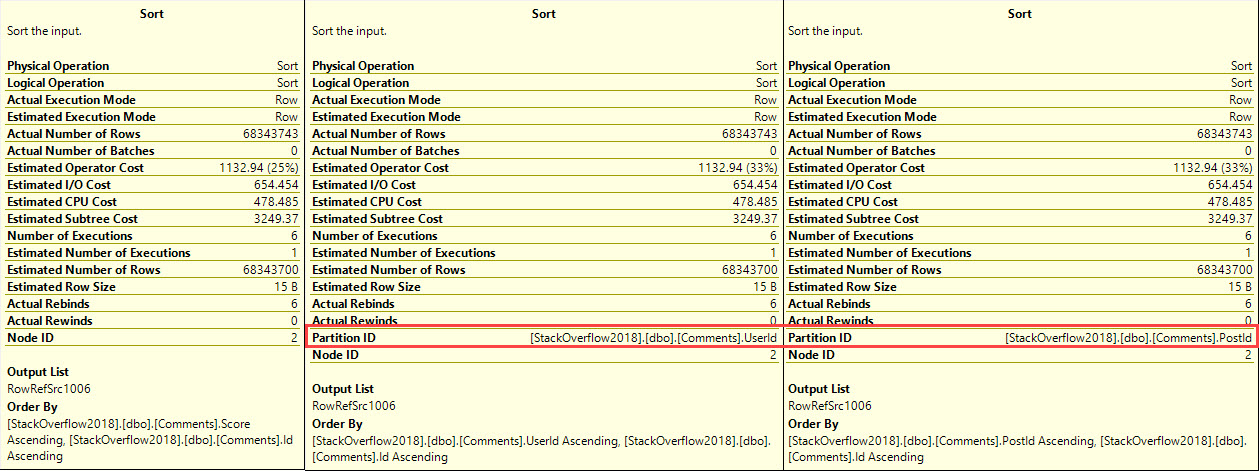
Going back to the query plans for the create index statements on Comments, there’s a strange difference in the Sort operations.

Purdy

The two indexes that create quickly have a Partition ID — this table isn’t partitioned at all.

And there’s also a difference in the wait stats each plan generates.

The fast plans have QUERY_EXECUTION_INDEX_SORT_EVENT_OPEN in the wait types, which is described at the link as:

Occurs in certain cases when offline create index build is run in parallel, and the different worker threads that are sorting synchronize access to the sort files.

Which would explain why the sorts for the parallel inserts have a Partition ID, and why the Gather Streams of the serial insert is order preserving.

Murder By

Last Stop

To verify that the order preserving Gather Streams is where the slowdown hits, I turned on Live Query Plans. Though the plans don’t show up while the index creates are executing, they do preserve the Actual Time statistics of each operator, over in the properties window (hit F4 while looking at a query plan). And indeed, Gather Streams is a full 40 seconds of the 57 second total time.

LAG()

Unfortunately, there’s not a good, practical way to compare a plan that avoids the worktable, and does a parallel insert into the index. One could try messing with STATS_STREAM, if one were feeling particularly big-brained, but that’s a pretty far leap away from “practical”.

Closedown

I wish I had better answers as to why these different plans get chosen. The bottom line is that I can find lots of places that offer differences, but no place that offers insight. I’ve been in the debugger. I’ve been in PerfView. I’ve been in all sorts of Trace Flags. At some point, I gotta give in and write down what I’ve found. Because I mentioned it earlier, here are the plans for the online versions.

It would be nice to have some control over this stuff when creating and rebuilding indexes.

Rebuilding indexes?

Yep.

Something lousy happens there, too.

lol

The ride never ends.

Thanks for reading!


An Idea For Improving DBCC CHECKDB

Hard Enough

At this point, we’ve all probably got a database that’s a terabyte or more in size. If you’re anything like I was, you’ve got a ton of multi-terabyte databases, and the SAN admin has a special folder for your emails.

When you’ve got a lot of large databases, normal maintenance is out the window, and free disk space can be tough find.

Fond Memories

There are a lot of reasons that CHECKDB can fail that don’t indicate corruption. That doesn’t make the email alert any less scary. Some examples are:

  • 1823: “A database snapshot cannot be created because it failed to start.”
  • 3313: “During redoing of a logged operation in database ‘%.*ls’, an error occurred at log record ID %S_LSN. Typically, the specific failure is previously logged as an error in the operating system error log. Restore the database from a full backup, or repair the database.”
  • 5128: “Write to sparse file ‘%ls’ failed due to lack of disk space.”
  • 7928: “The database snapshot for online checks could not be created. Either the reason is given in a previous error or one of the underlying volumes does not support sparse files or alternate streams. Attempting to get exclusive access to run checks offline.”
  • 8921: “Check terminated. A failure was detected while collecting facts. Possibly tempdb out of space or a system table is inconsistent. Check previous errors.”

These errors all show up together when the drive that your databases reside on doesn’t have enough room for the snapshot that DBCC CHECKDB takes and uses to be created.

Right now, we don’t have any control over that.

That’s what I wanna change: Option to specify a location for the DBCC CHECKDB snapshot

Bonus: Ola would support it!

Doodily doo

Corruption is a tough cookie. Checking for it with large databases ain’t one bit of fun. Breaking the checks down into smaller parts, or offloading are okay options, but add a layer of complexity that not every team wants to manage.

At least until SQL Server cleans its own room.

Thanks for reading!


Fast Food Code

SQL Server
0

Cheap and Easy

We’ve all done it. We all know what and where it is, because we’ve probably left a comment for ourselves to go fix it later.

It wasn’t me, I swear to myself.

Either it was expedient, it seemed to work locally, it was fast on a small amount of data, or we just didn’t have time to do better.

Maybe we only learned it was a bad idea later on. But there it still sits.

Mocking. Needling. Cajoling.

Like the Ab Roller in the back of your closet.

Bag Of Pudding

Our application that was reliably quick and svelte in it’s teen-gigs is a slow and flabby disaster in it’s midlife gig crisis.

If things keep up, it won’t live to see 65 gigs.

It’s hit a wall, you see. And that steady diet of Fast Food Code is starting to take its toll.

Your monitoring tool has stopped showing you charts and graphs, and has started trying to sell you a burial plot.

The signs have been there for years, but you didn’t pay attention.

XXXL

Confidential data Is delicious

It’s not just about performance. Data safety and security is a big deal, too.

Despite, like, decades of incidents, people keep carrying on writing unsafe dynamic SQL.

Data theft and vandalism are things.

Things that happen.

Things that happen to people a lot smarter than you.

It’s That Time Of Year

No, not the Rapture.

And only tangentially the time of year when I walk into the gym and see people doing plyometrics or some other useless waste of time in a squat rack for some reason.

Let’s make a resolution to stop feeding our databases Fast Food Code. When we see the warning signs, let’s stop and do something about them.

  • Unsafe dynamic SQL
  • Functions or calculations in joins and where clauses
  • Cleaning data on the fly
  • Cursors for relational tasks
  • Nested views
  • Scalar UDFs
  • Multi-Statement UDFs
  • Mismatched data type comparisons
  • Table variables (most of the time)

You don’t have to fix them all at once. Sometimes it’s just a matter of stopping new development with these practices first. Then, as you go through your worst performing code, keep an eye out for the stuff on this list.

To get started, download our FirstResponderKit.zip here, and use sp_BlitzCache to find your naughty bits. It’ll flag a lot of the things on that list (the rest aren’t captured in the plan XML). That’ll make your tuning path a lot more clear.

Thanks for reading!


Erik and Tara Are Heading Out

Company News
30 Comments

The rock stars.

About two years ago, I realized I didn’t have the skills to grow the consulting part of the company to become a 10-employee firm, so I laid off Angie, Doug, and Jessica. This year, I made the tough decision to close the consulting side of the business entirely. I’ll be focusing on training and SQL ConstantCare®.

That means Erik Darling and Tara Kizer will be seeking other adventures. I’m going to miss them terribly – they’re just phenomenal people. Yeah, sure, they’re complete SQL Server professionals, but they’re also awesome coworkers, and I can’t recommend them highly enough. They’re amazing.

If you’d like to get in touch with two of the smartest data professionals around, email Erik at edarling80@gmail.com and Tara at tara.kizer@gmail.com.

(Erik is also a blogging MACHINE, and he’s written a lot of good stuff that still needs to see the light of day. That means for the rest of the day, we’ll publish a new post from him every hour until his queue is emptied out. Let the publishing commence!)


How Azure SQL DB Hyperscale Works

Microsoft is starting to talk about the internals for Azure SQL DB Hyperscale, their competitor to Amazon Aurora. Aurora took the open source MySQL and PostgreSQL front ends and hooked them up to much more powerful cloud-first storage engines on the back end. Here’s a quick primer on how Microsoft is doing something similar – taking the front end of SQL Server (the query optimizer and query processor), and hooking them up to a new back end.

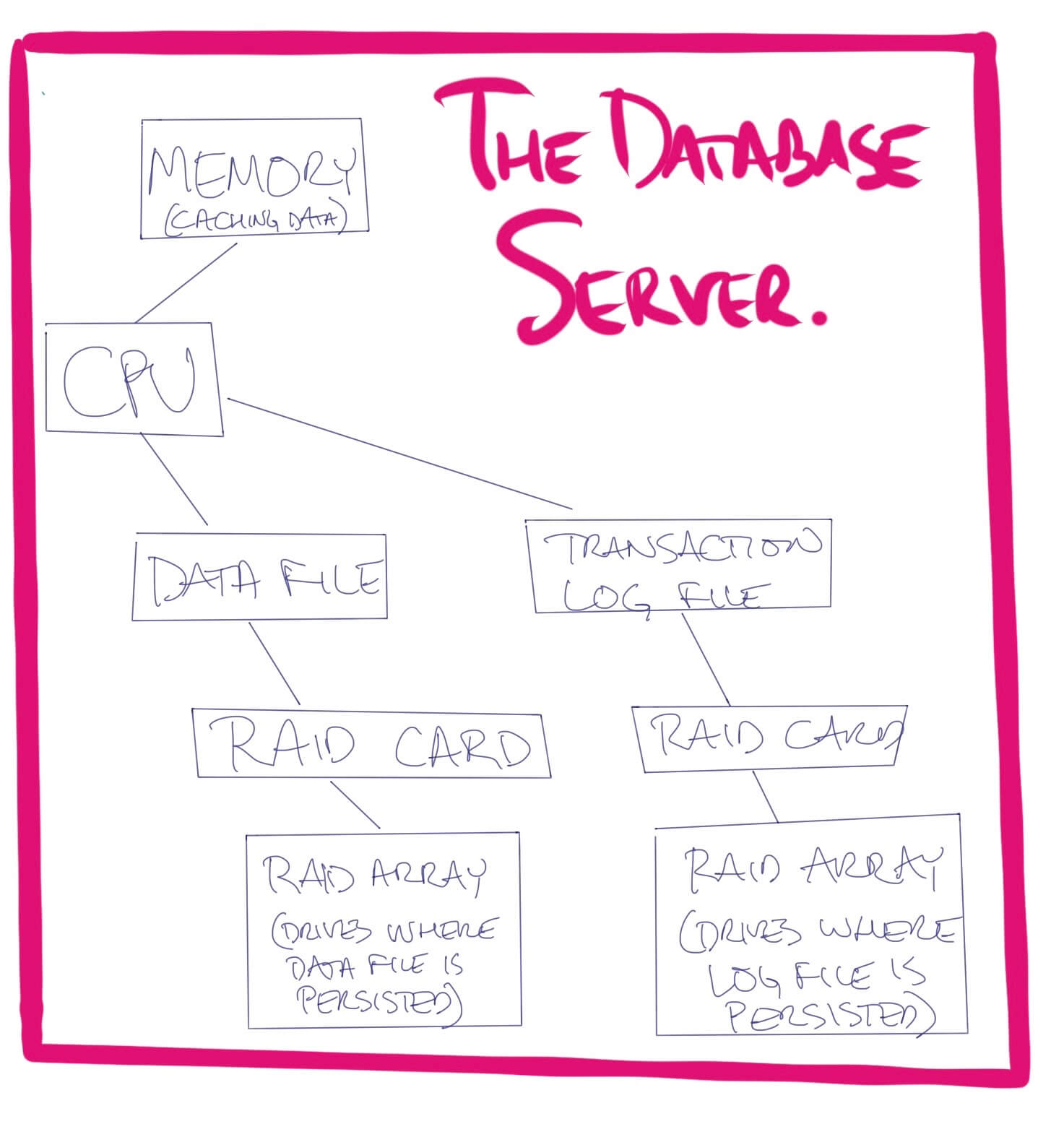
When your database server runs on physical hardware, it looks like this:

Traditional database server hardware

  • CPU: an Intel or AMD processor where the database engine’s code runs
  • Memory: caching layer
  • Data file: a file on local storage where your data lives, the main source of truth for your database
  • Log file: a file on local storage where the database server writes what it’s about to do to the data file. Useful if your database server crashes unexpectedly, leaving the data file in a questionable state.
  • RAID card: a processor that stores data on a Redundant Array of Independent Drives.

(I’m making some assumptions here, like enterprise-grade hardware with redundancy, because that’s the kind of gear I usually see backing SQL Server. You, dear reader, might be a rebel running it on an old Raspberry Pi. Whatever.)

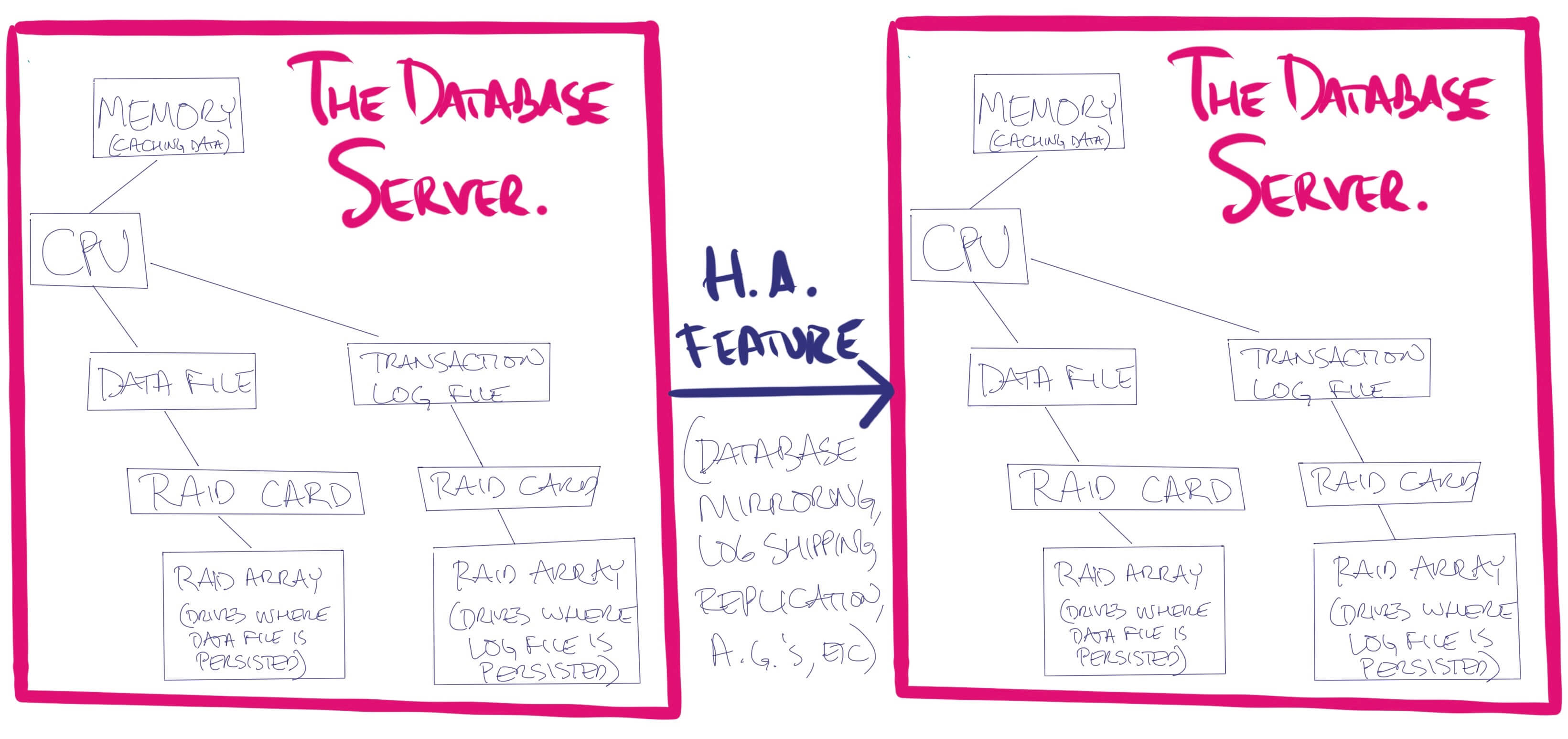
Traditional database server high availability

Usually when DBAs sketch out a failover architecture, the drawing involves duplicating this diagram across several independent servers. Data is kept in sync by the database server (SQL Server, Postgres, MySQL, Oracle, etc) by having the database server replicate logged commands over to other replicas:

Traditional high availability architecture

That works.

A way less popular method (but still technically possible) involves separating out the database server from its file storage. You can put your databases on a file server, accessible via a UNC path.

Database server using a file share for storage

That way, if the database server blows chunks, you could spin up another database server, attach the data & log files, and keep right on truckin’. This is a fairly unusual approach these days, though, due to challenges with networking, slow time to spin up another database server, etc.

But what if you were going to redo this for the cloud?

Conceptually, separate out the storage.

The RAID card’s responsibilities are:

  • Accept incoming writes, and temporarily store them in a limited amount of very fast cache (think near memory speed, but safe in the event of a crash or power loss)
  • Later, dispatch those writes off to persistent storage (hard drives or solid state)
  • When asked to read data, figure out which drives hold the data
  • Try to cache data in fast storage (like if it notices a pattern of you asking for a lot of data in a row)
  • Monitor the health of the underlying persistent storage, and when a drive fails, put a hot spare drive into action automatically

In our new cloud design, we’re going to build up a beefier storage subsystem. We’re going to replace the RAID card with a bigger design, and in this bigger design, we’re going to give the storage some more job duties than it had before (moving up the stack into the database server’s job duties.) We’re going to:

  • Break this data up into a few network services (which, honestly, are probably going to be a little slower than the absolutely best-configured local flash storage, but faster than poorly configured shared storage)
  • Replicate the database across multiple data centers (without getting the database server involved)
  • Make the storage responsible for applying the transaction log changes to the data file

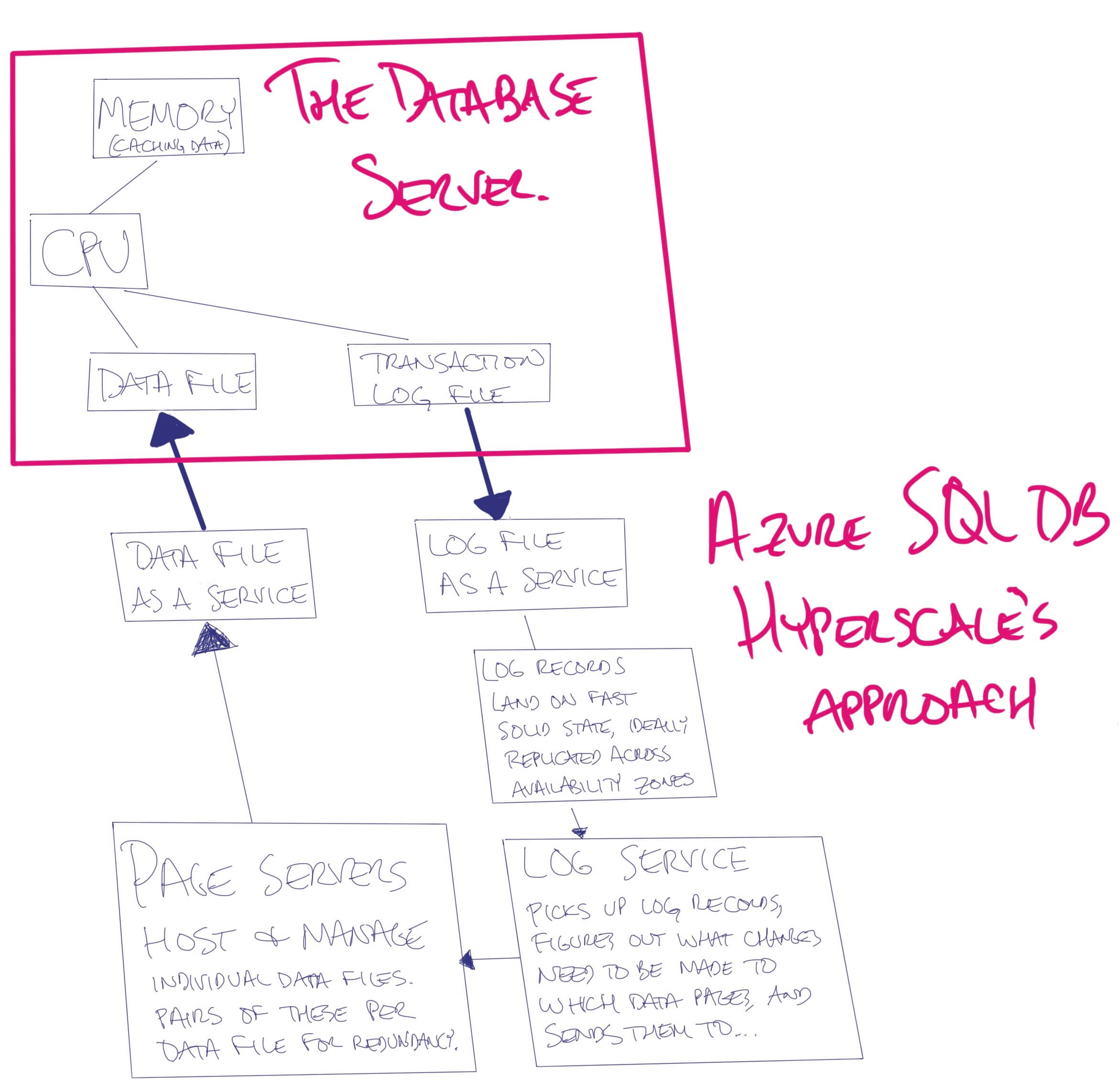
Here’s how the architecture would look:

Rethinking architecture concepts

  • CPU: (an Intel or AMD processor) a virtual machine where the database engine’s code runs
  • Memory: local solid state caching layer
  • Data file: a file on local storage a service where your data lives, the main source of truth for your database
  • Log file: a file on local storage a service where the database server writes what it’s about to do to the data file. Useful if your database server crashes unexpectedly, leaving the data file in a questionable state.
  • RAID card: a processor service that stores data on a Redundant Array of Independent Drives.

When you do an insert, conceptually:

  • The database engine’s query processor tells the log service, “I want to add a row on data file #1, page #300.”
  • The insert is considered done as soon as that command is written to the log service.
  • The log service reads the list of work to be done, opens up data file #1, page #300, and adds the relevant row.

This comes with some interesting advantages:

  • The primary replica needs less storage throughput since it’s not writing changes to the data file.
  • The log service can make the necessary data file changes in multiple copies of the data file, even in multiple data centers or even continents.
  • You can add more databases and more replicas of each database with zero additional overhead on the query processor. If you’ve ever dealt with worker thread exhaustion on Availability Groups, or sync commit latency due to an overloaded replica, you’ll know how cool this is.
  • We can scale data file storage linearly with servers using cheap local solid state storage.

Here’s how Azure SQL DB Hyperscale does it.

Azure SQL DB Hyperscale

In a conventional SQL Server, for large databases, you might create multiple data files, and put each data file on a separate volume.

In Hyperscale, Microsoft does this for you automatically, but in a spiffy way: when you see a data file, that’s actually a different page server. When the last page server is ~80% full, they’re adding another page server for you, and it appears as a new data file in your database. (Technically, it’s two page servers for redundancy.)

Challenges for both Aurora and Hyperscale (I hesitate to call these drawbacks, because they’re fixable):

  • If we’re running our database today on a physical server with a perfectly tuned IO subsystem, we could get sub-millisecond latency on writes. Let’s be honest, though: most of us don’t have that luxury. For Azure SQL DB Hyperscale, Microsoft’s goal is <2.5 milliseconds for log writes, and as they roll out Azure Ultra SSD, the goal is dropping to <0.5ms.
  • We’ll lose some database engine features that relied on directly working in the data file – for example, right now Hyperscale doesn’t offer Transparent Data Encryption or bulk logged recovery model.
  • Caching is going to be just a little bit trickier. The primary replica may still need to make its own changes to the in-memory cached data pages because people are going to want to insert a row, then immediately turn around and query that same row, without waiting for the log service to make changes to the data pages, plus have the primary fetch the newly updated copies of the data pages from cache.
  • We’ll have a lot more complexity. There are a lot of new moving parts in this diagram, and if we want them to be reliable, we’re likely going to run them in pairs at a minimum. All of these moving parts will need controls, diagnostics, and patching. (This just doesn’t make sense to run on-premises for the next several years unless it’s a sealed appliance like Azure Stack or Amazon Outpost.)
  • We’re going to spend more money in the short term. I bet some of you are reading this diagram and going, “Holy Licensing, Batman, this is going to be a lot more expensive (and somewhat slower) than my 2-node Availability Group running SQL Server Standard Edition on $1,000 Intel PCIe cards.” And you’re right. It’s not a good fit to replace that. There’s a reason Microsoft calls it “Hyperscale.” Stick with me here.

Both AWS Aurora and Microsoft Azure SQL DB Hyperscale take the same approach here, offloading deletes/updates/inserts to a log service, and then letting the log service change the data file directly.

The next level: scaling out the compute

A few paragraphs ago, I said that the log service could add more databases and more replicas of each database with zero additional overhead on the query processor. Well, why not take advantage of that?

In Azure SQL DB Hyperscale, this is done with an Always On Availability Group listener. When application wants to query a readable replica, the app specifies ApplicationIntent=ReadOnly during their connection, and they’re automatically redirected to one of the readable replicas.

Similarly, in AWS Aurora, applications connect to a different DNS name for read-only connections. AWS has an interesting feature: for some kinds of queries, Aurora will parallelize your query across multiple readable replicas. The DBA in me loves that, but at the same time, if your queries are so rough that you need multiple replicas to accomplish ‘em, you’re already sitting on a ticking time bomb: you’re not going to be able to run a lot of those simultaneously, and AWS charges you for each IO you perform. This is throwing money at bad queries – but hey, sometimes that makes sense.

Caching is of course a little trickier here. With traditional SQL Server Availability Groups, the database engine is receiving each log change, so it knows which pages need to be changed, and there’s no danger of it serving stale data from cache. Now, with the data pages being changed by the log service, there’s a risk that the replica could serve stale data. Me personally, I’m not too worried about that because that was always a possibility with Availability Groups, too. (Async replication traffic can get delayed (or even suspended), and the replica can get behind in applying changes.)

This design has a huge advantage: the replicas don’t need to talk to each other, nor do they need to be physically nearby. As far as they’re concerned, they’re just reading from data and log files. They don’t need to know anything about the magical Internet beans that are refreshing the data and log files right underneath them.

Who should consider Hyperscale and Aurora?

If all of these match, talk to your doctor about AWS Aurora or Azure SQL DB Hyperscale:

  • You have an existing app with a MySQL, Postgres, or SQL Server back end
  • The workload of your read-only queries is high enough that it mandates spreading the load across multiple servers (either to make the read-only queries faster, or to free up the primary server to make the writes faster)
  • Your read-only queries can live with data that’s seconds behind
  • You can’t implement caching quickly enough or cost effectively enough
  • Your primary bottleneck isn’t writing to the transaction log (or if it is, your log writes are currently 2ms or longer)
  • You’re willing to gamble on the vendor’s support (because you ain’t doing any fixing on these technologies – either they work, or you’re filing a support ticket, but there’s nothing in between)

I’m a huge fan of this architecture. We picked AWS Aurora when we built SQL ConstantCare a few years back, but only because there wasn’t anything like Azure SQL DB Hyperscale at the time. Today, I’d have a much tougher time making that decision.

For the record, I’m writing this as an interested database geek, not as a sales or marketing pitch. We don’t specialize in Aurora, MySQL, Postgres, or Azure SQL DB Hyperscale – I’m just sharing it because I find the products really interesting. If you want to learn more about this stuff, here’s where to go next:

Oh, and the diagrams – Apple Pencil, iPad Pro, and the Procreate app. Highly recommended. I can’t promise that my art quality will get any better, but I’ll do more of these to illustrate concepts. It’s fun!


38 Blog Posts We Couldn’t Write in 2018

SQL Server
0

Behind the scenes here at Brent Ozar Unlimited, we’ve got a place where we jot down blog post ideas. Anybody from the company can add ideas, and anybody can pluck those ideas back out and flesh them out into blog posts.

We’ve got a whopping 203 ideas sitting around.

So I cleaned house and deleted a bunch (some of which had been around since 2013!) Here are some of my favorites, and who knows, maybe one of you will go build one of these into a full blown post. Enjoy.

  1. DROP INDEX can drop multiple indexes in one statement. Who knew? Bear Golightly, that’s who – during our Mastering Index Tuning class, he turned in his homework with a comma-delimited list of indexes, and I nearly fell out of my chair. While reading the syntax in Books Online, I also discovered that you can pass in a MAXDOP hint when you need to drop a clustered index. Amazing.
  2. 4 T-SQL signs of dangerous technical debt. Using ISNULL/LTRIM/RTRIM because you can’t trust the data in the table, using UPPER/LOWER to work around case mismatches between data and input parameters, pulling specific positions out of strings on a regular basis, and building HTML in T-SQL.
  3. Query Bucks Reward Program. Put your users into Resource Governor workload pools, but don’t cap their usage. Then, send them an email “rewarding” them for all the terrible queries they’ve run.
  4. How to visualize index contents. Wanna see what an index looks like? SELECT (key fields, includes) FROM table ORDER BY (key fields).
  5. Things I Wish Developers Knew About Writing Their Own ORMS. Every now and then, I see somebody reinventing the wheel, and I wish they’d stop and learn a few lessons from Entity Framework, NHibernate, and Dapper first.
  6. Script to check for database birthdays – look at sys.databases to see when each of your databases has an upcoming birthday based on its creation date.
  7. SQL Server 2008 Memorial Guestbook – Eulogize it, talk about the good memories, how it was even better than its parents, and that it’s passed on now. Talk about its surviving relatives, SQL Server 2012 and its children. Encourage folks to leave their memories in the comments. Maybe include a photo gallery of its career.
  8. How the Coast Guard handles risk – before dispatching boats or helicopters to rescue someone at sea, the Coast Guard uses a Green-Amber-Red (GAR) risk assessment method. They look at supervision, planning, team selection, team fitness, environment, and event/evolution complexity to calculate a total risk score. Then it’s up to the base leadership to decide if the mission should go forward as-is, or change one of the variables. This PDF gives you an idea of how it works.
  9. The Biggest SQL Server Annoyances (and How to Fix Them) – maintenance plans should be switched to Ola Hallengren’s scripts, for example.
  10. A Tale of Two Databases – do a riff on A Tale of Two Cities.
  11. Why Higher Maxdop Isn’t Always Faster – take a single query and run it with higher maxdop threads, showing how performance growth isn’t linear (and how it impacts concurrency when multiple queries run simultaneously.)
  12. Things You Can Do with SQL Server (But Probably Shouldn’t) – queueing, using it as a file server, scaling out with distributed views, using it as a caching engine.
  13. The Developer’s Guide to the Plan Cache – what it is, what gets stored, when things age out, why it’s difficult to find specific queries or specific tables.
  14. Bare minimum requirements for setup – like Naked and Afraid. This won’t keep your instance from going offline, but will keep it alive in the jungle for a few days.
  15. “But nothing changed!” – things that will cause performance to slow down without code changes. (Bad plans, slipping plans, bad stats, concurrency changes.)
  16. The Best Command You’ve Never Heard Of – how BACKUP WITH NORECOVERY works, and when to use it.
  17. Are all hints bad? – which query hints are okay to use, and which ones are probably bad ideas that will come back to haunt you later as your data grows and your database changes.
  18. Why Table Modifications Stink – demo changing a clustering key and measuring when it’s faster to start a new table instead and push the data over.
  19. Maslow’s Hierarchy of Needs for Data Features – starting with OLTP design, performance, materialized reports, ad hoc reports, and rich analytics & data science.
  20. Memory Metrics 101 – page life expectancy, cache hit ratios, and stolen pages.
  21. Does updating statistics invalidate or erase the plan cache? – for example, when an object doesn’t meet the thresholds for getting a stats update, is anything affected?
  22. Development environment architectures – how many dev environments should you have, and what should they be configured like? Should they match prod? Where should you test patches and deployment scripts?
  23. OPTION (RECOMPILE) and Recompiles/sec – you would think that OPTION (RECOMPILE) queries would drive up the Perfmon counter for recompiles per second, but purposeful recompiles are compiles.
  24. 3 Signs Your Vendor Database was Created on Oracle – optimistic locking, heaps, and query hints.
  25. The performance impact of verifying backups – people just check this checkbox when setting up their backups because it sounds good, but it performs terribly.
  26. Worst Sysadmin Troubleshooting Steps – reboot, set up a job to automate the reboot, defragment the drive, run it under SA….
  27. T-SQL Habits of Experienced Professionals – ending statements with a semicolon, properly specifying N on NVARCHAR strings, error handling, logging, debugging options for dynamic SQL.
  28. Connection String Cheat Sheet – setting the application name, AG parameters for read-only, mirroring secondary, etc.
  29. Your Files are More Secure Than Your Database – trolling title, but it’s amazing how often people lock down file servers but leave the database wide open where everyone’s a sysadmin.
  30. The perils of using Database Mail – especially as a production customer-facing notification system.
  31. The PRIMARY file group is special – things that go into PRIMARY that you can’t control.
  32. Filtered index overhead – whenever we explain filtered indexes, everybody asks the same first question: is there a performance impact during inserts for evaluating the WHERE clause?
  33. Forced parameterization overhead – I have this sneaky feeling that if I built really big strings and executed them with SQLQueryStress, I could conceivably make performance worse. Just a thought exercise though.
  34. What should I do about memory dumps? – a lot of folks seem to think they should be analyzing these by hand, but you don’t have enough time to get good at that, fast enough. Call Microsoft right away.
  35. How do I choose a backup tool? A decision tree based on database size, database quantity, server quantity, and staff workloads.
  36. How can I see temp statistics on my AG replicas? If you’re worried about why queries are getting different query plans on different replicas, this would help.
  37. Database greeting cards – I’m sorry for your loss. Congratulations on the new instance.
  38. April Fool’s: fake KB articles – build a page template that looks like support.microsoft.com and pen unbelievable stuff.

Whew. I’m exhausted just reading that list!

Erik Says: Can you believe there was a blog post I wouldn’t write?


Thoughts About the 2019 Salary Survey’s New Questions

Salary
3 Comments

Our annual Data Professional Salary Survey is open now and closes this Sunday. We’re asking a few new questions this year (based on your feedback), and here’s what we’re seeing so far.

At how many companies have you held this job?

This one came about because folks were curious if job hopping paid off:

If you’re doing correlation at home, the next question you’d probably ask is, “How does experience play into this?” Go download the raw data (click File, Download) to find out. I’ll leave it to the data scientists to say for sure, but at first glance, it looks like it might pay to job hop every 3 years.

How many employees does your company have overall?

Do people who work for smaller or larger companies make more money?

I don’t think I’d read too much into the 1-5 employees category – just a low number of responses there. However, it’s interesting to see the salaries drop the larger the company becomes. (This is a question that might be interesting to correlate with other questions, like how much experience someone has.)

How many hours per week do you work, on average?

This is one where the analysts will need to bucket the results:

I’m not surprised that there’s a diminishing return as you get past 60 hours though – at that point, let’s be honest, you’re not doing your best work.

What is the population of the largest city within 20 miles of where you work?

Forgive the sloppy visualizations (not to mention using the averages rather than medians) – racing to crank this out in my spare time:

And yep, looks like it pays more to live in bigger cities. We’ll probably remove that question for next year (along with any others y’all decide aren’t really teaching you stuff) since the less questions we ask, the more likely folks are to fill out the survey.

Want to help? Fill out the survey now.

Your data helps everyone understand whether they’re being paid fairly or not, and the more results we get, the more confident you can be with your analysis. The survey closes Sunday.


20 Questions to Ask About Your Availability Group Design

Always On Availability Groups
0

Questions about the overall project:

  1. What are your RPO and RTO goals?
  2. Are there financial penalties if we miss the goals? (Like contracts, refunds to customers, etc)
  3. Does this app have regularly scheduled maintenance windows, or is it 24/7?
  4. What’s the ballpark size of the data today? In 3 years?

Questions about the team:

  1. How many DBAs do we have? How many sysadmins?
  2. Have they managed Windows clusters before? Multi-subnet clusters?
  3. Do they have PowerShell experience?
  4. How do we handle Windows and SQL patches?
  5. What’s the current on call rotation? Are the skills spread evenly through the rotation, or do SQL cluster calls always require one person to wake up?

Questions about the apps:

  1. Do the apps require cross database transactions?
  2. Do all databases have to be at the same exact point in time when failing over to an async (DR) replica, or is it okay if some databases have more data loss than others?
  3. What apps are going to be querying the secondary?
  4. How much hardware horsepower do we use on the existing SQL Servers?
  5. Are users currently happy with performance?
  6. If the secondary’s data is delayed (minutes, hours), is there a financial risk? (If replication breaks, how urgent is it that we fix it?)

Questions about the hardware and licensing:

  1. What licensing do we have already? SA?
  2. What SQL Server version are we aiming for?
  3. Are we deploying on new hardware/VMs, or trying to reuse existing ones?
  4. Why not the cloud?
  5. Why AGs, and why not log shipping, failover clusters, database mirroring, etc.?

When Does SARGability Matter Most?

!erehT iH

I know what you’re thinking. Another post about how you should just never do this one thing and all your queries will magically end up faster.

Just watch the video.


For more reading, check out these posts:


Updated First Responder Kit for January 2019: Extraneous Syllables

Does anyone know what the date really is?

I usually don’t, and I often consider how doomed humanity would be if I were the smartest person on the planet during any given era.

Anyway, you should go hug someone smarter than you.

Unless they have sensory or boundary issues. Or a restraining order against you.

Thank them in a legally responsible way. Check with your lawyer on this.

You can download the updated FirstResponderKit.zip here.

sp_Blitz Improvements

  • #1874: brent Fixed Some Capitalization Issues.

sp_BlitzCache Improvements

  • #1864: If you’re on 2016+, we’ll populate function names the way we do stored procedure names.
  • #1873: Every once in a while I’d get a weird error about a database not being accessible. I tracked it down to the database property returning a wonky result that didn’t match an equality.

sp_BlitzIndex Improvements

  • #1881: With special thanks to @jobbish-sql for figuring the query out, and @jadarnel27 for putting together an easy Q&A for the documentation page.
  • #1884: Fix for false positives in the heaps with nonclustered primary keys check. If you had a column that, by chance, had the word “rid” in it, it would get flagged. Thanks to @imyourdba for reporting this oddball!
  • #1888: Added server uptime information to the header row of final results. Just a minor tweak, since several checks reference it.

sp_BlitzFirst Improvements

  • #1891: & #1889 both relate to Managed Instances. One with database sizes returning NULLs, and one weird XE wait to screen out.

Big thanks to Some Guy Named Forrest® for having a Managed Instance, and playing doctor with us.

sp_BlitzQueryStore Improvements

  • #1873: Same as BlitzCache
  • #1892@tboggiano suggested a couple enhancements: to return resources by max, and list out all the different plans we found for a query.

sp_BlitzLock

  • #1890: Added some collation modifiers to the final results.
  • #1867: Added code to resolve Agent job and step names involved in deadlocks
  • #1866@jobbish-sql and I spent a fun Saturday afternoon perf tuning this old dog, with some nice final results. It went from running for about 5 minutes to running for around 11 seconds.

sp_ineachdb Improvements

  • #1882@pwsqldba hooked us up with some code to tidy up @Help output

sp_foreachdb Improvements
Nothing this time around

sp_BlitzWho Improvements
Nothing this time around

sp_DatabaseRestore Improvements
Nothing this time around

PowerBI
Nothing this time around

sp_BlitzInMemoryOLTP Improvements
Nothing this time around

sp_BlitzBackups Improvements
Nothing this time around

sp_AllNightLog and sp_AllNightLog_Setup Improvements
Nothing this time around

For Support

When you have questions about how the tools work, talk with the community in the #FirstResponderKit Slack channel. If you need a free invite, hit SQLslack.com. Be patient – it’s staffed with volunteers who have day jobs, heh.

When you find a bug or want something changed, read the contributing.md file.

When you have a question about what the scripts found, first make sure you read the “More Details” URL for any warning you find. We put a lot of work into documentation, and we wouldn’t want someone to yell at you to go read the fine manual. After that, when you’ve still got questions about how something works in SQL Server, post a question at DBA.StackExchange.com and the community (that includes us!) will help. Include exact errors and any applicable screenshots, your SQL Server version number (including the build #), and the version of the tool you’re working with.

You can download the updated FirstResponderKit.zip here.


The 2018 Blog Posts You Commented On the Most

Company News
0

Of the blog posts we published in 2018, here are the ones that got you talking the most. These comment counts are as of December 17th (writing this post a little ahead of time.)

10. SQL Server Patches for Meltdown and Spectre Attacks, Brent Ozar – 26 comments.

9. Index Tuning Week: How Many Indexes are Too Many?, Brent Ozar – 26 comments.

8. Stupid T-SQL Tricks, Brent Ozar – 31 horrified comments.

7. Troubleshooting Parameter Sniffing Issues the Right Way, Part 1, Tara Kizer – 33 comments on this evergreen topic.

6. The Annals of Hilariously Bad Code, Part 1: Critique the Code, Erik Darling – like a public peer code review with 35 comments.

5. What Should We Change About the Data Professional Salary Survey for 2019?, Brent Ozar – 35 comments with some great feedback that we incorporated in this year’s survey.

4. Book Review: Inside SQL Server 6.5, Brent Ozar – 41 comments.

3. Quick Tips for Debugging Large Stored Procedures, Erik Darling – 51 comments.

2. Let’s Give the Optimizer a Name, Erik Darling – 66 comments. Hard to pick a favorite, but I’d probably go with Sheldon.

1. How to Suck at Database Administration, Tara Kizer – with 155 comments, most of which focused on signs that you probably suck as a DBA.


The 2018 Blog Posts You Read the Most

Processes and Practices
0

Here are the 2018 blog posts you visited the most:

10. What’s New in SQL Server 2019 CTP 2.1: Faster Functions – We’re excited about a lot of stuff in 2019, but this is by far and away the winner.

9. How to Check Performance on a New SQL Server – Start with the easy way: testing your maintenance jobs. Your backup, restore, and CHECKDB should all be faster than the existing box.

8. Announcing SQL Server 2019 – Erik caught the name of the new version when Microsoft leaked it in the online documentation.

7. How I Configure SQL Server Management Studio – A screenshot tour of what I do when I go into Tools, Options.

6. Why Multiple Plans for One Query Are Bad – Demoing unparameterized queries, showing why Optimize for Ad Hoc doesn’t fix it, and Forced Parameterization does.

5. The First 3 Things I Look At on a SQL Server – Are backups and CHECKDB being done? How’s the hardware compared to data size? What’s the wait time ratio?

4. 6 DBA Lessons I Wish Someone Would Have Taught Me Earlier – Starting with, the name of the job isn’t necessarily what it does.

3. Leaked: SQL Server 2019 Big Data Clusters Introduction Video – Right before Ignite, Microsoft leaked a video, and it made its way onto HackerNews.

2. How Much Memory is “Normal” for SQL Servers? – Analyzing SQL ConstantCare® data to help folks better understand how their boxes are configured compared to others.

1. Two Important Differences Between SQL Server and PostgreSQL – CTEs are optimization fences, and you can’t just jump into an IF statement.


[Video] Office Hours 2018/12/19 (With Transcriptions)

Videos
0

This week, Erik, Tara, and Richie discuss disaster recovery, Python vs C# for SQL Server, whether you should perform log backups on primary or secondary on AGs, why Postgres is so popular, using mount points for tempdb, attention events, database corruption, MERGE statements, restoring a table from a database, features they look forward to in SQL Server 2019, and how Santa is able to visit all those homes in one night…

Here’s the video on YouTube:

You can register to attend next week’s Office Hours, or subscribe to our podcast to listen on the go.

Enjoy the Podcast?

Don’t miss an episode, subscribe via iTunes, Stitcher or RSS.
Leave us a review in iTunes

Office Hours Webcast – 2018-12-19


Can I reset the SA password?

Erik Darling: Josh asks, “I’ve come across an older database and I need to perform some maintenance tasks on, but the documentation we have mentions the only account is SA in this database.  I did not know the SA password. Is there any way I can reset the SA password or generate another account with sysadmin role? My senior DBA created this database a while back, but he has since retired, leaving me looking for advice on where to even start correcting the issue.

Tara Kizer: How are you even connecting in the first place? You must be using your Windows account and probably have sysadmin, so you’re good to go. But I would definitely add another SQL sysadmin account, just as a backup in case something happens with your Windows account. And then maybe plan for an SA password change. I would see if anybody’s logging in with SA, because maybe the application isn’t changing that password, obviously. Not a good idea if the app is using it.

Erik Darling: You know, what I’d do is go look under the old DBA’s keyboard for the sticky note that he has all his passwords on. That’s what I’d do because we know they’re under there. We know they’re there somewhere.

Richie Rump: So where do you guys stand on the SA account? Do you keep it or do you replace it?

Tara Kizer: One of my jobs that was really into security renamed it, but that doesn’t really change anything because it’s still the same SID, but it was renamed. I’ve never gotten to a point where I’ve just disabled the account, but it’s always something like a 20-character password that we just throw into LastPass or whatever and then nobody is supposed to use it. It’s just our backdoor entry as a just in case.

Erik Darling: Yeah, there’s been some weird cases where applying CUs and Service Packs have failed if SA account either is renamed or disabled. Even if you want to follow really good security practices and then you want to patch your software so it’s more secure, you have to do something unsecure to be more secure. It’s a weird tail chase on that sometimes.


Will adding filegroups help with disaster recovery?

Erik Darling: Alright, let’s go to the next one, which I haven’t read yet, so who knows what surprises will be in here. Brenting this one hard, “We have a database that is approaching 1TB in size. Twice we have had to perform DR to recover something that was deleted and the process to restore the database takes about four hours. The developer in charge of this department is requesting that we split out this database into file groups in hopes that this will help with DR. Is this possible? Do you have better ideas?” My number one idea would be to stop giving people access to this database where they can lose data. That would be the first thing I did because if you have – let’s see, what’s a nice word – jack somethings. Let’s just call them donkeys. If you’ve got some donkeys on your team who go around running queries without where clauses, running faulty updates and stuff like that, then they shouldn’t have access to this data anyway, especially if they’ve caused this many problems this quickly. With this kind of business continuity issue, where it takes four hours to restore a database to get some stuff back, I would ban them permanently from the database.

Tara Kizer:  I was just wondering what they mean by DR. I mean, it stands for disaster recovery, but did they failover to the disaster recovery site, ro do they mean this is a disaster, let’s restore right here…

Erik Darling: Well it sounds like they had to restore the database to somewhere, maybe another server or something, and then recover the data back to the original server, perhaps.

Tara Kizer: So I am a donkey and I have done a delete without a where clause on accident. I was able to do a side by side restore because I had the storage available to do it, and then I was able to move the data over. So making sure you have transaction log backups and taking a final tail log backup, that way you can potentially do this without data loss. However, as data is coming in while you’re doing this process, a side by side process at least, you could be mucking with things. You might have some foreign key issues even though there’s no telling. I was luckily in a table that I did this oopsy on that it didn’t have foreign keys anywhere and there wasn’t much risk on this table.

Richie Rump: I did that once where I didn’t have a where clause in the user table. The table name was users. So yeah, that was not fun. And since then, I’ve been paranoid with deletes, just paranoid. Which is good, I think you should be paranoid when deleting stuff.

Erik Darling: Changing data in general should be…

Tara Kizer: Exactly, and I’m sick of that as a production DBA because, usually, we’re changing data because of application bugs. And developers, oftentimes, will know what the bug is, or maybe they don’t, but if they do, the business hasn’t given them time to fix it. They’re all, let’s move forward with all these feature requests and these other critical things, but not this. So I’m stuck having to manipulate production data, and there’s room for human error. File groups certainly helps out with this situation because you can do restores of a file group at a time, but I don’t know that I would implement file groups because of this.

Erik Darling: Yeah, that seems like a weird step to take, especially given some of the pain that you might find in creating all these files in file groups and moving data over to…

Tara Kizer: Moving data, especially if it’s 1TB in size and you’re moving things around. Wow…

Erik Darling: That’s not a trivial task, even if you’re lucky to have the online rebuilds. You’re looking at a pretty tremendous amount of work. If your developer has a really quick and easy plan for that – oh yeah, just add file groups, it will be fine – go ahead, that’s your weekend then, pal. That’s not my weekend.

Richie Rump: So what would be some reasons to add file group type things?

Tara Kizer: Well, I mean, this is one of them.

Erik Darling: You listed all exactly one of them. I mean, aside from if you have a single file which is approaching the limit, which is what, 16TB. So if you have one file approaching that limit, then it might be a good idea to start adding in some more, but then you’re still looking at moving crap around.

Tara Kizer: Or, you know, if you have some disks that you want to leverage for this table, faster disks or slower disks or read only file group type things. But usually, we start thinking about those before we hit 1TB. Once you gte into the VLDB sizes, oh boy, it’s tough.

Erik Darling: Yeah, I mean, there’s a lot of choices that need to get made early on when you’re worried about a database scaling. You know, stuff like use bigints, get used to developing with an optimistic isolation level, get into compression, just general things that are really good ideas if you’re worried about a database getting really big and scaling up in size really quickly. So file groups are sort of part of that picture. Mostly, I would just whip my developers until they stop losing data.


Should I use Python or C#?

Erik Darling: Here’s a good Richie question. It’s not a good anyone here question, “Does Python have any benefits over c# in Microsoft SQL Server in particular…” come on, let’s just keep it to SQL Server. So, Richie, what do you think for interacting with SQL Server, c# or Python?

Richie Rump: It depends what you want to do with it. So if you want to write functions and then throw it in a DLL and then put that in SQL Server, then c# is the way to go. So that’s where you do the .NET DLLs and all that stuff. If you want to get into more of the data science stuff, the more new stuff that SQL Server is kind of getting its toes into, then Python would be the way to go with that. So it really depends. I think nowadays, more so the data science stuff is getting kind of hot, there’s a lot of people trying to get into it, Python is absolutely the way to go. Actually, I had a little app that I created that took some data and then plotted it on a chart. It was for my daughter’s soccer team. And I told a friend of mine, check this out, I went ahead and did this chart. And he asked me, well did you do that in D3, which is a JavaScript thing, and I said, no I did it in c#. And he’s like, well why would you do that in c#? And I’m like, well because it’s easy and I know how to do it in c# already. So that just goes to show you that people are thinking past c# for some of these other things. And it’s weird for me to think of c# as kind of a legacy thing, but it’s almost getting there because it’s been there for so long. But Python is definitely some of the new hotness and if you want to do more of some of the data science thing, it’s probably the way to go.

Erik Darling: Does c# offer anything for data science people, or is it completely just offloaded to Python and R and MATLAB and whatever else?

Richie Rump: Well, I mean, all that stuff is kind of not really focused on that mathematical stuff. You could kind of do all that stuff in c#, it’s just probably going to take you more lines of code to do that sort of thing. So once you – I have this theory on languages; once you learn one and the basics of how to program a language, jumping to another one isn’t as hard as learning it from scratch without having any programming knowledge.

Erik Darling: Unless it’s JavaScript.

Richie Rump: Well, I’ve worked with JavaScript for a long time, so it’s not hard for me. I mean, I kind of get it. We use it here. ConstantCare is all JavaScript.

Erik Darling: Yeah, I know, I’ve seen it…

Richie Rump: How can you see it? I ought to block your account from any of the source code.

Erik darling: I can’t do anything with it. I’m not even smart enough to break it.

Richie Rump: You know, each language has its own kind of flavor, what it kind of does best. Python is kind of the data type thing; c#, I think, is more of a Windows type environment great general-purpose language where you can do a lot of different things pretty quickly and pretty easily. The really hard part about c# is learning the .NET framework. The .NET framework is vast, it’s long in the tooth. There’s a lot of things going on in there and even the new one that they have, the .NET core, there’s a lot that has changed in three versions going on there.  So I could talk long over this, but this is not a programming podcast.

Erik Darling: Notice that Richie didn’t say PowerShell once. Just throwing it out there…

Richie Rump: It’s not a real language.


Should I do my backups on the primary or the secondary?

Erik Darling: So here’s a good Tara question. So we had a good Richie question, here’s a good Tara question, “In an Always On Availability Group, do you recommend performing your log backups on the primary or secondary and why?”

Tara Kizer: I do my backups on the primary because there’s no latency there on my backups. I don’t want any backups to have even a few seconds of latency in case there needs to be some kind of recovery there. Even on a synchronous commit secondary replica, there can be latency. The secondary can switch to async without even telling you to do some kind of issue. It’s documented in Books Online MSDN. So I don’t offload that task because backups aren’t causing me any problems on the primary.

Erik Darling: I hear that.


Why is Postgres so popular?

Erik Darling: Let’s see here, Graham asks kind of an interesting question, perhaps a bit religious, “Why is Postgres so popular, aside from the fact that it’s free?”

Richie Rump: There you go. That’s the reason. You just answered your own question. Thank you very much. I mean, I guess more of the question is why is MySQL so popular, because MySQL has more stuff that will remove data and all this other crazy stuff and settings you have to make sure are right. So why is MySQL so popular? Postgres is more along the lines of an Oracle or SQL Server with more enterprisey features, but MySQL has a lot of stuff that makes us cringe and stuff that’s kind of why would you want that in a database. And the answer to both is, free.

Erik Darling: Yeah, if I had the power, I would classify MySQL as a super fun site. That would be the first thing I would do, just get it walled off, dig a giant pit, throw it in, get some toxic waste in there. Postgres is far more feature-rich, far more dependable, reliable, as a database. And for the price, you kind of can’t beat what you get in return for it. I also think that it’s fairly nifty that you can go and read through all the source code. So if you run into an issue, you can be like, oh that’s where it is. You can contribute changes to it, and in a way, I feel like that’s a lot more interesting to a certain group of people who don’t just want to impotently raise the user voice item and wait for someone from Microsoft to maybe get around to fixing it.

Richie Rump: [crosstalk]

Erik Darling: Yeah, exactly.

Richie Rump: I mean, going back to MariaDB, or MySQL, MariaDB exists because of MySQL’s failings in a lot of ways, so I don’t know why MySQL came up, but I have just so many problems with MySQL, core problems.

Erik Darling: It was like barely a notch above SQLite, but missing basic stuff that linguistically, as far as the optimizer goes, like certain join types were not supported. It was just like, holy cow, what are you doing?

Richie Rump: Yeah, and not to say Postgres doesn’t have its failings, because there’s a fair amount in there.

Erik Darling: Like vacuuming…

Richie Rump: Or single threading and some of the query processing and stuff like that.


Should I use mount points for TempDB?

Erik Darling: Alright, Josh asks, “For tempdb, we are using mount points instead of drive letters or local storage due to decisions made by others previously. Are there any downsides to doing this or any concerns?”

Tara Kizer: There is a downside and I can’t remember what it was, but we were suing mount points directly off the root drive. And so we’d use F-backups, F-data, F-log, F-tempdb. And we had no issues with it, but Microsoft, when they did an assessment of our servers through whatever you get with the PFE stuff or whatever it is, we were notified that you’re supposed to create a folder first, and then have the mount point underneath that folder. But we never ran into an issue, but there was some sort of possible issue that could be encountered that way. But as far as using mount points in general, totally fine. I mean, I’ve been using SQL Server and Windows a long time, and back in the day, we didn’t get to have mount points and we had a lot of instances on failover clusters and the possibility of running out of letters in the alphabet. So mount points helped out with that.

Erik Darling: I’m glad I’ve never run into that problem.

Tara Kizer: Well, I mean, we were only notified of the problem; we didn’t run into the problem… Oh, the drive letter thing?

Erik Darling: Yeah, like, thankfully that’s a lot easier of a problem to detect than running out of ints or – it’s like, oh, we’re at Q, shoot…

Richie Rump: Is that where some Star Trek character comes up and starts randomly annoying you?

Erik Darling: I hope so, because it’s not a weird night without that.

Tara Kizer: I supported a four-node cluster with 11 instances on it back in the day.

Erik Darling: I don’t like the way that maps out.

Tara Kizer: I know, I think six of them were production and five of them were staging and they wanted to have the staging on the same cluster, but we had gotten up to the letter P, I think it was, in the alphabet… I know, it wasn’t what I wanted to do…

Richie Rump: P for poor decisions.


Erik Darling: Alright, I got some other fun questions around, “What would lots of attention events and a profiler trace during a bulk insert indicate?” I don’t know. Got me on that one.

Tara Kizer: from what I remember, attention events can relate to a timeout from the application.

Erik Darling: Well, I hope it’s not too closely related.


Why isn’t my restore working?

Erik Darling: Alright, Joseph asks, “My database backup does not restore. When I try to restore the header, it shows incomplete. Does this mean the backup is corrupt? What could be the possible reasons for it to be corrupt?”

Tara Kizer: Oh yeah, it‘s corrupt.

Erik Darling: Throw that one out. Time to take a new one, format…

Tara Kizer: Fix your disk, whatever’s going on there. You’ve got some kind of, probably, disk corruption. I would be running CHECKDB if you have any databases running on that same drive.

Erik Darling: Backup to something more reliable, like wet paper, you know, lots of choices there.

Tara Kizer: Also, run restore header only to see what kind of error it has.

Erik Darling: Or restore file list only. Maybe there’s multiple files in there and you’re getting it the wrong one or something like that.


My MERGE statement takes 28 minutes…

Erik Darling: Steve says he, “Started a new job and there are a bunch of merge statements that take 28 minutes. What would you do?”

Tara Kizer: I’d stop using merge, I mean, period, end of story.

Erik Darling: Yeah, Aaron Bertrand has many good articles about merge and the problems with it, but I have to say that some of my favorite articles are written by a guy named Michael Swart. Let me see if I can get to the internet. I started typing in Michael, instead of Internet Explorer where I was going to type Michael. I’m on my VM where I don’t have Chrome installed.

Richie Rump: What?

Erik Darling: What am I supposed to do?

Richie Rump: That is weird, man.

Erik Darling: Why is that weird?

Richie Rump: Even Microsoft said, no, we’re going to go to Chrome.

Erik Darling: I read about that. There we go, so Michael J Swart has a great post about UPSERT patterns and antipatterns, and this is because he’s written a bunch of other posts about how kind of god-awful crappy merge can be and ways he’s gone around that where, you know, merge is an antipattern. And when you finally get through all of the antipatterns that he’s discovered over the years, there are some better ones where you go to the patterns and does some begin and try and some other things. So I would really just run screening for merge in general. I personally much prefer to do either insert or update, you know, figure out of the date is there. If it’s there, update, if it’s not there, insert. Merge is just syntactical sugar for a bunch of garbage that Microsoft stopped working on years ago because there were just so many issues with it that I think they just kind of gave up too. Merge, what garbage.


How can I restore just one table?

Erik Darling: Brandon asks, “What is your process if you have to restore one table from a database? Do you restore the whole database and pull out what you need, or is there secret tips?” There are third-party tools like Quest LiteSpeed that can do object level restores. SQL Server used to have it but it got yoinked. I think it’s probably one of the most requested features, to be able to do object level restore. But right now, you need to use third-party tools in order to do it, otherwise there’s no other good way to do that.

Tara Kizer: We used to have that functionality way back in SQL Server 6.5.

Erik Darling: It’s hard to believe that they were able to achieve such a technological feat then, and then they ceded all work on that to people who were, I don’t know, developing other tools and other backup methods. I don’t know, weird all around.


What are you looking forward to in SQL Server 2019?

Erik Darling: Michael says, “Merry Christmas…” Merry Christmas to you too, Michael, I think, maybe, if you’ve been a good boy this year. “Is there anything in SQL Server 2019 that you are really looking forward to?” You guys got anything?

Tara Kizer: I haven’t really paid much attention to it.

Richie Rump: I haven’t paid much attention to it either because I live in a different world now; a strange and unique world where I have to tidy up my databases using a vacuum process. But I would love to see, and we haven’t seen it since SQL Server 2012, is more T-SQL improvements. The more I use Postgres, the syntactical sugar and some of these other functions, it’s just a little nicer than what we have in SQL Server. So if I had my druthers, they’d be going back to the T-SQL land and improving the language a bit.

Erik Darling: So like specifically, what from Postgres would you like to see over in SQL Server?

Richie Rump: Oh, I  couldn’t tell you offhand right now because I’m just wondering if my vacuum process just failed or if it’s fixed. There’s some inherent functions that makes things a little easier as well as casting. All I need is two dots to cast, and things like that. Like, that’s a lot better than doing a cast or a convert function on something like that.

Erik Darling: Sure. I think, for me, for SQL Server 2019, I’m most looking forward to batch mode for row store indexes. I think that’s going to be the absolute biggest improvement. It’s going to be interesting though, because it’s really only good for larger data sets. And so for people who are doing OLTP type stuff, they might not see any love from that just yet. But I think that’s what I’m most looking forward to. Froid, so the stuff with inlining of scalar valued functions, that’s going to be huge for a lot of people. That’s like an absolute reason to upgrade, like not having scalar valued functions crap all over your workload all day long once per row, just like leaving little turdlets along the way. I think that’s going to be pretty awesome. I don’t know, lots of cool stuff. I think what’s really telling to me are the problems that are still out there in the wild not getting solved. Like parameter sniffing is still, you know, a huge, huge problem. People supplying like optional parameters is still a huge, huge problem. So I think what’s interesting is the stuff that’s still on the table for later versions that hopefully will get addressed at some point so that I can retire.

Tara Kizer: Has it been confirmed that the inlining of scalar functions is in 2019?

Erik Darling: It’s in CTP 2.1 and 2.2, so…

Richie Rump: And hopefully won’t get pulled, right? Right?

Tara Kizer: Have you tested it?

Erik Darling: Yeah, it’s worked okay in the stuff I found. I mean, there’s limitations to it, but like everything else.


Is there Office Hours next week?

Erik Darling: Julie asks, “Is there Office Hours next week?” I don’t think so.

Tara Kizer: Probably, because I think we only have Christmas Day off. I won’t be there, I have a client.

Richie Rump: I won’t be there because I’ll be off.

Tara Kizer: Oh, finally taking some vacation?

Richie Rump: It was requested by the big boss, the biggest boss.

Erik Darling: Yeah, I don’t know, maybe, we’ll see. If it’s just going to be me, the answer is no. I don’t know who else is going to be around though, we’ll see. It’ll be a surprise. It’ll be a Christmas miracle if we have Office Hours next week.


Where can I learn more about Postgres?

Erik Darling: Let’s see here, a loyal dedicated attendee asks, “What are some good blogs you suggest to learn about Postgres?” Do you know any, Richie?  I don’t…

Richie Rump: No, I don’t. In fact, it’s really hit and miss with some of the Postgres stuff. So actually, I don’t have any learning materials to kind of learn it other than to just dive into it, which is my preferred method of learning something new. It’s not like the SQL Server community, where there’s a lot of great bloggers out there and they’re consistently blogging and they have been blogging for 10-plus years. It’s different.


How does SQL Server pick stats sampling rates?

Erik Darling: Let’s see, Joseph asks, “When you run a stats update and you don’t give it a sample percent, what does SQL Server use to figure out what percentage to sample at?”

Tara Kizer: I can’t remember, does update statistics have a default that if you do sp_updatestats, the built-in stored procedure, it will use whatever…

Erik Darling: The default is a weird calculation. Paul White wrote about it and he has an answer on Stack Exchange that I can’t find easily, but he talks about the equation that gets used to figure out – it’s like…

Tara Kizer: It’s not just the 20%?

Erik Darling: No, it does something internally where it does a calculation based on, like, how many rows are in the table or something like that and it does some weird percentage of them. If you ever look at the stat man thing and you see the table sample thing in there, it’s like that percentage gets figured out in a real weird calculation.

Richie Rump: The answer is 42.

Erik Darling: I wish. I wish there were magic numbers in there and not bizarre calculations.

Richie Rump: We’re not going to tell you 42 what, it’s just 42.

Erik Darling: Yeah, units, query bucks maybe.


How can Santa visit all the homes in one night?

Erik Darling: And to finish things off, Tammy asks, “How is Santa able to visit all those homes in one night?”

Tara Kizer: That’s a good question. That’s why my son started questioning the whole Santa thing in kindergarten.

Erik Darling: The bad news is that Santa has done what just about every other industry has done and he has outsourced all of the work to other people. So it’s mostly just parents who deliver the presents to their own homes and hopefully don’t steal any from other homes. [crosstalk]

Richie Rump: The answer is teleportation. So it’s Nightcrawler. Nightcrawler is Santa.

Erik Darling: If you wanted to give a real gift to the world, Santa would share his teleportation technology.

Richie Rump: Or, if you’re more in a Harry Potter universe, he “disaporates.”

Erik Darling: No thank you, skip that. Skip that whole thing. No good. Alright, that’s all the questions we have. Thank you for joining us. Maybe see you next week, maybe not. It will be a surprise, just like what’s under the tree, and hopefully it will smell better. Alright folks, thank you, goodbye.

"*" indicates required fields

This field is for validation purposes and should be left unchanged.
Name*
Things I want*


5 Ways to Change Execution Plans Without Tuning

Execution Plans
2 Comments

A couple years back, I realized there were at least Ten Ways to Set MAXDOP. These days, as I write and tune queries, I realize there are an awful lot of ways to change the Cardinality Estimator (CE) and Query Optimizer, too. Let’s take a quick survey of five intriguing options.

1. Change your SQL Server version. As you upgrade to 2014 and beyond, new options become available to you. A lot of what I’m about to discuss changes from version to version, plus changes up in Azure SQL DB and Managed Instances, too. I know that’s not a trivial change, but I mention it because you’re going to be hearing a lot about how SQL Server 2019 makes your queries faster by injecting things like deferred compilation for table variables, or batch mode for rowstore indexes.

2. Set your database compatibility level. In SSMS, right-click on the database, go into Options, and there’s that Compatibility Level. For years it’s been like the hallway light switch that you flipped back and forth, and it never seemed to do anything, so you just left it wherever. Starting in 2014, it triggers newer Cardinality Estimator logic.

Database-scoped options

3. Set the database-scoped options. While you’re in there right-clickin’ on databases, starting in SQL Server 2016, there are new database-scoped configuration options. You can set them at either the primary or secondary replica level, too, giving you different behavior for reports running on your replicas. (Very nice touch, but one I confess I’ve never actually used.) One of these options is Legacy Cardinality Estimation – but also note the option for Query Optimizer Fixes. I always chuckle at that – who wouldn’t want fixes? (Well, because they’re not always fixes – sometimes they’re breaks.)

4. Use a server-level trace flag like 4199, which at first sounds really simple, but buckle up. The behavior you get changes based on your compatibility level, too, as shown in Konstantin Taranov’s excellent trace flag documentation:

Trace flag 4199
From Konstantin Taranov’s excellent trace flag documentation

Trace flag 4199 is probably the best-known plan-influencing flag, but it’s by no means the only one. Do a search for “cardinality” or “optimizer” on Konstantin’s trace flag list, and you’ll be stunned at the number of known options out there. You certainly wouldn’t want to enable them all on a server level.

5. Use a trace flag at the query level. Since 2005 SP2, you’ve been able to use OPTION (QUERYTRACEON 4199) at the query level to turn on a trace flag for a specific query. These days, it’s an officially supported tactic – here’s the knowledge base article with documentation – as long as you’re using trace flags 4199, 2335, 2340, 2389, 2390, 4136, 4137, 4138, 9481, or 2312.

That does require changing the query in the sense that you’re tacking a trace flag on to the end of it, but at least you’re not changing the logic or the indexes, so it can be a good option for experimenting.

I probably wouldn’t try these if I only had 1-2 hours to tune a query – I’d focus on conventional query and index tuning techniques first. However, when you’ve got a day to tune a query, these are fun tricks to try.


Do Functions Stop You From Using Indexes?

Indexing, T-SQL
5 Comments

Say I’ve got a function in my WHERE clause:

If I have an index on DisplayName, will SQL Server use it? Sure:

Function in the WHERE clause

Even though SQL Server can’t seek to “Brent Ozar,” it will still scan that entire index, along the way trimming the leading & trailing spaces from every user’s DisplayName.

But watch what happens when I change the SELECT from just getting DisplayName, to getting all of the fields:

No longer uses the index

Now, it stopped using the index – but why? The answer is in the estimated number of rows. In both plans, SQL Server estimated that it would find 62,224 rows matching LTRIM(RTRIM(DisplayName)) = ‘Brent Ozar’ – but it was wildly incorrect. That was an overestimation, and SQL Server believed that the resulting key lookups (to get the SELECT *) would be less efficient.

Note that I’m using the new SQL Server Management Studio 18 preview, which shows estimated versus actual rows on each operator in the query plan. I’m a huge fan of this – it really helps estimation problems pop right out at you.

So do functions stop you from using indexes?

  1. Yes, in the sense that you may end up using the indexes less efficiently, doing scans instead of seeks.
  2. No, in the sense that if the index perfectly covers the query, you can indeed still scan that covering nonclustered index rather than the entire table.
  3. But yes, if the index isn’t perfectly covering, because the estimates will likely be garbage, and SQL Server will think it’s going to return a ton of rows, and end up choosing the clustered index scan in order to avoid an imaginarily high number of key lookups.