[Video] Can You Tell When a Rollback Will Finish?
14 Comments
I happened to see this DBA.StackExchange.com question about killing a big delete, and I really felt for the admin involved:
Four days ago a user ran the command below on a table with 400,000,000 rows. It’s still running and the log file is increasing in size.
Hoo boy. When you kill a query, it’s hard to know when it’s going to finish. WITH STATUSONLY often shows you 0% complete, 0 seconds remaining – no matter how much longer it’ll take. To make matters worse, it doesn’t necessarily match up with how long the query took to execute, either: rolling work forward can use multiple threads, but rollbacks are single-threaded.
I’ll demo it with the big Stack Overflow database, specifically the monster PostHistory table. I’ve created a few indexes on it to make the delete even more interesting:

It’s got over 100M rows, with a clustered index size over 170GB and the indexes at around 1-2GB each. Say we “accidentally” forget to highlight the WHERE clause in this statement:
|
1 2 3 |
BEGIN TRAN DELETE FROM dbo.PostHistory WHERE UserId = 26837; |
If we forget the WHERE clause, and the whole table starts getting deleted, we can get a rough idea of what’s going on by running sp_BlitzWho or sp_WhoIsActive, both of which can show you live query plans since SQL Server 2016 SP1:

Click on the live query plan:

And zoom in to look at specific operators, and you can see how much progress they’ve made so far:

Isn’t that neato? Anyhoo, it doesn’t save our poor hero – it just gives her a better idea of what’s happening with a running query.
But only a running query, not a rolling back query. Because watch what happens when we kill the query:

And then we try to run sp_BlitzWho again to get the live query plan:

Damn. No live query plan available. Live query plans are only for the roll-forward process, not the roll-back. If you want to get status on a rollback, you have to run KILL 68 WITH STATUSONLY, which gives you the exact progress of the rollback, and an atomic-clock-precision-calculated estimate of how much time is left:
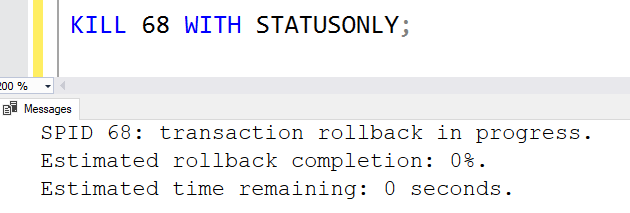
Okay, I lied. It’s not accurate. As I show in this video, it’s laughably inaccurate. It basically either shows 0% completed or 99% completed, and either no time remaining, or the rest of man’s time on earth remaining:
It’s a known bug, too. Microsoft hasn’t fixed it because you haven’t upvoted it. You should probably do that.
Related links to keep the learning going:
- Demoing SQL Server 2019’s New Accelerated Database Recovery
- SQL Server 2019 Cumulative Update 2 – the CU I show in the video that had a corruption bug with Accelerated Database Recovery, but then Microsoft redacted the KB article, so we have no idea if ADR still corrupts data or not.
- Vote for KILL WITH STATUSONLY to show estimated completion










 During the quarantines, I’m trying to keep you busy with free online training. Last week, I unveiled the