Date Tables are Great for Users, but Not So Great for Performance
34 Comments
Date tables help users filter data based on day of week, holiday, this year vs last year, and other kinds of filters that business users usually wanna add to their reports. If you haven’t used a date table before, here are a couple of primers on how to create one and use it:
And for the purposes of this post, I’m going to use the date_calendar table created in the second bullet point above. Here’s what it looks like:

Typically when people use date tables, they join from their real tables over to the date table, and they do their date calculations & filtering by just specifying columns in the date table.
For example, if you wanted to find out what day of the week people usually sign up for Stack Overflow accounts (database), you might write a query like this:
|
1 2 3 4 5 |
SELECT d.day_name, COUNT(*) AS recs FROM dbo.Users u JOIN dbo.date_calendar d ON CAST(u.CreationDate AS DATE) = d.calendar_date GROUP BY d.day_name ORDER BY COUNT(*) DESC; |
The results look like this:

Pretty cool! But…does it perform well? To find out, let’s write an old-school version of the query that doesn’t use a date table, and we’ll compare the two using SET STATISTICS IO, TIME ON to measure CPU, duration, and logical reads:
|
1 2 3 4 5 6 7 8 9 10 11 12 13 14 |
SET STATISTICS TIME, IO ON; /* With date table: */ SELECT d.day_name, COUNT(*) AS recs FROM dbo.Users u JOIN dbo.date_calendar d ON CAST(u.CreationDate AS DATE) = d.calendar_date GROUP BY d.day_name ORDER BY COUNT(*) DESC; /* Old-school: */ SELECT DATENAME(weekday, u.CreationDate) AS WeekDay, COUNT(*) AS recs FROM dbo.Users u GROUP BY DATENAME(weekday, u.CreationDate) ORDER BY COUNT(*) DESC; |
The metrics tell an interesting story:
- Date table method: 100,074 logical reads, CPU time 3,422 ms, elapsed time 3,425 ms
- Old school method: 20,095 logical reads, CPU time 3,671 ms, elapsed time 1,467 ms
The actual execution plans are obviously different:

So why did the date table not perform as well as the old-school way?
SQL Server doesn’t understand the relationship between these two tables. It simply doesn’t know that all of the rows in the Users table will match up with rows in the calendar table. It assumes that the calendar table is doing some kind of filtering, especially given our CAST on the date. It doesn’t expect all of the rows to match.
SQL Server decides it’s going to scan the date_calendar table first, and then for each date that it finds, it does an index seek into the Users index on CreationDate:

If you hover your mouse over that index seek on CreationDate, the number of executions are worth a laugh: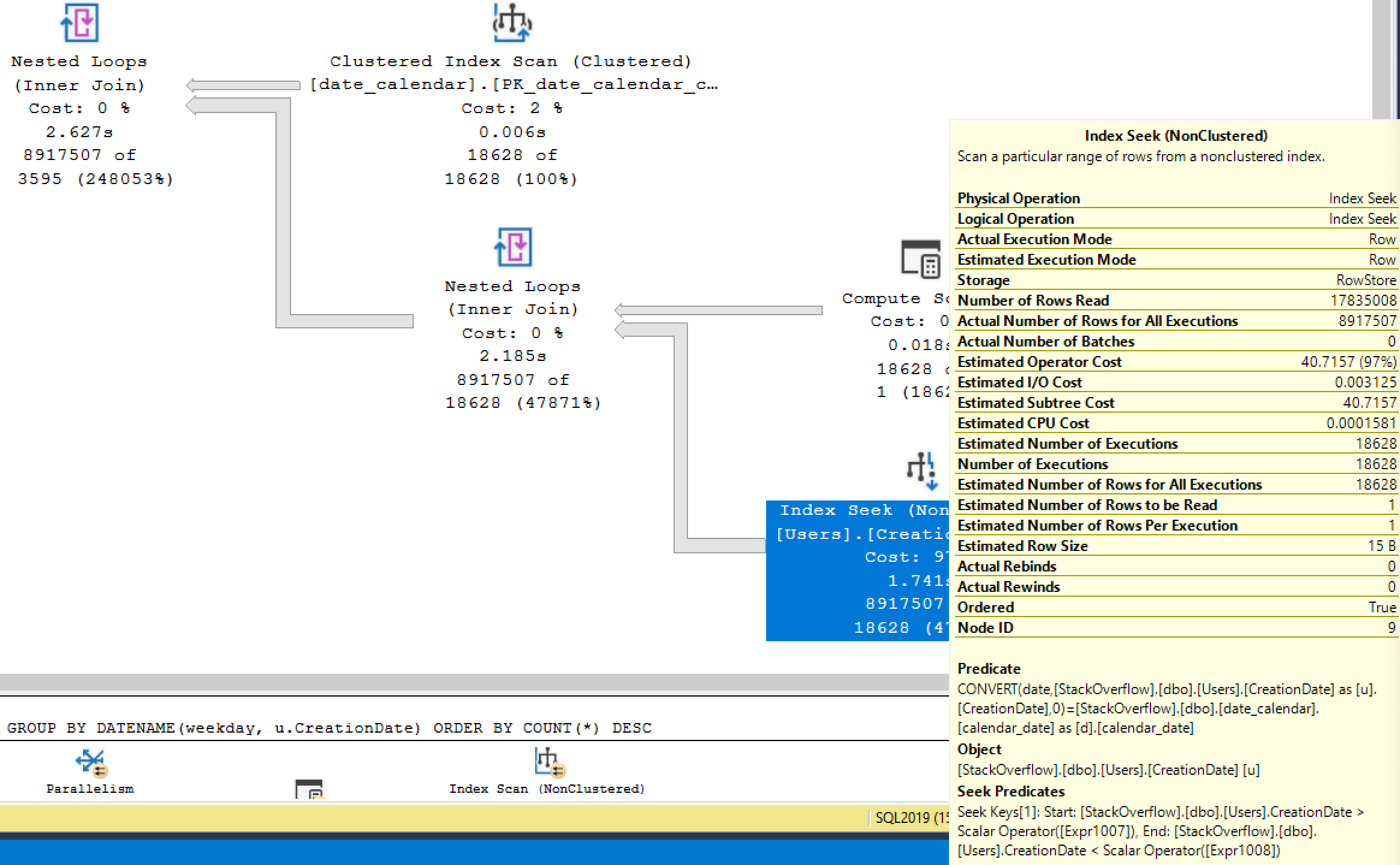
This index seek was done over 18,000 times – once for every day in our calendar table.
Because SQL Server thought the date table would do some filtering, it also underestimated the number of rows it’d find in Users, so it also underestimated the CPU work required, so the date table approach only went single-threaded. The old school way understood that lots of rows would be involved, so the work was parallelized across multiple threads.
That’s a simple query where I’m not even doing filtering – but query plans get even more predictable as you build atop this, adding filters on the date table looking for weekdays, specific days of the month, or ranges. SQL Server just has a hard time guessing how many rows are going to come out of the related tables. The more complex your filtering becomes, the crazier the estimates become.
So if I have date tables, what should I do next?
This quick experiment doesn’t mean that you should abandon your date tables and force everyone to do calculations against the base tables. Date tables are WONDERFUL, and I recommend them highly.
However, you just need to be aware that:
- If you filter on the date table rather than the base tables, you’ll likely get inaccurate estimates
- The more you rely on functions or ranges of data in the date tables, the more likely you are to get increasingly bad estimates
- To fix these estimates, you may need to add relational columns on your base tables that define exactly which rows in the calendar table match which rows in your base table
- When doing performance tuning on a query that uses a date table, consider briefly tweaking the query to not use the date table, and see how much better the execution plan gets. If it’s a night and day difference, you may need to work on the date table’s relationships or switch this one particular query to filter directly on the base tables rather than the date tables.
Got questions? Want to try different approaches to my queries above? Grab the Stack Overflow database and try running your own experiments. That’s why I love using the Stack Overflow database as a sample: it contains real-world distribution on stuff like dates so you can prove your own ideas or disprove mine.
Watch me write this post
I streamed this post live on Sunday, July 19: