Blog

Building SQL ConstantCare®: What Database Growths Do You Care About?

SQL ConstantCare
34 Comments

SQL ConstantCareSQL ConstantCare® alerts you when your databases have unusual growths.

No, not like that one on your neck. And you should really get that checked out. No, I’m talking about a database that suddenly jumps in size, making you suspicious about whether somebody created a backup table or built a set of ridiculously large indexes.

But Richie was working on an update to the unit tests, and we started wondering:

How big of growths do you personally care about?

If you were going to write the rule that alerted you when your database jumped in size, what would be your own personal size threshold? Does it change based on the database’s size? (Think about 1GB, 10GB, 100GB, 1TB, and 10TB databases.)

Let us know in the comments! We’re curious.

Updated First Responder Kit and Consultant Toolkit for October 2020

In preparation for this month’s new Fundamentals of Columnstore class, sp_BlitzIndex has a few cool new tricks! I’ll show you how to use ’em for free in the upcoming How I Use the First Responder Kit class, too.

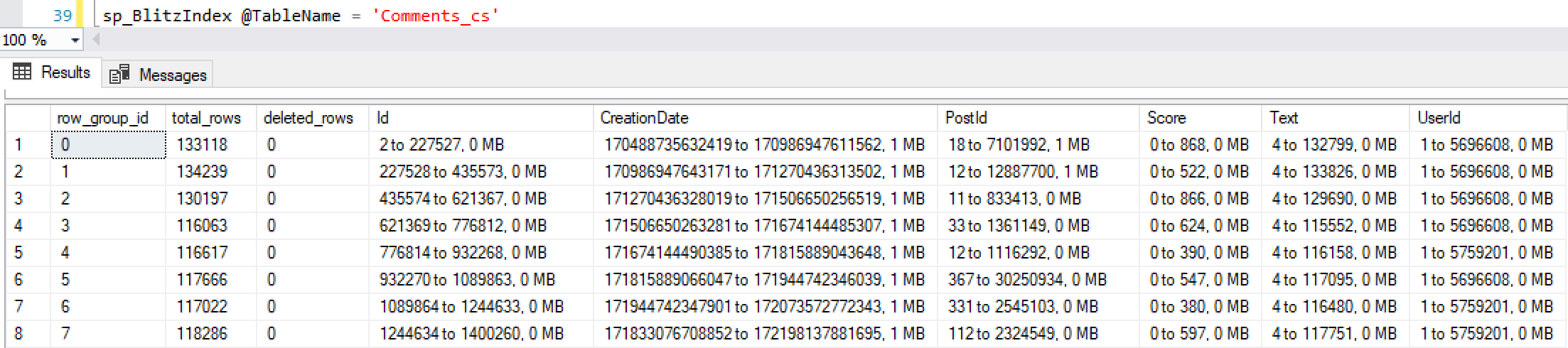
Columnstore indexes are kinda like an index on every column (called a segment), and plus they’re kinda partitioned (called a row group). When you want to visualize how the data is stored, call sp_BlitzIndex just for that one table:

The last result set gives you a row per row group, plus columns for each column of the table, showing you what range of data is stored in each row group/segment combo. It helps you better understand what parts of the table SQL Server will be able to eliminate, and what parts it’ll still need to dig through. This also affects how we load data and how we manage index rebuilds.

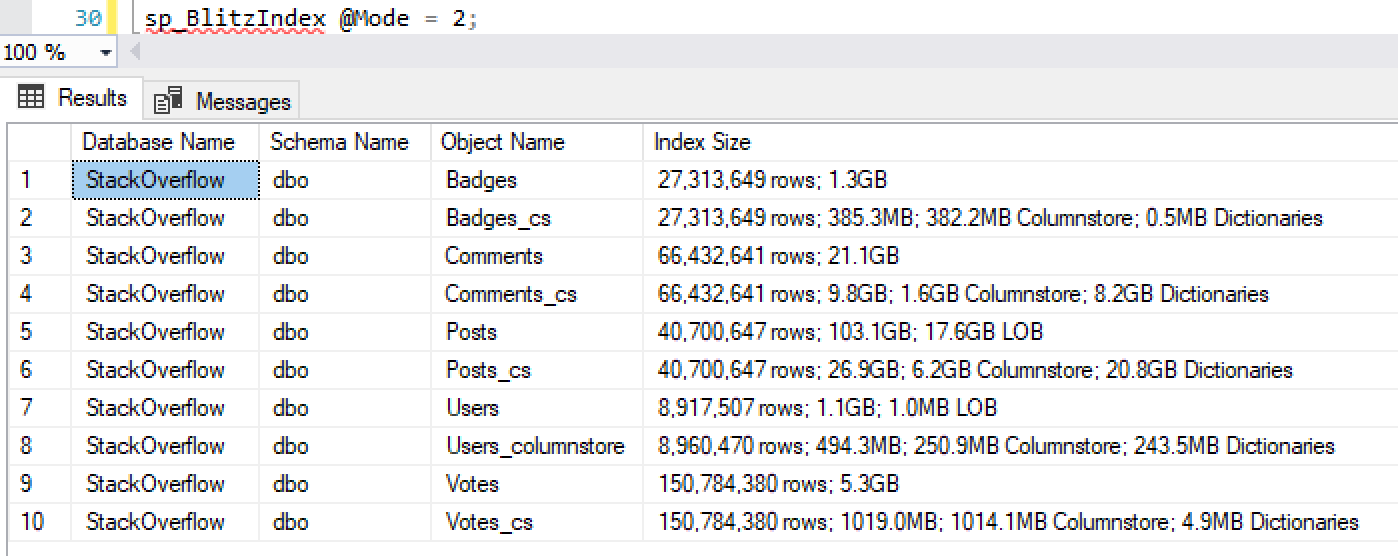
Next, when you want to analyze the sizes of your columnstore dictionaries, we’re now breaking those out in the Index Size column. Columnstore indexes used to just show a total LOB size, but now it’s broken out between columnstore and dictionary data:

That “Index Size” column shows in @Modes 0, 2, 4, and table-level output. And hey, speaking of sizes, you’re probably curious about which indexes & tables are the largest ones in your database. sp_BlitzIndex @Mode = 2 now accepts a @SortOrder parameter. You can now sort by rows or size, plus more stuff too.

Brent Ozar's Consultant ToolkitTo get the new version:

Consultant Toolkit Changes

I updated it to this month’s First Responder Kit, but no changes to querymanifest.json or the spreadsheet. If you’ve customized those, no changes are necessary this month: just copy the /Resources/SQLServerSetup checklist folder over your existing files to replace the SQL scripts.

sp_Blitz Changes

  • Improvement: new check for >= 35 databases being VSS snapshotted at the same time. (#2581)
  • Improvement: if you’re outputting the results to database, the @OutputXMLasNVARCHAR parameter now lets you save XML columns of the table output as NVARCHAR. Useful if you’re using a single table to store results over linked servers and locally. (#2601, thanks David Prestridge.)
  • Improvement: added warnings for non-default settings for SQL Server 2019’s new database scoped configuration options. (#2573, thanks mtndew01.)

sp_BlitzCache Changes

  • Improvement: if you use the @SortOrder parameter, rows won’t be shown unless they actually have that problem. For example, if you used @SortOrder = ‘spills’, we were ordering by spills – but if not a single query plan in cache was having any spills, we were still sorting by that column, and showing plans where Spills = 0. This sounds trivial, but it’s actually a big deal for those of us who do a ton of plan cache analysis because now we can glance quickly at the output and go, “Your plan cache has been cleared since the spills problem happened, or the plan has aged out, or it’s using a recompile hint. (#2174, thanks Erik Darling.)

sp_BlitzFirst Changes

  • Fix: CHECKDB running wasn’t always shown due to a cross apply (rather than outer apply) to query plan DMFs. (#2609, thanks Erik Darling.)

sp_BlitzIndex Changes

  • Improvement: when you specify the @TableName parameter, there’s a new result set that visualizes the row groups and segments. (#2584)
  • Improvement: new @SortOrder parameter lets you sort the inventory output from @Mode = 2 by rows, reserved mb, forwarded fetches, lock time, reads, writes, and more. (#2619)
  • Improvement: the Index Size column now separates columnstore index size vs its dictionary size. (#2585)
  • Improvement: the stats histogram output now includes the modification_counter. (#2612, thanks Erik Darling.)
  • Fix: the stats histogram & columnstore visualizations weren’t working when sp_BlitzIndex was installed in a database other than master. (#2616, thanks Erik Darling.)

sp_BlitzLock Changes

  • Improvement: added @ExportToExcel parameter like sp_BlitzCache has. When set to 1, we don’t show the XML results in the output, making it easy to copy/paste the results to Excel. (#2613, thanks Rebecca Lewis.)

sp_BlitzWho Changes

  • Improvement: added @SortOrder parameter that accepts most of the column names, so you can sort by things like session_id or memory grant. (#2603, thanks Dylan Petrusma.)

sp_DatabaseRestore Changes

  • Fix: if you set @RunRecovery = 0 and also pass in a @DatabaseOwner name, we ignore you and don’t bother trying to change the database owner. (#2598, thanks Greg Dodd.)

For Support

When you have questions about how the tools work, talk with the community in the #FirstResponderKit Slack channel. If you need a free invite, hit SQLslack.com. Be patient – it’s staffed with volunteers who have day jobs.

When you find a bug or want something changed, read the contributing.md file.

When you have a question about what the scripts found, first make sure you read the “More Details” URL for any warning you find. We put a lot of work into documentation, and we wouldn’t want someone to yell at you to go read the fine manual. After that, when you’ve still got questions about how something works in SQL Server, post a question at DBA.StackExchange.com and the community (that includes me!) will help. Include exact errors and any applicable screenshots, your SQL Server version number (including the build #), and the version of the tool you’re working with.

Watch Us Work on the First Responder Kit

In this 12-minute video, Greg Dodd works on sp_DatabaseRestore:

In this 1-hour video, I work on the @SortOrder parameters for sp_BlitzWho and sp_BlitzIndex:


Free Webcast on Thursday: Avoiding Deadlocks with Query Tuning

To fix blocking & deadlocks, you have 3 tools:

  1. Have enough indexes to make your queries fast, but not so many that they slow down delete/update/insert operations. (I cover that in the Mastering Index Tuning class.)
  2. Use the right isolation level for your app’s needs. (I cover that in the Mastering Server Tuning class.)
  3. Tuning your T-SQL to work through tables in a consistent order and touch them as few times as possible.

I’ll cover #3 in a one-hour webcast with Quest Software on Thursday at noon Eastern. Register here.


Databases Are Like Walk-In Coolers. #tsql2sday

In the back of a restaurant, there’s a walk-in cooler (or a few of ’em.)

When a chef needs to make something, she goes into the walk-in cooler, gathers the necessary ingredients, and then comes out to the kitchen to do the cooking.

She doesn’t cook inside the walk-in – that wouldn’t be efficient. She just gets her ingredients and then does her work elsewhere. The fridge isn’t a place for work to be done: it’s just for ingredient storage.

She makes as few trips into the fridge as practical in order to prepare her dishes. At the start of her shift, she’ll fetch enough ingredients to prepare several servings of something – she wouldn’t dream of making a separate trip to the fridge for each and every salad plate she needs to make. (She might even prepare several salads at once, and then keep them nearby for orders.)

When the walk-in fridge goes down,
the chef calls a fridge tech.

When the walk-in is broken, the chef is the first person to notice – but she isn’t the person to repair the fridge. She calls a separate person in, a refrigeration technician. That fridge tech might indeed know how to cook, but that’s not his job in this scenario, and nobody’s paying him to cook stuff. His job here is just to fix the fridge to get it to cool the room appropriately.

If the fridge tech arrives onsite for a support call to fix a fridge that won’t stay cold, and if he notices that she’s leaving the door propped open all the time, he’ll have a quick talk with the chef. He might say, “Listen, the fridge you bought simply isn’t powerful enough to accommodate leaving the door open, or trying to run a deep fryer inside the fridge. You’re going to have to make a compromise: either do your cooking out on the line, or buy a bigger fridge, or start closing the door.”

Small restaurants don’t need a full time fridge tech. They might even just call the fridge manufacturer for warranty service. However, as restaurants grow into chains, or their sales become large enough to warrant it, they might hire a general handyman. That jack-of-all-trades will fix fridges, air conditioners, stoves, blenders, you name it – whatever breaks, they’ll do a good-enough job to fix most restaurant technology problems. Restaurants (or restaurant groups) have to become pretty big before they can justify hiring their own full time refrigeration technician.

Proactive restaurants will bring in a refrigeration technician on a regular basis to do a check-up. The tech can do maintenance to make sure the existing gear lasts as long as possible, and also warn when it’s approaching end of life, and time to think about a more efficient model.

Database server = fridge.
Chef = developer.
DBA = refrigeration tech.

If you use the database server to generate HTML, for example, you’re trying to cook inside the fridge.

If you run a query for every row you need to render on a web page, you’re making too many trips to the fridge.

If you begin a transaction and leave it open while you work, you’re leaving the door propped open.

If you host a 1TB data warehouse on 16GB RAM, you’re trying to run a highway-side McDonald’s with a dorm room fridge.

As your DBA/fridge tech, my job is to make sure you’ve got the right size fridge for your needs, help you understand the best ways to use it, and warn you when you’re using it inappropriately. I won’t tell you how to cook – sure, I can bang out a query, but that’s not really what you wanna pay me to do.

The cloud is like
renting a strip mall restaurant.

At first, it seems like putting your database in the cloud is like renting space in someone else’s fridge. Nobody in their right mind would do that: the latency would be unworkable. You can’t go to somebody else’s building and open their fridge every time you want to make an omelette.

But you don’t rent just the fridge.

You rent an entire restaurant space.

Strip mall owners have already set up generic space that works well enough for most kinds of restaurants – burgers, pasta, Chinese food – and you can rent a space from them for a monthly fee. They’ve already got walk-in coolers, stoves, deep fryers, cash registers, booths, and most commonly required restaurant gear.

Sure, you don’t get as much flexibility – you can’t lay out the restaurant exactly the way you want. However, if you’re starting out a new restaurant, and as long as you’re not aiming for something really unusual like conveyor-belt tank-to-table sushi, it’s probably good enough for you. (And yeah, there’s still a fridge tech, because sadly, the strip mall landlord just deposits your rent and doesn’t answer your phone calls.)

If you liked this, you’ll probably like the other entries for this week’s T-SQL Tuesday hosted by Rob Volk. Scroll down to the comments to see today’s entries, or read tweets tagged #sql2sday.


Free Live Fundamentals Classes, Registration Open Now

Videos
2 Comments

Update Oct 29th – classes are over. Thanks for joining in!

Well, this quarantine just isn’t letting up, so it’s time for another round of free training.

I’m running 3 free live classes on October 26-28:

  • October 26: Fundamentals of Index Tuning – 9AM-5 Eastern – iCal
  • October 27: Fundamentals of Query Tuning – 9AM-5 Eastern– iCal
  • October 28: How I Use the First Responder Kit – 9AM-5 Eastern– iCal

These are live only – be there or be square. Or I guess you could also be a Recorded Class Season Pass holder, which lets you watch the recordings of these anytime you want.

Register here, and see you in class in two weeks! If you’ve got friends who would benefit from some free trainin’, feel free to send them the link as well. Heck, if nothing else, you can leave the class up in a window while you “work” from home.


Woohoo! We Hit 25,000 YouTube Subscribers.

Videos
1 Comment

As I finished this weekend’s live stream, I noticed that we crossed a big number.

The Brent Ozar Unlimited YouTube channel now has over 25,000 subscribers.

Well, that’s kinda awesome. I’ve had a great time doing all kinds of free live streams during the quarantines, and it’s been super fulfilling seeing so many folks show up on a regular basis for learning and fun.

To give you an idea of what I’ve been up to over there, here are a sampling of some of my recent live streams:

To get alerted whenever I start streaming, subscribe to the channel. Here’s to the next 25,000 party people! Y’all make this so much fun.


What Is the SQL Server CEIP Service?

SQL Server
29 Comments

The CEIP Service is the Customer Experience Improvement Program that sends telemetry data back to Microsoft.

When you install Microsoft SQL Server, the CEIP Service is installed too. You can’t disable it during installation: it shows up in your services list whether you want it or not.

SQL Server CEIP Service
You know it’s high quality when they can’t even capitalize SQL Server correctly

What data does the CEIP Service collect?

Microsoft goes into a lot of detail here, and the short answer is things like:

  • Crash dumps – which may contain your data and the exact contents of your queries, which can contain personally identifiable information
  • Login names, email addresses, location information, server names (read the “End-user identifiable information” section, in particular the part about “may be emitted to Microsoft to deliver new hybrid and cloud features”)
  • Behavioral/usage data, server configuration, feature configuration, hardware manufacturers
  • Database names, table names, and column names

If you’d like to see examples of the exact queries it runs, I captured a trace of the CEIP Service’s queries in this post.

Can you disable the CEIP Service?

If you’re using SQL Server Standard Edition or Enterprise Edition, then on the SQL Server, go into the Start menu, Microsoft SQL Server, SQL Server Error and Usage Reporting. A dialog box will let you un-check the error reporting and feature usage reporting.

After you uncheck those boxes and click OK, the CEIP Service will still be running, but it won’t send any data back to Microsoft. The documentation says so, so it must be true, right? (Tin foil hat goes here.) If you’re managing a lot of servers in an enterprise, you can also use Group Policy to push out these registry keys to control data collection and crash dump collection.

A security-conscious customer of mine goes so far as to disable the service, then change the logon account for the SQLCEIP service to an invalid account & password, and uses PowerShell to check its login on a regular basis, making sure it doesn’t get re-enabled by a Cumulative Update.

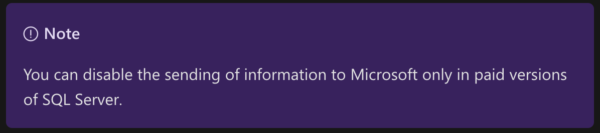
However, if you’re using SQL Server Developer Edition or Express Edition, you can’t disable CEIP for SQL Server. Microsoft’s policy is that people who use free versions of SQL Server are paying for that by sending in their private data to Microsoft. The CEIP Service documentation page says:

Even if you follow the above instructions on Developer Edition, they’ll appear to work, but you’ll still be sending telemetry data back to Microsoft.


Poor Man’s Resource Governor: Database-Scoped Configurations

Bad Idea Jeans
4 Comments

Let’s say you had report queries that were going wildly parallel, and you wanted to put a stop to it, but you couldn’t afford SQL Server Enterprise Edition.

You could do is create databases with different MAXDOP settings:

Yes, MAXDOP has been a database-scoped configuration since SQL Server 2016.

Then set your reporting users’ default databases:

And then when they each run the same query, they get different maxdops:

What’s that, you say? Your users aren’t fully prefixing their objects with database names, so this wouldn’t work for you? I hate to give you two bad ideas in a single blog post, but I have one word for you: synonyms.

I need to point out that this “solution” – and I use that term wildly loosely – has all kinds of drawbacks:

  • It only throttles CPU – queries can still get giant memory grants
  • Each database gets its own query plans, which means you’ve also just doubled your parameter sniffing problems
  • It’s painful to deal with lots of synonyms, and really, this only makes sense (and I use that term loosely) for reporting queries, not things that call stored procedures or do inserts

Free Webcast on Wednesday: The New Robot DBAs in SQL Server 2017, 2019, and Azure

The robots are really just people wearing metallic masks.

You’ve been hearing about all these robots that are coming to take your job. They’re going to automate all the performance tuning and make your life way easier, right? Or harder, I guess…since you’ll be looking for a job.

Thing is, most of that is just plain ol’ marketing hype that Microsoft is using trying to sell your management on upgrading to newer versions or moving to the cloud.

In this Idera Geek Sync session, I will blow the marketing smoke away, show you these features in action, and show you which ones are ready for prime time. You’ll walk away better equipped to have conversations with management about why you should (or shouldn’t) upgrade, and how you can use these features not just to stay employed, but have a better career.

Register here.


Want to use columnstore indexes? Take the ColumnScore test.

Columnstore Indexes
27 Comments

When columnstore indexes first came out in SQL Server 2012, they didn’t get a lot of adoption. Adding a columnstore index made your entire table read-only. I often talk about how indexing is a tradeoff between fast reads and slow writes, but not a lot of folks can make their writes quite that slow.

Thankfully, Microsoft really poured a ton of work into improving columnstore indexes over time. The What’s New in Columnstore Indexes page of the SQL Server documentation keeps getting more “yes” answers over newer versions.

Today, with widespread SQL Server 2016 adoption, at least some of your databases could safely implement columnstore indexes to make reports go faster. But should you? And will columnstore indexes backfire and kill non-reporting-query performance? And will your data loading techniques come back to haunt you over time?

Take the 7-question test at ColumnScore.com to find out.


Announcing a New Class: Fundamentals of Columnstore

Columnstore Indexes
4 Comments

Your report queries are too slow. Will columnstore indexes help?

You’ve tried throwing some hardware at it: your production SQL Server has 12 CPU cores or more, 128GB RAM, and SQL Server 2016 or newer. It’s still not enough to handle your growing data. It’s already up over 250GB, and they’re not letting you purge old data.

Fundamentals of Columnstore IndexesIn one day, you’ll learn:

  • How columnstore data is stored, and how that impacts your architecture choices
  • How to do a hands-on self-assessment of your workloads, data, and server to figure out whether columnstore indexes make sense for you
  • How to do a proof-of-concept implementation with initial creation and measuring how your queries are impacted

As this is a Fundamentals class, I need to be clear about what’s out of scope, too. We won’t be covering how to tune loads, tune query plans, design rowstore indexes atop columnstore ones, tune ongoing maintenance, feature cross-compatibility, compatibility levels, or behaviors of different SQL Server versions or editions.

Prerequisites – you need to be already thoroughly familiar with my free 90-minute class, How to Think Like the SQL Server Engine, and my 1-day Fundamentals of Index Tuning class. After you enroll, do the full prerequisites including chat setup.

Each student needs to bring their own SQL Server. You’re highly encouraged to follow along with the labs. Throughout the class, you’ll have homework where you need to complete a hands-on lab using SQL Server 2017 or 2019 and the Stack Overflow database. Read the instructions on how to set up your own lab SQL Server to follow along – a lab server is not included unless you buy my Live Class Season Pass PLUS Lab VM.

This is a live online class – but you have two buying choices:

Register now – and of course, Live Class Season Pass holders are welcome to drop in at any time, no registration required. Your pass gets you into any live online class I do during your subscription. See you in class!


Building SQL ConstantCare®: Warning You About New Large Tables & Indexes

SQL ConstantCare
4 Comments

SQL ConstantCareWhen I’m doing a SQL Server health check, one of the things I like showing clients is a list of their top tables by size.

Inevitably, there are a bunch of tables that:

  • Tables whose names start with “temp” or “backup” or “just_in_case”
  • Tables with no clustered index that were clearly created with a select-into, and then forgotten about
  • Tables that haven’t been accessed in months or years

We have some chuckles, make a quick calculation, and realize that our database is 10%-20% larger than it needs to be. That means our backups are taking 10-20% longer, corruption checking, restore testing, backup space, disaster recovery test time, you name it – it’s all 10-20% higher.

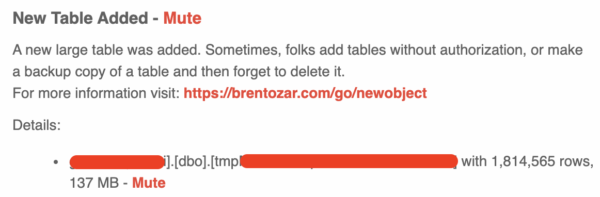
So now if SQL ConstantCare® sees a new table with at least a million rows, we give you a heads-up in your daily email:

The first table it found on the first day

This is such a good example of what SQL ConstantCare® is all about: giving you practical insight, not just raw metrics.


The 4 Presentations I’m Proudest Of, and What Inspired Them

Videos, Writing and Presenting
11 Comments

I was thinking back about the presentations I’ve been the most proud of over the years. I’ve written and performed a *lot* of stuff over time, but here are some of the free public presentations I’m the most proud of, and the stories of how they came to be.

#4: Watch Brent Tune Queries (2014)

This show was inspired by the Discovery Network. I love watching people just do their job. Deadliest Catch. Dirty Jobs. Maine Cabin Masters.

I thought, “Can I build a session where someone just watches me work? Like a Dirty Jobs, but for SQL Server? And how much could I teach them in the process?”

The first version of this session was pretty rough, but as I started presenting it at conferences, I began by using a few slides to explain my query tuning process before I jumped in and went to work, taking real user-written queries from data.stackexchange.com and tuning them.

When I do it these days, I’m back to the mess: I don’t even bother starting with a slide deck. I start with a blank SSMS, type out a few key points about my query-tuning process, open up data.stackexchange.com, pick a query, and begin tuning it. (The queries aren’t selected by random – I pick them ahead of times to illustrate specific challenges.)

I like it because it’s so minimal and it evokes so much attendee interaction. I try to walk a line between getting attendees to suggest what they’d do, versus getting enough direction in my agenda to make progress in a query before the fend of the session.

#3: 500-Level Guide to Career Internals (2016)

Whenever conference schedules come out, my friends and I usually sort the schedule all kinds of different ways, looking at the contents. One of the ways we slice & dice it is by level – we wanna see what presenters think is 500-level material. (Usually, difficulty is described as 100, 200, 300, or 400 level.) We always had chuckles for things that were termed 500-level when it was really more of an introduction – especially if it was a short session that couldn’t possibly get into technical details.

One year I thought, “What would a 500-level career hacking session look like?”

I don’t think of myself as 500-level at anything, so I reframed the question as, “If someone presented a 500-level guide to career hacking at a SQL Server conference, what credentials would that person need to have?” I suddenly realized, uh, it was me: I had cofounded and bootstrapped a multi-million-dollar consulting company, hadn’t worked for anyone else for years, and had basically crafted the job that I wanted.

I had a lot of career development material that I’d written from the FreeCons that I used to run. They were free one-day workshops done before a conference, but rather than focusing on technical training, we focused on building lifelong connections between attendees. We talked careers, blogging, presenting, and more. We did talk technology, but only for the purpose of showing different presentation delivery methods. I really enjoyed doing those.

PASS recorded the session, but there was no videocamera. I hate watching sessions without a camera of the speaker, but I think this one’s worth it:

There’s nothing special about that presentation’s delivery, but it makes my list of top sessions because the material is so near and dear to my heart. There was even a moment onstage where I had to struggle to keep it together, and…I still get a little teary eyed thinking about that.

I recently updated and re-recorded this one for SQLBits 2020, where I had the challenge of picking my favorite 90 minutes of it altogether. That was fun.

#2: An Introduction to Statistics with Playing Cards (2020)

I can’t cook worth a damn, but I loved watching Alton Brown’s show Good Eats. The publicly available Alton Brown Bakes an Apple Pie shows several good examples of his team’s camera work, putting cameras inside a mock fridge, an oven, and above his workspace.

Ever since I saw the overhead camera usage, I filed it away in a text file where I keep ideas for presentation techniques. Later, when I wondered how I could use playing cards to explain how SQL Server’s statistics work, I realized I could combine it with the overhead camera technique to do something memorable.

This session has 3 things I love:

  • The camera angle that’s rarely used in IT presentations
  • The usage of an everyday object to tell a technology story
  • The obvious truth afterwards: when you finish watching the session, you say to yourself, “Well, of course it works that way. It’s obvious now. It couldn’t have possibly worked any other way.” That, for me, is a mark of a great presentation – where afterwards, the technology seems so simple.

#1: How to Think Like the SQL Server Engine (2010)

In 2010, I sat in Edward Tufte’s day-long seminar on how to communicate. A couple of my big takeaways:

  • Communicators should try to build a single handout piece of paper that conveyed a lot of information
  • Communicators should try to bring people as close as possible to the actual thing that’s happening

I thought about how I could pull those off, and I realized a happy coincidence: SQL Server stores data in 8KB pages. I could take the free public Stack Overflow database, export part of it into Excel, turn it into a printed handout, and get people to role play as the SQL Server engine.

I’ve updated it and re-recorded it a lot over the years, and here’s the latest version, fresh from a recent stream:

I’m really happy with those 4 sessions, and I hope y’all enjoy ’em too.


I Would Love a “Cost Threshold for Recompile” Setting.

I’m tired of sniffing your parameters.

In environments where complex queries can get bad plans due to parameter sniffing, it would help to say that all queries with an estimated cost over X should be recompiled every time they run.

For example, in environments where most of my workload is small OLTP queries, I’m fine with caching queries that cost under, say, 500, but above 500, I don’t care how good we think the plan is – it’s worth recompiling because those high-cost reports don’t run often, and I need them to get accurate plans for their own parameters every time they run.

This would help environments with parameter-sensitive queries where Adaptive Memory Grants backfire (like reports sometimes use small date ranges and sometimes years of data.)

I would love this feature. If you would too, cast an upvote.


SQL Server Suddenly Frozen? You Might Be Snapshotting Too Many Databases.

Backup and Recovery
37 Comments

Snapshot backup tools like Azure Site Recovery and Veeam are great for sysadmins. They let you quickly replicate a virtual machine to somewhere else without knowing too much about the server’s contents.

To pull it off, they use the Windows Volume Shadow Copy Service to do snapshot backups – often referred to as VSS snaps. In a nutshell:

  1. The VSS service tells SQL Server to freeze its writes
  2. SQL Server stops writing to each of its databases, freezing them
  3. SQL Server tells VSS, “Okay, I’m out”
  4. VSS creates a shadow copy of the data & log files
  5. VSS tells SQL Server, “You can get back to work”
  6. SQL Server begins writing again, one database at a time (called thawing)

These snapshot backups show up in system tables like msdb.dbo.backupset because when used successfully, they’re like full backups. It sounds like witchcraft, but it really does work, and it’s worked for years.

But when it goes wrong, it goes WRONG.

SQL Server freezes databases one at a time, serially, until it’s got them all frozen. This can take some time, and while databases are frozen, you’ll see blocking chains for writing queries (which can in turn block readers, too, depending on your isolation level.)

Because of that one-at-a-time problem, the SQL Server documentation explains:

We recommend that you create a snapshot backup of fewer than 35 databases at the same time.

Backup apps like Azure Site Recovery and Veeam don’t warn you about that, though. You just find out when your SQL Server suddenly feels like it’s locked up, with tons of blocking issues.

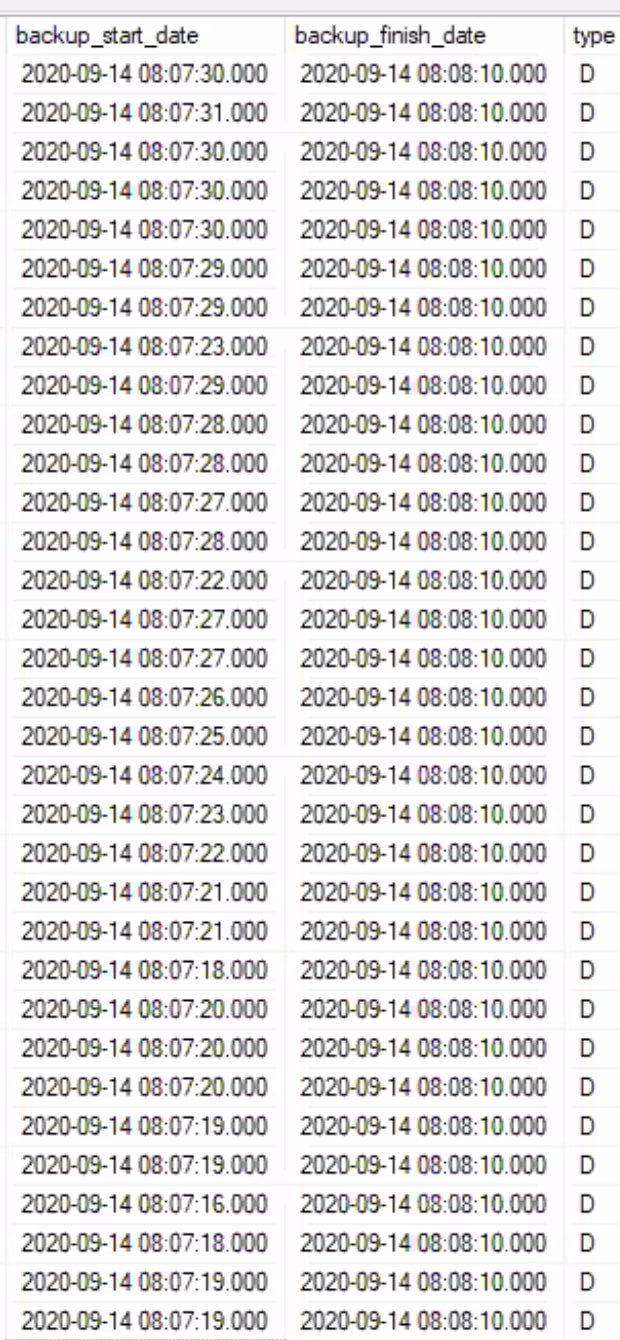
For example, here’s a screenshot from a client’s msdb.dbo.backupset table when Azure Site Recovery was trying to snapshot hundreds of databases all at once:

See how the backup_start_date and backup_finish_date are 40-50 seconds apart? That’s because SQL Server was slowly, gradually stepping through the snapshots of each database. Finally, they all “finished” at 8:08:10, but even that is a little tricky – in this case, they didn’t all thaw at the exact same time. (I’m guessing, based on the blocking storms I’ve been seeing lately, that the backup_start_date and backup_finish_date date/times don’t really correspond to the exact VSS freeze/thaw times.)

To make things worse, sysadmins just check boxes in tools like Azure Site Recovery and Veeam and tell them to take backups once an hour. The backups don’t necessarily happen exactly on the hour, so developers are left scratching their heads as to why seemingly simple queries suddenly just freeze every now and then for no reason.

How To Tell If It’s Happening to You

If you’re doing a health check, run sp_Blitz. We warn you about how many snapshot backups your server has taken recently, and in the upcoming October build, we also warn you if you’ve had snapshots spanning 35+ databases in the last two weeks.

Here’s how to see which databases are involved:

Or if you’re troubleshooting live, run sp_BlitzWho and look for blocking chains led by backup commands. You’ll have to move fast, though, because blocking storms like this can disappear within 30-60 seconds. I don’t recommend that you log sp_BlitzWho to table that often – that’s just too much overhead. That’s where 3rd party monitoring tools are more helpful.


Unindexed Foreign Keys Can Make Performance Worse.

Foreign Keys
18 Comments

I know. You, dear reader, saw that title and you came in here because you’re furious. You want foreign key relationships configured in all of your tables to prevent bad data from getting in.

But you gotta make sure to index them, too.

Let’s take the Stack Overflow database – I’m using the 50GB Stack Overflow 2013 version for this post. I’m going to start with no nonclustered indexes whatsoever, and then I’m going to add in foreign keys between the Users table and several tables where users add content, like Badges, Comments, Posts, and Votes:

Now, let’s say my application wants to delete a specific user, id # 26837. First, the app starts by deleting all of the rows in the content tables for this user:

That does table scans, and let’s say we’re okay with that for some reason because our application rarely does deletes. Now that all the content tables are gone, let’s go back and delete the User row:

It’s just deleting one row, right? How bad can it be?

Terrible, as it turns out. SQL Server wants to double-check all of the content tables to make sure User 26837 doesn’t own any Badges, Comments, Posts, or Views. We do a ton of logical reads, too:

The first solution you probably think of: index all of the foreign key columns:

That makes the deletes go way faster, but it comes at a few costs: slower inserts & updates to maintain those indexes, a 3% larger database size in this case, 3% longer maintenance jobs, etc.

At one recent engagement, we simply couldn’t use that solution. They already had serious performance problems during inserts: their hardware couldn’t handle any additional slowdowns during inserts & updates, and they already had extensive blocking & writing problems. Other solution options included:

  • Queueing the deletes for later – in this Stack Overflow example, say the application doesn’t directly delete the Users rows, and instead, adds rows to a queue table to be handled later. During a maintenance window, we could do the deletes in batches, dropping groups of users across the tables with only one pass.
  • Drop the foreign keys – at this particular client, the keys were configured with NOCHECK anyway due to past bad data, and there wasn’t a way we could fix that quickly enough. In that case, dropping the foreign keys made the deletes instantly faster, which was part of the overall solution in getting enough pain relief to go through their busy season.

Do I wish every database had perfect data, perfect foreign keys, perfect indexes, and perfect hardware to sustain all of the load? Absolutely. But in real life, constraints aren’t black and white: they’re fifty shades of … oh, you know.


How to Create a Table with a Partitioned Clustered Columnstore Index

T-SQL
8 Comments

If you need to create a table and you want it to be partitioned right from the start, AND you want it to have a clustered columnstore index, here’s a creation T-SQL example:

The partition scheme name goes on the outside of the parenthesis, the index name goes on the inside, and the order of the whole thing is a little counter-intuitive.

That’s it. That’s the entire post. I just had to do that this morning and had a tough time finding an answer online, so figured I’d blog it. There you go.


Free Webcast Wednesday: Pushing the Envelope with Indexing for Edge Case Performance

Indexing
15 Comments

Most of the time, conventional clustered and non-clustered indexes work just fine – but not all the time. When you really need to push performance, hand-crafted special index types can give you an amazing boost. Join Microsoft Certified Master, Brent Ozar, to learn the right use cases for filtered indexes, indexed views, computed columns, table partitioning and more.

This is a free webcast on Wednesday, September 16th at noon Eastern.

Register now to save your spot. See you there! If you can’t be there live, a link to the recording will be sent to the registrants.


Updated First Responder Kit and Consultant Toolkit for September 2020

Let’s give a big round of virtual germ-free applause to Adrian BuckmanErik DarlingGarry BargsleyGreg DoddIan MantonJohn McCallKuldar AndaresPierre LetterStephen AnslowTom Butler, and Walden Leverich for volunteering their time to help make your job easier this month. Thanks to them, the September release is chock full of features – I’m not even going to try to sum them up here, and you should read the release notes. Kudos to them!

Brent Ozar's Consultant ToolkitTo get the new version:

Consultant Toolkit Changes

I updated it to this month’s First Responder Kit, but no changes to querymanifest.json or the spreadsheet. If you’ve customized those, no changes are necessary this month: just copy the /Resources/SQLServerSetup checklist folder over your existing files to replace the SQL scripts.

sp_Blitz Changes

  • Improvement: new check looks for Query Store problems where is_query_store_on reports 1, but sys.database_query_store_options doesn’t agree. (#2525, thanks Walden Leverich.)
  • Improvement: more readable info in the drive free space checks. (#2557, thanks Pierre Letter.)
  • Fix: sp_Blitz was failing on Amazon RDS SQL Servers because it was trying to run sp_validatelogins, which Amazon doesn’t allow. (#2526, thanks Erik Darling.)
  • Now alerts if there’s even just 1 memory dump in the last year (as opposed to 5.) (#2564, thanks Garry Bargsley.)

sp_BlitzCache Changes

  • Improvement: @OutputServerName parameter lets you push the sp_BlitzCache results to a central server via linked server. The linked server will need to already exist and have RPC enabled. Linked servers don’t support writing via XML, so when writing out to a linked server, the query plan column is created as NVARCHAR(MAX) rather than XML. (#2528, thanks Pierre Letter.)
  • Fix: “Many Duplicate Plans” check was reporting numbers higher than 100%. I didn’t do a great fix, but if anybody wants to dig into the real underlying problem, they can take the code from issue 2480 and apply it to this same problem. I’d be glad to take a pull request for that. (#2532, thanks Tom Butler.)
  • Fix: removed unqualified join to get the Microsoft data migration wizard to stop complaining. (#2558, thanks Ian Manton.)

sp_BlitzFirst Changes

  • Improvement: new warnings for queries running with memory grants > 15% of the buffer pool. You can configure that threshold with the @MemoryGrantThresholdPct parameter, too. (#2505, thanks Adrian Buckman.)
  • Fix: the recently-updated-statistics check (ID 44) was being blocked by index rebuild operations due to sys.dm_db_stats_properties ignoring isolation level hints. (#2548, thanks Adrian Buckman.)

sp_BlitzIndex Changes

  • Improvement: missing indexes now show both the data type for the column, and have commas in between the columns. (#2522, thanks Greg Dodd.)
  • Improvement: if lock escalation has been disabled on a table, add text mentioning that. (#2553, thanks Stephen Anslow.)
  • Fix: if Clippy came up with a missing index request more than 4,000 characters long, we were truncating it. Now, we preserve Clippy’s insanity in all its blazing glory. (#2533, thanks Kuldar Andares for the report and Greg Dodd for the fix.)
  • Fix: suggested index names are now capped at 128 characters long. This can produce duplicate index names, but frankly, that’s the price you should pay for creating column names that long, buddy. (#2552, thanks Greg Dodd.)
  • Fix: @Mode = 3 (missing indexes compilation) had a few extra diagnostic columns in the output left over from working on last month’s release. Removed those. (#2539)

sp_BlitzWho Changes

  • Improvement: when you use the @OutputTable parameters, sp_BlitzWho now automatically creates a deltas view like the other procs. The deltas view shows the last collection of each query on a session, so you see the total CPU/reads/time impact of each query. Not collected across multiple sessions – just helps you identify long-running queries that aren’t showing up in the plan cache, like stuff with option recompile hints or servers with a lot of memory pressure. (#2315, thanks Adrian Buckman.)
  • Fix: when a database has RCSI turned on, some DMV (don’t ask me which one) isn’t always reporting all transactions are in RCSI. John McCall came up with a slick workaround to report the right isolation levels. (#2534, thanks John McCall.)

sp_DatabaseRestore Changes

  • Fix: if you pass in an empty string for the @RestoreDatabaseName parameter, we use the existing database name instead. (#2536, thanks Greg Dodd.)

SqlServerVersions Changes

  • Improvement: when creating the SqlServerVersions table, we now also add extended properties for documentation. (#2574, thanks John McCall.)

For Support

When you have questions about how the tools work, talk with the community in the #FirstResponderKit Slack channel. If you need a free invite, hit SQLslack.com. Be patient – it’s staffed with volunteers who have day jobs.

When you find a bug or want something changed, read the contributing.md file.

When you have a question about what the scripts found, first make sure you read the “More Details” URL for any warning you find. We put a lot of work into documentation, and we wouldn’t want someone to yell at you to go read the fine manual. After that, when you’ve still got questions about how something works in SQL Server, post a question at DBA.StackExchange.com and the community (that includes me!) will help. Include exact errors and any applicable screenshots, your SQL Server version number (including the build #), and the version of the tool you’re working with.

Watch Me Working On It

If you’d like to see me working on a few of this month’s issues, you can check out my live streams from my TwitchYouTube, or Facebook channels:


“Not to write any procedure over 50 lines”

Development
22 Comments

In Joe Celko’s Stairway to Database Design series, he writes:

The rules of thumb for T-SQL are not to write any procedure over 50 lines (one page)

This seems so radical at first, but it has precedence in NASA’s 10 Rules for Developing Safety-Critical Code:

  1. Avoid complex flow constructs, such as goto and recursion.
  2. All loops must have fixed bounds. This prevents runaway code.
  3. Avoid heap memory allocation.
  4. Restrict functions to a single printed page.
  5. Use a minimum of two runtime assertions per function.
  6. Restrict the scope of data to the smallest possible.
  7. Check the return value of all non-void functions, or cast to void to indicate the return value is useless.
  8. Use the preprocessor sparingly.
  9. Limit pointer use to a single dereference, and do not use function pointers.
  10. Compile with all possible warnings active; all warnings should then be addressed before release of the software.

See that #4? If your T-SQL was safety-critical – if folks’ lives depended on the accuracy and speed of your query results – then NASA would suggest you break it down.

Don’t get me wrong – I can’t possibly work that way, nor do I think many of you can work that way either. As I write this, the current sp_Blitz is 9,210 lines long. sp_Blitz is a great example of something that, were it to be mission-critical, someone should refactor it into much smaller, more easily testable chunks. But I still love the 50-line suggestion because it gives us pause before we tack another hundred lines onto an already-ginormous spaghetti monster.