Blog

My PASS Lightning Talk Preview Video

#SQLPass
10 Comments

At this year’s PASS Summit, we’re adding a series of sessions called Lightning Talks.  In a normal one-hour time slot, you can sit and watch several presenters give rapid-fire, 5-minute micro-sessions on various topics.

My Lightning Talk is “Storage Area Networks Simplified” – I’m covering the two most important things you need to know about SANs in just five minutes.  Here’s a video of my rehearsal at home.  I’m playing with iMovie’s green screen effects, but I forgot to wear a shirt that didn’t have green in it, so it has some sparkly action in the video.  Ah, well, that’s what you get with a rehearsal.

My rehearsals ended up being a little over four minutes long, so I had to cut it even tighter.  In a live environment, people will be (hopefully) laughing at some slides, so I won’t be able to deliver it this quickly.  I just turned in my final deck, and I sliced out a couple of slides.

I’m excited to see how these turn out!  The Lightning Talks schedule is:

  • Tuesday 3PM-4:15PM – Room 201 (144)
  • Wednesday 1:30-2:45PM – Room 201 (144)
  • Thursday 1:00-2:15PM – Room 201 (144)

You can view which presenters are in each time slot at the PASS Lightning Talks page.

Watch the PASS Summit Keynote Live Online

#SQLPass
2 Comments

For the first time this year, the Professional Association for SQL Server will be broadcasting the PASS Summit keynote live on the web!

Each day of the Summit, Microsoft staff will open up the day with their keynote speeches:

  • Tuesday – Ted Kummert will be talking about Microsoft’s commitment to mission critical applications and easier business intelligence.  Given that the other two keynotes mention the next version of SQL Server, I bet Ted will also cover it here, meaning this will be your first look at vNext.
  • Wednesday – Quentin Clark will be showcasing the next version of SQL Server, including “powerful features for data developers and a unified database development experience” – every time he says DAC Pack, you have to take a shot of espresso.
  • Thursday – David DeWitt will cover query optimization and better execution plans in future versions of SQL Server

And it’s frrrrrreeee.  Register now to watch the keynote live on November 9th.  I’ll also be liveblogging it with my own trademarked irreverent take on the announcements.  And maybe some Lady Gaga pictures.  No promises, though.


I’m Sending My Clients To Your Blog

4 Comments

When I deliver my performance tuning recommendations to my clients, I want them to be able to go back to my findings again and again over time, learning more each time they read.  One of my favorite tools to help their journey is a list of recommended reading material.

I rarely give out links to whitepapers because they’re, uh, boring.  Really boring.  I won’t ask my clients to read something I hate reading.

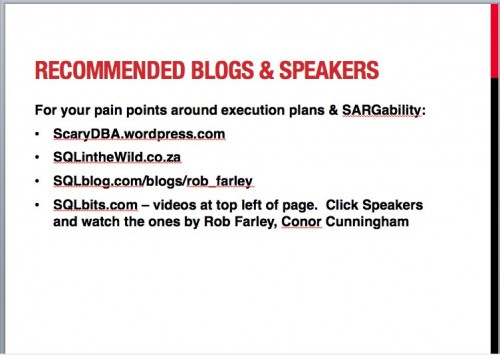
Instead, I put a slide like this in my presentation to the client’s DBAs and developers:

Resources Slide

When this slide comes up, I say:

“During our performance tuning work, we came across a lot of issues with how to read execution plans and why your queries aren’t performing as fast as you’d like.  The biggest challenge in your environment was SQL Server’s inability to use your indexes to satisfy your queries – a concept called SARGability.  It’s a big topic, and you’re going to want to learn more about this over time.  These are the blogs and speakers I’d recommend that you check out to learn more.”

I even recommend that my clients contact bloggers directly if they’ve got questions about a particular post.  I explain to them that bloggers WANT to help the community, and that’s why they blog.

I hope I’m getting you more exposure to the right people – the kind of people who are willing to pay money to get access to what’s in your head.  I do that because I want to reward bloggers for sharing, and because there’s plenty of work to go around.  It shows my clients that I want to give them the best possible advice at the lowest cost, and that I want to open their eyes to the SQL Server community.  This community is just fantastic, and it keeps getting better.


Office 2011 PowerPoint Presenter View

Writing and Presenting
109 Comments

I just fell in love.

If you hook up a projector to your laptop, you can configure the projector to be a second screen rather than a copy of what’s on your laptop display.  When you do, your presentation shows up on the projector, but your laptop display shows something else – Presenter View.  This has been around for several versions of PowerPoint on both Windows and Mac, but the new Office 2011 for the Mac just kicked it up a notch.

Here’s what my laptop screen shows while I’m presenting:

PowerPoint 2011 Presenter View

At the top, there’s a bar showing how far into your presentation you’re currently at – giving you an at-a-glance idea of whether you’re on track.  There’s buttons for Swap Displays (for easier dual-monitor setup), Tips (showing the keystroke shortcuts like B to black out the audience screen), and Exit Show.

On the left, “Step 3” is the current slide that the audience is seeing.

To the right, “One Approach: Wait” is the next slide that the audience will see.  This helps you build better segues.

At the bottom left, there’s my slide notes for the current slide.

At the bottom right, I can type in meeting notes live without exiting my presentation.  This is great when someone asks me a question that I want to address later, or if there’s something I want to add to my presentation the next time I give it.

Move your mouse to the bottom of the screen, and PowerPoint pops up thumbnails for your slides, giving you a quick way to jump around from slide to slide without the audience getting dizzy:

Slide Thumbnails at the Bottom

Even if Office 2011 doesn’t bring any other improvements, that’s enough for me.  This is the kind of tool that helps me be a better presenter.  YAY!

If you’re an MSDN or TechNet subscriber, you can download Office 2011 for the Mac through your subscriptions downloads.  Amazon’s selling Office 2011 for $175 today.


My Bucket List

16 Comments

Bob Pusateri (Blog@SQLBob) just posted his Bucket List – the list of things he wants to do before he kicks the bucket.  Aaron Bertrand followed up with his. If you haven’t seen the movie The Bucket List starring Morgan Freeman and Jack Nicholson, I’d highly recommend it.  Immediately after seeing that movie, I started assembling my own bucket list, and I’ve been gradually crossing off items ever since.

Here’s the uncompleted items on my bucket list:

Take a road racing class – I’ve always been fascinated by race cars.  Ironically, I drive really slowly on public roads, rarely getting a speeding ticket, but I still love going fast.  I want to take a multi-day course by Skip Barber or Bob Bondurant.

Crossing the Chicago Mac Sailboat Race off my bucket list

Drive a Porsche 911 on a twisty road – I don’t really wanna own a 911 because the maintenance costs are crazy, I’d rarely use the performance, and downtown Chicago parking is expensive.  Another parking spot would cost me $300-$400 per month.  I’d like to just have a great driving experience with a 911, though, and only after taking the road racing class.

Visit Tokyo – I’ve traveled the world and seen almost every city I’ve ever wanted to see, but Tokyo still calls to me.  I like the density, the strange cultural differences, and everything else I’ve learned about Tokyo.

Take everyone in our family on a cruise – not all at once, but individually.  I’ve taken Mom, Dad, and Caryl (my stepmom) so far.  Next up – my sister & crew (her husband, their son), then it’s over to Erika’s side of the family.

Have the #1 highest rated session at a conference – I’m not competitive.  It’s not about being better than anybody else – it’s just about being as good as I can possibly be.  I made the Best of the 2009 PASS Summit list with my high availability & disaster recovery session at #8, but something in me really wants to be el numero uno.

Retire while I’m young enough to enjoy it – after all, that’s what this is all about, right?  I don’t want to work until I’m dead.  I love what I do – and I mean, I really, really love it – but I could stay busy for the rest of my life doing things that aren’t on this list (but *are* on my GTD list).  I’d like to learn more about architecture, engineering, wine, writing, snorkeling, photography, and boats.  I don’t want to change the world, but I want to appreciate more of the wonderful, amazing things happening around me every day.

If you haven’t built a bucket list, go rent the movie, and start making your list.  Work can wait.  It’ll be there when you get back.


Telling Clients They’re Unusual

Professional Development
9 Comments

Consultants need to get around.

One of the key differences between consultants and contractors is that contractors tend to stay at the same company for weeks or months, while consultants jump around very quickly from project to project.  Most of my engagements are just 3-4 days long: I parachute in, put out the burning fires, train the employees how to use my fire extinguishers, and then jet off to the next company.  I get to see a lot of cutting-edge SQL Server implementations, people doing wild and crazy things with SQL Server.  Sometimes the most valuable thing in my report is a line that says, “You’re outside the bell curve of normal implementations.”  Because I see a lot of shops, and because I talk to a lot of DBAs when I travel to present, I’ve got a pretty good handle on what’s a normal SQL Server environment versus someone who’s pushing the boundaries.

Standard Deviation
Standard Deviation

I recently spent a day at Fog Creek Software in Manhattan training their developers. These guys (including the StackOverflow team) are among my favorite clients because they’re really solid developers.  Joel Spolsky (Blog@Spolsky) co-founded both companies, and he wrote Smart and Gets Things Done – a guide to hiring the best coders.  You would expect that his team would push SQL Server a little harder than the average company.

One of their design patterns is to use a separate database per client.  This approach has its pros and cons, but the important thing to note is that they’re running over 4,000 databases per SQL Server.

I’ll let that sink in – over 4,000 databases per server.

And did I mention that they’re using log shipping for disaster recovery?

It works, but SQL Server doesn’t ship with tools that make life easy for their developers or database administrators.  Managing version deployments across thousands of databases is a nightmare, but they’ve built their own schema tools. DBA tasks like index tuning, index defragmenting, statistics updates, procedure cache analysis, you name it, it’s harder to manage.  As a consultant, I can’t waltz in and say, “Well, golly, you need to throw all that out and rewrite your application to host lots of clients in a single database.”  I can make a case for it, but there’s a big business cost at this point, and as long as it’s working for them, it’s tough for me to justify it.

My most valuable advice in that case is to say something like:

“You’re outside of the typical bell curve for SQL Server implementations.  I usually see servers up to around 100-200 databases, but beyond that point it’s usually easier to manage by splitting the databases into multiple instances or multiple virtual servers.  I’m not recommending that you simply build more SQL Server instances and divide the load – I don’t see a gain there – but there may be tools or features you can’t utilize due to this design pattern.  For example, database mirroring won’t scale to this number of databases, and some off-the-shelf performance tools will have a tough time aggregating similar queries across databases.  Your infrastructure isn’t broken – but you’re probably in the top .01% of SQL Server implementations in terms of number of databases per server.”

Clients need to know when they’re doing something unusual – even when you’re not recommending that they do anything about it.

(I got Joel’s approval before writing this, by the way – ordinarily I would never mention a client by name in public.)


Sharing Big Files Easily with Amazon S3

13 Comments

Email servers restrict how big your file attachments can be.  I frequently ask my clients to send me trace files and diagnostic logs that are hundreds of megabytes (even compressed), and doing this over email just doesn’t work.  In the old days, we set up FTP servers to move files around, but FTP uploads aren’t intuitive for most users.

Web services like Filedropper.com and drop.io sprouted up to help alleviate this pain.  Users just go to those sites, upload the file, and they get a URL they can share with anyone to download the file.  They’re easy and useful, but they reserve the best features – like big file sizes or privacy – to paying users.

Now you can host your own file-upload service on your web server and use Amazon S3 for the cloud back end.  The whole thing is pretty simple:

Step 1 – get an Amazon S3 account. I’ve long been a fan of Amazon’s Simple Storage Service (S3), a cheap cloud file server.  Bandwidth is free until November 1st, 2010, after which it’s just $.15 per GB, and storage costs are $.15 per GB.

Step 2 – download the HTML files – Ricky Matata did the hard work of building a form with a Flash-based file upload component and hooking it up to Amazon S3.

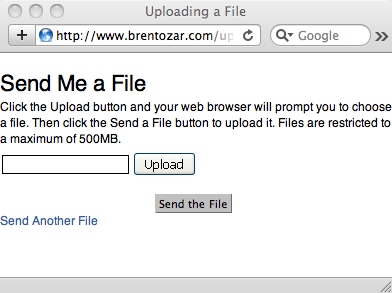
File Upload Example
File Upload Example

Step 3 – edit the parameters in the files – there’s a few parameters for things like the maximum file size you’ll allow, the number of files you’ll allow, and your Amazon S3 credentials.  If you wanna get fancy, you can also edit the form itself – I simplified mine so that it only shows a file upload and nothing else.

Step 4 – upload the files to your web site & S3 – and presto, you’re done.  You can point your clients to the web page whenever they need to send you files.  As users upload files, they’ll be available in your Amazon S3 account – you can download them via the web.  Depending on how you set up your privacy on your S3 folders (aka buckets), the public can also download those files – handy if you want to share files with multiple people.

Good coders might add things like email alerts so that they get an email whenever someone uploads a file for them, or perhaps automatic deletion of the uploaded files after X days.  I’m not a good coder, and I’m quite happy with this setup.  I just tell the clients to let me know after they’ve sent me the files I needed.


The Microsoft MVP Program

6 Comments

I just got my MVP prize package in the mail.  The package is artificially big – it’s 95% cardboard, 5% content – but that’s because the really good stuff doesn’t come in boxes.

Do you know me? That's why I carry this.

MVP awardees get a lot of free software licensing from not just Microsoft, but other software vendors as well.  All of the SQL Server vendors give MVPs free individual licenses for most of their software, but it gets even better.  Remember that the MVP program spans more than just SQL Server – vendors like VMware and TechSmith (Camtasia) support the MVP program too!  There’s no way I could do as much community work without the help of these vendors, because my home lab is totally licensed thanks to them.

MVPs get access to some internal resources at Microsoft – things like webcasts about upcoming software changes or improvements.  I’m hesitant to say that MVPs get access to Microsoft team members, though, because the public can get that same access.  Microsofties won’t give you NDA information, but they’ll come to the public via blogs or conferences and ask for your opinion on how the software should work.  Heck, anybody can just go to connect.Microsoft.com and submit ideas or changes they’d like to see.  I’ve never had a Microsoft person say to me, “Well, I thought your idea sucked, but because you’re an MVP…”  (Actually, they just stop after that first part of the sentence.)  I’m not bashing the MVP program by any means – I’m saying that unlike other vendors I know and love <cough>Apple</cough>, the public can participate (somewhat) in the development process.

The biggest benefit by far, though, is communication with other MVPs.  Your fellow MVPs are interesting people doing interesting things with Microsoft technology.  They aren’t necessarily the smartest or best users of a particular product, but they’re the kinds of people who are willing to talk with you about what they’re doing.  They’re helpful to the community and to each other.

You would imagine that Microsoft, being the vendor that brings us such killer communication tools as SharePoint, Outlook, Exchange Server, Messenger, Office Communication Server, and RoundTable would really pull out all the stops when it comes to helping MVPs communicate with each other.  You would be wrong.  Until recently, we had an NNTP newsgroup server, and now we’ve got an email distribution list.  It’s not the sexiest method of communication, but it works, and I love being a fly on the virtual wall when these people get into passionate arguments about niche features.

If – or when – I lose my MVP status, the one thing I’ll miss is that email list.


How I Make Coffee and Servers

16 Comments

I’ve got a disturbing array of coffeemaking gear:

My Coffeemakers
My Coffeemakers

From left to right:

  • Bialetti Moka – stovetop espresso maker.  Great for making powerful hot chocolates in the dead of winter.
  • Burr grinder – the best way to get very consistent grinds.  The grinders with spinning blades just randomly slice and dice your beans, but burr grinders get all of the pieces exactly the same size.  Probably the best $100 I ever spent to improve the quality of my coffee.  I linked to a different one since mine’s discontinued.
  • French press – produces very flavorful coffee, but it’s a complete pain in the rear to clean.  They have to go through the dishwasher after each use.  Since it doesn’t have a built-in heating element, I have to microwave water first, and the resulting coffee isn’t as hot as I’d like.
  • Krups Moka Brew – the easiest way to brew something that tastes like an Americano, which is an American-style coffee made with espresso and hot water.  Pretty easy to clean, produces a lot of coffee at once, and it has a built-in heater.  That’s a pro and a con – it means the coffee can taste burnt after it sits on the hot carafe for a few minutes.
  • AeroPress atop a Microsoft mug – the AeroPress looks like a gimmick when you first see it, but it produces the very best coffee I’ve ever had outside of a cafe.  Nothing else in my arsenal even comes close.  Big props to Adam Machanic (Blog@AdamMachanic) for telling me about this.  Fast brew times, absurdly easy to clean, great coffee – but only one cup at a time.

The AeroPress produces by far – by FAR – the best coffee, but when I get up in the morning, I fire up the Krups Moka Brew and make a pot.  I sacrifice flavor for ease-of-use, because I need more than one cup and I’m trying to get a lot done in a short amount of time.  I need to feed the dog, take her for a walk, check my emails, cook breakfast – okay, well, assemble breakfast, which usually consists of granola and yogurt.  I want to brew enough for me to have a couple of cups, plus Erika needs a couple of cups, plus a cup to-go for work.

Every now and then, in the afternoon, I’ll brew a cup of coffee with the Aeropress and savor every sip.  The rest of the time, though, I just can’t afford to micromanage my coffee one cup at a time to get it absolutely right.

That’s Why I Love Virtualization, Too

Most of the time, I need to get a database server up and running as easily as possible.  I don’t want to completely sacrifice all semblance of security, performance, and manageability, but I don’t have all the time in the world.  I can’t usually fine-tune every hardware setting like SAN multipathing, network card load balancing, failover protection with clustering, and so forth.  I just need a core set of basic hardware up and running to service the company’s needs.

I deploy a virtual server with a few mouse clicks, and presto, we’re off and running.

If I need high availability, disaster recovery, snapshot backups, or any number of common datacenter features, I just tell my virtualization sysadmin, and they’re handled.  Even better, they’re handled exactly the same way across all of the company’s servers, which makes management easier.  Don’t get me wrong, I still double-check what they do – like Ronald Reagan said, “Trust, but verify.”

When I need to wring every last bit of flavor performance out of a SQL Server, then sure, I build a finely crafted physical server for it.  But the rest of the time, I use virtualization by default, because it’s gotten good enough.

I’m kicking things off on my SQLskills blog with a virtualization series.  Visit me there, or subscribe to my SQLskills RSS feed, or subscribe to my SQLskills posts via email.  Enjoy!


How to Use sp_WhoIsActive to Find Slow SQL Server Queries

SQL Server

SQL Server database administrators need to be able to quickly find out what queries and stored procedures are running slow.  Microsoft includes sp_who and sp_who2 in SQL Server 2005 and 2008, but there’s a much better tool, and it’s completely free.

In this five minute tutorial video, I explain how to use sp_WhoIsActive from Adam Machanic (Blog@AdamMachanic):

My Favorite sp_WhoIsActive Parameters

sp_WhoIsActive has all kinds of parameters, but here’s my favorites. Keep in mind that the more parameters you pass in, the more work sp_WhoIsActive has to do in order to get the data you want from SQL Server’s Dynamic Management Views (DMVs), and the slower it will run:

  • @get_plans = 1 – this gives you the execution plans for running queries.
  • @get_locks = 1 – gives you an XML snippet you can click on to see what table, row, object, etc locks each query owns. Useful when you’re trying to figure out why one query is blocking others.
  • @get_task_info = 2 – if a query has gone parallel and you’re troubleshooting CXPACKET waits, you can figure out what each task in the query is waiting on.

Where to Download sp_WhoIsActive

If you like that, check out sp_BlitzFirst®.

I got sick and tired of users asking me, “Are you doing anything on the server right now? Do you know why the server is slow right now?” So I wrote sp_BlitzFirst®. Here’s how it works:

https://www.youtube.com/watch?v=KEIZ2E6sQnc

You can download it in our free First Responder Kit.


Register for SQLBits in England – Space Running Out!

6 Comments

If you deal with VMware, Hyper-V, SANs, and SQL Server, come check out my pre-conference session at SQLBits in York, England on Thursday, September 30th.  My all-day session is called, “Virtualization, SAN, and SQL Server: The Perfect Storm.”

This will be a fun, intimate session – it’s limited to 40 people max, and we’ve got a few spots left.  Here’s the abstract:

Virtualization, SAN, and SQL Server: The Perfect Storm

Each of these things alone is tough enough to manage, but when you start to combine them, the forecast calls for rogue waves of bad performance.  Metrics like CPU % and disk queue length just don’t mean anything anymore.  No matter what numbers you hand your virtualization sysadmins, Windows admins, or SAN admins, they all say the same thing: “It’s a SQL Server problem.”

Learn how to fight back as Brent Ozar, Microsoft Certified Master, exposes some surprising truths like:

  • What metrics can prove it’s not a SQL Server problem
  • Why you might not want to separate your data and log files onto different drives
  • How to double-check to make sure the other guys are doing their job
  • The crucial configuration choices that can doom your SQL Server performance from the start

By the end of this session, you’ll be able to walk back into your office, gather statistics and configurations, and give your sysadmins and SAN admins the information they need to fix performance problems on their end.

For £450, you get my all-day pre-con session on Thursday plus full days of training on Friday and Saturday too!  Check out the SQLBits agenda, which includes sessions like:

  • Understanding SARGability – Rob Farley is one of the funniest guys you’ll ever meet, and his sessions get rave reviews.  Once you understand SARGability, you’re much more equipped to troubleshoot slow queries.
  • SQLDiag and SQLNexus – these two completely free tools will change the way you do performance tuning.  Microsoft Certified Master Christian Bolton, the lead author of Professional SQL Server 2008 Internals and Troubleshooting, will explain how to use ’em.  His company, Coeo, is even giving away a free Fusion-IO drive during SQLBits!
  • Introduction to Extended Events – this new tool in SQL Server 2008 doesn’t get much press because it’s a pain in the rear to get started with.  Jonathan Kehayias is the man to show you how because he wrote the free SSMS Extended Events Manager, a tool that’s been featured in SQL Server Magazine.

This event has speakers from around the world including Brad McGehee, Buck Woody, Kevin Kline, Thomas Kejser, and more.  This is the cheapest way to see the best people in one place in Europe, and it’s in a fun, relaxed atmosphere where you can have plenty of discussions with the speakers.  To see what the shorter sessions look like, check out one of my sessions from my last SQLBits:

Register now and choose Full Conference, and you can pick my session as your pre-con.  Register fast – we’re running out of seats!


How to Buy Your First Mac

Hardware
53 Comments

So you’re tired of craptastic plastic, and you’re noticing more and more Windows people toting around shiny metal computers? Here’s what you need to know.

Update October 2013 – updated to include the current Apple laptop lineup.

Running Windows On Your Mac

If you’re reading this, you probably make a living working with Windows software, and you’re worried about how it’ll work.  Let’s get that out of the way right here and now with a quick demo video of VMware Fusion:

There’s two products available to help you run Windows in a window, VMware Fusion and Parallels Desktop. Parallels is faster and has more recent DirectX support, so if you’re doing graphics-heavy BI stuff like GeoFlow, get Parallels.  They both work better than you’d expect – you can drag & drop files between OS’s, make the OS boundary disappear altogether, and launch apps across OS’s.

For years, virtualization got a bad rap because it was slower, but today that’s just not the case.  Today, I prefer doing my development and research work in virtual machines because:

  • Bad apps don’t take me down altogether – I deal with a lot of beta and third party software that just isn’t as reliable as it should be.  Now if I have to reboot the guest to install or fix something, I can keep working in email while the guest reboots.
  • It’s easy to deploy a new guest – when I want to play with a new 3rd party tool, I simply copy an existing virtual machine and install the app in the new copy.  If the app leaves a trail of garbage in SQL Server, it doesn’t bother me, because I delete the VM when I’m done testing.
  • It’s easy to work with old versions of SQL – I’ve got separate VMs with SQL Server 2000, 2005, 2008, 2008 R2, and 2012 so that I can test code and take screenshots.  If I need to test how something works between the two, like log shipping or mirroring, I can just boot up both VMs.
  • It’s easy to freeze VMs for demos – Some of my demos involve a SQL Server being set up a certain way, but during my demos, I have a tendency to go offtopic and change things.  Now, if I trash a demo VM during a presentation, I can just restore that one VM’s file from backup.  (More on OS X’s cool backups in a minute.)
  • x64 guests work like a champ – if you need to demo 64-bit VMs, virtualization on the Mac is way, way easier than hassling with running Windows Server on your desktop.

So now that we’re a little more comfortable with running Windows in a window, let’s talk about the hardware we’re going to buy.

The stickers are optional.

This post isn’t about whether or not Apple products are overpriced, and I’m not going to discuss value here.  This is strictly focused on what you should buy and what you should skip.

How to Pick Your First Mac

If your computer never leaves the desk, get a Mac Mini.  It’s a tiny sub-$1000 computing appliance that performs well, is nearly silent, and works with your existing keyboard, monitor, and mouse.  Apple does sell a higher-powered desktop, the Mac Pro, but the cost is astronomical and you don’t need that kind of power unless you’re a graphics designer or video editing.

If you travel every now and then, I recommend the Macbook Pro Retina with the 13″ display and the 256GB SSD for $1,499. (Don’t bother with the processor upgrade.) If your photos, videos, and music add up to more than 100GB, consider upsizing the SSD. While you can indeed buy replacement SSDs from some vendors, this is a different form factor than typical SSDs – you can’t just grab one from Best Buy.

If you travel a lot (like 2 weeks or more per month), get a MacBook Air 13″. It’s not as fast as the Pro, but it’s still really fast, and the battery life is incredible – around 12 hours. You can just toss it in a bag without thinking because it’s so light and it’s built so well. The 13″ has a built-in SD card slot for instantly viewing photos from your camera, whereas the 11″ model doesn’t.

I would avoid buying an iMac for your first Mac.  I like these machines for specialized purposes, but not as entry-level machines.

If you buy either laptop, know that the memory is soldered in and you can’t upgrade it yourself later. I’d max out the memory during the purchase process.

Where to Buy Your Mac

Everything about the Mac experience is different – starting with the shopping.  Apple sets their prices the same across all retailers, but during promotions, retailers can throw in extras like an iPod or a case.  Forget price shopping – shop for add-ons.  Don’t choose stores based on service, either, because your service is handled by the Apple Store.

If you live near an Apple Store, you owe it to yourself to visit.  They’re a completely different shopping experience.  For the most part, employees know what they’re talking about, there’s zero pressure, and they really seem to care.  Spend five minutes talking to a big-box-store employee, then spend five minutes talking to an Apple Store employee, and you’ll appreciate the difference.

No matter where you buy your Mac, you can walk into an Apple Store with it and get help and warranty service.  Make an appointment online for the Genius Bar, Apple’s equivalent of a help desk, and show up with your computer on time.  Expect to wait – it’s pretty much like the doctor’s office.  (Another nice thing about the Mac Mini and the laptops is that you can just carry them right into the store – not easily doable with the iMac or Mac Pro, since those weigh more.)  A Genius will call your name, hook up your computer right there, and work with you to find out what’s going on.

The downside of buying a Mac through any retail store, Apple or otherwise, is that you can’t configure the hardware.  If you want more memory or more storage, you have to buy it online.  Normally I’m anal retentive about exactly how my hardware is configured, but it’s easy to add memory later, and Apple’s memory tends to be overpriced.  Therefore, for your first Mac, I’d recommend visiting an Apple Store to compare and contrast the different models and sizes.

What To Buy With Your Mac

Any big USB hard drive – Apple’s Time Machine is the coolest backup software on the planet, and it’s built right into OS X, the operating system for Macs.  Simply plug in any USB hard drive, and OS X will ask you if you’d like to use it for your backups.  Time Machine manages when the backups happen, and automatically keeps as much history as it possibly can given the hard drive size.  Apple also sells a wireless router called a Time Capsule that has a built-in hard drive.  It’s overpriced, but it’s brain-dead-simple.  If you don’t need a router, though, any USB hard drive will do.  Here’s what Time Machine looks like:

http://www.vimeo.com/14494039

Even better, when it’s time to upgrade to a new Mac, just plug in your Time Machine disk.  OS X will bring over your settings, documents, and get this – your applications too.  Eat your heart out, Windows users.

Apple Magic Mouse – the entire surface of this mouse is a touchpad.  Once you use it, you won’t understand why other mice are so big, ugly, and awkward.  Power users, check out MagicPrefs to do all kinds of tasks without taking your hand off the mouse.

One to One – for $99 for one year, you can have as much personal time as you want with Mac experts at the Apple Store.  They help you get set up, teach you how to use Apple software like iMovie and iPhoto, and give you access to tutorial videos.  If you’re buying a Mac for a non-geek relative who lives near an Apple Store, One to One is the best tech support you could ever get.  I make my friends and family buy this, because it helps ’em get up to speed without calling me every weekend.

AppleCare – this is Apple’s extended warranty.  I get this because life happens.  Unlike some big-box-store programs, though, this doesn’t cover accidental damage like dropped laptops.

Things to avoid – MobileMe and iCloud synchronizes files, emails, and appointments across multiple Macs, iPhones, and iPads.  I haven’t had good luck with it, and there’s better tools out there. I highly recommend Dropbox.

Settings to Change

If you’re coming from a Windows world, some of the default Mac settings won’t make sense.  Click on the Apple at the top left of the screen, click System Preferences, and make a few tweaks to make your life easier.

Go into Expose & Spaces.  Whenever you move your mouse into a corner of the screen, Expose makes things happen automatically.  Mine are set like this:

  • Top Left – Application Windows (shows all windows from the one app you’re using now, so if you’ve got several Word docs open, you just see those)
  • Top Right – All Windows
  • Bottom Left – Start Screen Saver
  • Bottom Right – Dashboard

Then click the Show All button at the top, and you’ll be back to the main System Preferences window.  Click Displays, then click Arrangement.  You don’t have to change anything here, but if you ever do presentations with your Mac, you’ll want to remember this screen.  The box “Mirror Displays” is checked by default when you plug in a projector, and you need to uncheck that if you want to use PowerPoint’s presenter display on your Mac.  (You do.  It’s fabulous.)

Click Show All again, and click Keyboard, Keyboard Shortcuts.  At the bottom, change the Full Keyboard Access to say “All controls.”  Otherwise, when you tab through a menu, it’ll skip some controls.

Click Show All, then Trackpad.  Enable “Tap trackpad using two fingers for secondary click,” and that’ll give you the equivalent of a right-click on the touchpad just by using two fingers instead of one.  Us Windows folks love right-clicking.

The Built-In Applications from Apple

OS X includes a few applications that have some features you might not expect, and some you might want to avoid.

Mail and iCal – does what it says on the box, but frankly, it can’t hold a candle to the Exchange/Outlook combo in any category except speed.  It loads blazing fast, searches fast, and lets you down fast.  The calendar integration sucks, you can’t see your coworkers’ free/busy time, and address lookups aren’t all that good.  If you don’t use Exchange as a mail server, though, you’ll be satisfied with Mail.

iPhoto – plug in your camera, and the Mac vacuums your photo into this slick tool.  It automatically recognizes faces once you’ve named ’em the first time, recognizes places if your photos have geotags (like the ones embedded into iPhone photos), and can even upload your photos to Flickr or Facebook.  That last one doesn’t work too well in my opinion – I just want my entire photo library synced with Flickr or Facebook, but that’s not an option.  You have to specify which events you want uploaded.

DMGs – this isn’t an application per se, but DMG files are Disk iMaGes: packaged files that contain an equivalent of a filesystem, like an ISO file.  This is how Mac software makers distribute their stuff.  Double-click on the DMG, and your computer suddenly has another disk attached.  The software is on the disk.  Mac applications are different, too – they’re often just the one “file”.  Drag that file into your Applications folder, and presto, it’s installed.  Tired of it?  Just delete it.  Some vendors still distribute installers – particularly tools that need system integration or tools that install their own automatic updaters.  Here’s how DMGs work:

http://www.vimeo.com/14489697

Quick Look – in Finder (the equivalent of Explorer), hit the space bar and you can preview any file.  Preview is such a lame word, too, because this thing is a monster – it instantaneously loads Excel files (complete with tabs), huge PDFs, movies, you name it.

iMovie, iDVD, iWeb – iDon’tUseThese, and iHaveNoIdeaIfThey’reAnyGood.

Applications That Just Work

Many of the tools you already use every day work fine on the Mac, including:

  • Chrome and Firefox – and every plugin I’ve ever used
  • Microsoft Office – you can open anybody’s Word, Excel, PowerPoint, and Publisher files, but Access and PowerPivot users are out of luck.  You’ll need to run a Windows virtual machine for those – more on that below.  If you work for a big company that has a software agreement with Microsoft, go to your sysadmins and say, “Go to TechNet and download me a copy of Microsoft Office for the Mac.  Our Enterprise Agreement includes home use rights, and I just bought a Mac.  You can download the bits right now without paying anything.  Kthxbai.”  That Enterprise Agreement stuff may not be correct for your company, but just mentioning all these keywords makes it likely that they’ll take you seriously and go find out.
  • iTunes – love it or hate it, if you’ve got an iPod or iPhone, you’re already used to this.  The good news is that it’s way faster on Macs than Windows.
  • Remote Desktop – you can use Microsoft’s client, or CoRD.
  • Skype – and if you’re a serious video chatter, you might like the seamless FireWire camcorder integration.  I use a Canon ZR960 camcorder for my instant messaging & webcasts because the quality’s so much better than typical USB webcams.
  • WebEx – you can create and host meetings complete with audio & video.  Microsoft LiveMeeting, not so much.

Applications to Download First

Once you’ve taken the plunge, you’ll want to install software.  Here’s the software I use most often:

Edit files with Textmate – elegant text editor that hides all of its functionality in hotkeys and slideout menus.  Comes with all kinds of syntax highlighting and code formatting bundles that await your discovery and mastery.

Burn DVDs with Disco – if you work with Windows machines a lot, you probably need to burn CDs and DVDs from ISO files. Disco does that really well, and has brain-dead-simple usability.  I demonstrated it in the DMG video earlier in the post.

Note: Textmate and Disco all have wildly different user interfaces.  There’s no standard UI in the Mac world, but what I’ve found is that the very best applications have user interfaces that are perfect for the task at hand.  After using TextMate and Disco, every other editor and burner seems bloated and stupid.

Dropbox – sync your files through the cloud.  Dropbox installs as a service and creates a Dropbox folder in your home directory.  Anything you save in there is automatically uploaded to the cloud, and you can access it on any of your Dropbox-equipped devices – Windows, Mac, iPhone, iPad, Android, Linux, etc.  You get 2GB of storage for free, and you can pay for more.  Some apps are Dropbox-enabled, so they know how to access files through it natively.  For example, the iPhone/iPad text editor Elements just creates an Elements folder in your dropbox, thereby giving you a text editor that always has access to all the same files, anywhere.  I don’t try to sync all my files – just docs for things I’m actively working on, plus my most frequently used presentations.

Cyberduck – FTP client that also handles Amazon S3, WebDAV, Google Docs, and more.

Flip4Mac WMV Player (free) – you know how you used to hate Quicktime movies whenever they popped up on your Windows machine? Yeah, about that – now you’re going to hate WMV movies. The free Flip4Mac WMV Player at least plays ’em, but they suck just like Quicktime movies suck on Windows machines.

Pro Tools to Get Later

Use strong passwords with 1Password – this app creates a toolbar button in your web browser, generates strong passwords for you, saves them, and synchronizes them across your Macs, iPhones, iPads, and even Windows machines.  I love having a different strong password for every web site, plus having access to all of them everywhere.  It’s not cheap, but the usability blows the doors off open source competitor Keepass.

Rate your music easier with I Love Stars – puts a little display in your tray, and you can rate music quickly.  I leave iTunes running with music all day long, and when it plays a song I love, I like to rate it.  I have a separate automatic playlist for highly rated music.

Record desktop movies with ScreenFlow – if you want to record tutorial videos showing how to do something like the one I did above, you can’t do it easier than with ScreenFlow.  Camtasia also has a Mac version.  Either way, host your videos at Vimeo, which allows you to upload high definition videos.

Who Would Go Through All This?

The easiest way to answer this is by naming some of the Microsoft SQL Server MVPs who’ve made the switch:

If you’ve got questions about what the switching experience is like, feel free to ask in the comments.


Why I’m Disappointed in the PASS Election Process

#SQLPass
79 Comments

A little time has passed since we found out PASS didn’t allow Steve Jones (Blog@Way0utwest) on the ballot for the Board of Directors election, and I’ve heard a lot from friends of mine on both sides.  There’s a lot of passionate disagreement when somebody who’s done all this can’t make the cut:

  • Steve Jones helped build SQLSaturday as a regional event, something PASS had failed at repeatedly
  • He runs SQLServerCentral, the biggest SQL Server community online (blows the doors off SQLPass.org in more ways than I can count)
  • He’s led the way by blogging and recording webcasts several times a week for years

Steve leads by example, full stop.  It seems incomprehensible that a man this community-oriented can’t make the PASS Ballot, but let’s take a step back.  Let’s pretend this wasn’t a community election at all, but a database outage.  Let’s put this discussion in a different light, an imaginary conversation between a database administrator and the boss:

Boss: “I just got a call from the users.  They’re screaming because one of their favorite databases is down.”

DBA: “Yes, but five other databases are up.”

Boss: “What?!?”

DBA: “They’re great databases, and I think you’ll find they’re – ”

Boss: “So?  The one they want is down.  What’s the story?  Is it corrupt?”

DBA: “No.”

Boss: “Well, what happened?  Was it some kind of accident?”

DBA: “We followed a process.  Here’s a copy of it.”

Boss: “Where’d you get this?”

DBA: “From the board over there.  It’s been posted for a long time.  You could have said something before we followed it.”

Boss: “What?  And you just followed it word for word?  Didn’t you stop to check it or ask for help from others in the community?”

DBA: “The team got together and discussed it quite a bit privately, but we couldn’t change the process.”

Boss: “You couldn’t change something?  You?  Last week a vendor tried to get you to install software using the SA account, and you flat out told them no, even though it was a part of their written process.  Why did you follow this one?”

DBA: “I can’t tell you that due to security and privacy reasons, but let’s just say that database wasn’t the right fit for us.  We really believe that database should not have been part of the organization.”

Boss: “Wait – didn’t we have a problem around this time last year when you followed a process?”

DBA: “Yes, but let’s focus on all the improvements I’ve made.  And I’m here voluntarily, you know.”

See how ridiculous this sounds?

If wanting Steve Jones to bring transparent communications to PASS is wrong, I don’t want to be right.  I’m trying to see both sides, but I just don’t get it.  I have personally asked Steve repeatedly to run for the Board because he has a solid track record of doing things that PASS needs to do – not just talking about them, but doing them.  I went so far as to tell a Board member, “If you don’t believe in Steve’s ability to lead the community, it’s not Steve’s problem – it’s yours.”  I really wanted PASS to learn and grow with Steve’s help.  I am so bummed out that PASS chose not to let Steve on the ballot, and I care a lot about this issue.  The only way to express my passion is with a 1980s music video:


Underemployed Developers: Meet Project Phoenix

3 Comments

A few months back, Microsoft gave MVPs a few MSDN Ultimate subscriptions to pass on to community members, no strings attached.  I quietly gave mine to a few deserving folks who I thought could be future MVPs, but Arnie Rowland (Blog@ArnieRowland) had a better idea.

Arnie’s Project Phoenix encourages developers to propose a software project for a non-profit agency, school, or church.  Non-profits can also submit their own proposals, and Arnie will hook up developers with those projects.

Phoenix and Question Mark

Every week, Arnie will select one developer & project to get a bunch of cool benefits including:

  • Microsoft Visual Studio Ultimate with MSDN subscription
  • Pluralsight On-Demand .NET Training Library for 3 months
  • 3 APress books of the winner’s choice
  • 3 O’Reilly ebooks of the winner’s choice
  • ComponentOne Studio Enterprise
  • 2 Microsoft certification exams
  • Quest Toad for SQL Server
  • Plus some developers will be awarded tools from DBSophic, DevExpress, RedGate, and more.

Working with a nonprofit is a great way for you to get experience, references, and community exposure when you’re struggling to get to the next rung of your career.  Nonprofits really appreciate your help, and they need every bit of tech savvy they can get.  I applaud Arnie’s vision to connect nonprofits, developers, and vendors to create something that benefits everybody.  Arnie, you’re an inspiration to all of us.

If you know an unemployed or underemployed developer, encourage them to visit the Project Phoenix page and volunteer.


Help me stop a jerk from abusing #SQLHelp

14 Comments

Aaron Nelson (Blog@SQLVariant) had an excellent idea about a year ago.  Anytime someone needed help with a SQL Server question, they could include the phrase #SQLHelp in the tweet.  Community members set up a search for that term in their Twitter tool, and whenever the questions came in, we would answer.  Here’s instructions on how to use #SQLHelp.

It’s been a raving success!  It’s one of my favorite things about the SQL Server community.

And then somebody started peeing in the pool.

The Twitter account @SQLPASSPR isn’t really what it seems.  It’s a fake account that’s trying to shine the light on what the anonymous person thinks is bad goings-on at PASS.  Ironically, even though they’re trying to expose something, they’re trying to do it anonymously.  They don’t have the guts to come forward under their own name.

Even worse, they’re spamming the #SQLHelp hash tag, so now they’re interfering with community members trying to help each other.  I had absolutely no problem with them until they started messing with our #SQLHelp tag.

I need your help to make them stop. If you’re on Twitter, go to @SQLPASSPR’s Twitter page, click the gear icon, and click Report SQLPASSPR for spam:

Reporting SQLPASSPR for spam

If enough of us do this, they’ll get suspended.  I wish I didn’t have to do this, because I really don’t want to shut them down completely – if they want to talk politics, that’s completely okay – but I can’t have it polluting the #SQLHelp tag.

If you know who’s doing this, talk some sense into them.  When word gets out who it is, they’re sinking their own career by polluting #SQLHelp.  If they want to burn bridges with PASS, that’s one thing, but actively trashing a community institution is something else together.

If you’re the one doing this, you’re doing it wrong. You let your anger about PASS blur your common sense and good judgment.  Write up a blog post or a web site with your message, make it easy for community members to send the link to each other, and let social media work for you – instead of against you.


PASS Board of Directors Election 2010 #passvotes

#SQLPass
19 Comments

The Professional Association for SQL Server holds annual elections for the Board of Directors.  The Board decides things like:

  • Where to hold the annual PASS Summit – for the last couple of years, it’s been in Seattle, and the Board decided to keep it in Seattle for another few years.  I blogged about my frustrations with the PASS Summit location here.
  • Whether PASS should start a new magazine – in 2009, with magazine businesses failing left and right, PASS decided to launch an online magazine.  You probably didn’t hear about it because the content was locked behind a walled garden, far away from search engines.  Volunteers gave their time and PASS gave its money to get this thing off the ground only to give up and close it down a few issues later.  Is a lack of volunteer resources really a problem?  Given that the SQL Server Standard page hasn’t even been updated to reflect that it’s closed, so I’d say yes.  I blogged about my frustrations with the hidden SQL Server Standard content here.
  • How PASS HQ should help chapters – I launched the Virtualization Virtual Chapter last year, became the first virtual chapter to get funding directly from sponsors, and busted my hump to get it to work.  I became completely disenchanted when the PASS Board contact for virtual chapters couldn’t be bothered to phone into their own scheduled meetings for virtual chapter leaders.  I didn’t blog about this because I hoped it would get better, and in a sense it did – they stopped having the meetings, sending a clear signal about the worth of chapters.
  • Launching PASS’s own social network, the PASSport – apparently because PASS could do a better job at LinkedIn, FaceBook, or Twitter, they put resources into launching PASSport, a social networking program.  Meanwhile, the community launched the #sqlhelp tag on Twitter with zero resources and accomplished much more.
  • Starting blog syndication – I couldn’t speak out against this when I was Editor-in-Chief of SQLServerPedia because I would have sounded like I was bashing competition, but I was convinced there was no way this would succeed.  Managing a blog syndication tool is seriously hard work, not just something you slap together in code and walk away from, and I knew this would be another one of those shiny objects that distracted PASS momentarily.  Today, with all of the killer blog content out there, the PASS syndicated feed is averaging 1-3 posts PER MONTH.  SQLServerPedia syndicates more good content per day.

I mention those things in particular because they’ve been hot-button issues for me.  I’ve watched PASS do these things, and I just shook my head.  I didn’t understand why the Board would make decisions like this, and I looked forward to election time so we could set things straight.  I felt that the existing leadership was making some gambles that just didn’t make sense in the year 2010.

I couldn’t wait for election time so I could help make a real difference in how the Board operates.

Meet the Board of Director Candidates

So let’s meet the candidates in alphabetical order:

Here’s where it starts to suck for me: all of these guys are good guys.  I can’t wave my hands and say, “WE CAN’T ELECT THIS GUY, HE’S AN IDIOT!  HE’S NEVER DONE ANYTHING FOR THE COMMUNITY!”  All of these guys have a long history of volunteering for the community, doing good work at the local and regional level.  I respect their accomplishments and their technical knowledge.

And it gets worse – this isn’t even everyone who tossed their hat in the ring!  The PASS Nomination Committee filtered out a longer list of candidates to whittle it down to five, and along the way, Steve Jones (Blog@Way0utwest) didn’t make the cut.  Stuart Ainsworth (Blog@StuartA) served on the Nomination Committee and blogged about why Steve didn’t make the ballot.  I applaud Stuart’s honesty and transparency, and there’s a great discussion going on in the blog comments there.  That means there’s two things I’m fired up about – Steve not making the ballot (because I would personally endorse Steve’s candidacy in a heartbeat), and picking the right candidates.

Who I’m Voting For

The things that matter most to me are:

  • Dedication to communication – a proven history of letting us know what they’re up to via blogs and Twitter, because I want to know what PASS is up to
  • Dedication to transparency – anybody who says the word “privacy” in relation to a community organization immediately gets a big -1 in my book
  • Moving the Summit around to let more people experience this killer event
  • Using existing community tools, not reinventing new ones thereby saving PASS resources for things that really matter
  • Not focusing on meaningless metrics because membership numbers are meaningless to me – I want quality, not quantity
  • Not implementing a certification program because these are hellaciously expensive to build, and would bankrupt PASS
  • A willingness to rock the boat because I respect people who stand up for what they believe in, even if that opinion isn’t popular

Because these things matter to me, I’m voting for Allen Kinsel, Andy Warren, and Geoff Hiten – but that doesn’t mean Douglas or Mark aren’t worth votes.  They’re great guys.  It just doesn’t mean my priorities line up a particular way.

Who You Should Vote For

You shouldn’t just vote for Allen, Andy, and Geoff because I said so.  You should ask questions about what’s important to you, and hear what the candidates and other people have to say.

Here’s how: go to the discussion forums at elections.sqlpass.org and start asking questions.  You have to be logged in to post – click Login at the top of the page.  I’ve helped by starting out several threads including:
You can start new threads asking your own question, and you can discuss your thoughts in other people’s question threads too.  I’ll edit my question posts to point to specific candidates’ answers to make it easier to navigate the forum replies, because I bet these will get active pretty quickly.


Guess Who Got My Old Job at Quest?

13 Comments

Today, I’m thrilled to see that my very good friend Jeremiah Peschka is the newest community guy at Quest Software.  (They’re going to say he has a “new” job, not “my” job, but that’s because the Quest folks are very smart and they tailor the job to fit the person, not the other way around.)  Note that I’m not getting paid to write this – I’m not affiliated with Quest anymore, but I’m covering this because I believe it’s more evidence that the job market is continuing to change in a way that will affect you – yes, you.

Jeremiah’s new job is important to you for two reasons.  First, you should be my friend, because my friends get cool jobs.  No, wait, not really – people who blog, tweet, and volunteer for PASS get cool jobs. These things don’t cost money – they make money.  I’m almost ashamed to say this again because I keep repeating it, but I feel so passionately about it, so here it comes: blog, tweet, and present if you want a better job.

Second, Quest is signaling that they’re still committed to giving back to the community.  After I left, it would have been all too easy for the bean counters to say, “We poured all this investment into Brent and he left us anyway.  We won’t do that again.” Instead, they hired another community guy, indicating that they must have gotten some ROI out of me, and they want to repeat the experiment again.  Companies can make money by having a credible presence in the community, and that’s where you come in.  The SQL Server community has a great reputation for being lively, helpful, and open.  Vendors get involved by sponsoring events and encouraging their staff to give back:

  • Quest Software – Jeremiah Peschka, Kevin Kline
  • Red Gate – Brad McGehee, Steve Jones
  • Confio – Tom LaRock
  • SQLskills – me

But there’s more companies servicing the SQL Server market – more software vendors, consulting companies, hosting companies, and service providers.  Quick – can you name five of them?  No?  Maybe it takes you a few minutes to think of more names?  Wonder why?  Maybe because they’re not as involved with the community.

Over time, more companies are going to notice that giving back to the community results in higher revenues.  When they do, they’ll want to hire active community members to represent them.  You should be ready for them by having an active online presence with a great reputation that they’ll see as worth an investment.

Look Ma, No Cars
Look Ma, No Cars

In 1960, architect Morris Lapidus redesigned Lincoln Road in Miami Beach.  He closed off the street entirely, turning it into one of America’s first pedestrian malls.  When he was asked why he closed the street, his answer was simple:

Cars don’t buy things.  People do.

Today, in the age of global corporations, we’ve forgotten this again.  Marketing efforts have been focused on bland corporate magazines that supposedly encourage company executives to make decisions.  This worked for a while, but now there’s a better way.  Social media – the tools that connect one person to other very similar people all over the world – are bringing us back to Lapidus.

Companies don’t buy things.  People do.

Even at the largest companies, buying decisions are made by people, and people want to deal with other people they trust.  In the past, big company decisions were made in country clubs, golf courses, and expensive dinners.  Today and tomorrow, these decisions are made right here – in blogs, on Twitter, on Facebook, where one person (you) builds a relationship with someone else (me), watching how that person treats others and conducts their business.  I show you what I do, and I show you how I do it.  As a result, every dollar I make is because someone read my blog or watched my webcasts and said, “I need Brent’s help, and I know I can trust him.” I switched into consulting because I could make more money directly – bringing in business to my own bank account instead of a company’s – but notice that Quest knew they had to keep building these personal community relationships.

The Referral Engine
The Referral Engine

Ten years ago, the Cluetrain Manifesto stated that markets are conversations.  Companies need people to have these conversations with customers to create sales.  In a perfect world, products would be built in a way that encourages customers to have these conversations with each other – for example, good multiplayer games build in social networking tools that let you invite your friends to play along.  Customers become salespeople. Today this idea has gathered mainstream support, and new books like The Referral Engine by John Jantsch explain the practical mechanics of pulling it off.  (Great book for consultants, by the way.)

SQL Server software, on the other hand, doesn’t have any social networking built in, so no matter how much you like a particular product, there’s no easy way to get your friends involved and spread the word.  Sound ridiculous?  Well, on SQLCruise, one of our games was a Hairy Execution Plan Contest, and it got me thinking.  Wouldn’t it be cool to have an SSMS tool that let you instantly post execution plans to Twitter?  You could show off the scariest plans you’d ever seen, show your before-and-aft tuning results with pride, or just ask for help easier.  All work is social, and in making it social, we start conversations and open doors to sales.  Consultants could jump in and say, “I’ve got some free time – I’ll connect in and help you fix that for $X.”. You could see the consultant’s reputation via their social media scores (blog volume, tweet history, StackOverflow score, etc) and know immediately if they’re trustworthy.

The job you really want doesn’t exist yet, but it will, and you have to prepare now to get it. Three to five years from now, every company will be closely involved with the community to build up their online relationships.  We’ll have more of these social tools that grease the wheels of commerce, letting individuals jump straight into conversations and make money.  You have a limited window of opportunity to get in and blaze a trail.  No matter what you’re doing for a living today, get out there and start building your online presence.  Companies are going to want your help reaching and teaching other people just like you, and your online presence will be worth a premium in their rush to start conversations.

Or think of it this way – nobody stays in a job forever, so wouldn’t you like to be the one to get Jeremiah’s job when he moves on?


Stop Using Twifficiency, You Bozos

24 Comments

Every few minutes, I see somebody tweet something about their Twifficiency score.  Now, I don’t have a problem with shallow people who want to compare their metrics with others – okay, maybe I do – but let’s take a step back for a second and look at what’s happening when you use that tool.

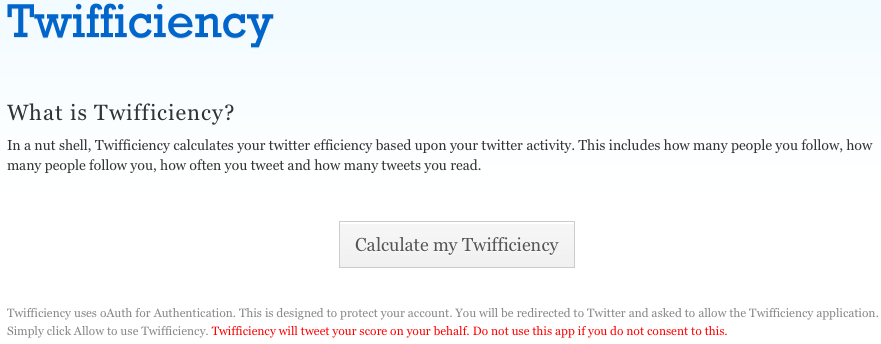
When you first visit Twifficiency.com, notice the warning at the bottom of the page:

Twifficiency Warning

The warning states, “Twifficiency will tweet your score on your behalf. Do not use this app if you do not consent to this.”

They’re not going to give you another warning – they are going to tweet for you.  This will piss off your followers because the rest of us truly don’t care about your Twifficiency score.  We may not even care that much about you, and posting vain metrics is a surefire way to get us to care less about you.

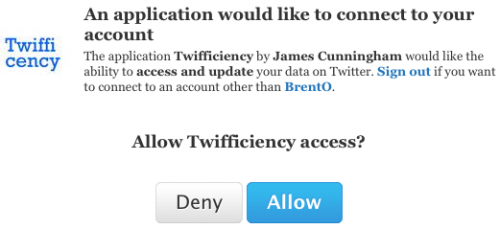
Next up, when you click that “Calculate my Twifficiency” button, read the warning Twitter gives you:

Twitter Warning
Twitter Warning

This gives Twifficiency.com the right to do things with your account, like post messages, follow people, change your profile, you name it.

Are you really comfortable letting a complete stranger do absolutely anything to your Twitter account just to get a meaningless metric?

Because if so, I’d like you to send me your Twitter login info, and I’ll be happy to give you a really cool random number.

When I see a Twifficiency tweet from someone, my first thought is, “They don’t take their own data seriously – there’s no way I’d hire them and let them touch my company’s data.”


GTD: Why Things Have Been Quiet Around Here

20 Comments

A few months ago, I had The Idea.  I wanted to conduct SQL Server training on a cruise ship.  I emailed a few buddies and offered to start a company called SQLCruise with them, and out of three friends, only one could say yes.  I don’t have anything against the two who said no.  I knew exactly how they felt – one of them came to me a few months earlier, had a killer idea for a company, and I had to say no because I didn’t have the time myself.  I said no to all kinds of things lately, including writing blog entries, because with the job change, I just didn’t have the time for the last several weeks.

But what does “having the time” really mean?  We’re all overworked – how can anybody have the time for anything new?

I use a system that means at any given moment, I am completely comfortable that I am doing exactly the right thing for that moment.  It also means that anything I’m NOT doing can be safely ignored.  It just doesn’t matter, because it’s not #1 right now, and I can only do one thing right now.

The Other Good Book
The Other Good Book

David Allen’s task management philosophy is detailed in his book, Getting Things Done.  It’s a deceivingly simple set of guidelines that, if followed, will let you feel completely at peace with your task choices.  I hate bullshit self-improvement books.  I don’t listen to hypnotism tapes.  I don’t attend cheerleading seminars.  But GTD – I just can’t imagine being successful without it in my life.

Right now, as I read this, I’m sitting on an airplane, blogging, and I know its exactly the right thing for me to do.  I’m disconnected from the web, so I pulled up my Disconnected-Work task list and started chugging through tasks.  I reviewed a client’s performance data, wrote a blog post about my experience running SQLCruise, and then started this here post about priorities and choices.  When I land and get to a hotel with Internet access, I’ll switch contexts and hit my Connected-Work task list.

At around 5PM, when I’m not on the road, i leave my home office and my tasks behind.  I walk Ernie (our dog), get the house ready for Erika’s return from work, and leave the workday problems behind.  I’ll still check email from my ozone when we’re not doing anything, and I’ll respond to quick questions, but I won’t do work.

And I won’t care.

I won’t stress out about things I have coming tomorrow, won’t get worried about what a client’s server is doing, won’t work late trying to “get ahead” – because there’s no such thing.  As a knowledge worker, I’m going to be behind for the rest of my life.  The better I am at accomplishing stuff, the more work people will give me.  At 5PM, I have to change contexts because I won’t ever be caught up in my home life either.  There’s always more things I should be doing at home, or just flat out relaxing.  I don’t want to feel guilty while I’m just hanging out with Erika, watching Project Runway or taking the dog to the park.  There’s nothing wrong with these lazy habits.

Relaxing keeps you fresh.  Relaxing means you have spare capacity – and if you suddenly need to sprint to accomplish something important, you can work harder for a while to take advantage of opportunities.

When opportunities (or more often, assignments) come up, I make two decisions.  I put them in a context (a to-do list organized by where I’ll do the task, like at work, at home, out shopping, at budget time, etc) and assign them a priority.  My priorities are High, Medium, or none, and I only put something in High or Medium if I think I’ll accomplish it within the next 1-3 weeks.  If I won’t finish it that fast, then I’m not going to bother picking an exact order.  Instead, I go back into my task list every Friday to see which tasks need to be deleted or reassigned to someone else. Some tasks just never get done, and eventually get deleted when they’re no longer relevant.

While Tim and I were organizing SQLCruise, I had a task list with a SQLCruise context.  I worked on those tasks between waking up and going to work, and then during my lunch hour.  In a perfect world, I would have accomplished every task on the list before we set sail, but this isn’t a perfect world. (I got paid to take a cruise, so it’s close to a perfect world, though.). Here’s what my task list looked like after the cruise:

To Doos
To Doos

Even today, there’s still plenty of work that would have improved the quality of the cruise for the attendees, the sponsors, or myself.  I just couldn’t do it in time – and that’s okay.  I’m at peace with that.  (Thankfully, some of them even took care of themselves – the Hilton Garden Inn found my laundry and shipped it to me, and we got class photos on formal night.)  The only way I could have pulled off every task was to let work intrude into my time with Erika & Ernie, to work less, or to sleep less.  I already let my work intrude into Erika’s time during the lead-up to the cruise, and my relationship with Erika suffered.  If I’d have worked any more, I probably would have lost her!  As a knowledge worker, I have to be comfortable with letting tasks go undone – or losing touch with the people I love.

Getting Things Done in Key West

Contexts and priorities are important because they let you wall off portions of your life.  When you get the opportunity to do something cool, you have to know where it ranks in relation to everything else you’ve already said yes to, including your family.  I know that at 5:30PM, there is nothing more important than me greeting Erika at the door and giving her my undivided attention to find out how her day went.

Inside a context, when I say yes to something and prioritize it, I need to know that it’s the most important thing I can be doing at that moment in time.  That’s where GTD’s bigger philosophies like 50,000 foot lists come into play.  For more about how it works, check out David Allen’s book Getting Things Done.

That’s why some of my close friends said no to SQLCruise – they had already made big-picture choices and commitments to balance their work and life.  I could never be upset with people who say no to things – I applaud that word no, and it’s the key to keeping yourself and your loved ones happy.  I told my blog no for a while, and I’m looking forward to ramping back up.


SQLBits Registration Open – great UK conference

6 Comments

I’ve blogged about the What, Where, and Why of SQLBits, and hopefully I’ve got you all psyched up about attending this really reasonably-priced conference.  Now’s your chance to get in: SQLBits registration is now open.

You can register for:

  • Full 3-day Conference (£350 now with the early bird discount) – Thursday, Friday, and Saturday.  You can choose from 7 really good pre-conference sessions on Thursday including mine on virtualization, Buck Woody on career development, Rob Farley on fixing queries, and more.
  • 2-Day Conference (£125 with early bird discount) – Friday and Saturday.  You don’t get the pre-con sessions on Thursday, but this is still an amazing deal for what you’re getting.
  • Saturday Only (Free!) – seriously, people, why would you not register for this?  It costs less than the shirt on your back, and believe me, it’s worth more.

Register for SQLBits now.