Scaling up or scaling out?
30 Comments
When you need SQL Server to handle more load, there’s two big-picture ways to do it:
- Scale up – use a more powerful SQL Server
- Scale out – use more SQL Servers
Quick disclaimer first – before you try either of these solutions, the easiest thing is to circumvent the whole problem – don’t ask SQL Server to handle more load. Tuning your existing queries, schema, and server settings is almost always faster and cheaper than scaling up or scaling out. For today’s discussion, though, I’m going to assume you’ve already tuned the bejeezus out of your existing SQL Server setup and you’re worried about running out of options. Today, we’re going to focus on scaling up.
Scaling up means using a SQL Server with more oomph – more CPU power, more memory, or more storage throughput.
You have to fix the right bottleneck. Don’t go writing checks to hardware vendors without knowing the real thing holding back your server. SQL Server 2005 & newer track the bottlenecks for all queries, all the time, and they’re yours to discover by querying wait stats. Glenn Berry’s diagnostic queries are a useful tool for this job because they’re well-commented – you can run his queries step-by-step, read the comments, and understand what your SQL Server is telling you.
If Memory Is Your Bottleneck
If your bottleneck is memory, the good news is that memory’s easy to scale. Scaling up memory is one of the easier scaling solutions because in most cases, your boss didn’t max out the memory when he originally bought the server. The max amount of memory is usually leaps and bounds more expensive than the second-highest amount of memory. Take these memory upgrades for an HP DL785 server from Crucial:
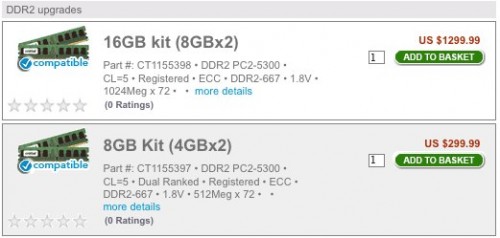
16GB of memory is $1,300, and 8GB is $300. To double your memory, you have to spend four times as much. The good news is that memory prices drop over time, so by the time a server is a year old, it’s often more cost-effective to go back and double the memory. Unfortunately, the older a server gets, the reverse happens – it’s harder to find warranted memory for a long-out-of-production server.
If you can fit your entire database in memory, plus space for sorts & joins, you can get away with a cheaper IO subsystem. This is the approach StackOverflow takes with their database servers. The challenge is that the moment your data stops fitting in memory, performance falls off a cliff. Queries that used to fly through memory suddenly crawl because they have to fetch data off disk, which is exponentially slower than moving data around in memory. You have to stay keenly aware of your memory metrics and be willing to write checks to support new database tables and indexes, adding memory as you need space for data.
Every server has a maximum amount of memory that it can handle. Once you hit that max, you have to upgrade to a newer server, typically one with more memory slots. Physically small servers (like 1U rack mount pizza boxes) have a limited amount of real estate devoted to memory slots. Larger servers have more space for memory slots – but they also have more CPU sockets as well, and that’s where even more money comes in.

If CPU Power Is Your Bottleneck
If your bottleneck is CPU power, brace yourself to write big checks. Scaling up works fairly well from one CPU socket to the four-socket tier, but once you break past four CPU sockets, you’ll be spending significantly more on hardware. Getting an eight-CPU-socket server is usually much more than twice as expensive as a four-CPU-socket server.
CPU scaling challenges have these phases:
- Replace the existing server with one having the same number of sockets, but more modern processors. Thanks to Intel and AMD pumping out the jams, we can usually get dramatically faster CPUs every year with more cores.
- Switch from a 2-socket server to a 4-socket server. At this jump, we double our licensing costs, but we’re still using commodity off-the-rack hardware.
- Switch from a 4-socket server to an 8-socket server. Suddenly, the pricetags get serious. 8-socket servers are enterprise-only. Thankfully, though, we can still use SQL Server Enterprise Edition.
- Switch from an 8-socket server to a monster. Now we’re in the price tag tier where server manufacturers say, “Please call for details.” It gets worse, though – starting with SQL Server 2008 R2, database servers with more than eight CPU sockets require SQL Server Datacenter Edition at roughly $60,000 per socket. That’s half a million dollars just for the SQL Server license.
The first few steps are easy, but we have to figure out a solution before we get to phase 4. Thankfully, the multitudes of zeroes involved make it easier for managers to justify fixing bad code. If we have to choose between buying a Datacenter Edition class server or hiring a couple more programmers to fix the code, sometimes it’s easier to do the latter. (This is often where I come in – managers are out of options before they have to write a very, very large check, and a week of me performance tuning can help avoid a seven-figure purchase.) Speaking of seven-figure purchases….
If Storage Is Your Bottleneck
When dealing with a server that only has local storage (not a Storage Area Network), scaling storage throughput is the opposite of scaling memory. Your boss probably loaded the server up with storage throughput already. He might have gotten cheap with the quantity (meaning, bought 146GB drives instead of 300GB drives) but in most cases, swapping in drives twice as big isn’t going to make the server twice as fast. There are some niche cases where we can isolate a poorly designed database to its own drives, but that’s the exception rather than the rule.
If all of the server’s drive bays are filled up, there are three solutions to improve storage throughput:
- Add storage that bypasses the drive bays altogether – like Fusion-IO or OCZ solid state drives on PCI Express cards
- Swap out the storage for solid state drives – like Intel X-25 consumer drives as StackOverflow is doing
- Reduce the amount of storage throughput required – by tuning indexes, queries, or procedural code
Notice how that last one keeps sneaking in? Over and over during scaling exercises, the cheapest answer is manpower. It’s so often safer to make code improvements rather than introduce new pieces of hardware or software into the mix. As a DBA, whenever I did performance tuning, I made sure to point out to my management that my work directly saved us from buying more hardware. Sometimes I would even avoid performance tuning altogether until the project managers and developers asked for my help. They’d say, “Brent! Our CPU use on the SQL Server is constantly high! What should we do?” That gave me the ability to answer with a choice: they could either spend $X upgrading to new hardware, or they could give me two weeks of uninterrupted time to tune the application. After those kinds of interactions, managers understood that my time really was worth money, and it helped to free up my agenda to do what I love most – performance tuning.