Blog

The Twelve Days of SQL Series

17 Comments

The holidays are a time for giving back, and several of us are giving back to the community this year by recognizing some of the best blog posts of 2010.

Happy Holidays from a Leather Merman Drinking a Cosmopolitan
Happy Holidays from a Leather Merman Drinking a Cosmopolitan. Because.

On Thursday the 9th, Jeremiah Peschka (BlogTwitter) will kick things off with his favorite blog post of 2010.  He’ll tag another blogger who will share their favorite, and so on.  That’s all well and good, but before they get started, I’d like to share some of my favorite posts by those bloggers.

Jeremiah Peschka on going to work for Quest – my former managers will be quick to tell you that Jeremiah took over my budget, not my job, and they’re right, but I was excited to see that Quest was still committed to the database community.  I wanted to learn more about NoSQL, but I decided not to go that way in my career, and I’ve really enjoyed reading Jeremiah’s take on various NoSQL systems.  It’s good to get this info from a former SQL Server guy that I trust and respect.

Grant Fritchey on foreign key constraints and performance – Grant excels at writing clear, easy-to-understand start-to-finish tutorials on advanced topics, making tough things seem easy.  If you like that blog post, you’ll love his book.

Dave Stein on paying his own way to the PASS Summit – I met Dave back when he was just starting to blog, and it’s been a privilege to watch him get more involved in the SQL Server community.  I believe that blogging, attending, presenting, tweeting, and volunteering will make you a happier, more fulfilled person, and Dave is proof of that.

Andy Leonard on the drama metaproblem – one of my mentors used to say, “There’s the problem, and then there’s your story about the problem.  Right now, just tell me about the problem, and we’ll talk about your story later.”  I have to deal with this a lot at clients – when the server’s on fire, everybody wants to talk about what led up to the problem.  I’ve had the privilege of working with Andy this year – not on technical issues, but on day-to-day decisionmaking issues that challenge us both personally and professionally.

Erin Stellato on desperately seeking seeks – another good start-to-finish tutorial post with code and screenshots, but it gets better.  The commenters joined in, pointed out tips, and Erin added a followup post.  Bloggers – this is the right way to handle feedback from your readers.  When your readers suggest improvements, you should be thankful, because it’s not every day you get to work with Paul White on your T-SQL!
Tim Ford on a typical geek conversation – in which Tim does a Venn diagram of the things he discussed with Jeremiah Peschka.  These guys are both so witty, so fast, so Dennis Miller before he started coasting.  If you ever get the chance to be in close proximity with these two, just sit back and listen for a while.

Yanni Robel on SQLskills Immersion training – this year Yanni got to attend both SQLCruise and Immersions, and she blogged about what it’s like to attend Immersions.  I liked this because it reminded me of the MCM training, and really, the Immersions course is pretty close to week 1 of the MCM.

Karen Lopez on understanding Generation Y teammates – I’m getting old.  I’d like to think I’m relatively hip (or whatever it is these youngsters call themselves), and I identify with the Gen Y traits in the article.  Earlier in my career, I made sure to be the first one in the office every morning, then leave at least 30 minutes after the clock-punchers raced out the door at 5pm.  Later, after I figured out my body’s best working hours, I started working from 6am to 11am, then 3pm to 6pm.  On days when I get up really early (like 4am), it’s not uncommon for me to call it quits at noon.  This worked out fine as a telecommuter, but for folks who have to show up in the office, they end up looking like slackers even though they’re still busting their humps.

Kendra Little on the “Clammy Seduction of the Print Statement” – I can’t stop giggling when I read that title.  I’ll go on record right now to say that Kendra is going to be one of the most popular speakers on the SQL Server circuit within the next two years.  Attendees will get baited in by her excellent abstracts, and she’s got the charisma to deliver a great presentation.

Crys Manson on heartbeats in Agent jobs – if you’ve got SQL Agent jobs that could run for hours, wouldn’t it be great if you could add a heartbeat step that would record its status in Job Monitor?  (Crys didn’t blog much in 2010, but I’m determined to push her out of her comfort zone in 2011.  (You could also read that as me making Crys uncomfortable, but I’ve already done that in 2010 to everyone I know by wearing a Richard Simmons costume on camera, nothing new there.))  She knows a ton of good stuff and she’s doing killer things at work with SQL Server.  She must share this. Now.

Mike Walsh on the best book ever written – OK, not really – it’s actually a book review of our book, but forget about that for a minute.  Look at the effort he put into writing the book review – examining chapter by chapter, explaining what you’ll learn.  Now THAT is a useful book review.  I aspire to write reviews that complete.

Stuart Ainsworth on the PASS Election 2010 – I linked not just to one post, but to a whole category on Stuart’s blog.  Stuart served on the Nomination Committee, which caught a lot of fire for the process.  Stuart took hours and hours out of his own time to volunteer, then turned around and took hours and hours to craft blog posts explaining what things were like on the inside.  My hat is off to him for his dedication to the community.  He’ll never earn a dollar for everything he did – he did it because he’s passionate about helping and making a difference.

I consider myself very privileged to have been able to read all this material for free thanks to blogs, and even more lucky to have been able to spend time with these people.  I think back to what my career was like before I started getting involved in the community, and I just shake my head.  Twitter, blogs, and conferences have introduced me to some of the finest people in our profession.  I hope to be working in technology for a very long time with these people, building relationships with them, learning what they’ve learned, and enjoying the ride.  Your career is not a sprint – it’s a marathon, and it helps to be running alongside people you admire.  Which brings me to the last post…

Steve Jones on the long road of your career – a transcript of Steve’s keynote at SQLSaturday Baton Rouge.  I read a lot of inspirational, motivational stuff (because I’m lazy) and this post left a mark on me.  I wish I could have been there in person to see the speech.  It’s the perfect 2010 post to leave you with.

And here’s the posts from those bloggers:


Resolving to Present More in 2011?

Professional Development
23 Comments

If your New Year’s Resolution in 2011 is to get more active in the SQL Server community, you have to get started now.  SQLSaturdays are an easy way to dip your toe in the water because they’re free multi-track events held pretty frequently all over the US.  You can submit sessions online right now for several upcoming SQLSaturdays including:

The View From The Top

You can submit abstracts right now from the comfort of your cubicle.  There’s no background check, no fees, no scary interview process, just a one-page form to fill out under the “Speakers” link for each SQLSaturday, and that’s it.

Quit putting it off.  Presenting is the fastest way to upgrade your career and your skills.  Yes, writing an abstract is terrifying, and things only get worse when your abstract is actually accepted, because then you have to write the presentation!  Stop surfing and start submitting.


My Favorite iPad Apps and Cases

19 Comments

These days, I find myself using my iPad more and more as my main computing device on the road.  Some recent OS & app updates brought some killer improvements that have let me leave my laptop at home more often.  Here’s my favorites these days:

Be social with the Twitter app – The official Twitter app runs in the background, and whenever you’re mentioned in a tweet or you get a direct message, a notification pops up.  Just like a full-blown laptop, you can switch over to Twitter, reply, and then switch back over to your app, right where you left off.  This was the biggest thing I was missing at conferences – I wanted to take notes or work on my blog, but get alerted when someone asked me a question on Twitter.

Give better presentations with Apple Keynote – This is the Apple equivalent of PowerPoint.  It opens PowerPoint files, and when combined with the VGA dongle, it can display PowerPoint slides on a projector.  Just like PowerPoint’s presenter view, you get a presenter view on your iPad too!  There’s two serious drawbacks.  First, writing slide decks from scratch in Keynote on an iPad is hell, and second, while the VGA dongle is plugged in, you can’t plug in the charger.  This isn’t a dealbreaker given the iPad’s excellent battery life (usually 8-10 hours), but it’s a bummer.  At conferences, I spend most of my time running around like a SQLChicken with my head cut off, but I present for at least an hour a day.  That would be the perfect time for me to plug in and recharge the iPad, but no dice.

Booq Push iPad Case
Booq Push iPad Case

Read everything with GoodReader – this file viewer on steroids lets you read PDFs, Office documents, and much more, plus syncs with a file server, cloud server, FTP server, and even Google Docs!  I keep all my reference material with me on the road so I can answer questions faster.

Sync thoughts with Elements – I’m old school, and I keep all my notes in text files.  I use Elements as a text editor on my iPad, and it automatically syncs all my text files across my phone, laptops, and iPads via Dropbox, a free cloud file share service.  Elements does one thing, and it does it extremely well.

Manage my blog with WordPress – the best blogging platform has an app for writing posts, doing quick fixes on the road, and moderating & responding to comments.  It works on both iPads and iPhones, by the way.

My favorite other apps for traveling – I use Night Stand HD as a beautiful alarm clock while my iPad or iPhone is plugged in (and it never locks the screen), the free TripIt to track all my travel plans in one place, and Ambiance as a white noise generator.

My favorite games – I’m playing a lot of Angry Birds HD, Cut the Rope HD, Loops of Zen, Grand Theft Auto, Train Conductor 2, and The Incident.  Most of those have free versions to try out, too.

My favorite iPad cases – Ladies in the audience, I probably have more bags than you have purses.  I looove bags, and I’m not ashamed to say it – although I’m a little ashamed to admit that I’ve got more than a dozen laptop or iPad bags in rotation right now.  Here’s my favorites:

I know what you’re thinking, though.  “Brent, I don’t have an iPad, and I don’t want to hear any more about your cool toys.”  Well, I’ve got good news – make that great news.  I happen to know somebody who’s giving away ten iPads plus software to monitor your SQL Servers just in time for the holidays.  Watch this space!


Un-SQL Friday: Branding – Tough Love Edition

13 Comments

Jen McCown (the wife part of the husband-and-wife MidnightDBA team) declared yesterday to be the first Un-SQL Friday – a day where bloggers talk about anything other than SQL Server.  The topic of the day was branding, and Jen’s post declared me a branding superstar.  (Awk-ward.)

I couldn’t participate right away because I already had a post scheduled for Friday, and I try not to overwhelm you guys with blog posts.  I read the responses unfold, and I’m not going to name names, but I saw a heck of a lot of really, really bad advice – and nobody referenced a book.

Hello, people.  Here comes the tough love.

In the land of the blind, the one-eyed man is king.  In the land of SQL Server, the guy who’s only read a couple of books about it is considered a “branding superstar.”  I’ll be the first to tell you that I suck at branding and marketing, and I’ll tell you that because when it comes to marketing, I don’t consider my competitors to be the SQL Server community.  I consider my competitors to be the marketing community, because my real competitors are big consulting companies that can afford to hire full-time marketing departments.

Breakfast of Champion Consultants

When I quit my job in July and joined SQLskills, I stopped getting a paycheck.  Period.  I’m a consulting partner – I have to find clients, do work, and get the clients to pay us.  I thought for sure that I’d be eating ramen noodles for six months while I got my pipeline together, but a funny thing happened on the way to the microwave.  I got email after email that all started with the same few words: “I loved your blog/presentation/webcast on ___, and I was wondering if you could help us with…”

That’s the kind of customer that consulting companies love.  The customer already knows who I am, they know what I do, and they choose to work with me.  No cold calls, no taking the executives out to the golf course, no expensive dinners at steak houses – just instant relationships.  I can only do this because I’ve built a brand over the last few years that companies know they can trust, and that they want to work with by choice.  I could only do that because I learned from people who really understood branding and marketing, because I sure as heck don’t.

There are millions of people out there who do marketing for a living.  There are thousands of people who are amazing marketers, and there are dozens of books about it at your local bookstore.  Stop learning by trial and error and error and error – go pick up one of these books:

You wouldn’t take your car to the dry cleaners to find out what that rattling noise is.  You wouldn’t go to your favorite restaurant to ask how to implement accounting software.  Likewise, don’t take branding advice from people who don’t make a successful living doing branding.  ‘Nuff said.


Plagiarism Week: Pilfered Presentations

14 Comments

I’m angry when people steal my blog posts.  I’m bummed when people give away pirated PDF copies of our book.  But the very worst feeling for me is when someone steals my presentations.

Step Up
Step Up

I pour dozens of hours into each of my 45-60 minute sessions.  For every single one, I have to:

  • Write the story
  • Build the slide deck
  • Pick just the right images and properly attribute them under Creative Commons
  • Take product screenshots or write demo code
  • Build a resources page on my site
  • Rehearse
  • Rehearse
  • Rehearse some more
  • Give the presentation at the local level, figure out what works and what didn’t, tweak the slide deck to refine it, and then start the rehearsal process again
  • Eventually build up to presenting it at the national level

Some national conferences require me to upload my slide deck ahead of time, and every time I do it, I cringe.  I would love for every attendee to be able to use my slides as a set of notes for later reminders, but I’m terrified because of what plagiarists do with my slides.  Yes, people actually re-give my presentations, and I’m not the only one who’s fallen victim.  Here’s what you need to know before you submit an abstract to a conference:

Read the recording rights in the speaker contract. When you present at a major conference, you sign a speaker contract with that conference that gives the conference organizers certain rights.  Most conferences record video or audio of your session, and you need to be aware of what happens with those recordings afterward.  Some conferences like TechEd and SQLBits give the recordings away for free on the web, and some conferences like the PASS Summit sell the recordings.  If you pour a lot of time into building a session, and then people can view it for free over the web, you’ll have a tough time selling that content yourself later.  People will be less likely to pay for a pre-con session if they can get that same material for free online.

Find out if “recording” includes transcription posting rights. Some conferences have different ideas of what the word “recording” means.  I’ve worked with one conference that decided to take transcriptions of my session and publish them as separate articles on their web site.  That would have been okay with me if they’d have taken the time to use a spell checker and to polish the articles, but here’s what the article ended up looking like:

“Perfmon is real important.  As you can see here on the scren, when the Disck Reads metric is above this numbur, evertyhing is fine, but when it’s below this, pick your job up off the floor and…”

Since the article had my name on it, I was horrified, and I asked the conference to take it down immediately.  I volunteered to clean the article up myself at no charge because I’d rather lose money and look good than ignore it and look stupid.  Thankfully, they agreed to take it down period, but I learned my lesson – I won’t sign another speaker agreement that allows the conference to post transcriptions that I haven’t been able to approve ahead of time.

Find out if “recording” includes the slides. One conference’s contract includes the PowerPoint deck as part of the recording, then says the conference can do anything they want with the recording.  You have to read between the lines to figure out that this includes the ability to do anything they want with your slide deck, including taking your identifying information out and letting other people re-present your presentation!  Over the last couple of weeks, Adam Machanic, Gail Shaw, and I have been engaged in a struggle with a particular conference’s organizers.  The conference took previously presented decks, gave them to other presenters, and let them re-present the material.  I’m not going to name the conference because they’re working with us to improve how they handle ownership of presentations, thank goodness.  The frustrating part is that I had to repeatedly explain to the conference organizers just how bad this would be for their image if it became public.

Ideally, know your rights even before you submit an abstract. Some conferences will honor your requests for changes, but only if you make that a part of your abstract submission.  Having gone through the above messes, I know that certain conference organizers want me to say “This presentation and abstract is copyright Brent Ozar, and no rights are transferable to anyone else without my express written permission ahead of time.”  I’m frustrated that I have to even tell them that, but it is what it is, and if I don’t include that in the abstract then I may have to back out of the conference later when the speaker contract arrives.

Decide when you’re willing to let presentations go to the public. For certain events, I give attendees my PowerPoint slides because I want them to re-deliver my presentations.  I want my SQLCruise attendees to take their new-found knowledge back to the office, then give the presentations to their coworkers.  Their boss will see the value gained by sending someone on the cruise, and then hopefully pay for the attendee to return each year.  However, I make it really clear to the attendees that they’re not allowed to present these decks in public or to user groups.  For other events, I build decks knowing full well that they’ve got an expiration date – I won’t ever be able to attract as many in-person viewers once the presentation is available on the web for free.

Share PDF copies of your presentation, not the PowerPoint original. When attendees and conferences want copies of your slide decks, don’t give them the PPTX files.  Give them an exported PDF copy of the slides, which is good enough for people who need to verify that you’ve got content ready or want to take notes.  When people insist on getting the PowerPoint slides, ask them why, and don’t be satisfied with brush-off answers.  You’re the content owner – take control of your content.

Set up Google Alerts for your presentation titles and abstracts. It really bums me out to even have to type that, but the reality is that plagiarism isn’t going away.  When you get a hit, politely approach the speaker and ask, “I see that you’re presenting on The Top 10 Ways to Make Microsoft Access Stop Sucking.  That sounds a lot like a presentation I did last month, and I’d love to hear more about your ideas.”  When a speaker truly didn’t know about your presentation, they’ll be excited to bounce ideas off you.  On the other hand, if they were planning on plagiarizing your work, they’ll adjust their plans accordingly.  If they don’t respond in a way that gives you the warm-and-fuzzies, email the conference organizers and give them a heads-up.

Finally, don’t use copyrighted material in your own presentations. Movie pictures, album covers, and other people’s photos are generally off-limits.  Instead, use my post on Finding Free Pictures for Blog Posts and Presentations.


Plagiarism Week: Finding the Slimy Slimeballs

22 Comments

When I complain about plagiarism, I hear the same thing over and over from other bloggers: “Nobody ever plagiarizes me.  I guess I’m not that important.”

Really?  So you’ve been checking to see if your stuff has been copied?

“Uh, no….”

Exactly.  It’s time to find out how.

Watch Your Trackbacks and Incoming Links

Odds are your blog posts will include links back to your own site at some point, like when you refer to your other posts. The quickest way to stay on top of this is to glance at the “Incoming Links” module in your WordPress dashboard:

WordPress Dashboard
WordPress Dashboard

In that screenshot, I can see that Steve Jones, Tom LaRock, Stacia Misner, Ted Kreuger, and “unknown” have all linked to my site recently.  By glancing at that list, I can see that most of those are completely okay, but the “unknown” one gives me pause, so I’d click on that to make sure it’s a legit blog.  On a side note, you should always monitor these anyway, click on all of the links, and read what people are saying about you.

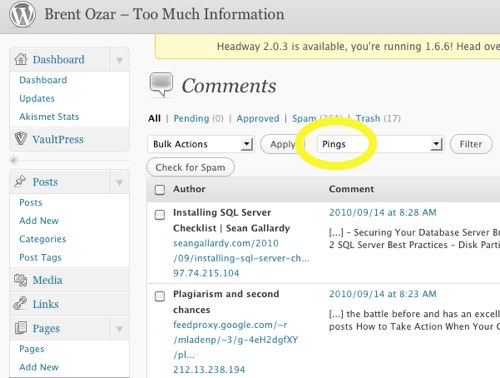
Another built-in WordPress tool is the list of pingbacks.  When people copy your work verbatim and publish it, their blog may try to send a pingback link alerting you.  Go into your Comments list and filter it by pings only:

Pingback Comments
Pingback Comments

In that screenshot, I can see that Sean Gallardy has linked to my SQL Server checklist.  I would want to click on that link to make sure it’s not an exact word-for-word copy of my own checklist, or another one of my blog posts that happened to link to my own checklist.

Set Up Free Google Alerts

Even if the plagiarist is smart enough to disable pingbacks, they probably won’t strip the links out of your blog posts.  To catch those, I set up Google Alerts for real-time notifications; whenever Google runs across the word “BrentOzar.com” anywhere on the web, they send me an email.  I can tell at a glance if it’s a plagiarized post, a forum question pointing to one of my articles, or a blog comment.  I’ve set up similar alerts for sites I manage, my name, companies I work for, and so on.

When I’ve built a blog post I’m particularly proud of, I even set up Google Alerts for key phrases in the post.  For example, in my SQL Server 2008 DAC Pack blog post, I used the phrase “Bringing Sexy DAC.”  I can be fairly certain that phrase will not come up often, and if it shows up on the intertubes, somebody’s stealin’ my work.  That phrase is a little down the page, beyond the first paragraph, so it shouldn’t show up if someone’s only showing the first few sentences of my post (which would be okay.)  I set up a Google Alert for that, and if anybody is automatically reposting my work, I get notified.

(Yes, I’ve deleted that Google Alert now because I know by saying this, I’m going to get a bunch of tweets saying “I’m Bringing Sexy DAC!” Heh. I love you people.)

Monitor Your Referrers

If you’re using web analytics tracking to see how (un)popular your site is, it probably has a screen to show which sites are linking to you.  In my favorite free web analytics tool, Google Analytics, it’s under Traffic Sources, Referring Sites:

Referring Sites
Referring Sites

Because the plagiarist may not be popular yet, you need to go through ALL of the referring sites, not just the top ten.  The more popular you get, the more painful this gets, but on the plus side, you get a warm, fuzzy feeling seeing everybody linking to you in a good way.

I go through this list looking for sites I don’t recognize, then I drill into the analytics to find out exactly where in the site they’re coming from, and I click on it.  Hopefully it’s not an exact copy of one of my posts that links to another one of my posts.

Use Tynt.com to Tweak Copy/Paste

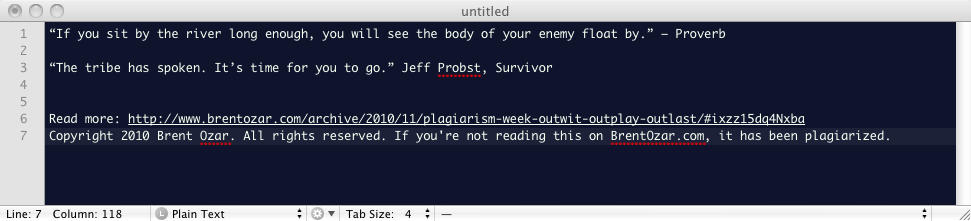
This has to be one of the coolest tools I’ve ever seen.  The easiest way to understand how it works is to see it in action.  Go to any page on BrentOzar.com, select some text, copy it, and then paste it into a text editor:

Tynt Paste Results
Tynt Paste Results

SHAZAM.  It doesn’t get much more obvious than that.  I used to use more polite wording, but after being repeatedly plagiarized, I’m going with the big guns now.

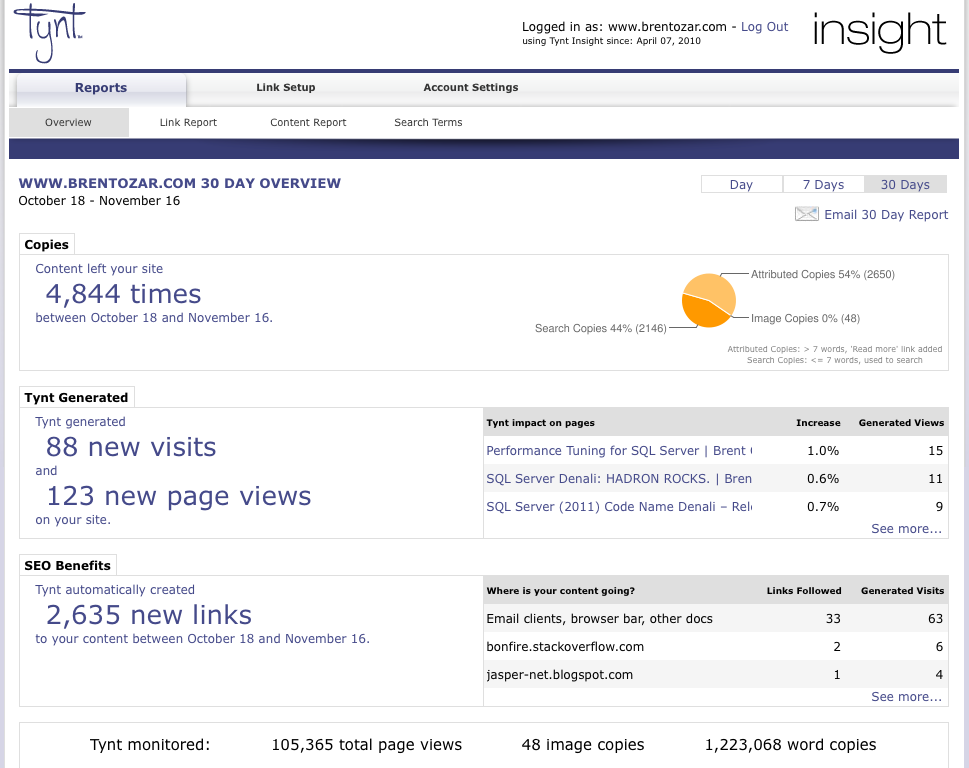
Tynt even gives you a slick dashboard to show where your content is being pasted:

Tynt Insight Dashboard

And it’s even completely free!  Go sign up for Tynt today, put their Javascript code in your header, and you’re off and running.  (The technique of doing this varies by which blog theme you’re using.)

Search Manually with Copyscape.com

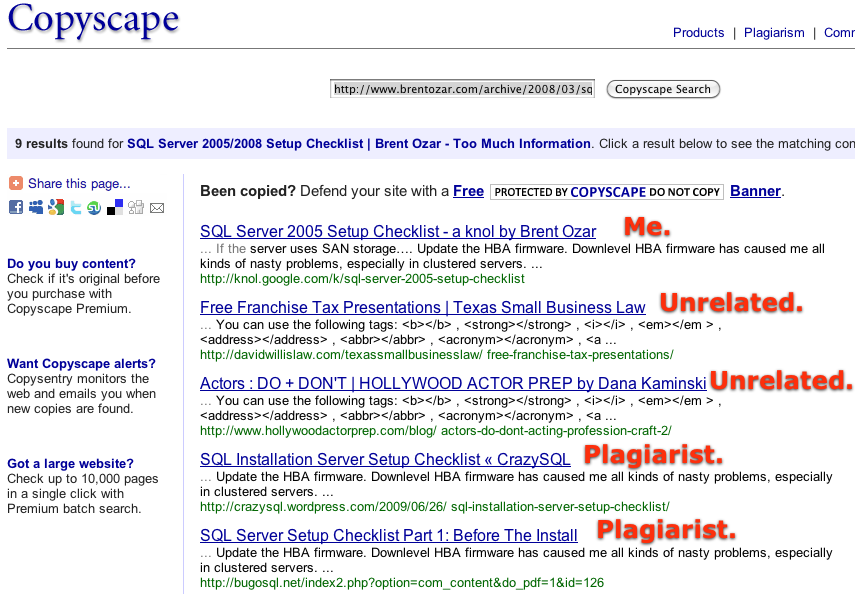
Finally, every now and then I go searching for copies of my recent posts with Copyscape.com.  I put in a URL to a recent post (30-60 days old), and Copyscape goes hunting for similar copies.  Their logic is pretty fuzzy, and it gives me a lot more misses than hits, but when it hits, it hits big time.  It catches plagiarists who are smart enough to disable trackbacks, strip out your links, and even futz with your wording to try to make it look different.

Copyscape Results
Copyscape Results

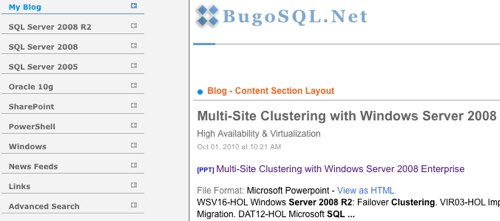
This is how I caught CrazySQL initially, and how I found that BugoSQL was trying to hide some of my posts in disguised PDF files.

It’s a lot of work catching these diabolical bastards, and it’s like a never-ending game of Whack-a-Mole.  I have to keep playing because I make a living off my content – it’s my marketing tool to bring in new consulting customers.  This is especially important to me now that I’ve become a full time consultant; I don’t get paid unless I’m working for a client.  I’m not getting paid to write this, either, but I do it because I’m passionate about helping the community and helping bloggers protect their content.


Plagiarism Week: Outwit, Outplay, Outlast

51 Comments

“If you sit by the river long enough, you will see the body of your enemy float by.” – Proverb

“The tribe has spoken. It’s time for you to go.” Jeff Probst, Survivor

In Monday’s post about the latest plagiarist, I talked about how WordPress.com is wonderfully responsive to complaints of plagiarism.  Whenever I find my work copied on a blog hosted at WordPress.com, I email the blogger first to talk them into taking it down.  If they don’t respond or comply, I just file a DMCA request via email, and WordPress takes the offending pages down within a day or two.  I don’t bother alerting the community if it’s just one or two posts, or if I’m the only guy who’s been ripped off.  I’d rather just get the problem fixed, move past it, and let the plagiarist lick their wounds in private.

Unfortunately, not every host responds like WordPress.com, and the problem gets worse with self-hosted and international sites.

For the last year, I’ve been struggling with another site that’s copying my stuff:

Worst. Plagiarist. Ever.

Pardon my French, but I hate these bastards.

  1. They’re physically copy/pasting my articles.  If you see the “Read more” link, that’s what happens when you copy/paste content off my web page thanks to Tynt.com, a great tool for bloggers that I’ll be discussing later this week.  This jerk is just going to my page, highlighting what he likes, copying it, and pasting it into his own blog.
  2. They’re hotlinking to my images.  The error message you see (it even includes BrentO!) resides on i.brentozar.com, my caching site, and I pay whenever someone views that image.  Don’t get me wrong, it’s not expensive, but this lazy no-good bum is costing me money.
  3. They’re ripping off my stuff, Microsoft TechNet, MSSQLTips, and a bunch of you bloggers.
  4. They have no contact link to send email, and no personally identifying information.
  5. They’re using UmbraHosting.com, and that crappy hosting company doesn’t respond to DMCA requests or emails.  They’re effectively condoning plagiarism.

A few days ago, I was ecstatic to see that the domain name had lapsed without being renewed, and the site went down.  Gail Shaw and I were cheering that this bozo had finally bit the dust, but like a zombie, he’s back from the dead.

So I give.  I can’t get this site to die, and that’s where you come in.  I can’t offer a bounty to whoever gets the plagiarism removed off that site, because that’ll be too tough to prove, so I’ll offer a reward instead.

When that site is no longer serving plagiarized material (either because it’s taken down altogether, or the plagiarized material is gone) I’ll donate $250 to the non-profit Electronic Frontier Foundation in the name of the SQL Server community.

C’mon, people.  Show me what ya got.  Ferret out the owner of this site, get in contact with the hosting company, and show off your ability to play Internet Detective.

Diabolical Bastards
Diabolical Bastards

Update Nov 18th – it’s down!  I’m going to wait a few days to make sure they stay down, and then I’m ecstatic to make the $250 donation to the EFF.

The Hurt Locker
The Hurt Locker

Update December 4th – in the last couple of weeks it went up and came down a couple of times, but their web host has assured me they won’t let it go online again with copyrighted material intact.  To celebrate, I’ve made the $250 donation to the EFF.  Yay, rights protection!  I got a swag package for the $250 donation, and I’ll give that away on my blog when I get it.

Electronic Frontier Foundation Donation

Plagiarism Week: Caught Another One

34 Comments

Every now and then I get enough content piled up about a subject that I decide to dedicate a whole week-long blog post series to it.  The good news is that you’ll have plenty of original material to read this week, but the bad news is that you’ll also have copied material too.  Welcome to Plagiarism Week!

When I was researching material for my FreeCon, I wanted to show bloggers how to optimize their site for search engines.  One of the topics involved putting related images in each blog post; if you’ve got a story about SQL Server setup checklists, you should put screenshots in there and tag them appropriately.  Search engines recognize that your post is more complete than others because it’s got eye candy.

To illustrate it, I went to Images.Google.com and searched for SQL Server setup checklists because I’m quite fond of my setup checklist post and it does well in search engines.  The results look like this:

SQL Server Setup Checklist Search Results

The third result is mine, and I recognized it immediately because the screenshot had my company’s SQL Server name in it (from the time I wrote the post).  The majority of the images on the page do indeed relate to SQL Server, but some of them are surprising.  For example, the baby’s face at the bottom left might seem odd, but it’s actually from the comment avatars on my blog post.  The one that intrigued me most was result #4 – the MCITP logo.  That’s a pretty high-ranking result for such a generic picture – the content must be fantastic!  So I clicked on it:

Plagiarism Strikes Again

Wow, that is indeed some good content.  Of course, I might be a little biased, because it’s my checklist.

Compare the copied checklist screenshot above (no, I’m not going to link to that guy’s site) to my SQL Server setup checklist, and you’ll notice that he stripped out my introductory paragraphs where I talk about building these checklists through my years of experience.  He didn’t just delete my personal text, he also went to the effort of deleting every link back to my site, including the images.  He even merged my Part 1 and Part 2 pages together to avoid linking to me.

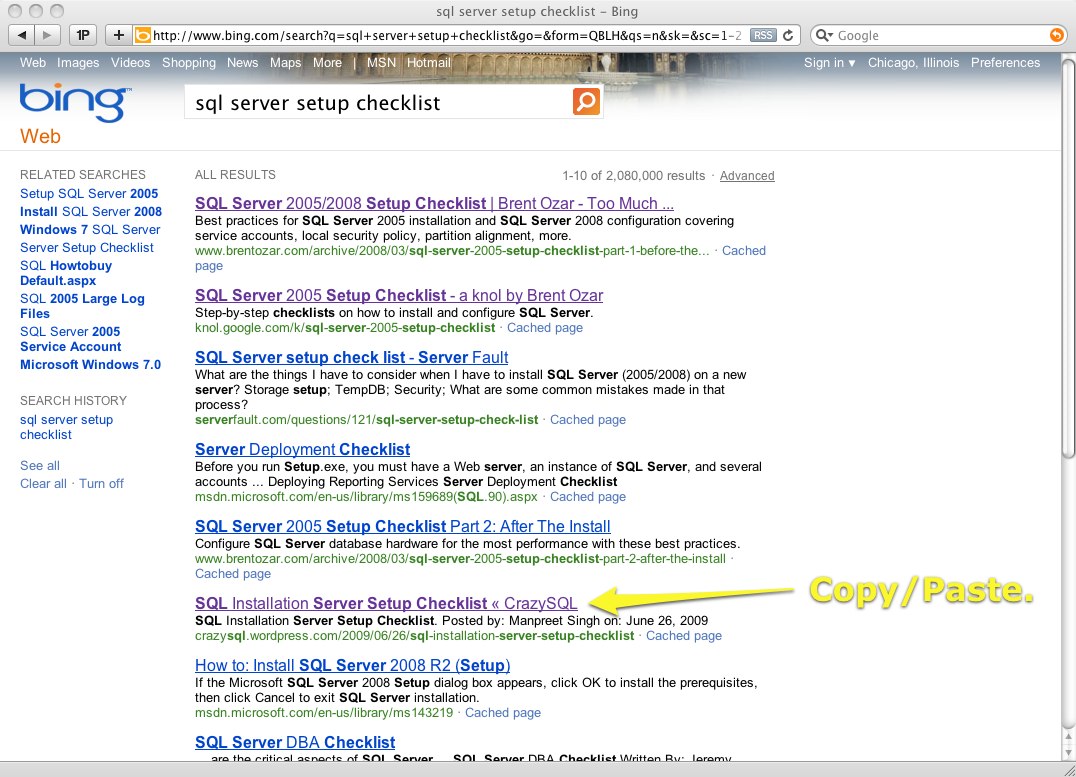
This isn’t a casual copy/paste job or an RSS tool – this is a hard-working plagiarist who had managed to circumvent every protection I’d built into the blog.  He had ads on the checklist, and he’d managed to rise to the first page of Bing results:

Bada Bing
Bada Bing

I hadn’t caught this guy earlier because I use Google, and he doesn’t show up in Google’s results.  No, I’m not saying Bing promotes plagiarism – I’m just saying it’s like the high school teacher who didn’t quite catch on that you copied your term paper from mine.

I followed the steps in my article What to Do When Someone Steals Your Blog Posts.  I contacted the author via the email on his About Me page and LinkedIn profile, neither of which I’m going to link to here.  When someone links to your web site, search engines believe you have a more credible web site, and I’m not about to give this guy any Google juice.  When he didn’t respond to emails, I filed DMCA takedown notices with his web host, WordPress.com, which has always been extremely responsive for me.  I love how WordPress protects the rights of authors whose content has been stolen:

I <3 WordPress
I <3 WordPress

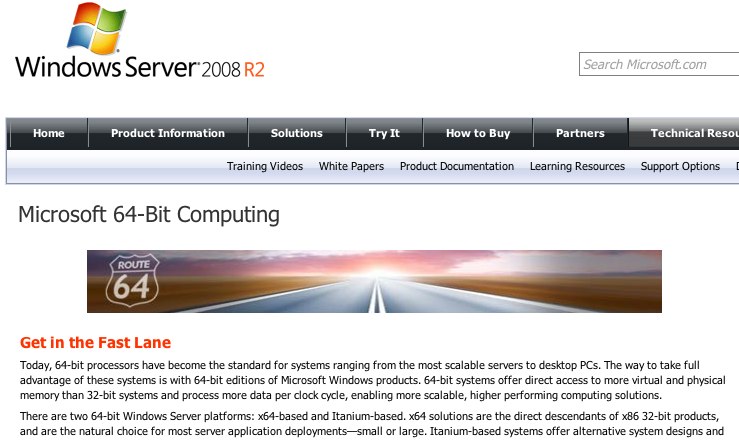
I wasn’t his only victim.  He stole multiple posts from Microsoft, too, like this one:

64-Bit Computing
64-Bit Computing
Two-bit Blogger
Two-bit Blogger

The bad news is that he may have stolen your content, too.  Since he went to great lengths to disguise my content, I’m guessing he may have disguised yours too, so it’s time to spend some time reading his web site:

Plagiarist
Plagiarist

If you interact with this author, I have two requests.  First, keep it civil – he’s a real guy somewhere with a real life and a real job.  He made mistakes, and he’s about to learn from them, but it’s not like he killed anybody.  I could have emailed my contacts at his employer, but I don’t want to ruin his life – I just wanted the plagiarism to stop.  Keep the punishment in perspective.  Second, don’t make racial comments – remember that the last big plagiarism scandal around here was a white guy from the US.  It can happen anywhere to anyone.


SQL Server 2012 AlwaysOn Availability Groups Rock

SQL Server 2012 brings huge improvements for scaling out and high availability. To put these changes into perspective, let’s take a trip down memory road first and look at the history of database mirroring.

SQL Server 2005 first introduced mirroring, although it wasn’t fully supported until a service pack. In many ways, mirroring beat the pants off SQL Server’s traditional high availability and disaster recovery methods. Log shipping, clustering, and replication were known for their difficulties in implementation and management. With a few mouse clicks, database administrators could set up a secondary server (aka mirror) to constantly apply the same transactions that were applied to the production server. In synchronous mode, both servers had to commit every transaction in order for it to commit, giving a whole new level of confidence that no transactions would be lost if the primary server suddenly died. In asynchronous mode, servers separated by hundreds or thousands of miles could be kept in sync with the secondary server being a matter of seconds or minutes behind – better than no standby server at all.

Preparing to Compress the Stream

SQL Server 2008 improved mirroring by compressing the data stream, thereby lowering the bandwidth requirements between the mirroring partners.

In one of the most underrated features of all time, Microsoft even used mirroring to recover from storage corruption. When the primary server detected a corrupt page on disk, it asked the mirror for its copy of the page, and automatically repaired the damage without any DBA intervention whatsoever. Automatic page repair doesn’t get nearly the press it deserves, just silently working away in the background saving the DBA’s bacon.

Database Mirroring’s Drawbacks

While SQL Server was able to read the mirror’s copy of the data to accomplish page repairs, the rest of us weren’t given the ability to do anything helpful with the data. We couldn’t directly access the database. The best we could do is take a snapshot of that database and query the snapshot, but that snapshot was frozen in time – not terribly useful if we want to shed load from the production server. I wanted the ability to run read-only queries against the mirror for reporting purposes or for queries that could live with data a few minutes old. Some companies implemented a series of snapshots for end user access, but this was cumbersome to manage.

Definitely Not Using High Safety Mode

Unlike log shipping and replication, mirroring only allowed for two SQL Servers to be involved. We could either use mirroring for high availability inside the same datacenter, OR use it for disaster recovery with two servers in different datacenters, but not both. Due to this limitation, a common HA/DR scenario involved using a cluster for the production server (giving local high availability in the event of a server failure) combined with asynchronous mirroring to a remote site. This worked fairly well.

Fairly.

The next problem: database failovers are database-level events. DBAs can fail over one database from the principal to the secondary server, but can’t coordinate the failover of multiple databases simultaneously. In applications that required more than one database, this made automatic failover a non-option. We couldn’t risk letting SQL Server fail over just one database individually without failing over the rest as a group. Even if we tried to manage this manually, database mirroring sometimes still ran into problems when more than ten databases on the same server were mirrored.

Database mirroring didn’t protect objects outside of the database, such as SQL logins and agent jobs. SQL Server 2008 R2 introduced contained databases (DACs), a packaged set of objects that included everything necessary to support a given database application. I abhor DACs for a multitude of reasons, but if you were able to live with their drawbacks, you could more reliably fail over your entire application from datacenter to datacenter.

Enter AlwaysOn: New High Availability & Disaster Recovery

It’s like mirroring, but we get multiple mirrors for many more databases that we can fail over in groups, and we can shed load by querying the mirrors.

That might just be my favorite sentence that I’ve ever typed about a SQL Server feature.

I am the last guy to ever play Microsoft cheerleader – I routinely bash the bejeezus out of things like the DAC Packs, Access, and Windows Phone 7, so believe me when I say I’m genuinely excited about what’s going on here. I’m going to solve a lot of customer problems with mirroring 2.0, and it might be the one killer feature that drives Denali adoption. This is the part where I raise a big, big glass to the SQL Server product team. While I drink, check out the Denali HADR BooksOnline pages and read my thoughts about the specifics.

First off, we get up to four replicas – the artist formerly known as mirrors.

Denali also brings support for mirroring many more databases. We don’t have an exact number yet – we never really got one for 2005 either – but suffice it to say you can mirror more databases with confidence.

Preparing to Demo Availability Groups

DBAs set up availability groups, each of which can have a number of databases. At failover time, we can fail over the entire availability group, thereby ensuring that multi-database applications are failed over correctly.

Denali’s HADRON improvements change my stance on virtualization replication. For the last year, I preferred virtualization replication over database mirroring because it was easier to implement, manage, and fail over. Virtualization still wins if you want to manage all your application failovers on a single pane of glass – it’s easy to manage failovers for SQL Server, Oracle, application servers, file servers, and so on. However, the secondary servers don’t help to shed any load – they’re only activated in the event of a disaster.

AlwaysOn Isn’t Perfect

I need to be honest here and tell you that Denali threw out the baby with the bathwater. There’s going to be a lot of outcry because some of our favorite things about database mirroring, like extremely easy setup, are gone. Take a deep breath and read through this calmly, because I think if you see the big picture, you’ll think we’ve got a much smarter toddler.

AlwaysOn relies on Windows clustering. I know, I know – clustering has a bad reputation because for nearly a decade, it was a cringe-inducing installation followed by validation headaches. Some of my least favorite DBA memories involve misbehaving cluster support calls with finger-pointing between the hardware vendor, SAN vendor, OS vendor, and application vendor. This is different, though, because clusters no longer require shared storage or identical hardware; we can build a cluster with a Dell server in Miami, an HP server in Houston, and a virtual server in New York City, then mirror between them. Now is the right time for AlwaysOn to depend on clustering, because the teething problems are over and clustering is ready for its close-up. (One caveat: clustering requires Windows Server Enterprise Edition, but Microsoft hasn’t officially announced how licensing will work when Denali comes out.)

When you’ve got a clustering/mirroring combo with multiple partners involved, you want to know who’s keeping up and who’s falling behind. You’ll also want to audit the configurations. There’s an improved Availability Group dashboard in SQL Server Management Studio, but I’d argue that GUIs aren’t the answer here. For once, brace yourself – I would actually recommend PowerShell. I’ve given PowerShell the thumbs-down for years, but now I’m going to learn it. It’ll make HADRON management and auditing easier.

Do not try what you're about to see at home. We're what you call consultants.

Summing Up Denali AlwaysOn

There’s a lot of challenges here, but as a consultant, I love this feature. It’s a feature built into the product that gives me new ways to handle scalability, high availability, and disaster recovery. There’s a lot of potential in the box, but the clustering requirements are going to scare off many less-experienced users. Folks like us (and you, dear reader, are in the “us” group) are going to be able to parachute in, implement this without spending much money, and have amazing results.

Over the next few months, I’ll be taking you along with me as I dig more into this feature. I plan to implement it in labs at several of my customers right away, and I’ll keep you posted on what we find. If it’s anywhere near as good as it looks, I’m going to be raising a lot of glasses to Microsoft.

If not, I’ll be pointing Diet Coke bottles at Building 35 until they fix the bugs, because this feature could rock.

More SQL Server AlwaysOn Resources

If you want to learn more about how to design, test, and manage this slick feature that offers high availability, disaster recovery, and scale-out reads, visit our AlwaysOn Availability Groups resources page.


Microsoft Atlanta: Cloud-Based SQL Server Monitoring

SQL Server
14 Comments

Microsoft Atlanta is a new cloud-based SQL Server monitoring tool.  Companies can deploy an agent on their SQL Server 2008 and 2008 R2 instances, and the agent will communicate up to Microsoft’s servers in the cloud (through a secure gateway also installed inside the company’s network.)  Microsoft aggregates the data, analyzes it looking for problems, and displays it back to IT users like database administrators through a web-based dashboard.

I’m not bashful about cheerleading for Microsoft products that rock, but I’m not feeling this one quite yet.  Here’s the issues I’m concerned about:

It only monitors SQL Server 2008 and newer. Most of my clients still have SQL Server 2005 (if not 2000) in the shop.  They don’t want one tool to monitor SQL Server 2008 performance and another solution for SQL Server 2005.  Frankly, they don’t even want to settle for one monitoring tool per database platform – they want one pane of glass to monitor SQL Server, SharePoint, IIS, app servers, and often other database platforms like Oracle or Sybase.

Microsoft Atlanta
Microsoft Catlanta

It sends diagnostic data to the cloud. Some of my clients can’t let their own developers get access to queries running on the production server, let alone send them offsite to servers that could be in any geographic location.  In larger enterprises, privacy and compliance regulations fiercely guard where data can go.  Atlanta could be sending your usernames, application names, and queries to the cloud – and don’t forget that queries can include things like customer names, personally identifying numbers like SSNs, or even credit cards.

It’s not real-time. When a user calls saying their query just timed out or produced an error, I need to see what’s happening on my servers right now.  I don’t want to use one tool to troubleshoot what happened 90 seconds ago versus what’s happening now.  I need live data, and I can’t wait for round trips to the cloud.

It feels like it’s targeted at small businesses that can’t afford a monitoring infrastructure or an in-house database administrator.  They’ve got just one or two SQL Servers, and if they added a monitoring tool in-house, they would have to put it on the same SQL Servers they’re monitoring – thereby introducing a nasty little point of failure.  Even if they added another SQL Server, they wouldn’t know how to read the results of most monitoring tools, and they see Microsoft Atlanta as the Easy Button.  For these users, it seems to make sense at first glance, except there’s one little problem.

Small businesses with no SQL Server staff in-house will rarely find out that this product exists.

You know what I think?  (Of course you do, because you read my blog, and you’re inside my head.)  I think Microsoft should bundle Atlanta with every SQL Server as an option during the installation.  Currently, the installation process asks if we’d like to send feature usage data back to Microsoft, and I get the feeling there’s a dashboard somewhere in Building 35 that proves only 14 people in the world have ever used Service Broker.  That’s a good start, but let’s kick it up to the next level and ask if users want to get performance recommendations sent to them weekly, and enter an email address right then and there to subscribe to the alerts. SAP does something like this by running weekly tests on their databases at each client automatically, phoning those results home, and then sending the users a warning when something has gone awry in their environment.

I found ur performanz. Iz in the toilet.

It shouldn’t be an extra-pay feature – and I’m not saying that because I think we’re entitled to it.  I just think very, very few people will pay extra for this as an add-on service, but it could be a really neat feature to entice businesses to upgrade to the latest versions of SQL Server.  As a DBA, I’d love to forward my boss the weekly Microsoft email alerts:

  • Me: “Looks like Bob in Accounting went wild and crazy with the joins again.  Here’s a list of recommendations to improve his queries.  Instead of us spending another $10k on drives like he asked, he needs to fix his queries.  Do you want to take them into Accounting, or do you want me to?”
  • Boss: “Wow, that Bob is a bozo.  Hey, can we get these same recommendations for the HR server?”
  • Me: “Nope, that’s SQL Server 1946.  This is a new feature of SQL Server 2031.  I can haz upgrade?”
  • Boss: “Yes. Kthxbai.”

You can learn more and sign up for the beta free at MicrosoftAtlanta.com. Update: the product was discontinued.


#SQLPASS Summit Keynote Day 1

#SQLPass
4 Comments

You can refresh this page every couple of moments to see what’s happened.  The most recent updates are at the bottom.

You can watch the keynote live online too.

Tina Turner Onstage at #SQLPASS

8:21AM – Today opened with Tina Turner singing “Simply the Best.”  It’s either that or I drank entirely too much last night and Rushabh opened with a musical number, I’m not quite sure.

8:28 – Rushabh keeps talking about how we’ve touched a lot of people.  I think I read about this in the harassment complaint.  They’re aiming to touch more people – or maybe be touched by more people, I’m not quite sure – by webcasting the keynote live for free.

8:35 – Microsoft’s Mark Souza is playing doctor onstage to talk about the 400+ Microsoft development team members here to answer your questions.

8:39 – Talk to Microsoft folks, and you’re eligible to win all kinds of prizes including an XBox Kinect.

8:40 – “Everybody, look under your chair – if you’ve got an envelope, you just won a Dell Alienware laptop!”  Dang, all I got was chewing gum.  And of course you know I just felt under there without looking.  Ewww.  I won some used chewing gum.

SQLPASS Keynote
SQLPASS Keynote

8:42 – Rushabh’s introducing Ted Kummert to talk about some upcoming news.  WOOHOO!

8:46 – Playing a video explaining the history of SQL Server.  Best quote so far: “I figured if I could build an even halfway decent database, Microsoft could sell the heck out of it.”  Oh, the jokes are just zipping around.  This is a great video, though – really helps build a connection with the people building this tool, makes them personal and identifiable.  This is one of the best marketing-ish videos I’ve seen.  Nice work.

8:49 – Ted Kummert took the stage, and immediately started off by saying that a lot of the SQL Server people live & work in Seattle, and having the Summit here helps them send more people.  Oooo.  Okay, got the message there.

8:55 – SQL Server 2008 R2 Parallel Data Warehouse is now released to manufacturing.  This is a little tricky, though – it’s only sold through manufacturers along with hardware.  It isn’t available for download & testing on your own machine.  It’s sold as a big honkin’ appliance that you just plug in and go like hell.

9:00 – Demoing Parallel Data Warehouse with a 100TB copy of the TPC-H benchmark.  Eagle-eyed watchers will notice that this isn’t using SQL Server Management Studio – PDW has its own admin tool still.

Ted Kummert Onstage with a Parallel Data Warehouse

9:01 – Running PowerPivot queries to suck a subset of the billions of rows – showing off the integration between PDW, Excel, PowerPivot, etc – talking about the whole-stack story.

9:04 – Here’s my thoughts on Parallel Data Warehouse from last year’s announcements and interviews.  I like the idea, but people need to remember that it’s not managed with traditional SQL Server tools or techniques or staff.  It’s a sealed box, and you can’t do anything with it – it’s manufacturer maintained.

9:05 – Yahoo’s onstage talking about their 12TB Analysis Services cube loading 60 50GB files per hour, 1.2TB per day, 3.5b events per day.  Less than 10 second average query times.

9:10 – Announcing Premier Mission Critical, Microsoft Critical Advantage Program for Parallel Data Warehouse.  No details on it though.

9:11 – Bob Ward announced & demoed Microsoft Atlanta – I’ve got a separate post with my thoughts on Microsoft Atlanta.  It’s a cloud-based SQL Server monitoring system that only works for SQL Server 2008 and R2 (and newer) that detects configuration problems.

9:18 – Cloud time!  Kummert says Azure needs to be self-managed, have elastic scale, and be agile & familiar.  It’s solving real business problems today.  Next up: we’ve got Community Technology Previews announced originally at PDC for Web Admin, Reporting, and Data Sync.

Demoing Azure DataMarket

9:24 – Available now – the Windows Azure Marketplace DataMarket, something like the iTunes Store for data sets – both commercial and freely available.  They’re demoing how to add internet-accessible datasets from the DataMarket with, say, weather data, to enrich your reporting.  On rainy days, you sell less bicycles. I’m a big fan of this.

9:32 – Ted’s encouraging the audience to go sign up and get engaged in the cloud.

9:33 – “What’s Next for SQL Server?”  The next version is called SQL Server Denali for now as a code name, and I’ve got some quick information about SQL Server Denali.  They’ll be demoing it later, plus handing it out to attendees after tomorrow’s keynote.

9:37 – The changes in SQL Server Integration Services will be huge, he says – big improvements in management and servers.  R2 was a big release for reporting & analytics, plus Office 2010 focused on managed self-service analytics.  Excel users were empowered to build BI applications, and PowerPivot was embedded into SharePoint.

9:39 – Project Crescent is a new web-based reporting system letting end users tell their own stories about the data.  Amir Netz is demoing PowerPivot, then saying that’s good, but we need something bigger for enterprise datastores.  The new BI Development Studio, running on top of Visual Studio 2010 Premium, hooks into the same column-oriented storage engine that PowerPivot used, but now you can use it on a server so you get centralized security and bigger horsepower.

Demoing Column Store Indexes

9:49 – SQL Server Denali will have columnar indexes built into the database engine.  Columnar indexes are what makes PowerPivot so insanely fast.  More on this later.

9:52 – They’re demoing Project Crescent to build reports.  Unfortunately, I gotta bail – off to set up for my session!


Changes to the Microsoft Certified Master of SQL Server Program

#SQLPass
25 Comments

Microsoft just announced major changes to the Microsoft Certified Master of SQL Server program. I’m excited about the new direction of the program, although I’m a little biased – I helped with the program’s changes to reach the right audience.

The Original Microsoft Certified Master Program:

  • $18,500 entry fee for 3 weeks of training (and possibly certification)
  • MCITP: Database Developer 2008 and MCITP: Database Administrator 2008 required first
  • You had to show up onsite in Seattle for 3 weeks straight
  • Three written multiple-choice exams onsite during the training
  • One six-hour final lab

This setup had a few problems. It was tremendously expensive – both in terms of the entry fee and the 3 weeks of downtime. It was hard to schedule 3 weeks off in a row even if you had the vacation or your company was willing to eat that expense. You might not have needed all 3 weeks of training, and you might not have been able to travel around the world to get it.

Bottom line – having the training and the certification as an all-in-one package just didn’t scale, and that’s evidenced by the fact that only a handful of us outside of Microsoft were able to pull it off. I know a lot of people who are more technically qualified than I am, but they couldn’t justify the Master program. So how could we get more qualified people to be Masters?

The New Microsoft Certified Master Program:

  • MCITP: Database Developer 2008 and MCITP: Database Administrator 2008 still required
  • Certification and training is totally separate
  • Initial written multiple-choice exam – $500, and can be taken at Prometric testing centers around the world
  • 6-hour lab exam – $2,000, and can be taken at select secure Prometric testing centers around the world

The two biggest barriers to entry – a huge initial price tag and 3 weeks of lost work time in Seattle – are now gone! It’s now easier to prove that you’re a Microsoft Certified Master of SQL Server. (Note that I did not say it’s easier to be one, because it’s still very, very, very tough.)

Since the training is now separate, it’s up to you how much training you want to get, and who you want to get it from. If you’re already an expert on some subject areas, maybe you’ll only get training on the areas where you’re weak. Perhaps you’ll choose to get the training in chunks – one week’s worth this year, one week’s worth the next year, and then make a run at the exam. I would advise trying not to pass the lab exam cold, because this is most definitely not the MCITP.

To help you get up to speed, Microsoft partnered with SQLskills to provide dozens of hours of video training online completely free. Bob Beauchamin, Kimberly Tripp, Paul Randal, and I recorded some of our best presentations on internals, CLR, storage, performance tuning, and more. You can watch our free Microsoft Certified Master online courses all in the comfort of your cubicle. (That link may not be live yet – check again later in the day.)

If you want more personal, interactive training, you’ll be able to get it from more places. I’d argue that you still want to get it from the most qualified, highest rated trainers around. You want to get it from people who aren’t just experts at training – you want your instructors to be hands-on consultants who live this work every single week. When we’re not training or helping the community, we’re consulting in some of the toughest environments around. Yes, of course I mean SQLskills – we’re offering a series of events around the United States in 2011 to give you Microsoft Certified Master approved training. We’re the only trainers that have been involved with the MCM program from the very first rotation, and we’re the best people to help you achieve the highest level of technical certification on SQL Server. You can check out our upcoming SQLskills Immersion Events here.

I really passionately believe in where the MCM program is going. There’s going to be more people recognized as Masters, and that’s a good thing, because there’s a lot of really qualified people out there. I’m not worried about the MCM becoming the next MCITP – a certification seen as having too low of value due to the braindump factor – because I was a contributor to the new MCM program. It’s a seriously high bar to pass, but I believe a lot of you can do it.


What the #SQLPASS Summit Means to You

#SQLPass
0

Every year, the Professional Association for SQL Server (PASS) holds a big conference for SQL Server professionals – DBAs, developers, BI people, etc.  Depending on how you look at it, it’s either their North American conference or their global conference – people come from all over the world to attend.

This year’s PASS Summit takes place in Seattle, just like it did last year, and the year before that, and how it will for the next couple of years.  You might detect a slight undercurrent of disappointment there, and I’ve blogged about how the PASS Board isn’t listening to its members.  We won’t revisit that topic again.

Keynote Demos with Ted Kummert

What Happens at the Summit

PASS Board of Directors members and Microsoft executives give speeches called keynotes at the beginning of each day.  Most of the attendees gather in one big room for these keynotes, and since we’ve got a lot of eyeballs, PASS and Microsoft use this time to unveil whatever they’re proudest of at the moment.  It’s a mix of cheerleading, sales pitches, and technical demos, and you can guess which ones are the most popular with the audience.  If you follow blogs closely, most of the keynotes aren’t really news, but when there’s news, it’s good stuff.  Last year they unveiled the CTP of SQL Server 2008 R2, the new Datacenter Edition, and the SharePoint 2010 PowerPivot gallery.

After the morning keynote, attendees split up and run off to smaller sessions.  The Summit’s staggering array of content choices is intimidating for all of us – the amount of presentations available can make it tough to choose wisely.  Fortunately, you can buy DVDs that include video of all the sessions.  Unfortunately, they’re hundreds of dollars in addition to your registration fee, so as a result, I’ve never bought a set.

The more I go to PASS, the less free time I actually have to sit in sessions.  Take my Tuesday for example – after the keynote, I race off to my own presentation, Virtualization and SAN Basics for DBAs.  After that I’m grabbing lunch with Microsoft folks, then doing a book signing at 1PM.  I’ve got a short break, then it’s off to the Lightning Talks room where I’m giving a five-minute session called SANs Simplified.  At 4:30 Buck Woody and I are doing a session called You’re Not Attractive But Your Presentations Can Be, and then it’s off to find some food before the parties start.

SQL folks at the Zig Zag

There are four separate parties on Tuesday night alone, and it’s my chance to catch up with all my virtual coworkers.  The Summit is a very different experience for people on Twitter because we all know each other already before we even shake hands.  Folks on Twitter know where the parties are (because we broadcast it on Twitter) and know what everybody’s up to.  You’d think we wouldn’t have anything to talk about because we’re constantly in touch anyway, but we end up just chatting away for hours.  These personal times are when you build bonds with people for life – these kinds of discussions are how I got involved with my book project.

Tuesday night, I can’t stay up too late – at 6:45AM the next morning, I’m hosting the Virtualization Virtual Chapter’s Breakfast sponsored by VMware.  Wednesday night might involve a little extra partying, though – it’s #SQLKilt day, and a bunch of us are going to wear kilts to the conference.  If you don’t feel like a good strong beer after a day of wearing a kilt, there’s something wrong with you.

PASS Exhibit Hall
PASS Exhibit Hall

Somewhere in all that, I have to stop by the exhibit hall to talk to all my vendor buddies.  The exhibit hall has dozens of companies offering all kinds of products, and it’s my chance to see the latest versions of everything.  I learn something nearly every time I catch up with vendors because the tool market’s always changing.

It’s a complete whirlwind, and it’s over before you can take a breath.

Why I Go To The Summit

It sounds like a lot of fun, and it is – any conference can be – but there’s real work going on here too.  I’m building relationships with vendors and learning what they can offer my clients.  I’m building relationships with other SQL Server professionals who watch my training, see what I know, and might pay to attend one of my classes later – or SQLCruise.  I’m also putting my name out there (in a subtle way) in case anybody needs consulting help.  I’m not one of those guys who goes shoving business cards at strangers, but I’m not a wallflower either.

I have to get a return on my investment, because attending the Summit isn’t cheap. Between travel, hotels, and the Summit registration fees, it can easily cost over $3000.  For those of us who are self-employed, it costs even more, because we can’t bill clients while we’re at conferences.

The best part is that in today’s hyper-connected world, even though you’re at home, you can get some of the benefits just by keeping track of what’s happening at the Summit.

How To Follow What’s Happening

You can register for free to watch the keynotes live over the web for the first time – a tremendous improvement.  While you watch the official feed, you can get my interpretation by swinging over to BrentOzar.com while you’re watching.  For the last few years, I’ve liveblogged the keynotes the same way Engadget liveblogs Steve Jobs keynotes, only with less photos.  I take notes minute by minute, throw a few photos in there, and save the blog every couple of minutes so people can refresh the page and see the updates.

Twitter notes about the keynote aren’t as easy to follow.  It tends to be pretty noisy during the Summit, and people don’t always use the #sqlpass hash tag in their tweets.  If you’d like to try it anyway, check out the #sqlpass Twitter search, but keep in mind you’re only seeing a subset of the real PASS tweets.

Want to see what’s going on via photos?  Check out the #sqlpass search results on Flickr.  You don’t have to be a member in order to view photos, although you have to log in to post comments.  That search result link is sorted with most recent first, so you can refresh it to see new photos.  Pat Wright and I both have Eye-Fi cards in our cameras, so our pictures will get automatically uploaded to Flickr as we take ’em.

If you want the absolute easiest way to follow the Summit, subscribe to my email alerts.  Whenever I post to this blog, you’ll get an email with the full contents of the post – not a summary, but the whole post, ad-free.


My Latest Experiment: #SQLPASS Free-Con

#SQLPass
18 Comments

At big conferences like the Professional Association for SQL Server Summit in Seattle, attendees can pay extra to attend a pre-conference or post-conference session.  Select speakers talk all day on just one topic, so the attendees get really deep coverage on it.  Competition among speakers is tough for these slots because there’s money involved – they get paid per attendee.  A few of us co-submitted a performance tuning abstract this year, but we didn’t get accepted.  (I’m completely okay with that – the quality of the accepted sessions was outstanding.)

Free-Con 2010 at the Hugo House

I decided to offer my own free invitation-only pre-conference instead, and the Free-Con was born.  I wanted to make sure I didn’t compete with the paid pre-con sessions in any way, so I ran mine on Sunday, a day before the paid ones.  I emailed about a dozen bloggers from various walks of life and said, “Get your free-con.”  I really wish I could have invited a huge number of people, but for the first draft of this experiment, I wanted to keep it a very small group.  I really like the chemistry that a 15-person group seems to produce: just big enough to create small pockets of discussion, yet small enough that everyone can get to know everyone else’s viewpoints.

Seattle native Kendra Little (Blog@KendraLittle) offered to help pick the location and arrange the food, and frankly, she did a better job of that than I did on the presentations!  We gathered at the Richard Hugo House, a downtown Seattle spot for writers to improve their craft, and I performed in the cabaret.  We feasted on healthy and tasty local food – well, except for the Trophy cupcakes brought by Yanni Robel (Blog@YanniRobel), which were just tasty.

No SQL Server talk here – we’ll get enough of that during the PASS Summit this week.  Instead, we covered topics like how the employment market is changing, how to create and manage your personal brand, how to work with vendors and publishers, how consultants achieve a work/life balance, and why content creators are so valuable.

This event really reinforced to me that the most valuable things you can get from a conference are the conversations from people who share your troubles and beliefs.  I left inspired to do more work to help more people achieve their dreams, and empowered by thoughts from people like Karen Lopez, John Robel, and Steve Jones who challenge me to do a better job.

Richard Hugo House, Seattle

The Free-Con is still too fresh in my mind to know if it was a real success – the real proof will be seen in what the attendees took away from it.  I’m going to be following up with them over the coming months, challenging some of them to take their online persona to the next level, and challenging others to mentor bloggers, presenters, and podcasters.  If I think it helped (and especially if they tell me it helped) then I’ll do one at Connections next spring too.

Even if nothing comes of it, I’m proud that I tried it.  I trace the heritage of this idea back to my coworking time at the Caroline Collective and to my time working with Christian Hasker and Andy Grant in the Quest Software marketing team.  Those two times in my life taught me the importance of taking gambles and creating stuff.  In 2010, I passed the Microsoft Certified Master tests the first time I took ’em, wrote my free Twitter e-book, launched SQLCruise with Tim Ford, gave up the stability of a paycheck to start consulting full time with SQLskills, taught my first paid pre-con at SQLbits, and tried this Free-Con.  As the year starts to come to a close, I feel incredibly grateful to have so many wonderful people in my life who support and enable my crazy ideas – or at least humor me.  (That includes you, Erika!)


SQL Server (2011) Code Name Denali – Release Date Nov 9 2010

24 Comments

Microsoft just announced the release of the next version of SQL Server, code named Denali, at the PASS Summit in Seattle.  The Community Technology Preview (CTP) version, somewhat like an early alpha or beta release, is available for download now to MSDN members.  It’s available in both 32-bit and 64-bit versions, and it shows up as version 11.0.1103.9.

After installation, here’s what the launch screen looks like for SQL Server Management Studio, which gives away the first clue of changes:

SQL Server Denali (2011) Management Studio

Deep, calming breaths.  Despite the “Powered by Visual Studio” label, SSMS hasn’t changed dramatically since it was originally introduced back in SQL Server 2005.  After seeing the terrifying splash screen and logging into a server, we’re met with the traditional user interface seen below.

SQL Server Management Studio

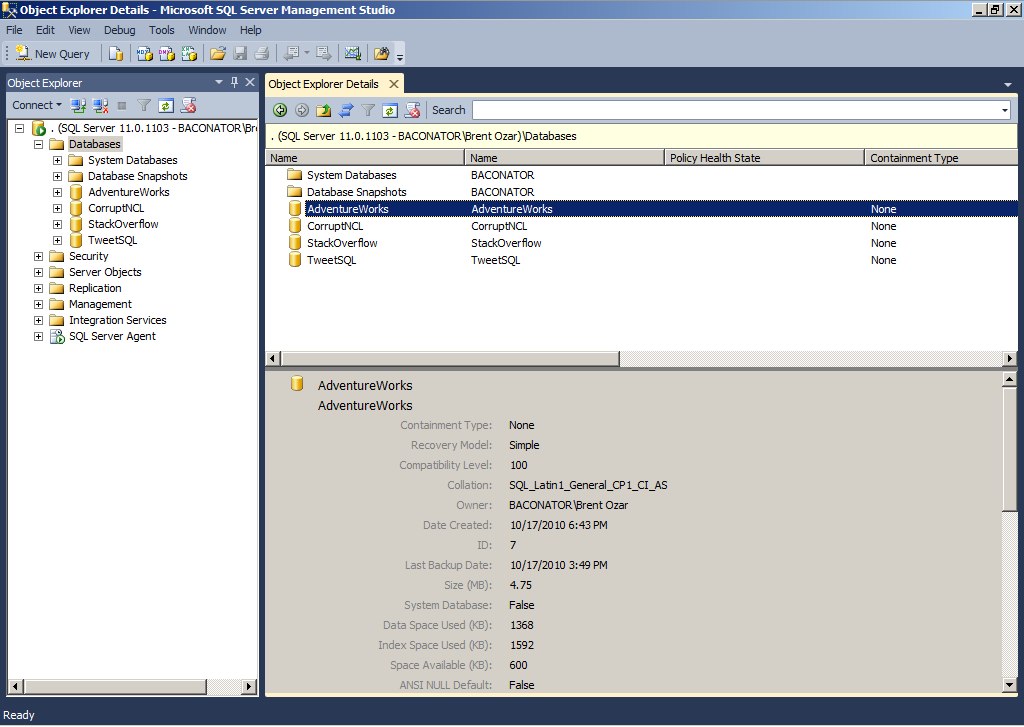
There’s one tweak that pops out right away: there’s a dark blue background around the edges of the window panes.  There’s just enough to be familiar and comforting here, but Visual Studio users will recognize the hint – the objects on this screen can be undocked!  Simply grab hold of Object Explorer or Object Explorer Details, drag them away from SSMS, and presto:

LET MY WINDOWS GO THAT THEY MAY SERVE ME

Welcome to 2010, people – we’ve finally got multi-monitor support for SQL Server Management Studio!  We can tear windows off and drag them off to different monitors.  This new Visual Studio based user interface brings some baggage with it, though – Visual Studio users will note that over some remote desktop connections, WPF-based apps can be slow or downright unusable.  Microsoft has blogged about ways to improve Visual Studio performance over RDP, but it’s still a sore point for many users.

The “Denali” branding is everywhere in this early CTP, and I’m not sure what the final release name will be – SQL Server 2011 would follow the previous naming conventions, but even the database versions on the database properties page show up as Denali:

SQL Server "Denali"
SQL Server "Denali"

Keen-eyed readers will notice a new “Containment type” option on that page, and there’s plenty of other goodies scattered through the UI that hint at improvements under the engine’s hood.  One of the more interesting to me is a new Distributed Replay trace utility to push a lot of load from different computers simultaneously, all controlled from a central computer.  Stress testing SQL Server has been painful without getting third party tools involved, and now it looks like we might have something in the box to give us a hand.

From what I’ve seen so far, though, this release mostly represents a set of incremental improvements, not a dramatic shift like we saw from SQL Server 2000 to 2005 – mostly.  There’s one change that’s got me dancing on my chair, and it deserves a separate blog post all by itself – Denali’s new High Availability & Disaster Recovery options, aka HADRON.

You can download SQL Server Denali (2011) CTP1 today for free.


Conferences and WiFi Security

8 Comments

Just a few quick notes about security before anyone shows up at the PASS Summit.

First, set up lock codes on your phones, iPads, and laptops.  Those of us who are security-conscious tend to play pranks on those of us who aren’t.  (Ask Tom LaRock about the year he found a shirtless fireman on his desktop wallpaper and couldn’t get it back off – we play for keeps.)

Second, install the Firefox plugin HTTPS Everywhere.  This forces popular web sites like FaceBook, Live, and Twitter to use HTTPS instead of HTTP, thereby encrypting your web surfing instead of SSL.

Third, when you’ve done the above two, check out Firesheep.  It’s a Firefox extension that listens to unencrypted HTTP traffic on your WiFi network and lets you instantly log in as any sucker who isn’t using HTTPS.  This works great at hotels and conferences where lots of your friends (or enemies, whatever) are surfing during keynote addresses.

Consider yourself warned.


Proof that CPU Power Matters

0

At least one person was paying attention when I recently blogged about the problems running SQL Server on power-saving processors.  One of my clients, the Northwestern Medical Data Warehouse, decided to check out the settings on their brand-new IBM x3850.  Sure enough, they were set to save power by default, so they tweaked that and tried Geekbench again.  They got great results – so good, in fact, that they just had to post ’em to the public Geekbench results board:

Geekbench Results After CPU Tweaks

After making the tweaks, they’re #1 on the Geekbench results chart!  Think your server can beat it?  Download the free Geekbench testing tool and see how you do.  Of course, correct those power settings first.


T-SQL Tuesday: Why Do You Need DBA Skills?

This month’s T-SQL Tuesday topic asks why you need DBA skills.

Lemme borrow your car to get tacos - yeah, of course I'm a good driver.
Lemme borrow your car to get tacos – yeah, of course I’m a good driver.

I say you probably don’t.

Every now and then, you just need someone else to have good DBA skills.

Most of my clients don’t have full time database administrators.  For example, last week I helped a small software company troubleshoot database problems at a couple of their customers’ sites.  These customers had mission-critical applications they’d bought from this software company, and the data was stored in SQL Server.  If the server went down, their business would stop.

And no, the customers didn’t have full time DBAs either.

I parachuted in, took remote control of their SQL Server, spent a few hours doing a basic investigation, and gave them a list of things they should consider doing to improve performance and reliability.  We discussed how to implement those changes, and they took away a list of to-dos.  Done.

There’s a huge, gaping chasm between people who know enough to be dangerous with SQL Server versus those who can fix the junior guy’s “fixes.”  It takes a lot of experience to do things the right way the first time, and I’ll be the first to tell you that for the first 5-6 years of my career, I made more wrong moves than right moves.  I’m finally at the point where I can sit down at a complete stranger’s SQL Server, know I’m not going to put the data in danger, and know that I’m going to make improvements.  If you hear me say, “Whoops, damn,” it’s probably because I didn’t remember syntax correctly, not that a database just went offline.

You may not need DBA skills, but you need someone skilled backing you up when it counts.  You can pay people like me to help, or you can get help for free using Michael Swart’s 3 problem solving resources every DBA should knowGoogle, #SQLHelp, and StackOverflow.  Either way, the key is to know when you’re in over your head, and ask for that help before your data disappears.

The trouble, though, is that if you don’t have any DBA skills, and you trust the advice of strangers & software, you can make your server worse – not better.


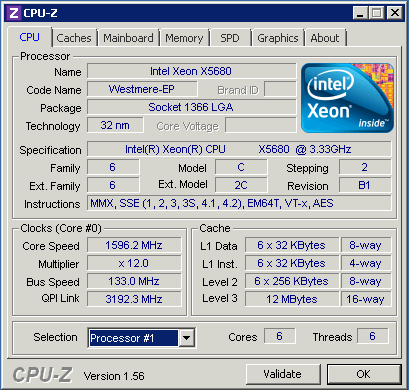
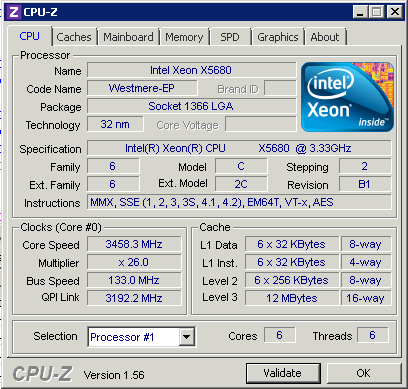
SQL Server on Power-Saving CPUs? Not So Fast.

42 Comments

StackOverflow went through a few infrastructure upgrades this week.  Jeff Atwood blogged about the changes, and Kyle Brandt goes into more detail. Here’s a short recap of some of the SQL Server changes:

  • Changed physical server models (from IBM/Lenovo to Dells)
  • Went from two quad-core Xeons to two six-core Xeons
  • Enabled hyperthreading (so it looked like 24 cores)
  • Went from SQL Server 2008 to SQL Server 2008 R2
  • Went from 6 SATA drives to 8 SATA drives (yes, they’re really doing over 2 million page views a day using a handful of cheap drives, but it’s all in the l33t programming, because they do their own caching)
  • Did some index tuning
  • Moved from one datacenter to another

That’s a lot of moving parts.  When the dust settled, the CPU use on the SQL Server had gone up, not down.  So where do we start troubleshooting?

I love good developers because they do unit testing.  (Yes, readers, that means if you’re not doing unit testing, you’re not a good developer.)  The most reliable way to troubleshoot is to boil things down to the simplest repeatable test possible.  They identified two different queries that had dramatically different results between the old server and the new server.  I looked at the execution plans produced by these queries on both the old and new servers.  Everything was identical – same plans, similar reads, similar results – except for one thing: CPU time.  You can measure CPU time for a query by executing SET STATISTICS TIME ON in SQL Server Management Studio.  From that point forward, all queries in that session will have a bonus set of metrics in the Messages tab listing the milliseconds of CPU time used.

The same query doing the same amount of work took about twice as many milliseconds on the new server as it did the old server.  That meant we had two possibilities: either something under the hood of SQL Server 2008 R2 had gone horribly awry and was doing twice as much CPU work for the exact same execution plan, or the new CPUs were twice as slow.  The server manufacturers said the new CPUs ran at 3.33GHz – but did they really?  I busted out the trusty free CPU-Z tool and ran it on the new servers:

Before Coffee
Before Coffee

Compare the “Specification” line to the “Core Speed” line.  As we say in the business, wah wah wah waaaaah.

The new CPUs were Intel’s diabolical power-saving Nehalems, which have given me no end of grief.  My hat is off to them for saving the planet by using less power, but my pants are down to them for killing performance without informing the users.  In the last few weeks, I’ve seen several cases where server upgrades have resulted in worse performance, and one of the key factors has been throttled-down CPUs.  In theory, the servers should crank up the juice according to demand, but in reality, that’s rarely the case.  Server manufacturers are hiding power-saving settings in the BIOS, and Windows Server ships with a default power-saving option that throttles the CPU down way too often.

I was able to prove the problem by running several simultaneous load-test queries that push SQL Server’s CPU hard.  When running just one or two of them, the processors didn’t speed up, but if I ran enough of them, the server said, “Alright, alright, I get it.  I’ll speed my cores up.  Jeez.”

After Coffee
After Coffee

The instant I reduced the number of running queries, the CPUs got lazy again.  If you think that’s bad, there might be servers in your datacenter right now running just 800MHz, and they won’t even speed up when they’re under load:

800MHz Should Be Enough For Anybody

There’s a few morals to the story:

Periodically test your CPUs with CPU-Z. Know their spec speed and their current speed.  Saving power by throttling down is fine, but understand that they may not run full speed until they’re under very heavy load.  StackOverflow was consistently running 50-60% CPU load, and the processors still weren’t speeding up.  Since the power-saving speed was 1.6GHz, their CPU-intensive queries were literally running half as fast as their old server.

When you change your infrastructure, minimize variables. If you change half a dozen things at once, troubleshooting performance is much more difficult.  I used to work at a company that did periodic outages to fix infrastructure issues like battery backups and air conditioning, and one of our IT team loved to take advantage of those excused outages to upgrade all his servers.  More memory, different network cabling designs, new software versions, you name it, he’d do it.  When the power came back on and his servers didn’t work, his users kept asking, “But I thought all we were doing was repairing the air conditioning?”

A/B test your solution with the smallest unit test possible. In StackOverflow’s case, we narrowed it down to just two queries, and we set up a separate testing environment where we could try out different solutions.  When we narrowed it down to the CPU clock speeds, we were able to instantly say with confidence, “Yep, we found it, and now we can take production down to fix it.”


My PASS Lightning Talk Preview Video

#SQLPass
10 Comments

At this year’s PASS Summit, we’re adding a series of sessions called Lightning Talks.  In a normal one-hour time slot, you can sit and watch several presenters give rapid-fire, 5-minute micro-sessions on various topics.

My Lightning Talk is “Storage Area Networks Simplified” – I’m covering the two most important things you need to know about SANs in just five minutes.  Here’s a video of my rehearsal at home.  I’m playing with iMovie’s green screen effects, but I forgot to wear a shirt that didn’t have green in it, so it has some sparkly action in the video.  Ah, well, that’s what you get with a rehearsal.

My rehearsals ended up being a little over four minutes long, so I had to cut it even tighter.  In a live environment, people will be (hopefully) laughing at some slides, so I won’t be able to deliver it this quickly.  I just turned in my final deck, and I sliced out a couple of slides.

I’m excited to see how these turn out!  The Lightning Talks schedule is:

  • Tuesday 3PM-4:15PM – Room 201 (144)
  • Wednesday 1:30-2:45PM – Room 201 (144)
  • Thursday 1:00-2:15PM – Room 201 (144)

You can view which presenters are in each time slot at the PASS Lightning Talks page.