Blog

My Apple iPad Review

18 Comments

I need a backup presentation device when I travel. During my epic European trip failure, my laptop failed in Copenhagen, and all kinds of hell broke loose. I decided I’d always travel with a second device that could do PowerPoint presentations. For a while, I used a netbook, but I hated carrying fifteen pounds of gear on my shoulder through the airport.

I bought an iPad because:

  • It has VGA output (albeit through a crappy dongle)
  • It can do PowerPoint presentations
  • It’s really light (1.5 pounds)
  • It has a tiny charger (and can be charged via USB)

There’s plenty of places on the web where you can read volumes of well-written stuff about the iPad (AnandtechEngadget), so I’ll just focus on the drawbacks that trouble me the most.

The Virtual Keyboard Sucks

I love my iPhone’s onscreen keyboard. I can type on that thing like nobody’s business, and sometimes I even do it without looking. I can’t call it touch-typing, since there’s no feel of keys, heh.

In theory, the iPad onscreen keyboard should be even better. It’s bigger, and in landscape mode, I should be able to set my hands down and sorta-touch-type. My hands fit great – here’s my right hand with my index finger on the J key, just like a real full-sized keyboard:

iPad Touch Typing
iPad Touch Typing

Looks great, right? Well, not so much. To figure out the problem, you have to compare the iPad keyboard with a real keyboard and see what my fingers are actually hovering over:

iPad Keyboard Differences

On a real keyboard, your four right fingers hover over J, K, L, and ;. On the iPad keyboard, they hover over J, K, L, and the return key. That one little difference, coupled with the keyboard size and lack of tactile feedback, means this is a really bad replacement for a real keyboard. Apple makes an iPad keyboard dock, but if I have to carry that around, I’m right back up to netbook territory.

On an iPhone, I just changed my method of typing altogether – I either use one thumb or two thumbs, depending on how fast I want to type. When the iPad is in landscape mode, two-thumb typing is impossible – the keyboard is just too darned wide. In portrait mode, it’s somewhat more doable for me, but I have pretty big hands. I’ve seen Erika try to type with it, and it just doesn’t work.

The Lack of Multitasking Sucks

The iPad is almost the perfect thing to carry around at conferences. The ten-hour battery life would let me take notes all day while responding to tweets and emails, and I wouldn’t have to drag a power adapter around or look for power outlets to recharge.  The form factor on this thing is great for a meeting/conference device.

Except that there’s no multitasking.  I could either take notes OR do Twitter OR do email.

The upcoming OS v4 upgrade will add multitasking (and support for Bluetooth keyboards, yay!), but it’s not coming out for the iPad until the fall. I’m crossing my fingers in the hope that the iPad will be the only thing I have to carry at the PASS Summit. I’d love to stop hassling with power outlets and shoulder bags.

The App Scene Sucks Right Now

Some of your favorite iPhone apps have been upgraded to add iPad support at no extra charge. Simply go into the App Store, hit Upgrade, and you’ll get all of the latest and greatest apps.

Some developers have decided to sell “HD” or “XL” versions of their apps for the iPad. Pay one price for the iPhone version, another price – usually much higher – for the iPad version. Forget the extra price – this is just painful to manage. Every couple of days, I go into the App Store looking to see if my favorite apps have been reintroduced for the iPad. I don’t want to do this manually – just alert me when there’s a new version of TripIt or RememberTheMilk available for the iPad. And no, I don’t want to run the regular iPhone versions on the iPad, because they look like hell. Even a lot of the new iPad app versions leave something to be desired – check out this WordPress app’s blog editing screen, which only shows a tiny sliver of my post content and wastes huge areas of the screen on greyed-out and non-scrolling title/tags/status fields:
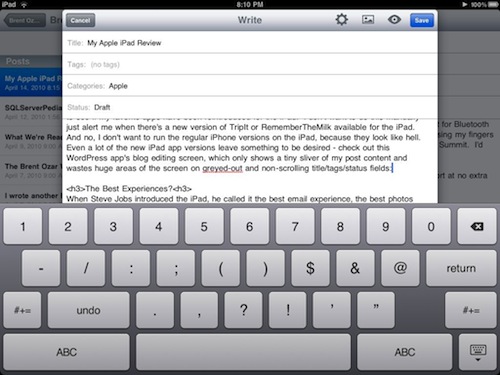
WordPress on iPad
WordPress on the iPad

Not good enough.

The Best Experiences?

When Steve Jobs introduced the iPad, he called it the best email experience, the best photos experience, the best web surfing experience, and the best video experience. I’d agree about two of them, but I didn’t really need a photo or video device, and I don’t think you do either.

The best web experience requires Flash.

I hate Flash. It’s slow, and the web sites that rely on it frustrate me. But I can’t argue that it’s the dominant tool out there for building interactive web sites (no offense, Silverlight guys.) Excluding Flash support means I can’t view a lot of web site videos, and that means it’s not the best web experience.

The best email experience requires a better keyboard.

I seriously prefer using the iPad to handle my mail over the laptop. It’s a quick, fun experience. It’s so fun, in fact, that I’ve started leaving the iPad propped up on my desk to act as a separate email monitor. But when it comes time to composing a reply of more than a paragraph, I prefer my iPhone keyboard over the iPad, and my laptop keyboard over that, and an ergonomic keyboard over all of those. The iPad’s keyboard is a very distant last place. If you insist on using the iPad keyboard, the Apple iPad case helps somewhat by tilting the iPad up as it lays on a flat surface.

The best video experience requires stereo speakers.

Listening to music or watching movies on the iPad infuriates the audiophile in me. It absolutely requires headphones. Mono sound comes out of just one speaker at the bottom of the iPad, or one side when your using it in landscape mode. I’m distracted by the audio, it’s so bad. Headphones makes this problem disappear, but he said this was the BEST video experience, and without headphones, that’s just not the case. And it doesn’t ship with headphones. Or the USB adapter. Or the VGA adapter. And $300 netbooks come with stereo speakers, USB, and VGA out.

My Bottom Line: Apple Users Only for Now

Today, the iPad is an expensive, limited alternative to a Windows 7-equipped netbook.  If you’re happy with a Windows laptop, you’ll prefer a Windows-equipped netbook over the iPad for day to day use. The iPad, sexy as it is, can’t compete with the practicality of a machine that offers multitasking and a physical keyboard. Months from now, when the iPad OS v4 brings multitasking to the party and when HTML5 video replaces Flash, things might be different.

If you’re an Apple iPhone user, though, full speed ahead.  You’re already used to a lot of the compromises in the iPhone OS, and the iPad will seem like the next logical step.  If I didn’t have to do so many SQL Server demos on the road, I’d switch from my laptop to the iPad.  I’m even kicking around the thought of building Amazon EC2 SQL Servers in the cloud to demo the things I need, and then booting them up to remote control them from my iPad for demos.  Stay tuned.


I wrote another book. Already.

9 Comments

When I got done writing just two chapters in Professional SQL Server 2008 Internals and Troubleshooting, I swore I’d never write another book again. No way. I tweeted that the authoring process was like punching yourself in the junk as hard as you could while editors stood behind you asking you to punch harder and faster.

The Simple Twitter Book

But whaddya know….

This book is completely different, though, and v1 is more of a booklet than a book.  While I was on a week-long Caribbean cruise with my mom, I decided to bang out a short ebook covering as much as I could about Twitter. My Twitter articles get tens of thousands of hits per month, and I figured these kinds of people would love to read an ebook all about getting started with Twitter.  When I walked off the plane after the cruise, I would call the book Version 1.0 and be done with it.  I’d publish it online, give it away for free, and see how it goes.

The result is The Simple Twitter Book, a free 24-page PDF that covers:

  • Why your location and description really matters
  • Why you shouldn’t change your photo willy-nilly
  • How to build a more-information page and a better background
  • Where to find cool people to follow
  • Why you shouldn’t follow everybody who follows you
  • How to reply, retweet, and send direct messages
  • The best tools to share links, photos, and music
  • How companies can get started with Twitter
  • How to get more followers

You, dear reader, already know everything in it, but if you agree with what’s in it, the best thing you can do for me is get the word out.  Send the link to your friends, tweet about it, or email a copy to somebody who’s trying to learn Twitter.  You can download it now.


SAN Snapshot Smackdown

Backup and Recovery, Storage
36 Comments

On Twitter, several SAN pros were saying their snapshots can pull off some nifty stuff.  Well, it’s time to find out just how true that is.

Let’s say we have a data warehouse with:

  • One 2TB database, using SQL Server partitioning – needs 8 data files and 1 log file
  • One 200GB database for reporting – has 1 data file and 1 log file
  • 5 smaller 20GB configuration databases – each with 1 data file and 1 log file
  • TempDB – eight data files and one log file

My business needs for backups are:

  • Back up any of the databases individually, at any time, with snapshots
  • Back up the 5 smaller 20GB databases with transaction log point-in-time recovery abilities
  • Sync any of the databases over the WAN to a second SAN
  • Be able to restore any of the databases individually to the snapshot, and be able to restore any of the smaller databases to a point in time

The question is:

  • How many LUNs do I need to accomplish that goal?
  • Is the backup process completely automated without scripting?  (Meaning, if the customer has to roll their own scripts, is there any examples you can point to?)
  • What makes/models of the SAN support it?

If your SAN can do it, I’d love to hear about it.  You can email me directly, or post the responses here in comments.


SQL MCM: The Exams

If the DBA answer is always, “It depends,” how can Microsoft test DBAs?

Six of the SQL MCM R8 guys

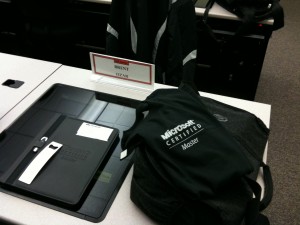
Every week of the MCM program, attendees take a multiple-choice test. Afterwards, we gathered in the hallways and vigorously debated our answers. We agreed about most of the questions, but we had loud discussions about the pros and cons of a dozen of the test questions. The test really forced us to evaluate a lot of options. How many answers are right? Sometimes they tell you to pick three – and sometimes they don’t. Sometimes it’s up to you to figure out how many answers are right. I adore tests like that because they don’t give you any help, and they make you prove things for yourself. You’d better be right, too, because there’s no partial credit for halfway right answers. Time to be a master, as the posters in the classroom say.

The questions don’t involve regurgitating memorized syntax, either. Sure, some of ’em can be figured out by the covered material, but most of them required you to put one and one together. It wasn’t just about knowing what the book says – it was knowing what the book DOESN’T say, and justifying your rationale. Every question has a comment area, and during the tests, keyboards were clacking away. I put comments on at least a quarter of my answers, saying things like, “I picked B, but only because you didn’t say you needed HA. You should have HA for this, which means you need D, not B.” I went way, way out of the way to back up as many of the answers as possible. The tests are graded by real, live human beings. More on that in my next post.

I passed all 3 exams on my first try, and I’m really proud of that. Before I got to the Microsoft campus, I was worried about the exams, not the final six-hour hands-on lab. I was so afraid of failing the tests that I studied my brains out every night for those rather than spending time with lab scripts. Attendees can bring their scripts and documents to the lab, plus use the web, so how hard could it be?

The Final Lab

Simon Sabin noticed all the studying I did during the last 3 weeks and asked me if it was possible to cram your way through the MCM. First, there’s an interview process before you even get accepted to the MCM, and you can’t cram for that. But for the sake of argument, let’s just say you fake your way through the interview, and you cram your way through the exams – there is absolutely no way to cram your way through that lab.

The lab was the best simulation I’ve ever seen of what it’s like in real life. The CIO’s standing behind you, asking you why the system’s not up yet, and why it’s not as fast as he wants it to be. The MCM lab is like the last question on Who Wants to Be a Millionaire when you’ve already used up all your lifelines. You don’t get the 50/50 option, you don’t get to phone a friend, and Regis wants to see how much you really know. The final lab on Saturday was the toughest IT experience of my life, and I’ve been through some serious nastiness. Obviously I can’t say specifics about what the lab involved, but I’ll do my best to walk the line.

As a DBA, sometimes people want me to do things that I’m not comfortable with. Sometimes they want to use SQL Server in ways that don’t make sense, like looping through records individually and doing CPU-intensive processing on them. Sometimes they want to use features I’ve never touched before, and I pad more time into my project timelines in order to get comfy with those features. Sometimes they want to combine features in ways that I’ve never thought of. I try to deal with these requests in a way that keeps the project moving forwards on time with the least amount of risk.

In the MCM lab, you don’t get the luxury of finding a common ground between what the client needs and what you’re personally capable of delivering. The client needs something, and they don’t care how SQL Server works. They don’t care if you’re comfortable. You’d better strap in and get the job done, cowboy.

At 11:30 AM, I got a several-page business requirements document that was more thought-out than what I usually get from clients, but in a very similar style. It was as if someone had parachuted in before me, interviewed the client, done a lot of the requirements gathering, and handed it off to me. It wasn’t perfect – but it was still better than what I usually get from managers. I took about five minutes to read it, formulate a game plan, and then got started working. I had a list of about half a dozen things I needed to accomplish in the client’s lab environment. I had to build some things, I had to adapt some things that were already in place, and I had to fix some things.

My heart sank as I realized what I’d have to do by 5:30 PM. I understood the business needs behind every single task I needed to do. I have big philosophical objections to doing some things in SQL Server, but not this stuff. It was all a match made in heaven – but I just didn’t know how to do some of it. They had completely legit business needs, but I couldn’t directly match some of those needs to anything in the SQL Server toolbox. It wasn’t like I could open SSMS, right-click on a few things, tweak some obscure parameters, and deploy a solution.

Or could I? As I built my list of tasks, I was absolutely positive that I was missing some obvious features or some simple DMVs. I kept thinking, “I’m gonna be so pissed afterwards. I’m going to be the only guy here who didn’t know about the Magic Beans feature that automagically does this stuff for me. I’m gonna be the only moron who rolled his own solutions out of duct tape, lint, and Cheesy Poofs.” We had access to the web, so I spent maybe two minutes searching for solutions, but came up empty. I figured out immediately that the MCM team has put a heroic amount of work building a test that simulates real client work, yet requires answers that you can’t find in Google. I will never breathe a word of the final lab contents because I think it does such a phenomenal job of gauging truly master-level expertise.

Getting Things Done

Whether you’re doing a lab or a real-life project, you have to design for the time you have. Artists ship. But should you:

  • A. Plan to be 100% done with 50% of the tasks
  • B. Plan to be 50% done with 100% of the tasks
  • C. Plan to be 100% done with 100% of the tasks

When someone else sets your deadline and your tasks with non-negotiable limitations, you need to decide whether you want to shoot for A or B. In the case of the MCM, I took approach B. I wanted to show that I was capable of doing everything the client needed, and that I knew what best practices were, but I just didn’t have the time to do it according to best practices.

For example, when I’m importing data from a file, ideally I want to know what the real field definitions are. Sure, today the longest value in the LastName field might be 40 characters, but what if the next batch has someone with a 60-character last name? I don’t want my processes to break. However, finding this out can take time, and the cost of being technically perfect is high. In situations like that, I might make LastName a varchar(100) and call it a day. Anytime I made a compromise in the interest of time, I added it to my running task list in Notepad. If I had the choice between doing something perfectly or doing it MacGuyver style, I did it MacGuyver, then made myself a note to come back and clean it up.

Even the seemingly easy tasks were hard. This was no point-and-click GUI-fest, and canned scripts didn’t help much. I brought dozens, maybe hundreds of scripts that I’ve used in the past. I think I only used two, and they only saved me maybe fifteen minutes, max. The rest of the time, I was banging out keystrokes, testing my work in TempDB first, and hoping like hell that it all worked when I tried it with the client’s stuff.

I finished the MacGuyver round after 4 hours, and then circled back to clean up some of my work. I walked out with about 30 minutes left because I’d gotten to the point where I didn’t want to touch anything else lest it break. My solutions worked enough that I was comfortable defending them. I could have built more, but in doing so, I stood a pretty high chance of breaking something. I turned in my solutions along with my laundry list of things I’d love to do if the client would be willing to give me a week.

After The Lab

I walked out and called Erika. I was glad I got voicemail, because I was on the verge of crying. I could barely keep control of my voice when I left her a message. I was exhausted, I was proud of what I’d accomplished, and I felt like I couldn’t possibly have done any better given the skills I’ve gathered over the years. I was still sure I was missing something obvious, because there was no way candidates could be asked to this much work in 6 hours.

As the other attendees came out, the experience was nothing like the post-written-exam discussions we’d had. Rather than debate the merits of our solutions, we all tried to rationalize each others’ solutions. We didn’t want to promote why our idea was right – we wanted to figure out what the other people had done, and learn from their approach. There were no easy buttons, no quick solutions. As we spoke, we were horrified to discover that we’d overlooked or overthought various pieces. Several of us (myself included) built out whole wings of stuff that we thought were a good idea, but weren’t technically required by the client. I was awed by the work of my classmates, who came up with really brilliant ideas and features.

Here’s the part that really got me: everybody I talked to pulled off Mission Impossible. We actually did most of the stuff we needed to do in the time allotted. I’m pretty sure one guy even pulled off 100% of the tasks to 100% quality, too, and I stand in awe of his skills. As the MCM blog announces new Masters, I’ll be the first person to sing their praises. Forget the certification – there were candidates who I would hire in a heartbeat because they’re so skilled.

The non-disclosure agreement really sucks because I can’t tell you how incredibly difficult that lab was, yet so perfectly in tune with the DBA experience. If you’re a production DBA or a consultant who doesn’t freak out when someone comes running into your office with a tough challenge, you can pass this. If you enjoy tracking down difficult problems and reverse engineering things to make them do what you want, you can pass this. It’s not gonna be easy, but your job isn’t easy either. There were parts of the lab that we wish would have been even harder to show off our particular skill sets, but they would have required making the lab longer – and remember, we didn’t even finish the work we’d already been given.

Passing the exam shows you know what’s in the book. Passing the lab shows you know what to do when the book runs out of pages.

Even in this seriously talented group of candidates, we all missed things. As we poured our hearts out over beers, many of us wished we could have another go at the same lab just to time ourselves and see if we could do it better. A lab like this really shows who’s in it for the technical challenge, for the internal pressure, and the excitement. We were very, very, very hard on ourselves, and one guy said it best: “If I was the instructor, I’d fail me. I expected better.” So many of us just aren’t satisfied with our skills and our results no matter how good they get. We always want more, and we never stop pushing.

But that’s how we ended up in the Master program.

What It Takes to Pass the MCM

Microsoft Certified Masters don’t know everything – but then, you can’t. There’s too many parts in the SQL Server box, and no one human being can know how all of them work. New features come out faster than you can learn them all, so you have to be able to prioritize. And even if you know them all, it’s not enough, because things outside of SQL Server are just as important. A couple of years ago, I got into SAN administration and virtualization to make myself a better DBA, and now I’m looking forward at other technologies to improve my DBA skills too.

There is no sharply defined guide to database administration – or any job – with a first page and a last page. The act of “working” is a morphing set of tasks that isn’t limited, and even the act of building the task list is part of the art. Being a Microsoft Certified Master is about being able to recognize what’s important for you to know, knowing the bejeezus out of that stuff, and just as important, being able to quickly figure out the parts you don’t know. It’s more than knowledge, more than training, more than task management, more than priorities – it’s the sum of all those, and how they make you a better SQL Server professional on the whole.

So as hard as it was, I’m very proud to say I passed the exams and the lab on my first try.

I’m a Microsoft Certified Master for SQL Server.


SQL MCM: Now, the bad stuff.

The MCM isn’t perfect. The instructors and David Ikeda (the lead for this rotation) are trying hard to make the experience great, but there’s some areas for improvement. I’ve been holding back from discussing them until I’d seen all of the instructors; I didn’t want to post a complaint and have people connect that complaint with a specific instructor based on the date of the blog post. The things I’m about to voice happened with one or more of the presenters. The attendees are given a feedback survey for each presentation, and I voiced these same issues on each presentation where they occurred.

Before I start, I want to point out that people paid a lot of money for this training:

  • Sticker price per attendee: $18,500
  • Attendees in this rotation: 11
  • Total sticker price for 11 attendees before discounts: $203,500
  • Hours of training (at 9 per day): 135
  • Total class cost: $1,500 per hour (not including travel, hotels, food, lost revenue for the 3 weeks, etc)

That number can vary – some attendees got discounts, sometimes classes will have more (or less) attendees, but I’m just putting a number out there. Because of the cost, I had very, very, very high expectations for the quality. Some of these complaints may sound like I’m nit-picking, but when the class is paying $25 per minute….

Most of the presentations and demos were AWESOME. Some weren’t. Some of them were so bad that if I was at a community event like the PASS Summit, I would have walked out and switched sessions. In a room of just 11 attendees, I wasn’t comfortable packing up my laptop and leaving the room – it would have sent the wrong message to the rest of the attendees who might have been getting value out of the presentation. When we talked afterwards, though, it was very clear that the other attendees weren’t getting value either. I would say that roughly half of the days were of the quality I expected, about a quarter were alright, and a quarter were bad enough to make me ask for a refund.

Some presentations were way below MCM-level – Too many slides were way, way below MCM-level – like a slide that explains the difference between Windows authentication and mixed mode authentication. (I don’t want to give more specific examples in public as the content is under NDA, and I don’t want to embarrass specific presenters.)  I understand that the audience has a mixed background, I wouldn’t hire a junior person that didn’t know that. Other presentations covered things that were outdated even before I started in IT over a dozen years ago.  If I didn’t know better, I’d think one of the instructors was getting paid by the slide.

Some presentations were way outside of SQL MCM territory – one presentation started with the question, “How many of you are comfortable programming C# with anonymous methods?” Forget the fact that nobody in the room (not even the developers) raised their hand – my bigger complaint was that this wasn’t mentioned in the prerequisite reading list. How were we supposed to be prepared to tackle a subject that was so wildly outside of our subject matter area? There were a lot of glazed-over looks in those sessions.

Some of the Microsoft instructors weren’t prepared – for example, one presenter said out loud, “I don’t know what that bullet point means.” I had to explain a point for him on his own slide deck. Dude, it’s your slide deck – you have no excuse not knowing what your own slides mean. If you’re giving somebody else’s deck to MCM-level geeks, you’re going to be in trouble, because we ask some really difficult questions. If you’re not prepared to do a 400-level deep dive, just give us the deck as testable material and let us have your time to do group study. Another presenter was running on four hours of sleep and couldn’t remember a question long enough to answer it – more than once, he got just two sentences into the answer and asked, “What was your question again?” I didn’t want to distinguish which presenters were guilty of which sins in this list, but this particular sin is so egregious that I don’t want anyone thinking Adam, Greg, Kim, or Paul were guilty of this.

Some presentations felt like marketing pitches – marketing slides are appropriate if the audience is entirely Microsoft employees, because Microsoft has to evangelize their products internally. They have to train Microsoft consultants to “sell” a particular feature. However, when the audience includes external people who paid tens of thousands of dollars to attend, absolutely no marketing slides are appropriate. I don’t disagree that the subject matter areas were indeed important to SQL Server geeks, but sometimes the material didn’t deliver on MCM-geek-level training – more like salesperson training.

Some of the presentations were no more than the prerequisite reading. After some of the presentations, we looked at each other and asked how they were any different from the SQL MCM pre-reading list. Ordinarily I’d be really excited to receive such high-quality training, but since I’d pored over the pre-reading lists, I was a little disappointed that there wasn’t something more. I can’t emphasize enough that if you really, really go through the pre-reading list, you will learn a hell of a lot, and it’s completely free. The challenge is setting aside the time to really go through it, whereas the class forces you to sit in a room and hear it out loud. On the flip side, some of the presentations should be completely discarded and turned into prerequisite reading, because like I said earlier, they were seriously junior-level.

Some presentations were bulletfests. Some slides simply recapped what was in Books Online. Paul Randal did a fantastic job of avoiding this – when he had to show a bullet list of typical syntax or options, he would say, “You can read this list as well as I can,” and he’d take a quick drink of water while we read it. He would then move on. Other instructors would read bullet by bullet. I can handle an hour of that, maybe two, but not a day or more. Even worse, some slides had 10-15 bullet points, and the presenter would jump straight to one bullet point and say, “This is what’s important.” We had to take copious notes on slides like that, but it makes later studying much more difficult. Why were all these bullet points lying around? Was there something we missed? Presenters need to cover everything in the deck, and if something’s not important enough to cover, rip it out.

Some demos weren’t prepared ahead of time – some demos were done as point-and-click GUI tours without a plan, roughly akin to watching Books Online live. As an attendee, that’s really frustrating because those demos don’t come with scripts and they’re impossible to reproduce later. When we’re under the gun studying to reproduce things in the lab, we don’t have a video of what the instructor did in the GUI, and we’re forced to open Books Online.

Some demo scripts didn’t work – the instructors upload their scripts to the group SharePoint site for attendees to rerun later during studies. Some of these demos didn’t work, and attendees only figured this out when they regrouped the next morning and shared notes, each thinking it was their own problem. Come to find out it was the instructor’s code…

Many presentations overlapped with previous ones – all too often we had to tell the instructors, “Yes, we covered that a couple of presentations ago.” The presenters need to download the rest of the decks, read them, and dedupe their slide decks for overlaps. Every $25 minute is precious.

Running on Empty
Running on Empty

We went offtopic way too often – sometimes the instructor would dive off into a pet subject completely unrelated to the topic at hand. They would go into Connect to show a bug they’d submitted, or tell us how they wish SQL Server would work, or how it worked back in Sybase. Normally, I’d love to go off on a tangent with these instructors, because they were universally brilliant. Problem is, we’re on a schedule, and all too often the instructors ran late. The attendees’ time to eat, study, and sleep suffered.  I’m just not surprised at all that the first-time pass rate is so dismally low.

Some presenters couldn’t manage time – we either had to stay late to let them finish, or they hurriedly raced through the last presentations in order to get done. Some presentations were skipped entirely. Neither of these is fair to the attendees. (No, Kim, I’m not talking about Locking & Blocking, hahaha – you were right to skip that one, because it’s prerequisite-level material.)

Now we’re in a really ugly situation – Friday is the last day of class, and before we even begin, the instructors are over 150 slides behind schedule. We’re not going to be taught everything on the original agenda, and yet we’re going to be tested on it anyway. We’re going to do a crappy job of covering too much material in not enough time, and then to add insult to injury, we have from 5:30PM Friday until 8AM Saturday to study the quickly-covered material, plus be ready for the final 6-hour lab.

I can understand why a lot of smart people fail the final lab.

And I’m pretty sure I’m gonna fail it too.

I’m not happy about that. I’m not making excuses – if I fail, it’s 100% my fault – but one of the attendees said it really well: “I wish I could have skipped the 2-3 days of less-useful classes, used those to self-study for the lab instead, and I’d be much more likely to pass.” There’s been a lot of grumbling lately from the attendees who feel let down. I’ve put together a couple of pages of detailed feedback for David, Joe Sack, and the instructors, but I’m waiting to put a few days of distance between me and the MCM classes before I email ’em. I want to make sure I’ve got them worded in a positive way, because right now they’re kinda bitter.

I’m still glad I went through it, though. I can’t even begin to gauge the knowledge I’ve gained. I’ve made so many notes of things I want to do when I touch back down on Earth, and I’ve made some great friendships with some of the brightest technical minds I’ve ever met – and that goes for both the instructors and the attendees. Yes, I just got done complaining about the presentations, but notice that I didn’t say the instructors weren’t amazing. These people have awesome, awesome minds, and they have an unbelievable amount of skills. I’ve got a half-written post circling in my head about how the biggest value of the MCM isn’t the exact step-by-step technical instructions – it’s the business-relevant knowledge of the instructors, and how they pass it on to you selflessly in a way you can reuse. At no time did I ever feel like a presenter was holding anything back from us.

I spent half an hour writing this to unwind so I could fall asleep, and I felt guilty this whole time for taking those 30 minutes as a guilty pleasure, but a man’s gotta do something to relax when the pressure’s this intense. Mission accomplished. Bedtime.

The next blog post will tell you whether I passed or failed, but if you want to know faster, you can check out my Twitter page for updates as I go through the exam and await the results. I’ll probably find out Sunday or Monday. Here goes….

Update 4/2: Joe Sack published a response on the Master Blog – “Free press doesn’t always mean lollipops and rainbows.” Both David and Joe have been exceedingly gracious about the entire ordeal, and they’re already working to improve the experience.  I’ve also gotten emails from some of the presenters apologizing for issues as well.


Switching to Cassandra

16 Comments

NoSQL is a good idea with a bad name.  You wouldn’t put on your NoJeans to drive to work in your NoFord. But put away the crappy label for a minute and check out what the NoSQL movement has going for it, because they’ve got some good points.

In the Microsoft Certified Master training, I’ve been stunned to learn some of the things that go on under the covers of SQL Server.  The good thing is that MSSQL offers a ton of functionality few of us actually use, but the drawback is that there’s a lot of overengineered plumbing.

I train database administrators around the world, and if there’s one thing I see over and over, it’s that people just don’t use the features built into the product.  They’re not using the built-in index tools that can make their servers faster.  They’re not checking fragmentation.  Hell, half the time they’re not even checking data integrity or doing backups.

So it occurred to me – maybe these DBAs aren’t on something – they’re onto something.

Traditional relational database management systems like Microsoft SQL Server have inherent weaknesses that prevent them from scaling to handle real load.  All these features they’ve built in over the years have added up to real overhead.  During several sessions, I heard phrases like “just adds 2% overhead” and “only uses 1-2% CPU.”  Add up all these features, and it’s clear: SQL Server 2008 is the Windows Vista of databases.  It’s a miracle queries ever complete.

And I’ve had enough.

NoSQL DBA
NoSQL DBA

NoSQL databases don’t have transactions, but frankly, that’s fine.  You know what kind of transactions I want?  Cash transactions.  I want a brand new house on an episode of Cribs and a bathroom I can play baseball in.  I can’t get there working with SQL Server because none of the cool new startups are using it.

I’m tired of working for suit-and-tie companies that tout their long histories and big balance sheets.  I wanna roam the halls of companies like Digg, Reddit, and Twitter – companies chock full of venture capital.  Those guys are all distracted by how the database software is free, and they haven’t thought through the process of hiring good DBAs for a database platform that got compiled last Thursday.  Presto, I can charge ginormous fees.

After doing a lot of research, I’ve settled on Cassandra, the NoSQL database created by Facebook.  It does have some weaknesses – for example, you can’t add tables without restarting – but I think that’s an advantage.  I won’t have to do nearly as many schema deployments if the developers know the servers will have to get restarted, and that means less work for me.

Most NoSQL databases have what’s called eventual consistency – sooner or later, all of the nodes will catch up and have the same data.  I’m fine with that.  What’s the rush?  The inserts, updates, and deletes will probably be caught up before these guys even have a business plan.  DBAs have such a big issue with integrity, but I work for a software vendor, remember?  I sold my integrity already.

I, for one, welcome our new Database 2.0 overlords.  Or 4.1. Whatever.

Update 4/2: since you’re reading this late, you should probably be aware that it was originally published on April 1.  You may also be interested in my post from 4/1/2009 about becoming a Natural Keyboard MVP.


SQL MCM Day 15: Logistics

There’s something really exciting about walking into Microsoft each morning.  I know it sounds cheesy, but I get the feeling that really cool things are happening all over the campus.  Love ’em or hate ’em, Microsoft builds things that touch our everyday lives, and this is where it’s happening.  I know a lot of Microsoft employees that I really, really respect for their knowledge, community efforts, and personalities.

And for three weeks, I’m surrounded by ’em.

My MCM training is taking place in Building 40 on the Microsoft campus.  I’m staying at the Homestead Suites only a block away, and I’d highly recommend it to any attendees.  It’s way cheaper than everything else in the immediate vicinity – around $75/night compared to $150/night for real hotels like the Courtyard or Residence Inn.  The advantage of staying so close is that you don’t have to fight traffic.  During the MCM, you’re going to treasure every minute you can spend studying (or relaxing).  If you’re willing to drive 20 minutes each way in traffic, though, you can cut your hotel bill to around $50/night and get a hotel with a warm breakfast each morning.  That drive might not be so bad, though.

Rooms in the Homestead have a little kitchen with fridge, stove, and a microwave, so I stocked up on basic breakfast & dinner food when I arrived.  That turned out to be a bad idea – every day after class, I really like driving a few minutes to a nearby restaurant just to get out for a while.  The Homestead isn’t exactly welcoming, and it’s tough enough to get psyched up for an evening of studying.  If you stay farther away, then take a 15-20 minute drive from Building 40 to a hotel, you can hit a restaurant on the way in & out.  You’ll have a better frame of mind at a little higher expense.

The Homestead has a small laundry room, but I drop my clothes off at a nearby laundromat.  They’ll wash & fold your clothes for a fixed rate by the pound of clothes.  It costs 3-4x more than doing it yourself, but you don’t have to wait around for a free machine, and you can spend that time studying instead.

No matter where you decide to stay, bring an Ethernet cable.  Hotel WiFi is a gamble, and you can often get better performance via hard wiring.  The Homestead’s WiFi in particular is horrible, often dropping connections outright, but the network via jacks in the kitchen is rock-solid and quite quick.

The Homestead’s pretty quiet, but the walls are wafer thin.  Even in quiet hotels, though, I sleep way better with a white noise generator.  At home, I use a Marpac SleepMate, which uses a spinning plastic tube to generate whooshing air sounds.  It’s very soothing, and it masks background noise extremely well.  Sometimes in hotels, I can get away with just turning on the air conditioning fan to get white noise, but in places like Seattle, that doesn’t work.  Leaving the fan on means you don’t get heat or AC, and Seattle hotel rooms in winter get cold enough to hang meat.

On the road, I use the $1 Ambiance iPhone app, which plays background noise through the phone speaker.  You can choose from hundreds of noises, and my favorites are Brown Noise (no poop jokes), Powerful Waterfall, and Rain on a Tent (not to be confused with Snakes on a Plane.)  Ambiance has two downsides – it runs your phone battery down, so you need to run it on a charger.  It’s not as all-encompassing as the Marpac – recorded noise just doesn’t seem to do as well as whooshing air when it comes to masking noise.  I still recommend it highly though.

Killing Us Softly
Killing Us Softly

If you don’t like studying in the hotel room, you can spend as much time as you want in Building 40.  On the first day, MCM candidates get badges with 24/7 access to the building.  The classroom is stocked with an abundance of the finest snack foods imaginable.  Want something to drink?  The kitchens all have Starbucks coffeemakers and fridges stocked with sodas, fruit juices, and energy drinks.  Carbohydrates will not be an issue – well, at least the lack of ’em won’t be an issue.  I think I’ve gained five pounds already.

Non-Microsoft staff don’t get WiFi access.  You can bring your laptop, but either bring a data card or be prepared to use the in-desk computers to access the web.  Bring a giant thumb drive (at least 8GB) to copy materials from the lab to your machine.

Some of the labs are delivered in VPC format, so install Microsoft Virtual PC ahead of time on your computer.  If you can’t run VPCs on your laptop, consider upgrading your laptop – it’s cheap relative to the cost of the MCM.  You can skip using the VPCs, but you’ll be missing out.  Apple users – this means you need to install Boot Camp with at least 20GB free space so that you can boot into Windows, then copy the VPC to your local drive and run it from there.

The MCM signup material says that laptops will be provided, and they are, but you don’t want to use them.  They’re garbage.  Same with the computers built into the desks – mine said Optimized for Windows XP, and even that was a stretch.  Mine didn’t have the VT extensions on the processor, so I couldn’t even use it for VPCs.  To add injury to insult, the desk computers have CRTs embedded in the desktop, and you’ll bang your knees against the display every time you use the desk.  By the end of the first week, most of the attendees were sitting sideways at their desk just so they could use their laptop without bruised knees.

If you’ve got friends to visit in Seattle, do it before the MCM begins.  You can’t predict what time you’ll get out of class each afternoon, and when you do, you won’t be fit for human companionship.  Your brain will be battered even more than your knees.  Don’t plan on doing it after the last day, either.  By the end of this, you’ll be dying to get home to your own bed, to eat food out of your own fridge, watch your own television, and hug your loved ones.

Speaking of loved ones, I need to blog about the bonds you build with your fellow MCM candidates.  You really go through hell, and you learn a lot about people by the kinds of questions they ask (and the answers they offer) during three weeks of nonstop in-depth technical training.  More on that later.

First I’ve got a test to take.  (sigh)  Here comes Number Two.


SQL MCM Day 14: Test #2

The MCM schedule goes like this:

  • Week 1 – M-F – training
  • Week 1 – Weekend – study time
  • Week 2 – Monday 8am – written exam covering Week 1’s material
  • Week 2 – M-F – training
  • Week 2 – Weekend – study time
  • Week 3 – Monday 8am – written exam covering Week 2’s material (today)
  • Week 3 – M-F – training
  • Week 3 – Saturday 8am – written exam covering Week 3’s material
  • Week 3 – Saturday 10am-4pm – 6-hour lab exam covering all the material
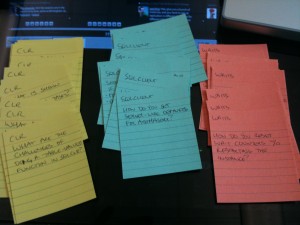
MCM Flash Cards
MCM Flash Cards

Week 3’s exams present a little bit of a problem – there’s no weekend study time.  Class ends at 5:30pm on Friday afternoon, and then we report back to the classroom 14 hours later to start the tests.

Ouch.

So far, our two weekends have been great for studying, quizzing each other with homemade flash cards, and running through lab demos.  During the week, the presenters rip through demos at a breakneck pace, but it can be difficult to understand every step of what’s going on behind the scenes.  Most of us have been rerunning the demos again in the evenings and on the weekends to make sure we’re comfortable with the code and the features.  For week 3, though, we’re going to have to do our studying and demos every night and stay absolutely current.

This sucks, but there’s no easy answer.  Microsoft could move the tests to Monday, but then that drags out the class longer, making it tougher for people to schedule it.  The test could be moved to Sunday (as it is for the Windows MCM), but attendees still have to travel back home.  Roughly half of this rotation’s candidates are from outside the US.

To add even more suspense, we won’t find out if we passed for a day or more.  After the lab finishes Saturday afternoon, we’re going to head to a bar, drown our sorrows, talk about what we screwed up, and toast to our success before leaving for our homes.

A walk in the park with Buck Woody

I’m really, really going to miss hanging out with this group of people.  The best thing about coming to Microsoft’s campus is the collection of absolutely brilliant people who show up for the party.  I got the chance to spend time with Microsofties Buck Woody, David Ikeda, Jimmy May, and Joe Sack, plus met several more who are in my rotation as candidates like Robert Davis.  I don’t want to name anybody else’s name in case they don’t pass and they want to keep it quiet, but I’ll be singing their praises once they pass, because I’m sure they’re gonna pass.  These guys are too smart for words.  This experience really challenged me, because some of the other attendees know more about SQL Server than anyone I’ve ever had the chance to work with.  It was truly an honor working with them.

I’ve been studying my rear off, and I’m fairly comfortable with the materials for today’s test.  I’d put a small amount of money on me passing today.  I wouldn’t be upset or surprised if I didn’t pass, though, because some of this week’s material has taken me way, way outside of my comfort zone.  I’m at peace knowing I did just about everything I could do to pass.  I really want to pass this one, because before I got here, I saw this week’s test as my biggest hurdle.

Now that I’m here, I see the final labs as the toughest part.  On Friday, we were given a few test lab scenarios, and that suddenly made the whole lab thing very, very real. My scenario had a to-do list with three major tasks with different SQL Server features, and one of them was a big problem for me. I tried it a few times (more than five years ago), didn’t like it, and I never put it into production.  This weekend, I had to hold my nose, stick my hand in the box, and get that feature back out.  I figured I was relatively safe – after all, I was implementing it on a brand-new standalone virtual server with no dependencies or history of nastiness.  As they say on Top Gear, how hard can it be?

Went to start it, and whammo – errors all over the place.

Brand new server.  Brand new implementation.  Bork bork bork.

So it’s because I’m incompetent, right?  Nope – every candidate took a road trip through Error City and spent time troubleshooting problems.  Four candidates tried to implement it three different ways, and they all failed to work the first time.  When a feature can’t be implemented by MCM candidates on brand-new servers, here’s your sign, Microsoft – it sucks.  Fix it, or it will continue to be the laughing stock of DBAs everywhere.  (And no, I won’t say what feature it is, because I bet you can guess.  It’s infamously failure-prone, always failing in the middle of the night when you’re on call.)

We’re coming down the home stretch.  I’ve noticed that my quality of writing has gotten worse – not just in the blog, but my handwriting.  My hands hurt from taking so many notes.  My eyes hurt within an hour of watching PowerPoint slides, and I find myself rubbing them more often.  I need a haircut.  I miss Erika and Ernie.  I’ve gained weight due to carb-laden fast food stuffed in between study sessions.

But it’s all worth it, because I’ve gained a crazy amount of knowledge too.  Now, if I can just absorb enough to pull off the big one on Saturday…

Update: Robert Davis, another MCM attendee in my rotation, blogged his thoughts on how to study for the MCM.


PASS Summit Speaking Requirements

39 Comments

Speaking at a national event is a privilege, not a right.  Attendees spent a large amount of money to come to a big event.  The event organizers need to ensure that every presentation and every presenter are worth the attendees’ time and money.  But how can we gauge quality when hundreds or thousands of abstracts get submitted every year?  Simple – gradually:

Before speaking at a regional event, you must have local experience first.  In terms of PASS, this means that I would require that speakers do presentations at local chapters before they can be accepted at a SQLSaturday.  I’m not saying the exact same presentation should be given at both events, but they at least need to present in both places.  Speaking in front of 100 people is very different than speaking in front of 10 people – you have to gauge audience interest differently, control hecklers differently, and project your voice & personality differently.  The techniques I use with a handful of people don’t scale to a packed room.

This point is especially near and dear to my heart because I keep getting desperate pleas from user group leaders who need local speakers.  I get the feeling that some speakers are just parachuting into big events rather than putting in their time polishing and preparing their work at the local level first.  Local chapter leaders need our help.

Before speaking at a national event, you must have regional experience first.  This dovetails perfectly with PASS’s recent acquisition of SQLSaturdays, and it does two things.  First, it ensures that speakers can perform in front of big crowds, and second, it helps SQLSaturdays maintain a good speaker list.

Ideally, if you get lots of negative feedback at a smaller event, your submissions aren’t favored at national events.  This takes a lot of work, but in a perfect world, I’d have a single feedback system (maybe SpeakerRate.com) that centralizes ratings.  If you can’t average, say, 4.0 (on a 5-point scale), you don’t get into the Summit.

This topic is very important to me because I remember being very let down at my first PASS Summit.  I remember sitting through some presentations and saying, “Jeez, how the heck did this person get approved to speak?  Sure, the material is interesting, but damn, they can’t speak.  They have no stage presence, they’ve clearly never rehearsed this material, and they don’t know how to answer audience questions.”

Running a national event means making sure your attendees get the most bang for the buck.  Vetting speakers like this will help ensure that attendees keep coming back for more.


SQL MCM Day 11: When and How to Get In Free

I’m more than halfway through my big adventure. Candidates are starting to complain about the lack of sleep and the abundance of material.  So far this week, we’ve covered the following material:

  • 537 PowerPoint slides (and these aren’t Brent-style slides, either – one of the slides yesterday scored 15 bullet points)
  • 43 T-SQL scripts
  • 11 Visual Studio apps
  • 164 more slides of “testable material” that weren’t shown

That’s just in the last four days, plus we have another day of material today.  I’m starting to feel like Karl in Lost, strapped to a chair in Room 23, watching the Dharma brainwashing video on an endless loop.  I’ve started dreaming of DMVs – yesterday morning I woke up and said “sys.dm_active_trans” out loud, and that’s not even a real DMV name.  Any of this material can be in our exam on Monday, and then eight days from now, our 6-hour implementation lab will cover material from all 3 weeks.

I would have made a profit attending the MCM training if I had a dollar for every time an instructor said, “I never cover this in my public lectures, and you don’t really need to know this, but this is what the Master level is all about.”  It’s not just about internals – they cover hidden fields that aren’t used yet, techniques that don’t work, and back door ways to double-check that SQL Server is really doing what it’s supposed to be doing.  This week Adam Machanic covered at least a few things that nobody knows outside of Microsoft, Adam, and Adam’s technical reviewers.  It’s mind-boggling.

It’s not always useful – I won’t run out of the building ready to throw a particular feature into production – but I’m much better prepared.  I can make a much, much better decision about whether a feature is right for a given project, or why it’s not.  The endless joke about being a database administrator is that the answer is always, “It depends.”  Being a Microsoft Certified Master means knowing exactly, precisely what it depends on.

Going in, I was pretty sure I knew the answer to most of the “it depends” scenarios.  See, I think the career of a DBA progresses a little something like this:

  • Brand new DBA – “Books Online says I should do it this way.”
  • Junior DBA – “Somebody on a forum somewhere said this trace flag will fix everything, and I think they know what they’re talking about.”
  • Senior DBA – “It depends.  A lot of stuff in those forums is wacko, and I’ve been burned by that trace flag.  Here’s what’s worked for me in the past, here’s a few good alternatives we should talk through, and here’s advice from people that I know and trust.”
  • Expert – “Here’s a list of what it depends on.  Here’s four people who got burned with that feature, here’s four people who’ve implemented that feature successfully, and here’s how to get in touch with the product manager for that feature.  Between me and my peer group, we can find the toughest answers with absolute certainty in a matter of hours – or perhaps minutes.”

Being an expert isn’t just about knowing the answers; it’s about knowing the people who wrote the answers.

Getting to this level, getting to where the MCM training is useful to you, requires a heck of a lot of experience.  The training is most effective for me when I can hear the instructor explaining the tweaks and back doors to a particular feature, and I can respond by thinking, “Ah-HA!  That would be the perfect answer to ___!  I know why that’s helpful, and I know where I’d apply that knowledge.”  Today in particular, Adam Machanic covered three separate features that I’d always wanted to implement at Southern Wine (my last company).  Armed with just this one day of training, I can go back to them, steer them away from two of the features, and steer them toward one.  I bet I’ll save them multiple man-years of labor just with this one day of training alone.

When I was a production DBA at Southern, I never would have thought to attend something like the MCM.  It would have seemed completely out of my reach, way too expensive, and not relevant to my day-to-day work.  Turns out I was wrong, because there’s….

Nearly-Free MCMs for Microsoft Premier Agreement Customers

Large companies get Microsoft Premier Agreements for better support.  Premier contracts include a number of hours for Microsoft consulting services like health checks and continuing education.  Every year, companies let their Premier hours expire without using ’em up.

You can use your company’s Premier hours to pay for your MCM tuition!

If your company has more than a few hundred employees, ask your manager if you’ve got a Premier agreement.  This is different than an Enterprise Agreement, which covers software licensing, but Premier services are often bundled in with Enterprise Agreements.

If the company has a Premier agreement, find out when the expiration date is, and how many hours are left on the contract.  Tell your manager that you’re calling shotgun – you want those hours if they’re going to go unused.  Then contact Joe Sack to get more information about how to sign up for the MCM program using your Premier hours.

There’s two reasons you should rush:

  1. There’s very few MCMs right now. There are only 3 SQL MCMs in the US outside of Microsoft right now.  Having it before everybody else is worth something.
  2. You want to get in before your coworkers. Put your name in before the word gets out about how the Premier-hours-for-MCM thing works.  Whether you’re a SQL, Exchange, Sharepoint, or Windows person, you should go for this.

Your company probably won’t foot the entire bill for MCM training, but if you can manage to use leftover Premier hours to pay for it, suddenly the bill becomes one heck of a lot cheaper.


SQL MCM Day 10: Comfort Zone

I’m kinda good at a few things.  I can tune pretty much any SQL Server to make it run faster.  I play a decent game of Extreme Query Makeover.  If you talk about your SQL Server application behavior for a few minutes, I can usually tell you where your bottleneck is.  I’ve even been known to guess an exact server configuration down to the storage setup from a five-minute Perfmon counter output.  I’ve got a core set of skills that enable me to make a pretty good living teaching people how to make their servers run faster.  I don’t get a big head, though, because I only know a relatively small subset of SQL Server.  When I open the Microsoft MVP private newsgroups, my eyes get wide at the questions – let alone the answers.

Before the MCM, if you’d have come to me with stories about a server running SQLCLR stored procedures, storing XML in the database, or using 2005’s table partitioning, I would have given you a pretty short answer: “Stop doing that.”

Unfortunately, the Microsoft Certified Master training doesn’t give me that luxury.

Adam Machanic, Japanese Snack Connoisseur

The MCM isn’t just about going deeper into subjects you already know and love.  Sure, some of the instructors can wax poetic about the finer points of your very favorite features, but sooner or later, you’re going to encounter a session on a topic you can’t stand.  It’s not enough to say, “That feature doesn’t scale” – your mission as an MCM is to master it anyway, because believe it or not, you’re wrong.

The MCM is about letting go of your prejudice against a feature and learning to make it work.  I’ve heard stories from instructors about candidates who angrily denounced sessions as irrelevant.  These students said they would never ever use a technique.  Those students will not be successful.  Going in, based on the prereading list, I knew I was going to encounter my old sworn enemies: CLR assemblies, XML in the database, Service Broker, and – perish the thought – replication.  As those topics came up, I kept an open mind.  After all, if anybody has a chance of getting it right, it’s the rockstar MCM instructors.  If I’m going to learn how to do CLR in the database, I would want to learn it from Adam Machanic (Blog@AdamMachanic).

I expected the instructors to come in with pom-poms and cheerlead their subject areas.  I expected them to recite a litany of ways that his favorite features ruled, and my opinion drooled.  Wrong-o: every instructor has been open and frank, explaining how sometimes things work and how all too frequently they fail.  Looking back, it all makes sense – they only want you to use a particular feature if it’s going to be a success.  They don’t want any implementation failures, and Microsoft encourages this open discussion (well, kinda open, under NDA anyway) because they don’t want failures either.  They want MCMs to walk out and have one successful implementation after another.

Like I wrote above, though, this bars me from simply saying, “I would avoid implementing that feature.”  Almost every feature I’ve seen covered does indeed have good deployment scenarios.  The problem for me is that I have to learn – and I mean really learn – how to successfully deploy them.  This means doing things that have burned you in the past, or things you’ve just plain avoided.  For me, that was SQLCLR.  I wish I would have spent a few weekends ahead of time with a .NET developer getting to know more so that I could have asked better questions.

If you wanna get the most out of the DBA training, you need DBA experience.

If you wanna get the most out of the developer training, you need developer experience – whether you like it or not.

At one point, Adam touched on a subject that wasn’t in the slide deck, then paused and asked attendees if they wanted him to spend 5 minutes talking about that subject.  He made it clear that it wasn’t part of the exam, but if attendees were interested, he could elaborate.  Some of them did, so he did.  I was left out in the cold because I didn’t have the ground level knowledge to take advantage of what he was saying.  He could have been explaining the contents of candied sweet potato french fries for all I know.

To grow as a person, you have to go outside of your comfort zone, and the MCM makes you do just that.

For the record, the candied sweet potato french fries were fantastic, and SQLCLR wasn’t too bad either.


SQL MCM Day 9: Taking Good Notes

I sit at the back of the classroom, so I get to see everybody’s laptops as they’re working.  Some folks surf the web, make travel plans, or do email.  Other folks follow along with the demos, running the scripts on their machines before the instructor gets to the next one.  I seem to have a little bit of an oddball strategy, so I figured maybe I should blog it in case it helps anybody else.

I start by keeping the PowerPoint slide deck open.  As the instructor explains each slide, I make notes in the “Notes” part of the slide.  If the slide deck already has some notes from the instructor, I make a line above their notes to show what’s theirs versus what’s mine, and I put mine at the top.  I find that instructors place very different emphasis on different parts of the slide – for example, some instructors will say, “This part here doesn’t even really matter, and I don’t know why I haven’t taken that off the slide.”  Presto, put that in the notes, and you can change the way you study.

Instructors also place huge amounts of emphasis on other points, so I make note of that too.  If a particular topic is very important, they’ll show it with their body language, pointing at the topic or waving their hands.  Those kinds of points seem to be more likely to show up on exams.

I also start a Word document, and I switch back and forth between that and the slide deck.  In the doc, I put notes about:

  • Blog topics (not necessarily blogging something straight from the deck, but more like things that occur to me while I’m watching them cover a topic)
  • Things I need to bring up with clients (like when a slide covers a solution that might address their problems)
  • Questions I want to ask the presenter later (clarifications, going down a rathole, or anything that is important to me personally but probably isn’t of interest to the rest of the class, and I don’t want to burn up the classroom time)
  • Things I find interesting, but aren’t likely to appear on the exam

The downside of my fragmented PowerPoint/Word approach is that it’s not as easy to combine all of my notes in one place.  I’ve seen people using OneNote, and looks slick, but I’m kind of averse to anything that puts more software between me & the original source docs.


SQL MCM Day 8: The First Weekly Exam

Here’s everything you need to know to pass the MCM written exams:

Before you get here, read the prerequisites.

Again.

And again.

And again.

My kind of email
My kind of email

Do the demos.  Run the scripts.  Explain them out loud.  Teach the workings to your pet hamster.  Be completely comfortable with everything covered in the prerequisite reading.  The one week of training is nowhere near enough to take you from zero to hero, as they say – if you don’t already have a very solid background in the material, you’re not going to make the cut.

I was the first guy to finish the two-hour exam on Monday morning, and as I waited for the other candidates to finish, I thought I’d done really well.  But as each attendee came out and we talked about our experiences, we realized that we hadn’t done quite as well as we’d thought.  Within an hour, we were all pretty sure we were on the borderline between pass and fail, and perhaps even trending toward the fail area.

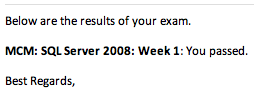
Our results were delivered via email, and I breathed a big sigh of relief when I saw that I’d passed.  Unfortunately, two of my colleagues didn’t make it, and I was really surprised.  I wouldn’t have correctly predicted who was going to pass and who was going to fail.

Looking back at the test and looking forward at this week’s material, I’m pretty concerned about my chances on the next exam.  I’m going to have to study my rear off, because I really, really want to pass these tests the first time.  If you fail, you don’t get to retake the exams right away, which means the material is going to slowly trickle out of your brain.  Your best shot by far is passing that first exam.

I’ve started to settle down into a schedule:

  • 5 AM – wake up, read the news, hop in the shower.
  • 5:30 AM – drive to Starbucks or McDonald’s to get coffee and breakfast
  • 6 AM – arrive in the classroom to start studying
  • 8 AM – class starts
  • 6-6:30 PM – class finishes, attendees talk for a while to decompress
  • 7-7:30 PM – go somewhere for dinner
  • 8-8:30 PM – arrive back at the hotel room and crack the books open again
  • 10 PM – go to bed

I’m selfish – I get 7 hours of sleep – but I’ve seen other attendees sending emails until 1-2AM, quizzing each other through our distribution list.  I can’t operate like that.  The less sleep I get, the less focused I am during the day, and the tougher it is to really absorb some of the monstrously detailed material.  We take a 5-10 minute break every 60-90 minutes, and I find it helps to take a walk outside to see the sun and get some fresh air.

Random unrelated quote:

Attendee: “Why is it that all the instructors know you?”
Me: “I’m huge on MySpace.”


SQL MCM Day 7: One Week Down

Whew.

The first week was taught by Paul Randal (Blog@PaulRandal) and Kimberly Tripp (Blog@KimberlyLTripp), the husband-and-wife team of former Microsofties who founded SQLSkills.com.  To call them good trainers is an epic understatement.  They know how to deliver very, very technical material in ways that illustrate it well.  I had to stop Paul at one point and ask him how long it took to build a particular slide because the animations were so good at conveying a hard-to-describe process.

“Of course,” you say to yourself mid-week, “why doesn’t everyone know that you can just XOR all the IAM pages together to double-check the allocations on each PFS page?  It’s so obvious.”

But if you hopped into a time machine, went back one week before the class started, and said that same sentence to Last Week You, he wouldn’t even understand how that was related to SQL Server.

DBAs Are On a Need To Know Basis

As a DBA, I didn’t have the time to learn about stuff like IAM pages and PFS pages.  I was too busy keeping the trains running on time, tuning applications, building new servers, and avoiding disaster.

As an MCM candidate faced with an avalanche of really, really cool learning material, there’s a wonderful dilemma:

  • Should I focus on learning things to pass the exam (and maybe ignore obscure things that interest me)
  • Or should I give in to temptation and dive into the things I find mesmerizing, and skip things that don’t call to me (at the risk of not learning something required on the exam)
XKCD - Duty Calls
XKCD - Duty Calls

For example, during our first group study, we dove down a rathole and spent a lot of time discussing the intricacies of the ghost cleanup process.  I’m smiling as I type this because we had a really fun time debating and analyzing how a particular part worked.  When we asked Paul about it the next day, he explained it, but immediately pointed out that those fine-grained details wouldn’t be on the exam.  They weren’t even in the slide deck or notes, because we’d gone so far away from what’s useful for real-world architects and DBAs.  Nobody needs to know this stuff, but we’re hard-core geeks, and we find the inner workings cool.

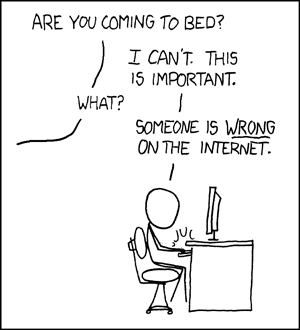
Go far enough down the rathole, and you become really thankful for the MCM’s biggest perk: connections to brilliant people.  As much as I love the intertubes, there’s wrong information out there.  It’s hard to put a price on accurate information, especially when the design, performance, and security of your data is at stake.  Going through this class, suddenly I can appreciate how frustrating it can be for Kim and Paul to open up a web browser.  One could spend all day correcting bogus and misleading web pages, but that costs time, which is money, and there’s not much of an ROI on flame wars.  I can even make a case that if you’re a doctor, it makes sense to keep letting people shoot themselves in the foot.  There’s good money in removing bullets.

I don’t want to give you the impression that the class focuses on obscure internal processes, though.  Paul and Kim’s training upended the conventional 100-200-300-400 progression.  Instead of starting with 100-level material like “Meet Mr. Table and Mrs. Index,” it started with how the storage engine works.  On Monday, we covered things that most DBAs think they’ll never need to learn, let alone touch.  By the end of the week, as we gradually stepped away from the internals, we had a much better understanding of why some 100-200 level concepts worked the way they do.

When Do You Need to Know?

Good senior DBAs bust their humps the first year on the job.  They get the servers set up correctly, configure alerts & notifications to find out when things break, and harden security to make sure people can’t break things.  Once they’ve built a solid foundation, the rest of their time at the company is much easier, and they’ve got the free time to dig deeper.

That’s the perfect time to go for the MCM.

When you believe you’ve got things pretty stable in your environment, when you feel confident that your servers are under control, and you want to take your knowledge to the next level, the MCM is right for you.  I’ve already learned things in week 1 that I can quickly apply to my SQL Servers right now and improve performance, reliability, and scalability.  The only thing holding me back from sending out client & friend emails is that I don’t have the time to manage the responses yet.  For example, I connected to one friend’s server, ran a troubleshooting query, and found that we need to fix the log file setups.  I started banging out the email telling them what to do, but I realized it’ll take an hour, and if anything goes wrong in the process, I don’t have the time to help them troubleshoot.

Do I Actually Know?

We’re about to find out – my first exam starts at 8:00 AM Pacific.

My biggest concern (and I’ve heard the same thing from other candidates) is the test style.  What kinds of questions will be asked?  Will they be high-level design questions, mid-level implementation questions, or low-level syntax questions?  We keep rehashing the slide decks trying to cover these questions from all three angles, but it’s hard to come up with our own test questions when we don’t know that crucial element.  We’re going to breathe a sigh of relief once we see the first question just to know how to focus the rest of our studies on the next two exams.

Candidates who fail a test keep right on going, and retakes happen later.  Training starts again shortly after the two-hour exam completes, and the first teacher this week is the colorful Adam Machanic (Blog@AdamMachanic).  I’ve already warned the candidates that he’s younger than me, smarter than me, and knows more about alcohol than me, so he’s obviously doing something right.  Or many things.

As soon as I know my results, I’ll tweet ’em, but it may take a while.  The results are graded by hand due to the question complexity and evolving nature of the tests.  This isn’t an MCP test that’s been beta’d with thousands of candidates, so they still monitor the results closely each time.

Wish me luck!


More on the Relative Value of Projects

17 Comments

A while back, I blogged about the importance of recognizing database values.  If you’ve got a dozen databases on a server, and one of them is hogging resources, how much is that database worth to the business?  If it’s a database housing low-value data (like employee web surfing habits) and the other databases are much more valuable (like incoming sales) then that guides your fix.  Move the low-value data to a lower-value server, or move the higher-value data to a higher-value server.  Don’t make your high-value apps suffer at the expense of poorly written low-value apps.

Saturday on Twitter, I was talking with another DBA (who shall remain nameless lest this come off in the wrong way) about a project.  He needed a free or low-cost way to monitor a free server with low-priority applications.  He said the company didn’t see the value in spending money to monitor those apps, so he didn’t have a budget.

I’ve been there myself, and I feel that pain.  I remember being a DBA and saying that every database was important.  Just because a server is development doesn’t mean it’s unimportant – if it goes down, the developers can’t work.  I like the developers, so I need to protect their server, right?

Nope.

Come back to the most basic part of the problem: the company doesn’t see the value in spending money to solve that particular problem.  It’s tempting for us to want to be the hero, to save the company money, to accomplish something they ordinarily would have had to pay money for.

Sleepless in Seattle

But it’s the weekend.

They don’t call it free time because it’s free to the company.

Don’t get me wrong – I love working on the weekends.  People who love what they do, love doing it every day of the week.  I can say this with absolute certainty because it’s a bright, sunny day outside in beautiful Seattle, 9am, and I’m sitting in a Microsoft office studying.  But on the weekends, take a step back.  Step away from your day-to-day priority list and think about doing things that:

  • Things that energize you
  • Things that will pay off for your career long-term
  • And if you’re gonna work, pick things that the company sees the most value in

If they won’t give vendors money to solve a problem, they probably won’t give you a raise or a promotion for solving it either.  Go solve things that make your company executives drool with anticipation.  Follow the budget, solve the problems they see value in, and they’ll see value in you.


SQL MCM Day 3: Thieves and Clerics

I played a lot of Dungeons & Dragons growing up, and part of the game involves building your character.  You picked a class like thief, cleric, fighter, and so on, and your choice determined the strengths and weaknesses of your character.  Your character’s Strength, Dexterity, Constitution, Charisma, and Intelligence scores were affected by your class.  Players roll three six-sided dice to determine their scores, and their class gives them a bonus – or a penalty – for each score.  For example, a thief character might automatically lose 3 points of Strength (no matter what they rolled), but get a 3 point bonus in Dexterity.  Roll three sixes for your Dexterity, and presto – you’re nearly unstoppable in that one particular category.

Well, there's always Access.

Sitting in MCM training yesterday, surrounded by people with different backgrounds (developers, development DBAs, production DBAs, project leads, support engineers), the whole thing suddenly felt like a D&D game.  Instead of Strength, Dexterity, and Intelligence, our abilities were more like:

  • On-disk structure knowledge
  • Index tuning knowledge
  • C#/VB knowledge
  • Stored procedure knowledge
  • XML parsing knowledge
  • Backup & recovery knowledge

And so on.  I might have went in with a 14 for on-disk structure knowledge, but a 4 for C#/VB knowledge.  Nobody in class has a perfect 18 all the way across the board – heck, none of us even have 14 across the board.  But this raises two interesting questions; for each subject area, what’s the starting level for MCM training, and what’s the required score at the end?  In, say, the XML area, do you need to walk in with a 10, have the training start at 9 and take you to 14, and passing requires a 13?  If only we could lay it all out on a simple chart, but skills aren’t so easy to measure.

Look at it another way – no one person teaches the entire SQL MCM curriculum, but one person is expected to learn the entire curriculum at Master level.

The attendees’ attitudes are all over the place.  Some folks are completely comfortable with the odds being stacked against ’em.  One person noted that their chances of passing the first round are roughly 1 in 8 – they have to pass three written tests and a lab, four tests at 50/50 odds each.  (Turns out the odds are running a little worse than that – in the last rotation, only one person passed all the tests the first time.)  Other attendees are getting surprised by this news, because they’d only heard about the pass ratios without knowing about the retakes.  They thought the 60-70% pass rates meant that 60-70% of the attendees came home with the certification, but that’s not how it’s going down.  There’s going to be a lot of disappointed people.

If an attendee fails a test, they still keep going – they just have to retake the failed test later.  Retakes, even the final 6-hour lab, are done remotely.  Several MCMs and Rangers have told us to expect to fail our first test, and to just pick ourselves up and dust ourselves off.  I hear ’em, but a few of us are so confident in our knowledge of the first week’s material that we’ve vowed to throw ourselves off the roof of Building 40 if we don’t pass the first exam.  We’re only half joking – if we can’t pass this particular week’s test, we’re completely screwed, because this is our specialty.  We feel like we came in at 16s, and Paul & Kim have brought us to 18s.  Next week, though, all bets are off.

And for the record, my favorite character was a half-elf thief.


Why NUMA matters to admins

6 Comments

Here’s how to tell when you should learn NUMA.

Say you’ve got an IBM 3950, a high-end rack-mount server with 4 sockets, 4 cores each (16 cores total) and 64 gigs of memory.  If you’ve got several of these servers, you can connect them together via a daisy chain.  IBM makes a special interconnect cable that plugs into the back of these.  After wiring them together, you can go into the BIOS of each server, do some tweaking, and presto – you have one ginormous server.  If we’ve got four of these identically configured 3950s, that means we now have a server with 64 cores (4 servers x 4 sockets each x 4 cores each) and 256 gigs of memory (4 servers x 64.)  This is what IBM demoed at last year’s PASS Summit keynote – they were running several of these servers daisy-chained together to form one 192-core SQL Server.

When you press the power button on the main node, all four servers boot together – but only the keyboard/monitor of one of the servers is active.  It really functions as one big server.  Data passes back and forth over the interconnect cable to keep everybody marching together.  You install Windows just like you normally would.

From a hardware perspective, though, you have to pay attention.  You have to have exactly the same processors in each node, but what if:

  • You don’t have the same amount of memory in each node
  • You have IO cards (host bus adapters, network cards, etc) in only one of the nodes
  • You start a program that does CPU work on one node, but needs all 256gb of memory (and that memory lives on other nodes)

You’re going to pay a performance penalty whenever you have to send data across that interconnect between servers.  It’s still quick, don’t get me wrong – we’re not talking Ethernet speeds here – but it’s not as fast as when it’s all on the same motherboard.

This is where NUMA comes in – among other things, it helps manage processors and memory to make sure that each processor is using the right memory.  If you’re managing a server with more than 2 CPU sockets, you want to learn the basics of NUMA just to make sure you’re not paying a performance penalty for a simple configuration tweak.  These same problems exist for high-end enterprise-class servers even when they’re not built of daisy-chained boxes, but I like using this example because it’s easier to understand.  I wish I’d have taken more pictures of these when I was working at Southern Wine, because we used ’em there, and it’s easier to understand when you see it visually too.

I’m on a crappy cell modem connection or I’d blog more links, but if you’ve got good intro links for other readers about NUMA, post ’em here in the comments.


SQL MCM Day 2: NDA Club

One of the classic lines from the movie Fight Club is:

“The first rule of Fight Club is: you do not talk about Fight Club. The second rule of Fight Club is: you DO NOT talk about Fight Club!”

Tom LaRock (Blog@SQLRockstar) used this line (and many others) to explain what happens at the MVP Summit, and I had to come back to it after my experience yesterday at the Microsoft Certified Master training.

Microsoft Certified Masters get trained on not just the current version of SQL Server, but past versions as well.  Paul Randal and Kimberly Tripp have done a great job throughout of saying, “This covers 2008, but if you’re doing this on SQL Server 2005, then ___ applies, and if you’re using SQL Server 2000 then ___ applies.”  We’ve even talked 6.5 and 7.0.  Before the training, a few readers asked why someone should pay $20k for training that isn’t applicable when the next version of SQL Server comes out.  Sitting in the training, the answer’s really obvious: it’s about answers.  People still ask me questions about SQL Server 2000, especially when I present on DMVs, and it’s so helpful to get the 2008 training in the context of how it became to be the way it is.

During yesterday’s training, someone asked a future-feature question and there was some quick discussion about NDAs.  I feel for Microsoft employees who have to deal with this; all day long, they’re working on projects with tomorrow’s software, but whenever they run into an outsider, they have to stop and ask what the audience’s NDA covers.  I was sitting in the audience armed with information I’ve learned under three different NDAs:

  • MVP-level NDA
  • Quest Software MS-partner level NDA
  • MCM-attendee-level NDA

It’s funny to see who knows what first.  The focus of the MCM isn’t on future versions – it’s tough enough just to get trained on the way things are today – so MCM candidates don’t get the lowdown on vNext.

I hate posting stuff like this because I don’t want you, dear reader, to think that I’m bragging about what I know.  I could go on for days about the things I don’t know that are way more valuable than the things I know.  Bear Grylls knows six ways to kill me with my NDAs and live on them for a week underwater.  If I gave you the choice between listening to the NDA stuff I know for an hour, versus watching a free Kimberly Tripp video on indexing strategies, you should choose the latter.  If that link doesn’t take you straight to Kim’s video, use the right-side menus to search for her under speakers.


SQL MCM Day 1: The Ides of March

I know kung fu.

MCM Swag
SQL MCM Swag

Okay, maybe not, but day one of my Microsoft Certified Master training for SQL Server was pretty darned cool. I arrived to find my name on a spot in the classroom, plus my very own swag! We got:

  • A t-shirt that says “Microsoft Certified Master” – which I refuse to wear before I pass the final exams, or else I’ll be jinxing myself
  • A leather notepad that says “Microsoft Certified Master” – which, you might guess, I’m not writing in either
  • A USB key that says “Microsoft Certified Master” – but I had to break down and use that because our slide decks and scripts were on there
  • A bottle opener that says – you guessed it – “Microsoft Certified Master.”

This is clearly the right program for me because I like to wear clothes, take notes, and drink beer.

Our class of 11 attendees got to interact with Paul Randal (Blog@PaulRandal) all day. I didn’t use the term “lecture” or “listen” because it was a really interactive session with lots of questions, and I loved hearing some of the attendees launch off with their own answers. This is one hell of a skilled group. Only @SQLSoldier is on Twitter, though, and I was glad to hear Paul talk a little about #SQLHelp. I’m already looking forward to being able to give back to the community with the knowledge I’m gaining here. I had a few “Ah-HA!” moments where I put things together that would have saved me a ton of troubleshooting time in the past.

Unfortunately, I can’t share the slide decks or code samples, but I’d point you to the SQL MCM reading list instead. David Ikeda and Joe Sack have done a great job of compiling that list, and from what I’ve seen so far (and I’ve read ahead in the slide decks), the reading list really reflects the course material. I busted my rear trying to read all of the course material ahead of time, and it really paid off. I can’t imagine trying to keep up if I hadn’t read all of that, and furthermore, I’m going to have to go back and reread some of the C#/ServiceBroker/XML stuff again before next week.

The training proceeds at a breakneck pace. The slides are chock full of bullet points, and normally I’d abhor that, but when the material is this technically complex it makes sense. I’ll be rereading those slides (and Paul’s excellent in-deck notes) over the months to come. And no, I’m not kissing Paul’s rear in an attempt to pass – the exams aren’t administered by the speakers.

We finished up around 6:30PM, and we could have gone longer but some of the attendees were ready to call it a day. I grabbed something to eat, called Erika, and by now (8PM when I’m writing this) it’s time to crack open the virtual books again. The instructors assign optional homework that helps reinforce the day’s lessons. At a glance, I’m betting tonight’s would take an hour or two, but here’s the funny part – with the knowledge I gained today, I’m dying to go spend several hours digging into different servers. There’s things I want to go check on StackOverflow.com’s servers and on my clients’ servers right away. (And no, Paul, it’s not auto-shrink or Instant File Initialization, hahaha.)

Unfortunately, there’s only so many hours in the day. I banged out this blog post while eating dinner, and now it’s time to make some tough decisions. I could:

  • Do the optional homework from Paul for tonight – but at least half of it covers things I kinda know, and the other half I’m pretty confident I learned enough today to get me over the hump
  • Start digging into tomorrow’s material – which covers areas where I’m not as strong, but I don’t think I wanna tackle it without hearing Paul’s explanations first
  • Do the optional homework from David Ikeda (this rotation’s lead) for this week, a group exercise designed to help candidates help each other pass a difficult topic. I know that topic forwards and backwards, and I’m really confident that I don’t need any studying on it whatsoever. However, if I put a couple of hours into it, I’ll be able to help other people pass.
  • Start digging into next week’s topics, which are going to be much tougher for me to pass
  • Go to bed and get a full night’s sleep before the fun starts again tomorrow

My gut says I need to brew a pot of coffee and do the group homework. Tonight’s the last night I’m spending alone, though – tomorrow after class, I’ll kick start a group study session.


MCM Day 0: No More Cramming

Tomorrow is the first day of school.

I wasn’t all that fond of school, if I’m honest.  My most vivid recollection of high school is that I constantly forgot my locker combination.  I kept having to go to the office for them to remind me, and it got so bad that the secretary knew my combination by heart.  My memories of college consist of playing MUDs and writing English papers about how Metallica songs were a reflection of the Odyssey.  I’d tell you about my memories of the time I tried to go back to college, but I don’t really remember it.  I remember having an accounting class, never opening the book, and getting an A anyway because I’d already done that stuff in the real world by that point.

My home for the next 3 weeks

I didn’t like school because I wasn’t all that challenged, but that definitely isn’t the problem this time.  I’m completely positive I’ll be the least qualified, least experienced guy in the room.  It’s not that I think I’m stupid – I’m pretty darned quick, and I can figure things out with the best of ’em – but this isn’t the kind of place stupid people go.  Between the fees, airfare, hotel, meals, studying, and 3 weeks of downtime, it costs tens of thousands of dollars to get here.  I’m not a big fish in a small pond here – typical MCM rotations have 10-20 students.  I’ve corresponded with two of ’em, a production DBA at Microsoft, and an outsider who’s paying his own way.  I can’t imagine how nervous I’d be if I was forking out the money myself.  I keep thanking my lucky stars that I’m privileged to work for Quest Software and that they’re picking up the tab.  My coworkers say that they believe in me, but I warned ’em that I’ll be calling them in about a week, asking them to remind me how smart I am and how much they believe in me, heh.

I took last week off to finish my preparations – read the last of the prerequisite reading list, get to Inbox Zero, and take care of some tasks around the house.  I also wanted to ease my coworkers into what it’d be like to not have me around for a few weeks.  While I do like to say I have a fake job, I do still have a lot of people who depend on me, and I want this process to go as easy as possible for them.  With that in mind, I set my Out-of-Office reply to be:

I’m out of the office until April 5th attending Microsoft Certified Master training.  I won’t be responding to emails during this time due to the intensive nature of the training.  When I return, I’ll be deleting all of my emails, so if there’s something you still need from me upon my return, please let me know after April 5th.  I know this sounds hardcore, but during the first week of my absence there were already questions about which emails I still needed to address versus which ones were solved elsewhere, so this makes everything easier for all of us.

For SQLServerPedia questions, please email Andy.Grant@Quest.com and Christian.Hasker@Quest.com.

For SQL Server questions, you can get very fast help at http://ServerFault.com for DBA questions and http://StackOverflow.com for developer questions.

As Andy Leonard says, “For emergencies, please call 911, then leave me an email.  I’d love to read about it when I get back.”

Thanks, and wish me luck!

My office for the next 3 weeks - Microsoft Building 40

I had to add that deleting-all-emails stuff in that first paragraph after a few days because I was already starting to get a disturbing number of emails that said, “I got your message, but whenever you get back…”  People were taking the Out-of-Office message as an automatic acceptance of whatever tasks they wanted to send my way – computer questions, webcasts, meetings, etc – and the delete-all-emails puts the burden back on them.  No, that’s not something everybody can pull off, but I live by just saying no, and it’s gotten me this far.

I stocked up on cash because the food vendors on the Microsoft campus don’t take credit cards.  That seemed a little odd to me, so I asked a few of my Microsoft buddies.  Turns out there’s several reasons why you have to pay cash for your lunch:

  • Steve Ballmer insists on making a big show at lunchtime.  “Can anybody here break a $10,000 bill?  Anybody?  Damn, guess I’ll have to eat what Connie packed.  Beluga caviar AGAIN?”
  • They used to take credit cards, but the portable payment devices ran on Windows Mobile 6.  The cafeteria staff kept quitting in frustration.
  • Due to the recession, none of the employees have good enough credit to get cards.
  • The campus is run entirely on Microsoft technologies, and SQL Server isn’t secure enough yet for credit card numbers.
  • Microsoft’s cafeterias are actually a giant money-laundering operation for the mob.  Their biggest cash cow isn’t Office, if you get my drift.

I’m not entirely sure which one I believe, but there you have it.

Alright, no more funny business – time to get serious, because I’m starting class on the Ides of March.