Building PollGab.com: Design a Database for Live Session Questions
19 Comments
Years ago when we did online presentations or live Office Hours webcasts, attendees would type their questions into the “Questions” section of whatever webcast platform we were using – WebEx, GoToWebinar, Zoom.
This sucked because:
- People would put questions all over the place (Questions, Chat, email, etc)
- It was hard to keep track of which questions were still left to be answered
- People couldn’t write questions in advance
- People kept copy/pasting the same questions over and over because they’d think we hadn’t seen them
- We didn’t have a way to tell which questions other folks wanted us to answer
So when I decided to start taking Office Hours more seriously a couple of years ago, Richie and I sketched out a better way.
That way is www.PollGab.com, and it’s what Richie’s been working on for the past year. You might have seen links to it during my Office Hours:
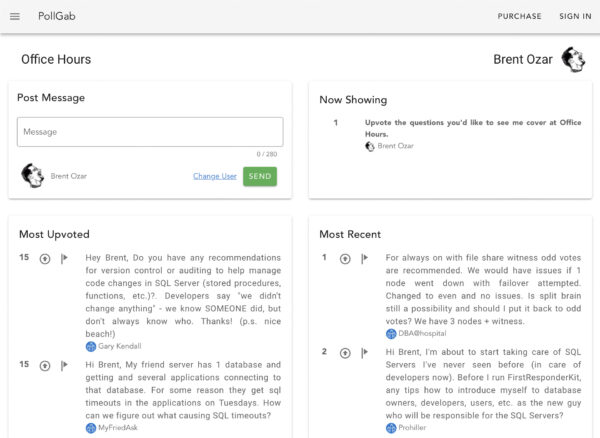
Viewers can post messages, upvote messages that they’d like to see me discuss, and flag inappropriate messages.
To get an idea of how it works, you can see my room, see the list of active rooms, and create your own room for free. If you run into problems or have a question, email Help@PollGab.com.
When you’re clicking around in there, if we’ve done our job right, things are going to seem pretty intuitive and obvious. However, it takes a lot of planning and work to make an app seem effortless, so let’s talk about some of the design goals we came up with.
The data updates automatically. If you sit there watching a popular room, you can see new questions coming in, and see questions move around on the leaderboard, automatically without touching Refresh on your browser. In a a perfect world, you should be able to load a room’s page just once, and watch the action unfold.
Viewers & voters don’t need to log in. In today’s GDPR-sensitive world, we want to store as little data as practical, and delete it as quickly as possible. We do need a way for room owners to be recognized so we can let them see the list of flagged questions, un-flag them, ban problem users, or set a question as “now showing”, plus some other neat tools I’ll mention this week.
The lack of logins does mean people can game the system: if you keep spawning new incognito browser windows, you can repeatedly upvote your own question. For now, we’re not really concerned about that. (Gotta pick your battles when you’re building a new site.)
If anyone flags a message, it disappears from everyone’s screens. Given that we’re talking about the Internet, where people are endlessly creative and foul, we wanted to make it easy for the audience to help us police. On the flip side, if the room owner is looking at the list of flagged questions, and decides to UN-flag a question (because it’s appropriate and safe), then that message reappears automatically. Plus, it can’t be flagged again, because the room owner has already believed it to be appropriate.
The room owner has additional controls. They can stop taking messages, or clear the message queue entirely.
Tag, it’s your turn:
design the database.
Let’s pretend that someone sketched all this out for you and asked you the following questions:
- What data needs to be stored to make all this work?
- What database or persistence layer should we use?
I’m curious to hear what you think. Let me know in the comments, and then in the next blog post, we’ll discuss what we chose to do.