Blog

A quick tip for working with large scripts in SSMS

SQL Server
7 Comments

Sometimes great things stare you in the face for years

Sometimes they stare at you for so long that you stop noticing them. This isn’t a romdramadey tag line. There are just so many buttons to push. Sometimes pressing them is a horrible idea and it breaks everything. I lose my mind every time I go to move a tab and I end up undocking a window. This won’t save you from that, but it will at least save your mouse scroll wheel.

This has helped me out a whole bunch of times, and especially, recently, when contributing code to our Blitz* line of stored procedures. Navigating all around large scripts to change variables or whatever is a horrible nuisance. Or it can be. When the stores procedure is like 3000 lines and there’s a bunch of dynamic SQL and… yeah. Anyway. Buttons!

Personality Crisis

There’s a little button in the top right corner of SSMS. Rather unassuming. Blends right in. What is it? Fast scroll? Some kind of ruin all your settings and crash your computer button? Delete all the scripts you’ve been working on for the past 6 months?

No! It’s a splitter, screen splitter! Guaranteed to blow your mind! Anytime!
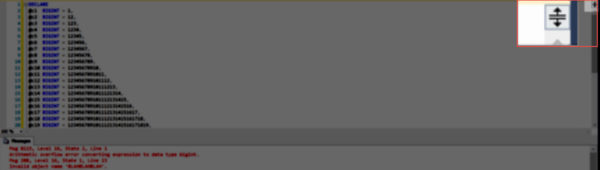
This is a huge picture. Sorry.

If you drag it up and down, you can alter the visible portion of the screen, and scroll and zoom in each pane independently.
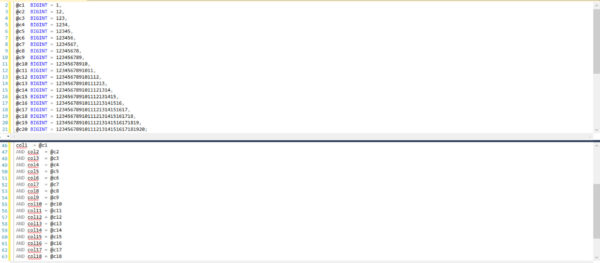
Now there is world peace.

There you have it

Next time you need to work with a huge script and find yourself scrolling around like a lunatic, remember this post!

Thanks for reading!
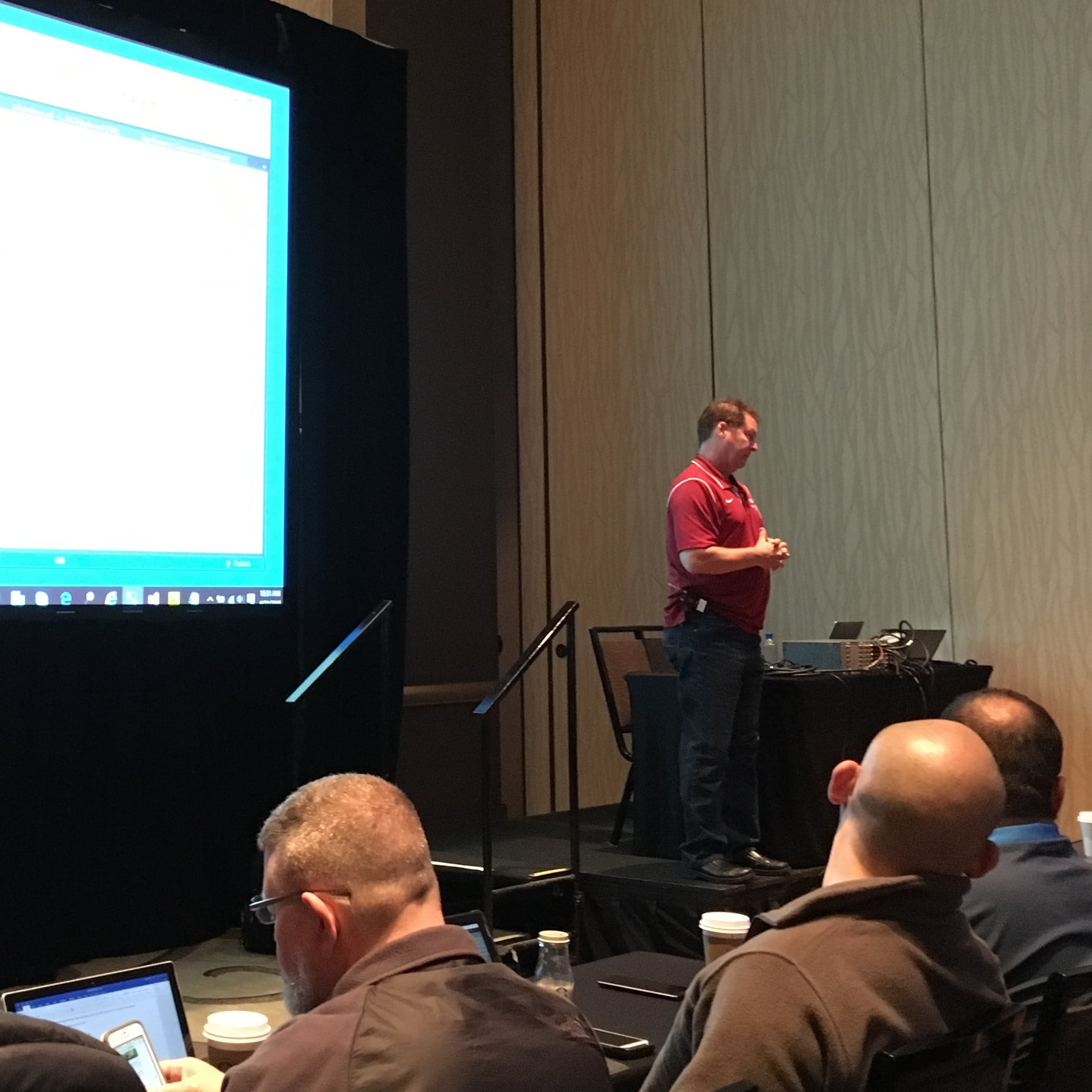

[Video] Office Hours 2016/04/20 – Now With Transcriptions

SQL Server, Videos
2 Comments

This week, Brent, Erik, Jessica, Richie, and Tara discuss database modeling tools, how to learn about database corruption, the new cardinality estimator, and the only question that will be on our certification exams.

Here’s the video on YouTube:

You can register to attend next week’s Office Hours, or subscribe to our podcast to listen on the go.

What ERD Tool Should I Use?

Jessica Connors: All right, question from Lee. Let’s jump in there. He says, “We have a system where the vendor went belly up. Now I am tasked with getting an ERD for the database so we can move it to a new system. What tools, free if possible, would you suggest?”

Richie Rump: Oh, uh-

Tara Kizer: I mean, Management Studio has it built in, the ERD, but I’ve always, anytime I’ve used the ERDs, I’ve always used Erwin or whatever.

Richie Rump: Technically, that’s not an ERD. That’s just a diagram, right?

Tara Kizer: Yeah.

Richie Rump: An ERD is an all-encompassing tool that will have, it’s essentially like a case tool. Did I just go case, yeah? You can generate databases from it. You can reverse engineer it. I think Viseo still could do it for free in a pinch, which I’ve done, but my favorite is Embarcadero ER Studio and Erwin, still. They both have their plus and minuses. Both of them have the same minus which is a very large price tag. I have actually purchased my own copy of ER Studio because I do data design a lot, and I’m kind of crazy that way.

Brent Ozar: I want to throw something else weird out there. If the vendor went belly up, the diagramming or ERD tool is going to be the least of your worries. Holy cow, buckle up. You’re going to be developing the bejeezus out of that database. If you’re taking it over from here on out, go buy the tool because this is your new career. This is what you’re going to be working on.

Tara Kizer: Hopefully, they have the source code [inaudible 00:03:29]

Richie Rump: Wow.

Brent Ozar: Oh, that would suck.

Jessica Connors: Yeah, what happens when vendors just die like that? It’s just like, oh, sorry customer. You can have the product, but we’re not iterating on it. We’re done.

Brent Ozar: That was my life in 2000 to 2001. We had a help desk product where the vendor was like, yeah, no, we’re not doing this anymore. I had to build a new web front end to their existing database and gradually like change things over. That was two years of my life that I would really like back. The hilarious part is that the company that I worked for then still uses that crappy web help desk that I built because they lost the source code after I left.


How Should I Troubleshoot a Big, Slow Stored Procedure?

Jessica Connors: Oh boy. All right, James says, “I have an SP that has 53 queries in it. What is the best way to approach troubleshooting this slow query?”

Erik Darling: After the execution plan-

Tara Kizer: Execution plan sets statistics I know.

Erik Darling: Then, use it in the SQL Sentry Plan Explorer, it makes it really easy to see which statement in the store procedure takes up the most percentage of work.

Brent Ozar: The other thing you can do if you want to play with it is take it over to development, like restore a copy to production database. Blow your plan cache, run DBCC FREEPROCCACHE. I emphasize, you’re going to do this in development. You’re not going to do it in production. Then, immediately after you free the plan cache, run the query and use sp_BlitzCache. sp_BlitzCache will show you which lines in the stored procedure do the most reads, CBU, run time, whatever.


Should I Update Stats When I Change Compatibility Levels?

Jessica Connors: Question from Tom Towns, I haven’t gotten this one. It says, “Is it necessary or advisable to rebuilt indexes/stats when downgrading compatibility level on a database but staying on the same version of SQL Server?” He’s running SQL Server 2014.

Erik Darling: No, not necessarily, but you should be doing regular maintenance on your databases anyway.

Brent Ozar: That’s actually a good question because it comes from the history of when you went up with SQL Server, there was a lot of advice around. You should update your stats, and I don’t think, for a while there, we were trying to find the root of that, like where that advice came from.

Erik Darling: My best guess on that is that there are slight tweaks and twinges to the cardinality estimator, and when you update versions, that doesn’t necessarily kick in just by restoring the database. Updating the stats just kind of helps push things to the whatever, new ideas that cardinality estimator has for your data.


Will Brent Ozar Unlimited Have a Certification Program?

Jessica Connors: Let’s see here, you guys are quiet today. In terms of certifications, would we ever think about giving our own Brent Ozar stamp of approval? I know we give out those certificates of completion with the funny little cartoons on there, but Brent, we never actually thought about giving our own certification course, classes, all of those things.

Brent Ozar: It would really just consist of, can you write us a check for 200 dollars, yes? You are a member of a very prestigious club. I bet if we all got together and focused, we could probably put together a test that would do it. The problem is, it’s really expensive. It takes a lot of time to do it because you’ve got to do it in a way, I was part of a team that helped build the Microsoft Certified Master, the next version that never ended up going public. I learned so much from Microsoft around that process where the questions have to be legally defensible. They can’t be biased towards English speaking people. They can’t have cultural issues, like you can’t take in certain business knowledge or assume certain cultural knowledge. It needs to be a fair playing field for anybody who touches SQL Server. That’s really hard. I have a lot of respect for people who write certification exams, but I agree with you. The Microsoft one sucked pretty bad.

Richie and I talked about that in the Away from the Keyboard podcast.

Richie Rump: Yeah, on Away from the Keyboard. I think the name of the episode was Brent Ozar Loses His MVP.

Brent Ozar: Yeah. I trash talked the bejeezus out of that, but yeah.

Richie Rump: And yet, we got renewed. He’s trying people. I don’t understand.

Brent Ozar: We don’t even have tests in our classes. What we end up doing is we have group discussions. I’ll give you a homework assignment, and everybody works together at the same time, like some of the assignments you do by yourself. Some you of them you do in groups. Even that, just the discussions of people saying afterwards, I think this answer is right. I think this answer is right can take hours, so it’s pretty tricky.


Should I Install Multiple Instances On One Server?

Jessica Connors: Let’s see here, Steve. Move on to Steve. He says, “We are being given a virtual server to install SQL 2014. Which would be better, install one instance of SQL with all of our databases or several instances of SQL server with fewer databases on each instance?”

Brent Ozar: We’re all trying to be polite, I think.

Tara Kizer: Is this all for one box? If it’s for one box, we don’t recommend stacking instances. One instance per box.

Brent Ozar: Why don’t we recommend stacking instances?

Tara Kizer: I mean, you have to determine max memory setting for them, and you might can figure it not optimal for one instance. Another instance might need more memory. You might be playing that game and just fighting for resources. How many databases are we talking about? Are we talking about just 40 or 50? Are they all critical? Are they all non-critical? Can you have another virtual sever where you can put some databases on that one and other databases on the other?

Erik Darling: A lot of what I would use to sort of dictate where I’m going to put things is RPO and RTO. If you have a group of databases that all have 24/7 uptime, higher level requirements and say like bug tracking or help desk or something along those lines, something you can put off, stuff that needs high availability, stuff that needs better back ups, things like that, things that need more horsepower behind them, I would put those on a server or servers where I’m going to be able to pay special attention to them. I would put some of the less needy stuff on other servers that I can sort of stick in a corner and forget about and not worry about performance and not worry about any performance in one stepping on the toes of another.


How Do I Get Rid of Key Lookups?

Jessica Connors: All right, question from [inaudible 00:10:51]. She reads this, “My key lookup is still showing after the column was added in a covered index. Anything I could do to avoid the key look up?”

Brent Ozar: We’ve seen this with a few. You want to look a little deeper with the execution plan. Sometimes there is something called a residual predicate, where there’s other fields that are being looked up, not just the key. When you hover your mouse over the key, look up, look for two things, the predicate and the output. Maybe SQL Server is seeking for some other kinds of fields or it’s out putting other kinds of fields. If there is no predicate and no output, use SQL Sentry Plan Explorer and then anonymize that plan and post it online. There are known issues, I’ve seen them where I can’t get rid of the look up, and sometimes there’s gurus on there like Paul White who can take a look at the plan and go, oh, of course, it’s the bug right here.

Erik Darling: That happened to me sort of recently. I was helping a client get a computed columns together for a table, and for some reason, we added the computed columns. We started referencing the computed columns, but in the execution plan, there was still a key look up for all of the columns that made the computed column work, right? We had five or six columns that added up, made a computed column. We added the computed column to the included columns of the index, but it still wanted all of the columns that made up the computed column for some reason. That was a very weird day.

Tara Kizer: What did you do to fix it?

Erik Darling: Added the columns it was asking for in the output columns and the key lookup went away. It was very weird though. It was something that I tried to reproduce on 2012 with 2014, and I couldn’t get it to happen.

Richie Rump: He stared at it, and-

Erik Darling: Intimated it.

Richie Rump: Changed.

Brent Ozar: Flexed.


How Do I Learn About Database Corruption?

Jessica Connors: Database corruption, we haven’t talked about that.

Richie Rump: Ew.

Jessica Connors: That sounds fun.

Brent Ozar: It is fun. It is actually fun.

Jessica Connors: Is it? It reminds me- [crosstalk 00:13:05] Now I’m thinking about that song by the Beastie Boys.

Brent Ozar: Sabotage?

Jessica Connors: Yeah, that’s the one. Let’s see, it’s from Garrett. He says, “What’s the best way to lean about how to resolve database corruption with zero data loss?”

Brent Ozar: Steve Stedman’s database corruption challenge. If you search for Steve Stedman, it’s just S-T-E-D-M-A-N, database corruption challenge, he had like 10 weeks of challenges with different sample databases that were corrupt. You would go download them, and you would figure out how to fix them. The quizzes are kind of two part. The download sample database, and then you go try to figure out how to recover as much data as you can, with zero data loss. Then, you go read how other people did it. They share their answers and show how fast they were able to get the data back.

Erik Darling: Get real comfortable with some weird DBCC commands.

Brent Ozar: Forcing query hints to get data from some indexes and not others, oh it is awesome. Even if you don’t do it, just reading how hard it is is awesome.

Erik Darling: You know what always get me is when you have to find binary, but it’s byte reversed, so there’s like stuff with DBCC right page, and oh forget it.

Brent Ozar: Screw that. No way.

Erik Darling: Call someone else.

Brent Ozar: It’s really-

Jessica Connors: All of you, you’ve all dealt with this before? Database-

Brent Ozar: I’ve never dealt with it in real life. I don’t like-

Tara Kizer: I’ve done it two or three times. Do I like it? No. It was probably about five years ago. I was at the on call DBA. Two DBAs got woken up, and this was on a weekend. By seven in the morning, you hadn’t slept yet. They couldn’t even think clearly at this point, so that’s when they called me to take over for the next several hours. We ended up having to restore the database, and we had data loss, and it was all due to the san. You had some san hardware issues. It was bad. It was really bad.

Brent Ozar: It’s one of those where, like you can go your whole career and never see it, but if you have storage that isn’t bullet proof reliable, or if you have a team that like screws around and cuts around corners, then you spend years of your life dealing with that.


Should I Feel Bad for Not Using the Current Compat Mode?

Jessica Connors: Question from Mandy. She says, “Hi. We upgraded to 2014 Standard Edition on new hardware a couple of months ago, but left our databases in 2012 compatibility mode. A few weeks ago, I upped the compatibility mode to 2014 and afterwards had such major contention and blocking problems, we had to change it back to 2012 after about 30 minutes. Is this common? What can we look for in our database to resolve this?”

Brent Ozar: It would be more common if more people were upgrading.

Erik Darling: Everyone’s still on 2008.

Tara Kizer: Is that the cardinality estimator, probably doing that.

Erik Darling: Yeah, it sounds like that kicking in.

Tara Kizer: Is there a different way to turn it off and you’ll still have your compatibility level be 2014?

Brent Ozar: This is tricky, you see, price flags, and you can turn it off at the query level, but Mandy you were bang on. You’re perfect to wait a couple of weeks. That’s exactly what you want to do. Then, you want to flip it on a weekend, like on a Saturday morning. Let it go for just 10 minutes or 15 minutes, but as soon as you can, run sp_BlitzCache and gather the most CPU intensive query plans, most read-intensive query plans, and the longest running query plans with sp_BlitzCache. You’ve got to save those plans out to files, and then switch back to 2012 compatibility mode so that you’re back on the old CE. Then, you take the next week or two troubleshooting these query plans to figure out, what is it about these queries that suck. Is it the new cardinality estimator? So often, people just test their worst queries with the new 2014 CE, not understanding you need to test all of the queries, because the ones that used to be awesome can suddenly start sucking with the new CE.

Erik Darling: Or, in a couple of months, just upgrade to the new 2016 and use the query data store and then just bang that right off. Done.

Brent Ozar: What’s the query data store?

Erik Darling: It’s this neat thing. It’s like a black box for SQL Server. What it does, is it basically logs all of your queries. It’s a good way for cases like you where you had good query plans that were working, and then all of a sudden, something changed and you had bad query plans. It gives you a way to look at and find regressions in query plans and then force the query plan that was working before so that it uses that one rather than trying to mess around and just use the new one. Otherwise, you’re kind of stuck, like you are on 2014, where you could run, switch to the new cardinality estimator, but then you would have to use some trace flags on the specific queries to force the old cardinality estimator, which is not fun. I Don’t recall those trace flags off the top of my head. I never do.

Richie Rump: Can you hit paste flight recorder for queries? Is that about right?

Brent Ozar: Listening in on the cockpit catches people doing things they shouldn’t be doing.

Erik Darling: I was having a drinking contest.


Does the New Cardinality Estimator Get Used Automatically in 2014?

Jessica Connors: Let’s see, question while we’re on the topic of the cardinality estimator. Question from Nate, we may have answered this. “Speaking of the new CE for 2014, does it automatically get used for everything or only for the DBs in the 2014 compatibility level, or is it off by default, and it’s up to the DBA to turn it on at their discretion?”

Erik Darling: Or indiscretion.

Brent Ozar: Yeah, whenever you change your, if you’re upgrading a SQL Server, or if you’re attaching databases to a 2014 SQL Server, the new cardinality estimator doesn’t get used by default. It does get used if you create new databases, and they’re in the 2014 compat mode. Yeah, it’s totally okay to leave your databases in the old compat mode. You can leave them there as long as you want. There’s no botches with that. Totally okay, totally supported.

Jessica Connors: What if it’s in a 2005 compatibility mode?

Brent Ozar: What’s the oldest one that supported? I think it’s 2008.

Tara Kizer: I just looked yesterday, because a client had a question, and 2014 does have the 2005 compatibility level in the list. I was surprised. I was very surprised.

Brent Ozar: So generous.


Should I Use “Optimize for Ad Hoc Workloads”?

Jessica Connors: Question from Robert, he says, “Optimized for query workload’s instant setting, good to turn on by default or only when mad at hot queries are frequent?”

Brent Ozar: This is tricky. You will read a lot of advice out there like you should turn it on by default, because it doesn’t have a drawback. I’m kind of like, if I see that, it doesn’t bother me. It just doesn’t usually help people unless they truly have a BI environment where every query comes out as a unique delicate snow flower. Have any of you guys ever seen problems with optimized for ad hoc?

Tara Kizer: Problems? No.

Richie Rump: No.

Erik Darling: I’ve never seen problems. You know, every once in a while, you’ll see someone with like 80 or 90% of their plan caches is single use queries. At that point, that’s not really efficient use of the memory or what you’re storing in the plan cache.

Jessica Connors: Let’s see, question from Nate. We are still on compatibility mode questions. Last one, “Is there anything wrong with leaving all DBs in lower compat levels when you do a SQL Server migration, server 2014? Like, leave all the DBs at 2005 or 2008 or two compatibility levels and then start upping them later when we have breathing room?

Erik Darling: No.

Tara Kizer: You won’t ge the new features.

Brent Ozar: Totally okay. Totally okay.

Tara Kizer: Eventually, you’re going to have to up them, because you’re going to be upgrading and you can’t go down to that level. I imagine that 2016 doesn’t go down to 2005.

Erik Darling: I mean, just doing that before you up the compatibility level, just make sure that you check any of the Microsoft’s broken features and deprecated stuff and new reserve key words. If your old databases are using keywords that have now become reserved, stuff could break pretty easily.


When Will We Add More Training Videos?

Jessica Connors: James is getting sick of our same old training videos on our website. He is wondering when we will be adding more videos to the training library. If so, what? When? How?

Erik Darling: As soon as you pay us to make them.

Brent Ozar: Doug is doing a new one on advanced querying and indexing. It has a game show theme, back from a ’70s game show. We are aiming to have that one online in June. To give you a rough idea, it takes about three months worth of work to do a six hour class to the level of Doug’s videos. If you’ve watched T-SQL Level Up, it’s phenomenal production value. It takes three months worth of work to do a six hour video.

Brent Ozar: For my level of production values, where it’s a guy talking in front of a green screen, it’s usually about a month. I’m working on performance tuning, when you can’t fix the queries. That one will be out probably in June or July, somewhere in there. The trick with that is, the Everything Bundle price will go up at that time. If you’re interested in getting an everything bundle, I would do that this month. It will include any videos that we add during the course of your 18-month ownership. This month, the everything bundle is on sale, even further the half off. Now, it’s just $449 for 18 months to access to all of our video. That is a one month only sale to celebrate our 5th year anniversary. After that, you are right back up to 899.

Jessica Connors: Then, what’s it going to go up to?

Brent Ozar: It depends. I think we have two more 299 videos. I wouldn’t be surprised if we pushed it to 999.

Jessica Connors: Ah.

Richie Rump: 999? That’s still a deal.

Brent Ozar: Richie says in his sales person voice.


Why Does sp_BlitzIndex v3 Have Less Output?

Jessica Connors: All right, question from Justin. Hello, Justin. He says, “sp_BlitzIndex isn’t recognizing new indexes on a table where I deleted all of the indexes and ran replay trace against, but SSMS is recommending some. So is a third party software. Any idea what would cause this?”

Brent Ozar: I bet you’re running a brand new version of sp_BlitzIndex, version three, that just came out where we ignore crappy little tables that don’t really have that much of a difference in terms of performance. If you want the crappy little tables version, you can run the older version of sp_BlitzIndex, which is included in the download pack, or use it with @Mode = 4, which does the fine grained analysis that we used to do. Just know that you’re probably not going to have that much of a performance improvement, not if they’re tiny little tables, tiny little indexes.


Should I Use Somebody’s HA/DR Software on My SQL Server?

Jessica Connors: Yeah, he said that he was using the new one. Brent, or anyone, has anyone here heard of DH2I enterprise contain HA solution, and what is your opinion? Have you heard of that? It’s from-

Brent Ozar: I have heard of it. I don’t know anybody using it. I don’t know if you guys have either. I have this whole thing where if I’m going to install software that supposed to make my stuff more highly available, my whole team better know how to use it, and it better be like really well tested. I need to be able to talk to other people and get training on how it works. I would just talk to other people who use it and ask for hey, can you give me a run down of what issues you’ve had over the last 12 months. Make sure they’re a similarly sized customer to you, like if you’ve got 100 servers, the person you talk to should have 100 servers.

Erik Darling: What I find helpful is that a lot of vendors like this will have help forums. What I like to do is just read through the help forums and see what kind of problems people are facing, kind of common questions and see if there’s any answers there that kind of help me figure out if this is right for me.

Jessica Connors: At any of the help forums, have any of you guys seen people giving feedback like, don not buy this product. This is terrible.

Erik Darling: You know, you see some questions that are like X product stopped working and this broke and this stopped working and had major outage. What do I do?

Brent Ozar: And you look at the time lag between answers, like how long it takes to get it fixed.

Erik Darling: And then like, no actual company support people are chiming in. It’s all other users that had the same problem.

Tara Kizer: I just don’t know if I would want to use a product that isn’t widely used in industry. Do you want to be the first customer using this product or the first five? I want to use the products everyone else is using.

Jessica Connors: We are doing some upgrades to our CRM right now, and there’s little things I want to change to make it work, and the engineer is sending me, basically these forums of people like, I really want this feature. It’s never going to be turned on. This piece doesn’t work, and then like it’s from five years ago, four years ago.

Brent Ozar: Utter silence. There’s also a follow up question from someone that says, oh, so and so did an online session on that. Just know that often, consultants who are paid by vendors, will do sessions going, hey, this tool is amazing. I would be glad to help you install it. They are selling the software and they are selling their consulting. Look at it just the same as you would an infomercial. I would ask to talk to the customers using it, not to the people you are going to pay money to.

Jessica Connors: Have we done that? Has anyone ever come up to us with another product like, hey, can you do a webcast for their product?

Brent Ozar: Oh, all the time. I’ll be like, because we do webcasts too for like Dell and Idera and all this. I’m going to talk about the native way of doing it, like the pain points of how you do it without software. If you want to talk about how your software does it, that’s totally cool. I can’t talk about your software, because I don’t use it. I just have to jump form one client to another. Every now and then, people will say, “Here’s a bucket of money. How much of this bucket would you like in order to say our product is awesome?” I’m like no. I only have one reputation. What happens if the product sucks butt wind? I will review privately if you want to spend three or four days hammering on your software and see how it works. We would be glad to do it and then give you a private review. I’m not going to go public and say that it’s awesome when it smells like…

Richie Rump: Erik and I will do it. That’s not a problem.

Brent Ozar: Yes.

Erik Darling: My reputation stinks anyway.


What’s the Ideal HA/DR Solution for 5-10 SQL Servers?

Jessica Connors: Let’s see, just for fun. Question if you run out of things to answer. This is really open-ended. What is your ideal HA and DR solution for a SQL Server environment with five to ten instances. That depends.

Brent Ozar: No, we should each answer that. Tara, what’s your ideal for five to ten instances? Say you’ve got one DBA.

Tara Kizer: I don’t know how to answer that. I’ve never worked in an environment where I was the only DBA. I have always worked in an environment where there was probably three to eight DBAs Availability groups is my answer for almost everything. You say HA, I say availability groups. I know you guys don’t like that, but that’s what we implemented. We had large DBA teams. We had larger server teams that understood Windows, clustering, all that stuff. It works well if you have the people that know the clustering, you know, all the features.

Brent Ozar: Tara doesn’t get out of bed for less than 10,000 dollars. Erik, how about you?

Erik Darling: For me, if you just have one to two DBAs, but you may have some other support staff, I would say a fair level clustering and then something like either async mirroring or log shipping. It’s usually pretty decent for those teams. It’s pretty manageable for most people who don’t have the DBAs or the football jerseys on and the schedules and the tackle cards on almost everything.

Brent Ozar: Yeah, how about you, Richard?

Richie Rump: From a developer’s perspective, because I joined this team, and all of a sudden, I have a developer’s perspective. I love that. It’s Azure SQL Database, right?

Brent Ozar: Oh, you’re cheating.

Erik Darling: Wow.

Richie Rump: It’s all kind of baked in there, and I don’t have to think about it. A lot of it’s done fore me. As a developer, I’m going to do the laziest, simplest way out. That would be it.

Brent Ozar: Man, you win points on that. That’s genius. That is pretty freaking smart. I would probably assume that they’re not mission critical if there is stuff that I could stand some down time on. I actually would probably go with just plain old VMware. I would just make them as single instances in virtualization. Then, that way do something like log shipping for disaster recovery, or VMware replication. Now, this is not high availability. It’s just availability. It’s just the A. If you cut me down to just like five SQL Server instances and no DBA or like one DBA who’s kind of winging it and spending most of his time on a free webcast, then I kind of like that. If not, I’m still kind of a fan of async mirroring too. Async mirroring is not bad.

Erik Darling: Much less of an albatross than its sync brother.

Brent Ozar: Yeah, that thing blows.

Jessica Connors: Cool.

Erik Darling: I’ll say one thing though, not replication.

Tara Kizer: Yeah.

Jessica Connors: So many people using replication out there.

Tara Kizer: Replication is mostly okay, but not as an HA or DR feature.

Jessica Connors: Ah, they’re using it for the wrong thing.

Tara Kizer: It’s really reporting feature.

Brent Ozar: It’s funny to see, too, like all of us end up having these different answers, and this ends up being what our chat room is like. In the company chat room, like we all have access to everybody else’s files. We know what everybody is working on. Somebody can be like, Hey, I’m working with this client. Here is what they look like. Here’s what their strengths and challenges are. It’s really fun to bounce ideas off people and see what everybody comes up with.

Jessica Connors: Mm-hmm – well, all right, guys. It’s that time.

Erik Darling: Uh-oh.

Brent Ozar: Calling it an episode. Thanks everybody for hanging out with us, and we will see you next week.


Stats Week: Only Updating Statistics With Ola Hallengren’s Scripts

I hate rebuilding indexes

There. I said it. It’s not fun. I don’t care all that much for reorgs, either. They’re less intrusive, but man, that LOB compaction stuff can really be time consuming. What I do like is updating statistics. Doing that can be the kick in the bad plan pants that you need to get things running smoothly again.

I also really like Ola Hallengren’s free scripts for all your DBA broom and dustpan needs. Backups, DBCC CHECKDB, and Index and Statistics maintenance. Recently I was trying to only update statistics, and I found it a little trickier than I first imagined. So tricky, in fact, that I emailed Ola, and got a response that I printed and framed. Yes, the frame is made out of hearts. So what?

What was tricky about it?

Well, the IndexOptimize stored procedure has default values built in for index maintenance. This isn’t a bad thing, and I could have altered the stored procedure, but that would be mean. I set about trying to figure out how to get it to work on my own.

First, I tried only passing in statistics parameters.

But because of the default values, it would also perform index maintenance. Sad face. So I tried being clever. Being clever gets you nowhere. What are the odds any index would be 100% fragmented? I mean, not even GUIDs… Okay, maybe GUIDs.

But This throws an error. Why? Well, two reasons. First, 100 isn’t valid here, and second, you can’t have the same fragmentation level twice. It would screw up how commands get processed, and the routine wouldn’t know whether to use @FragmentationMedium, or @FragmentationHigh. This makes sense.

Okay, so I can’t use 100, and I can’t set them both to 99. What to do? Let’s bring another parameter in: @PageCountLevel.

This seems safe, but it’s still not 100%. Even with the integer maximum passed in for the page count, it still felt hacky. Hackish. Higgity hack. The other part of the equation is that I don’t even want this thing THINKING about indexes. It will still look for indexes that meet these requirements. If your tables are big, you know, sys.dm_db_index_physical_stats can take foreeeeeeeeeeeeeeeeeeeeeeeeeeeever to run. That seems wasteful, if I’m not going to actually do anything with the information.

Hola, Ola

This is where I emailed Ola for advice. He responded pretty quickly, and here’s how you run stats only updates.

Moral of the story

NULLs aren’t all bad! Sometimes they can be helpful. Other times, developers.

Thanks for reading!

Brent says: Subtitle: How many DBAs does it take to think of NULL as a usable option? Seriously, we all banged our heads against this one in the company chat room.


Breaking News: Query Store in All Editions of SQL Server 2016

Bob Ward talking Query Store at SQL Intersection

Onstage at SQL Intersections in Orlando this morning, Bob Ward announced that Query Store will be available in all editions of SQL Server 2016.

This is awesome, because Query Store is a fantastic flight data recorder for your query execution plans. It’ll help you troubleshoot parameter sniffing issues, connection settings issues, plan regressions, bad stats, and much more.

I’m such a believer in Query Store that sp_Blitz® even warns you if Query Store is available, but isn’t turned on.

Wanna learn what it is and how to use it? Books Online’s section on Query Store is a good place to start learning, and check out Bob’s slide deck and resource scripts.

And oh yeah – Argenis Fernandez and I had a little bet. He bet that Query Store would be fully functional in Standard Edition, and I bet that it wouldn’t. I’ve never been happier to lose a bet, and I made a $500 donation to Doctors Without Borders this morning. Woohoo!

Update 4/21 – note the comment below from Bob Ward, who clarifies that this wasn’t quite ready for release yet, and feature decisions may not have been made yet.


Stats Week: Messin’ With Statistics

SQL Server, Statistics
7 Comments

If there’s one thing living in Texas has taught me

It’s that people are very paranoid that you may Mess With it. Even in Austin, where the citizenry demand weirdness, they are vehemently opposed to any form of Messing, unless it results in mayonnaise-based dipping sauce.

Me? I like Messing With stuff. Today we’re going to look at one way you can make SQL think your tables are much bigger than they actually are, without wasting a bunch of disk space that has nearly the same price as wall to wall carpeting.

To do this, we’re going to venture deep into the Undocumented Command Zone. It’s like the Twilight Zone, except if you go there on your production server, you’ll probably end up getting fired. So, dev servers only here, people.

Creatine

Let’s make a table, stuff a little bit of data in it, and make some indexes.

There’s our thousand rows. If you’re dev testing against 1000 rows, your production data better only have 1001 rows in it, or you’re really gonna be screwed when your code hits real data. How do we cheat and make our data bigger without sacrificing disk space?

Eat Clen, Tren Hard, Anavar give up

You can update all statistics on the table at once, or target specific indexes with the following commands.

This will set your table row count to uh… 10 billion, and your page count to 1 billion. This makes sense, since usually a bunch of rows fit on a page. You can be more scientific about it than I was, this is just to give you an idea.

So let’s check in on our statistics! Sup with those?

Hint: these commands will not show inflated page or row counts in them. They actually won’t show page counts at all. Hah. That’s kinda silly, though. Hm.

Anyway, what we should grab from the statistics histograms are some middling values we can play with. For me, that’s an ID of 500, a date of 2016-03-18, and an amount of 4733.00.

One thing I’ve found is that the inflated counts don’t seem to change anything for Identities, or Primary Keys. You’ll always get very reasonable plans and estimates regardless of how high you set row and page counts for those. Regular old clustered indexes are fair game.

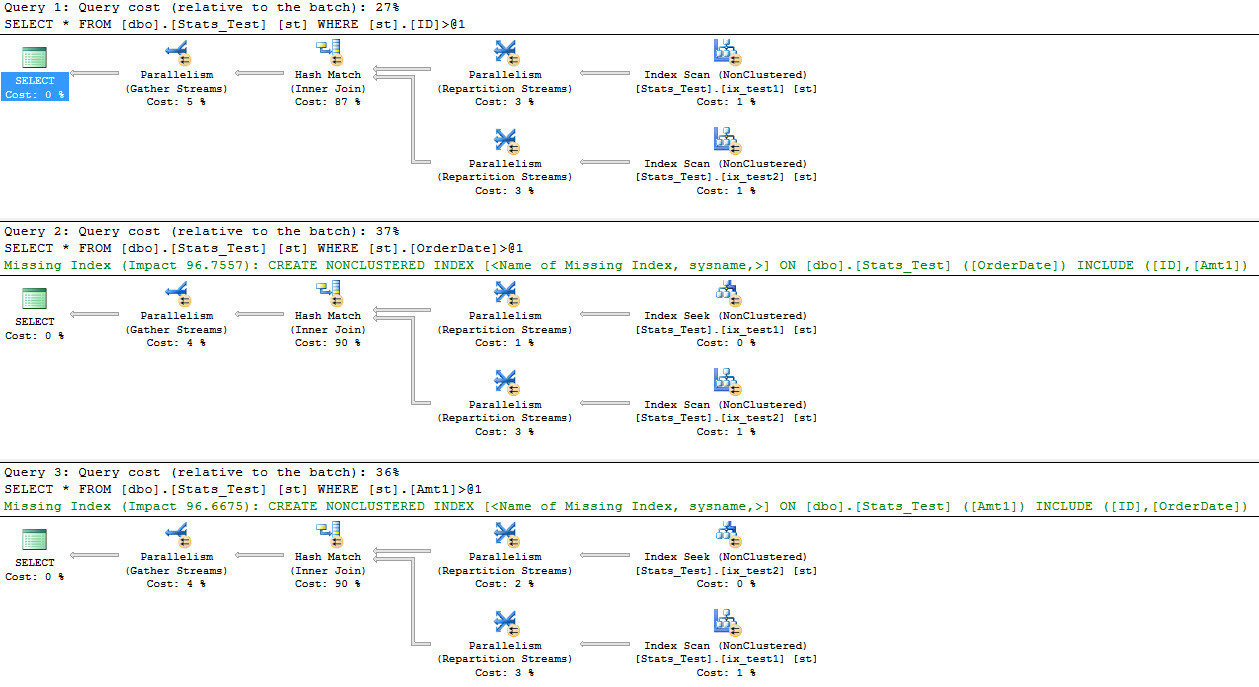
Some really interesting things can start to happen to execution plans when SQL thinks there’s this many rows in a table. The first is that SQL will use a rare (in my experience) plan choice: Index Intersection. You can think of this like a Key Lookup but with two nonclustered indexes rather than from one nonclustered index to the clustered index.

For these equality queries, we get the following plans:

Bizarre Love Parallel

SQL isn’t fooled with an equality on 500. We get a little plan. We’ll examine inequality plans in a moment. For now let’s look at the middle plan. That’s where the Index Intersection is occurring. The bottom plan has a regular Key Lookup.

Blood Everywhere.
Blood Everywhere.

The costs and estimates here are Banana Town crazy. And right there down the bottom, we can see SQL using the Clustered Index key to join our Nonclustered Indexes together. If you’ve been reading this blog regularly, you should know that Clustered Index key columns are carried over to all your Nonclustered Indexes.

If we switch to inequality queries, well…

All Hell Breaks Loose

The top query that SQL wasn’t fooled by before now has the same insane estimates as the others. Our two bottom queries get missing index requests due to the amount of work the Index Intersection takes.

It’s happening because of the SELECT * query pattern. This will go away if we stick to only selecting columns that are in our Nonclustered Indexes. For example, SELECT ID will result in some pretty sane index seeks occuring. The estimated rows are still way up there.

Unfortunately, STATISTICS TIME and IO are not fooled by our statistical tomfoolery.

Womp womp womp
Womp womp womp

They use reality-based measurements of our query activity. This trick is really only useful to see what happens to execution plans. But hey it’s a lot cheaper, easier, and faster than actually inserting 10 billion rows.

So what?

Like a grandma in a grocery store, SQL Server makes all its decisions based on cost. Whatever is cheapest is choice. If SQL Server were a person, it would probably wash and dry used aluminum foil, save old bread ties, and use clothes pins for the right thing.

I forget what I was going to say. Probably something smart about testing your queries about sets of data commensurate to what you have in production (or larger) so that you don’t get caught flatfooted by perf issues on code releases, or if your company finally starts getting customers. This is one technique to see how SQL will treat your code as you get more rows and pages involved.

Just don’t forget to set things back when you’re done. A regular stats update will take care of that.

Thanks for reading!


Stats Week: Do Query Predicates Affect Histogram Step Creation?

Auto Create Statistics is your friend

It’s not perfect, but 99% of the time I’d rather have imperfect statistics than no statistics. This question struck me as interesting, because the optimizer will totally sniff parameters to compile an initial plan. If you don’t have index statistics, or system statistics already on a column in a WHERE clause, SQL is generally kind enough to create a statistics object for you when the query is compiled.

So I thought to myself: Would SQL create an initial histogram based on the compile-time parameter? It might be nice if it did, since it could potentially get the best possible information about predicate cardinality from a direct hit on a histogram step.

Here’s a quick test that shows, no, SQL doesn’t give half a care about that. It creates the same histogram no matter what. 1000 rows should do the trick. I’m making both columns NOT NULL here, because I want to make one my PK, and I want to make sure there’s no histogram step for NULL values in the other. I’m not going to index my date column here, I’m going to let SQL generate statistics automatically.

First, let’s check in on what values we have

I’m going to run one query that will generate a histogram, but it’s guaranteed to return all of the table data. I want to see what SQL comes up with for histogram hits and missing, here.

We have our histogram, and I’ll use a clunky DBCC command to show me to it. Below is a partial screen cap, up to a point of interest.

Pay attention to the rectangle.

SQL created a histogram with direct hits on 04/30, and then 05/02. That means it doesn’t have a step for 05/01, but it does postulate that there are 22 rows with a date of 05/01 in the RANGE_ROWS column.

I went ahead and dropped that table and re-created it. Next we’ll run the same query, but we’ll pass in 05/01 as an equality value.

And, long story short, it creates the exact same histogram as before.

Is this good? Is this bad?

Well, at least it’s reliable. I’m not sure how I feel about it otherwise.

You can try creating filtered indexes or statistics on really important segments of data, if you really need SQL to have granular information about it. Otherwise, you’ll have to trust in the secret, and sometimes not so secret sauce, behind the cardinality estimator.

Thanks for reading!

Brent says: the more I work with SQL Server, the more I’m filled with optimism about the oddest things. When I read Erik’s idea about the exact histogram step, though, I thought, “Nopetopus.”


Stats Week: Statistics Terminology Cheatsheet

SQL Server
7 Comments

These things used to confuse me so much

Despite having worked at a Market Research company for a while, I know nothing about statistics, other than that project managers have all sorts of disagreeably subjective phrases for describing them. Vast majority, convincing plurality, dwindling minority, et al. Less talky, more picture.

When I started getting into SQL Server, and learning about statistics, I heard the same phrases over and over again, but wasn’t exactly sure what they meant.

Here are a few of them:

Selectivity

This tells you how special your snowflakes are. When a column is called “highly selective” that usually means values aren’t repeating all that often, if at all. Think about order numbers, identity or sequence values, GUIDs, etc.

Density

This is sort of the anti-matter to selectivity. Highly dense columns aren’t very unique. They’ll return a lot of rows for a given value. Think about Zip Codes, Gender, Marital Status, etc. If you were to select all the people in 10002, a densely (there’s that word again) populated zip code in Chinatown, you’d probably wait a while, kill the query, and add another filter.

Cardinality

If you mash selectivity and density together, you end up with cardinality. This is the number of rows that satisfy a given predicate. This is very important, because poor cardinality estimation can arise from a number of places, and every time it can really ruin query performance.

Here’s a quick example of each for a 10,000 row table with three columns.


Bigger by the day

A lot has been written about cardinality estimation. SQL Server 2014 saw a total re-write of the cardinality estimation guts that had been around since SQL Server 2000, build-to-build tinkering notwithstanding.

In my examples, it’s all pretty cut and dry. If you’re looking at a normal sales database that follows the 80/20 rule, where 80 percent of your business comes from 20 percent of your clients, the customer ID columns may be highly skewed towards a small group of clients. It’s good for SQL to know this stuff so it can come up with good execution plans for you. It’s good for you to understand how parameter sniffing works so you understand why that execution plan was good for a small client, but not good for any big clients.

That’s why you should go see Brent in person. He’ll tell you all this stuff, feed you, give you prizes, and then you go home and get a raise because you can fix problems. Everyone wins!

Thanks for reading!

Brent says: wanna learn more about statistics? Check out Dave Ballantyne’s past SQLbits videos, including the one about the new 2014 CE.


Looking for a New Challenge? kCura is Hiring a DBA.

SQL Server
0

I’m a big kCura Relativity fan – it’s an application that really pushes SQL Server hard, written by people who are a ton of fun to work with.

If you’re looking for a challenge in a really cool environment, check out what they’re looking for:

A Production Database Administrator with a deep demonstrated knowledge of MS SQL administrative tasks and the ability to consult on design, development, and automation improvements.  Having a passion for maintaining MS SQL databases that meet or exceed internal and client contracted production SLAs for availability and performance. The right candidate will ideally have past hands-on experience administering MS SQL databases running in a public cloud environment such as AWS or MS Azure.

Responsibilities

  • Install and configure SQL Server 2012 and higher versions. Configurations built and supported should include scenarios that include leveraging SQL Always On, windows fail over clustering, and transaction replication.
  • Document complex installation, configuration, and optimization procedures so they can be automated.
  • Provide support 24/7/365 for any troubleshooting or corrective actions related to incidents impacting application availability within the production environments.
  • Take proactive measures to monitor, trend, and tune SQL databases, such as running maintenance jobs (backups, DBCCs, apply indexes/re-indexing, etc.), to meet or exceed baseline stability and performance SLAs on large databases (1 TB+) and large volumes of databases (100+).
  • Create, implement, and maintain SQL DB Health Checks, and have a demonstrated ability to automate SQL health reporting/event notification, and corrective actions.
  • Configure SQL Server monitoring utilities to minimize false alarms, and have a demonstrated ability to monitor/trend SQL environments to determine and implement enhanced monitoring thresholds to prevent incidents and reduce mean time to recovery (MTTR).
  • When performance issues arise, determine the most effective way to increase performance including scaling up or out, server configuration changes, index/query changes, etc.
  • Identify code defects and enhancements and develop a detailed root cause analysis that can be leveraged by the product management and development teams to improve application availability and decrease the total cost of ownership.
  • Ensure databases are being backed up and can be recovered in a manner that meets all BCDR objectives for RPO and RTO.
  • Perform all database management responsibilities in Microsoft Azure for production and non-production workloads.

Qualifications:

  • At least 4 years’ experience working as a Microsoft SQL DBA leveraging versions 2008r2 or later.
  • Experience working in a 24/7/365 operation.
  • Bachelor’s degree in computer science or information systems.
  • Familiar with basic Azure IaaS capabilities, and some experience designing and building MS SQL databases within Azure or AWS.
  • Microsoft certifications such as MCSE, MCSD, etc.
  • Experience operating in an ISO certified and/or highly regulated (SSAE, PCI, HIPPA, etc.) hosting operation.
  • Familiar with Dev/Ops concepts, and ideally experience working with a Dev/Ops team focused on implementing and enhancing continuous delivery capabilities.
  • Experience automating SQL Server deployment and configuration through PowerShell, Chef, Puppet, etc.
  • Background designing, building, and managing a search and indexing solution such as Elastic Search, Apache SOLR, etc.
  • Previous Relativity system administration experience.


(You should read that “qualifications” list as a perfect candidate, and don’t be dissuaded from applying if you’re not the perfect candidate.)

Interested? Get on over there and apply.


Old and Busted: DBCC Commands in 2016

SQL Server
3 Comments

I hate DBCC Commands

Not what they do, just that the syntax isn’t consistent (do I need quotes around this string or not?), the results are a distraction to get into a usable table, and you need to write absurd loops to perform object-at-a-time data gathering. I’m not talking about running DBCC CHECKDB (necessarily), or turning on Trace Flags, or any cache-clearing commands — you know, things that perform actions — I mean things that spit tabular results at you.

Stuff like this puts the BC in DBCC. It’s a dinosaur.

In SQL Server 2016

DBCC INPUTBUFFER got its own DMV after, like, a million decades. Commands like DBCC SQLPERF, DBCC DBINFO, and DBCC LOGINFO should probably get their own. Pinal Dave has a whole list of DBCC Commands that you can break your server with here.

But truly, the most annoying one to me is DBCC SHOW_STATISTICS. It’s insane that there’s no DMV or function to expose histogram information. That’s why I filed this Connect item.

UPDATE: It looks like Greg Low beat me to it by about 6 years. Too bad searching Connect items is so horrible. I urge you to vote for Greg’s item, instead.

Statistics are the intel SQL Server uses to make query plan choices.

Making this information easier to retrieve, aggregate, join to other information, and analyze would put a powerful performance tuning tool into the hands of SQL Server users, and it would help take some of the mystery surrounding statistics away.

Please consider voting for my Greg’s Connect item.

Thanks for reading!


How to Run DBCC CHECKDB for In-Memory OLTP (Hekaton) Tables

tl;dr – run a copy-only full backup of the Hekaton filegroup to nul. If the backup fails, you have corruption, and you need to immediately make plans to either export all your data, or do a restore from your last good full backup, plus all your transaction log backups since.

Yeah, that one’s gonna need a little more explanation, I can tell. Here’s the background.

DBCC CHECKDB skips In-Memory OLTP tables.

Books Online explains that even in SQL Server 2016, DBCC CHECKDB simply skips Hekaton tables outright, and you can’t force it to look at them:

Hey, that's the same way I handle merge replication - I just look away
Hey, that’s the same way I handle merge replication – I just look away.

However, that’s not to say these tables can’t get corrupted – they have checksums, and SQL Server checks those whenever the pages are read off disk. That happens in two scenarios:

Scenario 1: when SQL Server is started up, it reads the pages from disk into memory. If it finds corruption at this point, the entire database won’t start up. Even your corruption-free, non-Hekaton tables will just not be available. Your options at this point are to restore the database, or to fail over to a different server, or start altering the database to remove Hekaton. Your application is down.

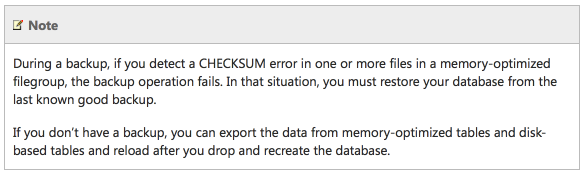
Scenario 2: when we run a full (not log) backup, SQL Server reads Hekaton’s data from disk and writes to the backup file. If corruption is found, the backup fails. Period. You can still run log backups, but not full backups. When your full backup fails due to corrupt in-memory OLTP pages, that’s your sign to build a Plan B server or database immediately.

Here’s the details from Books Online:

Beep beep beep
Beep beep beep

The easy fix: run full native backups every day, and freak out when they fail.

Backup failures aren’t normally a big deal, but if you use in-memory OLTP on a standalone server or a failover clustered instance, backup failures are all-out emergencies. You need to immediately find out if the backup just ran out of drive space or lost its network connection, or if you have game-over Hekaton corruption.

Note that you can’t use SAN snapshot backups here. SQL Server won’t read the In-Memory OLTP pages during a snapshot backup, which means they can still be totally corrupt.

This works fine for shops with relatively small databases, say under 500GB.

The harder fix: back up just the In-Memory OLTP data daily.

With SQL Server 2016, the Hekaton limits have been raised to 2TB – and you don’t really want to be backing up a 2TB database the old-school way, every day. You could also have a scenario where a >1TB database has a relatively small amount of Hekaton data – you want to use SAN snapshot backups, but you still have to do conventional backups for the Hekaton data in order to get corruption checks.

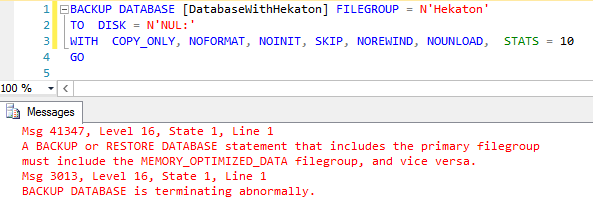
Thankfully, Hekaton objects are confined to their own filegroup, so Microsoft PM Jos de Bruijn pointed out to me that we can just run a backup of just that one filegroup, and we can run it to NUL: to avoid writing any data to disk:

Miami Vice Versa
Miami Vice Versa

Oops, did I say we could just back up that filegroup? Not exactly – you also have to back up the primary filegroup at the same time.

If you’re doing great (not just good) database design for very large databases, you’ve:

  1. Created a separate filegroup for your tables
  2. Set it as the default
  3. Moved all the clustered & nonclustered indexes over to it
  4. Kept the primary filegroup empty so you can do piecemeal restores

If not, hey, you’re about to. An empty primary filegroup will then let you do this faster:

Checking for corruption by backing up to NUL:

Tah-dah! Now we know we don’t have corruption.

This comes in handy if you’ve got a large database and you’re only doing weekly (or heaven forbid, monthly) full backups, and doing differential and log backups the rest of the time. Now you can back up just your in-memory OLTP objects for corruption.

Note that in these examples, I’m doing a copy_only backup – this lets me continue to do differential backups if that sort of thing is your bag.

For bonus points, if your Hekaton data is copied to other servers using Always On Availability Groups, you’ll want to do this trick on every replica where you might fail over to or run full backups on. (Automatic page repair doesn’t appear to be available for In-Memory OLTP objects.)

If you’d like CHECKDB to actually, uh, CHECK the DB, give the request an upvote here.


Breaking News, Literally: SQL CLR Support Removed from Azure SQL DB

Breaking News, Microsoft Azure
16 Comments

In the on-premises, boxed-product version of SQL Server, you can build your own CLR assemblies and call them from your T-SQL code.

For years, this feature was missing from Azure SQL DB – Microsoft’s platform-as-a-service database offering – and users voted that they wanted it.

In December 2014, Microsoft brought SQL CLR code to Azure SQL DB.

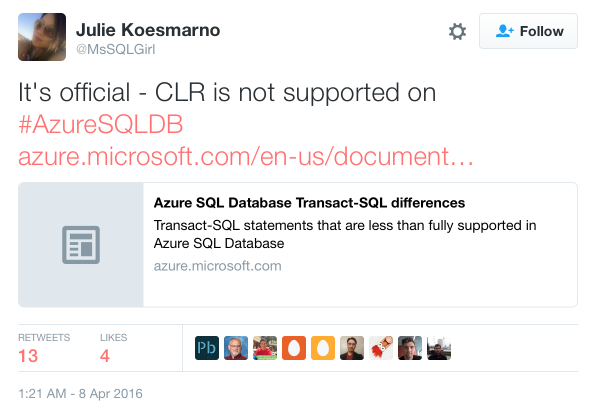
Today, Microsoft PM Julie Koesmarno tweeted (update Saturday 9AM – the tweet has been deleted, so here’s a screenshot):

Announcement tweet (since deleted)

Details are still coming in, but in the Reddit AMA for the Azure database teams (going on as we speak), it’s one of the users reports that they got an email that SQL CLR will be shut off in one week due to a security issue.

The cloud: at the end of the day, it’s just someone else’s server, and they can – and will – take tough actions to protect their product, their users, their security, and their profits.

Earlier this week, I was telling my SQLSaturday Israel pre-con class about HA/DR in the cloud, and I call the cloud a giant hamster wheel. Once you commit to getting on that wheel, you can never get off. You constantly have to watch what features the cloud vendor adds/changes/removes, and you have to be willing to jump into development and change your application right freakin’ now in order to compensate for their changes.

Have fun on the hamster wheel today, folks. Time to start coding your workarounds.


Another Hidden Parallelism Killer: Scalar UDFs In Check Constraints

SQL Server
15 Comments

Every single time

Really. Every single time. It started off kind of funny. Scalar functions in queries: no parallelism. Scalar functions in computed columns: no parallelism, even if you’re not selecting the computed column. Every time I think of a place where someone could stick a scalar function into some SQL, it ends up killing parallelism. Now it’s just sad.

This is (hopefully. HOPEFULLY.) a less common scenario, since uh… I know most of you aren’t actually using any constraints. So there’s that! Developer laziness might be a saving grace here. But if you read the title, you know what’s coming. Here’s a quick example.

Parallelism appears to be rejected for maintenance operations as well as queries, just like with computed columns.

Interestingly, if we look in the plan XML (the execution plan itself just confirms that the query didn’t go parallel) we can see SQL tried to get a parallel plan, but couldn’t.

Garbagio
Garbagio

There’s a short list of possible reasons for plans not going parallel here from a while back. A quick search didn’t turn up a newer or more complete list.

Check yourself, etc. and so forth

How do you know if this is happening to you? Here’s a simple query to look at constraint definitions and search them for function names. This query is dumb and ugly, but my wife is staring at me because it’s 5:30 on a Saturday and I’m supposed to be getting ready. If you have a better idea, feel free to share in the comments.

Thanks for reading!


I’m on the RunAsRadio Podcast

SQL Server
7 Comments
Pixelated for your pleasure

It’s always fun to talk to Richard Campbell about what’s going on, and this time around, it’s SQL Server 2016:

Listen to me chat with Richard about what’s coming in vNext.

We’re now in the second quarter of the year, and we still don’t have pricing, licensing, or edition/feature lists. Normally, when you release software, you need to educate users on how to choose the right box, but to do that, you need to train the trainers first. There simply hasn’t been any community guidance available yet on the questions end users – and managers – ask the most: how is this thing gonna be licensed?

That means one of two things: either it’s gonna be exactly the same (which doesn’t seem likely, given the crazy number of new features that are going into the boxed product this time around), or it’s gonna be wildly different, and passionate discussions might still be going on.

I think this is the best release since 2005. Granted, there’s still a couple of massive problems – for example, CHECKDB simply skips In-Memory OLTP and stretch tables, so I think you’d have to be an outright idiot to deploy either of those features on data you care about. Don’t think you care about the data? Remember, if there’s any corruption in your Hekaton tables, your entire database doesn’t start up. None of your other tables are accessible, and you have to restore from your last full backup plus your transaction logs. (You were taking those, right?)

But aside from that, SQL Server 2016 is fantastic, and in the podcast with Richard, we talk about Query Store, AlwaysEncrypted, the run to the cloud, and more. Enjoy!


For Technical Interviews, Don’t Ask Questions. Show Screenshots.

Interviewing, SQL Server
64 Comments

When you’re hiring a DBA, sysadmin, or developer, you’re not paying them to answer Trivial Pursuit questions all day long.

You’re hiring them to look at a screen, connect a few dots, and interpret what’s happening.

So for a position, I build a PowerPoint deck with a bunch of screenshots from the actual environment they’ll be working in. I start the deck by explaining that there’s no right or wrong answers – I just want to hear them think out loud about what they’re seeing.

For example, I’ll show a database administrator or developer this:

Tell me what you see in this ink blot.

Typical reactions include things like:

  • “Oh, that’s a fact table.” – What does that mean? Where have you seen a fact table before? How do you handle them differently than other kinds of tables?
  • “It seems really wide.” – What does that mean? Are there strengths or challenges with wide tables? How many columns should a table have?
  • “The fields are mostly nullable.” – Is that the default? How do fields end up that way? What would you recommend changing? How might it break things, and how would you check to see if they were going to break? Would end users notice the impact of your changes?
  • “It isn’t normalized – it has both IDs and names.” – What kinds of tables might have that design pattern? What would be the performance impact of this design?

Whenever they say anything out loud, follow the thought. Don’t assume that they believe the same thing you do – ask open-ended questions to get them to explain what they know.

Let them talk until they’re silent for several seconds, and that’s their normal knowledge base. Resist the temptation to make suggestions like, “Did you notice how there doesn’t seem to be a clustered index?” If they don’t notice it, they don’t notice it – that’s your sign.

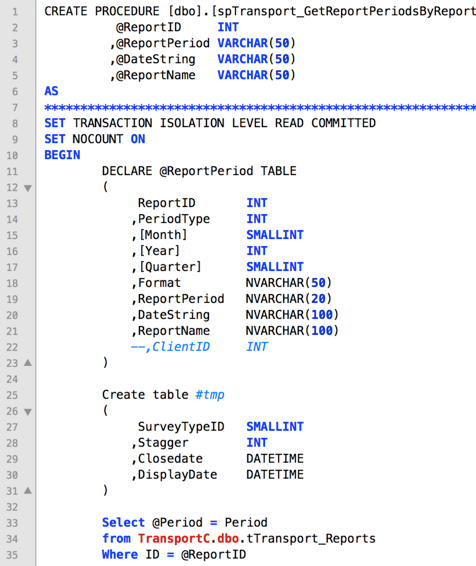
Another example – I’ll say, “Someone brought this query to you and complained that it’s slow. Where might you look for improvements?”

slow-query-interview-question

The query is abridged, but even just in that first screenshot, I want to hear their thought process around where they look, how they might run the query to check its effects, how to measure their work.

In your own interviewing, try to use real screenshots from your own environment. Show them the kinds of screens that they’re going to have to look at independently in their day-to-day work, and just let them brain dump about what they’re seeing.

Hearing their thought process is way more valuable than playing Trivial Pursuit.


ISNULL vs. COALESCE: What The XML?

SQL Server
14 Comments

This isn’t about performance

If you’re interested in performance tests, you can get in the way back machine and read a couple posts by Adam Machanic here and here. I’m also not talking about the difference between them. There are a million articles about that. They’re obviously different, but how does SQL handle that internally?

We’re going to run the four queries below separately, and look at the XML of the execution plan for each.

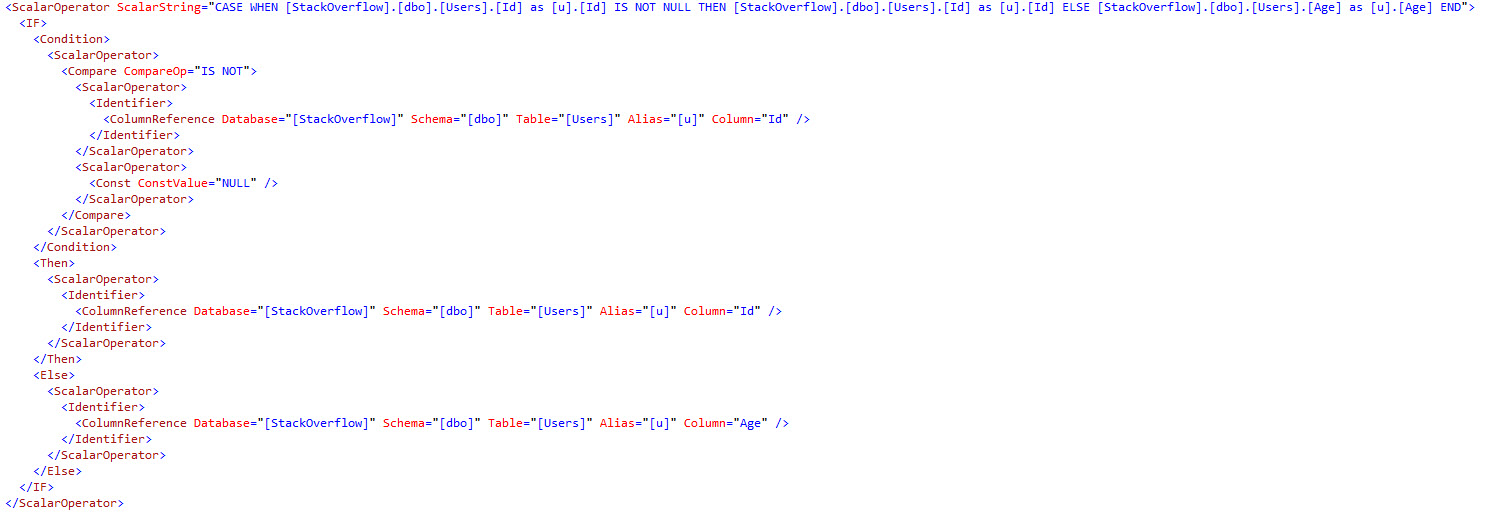
Even though COALESCE is the ANSI standard, I still see most people using ISNULL. Spelling? Laziness? Who knows? Under the covers, it’s just a CASE expression. You could write the same thing yourself.

No, I don't think JSON is a good idea either.
No, I don’t think JSON is a good idea either.

The second query gives you almost the same thing, but the columns are reversed. What’s the point, then?

ISNULL ISDIFFERENT

SQL does something rather smart here. The Id column is NOT NULL, so when ISNULL is applied to it, it doesn’t bother evaluating anything.

That seems reasonable.

Reversed, ISNULL, and whatever magical behind-the-scenes code Microsoft has thrown in there, runs against the Age column, which is NULLable.

Buzzkill.
Buzzkill.

Pros and Cons

ISNULL Pros

  • Easy to spell
  • Shortcuts if you do something dumb
  • Not the name of a horrible band

ISNULL Cons

  • Only two inputs
  • Not ANSI standard
  • Maybe doesn’t shower regularly

Coalesce Pros

  • ANSI Standard
  • Multiple inputs
  • Drinks coffee black

Coalesce Cons

  • Spelling
  • Just a case expression
  • Is the name of a horrible band

Thanks for reading!

SQL Server 2005 support ends next week. Here’s my tribute to it.

Humor, SQL Server
9 Comments

I remember the first time I used SQL Server 2005.

Did you know SQL Server has an expiration date on the bottom of the box? Also, this one is curdled.

I was a database administrator working on a new-build data warehouse project in Miami. Both our data warehouse and SQL Server 2005 were looking like they were going to come out at the same time, and I kept hoping I could make the timing work.

SQL Server 2005 looked so seductive. Let’s take just a moment to think back about all the cool new technologies it introduced:

SQL Server Management Studio – for better or worse, this user interface has been with us for over a decade. I still hear some folks pining for the old days of Query Analyzer – not me, man.

Dynamic Management Views – no more obscure DBCC commands. Now you could just query system tables and get all kinds of health information.

SMTP email – which doesn’t sound awesome until you remember that in the SQL Server 2000 days, we usually had to install Outlook on the database server just to send mail.

Database mirroring – well, technically it wasn’t supported at RTM, but you could do it with a trace flag.

VARCHAR(MAX) – goodbye, text and ntext datatypes, and say hello to Max Headroom.

Index improvementstable partitioning looked better on paper than it actually was, but include fields on indexes are a staple of tuning today.

T-SQL crowd pleasers – common table expressions (CTEs), windowing functions, ROW_NUMBER(), cross apply, outer apply, try/catch…

Business intelligence – what an incredible flourish of new stuff. SSIS replaced DTS packages, and SSAS and SSRS were huge. SQL Server Notification Services, uh, not so huge.

Service Broker and CLR – the ability to use the relational database as an app server or an asynchronous messaging queue. Myspace jumped on this. (Or is it off this?)

Looking back, 2005 was an incredible leapfrog past SQL Server 2000. Granted, a lot of that was due to the looooong gestation period – Microsoft will surely never wait 5 years to release a database update again.

But here’s the awesome part: for the last 10+ years, you’ve been able to take your database from the last version up to the new version, as-is. You’ve been able to use the same T-SQL syntax, and just add on a few new tools. You haven’t had to learn a new language (if you don’t want to), or even change any of your tooling.

If you wanted to keep your skills exactly the same from SQL 2005 to SQL 2016, you could. All of the core stuff still works the same.

It’s just faster and more powerful.

Here’s to the foundation laid by SQL Server 2005.

Erik Says:


Microsoft Discontinues SQL Server Support for Windows

Humor
13 Comments

Microsoft announced today that the forthcoming SQL Server 2016 version won’t just run on Linux – it will only run on Linux.

Mark Souza, Microsoft

“When we started developing the Linux port of SQL Server, we weren’t really serious about it at all,” confessed Mark Souza, lead documentation author for the project. “But after a couple of weeks, we realized how good Linux really was. No stupid registry keys? No system state backup hassles? We could just edit text files for configuration? Suddenly, all of the developers wanted onto this project.”

Lower patch overhead was just the tip of the iceberg, reported Microsoft’s Jen Moser, lead developer. “We thought Windows Core would be the answer to less patching, but it turned out those sloppy Windows guys still shipped bug fixes every freakin’ month. We had to go to Linux to get better stability. And then next thing you know, we were getting smokin’ fast benchmark numbers too.”

Support for previous versions of SQL Server running on Windows will continue through 2024, per SQLServerUpdates.com, giving companies plenty of time to plan their Linux deployments.


Happy Fifth Birthday to Us, 50% Off for You.

SQL Server
21 Comments

Five years ago, we turned BrentOzar.com into a consulting and training company. Now look at us. (Well, maybe not too closely, we’re getting a little gray and wrinkly.)

To celebrate:

  • Video classes are now 50% off with coupon code HighFive
  • That includes bundles, too, which brings the epic Everything Bundle down to just $449!
  • Two of our in-person training classes are 50% off too – the Senior DBA Class of 2016 in Philly in August, and the Performance Tuning class in Portland in August – just use that same HighFive coupon code
  • Free Everything Bundle with all training seats bought during the sale

Head on over and shop now – the sale ends when April 2016’s over.

Enjoy, and here’s to another five years of cartoons, retreats, webcasts, free tools, horrific SQL Server problems, and laughter about the whole thing.


Indexes Helping Indexes

Indexing, SQL Server
20 Comments

This post isn’t going to solve any problems for you

It was just something I stumbled on that struck me as funny, while working on a demo for something else. Brent didn’t believe it at first, so I thought I’d share with the class. Blog. You, Your Name Here. Hiya!

So there I was, creating some indexes. Since I was in demo mode, I had execution plans turned on. I’m actually terrible about remembering to turn them off. There have been times when I’ve run loops to create some REALLY big tables, and left them turned on. SSMS crashed pretty quickly. Apparently generating execution plans isn’t free! Keep that in mind when you’re timing/tuning queries.

Since they were there, I took a look at them. They were basically what I expected. The only way to index data is to read it and sort it and blah blah blah. But there was a little something extra!

Cycle of life.
Cycle of life.

Monkey’s uncle

Well would you look at that? Missing index requests. While creating indexes. If that isn’t the ultimate cry for help, I don’t know what is. The first time I created them, it took 1:07. Which isn’t even bad for five indexes on a table the size of Posts in Stack Overflow.

But I figured, hey, science. Let’s see how much an index can help when creating indexes, and I created a fairly ridiculous index based on all the missing index requests for the five I’m making.

So it’s one key column, and five includes. SQL doesn’t care about the order of includes. They’re not sorted anywhere, they just hang out at the leaf level of the index and make the optimizer happy when it doesn’t have to do a million key lookups back to the clustered index.

Better than fingers.

Then I went back and created my indexes again. It took 44 seconds this time. That’s an exciting drop of, like… 16 seconds plus 7 seconds. Math math math. 23 seconds! It only took about 66% as long as before.

So not only was there a decent drop in time, but SQL did this crazy index seek on my god awful one key column and seven include index.

I think it’s pretty neat that SQL is smart enough to do this, and not just strangle your clustered index every time it creates a new index. I mean, it still may, if you don’t have any other helpful indexes, but that’s to be expected.

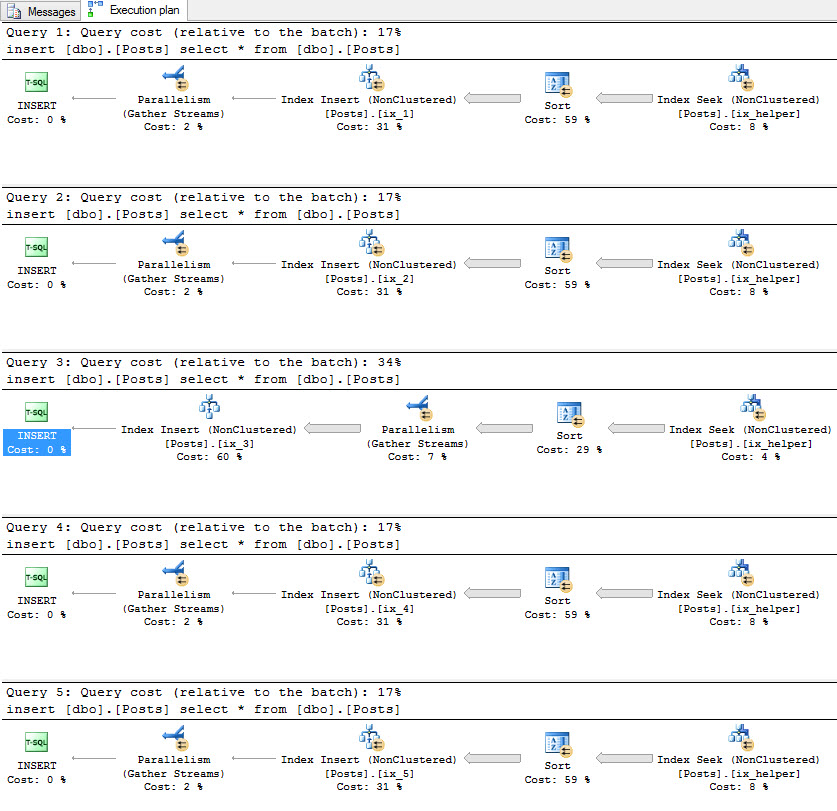
Just in case you don’t believe me, here are the execution plans from after I added my silly index. Of course, you probably shouldn’t go out and create indexes to help you create indexes to help you create indexes… You get my drift. It’s not worth the time and effort.

My point here is that it’s nice that SQL will naturally use appropriate indexes during index creation.

Sorting is horrible.

What did we learn?

SQL cares! Not about you, really. But it cares about resources. It will take all sorts of stuff into account when it needs to fetch you some data. If it can use smaller structures and hog up less resources, it will do that.

Thanks for reading!
Brent says: SQL Server says: “Creating this index sure would be faster if I had an index, man.”


Psst… Hey buddy, you want some E-Discovery?

One year ago today!

Well, sort of one year ago. Who knows when this thing will get published? Only God and Brent. And part of the calendar year fell during a leap year, which was just plain cruel, like a two part Buffy episode where the second part is the first episode of the next season DAMN YOU JOSS WHEDON!

Anyway, I started working here, annoying you guys with blog posts, giving Doug rub-downs in between video takes, and walking Ernie when the Ozar family was too full of illegal caviar and albino truffles to move. I also started running down the clock on being able to work with my favorite piece of software again. You can probably guess.

Relativity!

kcura_relativitySeriously, I love this thing. Not just because many of the databases I worked with under the software were hundreds of gigs, on up to 9 terabytes, but because the people behind the software really do care about the product. The customer support is aces (Hello, Pod One), and the developers are super helpful and responsive.

Plus, it’s just plain interesting. You give lawyers this crazy interface that lets them build just about any search query they can dream of, including some really, really bad ones, and see how SQL Server reacts.

If you’re a DBA who has read the execution plan of a Relativity query where saved searches reference saved searches that reference saved searches that… you get the point! I feel your pain.

It’s not just the hardware

You can’t fix every saved search and workflow immediately, which makes right-sizing hardware super important, but that’s not the only thing. Every case is different, and they often need custom indexes.

If you’re a DBA who has watched performance tank because some new search suddenly started scanning the clustered index of your 50 million row, one terabyte Documents table with a wildcard search on Email Body and Email Subject and Email Sender and Email Recipients and Email Metadata for ‘insert super common word here’, I feel your pain.

Best in Service

My other favorite part about Relativity is that they have standards. Not last call for alcohol standards, either. They keep you, as a DBA, honest. No backups? Ding. No DBCC CHECKDB? Ding. Perf in the tank? Ding.

The challenges that you’re presented with at scale are immense. You have 100 terabytes of data and you need to check it for corruption weekly. How’s that gonna work?

Index and statistics maintenance can be super important, too. Fragmentation may not matter if you’re reading 1500 pages instead of 1000 pages, but it can sure as heck matter when you’re reading 1,500,000 pages rather than 1,000,000 pages. And all those ascending keys? SQL Server is gonna make some real bad judgement calls on those, especially prior to 2014.

It’s a wild, wild life

You have users bulk loading thousands to millions of documents, users updating records during review, and then searches running on top of all that.

I am thrilled to be able to work with my favorite product again. If you’re experiencing Relativity pains, drop us a line.

Thanks for reading!

Brent says: For a refresher on this app and how we work with it, check out our past posts on The SQL Server Components of kCura Relativity, Performance Tuning kCura Relativity, Using Partitioning to Make kCura Relativity Faster, and Tiering Relativity Databases.